#helpdesk-twitch
1 messages · Page 596 of 1
 jade remnant
if there are no other options for fortnite in game cap properties, try using a window cap and doing the same thing
 halcyon elbow
I tried window capture already
 mossy jolt
How do I use a super theme on OBS.Live?
 lament blade
Whats up. I'm a beginner streamer on Twitch. During the live several people "donated". There is a total of $ 160. How can I withdraw it?
I create PayPal account
What's next?
??
???
@mossy jolt #helpdesk-selive 🙂
halcyon elbow
@jade remnant I can't get anything to work with it
every single other game works fine except Fortnite
 frail isle
how can I export my overlays from stream elements to stream labs
 twin sentinel
@frail isle Anything we can help you with?
You can use our API to export the data. For the API, see the #dev-chat channel header description.
 icy basalt
Hello everyone! How can I put an alert or gif on command that feels live? I wish that when one of my followers wrote for example !clap, I hear an applause in live ... possibly if there was also the possibility to add a gif, it would be the top
 mild lagoon
Helppppp
 granite gate
is anyone able to help me with my problem yet?
 round brambleBOT
@mild lagoon Welcome to the helpdesk! Please let us know how we can assist you today and a support volunteer or staff member will assist you as soon as they are available. Thank you for your patience.
twin sentinel
@mild lagoon Afaik there is no easy way to limit a command to a singel user.
 devout sky
Hi, i need help with my tippingpage cause it only says that they can donate with paypal, I would like that it can also be done with a card and I don't know where to modify it
like that
twin sentinel
For that you need SE.Pay:
SE.Pay is available for streamers with more than 100 followers, with a bank account in one of the following countries: Austria, Belgium, Czech Republic, Finland, France, Germany, Ireland , Italy, Netherlands, Poland, Portugal, Spain, Switzerland, United Kingdom, United States If you meet these criteria and don’t see SE.Pay, please contact support.```my problem was submitted yesterday
no one has been able to help me with it since sudo helped me and gave up because he didn't have a mac
 void cloak
The giveaway winners are completely randomised, any occasion of the same person winning is entirely by coincidence
@tight harness
Same winner as last time at my giveaway. How can it be? Can you check the giveaway draw I did?
 glad grove
Hello there, can anybody help me, please? I want to connect my Paypal Business account to receive donations, but I'm worried about what a Business account will show to donators. Anyone has any idea? Like maybe it'll show my legal name, adress and e-mail or none at all? Thank you.
lament blade
@viscid edge #🇵🇹︱português 🙂
granite gate
if no one gets to my case by monday, should I post it again?
lament blade
@glad grove i would say, create a business account and look on the information 
no, we have your case^^ @granite gate 
granite gate
oh okay. it won't get lost in a sea of internally shared messages over time?
lament blade
i guess not
granite gate
you guess?
 plucky stag
Hi, how could i set up a command that once a user enters it gets a certain amount of points? (i.e a !daily command)
granite gate
I thought it already has that with !points
 wild venture
Help! Chat stats are not working for my channel 😦 I keep getting the 404 error when i go to the website
 copper forge
 viscid edge
How do you win Pittersons
granite gate
also, will I be notified if it turns out that no one here uses a mac and will be able to help?
lament blade
@wild venture Hello!
What is your old and new name?
wild venture
@lament blade notoriousmikeee ---> notoriousmike
lament blade
Thanks, will be fix!
viscid edge
How do you win Pittersons ?
wild venture
@lament blade how long? 🙂 thank you
plucky stag
anyone able to help me out :) ?
lament blade
@wild venture next day!
wild venture
sweet thank you 🙂
 wanton mango
@plucky stag there aren't any variables to add points so not possible atm
lament blade
 thefyrewire
wanton mango

lament blade
what do you mean with Pittersons? @viscid edge
 charred moth
hello
lament blade
@charred moth Hello!
charred moth
can i get some help here, how to configure my stream on streamelements?
twin sentinel
what do you need help with exactly?
charred moth
the cs:go doens't appear
i play in 4:3 and the game dont appear on the capture game..
dont know why
twin sentinel
Do you use GameCapture to capture the game?
Have you started OBS Studio or OBS.Live as administartor?
charred moth
i dont use a GameCapture, yes i started the OBS Studio as administrator
twin sentinel
What are you using instead? I recommend to try to capture the game via GameCapture source.
charred moth
sorry im portuguese and i undurstnd wrong, yes i use the GameCapture source, i put the window that match the CS and doenst appear
twin sentinel
Are you on a laptop?
round brambleBOT
@charred moth For the best OBS support, please join their Official Discord @ discord.gg/obsproject
 waxen dove
is the streamelements website broken or some kind? every time i login and press "my dashboard" it just redirect me to the welcome page. :(
lament blade
which browser do you use? @waxen dove
round brambleBOT
@waxen dove On the page that gives an error, press F12 to open Developer Tools. Navigate to “Network” at the top and then Select “XHR” in the filter section. Try the action again that gave the error and note in the network tab any red text. Please copy and paste the error information that is given when clicking on this red text.
waxen dove
No red text or errors. Looks like it just redirects me wrong
Even after relogging I have the problem
halcyon elbow
My game audio is really laggy and choppy but FPS is fine
round brambleBOT
@halcyon elbow For the best OBS support, please join their Official Discord @ discord.gg/obsproject
 shell adder
is it possible to remove the ability for people who donate to you to add clips? I've seen that some people's streamelements don't have that, but mine does and I can't work out how to disable it.
Can't see it in the options
waxen dove
Weirdly in another browser it works.
Think it's my chrome browser doing weird things. Will look into it. Thanks for the fast help!
lament blade
you're welcome! 
twin sentinel
shell adder
@twin sentinel thanks!!!!!!!!!!!!! 
 silent jolt
I have a question brand new to streamelements. It looks like my most recent follower and donation wont show up from my last stream? Is that true?
twin sentinel
Are they listed in your widget data here: https://streamelements.com/dashboard/session ?
silent jolt
@twin sentinel no they are all blank. Is it because I haven't received anything while streaming with streamelements. I just switched over from twitchlabs
twin sentinel
Yes, then they will populate from now on, as you have signed up with us just now.
 zinc jewel
I have a question: There is only 0.69€ available to withdraw from my SE.Pay. But there are like 60-70€ for weeks on it, due donations via PaySafeCard. What can I do now, bc i want to withdraw it utterly.
twin sentinel
PaySafeCard has a sattlement time between 16-21 days.
 chrome garden
I'm trying to work out how to have a walk-on sound/alert/chat message. Similar to in streamlabs chatbot when a specified user says something in chat and they can have a welcome message
Is that possible in streamelements?
round brambleBOT
@green lynx Please follow our community rules:
- No advertisement or stream promotion
- Respect ALL server members
- No NSFW/NSFL
Thank you
twin sentinel
@chrome garden Afaik there is no easy way to reach that in StreamElements, as our bot does not have a greeting functionality.
chrome garden
Ahh okay =) It might just be a case of scrapping the function then. I don't really want to be tied to streamlabs chatbot for just one function
 dire nexus
hi i have a tiny problem
after i import my alertbox and scenes from streamlabs they don't get importend in obs+streamelements
round brambleBOT
@dire nexus To add your overlays to OBS, add a new browser source in your scene. Paste your overlay URL in the browser source properties, set the dimensions to 1920x1080 (unless you changed them on the website), and ☑ “Shutdown source when not visible” https://youtu.be/KDvLynUqXI4
twin sentinel
You can find your overlays here: https://streamelements.com/dashboard/overlays
dire nexus
i have all the things already setted up in labs
so i wanted to directly export them in elements to have less work
 white palm
good evening, I don't know why the commands don't work anymore
twin sentinel
There is an import tool to our cloud service build in OBS.Live. From there you can add the Overlays to your OBS.Live. @dire nexus
@white palm What type of commands, all, or only some?
white palm
all
dire nexus
@twin sentinel i did it but they don't save in elements
twin sentinel
have you renamed yourself recently?
white palm
nope
round brambleBOT
@white palm Please connect your streaming account (Twitch, YouTube, or Facebook) with Discord by going to ⚙ Settings and then Connections here in Discord. https://streamable.com/eg92w
 twin sentinel
@dire nexus So you did not get any error when importing and the overlays are not here: https://streamelements.com/dashboard/overlays?
white palm
i do it
twin sentinel
@white palm The bot does not seem to be in your chat, invite it via your dashboard.
@dire nexus Try to import them again.
twin sentinel
Did you select the correct scenes collection?
dire nexus
yep
twin sentinel
Then I am sorry, as why it is not importing.
white palm
@twin sentinel how??
twin sentinel
https://streamelements.com/dashboard > on the right: JOIN CHANNEL
white palm
thx
 last sleet
What's the chat command to give other ppl your loyalty points 
 wary halo
!give username pointsnumber
lament blade
is loyalty enabled? 
silent jolt
I am having issues with the Red Flare Super Theme In Game Scene. I cant erase the white lettering for social media etc
Anyone else having this issue
twin sentinel
You should be able to delete the assets in the overlay editor.
silent jolt
I tried to do that but the words wont go away. It's like the image is saved with the letter on it. Just goes over top of it
wary halo
@surreal anchor are you opening the editor in the browser or in OBS.Live?
silent jolt
In the editor on streamelements
last sleet
Yes its enabled @lament blade 
twin sentinel
@silent jolt Can you share a screenshot of the overlay editor and point out what exactly you cannot delete please.
Also you can choose the layer directly in the layers tab in the lower left.
 surreal anchor
@wary halo I open it in the Browser
wary halo
and which browser are you using?
lament blade
and the commands in default commands? @last sleet
last sleet
You're a hero @lament blade
lament blade
@last sleet 
surreal anchor
both gave me back a blank page
wary halo
🤔
surreal anchor
@tropic plinth Germany. Is that of any significance?
 tropic plinth
not anymore lol
wary halo
sometimes 😛
tropic plinth
users from some countries have reported issues
but not from germany
you should try logging out, clearing cache and cookies
surreal anchor
Lucky me..... 
lament blade
Do you have a blocker in brave?
tropic plinth
oh yeah, and check adblockers/ublock whatever else
 surreal anchor
Okay will give that a try.
tropic plinth
you can try private browsing mode before clearing cache and cookies
and if all of that doesn't work, I'd advise trying a different DNS server
 deep widget
Can we export SE loyalty points in .csv?
twin sentinel
deep widget
Thanks
deep widget
If you manage the documentation in that link/those files @twin sentinel it should be updated as its points you to https://streamelements.com/dashboard/account/information which no longer exists (its now https://streamelements.com/dashboard/account/channels)
twin sentinel
@silent jolt What exactly is going over top of what?
@deep widget No, these are not handled by StreamElements, it is an external tool afaik.
silent jolt
The word "facebook" or "twitter" wont go away. When I try to type mine in it just goes right over top of it.
twin sentinel
Most likely there are two elements above each other.
Try to find the duplicated one and delete the lower one.
surreal anchor
Okay. I logged out, switched DNS servers, cleared cache and cookies and went incognito but the blank page remains
silent jolt
Could the image have been saved with the words on it?
twin sentinel
unlikely.
you can try to move the image and see if the words move with it. they should not.
lament blade
@surreal anchor Did you restart your router?
surreal anchor
NO I have not. 1 Moment
lament blade
deep widget
@twin sentinel if I import a .csv into SE that doesnt have all the columns its expecting, does it 0 them out or not change those values?
twin sentinel
Not sure. Afaik there is an error then.
surreal anchor
Restarted my router! Still no success
deep widget
This tool you provided does not generate a .CSV in the expected format that SE wants it in (as it only does loyalty points, not all the other data SE wants), so as far as I'm aware there is no way for me to give all people x amount of points (not all people in chat). What a mess guys
round brambleBOT
@surreal anchor On the page that gives an error, press F12 to open Developer Tools. Navigate to “Network” at the top and then Select “XHR” in the filter section. Try the action again that gave the error and note in the network tab any red text. Please copy and paste the error information that is given when clicking on this red text.
deep widget
Allowing me to export my current data in the same format that SE wants it imported would make this Loyalty Points DB screw up a lot easier to swallow.
surreal anchor
Did what was asked of me but there wasnt a red text.
 bright knoll
There is no play button on my media request page. Its been gone for a while, also the bot is bugy at times, cant use "!play !pause !skip !volume" commands, elp
twin sentinel
@bright knoll The play button is in the video itself, cause we had to comply with new Youtube regulations.
surreal anchor
@lament blade Do u have another idea that could help me?
lament blade
@surreal anchor I am thinking right now
surreal anchor
@lament blade thanks!
 slow reef
I dont really know how to do the panels and make them look good, any suggestions?
twin sentinel
There are artists in #art-marketplace you can ask for a desing.
wary halo
lament blade
@surreal anchor i would say, reinstall your Browser or search for updates
surreal anchor
@lament blade I reinstalled chrome tried it on a tablet and I used a fres install of Firefox. But no luck
lament blade
it's a technical Problem maybe @surreal anchor
 twin compass
Hi There! I'm having an issue with the stream store. If someone enters a command for a sound affect it'll play the one they selected but will also play other that weren't selected any ideas on how to fix?
lament blade
do you use a anti Virus tool? @surreal anchor
surreal anchor
@lament blade I use the windows defender.
lament blade
thats weird 
 half island
I am having issues with the overlay editor can some one help?
round brambleBOT
@half island Welcome to the helpdesk! Please let us know how we can assist you today and a support volunteer or staff member will assist you as soon as they are available. Thank you for your patience.
 icy pumice
Hello can someone help me. I’m getting really frustrated
 polar rivet
Hello can someone help me. I’m getting really frustrated
@icy pumice With?
polar rivet
Ok what is it doing exactly?
icy pumice
When someone follows me my alert goes up but after that instead of it going away. The noise just remains in my ear and the only way for me to stop is it to exit out streamelements obs live and I don’t wanna keep doing that because I have to end my stream
Please tell me if that makes sense
polar rivet
Have you tried going here: https://streamelements.com/dashboard/overlays

StreamElements
The Ultimate All in One Platform for Streamers
Possibly changing the sound for that alert and see if it continues?
icy pumice
What u mean
polar rivet
You can edit and change all of your sounds / image alerts in there. Something might be bugged with whatever sound you're using. So changing it to something else may remove the issue.
 marble hawk
i cant seam to put a stream elements overlay on my Streamlabs obs help pls
polar rivet
Yeah go ahead and send it danny
icy pumice
Ok hold on
polar rivet
Your original post said that you kept hearing a repeating sound in your ear, so I thought that was the issue.
Zixer do you have the url for your overlay?
round brambleBOT
@marble hawk We're not able to troubleshoot issues with using our overlays in StreamLabs OBS (SLOBS) as we don't have the tools to support their software. We recommend using OBS Studio or OBS Studio with our plugin OBS.Live.
polar rivet
Don't see a video danny, you might not be able to post them here
icy pumice
polar rivet
ok see it now
icy pumice
That fire sound stays and just sounds line thunder in my ear.
marble hawk
noo that means i have to change everything and go to ons 😦
polar rivet
It should't take you too long Zixer. Just copy over what you can and go to here https://streamelements.com/dashboard/overlays
StreamElements
The Ultimate All in One Platform for Streamers
So the sound is repeating and it's too loud danny?
polar rivet
I've actually never heard of something not stopping. My only advice are a few articles I found.

If you are having your alerts echoing it means it is repeating itself in the background either on your computer or in the streaming software. First, make sure you do not have any additional pop out windows open.
Next, let's check both Xsplit and OBS
For Xsplit: Right click ...
OBS Forums
Hey guys
I had a little problem recently and i saw how to fix it very easily.
So if you guy have double streamlabs alert sounds just remove your scene and make another one, as simple as that.
This worked for me, if this works well hit me up :)
If this don't works i recommend ...
icy pumice
Sektor can you do teamviewer with me
polar rivet
I can't sorry. I will say this as my last suggestion though.
Alot of people say that if your sound file does not match the alert duration then looping can occur.
You need to go to where you can edit your overlay and look over your follow section with the sound file attached to it. Make sure you don't have anything selected that may be prolonging or looping the file.
If you don't have access to it or someone else made it for you, then you might contact them and let them know what it's doing. Sorry I couldn't be of more help.
 marsh sedge
I’m trying to take a vote in my channel. How do I do this?
 little oak
@marsh sedge like a poll?
 grand lintel
So i have been getting followbotted the last couple streams.. and i would like to know how to either stop all the messages from popping up or how to manually set that if there comes 1 follow while there is already a notification playing that the first message gets interrupted by the second one so i dont have to go through 20 minutes of fake follow messages going on in my stream
i'd mostly like the interrupted notification one or some way to skip all those notifications all together without having to pause it
little oak
with all that currently going on there is no sudden fix atm but in the mean time you can type !bot mute via chat so the spam stops in chat and on obs you can hit the lil eye on alerts overlay to pause the pop up spam on stream then slightly monitor your "activity feed" for when its over you can unmute bot/overlay this should slow down the spawn till something comes
grand lintel
so something for the idea section? @little oak
little oak
yes if you like to upload that idea or to checc if it is alreay there i can gladly give you a link to it 🙂
grand lintel
@little oak yes go ahead
round brambleBOT
@grand lintel Check out the StreamElements ideas board: https://strms.net/ideas. You'll be able to add ideas, upvote ideas you agree with, and track their progress with email notifications. Adding and upvoting ideas also helps the staff know which ideas should be prioritized so please take some time to upvote.
 ionic kelp
@grand lintel Here's some advice:
- Have follower alert visual only.
- Disable chat notification and have this as a custom command for anyone to run when they say that they followed expecting a response from you https://pastebin.com/ySrQnvfq
 odd escarp
Hi, I am using Kappagen. I was previously able to select the emotes to display for the command !kappagen (emotesplosions). I am no longer able to select any emotes when I click on "Select Emotes" for Emotesplosions. Can you please help? I would like to select only 1 or 2 emotes for the emotesplosions instead of all.
grand lintel
@ionic kelp thanks for the advice.. i never have it on in my chat anyway and i think ill just pay close attention to the activity feed
 fresh arch
Hi, how do I edit my follower goal label and keep it updating?
 chrome relic
alguem para me ajudar eu não falo ingles
 dry gulch
So anyone know why hype trains break the kappagen overlay?
odd escarp
is kappagen broken for you too?
 floral pagoda
I can not add my twich channel
little oak
what do you mean?
@chrome relic #🇵🇹︱português
@odd escarp @dry gulch it seems we have just encountered a bug and has been reported to staff 🙂
dry gulch
Hey @little oak awesome thanks dude! I just wasn't sure if anyone had reported it yet! Thanks a ton!
little oak
@dry gulch You're Welcome 🙂
also would you be able to provide a clip of it happening?
dry gulch
Sure let me see if I can clip one, anywhere i can send it in particular?
Its happened 2x in 2days
little oak
you can send clip in here or DM if you like so i can forward it straigh tto them
dry gulch
Publishing the highlight now
lament blade
Hi, how do I go about recovering the approximately 3 months of rewards I've lost from following streams without individually contacting over 100 streamers and asking them to contact you on my behalf to add arbitrary amounts of points to my account?
ionic kelp
@lament blade if it's regarding loyalty lost due to the recent host issue then you'd have to contact them for that. It's not something we're able to take care of.
lament blade
By them, do you mean Stream Elements support, or the individual streamers?
ionic kelp
The streamers
 left flax
Just had question maybe somebody can answer here. I use to be able to copy a message in chat by highlight over the text (emotes probably included) from right to left and now it seems buggy or not as responsive. Anybody know what I mean?
little oak
@left flax althought this has nothing to do with support but yeah i just tested this and was able to highlight text/emote and was able to copy and paste else where so it may be on your end 🙂
 wispy jay
Just wondering how to have the StreamElements link to the alerts on OBSStreamlabs, so I get notified and can set alert noises?
left flax
@little oak yeah from right to left? 🤔
little oak
left to right and right to left even highlighted entire chat and was able to execute it
left flax
@little oak Alright I dont know what it is. Thanks
little oak
what browser
left flax
Chrome
little oak
uninstall and reinstall and see it that helps or you go to settings and restore chrome to its original default and see if that helps
wispy jay
Just wondering how to have the StreamElements link to the alerts on OBSStreamlabs, so I get notified and can set alert noises?
@wispy jay it's the donations that aren't alerting
little oak
we do not have to tools to diagnose to see why our overlays do not work in SLOBS
 silk elm
 fervent sedge
@dry hare did you have any luck while asking around, finding out why although everything is in place l can't use my custom bot name on OBS.live?
 frosty fog
For OBS.live, How do I set an overlay that I have created myself?
wary halo
have you set it up in the overlay editor?
frosty fog
Yes, I have.
round brambleBOT
@frosty fog To add your overlays to OBS, add a new browser source in your scene. Paste your overlay URL in the browser source properties, set the dimensions to 1920x1080 (unless you changed them on the website), and ☑ “Shutdown source when not visible” https://youtu.be/KDvLynUqXI4
frosty fog
Oh, Awesome, thank you very much.
wary halo
no problem 😄
frosty fog
😀
 keen comet
Hello, IDK why it says my personal info involved on SE pay.
How can I fix this ?
round brambleBOT
@keen comet Please contact us via email for support with SE.Pay. You can use our contact form here: https://streamelements.com/contact Thank you
keen comet
Thank you
 cursive pawn
Hello Could any one help me with the tipping section on streamelements ?
wary halo
what is your issue exactly?
cursive pawn
i have only paypal option
round brambleBOT
@cursive pawn Please connect your streaming account (Twitch, YouTube, or Facebook) with Discord by going to ⚙ Settings and then Connections here in Discord. https://streamable.com/eg92w
 wary halo
could you please do that for me ^
cursive pawn
Done 🙂
wary halo
ah i see you are from Romania, that is an issue yes
cursive pawn
😬
wary halo
you used to be able to use G2A but that is having issues with EU regulations and SEpay is not available in Romania sadly
so there is not a lot we can do for you at the moment 😦
cursive pawn
is the problem that i'm located in Romania ?
wary halo
yes, there are a lot of streamers from Romania with the same problem
cursive pawn
my bank account is in UK
wary halo
hmm, let me ask around for you if it's possible to set that up
cursive pawn
oki doki , Thank You !
lament blade
when it comes to OBS should i let the system apply settings ? and that's it ?
Should i just leave it on automatic settings
wary halo
you could run the auto config wizard for the first setup yes
then tweak it if you want things different
Sub goals can be found in the overlay editor, once you opened your overlay click on the WIDGETS tab in the blue bar on the top of the page and look for the sub goal widget 😄
 light shale
Hey there,
since over a week i cant reach my streamelements Dashboard. Everytime i click on the Dashboard Button it reloads the page and i am back at the landing Page.
If i click on Profile and then on Dashboard i can load my own Dashboard. Since i click on another Channel (I am Editor) it goes back to the landing Page.
Thanks for your Help 🙂
wary halo
@light shale did you try to clear the cache of the website?
light shale
yes, tried via different browsers, even with my smartphone
wary halo
@lament blade https://www.youtube.com/watch?v=mBDY4RdoZ4A&list=PLCDDKlFdScbEwdx5AntcQIS1InkFJwHtv&index=7&t=0s

StreamElements Loyalty System helps grow your community and turn your viewers into fans. Viewers are awarded points for viewing your stream that can be redeemed in various ways.
StreamElements loyalty includes:
- Stream store
- Contest
- Giveaways
- Media Request
- Modules ...
light shale
at the moment i deleted my editor rights for one channel and asked him to give me a new invitation
now i can reach the other channel where i am editor too, wasnt possible before either
maybe there was something wrong with the connection
waiting for the link from him right now
wary halo
thanks for letting us know, i will send it around internally so someone can take a look at it
lament blade
can anyone tall me which is bet editor for window 10 laptop
light shale
yeah i think i still got the video with the issue
wait a moment i ll check that you have something to show your team 😉
little oak
@lament blade editor as in?
light shale
bad quality (sent it with facebook messenger earlier...) but i think it does what it should ,)
lament blade
that*
wary halo
@lament blade you can try Davinci Resolve, it's free
little oak
^
lament blade
but i dont have usb
wary halo
?
lament blade
davinci reslove want usb to edit
i alread downloaded one time
that tall i want usb
i thought that is pendrive or somehting else want to edit
little oak
in this situation google would be your best bet
they have so many out there
try Blender, OpenShot, lightworks
light shale
@wary halo He just sent me a new Invitation, worked 🙂
wary halo
thanks for the update 😄
lament blade
hey
should i stream with CPU or GPU , what is the most recommanded for non affiliates ?
@wary halo
wary halo
that entirely depends on your setup
wary halo
i don't believe that has the dedicated Nvenc chip, that is only for RTX cards
so you would have to go for CPU encoding
cursive pawn
@wary halo I'm sorry for disturbing could you reply in a PM when you will have any solutions that will help with my problem, even if that's a negative ?
wary halo
i haven't gotten an answer yet but i will let you know when i do, yes 😉
cursive pawn
thank you !
 smoky crater
I changed my channel name recently and I'm trying to update twitter, take away facebook as don't use fb no more but it keeps saying there was an error when saving, I can't change anything and on my stream for merch it keeps coming up with my old twitch name still. help please
wary halo
log out of the website and log back in
smoky crater
Nope, still sayiing an error when I am trying to save it. even doing on at a time doesn't work.
ionic kelp
Which browser?
smoky crater
googlechrome. I have tried from my phone as well but still doesn't work.
ionic kelp
Try in incognito
smoky crater
Nope, still says the same thing
ionic kelp
You got a second to hop in voice?
smoky crater
Sorry, I'm not sure what that means. I only have my laptop, phone and tablet and each on says the same thing.
ionic kelp
I mean to troubleshoot with a last idea. I'm on mobile and CBA to type it all.
smoky crater
oh sorry lol I'm got few things on at the moment assomeone just randomy popped round so I can do once they left if ok
ionic kelp
Sure. If someone doesn't get to you before I can try it.
 tawdry wharf
Hello, I'm attempting to delete my account, I've entered in my Username, email, jwt token and why I want to leave but I get an 'Invalid Username' toast notification in the bottom right. 😔
smoky crater
Thank you @ionic kelp i appreciate it so much
 stiff spire
How can I import everything from my mixer login to twitch login in streamelements?
stiff spire
Can I even import my overlays and alerts and bot from Mixer to Twitch?
little oak
i believe that would have to involve a merge account in order to duplicate between accounts casue "Merging accounts allows duplicating/sharing overlays between the accounts"
also Merging accounts only allows faster ways to switch between accounts
- Merging accounts does not allow data sharing between accounts - different streaming platforms, different type of
stiff spire
So how can I do it?
little oak
a staff will have to do that but i will execute a cmd for you to read it fully 🙂
round brambleBOT
@stiff spire Account Merging - Please note:
- Merging accounts only allows faster ways to switch between accounts
- Merging accounts does not allow data sharing between accounts - different streaming platforms, different type of events
- Merging accounts allows duplicating/sharing overlays between the accounts
If you understand the limitations of merging and want to proceed, please find the JWT tokens (!jwt) from both accounts you want to merge and you will be directed to DM them to a staff member.
little oak
do note that it is the weekend and its a little slower but a staff will get intouch with you and explain the whole thing to you before you decide if that is want youre wanting to do
little oak
👍 You're Welcome
wary halo
he is not from support though
little oak
oh yeah i forgot about that
stiff spire
who do i talk to then?
wary halo
i'll ask around to see if there is anyone available
stiff spire
thank u
tawdry wharf
Any thoughts on my issue? :)
wary halo
i've send you a friend request so we can DM 😉
marsh sedge
@little oak yes like a poll
 frigid marten
hey guys
i'm trying to show twitch emotes (BTTV/FFZ) on the chatbox overlay that i have
is that possible?
it is in streamlabs
but i can't seem to make it work in streamelements
round brambleBOT
@frigid marten We're not able to troubleshoot issues with using our overlays in StreamLabs OBS (SLOBS) as we don't have the tools to support their software. We recommend using OBS Studio or OBS Studio with our plugin OBS.Live.
 mystic gull
i need help with transitions dm me plzzz
round brambleBOT
@mystic gull For the best OBS support, please join their Official Discord @ discord.gg/obsproject
 spring aspen
Trying to activate SE Pay in my StreamElements dashboard
round brambleBOT
@spring aspen Please connect your streaming account (Twitch, YouTube, or Facebook) with Discord by going to ⚙ Settings and then Connections here in Discord. https://streamable.com/eg92w
 little oak
@spring aspen inorder to activate SE Pay you must have the following 3: 1:Streamers must be over 18 years old. 2: have a bank account under their name(verify identy) and 3: you must have 101 followers on twitch 🙂
wary halo
4: you must live in a country that is supported
spring aspen
Ok, so just start out with PayPal and switch over when eligible. Thx!
wary halo
yes 😄
spring aspen
Much appriciated!
 west pasture
Hello there! I have a problem regarding the Streamelements Store. I want to use it for soundeffects and have set up various items to be redeemed by viewers. They can be redeemed and when trying the soundeffect by pressing the "Play" symbol in the shop it works fine, however upon redemption no sounds are played. Am I missing a step like a widget that must be loaded in my scenes? I tried adding the redemption alert, that however did not impact whether or not the soundeffect played.
little oak
^
 cerulean hound
Hiya, I've been using streamelements ground control media player for song requests, and for some reason, yesterday it just stopped working, it'll add songs to the queue but never auto play them, and if i hit either skip/go back to previous song, it'll just not do anything and grey the buttons out, clicking play on new songs in the queue doesn't work, and I didn't change anything atall so a bit confused there. autoplay is still on, Little confused, If anyone has any idea what may be wrong with it I'd appreciate the help <3
wary halo
@stiff spire you can DM your JWT tokens for both accounts to @winter cradle so he can merge them 😄
 brittle meteor
Aloha, here is my Response, how can i get it to post with this format?
In my chat it posts like this,
twin sentinel
No way to make it look like this, as twitch does not support line breaks. You can use otehr symbols to mark sectiosn like |
brittle meteor
kk ty!
 cobalt kindle
Is there any way to close that massive orange banner at the top of the dashboard telling me things I already know?
lament blade
Can you make it so Ignored users for loyalty also means theyre ignored for watchtime?
west pasture
@wary halo I have the widget on the overlay, removed the text and the alert, in order for it to only play the soundeffect in the background, however it still does not play the effect
(Edit) it works if at least text and an image are added to the alert, therefore this issue is resolved for now
 carmine escarp
Hey guys Ive recently opened my merch store and got a few items published, unfortunately 1 of my items is stuck on creating item since yesterday morning & will not let me create another item, can someone help me address the issue?
twin sentinel
carmine escarp
Thanks!
 frozen pulsar
hey when i follow test the overlay work and when my friend follow for test the overlay dosent work. can you help me ?
twin sentinel
Is the follow of your friend in the activity feed?
Have they followed you in the past already and just unfollowed you to test it?
twin sentinel
When you replay it, does an alert come up on your overlay in the alertbox?
frozen pulsar
no
west pasture
New issue as a follow up from before, preview asset images are now stuck on screen after redeeming the item and onyl switch when a new item is redeemed (also sorry for interrupting the ongoing troubleshooting :( )
frozen pulsar
im so sad😥
twin sentinel
What is their name? @frozen pulsar
frozen pulsar
Hentrissss
 gleaming aurora
@serene granite yay you saw my request!
Can I ask is it based on real viewer watch time from twitch?
I hope so.
frozen pulsar
@twin sentinel and the tchat on the overlay dosnt work to
round brambleBOT
@frozen pulsar Follow these steps to grant managers/moderators access to your dashboard:
- Click on your Channel Name at the top of the dashboard and select Settings
- Create a new invite at one of three access levels (Bot Supervisor, Editor, Full Control)
- Send this invite to a mod/manager to give them access to your dashboard. The link is one-time-use and expires after 72 hours if not accepted
Video tutorial: https://youtu.be/zl_h-ttZDF0
twin sentinel
Can you please DM me an editor access link to your account, so I can take a look.
frozen pulsar
ok
twin sentinel
@frozen pulsar there is no follow on your account registered:
twin sentinel
what account are you logged into?
frozen pulsar
???
round brambleBOT
@frozen pulsar Streamelements on top of OBS -> Logout -> login
twin sentinel
Log into the account you gave me access to please.
gleaming aurora
Aw it seems to be based on what I did. 10 loyalty points =10 minutes. I'm already doing that with my loyalty points, still good though. Hope twitch will provide you with real watch time info soon @serene granite
 serene granite
one can only hope.
west pasture
Does anyone have a second to look into my issue a little bit above? 🧐
 lucid marsh
Hello when I clic on select emotes in kappagen widget i dont have any options... Is there a fix ??
twin sentinel
@west pasture This is a known issue that is being investigated.
west pasture
Okay thank you very much! Is there a way to remove preview assets? It seems I can remove sounds from the store items but not the preview asset image, even when deleting the image from my library
twin sentinel
@lucid marsh What browser are you using?
@west pasture Reload the overlays, or clear browser source cache should fix it.
west pasture
That removes the image from my overlay, however if someone redeems the item again, It'd reappear
Do I have to remake all store items and leave out preview assets initially?
twin sentinel
That would also be a solution or after the redemption clear cache or reload overlays.
west pasture
Okay, thank you very much, I hope investigating this issue goes well!
marble hawk
hello in the overlay editor how do i move freely my wigets the allways keep jumping auround
also can i make my giveaway follower only?
twin sentinel
@marble hawk No way to make giveaways follower only and on the top of the editor you can disable snapping, so you can move things around freely.
marble hawk
ahhh thank you soooooooooooo much it was supper annoying
 runic steppe
my commands arent working in stream how do i fix it?
round brambleBOT
@runic steppe Please connect your streaming account (Twitch, YouTube, or Facebook) with Discord by going to ⚙ Settings and then Connections here in Discord. https://streamable.com/eg92w

 harsh hawk
does anyone know how to resolve this error by clicking authorize in relation to my twitch account on streamelements ?? {"status":401,"message":"invalid csrf token"}
round brambleBOT
@harsh hawk If you are having an issue with login into our Dashboard and getting "Invalid csrf token", please folow these steps: https://pastebin.com/raw/MZNayFLB
harsh hawk
ok thanks
 midnight linden
Really interested in how watch time is being calculated; a stream that I mod for, worked out I have around 74,880 mins of watch time, meanwhile SE is saying I have somewhere in the range of 6.8k - 6.9k mins watched (but can't see the exact amount as my stats are zero'd  )
)
lucid marsh
@twin sentinel chrome
midnight linden
The leaderboard doesn't even display my stats, where it says I should be either
E: Turns out the search on the watch time tab, actually searches for the user on the points page instead
twin sentinel
@lucid marsh Try to clear cache and try to use it in incognito mode.
wary halo
@cursive pawn i was told to make sure you send in a support ticket for your question, because it's sunday it can get snowed under. You can send an email or check out the support section on the website to make a ticket.
cursive pawn
Thnak you !
 flat forge
How do you let the bot have ur name and that it can use the sub emotes
twin sentinel
Reame it via OBS.Live
round brambleBOT
Custom bot name requirements
- StreamElements bot modded and in chat
- Active overlay with alerts
- StreamElements tipping page in the panels below the stream (!panels)
- OBS.Live or Ground Control open
- Create a twitch account for the name you want to use or run the bot under your own name
- Custom bot name doesn't work on Mac
flat forge
ait thanks
 real loom
Hello, having some problems with my Logitech Brio that is not the known directshow issue. It will freeze/stutter like a horror show(it's really uncomfortable to look at,) but only on my 60fps normal monitor. It never happens if the window is exclusively on the 144hz freesync panel running gsync compatible. It also does not happen in SLOBS. Tried everything and spent hours last night erasing every registry entry and Logitech file to start fresh. Got my clean install, but it fixed nothing.
Seems to be a bug introduced in an OBS.Live update within the past 30 days or so. Was not present when I first got the Brio, and only started a few weeks ago. Can go back through my VODS and figure out when it started to correlate onset with the OBS.Live update that may be causing it if needed.
It's driving me nuts and I don't want to have to go back to SLOBS if I can avoid it. OBS.Live has been mostly better for me, except a couple feature SLOBS has that OBS.Live would benefit from integrating 😉
round brambleBOT
@real loom For the best OBS support, please join their Official Discord @ discord.gg/obsproject
 calm bronze
can you help me with the error that says failed to connect to the server.. bound to an IPv6 address and your streaming service only has IPv4 adresses (see settings -> Advanced). i cant find the solution for it? this happens when i click "start streaming" on streamelements
twin sentinel
In your OBS: Settings > Advanced Set Bind to IP to Default
calm bronze
when i go to setting > advanced settings.. i see general, video, recording, stream delay, automatically reconnect, network, sources, and hotkeys... am i on the right page or not.. i cant se the ip options
twin sentinel
In network section.
calm bronze
oh thanks a lot dude ❤️
 solid wing
If you add a message to a timer, does it vary between each message every x minutes? or does it type out both message at the same time?
twin sentinel
it cycles through the messages every time the timer is activated.
 odd peak
Hey, Been having a lot of problem with the Twitch Chat. It never seems to update even though messages are coming through on direct stream chat and if messages do show up its not accurate to my actual stream chat where some will show and others wont. Any ideas? I tried logging in/out a few times now and nothing. For the record, this happens with ALL streaming software from OBS, SLOBS, Twitch Studio, everything lol. Just not sure where to go as Twitch help keeps saying to use a different browser...Could it be network related?
twin sentinel
Is that about the overlay chat widget, or the OBS.Live integrated twitch chat?
odd peak
The OBS.Live integrated Chat.
round brambleBOT
@odd peak Streamelements on top of OBS -> Logout -> login
odd peak
Unfortunately I tried that a few times now with no success. It seems to work for a few minutes before chat messages dont appear anymore within OBS.Live
twin sentinel
Any message in the OBS.Live chat, like that it reconnects or so?
 stable grotto
Why is TTS on bits/donos not working? It's enabled and amounts set.
twin sentinel
Do you have it enabled on the variations, too?
odd peak
It constantly shows that it is in fact connected to chat. Although it posts it numerous times throughout stream.
twin sentinel
Is that the same when you open your channel in the chrome browser?
odd peak
If I open my actual stream within any browser my chat works perfectly normal. Its not until Its within OBS.Live or even Twitch Popout chat that things go wrong. So its been super confusing to try and find the source of the problem lol
twin sentinel
When that happens with the browser version popout chat, too, then this seems to be an issue on twitch side.
 copper rampart
How to test alerts?
round brambleBOT
@copper rampart You can test Alerts via the bell on the lower right corner of the Overlay Editor. Simply go to your Dashboard -> My Overlays -> Pencil/edit button on the overlay. Make sure the "Show Emulated events on stream" option is on to see the alert in OBS/Xsplit https://streamable.com/h6qgy
 odd peak
Ah gotcha, Yeah I reached out to them with a few tickets and each time it was logout and log back in lol. Ill try again and see if I can get it escalated on Twitches side. I really appreciate the effort in trying to help. Thank you
twin sentinel
@stable grotto Have you checked the solution I posted earlier? Is it working now?
stable grotto
What solution? Must have missed it @twin sentinel
twin sentinel
 old jacinth
having an issue getting my hoodie image size to look right for my art. it looks fine on the shirt, but it seems to shrink down for the hoodies. any solution for this?
wary halo
could be because you can't use the bottom half of the hoodie because of the hand pouch
remember you always have #dreamteam to ask your questions
@old jacinth
 gusty ice
is there a way to retrieve watch time data and display it as command?
old jacinth
@wary halo thank you
twin sentinel
!top online @gusty ice
stable grotto
The variations are on default settings/enabled. Should I change/disable @twin sentinel ?
twin sentinel
Is the TTS enabled in the default alert and the variations?
stable grotto
Thanks @twin sentinel I disabled the variations and it's working now 🙂
gusty ice
@twin sentinel thanks
 rose beacon
how can i use the app
 neon frost
I have set a max limit of songs and time for my media requests, yet my subscribers exceed these limits.
twin sentinel
Set the exempted user level at the bottom of the media request settings higher than subscriber.
neon frost
THANK YOU
 lean quiver
Hello. I'm looking for a way to setup a Cheer Goal with multiple goals. Right now I'm only seeing a way to set up for one goal. Are multiple goal in one widget possible?
 visual hedge
hi, how do i make a custom command and the bot responds with emotes? i thought you just type the name of the emote but i can’t seem to get it to work.
twin sentinel
@lean quiver Not sure, but maybe that widget is something for you: https://discordapp.com/channels/141203863863558144/457957557470887947/625997262593720320
@visual hedge Are these global emotes, or your channel emotes?
lean quiver
@twin sentinel I didn't about using HypeTrain for that purpose. I'll check it. Thx!
visual hedge
i am trying for my channel emotes. but is there a difference if i’m using global?
twin sentinel
For your own channel emotes, you either need to gift the bot a sub, or change the bot name to your own channel name. @visual hedge
 sinful nexus
Could i get some help? i am trying to add an alert but for whatever reason it keeps starting in the middle of the gif file.
twin sentinel
Gifs are always cycling in the background, also when the alert is not visible.
Use a webm if you need a defninite start of your video.
neon frost
Still having troubles with double alert on stream, no doubles in the added sources.
round brambleBOT
To add your overlays to OBS, add a new browser source in your scene. Paste your overlay URL in the browser source properties, set the dimensions to 1920x1080 (unless you changed them on the website), and ☑ “Shutdown source when not visible” https://youtu.be/KDvLynUqXI4
 gentle elbow
how do you set up and poll?
ionic kelp
You got the last part of that enabled for the sources?
neon frost
Bless, lemme see if it changes.
 river vine
Hi, my activityfeed on OBS.live and Streamelements isnt updating for the last 2 days. Is there a way I can fix this?
 pallid berry
hello i have question
my notifications not working in my stream when i get subscribe or anything
how i can fix that ?
round brambleBOT
@river vine Streamelements on top of OBS -> Logout -> login
twin sentinel
@pallid berry Is the subscriber event in your activity feed?
 median yarrow
@serene granite can we have a reset option for watchtime
round brambleBOT
@median yarrow Check out the StreamElements ideas board: https://strms.net/ideas. You'll be able to add ideas, upvote ideas you agree with, and track their progress with email notifications. Adding and upvoting ideas also helps the staff know which ideas should be prioritized so please take some time to upvote.
 plain lodge
round brambleBOT
plain lodge
round brambleBOT
@plain lodge Please follow these steps:
close OBS,
open the Nvidia Control Panel,
in the left menu select "manage 3D settings" and then under the list of options (right panel) press "restore default settings",
Start OBS again.
visual hedge
@twin sentinel thank you. I will try to change the bot name.
pallid berry
@twin sentinel Yes
twin sentinel
When you replay it, does it come up in the editor as alert?
 brave palm
how can i delete streamlabs from my twitch channel? i stream from  4
4
twin sentinel
Best to contact StreamLabs on this issue.
If you are referring to StreamElements: Part the bot from your channel jsing the PART CHANNEL button on the right on your dashboard here: https://streamelements.com/dashboard
 subtle edge
Does anyone know how to put borders on text alerts?
twin sentinel
Can you elaborate what you are referring to?
brave palm
so when the charactrs face id crying @twin sentinel that means it wont post 'you are live via streamelements'?
twin sentinel
yes, then you parted the bot from your channel and it won't say anything in your chat.
Is there anything we can help you with?
brave palm
thats it, thank you very much. was trying to figure it out for ages
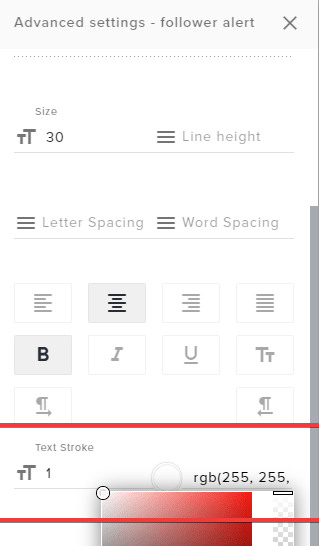
subtle edge
I want to do white text with a black outline or black text with a white outline so it shows up no matter what is behind it but i can't figure out how to do that in the editor
twin sentinel
You can edit the text settings like text shadow or text stroke in the text settings of the alertbox event.
subtle edge
the shadow doesn't display behind the text and is semi transparent
I was wondering if there was a way to simply put a border on it
 cosmic void
I think this is where I report it, I'm having an issue with redeeming 20 giveaway codes for finishing a challenge in the MTG Challenge in the MTG Creators Program on the stream. I keep clicking the redemption but everytime I do I don't get it, and it doesn't get sent to my email either?
subtle edge
Thank you
 wraith spade
Hello their
cosmic void
hi
wraith spade
So dubplicating a scene, To edit it slightly for a different game, got the scene duplicated, Got the edit done, Gone and pasted the stream link into obs browser and boom the new duplicate is obviously using the same stream link, Now if i go in and save it on one all scenes change, if i save it on other they all switch back, my question is, how do i get a duplicated scene to get a new link of its own
also who ever was just chit chat with me my headset was off
i put it on and you where gone 😦
twin sentinel
They are not the same link.
twin sentinel
DM me the two links please.
round brambleBOT
@cosmic void Welcome to the helpdesk! Please let us know how we can assist you today and a support volunteer or staff member will assist you as soon as they are available. Thank you for your patience.
wraith spade
^ im a prick, And a idiot, Very helpfull ** hahahah
My bad
❤️
I dont know how i did that
cosmic void
It's ok
wraith spade
😫 💩 😆
cosmic void
I can wait until you can figure out what's going on
cosmic void
Just let me know when I can report my issue
cosmic void
I think this is where I report it, I'm having an issue with redeeming 20 giveaway codes for finishing a challenge in the MTG Challenge in the MTG Creators Program on the stream. I keep clicking the redemption but everytime I do I don't get it, and it doesn't get sent to my email either?
So how do I fix this?
twin sentinel
@sonic sequoia What is your friends twitch name?
 sonic sequoia
dbmino
twin sentinel
Asked internally to fix their chat stats.
sonic sequoia
ty @twin sentinel
 boreal jungle
Hello StreamElements, can someone from staff inbox me in regards to some support for SE.Pay? My info is now reading as invalid and says to reach out for support. Thanks!
round brambleBOT
@boreal jungle Please contact us via email for support with SE.Pay. You can use our contact form here: https://streamelements.com/contact Thank you
lament blade
Hey how can i remove a mod
twin sentinel
Remove them on twitch.
 fallow meteor
hi, as a french citizen i would like to use SE.pay cause i can not use anymore G2A. can you help me ?
twin sentinel
@fallow meteor You need at least 100 followers to activate SE.Pay.
fallow meteor
that requirment is for US citizen according to wath i read not for French
 slim hatch
My store redemptions are staying on screen forever
any ideas why? was fine until tonight
slim hatch
ah ok thanks @twin sentinel it works if i enable the alert but redemptions just stuck on
I'll await a fix
wary halo
that is only if it's not showing up
the 100+ followers is a hard requirement for everyone
fallow meteor
that was not the case before with G2A :/
wary halo
because G2A is not SEpay
fallow meteor
can you list the document i need to activate it because i will be abroad when i pass the 100+ followers
and i need to prepare that 🙂
wary halo
no i can't
round brambleBOT
@fallow meteor Please contact us via email for support with SE.Pay. You can use our contact form here: https://streamelements.com/contact Thank you
twin sentinel
@cosmic void Please contact Wizards: https://company.wizards.com/content/contact-us
 neon flame
Any ideas when Kappagen will support gif emotes again from BTTV?
twin sentinel
No ETA.
 opal abyss
Hello, could I get help fixing the chat stats page of a channel I help moderate? It's had a couple of name changes
 abstract hemlock
@opal abyss Please provide us the old one and the new one 😁
opal abyss
Channel is now chelsiemonica. It was previously sieica, then chemoighte
lament blade
Is there a way i can change music to ncs instead of monstercat??
 coral gale
Hello again! Question: I have over 50 media sources because I like having audio clips for certain situations that might happen on stream. So far I really haven't had any issues with having so many sources but I wanted to check in here and see if there is any resource that might be better for so many media sources. I know there are Soundboards I could use and add the media clips to them instead, but it's already convenient everything is already on StreamElements. Is there anything that could be better than what I'm already using? Also in the 'Properties' of the Media Sources I have 'Use hardware decoding when available' and 'Close file when inactive' checked..
abstract hemlock
@coral gale Hi, maybe you could use this widget if you can trigger the sound with chat commands :
https://discordapp.com/channels/141203863863558144/457957557470887947/664809625169690644
lament blade
Is there a way i can change music to ncs instead of monstercat??
abstract hemlock
@opal abyss ill forward this to the staff, now we wait ok?
opal abyss
Alright, thanks for the help, really appreciate it 😄 @abstract hemlock
lament blade
ig my question isnt noticeable.
twin sentinel
Change the backup playlist in the media request settings.
 dusk badge
Kind of annoyed by this. Just spent an hour writing a bunch of custom messages for the Chat alerts, and they all didn't save, even after saying it did so.
It's only saved follows, not anything else.
median yarrow
How can I do daily sub count just numbers ex: Daily Sub Goal 3/10
 flint lintel
my commands arent working
 fast sandal
30 megs max on u ploading imnages?
abstract hemlock
@median yarrow You'll need to add a widget call Subscriber count, then on settings you can make them count by session and the field "text" you will write Daily Sub Goal {count} /10
@flint lintel what is your twitch channel?
flint lintel
nvm i figured it out all good
median yarrow
@abstract hemlock how can I make it auto reset daily automatic ?
abstract hemlock
@median yarrow on the web editor you can go to the data tab and then on "settings" enable the "Reset session 15 min after each stream end" option
median yarrow
where?
fast sandal
I have some professionally made animated overlays and alerts. is there a different way to upload them if they are over 30 megs?
abstract hemlock
@flint lintel Glad to hear 🙂
median yarrow
Its enabled
Auto Session Reset Controls when streaming sessions data is reset
Will this reset the daily goal daily?
abstract hemlock
If its enabled it will reset the session data
median yarrow
Okay going to try
abstract hemlock
if you do 1 stream per day is basically the same, right? 😛
@fast sandal the file are *.webm ?
lament blade
So idk what catagory this should be under but i imported an mp3 audio into my library in the overlay editor,how can i add it to the overlay?
abstract hemlock
You have to add the widget under the category of "static"
lament blade
which one? i tried video but it wont work
median yarrow
Can I use custom fonts like upload trying to use the font true lies font
abstract hemlock
@lament blade can you share a ScreenShoot of the widgets under Static category please
@median yarrow is it on google fonts?
lament blade
@abstract hemlock
https://gyazo.com/4ba8ad92fa89acac78b783c5cac9fd8a
 abstract hemlock
have you try the "image" one? 😉
sorry i miss read completly ..
you mean audios IM SO SORRY!!
median yarrow
@abstract hemlock Its called True Lies
Can you check if it works cuz it aint working for me
abstract hemlock
you can use audios as a StreamPerks on the Stream Store
or you can use a custom widget like this :
@median yarrow i will take a look
@lament blade and again sorry
median yarrow
kk
lament blade
its ok, thank you for the help 😛 😄
median yarrow
@abstract hemlock I am gonna dm you the link I tried another font but it didnt actually set the font?
abstract hemlock
i can't recomnend any right now, but you can google it, as mp4 to webm online or something like that
lament blade
quick question, there is probably something i missed in settings but i am trying to stream to twitch and switchted my stream output to twitch in settings and applied and restarted but every time i press start streaming it brings up YT stream settings
theres no input for a stream key anywhere because i did the auto connection method with twitch so all i had to do was login
round brambleBOT
@lament blade Streamelements on top of OBS -> Logout -> login
lament blade
that did the trick thx!
fast sandal
@abstract hemlock looks like I cant convert it to webm cause it takes away the PNG aspect of it (like a webcam)
if anyone can help me with this id greatly appreciate it
 whole axle
does anyone have a lurk command which thanks a specific viewer for typing !lurk in the chat
 fresh ridge
can someone help me with stream overlays on obs pls
 grizzled tundra
Is there any support on at the moment?
@fresh ridge what so you need help with exactly?
fresh ridge
When i put FORTNITE OVERLAYS - LLAMA START ANIMATED SCENE on it was just black and not showing
grizzled tundra
the overlay or the game or everything?
fresh ridge
overlay
grizzled tundra
hmm not sure what would cause that
fresh ridge
idk maybe the overlay
grizzled tundra
have you tried creating a new scene and applying it there as a test?
do all of you other overlays work?
grizzled tundra
maybe try a different premade one and see if that works
or create a basic one that has 1 item to test
fresh ridge
yea
grizzled tundra
I am looking for a support guy myself as my OBS crashed 3 times last night while streaming
fresh ridge
ok
grizzled tundra
it was very frustrating to have it suddenly just die
fresh ridge
how do i find the deminsions?
grizzled tundra
of you scene? or your overlay?
fresh ridge
overlay for a scene
grizzled tundra
are you on the overlays webpage?
on the same line as the name of the scene on the right side there is a small pencil icon click on that and that is where you can see/change the size of the overlay
don't click on the bigger pencil that is under the line that is for editing the overlay
grizzled tundra
yeah so it is 1080p which is 1920x1080
in that second image your overlay is larger than your scene
fresh ridge
yea
grizzled tundra
you can resize it to fit your scene
right click, transform, fit to screen
what is your canvas size that you have set in your settings?
grizzled tundra
you did add the overlay as a browser source
grizzled tundra
that is an odd overlay resolution
you should be either using 1920X1080 or 1280X720
at least for your scaled
which platform are you planning on streaming to?
grizzled tundra
I guess twitch if you are here but could be others
I am not sure if it is possible to share the link?
fresh ridge
i switched to 1920x1080
StreamElements
The Ultimate All in One Platform for Streamers
grizzled tundra
I will see if I can put in in mine and see what it does
fresh ridge
ok
 lone spire
works for me
fresh ridge
what did you do to it
fresh ridge
what do i have to do then
lone spire
- in the Sources
choose Browser
Named it
paste URL
Width = 1920
Height = 1080
ok
fresh ridge
i have all of that
lone spire
has to be an OBS setting at this point
can you screen shot your Video Tab settings ?
grizzled tundra
@lone spire you don't know if there are log files kept for OBS do you?
lone spire
there are somewhere.... let me take a look and see.... im semi new to troubleshooting in OBS
fresh ridge
@lone spire i will do that right now
lone spire
Your logs can be accessed in the app via the Help->Log Files menu item
grizzled tundra
One other thing you could try @fresh ridge is try installing other streaming apps and see if that works?
lone spire
there are also Crash reports in there @grizzled tundra
fresh ridge
grizzled tundra
cool thanks Neo I need to work out why it keeps crashing mid stream
lone spire
@fresh ridge , change your output to 1920x1080 or 1280x720
fresh ridge
ok
grizzled tundra
hmm there are no crash reports????
lone spire
when it opens the folder is it empty? @grizzled tundra
 vivid wind
I got an overlay For my stream on stream elements and it won’t show on my stream I also stream on twitch and play on an Xbox
fresh ridge
it will not work on consoles
grizzled tundra
yeah my crash logs folder is empty
vivid wind
Oh damn that suck thx
fresh ridge
@lone spire nothing happened
grizzled tundra
if you want to use SE with a console stream you will need to have a capture card to capture the HDMI output to your computer
lone spire
humm, if you want i can DM you and you can share your screen with me and ill compare your settings to mine @fresh ridge
@grizzled tundra , not sure why there would be no crash logs if you have had crashes... can you describe what was going on when it crashed?
grizzled tundra
mid stream OBS will suddenly and randomly just close
It did it 3 times last night
it was my encoding machine
I am using 2 computers with NDI
The encoding machine is a gaming laptop which should have not issues with heat but that is my current theory of why it crashed that the GPU got too hot some how. That said I have streams using this setup for a good month now without issues and with hotter room temperatures
the only difference was that it was raining outside so maybe the humidity was higher
but I am guessing it must be a software issue as SE OBS did update in the last week or so I think
I have when it has crashed loaded it up again and resumed streaming but it is a huge pain and I would often lose viewers which is not great
lone spire
understandable @grizzled tundra , have you checked your windows logs for that machine?
grizzled tundra
no I have not looked at them but not sure if they would help? everything else seems to be running fine
lone spire
i mean, it could be something like a video driver that got upgraded or if it is somehow a heat event it would show there. does the entire PC crash or just obs?
grizzled tundra
Just OBS
lone spire
what about a regular log file?
OBS writes data As it happens there
would need it to be from the date and time of the event
grizzled tundra
There seems nothing out of the ordinary at the end of those files
lone spire
are you getting the "oops something went wrong with OBS and needs to close" or is OBS crashing silently ?
grizzled tundra
it just closes silently
lucky every time it has happened I have noticed is it drop nearly instantly
I am wondering if I should be talking about this in another channel too as I only just realised there is a general OBS help
lone spire
yea, i was thinking may get more help there.... i did find this
https://obsproject.com/forum/threads/crash-and-no-file-huge-work-loss.79472/
that is similar in a way to what you are seeing.
search your log file from one of those crashes for "Exit process code"
OBS Forums
Hello everyone.
Sorry I don't post a log, but there isn't any. I'm using OBS Studio to capture via hardware (ElGato), and it's been working flawlessly except for two times. (It's a rig exclusively used to record. System load never exceeds 50% either in the CPU or graphics card...
may be getting a warning a good way before the crash and then the crash isnt logged due to the silent crash
grizzled tundra
I just searched for exit in the logs and that word does not exist
I will try the obs channel I think
lone spire
good luck
 acoustic storm
i had Nightbot originally but switched to Streamelements. i disconnected nightbnot but streamelemtns isn't working???
 cunning trellis
It's not currently in your channel. You need to have it join via your dashboard and mod it
 zenith widget
!connect @acoustic storm
round brambleBOT
Please connect your streaming account (Twitch, YouTube, or Facebook) with Discord by going to ⚙ Settings and then Connections here in Discord. https://streamable.com/eg92w
 sonic maple
!panels
round brambleBOT
Twitch's official help guide for Panels: https://help.twitch.tv/customer/portal/articles/2416760-how-to-edit-info-panels
 plucky lark
how do i get the theme's from streamelement's website to be added to my obs studios?
round brambleBOT
@plucky lark To add your overlays to OBS, add a new browser source in your scene. Paste your overlay URL in the browser source properties, set the dimensions to 1920x1080 (unless you changed them on the website), and ☑ “Shutdown source when not visible” https://youtu.be/KDvLynUqXI4
plucky lark
ty
 muted shore
What to do if I don’t have loyal settings on mobile?
zenith widget
That would mean you are not on Twitch
muted shore
Oh
 wispy epoch
Hello, I want to add watchtime command to my channel, how should I do?
round brambleBOT
@wispy epoch 10 minutes of watchtime are given to those in chat when the loyalty points are handed out (every 10 minutes). Therefore, loyalty must be enabled for watchtime to work properly.
There is no direct link between watchtime and all-time points.
It can’t be calculated from the amount of all-time points a user has because subs may earn points at a faster rate and !bonus all command increases all-time points for users in chat at that time.
Giving points to a single user does NOT affect all-time, only when giving to all in chat.
 candid grove
hello, can anyone help me with sound effects? I cant get them to work when typing redeem or clicking in extension
zenith widget
Steps to make a command trigger sound on stream:
- Go to Stream Store page here: https://streamelements.com/dashboard/store/items
- Add an item that has these settings on it:
- Stream Perk
- Loyalty settings to your desire
- (Next step) Add contents (image and/or sound you want to play)
- "Redeeming this item shows an alert
- Redemable via chat
- Skip Requirements
- Get the item name/command from the 2nd creation page
- Go to commands page here: https://streamelements.com/dashboard/bot/commands/custom
- Add command with desired name and have response for command as:
${redeem item_name_here} - Go to your overlays and edit the overlay you use.
- Click on "widgets" and add "Store redemptions" widget. Click save and you should be golden.
- Test your own command in chat and have OBS or editor open to hear sound
wispy epoch
I want to add the watchtime command to my twitch chat ?
!command add !watchtime ? ? ? ?? ?
zenith widget
10 minutes of watchtime are given to those in chat when the loyalty points are handed out (every 10 minutes). Therefore, loyalty must be enabled for watchtime to work properly.
wispy epoch
loyalty points active @zenith widget
zenith widget
Then you have to wait
zenith widget
Those points are Twitch Channel Points, which are different then the loyalty points system we have.
candid grove
152K wow
zenith widget
we flexing? 
candid grove
btw command was !watchtime, not !points @zenith widget
zenith widget
what? where?
 candid grove
yea i know
but i was going for infinite meme

btw @zenith widget sound effects work now. tnx
 sharp glen
Is there a way to edit a command that has 2 counters in it? Every time I attempt it I am only able to edit 1 of the counters instead of both.
zenith widget
Which command? I don't see any custom commands on your account.
sharp glen
It is for a streamer that I mod for. The initial command is set up like so: 2G has used test ${count test} times. That makes ${count test +149} channel points spent to use test.
Unfortunately, when I go to edit it it will only edit the second counter. Is there a way to make it edit both?
zenith widget
I need to see this. Whats the channel name and command name?
sharp glen
Channel: 2g33ksgaming
Command: !test
The counter works fine, it is just the edit counter prompt that I need help with.
zenith widget
 i'm interested in that usage case
sharp glen
On the command, I am behind on the count. I was just trying to show how many channel points were spent in order to use the test button. I got the algorithm for the counter right, it is just I would like to edit the counter so that if I edit it to a higher number like !editcounter test 300 then the first number would say 300, but the secondary number would change to the correct amount of channel points that it would actually cost. I just don't know if that is possible, or if the counter would just have to be kept up with.
zenith widget
Maybe use a 2nd variable?
test2?
because you are essentially manipulating(editing, using, adding) the same variable
there is also ${getcount} which doesn't increment the counter variable by 1
ooh oops
hit my streamdeck by mistake 
sharp glen
So would I be adding a separate counter or how would I go about doing that to where it works under 1 command?
zenith widget
/me We've been poked ${getcount variable1} times for a total of ${count variable2 +10000} time
zenith widget
assuming im correctly understanding your usage case here
sharp glen
Thanks.
 inner valve
whats the recommended image size for the redemption store? 😄
zenith widget
235x186
inner valve
thanks 😄
twin sentinel
@sonic sequoia The chatstats have been fixed.
sonic sequoia
<3 @twin sentinel
twin sentinel
@opal abyss The chat stats have been fixed.
opal abyss
Thank you @twin sentinel ! I appreciate it 💜
 subtle lily
where can i get help when i somehow lost some points for the merch store of a streamer?
twin sentinel
Can you elaborate on that please?
What points for the merch store are you referring to?
subtle lily
i found help. for anyone with the same problem regarding lost points: it was a deletion of a database and points have been reverted to november2019
 sweet socket
However zombiieh, there are no points for the merch store related to StreamElements
and the revertion is a known things, its been posted in #270206314561404928
lament blade
does anybody know why i cant activate my chat bot. Does it work if i am streaming on ps4?
twin sentinel
Have you made the bot join your channel on the dashboard?
lament blade
i can`t click the button to activate it somehow. The rest does work out
twin sentinel
What browser are you using?
lament blade
Safari
twin sentinel
What does the button say at this time?
lament blade
Nothing, the button is just blocked. It has a different color than the others
twin sentinel
Can you share a screenshot of that please?
Normally if the bot is not joined, the MUTE button is greyed out, but the JOIN CHANNEL button should be clickeable.
lament blade
yes one second
 short hound
heylloooo does anyone know where i could find the default loyalty settings please?
twin sentinel
You can control the loyalty settings here: https://streamelements.com/dashboard/loyalty
lament blade
twin sentinel
You seem to have already done the activation. That is why the button is greyed out.
lament blade
hahaha oopsie i cant even remember 😄
twin sentinel
Is the bot answering to commands now?
lament blade
no if i want to click on the bot settings, my screen is loading for ages. Now i closed the page and opened it again its just blackscreen
twin sentinel
Can you try to open the page in a chrome browser please.
lament blade
okay its working out now. Thank you so much
 dusk rover
is anyone's watchtime command still not working?
twin sentinel
Have you enabled the loyalty system?
 wheat cedar
@twin sentinel loyalty is working for me
@tidal oasis is there something that is not working with Subscriber bonuses for resubs?
cursive pawn
Could any one help me with the tipping setup ? i have only PayPal option, I'm located in Romania but my bank account is in UK is there any possibility to add the second way ? ( I've spoked with someone about this 2 day's ago and i was suggested to write an email , but I've didn't have time for that , so that's why I'm back here )
twin sentinel
There are no known issues with the sub points bonus on subscribing afaik. @wheat cedar
wheat cedar
oof, ok well subs work, resubs dont register points bonuses
twin sentinel
Are the resubs in the activity feed?
round brambleBOT
@wheat cedar Twitch prime (new and resub) and paid subscriptions (resub only) must be shared in chat manually by the person subscribing in order for the subscription information to be sent to StreamElements. For twitch prime, the user needs to have sharing enabled on https://www.twitch.tv/settings/prime. For paid subs, if the share box doesn't show up immediately it will when they refresh the page. https://i.imgur.com/VNJN0Uv.gif https://i.imgur.com/2297EA7.png


@cursive pawn Please contact us via email for support with SE.Pay. You can use our contact form here: https://streamelements.com/contact Thank you
 worthy musk
hey guys quick ? spam filters is there a way to add an entire list to banned phrases instead of line by line
twin sentinel
Afaik there is not.
worthy musk
ok ty
 neat cairn
hello, is the command !volume from media request working normally? I'm having some issues to use it
twin sentinel
Can you elaborate on the issues please?
There is a known error with the !volume command.
neat cairn
yep, it gives me this message, and it doesn't apply:
12:37StreamElements: gui93, an error occurred, please try again later.
I tested yesterday when I was streaming too
twin sentinel
Yes, this is a known issue.
 raven jackal
hey. I got 3 Variations for the subscriber alert. set to 33%,33% and 34% but i still sometimes get the default animation (the rotating shield). Is that a bug or is there something i maybe have wrong
twin sentinel
Most likely something is set up wrong.
The default animation is always played, when no variation is met.
 gentle imp
I bet when you hear default its a prime sub
raven jackal
well when i have obs open with the integrated overlay and emulate an subscriber event it sometimes plays in the overlay editor the default and in obs the correct one
can i somehow emulate twitch sub specially?
round brambleBOT
@raven jackal You can test Alerts via the bell on the lower right corner of the Overlay Editor. Simply go to your Dashboard -> My Overlays -> Pencil/edit button on the overlay. Make sure the "Show Emulated events on stream" option is on to see the alert in OBS/Xsplit https://streamable.com/h6qgy


 twin sentinel
Use a custom sub event.
raven jackal
i guess you won the bet ._.
gentle imp
or duplicate current setup and pick prime
since you have them setup for tier 1 and prime is a different kind
wispy jay
I am hoping this is the right place to ask but how do i use the ${time.TIMEZONE} variable... I live in Melbourne, but cant work out what timezone format it wants
twin sentinel
raven jackal
okay, it seems like twitch prime was a problem. but not "the" problem.
having this now, and when simulating prime subs i still get the shield
gentle imp
can you try set them all to 100% for instance just the prime ones see if it works?
raven jackal
that seems to fix it and it still switches through the variations
wispy jay
thanks all who helped with the time command, is there a date command? i cant see any variable
 dark patio
is there way to fix overlay cam image because when switching scene it does not load full image properly
twin sentinel
Can you elaboreate? Is the video capture source not loading correctly or the overlay browser source?
dark patio
overlay browser source
abstract hemlock
@wispy jay you can use and external API like decapi
https://decapi.me/misc/time?format=G:i:s&timezone=America/Lima
dark patio
everything is on streamelements
twin sentinel
What do you mean with it does not fully load the image in the overlay? Do you have a screenshot?
dark patio
half time works other time dont and it works when refreshed catch
twin sentinel
So sometimes the whole overlay loads and sometimes it does not?
 magic holly
Hey, I need to add my latest Followers and Donations to my Activity Feed (switched from Streamlabs to StreamElements) but when I add them to the "Widget Data" they don't appear on the Activity Feed and they are blank in the Widget Data Textbox (screenshot). Any ideas?
round brambleBOT
@timber pine Please follow our community rules:
- No advertisement or stream promotion
- Respect ALL server members
- No NSFW/NSFL
Thank you
dark patio
web site fine i can see everything obs i can see it but when switching scene it does not load image of cam box properly
twin sentinel
@dark patio Delete the browser source and add a new one to OBS.
twin sentinel
Yes, but the cache is refreshed.
 timber pine
sorry wrong channel
twin sentinel
@magic holly Afaik you cannot add past events. You can import the tips from StreamLabs to StreamElements, but the other events will get filled over time, with the new incoming events, after you signed up with us.
You can add the latest of each event in the widget data tab.
timber pine
sorry guys
magic holly
@twin sentinel Okay, thanks!
But why can I type things in the textbox? xD (recent followers)
dark patio
nope still does it
twin sentinel
@dark patio Can you exactly explain what you mean with does it please.
dark patio
just did
twin sentinel
@magic holly Cause it is programmed as text field most likely.
@dark patio What OBS version are you using?
dark patio
i have cam box in placed and when switching scene the cam box does not show the full image it its missing half cam box image
twin sentinel
Do you have a screenshot of that please.
round brambleBOT
@magic isle Please follow our community rules:
- No advertisement or stream promotion
- Respect ALL server members
- No NSFW/NSFL
Thank you
marble hawk
I have gone from strean labs to Obs
But now i have a really big stream delay
Witch i dndnt have before
how do i fix?
dark patio
@twin sentinel
 fickle lava
Hello Benno, I've uploaded a second webcam box webm format for my gameplay scene to see if that would help. sadly no results
twin sentinel
Can you also share a screenshot of that overlay in the editor please?