#helpdesk-twitch
1 messages · Page 581 of 1
 clever kernel
fit now
that is what i did lowed and still the same
that is what link told me to do so i did and still lag
 dry hare
uncheck the "enforce streaming service encoder settings" box in the first picture
clever kernel
i should be able to as so run at 1920 by 1080 as i'm affined with twaitch
dry hare
Just because you can, doesn't mean you should
clever kernel
so as that fixed it now then me uncheck enforce streaming
dry hare
1080p encoding requires more resources than you probably have available, especially if you're already experiencing errors
clever kernel
i was not have errors and till i re set my pc
so will my stream work good now then as uncheck that you said
dry hare
I have no idea
Because every single PC in the world is different, it's impossible to determine if your PC will have a problem
you won't know until you go live
clever kernel
lol we not all made off money
will i be moveing then good noing you
can i bring my merch to streamlabs obs
 lucid patio
Hello,
 round brambleBOT
@lucid patio Welcome to the helpdesk! Please let us know how we can assist you today and a support volunteer or staff member will assist you as soon as they are available. Thank you for your patience.
lucid patio
I have noticed since the changes to the media request system that the my music will randomly not be heard on the stream any more. To fix it I have to click the show on stream button a couple times before the music can be heard again. Any idea why this is happening?
 river abyss
Hello
Can someone tell me how to
let people sub in my channel?
 abstract hemlock
@river abyss You have to be affiliate
 jade remnant
@river abyss please do not cross post
 wary halo
abstract hemlock
wary halo
abstract hemlock
- At least 500 total minutes broadcast in the last 30 days.
- At least 7 unique broadcast days in the last 30 days.
- An average of 3 concurrent viewers or more over the last 30 days.
- At least 50 Followers.
wary halo

jade remnant
is there a reason you need advanced mode?
clever kernel
how you mean @jade remnant
clever kernel
i have it on that and i get stream buffing now
i have download my stream down what it told me in the link and still hiting how CPU
at 66.8%
where for the 3 weeks i have been down at the 17.3% 20.4%
all i did was rest set my pc and re start it
 lament blade
I'm having a new issue all of a sudden with streamelements. Whenever I start my stream, and using rtmp from my phone to send back to my PC. Whenever I switch scenes, I get an error, "an encoder error occured while streaming" it will work fine until I switch to any scene, and then poof, offline. I've never had this issue in the year and half of using streamelements.
jade remnant
your buffering is set to the same bitrate as above
" i have download my stream down"
what does that mean?
also your hardware is possibly harming your performance,
i would look to do some maintenance (updates, health checks etc)
clever kernel
how do i do that @jade remnant
that you tell me to upgrade my pc there @jade remnant
dry hare
Are you using a laptop?
clever kernel
hell no AMD like @jade remnant said
 sleek loom
Having issues with the chatbot. When I type !commands into chat, it does not display the link for my commands:(
jade remnant
ok, 1 please stop pinging me
2, you can use the amd sites to make sure your systems are up to date
use the windows tools to check on pc health and performance
wary halo
@sleek loom mod the bot by typing /mod streamelements in your twitch chat
 willow eagle
anyone else having issues with the bot not responding to commands right now?
clever kernel
im have loads iussue with them
wary halo
no issues on my channel @willow eagle (just checked to see if it's for everyone)
willow eagle
yeah none of my commands seem to be working :S
clever kernel
@dry hare can you pop in my stream at all see it all ok as CPU as drop now to 16%
wary halo
@willow eagle you can try to part the bot and re-add it again to your channel from the dashboard on the SE website
willow eagle
did that @wary halo getting some help with it now 👍
round brambleBOT
@willow eagle Follow these steps to grant managers/moderators access to your dashboard:
- Click on your Channel Name at the top of the dashboard and select Settings
- Create a new invite at one of three access levels (Bot Supervisor, Editor, Full Control)
- Send this invite to a mod/manager to give them access to your dashboard. The link is one-time-use and expires after 72 hours if not accepted
Video tutorial: https://youtu.be/zl_h-ttZDF0
 robust gyro
As a mod, can I add a death counter to somebody else's channel?
 tough wind
Does anyone have issues where people clicking the host button beneath your stream doesn't proc an alert or anything?
round brambleBOT
@tough wind Due to changes to Twitch API, we have filtered out hosts and will only show these ones on your activity feed:
- All hosts coming from an online channel with at least 1+ viewer
- Auto host events with at least 1 viewer - only from a channel that just went offline
Note: If you see "X channel has hosted you" with no viewers on the back, that is considered an offline host or a host with 0 viewers, we do not show these.
 autumn cedar
Can I have someone DM me about streaming Apex? This is really hard to read D:
robust gyro
Ooh thanks for reminding me I need to download the update lol
 rough mortar
Is there a bit alert I cant find 1
 wary lark
@autumn cedar if you have an issue we can try to address it here
clever kernel
guys thanks i fix my stream
 fading gust
I'm running into a strange problem with my media request again, different issue this time. Any time someone requests a song unless theyre ranked as a mod in chat it plays the same video thats completely unrelated to what they linked
 modest sinew
I was wondering if someone could msg me or so about getting the Text to Speech to work. I have it all enabled as well as on the Variations but still doesn't work
 mellow aspen
Was there any changes to when someone host with 1 viewer it doesn't make the alert go off?
Nevermind i see the answer to that
 void quest
Anyone able to help with se.pay questions?
round brambleBOT
@void quest Please contact us via email for support with SE.Pay. You can use our contact form here: https://streamelements.com/contact Thank you
lament blade
I'm having a new issue all of a sudden with streamelements. Whenever I start my stream, and using rtmp from my phone to send back to my PC. Whenever I switch scenes, I get an error, "an encoder error occured while streaming" it will work fine until I switch to any scene, and then poof, offline. I've never had this issue in the year and half of using streamelements.
 lunar dock
For some reason the bot stopped working in chat. Is anyone else having this issue?
 silver maple
I am trying to create a regex expression in StreamElements Spam filters where messages that are not English or German get auto timed out.
So I'm trying to make these characters allowed: a-zA-Z0-9ÄäÖöÜüẞß`-=[];',./~!@#$£€%^&*()_+{}|:"<>?
but I was only able to get a-zA-Z0-9ÄäÖöÜüẞß to work
lament blade
I have the log file if someone wants it.
can't seem to figure out what is going on with this
dry hare
Why are you using rtmp?
My recommendation would be to use NDI instead as it’s better suited for what you are doing
lament blade
Because I run multiple cams, I have a server in my basement that holds the RTMP, and then I use VLC media source to bring RTMP into OBS. I've used it this way for almost 2 years with 0 issues.
dry hare
Ooohh
lament blade
All of a sudden, now I'm getting a error.
dry hare
Gotcha
Is it VLC?
That’s causing the issue?
It might be a question for the guys in the obs discord
lament blade
Basically, when I stream from the drone, from my phone, I use Streamelements, add a VLC source, input my rtmp infomation, it pulls up the feed in the source. But since last night, when I swap scenes, it gives a encoding error. I've looked through the log, and it looks to be some sort of an audio issue maybe. I thought maybe my new One Plus was sending a different format of audio, so I just went up to tmobile, bought an S10, and still same issue.
I can start stream and stream just fine no issues, I can have Nginx open with no problems, but as soon as I go live on my phone to the the rtmp, and start swapping scenes, I get the encoding error.
heres the error in the log file
20:21:32.224: User switched to scene 'Starting'
20:21:39.701: User switched to scene 'Starting Now'
20:21:40.837: User switched to scene 'Dashcam'
20:21:48.472: User switched to scene 'Starting Now'
20:21:48.510: error: Input contains (near) NaN/+-Inf
20:21:48.510: [FFmpeg aac encoder: 'avc_aac_stream'] avcodec_encode_audio2 failed: Invalid argument
20:21:48.510: Error encoding with encoder 'avc_aac_stream'
20:21:48.511: [rtmp stream: 'adv_stream'] Encoder error, disconnecting
20:21:48.511: Output 'adv_stream': stopping
20:21:48.511: Output 'adv_stream': Total frames output: 479
20:21:48.511: Output 'adv_stream': Total drawn frames: 542
20:21:48.511: [rtmp stream: 'adv_stream'] Freeing 1 remaining packets
 devout fog
Hey, sorry I'm new here so not sure if this should go in obslive or under this chat
buuut I'm having an issue with my stream on twitch so I figured this would be the place. So, my stream looks fine on my end in OBSLive, but when I'm looking at my dashboard on twitch, its like it's been squished. Like there's large black bars surrounding my overlay. Anyone know of a fix?
 ionic kelp
This would be the place.
ionic kelp
Go to settings then video and screenshot that.
round brambleBOT
@devout fog https://www.take-a-screenshot.org
ionic kelp
That too
devout fog
ionic kelp
You can probably blame that on the window for the player being that it's square but does it show the same way on your channel?
And with it entirely fitting the monitor
devout fog
Yeah I double checked under my actual channel on twitch, and it was doing it there too
Should I lower the output resolution?
ionic kelp
Are you viewing your channel on a vertical monitor or level one?
Because there's 0 reason why it should happen on your channel player unless it's "squished".
devout fog
@ionic kelp I figured it out
I had the canvas window between my activity feed and chat bar on OBS, but I minimized those, and it showed me the full canvas where the black bars were
ionic kelp
That would cause it 
devout fog
everything's showing normal now
Yeah I feel dumb lmao
Thank you for the help though 🙂
 narrow iron
@dry hare Hey. Do you know if any of the Staff responded to the thing about my streamelements.com/fluffyrozey-9001 to streamelements.com/fluffyrozey link change?
ionic kelp
@narrow iron sorry about not mentioning it but passed it along to someone who might be able to answer it.
narrow iron
@ionic kelp awesome thanks. Cause I moved from Mixer to Twitch and the whole "-9001" is kinda annoying xD lol
 silk trellis
how to add stream elements as mod erator
ionic kelp
@silk trellis do /mod streamelements in chat.
 forest prawn
does anyone know why my game would freeze for about 3-4 seconds and then come back, its been happening for the past couple of weeks
 spiral crown
Hello my chat box is not working in obs (says its offline)
where do I go to reset this?
 vast zealot
Wondering if anybody can help me out; The Media Request for Stream Elements, it works great; however i cannot place the media request on screen because it starts playing the song twice; almost as if the song is dubbed and was dubbed a little behind so you can hear the song twice... anybody know how to fix this???
ionic kelp
@vast zealot do you have the MR spot on the website, OBS.Live, or ground control open at the same time with it?
Actually do you have the overlay with the widget in multiple scenes?
 hallow vault
I'm using the Event Alert widget and want to set up variations for subs... this is no problem, however, I wanted to have a variation where it's a Tier 3 Gifted Sub or Tier 3 Resub as separate variations...
but from what I can see this is not possible?
I guess what I'm looking for is being able to set more than one variation parameter
vast zealot
hey @ionic kelp I don't have anything else opened but streamelements itself... but hey someone told me to go to my obs setting's and make sure the check box for "Shutdown source when not visible" is checked and it worked! 😄
 vital tundra
Hello! I recently changed my Twitch username and now my commands dont work :/ How can i fix thos
This***
round brambleBOT
@vital tundra If you changed your name on Twitch please follow these steps:
🔹 Visit https://streamelements.com/logout and then log in again with by connecting with Twitch.
🔹 On the right side of the dashboard page that opens, select "Join" under bot settings. If it says "Part" select that and then select "Join" to send the bot to the chat. Don't forget to mod the bot by typing /mod streamelements in your channel if you have not already.
🔹 Post your new name here so that we can update your channel's chatstats tracking (must be done by staff).
 weak nebula
How do I Put the overlays on my stream
round brambleBOT
@weak nebula To add your overlays to OBS, add a new browser source in your scene. Paste your overlay URL in the browser source properties, set the dimensions to 1920x1080 (unless you changed them on the website), and ☑ “Shutdown source when not visible” https://youtu.be/KDvLynUqXI4
vital tundra
Thank you! My new Twitch name is ItsVigilante
 scarlet tiger
Okay
 frank hollow
TTS in Store? Who?
scarlet tiger
@frank hollow for chat redeem command or redeem on the website?
 wintry kite
tengo 20 megas de subida como me recomiendan tener la configuracion de stream en el obs de element
scarlet tiger
@wintry kite #🇪🇸︱español
frank hollow
website @scarlet tiger
narrow iron
@ionic kelp Sorry to ping you again, but do you know how long it usually takes to get an email from SE about the link change?
ionic kelp
I do not as I'm not privy to that but i will ask again.
narrow iron
Thank you
frank hollow
@scarlet tiger And how do I get him to play? because for me there is no volume option
scarlet tiger
You have add redemption widget in your overlay?
frank hollow
From store? Yes
scarlet tiger
Try redeem item via website
ionic kelp
@narrow iron Asked again. May have to wait a while till a definitive answer is available.
narrow iron
Fair enough. Thanks again for asking.
frank hollow
Tks @scarlet tiger I got it thanks to you! ❤️
scarlet tiger

 forest bay
How do I custom the games and get certain messages like the commands to show up automatically
 zenith widget
I'm not sure what you mean by "custom the games" but you can use the bot timers to have text show up automatically
forest bay
i tried that but it didnt actually load the commands like ive seen other streambots do, I want to Customize the names of some of the games i dont know if you guys can even do that though?
zenith widget
I'm not sure sure what you mean by 'customize the names of some of the games'
As for the timers, do not place the command name - the bot won't trigger its own commands
place the text in the timer
forest bay
your a bot arent you?
zenith widget
And you are rude.
What do you mean by "customize the game name"?
Change Fortnite to Forkknife? is that what you mean?
round brambleBOT
@forest bay Please follow our community rules:
- No advertisement or stream promotion
- Respect ALL server members
- No NSFW/NSFL
Thank you
forest bay
another streamer of mine was able to customize the in chat game names. Im trying to find out how he did it.
zenith widget
Show a screenshot of what you saw.
forest bay
....i dont have one.....
zenith widget
Then I don't know what you are referring to
forest bay
nevermind.
and by the way... asking if you were a bot or a person is not rude, it is a legitimate question based off how you are answering my questions. I was simply seeking clarification. I appreciate the assistance but I am not finding anything useful. thank you have a good night
zenith widget
!lazy
round brambleBOT
I'm a bot, only here to send helpful messages because the helpers are lazy.
zenith widget
this is a bot
I'm an actual person and everyone on themember list is a real person with an exception to this:
So yes, I will be offended by the way you asked the question, not by the intention of it
 viscid pebbleBOT
Hi @shadow tartan, Please ask your question(s) or describe the problem you're looking to solve so staff or a support volunteer can assist you as soon as they are available.
scarlet tiger

 young mortar
Hello gamers! Last night someone tipped me but the alert never showed on stream,awkward situatiomn to deal with. Do you know why this happened?
zenith widget
make sure you choose the country and not type it out
young mortar
I got the notification on paypal, email even in chat too. Bot worked perfect,mentioning the tip message on chat but the alert never showed on screen
i guess its about a specific setting i never did beforehand yikes
round brambleBOT
@young mortar Please provide your account ID found at the top of this page: https://streamelements.com/dashboard/account/channels This ID is public info and safe to share here.
young mortar
5e3840122e800a58ecf89498
zenith widget
You don't have any overlays created
this means there is no way to show the tip alert.
or any other alert for that matter
young mortar
so theres no point to set alerts via the program i use to stream? i have to creat overlays to make it happen?
zenith widget
I don't know what you are using, but yes
young mortar
i use streamlabs obs and i set the event list and alerts on, its workingon followers but not on tippers? im doomed
zenith widget
Streamlabs is a different company
our tipping link is not connected with their services
same as their tipping link is not connected to our services.
young mortar
oh alright i got it! so i set the overlays and everything will show up?
 shadow tartan
I go take streamlabs too
young mortar
Thank you mate!
 tired current
hi i need some help to reset merch store
 sweet socket
Hey @tired current please use the #helpdesk-merch for future merch related questions! 
zenith widget
You can reset it via the reset button in the settings @tired current
narrow iron
@zenith widget do you know what the email would look like when staff have changed my link to not have any of the numbers in it?
zenith widget
- I couldn't find a ticket with your link change request, unless I already answerd it.
- Email is not changed if you want the link to be changed.
narrow iron
@zenith widget I never put in a ticket. A support staff forwarded it to the staff
Should I put in a ticket?
zenith widget
Yes - send an email to support@streamelements.com with both links you want swapped
narrow iron
Okay I sent it.
 frail relic
Hi Guys and Gals,
According to twitch, my current total is 49 subs but Stream elements shows me a current total of 50? This also shows on my overlay and people where happy because I would get a 5th emote. Thing is I'm not there yet according to twitch...
Can I change the current sub total in streamelements from 50 to 49
Thank you
round brambleBOT
@frail relic Due to a recent change from Twitch API, these features are affected by the change:
- Ground Control does not have Custom Bot Name
- Subscriber count will count the Channel and any other permanent sub you may have (+1 or +2 or +3 on top).
We are working on fixing both issues, but there is no ETA.
OBS.Live still has Custom Bot name working fine in it.
frail relic
Hmmm ok normally i don't care so much but people now think there will be a new emote :p
Thanks anyways!
Is there somehow a line of code I can use to change {count} to for example {count -1} or something similar to bypass this issue?
zenith widget
Unfortunately, no.
 untold crest
@frail relic You can use external widget to achieve that (this is not in default as Twitch API is not consistent ATM): https://discordapp.com/channels/141203863863558144/259680142459142144/673805546813390850
And for chat command you can: https://discordapp.com/channels/141203863863558144/259680142459142144/673721158985711632
frail relic
Thanks i will look into that! Much apreciated.
 lilac sage
 gentle imp
well the image is from overlay, the rest seems easy to do, change font type and background, unless I'm missing something
check options on event list, you'll see what I mean
 mint nest
how can use the theme on streamelement??im using obs studio 🙂 thank you
round brambleBOT
@mint nest To add your overlays to OBS, add a new browser source in your scene. Paste your overlay URL in the browser source properties, set the dimensions to 1920x1080 (unless you changed them on the website), and ☑ “Shutdown source when not visible” https://youtu.be/KDvLynUqXI4
 thorn zephyr
hey @untold crest if you get a moment, i was told to dm you regarding tetris widget. thanks in advance
lament blade
How im use streamelements?
untold crest
@thorn zephyr tetris widget needs whole rewrite unfortunately as it doesn't work properly rn (options are ignored)
thorn zephyr
thanks @untold crest ill remove it for now. have great day
sweet socket
@lament blade download the android StreamElements application
lament blade
How im do that?
sweet socket

In this video, I show you two things: How to download an app and also how to determine whether or not that app is worth downloading. To download an app on Android's Google Play, simply tap on the app you want and press the "install" button located at the top right. Then confi...
its like downloading any other application
i highly recommend watching our videos over at YouTube if you're starting out with StreamElements
round brambleBOT
@lament blade New to Stream Elements?
Check out our YouTube channel https://www.youtube.com/c/streamelements/videos
with tutorial videos from setting up the basics, to in depth details on how to use our product.
lament blade
Thanks
 coarse loom
Hey, why can't i log out of my mixer acc and log on to my twitch acc on ground control? annyone knows how to? have uninstalled and installed MANY times...
 twin sentinel
Delete the JWT token in the settings.
coarse loom
thnx! that worked 😛
 ancient gyro
So since Im finally adding alert variations...am I going to have to go into every overlay to add the new variations? Or turn my main overlay into just an alert box overlay and remove it from the others n adjust accordingly? :V is there no global "alert settings"?
twin sentinel
You can edit the variations on one overlay and copy the aletbox to the other overlays.
lament blade
Hello how im load upp a video om Twitch
round brambleBOT
@lament blade New to Stream Elements?
Check out our YouTube channel https://www.youtube.com/c/streamelements/videos
with tutorial videos from setting up the basics, to in depth details on how to use our product.
lament blade
To ps4
 blazing spade
I can not load into my stream elements merch store to launch it. Everything else works fine, I just can load in to launch my merch
lament blade
I dont think that
round brambleBOT
@lament blade Here is a guide on how to setup the most essential tools for streaming from your console, while using StreamElements tools without involving a Capture Card! It's easy to do, take 4 minutes to read and 10 to 15 minutes to setup!
Read all about it here: https://blog.streamelements.com/how-to-stream-on-console-7b620b1c46c3
 frank harbor
Hey so i have kind of a huge problem with your site, for some reason i cant get onto Streamelements.com on windows explorer and i kinda need to get onto the site from there since i cant connect my twitch to any sort of third party on google without getting an error/site crash.
ionic kelp
@frank harbor If you mean Internet Explorer it's not really designed with it in mind. Try with chrome and see if this still happens.
dry hare

frank harbor
@ionic kelp as i said i cant connect my twitch via third party websites without it crashing on chrome
frank harbor
I can open the site without a problem, the chrome issue is a twitch problem
dry hare
try incognito mode
frank harbor
Welp nvm the link you sent me worked for some reason?
tf ive been trying to get onto the dashboard for months xd
gentle imp
 frank harbor
Anyways ty for the help man @ionic kelp
ionic kelp

 lavish oak
hey can i ask a question about streamelements and twitch on mobile?
round brambleBOT
@lavish oak Welcome to the helpdesk! Please let us know how we can assist you today and a support volunteer or staff member will assist you as soon as they are available. Thank you for your patience.
lavish oak
so i use streamelements on my twitch, i stream true ps4 and keep track on the chat with the mobile app, i try to get chat messages for people that host me and raids etc in my chat but whatever i do or try it doesnt work with my mobile app.... i just cant keep it to get it that i got messages about that in the chat true streamelements
round brambleBOT
@lavish oak Due to changes to Twitch API, we have filtered out hosts and will only show these ones on your activity feed:
- All hosts coming from an online channel with at least 1+ viewer
- Auto host events with at least 1 viewer - only from a channel that just went offline
Note: If you see "X channel has hosted you" with no viewers on the back, that is considered an offline host or a host with 0 viewers, we do not show these.
lavish oak
so in the chat its not possible to get that anymore?
follows are shown in the chat
but the hosts and raids not matter how much people are in the host doesnt show up
twin sentinel
Then most likely they are an offline host, we only show online hosts.
lavish oak
offline host?
twin sentinel
If you see "X channel has hosted you" with no viewers on the back, that is considered an offline host or a host with 0 viewers, we do not show these.
lavish oak
oke why is that if i may ask?
twin sentinel
Due to changes to Twitch API
lavish oak
oke, will that ever change again... or is this the way its going to be?
twin sentinel
For now it is the way we are recieving host events.
lavish oak
oke, thanx for answering
 lucid wren
Hey guys, so my friend has been using streamelements for a long time. I can access his page through dashboard etc. Now since 2 days the bot stopped doing the autochats and not responding to the commands. He is in the chat, not banned, modded but doesnt do anything. Already tried parting the channel joining again muting unmuting , Nothing works right now. Can anyone help with this ?
dry hare
obs.live >> Click StreamElements >> Log Out >> Log In
 velvet junco
My event list on StreamElements in My Overlays is being wonky. It always shows the same event for a raid that happened forever ago, making it not the current event. Is there a way I can reset the event list so it displays them properly? I don't want to have to turn off display raids. TIA!
lucid wren
@dry hare thanks for the rapid reply! We got it fixed doing what you said. Thanks a bunch !
Also guys since this is the twitch helpdesk anyway, I tried coming here through the twitch page of the bot streamelements, and the link was expired had to do a google search 😛
gentle imp
@velvet junco you can change/reset it here https://streamelements.com/dashboard/session
velvet junco
Oh I think I see the problem now. There's no Latest Raid in the Widget Data, so I can't reset it unfortunately. It reset everything else (follow, sub, tip, cheer, host), so now it's only displaying the raids 


 uncut karma
Hello there
I improve some pixelisation when i stream on 900p wirh 6000 bitrate. Should I switch to 720p to fix that ?
gentle imp
oh right, there's no raids, sorry @velvet junco try setting a host
uncut karma
Any help could be welcome 😘
gentle imp
it mostly depends on game, if it's a fast one, yep better go back to 720p @uncut karma
uncut karma
Yea on low game i have no pb but whzn i stream monster hunter or battlefront 2, there is some mini pixelisation, very few but I want a perfect video quality
Another question, is there a really big diference between 720p and 900p?
I mean about video quality
lucid wren
Twitch should just allow us to go to 10k bitrate like mixer imo >.>
lucid wren
I always give it more then 6k tho. So if any dips occur it will still be above 6k
gentle imp
tbh I don't know if there's much difference but with FPS games the result will be better with 720p at 6k bitrate from my experience
gentle imp
exactly
uncut karma
Aight i wil do that @lucid wren and @gentle imp
lucid wren
Your welcome 🙂
 pallid osprey
The issue with high bitrate on twitch is transcoding. Not everyone gets it. And surely not everyone on mobile is going to be able to watch a 10k stream
uncut karma
@lucid wren I can set my bitrate more than 6000? It dont give some critical issu?
pallid osprey
It just caps at 6k
lucid wren
No, I have mine on 7,5k
Sometimes my internet likes to have dips, and I saw my actual bitrate going down to 5300/5500. So I just set it higher then 6k 😛
pallid osprey
Nothing wrong with that
lucid wren
If your upload can handle it for sure
lucid wren
Just set your upload a tad higher, it wont make a ton of difference but for me in intense situations it did help a tad.
I could set mine to like 500.000 or something ridiculous if anything actually allowed that 😛
uncut karma
Sry if my english is horrible, Im french baguette
lucid wren
I'm a Dutch cheese, nothing wrong with coming from somewhere else I can understand you perfectly fine 😛
lucid wren

uncut karma
@lucid wren which game do u play btw?
lucid wren
Whatever im feeling like 😛 Dont thint thats a helpdesk worthy question tho xD
You can pm me if you like
uncut karma
Yea wrong room
 primal lagoon
how do I add a overlay?
round brambleBOT
@primal lagoon To add your overlays to OBS, add a new browser source in your scene. Paste your overlay URL in the browser source properties, set the dimensions to 1920x1080 (unless you changed them on the website), and ☑ “Shutdown source when not visible” https://youtu.be/KDvLynUqXI4
 shell crypt
Hi there ! I tried to go on Ground Control settings to activate custom chatbot name. But the option is not showing up... Could you explain me ? Thx
gentle imp
it's only available on OBS.Live for the time being
round brambleBOT
Due to a recent change from Twitch API, these features are affected by the change:
- Ground Control does not have Custom Bot Name
- Subscriber count will count the Channel and any other permanent sub you may have (+1 or +2 or +3 on top).
We are working on fixing both issues, but there is no ETA.
OBS.Live still has Custom Bot name working fine in it.
shell crypt
Thx 4 the answer
round brambleBOT
@harsh vessel To reset goals:
- from the overlay editor -> data on top -> goal tab -> reset progress of desired goal
- from the dashboard -> activity feed on the left -> widget data on the right -> goals tab -> reset progress of desired goal
Note: Goal widgets(progress) only counts up and doesn't go down automatically, if you loose followers/subs
 harsh vessel
And how to delete timer at tipping goal?
 tight harness
Click on the Goal end date section, hold down Backspace until it's clear, the "Ends in X" goes away
 indigo igloo
I was actually going to ask about this too!
Have the goal widget and it is totaling all tips I ever had... need it to start at 0. How do I clear that out? I reset the session under activity feed.
twin sentinel
see the few messages above.
indigo igloo
its not resetting...
tight harness
In the Goal tab did you change the number to 0 and then click on Save Changes?
indigo igloo
it wouldnt let me
tight harness
Is this on your own account? and also, which goal in particular?
dry hare
Correct
tight harness
That is more a Refresh button than a Reset on the Totals tab
indigo igloo
let me close it all out and check it
tight harness
In other words, the Totals tab isn't meant to be reset
tight harness
This isn't the default goal widget, this would appear to be a custom coded widget
 smoky tide
you can custom set the widget's goal or have it read from the data in your goals data from SE. You just need to change the drop down to do so @indigo igloo
indigo igloo
my issue is that i cant get the 500 to go away....
i have the goal set
its pulling old tips
tight harness
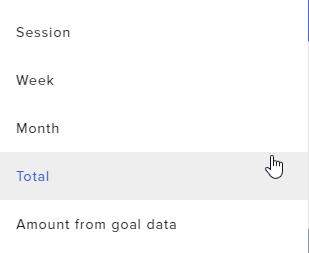
Ah, I see what's being done wrong here. You have the 'Pick period' dropdown set to Total, you need to change that
smoky tide
which of these is selected for that widget? https://i.imgur.com/HRSSZcK.png
 indigo igloo
@tight harness Its one of SE in #widget-share
tight harness
If you set the dropdown to 'Amount from goal data' instead it shows 0% (as you've reset the number in Goals)
Because you have it set to Total it's using the number in Total instead of Goals
indigo igloo
but then everything will be 0....
dry hare
@ocean parcel whatever overlay you're using you have two widgets, or two overlays loaded into your scene
indigo igloo
i still need my total followers to show
indigo igloo
i figured it out
they should make it so each section you can decided if its total,month, session
dry hare
You would need to ask the widget creator if that is something they would consider appending to the existing widget
dry hare
My guess is that he would probably do it if you asked nicely and sent him a picture of a kitten
 ocean parcel
help me please i messed up on my donation panle and i cant fix it 😦
dry hare
@ocean parcel whatever overlay you're using you have two widgets, or two overlays loaded into your scene
ocean parcel
oh ill have to figure out how to fix that
 static goblet
https://twitter.com/BySteazTV/status/1225837601183141889?s=20 just see my tweet of my problem

@StreamElementsS Hey, how do we put the Twitch dark night chat box please ? White color hurts my eyes lmao

 Twitter
please
ty
round brambleBOT
@static goblet To set your panels to dark mode please do the following:
Close down your chat,
Close down stream information,
In OBS go to view > docks > chat
Click on the cog, go to non-mod settings
look under "My Preferences" to enable/disable dark mode
You can then reopen your docks
view > docks
https://media.discordapp.net/attachments/370226812669788161/655790222902296591/unknown.png

 hardy spire
how do you get the bot back into a channel, when the channel changes name?
dry hare
StreamElements.com >> from your dashboard >> Sign out >> Sign back in >> part bot / join bot
static goblet
not working
dry hare
Did you follow the instructions?
static goblet
i'm going to "view", "docks" and there are not "chat" button
just looking the right
"chat" doesn't apparated
wary halo
@hardy spire you can click on the 'part channel' button on the dashboard, log out of StreamElements, log back in and click on Join Channel again. after that, type /mod streamelements in your twitch chat
hardy spire
Thanks team 😄
wary halo
wary halo
 fluid tulip
how do i get my song requests to play on my stream thanks
also i dont know how to get my chat up on my screen i only have one moniter i know im asking 2 things but im a new streamer and im still working stuff out THANKS
lament blade
how do i get my overlays to my streamlabs
pallid osprey
@indigo igloo https://streamelements.com/dashboard/overlays/share/5e3dad2edab54b1781d5fe5a
I added the ability to change goal range per goal

StreamElements
The Ultimate All in One Platform for Streamers
 chilly mica
Do hosts with no viewers not send an alert? 
round brambleBOT
@chilly mica Due to changes to Twitch API, we have filtered out hosts and will only show these ones on your activity feed:
- All hosts coming from an online channel with at least 1+ viewer
- Auto host events with at least 1 viewer - only from a channel that just went offline
Note: If you see "X channel has hosted you" with no viewers on the back, that is considered an offline host or a host with 0 viewers, we do not show these.
chilly mica
oooh, okay! thank you 
 tacit ledge
I've been looking around and haven't been able to find it, is there a way to make it so paid media requests automatically show the video and free requests do not?
ionic kelp
So tipped MR only?
tacit ledge
I have both on, but only want videos to show on tipped requests
where free requests will only have audio
ionic kelp
Don't think that's possible.
 abstract hemlock
but good thinking ... maybe you could add it as an idea 🙂
round brambleBOT
@tacit ledge Check out the StreamElements ideas board: https://strms.net/ideas. You'll be able to add ideas, upvote ideas you agree with, and track their progress with email notifications. Adding and upvoting ideas also helps the staff know which ideas should be prioritized so please take some time to upvote.
tacit ledge
Sounds good I'll drop it in there
 rare wren
is there a way to use loyalty points to redeem a video clip instead of a sound effect only
 clear grail
Is there any way to show the daily subscriber count so I can make an automatically updating daily subscriber goal?
twin sentinel
@rare wren You can use the mediaRequest for that.
@clear grail You can use the session subscriber count and add a goal "writing" at the end.
 magic plume
Hi I've just realised that my chat stats have stopped working in my dashboard and in the StreamElements extension panel. How do I get it to work again?
dry hare
@magic plume did you change your twitch name recently?
magic plume
Yes I have
dry hare
old name / new name?
dry hare
give it a few minutes and it will be working
magic plume
Ok, is there anything else I need to do?
dry hare
nope
magic plume
Ok thanks, I will report back if the issue still persists
narrow iron
So when I opened up OBS.Live it said couldn't connect to api.twitch.tv... Is that a problem with my WiFi or OBS.Live?

 real agate
It was allowing me to stream earlier now its saying something about pv4 and pv6 and not letting me stream ?
dry hare
@magic plume should be good
@real agate OBS Settings >> Advanced >> undo the Bind to IP settings
@narrow iron screenshot?
dry hare
Click StreamElements >> Log out >> Log in
dry hare
If you click View >> Docks >> Chat does it show up?
narrow iron
It becomes that white box on the right
dry hare
So if you click StreamElements >> Docks >> Chat does it show up?
dry hare
If you were to quit OBS.Live and re-launch it will it show?
narrow iron
Did that as well after logging out and in.
I should mention I am also live right now while talking to you xD
So I'll have to end my stream to do try that
I'm already guessing it's my DNS.
Cause ever since the Google crash, a lot of sites still haven't been working for me for a week now
I have to restart my router each time for sites to work
dry hare
You can try setting your DNS to 1.1.1.1 with a failover of 8.8.8.8
the 1.1.1.1 is cloudflare and the 8.8.8.8 is google's
narrow iron
So the alternate set to 8.8.8.8?
dry hare
yeah
I think that's how I have mine set, so if Cloudflare goes down, I have a backup with another DNS server that's also global and not as prone to failure
real agate
Is there anyway at all to optimise the obs as I had the stream labs obs and my pc was fine and since downloading this stream labs one my pc runs slow
dry hare
changing it mid-stream might also stop your stream fyi
narrow iron
@dry hare Do I need to restart my PC at all or just log out, close OBS.Live, relaunch it, and log back in?
Yeah going to restart my PC hold on since it did the "Can't connect to app.twitch.tv" again
dry hare
if you change the DNS, it's a network change. it may cause OBS to freak out, but also may not
round brambleBOT
@real agate https://www.take-a-screenshot.org
real agate
What's that
real agate
magic plume
Hi @dry hare I can confirm that my chat stats work now thank you for your help
narrow iron
@dry hare now even twitch won't work since I added 8.8.8.8...
OBS.Live still won't work even with that DNS change
narrow iron
In the IPv4 settings of my network
dry hare
here? or in the router?
narrow iron
Oh okay
real agate
narrow iron
@dry hare Do I just wait for it to update or restart my pc again?
real agate
@dry hare what to i click
narrow iron
And got the same error
I'm thinking it's my IP provider
Every time I restart the router sites work
But 1 hour later they stop
dry hare
That sounds like you need a new router
narrow iron
Will be doing so after work
dry hare
more like "so after an hour of use my router requires a restart in order for me to get anywhere online. Can someone take a look and see what might be causing it?"
they'll be like "yo we got this"
@real agate did that work?
real agate
yes that worked
but its not showing how many viewers i have on my stream?
on streamlabs it shows but here it doesnt
@dry hare
real agate
round brambleBOT
@real agate For the best OBS support, please join their Official Discord @ discord.gg/obsproject
 amber obsidian
is their a way to have chat commands tell you it's on cooldown in chat (a variable perhaps?) ie. !testcd sorry this command is on cooldown for another 30 seconds
round brambleBOT
@hollow swift To add your overlays to OBS, add a new browser source in your scene. Paste your overlay URL in the browser source properties, set the dimensions to 1920x1080 (unless you changed them on the website), and ☑ “Shutdown source when not visible” https://youtu.be/KDvLynUqXI4
 hollow swift
does that include streamlabs obs
twin sentinel
@amber obsidian No.
amber obsidian
that's unfortunate, SE should add it as a variable. Would be nice to have.
 tranquil mango
do you need a streamelements overlay for the loyalty store redemptions to pop up on your stream?
round brambleBOT
@amber obsidian Check out the StreamElements ideas board: https://strms.net/ideas. You'll be able to add ideas, upvote ideas you agree with, and track their progress with email notifications. Adding and upvoting ideas also helps the staff know which ideas should be prioritized so please take some time to upvote.
dry hare
@tranquil mango yes
amber obsidian
I have already added a couple ideas but I suppose I'll add this one too. Thanks
tranquil mango
dang it. i have a macbook so i cant have a streamelent overlay 😦
dry hare
yes you can
tranquil mango
how?
lament blade
how do I setup bingo
tranquil mango
i tried an overlay on my mac and it wont work
twin sentinel
round brambleBOT
@tranquil mango To add your overlays to OBS, add a new browser source in your scene. Paste your overlay URL in the browser source properties, set the dimensions to 1920x1080 (unless you changed them on the website), and ☑ “Shutdown source when not visible” https://youtu.be/KDvLynUqXI4
dry hare
Same as windows
real agate
omg helloooo
im due deleting your shitty app and redownloading streamlabs
can u help me
dry hare
@real agate View > Docks > Stream Information; You need to be logged in to your account to be able to select it.
wary halo
you are not even using OBS.Live, just stock OBS that isn't even from StreamElements
real agate
well when i downloaded it they were both the same thing
i downloaded it off the website and it downloaded both
lament blade
@twin sentinel is there a way bingo can be played with numbers
real agate
and they are both the same thing
lament blade
I saw some streamer plau bingo but they guessed a number 1-100
smoky tide
bingo could be set to only use the number emojis, no? 2️⃣ 1️⃣ 7️⃣ etc?
wary halo
@real agate they are not completely the same thing, and since i don't see the StreamElements tab in the top bar on any of your screenshots it's safe to say you are just using OBS Studio without the StreamElements plugin
robust gyro
Does anybody know if I can add a death counter to someone else's stream? I'm a mod on their channel
lament blade
how do I add overlays?
 wanton mango
As long as the !command command is enabled, then yes
round brambleBOT
@robust gyro To add your overlays to OBS, add a new browser source in your scene. Paste your overlay URL in the browser source properties, set the dimensions to 1920x1080 (unless you changed them on the website), and ☑ “Shutdown source when not visible” https://youtu.be/KDvLynUqXI4
twin sentinel
oh. 😄 sry.
round brambleBOT
@lament blade To add your overlays to OBS, add a new browser source in your scene. Paste your overlay URL in the browser source properties, set the dimensions to 1920x1080 (unless you changed them on the website), and ☑ “Shutdown source when not visible” https://youtu.be/KDvLynUqXI4
robust gyro
😛
 lethal zinc
Hi i got 3 challenges approved for the mtga creator program, and the link it sends me to to get the codes just redirects to stream elements home page, please @ me with response
 wanton pendant
hey there 🙂 my activity feed (obs.live 19.12.17.537) doesnt work. ground control works. on obs.live no activity is shown 😦
robust gyro
@wanton mango could you tell me where the command is please? We both can't find it
wanton mango
@robust gyro Default commands > Moderator > !command 😄
 sleek pilot
How do i activate streamelement in my chat @everyone
 cinder olive
How about you don't ping everyone.
wanton mango
Then use it like !command add !death Streamer died ${count death} times...
(!cmd also works if you wanna save time)
cinder olive
Did you ever stop to think that after the first two pings, that it wasnt working?
sleek pilot
Do u know or not
cinder olive
Checkout the StreamElements youtube page.
Itll give you all the info you need and more.
round brambleBOT
New to Stream Elements?
Check out our YouTube channel https://www.youtube.com/c/streamelements/videos
with tutorial videos from setting up the basics, to in depth details on how to use our product.
 white tartan
hi does anyone know how to fix this
twin sentinel
What exactly? The studio mode?
white tartan
nah the black screen
twin sentinel
Start OBS as admin.
white tartan
how
twin sentinel
https://www.itechtics.com/run-programs-administrator/
Also what game are you trying to capture?
white tartan
fortnite
twin sentinel
From what I see the game is captured in the screenshot. Otherwise the game elements would not be there.
white tartan
ok do you know how I would fix that
twin sentinel
Try starting OBS as admin.
And again from what I see the game is captured.
white tartan
ok
 rain crypt
has there been any issues with the bot this evening?
twin sentinel
Not that I am aware of. What are you experiencing exactly?
rain crypt
it was just completely unresponsive
twin sentinel
Any special commands which do not work?
rain crypt
not that I know of, none of them were working afaik
round brambleBOT
@sleek pilot Please follow our community rules:
- No advertisement or stream promotion
- Respect ALL server members
- No NSFW/NSFL
Thank you
cinder olive
Jinx.
twin sentinel
@rain crypt Make the bot a mod in your channel as a first idea.
cinder olive
You owe me some support 😉
twin sentinel
Nevertheless mod the StreamElements bot, too.
rain crypt
kk, will report back if any further issues
 woeful arch
Hello, i was wondering if ya could help me. Im trying to set my Tip's/donations/subscriptions to trigger certain sounds. How can i do that
 grim iris
My alerts I created in the stream store with a sound and gif does not show up on my stream when I do the command for it. However, I see the comment in my chat “mary has redeemed “wine” for 0 bees” but no gif or sound every shows up. How do I fix this? @round bramble
twin sentinel
Create an overlay with an alertbox widget and edit the events including the variations. Then add the overlay to your OBS with the correct dimensions (1920x1080 by default).
woeful arch
@twin sentinel doesnt matter if im using either OBS or StreamLabs OBS?
round brambleBOT
@woeful arch We're not able to troubleshoot issues with using our overlays in StreamLabs OBS (SLOBS) as we don't have the tools to support their software. We recommend using OBS Studio or OBS Studio with our plugin OBS.Live.
woeful arch
thanks
twin sentinel
@grim iris Have you added the store redemptions widget to your active overlay in OBS?
robust gyro
@wanton mango thanks for that
 boreal flax
Whenever I fullscreen my game it goes white, any fix?
amber obsidian
is it possible to make a chat response and a sound FX activate at the same time? - !rigged - ${redeem rigged} ${user} Just Lost ${user.points} ${pointsname} - HAH! J/K
seems ${redeem rigged} overrides the chat reply :/
 rough path
guys i want to make a widget for each scene on obs with streamelements editor , how i can do that ?
 north geyser
Hey suddenly in media request I can't find the volume control and the video is playing in the browser window and OBS at the same time, how can I fix this?
 coral gale
My tips aren't working. They showed up in my chat in StreamElements but not on my alerts and not on my dashboard on StreamElements site.
dry hare
Check PayPal or whatever payment processor you use. Until they clear that, they won’t show in activity feed or your alerts
 wise cliff
Does anyone know the command to shoutout the game someone was playing with the shoutout in the chat?
coral gale
@dry hare Yeah I use Paypal. It hasn't shown there either.
dry hare
As you were answered earlier
@coral gale then it hasn’t cleared there
Once it clears there the alert and activity will show up
coral gale
@dry hare Okay I see.
dry hare
We don’t touch money through PayPal so there is most likely a hold on their end while processing the transaction
clever kernel
where do i get my Donation link from as it got my mixer one there again to re add it back in the bot again
dry hare
When you sign into the StreamElements website, it should be under tipping settings there should be a link to open your tip page
coral gale
@dry hare okay im calling paypal
cinder olive
I would recommend their Live Chat.
dry hare
They will most likely tell you there’s a hold on it. It happens based on how/where the funds are being transferred. If they don’t use a direct bank transfer it’s never immediate
coral gale
@dry hare Yeah thats what ive gathered. They put a hold to make sure its legit or something.
coral gale
@dry hare Yeah. It's my first donation so it makes sense.
dry hare
Yep
As you get more and more they won’t usually get held unless they’re ungodly amounts far from the norm
dry hare
Yep. Unusual activity like that on a regularly dormant PayPal causes holds
coral gale
@dry hare Mkay. I will wait.
amber obsidian
is it possible to make a chat response and a sound FX activate at the same time? - !rigged - ${redeem rigged} ${user} Just Lost ${user.points} ${pointsname} - HAH! J/K
seems ${redeem rigged} overrides the chat reply :/
 rustic hamlet
I am trying to make a chat bot but when i type commands in my twitch chat it wond do anything
round brambleBOT
@rustic hamlet Go to the dashboard -> right side -> part channel -> join channel (https://streamelements.com/dashboard)
 rustic hamlet
thank you
 woeful vortex
How do I activate my stream elements, I’m streaming right now and my streamelements won’t give me alerts and all of that
cinder olive
Did you add an alert box to your overlay?
sleek loom
Hey gang, having trouble doing media request! lets me request songs but viewers cannot
Says "we only accept music"
coral gale
@cinder olive Me? I did. And I tested it out. It all seems legit. My Paypal is all set up through StreamElements.
cinder olive
@sleek loom Temp fix is to disable it in the media request settings:
sleek loom
says that the requested song is too long now :/ @cinder olive
cinder olive
What did you set the max length to?
 lime meteor
How will StreamElements be impacted by Twitch announced changes to their API access?
https://twitter.com/StreamerNews/status/1225902490526343180?s=19

Third-party app and bot developers for Twitch are upset today after being given 20 days before Kraken v5 API is rate-limited without having similar features available on the current Helix API.
Effective Feb 28th, this may disrupt some mod-focused tools. https://t.co/yxOV...
Twitter
cinder olive
The rate limit does not apply to applications, which have been applied and reviewed before January 31, 2020.
sleek loom
5min song requesting is 3min
round brambleBOT
@sleek loom Go to the dashboard -> right side -> part channel -> join channel (https://streamelements.com/dashboard)
cinder olive
Mind sending a screenshot of your MR settings @sleek loom ?
cinder olive
 Try disabling and re-enabling MR
sleek loom
is there a specific way to do that?
cinder olive
sleek loom
Done if you wouldnt mind testing
cinder olive
Try and set your max duration to 0 @sleek loom
sleek loom
dry hare
Set it for 30 minutes
sleek loom
done
dry hare
Did that work?
dry hare
Usually
lament blade
I have a question i was hoping someone could answer. I have added my youtube and twitter links as commands so that way my viewers can use the commands but streamelements bot always sensors the links even though i have whitelisted them and i turned the link protection off. anything else you can recommend to correct this?
 nova totem
how do i make my stream look nicer and not so plain
nova totem
how do i do that
round brambleBOT
@nova totem Checkout StreamElements Youtube channel, several guides for you!! https://www.youtube.com/channel/UCjerlCIbLPQwSnYlClkjDXg or a list with all the guides https://www.youtube.com/playlist?list=PLCDDKlFdScbEwdx5AntcQIS1InkFJwHtv
clever kernel
@dry hare is there a command that i can use for the bot so that my views can clip my funny bit on stream at all
 knotty copper
Hi Guys,
I've enabled text scrolling on my now playing tab and looks fine in the web browser but on my machine fails to scroll?
 spring lake
Is this going to affect SE? https://discuss.dev.twitch.tv/t/ip-address-rate-limiting-for-v5-endpoints/24005

Twitch Developer Forums
Update: We will delay the implementation of v5 rate limiting until further notice Effective February 28, 2020, the deprecated Kraken v5 API will be rate limited to an IP address basis of 80 requests per minute. In other words, requests from each IP address using your appl...
 rapid robin
Hey guys! does the timer widget count up as well?
Sorry, let me clarify, theres a countdown widget, but can it be made to count up as well?
dry hare
@spring lake no
Twitch Developer Forums
Hey Everyone, My name is Chris and I run the engineering team responsible for the third-party API platform at Twitch in partnership with my colleague Travis, Director of Developer Relations. First off, we made a mistake. We haven’t done a good enough job explaining what w...
 spice karma
Hey guys I asked about the new !nuke command on SE last week. I cant find any way to turn it off or edit it, not through chat or dashboard. Is there anyone who can help me with that?
 warm mango
Hey, guys. I have a "bug". When someone buy a message on my Store, after it desapear, it shows "User bought Message" and it's not desapearing... I've restart my overlay and nothing happens. What can I do?
 somber willow
hello i need help with my chat commands on twitch... since i changed twitch name (but same account) chat bot is not working anymore
spice karma
try if !rename <oldName> finxes it. I am not sure but give it a try, its usually used to transfer points and watchtime but maybe it can also fix your issue @somber willow
somber willow
@spice karma thanks so much.... i tried but since streamelements doesn't work in chat also the !rename command doesn't work unfortunately :/
 tepid brook
anyone know how to transfer watchtime after name change
 oak spear
How do you reset !rip count? If thats possible
dry hare
I believe there is a !rename chat command that a user can put their old name and new name @tepid brook
https://streamelements.com/dashboard/bot-commands/variables @oak spear there’s a count command set there
StreamElements
The Ultimate All in One Platform for Streamers
oak spear
Ohh thank you!
dry hare
Yep!
 dark musk
One of the user in chat cant redeem a command. He is earning points and is even a mod, but it says he doesnt have enough points
 fallen tangle
hi, i accedentally linked my youtube account to stremelements, and when i have a playlist playing (backround playlist) in media request on twitch, it skips to where i left off on youtube last time i heard the song
is there a way to fix this, so it always play from the beginning?
ancient gyro
Im guessing
theres no way to set it so anything that ENDS in a certain number sequence activates alerts?
EG: "Ends in .69" or "ends with 777" or w/e
zenith widget
@dark musk Tell him to login to our dashboard
 wheat hawk
any staffs here
my stream bitrate keep crashing and i have spectrum
is there an issue with spectrum
zenith widget
Hey, lets move to #dreamteam 😉
 quiet pulsar
how do i mod streamelement
zenith widget
/mod streamelements
zenith widget
our bot is not in your channel
quiet pulsar
how do i get iit into my channel
zenith widget
https://streamelements.com/dashboard -> right side -> join channel
also you need to enable the loyalty system in order to have watchtime
 severe field
Withdrawal failed when I want do money to my bank account, before I could do it help me out please
round brambleBOT
@severe field Please contact us via email for support with SE.Pay. You can use our contact form here: https://streamelements.com/contact Thank you
 bronze sphinx
Does StreamElements still have a TTS feature?
zenith widget
Yes - its located in the alert widget settings(in the overlay editor)
bronze sphinx
ah okay, so there's no way to have a command (like !tts [message] ) to use tts?
only for follows, subs, tips, cheers, and hosts?
zenith widget
Redemptions have TTS
as in, you can set a store item to receive messages from users
and name it !tts
and have the store redemption widget added to your overlay.
bronze sphinx
awesome thanks!
ancient gyro
Since Im guessing one cannot do what I was envisioning, is there a place to request features?
round brambleBOT
@ancient gyro Check out the StreamElements ideas board: https://strms.net/ideas. You'll be able to add ideas, upvote ideas you agree with, and track their progress with email notifications. Adding and upvoting ideas also helps the staff know which ideas should be prioritized so please take some time to upvote.
 fallen cedar
Hey i need some help making my stream fluid and not skipping frames
can somebody help me?
😦
zenith widget
@fallen cedar That is entirely dependent on your PC config but you can start with checking your settings with the 720p settings from here: https://stream.twitch.tv/encoding/
 sage quartz
So i my overlays dont pop up in my obs live?
round brambleBOT
@sage quartz OBS -> settings -> advanced -> scroll down -> enable/disable hardware accel.
https://i.imgur.com/ggMe9ZE.png
 sage quartz
It is enabled
round brambleBOT
@sage quartz Right click on the BrowserSource > Properties > Scroll down a bit > Refresh Cache of current page
sage quartz
wheres browser source
zenith widget
the thing that holds the overlay link
sage quartz
?
zenith widget
How have you added the overlay?
sage quartz
i created my overlay and when i go back to obs and hit activate overlay it does nothing
zenith widget
what "activate overlay"?
sage quartz
Obs Live > Stream Elements > Activate Overlays
round brambleBOT
@sage quartz To add your overlays to OBS, add a new browser source in your scene. Paste your overlay URL in the browser source properties, set the dimensions to 1920x1080 (unless you changed them on the website), and ☑ “Shutdown source when not visible” https://youtu.be/KDvLynUqXI4
zenith widget
this is how you add the overlays to OBS
sage quartz
how do i match my webcam with my overlay?
sage quartz
how do i test my widgets on stream elements
round brambleBOT
@sage quartz You can test Alerts via the bell on the lower right corner of the Overlay Editor. Simply go to your Dashboard -> My Overlays -> Pencil/edit button on the overlay. Make sure the "Show Emulated events on stream" option is on to see the alert in OBS/Xsplit https://streamable.com/h6qgy
 sage quartz
i cant find it
ionic kelp
That's the bottom left of the editor.
sage quartz
it says launch
ionic kelp
To the right of that.
sage quartz
to the right it says save
zenith widget
round brambleBOT
@sage quartz You can test Alerts via the bell on the lower right corner of the Overlay Editor. Simply go to your Dashboard -> My Overlays -> Pencil/edit button on the overlay. Make sure the "Show Emulated events on stream" option is on to see the alert in OBS/Xsplit https://streamable.com/h6qgy
 gloomy merlin
Hello, music etc. settings for my subscriber are not active.
ionic kelp
explain please 🤔
gloomy merlin
While the follower and donation settings change from the Overlay section, the subscriber setting does not change.
zenith widget
Check variations
gloomy merlin
Can you explain a little more? @zenith widget
 pastel vault
So i just downloaded stream elements on mobile to help me with my stream. How do i design an overlay on the mobile app?
zenith widget
@gloomy merlin
@pastel vault Im not sure I understand what you've downloaded and what you want to achieve via the phone.
gloomy merlin
Chat appears in streamelements but no obs
round brambleBOT
@graceful mica 10 minutes of watchtime are given to those in chat when the loyalty points are handed out (every 10 minutes). Therefore, loyalty must be enabled for watchtime to work properly.
There is no direct link between watchtime and all-time points.
It can’t be calculated from the amount of all-time points a user has because subs may earn points at a faster rate and !bonus all command increases all-time points for users in chat at that time.
Giving points to a single user does NOT affect all-time, only when giving to all in chat.
zenith widget
@gloomy merlin You mean the dock?
round brambleBOT
@gloomy merlin The default resolution for StreamElements overlays (theme and custom) is 1920x1080. Please add them in OBS at their full resolution and use CTRL+F to fit to screen if necessary. You can then downscale your stream in OBS settings > Video if you'd like https://i.imgur.com/6bWXxjR.png



 zenith widget
The chat widget needs to have the overlay match its resolution in the browser source to show up properly
gloomy merlin
Thankssss 🙂
 graceful mica
 sand citrus
Hi there, I have an account with StreamElements but the Leaderboards widget is showing 'No Data'
Have just switched over from Streamlabs as having viewer location plus stream schedule in one place is really nice
Can someone explain how I hook it up?
tight harness
If you didn't have an account with us until now it is likely that we don't have any data to display, once you have events come through your activity feed these leaderboards will fill up with data
sand citrus
Okay cool, thanks. Will that data start from now or is it retroactive?
Like, does will top chatters starting counting from then or my stream history?
ionic kelp
From the moment it's linked onwards.
 idle apex
Hi all, so I havecreated my own animation for a follow alert, the problem Im having is that the text for who actually followed me is too far below the animation I want to bring it up closer, but cant seem to find it, so Im guessin Ill have to change it in custom CSS, but where do I add it ? Im guessing somwhere around .text-cointaner, but I do not have the knowledge of it
wary halo
go to text settings > advanced in the overlay editor, no need for custom CSS
idle apex
Wow Ruben you saved my day Thanks! Also is there a way for me to change WHEN in time my text will show? now it show instantly but Id rather have it appear a second or two into the animation
ionic kelp
animation settings
idle apex
you guys are great help, Ive always tried to figure stuff out myself with subpar results, so maybe just maybe you can tell why my font wont change to the color I set it to , It just keeps being blue
idle apex
Fixed 😄
Another question, is it possible to actually move the animation I have uploaded, lets say I have my sub alert in the upper right corner, but I want my follow alert in the lower right
ionic kelp
Other than that you'd need to stretch the widget the entire size of the overlay and position the 2 accordingly.
I think as well.
wary halo

idle apex
yep Ill try it
 zenith schooner
well hi guys i havew a problem with the se merch when i go on this pannel its loading for ever but i need to upload a image thats bigger for hoddies and t shirt so do anyone know something helpfull ?
fluid tulip
could someone help me get my song requests play on stream please
tight harness
@zenith schooner What browser are you using? I'm not seeing any issue with your merch page on Chrome, also we have a #helpdesk-merch channel for merch support
 open flower
Yo I have a quick problem I need to solve
should be simple
Where do I find my media share submit page?
zenith schooner
1 oh sorry i dont saw it 2nd it fixed by ist elf 3 i am using fire fox
open flower
for others to submit
I set it up already, however I cannot find where viewers can submit
As in- free media share
zenith schooner
@tight harness but how can i change my image when its too small
ionic kelp
@open flower Part 1 https://streamelements.com/dashboard/mediarequest/settings
open flower
Yes, I did set all that up
wary halo
make it larger in a paint/gimp/photoshop/affinity designer @zenith schooner
zenith schooner
@wary haloyhea i have 1 bigger but there is no change imgaen buttpn or someting like taht
tight harness
From what I could tell you're still in the setup process, edit it once you've finished the setup
ionic kelp
2nd you need to have the bot join your channel. Go to your dashboard and click join on the right side. Then make them mod.
 south plover
everytime i try an upload an alert box and test it. this is how it shows on my stream
open flower
Okay, I have done that now
south plover
yes thank you. hero
open flower
@ionic kelp I see, you use !sr. Thank you!
ionic kelp
@open flower You can either have the media request tab open on the website or use OBS.Live/Groundcontrol. Otherwise have an overlay with the MR widget added.
 chrome wraith
Why do i have to restart OBS every time i change my scene?
rustic hamlet
How do I setup alerts in obs from stream elements
round brambleBOT
@rustic hamlet To add your overlays to OBS, add a new browser source in your scene. Paste your overlay URL in the browser source properties, set the dimensions to 1920x1080 (unless you changed them on the website), and ☑ “Shutdown source when not visible” https://youtu.be/KDvLynUqXI4
rustic hamlet
Alerts
ionic kelp
That's how.
dry hare
You have to create an overlay, add the alert box widget to the overlay, then add it to obs
boreal flax
When I fullscreen terraria, my stream just shows white. how can I fix this?
... seriously I spent a long time making an overlay and I'd like to use it.
grim iris
Yes but I don’t know how to configure it properly @twin sentinel I’m working on it now. I might have more questions soon
rapid robin
Hey guys, is there a timer widget currently available? (Not seeing it right now) if not, is there a particular reason/ where can I suggest it for addition?
 topaz beacon
Hey guys. Can someone help me. I dont know if the tipeeestream integration works^^
topaz beacon
So i have to add another Alertbox from tipeee?
ionic kelp
I stand corrected.
wait
Yeah it only imports the alertbox you have configured and the data. It doesn't show the alerts.
topaz beacon
So, i must have two alert boxes? One from SE and one from Tipeee. Then i have all alerts?
ionic kelp
They don't work together. They're entirely separate.
The only integration we have is moving from tipeee to streamelements.
Not having the alerts trigger in the overlay.
topaz beacon
Ok, so i must have 2 alert boxes. SE for twitch and streamlabs and tipeee
Thank you;D
twin sentinel
rapid robin
Can someone please answer the question ive now posted 3 days in a row? :] don't mean to pest... I'd just prefer it get answered so I get out of your hairs. - https://discordapp.com/channels/141203863863558144/199460642975907840/675740288399966248
ionic kelp
Anything like that would be in #widget-share or the widget tab of the themes on the dashboard.
lament blade
How Do i Choose A Game? Cause when i stream it says <No Game> How Do i?
abstract hemlock
@lament blade > https://dashboard.twitch.tv/
on the right you will see a quick actions panels
lament blade
kk
 lean barn
The bot wont answear me when i type my commands
wary halo
what is your channel name? (no link please)
wary halo
the bot is not in your channel
wary halo
i don't see it in the list
StreamElements
The Ultimate All in One Platform for Streamers
lean barn
So what do i do?
wary halo
go there
and on the right side there is a button
JOIN channel
click that
after the bot has joined your channel, go to your twitch chat and type: /mod streamelements
lean barn
Where does it say JOIN channel?
wary halo
lean barn
i dont see it
nvm
just needed to scroll down
Thank you so much!!!!!!!!!!!!!!!!!!!!!!!!!!!!!!!!!!!!!!!!!!!!!!!!!!!!!!!!!!!!!!!!!!!
wary halo
no problem 😉
lament blade
Hello
i am having trouble streaming threw streaming elements
it says streaming live but nothing happens
 jade coral
Hello I can't reset my merch store
lament blade
I really need help I cant Stream
 thorn otter
Someone help me with twitch donations?
wary halo
what is it you need help with exactly?
lament blade
when i press start streaming
wary halo
@jade coral #helpdesk-merch
wary halo
are you using OBS.Live or OBS Studio?
lament blade
obs live
wary halo
are you logged in to StreamElements in OBS?
 sick sentinel
Hey,
my OBS.live stops responding when switching scene collections
wary halo
sick sentinel
my bad
wary halo
no problem 😉
lament blade
yes
wary halo
if you go to Settings > Stream do you have to box ticked for bandwith test?
if so, disable it
 oak glen
I was wondering if I can edit widgets like the overlay chatbox. From what I have seen so far the chatbox messages enter from below even where there is no message above which looks markedly strange.
 mortal path
I've had a streamer approach me to build theme a collection of overlays. Is it possible to make a theme/supertheme on my profile that is exportable so they can bring it into their account? I don't seem to be seeing anything of the sort.
I know I can export individual widgets.... but I can't find anything for a full overlay/theme
twin sentinel
You can ask them for editor access and copy the overlays into their account.
round brambleBOT
Follow these steps to grant managers/moderators access to your dashboard:
- Click on your Channel Name at the top of the dashboard and select Settings
- Create a new invite at one of three access levels (Bot Supervisor, Editor, Full Control)
- Send this invite to a mod/manager to give them access to your dashboard. The link is one-time-use and expires after 72 hours if not accepted
Video tutorial: https://youtu.be/zl_h-ttZDF0
mortal path
Yeah. I knew of that option. Was hoping to save myself a set of copying was all
Would be far easier to be able to have them import all 11 (oof) overlays at once
Related, then: Is it possible to make a new theme in my own account? So they don't all fall under "Personal"?
twin sentinel
There is no way at this time to rearrange overlays.
mortal path
Lol. Batting 1000 in here this afternoon 😂
Will stick to my current method of Using the superthemes and making things within them, then
Thanks for the help
oak glen
Any thoughtson editing overlay chatboxes?
oak glen
I'll look into it, thank you.
 vast shard
Any way to organize the Media player History..? or Export it...?
twin sentinel
Not that I am aware of.
lament blade
I'm using the counter widget, is there a way to remove count, i can't seem to figure it out
twin sentinel
You mean the word count before the real number in the overlay editor? What widget are you referring to exactly?
 halcyon halo
Is it possible to play a sound or audio file on your stream when a specific subs enter chat?
twin sentinel
Not with StreamElements without custom coding.
halcyon halo
@twin sentinel any idea where i can find it
twin sentinel
You would need to code something like that yourself with the custom widget in the overlay.
In #dev-chat at the channel header are some documents linked on how to use the API.
 minor kestrel
I changed my name on twitch the other day and now my streamelements bot isn’t working when I type my commands in can someone help me please
 supple perch
why does it say 0 seconds for my watch time
twin sentinel
Please part the bot from your channel in your dasboard, log out of the dasboard, log back in and make the bot join your channel again. @minor kestrel
round brambleBOT
@supple perch 10 minutes of watchtime are given to those in chat when the loyalty points are handed out (every 10 minutes). Therefore, loyalty must be enabled for watchtime to work properly.
There is no direct link between watchtime and all-time points.
It can’t be calculated from the amount of all-time points a user has because subs may earn points at a faster rate and !bonus all command increases all-time points for users in chat at that time.
Giving points to a single user does NOT affect all-time, only when giving to all in chat.
sage quartz
Any help on how to get my facecam to fit my overlay
twin sentinel
You can rezise your webcam source in OBS.
sage quartz
How
twin sentinel
When you selected the unlocked cam source in OBS it has a red boarder with what you can rezise it.
sage quartz
but it either is to small or to big
supple perch
when someone does !watchtime it is always 0 seconds