#helpdesk-twitch
1 messages · Page 577 of 1
 stark torrent
stark torrent
stark torrent
yes
 chilly mica
So, I know we're told to check the shutdown source when not visible box, but.. why exactly? When I switch through my scenes, it takes a moment for my assets to load in, so it doesn't seem as fluid.
 round brambleBOT
@chilly mica Check out this tutorial for OBS’ studio mode which allows you to preload scenes before transitioning. https://www.youtube.com/watch?v=W8iWsD2Lq3U
 zenith widget
@stark torrent then its working
chilly mica
oop, thank you
stark torrent
@zenith widget is there a way for me to select multiple things in the overlay editor to move them and resize them with each other
 small drift
anyone know how to get se.pay enabled?
zenith widget
100+ followers and be from the countries we support.
small drift
i have over 100 and am from the US
 sharp pecan
Out of pure curiosity, how do other peoples' twitch inspector charts look on a normal, smooth stream? Is the graph pretty smooth or does it look like an EKG of a heart attack...?
round brambleBOT
@small drift Please provide your account ID found at the top of this page: https://streamelements.com/dashboard/account/channels This ID is public info and safe to share here.
zenith widget
@sharp pecan Its a tiny EKG graph
 devout hound
Hi, I'm trying to play media requests, do you know how to make the videos not automatically mute?
sharp pecan
ugh.. .still having some issues since October and trying to get our ISP to hone in on the issue. ty!
small drift
5e350d5c7c4fee06dfc56714
devout hound
I'm not sure why it's happening
devout hound
haha
zenith widget
do you have MR open in 2 places?
round brambleBOT
@stark torrent You can test Alerts via the bell on the lower right corner of the Overlay Editor. Simply go to your Dashboard -> My Overlays -> Pencil/edit button on the overlay. Make sure the "Show Emulated events on stream" option is on to see the alert in OBS/Xsplit https://streamable.com/h6qgy
 zenith widget
@small drift Logout from the dashboard and login again
devout hound
Sorry if this is overwhelming
zenith widget
You should see the option in the revenue tab.
I'm just checking 3 things at the same time, so no worries.
@devout hound do you use OBS.Live?
small drift
ok
devout hound
Yes @zenith widget
zenith widget
do you have MR open via your browser as well?
 strong kayak
zenith widget
strong kayak
zenith widget
@strong kayak #helpdesk-facebook
for the love of all that is sane, there are appropriate helpdesks 
small drift
@zenith widget still not able to add the feature
devout hound
@zenith widget I'm actually a bot supervisor for a streamer, but yeah they use OBS live and I have the MR settings open in my browser
 mighty merlin
i need help configuiring my overlay i will open a browser source and paste my link but it wont show
zenith widget
@devout hound So roleplaying(editor/bot supervisor/etc) can affect MR unfortunately and I believe this to be a bug that is under investigation.
round brambleBOT
@mighty merlin The default resolution for StreamElements overlays (theme and custom) is 1920x1080. Please add them in OBS at their full resolution and use CTRL+F to fit to screen if necessary. You can then downscale your stream in OBS settings > Video if you'd like https://i.imgur.com/6bWXxjR.png
 zenith widget
@small drift refresh now
small drift
@zenith widget I can see it now, thanks so much for your help!
mighty merlin
still not working @zenith widget
round brambleBOT
@mighty merlin OBS -> settings -> advanced -> scroll down -> enable/disable hardware accel.
https://i.imgur.com/ggMe9ZE.png
 mighty merlin
thanks 🙂
zenith widget
that worked?
mighty merlin
yep
zenith widget
cool 
stark torrent
My subscriber alert changes wont save sound, text color and font size
zenith widget
check variations
stark torrent
how do I enable custom css for any widget, in my case the goal bar
stark torrent
default, but I wanna change some of the code
zenith widget
The default goal widgets do not have the custom css option
stark torrent
okay, is there a way to import the goals that I bought into the premade overlay I got from you guys?
zenith widget
Widgets -> custom widget -> open css editor
or just click on the widget
and then on the 2 white papers with 1 red dot
on the bottom left next to "layers"
to copy the widget elsewhere
 wanton mango
If you want custom CSS for the default goal, there's also this - https://discordapp.com/channels/141203863863558144/457957557470887947/639045826815066122 - which is a custom widget recreation of said default goal, so you can use that as a base for your edits
 atomic helm
 plucky oriole
All of a sudden my overlay stopped working for my stream
round brambleBOT
@plucky oriole Right click on the BrowserSource > Properties > Scroll down a bit > Refresh Cache of current page
plucky oriole
Still didnt fix it
zenith widget
Then I might need a bit more details
plucky oriole
like?
 dry hare
Obs settings >> advanced >> scroll down and disable hardware acceleration for browser source
 dry hare
Woot
 night python
hi
 sick oak
My !watchtime command is only showing 0seconds anyone know how I can fix this?
round brambleBOT
@sick oak 10 minutes of watchtime are given to those in chat when the loyalty points are handed out (every 10 minutes). Therefore, loyalty must be enabled for watchtime to work properly.
There is no direct link between watchtime and all-time points.
It can’t be calculated from the amount of all-time points a user has because subs may earn points at a faster rate and !bonus all command increases all-time points for users in chat at that time.
Giving points to a single user does NOT affect all-time, only when giving to all in chat.
 hollow pagoda
hey guys I have a question
I was trying to have my stream elements bot to display my emotes in chat. I set a timer for it but as its not a sub, the emote names show up instead of the emotes themselves
zenith widget
You need to gift it a sub
hollow pagoda
Ah and there's no other way?
zenith widget
nope
round brambleBOT
@hollow pagoda Custom bot name requirements
- StreamElements bot modded and in chat
- Active overlay with alerts
- StreamElements tipping page in the panels below the stream (!panels)
- OBS.Live or Ground Control open
- Create a twitch account for the name you want to use or run the bot under your own name
- Custom bot name doesn't work on Mac
hollow pagoda
I heard someone say its possible through Ground Control
zenith widget
Its best via OBS.Live
hollow pagoda
OBS live is a bit heavy for my PC so I dont usually use it :/
thank you though, I appreciate your help 🙂
 modern slate
anybody know why my tip says PENDING in my paypal?
zenith widget
It needs to be accepted
modern slate
?
modern slate
im not a gamer. i use streamelements for my youtube vlogs...
i received a $100 tip and it says pending in payapl..
about a month ago i got a tip and it was pending until sender got it back...
zenith widget
If you go into the tip details, does it have an accept?
Most likely you need to verify your paypal account and the tipper also needs to verify their account.
zenith widget
Need more details then that
 weak delta
I have a webm file, it is uploaded and set as video for alerts but when I send a test, it doesn't show.
 plucky gust
ayo, major winter storm hit my area, been without power for a few days, didn't see if anyone responded to my previous question. I need to get my streamelements twitch account merged with my facebook account so I dont have to log in and out when switching. Also had an email for being approved for merch to make sure i have access to the discord channel?
weak delta
I disabled all other variations to make sure no conflict.
It shows in the settings of the cheer event that it's there and I made sure to save the settings.
 ionic kelp
@plucky gust Merch is public for everyone.
zenith widget
@plucky gust I can link the accounts for you, but I will need the JWT token from both accounts.
You can find your JWT token on your account channels page ("Show Secrets" to reveal the token): https://streamelements.com/dashboard/account/channels

StreamElements
The Ultimate All in One Platform for Streamers
Do note:
- Merging accounts only allows faster ways to switch between them
- Merging accounts does not allow data sharing between accounts - different streaming platforms, different type of events
- Merging accounts allows duplicating overlays between the accounts
ionic kelp
At least on the twitch side.
plucky gust
I'll dm hold up
zenith widget
@weak delta Let me guess this is in the streamer you mentioned?

 sturdy acorn
Hey, I'm trying to change my bits alert sound and when I upload the sound file it doesnt play and it plays the default bits sound instead. I've tried WAV and MP3 files, both didnt work. When at the screen to select the audio files that ive uploaded it plays nomally, but when I go to test the alert it still plays the default bit alert.
zenith widget
Check the variations of the cheer alert
sturdy acorn
ahh thank you, I didnt even think about checkign that @zenith widget
 lament blade
Hey guys, when a friend of mine raids me streamelements posts in the chat that he raids me and hosts me. The alert in my overlay shows the host alert. All i want is that streamelements just posts the message for the raid (and not the message for the host in the chat additionally) and that the overlay plays the right alert, my raidalert.
round brambleBOT
@lament blade Due to changes to Twitch API, we have filtered out hosts and will only show these ones on your activity feed:
- All hosts coming from an online channel with at least 1+ viewer
- Auto host events with at least 1 viewer - only from a channel that just went offline
Note: If you see "X channel has hosted you" with no viewers on the back, that is considered an offline host or a host with 0 viewers, we do not show these.
zenith widget
Oh wait, you are talking about another thing.
SO someone raids you, but the host alert plays
even if you have the raid alert turned on right?
lament blade
yes, and even my eventlist i see that he raids and hosts me. i guess thats why i triggers the hostalert instead of the raidalert. Also streamelements posts in the chat that he raids AND hosts me. Yes i have hostalert and raidalert both activated
*why it
zenith widget
So here is how the raid and host events come in:
We pick up the event from Twitch and if the Raid event comes before the host event, we trigger the host even in the alert widget. If the host event shows up before the raid event, we show the host alert.
In both cases we ignore the other event, to prevent double alerting.
Unfortunately, this is part of that mentioned change above from the Twitch API
and its random how the events come
random from twitch
lament blade
I just saw that it only happens for me. A friend of mine uses another site for his alerts and it's not happening from him. Does they work differently?
zenith widget
We and Streamlabs both connect and process events from Twitch differently
 tender osprey
Hi, good morning everybody. Does streamelements accept .webp format or will it be inplemented?
zenith widget
.webm is the recommended currently.
lament blade
I see. Well, its not a big problem for me that it posts the host and raid in the chat and it plays the "wrong" alert. I just set a higher number for the hostalert to trigger. Nowadays hosts are few and people raid more. Thanks for the help 🙂
tender osprey
Thank you KeiZar
 little palm
Hello, I am trying to setup the updated version of the Custom Greeting widget by Zanzer, but it is not showing any text at all.
It shows the gif, it plays the sound file, but the text is not showing up
zenith widget
I would suggest to poke @peak sinew about it
tender osprey
Under this tab, can I only select 1 of the usergroups or is there a way to have more than 1?
zenith widget
Its a cascading effect.
meaning
that any group after Subs, like VIPs for example
will be included
up to super mods and broadcaters
tender osprey
so regulars are also included?
zenith widget
!levels
round brambleBOT
Chat/Bot Levels
100 - Viewer
250 - Subscriber (Twitch subscribers automatically placed at this level)
300 - Regular
400 - VIP (Twitch VIP automatically placed at this level)
500 - Moderator (Twitch chat moderators automatically placed at this level)
1000 - Super Moderator
1500 - Broadcaster
Dashboard Manager Levels
Bot Supervisor
Editor
Full Access
Owner
https://i.imgur.com/s61Liry.png
 zenith widget
yes
tender osprey
so how would I go to remove for example regulars from that?
zenith widget
Regulars is a level you place users manually
via the user management
the role is not given automatically
tender osprey
ah yes
got it
Sorry if its all dummy questions but a man got to learn xD thank you for the help
zenith widget
Its what I'm here for
ionic kelp
Dumb questions are the one you don't ask.
tender osprey
Ikr sudo, better to ask than be sitting in ignorance
KeiZar those levels you just showed thats all backend side of bot or is there some panel I havent seen that we can set all that up?
zenith widget
Its default levels set by us
tender osprey
ah got it, thx 😉
 cloud wind
So, I ran into a problem, I cant seem to change my alert box notification to the images and sound that i want, rather it still gives me the basic one when I change it
zenith widget
Check the variations
cloud wind
@zenith widget I am diagnosed with stupidity, Thank you so much for your help
i got it to work again ❤️
 gentle dew
hi guys
I have a technical issue
I would Like the ability Import and export my loyalty points as SCV or whatever
but there is no Direct option
I was ask to make this as a recommendation, and I have but I cant wait that long
how do I go around that?
zenith widget
export our points?
gentle dew
yea the loyalty points, I want to export them first (tweak them) and then re upload them
the only option directly available now is to delete them
zenith widget
gentle dew
thank you, would I be able to reupload them after i tweak them?
zenith widget
yes with the imported
gentle dew
"3) Run the respective .cmd file. "
i dont see a CMD file
the Link you gave me was to Download this :

The read Me told me to Download this:
https://puu.sh/F5WvI/fbd76d93cd.png

is the se-csv the cmd file?
ionic kelp
yes
gentle dew
thank you
ionic kelp
Well
gentle dew
is (streamelements_id = "" ), my user name?
ionic kelp
You actually navigate to the folder that's in and then run the file through command line.
gentle dew
I am really stupid when it comes to this stuff lol
how do I "run the file through command line?
you mean like this?
https://puu.sh/F5WDm/8af973ec6f.png

gaaah this is so hard lol
I would be very grateful if someone makes a guide on this.. I would make a guide on this if I knew how lol
weak delta
Y'all know of any way to recreate this in Elements? https://clips.twitch.tv/AgitatedBashfulOctopusSquadGoals
I am looking through the animation settings now.
zenith widget
@gentle dew Please note, this isn't our tool, but here. Its as simple as that.
@weak delta recreate what exactly?
weak delta
So the alert is the little reaper man doing his flip and cutting the "new bits" text but that's all part of the webm file.
gentle dew
thank you
weak delta
Want it to also get the "user cheered ## bits" as well.
The person he commissioned to do it sent that example above and it works like that in the OTHER overlay solution.
But it's all about that Elements hype.
weak delta
That's what I thought, daaamn.
lament blade
Hello, i accidentaly opt out the streamelements email which you receive after streaming. I am still on this site. To activate it again should i lock in "No" in the "Opt out" Tab or "Yes" ?
zenith widget
I'll resub you
lament blade
Thank you very much 🙂
zenith widget
Wait, what page are you looking at?
lament blade
lament blade
Ah i see. I leave it on "no". After my stream tonight i will look if i receive the email 🙂 Thanks
Hei
 uncut karma
Question about twitch, which bitrate is most recomend to stream on 900p resolution ?
 twin sentinel
round brambleBOT
twin sentinel
round brambleBOT
@lament blade Welcome to the helpdesk! Please let us know how we can assist you today and a support volunteer or staff member will assist you as soon as they are available. Thank you for your patience.
ionic kelp
Anything up to 4500/5k should be fine as long as your connection can reliably handle it.
 sick saffron
chat stats not working for my channel ?
 wary halo
did you change your name?
sick saffron
year or 2 ago
ionic kelp
teejay_m old or new one?
sick saffron
thats the new one
zenith widget
check now
sick saffron
teejaytmknuckles was the old one Teejay_M is the new one
zenith widget
check the page now
sick saffron
works now thnx ^^
 desert cypress
hello 🙂
round brambleBOT
@desert cypress Welcome to the helpdesk! Please let us know how we can assist you today and a support volunteer or staff member will assist you as soon as they are available. Thank you for your patience.
desert cypress
i need help with my timer messages. Not all messages will be send automatically and the links will be send together and not as a single link were i can click on.
ionic kelp
@desert cypress Screenshot your timers
 sour spindle
Im here now
ionic kelp
Try it again but press F12 and go to the console tab. After you try saving changes see if anything red appears in the new window.
desert cypress
sour spindle
Failed to load resource: the server responded with a status of 404
ionic kelp
Nothing beyond that?
sour spindle
Uncaught (in promise) Error: OBS timed out after 10000 milliseconds
ionic kelp
Screenshot it
sour spindle
twin sentinel
@desert cypress The timers cannot have multiple lines.
twin sentinel
the bot will send no line breaks, so all the text is one line.
desert cypress
ok thank you !
round brambleBOT
@sour spindle On the page that gives an error, press F12 to open Developer Tools. Navigate to “Network” at the top and then Select “XHR” in the filter section. Try the action again that gave the error and note in the network tab any red text. Please copy and paste the error information that is given when clicking on this red text.
sour spindle
No red text in the network XHR tab
wait a sec
i just reloaded the tab
the red has showed up!
twin sentinel
Please copy and paste the error information that is given when clicking on this red text.
sour spindle
statusCode: 404, error: "Not Found"}
statusCode: 404
error: "Not Found"
twin sentinel
What exectly are you trying to chage?
desert cypress
you meen it like this?
round brambleBOT
@sour spindle Follow these steps to grant managers/moderators access to your dashboard:
- Click on your Channel Name at the top of the dashboard and select Settings
- Create a new invite at one of three access levels (Bot Supervisor, Editor, Full Control)
- Send this invite to a mod/manager to give them access to your dashboard. The link is one-time-use and expires after 72 hours if not accepted
Video tutorial: https://youtu.be/zl_h-ttZDF0
twin sentinel
DM me that link please with editor access
sour spindle
@desert cypress have you added spaces or pressed enter
desert cypress
spaces
sour spindle
does it work?
desert cypress
i will see it wenn i´m going live
ionic kelp
it'll still be a "paragraph".
twin sentinel
@sour spindle For me the module !8ball is enabled. But the bot is not joined your channel.
twin sentinel
Should I make it join again?
sour spindle
please
twin sentinel
When you reload the page (https://streamelements.com/dashboard/bot-modules), is the module !8ball enabled for you, too?
sour spindle
thanks a bunch @twin sentinel
its on now!
it is enabled
now if you dont mind imma remove ur editor
but thanks a bunch!
twin sentinel
yes sure.
 compact jewel
Hello my total sub count is 3 on SE but on twitch i have 2 subs any way of fixing that?
round brambleBOT
@compact jewel Due to a recent change from Twitch API, these features are affected by the change:
- Ground Control does not have Custom Bot Name
- Subscriber count will count the Channel and any other permanent sub you may have (+1 or +2 or +3 on top).
We are working on fixing both issues, but there is no ETA.
OBS.Live still has Custom Bot name working fine in it.
 tired gust
This is going to soiund like a Odd Question, So Sorry Ahead of time. but Is the only way to i guess. Switch Around quote position on a list. The only way to do that is just the edit quote command correct?
twin sentinel
Afaik yes.
 agile island
Important question.... I'm in the middle of a 72 hr charity stream and bot just stopped responding to commands.
Not just custom bot name but bot as a whole... is this a known issue?
twin sentinel
Try to part and make the bot rejoin your channel from the dashboard.
wary halo
this button
agile island
still no luck 😦
twin sentinel
Have you set the bot name via OBS.Live? Can you try to revert it to StreamElements in the OBS settings in the Activity feed in OBS and see if it is working.
After that try to set it to the custom bot name again please.
agile island
if I remove custom bot name in obs.live it works thanks
any idea why custom bot name broke randomly in the middle of stream?
if I go back to the random name it stops working again
 humble crystal
Hi, last days my chatstats don´t work... can you check it? www.twitch.tv/enefau
wary halo
did you change your name recently?
wary halo
yeah there were some issues yesterday with it
wary halo
i'll pass it along to staff
agile island
my bot custom name is loved by my chat so if we can figure out how to fix it I'd love you forever ❤️
but I'm grateful that the bot is working at all to share our dono link
twin sentinel
@agile island I am sorry that the custom bot name broke during your stream.
The only way to reset it would require to restert OBS and fiddle in the developer console.
If you want to try it please follow these steps:
1) Right click on your OBS desktop shortcut -> properties - in the "Target" field add this -> --remote-debugging-port=40404
2) Open OBS(or restart if it was open)
3) Open your browser and type in "localhost:40404"
4) Click on "StreamElements - Activity feed"
5) navigate to the Console tab
6) type in the console this: store.customBot.removeCustomBotIntegration() and hit enter
7) Try setting the custom bot name
After that delete the thing you added to the shortcut.
agile island
total respect I'll save this solution. But I can't go offline during this event
twin sentinel
Yes, I totally understand that. I am sorry for that.
I will ask internally if there is any other way.
agile island
That would be amazing
twin sentinel
@agile island One more idea:
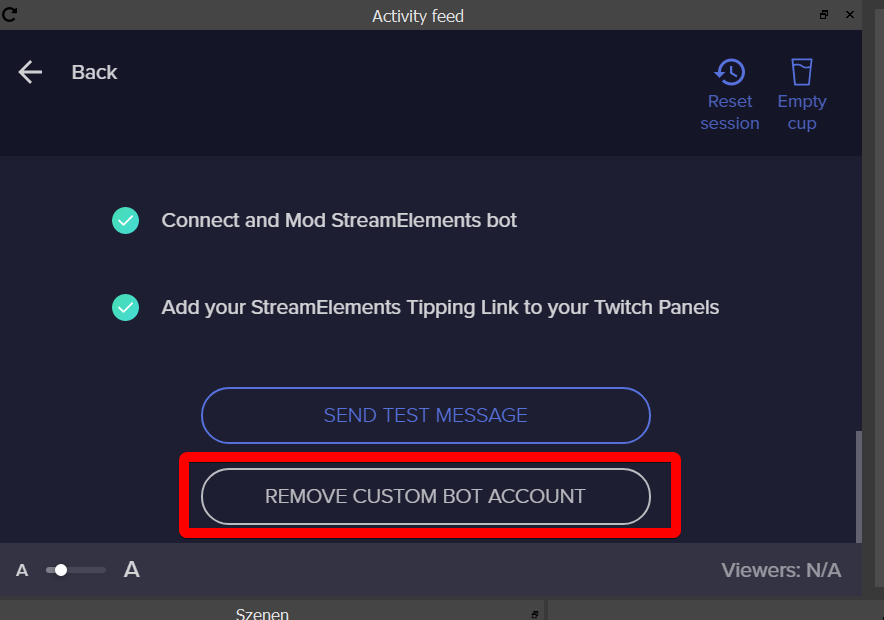
In your OBS, select REMOVE CUSTOM BOT ACCOUNT in the activity feed burger menu for the custom bot name and reconnect the custom bot name/log back in with the custom bot name.
https://i.imgur.com/0ZK5YXX.png
 agile island
I tried, no luck 😦
it broke in the middle of stream which is the weird part
@twin sentinel if you have any ideas. I am going to donate $30 in your name to our cause
twin sentinel
@agile island We tried something on our end. Can you please try to set it to the custom bot name again in OBS.Live and try to reconnect it again please.
 tight harness
🤞
tight harness

agile island
just made a $30 dono in your name.. Thank you so much.. we have like 64 hours to go and having my bot back is fantastic
ionic kelp
@agile island You are aware you have to "restart" at 48 hours due to hard set restrictions by twitch right?
agile island
@ionic kelp yeah, it's my 6th 72 hour charity stream. but thanks for the heads up. Luckily we had to restart yesterday for tech issues
ionic kelp
👍
agile island
@wary halo is in my chat and you all rule
Hey guys....
my custom bot name stopped working again...
ionic kelp
Yeah I'm in there.
agile island
sorry for being a pain
 dull arch
Hi, is there a way to start a contest from a bot command?
twin sentinel
We are looking into it. Sorry for the inconvenience. @agile island
gentle dew
@zenith widget Thank you for:
https://puu.sh/F5ZE6/74f57331d4.png
I can now Download the data from the site, How do I go about Uploading it back once I have Manipulated it
 twin sentinel
@dull arch No, there is not.
dull arch
I see, an idea for later perhaps 🙂
round brambleBOT
@dull arch Check out the StreamElements ideas board: https://strms.net/ideas. You'll be able to add ideas, upvote ideas you agree with, and track their progress with email notifications. Adding and upvoting ideas also helps the staff know which ideas should be prioritized so please take some time to upvote.
round brambleBOT
@lunar veldt To reset goals:
- from the overlay editor -> data on top -> goal tab -> reset progress of desired goal
- from the dashboard -> activity feed on the left -> widget data on the right -> goals tab -> reset progress of desired goal
Note: Goal widgets(progress) only counts up and doesn't go down automatically, if you loose followers/subs
 fathom lance
hekki
agile island
hey @twin sentinel can we DM to not spam this channel?
fathom lance
me bare bear
twin sentinel
@agile island This channel is watched by multiple supports atm looking into your issue. I recommend to keep the conversation in this public channel. This is what it is for.
In the meantime while we are looking into the issue, I recommend to reset the bot to StreamElements.
agile island
Thanks! Just wanted to make sure I wasn't spamming or anything ❤️
twin sentinel
All good.
dull arch
@lunar veldt The bot responsed right after your last message with instructions.
 lunar veldt
yes but doesnt work
twin sentinel
@lunar veldt That is a custom widget, best to contact the creator on how to reset it, or ask in #dev-chat if any other code guru has an idea.
@gentle dew Try the Import from CSV option. If that is not working, reset the points and try the Ankhbot/Streamlabs import for points.
mighty merlin
how do i set up my music
gentle dew
@twin sentinel thank you, where is this "Import from CSV option" , can you show me a screen shot I think I may be blind lol
twin sentinel
gentle dew
thanks bro, do I have to Deleted the Leaderboards first?
twin sentinel
Not sure tbh.
gentle dew
what if I dont have their twitch ID

this is the format of the exported file:
https://puu.sh/F604i/2689bf2fc6.png

it just gives me user name and their loyalty points
twin sentinel
It says TwitchId and watchtime can be empty in the screenshot.
gentle dew
would this do it?
https://puu.sh/F605t/fd8993616c.png

 mild warren
I need help
 viscid pebbleBOT
Hi @mild warren, Please ask your question(s) or describe the problem you're looking to solve so staff or a support volunteer can assist you as soon as they are available.
mild warren
Everytime I play COD I get a encoding error, but any other game runs perfect, all my in game settings are turned down to
twin sentinel
@gentle dew That does not look like a .csv file to me. Make it a .csv file when exporting fron Excel or whatever program you are using.
round brambleBOT
@mild warren Please provide a log from your last stream. To do this, in OBS go to Help > Log Files > Upload Last Log File and paste the link to the log file here.
mild warren
twin sentinel
gentle dew
@twin sentinel THanks a lot for your time
mild warren
Its better to have game mode on?
twin sentinel
In Windows 10 versions 1809 and newer, we recommend that "Game Mode" be enabled for maximum gaming performance. Game Mode can be enabled via the Windows 10 "Settings" app, under Gaming > Game Mode
mild warren
How do I find what version is my windows 10
ionic kelp
Windows key + R and type winver.
mild warren
How can I figure out how much bitrate to have, I dont really understand it
I have 500/500 fiber
twin sentinel
 wary beacon
Hello,
My chat stats are bugged since a username change, would love some help to get 'em going again!
twin sentinel
What is your old and your new username please?
wary beacon
old: maxadrums_
new: maxadrums
twin sentinel
The update can take a while.
ionic kelp
@mild warren Got a couple things for you regarding the log. Gimme a sec to get the stuff.
wary beacon
Alright, no problem! Thank you. 🙂
mild warren
Okay Sudo
ionic kelp
@mild warren Here you go:
- Don't use display capture for the game. It's the worst choice to choose from and only if necessary. Always use game or window capture.
- Update your GPU driver for your card. Either check with GeForce Experience or get it from here https://www.geforce.com/drivers
mild warren
I have g force and it says Theres no updates
ionic kelp
If you go to the drivers tab what version do you have?
mild warren
and also I use display captaiure because window capture will not show the game
ionic kelp
Full screen?
 thin harness
Hello, i haven´t used streamelements.com Login now quite a few months. Now i try to come back and found this Error,--> "The website/overlay doesn't load except for the Help button" I already empty Cache used different browsers, everywhere the same. Account broken? hopefully you got some ideas thx
ionic kelp
Ok so that matches my 2070 driver. 🤔
 abstract hemlock
@thin harness mind sharing a SS?
ionic kelp
@thin harness And you've tried chrome/firefox as well?
ionic kelp
What version of chrome?
thin harness
latest
ionic kelp
What does it say with chrome://version
thin harness
ionic kelp
And also in incognito as well?
thin harness
didnt tried that
ionic kelp
99% sure it's a broken cookie messing with it.
ionic kelp
Shouldn't happen with incognito.
 hollow bronze
im trying to launch my merch and need the specific dimentions of the mug that stream elements offers
twin sentinel
ionic kelp
No that should have 0 effect.
You running any kind of antivirus outside of windows defender?
 thin harness
testing oh well forgot i havent used steamelements after and whitelisted it
damn nope its not
ionic kelp
Any chance you could temporarily disable it long enough to refresh the page?
agile island
hey any update on the bot issue @twin sentinel ?
thin harness
on VM it works.... so something with my system or browser but i think more my system then browser cause i tried 3 different
twin sentinel
@agile island We are still looking into your issue. I am sorry to not being able to give you an ETA on a fix.
thin harness
thx fo the help... testing later more helped a lot talking to you
mighty merlin
anyway to help my pc run faster with the application
 formal fractal
I am going through streamelements tutorial/guide 2019 - complete explanation. Trying to learn about your system. Chatstats are giving me a page not available error. Is that because I am not live at the moment? I was live for a few hours last night. Plus this vid mentions songrequest as an option on the left under tipping... seems there's been an update since the video was made? is there a newer complete one you can link up for me?
ionic kelp
@formal fractal Depending on the one you watched it's very much possible it was an older one.
 serene swift
I've followed the directions to get my custom bot name to show up in ground control but nothing is working. I've parted my bot from the channel, added it back, have my tip link active in my panel, etc... It just will not show up in Ground Control anymore. Any ideas?
ionic kelp
There is a slight chatstats issue atm that we're trying to fix.
@serene swift It's "broken" for GC atm. You can still use it in OBS.Live though.
serene swift
How do I use it in OBS.Live?
ionic kelp
@formal fractal What exactly you looking for?
@serene swift Gimme a sec while I look for something.
twin sentinel
formal fractal
a full tutorial that has the updated options (left toolbar)
serene swift
Ok no problem
ionic kelp
@formal fractal That's still slightly vague. Anything in particular though?
formal fractal
Apologies @ionic kelp ... I was hoping to have a full tutorial like the one done with the date i mentioned... that shows all the items under stream elements. I have watched enough about the overlays to know what's going on there... but wanted to venture into all the other stuff you have available and how to use it... is there an "all encompassing" video that shows what you have available right now, or is the 2019 one I mentioned the only one available right now that shows "everything"
@ionic kelp this is the youtube link i am referring to: https://www.youtube.com/watch?v=7qMHUGDmFw0
1.) 00:00 - 01:21 moderation rights for chatbot
2.) 01:21 - 18:19 dashboard
3.) 18:19 - 46:18 overlay
4.) 46:18 - 49:18 themes gallery
5.) 49:18 - 01:03:59 loyalty settings
6:) 01:03:59 - 01:21:08 chat BOT settings
tool link
Link zum Toolhttps://streamelements.com/
products...
formal fractal
ok thank you
twin sentinel
You can also take a look here: https://streamelements.com/ and at the tab FEATURES on that page.
serene swift
@twin sentinel I don't have that Custom Bot option when I look in Ground Control Stream Settings
 flint kayak
When will obs.live be a thing for mac?
round brambleBOT
@serene swift Due to a recent change from Twitch API, these features are affected by the change:
- Ground Control does not have Custom Bot Name
- Subscriber count will count the Channel and any other permanent sub you may have (+1 or +2 or +3 on top).
We are working on fixing both issues, but there is no ETA.
OBS.Live still has Custom Bot name working fine in it.
ionic kelp
@serene swift That's for OBS.Live. The options are different.
serene swift
Got it! Thanks!
 limber flume
I want to close my account. I found the page, entered the difficult to find and unnecessary information several times from several browsers, and it won't close my account.
abstract hemlock
@limber flume beside for the "closing acc" is there anything not working for you? maybe we can give you a solution :)
 hallow elm
For IRL streaming, is there a middle ground between a scuffed phone stream and a $2,000 Gunrun backpack stream? Are gimbals and lapel mics the best bet?
I just want to make sure I'm not overlooking something obvious.
ionic kelp
@hallow elm Unfortunately from what I understand the mobile app uses the internal mic so attached ones might not work (I could be wrong but that's what I've gathered from someone else who asked about the app).
But a gimbal would definitely help with balance.
hallow elm
Ahh, I'll keep that in mind. Thanks!
 visual nexus
Hey guys! I just got my first 100 followers a few days ago and i'm trying to make an SE Pay account, i put in all my personal info but i can't seem to submit it, is this a common issue or do i have to wait a while before i can make this account? Thanks in advance!
twin sentinel
Do not use any auto fill forms and use the dropdown to choose the data.
visual nexus
doesn't seem to work, tried a few times with the dropdown menu and everything but i still can't submit it
round brambleBOT
@visual nexus Please contact us via email for support with SE.Pay. You can use our contact form here: https://streamelements.com/contact Thank you
twin sentinel
One last idea: What browser are you using?
visual nexus
Yes i was thinking of that too, i am using chrome, i tried internet explorer but it is SO slow 😄 is chrome a problem?
twin sentinel
No, chrome should be fine.
visual nexus
i'm going to use the contact form, thank you very much!
round brambleBOT
@severe magnet Welcome to the helpdesk! Please let us know how we can assist you today and a support volunteer or staff member will assist you as soon as they are available. Thank you for your patience.
 arctic ferry
hi can i get some help
 severe magnet
I want a command in my channel for gambling loyalty points
round brambleBOT
@arctic ferry Welcome to the helpdesk! Please let us know how we can assist you today and a support volunteer or staff member will assist you as soon as they are available. Thank you for your patience.
arctic ferry
how do i put the overlays on the obs
round brambleBOT
@arctic ferry To add your overlays to OBS, add a new browser source in your scene. Paste your overlay URL in the browser source properties, set the dimensions to 1920x1080 (unless you changed them on the website), and ☑ “Shutdown source when not visible” https://youtu.be/KDvLynUqXI4
severe magnet
I want a command in my channel for gambling loyalty points
arctic ferry
o i cant put the overlay
 dusty oracle
Hello any admin here ?! I need a help
round brambleBOT
@dusty oracle Welcome to the helpdesk! Please let us know how we can assist you today and a support volunteer or staff member will assist you as soon as they are available. Thank you for your patience.
dusty oracle
I cant add streamelements bot in my twitch channel
twin sentinel
Do you get any error message?
twin sentinel
Invite it via the dashbord @dusty oracle
dusty oracle
same
 pale meteor
Hello! I have same problem. Suddenly the bot custom name option disappeared from Ground Control and the name no longer shows in my streaming. Instead it appears at StreamElements bot.
This happened some time ago and I solved it by updating the Ground Control client. But now I'm running version 1.7.1 and have the same problem.
round brambleBOT
@pale meteor Due to a recent change from Twitch API, these features are affected by the change:
- Ground Control does not have Custom Bot Name
- Subscriber count will count the Channel and any other permanent sub you may have (+1 or +2 or +3 on top).
We are working on fixing both issues, but there is no ETA.
OBS.Live still has Custom Bot name working fine in it.
pale meteor
ooh, ok
Thks for answer
I hope they fix it
I cannot use OBS live since I use regular OBS for gaming and working
round brambleBOT
@grizzled surge Please follow our community rules:
- No advertisement or stream promotion
- Respect ALL server members
- No NSFW/NSFL
Thank you
twin sentinel
Have you invited it via the dashboard?
round brambleBOT
@dusty oracle Please connect your streaming account (Twitch, YouTube, or Facebook) with Discord by going to ⚙ Settings and then Connections here in Discord. https://streamable.com/eg92w
 dusty oracle
again same no bot appearence
twin sentinel
Did you make the bot a mod please as you have follower mode enabled?
dusty oracle
yes im trying to mod Streamelements and yes i did follow on bot
twin sentinel
Have you invited it via the dashboard?
dusty oracle
Модераторите в този канал са: niku, lopgod, kryoger, venipaw, jekzich, djesikabo, icemanlazo, jo324, streamelements.
twin sentinel
The bot does not seem to be joined your channel, make it join your channel on the website.
dusty oracle
from streamelements dashboard ?
twin sentinel
twin sentinel
@dusty oracle The bot will be shown in your viewers list after a few minutes, as twitch need to update the list.
dusty oracle
now he appear. but still cant see him as mod ! Thanks for help Benno
@twin sentinel Thanks for help
chilly mica
Hello 
I was wondering if there’s a way to set the chatbot up with automated shoutouts, similar to the SL Events option in their chatbot. I used to have shoutouts that would auto-send when the bot saw one of my teammates speak in chat, that way me/my mods didn’t have to. I’d really like to be able to re-set that up if possible!
twin sentinel
I am not aware of such a feature with StreamElements.
chilly mica
Heck, thank you though!
 trail carbon
im trying to change the bot modules, is it auto saved whatever i changed on chat alerts? the tip one and host one didnt save. also host amount can i set 0 coz offline host dont show
uncut karma
question : twitch bitrate is limited to 6000, is that right?
for customers streamers
trail carbon
partner 8000
round brambleBOT
@trail carbon Due to changes to Twitch API, we have filtered out hosts and will only show these ones on your activity feed:
- All hosts coming from an online channel with at least 1+ viewer
- Auto host events with at least 1 viewer - only from a channel that just went offline
Note: If you see "X channel has hosted you" with no viewers on the back, that is considered an offline host or a host with 0 viewers, we do not show these.
trail carbon
how about chat alerts of tips it cant be save
round brambleBOT
@trail carbon On the page that gives an error, press F12 to open Developer Tools. Navigate to “Network” at the top and then Select “XHR” in the filter section. Try the action again that gave the error and note in the network tab any red text. Please copy and paste the error information that is given when clicking on this red text.
trail carbon
Failed to load resource: net::ERR_BLOCKED_BY_CLIENT
Failed to load resource: net::ERR_UNKNOWN_URL_SCHEME
lament blade
Since I changed my name on twitch streamelements is not working anymore
twin sentinel
Log out and log back in on the website @lament blade
twin sentinel
Do you use a custom bot name via OBS.Live?
 fading gust
I have an issue im running into on media requests.
fading gust
my viewers cant request songs. everytime they request a song it says the song is too long or it isnt music even when it falls well within the parameters
 crimson token
hi guys
round brambleBOT
@crimson token Welcome to the helpdesk! Please let us know how we can assist you today and a support volunteer or staff member will assist you as soon as they are available. Thank you for your patience.
twin sentinel
@fading gust Check your settings for length and in the card youtube for songrequest here: https://streamelements.com/dashboard/mediarequest/settings
formal fractal
I am looking for a widget that works like many other's "thank you" that lists all the followers and subs during the stream... is that already in the list under widgets, or do I have to program one?
round brambleBOT
@lament blade Please connect your streaming account (Twitch, YouTube, or Facebook) with Discord by going to ⚙ Settings and then Connections here in Discord. https://streamable.com/eg92w
fading gust
ive gone through everything a few times and it isnt helping anything unless you have to restart the stream for them to update?
crimson token
someone help me? I'm dropping frames for no reason when streaming with obs
round brambleBOT
@crimson token Dropped frames / disconnecting? Follow the troubleshooting steps at: https://obsproject.com/wiki/Dropped-Frames-and-General-Connection-Issues
lament blade
Why?
twin sentinel
No, they are updated right away. @fading gust Try to disable all checking settings and see if it sowking after that.
dry hare
@formal fractal check #widget-share
fading gust
ok will do
twin sentinel
@lament blade So I can take a look at your channel and send the data to a staff to take a look at your issue.
@formal fractal If I remember correctly there are widgets for that in the overlay editor where you can see your recent subs and follows.
fading gust
iwent through the settings again but the only thing enabled was the auto filter set to low
formal fractal
yes... as static single placings... I wanted something like a "credits" rolling screen like you see at the end of a movie... like some streamers have, that basically say (or shoutout to) those that Followed, Subbed, Resubbed, donated, etc...
twin sentinel
Take a look at the widget gallery https://streamelements.com/dashboard/themes > WIDGETS > CREDIT ROLL
@fading gust Most likely some settings are misconfigured.
What exactly is not working when you request a song?
fading gust
the bot will pop up and just say it isnt music or it was too long. it was a 2:39 second song and i have the limit at 10 minutes
twin sentinel
Can you share a screenshot of your settings in your media Request please?
fading gust
lament blade
@twin sentinel Connected
formal fractal
thanks @twin sentinel !!! I think that's what I was looking for!
twin sentinel
@fading gust Please try to part the bot and make it join your channel again.
fading gust
how do i do that? sorry
twin sentinel
On your dashboard on the right is a part channel button.
fading gust
ok got it i will try again later and see if that fixed it thank you!
lament blade
I connected my twitch to discord @twin sentinel
twin sentinel
@lament blade Please mod the bot in your channel, so it can join your channel even with follower mode.
Also part and join the bot on the right side on your dashboard please.
lament blade
How?
twin sentinel
Type /mod streamelements in your twitch channel.
To part the bot on your dashboard: https://streamelements.com/dashboard > Part channel on the right
then make it join at the same place again.
lament blade
twin sentinel
lament blade
how do i get to that page?
twin sentinel
You should be on that page in your screenshot. Scroll down there.
 brave inlet
Hey I was wondering if there is a way to add BTTV gif emotes to kappagen?
twin sentinel
Known issue. No ETA on a fix @brave inlet
 unborn wasp
Почему у меня стрим отключается через 30 секунд?
twin sentinel
#🇷🇺︱русский @unborn wasp
unborn wasp
Why does my stream turn off after 30 seconds?
round brambleBOT
@unborn wasp Please provide a log from your last stream. To do this, in OBS go to Help > Log Files > Upload Last Log File and paste the link to the log file here.
unborn wasp
twin sentinel
Please upload the link not the file.
unborn wasp
 slate viper
Hey how do I open a ticket or email StreamElements in regards to setting up SEpay withdraws. I may have put the wrong bank name but all other info was correct. Would this be an issue? Thanks.
round brambleBOT
@slate viper Please contact us via email for support with SE.Pay. You can use our contact form here: https://streamelements.com/contact Thank you
twin sentinel
formal fractal
I remember either from twitch, or Streamlabs, or Streamelements where I could put a list up that would allow me to 'host" a friend's stream and it will allow me to put a list up. Does Streamelements have that? or is it twitch only? and if the latter, can someone tell me where i saw that again?
Apologies for beinga bug
twin sentinel
You mean who will be hosted on your channel when you are offline automatically?
formal fractal
yes
twin sentinel
That is on twitch side.
formal fractal
andi remember being able to put a list of 3 streamers... and it would pick the first one and move down from there if the first one was offline, etc..
ah k... thanks @twin sentinel ... I saw the single host that required me to actively do it... but not the store a list area... do you remember where that was?
unborn wasp
How do I fix my problem?
twin sentinel
https://dashboard.twitch.tv/u/YOURNAME/settings/channel > Automatic hosting (change YOURNAME to your actual twtich name in the link)
formal fractal
THAT'S it... thank you so much Benno!!!!
unborn wasp
I followed the link and changed it to my name\ъ
I followed the link and changed it to my name
twin sentinel
The link was not for you.
twin sentinel
Check in your OBS: Tools at the top > Output timer
and see if something is set there.
unborn wasp
thank you very much it really helped!
 cunning swift
is having a bot of your own custom name and choosing not available now?
round brambleBOT
@cunning swift Due to a recent change from Twitch API, these features are affected by the change:
- Ground Control does not have Custom Bot Name
- Subscriber count will count the Channel and any other permanent sub you may have (+1 or +2 or +3 on top).
We are working on fixing both issues, but there is no ETA.
OBS.Live still has Custom Bot name working fine in it.
 amber sorrel
hi, i think this is general help i need but
Variation Settings
i have 7 different variations for follow alert (including default)
so 6 extra variations
and it's a Chance %
so what should it be for 7 variations like
20% ? for each variation
Recommended?
abstract hemlock
@amber sorrel in the overlay editor (web based) first you add and overlay, then, on that overlay, add a widget call "AlertBox" then you can add variations on the cog icon next to Follower
and the % that you made is very up to you and your chat, cause some alert can create more hype than the others, so chose wisely :)
amber sorrel
Sounds good, thanks
 north kestrel
I have a question, if I'm mod in a chat can I still set up the !watchtime command? If so can I get the stuff that goes with it?
Like the {userwatchtime or something like that
lament blade
How to let the bot say Hello to new viewers?
 cinder olive
@north kestrel you simply create a new command using the watchtime variable.
@lament blade SE does not have the option to do that currently.
If you want, you can submit the idea:
round brambleBOT
@lament blade Check out the StreamElements ideas board: https://strms.net/ideas. You'll be able to add ideas, upvote ideas you agree with, and track their progress with email notifications. Adding and upvoting ideas also helps the staff know which ideas should be prioritized so please take some time to upvote.
cinder olive
@north kestrel all variables can be found: https://streamelements.com/dashboard/bot-commands/variables
StreamElements
The Ultimate All in One Platform for Streamers
 ornate hearth
Hello - hoping to find an answer why my hosts aren't showing up. They show up in Twitch chat but not on screen. I have minimum amount set to zero. Emulating a host even works every time. I tried setting it to other minimum amounts, refreshing in OBS, deleting and creating a new browser source in OBS. None of this seems to work but all other alerts work. Help?
cinder olive
So if you emulate the alert, it shows in OBS, but if you get a follower, it doesnt show?
ornate hearth
No, all other alerts work just fine - it's just the hosts. I can emulate a host with any # of viewers and it works i.e. shows up on the web and in OBS. When someone hosts me during a stream it does not show up
round brambleBOT
@ornate hearth Due to changes to Twitch API, we have filtered out hosts and will only show these ones on your activity feed:
- All hosts coming from an online channel with at least 1+ viewer
- Auto host events with at least 1 viewer - only from a channel that just went offline
Note: If you see "X channel has hosted you" with no viewers on the back, that is considered an offline host or a host with 0 viewers, we do not show these.
ornate hearth
Understood
 strange tartan
How do I screen record with stream elements
twin sentinel
If you are using OBS.Live select the + in the sources tab and add a desktop capture to your scene.
strange tartan
Wait I’m on iOS
twin sentinel
There is no iOS app with StreamElements. Also #helpdesk-mobile
 deft sundial
Hello! I'm having trouble getting KappaGen to work with animated bttv emotes. Does it support them?
twin sentinel
Known issue. No ETA on a fix.
deft sundial
I see. Thank you! :)
 livid moss
Hey guys: Is it possible to do something like {sender.points + 5} in chatcommand response?
twin sentinel
No, there is no variable to add points.
 daring swallow
cinder olive
daring swallow
cinder olive
Probably disabled if it doesnt work.
wary halo

 stable crescent
hay guiys so i just set up tipping and it sends out a email with my full name how would i go about changing thi?
this?*
twin sentinel
You would need to upgrade your paypal account to a business account from a personal account.
But read the guides on business accounts on the paypal side first and inform yourself.
stable crescent
is that going to be a hassle or?
twin sentinel
No, but you would need to enter company data you do not have when you do not have a small business.
stable crescent
meaning?
twin sentinel
You need a company to get a business account.
But please inform yourself.
stable crescent
so basically start a llc
my twitch shits waldo sandiego which could get ime in trouble possibly with copyright if tat author well both want to go after me
becasue its a play on worlds of waldo and carmen sandiego
@twin sentinel i 3was trying to inform myself hwich is why i joined and asked the question to begin with im not trying to be a asshole or anythign jsut looking for help
twin sentinel
All good. The point is that a personal account will show your email to the public. You need a business account to choose your company name.
I cannot give you more info on this, as I haven't gained knowledge in this area myself. So nothing I can help you with really.
stable crescent
also sorry for fat fingering everything
wary halo
that sounds so bad 
stable crescent
Kappa
 ripe inlet
Hi everyone I have a question is it true that stream Elements has the command for the heist game for chat? If so I am have trouble finding it.
twin sentinel
There are some games in the module settings you can enable for your stream, like to gamble for points. https://streamelements.com/dashboard/bot-modules
But we do not want to copy our competitor.
 soft dove
hey im having troubles applying your overlays top my stream
round brambleBOT
@soft dove To add your overlays to OBS, add a new browser source in your scene. Paste your overlay URL in the browser source properties, set the dimensions to 1920x1080 (unless you changed them on the website), and ☑ “Shutdown source when not visible” https://youtu.be/KDvLynUqXI4
soft dove
thanks
stable crescent
Hey have anther question I have all chat moderation turned off but its blocking my discord and media request links
twin sentinel
Is it displaying the links as *** ?
stable crescent
Yes
twin sentinel
Disable the link protection in twitch.
 tribal wing
You have turned off the twitch automod too?
stable crescent
I believe so
 gilded helm
Hello my friends I have the problem that my !watchtime always says "0 seconds watching" can someone help me?
round brambleBOT
@gilded helm 10 minutes of watchtime are given to those in chat when the loyalty points are handed out (every 10 minutes). Therefore, loyalty must be enabled for watchtime to work properly.
There is no direct link between watchtime and all-time points.
It can’t be calculated from the amount of all-time points a user has because subs may earn points at a faster rate and !bonus all command increases all-time points for users in chat at that time.
Giving points to a single user does NOT affect all-time, only when giving to all in chat.
gilded helm
Ouh ok thank you very much my loyality is not enabled so this is the problem
tribal wing
@stable crescent check it here please: https://dashboard.twitch.tv/u/YOUR_CHANNEL_NAME/settings/moderation
Make sure that the automod and link protection is disabled
twin sentinel
stable crescent
Ty benno <3
 sullen bluff
I've got an issue with Audio
When i mute my streamlabs on volume mixer it doesnt work for ingame audio
but discord sound does
 jade remnant
you need to ask streamlabs
cinder olive
whats streamlabs?
jade remnant
what are you trying to do?
mute obs in the windows audio mixer?
sullen bluff
yes
i muted it and it seems like game sound is comming through obs
because it no longer works
jade remnant
as far as i can tell all desktop audio will be muted if you do that.
things inside obs like music and alerts will still play
 eternal plinth
Quick question yall. My host alert doesn't work, and it's also not coming up in the activity feed nor ground control. Everything is checked to be showing but the alert doesn't show up on-stream nor on GC like I mentioned. I checked the settings and did the emulated alert for 0 and 1 viewers and it went off. The minimum is set to 0, so all alerts should be going off.
Anyone have any ideas?
round brambleBOT
@eternal plinth Due to changes to Twitch API, we have filtered out hosts and will only show these ones on your activity feed:
- All hosts coming from an online channel with at least 1+ viewer
- Auto host events with at least 1 viewer - only from a channel that just went offline
Note: If you see "X channel has hosted you" with no viewers on the back, that is considered an offline host or a host with 0 viewers, we do not show these.
eternal plinth
Thanks bot
 ancient helm
why does it sends *** when i say !discord (custom command)
twin sentinel
check the moderation settings for links here please: https://dashboard.twitch.tv/u/YOUR_CHANNEL_NAME/settings/moderation
Make sure that the automod and link protection is disabled

 keen estuary
good evening, if there a variation of sub alert to create for prime members? got a twitch prime sub but no alert
round brambleBOT
Twitch prime (new and resub) and paid subscriptions (resub only) must be shared in chat manually by the person subscribing in order for the subscription information to be sent to StreamElements. For twitch prime, the user needs to have sharing enabled on https://www.twitch.tv/settings/prime. For paid subs, if the share box doesn't show up immediately it will when they refresh the page. https://i.imgur.com/VNJN0Uv.gif https://i.imgur.com/2297EA7.png

 keen estuary
thank you
lament blade
Hello i am using a overlay from stream elements and want to use it in Twitch studio but if i import it the overlay (Animated) Is way to big and cant get it fitted inside my screen https://gyazo.com/ef157bb6557183a60d157cc02e21c363
 round brambleBOT
@lament blade To add your overlays to OBS, add a new browser source in your scene. Paste your overlay URL in the browser source properties, set the dimensions to 1920x1080 (unless you changed them on the website), and ☑ “Shutdown source when not visible” https://youtu.be/KDvLynUqXI4
lament blade
I am using twitch studio NOT OBS
twin sentinel
Check the resolution.
lament blade
can i edit that in the elements editor on the site?
twin sentinel
Set the resolution of the source to 1920x1080 https://i.imgur.com/CF9NfKb.png
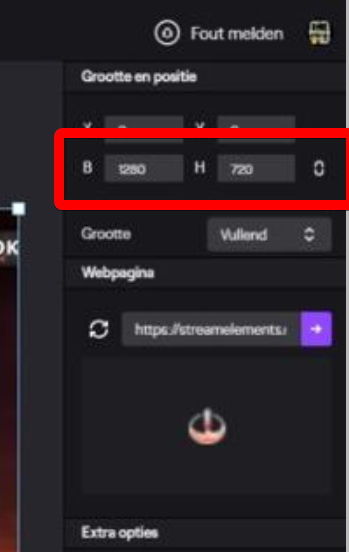 lament blade
Still it doesnt fit in the box
twin sentinel
I am sorry, as I do not have any ideas on the twitch studio, but you need to make the overlay 1920x1080 and make it show totaly on screen.
But I cannot really help you with that. Maybe another support has any ideas.
lament blade
I thinnk i need to edit the size of the Overlay that i use from you guys its indeed a 1920x1080 overlay but i cant stream in 1920x1080 only in 1280x720
twin sentinel
You can edit the overlays resolution in the my overlays section and make it 720p, but you would need to edit the widgets position in the overlay editor.
lament blade
FIRE BALL ANIMATED SUPER THEME i am using but cant find anywhere to make it entire 720
twin sentinel
Do you see the three dots next to the edit button at the overlay?
lament blade
 twin sentinel
In your overlay galery.
lament blade
on twitch studio?
twin sentinel
lament blade
Yes
twin sentinel
Screenshot that page for me please.
lament blade
 twin sentinel
Yeah exactly there you can set it to 720p.
lament blade
Still not fitting
twin sentinel
Then I am sorry, as I do not have enough knowledge of twitch studio to support it.
 lean sapphire
i need help with the store redemptions
the viewers who changed their name on twitch cant redeem items
the items have a cost (1000)
and it says "user dont have enough points"
and they have more than 1000
 little oak
try ! rename <Old username>
lean sapphire
SE store still uses the old nickname and tries to get the points from the old nick
that doesnt work
rename dont really change the name from database
little oak
ah ok i remember you saying that before
lean sapphire
only givepoints
from old username to new
is like !givepoints
i dont want a solution, because it doesnt have one
i am reporting
 quartz wolf
anyone know how to fix game capture black screen? i can hear sound but on my stream my overlay and actual game picture doesnt show
cinder olive
@lean sapphire What is your twitch username?
 plain rover
hello when i use the subcount command, it says 0 subs. any idea why its not working?
is it down?
used to work, but been down for a couple weeks now
round brambleBOT
@plain rover Due to a recent change from Twitch API, these features are affected by the change:
- Ground Control does not have Custom Bot Name
- Subscriber count will count the Channel and any other permanent sub you may have (+1 or +2 or +3 on top).
We are working on fixing both issues, but there is no ETA.
OBS.Live still has Custom Bot name working fine in it.
 devout apex
Can someone please help me with adding a custom bot name to Ground Control for SE? I followed a youtube video but once I completed it, it never gave me the option to have custom bot name 😣
round brambleBOT
@devout apex Due to a recent change from Twitch API, these features are affected by the change:
- Ground Control does not have Custom Bot Name
- Subscriber count will count the Channel and any other permanent sub you may have (+1 or +2 or +3 on top).
We are working on fixing both issues, but there is no ETA.
OBS.Live still has Custom Bot name working fine in it.
 cinder maple
I am attempting to use the command !watchtime but whenever someone uses that command it always says 0 sec. Even when I try to make a custom command with just the variable ${user.time_online} by itself it just says 0 sec
round brambleBOT
@cinder maple 10 minutes of watchtime are given to those in chat when the loyalty points are handed out (every 10 minutes). Therefore, loyalty must be enabled for watchtime to work properly.
There is no direct link between watchtime and all-time points.
It can’t be calculated from the amount of all-time points a user has because subs may earn points at a faster rate and !bonus all command increases all-time points for users in chat at that time.
Giving points to a single user does NOT affect all-time, only when giving to all in chat.
 ebon spire
Hi, can anyone fix Chat status 404 - Page Not Found please? and yes i changed my name on it before, thanks.
before : Queenofdarkne55
now : QueenofdarknessTV
lean sapphire
@cinder olive am not the one who changed his nickname
lean sapphire
RomuloSinRemo
cinder olive
You have no items in your stream store.
cinder olive
It is best to send the streamer here then.
lean sapphire
you need the users that changed their name?
cinder olive
I never once mentioned a name change?
lean sapphire
idk
old juannantoni new juan_anttonio
old EvilShockGonza new gonzalp
streamer GOE_tw
goe9 old nick from the channel
cinder olive
I checked the VOD and found the redeem command to be working?
Can you link a timestamp of it not working?
@ebon spire Sent to staff 
lean sapphire
the issue is that when someone changes their nick, SE grab the points from the old username, but also give the new loyalty points to the new user, so they will be on 0 points after a few redemtions. the redeem works.
cinder olive
Pardon?
ebon spire
Thanks @cinder olive ❤️
cinder olive
So youre saying !rename moves the points from the old username to the new one, but doesnt actually move them?
lean sapphire
yes
move the points but
not the name
idk how to explain
userOld have 7000 points. changed his name to userNEW, he use !rename userOLD. the points move, when he try to get a redemtion the bot said something like "userNEW dont have enough points to redeem item"
but userNEW have 7000 points
and the watchtime also moved, that works fine
cinder olive
Mind giving an example of a user?
lean sapphire
they are offline, EvilShockGonza
his new user is GonzaLP
old juannantoni new juan_anttonio
both of them had the issue
SE tries to charge the redemtion to the old username, but when he move the points with rename, the old nick have 0 points
if i give points to the old nick he can redeem
lean sapphire
ok ty
 deft elk
Hey guys, just noticed the tip alert didn't work for my friends stream. Just wanted to see if it's a bug or not? Can anyone help?
Her account is princesscheeks
lean sapphire
00:10 (Argentina hour UTC+3) GonzaLP
the timestamp
swim he had a overlay? and a widget for the alert
 obtuse rivet
hey folks, I have honestly been out of the streaming world for like 3 years...so much has changed. I am on mixer and want to make the transition to stream elements from labs because it feels much easier to use and function; however, I am attempting to plug a animated overlay into lightstream and when I do, it turns laggy and the countdown timer on my starting soon screen is slow. Notifications while the animation is going, freezes everything. My question is....is this a PC performance issue? A lightstream issue? And is there a fix? Should I just stick to static overlays?
Understand this is mixer related, but I thought there was a chance, someone here could have an answer also....cross posted into both
lean sapphire
and link it to obs via websource
deft elk
@lean sapphire yes she does, I did everything for her and that she did. The follow alert worked so far
@obtuse rivet hey mason, sounds like a few things. Whats your set up, and whats your internet speed?
obtuse rivet
@deft elk currently, I am just running both a basic chromebook beside me but also have an even more basic Acer desktop. Neither are meant for streaming. However, internet speeds run typically 300+ down and 5-20 upload. Sometimes it varies but hovers in the 10 range. My assumption is the animation overlay is too much for basic CPU and it is causing the lag.
When I was using labs, I could use static screens with animated alerts and sounds with no issues, but using the full animation overlay is apparently its breaking point
deft elk
Is the layout on SE or as a local source in obs?
obtuse rivet
Layout is on SE with a URL posted within 3rd party integration in lightstream
deft elk
@obtuse rivet let me double check something, one moment
obtuse rivet
@deft elk take your time
deft elk
@somber totem interesting, I've never really knew much about that app. Have you tested the browser source via obs?
 sage crypt
im new to this how can i bring the edit title thing back up after i closed it
deft elk
@sage crypt did you close the window or just the part of the page?
Otherwise there should be a menu to open it up
deft elk
clean on activity feed and click on the menu button on the top left
obtuse rivet
sadly...and as crappy as it sounds lol...My desktop is under administration lock with my exes password that she has refusen to give me. So...I can not even get OBS on my desktop without a password that she wont give lol. So while I can do all my designs and editing on the desktop, I can not download software smh. I am limited to the chromebook in that regards and it is not compatible with OBS....so i guess follow up question.. @deft elk should I just use the static and animate the alerts? Or since labs was working, don't fix what's broken until I get a better PC
deft elk
why did I type clean lol
sage crypt
ok thanks
obtuse rivet
Or does the static already animate the alerts as a default?
deft elk
@obtuse rivet hot damn haha, thats a lot. Um, can you message me the browser link so I can test it? It could be the file. But if not, yeah I'd recommend sticking to static for the time being
@obtuse rivet to some degreee it animates them, did you already have the alerts added and tested?
@sage crypt anytime, did you see it?
deft elk
@sage crypt good to hear! Anytime!
 red bison
Hiya, I have a problem where the chatbox widget still displays users that I've added to the ignore function. Is there a way to fix this?
 desert fern
Hello - a problem for me too - I can't record video. I can stream perfectly with no problems, but when I press start and stop recording - there's no video. No error message either. I've inctalled the C++ runtime thing, and checked GPU drivers. Any ideas anyone please?
 rapid surge
Hey!, this might be simple, but im new to streaming and have no clue, Is it possible to switch my StreamElements overlays to streamlabs?
ionic kelp
!slobs
round brambleBOT
We're not able to troubleshoot issues with using our overlays in StreamLabs OBS (SLOBS) as we don't have the tools to support their software. We recommend using OBS Studio or OBS Studio with our plugin OBS.Live.
 marsh mantle
Hey all, quick question. There are two streamers in my household that share a PC (diff stream times), but we cannot seem to actually properly log out of my Streamelements Dashboard for them to set up/log in to their own. Tried deleting cookies and cache for streamelements page, made zero difference. It still logs into my account. How can we fix this?
wanton mango
@marsh mantle log out of SE then also log out of Twitch, then try signing back into SE, should require you to log into the other Twitch account
marsh mantle
Ahhh ok will give that a shot, thank you!
lament blade
is there a way to add spaces when a chat command is used
Eg
!Code
Instead of
to use my code please go to this link www.twitch.com and also sign up to my discord here www.discord.com
To have it in chat as:
To use my code please go to this link
www.twitch.com
And also sign up to my discord
www.discord.com
wanton mango
@lament blade twitch chat doesn't support line breaks
lament blade
ok thats the words i was looking for lol line breaks!! Ok thank you!
little palm
Is there a way to restrict a command only to a specific user ?
ionic kelp
Unfortunately no.
wanton mango
What kind of command? 
ionic kelp
Oh boy 
little palm
i want to have a gif command (redeemed item) but restrict that only to specific users
lament blade
Hi SE. I'm unable to get in to the SE.merch page. it just keep trying to load the page nothing happening.. And the StreamElements Chat Stats page give me a 404 - Page Not Found.
round brambleBOT
@lament blade Your chatstats are not working? Good chance you changed your name recently, please provide your old and new name so we can link them 😉
ionic kelp
@lament blade does the merch issue occur in incognito/private mode as well?
 inland knoll
hey there, I have a giveaway to do and I was wondering where do I set the duration for these?
lament blade
@ionic kelp that's a confirmative! @round bramble Old name Crashdive
ionic kelp
OK. If you have anything in there it'll unfortunately have to be reset with the option I have.
wanton mango
@little palm the redeem variable works differently so don't think it'll work with the idea I have in mind. In any case, even if restricting the command worked, it wouldn't prevent people from going to your stream store and redeeming directly from there, unfortunately
little palm
I see, makes sense
deft elk
Nvm corrected the tip issues, the email wasn't corrected
Now I need help figuring out whats missing host wise
agile island
Hey @twin sentinel any update on my bot issue?
agile island
Hey all, we're on day 3 of a 24 hr a day charity stream. My bot name isn't working any idea what's up?
it worked for a bit yesterday after you did something on the backend so I'm hoping you can do that fix again
 normal igloo
how do I reset the bot counter?
twin sentinel
@agile island I am sorry, as I do not have any update or ETA for the custom bot name to be back for you.
@normal igloo What bot counter are you refering to?
normal igloo
the bot counter in the widgets
twin sentinel
Reset the counter via chat.
normal igloo
yeah but that's what I'm asking how there's no mention of a reset command
twin sentinel
There is a default !editcounter command or viariables you can use in custom commads.
normal igloo
https://i.gyazo.com/5ca492fc3f16c03a7c6dea4593e59ba1.png ok I still don't get it 🤔
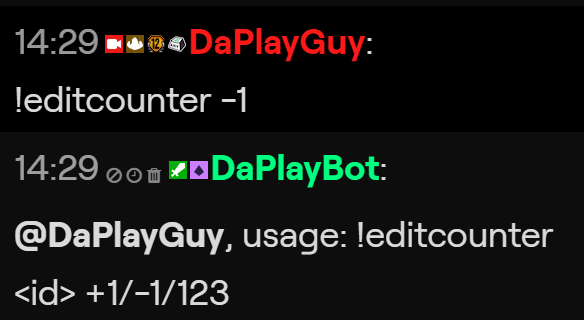 normal igloo
ok I'm doing that and It's still saying the same thing
twin sentinel
what is the name of your counter you use in the widget in the overlay?
normal igloo
bot counter 1
twin sentinel
can you share a screenshot of that in the overlay editor please.
If I remember correctly the name has to be one word.
normal igloo
Oh ok I will try that but here is the screenshot anyways https://i.gyazo.com/b6b8b3c29d793a03ad08f30d8e2a09c0.png
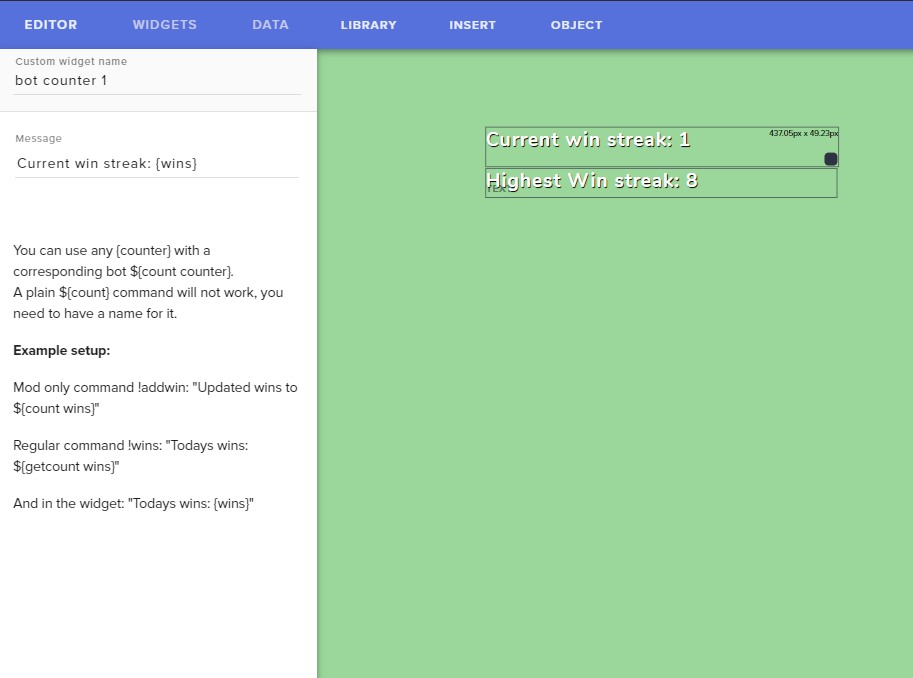 normal igloo
Benno
twin sentinel
That bot counter 1 is just the name of the widget in the overlay not the counter name.
normal igloo
@twin sentinel you have been awarded a commendation ⭐ by @normal igloo for outstanding support in #helpdesk-twitch Keep it up! ❤️
Jokes aside thx Benno
twin sentinel
you are welcome.
 crystal creek
hello, i have a small issue with my sub count! Like i have 5 subs but streamelements says i have 6 and i can't change it! Can someone please help me? D:
round brambleBOT
@crystal creek Due to a recent change from Twitch API, these features are affected by the change:
- Ground Control does not have Custom Bot Name
- Subscriber count will count the Channel and any other permanent sub you may have (+1 or +2 or +3 on top).
We are working on fixing both issues, but there is no ETA.
OBS.Live still has Custom Bot name working fine in it.
normal igloo
^^^
crystal creek
ah ok
normal igloo
benno too fast for me
crystal creek
thx guys ^^
crystal creek
how can it be 2 permandent subs btw? i understand 1 from me but 2?
twin sentinel
crystal creek
ty 😄
 wheat vigil
Hey all! 
I'm sure I'm being incredibly stupid, but I'm transfering over from SL and imported my Alerts. That's all gone fine, but now I have my chat widget from Nerd or Die too that uploaded as a sepratre overlay.
Is there a way to combine them into one Overlay? Or is that only possible with built in SE features?
twin sentinel
In the overlay editor when you select a source you can copy it to different overlays.
wheat vigil
Ah! I thought that just duplpicated it in the same overlay. I'll go do that. Thank you!
 echo parcel
how do my mods add commands for me
???
twin sentinel
!command add !COMMANDNAME COMMANDTEXT via chat or via the dashboard with bot supervisor access.
echo parcel
thanks
 primal narwhal
hey, can someone help me ? how do i share med overlay whit my followers`?
twin sentinel
They would need you and editor in their account.
round brambleBOT
Follow these steps to grant managers/moderators access to your dashboard:
- Click on your Channel Name at the top of the dashboard and select Settings
- Create a new invite at one of three access levels (Bot Supervisor, Editor, Full Control)
- Send this invite to a mod/manager to give them access to your dashboard. The link is one-time-use and expires after 72 hours if not accepted
Video tutorial: https://youtu.be/zl_h-ttZDF0
 brazen wave
Hi guys bassicly I’m trying to get follow alerts to pop up in my chat and my follow notifications are working just not popping up in the chat can anyone help ?
twin sentinel
Have you activated the chat announcements module?
brazen wave
Yep
twin sentinel
Is the bot joined your channel and modded?
twin sentinel
Someone who already followed you will not make an alert again.
brazen wave
They wernt popping up in the chat anyway
round brambleBOT
@brazen wave Please connect your streaming account (Twitch, YouTube, or Facebook) with Discord by going to ⚙ Settings and then Connections here in Discord. https://streamable.com/eg92w

 dusk zenith
probably dumb question, but i added a sound effect in the store, it shows in my store item, but when i open store there is nothing there, is there a delay before it will show there??
brazen wave
The lad who fired help me followed before I activated it is that why it won’t work
twin sentinel
@dusk zenith Is the item enabled in yoru store?
if they follow and the module was not avtivated at this time, then there won't be a chat notification ofc @brazen wave
dusk zenith
@twin sentinel yup i guess it just got blocked cause i called it bully 😂 changed the name of it and seems to work now
 mild peak
how can I add the bot that once every 5 minutes it says "If you like what this guy is doing. hit the follow button" or something like this?
jade remnant
timers on the se dashboard
 crystal plume
Under "my overlays" everything is just gone. Yesterday everything was still there but no all my overlays are gone
why
help pls
ionic kelp
@crystal plume screenshot?
jade remnant
are you logged into the correct account?
crystal plume
yes im in the right account. in my obs, i still have my alert link but when i open it its just a white page
abstract hemlock
@crystal plume on SE website, can u look for the overlay on other account you have? (maybe another platform?) click on you name and i will dropdown a list of your accounts
crystal plume
i made it myself
its not a premade template that is on the browser there
pretty frustrating
 delicate swan
someone please help me.. i have done everything right i think i joined the bot and made moderator but commands arent working in chat
 scarlet tiger
@delicate swan on twitch?
delicate swan
yes
scarlet tiger
Username?
scarlet tiger
Part/join bot from your dashboard
Go to the dashboard -> right side -> part channel -> join channel (https://streamelements.com/dashboard)



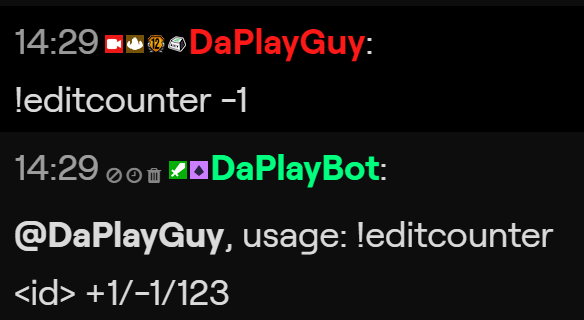
 scarlet tiger
Great 
 hollow hull
Hello great people, I'm trying to stream my game and for some reason the game capture got reverted. my game is fine and all that but the game capture shows it all reverted 😒 what can I do?
round brambleBOT
@hollow hull Please provide a log from your last stream. To do this, in OBS go to Help > Log Files > Upload Last Log File and paste the link to the log file here.
hollow hull
thank you
 vast zealot
Help Desk I might need some help, I am in the Stream Elements Beta MTGA Content Creator Program just got accepted a few days ago; however the challenges are not showing up for me; I will click the challenges tab and it looks like something is loading but a blank screen appears and stays that way. Here is a screenshot.
round brambleBOT
@vast zealot On the page that gives an error, press F12 to open Developer Tools. Navigate to “Network” at the top and then Select “XHR” in the filter section. Try the action again that gave the error and note in the network tab any red text. Please copy and paste the error information that is given when clicking on this red text.
twin sentinel
Can you access the page in an incognito chrome tab?
 plush raft
I stopped receiving the post-stream stats emails, was this discontinued or did I somehow disable it?
round brambleBOT
@plush raft Please provide your account ID found at the top of this page: https://streamelements.com/dashboard/account/channels This ID is public info and safe to share here.
 humble roost
anyway I can add a custom image to the event rotator?
twin sentinel
You should be able to upload the image with your chrome browser to the StreamElements cloud and add it to the event rotator widget in the overlay editor.
vast zealot
@twin sentinel just tried it and same thing... nothing came up...
twin sentinel
@plush raft Can you DM me your accountId and the email please. I will forward the data to staff to fix your reports.
@vast zealot Are there the same errors?
humble roost
I'll try to do that in a second, thank you
vast zealot
@twin sentinel yep they are the same errors
twin sentinel
Do you have any firewall running?