#helpdesk-twitch
1 messages · Page 576 of 1
 tepid brook
 strong kernel
@midnight void You've set a price to use the command itself. This will take 50 points without giving a ticket, it's simply by virtue of using the command in chat.
 midnight void
okay thanks
 lament blade
Greetings, I got an e-mail to try out the SE.Merch [Beta] which I did. And after 2H+ after I uploaded an template [To see how it looked] the Store opened.
• Unfortunately I cannot edit, change prices... etc
• I noticed the warning stating "editing is temporarily disabled" just wondering for how long though.
Thank you for your time reading this message.
strong kernel
Please see #270206314561404928
lament blade
With all due respect I did, and stores can't go live or created again even with delay due to editing not being possible.
Thank you for your quick reply... Don't want to sound rude but your message was posted immediately like 0.1 sec after mine.
But I appreciate your time...
 dry hare
@grim glade inside OBS.Live click the StreamElements in the menu >> import
dry hare
@tall folio what resolution are you streaming at?
Np!
Had to finish dinner before coming back
 grim glade
all good
 tall folio
@dry hare in fortnite 1856x1080 in csgo 1024x768
 wanton mango
@tepid brook you can get the raw plain text from a paste using https://pastebin.com/raw/PASTE_ID - then everything else like parsing it, I custom built ground up
dry hare
Don’t care about game resolution, what is your stream output resolution?
dry hare
Set your output to 1280x720. Leave your canvas at 1920x1080
 pale mantle
Hello my dear friends, I am removing (or alternatively adding a new) sounds from my alertbox alerts, but it still continues to play the default sound. Is this a bug in the system right now?
dry hare
What browser are you using?
pale mantle
firefox
gonna try chrome
even on chrome it does it
It will play both the sound I upload and the default sound
strong kernel
@pale mantle Make sure you're editing the variations and not just the main alert.
Also note that editing one alertbox has no effect on any other alertbox in any other overlay.
pale mantle
I am editing the follower alert and then testing it with the emulator
strong kernel
Do you have OBS open?
pale mantle
yes
strong kernel
It's likely playing through there too, then, and you likely haven't saved yet.
So close OBS.
tepid brook
@wanton mango what lanuage does streamelements interface with php, node.js or one of the others
wanton mango

Google Analytics, GitHub, Node.js, Docker, and React are some of the popular tools that StreamElements uses. Learn more about the Language, Utilities, DevOps, and Business Tools in StreamElements's Tech Stack.
 fathom lance
hi
lament blade
how do i remove a channel from my account?
 pine ginkgo
Im having trouble with stream elements. Whenever I try to test my subscriber and cheer alert, it comes up as the default instead of what I imported
 cunning swift
Are there possibly options to set up alerts/tracker through other charities outside of tiltify/extra life? Streamlabs has a built in integration but if I can avoid having to use two different alert systems I would prefer that
strong kernel
@lament blade Once merged, channels cannot be unmerged.
@pine ginkgo Edit the variations as well.
@cunning swift Only Tiltify and ExtraLife at this time.
cunning swift
@strong kernel thank you.
lament blade
😢
Facebook keeps shutting down my page for no reasons
just every day they block me
then unblock me
i just want it gone now i have to deal with it there forever 😦
 normal igloo
@lament blade #1 you're in the twitch help channel #2 we're not facebook so we can't help with stuff outside of our control 
normal igloo
general question about facebook in the twitch help channel? 
lament blade
where else should i put it?
there's no general channel?
has nothing to do w/ facebook
normal igloo
no general channel?
lament blade
the question was, "how do i remove a channel from my account"
i asked in general channel
you bot told me to ask in here
normal igloo
so whats #general-chat ?
normal igloo
less of the cheek
lament blade
i asked in the general channel
strong kernel
Note how it directs you to choose the relevant helpdesk channel for your issue.
All of them are listed there for you to pick from.
strong kernel
As it pertains to a Facebook channel, it would be asked in #helpdesk-facebook
lament blade
that has nothing to do with any platform
😵 🤦
nevermind
sorry i asked jesus christ
ok, i want to remove my twitch channel
from my account, is it possible? O.o
strong kernel
As previously stated, once channels have been merged, they cannot be unmerged without deleting every channel's data in the account.
 wooden stump
Having OBS.Live open causes my computer to slow down terribly and stutter. Any ideas? I've tried re-installing
normal igloo
That shouldn't be the case but try asking in #helpdesk-selive
strong kernel
@lament blade This limitation is actually fairly common for all manner of services, particularly SaaS, as manually editing the database to provide each individual channel with its own account again is too much of a liability.
 reef drift
Is this a real email or is it from impersonators?
lament blade
i'm a software engineer dude, it's not that hard.
i don't want it to have its own account
i just want to remove it from my account
i don't want it linked anymore
 oblique steeple
@reef drift It's the beta invite, right? It's definitely real. Google sometimes flags it as spam 🙄 But on the other hand, merch just got public anyway so yeah.. 😄
 little orchid
is there a way to change the !quote add/remove command permissions?
 wary beacon
"command keywords" doesn't work for the !join raffle default command
strong kernel
@little orchid No, only moderators and above can add/remove. This cannot be changed.
@wary beacon Correct, I believe several module-based commands will not accept keywords, only aliases.
 arctic star
So I've got a super overlay, and for some reason its alertbox isn't working. It works when I test on the editor, but doesn't pop up on OBSL. Help?
strong kernel
Disable Browser Source Hardware Acceleration in Settings>Advanced.
arctic star
Still not working?
strong kernel
As odd of a solution as this might sound, install our OBS.Live plugin for OBS Studio. There's a technical reason but I won't bore you with it.
arctic star
Is that the one through the stream elements site? Or is it a separate plugin for OBS itself? (or am I talking out my ass). Because I'm using the one from the Stream Elements site that is, as I understand it, OBS Live.
strong kernel
Do you have a StreamElements menu at the top of OBS?
arctic star
Yeah.
strong kernel
Which super theme are you using?
arctic star
Currently the Halloween one (closest one that fits my Grim's Fairy Tales kind of theme until I can get a custom overlay)
strong kernel
Let's just make sure it's not something simple.
 round brambleBOT
@arctic star You can test Alerts via the bell on the lower right corner of the Overlay Editor. Simply go to your Dashboard -> My Overlays -> Pencil/edit button on the overlay. Make sure the "Show Emulated events on stream" option is on to see the alert in OBS/Xsplit https://streamable.com/h6qgy
 strong kernel
Are you following the bolded text?
 tiny oxide
So streamelements.... Is there a way to be able to move a webcam and the overlay border at the same time?
strong kernel
@tiny oxide Only if you've put the overlay border in its own standalone overlay, as you don't add your webcam feed to the overlay on the site, that's added to OBS afterwards.
tiny oxide
I see. Does streamelements have a link for the overlay to add via browser? and how would I link the two?
arctic star
facepalm gif
That setting is very hard to see. So for the testing, it works now.
Would this fix the issue with not getting the notifications the last fifteen or so followers?
strong kernel
@tiny oxide Yes, every overlay on the site has its own URL.
tiny oxide
err I have the overlay added.. I guess I just need the widget in the overlay that is the camera border?
strong kernel
Yes, you need to add your camera border to the overlay.
tiny oxide
ok I understand what your saying now.. So its possible to have 2 overlays running at once?
strong kernel
Yes, of course. Each would be its own browser source.
tiny oxide
ok so duplicate then disable everything but the border. But how to I get the overlay to move with the camera source?
strong kernel
@tidal dune Please refrain from asking in multiple channels. Stick with the first and be patient, and we will get to your issue.
@tiny oxide Select them both in OBS and move them
 tidal dune
my apologies
just going to ask here since i don't want to keep switching channels
Recently whenever I open up streamelements obs live the nicknames iv'e made for my viwers (first names) no longer show up. Also whenever i used to open obs the chat would be dark themed like it is on my browser, but no longer does that. Would anyone know why this would happen? (Worked fine for months until now)
tiny oxide
ok did not know I can select them together like that.
And there is no way to link two sources together?
tidal dune
I tried to investigate that and I couldn't figure that out. essentially what I would do was click on the usename in the obs live chat then next to the name was a edit button that allowed you to edit the name to show as whatever you wanted. used it to learn first names and stuff but now whenever i open obs live the chat seems to restart on all default settings like it's the first time, doesn't even show up in dark mode
took a lot longer to load too
i am able to still do this but every time i close obs it re sets everything to default settings for the chat section
 meager jolt
How do I get my custom alert videos to start from the beginning each time... it looks like they are started where they ended the previous time
 frail ocean
Any chance we can change merch store URLs? Just wondering! ✌️💙🎮
strong kernel
@meager jolt Videos should play from start to end, whereas gifs will loop.
 quiet chasm
Running a dual Pc setup is it better to put overlays on streaming PC or gaming PC? (not sure if this is right section to ask)
strong kernel
Streaming PC.
meager jolt
@strong kernel I'm running gifs becuase I want a transparent bg, but just to clarify... I'm not talking about the same instance of alert... it starts playing back from where it left off in subsequent alerts. for example if I get a follow, and then a second follow 10mins later, the second alert won't start at the begging of the clip
strong kernel
@meager jolt I'm aware. This is normal behavior for gifs. Convert your gifs to webm and you'll be fine.
meager jolt
do you have a recommended website to convert to webm?
strong kernel
convertio.co is pretty good.
meager jolt
Thanks heaps!!
 safe brook
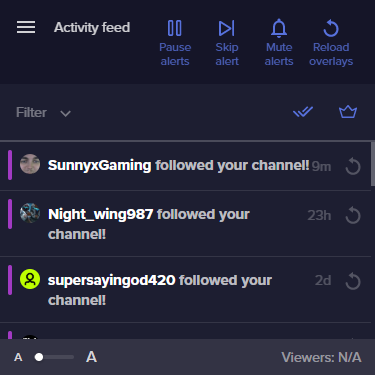
alright i'm at a pretty big loss as to why my alerts still aren't working. https://i.imgur.com/jZwopYm.png They show up in the activity feed, wizebot displays them in the chat and the tests all work correctly. Still, the alerts for live never work anymore. I've tried removing the browser source and putting it back in, as well as disconnecting my account completely still nothing.
 ionic kelp
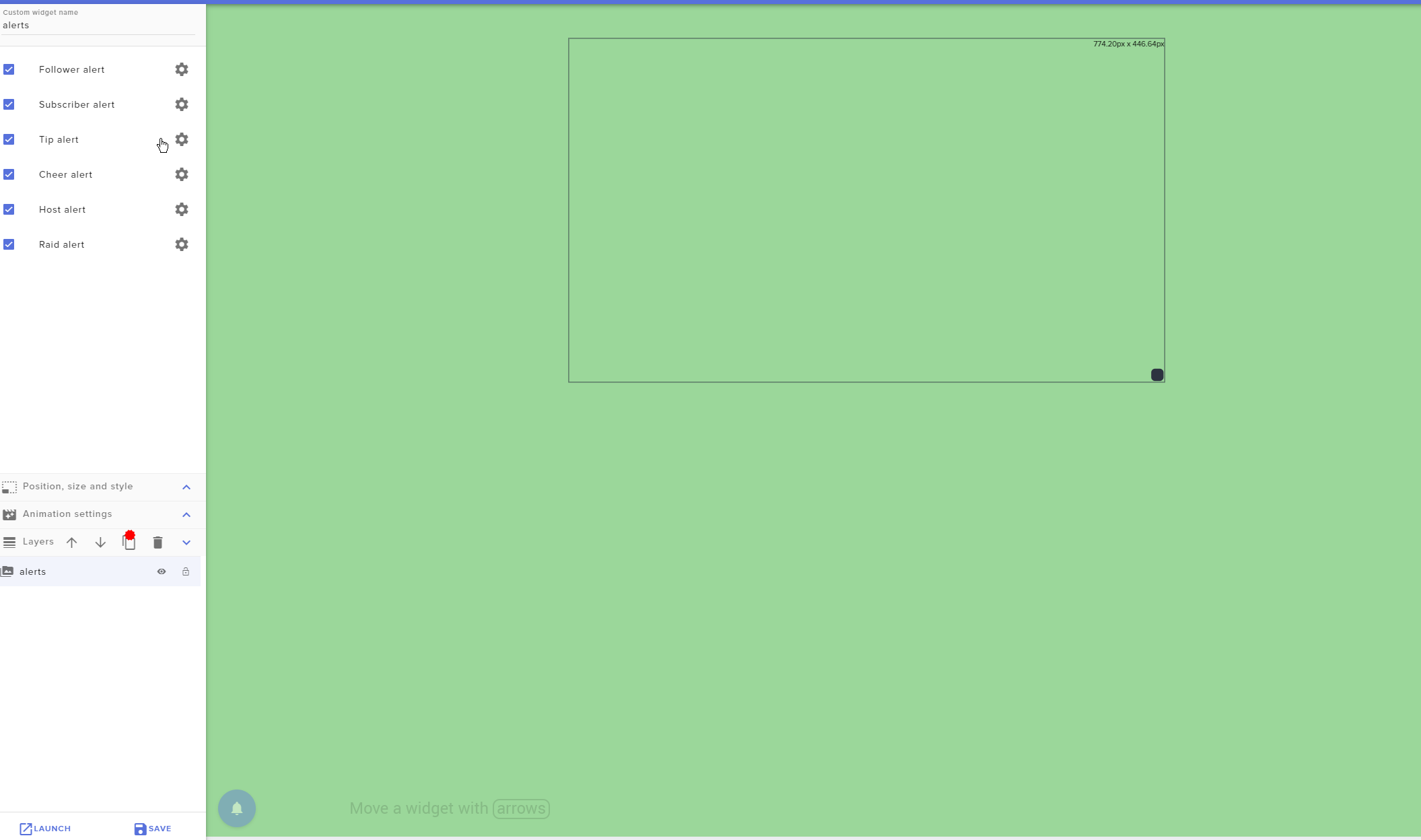
@safe brook You have a widget in the overlay with all the alert type options enenabled?
safe brook
are you talking about this? https://i.imgur.com/pYDFb96.png
 ionic kelp
Exactly that.
safe brook
yeah
ionic kelp
 lemme ask something elsewhere.
round brambleBOT
@safe brook Please provide your account ID found at the top of this page: https://streamelements.com/dashboard/account/channels This ID is public info and safe to share here.
 zenith widget
nvm found your account
you haven't been renamed in our system yet btw
as in, we still show your old name
so please logout from the dashboard and login again
After you do so, let me know @safe brook
safe brook
ah ok that makes sense, one second.
ok done I think it's fixed it's showing my updated ID @zenith widget
yaaaay
zenith widget
Seems to be fine now
safe brook
thank you so much, I can't believe I didn't think of that
zenith widget
you just had to logout and login in our dashboard
If it continues there is something else we can do
 marsh moon
Good morning. I´m using stream elements but the bot doesnt work on my stream, i go online but he dont send any timmer and on my page in the bot i appear always offline. is there anything i can do?
zenith widget
Have you renamed recently?
zenith widget
Bot seems to be working completely fine
If its just the timers, check this guide out: https://discordapp.com/channels/141203863863558144/199460642975907840/508911738528333849
marsh moon
i beleave the problem is my twitch account
cause my mates also say that i dont appear online to them and i dont even send the msg saying im streaming
marsh moon
what u mean
zenith widget
I would advise not using Follower only mode, because that will hinder you from gaining followers.
This prevents people from talking in your chat initially before following you
and doesn't help the bot from triggering its timers.
marsh moon
im noob on twitch
 stone spire
Heya, is there still ongoing issues with custom bot names in Ground Control?
zenith widget
Yes
stone spire
I've had mine fixed a little while back, but a friend is still having trouble with theirs. Do they have to be manually activated or something?
zenith widget
I would recommend to use OBS.Live
stone spire
Right, is that just the more supported platform now?
quiet chasm
when running a dual pc set up how do i hear the alerts on my head set that is connected to gaming pc?
zenith widget
You open OBS with the alert overlay added to it and thats it pretty much.
You can mute the alerts for the streaming PC, so that no double audio happens
zenith widget
Right click the browser source -> properties -> control audio in OBS -> in the audio mixer just mute it via the volume icon
quiet chasm
Learn something new everyday. Thanks!
 sour storm
hello
round brambleBOT
@sour storm Welcome to the helpdesk! Please let us know how we can assist you today and a support volunteer or staff member will assist you as soon as they are available. Thank you for your patience.
sour storm
hi my dear okay so i would like to know how to set my twitch up that when i get donations or subbs how it can display on the screen so everyone sees
round brambleBOT
@sour storm New to Stream Elements?
Check out our YouTube channel https://www.youtube.com/c/streamelements/videos
with tutorial videos from setting up the basics, to in depth details on how to use our product.

 sweet socket
if you're new with StreamElements, be sure to check out our tutorials!
sour storm
thanks be back after the video
 cinder lotus
hey, is the ground control app only working with twitch or can I make it work that it is showing all events from all channels at the same time?
cinder lotus
I see, thanks
quiet chasm
my desktop is still picking up the audio and sending it to my streaming pc. Maybe im doing it wrong. i want the alerts to go through headphones connected to the gaming pc but i dont want it to pick up on the streaming pc how do i do that?
zenith widget
Well..isn't that why i told you to mute the alerts on the streaming PC and have them play audio via the gaming PC?
quiet chasm
ohhhhh
my bad miss understanding, i thought you said to mute it on the aming pc
sorry
zenith widget
🙂
quiet chasm
it works thanks
 harsh horizon
hey, i just added streamelements to my stream, and im trying to get my donate panel back working, and im setting it up and it says 'add a twitch panel' ive done that and added the link and it wont tick?
harsh horizon
so it is working? ;o
zenith widget
yes
harsh horizon
Legend, thankyou
and also i play my music through spotify, can ig et commands working for that?
just for current song playing
round brambleBOT
@harsh horizon Spotify has kindly asked us to disable our integration with them, so we complied. This means that the Spotify integration has been removed and the "Now Playing" widget no longer has it as an option.
zenith widget
This means theres no integration for Spotify
harsh horizon
No problem
zenith widget
besides a 3rd party API
harsh horizon
Awesome helpdesk, Appreciate it
zenith widget
lament blade
Payment failed : Unable to instantiate the payment screen
does stream elements have an issue at the moment?
multiple users are reporting this error
 summer acorn
hi, I have a problem, I can't change name of my bot... I have the bot Online and modo, I have streamelements overlay and I have Streamelements link TIP...
round brambleBOT
@summer acorn Due to a recent change from Twitch API, these features are affected by the change:
- Ground Control does not have Custom Bot Name
- Subscriber count will count the Channel and any other permanent sub you may have (+1 or +2 or +3 on top).
We are working on fixing both issues, but there is no ETA.
OBS.Live still has Custom Bot name working fine in it.
lament blade
People report it to me, and i experience the problem myself as well
zenith widget
And are you trying to tip someone with SE.Pay or?
zenith widget
Screenshot of when you receive this error
ty
So is this after or before you place the card details?
zenith widget
DM me your tipping link
 indigo remnant
Hey guys, about the quote system, I assume there's still no way to populate/view a full list of quotes without doing it manually? Also when quotes get deleted do they just remain empty quotes within the list? Thanks 🙂
 twin sentinel
No, there is not.
 rancid wagon
Hello I use StreamElements to set up my commands in chat can I get the bot to have my channel emotes without paying a subscription for a bot?
rancid wagon
thank you
indigo remnant
Is there a way to just delete the entire !quote collection in one go?
zenith widget
Unfortunately, no.
 tired gust
Speaking of Quotes, Is there like a Data base thing on the site shwoing them all. Or is it just purely chat run
zenith widget
Answered above by Benno, but to elaborate.
We don't have an UI for the quotes system, but have plans on adding one. No ETA on when.
tired gust
All good. Thank you keizar
indigo remnant
Thanks for the fast response!
 vital crane
gg
 visual kernel
This mah be a dumb question but where do I find a link to my store to add it to my panels? I made a panel under the Promote section but I can't find my link so I can link it to my store panel
zenith widget
If this is about the merch store - there is a button on top of the dashboard that says "go to store"
it will open your store front
visual kernel
Oh ok
 copper ocean
So is this a kind of streamlabs app?
dry hare
No
Not even close
Streamlabs stole the code for OBS Studio which is what OBS.Live is a plug-in for.
copper ocean
Ohhh oki
dry hare
Instead of reinventing the wheel, it’s like power windows for a car
Kinda like an upgrade if you will
ionic kelp
No.
dry hare
Obs studio is the streaming program. OBS.Live is the plug-in that provides you with StreamElements functionality within OBS Studio
copper ocean
Hmmm oku
sweet socket
plug in*
dry hare
We aren’t EA here
sweet socket
not the DLC 
dry hare
I’m using appropriate analogy
sweet socket
we dont have DLC since we are 100% free
copper ocean
Lol
sweet socket
dab
copper ocean
Oki
dry hare
You can have free DLC as long as you aren’t EA
copper ocean
Il see when i get Home, i might need some help to get everything readt
 little oak
Bordeaux drops mic 
copper ocean
Cus i use normaly streamlabs
round brambleBOT
@copper ocean Checkout StreamElements Youtube channel, several guides for you!! https://www.youtube.com/channel/UCjerlCIbLPQwSnYlClkjDXg or a list with all the guides https://www.youtube.com/playlist?list=PLCDDKlFdScbEwdx5AntcQIS1InkFJwHtv
copper ocean
Hm thx i guess
 zinc creek
I'm trying to stream youtube videos but don't know how to capture my pc screen
zinc creek
I choosed the chrome.exe but it's just dark
 jade remnant
- Open Chrome Settings.
- In the Search settings box, type in hardware.
- Ensure that the slider next to the Use hardware acceleration when available option is turned off.
- Click Relaunch to restart Chrome.
little oak
@zinc creek you dont happen to have the chrome browser minus down do you ?
zinc creek
I guess not
little oak
it will often stay blacc when its minus down on taskbar when pulling it from window capture
zinc creek
I see
little oak
@zinc creek once you capture it in full screen just let it sit for a sec then it should load up then you can minus it downand continue on
 spice karma
hello
little oak
Hello!
spice karma
There is a new command/module !nuke on StreamElements. How to deactivate it?
No entry in dashboard, not accessible to be deactivated in chat and its not a module nor a command that you can delete
lament blade
this guy has my face on his profile pic
sweet socket
@spice karma I'll ask around for you!
spice karma
@lament blade 
 ashen pumice
@spice karma 
 dawn fern
is there a way to get a link from the things you upload to your SE library ? trying to use the custom Greetings Widget but no clue how to pull those URLs
 nimble ravine
hello was wondering if someone can help me im trying to add custom sound commands in my stream but not sure how to do it
ionic kelp
@nimble ravine stream store. Only downside id if you're wanting user specific ones that's not possible atm.
nimble ravine
stream store ?
ionic kelp
nimble ravine
so what do i do once there ?
 gentle imp
@nimble ravine Steps to make a command trigger sound on stream:
- Go to Stream Store page here: https://streamelements.com/dashboard/store/items
- Add an item that has these settings on it:
- Stream Perk
- Loyalty settings to your desire
- (Next step) Add contents (image and/or sound you want to play)
- "Redeeming this item shows an alert
- Redemable via chat
- Skip Requirements
- Get the item name/command from the 2nd creation page
- Go to commands page here: https://streamelements.com/dashboard/bot/commands/custom
- Add command with desired name and have response for command as: ${redeem item_name_here}
- Go to your overlays and edit the overlay you use.
- Click on "widgets" and add "Store redemptions" widget. Click save and you should be golden.
- Test your own command in chat and have OBS or editor open to hear sound
nimble ravine
ok i messed up somewhere i manage to get it so it responds but no sound
ionic kelp
You got the overlay open?
nimble ravine
yes
ionic kelp
And you have the store redemption widget added?
round brambleBOT
@nimble ravine Please connect your streaming account (Twitch, YouTube, or Facebook) with Discord by going to ⚙ Settings and then Connections here in Discord. https://streamable.com/eg92w
 nimble ravine
done
twin sentinel
I do not see a redeem command in your channel. Point 5
nimble ravine
i put in !scare for a scream noise which i uploaded
twin sentinel
The answer is not described as in Poit 5. Please enter the variable as shown above.
nimble ravine
that may have sorted it
nope not a clue what im doing wrong
i get a message responce but not a noise
twin sentinel
Please follow the steps above closely. I do not see an active store item in your stream store and the command response should be changed like in point 5, not the name
 spice crane
Hello im having issues with my timers not working. I have maybe 10 a few of them sometimes work.
twin sentinel
Check the chat lines. They need to be met in the last 5 minutes before the timer is activated to really post it in chat.
Also be aware that when you add more lines to one timer, the lines are getting cycled through each time the timer is activated.
spice crane
Ty. Ill have to try and figure out how to have them work at the same time
 queen cave
hello. I've been using ground control and was abel to change the name of my bot, but now all of a sudden i cant. is this a normal thing or is there something i can check on? all help appreciated.
round brambleBOT
@queen cave Due to a recent change from Twitch API, these features are affected by the change:
- Ground Control does not have Custom Bot Name
- Subscriber count will count the Channel and any other permanent sub you may have (+1 or +2 or +3 on top).
We are working on fixing both issues, but there is no ETA.
OBS.Live still has Custom Bot name working fine in it.
queen cave
ah, thank you
 clear marlin
Hi! I'm "migrating" streamlabs to OBS Live, but I can't import an alert box and widgets, can someone help me? I downloaded the extension, when I click on import for it, it appears that "an error occurred"
 glass rivet
See if you can google it you may be able to figure it out, I’m new here but I’m sure they can help here but if you haven’t already just seee if you can get that info from google
That’s what I do for streamlabs etc
clear marlin
I will try
gentle imp
make sure you are logged on both websites and that you don't have any of their default images/sounds/videos since those will error out, they are copyrighted @clear marlin
gentle imp
awesome and welcome
spice karma
@sweet socket will you @ me back when you got mroe news about !nuke command?
 unique inlet
Hi there, i would like to Stream a game, but its not popping up on the display and in stream i need help pls/
 supple knoll
Hey guys, i am trying to get my account deleted on streamelements but it always says "invalid username". What username is Streamelements asking for?
 charred rover
hello bynogame donate alerts does not work again. Streamelements have problem other platforms works well
 smoky tide
means your channel is not live atm
marsh moon
but it is
smoky tide
weird. bot is in your channel. Might need someone on staff to help. But if your overlays and chat commands are working, I probably wouldn't worry too much about it
sweet socket
does your bot work if you do a command?
since the website can be a bit off with the offline/live thingy
better check on your own twitch channel
lament blade
chatstats is giving me 404 error on dashboard
 abstract hemlock
@lament blade did you change your name recently?
lament blade
@abstract hemlock I did
abstract hemlock
would you tell me your old name, and new name please
lament blade
(twitch) old: Sqrem new: Sqreamvibes
abstract hemlock
ok, working on it 🙂
ionic kelp
@lament blade Just out of curiosity does your correct name show in the top left of the dashboard?
lament blade
@ionic kelp yes
ionic kelp
All should be good then 
lament blade
Thank you! ❤️
 amber obsidian
is it possible to remove the bot CHAT confirmation when an item is redeemed? ex. @amber obsidian, you successfully redeemed join for 0 !pixels. elementsOkay
twin sentinel
no.
amber obsidian
that's unfortunate :/
 pliant axle
Hey There, we setup twitter notifications, with a custom message but we haven't seen any Twitter posts come through over two live streams now. Any ideas?
It was successfully connected to the twitter account, so I checked, perhaps I should try to disconnect and reconnect once again?
Thanks in advance
 shrewd turret
Hey, Any idea how to fix chat stats it's showing error 404 for few months now 😄
abstract hemlock
@shrewd turret did you change you name ?
shrewd turret
Yep so what should I do in that case?
abstract hemlock
give me your old one and your new one 🙂
shrewd turret
oh I need to find it as I don't remember anymore i be back in 2m
so my new one is
https://stats.streamelements.com/c/goaltv
old one was mrj1039 and also demonic1039 < this was when I registered with streamelements

StreamElements
Description Chat Stats tracks emote usage on Twitch in real time. See which emotes are the most popular on every Twitch channel
shrewd turret
Thank You for the help 🙂 🙌
abstract hemlock
You're welcome
 random nacelle
Guys I’m trying to get chats commands but they don’t work can anyone help?
 molten hornet
not sure how to import my scenes and overlays from Streamlabs OBS to OBS Studio. Anybody have any links to a video or anything?
abstract hemlock
@random nacelle is StreamElements chatbot at your channel, and its mod?
 pure salmon
Hello, I have a QUESTION... I add an alert box to my stream.. but when I test the alerts online they never show up... but if someone gives me a follow ... the follow alert works.. why the test alert in the stream element dont show up online??
a friend of mine he just show me they work.. he went to his stream element editor.. click the test.. lets say follower alert and it pop in his online stream
but not in my stream when i try it on mine
 wary halo
@molten hornet this is the button in OBS.Live
@pure salmon this button at the bottom has to be ticked
 cloud vine
Any problems with streamelements? bekoz i Lauch my overy and don't work
pure salmon
@wary halo 1000 thanks!!
wary halo
@cloud vine no problems here at all
random nacelle
No one is replying over there could u hep :/
wary halo
keep your questions in 1 channel please
cloud vine
@wary halo do you know something i may be doing wrong?
random nacelle
Sure just asking danm
wary halo
@cloud vine did you add the browser source like this:
round brambleBOT
To add your overlays to OBS, add a new browser source in your scene. Paste your overlay URL in the browser source properties, set the dimensions to 1920x1080 (unless you changed them on the website), and ☑ “Shutdown source when not visible” https://youtu.be/KDvLynUqXI4
wary halo
with the 1920x1080 res?
 uncut karma
Hello, is there a way to hide streamelements as a user on my viewers list?
molten hornet
@wary halo where do they appear once the import is complete?
cloud vine
@wary halo yes wheen i add this in obs is black ... and if i lauch this from web is blank nothing
wary halo
@molten hornet the overlays should be in the overlay editor on the dashboard
StreamElements
The Ultimate All in One Platform for Streamers
round brambleBOT
@cloud vine OBS -> settings -> advanced -> scroll down -> enable/disable hardware accel.
https://i.imgur.com/ggMe9ZE.png
 wary halo
try that please
 tawdry loom
the merch beta o the website doesn't load for me on pc
wary halo
which browser?
tawdry loom
explore
wary halo
try chrome please
cloud vine
tawdry loom
ok ty
cloud vine
@wary halo Opera and chrome ... is like elements dont realy save and lauch my overlay .... if i add link in obs is emprty
wary halo
did you try the thing the bot said?
cloud vine
what thing ? @wary halo
round brambleBOT
OBS -> settings -> advanced -> scroll down -> enable/disable hardware accel.
https://i.imgur.com/ggMe9ZE.png
 molten hornet
i see them in the dash, but how do i get them to show up here? https://gyazo.com/1435550f97fed0707f8d32fb13402833
 cloud vine
@wary halo with it checked or not , not working
round brambleBOT
@molten hornet To add your overlays to OBS, add a new browser source in your scene. Paste your overlay URL in the browser source properties, set the dimensions to 1920x1080 (unless you changed them on the website), and ☑ “Shutdown source when not visible” https://youtu.be/KDvLynUqXI4
@cloud vine Right click on the BrowserSource > Properties > Scroll down a bit > Refresh Cache of current page
uncut karma
@wary halo what do u mean by the loyalty system and how to hide it from there?
wary halo
StreamElements
The Ultimate All in One Platform for Streamers
this is the loyalty system from streamelements
you have a leaderboard there as well, but you can ignore users
 kind palm
Hey guys I have a quesion about giveaways when I open them...Can people enter multople times with one command like !enter 5
cloud vine
@wary halo dont work prob is something with streamelements web .... the old ones i have work but new ones no
 livid moss
I am trying to create a chatcommand that allows viewers to gift each other my loyalty currency. Is that possible?
*Hey guys. AND Help would be greatly appreciated. Ty.
🙂
uncut karma
Well I go for song of horror episode 4
wary halo
@cloud vine accept my friend request and DM me the overlay link pls 😉
uncut karma
Im already scared :p
cloud vine
@wary halo i cant send you msgs
dry hare
@livid moss that already exists
 abstract wyvern
Is there away to test an bought item in se.merch I don’t see a test alert
twin sentinel
dry hare
@livid moss
 teal bone
hi, I used to use my own acct as the streamele bot in my channel, has this been removed? I cant find the setting
twin sentinel
@teal bone Are you using GroundControl?
dry hare
Check it always
teal bone
no I don't think so. do I need to be?
dry hare
It turns off sources when you switch scenes to keep resource use down
uncut karma
oh ok
so should i activate this option for every scene i create?
I guess so, but can u confirm ?
@dry hare
round brambleBOT
@uncut karma To add your overlays to OBS, add a new browser source in your scene. Paste your overlay URL in the browser source properties, set the dimensions to 1920x1080 (unless you changed them on the website), and ☑ “Shutdown source when not visible” https://youtu.be/KDvLynUqXI4
dry hare
Yes. Check the box for every source that has that option
dry hare
Does it have the option?
dry hare
Then you don’t have to worry
teal bone
hi, I used to use my own acct as the streamele bot in my channel, has this been removed? I cant find the setting
i am not using ground control
 halcyon falcon
I know you can have a subscriber credit roll but can you have a continuously scrolling subscriber list for a session?
round brambleBOT
@teal bone Custom bot name requirements
- StreamElements bot modded and in chat
- Active overlay with alerts
- StreamElements tipping page in the panels below the stream (!panels)
- OBS.Live or Ground Control open
- Create a twitch account for the name you want to use or run the bot under your own name
- Custom bot name doesn't work on Mac
teal bone
that's what im looking for, how do i run the bot under my own name?
i cannot find the setting
twin sentinel
That is not correct @halcyon falcon
halcyon falcon
No? That's what someone told me the other day
dry hare
@teal bone activity feed hamburger menu >> click the gear >> stream settings thing
On phone so can’t accurately describe/show
twin sentinel
teal bone
thank you very much
halcyon falcon
Did not see the post shortly after I was speaking to someone that said it was implemented into obs.live
That's wonderful!
 eternal plinth
Would anyone be able to help me out here? My alerts don't seem to be working quite like the settings are... I have my TTS for cheer and tip set to $1 equivalent ($1 and 100 bits), but the TTS will still only work when the amount is the previous amount of $3 or more. I've tried logging out and in and everything. Lastly, I have the pick an alert randomly when more than 1 matches, but it seems to pick the last one WAY more heavily time and time again.
dry hare
Check variations
eternal plinth
The variations have TTS enabled, but it will still only trigger for $3 or more. I don't see the setting to change the threshold for TTS on the variations, only the main one.
dry hare
Each variation is the threshold
eternal plinth
dry hare
What are your variations set at?
eternal plinth
Their % chance? All at 100%. Wasn't sure if that mattered since I have the "Pick an alert randomly when more than one matches" checked
Seems like the only way to fix this is to re-add all the variations after changing the TTS minimum. Seems like a bad design flaw...
^ And also the Main alert has to be added as a variation or else it won't go off -- should be labeled or something
 quasi kiln
How do I make those cool panels?
wary halo
for under the stream?
quasi kiln
yeah
wary halo
you can either use an editor program like photoshop, affinity designer or you could see if there is something you like at Nerd or Die, or Visuals by Impulse
they offer paid and free ones
quasi kiln
ok
 dusky perch
Is there any Update on using a Custom Name w/ Ground Control not working anymore?
twin sentinel
Not yet. We recommend to use OBS.Live in the meantime.
dusky perch
I am using OBS.Live, as well as Ground Control. Did I miss somewhere in OBS.Live that allows me to use a Custom name for the Bot?
eternal plinth
stream settings has the option
dusky perch
It does? I seem to be missing it?
eternal plinth
obs.live? It has it. I'll send a screnshot in a sec
quasi kiln
how do i set a bot name?
dusky perch
Well it used to be in Ground Control you could enter an OAUTH Information for the Account you wanted to route the bot through
but that feature has since broken/been removed in the last few days
dusky perch
Score, at least they didn't remove it from the OBS Plugin
Which just only makes me ask why the hell it was removed from ground control
eternal plinth
Idk. maybe GC being phased out? Is there any benefit to GC over the obs.live plugin?
dusky perch
Well it used to be Custom Naming/Hotkeys for Media Control
I also run it for Activity Feed on my non-streaming PC
also, it didnt have all of these 'requirements' for using a Custom name, specifically "Add a Tipping Link", so Im guessing that is why they removed it
dusky perch
... if Twitch Broke it, why does it work in the OBS.Live window?
quasi kiln
How do i set a custom bot name?
wary halo
Twitch changed the API, and it works different with GC then with OBS.Live
@quasi kiln OBS> Top left corner of activity feed > Hamburger menu > Stream Settings
quasi kiln
ty
 worthy garnet
guys, is there a way to add automated commercials on streamelements?
round brambleBOT
@worthy garnet To have Streamelements run ads for you, make sure:
- Streamelements is added as an Editor to your Twitch Channel here: https://www.twitch.tv/dashboard/roles
2.A) To make a timer, go here: https://streamelements.com/dashboard/bot-timers - add a timer with a response "/commercial" and 5/10/30/60 for the duration of the ad - example:/commercial 30
2.B) To make a command trigger an add go here: https://streamelements.com/dashboard/bot-commands/custom-commands and add a command with response "/commercial" and 5/10/30/60 for the duration of the ad - example:/commercial 30
 astral yew
how can i add a live viewer count into my OBS Streamelements
 prime juniper
Hi, quick question: can anyone give me the chat command that a broadcaster would have to type in chat to modify one of the moderators' status, specifically make him supermoderator
dry hare
@astral yew check #widget-share
There is one there I believe
@prime juniper I do not have that answer. Allow me to find someone who might. It might need to be done via your dashboard
prime juniper
I checked it out in my own dash and it mentions it can be done in chat with the !level command, which I am new to
dry hare
Oh
round brambleBOT
@prime juniper
Chat/Bot Levels
100 - Viewer
250 - Subscriber (Twitch subscribers automatically placed at this level)
300 - Regular
400 - VIP (Twitch VIP automatically placed at this level)
500 - Moderator (Twitch chat moderators automatically placed at this level)
1000 - Super Moderator
1500 - Broadcaster
Dashboard Manager Levels
Bot Supervisor
Editor
Full Access
Owner
https://i.imgur.com/s61Liry.png
 dry hare
usage !level USER 500/reset
 cinder olive
Simply type !level 'username' and then the level you want to give - 1000 being Super Moderator
 prime juniper
Thank you very much! This help team is efficient
cinder olive
Catch us on a good day.
dry hare
I slap you Mitch
prime juniper
😄
cinder olive
Dont make me publicly make a sex joke on that @dry hare
round brambleBOT

I cant believe you would do such a thing, that was so mean. I'm going to go and cry
https://tenor.com/view/pikachu-sad-crying-upset-cry-gif-15550145
 cinder olive
Honestly my new favorite command
prime juniper
I shouldn't be surprised this twitch helpdesk is feeling so much like a twitch chatroom 
 dire steeple
how do I add overlays on my stream
round brambleBOT
@dire steeple To add your overlays to OBS, add a new browser source in your scene. Paste your overlay URL in the browser source properties, set the dimensions to 1920x1080 (unless you changed them on the website), and ☑ “Shutdown source when not visible” https://youtu.be/KDvLynUqXI4
dire steeple
will new followers pop up on my stream
jade remnant
if you have added an alert box, yes
spice karma
anyone an idea yet how to disable the !nuke command? Have same command name on my bot programmed, same functionality and cant edit any properties of SE's !nuke that suddenly was built into it at some point in the last 3 weeks
twin sentinel
The !nuke command is only available for the broadcaster. At this time I am not aware of a possibilty to disable it.
spice karma
What does "only available to the broadcaster" mean?
twin sentinel
other persons than the broadcaster should not be able to trigger it.
spice karma
it does though, at least the help text
twin sentinel
If a user types the command in your chat?
spice karma
well ok at elast "super moderators"
no not that of course
Im a mod in another channel
And do a custom bot for the broadcaster
It's strange that they put in a !nuke command without any means or interface to control it like changing the trigger name or assigning user level
Seems like hastily hard coded into the bot system without a second thought to me
well I jsut wait till its resolved then I guess

 long frost
Hello! The "Block User" function in Tipping History - does this prevent them from donating as well when you require users to authenticate with Twitch or no? Trying to avoid a banned user from continuing to donate and then charging back.
cinder olive
Tmk blocking user blocks their linked accounts, and paypal.
round brambleBOT
@spice karma Check out the StreamElements ideas board: https://strms.net/ideas. You'll be able to add ideas, upvote ideas you agree with, and track their progress with email notifications. Adding and upvoting ideas also helps the staff know which ideas should be prioritized so please take some time to upvote.
 twin saffron
Anyone know of a good Discord bot to announce videos and streams? Used to use CouchBot, but I guess they ended the bot for the foreseeable future.
 viscid pebbleBOT
Hi @devout spruce, Please ask your question(s) or describe the problem you're looking to solve so staff or a support volunteer can assist you as soon as they are available.
round brambleBOT
@devout spruce Please provide a log from your last stream. To do this, in OBS go to Help > Log Files > Upload Last Log File and paste the link to the log file here.
 devout spruce
cinder olive
devout spruce
cinder olive
 haughty python
Hello, my friend's twitch commands aren't working, any way to fix this?
cinder olive
Part the bot and have it rejoin.
haughty python
Where's that at?
cinder olive
The dashboard.
 still skiff
I have a "latest sub widget above a looping video, but the text isnt showing Over the video. Am I missing something?
The video is a looping cam overlay*
 pallid osprey
Who made the widget @still skiff
still skiff
I just added the normal one from the editor, under stream subscribers
 rancid wren
how do i add a chat command to open my merch store and my loyalty store?
pallid osprey
Is the looped video a new layer?
still skiff
yes
pallid osprey
Did you make sure the text layer is on top?
still skiff
yea thats what it appears to be on the editor, the text should be showing up in the bottom middle section
pallid osprey
Launch it in browser and see if it shows
still skiff
PogCHamp how about that!
pallid osprey
Pepehands
still skiff
Thanks for the assist
pallid osprey
No problem
 onyx meadow
hey there, I was accepted into the MTGA partner program but the challenges/etc don't show up on my stream elements dashboard. Is this something I have to wait for? or do I need to configure something? TIA!
 cunning coral
I have the same issue as @onyx meadow . The Challenges tab appears to begin to load a page, but then loads a blank white page. It did show a notification badge above the Challenges tab with 19 notifications before I clicked on it.
haughty python
I parted channel and made it rejoin with permission but commands still don't work, im confused
 toxic plaza
Hey. not sure if this is the right place to ask. but is there a way to limit KappaGen explosion? you can go !kappagen 1000 (emote) for example and if you go to high enough numbers it starts to lag. the only option i see in overlay editor is on explosions for general events such as donations etc. so nothing stopping someone from doing a 10000 kappagen which will lag out the entire thing
onyx meadow
@cunning coral glad it's not just me, I have the exact same problem!
 next flame
hey guys my mixer when i try to link it on my dashboard of SE says its already been claimed ?
 worthy musk
hey guys i can't get the stream information dock to load
 raw venture
How does one change the name of the bot?
dry hare
@toxic plaza I believe in the kappagen settings you can limit it to a number using a slider
round brambleBOT
@raw venture Custom bot name requirements
- StreamElements bot modded and in chat
- Active overlay with alerts
- StreamElements tipping page in the panels below the stream (!panels)
- OBS.Live or Ground Control open
- Create a twitch account for the name you want to use or run the bot under your own name
- Custom bot name doesn't work on Mac
toxic plaza
@dry hare the only limit slider i can see just dictates how many emotes show up when a event happens, not when someone does the command in chat
round brambleBOT
@worthy musk Streamelements on top of OBS -> Logout -> login
dry hare
It should apply to chat commands as well
toxic plaza
but it doesnt 😦 saved and reloaded the overlay and can still do a command on high numbers 😦
 formal fractal
hello. first time streamer... I have OBS studio, downloaded elements, but no one can hear audio. It's screachy according to my relative. I am seeing multiple desktop audios and can anyone help fix?
cinder olive
Send a screenshot of your Audio Options in OBS
formal fractal
I watched a few videos on this. it was working yesterday before launch... now it's not
sure
formal fractal
cinder olive
Bottom right, click settings. Then Audio @formal fractal
dry hare
@toxic plaza this is the event explosion settings
@formal fractal make sure this box is unchecked on your overlay source as well
formal fractal
on all of the scenes, @dry hare ?
dry hare
yes
formal fractal
I thought i read on one of the vids it was suposed to be checked.. hehehe
toxic plaza
@dry hare it still allows me to do a "!kappagen 1000 Kappa" command and it wont limit it
dry hare
Those ones are supposed to be checked
it won't limit the number of emotes, but should throttle the rate at which they spawn
formal fractal
ok, @dry hare ... all are unchecked and i made sure the shutdown source was checked
and I checked all the "refresh browser" like you had selected
toxic plaza
yeah.. can get quite severe if you get trolls spamming that
formal fractal
@dry hare can you tell me why I have two desktops and two mics then?
dry hare
Because you enabled them in the audio settings of OBS. Best practice is to disable those "default device" settings and add audio sources manually to each scene
 pure fossil
how can i control how many points people get per minute
cinder olive
Loyalty settings.
toxic plaza
well thanks for trying to help Orsuna! ❤️
dry hare
@toxic plaza it does appear to be affected by the "Browser hardware acceleration" settings.... I tested on my OBS and it rendered correctly without lag if it was enabled. The problem being that some of the animated overlays don't load if you aren't running a hefty GPU......
which then causes everything to lag
especially when running NVENC
raw venture
I do not understand this bot thing. I have done all the requirements but it is still not showing the option in Ground Control?
round brambleBOT
@raw venture Due to a recent change from Twitch API, these features are affected by the change:
- Ground Control does not have Custom Bot Name
- Subscriber count will count the Channel and any other permanent sub you may have (+1 or +2 or +3 on top).
We are working on fixing both issues, but there is no ETA.
OBS.Live still has Custom Bot name working fine in it.
dry hare
You can use the custom bot name via OBS.Live currently. They are working on identifying a fix for the custom bot name via Ground Control but do not have an ETA
pure fossil
what fun stuff can i do for games in stream?
cinder olive
What kind of fun stuff do you want to do for games in stream?
raw venture
Where in OBS.Live is this option?
dry hare
@pure fossil marbles on stream
formal fractal
Ok, thanks @dry hare ... I have it limited to just the 3 that should be there... where in the audio settings can I push the output so people can hear me better?
Apologies... im not an audiotech.. hehehe
dry hare
@raw venture Click the hamburger menu in the activity feed panel >> Stream Settings >> scroll down for Custom Bot name
pure fossil
@cinder olive stuff to entertain my stream like roulette and all that
raw venture
Thank you @dry hare
dry hare
@pure fossil Bot Modules
formal fractal
could it be this?
cinder olive
This is support for StreamElements.
formal fractal
ok
pure fossil
i mean what stream elements games are there @cinder olive
formal fractal
I am not seeing the pic next to Sources... is that a widget you brought in?
dry hare
Also make sure that NONE of your audio devices read above -6db. They should peak right about 10 if you have the levels set right....and you may have to adjust them depending on the game etc
That's the Mixer
when you add an audio source it should show horizontally
dry hare
You should adjust the levels in windows first
Set those levels to 100
Then in obs you can adjust down or up depending on how it sounds
So go to windows sound settings and fix those levels to 100
If your mic is getting distorted or picking up a lot of background noise you can turn it down a tiny bit in windows to help reduce some of the background noise when you talk
 royal bronze
How do you switch language on streamlabs? For some reason its set to spanish
dry hare
No clue
cinder olive
I havent heard of that term yet.
royal bronze
i mean OBS
dry hare
Don’t use it
royal bronze
my bad
royal bronze
its ok
cinder olive
In the main window (with the preview and everything), hit the top button of the left column of buttons; below the preview -- That would be Settings, which opens in General, which has the language dropdown (right hand side). Select your preferred language, hit the leftmost button at the bottom (OK) and you're done.
dry hare
The what what?
formal fractal
ok... i just went to what it looked like my driver for the mic and pushed it from 60 to max 100... the mic aux is still maxing at -45...
dry hare
Oh
formal fractal
really hoping i dont have to get a different mic.. hehe
dry hare
Did you disable your audio devices in your obs settings?
formal fractal
yes... like you told me to
dry hare
When you add your mic, you will add an audio input source to your scene
Then drag the slider in obs to the right
formal fractal
this is what the new window looks like for one of my scenes
dry hare
Also... there’s another thing that might be only available one place
One sec
yeah....show me your OBS Settings for Audio again
formal fractal
dry hare
Okay click Start and type "Control Panel"
go into that, go to Sound
show me your microphone properties
formal fractal
not sure which one would be mic since I am using the headset... this is what i see.
formal fractal
formal fractal
ok back to obs
tested it just in case you wanted me to... look like it maxed out at -35 for my normal voice but averaging -45 still... my typing is even on the same wave as my voice...
dry hare
What kind of headset is it?
formal fractal
I know its a razer... but forgot the model. It's bright green for color
retractable (pushes inside) mic
dry hare
Man 'o war?
formal fractal
I think the Kracken
formal fractal
it is not muted, according to the toggle on the cord
dry hare
ok. what does Synapse say?
formal fractal
and it looks like synapse is only bringing up my keyboard
dry hare
is it a USB Mic or a 3.5mm plug?
formal fractal
3.5 is plugged in right now. I do have a usb adapter for it that I bought separately
but it's not on right now
cinder olive
Could be a 6.3mm plug @dry hare
formal fractal
it's two plugs.. one for mic and one for headphones...
2 rings on it i htink means 3.5
formal fractal
ah ok
dry hare
it's an audio thing
So Synapse won't detect it
here's a question, which port do you have your mic connected to?
which color?
do you have one of those fancy cases with the front headphone/mic plugs or is it connected in the back?
formal fractal
the color on the ring is pinkish red... and i have it plugged into the front of my pc (Dell inspiron 5070 i think)...
front
but i can try to plug into back instead,if that 's what makes it work better
I just like the front so if i want to go solo and use speakers, it's easier to swap
cinder olive
It sounds like something is wrong with your Razer Software.
Honestly if I could recommend something, it would be to contact their support.
dry hare
It won't get picked up by the razer software because Synapse only detects USB Devices
formal fractal
ugh... so that's my downfall? I got the plugs cause all i had problems with in the past was with usb... now that's what i need? hehehe
formal fractal
ah ok
dry hare
green should be headphones, pink should be mic
After my razer Man 'O War ear pads disintegrated leaving me with pleather remnants in my hair, I picked up a $75 Corsair Void Pro and never looked back. fabric is so much softer
 narrow iron
Is there a way to get https://streamelements.com/fluffyrozey-9001/tip without the numbers? I moved from Mixer to Twitch and I don't like the numbers xD
formal fractal
hah... now mic is not working on the back... not sure why...
dry hare
ruh roh
could very well be the headset
how old is it?
I had an issue with my razer mic so I just stopped using it after a while
@narrow iron You want to swap your Mixer and Twitch URLs?
narrow iron
Yes
formal fractal
it's wierd... cause when i go into the "test" part of windows... the line moves like it should... it just doesnt with obs
dry hare
groovy. I'll post it for staff to take care of
narrow iron
Basically make https://streamelements.com/fluffyrozey/tip work for Twitch
And not mixer
Awesome!
I'm so glad StreamElements has that ability
Well SE staff willing to do it
dry hare
Consider it done
narrow iron
Thank you so much! :D
dry hare
the mixer one will most likely get the -234234
 hearty pecan
how do i add overlay?
 lofty arrow
I have the music set up and ready but it didn't play on stream or when I play a game.
round brambleBOT
@hearty pecan To add your overlays to OBS, add a new browser source in your scene. Paste your overlay URL in the browser source properties, set the dimensions to 1920x1080 (unless you changed them on the website), and ☑ “Shutdown source when not visible” https://youtu.be/KDvLynUqXI4
dry hare
@formal fractal if you listen to the microphone in your headset via the recording device properties, can you hear yourself?
@lofty arrow idk what you're asking
formal fractal
@dry hare yes i can hear myself... even with a slight buzz in the background i think from pumping it up
in the settings
dry hare
if there's a buzz, is your mic extended fully and if you "twist" the mic a tiny bit does it get louder/softer?
@formal fractal I'm almost going to recommend contacting Razer and telling them their headset sucks (in a nice way so they replace it with a better one)
lofty arrow
How do you play music on stream beacaues when I tried to play music it couldn't be heard
dry hare
@lofty arrow how were you trying to play music? On your phone? via AirPods? limewire?
formal fractal
@dry hare just slight reverb. Does not matter if i twist or not... Yes it's fully extended
hahahah @dry hare
lofty arrow
via StreamElements media request on my Xbox 1
dry hare
hmmm..... yeah reverb is room echo essentially, and you're gonna get that. If you speak at a normal conversation tone, does the mic sound normal?
@lofty arrow are you capturing your xbox via capture card or streaming to Twitch via xbox?
formal fractal
it does... loud a little because of volume of my headset and stuff... it's wierd that mic/aux is not showing any volume now
in obs
lofty arrow
Streaming on my Xbox
dry hare
delete the mic/aux in OBS
then add a new audio input source and select the one that has the bars moving in the windows sound settings
@lofty arrow So if you want Media Request to work while streaming on your xbox, you're going to either need a capture card or a third-party service like Lightstream (which doesn't support direct-to-twitch streaming from Xbox yet, only to Mixer).
Because you have to have some way of adding the Media Request widget to your overlay for the audio to play through
@formal fractal
make sure the one you add as an audio input matches the one that you see the bars moving on
Also make sure that you uncheck the "Listen to this device" in the sound control panel properties for your mic so you don't get an "echo" in OBS
lofty arrow
Thank you
dry hare
I wish there was another way to do it, but unfortunately that's the limitation of consoles. If you have a computer handy, you can still monitor your channel activity from the SE Dashboard
formal fractal
now the mic is not coming up under settings at all in the "audio input capture" window
dry hare
so when you pick a device, it doesn't show up at all?
formal fractal
nope... i had to restart OBS to get it out of there after deleting it... and now wont show up when i try to re-add it
dry hare
are you running OBS as an administrator?
formal fractal
good quesiton... i forgot about that... just changed it to answer yes.. hehe
the only ics that are showing up in the pulldown are Facerig and my webcam mics
which are essentially the same thing, @dry hare
dry hare
Do you have the mic added in another scene? Does it show as an existing device ?
lofty arrow
Hmm while looking back at what you told me you said "adding the media request widget to your overlay" so now I wonder how on Xbox 1 you can add overlays with only a Xbox 1?
dry hare
unfortunately you can't
formal fractal
That's what I thought... so I removed the mic from all the scenes to make sure it resets...so it's not there... then tried "adding new" through the input and the pulldown only shows the two i mentioned
dry hare
hmm....
and you unchecked the boxes under the Mic properties for "Allow exclusive control"
lofty arrow
Ahh that explains why I can't play music or I can't add any overlays thank you
dry hare
Yep. Sorry about that.
formal fractal
dry hare
Maybe with the new one coming out for xmas it will work better
OH
Change the quality
should be 44.1
or 48k
hearty pecan
so i tried to add overlay and its just giving me the you add browser logo, not overlay
formal fractal
in obs, @dry hare ? it is Sample rate 44.1khz
formal fractal
yup
wait a sec... i htink i had the wrong one... for some reason i just realized it was the webcam i was in... MAJOR APOLOGIES
narrow iron
@dry hare will there be a way to know when my link has moved to twitch by any chance?
Like an email or something?
formal fractal
@dry hare you think it should be this one circled that i am messing with?
dry hare
@hearty pecan https://youtu.be/LwAfMIR3Cj0

StreamElements Overlays are loaded from a single browser source in your streaming software, making streaming easy. https://streamelements.com/
StreamElements overlay editor enables full customization of your overlay, improving stream visibility and an increase of audience in...
@narrow iron most likely an e-mail to follow up
@formal fractal yes that should be showing something
dry hare
@formal fractal This is going to seem like a really dumb question.....but is your hardware audio disabled in your BIOS?
That would be the only reason that I could think of that the audio jacks aren't working correctly
Or you need the RealTek drivers for your audio hardware
formal fractal
I think that fixed it!
i had the wrong one... so if it maxes out too much... then i should use the slider on the right of the colored panels, or go into the mic settings and go less than 100?
dry hare
If it maxes out, adjust the levels in windows until obs shows it about 10
formal fractal
ok
dry hare
Also make sure you scream a tiny bit so you can find out where it’s going to peak when you get excited
You don’t want to blow out eardrums
Once you have that set in windows you can then adjust in obs
As needed
Same for game audio
formal fractal
ok thanks
dry hare
Make sure game audio is about 10db below normal mic volume in obs
Also tell razer their headset sucks
😉
formal fractal
hahahah
ya i know i didnt spend alot for this heasdet...dont have the cash for $200+ headsets
not yet anywyas
formal fractal
kk
formal fractal
well i do like my logitec 920... it's what another streamer has that i watch alot...
formal fractal
ah k
dry hare
I’ve done crap mics/headsets on a MacBook Pro to a custom built desktop with an SM7B and GoXLR
I’ve run the gauntlet of gear
formal fractal
ah
dry hare
If you live with other people, get a dynamic microphone because it won’t pick up external noise as much as a yeti
They don’t look pretty, but until you build a streaming room with audio dampening, a condenser will pick up everything
Especially usb
It also doesn’t hurt to talk to someone at a guitar center as they can also recommend good starting gear
formal fractal
ya... i thought about that A LONG WAY down the road.. hehehe
but i wanna get at least a starting point into thsi
So I decided to go with one/some of your freebie skins/overlays... do alerts automatically come with those or do we have to "attach" alerts to the overlays?
dry hare
Built-in!
There are also some alerts to choose from if you don’t like the default ones for a template
formal fractal
I tried playing and worked on streamlabs... just didnt find what i was looking for similar in Streamelements...
dry hare
Nerd Or Die or Visuals by Impulse also have affordable overlays ($30 ish) for a full package
formal fractal
is there a way to test?
dry hare
One sec
round brambleBOT
@formal fractal You can test Alerts via the bell on the lower right corner of the Overlay Editor. Simply go to your Dashboard -> My Overlays -> Pencil/edit button on the overlay. Make sure the "Show Emulated events on stream" option is on to see the alert in OBS/Xsplit https://streamable.com/h6qgy


 formal fractal
I did see some of them... I just wanted to go free until I hit a level where i can apply donations/points back to my stream investment(s)
formal fractal
got it! so we test it in the browser first... then when someone actually does it, because it's "linked" to obs and twitch, it alarms, right? i know dumb question... you can tell im newb
 wispy rune
I believe you can do a test in the browser and obs at the same time by saving the overlay first then having both open at the same time
formal fractal
I tried that...didnt work, @wispy rune ... but thanks... appreciated 🙂
wispy rune
@formal fractal do you have the browser source in obs?
formal fractal
yes
wispy rune
Usually works for me. Well, worth a try
formal fractal
huh... i wonder if there's another one im mising then...
say.. in talk... (my talk scene)... i have headset mic, desktop audio, Facerig, and goblin overlay talk (which is my browser source)
 chilly mica
When I set my alerts to be text over image, the text doesn't show. Is this something I'm doing wrong or a bug on SE's side?
Also, I asked here a couple days ago about SE.Pay and was told to email somewhere, could someone let me know what email that is again? Thank you!
dry hare
@formal fractal obs settings >> advanced >> disable browser hardware acceleration
round brambleBOT
@chilly mica Please contact us via email for support with SE.Pay. You can use our contact form here: https://streamelements.com/contact Thank you
dry hare
Tada
chilly mica
Ah thank you!
dry hare
Also the text over image thing will most likely need a padding adjustment
I was working with someone yesterday whose padding was -50 and the text was outside the alert box boundaries
chilly mica
Ah, it looks like it defaults to -50 then. Do you remember what fixed it for them?
dry hare
I started with positive 50 and let them take it from there
I think 50 gets it just inside the box
It’s kinda weird
I’m also the worst at CSS
chilly mica
Oooh thank you! That got it inside the alert box
dry hare
I failed basic web development 3 times
chilly mica

dry hare
I failed because I wrote HTML 5 and they wanted 4
chilly mica
It's been... 3 years since I last worked with basic web dev? So I'm very out of practice 
dry hare
I have W3Schools bookmarked
I’m excited to see some of the upcoming community widgets
There’s a lot in the works that look amazing
chilly mica
Update: 175 centers the text in the image for text over image!
chilly mica
shush
 gusty frost
How do i get a 2000×2000 and 8000×8000 picture/image on mobile
gusty frost
There is this se merch thing and it says I need a design that is 2000×2000 and 8000×8000
dry hare
Usually you need an SVG via illustrator or gimp which you then export out as a PNG file and upload
You can also check #art-marketplace for someone to make you one
pallid osprey
Z-index: 999;
 delicate trench
So I was trying to edit my overlay, and Media Request just refuses to move. Even if I move it in my overlay editor and save it. On my stream it's just stuck in the top left. Hell, I had to fight it just to change the accent color. Any ideas for a fix?
dry hare
Reload the browser source in the source properties
delicate trench
I've tried to do that to no avail
I also tried to refresh that cache several times
dry hare
Delete the overlay and re-add it
delicate trench
I tried to do that too. I also tried deleting and re-adding the widget, but now I can't even make it show on stream.
dry hare
Do me a flavor: check obs settings >> advanced >> disable browser hardware acceleration
formal fractal
Acceleration option helped. Thanks again Orsuna. I really appreciate your assistance
delicate trench
Indeed, that fixed my problem. Thanks, Orsuna!
dry hare
Woot
 novel thunder
I'm seeing options for gifted sub alerts. is there any options for say like 10 gifted subs or more for example?
zenith widget
@novel thunder can you elaborate?
novel thunder
so you can set up alerts for a gifted sub right?
Can you set up an alert that's different if say someone gifted 5 subs or 10 subs. Like at once
bulk sub gifting alerts i guess
zenith widget
Yes
Make a variation for the sub aler
Condition should be set to community gift and then you amount
novel thunder
got it thats what it was. I wasn't sure what community gift was thanks @zenith widget !
 stark torrent
if I am using the Stream Elements version of OBS but am still using streamlabs alerts will donations and such still show on the activity feed?
lament blade
When I donate, can the streamer see my real name like some donations will show you their paypal?
some donation platforms reveal your real name on paypal. Does stream elements do this?
or is it anonymous besides user name
zenith widget
@stark torrent if the tipping link is out the tips in the activity feed will be ours. If not then only the alerts will play
@lament blade we have no control iver what payal will show. We are the middleman here
stark torrent
@zenith widget so if im using streamlabs donations, the dono will not show on the activity feed?
zenith widget
No