#helpdesk-twitch
1 messages · Page 571 of 1
 strong kernel
 wide blaze
During the second step (Your Channel Information) when I click on the link to the Disclosure Document pictured in this screenshot it leads to ( https://cdn.streamelements.com/partner-dashboard/Creator Program Disclosure Policy_NA.pdf ) which throws the error
Upon looking at the url I think it might be the name of the pdf is causing the issue
strong kernel
Will bring it up with the team, thanks.
 lament blade
Hello I deleted the data in my donation history, but the donation tape and top tippers appear even though I renew it. I want to delete, How do I solve it?
 uncut isle
Hello, is it not possible anymore to set a custom bot name? It was working fine until like a week ago when I noticed my custom bot wasn't on my channel.
strong kernel
It's not currently possible in Ground Control due to sudden changes to the Twitch API, but it's still possible in OBS.Live.
uncut isle
Ah cool
I guess I'll give OBS.Live a try
Is there any plans on updating ground control?
strong kernel
Yes, we do intend to get it working there again too.
uncut isle
Great, thank you for the quick reply, I appreciate it a lot 🙂
 wise cliff
So after my channel name change everything is working fine except OBS will not pick up my channel chat :\ any way I can fix that without having to refresh it?
lament blade
@strong kernel
I deleted all my donors from the donation history, but it still appears. how do i solve?
 round brambleBOT
@wise cliff Streamelements on top of OBS -> Logout -> login
lament blade
help me plz
lament blade
I'm sorry I'm waiting
 kind girder
Hello there! Can someone from StreamElements help me with questions on the new Magic Creator Program?
strong kernel
What's up?
@lament blade This is an ongoing issue we've been looking into, but unfortunately we cannot provide an immediate solution at this time.
kind girder
To be able to track the automatic challenges, you're just using the Twitch API, correct? Meaning, the StreamElements broadcasting software doesn't need to be used to track completion?
lament blade
thanks i solved it
strong kernel
@kind girder Sorry for the delay, wanted to make sure of things. Yes, the data we use to fulfill challenge requirements comes from Twitch. The OBS.Live plugin for OBS Studio is not a requirement.
kind girder
OK, so it would be correct to say that streamers could continue to use SLOBS or OBS for broadcasting?
strong kernel
Yes, though particularly in the case of SLOBS, we can't troubleshoot issues that arise from the use of their software as we don't have the tools to do so.
kind girder
Makes sense, thank you
 obtuse nacelle
hi a need to put the comands !ponis.... how i put sorry im spanish
 uneven flare
hi, not sure if this is the right channel to post on, but when trying to upload .gifs for my alerts in the streamelements overlay editor, it doesn't update when i go to emulate an alert. not sure if i'm doing anything wrong but any help would be appreciated!!!
 cinder olive
#🇪🇸︱español @obtuse nacelle
@uneven flare When you upload a gif, you have to both upload then select the gif for the alert variation.
 tranquil radish
can i have the website to use the overways without a capture card again
round brambleBOT
Here is a guide on how to setup the most essential tools for streaming from your console, while using StreamElements tools without involving a Capture Card! It's easy to do, take 4 minutes to read and 10 to 15 minutes to setup!
Read all about it here: https://blog.streamelements.com/how-to-stream-on-console-7b620b1c46c3
uneven flare
do you mean submit? I did that and it didn't work. is there another place i need to hit select?
@cinder olive
cinder olive
Yes, submit. What image shows in the top right of the overlay editor?
Top left....
Its been a long day.
uneven flare
lol no worries. it shows the one that i selected but when i go to test it, the default .gif appears
tranquil radish
doesn't help i need overlays
cinder olive
And youre triggering the same alert that you set the variation for? AKA editing the Sub alert and triggering the sub?
uneven flare
yes
cinder olive
🤔 Mind posting the gif here?
strong kernel
@uneven flare The main alert you see when first opening the subscriber alert is specific for new subs at 1 month. Resubs are handled by the default variation in the variations menu. So make sure you're editing that as well or, when emulating the alert, use the 1 option that appears when mousing over the sub alert emulation and click that 1 instead.
@tranquil radish Overlays can only be done on PC. So if you're streaming console content, you need either a capture card or remote play. No exceptions.
tranquil radish
ok
uneven flare
@strong kernel yep that was definitely what i was doing wrong... thank you!!!
are you able to trim music files in the editor if you only want to hear a certain part of a song for the alert? or do you have to do that in another software
cinder olive
Another software.
strong kernel
You'll need to trim audio in outside software, yes.
cinder olive
strong kernel
Audacity is another common option.
uneven flare
thanks!
 loud fable
got hit with a follower bot today is there something in SE that can help with that
strong kernel
We'd recommend disabling your follower alerts while you reach out to Twitch to report the activity.
 clever kernel
Programs
Partner up and earn benefits what is this that pop up in my stream dashboard please
strong kernel
Please see the new "My Partnerships" section of the dashboard.
 wise copper
Hey! How can I display my twitch chat on stream through OBS.Live?
strong kernel
@wise copper Anything you'd like to show on stream is added as a widget to an overlay in your account on the site.
round brambleBOT
@wise copper To add your overlays to OBS, add a new browser source in your scene. Paste your overlay URL in the browser source properties, set the dimensions to 1920x1080 (unless you changed them on the website), and ☑ “Shutdown source when not visible” https://youtu.be/KDvLynUqXI4
wise copper
I'm not sure if I got it right... I want to grab a live feed of my chat without any background so that I can integrate it with my stream design, is this possible with StreamElements?
strong kernel
Yes.
Please refer to this full guide on using our overlay editor: https://www.youtube.com/watch?v=LwAfMIR3Cj0

StreamElements Overlays are loaded from a single browser source in your streaming software, making streaming easy. https://streamelements.com/
StreamElements overlay editor enables full customization of your overlay, improving stream visibility and an increase of audience in...
wise copper
Thanks! I'll give it a look
clever kernel
im not from any them country it saying im from UK
in the Partnership progrmams
see any one free to help on this why i can not set UK
strong kernel
If your country is not listed in the dropdown menu, the program is unfortunately not currently available there.
clever kernel
ok cool will add more country soon
 sacred girder
quick question how do i clip something while streaming on twitch while streaming through streamelements
cinder olive
Via the clip button on Twitch.
There is also a command you can create aswell, https://thefyrewire.com/docs/api/twitch/clips/
cinder olive
Tis for me to know and for you to find out, me lord.

 elder sorrel
You're fine, natas. It's from Fyrewire. A Code Guru here in this Discord who made that.
Shows the steps on how to create the custom command for clip through SE.
sacred girder
do you know if there is a way to clip something longer then 30s on twitch?
elder sorrel
Twitch max duration is 60 seconds.
sacred girder
how do i edit it to 60?
lament blade
Hey, someone knows how make an alert to Twitch Channel Points?
elder sorrel
Don't think that's a thing yet @lament blade
@sacred girder Through the Fyrewire thing? I'm sure you'd have to do that manually through the Clip Editor in Twitch after the clip has been made.
lament blade
@elder sorrel I saw them in a stream today, but don't know how make it. But thanks anyway.
Maybe the streamer hired someone to program them
elder sorrel
Have a clip of that? I wanna see
lament blade
Can I send it right here?
strong kernel
You'll need to copy it to VHS, hire a private courier who drives a Winnebago, and have them bring it to us. Or yes, you can send it right here.
 lament blade
Ok, wait a month...

it's the message from theipu
strong kernel
My plan to get a free Winnebago ride has been foiled.
lament blade

 arctic sequoia
is the merch free
 daring siren
I've always wondered how does updating your drivers actually help your pc? I used to think it'll help you run games better but like.. it looks like its just there to be there?
strong kernel
The main purpose of device drivers is to provide abstraction by acting as a translator between a hardware device and the applications or operating systems that use it.
strong kernel
Yes, it will be. At the moment, it is in closed beta and only available to users who have been accepted into the beta.
 dapper oxide
Literally why won't my window/game capture capture my game? It's really infuriating when I'm trying to stream some Dead By Daylight but the capture doesn't capture anything.
lament blade
remove streamelements in twitch chat
 ionic kelp
@lament blade what do you mean?
lament blade
like i have streamelements in my twitchchat
i don't want it there atm i can't rememeber how to remove
nvm found it
 jolly berry
Hi, How do I active the loyalty points system, for twitch and is it possible to put a leader board in my description on twitch? Even though I already have the schedule from streamelements on my panel area? Someone told me in my stream lastnight that I wouldn't be able to use the point system due to currency and me being from the uk
strong kernel
The loyalty system is enabled in the Loyalty settings section of your account. The StreamElements Leaderboard extension has a section for points.
jolly berry
Ok, but can I implement the leader board into my twitch channel panel area? I have quiet an active chat when I stream, users use points and gain them but my followers dont seem to appear on the leaderboard? It's actually showing empty!
strong kernel
Yes, the extension is a panel extension.
jolly berry
Ok ta
 main herald
every time i try to go to se.merch it wont load
strong kernel
What browser are you using?
main herald
internet explorer
strong kernel
Use Chrome.
main herald
ok
 fleet tusk
Hey just a quick question, in the editor for overlays, is there a button that allows free form image flipping, i can flip images on OBS but in elements I get a 90degree 180 and 270 but none are what I need, is there a way to literally just turn the image ?
strong kernel
@fleet tusk There is no option to flip an image.
main herald
its still not working
strong kernel
@main herald Screenshot please.
fleet tusk
...
Maybe look at putting one in? or it's more worthwhile to use OBS classic 😂 cheers\
strong kernel
You can upload a second copy of the image flipped.
fleet tusk
10/10 can, dont want to, would much rather have it flipped on hand in your "Editor"
or ill have 100x images
doing it this way would create 10x less images and entities for people to deal with 🙂 anyways chao
 outer warren
I have added alerts to streamelements but for some reason some of them don't seem to be working...
The follow one works fine, however the host and raid ones aren't working properly.. When I test it on the overlay editor they show up just fine but when a user tries to host/raid me no alert is sent
Also, on my activity feed on OBS.Live it doesn't show the host/raid event either
round brambleBOT
@outer warren Due to changes to Twitch API, we have filtered out hosts and will only show these ones on your activity feed:
- All hosts coming from an online channel with at least 1+ viewer
- Auto host events with at least 1 viewer - only from a channel that just went offline
Note: If you see "X channel has hosted you" with no viewers on the back, that is considered an offline host or a host with 0 viewers, we do not show these.
 timber lichen
I have a question. If I set LIVE my store, can I change it lately?
 scarlet tiger
@timber lichen stream store?
timber lichen
Yes 😄 @scarlet tiger
 low aspen
Hey everyone, I have a problem I hope someone can help me with. I play on xbox, stream through my computer via streamelements, using an elgato hd60. And with a dynamic mic run through a mixer into my pc. That's my set up. I just picked up the chat link cable, so my stream can hear my game chat.
I'm in sync, both cam and mic audio. But my gameplay audio and my game chat audio are out of sync. And even out of sync with each other. I can mess around with the delays, but either the gameplay audio is in sync or the teamchat audio is in sync, but not both. Does anyone know how to fix this?
scarlet tiger
@timber lichen What do you want to change?
timber lichen
I mean, If I want to change the Logo or desing. I can do it lately even if store is LIVE ?
Or you are locked with the first desing you set when the store is live?
 oblique steeple
No you can change it anytime
timber lichen
Oh right, thank you 😄 I will set live it now with a basic logo and think about cool desings for the items ^^
oblique steeple
You can take the entire store online or offline. And if you change one item while the store is live, this item won't be available for a few seconds / minutes until the item is updated in our system.
timber lichen
Oh thats really cool
Thank you so much 😄
Is there an specific web with the store info? like are the items sent from EU or EEUU?
oblique steeple
One moment
timber lichen
yep 😄
 zenith widget
@low aspen You will have to poke the elgato people about that.
 sand topaz
Yo
round brambleBOT
@sand topaz Welcome to the helpdesk! Please let us know how we can assist you today and a support volunteer or staff member will assist you as soon as they are available. Thank you for your patience.
 charred crag
is there a page for streamelements comands?
 ocean mantle
Has anyone ever had a command get stuck?
I have deleted a command and yet it still responds when using the !command in chat 🙂
zenith widget
part the bot and join it again
sometimes the bot caches in and needs a little refresh
ocean mantle
hmmm I did try that, but I'll try again
yeah... Just had it Parted for over a minute.. Rejoined my channel and command is still active
😦
 little oak
@ocean mantle unmod SE then part from channel, log out, log in then mod SE again and see if that fixes it
ocean mantle
@little oak how does one "kick" it from the channel?
little oak
sorry i mean part it from thy channel lol
little oak
sorry about that 🙂
ocean mantle
Wow... its still there. This is crazy
little oak
🤔
 twin sentinel
@lament blade Adding timers is only possible via the website.
little oak
try muting the bot and then umnute?
ocean mantle
nope 😦
little oak
hmm weird logging out/in should have fixed it
@ocean mantle try making the same command and put response as "TEST" then test it in chat then disable it then delete thy command
ocean mantle
OMG!! I figured it out!!
little oak
what was it?
ocean mantle
the command was !song... I didnt realize there was a default command that was enabled!!
little oak
 its fixed
little oak
glad you got it fixed
ocean mantle
Appreciate your patience LOL
 valid cedar
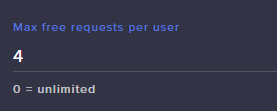
Guys, in Media Request
https://i.gyazo.com/40aeb4b1e2e309a66099d438a635f00f.png
It mean one viewer can have up to X requests in a queue or only X requests entire stream?
 valid cedar
so if set up it to 5, when these 5 songs plays, the user can request more?
zenith widget
If I request 5 songs
I will no longer request any additional songs, until 1 of the 5 plays
when 1 of the 5 plays, I will have 1 free spot to request another song to make it 5 again
valid cedar
Oh ok, so it is individual queue limit
zenith widget
thats what "per user" means
 sly oracle
hi, im having an issue where my tips that were sent through my stream elements arent showing up on my overlay?
just the default text
zenith widget
What do you mean by "just the default text"?
zenith widget
Do you have an alert widget on the the overlay?
sly oracle
i did
round brambleBOT
@sly oracle Please connect your streaming account (Twitch, YouTube, or Facebook) with Discord by going to ⚙ Settings and then Connections here in Discord. https://streamable.com/eg92w
 zenith widget
You tipping link is a bit scrambled
but ultimately its using SL's link.
We can't be notified via the SL link, because we are 2 different companies
so there won't be any tip information in your overlays
sly oracle
ok but i origionally had the tipping link through streamelements
then i changed it cause my alert didnt fire off
so shouldnt the tip i got from stream elements show up?
nvm i got it
zenith widget
Yes cuz i played it
it seems to be working just fine
Usually if you are in a the heat of cranking 90s you might not hear the alert tbh
if this happens while you are live
as in, the tip doesn't play an alert
feel free to poke us here again
 royal roost
hello! i have a probably a very simple question that you can answer, I want to fix a command when i change game, like : "!gamepubg and i change the game to PUBG. so twtich register the correct game, thats it possible right? i saw a popular stream change the game to Escape from tarkov when he type "!gameft"
zenith widget
${setgame "Playerunknown's battleground"} or what ever the full name it was
so make sure you set the game in quotes in the ${setgame} variable
royal roost
Thanks will try it out when I get back to the computer =)
 west plume
hey all, I'm having an issue with custom fonts. I'm adding it and it seemed to have worked during one test phase but now I'm getting nothing. Can anyone advise?
round brambleBOT
@west plume Google Fonts
More than 900 google fonts are supported at this time. You can preview them here: https://fonts.google.com/
Custom Fonts
Steps:
- Install the font on the streaming PC or choose a pre-installed windows font.
- In the overlay widget settings, select Text Settings
- Enable Custom Font
- Type the name of the font as it appears in the windows font directory (This is usually
C:\Windows\Fonts)
Note: After installing fonts, the browser and OBS must be restarted for the font to appear.
 spring trout
Hey, how do i lower tts donation settings so $1 can get talked on stream
 gentle imp
@spring trout on the alertbox
to go your overlays https://streamelements.com/dashboard/overlays edit > click on alertbox > Tip alert > TTS settings
bottom option is minimum amount to activate TTS
spring trout
thanks, why can't it just be on the tipping settings in dashboard zzz hahaha just tried helping my friend whos partner and none of us could figure it out
gentle imp
if it was easy what would we be here for? 
but yeah, that's the first place I looked for it too lol
spring trout
i mean, thats why i personally use other streaming services hahahah
gentle imp
noooooooooooo
it's easy to setup, just some stuff not so much intuitive and we are here to help with everything
 short iron
Hello! I thought I had seen other Twitch channels with custom emotes as an SE loyalty point item. Is that possible?
gentle imp
+we have cookie 🍪
 sweet socket
you can always give us feedback or ideas over at the ideas site!
round brambleBOT
Check out the StreamElements ideas board: https://strms.net/ideas. You'll be able to add ideas, upvote ideas you agree with, and track their progress with email notifications. Adding and upvoting ideas also helps the staff know which ideas should be prioritized so please take some time to upvote.
spring trout
but just trying to help lyndon get around using streamelements since he swapped from another service
sweet socket
@short iron not that im aware off since that twitch channel points API is closed
Best place to ask is #dev-chat!
gentle imp
a lot of the settings you just change them on initial setup and that's it @spring trout and there's plenty video tutorials to help too
spring trout
i used to use stream elements when i first started - was easier to use 3-4 years ago but very buggy so switched and haven't had problems since. Its all up to personal preference and if im getting frustrated from not finding something where it should be, im not bothering to use i
i watched 3 videos from you guys that could have explained how to do it
but they're outdated
sweet socket
StreamElements does require a bit of more work, but hey, its free to use
spring trout
so is others soo...
gentle imp
fastest way is indeed to ask here @spring trout anything else just feel free to ask 🙂
choice is indeed up to each person
ionic kelp
@spring trout I actually thought that as well but I found one of their channel videos that had the setup instructions with the appearingly recent editor.
First video had me like wtfisthisitdontmakesense
But after looking at the more recent ones it was definitely the update look.
royal roost
@zenith widget working awesome ty so much!
 pallid osprey
Just because something isn’t where you think it should be, doesn’t mean it’s wrong. Just sayin
 trim schooner
Hello. Trying to customize my bot's name, but just cannot get the option to appear in Ground Control
round brambleBOT
@trim schooner Due to a sudden and unforeseen Twitch API change Custom bot name feature through OBS.Live / Ground Control not working temporarily - this means that we cannot get the tipping link from your panels in order to activate the Custom bot name(This includes the tipping settings check).
We are looking into it. No ETA on a fix yet.
trim schooner
What does it have to do with tipping? Seems like an unnecessary check
zenith widget
Renaming the custom bot does require it to see that you have the tipping link.
Since the change, Ground Control isn't able to check for the tipping link
but the rename works for OBS.Live since we did a workaround
 abstract hemlock
^
trim schooner
I understand that the check is required as of now in GC. What I don't understand is WHY the check is required. A little confused as to why I can't rename my bot due to a failed tipping page fail
zenith widget
!rename
round brambleBOT
Custom bot name requirements
- StreamElements bot modded and in chat
- Active overlay with alerts
- StreamElements tipping page in the panels below the stream (!panels)
- OBS.Live or Ground Control open
- Create a twitch account for the name you want to use or run the bot under your own name
- Custom bot name doesn't work on Mac
zenith widget
Because its the requirements we've set for the custom bot name to be available.
trim schooner
Ok. Yea. I get that. I just don't understand WHY it was made a requirement 🙂
zenith widget
its its a core feature we provide that requires the above things. Without any of the above requirements, we decided NOT to allow people to use the option.
and its not a dashboard option as well.
trim schooner
Yea, I noticed. Kind of an odd choice, imo. But okay
So do I wait on an update to GC for this feature?
abstract hemlock
without talking with the stuff about it, i always assume i was needed to ensure that no-abuse of this feature
trim schooner
I feel like there are much better ways of avoiding abuse. Especially since the chosen check has an issue
abstract hemlock
you can use obs live agent its workink over there activity feed
trim schooner
I tried it. I really wanted to use it, but couldn't seem to get out of whatever screen I was stuck in. Went back to another app
I'll try it again, but boy am I confused on how to use it
abstract hemlock
👌
any question/help about obs.live you always can do it on the #helpdesk-selive
abstract hemlock
if you talking about the loyalty point you can check the setup here: https://streamelements.com/dashboard/loyalty

StreamElements
The Ultimate All in One Platform for Streamers
hope it help you, @rustic moss
 rustic moss
I wanna know how they earn them
By the minutes of view time or how ?
@abstract hemlock?
 jade remnant
it shows when you go to the page, every 10 mins
rustic moss
Whats a good numver to put ?
abstract hemlock
exactly, on that page you can setup how ever you like it to be
abstract hemlock
it really depends... how hours do you stream, what cost are the items on your store.. etc etc
i dont mean to be rude, maybe its a language barrier (im not native english speaker)
jolly berry
Hi, Second time today on my stream I've tried to implement the win lose or tie contest, with no luck, can anyone tell me what im doing wrong?
 keen salmon
Hi my OBS studio is crashing when i launch it, I had to unistall streamelement to make it work but i want to use Streamelement...
Can you help me ?
round brambleBOT
@keen salmon A crash log is required to investigate the cause of your issue. Please upload the last crash log.
- In OBS, click the Help menu
- Select Crash Reports, and then Upload Last Crash Report
- Copy the URL, and paste it to the chat here.
keen salmon
abstract hemlock
@keen salmon in this link you can check info about the log :
https://obsproject.com/analyzer/?url=https%3A%2F%2Fobsproject.com%2Flogs%2F1L_b8RMrFXY_Dk23
keen salmon
Thx for the quick help
And I had an other question, Why i can't put an overlay link in Obs when I put it in the good source, nothing appear.. 😢
 wanton pendant
hey community. using new animated stream banners via streamelements, they are looped but stay black after playing a few seconds in OBS (newest version). what am i doing wrong?
stream banners like "Stream starting", "Stream ending" etc.
abstract hemlock
@keen salmon its probably a browser source that causing the crash.. may try unnistalling obs.live remove all the sources and install it again
wanton pendant
using browser source and the link of my streamelements-overlay
keen salmon
Thanks
round brambleBOT
@wanton pendant To add your overlays to OBS, add a new browser source in your scene. Paste your overlay URL in the browser source properties, set the dimensions to 1920x1080 (unless you changed them on the website), and ☑ “Shutdown source when not visible” https://youtu.be/KDvLynUqXI4
wanton pendant
@quartz sapphire ai thank you, worked for the moment. will get back, if the prob occurs again 🙂
guys, where to buy good quality overlay-packs (incl. sub-badges, bit-badges etc.)? except own3d 🙂
thank you so much for your great support! unusual and makes the difference 🙂
 quartz sapphire
Wrong tag but alright
 dry hare

 tight harness

pallid osprey

lament blade
how do I group my overlays
abstract hemlock
@lament blade on the web editor. Select a widget then click on Object > Group Selection
Then you can go to the Layers sections and move the widgets arround
lament blade
this is awkward grouping things aha
 stark current
just wondering how I can view my se pay settings and possibly edit them
tight harness
@stark current Depends on what you exactly mean by settings
stark current
to see which bank its hooked up to
I ended up lofgging into my other account to figure it out
 dusky mountain
ionic kelp
dusky mountain
ionic kelp
Best bet is with the chat notifications though there is some slight limits
round brambleBOT
Due to changes to Twitch API, we have filtered out hosts and will only show these ones on your activity feed:
- All hosts coming from an online channel with at least 1+ viewer
- Auto host events with at least 1 viewer - only from a channel that just went offline
Note: If you see "X channel has hosted you" with no viewers on the back, that is considered an offline host or a host with 0 viewers, we do not show these.
lament blade
Hey I've been having problems with my streamelements bot cause I changed my twitch name, anyone know a solution for that?
ionic kelp
@lament blade Go to dashboard. Hit part then join. Should be fine after that.
ionic kelp
Streamlelements
lament blade
ah ok
is that in ground control?
sorry I'm pretty new to streamelements so gonna sound like a noob lol
ionic kelp
StreamElements
The Ultimate All in One Platform for Streamers
lament blade
ah ok
ionic kelp
Login and it'll be on the right side.
 strange perch
Hi
lament blade
oof ok so the issue now is that streamelements still thinks my name is my old name
trying to figure out how to change that but can't find anything
ionic kelp
chatstats page?
lament blade
um not sure what to find there
my issue is when i look at my twitch information in streamlabs it shows everything in my old username including the twitch link
is there a way to change that over to my new name
or to unlink the relink it
gentle imp
tried logoff and login?
ionic kelp
I'm helping him in stream
gentle imp
yeah just noticed, I'm there too
 idle solar
Does anyone have an ETA on when the bttv emotes will work properly again? It's been kike a month
 junior hornet
need help with media request
i use it for playing music in the backroud with a playlist from youtube
everything worked fine till today
it won't play the videos/music and it does say that they are not allowed in my country
i had the problem before and it fixed itself a couple of days later
anyone can help me with that?
round brambleBOT
@knotty geyser Please follow our community rules:
- No advertisement or stream promotion
- Respect ALL server members
- No NSFW/NSFL
Thank you
 knotty geyser
sorry
little oak
self promoting is a no no bruh 
@idle solar all the BTTV emotes work but if youre talking about the animated ones on kappagen then there is no ETA for it afaik
idle solar
Oh 
little oak
but it is on the list to get it fixed and cant wait to see it in action when it is fixed
idle solar
In action, is there an upgrade planned?
 tired minnow
Currently having trouble setting up OBS. if anybody knows obs really well id greatly appriciate some help. trying to get my stream all working
little oak
i have no idea what they have planned!? nor what they have in store for it atm
what seems to be the problem on your obs?
idle solar
@little oak thanks
tired minnow
i just havent used it before. and new to PC so im just lost basically lol
 little oak
yeah inside obs setting you have an option to set the delay that you like to have for your stream
lament blade
Hello! I was thinking to swap from my actual S-----L--- OBS and Alerts and Bots and everything else, to StreamElements. But setting up the alerts, I can see that "Text over image" is not shown. Any help?
tired minnow
what settings is it under?
little oak
@tired minnow go to setting uptop left side then go to advance then scroll down to stream delay
@tired minnow and also you have a delay setting on your dashboard on twitch as well
lament blade
Okay @gentle imp I am saying that the text is not shown during alert test
only my .webm video
gentle imp
oh, try choosing another and then that one again, see if it works
 wary halo
@lament blade so the text is too low now, go to text settings > advanced
play with the margins there
little oak
@tired minnow is your a40 set as default on your windows?
tired minnow
hmm idk
lament blade
I could use maybe "Column" and work with text position
tired minnow
sorry for sounding stupid. im just new to PC
lament blade
but you should fix "Text over image" too 😛
wary halo
or try text over picture and set in advanced: top 100 in margins
sometimes the text disappears out of the box and setting it like that will at least show it again
you can then adjust from there
lament blade
@wary halo you are right. It seems the default top is -50, that takes the text out of the frame
little oak
@tired minnow youre fine on you window sound we will checc an see if its default
wary halo
ah yeah, so you see it now? @lament blade
lament blade
I really F-----g love all this alert config. I will give a try soon to StreamElements
Have to set everything up
little oak
@tired minnow hit wins key + R then type mmsys.cpl this will bring up you r audio then see if your a40 is default
lament blade
Thank you @wary halo Yes, I can see text now and configure everything else to my flavor
little oak
@tired minnow if streaming from a game on pc then it will capture everything when you do a game capture on your sources on obs
 tacit trout
Hello, my bank details are still being under verification by SE.pay, and that for almost 2 weeks now. Therefore I can't withdraw my donations. Can anyone tell me tf is happening??
round brambleBOT
Please contact us via email for support with SE.Pay. You can use our contact form here: https://streamelements.com/contact Thank you
ionic kelp
@tacit trout For you.
 silent kettle
Hey guys can some one tell me what I might be missing, my streamelements is installed in my phone n all but I cant go LIVE its saying its unable to connect to youtube ... pls help
abstract hemlock
@silent kettle maybe you have to go #helpdesk-youtube o #helpdesk-mobile
silent kettle
Damn no help here huh
 plucky oriole
How do i reset this?
abstract hemlock
@plucky oriole on the top on DATA > Goals
round brambleBOT
@plucky oriole To reset goals:
- from the overlay editor -> data on top -> goal tab -> reset progress of desired goal
- from the dashboard -> activity feed on the left -> widget data on the right -> goals tab -> reset progress of desired goal
Note: Goal widgets(progress) only counts up and doesn't go down automatically, if you loose followers/subs
 vale nymph
ground control not launching for anyone else?
wary halo
@vale nymph if you open your taskmanager do you see it there?
 ivory igloo
Hi , how do i setup qoutes ie to see my qoutes in streamelements chatbot? I have imported them from streamlabs but cant find how to view them?
vale nymph
yes it's listed, but Its not popping up anywhere. also checked second desktop and such
 wary halo
okay, i'm going to ask around for you @vale nymph
i was told you could go in to %AppData% and delete the Ground Control folders, then kill all instances again in taskmanager and launch GC again
vale nymph
just delete the folder and reinstall?
tight harness
Don't need to reinstall for this, just need to open it back up once you've done it
vale nymph
okay so do I delete the ground control folder or just every folder inside the ground control folder
wary halo
just GC
vale nymph
ah, worked! thanks 
tight harness
👍
 midnight patio
 kind palm
I have a couple of questions is there any ETA on the fixing of the personalized bot and the other question is yesterday I have a command that it was custom command it always worked before and something is not working it’s using the awesome shout out All I did was make a command that puts up the command for the shout out and it wouldn’t work but when I did it in the past it’s always worked and when I did it with out the by it self it worked fine
abstract hemlock
@midnight patio try to "part" the bot and "join channel" again on the right seccion of the dashboard https://streamelements.com/dashboard/
StreamElements
The Ultimate All in One Platform for Streamers
sweet socket
@kind palm you should be able to use the custom bot name with OBS.LIVE, ground control no ETA yet
abstract hemlock
^
sweet socket
I'll get the SO response for you as well by the way
kind palm
Ty
sweet socket
Response: Check out ${1}, they we're last seen playing ${game ${1}} at https://twitch.tv/ ${channel ${1}}
without the space betweet twitch.tv/ and ${channel
kind palm
I have a command that’s not it the problem I made a custom command !borde (for example) that then pulls up my shoutout command It always worked before but had stopped doing so
 wide oriole
So genuine question.
Is it worth uploading and setting my overlay up through Streamelements for all my scenes instead of running them locally on my obs?
And is there a significant difference to the CPU usage or Memory etc? 
kind palm
It pulls up the command that works which is !so bordeauxprime but nothign happens
wary halo
@wide oriole yes, CPU usage will be way lower if you have less sources to load
sweet socket
I think it would be best to ask the maker of the custom widget in #dev-chat
ill tag you with the codeguru in there
wide oriole
Atm i'm running a lot of animated stuff through it, so I was just wondering if the time spent transfering and setting up everything else again would be worth it
thanks for the response! :)
wary halo
i love the StreamElements system, and it's also cloud based so if you ever need it on another pc for some reason you can just get it there too without any hassle
 spiral bay
@wary halo is there any update in regards to the API issue with Ground Control and custom bot naming?
wary halo
no, but there are two options: using the function in OBS.Live, or ask really nice and maybe someone from staff will fix it manually for you 😉
let me know which option you want
 clear grail
How do you change your payment bank account on SE.Pay? I no longer use my old bank and need to change it
round brambleBOT
@clear grail Please contact us via email for support with SE.Pay. You can use our contact form here: https://streamelements.com/contact Thank you
spiral bay
Thank you
tight harness
Sure, I can fix it for you
wary halo

tight harness
Try now
tight harness
No problem
 stray venture
My friend's streamelements bot is not showing up and responding to chat commands on twitch. His twitch name is dooyuknowdeeweh. We have tried modding and unmodding but still nothing.
ionic kelp
@stray venture They change their name "Recently"?
ionic kelp
Are they signed into that account on the SE site?
If so have them part and rejoin the bot.
stray venture
How does he part?
ionic kelp
It'll say part on the right side of the dashboard.
wary halo
 versed pond
I've messed around with streaming on Twitch and mixer testing out different things. But now I want to start a stream on twitch but when i click "start streaming" It will only bring up my mixer account. I've disconnected my mixer account in settings and logged back into twitch.
ionic kelp
@versed pond You need to do that in stream settings of OBS.
ionic kelp
Gimme a sec to look for something. Not sure what was the fix but I know the exact thing happened earlier this week.
versed pond
Awesome. Thanks @ionic kelp
stray venture
it shows streamelements bot is running in his channel now but kappagen isn't working lol
 late sable
hey guys
any1 here who can help me out?
i found some cool overlay and alert box on streamelements and want to use them so i click on ad overlay and i get a link
what do i do with the link in streamlabs obs?
round brambleBOT
@late sable We're not able to troubleshoot issues with using our overlays in StreamLabs OBS (SLOBS) as we don't have the tools to support their software. We recommend using OBS Studio or OBS Studio with our plugin OBS.Live.
@late sable To add your overlays to OBS, add a new browser source in your scene. Paste your overlay URL in the browser source properties, set the dimensions to 1920x1080 (unless you changed them on the website), and ☑ “Shutdown source when not visible” https://youtu.be/KDvLynUqXI4
late sable
okay now im scared AI is gonna take over the world
round brambleBOT
@late sable I'm a bot, only here to send helpful messages because the helpers are lazy.
late sable
LOOOOOOL
ionic kelp
@versed pond
settings > stream
streamelements > log out then back in
versed pond
YOURE AMAZING THANK YOU! it worked! @ionic kelp
 fluid ibex
So I've noticed bttv gif emotes haven't been working with kappagen. Is there no longer support for that?
 limber forum
um im trying to test my stream but when i click start streaming it keeps saying im offline on twitch 🤨
wary halo
make sure you don't have bandwith test enabled in Settings > Stream on OBS
limber forum
i dont
im on an alt twitch account btw, does that matter (I logged out of my other account and made sure im streaming on this one). I didn't have this issue on my other twitch account
round brambleBOT
- Restart OBS
- Start your stream/recording for about 30 seconds. Make sure you replicate any issues as best you can, which means having any games/apps open and captured, etc.
- Stop your stream/recording.
- Select Help > Log Files > Upload Current Log File. Copy the URL and paste the link here.
(Note: If you do not see an obsproject.com URL, you will need to update OBS Studio to version 22+)
 limber forum
ionic kelp
limber forum
ionic kelp
Go to settings > stream and screenshot that.
 lone glen
i need help setting up my new blackmagic quadlink and getting the right property settings so it doesnt chop up my screen
ionic kelp
@limber forum Unfortunately out of box I see no reason why it shouldn't work but I'm not sure what else might be the issue.
 buoyant rivet
i have been streaming for a while now and have not experienced any issues, but today, my frame rates are dropping really low. idk what the problem is
 potent loom
Hello, guys. I followed the Discord tutorial to make the StreamElements Bot use AD automatically, but apparently it didn't work. I put the bot as an editor and I made a response with "/ commercial 30" and another response with a "starting AD .." message. But didn't work, only the starting AD message appears. How do I test if my bot is sending commercial correctly?
abstract hemlock
@potent loom i think you could enter your own stream with unsub acc yo to check 🙂
round brambleBOT
@jagged wigeon Please follow our community rules:
- No advertisement or stream promotion
- Respect ALL server members
- No NSFW/NSFL
Thank you
 amber drift
can I use dream labs to support my obs on my laptop or tablet for twitch live broadcasting
round brambleBOT
@amber drift We're not able to troubleshoot issues with using our overlays in StreamLabs OBS (SLOBS) as we don't have the tools to support their software. We recommend using OBS Studio or OBS Studio with our plugin OBS.Live.
 fallen tangle
did they fix the Audio volume thing for youtube?
 smoky tide
not "fixed" per se. You have to use the volume control inside the player now.
wary halo
you it won't come back
youtube changed some things and we had to change the widget because of that
nothing we could do about that
outer warren
Is there any way I can get OBS.Live send a sound notification when a message is sent on my chat?
smoky tide
You can submit that as a feature. But if you want something like that now, you can use a 3rd party to do so. Restream's chat app, off the top of my head has it. Other chat programs may as well.
fallen tangle
well, i dont get a slider on the overlay in youtube video
 gilded meadow
Can anyone help me with watchtime?
wary halo
what is the problem exactly?
gilded meadow
He doesnt work
wary halo
do you have the loyalty system enabled?
wary halo
StreamElements
The Ultimate All in One Platform for Streamers
activate that
it won't work without it
wary halo
oh wait
okay do this: go to your dashboard https://streamelements.com/dashboard then click on PART channel for your bot > log out of the streamelements website > log back in > click JOIN channel for the bot > type /mod streamelements in your Twitch chat
StreamElements
The Ultimate All in One Platform for Streamers
 robust jewel
My custom Bot doesn't show up in my stream anymore. I run Ground Control and looked in the program but can't see an option to reset the bot in the program either.
 soft nymph
So one of my overlays that shows the sub count started to always have the number above the real one. Imagine I have 3 subs and it shows as 4, if I have 6 it shows as 7. What should I do to fix this?
gilded meadow
What do i do now
gilded meadow
No
wary halo
@robust jewel yes Twitch broke it, you can still use it in OBS.Live though
@gilded meadow if you go to your chatstats page, does it work or does it give a 404 error
robust jewel
@wary halo Oh, there is nothing to do then. I still run OBS live yes but I like to use the twitch dashboard instead of the obs.live features.
wary halo
ah okay, it will be fixed but i can't give an ETA on it
robust jewel
It's okay. Good to know I didn't break it. Thanks for great SE support 
wary halo
i'll ask around
wary halo
yup
gilded meadow
I know
wary halo
handled in #🇳🇱︱nederlands ⤴️
lament blade
How do you prevent TTS overlapping media during a donation train?
e.g. 4 donations in a row, the media of donation 1 is still playing but the tts of donation 2, 3 4 go over the media
i want: TTS donation 1 > Media donation 1 > TTS donation 2 > Media Donation 2 etc. etc.
 spare knoll
can any body explain the Magic program really fast for me
wary halo
@spare knoll i believe it's something like this: they want promotion by letting streamers play the game, there are challenges you have to do during those streams and you will be rewarded for it.
but they decide who can enter the program since it's their product
so they can set a list of recuirements for access
 vernal spruce
Hi everyone! Using Twitch. Two part question on host alerts.
- In the host alert settings, there is a setting called “Minimum Amount”. What is this referring to?
- When someone hosts me, my host alert doesn’t pop up during stream. It will pop up when I emulate it. Ideas?
round brambleBOT
Due to changes to Twitch API, we have filtered out hosts and will only show these ones on your activity feed:
- All hosts coming from an online channel with at least 1+ viewer
- Auto host events with at least 1 viewer - only from a channel that just went offline
Note: If you see "X channel has hosted you" with no viewers on the back, that is considered an offline host or a host with 0 viewers, we do not show these.
wary halo
and the minimum amount is for the number of people in the host
 fierce shard
stream elements keeps crashing on startup and wont show any of my browser sources after adding the merch alert. pls help. it al,so wont let me uninstall
vernal spruce
Wow. That support AI was very helpful. As were you @wary halo ! Thank you!
round brambleBOT
@vernal spruce I'm a bot, only here to send helpful messages because the helpers are lazy.
@fierce shard If you are not seeing the OBS Twitch integrations and have OBS.Live installed, please follow these steps:
- Make sure you are on the latest and greatest version of OBS.Live
- exit OBS (make sure OBS is not running)
- delete %appdata%\obs-studio\plugin_config\obs-browser\obs_profile_cookies
- start OBS.Live
- Settings -> Stream -> disconnect -> connect
round brambleBOT
@fierce shard A crash log is required to investigate the cause of your issue. Please upload the last crash log.
- In OBS, click the Help menu
- Select Crash Reports, and then Upload Last Crash Report
- Copy the URL, and paste it to the chat here.
 solid pollen
I'm having a couple of issues tonight. First my chat bot is unable to run commands. I setup a timer command to start a raffle every 30 mins. The command comes in but nothing happens. The other issue is that when someone host my channel with 1 viewer the alert doesn't go off even though I have it set to 0 to trigger the alert.
 ruby mortar
can someone walk me through how to set up and overlay for my twitch?
 trail condor
chatbot is down?
trail condor
Seems like chatbot isn't posting messages to chat. Commands don't run, timers aren't running. Bots appear in channels but don't respond. Just a heads up! 
Commands go through, store redemptions happen in chat, but bots aren't posting replies.
dry hare
@trail condor can you try parting the bot from your channel and rejoining it?
cinder olive
@solid pollen ^ Try the above aswell, part the bot from your channel and have it rejoin.
round brambleBOT
@ruby mortar Checkout StreamElements Youtube channel, several guides for you!! https://www.youtube.com/channel/UCjerlCIbLPQwSnYlClkjDXg or a list with all the guides https://www.youtube.com/playlist?list=PLCDDKlFdScbEwdx5AntcQIS1InkFJwHtv
@ruby mortar To add your overlays to OBS, add a new browser source in your scene. Paste your overlay URL in the browser source properties, set the dimensions to 1920x1080 (unless you changed them on the website), and ☑ “Shutdown source when not visible” https://youtu.be/KDvLynUqXI4
cinder olive
On the youtube is the guides on how to setup the bot & the overlays, then the second is how to add them to OBS.
Any questions you have you can post here
trail condor
@dry hare yep, tried that from the dashboard. still doesn't respond to commands in chat.
dry hare
Is it a moderator?
trail condor
yeppers
cinder olive
Mind humoring me and doing the part/rejoin again?
dry hare
Did you rub your feet on the carpet and touch the hamster?
cinder olive
^ 2 types of people.
trail condor
Done did it again rofl
dry hare
Lol
trail condor
Still doesn't respond to commands
trail condor
Yep!
dry hare
Do me a flavor and click streamelements at the top >> log out then log back in
cinder olive
Its working again
abstract hemlock
@cinder olive the bot is on her channel, and is responding to chat alerts (like followers) i just saw it
dry hare
Worked for me
cinder olive
Am aware, she just relogged on OBS @abstract hemlock
dry hare
Was that the fix?
cinder olive
Assuming so, as it worked as soon as she relogged.
dry hare
Woohoo
abstract hemlock
 trying to make myself bussy... gf is buying clothes :NotLikeThis:
dry hare
I did a thing!
trail condor
you guys rock ❤️
round brambleBOT
 cinder olive


 mellow thicket
una pregunta
cinder olive
espanol?
mellow thicket
que significa donaciones preajustadas?
cinder olive
#🇪🇸︱español @mellow thicket
 errant wasp
Hello.
It seems like StreamElements can't connect to my paypal account when setting up the tips. Are there still API issues?
When I hit "Connect", it says "Saved" but nothing happens. The connection to the Twitch Tip Panel worked flawlessly.
ionic kelp
@errant wasp try incognito mode?
ionic kelp
Actual chrome or new edge chrome?
ionic kelp
🤔 try on a mobile device not on the network?
errant wasp
same
 nova geyser
inconsistent bandwidth fix?
cinder olive
Contacting your ISP.
ionic kelp
@errant wasp Got a second to hop in #347179136432865290 ?
 turbid wing
does anyone know of a guide or way i can have my chat type !command and have it show a image or source for X seconds ?
cinder olive
You would need to have a item in your stream store, and have the command redeem that item.
dry hare
Check #widget-share too
turbid wing
oh thats a good idea, like a free item
turbid wing
checking widgets
cinder olive
👀 I said nothing then 
dry hare
Hehehehe
oblique steeple
This looks promising: https://discordapp.com/channels/141203863863558144/457957557470887947/664809625169690644
dry hare
There is a widget there, and I believe there is also the loyalty store if you have other things you want to gatekeep
The TFT goal?
Good god my mobile discord is broken
potent loom
Anyone can tell me how to setup auto commercial with StreamElements BOT? I lost the tutorial message in this text channel.
dry hare
@potent loom I am not sure if you can set a timer to run a commercial
turbid wing
basically they have a !rage counter that they like to +1 when i get mad at the game
dry hare
You could set a timer with a minimum of 1 line of chat and a set interval to run “/commercial 30” and see if it works
turbid wing
and i thought it would be funny to also have my rage emote flash on the screen
potent loom
!ads
round brambleBOT
To have Streamelements run ads for you, make sure:
- Streamelements is added as an Editor to your Twitch Channel here: https://www.twitch.tv/dashboard/roles
2.A) To make a timer, go here: https://streamelements.com/dashboard/bot-timers - add a timer with a response "/commercial" and 5/10/30/60 for the duration of the ad - example:/commercial 30
2.B) To make a command trigger an add go here: https://streamelements.com/dashboard/bot-commands/custom-commands and add a command with response "/commercial" and 5/10/30/60 for the duration of the ad - example:/commercial 30
potent loom
Oh i remember, ty
potent loom
Can any moderator update the "!ads" tutorial? I think it's outdated. I've tried 5 times and I couldn't get it to work.
dry hare
Can you screenshot your timer?
You also need to make sure that StreamElements is an editor on your Twitch channel, not your SE dashboard
 hexed chasm
im trying to change the color of my font for my chat from black to white for my overlay. my chat is not readable
dry hare
Click on the chat widget
turbid wing
how do i grab the URL of a mp3 i uploaded to my library
dry hare
Click on the text settings in the left sidebar
Then change the text color to #ffffff or white
Uhhh no idea
What do you need the url for?
For the widget?
turbid wing
yeah in the js you define url link to the mp3
dry hare
Oh
turbid wing
on the example ones its uploaded to SE library, i was able to inspect element to figure out url for a gif i uploaded
but mp3 cant figure out how to grab it
hexed chasm
im not seeing a space that allows for color change
cinder olive
@turbid wing so technically you arnt supposed to do that.
@hexed chasm collapse your layers.
dry hare
So the example used a sound from the library without the url?
turbid wing
example has this that you edit:
(one sec i gotta log back in)
alertCommands ={
"!addrage": {
"image": "https://cdn.streamelements.com/uploads/fdafb7d2-ef4d-4172-966c-a1f2956fd45d.gif",
"sound": "https://cdn.streamelements.com/uploads/ffb21cb9-3520-42f6-b69f-d875ddd1eae3.mp3"
},
sooo i modified the !command and the image var
which i got by making a diff overlay, adding the image, viewing the source, and then inspecitng element
but for the mp3 i uploaded it to the library
hexed chasm
i got it thank you so much!!!
turbid wing
can probably figure it out the same way if i can figure out how to embed the sound into a blank overlay
dry hare
That’s kind of strange that the widget doesn’t let you just pick it from your library
turbid wing
well its not really a "widget" the video for it asks u to edit the javascript
which i can do cus im a developer so i get it, but i dont wnt to have to host the mp3 elsewhere if i dont have to
potent loom
@dry hare Moment
dry hare
Hmm change chat lines to 1.... then literally type kshdkgdhe in chat
Or some random thing
Just to give it the one line
potent loom
Ok done
this is my custom command to trigger
but I didn't understand if this part is right, because nothing is linking to trigger.
So I think the tutorial is out of date 😦
dry hare
one sec, lemme watch your stream in a browser i'm not signed in on
potent loom
Ok thank you
dry hare
I don't have an answer to this one, lemme ask
@potent loom I asked if someone can take a look for you to see what is going on. When someone is available they will hopefully get back to you
dry hare
np! I posted for staff to look at when they get in
potent loom
@dry hare Tell them to send me a message in private if they can help me, thank you. 😄
❤️
dry hare
They’ll probably tag you here
potent loom
Ah ok
potent loom
@dry hare Are you around?
dry hare
Sorta
potent loom
Now I know why.. When I go to my Stream Manager Dashboard or when I type: /commercial 30 manually he says this: "Failed to start commercial." and in Stream Manager says: AD could not be started at this time. Try again later.
dry hare
Interesting.... I’ll add it to the initial request to look at it
potent loom
It's a problem between twitch and my channel, the strange thing is that these days it was working, I'm an affiliate.
😦
potent loom
❤️
 deep yew
Is anyone having issues with Twitch / SE integration? When one of the streamers I mod for, her sub count was 0 in SE and eventually updated. Two of us mods tried to issue a command to update the stream category and it responded with a 401 error code
 gleaming geode
I changed my twitch username and streamelements wont show up in my chat
ionic kelp
@gleaming geode Make sure you're properly logged in here and hit part and join on the right side https://streamelements.com/dashboard
dry hare
@deep yew Are they using a custom bot name by chance in ground control?
gleaming geode
@ionic kelp thank you so much
deep yew
@dry hare Yes. It's the same bot used for a while now though
dry hare
That is probably the reason. Twitch did a ninja API change that borked ground control custom bot names.
round brambleBOT
Due to a sudden and unforeseen Twitch API change Custom bot name feature through OBS.Live / Ground Control not working temporarily - this means that we cannot get the tipping link from your panels in order to activate the Custom bot name(This includes the tipping settings check).
We are looking into it. No ETA on a fix yet.
dry hare
I’ll pass along the information to the people who can actually fix it so they can take a look
deep yew
oof, those sneaky ninjas. ok, thanks for the response!
dry hare
She can still use OBS.Live to do a custom bot name
I’m lazy and just let the bot be me
That method still works....it’s just Ground Control with an issue at the moment
deep yew
oh, I believe she is using OBS.Live. It's responding to other commands just fine, just anything going outside of SE is failing. She may have GC installed though. I'll double check with her after stream
dry hare
That’s a new one...might just be parting the bot and rejoining it to the channel or having to sign out of obs.live and back in via the StreamElements menu
deep yew
Don't need to end stream for that, correct?
deep yew
ok, thanks. It's not a major deal, just easier for mods other than me or the streamer to update the stream title and category through the commands. 👍 Just got me curious after the sub count issue earlier on and then this and wanted to see what might be going on.
dry hare
Yep yep! I get it.
hexed chasm
how do i get the audio from discord onto stream? thank you in advance
ionic kelp
As long as your desktop audio for OBS matches what you hear in discord shouldn't really need to do anything.
ionic kelp
Hit part on the right side of here https://streamelements.com/dashboard
 novel ridge
it is saying sign out..not part
ionic kelp
Not right there but just a hair down.
novel ridge
no..its not there..can u send me a screenshot
ionic kelp
 lament blade
Hi, I'm trying to setup my stream to display my overlays? How does that work? It's my first time using StreamElements!
ionic kelp
Here's a couple things for you
round brambleBOT
To add your overlays to OBS, add a new browser source in your scene. Paste your overlay URL in the browser source properties, set the dimensions to 1920x1080 (unless you changed them on the website), and ☑ “Shutdown source when not visible” https://youtu.be/KDvLynUqXI4
New to Stream Elements?
Check out our YouTube channel https://www.youtube.com/c/streamelements/videos
with tutorial videos from setting up the basics, to in depth details on how to use our product.
ionic kelp
@lament blade The first one is how add the actual overlay. The other one has videos explaining how to get your overlay configured in the editor.
 coarse dew
i have a black screen when i try to stream on obs, any idea how to fix this
ionic kelp
@coarse dew Laptop?
coarse dew
im using strem elements on twitch, and no pc
ionic kelp
what are you trying to capture?
dry hare
@strong flicker https://magic.wizards.com/en/articles/archive/news/announcing-magic-gathering-creator-program-2020-01-23

MAGIC: THE GATHERING
We're unveiling a brand-new way to create fun and engaging content with your community—plus a $1 million fund for new Magic series!
It’s worth looking at
coarse dew
my screen in general, games
ionic kelp
More specific.
dry hare
@coarse dew laptop?
coarse dew
no @dry hare
dry hare
Had to ask
coarse dew
im playing ironsight and i would like to stream my screen ? @ionic kelp
dry hare
Game capture doesn’t work?
coarse dew
just have a black screen for some reason
dry hare
I had that issue with dragon age: inquisition
I had to specify the window
Within game capture
If you pick the window does it work? Some games are dumb like that
coarse dew
i just built my pc and im new to this, not really sure what you mean lol
 strong flicker
thank you, @dry hare
dry hare
That’s the official wizards post
coarse dew
im looking at it rn
dry hare
It’s definitely worth it
It should say in the source list unless you renamed it
@coarse dew
strong flicker
still doesn't tell me what I want to know - are there $$ rewards?
dry hare
I’ll just say amazon is your friend.....
strong flicker
Amazon is not my friend at all
dry hare
Well....
strong flicker
Not available in my country
dry hare
I’m not entirely sure how they’re doing rewards
ionic kelp
Are you AUS/NZ by chance?
strong flicker
Nope, Portugal
dry hare
But I can say that if you’re in an eligible country it’s worth it
ionic kelp
Otherwise this person might be able to answer it https://twitter.com/MishyFishyWhoo
dry hare
It’s a legit program and I would expect expansion because it’s twitch’s bounty board.....without having to be a partner
It’s fucking 🔥
strong flicker
As my public barely plays any card/board game I don't know if it's gonna fit my audience and rewarding in-game rewards only wouldn't be something I'm looking for
dry hare
I had never touched mtg until this program and I will say that it is fucking awesome
strong flicker
I've seen some streamers play it
strong flicker
I saw the example on the "Raid a 30 viewer max streamer with 50 viewers"
dry hare
Example
dry hare
True
strong flicker
But again, I'll have a chat with my community on discord
dry hare
Have you played hearthstone?
strong flicker
I've seen streamers play Magic
dry hare
I played hearthstone until the split between wild/standard
Tried mtg and I loved it
I’m sure one of my vods has me saying “this is like hearthstone but it doesn’t suck”
I actually enjoyed the strategy of MTG
 dry hare
So if your viewers were there for your hearthstone, they’ll be there for mtg
strong flicker
played a few years ago
dry hare
Also, who gives a shit about viewer rewards.... it’s about you playing a game and if you enjoy it, playing because you like it
Also, invite your viewers to play 😉
There’s a viewer queue widget
strong flicker
my viewers usually get some singleplayer games like Shadow of the Tomb Raider, COD:MW2 and when I go online it's usually FPS or game like Stardew Valley
dry hare
I will say that if you’re waiting for the twitch partner bounty board...you’ll be disappointed
strong flicker
I'll have a chat with them on Discord and ask for their opinion on it
strong flicker
They loved one of my sponsored campaigns on SansAR because they were interacting with me ingame
strong flicker
And I need to hear one 😦
dry hare
Ask them and say “hey check this out” and walk them through it
Fuck it, apply and if you do the challenges you do them, if you don’t, you don’t
Does it hurt your stream to apply and be accepted?
😉
strong flicker
But it doesn't make sense if they have a limited amount of slots and I get accepted and don't do the quests
Same way I hate people signing up for my events and then not showing up
zenith widget
@deep yew Still having issues?
 elfin walrus
Heya! Does anyone know if it's possible to display the current title of a video playing from a VLC created playlist on screen?
The playlist is playing through OBS using VLC source
round brambleBOT
@elfin walrus For the best OBS support, please join their Official Discord @ discord.gg/obsproject
strong flicker
Heyo
After getting an animated overlay on my OBS it is using 20% CPU when idling and I don't believe that's usual
I got the "Shutdown Source When not Visible" check in all browser sources
zenith widget
Animated overlays tend to be a bit heavy on the PC
strong flicker
Yeah, but 20% is too much for a web page
zenith widget
as they are essentially videos playing via the browser souce
strong flicker
We talking on a i7-6850K
zenith widget
the animations are basically .webm files - big ones
strong flicker
then why not using gpu acceleration?
zenith widget
20% on a i7-6850k is actually great.
strong flicker
is there any limitation on obs?
zenith widget
i had an i5-4440 and i could not use the animated overlays at all
zenith widget
you have 2 GPUs?
zenith widget
doesn't matter what it was - it was an old CPU

 limpid badge
Im with KeiZar on this, 20% is great for an animated overlay
strong flicker
it has an option on what gpu to use
zenith widget
I had 60% usage on the i5
strong flicker
and only when OBS starts recording/streaming the usage on the 1060 goes up
zenith widget
do you:
- have hardware accel. on?(check in settings -> advanced)
- use the new NVENC encoder?
strong flicker
let me check as I made a new profile & a new scene collection
limpid badge
Any info on SE.Pay sending out a 1099?
strong flicker
zenith widget
whats a 1099?
@strong flicker here is idle with the animated overlay on a ryzen 7 3700x
and i don't have the shutdown when inactive on
and tbh, if i'm not on this scene idle goes down to 8%
total
strong flicker
limpid badge
Tax form
strong flicker
why is it still using cpu if source ain't visible
it should only use max 2 sources
zenith widget
That looks like a lot more then 1 loaded browser source
zenith widget
@limpid badge You want a breakdown of fees and such from SE.Pay tips?
limpid badge
I saw the option to download for each month, but not a place to get tax info for the year
zenith widget
Since i'm from the EU
I don't have a 1099 tax form or know how it works or looks like.
limpid badge
Oh ok 👍
zenith widget
I can only provide you with a full year breakdown of all tips
strong flicker
EU taxes be like 
zenith widget
But I will ask internally if we had something, because it seems familiar
I need to prep myself, cuz german streamers will want those tip breakdowns as well soon 
limpid badge
Thanks KeiZar!
zenith widget
@strong flicker tbh i'm not sure why its a problem that its using 20%. If you want try this. Actually kill the browser-page task in the task manager and see what changes in the obs preview
Oh I managed to increase my idle to 16% with studio mode
welp theres your answer
i broke into 20% total usage, but thats still in the green for me tbh
limpid badge
I recommend dual pc setups of you dont want to worry about cpu/gpu usage. There is a free NDI tool kit, so you dont need to buy a capture card. Also, the encoder pc could just be an old pc that you put in the closet years ago. Doesn’t need to be amazing 😉
zenith widget
with this baby, me personally im fine with streaming 720p60fps 
I just don't see why people need to chime out so much money for an RTX card atm when the new ryzen CPUs are godly
but this is gonan become a discussion topic and not a helping one, as each to their own(I used to be an intel fanboy, but to me they are now like Apple - expensive and not worth it)
limpid badge
Lol ok just saying, I use intel and apple because they never let me down
strong flicker
having my 2nd old pc running up on my daily 7h stream would costs me around $70/month
zenith widget

strong flicker
and I would basically leave it on more than needed xD
limpid badge
That is quite a lot more than I would have guessed!
zenith widget
i work from home and my electricity bill is 15$/month with my PC running 24/7 basically
anywho deviating from purpose of channel
Did you try killing the browser pages and seeing what happens on the preview?
since you said "preview" and "live" i assume you are using studio mode to preview scenes before switching
zenith widget
well there you have it
zenith widget

 HEY EVERYONE! HE IS GIVING AWAY LLAMA PLUSHIES!
strong flicker
noooooooooooooooooooo
zenith widget
is that mixer?
strong flicker
StreamElements does not support THETAtv
zenith widget
no thats not mixer
 strong flicker
people earn crypto for sharing bw
then can donate
and streamers get items to giveaway


 strong flicker
is there any way I can ask for integration?
or work with streamelements to make one?
round brambleBOT
@strong flicker Check out the StreamElements ideas board: https://strms.net/ideas. You'll be able to add ideas, upvote ideas you agree with, and track their progress with email notifications. Adding and upvoting ideas also helps the staff know which ideas should be prioritized so please take some time to upvote.
strong flicker
I made theta's chatbot
zenith widget
well....there is a way sorta - oauth2
but its a huge endorsement for a 1 man show to make a full integration and such
strong flicker
can I get a streamelements app auth?
zenith widget
and your own website to allow to help the integration, etc, etc
strong flicker
I have a website for my bot
zenith widget
Apply for OAuth2 credentials here: https://strms.net/oauth2_request
strong flicker
can I trigger streamelements alerts through an app?
zenith widget
I believe you can
Yes you can, but you need to apply and get accepted into the beta
and then you will be given the scopes and so on
 silver knot
is there a way to unlink youtube and facebook to streamelements? cuz i already have twitch with overlays already setup
zenith widget
Let me guess. You also sent a ticket request 2 minutes ago, right?
silver knot
yes