#helpdesk-twitch
1 messages · Page 524 of 1
 gentle imp
 lament blade
will do once i get the file
gentle imp
did you try what I said?
 cyan lotus
yes
gentle imp
helped?
cyan lotus
no, I still have a lot of delay with the source
of the browser
gentle imp
!add
 round brambleBOT
To add your overlays to OBS, add a new browser source in your scene. Paste your overlay URL in the browser source properties, set the dimensions to 1920x1080 (unless you changed them on the website), and ☑ “Shutdown source when not visible” https://youtu.be/KDvLynUqXI4
gentle imp
did you disable Shutdown source when not visible on all browser sources @cyan lotus?
cyan lotus
yes
round brambleBOT
@cyan lotus Please provide a log from your last stream. To do this, in OBS go to Help > Log Files > Upload Last Log File and paste the link to the log file here.
cyan lotus
I think I have solved the problem
gentle imp
do share 🙂
cyan lotus
I set the hardware acceleration and I deactivated the deactivation when the source is not available
 forest mountain
hi all, i have a question about overlay alerts and bit cheering. can i set different alert videos to play on stream for different bit amounts, so 1 bit gets video A, 2 bits gets video B, etc.?
 twin sentinel
Check the alert variations
forest mountain
haha thanks i dont know how i missed that
follow up - is there a cap to the number of variations here? i do see a cap of 1gb data upload to streamelements
 real escarp
I havent seen a cap to the number of variations but if you reach over 50 it may slow down loading the editor
forest mountain
hmmm interesting ok, but the performance of the overlay would still be fine?
real escarp
correct
forest mountain
very nice, thank you
 proper path
does anyone know if its possible to filter the bots timers to only be active when a specific game is being played?
proper path
Ok thank you @real escarp
gentle imp
while on the overlay editor, click on the camera "skin", on the lower left side, there is layers, click the drop down icon to open it and click the eye to hide it
real escarp
 smoky tide
The chatbot will respond saying that user added it to the queue.
The media request widget will play it automatically based off your settings for media request
Within the overlay editor, you can test your alerts by choosing any of the available alert types.
check this out. should help guide you: https://www.youtube.com/watch?v=8LVRd2X4HvU

Learn how to customize your alerts and setup different alerts variations with StreamElements Alertbox ----- Overlay Manager guide: https://youtu.be/X7XrDdRE7...
round brambleBOT
@lament blade You can test Alerts via the bell on the lower right corner of the Overlay Editor. Simply go to your Dashboard -> My Overlays -> Pencil/edit button on the overlay. Make sure the "Show Emulated events on stream" option is on to see the alert in OBS/Xsplit https://streamable.com/h6qgy

 soft otter
Hi I installed the widget to redeem points and it says redeemed on my screen and won’t go away so what do I do? Already reset and restarted everything
real escarp
Known issue devs are working on fix, you can remove the widget and add again or keep it removed until fix. Refreshing overlays from activity feed works for some
 wanton mango
@proper path you can get the timer to only return responses depending on the game with this customapi: https://thefyrewire.com/docs/api/twitch/paste-library/#looping-stream-info (scroll down to the tip section)

 abstract nimbus
Hi. I am moderator of a twitch channel and I am trying to change the bots name. Can I do that or does the channel owner have to do it?
 jade remnant
the owner needs to do it
round brambleBOT
@abstract nimbus Custom bot name requirements
- StreamElements bot modded and in chat
- Active overlay with alerts
- StreamElements tipping page in the panels below the stream (!panels)
- OBS.Live or Ground Control open
- Create a twitch account for the name you want to use or run the bot under your own name
- Custom bot name doesn't work on Mac
abstract nimbus
oh nice. thanks
 worthy musk
Hey guys stupid question but say when your stream has ended and you want a video to play there looping different things until you go back live is there anyway to do that without having your PC running
i will go on pro streamers twich channels after they have signed off but there is still animations etc going
gentle imp
no problem
lament blade
thanks friendlyngeeks. sorry for the late response. I figured this was the reason. you guys rock
 keen raven
Hi guys! Does anyone else have an issue with logging through twitch?
The site is unaccessible, it doesn't work on any computer/browser for me :(
real escarp
is the main twitch site working for you?
 wanton otter
@keen raven I have the same problem
keen raven
@real escarp yup,checked it first thing
real escarp
is this for streamelements.com?
or obs live
try this | twitch.tv>connections>remove streamelments>then try to login to streamelements
real escarp
hmm seems so
proper path
@wanton mango i feel a little dumb here but i don't see a tip section.
nevermind. i see it now
 proven obsidian
Does anyone have some time?
I can't get the alert box exportet to stream element it seems?
From streamlabs
 tight harness
Do you know if you have any large video files or copyright material that you're trying to import?
tight harness
This will be why the import is failing
proven obsidian
I see. Thank you!
 mystic notch
Heyy if someone has a second I’m having some trouble with the overlay editor. This is my first day testing out overlays with streamelements, so I’m sure something is going over my head. When testing my alert box widgets and using the “emulate follower event” for example, nothing happens. Am I missing something?
round brambleBOT
@mystic notch You can test Alerts via the bell on the lower right corner of the Overlay Editor. Simply go to your Dashboard -> My Overlays -> Pencil/edit button on the overlay. Make sure the "Show Emulated events on stream" option is on to see the alert in OBS/Xsplit https://streamable.com/h6qgy
 mystic notch
I’ve done that. Do I need OBS open to view tests?
real escarp
you can see test in editor or click red box to see them live in obs if you have pasted the browser source into obs
mystic notch
I can’t see the tests in editor when I’m clicking to emulate alerts
That’s the problem :/
real escarp
have you added an alert box widget?
mystic notch
Yes
real escarp
on desktop using google chrome?
mystic notch
On my hp laptop currently
real escarp
TBC test overlay?
mystic notch
Yep!
real escarp
click on widgets and add alertbox then click save
let me know when you have done this
mystic notch
That’s done.
real escarp
test alert
mystic notch
Still nothing
mystic notch
Yes correct.
real escarp
close your overlay and open again
top right exit
screen should look like this when you load back in
real escarp
if your on laptop using google chrome you should see it
can you screen shot your whole screen
could be a cached copy of your overlay from your isp
mystic notch
Sure just a second
Figured a vid would help
Here’s a screen shot. Sorry for the glare.
real escarp
did you see any of the events i tested
mystic notch
No nothing
real escarp
open inspection tool | right click>inspect
then test the alert on your side
tell me what it says in inspector under console tab
mystic notch
This is what I got
round brambleBOT
@mystic notch https://www.take-a-screenshot.org
proper path
so @wanton mango would it look something like this?
https://api.thefyrewire.com/twitch/pastebin/ID?filter=Game Title
real escarp
definitely something going on with your browser try MS Edge
real escarp

StreamElements
StreamElements is the leading platform for live streaming on Twitch and Youtube. StreamElements features include Overlays, Tipping, Chat Bot, Alerts, Loyalty, all fully integrated and cloud-based.
go here and login first on MS edge
not sure if you have firefox to try it there
but I have your overlay open and the alerts are working fine from my end
real escarp
alrighty
mystic notch
So far the site only works on Chrome on this pc which doesn’t make sense to me
 onyx otter
How can I make my chat appear like this? I used the widget provided and I can't figure out how to set it up to look like this.
mystic notch
Thanks for your help thus far @FriendlyNGeeks it’s much appreciated! 🙏🏼
real escarp
np
@onyx otter you can try to add a custom widget using this css/js/json https://github.com/StreamElements/widgets/tree/master/CustomChat

GitHub
Contribute to StreamElements/widgets development by creating an account on GitHub.
 torpid swallow
is there gona be streamlabs on xbox 1
onyx otter
Where can I put the CSS? @real escarp
real escarp
jade remnant
@torpid swallow you should ask streamlabs
real escarp
onyx otter
Thanks
 plain tulip
Hey, weird question...when I'm using the chat widget on an overlay the StreamElements response doesn't show up in the widget. It shows up in the actual Twitch chat, so I don't know what isn't connected here.
real escarp
plain tulip
@real escarp Thanks! I have no idea why I missed that...
wanton otter
Hi guys, on obslive i have the stream chat in japanese. How do i change the language of the chat?
real escarp
screen shot
plain tulip
Stream Information -> Stream Language -> choose your language
real escarp
also in twitch dashboard
wanton otter
Can't find stream info @plain tulip
And i don't mean the stream language, i only mean the chat language on the obs li è extention
wanton otter
My language on twitch is english alredy
Yet on obs live the chat, and only the chat, is in japanese
Just like my pic showed
 clear sapphire
My dashboard is telling me i am still live O.o
I haven't been live for almost 20 hours now
real escarp
@wanton otter you need to click here and then do it like you switching language on twitch.tv
then follow this picture https://cdn.discordapp.com/attachments/199460642975907840/636277269719023646/unknown.png

once you've done that close and open obs
 unkempt rose
 dry hare
can you go to twitch?
real escarp
yep on twitch side, had a few same issue, I also saw it once
mystic notch
Resolved the alert situation. Works perfectly fine on my Mac. Not sure why that laptop was giving me issues
wanton otter
@real escarp Clicked there, but without further info clicking there only redirects me to some other settings. Furthermore my language on twitch is alredy english. Tryed to swap to some other language and back to english. It's still in japanese on obs even after the restart
real escarp
in the chat dock can you settings cog >click the first button bottom red circle>scroll down to bottom>click the button above red text
this will take you to twitch dashboard inside of chat dock
from there click on your logo top right>the icon above moon is language icon
@wanton otter
wanton otter
Okay, thanks, done
real escarp
you will need to expand the chat window
cool
once you restart obs it will be normal
 viscid bridge
Currently I am having an issue where my alerts are not acitvating on stream. So I went to my overlay editor to try out my alerts, and everytime I try to play something, nothing happens, its like its been disabled or something. Anyone know a fix?
twin sentinel
At the top of your activity feed you can pause or mite your alerts, check that they are not.
real escarp
working in editor
 low burrow
Hey guys! I'm having some trouble with my overlay. Anyone available to offer assistance?
round brambleBOT
Welcome to the helpdesk! Please let us know how we can assist you today and a support volunteer or staff member will assist you as soon as they are available. Thank you for your patience.
viscid bridge
@real escarp Seems to just not be working on my PC. Weird, let me try a restart and ill get back to you if Im still having problems.
real escarp
okay
 strong kernel
Replayed an alert, works there as well. Two things @viscid bridge
- What version of OBS Studio in the top left?
- Is Browser Source Hardware Acceleration enabled or disabled in Settings>Advanced?
 unique pier
have a command to pick a random viewer in the stream?
strong kernel

StreamElements
The Ultimate All in One Platform for Streamers
@low burrow Only ask in one channel. Thank you.
low burrow
@strong kernel sorry about that😁
I am currently having trouble running my overlay over my stream. I have my overlay set up how I want it but when I start my stream all is shows is my obs studio. No gameplay under my overlay. Just black screen. Does anyone have any idea how I could fix this?
round brambleBOT
@low burrow To add your overlays to OBS, add a new browser source in your scene. Paste your overlay URL in the browser source properties, set the dimensions to 1920x1080 (unless you changed them on the website), and ☑ “Shutdown source when not visible” https://youtu.be/KDvLynUqXI4
low burrow
Yeah. I have all of that set up. My main problem is getting my gameplay to play under my overlay.
When I go live that's all it shows.
strong kernel
A picture of your monitor from your phone is not helpful.
round brambleBOT
@low burrow https://www.take-a-screenshot.org
low burrow
I thought this place was supposed to be helpful. You're a dick!
strong kernel
It's not helpful as we can't see any details there. Please take a screenshot so we can see all the important information.
 knotty dew
Hey Nethyr, quick question about Loyalty points. I see the Current and All Time tabs. At the moment there are people on the current tab and there points differ from the all time tab. I'm assuming the current tab just shows points from perhaps the last week or so?
their*
strong kernel
@knotty dew Current is points that can be spent, and accounts for all methods of point gain and loss. All-time is only accrued through watch time and any use of !addpoints all, and is not affected by any other method of point gain or loss.
smoky tide
@low burrow perhaps you have your game capture looking for a window that doesnt exist.
knotty dew
Interesting. Just trying to figure how his current points are almost double his all time points.
strong kernel
Gambling, subbing, tipping, and/or cheering, most likely.
viscid bridge
@real escarp @strong kernel Simple PC restart fixed everything on my end after I reloaded all my overlays, thanks for the help
knotty dew
Ohhh wait I see what you're saying. Ok
Thanks man, most appreciated
Take care everyone
low burrow
when i start my stream that is all it shows. my gameplay does not show up under my overlay.
strong kernel
Check your game capture's properties and ensure it is pointing at the correct game.
low burrow
how do i direct it at a specific game. that could be my problem.
strong kernel
Have your game running. Right click>Properties. You'll find it in the selection dropdown.
low burrow
ill give it a try
strong kernel
Note that many games require you to run OBS as an administrator for game capture to work. If it still doesn't work even after that, then it likely doesn't agree with the game capture's hook, and you'll instead need to use window or display capture.
low burrow
could you guide me to run it as admin?
strong kernel
low burrow
or suggest a video that covers all of this to save you some anguish
thank you!!!
when i hit proporties how do i find the game i want to capture?
strong kernel
Change the mode.
low burrow
okay now its set on capture Xbox Companion. so now it should capture my gameplay from my xbox?
strong kernel
Does Xbox Companion serve as a remote play service?
low burrow
i am not sure. it said that with this method i could stream overlays without a capture card but i think im gonna have to get a capture card.
strong kernel
If you can see your gameplay at a reasonable quality within the Xbox Companion's window, it is possible to capture it, though you'll probably want a window capture instead of a game capture.
A capture card will be better overall, however.
low burrow
i think i will go with that as well. thank you for your assistance and please pardon my outburst earlier. im terribly sorry.
 sullen marsh
Greetings.
I recently received a tip from a viewer through Stream Elements. They tipped through SE.Pay. The log says they tipped and the money got in however the money does not show on my available balance for withdrawal.
Am I missing something?
strong kernel
@sullen marsh https://streamelements.com/dashboard/tipping/fees
Give it 1-3 days to settle.
StreamElements
The Ultimate All in One Platform for Streamers
sullen marsh
Oh thank you so much @strong kernel. Apologies for my incompetence of not searching properly ^^
low burrow
@sullen marsh Everyone makes mistakes. youre fine
sullen marsh
^^
 slender yoke
If I create a custom bot name, how can that bot account display my channel emotes in chat?
strong kernel
The custom bot's account needs to be subbed.
Any account that wants to use your emotes needs to be subbed.
slender yoke
I guess I understand that, but it's kinda dumb. Obviously that's not a SE thing so I won't belabor the point here.
wanton mango
@proper path late, but you want to use the ${game} variable as the filter, then in the paste, have the name of the game as the tag for the line
:[7 Days To Die] This timer/line will only be returned when the channel's game is set to 7 Days To Die
 vocal imp
hey
i have a problem
my overlay is not showing off frome now to the next moments o_0?
all the time no problem and frome now to the other sec nothing
but in the overlay options i see it only not in my strema
and the link to the overlay is still filt in
 hoary karma
is there a follower goal system?
twin sentinel
You can add the follower goal widget to your overlay.
hoary karma
okay okayy
twin sentinel
And you can control the goal progress here: https://streamelements.com/dashboard/session -> goals tab
 cinder olive
Can SE import commands from Wizebot?
 ebon fiber
how can I set the sub goal to display my monthly count for subs? it's showing 149/10 but 149 is my all time total since I got my sub button.
strong kernel
Goals are counters. They go up, never down, and are not tied to your actual aggregated totals.
If you want an actual goal bar, you'll need to have one custom coded.
If you're fine with text only, use the Subscriber count widget with the text edited to appear like a goal, like so:
ebon fiber
that will work! thank you!
twin sentinel
@cinder olive Afaik, there is no import tool for wizebot at this time.
proper path
@wanton mango
how does this look. i did add the tag in the paste.
https://api.thefyrewire.com/twitch/pastebin/ID?index=${game}
cinder olive
Trying to import all my slobs data to SE and its wsaying an error has occured - no error code
strong kernel
Can you take a screenshot?
cinder olive
thought it might be a file is too big as i know theirs a limit but thought that threw an error code
strong kernel
Have one tab opened and logged in on StreamElements, one tab opened and logged in on Streamlabs, and then run the import.
 hasty yoke
Hey, I am potentially a new user but I have one issue. I can't find a way to use another tipping method other than Paypal... I stopped using Paypal due to their new refund policy in which they don't give any of the refund fees back.
wanton mango
@proper path 
twin sentinel
For G2A Pay you need to have 10 followers and for SE.Pay you need to have 100 followers and have a bank account in a supported country.
hasty yoke
Ok. Thank you for the info, Benno!
 tawny bay
Can streamelement handle !song for Spotify?
round brambleBOT
@tawny bay Spotify has kindly asked us to disable our integration with them, so we complied. This means that the Spotify integration has been removed and the "Now Playing" widget no longer has it as an option.
tawny bay
weak spofity
 last locust
how do i disable the media everytime i do !song it brings up monstercat in stream elements even though im not playing it
strong kernel
You can manage media request at https://streamelements.com/dashboard/mediarequest/general
StreamElements
The Ultimate All in One Platform for Streamers
 hushed ferry
With Bungie's new charity campaign with ExtraLife, Care2Give, do we continue to use the ExtraLife Widget for alerts or is there a Children's Miracle Network widget? In FAQ Support, they only posted how to for StreamLabs
knotty dew
Greetings. I'm currently using one of the overlays provided by streamelements and have switched one of the fonts on a widget. When I save and come back into the editor the font has returned to the previous one. Can't seem to get it to save and display the correct font. The actual font itself is still set to what I changed it too, but its displaying the previous font.
All the settings seem to be correct, and match another scene I have that displays correctly. Its just that it's displaying the wrong font for some reason. When I use the link provided and it opens in a broswer it also shows the wrong font even though its set to the correct one
strong kernel
@hushed ferry We have widgets for Tiltify and Extra Life. There's no other options for charity streams at this time.
 frail zealot
Hi guys, so i was wondering is there a way to get text to speech messages as redeemable items on my store ?
twin sentinel
@knotty dew Do you have the font installed on your computer? Have you restarted OBS and your browser after you installed it?
knotty dew
When going back into the editor everything is displayed wrong, but when I click a layer everything then changes to the correct fonts/settings. But when I save it it doesn't save.
strong kernel
@frail zealot Make a stream perk item with the option to allow a message to be added to it, and enable TTS in the store redemption widget.
knotty dew
The font works on another scene I have, and yes I've restarted obs.
I'll try logging out of everything clearing cache and restarting and relogging real quick
 fervent pewter
I'm having some issues right now, My preview on obs.live seems very zoomed in and I cannot zoom out and cant tell where the edges of my stream are. If someone could help me out really quick that would be awesome
strong kernel
frail zealot
@strong kernel where exactly do i enable tts ? that's the difficult part for me :c
knotty dew
@twin sentinel I've restarted OBS, restarted browser and cleared cache. When I log into the overlay editor it shows the wrong fonts and settings. When I click a layer everything then populates and changes. When I save it and copy paste into OBS it shows the previous font/settings. When I open the link in a broswer it shows the same thing OBS shows, incorrect settings/fonts.
strong kernel
The store redemption widget will have a TTS Settings section in its settings.
knotty dew
So clicking a layer changes everything to what Its supposed to be, but then clicking save doesn't save it. If I exit and come back in the settings are reset to the previous ones.
round brambleBOT
@knotty dew Please connect your streaming account (Twitch, YouTube, or Facebook) with Discord by going to ⚙ Settings and then Connections here in Discord. https://streamable.com/eg92w
 knotty dew
The crazy part is the settings aren't even reset
The settings are correct, its just displaying the wrong things
until I click a layer... But then it doesn't save when I launch it.
twin sentinel
What browser are you using and please connect your twitch account to your discord to make support easier.
frail zealot
@strong kernel and where do i find the widget ? is at streamelements or in my stream page ?
knotty dew
Chrome
strong kernel
@frail zealot When editing your overlay.
@frail zealot Widgets are components of overlays.
twin sentinel
The chat alerts are only posted when you are live and an event happens.
 vernal musk
@twin sentinel one more question in chat alerts under tips is the amount field a dollar amount or does that mean something else
twin sentinel
Afaik yes, but only full dollar amouts are possible.
vernal musk
thats what i thought thank you so much
knotty dew
Yea looks like the overlay is glitched or something. Probably just have to make another one.
twin sentinel
Have you connected your account, like described by the bot above, to let support take a look at it?
knotty dew
Yea it's glitched. I can copy the same font from another overlay and paste it into a blank overlay and it works. When I copy and paste it from the overlay in question it pastes the incorrect font, changes when I click it, and then doesn't save. Interesting but enlightening glitch.
I recently changed a few sounds and other things. Maybe something conflicted perhaps. I'll remake the overlay and get the fonts all straight before uploading any new sounds just in case next time
Thanks for the help @twin sentinel, take care
frail zealot
@strong kernel so i did almost everything right, but the alert didnt pop up on the screen, do u know what could it be ?
strong kernel
How did you try to redeem it?
frail zealot
Adding some points to myself and redeeming It
frail zealot
Like how did i tried to add to my stream ?
frail zealot
By the store
frail zealot
K
I'll send u
Sorry for bothering, as u can see english isnt my language
Created the overlay as u told me
then redeemed
nvm
i got it
just the scene was wrong
lol
sorry
 hollow horizon
does anyone have any updates on when the merch store will be released?
 fresh bison
Had someone use a twitch prime sub last night, but it didn't not show up on the dashboard in activity, widget on overlay, and no alert triggered 😦
round brambleBOT
@fresh bison Twitch prime (new and resub) and paid subscriptions (resub only) must be shared in chat manually by the person subscribing in order for the subscription information to be sent to StreamElements. For twitch prime, the user needs to have sharing enabled on https://www.twitch.tv/settings/prime. For paid subs, if the share box doesn't show up immediately it will when they refresh the page. https://i.imgur.com/VNJN0Uv.gif https://i.imgur.com/2297EA7.png

 fresh bison
interesting thank you
 grand basalt
I know the subathon widget in #widget-share but is there a subathon event list?
strong kernel
What would make a "subathon event list" different from a regular one?
 echo creek
How do i make the media request player not play the same track twice with a delay
round brambleBOT
@echo creek Make sure to ☑ “Shutdown source when not visible” for all browser sources (all OBS scenes). If using studio mode, uncheck “Swap Preview/Output scenes After Transitioning.” Also keep in mind that sound can play from any overlay loaded in the browser (editor or launched). https://i.imgur.com/FegZJQS.png https://i.imgur.com/yY0wcFl.png

 echo creek
wherrs that second part at
 mellow terrace
I've trying out StreamElements after using SL for a while. I'm having an issue with the event list widget. Right now it's displaying only tips, even though all other option are activated and are more recent than these tips. Also, the username text and the secondary text on the most recent event aren't aligned vertically and it's driving me nutso. One more thing, is it possible to have the usernames not be caps-locked? Sorry, I know that's a bit much.
echo creek
that didnt fix it
 zenith widget
@echo creek are you hearing the aound double or the issue is something else? If its something else then provide a hit more details.
echo creek
no its double sound like its coming from obs twice
zenith widget
@mellow terrace which soecifix event list? Also if you've recently signed up with us and imported your tips and have not streamed, then we dont have any other data to display there
echo creek
but one is delayed, the stream isnt open anywhere else other then obs, and when i turn the show on stream off its corrected
round brambleBOT
@echo creek Make sure to ☑ “Shutdown source when not visible” for all browser sources (all OBS scenes). If using studio mode, uncheck “Swap Preview/Output scenes After Transitioning.” Also keep in mind that sound can play from any overlay loaded in the browser (editor or launched). https://i.imgur.com/FegZJQS.png https://i.imgur.com/yY0wcFl.png
zenith widget
Follow this to the fullest
echo creek
i did all of that
zenith widget
You've missed a browser source
echo creek
im currently streaming
zenith widget
Im 99.99% sure theres more places youve missed
Other thing you can fo is remove all broser sources
And start addinf rhem back with that option of shutdown
mellow terrace
@zenith widget The default event list under the stream labels widget section. the only issue I'm having is the most recent event is misaligned with it's secondary text. I'll grab a screen if I can real quick.
zenith widget
Click on text settings and theres a Tt looking option - that is the full caps option you are looking for
For the mis allignment not sure what you mean so will wait for that screenshot
mellow terrace
I'm not sure what to do about that, it's pretty noticeable
also, seems like the fonts aren't updating, they're both set to the same font
ah, nvm, user error.
still can't figure out the alignment though
 fair otter
Cant seem to get my overlay editor to load the entire page, no scroll bars to go to another corner, also the overlay isnt loading up on stream, only the section that shows on the editor
zenith widget
@mellow terrace sorry had to step away from the pc. Is there an advanced sub tab in the text settings? If yes check the margins there
@fair otter have you changed the resolution of the overlay? Also the overlay when loading tries to fit to screen the editor to your screen
fair otter
i changed it from 1080 to 720, do i need to go back?
zenith widget
I assume you are using a themed overlay
fair otter
yeah i am
zenith widget
those are meant for 1080p
meaning if you change the resolution, the assets inside won't change to 720p
 rustic quiver
I'm having a little trouble setting up an alert......
My video is mp4 and I have it set so that the text shows on top.
But, when I test it; the video pops up but, no text at all.....
zenith widget
Text Settings -> advanced -> Top margin -> 50 or 150
 sinful nexus
Hey i am starting new switching from SLOBS. I have had issues like sudden lag or shudders hints why im in the market for another OBS system i had a few newbie questions. Not sure if i should DM or ask in here.
zenith widget
OBS.Live questions -> #helpdesk-selive
OBS Studio General questions -> maybe #helpdesk-selive but best location is here: https://discord.gg/obsproject
Do note OBS.Live is an addon for OBS Studio
sinful nexus
Im sorry my questions are for streamelements. i know my way around OBS already.
zenith widget
if you are streaming on twitch -> here
Youtube -> #helpdesk-youtube
etc
 shell hound
Hey! So Im completely lost on trying to set up TTS.. Is TTS possible with normal donations AND bits? If so is there a tutorial or someone who could direct me on setting that up? Thanks!
sinful nexus
okay yes i am streaming on twitch. My question would be:
Are only my designs (excluding video capture etc) done on stream elements. What are the benefits of running it through SE and not only through OBS live?
zenith widget
@shell hound Each alert type and subsequent variation of the alert type, has TTS option in it.
So yes, you can have TTS on both bits and tips.
@sinful nexus Wdym by "my designs"?
Also, i'm not sure what you mean by the 2nd question as well
sinful nexus
My widgets or sponsors pics or alerts
Why would i use stream elements instead of just doing my alerts in OBS live?
shell hound
@zenith widget Awesome! Where do I go to enable these options and set the TTS minimum amounts? Ive tried looking through the settings and through the alert properties and cant seem to find it. Im sorry if these is a tedious rookie question
rustic quiver
Thanks @zenith widget ; but now, I have a different problem......
The text now shows up BUT, it's not sitting on top of the Alert Animation.....
When I try to sit it on top, the text disappears.....
zenith widget
@sinful nexus Uuumm... both things are the same? I'm really not sure how you think Streamelements is different from OBS.Live(by which i mean we made obs.live?)
round brambleBOT
@rustic quiver Please connect your streaming account (Twitch, YouTube, or Facebook) with Discord by going to ⚙ Settings and then Connections here in Discord. https://streamable.com/eg92w
 zenith widget
@sinful nexus Unless you mean, loading your assets like gifs and images via OBS Studio and not our overlay system.
rustic quiver
My twitch is already connected @round bramble
zenith widget
then turn off streamer mode
rustic quiver
Streamer mode was already turned off
zenith widget
now i see your twitch channel listed.
sinful nexus
@zenith widget okay let me try again! lol sorry im super new to this type is layout.
I set up my overlays on streamelements.com and i could just copy the URL and paste in OBS studio but i would still need to add things like a webcam capture.
What is the difference in just doing the widgets and alerts and whatever else i add to my overlays in streamelements website VS OBS studio
zenith widget
1 link overlay vs 50+ sources in obs
rustic quiver
Ugh, how good is it!!?
zenith widget
yes, you still need to add the game capture and webcam capture
sinful nexus
is it just a easier pull from my rig?
zenith widget
well depends tbh, what your PC is and how many 1920x1080 sized .webms you've placed in the overlay
cuz 1920x1080 sized .webms are heavy
@rustic quiver Which alert has the text problem?
and which overlay?
Other benefit of having an overlay with us - if you go stream from TwitchCon or PAX or w/e convention or lan or tournament you go to
you can just pop the overlay link into the streaming software
and thats it
opposed to taking your assets with you in a usb stick
sinful nexus
In my overlays i only have my custom alerts (photos not animations) and 2 high res photos. I plan to add a game capture( or window capture), a webcam and a mic to my set up
Ill also just have a "starting soon" and "brb" scene in OBS studio but i assume thats prob easier done in just OBS vs the website?
zenith widget
i've marked all the assets in this overlay
count how many borders i've marked
and how many sources there are
even a static image starting soon overlay will save you sapce
AND you can take that link anywhere
rustic quiver
Lol, it's actually a webm video.
@zenith widget
I don't remember where I got it from though.......
I know it was from a free sample pack; I just don't which site...... :/
zenith widget
@rustic quiver I'm not asking about the asset. I'm asking which overlay in your account I should look into and which alert is it?
sinful nexus
no i for sure understand the clean look and how much thatll help me. Just clearing things up by asking by dumb questions to make sure i was thinking the right things lol
thank you a ton for taking the time @zenith widget
@zenith widget one more thing. For some reason all my alerts work perfect but my sub alert. Ive changed the image i want for the alert and it shows chaged but when i test it, it has the audio of what i put but the default picture. any reason why. again it shows ive changed the image
rustic quiver
Forgive my tiny brain; I don't know what you're actually talking about and I am hoping this is what you're talking about......
Overlay (Black 'n' Blue - Gameplay)
Follower Alert
zenith widget
exit out of the overlay editor
sinful nexus
@zenith widget fix it. thank you
zenith widget
👍
 brittle oxide
my stream is lagging.. i got a slow pc 75 download and 5 upload
round brambleBOT
@brittle oxide Please provide a log from your last stream. To do this, in OBS go to Help > Log Files > Upload Last Log File and paste the link to the log file here.
brittle oxide
my log
zenith widget
You have a lot of things to fix based on the analyzer
follow the instructions and information on from the anaylzer.
 true basin
anybody here to help a newbie boi?
round brambleBOT
@true basin New to Stream Elements?
Check out our YouTube channel https://www.youtube.com/c/streamelements/videos
with tutorial videos from setting up the basics, to in depth details on how to use our product.

sinful nexus
@zenith widget still around?
zenith widget
maybe 
sinful nexus
nvm sorry! got it lol thanks a ton for your help tonight
zenith widget
👍
 neon gorge
has anyone that has streamed today received their stream summary email from streamelements?
neon gorge
done
 short hound
My subscriber goal keeps saying the incorrect number of subs i have, the only way I can resolve this is by refreshing the data every so often is this how its supposed to work?
twin sentinel
Goal progress is controlled here: https://streamelements.com/dashboard/session -> goals tab
 coral glen
so my stream elements tip link is yaseen for youtube , and yaseen-5705 for twitch . since i used streamelements with youtube before , is there any way to flip this thing around ? like yaseen for twitch and something else for youtube ?
short hound
So @twin sentinel do i need to go back into the goal tab and refresh it every so often?
lament blade
@coral glenthis can be changed, but has to be done manually by the staff
twin sentinel
@short hound The goals only count up, never down, that is how they are designed.
lament blade
note: has to be yaseen and the other link yaseen-number
 cedar lynx
the reason is that they are goals, not milestones. i.e. to track X new of something (i.e. subs), not whether a milestone is reached
coral glen
@lament blade they'll do it ? monkaW
lament blade
@coral glen I'll poke around for you see who can do it
short hound
@twin sentinel I'm only curious as it said i hit 25 subs and i'm on 17
coral glen
Thank You @lament blade widepeepoHappy
twin sentinel
@short hound You had 25 subscribers in total since you got the sub botton, or you last reset the goal?
short hound
I havent reset it since i set it up and then it said i hit 25 and i didn't?
@twin sentinel
twin sentinel
So you have never reached 25 subs in total or with a set/reset that it could be up to 25 now?
short hound
I haven't reached 25 subs yet @twin sentinel
twin sentinel
Sorry, then no idea on this.
short hound
me either 
cedar lynx
it's not 25 at once, it's 25 cumulative. so if you've been streaming for 25 months with one sub that whole time, for example, it would still record as 25 subs
gentle imp
also don't forget you count as a sub of your channel
short hound
okay I just want to know if i have to reset the goal every so often to get the exact sub count correct?
cedar lynx
if you always want to show your current sub count, yes. if you want to track how many new subs you get over time, no.
short hound
okay thank you for the help everyone i appreciate it 🙂
 regal breach
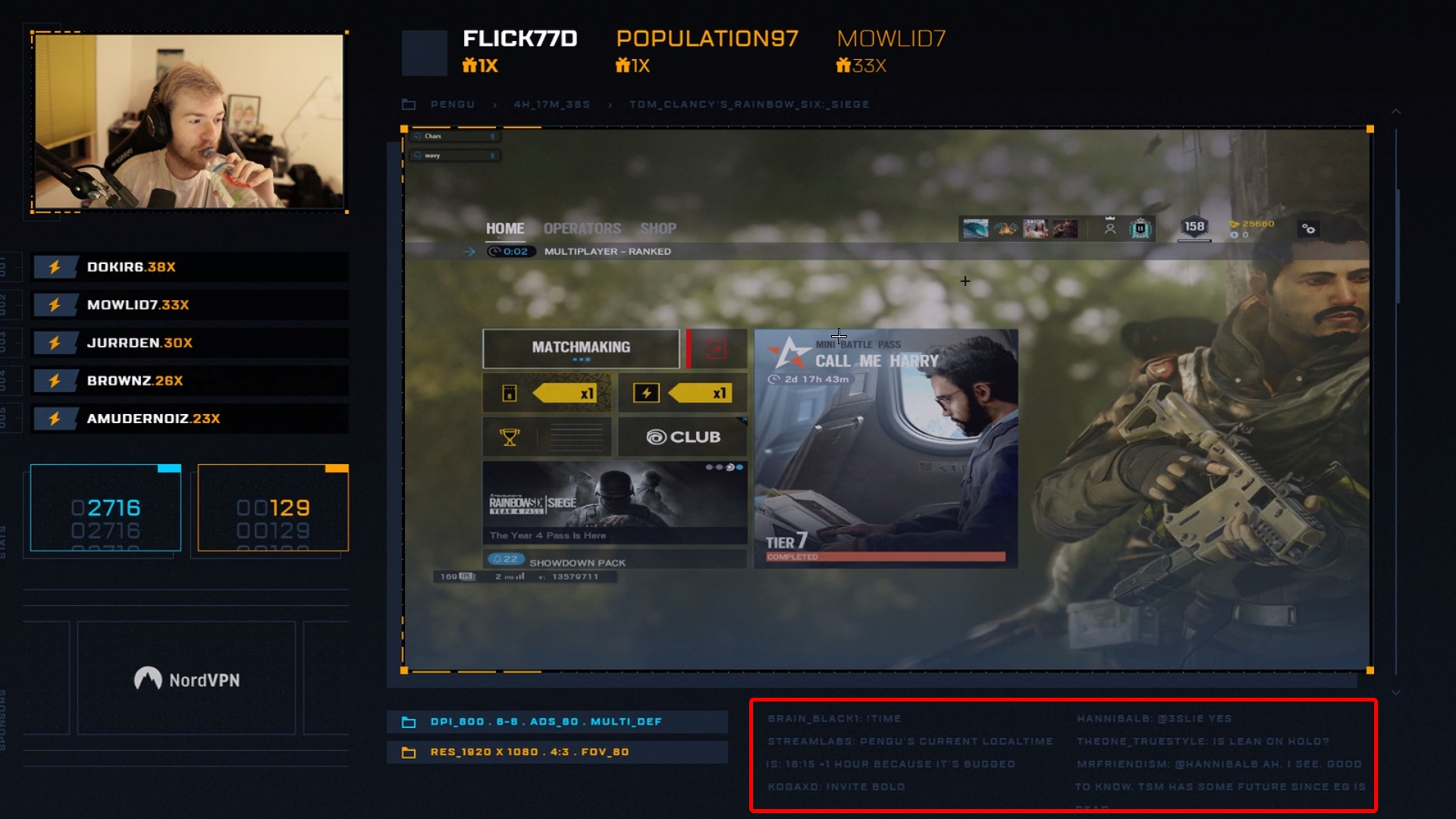
Hi! I would like to know how can I have a chat widget which can be broken or sliced like this?
https://i.imgur.com/DUhwK4M.jpg
Because the space below the video is small and it's impossible to fit the chat widget so I want to slice like this so that chat comes this way.
Thanks. 🙂
 jade remnant
pengu uses a NoD overlay (i believe), you will need to find out what it is
plus only a few NoD themes are fully working with SE
he uses SLOBS
regal breach
No, He doesn't use Nerd or Die. He has paid huge some of money to some third-party to design his overlay.
It's a custom-made overlay.
I want to know how can I have chat widget that way. Because, I want to slice/divide my widget that way so that I can have max. chat on stream.
jade remnant
as you explained it then, its a custom overlay, you would need to find out how they made it, or ask in #dev-chat if someone there has an idea on how you can do it
regal breach
@jade remnant I've posted there. Thanks. Simple Question: How do you know he's Pengu? Do you watch him?
 toxic drift
Hello! is twitch connection to streamlabs and OBS down? I've treid connecting via elements and slobs but to no avail
Nevermind it's working now ignore the above ^
regal breach
Haha, Good to know @jade remnant 🙂
 viscid venture
are you guys going to fix the host alerts not working properly with the Twitch api
frustrating to only see soem hosts in chat. I want to reward my community with alerts
round brambleBOT
@viscid venture Due to changes to Twitch API, we have filtered out hosts and will only show these ones on your activity feed:
- All hosts coming from an online channel with at least 1+ viewer
- Auto host events with at least 1 viewer - only from a channel that just went offline
Note: If you see "X channel has hosted you" with no viewers on the back, that is considered an offline host or a host with 0 viewers, we do not show these.
lament blade
its not that it need fixing, it changed
viscid venture
well change it back its stupid
lament blade
you should say that to twitch 😅
viscid venture
i get hosts that come thru with at least one all the time not show
so your telling me that slobs which is a p.o.s imo does these better come on
dont get me wrong i preach all day for people to change over to streamelements but this just rubs me the wrong way
i mean i even show people live on my stream how to set up stuff on this software
regal breach
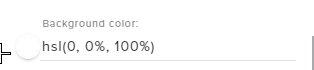
How can I set this as Transparent?
 regal breach
Okay. Thanks. 🙂 ❤
 umbral gull
@wanton crater are you going to stream today bro?
lament blade
@umbral gull please keep this channel for support only
twin sentinel
Settings > Stream
as Fabi already suggested in #general-chat
 sand lagoon
just did an update, all my scenes are gone... do they back-up somewhere?
 formal hare
Yo, good morning!
I can't locate the setting for TTS spam/profanity filters. Had a couple resub messages get muted and want to adjust the filter, but can't find where! Feel like I've looked everywhere. Thanks!
twin sentinel
https://streamelements.com/dashboard/tipping-settings > Tipping settings > Tip moderation
formal hare
That's why I didn't see it! That tip filter is global to all TTS alerts. Thanks!
twin sentinel
@sand lagoon You can take a look and see if they are maybe saved here: %appdata%/obs-studio/basic
sand lagoon
ty ty, googled it, my profile has gone poof 😦 ...overlays are fine though, I'll just back-up by hand before updating again 😉 ty ty!
 hexed dome
@twin sentinel Can you please help me
twin sentinel
Have you tried to disable and enable the 2Fa at twitch and then tried to log in to your account in OBS?
hexed dome
What is 2fa?
twin sentinel
two-factor authentication
round brambleBOT
If you are having issues streaming to Twitch recently, please make sure two-factor authentication is set up in your Twitch security settings (https://www.twitch.tv/settings/security) as this is now required to stream.
twin sentinel
Have you disabled and enabled it?
hexed dome
Just tried it
Thats why im confused because it shows me to set it but I already have it
twin sentinel
Seems to be a twtich issue then. Best to contact twitch here.
hexed dome
Ok
 proven swallow
I need some help with my uploaded pic on the new SE. Merch Beta. I was going to put another pic on and it wont let me. I need help! Please!?
lament blade
I'll link it to the right person
proven swallow
Thank you @lament blade
 worldly ingot
@proven swallow hey go ahead and join #beta_merch
proven swallow
Im in now @worldly ingot
mellow terrace
When editing a chat overlay, choosing the text settings will reset the text color to plain white. Known issue?
More specifically, if you save the overlay, close it, go back in to change something in text settings, the color will revert to white.
twin sentinel
Any chance you can record this behaviour, cause I cannot replicate it?
mellow terrace
I can try, have to head out soon though, so may take a bit to get back to you.
@twin sentinel Hopefully this works
twin sentinel
Sorry, cannot really see the issue there. I can see the chat widget being in your overlay and having always the same text color.
lament blade
if i get a custom animated alert for my stream will it still have the text telling me the donation amount or name of follower?
twin sentinel
If you get a totally coded alert with custom CSS, then you would need to add the text in this code.
lament blade
how would i do that?
twin sentinel
In the default alert box when you enbale the custom css option, there is an example on how you can implement for example this text.
 uncut turret
Hi everyone, do you know if it's possible to have subs only enable sounds on stream. Like streamlabs sounds
twin sentinel
Yeah you can make a sound effect subscriber only.
uncut turret
Can you tell me how to do that?
twin sentinel
Create a store item of the type "sound effect" here: https://streamelements.com/dashboard/store/items and in the settings make it subscriber only.
uncut turret
But I don't want them to use points, I just want my subs to be able to type on chat ex. !fart and a fart sound would sound
twin sentinel
Then make the item free to use, and not cost points. Also add the store redemptions widget to your overlay.
 prime pawn
Where can I put the custom name to the bot?
round brambleBOT
@prime pawn Custom bot name requirements
- StreamElements bot modded and in chat
- Active overlay with alerts
- StreamElements tipping page in the panels below the stream (!panels)
- OBS.Live or Ground Control open
- Create a twitch account for the name you want to use or run the bot under your own name
- Custom bot name doesn't work on Mac
 thorn minnow
round brambleBOT
thorn minnow
round brambleBOT
@thorn minnow Due to changes to Twitch API, we have filtered out hosts and will only show these ones on your activity feed:
- All hosts coming from an online channel with at least 1+ viewer
- Auto host events with at least 1 viewer - only from a channel that just went offline
Note: If you see "X channel has hosted you" with no viewers on the back, that is considered an offline host or a host with 0 viewers, we do not show these.
 gloomy jacinth
Hii
round brambleBOT
@gloomy jacinth Welcome to the helpdesk! Please let us know how we can assist you today and a support volunteer or staff member will assist you as soon as they are available. Thank you for your patience.
gloomy jacinth
Hii
lament blade
Can we help you with anything @gloomy jacinth?
hoary karma
Hello my game seems to working in high settings and everything and then when I look at my stream. My framerate on the stream is doodoo
Like 8 fps
round brambleBOT
@hoary karma Please provide a log from your last stream. To do this, in OBS go to Help > Log Files > Upload Last Log File and paste the link to the log file here.
lament blade
can you provide us with the log, so we can check where the problem might be lying?
hoary karma
@lament blade it was yesterday and last night. Can I just send you the log or do I need to stream the game again
round brambleBOT
- Restart OBS
- Start your stream/recording for about 30 seconds. Make sure you replicate any issues as best you can, which means having any games/apps open and captured, etc.
- Stop your stream/recording.
- Select Help > Log Files > Upload Current Log File. Copy the URL and paste the link here.
(Note: If you do not see an obsproject.com URL, you will need to update OBS Studio to version 22+)
lament blade
^ follow above steps
hoary karma
Okay hold up seems to be a update
gloomy jacinth
Hii
coral glen
link's been changed succesfully , thanks @lament blade
lament blade
No worries!
hoary karma
And also how to just stream 720p? And make the games be capture in 720p?
real escarp
hoary karma
What's the setting for 720?
real escarp
you drop it down for 1280 x 720
 carmine trail
Before the update I could stream fine everything was normal, then i updated it today finally, and it told me my video drivers were out of date, updated them, and it just crashed, and crashed and I'm trying the old standbys of "turning it off and on again" and now it won't even LEAVE computer properly I'm LITERALLY screaming at my computer at this point Iv'e even restarted it, everything hecked up please send help. GET IT OFF.
I'm sorry Iv'e just been fighting with it for hours now I'm a little emotional, like dude i JUST , i need to WORk, and I've been wrestling with it for hours and now I'm dumb and stuck here and don't know what else to do.
I would Like to re-install it and just, have it work normal, but I don't think I should re-install it with the old stuff still there, and I can't figure out how make it uninstall properly, or manually uninstall it somehow, I picked this program because it was easy, and now Iv'e gone and hecked it all up.
hoary karma
@real escarp
And what's base (canvas) Resolution
real escarp
leave base thats your desktop resolution and 1920 x 1080 is what most of our overlays default to
hoary karma
Aight cool! Thanks for telling me
real escarp
@carmine trail lets have a look give me a second to read
lets try this installing obs 23 and the obs live that goes with it
let me get you the links
thats obs 23
obslive that goes with it https://drive.google.com/open?id=18M6OPzKQEBqiT2ecZlZ8se9VXcQHWZpp
carmine trail
aight, thank you, I'll give this a try.
oh thank goodness , previous version works fine! yeah i have an older Graphics card the 1080ti and the newest update just crashed over and over and refusing to output demanding that I update it. all is good now I'll never update again. thank u @real escarp
real escarp
np obs does eventually blacklist some gpu's
 raw heron
donations arent showing up in obslive. ive checked my overlay and alert box, idk why its not coming up :l
nvm. had minimum on 2 lmao gonna keep it doe
 crystal delta
Idk where what chat to put this in but how do I put streamelements on my twitch
round brambleBOT
@crystal delta To add your overlays to OBS, add a new browser source in your scene. Paste your overlay URL in the browser source properties, set the dimensions to 1920x1080 (unless you changed them on the website), and ☑ “Shutdown source when not visible” https://youtu.be/KDvLynUqXI4
crystal delta
Thanks
lament blade
thank you for the update guys xD
real escarp
try install obs 24 again
OBS (Open Broadcaster Software) is free and open source software for video recording and live streaming. Stream to Twitch, YouTube and many other providers or record your own videos with high quality H264 / AAC encoding.
hoary karma
So I put media request on two separate scenes and theres a huge delay
How do I put make then sync?
real escarp
dont add media request to multiple scenes instead make one media request overlay >add that browser source to obs > then on the SCENES (obs) you want to add a source-(SCENE-media request)
this is a much cleaner non sync issue way of doing it
hoary karma
@real escarp confused on what your saying
real escarp
let me screen shot to help
hoary karma
Aight thanks
real escarp
step one
make a scene called SE-mediarequest
add one browser source
from here step two
hoary karma
@real escarp I don't got that
I got it as my overlay
How do I get the media request link
hoary karma
@real escarp I have the media request as a widget
real escarp
make a scene call it SE-media
dont add the widget to your overlay instead make a new overlay with just media request
hoary karma
Ooo I getchuu
 real escarp
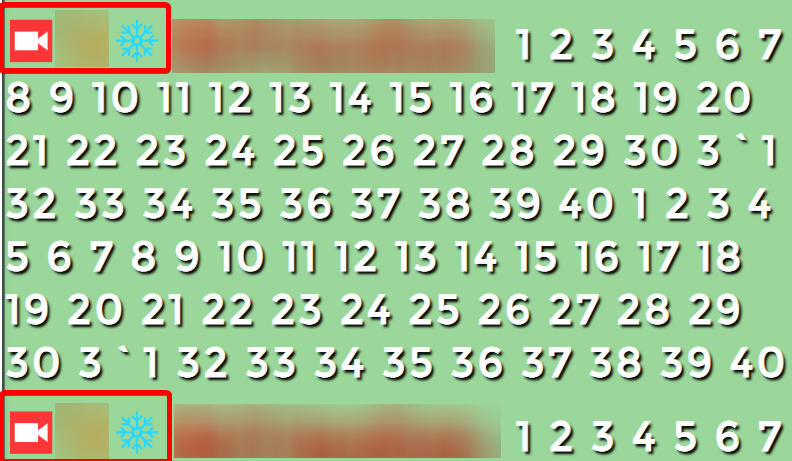
you can not this would require a custom chat widget and knowledge on how to remove them with css or javascript
hoary karma
@real escarp got it working thanks!
real escarp
np
regal breach
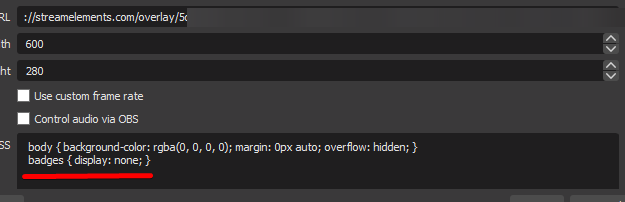
Can you tell me the CSS Code to use to hide something?
I will try using the OBS's Custom CSS to hide it.
This is not working
 rare flame
Hello I wanted to ask for help about the redemption store widget, as I tried to put it on my obs studio which I have done. But somehow the redeemed bit of the {name} redeemed {item}, stays on the screen and does not fade out like the other commands within {}. Pls help me with this ty
twin sentinel
This is a known issue and devs are aware of it. Unfortunately no ETA on a fix so far, afaik.
rare flame
Oh okay thank you! I think i tried sorting it out before and it took 30mins. Had no clue how i did it since i just pressed random buttons. Hopefully the issue gets sorted out. Tyvm
 solid sigil
i was updating my obs and the stream elements obs but i got rid of my stream notifications panel. how do i get that back?
round brambleBOT
@solid sigil If you are not seeing the OBS Twitch integrations and have OBS.Live installed, please follow these steps:
- Make sure you are on the latest and greatest version of OBS.Live
- exit OBS (make sure OBS is not running)
- delete %appdata%\obs-studio\plugin_config\obs-browser\obs_profile_cookies
- start OBS.Live
- Settings -> Stream -> disconnect -> connect
solid sigil
i am seeing the chat and my media request but im not seeing the notifications panel. i exited it accidentally and cant figure out how to add it back.
 sage solstice
where do i change my sub and follower goal # from a StreamElements widget?
twin sentinel
https://streamelements.com/dashboard/session -> goals tab
sage solstice
thats to reset, i need to change it to a higher goal isn't it?
strong kernel
The end goal is in the widget settings in the overlay editor. The goal progress is in the link above.
real escarp
you could try #art-marketplace since they use editing software
strong kernel
He's suggesting you commission an artist to do what you want. Anyway, this isn't really the place for Adobe After Effects questions.
 jovial holly
Hi!
My Obs.live is freezing every other second without having anything to do with my cpu or ram. Never seen this before... any ideas of what it can be?
 wise torrent
Hello! I have a problem. When i try to use commands in my stream, the bot don't do it anything.
I activate the bot for my channel, but nothing happend when people use the commands.
real escarp
have you modded the bot @wise torrent
/mod streamelements
@jovial holly what obs version
jovial holly
24.0.3
real escarp
after you mod bot PART the bot and JOIN the bot from dashboard in SE
wise torrent
@real escarp when i try give the rol, twitch say me this menssage
real escarp
try it in chat
wise torrent
ok
real escarp
@jovial holly lets try reinstalling obs 24
OBS (Open Broadcaster Software) is free and open source software for video recording and live streaming. Stream to Twitch, YouTube and many other providers or record your own videos with high quality H264 / AAC encoding.
jovial holly
Seems to be working better now! Thank you!
neon gorge
@rare flame i have the same issue, it's on my Pre-Stream checklist to go onto SE website, edit the overlay, test "store redemption" that usually makes it go away for a while
 orchid radish
Anyone else having trouble with the hypecup widget not properly working the bits go in but doesn't go to the bottom have to clear it all the time
 rustic pumice
Anyone help me set this up, i've tried multiple things and nothing have worked
sinful nexus
Is the way to recover a overlay with only the link?
strong kernel
@valid grail Please keep questions in one channel.
@sinful nexus Once you delete an overlay, there's no getting it back.
 valid grail
yeah im deleting this question and moving to the OBS live section
sinful nexus
yikes lol okay gotta start over
strong kernel
Just commit. At any rate, we're working on a hotfix to address issues with the recent update.
@valid grail
valid grail
yo
i can't type in the OBS live section and that's where i want my question to go
that's where it belongs
strong kernel
valid grail
you have a support article that says in order to uninstall the plugin you have to browse to the OBS folder and delete the .pdb files I believe
they don't exist
and uninstalling the plugin from the add/remove programs section doesn't work
strong kernel
valid grail
alright listen man I don't need a screenshot or a copy/paste
strong kernel
And you've been told we're working on it.
valid grail
I'm an IT tech and I've done all the background work needed to try and fix this on my own
do you have a link to a previous version
that'll fix my issue
strong kernel
It's not possible to rollback to a previous version.
valid grail
I can't even go back and use OBS studio at this point because the OBS live app is baked on over top of studio
do you guys test these before rolling out updates?
can't even stream today
 lime nebula
heyya folks, one more issue. For some reason whilst migrating all my alerts to SE instead of SL, for some reason the Gifs generally play fine during an event, however the related sound effect double plays over itself. Is there a way to prevent this?
round brambleBOT
@lime nebula Make sure to ☑ “Shutdown source when not visible” for all browser sources (all OBS scenes). If using studio mode, uncheck “Swap Preview/Output scenes After Transitioning.” Also keep in mind that sound can play from any overlay loaded in the browser (editor or launched). https://i.imgur.com/FegZJQS.png https://i.imgur.com/yY0wcFl.png
lime nebula
ok will do and I'll test it, thank you
no, that didnt fix it, it seems it never properly clears the last alert from the alert box. Even though it doens't appear on stream. And still double plays sounds.
strong kernel
Multiple sounds is always the result of multiple active alertboxes.
lime nebula
But if the other scene is shutdown, how can it still happen. I'll have a fiddle
strong kernel
Just because it's not the active scene does not mean it's shut down.
lime nebula
hmm ok
 woven python
so, the latest update fries your network % in task manager
i had to uninstall to stream, any reason why?
it forced us offline with 2.2k viewers so many times
strong kernel
We're working on a hotfix to address issues with the recent update.
woven python
any eta?
strong kernel
Hopefully within 24 hours.
woven python
I love the plugin, so will be reinstalling once it's fixed, i'll keep checking. Just very frustrating 😦
will you be posting here when it's fixed?
strong kernel
Keep an eye on #270206314561404928
woven python
thank youi
 cobalt void
Hey! i think this might be a simple problem, but im not sure of the fix. The streamelements chat dock is way too big. What i mean by this is that the chat button, bit leader board and stuff of that sort are so big, i can barely read chat. ive provided an example.
strong kernel
That's... weird. It shouldn't be sized like that.
cobalt void
that was my thought. Its not a problem when my chat is just emotes or one word messages but when its anything more, they stack and i have problems sorting through them mid game
strong kernel
This is expected behavior.
Something is sizing up your stuff. Maybe your display settings?
What resolution is your monitor?
cobalt void
wouldnt that effect everything though. and let me check. i stream off my laptop
knotty dew
Greetings. I recently created an item in the stream store that plays a sound. When I typed !redeem and then name it says in chat that it redeemed but I don't hear the sound. Do I have to access the sound after it's been redeemed?
strong kernel
Did you add a store redemption widget to your overlay?
cobalt void
let me try to change the settings
full screen isnt much different. im going to try uninstalling and reinstalling.
knotty dew
Hey @strong kernel I added the widget and now I do indeed hear the sound when I type the command in chat, but OBS isn't popping up the widget animation. Do I have to link that widget to that specific store item?
knotty dew
Oh ok yea I see you can add sounds and then other things as well. Noted. Thanks!
That's kinda cool I like that feature. Slowly figuring this all out. I really appreciate your time
 late blade
Hey
I just changed my twitch name and now my streamelements bot won't show up in my chat, and i can't see the chat through the streamelements app
streamlabs OBS*
round brambleBOT
@late blade If you changed your name on Twitch please follow these steps:
🔹 Visit https://streamelements.com/logout and then log in again with by connecting with Twitch.
🔹 On the right side of the dashboard page that opens, select "Join" under bot settings. If it says "Part" select that and then select "Join" to send the bot to the chat. Don't forget to mod the bot by typing /mod streamelements in your channel if you have not already.
🔹 Post your new name here so that we can update your channel's chatstats tracking (must be done by staff).
strong kernel
We can't help with Streamlabs OBS, we don't have the tools to troubleshoot their software for them.
strong kernel
That's fine. Follow the steps.
knotty dew
@strong kernel Hi :] So with stream perks are these just things I'd have to manually always do? For example I can't make one that says it will move your song to the top of the queue, and then have it actually do that can I?
strong kernel
You don't have to ping me. I'm right here.
Stream perks do not do anything automated.
knotty dew
Thanks, just wanted to make sure.
late blade
Thank you Nethyr :)
knotty dew
I guess I know you're pretty good at answering quesstions so I thought I'd ping ya. My sincerest of apologies
Wont ever happen again
 empty prism
my stats page gives me 404. Can someone help? ginger64 on both twitch and se
strong kernel
What did you change your username from?
empty prism
chess4fun but that was over a year ago
strong kernel
Well, it was waiting a year for you on the old name. 
strong kernel
It was still watching the old name all that time.
empty prism
ah, that makes sense
 rapid robin
Hello guys! I've been noticing something odd with the link protection from the bot. Sometimes it lets certain link domains slip by, such as YT. All the settings appear to be correct. Wondering if this is a known issue/ whether or not theres a solution.
round brambleBOT
@granite vortex Please follow our community rules:
- No advertisement or stream promotion
- Respect ALL server members
- No NSFW/NSFL
Thank you
cedar lynx
@rapid robin if you're able to catch the ones that make it through, that will help for debugging 🙂
rapid robin
This link made it through -
https://www.youtube.com/watch?v=kOZC1hDk0aY
Just tested with a Twitch link and was caught, but some Youtube links just seem to be getting ignored.
cobalt void
@strong kernel uninstalling and reinstalling fixed it
strong kernel
We don't work with Restream.
 sonic oak
If i wanted to add fancy stuff like overlays to a ps4 twitch stream, would i need to use remote play for that?
strong kernel
Or a capture card.
sonic oak
Which one is easier/cheaper? Because I'm just getting started and don't want to invest to heavily in the beginning
strong kernel
Well, remote play is technically free.
 fathom zodiac
hello everyone! I was wondering is there a way for someone to redeem an item that allows everyone in chat to get X amount of points?
someone spends 5000 points and gives the rest of the community 50
anything like that?
strong kernel
Not automatically.
fathom zodiac
would would be the steps?
strong kernel
They redeem, you use an !addpoints all command.
fathom zodiac
!addpoints in the redeem item? or would i manually have to say !addpoints
strong kernel
Manually.
fathom zodiac
okay! and if i saw !addpoints 50 in chat would that go to everyone?
strong kernel
That would depend on the module.
fathom zodiac
pretend like I dont know what any of what you said means lol
strong kernel
They describe what they do.
fathom zodiac
sorry i was looking under the super moderator setting
and it shows up and an enable or disabled haha
 spring kiln
Can someone explain the store redemption feature, or give me a link to an example one set up? Not sure exactly what goes in there. Thanks
strong kernel

Stream store is where your viewers can spend their points on cool perks. Watch the video and learn how to set your own store. ----- Join our discord for live...
 plush wigeon
I have my alerts setup and put in obs as a browser source. testing them works fine and show up, but live alerts do not go through, what could be wrong?
strong kernel
I don't see any activity in your account for the past day.
plush wigeon
That's really odd I'm in my account now and live
strong kernel
Yes but you haven't had any new followers.
plush wigeon
I have had people try to host but the alert doesn't appear. I have the minimum viewer count set to 0 as well to make sure
round brambleBOT
@plush wigeon Due to changes to Twitch API, we have filtered out hosts and will only show these ones on your activity feed:
- All hosts coming from an online channel with at least 1+ viewer
- Auto host events with at least 1 viewer - only from a channel that just went offline
Note: If you see "X channel has hosted you" with no viewers on the back, that is considered an offline host or a host with 0 viewers, we do not show these.
plush wigeon
Ah okay that makes sense. Thank you!
fathom zodiac
how does the leveling system work with streamelements?
strong kernel
Leveling system? There is no leveling system.
fathom zodiac
!level
Set a viewers access level. Reset with !level <username> reset.
what is this under super moderator settings
strong kernel
That is bot access level.
fathom zodiac
ohhh
strong kernel
To set someone to, for instance, a Regular or Super Moderator, for the purpose of bot interactions.
round brambleBOT
@fathom zodiac
Chat/Bot Levels
100 - Viewer
250 - Subscriber (Twitch subscribers automatically placed at this level)
300 - Regular
400 - VIP (Twitch VIP automatically placed at this level)
500 - Moderator (Twitch chat moderators automatically placed at this level)
1000 - Super Moderator
1500 - Broadcaster
Dashboard Manager Levels
Bot Supervisor
Editor
Full Access
Owner
https://i.imgur.com/s61Liry.png



 fathom zodiac
holy thats amazing
spring kiln
So does the store redemptions show up like Alerts?
strong kernel
Similarly.
spring kiln
Can someone elaborate on the description of Stream perks vs. Sound Effects. I am not following. Thank you!
fathom zodiac
If I enable the Quote... where can I find the list of quotes created?
is it possible to find the list of quotes?
that have been added
zenith widget
@fathom zodiac no but it has been requested before. No eta
@spring kiln perk allows you to show the image and play rhe sound via the widget
While sound is just the sound
 tulip leaf
Has anyone else been having issues with Raids and Host alerts not showing on stream? They show in chat but not on screen
round brambleBOT
@tulip leaf Due to changes to Twitch API, we have filtered out hosts and will only show these ones on your activity feed:
- All hosts coming from an online channel with at least 1+ viewer
- Auto host events with at least 1 viewer - only from a channel that just went offline
Note: If you see "X channel has hosted you" with no viewers on the back, that is considered an offline host or a host with 0 viewers, we do not show these.
tulip leaf
Okay thanks. Makes sense
spring kiln
In regards to Stream Store, I would like to create a Suggestion redeem item like the below image. Is there a way to make the suggestion go to just me and not the Stream? Thank you!
zenith widget
Not exactly. You can still use the stream perk item, but not set an image of sound.
In the redemption widget in the overlay, you can remove the default sound and image that is set on the image
so that when someone uses this item, nothing shows up on stream
but if you have any image + gif item for fun times (like a jump scare), they will play.
Also there is an option in the perk type store item "Play this as an alert"
spring kiln
@zenith widget So if there is no sound or image, where would what they write show up for me to review? Thanks
zenith widget
spring kiln
Ahhhhh gotcha gotcha tyvm for your help!!
lament blade
can someone help me with setting up stream elements? Would like to be in a call with someone
round brambleBOT
@lament blade New to Stream Elements?
Check out our YouTube channel https://www.youtube.com/c/streamelements/videos
with tutorial videos from setting up the basics, to in depth details on how to use our product.
lament blade
how to do I transfer everything to stream elements from stream labs?
twin sentinel
There is an import tool in our software OBS.Live, which is s plugin for OBS Studio.
At the top of OBS select StreamElements > Import from other platforms.
lament blade
oh thank you, I heard you can make all the layers on your scenes like into one or something like that? How do you do that?
twin sentinel
Import the overlays and then take a look at your overlay section in your StreamElements dashboard.
Then you can make your overlays for each scene there.
lament blade
this is really confusing now and I'm really lost
go to the streamelements website
login with your twitch account and go to my overlays, in there you can edit the overlays
StreamElements
StreamElements is the leading platform for live streaming on Twitch and Youtube. StreamElements features include Overlays, Tipping, Chat Bot, Alerts, Loyalty, all fully integrated and cloud-based.
yeah I did, I imported the overlays and all and it's like everywhere and I don't know
 atomic tree
Two questions:
- Is there a way to group layers together in the Overlay editor so that when I drag the group it drags all the grouped layers the same exact way? Kinda like what you can do with sources in OBS?
- How do I reset the follow/sub goals so that they start at 0/goal for the next stream?
lament blade
@atomic tree for the first question, we are currently testing the group layers and this will be released soon!
atomic tree
Ah, sure thing 
lament blade
For the second im opening my overlay editor real quick haha
so within the overlay editor you have a button called DATA next to WIDGETS
over there go to the subbutton goals and you can reset your goals there
atomic tree
Awesome! Thank you so much!!
lament blade
no worries! 
 atomic crater
Hello !
I'm trying to do a sondage on streamelements for my twitch channel but when i try my sondage it doesnt work
atomic crater
survey sorry KeiZar
zenith widget
survey? I don't think we have a specific tool that does surveys
atomic crater
the command " !bet a "
atomic crater
Casiibro
zenith widget
No worries 🙂
atomic crater
have a great day 🙂
And I have another question
How can I show live results evolution?
lament blade
Hi, is there away for me to setup !song command so it works with spotify?
twin sentinel
https://discordapp.com/channels/141203863863558144/424943321794871296/460471841690222622
Be aware that this is a third party API and if there are issues, it is most likely not caused by StreamElements.
zenith widget
@atomic crater there is an overlay widget for that
lament blade
Thanks
atomic crater
Where can I find the overlay widget?
twin sentinel
https://streamelements.com/dashboard/overlays select or create an overlay > at the top select widgets and search for the Contest widget and add it to your overlay. Then Save it and if necessary, add the overlay to OBS.
atomic crater
Thanks Benno, but i can't find where i have to search the contest widget?
lament blade
you still will have to add it to obs
round brambleBOT
@atomic crater To add your overlays to OBS, add a new browser source in your scene. Paste your overlay URL in the browser source properties, set the dimensions to 1920x1080 (unless you changed them on the website), and ☑ “Shutdown source when not visible” https://youtu.be/KDvLynUqXI4
lament blade
you can get the overlay url with clicking launch and copying that url
atomic crater
it's okay 🙂 But I have 5 answer for my contest, and only the first and the second one appear on my obs studio
lament blade
have you set the browser source to 1920 x 1080?
twin sentinel
Can you share a screenshot of your OBS window with the browser source showing a red line when it is unlocked please?
atomic crater
It's okay, I have forgotten to change syze on my overlay editors
thanks a lot guys ! 🙂
Have a really good day !
 carmine knot
Sometimes the list on the right (top sub gifters) completely dissapears
It has happened multiple times, on multiple occasions, over multiple days.
I need to refresh that source in the overlay for it to work again. What could be causing this problem, is it a known issue, and how do I prevent it?
zenith widget
Are you refreshing it as in, just turning it on and off or refreshing the browser source cache?
carmine knot
Over time, the top sub gift list (the names themselves) just goes away.
Without me doing anything
zenith widget
and my question was
when you refresh the source
do you clear the cache
or just refresh the source via another way?
carmine knot
You mean in OBS Studio right?
I've just refreshed it typically by removing the URL here and just pasting it again
zenith widget
refresh the cache
or just remove the browser source from the source list
and add it again
to clear its local storage data as well
if this continues, let us know and we will investigate further
but so far, no other reports have came in for this
lament blade
Hi there, I'm just wondering if anyone know how do I find out the PayPal I'm using on my streamelements? I cant remember the email and wondering if I can find it on the stream elements page anywhere?
lament blade
@zenith widget got it thanks!
 tiny jetty
Is it possible to make a command that timeouts a person which triggered the command?
zenith widget
As long as the bot is modded
just place /timeout ${sender} 0 (or what ever time you want) in the response of the command
tiny jetty
Thanks
gentle imp
just name the command !levelup 
tiny jetty
Or !redeem 
 modest pasture
Is there a variable where people type in a command and will join a group of names for a period of time. E.g in questmode where you type !bankheist and viewers who type that in join the heist.
Was looking through the streamelement variables and could only really find "generate a random viewer's name"
zenith widget
Heist type game is planned, but no ETA on when.
modest pasture
Ohh okies
zenith widget
So no - we don't have such a variable
modest pasture
kk thanks
 solemn arch
Hey! I've made some custom alerts I'd like to share as an overlay with my community. Is there a way I can do this or speak to someone who can assist me with it? We've done it before with the Alpha Gaming widgets, but this is something i've done myself
round brambleBOT
@solemn arch Follow these steps to grant managers/moderators access to your dashboard:
- Click on your Channel Name at the top of the dashboard and select Settings
- Create a new invite at one of three access levels (Bot Supervisor, Editor, Full Control)
- Send this invite to a mod/manager to give them access to your dashboard. The link is one-time-use and expires after 72 hours if not accepted
Video tutorial: https://youtu.be/zl_h-ttZDF0
zenith widget
use this button to copy the overlay to the other account
do note that if you remove any of the assets used in the widgets, they will be removed from the other account that uses the same widget
solemn arch
Gotcha, I have the link. Shall I send it to yourself or another mod?
solemn arch
Oh I see
zenith widget
from the person who is gonna have the overlay
solemn arch
Is there not a way to share overlays as a share link?
I don't really want to accept loads of editor requests
zenith widget
You can remove your self afterwards
At the current moment, there is no other way to share overlays.
solemn arch
Right, okay
If you don't mind me asking, how do you share the widgets if there's no way to share overlays?
zenith widget
Internal tools
lament blade
Ok so i stream on my xbox and i dont know how to set up the overlay for twitch, how do i set it up?
You will need a capture card to use overlays
So like an external hard drive
This way you can get the gameplay onto your PC, where you use a streaming application for the overlay
no capture card is a different thing than a hard drive
Gotcha
you can ask over at the elgato discord if you have the right PC requirements @lament blade https://discord.gg/elgato
 cosmic elm
I get the word 'redeemed' stuck on my screen when I open up OBS every time, and have to reload the overlays to get rid of it every time. Is there a way of fixing this?
twin sentinel
Hey, this is a known bug that our development team are working on fixing
cosmic elm
Okay, thanks 
lament blade
hello could somebody help me? i use streamlabs obs. and ive been using overlay and since its showing total sub count. and yetersday somethings being funny with obs so i had to reset and cache so now its show zero total sub count? how to get back? any body can help me?
round brambleBOT
@lament blade We're not able to troubleshoot issues with using our overlays in StreamLabs OBS (SLOBS) as we don't have the tools to support their software. We recommend using OBS Studio or OBS Studio with our plugin OBS.Live.
lament blade
@lament blade we are StreamElements, are you asking about the streamlabs application?
If you are meaning you use a StreamElements overlay in their program, they might block that out most of the time
@lament blade yeah sorry. stream labs appication
Then you're at the wrong Discord
😦 how to i find them on discord?
google 'streamlabs discord'
thanks :p
No worries, if you ever do consider switching to StreamElements, be sure to come back in here 🚀 
will do. im using streamelements for overlay thou
dry hare
@lament blade Does your sub count display accurately in the overlay editor on the StreamElements website?
lament blade
@dry hare yeah
dry hare
If the overlay editor is showing the count correctly, and SLOBS isn't, then it's definitely an issue with SLOBS pulling in the overlay. Have you attempted to use OBS Studio yet?
 red surge
hello
round brambleBOT
@red surge Welcome to the helpdesk! Please let us know how we can assist you today and a support volunteer or staff member will assist you as soon as they are available. Thank you for your patience.
red surge
so im having an issue trying to add cups to obs as it dont show on stream ?
lament blade
@dry hare i had a check and its showing zero. so maybe slobs is broke? ive tried OBS stuido once while ago its cause so much lag 😦
lament blade
@dry hare trying studio OBS and its not showing whole overlay 😦
you'll have to add it in the browser source
round brambleBOT
To add your overlays to OBS, add a new browser source in your scene. Paste your overlay URL in the browser source properties, set the dimensions to 1920x1080 (unless you changed them on the website), and ☑ “Shutdown source when not visible” https://youtu.be/KDvLynUqXI4
real escarp
change 1920 x 1080
jade remnant
change the resolution
red surge
ok il try that
real escarp
@lament blade let me look
lament blade
@real escarp sure 🙂
real escarp
@lament blade twitch name just name
red surge
thanks that helped
lament blade
@real escarp sorry what do you mean? other day its showing i have 5 total sub count :/
real escarp
what is your twitch username
lament blade
oh sorry. WIgga11YT
real escarp
in the subscriber widget you have the choice between session and 30 days
lament blade
ah i go have a look 🙂
real escarp
I would use the total sub count widget
lament blade
nothing has change