#helpdesk-twitch
1 messages · Page 459 of 1
 zenith widget
 lament blade
yhea sorry but i dont know how to read that
zenith widget
you don't have to.
lament blade
duplicating didnt work again tho for some reason
zenith widget
If there is something in red - screenshot and show it to me
but AFTER you use the duplication option
lament blade
Nothing in red, but then when i add the alertbox widget its back to standard?
its there now, thank you
zenith widget
great
lament blade

 keen willow
@zenith widget Right on. Thanks.
keen willow
So, when I click import (I imported all three checkboxes), it imports everything into the streamelements website and not OBS Live.
 cedar lynx
your assets go into your overlays on StreamElements, which you can add as a browser source in OBS 😃
OBS.live is a way for you to view activity, chat, etc. through OBS
cedar lynx

 burnt pollen
I've got a question about redeeming commands... Who might be able to help me out
 gentle imp
just ask the question 😉
burnt pollen
Oh okay was waiting lol , ok if someone does !redeem (and then what he wants to redeem) how can I have Streamelements NOT say what he or she is redeeming
I've got some scare sounds, and I see what's about to happen 😃
gentle imp
I've had same problem, some messages you cannot disable, but you can disable the module on the bot for redemptions
redemptions tab, turn it off @burnt pollen
 carmine abyss
Hey Team, been awhile since i last streamed does ground control still work?

 carmine knot
how do I make something like this
carmine abyss
@winter zenith Mine just loads a black box and when I try and reinstall it from a fresh.exe it fails.
 winter zenith
did ou delete everything befor trying to install it a new?
gentle imp
so I suggest, change the sounds on store to stream perk and disable the option "Redeeming this item shows an alert" on 2nd tab @burnt pollen
carmine abyss
@winter zenith Nah i didnt think that would matter il'll give that a go now.
winter zenith
it does 
if that still doesnt work see if your anti virus is blocking it and whitelist it
carmine abyss
@winter zenith I dont run an anti virus, tried to uninstal and try again and still no luck I just get this.
gentle imp
that's how I have mine setup, hope it helps @burnt pollen
winter zenith
an what doese the setup log say?
carmine abyss
How i unsintalled and rebooted lol
winter zenith
you didnt seem to have ended the deinstall corretly and the folder/programm was still in use
burnt pollen
@gentle imp Lemme try that ! 😃
winter zenith
@carmine abyss I would suggest deleting EVERYTHING that has to do with Groundcontroll. like the folders, the installer the programm just everything,
Restart your pc and download it a new and install it
burnt pollen
@gentle imp still showing Streamelements in chat 😦
 silk gazelle
hey i have setup ndi and everything however in my streaming pc when i open the ndi source setting and try to allocate my gaming pc it cannot be found in the drop down area
winter zenith
are they on the same network?
silk gazelle
yes
winter zenith
or is one on the router and one on the modem or something like that?
winter zenith
hmm 🤔
silk gazelle
any suggestions or
winter zenith
Trying to think what could cause this... maybe want to restart everything but you probably did that
silk gazelle
yep
winter zenith
I am not too familiar with NDI set ups to be 100% honest
winter zenith
so its from obs to obs?
winter zenith
yeah obs live is just our extension should have anything to do with this ... maybe yu want to ask in the OBS support?
since there they are more expirianced with stuff like this?
 nocturne pelicanBOT
@silk gazelle For the best OBS support, please join their Official Discord @ discord.gg/obsproject
winter zenith
good luck sorry we couldnt assist you
silk gazelle
no worries but its the community helping not the staff or am i just blind that i cant see any staff responding
silk gazelle
okok
gentle imp
did you disable the alerts on the modules and also on store? @burnt pollen
sorted on twitch ⤴
burnt pollen
Yeeeeehaaaa thanks again Rippz !
gentle imp

burnt pollen
Lol I think I found out how to silence Streamelents bots 😃
Just mute'em in bot settings ? 😃
But then he doesn't show anything right ?
 gentle imp
well, yeah that works but won't show any other stuff also lol
burnt pollen
Ye just found out lol
silk gazelle
i know the problem with the ndi i need to change my network to private but i cannot find the sertting to change my network to private
zenith widget
That option most likely is controlled in your main router
silk gazelle
i cant find on my router settings
on my streaming pc
it shows private network its all good
but my haming pc doesnt have the option
only public
zenith widget
go to your router, flip it and see if it had an IP address with a user and login.
This is something we can't really help as it barely has anything to do with our tools and features at this point. I'm sorry.
zenith widget
NDI is a way to connect 2 PCs together to share a connection as far as I'm aware and OBS can utilize that to get a video+audio feed
from one PC to the other.
Im not familiar with NDI my self, but if the OBS guys told you to set your network to private, then most likely they can help you further with that.
silk gazelle
nah they arent even online
but my brain is telling me is that it has to be private
for streaming pc to allocate my gaming pc
zenith widget
What do you mean they are not online? I'm looking at their helpdesk in their own Discord server and there are people asking questions right now and someone is helping them.
zenith widget
!obshelp
nocturne pelicanBOT
For the best OBS support, please join their Official Discord @ discord.gg/obsproject
 steel bobcat
hey, is the spotify command still working?, because when i click on the website appears to me that the link is dead.
zenith widget
The link is a 3rd party API and from what I know from Spotify's TOS and license, the creator of the API endpoint might stopped supporting it.
steel bobcat
so pretty much it can't be used anymore is that it?
zenith widget
I'm not able to load the link my self so I assume so.
steel bobcat
kk
 oak creek
is the SE merch store only open to a small group of streamers?
the one where you can sell t-shirts
 tight harness
Currently only a small group, yes
 normal igloo
Did someone say SE merch store 
 hardy karma
So I posed a question to streamelements on twitter and they gave me a link to their idea section, but it just takes me to their homepage. So I found my way here, can't post in idea section and it is partly twitch related so I am here to post the question/give the idea so that maybe someone can do with it what needs done. I am looking for a way to have my corsair keyboard and mouse flash when I get a follower, sub and/or donation on twitch.
zenith widget
@hardy karma The link would be from me. I forgot 1 additional S at the end so the link should be https://strms.net/ideas Thats what I get when trying to write the link by memory 
hardy karma
ok, thank you @zenith widget
 bright oak
I posted this last night but never received a response. *Original post Hello - my OBS.Live keeps crashing. I reached out to OBS support and they said it looks to be one of my browser sources. I stopped OBS started new stream and this is the latest log. Same one I shared with OBS Discord support. https://obsproject.com/logs/hQZzpix0mHrUKqz9 So what I ended up doing is, uninstalling OBS, OBS.Live, OBS Plugins, OBS environment in %appdata%. I rebuilt everything back with scenes and using Stream Elements with browser source. I did not install OBS.Live based on what OBS Support (Discord) suggested. I like OBS.Live and wanted to get some recommendations. I have not fully tested to see if it works without going down yet. However, it does seem to work better.
 thorny pelican
hey^^ why is this so? I need help
https://i.gyazo.com/70affe0acc90f1002c8007295e8d7a65.png
LOyality points is on
 half torrent
Hey!
I'm starting to grow my channel and introducing mods on my twitch and discord... Just wondering, is there a difference to giving people mod status directly on Twitch and then on Streamelements site?
winter zenith
@half torrent if you give them mod on Twitch they are mods on SE
if you give them mod on Se not on twitch means they can trigger commands others cant
half torrent
@winter zenith ah cool, I was just wondering as my stream elements dashboard currently says 'no moderators' even though I have a few on twitch#
winter zenith
super mod is above mod itself. If, for example, you only trust a selected group of people with media-request among your mod team.
half torrent
Gotcha, also what does 'regulars' do?
winter zenith
you can also give your mods a Bot editor link or a full accses link so they can interact with bot settings and your overlayeditor directly on the dashboard rather then only through chat
regulars was our way to have "VIP" befor VIP was a thing
we decided to still have it next to VIP because some extra rights is always nice
half torrent
Ah makes sense! Thank you so much for your help! Trying to give my community some little roles and things that help me out!
winter zenith
sure thing
half torrent
There's one other thing actually... This is me being a noob... When people offer 'playing games with subs/vips' as a perk, do they mean just letting them add them on whatever game they play, or perhaps doing a stream where only subs can choose options/make decisions in the game?
winter zenith
depends what you want to do with your stream @half torrent
 ocean echo
Is it possible to have a regular chat message as well when a user times out another one? Currently only me (broadcaster) can see it greyed out in the chat when someone uses the !timeout command but I want a regular message from the streamlabs bot as well.
winter zenith
every sunday my community can vote what we shall do on this day. If its mutiplayer games subs and VIPS get seat rights first befor normies.
Or they buy it in my stream store if they have enough points
@half torrent
So its all up to you
@ocean echo we are elements not labs
ocean echo
Sorry that's what I meant
half torrent
Awesome, that makes a lot of sense! Thanks! 😃
ocean echo
No workaround that we can think of? Maybe that the !timeout command triggers another command which displayes the message.
Maybe duplicating the !timeout command and just display a message?
 torpid estuary
A command can't trigger another command.
And I don't think duplicating commands will work, most likely only one of them will be working
ocean echo
Yup, the same command can't be used twice 😕
 cobalt laurel
Its possible to reedem a voice message with points? How this streamer made it ? https://streamelements.com/gabepeixe/store

StreamElements
The Ultimate All in One Platform for Streamers
 rugged valley
Hello, the Russian channel is a bit delayed responses. I am writing to you in English support. I added a panel to my tweak channel "Leaderboard Stream Elements", set it up, sort of. When you start to send emoticons to the chat, it shows nothing in the list. What to do? Screenshots below
Help 
 elder sorrel
@rugged valley Did you change your name recently?
I'm at my day job so my responses may be delayed.
rugged valley
@elder sorrel
I changed the name from tartarfamily to UnderCept, but that was before I set the table
elder sorrel
It may be causing it to show up blank. If you can try to part the bot from your Twitch channel -> Sign out of Streamelements -> Sign back in & join the bot again.
rugged valley
I do not understand, I need to get out of Stream Elements, or with a twitch too? @elder sorrel
 zenith sparrow
Hello, I hope everyone's day is great. I have a question that is likely a little silly. I stream with a dual pc setup. My gaming PC is my main pc, and has a lot of programs, games, cookies for websites.. things like that. When I stream with a dual pc setup I cannot always prevent my gaming screen from showing unwanted info. Would it be recommended to run my gaming pc in a virtual machine, or just create an entirely different sign in profile? thoughts, cons, pros?
gentle imp
just use game capture and it won't show other info @zenith sparrow
 bitter radish
Hello StreamElements! I had a question regarding the tipping system and alerts while on stream. I have a stream overlay setup on my StreamLabs application including my own alert box, but I am currently using StreamElements for tipping and stream loyalty. The only concern I have right now is not getting alerts while on stream through my Alert Box on StreamLabs since the tips are being done through StreamElements. So as of now, if someone tried to donate me money through StreamElements, would my Alert Box on StreamLabs still work or is there something that I have to do to make the two work together?
gentle imp
or perhaps that ain't possible on dual pc setup 
zenith sparrow
Unfortunately with a dual stream setup @gentle imp I do not have the option to only capture the game window.
zenith sparrow
Yeah just full screen capture of the game pc, and the stream pc runs overlays, sounds, ect.
nocturne pelicanBOT
For the best OBS support, please join their Official Discord @ discord.gg/obsproject
zenith sparrow
I appreciate it, it's just a silly question I'm spreading around to get insight on. I've heard a virtual machine was great to use for gaming, but making a new sign in profile just sounds easier.
rugged valley
Help me with my problem, the Stream Elements leaderboard does not display data, what to do, I can give a link to the channel
gentle imp
yeah perhaps I would try that too @zenith sparrow hehe
 alpine spindle
The email summaries I receive after a stream always show a way larger number of unique chatters than I've had. Like 30+ but I know only 10 people jumped in to chat. It's not really a problem, I'm just confused/curious why that is.
 twin vapor
I just set up a custom bot using Ground Control -- everything is working, but I was wondering about the badges/roles. Is there a way to get my custom bot to have the Bot badge? What about the Verified badge like the StreamElements bot has?
tight harness
@alpine spindle Are you judging this by how many people chatted? Because your unique chatters aren't those who chat, just those who show up in your chatters list (the viewer list that Twitch provides)
@twin vapor The verified badge is for Partnered channels, if your bot account isn't partnered it can't have the verified badge
twin vapor
@tight harness Ah, gotcha! Thanks!
tight harness
In regards to the bot badge, that's a BetterTTV setting
twin vapor
Oh man, a whole new world...thanks for putting me onto that!!
lament blade
Anyone else who's been having problems with the bot today on twitch? It reads commands but it doesn't reply in anyway, seems to not be in the channel even though the dashboard says it is
 minor kindle
Let me check your channel out, one sec.
lament blade
It's not on mine, I'm investigating for the streamer I'm moderating for
want me to post his name here?
minor kindle
Message me
 agile creek
i had my obs connecyed to fortnite but when i added stream elements to it my fortnite isnt connected to it any help?
alpine spindle
@tight harness oh! So it's not chatters, it's viewers?? Seems confusing but makes a lot more sense based on the numbers
rugged valley
Hello, the Stream Elements Leaderboard table does not work, it does not count smiles and does not show leaders in the table. What should I do, tell me!?
 dawn lily
lament blade
dawn lily
lament blade
how do i use overlays
nocturne pelicanBOT
@lament blade To add your overlays to OBS, add a new browser source in your scene. Paste your overlay URL in the browser source properties, set the dimensions to 1920x1080 (unless you changed them on the website), and ☑ “Shutdown source when not visible” https://youtu.be/KDvLynUqXI4
minor kindle
@dawn lily Did you check your audio settings in OBS to make sure it is set in there
 slender yoke
Question: do item limits on store items reset each stream?
minor kindle
@slender yoke No
 heady knot
hey i wanna use the social media to auto tweet but also import an image with it, is this possible?
 remote basin
How do I change my chat bot name?
minor kindle
You would need to use OBS.Live or Ground Control
 pulsar gulch
Does anyone know where I can report a theme bug ? 
 torpid elm
hi guys.. I am streamer and I am having an issue when I try to use media request.. evertime I play a song it sound double
I check obs and there is only one source
thank you
remote basin
I do use OBS live
@torpid elm , do you have your channel up on a web page as well as your OBS? that was what was happening to me, just mute the website with your channel
agile creek
hello im trying to go live but it says have the wrong path or url where do i go to fix that?
pls help
 steady estuary
New to this anyone keen on a chat n some support for this noob
cedar lynx
I suggest you start here @steady estuary 😃 https://support.streamelements.com/hc/en-us/articles/115003424812-Quick-Start-Guide
 coarse heath
Is there a way to set my overlay to 720?? Instead of 1080
Please tag me in reply- thx!
Nevermind! I found it
 upper steeple
i'm trying to emulate an emote event, I click kappa and nothing happens.
 cyan sonnet
I cant get my bot name to change can i get some help?
minor kindle
@Asakara Are you doing it through OBS.Live?
lament blade
I'm having some trouble with the system not connecting with my stream service
 covert whale
Hi guys, I'm having trouble importing my StreamLabs settings no scene or anything.
 shell siren
I am having toruble importing my streamlabs obs scenes to stream elements any info?
 upbeat warren
Having problems with the Media sharing on my stream, it doesnt show up, or when i switch scenes it disappears
 strong kernel
@sand stone What do you mean? Screenshot any error you're seeing.
@covert whale They go to your account, not straight into OBS.
@shell siren What's the issue? Screenshot any error you're seeing.
covert whale
Oh, thank you!
strong kernel
@upbeat warren If you've only added the media request widget to one of your overlays, it's to be expected it's not visible when you switch scenes if that scene doesn't have an overlay with the widget too.
 cloud steeple
Hey there... I seem to have an issue using my overlay in when live. It works fine when I manually test my overlay alert box, even when live that works, but responding to actual events such as hosts seems to not function
what could be the issue?
nocturne pelicanBOT
@cloud steeple Due to changes to Twitch API, we have filtered out hosts and will only show these ones on your activity feed:
- All manual host events (0 hosts included and if filter set to 0)
- All hosts coming from an online channel. If the hosting channel has been offline, we do not show it
- All auto host events with at least 1 viewer
 brazen dragon
myself being deaf, no clue about managing audio. heh. was wondering, by using spotfity, do i use audio source or is there a widget within SE or have to use audio source in OBS Live?
strong kernel
It's against Spotify TOS to use it for anything except personal use. So, there's no widget or support for it.
strong kernel
In general, yeah, they tend to be for personal use only. Usually you need a license to play copyrighted material for an audience.
brazen dragon
mm ok. trying to think of a way to make my streaming more...audio friendly, instead of just game audio. 😃 thanks for the help Nethyr.
strong kernel
Perhaps look into royalty free music.
 edgy tide
so I am looking to add a "live viewer count" to my stream using streamelements for twitch. I thought I saw somewhere that that was supposed to be a thing but now I cannot find it. Can someone please refresh my memory?
strong kernel
Viewer count is not something you can add to your overlay with a default widget. You might be able to pull something off with custom coding, but that's all on you.
edgy tide
oh damn. @strong kernel thanks. That seems like an old thing that I'm surprised isn't functional. Would you happen to know if that will become a thing?
strong kernel
Well, the viewer count is shown below the stream in general, so I don't think a need was ever seen.
edgy tide
Oh? that might be all I was looking for anyway. Are you referring to my twitch channel, or could it possibly be on the obs stats itself perhaps? I just use that to monitor how many viewers I have and just would like to know where I need to locate that.
strong kernel
Twitch channel.
If you want to monitor viewer count for yourself, there's a toggle in OBS.Live.
edgy tide
I couldn't find it. is it a settings thing?
strong kernel
Toggle's in the menu in the top left of the activity feed.
If you want your viewers to see it, in the browser it's right below the stream, and on mobile, it's visible after tapping on the stream, so adding it to your overlay would be redundant since it's already accessible.
edgy tide
oh, okay I see it now thanks. its on that lower bar where I wouldn't have expected it. thanks for all your help. You seem to be a good lad despite what cryonic says. 
that was just a joke. I just picked a name off the sidebar. have a good one y'all.
strong kernel
Good pick. We like to joke with each other.
edgy tide
lols, perfect then.
 ember kraken
How do you use custom fonts?
strong kernel
Type the name of the custom font as it appears in your C:/Windows/Fonts folder.
ember kraken
What on earth, how does it grab the font, I was pretty sure this was a non-public domain font
strong kernel
It doesn't.
It's your computer doing the heavy lifting.
It's allowing your browser to reference your local font.
Which also means the font you put there is ultimately your responsibility to have the right to use.
ember kraken
very fair point. That's super interesting, I had no idea browsers were able to pass local fonts to sites
strong kernel
CSS can be a magical thing.
ember kraken
Is there any way to apply an animation to every variation?
ember kraken
yeahhhhhhhh that's what I was worried about
 tender schooner
Anyone able to advise me on sound effects from the stream store. I cannot get them to play on stream, I have the Stream store browser source in my overlay, and that overlay active in OBS.
Okay, I've got it! Didn't have redeem command turned on
strong kernel
Seems to be working fine.
tender schooner
Next question, is it possible to alias a !redeem xyz to just !xyz ?
strong kernel
Custom command, not alias.
ember kraken
I can't figure out why my cheer alert fades in properly, but just pops out of existence instead of fading out
Actually, looks like none of my alerts are fading out, only fading in
lament blade
Hello there! Was looking for a bit of insight into a problem im having with media request during streams?
nocturne pelicanBOT
@lament blade Welcome to the support channel! Please let us know how we can assist you today and a member of the support staff will be with you as soon as possible.
lament blade
Do i have to post it again since bot popped up?
strong kernel
That's your cue to go into detail.
lament blade
Ahhh
Well now that im thinking about it since its more obslive i should put it i obslive support shouldnt i? 😅
Ill be putting my problem in there! 
strong kernel
@ember kraken Fade seems to be working fine. Make sure you're setting text animation as well.
ember kraken
Gotchu, will check. Next question: is there any way to set an opaque background for text-based widgets? I'm trying to achieve the look of https://i.imgur.com/lDQ1H0p.png, where the black box lengthens and shortens as needed

 potent shore
After a crash I can no longer initialize sound capture, any ideas, the obs discord is pretty much useless
strong kernel
We don't really touch the audio aspects of OBS at all, so while they may be delayed in responding, they'll know that system better.
brazen dragon
someone remind me how to change SE's Bot name for twitch chat? i saw a link/respond in here a while ago (2-3 days ago i think)
strong kernel
In OBS.Live or Ground Control?
brazen dragon
dont know. lol all i saw was someone responding to how to change Streamelement's bot name
strong kernel
You can do it in either or depending on preference. Do you use OBS.Live?
brazen dragon
yes
strong kernel
Check pinned messages in #helpdesk-selive
brazen dragon
thank yoiu
tender schooner
Last question for tonight. Is it possible to turn the pepe emotes off in the bot responses?
strong kernel
!pepes disable
ember kraken
Nethyr, you've been super helpful tonight, any chance you have any idea how to set up the adaptive black highlight?
strong kernel
The what now?
ember kraken
I'll copy paste xp
is there any way to set an opaque background for text-based widgets? I'm trying to achieve the look of https://i.imgur.com/lDQ1H0p.png, where the black box lengthens and shortens as needed
strong kernel
So, a text background.
ember kraken
Sure. Whenever the recent sub name is longer than the box, it stretches to make sure the name fits
example clip
Also, is there any way to set the {name} to have a highlighted color, akin to the alert box?
strong kernel
That'd all be custom coding.
ember kraken
Like CSS?
strong kernel
And HTML.
ember kraken
Hm. Any chance the overlay editor has that feature?
strong kernel
Not out of the box. Hence custom coding.
ember kraken
How would I go about accessing that secret box?
 maiden palm
I'm trying to add a follower goal on my overlay but the actual follower number is incorrect. How to I fix that
strong kernel
Goal progress is controlled at https://streamelements.com/dashboard/session
StreamElements
The Ultimate All in One Platform for Streamers
Not by your totals.
maiden palm
gotcha, thank you!
ember kraken
It looks like text strokes are inner border, not outer. Any way to change that?
strong kernel
You'd have to custom code something. Text stroke uses the normal webkit option in CSS, I believe.
 strong kernel
I'd honestly recommend learning some basic HTML/CSS/JS so you can make your own simple things.
ember kraken
How do I implement it into the editor, though? Unless I'm being silly, I don't see anything in the editor. Do you mean OBS's one?
ember kraken
Oh man. This looks.. potentially really powerful
Is there documentation for a total newbie like me?
strong kernel
StreamElements-specific documentation is in #dev-chat but that won't help you without learning the basics of these languages.
ember kraken
Fair fair
 calm garden
 fallen summit
So the media player plays through the wrong sound channel and i cant find a spot to change the output sound ?
strong kernel
You mean the media request system? In the browser or OBS.Live?
strong kernel
It still basically works like a browser.
fallen summit
but where can i change output sound >
its playing through my discord sound output not the desktop audio
strong kernel
You... can't, as far as I know. It's a simple browser window. Plays through default audio.
Maybe in windows audio?
fallen summit
like its not even going to my default and it did before the update yesterday
found a blog on how to change it from windows its weird that that happens after update tho :S
 safe compass
Hello. I have activated my cloudbot at streamlabs but everytime I‘m Tiping in !points streamelemts is also writing something. I disabeld in my twitch account streamelements but its still writing there. What can I do? Sorry for my english I am from Germany 😀 hope you understand me and my problem
zenith widget
Go here: https://streamelements.com/dashboard and on the right side -> part channel.
safe compass
Okay I did and it says the bot is currently not in your Chat
But he is only if I type in !points
With all other commands nothing happens 😪
safe compass
Okay thank you ❤️
I have another question do you mind to help me maybe with that also?
zenith widget
As long as its related to our tools and features.
zenith widget
Just ask and we will see.
safe compass
I started my stream yesterday and no one of my followers has had and allert or reminder that my stream was Starting but it normally does. I already took a look in my twitch setting but couldn‘t find anything 😐
zenith widget
Twitch had issues yesterday so it might be related but I can't really say.
safe compass
Okay Ill take a look what is happening later at my next stream if it happens again I will Text again
Thank you for your help
zenith widget
The email notifications or any kind of twitch notification has nothing to do with us. You can check how the notifications performed here: https://www.twitch.tv/dashboard/stream-summary/ on the bottom right
 tame verge
is there a command that can enable and disable a command? Ive tried !cmd options postit -disable but it didnt work (postit is the command name)
nocturne pelicanBOT
@tame verge You can make changes to custom commands in chat with!command add/remove/edit/options/show Valid flags for !cmd options are: -cd (number) -usercd (number) -cost (number) -level (number) -type (say, whisper or reply) -count (number). --- Example: !cmd options twitter -usercd 60 -type reply -level 250
tame verge
so is cd cooldown?
and if options doesnt allow it, is there any other way to disable a command via a command in chat?
zenith widget
tame verge
do you have to be live? cause we are trying the disable and it didnt allow it
is there an option that has to be selected?
tame verge
yeah i see and we used
!cmd options postit -disable
and it didnt do anything
and there isnt a space inbetween the - and the disable
checked that one too
we even just tried "!cmd options postit -cost 1001" to see if it would change the price and it didnt
zenith widget
I assume you are a mod?
tame verge
(currently working in Knowbotty's stream on twitch, and he is doing the commands himself for his own stream and they still arent working
personally not a mod for him but a friend just trying to help, telling him what commands to put in chat to see if they work
tame verge
thx ❤
 oblique python
Hey guys, anyone knows why my streamelements leaderboards shows "No data" for points and chat stats but works fine with cheers and subs data? thanks in advance 😃
zenith widget
https://streamelements.com/xyoussifer/leaderboard for points - you don't have anyone
For the chatstats, if you've changed your name recently, I can fix that.
There fixed: https://stats.streamelements.com/c/xyoussifer @oblique python
reload your channel
and some chatstats should show up
 stiff marlin
Need Help if anyone is free. The WEBM files I'm trying to use for my alerts aren't working. It doesn't give me option to submit. Just says delete. It worked before but now it never works? no matter how many times i fully delete stuff and even try on other overlays? makes no sense and losing my mind
zenith widget
To set a video to play use the "change video" option, not "change image"
oblique python
@zenith widget thanks dude, but I don't think its showing all the chat stats, I think that its not updated
I mean I had much more messages than those appearing in the stats
zenith widget
I migrated your old chatstats page from your old name to your new name.
What ever is shown there is what he have.
I see the name change happened during March
so from march until now, your chatstats weren't tracked under your new name
stiff marlin
omfg ❤ that may be it hahaha ❤ im such an idiot! im going to try now and see if it works
oblique python
oh my, so all my chat stats during these 2 months during the new name are lost?
zenith widget
In short - yes
 untold adder
wats the recommended image size for the stream store?
zenith widget
235x186
untold adder
ok thanks
stiff marlin
yupyup it worked im just special hahahthx ❤
 unique jay
Hi yo, I'm switching over from the OTHER people, just wondering if this bot (which is the best cloud bot I've seen btw), supports on-speak events? My tier 2/3 reward includes a sound effect that plays when users first chat.
Edit: I found a previous response, should have searched more. Would recommend it, very good for engagement, I also use it as a loyalty reward.
 quasi kiln
Hi, i have an idea.
Is it possible to let the chat alerts trigger an command?
So that it thanks for the Host for an example and at the same time Triggers an shoutout command?
zenith widget
Unfortunately, no. Bot cannot trigger its own command - this is to prevent infinite looping
quasi kiln
ah i would like it to trigger an another bot
zenith widget
We change the chat alert module to respond with the command I guess 
but you can also setup the chat alert to say I just got hosted by {user} with {amount} viewers. Check them out at their own channel here: https://twitch.tv/{user}
zenith widget
Only issue is, you won't be able to get their past game that they streamed via the alert module
 spring crag
I already asked in general chat but i will give it another shot here, my friend helped me tp use Streamelements instead of nightbot. So i got everything set up nicely but some commands u have to activate my Modules orso, i have all of that enabled but when i go to commands i CANT ENABLE it (!Duel is one of those commands). Anyone know how to fix this?
zenith widget
Its a visual thing only. Its a known thing and its going to be fixed.
If the module is on - the command will work.
regardless of that toggle
spring crag
I can only !duel myself as the owner of the channel or Mods, but viewers cant use it
But yeah if its know then thanks for the help 🤗
zenith widget
That doesn't make any sense since your command is set to be used by everyone and it has its default settings 
How are viewers using the command?
spring crag
Its set for everyone, lile its the basic of the command and when i try to @ a viewers name it doesnt "get any names" only shows me and mods @zenith widget
I can go trail and error again if needed
zenith widget
don't use the [at] with duel.
zenith widget
if you are using BTTV or FFZ they have auto finish of names with the Tab key, as long as they talked in chat.
Yes, don't use it as !duel @KeiZar 100 - use it as !duel keizar 100
spring crag
So name alone should work?
spring crag
I will give that a try then, what does BTTV or FFZ stand for?
zenith widget
Better Twitch TV and FrankerFaceZ
its extensions for Chrome that allow customization of the chat of Twitch
and more emotes
like  or
or 
untold adder
is there no way to fix the loading time on overlays when switching scenes, i think it looks pretty unprofessional when its all black for a second?
nocturne pelicanBOT
@untold adder Check out this tutorial for OBS’ studio mode which allows you to preload scenes before transitioning. https://www.youtube.com/watch?v=W8iWsD2Lq3U
 jade remnant
either use studio mode to pre-load the scenes or have a transition to hide it
 hoary dirge
Hi everyone. I have a question. How i can give my viewers chance to enter contests multiple times, not ones?
 humble sapphire
help here ?
nocturne pelicanBOT
@humble sapphire Welcome to the support channel! Please let us know how we can assist you today and a member of the support staff will be with you as soon as possible.
humble sapphire
really confused using it the first time huhuhu
cedar lynx
check out the quick start guide 😃 @humble sapphire https://support.streamelements.com/hc/en-us/articles/115003424812-Quick-Start-Guide

StreamElements
StreamElements introduction and initial overlay setup
(scroll down for overlay setup guide) StreamElements is the ultimate platform for streamers, a powerhouse of interconnected tools made to enh...
humble sapphire
thanks sir im looking at it
cedar lynx

lament blade
Is it possible to run Ground Control through a VPS in order to assure that the custom bot name is always there?
zenith widget
I think as long as the VPS runs a Windows on it, I don't see a reason why not
But how are you looking at your activity feed?
 dusk coral
Hi I cant enable songrequest eventhough viewerrequest is turned on
is there something else I need to enable?
well RIP
zenith widget
If the toggle is on in the Media Request page - then its on
The toggle for the command is a visual bug that we are aware of and its going to be fixed.
zenith widget
And like I said, that is just a visual bug for the command it self
dusk coral
oh ok
zenith widget
Try requesting something in your chat
dusk coral
nothing
zenith widget
What is your twitch name?
untold adder
how do i add an "subcount" command on streamelements bot
untold adder
ok thanks
dusk coral
jasonvorees12
zenith widget
Well the bot is not in your channel, so there is nothing to accept the song request to begin with @dusk coral
 manic quail
Question, for the stream boss widget, is it always going to show the streamer's avatar?
Or is there just something weird going on with mine?
zenith widget
so you don't need to rename the command to SR because there is an alias for it
also you've most likely changed it to online only.
That means only when you are live the command will work
zenith widget
@manic quail If you've just added the hypeboss, then the avatar will change to the other user that becomes the boss.
zenith widget
👍
manic quail
It hasn't though 😦 Which is why I'm wondering if something is just weird
Maybe the person hasn't set an avatar or something
zenith widget
@crisp jackal Is it possible the new avatar changes to affect the HypeBoss widget?
manic quail
Looking at it, it seems he has
 crisp jackal
Hm? It was explicitly for the HypeBoss
 manic quail
Oooh, there was a change recently?
zenith widget
Since last night, avatars are now round instead of square
crisp jackal
I dunno if they actually changed the image files, or if they're just using css to fake it.
manic quail
Hmm... well it's been stuck on mine for a while now
crisp jackal
... I hope they didn't change their API again
manic quail
Using inspect element it looks like it's just CSS
 heady silo
How I change the name of the bot?
nocturne pelicanBOT
@heady silo Custom bot name requirements
- StreamElements bot modded and in chat
- Active overlay with alerts
- StreamElements tipping page in the panels below the stream (!panels)
- OBS.Live or Ground Control open
- Create a twitch account for the name you want to use or run the bot under your own name
heady silo
Thanks
 mighty dagger
Greetings Support Team, The Personal Overlay I just created is gone out of my overlays.. I still have the Link to the launched overlay and it's still working but since It's gone I cant edit it anymore. please PM for Link
tight harness
@mighty dagger I see that you have 16 overlays, is it not one of those?
untold adder
my host alert isin't working, i have double checked that my host alert is on and i have it so all host alert will come thru, do you have any idea of why this is happening??
tight harness
@untold adder Are these 0 viewer hosts?
mighty dagger
no. it was the 17th one of the Personal ones that I created from scratch.. I have the link to the launched overlay if that helps..... @tight harness
I created it. deleted it. created it again fxed it up to my liking and now it's gone
untold adder
yes @tight harness
tight harness
@mighty dagger Did you delete it? Otherwise it should still be there 🤔
mighty dagger
I deleted v1 then created anotherone, then finished it, tested it, when I came back to make more edits it was gone
tight harness
@untold adder That's why, they are being filtered out by our system to improve server stability
mighty dagger
the url for it is still working too. i can see it in browser or my obs
untold adder
@tight harness so how do i fix it??
tight harness
@mighty dagger Sadly when an overlay is deleted it can't be brought back, this is why when you delete an overlay it comes up with "Once you have deleted it can not be reversed"
@untold adder It isn't something to fix as it isn't a bug, they are intentionally filtered out
mighty dagger
I didnt delete the second one I made
untold adder
@tight harness so you guys are not gonna turn it on????
tight harness
!hosts
nocturne pelicanBOT
Due to changes to Twitch API, we have filtered out hosts and will only show these ones on your activity feed:
- All manual host events (0 hosts included and if filter set to 0)
- All hosts coming from an online channel. If the hosting channel has been offline, we do not show it
- All auto host events with at least 1 viewer
tight harness
@untold adder ⤴ this is why
untold adder
but people are manully hosting me??
tight harness
If they're not shown then they don't meet those conditions
untold adder
i have it set to 0 viewers in my settings, i dont get it
tight harness
Setting it to 0 doesn't change those conditions which determine which we filter out ourselves
@mighty dagger It seems that overlay was deleted otherwise it should be listed there still, whether it was on purpose or by accident sadly doesn't change that it is not reversible. It will need to be remade
mighty dagger
Ok. thanks for the infos
spring crag
It worked all mate thanks
 wanton plinth
Seems like my overlays are broken? They don't load as I click them on Streamelements website. I tried copying an old overlay to add a donation goal but that made the old overlay not load either. Any ideas?
Also cannot launch them from the website either
tight harness
@wanton plinth For testing purposes, if you make a brand new overlay and open it, does that load okay? Also, if you have any other previously created overlays, do they load okay too?
 terse radish
hey people, if i want my gameplay window scaled down here, how do i do that? im super new to this, teach me oh you technological wizards
its a chat + game overlay
wanton plinth
@tight harness Yeah, I tried both. I could open a brand new one and an older one, they both work fine. 🤔
EDIT: Also trying to copy current overlays result in a duplicate faulty overlay.
tight harness
@wanton plinth Thanks, we've got a developer investigating, we have a good idea what caused it
wanton plinth
@tight harness Great, thank you!
gentle imp
press control+f on the game capture @terse radish
if that doesn't work, right click, fit window or something similar
 oblique steeple
I think he wants to fit it in a window @gentle imp In this case you just drag the source on its red edges @terse radish
gentle imp
or that
gentle imp
I'm at work so big nope for me
terse radish
yeah, wouldnt risk that haha
gentle imp
if you can't drag the edges, check if u don't have it locked
terse radish
if i drag it, doesnt it stay in that position for all my screens?
i got a main screen with regular overlay
and for a chat + game screen i want the same game window smaller
gentle imp
do a diff capture then for that scene
terse radish
and then normal again as i switch to reg overlay
ahhh
and you're talking about scenes, so far i did this all in sources
gentle imp
I think that can be done, not sure anymore
terse radish
should i do this in scenes?
oblique steeple
You should create different scenes for stuff like ingame, BRB, talk etc
terse radish
my" scenes" is empty 😛 should i figure out how that works? is that better?
terse radish
oblique steeple
Yeah that doesn't work that way
terse radish
how i got it now is that i press certain buttons to switch to my brb screen etc
it looks okay but it prolly isnt the way to go haha
gentle imp
yep, it isn't 😄
oblique steeple
Create more scenes. When you click on them, you change them for the stream
terse radish
oh wait so i make a new scene, add the sources for it and switch to the scenes with shortcuts?
right now i toggled sources visible/invisible
cedar lynx
yep
oblique steeple
Shortcuts, manually... there are many ways: https://streamable.com/e0lji
 terse radish
oh thanks, this should make it a lot easier
and i guess its normal that obs requires a lot of your machine?
oblique steeple
Depends on the settings.
terse radish
didnt do much there, ran the auto setup thingy
oblique steeple
Hardware encoding doesn't need much power, software is heavy on the CPU
gentle imp
normally does but I'm sure you didn't tick, shutdown source when not visible on all sources
terse radish
yeah cpu got used up for about 70-80%
gentle imp
😮
gentle imp
that's way too much but then again it's like Fabi said, depends on your pc, etc
terse radish
yeah its a decent pv, i5, 16gb ram and 1tb ssd
should handle it fine imo
got like 600gb free space
oblique steeple
Go to settings > Output and change your encoder to a Hardware encoder if available
With software encoding, you can even kill i9 and Ryzen 7 CPUs if you want to so your i5 won't stand a chance
oblique steeple
Okay this shouldn't consume much CPU but let's move this to #helpdesk-selive as this hasn't anything to do with twitch. 😄
 lost mango
hello. How to remove this...
 little valley
Alt f4
gentle imp
@lost mango go here https://streamelements.com/dashboard/mediarequest/settings on songrequest select FREE
MEDIA REQUEST MODE method, instead of both, select free
so ppl tipping you won't see that option
lost mango
@gentle imp oo thank you very much 😃 It's so easy!
gentle imp
coarse heath
Hi. I’ve tried changing my alert from a video to a gif +music about 15times. Closing window reopening & all the usual things and SE refuses to let go of my original video and save the new gif. Any thoughts? Plz tag me in reply. THANKS BUNCHES!
upper steeple
uh my alert is default now? My normal raid alert is the default o_0
what is going on?
nvm i fixed it, had to refresh the cache on my overlay
coarse heath
I’m utterly frustrated. I have deleted the video and the song and somehow SE is finding it & insisting on playing it instead of my gif and new music.
 dense sonnet
does streamelements use less cpu then streamlabs no?
tight harness
@coarse heath I'm asking our developers about your issue
coarse heath
Idk @dense sonnet but I’ve found it to be tons better even when I have a small issue
tight harness
@upper steeple Good to hear 😃
coarse heath
Awwww thanks Sean!
oblique steeple
@dense sonnet OBS.Live is not an extra software like SLOBS is. It's a plugin for OBS Studio.
dense sonnet
@oblique steeple so what does that mean?
tight harness
@upper steeple Good to hear 😃
oblique steeple
The program itself uses less CPU, yes.
coarse heath
Plus @dense sonnet SE is just a lot better , more reliable, and more responsive to help
oblique steeple
The program itself uses less CPU, yes.
tight harness
@coarse heath Just to check, can you try Ctrl + Shift + R? Just in case it is caching the old alert
@coarse heath Just to check, can you try Ctrl + Shift + R? Just in case it is caching the old alert
tight harness
If you do it in the overlay editor where you change the alert
coarse heath
Ah 👌
dense sonnet
how i transfer from SLOBS to OBS.LIVE?
coarse heath
It did not help @tight harness
I just cannot figure out where it is finding it. The page refreshes when I did the curl+shift+R and there is no video or sound log of the music playing... yet it is finding it somehow
@tight harness it looks like se won’t delete the video on the main (non variation) alert. Even though I press x and the movie goes away, the slider for video’s audio remains
 daring swallow
Is there a command for displaying how long or since when I’m streaming?
coarse heath
@tight harness maybe your right... something is wonky. I just saw dumbass left shark on my raid alert which hasn’t been there since left shark was a thing
*you’re right
And now audio on raids goes off doubled with a slight echo
tight harness
@coarse heath I'll pass this info along, thanks. The doubled audio tends to be this:
!multi
nocturne pelicanBOT
Make sure to ☑ “Shutdown source when not visible” for all browser sources (all OBS scenes). If using studio mode, uncheck “Swap Preview/Output scenes After Transitioning.” Also keep in mind that sound can play from any overlay loaded in the browser (editor or launched). https://i.imgur.com/FegZJQS.png https://i.imgur.com/yY0wcFl.png

 coarse heath
It’s only going dbl on the raid tho so that doesn’t make sense plus my Xsplit isn’t open
tight harness
Does the raid alert change if you try to change it?
coarse heath
I’ll try
Nope... also the echo/double thing doesn’t happen for the whole song bite. Just the first part of it
@tight harness lemme just turn off everything and restart PCs again. Maybe one of the things we’ve tried has fixed it and it just hasn’t refreshed somewhere
tight harness
Alright, let me know 😃
coarse heath
It’s not perfect and some things are still a bit off but it’ll work for today and I’ll check back on a non streaming day to fix the rest. Thanks @tight harness
tight harness
Okay, thanks for letting me know
 short owl
How do you make it to where your stream screen isn't black
nocturne pelicanBOT
To add your overlays to OBS, add a new browser source in your scene. Paste your overlay URL in the browser source properties, set the dimensions to 1920x1080 (unless you changed them on the website), and ☑ “Shutdown source when not visible” https://youtu.be/KDvLynUqXI4
short owl
How do you get it to stream your gameplay
tight harness
Add a new source, choose Game Capture, select your game
dense sonnet
when i try to import my stuff from SLOBS to OBS.LIVE is keeps failing anyone help?
tight harness
@dense sonnet This is really an OBS.Live question where I see you've already asked this question, it doesn't need to be asked in multiple channels 😃
 chilly bramble
When people are typing commands for my social media links in my twitch chat it keeps responding with *** but it was working yesterday and my other commands work. Why is this happening?
tight harness
@chilly bramble That is a Twitch setting, we don't have the ability to edit messages with ***. You should first of all mod the bot by typing into your Twitch chat: /mod streamelements
Then, go to your Twitch settings and look for Block Hyperlinks, this is what is setting the link to be the stars
chilly bramble
Ok thank you!
tight harness
No problem 👍
 glass sluice
Is there a way to moderate cheer messages for profanity? They're slipping through.
tight harness
is this profanity already filtered in your tipping settings?
 winged haven
is there any option to change the color of the bot in the chat? 
 swift mist
any way to make this bar higher for goals?
daring swallow
Is there a command for displaying how long or since when I’m streaming?
daring swallow
Uptime reports from the moment I started at that specific day
I meant all time, when was the first day. Is there such thing?
Like: you started streaming 2 years ago for instance
tight harness
There are custom API account age commands, but not when you started streaming exactly
You could make a custom command which just tells people this though, easy enough to do 😃
glass sluice
@tight harness yeah it was filtered but it went through anyway. I'll just start copying over all profanity filter additions in Twitch itself.
I began compiling a list.
If I put them into the profanity filter for tipping will it count in cheers too?
tight harness
Should do, yes
daring swallow
@tight harness good ideas, I’ll look into both solutions. Thanks!!
 stone beacon
Any idea why streamelements overlays are lagging my stream. i have it set to shutdown when not in use as well. thanks ahead of time
 tidal arch
Heya guys I’m live right now and we figured why I lag in game and stream. The OBS live is choking my cpu 😦
nocturne pelicanBOT
@tidal arch Please provide a log from your last stream. To do this, in OBS go to Help > Log Files > Upload Last Log File and paste the link to the log file here.
tidal arch
Will do after stream thanks!
 royal quarry
All my StreamElements stuff has been working great lately, no problems whatsoever, keep up the great work guys.
ember kraken
https://i.imgur.com/81OXfia.png
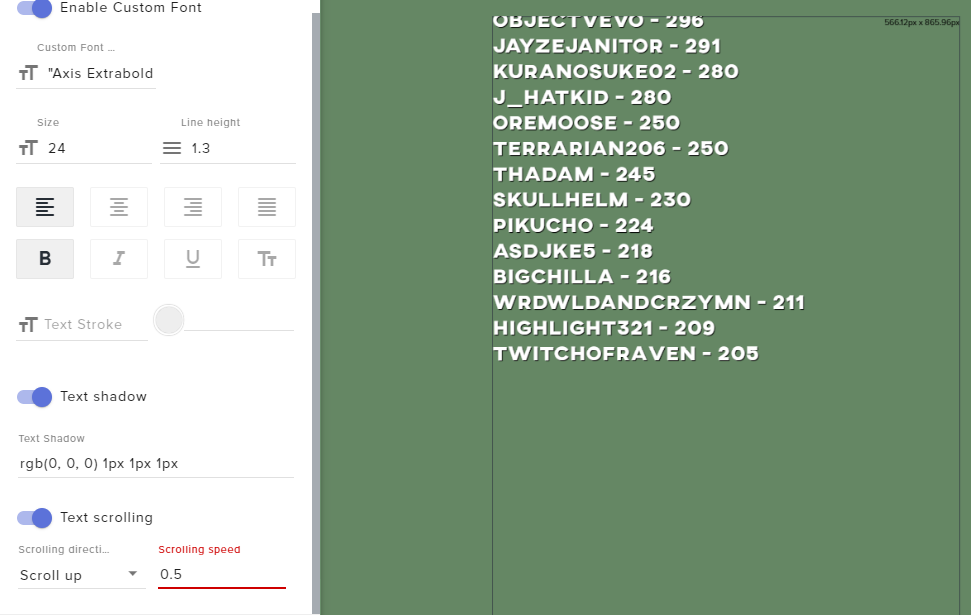
Is there any way to get a slower scrolling speed? 1 is way too fast, in my opinion.
Also, can you make the list loop, rather than being completely cut off until the list wraps back around?
 strong kernel
Custom coding for both.
ember kraken
Do I have to do it from the ground up, or am I able to poke behind the scenes of the existing one?
strong kernel
Ground up.
ember kraken
or see the full code for the existing one and copy it onto the custom one?
 dusk path
i tried to change to another account and always that i click on login goes direct to the same, i cant put another
strong kernel
The login is via OAuth. It uses whatever account you're logged into on Twitch in the same browser.
Log out of Twitch's site in the same browser, log out of StreamElements, and then log back in with the "Connect with Twitch" button and it should prompt you to enter credentials.
dusk path
in my twitch is the account that im tring to log in
i tried to close my account in the setting and say error
its done
thank u
 gentle jay
How can i get OBS.live to stop playing notification sounds 2 times? when its in studio mode they both play sounds
nocturne pelicanBOT
@gentle jay Make sure to ☑ “Shutdown source when not visible” for all browser sources (all OBS scenes). If using studio mode, uncheck “Swap Preview/Output scenes After Transitioning.” Also keep in mind that sound can play from any overlay loaded in the browser (editor or launched). https://i.imgur.com/FegZJQS.png https://i.imgur.com/yY0wcFl.png
gentle jay
thank you
 clear cove
can someone help me with viewer requested songs pls
nocturne pelicanBOT
@clear cove Welcome to the support channel! Please let us know how we can assist you today and a member of the support staff will be with you as soon as possible.
clear cove
i want my viewers to be able to request songs but when ever i do the command for a random song it dosent play it just plays what ever is in the playlist
strong kernel
There is no command for a random song.
It either plays a requested song or from your backup playlist when there are no commands.
clear cove
no i mean i try to request a song not on the playlist and it just plays the playlist
strong kernel
What did you type in the chat?
 wanton jetty
Hi anyone around iv a quick question...
Sooo Streamlabs new website shit looks like ass... like highkey looks like ass xD
Can the tipping page be tapped into so i can make my own version of what they offer using your services Iv some nice design ideas that dont look like blocky peices of shit with a £150 premium yearly fee
tidal arch
@nocturne pelican hey there I sent the log file for this stream in private. Please help :/
Thank you ❤️
 tawdry pasture
my video isnt working anymore after the update
nocturne pelicanBOT
@tawdry pasture Please connect your Twitch and/or YouTube channel with Discord by going to ⚙ Settings and then Connections here in Discord. https://streamable.com/eg92w
 strong kernel
@tidal arch That's a bot. Please share your log in the public channel so we can assist you.
 sry
strong kernel
sry
strong kernel
Can you provide the URL please?
nocturne pelicanBOT
@tidal arch Please provide a log from your last stream. To do this, in OBS go to Help > Log Files > Upload Last Log File and paste the link to the log file here.
 tacit haven
how do i look at my average view count on my dashboard?
 jaunty jolt
New to streaming I stream on ps4 currently working on getting a laptop for one but mainly want all the nice stuff I can get on ps4
strong kernel
@jaunty jolt Consoles don't have the functionality to support anything nice on their own. You need a capture card or remote play and stream with your PC. Otherwise, you're limited to just the bot and tipping page.
strong kernel
StreamElements
The Ultimate All in One Platform for Streamers
tidal arch
@strong kernel hey did you get it? I put it up
strong kernel
You provided the txt file. As said, please provide the URL instead.
strong kernel
Possible but not recommended.
tidal arch
https://obsproject.com/logs/75YQKbecUrbcbw-j @strong kernel sorry for the confusion and thank you!
strong kernel
tidal arch
@strong kernel yes?
strong kernel
That is an analysis of your log giving you information about errors and issues.
tidal arch
@strong kernel I see but I still doesn't explain why the obs is taking 45-50% cpu usage
it*
jaunty jolt
What’s a cheap good capture card
strong kernel
@jaunty jolt You'll need to do the research on that on your own and make your own choice.
tidal arch
@strong kernel any ideas man? we tried everthing
jaunty jolt
Or would it be better do get a desktop and do that
 tranquil ibex
is there a setting for delayed alerts. my twitch chat pops up about 10 sec faster than the onscreen alert.
strong kernel
You'll still need a capture card with a desktop.
tidal arch
@strong kernel will try now thank you
strong kernel
@tranquil ibex That's just stream delay. Chat will always be faster.
tranquil ibex
ok thanks
 dusky cipher
Can we run soundboard commands without having a "redemption"?
strong kernel
Only the stream store can play sounds on command.
dusky cipher
rip.
is there any plans for the future to include a soundboard commands with out having to go to the store?, just curious
strong kernel
You can add/upvote the idea in our Ideas board: https://strms.net/ideas
dusky cipher
cool thanks
 devout bane
Hi. So, I just switched to Stream Elements and now when I go live my stream displays the first frame, locks up and eventually disconnects due to network error. It worked fine with base Streamlabs OBS yesterday but I get unstable warnings and nothing but the first frame loads on Twitch. today Speed test (Up /Down) and network connection is fine.
nocturne pelicanBOT
@devout bane Please provide a log from your last stream. To do this, in OBS go to Help > Log Files > Upload Last Log File and paste the link to the log file here.
devout bane
devout bane
Why would it work before but not now?
Ok, I so reduced the output resolution since I guess installing the SE plugin reset all those settings from SL OBS.
 ripe lake
Hey my stream overlay isn’t showing up on my stream I made a overlay a.m. that has my logo and stuff and it’s not showing up live and my alerts aren’t working
 inland nest
Do you guys know how to stream from my Note 9 straight to Twitch?
strong kernel
Hey @ripe lake don't forget you have the #dreamteam for support. 😃
@inland nest Checked pinned messages in #helpdesk-mobile
inland nest
Thank you Nethyr
@strong kernel is there a way to stream games straight to it because you can already do irl streams on Twitch from your phone
strong kernel
While screen capture is planned for our app, there is no ETA at this time.
inland nest
Ok, great to know, thank you
@strong kernel your website mentions how to gain more followers and I didn't really understand it, could you explain it more and sorry for bothering so much
strong kernel
@inland nest https://blog.streamelements.com/twitch-youtube-live-streaming-tips-from-streamelements-dreamteam-members-caca0e791e0c

StreamElements - Legendary Live Streaming
Happy holidays, dear streamers! We hope that the holiday break is treating you well and that you’re enjoying a hot cup of cocoa while…
inland nest
Anyone know the price for an OBS?
strong kernel
Do me a favor and search Google for OBS and click the first link.
lament blade
Somehow, my follower alert is broken. I have it set up as a overlay to put in my different scenes. Every alert is working fine but my follower alert is bugged and showing the default dancing shark.
Any tips on that?
strong kernel
Disable custom CSS.
lament blade
To be honest, I did not change something in custom css... But somehow that got turned on or so?
strong kernel
That's why I said disable it instead of edit it. I figured it was mistakenly enabled.
lament blade
Could be. I will check it out directly when I am behind the pc. Thanks for the quick response. It's 04:52 here and I am in bed.. Didn't expect a answer that quick xd
 hallow dust
Hello everyone
nocturne pelicanBOT
@hallow dust Welcome to the support channel! Please let us know how we can assist you today and a member of the support staff will be with you as soon as possible.
hallow dust
I want to known is there a way to see my stream chat on my t.v. while streaming on twitch from xbox
inland nest
Can anyone here create a profile banner on Twitch for me?
 cerulean ingot
is it possible to live stream with three -- discord, YT and Twitch simultaneously, using OBS?
strong kernel
@cerulean ingot Yes, but we do not support multistreaming.
@inland nest #art-marketplace
inland nest
@hallow dust you can use a phone or PC to talk to chat
I stream on Xbox a lot and it gives you the notification that you can do it from those devices
hallow dust
My thing is i dont want to have to keep looking on my phone to keep what's the conversation that's going on in my screen when I'm screaming so I wanted to know if there was a way that I was able to see my twitch chat on my TV screen when I'm streaming
cerulean ingot
!rank
strong kernel
Slightly older video but it gets the point across.
https://youtu.be/VnILUzQ6n98

Every tool a streamer need, in one platform, cloud based and free! https://streamelements.com/ Overlay Manager, Tipping, ChatBot, Loyalty System, Stream Repo...
 placid geyser
hi how do I set stream elemenets to notify me who views my stream and automatically brings up my discord server link on my stream chat?
 coral zealot
Is the ground control desktop app for Mac just not an option anymore or is there a way to fix it to see activity?
zenith widget
@rtwilly16#9886 unfortunatelly not ana option. Other thing you can use is the feed from the websitr and just pop it out
@placid geyser you can setup a timer for the discord but as for the welcome thing or notice for new viewers we dont have anything like thay
 sly flower
Since yesterday my streamelements will not allow links to be posted, if I try to shoutout or if someone wants to use my command for discord invite link all that shows is 3 stars like this "***" where the link should be, why is this happening ?
coral zealot
@zenith widget ughh so annoying but thank you. Do you know if they are going to be coming out with a fix anytime soon or a new app at all? Makes life so much easier.
zenith widget
@sly flower check you twitch channel srttings and enable hyperlinks
@coral zealot there are some mac plans but no eta on when
sly flower
@zenith widget Not sure why things would suddenly change after like 9 months without touching anything
I don't have links blocked
zenith widget
Is the bot giving the 3 stars? If yes its not modded in you chat
Also the 3 stars instead of links is a twitch setting that blocks hyperlinks
If the bot is modded its protrcted from that and also if you are using the link protection filter from us
Then the bot would tiemeout instead of change the links
sly flower
@zenith widget thankx for the help, it was twitch, just took some time to unblock links for some reason.
lament blade
how do you put on a overlay you made in streamelements
nocturne pelicanBOT
@lament blade To add your overlays to OBS, add a new browser source in your scene. Paste your overlay URL in the browser source properties, set the dimensions to 1920x1080 (unless you changed them on the website), and ☑ “Shutdown source when not visible” https://youtu.be/KDvLynUqXI4
 calm atlas
having syncing issues with a streamer's twitch. It says that I am subscribed to them and they have a subscriber only command - stream elements shows that it runs but the sound file doesn't play
but on the stream elements site it says that I am not subscribed to them.
so - not sure if it's be cause of the syncing issue or a file they downloaded.
zenith widget
Go here: https://streamelements.com/ and login with your twitch account, then refresh their store page and try again.
calm atlas
I am logged in
zenith widget
who is the streamer?
calm atlas
afkayt
Other people have tried. the text shows up when you do the command
but just doesn't play the sound
The streamer doesn't know I am doing this for them - just want to be a helpful sub
zenith widget
The problem here might be, she is missing the redemption widget if no sound file is playing
calm atlas
ill ask
it doesn't seem like she does
the window she brought us to - don't have the link anymore - but it said !redeem and then the command
StreamElements
The Ultimate All in One Platform for Streamers
 queen jolt
One message removed from a suspended account.
 formal spire
@zenith widget Keizer I was just speaking with you in the chat and it disconnected. Could we continue our conversation somewhere? I am switching over from streamlabs and have a couple of questions.
zenith widget
We can continue here.
@calm atlas If they don't have the redemption widget in their overlay - no store item sound will play.
@queen jolt New name?
formal spire
@zenith widget Am I able to use my own custom alerts that I have had created or can I only use what is provided?
zenith widget
You can add the graphics and sounds - yes.
queen jolt
One message removed from a suspended account.
zenith widget
Sorry, worded it poorly - what is the new name? @queen jolt
formal spire
@zenith widget Could you link me to where to do that please?
zenith widget
https://www.youtube.com/watch?v=8LVRd2X4HvU&list=PLCDDKlFdScbEwdx5AntcQIS1InkFJwHtv&index=6&t=0s here is a video guide on how to setup the alert widget. @formal spire
queen jolt
One message removed from a suspended account.
zenith widget
fixed
queen jolt
One message removed from a suspended account.
calm atlas
@zenith widget is there a how to for my issue or watch the video
that you sent to dayonenate
zenith widget
Your issue is, most likely as I mentioned, the streamer is missing the redemption widget
calm atlas
how do you add that
zenith widget
Its best for the streamer to be here.
calm atlas
she is streaming lol
zenith widget
A lot of streamers have came here for like 5-10 minutes while live to ask for help.
Being the middle-man is not a good idea
calm atlas
i thought it was going to be something simple lol
queen jolt
One message removed from a suspended account.
zenith widget
Unfortunately, there is no way to remove specific names/accounts from chatstats
 short egret
For some reason under my recent tipper it says "No Data" and there doesn't seem to be anyway to configure it and my actual data section doesn't appear to be recording recent tippers, despite recording everything else.
zenith widget
@calm atlas Its simple, but its better if the streamer is here to see the instructions.
@short egret Where exactly is this? The twitch extension?
short egret
In the overlay editor
here is what I mean in relation to not recording the data it seems
it shows top tippers, total tips in session, etc. Just not recent.
zenith widget
You don't have a tipping link on your channel.
short egret
How does that work?
wait are you looking at my twitch?
I am helping somebody else.
just speaking in 1st person.
zenith widget
The oldest tip I see on her channel is from March 9th
If she hasn't used our tipping link inbetween martch 9th and today, then we don't track other tipping links.
Other reason there is nothing in recent is - most likely removed everyone that is there.
short egret
Oh, ok.
So upon a recent tip it would update?
It just flushes data every so often.
calm atlas
that's fine @zenith widget thank you so much for the help. I hope you have a very good day.
zenith widget
The recent data is not removed automatically.
If its missing names there they've been removed manually.
Here is my recent tips - my name is there because of a dummy tip i added to my self some months ago.
zenith widget
you too
zenith widget
Animated transitions for scene switching?
Thats not something you can make with an overlay.
Its a separate thing for OBS
formal spire
Yes, okay I’m currently using the Elgato software so I will have to wait on that one
pulsar gulch
Does anyone knows who made the Twitchy theme ?
zenith widget
Our designers?
lament blade
Morning fam, quick question, is there a way to change your giveaway title? can't really seem to find and edit button
zenith widget
You can edit the giveaway title before you start the giveaway, but not during it.
lament blade
Ahhh okay, that sucks
pulsar gulch
there is a bug on the Twitchy... you are not able to resize the chat box or activity box when u get them out of obs
lament blade
i love stream element
thanks for making amazing themes
i usually using streamlabs obs
but now im turning to obs studio
zenith widget
Wait, what twitchy theme? @pulsar gulch
pulsar gulch
It's called Twitchy on Obs as far as I remember. Someone posted it on twitter but i don't remember his name anymore 
oblique steeple
It's my theme 😄
zenith widget
Aah right, well heres your guy ⤴ 
oblique steeple
I'd say that we move that convo into PMs as it hasn't anything to do with SE. If it turns out that it's a problem with OBS.Live, I'll forward it internally. 😃 @pulsar gulch
pulsar gulch
aight ^^
 wild bone
Hello all! I recently changed my name on twitch & now my chat stats aren’t working and I don’t get my pre stream emails, I did part channel,log out, sign in again and still hasn’t worked, I wondered if anyone could help me! Thank you 🤭
oblique steeple
What's your old and current name? Your stats have to get manually transferred to the new name.
wild bone
My old name was x_unicornblood_ and my new name is xUnicornBlood Thanks :)
that didnt work? there was a underscore beetween the x and unicorn and after the name so 'x_unicornblood_'
its making it italic lol
oblique steeple
_xunicornblood_ to xUnicornBlood?
wild bone
the x is before the first underscore
oblique steeple
Oh x_unicornblood_
wild bone
Yes thats the one :)
oblique steeple
aight I forwarded it to the staff members. It can take a while until someone gets time to take a look at it 
wild bone
Thank you so much 
oblique steeple
@wild bone Okay we have some fast boiis here, it got already fixed. 
Also, you should take a look at your discord account because there's still the old username on your profile. Disconnecting and reconnecting your Twitch should do the trick 
zenith widget
 I swear I was not watching this whole time
wild bone
So it has! thank you so much, amazing :) will this fix not getting emails aswell? and oh thank you ill sort this discord out now
zenith widget
wdym not getting emails?
wild bone
Like the after stream stats after a stream? :)
zenith widget
have you checked your spam folder?
If you've changed your email on Twitch, then simply logout and login to our dashboard
and we will see the new email and start sending you reports there
If the email has not be changed, DM me it and I will check
 static yoke
Hi when I stream it says failed to connect to the streaming server. The connection timed out. Make sure you've configured a valid streaming service and no firewall is blocking the connection. Everything is fine and nothing is blocking. Can anyone help me? @winter cradle
 soft latch
hello, I want to set up custom commands for subs to trigger specific audio files
is there a way to do so with the overlay?
I feel like there's no way to do so
zenith widget
@soft latch Steps to make a command trigger sound on stream:
- Go to Stream Store page here: https://streamelements.com/dashboard/store/items
- Add an item that has these settings on it:
- Stream Perk
- Loyalty settings to your desire
- (Next step) Add contents (image and/or sound you want to play)
- "Redeeming this item shows an alert
- Redemable via chat
- Skip Requirements
- Get the item name/command from the 2nd creation page
- Go to commands page here: https://streamelements.com/dashboard/bot/commands/custom
- Add command with desired name and have response for command as:
${redeem item_name_here} - Go to your overlays and edit the overlay you use.
- Click on "widgets" and add "Store redemptions" widget. Click save and you should be golden.
- Test your own command in chat and have OBS or editor open to hear sound
- ???
- Profit in viewer interaction and that dosh

@static yoke Make sure you have chosen a twitch server to stream to.
static yoke
Done that
nocturne pelicanBOT
@static yoke Please provide a log from your last stream. To do this, in OBS go to Help > Log Files > Upload Last Log File and paste the link to the log file here.
soft latch
thank you @zenith widget !
oh no I made a cooldown of 600s now I have to wait 
@zenith widget does the store redemption widget need to be visible for all of the duration of the sound effect?
zenith widget
not really.
The other day someone had a 1x1 sized overlay with the redemption widget
soft latch
I assume I can remove all text from there and such
zenith widget
just to play sound and not show image
soft latch
yeah I'll make that too
thanks again, will wait for the cooldown before I can do further testing



 soft latch
I removed it
after testing
now it's on cooldown again

@zenith widget would you recommend setting a cooldown on both the item as well as the command
or should I just do one of those
zenith widget
do it on one of the 2
soft latch
which one is less obtrusive for the chat
zenith widget
Doesn't matter imo
soft latch
can I add a message to the command as a reply too?
zenith widget
It won't work.
soft latch
fair enough
and I assume I can't have two custom commands with the same trigger
yeah
zenith widget
well you can, but it might break the function of the commands entirely
and not trigger at all
or one will trigger and block the other one
soft latch
can I get rid of the "you successfully redeemed" message?
zenith widget
Unfortunately, no.
Its been requested and I think there are plans to remove it or have it as a toggle
 deep widget
The Dashboard for May only has 30 Days in it. May has 31 Days.
zenith widget
oops 
ty, will give it to the devs
I just checked all the months on the metric - its affecting other months so i've marked them in the bug report. Ty @deep widget
deep widget
👍
gentle imp
tbh Devs have it right, less work days yay
gentle imp
😂
 cursive thistle
Yo guys, since 3 days ago or so now, i've suddenly started getting constant 20 -30% + dropped frames, never had the issue before. Checked a ton of things and it all checks out, just found a reddit post of people saying they are having it aswell and it's something going on with twitch. Just wanted to see if anyone else is experiencing this also?
nocturne pelicanBOT
@cursive thistle Please provide a log from your last stream. To do this, in OBS go to Help > Log Files > Upload Last Log File and paste the link to the log file here.
cursive thistle
 pseudo jolt
hey there i have a problem when i try and stream this allways pops up (invalid path or connection URL. Please Check youre settings to confirm they are valid)
jade remnant
please see report @cursive thistle
https://h4ndy.eu/obslog?url=https://obsproject.com/logs/FcZsYtcF9XW7ajYZ
 iron hamlet
hi there i have question to the web chatbot, is it bossible to transfer the chatcommands and timer from streamlabs chatbot from one account to an other? I starting a new channel on twitch, and want to transfer the commands and timers, so i dont have to make everthing new.
 spring lake
Are there any plans to add a website feature for streams like Streamlabs did? Looks like a fun idea. Would be cool to also have that on Stream Elements.
tight harness
@iron hamlet Unless i'm missing something, this is a question for Streamlabs
slender yoke
Anyone here familiar with how the access-code list works on the SE store? I'm kinda confused how it prevents someone other that the redeemer from accessing the reward? Does SE somehow prevent anyone other than the matching Twitch account from seeing it?
I'm also kinda bummed that it doesn't announce the name of the game they've won. As the streamer I'd like to know what they've won as part of the announcement.
gentle imp
code is given to username, only him and you can see it
how would it show the game since the only input we put there is the code? perhaps add that to ideas and they might come up with something for it, I would upvote that 😄
the only way atm is you create a diff store item for each game
so you will know which game the person won
slender yoke
IDK. At first I was thinking if it just was the name of the game, not the code, it could announce they won it and then I would manually send the key.
But yea I see the ramifications of that
I originally had that set up with a list command
OK thanks!
gentle imp
I use it all the time, love it
slender yoke
How would I see the code they received
gentle imp
you go to redemptions history
slender yoke
oh ok
gentle imp
if the user doesn't have an account on SE you might have to go there and give him the code
some ppl can't understand how it works so I end up giving them the code in whisper
 patent vortex
Hi, idk where else I should ask this so I figured I could ask here:
I play and stream for over a year now and someone who has been part of my community for a while has donated quite the amount, a total of around 200-250$ via multiple Paypal donations using my streamelements donation page. For some reason he sent me a DM threatening me with refunding all of it (don't know why)
Now my question is, since this user has donated me multiple times through streamelements tip page using paypal, is he able to successfully refund all of his recent donations? Sorry for the wall of text, and sorry if this isn't the appropriate channel, thanks in advance.
jade remnant
he can refund it but you have the option to "fight" it (cant think of the other word for it right now, brain is on a melt down). this would be done through paypal.
if he hasnt given any real reason as to why hes going to refund it then i dont think paypal will allow it. then again, you never know...
 wanton mango
'Dispute', perhaps?
elder sorrel
^^^
tight harness
@patent vortex The fact he threatened to do this is actually going to help in your favour, if he tries to refund it you should contact PayPal and ask to speak to their fraud department, provide them with as much evidence as you can that these tips were made by him and that alerts were given as a reward for these donations, in that case it proves he's committing fraud in which case they are most likely to take your side on the dispute
patent vortex
Alright, thank you.
 rustic spear
Good evening ! I want to make a counter command , but is there a way to automatically increase the counter , instead of using the !editcounter?
wanton mango
Using the count variable in a command will automatically increment it
rustic spear
@wanton mango oh thanks! 😃
 heavy forge
Hey! I heard u could import scenes from Streamlabs obs into Streamelements obs, how can i do that, if possible? 😃
gentle jay
Hello, i set the "shutdown course when not visible" option but i am still double hearing alerts
nocturne pelicanBOT
@gentle jay Make sure to ☑ “Shutdown source when not visible” for all browser sources (all OBS scenes). If using studio mode, uncheck “Swap Preview/Output scenes After Transitioning.” Also keep in mind that sound can play from any overlay loaded in the browser (editor or launched). https://i.imgur.com/FegZJQS.png https://i.imgur.com/yY0wcFl.png