#helpdesk-twitch
1 messages · Page 456 of 1
 twin sentinel
 eternal spire
you are the goat @twin sentinel
twin sentinel
@eternal spire To just display a counter, create a custom command with this response: ${getcount wins}
twin sentinel
Take a look here for more variables: https://streamelements.com/dashboard/bot/commands/variables
eternal spire
so would i just copy the ${example} into the custom commands for whatever i would want ti for
twin sentinel
The variables can be used in the custom commands. The description describes the purpose of the variable and there is also an example on how to use it with a matching example result.
twin sentinel
But I am afraid there is no {reset <count>} variable. You would need to create a custom command with this answer: {count wins 0} or use the default command !editcounter wins 0
eternal spire
thank you
 sweet gate
My chat commands aren't working Dm me if you can help
 nocturne pelicanBOT
@sweet gate Please connect your Twitch and/or YouTube channel with Discord by going to ⚙ Settings and then Connections here in Discord. https://streamable.com/eg92w

 pearl flint
Can anyone tell me if this would allow all twitch clips?
 strong kernel
That'd be the theory, yes.
pearl flint
Thanks 😃
Didn't know if streamelements ha any sort of wildcard variable i might need.
Also is there a way to make it so that if someone makes it to a certain amount of hours in my stream they get regular automatically?
strong kernel
There's no way to automatically set someone as a Regular at this time.
pearl flint
OOF alright
 topaz sedge
How do I make a shoutout command, I don't see it on streamelements site.
strong kernel
When creating a command, there's a command template dropdown you can open with a shoutout command in there.
topaz sedge
Oh right... thanks
sweet gate
My chat commands aren't working Dm me if you can help
twin sentinel
@sweet gate The bot does not seem to be in your channel. Please invite it via the dasboard to your twtich channel.
sweet gate
@twin sentinel may you please help me with that
twin sentinel
Go here: https://streamelements.com/dashboard and there is a button to invite the bot to yoru channel:
twin sentinel
Now you can set up the commands here: https://streamelements.com/dashboard/bot/commands/custom or use default commands (listed here): https://streamelements.com/dashboard/bot/commands/default
Also here is a video about chat commands: https://www.youtube.com/watch?v=FUAmzaj70Js
sweet gate
@twin sentinel I have that but when I do it in my chat it doesn't work
twin sentinel
What command are you trying in your chat?
twin sentinel
This is in your twitch chat:
sweet gate
Wait wha
Hope on
Hold on*
@twin sentinel how it's working woody if I wasted your time can you follow me while your at it tho
Now*
nocturne pelicanBOT
@sweet gate Please abide by our server rules:
- No advertisement or stream promotion
- Respect ALL server members
- No NSFW/NSFL
pearl flint
Does streamelements offer merch printing in the way that streamlabs does, where you can make your own store and they can print everything for you?
 tepid summit
Is there a way to turn down the transparency camera setting in ES?
tepid summit
I think I got it squared away just lots of settings tweaks.
 zenith widget
@pearl flint mwrch is available for select few and specifically if part of our Dreamteam program
@tepid summit im not sure i understand your query. It doesnt seem related to what we offer as tools and features.
pearl flint
@tepid summit camera is built into obs. If you mean part of your overlay (ie a camera box), you can change the opacity in your overlay editor on se website
zenith widget
Hello.
 spring knoll
I need help
zenith widget
State your query then
spring knoll
im having trouble with overlays not really sure how to make them work and since I have a wide screen non really fit
 wind crag
My question is if i can use any kind of overlays in ps4 with facecam but with no pc?
zenith widget
@spring knoll Here is a video guide for our overlay editor: https://www.youtube.com/watch?v=LwAfMIR3Cj0&list=PLCDDKlFdScbEwdx5AntcQIS1InkFJwHtv&index=5
@wind crag Consoles don't support overlays or webcam(or at least in the easy way to my understanding)
nocturne pelicanBOT
@wind crag Here is a guide on how to setup the most essential tools for streaming from your console, while using StreamElements tools without involving a Capture Card! It's easy to do, take 4 minutes to read and 10 to 15 minutes to setup!
Read all about it here: https://blog.streamelements.com/how-to-stream-on-console-7b620b1c46c3
wind crag
Thanks
 arctic sage
Added the media request widget and I have double song playback on OBS Live and it is echoing bad. How do I set up the audio to not have this?
nocturne pelicanBOT
@arctic sage Make sure to ☑ “Shutdown source when not visible” for all browser sources (all OBS scenes). If using studio mode, uncheck “Swap Preview/Output scenes After Transitioning.” Also keep in mind that sound can play from any overlay loaded in the browser (editor or launched). https://i.imgur.com/FegZJQS.png https://i.imgur.com/yY0wcFl.png

 spring knoll
it did nothing still comfused on overlays
zenith widget
What exactly are you not sure about the overlays?
spring knoll
how to make them fit my screen
zenith widget
What resolution are you using?
spring knoll
i got an ultra wide screen
zenith widget
Twitch by default doesn't support ultra wides, if we are talkinga bout 21:9 aspect ratio screens
spring knoll
imean im still able to stream
zenith widget
Twitch will force your 21:9 aspect ratio into a 16:9 ratio
the video being squished into 16:9 doesn't mean that you are unable to stream - it will not look pretty.
What I would suggest is:
- In OBS, make your canvas a 16:9 ratio resolution (1920x1080)
- add the game as w/e resolution you have and place it on the top of the canvas.
- Add your webcam or widget to the bottom black huge bar that is left
- here is an example of a streamer using this method: https://www.twitch.tv/cutedog_
- make an overlay that fits the black bar on the bottom or the way your stream will ook
tepid summit
@pearl flint Yes, I was trying to adjust the opacity. Where is it located on the website? I was just doing it from ES program itself
wind crag
Any suggestion on how to make my stream from ps4 to twitch more good looking??
zenith widget
This is more of a question for #general-chat and not related to our tools and features, but I would assume a better internet connection so that you can stream at a higher resolution.
spring knoll
how do i change the cavans to a 16:9 ratio
zenith widget
in OBS -> settings -> video
spring knoll
ok i did that but i doesn't give me the black bar it makes the game fit the whole sreen
zenith widget
Is the game in a 1920x1080 resolution?
spring knoll
no
zenith widget
Show me what you see in OBS.
zenith widget
Unless you have a dual PC setup, I would not recommend 1080p output.
lower it to 720p
Also, show me a screenshot of your OBS after you've changed the canvas.
arctic sage
Only way to get rid of echo or double play is to get out of studio mode when Media Req/Share is on. Why?
zenith widget
In studio mode you are preloading another scene that has the media request widget in the overlay I assume
so basically you have 2 active scenes
zenith widget
But you are preloading another scene
so basically its active and being used
in the preloaded state in Studio mode
arctic sage
You got it
zenith widget
Ok, so what is the question here?
arctic sage
Why won’t it shut off when not in use after checking the box?
zenith widget
Don't use Studio mode if you don't intend to switch a scene in the next 2-3 minutes
arctic sage
zenith widget
Do you use Studio mode?
 lament blade
I have 2 issues about the Stream Elements Leaderboard. [Issue #1] I change the settings to show "chat stats" by default (see red box), and then I save. I reload the page and it does not show "chat stats" on the panel. It keeps going back to "countdown". I look in the settings. It still shows "chat stats" as the "default panel". [Issue #2] Clicking the upper left corner of the panel gives me an error (see green box).
zenith widget
About the chatstats - uninstall the extension and then go to our dashboard
logout - clear cache of browser and log back in
then install the extension again
As for the other issue - i managed to reproduce it and I see the issue and will report it to the devs.
lament blade
I uninstalled and reinstalled it. It still shows "countdown" as the default, even though the settings say "chat stats" as default
gonna try clearing cache
zenith widget
did you logout and log back in, in our dashboard?
lament blade
I tried relogging into Stream Elements. It didn't fix the issue.
zenith widget
Out of curiosity, did you scroll down and click save after changing settings, because I'm able to change my default page.
 gentle yoke
Would anyone know what the widget is called so I can have recent follower/subscriber/tip etc on the screen?
zenith widget
Its called "Recent followers" and "recent subscribers" and "recent tip"
lament blade
yeah. I clicked save. When I check the settings, it acts like the default is "chat stats". I'm trying to clear the cache. Maybe that'll work.
zenith widget
in the widget page in the overlay editor. @gentle yoke
gentle yoke
@zenith widget is it under the stream labels page and I'll do them all separately? Or is there one that does them all?
zenith widget
You want all in one, use the event list widget.
zenith widget
👍
@lament blade I think I know why its not defaulting to the chat stats page. Because you are not streaming and the extension's behavior is to show the countdown widget for your upcoming stream.
When you are live, it should default back to the chatstats.
zenith widget
Sure 😃
 lethal trench
Hello guys, do u know why my alerts don't appear in OBS while i launch the "test alert"? On the overlay page everything works, but in OBS nothing shows up... ç_ç
zenith widget
Do you hear sounds from OBS?
lethal trench
nope
nocturne pelicanBOT
@lethal trench To add your overlays to OBS, add a new browser source in your scene. Paste your overlay URL in the browser source properties, set the dimensions to 1920x1080 (unless you changed them on the website), and ☑ “Shutdown source when not visible” https://youtu.be/KDvLynUqXI4
lethal trench
already did everything, i checked on tutorials and all, but nothing happens
nocturne pelicanBOT
@lethal trench You can test Alerts via the bell on the lower right corner of the Overlay Editor. Simply go to your Dashboard -> My Overlays -> Pencil/edit button on the overlay. Make sure the "Show Emulated events on stream" option is on to see the alert in OBS/Xsplit https://streamable.com/h6qgy
 zenith widget

lethal trench
haha... thanks... now seems to works XD sorry but im new on streamelements... didnt see that little trasparent square XD
thanks a lot guys, ur the best ❤
zenith widget
👍
lethal trench
💯
 austere swallow
Hey guys, is there a way to export specific stats (subscribers for example) to a csv or excel file?
I can see everything on my online dashboard but I can't seem to find a way to export data.
Thanks for helping!
zenith widget
Sorted ⤴
 tacit moat
Hie everyone .... please how to prevent streamelements from showing the latest follower notification on twitch chat ?
zenith widget
Dashboard -> modules on the left menu -> disable chat alert module
twin sentinel
https://streamelements.com/dashboard/bot-modules -> edit or disable chat alerts module
tacit moat
oh I see I see , thank you
 wicked pike
Question. I have a couple overlays that I made into an image for stream elements themes would I be able to put them on there as well as fix them up like the other default themes or do I have to start from scratch and make it only on stream elements? I just didn't wanna mess anything up so I thought I'd ask in advance
twin sentinel
You can upload an image to the editor and add it to the overlay. Then you can add the widgets for like latest follower and sub on top of it and get this overlay as browser source to OBS. If there are already widgets or labels on the picture you want to upload to SE, then you would need to start from scratch, or upload a picture without the widgets.
 sand ravine
I happen to have a problem with my overlay. Every time I switched scenes, they refresh automatically as they shouldn't.
I had kept "Shutdown source when not visible" checked.
zenith widget
Shutdown souce when not active/visible is doing exactly that - it shuts down the browser source
 proud nacelle
Is it possible to merge 2 Twitch channels on the same streamelements dashboard, so that the store, currency etc will be counted on the same leaderboard etc? 🙏
Thanks a lot 👊
zenith widget
Unfortunately, no.
merger can happen, but the accounts won't share data between them.
proud nacelle
Is there a way to make it do so, by any kind of software or maybe export files from 1 dashboard into the other?
and if yes, will it overwrite everything on the dashboard which it is being imported to or just add on top of what is already registered?
zenith widget
If its specifically about loyalty points

GitHub
Exports streamelements points to csv. Contribute to Slikrick/streamelements-csv development by creating an account on GitHub.
you can export with this
but do note that this will double down everything you import
meaning:
Exporting userA with 50 points and then importing him somewhere else will add 50 points to userA
if you export then 60 points and import, its going to be 50+60
and so on and so on
proud nacelle
So if i understand this correctly:
Stream A:
User A has 50 currency
Stream B:
User A has 60 currency
Importen Stream B onto Stream A will make User A have 50 + 60 = 110 currency on Stream A
Correct understood?
zenith widget
Yes
But if you don't reset the leaderboard or account for that doubling down
you may get 110+70 next time
which is basically the 60 points they had so far + 10 more on top but it still will be imported as 180
proud nacelle
perfect, that is exactly what we were looking for 👊
because Stream B will be reset between every session happening.
So the link you gave me, is that for local currency storage or how does that work exactly @zenith widget ?
zenith widget
You donwload the zip file in "Releases" andextract
and follow the instructions
that is the only way to export loyalty points
proud nacelle
Thank you very much 🙂
 hasty pawn
How can I get my notifications boxes back to normal size
twin sentinel
Try to reload the dock with the small reload button at the top left. If this doesn't help, log out and log back in please.
 rapid latch
@twin sentinel Looking at your SocialMedia ROTATION WIDGET By Benno. In the directions it says "A) You can click on the widget and copy it to your other overlay if you'd like" I don't see any way of copying the widget.
twin sentinel
When you select the layer in the lower left, there are two "papers" with a red dot in the layers line. Select this and you can choose the overlay you want to copy it to.
rapid latch
Got it thanks. I was looking for a copy paste button.
 cedar hawk
Hi there! I would like to ask about the contest widget 😃 First, is it possible to have deeper customization on it, like change the height and color of the bars etc.? In the overlay editor the parameters you can set feel kinda limited. Or is it possible to access its CSS code to modify it that way? Thanks in advance 😃
twin sentinel
You can access the CSS code by selecting the first button on the left, when you select the widget in the overlay editor.
hasty pawn
@twin sentinel That didn’t work
cedar hawk
It might be just me, but I have no idea which button you are thinking of, literally went through all buttons on the screen and nothing. If you place a custom widget, you have a button for the css code, but not fore a "Contest widget"
twin sentinel
It says OPEN EDITOR and is at the top of the fields.
@hasty pawn What OBS Studio version and what OBS.Live version are you on?
cedar hawk
there is literally no button like that. Like I said, that button is there for the "Custom widget" but not the "Contest widget"
twin sentinel
Oh, I am sorry, I though you meant a custom code widget. For the default widgets, there is no way to edt the CSS code.
cedar hawk
Oh, I see now
thanks 😃
I suppose then there is no way to keep the widget up for more than 60 seconds after contest ends, as it is the highest available time in the settings, right?
twin sentinel
Think so, yes.
rapid latch
@twin sentinel Is there a way to remove the YouTube section. I don't have a single name YouTube account yet and the URL is too long.
twin sentinel
You can just delete or comment out that section in the JS code at the beginning where the elements are created.
rapid latch
Comment out with what. I tried a "#" and it isn't working. I don't want to delete the section as I might want to come back and use it later.
twin sentinel
at the beginnig use /* and to finish this use */
 dusky vessel
Hello, I have a problem to edit the volume of my sound for Follower alert - in addition emulated events on stream doesn't work - only in the editior, if I deactivate it
twin sentinel
Have you checked the box next to the emulation bell?
dusky vessel
yes
rapid latch
Thanks @twin sentinel That worked.
twin sentinel
@dusky vessel Have you saved the overlay after editing it?
What OBS Studio version do you use?
 glass gate
Is it possible to accept donations for multiple users
If I want the viewer to select the person they want to give a donation to and then the donation be routed accordingly
dusky vessel
OBS 23.1.0 - I saved it
twin sentinel
Have you paused or muted the alerts in the activity tab?
dusky vessel
just found, that I have to edit the variation sound volume 😄 , sry
thank you for your help, the other issue is still there - but it's not so important at the moment
now it works too, don't know why It wasn't working 🙃 👍
twin sentinel
@glass gate I am sorry, but I don't understand what you want to achieve? Do you want to let people send real mone like tips to each other via a chat command, or is this about loyalty on your channel?
Let's hop in #helpdesk-selive then.
Or are you referring to youtube, then it is #helpdesk-youtube
 wispy nimbus
Hey, I got a short question. If someone donates me through tipeeestream, will my donate alert from stream labs be automatically played or do I need to setup something for it?
twin sentinel
Best to ask this the StreamLabs guys.
twin sentinel
There is no connection between tipeeeStream and StreamElements. So we can only display tip notifications and alerts, if they are made through our tipping link.
wispy nimbus
Ohhh alright didn’t knew it’s possible through elements thx
twin sentinel
Here is a tipping overview clip: https://www.youtube.com/watch?v=JdRLzlOat6M
nocturne pelicanBOT
@oblique raft Welcome to the support channel! Please let us know how we can assist you today and a member of the support staff will be with you as soon as possible.
 oblique raft
I just tried to stream using OBS.Live and the stream was very stuttery and laggy had to end it. Not sure why, if the setting were wrong or something
twin sentinel
Let's hop in #helpdesk-selive then
lament blade
Hey guys, I am trying to change the !duel command to theme it around 'wrestling' so I have changed the !duel command itself to !wrestle - however I do not know how to change the message that follows, is there a way I can change this?
 gentle imp
not sure but you can try on modules, sec
yea, you can edit the messages there, just respect the [] () etc
for loser, winner etc
lament blade
It allows me to edit the winner and points won messages, but not the initial 'wants to duel' message
gentle imp
ahh that ain't possible afaik
lament blade
Because I have changed the !accept command as well to something different, but in the default message it says 'type !accept'
 spiral ember
Hello everybody , im done with the settings of my overlays etc , but when i start streaming i have a full green screen on the twitch part but not obs do you have any idea where does it come from ?
 sonic hearth
Haven't been able to have host alert to pop up on overlay for a while when someone hosts stream for 0 hosts. Small text shows up on twitch chat screen, but not sure what else needs to be done to have alert trigger.
I've made sure that chat alert setttings under host includes 0 viewers.
I've double checked that host settings under the alert overlay in the editor includes 0 as well to trigger.
I've even tried creating a variable that would include exactly 0 for host to trigger.
Not sure if I should try something else or if there's something I might be missing.
Any help would be great!
nocturne pelicanBOT
@sonic hearth Due to changes to Twitch API, we have filtered out hosts and will only show these ones on your activity feed:
- All manual host events (0 hosts included and if filter set to 0)
- All hosts coming from an online channel. If the hosting channel has been offline, we do not show it
- All auto host events with at least 1 viewer
sonic hearth
Ooooooh. Okay.
lament blade
Thanks for your help @gentle imp I shall find a way around it 
twin sentinel
@spiral ember Have you recently updated your Nvidia drivers?
twin sentinel
What OBS Studio version are you on and what OBS.Live version?
What Nvidia Driver version do you have now?
spiral ember
obs version = 19.5.8.388 and nvidia drivers = 430.64
 hot apex
Is StreamElements down?
twin sentinel
@hot apex Not for me.
spiral ember
and im up to date
twin sentinel
I have asked internally about this issue and awaitign response.
spiral ember
Thanks man
lament blade
Hello again, one final thing - I use the ground control app for my song requests, I have noticed that when I ban a track from being played it can be requested again anyway - any ideas?
here is my blacklist
'
but it can be queued again anyway
twin sentinel
@lament blade What status did the requester have? Was it a mod, a sub or something else?
@novel summit You would need to set up a broadcasting software with all stream ressources.
 novel summit
its ok now i think i figured it out now
lament blade
@twin sentinel I have tried broadcaster status, mod status and everyone status, same outcome
twin sentinel
At the very bottom of the media request settings, there is a settting for an exempted user level. What do you have it set to?
 ivory estuary
Hello. Been using stream elements a while and love it. I do have a question about the !quote command. Is there a place we can see the current quotes stored? I haven’t been able to locate them.
twin sentinel
There is no website to see all the quotes. The easiest way would be to just go through them via the chat command.
ivory estuary
Oh ok. At least I wasn’t missing it, haha. Thanks for the fast response!
lament blade
@twin sentinel I had it set to everyone, thank you ❤
 maiden peak
How do you switch accounts with ground control?
twin sentinel
Delete the JWT Token and you can log in with another account.
maiden peak
AHH thank you
 harsh widget
Hey Guys, got a short question. Is there a way to book "donated" money (via PayPal) back to the sender via StreamElements and NOT via PayPal? Because of the fees? Couldn't found anything in the web. thanks
 elder sorrel
Nope cause Streamelements doesn't touch the money.
It's just a passthrough system for the sake of alerts.
 finite token
Hey guys, new to StreamElements coming from StreamLabs. How do I add TTS to my overlay? Can't seem to find it anywhere in the overlay manager. Thanks
 cedar lynx
you'll have to add it to each alert you want it enabled for 😃 screenshots incoming
within your alert widget you can select Tip alert, Cheer alert, etc. and click the settings gear icon
then look for:
and from there you can check this box
 viscid venture
was trying to change the bot name via obs live it wants 3 things done the only one not showing done is linkin tip page to my twitch panels ive done that but its not picking it up
any ideas how to fix
cedar lynx
it needs to be an image panel linked to the StreamElements tipping page, not just a link in the panel. I had that issue a while back myself
viscid venture
I added the link to the image panel also still not picking it up
maybe it takes a bit?
 uncut zodiac
how can i add in the tipping page that fans can pay with paysafecard? there is no option for me
viscid venture
Ill add a new one where are the panels that streamelements has to use i cant find them again
it still is not working
cedar lynx
it may take a little time, how long ago did you set it up?
can you please connect + display your Twitch profile on your Discord account so we can have a look as well?
viscid venture
not sure what your asking
connect +?
ok i get waht you meant
its done i didnt know it wasnt connected
I guess i can check it later see if it takes
 waxen crown
i cannot stream this just show you have no stream activity
cedar lynx
@waxen crown I'm not sure what you mean, can you rephrase?
 lucid patio
Is there a way to delay notifications for the overlays I create?
lament blade
I cant get viewer request's to work on twitch using !sr. I have viewer requests enabled. I added the streamlabs extension on twitch, is there a streamelements extension i have to add? thanks in advance
strong kernel
We're not Streamlabs, so adding the Streamlabs extension won't do you any good.
lament blade
Do i have to add another extension then?
strong kernel
And if you want the !sr command to work you need to be using our bot.
As that's a bot command.
lament blade
ahhh whats its called?
strong kernel
lament blade
how do i find this bot?
strong kernel
waxen crown
i c'ant rec stream
nocturne pelicanBOT
@waxen crown For the best OBS support, please join their Official Discord @ discord.gg/obsproject
lament blade
Is it possible to having to approve free viewer requests instead of the media automatically being added to que?
twin sentinel
@lament blade You can enable queue moderation in the media request settings.
@neat scroll Please try to access the site via the chrome browser, to see if it is still a white page.
 neat scroll
but this broser is the same chrome
twin sentinel
Seems like a lokal issue to me. Try to access the site with your anti virus down for a test.
neat scroll
when i switch to portuguese this hapening
in 2 browsers
en= working
pt= down
ENGLISH working fine
@twin sentinel tanks i can use the site now
but only work in english
 slate notch
Anyone know if there's a way to hook the Loyalty leaderboard into an overlay? Specifically, I just want to get the current top points holder and display their username.
strong kernel
Not with a default widget. You might be able to script something, but that's up to you.
strong kernel
@signal wharf What do you mean?
 signal wharf
i want to use media share from streamlabs on a iphone
so when someone donates with a youtube vid it plays
strong kernel
This is StreamElements, not Streamlabs.
signal wharf
yeah i mean streamelements
strong kernel
Our app is not available for iPhone at this time. If you're trying to use our overlays in a streaming app on your iPhone, if it works fine in your computer browser but not in the app, there's not much we can do to help you with that.
signal wharf
ahh okay thanks
 wet minnow
Could someone help me please?
nocturne pelicanBOT
@wet minnow Welcome to the support channel! Please let us know how we can assist you today and a member of the support staff will be with you as soon as possible.
wet minnow
I’ve been trying for 4 days now to fix my volume on my stream, I have a ps4 that I play in and use an elgato hd60, whenever I plug in my headset to my ps4 my whole stream volume dissapears:( someone help please
nocturne pelicanBOT
@wet minnow For the best OBS support, please join their Official Discord @ discord.gg/obsproject
 meager owl
Can I get some help regarding SE, pay. I’ve asked on this issue awhile back, but have some questions.
strong kernel
@meager owl While we can answer basic questions here, SE.Pay issues are generally handled via email.
 solemn arch
I've been discussing with someone I know and they've said that Stream Elements is very insecure and super hackable. I'd like to know some facts behind this. According to him he reported several things that allow people to do things and they haven't been addressed. What security measures are in place to protect our accounts?
strong kernel
Better to email with specific questions.
solemn arch
I'm not sure on the details, but would love to know either way. What email is best?
strong kernel
StreamElements
StreamElements is the leading platform for live streamers on Twitch and Youtube. StreamElements includes Overlay management, ChatBot, Tipping, Alerts & Loyalty
solemn arch
Emailed
meager owl
Thanks @strong kernel
 wild gazelle
Hey so my chat box in obs live is gone how to I get it back
strong kernel
Click the StreamElements menu at the top. Do you see Chat in there?
wild gazelle
This is what I have
strong kernel
You don't have OBS.Live.
wild gazelle
Yeah that's what I'm using
strong kernel
You're using OBS Studio. If the OBS.Live plugin was running you'd see a StreamElements menu next to Help.
wild gazelle
Ok I'll download that too thanks
solemn arch
I had a 5 month resub alert not play on stream today, and it won't let me replay the alert on stream. I also had a new sub today and a 4 month resub alert play 3 days ago, so I know the alert works
Any reason why this one is being difficult?
strong kernel
Probably the profanity filter.
strong kernel
The default one in your tipping settings that you can't change, just turn on or off.
strong kernel
The profanity filter, yes.
solemn arch
Once disabled can I replay the alert?
Never mind answered that for myself... Sub alert was loud when I tried it too... Phew
 valid nacelle
why does stream elements revmove the link in my command and timers on my rwitch chat
how do o fix that
strong kernel
Don't ask in both Discord and the live chat.
You've already been answered in the live chat.
valid nacelle
sorry
 stark tundra
Hello. How do I add the Widget Store Redemption into OBS?
neat scroll
staff when i shitch to pt language the site not work
lament blade
@twin sentinel i have enabled queue moderation but it still autoplays hmmmmm
or auto que's
twin sentinel
For me the songs get in the queue to be approved. What is your user level you set to be exempted?
@stark tundra You can add it by editing the overlay and then select widgets in the blue top bar in the overlay editor.
lament blade
@twin sentinel im the admin if thats what you mean?
twin sentinel
In the settings of the MediaRequest is a setting for an exempted user level. This level will free the role and above from the queue, as well as other "restrictions".
 ember kraken
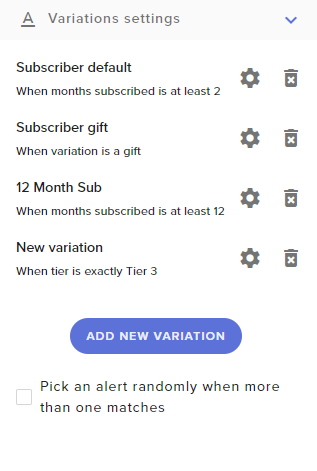
https://i.imgur.com/Gw2nYmk.png
When the randomly select option is turned off, does it just choose whichever is higher on the list? If so, how do I reposition the variations, and if not, how do I select their priority?
 static chasm
I need help
nocturne pelicanBOT
@static chasm Welcome to the support channel! Please let us know how we can assist you today and a member of the support staff will be with you as soon as possible.
strong kernel
@ember kraken When the checkbox is unchecked only the most recently created variation will apply.
static chasm
I have a question if you do the complete the whole osb thing for the gallery theme thing can you still stream on ps4 will you still see the super theme when people watch the stream
strong kernel
Consoles do not have the functionality to support overlays on their own. You will need to stream from your PC using remote play or a capture card.
 barren canopy
i need help with my obs streamelements when i hit stream on obs it says that the stream is live but it wont brodcast to twitch
i have my account linked
strong kernel
You can find basic OBS setup guides at https://obs.live

OBS.Live | Open Broadcaster Software Streaming Knowledge Base
OBS (open broadcaster software) knowledge base for live streaming. Find articles and videos about streaming with OBS.
 torpid sentinel
I'm wanting to make a name pool for a game, where users can !joinpool in order to have a character named after them in the game. Is there an API or a way to make this work?
strong kernel
Aside from perhaps running a giveaway, there's nothing that'd support that by default. You'd need to find a custom API.
torpid sentinel
Roger that, I'll have a google about! Thank youi 😃
ember kraken
How can I have the actual message have the same white font? The black is almost impossible to read. https://i.imgur.com/3YnDc8R.png
 strong kernel
Change the text settings.
ember kraken
Huh, weird, That was set to undefined, would have assumed it would be set. Cheers
 wraith heath
Hey can someone help me get my chat stats page back. Just changed my name
elder sorrel
@wraith heath What was your previous twitch name & what is your current
elder sorrel
Thanks. Notified staff to update
 vapid plume
hi, can someone help me create a command that im trying to make
zenith widget
@EndlessSky_TTv#6170 what type?
vapid plume
can i dm you
 pseudo harbor
hey i have a question maybe someone can help, ive been helping my buddy moderate his twitch. I have "full control" to his stream elements but for some reason no one is able to use the !sr command weve tried enabling and disabling it but no songs are coming up on the Q are we doing something wrong?
hes currently streaming this is why im asking for him
pseudo harbor
figured it out thanks for the help @zenith widget
zenith widget
Ok
lament blade
@zenith widget I want to change the URL of my profile page on StreamElements. Right now, it's like "streamelements . com/ninjastormyt-9889" but I want it to be "streamelements . com/ninjastormyt"... that's it!
zenith widget
So you want your twitch channel to be without the numbers.
Let me make a task with the devs.
lament blade
Yeah! That's what I want...
lament blade
@zenith widget How long it's gonna take for you to get me my solution?
zenith widget
A task has been raised with the devs. There is no ETA on when the links are going to be swapped
lament blade
And regarding to my "Loyalty Settings", I'm only seeing benefits for "Viewers", "Followers", "Tippers" and "Hosts". The "Subscribers", "Subscribing" and "Cheering" aren't there...
zenith widget
You are not affiliated to see those settings.
When you get affiliate, then you can logout from our dashboard and log back in.
and you will see all the affiliate related features/options/stats
zenith widget

StreamElements - Legendary Live Streaming
Passion and struggle explains the road to Twitch Affiliate then on to Twitch Partner.
If you looked at the link you will see.
 agile canopy
Hello SE Staff,
If someone subscribes to my channel he gets 5000 Loyalty Points. So far so good.
But if the same user announces his subscription in the Twitch chat, he gets the points again because SE thinks it is a new subscription (even if there are days between the sub and the chat announcement).
Is there a solution that I overlooked?
 robust spear
hello
agile canopy
@zenith widget Thanks. :)
 empty dragon
So, i'm trying to make a command that takes 3 user inputs and reply without the '@'
something like
!winners @lament blade1 @lament blade2 @lament blade2
and it should reply
1st place: user1, 2nd place:user2, 3rd place:user3
i cant use the arguments ${number} because it will reply with the mention
so, any ideas?
empty dragon
3 people i choose on the command, yes
not the same every time
is to add loyalty points based on their place on a leaderboard
the addpoints command cant be edited to accept mentions
so im doing some multi level bopt commands
zenith widget
the command is a default one and can't be edited to accept more then 1 person
Any default command can't be edited to what they can accept or respond with.
empty dragon
I have a command that sends 3 messages for each player
zenith widget
So what variable have you used?
empty dragon
like this:
zenith widget
this won't work, unless it does and it shouldn't work.
empty dragon
!reward @a @b @c 10 6 3
it replies:
customBot: !addpoints @a 10
streamElements: cant find (mention issue)
customBot: !addpoints @b 6
streamElements: cant find (mention issue)
customBot: !addpoints @c 3
streamElements: cant find (mention issue)
zenith widget
yeah i managed to reproduce it with my own custom bot name
I don't tihnk this should be possible as loops can be made
cedar lynx
I can’t speak for this command but my renamed SE bot triggers itself all the time. I definitely know that’s not supposed to be the case.
zenith widget
I've poked the devs about this. Anywho
For the command you will want to use ${1} ${2} ${3}
empty dragon
i can make it work if i dont use mentions, but its a pain in the ass finding a user with weird symbols without mentions
zenith widget
bttv/ffz allows tab completion
empty dragon
you type @, a list pops up
zenith widget
for example, you can type my first 2 letter and hit TAB and it will complete my name
as long as I've spoken in your chat
This works for emotes as well
zenith widget
use ${1} ${2} ${3}
empty dragon
i was, just wanted to get rid of the "@"
zenith widget
empty dragon
is there also an official way to get multiple responses for a single command?
zenith widget
No.
zenith widget
We don't support multi responses
empty dragon
ok, thanks for the help
 opaque fern
watchtime cmd doesnt properly work, im sure someones asked this already, so curious if anyone has a quick answer as to to why?
!watchtime ${user} has spent ${user.time_online|'0 seconds'} watching ${channel}
nocturne pelicanBOT
10 minutes of watchtime are given to those in chat when the loyalty points are handed out (every 10 minutes). Therefore, loyalty must be enabled for watchtime to work properly. There is no direct link between watchtime and all-time points. It can’t be calculated from the amount of all-time points a user has because subs may earn points at a faster rate and !bonus all command increases all-time points for users in chat at that time. Giving points to a single user does NOT affect all-time, only when giving to all in chat.
opaque fern
always shows....
VerifiedStreamElements: digitalpanhandlr has spent 0 seconds watching digitalpanhandlr
oh...
so..what bot above me said? enable loyalty...?
zenith widget
@lament blade your links have been swapped
wicked pike
@twin sentinel thank you so much
 manic canyon
Hi two people subbed today and it didnt notify right after someone did and it worked for them
 opal mango
I’m having a problem where even if I set the minimum host to 0 it still won’t show an on stream notification or show up in my activity feed
This has happened with a 50 viewer host too
nocturne pelicanBOT
@manic canyon Twitch prime (new and resub) and paid subscriptions (resub only) must be shared in chat manually by the person subscribing in order for the subscription information to be sent to StreamElements. For twitch prime, the user needs to have sharing enabled on https://www.twitch.tv/settings/prime. For paid subs, if the share box doesn't show up immediately it will when they refresh the page. https://i.imgur.com/VNJN0Uv.gif https://i.imgur.com/2297EA7.png

 wicked pike
I started having all my alerts show up now only certain alerts pop up should I redo the whole overlay or just go through each one an see what happened?
nocturne pelicanBOT
@opal mango Due to changes to Twitch API, we have filtered out hosts and will only show these ones on your activity feed:
- All manual host events (0 hosts included and if filter set to 0)
- All hosts coming from an online channel. If the hosting channel has been offline, we do not show it
- All auto host events with at least 1 viewer
zenith widget
@wicked pike Which alerts are not showing?
You might have disable the specific alert from showing - click on the alert widget and see what you've ticked and unticked.
wicked pike
@zenith widget hosts, raids and on a weird occasion follows
@zenith widget I'll see if that's the problem and thanks
zenith widget
For hosts/raids see above.
for follows - if you have tip moderation on, most likely a bad name 
wicked pike
Oh I didn't know that does that on follows an everything is working thanks
 jolly snow
Is this the support page?
nocturne pelicanBOT
@cloud depot Welcome to the support channel! Please let us know how we can assist you today and a member of the support staff will be with you as soon as possible.
jolly snow
The tip page won't load when im trying to donate
cedar lynx
I think this issue is being investigated internally as we speak! please hold tight 😃
cedar lynx
@jolly snow can you check the page again?
jolly snow
Yes, it worked
cedar lynx
 great
great
lament blade
I'm in need of help here
nocturne pelicanBOT
@lament blade Welcome to the support channel! Please let us know how we can assist you today and a member of the support staff will be with you as soon as possible.
lament blade
I have a great stream set up at streamlabs but the audio that was streamed was terrible. So I switched to obs Live. I need that over lay from dreamlabs to be exported to obs Live but it doesent work
elder sorrel
@lament blade Can you send a screenshot when you try to import? Do you get a error?
elder sorrel
Thank you. Not sure if the devs are awake right now but can ask.
As this is new to me.
lament blade
Don't worry, my channel is unkown, so no time pressure at all
Do you know why dreamlabs stream shitty audio when you crank it up to 1080.1920?
cedar lynx
do you mean StreamLabs?
lament blade
Salut
nocturne pelicanBOT
@lament blade Welcome to the support channel! Please let us know how we can assist you today and a member of the support staff will be with you as soon as possible.
lament blade
Yes
cedar lynx
this is the StreamElements Discord, you'll have to ask Streamlabs about their products 😃
zenith widget
@lament blade Close down OBS, go check if there is an imported overlay in My Overlays (here: https://streamelements.com/dashboard/overlays ). If there is nothing, on the OBS shortcut -> right click -> properties -> on the Target field at the end add this: --remote-debugging-port=40404

StreamElements
The Ultimate All in One Platform for Streamers
Open OBS and open your browser and type in "localhost:40404"
then go to the import tool again (Streamelements on top -> import) -> reopen the locahost:40404 and click on the only thing there is and make sure you are looking at hte console tab.
Do the process again
and if an error pops up, it should be in red
 surreal maple
hey everyone, is there a way to transfer my (viewer) stats from my old to my new nick?
twin sentinel
What do you mean exactly with viewer stats? You can export for example the points and imoirt them to your new account.
surreal maple
im watching a streamer using streamelements, i earned some points / watchtime and whatever there. a week ago i changed my nick and streamelements handles it, like im using a seperate account
so what i want to do is what was !tranfer Old-Nick New-Nick in Ankhbot
twin sentinel
Afaik this is not possible at this time. You can ask the streamer to transfer the points.
 median mauve
Hi, I'm mod in a channel that used to use a custom bot but the maintainer got busy so we've gone back to SE. We used to have a command that would let you "fish" for points, I've been looking into if this is possible using custom commands but I've not had any luck as of yet. From what I can tell there is no way to modify a users points using a custom command except for the command cost right, or am I missing something?
the command just worked like this: you do !fish, it costs 250 points and then between 0 and 5 minutes later you would get a response like "you've caught an old shoe worth 5 points" and then it'd give you 5 points
 tight harness
@surreal maple We never directly interfere with any streamer's loyalty points system. If there's an issue with your points then you'll need to speak with the streamer or one of their moderators
@median mauve Correct, there's no variable for custom commands to modify a user's points
median mauve
alright thanks for the help, any ideas if this is planned for the future at all?
tight harness
Not off the top of my head, if it was it'd be in here: https://strms.net/ideas 😃
median mauve
alright thank you very much!
lament blade
New to Stream elements can anyone DM me cause I need help badly!
 bright oak
This may be out of the scope for this discord and if so, please except my apologies. I have created a .mov in after effects and it is larger then the 30MB allowed for upload. I need to keep the alpha channels any suggestion on how to get this file size down with alpha channels intact?
gentle imp
convert it to webm I think it supports alpha channels too
bright oak
@gentle imp took a little more work - but it is working. Thanks for the help.
I am curious is there a way to place items in the center of the browser and alignment key in the overlay dashboard?
 tardy mulch
hello! im having a bit of an issue with the loyalty settings, one of my viewers changed his name recently and when he tries to purchase an item via a chat command the bot says that he doesnt have any points even after i already moved his points and using the command !points @hisusername shows he indeed has the points to redeem it
elder sorrel
@tardy mulch Just to be sure as an example: Did you do !points username 500 or !points @username 500
tardy mulch
no, since its a recurrent viewer i just went to the leaderboard list and give him all his points back
is that all i gotta do?
elder sorrel
You can ask them to log out of the site and back in
But they should definitely have the points on the new name
tardy mulch
log out of twitch?
elder sorrel
Would be the streamelements website.
tardy mulch
what if he has never loged in there in the first place
elder sorrel
Could try to log out of Twitch as well & try again.
 patent raptor
someone just tipped me but the pending balance didnt change yet on my se-pay
tardy mulch
we tried and also tried to reset his points and add them via the command in the chat
still doesnt work
i tried taking the bot away and putting it back in
like... !points works correctly
but trying to redeem anything from the stream shop as a chat command does not
elder sorrel
Even while trying to redeem directly from the store webpage?
 tepid ember
how do i check my balance of coins in my chat?
tardy mulch
"!points"
tepid ember
okay, thx
what would be the response if i wanted the user to tell me where to drop?
on fortnite so they can put their own chocie
*choice
tardy mulch
he went to the store webpage, he said he is at rank 0
elder sorrel
Best at this point would be for him to try logging in to the Streamelements website & try again. Weird how not being recognized 
 dawn lily
hi
how would i go about adding my new overlay to streamelements.obs live
i just made it , it is all in a folder @pearl wave
tepid ember
what would be the response if i wanted the user to tell me where to drop?
on fortnite so they can put their own chocie
twin sentinel
Can you elaborate on this idea? You can create a command which gives back a random location.
 wanton mango
I think they probably mean this? https://discordapp.com/channels/141203863863558144/424943321794871296/435621911901372429
vapid plume
anybody know how to add a queue to my stream so i can play with viewers?
tepid ember
i dont want it to randomly pick it i want them to be able to put a place
wanton mango
Can't they just write it into chat? Lol
 empty atlas
Hey could someone help me setup text to speech
nocturne pelicanBOT
@dawn lily To add your overlays to OBS, add a new browser source in your scene. Paste your overlay URL in the browser source properties, set the dimensions to 1920x1080 (unless you changed them on the website), and ☑ “Shutdown source when not visible” https://youtu.be/KDvLynUqXI4
 bright trellis
So... If I create a stream currency, can I manually give a user a specific amount of that currency?
twin sentinel
!addpoints <username> <amount>
@empty atlas You would need to enable the TTS option on every event in the alert box and the viariations.
bright trellis
@twin sentinel thanks so much!!!
So how does cloud chat differ from chat bot?
I need to set something like this up but feel a little overwhelmed?
empty atlas
Thank you @twin sentinel
twin sentinel
@bright trellis Our bot is totally cloud based. So all your data are stored in the cloud.
 hollow horizon
is there a way to attach a sound to a command? without creating a store item?
like i want to put something with the !prime command
bright trellis
Can it do all the things that the other chat bot could? And is there a specific tutorial video you recommend to explore how to set up the cloudbot? Also, is there a good primer for commands?
twin sentinel
@hollow horizon Afaik, there is not.
 mystic saddle
i have a question
twin sentinel
@bright trellis There are a lot of helpful videos on our youtube channel: https://strms.net/welcome
 topaz anvil
can you have both streamlabs and streamelements downloaded on the same computer?
 tawny bay
can you set commands to return cooldown timer?
twin sentinel
@topaz anvil You can use both chat bots I think. But you would need to decide yourself on one broadcasting software which actually broadcasts your gameplay/screen.
@tawny bay No, the bot can't respond that X command is under cooldown. Might be part of our ideas board here: https://strms.net/ideas
 knotty trellis
Есть кто русские?
strong kernel
@knotty trellis #🇷🇺︱русский ⬅ 🖱
knotty trellis
Мне нужна помощь, в настройках и установке оверлея для твича, есть кто может помочь?
viscid venture
I still can't change the bot name I made sure yesterday that my tips page is linked to my twitch panel but 24 hours later still thinks i have not done it
 thin gorge
hey y’all I was unsure which channel to go to, but has anyone ever solved the issue where things like the Kappagen feature for overlays noticeably drops frames on stream?
it seems like in general the overlay gets laggy overtime and not the whole stream itself
viscid venture
?
twin sentinel
@viscid venture Do you try to change the bot name via Ground Control? Please make sure to meet all the requirements.
viscid venture
i tried to change it in obslive and yes ive done the requirements
thats the problem its not seeing that i did
I just tried it in ground control it doesn't change I know i have done the requirements
twin sentinel
Do you see any requirement missing in OBS.Live?
viscid venture
@twin sentinel yes the link twitch panel to my tip page i have done that . you can check it on my channel its done
the only one not checked is that
twin sentinel
Try to log out of OBS.Live and log back in please.
strong kernel
You put your YouTube tipping URL in your Twitch panels.
Use your Twitch tipping URL.
 blissful plinth
hmm, i liked the new tips thing you announced but it seems rather useless, i can't import the tips to streamlabs OBS to show alert in my current stream set up, tried downloading your OBS live thing instead but no idea how to set my stream up in that and it only allows tips by paypal. Why announce the new tips thing if nobody can actually use it yet?
viscid venture
i dont have a youtube one that i know of
strong kernel
@blissful plinth What announcement are you referring to? We do offer more than Paypal.
blissful plinth
The SE.Pay thing i got emailed about today
viscid venture
where do i find the proper link for twitch then?
strong kernel
@viscid venture Your tipping settings.
viscid venture
ok i had couple links messed up not sure how i did that but thanks
hmm it only changes to my channel name it wont let me change to what i want
so changing the bot name in ground control doesnt do anything then?
strong kernel
You can't just name the bot anything you want. It needs a Twitch account to talk through.
nocturne pelicanBOT
@viscid venture Custom bot name requirements
- StreamElements bot modded and in chat
- Active overlay with alerts
- StreamElements tipping page in the panels below the stream (!panels)
- Create a twitch account for the name you want to use
- Ground Control app must be running
Steps to enable custom name
- Sign in to https://twitch.tv with the bot account
- Install and run Ground Control (!gc for download)
- Visit https://twitchapps.com/tmi/ and generate an oAUTH token
- Copy/paste everything in the box to Ground Control oAuth settings and enter the name for the bot account
- Restart Ground Control (custom name may take a few minutes to take effect)
Mac does not currently support renaming the bot.
viscid venture
ok i didn't see all that instructions thank you
strong kernel
Otherwise you'd see a million 13 year olds with their bots named Ninja pretending to like the channel 😂
viscid venture
lol
hollow horizon
!gc
nocturne pelicanBOT
You can download our Desktop App Ground Control here: https://streamelements.com/groundcontrol
hollow horizon
how do i logout of ground control it automatically jumped to my original username
i just created a new twitch account
strong kernel
Enter in the correct JWT token.
hollow horizon
ok i did that but still shows my original account name how do i get it to switch
do i just name the bot and use the same name that i just created (new twitch handle)?
strong kernel
Wait, you meant you made a bot account you want to use.
You need to generate the OAuth token while you're logged into the bot's account on Twitch.
hollow horizon
yeah
so i generated the oauth token so now i just put that in the custom bot anme and put the oauth token there?
strong kernel
Are you logged into Twitch with the bot account, and not your own?
hollow horizon
yes
strong kernel
Then yes, put the name and the OAuth token into the correct fields.
hollow horizon
and then i should see it in obs live now
strong kernel
In OBS.Live?
If you're using OBS.Live you should probably just use the rename function there instead of Ground Control.
Less to run.
hollow horizon
where is that located?
viscid venture
yay i finally figured it out man alot of hoops to jump thru on that
hollow horizon
i didn't know i could do that
strong kernel
The menu in the top left of the activity feed.
viscid venture
@strong kernel thank you for the help much appreciated
hollow horizon
oh ok i see it then i don't have to have ground control running and i still have to have that bot account though correct?
strong kernel
You still need the bot account. You do not need Ground Control if you're using OBS.Live.
viscid venture
yeah itll double post i just figured that out
hollow horizon
I forgot to captializ part of the name is there a way in twitch to change that or do i have to satart over
got it
thanks for all your help
 white copper
Hey guys!
Having issues enabling chat stats in a channel. We just really like the ability to see who has sent the most messages but it returns the "404 not found error" when I click the link. Thoughts? Hope I'm asking in the right place.
strong kernel
Your own channel?
white copper
For a channel I manage and have perms to, yes.
strong kernel
We'll need the channel owner to reach out in order to assist with the chat stats page.
white copper
Understood. I manage the streamer himself if that makes any difference. I am able to log in to anything needed but I can have him come in after stream if that is overall safer on your end 
 lethal mural
so seems chat works from OBS and I can update the stream info.. but no video. Can someone help me?
hollow horizon
so i changed my bot name and i am live right now and everytime my new bot post a link it gets ***
when i switch back to streamelements it shows correctly??
strong kernel
That's a Twitch setting in your Twitch account. Nothing to do with us.
But it sounds like you haven't modded the new bot account.
hollow horizon
do i have to make jokerspeasant a mod?
lethal mural
My Twitch video says offline, how do i change that? I'm new to streaming and I'm trying to get it going before raids
hollow horizon
yep that was it i didn't mod it
strong kernel
@lethal mural You can find basic OBS tutorials at https://obs.live or through a Google search.
OBS.Live | Open Broadcaster Software Streaming Knowledge Base
OBS (open broadcaster software) knowledge base for live streaming. Find articles and videos about streaming with OBS.
hollow horizon
ok another thing is i added sound effects as a redeemable item but it double plays??
nocturne pelicanBOT
@hollow horizon Make sure to ☑ “Shutdown source when not visible” for all browser sources (all OBS scenes). If using studio mode, uncheck “Swap Preview/Output scenes After Transitioning.” Also keep in mind that sound can play from any overlay loaded in the browser (editor or launched). https://i.imgur.com/FegZJQS.png https://i.imgur.com/yY0wcFl.png
 unborn schooner
My viewers have recently lost their bit badges and I’m unsure why as I didn’t change any setting, any help?
strong kernel
That'd be something to ask Twitch support. We're not involved with bit badges.
unborn schooner
Ah okay
 deep widget
Any ideas on troubleshooting 0 viewer host alerts not showing up? I've specifically allowed this in the dashboard.
nocturne pelicanBOT
@deep widget Due to changes to Twitch API, we have filtered out hosts and will only show these ones on your activity feed:
- All manual host events (0 hosts included and if filter set to 0)
- All hosts coming from an online channel. If the hosting channel has been offline, we do not show it
- All auto host events with at least 1 viewer
deep widget
Is that command saying that due to Twitch API changes the following 3 dot points are no longer running?
strong kernel
Offline hosts no longer send data.
deep widget
I get that, by that pre-written blurb is so confusing. So the 3 dot points are what no longer works?
Its saying what will be shown only on the activity feed, which is a strange way of saying what will work with On-screen alerts and what wont
strong kernel
Offline hosts won't show in the activity feed, either. If it shows in the activity feed, it'll generally trigger an alert, too.
deep widget
So according to my understanding (again, I think this is written way worse than it should be), I SHOULD still be getting alerts for 0 viewer hosts as per:
will only show these ones on your activity feed:
- All manual host events (0 hosts included and if filter set to 0)
deep widget
You said if it appears on my activity feed it generally triggers an alert..
And it said - All manual host events (0 hosts included and if filter set to 0) will be on my activity feed..
strong kernel
A 0 viewer offline host will not appear.
Because offline hosts will not appear.
Can you let us know why you wish to display 0 viewer hosts? These generally do not provide any benefit to your channel, and only serve as a free shoutout to a viewer.
deep widget
We don't have the viewer count they are hosting with, so its a nice community-building/support thing, where no ones knows how much they hosted with. Its a nice way for them to show their support/get hype in the chat or whatever.
Non-streamers do it plenty, so its not like them just trying to get a shoutout
strong kernel
Unfortunately, with how Twitch has changed things, there's basically no way to display 0 viewer hosts.
deep widget
Does the bot get the hidden line in chat "x has hosted"? Could go from that quite reliably. It would mean you couldn't pass the viewer count to the alert, but could still create an alert for a 0 viewer host.
strong kernel
The devs did not change the behavior. The system still looks for the same information it always has.
And there has not been enough demand for 0 viewer hosts to make it a dev priority.
deep widget
I suggest clarifying this as it is no longer true.
 stiff token
Hello! I was wondering if someone could help me set up my StreamElements OBS.live to take the overlays that I picked out and set them up to be in proper order for streaming.
nocturne pelicanBOT
@stiff token To add your overlays to OBS, add a new browser source in your scene. Paste your overlay URL in the browser source properties, set the dimensions to 1920x1080 (unless you changed them on the website), and ☑ “Shutdown source when not visible” https://youtu.be/KDvLynUqXI4
 ruby forge
Hello! Quick question. If i change my twitch username , will all of my overlays and data be kept on the streamelements site? Or since its a new name does all of the data become erased?
strong kernel
Everything is retained. The only thing you'll want to do is part the bot from your channel, log out of StreamElements, log back in, and join the bot again.
 merry gorge
My manager joined earlier and tried to help with this but y'all needed the channel owner- How can I get chat stats to work? All the link shows now is "404 page not found" Thanks!
 light karma
hi guys i need some help closing my account
strong kernel
You can request to have your account closed at https://streamelements.com/dashboard/account/security
Can I ask why you're looking to close it?
StreamElements
The Ultimate All in One Platform for Streamers
 wise cliff
Is there a way to override no host alerts for small or channel hosts (other than it being automatic)? I have a bunch of people who like to host me and I like thanking them for it but I miss being able to have the alert.
strong kernel
There is not. If the channel is not live when it hosts, no alert will play. This was a change on Twitch's part. Our devs did not change the behavior.
wise cliff
Odd. Other sources still prompt alerts for single hosts, I've hosted channels when I wasn't live and got alerts from it.
 turbid helm
Is there a way to change the text chat colour of automated responses from StreamElements on Twitch?
strong kernel
No. It's a public bot. Changing it would be changing it for everyone.
 potent ibex
you can link it to your own bot account and set the colour for your own bot? 
 surreal fern
do you guys know how to import my slobs alerts to streamelements? when i try it says error occured
strong kernel
Have a tab open and logged into Streamlabs, a tab open and logged into StreamElements, and then run it.
surreal fern
oh ok thank you so much i feel dumb
 sly hornet
hiya, just wondering if there's a way to guarantee multiple winners in the streamelements raffles. I'm not using the !sraffle command and am a bit confused ahah
 fickle plinth
Hey,
Is the public leaderboard extension visible with the twitch mobile app? Cheers 😃
zenith widget
It should be visible just like any other panel viewed from the mobile app
 willow bay
Hey guys. Is having ground control open the only way to change the chatbot name?
also my command to count how many times i threw seems to be resetting
fickle plinth
Thanks! @zenith widget
zenith widget
@willow bay Yes, you need either ground control running or OBS.Live
Are you sure your mods are not resetting the count command?
willow bay
when i have just obs.live up, it switches back to "streamelements
thanks for the reply btw!
zenith widget
willow bay
ohhh
thanks my dude
thats probs where its clashing
"This idiot threw ${count throws} times"
^thats the output i am using
sly hornet
hey @zenith widget , just wondering if you (or another s.e staff) saw my question :))
zenith widget
Sorry I missed it
sly hornet
no worries
zenith widget
If there are more then 2 people entered in the multiple raffle
it will choose different people
there is a 50/50 chance for the raffle to choose the same person out 2
twice
sly hornet
but if there's 10+ it'd likely be two different people?
zenith widget
it will be 2 different people
sly hornet
okay, and that's just with the straight !raffle command? i don't need to do !mraffle or anything
zenith widget
yes just !raffle
willow bay
@zenith widget it was working before as well. But the count is meant to be higher than 6. just today it started from 1 again
is it only counting per stream?
zenith widget
it couldn't
willow bay
huh
zenith widget
no one else has reported this
willow bay
maybe when i changed the bot name?
zenith widget
i will try and reproduce it but to my eyes everything is etup correctly.
Maybe - can't tell will test it out later today
willow bay
that was today
and i was testing it a bunch when i first set it up
sure thing
im glad its not an issue
probs just name change
 mild sparrow
Yo, I got a question about Ground Control, is this the right place to ask?
zenith widget
Thats the thing - it should not reset when name changing even if they both store different values 
Yes it is @mild sparrow
mild sparrow
Ok, so I'm managing multiple channels now. How do I switch between the 2 in GC?
zenith widget
You need to remove your JWT token
and place their JWT token
but I advise against it.
mild sparrow
I agree, lol
zenith widget
I would suggest to use the editor/manager function on our Dashboard to manage their activity feed, moderation(tip and songs) and general media request management
nocturne pelicanBOT
@mild sparrow To invite managers to your dashboard, Click on your Channel Name at the top of the dashboard and scroll down to Settings. Click the drop down arrow to expand your channel managers and then create a new invite at one of three access levels (Bot Supervisor, Editor, Full Control) Check this video out for more help: https://youtu.be/zl_h-ttZDF0
mild sparrow
Yeah, that was going to be my backup plan. Are there any plans in the future to make switching between the 2 easier in the app? or is that a limitation from twitch?
zenith widget
The app has barely nothing to do with Twitch
the app is our own thing and is connected to how we've made it connect with an account.
There are no plans to allow multiple account trackings, but you can still do it, by having 2 instances opened from it and just replace the JWT token
but again I advise against asking your streamers about the JWT token
You can manage everyone's activity feed, by popping out their Activity feed from teh dashboard.
 arctic geyser
I'm new to this
mild sparrow
darn :(
But thanks for the support yo. Been trying to convert everyone to SE lately.
You guys rock
arctic geyser
If you can help me set up a bot for my twitch, would help a ton
zenith widget
Go here: https://streamelements.com/dashboard -> right side -> join channel.
Don't forget to mod it.
zenith widget
What do you mean no pc?
arctic geyser
Never mind
 timid crag
Is there a way to read out what Sony is playing on Spotify? With a !song command or something? But I need it for Spotify ??
cedar lynx
it is against Spotify's TOS to use Spotify to play background music on Twitch, unfortunately
 runic fox
my screen isn't fiting my twitch channel any help wats the scale for twitch
 hot wind
Streamelements does not save total messages, watchtime, and points with the same user ID, so when I switched usernames, my one month watchtime was reset and other stream elements stats
Its 3:30 am I'll be gone then @ me
zenith widget
No we don't. We save that per username not account/user ID @hot wind
hot wind
so does that mean that my stats are only for my past username? and I cant redeem them back with my current?
zenith widget
@hot wind You can get your loyalty points if you ask the streamer to transfer them, but for watchtime and messages from the chatstats - those can't be transferred.
zenith widget
@patent raptor I see that you've raised a ticket 3 minutes ago. Lets please continue this over the ticket. Thank you.
patent raptor
@zenith widget I have connected it just now
please check
it says Your bank details are being verified. This process takes up to 7 business days.
but i had already done this?
zenith widget
Please lets keep it to the ticket. I'm still looking into this.
I will reply to the ticket when I gather everything. Lets keep any sensitive information and conversation to the ticket.
Thank you.
patent raptor
i just stopped streaming im kinda scared now
 rustic sequoia
i've got a problem with streamlabs, when someone give me a donation he didn't take the points that i settled in the loyalty settings
can someone help me?
sorry, streamelements
not streamlabs
 torpid estuary
Hi @rustic sequoia, are you sure that the donation is real?
torpid estuary
And the person didn't receive any loyalty points?
torpid estuary
How many points have you set for them to receive for a donation
rustic sequoia
500 for each euro
torpid estuary
And have you made sure that the tipping link leads to SE and not to any other tipping service?
rustic sequoia
yes cause in the chat i could see the chat alert
torpid estuary
Can you give me your name on twitch? Not a link, just the name
rustic sequoia
TTV_CIAMBELLARO
torpid estuary
Ok, so, do you have the setting "force twitch login" enabled? @rustic sequoia
Because if not, the user can enter their name how they see fit. If he mistyped or capitalized his name wrong, he won't get points for the donation
rustic sequoia
@VoidsMind done now
torpid estuary
Alright, so from now on it will work, since the system gets the exact name and can give out points accordingly
rustic sequoia
but i have a doubt
if he wrote his name in a wrong way, his points (500x10(euro)=5000 points) will be added to another account
but nobady has exactly 5000 points
nobody *
torpid estuary
I can't tell for sure where the points went, but I am sure it will work now with the forced twitch login
torpid estuary

 warm marsh
Hello, everyone I got a question regarding payouts & the tax info
If someone could help me out
I was just browsing thru my channel analytics and notice that i get paid 1.55 per T1 sub
I don't have any tax in my country
torpid estuary
Ok?
warm marsh
Just wondering if that's normal
torpid estuary
I'm on mobile at the moment and can't check my analytics right now, but it does sound about right. Partners get a higher cut, but as affiliate twitch gets most
cedar lynx
@warm marsh did you check your revenue split? you can easily do the math based on that and see if it's right.
it's on Analytics > Channel under How many subscribers do I have today?
warm marsh
oh alright
Well i dont have any subs 'today lol'
But from what I can see revenue split 50/50
cedar lynx
your revenue split will still be listed for all Tiers there
 balmy light
Who may I contact for OBS and SE support?
cedar lynx
it probably will come out a little less than 2.50 per sub cause you're getting 50% of the revenue, not net cost. so it probably varies per sub based on where your subs come from and how tax gets calculated for Twitch's revenue on each
torpid estuary
@balmy light for SE you are at the right place!
cedar lynx
@balmy light those are two separate things, OBS support is best in the OBS Discord, and you can post your problem for SE here 😃
torpid estuary
For OBS we can link you their discord
nocturne pelicanBOT
@balmy light For the best OBS support, please join their Official Discord @ discord.gg/obsproject
balmy light
Okay thank you. I believe it might be OBS related. I will try there 1st thanks for the link 😃
cedar lynx
probably, just remember it's not income tax on YOU, it's sales tax/fees on Twitch most likely, then they split whatever is left with you 50/50. I'm not an expert on this but that's my current understanding of how the fees/payouts work.
otherwise we'd all be getting 2.50 per sub all the time and in that case I'm sorely confused 😛
gentle imp
yeah it depends on origin country and also streamers, I've gotten from 1.98 to a little over 2
warm marsh
oh okay makes sense now, i thought it was all based on income tax
timid crag
@cedar lynx but why does twitch than have a own extension for Spotify ?
 jade remnant
because it used to be fine, but spotify has changed their ToS
cedar lynx
yep. also, I just searched and I don't see that they still offer a Twitch-made Spotify extension.
patent raptor
Hello, I’ve received some tips from my friends and fans but the balance is still 0€
cedar lynx
through which service @patent raptor ?
cedar lynx
do you mean cheers/bits?
patent raptor
No tips through se pay
cedar lynx
ah okay, so through SE.Pay then, not Twitch. are the donations showing up in your activity feed?
patent raptor
Yes it is
My withdrawall balance was 600 and now its 0
This is ridiculous you guys stole my money?
cedar lynx
I understand that you must feel very frustrated right now, but I am sure this can be resolved. I will ask internally about the situation!
patent raptor
Thanks Anne
 winter zenith
@patent raptor When did those tips happen? it takes some time to process depending on what type of service they used via SE.Pay
patent raptor
3hours ago
winter zenith
It takes up to 2 days to actually transfer the tips depending on what service they used to tip.
so if they used the bank it takes some time to transfer as far as I know
if they used Credit card it shoud be quicker of course
winter zenith
you bank account is verified already with SE.Pay?
patent raptor
Bro you can read it on the screenshots
It says withdrawals are available
I sent all the documents they need
I got money to my bank account before
 winter cradle
Hey @patent raptor, you currently have a support ticket open for discussing this issue, since this involve personal information, as KeiZar explained earlier.
nocturne pelicanBOT
@lament blade Due to changes to Twitch API, we have filtered out hosts and will only show these ones on your activity feed:
- All manual host events (0 hosts included and if filter set to 0)
- All hosts coming from an online channel. If the hosting channel has been offline, we do not show it
- All auto host events with at least 1 viewer
lament blade
so hosts are just off forever?
cedar lynx
I can't speak for the forever future, but I know that for the time being those are the hosts StreamElements can show based on the data that comes from Twitch API
rustic sequoia
guys why my friend can pay 4.99 a sub on my channel and all the others se that the minimum price of a sub on my channel is 6. 99?
winter zenith
@rustic sequoia this is a Twitch issue, not A Stream Elements issue.
Regardless:
Your friend is trying to sub via his Phone or a mobile device. Twitch has made the Sub price higher if you try to subscribe via Mobile device because google/apple takes a cut of In app purchases. That way Amazon(twitch), you and Apple/android all get the cut.
Tell your friend to sub to you on his PC.
rustic sequoia
ahahah ok but the revenue from the 6.99 are higher then the 4.99 for my channel
so i must shut up
thanks


 bright oak
I created an alert. Uploaded and tested but it is too big. What I mean is it uploaded (movie) but it is larger than the alert box. Can this be adjusted in the browser? If not what size does it need to be to make adjustments.
cedar lynx
best is to resize the graphic. the right size depends on how big your alert widget is 😃 you can see that by looking at the width and height properties under "Position, size and style"
bright oak
OK, thanks @cedar lynx can it be a movie or does it have to be a GIF I am looking in the "Enable CSS" and the "HTML" is looking for "default.gif"
cedar lynx
as per the uploader: Supported formats are: (.png, .gif, .jpeg, .jpg, .mp3, .aac, .wav, .ogg and .webm.)
bright oak
Thank you again @cedar lynx using .webm much appreciated - now to figure out how to adjust the size in After Effects!
cedar lynx
sounds good! you got this 😃
 fallen lava
@wanton mango you provided a subage type API link to me a bit ago and we i had the streamer authorize and i added the command to streamelements but when we use the command in chat it has our subage all over the place
such as i have been a sub for 3 months but it shows my subage as 2 weeks...
along with other individuals it shows they are only a few weeks or 1 month when they are couple months sub
fallen lava
ah wait i see that it says "This endpoint only counts the time since the subscription payments started. So if someone changes their payment information, this will only count the time since they updated their payment information.
"
wanton mango
Lol was about to post that but yeah.
Unfortunately I'm not 100% on how it works, but might have something to do with those disclaimers. I think the 'sub created at' dates in the Twitch API are sort of screwy in the first place as well, so it's possible the data is flat out wrong in the first place, in which case the customapi sadly won't be able to do anything about it. The new Twitch API doesn't even have timestamps for sub data which is weird, but I've heard they might be adding it (hopefully)
fallen lava
@wanton mango yeah that is super strange. hopefully they add it!
 spice remnant
So I'm wondering how to add a custom alert for when someone says hello (or some particular text/command) in chat for the first time that stream (that way it doesn't get abused). Is that something I'd need to look through #dev-chat or is this channel the proper one? I hope that makes sense as to what I'm trying to accomplish.
If it isn't something that I can do through streamelements, no worries. If I need to do it directly through OBS and can be pointed in the right direction, that would be fantastic. I'm scouring the net for it now, but any help is appreciated. Thanks!
bright oak
Having a strange occurrence happening with alerts. It was working good. But for some reason it changes. I have a GIF animation - it works fine. But it doesn't animated until later. The alert drops in fully loaded - then disappears then runs animation like it is suppose to. I may have made an animation setting change without realizing it. Any suggestions on what to check.
merry gorge
hey! i still cant get chat stats to work, any help?
winter cradle
@merry gorge you're trying to go to stats.streamelements.com/c/[USERNAME] and it doesn't work?
winter cradle
What's your twitch channel name?
merry gorge
bradyzlol
winter cradle
Thanks, give me a moment.
merry gorge
😃
 regal badge
In regards to this message, https://discordapp.com/channels/141203863863558144/370226812669788161/580571467671142413 I could not find an answer to this issue. When a user subscribes, they can SHARE their subscription. This triggers the Stream Elements
alerts and gives out any bonus points. But because the time between their sub/renew could be different from their sub ANNIVERSARY, they are prompted again when their anniversary is hit (maybe even two weeks later) and it tiggers the Alert AGAIN (but I'm not sure if it adds bonus). Either way, this causes me issue because I do giveaway to them and I cannot tell if this is a resub or if this is just an aniversary notification and so some are double dipping on giveaways unknowingly to me. Anyone else notice or have a solution? Please tag or DM me. Thanks!
This been going on for the last few months.
winter cradle
@merry gorge There was an issue because you've switch names in the past. try it now.
lament blade
Hi im currently attempting to stream and im getting the issue that StreamElements OBS won't find my graphics card to use as the encoder
Ive restarted OBS which typically solves the issue but its still not there. Is there a fix?
winter cradle
Heya @lament blade , the StreamElements Live is a plugin on regular OBS, and shouldn't affect any settings in the program.
I'd suggest trying to ask in the official OBS server.
nocturne pelicanBOT
For the best OBS support, please join their Official Discord @ discord.gg/obsproject
lament blade
Very well thank you
merry gorge
@winter cradle thanks ❤
winter cradle
NP
spice remnant
Was my above question not in the right channel?
spice remnant
 thanks
Just wasn't sure if it was something I was able to do in a different fashion.
bright oak
Hmm confused on why the animation is acting this way. Having a strange occurrence happening with alerts. It was working good. But for some reason it changes. I have a GIF animation - it works fine. But it doesn't animated until later. The alert drops in fully loaded - then disappears then runs animation like it is suppose to. I may have made an animation setting change without realizing it. Any suggestions on what to check.
 novel yew
cant load my module page ? any ideas thanks
tight harness
Just that page?
I'm currently on your account and I'm able to load this page so the page itself seems okay
novel yew
have tired on mobile and laptop can load everything else up just not mlodules or se pay
tight harness
Your username on the site is also bigseats12 i'm assuming?
novel yew
yes
 devout jewel
Hey, whenever anyone in my chat does !watchtime it always says 0 seconds
strong kernel
Loyalty must be enabled for watchtime to start counting up from 0.
strong kernel
👍
surreal fern
hi so in obs i have my mic in but its not working for some reason? could you help me
nocturne pelicanBOT
@surreal fern For the best OBS support, please join their Official Discord @ discord.gg/obsproject
surreal maple
"@surreal maple We never directly interfere with any streamer's loyalty points system. If there's an issue with your points then you'll need to speak with the streamer or one of their moderators" @tight harness the streamer i talked to (TinaBumBina) told me there is no option for her to transfer the loyalty points from my old to my new nick, is that wrong?
cedar lynx
@surreal maple Streamers and their chosen moderators can add points to any user. they just need to look up how many points you had on the old nickname and assign your new nick the same number.
 quiet carbon
Okey so, im used to working with streamlabs bot, but i've decided to try out streamelements, but i seem to have a problem, i wanted to transfer my viewers hours to the bot, but i cant, and i cant change hours either, is there a way to fix that?
 heady bronze
Hi my media request play sound through obs and in the overlay editor but not on my stream is there any way to fix this
 spring lake
Is there a way that a mod can change my overlays or see past events?
strong kernel
If you give them a manager link to your account.
spring lake
How can I do that?
strong kernel
Click your username in the top right.
spring lake
Thank you!
 grave snow
!gc
nocturne pelicanBOT
You can download our Desktop App Ground Control here: https://streamelements.com/groundcontrol
 sick galleon
is there a way to fix a blurry look my stream has whenever im moving around in my game
strong kernel
Probably not a high enough bitrate.
sick galleon
where can i check?
strong kernel
Your settings.
sick galleon
is 2500 good?
strong kernel
It can be low if you're playing a fast-paced game. But not much to do about it if you don't have the upload speed to go higher.
sick galleon
what bit rate would you recommend for playing fast pace games?
elder sorrel
Depends on your hardware & your upload speed.
sick galleon
would this help finding what bitrate i can do
elder sorrel
Should be able to stream 720p 60FPS no issue.
@sick galleon Here's in idea for setting that up https://stream.twitch.tv/encoding/
 kind oriole
Hello someone can tell me if is allowed stream VISAGE the game ?
 analog arrow
I am sure this has been answered but does anyone have a video or guide to follow for creating custom redemptions with alerts? I have this working on streamelabs but really want to use streamelements.
Cant find an accurate video anywhere
Please tag me if anyone has an answer for this. ✊
strong kernel
Here's our video guide: https://www.youtube.com/watch?v=hoNYfLw1Gg4

Stream store is where your viewers can spend their points on cool perks. Watch the video and learn how to set your own store. ----- Join our discord for live...
analog arrow
hmm, I must be doing something wrong as i followed this to the T and no alerts. Chat redemption notification, points removed but no pop up alert. 😔
strong kernel
Did you add the store redemption widget to your overlay?
analog arrow
I will have to check, its been months since I gave up on it. I'll get back to you on that one.
Ty for your time
 viscid osprey
is there a way to make the new sub widget show the newest sub, rather than the newest brand new sub?
example. Person A subbed for the first time. Their name shows up. Since then, Person B re-subbed, and their name doesn't show up - A's stays
strong kernel
Note the difference: