#helpdesk-twitch
1 messages · Page 448 of 1
 late latch
 strong kernel
Person, then number. And no space in the command.
 tight blaze
@strong kernel uhm , i think its working now. i literally just spam clicked and emotes flew everywhere
late latch

 half jolt
o.o it maxed out an 8700k?!
da heck?!
owait my stoned
said gpu
it maxed out a 1080?!
 rigid shadow
does anyone know how to have the title of the current song in the media request player show on stream?
 sour dune
Is there any way to set a command to have more than one 'message' type (ie say/reply/whisper)? Also, is there any documentation on what those three different options actually do (specifically in twitch) https://i.imgur.com/ll6VjBv.png
Helping set up some commands and would rather not spam the chat if I can simply whisper the commands to the bot to test
 haughty marsh
my alert box is not working any ideas what i need to do?
 zenith widget
@rigid shadow there are 2 ways. Current song widget which is only text and the media request widget which can show video as well.
@haughty marsh how is it not working?
@sour dune you cannot whisper our bot but it can whisper back to do. Reply is sinply responding with "(at)user, (command response)"
haughty marsh
@zenith widget when I test my alert box it doesn't come up on OBS. I checked the overlay editor and it pulls it up there but will not work through obs. I just changed my username. I don't know if that may be the problem
Is there a way to relink twitch.
 nocturne pelicanBOT
@haughty marsh We have added a new feature, which allows testing of alerts only in the Editor or in both Editor and OBS. Hover over the bell and on the right side toggle it on.
https://media.discordapp.net/attachments/342748377416466442/564781551649292299/unknown.png
 haughty marsh
Ok and I was getting multiple hosts tonight but none of them went off
nocturne pelicanBOT
@haughty marsh Due to changes to Twitch API, we have filtered out hosts and will only show these ones on your activity feed:
- All manual host events (0 hosts included and if filter set to 0)
- All hosts coming from an online channel. If the hosting channel has been offline, we do not show it
- All auto host events with at least 1 viewer
haughty marsh
Yeah I had one hostraffle do it and it had 10 viewers but no alert
zenith widget
Was the channel online? Usually host raffle bot channels are not online. Read the 2nd line again
haughty marsh
Maybe it was online when that happend earlier but now later. Got it
I'll recheck that toggle
And I'm assuming that means that the alert wouldn't go off when that happens. If they are offline.
sour dune
Ahh, thanks for the clarification KeiZar 😃
 sacred adder
I want to reset my alltime leaderboard for Loyalty points. If I hit reset, does that reset everything?
zenith widget
In the all-time tab if you hit reset, it sets everyone's points to 0
 prime sigil
Was hoping someone may be able to assist me with the importing of tips from my streamlabs to streamelements. I am using an extension on the opera browser but everytime i try to import it just says error occured
 twin sentinel
Try to use the chrome browser please.
prime sigil
I do not use chrome browser as it's very resource intensive on my system. Is there no way to make it work with opera. if not i don't mind it just means ill be staying with streamlabs
zenith widget
make sure at least the SL dashboard is open and you are logged in there
prime sigil
both dashboards are currently open on separate tabs
sour dune
double check if it actually imported despite saying error btw
zenith widget
Open dev console(I think it was f12 on Opera as well) and look not at the style/html code but at the console tab. run the extension again and if there is an error it should pop up in red @prime sigil
prime sigil
Failed to load resource: the server responded with a status of 404 ()
zenith widget
can you screenshot please?
zenith widget

zenith widget
@prime sigil How did you get the extension to install on Opera?
prime sigil
right.
so no way of it working from within opera then i assume.
is there a way around it possibly?
zenith widget
Wait.
So I would suggest is to get chrome, import your stuff then remove chrome
it won't fry your PC if you have it for like 5 to 10 minutes
sour dune
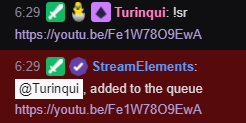
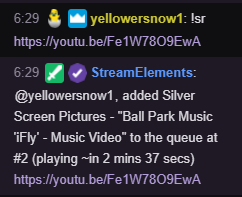
Hmm that's interesting. The bot appears to have different responses to a media request depending on the requestor's role? Myself and another mod get this https://i.imgur.com/H1KdSGm.png whilst a subscriber got this: https://i.imgur.com/EFwsC6z.png. Any ideas why?
 zenith widget
I've seen my self getting both responses and I think it depends on the song sometimes.
its a random thing 
sour dune
weird, was exactly the same song 😛
zenith widget
i see that, but i don't know a definitive answer besides what i've noticed my self
prime sigil
that indeed has worked. thanks for helping.
zenith widget
Logically thinking - if your a mod/broadcaster the bot can only say that the song has been added, but if a viewer who is normal/sub/vip will get the text of the song added as a response, just to show mods and streamer what song it is
in case you want to remove it 
@prime sigil Ty for confirming its an Opera thing. Will tell the devs.
prime sigil
np, thanks for the help been wishing to transfer to streamelements for a long time after watching harris hellers youtube content. this was the only thing stopping me
sour dune
Yeah, no big deal, just thought it was an interesting quirk
My streamer just made teh move from streamlabs to streamelements as well, you'll probably see me around a big while we ease into it
zenith widget

 static light
Hello everyone, I have a simple question. The "! Ticket" command does not work despite the giveway being run. What's wrong, answers with help can be in Polish or English 😉
zenith widget
Check and see if the command is enabled in the default command list.
static light
@zenith widget I don't have this command on the default commands list - http://prntscr.com/ni7463
 static light
@zenith widget correct! Thanks!
sour dune
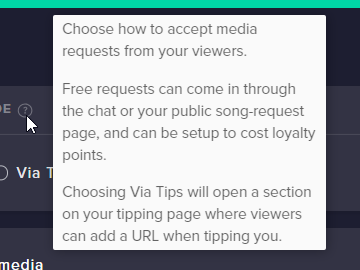
https://i.imgur.com/O9mFCy8.png - where can I find the public song-request page?
 sour dune
hmm, I can't see anything immediately (this is for a streamer I moderate, he has 'both' options turned on in settings (free and paid))
I'll poke around and come back if I can't work it out
zenith widget
the public page is the one I linked above
but for requesting songs, for free its best via the bot, for tips -> tipping page
public page only shows the current song and the queue
 twilit wedge
Hey support, I can't find the TTS option in the tip settings, how can I activate them please ?
zenith widget
What browser are you using?
twilit wedge
I am using Chrome
zenith widget
aah, i see the same thing in your overlay
ok wow, something is scuffed here
poking devs
twilit wedge
how can we do it ?
zenith widget
You can't, but I can
sour dune
Yeah, we have a couple of people who will sometimes go on bulk request sprees, which can spam chat up. Got around that problem before by enabling whispers to the botfor song requests, but since that's not an option I'm trying to find an alternative
 winter zenith
not really a way around it @sour dune
you can see if someone put that on the ideas board allredy and upvote it. if not, you can mke your own and promote it to be upvoted. if enough upvotes it will be implemented !
nocturne pelicanBOT
@sour dune Check out the new ideas board https://strms.net/ideas. You'll be able to add your ideas, upvote others that you like, and track their progress with email notifications. Adding and upvoting ideas also helps the staff know which ideas should be prioritized so please take some time to upvote the features that you’d like. The #💭︱feedback-and-ideas channel is best used for discussing ideas already on the board.
twilit wedge
I have tried in multiple browsers but neither showed me that tts option :/
zenith widget
Yes, its an error on our side - devs are aware of it now
and will be fixing it shortly
Nothing you can do on your side.
twilit wedge
Okay, thanks you for your help !
sour dune
Thanks again guys, I'll check out the ideas
winter zenith

 balmy sparrow
Question does anybody know any other streaming platform like stream elements and stream lab where people could donate without me having to use PayPal ? Stream elements does this with SE. pay but it seems they are stealing donations as I can’t see or accept any
zenith widget
What do you mean stealing tips?
@twilit wedge Refresh the editor and try again. The options are back.
static light
Does SE have the option of running a second account for the moderator, which will eg run a giveway when I stream? How to do it?
nocturne pelicanBOT
@static light To invite managers to your dashboard, Click on your Channel Name at the top of the dashboard and scroll down to Settings. Click the drop down arrow to expand your channel managers and then create a new invite at one of three access levels (Bot Supervisor, Editor, Full Control) Check this video out for more help: https://youtu.be/zl_h-ttZDF0
zenith widget
Basically a mod can have editor access and start a giveaway
static light
@nocturne pelican thanks!
 swift mist
Any news on the msg character limit bug that tadpole reported to devs for me? If you create a message that is 500 characters long the last 5-10 characters or so will be sent in message 2 and this is a SE Bot specific issue
zenith widget
You reported that to me I think. I think either the character limit was set to 500 or now there is a hard stop at 495 characters in commands/timers
swift mist
well it is still an issue, so i reported it again a few days ago, and tadpole ran with it again
zenith widget
I see the task has been completed by the devs some 15 days ago
part hte bot from your channel and join it again
and see if it still posts in 2 messages
swift mist
alright will try that 😃
zenith widget
ok it seems its not fully fixed
zenith widget
well i poked the devs on this
zenith widget
I had a test message with only dots(full stops) and the last 2 were transfered over
regardless the 500th character is going to the next message and it catched the last attached word as well
or the 499th and 500th character
swift mist
Correct, just came to the same conclusion myself
499 is ok 500 will split the last character set/grouping of characters into a new message
also if you go above 500 you get this error message that says 400
what mine showed me is that if i hit the 500 character limit with the message ending like this 'this is a test message.' and the '.' is character 500, 'message.' will transfer to a new message. But if my message ended like this 'this is a test message .' and there is a spacing before character 500 only character 500 will transfer
 full notch
hello, if i set up my SE.Pay and someone donates me, he only will see this "“STREAMELEMENTS*<Your Channel Name>-tip”' on his card did I understand this right?
zenith widget
yes
full notch
Alright thanks, but SE.Pay doesnt work with PayPal?
zenith widget
no
full notch
ok thanks ❤
 thorny arrow
Hi Guys, my watchtime command (chatbot) says "0 seconds" watched for every user. can please someone tell me how to fix this?
nocturne pelicanBOT
@thorny arrow 10 minutes of watchtime are given to those in chat when the loyalty points are handed out (every 10 minutes). Therefore, loyalty must be enabled for watchtime to work properly. There is no direct link between watchtime and all-time points. It can’t be calculated from the amount of all-time points a user has because subs may earn points at a faster rate and !bonus all command increases all-time points for users in chat at that time. Giving points to a single user does NOT affect all-time, only when giving to all in chat.
thorny arrow
ah ok - get it. many thanks
zenith widget
With what exactly?
 north python
bot
zenith widget
What exactly is your issue. Please do not DM me.
north python
send me bot chat
zenith widget
What exactly is your issue?
Do you want the bot in your channel?
Is there but not talking?
More details please
north python
when some ones dose a chat on twitch i carnt hear the bot saying it
zenith widget
Do you want the bot to read out loud what people are saying in chat?
zenith widget
 humble ether
YO!,, Can i change were a scrolling text starts scroling from and to ? Or is that a fixed size always?
I can choose the direction and speed, but i want to limit the width
zenith widget
It depends on the widget size where it starts
humble ether
Can i change that?
Like it does not change where it starts when i just drag it
You can see the cut of is just in the middle always,, does not change with the size
 carmine knot
Can I reset the all time loyalty leaderboard? I sure hope so but I have no idea how.
zenith widget
@humble ether See that black box on the corner - thats the thing you use to resize the widget.
just let it run a bit - refresh the editor
humble ether
Ill try to refresh
zenith widget
@carmine knot On that page there should be a reset button on the upper right
carmine knot
Thanks it worked
zenith widget
Did you click the link I provided you?
north python
who me
zenith widget
Yes you: https://www.speechchat.com/
this is a program that will read you your chat
 normal fog
How do i set custom bot name with obs.live?
nocturne pelicanBOT
@normal fog Custom bot name requirements
- StreamElements bot modded and in chat
- Active overlay with alerts
- StreamElements tipping page in the panels below the stream (!panels)
- Create a twitch account for the name you want to use
- Ground Control app must be running
Steps to enable custom name
- Sign in to https://twitch.tv with the bot account
- Install and run Ground Control (!gc for download)
- Visit https://twitchapps.com/tmi/ and generate an oAUTH token
- Copy/paste everything in the box to Ground Control oAuth settings and enter the name for the bot account
- Restart Ground Control (custom name may take a few minutes to take effect)
Mac does not currently support renaming the bot.
normal fog
so i need to have ground control running also?
zenith widget
normal fog
thanks
 outer laurel
Excuse me, my module is turned on, but the command is not open. What is the problem?
 elder sorrel
What command?
Have no idea since I never used Streamlabs before. Best to ask Streamlabs themselves s to confirm as this is StreamElements Discord 😄
 rain lily
i have streamelements obs is there an build in chat bot in that pogram bekas i got a bot that sending old commands i cant get rid off
outer laurel
Instructions on the roulette
 dreamy rapids
My channel-specific FFZ/BTTV emotes aren't being counted in my channel's chat stats but the global FFZ/BTTV emotes are. Any way to fix this?
 tight harness
@rain lily No, you have set up our bot but it isn't built in to OBS.Live, it is separate
 upper steeple
the bleed purple cheermote is being said in tts when people cheer with it instead of the alert ignoring the cheermote name.
I wanted to let you all know so it could be added like the last time a cheermote was new to twitch 😃
tight harness
@outer laurel What is it about roulette that you're struggling with?
rain lily
i got your bot to work now but the dam streamlabs bot stays there and it is not even linkt ore moderated to my twitch so i have no ide what is going on
tight harness
@dreamy rapids Try typing into your twitch chat: !emotes update (first make sure that !emotes is enabled in Chat Commands > Default Commands)
dreamy rapids
I just tried that, still doesn't count channel-specific emotes
tight harness
I just tested this myself and it worked 🤔
At least for BTTV, I don't have any FFZ emotes
dreamy rapids
There's one channel-specific BTTV emote that was counted at some point that I have since removed though
 meager summit
I'm using an overlay theme that has a countdown timer and I am wondering if there is a way to set the countdown time with a chat command.
tight harness
Not currently
 dry flame
where do i go with questions about se-pay
tight harness
You can ask your question here and we'll see whether we can discuss it here or privately
dry flame
got my firs tsepay donation on the 20th and it asked me to verify my bank, saying it'd take up to 7 days. It's been 8 days since and whenever i try to upload the statement image it gets stuck here
im reaching the point where i kind of just want to force-refund the donation and get rid of SE-pay
tight harness
Its been 8 working days or just 8 days?
dry flame
got the donation on a saturday
so im guessing normal days
6 business days
but the email abou tit mentioned something about money going 'into the void' or whatever if i dont get it within 30 days
so im trying to be on top of things
tight harness
The 7 days do need to be business days, so it could be that it is still undergoing the verification
dry flame
but i cant upload the bank statement image, do the 7 days have to pass before i can do that?
tight harness
I'll DM you about this
dry flame
alright
 hardy yew
Any way to see average and peak viewership for a stream on the dashboard?
twin sentinel
Not that I am aware of. There are other anlysis tool out there for this I think.
 pulsar gulch
are there any updated videos of how to setup obs ?
 foggy iris
Hey question about the song request queue. Is there a way to make it play automatically? Last night I tried it and every time the first song of many was requested I had to manually start it. Any way around this? Didn't see an option for auto start
twin sentinel
Where do you control MediaRequest?
@pulsar gulch The latest one I could find: https://www.youtube.com/watch?v=peg4DZOAocs
foggy iris
@twin sentinel through the website under media requests
twin sentinel
what browser are you using?
foggy iris
chrome
twin sentinel
Mine is set to auto. If you are having problems with this, try to set a sever directlky @pulsar gulch
pulsar gulch
got it 😃
twin sentinel
The answer was for ZwengTube, not for you. I am still thinking about a solution for your problem.
Do you have song moderation activated?
foggy iris
No
I just tested it with a link and it started right away but that was not how it was working last night
twin sentinel
The next time it appears, try to reastart chrome please and start the song via the play button manually.
foggy iris
ok
pulsar gulch
What is a great video format to use it as a " starting stream " ?
as a Media Source
also I can't set up my webcam to 1920 x 1080 .. it gets stucked 
twin sentinel
I use the video format .webm.
What do you mean with it gets stucked?
pulsar gulch
So I have the c920
if I want these settings
he cam gets stuck
if I use device default instead of Custom .. it works but the format is not 1920 x 1080
twin sentinel
Best to ask this on the OBS discord, as I am not that good in these things.
pulsar gulch
fixed it
twin sentinel
what was the issue?
twin sentinel
thx. good to know.
 wanton jetty
Why wont your song requests page go through my audio routin, youtube does it fine...
https://cruxedkat.live/s/201918223617.png
 potent bramble
i deleted the music menu and now cant find it
wanton jetty
Fixed it using a different audio router now man that was annoying 
Just means i cant use the OBS docked version from OBS.live
wish yall would add a output device to the plugin 😛
all OBS audio routes through "default device" so it media requests would ruin my alerts volume ect changing the mixer
Mixer using OBS.live > https://cruxedkat.live/s/201918465123.png
Mixer using Brave > https://cruxedkat.live/s/201918472767.png

 normal quarry
Hey guys
quick question regarding count commands
is there any command that would allow to reset another command?
pulsar gulch
How do I disable the viewer count ?
 wanton mango
@normal quarry Like, reset a count? You could do
$(count <countername> 0)
pulsar gulch
on the obs.live
elder sorrel
@pulsar gulch Viewer Count on OBS.Iive?
pulsar gulch
yes
elder sorrel
Go to Activity Feed -> Click Burger Menu on top left -> Stream settings
Viewer Count will have a slider to enable/disable
pulsar gulch
thank you
 magic ermine
Hi there dudes! Anyone know if there are any bits / cheering settings hidden somewhere that I perhaps don't know about? I can't get TTS to work on cheers that are less than 500 bits even though it looks like all my variations are set correctly and TTS is definitely enabled
Also have it set correctly there
 obtuse prawn
the follower subscriber & tip goal don't appear before starting the stream, is it normal ?
twin sentinel
@magic ermine Just tested it myself. It is working correctly. Check your variation settings and the default settings please.
twin sentinel
@obtuse prawn Can you show me a screenshot of your setup of the goals. What do you mean with appear before starting the stream stream?
@magic ermine This is in the alertbox you are using in the scene this is happening.
magic ermine
Yeah, okay, I definitely seem to have it all set right but I am still not hearing the TTS - Weird
twin sentinel
Do you not hear it in general, so for none of the cheer variations? Do you hear TTS for other alert types?
magic ermine
Yeah it is just for anything below 500 on bits specifically - Everything else works fine. Regular tips, bits over 500 and all the rest
Which made me think it was a variation thing but I even removed it and re-added it but it is still not working
twin sentinel
Can you show me a screenshot of the default cheer alert and the variation settings please?
obtuse prawn
@twin sentinel
twin sentinel
@magic ermine What amount are you testing? The last screenshot is the first variation?
magic ermine
Yeah, testing 250
twin sentinel
@obtuse prawn If you want to reset the goals: https://streamelements.com/dashboard/session -> goals tab
obtuse prawn
Thank you @twin sentinel
twin sentinel
@magic ermine Please disable the TTS for the default alert and delete the minimum amount there.
Then delete the variation with the 250 bits. Create a new variation with at least 250 and enable TTS in there.
This should work. You can create a blank overlay and test this first.
 bright oak
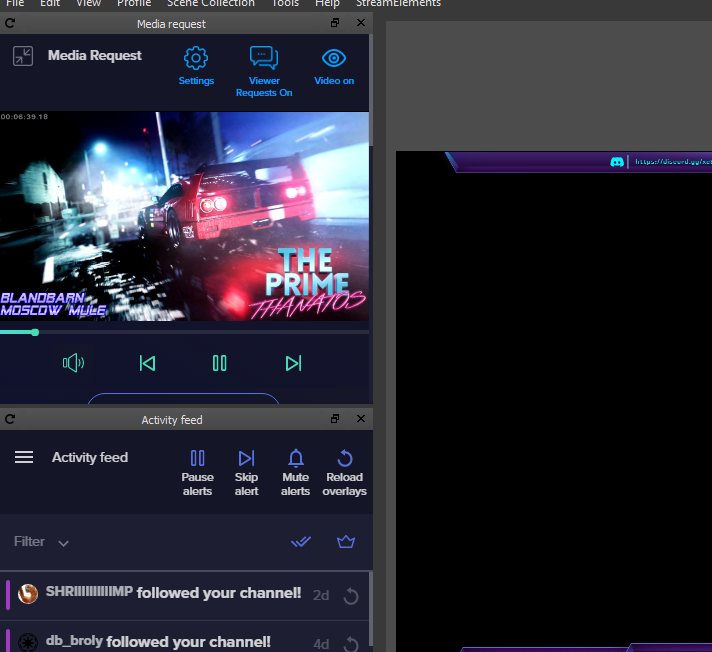
I am not sure if you all support the Stream Deck (I know there is an app), but I thought I would ask. I have all my media setup in the queue, but is there a way to start stop the media from stream deck instead of having to go to obs > streamelements ?
twin sentinel
I am not 100% sure, as I don't earn a streamdeck, but as there is a hotkey to set up in the MR in OBS.Live to pause and play, I would think there is a setting for the streamdeck, too.
bright oak
Yes def related to streamelements, I see I can stop or start/allow media requests but not seeing how to stop start the music/videos
As I have never had a media requested - I make the queue myself and would like to start stop music with a hotkey instead of having to open up obs
magic ermine
@twin sentinel It works, thanks a bunch! ❤
twin sentinel
So you are controlling the MR via the website?
bright oak
I loaded the queue in streamelements.com > then use a widget on obs streamelemnts > as well as on overlay http://prntscr.com/nifqdz - I do not have obs visible all the time when streaming would like to start stop as needed from streamdeck
 vocal schooner
HELP! Ground Control doesn't give me the option to use my name as the bot anymore! What do I do? Or is it intentional?
bright oak
 nocturne pelicanBOT
@vocal schooner Custom bot name requirements
- StreamElements bot modded and in chat
- Active overlay with alerts
- StreamElements tipping page in the panels below the stream (!panels)
- Create a twitch account for the name you want to use
- Ground Control app must be running
Steps to enable custom name
- Sign in to https://twitch.tv with the bot account
- Install and run Ground Control (!gc for download)
- Visit https://twitchapps.com/tmi/ and generate an oAUTH token
- Copy/paste everything in the box to Ground Control oAuth settings and enter the name for the bot account
- Restart Ground Control (custom name may take a few minutes to take effect)
Mac does not currently support renaming the bot.
vocal schooner
@nocturne pelican - I've had it running for months and it just all of a sudden stopped working. I'll double check the OAUTH token, etc. Thank you!
twin sentinel
@bright oak I don't know the StreamDeck Software, but is there an option to add the function you are asking for in the last screenshot in the StreamElements OBS.Live section?
@vocal schooner Do you meet all the requirements?
bright oak
@twin sentinel I know you do not use Streamdeck so really appreciate you attempting to help me find a solution. Here is the screenshot for everything in OBS.live maybe you see something I do not. SD is a very simple tool (I even figured it out for the most part) so it could be I am overlooking something. http://prntscr.com/nifu84
 strong kernel
@vocal schooner You need to be using a StreamElements tipping link. You have a Streamlabs link instead. That's why you can't rename.
vocal schooner
Ah ha @strong kernel - That's it - My friend donated to me and it didn't show up on stream so I ended up setting up a StreamLabs one - Is there a way to get StreamElements alerts to show up (or work with) StreamLabs?
twin sentinel
@bright oak I think you can setup a hotkey for a button press in the SD Software. Set up such a hotkey and try to set the same hotkey in the OBS.Live Media Request settings.
strong kernel
StreamElements tips will not trigger Streamlabs alerts. The idea is to use our overlays for your alerts.
 paper willow
my OBS will not link to twitch...
bright oak
OK I will take a look, I thought about the hotkey but wasn't sure how to map it to inside obs.live
twin sentinel
@paper willow Is there any error message? Where exactly do you want to connect to Twitch? via StreamElements > Log in or via Settings > Stream Log in?
paper willow
when i launch the OBS app it will not connect to twitch so i can stream @twin sentinel
twin sentinel
In OBS.Live, select the MR widget, select the cogwheel on top of it (if you aren't seeing it, make the window bigger) and select the hotkeys section.
@paper willow Is there any error message? What way do you choose to connect your account?
paper willow
when i open OBS it has the connect to twitch button in the middle of the screen. i click it and it doesn nothing
twin sentinel
What OBS version are you on (top left) and what OBS.Live version are you on (bottom right)?
twin sentinel
Select StreamElemetns on top > Log in
paper willow
got it!! thank you!!
bright oak
@twin sentinel any idea if there is a hotkey (not in deck) that starts/stops media in obs.live or can it be assigned?
twin sentinel
In OBS.Live, select the MR widget, select the cogwheel on top of it (if you aren't seeing it, make the window bigger) and select the hotkeys section.
bright oak
Oh I thought you were talking to killinspree earlier. I will look again.
@twin sentinel I could not find exactly what you were referring to, but I was able to assign a hotkey w/in obs.live then created a hotkey using that with stream deck - thanks for the help - really appreciate the excellent support.
 lament blade
My problem.
Viewer A my chat used song request and it said can only posts songs. Viewer B posted exact same song, same link and it didn’t work.
What’s happening?
twin sentinel
Can you share a screenshot of the chat messages?
What I understand is, that both are getting rejected, cause the song they requested was not enugh "music" for your filters.
twin sentinel
Did they have both the same permissions?
lament blade
One was a moderator
twin sentinel
The viewer B was a moderator?
lament blade
Yes
twin sentinel
You can set up the userlevel which is excempted from the limitations of the MediaReqest.
lament blade
I want all viewers to make song requests. I guess I messed up a settings somewhere
I have YouTube limit to music. Should I tune that off?
strong kernel
Depends on how much you hate yourself 
lament blade
Well I want it in my music
strong kernel
Right. With it on, it'll only use things labeled Music in YouTube.
strong kernel
If you want everyone to make requests, this needs to be set.
When the music restriction is enabled, this setting determines who can ignore that restriction.
In a YouTube video's description, this is what it looks for when it's restricted to music:
strong kernel
If that says anything other than Music, then the typical viewer can't request it, but exempt users can.
lament blade
strong kernel
That tells me nothing and you're missing the point.
strong kernel
You're still missing the point.
I'm in your account. It's set up fine.
The video requested was not in the Music category.
So a mod, as an exempt user, could request it.
A regular viewer could not.
lament blade
Ohhhhh okay.
Thank you.
Yes I want it music only.
I’ll tell them it has to be in music only tags.
 worn blaze
what is the command to make someone a regular?
nocturne pelicanBOT
@worn blaze
Chat/Bot Levels
100 - Viewer
250 - Subscriber
300 - __Regular __
400 - __VIP __
500 - Moderator (twitch mods automatically placed at this level)
1000 - Super moderator
1500 - Broadcaster
Dashboard Manager Levels (least to most access)
Bot Supervisor (can add super moderators from dashboard)
Editor
Full Access
https://i.imgur.com/s61Liry.png
 twin sentinel
!level <username> 300
 tribal wren
Hi, I hope I'm asking this in the right place. Could anyone help me with figuring out how to test tiltify alerts? I feel like the answer is in front of me but I just don't see it.
twin sentinel
You cannot test tiltify alerts. You would need to donate to see them working.
tribal wren
ah that's unfortunate. I was hoping to make sure the volume, sound and placement were all good.
 oak turret
hello
quick question i am live streaming right now and my game just crashed from stream elements it never did this with stream labs and i also have a very big delay am i doing somthing wrong
twin sentinel
Can you send us the current Log?
nocturne pelicanBOT
@oak turret Please provide a log from your last stream. To do this, in OBS go to Help > Log Files > Upload Last Log File and paste the link to the log file here.
 pseudo jolt
how do i add the overlay on my stream
nocturne pelicanBOT
@pseudo jolt To add your overlays to OBS, add a new browser source in your scene. Paste your overlay URL in the browser source properties, set the dimensions to 1920x1080 (unless you changed them on the website), and ☑ “Shutdown source when not visible” https://youtu.be/KDvLynUqXI4
 wispy knot
I've got a question about donating via SE.Pay if anyone can help
nocturne pelicanBOT
@wispy knot Welcome to the support channel! Please let us know how we can assist you today and a member of the support staff will be with you as soon as possible.
wispy knot
I donated to one of my friends via SE.Pay instead of paypal, and entered my card info, and I've got a card hold that's showing on my bank account, but the donation hasn't gone through
nocturne pelicanBOT
@patent raptor Welcome to the support channel! Please let us know how we can assist you today and a member of the support staff will be with you as soon as possible.
strong kernel
@wispy knot What's the username of your friend?
wispy knot
BrockJP
 patent raptor
someone tipped me but its not appearing on my dasboard....
strong kernel
@patent raptor You waited all of 4 minutes after sending your email.
patent raptor
didnt know you guys where online
strong kernel
@wispy knot When did you tip your friend, and what amount?
wispy knot
it was just a few minutes before i sent the help request in here (so approx. 7:30 EST), and it was in the amount of $44.80 USD
strong kernel
@patent raptor See the third point in the email.
strong kernel
@patent raptor Can you show me the screenshot?
wispy knot
if need be, i can dm proof of the dono as well, just thought about that
strong kernel
@wispy knot Please do.
wispy knot
sent : )
patent raptor
strong kernel
@patent raptor You don't have SE.Pay set up, only PayPal and G2A Pay. In both cases, the transaction is entirely in the hands of the payment processor and we only ever see a confirmation. If we don't get a confirmation, then nothing appears in your account.
patent raptor
i just changed back to g2a pay
strong kernel
And our logs indicate you never connected SE.Pay.
@wispy knot There's no evidence of your tip in the logs at all. It's possible your bank is holding the transaction. Did you receive a text from them, perhaps?
strong kernel
What's your email address?
wispy knot
well it does say that there's a hold on it, but i figured that might have been on streamelements end
I guess i will just have to wait until tomorrow to call up there and get it figured out
patent raptor
strong kernel
@patent raptor I see a PayPal tip that came in 10 minutes ago, is that what you were waiting for?
patent raptor
no\
strong kernel
Have them provide a screenshot from their bank account of the charge, not from the tipping page.
strong kernel
Tips through SE.Pay have a specific appearance to confirm it. I'm trying to give you the benefit of the doubt here despite the fact we have a full log of every tip that comes through SE.Pay, and your account is nowhere to be found in there. So I'm trying to get some kind of evidence that something even took place. A generic screenshot of the tipping page unfortunately tells me nothing.
strong kernel
Yes, because if we don't get a confirmation of a successful tip, nothing appears in your account.
That's to be expected.
patent raptor
i went offline because it happend to 2 vieuwers
idk what to do
keep my donation url to streamelements or change it..
strong kernel
We need some more proof of a transaction taking place than just a tipping page screenshot. A pending charge in the tipper's account, for instance. I have literally nothing to search with.
lament blade
it wont let me import my stream labs stuff to stream elements i downloaded the thing
<@&382267076632379392>
lament blade
ok srry chill
strong kernel
Make sure you have one tabbed open and logged into Streamlabs, and another open and logged into StreamElements.
And then run the extension.
 marsh meteor
well it is 7 oclock for me
strong kernel
Not you, you didn't ping, don't worry.
strong kernel
@marsh meteor For your issue, check your Settings>Stream.
 ruby vigil
does anyone know the formula for watch time, mine keeps showing 0 seconds
strong kernel
There's no "formula." If the streamer has enabled the loyalty system, then watchtime will count up every 10 minutes.
If they have not, then watchtime will not count up.
@wispy knot It looks like your tip just cleared.
 vague lance
hi
uh i was hoping someone could point me in the direction of setting up tipping on twitch
I have to post this link into my tipping panel on my channel
i don't see a tipping panel when i got to my channel
strong kernel
@vague lance https://www.youtube.com/watch?v=eLzxRkq7tJo
StreamElements tipping system is guaranteed to increase your tips! Watch our guide to learn how to setup your own. ----- Got any questions, or just want to s...
vague lance
does it help to say i'm using obs live
strong kernel
That has nothing to do with a tipping page.
vague lance
it says i have a tipping panel on my twich streaming page i guess
i don't know if i have it turned off
strong kernel
No, you need to make a tipping panel on your Twitch page. And the video shows you how.
vague lance
Copy the link below and paste it into your Tipping panel on your Twitch channel
oh
duh
strong kernel
That's why I gave you the video.
vague lance
sorry
strong kernel
Our YouTube page is full of tutorial videos like that one, so be sure to always check there first: https://www.youtube.com/channel/UCjerlCIbLPQwSnYlClkjDXg/videos

YouTube
Official youtube channel for StreamElements tutorials https://StreamElements.com
 candid vortex
Hi all, is there anywhere I can find the streamelements variable command list... i found it once before but cant seem to find it again.
strong kernel

StreamElements
The Ultimate All in One Platform for Streamers
vague lance
ha! i found it. woot. thank you. i'm back on track with the first video
candid vortex
Appreciate it @strong kernel
vague lance
thank you very much @strong kernel
strong kernel

 ruby vigil
yeah i have loyalty enabled and it still doesnt count the watch time
 autumn granite
Any chance to have some Warframe themed layouts in the future? just wondering
strong kernel
You were already answered in the live chat. Why ask here immediately after?
@ruby vigil This is in regards to watchtime in your channel?
ruby vigil
@strong kernel yes also it didnt work in my friends channel last night
 sand ravine
I'm testing StreamElements out very soon.
strong kernel
Enabling it in your account does not affect watchtime in your friend's channel.
sand ravine
Just gonna experiment with alerts and custom commands.
ruby vigil
@strong kernel yes but also not working my own channel
strong kernel
Have you even streamed?
ruby vigil
@strong kernel yes i have , and i turned it on last night for 20 mins and kept trying it
strong kernel
It's not going to give you your own watchtime for your own channel.
sand ravine
Hmmmm, that is odd. The commands I transferred don't have the ability to add sound effects. 😦
Is that gonna be implemented soon?
strong kernel
You can create sound effect redeems in the stream store.
sand ravine
Ah, okay.
Okay, I set one sound effect redeem in the stream store. Will the corresponding custom command trigger that sound effect as well?
strong kernel
If you've set it up to do so with the ${redeem} variable.
sand ravine
Don't think I have.
Do I put that variable before the text or after the text in that command?
strong kernel
There won't be any text if you use a redeem variable.
It'll only provide the redemption confirmation message.
sand ravine
Ah, okay.
So I just fill that blank field with that variable?
even if I erased the old description.
strong kernel
 brave junco
hello i was in the middle of streaming and i accidently got ride of my chat and activty hub and i dont know how to get it back i minimized it? anyone got segestions
ruby vigil
@strong kernel i had my friend try !watchtime and enabled loyalty , and its not working on his stream either
@strong kernel it shows 0 watch time, been here for roughly 20 mins
 karmic nymph
do you guys have a widget to see how much ppl are watching ? its like a small twitch sign .
 hidden geode
How do you reset the count down time widget? or does it reset automatically?
strong kernel
@ruby vigil I've been testing it all night and can confirm that if you or your friend set it up properly it's working fine.
So check your settings.
@karmic nymph Not sure what you mean.
@hidden geode If you're using "shutdown source when not visible," switch scenes and switch back.
@brave junco Check the StreamElements menu at the top. Do you have Chat and Activity feed options in there?
brave junco
yeah and there active but not showing
ruby vigil
@strong kernel right?
strong kernel
Please stop pinging. It's not necessary.
hidden geode
@strong kernel How do you "shutdown source when not visible"?
strong kernel
There's a viewer count built into OBS.Live.
It's a checkbox in browser source properties @hidden geode
brave junco
?
strong kernel
@karmic nymph https://obs.live

OBS.Live | Open Broadcaster Software Streaming Knowledge Base
OBS (open broadcaster software) knowledge base for live streaming. Find articles and videos about streaming with OBS.
@brave junco Could be you've undocked them from the main OBS Studio window and moved them elsewhere. Check behind windows.
If OBS is your focused window, the undocked panels should also be on the top of other windows.
ruby vigil
is there anything else i need to do?
strong kernel
Watchtime will not count up when you are not live. It will only count up every 10 minutes.
ruby vigil
yeah my friend is live and has loyalty enabled as well
feartherifle has spent 0 seconds watching sgtwarpath
, been 30 mins or more
strong kernel
You haven't said who your friend is.
ruby vigil
sgtwarpath is who im watching right now
strong kernel
They didn't enable it.
brave junco
so i take it then just close and reopen and fixed
strong kernel
That won't change their positions.
nocturne pelicanBOT
@autumn sierra Please abide by our server rules:
- No advertisement or stream promotion
- Respect ALL server members
- No NSFW/NSFL
brave junco
so wait then what should i do?
ruby vigil
i waited 12 mins after he enabled loyalty , still 0
sorry my fault i thought he did the first time but he did 12 mins ago
 molten cloud
Why i can't enable chat stats 
brave junco
ight actually turn it off and on again worked thanks
 strong kernel
@molten cloud Because you renamed your account.
molten cloud
How do i fix it
strong kernel
What was your old username?
molten cloud
LeagueOfHi
strong kernel
@molten cloud Should be fine now.
strong kernel
Don't believe so.
molten cloud
 sad
sad
 swift swan
 shrewd notch
hey all, i'm using obs live and i'm not getting SE alerts now
2 pc setup connected with voicemeeter
zenith widget
@shrewd notch have obs installed on both pcs and add just the alert overlay to the gaming one so that you hear the alerts
zenith widget
No?
You wont be streaming with the gaming pc
Just have it idle with the alert overlay
shrewd notch
it's not working -- all good -- i know what I have to do with some audio cables
zenith widget
Well now i know that ndi dual pc setup doesnt work with my suggestion as capture card dual setup works
dreamy rapids
My channel-specific FFZ/BTTV emotes aren't being counted in my channel's chat stats but the global FFZ/BTTV emotes are. Any way to fix this?
Asking a second time because it's still unresolved. I was told to try '!emotes update' but it did not resolve the issue.
zenith widget
@dreamy rapids part the bot from your channel, log out of the dashboard and login and join it again
Then try the command or maybe "!emotes refresh"
dreamy rapids
Okay that worked, thanks.
 carmine crow
Can someone help with an idiots guide to setting up a counter for chat 😃
sand ravine
I have an issue with my alerts.
The transferred alerts that I had from StreamLabs did not show up on Stream Elements after I set it up.
In a middle of a stream atm.
nocturne pelicanBOT
@sand ravine The default resolution for StreamElements overlays (theme and custom) is 1920x1080. Please add them in OBS at their full resolution and use CTRL+F to fit to screen if necessary. You can then downscale your stream in OBS settings > Video if you'd like https://i.imgur.com/6bWXxjR.png

@sand ravine We have added a new feature, which allows testing of alerts only in the Editor or in both Editor and OBS. Hover over the bell and on the right side toggle it on.
https://media.discordapp.net/attachments/342748377416466442/564781551649292299/unknown.png
sand ravine
So 1080 is the only way to get it working?
Hate to be the bearer, but I don't want performance loss when streaming in 1080p.
zenith widget
How to setup counter commands
${count} - increments and shows the counter
${getcount} - only shows counter.
Usage example:
Command name: !died
Response in command: There are a total of ${getcount deaths} deaths
What you get in Chat: There are a total of 11 deaths
Command name: !getrekt
Response in command: Heck this Dark Souls boss. I just died again for a total of ${count deaths} deaths
What you get in chat: Heck this Dark Souls boss. I just died again for a total of 12 deaths
Update: April 14th 2021
You can use these:
{count var1 ${1}} - when used, you will set the var1 number to what ever number you'd like.
Example:
!var1 5
Response: "5"
You can also use the number from var1 and add it to var2 with this method:
${count var2 "+${getcount var1}"} - this adds the var1 number over and over again when the command is used.
@sand ravine What is your desktop/monitor's native resolution?
zenith widget
Ok, so your OBS base canvas should be also 1080p
sand ravine
Can't change resolutions while being live.
carmine crow
Thanks 3000 @zenith widget 😄
sand ravine
I'll have to change it when I end stream.
zenith widget
You can easily have these settings. Play in 1080p and stream in 720p
with no performance issues
and the overlays are imported as 1080p, so you can add them as 1080p as well.
@carmine crow  want a burger with that?
carmine crow

 versed garnet
I have a question regarding custom css for alerts, if I have already selected my gif to play for an alert, when I enable custom css it goes back to to default gif for all alerts, is there a tag or something I can use to reference my currently selected gif?
versed garnet
ahh ok awesome, is there a reference I can go to that has all the variables available to me?
versed garnet
awesome, thank you very much
 versed stag
For the overlays do we have to have obs or no ?
zenith widget
OBS or Xsplit
nocturne pelicanBOT
@versed stag Here is a guide on how to setup the most essential tools for streaming from your console, while using StreamElements tools without involving a Capture Card! It's easy to do, take 4 minutes to read and 10 to 15 minutes to setup!
Read all about it here: https://blog.streamelements.com/how-to-stream-on-console-7b620b1c46c3
versed stag
Thank you
sand ravine
I changed my base resolution to 1080p and the alerts worked.
Had to match the imported alert overlay with the right resolution.
How do I test them out?
zenith widget
In the editor -> bell icon on the bottom left
nocturne pelicanBOT
@sand ravine We have added a new feature, which allows testing of alerts only in the Editor or in both Editor and OBS. Hover over the bell and on the right side toggle it on.
https://media.discordapp.net/attachments/342748377416466442/564781551649292299/unknown.png
 stray ermine
im trying to set up the bot to prevent people from making any mention to Endgame, so no one drops spoilers. But when I go to test the phrases I have entered the bot doesnt block the words I have added. Is there a how to guide for this? The youtube video on this subject I watched doesnt help as the bot is still not blocking the words I have added.
twin sentinel
Can you share a screenshot of your setup for the blocked terms please.
zenith widget
try lower case and use the tester on top
zenith widget
👍
 crimson estuary
hi how can i get donation anonum wihtout the people seing my name
twin sentinel
I think you need to create a business PayPal account for this. https://www.paypal.com/us/smarthelp/article/How-do-I-upgrade-my-PayPal-account-type-FAQ900
twin sentinel
I am not 100% sure, but I think when they tip you, they won't see your name in G2A. Also I would not recommend using fake names, as the bank may not give the money to you cause it is not your real name connected with the bank account.
 pine frost
anyone know if a command can get triggered with an ! in front of it
zenith widget
all bot commands are triggered with the exclamation mark in front
pine frost
Its fine. I know a work around
zenith widget
Only custom commands support keywords, that allows commands to trigger without the exclamation mark in fornt.
pine frost
oh
like I want to just automatically add 10 points to somebody by just typing the words
points username
always the same amount, just 10.
zenith widget
that won't be possible with the way our bot is setup - it can't call its own commands and the !addpoints command is a default one, which doesn't support keywords.
pine frost
gotcha
crimson estuary
yes i have to give my personal data to ga2 for bitcoin?
if someone donates me boticoin can he see my real name and data ?
zenith widget
We can't really tell you if your info will be visible if someone donates you bitcoins
either research that with Google or ask G2A Pay
 fathom zodiac
nocturne pelicanBOT
fathom zodiac
nocturne pelicanBOT
@fathom zodiac Welcome to the support channel! Please let us know how we can assist you today and a member of the support staff will be with you as soon as possible.
lament blade
hey, I have set up my phone app to 3Mbps
but it says 13Mbps on twitch
will it drain my data as 13Mbps or 3Mbps? I am a bit worried
zenith widget
twitch stats show 13mbps? from the advanced settings right?
lament blade
y
zenith widget
these?
Im not even sure where you are seeing 13mbps
Това е което аз виждам на твоя стрийм
lament blade
On the app
zenith widget
Със Smart Stream ли си?
 rain wasp
how do i get a queue for my channel?
twin sentinel
What queue? There is a custom widget: https://github.com/StreamElements/widgets/tree/master/UserQueue
rain wasp
like a lineup queue where your viewers can join a line up to play with you.
twin sentinel
yeah, the link will take you to a viewer queue widget.
rain wasp
ok thank you!
lament blade
Hey, now my streamelements doesn;t pick my audio/mic
twin sentinel
Do you stream from console or directly from PC?
lament blade
PC
I am live streaming right now and its really fucking my stream over :D

it shows that its picking up my mic and desktop audio
but its not.
nocturne pelicanBOT
@lament blade For the best OBS support, please join their Official Discord @ discord.gg/obsproject
 warped copper
is their a command that i can use to save a video clip wile im streaming?
and im useing OBS as well
twin sentinel
There is a custpmAPI you can use: https://thefyrewire.com/docs/api/twitch/clips/
warped copper
@twin sentinel thank you ill try it out
 old atlas
how do i add like the "most recent donors, top donors etc" into my obs using streamelements?
twin sentinel
Create an overlay with the matching widgets and add this as browser source to OBS.
lament blade
specific question about the alerts: at the sub alert tab you can check 'show sub message'. does that mean it shows the text that the new sub sends?, and there is also in the TTS settings a check that is called 'Announce action'. what does that mean?
previously I had the Enable text-to-speech enabled, and it read '#name gifted a tier 1 sub to #name they have given 3 gift subs in the channel' why does it read that out loud?
twin sentinel
The "show sub message" will show the sub message the subber sended with it.
The announce action will trigger a sentence like "person X subbed for 3 months" when TTS is enabled, before reading the message.
The "#name gifted a tier 1 sub to #name they have given 3 gift subs in the channel" was most likely read out loud cause the option to announce the action is ticked in the gifted subs variation.
 lone ridge
hello, I was wondering if there's any way to check the code for songrequests, since i'd like to extract a part of the code to create a custom command. more speciffically the code for !song , which shows current song playing and requested by aswell as the link.
twin sentinel
There is a documentation on the endpoints we are providing for songrequest: https://docs.streamelements.com/reference#songrequests
 fallow adder
For some reason my gifting sub leaderboards won’t change even after I’ve gotten more subs , does anyone know how to fix this
twin sentinel
@fallow adder what is your twitch channel?
lament blade
hi i decided to try out stream elements downloaded the obs live but cant get past the log into twitch section upon opening the box appears thank goes and i am left with the spinning circle on the main scree, any thoughts? thanks
twin sentinel
Let's hop in #helpdesk-selive
fallow adder
bunneii @twin sentinel
twin sentinel
Are the gifted subs in your activity feed?
You are referring to the gifted subs leaderboard in your panels right? What name has a wrong number and what should be the number be?
 bold mountain
@twin sentinel I'm a Mod for @fallow adder
Her leaderboard stopped updating after a recent twitch name change
The correct numbers are on the left
The leaderboard on the right is the one not updating
twin sentinel
The Viewer Leaderboard is an extension which is not developed or created by StreamElements.
The Subscription Gifting Leaderboard was created by antimattertape. More details here: https://www.twitch.tv/ext/do3e1cmcmos4a17ynwdkvnf7gbqj6d-0.2.2
bold mountain
@twin sentinel Thank you so much!
lone ridge
Is there a way to use the current songs requestee as a variable in different custom commands?
twin sentinel
Does setting an alias to the command fit your needs?
 umbral moss
does anyone know how setup the bot on the new streamelements.live
lone ridge
The thing i'm trying to accomplish is to set up a command that would add a certain amount of points to the user who requested the currently playing song, when the broadcaster acknowledges that, that song is good, in which case we'd post a command that counts the amount of good songs requested so far, ASWELL as automatically give out a set amount of points to the user who requeted the currently playing song. so minimize chat spam with commands and ease up the workload on mods.
I'd like to accomplish that without actually typing out the users name tho.
twin sentinel
@umbral moss There is no StreamElements.Live it is celled OBS.Live. I recommend watching in the tutorial section for a video guide: https://www.youtube.com/watch?v=EpA4eDLMW_I&list=PLCDDKlFdScbH7j6W7OXQQScfFunxed1tP
@lone ridge I think this is something which I am not sure if this can be done. I know that this routine can not be done without custom coding. So best to ask in #dev-chat for help.
lone ridge
Okay, thought that might be the case, thank you for the help.
twin sentinel
Can you elaborate on what you mean with setup?
You can set up the bot on the website and some features can also be controlled in OBS.Live or Ground Control.
umbral moss
tryin to change bot name
twin sentinel
Take a look in the pinned messages in #helpdesk-selive please.
 twin raven
im trying to set up tips and it says i need to put in my paypal email adress but i dont have paypal but i have a different card i was going to use so how/where do i put the details for that card instead?
nocturne pelicanBOT
@twin raven Please connect your Twitch and/or YouTube channel with Discord by going to ⚙ Settings and then Connections here in Discord. https://streamable.com/eg92w

 lean frost
Hi, i found text to speech but its not in the ovelay manager, what do i do? https://twitter.com/streamelements/status/824609565094379520

Guess what? we have 61 Text To Speech voices! 29 languages! check it out on our overlay manager: https://t.co/xVrqjo7eSi

 Twitter
twin sentinel
Twitter
twin sentinel
What browser are you using? Can you share a screenshot of the issue? @lean frost
@twin raven What card are you referring to? Do you want payout to your bank account?
lean frost
@twin sentinel im using Opera, maybe im not understanding the full picture, its there a fresh tutorial on overlays so i can set up text to speech
twin sentinel
Can you share a screenshot of your browser window please?
twin sentinel
Have you added an alertbox to the overlay?
lean frost
I do have a alert box that works when people follow or sub.
twin sentinel
So when you select this and then select an event the TTS section is not there?
Can you elaborate on what is not on the overlay editor exactly?
twin sentinel
What is your issue exactly?
lean frost
i want text to speech on donations and tips, using the twitter link does not answer my questions on how to add such things
twin sentinel
Go to the overlay editor https://streamelements.com/dashboard/overlays go into the edittor mode > select the alertbox widget > on the left side, select the card TTS settings and activate TTS. Make sure to edit the variations, too, if there are any.
 tough shore
Hi, I add the contest widget but when I start a contest, it doesn't appear on the widget. Any suggestions?
twin sentinel
Does it appear in the overlay editor in the overlay?
tough shore
No
twin sentinel
Have you hit save after adding it?
tough shore
Solid. I thought I saved it. Also, is there a way to add rolling credits for session followers, sub, tips, etc?
twin sentinel
 valid dune
Can I write on German
 jade flicker
yes
twin sentinel
#🇩🇪︱deutsch @valid dune
valid dune
Okay, also ich habe folgendes Problem. Ich habe gestern Gestreamt und das Funktionierte ohne große Probleme, und heute habe ich nochmal gestreamt und auch genau das gleiche Game doch es lief nicht so gut wie gestern. Woran liegt das Problem ?
 lime plaza
Hello,
whoops lol I am trying to rename the streamlabs bot in my chat and have downloaded ground control. The name still isn't changing. Are there additional steps I need to take?
streamelements** my bad
nocturne pelicanBOT
@lime plaza Custom bot name requirements
- StreamElements bot modded and in chat
- Active overlay with alerts
- StreamElements tipping page in the panels below the stream (!panels)
- Create a twitch account for the name you want to use
- Ground Control app must be running
Steps to enable custom name
- Sign in to https://twitch.tv with the bot account
- Install and run Ground Control (!gc for download)
- Visit https://twitchapps.com/tmi/ and generate an oAUTH token
- Copy/paste everything in the box to Ground Control oAuth settings and enter the name for the bot account
- Restart Ground Control (custom name may take a few minutes to take effect)
Mac does not currently support renaming the bot.
twin sentinel
@jade flicker Why do you want to close your accounts? Is there anything we can help you with?
jade flicker
No I dont stream anymore
twin sentinel
You can leave your account and just disconnect the connection between twitch and streamelements. So your data remain, in case you want to access them anytime lager agein.
jade flicker
No I want to close it for ever
twin sentinel
You can close your account here: https://streamelements.com/dashboard/account/security
jade flicker
yes but when i have finished this nothing happenes
twin sentinel
Your account will get deleted in the next days.
jade flicker
ah oke
 late shuttle
In OBS, if I log in with Twitch, I have a specific addon to change stream name and game title... It got removed by me installing the Streamelement OBS Live addon (which i think looks fantastic) but is there a way around this?
nocturne pelicanBOT
@late shuttle If you have issues with OBS logging you out of the integration all the time or not showing the Twitch integrations, follow these steps:
- Make sure you are on the latest and greatest version of OBS.Live ( 19.3.24.375)
- exit OBS (make sure OBS is not running)
- delete %appdata%\obs-studio\plugin_config\obs-browser\obs_profile_cookies
- start OBS.Live
- Settings -> Stream -> disconnect -> connect
 fiery pier
I want to screen capture in Spectrum - Music Visualizer but I see only black window
 hot radish
Hey all, I am trying to make it so that alerts show up when people host my channel with no viewers. When I get larger hosts it works fine. I have it set to 0 as the amount needed but still doesnt work. Any thoughts?
 thorny obsidian
i use the channel chat widget (chat shows on overlay) and bttv and ffz emotes don't show on the widget. it shows only the emote code. is there a separate setting for this?
twin sentinel
@fiery pier Try to start OBS as admin plese.
@hot radish
Due to changes to Twitch API, we have filtered out hosts and will only show these ones on your activity feed:
- All manual host events (0 hosts included and if filter set to 0)
- All hosts coming from an online channel. If the hosting channel has been offline, we do not show it
- All auto host events with at least 1 viewer
hot radish
@twin sentinel Is there any reason why it still works with Streamlabs?
Are they working around the API?
twin sentinel
Best to ask this StreamLabs.
hot radish
Okay
twin sentinel
@thorny obsidian I am not 100% sure. Try to readd the widget and reload your overlays.
thorny obsidian
@twin sentinel just tried that, but no good. Thank anyway 🙂
twin sentinel
what browser are you using?
@thorny obsidian would you mind giving me editor access to your account via PM, so I can try to take a look. Can't promise to solve the problem.
twin sentinel
https://support.streamelements.com/hc/en-us/articles/360000485152-How-to-set-up-Dashboard-access Please grant me at least editor access and send me the link via PM.
thorny obsidian
thanks. this has been done
twin sentinel
@thorny obsidian I am sorry, I really don't know why your BTTV emotes are not showing up on the chat widget in your overlay. Maybe another supporter has any ideas on this.
thorny obsidian
@twin sentinel well thanks a bunch for your help. i'll stand by in case there are any other ideas 👍 🙂
fiery pier
@twin sentinel I tried it but result did not change
twin sentinel
What version of OBS Studio are you using (top left)? Do you use the plugin OBS.Live?
 modern gull
hey whats the exact command i use too add points to all viewers
twin sentinel
!addpoints all XX XX = amount
modern gull
GOT IT THANKS
fiery pier
OBS Studio 23.1.0(64-bit,windows)
nocturne pelicanBOT
@fiery pier For the best OBS support, please join their Official Discord @ discord.gg/obsproject
molten cloud
Why alert like this ?
twin sentinel
What resolution is your overlay set to in the overlay section on the website?
nocturne pelicanBOT
@molten cloud To add your overlays to OBS, add a new browser source in your scene. Paste your overlay URL in the browser source properties, set the dimensions to 1920x1080 (unless you changed them on the website), and ☑ “Shutdown source when not visible” https://youtu.be/KDvLynUqXI4
 finite dagger
hey guys I can't figure out how to make a command mods only by the chat. I tried !cmd options commandname -level (500) but the bot tell me flag name is incorrect
Thanks in advance for your answers. Tried to search on the internet but it wasn't successful 😂
strong kernel
Why is the number in parentheses?
finite dagger
It worked thanks @strong kernel :)
 knotty sparrow
Hi I tried to import my data from AnkhBot, the problem is, that if I type !watchtime in the chat it says "1 day 21 hours" instead of "2735 hours". I also checked the loyalty setttings, it should be everything set up like in Ankhbot. pls help ❤
the points are imported correctly
strong kernel
Watchtime does not import.
knotty sparrow
Is there anything I can do?
 subtle condor
Hopefully simple question. I've imported my tips from streamlabs using the chrome extension. But any widget I use related to tips is either blank or displays "no data". Can I fix this?
strong kernel
@subtle condor Widget data is controlled at https://streamelements.com/dashboard/session
StreamElements
The Ultimate All in One Platform for Streamers
Imports won't fill that info in.
knotty sparrow
Antoher thing, I can't allign the top tip to the right, only to the left and the shadow behind the latest sub doesn't work properly
it resets from 3px 3px 2px to 1px 1px 1px shadow every time
only at the latest sub
twin sentinel
What browser are you using?
knotty sparrow
chrome
twin sentinel
Can you show me a screenshot of the top tip widget settings of the default card and the text settings card please?
twin sentinel
what happens when you make the widget bigger to the right, is it aligned on the right border?
knotty sparrow
where can I do that exactly?
twin sentinel
extend the widget size by pulling at the lower right corner of the widget.
knotty sparrow
that is a little bit buggy, but now it seems to work
thanks! what's with the shadow bug?
twin sentinel
should also not being there. for me, the shadow is applying fine.
save the overlay, close the browser and restart chrome and open back the overlay editor of that overlay. then try again please.
knotty sparrow
it resets back to 1px 1px 1px
twin sentinel
When does it reset, when you exit the overlay editor?
knotty sparrow
if I open OBS than it doesn't even apply there when I click the save button
it works only in the editor until I close it
twin sentinel
clear the browser source cache in OBS and save the overlay in the overlay Editor please.
knotty sparrow
nothing happens
twin sentinel
what happens when you enter bigger numbers like 12,12,12 to the widget settings? Are these working?
twin sentinel
would you mind giving me editor access via PM, so I can talke a look myslef? I can't promise to solve the issue.
twin sentinel
oh ok. thx.
knotty sparrow
ok good to know I'm not alone. ty
subtle condor
Bonus question: It doesn't seem to accurately display my sub count either. Twitch dashboard says I have 5. But when I use the total subs widget, SE says I have 26 subs. Is there a widget that simply displays total current subs?
strong kernel
Goals are not the same as totals. Goal progress is controlled at https://streamelements.com/dashboard/session
StreamElements
The Ultimate All in One Platform for Streamers
 forest topaz
I have sound alerts through my stream store in streamelements but is there a way for them to redeem the sound WITHOUT putting !redeem with it?
like can they just do !siren or whatever command i make?
strong kernel
Custom commands with the ${redeem} variable.
 static echo
hi id like to ask as i have tried to donate to my channel via streamelements, but the payment has gone through but i do not see any record of the donation in streamelements or anywhere. please advise.
strong kernel
Was it through PayPal?
static echo
credit card
nocturne pelicanBOT
@static echo Please connect your Twitch and/or YouTube channel with Discord by going to ⚙ Settings and then Connections here in Discord. https://streamable.com/eg92w
 static echo
ok done
strong kernel
You did do it through PayPal.
strong kernel
Revenue history.
static echo
sorry as am new on this. but when i click revenue history theres no record
strong kernel
That screenshot is from your Revenue history page.
static echo
as when initally did the donation, there was no alert or record after that. only the bank informed that the payment did go through
strong kernel
Nothing takes place until PayPal sends us back a confirmation.
static echo
how about the donation alerts ?
strong kernel
Nothing means nothing.
Until PayPal clears it and sends us a confirmation, nothing takes place.
static echo
so from the revenue history . was it cleared
strong kernel
Yes, if it appears in your activity feed and revenue history, it was cleared.
static echo
but i cannot access records that u could from the screenshot u sent
strong kernel
It's literally the same page.
It's your account.
No different than your own view.
static echo
strong kernel
In any case, StreamElements is a passthrough service and never actually touches the money. If you think there's an issue, you'll need to reach out to the payment processor, in this case PayPal.
static echo
am just curious about the record of revenue history . or could it just be a delay in the date entry process?
 trail lichen
Im running into an issue where all my stream overlays from SE are micro stuttering. Mostly only on widgets that support scrolling text like "Latest Subscriber" and "Top Tipper"
When i view the preview the overlay in chrome its fine, but in OBS I have the issue
i could pick up the micro stutter on my phone camera better than on a screen recording, Yes it shows up on the stream also, reported by other users and seen on other displays / devices
 slim siren
Hello there! Im currently using the streamlabs chatbot and I am about to import my currency data to Streamelements. As soon as I select my Currency.csv file I get a notification about the upload being successful but nothing happens :/ my currency wont show up. Do you have any advice?
zenith widget
@trail lichen it is known that scrolling text it stutters or lags the entire stream unless you have a super high end pc. Better switch it off.
@slim siren what browser are you using?
trail lichen
is that only pertaining to SE overlays? i used streamlabels local files with scrolling text just fine before switching over,
delidded i7 7820x OC 4.9Ghz 24 hour prime stable, 24 hour IBT stable, 24 hour Asus Real Bench Stable
Gtx 1080Ti
32GB of DDR4 3200Mhz Ram 24Hr memtest 86 and 86+ Stable
1tb Samsung 970 pro NVME ssd
Cpu usage with overlays active 7%
Im sure thats high end enough for scrolling text?
zenith widget
I guess but you are still seeing stuttering, which is the middle outcome of the issue that scorlling twxt in general has an issue and we are aware of it but no eta on a fix
trail lichen
Alright thanks for the reply
 sharp crater
hello! my sepay account got disabled because i didn't set up a bank account after receiving donations
now it keeps giving me an error when i finish completing the bank form
zenith widget
@sharp crater Checking your account.
sharp crater
@zenith widget thank you!
slim siren
thanks for your replies! Importing my currency works perfectly fine now. Do you know if there is any way to import watchtime/hours from the streamlabs chatbot to Streamelements as well? seems like all viewers need to start from scratch again :/
sharp crater
oops didnt mean to ping
zenith widget
@slim siren If watchtime is present in the currency.csv it should be in minutes, as we import minutes, while the export is in hours.
@sharp crater Can you DM me your details so that I can check and fill them for you in the form? I would like to see if I can reproduce any error.
zenith widget
To be honest, I can't really do much with bank details besides sending you money
but
other thing we can do -> go to the se.pay page, open the dev console (f12) and look at the console tab. Then fill out the form and when the error pops up, screenshot the red lines from the dev console and send to me in DM
sharp crater
Ok im sorry about being super protective of my info even if it can't do me any harm
will do that right now!
zenith widget
its understandable 😉
slim siren
one guy with ~100 hours in streamslabs chatbot does have one hour and 37 minutes using the streamelements watchtime command after importing the currency.csv. Im super confused right now
zenith widget
I just said it. We import minutes while the export from SL has hours in the file.
so if you know how to convert the hours in the .csv to minutes, then clear your points and import again, else DM me the file.
slim siren
just sent you an dm. Thank you!
 tulip spindle
anyway to make alerts appear inside an image not next to it
zenith widget
There are 3 layout options on the alert you can choose from. Text on bottom, text on the side, text in the image/video
 neat narwhal
Hey, so I'm a twitch idiot. I only just came across StreamElements, and I'm trying to figure out if I'm using it right. I want something that will pop up on my screen as an overlay while I'm gaming, as well as being captured through xSplit. Someone followed me and I heard it ping, but didn't see the overlay. I've put the overlay link into xSplit and configured it as explained. Can StreamElements do an overlay over my game in front of me, or is that just going to show up in the stream?
tulip spindle
@zenith widget yea really wanted to be able to stick it inside 😦
zenith widget
@tulip spindle will this help?
@neat narwhal Im not 100% sure how it works on Xsplit but if you have a list of sources and can move them, move the overlay source all the way up on the list. This should place it on top of everything.
tulip spindle
brilliant thankyou!
neat narwhal
Sorry, I wrote a passage. I really just want to know if it ONLY shows up on the stream, or if it should also be showing up on my actually computer in front of me as I game.
neat narwhal
Okay, cool, ta :)
zenith widget
You need an overlay with the alert widget on it. Then add the overlay to OBS.
Here is guide for the overlay editor.
nocturne pelicanBOT
@hollow bridge Please abide by our server rules:
- No advertisement or stream promotion
- Respect ALL server members
- No NSFW/NSFL
 pale elk
So StreamElements hasn't been doing host alerts for smaller hosts, even though I have no minimum viewer number set. This also seems to be a common issue, as others have asked me about this too. Is there a way to fix this?
nocturne pelicanBOT
@pale elk Due to changes to Twitch API, we have filtered out hosts and will only show these ones on your activity feed:
- All manual host events (0 hosts included and if filter set to 0)
- All hosts coming from an online channel. If the hosting channel has been offline, we do not show it
- All auto host events with at least 1 viewer
pale elk
Gotcha. Thanks.
 rain wagon
wat is the best way to improve fps? is that the internett being too poorly or is therer a way to improve it somehow?
nocturne pelicanBOT
@rain wagon Please provide a log from your last stream. To do this, in OBS go to Help > Log Files > Upload Last Log File and paste the link to the log file here.
 polar bramble


 lament blade
My timers in chat don't space out in the time intervals set. I've put up with it for a year and thought I'd finally get round to asking for help. Sometimes 3 timers go off within a minute of each other even though all of them are spaced out. Any clue?
twin sentinel
Take a look at the chat lines at each timer.
@polar bramble With what do you need help exactly?
This is also a timer setup guide: https://discordapp.com/channels/141203863863558144/199460642975907840/508911738528333849
lament blade
@twin sentinel all set to 5 lines. So I will also space out the chat lines Thank you
static echo
weird question. can a Zotac 1060 6gb gpu be able to stream PUBG smoothly
twin sentinel
@static echo Depending o your settings and other hardware components. Best to google on this topic, cause this is the helpdesk for SteamElements issues or ask in #general-chat .
static echo
thanks
 hot apex
Hey, everyone! I just got a streamdeck. How do I make a video clip pop up with sound and disappear again at the click of a button?
twin sentinel
Best to ask the StreamDeck support.
hot apex
Ah, you're probably right. Thanks
lament blade
when is the discord announce feature going live?
twin sentinel
We have plans for a discord bot, no ETA.
 winter basalt
Hi lovely people!
I have an issue with Stream Elements song requests
in my chat the bot doesn't confirm the song that was requested but the song does show us in the requested area in the media and will end up playing
i just want the bot to show that its requested it, any ideas on how to sort this?
thanks ❤
For reference
twin sentinel
Do you have the bot invited and modded in your twitch channel?
twin sentinel
To let the bot listen in your chat for commands you need to invite it to yoru cannel in the dashboard.
 velvet raven
is there a way to make the chatbox overlay transparent ? so the viewers only see the text and not the black box ?
winter basalt
its definitely a part of the channel
maybe is timed out?
could this be a thing
twin sentinel
@velvet raven Change the theme to custom in the chat box settings on the overlay editor.
 jade remnant
its not a moderator
velvet raven
allright i shall try this thx benno
winter basalt
twin sentinel
Try to part the bot and make it join the channel again.
 thin spruce
Hello :)
I am running OBS from a Mac and SE from Chrome. I cannot get my loyalty store redemptions to activate. I have them as sounds but they won’t play
Not even sure where to troubleshoot
twin sentinel
Have you added the store redemptions widget to your overlay?
thin spruce
I believe so. But I will start there and see what comes of it.
twin sentinel
When you redeem the sound, and have the overlay editor open at the same, time, does the sound play in the overlay editor?
jade remnant
@lament blade dont ping random people, just ask and wait
we need his old an new twitch name
lament blade
old name speckchungus new name pinguchungus
i have a small question, when i open my ground control its just white. there used to be recent followers on it ETC, what happend? 😮
twin sentinel
please try to start ground control as admin.
also can you share a screenshot of the issue happening in ground control please.
lament blade
uhm i just installed obs live, which solves this problem, however im not hearing followers audio anymore?
or any alerts audio for that matter, or does it only work when youre live?
 scarlet tiger
Hello,
How to redo alltime points to current points?
twin sentinel
@lament blade When you emulate an alert, make sure the checkbox next to the bell is checked.
@scarlet tiger The alltime points are the points the user earned by watchtime. the current points are the points the user gambled or lost in mini games for example. There is no way to set these two point categories the same.
scarlet tiger
@twin sentinel
For example, I was thinking about exporting alltime points and importing them into current points.
twin sentinel
There is an import tool for the points to import from CSV: https://streamelements.com/dashboard/account/import
Afaik when you import the points, they should be set the same for current and all time.
 robust obsidian
Hi, can anyone please help me to how to add these chat events? In one of my friends steams he will have something like: StreamElements:Heist: Join a crew & become a career criminal. to which his Nightbot will type !heist and join as well as users in chat. I can't for the life of me figure out how he's done this.
twin sentinel
Are you sure he is using StreamElements for this?
robust obsidian
I assume so as it's his Streamelements bot that starts it
twin sentinel
Do you have a screenshot of it? Cause I am afraid this is not a minigame our bot provides. Our mini games for loaylty ponts can be found here: https://streamelements.com/dashboard/bot/modules
robust obsidian
Erm I can try get a shot of it but not sure how to do that. I just copied some more I've seen:
StreamElements:The heist will begin in 30 seconds. Type "!join" to enter.
17:36
ModeratorVerifiedStreamElements:The heist did not go according to plan & the police were called on scene. Only halffan has escaped & each with 100
sand ravine
How do I set up timed commands?
I am having trouble transferring some of my commands to be timed instead of having them entered manually.
Need help on this.
twin sentinel
@robust obsidian I have asked internally cause I am not aware that this is one of our mini games. can you send the twitch channel name of your channel friend please?
robust obsidian
Yeah sure this should be it: https://www.twitch.tv/sonicunleashedxy
Perhaps it's something else he has but he's hard to get hold of so thought I'd see if SE had any ideas about it. Thanks!
 lament blade
@twin sentinel im sorry where is this checkbox
 drifting brook
Hey guys
I am setting up a TTS option right now, and im looking for a classin one voice
can you help me find it?
classsic male*
twin sentinel
@sand ravine Timers are the timed messages and commands are the chat commands which are most likely triggert with the !
 pure spruce
Good morning. I'm looking for some assistance in properly changing the name of my bot. For some reason when I test it, it's responding in my name and not the actual Bot's name that I changed.
tight harness
This means that you weren't logged into the correct account when you requested the oauth token
!rename
nocturne pelicanBOT
Custom bot name requirements
- StreamElements bot modded and in chat
- Active overlay with alerts
- StreamElements tipping page in the panels below the stream (!panels)
- Create a twitch account for the name you want to use
- Ground Control app must be running
Steps to enable custom name
- Sign in to https://twitch.tv with the bot account
- Install and run Ground Control (!gc for download)
- Visit https://twitchapps.com/tmi/ and generate an oAUTH token
- Copy/paste everything in the box to Ground Control oAuth settings and enter the name for the bot account
- Restart Ground Control (custom name may take a few minutes to take effect)
Mac does not currently support renaming the bot.
pure spruce
Ah okay. Thanks. I'll follow these instructions
lament blade
Hello why cant i hear my alerts? not live on stream, not in my dashboard on browser, not in obslive, nowhere.
it used to work but i didnt stream from a long time and now it doesnt work? 😮
twin sentinel
@drifting brook Select the voice for your country and test the ones available. Then choose the voice you like the most.
drifting brook
my stream is on english so i want an classic english one voice
but struggling to find him in that long list
by classic i mean default one
twin sentinel
the list is sorted under the countries. best to search your country and select the voice you like.
jade remnant
@lament blade this has been sorted
drifting brook
@twin sentinel dont get it why i should look for my country voices if my stream is on english?
they will pronounce numbers for example on russian language, which will confuse my viewers
twin sentinel
there is a US english and british english country category for vooices. I recommend picking one of these, then.
drifting brook
ok thanks, will try to find the one i m looking for in one of these categories..
the voice was " Brian " voice from British English category, found it! Thanks!
twin sentinel
@lament blade when you are in the browser, and you emulate an alert and the alertbox comes up, make sure the sound is added to the default as to the variation alerts and the browser is not muted on windows, the browser tab is not muted and the overlay editor.