#helpdesk-twitch
1 messages · Page 438 of 1
 cedar lynx
 twin sentinel
@cedar lynx I think you can try urlfetch with SE, too.
cedar lynx
ohh nice!
twin sentinel
I am not 100% sure, but you could try this: !cmd add !define ${urlfetch.https://twitchsharer.com/files/urbandict.php?Term=$[1:]&User=${sender}}
 muted crown
it did not work unfortunately
twin sentinel
Is the command working in other bots?
 civic marten
It worked on nightbot the way I shared it...
twin sentinel
For me the site/API is not availible anymore.
civic marten
hm... strange... it works on another channel like that... wait
 pulsar gulch
Can someone help me with this Se.pay please ?
cedar lynx
what do you need help with @pulsar gulch ?
pulsar gulch
So I completed about 50% of it but now I want to cancel it
and I can't find that option
someone already tipped like 1.90$ or smth but I don't want to use this service
cedar lynx
first you should disconnect it from your tipping page
pulsar gulch
how is this possible ?
cedar lynx
presumably from your tipping page settings but let me go double check
pulsar gulch
Ok got it disconnected
cedar lynx
now nobody can use it to tip you more
if you want your 1.90 you will need to connect a bank account to withdraw it
then you can request that the staff developers disconnect your account, I guess?
pulsar gulch
oh perfect , thank you for the help ^^
yea I don't think it worth it .. I will just leave them there 
cedar lynx
hahaha okay
pulsar gulch
I wanted to do that but I don't know where I can find them
i talked with a staff here and he said they will let them know but nothing happened
civic marten
@twin sentinel Found this one https://github.com/zdict/zdict/wiki/Urban-dictionary-API-documentation
But I never worked with custom apis before. can you make me a command that defines a term using this api? ._.
 cyan iron
anyone know if you can do a test stream from streamelements?
that won't show you as online
twin sentinel
You can create a second twitch account and stream to this one.
muted crown
is there a way to disable cheermotes showing up in messages and just have it as default cheers?
never mind non of the animated cheer motes work
twin sentinel
@civic marten The customAPI give back a lot of text and you cannot crop it in SE. You can get the data from the API using this as command respoonse: ${customapi.http://api.urbandictionary.com/v0/define?term=${1:}}
civic marten
well... thanks for your help anyway :)
muted crown
testes test 
 torpid estuary
this is a help desk. do you need help @muted crown ?
muted crown
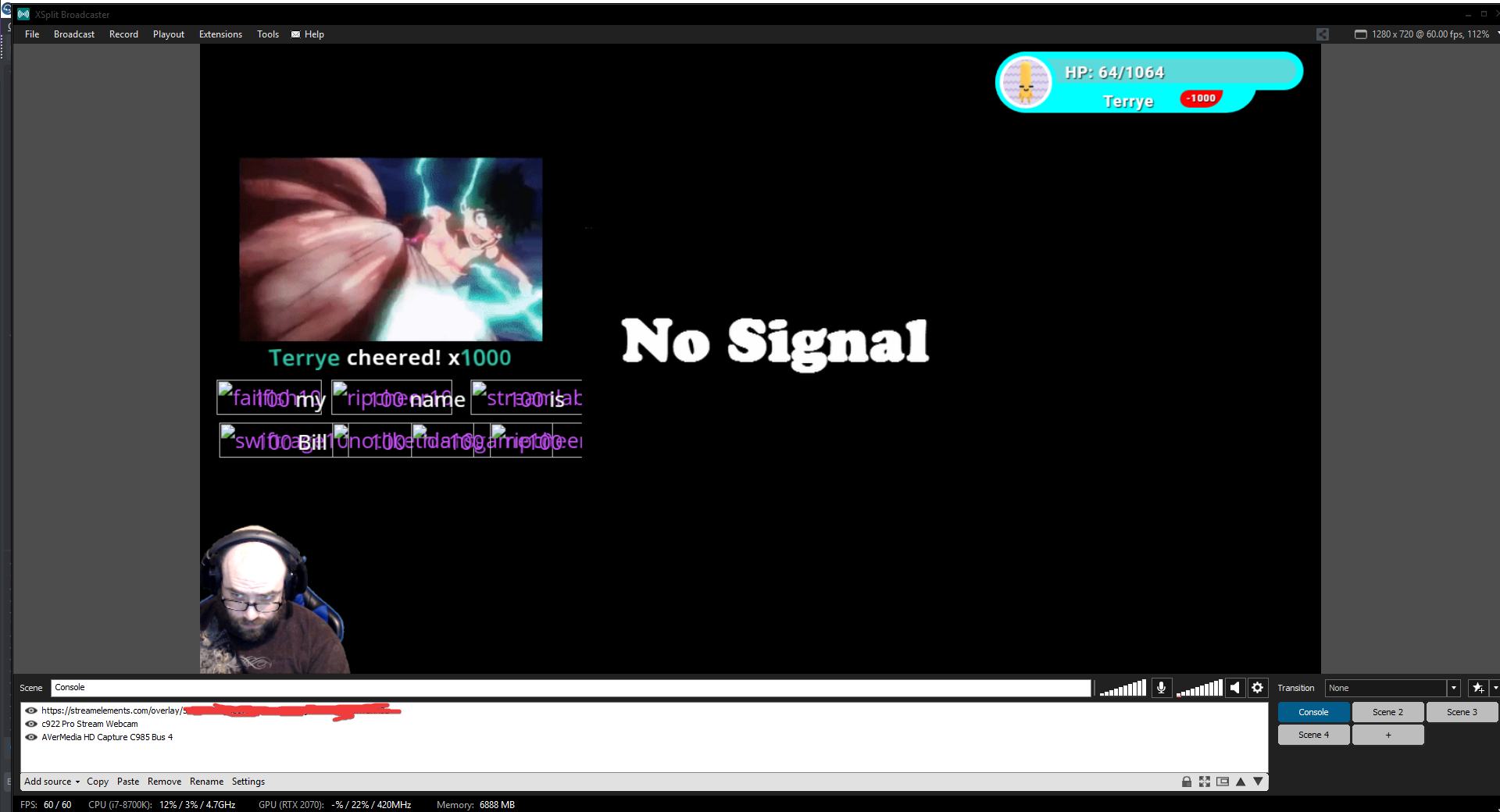
btw the cheermotes do work in obs. so now im super confused
what difference would there be between obs and xsplit for the images not to show up?
every single other thing works
torpid estuary
OBS and xsplit are two completely different programs. what images? the cheermotes? they show up in your xsplit, but not in OBS?
torpid estuary
then you would need to contact xsplit support. i have never worked with xsplit and this seems to be a twitch/xsplit question, not really about SE.
 glass lion
Guys how do i find link for a giveaway in streamelements?
muted crown
well how are cheermotes delivered to the alertbox
if i know that i might be able to tell them whats happening
 gentle imp
@glass lion here https://streamelements.com/dashboard/giveaways
gentle imp
when you start a giveaway there will be a public page
torpid estuary
@muted crown wait, so your overlay alertbox is working in OBS but not xsplit? Sorry, I thought we were talking about chat
 glad mountain
i have that issue also on the waiting overlay
torpid estuary
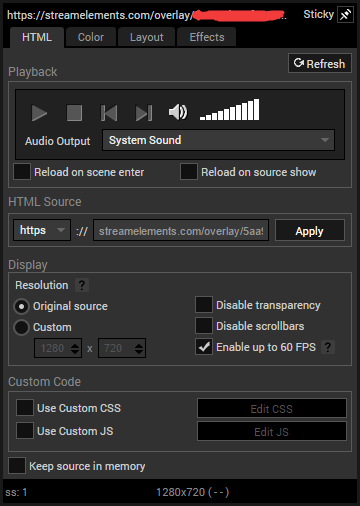
And it's broken for both obs and xsplit? @muted crown can you post a screenshot from the overlay editor?
muted crown
no its just broken in xsplit
muted crown
 oblique steeple
@sonic crane probably because Spotify isn't allowed to use for streams anyways.
muted crown
 torpid estuary
I dont know the first thing about xsplit sadly. If it works in the editor and obs, I would think the problem lies with xsplit.
 sonic crane
ah really? D: was wondering where people like imaqtpie etc source their music
oblique steeple
It's likely that they still use Spotify and don't care about it but it's actually against Spotifys ToS
muted crown
so would it be possible to disable cheermotes in the alertbox and maybe use static images?
gentle imp
you are using latest xsplit right, care to try using previous version see if it fixes the problem?
iirc last version had a problem with browser sources, I'm not up to date if that was sorted
muted crown
i can try ptr maybe
but its been an issue for 6 months at least according to SE forums
gentle imp
yeah xsplit problem is older than that
 peak plank
I'm french
gentle imp
so if you can pls try downgrading to previous
twin sentinel
#🇫🇷︱français
muted crown
doesnt look like i can get old versions, plus i wouldnt be able to login. also the ptr version is still broken
 light basin
Hey, just wanted to ask if hosting is working properly for the alert box, my hosts of 1 viewers or 0 viewers used to work, but they havent these past 2 days.
muted crown
is there a way to test my sound alerts?
like the ones in my store. not the ones in my alertbox
 swift shard
My donations arent showing up in chat?
(got no overlays,but they should still show up with hosts etc)
 nocturne pelicanBOT
@light basin Due to recent changes to Twitch API, we have filtered out hosts and will only show these ones on your activity feed:
- All manual host events (0 hosts included and if filter set to 0)
- All auto host events with at least 1 viewer
twin sentinel
@muted crown I think you can just redeem them yourself and see the alert in the overlay Editor and OBS.
swift shard
yeah,thats fine,but donations arent showing
twin sentinel
@swift shard Do you have the module chat alerts enabled and also the donation message set up and enabled? Are the donations in your activity feed?
swift shard
@twin sentinel yes to all
 drowsy raptor
Can I make my alert box settings sync to my other overlays?
light basin
They are manual hosts and the filter is set to 0. They're not showing up as chat alerts or in the alert box
twin sentinel
@drowsy raptor What to you mean sync to yoru other overlays. You can copy the alertbox to another overlay.
swift shard
@light basin has to be atlease1
drowsy raptor
oh you can do that? didnt know that, thanks
twin sentinel
@swift shard For the follow the message from the chat alert module seems to be fine. I assume they are fine for the donations gone through our tip link as well.
 tight harness
I'm not seeing any issues with your chat alert settings either
swift shard
yh i saw that,appreciate it lol,and ok thanks,
is it ok to screenshot my settings and put it in here?
to just see if its ok??
tight harness
I'm logged into your account currently looking at your settings
swift shard
you can do that 00
twin sentinel
yes. he's staff. 😄
swift shard
ooh 😂
sorry
but yeah,hosts/follows/subs show up, but had a few donmos last night and only found out cause my paypal came up in my phone
light basin
I tried "catching" these 0 hosts as well where I created special variations in my alertbox and chat alerts. Again, it used to work, these past 3 days it hasn't.
twin sentinel
Twitch sends us a lot of host notifications at onces and majority of them are 0 viewer hosts, so either we might filter ones by accident and think they are automatic ones, or we just don't receive it due to the amount of host events which might have not been send from twitch.
 white lark
Why are all BTTV Global and Channel Emotes not working at all in my Streamelements Chat? Weird.
 tacit moat
Hi dear friend I have an issue with streamelements media share
I have the overlay working fine the media sharing working fine, the problem when I close the navigator (Chrome) the media share stops working
and this is a huge problem for me
 candid hearth
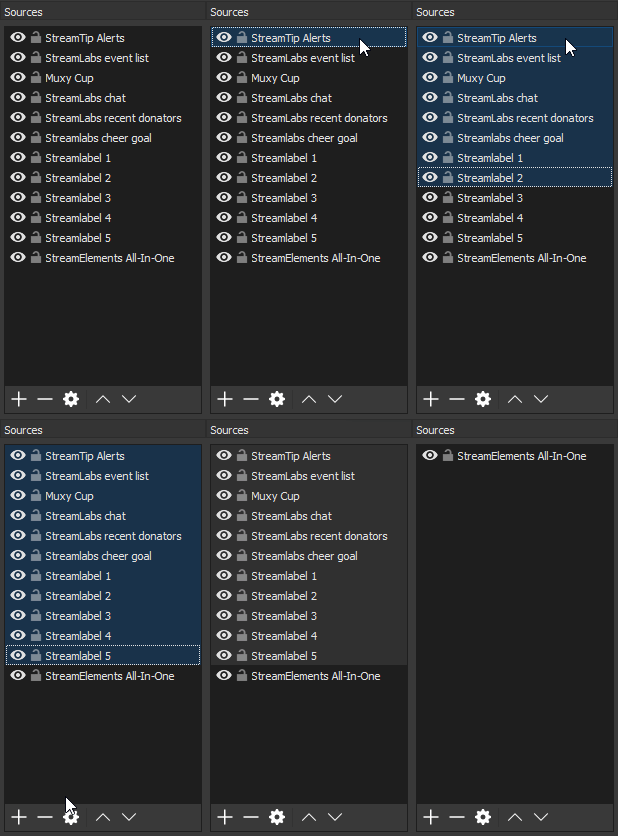
i'm not sure if this should go here or in #helpdesk-selive but i'm having issues with my alerts showing up on stream. i get the sound for the alert but no graphic.
here's what it looks like in obs (sources)
 wanton mango
@tacit moat I believe for media share to work you have to have the tab open :/ or use ground control
tacit moat
@wanton mango thank you i got it, but if I leave the tab open I will here the music twice
and It's annoying
twin sentinel
You can mute the editor.
tacit moat
@twin sentinel when i mute the editor I get no sound of the music on my stream
and I have another problem, my widgets show stats of other people , XD
wanton mango
Maybe mute the tab/site itself? If you right click the tab you can just mute the site (Chrome) or the tab itself (Firefox)
twin sentinel
@white lark Let's move to #helpdesk-selive
tacit moat
I just had to mute the editor, I didn't understand @twin sentinel message, I muted the editor
but I still have my widgets showing someone else stats
twin sentinel
What widget exactly? What do you mean someone elses stats?
@candid hearth Are the alerts working in the overlay editor correctly? Is this for all types of alerts? Try to clear the browser source cache in OBS Studio.
tacit moat
last subscriber last follower last tipper
I have two scenes with the same exact copy pasted widgets
on my primary scene I have someone's else stats
on my in game scene the widgets are working correctly
twin sentinel
Is this in the overlay editor different or in OBS?
tacit moat
obs
twin sentinel
Try to clear the browser source caches.
tacit moat
ok 😉
candid hearth
ok i think i did it. how do i preview them? @twin sentinel
tacit moat
thank you @twin sentinel
nocturne pelicanBOT
@candid hearth To test/emulate alerts, hover over the blue bell at the bottom of the overlay editor. From here you can select the type of event and the amount to test.
tacit moat
@twin sentinel are you here brother ?
I see the problem but i dont know how to fix it, the mlusic is playing twice because the media share widget was playing on two scenes
how to fix that ?
nocturne pelicanBOT
@tacit moat Make sure to :ballot_box_with_check: “Shutdown source when not visible” for all browser sources (all OBS scenes). If using studio mode, uncheck “Swap Preview/Output scenes After Transitioning.” Also keep in mind that sound can play from any overlay loaded in the browser (editor or launched). https://i.imgur.com/FegZJQS.png https://i.imgur.com/yY0wcFl.png

 tacit moat
OMG i'm an idiot lol
true
I unchecked it when i was doing some test and I forgot to check it back
lol
 unreal heart
Hi, for some reason in custom overlays, it's not allowing me to upload my images.. Any suggestions?
candid hearth
ok so i just decided to start over..
when i am adding a source, what should i choose for the alerts?
in obs
twin sentinel
@unreal heart what Browser are you using?
unreal heart
Edge
twin sentinel
Try chrome please.
unreal heart
Alright
nocturne pelicanBOT
@candid hearth To add your overlays to OBS, add a new browser source in your scene. Paste your overlay URL in the browser source properties, set the dimensions to 1920x1080 (unless you changed them on the website), and :ballot_box_with_check: “Shutdown source when not visible” https://youtu.be/KDvLynUqXI4
 viscid osprey
Is there a “starting soon” timer I can use?
twin sentinel
Do you want to have it in an overlay or as a command?
viscid osprey
Who do u mean?
 kind epoch
My hype cup is still empty despite a whole week's off activity to fill it up slightly. OBS still indicates that the jar is empty even though i have a 60% preload of tokens in the jar. Any ideas why the jar isn't filling up in obs would be appreciated.
twin sentinel
Where do you want the timer to be displayed? In your overlay or when someone types a command in chat, as a chat message.
viscid osprey
Just on screen
Counting down and when it hits 0 I start the stream
on my starting soon screen
twin sentinel
There is a widget called Countdown you can use.
viscid osprey
Does it auto start and stop when you go to that scene? And reset
twin sentinel
If you have set the source to "shutdown when not visible", yes.
viscid osprey
then I switch to the scene, and it begins? And if I switch off and back, it’ll reset
twin sentinel
yes.
viscid osprey
Thank you, cool I’ll look into it
Is it possible to have a music track synced up? Like start the timer with 5 minutes and at 2, it changes? Or I could mix my own track and time it right.
twin sentinel
I think you would have to do that in the background yourself.
viscid osprey
OR is there a way to have the timer onscreen with a music file, have the scene up, then hit a button to trigger the timer/music?
Or is it all auto activated upon going to that scene
twin sentinel
I think you can't connect the timer to music. The timer starts when you activate the scene.
viscid osprey
Is there a way to manually start the timer and music? Like have my starting soon screen with the timer stopped at 5 min
Then start it as well as the music file
Unless I had 2 starting soon screens. One pre countdown, one post
twin sentinel
I think you cannot connect the timer to music.
viscid osprey
can I start the file and timer at the same time?
just leave them not started on my scene
 solemn arch
Quick question, would the !newvid command in #command-share work for other platforms or is it only a SE bot api command?
twin sentinel
The command can be added as it is described in the channel just to SE I think.
@viscid osprey Afaik you cannot sync timer and music automatically. So you would have to start and sync them up yourself.
viscid osprey
what if I want to have the screen sit at the 5 minute timer, and start the timer myself?
it complicates it adding a music track to start too. Unless I had 2 starting soon acreens.
Screens
twin sentinel
I think you can hide and activate the scene and the timer starts. You can also make an own overlay just for the timer, to just refrehs the timer and not the background picture I think.
viscid osprey
I would just need to sync them up myself
 cyan ivy
How do i set up the donation on my stream?
twin sentinel
I recommend watching this video: https://www.youtube.com/watch?v=eLzxRkq7tJo
cyan ivy
okay but i dont even have that first page he is using on my twitch or anywhere
twin sentinel
 wooden basalt
I have the Elgato HD60, and I have the video Capture Device set up, but it just perpetually has the Wait one moment picture up.
Am I going to have to switch to streamlabs?
nocturne pelicanBOT
@wooden basalt For the best OBS support, please join their Official Discord @ discord.gg/obsproject
wooden basalt
Why did I join this discord if there was another one? I don't want to be in both, so...
 strong kernel
This Discord is specifically for StreamElements issues. What you're experiencing is an OBS Studio issue.
While some people here may have experience with getting capture cards working in general, you'll usually have better luck over there.
 abstract anchor
hey is there a way I can get the song I'm playing on spotify to show up in my overlay through SE?
strong kernel
No, Spotify has closed their API to that kind of thing and it's against their TOS.
abstract anchor
oh, I thought they only changed it so that you can't do song requests
strong kernel
Nope. Personal use only.
viscid osprey
Is there a way to up donation security? I thought I heard of it. Like, don’t accept donations from a blacklisted donor, have a verified email, be a follower for x amount of time , etc
abstract anchor
ah okay, so rn I'm using muxy to do it... does that mean they're breaking TOS then?
 autumn parrot
Hello, I created a MediaRequest Overlay and got it working in the test. I just need to make it work with the command !request, I tried to enable it but it said it depends on the module setting and theres not a mediarequest module I am able to see rn
strong kernel
We grant you limited, non-exclusive, revocable permission to make use of the Spotify Service, and limited, non-exclusive, revocable permission to make personal, non-commercial use of the Content (collectively, “Access”).
The Spotify software applications and the Content are not sold or transferred to you, and Spotify and its licensors retain ownership of all copies of the Spotify software applications and Content even after installation on your personal computers, mobile handsets, tablets, wearable devices, speakers, and/or other devices (“Devices”).
In short: Yes.
abstract anchor
ah okay, thanks @strong kernel
strong kernel
And in their user guidelines:
`The following is not permitted for any reason whatsoever:
copying, redistributing, reproducing, “ripping,” recording, transferring, performing or displaying to the public, broadcasting, or making available to the public any part of the Spotify Service or the Content, or otherwise making any use of the Spotify Service or the Content which is not expressly permitted under the Agreements or applicable law or which otherwise infringes the intellectual property rights (such as copyright) in the Spotify Service or the Content or any part of it;`
@autumn parrot "Module" in this case refers to the "Viewer requests" toggle in the top left of the Media request page.
abstract anchor
I doubt they're going to go after a twitch streamer with an average of 5 viewers for playing songs. oh well, I'll take my chances.
Thanks again
strong kernel
Either way, it's why you won't find a built in integration in either our platform or Streamlabs. If others want to put themselves at legal risk, it's not our issue.
viscid osprey
Anyone know about the donation security mentioned above?
 weak needle
@viscid osprey You can require that your tippers log in before they can make a donation. You can additionally force their tipping username to match their account username. You can find these settings under your tipping settings under page settings.
autumn parrot
@strong kernel So as long as I have that enabled, is there anything else I need to do for !request to work? The overlay is currently working
strong kernel
Well I'm a bit curious about you saying !request. The default is !songrequest or !sr. So unless you changed it, !request won't do anything.
autumn parrot
@strong kernel sorry that was off on my part lol but !sr should work now correct?
viscid osprey
Cool thank you
autumn parrot
@strong kernel Which bot do i need to mod for streamelements
weak needle
@viscid osprey My pleasure. If there's anything else don't hesitate, there's always someone here to answer questions.
strong kernel
StreamElements
cyan ivy
how would i start steaming on twitch
strong kernel
But more importantly:
kind epoch
Hello... Any help with the hype cup ? Also 2 subs that came through in the past week has not shown up on activity feed nor alerts. And my last sub on my last session of stream SHOWED up as normal. Any help on this would be appreciated as well.
abstract anchor
wait I just opened Ground control and it's saying my JWT token is invalid, and when I click on the "My Account" where it says you can find it under my account
nvm. found ity
it*
okay new problem, I put in my JWT token again and now I'm just getting a blank screen
 twin sentinel
Download the latest version of ground control here: https://streamelements.com/groundcontrol and log in using your twitch account and the chrome browser.
abstract anchor
should I uninstall the old one first?
twin sentinel
I don't think this is needed.
abstract anchor
okay
uhhh... I didn't even need to sign in, it just worked immediately... okay I guess haha
autumn parrot
@strong kernel Thanks man, last thing, in order to get it to scale correctly and not be offcenter how do i do so? im delcaring it as a browser source
i have it set to 1280x720 in OBS and in the overlay
overlay for media sharing
strong kernel
Is your canvas in OBS also 720p?
autumn parrot
currently yes
strong kernel
Ctrl+F is Fit to Canvas.
autumn parrot
in the overlay or oBS?
strong kernel
OBS.
 severe grotto
Hey, I am having issues with sounds coming through OBS the past 2 days. It goes off on the overlay on the website, just not on my OBS. Can someone help?
strong kernel
Hey @severe grotto don't forget you have the #dreamteam channel for support. Let's move there.
severe grotto
k
 north flare
for @severe grotto her sounds are not coming through OBS.. if she goes into her theme editor on the website.. she has to mute and unmute in order to hear any sounds
autumn parrot
@strong kernel Thanks! I got it to scale correctly and Media Sharing is working now!
 regal heron
Is there a way to prevent specific users from using chat commands?
Like even below the level of everyone
strong kernel
No.
regal heron
darn.
 neon gull
How do I set up song requests?
strong kernel

StreamElements Media request enables playing songs and videos in your stream. It's an upgrade of StreamElements Song request and Media share features. ----- ...
neon gull
Thanks
regal heron
So my current issue that I'm having to work around is that the while the streamelements chatbot normally ignores it's own messages- ie: if it says something that would trigger a command, it doesn't respond to itself-- this is no longer true if the bot is using a different name via Ground Control. Can this be fixed?
strong kernel
No, this is a known issue. Don't include keywords in the responses you write.
regal heron
rip
okay
yeah that's what I'm fixing
that's why I thought maybe if it were possible to specify users who aren't allowed to use commands it could be fixed
autumn parrot
Hey I apologize, I had media share working perfectly. Loved the darude as well lol Now its saying I dont have any active widgets when i try to queue a video?
strong kernel
Are you trying to play the tutorial video?
autumn parrot
Ohh that makes sense yeah i was just hitting play
strong kernel
Skip it.
north flare
Thanks guys for the help earlier. Everything is great!
@strong kernel and @ebon forum
strong kernel

 ebon forum
 ruby venture
Not sure who to ping in here but I need help w/ SE.Pay. Is this where I come to?? Sorry if not
nocturne pelicanBOT
@ruby venture Welcome to the support channel! Please let us know how we can assist you today and a member of the support staff will be with you as soon as possible.
kind epoch
Is there a notification for chatters to indicate if song/media request is on or off when they request a song and media request is off?
muted crown
how do i change the base resolution of my editor box? its at 1920x1080 and i need it at 1280x720
oblique steeple
@muted crown
strong kernel
@muted crown You don't need it at 720p, adding it at 1080p in OBS and pressing Ctrl+F will fit it to your canvas, since it's still 16:9.
strong kernel
⏫
muted crown
i understand what you are saying. but moving and positioning with it at 1080p is annoying. i know it sounds like im being annoying and im sorry but i just want to change it
strong kernel
You're missing the giant screenshot that was taken for you.
strong kernel

muted crown
thank you lol
 vague reef
Hey guys, planning on doing a subathon tomorrow, is there a widget or something that somebody has developed that allows me to have the timer automated? The only one i found uses streamlabs 😦
strong kernel
Look in #widget-share
vague reef
thanks
 slate anvil
Hi, i'm setting up streamelements all in one overlay and have done everything in the tutorial... Can I now delete everything in the scene from my pre existing settings and it will all be copied to streamelements? The video is VERY unclear.
This is for streamlabs obs btw
 jade remnant
What are you trying to do as this is very unclear. Nothing is copied to stream elements as the overlays are cloud based. If you have imported things from sl then you will still need items in you scenes. And what is for streamlabs?
slate anvil
im trying to do this
jade remnant
So are all of your alerts and labels in one overlay?
slate anvil
ive just now started using streamelements, all my alerts etc are setup in streamlabs, i read you could put them all in one overlay using streamelements so obs runs smoother. thats what im trying to do.
you see how its animated? https://cdn-images-1.medium.com/max/800/1*VgVzb5FhrjWMfiMmzCbZbQ.gif

from here btw https://support.streamelements.com/hc/en-us/articles/115002462772-8-OBS-tips-to-make-your-stream-run-smoothly

StreamElements
In an ideal world, we would all be using a brand new NVIDIA GeForce 1080 Ti graphics card with an Intel X-Series processor.
But reality is that technology gets old fast, and almost every streame...
nocturne pelicanBOT
@shut lance Welcome to the support channel! Please let us know how we can assist you today and a member of the support staff will be with you as soon as possible.
slate anvil
I give up, Im not even sure if what im trying to do is beneficial and all the videos on it are non explanatory. Thanks anyway, sorry to waste your time
 cyan yoke
is there anyway to unlink ur youtube account from stream elements?
jade remnant
@slate anvil the videos are step by step. You didn't answer my question above. But have a nice day
slate anvil
Which question?
"So are all of your alerts and labels in one overlay?" no, this is what im trying to do
"And what is for streamlabs?" my software
jade remnant
@cyan yoke I think (I'm not sure) one of the admin will need to speak with you about account details
@slate anvil have you imported your overlays and/or have you made an overlay in SE? Also it doesn't make sense you saying you want to use SE but it's for SL...
slate anvil
im just trying to do what that webpage said
cyan yoke
Ok thanks. How do I get in contact with one of the admins?
slate anvil
its fine, its probably a lot more complicated than its made out to be
jade remnant
@cyan yoke they will see it here, but I will also ask in out channel for you
cyan yoke
ok thanks
 weak grove
hey all how can we stop seeing your support messages on our twitch chat?
strong kernel
Edit or disable the Twitter module in the Modules section.
 coarse sphinx
Hi All, day 3, Ground Control not working @strong kernel ❤
strong kernel
Please don't keep coming back and pinging, I'm not a dev, and annoying me isn't going to make anything happen faster.
When it's fixed, you'll see an update.
weak needle
@slate anvil Hey buddy, if I understand correctly, and please correct me if I'm wrong. But you are currently a streamlabs user using StreamlabsOBS and you would like to switch to StreamElements because you could reduce your cpu usage by moving from a multi-source setup to a single source setup (not having all of those sources anymore). Did I understand correctly?
 narrow blaze
Hello guys. How would I let my group on discord know I am streaming live on twitch?
strong kernel
We don't have a Discord bot yet, unfortunately.
slate anvil
@weak needle correct
weak needle
@narrow blaze Have you tried enabling Streamer mode within discord settings already? It lets your discord community know you are currently live streaming. Additionally, while we do not have a bot ourselves for this, you can certainly look into a bot such a Mee6 which can ping your discord community for you letting them know you are live followed by a message and your stream link.
slate anvil
but i still want it to be usable as is, is that possible? ive tried importing into streamelements but it doesn't let me. I'm assuming I will lose functionality in obs too so maybe its not a great solution for me
narrow blaze
@weak needle oh I see. Thank you I will do it!
weak needle
@slate anvil By use it as is, you mean you want to keep using SLobs and just use us to go from a whole bunch of messy sources to one single browser url? I really want to make sure I understand your whole situation 😃
slate anvil
yes, wait... is streamelements its own broadcast software?
I'm honestly so confused and don't really know what I want to do, but I appreciate the effort to help me
weak needle
@slate anvil Not exclusively. We are able to do it all but you can use the tools that you wish to use. To answer your question, yes, you should be able to use our cloud-based overlays to remove the clutter from your sources without having to stop using SLobs. Should you stop using SLobs and move completely over to us? I would definitely recommend that and I don't say that because I'm part of the staff. Our tools really are better than the others.
slate anvil
Maybe another time. I don't want to go through the whole thing to set up everything again. Cheers
weak needle
^_^ Sounds good buddy. Feel free to ping me if you ever need any help with setting up with us and I'll be more than happy to assist you to the best of my abilities.
 viscid tapir
okay so im having some issues with my media request
im trying to change the backup playlist but for the life of me it wont change
strong kernel
Are you getting an error?
strong kernel
What playlist are you trying to put in?
viscid tapir

YouTube
Twitter: @Katealyst Thanks for listening to my playlist! If you would like to see a song added email Katealystgaming@gmail.com with the subject line 'playlist'
 runic bridge
is there a way for the activity feed to display one notif per batch of gifted sub (when gifting multiple subs) instead of individual feed per sub gifts?
strong kernel
You can put it to 0.1 if you want.
viscid tapir
okay thank yooou
strong kernel
@runic bridge Activity feed will always show all gifts individually, just alerts can be consolidated into a single alert.
runic bridge
@strong kernel Thanks!
 mystic basalt
hi, was wondering if there is a way to add thumbnails to the overlay profiles in the "my overlays" page
strong kernel
There is not. It takes the thumbnail of the game you designate it as being for.
 jade gull
I am having an issue where the text and audio play on my alerts, but the video does not. Anyone seen this before or know a fix?
mystic basalt
ah ok thank you
strong kernel
@jade gull You copied the custom CSS from Muxy. Their system isn't identical with ours. You need to fix the code.
jade gull
Ok, ill look into that. Thank you 😃
 torpid sentinel
Hi pals! I’m trying to make a command that draws a random line from a pastebin raw file- I was able to do this on a different bot but wouldn’t have a clue how to do it on streamelements. Kind of like a quote bot but with preset responses in my pastebin file, seperate by a comma between variables
hope that makes sense!
strong kernel
A community member made an API that might help. https://thefyrewire.com/docs/api
torpid sentinel
Very helpful! One question. In the code below, to make the response random and not just one point from the list, what would I need to edit?
i mostly work with another bot so trying to learn 😃
Return=random ??
I’m just trying to figure out exactly how to code this into the bot. Been struggling for hours, lol
strong kernel
 true echo
Hey guys is there anyway to do a giveaway and add all subs even if there offline?
strong kernel
No, you can't add people to a giveaway yourself.
true echo
ok ty
oh i also have another question is there a way to put a website in the overlay editor kinda a dumb question tbh
strong kernel
You might be able to accomplish something with some custom coding but generally I wouldn't recommend it.
true echo
ok thanks for answering my questions fast 😃
true echo
Hey is there a way to interact aka like how obs has a interact for browser sources can you do that with overlay editor?
strong kernel
...what?
true echo
Like when you right click on the browser source in obs it says interact is there a way to do that with the overlay editor
 mint solstice
ñ
true echo
Ok ty
 coral zealot
Anyone know if there’s an issue with the Ground Control desktop app for Apple? I can’t see anything for my channel. Have tried deleting and reinstalling app and changing token but nothing has worked.
strong kernel
It's a known issue.
coral zealot
Any work arounds?
strong kernel
No.
 obsidian eagle
I’m trying to use the media request on my obs live for twitch and when I was setting it up I must have accidentally missed the step where you add the media request overlay. How do I add that now that I can’t do the setup again?
 zenith widget
Answered in #helpdesk-selive ⤴
 fleet pond
This has probably been answered before but any fixes for extremely inconsistent bitrate? It fluctuates with extreme values but my internet stays completely fine
zenith widget
Are you using OBS.Live?
fleet pond
Yes
zenith widget
Lets move to #helpdesk-selive please
fleet pond
Ah okay, sorry, I just joined this discord
 slate remnant
I just wanna know about my se.pay lol
slate remnant
All good 😃
zenith widget
Let me slide into those 
 high basin
Is there a known issue with ground control not showing anything? Was working two days ago now it doesn’t show anything at all. Activity feed still exists on the streamelements website but I would like to be able to run ground control
zenith widget
Can you show me a screenshot?
Most likely you are using an old version of GC and I want to make sure. @high basin
high basin
V 1.3.2 is what it says. Screenshot coming in a sec. I run an older version of OSX, 10.9.5 specifically
zenith widget
Aah. Yeah our latest version of GC is not supported on MacOS
high basin
Is there any reason why it was working not too long ago but now it won’t? I’m assuming that means the newest version just came out
zenith widget
The old GC had and old version of the Activity feed we no longer support and its not being updated anymore.
I will have to poke our devs about the mac version of the newer GC version, as I assume more and more requests will pop for it as time goes on.
I think you are the 2nd person so far asking about GC that uses Mac.
high basin
I’m sure not many of us are out here using Mac, and honestly since I started streaming I’ve been more and more ready to switch to PC. I’ll definitely be on the lookout for any workable updates for Mac though!
zenith widget
I just poked, not sure on when i will receive an answer.
For now I would advise to popout the Actitivity feed from the dashboard as a workaround.
high basin
Sounds like a plan - thank you!
 rose lichen
@zenith widget 😄
zenith widget

rose lichen

 deep mulch
can anyone help me? im not getting any hosting alerts, all my other alerts are working, and yes i have the hosting parameters set to 0 and even tried using a different alert box and still nothing
nocturne pelicanBOT
@deep mulch Due to recent changes to Twitch API, we have filtered out hosts and will only show these ones on your activity feed:
- All manual host events (0 hosts included and if filter set to 0)
- All auto host events with at least 1 viewer
deep mulch
^ that is false
zenith widget
Why do you believe its false?
deep mulch
have my filter set to 0 and still no host alerts.
zenith widget
So it seems we might have changed it manual hosts to also have a minimum of 1 viewer
I'll report to the devs and see if I can get this verified
deep mulch
that makes sense.
zenith widget
Don't expect an answer soon though.
If I do get a confirmation the bot response for hosts will be updated.
deep mulch
ok
 frigid gazelle
how do i change my bot's name?
nocturne pelicanBOT
@frigid gazelle Custom bot name requirements
- StreamElements bot modded and in chat
- Active overlay with alerts
- StreamElements tipping page in the panels below the stream (!panels)
- Create a twitch account for the name you want to use
- Ground Control app must be running
Steps to enable custom name
- Sign in to https://twitch.tv with the bot account
- Install and run Ground Control (!gc for download)
- Visit https://twitchapps.com/tmi/ and generate an oAUTH token
- Copy/paste everything in the box to Ground Control oAuth settings and enter the name for the bot account
- Restart Ground Control (custom name may take a few minutes to take effect)
Mac does not currently support renaming the bot.
 grave python
@atomic hollow @tawny pivot thanks for being the best 
zenith widget
Are you seeing a white screen with the cogwheel settings?
 faint musk
nocturne pelicanBOT
faint musk
nocturne pelicanBOT
@faint musk Our Desktop App Ground Control: https://streamelements.com/groundcontrol
zenith widget
Update to our newest version from there ⤴
 muted crown
i have kappagen enabled with explosion but nothing pops up when i trigger an event. what could be happening?
muted crown
got it thanks
ok so one more thing and i think i got it figured out
i duped one of the overlays with intentions of editing it for a different scene
but they have the same URL
zenith widget
Are you sure about that? 
tight harness
They have very similar URLs, but not the same
cyan iron
Hey.... spent forever putting together a media request queue to play music in the background... All the music has disappeared today.. any way to get the queue back?
zenith widget
What is your username?
zenith widget
Streamer mode
cyan iron
What’s up?
zenith widget
i can't see your twitcvh name because of streamer mode
anyway, do you have your playlist link?
cyan iron
Huh.. how can I change that? Where could I find the playlist link?
 cyan iron
I added them all one by one manually by link into the queue, did I handle that wrong? Didn’t know I had to have a playlist
zenith widget
Yes, thats the wrong way.
cyan iron
Sorry no
zenith widget
thats the actual queue that gets emptied when the song plays
cyan iron
Dang
Well now I know
So I can just take the link of a playlist and throw it in
Makes enough sense
So that queue is viewers only
zenith widget
I would strongly suggest to take a look at this video guide: https://www.youtube.com/watch?v=17eUkoZ6eIs&list=PLCDDKlFdScbEwdx5AntcQIS1InkFJwHtv&index=9&t=0s
cyan iron
Thank you for that
muted crown
if i insert an image into one of the overlays, should that show up in OBS? or is it more for a canvas to work with?
twin sentinel
What browser are you using? Have you saved the overlay in the overlay editor?
twin sentinel
Refresh the browser source cache in OBS.
muted crown
i did that as well
twin sentinel
What OBS Studio version are you on?
twin sentinel
Can you send me the overlay url via PM please? Or can you give me editor access to your account, so I can take a look myself?
muted crown
i figured it out
twin sentinel
What was the issue?
muted crown
i was using the same browser source for both overlays in OBS
so anytime i changed one it changed the other and back and forth
sorry im new to OBS lol it wasnt as complicated in XSplit
 lament blade
hey there, i just changed my twitch name from west6n to west8n and now stream elements isn't replying..
any way i can fix?
jade remnant
on the SE dashbaord, part the bot from your channel, log out, log back in then join the bot
do you also have the SE widget on your twitch profile that keeps track of your chatstats?
jade remnant
ok, i will pass this on as it will need to be updated also
tight harness
Chatstats fixed 👍
 deft shard
 twilit fossil
hi
how to find your stream key?
 elder sorrel
On Twitch's website.
kind epoch
What is the command for giving points?
elder sorrel
The power of google @twilit fossil https://www.twitch.tv/broadcast/dashboard/streamkey
 twilit fossil
thanks dude
have a nice day 😃 @elder sorrel
elder sorrel
!give points (enter username here) (enter number amount here)
@kind epoch
So it'll be like !givepoints american_ 500
kind epoch
Rgr Gotcha
 azure jasper
I have a media request on my overlay but when I click show on stream it says its not in my active overlay
elder sorrel
Did you add the Media Share widget to your overlay?
azure jasper
Yes
elder sorrel
Do you have Media Request open in multiple areas? Such as Ground Control / Web Browser?
azure jasper
Only place I have it open is in OBS.Live
kind epoch
Is it a moderator role as well? the givepoints command? Has the !bonus command been removed?
elder sorrel
!bonus is still available. That is an alias for !addpoints
Going to ask internally about the Media Request Show on Stream issue. As I haven't used it the Show on Stream option as much.
elder sorrel
@azure jasper That occurs when you're not playing a valid video? The tutorial video would not be shown.
 pine hemlock
Hey, quick question, are the streamers the only one who can reset the goals located in the widget data? I'm set as editor for a channel and when I attempt to reset the tip goal progress I keep getting an error. gif showing; https://i.gyazo.com/e6a299a72ec1e45f70fc61fe2b16fa05.mp4
azure jasper
Works thank you @elder sorrel
pine hemlock
Yep!
elder sorrel
Try using Incognito mode & see if it works.
 soft iron
Hello, I have an issue. I've been using SLOBS for months now and today decided to use OBS.Live and sadly even though I'm using the exact video and output settings on SLOBS, OBS.Live just keeps dropping frames and I'm unable to keep them frames at 60fps
They just keep dropping to 30 and less
 gentle yoke
Hi everyone, I was in here last week when my follower notifications weren't working, I'm not to sure if they still work but my host notifications doesn't work and also no notification coming up in my chat even though they are enabled. Anyone no how to solve this?
nocturne pelicanBOT
@soft iron Can you please provide a log from your last stream. In OBS go to Help > Log Files > Upload Last Log File. Once this is complete, please provide the link to the log file.
@gentle yoke Due to recent changes to Twitch API, we have filtered out hosts and will only show these ones on your activity feed:
- All manual host events (0 hosts included and if filter set to 0)
- All auto host events with at least 1 viewer
gentle yoke
@jade remnant I meant like when you get a follower stream elements says thank you for the follow I've got that set to do it for the host but nothing
@nocturne pelican do does that mean because they are offline and dont have any viewers it want come up?
soft iron
@nocturne pelican I don't feel comfortable posting the link out in the open, can I dm you instead?
 dim ember
My alert box isn't working on twitch. I recently added a youtube account to streamelements and the alerts on twitch stopped working. I tried making a new alert box as well and it doesn't work either.
 weary geode
Does anyone know if its possible to make a custom bot command that sends a URL request to some address and returns the results?
jade remnant
@dim ember when you are on your twitch account in SE, if you emulate something like a follow in the editor does it show up in obs?
@weary geode i dont think so, best place to ask will be in #dev-chat
weary geode
thx
elder sorrel
@pine hemlock Can you try again & have the console open please?
F12 ->console tab
jade remnant
@soft iron you can dm me for the log
soft iron
Aight, will do
pine hemlock
@elder sorrel So I actually emailed as well and had someone change it for me- I guess the issue was editors can't do it
dim ember
@jade remnant I tried emulating every event and nothing shows up in the browser or OBS
elder sorrel
Editors should be able to. As I was able to & someone else was able too 
pine hemlock
Yeah haha that’s my ultimate assumption since I couldn’t do it but I guess whoever did, did it as owner
tight harness
@pine hemlock I was the one who edited it for you, but we tested it and editors should be able to edit it, so that's why we're asking if you're getting any errors in your browser console on your side
pine hemlock
I’ll check now
jade remnant
@dim ember have you changed your twitch name when this stopped working? if not, the next step would be to make sure the correct url's are in the obs sources (even if you copy and paste to double check)
pine hemlock
@elder sorrel @tight harness https://gyazo.com/5fb159f3830fa2c17db7dddf5f8e3d83

2 yep

dim ember
@jade remnant I just tried it, the link was the same but I pasted it in anyway, nothing works still
 boreal marlin
can anyone tell me where to find the message so I can edit the thank you when someone gives me Bits
jade remnant
@dim ember im going to be heading home soon, could you pm me a link to one of your overlays, i will take a look when im home
 wise fractal
Does anyone know why the watchtime says 0 seconds?
boreal marlin
does anyone know where I can edit the message for bits in the dashboard
tight harness
@wise fractal Loyalty disabled in Loyalty Settings?
elder sorrel
The message in chat or on your Overlay @boreal marlin ?
boreal marlin
@elder sorrel in chat
elder sorrel
Go to the Streamelements dashboard -> bottom left click 'Modules' -> Locate Chat Module -> Edit Cheers
boreal marlin
in the chair alert section is there a way to get a argument for a total of bits
lament blade
I can't import stuff from streamlabs to streamelements it says "An error occurred" and if someone could explain how to change name of a streamelements bot, thanks.
torpid estuary
did you make sure to be logged in in both SL and SE when you tried to import? @lament blade
about the bot rename, are you using OBS.live or ground control?
lament blade
@torpid estuary I have both of them OBS.live and ground control, and yeah I'm logged in SL and SE
torpid estuary
so can you walk me thru the steps of what you did?
 fluid flower
guys why is no one replying in #helpdesk-youtube
boreal marlin
I didn't know you could change the bot name but someone send me a link on a article I can follow
fluid flower
why is no one replying in #helpdesk-youtube i need urgent help
torpid estuary
@fluid flower be patient
nocturne pelicanBOT
@boreal marlin Custom bot name requirements
- StreamElements bot modded and in chat
- Active overlay with alerts
- StreamElements tipping page in the panels below the stream (!panels)
- Create a twitch account for the name you want to use
- Ground Control app must be running
Steps to enable custom name
- Sign in to https://twitch.tv with the bot account
- Install and run Ground Control (!gc for download)
- Visit https://twitchapps.com/tmi/ and generate an oAUTH token
- Copy/paste everything in the box to Ground Control oAuth settings and enter the name for the bot account
- Restart Ground Control (custom name may take a few minutes to take effect)
Mac does not currently support renaming the bot.
lament blade
@torpid estuary I don't care much about the bot, I only care for importing stuff from sl to se, here's what I did: Downloaded SE,download ground control then I went to Import found SL and downloaded that extension for SL I pressed import and it didn't worked it said an error occured also I made sure that I was logged in before I did that.It worked for moobot and other things it just didn't worked for SL
lament blade
@torpid estuary yeah, I'll make sure that alert from SL is not causing error
Yeah I used that link
boreal marlin
ty
torpid estuary
can you log out of SE and SL, close the browser and try again? and if the error happens, please press F12 and look at the log @lament blade
lament blade
Yeah, sure
torpid estuary
maybe open the console even before trying to import, so you can catch it if it happens
torpid estuary
yes, please
lament blade
I opened it
torpid estuary
so try to import and see if the error occurs, and if so, screenshot the error in the console
lament blade
torpid estuary
and you made sure to be logged in in both SL and SE again, right?
lament blade
I can screenshot you if you don't belive me
torpid estuary
then i will forward the screenshot to staff, as i am not sure why this is happening
no, i believe you, just making sure
thank you for the screenshot. i will ping you when staff responds!
lament blade
@torpid estuary Anyways thanks for trying
 vale girder
Hello. With the recent obs.live update a part of my dashboard disappeared (The one you change game, title etc.) Any quick fix?
Also, Ground control gives me an error when signing in "An error occurred, please try again or enter the JWT token manually."
Last time it worked when I switched browser, it didnt this time.
torpid estuary
@lament blade can you check if the import happened, even tho you got the error? i was told that rarely occurs
lament blade
@torpid estuary Ummm... how would I exactly do it?
torpid estuary
what did you import? overlays? look into "my overlays" on your SE account
lament blade
@torpid estuary Tips,Alerts
torpid estuary
the alertbox for example. click on "my overlays". is there anything there?
lament blade
torpid estuary
ok, thank you!
so, another question came up. you are logged into both and have both of the sites open in your tabs, correct?
lament blade
I had,I closed them before like 2 minutes or so
torpid estuary
alright, thank you
you could try deleting the extensions, clear cache, restart and then try again. if you have the time.
lament blade
I mean why not, anything might help.
Thanks for helping me, I'll make sure that I'm gonna say it here when it works.
torpid estuary
on your screenshot it looks like you have 2 extensions installed?
torpid estuary
alright! thanks for clearing that up!
lament blade
As I said moobot importing works really well, guess the SL is a problem here 
@torpid estuary Does cache includes dns cache?
@torpid estuary I just cleared cache,restartd,deleted extensions restarted and it didn't worked
Hope I could send you logs of error somehow
Anyways,thanks for trying guess I'll just pick some alerts from SE
torpid estuary
i talked to staff, one of them will ping you a bit later. thank you so much for your cooperation and your patience!
lament blade
They really don't have to.Just gonna stick with SE alerts,tips
torpid estuary
alright, i will tell them!
 restive oak
Anyone know why streamelements is not showing up in my twitch chat anymore? It used to be the Mod now its no where to be found
tight harness
@restive oak It is because you renamed yourself, click on Part Channel on the dashboard, click on Sign Out, sign back in and then click on Join Channel on the dashboard
restive oak
@tight harness I tried that and its still not showing
tight harness
Did you rename the bot with a custom name?
restive oak
I dont think so its still showing up custom bot name as StreamElements
tight harness
I parted the bot and rejoined it and it is responding
restive oak
thanks @tight harness
lament blade
What’s the best rate for your camera my camera system little bit fuzzy
I’m just using the laptop camera
lament blade
Can you install OBS plugins into streamelements?
jade remnant
streamelements is a plugin to obs. so yes you can
 chrome galleon
anyone know what happened to the streamelements "update information" tab for like changing game and updating stream information??
i just updated my streamelements and its gone
all i see is activity feed, and chat
elder sorrel
You'll have to ask StreamLabs how to.
This is StreamElements 
chrome galleon
yeah i know.. i said streamelements ?
elder sorrel
Oh that wasn't towards you 
chrome galleon
oh lul
elder sorrel
The other person deleted their post cause it was related to Streamlabs
chrome galleon
while ur here do u know how can i show what im talking about
it was under my chat on the right side
where i can change my game info and stream title
elder sorrel
Are you using OBS.Live?
chrome galleon
well im launching streamelements
so i guess yes
thats how i stream i launc streamelements > stream

under that chat page
there was another tab for updating stream info
elder sorrel
Yep. That's OBS.Studio with OBS.Live plugin  Click Streamelements -> There should be an option to select Activity Feed.
Activity Feed is needed so you can click the burger bars to be able to update your game + stream title.
chrome galleon

thats my activity feed
i cant update stram title/ game info with that
ahhh
i see but i never did it that way
@elder sorrel https://i.gyazo.com/97dde0c66503700a98b3b724a9f314cb.png

look this how it was before
elder sorrel
Ah. That's Twitch's option available to update.
Not from Streamelements. I haven't used that personally to locate that.
chrome galleon
it was always on my streamelements under chat until this new update PepeHands
 deft jasper
can someone help me with streamelements website
?
??????
please i have been asking for a day now
 wicked shale
so I just got a stream deck today and when I went to log out of streamelements in obs like the video said, it just gets stuck on logging back in and now I can not use OBS
if I click on connect with twitch in OBS now it just freezes and I need to force close it. running as admin
cedar lynx
@deft jasper what do you need help with on the site?
deft jasper
a streamer named dirtbag added me as a moderator on streamelements but i see that he added me but i cant see his streamelements commands or anything of his streamelements
cedar lynx
Did you switch to his profile using the user drop down?
deft jasper
how do i do that?
cedar lynx
I’m on mobile in bed so this is from memory: on the dashboard there is the place where your profile user name and image is. When you click it it becomes a drop down menu. Select the profile of your streamer.
deft jasper
how do i get it to show me online because right now it says i am offline?
elder sorrel
It shows offline cause you're not streaming right now(?)
 deft mirage
regal heron
deft mirage
regal heron
Hi guys, I have a single timer running every 15 minutes online and offline, I've messed with the settings a bit and it's not going off in chat. I ran a test command with the same response and it works fine, any ideas on how to fix?
I've checked to make sure more than enough chat lines have been around for well over an hour multiple times and the timer just refuses to go off
it's also marked as enabled, I've toggled the enable switch multiple times after waiting more than long enough
so I'm not sure what it is
 abstract ivy
Hello! Just trying to figure out if it is possible to disconnect my streamlabs data from streamelements. It seems by importing the streamlabs data, it has inflated my numbers incorrectly & it's making tax season incredibly difficult. Is it possible to disconnect & get purely stream elements numbers & data again?
 distant charm
Hello, is anyone familiar with ULTRAWIDE monitors and Streamelements OBS? I have been trying for days to get it to work and I cant.
 keen sail
I got a problem with Host notifications not showing on activity feed or stream...... I got the host viewer count requirement set on 0
 outer parcel
@keen sail
``Due to recent changes to Twitch API, we have filtered out hosts and will only show these ones on your activity feed:
- All manual host events (0 hosts included and if filter set to 0)
- All auto host events with at least 1 viewer``
Hope that helps
KeiZarToday at 4:27 AM So it seems we might have changed it manual hosts to also have a minimum of 1 viewer I'll report to the devs and see if I can get this verified
keen sail
oh, so it wont show at all if the host is 1 viewer or 0?
And there is no way to add that back?
 final tulip
are obs.live settings supposed to save if you reinstalled
outer parcel
@keen sail It sounds like at this time there isn't a way to add it back, KeiZar is going to report it to the dev team to verify that this was intended ( I assume ).
 errant veldt
Im having an issue with the media share. When I use "show on stream" so they can see the video , the audio plays twice. Any fixes?
 proud dagger
with the update today i cant find my media request any1 know how to get it back?
 solid sigil
been using ground control for awhile, been working fine but now the notification page where all the follows, subs, etc show up is just blank even after multiple follows. Is there a solution im not seeing?
outer parcel
@proud dagger ,
@solid sigil Are you seeing a white screen with cogwheel settings?
If so, KeiZar fixed a similar issue for another user by providing them with the link to the newest version: https://streamelements.com/groundcontrol

StreamElements
StreamElements is the leading platform for live streamers on Twitch and Youtube. StreamElements includes Overlay management, ChatBot, Tipping, Alerts & Loyalty
 hot radish
When I try to import my points from streamlabs chatbot, I am just getting an error saying it cannot import it. Any ideas? Tried googling to no avail.
outer parcel
Try installing the newer version @solid sigil with this link. https://streamelements.com/groundcontrol
StreamElements
StreamElements is the leading platform for live streamers on Twitch and Youtube. StreamElements includes Overlay management, ChatBot, Tipping, Alerts & Loyalty
solid sigil
i did that twice today already :/ @outer parcel
outer parcel
It sounds dumb and probably obvious, but I gotta ask, did you sign out & back in?
solid sigil
i did and even tried resetting my token id, nothing happened
outer parcel
Big sad. Wish I could have helped.  I'm sure one of the SE Champions/Staff will get to you soon.
solid sigil
thanks for the assistance anyway, my man. Hopefully it's just a stupid error im missing
outer parcel
From the browser/Dashboard
(Streamelements.com -> dashboard -> media request on left hand side)
Bottom Right "Show on Stream"
Docked version on OBS.Live:
@proud dagger
hot radish
Hey anybody have any tips for importing points from Streamlabs chat bot? I exported the Excel file and tried to import and it said it cannot do it.
 restive helm
why is my ground control just a white screen anyone know?
outer parcel
@restive helm A couple of people have had this issue, one person found a solution by downloading the newest version at https://streamelements.com/groundcontrol , but another didnt have any success. I would give that a try regardless
StreamElements
StreamElements is the leading platform for live streamers on Twitch and Youtube. StreamElements includes Overlay management, ChatBot, Tipping, Alerts & Loyalty
proud dagger
oh ty
outer parcel
Your welcome.  Hope that works for you.
outer parcel
No problem!
proud dagger
it worked Valka thank you 😃
outer parcel
You're welcome. 
viscid osprey
my widget isnt showing the newest subs name, granted it was a resub
shows his name in latest sub in the data
the guy who is on there was already a t1 but added t2
 hushed fog
Hey so I messaged someone about my chatstats page not changing over when I changed my username on Twitch and it's still not fixed. Is it possible to just get a new chatstats page and just start fresh?
 dusky crown
I posted in general, didn’t realize I should’ve posted here. Can you use media request straight off console or so I need a pc?
zenith widget
@hushed fog Can you DM me your old and new name please?
@dusky crown You need a PC, unless you can have audio from a browser in your console
dusky crown
Ah for sure thank you @zenith widget
 crystal crest
So I just got streamelements and I must say wow! Love it. Now Question with alerts.... Normally with streamlabsOBS I have a file (I bought) and it would copy the custom CSS ( I think) or something along those lines and I didn't have to do anything and all my alerts would be there. Now how would it work with streamelements? Feel free to DM me. Thanks!
zenith widget
If the custom alert is in Streamlabs, you can use our import tool to import it directly to our overlays.
Then go into the overlay editor and test out the alert.
crystal crest
Gotcha Although, now it's saying "error occurred" Already have the extension...
zenith widget
@crystal crest What do you mean error occured?
When are you getting that error?
@neon mist I asked in the #general-chat but i'll ask here as well. What browser are you using?
crystal crest
@zenith widget When using the extension to start the streamlabsobs transfer to streamelements it just says "error occurred"...
zenith widget
Open the SL dashboard and make sure you are logged in.
 neon mist
Internet Explorer, and sorry i didnt see in general and thought maybe i should move to a help channel lol
zenith widget
@neon mist Use Chrome
neon mist
ok, ill switch over thank you
crystal crest
@zenith widget Currently have SLOBS app opened, signed in as well as SE obs live open and signed in on web browser and get the same "error"
zenith widget
I said, open Streamlabs Dashboard, not SLOBS.
 brisk hollow
hello, could someone help me answering a question?
zenith widget
what is the question?
brisk hollow
i received a donation yesterday but it didn't transfer to my account and is not showing in my dashboard either
what should i do?
zenith widget
Is the tip via PayPal?
brisk hollow
yes
zenith widget
Did you receive an email from Paypal about receiving the tip?
brisk hollow
i did check now, no i do not have a notification
zenith widget
Then how are you sure you got a tip?
brisk hollow
the bot notified me, it'd on my stream
zenith widget
Note these are standard questions I ask when someone says they got a tip but don't see it
Can you show a screenshot of the text message in chat?
brisk hollow
kalayla is my twitch name but i can do a screenshot too, it's at the end of yesterday stream because i freaked our i messed things
i'll make a pic now
shall i send the pic here or?
zenith widget
Не е нужно - линка ти под канала за tips не е наш.
 tidal crystal
Hey
zenith widget
А е на Streamlabs.
@tidal crystal Hey
@brisk hollow Не е нужно да ми пишеш на лично 😉
brisk hollow
sec
zenith widget
Слагай снимката тука
brisk hollow
neon mist
Thank you SOOO much @zenith widget it works perfectly now!
zenith widget
mrbeastwannabe 
това е тролско съобщение
това се получава когато някой ползва /me командата в чата @brisk hollow
brisk hollow
😄
zenith widget
отделно, mrbeastwannabe е определено трол
@neon mist 
истинския акаунт на mrbeast е mrbeast9000
brisk hollow
a аз се притесних че съм направила нещо грешно
zenith widget
Спокойно - поне 1 път всяка седмица или на 2 седмици някой идва тук със същия "проблем" 😄
brisk hollow
добре а как всъщност трябва да изглежда нотификацията?
zenith widget
нямаш ли email от paypal - значи нещо не е както трябва - няма ли ги парите в paypal или човека лъже или има проблем с акаунта си
в този случай - лъже
brisk hollow
може ли един друг въпрос тогава
ползвам streamlabs защото ми е лесно да си настроя темите за UI направо на екрана като си ги изтегля, как става това с елементс?
zenith widget
е така излиза в activity feed-а
отделно ако имаш алърти , ще ти изиграе алърта
За при нас, бих те съветвал да погледнеш това видео: https://www.youtube.com/watch?v=LwAfMIR3Cj0&list=PLCDDKlFdScbEwdx5AntcQIS1InkFJwHtv&index=5
brisk hollow
понеже не излезе алърта и аз от там се разрових
zenith widget
Най-важното място е тук: https://streamelements.com/dashboard/tipping/list и тук https://streamelements.com/dashboard/activity
ако го няма никъде тук, значи нещо има
brisk hollow
и понеже бях го сменила и реших че алърт може да не излезе
zenith widget
като цяло ако парите ги няма в paypal значи нещо наистина има
и както казах или лъже или имат проблем.
brisk hollow
и аз гледах и правилно съм си попълнила мейла и понеже до сега никои не ми е пращал помощи и не знаех какво трябва да се види при мен, благодаря много за помоща
zenith widget
Няма проблем 😃
kind epoch
Is there a way to notify viewers when they make a song request and if media request is turned off that they get a message? Instead of a timer to notify that song requsts are off?
zenith widget
If you turn off song requests the command just doesn't work.
kind epoch
Yah noted, but a message to the would be requester would be nice instead of a blank response
gentle yoke
I used to stream on stream elements but I kept dropping 65 0ercent frame rates and getting disconnected so I switch to OBS and works perfectly. Would anyone no how to resolve this issue? I'm sure its just something in my settings. Thanks Lee
 pallid geode
when i streaming on twitch so i just see green
zenith widget
@pallid geode set the color format in OBS to i420. in OBS: Settings > Advanced > In Video > Color format = i420
nocturne pelicanBOT
@gentle yoke Can you please provide a log from your last stream. In OBS go to Help > Log Files > Upload Last Log File. Once this is complete, please provide the link to the log file.
gentle yoke
@nocturne pelican of course I will have to do this in a few hours as I'm at work :)
lament blade
Would adding broswer source work?I know that it did worked in OBS.
zenith widget
And what is this about?
lament blade
@zenith widget I tried to import stuff from SL to SE and it sadly didn't worked (An error occured).So just wondering could I do it manaully via broswer in SE.
zenith widget
Open SL's dashboard and make sure you are logged into it
and our dashboard
then use the import
lament blade
Yeah I did that few times
didn't worked
I was here yesterday and there was a someone who tried to help me, sadly it didn't worked
zenith widget
What chrome version are you on?
lament blade
Version 71.0.3578.98
zenith widget
yes
 Looks like it works now
zenith widget
Looks like it works now
zenith widget

lament blade
Spent like 3 hours yesterday with someone here trying to fix it
Im streaming stretch on obs, that's good but people get a black screen on the phone if they want to see my live stream do you have a solution for that?
zenith widget
Ugh, first time hearing this my self.
Maybe ask in the OBS Discord if they know something?
nocturne pelicanBOT
@lament blade For the best OBS support, please join their Official Discord @ discord.gg/obsproject
lament blade
I do use stream elements with OBS
zenith widget
This is a more of a technical thing or maybe related to the Twitch app
then our plugin
as our plugin has nothing to do with the actual obs settings - it just adds 3 additional windows.
zenith widget
What do you need help with?
lament blade
how do I start accepting donations ?
jade remnant
Make a PayPal and link it to your twitch panels
Go to the se dashboard and click tipping settings. Enter your PayPal details then copy the se link and paste it in the twitch panel
lament blade
I just took a look at Se.Pay and now I am connected to Se pay
But It didn’t ask for my ssn and anything
zenith widget
If you are from the USA it should ask you when you fill out the personal details form
lament blade
Like it asked me
I filled name and email and then suddenly opened the disconnect g2a pay thing
and like se pay and g2a both show up at tipping page
I wanna verify my se.pay fully
and remove g2a pay
zenith widget
Whats your username?
lament blade
do you mind if i Dm?
zenith widget
Whats the problem sharing your twitch name here?




 lament blade
yeah lmao
zenith widget
Bank verification takes up to 7 business days
then there is a period of the tip being let go as available amount to withdraw
which takes 2-3 days
then withdraws are like a standard bank transfer - 2-3 days usually
lament blade
Ah and like can i use a payoneer for the bank?
zenith widget
What does a payoneer do? 
lament blade
it gives you a bank account which is ach debit only
and then you can use it online to pay someone or transfer to your actual bank
zenith widget
As long as you fill bank details I guess you should be fine
lament blade
ahh
it needs sth called bank branch city
and payoneer doesn’t give that.
Do I enter my own city?
its a FIRST CENTURY BANK
zenith widget
you enter teh bank details as in the city your bank details reside in
i can't give a proper example, but if the bank details are acquired from Los Angelis, then thats the city you palce
regardless that your current residence address is New york
if that makes sense as an example, i'm not from the USA
zenith widget
We do not keep any of your information and just send it off to our payment mediator
Its in the FAQ on the bottom of the form.
 short hound
All my audio has stopped working since updating? Could anyone help I’ve tried restarting, unplugging mic etc
zenith widget
Have you checked the audio channels in OBS?
lament blade
I mean you send it to your thingy but how does Adyen verify my bank?
zenith widget
They have a process I guess. Most likely sending a notification to your bank and asking for the details to be confirmed as true
short hound
@zenith widget I’ve got mic to work but not my elgato
short hound
It’s not listed on desktop audio @zenith widget
zenith widget
restart elgato and let it capture your console(if that is what you are capturing) and then restart OBS as admin
This is going beyond what I understand for Elgato and OBS btw so i'm shooting the in the dark
short hound
@zenith widget I appreciate I 👍🏼
short hound
Thankyou @zenith widget It worked
zenith widget
👍
zenith widget
Yes - leave your PC with GC or OBS.Live running 24/7
lament blade
Smh, looks like I'm staying with normal name
 queen lark
Hello 😃 Why is my Total sub counter showing 557 in total, when I have 420 total?
lament blade
How do I get a follower alert on streamelements obs.live 23.0.2 ?
jade remnant
@lament blade in the chat or overlay?
lament blade
@jade remnant Both really
jade remnant
add the alert widget to you overlay in the editor, this will give you the on screen pop up.
for chat, go to modules on the se dashboard and select "chat alerts"
 junior geode
i have a problem with ground control, when i open it nothing happens, its shown as being open in the task manager. ive tried resinstalling it, and deleting the different contents in AppData, it started when i was trying to change the JWT token in ground control
 cosmic wigeon
Hi gang, is this the help section?
 lyric tangle
How do I make a chat command that can be active while I am playing a certain game? Like !drops for ESO ?
jade remnant
@junior geode close gc and all cases of bot.exe in task manager. uninstall and download a new file from here https://streamelements.com/groundcontrol
nocturne pelicanBOT
@cosmic wigeon Welcome to the support channel! Please let us know how we can assist you today and a member of the support staff will be with you as soon as possible.
jade remnant
@lyric tangle go here and make a new command https://streamelements.com/dashboard/bot/commands/custom
lyric tangle
for a general command, yes.. But is there a way to make a game specific command? Only works while playing that game? or would I have to manually enable and disable depending on the game Im playing?
elder sorrel
Manually enable/disable.
lyric tangle
👍 thank you
junior geode
@jade remnant The problem is still there
cosmic wigeon
Hi support staff!! I seem to have lost my video capture window, maybe its hiding somewhere?
 abstract meadow
my mic and music is not working they were last stream and i changed nothing
 young canopy
Hello! Your Ground Elements program said "invalid JST token" when I launched it today. I copy/pasted it from the website fresh, restarted, now the error message box is still there but no message. I have no idea what to do next to get Ground Control to work.
cosmic wigeon
I updated OBS I dl'd from twitch with the stream elements OBS. It maintained my settings, just looks different with new windows. Problem is my cam window, the red box, is missing.
azure jasper
My sub goal says I'm at 3 but really I'm at 1, is there a way to fix this?
cedar lynx
go to the overlay editor, go to the Data tab then Goals, and correct it there @azure jasper
cedar lynx
all good, happy to help wherever I can!
lament blade
how are the funds transferred when I withdraw from se.pay
is it ach or wiretransfer?
lmk real quick please
 glad swan
hi, i need help with a problem with a variable in a twitch channel that i moderate
 next glen
does stream elements allow you to transfer commands to different accounts?
lament blade
yo support man please answer my above question aswell 😃
jade remnant
no, you can copy the response but there is no copy to other accounts
lament blade
wait someone did from my email ticket thanks no need
they don't know aswell inquiring from payments department.
jade remnant
going by the description of se.pay, it looks to be a transfer, but i dont know
lament blade
yeah but I need to confirm as payoneer doesn't support wire transfers
how can I test a follow alert widgit @jade remnant
jade remnant
in the editor, bottom left is a blue bell
jade remnant
click change video then upload what you want
 wheat birch
hi
when i start streaming on twitch with the stream elements obs the skin is always green on the twitch stream
jade remnant
set the color format in OBS to i420. in OBS: Settings > Advanced > In Video > Color format = i420
wheat birch
ok thank
lament blade
@jade remnant How do I reduce the length of the sound duration for my follow alert?
glad swan
@jade remnant the variable $(channel.subs) not work, it sent me 0 subs on a channel twitch that i moerate
jade remnant
you would need to edit it outside of SE. you could try to change the alert duration, but this is for the whole alert. if you need just the audio shortened then you will need to edit it
lament blade
how could I do that easily?
jade remnant
any free audio editing program will do it
jade remnant
@glad swan the variable should be this ${channel.subs}
audacity, i use hitfilm 4, there is also avs and i think nhc (nch)
glad swan
@jade remnant both way working, () {}, but the variable send me 0 subs
jade remnant
the person may need to relog. try signing out of the SE dashboard the signing back in with the twitch login
glad swan
@jade remnant okey, i will say he and try newly
@jade remnant but the rest work corrctly, even the uptime, idk
 dark swallow
I cant connect to a server when I try starting my stream in obs any help?
 spiral mural
hey im trying to use ground control and its telling me to enter my jwt token. but i cant find where to enter it?
nocturne pelicanBOT
@spiral mural You can find your JWT token on your account channels page: https://streamelements.com/dashboard/account/channels
(Don't forget to click on "Show Secrets")
spiral mural
I know where to find it but how do i use it?
junior geode
My ground control wont work even after resintalling as said
spiral mural
hoe long does it usually take to get help?
tight harness
@spiral mural I'll DM you a GIF which shows you exactly where to put it
elder sorrel
Sorry about that. Got swarmed at my day job 😅
lament blade
@tight harness can you send it to me too? i'm having the same problem :\
 midnight stream
Hello. I sent an email about to payments through SE.Pay that still has yet to process and is still pending. its been sixteen days since the payments were made. Coming to the discord because im not receiving and help via email.
Also, I've checked my spam and junk folders.
pulsar gulch
Hello 😃
is there a problem with paypal donate system ?
Someone said he tried to donate and after he confirmed it says payment successful but it takes no money from their paypal account
jade remnant
@glad swan you need to ask paypal
 wispy whale
@helpdesk - I'm having a problem with the loyalty points on my streamelements. Users that I have under ignored users are still receiving points from viewing the stream. What am I doing wrong?