#helpdesk-twitch
1 messages · Page 353 of 1
 torpid estuary
@tidal swallow are the "broken" hosts 0 viewer hosts?
@slender mulch np, we are here to help 
 tidal swallow
@torpid estuary it's a range of all viewer numbers
 proven tangle
Can I get an invite code for early access
 tender flint
hello?
proven tangle
Hey
 nocturne pelicanBOT
@proven tangle The app is currently in closed beta, and is expected to be available to the public by mid October.
If you'd like to assist with beta testing, please fill out this form: https://goo.gl/forms/3DaiLckKDjeMAeVt2
 pine hemlock
@tender flint Ask more specific questions and we can provide answers
tender flint
Basically i made a new sound for my followers/donos/subs and it plays the new sound whenever someone does one of those things it still plays the old one what do i do
pine hemlock
Look at your variation settings for those.
tender flint
what does that mean like can you be specific
 tender flint
that didnt help it still plays the default noise even if i make /delete my variations
please can someone help me
im this close to going back to stream labs
 narrow coyote
 making threats is not a good way to go about getting help. You also have not made it the most clear what exactly the problem is. Are you saying you hear your sound and the default sound? Are you doing all of this just from the overlay editor, or do you also have your broadcasting software open?
 rose drift
hello anyone here to help me
pine hemlock
Feel free to ask your question
rose drift
how do i find overlays using stream elements? dont yall have yalls own streamelements?
pine hemlock
rose drift
thank you
 astral edge
is there a max amount of custom commands you can make?
 abstract anchor
Hey is there a way to filter out what the bot says in the chat on the OBS Live extension
 prisma crest
I'm having trouble enabling media share -- its added to a few of my overlays, and even one all by itself, but when I have them active (browser or OBS) its telling me that overlays with media share are active.
pine hemlock
@astral edge Dont believe so.
@abstract anchor The chat is is just a popout of twitch chat, so no
@prisma crest Make sure you have 'shutdown when not active' checked in the browser source properties for each of the browser sources
prisma crest
@pine hemlock Thanks.. I have done that, in fact, I have OBS shutdown, and just one tab open trying to get it to show up..
narrow coyote
are you using the tutorial video? that will not activate on the widgets, it needs to be an actual request, or backup playlist
astral edge
Is there a way to increase the maximum amount of 400 characters for a custom command? Instead of making multiple commands for one thing
prisma crest
Thx Kite!! That was it, I guess I figured if the button was there it would work -- is there a way to load a entire YT playlist into the backup queue?
narrow coyote
@prisma crest You can add a public playlist in the settings, it will use the whole playlist, it will just load a limited number of songs at one time
@astral edge Not possible to increase the limit
@fervent rose Capture card is your best option, otherwise you can try to use the xbox app on the PC
 pale totem
Hey, I'm having a small issue. I don't know if this is the appropriate channel, but the "Tipping Settings" is bringing up a white page. if it's any help, I'm running Windows 10 and the newest update of Chrome.
nocturne pelicanBOT
@pale totem If your tipping settings page is white, that would mean a specific cookie is being blocked on the page. Make sure that streamelements-yoink.netlify.com is allowed and not being blocked. In Google Chrome you can check by clicking Secure on the address bar, and going into cookies. You can also access these settings from chrome://settings/content/cookies
 rugged salmon
Question: Perhaps a simple selection or something, but every time I switch scenes, my bit cup that was full, now only has subs in it and all the bits I had are no longer there. not to mention the amount of sub badges that fell in there are like cut in 1/3. Where did they all go and why does it keep resetting? its driving me NUTS!
 fervent rose
@narrow coyote ty
 heady axle
Boi give me the code
nocturne pelicanBOT
@heady axle The app is currently in closed beta, and is expected to be available to the public by mid October.
If you'd like to assist with beta testing, please fill out this form: https://goo.gl/forms/3DaiLckKDjeMAeVt2
rose drift
so im adding my webcam in my sources and my webcam is not showing up
narrow coyote
this channel is for support with StreamElements services, this issue would not be related to any of our services. Its either going to be you have not configured the source properly, your broadcasting software is having issues hooking into the cams drivers, or something else. You can try asking something like that in #general-chat , or get support from the broadcasting software vendor
rose drift
its is a stream element service
narrow coyote
if you are using OBS.Live, ask in #helpdesk-selive , but I can tell you, the webcam not showing up has nothing to do with our plugin itself,
 lusty yacht
I have text scrolling up like credits on my intro and ending scenes. Last night they stopped scrolling up lol. It’s last 25 followers, subs, tips, bits
 ionic flare
if someone says ^ and I want my bot to respond instantly with ^ how would I do that? It seems like I would need to do !^
 wanton jetty
We have any ETA yet on the "Timers" rework, It was confirmed 3 or 4 months ago ? Just following up 😃
lusty yacht
@ionic flare can you go to advanced settings for the command and add ^ to trigger it?


 tulip rapids
anyone know how to set up the your iphone as a web came for streaming.
 cedar fulcrum
nocturne pelicanBOT
cedar fulcrum
nocturne pelicanBOT
The app is currently in closed beta, and is expected to be available to the public by mid October.
If you'd like to assist with beta testing, please fill out this form: https://goo.gl/forms/3DaiLckKDjeMAeVt2
 cunning creek
!code
nocturne pelicanBOT
The app is currently in closed beta, and is expected to be available to the public by mid October.
If you'd like to assist with beta testing, please fill out this form: https://goo.gl/forms/3DaiLckKDjeMAeVt2
cunning creek
Hi
Does somebody know when i can get the response to my beta-tester request (or how's it called :D )
 zenith widget
@cunning creek if you read the message from the bot youd get the answer
Best chance - when its public

 frosty pine
Hi , I've got a problem with the chat , I would like to give to everybody in my chat the possibility to spam the same commands any second if it's , possible somebody can tell me how
zenith widget
@cunning creek Read the message again.
@frosty pine Don't have user and global cooldown on the command.
But that won't allow for the bot to spam as well, as there is some internal protection for it.
 worn mortar
Hallo how to i get the 2 random keys i bought with the 1000 points?
i bought them from https://streamelements.com/gamer4fun2u/store

StreamElements
The Ultimate All in One Platform for Streamers
 tight harness
@worn mortar If they're access code items then: https://streamelements.com/dashboard/account/redemptions otherwise if the streamer needs to give them to you manually then it'd be from them
worn mortar
no access code in there
gamer4fun2u Random Game Sep 30, 2018
gamer4fun2u Random Game Sep 30, 2018
but empty access code field
 strong kernel
Best to contact the streamer or one of their mods, then.
worn mortar
what?
 raven bramble
Play store fire stream twitch live code?
nocturne pelicanBOT
@raven bramble The app is currently in closed beta, and is expected to be available to the public by mid October.
If you'd like to assist with beta testing, please fill out this form: https://goo.gl/forms/3DaiLckKDjeMAeVt2
worn mortar
StreamElements
The Ultimate All in One Platform for Streamers
Random Game
Get one random steam game between 4£-35£ !! Yes, can be one from the store! Only for 500 4funpoints! Get one random steam game between 4£-35£ !! Yes, can be one from the store! Only for 500 4funpoints!
i got it 2 times
strong kernel
@worn mortar We can't contact the streamer on your behalf. You'll need to reach out yourself.
worn mortar
i tried and i will wait for a response later
strong kernel
As was mentioned @raven bramble it's in closed beta at the moment. If you would like to assist with testing, fill out the form, but this does not guarantee you will be given a code.
raven bramble
Hmm Android twitch live???
 potent copper
I sent a request on behalf of a streamer and myself (to assist) -- hope to hear back! Thanks SE :D
 gilded otter
Would I ask for command help here?
strong kernel
Sure, what's up?
gilded otter
I was trying to write a command that edited another command
strong kernel
Could you go into more specifics?
 torn forge
what is the invite code?
nocturne pelicanBOT
@torn forge The app is currently in closed beta, and is expected to be available to the public by mid October.
If you'd like to assist with beta testing, please fill out this form: https://goo.gl/forms/3DaiLckKDjeMAeVt2
torn forge
nocturne pelicanBOT
@torn forge The app is currently in closed beta, and is expected to be available to the public by mid October.
If you'd like to assist with beta testing, please fill out this form: https://goo.gl/forms/3DaiLckKDjeMAeVt2
strong kernel
@torn forge As the bot message mentioned, it's not publicly available. You can fill out the form, but it does not guarantee you a code.
If you don't get it, you'll need to wait for open beta.
gilded otter
I was trying to have a multi command that stated my current mutlitwitch link, but also a multiset command that edited the mulit command and what it displays
strong kernel
We actually have stuff for that in #command-share
gilded otter
I must have missed that section, I am sorry
strong kernel
No worries.
torn forge
when's
torpid estuary
Read the bot message.
cunning creek
@strong kernel what is the parameter, that defining, if I'll get closed-beta acces, or not? Amount of followers?
strong kernel
@cunning creek It's not my choice to make, so I couldn't tell you.
torpid estuary
@torn forge the App is for irl streaming only
cunning creek
So I can't boardcast my screen in stream elements app?
cunning creek
Ok
 upbeat orchid
It'll be like OBS or xSplit
torpid estuary
@gilded otter there is, but you dont actually need a command for that. Just change your existing command with
!cmd edit !YourCommandName Your New Output
upbeat orchid
But by Stream Elements
torpid estuary
@cunning creek when the app is finished it is planned to also be able to stream apps and games. It is in closed beta now and only irl at the moment. Your posting pictures here wont change the current state the app is in, so please be patient.
gilded otter
Can I just add !cmd edit !youcommandname in a command?
torpid estuary
What would you need to add that for? I never tried that, since its the same if I change it with that or if I use a command for that, but if you try let me know! @gilded otter
cunning creek
@torpid estuary allright, i was just confused, cuz this was on google play
gilded otter
I'm attempting it but it's stating the command does not exist
and I don't understand that
gilded otter
Basically I want to be able to do a set for a multitwitch to set who is in the multitwitch, then allow users to type multi to see the current, without having to type !cmd edit multi and copy and paste
torpid estuary
Np @cunning creek !
gilded otter
I saw the section in the command-share and it states to do what I am trying to avoid
torpid estuary
If it states that the command doesnt exist you most like forgot the ! in front of it @gilded otter
gilded otter
I tried both with the ! and without it, and it says the same thing
!multiset - !cmd edit !multi Current Multi-Stream Link: http://multitwitch/$(channel)/$(1:) - Please check out the other streamers that I am streaming with!
!multi - Current Multi-Stream Link: http://multitwitch.tv/$(channel)/$(1:) - Please check out the other streamers that I am streaming with!
that's what I have atm
torpid estuary
Did you create the multi command beforehand?
torpid estuary
Does the multi command work in your chat?
gilded otter
Doesn't seem too
torpid estuary
That is curious. How have you added the command? Per Chat or per SE site?
gilded otter
the site
torpid estuary
Then please try to add the command via chat with
!cmd add !multi yourtexthere
gilded otter
It says it's added but when I type !multi it does nothing
 winter zenith
@gilded otter it is not possible to edit a command via CHAT. You need to set up the multi command befor your stream. While you stream, or let your mods do that
@gilded otter if you have multiple
!multi commands they block each other out
So make sure to delete or disable the others that uses the same trigger word
gilded otter
I have 1 !multi and if you can't edit a command via a command it seems streamelements is behind in all this...
winter zenith
It is possible but it happens fast that people edit wrong via the chat
It's always best to see it in the dashboard in my opinion. But you got told how it works via chat anyway
Pls check back in your commands if you have set another command with
!Multi
As another keyword, trigger word, command
gilded otter
It's just a pain to have to change that multiple times via a command when it could be the other way. I like to change it as it happens, and I have it setup via another bot that I was trying to migrate everything over to streamelements but it seems I might have to keep it
winter zenith
I am pretty sure you have two commands with the same trigger word.
gilded otter
I have a timer that is set to use !multi but that's it
winter zenith
There for they chancel each other out
gilded otter
Multiset is there to change multi
winter zenith
The bot cant trigger himself. Because of spam protection
Try disable multiset then
And see if
!multi works then
gilded otter
Odd, other bots can do it without more than the standard reply..
winter zenith
Did it work?
gilded otter
oh well, I'll just keep this other bot until StreamElements gets better with this commands and bot functions
winter zenith
gilded otter
Why would I disable multiset when I want it to edit Multi...
winter zenith
If you feel that why I am sorry.
StreamElements is the best all in one tool out there. Of course the service improves by every minute.
To test out if it works
But it seems it is too much work for you to trouble shoot
And there for you dont allow me to help you
gilded otter
It doesn't work
winter zenith
You see? So that is not the issue
So you can enable it again
Again I am pretty sure you have some command set up that cancels each other out
If you set another command just as a keyword or trigger word with the same command it cancels each other out
gilded otter
there is a timer that is disabled that has !multi, but the only other command that I have made that has !multi in it was disabled
If there is a standard SE command that has that, I am unaware.
winter zenith
If I do a
!lurk
Command and other command like
!afk
With
lurk as a Alias for that
The commands would not work
gilded otter
I don't have aliases for anything
winter zenith
There should not be a standart one no
Just to test things. Make a command that is called:
!Multible
Your multilink
Test it
gilded otter
is there a better variable than $(1:) for an input?
gilded otter
just text, that mods can type say, not necessarily the person typing it but have their name in it
 broken panther
no
winter zenith
gilded otter
if I have !multi with the $(1:) command when I type !multi with nothing it won't respond
gilded otter
it's fine to edit a link, but I want everyone to be able to type a command to see the current multilink
without me having to edit 2 commands every time it changes
gilded otter
Yes, it states to edit have one like I have, and then edit a command every time it changes
winter zenith
If all of this is too much work for you. (btw other bots would also require you to do all those steps) why not let your mods do the work?
gilded otter
where as before I could use a command, that edits another, and it would allow people to use that command to see the link
winter zenith
That is the beauty of StreamElements thanks to the cloud your mods can help you
gilded otter
because I don't have the luxury of a full time mod
winter zenith
Okay
So what do you want to do to fix Our problem?
If using another bot truly is easier. Despite the fact it doese the same thing
As our bot
gilded otter
All I am trying to do is have two commands, !multi, and !multiset. I want to be able to type !multiset with Name1/Name2, it would edit !multi to where everyone could type !multi and see the link with Name1/Name2 in it. I've done with with another bot in one go, as stated, and wished to move everything to SE, but it's not working the same, so I came here for help.
zenith widget
@gilded otter At the current moment we don't have a variable or a way to make such a thing possible.
strong kernel
@gilded otter So let me make a recommendation here.
Command 1: !getmulti, response of https://multitwitch.tv/${channel}/${1:}
Command 2: !multi, to be edited as needed
Step 1: Type !getmulti streamer1/streamer2/streamer3
Step 2: Copy the link it generates
Step 3: Type !cmd edit multi Watch us all at once at <paste link here>
Actually, let me make a minor edit to this.
There.
Then once you edit !multi with the link you generate, everyone can use !multi to get the current link.
gilded otter
Still far more typing than I've had to do in the past, I'm trying to work smarter, not harder. Thanks for letting me know that you cannot edit commands via other commands, I hope it becomes a future feature, so much could be unlocked.
 upper steeple
i tried to refresh my overlay and now its just a giant white screen
and my overlay won't load on the site
upper steeple
SOS WE NEED HALPPP
strong kernel
DM me with your overlay links so I can look at them.
 heady knot
erm help D:
 lament blade
Lmfao
think they're working again now
Yeah they are
Was just not working for 5-10mins before
heady knot
i load into OBS and my overlays arent showing, it's just a white image, i checked the properties, it's the same url as before
upper steeple
yeah mine is back
heady knot
for every scene
strong kernel
GG? lol
upper steeple
did something break for a little bit?
 serene granite
yes, something small.
strong kernel
Refresh your browser source's cache by right clicking on it, properties, and clicking on the refresh button at the bottom.
upper steeple
okay so glad its fixed now @serene granite
 topaz bane
Hi guys i need help please I'm loosing the plot over stream elements
heady knot
right click on what?
topaz bane
I've checked all my settings and friends have too my host notification will not alert me at all
heady knot
nvm it fixed when i closed obs
topaz bane
Everything else is working fine
strong kernel
I don't understand what you're talking about @topaz bane and also, this is StreamElements, not Streamlabs.
topaz bane
Stream elements thats the one
strong kernel
@topaz bane Can you explain in more detail exactly what's going on?
topaz bane
@strong kernel don't know how else to put my host alert doesn't work
strong kernel
In your chat?
topaz bane
Yeah
strong kernel
Looks fine to me.
strong kernel
Yes, that's your Twitch chat in the screenshot above.
topaz bane
It doesn't work when I'm streaming I missed a few hosts last night was embarrassing
strong kernel
I changed the variables in the chat alert to use the proper {} curly brackets instead of () parentheses.
You should be fine now.
topaz bane
Legend thank you
 lavish quiver
Hi. I'm trying to get why some people has so many loyalty points (more than my friend that is usually watching) when I've never seen them around. They're not hosting as far as I know. I feel they might be bots?
winter zenith
Are the names, electrical skateboard /commander root?
@lavish quiver
topaz bane
Tried again and nothing
strong kernel
If it's the same person hosting over and over, there's anti-spam measures in place.
Ask someone else to host you.
topaz bane
I did
winter zenith
Yes
strong kernel
The ones she mentioned are, yes.
winter zenith
Reset it to zero and go to your loyalty settings. There you can say that users should be ignored @lavish quiver
strong kernel
We obviously can't confirm the "few others" unless you share the names.
winter zenith
Type in the nes of the users that should be ignored and they won't get points in the future @lavish quiver
lavish quiver
Ok gotcha! Will do that. Also the other names are not47y, slocool, 0_applebadapple_0, apricotdrupefruit, p0sitivitybot, philderbeast, lanfusion
Thank you both! 😃
I wanted to make sure it is a bot thing and I'm not banning actual fans xD
 lunar estuary
Hi, im trying to get a !setwins command (this will change the !wins command) but i cannot seem to get it working. what i did was make the command !setwins and make the output": !command edit !wins $(1) win(s) today, and $(2) solo wins in total.
does someone have a idea what i did wrong or how i could make this?
strong kernel
If you'd like to edit a counter to a number of your choice, you can use !editcounter countername #, so for instance !editcounter wins 0
strong kernel
No. Those would be individual counters.
lunar estuary
hmmm
All commands are switched from nightbot to streamelements, and this is the only command that isnt working on streamelements now.
so there is no way to make a command with 2 variable numbers that can be edited with a diffrent command?
strong kernel
The command that you wrote above won't work. You can't make a response for a command be another command. The bot doesn't look for command calls in its own messages.
What you can do is set up !wins to respond with ${count today} win(s) today, and ${count total} solo wins in total.
So when someone says !wins then it increments both by one.
Or use ${getcount x} to just show the count
And a different command to increment.
And if you need to reset the daily wins, just use !editcounter today 0 or whatever you named that counter.
strong kernel
No.
lunar estuary
okay so lets say ${count today} win(s) today, and ${count total} solo wins in total.
is on 1 win today and 1 total
and i needs to be 2 today 2 total
how would i change that with 1 command?
strong kernel
That response that you wrote does exactly that.
lunar estuary
so what i did before was just write !setwins 2 2
and the command would be update to .... has 2 winst today and 2 in total
strong kernel
Okay let me explain.
${count} displays the count and increments it by one.
${getcount} only displays it.
lunar estuary
okay
strong kernel
So if you have an !addwins command that only responded with ${count daily} ${count total} it'd just display the 2 numbers, but it'll have incremented them as well. I'd recommend making this command reply in a whisper so the chat doesn't get confused by it.
And then you can have a !wins command that responds with ${getcount daily} win(s) today, and ${getcount total} solo wins in total. This command would be used by the everyone to pull the current numbers.
lunar estuary
allright i get it
strong kernel
And then to manually set one of those numbers to whatever you want, you will need to use the !editcounter command.
All good? 😃
strong kernel
No problem.
@topaz bane We reset our connection to your Twitch account and tested again. You should be good.
topaz bane
Thanks I'll try later
 echo hound
Hi, my OBS StreamElements edition is playing my computer's sound even if I removed all sources for that audio and even when I tried muting it. Any idea?
winter zenith
@echo hound first of all its just OBS Studio. You have a StreamElements add on wich doesn't touch your OBS settings at all its just for chat and activity feed.
Second of all, Check your audio sources. Either mute every one of them and enable them one after another to find the audio source that has your system sound in it
Also check in every scene you have.
echo hound
I tried that, @winter zenith
I deleted the audio output sources from all my scenes
I'm so confused
This is my OBS right now
Despite that, the youtube video is still being heard by viewers
That's what my mixer looks like in every scene too
winter zenith
You need to check also in your layers
echo hound
Can you link me to the StreamElements version of OBS please?
winter zenith
We dont have a obs version
strong kernel
As mentioned, we don't have a full custom version of OBS. We only provide a plugin for OBS Studio.
winter zenith
We only have a add on
echo hound
Ok so I still need to download default version?
winter zenith
Yes
And install our Plug in
OBS.Live
Ontop of that
StreamElements never touches your OBS settings. And OBS updates and behaves normal as it would if you had not the add on from us
echo hound
I understand that, I love the StreamElements plugin in OBS, very useful
I'm going to try without it for a stream though to see if the issue is cleared
Then next stream I'll try with the plugin again
winter zenith
Meaning you get the OBS updates as usual and the performance but have a all in one tool with our add on that provides BTTV&FFZ chat as well as a view counter and a activity feed
echo hound
To try and pinpoint what's going on
winter zenith
I am 100% sure it's not the plug-ins fault
Just reinstall obs and install the plug in it will be fine :)
Because its the best way to have all in one
echo hound
I'm convinced it's not the plugin too, but it only started happening after I installed the StreamElements part in OBS
So just to be sure I'm going to test without first, then with next stream
Okay folks, I've narrowed it down to my scene collection 😃 @winter zenith and @strong kernel
Fresh OBS, default scene collection (nothing but audio), I can mute the sound just fine
When I reimported my usual scene collection, suddenly they can hear it even if there's no audio source.
I still can't click the cog though
Still can't click the cog though. https://streamable.com/xd2e2

I might just remake my scene collection from scratch.
narrow coyote
You don't have a source selected
echo hound
Oh
I have a hidden audio output source somewhere
That's playing my computer's audio thru the stream
And I can't find it
Like right now, with this setup, my viewers can hear the music from Youtube; https://i.imgur.com/zUtTqXH.png
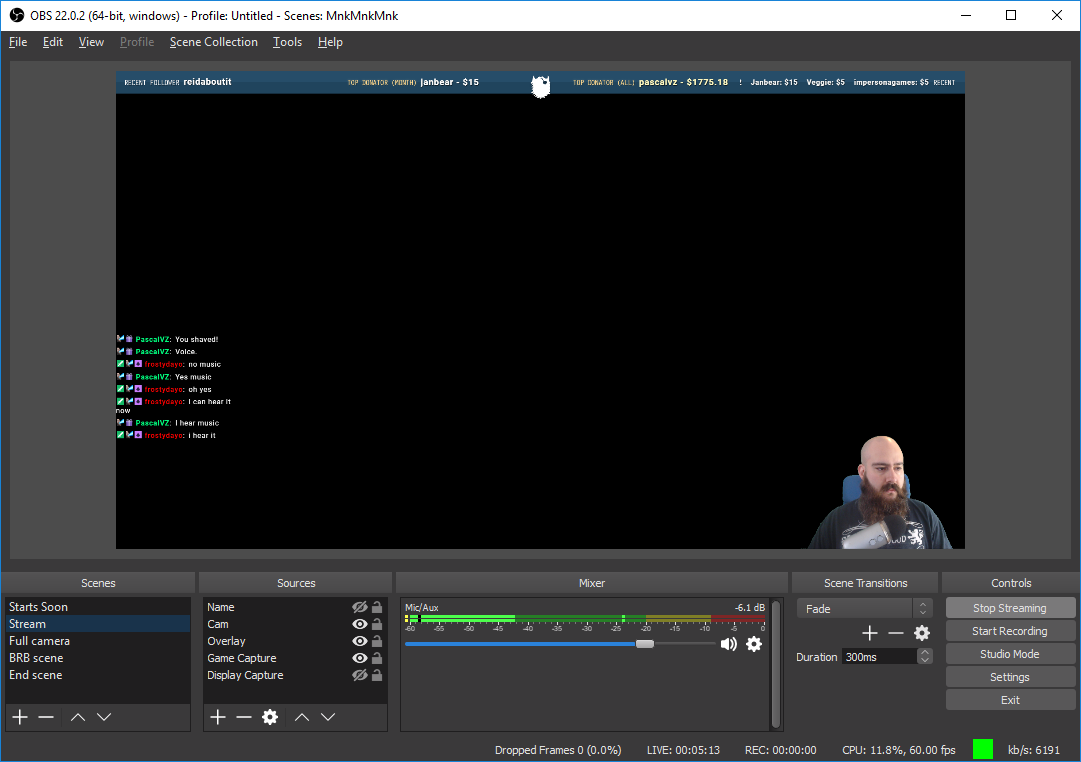
Which is weird because I only have a Mic/Aux source
Alright I really appreciate your help guys! I'm just going to delete my scene collection and remake it from scratch.
 stoic grove
When can I get the early access access code to the mobile version??
nocturne pelicanBOT
@stoic grove The app is currently in closed beta, and is expected to be available to the public by mid October.
If you'd like to assist with beta testing, please fill out this form: https://goo.gl/forms/3DaiLckKDjeMAeVt2
 lean valve
Hi, is there any way to apply a custom font into text? On the overlays?
zenith widget
custom font as in a font not part of our font list or google fonts?
zenith widget
Only way I'm thinking is, you host the font somewhere and add it via custom css/js code, but that means building your widget from almost ground up.
lean valve
oh ok
i thought u guys just had an option to had a custom font
like streamlabs
my bad.
zenith widget
At the current moment no we don't have such option.
lean valve
Hm.. my overlay isn't appearing on OBS Studio for some reason?
nocturne pelicanBOT
@lean valve The default resolution for StreamElements overlays (theme and custom) is 1920x1080. Please add them in OBS at their full resolution and use CTRL+F to fit to screen if necessary. You can then downscale your stream in OBS settings > Video if you'd like https://i.imgur.com/6bWXxjR.png
 lean valve
Oh ok!
zenith widget
Did it work?
 digital crag
Is anyone aware of a bug where the keybinds don't work for song requests in Ground Control?
zenith widget
We are well aware of said bug and will be fixed upon next version of GC
digital crag
Gotcha, thanks.
 ivory holly
Hey i need help with my obs, who got time for me?
The problem is that after streaming for 15 - 45 minutes, my kb/s drops to 0kb/s. Whe I attempt to stop and restart the stream the program stops responding.
 vital wyvern
Hey @ivory holly i recommend asking in #helpdesk-selive
ivory holly
thx
frosty pine
Scusate qualcuno sa dirmi come togliere il blocco dei messaggi uguali ogni 30 secondi.
Vorrei che i miei spettatori possano spammare i giochi della chat
zenith widget
@torpid estuary ⤴ 
torpid estuary
@frosty pine purtroppo questa è una funzione integrata da twitch, che non ha nulla a che fare con SE. anche tu non puoi disabilitarlo.
frosty pine
Ma I miei moderatori possono spammare lo stesso messaggio anche 200 volte provato oggi
narrow coyote
its a twitch thing, moderators are exempt from the message spam limits Twitch put in place
 frigid talon
Okay. I'm having problem with the !songrequest command. I've looked in this Discord, but haven't been able to get it to work.
It says that the !songrequest command can't be turned on because it's "Controlled by module settings"
The "!song" command works. The "!skip" command works.
narrow coyote
!sr is controlled by this https://streamelements.com/dashboard/mediarequest/general
if your game is 4:3, and your canvas is 16:9, you will have letterboxing
frigid talon
@narrow coyote That is how my media requests looks, but I'm still unable (or it won't automatically turn on) that chat command.
narrow coyote
the toggle in the commands page will not change
frigid talon
Is there a bot response for when I add a song?
Because I checked the setting for it to interrupt the currently playing song as well.
Or to skip the backup list.
narrow coyote
yes, the bot should respond to the command
vital wyvern
@west void going out of context here now, but you fucking mad lad streaming Prince of Persia 
torpid estuary
@frigid talon what do you mean its grey in the command list? can you provide a screenshot? also, have you double checked that you have the slider "viewer requests" on?
frigid talon
Obviously I combined the two screenshots. I've logged out and in and part and rejoined the bot too.
torpid estuary
ok, i just checked, the !songrequest command in the list is grey for me too, but it works
 tranquil badge
Can I link my twitch
torpid estuary
ok, so i saw you could SR but i couldnt. so you have set song requests "minimum user level" to something higher than "everyone" @frigid talon
nocturne pelicanBOT
@tranquil badge Please connect your Twitch and/or YouTube channel with Discord by going to ⚙ Settings and then Connections here in Discord. https://streamable.com/eg92w
 torpid estuary
you can do that @tranquil badge but linking your twitch page in chat is not allowed
tight harness
@tranquil badge That would be self-advertisement.
 clear valley
could get some help?, i have obs.live, and i was wondering if i could use the stream elements song request feature through obs.live?
or do i need the ground control app open for that
torpid estuary
@vivid hedge it is planned, but i would suggest using the SE site for that
tight harness
We'd recommend using the site for that, the Media Request page
clear valley
okay thank you 😄
frigid talon
@torpid estuary Thanks for your help! ❤
torpid estuary
np, glad i could help!
 waxen skiff
Hi I'm looking to see of any1 on staff could assist me in an part of my overlay?
tight harness
Could you please state your issue?
waxen skiff
So I'm trying to figure out how to get an all revolving streamlabel (similar to ninjas ) to act as my all purpose stream or event list. I was curious if there were any ways you knew how to do this for im.not familiar w/ css or if there's an easier way?
tight harness
The easier way would be to get a premade event list if you didn't want to code one
waxen skiff
Widget share? I've never seen that
zenith widget
its a channel
Also do note - this is Streamelements and Ninja uses Streamlabs. We have our own widgets and some custom made widgets in #widget-share
waxen skiff
Oh wow I had no idea. Could you possibly through me a link to the widget share? It should be really appreciated! Or is it on streamelements?
zenith widget
click on this ----> #widget-share <------
its a channel HERE on the discord
then scroll up until you find "Last Events Rotator" just like in the screenshot
waxen skiff
Awesome! Thanks a lot! Really appreciate it! I'm assuming there are ways to change font, etc?
zenith widget
Yes. add some html or css magicary in if you know how and you'll be set
waxen skiff
Ok great thanks a lot!
lament blade
Hello, any timeline on when access code store items will show in the "store items" list in the twitch extension?
upper steeple
if someone is banned from you chat can they still redeem things in your stream store?
lament blade
Hi guys, i cant enable the songrequest command, it says that its controlled by module settings, what do i do to enable it?
torpid estuary
@lament blade https://streamelements.com/dashboard/mediarequest/general go here and make sure that the slider for "viewer requests" is on
lament blade
Yeah it is
torpid estuary
the chat command is greyed out by default, so dont worry about that
ok, now go into your media request settings and make sure here the "minimum user level" is set correctly
if you want everyone to be able to songrequest set it to "everyone"
upper steeple
if someone is banned from you chat can they still redeem things in your stream store?
lament blade
okay it works, thank you very much ❤
 elder sorrel
@upper steeple Looking up previous posts there is no option to ban a user from the Stream store. Remove all of their points and put them on the ignore list so they can't gain more is the option I see.
upper steeple
@elder sorrel awesome i'll do that
elder sorrel
Sounds good 🤘
 jade marlin
My dashboard, in exception with the help button, does not show anything. I have already tried switching browsers and updating Java. What else can I do?
elder sorrel
Are you using Chrome, @jade marlin ?
jade marlin
Yes. It is my default browser
It will work on my phone if I use data though
Wifi maybe?
elder sorrel
🤔 That is weird. Maybe you can try to clear your cache and cookies in your browser settings and reload the website by using Ctrl + Shift + R.
Unless you already tried that.
 potent pasture
Hi there, i would like to make a !hype command with my emotes... but for some reason its not working any1 got tips?
elder sorrel
Awesome @jade marlin 🤘🏼
upbeat orchid
@potent pasture have you created the command at all or is that what you're having problems with?
If you've created the command an the emotea arnt working then remember the bot needs a sub as well.. you'll need to gift it one
potent pasture
Well i had !hype but i didnt pop up..now i changed the name to !join, it works but the emotes aretn showing.. my own emotes that is
upbeat orchid
The emotes should show then
potent pasture
Ah oh so i need to make streamelements a sub.. how do i do that?
upbeat orchid
At the top of twitch page there should be a sub button an it drops down with an option to gift subs
Just gift it one
Click on gift sub an then type in the name of the bot
potent pasture
so StreamElements then?
potent pasture
do i need to buy it?
upbeat orchid
Yep
potent pasture
Affiliate... just =]
upbeat orchid
Aight, Yeah gotta gift sub then decided to look into it a bit more cause I didn't even really know I just went off what I see everyone else do
If you were partnered you coulda requested it via Twitch to have the bot be given a lifelong sub
but yea
get partnered 😄
potent pasture
Ah okay..well ill make a welcome message then... and subs can use the emore
hahaha well thats the next goal
 normal igloo
@potent pasture Affiliates Unfortunately do need to gift sub to the the StreamElements bot
upbeat orchid
👍
 @potent pasture https://help.twitch.tv/customer/portal/articles/2929644-lifetime-subscriber-guide-for-partners
Twitch
This article provides information on lifetime and bot subscription grants for Partners.
Lifetime Subscriber Guid...
Partners may request up to 2 free permanent bot subscriptions for their channel. This will allow your bot to perform functions such as show off your channel’s emotes in chat.
 spice vigil
where do i get my jwt token for ground control
tight harness
You can find your JWT token on your account channels page: https://streamelements.com/dashboard/account/channels (Don't forget to click on "Show Secrets")
StreamElements
The Ultimate All in One Platform for Streamers
spice vigil
thanks
 modern trench
How can I get onto the sadly access for the stream elements streaming app? I'd love to use and promote it on my channel
elder sorrel
!code
nocturne pelicanBOT
The app is currently in closed beta, and is expected to be available to the public by mid October.
If you'd like to assist with beta testing, please fill out this form: https://goo.gl/forms/3DaiLckKDjeMAeVt2
elder sorrel
@modern trench ⤴ Gotta sign up & we gotta wait till Mid October if they release it for public
modern trench
Tyvm
rose drift
What font does streamelements usE?
 jovial gale
What's up with ground control app?
rose drift
!font
 slender mulch
"something went wrong while saving" chatstats
narrow coyote
@rose drift What do you mean what font does it use? If you are talking in the overlays, it will use whatever font you select for the element in question
@jovial gale what do you mean?
@slender mulch Did you recently change your Twitch name?
jovial gale
@narrow coyote Is the ground control app working? I heard it had some bugs or something ?
narrow coyote
works for activity and bot rename, media request does not quite work right with the system, and the hotkeys dont work
 fast crow
I have a question, It says I have an invalid path or Connection URL and I need to check my settings. How would I go about fixing this?
slender mulch
no kite i didnt, its not for my stream
fast crow
For starting a stream
slender mulch
is the chatstats how i display chat on dashboard
narrow coyote
chat stats is chat stats, like emotes used in chat, top chatters, etc
narrow coyote
@fast crow That error could mean a few things. It could be a problem with the server you have selected, or you are missing a Microsoft Visual C++ runtime https://obsproject.com/visual-studio-2017-runtimes
@slender mulch Not sure what that option is expected to do, as its not documented https://support.streamelements.com/hc/en-us/articles/115000373752-ChatStats What exactly are you trying to accomplish?
slender mulch
i get "something went wrong while saving"when trying to update chat stats
im just exploring
trying to get the chat on the website aswell
narrow coyote
Does this streamer even have a chat stats page? What is their username
slender mulch
TLMMYS
narrow coyote
you cant have chat in your dashboard, the closest from our site would be from the profile page
narrow coyote
their chat stats are loading fine, not sure why are you getting an error on trying to save
slender mulch
could it be somethign to do with them being live
narrow coyote
I am not sure, but I also dont think that setting does anything from what I can see
 pulsar gulch
Hello , for the custom sub alert , I want to make a variation for the resub .. can I just leave the text container for the resub too but adding a new class for the amount of months ?
pulsar gulch
oh aight ^^
 merry gazelle
narrow coyote
merry gazelle
narrow coyote
pulsar gulch
uff wait wait .. so using css editor on variations you can just delete the code that you have and add the one for the variation but the one for the subscriber will stay the same
am i wrong .. ples say no  ?
?
 peak herald
Need an access code to use
nocturne pelicanBOT
@peak herald The app is currently in closed beta, and is expected to be available to the public by mid October.
If you'd like to assist with beta testing, please fill out this form: https://goo.gl/forms/3DaiLckKDjeMAeVt2
pine hemlock
@pulsar gulch I'd answer but i dont use custom css and i really dont know.
pulsar gulch
@pine hemlock it's alright , ty anyway ^^
jovial gale
Is it possible to send many messages with that chat bot module?
 livid ingot
How come SE bot isnt picking up ato hosts for>?
pine hemlock
@jovial gale What do you mean by many messages
jovial gale
@pine hemlock I've seen some streamers' bots send like 4 same messages when someone subscribes or something else
pine hemlock
I mean.. You could probably set chat alerts to send multiple messages for the same alert. i havent tested it
 abstract elm
hi, will there be any updates on the extension for twitch where the landing page will be top sub gifters? instead of just subs? ❤
astral edge
How do i make custom cheer responses? I tried but they sometimes don't do the right number of bits
 loud rover
Is there a way to create custom chat modules? I'm looking to make a variation of the 8ball module that doesn't say "8 ball says" and doesn't require a question: It just spits out a random response from a list of responses I put in. This seems very simple but I am not having luck finding a way to make this work.
narrow coyote
There is the random pick variable that can be used in a custom command, but there is a limit of 400 characters for the response field
 kind epoch
Why does my leaderboard have more on the total then my actual followers?
Is there a way to match the amount of followers to the leaderboard?
narrow coyote
What are you referring to, as far as I am aware, our leaderboard extension does not have a follower count on it
kind epoch
For example i have 1.4k plus followers but my leaderbord has a total of about 5k plus
So i don't have the 5k followers but yet the leaderboard indicates that many users/followers?
narrow coyote
are you talking about the points leaderboard? That is not restricted to just followers, it will show any viewers that have points
kind epoch
Oh i see
Well only followers get points
And i don't have 5k followers
So i don't know why the leaderboard indicates that many
narrow coyote
not only followers can get points
pine hemlock
Any viewer gets points its not limited to followers
kind epoch
Oh i see
again!! ok thanks for the clarification
Next question, is there a way that someone can tweet me with a store redemption?
Guys?
 waxen tapir
is there ANY possible way for me to use this with shadowplay
my pc cannot handle obs, streamlabs obs, etc. the stream always comes out choppy and weird
so i use shadowplay
pine hemlock
@waxen tapir Shadowplay doesnt suport browser sources.
upbeat orchid

waxen tapir
is there like an app for this tho
waxen tapir
or someway i could cast it as an overlay
lament blade
why wont the bot talk in my chat
pine hemlock
@lament blade If you' referring to youtube #helpdesk-youtube
@waxen tapir Browser sources are how overlays work.
 silk crane
can someone help me?
Whenever i try to stream all you can see on twitch is a black screen even while i am in game
nocturne pelicanBOT
@silk crane For the best OBS support, please join their discord where OBS devs and support volunteers are available all the time discord.gg/obsproject
upbeat orchid
@waxen tapir When you used OBS did you make sure to change the encoder from x264 over to NVEC?
It's basically the same as using Shadowplay
just it's with OBS
narrow coyote
If the PC can handle it, x264 is far higher quality than nvenc
upbeat orchid
Yeah but he said he couldnt it gets choppy
he said it works with Shadowplay but not OBS
I was just asking if he tried the NVEC
narrow coyote
Ah, I see that not
upbeat orchid
might help
narrow coyote
upbeat orchid
idk
 candid epoch
Hey there, when I click on my "launch overlay" button inside of "My Overlays" on streamelements website all I'm getting is a blank white page. I tried hard refreshing, trying a different browser, and there is no "Help" button in the bottom right corner like it says there should be if it s a cache problem.
narrow coyote
yeah, probably their only option if they can only stream with shadow play, but the CPU overhead on OBS still might be an issue if the PC is that potato
upbeat orchid
Yeah
that's the other worry I was having
but eh was an idea for him
in which case time for him to get a new PC 😄
narrow coyote
@candid epoch Sounds like something is being blocked, either cookies or something from a 3rd party service our site uses
upbeat orchid
@candid epoch Do you have a script blocker?
like SafeScript
or an ad blocker etc..
candid epoch
Negative, never had one before.
candid epoch
I recently changed my twitch name, could that effect it?
upbeat orchid
@waxen tapir move to voice support
waxen tapir
and do u reccomend obs, obs studio, live, etc
candid epoch
It worked before i changed it, but it's been a few weeks since i've been inside it
I'm logging in normal, and my old overlays are still there
narrow coyote
changing your name would not cause this, really only something being blocked should, you can hit F12 in your browser, go to the console tab, and look for errors
candid epoch
Not sure if this is helpful, not seeing anything that stands out (to me at least)
narrow coyote
I said console tab 
narrow coyote
Can you click this, and go into the settings and see if the javascript is set to allow?
astral edge
How does one have custom chat alerts - cheers working properly? Ill have it set to amount 25, for a quarter, then it will still say thanks for the shiny quarter even though it's 50 bits, how do i fix?
narrow coyote
anything over 25 bits would trigger the 25 bit message, unless you made another variation
candid epoch
Under "Java Script" it says "Allowed (default)"
astral edge
how do i do that?
would i need to do 26 and then if i have dime i would need a 11 etc etc?
narrow coyote
if you want it to trigger a message for those specific amounts, then yes, you will want a message for 11 and 26
@candid epoch Can you click this https://streamelements.com/logout and then try going to the main site again
nocturne pelicanBOT
@lament blade Custom bot name requirements
- StreamElements bot modded and in chat
- Active overlay with alerts
- StreamElements tipping page in the panels below the stream (!panels)
- Create a twitch account for the name you want to use
- Ground Control app must be running
Steps to enable custom name
- Sign in to https://twitch.tv with the bot account
- Install and run Ground Control (!gc for download)
- Visit https://twitchapps.com/tmi/ and generate an oAUTH token
- Copy/paste everything in the box to Ground Control oAuth settings and enter the name for the bot account
- Restart Ground Control (custom name may take a few minutes to take effect)
Mac does not currently support renaming the bot.
candid epoch
@narrow coyote Okay done. I logged out, and logged back in. No luck. I also logged into a different twitch account. No luck still, so I had but brother log into his computer and now he's having the same problem.
We live in the same house if that's helpful info.
astral edge
what is the max amount of custom cheer alerts you can have? Will they ever be upped?
candid epoch
I had a few people try to go to the overlay page and it looks like the page is down all together. @narrow coyote thank you for the help!
narrow coyote
What if you try from an incognito tab, or if you are all on the same network, can you try logging in from a mobile device not on the network
Everything on the site is working fine for me 
lament blade
!gc
narrow coyote
!gc
nocturne pelicanBOT
Our Desktop App Ground Control: https://streamelements.com/groundcontrol
narrow coyote
that command should work for everyone, not sure why the bot did not trigger for you
candid epoch
@narrow coyote Weird, I'm in discord with a few people and it's not working for anyone of us :/
All in different houses
narrow coyote
same ISP, could be an ISP issue
candid epoch
Well the Stream Elements website is the working for me, just not the overlay page. Do you think that an ISP could effect just that?
Just confirmed we are on serval different ISP's
I just figured it out and i'm turns out I have an IQ of 0 and was clicking the wrong thing. 😃 Thank you for the help
narrow coyote

candid epoch
I am unworthy of the help desk 
 unborn beacon
Yo can a mod help me
@rapid tapir can you help me? I cannot disable the !donate command
<@&382267076632379392> How do I disable the !donate command
 clever mango
Disable the !tip command under default commands
unborn beacon
Omega brain fart sorry guys
pine hemlock
i wonder why he pics cbenni out of everyone
 cursive zealot
I'm trying to get a fire stream access code for Android
nocturne pelicanBOT
@cursive zealot The app is currently in closed beta, and is expected to be available to the public by mid October.
If you'd like to assist with beta testing, please fill out this form: https://goo.gl/forms/3DaiLckKDjeMAeVt2
 fossil crescent
how do i set a command in streamelements that does not use ! and response is just the emote again
I am trying to have a command that is a emote response to an emote
pine hemlock
Make a command and create a command alias under Advanced Options that doesnt include the exclamation mark
narrow coyote
you would need to use a keyword to trigger without the ! 
@glass tusk Promotion of any kind is not allowed in this discord, dont post anything like that again
 simple plank
He is just fishing lol
pine hemlock
keyword w.e
 dapper pilot
Pls I need invite code
nocturne pelicanBOT
@dapper pilot The app is currently in closed beta, and is expected to be available to the public by mid October.
If you'd like to assist with beta testing, please fill out this form: https://goo.gl/forms/3DaiLckKDjeMAeVt2
 twilit talon
hey guys
just need some help real quick
i just recieved a high donation and i want to check, if its real
the guy payed with "neteller"
nothing is on my bank account yet, how is the process there?
pine hemlock
If its not in your paypal or on g2a then its not real.
 covert widget


 zenith widget
''!addpoints <username> <points>"
pine hemlock
They need to be set to a supermoderator.
 ruby venture
Hey! Quick support question, the hypecup isn't displaying on the overlay editor in chrome. Tried w/ and w/o hardware acceleration. Every other thing shows up. Also I can't seem to edit its position properly? Didn't know if it was an overlay issue or something else
zenith widget
I assume you've added the cup today, so I assume you have not clicked the "Save" button.
ruby venture
I've been consistently saving and updating it. It displays in OBS but not the web editor
zenith widget
As for the cup position, you can move the widget around freely, but the actual cup position within the widget is controlled via 4 arrows. Let me fetch a screenshot
ruby venture
When I launch it in a chrome tab it isn't visible, but it is on OBS. Not impossible to deal with, just a minor hassle.
I tried using the arrows under the cup's properties and they haven't changed anything. And I know use full screen isn't checked
zenith widget
Usually the cup takes a while to load, so we mostly recommend having it as an extra overlay.
zenith widget
Ok, it seems it taking its time to load in the editor for me as well 
late-night help? its 9:30AM for me

ruby venture
Well hey that's rad
Yeah, even as a completely new layout with nothing else the cup isn't loading in the editor or a browser window
zenith widget
ruby venture
It does display in the browser source on OBS tho
zenith widget
If finally loaded for me so yeah - this should work only when the cup has fully loaded in the editor.
I'd suggest to give the editor a hard refresh(ctrl+f5 or ctrl+shift+r)
ruby venture
alrighty
zenith widget
just make sure to save before doing so
ruby venture
Restarted computer, hard restart, tried IE, nothing's showing it up
zenith widget
did you try clearing chrome's cache?
ruby venture
And with it not showing up I can't use the arrows to maneuver it properly in the editor. I can move the box it's in around but not the cup inside the box, if that makes sense.
Lemme try it again.
zenith widget
I'll call the big guns and hope they are awake @crisp jackal
ruby venture
Buh, nothin'
zenith widget
Well no response so I'll ask internally if anyone got ideas 
ruby venture
Appreciate it
I really wanna leave streamlabs behind haha
ok, downloaded firefox and it's working
Thanks for your help!
ruby venture
Ah! Figured it out. If you use the Chrome plugin Ghostery, it blocks the connection to the cup
Disabled it and it's working fine
zenith widget
Noted that a plugin(w/e Ghostery does as I don't know it) can block the cup specifically  👍
👍
 frigid radish
Hello
need some help
what video formats does streamelements allow to be uploaded when creating and overlay
zenith widget
we recommend .webm as the best format
frigid radish
huh never heard of that
zenith widget
its a video format meant for browsers
that supports audio
and you can have proper transparency levels on it
frigid radish
ok thanks
ruby venture
shoot, so sorry to post in here again; I'm trying to figure out how to edit the css for the hypecup? Like how to change the image it uses? Realistically I just want the wireframe functions and no image.
zenith widget
Unfortunately, we do not support a custom cup or image for it.
ruby venture
Shoot, really?
I saw something akin to that in #welcome I thought
Is there any way to just disable the image entirely? I notice the opacity affects everything
zenith widget
as far as I'm aware, you can't disable the image, as the wireframe is part of it 
I think there is a request or idea in our ideas board for a custom image or no image entirely and customizable wireframe
ruby venture
Gotcha; thank you so much!
 radiant rampart
i need some assistance with my overlays they arent working as i think they should
 gray moth
It it just for me or the web dashboard is down?
 gentle imp
just you, works here
radiant rampart
@zenith widget i fixed it, the sizing was stuck at 800x600 but i figured i had to change it 😃
jovial gale
Is there a widget which would show the uptime thing?
zenith widget
@jovial gale Check #widget-share last widget
jovial gale
@zenith widget Thanks! ❤
zenith widget

 manic helm
@empty fjord im hhaving troble with your credits widget, it doesnt always fire when the scene is activated, either via streamdeck as part of a multi-acion or OBS speratly
zenith widget
@manic helm Do you have "Shutdown when inactive" option turned on, on the browser source that has the credits widget?
manic helm
let me check ........ i probably do, i usualy set it for any browser source
@zenith widget i do, im wondering if its because there is a scene ofter it in the multiaction
zenith widget
I don't have a streamdeck my self and not sure on this multiaction you are speaking of, but assuming its a set of sequence inputs from your streamdeck towards OBS
I think maybe something is triggering the Scene to start at some point, but if you have the "Shutdown" option on, even if the scene is shown for a split second, the browser source should shutdown and start up normally
manic helm
@zenith widget yes, basically is a macro to trigger scenes and actions in order
zenith widget
everytime you make it active anyway.
manic helm
i'll tweak the script and see what happens
 fast spade
I just got stream elements for android and was wondering how do i get an invite code
nocturne pelicanBOT
@fast spade The app is currently in closed beta, and is expected to be available to the public by mid October.
If you'd like to assist with beta testing, please fill out this form: https://goo.gl/forms/3DaiLckKDjeMAeVt2
 twin pilot
Is there an easy way to see my alerts settings as well as variation settings in the same place at once? I've accidentally used sounds for multiple alerts and it's confusing having to go back and forth between settings to edit them.
zenith widget
Usually variations inherit the main settings when created.
So as a base, when you add a variation you can keep it in mind that its settings will be the same as the main one and adjust accordingly.
twin pilot
So the easiest thing would be to delete the variations and remake them?
zenith widget
If you want to go that route, yes.
twin pilot
Okay. Can you also explain to me why my stream report stats are always off? It said I had 28 unique chatters when I clearly had 3
zenith widget
Unique chatters may count as unique visitors to your channel on this particular stream, not exactly active talkative chatters
twin pilot
Okay thanks.
 cobalt kindle
On the "IMPORTS" tab within account settings, it shows Ankbot/Streamlabs as an import source. It also says "Quotes" can be imported. I wasn't aware SE had a working Quotes management system. Where is this?
cobalt kindle
RIght, I see that...
What I don't see is any UI or any way to further interact with quotes
As in... where's the list?
zenith widget
List is the command. We don't have a UI for it.
 vernal canopy
So im stuck with this one issue where i cant go into the streamelements site and fix my overlay and in obs the overlay dosent show up. I looked at my firewall and antivirus and its none of them what i can see
zenith widget
I'm not even sure where you got the impression we have a UI for it
@vernal canopy What browser are you using?
vernal canopy
Chrome
cobalt kindle
That's what I mean. Without a UI for it... any ability at all to see a list of the quotes that are there in the system... Why would people use it?
zenith widget
Ok, you can use !qoute to get a random quote, but you can also do !qoute 200 to get the quote with ID 200 in the list.
or !qoute remove 200 to remove the quote on that position or without the number on the back to remove the last one.
cobalt kindle
Right... and if I want to remove a quote, make an edit, somebody added something inappropriate, etc...
zenith widget
Usually when a quote is added it says its number
cobalt kindle
Or if I wanted to just see all the ones people have saved and look through them
zenith widget
even after using it it says its number
@vernal canopy Try force allowing javascript in chrome settings
vernal canopy
And how does one do that?
winter zenith
@cobalt kindle
When a quote gets made via chat it gets assigned a quote number. if it is something you dont want you can delete the quote via chat with the commands after you saw the number.
A UI for the quote list is in the works but not here yet.
you can look for specific ones by typing !Quote 133
cobalt kindle
Thank you. The "in the works" part was what I was wondering. Seems as though it's current implementation is objectively more of a "let's throw that in" kind of feature, as opposed to something really meant to be utilized.
Please consider some sort of management UI for it, so we can see the quotes that have been added, and also make edits to them without having to 'remember' or see the number in the chat later.
 hard inlet
any "giveaway" experts on? (sorry to interrupt)
narrow coyote
What's the issue
gentle imp
sup Daemon
zenith widget
@vernal canopy
hard inlet
probably me being impatient. But when we type !giveaway, chat give a link, click the link and atm it says 3 entrants 8 tickets purchased. But in my dashboard, when I click giveaway, it shows 1 entrant..... just trying to make sure these people are actually getting what they shoul dbe. Does it take some time for my dashboard to update?
zenith widget
@vernal canopy That seems like an internet connection. If you open up the console and refresh the page, what error do you get?
cobalt kindle
My contests are stuck on an old results page I cannot get rid of
Nobody has been able to add a contest in a long time
Because the results won't go away (and the "close" and "refund" buttons are not clickable
vernal canopy
Nothing pops up in the console
zenith widget
@vernal canopy Turn off your router for 2-3 minutes and restart PC.
hard inlet
those functions actually seem to be working in CONTESTS, this is a giveaway, I get them confused, but yeah I keep wanting to call it a contest. It seems to be working, jus tthe info doesnt match from what veiwers see on the giveaway page and what i see in dsahboard
StreamElements
The Ultimate All in One Platform for Streamers
vernal canopy
Well aight see yall in like 5 mins then
hard inlet
so there it shows 3 entrants and 8 tickets, in my dashboard it shows 1 entrant and 2 tickets lolol
gentle imp
check if there aren't 2 open giveaways, if u click start giveaway twice (because u thought it didn't work) it creates 2
hard inlet
oh....hmm...ok Thank you! (I only see one when I click on giveaways in dashboard, but Ill look around and make some effort before I cry help) 😃 and thank you for taking a moment!
zenith widget
Usually you can't start 2 giveaways, but if the page hangs and you click on the button twice as @gentle imp said, it can happen.
 zealous gate
can you do more than one giveaway at a time or no?
hard inlet
I dont think so, but I am finding out! 😃 First give away, so I am nervous, dont want this to backfire and harm the channel instead of promoting it! LOL
hard inlet
but I do think I did click the button twice.....
gentle imp
I'm quite sure u did, I do giveaways often and i've had my fair amount of doubles 😄
zealous gate
any ideas on how to do two simulatenously for now?
hard inlet
ok, so I need to figure out how to identify the one that shouldnt be active and close it......or maybe close them all and restart it.....
torpid estuary
@zealous gate as was said a few times now, you can not do 2 giveaways at once right now.
hard inlet
ok, so on my dashboard, the giveaway showed one entrant and 2 tickets. I closed that and refunded . Now the correct entrants and tickets are showing on dashboard, matching link. SO I think this is resolved fo rme, but FYI to devs (who I am sure already know) double clicking start giveaway causes this....
zealous gate
i understand that, my new question is, is there any alternative way of makin it possible (e.g using 2 bots)?
hard inlet
and thank you all for taking time to help me! come enter for a shot at a 1TB ssd! 😂
torpid estuary
as it is not possible at the moment i can not give a an alternative way of doing that, since that would mean its possible at the moment @zealous gate
zealous gate
it would just mean its possible outside of streamelements , but alright, ty
torpid estuary
how would i know a way outside SE?
hard inlet
@gentle imp I wasnt sure how to handle that, I didnt want to end up with a winner that would cost me thousand dollars to import to......so I limited it to USA. #feelsbadleavingoutoverseasfriends
gentle imp
hehe
zealous gate
thought someone on here may have had a similar question and had an answer of their own, guess not.
 silent dust
Hello .. i have download the mobile App Streamelements . But i need a code?
vernal canopy
Ok so i solved my chrome issue but now in my obs the overlay dosent show up
elder sorrel
!code
nocturne pelicanBOT
The app is currently in closed beta, and is expected to be available to the public by mid October.
If you'd like to assist with beta testing, please fill out this form: https://goo.gl/forms/3DaiLckKDjeMAeVt2
elder sorrel
@silent dust ⤴ Gotta fill out the form & we wait till Mid October if they release it then 😎
silent dust
Okay Thank you
torpid estuary
@vernal canopy try to refresh the cache of your browser source in OBS
vernal canopy
And how does one do that?
nocturne pelicanBOT
@vernal canopy Right click on the BrowserSource > Properties > Scroll down a bit > Refresh Cache of current page
vernal canopy
Well that didint do anything
torpid estuary
have you checked that you have put the correct URL into the browser source?
vernal canopy
Yes i have sir
torpid estuary
then highlight the browser source and press CTRL + F on Windows, or CMD + F on Mac
 verbal arrow
Why can some of my mods host channels, but others cannot?
Yet, they're all the same level (500)
vernal canopy
It was already fullscreen
vernal canopy
Yes it is
winter zenith
Hosting has something to do with editors on your twitch account @verbal arrow
 median spade
Hey guys, is this where i would ask for help with obs live?
vernal canopy
Thats 2 text chats down mate
torpid estuary
@median spade no, thats #helpdesk-selive
median spade
ahh right, thanks 😃
verbal arrow
Oooh! Thank you so much @winter zenith
winter zenith
@verbal arrow go to
http://www.twitch.tv/**yourchannel**/dashboard/permissions
 torpid estuary
@vernal canopy please try and disable the hardware acceleration on your browser source in OBS settings - advanced
vernal canopy
i dont see a setting like that
lament blade
Hi
torpid estuary
if you dont have that setting your OBS is likely an older version. i would recommend downloading the newest one @vernal canopy
verbal arrow
Yeah, thanks @winter zenith , I found it! I was sitting for like 10 minutes trying to figure out what was wrong 😄
nocturne pelicanBOT
@vernal canopy OBS.Live is a Plugin for OBS created by StreamElements. You can download OBS.Live here: https://streamelements.com/obslive
Please make sure you have the latest version of OBS installed, Current Version: 22.0.1. You can install OBS here: https://obsproject.com/
torpid estuary
second link
lament blade
How do u join stream elements
torpid estuary
@lament blade please watch our video playlist to help you get started with SE https://strms.net/welcome
torpid estuary
please DM me your URL for the overlay, so i can check it for myself in OBS.
 dense beacon
Afternoon lads :3
torpid estuary
what do you have in your overlay? just alerts, or also some graphics/overlays etc? @vernal canopy
torpid estuary
i see a hypecup and latest sub
dense beacon
Got a question, there different overlays you can have. But is there a way when switching the overlays that the chat will stay? Everytime I switch from Main to Chat overlay the chat resets 😛
vernal canopy
Ye that is exactly what it should look like @torpid estuary
torpid estuary
but its not showing up for you? ok, i will have to ask internally what else could be the problem, since i am running out of ideas
vernal canopy
So am i haha
torpid estuary
wait, you updated OBS now, right? now you have the option to disable the hardware acceleration. its in settings - advanced - browser source
torpid estuary
alright, thanks, i will now ask internally what the problem could be!
@vernal canopy have you checked that your browser source uses the right resolution? 1920x1080?
vernal canopy
I have
 carmine bone
How do I get an invitation code to test out the stream elements mobile app?
nocturne pelicanBOT
@carmine bone The app is currently in closed beta, and is expected to be available to the public by mid October.
If you'd like to assist with beta testing, please fill out this form: https://goo.gl/forms/3DaiLckKDjeMAeVt2
waxen skiff
Hello! I have a help question for the Widget share Coding process for changing fonts, rearranging order.
for the event rotator
torpid estuary
@vernal canopy what did you do that made your browser get access to the site? it has been suggested that you might have a killer nic running that might prevent your access to SE stuff
torpid estuary
please answer my question. its a certain network interface card with software that may prevent your access
vernal canopy
I dont own a killer nic my browser source just worked before
torpid estuary
oh yeah, msi come preinstalled with that sometimes
vernal canopy
How does one disable that?
torpid estuary
if you run services.msc you can look for an entry thats called something with "killer"
once you stop that everything should be working fine
 icy maple
I signed hp for beta now wat
torpid estuary
now you wait until you get contacted.
 noble burrow
is there a way to make it so if a mod gets timed out they dont lose mod powers?
narrow coyote
make mods exempt from the filter that is causing them to be timed out
noble burrow
well the reason im asking is because i dont want my mods to lose power from using the time out version of the !russian command in #command-share
narrow coyote
I dont really follow now, are you saying that you have a command that is issuing a /timeout? I dont think that would even affect a mod, since a mod could not timeout another mod, unless you are using your name for the bot, and then it would be like the broadcaster issuing the command
noble burrow
yes, the 2nd version of the russian rouletter command in #command-share is issuing a timeout on the person for 60 seconds (for the memes) if the "gun" shoots
k nevermind ill just use the other version of that command
gentle imp
yeah a timeout is just a timed ban, so it always removes the mods role
noble burrow
ya
gentle imp
there's no way to circumvent that, unless u make mods immune to it, but then it loses the effect hehe
a better way would be roulette for points but that ain't possible yet afaik
survive= points for user, death= remove points
vernal canopy
Well its working now thanks alot @torpid estuary
noble burrow
That would be a great idea @gentle imp
torpid estuary
@vernal canopy hey, good to hear! was it this killer nic?
vernal canopy
Well i dont really know
I disabled it
started pc
Internet didint work
So i reactivated it and now everything is fine
torpid estuary
 as long as it works tho
vernal canopy
ikr?
waxen skiff
Hello! I have a help question for the Widget share Coding process for changing fonts, rearranging order.
for the event rotator
im trying to figure out where in the code i need to change a font, and would also like to know if its possible to change the wording at all?
waxen skiff
go it! Thank you!
 plain fable
Hey guys, is there any way to get a viewer queue on Stream elements chat bot? I want to have a queue so that I can track the viewers I play with. I was considering changing to Streamlabs chatbot for this feature alone, but have been loving streamelements so far... So would prefer not to!
narrow coyote
We have a system like that planned, but currently, the only way to really do this would be to have a stream store item, and then use the redemptions list as a queue to make off people you have played with
plain fable
Damn, well thank you so much for the swift reply! I might have to try using both stream labs and stream elements bots side by side for now, although that may get kinda tricky with overlapping commands and stuff.
Also, another quick question if you don't mind... I've been able to change my alert sounds for everything except the cheer alert sound - is this something that is unable to be changed? Or am I perhaps doing something wrong?
narrow coyote
you need to go through and change the variations, the bits are all driven by variations
plain fable
Ahh right, like the variations based on the amount cheered? That makes sense, I'll have to go have a better look at it. Thanks!
Sweet, I got that working! Thanks for the information @narrow coyote now I'll just have to figure out a way to get a queue going.
 radiant minnow
idk how to change and put overlays on obs
nocturne pelicanBOT
@radiant minnow To add your overlays to OBS, add a new browser source in your scene. Paste your overlay URL in the browser source properties, set the dimensions to 1920x1080 (unless you changed them on the website), and :ballot_box_with_check: “Shutdown source when not visible” https://youtu.be/KDvLynUqXI4
radiant minnow
why isn't my image uploading
 crisp jackal
@ruby venture @zenith widget Sorry, holiday = no computer, so I wasn't around (I was awake though). If this issue is still happening, I can take a look if you dm me the url to the page.
narrow coyote
there is no way to curve the standard text. Might be possible in a custom widget, with some CSS magic
narrow coyote
The only way to do it would be to make a custom widget, and use some HTML and CSS magic to curve it
heady knot
you wouldnt happen to know a css that does it?
narrow coyote
I just googled CSS curved text and copy pasted some code into the custom widget
heady knot
oh wait nvm
i found this

We can flow text along a curved line with three tools built right into SVG: , and . The Snippet Dangerous Curves Ahead How We Got There Imagine we draw a
wait, i can't add custom CSS for a follower goal?
narrow coyote
no, it would need to be built using the custom widget widget
heady knot
ugh, headache inducing...
crisp jackal
As soon as we find a way to allow custom CSS/html/scripts without opening up a security hole, you'll probably see more of it.
heady knot
i understand, it's no problem 😃
crisp jackal
For custom widget, the whole thing is run in a sandboxed iframe, which is why it has limited events.
lament blade
<@&382267076632379392> is a merchant G2A account required to accept tips, or can a personal account be used? @narrow coyote
narrow coyote

torpid estuary

 weary mist
Personal is fine
 ebon forum
@lament blade you need a merchant auth. to use it. It is not too crazy, just fill out the form. Also 
ebon forum
mh? i had to fill out the merchant one to get the money out. guess that is location based. EU is strict
lament blade
Ok thanks
weary mist
possibly. I set up paypal as where to send my money, but I never got a lot to G2A xD
simple plank
hey everyone i am seeing an issue when i am creating my overlay for twitch. when testing the notifications i see that there is a shadow after with the persons name and info. is there anyway to make that not show up?
narrow coyote
what do you mean by shadow? you mean you see the alert widget but its transparent? that is only displayed like that in the overlay editor, and will not be like that in your broadcasting software
weary mist
The "shadow" is so you can edit it, and still see it, but it is hidden until another event comes through
simple plank
yea it's like a %50 transparent. Ah ok just making sure cause i was looking everywhere to change that lol
 copper bobcat
My latest cheer is 0 for some reason, is there a way to fix that? Is it tied to this session?
Do I need to go into Widget Data?
narrow coyote
should be pulled from the labels page in the widget data
unless you have reset your labels
copper bobcat
There is a name there but not via the widget
narrow coyote
did you just add the widget to an overlay? try saving it, exiting the overlay editor, and then going back in
copper bobcat
Bingo! The good ol' unplug it and plug it back in.
narrow coyote


copper bobcat
By the way, and this may not be the place to ask this - but does anyone know of a good ideal font size for these widgets? I want them to be small enough to not be intrusive, but I don't want them TOO small that they can't be seen on mobile..
narrow coyote
Depending on the font itself, I would say somewhere around 20ish should be pretty good
 chrome grove
Hi, I seem to be having issues with emotes showing up on cheers using StreamElements on Twitch. It just shows a broken image. Any trick to get those to show up?
crisp jackal
Are you talking cup or kappagen or what?
chrome grove
Alertbox
crisp jackal
Regular emotes or custom emotes?
narrow coyote
Its the cheermotes, its been reported before, it shows a broken image link instead of the cheermote in the message field
@chrome grove Are you using xsplit or OBS, as far as I recall, it was xsplit users reporting the issue mainly
chrome grove
Yup XSplit.