#helpdesk-twitch
1 messages · Page 292 of 1
 dense jackal
 smoky sonnet
I’m not sure streamelements in general knew I was streaming cause I didn’t even get a stream report
smoky sonnet
Yeah
 pine hemlock
We've changed our stream reports recently and some aren't being sent.. i've alerted the person who will look into it and hopefully we'll get it fixed for your next stream
smoky sonnet
Should I maybe just part the bot and reconnect it for each stream to be sure? I just wouldn’t wanna miss follower notifications again. I’m on PS4 so I don’t have OBS and stuff popping up on my stream. I just rely on the bot in chat to tell me when stuff happens
pine hemlock
Nah its not related to the bot. We'll get it fixed for ya
smoky sonnet
Thanks!
pine hemlock
Let us know if it happens again after today
smoky sonnet
Will do
 distant quartz
i have a friend hosting me for 2 viewers right now StealthyCandy12 and he hasnt popped up on my channel chat showing he is hosting.
 rugged trench
Is there a way to export the donation history ? I wanted to create a list to show appreciation to those who have given. Thank you!
distant quartz
my activity
StealthyCandy12 on twitch
he never has shown up as hosting even saying zero
nvm i see it now. wow im dumb.
 harsh epoch
Sorry to repeat the same question. But was the Twitch Extension fixed in the last update by reverting these squares back into Circles for the "Sub Only" graphic? It is driving me batty haha.
I have removed and readded. It still looks the same.
harsh epoch
I assumed it was something to be adjusted on your side. This extension is a showcase (for me at least). Just putting in my request for repair 😉 It used to have the circle!
rugged trench
I want to stop the 1 bit spams, why is this not working properly? I've tried changing every value several times and yes, I saved it as well. Please assist!
 clever mango
What's the name of that overlay?
rugged trench
Sent PM -- Thank you for assisting me.
 blissful robin
hi, my streamelements leaderboard extension doesnt save the changes i am making, trying since yesterday
clever mango
@blissful robin What are you changing? Is there an error message?
 inner parrot
Hi, I previously had a problem with ChatStats showing Error 404 (it's fixed) but it doesn't collect chat data and this page always resets even I have made changes (with pop-up saying it got saved)
clever mango
@inner parrot That page is intentionally non-functional while it undergoes development. Sorry about the confusion there.
blissful robin
@clever mango just the points and countdown were enabled since a long time, now I am trying to add other tabs + trying to add the schedule
the save button does nothing at all, no error msg....nothing at all
clever mango
@blissful robin Please screenshot your configuration page
 inner parrot
@clever mango How long does chatstats takes to compile the data and show them on stats page? I had a stream yesterday but the stats page is showing nothing (there were some chatters yesterday)
clever mango
I've just sent some messages in your channel and now see myself on the stats page https://stats.streamelements.com/c/edesonism. Keep an eye on this page. If anything changes or disappears let me know and we'll explore it. Thanks
@blissful robin looking into this
inner parrot
cooooooooool. it works 
 Thanks a lot! ❤
clever mango
@blissful robin I'm still researching but it seems the issue is the timezone that prevents it from saving.
 brave gull
my stream elements is logged into my wrong twitch account and it will not let me link to the one i want to use . any help?
 weary mist
The site should log into the account you have logged in on twitch
brave gull
for some reason it is logging into an old account of mine
clever mango
@blissful robin Yes, it seems that the half hour is throwing things off. UTC +5.5 instead of +5 or +6. We'll get this corrected as soon as possible but that timezone will break the countdown until we can get it fixed.
@brave gull Log out of twitch and streamelements. Log in to Twitch with the correct account. Then log into StreamElements.
brave gull
thank you, that done the trick
blissful robin
@clever mango using Indian/maldives timezone for the time being, it works and is utc +5.5 as well
thanks for figuring out the issue, best of luck in getting the bug fixed
clever mango
Great, thanks for letting us know that works for the time being.
Actually, Indian/Maldives is showing as +5 for me 😕

and Nepal is UTC +5.75 
Odd
learn something new everyday
 elder sorrel
@amber star Did you set the dimensions 1920x1080?
elder sorrel
@amber star Try pressing Ctrl + F on OBS.
If that's what you're using.
The default resolution for StreamElements overlays (theme and custom) is 1920x1080. Please add them in OBS at their full resolution and use CTRL+F to fit to screen if necessary. You can then downscale your stream in OBS settings > Video if you'd like https://i.imgur.com/6bWXxjR.png

 amber star
yes I have those
elder sorrel
Did Ctrl + F work?
elder sorrel
🤔 Going to need a higher up on this one. Sure one of them will pop in.
 narrow coyote
sounds like your canvas and resolution do not match
in OBS settings, what do you have in here
amber star
only diff I have is blinear
this is what I am having
the playing song is supposed to be bottom left corner
narrow coyote
how does it look in the overlay editor, because that source is filling the canvas as expected from the looks of that screenshot
unless you entered the wrong resolution, in the browser source, and used ctrl+f to fill the canvas
amber star
narrow coyote
ok, what resolution is the browser source set to in OBS then
amber star
I have width 1920
height 1080
narrow coyote
is the overlay itself 1920x1080, or did you make it as 720p?
narrow coyote
If you are still in the overlay editor, can you click this button
amber star
uh lemme check right now
still didn't work
is it supposed to change links when you edit it?
narrow coyote
but did that change how it looked in the overlay editor? I am just trying to see if it was zoomed in in the editor
this little pencil will tell us the resolution it was made at
amber star
yes it's zoomed it when I pressed "fit to screen"
narrow coyote
ok, well, how does it look now in the overlay editor, after hitting fit to screen
amber star
so I pressed overlay edit info and saw it was in 720p
I just changed it to 1080p
but it still didn't change anything
narrow coyote
well, you will probably need to go back into the overlay, and rearrange the elements after going from 720 to 1080
im pretty sure the elements stay where they are, and just the overlay canvas increases or decreases when you do that
narrow coyote
No problem 
 ashen inlet
Why somtimes do my subs not get tracked in my GROUND CONTROL?
elder sorrel
Possible cause of Prime Subs.
Twitch prime (new and resub) and paid subscriptions (resub only) must be shared in chat manually by the person subscribing in order for the subscription information to be sent to StreamElements. For twitch prime, the user needs to have sharing enabled on https://www.twitch.tv/settings/prime. For paid subs, if the share box doesn't show up immediately it will when they refresh the page. https://i.imgur.com/VNJN0Uv.gif https://i.imgur.com/2297EA7.png


 deft karma
who do I get to be a sell out lol
elder sorrel
!sellout
 nocturne pelicanBOT
Are you a StreamElements all-in-one streamer and interested in stream promotion when you go live? Please fill out this application https://strms.net/sellout and if you meet the 3 requirements posted in the :pushpin: pinned message in #welcome you will be added to the stream announcements.
elder sorrel
@deft karma
 simple seal
C an someone help me with ground control?
I need a JWT Token
but I have no idea how to grab it
nocturne pelicanBOT
You can find your JWT token on your account channels page: https://streamelements.com/dashboard/account/channels
(Don't forget to click on "Show Secrets")
 dense sigil
can someone help me with twitch chat overlay?
 faint copper
A few months back I was looking into accepting tips through SE without using PayPal. Is that still being explored or did that plan fall through? @ me please
 wraith hemlock
how do i get my streamelement bot in my stream?
i got my streamelement setup i think
 autumn verge
you need to mod the bot /mod streamelements
in chat
so does anyone know how to delete a message from chat, if it's the stream owner that typed it?
so !purge or timing them out doesn't work since they have ultimate power
or at least to get it to not get viewed by anyone else?
cause my streamer friend typed his pw into chat instead of wherever he was logging into 🤦
wraith hemlock
my bot is still not int here tho
autumn verge
thankfully theres no one on this late but useful to know for future i imagine
wraith hemlock
Do i need to do anything in my dashboard to make the bot join btw?
ahhh there we go lmao
wraith hemlock
now i am yeah løol
Niana, are you familar with the media request stuff on the bot?
 zenith widget
@autumn verge Use /clear and pray people don't have BTTV if streamer types something they should not have to
@wraith hemlock Whats up?
wraith hemlock
could someone voice call me? I need some guidance
i cba to type it confuses the hell out of me
autumn verge
what do you need help with, teddy?
wraith hemlock
with some of the media stuff
autumn verge
download ground control if you don't have it already, it helps a lot
zenith widget
I'm at work and I don't think anyone in here is able for a voice call atm
wraith hemlock
i have it
 lunar glen
hey can anyone help me to add a subcount command to a channel?
wraith hemlock
niana, could i screen share?
zenith widget
@autumn verge @wraith hemlock Ground Control has issues with the media request so its best to use the site
wraith hemlock
instead of voice?
autumn verge
@zenith widget tried purge and clear and i even tried to time out (he tried to time himself out 😂 ) and then we realized he has a chat box on screen with it up so we had to refresh that and then delete the VOD... and yeah we both had BTTV so after all of that it just hung out still telling us that BTTV has protection from wipes 🤦
wraith hemlock
Ok let me try to make it simple:
autumn verge
again, thankfully only two of us on for now setting stuff up, but i can't imagine if someone does something dumb with people actually on
zenith widget
@lunar glen There is a template in the Custom commands. Just go here: https://streamelements.com/dashboard/bot/commands/custom and follow this screenshot:
lunar glen
ok thanks
autumn verge
kiwi, there should be a template for you there 😃
zenith widget
@wraith hemlock Here are 2 video guides on how to setup the Media Request: https://www.youtube.com/watch?v=Wj-hGfqbeC0&index=14&list=PLCDDKlFdScbEwdx5AntcQIS1InkFJwHtv&t=1s & https://www.youtube.com/watch?v=17eUkoZ6eIs&index=15&list=PLCDDKlFdScbEwdx5AntcQIS1InkFJwHtv&t=0s Watch them in that order
wraith hemlock
Well i got the music to work
there is just one issue
I can hear the music through my OBS, even tho i have muted everything else
or wait, i still have the media up on my dashboard
that could be why
zenith widget
So the sound is coming from the widget which is loaded by OBS
zenith widget
Well yes and no 
yes, you can use the pre-made themes
no, we won't make you a personalized one
wraith hemlock
ok now my pc is fucked
zenith widget
https://streamelements.com/dashboard/themes pick your poison(animated, static super themes and normal 1 overlay themes in the other tab)
autumn verge
wait so if you use a widget from streamlabs you get an echo? 😦
wraith hemlock
i turned EVERYTHIGN off and i still hear music
zenith widget
@autumn verge No
wraith hemlock
OH its my ground control
autumn verge
did you not mute it completely?
zenith widget
wraith hemlock
oh
zenith widget
But the double sound is not part of that issue
You just had Ground Control running
autumn verge
lol
wraith hemlock
i guess that was why lol
autumn verge
yeah i was trying to help him troubleshoot thru pm and i'm out of ideas on why obs is replicating audio on top of streaming
wraith hemlock
😂
zenith widget
Well both of you were going a bit too fast and criss crossing texts
so I could not keep up and help

sips coffee

wraith hemlock
now i muted the music on ground control and i cant hear it on my stream
and neither can i
zenith widget
Did you close down this page: https://streamelements.com/dashboard/mediarequest/general
autumn verge
lol the only issue i brought up here was the stupid purging messages thing 🤦
wraith hemlock
yes
autumn verge
which we established that BTTV doesn't let happen 😛
zenith widget
@autumn verge Hey we don't mind everyone helping out, but the moment i start typing something you've already wrote it in 3 words


wraith hemlock
now im requesting song, bot says its requesting, but i still can not see it on my queue, list. And yes, i got viewer requests on
zenith widget
@wraith hemlock Ok a quick and dirty TL'DR': To use the Media Request its best to have the website open: https://streamelements.com/dashboard/mediarequest/general Make sure the settings are all set the way you want.
If you want to show the video on stream, create a blank overlay and just add the media share widget and make sure you have this on:
zenith widget
Don't use Ground Control for Media Request as the controls don't work most of the times from the app
Ok then skip the widget part then
wraith hemlock
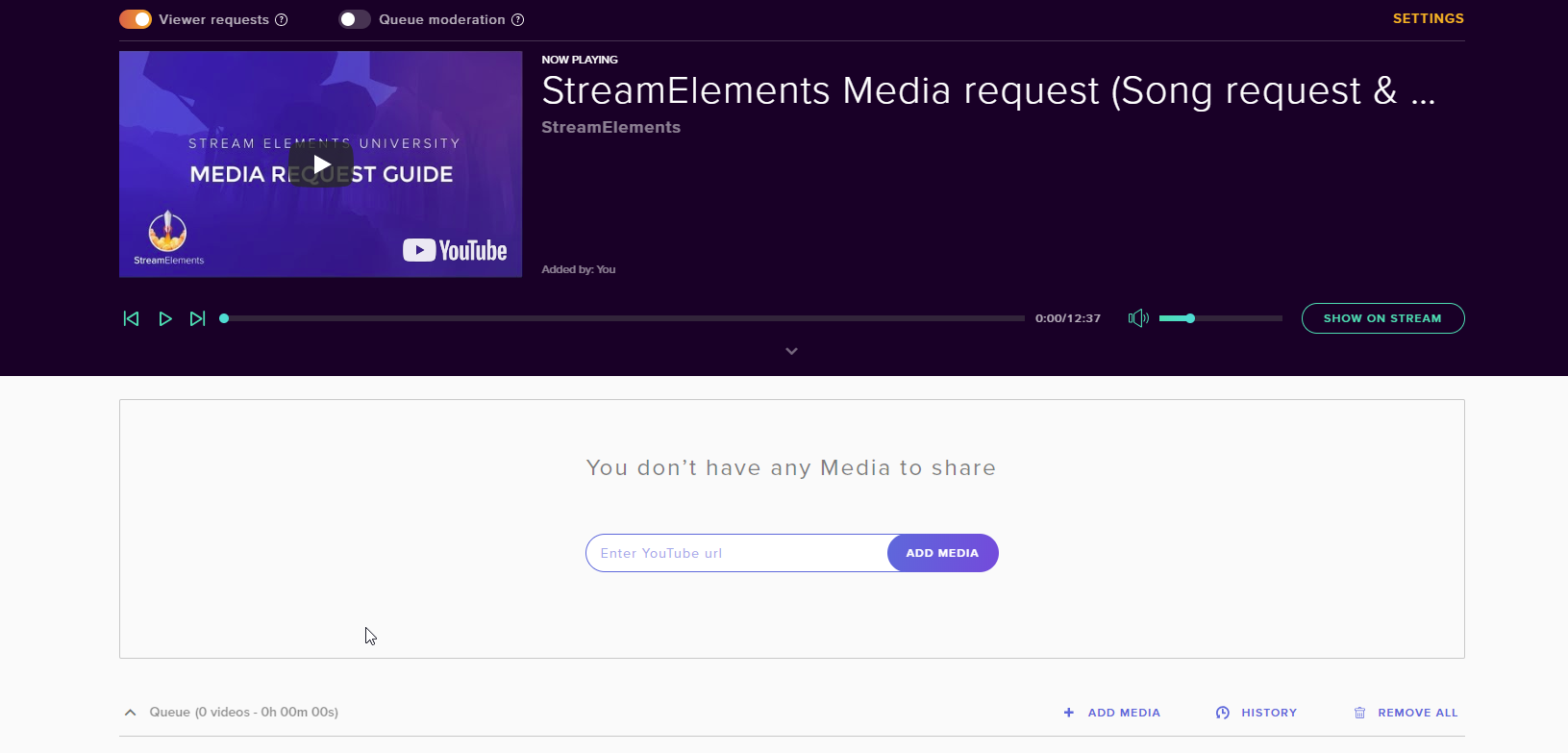 zenith widget
Ok, did you place a backup playlist from YT?
wraith hemlock
Do i HAVE to?
zenith widget
Well its recommended
wraith hemlock
Done.
zenith widget
Now just skip to the next song and start requesting
wraith hemlock
but i still need that media link open in my browser to hear the music, correct?
zenith widget
yes
wraith hemlock
ok good
zenith widget
Also some overlays have a widget in them to show your current song
that song is pulled from the media request page
wraith hemlock
yeah i got that 😄
well now it works great
Im using this theme, i'm thinking about making my own but for now i just need to test stuff out
 zenith widget
Start small, dream big
wraith hemlock
^
thanks for the help people 😃
Do you have any tips for a very SIMPLE theme in the streamelements? This one is waaay to confusing, and its just to much on it
wraith hemlock
oh
zenith widget
just use the layers to select the proper widget/element
and hide it via the eye icon in the layers or plain delete them
 native lotus
is there any date for a fix or update of the groundcontrol app hotkeys?! 
zenith widget
The new version of GC is being worked on, but no ETA yet
So expect hotkeys in the new version - old one i think won't be fixed
native lotus
does someone have the old version then? :/
zenith widget
!gc
nocturne pelicanBOT
Our Desktop App Ground Control: https://streamelements.com/groundcontrol
zenith widget
Old version = current version
native lotus
but it worked at some day
zenith widget
the Media Request page and functionality was updated at some point(before I even started using SE my self) and Ground Control basically loads the page in the app it self
 limber sky
zenith widget
limber sky
zenith widget
@olive lintel ⤴
 quartz sapphire
What program should I use in order to start a stream?
zenith widget
@quartz sapphire You can pick from any of the streaming programs from here: https://www.twitch.tv/broadcast
We highly recommend using OBS Studio
Plenty of tutorials in Youtube on how to setup OBS Studio for stream.
But since you are asking in #helpdesk-twitch AND #helpdesk-youtube then I only have a video on hand on how to stream on Twitch
 tardy lark
My store redemptions alerts seems to be broken, though it says elementsOkay
tried recreating the overlay
I might have got it, one moment 😃
viewer help lul
nvm, I'm a derp. disregard.
nocturne pelicanBOT
@tardy lark Custom bot name requirements
- StreamElements bot modded and in chat
- Active overlay with alerts
- StreamElements tipping page in the panels below the stream (!panels)
- Create a twitch account for the name you want to use
- Ground Control app must be running
Steps to enable custom name
- Sign in to https://twitch.tv with the bot account
- Install and run Ground Control (!gc for download)
- Visit https://twitchapps.com/tmi/ and generate an oAUTH token
- Copy/paste everything in the box to Ground Control oAuth settings and enter the name for the bot account
- Restart Ground Control (custom name may take a few minutes to take effect)
tardy lark
custom bot




 celest temple
Right, so a user is trying to request songs.
But says "@User, could not add song. the requested song is too long"
And he said it's a 3 minute song.
But one of my moderators can play any length song.
 gentle imp
is he requesting with the right id or just name?
celest temple
Ohh
gentle imp
moderators override settings, same as streamer and probably subs, depends on how u set it up
gentle imp

celest temple
Too bad Stream Elements doesn't work with Spotify huh?
gentle imp
yet
celest temple
Looks like the viewer is trying to add more songs to the que
But it's not adding.
It worked
Never mind, i guess there is a cool down between commands?
gentle imp
default is 15secs, u can check it https://streamelements.com/dashboard/bot/commands/default
gentle imp
you're welcome
celest temple
You get 2 bae points.
gentle imp
lol
celest temple
Okay....
I am mad.....Why. ..
Okay, one of the StreamElements Widgets is a bit messed up.
And also the Cheer Variations settings
Nevermind, it reverted back. But there is still an issue with a cheer settings.
For cheering a certain amount of bits, it doesn't play a certain sound
zenith widget
@celest temple Recheck the alert widget's cheer settings and variations
if you have to delete the alert widget and reset it up
celest temple
I'll try that
 long ridge
Good morning
How is it possible, that u can see ur alerts all the time?
so i can change video, fonts and stuff live
atm i can see it when i emulate it but not all the time
gentle imp
that's not possible hehe, u need to emulate
change, save, emulate, it takes a long time but afaik it's the only way
 normal silo
hey guys? How do I activate TTS?
 lament blade
There should be a tts tab o:
long ridge
@gentle imp ok thx...maybe u can change it in the future 😉
lament blade
I'm on my phone ;.; Can't screenshot, on the alert box settings there is a tab on the left side @normal silo
 craggy inlet
alguien en español?
gentle imp
you can add it to the ideas board here https://strms.net/ideas if it isn't there yet and share it on #💭︱feedback-and-ideas so we can upvote it @long ridge 😃
lo siento @craggy inlet @olive lintel abla mas non se encontra aqui ahora
yo soi de portugal, ablo un pouquito mas non es lo suficiente
craggy inlet
u can say me the command to buy in a shop?
gentle imp
!redeem item
craggy inlet
yes but the response is english i like to spanish
craggy inlet
i need traslate
gentle imp
it's not possible to edit redeem, you can add an alias to it though but response will still be english
craggy inlet
ou
craggy inlet
and can not I create a command to be in Spanish? I do not see the code anywhere for me to create it. same as this by default
gentle imp
I don't think so but am asking
craggy inlet
its ok
thanks
i need the code for this you successfully redeemed item1 for 420 points.
item1 and 420
normal silo
@lament blade thanks, I'll try finding it.
zenith widget
@craggy inlet This is the variable available for the !redeem command, but I'm not sure if it returns english text like in the example, or you can customize it. Try it out
lament blade
@craggy inlet ¿que estás tratando de hacer?
craggy inlet
Quiero traducir cuando compras en la tienda algo, para que salga en castellano
exactamente esto you successfully redeemed item1 for 420 points.
pero no se que debo poner de comando en custom command para que me salga el item y los puntos gastados
zenith widget
If the variable does not help make a custom command, then at the current moment is not possible to translate default commands into a different language unfortunately. It is in the plans to be able to, but no ETA on it.
craggy inlet
But if I put the command in English, but what automatically says what I put in Spanish should be able to do that command
gentle imp
la mensage automatica non es possible de traduzir, infelizmiente mas es en los planos, pero no lo sabiemos quando estara pronta @craggy inlet
lament blade
@craggy inlet No hay una configuración del sistema para cambiar el idioma de salida en este momento, si desea sugerir que un miembro del personal se sienta libre
craggy inlet
i can put ${user.points} 450 puntos! i need ${user.points} this for buy, to create a command
Do you understand what I mean?
lament blade
I don't think you're able to do that
It's setup is English by default I'm assuming.
I doubt you're able to set different languages.
gentle imp
you can't
lament blade
Suggest it to a staff member @craggy inlet
gentle imp
I'm sorry but at the moment you cannot change the default bot repplies
craggy inlet
ok I give up hehehe
gentle imp
you can however setup redeem commands in spannish but the bot reply will always be english
craggy inlet
okay thanks!!
 kind epoch
Hi, does streamelements have a time and weather command?
zenith widget
$(time.PST8PDT)
${time.Asia/Seoul}
You can specify time zones using locations so LA would be ${time.America/Los_Angeles}```
<https://en.wikipedia.org/wiki/List_of_tz_database_time_zones>this is for time
but for weather I'm not sure we have one. Let me check #command-share
' Weather Lookup '
Credit: @LadyFury
Add from Chat
!cmd add !weather @${customapi.http://twi.exlux.co/weather/${sender}/${1:}}
Add from Dashboard
Command: !weather
Response: @${customapi.http://twi.exlux.co/weather/${sender}/${1:}}
@kind epoch ⤴
 kind epoch
Time for melbourne australia seems to be off by 2 hours, any ideas?
I copied the command line for weather and i get no results 😦
zenith widget
@kind epoch Check the wiki link for the proper settings about the time
as for the weather, I'm not sure really
and double check the example for the time as to how it works - you may have misspelt it or typed something a bit off
kind epoch
aye
 timber hearth
I still am not getting my email after streaming.
kind epoch
#command-share weather
narrow coyote
I use that command, should just be a matter of copy paste of the response, could be how you are typing it into chat
zenith widget
I've noticed that a } is missing after the ${custom.api link
 dreamy juniper
Hey i got a 20€ Donation Today and it didnt show up in my Dashboard....
kind epoch
@${customapi.http://twi.exlux.co/weather/${sender}/${1:}} is the response i am using for the weather command
zenith widget
Add from Chat !cmd add !weather @${customapi.http://twi.exlux.co/weather/${sender}/${1:}}

why did my copy butcher the variable
No wonder it does not work
dreamy juniper
@zenith widget u know a solution for me?
zenith widget
@dreamy juniper Do you see the donation in PayPal?
dreamy juniper
wait
kind epoch
@zenith widget you are awesome, the commands are working now, thanks mate
dreamy juniper
Uhm there was a msg in the chat that somebody donated 20€ but no alert came up
zenith widget

dreamy juniper
Not on dashboard and on paypal
dreamy juniper
Nah
zenith widget
Do you still see it in chat? Could you screenshot it and send it in a DM?
cuz if you don't see it in the activity feed or in PayPal
then this might be a strange bug and 1st time reported
but if you don't really see it in PayPal AND the activity feed, then it didn't happen
dreamy juniper
ok
zenith widget
dreamy juniper
probably was a bug
dreamy juniper
nope restarted my pc
narrow coyote
Check the vod
dreamy juniper
k
narrow coyote
Get a clip of it from when it happened please
timber hearth
What do I do if I’m not getting my stream summary email after streams?
zenith widget
Did you DM Scalper last night? I think you asked the same question yesterday and he told you to DM him your email address, as long as you have not changed it on your twitch account?

timber hearth
I gave them my email address before yes.
 humble estuary
hi i dont like to part streamelements in my channel im currently testing another bot is there a way to silence him temporary?
 limpid spire
Any idea why items with a sound effect linked to a command do not play in the Stream?
zenith widget
with !bot mute @humble estuary
zenith widget
@limpid spire Only stream store items can trigger sounds on stream
@humble estuary yes
humble estuary
thanks @zenith widget
zenith widget
@limpid spire Can you elaborate on the stream store items linked to commands?
humble estuary
still cannot find out how i can do the notifications the other bot can do which is time to time it shows how many followers viewers you have atm
in streamelemtnts
zenith widget
Usually only !redeem works and if you've set up custom commands to trigger as a response !redeem <item> - that will not work
@humble estuary
Also there are some custom command templates, which may already utilize this, if thats what you are looking for
humble estuary
so should i just put this on timers @zenith widget ?
lament blade
Can anyone please post a link to a Twitch Starter Video or Article. I struggle with the implementation of donation and other plates on my Twitch Start Page. Thank you in charge for your links 👍🏽🤩
humble estuary
so how should i do this @zenith widget
zenith widget
Scroll to the bottom and enable the chat alerts module
this allows the bot to say in chat
who just followed you
tipped you and so on
limpid spire
@zenith widget I am using; $(redeem wow_sound_effect) linked to !wow.
zenith widget
@limpid spire I assume you have done this:
on the items?
I'm not sure how that works really, as !redeem voltysblahblah will work, but for the variable ${redeem} I'm not sure
limpid spire
I have...
zenith widget
Do you have the redeem widget added to the overlay?
stream store widget I think it was called
limpid spire
Oh, no, I don't, that makes perfect sense!
zenith widget
limpid spire
I thought it would be as an alert or something, haha!
limpid spire
There we go, will give that a try. Thanks a ton. 😃
autumn verge
Does the bot have discord support? Ie so I can link it to a server and people can use commands /play with their points offstream?
elder sorrel
There is currently no Discord bot integration.
autumn verge
Ok ty! I expected as much but I also know adding another platform is not a small task
 rigid oak
some elements of my overlay completely bug out / are not visible sometimes
I have to refresh the overlay for it to work again
happens randomly and I have not found a fix for it
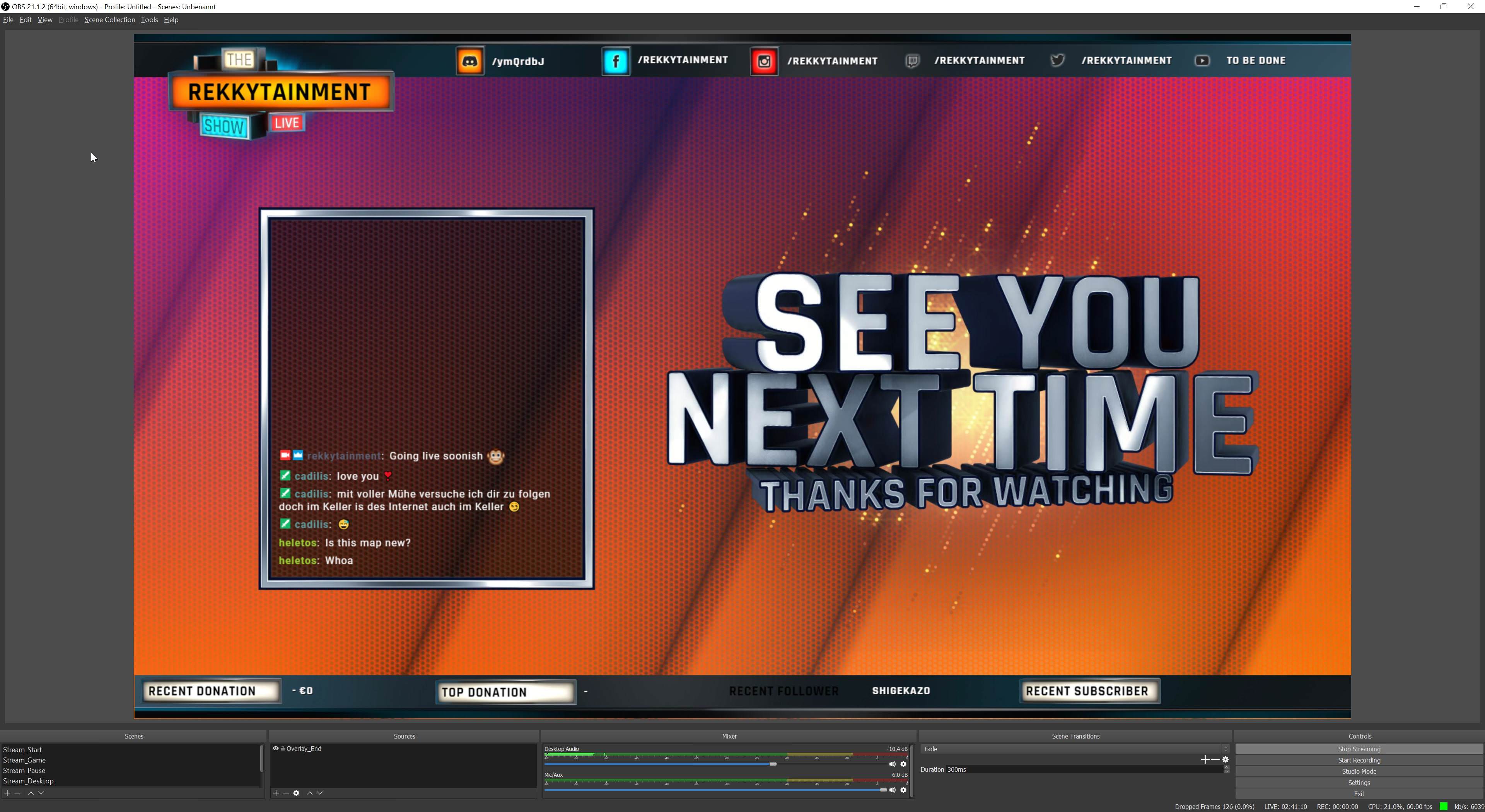
bottom side, the "Recent Follower" should be inside a box but the box glitched out
timber hearth
Mine does this a lot too
 teal yoke
Hi guys I'm receiving the message "user was not found" when I try to use the comand add points user
The comand works fine for add points all
 vital wyvern
have you check that the username is the correct one? 😃
teal yoke
Yes I'm using @ to toggle the correct one
vital wyvern
could you dm his username?
weary mist
let me jump in and do some testing
teal yoke
vital wyvern
^
teal yoke
I don't get it
teal yoke
I'm not on my PC right now. I don't understand the thing about room and main room
weary mist
weary mist
the chat currently happening in your channel is in the #chat_off_stream channel, which the bot does not join
teal yoke
Add all work
weary mist
we do not support the twitch chat channels right now
teal yoke
Add points all eork
weary mist
we only join the Stream Chat channel
teal yoke
Yes I as issuing the commands in the stream chat channel
I only use this one
And every single other bot command works
weary mist
go ahead and try it again, I am watching
weary mist
lol, you didn't need to post that, I said I was watching 😉
elder sorrel
👀
weary mist
Try changing the capitalization of the name to match your current captialization
oh
I think I know what itis
yea
its the @ symbol
remove that
it is searching for a username with @ in it
@teal yoke
teal yoke
Let me try
Ok...
Anyway to make it work with the @?
Regex ?
The easiest way to type some of viwers nicknames it's using @
weary mist
if you are using a PC, you don't need the @ for the autocomplete (hitting tab works). as for mobile, just remove the @ after you get the name. At this time, there isn't a way, but I will talk with the bot dev to see what we can do
limpid spire
So I'm guessing there is no way to suppress items bought in the store from appearing in chat as "redeemed" is there?
weary mist
if you have it marked as redeemable via chat, there is no way to suppress it
 lapis pivot
for latest "" text bpxes is there a way to hid them if there is no latest tipper
zenith widget
You can click on the widget or layer and use the eye icon next to it. This hides the widget
lament blade
Anything I can do to improve my streaming on console
nocturne pelicanBOT
@lament blade Here is a guide on how to setup the most essential tools for streaming from your console, while using StreamElements tools without involving a Capture Card! It's easy to do, take 4 minutes to read and 10 to 15 minutes to setup!
Read all about it here: https://blog.streamelements.com/how-to-stream-on-console-7b620b1c46c3
lament blade
Any way of letting my stream viewers know about the store
narrow coyote
elder sorrel
⤴
narrow coyote
set up a timer that links to the store
elder sorrel
Beat me to it 
narrow coyote
also make sure to add the StreamElements extension to your twitch page, store can be accessed through that as well
lapis pivot
@zenith widget but is there a way to show it again when someone tips
i dont want to have to manually update its visibility
zenith widget
Unhide it back afterwards
lapis pivot
that is basically manually updating its visibility though
 rapid robin
Not sure if this is an option, or if im just being stupid, but is there a way to have the bot show/write out someones attached comment to a tip on the chat?
 rugged gull
Hey! I haven't gotten a stream report after yesterday's stream. Is there an estimated time to get them after a stream? Usually I've gotten them at the latest an hour after ended stream
weary mist
it should arrive after 15 minutes. What is your email and twitch name (DM me both)
@rugged gull
 cloud solstice
Hello guys . I had some issues with streamelements extension . So i though I went to https://www.twitch.tv/settings/connections in order to unlink streamelements and re-link it again in an attempt to fix the extension issue . now how can i link my channel again ? cause when checking the connection section on my twitch channel's settings I could find streamelements
 weary mist
Once you disconnect, just navigate back to www.streamelements.com, and log in (log out if you have to first), and it will refresh the connection. Another thing you can do is remove the extension, and re-add it
cloud solstice
Thanks @weary mist . cheers
weary mist

cloud solstice
Perfectino @weary mist . Now streamelements show up on connections , however when resetting the extension panel it show up as offline . Also it's worth to mention that in the extension config I am not able to modify the following sections
weary mist
try going back to the settings page, and changing one of the sections you can change. When I go to your twitch page, I actually see information in the panel
it seems to me to be a caching issue, so maybe try clearing your browser cache as well
cloud solstice
okay good sir thanks a lot I will clear the browser cache and see how it goes . much appreciated
limpid spire
@weary mist is there a way to have a sound effect play, but not be redeemable via chat?
weary mist
@limpid spire you can have one in the store that isn't redeemable via chat, but you would have to trigger it through the store page
limpid spire
Ah, so no way to use the $(redeem x) code?
weary mist
no, you have to have it redeemable via chat to use the $(redeem x) variable
 wanton jetty
Hmmmm Whut
https://chrisis.live/s/2206185607_0.png
 wanton jetty
:/
 hushed ferry
Have the SE stream summary emails been abandoned, have not seen one in a week or two? Or is that info now on dashboard?
weary mist
@hushed ferry they should still be coming. They are too popular to abandon, lol. Can you DM me your twitch name and email address you are supposed to be receiving them at?
hushed ferry
@weary mist same as here, or right-click my profile for the socials
weary mist
that still doesn't give me your email 😉
I need that information so the devs can research whats happening
wanton jetty
Can ya see if mines going through i get SL's emails but not SE
contact@chrisis.live
hushed ferry
Done
kind epoch
Is there a subcount command like nightbot has?
kind epoch
Could you please supply me the command line?
weary mist
points up
kind epoch
Ok, that works , thanks
 bronze karma
Anyone having issues with KappaGen? Mine is firing off exmotesplosions without any triggers.
weary mist
@bronze karma likely host alerts of zero viewers
bronze karma
Is it grabbing autohosts now? This is a new issue.
 light hornet
hey guys, one question: the max answers for 8ball it's 40?
weary mist
I haven't tried to reach a max before on it
light hornet
because more than 40 if I try to add, I get an error
 dull comet
hey i was wondering how do i get my stream key and how do i paste it onto the stream labs software
narrow coyote
https://www.twitch.tv/YOUR_NAME/dashboard/settings
narrow coyote
dont know what to tell you on that, I dont use SLOBS, I would highly recommend OBS Studio over SLOBS
dull comet
ok how would i use my overlays i have on streamlabs and alerts
narrow coyote
this is StreamElements, not StreamLabs, we would recommend using StreamElements overlays and alerts
dull comet
ok
narrow coyote
You can import SL alert boxes, make your own overlay, or use one of the many prebuilt ones https://streamelements.com/dashboard/themes
dull comet
thanks for you help👍
autumn verge
anyone know what the command is for the custom bot name?
nocturne pelicanBOT
Custom bot name requirements
- StreamElements bot modded and in chat
- Active overlay with alerts
- StreamElements tipping page in the panels below the stream (!panels)
- Create a twitch account for the name you want to use
- Ground Control app must be running
Steps to enable custom name
- Sign in to https://twitch.tv with the bot account
- Install and run Ground Control (!gc for download)
- Visit https://twitchapps.com/tmi/ and generate an oAUTH token
- Copy/paste everything in the box to Ground Control oAuth settings and enter the name for the bot account
- Restart Ground Control (custom name may take a few minutes to take effect)
narrow coyote
!rename
autumn verge
ty!
how do you sign into gc as a different user
deleting the JWT token just makes it go blank white for me
i don't see a log out option or anything
i wish there was a way to swap between accounts (cause i'm mod on one, and then ofc i have my own) just like on the browser
but i deleted the JWT and then rebooted the app a few times and it decided to cooperate
deft karma
I know it's late but thanks @elder sorrel for showing me s'more of the ropes around here man stellar staff here
 west dock
Hello
deft karma
hello
west dock
Quick question, is there a way to make the chat widget
To scroll text horizontally instead of vertically?
elder sorrel
No problem 😄
pine hemlock
@near grail you have disable hyperlinks enabled in your twitch account settings
 near grail
its not actually
thats why it weird
Or do i have to reset stream?
because it actually turned it off while streaming
pine hemlock
Shouldn't have to. Are the messages getting timed out or is it showing deleted link or ***
Because if it's the second two it's a twitch thing
near grail
its just saying this: <link deleted>
narrow coyote
then its a twitch problem
near grail
rip
autumn verge
where/how do you add widgets to stream? does it automatically get linked if you add an overlay?
narrow coyote
you could try lowering automod if you have not yet
near grail
ok @narrow coyote
autumn verge
things like the store redemption or subscription alerts aren't going off/showing up
narrow coyote
widgets go into your overlay, overlay goes into your broadcast software as a browser source
autumn verge
yeah but how do you insert the widget in the first place
editor before it goes into OBS?
narrow coyote
from the overlay editor, you add whatever you want to the overlay
then you save it, and add the overlay url to OBS
west dock
@narrow coyote do you know if O can do what I asked? To set the chat widget to scroll text horizontally?
autumn verge
ty!
narrow coyote
@west dock There is no way to do this currently
narrow coyote

good to know, i did not know chat needed to be refreshed for the change to take place
 worthy nimbus
Hey, I don't know if this is an already known thing or it could be something i've done wrong, Kappagen seems to just be firing none stop on my channel the emotesplosions and things, I was wondering if there was an issue or it's just something i've not set right
autumn verge
wait kappagen doesn't fire at all on mine
i just assumed i was doing something wrong though
narrow coyote
@worthy nimbus What you are probably seeing are host events for 0 viewers triggering the kappagen explosions. Unfortunately, the only way I am aware to prevent this is to disable hosts from triggering a kappagen explosion
worthy nimbus
OHH! perfect! that's a good point!
Thank you so much for that!
I'm guessing it'll be auto hosts?
That would explain it alot
narrow coyote
hosts and auto-hosts, but these events are most likely auto hosts
we changed it so the alert widget and chat alert only trigger for 1 viewer or more, but kappagen does not share these same options 
narrow coyote
yeah, there were very recent changes to the alert system, we are now picking up on real host alerts that we previously were not
worthy nimbus
Ohhhh! that's perfect and explains it all, I thought someone was firing the command constantly or something haha thank you1
narrow coyote
No problem
 sturdy vortex
why is it when I copy over a browser link from the editor for lets say the alerts ... it also copies the follower browser link too ?
narrow coyote
Wat 
narrow coyote
your overlay URL is just a single URL , unless you have things in seperate overlays
 hexed saffron
I just have a quick question about my host alerts. One day they were showing up on stream and now when someone hosts me nothing happens. Nothing happens when i try to replay the host in my dashboard. It does however work when i do a test in the editor.
 south bridge
for my stream I will be allowing song requests and I want to show the video, so what do I put in the overlay, is it media share?
narrow coyote
@hexed saffron changes were made to the system, alerts now only trigger for hosts with 1 viewer or more. You can change this back to 0 in the alert widget in your overlay, and in the chat alert module
hexed saffron
ah thank you @narrow coyote
narrow coyote
@south bridge media share widget if you want to use the show on stream option
sturdy vortex
then i apply it in the browser source... works fine.... ok next i need follower goal, so i create follower goal... i apply the browser source , only this time ... it applies the alerts too
narrow coyote
yes, as long as the bot is in chat, and the media request page is open, you are all good to let the music flow
sturdy vortex
why are all the layers on one single page in stream elements?
south bridge
How would I be able to allow the song requests command 😄
narrow coyote
@sturdy vortex if you are adding it into a single overlay, everything will be in that overlay. if you want them all separate, you can make multiple overlays and add them as separate browser sources, but the idea is to cut down on the amount of sources needed
Top of the media request page
https://streamelements.com/dashboard/mediarequest/settings settings for it are in here
 gloomy patrol
I need help scaling the overlay in obs. :p
narrow coyote
what do you mean
sturdy vortex
@narrow coyote so 1 overlay and 1 browser source?
narrow coyote
yes, unless you want to use more, its up to you, and if your system can handle it
south bridge
When I click "Viewer requests" for some reason it keeps going off when I refresh?
Sorry for asking lots of questions, still new at StreamElements.
narrow coyote
do you have ground control open, and have the song request enabled in there?
 narrow coyote
If you do, its best to turn that off in GC, and manage it from the website
narrow coyote

sturdy vortex
@narrow coyote ok so once you have positioned the overlay here , that position will be reflected in say OBS , because its a single source moving it around in the obs window will move ALL layers ??
narrow coyote
you will want to lay it out in the overlay editor how you want it to look, then add it to OBS at the native resolution, and everything will be in palce
narrow coyote
Example, I made this, its 1920x1080, add to OBS at that resolution, and it all fits in place, then my game and cam are added as sources in OBS and put into their respective positions
anything that is that green will be transparent
sturdy vortex
@narrow coyote Thank you so much , makes total sense now
narrow coyote
no problem 
nocturne pelicanBOT
Custom bot name requirements
- StreamElements bot modded and in chat
- Active overlay with alerts
- StreamElements tipping page in the panels below the stream (!panels)
- Create a twitch account for the name you want to use
- Ground Control app must be running
Steps to enable custom name
- Sign in to https://twitch.tv with the bot account
- Install and run Ground Control (!gc for download)
- Visit https://twitchapps.com/tmi/ and generate an oAUTH token
- Copy/paste everything in the box to Ground Control oAuth settings and enter the name for the bot account
- Restart Ground Control (custom name may take a few minutes to take effect)
autumn verge
i don't see oauth settings, i only see a spot for the JWT token - are they the same thing? and if so, does that mean i no longer log in with the streamer name but with the bot name + token instead?
zenith widget
You are missing the tipping page panel
- StreamElements bot modded and in chat
- Active overlay with alerts
- StreamElements tipping page in the panels below the stream (!panels)
- Create a twitch account for the name you want to use
- Ground Control app must be running```Do you have his JWT token in the GC?
autumn verge
yeah
zenith widget
Usually thats not recommended cuz you'll have to run GC while they are live
autumn verge
i'm just doing the setup
zenith widget
are you on a Mac?
zenith widget
bot renaming does not work on Mac
autumn verge
🤦
zenith widget

autumn verge
okay thanks!
zenith widget
I think and hope
autumn verge
lool rip my stream isn't affiliate yet so i hadn't worried about setting up allll of SE but now i know for when i get there 😛
any idea why it doesn't work on mac? if gc is available and everything else is browser based
 autumn verge
shhh
zenith widget
exactly
narrow coyote
they are not the same versions, the mac version is behind the PC version, and focus has been on rewriting GC completely
autumn verge
you have no idea the hoops i had to jump to get obs studio working 😛
zenith widget
as a software dev my self who makes programs on Windows platform, having to port them to Mac AND Linux
autumn verge
so when it re-releases please tell me it has even support?
autumn verge
yeah i've heard D:
autumn verge
haha i'm not on a macbook and a gamer by choice ok
the most i used to play was like the sims for a long time
 waxen cloud
How can I reset the donation Goal?
I tried to do a new one, in the web editor but it still list´s previous donations
waxen cloud
Thanks a lot
narrow coyote
sturdy vortex
hi again , does anyone know how to remove the shark animation from "emulate subscription" , ive tried to apply a custom image but it still remains a shark
zenith widget
Depending on the type of alert you are emulating
weary mist
@sturdy vortex check your variations
zenith widget
For example Subscriptions - change the variations
@weary mist Taking the short route 
weary mist
xD
narrow coyote

sturdy vortex
@weary mist Thank you
zenith widget
 🗡
🗡
weary mist
 untold crest
narrow coyote
untold crest
narrow coyote

zenith widget

narrow coyote

narrow coyote

autumn verge
is there no font color for the text in the chat widget?
narrow coyote
autumn verge
k everything looks so washed out on my screen, i couldn't even tell there was a font dropper there
zenith widget
I took my time
narrow coyote
autumn verge
i think that's a monitor issue, gotta go check :/
zenith widget
its barely visible as the dot is WHITE
 narrow coyote
probably monitor settings then for sure
zenith widget

narrow coyote
not the text he is talking about 
autumn verge
kei, i mean like the text for the settings themselves >.<
narrow coyote
⤴
zenith widget


narrow coyote
autumn verge
lol that's what i get when the auto-calibrate tells me to set contrast to 100
and then i try to make the rest of it work and it results in everything super whited-out
i can see again 😭 @narrow coyote
narrow coyote
try using windows to help
The windows color calibration is pretty good for fast, better results
autumn verge
on a mac ~
and the default calibration is what made me temporarily go blind apparently
cause i was pretty damn confused why i couldn't see half the things
zenith widget
Rule of thumb with new monitors - they always pump most if not all settings to max
except color saturation - that would look ugly in the store (even online ones)
autumn verge
lol it's not new, it's just a spare my dad had so i didn't expect blown out settings
so i did bare min on calibration and then assumed it would be readable/functional 😛
zenith widget
He might have never changed them
I always adjust manually - I'm near sigthed and bright lights kill my eyes 
But so you know when you want to buy a new one 😉
autumn verge
oh that might be it, too! i'm nearsighted too, and my dad's still got perfect eyesight at double my age -_-
narrow coyote
ok, we have gone over this multiple times, you have to give a detailed description of your problem, just saying help does not help us help you
 spare trail
Hey I would just like to know how to setup a sort of HUD on my second monitor to read my twitch chat, see donations/followers and such
nocturne pelicanBOT
@spare trail Our Desktop App Ground Control: https://streamelements.com/groundcontrol
elder sorrel
You could have a Small window open with Twitch Chat & the Ground Control App for alerts
zenith widget
You can get the Ground Control to read the activity feed for alerts
while you can popup the twitch chat or perhaps use Chatty
spare trail
ground control app?
narrow coyote
I use popout chat, and ground control
zenith widget
The link from the bot
nocturne pelicanBOT
@spare trail Our Desktop App Ground Control: https://streamelements.com/groundcontrol
nocturne pelicanBOT
@spare trail You can find your JWT token on your account channels page: https://streamelements.com/dashboard/account/channels
(Don't forget to click on "Show Secrets")
 glass sorrel
@winter zenith I checked my settings and it was already enabled
@dense jackal i checked the settings and it was already enabled
 upper steeple
is there a way to get a command to work in streamelements that displays the current song playing for the pretzel rocks application?
This is they tell you to put if you have streamlabs or ankhbot, but it doesn't seem to work right for streamelements
$readapi(https://www.pretzel.rocks/api/v1/playing/twitch/YOUR_TWITCH_NAME)
autumn verge
is there something i have to do to get kappagen to work? other than just enabling the command
autumn verge
figured there was a widget, ty! i'll check with the streamer, i don't think he does
upper steeple
@weary mist thank you very much
near grail
Can i change title trough streamelements
elder sorrel
Yeah through the dashboard.
narrow coyote
!settitle
elder sorrel
that as well.
near grail
Ty

 lilac spade
Anyone know if there is a way to do a countup on SE overlays? I only see the countdown option
zenith widget
@lilac spade No at the moment, but I can suggest a timer from here http://www.speedrunslive.com/tools/ - WSplit looks like the most simplest to setup, just don't use the speed run split button
lilac spade
No worries ive used http://jimmyappelt.be/preview/snaz/ to do a count up for a long time just wanted to move that into the cloud

 worn heron
Hi all. Quick question. I followed the tutorial on importing my Streamlabs alerts to Streamelements. It created a separate overlay for just the alert box. How do I transfer that into the overlays that I want to use?
Please and thank you.
narrow coyote
worn heron
Thanks Kite. WIll that put it directly into the other overlays or am I missing a step. I feel like I'm missing something simple but my brain is fried from work.
weary mist
click it and find out 😉
narrow coyote
 worn heron
Ah! Genius! Thank you. 😄 Magic indeed
narrow coyote

worn heron
You guys rock! Now I can finish the set up for my Extra Life stream tonight. Thanks!
narrow coyote
 Have an awesome stream!
 waxen swallow
so being really dumb, how do I change to auto reply message for follows? Been searching all day lol
near grail
Is it Possible that regular viewers cant see !settitle ?
Because i dont want that to show up in strram
zenith widget
@waxen swallow Check the chat module for the bot.
@near grail Even if they see it, the command is usually set to Super mod. Only level above Super mod is Broadcaster
 wise cliff
How long does it normally take for store items to update in the panel?
zenith widget
@near grail Then just disable the command and use the Twitch or SE dashboard to update the title or game
near grail
Ok
zenith widget
@wise cliff If they don't update right away, I suggest going to the settings of the panel changing something to trigger a save
@wise cliff At the moment I see 6 items in the panel. New Items maybe poping up at the bottom, so scroll down in the panel? 
wise cliff
Nothing. There should be 7 now
 main shell
uHH, for some reason, auto-hosts are tripping the bot now for some reason?
Where is the setting to change that?
zenith widget
@main shell Check the Chat alert model
Set it from 0 to 1. If its 1, change it to 0 save then to 1 again
@wise cliff I tested it out my self. Updated the first 2 items right away but the 3rd and 4th didn't show up. I think it just takes a bit of time to update
 junior pine
At the moment I still use ahnkbot (streamlabs bot) but everything else through streamelements. I would like to switch totally to Stream Elements but there seems to be a few things that we use a lot on ahnk/sl bot still that se bot does not have. Is this the place to ask if SL can do these things through custom commands and/or the features are coming?
zenith widget
@junior pine What exactly are you looking for?
junior pine
In addition to the points system, user really like to see how many hours they have spent in the channel (during live broadcasts) and what rank they are in hours spent. --- Also, we use the Queue system a ton as we play a lot of games where characters are named from subs/viewers/etc. -- Those are the primary two functions I can't seem to find or replicate. We do also have a custom points game we made, but that is less important


 junior pine
I understand importing points, but it is the hours spent in channel that I don't think is currently tracked?
zenith widget
I'm not sure if they are applied to Lifetime points which are connected to the !watchtime command
As for the queue system. One work around is doing a stream store item. You can check who redeemed the item via the redemption history
you can have details there and check them via this place: https://streamelements.com/dashboard/store/redemptions/history
for an actual queue system via the bot has been asked before and I think its already posted in the Ideas board. More upvotes helps it get to the dev team's to-do list
junior pine
Thanks, that is probably the top feature holding me back to using only SE. The queue system while playing games like Darkest Dungeon has been an important part of viewer retention that I don't want to lose
waxen swallow
@zenith widget see, that is what I was looking for! Thanks!
junior pine
So, with the !watchtime command a user can see how long they have watched the live stream? Can that also be imported from SL/Ahnk? ALso, can a user see what 'rank' they are? Say !hours showing them 'User, you are ranked 10th in all time hours spent!'
zenith widget
the !top command gives a leaderboard page which in your case is this: https://streamelements.com/adamvseverything/leaderboard
From what I can see, there are already points. This means that !watchtime has been tracked properly so far
Like I said, the watch time is connected to the all time points.
as for the rank
junior pine
Right, so no way to see a leaderboard of just time spent and not points
zenith widget
when ever someone does "!points" they are given this response: $(user) has $(user.points) $(pointsname) and is rank $(user.points_rank) on the leaderboard.
For watchtime actual leaderboard - no
junior pine
THere is a current point leaderboard and an all time most accrued points, but not an additional leaderboard for time only. I've found the queue suggestion and it looks like it is planned, will check for a time leaderboard now
zenith widget
but !top online will give top5 people who have watched the most
junior pine
Alright, thanks for the info. It looks like I will still have to load up SL bot for those two features for now. I might reconsider once the queue portion is implemented (looks like it is marked as planned already)
 lusty frigate
hi im live and for some reason my latest follower doesnt showup anywhere but when he does !followage live it show's him
yet no overlay or activty feed are showing him up as existant
anyone coould help me in the voice chat if they dont mind being live? 😃
halp
zenith widget
Check the session page here: https://streamelements.com/dashboard/session
Try and reset aggregates
DONT
show it on stream
@lusty frigate ⤴
Don't show most of the dashboard on stream, cuz you may show something you may regret 😉
Like the overlay link
 radiant grove
hi all,having problems with the streaming store,you can actually redeem items but even tho i put the widget in every overlays,the widget doesn't come out(the item is reedemed like the chat says).
zenith widget
Ok, I saw you resetting the aggregates, log out of SE dashboard and back in
lusty frigate
nope still the same guy
zenith widget
Try reloading the overlays from here: https://streamelements.com/dashboard/activity
And also maybe hiding the overlay in OBS and back
@radiant grove Did you click save when you put the widget?
radiant grove
y 😦
zenith widget
@lusty frigate Ok here is how it is. If the person followed you before and unfollowed you then followed you back
it won't show up properly
it wiill not show up, as there is a check with Twitch to check the last 2000 followers
or so
lusty frigate
oooooooo ok ok iim asking him if thats what he did
zenith widget
@radiant grove I'm not really sure about your thing. Let me think
radiant grove
well in last days i m having same issues wiht followers,the alert doesn t come out(is imported gif from streamlabs)
ok @zenith widget
lusty frigate
he first followed 22min ago and it didnt show up tought
zenith widget
is having a hard time thinking while being awake for 18 hours and its almost 3AM
lusty frigate
you got my pogchamp good friend
radiant grove
lol he quit
zenith widget
@lusty frigate It is possible for him to have clicked the unfollow button instantly by mistake and that to NOT trigger the follower alert

lusty frigate
all guchi thx
radiant grove
@zenith widget i m having same prob wiht new followers from 3 days
but is not a big deal
i prefer having fixed the store witchets
widgets*
zenith widget
@radiant grove Ok from personal experience with imported alerts from StreamLabs, I can say that, before moving to SE, the alerts my streaming was using were bugged. We could not update the image or sound for months. The import actually imported that bug as well. I suggest deleting thta overlay and if you have the images and sounds make a fresh overlay
That may help with the store widget
radiant grove
u mean it compromise the store as well???!
radiant grove
i got the premade themes
zenith widget
Ok, so you are actually using a premade overlay?
radiant grove
y
zenith widget
and are having both alerts and store item problem
radiant grove
but stil streaming from streamlabs obs
radiant grove
they works in general just the followers dind come up in last 3 days
zenith widget
because SLOBS usually doesn't like our pre-made overlays
radiant grove
D:
zenith widget
for some strange reason. For some people they work OK, for some they don't work properly at all
at least thats what I've gathered
zenith widget
I might be wrong really, but we as StreamElements, highly recommend OBS Studio as 99% of the SE.Staff and SE.Champs can help you and that 99% have not used SLOBS
Just don't ping me
I might be dead, like Sodapoppin is dead from that chocolate he ate
zenith widget
Just ask again for help here and more or less say what you were using and what you tried
someone else might be able to help, cuz I may be offline
Saturday YAY 
 rapid fox
is anyone able to help me im trying to find out what my JWT token is but cant find it anywhere i maybe being a tad stupid here
nocturne pelicanBOT
@rapid fox You can find your JWT token on your account channels page: https://streamelements.com/dashboard/account/channels
(Don't forget to click on "Show Secrets")
 split parcel
I have no clue what Im doing obs and stream wise
 native sapphire
The streamer I moderate for (am a editor on stream elements) would like to know if your bot has a queue that links to a spreadsheet and a !join feature.
clever mango
@native sapphire Not at this time
native sapphire
dang 😦
 astral epoch
got a problem with the getting a lot of 0 viewer hosts showing on screen. we've made the chat message only for hosts with 1+ viewers but the alert still shows on screen
 tight harness
The alert box has exactly the same setting available, "minimum amount"
astral epoch
ok so change that setting in the overlay, does it have to be refreshed after?
tight harness
Shouldn't need to be but you can do for safe measure 🤔
astral epoch
kk thanx its been driving the streamer nuts 🤣
autumn verge
when making overlays/in the overlay editor , is there a way to group/merge a certain set of widgets/layers together?
so i can move them together in relation to one another and/or copy between overlays?
cause i would love to not have to replicate it like 4 different times
 versed plover
Could I get help setting up stream elements
weary mist
@versed plover have you watched the series of youtube videos we have that was linked in the message you go t when you joined?
versed plover
Yes I have I can’t figure out what to tap to connect the bot to my channel
 lethal wren
I just recently switched over to StreamElements, and so far its been just fine. However, when I'm setting up notifications, my notification sound plays, but so does this default "ding" sound. Is there a way to get rid of it?
versed plover
It’s not letting me finish putting the streamer elements as a moderator can u help Havo
 rapid summit
Kappagen keeps going off randomly on my stream, I can't figure out how to keep it from going off
 warm sand
@versed plover did you /mod stream elements on your twitch chat yet?