#helpdesk-twitch
1 messages · Page 281 of 1
 clever mango
or edit the existing multi with !cmd edit multi ..........
 normal igloo
Or you could say it like this StreamElements It's the same bot for everyone deepbot is your bot as it's not cloud based Not sure how you're not understanding? 🤔 @coral scarab
 coral scarab
@normal igloo you are not understanding
i am not talking about deepbot
at all
my channel's bot account is being run by StreamElements
the same bot account that we happened to use with deepbot before
 silver grove
@clever mango where on my app do I find the option to start streaming?
normal igloo
Well you mentioned deepbot So that's what I was referencing 
clever mango
@silver grove StreamElements is not a streaming app. We are tools for streamers.
coral scarab
i referenced deepbot while describing my use case for a non existent feature @normal igloo
clever mango
You need a broadcasting software to stream (OBS studio for example)
silver grove
@clever mango go back to twitch and get one from there?
clever mango
Open Broadcaster Software is free and open source software for video recording and live streaming. Stream to Twitch, YouTube and many other providers or record your own videos with high quality H264 / AAC encoding.
And they have a discord that can help you with their software
!obshelp
 nocturne pelicanBOT
For the best OBS support, please join their discord where OBS devs and support volunteers are available all the time discord.gg/obsproject
silver grove
@clever mango thank you a lot for all of your help
clever mango
@coral scarab Your custom bot name is just an alias of the StreamElements account and bot backend. That backend is running on our servers which also run the bot in many thousands of other channels. You were able to do this in the past because the bot was not running on servers but locally on your PC and the bot was only connected in your single channel. That's how it could respond to whispers it received.
The bot account with deepbot is tied to one channel and therefore it fields all requests the same as if it received them in the channel chat
coral scarab
@clever mango how many followers does StreamElements bot have on twitch?
because ours has 90
aka, it's own account
 hushed ferry
@clever mango Appreciate the response (took 3 occasions to get someone at SE to respond FYI) why is there no support for !setmulti to edit a command like !multi that is read only?
clever mango
Because we're an all-in-one with all the ideas in the world to implement but a very small dev team. We can't do everything overnight 😃
coral scarab
So to register a channel bot account with StreamElements, do you guys request the oauth for our bot account?
clever mango
Yes, so that the bot backend can post through that account's name
coral scarab
so if our bot receives a whisper, your backend is able to differentiate between our bot account and the hundreds of thousands of others, no?
 misty wagon
@viral cedar
clever mango
There is no flow in this direction through the custom name. The custom name is only used for responding in chat. For example: we don't even whisper command responses from the custom name. We use the SE account because our account is a verified bot account with a huge quota which means it is able to whisper everyone and not be rate limited like a normal account would be.
coral scarab
That explains why the whisper command/response use case wouldn't be viable with your current system, but not my use case
 ancient jay
Alguien español puede ayudarme?
clever mango
Para soporte en español, por favor entra a nuestro discord. Preguntas por @olive lintel
coral scarab
If you had a super mod role locked !relay command, If I as a super mod or broadcaster sent the !relay command via whisper to our bot, your backend could just parrot the args to our registered channel chat via the bot
just an idea
ancient jay
buenas @olive lintel tengo un problema con streamelements y streamlabs
coral scarab
no risk of rate limiting
 regal remnant
Anyone able to help me with my overlay? The follower goal widget won't change text color. (first time posting here so let me know if i'm in the wrong section) Thanks!
normal igloo
@regal remnant This area is for twitch support so you are fine are you making sure you were saving your overlay when done changing the colour?
 frozen scarab
Im having an issue with the alert box
regal remnant
yep, i tried saving the overlay, closing out, and re-opening. the color change stays but the actual text doesn't change color
frozen scarab
Its playing the sound twice
normal igloo
@frozen scarab Make sure you don't have more than one alert box open
regal remnant
@normal igloo I'm also using the "simple design" selection, maybe that cancels out my custom settings?
normal igloo
@frozen scarab Do you have the SE website open whilst using obs Or whatever software you are using
regal remnant
I'm just editing in browser right now
frozen scarab
I just had OBS open using SE overlay
 narrow coyote
!multi
nocturne pelicanBOT
Make sure to :ballot_box_with_check: “Shutdown source when not visible” for all browser sources (all OBS scenes). If using studio mode, uncheck “Swap Preview/Output scenes After Transitioning.” Also keep in mind that sound can play from any overlay loaded in the browser (editor or launched). https://i.imgur.com/FegZJQS.png https://i.imgur.com/yY0wcFl.png

 narrow coyote
do that for all browser sources in all scenes
frozen scarab
Awesome!
normal igloo
God dammit I keep forgetting about that command thx kite 

narrow coyote
Skynet 
coral scarab
@clever mango I think it would be easier for me to just run my own bot in parallel with yours on our bot account
thanks for discussing this with me
normal igloo
@narrow coyote All Your Base Are Belong to Us
regal remnant
@normal igloo I got it to work, took a few tries to make it go for some reason
normal igloo
@regal remnant 👍
 honest crystal
Yo James how do you get a sub and donations button?
normal igloo
!affiliate
nocturne pelicanBOT
If you recently became affiliated with Twitch and do not see Subs or Cheers on your Dashboard and Activity Feed please log out and back in so that Twitch notifies us of your new affiliate status.
normal igloo
@honest crystal
and donations button You can just add from your tipping page @honest crystal
honest crystal
affiliate you mean i have to be partnered with twitch?
is that the only way to get it ?
normal igloo
@honest crystal affiliate is like mmm How to explain it You not partnered but you have some partnered features like subs Twitch emotes Cheers
and so on
 cedar ridge
I have been having an issue with getting my streams to grow. I know I got flak because I'm not doing anything right. My problem is, I can't make it on my own because of the issue with bias.
Who do I contact to get help with the way I do streams?
honest crystal
hmm well how does one do such a thing i was told by a streamer who just started you have to add them manually.
He started like 6 days ago sooo?!
normal igloo
@cedar ridge https://twitter.com/LatteMotte/status/965235542907637763
Highly recommend checking this out

Want to grow your #twitch #livestreaming channel but 'never have time'.. Yeah, heard that one before 😎 Here's a guideline how to prep & spend your time wisely. Plan ahead! 🚀
Likes
145

 Twitter
@honest crystal mmm Hate to break it but you're not going get a affiliate in 6 days Unless you was some sort of twitch god 
 deft flame
can someone help with the media share workflow
when a user tips a streamer to have their video played on stream, how exactly is the streamer supposed to watch it?
via OBS?
narrow coyote
https://streamelements.com/dashboard/mediarequest/general controls media request, there is also an option to show on stream, if you have the media share widget added to your overlay
misty wagon
@deft flame Have you watched this one already, it explains a lot https://youtu.be/17eUkoZ6eIs

StreamElements Media request enables playing songs and videos in your stream. It's an upgrade of StreamElements Song request and Media share features. ----- ...
deft flame
@narrow coyote right but with Ground Control, if you're showing the video on screen, it doesn't show in Ground Control
So the only option is to watch in OBS?
@misty wagon I have watched that video, it doesn't cover how to actually watch the video when it's been donated
misty wagon
Good point @deft flame Something we should consider adding in the next version perhaps.
deft flame
is the answer just to watch on your OBS monitor?
narrow coyote
You are either going to have the video running on the media request page, or through the widget. So i guess right now if you are using show on stream, then seeing the video in the OBS preview would be the only way to watch it and have it on stream
deft flame
Ok, that's what I thought, just wanted to make sure that is the intended functionality. Thanks!
narrow coyote

 charred garnet
are follower goals broken
narrow coyote
 What do you mean
charred garnet
i set a goal for 7 and on the left side of were it says 7 it says 151 by default im new to follower goals but im sure it should be set to 0 to start with
narrow coyote
From the overlay editor
there is a goals tab, you can reset this or set it to what you need in there
Can also be done from https://streamelements.com/dashboard/session
charred garnet
so if i were to use the emulator to test the follower goal would that work?
narrow coyote
it should do things when you emulate
narrow coyote

 neat nest
Can I get some criticism on my stream from some senior streamers 😛 (tell me when I can link)
 errant bear
my dudes cant post links in chat and link protection is turned off
 pine hemlock
If it turns into *** its because you have disable hyperlinks enabled on in your twitch settings
If link protection is off, you have another bot monitoring your chat.
 toxic parcel
Are there problems for anyone else for Tweet alerts in Twitch chat?
I've check the module for Twitter and everything in there looks up-to-date
 meager meadow
Whenever i test my alerts it plays the alert twice or plays a bunch of alerts i have set to other things
toxic parcel
Alright thanks @pine hemlock
Appreciate the fast response!
nocturne pelicanBOT
@meager meadow Make sure to :ballot_box_with_check: “Shutdown source when not visible” for all browser sources (all OBS scenes). If using studio mode, uncheck “Swap Preview/Output scenes After Transitioning.” Also keep in mind that sound can play from any overlay loaded in the browser (editor or launched). https://i.imgur.com/FegZJQS.png https://i.imgur.com/yY0wcFl.png
meager meadow
unchecking that didnt change anything. What is happening is when i run a test in the editor which i have muted. It plays the sound on my obs. Then it pauses and plays the sound again
So i'm switching to a different plan. I love the overlay from streamelements but the alert settings are far to confusing for me. So i'm just gonna copy the link to streamlabs obs and use my own alert box
 vital wyvern
@meager meadow unchecking it might be the problem why its happening, could i ask if you are using the Stream Elements Ground Control app ? 😃
meager meadow
yes i was
 lament blade
Where can i find my JWT Token, when i click it it'll just redirect me back to the main Streamelements page
nocturne pelicanBOT
@lament blade You can find your JWT token on your account channels page: https://streamelements.com/dashboard/account/channels
(Don't forget to click on "Show Secrets")
 kind epoch
Hey all hope all is well. Is there a way to add points to a viewer's account?
Like the loyalty system?
pine hemlock
!addpoints
kind epoch
Thanks heaps
 paper talon
Hey guys, I have some trouble with OBS. When I switch scenes, my camera doesn't show, only in the first overlay I've setup and not in the others?
 zenith widget
Copy the camera source from the working stream to the other or you can use this tip from the bot:
!multi
nocturne pelicanBOT
Make sure to :ballot_box_with_check: “Shutdown source when not visible” for all browser sources (all OBS scenes). If using studio mode, uncheck “Swap Preview/Output scenes After Transitioning.” Also keep in mind that sound can play from any overlay loaded in the browser (editor or launched). https://i.imgur.com/FegZJQS.png https://i.imgur.com/yY0wcFl.png
zenith widget
This not only works for browser sources but for cameras as well. If it doesn't help, then resort to my 1st suggestion of copying the source
paper talon
That worked! Thank you! 😃
zenith widget
Which worked? The "shutdown" option or the copying of the source? 
I just know that the shutdown option doesn't work for a streamer I mod
zenith widget
aah the simple route
 solar plover
So there is themes on stream elements but if you dont want to use them is there away to create your own themes?
zenith widget
Yes. Watch this video https://www.youtube.com/watch?v=X7XrDdRE7Fk
Its a bit outdated but the essentials are there.
solar plover
Alright thanks
lament blade
any news on how to change the bot name?
i have downloaded ground control, but there's nothing under the setting sections to do this
nocturne pelicanBOT
@lament blade Custom bot name requirements
- StreamElements bot modded and in chat
- Active overlay with alerts
- StreamElements tipping page in the panels below the stream (!panels)
- Create a twitch account for the name you want to use
- Ground Control app must be running
Steps to enable custom name
- Sign in to https://twitch.tv with the bot account
- Install and run Ground Control (!gc for download)
- Visit https://twitchapps.com/tmi/ and generate an oAUTH token
- Copy/paste everything in the box to Ground Control oAuth settings and enter the name for the bot account
- Restart Ground Control (custom name may take a few minutes to take effect)
solar plover
So when do you use the stream ended scene like do i use it when i stop the stream or like as a offline banner?
zenith widget
Do you mean the stream ending overlays or "Stream is Offline, see ya all tomorrow. Heres my schedule" 'wallpaper'?
lament blade
See, my only issue is that there's no oAUTH place just a JWT
solar plover
The overlays
zenith widget
@lament blade on the GC Settings scroll down and you should see "rename bot" option. Tick it on and restart GC.
@solar plover Well..like say goodbye to your chat and switch scenes and mute microphone from obs?
solar plover
Alright but i am able to use it aswell as a offline banner?
lament blade
@zenith widget hey man, there isn't any scroll. It ends with the Use Compact Mode nothing after that
zenith widget
@solar plover Make a screenshot of it if you want and upload it via the twitch dashboard settings. Not sure where it was really in Twitch.
@lament blade Let me get GC on my work PC one moment pls
solar plover
But thats the thing my screenshots dont work it just comes up a little round thing
lament blade
Sure. This is all I seen on the settings page of GC:
clever mango
@lament blade This is because the requirements aren't met for custom bot name, specifically using StreamElements tipping service and having it linked in your panels.
lament blade
!panels
nocturne pelicanBOT
Twitch's official help guide for Panels: https://help.twitch.tv/customer/portal/articles/2416760-how-to-edit-info-panels
lament blade
Ah I see!
clever mango
It will appear on refresh after the requirements are met 😃
zenith widget
@solar plover I'm not sure what you mean your screenshots look rounded
If you want you can DM me the screenshot you've taken
 cedar lynx
- but not if you're on a Mac 😉
 ruby hill
I have a question! ?
cedar lynx
what's up? don't work here but maybe I can help
ruby hill
I am currently using Streamlabs as for my streaming (other essentials for alerts etc.) but how do I get all my overlays to that Program?
 gentle imp
o_O
are you using streamlabs obs or streamlabs for alerts?
this is StreamElements, we have our own alerts/overlays
vital wyvern
highly recommend to switch over to the original OBS studios, such that you can use our overlays, alerts an such 😃 @ruby hill
ruby hill
or XSplit
vital wyvern
yes or xsplit 😃 but what so great with OBS is that its open source and free to use 😃 but i think @winter zenith would agree with you here 
 gentle skiff
can i use your bot without using alerts and etc?
gentle skiff
Can i somehow add some specific alerts such as store items / donations / giveways without adding the whole package
cedar lynx
you can setup a custom overlay and just put the widgets you want if that's what you mean
gentle skiff
yeah thats what i mean thanks i'll try it out
also for some reason the overlays arent really working with my streaming program
cedar lynx
what program are you using?
gentle skiff
streamlabs obs
cedar lynx
I believe there are known issues with StreamLabs OBS especially with SE overlays. It's not as well maintained -- try plain OBS studio
gentle skiff
actually i think its because i changed the resolution of a theme
ancient jay
ok ok, i solved my problem, ty 👋
 toxic basin
How can I get text to speech donations while streaming from my samsung s7?
Is there a tutorial of some kind?
I only see Streamlabs tutorials, there should be some Streamelements way of doing it as well right?
 stuck hamlet
What app are you using?
And simply adding our overlay doesn’t work?🤔
Also trizze wtf dude, long time no speak. You hiding from me or something?
 winter zenith
StreamElements is working on a streaming App, however this is not possible yet. If you have a Mobile Streaming App that Supports Web URL you can input your StreamElements overlay, put your phone/Bluetooth speaker on and TTS will be available
stuck hamlet
What she said ^
clever mango
bitstream is what I recommend for android at this time
toxic basin
@stuck hamlet
I mean I can use whatever app that works with text to speech
Bitstream seems to provide the best quality
Does Bitstream support web urls? 🤔
winter zenith
Yes
But it has a water Mark. Vor 3€/USD it's gone 
I streamed with Bitstream on my Phone and TTS worked there So I also recomend it till the StreamElements App comes out
winter zenith
No problem 
 worn wedge
Stream element extension again down?Because i cant see subs
cedar lynx
Subs have been funky for me too on the extension
narrow coyote
Subs not displaying is a known issue that is currently being worked on
 normal silo
guys? anyone knows how people stream on facebook and twitch simultaneously?
winter zenith
Re.Stream
normal silo
hmmm. should i pay for it?
narrow coyote
That's up to you, if you want to multi stream
normal silo
if i try to access the FB part on restream it says i have to pay for it
is it just me or is it the way it is
maybe im doing it wrong
narrow coyote
That's how their service works
normal silo
Oh so I should pay for it so i could multi stream
i see. thanks. that clears things up.
narrow coyote
 atomic frost
Hi. Do you need a PC to do any of the overlays. I have a Mac but not a pc.
Can someone help please??
zenith widget
You need OBS to stream on a PC or Mac
You don't need a streaming PC like most big streamers do these days
atomic frost
Ok. So I could download it on my Mac and stream on my ps4
nocturne pelicanBOT
Here is a guide on how to setup the most essential tools for streaming from your console, while using StreamElements tools without involving a Capture Card! It's easy to do, take 4 minutes to read and 10 to 15 minutes to setup!
Read all about it here: https://blog.streamelements.com/how-to-stream-on-console-7b620b1c46c3
zenith widget
@atomic frost ⤴
atomic frost
Thanks
zenith widget
But if you want to stream from your PS4, but using Overlays for alerts, then you will need a Capture Card. I don't know any capture cards that work with Macs, but I assume Elgato does
Someone else on a mac with a capture card here can give you that info, if no one can, then research it via Google
 dreamy juniper
Yoo where can i get my JWT token?
zenith widget
!jwt
nocturne pelicanBOT
You can find your JWT token on your account channels page: https://streamelements.com/dashboard/account/channels
(Don't forget to click on "Show Secrets")
dreamy juniper
The link from ground control is wrong...
Sends me to this ... https://streamelements.com/dashboard/account/information

StreamElements
The Ultimate All in One Platform for Streamers
zenith widget
We know. The newer version of GC will have an updated link
dreamy juniper
ok 😄
zenith widget
no ETA on that one
 near grail
How much bitrate should i do for 720p?
dreamy juniper
and what the actual fuck is your profile gif? xD
zenith widget
@near grail It usually depends on your upload speed towards the twitch servers but around 2500-3000 is standard for 720p 30fps
@dreamy juniper Mine?
near grail
Ty @zenith widget
gentle imp
 jaunty whale
hi sir where should i paste the link that stream elemnts gives?
narrow coyote
@near grail then your upload might not be able to handle the bandwidth
nocturne pelicanBOT
@jaunty whale To add your overlays to OBS, add a new browser source in your scene. Paste your overlay URL in the browser source properties, set the dimensions to 1920x1080 (unless you changed them on the website), and :ballot_box_with_check: “Shutdown source when not visible” https://youtu.be/KDvLynUqXI4
narrow coyote
Check your upload speed with something like speedtest.net
narrow coyote
Your upload, not download
narrow coyote
That's fine, 2500k = 2.5 Mbps
near grail
YesX but still lag when i increade encoding
Its on super fast now
But wuality is shit because of it
narrow coyote
Then maybe your machine can't keep up with the encoding
winter zenith
What's your Hardware? @near grail
near grail
Dont think so because i have no game lag if i put it up
@winter zenith Intel® Core™ i7-7800X 3,5GHz - NVIDIA GTX 1060 6GB
8gb ram
narrow coyote
In game does not matter, what matters is what OBS is out putting and what twitch is ingesting
winter zenith
Should be allright
near grail
:/
winter zenith
Kite is right what game is it?
near grail
Any game
 west gull
the ram might actually be an issue depending on what you are playing, I use almost 10-12 gigs while streaming and gaming at the same time with everything needed open
near grail
I game lagfree, but in stream it lags if i put up encodding @winter zenith
winter zenith
I habe Problems with some games it's Important for me to run all of them in Window Mode and Sometimes lower the graphics your specs are similiar to mine
narrow coyote
If your OBS preview looks fine, ie no fps loss or dropped frames. Check what twitch server you are using
near grail
@west gull its even when i play console
winter zenith
Maybe go to the OBS discord? Maybe they can help you better there :/
It's wierd that it's also with console games
I have 64gb RAM... Lol... So I would t know
near grail
@winter zenith good one
narrow coyote
8 is pretty low for a single PC setup
west gull
OBS discord... and helping, thats an oxymoron in of itself
narrow coyote
So when you stream, how does the lower right stats in OBS look?
Because if that is all fine, it could be the server you have selected
west gull
was it twitchtest?
west gull
twitchtest requires a download
narrow coyote
There is also fps and dropped frames, looking at the green is just server connection
west gull
currently trying to give him some OBS support since I doubt anybody is on the OBS discord right now, will see if I can fix the issue
zenith widget
!obshelp
nocturne pelicanBOT
For the best OBS support, please join their discord where OBS devs and support volunteers are available all the time discord.gg/obsproject
west gull
yeah... thats not too helpful
I got told when I went there to take out both of my graphics cards to see if it fixed my issue
zenith widget
Sorry to butt into your help then 
But its always worth it to ask there, as I don't see his issue being asked anyway
west gull
its probably something similar to what used to happen on my streams, especially if it looks fine on OBS but not elsewhere
zenith widget
If you struggle as well, I'll give you a hint..its most likely hardware related(Low RAM and most likely no SSD)
west gull
well, part of it may be the fact hes trying to do 1080p60fps with his hardware
dreamy juniper
@zenith widget Yeah yours 😄
zenith widget
A lot of streamers, play on 1080p, but downscale it to 720p. He originally asked for a bitrate for 720p. At that point we all assume that his downscaling
west gull
I was just on his twitch, its 1080p60fps
winter zenith
Woha... That's... Way to much
Wtf
720p 30fps is what his pc could handel
But 1080 and also 60fps?!
narrow coyote
Well, that's the problem then
west gull
well... not exactly, he could do 720p60fps if he was doing console games
winter zenith
Yeah
But He said He streams PC games
When he console stream. S 720p60fp should be fine
west gull
well, with a technically worse processor I can do 720p60 with no issues
narrow coyote
Need to crank the bit rate for 1080/60, bit with no transcoding options, 720/60 is the better option
720/60 at 3500-4000k bitrate
west gull
I use 720/60 at 4500, just to get it to look better while playing
narrow coyote
I use 720/60 4500, but I usually always have transcoding options

 narrow coyote
X264 encoding you can get away with 3000-3500, nvenc needs higher, but if you play fast motion games or fps, 4500 is 


That's for 720/60
west gull
I almost bought an EVGA SRX motherboard with processors and ram to make my stream pc... but I would of been extra broke
near grail
I know i ask alot of questions, sorry :P
But i added myself(tygo1oo) and "commanderroot" to ignored users in loyality settings. But they are still in the extention...
zenith widget
!addpoints <user> -10000000
zenith widget
It still lists the points you have
the ignored list is to ignore giving you points(or any other user placed there)
near grail
ahhh
zenith widget
You still need to remove the points
near grail
thx
zenith widget
Or you can go to https://streamelements.com/dashboard/leaderboard/current and find your name, press the bucket on the far right
that will only remove your points
then go to "All Time" tab and do the same
near grail
thc
 boreal kelp
Hey guys, I bought a webcam yesterday and I set it up, but when changing profile on OBS (Studio mode), whenever it has one profile with the cam in it, it doesn't load the cam on the one I want to transition to, can anyone explain this, and how to fix it?
zenith widget
Copy the camera source over to the other scenes
boreal kelp
KeiZar, I have the source on every one, but it just doesn't load when another one is already loaded
zenith widget
Did you copy the source or just added it manually? That usually creates a conflict with which source to use the camera
One source holds the camera video as hostage until turned off
So if you copy the source that holds the camera video over to the other scenes, then its basically one source to rule them all
 humble relic
anyone available
zenith widget
wadup?
humble relic
im having trouble with my alerts, i use a premade overlay from streamelements and all my other alerts go fine but for cheer alerts the alert goes all the way up top and its really hard to see it
zenith widget
which premade overlay?
humble relic
sec
zenith widget
Usually if the other alerts don't go that far, it is possible if you've changed the variations of the cheers, to have also adjusted the padding on the image/text or the premade overlay uses a premade padding for the text.
humble relic
RED GHOST ANIMATED SUPER THEME


see how it looks so weird
 humble relic
ok
zenith widget
Ooh wow that really is offset
@humble relic Ok so one work around for this at the moment is, click on the alert widget -> cheer cogwheel -> Variations -> Variation 1 -> Choose the marked one from the screenshot
Just tested it out a bit more, after chaning the said layout of the cheer variation, the animation was resized automatically as well, so everything should be fine.
Also noted and fixed for the preset. Thanks for bringing this out @humble relic 
humble relic
thats what it was on already tho
zenith widget
On variation 1?
humble relic
ohh
nvm
is there anyway i can get the look thing of the follower alerts?
like the design
to be on cheers
zenith widget
Its it the almost same floating Destiny robot?
 ripe herald
no sorry 😦 it is as it is
humble relic
but cant i just copy it from the other alert?
ripe herald
you need to download it then and upload as video for alert
humble relic
so it cant be done?
ripe herald
you can't copy from one alert to another
every alert have its own design if you want you can download alert you wanna use and upload as the one you wanna change
humble relic
so how do i download it
ripe herald
sec
humble relic
np
 ripe herald
red one ?
or you want some other color
thing is I can send you the alert but it will have ghost and heart in the ghost as it is for follower
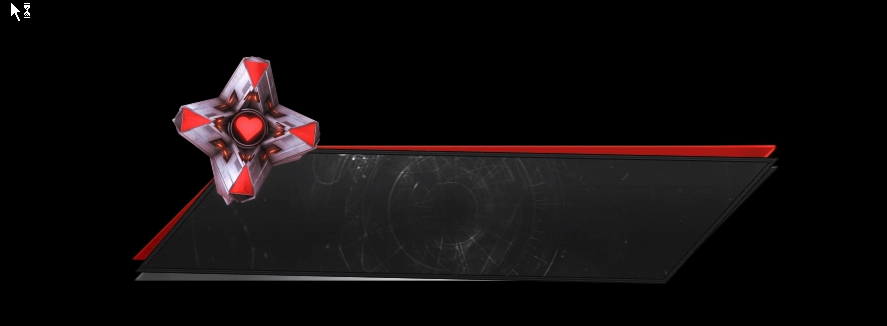
@humble relic
gentle imp
that looks so damn good
humble relic
yeah thats fine
ripe herald
humble relic
how do i apply it ?
ripe herald
download it and upload instead of the one you wanna change
ripe herald
upload in overlay manager in alert widget
 ripe herald
do you see change video 😃
it means change video 😄
click and upload webm i've sent you
humble relic
ooh
ripe herald
then if you wanna change variations you need to upload in each
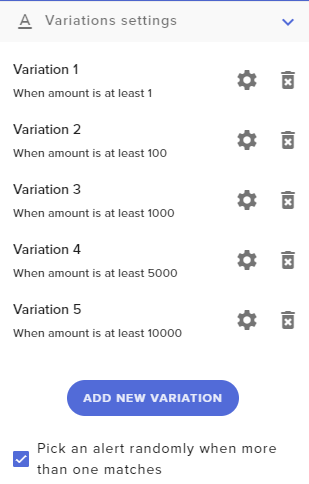
but if you gonna use one alert for all just delete all variations and keep default one
this are settings from the alert how you need to set up on cheer alert
 humble relic
it didnt change
ripe herald
and advanced
humble relic
oh ok
ripe herald
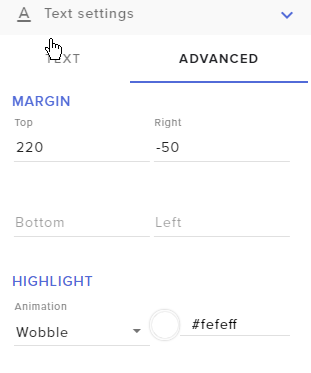
cause you have variations
you need to remove variations
or change them
if you emulate cheer but you did not changed variations it wont play new alert but the one that is under variations
humble relic
i have to copy those settings u showed?
ripe herald
yes
and like i said if you wanna use just one alert for all cheers
delete all variations
and just set up main default alert
it will play for all
 simple shell
I need help. I am on SE webpage and when I go to my commands, the command for songrequest is greyed out and it says "controlled my module settings". What should I do?
narrow coyote
That is controlled by the media request page
When it says controlled by module, the command is controlled externally from the command page
 tight harness
Basically when you enable/disable Viewer Requests it enables/disables the Media Request feature and therefore also the commands that come with it
simple shell
Okey, so even if I have the Viewer Request enabled and it is greyed out, it should work?
I have to test it 😛
tight harness
Yeah it's greyed out because it's controlled elsewhere, it's automatically enabled/disabled when the feature is enabled/disabled
Same with modules
simple shell
Okey! it worked! Thank you!
tight harness
No problem 😃
simple shell
You learn something new everyday 😄
humble relic
one more thing i got a subscriber but no alert and streamelements shows 0 subs
nocturne pelicanBOT
Twitch prime (new and resub) and paid subscriptions (resub only) must be shared in chat manually by the person subscribing in order for the subscription information to be sent to StreamElements. For twitch prime, the user needs to have sharing enabled on https://www.twitch.tv/settings/prime. For paid subs, if the share box doesn't show up immediately it will when they refresh the page. https://i.imgur.com/VNJN0Uv.gif https://i.imgur.com/2297EA7.png




 tight harness
Make sure to log out of the site and log back in in that case 😃
humble relic
i did that already
on twitch it shows that i got a sub but why doesnt it show on streamelements
is it something with the subber
tight harness
Did you do that after they subbed or before?
humble relic
after
tight harness
Right, that's why they won't register
humble relic
ok
tight harness
If you go to Activity Feed > Widget Data > Totals > Reset Session, then that'll update your total subs count, but it won't be able to pull in the names of the subs that happened before you relogged
humble relic
anyway to fix the sub count on the dashboard?
tight harness
On the dashboard no, that goes on how many have been registered
humble relic
kk
lament blade
I dont know if this the right place to ask, but how come i donated 2 times while being logged in and both times it took 10 dollars instead of 3, and donated as anonymous?
 weary mist
@lament blade who did you make the donations to?
 serene granite
hey there
 atomic hollow
@lament blade nmplol doesnt have login requirement
if you leave the name empty it registered as anonymous
lament blade
@atomic hollow i know but i made a donation earlier whilst logged in, and i typed my name and there was no login button top left, so i assumed it was still logged in
also typed 3 dollars in the bracket
The first time i thought i might have missclicked, so i did it again
but did the exact same thing
lament blade
no as i said, i thought i might have clicked on it
and donated 3 again
but did the same
where it gave 10 as anonymous
serene granite
after clicking tip, you land on PayPal where you see the amount again
what do you see there ?
lament blade
i know
atomic hollow
tell us what you see
lament blade
shows my card, my name and 3 dollars and how much it is in DKK
and there is just the giant accept button
atomic hollow
ok so if that was the case before and it donated $10 there is an issue on PayPal side
if it shows 3 and charges 10
lament blade
Well how do you explain the anonymous part then?
but how do i fix the paypal side tho, i cant do chargeback since thats illegal when it says "Donationas are non-refundable"
does this mean i have no way to fix it?
atomic hollow
DM nick I guess, explain it to him
lament blade
we're not really best friends, and pretty sure he would laugh at me for asking for 17 dollar chargeback
i guess ill let it slide, just feels like shit
atomic hollow
sorry, not much we can do here
if there was an issue on our side we would fix it right away
weary mist
@lament blade the anon part was explained before. The streamer doesn't have force log in, so it doesn't automagically put in a name, you have to manually put something in there, or else it donates as anon
lament blade
@weary mist i did login as said before, and typed my name in as i explained before
serene granite
@lament blade i'm going to change the donation that went through as anonymous to show as JeppeTheBro , so it is accounted under you in the leaderboards
lament blade
dont bother
the stats dont bother me
i mean i did reopen the donation window, so what if it did say 10 dollars in that box?
earlier
and i just skipped over it
weary mist
When the tip alert when through, did it show your tip message on screen?
weary mist
huh
lament blade
why?
weary mist
Because the streamer has profanity protection enabled, which could cause the alert to be altered before hitting the stream, IE changing your name to anon
serene granite
every time you reload the tipping page the amount will be the streamer's default amount
in this case $10
weary mist
He is using our standard profanity protection, and your tip did contain standard profanity xD, the second one did anyways
lament blade
yes and i changed it to 3 dollars and double checked as i thought i missclicked
as stated before
weary mist
I understand that part. I am not talking about dollar amount. I am just talking about the username, and the settings that the streamer has set up on their tipping.
lament blade
Scalper i have donated many times before and am pretty sure i know this person better than you. Ive said far worse name and my name has never been anonymous
weary mist
It doesn't have anything to do with how well you know the streamer. He has our standard profanity protect turned on in the tipping settings, which could have picked up the word and censored the entire thing. I am just explaining how the system works, I don't do people, just computers 
 azure swift
is media request broken right now?
it was working fine yesterday and now nothing will show up in stream. I even redid the widget overlay and nothing
using SLOBS
weary mist
Are you using Ground Control or the website to push the media into the overlay @azure swift
azure swift
I'm using the website...what is ground control?
weary mist
its our desktop application, and doesn't totally support the new media share system
so if you are using the site, then its fine
What to test
you will want to open your overlay in a new browser tab, and test to see if you can push the media to it
 summer mulch
What browser are you using
weary mist
If it works in the browser, then the issue lies with the broadcasting software
azure swift
yes I am using the website. so usually I will have the video in the background so that my viewers can hear the music. currently the music portion is working, but when I try and "show on stream" nothing appears
I redid the widget overlay, and nothing. I am using chrome
summer mulch
Did you add the widget to your overlay?
azure swift
yes I did add the widget to the overlay
it worked perfectly yesterday, I've changed nothing
narrow coyote
Does it actually say no active widget in media request page?
weary mist
URG TOO MANY PEOPLE
Can you please test the browser source in the browser? This will help check to see if it is the overlay, or the broadcasting software
azure swift
it did say "not detecting widget" so I rebooted chrome and everything, including a computer restart, and no dice
browser source in browser isn't working
weary mist
OK, let me test a couple things from my side, see if I can get it working over here and then I will get back to you
azure swift
well I'm currently streaming right now trying to figure this out. hopefully we can figure it out for the next stream
weary mist
I have your overlay open, if you want to try to push media to the overlay?
azure swift
it works fine when "show on stream" isn't clicked, but when I hit the button, it goes silent and doesn't appear on the overlay
azure swift
ah there it is
weary mist
Did it show up on your end?
weary mist
I just have your overlay launched in my browser
I didn't touch any settings (opening the media share page on my end would have broke it worse xD)
azure swift
literally when you said "doing this" it suddenly popped up
i'm just curious what I can do if this were to happen again in the future
thankfully you were on to help!...honestly the first time this happened earlier today, my SLOBS crashed for the first time ever...not sure if it was connected
seems to be fixed though. I'll keep you posted!
weary mist

 sturdy trellis
still not getting host announcements i am using GC & website have removed bot & put it back i have all settings correct & correct options selected. it will very occasionally announce a host maybe 2 or 3 times a week
weary mist
Are you getting other announcements? @sturdy trellis
sturdy trellis
yeah any host over 0 and everything else
summer mulch
@sturdy trellis Check the settings on your alertbox for hosts, if it's above 0 then it won't announce hosts with 0 viewers
sturdy trellis
they all set ok, it does announce 0 hosts but maybe 2 a week
a staff member came into the stream to test it & it worked for him, bugging me i cant sort it
near grail
How do i turn of commands like !voteskip !songrequest
i still want to use the music extention tho
So i can use playlist in the groundcontrol app
weary mist
All the commands for the media request system are changeable through the Media Request page
near grail
oh yea you right
Can i merge the command, !watchtime and ! points ?
Sorry for asking so much LUL
weary mist
@near grail no problem. You can very easily combine them using the variables in the custom command section
serene granite
disable the two default commands, and create a new custom command with the name points and the alias watchtime, with the response that contains both variables
weary mist
serene granite
np mario
near grail
assumed gender lol sorry
What is variable of user doing command?
because i dont get @near grail , Tygo.'s points are....
I just get Tygo.'s points are ....
weary mist
$(sender) will always target the person triggering the command
near grail
ty
i have more questions 😛
How do i get rid of the moderator commands in the commands user page?
weary mist
idk, you may have met your quota already xD
 chilly blade
Ive literally done everything, made the other twitch account, have the tips panel linked, have ground control. It wont show the oAuth
chilly blade
No its okay
weary mist
@chilly blade are you running it on Mac or PC
chilly blade
PC
near grail
@weary mist i also just find out there is a variables page. Sorry 😛
weary mist
😛
chilly blade
My overlays have the active alerts too. Like, I have everything done. Do I need to put my tip page on the bot twitch too? Like idek
weary mist
Do this for me: Part bot, rejoin, close, and re-open ground control
starts dark magic ritual
near grail
does g2a pay go to my paypal? i didnt add any info
chilly blade
Nnnnn, thank you ❤
weary mist
@near grail once you connect it, you should receive an email from them (if you don't have an account already setup). The payments through them go to your G2APay account, then from there you can transfer to paypal if you want
weary mist
I would recommend creating a wallet account on their website
I am not sure, as I already had a wallet with them from ages ago
serene granite
@near grail just go to https://pay.g2a.com and log in with the email address you used on our interface when connecting to g2a pay

G2A PAY Payment Gateway: Pay & accept e-payments
Send money and accept payments online with G2A PAY - an online payment gateway that helps you accept local payment, credit cards, PayPal and debit cards.
near grail
@serene granite it made account for me?
serene granite
yea
 uncut trail
Hi, I've seen all video tutorials available and I can't make "contests" work. I type the commande correcltly "!bet si 50" (for example) and nothing happens
near grail
Nope, ill just click forgot password
weary mist
@uncut trail check your Chat Commands, Default page to make sure the !bet command is turned on
near grail
@serene granite i am fucked now. cant connect to my account now
uncut trail
@weary mist you're my hero! 😄 Thanks a lot! I begun to use Stream Elements 2 weeks ago and I get a little lost! Infinite Thanks!!!
weary mist
near grail
@weary mist how do i remove mod commands from channel commands page
Mod should be able to do the commands but it doesn't look nice on the page
weary mist
I don't see the option to hide those commands in the default section, sorry
aka, not possible at this time
near grail
rip
Can i activate a listener to users?
so if i dont know the commands it tells me where i can find all commands
zenith widget
@near grail Do you mean something like this: https://streamelements.com/tygo1oo/commands
near grail
@zenith widget no
I mean, if a new user is trying a command. That doesnt excist. There will be a message saying: this commands doesn't excist check all commands here https://streamelements.com/tygo1oo/commands
StreamElements
The Ultimate All in One Platform for Streamers
zenith widget
Thats something that should be an integrated thing in the bot it self
zenith widget
Want the hard answer? Its a script 😉
near grail
Sure, im a developer
 untold crest
@near grail there are no wildcards nor catch-all commands.
near grail
Ok, but like @zenith widget can i script a catch method myself?
untold crest
I wonder if it could be created with regex (in adcanced section) Just check for ^
near grail
ahh
untold crest
^\!([a-zA-Z]*)([ .*])$
untold crest
But I am not sure if it get caught after checking all other commands
zenith widget
There is no maybe. Here is a quick and dirty answer from me, Mr. Developer(who was having trouble with bitrate earlier): check out https://dev.streamelements.com and try and figure something out
untold crest
Command trigger could be !totallyBScommand
untold crest
OK, so still, there is no 'catch-all' flag
near grail
yup
 glossy kettle
One of my followers is telling me they've tipped me using my tipping page and that they were told it was successful- but nothing on my end- is there a way for me to test my page? or is it more likely they're messing with me?
pine hemlock
@glossy kettle If you set the paypal email correctly and you didnt receive anything in your paypal... its unlikely they tipped.
weary mist
@glossy kettle Check your paypal account, see if it has to be approved. Also check your activity feed, it might need to be approved there as well
near grail
I cant manage to connect my g2a pay. "Connection with G2A Pay failed
Please try again later or contact our support"
glossy kettle
nothing on the activity feed or paypal- unless I'm being dumb and arent looking in the right places- but i'm sure I am- I will try the sandbox I guess
thanks x
zenith widget
@glossy kettle Ask them to check their email for the paypal receipt
If there is non, then the tip didn't happen
weary mist
If it didn't show up in paypal, it didn't go through
weary mist
@near grail you shouldn't have to re-connect it on our end, unless you are tryingto use a different account
weary mist
hmmm, Its a new feature, so there might be a bug in this. I am not sure. a couple things to try: force refresh (to clear any caching of the page. ctrl+shift+r), and try an incognito window
 autumn tapir
Do all streams using stream elements get automatically posted to the sellout channel?
weary mist
no
zenith widget
No. There is a procedure
weary mist
you have to apply
nocturne pelicanBOT
@autumn tapir Are you a StreamElements all-in-one streamer and interested in stream promotion when you go live? Please fill out this application https://strms.net/sellout and if you meet the 3 requirements posted in the :pushpin: pinned message in #welcome you will be added to the stream announcements.
 zealous flint
anyone here that could help me with the overlays?
weary mist
ask your question, and we will find out @zealous flint
zealous flint
ok so im on the old obs version 0.659b and i have no idea where to go to copy the overlay link into obs
zenith widget
Its best to use OBS Studio, as the old OBS is not compatible with our Overlays
Usually you need CLR Browser source, but it does not work with our Overlays
zealous flint
ah ok makes sense the obs studios doesnt support my capture device
weary mist
OBS classic hasn't been updated since august 20th, 2016, and won't ever be updated again
@zealous flint what was the last time you tried studio?
zealous flint
yesterday it doesnt reconize my capture card
weary mist
hmmm
zealous flint
but the old obs does
weary mist
What capture card is it
zealous flint
el gato hd its a really old device
weary mist
I have an idea
Does OBS classic have the option to send the scene to a "screen"
or something like that
zealous flint
and i tried looking for driver updates for it but cant find any and one sec
like a monitor capture?
weary mist
the way to do it in studio is: right click on the scene, then there is something like view in window
the idea is this:
Capture the capture care with obs classic, send it to a window,
then have obs studio capture the window
zealous flint
i might have found something
weary mist
😃
zealous flint
i mightve found the update for my capure card
weary mist
w00t
zealous flint
I THINK I DID IT MOM
weary mist
tight harness

 delicate prairie
is this the correct place to ask for help on support related issues?
tight harness
StreamElements support related issues, yeah 😃 Twitch questions in here and YouTube questions in #helpdesk-youtube
delicate prairie
Awesome thank you- I have a twitch alert set up for hosts with a minimum amount of 10 - however when I get hosted with an amount of 0 - the audio still triggers
this is where it gets weird, I ONLY have a video (like an mp4 or something) that has audio in it, and i have no ‘sound’ file uploaded
zenith widget
@stoic sparrow No advertisement please. Read the rules in #welcome !
@delicate prairie As far as I understand your issue, check your variations for hosts. Also I'm not sure, but we don't support mp4 and most likely its a webm file?
delicate prairie
There are no variations set up either
tight harness
I'm having a look currently 😃
zenith widget
RUINED!
zealous flint
i have another question
if i have the stream elemnts website up will a notifcation pop up on my stream automatically or do i need to copy some link into obs?
like if someone follows me
tight harness
@delicate prairie Seems all good here, are you sure you don't have any old alert boxes from another service that you haven't disabled/removed yet?
weary mist
@zealous flint correct, you will need to create an overlay, add an alertbox widget, and then add the URL to OBS
delicate prairie
That is a possibility but I don’t have that browser source added into my obs hmmm
I’m going to double check that - i’m going to go into their settings and remove everything
check if it still triggers and ill report back here - Thanks!
tight harness
No problem 😃
 lone heron
Hello I am having a problem getting the streamelements bot to announce in chat when someone follows or does anything like tips etc. I have chatbot enabled and it is a moderator, I also enabled chat alerts in the modules section. I'm following on my alternate account to test it out and it updates on the streamelements website that I got a new follower but it doesn't say anything in chat which is all I will be watching when I am streaming. I had this same problem with streamlabs chatbot and gave up over there when no one helped me, I'm really hoping someone here can help me get this solved.
zenith widget
One thing you can do is, part the bot from your channel, log out from SE then log back in and join the bot again onto your channel
lone heron
ok I can try that
zenith widget
Other thing I'm not sure really is, chat alerts module may not trigger while offline.
zenith widget

weary mist
it works while offline
serene granite
what is that weird smiley the bot is sending
serene granite
i disapprove of this.
weary mist
lol
lone heron
ok I parted channel, logged out, logged back in, set up bot again. tried following on my test account again and still no notification in chat
serene granite
what's your twitch username?
lone heron
saltlevelsmax
weary mist
that might be because of it re-following. let one of us test 😃
lone heron
oh ok
zenith widget
lone heron
that could be it
zenith widget
It works
zenith widget

lone heron
awesome, I stream on ps4 which is nowhere near my pc so I need updates in chat. I appreciate it
zenith widget
bot is muted now
weary mist
we got it
 hearty bay
do you need OBS to stream
zenith widget
Yes
 fickle hawk
Hi. I'm new to StreamElements. I have a counter command set up, but the getcounter command is not properly "getting" the correct count. In fact, it stays at 0. It doesn't seem to be reading the value for the variable of the original counter command.
 calm grail
We are having issues with the Extra Life Donation alert showing on screen. Nothing has changed on our end and it was working fine just about a week ago. Could use some help on this if possible.
serene granite
@last tangle which part of streamelements ? the bot ?
nocturne pelicanBOT
@fickle hawk Please connect your Twitch and/or YouTube channel with Discord by going to ⚙ Settings and then Connections here in Discord.
fickle hawk
@nocturne pelican Done and done.
weary mist
ty
@fickle hawk it looks like you didn't put a variable in for the $(count) variable, so it is not incrimenting the $(count playedit) that it is trying to get
lament blade
I am an editor for Swagger's channel, when we had streamlabs we had a command that would set a variable via !setmulti that would be a multistre.am/swagger/+USER and then we could call that from !multi and it would display the link. So basically we could do !setmulti Boom and then when a regular user used !multi it would display multistre.am/swagger/boom
Is there a way to do this on streamelements I have been checking out google and I am coming up blank
fickle hawk
@weary mist so I could make the missing variable be "playedit" and then both commands should work together?
weary mist
yeah, like I wrote it
fickle hawk
Thanks. Worked out.
weary mist
@lament blade not directly, but a simple !cmd edit multi multistre.am/swagger/(putusernameshere) could work
lament blade
@weary mist Thats how we do it now, but its a pain in comparison
weary mist
at this time, that is the only way, or you could edit the command directly in the dashboard
hearty bay
After i copied the link for my overlay and pasted it into obs i did all the other steps but it didnt show up it just had a red box
weary mist
the red box is where the overlay shows. Is this a custom overlay, or one of the themes we provide? @hearty bay
hearty bay
its a custom would it be less stress if i used one provided and do i need to change the hight and width
weary mist
yes
to the height and width
1920 for width, 1080 for height
(our default size)
then hit CTRL+f
 proud grove
API response time is very slow atm, anyone know why?
hearty bay
ok thanks
weary mist
@proud grove thanks for the report, we are watching it
proud grove
Algood
 last tangle
Like when someone redeems something or donates it take sometimes minutes to show the alerts
weary mist
@serene granite
 sonic hearth
Is it still possible to redeem sounds in SE store during stream? My sound items suddently stopped working. SE responds that the item has been successfully redeemed, but no sound plays any longer.
weary mist
@sonic hearth thanks for the report, we are watching it 😃
 fleet wyvern
Hi, I have a problem my "!editcounter" is not working 😭
weary mist
give me a minute to have a quick look at it 😃
fleet wyvern
😄 ok
weary mist
@fleet wyvern first, you don't need the <> aroudn the variable. If you do have them, you have to include it when editing the counter: !editcount <win> 100
calm grail
If someone could assist that would be great.
zenith widget
What is the issue, buddy?
weary mist
calm grail
We are having issues with the Extra Life Donation alert showing on screen. Nothing has changed on our end and it was working fine just about a week ago. Could use some help on this if possible.
zenith widget
If you have not deleted the Extra life widget, then you may have hidden it in the layers?
calm grail
Nothing has been modified or changed on our end. We hear it go off but the alert does not show on stream.
weary mist
hmm, so you hear the alert sound?
calm grail
Yes
We have the alert on our Lobby and Overlay scenes
What happened before was the alert would first go off on the lobby then about 5 to 10 secs later it would popup on the overlay scene
weary mist
that just sounds (pardon the pun xd) like the alerts are hidden behind something to me, or the image itself isn't showing up 
calm grail
There was a delay
 obsidian maple
@nocturne pelican my subs leaderboard extension on twitch doesn't show any informations from subs. It says always no data
weary mist
@obsidian maple thanks for the report, we will look into this
obsidian maple
thx @weary mist
weary mist
@calm grail what is the name of the overlay that you are using, so I can check everything out for you
 timid basin
Is anyone else having issues with stream report emails? They just stopped coming one day.
weary mist
@timid basin can you DM me your email address and twitch name? we will take a look
timid basin
@weary mist Will do. Thanks
hearty bay
Hi i got it to work however i start streaming on obs and its just a black scren
zenith widget
On OBS or on Stream?
hearty bay
obs
zenith widget
!add
nocturne pelicanBOT
To add your overlays to OBS, add a new browser source in your scene. Paste your overlay URL in the browser source properties, set the dimensions to 1920x1080 (unless you changed them on the website), and :ballot_box_with_check: “Shutdown source when not visible” https://youtu.be/KDvLynUqXI4
zenith widget
The above applies to Game sources
hearty bay
I have an overlay its just my OBS dosent display and gameplay
hearty bay
How might i do that
zenith widget
I would strongly suggest to look at this video https://www.youtube.com/watch?v=BtZazqLgBjw
This will cover all the basics you need to start streaming to Twitch
hearty bay
ok ty
 storm pelican
Hey guys, havingt an issue with the giveaway system
it seems that !ticket 1 doesn't esem to register
clever mango
@storm pelican Hey Mehdi I'll take a look now
weary mist
@storm pelican it will work now
storm pelican
awesome ty
 celest fractal
Why was my message deleted?
clever mango
They can buy as many tickets as they have points and you allow in the settings 😃
zenith widget
@celest fractal most likely you tried to advertise in the worng place
clever mango
Since 1 chip = 1 ticket
zenith widget
Don't add links then
celest fractal
With different TTS
nocturne pelicanBOT
@celest fractal Make sure to :ballot_box_with_check: “Shutdown source when not visible” for all browser sources (all OBS scenes). If using studio mode, uncheck “Swap Preview/Output scenes After Transitioning.” Also keep in mind that sound can play from any overlay loaded in the browser (editor or launched). https://i.imgur.com/FegZJQS.png https://i.imgur.com/yY0wcFl.png
zenith widget
Check your variants then or if you've added the alert widget twice
celest fractal
I didn't
weary mist
and is that on ALL browser sources in ALL scenes?
celest fractal
Nope
clever mango
 celest fractal
Only the ground control app
clever mango
This link was posted
serene granite
maybe its an alertbox from another provider?
celest fractal
I only have one browser source it's kinda weird
 heavy brook
Probably has different scene's and they are still active in the bg
celest fractal
My other scenes don't have almost anything
One is a picture, and other is a video with a text
That's all
And one other thing, my Media Share was not hiding videos today
As soon as I clicked to show them on the stream
I couldn't hide them
 elfin crown
so nightbot and streamelements are both replying to commands in my chat, i only want one of them to. how do i fix that?
weary mist
@elfin crown go to nightbot dashboard, make it part the channel
elfin crown
so basically cancel out nightbot
weary mist
it will make nightbot stop responding
elfin crown
SE is still replying with 2 separate messages
stuck hamlet
We have a default command that is named !uptime, and from the looks of it, you have a custom command named !uptime, so both of them are responding.
elfin crown
ahhhh got it, i'll just cancel out the one i created then.
 unkempt imp
Hey. I have been able to get !sr and !songrequest working for my viewers but when I try and add songs to the playlist in my chat SE does nothing with my entry
 frosty lantern
Just confirming you have the media player page open when testing commands yes? Or is it that streamelements isnt responding that your entry has been added? @unkempt imp
unkempt imp
Streamelements isn't responding in chat to my commands only. Yes I also have the media player page open.
misty wagon
@unkempt imp link your channels/social media in your Discord profile, that helps our support people 😄
unkempt imp
Gotcha, sorry about that
winter zenith
SE bot is in your Chat
did you try parting the bot
and putting it back in?
@unkempt imp
Another question, did you enable MediaRequest in the settings?
unkempt imp
I did. It works for everyone else, just not me
winter zenith
thats... interessting
so you tryed to Part the bot, log out, log back in and put the bot back in the chat?
unkempt imp
Sorry, what do you mean by Part the bot?
winter zenith
In your Dashboard
StreamElements
The Ultimate All in One Platform for Streamers
on the right side is the Bot Panel where it sayes "mute" or "Part from channel"
pls part the bot, log out of SE log back in and let the bot join the channel again
winter zenith
Also I looked into your Commands and Songrequests doesnt look like its enabled 😮 at least I cant see the command in your command list. you sure you enabled it? (I know you said others can do it fine but still wierd)
@unkempt imp wich browser do you use?
if its not chrome pls try setting up the SR in Chrome.
Also make sure to not have the App Ground Control open with Media Request enabled in ground control since having it open on two ends messes with the settings
unkempt imp
Its chrome
weary mist
Fixed in Chat
unkempt imp
Fixed.. Thank you again everyone! Definitely why SE is the best!
weary mist
 atomic silo
Hello! I just wanted to ask if there's a way to allow an individual to request multiple song requests without modding him. Is regular good for this cause or is a simple moderator needed to be given?
narrow coyote
That would be a good use case for the regular role, if you want them exempt from media request restrictions
weary mist
@atomic silo according to your settings, users can have up to 3 songs in the queue at a time
atomic silo
so regulars are still restricted right?
narrow coyote
sorry, i cant type right now 
atomic silo
yea i know but i'M talking about one individual
weary mist
yeah, a single person (lets say kite here), can request 3 songs out of 10 max in your queue
atomic silo
whom i want to be able to request more than the restrictions
weary mist
ok
atomic silo
i see 

weary mist
The way you have it set, anyone sub or above (regulars included) will be able to breach that 3 or more
this is what changes that
atomic silo
ooh!
to be a regular do you have to be a mod on the channel? is there an indicator that someone is a regular like a badge?
narrow coyote
no, you manually give a user the regular role
and there is no badge, its not a twitch thing its an SE bot thing
atomic silo
i see i see, thank you!
 round crest
is there anyone that can help me with an audio issue on the follow/sub and all the rest
ive been having an issue with both the default audio and the audio i inputed playing both at the same time and im not sure why it happens
nocturne pelicanBOT
@round crest Make sure to :ballot_box_with_check: “Shutdown source when not visible” for all browser sources (all OBS scenes). If using studio mode, uncheck “Swap Preview/Output scenes After Transitioning.” Also keep in mind that sound can play from any overlay loaded in the browser (editor or launched). https://i.imgur.com/FegZJQS.png https://i.imgur.com/yY0wcFl.png
round crest
its still playing the default audio after doing this
for things like following and stuff
it would play my audio i input and the default follow audio
frozen scarab
Im still having the problem where it plays the sub sound twice :/
nocturne pelicanBOT
@round crest Right click on the BrowserSource > Properties > Scroll down a bit > Refresh Cache of current page
pine hemlock
@frozen scarab did you try what the SE bot posted a few messages above yours
round crest
still having the same proble m even after refreshing the cache
round crest
is there a way i can go into a private screen share call so they can assist me on this and kind of see whats going on
weary mist
do you have teamviewer?
round crest
no i do not
weary mist
I prefer using that when helping, as discord screenshare does not let me actually do anything on your end, and makes it very difficult for me to troubleshoot
round crest
uhh let me download teamviewer right no w
weary mist
round crest
ok its all set!
weary mist
dm me your id and pass
round crest
just doing the verification bs give me a second
weary mist
 cobalt kindle
Been doing raffles in my chat - multi-raffles specifically. — I don’t know what the odds are that a person could win EVERY time they enter, but it has to be very low. Yet somehow, despite usually having more than 20 entries into a multi raffle, the bot ALWAYS picks a certain person in the group of winners.
Any... possible... thing happening here?
That person is not a mod.
delicate prairie
Hey guys - im still getting audio only alerts for 0 person hosts - even though my settings say 10 person minimum. please help? I don't have any other alerts set up on my obs
humble relic
so i have a webcam overlay with recent sub,recent dono etc but when i place the widget the text goes under the overlay
ggs
clever mango
@delicate prairie I'll take a look
@delicate prairie I'm going to test a host alert
humble relic
can anyone help me?
narrow coyote
@humble relic You can move different elements up and down in the layers