#helpdesk-twitch
1 messages · Page 277 of 1
 lament blade
 dense palm
my overlays work
lament blade
The bot, overlays
dense palm
bot i think works
lament blade
Then you should be good 😄
dense palm
but when the extention comes back from its update it will probably still say im offline
unless that is the problem
???
 cedar lynx
the extension is most useful to countdown to your stream time... no? if you're live, you're live and people will see you there and watch
cedar lynx
somewhere other than on Twitch you mean?
dense palm
unkown why
from the SE app
i mean
it work yesterday for about 2 hr
but i started to edit some things and well it broke
when i get back from work ill give yous an update on whats happening
its mostly so i can see activity
cedar lynx
what do you mean by activity? if all your events and overlays are working it'll all be tracked regardless 😃
 lusty yacht
Is having text scrolling up being fixed? Been awhile and it’s still scrolling left instead of up lol
 cedar fulcrum
@dense palm We are working on the Extension
@lusty yacht What scrolling issue are you talking about, could you give me more details?
lusty yacht
About a month ago I mentioned that all my scrolling up info like subs, follows, etc started scrolling left. No matter what I do they stay on going left when I want them to go back to scrolling up.
Someone confirmed it and said it was being worked on
cedar fulcrum
One moment I am testing:)
lusty yacht
Not sure if you can see my overlays but they’re clearly set to scroll up lol
cedar fulcrum
@lusty yacht Please set it on Vertical and the Up/down will work
lusty yacht
Ok, was that a new thing added within the past month or so?
cedar fulcrum
Nope
lusty yacht
Hmm. Wonder how it changed on it’s own then. I’ll switch them now and see if it works
cedar fulcrum
Kk let me know 😃
lusty yacht
Ok, fixed it, now it just takes awhile to load the info but it scrolls up. I know I didn’t go in and change them all to horizontal before lol
cedar fulcrum
lol 😛
lusty yacht
Thanks, still odd lol
cedar fulcrum
Welcome!
 tired gulch
Hi, is the twitter module still down since last Friday?
 atomic hollow
yes, we are still working on it
tired gulch
Ok thanks, just wanted to make sure it wasnt me doing things wrong.
 vague yacht
Hi guys, could someone help me set up; follower, donator etc
cedar fulcrum
@vague yacht sure, let me know what you would like to have
vague yacht
id like to line up the correct info, placement
does that make sense? sorry im struggling to explain
so the correct info is displayed on stream
tired gulch
Question, is there a way to have a custom chat text (or use the description) when the giveaway starts? The default text isn't very helpful.
And I'm assuming the description field in the giveaway just an internal note and doesn't output to chat.
tired gulch
Another question, I seem to have issues with host alerts not triggering. Is this a known issue?
 gentle imp
@tired gulch not atm but it has been requested on ideas board
https://strms.net/ideas you can search for and upvote, the more of us the faster it get's done
 hazy wyvern
Hi everyboby I just want to show this channel https://www.youtube.com/watch?v=7xJi6kfXab4 on my twitch but I can't because it seems that I don't have a widget. What is this ?

hello, enjoy freeaudio / music everything from this channel is "copyright free or royalty free" our music are for personal use only as long as you don't forg...
 empty fjord
@tired gulch are you refering to hosts or autohosts? ive been told you need to have the Activity Feed (browser or Ground Control) open for autohost alerts to show up
hazy wyvern
can you help me please ?
 zenith widget
@hazy wyvern You need the media request widget on your stream in order to show YT video
cedar lynx
Hm, is there a way to resize the output of an already created overlay? I set up an overlay without thinking too much about it to start learning SE, but now I've got this great setup at the wrong size 😛
empty fjord
@cedar lynx proportionaly scaling up? or changing the dimensions completely?
cedar lynx
OH WAIT ignore me, I found it. typical tech. as soon as you ask, you find the answer
hazy wyvern
@zenith widget thx a lot
empty fjord
you can resize the overlay in the overlay manager, but youll have to readjust all the widgets
ah good stuff @cedar lynx 😉
zenith widget
@hazy wyvern Also, make sure you allow the media to be shown on stream via the Media Share page or Ground Control
tired gulch
@empty fjord Hi Grot, I just tested a /host and it didnt show up in the activity feed (also no alerts).
 nocturne pelicanBOT
Twitch doesn't have a "notification system" for hosts (unlike follows, subs, raids, etc.) so the only way for StreamElements to know that you are being hosted is to connect through you to twitch. This connection is made on:
- SE Dashboard page - https://streamelements.com/dashboard
- SE Activity Feed page - https://streamelements.com/dashboard/activity
- Ground Control desktop app - https://streamelements.com/groundcontrol
Please have one of these open during your stream in order to receive host event notifications.
empty fjord
@tired gulch while having the dashboard, activity feed or ground control open ?
tired gulch
Just tested it again with SE Activity Feed page open, no alerts 😦
zenith widget
I assume your a mod for a streamer. Is the streamer live currently?
Cuz I just hosted my streamer and there is nothing in the activity feed as well, cuz shes offline atm
tired gulch
Yes, I'm a mod for the streamer and he is offline.
zenith widget
All this activity is from last night, so that should tell you that the streamer needs to be online to register the host
tired gulch
Ok thanks!
zenith widget

tired gulch
So there is no way to test the host chat alert if the streamer is offline?
zenith widget
For the host specific alert - no unfortunately :/
tired gulch
Ooof 😕
zenith widget
Also I think that the Chat alert module won't trigger while streamer is offline 
I assume you're referring to the bot chat alert module
tired gulch
The follow alerts are coming through when streamer is offline.
zenith widget
aah, then the host is just the issue as thats on twitch's side really. Sorry :/
tired gulch
Thanks for trying.
Btw, clicking on the JWT token link in the mac ground control app takes me to hxxps://streamelements.com/dashboard/account/information then immediately to hxxps://streamelements.com I think thats an error.
*I'm trying to change the bot's name.
lament blade
Is there a reason why no animations work? Am I missing something?
I am basically wanting it to show new followers, subs, donations, cheers...etc. for about 3 seconds and then disappear. I still want my normal popups for Stream Alerts though. Anyway to do this? I know SL offers it in Premium version, but hoped SE would have it as well.
zenith widget
@lament blade Are you looking for this?
lament blade
No, that is in Stream Alerts.
I'd like to keep my current Stream Alerts to pop up big on stream, but one second.
zenith widget
So you want them to stay on the screen for a second or 3 seconds?
but still show follower, sub and/or tip?
if yes, then check my screenshot again.
the animation tab only provides how the alert will pop up on the screen
with a fade in from the top to a fade out to the bottom
lament blade
Can I post a gyazo link in here?
zenith widget
sure
lament blade
 zenith widget
So the border has an animation
lament blade
My animation comes down like Summit1G.
zenith widget
the animation tab is set correctly, but the alert duration is slower then the border animation
lament blade
What I'm seeing/guessing is that animations only work with the Stream Alerts?
Not the "last follower/sub/donation/cheer"?
zenith widget
Wait, you want to show the latest follower/sub/tip there and have it cycle like that?
I think you will have to use "Custom Event list" and have it with custom code to cycle through the lastest follow/sub/tip/cheer
hazy wyvern
is it possible to had social links into overlay ?
zenith widget
directly linking to other places? No. Its a video stream at its core.
You can have for example "@yourname" for twitter or instagram
and "/yourname" for facebook and youtube
the links will have to go in a panel bellow your stream or a chat command 👈 ☝ @hazy wyvern
cedar lynx
yep, I do it how @zenith widget described -- set up a background overlay with the easy username info and then I also link in the panels below the stream
 tame tartan
Hey, i have issues with loyalty points. Friend donated twice and he didn't get any points. Watching points are working etc.
dense palm
@cedar fulcrum kk, i'll check if my stuff has fixed too when i get back from work n stuff
zenith widget
@tame tartan Did you set the points for donation here: https://streamelements.com/dashboard/loyalty?
and clicked save?
hazy wyvern
ok thx
tame tartan
Ye 50 points per donation and ye i pressed save
zenith widget
@hazy wyvern Most(if not all) theme templates we provide have a little section in them for social places
@tame tartan I'm not really sure on the issue as to why he did not receive points, except maybe if he donated bellow 1$? Cuz if he donated 2x 2$, he'd get 200 points
Your using Streamlabs donation page, buddy
Thats why he didnt get points
tame tartan
Oh. So i have to delete streamlabs?
cedar lynx
if you want to give SE loyalty points you gotta use SE 😉
zenith widget
He is using SE Bot @cedar lynx , its just his tipping page is SL at the moment
cedar lynx
ahh yes the mishmash
tame tartan
Okay, thanks!
 worn wedge
stream element leaderboard in twitch have problem?still loading 1 hour. Someone have same problem?
zenith widget
( streamlabs?  ) nothing to see here..move along, move along
worn wedge
damn man stream element...... my fault streamlabs bad programm 😃
 worn wedge
Ok thnx for info 💪
 kind jacinth
I just saw that the StreamElements extension for twitch is loading and nothing more! D:
atomic hollow
@kind jacinth see #270206314561404928
 midnight zealot
A couple of quick questions about the 8ball module:
- Is there a way to get rid of the "8ball says..." intro text?
- Do 8ball responses support variables?
midnight zealot
I tried 2, but it doesn't seem to be working. I'm hoping I just messed up the syntax or something.
zenith widget
Best testing variable you can use is ${sender}
atomic hollow
suppose to work
midnight zealot
The one I'm trying is the one that picks a random word from a short list.
But I can't seem to access my dashboard right now.
Sever maintenance or something?
midnight zealot
I had it a few minutes ago. Now it won't load. I'm sure it'll be back.
cedar lynx
all these server maintenance things are making me nervous about my first SE live overlay in an hour and a half 😮
midnight zealot
Good luck, Anne!
midnight zealot
I hope not. I have no idea. I've never streamed at all. Just getting things set up.
atomic hollow
everything works, site is being worked on, should be done
zenith widget
${sender} & ${user} variables dont work is seems with the 8ball model
midnight zealot
I was afraid of that. Oh well.
 midnight zealot
Thanks for checking. Would be a nice feature to have someday. But my Sorting Hat will have to do without that response. And with the awkward 8ball text. It's just for idle fun, anyway. Good enough.
cedar lynx
thanks @atomic hollow
 narrow coyote
@midnight zealot depending on exaclty what you are looking for you could look into making a custom command using the random pick variable
midnight zealot
I'd thought of that. But it custom command system isn't built for 8ball. I've got 20 possible responses, and custom command only lets you input 400 characters. There's no support for having multiple lines, either, as far as I can tell.
narrow coyote
Yeah, in that case the random pick would not work 
midnight zealot
I might be able to build it in Nightbot. I'm not sure. I've already got it filling in for a couple of things that SE bot doesn't do. But I haven't poked at it too much.
 buoyant sigil
Hi folks, just curious if there's been any new word on the Twitter module? ❤
zenith widget
@buoyant sigil Its still being worked on. No ETA.
zenith widget
Guess I'll start using that 
 wanton jetty

lament blade
Does anyone know if you can delete/disable your account?
 weary mist
You can disconnect your twitch account, and unsubscribe from the emails, but disabling/deleting isn't an option
lament blade
Ok thank you!
 summer mulch
@lament blade @gentle imp Can you help this guy?
summer mulch
Thank you 
 hollow ivy
obrigado, tenho
lament blade
❤
hollow ivy
esta aparecendo esta mensagem -
The Channel you tried to add is linked to a different account.
e no meu canal fica procurando https://www.twitch.tv/riukgamelive

caso queira ver não parece
lament blade
Pera isso acontece quando?
hollow ivy
foi assim
no site coloque a extensão, e ontem apareceu de boa
hj não pareceu , foi então q entrei no site

StreamElements
The Ultimate All in One Platform for Streamers
qdo logo informa esta mensagem
The Channel you tried to add is linked to a different account.
lament blade
você está tentando conectar a sua conta do Youtube com a da Twitch no Stream elements?
hollow ivy
O canal que você tentou adicionar está vinculado a uma conta diferente.
nao
so a conta do twitch
lament blade
Então você não consegue logar?
hollow ivy
eu to logado
so que no twitch
não aparece a extensao
fica com ...
pontinhos
foi então que fui no site da extensao
e qdo logo
aparece a mensagem entedeu
lament blade
Ah a extensão está com alguns problemas agora, se você está se referindo ao painel
mas você consegue mexer no site normalmente? do streamelements
hollow ivy
entao
entre neste link por favor pra começar a entender
se não vc não ira entender
veja a extensão pf
vc vai ver como a extensão ta
lament blade
sim, ela está com problemas agora
hollow ivy
sim
lament blade
Até para mim esta assim ç.ç
 serene granite
Donde está la biblioteca?
hollow ivy
o que eu percebi......
lament blade
hahaha
hollow ivy
na twitch olha isso
Conexões de extensões
Você compartilhou o seu nome de usuário da Twitch com estas extensões
Você não compartilhou o seu nome de usuário da Twitch com nenhuma extensão.
lament blade
vou te informar! pode deixar
lament blade
talvez, mas eu sei que também há problemas na extensão então é isso
vou te marcar quando arrumarem
não deve demorar muito
hollow ivy
ok muito obrigado pela atenção e ajuda tenha uma ótima tarde, com gasolina rs
lament blade
you too ❤

 pine hemlock

that one —used as subject or direct object or indirect object of a verb or object of a preposition usually in reference to a lifeless thing, a plant, a person or animal whose sex is unknown or disregarded, a group of individuals or things, or an abstract entity… See the f...
Definition of it
1 : that one —used as subject or direct object or indirect object of a verb or object of a preposition usually in reference to a lifeless thing took a quick look at the house and noticed it was very old, a plant there is a rosebush near the fence and it is now blooming, a person or animal whose sex is unknown or disregarded don't know who it is, a group of individuals or things, or an abstract entity beauty is everywhere and it is a source of joy — compare he, its, she, they
2 —used as subject of an impersonal verb that expresses a condition or action without reference to an agent it is raining
3 a —used as anticipatory subject or object of a verb it is necessary to repeat the whole thing —often used to shift emphasis to a part of a statement other than the subject it was in this city that the treaty was signed
b —used with many verbs as a direct object with little or no meaning footed it back to camp
4 —used to refer to an explicit or implicit state of affairs or circumstances how is it going
5 : a crucial or climactic point this is it```how long does it roughly take to upload an overlay, it feels like the Upload button isnt working, could anyone help please?
pine hemlock
Are you using chrome? If not, try Chrome. The uploader likes Chrome.
 vivid shore
I've been gone for awhile and I'm confused, the streamelements extension isn't working for me. Are you guys working on it or something?
talking about twitch extensions just to clarify
narrow coyote
check #270206314561404928 on the extension
vivid shore
@narrow coyote ty I thought I checked everywhere mb
narrow coyote
no worries 
 deep crystal
Hi, I need help
how to change my tipping link ?
nocturne pelicanBOT
@deep crystal Twitch's official help guide for Panels: https://help.twitch.tv/customer/portal/articles/2416760-how-to-edit-info-panels
deep crystal
I am asking how to change my link to the tipping page, in streamelements
I have numbers in my link
weary mist
Not sure what you specifically mean. Did you change your twitch name recently?
weary mist
is this for a twitch or youtube (you asked in both)
deep crystal
I am asking for both, because if I can change one them I will know how to change the youtube link
weary mist
Its actually different for both
deep crystal
how can I change the link do you know ?
weary mist
With twitch, changing your name on twitch works fine (just log out then back into our site to get the new name updated). For youtube, we use what ever name youtube sends to us
The link itself is auto-generated, there is no way to change the link manually
deep crystal
so for youtube I will always have 3450
weary mist
the numbers I am not sure about. Was that an old youtube name
deep crystal
Yes, it has 1-2 years that I have put that name
can the link on youtube get updated
HOw to remove my channel from streamelements
?
 lone kettle
i mean has SE been updated yet???
weary mist
@lone kettle You need to define what part you are trying to talk about. The vagueness is not helping. In general (because that is what you are asking), StreamElements releases updates to the system quite regularly, both announced and quietly
 stuck hamlet
@lone kettle what do you mean
 clever mango
@deep crystal I will ask the dev team to update your name but it will take some time as they are extremely busy
deep crystal
@clever mango Thank you very much
 sleek bramble
where can I find the JWL token
nocturne pelicanBOT
@sleek bramble You can find your JWT token on your account channels page (Click on your name next to the Sign Out button) https://streamelements.com/dashboard/account/channels
sleek bramble
The Channel you tried to add is linked to a different account.
deep crystal
how can I test an alert box ?
nocturne pelicanBOT
@deep crystal To test/emulate alerts, hover over the blue bell at the bottom of the overlay editor. From here you can select the type of event and the amount to test.
weary mist
@sleek bramble Are you trying to link a twitch and youtube account?
sleek bramble
Twitch
weary mist
ok, lets start from the beginning. What is it specifically you are trying to do
sleek bramble
Stream Element Desktop App
clever mango
@grand thicket Your twitch and youtube accounts should now be linked. Please confirm.
@sleek bramble download/install the app and then get your JWT token from https://streamelements.com/dashboard/account/channels
Click on Show secrets to unhide your JWT token
copy with ctrl+c and paste it into the program's settings with ctrl+v
sleek bramble
Thx
deep crystal
@nocturne pelican why TTS is saying jokes ? besides reading the text
lone kettle
like is the activity thing working and is the extension updated???
zenith widget
@deep crystal If you're using the testing alerts, they are meant as a placeholder test method. If a real person donates follows resubs then you'll hear it properly
@lone kettle Check #270206314561404928 for the latest news of the extention!
deep crystal
ok those are just examples
 brazen surge
Hello Is there anyway to be able to modify the colors of the backgrounds for the themes that are provided?
brazen surge
@clever mango I figured I would ask because I love the rebel alliance backdrop but I wanted to change it to a powder blue and bronze
Thanks man
 shadow iris
Hello, I had the problem with the subs yesterday not showing up now I have to replay follow alerts in the Ground control app in order for them to show up
What could that be?
lament blade
Can you create a top donor variation alert? (I see a top tip option variation, but not top donor)
narrow coyote
There were some issues yesterday with some users not getting all alerts, probably happened during that time period @shadow iris
@lament blade tip = dono
lament blade
Oh so it's already accumulative?
shadow iris
@narrow coyote It happened today too
someone just followed me it didn't show up the follow alert and I had to replay it in the ground control app
narrow coyote
what part happened today, not getting a sub alert or followers
shadow iris
follower
sub happened yesterday
that you guys explained but the follower alert should show up regardles
and only shows up when I replay it in ground control 😄
narrow coyote
well, that is the only report of something like that I have seen today 
shadow iris
any ideas how I could fix it?
lament blade
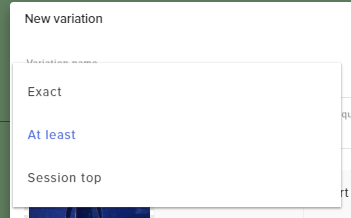
(To make my question easier) There are 3 variations you can choose on donations (Exact, At least & Session top). I'm quite certain "Session top" refers to the "Top Tip" in widget data, which is the top individual donation.
I'm wondering if there is a way to make that connect to "Top tipper" instead.
 spice yacht
Is there a way to edit bot response to song request? It's a little bit too long for my taste
 pulsar gulch
Hello guys , so the option for hearing the alerts 2 time didn't work
clever mango
@spice yacht Not at this time
pulsar gulch
I have the " Shutdown source when not visible " still hearing 2 times
weary mist
@pulsar gulch how are you testing the alerts
and is that "shutdown" on all streamelements browser sources in all scenes?
pulsar gulch
well i was streaming yesterday and someone bought something from the store
and heard it 2 times
spice yacht
Anyidea if it will be an option?
weary mist
@pulsar gulch try this. Open the streamelements dashboard, and close all other browsers (ALL of them, don't cheat), and replay one of the events
Also, check your overlays to make sure you don't have multiple of a widget
lament blade
Oh nevermind, I found this: https://streamelements.helprace.com/i261-alert-box-top-tipper-variation-option I guess "Top tipper" variation is not a thing. Probably a very low priority request but it'd be useful to some streamers I'm sure.
weary mist
@lament blade there is specifically a Top Tipper widget, that pulls from the Top Tip list in Tip Settings
This widget has Session, weekly, monthly, and all-time options
 pulsar gulch
@weary mist do i have to close my obs too ?
weary mist
no, you need to have it open
@lament blade oh, you mean alerts. Overlays in our sense is everything from images, text, to alerts
pulsar gulch
Well now i can hear it on SE dashboard and on obs .. so that means it's normal right 😮 ?
shadow iris
so no ideas what could cause the follower alerts not to show up? :/
weary mist
@pulsar gulch there is no sound from the SE dashboard, which means that the sounds are coming from OBS
the only place the sound plays are from the overlays
pulsar gulch
I closed my obs .. tryed again and it's coming from SE - editor too
lament blade
Right, so there is no current option to create a donation variation alert for Top Tipper.
Only "Top Tip"
weary mist
@shadow iris sorry, not 100% sure. You are the only one reporting the issue, so it might be something on your end. You can try refreshing the cache on OBS, doing a manual cache delete, restarting your computer, etc
@lament blade for alerts, correct. But.
There is a way
if you are a super awesome advanced user that knows CSS/HTML/JS
lament blade
I do not but I could find someone to do it
narrow coyote
I would also suggest to log out of SE and back in, this makes sure a new token is gotten from twitch @shadow iris
lament blade
Any direction I could point them in?
weary mist
@lament blade a couple. With CSS/JS, you can do just about anything you want. You can store the tip amounts in variables, arrays, etc, and make the alerts pop when ever you want them to (also with the custom css event list widget, fun things can be done).
lament blade
Gotcha so it'd be the custom css event list widget you'd use?
shadow iris
@narrow coyote I have logged out yesterday and how do I check if I gotten the new token?
narrow coyote
if you did it just yesterday, you should have a valid token
pulsar gulch
@weary mist so any idea 😦 ?
lament blade
Is this Github the official API for StreamElements I'd just send the dev to? https://github.com/StreamElements/api-docs
 narrow coyote
@pulsar gulch sounds like you might have more than one widget then, if you hear it in the overlay editor
pulsar gulch
you mean that AlertBox ?
weary mist
lol, for 1, I said to close all tabs and to replay an event from the dashboard not editor, so I am still not really sure. If you closed OBS, and ONLY have one editor open (verify by closing all browsers, no matter what brand they are)
lament blade
Oh I think I found the official one.
https://dev.streamelements.com/#tipping I don't see an API call for "Tipper" only for references to "Tips"
pulsar gulch
so now i have only chrome opened with SE dashboard opened
weary mist
you can use the event list, or you can active custom html/css/js in the alert box @lament blade. And those two things are seperate from the API, as they get the information directly from the overlay stuff
pulsar gulch
and by replaying an event you mean to replay the last follower for example ?
weary mist
meaning you don't have to do api calls, the information is already being sent to the widget @lament blade
@pulsar gulch correct
make sure to have the dashboard and obs open, or just the editor
one or the other
pulsar gulch
I did .. I didn't hear anything .. just the confirmation pop out ( successfully replayed.... )
weary mist
right, because as I told you before, the dashboard doesn't play sound
weary mist
Ok, now test a redemption
pulsar gulch
I think i just deleted the redemption alerts because they didn't work .. let me add them again
wanton jetty
Anyone here able to change the CSS of the "SE Widget"
lament blade
Hm the event list can only show recent tips so that would not work I don't think. When it comes to custom code - are you sure there is a way to call the "Top tipper" from the widget data? (Thanks for the help by the way)
pulsar gulch
can i use the images from the store items on the redemption 😮 ?
weary mist
yes
narrow coyote
if its a stream perk
weary mist
and if you check the box that the perk will cause an alert
weary mist
no
when creating a stream perk (store item), the second page has a check box to allow the item to pop an alert. Make sure it is checked
 gray moth
Error 500 on Stream elements website
 vital wyvern
works allright for me @gray moth 😃
weary mist
@gray moth try closing the browser and try again. Loaded fine for me
spice yacht
can someone quickly explain how to use $[args]
weary mist
lets say your command !test has the response hi, $(1)
@hot arch yes. You have now been helped
@spice yacht so the response will return the first word after the command that is called
weary mist
$(2) returns the second word
 hot arch
it takes a while to do another one
weary mist
$(1:) returns all words after the first word
hot arch
and it doesn't show up instantly on my obs
lament blade
HIIII! Trying to setup !watchtime, it just tells eevryone 0 seconds, i turned loyalty on, but those are for points im assuming.
spice yacht
With or without the first one @weary mist ?
spice yacht
K <3 Thank you
 spring valve
hi....is it possible to set an own emote from my channel for the emotesplosions in kappagen?
lament blade
Like when did i part stream elements tio my channel? @weary mist
lament blade
today?
pulsar gulch
@weary mist and if it's a sound alert it's not gonna pop out right ?
lament blade
LUL
weary mist
@hot arch that is likely something on your end, as the alerts come through at the same time for emulation for me (high latency with internet, not enough processing power on pc, etc)
lament blade
I was in contact with Support through Email, we couldnt get it going. @weary mist
weary mist
@lament blade watchtime is from when you first signed up with us, as we only know from that point forward
lament blade
I am having an issues with the alerts and the hype cup working with obs
weary mist
@spring valve yes, scroll down in the emotesplosions settings
@pulsar gulch sound effects are only for sound, no images
lament blade
Im sorry, "signed up" signed up where @weary mist
hot arch
o okay thanks
weary mist
@lament blade can you explain a bit more what you are experiencing? and what OBS you are using?
@lament blade when did you join StreamElements platform
pulsar gulch
So for the items i have this marked Redeeming shows on alert
lament blade
im live right now, people are currently watching, LOL
pulsar gulch
lament blade
I will check on the obs when I get home. For the alerts and hype cup they just are not working. Do I need to use a certain version of OBS? @weary mist
spring valve
@weary mist, yeah, there I have the select emotes section, but I can only select twitch global emotes, ffz global emotes or bttv global emotes 😦
weary mist
@spring valve there is a default command for updating kappagen emotes, I can't remember what the command is, but it is obvious if you look for it
@lament blade ok, just a minute on that
@pulsar gulch correct. IF they are stream perks, they will play the selected sound and show the image. If there is no image/sound, it will play the default that is in the widget. For sound effects, it plays only the sound.
 tight harness
@lament blade Loyalty is not just for points, it's also for watchtime
pulsar gulch
I see .. I tryed trro redeem again with my obs opeend .. and didn't work
i have my redemption widget on aswell
weary mist
@lament blade some versions don't work, like SLOBS and OBS Classic are known to have issues with our overlays
@pulsar gulch ok. So for a test, open the overlay in the editor, and redeem something. Does it pop up on the editor
pulsar gulch
Yes the image with a gift .. not a sound or something
weary mist
do you have a sound set?
pulsar gulch
i have a sound set for every item
lament blade
@tight harness I enabled lotyalty
pulsar gulch
do i need another one for the widget ?
weary mist
@lament blade OBS Studio, most recent version
 clear nebula
Heya, can whoever worked on the violet momentum overlay hit me up please? I'd like the background image and font to make some matching panels for my twitch channel so it matches the overlay 😃
lament blade
I will check and see what I have when I get home and get back to you @weary mist
weary mist
she should be able to give you some information on them
pulsar gulch
but how do i get the image of the item ?
clear nebula
Awesome ty, I'll hit her up
weary mist
@pulsar gulch The image should pop up as the image you set for the item in the stream store
pulsar gulch
so i opened dashboard + obs .. i redeem something and nothing happens
it only says success replayed ...
lament blade
Its working @weary mist @tight harness
weary mist

tight harness
Excellent! 😃
lament blade
Spank you all
serene granite
please no violence
 lunar lotus
Can any staff help with a simple problem?
narrow coyote
its best to just post the problem you are having
lunar lotus
Im trying to make a follow check command, i put in the right info but everytime someone does the command it just says "On Twitch Since Not following..." even though they are following
narrow coyote
well, there is the default !followage command, but if you are testing it now, twitch is having all sorts of problems might be related to that
pulsar gulch
by the way .. I'm planning to stream on youtube and mixer for 2 -3 months .. how do you think i should do with the scenes .. should i just export all of them and make new ones for youtube ?
lunar lotus
okay thanks @narrow coyote fixed it ❤
pulsar gulch
Or is it easy enough to just change the overlays 😮 ?
lament blade
How do you do roulette?
narrow coyote
@lament blade https://streamelements.com/dashboard/bot/modules
tight harness
@pulsar gulch We have YouTube themes too, have a look 😄
weary mist
you can also import from your twitch to your youtube.
pulsar gulch
can i use like the same that i was using on twithc ?
weary mist
or just get the youtube alerts and text, and hide the twitch ones. etc
pulsar gulch
How do i get them from twitch side ?
tight harness
@pulsar gulch Just log into your YouTube account on our site and look at making an overlay there, you'll need how it has different wording because Twitch and YouTube don't use the same terminology
 hushed ice
 maiden prism
anyone know why streamelements skips songs after a few minutes for no particular reason?
tight harness
Correct
pulsar gulch
Ty
tight harness
YouTube questions should be asked in #helpdesk-youtube - for future reference 😃
pulsar gulch
oh alright 😃 thank you
clever mango
@maiden prism What browser do you use? Do you use our desktop application as well?
maiden prism
chrome, and i use ground control but only for renaming the bot
maiden prism
yep
also sometimes it says the video format is not recognised by my browser, but they're all from youtube so it makes no sense for some to work and others not to
clever mango
Where does it say this?
maiden prism
https://streamelements.com/dashboard/mediarequest/general here sometimes
StreamElements
The Ultimate All in One Platform for Streamers
clever mango
In the player?
maiden prism
yeah, and it stops playing the music
so 2 issues; it skips random songs and sometimes it completely breaks due to "video format"
clever mango
Both of these are new reports so if you can DM me as much detail as possible about your setup so that I can try to replicate the bugs that will be helpful
maiden prism
sure thing; i'll take a screenshot if it happens again today and send the info later 
clever mango
Thanks
spring valve
@scaler I used the !emotes update command, but nothing changes in my selection of emotes
narrow coyote
What was the problem you were having with emotes?
spring valve
I wanted to use my own emotes in the kappagen emotesplions
but i can only select "standard" emotes
narrow coyote
have you tried logging out of SE and back in? If SE sees the affiliate status, I would expect you would see the "Twitch Sub Emotes" option in kappagen
summer mulch
@maiden prism For how long did you stream before the problem occurred?
narrow coyote
spring valve
@narrow coyote no twitch sub emotes section after relogging 😦
maiden prism
@summer mulch honestly it happens like every 20 minutes
summer mulch
Strange, update @clever mango
clever mango
@maiden prism are you playing from queue or backup playlist? Is your page visible or in the background? What video was the last one to skip? A video recording of it happening along with the system settings is invaluable for debugging
I have to try to replicate the problem here in order for the devs to be able to fix something. So far I can't make the songs skip by themselves.
maiden prism
@clever mango backup playlist, the tab is open but not my active tab unless i'm skipping a broken song; can't remember which songs as i have many in the playlist but as i said i'll try and catch it next time. will be hard to get a video of it since i only record my drawing software when streaming but i'll see what i can do
 clever mango
When a song "skips" does it require you to actually go to the next song or does it just freeze the player?
maiden prism
the videos themselves work in my country if that's what you're asking; i added them all myself
narrow coyote
@spring valve thats how it should look for the settings. as a test, can you try making a new overlay, and adding a new kappagen widget in there, to see if you can add your emotes in there?
maiden prism
it stops playing completely and i have to go to the next song or refresh to get it to work again
clever mango
There's a difference between the videos being playable on YouTube in your country and being playable through the embedded player on our site though
Some videos are not embeddable or are not playable as an embed in certain countries. YouTube permissions can be confusing in this way
Thanks for the playlist. I'll do some more research and get back to you
spring valve
@narrow coyote nope, same problem with new overlay 😦
 solemn mortar
uh just wondering is there a way to make it so my mods can alter the media request list to remove a song that needs to be skipped prior to it being played
zenith widget
Theres a queue moderation you can turn on here on the top: https://streamelements.com/dashboard/mediarequest/general
serene granite
you need to give your mods dashboard access with the bot-supervisor level or higher
here's a tutorial @solemn mortar https://www.youtube.com/watch?v=zl_h-ttZDF0

Learn how to add moderators to your StreamElements account, or being added as a mod. --------- Overlay Manager guide: https://youtu.be/X7XrDdRE7Fk AlertBox g...
solemn mortar
ty
 gloomy plume
Hey guys! Wanting to know how we display session sub count that only displays current new subs, not resubs?
 harsh crescent
How can I play music in the background of my stream?
narrow coyote
https://streamelements.com/dashboard/mediarequest/general @harsh crescent
harsh crescent
When I press show on stream it won’t play the music
narrow coyote
you need to have the media request widget added to an overlay for the play on stream to work
@gloomy plume There is no way to filter this in the widget, you can see if someone has submitted this idea before, and if not, you can submit this on the ideas board https://strms.net/ideas
harsh crescent
How can I add this widget to an overlay?
 cosmic solstice
is there a way to make it so my subs gain points faster
clever mango
@cosmic solstice Yes, on the loyalty settings page there is a multiplier for subs
narrow coyote
@harsh crescent Do you currently have an overlay that you use for your stream
cosmic solstice
http://prntscr.com/joqfjr where?
 clever mango
@gloomy plume There is an idea on the ideas board for this and it is something that we will be adding in the future
@cosmic solstice log out and back in
!affiliate
nocturne pelicanBOT
If you recently became affiliated with Twitch and do not see Subs or Cheers on your Dashboard and Activity Feed please log out and back in so that Twitch notifies us of your new affiliate status.
clever mango
Actually, it doesn't look like you are twitch affiliate so you don't have subscribers.
Unless you're asking for someone else
harsh crescent
I personally do not have an overlay yet but my friend does and were trying to figure it out @narrow coyote
narrow coyote
Go to https://streamelements.com/dashboard/overlays and then click the large pencil on the overlay you want to add this to
once in there, click on Widgets at the top
add this widget
gloomy plume
I am asking for SeriousGaming (partnered streamer) @clever mango
clever mango
👍🏽 It's on our task list
gloomy plume
Excellent! Thank you for the response
 craggy night
Is the twitch panel fixed yet?
 muted kayak
hi all! is there a current issue going on with the chat bot?
seems that the bot doesn't want to join my chat anymore!
narrow coyote
try logging out of SE site, logging back in, and click on join channel
muted kayak
hmmm, no dice
seems that my activity stream reset back to what is was a week ago too
new follow just worked fine, maybe i need to get the bot to part channels and re-join?
weary mist
possible
lament blade
@weary mist so I asked about alerts and the hype cup earlier. I have obs studio's newest version. Would there be any other reason they would not work
weary mist
potentially. when you emulate an alert, can you hear it in OBS?
mute the browser if you have to
 teal yoke
Hi how much time does it take for the donation to apear on the stream?
my first donation just happned and the viewer asked about the donation notification
weary mist
it should happen as soon as the transfer is confirmed. most of the time this is instant. If it is not showing, check your paypal account to see if it needs accepted or not
teal yoke
@weary mist i'll try that
@weary mist i accepted the donation but the stream elements still showing 0 tips
weary mist
we have to wait for a donation to come through the paypal API
I am not 100% sure what the timeframe of an accepted tip api notification is
If you had to accept, its likely you don't have a verified Paypal account. I would recommend getting it verified so that alerts come through smoothly, and you don't have to accept payments all the time
lament blade
Nothing for that either. Doesn't seem to be registering when any alerts happen once I go to obs
weary mist
hmm, thats interesting
we need to get some hands on to do some testing on this. There could be something blocking them (like an anti-virus), or something else entirely.
teal yoke
@weary mist that's strange my acc is verified.. i'll check that later
weary mist
hmm
I would recommend contacting paypal about that one. I have never had to "accept" a tip
I have also had my paypal account for probably 5-10 years, lol
weary mist
lament blade
do i have to wait to be able to use the tips i get or do i have to wait
weary mist
@lament blade tips through paypal are instant (when your paypal account is set up properly, just ask demongamertt  ). we don't touch anything of the tips, they are transfered from your viewer directly to you through paypal 😃
weary mist
Make sure you have all your personal information entered, and a bank account or credit card attached.
if you get a tip, and need to approve it, there is likely something else you need to do
 west monolith
how do i add a bot moderator so where when someone follows me it says a message
 wet compass
I am having a problem with the scale of my overlays. They are going off the edge of the screen and even when I scale them back in obs they are the wrong size.
 half wing
#helpdesk-twitch Hello what size should a picture of a game be for stream element store item?
weary mist
@west monolith that is going to be the chat alerts module. Make sure to have the bot join your channel, mod it (type /mod streamelements in your twitch chat and send), then go to the modules section of the dashboard, and activate chat alerts
@wet compass are you using a theme, or a custom set up overlayu
@half wing one second, let me find that number again
half wing
kk 😃
weary mist
with the themes, make sure to leave them 1080p on the site, and when you put them into OBS, put the width to 1920, height to 1080, and click save, then hit CTRL+F
that will make it fit your OBS canvas
half wing
oh I was trying to add an image in the store of a game but had a problem :/
wet compass
Thank you, that worked.
weary mist
@half wing im getting to you, nothing above was for you
size is 248x186 for the store items
half wing
Thanks So much @weary mist
 modern pier
hey there i got a problem
my leaderbords stoped working like 2 days ago and cant make it work again
i tryed to add it again and again but it says offline
cant config it as well dunno what to do
 hollow wadi
its down for maintnace i think
 crimson yoke
is the bot broken?
 rugged cipher
Hey guys, quick question. I am trying to bring my overlays to OBS, but I dont have the "Browser Source" option, only "Browser". Do I have an older version by chance?
modern pier
yeah thats the isue @rugged cipher
jsut ad the link to the browser with the right size of ur screen 😃
pine hemlock
Browser is the same. OBS renamed it to just Browser instead of Browser Source
The extension is down for maitenance see #270206314561404928
rugged cipher
Ahhhh got it. So do I add each overlay link separately? When using Super Themes, that is.
 nocturne pelicanBOT
To add your overlays to OBS, add a new browser source in your scene. Paste your overlay URL in the browser source properties, set the dimensions to 1920x1080 (unless you changed them on the website), and :ballot_box_with_check: “Shutdown source when not visible” https://youtu.be/KDvLynUqXI4
rugged cipher
Pefect, thanks guys, I really appreciate it!!
lament blade
Which channel would good to ask when mixer support will be coming?
clever mango
It will not be soon. It's still in "planned" stage.
Upvote the idea on the ideas board to get updates when anything changes
!ideas
nocturne pelicanBOT
Here is the StreamElements Ideas Board: https://strms.net/ideas
teal yoke
@weary mist hi its ben 4 hours since the donation its already on my paypall account but my stream elements still showing 0 tips and no loyalt poitns was wardade to the donator what to do?
awarded
lament blade
thanks
teal yoke
Hi guys
 sly canopy
So I enabled tipping for twitch, got a donation today, it didn’t show up on my chat and on stream elements it says I have 0.00 in tips, but I enabled the bot to get a notification when I get a tip.. but didn’t get the bot chat
 crisp pasture
This may not even be possible, but I figured I'd ask. Is it possible for AlertBox to continue displaying an alert when transitioning scenes within OBS or will the alert only display on the scene it was on when the alert triggered?
narrow coyote
If you are not getting a tip alert, then there is going to be a problem related to your paypal account. StreamElements uses the paypal API, so it does not touch the transaction at all, it will alert if the transaction returns as being successful
sly canopy
So I won’t get the alert until it clears?
narrow coyote
@crisp pasture This is not going to be possible, this would require you to have the same source active in both scenes, and then you would get audio echos, and it would still not be the smoothest transition
sly canopy
And what do I put for the amount in the tipping chat alert settings
It’s set on 1 but what should I set it at?
 ocean oyster
I wanna start streaming but stream elements isnt on the app store. Where do I go?
teal yoke
@narrow coyote i had to acept the donation(paypal forced me to update my info to "confirm" account)
but even after i acepted
 balmy marlin
Hey guys, how's it going?
narrow coyote
@ocean oyster StreamElements is not broadcasting software, they are currently working on a streaming app for android, but that is only in beta currently
teal yoke
i do not receibed the notification and my tips show 0
sly canopy
Ohhh I have still have to confirm my account on paypal
But it still shows 0.00 tipped on stream elements
ocean oyster
So not for iPhone? I wanna stream xbox games such as fortnite. But chatboxes wont show up. So i was looking for an app to customize it.
narrow coyote
if there was a problem with the account, then the api most likely would not have returned a success to StreamElements, so in that case, it will not show up. you can manually enter the tip information, and mark it as imported, so you will see it
balmy marlin
I'm currently getting a Kappagen emote explosion happening from my alertbox widget upon any alert. I have a separate Kappagen widget for chat emotes. I'm using the default dancing shark for my alerts at the moment. Could someone please help me disable the emote explosion from my alertbox?
narrow coyote
@ocean oyster You can use the twitch app to view your chat and dashboard
@balmy marlin that is coming from kappagen, not the alert widget, under the emote explosions options there are check boxes for the different alerts
ocean oyster
Yeah but its harder lol i mean thats how i do it but i thought that the way it looked was cool
narrow coyote
balmy marlin
@narrow coyote I had already disabled the event triggers on the kappagen widget. I just duplicated and put the new browsersource into OBS and it's now working as intended. Odd. Thanks for the help 😃
narrow coyote
could have just been the OBS cache then, if you save the overlay, it should be picked up by OBS, but from time to time the cache for the browser sources can act weird
balmy marlin
nod nod ta muchly
teal yoke
@narrow coyote its there any special configuration we have to do in paypal to allow stream elementso to track donatinos?
narrow coyote
as long as the paypal account is setup proper, and can accept money, then it should all be fine. If there was an issue with the account, that has since been corrected, you will need to wait until you get another tip to see if everything is functioning properly
teal yoke
humm
i had a problem with outdated info
my account its from 2008
ok
No chance to re send the api call to stream elements right?
narrow coyote
no, you will need to get a tip again for that to occur
teal yoke
@narrow coyote ok thank you!!
narrow coyote

lament blade
Hi, I can't get the SE twitch extension to work. It's been broken for a couple days now.
narrow coyote
Backend infrastructure was being updated, devs have been working hard to get it up and running again
narrow coyote
No problem, should be back up for everyone Soon™
 livid ingot
Still cant edit this
weary mist
@livid ingot read up about 6 lines
 sonic bough
is there a streamelements chatbot?
weary mist
@sonic bough of course there is. Just sign in, and click the join chat button on the dashboard
sonic bough
sweettttt
im not finding it, i have ground control. but i want to be able to read chat and not have to watch my twitch channel
weary mist
that is not the same as a chat bot
a chat bot sits in your chat and does things, it doesn't show you chat
and you can pop out the chat in your channel, or install a 3rd party software like chatty. GCv2 will have chat in it (planned feature)
just not yet
sonic bough
ok gotcha
 wet lava
its streamelements down for anyone else
wet lava
yeah like my overlay isnt on my stream and when i go to the website it sayaccess blocked
weary mist
could be two thingd
or three
1, your acess is blocked by SE
2. your access is blocked on your end
3. something is blocking access to the server
When was the last time the site worked
wet lava
well i got on but my overlay isnt pooping up on stream
 sturdy oar
Twitch prime subs are not showing on my dashboard or my alert box. Any idea why? Regular subs do work.
weary mist
!share
nocturne pelicanBOT
Twitch prime (new and resub) and paid subscriptions (resub only) must be shared in chat manually by the person subscribing in order for the subscription information to be sent to StreamElements. For twitch prime, the user needs to have sharing enabled on https://www.twitch.tv/settings/prime. For paid subs, if the share box doesn't show up immediately it will when they refresh the page. https://i.imgur.com/VNJN0Uv.gif https://i.imgur.com/2297EA7.png

 weary mist
@sturdy oar
sturdy oar
Perfect. Thanks!
 steady mountain
could anyone help me with the overlay editor? i am trying to copy the changes ive made to parts of the overlay to other scenese, for example my social media info bar at the top of my screen, i want to copy it to another scene
lament blade
There is a duplicate button that you can use to duplicate it to another overlay. i can get a screenshot, moment
Red marker
"other overlays"
steady mountain
okay thanks a lot
lament blade
No problem
steady mountain
can i duplicate multiple layers at a time or is it one at a time?
cedar fulcrum
You can duplicate all the overlay and delete the layers you do not want 😃
steady mountain
but i need to duplicate each single layer to the other overlays one at a time, no way to duplicate multiple layers at once?
 elder sorrel
I believe that is possible. Looking it up real quick.
@steady mountain Yeah you can. When you click duplicate. It should give you the option to duplicate to other Overlays.
cedar fulcrum
@steady mountain there is no multi layer option. 😦
 graceful sail
Henlo, soz but my twitch chat overlay is not showing up on my obs, do I have to be live for it to work? The chat shows up fine on my overlay editor but on my obs, it stay blank.
it's the black box in obs, the chat does not show up but the box does. :'>
cedar fulcrum
@graceful sail It should work on both
livid ingot
@weary mist what am i looking for?
cedar fulcrum
Make sure chatbox is not to big and you do not see the chat because of that try to resize it
graceful sail
aite, i'll try resizing.
steady mountain
how to remove the chat bot from stream elements? just in the dashboard?
graceful sail
ah resizing worked! thanks!!
cedar fulcrum
Welcome 😃
 restive saffron
Is there a problem with the StreamElements Extension? It's like loading forever and i cant chance the options
stuck hamlet
restive saffron
Ahh thx 😄
 tepid talon
hey im trying to make my bot reply with quotes, where is the list I can put quotes into
 keen marsh
Hey hey!
Having some trouble with the Stream Elements Leaderboard extension
I can't click checkboxes/dropdowns on the 'Configure' screen, and it doesn't look like it's loading on the Panel after I activate it
I saw something about a maintenance alert, but Twitter support said nothing is down?
cedar fulcrum
Hello @keen marsh , We are working on the Extension please check #270206314561404928
keen marsh
Great, thanks for the heads up - might be worth giving a heads-up to whoever is on Twitter support that it's still on-going to avoid the confusion. I'd seen the news about maintenance, but their re-assurance that nothing was down confused me 😋
cedar fulcrum
We already done that 😛
cedar lynx
Working on setting up a giveaway for the first time. I plan to allow people to enter all month through June. If a regular follower enters, THEN subscribes -- does their existing entry get the Subscriber luck multiplier?
cedar fulcrum
@cedar lynx I think they need to buy the ticket again as a Sub so the luck will be increased.
cedar lynx
hmm okay I just want to be able to tell people the correct info ahead of time so they know the deal 😃
 wanton mango
Henlo  I'm trying to use
 ${time.GMT} and it gives a time, but it's an hour behind. I tried BST and UTC as well but they're the same.
cedar fulcrum
Hello @wanton mango What GMT time it gives you?
wanton mango
@cedar fulcrum It's currently giving me 08:48 (it's 09:48)
cedar fulcrum
example of accurate times
$(time.PST8PDT)
${time.Asia/Seoul}
You can specify time zones using locations so LA would be ${time.America/Los_Angeles}
https://en.wikipedia.org/wiki/List_of_tz_database_time_zones

This is a list of time zones in the tz database release 2017c. The list is derived from the zones, links, and rules specified in zone.tab and the 7 "continent files" – africa, antarctica, asia, australasia, europe, northamerica, and southamerica. It also includes other vali...
wanton mango
Hm, I tried ${time.United Kingdom} and it was still giving an incorrect time, then I tried ${time.Etc/GMT+1} and that was two hours behind, but ${time.Etc/GMT-1} seem to give the right time  Danke. I guess I'll update it when the summer hours change again
zenith widget
One example that worked for me when testing this -> ${time.Europe/Sofia} but replacing the city with the country did not work. So if you're in the UK, then just make it ${time.Europe/CITY} (e.g. ${time.Europe/London} )
wanton mango
Oooooh I misinterpreted it haha. Just tested that and that works too. Thanks! 
zenith widget

atomic hollow
sofia 🌨
cedar lynx
Am I correct in seeing there is no way to adjust settings on a giveaway after it's created?
text tweak, images, etc
zenith widget
After being started - no. You'll have to end it and then start it again
cedar lynx
okay cool. glad I'm experimenting in advance 😉 thanks
 oak quarry
Someone can tell me, if there is a way to create a "follower goal" in stream elements? S.b. told me it's possible, but I just can't find it 😄
cedar lynx
New question, about the bot and timers. I wanted to trigger existing commands like !social on a timer but it just... spits out the literal text "!social" and doesn't trigger the existing command. Is there a way to reuse a command so I don't need to manage it multiple places or do I just need to copy/paste it over?
zenith widget
Copy paste the text from the command to the timer. Alas there is no option as of yet for an alias for the timer like Nightbot has and I'm pretty sure its been said couple of times in #💭︱feedback-and-ideas and should be part of the ideas board
cedar lynx
okay good to know, and glad it's already in the ideas section 😃
zenith widget
https://streamelements.helprace.com/s1-streamelements/ideas - if you find it upvote it
oak quarry
@zenith widget thx alot 😃
Is there also a way to set a start amount? because i don't wannte start my follower goal with 0 followers, but my actual amount of follower
zenith widget
https://streamelements.com/dashboard/session - in the goals tab you can set your current number
cedar lynx
@zenith widget having trouble activating my account on HelpRace 😦 the activation link from when I first set it up didn't work and now it won't send me a new one
zenith widget
HelpRace is a different platform then ours I think and I have no clue how to help on the matter. I also don't have an account my self
cedar lynx
haha okay
I tricked it into letting me in by going through the reset password process, seems to have worked ¯_(ツ)_/¯
zenith widget
 cedar lynx
sorry for all the Qs in a row 😉 going through my first SE overlay stream yesterday -- if my computer is on mute how do I make sure sounds from the overlay come through on OBS?
zenith widget
Don't worry about the Qs 😉
But thats a good one
I guess the overlay sounds are going via OBS, which in term uses the Desktop Audio output.
oak quarry
I just managed to fck up chat widget :x i wanted to change the text color but now anything i put into chat doesn`t appear in obs overlay chat
zenith widget
@oak quarry You can just delete it and add it again?
delete, save, add it again and start messing around with it?
oak quarry
that sounds like an idea. 'll try 😄
cedar lynx
@zenith widget cause I heard double when I had OBS monitoring on so assumed it would just come through on stream, but on playback I can see that no sound came through
zenith widget
I just made a test alrt on my test overlay and saw that OBS and Chrome lit up
and then it went through Desktop Audio on OBS
cedar lynx
yeahhh that was my testing showed as well, I thought it was odd it didn't work in actual live
maybe I'm just missing a setting somewhere
oak quarry
seemes to work. it adjusts it's chat color automatically for nice contrast when i change chat's appearance. quite impressive :p
cedar lynx
woah that's a new thing, let me see if I can figure out how to add that
cedar lynx
I just have Mic/Aux
the only time I've seen other audio choices pop up are when I added like JackPilot stuff
oak quarry
uhm.. okay, the chat itself works in streamlabs, copied the link to obs as browser sorce. but in obs itself the messages don`t appear D:
zenith widget
@oak quarry Streamlabs? Streamlabs OBS?
Make sure you add the browser source as 1920x1080
oak quarry
lol sry my bad stream elements i meant
zenith widget
zenith widget
@cedar lynx So JackPilot is an audio mixer of sorts as far as google shows me? Maybe your desktop audio is controled by it?
@oak quarry It should. Let me check as well.
cedar lynx
yeahhh I'm on Mac so maybe I just have to do all the extra things for this to work
zenith widget
Mac 
No idea how to help on that front really, if OBS does not have the default "Desktop Audio" there when installed
cedar lynx
lol okay
cedar lynx
yeah I have a big film/media background (not live) and for a long time Mac was king in that field
zenith widget
@oak quarry Did you forget to click "save" by any chance?
oak quarry
okay, strange thing... 1st+2nd message wasn`t shown, but since i started the test stream the chat also visible in obs 
zenith widget
And again, make sure the browser source is set to 1920x1080
sonic bough
this has probably already been asked, but is anyone else having problems with the leaderboard extension on twitch? wont let me set the dates and times
oak quarry
ye set it to 1920x1080 (also took some time since i found that out)
zenith widget
If you added the browser source and typed something in your chat instantly, it takes couple of seconds for OBS to load the browser source overlay @oak quarry 
Meaning that the chat can miss something
cedar lynx
@sonic bough it's been under maintenance a few days
oak quarry
ye possible
i like the streamelements activty feed. i bet there's a way to display it in some widget, right? i just wasn't able to find one seems fitting
oak quarry
@zenith widget ye probably that is what happened to me
zenith widget
!gc
nocturne pelicanBOT
Our Desktop App Ground Control: https://streamelements.com/groundcontrol
zenith widget
You can use our widget as a ways to not have your browser tab open
to track your activity feed
widget? i mean desktop app 
oak quarry
ah okay, i meant to display in the stream's ingame overlay
zenith widget
Event list is what you are looking for
oak quarry
was just unsure because the java/css thingy
zenith widget
One is not that customizable I think, the other is if you know CSS+JavaScript or you have a friend who knows, you can do a lot of neat things with Custom Event List
JavaSCRIPT
Java and JavaScript are 2 different languages
oak quarry
ye, ofc. sry my bad 😄
feelin' kinda blind.. i just had a look at every widget, but still missing the "normal" event list 😄
thx alot
 oak quarry
ye jst was looking for kinda everything except event 
 abstract elm
Hello anyone live to help a brotha out
 warm sand
hi there
zenith widget
I hope I can help, show you da wey brudah
abstract elm
whenever I have someone who donates and have TTS and media share, and whenever the TTS is too long, and the media share cuts off the TTS and plays the song, after that my SE notification will not work unless I restart the entire stream.
I am currently using stream lab (i fucking hate it) or bitstream bebcause I can't download SE app yet.
warm sand
is now a good time to ask a quick qns?
abstract elm
Because I'm a outdoor IRL styreamer
I uses stream app split screen, and have SE media share window in the backgroeund
so the song auto plays
but everytime tts & media share over laps, I will not get SE notification working unless I restart my entire stream.
its quite stressful because I don't want to scam anyone
sonic bough
thanks @cedar lynx
cedar fulcrum
Hello @warm sand sure go ahead 😃
oak quarry
Is there a way to trigger chat bot on events? like someone joined the stream: "welcome to the stream xy"? 😄
zenith widget
Chat alert module
Ooh but it does not have the "welcome to channel". Theres an unwritten rule in Twitch about welcoming people, as some may be pure lurkers who don't chat at all
 proper oriole
That's very true.
oak quarry
ah okay
what is lurking? heard it often but don't have a real idea what it means exactly 😒
zenith widget
is considering him self a lurker, who chats rarely in people's chats 
proper oriole
It basically means you watch without chatting
zenith widget
Lurker is a viewer who joins your channel just for the viewing pleasure/entertainment
proper oriole
or have it open in a different tab to support the streamer
zenith widget
Does not speak in your chat, but some lurkers if they like you, may speak like once every week or 2 or not speak for months
but they are always there
lurking
oak quarry
i rly like the ppl chatting (even my stream title invites ppl to chat with me 😛 )
 pearl light
@abstract elm i wanna understand your setup better, go in dm?
abstract elm
@pearl light ok
proper oriole
 <= some emotes are even made purely to infer you're lurking
 viral cedarBOT
 bronze crane
How so i setup getting tokens by watching and than use those to be raffled by the player
zenith widget
@bronze crane https://streamelements.com/dashboard/loyalty I assume you're talking about the loyalty system.
These are used in raffles and other neat chat modules
@bronze crane https://www.youtube.com/watch?v=hM7D0HJDRHg&list=PLCDDKlFdScbEwdx5AntcQIS1InkFJwHtv&index=7 check out this video that explains the loyalty system. If you have more questions about it, feel free jump back here
cedar lynx
@zenith widget btw for future people who might ask this tutorial seems to be working for me: https://lofi-gaming.org.uk/blog/2016/09/17/capture-mac-desktop-audio-obs/
bronze crane
Thanks mate
zenith widget
@cedar lynx I think there are plenty of videos and guides out there for OBS on Mac, so a quick google search does not hurt anyone really...unless they don't use google
cedar lynx
I'm basically a Google jedi master and one month in streaming and this is the first thing to work easily that I've found that's free 😛
just cause only now have I started to know the lingo to search for
Mac doesn't make it simple sigh
proper oriole
My "Follower Goal" module and "Twitch Chat" modules in an overlay aren't updating properly. I've, during a long break, had some people unfollow me, but the number in the module didn't go down. Now it reads 33 when it should be 30. When I get a new follower it goes up, but it seems when someone unfollows it doesn't go down. The chat module just refuses to update altogether when people chat in stream. Luckily I'm just able to joke that the "Dank Chat Generator" is broken. How do I fix the Dank Chat Generator without moving the modules around or making new ones? (They took a long time to format and set up properly)
zenith widget
@proper oriole You can control the current number here in the "Goals" tab: https://streamelements.com/dashboard/session
It does not update on its own when it goes down, unfortunately, as the Follower goal widget does not actual follower numbers and is just a plain counter that triggers upon someone following you
proper oriole
Thank you, that fixes the follower goal module. Do you know anything about the chat module not working?
proper oriole
It's just that when someone types in chat, it doesn't show on the module
I can turn on the stream for you if it helps
zenith widget
I just spammed your chat a bit. Notice how the SE bot does not show up in the chat. Thats intended. As for other messages, it should show up, unless you're reloading the overlays via switching scenes.
If that does not explain/help solve the problem, what I'd suggest and hopefully you have not customized it that much
just delete teh chat widget, save the overlay then add the chat widget again.
Also just in case, you are not using multiple scenes, to what the bot says bellow
!multi
nocturne pelicanBOT
Make sure to :ballot_box_with_check: “Shutdown source when not visible” for all browser sources (all OBS scenes). If using studio mode, uncheck “Swap Preview/Output scenes After Transitioning.” Also keep in mind that sound can play from any overlay loaded in the browser (editor or launched). https://i.imgur.com/FegZJQS.png https://i.imgur.com/yY0wcFl.png




 zenith widget
This should update the browser source cache in OBS(as the browser source is a web browser essentially)
proper oriole
It still doesn't seem to be working, I think
proper oriole
figured it out, I had the text opacity set as low as possible for some reason
Thank you!
 rapid epoch
hello everyone! i am having trouble with stream elements extension under my stream, it appear offline, and i can't configure it. It somethign temporarilly? thanks
atomic hollow
@rapid epoch its under maintenance, should be back up soon
crimson yoke
Good morning, the Stream Elements bot isn't responding in chat, or posting timers anymore.
 olive bloom
oof I changed my nickname earlier and thought it was desynced because of that! Thank you for this info, came here to ask exactly that.
zenith widget
@crimson yoke It just responded for me
Timers are another thing though. The chat looks for X amount of lines in 5 minutes, before triggering its timers. If you've set the chat lines to a big-ish numbers, its possible the timers won't trigger, if you have 2-3-5 people talking in chat
crimson yoke
@zenith widget it's not responding on my channel
oak quarry
i just got hosted but it's neither shown in the ingame feed nor in the streamelements activity feed D:
zenith widget
!host
nocturne pelicanBOT
Twitch doesn't have a "notification system" for hosts (unlike follows, subs, raids, etc.) so the only way for StreamElements to know that you are being hosted is to connect through you to twitch. This connection is made on:
- SE Dashboard page - https://streamelements.com/dashboard
- SE Activity Feed page - https://streamelements.com/dashboard/activity
- Ground Control desktop app - https://streamelements.com/groundcontrol
Please have one of these open during your stream in order to receive host event notifications.
crimson yoke
I also had a cheer yesterday and it didn't notify and doesn't show in my stats
crimson yoke
yeah...weird, because I'm on my page and I don't even see your chat
Twitch may just still be bugged then
zenith widget
Reload the page and try the command I typed
crimson yoke
hmm custom commands aren't working
zenith widget
So it does not respond to your custom commands?
Make sure they are enabled if they are added
oak quarry
@zenith widget ty
crimson yoke
derp, they where disabled
zenith widget

crimson yoke
but it still never pulled in my cheer from last night...but that was during the twitch issues so maybe it's all good now, thanks!
zenith widget
If it was really during the twitch derp period, then most likely thats the answer, as I can't think of anything else atm
crimson yoke
okay cool thanks
olive bloom
for me the bot replies but is not visible in the viewers list
zenith widget
Viewer list takes couple of minutes to refresh it self
zenith widget
no problems
oak quarry
anyone knows that error? wanted to conntect twitch + se
The Channel you tried to add is linked to a different account.
cedar fulcrum
Hello @oak quarry that means you already have an account on the site, try to log in 😃
oak quarry
huh, but i just joined 2 days ago 😄 and idnt connect anything at all
lament blade
would cheer alert be for BITS?
zenith widget
@lament blade Yes
lament blade
ok, thank you 😄
oak quarry
@cedar fulcrum it seemed to connect already.. but why isn`t shown in my history that i was hsoted?
ah maybe i just hadn't the site opened
zenith widget
For the login, the 1st time you login to SE, we ask for authorization to pull stuff from Twitch API. Thats when your account is created and linked.
nocturne pelicanBOT
@oak quarry
Twitch doesn't have a "notification system" for hosts (unlike follows, subs, raids, etc.) so the only way for StreamElements to know that you are being hosted is to connect through you to twitch. This connection is made on:
- SE Dashboard page - https://streamelements.com/dashboard
- SE Activity Feed page - https://streamelements.com/dashboard/activity
- Ground Control desktop app - https://streamelements.com/groundcontrol
Please have one of these open during your stream in order to receive host event notifications.
zenith widget
As for the host ⤴
 pearl comet
hey can someone help me on help yt
worn wedge
When stream element extension will be ready?
cedar fulcrum
Hello @pearl comet , sure go ahead and ask
cedar fulcrum
Lets go to YT 😃
worn wedge
Someone answer my question? 😄
zenith widget
@worn wedge Its being worked on, so expect it to be on Soon ™
worn wedge
Ok by the way @zenith widget love your gif 😛
zenith widget
\bee @zenith widget
viral cedarBOT
worn wedge
😂 😂
oak quarry
hmm.... https://streamelements.com/dashboard/activity is open... but next host also not shown D:
StreamElements
The Ultimate All in One Platform for Streamers