#helpdesk-twitch
1 messages · Page 25 of 1
 astral shore
Of course, i use a Free overlay at SE. I've link bot and twitch account, but when exemple, i receive a follow, The Followers Alert dont pop, and in the dashboard history, Nothing in " Last Follower ". If i take the pic and import on obs, no problem but if i want to manage with the full overlay pack.. Nothing :/
 crude pecanBOT
@astral shore ⤵️
To add your overlays to OBS, add a new browser source in your scene. Paste your overlay URL in the browser source properties, set the dimensions to 1920x1080 (unless you changed them on the website) and check Shutdown source when not visible and Refresh browser when scene becomes active, as shown in this GIF: https://imgur.com/a/2JhJD0S
astral shore
In the Dashboard, i've 0 follower, no history.. Nothing ^^'
crude pecanBOT
@astral shore ⤵️
Please provide your account ID found at the top of this page: https://streamelements.com/dashboard/account/channels This ID is public info and safe to share here.
 candid oak
They just submitted this 1 minute ago. Please allow us time to respond to tickets in the order we receive them.
 jolly harness
donno if this is the right channel but iam having a issue with audio from ps5 obs ive always used a chat link an since the update its causing my game sound to mute whenps5 controller is conected can someone help me if this is the right channel
crude pecanBOT
@jolly harness ⤵️
SE.live is a plugin for OBS Studio for the best OBS support, please join their Official Discord @ https://discord.gg/obsproject
astral shore
crude pecan
<@317750669031505921> ⤵️
634b1e54414feaa17123bb14
 ocean pike
Hello, unfortunately it didn't help. Had the exact same issues today.
 final crag
Any updates on why im getting fucked over and my sponsorship got flagged 2 times?
 formal verge
final crag
Any updates on why im getting fucked over and my sponsorship got flagged 2 times...
formal verge
final crag
Any updates on why im getting fucked over and my sponsorship got flagged 2 times...
For clarification, it didn't. There was a miscommunication on our part and mistakenly the flagged response was sent to you again recently. Please respond to any tickets you have with us if you have any further questions regarding any of your campaigns. Also, please watch your language and if you continue to respond inappropriately we will no longer continue to assist you via this platform.
final crag
formal verge
For clarification, it didn't. There was a miscommunication on our part and mista...
im sorry
final crag
formal verge
For clarification, it didn't. There was a miscommunication on our part and mista...
is there any reason why they are not in my invoices yet because its supposed to say submitted or approved for payment
formal verge
final crag
is there any reason why they are not in my invoices yet because its supposed to ...
Please reach back out to us in the most recent ticket you have received and we will be able to discuss your sponsorship payment concerns via that method.
final crag
formal verge
Please reach back out to us in the most recent ticket you have received and we w...
Ok thanks so much for your help it is #283220
formal verge
final crag
Ok thanks so much for your help it is #283220
I see a previous rep responded to you today regarding your request, if you have more questions, please respond to that ticket itself.
 ornate mulch
the built in alerts for my overlay dont work
final crag
formal verge
I see a previous rep responded to you today regarding your request, if you have ...
ok thanks i did thanks alot for your help
final crag
formal verge
I see a previous rep responded to you today regarding your request, if you have ...
i want the ticket to be assigned to you
formal verge
final crag
i want the ticket to be assigned to you
All of our reps are available to assist with these questions, and we will answer you back as soon as possible, however we are working with a larger influx of tickets than usual.
final crag
formal verge
All of our reps are available to assist with these questions, and we will answer...
Ok thanks
 magic hound
Hello Staff, I have a question regarding the default chat command when redeeming something from the store. Is there a way to disable this default so that I can create a custom command for when people redeem? I hate seeing this default command everytime someone or I redeem something.

 pine bridge
Reposted below with more details
 subtle spindle
this is discord related (i didn’t know where else to put it) but i’m trying to get only notifications that @ me and it’s not working…

 past spoke
I'm having an issue with my sound/image alerts repeating themselves when I change to different scenes in obs. PLEASE HELP?! If I start on my chatting screen and someone gives bits, my alert will work perfectly fine, but then I move to my gaming screen, and the alerts will repeat themselves
 foggy heart
magic hound
Hello Staff, I have a question regarding the default chat command when redeeming...
foggy heart
magic hound
Hello Staff, I have a question regarding the default chat command when redeeming...
Chat alert text can be adjusted here: https://streamelements.com/dashboard/bot/modules?module=chatalerts
foggy heart
past spoke
I'm having an issue with my sound/image alerts repeating themselves when I chang...
Go to the alert browser sources and be sure to check the shutdown source when not visible and Refresh browser when scene becomes active options
magic hound
foggy heart
Chat alert text can be adjusted here: https://streamelements.com/dashboard/bot/m...
Thank you! I honestly didnt think to check there
 glacial edge
BRO HOW AM I ONLY GETTING $125 OUT OF 2500????
LMAOOO WHEN I LITERALLY SENT MULTIPLE RECEIPTS
NAH ON GOD THIS GOTTA BE A TROLL
😂 😂 😂 😂 BRO WHAT?
foggy heart
glacial edge
BRO HOW AM I ONLY GETTING $125 OUT OF 2500????
As we've mentioned several times before, if you've got questions, concerns, or issues you need to present them in the ticket and communicate there.
glacial edge
foggy heart
As we've mentioned several times before, if you've got questions, concerns, or i...
Bro dont u think i already responded in the ticket
what else is there to say yall only giving me $125 worth of money i waited 6 weeks for $100 bro when i sent receipts and boxes of hellofreshes that my supporters received
foggy heart
If you've already responded to the ticket, then there's nothing extra we can help with here.
glacial edge
i didnt ask for help
i just asked if im getting trolled lmao
how would u feel if u waited 6 weeks thinking ur getting $2500 for $125
 ionic kelp
@glacial edge If you feel your payout amount is below what you should be given please fill out a ticket. If you already have a ticket open regarding this please respond to the thread.
Any other questions regarding the campaign will not be handled here.
 unkempt silo
anyone familiar with stream elements and why i can't find the download option for one of the free overlays ? also i tried coping the the URL but it wouldn't transition properly to obs.
ionic kelp
You don't download them.
crude pecanBOT
The default resolution for StreamElements overlays (theme and custom) is 1920x1080. Please add them in OBS at their full resolution and use CTRL+F to fit to screen if necessary. You can then downscale your stream in OBS settings > Video if you'd like https://i.imgur.com/6bWXxjR.png
unkempt silo
thank you so much
any way to link the latest follower in elements automatically ?
to where i dont have too edit it everytime
ionic kelp
Generally you shouldn't but there are times when it may  on the backend.
unkempt silo
also off note i dig the name! i dig linux
ionic kelp
But click the ➕and search for follower. Should show you where to get it.
But yes to that as well.
glacial edge
ionic kelp
<@726398613885943818> If you feel your payout amount is below what you should be...
am i allowed to post ticket pictures here
ionic kelp
No.
unkempt silo
the + in stream elements ?
ionic kelp
In the edifor
glacial edge
ok lmao omg bro only if u could see what the bs is happening to me
ionic kelp
I did not say to DM me.
glacial edge
why would i dm u ur not a staff member u cant look at tickets or anything
unkempt silo
ionic kelp
In the edifor
I am confused sorry im new to all this i mean is it on the website or in obs?
ionic kelp
Website
 ivory plaza
Hi! I wanted to know if anyone knows how to solve the issue with Chat stats showing a 404 not found error, and for stats not displaying on leaderboard?, the error is here https://stats.streamelements.com/c/itsme_shuneii

 worldly escarp
ivory plaza
Hi! I wanted to know if anyone knows how to solve the issue with Chat stats show...
worldly escarp
ivory plaza
Hi! I wanted to know if anyone knows how to solve the issue with Chat stats show...
have you changed your name lately?
ivory plaza
Nope, it's been the same since I created the account
Leaderboard wasn't displaying any info, so I uninstalled the extension, logged out and back in on both Twitch and Streamelements, everything got solved except for chat stats
worldly escarp
ivory plaza
Nope, it's been the same since I created the account
try now
ivory plaza
omg, thank u, the page on browser loads now, leaderboard should reflect the data from the next stream, right¡
?
worldly escarp
ivory plaza
omg, thank u, the page on browser loads now, leaderboard should reflect the data...
It wont show old data, but should update with new starting with your next stream 🙂
 pine bridge
What is the recommended time before reposting an issue if no comments have been made? Just curious on the process for this helpdesk.
 lament blade
When i make a sponsorship with se , i Always have a problem, not recommended
lament blade
Guys can u help me? I finished my helofresh campaign 1month ago. But i didnt get any payout. Please help me

@worldly escarp
 jaunty citrus
i was wondering if their was a command or possible to make a command where it sends me an alert after a certain amount of time when i use the command, for example, if i put (!alert 30 harvest) in the twitch chat. in 30 minutes it would @ me saying harvest
 wintry falcon
lament blade
Guys can u help me? I finished my helofresh campaign 1month ago. But i didnt get...
wintry falcon
lament blade
Guys can u help me? I finished my helofresh campaign 1month ago. But i didnt get...
Have you written this in the #1037361997098008686 forum? If you read the intro post there it indicates the forum is the best place for sponsorship questions and issues. Hopefully you'll get the sort of answer you need there.
lament blade
Can anyone please help with me wanting to remove an old custom bot and add a new one please?
ocean pike
Hello, this is still happening, despite whatever was done in the response to the original post. #helpdesk-twitch message
 patent cove
Chat stats error 404 Username: KALEPURK ID: 5c56021e5634ffb4cc2bce4b
 meager pollen
How come the currency type is greyed out under my Tipping settings? I've had EUR as standard currency for a while but would like to change to USD for SE.Pay. 💵
EUR isn't even the currency we normally use in my country so that can't be the reason why it's locked.
Thank you
 astral shore
Of course, i use a Free overlay at SE. I've link bot and twitch account, but whe...
astral shore
astral shore
Of course, i use a Free overlay at SE. I've link bot and twitch account, but whe...
Hello 😦 I asked for help last night, people started asking me about my problem, then nothing ^^
 golden sphinx
Good morning, I wanted to ask why my Raid Shadow payment may take longer than expected. My payment should have arrived on November 5 and I still haven't received it and I would like to know if there is compensation for the late payment or if I just have to wait for it. Message translated by Google Translate

 austere bone
golden sphinx
Good morning, I wanted to ask why my Raid Shadow payment may take longer than ex...
austere bone
golden sphinx
Good morning, I wanted to ask why my Raid Shadow payment may take longer than ex...
Im in the same situation idk what to do
 lilac bolt
bumping this up but my friend has been getting the 404 chat stats page
Twitch: FyvieDragon > FyvieLive > FyvieHQ
Id: 5fcbc95ac6a915804962e48e
 meager pollen
ionic kelp
<@241859013313036288> where do you live?
meager pollen
ionic kelp
<@241859013313036288> where do you live?
Sweden, so our currency is SEK normally. I would however like a currency set that more people internationally understand and also since I potentially will move to the US some day it makes sense to set USD instead of EUR.
austere bone
Hey i still dont have response 282502
to my mail
about payments
@young leaf
Can we have some answers to our mail ?
 mystic cliff
Hi Streamer & Creators 🤘 I have a little problem. The /announcegreen command or any other color does not work with the SE chatbot. is there already a solution?
lament blade
Please can anyone tell me how I remove a custom bot from SE? tia
 shadow hound
I had a viewer leave a tip for me offline, is there a delay in it showing in SE Pay?
nevermind, just found the article about it.
mystic cliff
lament blade
Please can anyone tell me how I remove a custom bot from SE? tia
you can remove the custom bot in Activity Feed Windows (Hamburger Menu / Stream settings /Cutsom Bot name ) Choose your Custom Bot und Below you can click Remove Custom Bot Account
 pine bridge
I decided to open a ticket (#284250)
Good day HelpDesk. I was hoping to find a solution to an issue with Graphical Alerts. I have determined the alerts are set correctly as the new follower alert works correctly. The interesting thing about this situation is, on the Activity Feed, the only events shown are the New followers. None of the other activity types are shown. Yes I have verified I am filtering properly to see everything. I have toggled things on and off. It looks like October 14 was the last time a Sub was recorded. So my assumption is this is the issue. The overlay system is not being triggered as the other events are not being detected.
Another piece of information. It looks like the Chatbot feature of SE sees the activity of RAIDS/SUBS/BITS and reacts properly. Just no overly alerts and the events again are not listed in the 'Activity Feed' So the system is half working - very odd in my opinion.
While searching online for solutions, I found a reddit thread where a similar issue was happening but this person only saw RAID events. His solution was fixed once a developer corrected the connection between his SE account and the Twitch Account. As if there were some linkage issues. Hopefully this is a similar situation for my issue.
I am the technical MOD for this channel and have full access to the Streamelements dashboard and have been tasked to fixing this. The Twitch channel in question is liliollie My twitch account is vsanch24_fp
If a formal ticket is needed, as this issue is beyond this helpdesk please just let me know how to submit one.
golden sphinx
golden sphinx
Good morning, I wanted to ask why my Raid Shadow payment may take longer than ex...
:(
lament blade
mystic cliff
you can remove the custom bot in Activity Feed Windows (Hamburger Menu / Stream ...
Much obliged, sir. For some reason the bot that was there before had gone, so I just connected the new one. Thanks again
 sage solstice
good day im looking for some help for SE store. The SE sounds extension won't work when someone redeems a sounds effect item for channel points in chat or on my SE store items extension. Does the sound effect have to get triggered by a widget in my SE overlay?
 whole slate
Can someone activate my chat stats (https://stats.streamelements.com/c/losporcosrimanos) ?
 coarse pewter
idk if this is the Channel to post in but my Alerts are working fine but theyre not completely in Frame its like theyre displaced can someone tell me what to do pls ? Ty for any answers
crude pecanBOT
@whole slate ⤵️
If you are receiving a 404 error on your chatstats page, please provide the following information:
- Channel name (old and new if changed recently)
- your account ID found at the top of this page: https://streamelements.com/dashboard/account/channels This ID is public info and safe to share here.
whole slate
- losporcosrimanos
- 63693c67a4ece16feedbeecd
 latent plinth
@whole slate @trail bramble Stats fixed.
whole slate
thanks!
 harsh vault
Hey i have a question
Is there a Live Chat Support or a Support Voicecall to get help because of a campaign because i am having an conversation on mail since 2 weeks and for every answer or email I send I have to wait at least 2 days to get an answer. Cause this is way too much
latent plinth
harsh vault
Hey i have a question
Is there a Live Chat Support or a Support Voicecall to get...
There is not, and all campaign/sponsorship issues have to be handled via tickets.
harsh vault
latent plinth
There is not, and all campaign/sponsorship issues have to be handled via tickets...
but apparently it takes too long with the support i got 2 usually easy questions answered within 6 days
latent plinth
There are a lot of tickets right now and responses are taking time.
harsh vault
hmmmm
 woven birch
glacial edge
where do i leave feedback about a sponsorship
woven birch
glacial edge
where do i leave feedback about a sponsorship
There's a forum for feedback here: #1037361997098008686
 twin zodiac
i need help but can i talk in private if that ok ?
i got bot follow and idk how to take them away
can someone help
sage solstice
i have resolved my issue with the SE extension for store items sound effects. Thank you for taking my question.
 balmy rune
Do you know if there was an update on this? Still not getting emails after streams are finished
 visual cedar
Hey I was wondering how payout works if it was submitted on a Saturday and it’s Monday and I yet have to got my $ for sponsor completion. Thank you
patent cove
Chat stats error 404 Username: KALEPURK ID: 5c56021e5634ffb4cc2bce4b please, can you fix it? Thank you
 ancient flame
How do I set up bubbles for my chat?
crude pecanBOT
@visual cedar ⤵️
Please go to https://support.streamelements.com/, click the big blue question mark on the bottom left and select SE.Sponsorships Form. Fill that form to submit a Sponsorship related ticket and wait for our Support Team to get back to you. Please do not fill the form multiple times, as that will not speed up the response time.
foggy heart
patent cove
Chat stats error 404 Username: KALEPURK ID: 5c56021e5634ffb4cc2bce4b please, can...
Your page should now be enabled
 wind saddle
 harsh vault
How should i send a copy of the invoice for a hellofresh campaign?

should i send this?
twin zodiac
can someone help me with something in streamelements?
 raw wedge
Hi everyone. I have a problem here. Why does my chat leader always write no date
 upper frost
(I guess we gonna be here for a while 😦 )
I'm guessing not all of my browser sources can be imported into the Streamelements overlay?
 bold galleon
my !chatstats command is showing up as a 404 page, anything?
raw wedge
bold galleon
my !chatstats command is showing up as a 404 page, anything?
me too bro
bold galleon
I would really like it to work
upper frost
(meanwhile I am trying to configure my existing browser sources into the Overlay, but there doesn't seem to be any option I can do that..)
crude pecanBOT
@twin zodiac ⤵️
Welcome to the helpdesk! Please let us know how we can assist you today and a support volunteer or staff member will assist you as soon as they are available. Thank you for your patience.
upper frost
👋🏻
I'm trying to figure out how I can implement the browser sources I use into SE overlay? I can't find such an option on the website
foggy heart
upper frost
I'm trying to figure out how I can implement the browser sources I use into SE o...
The overlays themselves do not take browser sources as part of the overlay
 queen grove
Windows are white... Removed OBS reinstalled... Tried deleting plugin browser cookies still same thing... Any suggestions?

 final crag
formal verge
For clarification, it didn't. There was a miscommunication on our part and mista...
final crag
formal verge
For clarification, it didn't. There was a miscommunication on our part and mista...
it did get flagged again because you guys just told me i have to wait untill 12/5 now
this is so unfairrrrrrrrrrrrrr
omgggggggggggggg
 rancid sandal
Any news about the giveaways?
 fading stag
Question, how do I remove a moderator command on my channel?
 meager pollen
How come the currency type is greyed out under my Tipping settings? I've had EUR as standard currency for a while but would like to change to USD for SE.Pay. 💵
EUR isn't even the currency we normally use in my country (we use SEK) so that can't be the reason why it's locked.
Thank you
Tag me if you answer.

 dapper mauve
Can I ask here for help with the streamelements leaderboard? Everything works except the chat stats, and I don't know how to fix it
 unborn mica
What alert do I set up so I can run a twitch charity?
 lone sleet
issues uploading images, I saw where others had commented to close browser sessions and retry but that doesn't have any impact?
 errant ore
lone sleet
issues uploading images, I saw where others had commented to close browser sessi...
errant ore
lone sleet
issues uploading images, I saw where others had commented to close browser sessi...
I too am having the same problem
 thorn drift
so im trying to upload my overlay, but it keeps saying that the upload of the image failed
failed while uploading file
 narrow token
Hi everyone, I have a question: I'm trying to upload a gif as a follower alert, but it's having an error
is there a minimun/maximum size of it?
 onyx imp
if you require help from StreamElements Staff, the best way is to submit a ticket:
crude pecanBOT
Please create a support ticket by filling out the form here: https://streamelements.com/contact This will ensure staff can track and resolve your issue in a timely manner.
onyx imp
click that link, fill out the form and it will open a ticket, you will receive an email with your Ticket Number afterwards
then you just need to wait for a response from one of our Staff
 fallow otter
Hi, i have changed my twitch name and now i have the followings problems: 404 page Chat stats and user management for bots shows my old name as broadcaster: Old name: Elwood991 New: mrcoinpusher ID: 6267338e4bdb2c3b34738b48
 pulsar sequoia
Hi. I added leaderboard but it's showing no data? I reinstalled logged out and in and installed again and it's the same thing 😞 can you help ?
unborn mica
PNG

 cobalt jewel
@onyx impI have setup streamelemnts but no one commands work on my stream
 nimble rock
 cobalt jewel
can you help me
nimble rock
nimble rock
can u help me?
 jagged mist
lol I guess we wait for an unknown amount of time for issues to be resolved
cobalt jewel
cobalt jewel
<@115001575398703111>I have setup streamelemnts but no one commands work on my s...
where i put streamelemnts mod @nimble rock
 dusty plume
How do I set the category on the app?
cobalt jewel
why i can't put streamelements mods ?
 proper spear
Is there a problem with giveaways? When I try to draw a winner is says "Error failed to pick winner"
 pale grove
Why isn't my StreamElements countdown timer syncing with OBS?
 prime vault
Friend is having this problem. Any ideas why her chat looks like that?
 jagged mist
yes, I'm having issues with giveaways too
funny thing is the streamelements support twitter says they are available 24/7 with a link to the discord lol
 rich wharf
Not sure if this is the correct place to ask my question, but not sure where is the best place to ask it so im starting here. On the streamelements website there is a Profile page under "other". But when I try to update some of the social media links I get an error. "There was an error updating your settings" Anyone knows what im doing wrong or how to fix it?

 normal ravine
 twin zodiac
crude pecan
<@231494848308445194> ⤵️
twin zodiac
crude pecan
<@231494848308445194> ⤵️
yes i got a follow bot but idk how to delete it
ocean pike
Hello, this feels frustrating. Trying to get attention here for an issue. My third attempt - it's still a problem, even after the initial resets at the backend - #helpdesk-twitch message
 young zephyr
Hello! I need to change my bank info for my SEPAY
crude pecanBOT
@young zephyr ⤵️
Please contact us via email for support with SE.Pay. You can use our contact form here: https://streamelements.com/contact Thank you.
 brave cipher
how would i set the chatbox overlay to be in reverse, so that messages appear at the top and go down
 tropic comet
Hey There 🙂 i am using streamelements bot and loyalty store (for sounds). Streaming with streamlabs and allready put streamelements overlay as browser source. But if i use Widget to show shop redeem , sound will be played, but it will not display on stream which user bought the item / played the sound. If i use emulate, it will show, but if i save and close, it will not be displayed anymore. (sry for my bad engl. :P)
 winged copper
The Giveaway Module is bugged for me. my viewers can still buy tickets but I get an error when trying to draw winners. I even get errors trying to delete, reopen or refund the giveaway
 random linden
Hi. I have been going back and forth with twitch support on why I can’t see commands in streamers chat to click on. They been having me try different stuff and no such luck. I have been trying to figure this on on my own and can’t find anything missing. The latest email I got today is to unblock streamelements which I thought I did when they said that in the last email. Please help. Thank you. I have posted a pic of what I mean. As you can see it’s in the chat bubble but not in twitch chat
 latent plinth
random linden
Hi. I have been going back and forth with twitch support on why I can’t see comm...
latent plinth
random linden
Hi. I have been going back and forth with twitch support on why I can’t see comm...
Is followers only mode or subscribers only mode on? Or does the channel require a verified email or phone number?
random linden
latent plinth
Is followers only mode or subscribers only mode on? Or does the channel require ...
None to all
latent plinth
It seems to be working right now
jagged mist
5 hours later and still not able to draw giveaway winners. Stream Elements gave everyone the day off or something?
random linden
latent plinth
It seems to be working right now
It's when I'm watching someone on twitch that I cant see commands. Not in my own chat.
latent plinth
random linden
It's when I'm watching someone on twitch that I cant see commands. Not in my own...
Only way I know that could happen is if you have the bot blocked or banned in your channe.
random linden
latent plinth
Only way I know that could happen is if you have the bot blocked or banned in yo...
Yea. I had it blocked. 🤦♀️ It's unblocked now. I will give it a couple of day to see if it works now. Thanks for the help.
winged copper
Giveaways are still broken for me and giving me an error whenever I try and draw the winner. I also can't close any of them because Streamelements thinks they're still running
candid oak
winged copper
Giveaways are still broken for me and giving me an error whenever I try and draw...
We've reported this issue to our devs. They're looking for a solution
winged copper
candid oak
We've reported this issue to our devs. They're looking for a solution
Thank you!
 inland stirrup
Folks the sweepstakes are buggy! I can't make sweepstakes. Please fix it.
candid oak
winged copper
Thank you!
Can you please try withdrawing a winner? this should be resolved now
candid oak
inland stirrup
Folks the sweepstakes are buggy! I can't make sweepstakes. Please fix it.
Please try again, the issues should be resolved
winged copper
candid oak
Can you please try withdrawing a winner? this should be resolved now
Thank you I was able to draw winners and close the giveaways
 steel yew
Hello o/ Can someone please Help me? Everytime that i'm streaming, using S.E obs and open The firefox, or start a new League of Legends's match, the OBS just crash. it doesn't show any error message. It just close. 😦
crude pecanBOT
@steel yew ⤵️
A crash log is required to investigate the cause of your issue. Please upload the last crash log.
- In OBS, click the Help menu
- Select Crash Reports and then Upload Last Crash Report
- Copy the URL and paste it to the chat here.
Note: If you are not able to follow the above steps, open your file explorer and go here: %appdata%\obs-studio\crashes and provide the last listed file.
steel yew
The Folder is Empty.
crude pecanBOT
@steel yew ⤵️
- Restart OBS
- Start your stream/recording for about 30 seconds. Make sure you replicate any issues as best you can, which means having any games/apps open and captured, etc.
- Stop your stream/recording.
- Select Help > Log Files > Upload Current Log File. Copy the URL and paste the link here.
Note: If you do not see an obsproject.com URL, you will need to update OBS Studio to version 22+.
steel yew
The OBS Closed again. So
Here is the Current (after closes): https://obsproject.com/logs/QsItAMsYTVyl2pLE
And here is the Previous:
https://obsproject.com/logs/c5Q0Ubsiu22yxrhI
candid oak
steel yew
The OBS Closed again. So
Here is the Current (after closes): https://obsproject...
And there are no crash logs populating?
candid oak
steel yew
The OBS Closed again. So
Here is the Current (after closes): https://obsproject...
https://obsproject.com/tools/analyzer?log_url=https%3A%2F%2Fobsproject.com%2Flogs%2Fc5Q0Ubsiu22yxrhI <- this will provide some context as to what is happening. seems that your GPU is getting overloaded.
OBS (Open Broadcaster Software) is free and open source software for video recording and live streaming. Stream to Twitch, YouTube and many other providers or record your own videos with high quality H264 / AAC encoding.
steel yew
candid oak
And there are no crash logs populating?
nope
any tips on how to solve this. I've been streaming for about 1 month without having this problem. but now...
bold galleon
my !chatstats command is showing up as a 404 page, anything?
crude pecanBOT
@bold galleon ⤵️
If you are receiving a 404 error on your chatstats page, please provide the following information:
- Channel name (old and new if changed recently)
- your account ID found at the top of this page: https://streamelements.com/dashboard/account/channels This ID is public info and safe to share here.
lament blade
I've been trying to set up media share on streamelements and it isn't working and I followed the video perfectly
bold galleon
crude pecan
<@766465800630173696> ⤵️
where do I put this information?
bold galleon
crude pecan
<@766465800630173696> ⤵️
midnightb11
6024b1e6af753c39d0c7219b
lament blade
lol I'm going to streamlabs
bold galleon
staff? can you help me??
latent plinth
lament blade
I've been trying to set up media share on streamelements and it isn't working an...
queen grove
queen grove
Windows are white... Removed OBS reinstalled... Tried deleting plugin browser co...
??
 shy locust
Can i change my date of birth somewhere by myself? I put wrong when registering
latent plinth
bold galleon
midnightb11
6024b1e6af753c39d0c7219b
Fixed.
latent plinth
shy locust
Can i change my date of birth somewhere by myself? I put wrong when registering
Registering for?
final crag
candid oak
https://obsproject.com/tools/analyzer?log_url=https%3A%2F%2Fobsproject.com%2Flog...
shy locust
latent plinth
Registering for?
se pay
latent plinth
shy locust
se pay
You may need to submit a ticket to get it changed.
crude pecanBOT
Please contact us via email for support with SE.Pay. You can use our contact form here: https://streamelements.com/contact Thank you.
bold galleon
latent plinth
Fixed.
thank you so much
 vast carbon
In streamelements, the command !watchtime tells me 0 seconds why does this happen to me?
Please mention me for please mention me when reply
crude pecanBOT
@vast carbon ⤵️
The !watchtime command is directly tied to the Loyalty system. The Loyalty system must be enabled for viewers' watchtime to count up.
To enable Loyalty, please go to the Loyalty section of your account: https://streamelements.com/dashboard/loyalty
Watchtime counts up every 10 minutes alongside Loyalty points, and only while the stream is live. Reruns will not be counted.
Please note that watchtime is not tracked by Twitch and there is no way to retroactively apply past watchtime to viewers.
vast carbon
I just activate it and I don't have to touch anything else, right?
 noble geode
i changed my username a few months ago, and i just noticed that the bot doesn't recognize me as a Broadcaster, but in user management it still lists my last TWO usernames lmao one of which is like 18 months old - cant seem to fix it, anyone know how?
followed the steps on the support page, and the additional steps where it says to use !level username 100 the bot replies with: you cant change the level of a user with a higher level than your own
rancid sandal
Is it possible that the giveaway error yesterday (can't pick a winner) has led to loosing points for a couple of users? Or is this another sign of a hacked giveaway? -.-
tropic comet
Hi, i am using shop with sounds, when someone is "buying" a sound it will be played correctly in stream but the message who redeemed the sound will not be shown. If i emulate a redeemed shop item, i can see it in stream without any problem. Any help with this widget?
 digital night
Hello
In the 'My Overlay' section, how do I add a preview/thumnail? They used to have what the template was but as soon as I rename them its just a colour with a pattern in it and I don't see any way to generate a new preview nor to upload a custom image as the preview, am I blind?
 finite raven
helloooo i just found out your SE LIVE app and am wondering if it will automatically connects your bot to the channel while using it and respond to commands etc? I assume yes, but just to be sure. And is it possible to have an additional overlay visible besides the alert box? 🙂
 light gale
where do I give it to test my alerts?
 regal flicker
I don't entirely understand what I'm doing wrong here. Every time I upload a video, it gets offset and I have no idea what SE is doing to know how to fix it.

 blazing root
trying to help out a friend starting out with S.E and i tried to have them set up commands, and they are not working, how do i fix it for them??
digital night
light gale
where do I give it to test my alerts?
To test alerts you'll want to open one of your overlays (click the edit button from 'my overlays') and in the bottom leftish/middle is a bell button, click that and find what you want to test.
digital night
blazing root
trying to help out a friend starting out with S.E and i tried to have them set u...
that seems like a loaded question, could be many things (sorry, keyboard sucks)
my first question would be if they actually setup the bot properly and does it have access to everything etc
digital night
😛 Ya that'll do it
 dense nimbus
is there anyway that i can make an alert when someone makes a clip in my channel
 round yacht
candid oak
We've reported this issue to our devs. They're looking for a solution
round yacht
candid oak
We've reported this issue to our devs. They're looking for a solution
yesterday when this problem occured a streamer tried to refund this giveaway: https://streamelements.com/ruben/giveaway/636aa5ddf6a0f156cf76ce83 your site says it was refunded but not a single person got their points back
 unborn vigil
I am dealing with an error that i cant seem to fix as much as i try, yesterday everything was alright but not today, i cant seem to activate the 7TV emotes on my OBS, when i switch to the non MOd settings, it doesnt show it, but if i do it over on the browser it does and there isnt a issue, if people use the emotes im able to see them on my stream screen but not in chat, is there a way to fix this?


 cyan phoenix
unborn vigil
I am dealing with an error that i cant seem to fix as much as i try, yesterday e...
cyan phoenix
unborn vigil
I am dealing with an error that i cant seem to fix as much as i try, yesterday e...
if you switch the chat add-on to FFZ or BTTV+FFZ in OBS settings, you should be able to enable the 7tv addon in the FFZ settings
 unborn vigil
cyan phoenix
if you switch the chat add-on to FFZ or BTTV+FFZ in OBS settings, you should be ...
unborn vigil
cyan phoenix
if you switch the chat add-on to FFZ or BTTV+FFZ in OBS settings, you should be ...
How can i actually do it? (tried to dm you but it didnt work xd)
unborn vigil
cyan phoenix
if you switch the chat add-on to FFZ or BTTV+FFZ in OBS settings, you should be ...
I found it by mistake XD thank you so much 
cyan phoenix
unborn vigil
How can i actually do it? (tried to dm you but it didnt work xd)
ah sorry, didn't click back fast enough. glad you found it!
unborn vigil
cyan phoenix
ah sorry, didn't click back fast enough. glad you found it!
never really noticed that part on the new obs but now i know thanks again for the help 😄
 frank turtle
Hi so I've been using Streamelements for a long time when it comes to streaming on Twitch. And I recently added 2 different mp3 files, each file is just one song, one for the intro and one for the outro but I've been having a big problem with actually using them.
Most of the time when they're playing they just stop playing out of nowhere. As you can see in the first screenshot the file shows to be playing the song, but there's nothing. I have the advanced properties for the audio source set to Monitor Only (Mute output) and I can't hear it. I even checked my stream and they can't hear it either.
The second screenshot is the current settings of the file. Maybe I'm using it wrong? Or maybe there's a source I can use that's better? Idk. (Im using "Media Source")


 solemn moth
Is there any way to get SE chatbot to send 2 messages on twitch for one command. For example if mods time !safe. We'd like it to do a "/emoteonly" and "/followeronly"
I tried setting up two chat commands and alias them to the same keyword. However, it only runs one of the commands
 drifting fractal
is it possible to change the Username on SE?
crude pecanBOT
@drifting fractal ⤵️
If you changed your name on Twitch, please follow these steps:
- Visit https://streamelements.com/logout and then log in again by connecting with Twitch.
- On the right side of the dashboard page that opens, select Join under bot settings. If it says Part select that and then select Join to send the bot to the chat. Don't forget to mod the bot by typing
/mod streamelementsin your channel if you have not already. - Post your old and your new name here so that we can update your channel's chatstats tracking (must be done by staff).
candid oak
solemn moth
Is there any way to get SE chatbot to send 2 messages on twitch for one command....
I don't believe that is possible, but worth asking the big brains in #dev-chat
crude pecanBOT
@frank turtle ⤵️
SE.live is a plugin for OBS Studio for the best OBS support, please join their Official Discord @ https://discord.gg/obsproject
drifting fractal
crude pecan
<@398970565094014976> ⤵️
Which channel do i need put my old and new name?
candid oak
drifting fractal
Which channel do i need put my old and new name?
You can post it here
drifting fractal
Awesome thank you👏🏼
solemn moth
candid oak
I don't believe that is possible, but worth asking the big brains in <#259680142...
Thank you
regal flicker
Does anyone else have any issues with videos not importing correctly? Does SE have any indication of what video formats don't break stuff?
 trim needle
Question: I am doing a Sub Count and I am customizing my alertbox widget and when I test a subscriber alert the random month that it gives me when it resubscribes pops up on my sub count and removes my actual sub count and puts the months of the sub. HELP
 robust flower
Probably a stupid question but, when a sponsorship states that I have until X. Is that saying that I have until that day to finish the campaign requirements or I have until then to finish setting up and can start any time after setting up?
candid oak
robust flower
Probably a stupid question but, when a sponsorship states that I have until X. I...
You must start the campaign BEFORE that date. That means completing the set up and then clicking the start campaign button.
robust flower
Thank you!
ionic kelp
Do note that you may need to start sooner due to slot availability.
It could still be before the date but open spots go 
trim needle
@candid oak are you able to help me with my question?
wintry falcon
Is there a widget like the Time on described here #command-share message but it also shows DAY/DATE - because of time zones I'm usually a day ahead of my viewers and it would be good for them to see that (New Zealand vs USA)?
crude pecanBOT
@trim needle ⤵️
To reset goals:
- from the Overlay Editor > Session data on top right (monitor symbol) > Goals tab > reset progress of desired goal
- from the Dashboard > Activity feed on the left > Widget data on the right > Goals tab -> reset progress of desired goal
Note: Goal widgets (progress) only counts up and doesn't go down automatically, if you lose followers/subs.
candid oak
wintry falcon
Is there a widget like the Time on described here https://discord.com/channels/1...
#widget-share may have something like that. If not, you'll need to ask in #dev-chat
wintry falcon
candid oak
<#457957557470887947> may have something like that. If not, you'll need to ask i...
Thank you!
lament blade
is there a internet browser that is better optimized for the Overlay editor or does it matter?
candid oak
lament blade
is there a internet browser that is better optimized for the Overlay editor or d...
Chromium based is best, but it doesn't really matter
 strong ember
soo.....When you click Enabled Custom Font and you choose it, it appears correctly in the web browser but in OBS it appears as a default Times New Roman, any suggestions?
crude pecanBOT
@strong ember ⤵️
Google Fonts
More than 900 google fonts are supported at this time. You can preview them here: https://fonts.google.com/
Custom Fonts
Steps:
- Install the font on the streaming PC or choose a pre-installed windows font.
- In the overlay widget settings, select Text Settings
- Click on Enable Custom Font
- Type the name of the font as it appears in the windows font directory (This is usually
C:\Windows\Fonts)
Note: After installing fonts, the browser and OBS must be restarted for the font to appear.
 inner pumice
Hi, I’ve been having an issue with the alertbox’s TTS where someone sent “meow” repeated multiple times and it would not read it. When I shortened it down afterwards to fewer numbers until I got to a single meow, only then did the TTS read it. I tested with other repeated words. Does the TTS not read repeated words?
trim needle
@crude pecan so what do i use to keep track of my total sub count that can go up and down
candid oak
inner pumice
Hi, I’ve been having an issue with the alertbox’s TTS where someone sent “meow” ...
navigate to your dashboard > Revenue > tipping Settings > Tipping settings (top right) > tip moderation
There will be an option for anti-spam TTS settings
crude pecanBOT
@trim needle ⤵️
If you are using the total follower/total subscriber widget, reset your session from the Activity Feed to fetch updated data from twitch. If you’re using goal widgets, you can edit the progress of any goal by going to Activity Feed > Widget Data > Goals. This can also be found in the Overlay Editor by selecting DATA (next to WIDGETS) > Goals.
trim needle
@crude pecan its not fixing my problem, the problem i have is that if someone was to resubscribe 8 months that number of months they have resubscribed will replace the total number of subs i have
candid oak
trim needle
<@603953048129110031> its not fixing my problem, the problem i have is that if s...
This is only during emulation, has this happened while live?
trim needle
@candid oak this has not happened live yet, so it is only when i test a subscriber in the emulation?
candid oak
trim needle
<@615886582708305932> this has not happened live yet, so it is only when i test ...
correct
inner pumice
candid oak
navigate to your dashboard > Revenue > tipping Settings > Tipping settings (top ...
Thank you!
 vestal cliff
Hi, I'm having trouble getting my theme overlay to display and make sounds/notifications properly. The game I'm playing goes over top of the overlay, and it won't add itself to the game.
Any advice? I'm using OBS.
crude pecanBOT
@vestal cliff ⤵️
To add your overlays to OBS, add a new browser source in your scene. Paste your overlay URL in the browser source properties, set the dimensions to 1920x1080 (unless you changed them on the website) and check Shutdown source when not visible and Refresh browser when scene becomes active, as shown in this GIF: https://imgur.com/a/2JhJD0S
@vestal cliff ⤵️
If you are not hearing your alerts and/or Media Request, you are most likely using the Control Audio via OBS option in your browser source properties.
To make sure you hear the alerts and the stream also hears them, follow along the screenshot bellow.
https://cdn.discordapp.com/attachments/199460642975907840/685371800456134686/unknown.png
vestal cliff
crude pecan
<@137167065290113024> ⤵️
In reply to the 1st response. I've already done all that, and it still doesn't work. It's the static super theme In game - Connection screen that won't work correctly. All the rest are working fine.
vestal cliff
crude pecan
<@137167065290113024> ⤵️
I will check those settings thank you! I hope it fixes it.
candid oak
vestal cliff
In reply to the 1st response. I've already done all that, and it still doesn't ...
Do you have the browser source on top of the Game source? If the game source is Full screen and it's on top, then it won't display. OBS uses a stacking system for their sources and prioritizes those on top.
vestal cliff
candid oak
Do you have the browser source on top of the Game source? If the game source is ...
I think that was my problem, and it may have fixed it. Thank you!! Testing it out now.
 stable carbon
Hey, I recently changed my name on Twitch and am having issues getting the bot to work and getting my profile to update on SE.
crude pecanBOT
@stable carbon ⤵️
If you changed your name on Twitch, please follow these steps:
- Visit https://streamelements.com/logout and then log in again by connecting with Twitch.
- On the right side of the dashboard page that opens, select Join under bot settings. If it says Part select that and then select Join to send the bot to the chat. Don't forget to mod the bot by typing
/mod streamelementsin your channel if you have not already. - Post your old and your new name here so that we can update your channel's chatstats tracking (must be done by staff).
stable carbon
crude pecan
<@322919205106089985> ⤵️
Old Name - Knight_Rider 28 and New Name - TravWreck
 dense cape
If I created my streamelements with my YouTube can I connect my twitch so that the chat commands work on twitch?
noble geode
noble geode
i changed my username a few months ago, and i just noticed that the bot doesn't ...
any staff that can help me with this? i can't even use !level to change the old usernames showing up in user management since the bot recognizes them as a higher level than my actual username
 grim crater
I blundered and forgot to change my channel name before signing up with StreamElements. Did the reset, but I need a name adjustment for the bot's interpretation of who the broadcaster is.
Old: WordontheWind
New: Forneia
shy locust
@candid oakeverytime i try to upload photos of my id it keep getting stuck on this level..
 crude pecanBOT
@shy locust ⤵️
Not all staff are able to assist with support issues. Please refrain from pinging them or sending them DMs unless asked to.
@shy locust ⤵️
Please contact us via email for support with SE.Pay. You can use our contact form here: https://streamelements.com/contact Thank you.
 stark furnace
Heya 🙂 I have a tip showing on my SEPay page that has been pending for 8 days now.
On the page it says 2-3 days.
? 😄 - @candid oak Your messages appearing and disappearing again !!
crude pecanBOT
@stark furnace ⤵️
Please provide your account ID found at the top of this page: https://streamelements.com/dashboard/account/channels This ID is public info and safe to share here.
stark furnace
59a5be4a257c66719b4f87fe
candid oak
stark furnace
59a5be4a257c66719b4f87fe
So unfortunately, as this tip was sent via SE.Pay, we're waiting on the bank to verify the donation. There is nothing we can do on our end to expedite this.
stark furnace
😦 Taking a longgggg time
Are you sure the request was sent or the banks reply was received ?
candid oak
stark furnace
Are you sure the request was sent or the banks reply was received ?
It was and it has, depending on the institution, it can take longer for the approval process. No way to expedite it.
stark furnace
Ok then - Thanks anyway 🙂
stable carbon
Does anyone know how long it takes for my channel chatstats to be updated after changing my name?
stark furnace
Another question I'm afraid 😄 Is anything planned with chat alerts to have an alert for gift subs ?
I mean specifally one which says who donated the sub ?
stark furnace
stable carbon
Does anyone know how long it takes for my channel chatstats to be updated after ...
I'm not absolutely sure but I THINK that SE staff can do that for you.
 limber solar
Hello I am doing the Mech Arena Sponsorship and it isn't registering I am streaming the game with Stream Elements. Can this be looked into.
 stable carbon
stark furnace
I'm not absolutely sure but I THINK that SE staff can do that for you.
stable carbon
stark furnace
I'm not absolutely sure but I THINK that SE staff can do that for you.
Okay thanks!
 neon bough
Good Morning, i appear to be having a similar issue to others on the discord whereby the !enter for the giveaway feature does not trigger anything (no confirmation message and no entry into the active giveaway). I have checked the chat commands and i can see that the default command for !enter (which also has !ticket as an alternative) will not stay toggled on. Everytime i move from that page and return it has automatically toggled itself back off (this happens whether i manually save or allow the auto save on the page). If you have any help on this matter it would be greatly appreciated!
 bitter hedge
Hi i got a question, how do i get the chatbox and followbox back in OBS? I accidently deleted it
stark furnace
bitter hedge
Hi i got a question, how do i get the chatbox and followbox back in OBS? I accid...
Add a browser source and use the link you get from SE dashboard > Streaming tools > My Overlays - Click on 3 dots button on the overlay you are using and copy the link and put that into OBS
 hushed lichen
Hello! I've been having some problems with my stream alerts showing up during my streams. The alerts that I have are alerts that I bought from someone else and even though I have embedded the alerts according to what that person said and I had set up the alerts measurements to 1920x1080, only the text part of my alerts show up on the stream, but not the image that goes with it. I also tested the alerts a dozen times on Streamelements and the alerts show up fine whenever I'm testing them out. But, whenever I'm streaming, the alert images don't ever show up. I was wondering if there's a way to fix my alerts so that both the text and the image show up during the streams?
 spiral hinge
Hi everyone. I change my Twitch name 2 weeks ago. And now, the chatbot doesn't work. I repeat several times all the recomandations to link SE to Twitch, but nothing. I think I need help. Thank you so much everyone !
 coral herald
I have problem with my chatstats on SE, there is page not found 404, whats wrong? https://stats.streamelements.com/c/kraha_
 earnest ore
I was trying to submit a help desk ticket through the site, but it wouldn't go through and keeps saying please try again. I even switched browsers (and even tried using my phone and not just my pc) but it still won't let me send the ticket.
earnest ore
earnest ore
I was trying to submit a help desk ticket through the site, but it wouldn't go t...
found a way to submit the ticket via link in the discord. Thank you!
 odd swift
Anyone having issues with using control audio in mixer with a browser source? I check the box and it shows the audio in the mixer but i have no sound.. Ive tried changing the audio monitoring but still nothing.. it works when i dont control the audio in the mixer but i need to control the volume
crude pecanBOT
@spiral hinge ⤵️
Please provide your account ID found at the top of this page: https://streamelements.com/dashboard/account/channels This ID is public info and safe to share here.
 young leaf
coral herald
I have problem with my chatstats on SE, there is page not found 404, whats wrong...
young leaf
coral herald
I have problem with my chatstats on SE, there is page not found 404, whats wrong...
Hey, have you ever changed your username?
crude pecanBOT
@warped dragon ⤵️
Please provide your account ID found at the top of this page: https://streamelements.com/dashboard/account/channels This ID is public info and safe to share here.
noble geode
need help with the bot not recognizing my new username as a broadcaster, but in my user management panel i have 2 previous usernames showing as "broadcaster"
tried all steps on the support page, including !level username 100, but when i type the command the bot tells me i cannot change the level of someone higher level than me.
old username 1: comiskeyb
old username 2: onezeronineteen
current username: 1019hurt
i have also tried to submit a ticket about this but i just get "please try again" every time i submit the form lol
spiral hinge
crude pecan
<@297004054322610186> ⤵️
6091d6d1ec5c8416fad6854d
stable carbon
stable carbon
Old Name - Knight_Rider 28 and New Name - TravWreck
Is there staff that can help me with this, please? I currently can not use my bot.
 blazing gull
My stream keeps stuttering despite for me gameplay is fine but on twitch its not.
ive tried lowering ingame quality and no affect still stuttering the same or worse
Does me playing the game at 144hz and twitch only showing at 60 have a possible affect on this?
 full anchor
All my browser sources audio have suddenly started "crackling" . Never had this issue before. Have tried rebooting computer but still same issue persists. using OBS
 lament saffron
is @abstract hemlock around i’d appreciate it if you could reply to my discord dms as we previously talked and you were handling my ticket
blazing gull
Hello?
tropic comet
Hi, i am using shop with sounds, when someone is "buying" a sound it will be played correctly in stream but the message who redeemed the sound will not be shown. If i emulate a redeemed shop item, i can see it in stream without any problem. Any help with this widget?
 unborn forge
Good morning! I was sent a DM on Discord from someone who said they work in at StreamElements in Creator Engagement and wanted to know my thoughts about the last sponsorship I did. Is this legit? I don't see them here in the server so I wasn't sure.
limber solar
Can someone please contact me, the support tickets are not submitting online.
 dreamy minnow
hi! my tts isn't reading out donation messages this week despite the settings being the same as always
stark furnace
Any staff around please ? Is anything planned with chat alerts to have an alert for gift subs ? Thanks 🙂
 subtle socket
Got a bit of a complex question here, I'm using a "fake cable" loop to let sounds though my mic and i do it with sound alerts with stream elements, my problem is even though i have the stream elements source set to the right audio out it still goes to my desktop audio as well as the one i have set it up for, there a way to disable it forcing it way into desktop audio or that not possible? video for a look at what I'm talking about
(Mind the setup does work with other sounds going though my mic like sound alerts without the echoing)
subtle socket
subtle socket
Got a bit of a complex question here, I'm using a "fake cable" loop to let sound...
scratch this i found the reason and is a dum obs bug not to do with here
coral herald
young leaf
Hey, have you ever changed your username?
yes, 1-2 weeks ago
drifting fractal
crude pecan
<@398970565094014976> ⤵️
Old Channel Name: GeorgeAusmDjungl
New Channel Name: CorvusCrystallo
stable carbon
Hey, I recently changed my name on Twitch and am having issues getting the bot to work and getting my profile to update on SE.
Old Name - Knight_Rider 28 and New Name - TravWreck
 burnt nova
Old Channel Name: Knight_Rider28
New Channel Name: Travwreck
We're having problems since the name change. The bot isn't present in chat, though we've tried adding it a couple of times. The labels are also not responding with our current overlay. What can we do from here?
crude pecanBOT
@burnt nova ⤵️
If you changed your name on Twitch, please follow these steps:
- Visit https://streamelements.com/logout and then log in again by connecting with Twitch.
- On the right side of the dashboard page that opens, select Join under bot settings. If it says Part select that and then select Join to send the bot to the chat. Don't forget to mod the bot by typing
/mod streamelementsin your channel if you have not already. - Post your old and your new name here so that we can update your channel's chatstats tracking (must be done by staff).
candid oak
burnt nova
Old Channel Name: Knight_Rider28
New Channel Name: Travwreck
We're having probl...
Already moved your stats
candid oak
drifting fractal
Old Channel Name: GeorgeAusmDjungl
New Channel Name: CorvusCrystallo
Created a new page for your stats, no prior data was found
crude pecanBOT
@coral herald ⤵️
If you changed your name on Twitch, please follow these steps:
- Visit https://streamelements.com/logout and then log in again by connecting with Twitch.
- On the right side of the dashboard page that opens, select Join under bot settings. If it says Part select that and then select Join to send the bot to the chat. Don't forget to mod the bot by typing
/mod streamelementsin your channel if you have not already. - Post your old and your new name here so that we can update your channel's chatstats tracking (must be done by staff).
candid oak
stark furnace
Any staff around please ? Is anything planned with chat alerts to have an alert ...
You have to create a variant for the gifted alert.
To do this goto the overlay editor > Alertbox layer > Settings > Subscription > variation settings > If creating a variant use "gift" for 1 sub and "community gift" if more than 2 or more subscriptions are gifted.
candid oak
dreamy minnow
hi! my tts isn't reading out donation messages this week despite the settings be...
Did you recently change your name?
crude pecanBOT
@limber solar ⤵️
Please create a support ticket by filling out the form here: https://streamelements.com/contact This will ensure staff can track and resolve your issue in a timely manner.
dreamy minnow
candid oak
Did you recently change your name?
nothing has changed!
candid oak
unborn forge
Good morning! I was sent a DM on Discord from someone who said they work in at S...
What is their discord name?
crude pecanBOT
@dreamy minnow ⤵️
Please provide your account ID found at the top of this page: https://streamelements.com/dashboard/account/channels This ID is public info and safe to share here.
candid oak
tropic comet
Hi, i am using shop with sounds, when someone is "buying" a sound it will be pla...
https://support.streamelements.com/en/articles/122-setting-up-stream-perks <- make sure that you follow this guide to set it up
crude pecanBOT
@blazing gull ⤵️
Please provide a log from your last stream. To do this, in OBS go to Help > Log Files > Upload Current Log File and paste the link to the log file here.
 toxic vine
im having an issue with sub alerts and TTS, i have it all setup correctly i think. When i emulate the alert the TTS plays, but when somone subs to the channel the Announce action or TTS doesn't play
crude pecanBOT
@spiral hinge ⤵️
If you changed your name on Twitch, please follow these steps:
- Visit https://streamelements.com/logout and then log in again by connecting with Twitch.
- On the right side of the dashboard page that opens, select Join under bot settings. If it says Part select that and then select Join to send the bot to the chat. Don't forget to mod the bot by typing
/mod streamelementsin your channel if you have not already. - Post your old and your new name here so that we can update your channel's chatstats tracking (must be done by staff).
candid oak
toxic vine
im having an issue with sub alerts and TTS, i have it all setup correctly i thin...
!account
toxic vine
i havn't changed my username
dreamy minnow
crude pecan
<@104671523998040064> ⤵️
628a7d10ee67b52a55e7fef3
toxic vine
my twitch username is BDbobo
oddly enough the TTS works for bits redeam, but not subs (TTS setting are the same as far as i can tell)
coral herald
Old name was KrahaGG new name is Kraha_ @crude pecan
stark furnace
candid oak
You have to create a variant for the gifted alert.
To do this goto the overlay ...
Heya 🙂 Thanks for the reply. Afraid that wasn't was I was asking. I was asking about "chat" alerts ! (as in from the chat alerts module)
stable carbon
candid oak
Already moved your stats
Hey, for some odd reason it is still not working properly.
crude pecanBOT
@stark furnace ⤵️
Check out the StreamElements ideas board: https://strms.net/ideas. You'll be able to add ideas, upvote ideas you agree with and track their progress with email notifications. Adding and upvoting ideas also helps the staff know which ideas should be prioritized so please take some time to upvote.
@stable carbon ⤵️
If you changed your name on Twitch, please follow these steps:
- Visit https://streamelements.com/logout and then log in again by connecting with Twitch.
- On the right side of the dashboard page that opens, select Join under bot settings. If it says Part select that and then select Join to send the bot to the chat. Don't forget to mod the bot by typing
/mod streamelementsin your channel if you have not already. - Post your old and your new name here so that we can update your channel's chatstats tracking (must be done by staff).
candid oak
stable carbon
Hey, for some odd reason it is still not working properly.
Looks like you haven't logged out of streamelements. You need to do these steps as well
 grim phoenix
candid oak
grim phoenix
candid oak
We can't recover your account
You'll still receive payment for them
I only see 1 campaign completed
Correct, you deleted your account and then logged back in. I see in our system that you will be payed out for the 2 campaigns you completed
Well regardless, there is no guarantee you will get invites to campaigns. If you keep using StreamElements, you may receive campaigns.
I can promise you that you will still receive payment for your campaigns. They are still processing.
 untold bluff
Where would i go to get help with the alert overlay?
candid oak
untold bluff
Where would i go to get help with the alert overlay?
What issues are you having?
untold bluff
candid oak
What issues are you having?
The cheer alert won't update with my custom vid/audio. All the rest seem to be working
crude pecanBOT
@untold bluff ⤵️
Please provide your account ID found at the top of this page: https://streamelements.com/dashboard/account/channels This ID is public info and safe to share here.
candid oak
untold bluff
The cheer alert won't update with my custom vid/audio. All the rest seem to be w...
Did you adjust the variants?
You will receive an email when the payments are sent
untold bluff
candid oak
Did you adjust the variants?
I don't think so. I even started a new one to check that. 624619ed3be9557d86402af7
candid oak
Payout is 45 days from the completed date of the campaign. Your HelloFresh ended on November 7th and Raid ended on October 17th.
I've placed an inquiry with our devs to see if a request was placed. will update you if we have more information.
candid oak
untold bluff
I don't think so. I even started a new one to check that. 624619ed3be9557d86402a...
Can you check in the overlay editor > Alertbox > Settings > Cheer > Variation settings > disable all variants and test
letting you know right now that there is no way to recover the data from the old account. it was deleted. I'm just inquiring to see if a deletion request was placed and when.
untold bluff
candid oak
Can you check in the overlay editor > Alertbox > Settings > Cheer > Variation se...
That worked great! Thanks so much for your help!
candid oak
untold bluff
That worked great! Thanks so much for your help!
You need to adjust the variants with the desired custom alert
glad i could help narrow the issue!
 pallid torrent
my bot name is showing up in the alerts but SE is not present as a mod in my users, any suggestions?
candid oak
pallid torrent
my bot name is showing up in the alerts but SE is not present as a mod in my use...
Are you using a custom bot name?
pallid torrent
yes i am
when i send a test message out it uses the bot but any other commands don't use it
crude pecanBOT
@pallid torrent ⤵️
If your commands recently stopped working and you're using SE.Live and a custom bot name do the following:
- In SE.Live, click on the hamburger menu (three stripes) at the top left of your activity feed
- Click on Stream Settings > Custom bot name
- In the Custom bot name field select Set custom bot name, not your already existing username (with capital letters). Note: If you already connected an account that way, the third entry will show as the account name (see image https://i.imgur.com/re4theQ.png).
- Scroll a bit down and click on the purple Connect Custom Bot Account button
- Log in as usual and Authorize the custom bot name
- Back in the Activity feed, click on the Send Test Message button and check if your custom bot name starts working again
lament saffron
hey greyson can i dm you a quick question @candid oak
pallid torrent
crude pecan
<@325379135046418434> ⤵️
so i have a custom bot name already and that works when i hit send test message....the problem is that i don't have SE under my mod users in my chat
candid oak
lament saffron
hey greyson can i dm you a quick question <@615886582708305932>
Please don't DM staff, you can post here and we will assist.
lament saffron
ive gone through the ticketing system only reason i asked to dm is bc renziito told me to dm him when he was handling the ticket lol
my bad
candid oak
pallid torrent
so i have a custom bot name already and that works when i hit send test message....
Do the commands work? SE won't show up as you're using a custom command
candid oak
lament saffron
ive gone through the ticketing system only reason i asked to dm is bc renziito t...
what is the ticket number
lament saffron
he never gave me one not sure it was bc i was talking abt it in here bc i was not getting any other answers so he asked me to dm in cord but if i can just ask u in here i will
pallid torrent
candid oak
Do the commands work? SE won't show up as you're using a custom command
it is working
normally the bot and SE show up so i was wondering
lament saffron
basically he told me on oct 25th that my sponsorship payment would come up to 14 business days so thats on november 14th right, i just wanted to follow up and see if that's the case or if im gonna experience another delay my dog needs surgery and i pushed it back due to the info renziito gave me so im just double checking is all @candid oak thanks for ur time bro
if u need anything from me feel free to ask, only thing is i cant give you a ticket number bc i went thru twitter dms for faster replies and then i came in here and talked with renziito in discord dm's i'd never go out of my way and bother u guys thru dms or anything bro ik its ur job and stuff so im just tryna make everyone's life easier
crude pecanBOT
@lament saffron ⤵️
Please provide your account ID found at the top of this page: https://streamelements.com/dashboard/account/channels This ID is public info and safe to share here.
lament saffron
5bc1e4c0b1ed3acbd0a8fb7a
dreamy minnow
dreamy minnow
628a7d10ee67b52a55e7fef3
checking in on this
lament saffron
this is the last dm he sent me and ive tried reaching out for clarity and to make sure there won't be ANOTHER delay but he hasn't replied i assume he's just busy or whatever but now that the date is right here and it's been 12 business days i just want an answer on it hope u can understand my concern as ive completed this way back in september and delayed my dogs surgery again brotha

 foggy lion
Hi there, I am having some trouble tracking my followers in StreamElements, and because of that the alerts for new followers does not pop up on stream. Subs, Bits, Donations, and everything else works perfectly in terms of alerts and tracking. Was wondering how this could be fixed, Twitch name is zoraxe1
candid oak
dreamy minnow
checking in on this
Reset a few backend connections. Can you test in just the overlay editor and see if the TTS plays?
If it does, then try another emulation, this time make sure that "preview live on stream" is checked and have OBS open. (for your ears sake, click the speaker in the bottom center of the overlay editor to prevent double audio)
test to see if it plays in OBS
crude pecanBOT
@foggy lion ⤵️
Please provide your account ID found at the top of this page: https://streamelements.com/dashboard/account/channels This ID is public info and safe to share here.
candid oak
Wrong thing
foggy lion
Oh, my apologies
foggy lion
Awesome, thank you 😁
candid oak
What overlay has your alertbox?
foggy lion
StreamOS Alerts - NOD
candid oak
foggy lion
StreamOS Alerts - NOD
Seems to be working on my end. Followed and it triggered the alert and showed up on the activity feed.
foggy lion
Odd, it hasn't been showing my follower activity on my dashboard since I started using Streamelements last month
candid oak
foggy lion
Odd, it hasn't been showing my follower activity on my dashboard since I started...
Is this on SE.Live or on the website?
foggy lion
The website
dreamy minnow
candid oak
Reset a few backend connections. Can you test in just the overlay editor and see...
it seems to work now! i'm gonna test a few more times to make sure, i hope it doesnt break
magic hound
Hey yall, Im having issues with setting up commands to redeem and also say the rest of the message in chat. whenever I type the water command, it doesnt display the message but does redeem the item. any insight on how to make it work or is not possible to also display the message in chat!

 still iris
I am having issues putting my emote into my commands and timer messages! I am subbed to streamelements for months and it still is not working for me!
lament saffron
lament saffron
5bc1e4c0b1ed3acbd0a8fb7a
checking in on this if there's more you need from me please LMK
 twilit swallow
my twitch chat stats won't load for chatters. i can see subs and donations but no data for chatters. i did change my name of my twtich account about 2 years ago. is there a way to connect my data so i can ackowledge my monthly or weekly top chatters
 manic lantern
 velvet ember
Hi, I have been trying to get Streamelements to work since for a while it detected some donations but it has stopped working. When logging in it tells me it has no data for anything, no followers, no donations, making no widget work, I have gone as far as closing and opening a new account but neither.
What can I do? I really want to use Streamelements but it doesn't work for me at all.
Thank you.
hushed lichen
candid oak
Reset a few backend connections. Can you test in just the overlay editor and see...
Hello. I've been having lots of problems with my stream alerts. The stream alerts are from another source that's not apart of streamelements and I tried following the instructions that the person told me about putting the stream alerts on streamelements. I also set up the size as 1920x1080. But whenever I'm streaming, the alerts won't show up during the stream. There are times where the text shows up, but the image never shows up and also the alert sound that was supposed to sound off whenever an alert goes up doesn't go off until a few minutes after the alert is supposed to show up. I've tried everything from refreshing the cache to resizing the alerts, but nothing's working. Is there a way that I can make the stream alerts show up in my streams?
crude pecanBOT
@hushed lichen ⤵️
To add your overlays to OBS, add a new browser source in your scene. Paste your overlay URL in the browser source properties, set the dimensions to 1920x1080 (unless you changed them on the website) and check Shutdown source when not visible and Refresh browser when scene becomes active, as shown in this GIF: https://imgur.com/a/2JhJD0S
 tawny pike
is there a way to make a counter and if a mod uses that command it will add to the counter but if a viewer uses that same command it will only show the number the counter is at? 
 warped dragon
Hi! I am trying to use stream elements for my recent follower/subscriber/donation and I did everything like the tutorial says for setting it up and none of it is working! I was even troubleshooting it with my friend who has a working stream element overlay, but we could not figure it out! It is really frustrating and I need help please.
 sweet skiff
Anyone know how to do random sub alerts on stream elements with some being more rare than others. Was told I have to add them all up to 100% manually. Past that however, how do I get the base sub alert to stop completely overshadowing the variations if there’s no percent changer for it?
The base emote can’t change a percentage like the variations, so it just plays all the time
sweet skiff
Kinda confusing to explain. Like I have like 20-25 sub alert variations, and I want them to all be played randomly. Some more rare than others. I get that you have to change the percentages and things. What I’m saying is, the base subscription alert has no place to change the percentage it shows up. So I can make all of my 20 alerts add up to 100% like the support told me, but the base alert still plays a ton because I can’t change the percent it shows up. Idk if that makes sense but
hushed lichen
I have another question about the emote walls. Whenever I test my emote walls for the streams, they seem to work just fine. But whenever I start streaming, the emotes' animation tends to stop halfway and they are barely visible to the viewers. I also set the size of the emotes to 1920x1080 and the size of the emotes are 50 px and I would show 93 emotes for the emote explosions. I was wondering if there is a way to make my emotes move a bit more smoothly and not lag and stop when I stream?
 brazen slate
Hello, I am needing help. I switched from Streamlabs to Streamelements. I set up the overlays and enabled the chat module for follower, etc alerts but I couldn't find a way to do the automatic hello messages/sounds/shout outs and also the chat notification sounds when someone types in chat that I could do with streamlabs. So for my follower, etc events and the chat commands that you type in I use the Streamelments chatbot but I have set up Streamer.bot for my sound alerts/notifications and messages that automatically pop up when there is a first ever chatter or first message chatter. They work great together except for one thing. Streamelements no longer puts that someone followed me or any of those events in chat. Everything else works.
brazen slate
warped dragon
Hi! I am trying to use stream elements for my recent follower/subscriber/donatio...
What is not working about it?
warped dragon
brazen slate
What is not working about it?
its not showing up for me at all!
like i put the url in and nothing shows up
brazen slate
You using OBS?
warped dragon
yes
brazen slate
When you "emulate" to test it doesn't show?
warped dragon
idk what emulate means but if you mean when you do a test preview yea it doesnt work
i honestly just gave up and started using streamlabs tho LOL
brazen slate
There is a button in the overlay area that says emulate and it will test it for you
you have to make sure the alert box source in OBS is at the top and in streamelements you need to enable the chat alert module
Streamlabs is easier but I always had issues with my streams because of it, I do miss the stuff that the chat bot could do tho
 dry hare
warped dragon
i honestly just gave up and started using streamlabs tho LOL
dry hare
warped dragon
i honestly just gave up and started using streamlabs tho LOL
Streamlabs or streamelements?
warped dragon
dry hare
Streamlabs or streamelements?
the issue was with streamelements
warped dragon
brazen slate
you have to make sure the alert box source in OBS is at the top and in streamele...
oh ok! ill check that out
warped dragon
brazen slate
Streamlabs is easier but I always had issues with my streams because of it, I do...
eek i hope that doesnt happen to me!!!
crude pecanBOT
@warped dragon ⤵️
OBS > Settings > Advanced > Scroll down > Enable or disable Browser Source Hardware Acceleration, depending on its current state > Restart OBS
https://i.imgur.com/ggMe9ZE.png
brazen slate
Streamlabs just uses a lot of computer resources but I was using slobs, I hope it doesn't happen to you either. Definitely check to make sure the source in OBS you set up is at the top of the list otherwise it will be hidden behind something
oh yeah and that setting too lol
 broken verge
Hello! I had a question about the alerts that you can apply to your Overlays within streamelements. I've replaced each one with my own custom webm video, and saved(at least two weeks ago). I also put the browser source into my obs, but when testing them it shows the old original default video. Even when I go back to review each one it still shows my custom video when I look at the settings. Is there a way to refresh this? Mind you I did this a while ago and they still haven't changed.
 brazen slate
tawny pike
is there a way to make a counter and if a mod uses that command it will add to t...
brazen slate
tawny pike
is there a way to make a counter and if a mod uses that command it will add to t...
Don't know if this is what you are looking for but there is a pinned message about counters in this channel. "How to setup counter commands
${count} - increments and shows the counter
${getcount} - only shows counter."
brazen slate
broken verge
Hello! I had a question about the alerts that you can apply to your Overlays wit...
Did you try recopying the URL link in the Overlay and repasting it into the OBS browser source?
or just deleting the browser source and redoing it?
broken verge
brazen slate
or just deleting the browser source and redoing it?
I have yeah, but it's even happening when I test it on the browser. It only works for some of them.
 brazen slate
do you have any variations set up?
That is a resubscriber alert
showing on your screen so if you go to the variation settings you can add your own videos there too
broken verge
brazen slate
showing on your screen so if you go to the variation settings you can add your o...
Ahhh that was the problem, it had the variations from the default settings. ty!
brazen slate
You are very welcome!
 dusky vigil
Ayudaa
Donde me pueden asesorar con un problema en mi cuenta de stream elements
Help, when I link my twitch account to the dashboard or stats my data doesn't load, or follow, subs, bits or nothing at all, what can I do? I have already closed and opened the accounts countless times.
 open salmon
it seems like chat lurkers are gaining SE points while not watching stream. i know this because many bots come into chat not watching steam and get lots of points. i have to add the bots to the ignored users. but real users i think are exploiting SE points on my channel. is there a fix? known issue? a way to prevent this?
ionic kelp
@open salmon this more or less is how it intentionally functions by design.
It only worries about who is in chat and bot watching stream as there is no way to tell if a "chatter" is watching outside of them saying something that would indicate they are.
open salmon
ionic kelp
<@927306724464013382> this more or less is how it intentionally functions by des...
so using SE points to encourage viewership is not going to work because if they find out they can lurk chat then they can get points and not watching? the SE website states "Viewers Will receive 5 SE points every 10 minutes." not lurking chat to gets points
ionic kelp
The bit where you enter how much they earn passively I do agree is a slight bit misleading but there's no way period to determine if someone is actually watching the stream or not.
open salmon
well site states Viewers not chat lurkers
open salmon
i mean, how is it confusing. site is very clear "How many points should viewers get for watching?" site needs to be changed to not be misleading
do users get points for lurking chat only when channel online at least?
open salmon
i see users sitting in chat while we are offline. not sure if they are using a bot or what
blazing gull
Anyone know whats wrong with my log to cause stuttering on twitch?
 wintry musk
Hello everyone, I've got just one problem with my profile. I changed my name some time ago on twitch but in my streamelements profile is still the old one name. Please help me to fix it
velvet ember
Hi, I have been trying to get Streamelements to work since for a while it detected some donations but it has stopped working. When logging in it tells me it has no data for anything, no followers, no donations, making no widget work, I have gone as far as closing and opening a new account but neither.
What can I do? I really want to use Streamelements but it doesn't work for me at all.
Thank you.
 opaque barn
I need help setting up my subathon timers is there any staff what can help me as soon as possible, my subathon starts in 3hrs please.]
stark furnace
Hi all 🙂
Does anyone know if you can do a customapi in the same command as a store redemption please ?
spiral hinge
crude pecan
<@297004054322610186> ⤵️
old : manumns_be / new : manu_mns
 rigid sphinx
Is it possible to draw a winner while the giveaway is running and have the giveaway continue afterwards with the same tickets/users as before?
(Sorry if this has been answered before, haven't found an answer.)
lament saffron
man i’m not gonna lie
this is a madness what streamelements is doing

they are just completely lying to me about what’s going on

i was told 5125 was my final payment and they wouldn’t take away anymore money from my original $5500 bc 3 subs were not counted which is out of my control
i explicitly asked for clarification on the total and was told by a TEAM LEAD 5125 was my total i wake up to check today because i was told oct 25th 14 days
and now im missing $125
more money taken away and no communication about it
lament saffron
lament saffron
5bc1e4c0b1ed3acbd0a8fb7a
and i just get told to put this in here and get no reply
is the only way to get an answer when i tweet about it publicly thats what it took last time this is just unreal, extremely stressful and really poor business from you guys
there’s no way you can look at my case and tell me this is okay
just flat out misinformation given to me by @abstract hemlock i check my dashboard today and more money is being taken and no update 😂

an absolute madness fam, i’d be careful working with streamelements my fellow streamers i had 2 weeks to complete this campaign 2 MONTHS AGO and still am begging for my hard earned money, not only that i’m being given false info on how much im getting paid my dog’s surgery has been pushed back twice now this is ridiculous
lament blade
Yo, it's possible to use a .mov file for the transparent?
ionic kelp
you'd want to use .webm
lament blade
yes
 fleet ginkgo
im having a problem registering users to my factor 75 sponsorship. so far 6 or 7 people have done it but only 3 of them have registered. i have proof that everyones done the sponsor. is there anyone that can help me with this?
 tawny maple
Can someone help me
 cursive summit
I have a Text box on screen, which is fine adding text manually, But can it be done with a !add text Test in chat by mod or broadcaster...
Thank you
 mighty mountain
hi, i got a error in my OBS Logs like this many times ...
15:18:25.764: [obs-browser: 'Aktive-Subs'] Error: [Report Only] Refused to evaluate a string as JavaScript because 'unsafe-eval' is not an allowed source of script in the following Content Security Policy directive: "script-src 'none'".
15:18:25.764: (https://streamelements.com/overlay/scripts/vendor.js:62377)
15:18:25.764: [obs-browser: 'Aktive-Subs'] Error: [Report Only] Refused to evaluate a string as JavaScript because 'unsafe-eval' is not an allowed source of script in the following Content Security Policy directive: "script-src 'none'".
15:18:25.764: (https://streamelements.com/overlay/scripts/vendor.js:62377)
 iron mason
Helloo. Is anyone here to provide some assistance? I've got an issue with video alerts freezing and unfreezing. is this the right place?
 sage cypress
Looking to get some assistance with adding a Subathon timer that allows Extra Life donations to add time to the stream
 calm kettle
Please help. My chat stats lead to a 404 page.
I didn't change my name. It is my first time with SE. I already done what it0s mentioned on the image attached.
My username is: CafecitoTeologico

 worn sierra
Friend of mine rebranded her stream. now Streamelements is no longer in her chat as a bot. we've followed the article 4 times now. parted the bot. changed her old name to level 100 and refreshed and it keeps coming back.
 green rose
why does it not allow me to choose a custom output (scaled) resolution? I have the same resolution entered in rescale output

 dry skiff
jw when does my sponsored payout come??? its been over a month and its stuck on processing. Did i just get scammed?????
payout went from 5500 to 5000 lol they reducing it now?
damn insane company
lament saffron
@dry skiff probably bro they aren't gonna reply either lol same thing happened to me
i have in writing that i was gonna get x amount and they took subs from me and explained why they did which is fine but now they are taking more
when they explicitly told me they weren't gonna take more money away
keep in mind ive been waiting since oct 22
green rose
Is there anyone in here that can see this and might know the answer as to why I can't select a custom downscale resolution?
I see this discord is advertised on youtube by stream elements as 24/7 live support head on over here if you need anything. Yet no one seems to have gotten a response in 4 hours
or does anyone know of a more active stream elements support community that might be able to help?
lament saffron
bro straight up said i could expect that payment and that everything was finalized i just needed to wait 14 days and they already verified everything and i wouldnt get anymore money taken away yet they take away another $125 my dog needs surgery and it's just not gonna happen bcuz of how they run this

@green rose they just dont care to help us tbh ive been begging for my money for a month now i submitted this in September
green rose
@pallid harness Hello. Do you know when someone might be along in the support channel to offer support?
 drowsy egret
green rose
why does it not allow me to choose a custom output (scaled) resolution? I have t...
drowsy egret
green rose
why does it not allow me to choose a custom output (scaled) resolution? I have t...
does the error still appear when you are done typing it full?
green rose
drowsy egret
does the error still appear when you are done typing it full?
hi, thankyou for getting back to me. The error appears before i get a chance to type it in full......in fact, it happens when i type the "6" of 1664, because it is expecting 19 as in 1920
drowsy egret
green rose
hi, thankyou for getting back to me. The error appears before i get a chance to ...
leave the scale output option uncheck on the output tab and put your scaled resolution in the video tab
drowsy egret
green rose
hi, thankyou for getting back to me. The error appears before i get a chance to ...
you should be able to finish typing it, it should be 1664x936
the error will disappear
green rose
drowsy egret
you should be able to finish typing it, it should be 1664x936
that has worked. thankyou very much, i appreciate it
 buoyant widget
Got two (2) questions. They don't quite belong here but there's not really an overlay helpdesk so... 1) any way to have alert images scale to alert box size rather than get cropped? Would rather not have to resize and reupload all my images. 2) any css or such available to make usernames in the "yet another chat widget by aaroniush" to be the same color? Sometimes the usernames are hard to read on the widget
drowsy egret
buoyant widget
Got two (2) questions. They don't quite belong here but there's not really an ov...
whats your twitch username so I can look at your overlays?
buoyant widget
CapoCapoodles. Right now I'm fiddling with a different overlay but the basic principles should apply
lament saffron
@drowsy egret sup bossman who do i talk to for help ive tried everything
yesterday u guys asked me for my account id and that was that it was just radio silence
drowsy egret
buoyant widget
CapoCapoodles. Right now I'm fiddling with a different overlay but the basic pri...
do you have a specific alert with the size issue that I can check? as for the other widget, I'd have to see the code to see if it's a simple change so give me a bit
buoyant widget
drowsy egret
do you have a specific alert with the size issue that I can check? as for the ot...
Easiest one to see the issue one is "time has come" under the follower alert tab
Right now the box is the proper height but if shortened the image gets mildly decapitated
drowsy egret
lament saffron
<@131420870244564992> sup bossman who do i talk to for help ive tried everything
I've replied to your dm, and please try to avoid using this channel for sponsorship related things 
lament saffron
its legit the only way i can get a reply appreciate it bossman @drowsy egret i gotta be a karen bro its $5000 in limbo and my dog is literally dying thanks 🙂
iron mason
@drowsy egret heyo! im kinda new to this, mind if i share my comment again?
drowsy egret
buoyant widget
Easiest one to see the issue one is "time has come" under the follower alert tab
I now see what you mean. I think there's no easy solution here, the image will be cropped by default unless you use custom css to adjust the behaviour
candid oak
lament saffron
its legit the only way i can get a reply appreciate it bossman <@131420870244564...
What is your twitter handle?
drowsy egret
iron mason
<@131420870244564992> heyo! im kinda new to this, mind if i share my comment aga...
I found your comment, try this:
crude pecanBOT
OBS > Settings > Advanced > Scroll down > Enable or disable Browser Source Hardware Acceleration, depending on its current state > Restart OBS
https://i.imgur.com/ggMe9ZE.png
buoyant widget
drowsy egret
I now see what you mean. I think there's no easy solution here, the image will b...
Ah ok. Thanks for the help. Got an recommendations for resources for that?
iron mason
drowsy egret
I found your comment, try this:
thank you for replying!
drowsy egret
buoyant widget
Ah ok. Thanks for the help. Got an recommendations for resources for that?
you can try #dev-chat
drowsy egret
buoyant widget
Ah ok. Thanks for the help. Got an recommendations for resources for that?
also, what color are you thinking for the usernames?
buoyant widget
drowsy egret
also, what color are you thinking for the usernames?
Just white would be a good starting point, as I'm not 100% sure on my color scheme for my chat is at this time
 rain moss
Hey is there a way to export loyalty leaderboard data
I want to transfer all the data to another channel
Found a way thanks anyways
drowsy egret
buoyant widget
Just white would be a good starting point, as I'm not 100% sure on my color sche...
test it now, should be hardcoded to white usernames
buoyant widget
It works!
Could you tell me which part of the code got altered so I could play around with color schemes?
drowsy egret
buoyant widget
Could you tell me which part of the code got altered so I could play around with...
it's hardcoded into the code so go to the js tab and ctrl+f "white", replace white with the color you want (refresh the overlay before you ctrl+f)
buoyant widget
Thank you so much! Does js use rgb (255,255,255) or hex for color values?
drowsy egret
buoyant widget
Thank you so much! Does js use rgb (255,255,255) or hex for color values?
it's actually css so you can use the name, hex or rgb values (https://developer.mozilla.org/en-US/docs/Web/CSS/color)
buoyant widget
Very cool! Thank you so much!!
 craggy notch
hey guys sorry i have a question, i set up stream elements like mod of the chat and connected the account to twitch but when i go into the chat don't show me "stream elemens bor is running"
bot*
crude pecanBOT
@craggy notch ⤵️
Go to the Dashboard > Right side > Part channel > Join channel (https://streamelements.com/dashboard) https://i.imgur.com/uYVb8OK.png
craggy notch
thanks guys!!
hushed lichen
drowsy egret
it's actually css so you can use the name, hex or rgb values (https://developer....
Hello. I have another question. I'm having some problems with my emote wall showing up during my streams. I have the settings set at 1920x1080 and the size of the emotes are 50 px and I have 93 emotes to pop up during the emote explosions. But, every time I stream, the emotes would slow down when they come to the screen or they just stop in place. Also, there are times where the emotes don't show up at all. Is there a way that I can fix my emotes wall for the streams?
drowsy egret
hushed lichen
Hello. I have another question. I'm having some problems with my emote wall sh...
might be too much for obs to handle. try this:
crude pecanBOT
OBS > Settings > Advanced > Scroll down > Enable or disable Browser Source Hardware Acceleration, depending on its current state > Restart OBS
https://i.imgur.com/ggMe9ZE.png
hushed lichen
drowsy egret
might be too much for obs to handle. try this:
I already disabled the browser source hardware acceleration and it's still having problems with the emote wall. Should I lower the number of emotes I use or should I lower the size of the emotes?
drowsy egret
hushed lichen
I already disabled the browser source hardware acceleration and it's still havin...
try both, and see if there's any improvement in smoothness
 wet compass
I could use some help. Every time i try and have the chatbot join my channel it either doesnt join (and says it did) or gives the message that it failed to join. I used to have it set up then it just stopped working. I used to have a custom name for the bot but the three lines menu in obs doesnt show the option to add a custom name to the bot. Im not sure where im going wrong or what to do
drowsy egret
wet compass
I could use some help. Every time i try and have the chatbot join my channel it ...
try doing /unban streamelements and see if it works
wet compass
I dont remember banning it but thanks 🙂
drowsy egret
wet compass
I dont remember banning it but thanks 🙂
sometimes other bots ban it automatically 😄
wet compass
lol I will have to remember that is a thing that can happen if/when this happens in the future.
 cedar shadow
hey, in my finished campaign it suddenly went from everything fine to "Set up your payment details". after updating and verifying it, it is only fine for a few hours. then it goes to "Set up your payment details" again. Is this a bug or is there a fix to it?
 split bough
Hi is there anyone who can help me with alerts? I've enabled TTS but when someone subs I can hear it but not my chat and I've selected the audio to monitor and output but that doesn't seem to fix it
crude pecanBOT
@split bough ⤵️
If you are not hearing your alerts and/or Media Request, you are most likely using the Control Audio via OBS option in your browser source properties.
To make sure you hear the alerts and the stream also hears them, follow along the screenshot bellow.
https://cdn.discordapp.com/attachments/199460642975907840/685371800456134686/unknown.png
 desert solar
ok my chat stats arent working i relogged in also I think my old name was dman217 but idk my current name is xdtater_salad
split bough
But if I don't use control audio via OBS I won't have it in my audio mixer, will I?
crude pecanBOT
@desert solar ⤵️
If you changed your name on Twitch, please follow these steps:
- Visit https://streamelements.com/logout and then log in again by connecting with Twitch.
- On the right side of the dashboard page that opens, select Join under bot settings. If it says Part select that and then select Join to send the bot to the chat. Don't forget to mod the bot by typing
/mod streamelementsin your channel if you have not already. - Post your old and your new name here so that we can update your channel's chatstats tracking (must be done by staff).
sage cypress
Anyone know how to add time to my "subathon" timer if they're extra life donations?
 tender elk
hi i have an issues with my alerts i have uploaded custom on stream elements overlays and when i get a follow it does not pop out on obs at all
 hard ridge
I have a question, what variable did you use to show the downtime command? It's not stated in the command variables but it works on !uptime when offline.
 pastel arch
Hello I just made the switch to twitch from Facebook gaming. I logged into stream elements downloaded se.live and connected my twitch to it through OBS. But when I open OBS and hit log into to twitch it won't load it just stays stuck on the loading screen and the webpage it opens remains blank? Any idea what's going on?
trim needle
Question: I know that if I make a subscriber goal it wont show if I lose subs and that it only counts up by subs, if I was to make a total subscriber count widget, would it show if I was to lose subs ?
 smoky lotus
And Solved...
 jagged pilot
Hi I've recently reinstalled SE.Live in my OBS and for some reason, I'm getting both my channel name and custom bot name in the auto chat commands.
 twin reef
When someone has a moment can they refresh my chatstat page for 62fc8b7b407d0994b41e2def? Its 404'ing. Thank you
 ebon forum
 chrome lagoon
not responding to chat commands anymore
chrome lagoon
not responding to chat commands anymore
Hi. Just checked your bot in the chat - it does work as expected. We had no reports about the bot not working. If you use a custom bot name - would recommend to disable it for testing.
ebon forum
twin reef
When someone has a moment can they refresh my chatstat page for 62fc8b7b407d0994...
Hi,
The chatstats page for the channel named "sinaris1220" is now restored. No old data was present so the stats start from 0.
chrome lagoon
ebon forum
Hi. Just checked your bot in the chat - it does work as expected. We had no repo...
it was not working for like 5-10 minutes in /evotrackmania but it seems to be fine again, ty for checking
harsh vault
Hi so now i was talking with two supporters in the help center now and both didnt answer for more than 3 days. The first one just closed my ticket without solving the problem and the second supporter doesnt answer since tuesday. I dont know how i should get my problem solved if no one helps me since a week and time is running out
ebon forum
harsh vault
Hi so now i was talking with two supporters in the help center now and both didn...
Hi,
Please provide the ticket number and I will take a look.
harsh vault
ebon forum
Hi,
Please provide the ticket number and I will take a look.
The still open one should be (284168)
ebon forum
harsh vault
The still open one should be (284168)
Found it, will respond in the ticket.
harsh vault
ebon forum
Found it, will respond in the ticket.
Thanks
 chilly creek
Hi, im trying the game capture tool on the StreamElementsSE and it only captures a black screen each time.
ebon forum
chilly creek
Hi, im trying the game capture tool on the StreamElementsSE and it only captures...
Hi,
Can you try to enable the anticheat hook in OBS and make sure it is running as admin?
chilly creek
its enabled but im not sure how to run it as admin
just restart and open it as admin ?
chilly creek
ebon forum
Hi,
Can you try to enable the anticheat hook in OBS and make sure it is running...
now its working, thank you very much sir
 heady basalt
Hi, I'm having problem with my alerts, when I test it in my obs, it does work. But whenever I go live and someone follows etc. It doesnt work. 😦 Can anyone help ?
 radiant torrent
Hi, im trying to get my streamelements to look like this..is that possible or is this just like a showcase?
 jaunty citrus
i was wondering if their was a command or possible to make a command where it sends me an alert after a certain amount of time when i use the command, for example, if i put (!alert 30 harvest) in the twitch chat. 30 minutes later it would @ me saying harvest
 pulsar valve
Is it possible to make the Quote command more random? I'm mod in a channel and we have like 65 quotes but it feels like the bot is showing only the same 10 quotes over and over again
ebon forum
jaunty citrus
i was wondering if their was a command or possible to make a command where it se...
Hi,
We can have timers that are triggered at a set interval, but not a command that would respond after a set timeframe. There might be some custom widgets or commands via a third party service that could do it, but I am not aware of anything that would work like that.
trim needle
Question: I know that if I make a subscriber goal it wont show if I lose subs and that it only counts up by subs, if I was to make a total subscriber count widget, would it show if I was to lose subs ?
ebon forum
pulsar valve
Is it possible to make the Quote command more random? I'm mod in a channel and w...
Hi,
The quote command is already random, there is no option to change the behavior of the command. This might seem that it repeats some quotes more often, but it is random.
ebon forum
trim needle
Question: I know that if I make a subscriber goal it wont show if I lose subs an...
Hi,
Usually we do this with a small workaround - you can use the "Total subscribers" widget and just add /"number" at the end so it looks like a goal.
This widget shows the actual total subcount so we use it
 violet ember
I can't get my chatbot to work at all :/ I've tried the troubleshooting steps outlined here https://support.streamelements.com/en/articles/194-se-live-troubleshooting but its still not working does anyone have suggestions?
 fierce oar
Hey, how can i let my mods and other users redeem "stream perks" redemptions? please help
jagged pilot
Hi I've recently reinstalled SE.Live in my OBS and for some reason, I'm getting both my channel name and custom bot name in the auto chat commands.
 topaz solstice
my chat stats aren't displaying
chatstats error 404
channel: camila
ID: 5ddc532c01ac41ea76d45138
ebon forum
topaz solstice
my chat stats aren't displaying
chatstats error 404
channel: camila
ID: 5ddc53...
The chatstats are now fixed. They start from 0, we had no old data to import
topaz solstice
ebon forum
The chatstats are now fixed. They start from 0, we had no old data to import
thank you!
 maiden flame
I'm currently live one of my timers is going off every 30 seconds
I've shut off the timer and deleted the timer and it is still going off.
lament blade
Hello, my Problem is That streamelements doesnt count any follow i become, its still 0 but i have much more 🥲
 hybrid sonnet
Hey there, i was about to check my donates and this appeard

How am i supposed to do this please? I use bank which doesnt show logo in their app
crude pecanBOT
@hybrid sonnet ⤵️
Please contact us via email for support with SE.Pay. You can use our contact form here: https://streamelements.com/contact Thank you.
maiden flame
The timer is now going off every 10 seconds. I have fully deleted it.
But it is still going off.
ionic kelp
^^^^ Fixed
candid oak
lament blade
Hello, my Problem is That streamelements doesnt count any follow i become, its s...
When did you create your streamelements account?
lament blade
candid oak
When did you create your streamelements account?
Like 15-17 months ago i think
candid oak
lament blade
Like 15-17 months ago i think
Please provide your account ID found at the top of this page: https://streamelements.com/dashboard/account/channels
Once we have this information, we can investigate further!
lament blade
candid oak
Please provide your account ID found at the top of this page: https://streamelem...
Account ID
60db70cfae155e7ff54377ad
Member since
29/06/2021
 leaden scroll
Hi. I'm brand new to SE, and I feel I have to say first, WOW!!! I am amazed at how quick and easy it was to get everything set up and running. FABULOUS app!!! 
There's one thing I want to do, that a half day of researching and reading has not gotten me to:
For a few particular viewers, when they first say something in the chat, I want to play a sound. I found SE documentation on how to do this, but it uses an "Event" command, which appears on the Dashboard of the example pictured in the documentation, but Event does not appear on my Dashboard. I suspect perhaps the documentation is from a previous version?
Is there some way to achieve this now? I mean... I know there is; I see other streamers do it. But can I do it within SE, or do I need it a separate bot?
p.s. Thank you, in advance, for this Discord server. First time here, but I looked around and it seems that the support for SE is as wonderful as the app itself!!! 
candid oak
leaden scroll
Hi. I'm brand new to SE, and I feel I have to say first, WOW!!! I am amazed at h...
#dev-chat may be able to assist with this, however, I'm not certain that there is a way to get the information for the first time chatting.
Be sure to clarify if you mean first time chatting on your channel or first time chatting during that broadcast.
leaden scroll
Thank you for your helpful and instantaneous response! I'll take my question to the proper forum, and I appreciate the advice re. 1st time each broadcast. Cheers! 💯
 nimble scroll
hey, is there any way to show alerts or goals on my stream with streamelements for twitch's built in charity feature?
 simple marsh
hi! i'm new to streamelements & ran into a little trouble with my custom chat bot today. i use the bot that has my channel's name, but for some reason it wasn't sending any messages, despite working just fine a few days ago. i tried following the troubleshooting guide online, but neither options worked for the bot that uses my channel name. can someone please help me out? c:
candid oak
simple marsh
hi! i'm new to streamelements & ran into a little trouble with my custom chat bo...
If your commands recently stopped working and you're using SE.Live and a custom bot name do the following:
- In SE.Live, click on the hamburger menu (three stripes) at the top left of your activity feed
- Click on Stream Settings > Custom bot name
- In the Custom bot name field select Set custom bot name, not your already existing username (with capital letters). Note: If you already connected an account that way, the third entry will show as the account name (see image https://i.imgur.com/re4theQ.png).
- Scroll a bit down and click on the purple Connect Custom Bot Account button
- Log in as usual and Authorize the custom bot name
- Back in the Activity feed, click on the Send Test Message button and check if your custom bot name starts working again
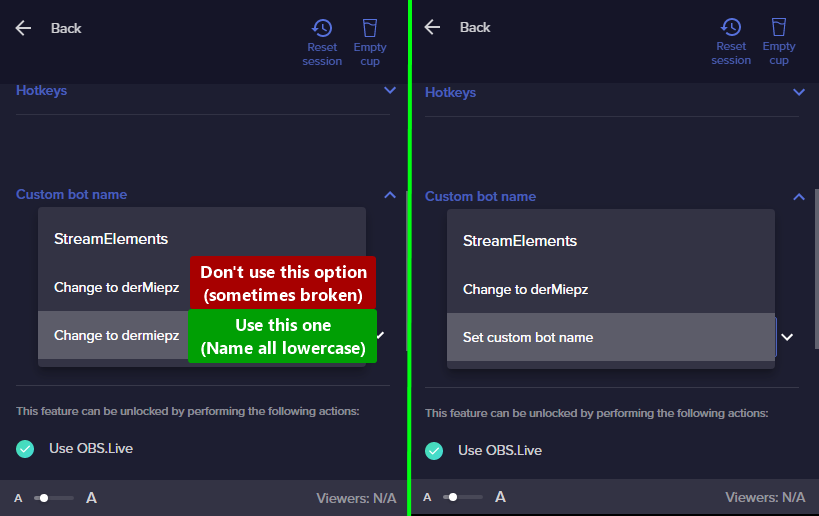 simple marsh
candid oak
If your commands recently stopped working and you're using SE.Live and a custom ...
simple marsh
candid oak
If your commands recently stopped working and you're using SE.Live and a custom ...
i followed these steps & they didn't work. my channel name is not in all caps either, but it is the second option. is the second option not usable at this time?
candid oak
simple marsh
i followed these steps & they didn't work. my channel name is not in all caps ei...
correct
simple marsh
candid oak
correct
gotcha! thank you for clarifying. i added my channel as the custom bot & that worked. thank you for you help!
 quasi linden
Hello! I was wondering if I could get some help trying to get my alerts to work in OBS. I'm using streamelements and built an overlay for my Alert box. I took it and made the browser source in OBS and input the proper URL, but nothing will appear on the OBS side. I made sure that the resolution was the same on both, and I've tried using multiple different new overlays to no avail.
candid oak
quasi linden
Hello! I was wondering if I could get some help trying to get my alerts to work ...
To add your overlays to OBS, add a new browser source in your scene. Paste your overlay URL in the browser source properties, set the dimensions to 1920x1080 (unless you changed them on the website) and check Shutdown source when not visible and Refresh browser when scene becomes active, as shown in this GIF: https://imgur.com/a/2JhJD0S
Also, when you emulate the alert, make sure that you have "preview live on stream" selected or it will not send the notification to OBS



 heady gust
Hi there! The bit cheer images on my overlays with a hype cup have recently changed from the normal animations to a simple white bar/line image and updating or changing the cheer variation image does not have any effect. I was just curious if i had missed something in settings that changed. Thanks for all your help!
quasi linden
candid oak
To add your overlays to OBS, add a new browser source in your scene. Paste your ...
Is the "Preview live on Stream" setting within OBS or Streamelements?
candid oak
quasi linden
Is the "Preview live on Stream" setting within OBS or Streamelements?
In the Overlay Editor. When you attempt to emulate an alert, at the top of menu, this option appears.
Please ensure that you have also added the proper dimensions (1920x1080) as that is the requirement for the overlay to display properly.
OBS uses a stacking system for their sources, so if there is a source on top of your browser source (game source/display/etc), the top source will take priority and block the sources below it. Make sure that it is not being blocked
candid oak
heady gust
Hi there! The bit cheer images on my overlays with a hype cup have recently chan...
!emotes update in the chat to make sure that they are all updated properly
quasi linden
Oh lord it's literally been just one checkbox away lmao! Thanks for your help!
twin reef
ebon forum
Hi,
The chatstats page for the channel named "sinaris1220" is now restored. No o...
Wop wop 😥 oh well. Thank you for the refresh, much obliged
heady gust
candid oak
!emotes update in the chat to make sure that they are all updated properly
Okay! I ran this command but when i emulate a 1k cheer, the 1k variation does not display, its still the white bar image
 wanton jetty
https://streamelements.com/beccaea/tip
How do I get a tip page like this ?
wintry falcon
No they don't - if I happen to mention that today is Sunday they are shocked! I stream from New Zealand, just after the dateline. Most of my viewers are in the US
 warm scroll
Hi There, I am needing some help with TTS. I have a viewer named Tassji_S who gifts me subs and bits but each and every time it cuts off her name at T due to the ass part of her name. So I am wondering if there is a way to change or add a word whitelist to TTS section to stop this from happening? Thanks in advance
candid oak
warm scroll
Hi There, I am needing some help with TTS. I have a viewer named Tassji_S who gi...
Revenue > Tipping Settings > Tipping Settings (top right) > Tip Moderation
warm scroll
candid oak
Revenue > Tipping Settings > Tipping Settings (top right) > Tip Moderation
Thank you so much 💗
calm kettle
my chat stats aren't displaying
chatstats error 404
channel: cafecitoteologico
ID: 63697bacff23f2b7713440f4
candid oak
calm kettle
my chat stats aren't displaying
chatstats error 404
channel: cafecitoteologico...
Created a new chatstats page for ya
calm kettle
candid oak
Created a new chatstats page for ya
Yei! Thank you very much for such quick response.
 wispy stump
is there someone who can give me a general walk through of stream elements, im trying to set this up but litterally i cant find a central place to set up basic things like TTS donations and bits etc etc, and my subathon timer keeps reseting and disappearing as im using it
crude pecanBOT
@wispy stump ⤵️
Check out this great SE Getting Started Guide: https://youtu.be/XgfswUlk9HU and our playlist with tutorial videos from setting up the basics to in-depth details on how to use our product: https://youtube.com/playlist?list=PLCDDKlFdScbEwdx5AntcQIS1InkFJwHtv
New to OBS? Here is a 4 step quick start guide https://obsproject.com/wiki/OBS-Studio-Quickstart
Want to learn even more? Here is an in-depth overview https://obsproject.com/wiki/OBS-Studio-Overview
desert solar
my chat stats aren't displaying
chatstats error 404
channel: xdtater_salad
ID:62a5500971fc592e70470764
 sudden sage
my chat stats aren't displaying
chatstats error 404
channel: sizlwizl
ID: 622d87945f4a8c842f11fcf4
lament blade
Anyone happen to know how to change a sub notification to where its not spamming after each gifted sub?
worldly escarp
@sudden sage @desert solar should be working now
jagged pilot
Hi I've recently reinstalled SE.Live in my OBS and for some reason, I'm getting both my channel name and custom bot name in the auto chat commands.
 harsh comet
Helloo! I wanna ask why my chat emotes is not working? The emotesplosions work perfectly thoo.. I wonder is it a bug or I do something wrongg? Thank youuu!

 swift crescent
I am trying to figure out why my chatbot is not showing alerts in chat?
My alerts work fine but I am not seeing them in chat anymore.
 ruby bobcat
How do I get the stream elements bot to make tipping notifications in twitch chat?
lament blade
Hello, my Problem is That streamelements doesnt count any follow i become, its still 0 but i have much more 🥲 Account ID
60db70cfae155e7ff54377ad
Member since
29/06/2021
 jovial flicker
Hi. Can you tell me how to make it so that in a custom command, if there are not enough points to use it, something like "You do not have enough points to use this command" was written in the chat? It's just that if there are not enough points, then nothing happens after the team is written and not everyone understands what is wrong with the command.
 loud hill
When I put !points it doesn’t even show in chat, idk what I’m doing wrong 😅
Basically I have a problem where streamelements isn’t responding to any commands I put in chat.
Never mind I’m going back to using streamlabs points soz
 shrewd oak
How do i add Media Widget to overlay?
 tribal oar
hi support team! I added a few items to the store but can't redeem them through chat despite ticking that option (the alert shows up if I redeem it via website or extension though). thanks for your help ^^
 mortal ore
_ _
🔥 Error with StreamElements Browser sources
These error messages only appear with StreamElements Browser sources.
Only when the browser source is deleted, then the error message is gone, but I need the browser sources.
Error example below:
[obs-browser: '🧲 S T A R T → A P E X T I T L E S H A P E A N I M A T I O N'] Error: [Report Only] Refused to evaluate a string as JavaScript because 'unsafe-eval' is not an allowed source of script in the following Content Security Policy directive: "script-src 'none'".
🔥 OBS Log file: https://obsproject.com/logs/iSXzL42I9ex0ASqU
_ _
 distant jewel
idk if this is the right place to post this but im having issues with alerts not showing but the alert sounds are playing?
nvm i fixed
 outer sand
Hello, I was just wondering if there was a way to set up a command to automatically set a game. For instance, on nightbot you can set a command !mw with the text of the command to read Call of Duty: Modern Warfare II and set a command alias to !game and upon typing !mw in chat it will automatically set the stream game to Modern Warfare II. Is there a way to do this through StreamElements?
 elfin moth
my chat stats aren't displaying chat stats
error 404 channel: lamile ID:603a2d374c5dcb708bbf20d6
strong ember
When i select Scrolling text it works on the webbroswer but now inside OBS - its not scrolling
 true depot
 everyone ! I'm getting a lot of hate raids these days. I have a question. Is there a way to reset/skip the alerts on SE ? Usually I stop the alerts but I can't enable them again until the next stream because the alert spam resumes as soon as I enabled it again. Thanks in advance for your help.
grim crater
grim crater
I blundered and forgot to change my channel name before signing up with StreamEl...
So is anyone able to assist me with this? it's been half a week, I've relogged about a half a dozen times and unjoined and rejoined the bot a dozen and a half. Is there anything that -I- can do about this, or do I need to pester staff or something?
 leaden hill
Hey, I got an Sponsorship from SE.Sponsorships and the whole thing is written in english, but my channel is german, do I need to stream in english then?
 spare umbra
I'm sure this has been asked before, but if somebody could direct me to the best resource that would be great. I'm using an older version of OBS so that it works with StreamFX. However, since downgrading to 27.2.0, my entire computer locks up almost every time I get an alert via Stream Elements. Please, somebody direct me to the best fix. I was just in the middle of a stream, new follower, crash.
 gray kernel
I just updated to the latest version and now websockets don't work and I cant even start streaming as I get an error. Help pls, I had to cancel stream today because of it 😦
 golden walrus
When I go to edit my overlay, how do I change the spotted back ground resolution size from 1960 x 1080 to a higher scale? My monitors and game capture is 2560x1440, but the overlay, or layers, do not match that.
 fleet fable
Greetings, we have the 404 error in our chat stats page, we don't know if it can be fixed (Due our small size)
Channel: Tare_Kai
ID: 62ee9ba7436d477603b7c048
Thanks ins advance.
 nimble dune
leaden hill
Hey, I got an Sponsorship from SE.Sponsorships and the whole thing is written in...
nimble dune
leaden hill
Hey, I got an Sponsorship from SE.Sponsorships and the whole thing is written in...
Nope.
leaden hill
nimble dune
Nope.
so I can just stream on german?
nimble dune
leaden hill
so I can just stream on german?
yes.
leaden hill
thank you
 hoary ferry
Hey! So I have a problem with the SE-Chatbot. It reacts to the command !ping and I would like to turn it off. But I can't find the option for this. It seems to be a Mod command (it's listed as a mod command in my SE profile) but when I go to the chatbot settings, there is absolutely no toggle for the command 😦
robust flower
Howdy! If I’m in a sponsor campaign. Once reaching the mandatory goals (This instance 2 two hour streams), can I continue to promote my code with #ad/#sponsor on my streams until the end of the campaign timer?
 olive pebble
hey guys o/
is there anyway to do an alignment opposite of this (with CSS or otherwise)? with text on left, and image on right, that would shift the image based on how many text characters?
 still iris
I am unable to use my emote in my Stream Elements Commands! I have been subbed to the channel for months! I don't know what I may be doing wrong.
stark furnace
still iris
I am unable to use my emote in my Stream Elements Commands! I have been subbed t...
I am not staff or anything but if you are trying to put your emote onto SE messages then you must either have that emote in the FREE emotes section on Twitch or gift a sub to SE for your channel. Not you sub to SE !
still iris
stark furnace
I am not staff or anything but if you are trying to put your emote onto SE messa...
Thank you So Much. Your are the first person to explain that right to me.
stark furnace
👍
 lapis shadow
Hey all! I’m trying to use the duel function in my streams but it’s not working, I’ve enabled them through the stream element’s website
grim crater
lapis shadow
Hey all! I’m trying to use the duel function in my streams but it’s not working,...
Doesn't this involve actually enabling/downloading a module or something?
lapis shadow
grim crater
Doesn't this involve actually enabling/downloading a module or something?
To my knowledge yes, I tried disabling and reenabling the duel module to no avail, however
 wary inlet
Hello SE Staff, Im currently trying to setup chatstats for Twitch but have been getting the chat stats 404 error code. 1) Channel name : www.Twitch.TV/JayTooCrazyG
2) your account ID: 6104068a4b46684c6d5889a4
crude pecanBOT
@wary inlet ⤵️
If you are receiving a 404 error on your chatstats page, please provide the following information:
- Channel name (old and new if changed recently)
- your account ID found at the top of this page: https://streamelements.com/dashboard/account/channels This ID is public info and safe to share here.
formal verge
should be fixed for you now.
wary inlet
formal verge
should be fixed for you now.
Thank you so much its fixed now 🖤 @formal verge
grim crater
Hm.
Let's try this...
Hello SE Staff, I blundered and forgot to change my channel name before signing up with StreamElements. Did the reset, but I need a name adjustment for the bot's interpretation of who the broadcaster is. It continues to see the old name as the Broadcaster, and I can not perform Broadcaster level adjustments. I worry this could end up being a security risk.
Old: WordontheWind
New: Forneia
Channel Name: https://www.twitch.tv/forneia
Account ID: 636c1558f2012efccd702aeb
 languid dagger
Does anyone know if you plan on doing a subathon, is there a way that multiple streamers can get subs etc and it will increase 1 timer? So say if Streamer one has 20 hours left on a timer, Streamer two has that same duration. then say if 100 subs are gifted, the time that is specified is added to the timer and is updated for both streamers? Tag me if thats a possibility
 subtle iron
@formal verge @cold eagle In this list number two is my account's new name and number three is my account's old name. So i have a one account but i just changed account's name. Can you fix that? Do you understand me? @everyone
 grim crater
Hello SE Staff, I blundered and forgot to change my channel name before signing ...
grim crater
grim crater
Hello SE Staff, I blundered and forgot to change my channel name before signing ...
@young leafI apologize for @ing you, but I really need help with this, I can't find a solution, and no one with the ability to do so has seemed to notice. Could you or another staff please assist me?
crude pecanBOT
@grim crater ⤵️
If you changed your name on Twitch, please follow these steps:
- Visit https://streamelements.com/logout and then log in again by connecting with Twitch.
- On the right side of the dashboard page that opens, select Join under bot settings. If it says Part select that and then select Join to send the bot to the chat. Don't forget to mod the bot by typing
/mod streamelementsin your channel if you have not already. - Post your old and your new name here so that we can update your channel's chatstats tracking (must be done by staff).
 grand girder
where do i ask for helpo
 fast tundra
Hello Streamelements, since a few weeks I noticed a problem in the aktivityfeed.
To show the problem I have taken screenshots from: Streamelements, Streamlabs and the Twitch Dashboard taken.
The viewer "Schlunz4488" has always cheered 18 bits in a row quite quickly that day.
The problem occurs when you cheered the same number of bits in quick succession.
Now to the problem:
The SE feed shows only 5x 18 bits. (But this is not correct)
The SL feed shows all of them.
The Twitch Dashboard also shows all of them.
Since the SE feed does not show correctly, various displays are not correct, such as the daily bit counter and much more.
- Channel: http://twitch.tv/djsebimusic
- Account ID: 57bf7223e8699e2961d5a2aa


 grim crater
crude pecan
<@126086701687767040> ⤵️
grim crater
crude pecan
<@126086701687767040> ⤵️
I did all of this already. The bot continues to not recognize the name change.
fading stag
Can you not get rid of the ping emote?

 dry hare
fading stag
Can you not get rid of the ping emote?
dry hare
fading stag
Can you not get rid of the ping emote?
The ping command is a system-wide command not configurable by users.
 still granite
Hello all! I'm still having an issue where StreamElements doesn't play all the alerts I need. Sometimes a follow alert will play but a raid alert won't play, or a bits alert will work for one cheer and then not for the next cheer 5 minutes later. I don't know what's going on, there's no reason it should be happening, but I haven't been able to figure out why it's happening. Does anyone have any ideas?
mortal ore
_ _
🔥 Error with StreamElements Browser sources
These error messages only appear with StreamElements Browser sources.
Only when the browser source is deleted, then the error message is gone, but I need the browser sources.
Error examples below
[obs-browser: '🧲 S T A R T → A P E X T I T L E S H A P E A N I M A T I O N'] Error: [Report Only] Refused to evaluate a string as JavaScript because 'unsafe-eval' is not an allowed source of script in the following Content Security Policy directive: "script-src 'none'".
[obs-browser: '🧲 B R B → A P E X - A L P H A'] Error: [Report Only] Refused to execute inline script because it violates the following Content Security Policy directive: "script-src 'none'". Either the 'unsafe-inline' keyword, a hash ('sha256-dCImnf5U50C6/yGGZrNBJ0w5/O+LgHlBid+gCtyw7PI='), or a nonce ('nonce-...') is required to enable inline execution.
[obs-browser: '🧲 B R B → A P E X - A L P H A'] Error: [Report Only] Refused to load the script 'https://streamelements.com/overlay/scripts/vendor.js' because it violates the following Content Security Policy directive: "script-src 'none'". Note that 'script-src-elem' was not explicitly set, so 'script-src' is used as a fallback.
🔥 OBS Log file: https://obsproject.com/logs/iSXzL42I9ex0ASqU
_ _
still granite
mortal ore
_ _
🔥 **Error with StreamElements Browser sources**
These error messages on...
IDK what any of that means

 tardy pelican
Who do i reach out to for a pending payment from hellofresh sponsership that hasnt hit my paypal yet?
still granite
This is what opens up when I open my overlay and open the developer tools
 gloomy plume
Having issues saving a sub variation in one of my Overlays and it is stuck on "Saving..."
 elder depot
Hi everyone, i wanted to know if there is any widget that shows the latest event (1 event) and possible to customize it (different colours)
 prime canopy
I'm just curious if someone is getting this pop up when loading OBS Studio. And maybe how to fix this.
 true depot
everyone ! I'm getting a lot of hate raids these days. I have a question. Is there a way to reset/skip the alerts on SE ? Usually I stop the alerts but I can't enable them again until the next stream because the alert spam resumes as soon as I enabled it again. Thanks in advance for your help.
grim crater
crude pecan
<@126086701687767040> ⤵️
@pallid harness Pardon me. my issue still isn't resolved. As I've said, I've done what the community bot instructs about a dozen times and nothing has changed. I even listed the channel and ID in a prior post, which I'll do yet again.
Old: WordontheWind
New: Forneia
Channel Name: https://www.twitch.tv/forneia
Account ID: 636c1558f2012efccd702aeb
I have followed instructions, I still need help.


 crude pecanBOT
@tardy pelican ⤵️
Please go to https://support.streamelements.com/, click the big blue question mark on the bottom left and select SE.Sponsorships Form. Fill that form to submit a Sponsorship related ticket and wait for our Support Team to get back to you. Please do not fill the form multiple times, as that will not speed up the response time.
nimble dune
prime canopy
I'm just curious if someone is getting this pop up when loading OBS Studio. And ...
OBS Settings -> Stream -> Disconnect/reconnect your account
prime canopy
@nimble dune disconnected and connected multiple times .. even restarted my pc. Disconnected and connected again. was at it for half an hour before it started working again. finally worked again as it should. Thanks Dan
 devout pendant
ayo peeps, my friends stream custom bot name stopped working randomly at around 4:39pm, tried disconnect and reconnecting the custom bot name multiple times, no worky, even tried doing it with her main account, but its not working at all
any help on that?
 rough tiger
I have an active sponsorship and the sponsorship tab just says this

 next field
https://obsproject.com/logs/bETrmZQKKHumMwNR Obs crashes when trying to add or edit video capture device 😭
 sour latch
I am attempting to create an overlay on the website, to use for alerts on Twitch. But no matter what I do, after I create the overlay, and then choose to add the corresponding widget, the "blue box" indicating where the widget is supposed to be on the screen isn't showing up. I am also getting a message that says "Uh-oh... Overlay does not exist" if I try to exit the overlay and then edit it again. Any help would be much appreciated.
 sweet spindle
the BTTV emotes arent showing up in the SE chatbox anymore after i closed it, there isnt a settings option for it anymore
 rocky marsh
can anyone help me setup tts i am unable to
crude pecanBOT
We want to hear from you on how we can improve the StreamElements Discord Community!
By completing the survey below your feedback will help us make the Community better for everyone! 🙏
Complete Survey Here: https://strms.net/CommunitySurvey
rocky marsh
?
rocky marsh
anyone help
 jovial cliff
sour latch
I am attempting to create an overlay on the website, to use for alerts on Twitch...
jovial cliff
sour latch
I am attempting to create an overlay on the website, to use for alerts on Twitch...
Signal boosting; I have the exact same issue and am looking for any help on this problem, thanks
 tiny venture
Help, stream overlays keep saying that don't exist
 tropic valve
Hello Streamelements, I changed my name a couple of days back, relogged onto my account and all that good stuff and the bot ran fine until today, it keeps giving me "StreamElements: Error: Check the bot command setup" at random intervals in chat!
 glacial wagon
Was wondering if I could get some help with something. When ever I'm trying to edit a streamelements overlay it keeps saying Uh-Oh something went wrong.
 undone plover
do yall slow down on giving sponsorships at the end of the year?
 limber flare
just updated obs and can no longer hear alerts... audio monitoring on monitor and output
 hasty sapphire
When ever I'm trying to edit a streamelements overlay it keeps saying "Uh-Oh something went wrong."
drowsy egret
hasty sapphire
When ever I'm trying to edit a streamelements overlay it keeps saying "Uh-Oh som...
- @glacial wagon did you recently join StreamElements?
hasty sapphire
Yes, just created my account for my new stream today
drowsy egret
hasty sapphire
Yes, just created my account for my new stream today
seems that there was an issue with account creation, you will have to close your account in order to get it recreated
it can be done here https://streamelements.com/dashboard/account/security - all linked accounts will be deleted
hasty sapphire
i recreated my account and it has occured again
crude pecanBOT
@hasty sapphire ⤵️
Please provide your account ID found at the top of this page: https://streamelements.com/dashboard/account/channels This ID is public info and safe to share here.
hasty sapphire
now i cant loggin??? idk what is going on
 charred knot
^^experiencing similar issues
 void pumice
same here :[
 inner rune
Hey any sponsorship support able to help? I want to do the hellofresh campaign but I live in canada and most of the new subscribers I would fond are from Canada, it says codes active only for us offerings? Does this mean I can not earn if I'm am from Canada and get Canadians to sign up?
drowsy egret
hasty sapphire
now i cant loggin??? idk what is going on
@charred knot @void pumice what exactly is the issue while trying to login?
hasty sapphire
It forever keep reloading the loggin or sign up page
void pumice
Not with logging in, the "Uh-Oh something went wrong." error is what i'm talking about.
hasty sapphire
and does not connect to my account or twitch
void pumice
I can't do anything with Stream Elements and there's some glitched text
charred knot
Im not really struggling with logging in, but when I go in to edit my overlays it is saying uh oh. Whenever I load the overlay onto stream elements it just doesn't appear
drowsy egret
void pumice
Not with logging in, the "Uh-Oh something went wrong." error is what i'm talkin...
hasty sapphire
i was having same issue until i closed my account and tried to create a new one. and now i cannot log in or sign up
void pumice
hasty sapphire
i recreated my account and it has occured again
Ostrowski mentioned that they did that and it had no effect. I'll try it myself to see if somethings different
What is a JWT Token? It's asking me for one in order to close my account
inner rune
@drowsy egret Hey any sponsorship support able to help? I want to do the hellofresh campaign but I live in canada and most of the new subscribers I would fond are from Canada, it says codes active only for us offerings? Does this mean I can not earn if I'm am from Canada and get Canadians to sign up?
hasty sapphire
its a long token
glacial wagon
Yes I did
grim crater
grim crater
<@464101020797108226> Pardon me. my issue still isn't resolved. As I've said, I'...
Since there's a staff here, can one of you please look at this?
void pumice
hasty sapphire
its a long token
ah I see tyvm
drowsy egret
void pumice
Ostrowski mentioned that they did that and it had no effect. I'll try it myself ...
- @hasty sapphire the deletion process is not automatic, it can take a few days so I suggest that you submit the request and try again tomorrow
void pumice
Alrighty
drowsy egret
inner rune
<@131420870244564992> Hey any sponsorship support able to help? I want to do the...
unfortunately, the code will only work for us-based viewers
inner rune
Depressing glad I asked and didn't waste time and give out free advertising
drowsy egret
grim crater
Since there's a staff here, can one of you please look at this?
is your issue just visual or are you not being able to use broadcaster level commands?
grim crater
I can not use broadcaster level commands.
 fervent pulsar
Hello. Anyone available to help me with a new stream setup? I'm getting an error that the overlays don't exist once I go to edit them.
charred knot
sorry bro but join the club, gotta delete ur account and wait a couple days
drowsy egret
grim crater
I can not use broadcaster level commands.
I've removed the old name from that page and will request a fix for the broadcaster level issue internally
grim crater
Thank you.
drowsy egret
fervent pulsar
Hello. Anyone available to help me with a new stream setup? I'm getting an error...
we are having issues with newly created accounts
fervent pulsar
Thank you
 dapper cairn
whats the solve for when I click edit on any overlays it brings me to a page that says this

 hoary crater
even after the suggestion to delete my account. after re-creation i still recieve the uh-oh overlay does not exist 😦
drowsy egret
We are seeing issues in overlays from newly created accounts. Our team is investigating the issue.
We will keep you all updated and will provide instructions to recreate the account if needed once we confirm that the issue is fixed!
drowsy egret
drowsy egret
We are seeing issues in overlays from newly created accounts. Our team is invest...
hasty sapphire
thank you!
crude pecanBOT
@pallid bison ⤵️
You can find your JWT token on your account channels page (Show Secrets to reveal the token): https://streamelements.com/dashboard/account/channels
READ ME: This is a private security token. Do NOT share this token here or other public places, only with a StreamElements staff member in private.
drowsy egret
grim crater
Thank you.
should be fixed now
grim crater
Yep. Thank you.
 jagged meteor
Hello, is there any updates on payouts. I was supposed to get it on the 6th and havent heard anything from you guys about it aside from that lol.
 sweet tinsel
I already send a closure request to fix de overlay problem
 pallid bison
sweet tinsel
I already send a closure request to fix de overlay problem
pallid bison
sweet tinsel
I already send a closure request to fix de overlay problem
same
sweet tinsel
We just have to wait for tomorrow maybe 🙂
 rigid escarp
Hello, I have a problem, I try to create new overlays and when I want to add an element, it doesn't appear or add, try to import overlays that I have from another account and at the time of opening it gives me a error message and it doesn't leave me make any edition or something, but from my other account if I can create overlays, and it doesn't give me the mistakes or anything.
ohh I see now the message above sorry
 tall dagger
Failed to load channel information for Twitch Failed to get text from remote: Couldn't connect to server. Does anyone know why this is happening, I've done everything except uninstall OBS at this point
 buoyant nexus
Will there be an update when the overlay issue is fixed?
lament blade
The overlay issue has been fixed. It can take a few minutes to work properly for some. Thank you!
tall dagger
tall dagger
Failed to load channel information for Twitch Failed to get text from remote: Co...
Uninstalled and still broken 😄
lament blade
tall dagger
Uninstalled and still broken 😄
You should have the latest version of OBS installed, run it as admin and regenerate a new stream key.
tall dagger
Use stream key over account connection?
 ember timber
is there a way to get chatbot command messages to show up for my chatbox widget in my overlay?
for example, if someone does a random number generator command, the command input shows up but not the number. I want both to show up on screen
ionic kelp
Go into the widget settings and remove streamelements from the "blacklist".
ember timber
ionic kelp
Go into the widget settings and remove streamelements from the "blacklist".
Thank you
tall dagger
lament blade
You should have the latest version of OBS installed, run it as admin and regener...
Guess I have to lose access to my precious twitch info docks 😦
lament blade
I'm not sure what you mean
tall dagger
Nah I mean when I use stream key, i dont have access to the twitch stats and stream info docks
lament blade
Oh, and you get this error when trying to connect to OBS?
tall dagger
Yeah the connect account thing doesnt work, I always get that pesky error about failing to get text from remote server
tall dagger
All good thanks for the help
stark furnace
Any chance a member of staff could kindly answer my question on #dev-chat please ? It would be appreciated 🙂 #dev-chat message
 thorny flax
I keep getting a "Please Try Again" when I try to send in a ticket about my campaign.
Is there any way I can get a ticket in about a campaign. my campaign ends soon.
so sorry in advance if more than 1 ticket went in I kept getting a error message. I kept getting the error and my text was there when I refreshed browser to try and get help again.
fast tundra
fast tundra
Hello Streamelements, since a few weeks I noticed a problem in the aktivityfeed....
next try... can anyone help me? SE?
 lost snow
hellooo where can i ask for tips not working/
 icy mural
Hi my Kappagen (emotes on screen) isn’t working, any clues as to what’s happened because it’s set up ok?
 raven herald
Hi, could you tell me why my Event List is seen with a black background on OBS? On streamelements the background is transparent and blurred, as it should be
 ionic kelp
@fast hinge For reasons that cannot be handled here you will need to send any inquiries regarding this to the ticket thread.
You will receive an answer when they are able to provide one.
 fast hinge
@ionic kelp well I’ve already tried that and it didn’t work, so any other recommendations?
ionic kelp
That's is it.
fast hinge
This is what I mean about communication
Clearly someone can help me, not just constantly ignore it and postpone it
fast hinge
Okay so your resolution to my problem is to try something I already have and it didn’t work. Yeah no that makes total sense actually
raven herald
raven herald
Hi, could you tell me why my Event List is seen with a black background on OBS? ...
Can you help me with this ? I spoke to the Italian chat and they sent me here @ionic kelp
ionic kelp
I cannot unfortunately.
raven herald
ionic kelp
I cannot unfortunately.
Ok, np
 slim mulch
is there a command variable that will show the users input after what the command is?
lament blade
Heya. I've loaded SE.Live into obs and tried to log in with twitch. It's been loading and has been for about an hour. Doubt it will stop. How do i fix?
now its loaded but screens all black
 limpid mesa
Hi guys... Why don't I see the chat on obs?
 worn cradle
hi! I do Giveaways every few days on my stream and i want o give my subs the "sub luck" Is there considered against Twitch TOS or illegal in the USA - FOr example EVERYONE can enter for free/channel points but if i gave sub luck is that allowed?
Also Is doing Giveaways at a certain Goal of subscribers also not allowed? Im trying to make sure I dont do anything wrong
 shy locust
Sorry Staff... I've done two donations to a steamer and it said tip was succesful, paypal giving me strife though and won't tell me whether I paid or not heh.
ok three now, this time I used my twitch name and said successful, no alert on stream. am i being debited or what?
because that's 300 pounds and i don't have a cent left to my name on this bank account :P
want my twitch username? username of streamer? what should i do?
ok never got debited but you guys should prob know it says tip sucessful
sweet tinsel
Hi someone know why I cant see the chat on the obs? When I installed the streamelements I saw it, but when I close it and open again just disappear from obs
 nimble dune
sweet tinsel
Hi someone know why I cant see the chat on the obs? When I installed the streame...
nimble dune
sweet tinsel
Hi someone know why I cant see the chat on the obs? When I installed the streame...
StreamElements menu -> SE.Live Docks -> Chat
 sweet tinsel
nimble dune
StreamElements menu -> SE.Live Docks -> Chat
sweet tinsel
nimble dune
StreamElements menu -> SE.Live Docks -> Chat
It does not display those options when I go to that tab, any idea how to fix it?
crude pecanBOT
@sweet tinsel ⤵️
StreamElements menu, on top of OBS > Logout > Login
sweet tinsel
Now its working thank u so much!
 flint rover
Hey guys, I'm having some troubles with my streamelements alerts, alerts related with followers are working pretty good, but donations like bits, subs, raids and hosts are not getting detected on my obs
Could I get help from someone please?

As you can see on the pic, followers get detected but the other stuff are not...
raven herald
Hi, could you tell me why my Event List is seen with a black background on OBS? On streamelements the background is transparent and blurred, as it should be

 low cairn
Not sure where to post this but I can't view ANY of my past sponsorship campaign or invoices on Stream Elements. They're all just gone. I noticed this earlier and put in a support ticket for the invoices but just found that my entire sponsorship section is empty. Has this happened anywhere else?
smoky lotus
Hmmmm, I cant have any of the "Streamelements" tab to work.
Is there a way to reset the token and connect from start
Got it
candid oak
low cairn
Not sure where to post this but I can't view ANY of my past sponsorship campaign...
What is the ticket number?
candid oak
raven herald
Hi, could you tell me why my Event List is seen with a black background on OBS? ...
Does it have a custom font?
crude pecanBOT
@flint rover ⤵️
Please provide your account ID found at the top of this page: https://streamelements.com/dashboard/account/channels This ID is public info and safe to share here.
raven herald
candid oak
Does it have a custom font?
Nope, the default one "Roboto"
crude pecanBOT
@raven herald ⤵️
Please provide your account ID found at the top of this page: https://streamelements.com/dashboard/account/channels This ID is public info and safe to share here.
@raven herald ⤵️
To add your overlays to OBS, add a new browser source in your scene. Paste your overlay URL in the browser source properties, set the dimensions to 1920x1080 (unless you changed them on the website) and check Shutdown source when not visible and Refresh browser when scene becomes active, as shown in this GIF: https://imgur.com/a/2JhJD0S
candid oak
raven herald
Nope, the default one "Roboto"
Double check the settings and make sure you have
- hit save on the overlay editor
- have adjusted all the settings for the browser source (those two options are important to have checked)
- if both are updated and the issue is still there, provide your account ID
raven herald
candid oak
Double check the settings and make sure you have
1) hit save on the overlay edi...
What settings i need to adjust ?? the overlay is ok on streamelements, maybe OBS is the problem
candid oak
raven herald
What settings i need to adjust ?? the overlay is ok on streamelements, maybe OBS...
Shutdown source when not visible and Refresh browser when scene becomes active
 quick tangle
Hello everyone, can anybody help me? the "!slots command" don't work in StreamElements. Does anyone know what the issue is or can you know how to fix it? Everything in the chat command & module is on and activated. Thank you. Greetings.
crude pecanBOT
@quick tangle ⤵️
Please provide your account ID found at the top of this page: https://streamelements.com/dashboard/account/channels This ID is public info and safe to share here.
raven herald
candid oak
Shutdown source when not visible and Refresh browser when scene becomes active
already done several times
crude pecanBOT
@raven herald ⤵️
Please provide your account ID found at the top of this page: https://streamelements.com/dashboard/account/channels This ID is public info and safe to share here.
raven herald
you need my ID ?
candid oak
raven herald
you need my ID ?
I'm going to see if I see the same issue
raven herald
okk, i paste it here ?
candid oak
raven herald
okk, i paste it here ?
yes
raven herald
candid oak
yes
5d29ce8747956d617635da94 This ?
candid oak
raven herald
5d29ce8747956d617635da94 This ?
yes
candid oak
raven herald
5d29ce8747956d617635da94 This ?
What is the name of the overlay that you are noticing this issue with?
quick tangle
604d4dc2d8e8716e7e4f347f Like this my account?
candid oak
raven herald
5d29ce8747956d617635da94 This ?
Actually, I think I see the issue.. You have 2 overlays named Event list. I think you have 1 open in the overlay editor and another as your browser source.
Goto https://streamelements.com/dashboard/overlays and find which one is the one you wish to use, rename it and delete the other one. Then readd the overlay to your OBS

StreamElements
The Ultimate All in One Platform for Streamers
raven herald
candid oak
What is the name of the overlay that you are noticing this issue with?
"Event list problem" this one
candid oak
quick tangle
604d4dc2d8e8716e7e4f347f Like this my account?
Working on my end. If you notice any issues ,let us know
quick tangle
@candid oak can you tell what you did to work it again Please? Or what did i wrong?
candid oak
raven herald
"Event list problem" this one
Working on my end.
Open the overlay editor for Event List Problem, Click the paper clip in the top right, goto obs, right click the browser source > Properties, then delete the old URL and past the one you copied
crude pecanBOT
@quick tangle ⤵️
Go to the Dashboard > Right side > Part channel > Join channel (https://streamelements.com/dashboard) https://i.imgur.com/uYVb8OK.png
candid oak
quick tangle
<@615886582708305932> can you tell what you did to work it again Please? Or what...
The steps I tagged you in, that's what I did
 median escarp
Dear people can someone explain to me how to get !slots up and running on your channel
raven herald
candid oak
Working on my end.
Open the overlay editor for Event List Problem, Click the p...
Nothing, the background of the overlay is still black
candid oak
raven herald
Nothing, the background of the overlay is still black
1920x1080 is the resolution you have set correct?
quick tangle
@candid oak when i do !slots i got 0 points
raven herald
candid oak
1920x1080 is the resolution you have set correct?
yep, nothing
low cairn
candid oak
What is the ticket number?
Hey sorry for the delay. I got a quicker than expected response in email and apparently just needed to logout and back in. Thanks for the help!
candid oak
median escarp
Dear people can someone explain to me how to get !slots up and running on your c...
Ensure that you have the Loyalty program enabled and the Slots module set up in the Chatbot > Modules section
crude pecanBOT
@raven herald ⤵️
If you are not seeing the OBS Twitch integrations and have SE.Live installed, please follow these steps:
- Make sure you are on the latest and greatest version of SE.Live
- Exit OBS (make sure OBS is not running)
- Delete
%appdata%\obs-studio\plugin_config\obs-browser\obs_profile_cookies - Start SE.Live
- Settings > Stream > Disconnect > Connect
candid oak
quick tangle
<@615886582708305932> when i do !slots i got 0 points
Your account currently has 0 points. If you goto Loyalty > leaderboard, you can see how many points you have and give additional points to users
raven herald
This is the folder to delete ?? "obs_profile_cookies" @candid oak
quick tangle
Ow ok. @candid oak Can you please @median escarp they got the same issue
candid oak
raven herald
This is the folder to delete ?? "obs_profile_cookies" <@615886582708305932>
Yes
candid oak
quick tangle
5f973695e447d28216171545 Account from <@802959611006418964>
Are they having the same issue on their channel?
raven herald
candid oak
Yes
nothing has changed
candid oak
raven herald
nothing has changed
Delete the browser source entirely and readd it using these steps
crude pecanBOT
@raven herald ⤵️
To add your overlays to OBS, add a new browser source in your scene. Paste your overlay URL in the browser source properties, set the dimensions to 1920x1080 (unless you changed them on the website) and check Shutdown source when not visible and Refresh browser when scene becomes active, as shown in this GIF: https://imgur.com/a/2JhJD0S
quick tangle
candid oak
Are they having the same issue on their channel?
Yes
raven herald
candid oak
Delete the browser source entirely and readd it using these steps
Done, but nothing has changed
candid oak
quick tangle
Yes
I've already provided them instructions in a response in this channel, but for @median escarp I'll repeat them.
Looking at your channel, I see that you do not have the Loyalty section enabled. To do this, goto the loyalty tab > Loyalty settings (https://streamelements.com/dashboard/loyalty)
Enable the Loyalty system.
After doing that, goto Chatbot > Modules (https://streamelements.com/dashboard/bot/modules) And enable the Slot Machine Module.
After doing that goto Chatbot > Chat commands (https://streamelements.com/dashboard/bot/commands/default) and enable the !gok command.
Lastly, make sure that your account has enough points to gamble (Loyalty > Leaderboard https://streamelements.com/dashboard/leaderboard/current) If you don't have enough points to test, give your accounts some points in order to test the command
quick tangle
Ah ok, @candid oak thank you very much
raven herald
What should I do ? @candid oak
candid oak
raven herald
What should I do ? <@615886582708305932>
Open the "Event List Overlay" Click save. Copy the URL and repaste it into the browser source. Disable all other Overlays (click the eye to make them invisible and see if you notice the same issue)
raven herald
candid oak
Open the "Event List Overlay" Click save. Copy the URL and repaste it into the b...
Same issue
candid oak
raven herald
Same issue
What version of OBS are you using?
What version of Se.Live are you using?
raven herald
SE.Live Core ver. 22.9.8.69, this one ?
candid oak
raven herald
SE.Live Core ver. 22.9.8.69, this one ?
Yes, what version of OBs does it say at the top?
(top left)
raven herald
28.1.2 @candid oak
crude pecanBOT
@raven herald ⤵️
SE.live is a plugin for OBS Studio for the best OBS support, please join their Official Discord @ https://discord.gg/obsproject
quick tangle
@candid oak 60ba7577661c831606850dbb this the account of djwimpossible he got the same issue.
candid oak
quick tangle
<@615886582708305932> 60ba7577661c831606850dbb this the account of djwimpossible...
in their channel or your channel?
 wheat yarrow
My Stream lags when tabbed into Apex Legends but the second i tab out its fine?
quick tangle
No is from Dj Wim Possible from Netherlands
We @median escarp and i are from Belgium
candid oak
quick tangle
No is from Dj Wim Possible from Netherlands
Well it works in their chat
fast tundra
This is the third time I've raised this issue. Everyone gets support here but me?
Last try after that the topic SE has settled and I change to another provider!
Original Message:
Hello Streamelements, since a few weeks I noticed a problem in the aktivityfeed.
To show the problem I have taken screenshots from: Streamelements, Streamlabs and the Twitch Dashboard taken.
The viewer "Schlunz4488" has always cheered 18 bits in a row quite quickly that day.
The problem occurs when you cheered the same number of bits in quick succession.
Now to the problem:
The SE feed shows only 5x 18 bits. (But this is not correct)
The SL feed shows all of them.
The Twitch Dashboard also shows all of them.
Since the SE feed does not show correctly, various displays are not correct, such as the daily bit counter and much more.
- Channel: http://twitch.tv/djsebimusic
- Account ID: 57bf7223e8699e2961d5a2aa


 crude orbit
@candid oak Hey, we got issued with giropay on stream. If someone wants to donate, it just shows the Data of "Deutsche Bank", there is no forwarding to giropay to process the payment. Can you help me?
candid oak
fast tundra
This is the third time I've raised this issue. Everyone gets support here but me...
Reset some backend connections and so it should track properly now. If you notice this issue still, let us know
crude pecanBOT
@crude orbit ⤵️
Please provide your account ID found at the top of this page: https://streamelements.com/dashboard/account/channels This ID is public info and safe to share here.
fast tundra
candid oak
Reset some backend connections and so it should track properly now. If you notic...
Thank you, I'll keep an eye on it for the week and get back to you if necessary.
quick tangle
@candid oak Just one more question can you see about my chats statistics got my page 404 page not found
crude pecanBOT
@quick tangle ⤵️
If you are receiving a 404 error on your chatstats page, please provide the following information:
- Channel name (old and new if changed recently)
- your account ID found at the top of this page: https://streamelements.com/dashboard/account/channels This ID is public info and safe to share here.
fast tundra
candid oak
Reset some backend connections and so it should track properly now. If you notic...
Just tested. However, the problem persists.

 fast tundra
Just tested. However, the problem persists.
fast tundra
fast tundra
Just tested. However, the problem persists.
The problem only occurs if you always cheert the same number of bits.
 fluid beacon
fast tundra
This is the third time I've raised this issue. Everyone gets support here but me...
fluid beacon
fast tundra
This is the third time I've raised this issue. Everyone gets support here but me...
same thing is happening to me 🤷
fast tundra
fluid beacon
same thing is happening to me 🤷
ok good to know it's not just me, hope the problem can be fixed quickly.
fluid beacon


Streamelements and twitch activity feed is showing different
thats why is not playing the alerts
chancla played the alert 4 times but only played 1 time

but on streamelements activity feed only shows 1 time.. Pls fix this
 crude pecanBOT
@fluid beacon ⤵️
Please provide your account ID found at the top of this page: https://streamelements.com/dashboard/account/channels This ID is public info and safe to share here.
fluid beacon
crude pecan
<@153194327508516864> ⤵️
5ed0fb29e086622de5963250
 noble spoke
when your overlays stop updating and just get stuck on the "saving" screen, how do we update it?
 cedar nexus
The bot keeps posting "9x
KPOPheart
combo" I dunno how to turn it off?

I've turned off the setting on the website, but it still keeps posting it?
 queen mortar
I've had an issue where my recent followers label is the only one that updates. But I havent gotten updates for latest subscriber. Is there a fix to this?
queen mortar
flint rover
Hey guys, I'm having some troubles with my streamelements alerts, alerts related...
THIS. I'm having the same exact issue.