#archived-modded-support
1 messages · Page 307 of 1
 thorn rapids
 warm jasper
Okay, I'm pretty confused about the mod downloading. so the SMAPI is the folder for mod downloads??
 languid trout
No, Smapi makes the folder named Mods, and acts as a console to troubleshoot and debug and catalogue the mods being run.
 obsidian cradle
Steamdew Mod doesnt fix the issue
languid trout
What issue? in technical chat there seems to be an outage on mp.
 loud willow
GOG, which apparently hosts the servers. is currently down, and best guess is that's what's causing it
 remote falcon
hello looking for help to solve why my game wont load past selecting a save file
let me know what to rpovide
 robust bison
!log
 native dragonBOT
Can you upload your SMAPI log to https://smapi.io/log (see instructions on that page) and share the link here? Even if your game doesn't show any errors, logs are useful, and often necessary, for troubleshooting.
remote falcon
native dragonBOT
Log Info: SMAPI 3.18.6 with SDV 1.5.6 (build 22018) on Microsoft Windows 11 Pro, with 111 C# mods and 186 content packs.
Suggested fixes: One or more mods are out of date, consider updating them
loud willow
Got damn
111 mods? 186 content packs?
remote falcon
pc has the strength
 modern python
loud willow
Got damn
111 mods? 186 content packs?
modern python
loud willow
Got damn
111 mods? 186 content packs?
not abnormal
loud willow
respect
remote falcon
im just trying to figure which one broke it and when but i cant read logs or understand it fully to save my life
 dire fractal
do fence gates work in the gap here? (Grandpa's Farm)

also is there a mod that can tell me remaining/completed heart events? especially appreciated if it works with SVE too
languid trout
dire fractal
also is there a mod that can tell me remaining/completed heart events? especiall...

Nexus Mods :: Stardew Valley
This mod adds a GUI and two commands that allow to lookup events by ID/character name. It also has a function to show all events that are available to you today in an ingame interface.
dire fractal
languid trout
https://www.nexusmods.com/stardewvalley/mods/8505
thanks a lot
languid trout
Works with everything, not just SVE.
languid trout
native dragon
**Log Info:** SMAPI 3.18.6 with SDV 1.5.6 (build 22018) on Microsoft Windows 11 ...
Alright so four things so far.
!pytk
native dragonBOT
The PyTK mod is now obsolete. You can delete it from your mods folder, and all your mods should be safe.
If you get an error saying you're missing PyTK, open the mod(s) manifest.json and change the PyTK dependency from true to false
languid trout
!spritemaster
native dragonBOT
SpriteMaster (https://www.nexusmods.com/stardewvalley/mods/4922) is a mod that resamples the game's graphics to be smoother and improves performance. It is highly configurable and you can choose which options to enable.
languid trout
@remote falcon There's no crash log here, what exactly happened?
What do you mean it won't let you load past the loading screen?
Does it white screen, say not responding?
remote falcon
upon starting a new game after making a charcter and watching the intro the app no longer responds
or upon loading a save file itll show the loading tab in the bottom left but then not respond again
and ive sat for 10 minutes waiting just to see
languid trout
Okay, use either Fast Loads, or Spritemaster, not both.
That's normal for games with a lot of assets and npcs.
NPC scheduling is a resource bottleneck. You have to be patient-but Fast Loads and Spritemaster both optimize NPC pathing and schedules.
You also need to either reinstall ModUpdater or get rid of it-that's part of why the load took a bit.
It experienced a loop.
But if it doesn't outright crash, don't touch the game. If it crashes, you'll know. It's basically front-loading everything.
 stark horizon
ModUpdater is broken
languid trout
Oh, well, there you go.
I don't use it, but I could tell it was not happy with the game or this log 😅
remote falcon
hahaha
 mild talon
does the gog thing somehow make phantom dogs appear..? (been trying to fix the CP cooking recipes i made wrong and disabled most of my mods.. but noticed just now a DSV error when it's not currently installed :/)
https://smapi.io/log/b587dd252bc94fa2ae3d7176f5f2120e
native dragonBOT
Log Info: SMAPI 4.0.0-alpha.20231223 with SDV 1.6.0 'modding alpha' build 24024 on Microsoft Windows 11 Home, with 35 C# mods and 1 content packs.
mild talon
i could also be misunderstanding the msg. ofc. 
languid trout
(That's not the only mod it's calling upon  Yri and applesauce mods, too. Yri's recolor is understandable, though, especially if you were using the recolor on that save.)
@mild talon
Well, the game is being honest about it not working.
Sorta...
 modern python
Includes dont get the applied tic iirc
remote falcon
she loads up fine now i appreciate the all the help
languid trout
(Following the process because I don't understand why it's not working either.)
mild talon
hm maybe it should be Load? IDEK. 
stark horizon
Dumb question, but don't you need a load for an include to work?
mild talon
no.. they r like sisters (IDRK lol)
stark horizon
Ok...stepping back into the shadows.
mild talon
but there's a section about Include vs Load in cp docs iirc
languid trout
I...wanna say yes because instinct tells me yes.
But I don't wanna screw up the process for Ch0op
mild talon
there's no process
mild talon
languid trout
(That's not the only mod it's calling upon <:SDVpufferthinkblob:9586349256392253...
those r from the smapi config.. that one i get. it's the DSV Marigold i do not understand 
stark horizon
The Marigold portrait path is going straight into the game's content folder
languid trout
You got two tics that shouldn't be there is the hint we're working with, which makes it feel like it should be different and I'm going to crack open CP's github real quick.
mild talon
languid trout
You got two tics that shouldn't be there is the hint we're working with, which m...
(IDT i follow tbh, Chirps)
mild talon
stark horizon
The Marigold portrait path is going straight into the game's content folder
it's diff from a warning msg about content removal by EH, i think.. rt? I did have DSV and plenty other mods on this save previously. Got all the "ignored/removed content" already. this msg is just weird looking to me haha
stark horizon
It can't load the portrait because the game is being instructed to find it in the game's content folders. So I wonder if there is something odd with how Marigold is pathed?
modern python
isnt that just.. how all CP stuff works?
like, game looks for content in the content folder. CP tricks the game into thinking mod files are in the content folder and the game grabs them none the wiser. if the game cant find the mod files that CP is supposed to be giving to it, it gets sad
stark horizon
Yes, okay, so I am mangling things.
mild talon
Marigold isn't a vanilla npc tho
modern python
i know, but that process is the same for anything that is loaded into content by CP
stark horizon
So, I might be onto something regarding the path being wonky, even if I'm waayyy off base about the whys.
modern python
yeah i cant answer as to why its trying to look for marigold without dsv. but its not because of file paths at the very least, i think
sorry if i came off blunt there but im just trying to be informative
mild talon
(is Marigold a CC ? w SiD and CP + DSV)
mild talon
modern python
sorry if i came off blunt there but im just trying to be informative
u r fine in my book 
stark horizon
You weren't being blunt, Vin, you were correcting a sorely misinformed Logo
modern python
pat pat
 inland oyster
stark horizon
You weren't being blunt, Vin, you were correcting a sorely misinformed Logo
inland oyster
stark horizon
You weren't being blunt, Vin, you were correcting a sorely misinformed Logo

stark horizon
Question: Marigold isn't even on your mod list. Is this error something that should have been caught by the new error handler functions within SMAPI, i.e. if Choop removed DSV/Marigold, instead of getting the "warning" it instead would have "forgotten" the asset?
I'm probably borking that up sideways, too.
 rough cosmos
hey so me and my friends are trying to do modded stardew valley and when someone makes a farm there is no way for anyone to join, there is no invite code nor can you invite or join the person through steam. does anyone know a fix, i can send the list of mods as well, DMS ARE OPEN
modern python
!servers
native dragonBOT
On PC Stardew Valley uses GOG servers, https://www.gog.com/ More info about GOG here. So if these servers go down, then multiplayer on PC will go down in its entirety on PC. Even if you have the Steam version it still uses GOG servers. A good indication that they are down is if you see a spike on the Down Detector site https://downdetector.com/status/gog-com/
stark horizon
GOG servers are down.
languid trout
Oh boy I think I figured it out but I don't know where to apply it in the process.
rough cosmos
stark horizon
GOG servers are down.
oh alright thank you i did not know this LOL
inland oyster
(Would steamdew solve it?)
stark horizon
No
modern python
probably not
rough cosmos
stark horizon
GOG servers are down.
do we know know when they will be up and if this has happened in the past what was the average time its been down for till it gets back up
inland oyster
Damn
stark horizon
GOG servers going down is like shutting off the whole internet
modern python
this is not a common occurrence at all so we have no idea on the ETA
stark horizon
We don't have any data on that, sorry. Not even CA has any control over the GOG/Steam servers.
robust bison
last time it happened it was resolved within 24 hours
 proud burrow
You can create new profiles as described in the documentation: https://floogen.gitbook.io/stardrop/guides/using-stardrop/creating-a-profile. Then, you switch between them by selecting the profile in the drop-down menu left of the manage profiles button. Also, you can watch the tutorial by Mango explaining how to use Stardrop Mod Manager (https://www.youtube.com/watch?v=61O59SFVuGw).

Welcome to my short guide on the AMAZING Stardrop which is an awesome mod manager for Stardew Valley.
CHAPTERS
00:00 - Intro
00:43 - Stardrop UI
04:42 - Installing Mods
05:32 - Installing Stardrop
06:45 - Updating Stardrop
06:57 - Profiles
07:39 - Linking Nexus
08:17 - Launch With Steam
08:49 - Reporting Bugs
09:29 - Outro
 exotic belfry
there's no options for invite codes anymore? i restarted everything. odd thing is person who i was going to play with also doesn't have the option to use invite codes, so we tried just vanilla, no mods (bc we thought mods might've been the issue), and still nothing, and they also restarted everything. we also tried straight IP connections and still is showing connection errors? never had this many issues or those buttons disappear and just hoping nothing broke lol  ty all
(i just seen the issue with gog servers, ripperino)
mild talon
stark horizon
Question: Marigold isn't even on your mod list. Is this error something that sho...
Nah this was basically my q too! Why was it looking for something that had been disabled?
Since it's just for Marigold I feel like maybe it could be something w/ SiD, but it's a mystery 🤷♀️
dire fractal
attempting to launch smapi wields this message: 'unhandled exception... could not load type 'system.badimageformatexception' from assets... runtime, blah blah. its essentially the same as the one from this thread;
Stardew Valley Forums
I tried to update SMAPI and some mods. I backed up the original files before I updated the program and mods. When I ran STV after updating SMAPI, it gave me an exception error and quickly closed.
"Unhandled exception. System.TypeLoadException: Could not load type...
 pallid summit
!log if you have one (you probably do)
native dragonBOT
Can you upload your SMAPI log to https://smapi.io/log (see instructions on that page) and share the link here? Even if your game doesn't show any errors, logs are useful, and often necessary, for troubleshooting.
Log Info: SMAPI 3.18.6 with SDV 1.5.6 (build 22018) on Microsoft Windows 11 Home, with 11 C# mods and 7 content packs.
pallid summit
native dragon
Can you upload your SMAPI log to https://smapi.io/log (see instructions on that ...
@dire fractal that was for you
 alpine juniper
I downloaded some mods but when I started the game Smapi gives me errors and those mods not working. I don't know what to do someone can help me for this issue please ?
native dragonBOT
Log Info: SMAPI 3.18.6 with SDV 1.5.6 (build 22018) on Microsoft Windows 11 Home, with 11 C# mods and 7 content packs.
pallid summit
alpine juniper
I downloaded some mods but when I started the game Smapi gives me errors and tho...
you have some missing dependencies for the mods you're trying to use:
17:23:47    ERROR    SMAPI          - (CKM) Looking for Love Kiss Fixes 1.0.0 because it requires mods which aren't installed (Digus.CustomKissingMod).
17:23:47    ERROR    SMAPI          - (CP) Date Night 1.3.6 because it requires mods which aren't installed (misscoriel.eventrepeater).
17:23:47    ERROR    SMAPI          - Looking For Love 1.0.0 because it requires mods which aren't installed (PeacefulEnd.CustomCompanions).
17:23:47 ERROR SMAPI - Sailor Styles 4.6.0 because it needs the 'Json Assets' mod, which couldn't be loaded.```okay but how can I fix it, for the first time I'm playing with mods
pallid summit
oh, you just have to download and install the dependencies. i assume you got your mods from nexus?
alpine juniper
yes I found that mods on website
pallid summit
ok. so when you install a dependency for a mod, you also have to check whether the dependency has dependencies (in this case, i imagine you wanted sailor styles, so you installed json assets. but json assets itself has a dependency: spacecore)
alpine juniper
hmm
pallid summit
(smapi has provided the link to spacecore in the error message: https://www.nexusmods.com/stardewvalley/mods/1348. not so lucky for the others, but nexus has a handy search function)
you'll also need to download Custom Kissing, Event Repeater, and Custom Companions to resolve the errors above. and if those have any dependencies you haven't installed, you'll need those too
i'm sorry that it can be pretty tedious the first time you install a bunch of mods. it gets easier over time, since the major dependencies are widely used and you don't need to redownload them when you add other mods that depend on them
alpine juniper
so I have to search those dependencies on Nexus website and when I find it, I have to download them and put it the mods file again, am I correct?
pallid summit
yes. find the missing mods, download them, unzip to your mods folder like the others
alpine juniper
okay thank you so much 🙂
pallid summit
any time 
loud willow
Also, @all the people who do mod support; appreciate the information about PyTK and Spritemaster, I never would have known otherwise
Only dropped in this server yesterday and already learning a lot
dire fractal
pallid summit
<@456226577798135808> that was for you
sorry was having lunch, ill check
dire fractal
pallid summit
<@456226577798135808> that was for you
run command couldnt find it
pallid summit
which instructions did you follow? at least one of them has a backup location to check
dire fractal
pallid summit
which instructions did you follow? at least one of them has a backup location to...
these ones
 pallid summit
ok. and just to make sure, you are on windows using the steam or gog version of the game, right? (gamepass should use the xbox app instructions)
dire fractal
pallid summit
ok. and just to make sure, you are on windows using the steam or gog version of ...
yep
pallid summit
ok, try going to %appdata% and see if you can navigate to the StardewValley folder inside it
dire fractal
pallid summit
ok, try going to `%appdata%` and see if you can navigate to the StardewValley fo...
found it
pallid summit
great. do you have an ErrorLogs directory there? (nobody else is here right now; you don't need to reply to my messages)
dire fractal
right, sorry. still pretty new to discord; errorlogs isnt there, just saves, default_options and startup_preferences
pallid summit
ok. in that case, i recommend just reinstalling SMAPI and trying again
dire fractal
pallid summit
ok. in that case, i recommend just reinstalling SMAPI and trying again
will do
hold on
removed mods, uninstalled, reinstalled, tried to run, same error code 😦
pallid summit
well, i can't do much more for you without a log, or at least the actual error from your console. sorry about it
dire fractal
no problem 🙂
pallid summit
oh, there is one more thing: does vanilla work?
 scarlet quail
!troubleshoot
native dragonBOT
hey! Can I get you to run through this troubleshooting guide https://stardewvalleywiki.com/Modding:Player_Guide/Troubleshooting#Game_doesn.27t_launch? If none of the options there work, can you post the error message you get if you open SMAPI using the command line?
scarlet quail
System error should be on there
 sharp plover
Hayo! I recently got a new computer and I'm setting up Stardew and the mods I like using. However, Smapi is giving me some issues; it's repeating some lines of text infinitely, which makes it impossible to type in the console. Can anyone shed some insight on this?
Here's the link to my Smapi log: https://smapi.io/log/47f4dffafc7a42eebf458d1aafb5015c
 native dragonBOT
Log Info: SMAPI 3.18.6 with SDV 1.5.6 (build 22018) on Microsoft Windows 11 Home, with 27 C# mods and 23 content packs.
pallid summit
those lines (HookApp::) aren't in your smapi log, so whatever that is, i'm guessing it has attached to and is spamming your terminal, and SMAPI isn't involved
some kind of aftermarket graphics modifier, i imagine? based on lines like hookD3d9 and OverlayConnector
sharp plover
Hmmmmm...... No idea where to even start, then x_x
 dusk lagoon
I have 2 mods that give retextures for the cat, some have the same texture number, can I change them so I can use them both?
pallid summit
sharp plover
Hmmmmm...... No idea where to even start, then x_x
are you using some kind of stream overlay? cursory google tells me it might be that
pallid summit
dusk lagoon
I have 2 mods that give retextures for the cat, some have the same texture numbe...
if they're both CP mods, you could convert them to AT
dusk lagoon
pallid summit
if they're both CP mods, you could convert them to AT
they are both AT mods - but each have a "texture_01", etc for the cat and so I'm only getting one of them
 proven pewter
AT uses the content pack id as well, they shouldn't overlap
sharp plover
pallid summit
are you using some kind of stream overlay? cursory google tells me it might be t...
I'm wondering if it's Medal or GeForce, those are the two top contenders I think
dusk lagoon
I think I got it now, there was a file missing!
sharp plover
pallid summit
are you using some kind of stream overlay? cursory google tells me it might be t...
It WAS Medal! Thank you for the nudge in the right direction! 
pallid summit
sure thing
 tacit cargo
Hello. My game is crashing while playing multiplayer when I leave the farm and enter a new screen/place. There's no error message, it just crashes and closes. The two friends I play with are playing with no issue and they are playing with the mod stardew expanded. I've reinstalled and installed and have all the requirements. Can anyone help?
https://smapi.io/log/04a66af311384b91afce641bdfdc602b
native dragonBOT
Oops, couldn't parse that file. Make sure you share a valid SMAPI log.
tacit cargo
I don't have the mod installed
 dusty spruce
if you don't have the mod installed, then ofc you won't be able to play with your friends
languid trout
(Also follow the instructions whenever you use it, don't just copy paste the text error.)
tacit cargo
I had it installed in the first day and the game still crashed and I unistalled it thinking it was some problem with the mod :/
languid trout
(The log is infinitely more useful to us. But yes, everyone needs the exact same mods to play multi-player modded without issues.)
(Or, rather, with as few issues as possible.)
tacit cargo
Ok I will install the mod again and try to see if it works. Thank you!
inland oyster
Remember you need the exact same mods most of the time
 pine schooner
Hiya valley people. I need some help. On the help wanted board Krobus asked for 6 x popsicles, but when I try and give them to him he just says thanks, and only 1 disappears from my inventory.

Not sure what popsicles he is after......
actually no I think he might have sent me a letter, but I can't find it
proven pewter
if it's a special order you need to put them in a dropbox, not give them to him directly
pine schooner
ah of course, I didn't think of that, thank you!
 viral saffron
Hi all! I'm new here (and new to SDV, too). If this isn't the right place to ask my questions, please redirect me!
I recently bought SDV on Android, but quickly discovered the Android SMAPI compatibility issues.
I see the bot announcement about Android SMAPI. I haven't been able to find an APK for SDV 1.5.6.39 though. (I wish old versions were available on the Play Store for people who've bought the game.)
The most recent SMAPI-compatible version I've found is SDV 1.4.5.151, which I have working with SMAPI 3.7.6.10.
Which wouldn't bother me, except it makes it even harder to figure out which version of a mod ought to be compatible with my setup. I found a couple of partial lists, but they're missing a lot of the mods I'm most interested in.
Figuring out mod compatibility by trial and error is a pain - especially since some mod incompatibilities (e.g. with Vibrant Pastoral Recolor) break the game so badly I have to uninstall and reinstall SDV, SMAPI and SMAPI-SDV to get the game to work again.
Should I keep trying to find an APK for SDV 1.5.6.39?
Should I just keep slogging through trying to figure out which mods are compatible with my current setup?
What do you think?
pine schooner
proven pewter
if it's a special order you need to put them in a dropbox, not give them to him ...
so there is no dropbox anywhere in the sewers .....
proven pewter
viral saffron
Hi all! I'm new here (and new to SDV, too). If this isn't the right place to ask...
I would just keep trying. Android has some differences from desktop that can make it difficult to predict which mods will or won't work
the best way to find out is try them. most that aren't compatible will just crash when the game launches and you can easily identify and remove them
there are some exceptions where you have to use specific, older versions of some mods
viral saffron
Yeah, like Content Patcher - I figured out 1.19.0 is the most recent version that works with my SMAPI version. And mods that depend on Content Patcher seem to need specific versions of it
dusty spruce
i honestly feel like it's best to just give up on modding on Android altogether for the time being
viral saffron
I just bought SDV for the first time, on Android so I can play it on my phone. I wasn't going to buy because I don't really like its color scheme, but then I saw it could be modded to have other color schemes...
I'm not ready to give up yet
dusty spruce
well, you're in for a miserable experience
viral saffron
Noted. Anyone else?
languid trout
As much as I want to be optimistic and encouraging, that's one rabbit hole no one wants to delve down, and the person that works on Android Smapi has been MIA for a while. We do have a compatibility list somewhere in the command list, but that’s the best I can do for you
 neat plaza
!androidcompat
native dragonBOT
An incomplete list of android compatible mods can be found at https://android.stardew.rocks. If you find a mod that isn't on there, submit it by following the instructions here.

A list of mods that are compatible with Android SMAPI.
viral saffron
Shockah is correct
viral saffron
I downloaded the most recent version from the Play Store. That's all I can download from there
It doesn't provide older versions.
neat plaza
oh right .6.51
dusty spruce
don't get me wrong, it's not that i don't want to help
the situation is THAT bad
and even if you get the right 1.5 APK, half of the mods just don't work
(although Content Patcher mostly should)
viral saffron
Content Patcher and mods that use it cover a lot of what I want to mod
dusty spruce
the person that was working on the Android version of SMAPI has not been seen since... July i believe
and all the devs that actually understand the problems of the port are waiting to see if 1.6 changes anything to make it easier
languid trout
(If even Shockah's miracles don't touch that arid valley of death I'm just baggage in your ear giving you encouragements... )
)
viral saffron
I appreciate both Shockah's straight-talk and your encouragements, Chirps 🙂
Why is it so hard to find an APK for SDV 1.5.6.39? I'm afraid to even ask people for it, because I saw reddit threads where people got sh*t on for asking even though they'd already paid for the game
dusty spruce
it's considered piracy, yes
viral saffron
even if you bought the game?
languid trout
(The bigger issue is the distribution and trade, not whether you own a legitimate copy. It directs more traffic their way.)
dusty spruce
technically you bought the license to use the piece of software, which only grants you permission to use whatever you have installed and/or the latest version...
viral saffron
I don't quite understand what you mean, Chirps. But frankly I'd pay a second time to get 1.5.6.39
But that's not an option
Anyway my opinion isn't going to change any of that.
I totally get that devs need to get paid, of course. I'm a dev myself.
languid trout
(Search engine algorithms direct more people to the more popular sites, basically. Even clicking the link and not downloading it makes it more likely to show up for actual pirates. Hence why it's heavily discouraged aside from the developer needs the money.)
 tough sail
hi i am having trouble with having some mods working, i unzipped them then moved them to my mods folder after that i opened the game but none of my mods are showing up
languid trout
!log
native dragonBOT
Can you upload your SMAPI log to https://smapi.io/log (see instructions on that page) and share the link here? Even if your game doesn't show any errors, logs are useful, and often necessary, for troubleshooting.
languid trout
Follow the instructions here!
(Also I'm not accusing you of acting in bad faith fuller, or trying to talk down to you. I believe you, but we're not going to help with that and it's best the subject is dropped.)
@tough sail follow the bot instructions and upload your log, please.
native dragonBOT
Log Info: SMAPI 3.18.6 with SDV 1.5.6 (build 22018) on Microsoft Windows 11 Home, with 3 C# mods and 0 content packs.
languid trout
tough sail
https://smapi.io/log/6626be97a21a4d429c1403590a0ab665
Can you show me your Mods folder and your Stardew Valley folder with the file path included? It shows you don't even have zipped files in there, let alone any skipped mods missing dependencies.
viral saffron
Ohhhh I see what you mean Chirps. Just searching for an apk results in more people getting directed to pirate sites. Yuck! Sucks that the old versions can't be provided legit through the Play Store... then there'd be no need for legit buyers to search for old APKs
Well anyway, thank you all for the info you've provided! I'm gonna keep trying mods to see what will work with my current setup. Cheers! 🙂
tough sail
okay i found the issue it was in the wrong file thank you
 bright dock
My game drops like 5-10 frames every time I leave a building. This hasn't happened before and I'm not really sure why it is now. Sometimes it'll drop to like 15 fps for a second or two and go back up to 60. I feel like I remember my game running at 60 fps all the time regardless of what I did in game. Does anyone know why this is happening? (I am running 74 mods according to my SMAPI, including ridgeside village and SVE)
modern python
!log so we can see your modlist?
native dragonBOT
Can you upload your SMAPI log to https://smapi.io/log (see instructions on that page) and share the link here? Even if your game doesn't show any errors, logs are useful, and often necessary, for troubleshooting.
native dragonBOT
Log Info: SMAPI 3.18.6 with SDV 1.5.6 (build 22018) on Microsoft Windows 11 Home, with 38 C# mods and 36 content packs.
languid trout
!sm
native dragonBOT
SpriteMaster (https://www.nexusmods.com/stardewvalley/mods/4922) is a mod that resamples the game's graphics to be smoother and improves performance. It is highly configurable and you can choose which options to enable.
languid trout
(The resampling can be turned off on that mod, but from what I can tell it’s just npc schedules bottlenecking resources and updating)
bright dock
Okay sweet thank you!
My computer is pretty beefy, does this type of lag still happen regardless of how good the pc is? Also, is SpriteMaster multiplayer compatible
I have an i9-13900k CPU which should be plenty of beef for stardew
modern python
the main spec when it comes to modding is RAM
 worthy moth
SpriteMaster is kind of great for anyone to add just because it makes the game smoother. Like I have a Beefy PC too, but I'll still add it just because. If it causes issues then remove it, but no harm in trying.
languid trout
The issue is npc scheduling is a bit wonky and taxing on ram. Do you have the dedicated graphics card set for the game?
bright dock
i'm not sure but I have rtx 4070 ti and 32gb of DDR5 or 6 ram i forget
languid trout
Needs to find the links for Taskbar processes and dedicated graphics cards instructions

Stardew Valley Wiki
Did something go wrong with your game? This is the page for you. (This page isn't only for players who use mods!)
(This should help ensure the computer actually takes the game seriously.)
tough sail
hi i dont have my "stardewmoddingAPI" file in my computer anymore for some reason, how do i get it back?
neat plaza
!gettingstarted
native dragonBOT
If you would like a guide to setting up mods for Stardew Valley, check out the getting started guide! https://stardewvalleywiki.com/Modding:Player_Guide
 vapid finch
Hi! I downloaded the latest version of smapi but now it’s giving me a weird error code. It was working just fine before until now. I was following the tutorial and I replaced the files that were from the previous SMAPI update. I think I may have updated it wrong. This is what the code looks like:
 robust bison
did you run the installer to install the new version?
vapid finch
I tried but it says the file is corrupt?
robust bison
can you try downloading the latest version again, extracting, running, and then send a screenshot if it happens again?
vapid finch
It’s still doing it:(
 worthy moth
That looks like it's when you're trying to launch SMAPI. Does it say it successfully installed when you run the installer?
Also does the vanilla game launch just fine
vapid finch
I think I figured it out. It looks like my windows was trying to protect the files bc it was blocking smapi from running.
worthy moth
Ah yes, Windows Defender sometimes messes up the installation
 viral sky
if the host of a multiplayer game had the expanded mod installed would it appear for the other players?
modern python
no, everyone would have to install sve on their own games
viral sky
alr thx
 patent ridge
I usually zip my mods folder and send to my co-play to make sure everything match
 short idol
I've been trying to get the latest SMAPI to work on my Windows 10 PC, and so far every time I try to open it, it would close. The Stardew Valley wiki says that I should take a screenshot of the error message and have it posted here. What should I do? Thanks in advance.
 proven pewter
why are you using powershell??
just double-click the batch file
also is that an official version of SMAPI? that name looks wonky
 compact verge
Yar, that's how the zip file is named on Nexus.
proven pewter
aaah weird
anyways yeah, you don't need to run it from command line or anything, just extract the installer zip and double-click the install on windows.bat file
 livid blaze
Could I get some help? I keep putting a modded file into a folder I made in SMAPI, but I keep getting the message that the mods can’t be added to the game because it is an empty folder

 robust bison
!unzip
native dragonBOT
Files with the extension .zip, .rar, or .7z are archive files, which you can extract to get the actual files inside. For a .zip file, just right-click (or long-press on Android) it and choose the option like extract or uncompress. For .rar and .7z, you need to install third-party software first, like 7-zip https://7-zip.org/ on Windows (get the x64 version), Keka https://keka.io/ on macOS, PeaZip https://peazip.github.io/ on Linux, or ZArchiver https://play.google.com/store/apps/details?id=ru.zdevs.zarchiver on Android.
stark horizon
robust bison
!unzip
Hey hey! Congrats on the new role, Arcane! 
robust bison
Thanks!
 robust bison
try redownloading it first
livid blaze
That worked! I had the wrong type selected
Sorry, I’m very new to modding anything. Thanks for your help!
robust bison
no worries
livid blaze
Now it telling me it won’t load because it’s not a SMAPI mod…
robust bison
!log
native dragonBOT
Can you upload your SMAPI log to https://smapi.io/log (see instructions on that page) and share the link here? Even if your game doesn't show any errors, logs are useful, and often necessary, for troubleshooting.
livid blaze
https://smapi.io\log\a52786908e8a4461aa31700bcf8a8143
languid trout
!xnbzola
native dragonBOT
XNB mods often break the game and are not recommended. See https://stardewvalleywiki.com/Modding:Using_XNB_mods for more info (and a list of Content Patcher alternatives), and https://stardewvalleywiki.com/Modding:Player_Guide/Troubleshooting#Reset_your_content_files to fix problems caused by XNB mods. For mod creators, see https://stardewvalleywiki.com/Modding:Editing_XNB_files for help unpacking & editing them (including for use with Content Patcher). https://media.discordapp.net/attachments/156109690059751424/575085766426886145/ZolasFury.png
 languid trout
Is this the only mod you want?
https://www.nexusmods.com/stardewvalley/mods/1915
See if there's a Content Patcher (CP) version.

Nexus Mods :: Stardew Valley
Loads content packs that change the game's data, images, and maps without replacing XNB files.
languid trout
Did you make sure to download CP first and add it to your folder?
livid blaze
But they’re in the mods folder?
languid trout
Show me your Mods folder.
livid blaze
 robust bison
you don't have content patcher installed
languid trout
languid trout
Is this the only mod you want?
https://www.nexusmods.com/stardewvalley/mods/1915...
.
(I sent this for a reason 😅 Mods usually require frameworks to well, work)
livid blaze
And I just put the content patcher zip folder in the mods folder?
languid trout
It's preferred if you extract the mod there, and keep your ZIP in the downloads.
(Sorry, multitasking)
compact verge
(To be fair, the Anthro mod page doesn't actually list Content Patcher as a requirement, so I can understand the confusion.)
livid blaze
It worked!
Oop sorry caps lock
Thank yall so much, I would have been stuck here forever without y’all’s help
languid trout
There you go!
So in this case it was special because it was a 2017 mod that was updated later to have CP
!oldmods
native dragonBOT
In general, you can figure out whether a mod is (most likely) to work with the current version of Stardew Valley based on its update date. This is not a guarantee things will work or not work, but is accurate for most mods.
- 2016: Do not install (meant for incredibly early versions of Stardew)
- 2017: Do not install (meant for pre-multiplayer Stardew)
- 2018: Unlikely to work. If a Content Patcher mod, it might work, but in general it is not likely the mod will work.
- 2019: Content Patcher mods can be tried from here fairly easily. C# mods should still be mostly avoided.
- 2020: Content Patcher mods should work, but may be buggy. C# mods may work, but due to the 1.5 update there may be conflicts.
- 2021+: Should be usable.
languid trout
(General rule of thumb when you see last updated to work with, but always check required mods before downloading and read the mod description!)
dire fractal
How do I use custom spouses mod?
robust bison
which mod are you talking about specifically? custom spouse patio?
 green wedge
Me and my friend have a little bit of a problem. When i load a game it stops working -eventually it loads and everything its okey- but when she trys to enter its stop working when she have to customize her farmer. She appears in the bed, but nothing more...
languid trout
!log
native dragonBOT
Can you upload your SMAPI log to https://smapi.io/log (see instructions on that page) and share the link here? Even if your game doesn't show any errors, logs are useful, and often necessary, for troubleshooting.
languid trout
green wedge
Me and my friend have a little bit of a problem. When i load a game it stops wor...
We need both logs, but your experience is normal (Don't touch the keyboard while it's loading)
Follow the instructions and show us both of your logs
green wedge
this is mine: https://smapi.io/log/ed7e2d2a0e6b4cd4981b839fd9eb39aa
this is hers: https://smapi.io/log/fc5c90e80d154cdabdaacdd32aabb492
native dragonBOT
Log Info: SMAPI 3.18.6 with SDV 1.5.6 (build 22018) on Microsoft Windows 10 Pro, with 43 C# mods and 78 content packs.
Log Info: SMAPI 3.18.6 with SDV 1.5.6 (build 22018) on Microsoft Windows 10 Home, with 43 C# mods and 78 content packs.
languid trout
green wedge
this is mine: https://smapi.io/log/ed7e2d2a0e6b4cd4981b839fd9eb39aa
this is hers...
Looks like a standard disconnection

Nexus Mods :: Stardew Valley
A rewrite of Stardew Valley's networking backend to reduce disconnects & improve stability for Steam multiplayer
Both of you download this.
I recommend both of you also download this.
green wedge
languid trout
Both of you download this.
thank you! we will give it a try ❤️
languid trout
!spritemaster
native dragonBOT
SpriteMaster (https://www.nexusmods.com/stardewvalley/mods/4922) is a mod that resamples the game's graphics to be smoother and improves performance. It is highly configurable and you can choose which options to enable.
green wedge
sure! thanks a lot c:
languid trout
(If you don't like the sampling effect, you can turn it off in the config and it will still run normally)
green wedge
languid trout
(If you don't like the sampling effect, you can turn it off in the config and it...
i dont know what sampling means, but i will keep it in mind c: i will come back with more problems or a thank you messenge tomorrow 😛 ❤️
languid trout
oh! The sampling is the "hd" effect that makes the game look like a flash cartoon from the early 2000s. Let us know if you need anything else.
robust bison
"smoothing"
 valid raft
hi i recently just started to mod stardew (i am still new to stardew as a whole) and me and my girlfriend were playing on a world together, we have the exact same mods downloaded, same versions of the mods, and we can load into the game perfectly fine, i can go up to the mines, etc. but as soon as i try to leave the farm via going to the bus stop into town, i get a black screen where SMAPI spits out hundreds of lines of error codes to where i have no idea what the true problem is because there is too many error lines to figure it out, anyone able to help me?
 unreal urchin
@stray spire is there a way to revalidate all weapons in the game? I updated when I probably shouldn't have and I have a few swords sitting in chests that are greyed out. Is there a way for me to fix this? I'm pretty sure this is related to the combat module. If it's not (or if I've just been so stupid that I'm beyond help) then I'm sorry to have bothered you.
proven pewter
valid raft
hi i recently just started to mod stardew (i am still new to stardew as a whole)...
!log
native dragonBOT
Can you upload your SMAPI log to https://smapi.io/log (see instructions on that page) and share the link here? Even if your game doesn't show any errors, logs are useful, and often necessary, for troubleshooting.
unreal urchin
gimme a sec - I just realized you weren't talking to me
unreal urchin
unreal urchin
<@535218666695032848> is there a way to revalidate all weapons in the game? I up...
 proven pewter
I did have a similar problem though
I put my blade of ruin in a chest before the update and now I have two blades of ruin and can't get rid of one
unreal urchin
I can't get rid of either
proven pewter
I mean I can;t either but I'd like to keep one of them
unreal urchin
there's a revalidate weapon command that I tried but it only works on the weapon you're holding
proven pewter
oh boy
native dragonBOT
Log Info: SMAPI 3.18.6 with SDV 1.5.6 (build 22018) on Microsoft Windows 10 Home, with 9 C# mods and 4 content packs.
Suggested fixes: You don't have the Error Handler mod installed, reinstall SMAPI to get it
valid raft
it says i dont have error handler installed but this error happened even with that installed on both computers
unreal urchin
unreal urchin
there's a revalidate weapon command that I tried but it only works on the weapon...
there's code to revalidate all weapons but I can't figure out how to trigger it.
proven pewter
valid raft
it says i dont have error handler installed but this error happened even with th...
looks like you're missing an npc mod
are you 100% absolutely sure you are using the exact same mods
valid raft
yes
proven pewter
and you aren't using vortex
valid raft
idk what vortex is
 gaunt gust
valid raft
yes
gaunt gust
valid raft
yes
remove Random NPCs
 stray spire
unreal urchin
<@535218666695032848> is there a way to revalidate all weapons in the game? I up...
stray spire
unreal urchin
<@535218666695032848> is there a way to revalidate all weapons in the game? I up...
Yeah, literally type mrg revalidate in the console
gaunt gust
that does not work in multiplayer
valid raft
isnt that a required mod for market day mod?
languid trout
(You need to reinstall Smapi regardless)
proven pewter
oh relly, it doesn't? huh.
gaunt gust
if you did not intentionally install Random NPCs it's in the Market Day folder.
proven pewter
valid raft
isnt that a required mod for market day mod?
no
proven pewter
market day has integration but I don't believe it's required
valid raft
thank you all in advance btw
usually im pretty good at fixing mods but this stumped me
unreal urchin
stray spire
Yeah, literally type `mrg revalidate` in the console
thanks that seems obvious in retrospect.
valid raft
gaunt gust
remove Random NPCs
is that the antisocial npc one or custom npc exlcusions?
or both
proven pewter
the c# mod
20:56:04 INFO SMAPI Random NPCs 0.5.0-beta.7 by aedenthorn | Causes randomly-generated NPCs to visit Stardew Valley.
from your log
stray spire
unreal urchin
thanks that seems obvious in retrospect.
If that doesn't work you can try cmbt refresh on each individual weapon
valid raft
gotcha
stray spire
And if that doesn't work then make an issue on GitHub
unreal urchin
stray spire
If that doesn't work you can try `cmbt refresh` on each individual weapon
It's actually saying that mrg revalidate is an unknown command
stray spire
Do help and you should be able to find it
I may have changed the entry command
Should be mrg though on the latest version
valid raft
OMG IT WORKED
THANK YOU GUYS SO MUCH
i got so scared we lost all our progress, we just got to winter for our first world ever
unreal urchin
stray spire
Should be mrg though on the latest version
I'm on 4.2.2 and when I do the help command I see cmbt, pnds, prfs, tols, twx, and txs as prefixes
I don't see the mrg or core modules

 unreal urchin
OH
I'm just stupid
and I forgot to move the ftm folder this time
sorry to bother you 😭
stray spire
no worries
unreal urchin
stray spire
no worries
oh but wait
I just checked
and after installing it correctlz
still no mrg
unreal urchin
native dragonBOT
Log Info: SMAPI 3.18.6 with SDV 1.5.6 (build 22018) on Microsoft Windows 11 Pro, with 44 C# mods and 17 content packs.
unreal urchin


You can see that the core module activated
but no commands in the help output
ohhhh
I see the problem
with the sword at least
there's blades of ruin in my chests from years ago
proven pewter
yeah cmbt revalidate didn't do anything to the blade of ruin I have stored
also I don't have mrg either and I'm on 4.2.2 currently
unreal urchin
is it a debug/release difference?
proven pewter
I'll just strip it out of the save manually
 glass stone
i just joined this server so sorry if im asking in the wrong place but, whenever i launch stardew thru SMAPI, its super zoomed out for some reason, and i didnt even add a mod yet. if i launch stardew itself, its perfectly fine fullscreen

 swift zephyr
Does anyone know how I can use custom portraits in Farmer portraits?
I can not find
stark horizon
To use custom portraits in Farmer Portraits, you basically have to create a content pack for the mod. There is a sample pack in the files.
swift zephyr
If so, can I use portraiture?
proven pewter
no, because it's not a portrait, but you can use pytk
be warned that pytk has significant performance penalties though
swift zephyr
That?
 proven pewter
I have no idea what you're trying to convey with that image
swift zephyr
I would just like to know if the paths to the personalized portrait are correct with this?
proven pewter
I'm not really familiar with that particular mod, and also I cant verify that without also seeing your directory structure
compact verge
You don't put the path in the config.json. You need to create a separate content.json for it.
The Template Content Pack that Logo mentioned should have everything you need. You'd just need to replace the images there with your own.
stark horizon
Dolphin said it fairly succinctly. Use the sample content pack as a guide. Just replace the images with your own.
swift zephyr
So, when I try to enter the path it appears that it gives an error
This is what makes me confused
 compact verge
Mm, that's not how it works. Don't change the paths. Change the images.
swift zephyr
Oh Now I understand, I'm sorry
compact verge
Change the images within the assets folder.
swift zephyr
But this applies to portraiture too, right?
compact verge
What do you mean by that? Do you want to use HD portraits?
swift zephyr
Yes
compact verge
I'm not familiar with how Portraiture works but I doubt you can use that for this (maybe someone else can chimes in on this?)
But if you want an HD portrait for your farmer, you can use HD Portrait:

Nexus Mods :: Stardew Valley
A framework for replacing NPC portraits with higher or lower resolution ones, and/or animated ones.
swift zephyr
Yes, my confusion is how do I make the HD portrait work with this mod
stark horizon
This is a framework mod, meaning that in order to use it, you need a content pack to go with it. There is a template on the mod's main page
modern python
tbh though i dont have high confidence that itll even work with farmer portraits
compact verge
It works! I use it.
stark horizon
Oh. Well, I'm happy to be wrong, then.
swift zephyr
So just download the model that is there?
compact verge
First you install HD Portrait. You don't have to change anything to it.
The in your Farmers Portrait content.json, you'd need to...
glass stone
glass stone
i just joined this server so sorry if im asking in the wrong place but, whenever...
anyone have any ideas on how to fix this?
compact verge
Wait.
stark horizon
glass stone
i just joined this server so sorry if im asking in the wrong place but, whenever...
Are you using a 4k monitor?
glass stone
how do i know if i am-?
stark horizon
I mean, you would know...but this is common with high-resolution monitors, especially those greater than 21".
The title screen will remain zoomed out like that, but once you get into the game, you can adjust the zoom level from in the in-game menu
unreal urchin
proven pewter
I'll just strip it out of the save manually
in config there's an option to allow deposit of dark sword under Combat > Quest Settings > Can Deposit Ruined Blade
proven pewter
compact verge
But if you want an HD portrait for your farmer, you can use HD Portrait:
you can't use HD portraits for the farmer. It's only meant for npc portraits. the mod that adds a farmer portrait doesn't use those systems at all
glass stone
stark horizon
The title screen will remain zoomed out like that, but once you get into the gam...
its around 13 inches (microsoft surface book older laptop)
stray spire
unreal urchin
is it a debug/release difference?
that's exactly it, yeah
turns out I marked this command as debug-only
(great guess)
proven pewter
portraiture will not work either for the same reason
your only options are to use pytk to scale it up, or use a standard-resolution image
stark horizon
glass stone
its around 13 inches (microsoft surface book older laptop)
Ok, that's interesting. Can you try deleting your start up preferences?
!startuppref
native dragonBOT
If your resolution is messed up try deleting startup_preferences This can be found on Windows at %appdata% > Stardew Valley > it's in that folder, or C:\Users\Yourwindowsnamehere\AppData\Roaming\StardewValley or for Mac can be found at ~/.config/StardewValley To get here you'll want to go to your desktop, then in the menu bar select Go -> Go to Folder...
compact verge
proven pewter
you can't use HD portraits for the farmer. It's only meant for npc portraits. th...
I swear I did it! Seasonal, even. It works exactly the same as NPC Portraits.
proven pewter
(unless the farmer portrait mod draws it in a way that supports different sprite sizes)
compact verge
Just needs to target aedenthorn.FarmerPortraits/portrait
proven pewter
compact verge
I swear I did it! Seasonal, even. It works exactly the same as NPC Portraits.
that's... weird. it shouldn't work. hmmmm
well based on the code, farmer portraits itself just stretches the whole image so I don't think you even need HDP for that
glass stone
stark horizon
Ok, that's interesting. Can you try deleting your start up preferences?
i cant find it in my files
compact verge
Welp, so I guess I did all those CP just to have a roundabout way of loading the portraits. 
stark horizon
glass stone
i cant find it in my files
Have you tried loading a save yet, or did you just exit out of the title screen after launching SMAPI?
glass stone
stark horizon
Have you tried loading a save yet, or did you just exit out of the title screen ...
i just exited, should i save a day on there?
compact verge
@swift zephyr Yeah, sorry. It seems that HD Portraits is not needed after all. Just put the portrait you want in the assets folder and see what happens.
stark horizon
glass stone
i just exited, should i save a day on there?
You could try that, yes, and then see if your startup preferences populate.
 vital cave
Hey everyone. I’m new to this chat and unfortunately I’m having some issues.
Also note: i play on the steamdeck.
So I deleted a furniture mod and then added a different one. And it wasn’t working so I went to properties under the steam settings and I was going to try to browse the file to see if it was added ( i think that’s a thing on pc) and I clicked on “verify integrity of game files” bc I didn’t know what it was and it said two files failed and then I tried to open the game and it only lets me see my saves and then when I try to open one it crashes. And also it isn’t loading any mods and I only know that bc I have a mod that changes the menu color scheme. I also have already tried restarting the deck a few times. And also tried deleting the new mod that I had just added. None of that seems to be working.
I’m really worried I might have done something fatal to my game and need help getting it fixed if anyone has any ideas! Thank you in advance! 💛
languid trout
!log
native dragonBOT
Can you upload your SMAPI log to https://smapi.io/log (see instructions on that page) and share the link here? Even if your game doesn't show any errors, logs are useful, and often necessary, for troubleshooting.
proven pewter
vital cave
Hey everyone. I’m new to this chat and unfortunately I’m having some issues.
A...
not loading mods? you may need to redo your launch options and/or reinstall SMAPI
vital cave
Having trouble uploading my smapi log bc tbh I don’t know what/where the files app is.
vital cave
proven pewter
not loading mods? you may need to redo your launch options and/or reinstall SMAP...
I was worried I might have to uninstall reinstall. But if that’s the best way I can do that.
native dragonBOT
If you're using Steam or GOG on Windows, you will need to set your launch options in order for Steam/GOG to automatically launch with SMAPI. The SMAPI installer will tell you what to set as the launch options when it completes (green text). You can find instructions (with screenshots) on how to do that here: https://stardewvalleywiki.com/Modding:Installing_SMAPI_on_Windows#Configure_your_game_client
pallid summit
vital cave
Having trouble uploading my smapi log bc tbh I don’t know what/where the files a...
the linux instructions assume a particular environment (maybe it's GNOME?) that has a file browser called Files. i don't know what the steam deck has, but your log should be in this directory: ~/.config/StardewValley/ErrorLogs
proven pewter
if you don't know what the path for the launch option is, you can find it like this:
- right-click stardew in steam
- go to manage
- select "Browse Local Files"
- copy the folder path
- add
/StardewModdingAPIto the end of the copied folder path - put the modified path in between the double quotes
proven pewter
no, that's the default, if you want to run mods through steam, you need to put something in there
please read the page, it tells you what to put in there
stark horizon
unless you're on a mac (no launch options then)
proven pewter
they said they are on steamdeck, so probably linux
stark horizon
Oh, I missed that. Apologies.
vital cave
Sorry everyone just trying to navigate this thing without asking too many dumb questions. Working on it!

Okay so added that. Is it looking right?
stark horizon
Eris, was there anything after the quotation mark in your SMAPI console?
For Windows users, for example, that is followed by %command%
vital cave
Let me double check
proven pewter
add %command% after the second doubl quote, including the space
vital cave
Okay added it in. Then just launch game?
 plain ridge
@compact verge thanks for the help earlier, I was able to fix it!
compact verge
Oh yey!
remote falcon
having trouble with extremely long loading times when starting up a save file im using sprite master but is there any other tools to help?
stark horizon
!log please
native dragonBOT
Can you upload your SMAPI log to https://smapi.io/log (see instructions on that page) and share the link here? Even if your game doesn't show any errors, logs are useful, and often necessary, for troubleshooting.
remote falcon
native dragonBOT
Log Info: SMAPI 3.18.6 with SDV 1.5.6 (build 22018) on Microsoft Windows 11 Pro, with 119 C# mods and 285 content packs.
Suggested fixes: One or more mods are out of date, consider updating them
stark horizon
First things first - I would strongly recommend that you stop using Vortex. It has a tendency to break SDV mods.
This log only shows the first two minutes - did you grab it after the save was fully loaded (i.e. opened to show farmer in farmhouse)?
If you really want to capture data, you can install Profiler, but here are a few observations:
- Custom music / SAAT mods eat a ton of resources and can hinder game performance
- With as many NPCs that you have, Ginger Island Mainland Adjustments is working really hard.
- Do you have the resampling effects turned off for Spritemaster?
 wary field
Feedback on mod Better Junimos: when I use it, it's incompatible with the original obelisks, I went to wizard tower and only the ridgeside village obelisk is showing and no other obelisks show up. After removing the mod, everything becomes normal.
remote falcon
stark horizon
First things first - I would strongly recommend that you stop using Vortex. It h...
ginger island adjustments,SAAT/custom music is off now and resampling is off already. and what mod launcher is recommended and is there a simple file transfer i could do for them
stark horizon
remote falcon
ginger island adjustments,SAAT/custom music is off now and resampling is off alr...
We recommend Stardrop, which was build specifically for SDV. Unfortunately, there is no easy file transfer.
stark horizon
wary field
Feedback on mod Better Junimos: when I use it, it's incompatible with the origin...
Hi! Welcome to the server! The Better Junimos mod appears to have some bugs (just looking at the comments on the mod's page), and this could be a new one? I definitely suggest reporting your issue to the mod author.
 still quartz
hey me and my friend are trying to get the unlimited stardew valley mod in our game can anyone help us with that
stark horizon
I'm not sure to which mod you are referring? I've never heard of that mod.
languid trout
(I think they mean unlimited players stardew valley mod, but that isn't even necessary anymore?)
stark horizon
Oh, well, if that's the case, then I would say don't add it, because a) what you said, and b) it's pretty buggy
 cyan tangle
Is the npc adventures mod compatible on Android? I didn't see anyone testing that mod out on yt
 lean star
cyan tangle
Is the npc adventures mod compatible on Android? I didn't see anyone testing tha...
lean star
cyan tangle
Is the npc adventures mod compatible on Android? I didn't see anyone testing tha...
not working, according to the compatibility list
!androidcompat
native dragonBOT
An incomplete list of android compatible mods can be found at https://android.stardew.rocks. If you find a mod that isn't on there, submit it by following the instructions here.
A list of mods that are compatible with Android SMAPI.
cyan tangle
I just did a bit of research and it seems the mod is working but the dependency it requires- Quest framework is incompatible with the new 1.5 update
lean star
cyan tangle
I just did a bit of research and it seems the mod is working but the dependency ...
if NPC Adventures works then Quest Framework has to work, meaning the compat list wasn't updated
Quest Framework not being compatible with 1.5 would be quite interesting given that it requires 1.5
my advise, give it a shot, most folks here don't play on android (me included)


 dusty spruce
!xnb
native dragonBOT
XNB mods often break the game and are not recommended. See https://stardewvalleywiki.com/Modding:Using_XNB_mods for more info (and a list of Content Patcher alternatives), and https://stardewvalleywiki.com/Modding:Player_Guide/Troubleshooting#Reset_your_content_files to fix problems caused by XNB mods. For mod creators, see https://stardewvalleywiki.com/Modding:Editing_XNB_files for help unpacking & editing them (including for use with Content Patcher).
 supple bridge
Sooo is there are no alternative anime portrait in Stardew?
Guess I'll play without it

!rar
 mossy spruce
May I ask about the mod giant crop by 6480 ? It seems not cause any error in mobile, but still I dont see any crop turn giant. I plan to plant 3x3 more twenty crop for decoration, at spring like potato, strawberry, cauliflower, and none of them turn to giant yet. Is it only because of incompatibility, or my bad RNG ?
 twin pasture
mossy spruce
May I ask about the mod giant crop by 6480 ? It seems not cause any error in mob...
twin pasture
mossy spruce
May I ask about the mod giant crop by 6480 ? It seems not cause any error in mob...
did u follow the guide on the nexus page
pretty sure u ned to download like 2 mods
need*
compact verge
supple bridge
Sooo is there are no alternative anime portrait in Stardew?
Do you want to use ohodavi's anime portrait? Their mod has two versions, the XNB one and the Content Patcher one. You can use the Content Patcher one. (it would have [CP] on the folder's name.
 dusty spruce
.39 is the only version that works
supple bridge
I see so I was right
But the mod not working...
I'll try to delete it all
And start in the beginning
 dark crane
There is a mod that expands the farm for 4 players? because the default farm is not enough
stray spire
There is literally a farm layout called 4-corners, made for 4-player multiplayer, in the vanilla game
if you want something else, there are plenty of huge farm layout mods out there
but you can't change the layout you are already using, you'd need to start a new game
mossy spruce
twin pasture
pretty sure u ned to download like 2 mods
If you mean the two More Giant Crops and 6480's Giant Crops, then yes, I followed
compact verge
dark crane
There is a mod that expands the farm for 4 players? because the default farm is ...
If you want like, every player having a big farm region for themselves, you can try Four Corners Expanded.
 worn marsh
mossy spruce
May I ask about the mod giant crop by 6480 ? It seems not cause any error in mob...
worn marsh
mossy spruce
May I ask about the mod giant crop by 6480 ? It seems not cause any error in mob...
it has specific installation instructions that arent like other mods
but it could also be bad rng
 pastel hare
Heya, let me know if this has already been answered but I updated MARGO to the latest version yesterday, when I go in to edit the individual modules I can only turn them off and on in Generic mod config menu. Before I used to be able to edit each individual module in the menu. Did i install something wrong or is that intended?
dire fractal
vapid finch
I think I figured it out. It looks like my windows was trying to protect the fil...
how did you fix that?
i think i have the same problem
omfg
i fixed it
run as administrator! hoorah!!
mossy spruce
worn marsh
it has specific installation instructions that arent like other mods
Well I dont have knowledge about modding structure in common, but i have modified some mods for fixing incompability working each other, so I think this case is clearly not complex. Anyway, may you check these to confirm it only happen because of bad rng ?


Also I play on mobile, and here is my log id you need
https://smapi.io/log/8813625823ee44f3ae3203719ac4c28c
native dragonBOT
Log Info: SMAPI 3.18.3 with SDV 1.5.6 (build 0.0.0.0) on Android Unix 4.14.186.0, with 81 C# mods and 90 content packs.
worn marsh
mossy spruce
Well I dont have knowledge about modding structure in common, but i have modifie...
this looks correct. you can plant pumpkins, cauliflower, and melons to test if those give you giant crops, since those are vanilla
mossy spruce
I on test with cauli, but it seems not working
If it is bad rng, at least I feel better that mod still working
worn marsh
so if cauliflower doesnt work, either you havent waited long enough (its only a 1% chance) or your method is wrong. for giant crops to spawn in general, the middle crop must be fully grown
either way, not a mod problem
 wise lichen
this may be very stupid, but i cant find my mods folder in the stardew folder:0 the wiki etc says its supposed to be in there, but its just not
worn marsh
did you install smapi?
mossy spruce
Only 1% ? Well now I know 
worn marsh
the stardew wiki explains how giant crops work
mossy spruce
Thanks for your reply 
dark crane
compact verge
If you want like, every player having a big farm region for themselves, you can ...
thanks
 red linden
cannot save my game, every time i try to save it, it just gets stuck in the "Saving..." screen. LOG (https://smapi.io/log/4c1a5f199a574a73ad7ce699e4677316)
native dragonBOT
Log Info: SMAPI 3.18.6 with SDV 1.5.6 (build 22018) on Microsoft Windows 10 Pro, with 30 C# mods and 13 content packs.
red linden
i think it is spacecore's fault but i dunno how to fix it, i tried installing new and old versions and it didn't worked
patent ridge
red linden
cannot save my game, every time i try to save it, it just gets stuck in the "Sav...
seem like another mod not spacecore causing the problem. You might want to try to remove lastest mod using spacecore but not spacecore. Remember to back up or save file as well
scarlet quail
yeah that's almost assuredly save anywhere's fault
although yeet Bookcase too.
(i.e. stop using Curseforge)
red linden
ok 🫡
red linden
scarlet quail
yeah that's almost assuredly save anywhere's fault
im not using save anywhere
scarlet quail
.... how odd. That Farm Type Manager message is exclusively when someone tries to load a save at a non-standard time
Did you previously use save anywhere?
red linden
patent ridge
seem like another mod not spacecore causing the problem. You might want to try t...
it worked
ty @patent ridge and @scarlet quail (i shouldn't mention mb but still tysm)
patent ridge
xD
wise lichen
i just installed smapi and sve and added a recolor, but nothing shows up in my game:0
scarlet quail
!log z Z
native dragonBOT
Can you upload your SMAPI log to https://smapi.io/log (see instructions on that page) and share the link here? Even if your game doesn't show any errors, logs are useful, and often necessary, for troubleshooting.
wise lichen
it says that it cant find my log:0
patent ridge
u can find it in the folder manually I think
wise lichen
ok wait ill try
scarlet quail
If you still can't find a log, and you're on windows, it may be you never launched SMAPI itself
When you added the mods to the mod folder and started SDV, did you get a console window or just the game?
patent ridge
make sense lol
scarlet quail
!launchoptions
native dragonBOT
If you're using Steam or GOG on Windows, you will need to set your launch options in order for Steam/GOG to automatically launch with SMAPI. The SMAPI installer will tell you what to set as the launch options when it completes (green text). You can find instructions (with screenshots) on how to do that here: https://stardewvalleywiki.com/Modding:Installing_SMAPI_on_Windows#Configure_your_game_client
wise lichen
thankksss
patent ridge
like u have to use this instead of normal one
 dark crane
mods lock achivments?
scarlet quail
Nope
patent ridge
no
scarlet quail
in fact you have to specifically mess up the install in order to disable them
SMAPI'll log a warning if they're off.
dark crane
okay, super
wise lichen
patent ridge
like u have to use this instead of normal one
ive launched that one but the recolor still isnt there:00
its installed tho but idk why its not in the game
worthy moth
If you did indeed launch StardewModdingAPI.exe then you should have a log now
scarlet quail
LeFaux is right - assuming you got the console box, we'll now be able to see if your mods are actually loading via the log.
If they're erroring out, the log will tell us why too
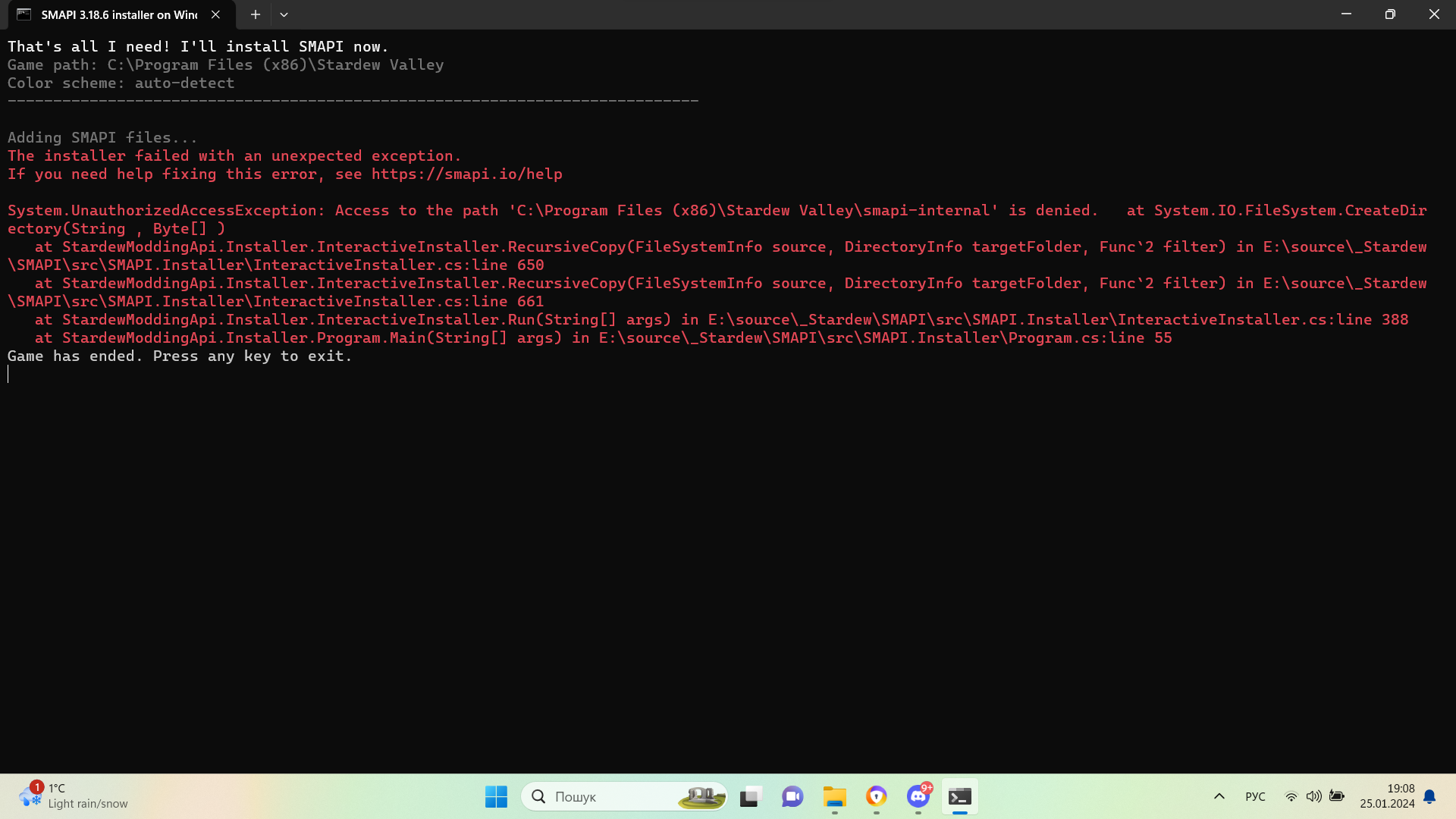
 glad ruin
Pls help download smapi I have problem
The installer failed with an unexpected exception.
If you need help fixing this error, see https://smapi.io/help
System.UnauthorizedAccessException: Access to the path 'C:\Program Files (x86)\Stardew Valley\smapi-internal' is denied.
at System.IO.FileSystem.CreateDirectory(String , Byte[] )
at StardewModdingApi.Installer.InteractiveInstaller.RecursiveCopy(FileSystemInfo source, DirectoryInfo targetFolder, Func2 filter) in E:\source\_Stardew\SMAPI\src\SMAPI.Installer\InteractiveInstaller.cs:line 650 at StardewModdingApi.Installer.InteractiveInstaller.RecursiveCopy(FileSystemInfo source, DirectoryInfo targetFolder, Func2 filter) in E:\source_Stardew\SMAPI\src\SMAPI.Installer\InteractiveInstaller.cs:line 661
at StardewModdingApi.Installer.InteractiveInstaller.Run(String[] args) in E:\source_Stardew\SMAPI\src\SMAPI.Installer\InteractiveInstaller.cs:line 388
at StardewModdingApi.Installer.Program.Main(String[] args) in E:\source_Stardew\SMAPI\src\SMAPI.Installer\Program.cs:line 55
 scarlet quail
....where'd you get the game from?
glad ruin
steam
scarlet quail
that... isn't what your error is saying
C:\Program Files (x86)\Stardew Valley has precisely zero steam path
glad ruin
I'm moving all the games into one file
scarlet quail
That's probably half your problem, tbh
The other half may be you installed SMAPI as admin.
And in that case you gotta yeet the entire install, get the game files back, and then install SMAPI normally.
glad ruin
ok, now I'll try to download it via Steam and leave it in the Steam files
vapid finch
dire fractal
how did you fix that?
I ended up redownloading stardew bc I think something got deleted, but everything’s running good
dire fractal
I was playing but some shi happened, had to reinstall the addons
but now i get this
 scarlet quail
you definitely didn't reinstall the add-ons
The first is not the actual Grandpa's Farm
(it wouldn't have an underscore in it, for one, and for two, the mod itself has content and manifest jsons)
The second one IDK what folder you have called "mods" within your "Mods" folder but it should be deleted
Also in the future:
!log
native dragonBOT
Can you upload your SMAPI log to https://smapi.io/log (see instructions on that page) and share the link here? Even if your game doesn't show any errors, logs are useful, and often necessary, for troubleshooting.
dire fractal
native dragonBOT
Log found, uploaded to: https://smapi.io/log/233b65d1c617459b99b4d899ad9ff243


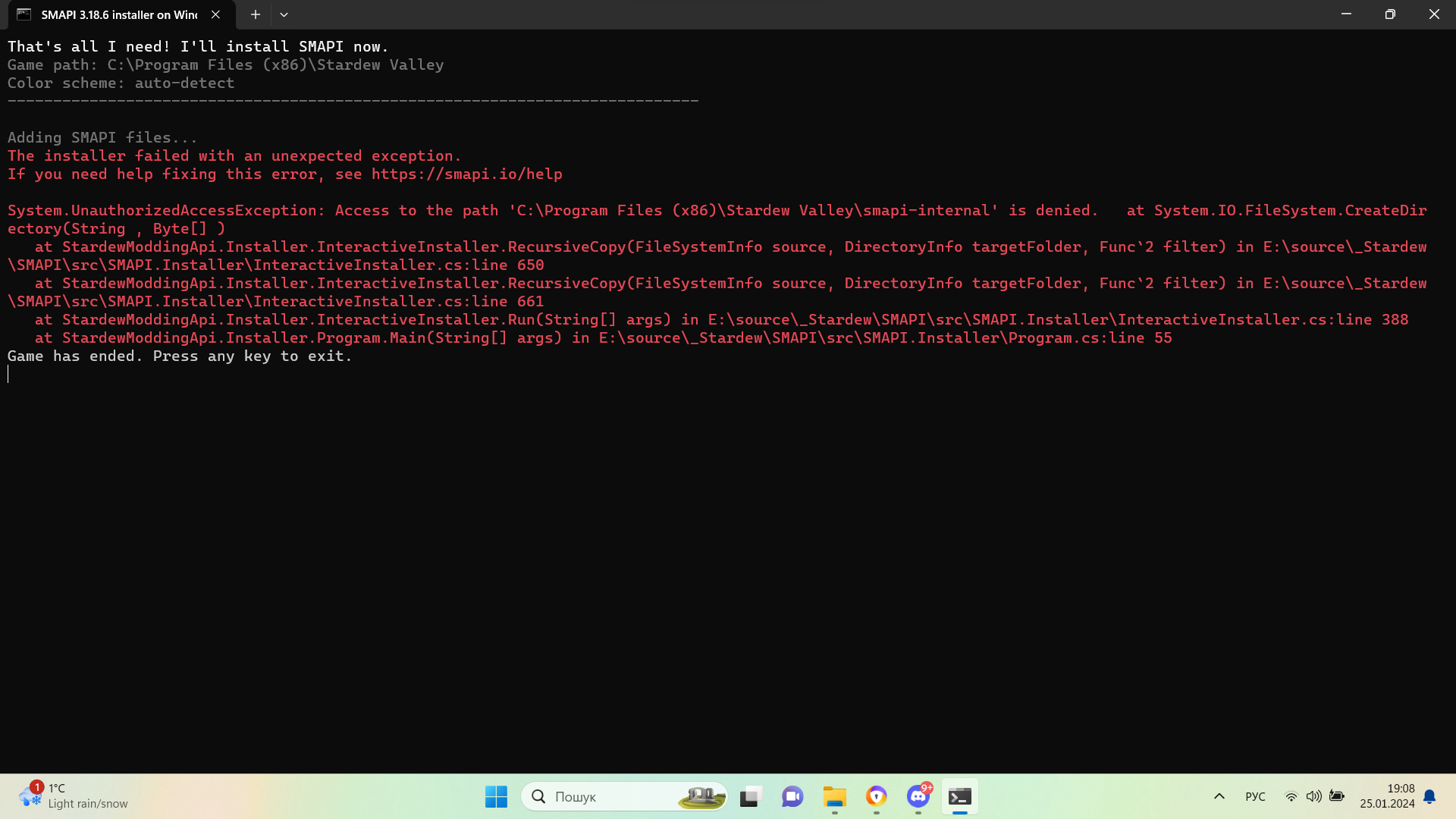 scarlet quail
....
Colloquially speaking, what the fuck happened to your mods
Normally speaking, though, are you using Vortex or something?
Because your SVE is mega broken, GMCM somehow got broken too
And so long as both of those are broken you'll get that red spam
You'll need to reinstall both of those to get rid of the red.
dire fractal
Alright
Reinstalling them now
Ay it worked
Thanks man

Will this affect anything
scarlet quail
Content Patcher, not really
Mod Update Menu, probably since there's an unofficial update to it, which generally means the OG is broken
dire fractal
I'll just update both because why not
 drowsy drum
anyone know why/what mod causes issues with the snow that makes it bunch up like this? https://smapi.io/log/8535ad50148e483a8655eb6b0236c5ec
I don't think it's quick glance, just because i've had that mod way longer than this issue has been happening. It happens with all of the windy particles, like spring and fall.
 native dragonBOT
Log Info: SMAPI 3.18.6 with SDV 1.5.6 (build 1.3.37.0) on macOS Unix 14.2.1, with 91 C# mods and 78 content packs.
scarlet quail
that'd be spritemaster
It has custom snow draw logic that causes that on occasion. It usually fixes itself, though.
drowsy drum
Ok that's a newer one. I don't see any options in Gmcm. are there any settings i can change that fix it? i've reloaded the game a few times across past few days and it still happens
scarlet quail
Not entirely sure. You may be able to click on Show Advanced Settings in SpriteMaster's GMCM and figure out a setting there
but I don't think so.
drowsy drum
I turned off spritemaster snow entirely. In a few seasons I'll see if it's still happening spring/fall. Thanks
patent ridge
yeah this is from sprite master
 wide ginkgo
hi! i have stardew on steam and recently downloaded SMAPI to mod the game, all of my other mods are working except from date night mod? i tried removing my other mods to see if there was an incompatibility with them, I have all the mods needed to support date night and the date night option is in my mod config menu, but then it just.. isn’t working in game? sorry if this didn’t make much sense, i’m clearly new to modding (lmao)
scarlet quail
Two important questions
A) Is date chance set to 100 in Date night's config
B ) who is your spouse
wide ginkgo
my spouse is harvey and i left the date chance on what it was set on (i think50?) :0
scarlet quail
!log as well
native dragonBOT
Can you upload your SMAPI log to https://smapi.io/log (see instructions on that page) and share the link here? Even if your game doesn't show any errors, logs are useful, and often necessary, for troubleshooting.
scarlet quail
Then it's possible Harvey just didn't want to date you today
But do give a log, just in case Date Night isn't loading for some reason
wide ginkgo
yeah, i thought that at first lmao but i'd been using it for almost 20 days ingame and i figured the maths was probably against that
scarlet quail
Eh, I could see it happen with some RNG
that's why I'd always check to make sure that Date Chance is set to 100
native dragonBOT
Log Info: SMAPI 3.18.6 with SDV 1.5.6 (build 1.3.37.0) on macOS Unix 14.2.1, with 6 C# mods and 1 content packs.
languid trout
(If you mean the default 50% date on the slider, that's the default for the date being the unique date tailored to vanilla npcs. The actual default chance of them even asking is like 10%)
Date night is missing.
scarlet quail
wide ginkgo
https://smapi.io/log/f420438c990443feb937721b04685b37
Date Night is not in this log
the only existing mod in this log is Earthy Recolor, in fact.
(Well, and some frameworks, but Earthy would be the only visible one.)
wide ginkgo
oh lmao, it's in my mod config on my game! i'll try redownload the original mod then and see if that works since i must have messed something up
hi, sorry again, i redownloaded, set date chance to 100% to be sure and played a few days and still no luck? heres the new log if its any use :D
native dragonBOT
Log Info: SMAPI 3.18.6 with SDV 1.5.6 (build 1.3.37.0) on macOS Unix 14.2.1, with 7 C# mods and 2 content packs.
dusk lagoon
Is it possible to use multiple mods that add/alter the bundles in the community center?
robust bison
I don't think so
in general, since bundles mods make your save delicate, it's best to use 1 and never touch it after installing
scarlet quail
wide ginkgo
hi, sorry again, i redownloaded, set date chance to 100% to be sure and played a...
Is Harvey's disableddates config set to true
wide ginkgo
no, i left everyones on false to make sure
scarlet quail
Hm.
19:36:04 TRACE Free Love no spouses
It's not telling me you're married to Harvey
wide ginkgo
oh, i'm not married to him!! im an idiot, has that been my problem the whole time lmao
scarlet quail
And for the record, I was the person who coded the Free Love patch to that mod and sent to SUPERT, so I'd like to be able to troubleshoot that
Yes
You need to be married to the person to go on those dates with them
wide ginkgo
okay, no worries, thank you so much for your help!!
scarlet quail
The mod description states that I think 
wide ginkgo
thats 100% me being a dumbass and missing that whilst reading oops
languid trout
(Hey, at least you actually checked and got everything squared away!)
wide ginkgo
i legit redownloaded about three times thinking i had downloaded it wrong 😆 (because i'm pretty pathetic at computers)
dusk lagoon
is there a website/resource that will tell you whether 2 mods are compatible with each other?
robust bison
best to read the mod descriptions and comments
patent ridge
yeah
dusk lagoon
I figured, but I thought I'd ask as compatibility information isn't always given. Thank you
remote falcon
so im switching over to stardrop from vortex and was just curious if i had to manually install all my mods again via nexus or am i able to just drag and install the files into stardrop?
robust bison
I don't use stardrop, but I think they just need to be in the mods folder
worthy moth
Stardrop sort of has its own mod folder, particularly if you launch the game with it and you use mod groups
It keeps all of your mods in one place, and then based on your mod groups will launch the game with just the ones you've selected
native dragonBOT
Log Info: SMAPI 3.18.6 with SDV 1.5.6 (build 22018) on Microsoft Windows 11 Pro, with 134 C# mods and 340 content packs.
Suggested fixes: One or more mods are out of date, consider updating them
remote falcon
just transfered over from vortex to stardrop looking to make sure all things are working or that im not missing anything
ive resolved a few issues but i cant figure out how to resolve the circular reference for immersive farm 2
and the few errors of "no idea" ones
warm jasper
so I downloaded a customized portraits for the characters, but I think I applied it wrong so it now looks all funky whenever they walk... Is there any solutions for this? Or does anyone has an original portrait files that I can copy?
robust bison
!xnbzola
native dragonBOT
XNB mods often break the game and are not recommended. See https://stardewvalleywiki.com/Modding:Using_XNB_mods for more info (and a list of Content Patcher alternatives), and https://stardewvalleywiki.com/Modding:Player_Guide/Troubleshooting#Reset_your_content_files to fix problems caused by XNB mods. For mod creators, see https://stardewvalleywiki.com/Modding:Editing_XNB_files for help unpacking & editing them (including for use with Content Patcher). https://media.discordapp.net/attachments/156109690059751424/575085766426886145/ZolasFury.png
remote falcon
https://smapi.io/log/2d8fbd7cd208461895a19ba7ff2982cc current state of the log
native dragonBOT
Log Info: SMAPI 3.18.6 with SDV 1.5.6 (build 22018) on Microsoft Windows 11 Pro, with 135 C# mods and 338 content packs.
Suggested fixes: One or more mods are out of date, consider updating them
drowsy drum
also anyone seen this glitch (assuming sve) where the wall basket just glides across the screen when ur in the secret woods
 stark horizon
modern python
thats a Visible Fish thing
stark horizon
modern python
thats a Visible Fish thing
Wait, really? I always thought that was the living hat, making a run for it. 
modern python
are you serious 
stark horizon
For real. I feel very silly now. 
scarlet quail
Visible Fish: Now with a Living Hat on the loose
patent ridge
saw it couple times. is it catchable or just an animation?
modern python
its catchable. its a wall basket
patent ridge
hmm interesting
worthy moth
But can it be Iridium quality?
 clear wigeon
my game keeps crashing, its inconsistent too
worthy moth
!log
native dragonBOT
Can you upload your SMAPI log to https://smapi.io/log (see instructions on that page) and share the link here? Even if your game doesn't show any errors, logs are useful, and often necessary, for troubleshooting.
 slow sonnet
Hello, I can't install mods in the data folder on my Android 11, it always gives an error and when I went to install smapi I can't access the data folder on Android and when I saw it install the mods on my
Can someone help me?
languid trout
!androidsmapi
native dragonBOT
Android SMAPI does not currently work for versions of SDV past 1.5.6.39. We do not know if or when it will be made compatible.
Mod support for 1.5 on Android is still experimental, so many mods are broken or buggy. That's often something SMAPI needs to fix, and we may not be able to provide a solution.
If you find a mod bug on Android, first make sure that:
a) you have the latest SMAPI version from https://github.com/ZaneYork/SMAPI-Android-Installer/releases;
b) you have the latest mod version(s) or have the last-known Android-compatible version;
c) and the mod author hasn't already addressed it on the mod page (e.g. via an Android-specific version or comments).
If all of those are true, feel free to ask for help in #archived-modded-support with your full SMAPI log: https://smapi.io/log.
Once SMAPI on Android is more stable, updated instructions will be posted here: https://stardewvalleywiki.com/Modding:Installing_SMAPI_on_Android.
remote falcon
native dragonBOT
Log Info: SMAPI 3.18.6 with SDV 1.5.6 (build 22018) on Microsoft Windows 11 Pro, with 135 C# mods and 337 content packs.
Suggested fixes: One or more mods are out of date, consider updating them
remote falcon
looking for help with the json asset, love of cooking and producer framework mod errors. any help is greatly appreciated
 naive drum
sugarblast conflicts with your other JA mods
remote falcon
im guessing thats giving the batter confliction?
naive drum
yeah, also at least some of the recipe issues
roots of ferngill is conflicting with fizzy drinks
also the DGA version of Farmer to Florist is broken
(as far as i know, checking again now)
modern python
its still broken yeah
modern python
yes
naive drum
yeah, it's the only old file listed in Old Files
naive drum
yep
remote falcon
cool thank you very much
remote falcon
im still getting the json assets and producer framework mod errors and now a circular reference with a recolour pack.
native dragonBOT
Log Info: SMAPI 3.18.6 with SDV 1.5.6 (build 22018) on Microsoft Windows 11 Pro, with 135 C# mods and 340 content packs.
Suggested fixes: One or more mods are out of date, consider updating them
remote falcon
just trying to get this ironed out so my girlfriend can play the mega modded run of her dreams lmao
the 'satvia' one seems like its a typo and should be 'sativa' but i cant find where to change it
languid trout
remote falcon
im still getting the json assets and producer framework mod errors and now a cir...
You didn't get rid of sugarblast for the loop.
remote falcon
i must have had more than one mod file i didnt notice
languid trout
Nor Roots of Ferngill
remote falcon
yeah i missed a couple files lmao
any idea how to get around the when i enable earthy recolour it creates the circular reference?
languid trout
As for Immersive Farm 2, it looks like it is because there's a weird loop involving boarding house being erroneously listed as a dependency?
https://www.nexusmods.com/stardewvalley/mods/16873
If you want to keep that save, here's my advice.
You have a few options. Disable Boarding house and keep playing.
Replace this farm with a different one also compatible with sve.

Nexus Mods :: Stardew Valley
Do you want to try out that cool new custom farm you saw, but are already too deep in your playthrough to start anew?Well, now you can enjoy it anyway!Easy Farm Switcher makes changing far
remote falcon
we havent got a set farm saved for the file just using that one to test things and making new ones to also check to get everything working
when i disable the daisynikos earthy recolour the circular reference does stop
i keep seeing a version called immersive farm 2 remastered which is compatible with sve but cant find it anywhere
scarlet quail
It's on SVE'S page
Under optional files
You should probably use that instead of IF2 the original if playing with SVE
IF2R Has some nice built-in integration with SVE stuff as it's specifically designed with SVE in mind
native dragonBOT
Log Info: SMAPI 3.18.6 with SDV 1.5.6 (build 22018) on Microsoft Windows 11 Pro, with 135 C# mods and 338 content packs.
remote falcon
looks a lot better now still a json asset warning for 'Batter' and the production framework mod warning for a couple of items
cant figure out the batter one still but it seems the other main producer ones are from fizzy drinks
yeah removing fizzy drinks just leaves this as the only thing that i believe is an issue
 native dragonBOT
Log Info: SMAPI 3.18.6 with SDV 1.5.6 (build 22018) on Microsoft Windows 11 Pro, with 135 C# mods and 335 content packs.
naive drum
Fizzy Drinks has a lot of mod compatibility items that are disabled with yellow warnings if the specific mods they're integration for aren't there
so unless you go out of your way to get all the mods Fizzy Drinks has compatibility with you'll get a few yellow warnings
remote falcon
im guessing the batter json warning is from that too?
remote falcon
everything looks good now idk what mod could mkae those other joja colas she could use but i digress
after testing a new save and running around it seems everything works except trying to walk into the garden village while have walk to the desert active it just gives a never ending loading screen.
 silver gull
so.
i have a question
for running
the MODERN
version of stardew valley
i should be able to run it according to google
but everytime i open it
it closes 😭
robust bison
can you define modern
silver gull
like the newest one
modern python
normal vs legacy
modern python
(this convo started in modded-farmers)
robust bison
!legacymodding
native dragonBOT
In some rare cases, you may need to use the compatibility branch in order to play Stardew Valley, but SMAPI does not run with the compatibility branch. See here for more information on why it happens and how to solve it: https://stardewvalleywiki.com/Modding:Player_Guide/Troubleshooting#SMAPI_doesn.27t_work_with_the_compatibility_branch
For help or more information, ask in #archived-modded-support
modern python
yah unfortunately if your game doesnt work on the normal version, youll be fairly limited in your options with modding. you can refer to the link arcane just sent for more info
robust bison
!monobug
native dragonBOT
Implemented in version 1.5.5, MonoGame is the latest framework that Stardew uses, and was implemented to solve problems such as Memory limits and audio issues. Unfortunately, MonoGame has a bug which affects random computers, not allowing them to launch Stardew. This bugs randomly targets computers, regardless of your operating system or hardware and is out of ConcernedApe's control. There is currently no known fix. See !legacy or !legacymodding for how to get your game to work.
modern python
^
silver gull
native dragon
Implemented in version 1.5.5, MonoGame is the latest framework that Stardew uses...
.
modern python
its basically just a random thing that affects random computers
modern python
yeah its unfortunate 😔
silver gull
!legacymodding
native dragonBOT
In some rare cases, you may need to use the compatibility branch in order to play Stardew Valley, but SMAPI does not run with the compatibility branch. See here for more information on why it happens and how to solve it: https://stardewvalleywiki.com/Modding:Player_Guide/Troubleshooting#SMAPI_doesn.27t_work_with_the_compatibility_branch
For help or more information, ask in #archived-modded-support
gaunt gust
silver gull
!legacymodding
( @winged vessel ^^ if you want to look into it.)
 winged vessel
silver gull
well hopefully they fix it
winged vessel
silver gull
well hopefully they fix it
Hi! I've been looking into Monobug, and it's a hard issue to solve since it's rather rare & randomly affects people. Would you mind running through some troubleshooting steps so we can try and get more information to hopefully solve the bug?
 sand ore
hello so when im opening like the config files or whatever is it best to open on word or notepad
modern python
i dont think it matters too much but probably notepad?
sand ore
i think someone told me to use one of the 2 a long time ago but i couldnt remember which
winged vessel
Notepad++?
stark horizon
I would agree, if only because Word has a lot of auto-formatting.
winged vessel
junimoo
stark horizon
cheeto in green cape, thank you very much. 
modern python
junitwo
stark horizon
!ask
native dragonBOT
Ask your question or describe your issue here, and someone will help if they can!
proven pewter
!androidsmapi
native dragonBOT
Android SMAPI does not currently work for versions of SDV past 1.5.6.39. We do not know if or when it will be made compatible.
Mod support for 1.5 on Android is still experimental, so many mods are broken or buggy. That's often something SMAPI needs to fix, and we may not be able to provide a solution.
If you find a mod bug on Android, first make sure that:
a) you have the latest SMAPI version from https://github.com/ZaneYork/SMAPI-Android-Installer/releases;
b) you have the latest mod version(s) or have the last-known Android-compatible version;
c) and the mod author hasn't already addressed it on the mod page (e.g. via an Android-specific version or comments).
If all of those are true, feel free to ask for help in #archived-modded-support with your full SMAPI log: https://smapi.io/log.
Once SMAPI on Android is more stable, updated instructions will be posted here: https://stardewvalleywiki.com/Modding:Installing_SMAPI_on_Android.
 versed rose
Hmmmm ima try again aight thanks
proven pewter
the big thing here is making sure you have the right version of stardew installed. if your phone auto-updates apps, you may have a version of the game that is too new to mod
drowsy drum
... anyone know what mod is causing this
 drowsy drum
modern python
margo
drowsy drum
modern python
margo
ok i am actively checking them but that saves me sooo much time thank u
slow sonnet
Hello, I can't install mods in the data folder on my Android 11, it always gives an error and when I went to install smapi I can't access the data folder on Android and when I saw it install the mods on my
Does any modder know what to do?
stark horizon
I'm not super familiar with android modding, but you need to use a file manager. That being said...
!androidsmapi
native dragonBOT
Android SMAPI does not currently work for versions of SDV past 1.5.6.39. We do not know if or when it will be made compatible.
Mod support for 1.5 on Android is still experimental, so many mods are broken or buggy. That's often something SMAPI needs to fix, and we may not be able to provide a solution.
If you find a mod bug on Android, first make sure that:
a) you have the latest SMAPI version from https://github.com/ZaneYork/SMAPI-Android-Installer/releases;
b) you have the latest mod version(s) or have the last-known Android-compatible version;
c) and the mod author hasn't already addressed it on the mod page (e.g. via an Android-specific version or comments).
If all of those are true, feel free to ask for help in #archived-modded-support with your full SMAPI log: https://smapi.io/log.
Once SMAPI on Android is more stable, updated instructions will be posted here: https://stardewvalleywiki.com/Modding:Installing_SMAPI_on_Android.
modern python
considering how broken the state of mobile modding is, do you think we should just prune this command down to the first two paragraphs?
its gotten quite big and mostly we just want those two paragraphs
languid trout
(Please.)
stark horizon
I can support that, Vin.
slow sonnet
stark horizon
I'm not super familiar with android modding, but you need to use a file manager....
Hello, I use zarquiver but when I try to put the mods in the mods folder, it doesn't work, an error appears saying that all the mods are not the owner of the data folder and I'm on Android 11
stark horizon
I unfortunately don't know how to help you with that. The extent of my knowledge goes as far as making sure that you give full access permissions.
modern python
modern python
considering how broken the state of mobile modding is, do you think we should ju...
done
languid trout
(Thank you so much Vin.)
pallid summit
the only other relevant thing i heard about android is that a recent (like, yesterday-ish) google play update broke filesystem access for a bunch of recent phone models
slow sonnet
stark horizon
I unfortunately don't know how to help you with that. The extent of my knowledge...
I made it
And it doesn't solve
modern python
pallid summit
the only other relevant thing i heard about android is that a recent (like, yest...
when you think it cant get any worse....
stark horizon
Your best bet is to perhaps search the subreddit for other android users who may have found solutions.
slow sonnet
I did this too, everyone's Android looks like this
 simple swift
I FIXED IT, AFTER A WHOLE WEEK I FIXED IT.... Now I have no idea what broke the artifact spots in the first place. But I essentially had to re-install everything... all over 500 mods... It was not fun.
pallid summit
slow sonnet
I did this too, everyone's Android looks like this
well, it might be the thing i was talking about. what model phone do you have?
slow sonnet
Moto e32 Android 11
pallid summit
ok. it's probably not that. sorry i can't be more help
slow sonnet
What?
modern python
unfortunately theres probably not anything we can do to help with your situation
slow sonnet
So will I have to wait for Zane to update smapi? In fact, because he no longer uses the Stardew Valley folder, this is giving me a headache, I lost a save because of this, a save with PERFECTION
stark horizon
Your saves should still be accessible, SMAPI doesn't alter their location.
slow sonnet
I searched all over my phone and I couldn't find my mods that I wanted to download, I can't do it, I'll have to wait for Zane to update smapi???
This is sad I can't play on my smapi because it asked me to reinstall after I reinstalled I couldn't access the stardew folder because it's in the data folder on Android
And I can't even get Zane's folder and put it there, I can't always get the error that the folder or file is not owned by Android data
stark horizon
To reiterate what I and others have already said - there's nothing we can do to help you. Try deleting SMAPI. You should still be able to play regular Stardew.
slow sonnet
Android 13 or 14 users also cannot install the Api or I stardew valley so it is difficult
Sorry, Stardew Valley is no longer supported on my Android or 13 and 14
So there's nothing to do
modern python
correct.
slow sonnet
modern python
correct.
I asked Zane for help but he doesn't respond to QQ and gitrub comments
modern python
he does android smapi as a hobby so he's under no obligation to do so
slow sonnet
And the patronchild doesn't know how to program Android
languid trout
....
modern python
id recommend stepping away from this and focusing on something else for a while. as we have reiterated several times, we cant do anything to help.
slow sonnet
modern python
he does android smapi as a hobby so he's under no obligation to do so
Yes, obviously he has no obligation
languid trout
We can't help you. You can help yourself by taking five.
slow sonnet
Ok thanks
unreal urchin
@stray spire sorry to pester you again. Is it intentional that max size crab pot fish do not count towards the rodmancer lvl 20 fish sell price bonus? I've caught a max size crawfish through a crab pot with magic bait, and it's not showing up as max size in the collection tab. Is this a design choice, an oversight, or is it affecting sell price but not showing up in the tracker? Thanks! I've been having a ton of fun with the new combat stuff.
 pale bridge
Hello! New to modding. I think I'm having an issue with the Save Anywhere mod. At first it was working, but then my NPC started acting funny and when I load my save I start the day over in bed. Then when I got to bed to save for the day, my game crashes. Now I can't even get into my game.
pallid summit
unfortunately, i think that's the nature of save anywhere currently
pale bridge
I tried unchecking it from Stardrop, but that definitely didn't work. Is there a way to get my game to load from an older save?
modern python
!saves
native dragonBOT
Use this guide to find your save files: https://stardewvalleywiki.com/Saves.
stark horizon
Almost a jinx, Vin
pale bridge
I also downloaded PFM Automate around this time, but I wouldn't think that would be the issue.
unreal urchin
pale bridge
I tried unchecking it from Stardrop, but that definitely didn't work. Is there a...
what's your os and what exact mod are you using? the original or the redux?
It does seem like it's not working actually
looking at some of the posts on the mod page
modern python
even the author of the reduxed version is telling people not to use it, which seems pretty telling
unreal urchin
yep
Someone should probably update that on the smapi.io mod compatibility list
I would if I knew how
OH
I'll add a note on the wiki list
pale bridge
unreal urchin
what's your os and what exact mod are you using? the original or the redux?
Windows 10, and mine says redux
pale bridge
modern python
even the author of the reduxed version is telling people not to use it, which se...
Did not know this, thank you!
 scenic shore
Hey I am having trouble modding my game, there is no mods folder for my stardew valley game
modern python
have you downloaded and installed smapi? and what platform are you on?
scenic shore
I have downloaded it and I am on windows
languid trout
Did you install it?
modern python
ok, unzip and launch the install for windows.bat file
scenic shore
Thank you!
unreal urchin
modern python
even the author of the reduxed version is telling people not to use it, which se...
Is this enough to mark it as broken or should I just add a warning?
my instinct is to just add a warning because it's not totally broken
modern python
probably warning. iirc the author is keeping it up in hopes of getting enough bug reports to someday be able to get it into a working state
pale bridge
So I took out the latest save and used the old save from yesterday. Seems to be working, will see how ending a day goes.
scenic shore
Okay so I installed it, what do I do now?
modern python
did you copy that green line of text for the launch options?
scenic shore
Yes
modern python
alright, now right click stardew on steam, click properties, then paste that into the launch options field
after that, you should have a mods folder where you can put unzipped mod files. then play through steam and enjoy your modded game!
scenic shore
Thank you
dire fractal
My cursor stop moving when i try to place the artifacts and minerals
scenic shore
I think I did something wrong, where would I find that green line of text?
dire fractal
dire fractal
My cursor stop moving when i try to place the artifacts and minerals
It happend when placing building and puting animals in their respective home(coop,barn) as well
modern python
you can run the installer again to get it
but its probably something like "C:\Program Files (x86)\Steam\steamapps\common\Stardew Valley\StardewModdingAPI.exe" %command%
unreal urchin
languid trout
Broken if used.
Fixed it on the wiki so the change should get pushed out to smapi soonish
dire fractal
scenic shore
I think I did something wrong, where would I find that green line of text?
As soon as u install the smapi through the console the green text comes on the consoler
dire fractal
dire fractal
My cursor stop moving when i try to place the artifacts and minerals
???
stark horizon
What platform are you on?
scarlet quail
(I'm betting android)
native dragonBOT
Can you upload your SMAPI log to https://smapi.io/log (see instructions on that page) and share the link here? Even if your game doesn't show any errors, logs are useful, and often necessary, for troubleshooting.
stark horizon
Definitely. A log would be very helpful here.
native dragonBOT
Log Info: SMAPI 3.18.6 with SDV 1.5.6 (build 22018) on Microsoft Windows 10 Pro, with 147 C# mods and 64 content packs.
Suggested fixes: One or more mods are out of date, consider updating them
scarlet quail
Remove Custom Spouse Patio and Multiple Spouses, use Custom Spouse Patio Redux
You already have Free Love, so I don't need to tell you to replace with that.
modern python
Save Anywhere too
scarlet quail
Finally, please get a log of you trying to put a museum piece in.
the log you gave only goes to title screen.
dire fractal
Well tbh i dont really care abt the marriage in the game so i am just gonna dlt it
Are there any benefit from it ?
modern python
benefit from what? marriage?
dire fractal
modern python
benefit from what? marriage?
Yeah are there any
modern python
your spouse gives you an exclusive stardrop so yeah (but you can also roommate with krobus to do that)
dire fractal
Okay
scarlet quail
Aside from that, they can fix your fences, feed your animals, or water your crops
scarlet quail
Cuter Fatter Animals isn't loading because you have it in your list twice
Once as Chonkins, once as Cuter Fatter Animals
Otherwise, the rest are outdated and can't be used, just images so they'd have to replace things, or XNB stuff, which
!xnbzola
native dragonBOT
XNB mods often break the game and are not recommended. See https://stardewvalleywiki.com/Modding:Using_XNB_mods for more info (and a list of Content Patcher alternatives), and https://stardewvalleywiki.com/Modding:Player_Guide/Troubleshooting#Reset_your_content_files to fix problems caused by XNB mods. For mod creators, see https://stardewvalleywiki.com/Modding:Editing_XNB_files for help unpacking & editing them (including for use with Content Patcher). https://media.discordapp.net/attachments/156109690059751424/575085766426886145/ZolasFury.png
pale bridge
Hmm something keeps crashing the game, got back to working, but near the evening it crashes and I have to redo everything for that day. Is there a way to see what is making it crash?
scarlet quail
!log after it crashes
native dragonBOT
Can you upload your SMAPI log to https://smapi.io/log (see instructions on that page) and share the link here? Even if your game doesn't show any errors, logs are useful, and often necessary, for troubleshooting.
scarlet quail
don't reboot the game until you've gotten the log, or the crash data will go away.
I'm assuming "redo everything for that day" means it's crashing during gameplay and not before it
so I don't have to ask the usual "not responding or CTD"
native dragonBOT
Log Info: SMAPI 3.18.6 with SDV 1.5.6 (build 22018) on Microsoft Windows 10 Pro, with 63 C# mods and 89 content packs.
pale bridge
It does both, crashes during game play and just now it did right before it when I went to load
pale bridge
Not responding
languid trout
That's not a crash, that's normal for loading.
Don't touch your computer, let it actually load.
pale bridge
But it gets stuck there and won't do anything