#archived-modded-support
1 messages · Page 191 of 1
 native dragonBOT
You can play with more than 4 players without any mods. See this tweet by ConcernedApe:
https://twitter.com/concernedape/status/1395243158460530689

@ArcaneDescent @JessYoMama You can do it without a mod. Go to %appdata%/StardewValley and open the file called startup_preferences. ctrl + f for "playerLimit" and you'll find something like this: <playerLimit>-1</playerLimit>.
Change the -1 to any number you like...
Likes
987
 Twitter
·
Twitter
·
 red sandal
!gettingstarted Check out the smapi install instructions here
native dragonBOT
@mental fjord If you would like a guide to setting up mods for Stardew Valley, check out the getting started guide! https://stardewvalleywiki.com/Modding:Player_Guide
 mental fjord
Got it, thanks
 frank ridge
Hello it keeps showing me this error even though I have these files in the mods folder


Am I doin something wrong
Obviously I am but what is it can someone help
 radiant valve
!log
native dragonBOT
Can you upload your SMAPI log to https://smapi.io/log (see instructions on that page) and share the link here?
 dusty spruce
you need their requirements
frank ridge
i just put every all those files outside that subfolder and put it in mods folder and it worked
weird idk how that works out but I guess its fixed now
 dense bolt
I just installed a mod but it says it can't run because it's an empty folder? What does that mean? Is there something I can do to fix it? I checked the file and it's not empty ..

 lament vortex
it's probably meant to replace the assets from seasonal cute characters. read the mod's description
dense bolt
Ah yea it says to replace the original Sam files with this one. So how do I do that? I don't want to do it wrong and mess everything up :')
 modern python
oh is it xnb
dense bolt
Uhm ... What is that? ^^' I'm sorry I'm brand new to both Stardew valley and modding
 modern python
dense bolt
Uhm ... What is that? ^^' I'm sorry I'm brand new to both Stardew valley and mod...
modern python
dense bolt
Uhm ... What is that? ^^' I'm sorry I'm brand new to both Stardew valley and mod...
actually just send the link to the mod
modern python
 dire fractal
!androidsmapi
native dragonBOT
Android SMAPI has entered alpha - however, this means multiple mods may be bugged in the current build (crucially, Content Patcher and SAAT do not currently work as intended, so some mods like SVE are wholly unavailable on Android at present). If there are bugs, please check to make sure there is not an open issue with the error on the Github before requesting support with this build in #archived-modded-support . https://github.com/ZaneYork/SMAPI-Android-Installer/releases
Instructions will be updated on the wiki when possible. https://stardewvalleywiki.com/Modding:Installing_SMAPI_on_Android
 vast dome
!xnb
native dragonBOT
XNB mods often break the game and are not recommended. See https://stardewvalleywiki.com/Modding:Using_XNB_mods for more info (and a list of Content Patcher alternatives), and https://stardewvalleywiki.com/Modding:Player_Guide/Troubleshooting#Reset_your_content_files to fix problems caused by XNB mods. For mod creators, see https://stardewvalleywiki.com/Modding:Editing_XNB_files for help unpacking & editing them (including for use with Content Patcher).
modern python
also tbh if youre brand new to stardew i would honestly recommend just playing it vanilla before trying to mod it
dense bolt
It is this mod. Im just trying to change sam's hair 😭 https://www.nexusmods.com/stardewvalley/mods/12115

Nexus Mods :: Stardew Valley
Edit of Sam's Seasonal Outfits Portraits to make his hair more skater-y and less big. Includes change to the Spring and Winter outfits. Makes him a bit taller in his portrait.
dense bolt
 yes I just wasn't sure how to do that I wanted to double check because I didn't want to break everything
 halcyon igloo
overwrite them 
modern python
drag into folder and replace
halcyon igloo
if you screw up the mod you can always re-download it
modern python
(itll prompt you asking to replace when you drag it into seasonal outfits folder)
dense bolt
Okay thank you
vast dome
np
 glossy mortar
any reason why xnb mods just never seem to work for me? im supposed to replace the existing xnbs with the new ones right? because that never does anything and it just keeps using the vanilla stuff
 scarlet quail
glossy mortar
any reason why xnb mods just never seem to work for me? im supposed to replace t...
scarlet quail
glossy mortar
any reason why xnb mods just never seem to work for me? im supposed to replace t...
!xnbzola
native dragonBOT
XNB mods often break the game and are not recommended. See https://stardewvalleywiki.com/Modding:Using_XNB_mods for more info (and a list of Content Patcher alternatives), and https://stardewvalleywiki.com/Modding:Player_Guide/Troubleshooting#Reset_your_content_files to fix problems caused by XNB mods. For mod creators, see https://stardewvalleywiki.com/Modding:Editing_XNB_files for help unpacking & editing them (including for use with Content Patcher). https://media.discordapp.net/attachments/156109690059751424/575085766426886145/ZolasFury.png
 scarlet quail
They never seem to work because You should not be using them at all
 spring cloak
how do i install Stv Expanded
 neat plaza
!sve
native dragonBOT
Stardew Valley Expanded (https://www.nexusmods.com/stardewvalley/mods/3753) is a mod which adds a lot of new content and areas to the game. It has many dependencies, so be sure to follow the install guide which is on the github wiki along with FAQs and troubleshooting steps for common issues: https://github.com/FlashShifter/StardewValleyExpanded/wiki
spring cloak
i watched a video made by wickedy i put the mod in my mods folder with smapi and when i ran the game it said it didnt work
modern python
did you get the required mods as well
neat plaza
Get them then
modern python
it lists them in sve's nexus page
neat plaza
It's in the download page
spring cloak
so download all the mods that are in the requirments section
modern python
yes
spring cloak
then put them into the mods folder
modern python
yes
spring cloak
i dont need the optional ones im guessing
modern python
not unless you want them
halcyon igloo
glossy mortar
any reason why xnb mods just never seem to work for me? im supposed to replace t...
what things are you trying to mod?
glossy mortar
halcyon igloo
what things are you trying to mod?
I found a mod on naver that changes how the tv channels look but it was xnb only so I thought I'd try xnbs for the first time
neat plaza
!xnbzola
native dragonBOT
XNB mods often break the game and are not recommended. See https://stardewvalleywiki.com/Modding:Using_XNB_mods for more info (and a list of Content Patcher alternatives), and https://stardewvalleywiki.com/Modding:Player_Guide/Troubleshooting#Reset_your_content_files to fix problems caused by XNB mods. For mod creators, see https://stardewvalleywiki.com/Modding:Editing_XNB_files for help unpacking & editing them (including for use with Content Patcher). https://media.discordapp.net/attachments/156109690059751424/575085766426886145/ZolasFury.png
glossy mortar
I know
glossy mortar
I'd try turning it into a cp mod but idk how that stuff works so
neat plaza
Use holy's pack builder
halcyon igloo
i think that’s cursors so it might be annoying
glossy mortar
it is cursors
halcyon igloo
alas
glossy mortar
neat plaza
Use holy's pack builder
what's that?
neat plaza
Ahh
halcyon igloo
but it works for things like items, portraits, furniture, craftables, etc.
glossy mortar
also I deleted the channels mod I already had off of my mods folder but for some reason it still shows up in my game so that's currently driving me insane
 gaunt gust
xnb mods on Cursors sounds like a bad, bad plan
halcyon igloo
cursors cursed
gaunt gust
that's a texture that has half of everything on it, and it's localized
glossy mortar
ah
halcyon igloo
me hard code cursors? never
gaunt gust
There's a really fun little balloon mod, for example, that loads the whole cursor's tilesheet....except in Chinese
glossy mortar
yeah I tried to do xnbs with hair too but that also didn't work idk if that's another a weird one
gaunt gust
thus, if you didn't realize it did that, you suddenly just..."why is my game in Chinese?"
neat plaza
glossy mortar
also I deleted the channels mod I already had off of my mods folder but for some...
!reset
native dragonBOT
See https://stardewvalleywiki.com/Modding:Player_Guide/Troubleshooting#Reset_your_content_files for instructions on resetting your game files! (This doesn't affect your save files.) You may also want to check this list of XNB > Content Patcher conversions (https://stardewvalleywiki.com/Modding:Using_XNB_mods#Alternatives_using_Content_Patcher) to see if there are already replacements for any XNB mods you may have been using :)
glossy mortar
😭😭
gaunt gust
tl;dr we do not recommend xnbs, at all
glossy mortar
yeah I did the reset and it didn't really do anything for some reason
halcyon igloo
reset goes back to vanilla
 cursive sable
i have been waiting for help with this issue with an npc mod can anyone pls try help
halcyon igloo
you can reset your files and then try converting it into an XNB mod
halcyon igloo
cursive sable
i have been waiting for help with this issue with an npc mod can anyone pls try ...
what are the details of your question? npc? which one?
cursive sable
lilliana for ridgeside village
gaunt gust
cursive sable
lilliana for ridgeside village
(she's only around for one season a year, lol)
and, frankly, I don't enjoy playing twenty questions on this channel
cursive sable
modern python
leilani?
ye
 dusky canyon
woah calm down
gaunt gust
so if questions come up that are like "please guess my mind to what's going on" I'm very likely to bounce from the channel, lol
dusky canyon
cursive sable
ye
there's information in the description
dusky canyon
gaunt gust
and, frankly, I don't enjoy playing twenty questions on this channel
Just want to state that Alex didn't force you in particular to answer fyi
gaunt gust
Nope, but I'm pointing out that you're far, far more likely to get an answer if you include relevant details in your question the first time around.
spring cloak
Does anyone know why that once i had all the correct downloads for stv expanded when i went to start a new farm i noticed that the option for grandpas farm isn't there
 long brook
Cause you might not install it
spring cloak
is grandpa's farm a seperate mod?
long brook
If you install grandpa's farm, it will change standard farm name
Yes, it's under optional file on SVE mod page
vast dome
if you open the nexus mods page for STVE
and scroll
click download
and then click grandpas farm
spring cloak
vast dome
if you open the nexus mods page for STVE
ty
dusky canyon
or read the description, most info is there
long brook

 vestal steppe
I saw smapi not working and i had an issue with it, heres the ss

 near terrace
!androidsmapi
native dragonBOT
Android SMAPI has entered alpha - however, this means multiple mods may be bugged in the current build (crucially, Content Patcher and SAAT do not currently work as intended, so some mods like SVE are wholly unavailable on Android at present). If there are bugs, please check to make sure there is not an open issue with the error on the Github before requesting support with this build in #archived-modded-support . https://github.com/ZaneYork/SMAPI-Android-Installer/releases
Instructions will be updated on the wiki when possible. https://stardewvalleywiki.com/Modding:Installing_SMAPI_on_Android
vestal steppe
Do i just need to find the 1.4 version to see if that works
lament vortex
smapi for 1.4 won't work on a 1.5 game, and you can't roll back to 1.4 game
long brook
Well that means you need to get 1.4 mobile sdv through illegal way then
vestal steppe
Oh
near terrace
And... You're not likely to get support for cracked versions of the game in this server 
vestal steppe
lament vortex
smapi for 1.4 won't work on a 1.5 game, and you can't roll back to 1.4 game
Right but im downloaded the latest file of smapi 🥲
near terrace
Smapi barely works on android, you'll have to wait until it's stable
modern python
or start modding on pc, either way we arent of much help right now with android smapi
vestal steppe
modern python
or start modding on pc, either way we arent of much help right now with android ...
Well id need a pc first and my laptop is not innthe conditions
 lament prairie
near terrace
And... You're not likely to get support for cracked versions of the game in this...
lament prairie
near terrace
And... You're not likely to get support for cracked versions of the game in this...
Not to mention on android they often just don’t work
vestal steppe
it turns off every 30 mins i barely can play other games, the only other ones are my parent's
Ill go for waiting ig
 olive hinge
I'm having trouble installing "The Farmer's Children" mod correctly. I'm pretty sure I downloaded all of the required mods. But I keep getting the common error from one of it's required mods "LittleNPCs".
e.g. "This mod failed in the GameLoop.OneSecondUpdateTicking event. Technical details: Microsoft.Xna.Framework.Content.ContentLoadException: The content file was not found."
Here's my SMAPI log parser: https://smapi.io/log/b0ab752ae2d347948952f1b21db65685 (Ignore the ones in yellow and purple, I'll fix those another day)
I also included a screenshot of the mod's author post about it, but I don't understand what they're saying about "two main content packs" and needing both.
Do I copy "The Farmer's Children" content.json file into the LittleNPCs' mod folder? Because I did and I still get the same error. I also tried putting the LittleNPCs mod folder inside The Farmer's Children mod folder but that doesn't work either. Does anyone have similar issues or know how to solve this please?
 native dragonBOT
Log Info: SMAPI 3.18.3 with SDV 1.5.6 (build 22018) on Microsoft Windows 10 Home, with 44 C# mods and 47 content packs.
Suggested fixes: One or more mods are out of date, consider updating them
 lilac berry
olive hinge
I'm having trouble installing "The Farmer's Children" mod correctly. I'm pretty ...
lilac berry
olive hinge
I'm having trouble installing "The Farmer's Children" mod correctly. I'm pretty ...
You don't have an art mod for LittleNPC installed
The Farmer's Children has two main downloads, one is called art.
You could also alternatively use The Farmers Children - HD Seasonal Portraits talkohlooey-style instead.
olive hinge
I did download the [NPC] The Farmer's Children Art and I put it in The Farmer's Children like they said in this pic. Are you saying I should move the art folder into the LittleNPC mod folder?

 modest oxide
yes thank you for offeringh some help ill do that right now
lilac berry
no, you put it in the fold called 'Mod' where you put all other mods.
modest oxide
@native dragon https://smapi.io/log/e82458aa3a1c458cb134c28de8b3d78a
native dragonBOT
Oops, couldn't parse that file. Make sure you share a valid SMAPI log.
modern python
(the governor is a bot btw)
modest oxide
oh completely? the reply earlier seemed like a person saying it
modern python
nope, it was autogenerated by looking at the log link you sent
long brook
 native dragonBOT
Can you upload your SMAPI log to https://smapi.io/log (see instructions on that page) and share the link here?
 modest mantle
if i download the UI mod into my save file will there be any problems
long brook
Nope, it's safe to be installed/uninstalled mid game
modest mantle
alr thanks
modest oxide
its not working when i do run
i put it in correctly and its just disappearing and bringing up nothing
 frank flume
hi can i have some help with my mods if thats okay?
modest mantle
only mods that directly impact the game like stardew valley expanded can sometimes cause problems?
near terrace
frank flume
hi can i have some help with my mods if thats okay?
That's what this channel is for! Go ahead and ask
long brook
modest oxide
its not working when i do run
Did you drag the file named SMAPI-latest.txt into the box on the link?
native dragonBOT
Can you upload your SMAPI log to https://smapi.io/log (see instructions on that page) and share the link here?
frank flume
near terrace
That's what this channel is for! Go ahead and ask
are you okay to look through my mods and see what is making my game crash occasionally
modest oxide
long brook
Did you drag the file named SMAPI-latest.txt into the box on the link?
i got it, the page was opening up behind something for some reason
native dragonBOT
Log Info: SMAPI 3.18.3 with SDV 1.5.6 (build 22018) on Microsoft Windows 10 Pro, with 29 C# mods and 18 content packs.
near terrace
frank flume
are you okay to look through my mods and see what is making my game crash occasi...
Can only do that if you provide a log via that link governor popped up
native dragonBOT
Log Info: SMAPI 3.18.3 with SDV 1.5.6 (build 22018) on Microsoft Windows 10 Home, with 55 C# mods and 99 content packs.
Suggested fixes: One or more mods are out of date, consider updating them
near terrace
Ah there we go
frank flume
took me a while haha
near terrace
Oh dear
Right first thing's first
You're using vortex, aren't you?
You have a few mods in there that are actually xnb mods, you'll need to get rid of those as well
frank flume
okay so which ones are they
near terrace
The ones that say they aren't smapi mods
frank flume
okay thankyou
near terrace
And I would advise you to not use vortex for modding SDV, as it's wreaking havoc on your files
You'll need to reinstall all the mods that have errors manually
If you really want to use a mod manager, use Stardrop, it's purpose built for stardew
!stardrop
native dragonBOT
Stardrop (https://www.nexusmods.com/stardewvalley/mods/10455) is the only mod manager written specifically for Stardew Valley. For information about how to install and use it, please see the Stardrop wiki: https://floogen.gitbook.io/stardrop/
If you're having an issue, here's the guidelines on reporting issues: https://floogen.gitbook.io/stardrop/resources/reporting-issues
 jade rain
So one of my mods, [Portraiture] is not working correctly because of this error here:
InvalidOperationException: Can't use Helper.Data.WriteSaveData when connected to a remote host.
I can send the logs if you want and parase it after but, I want to know if there is a better way to fix this while playing multiplayer.
I downloaded the mods needed to play with the other player once they zipped it and sent it to me so I don't have to download a list of mods.
long brook
modest oxide
i got it, the page was opening up behind something for some reason
Try reinstall stardewhack, bigger backpack and wear more ring
lament vortex
jade rain
So one of my mods, [Portraiture] is not working correctly because of this error ...
portraiture doesn't work in mp, there's really nothing you can do to fix it
halcyon igloo
could use HD portraits? is that an option for you
long brook
Anyone know the solution about failed loading pdb? I see those on @modest oxide log
olive hinge
lilac berry
no, you put it in the fold called 'Mod' where you put all other mods.
Ohhhh I see! Sorry I get confused sometimes and mixed up "mod folder" being the specific mod's folder I'm downloading. Thanks a lot! I also noticed you're the creator of this mod ^^;
And sorry it took me longer to respond back, as I was trying to fix another problem I encountered. I see my first child having his own dialogue and portrait, however I can't interact with my second child at all. Is it because my second child just barely turned into a toddler today?

 lilac berry
olive hinge
Ohhhh I see! Sorry I get confused sometimes and mixed up "mod folder" being the ...
lilac berry
olive hinge
Ohhhh I see! Sorry I get confused sometimes and mixed up "mod folder" being the ...
Yep, she is still a toddler, not NPC.
when a toddler becomes an NPC child is set by LittleNPC. It is a config option in LittleNPC as well.
By default is is 83 day (1 month after becoming a toddler). If you wish for it to be as soon as they become a toddler change the config to 56 days.
long brook
!gettingstarted the instruction for gamepass is in the link
native dragonBOT
If you would like a guide to setting up mods for Stardew Valley, check out the getting started guide! https://stardewvalleywiki.com/Modding:Player_Guide
olive hinge
lilac berry
Yep, she is still a toddler, not NPC.
when a toddler becomes an NPC child is set...
Ah that makes sense. And one last thing I'd like to clarify. To fix the error "[Content Patcher] Could not load content pack 'TFC Dialogue Tweaks': content pack has no content.json file.", I just copy and paste all the TFC Dialogue Tweaks' .json files to the original TFC folder "[NPC] The Farmer's Children" replacing it's .json files, except the manifest.json right? Then can I delete TFC Dialogue Tweaks folder after? Or do I still need it in the Mods folder?
lilac berry
olive hinge
Ah that makes sense. And one last thing I'd like to clarify. To fix the error "[...
TFC Dialogue Tweaks needs to be updated to work with 4.0.3 of The Farmer's Children, which was about adding new dialogue.
olive hinge
I see, well thank you so much for working with me thus far. I really appreciate your hard work and patience 
long brook
No need to link stardrop to steam. You just need to launch smapi from inside stardrop and also have steam runs in background so smapi will detect steam
frank flume
how do i do that
long brook
Do what?
frank flume
open smapi from inside stardrop
long brook
Have you download stardrop?
frank flume
yes
long brook
Did you unzip it somewhere and run stardrop?
frank flume
yes
long brook
Finishied the initial setting that show up when you run stardrop for first time?
long brook
Yup
frank flume
okay thaks
long brook
Or click pufferchick with green play button on top right corner on stardrop
 fluid kettle
so im playing with a friend and today he started getting an error and smapi wouldnt open

anyone know how to fix or find out what the problem is ?
long brook
!log and also when is the problem occur?
native dragonBOT
Can you upload your SMAPI log to https://smapi.io/log (see instructions on that page) and share the link here?
native dragonBOT
Log Info: SMAPI 3.18.3 with SDV 1.5.6 (build 22018) on Microsoft Windows 10 Pro, with 30 C# mods and 13 content packs.
 royal tulip
It says no errors but it doesnt work
modern python
doesnt work in what way
royal tulip
modern python
doesnt work in what way
When I load up the launcher, at "Stardew Valley Expanded Installation check completed. Everything seems fine!" it just stops
and so it doesn't get to load the game
long brook
!troubleshoot try steps here
native dragonBOT
hey! Can I get you to run through this troubleshooting guide https://stardewvalleywiki.com/Modding:Player_Guide/Troubleshooting#Game_doesn.27t_launch? If none of the options there work, can you post the error message you get if you open SMAPI using the command line?
lament prairie
!smapislow seems likely
native dragonBOT
For some players, SMAPI can take a while to launch the game. See this section of the troubleshooting guide for some common causes and possible fixes: https://stardewvalleywiki.com/Modding:Player_Guide/Troubleshooting#Game_lags_or_stutters_in-game
royal tulip
At the start up to 10 minutes, after then I only waited a few minutes
Weird thing is this is not the first time, it has happened in the past (around half a year to a year ago), and when I couldn't fix it I just gave up on it and out of nowhere it fixed itself
long brook
Most likely smapi slow like elizabeth said above
royal tulip
native dragon
hey! Can I get you to run through this troubleshooting guide <https://stardewval...
I've done some of these
royal tulip
native dragon
For some players, SMAPI can take a while to launch the game. See this section of...
And right now I am just trying to remove all the mods to see if that fixes it
Yeah still doesn't work, I'll try a few more things and if that doesnt work Ill just maybe get my brother to work on it since he's a dev
 flat frigate
I need help with figuring out the mods for Xbox game pass stardew valley
neat plaza
!gamepasssmapi
native dragonBOT
Installing SMAPI for Gamepass requires extra steps. Please see the guide here https://stardewvalleywiki.com/Modding:Installing_SMAPI_on_Windows#Xbox_app
 inland bane
if i play modded on a save will it mess with my vanilla save?
neat plaza
just dont open vanilla
inland bane
why not?
modern python
opening a vanilla save with mods will make it modded, so as long as you dont open it it will be fine
inland bane
so if i start playing modded i have to only play modded? im asking for multiple saves not just one
modern python
if you want to go back to vanilla open stardewvalley.exe from your game files
inland bane
what happens if i run it through steam?
 ancient escarp
hi loves, gus accepted the gourmet tomato salt as a hated gift andi no longer have the save file, how do i go about fixing this so i can get the golden walnuts? i had gus expanded dialogue but i deleted that mod since then
can i just use item spawner to get it again?
 fringe egret
hellohello! does anyone know how to fix there being a black tile on the water bowl spot for pets?? ik its a mod issue but idk how to fix it
flat frigate
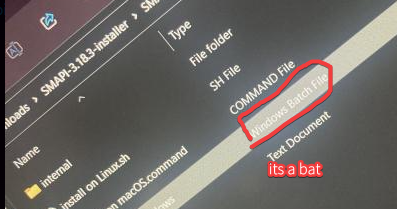
How come when I install smapi and I open the file it only says windows and not windows.bat
flat frigate
No it only says windows
neat plaza
send an ss
 river rapids
Hi! Sorry for the late reply, my life is a bit hectic right now so I've been slow to respond to mod things.
It looks like someone was trying to help you out with this issue but it didn't get resolved. I will note:
- The folders inside the
/skinsfolder are purely for your convenience in organizing large collections of skins, and A&S will read every skin image as if it is all in one big folder. Putting it in a folder named "dog" isn't required, and will not help the mod to read it correctly. - The person on reddit was correct in that the skin should be named
dog_1and any other dog skins nameddog_2,dog_3, etc. The mod won't understand it if it's namedgermanshepard, as it looks for the name "dog" when looking for dog skins.
Since it seems that naming the skins correctly didn't resolve the issue though, would you mind grabbing your SMAPI log for me? Use the link the bot brings up below, and it'll give you a link to report back here with. Instructions will be on that page:
!log
native dragonBOT
Can you upload your SMAPI log to https://smapi.io/log (see instructions on that page) and share the link here?
flat frigate
 flat frigate
Im not using discord on my laptop so I js sent a picture
I do run it and nothing happens
 flat frigate
No
Just a little screen pops up for a brief second but doesn’t show anything and I can’t do anything on it
neat plaza
run it from terminal then
flat frigate
? Whats that mean🤨
neat plaza
open command prompt in it, then type "install on Windows.bat"
flat frigate
And what exactly is command
neat plaza
...
like powershell but not blue and less unix-y
 calm heron
unix-y 
neat plaza
ancient escarp
ancient escarp
hi loves, gus accepted the gourmet tomato salt as a hated gift andi no longer ha...
so turns out i do have the old save file that hasnt triggered the pirate's wife quest! how do i revert to that?
flat frigate
Whats the adress bar
dusky canyon
this part?

 modern python
was this meant to go in #making-mods-general ? ^^
 native lotus
oh woops
modest oxide
long brook
Anyone know the solution about failed loading pdb? I see those on <@605021756767...
.0i still havent figured it out
flat frigate
modern python
was this meant to go in <#156109690059751424> ? ^^
The picture I sent?
modest oxide
i really wanna play tonight i just finished a long day at work
modern python
flat frigate
The picture I sent?
no something redkku sent but now deleted
flat frigate
Ohh ok
native lotus
flat frigate
Just type in Install on Windows.Bat
native dragonBOT
Log Info: SMAPI 3.18.3 with SDV 1.5.6 (build 22018) on Microsoft Windows 10 Pro, with 29 C# mods and 18 content packs.
native lotus
lemme go get some coffee
flat frigate
native lotus
Just type in Install on Windows.Bat
Below it or next to it
native lotus
just type inside that command prompt
next to it is fine
Install on Windows.Bat
You right clicked inside the folder containing that file right?
flat frigate
I had to do something different cause it didn’t work
native lotus
I think you can literally just click on the file and it Should do it on it's own.
native lotus
what's the folder look like the same as above?
modest oxide

 modest oxide
is anyone else availablke to help? i really justy wanna play aready
this had been broken since 10 pm last night
native lotus
modest oxide
is anyone else availablke to help? i really justy wanna play aready
Are you having the same issue?
modest oxide
native dragonBOT
Log Info: SMAPI 3.18.3 with SDV 1.5.6 (build 22018) on Microsoft Windows 10 Pro, with 29 C# mods and 18 content packs.
modest oxide
i got as far as this earlier
someone here told me to do this then i had to go to work
all i did was replace files that were broken and needed updating
i updated smapi too
and i had to hand delete the .dll file
native lotus
flat frigate
try putting double quotation marks around the command so "Install on Windows.bat"
 native lotus
You need to place it inside the Stardew valley folder
lament vortex
where do you play, mar21? steam?
modest oxide
i even just reinstalled smapi nothing is wrokingf
lament vortex
ah no nvm just saw it's gamepass
modest oxide
this. idk why this. https://smapi.io/log/6b500c9a24ea4f50a081ca8bf7e1664e
native dragonBOT
Log Info: SMAPI 3.18.3 with SDV 1.5.6 (build 22018) on Microsoft Windows 10 Pro, with 29 C# mods and 18 content packs.
modest oxide
there are 5 errors on Smapi i reinstalled it its not working im stuck
flat frigate
native lotus
You need to place it inside the Stardew valley folder
Place what inside the folder?
lament vortex
go to this location and tell me what you see Mar C:\XboxGames\Stardew Valley\Content\
native lotus
The installer you downloaded extract it and place it inside the Stardew valley folder
Then open the command prompt by right clicking anywhere in the folder and type in the previous command you learned
modern python
you dont have to put the installer in the stardew folder
lament vortex
modest oxide
this. idk why this. https://smapi.io/log/6b500c9a24ea4f50a081ca8bf7e1664e
have u tried reinstalling those mods?
native lotus
That’s what I do
native lotus
It all goes in there anyway
native lotus
I don’t place it In the content folder
lament vortex
did you delete them and redownload them?
native lotus
Most likely that mod you download changed something like the name of an item and it’s broke
 native lotus
Items were changed or something in the mod was changed on the authors side
flat frigate
lament vortex
go to this location and tell me what you see Mar `C:\XboxGames\Stardew Valley\C...
How do I get there
lament vortex
type in the address bar
lament vortex
dusky canyon
this part?
.
modest oxide
so i cant fix whats broken?
lament vortex
corpski, try deleting those mods and installing them again. if that doesnt work, idk what else you can do
modest oxide
the log thing is saying the 5 errors are in Smapi
thats why im confused, the parser is saying the mods are fine
but smapi is the issue
calm heron
(nonu knows what she's doing! 99.9999% of the time!)
gaunt gust
A fresh download of those mods show a method body
 modest oxide
calm heron
(nonu knows what she's doing! 99.9999% of the time!)
modest oxide
calm heron
(nonu knows what she's doing! 99.9999% of the time!)
thing is i got a knack for being a 0.001
lament vortex
calm heron
(nonu knows what she's doing! 99.9999% of the time!)
and when i dont, i dont even try 
calm heron
mood
gaunt gust
tbh, hard to think of what would have caused this other than maybe an antivirus taking a bite
flat frigate
 gaunt gust
but, yeah, those method bodies are supposed to exist, if they don't, the copy of the mod you have is corrupted somehow
flat frigate
This is what it took me to when I typed that in
gaunt gust
so delete it and start again
lament vortex
flat frigate
yeah thats the location you want to paste in the installer then
flat frigate
How do I do that again?
lament vortex
do you still have the command prompt with the installer open?
 tawdry kraken
i downloaded i mod but im not sure where to fid the stuff in it
lament vortex
youre gonna have to be more specific, astro
tawdry kraken

Nexus Mods :: Stardew Valley
Devilish horns for the devilish farmer. Updated to Fashion Sense.
lament vortex
do you have fashion sense?
tawdry kraken
yes
lament vortex
and bought the mirror from pierre?
modest oxide
lament vortex
yeah thats the location you want to paste in the installer then
as i thought im a 0.0001 again
didnt work.
flat frigate
lament vortex
do you still have the command prompt with the installer open?
Yeah I do
modest oxide
all i did was update everything to the latest version
lament vortex
flat frigate
Yeah I do
click on the address bar, make sure you have the entire path selected, then press ctrl c. open the installer then press ctrl v then enter
lament vortex
modest oxide
all i did was update everything to the latest version
i truly dont know why, because i have wear more rings and stardewhack and both work  try disabling your antivirus, and reinstalling it again
flat frigate
you know what ill just work on this all later its confusing
modest oxide
lament vortex
i truly dont know why, because i have wear more rings and stardewhack and both w...
did the logs tell you anything?
lament vortex
no, i dont have any errors from either mod
modest oxide
native dragonBOT
Log Info: SMAPI 3.18.3 with SDV 1.5.6 (build 22018) on Microsoft Windows 10 Pro, with 29 C# mods and 18 content packs.
gaunt gust
The logs tell me that the method body on your copy is empty.
I checked, and it's not empty in the copy I downloaded (checked with ILSpy)
Which is interesting. First to blame is probably the antivirus
modest oxide
what does that mean?
gaunt gust
tbh I would look at the copy of what you downloaded with ILSpy
modest oxide
so turn it off and redownload smapi or the mods or both?
gaunt gust
uh
I'm not sure there's a straightforward solution here
like, I would decompile the mods, personally
but....that's not a thing I can teach you, lol
modest oxide
thats where this becomes a differnt language to me
should i just redownload everything with the antivirus off
start to finish
gaunt gust
I'm not sure
modest oxide
smapi, the mods all of iut
gaunt gust
tbh, I'm not a huge fan of disabling the antivirus, not sure here.
modest oxide
gaunt gust
tbh, I'm not a huge fan of disabling the antivirus, not sure here.
so.. im just SOL?
gaunt gust
Like, antiviruses exist for a reason....
modest oxide
yeah i didnt have one for the longest time on mine
tbh you only need one if you DL a lot of stuff or dont know to not click side ads on sketchy websites IMO
gaunt gust
They have false positives all the bloody time, but still. Viruses exist... https://github.com/fractureiser-investigation/fractureiser/blob/main/docs/users.md
I'm not going to tell you to disable your antivirus, I personally would want to know if that method body is actually empty or not
but this is definitely not something easy to do
modest oxide
i was really getting back into this too
native lotus
flat frigate
you know what ill just work on this all later its confusing
So what she was trying to make you do was copy the file path over to the command prompt window. The keys on your keyboard Ctrl and C copy and Ctrl and V paste. Then you would type “Install on windows.bat”
modest oxide
everytime i like something... i swear to god without fail 😦
gaunt gust
modest oxide
everytime i like something... i swear to god without fail 😦
one thing you can try, bcmphinc's mods are open source. You could try building them yourself https://github.com/bcmpinc/StardewHack
(if you have a friend who can program at all, it's dirt easy to do, literally "install VS, hit two buttons")
modest oxide
i just worked 12 hrs fixing bikes in the heat i really just wanted to enojy a satuday with ym financee
so there is no way i can salvage this at all?
gaunt gust
not sure, I'm not sure there's realistically anything we can say definitively without, like, looking at the actual mods you downloaded
modest oxide
i literally just downloaded and extracted them right ionto the mods folder
gaunt gust
for bigger backpacks, there's also https://www.nexusmods.com/stardewvalley/mods/13826
this has the same effect as wearing a bunch of rings https://www.nexusmods.com/stardewvalley/mods/8801
native lotus
That’s probably it
modest oxide
native lotus
That’s probably it
?????????????
native lotus
If all you did was paste them in there sometimes it will cause problems
Authors will changed folders around sometimes and it breaks things
You can delete and replace them
modest oxide
i let my extractor extract them right into the mods folder
jusr redownload it all then move them into it after?
not extract striaght in?
native lotus
Yeah I would delete and replace them like new
modest oxide
dont**
lament vortex
did you delete and reinstall the mods like i told you?
modest oxide
lament vortex
did you delete and reinstall the mods like i told you?
yes
the ones that are coming up as broken
lament vortex
because that's what redkku is telling you to do
modest oxide
rings and bps
modest oxide
lament vortex
because that's what redkku is telling you to do
yes but i put them back in the same way i had done before
extracting them directly may have been the problem
if that doesnt matter then its all for not
lament vortex
extracting right into your mods folder shouldn't cause that, but i guess you can try
modest oxide
thats what i thought
native lotus
I would start over
modest oxide
is the mods folder the only place i delete anything
native lotus
Most likely you copy pasted over an old mod and it broke it
Next time you update I’d recommend doing it this way to delete and replace
gaunt gust
...interesting
 modest oxide
gaunt gust
...interesting
modest oxide
gaunt gust
...interesting
what could have happened here?
gaunt gust
unfortunately, method signatures are NOT in the log
gaunt gust
modest oxide
what could have happened here?
Okay'
so I went poking around to see when that method was added
to double check there wasn't a version mismatch or anything
modest oxide
ok so i deleted the file it told me to yesterday when updating SMAPI something with a .dll file
gaunt gust
anyways, delete those two mods, let's make sure the game launches without problem without those two mods
let's try that first
and then we'll try installing those two, okay?
modest oxide
its taking a lot longer to start since all this happened too btw
like before it was 10-20 seconds
now its like 2 mins
if that helps identify what might have happened
the game was firing up it never wasnt
gaunt gust
My current guess is that the versions of stardewhack and wear more rings aren't matching, somehow
modest oxide
the issue is getting those mods to fire with it
gaunt gust
because, like, if the method signature changed, then the method changed, which explains why the method body appears empty
unfortunately, method signature is not in the log
which means, well, I can't confirm it necesssarily
modest oxide
oh
gaunt gust
somehow you're getting the manifests to update but not the mods themselves
gaunt gust
ditto your versions of JA and spacecore
because neither of them are supposed to have deprecation warnings at this point
okay, with fresh versions of content patcher first
because it doesn't have any dll dependencies and thus is the simple one here
delete your copy of content patcher and install it again
Actually, corpski, are you trying to do updates while the game is open?
gaunt gust
okay!
if content patcher is up to date, you won't see these lines here in the log

(this is also, like, possibly why things are slower)
modest oxide
ok so slight improvement
i expracted it again to a seperate place
then deleted and replaced it
im still getiing the depreication warnings
but it loaded really fast this time
gaunt gust
hmm
modest oxide
i think i know what i did... i think an option on my extractor is to blame
gaunt gust
possibly?
gaunt gust
Anyways, I'm going to guess that everything you tried to update probably didn't....actually...update or only partially updated
so you might have to go through again, I'm sorry
modest oxide
ehh i have a road to sucess thats what i appreciate!
gaunt gust
a couple handful of your mods needs to be updated "together", basically
- StardewHack/WearMoreRings/BiggerBackpack are a group that all need to be updated together.
- JsonAssets/Spacecore are a group that need to be updated together
modest oxide
i went through last night and anythign that was linked to anything being updated i updated too
just to be safe
gaunt gust
I think those are the major updates for you though, those five.
modest oxide
im gunna do all the ones i did last night just properly this time
hopefully it fixes it
HOPEFULLY xd
 gaunt gust
try the stardewhack/wearmorerings/bigger backpack group first, let's see if that works
modest oxide
gaunt gust
try the stardewhack/wearmorerings/bigger backpack group first, let's see if that...
on it now
i cant stop seeing StardewHack as StarDeWhack
LOOOL
opening now
WOAAAAAAAAAAAAAAAAAAAAAAAAAAAAAAAAAAAAAAAAAAAAA
it worked
gaunt gust
as for your remaining "deprecated" mods
- I don't think there's a released version of better artisan good icons that has the deprecated code removed, but I know Elizabeth was working on it
- Custom Greenhouses....I don't know when that was last updated
gaunt gust
(but I would be surprised if no one made that mod again)
interesting
what extractor do you use?
modest oxide
guess we all learned something today XD
gaunt gust
NPC Map location should be updated, Json Assets is updated, Tractor is updated, Spacecore is updated
modest oxide
ExpressZip
gaunt gust
interesting. I've never heard of that one before
well, nice to know. We usually try to get people to use the default Windows/Mac extractor, which usually works fine
modest oxide
oh yeah its great you waste your money on 1 version of the product then everysingle update requires it to be repurchased
EXCELLENT company
like idk why musk hasnt bought em just outstanding tech company
 modest oxide
gaunt gust
interesting. I've never heard of that one before
modest oxide
gaunt gust
interesting. I've never heard of that one before
thank you btw, i really appreciate you.
gaunt gust
I'm glad we figured it out! Thanks for your patience, btw
modest oxide
LOOOOL thank my fiancee for that one
gaunt gust
I should have picked up on "why does Content Patcher have deprecation warnings? earlier"
modest oxide
but hey, its something else down the road if someone else does it
gaunt gust
yeah, memo to self: "ask what extractor they use"
modest oxide
told ya im a 0.001%! now if i can just make that worth something.. XD
gaunt gust
Yeah, mod-version mismatches only really matter for a handful of mods, but when they matter, they throw up the most obscure looking errors
Thats' definitely a new one.
modest oxide
gaunt gust
Thats' definitely a new one.
so we seemed to have fixed most of it
but im still getting depreciated code notifcations
gaunt gust
!log plz
native dragonBOT
Can you upload your SMAPI log to https://smapi.io/log (see instructions on that page) and share the link here?
native dragonBOT
Log Info: SMAPI 3.18.3 with SDV 1.5.6 (build 22018) on Microsoft Windows 10 Pro, with 31 C# mods and 18 content packs.
gaunt gust
okay, those are fine
modest oxide
those will break i guess>
gaunt gust
not every mod is updated yet, some are waiting
there's a lot of changes.
I would be very, very surprised if someone doesn't do something similar to Custom Greenhouses, for example
I know Elizabeth has been working on BAGI, I know people are working on Stardew Valley Expanded, and on and on
modest oxide
so its just about repatching in new noes later basically
only reason i did this was to fix an issue we had with a random chest screen appearing and we lost everythign we had in out hads
what would be the mod to give myself items?
i wanna give myself that stuff back now
gaunt gust
CJB item spawner
modest oxide
gaunt gust
CJB item spawner
danke schön
 magic pecan
my reshader wont work--
[SMAPI] Skipped mods
[SMAPI] --------------------------------------------------
[SMAPI] These mods could not be added to your game.
[SMAPI] - reshade-shaders\Cache because it's an empty folder.
[SMAPI] - reshade-shaders\Options\Natural Color - Binary because it contains files, but none of them are manifest.json.
[SMAPI] - reshade-shaders\Options\Natural Color - Complete\Presets because it contains files, but none of them are manifest.json.
[SMAPI] - reshade-shaders\Options\Natural Color - Complete\Shaders because it contains files, but none of them are manifest.json.
[SMAPI] - reshade-shaders\Options\Natural Color - Light\Presets because it contains files, but none of them are manifest.json.
[SMAPI] - reshade-shaders\Options\Natural Color - Light\Shaders because it contains files, but none of them are manifest.json.
[SMAPI] - reshade-shaders\Options\Natural Color - New Color\Textures because it's an empty folder.
[SMAPI] - reshade-shaders\Options\Natural Color - Old Color\Textures because it's an empty folder.
[SMAPI] - reshade-shaders\Options\Natural Color - Tilt-Shift Key\Presets because it contains files, but none of them are manifest.json.
[SMAPI] - reshade-shaders\Presets because it contains files, but none of them are manifest.json.
[SMAPI] - reshade-shaders\Shaders because it contains files, but none of them are manifest.json.
[SMAPI] - reshade-shaders\Textures because it's an empty folder.
but it worked the first time i instualled it
modern python
reshade installation is a bit different than normal mods, read the description of the one youre using

 obtuse surge
https://smapi.io/log/5a33882e505643a8afe002bd4c8141c9 okay so this is my friend's log, i sent her the exact same folder of mods as i have installed and it works perfectly for me but she has an insane amount of red text that continually comes up, does anyone have any clue why?
native dragonBOT
Log Info: SMAPI 3.18.3 with SDV 1.5.6 (build 22018) on Microsoft Windows 10 Home, with 72 C# mods and 187 content packs.
obtuse surge
then when she joins me it just doesn't connect at all
 zealous imp
Hi! Im totally new to modding because as of yesterday, i had only gotten the nintendo switch version. However, I only have a mac computer, so most of the modding tutorials aren't much help. An issue I am having right now is whenever I try to load stardew valley up through steam, I get this warning message thing and when i click okay, steam kinda freezes and says it's stopping, but I always end up having to force quit it because it's glitching or something. Can anyone help?

And earlier it wasn't doing this
Even though I dragged the nexus mod folder to the mod folder in stardew valley, whenever I booted up the game, the mods weren't implemented and it was still vanilla stardew valley
lament prairie
.q 6004
 devout pumiceBOT
[#6004] "Summary of the issue:
Other bash-script dependent software discussing the same issue:
https://community.localwp.com/t/macos-13-ventura-and-open-site-shell/33870/13
https://community.scripture.software.sil.org/t/macos-ventura-cant-launch-build-terminal/3353/2
According to them, it’s a bug in MacOS Ventura not setting the quarantine flag properly for actions originating in bash scripts. The relevant part of the OS being triggered is the 'System Integrity Protection', which is documented here:
https://support.apple.com/en-us/HT204899
Potential fixes:
-
Right click on
StardewModdingAPIorStardewValleyUnix executable files in your game folder to open the game. -
Click the info icon, then click the file path displayed in the alert. This will take you to the folder with the SMAPI launcher, and you should be able to launch the game from there. This may not enable Steam connection, and it make make the game much more unstable.
-
Install iTerm and set it to be your default Terminal. This is not optimal if you like using Terminal, but otherwise seems like a perfectly workable solution.
https://iterm2.com/ -
Temporarily disable System Integrity Protection. This is not a great solution, because it leaves your computer vulnerable, and you should absolutely not leave your computer in this state." - @lament prairie (10 Jan 2023 @ 06:27:58 PM UTC)
lament prairie
Try the right click option first
I need to poke around my new laptop to test this bug
It’s Ventura specific
And I’m still on Monterey
zealous imp
ok
OMG IT WORKED
THANK YOU SO MUCH
can I use this as a long term solution?
I don't really care about the steam acheivements
Or is it too unstable to use?
@lament prairie
halcyon igloo
they'll come to it when they have a moment
lament prairie
zealous imp
<@432221784302026793>
As long as steam is open in the background you should get achievements
Right clicking should always work, and it might even fix it forever
(Opening via steam may now work, but it might not)
Right clicking is a very stable solution, it’s a built-in Mac feature that allows more permissions when opening apps this way

 near wind
I need some help with my game - he's my SMAPI error log https://smapi.io/log/ef020bd2f9b649d787768c5f343cdf1c
native dragonBOT
Log Info: SMAPI 3.18.3 with SDV 1.5.6 (build 22018) on Microsoft Windows 10 Home, with 81 C# mods and 94 content packs.
Suggested fixes: Pytk isn't compatible with newer SMAPI performance optimizations, consider removing it, One or more mods are out of date, consider updating them
scarlet quail
near wind
I need some help with my game - he's my SMAPI error log https://smapi.io/log/ef0...
Okay. So your log is... interesting. At what point does this error occur?
It's indicating that it might be at the save game menu, but I can't be sure.
(well, the load menu before loading in, at any rate.)
near wind
I just deleted everything I had and I'm gonna start over
scarlet quail
That... may not work but good luck?
near wind
my mods were messed up and I wanted to get rid of of a bunch.
 delicate cipher
Hello, is there any way to install mods on mobile right now?
dusty spruce
there is, but most don't work
near terrace
And none for iOS
delicate cipher
I followed the wiki, which redirected me to https://github.com/ZaneYork/SMAPI-Android-Installer/issues/301, which told me to install https://drive.google.com/file/d/1C04LQ3V6IAIGHA4ssaie15Wu63Y2wqgM/view

GitHub
SMAPI Installer for Android. Contribute to ZaneYork/SMAPI-Android-Installer development by creating an account on GitHub.
Google Docs
dusty spruce
well, for iOS "there is not"
delicate cipher
Which is a dead link
native dragonBOT
Android SMAPI has entered alpha - however, this means multiple mods may be bugged in the current build (crucially, Content Patcher and SAAT do not currently work as intended, so some mods like SVE are wholly unavailable on Android at present). If there are bugs, please check to make sure there is not an open issue with the error on the Github before requesting support with this build in #archived-modded-support . https://github.com/ZaneYork/SMAPI-Android-Installer/releases
Instructions will be updated on the wiki when possible. https://stardewvalleywiki.com/Modding:Installing_SMAPI_on_Android
delicate cipher
I have android
near terrace
You're not going to have much luck getting it to work anyway
I'd recommend continuing to play vanilla until it's more stable
dusty spruce
it is
near terrace
Yeah computer version is completely fine
 patent badge
i downloaded a mod to make the wizard a witch, and then a portrait mod for that mod, but the portrait mod doesnt seem to be working
radiant valve
!log
native dragonBOT
Can you upload your SMAPI log to https://smapi.io/log (see instructions on that page) and share the link here?
patent badge
native dragonBOT
Log Info: SMAPI 3.18.3 with SDV 1.5.6 (build 22018) on Microsoft Windows 10 Home, with 25 C# mods and 13 content packs.
Suggested fixes: One or more mods are out of date, consider updating them
radiant valve
Dunno about portatire but ur missing a req mod for the talk portaits
radiant valve
Also you have 2 mods that change the wizard portaits
radiant valve
Look at the red text at the end of the log you sent
It tells you which mods are colliding, you'd need to disable one for the other to work
RR allows for custom portaits, its not the issue
patent badge
...
is there a way for me to just delete the images from one mod so the other works?
radiant valve
Most mods have configs to disable features
patent badge
where are those at
radiant valve
!gmcm
native dragonBOT
Generic Mod Config Menu (or GMCM https://www.nexusmods.com/stardewvalley/mods/5098) adds the option to edit some, but not all, mod configs from either the title screen or the options page in a save. It also has a special screen to edit keybinds for all mods with GMCM integration.
The presence of the gear it adds to the title screen is not a method for checking whether mods are installed, only whether GMCM is installed.
radiant valve
If you have this mod you can find a cog at the bottom left on the main menu
patent badge
yeah but its just this
 radiant valve
Well. If you just remove the files it might throw an error. You could just disable the portrait edit in the content.json
patent badge
where is that?
radiant valve
In the mods folder. Look for that mod name in your mods folder
patent badge
ok i opened it but it doesnt have any mention of rasmodius rasmodia or wizard
radiant valve
Did you open the json file?
patent badge
content.json, yes
radiant valve
Hmm, is this mod for SVE?
patent badge
no i opened the 1oxnes and talkohlooey seasonal portraits one
cos thats what it says the errors coming from
radiant valve
There should be a mention of the Wizard if it edits the portait... can i see the json?
patent badge
aparently not :/
 radiant valve
Screenshot it please
patent badge
theres quite a lot of it, gimme a minute
radiant valve
No worries. Does nothing come up when you search "wizard"? Thats his name in vanilla iirc
patent badge


 patent badge
radiant valve
No worries. Does nothing come up when you search "wizard"? Thats his name in van...
patent badge
radiant valve
No worries. Does nothing come up when you search "wizard"? Thats his name in van...
nop
 radiant valve

patent badge
hmmmmm
would it work if i just put the rasmodia files into the folder where 1oxnes wizard portraits are?
nope, rasmodia has 4x the portraits that wizard does
patent badge
these

the mods just called seasonal hd rasmodia portraits
wait i think i did a dumb...
patent badge
i might be doing the dumb but it didnt fix it lol
thought maybe having both these would cause an issue


maybe it does, but it didnt fix the issue lol
patent badge
radiant valve
Did u download the replacer version?
wym replacer version?
no i downloaded the cp version
radiant valve
There are 2 version of the seasonal rasmodia
Ah alr. Im trying to open the content json myself to see whats up
I do think maybe replacing them would help? E
patent badge
well romancable rasmodius adds new emotions to the wizard, and the talkahooey is hd, so idk if i can just replace either of them
radiant valve
Hmm
patent badge
ones got more portraits, the others got hd, but it needs both
radiant valve
Wait
Ur using this right?
https://www.nexusmods.com/stardewvalley/mods/11904

Nexus Mods :: Stardew Valley
Hi-Res seasonal portraits for all vanilla characters.To be used in conjunction with Poltergeister's Seasonal Outfits - Slightly Cuter Aesthetic.Requires Content Patcher and HD Portraits.
patent badge
should be
 patent badge
time to walk back to the wizards tower again then...
and i forgot to turn off the cp version so time to do that again...
atleast i dont need to wait 3 hours like i did getting them to work the first time lol
radiant valve

patent badge
that image should not exist anymore, how did he get it
 patent badge
native dragonBOT
patent badge
native dragonBOT
Log Info: SMAPI 3.18.3 with SDV 1.5.6 (build 22018) on Microsoft Windows 10 Home, with 25 C# mods and 12 content packs.
Suggested fixes: One or more mods are out of date, consider updating them
radiant valve
Uhh no errors huh
patent badge
idk how to make em show the actual image, but these are in the wizard folder, and are rasmodia
 radiant valve
Also why is stardrop in your mods folder, its not a mod
patent badge
radiant valve
Those are shortcuts, not images
theyre what was in the zip, idk
radiant valve
Also vortex sometimes fucks with mod and restores them...
Id suggest getting rid of it all together
patent badge
wouldnt that change the files back? theyre still rasmodia
radiant valve
What would change the files back
patent badge
vortex? if its restoring the mods
patent badge
so does vortex restore the mods or does it not?
you said it does, but are also now saying that it cant
im just confused
radiant valve
Dunno what vortex is meant to do, all i know is it fucks with mods sometimes.
Do we have a command for this
!vortex
patent badge
idk
radiant valve
Nope 
patent badge
its nexus's mod manager
radiant valve
!modmanager
patent badge
!nmm
radiant valve
Doesnt make it perfect
neat plaza
you install them manually, if you have to use a mod manager, use stardrop
radiant valve
how do we not have a command for mod managers
dusty spruce
!modmanagerbugs is a thing
native dragonBOT
Vortex (Nexus) and ModDrop both are mod managers that can help you keep your mods up to date, but they are difficult to troubleshoot. If you're looking for a mod manager that was written specifically for SDV and has troubleshooting logs built in, you can try Stardrop (!stardrop).
If you're using a non-Stardrop mod manager and ask for help troubleshooting, you can ask the Nexus Discord https://www.nexusmods.com/discord or the Moddrop Discord https://www.moddrop.com/app/about (scroll down). If you're using Stardrop, please remember to provide a Stardrop log.
radiant valve
I missed that when i was looking i blame mobile
patent badge
he is still using the wizard portrait...
do i need to specifically undo something in vortex?
radiant valve
Show me the wizard file again?
patent badge
hang on im trynna unmanage sdv in vortex
sdv has been unvortexed, the wizard is still wizard
patent badge
radiant valve
Show me the wizard file again?
this?
 radiant valve
Do u have another mod that edits portraits?
patent badge
theres 1oxnes talkahooey portraits, sdve talkahooey portraits, and were trynna get the rasmodia talkahooey portraits working
patent badge
yes it does... but only 1 set, is there a seasonal sdve talkahooey or?...
radiant valve
Just disable the wizard in sdve and youll get seasonal witch
patent badge
bruh...
 radiant valve
Search Magnus
patent badge
nop
radiant valve
Hhh i guess just delete the magnus portaits since there isnt code for it

 radiant valve
Yes get rid of it
Also is notepad search case sensitive or something???
Use notepad++
patent badge
theres an option for it, it didnt find cos it was in a "vanilla.json" in a data folder
patent badge
time to go run back across half the map once again
radiant valve
I believe

 native dragonBOT
Log Info: SMAPI 3.18.3 with SDV 1.5.6 (build 22018) on Microsoft Windows 10 Home, with 25 C# mods and 12 content packs.
Suggested fixes: One or more mods are out of date, consider updating them
radiant valve
Oh boy
patent badge
yeah something tells me that code block was important XD
seems to basically be saying it cant load the wizards portraits from sdve talkahooey?
radiant valve
Dunno about important, but it could be mentioned somewhere elese
Im guessing the sve config doesnt allow to disable stuff?
patent badge
config as in the ingame mod menu, the config file, or the content file?
and from sve talka or sdve itslef
patent badge
there is no config file... interesting, idk if theres gonna be an ingame menu either then but ill check
radiant valve
Alr uhm, are u using seasonal sdve talka and regular talka?
patent badge
theres a seasonal sdve?
radiant valve
I couldnt even find a regular one
patent badge
....
 radiant valve

Nexus Mods :: Stardew Valley
Seasonal SVE outfits in the talkohlooeys' style!
patent badge
welp lemme go replace it and maybe itll magically fix it lol
radiant valve
It required seasonal cute characters and talka says it shoild just be comp with reg seasonal
Restore the code block if u can (or just reinstall if u cant)
Cause that error will persist
patent badge
do i just extract the zip into the mods folder to do manual instalation?
ive just used vortex for everything tbh lol
JESUS HOW ARE 1300 MODS EVEN COMPATABLE
 radiant valve
patent badge
do i just extract the zip into the mods folder to do manual instalation?
radiant valve
patent badge
do i just extract the zip into the mods folder to do manual instalation?
Yep
Do make sure you installed seasonal cute character for sve first
patent badge
yep theyre both been added, do i need to do anything in stardrop to get them to be loaded or can i just load the game?
radiant valve
Did u install stardrop?
patent badge
ye
radiant valve
Also, please dont put it in your mod folder
Put it in the game directory (one folder up)
I think u need to enable them with stardrop
patent badge
yep did that
radiant valve
Also download with manager work for stardrop, just fyi
patent badge
automatically or do i need to enable that?
patent badge
eh ill do that later, its easy enough to manually install lol
radiant valve
Agreed
 radiant valve
Yeah
patent badge
time to run to the tower for the... 8th time today?
radiant valve
Cardio
patent badge
doesnt count as cardio when time resets each time lol
WOOOOOOOOOOOOOOO

thanks for the help
radiant valve
No problem! Honestly wouldve gone faster if i was on PC (im on mobile  ) but im just glad it worked!

 covert moth
 hi can someoen tell me why the bathroom mod isnt working and how i can fix it https://smapi.io/log/3dac307d89bc48e48d59d738ba51c635
native dragonBOT
Log Info: SMAPI 3.18.3 with SDV 1.5.6 (build 22018) on Microsoft Windows 11 Home, with 38 C# mods and 54 content packs.
Suggested fixes: Pytk isn't compatible with newer SMAPI performance optimizations, consider removing it
radiant valve
Mods needs to be in their own seperate folder
If theres assets folder or/and a manifest.json in ur mods folder then it wont work
covert moth
radiant valve
If theres assets folder or/and a manifest.json in ur mods folder then it wont wo...
hmm okay i don’t know how manifest.json works
do i just remove that?
radiant valve
If theres one hanging in the mods folder, u installed a mod wrong
Since the bathroom extension isnt on here im guessing its that mod
 wide lark
how can i add mods on the game and can it cause problems with an existing save?
radiant valve
!gettingstarted
native dragonBOT
If you would like a guide to setting up mods for Stardew Valley, check out the getting started guide! https://stardewvalleywiki.com/Modding:Player_Guide
radiant valve
For the second one: usually not, unless specified
wide lark
huh
radiant valve
Adding mods generally does not break saves, not saying it couldnt, but rarely
wide lark
so things that entirely changes the ame might cause problens?
radiant valve
Not really. Most mods state if they could, but again, rarely does it happen.
!aremodssafe
native dragonBOT
Sometimes mods get flagged by overzealous antiviruses. If you're really worried about viruses in mods you can:
- download from Nexus or Moddrop, which check all files for viruses automatically
- preview the file contents on Nexus to see what you're downloading (content packs containing only images and json files are highly unlikely to be viruses)
- view the source code for most C# mods on Github by going to smapi.io/mods and checking the advanced options
- download and compile the source code yourself
radiant valve
Not what i meant, but oh well
radiant valve
U did not, all good!
 tired salmon
anyone have margo ? how do i remove Ruined Blade's curse ?
Prove your Honor, Compassion and Wisdom by selecting certain responses during character heart events
what does this mean ?
patent badge
i dont think my shipping bin is meant to look like this, i downloaded medieval buildings and nikos earthy recolour, idk if they conflict or somin

 jade sequoia
patent badge
i dont think my shipping bin is meant to look like this, i downloaded medieval b...
jade sequoia
patent badge
i dont think my shipping bin is meant to look like this, i downloaded medieval b...
I thiiink it’s from medieval buildings
Don’t quote me on it
patent badge
huh its like that on th eexample image too... is it just meant to lkook like that?

it looks like the top of a bigger chest whos sprite gets cut off
jade sequoia
patent badge
huh its like that on th eexample image too... is it just meant to lkook like tha...
I believe so
modern python
patent badge
huh its like that on th eexample image too... is it just meant to lkook like tha...
you can config it to look different
 gleaming plaza
Hello there. Can someone help me installing ridgeside? It says I´m missing something but I don`t know what
jade sequoia
gleaming plaza
Hello there. Can someone help me installing ridgeside? It says I´m missing somet...
Let’s take a look here
gleaming plaza
yes thanks 😄 so, before I post my log: I tried it there with all my other mods so it might look a little messy. Originally I wanted to start a new Stardrop profile without SVE and ES but it didn`t work so I thought maybe I forgot to add some component. So this time I just left everything in. Just fyi. gonna post the link now
native dragonBOT
Log Info: SMAPI 3.18.3 with SDV 1.5.6 (build 22018) on Microsoft Windows 10 Home, with 42 C# mods and 39 content packs.
Suggested fixes: One or more mods are out of date, consider updating them
gleaming plaza
it says it needs mods I don't have but I looked a bunch of times and I can't seem to figure out wich one.
I added some pics in portraiture and the readme from the mod said to replace a folder. Maybe thats the issue? I have no clue
jade sequoia
gleaming plaza
it says it needs mods I don't have but I looked a bunch of times and I can't see...
you have all these mods installed?

like Lumisteria Lumi Tilesheets Indoor
and Rafseazz RSVSTF?
for SDVE i'd recommend updating it
 gleaming plaza
the tilesheet one I don't know, apparently not. But I didn't pay a whole lot of attention to that, because it's for ES and I'm focusing on RSV.
But the Rafseazz I don't even know how to get that one.
gleaming plaza
jade sequoia
I'll definetly do that
long brook
gleaming plaza
the tilesheet one I don't know, apparently not. But I didn't pay a whole lot of ...
You need to install Shop Tile Framework
Wait you have that
Can you screenshot inside your RSV folder? I think it's missing a folder
gleaming plaza
yes one second

That was for the portraiture pics I got

Thats how that folder looked before I replaced it
 jade sequoia
Hmm..
gleaming plaza
And thats the one I was supposed to put in there instead

now that I think about it, maybe I was supposed to just replace the assets folder
long brook
Reinstall RSV and redo installing Orangepie portrait to STF again
jade sequoia

long brook
Make sure inside STF folder still looks the same as before
gleaming plaza
okidoki. while I'm at it I'm gonna update the other mods. If I'm not coming back, it either worked or I gave up. Thank you!
jade sequoia
Hopefully it works :)
delicate cipher
so ive just installed SMAPI, but my stardew valley/content directory doesnt have a folder called mods, should i just create it or does it mean something has gone wrong?
long brook
It's just inside sdv folder, not inside content
delicate cipher
It isnt there either
delicate cipher
I installed through the terminal following the wiki instructions
neat plaza
neat plaza
send a screenshot of the folder
.
delicate cipher
The game folder?
neat plaza
the folder you expect to find your mod folder yes
 neat plaza
could you do it in your file explorer
and you definitely ran the installer and it didn't error?


 neat plaza
could you rerun the instalelr
neat plaza
try that
gleaming plaza
jade sequoia
Hopefully it works :)
It woked! thx
jade sequoia
gleaming plaza
It woked! thx
Yay!
 uncut tapir
some npc and config menus for mods displays "(no translation:gmcm.MOD THING GOES HERE)" and some characters just says like something about translation not the actual dialogue
anyone know what wrong?
dusty spruce
missing translations
uncut tapir
is it mod problem or my problem?
dusty spruce
or, if the mod was originally made in English and you're playing in English, then it's a broken mod
it's a mod problem either way
uncut tapir
it was original not english then it translated to english
btw are you the one who made season affixes?
dusty spruce
yep, that's me
uncut tapir
first summer year 1 i had 3 affixes but when it got to fall i got only 2?
uncut tapir
ah ty and btw i suffered a lot from the silence one
dusty spruce
hah
uncut tapir
first year and missed some summer only npcs XD
dusty spruce
summer-only?
uncut tapir
like i got silenced for the whole summer but i have some mod that add summer only npc
dusty spruce
yeah, i'm just curious what kind of mod adds such NPCs
it seems weird to have season-specific NPCs
uncut tapir
one of them is from rsv
dusty spruce
O.o
uncut tapir
and i think 2 that im working on
dusty spruce
or do you mean like, they start appearing in Summer, and don't go away in Fall
so, similar to Kent Year 2
uncut tapir
no they only appear in summer and go away when fall
dusty spruce
O.o
uncut tapir
then come back again on summer
and after summer i just saw the option for only 2 weeks affixes which would help a lot if i know sooner
thank you for answering my question 🙂
dusty spruce
i'm glad you like the mod
tired salmon
is it possible to skip active quest with smapi ?
radiant valve
So im using event lookup and it keeps telling me i have an event at the mountains in 12pm-6pm, but when I go there nothing happens?
Here's a log:
https://smapi.io/log/99f3a2252fff48d38d7a9f2936ee8bb0
 native dragonBOT
Log Info: SMAPI 3.18.3 with SDV 1.5.6 (build 22018) on Microsoft Windows 11 Home, with 147 C# mods and 332 content packs.
vast dome
radiant valve
So im using event lookup and it keeps telling me i have an event at the mountain...
which mod is this a part of
or is it base game?
radiant valve
Event Lookup?
nvm i finally got it, had to leave the mines for it i guess AAAAAAAA
dense bolt
Well my mods are mostly just aesthetic changes (I have a small few that help make the game easier like visible fish and easier farming) so I'm not really sure what would be causing people to get trapped in the ocean 😂 has anyone run in to this issue before? Modded or otherwise
 modest mantle
is there a Ui Info Suite mod for the current version
modern python
!uiinfosuite
native dragonBOT
If you go to https://github.com/Annosz/UIInfoSuite2/releases, you can find UI Info Suite 2, which works with Stardew 1.5.5+. Download the first zip, not the source code.
lament vortex
!uiinfosuite
native dragonBOT
If you go to https://github.com/Annosz/UIInfoSuite2/releases, you can find UI Info Suite 2, which works with Stardew 1.5.5+. Download the first zip, not the source code.
lament vortex
dammit vin go to work 
modern python
no 
 daring wagon
dense bolt
Well my mods are mostly just aesthetic changes (I have a small few that help mak...
daring wagon
dense bolt
Well my mods are mostly just aesthetic changes (I have a small few that help mak...
They look like they’re in the right place to stand on Zoro’s dock, though I don’t remember anyone doing that in general…
lament vortex
dense bolt
Well my mods are mostly just aesthetic changes (I have a small few that help mak...
!log
native dragonBOT
Can you upload your SMAPI log to https://smapi.io/log (see instructions on that page) and share the link here?
dense bolt
daring wagon
They look like they’re in the right place to stand on Zoro’s dock, though I don’...
They appear to have gone back to their rightful homes after going to bed so 🤷🏻 lol
modest mantle
modern python
!uiinfosuite
thanks i was doing smth so i didnt see your message
lets goo the ui mod's working now
 hazy sonnet
Will it break mods if I change the name of the parent folder of each mod?
For example, if I change the name for the JsonAssets folder to [SVE] JSON Assets will that cause the mod to stop working?
I know that you can use subfolders but I would prefer this method if possible
hazy sonnet
for organization
I only installed json assets for use with sve so I wanted to add the [SVE] prefix to indicate that
vast dome
as long as youre not messing with the files inside
hazy sonnet
The question still stands for JsonAssets -> JSON Assets rename
Ok so the answer is no, it will not break?
hazy sonnet
😐
hazy sonnet
 ornate tide
just dont change anything inside, so yeah you're fine
ornate tide
just dont change anything inside, so yeah you're fine
Bet thanks
hazy sonnet
ornate tide
just dont change anything inside, so yeah you're fine
Can the same be said about the folders added by SMAPI (SaveBackup, ConsoleCommands, ErrorHandler)?
ornate tide
Yes
hazy sonnet
Bet thanks
ornate tide
its all internal inside the mods manifest.json
hazy sonnet
great thanks
dire fractal
Hello i dont know if its happening to anyone else but when time passe in my game it lag/freeze is it normal here's my log in next message
native dragonBOT
Log Info: SMAPI 3.18.3 with SDV 1.5.6 (build 1.3.37.0) on macOS Unix 13.4.0, with 113 C# mods and 359 content packs.
 orchid fulcrum
dire fractal
Hello i dont know if its happening to anyone else but when time passe in my game...
orchid fulcrum
dire fractal
Hello i dont know if its happening to anyone else but when time passe in my game...
Have you got spritemaster? Also dedicate your gpu to run at best performance for stardew
dire fractal
Okay I’ll try that thanks
orchid fulcrum
dire fractal
Okay I’ll try that thanks
Also don’t select your fishing rod while walking/running. For me it gives me slight lag and some second freeze
dire fractal
Okay thank you for your advice
 rich cape
Hello, I'm pretty sure I deleted mod(s) from my game that are now causing my saves to crash. I'm not sure which mods are causing this, and now my saves won't load. Here is my log: https://smapi.io/log/8d0163fbefbf4ef8ac452976246a20bd. Thanks in advance :))
native dragonBOT
Log Info: SMAPI 3.18.3 with SDV 1.5.6 (build 22018) on Microsoft Windows 10 Pro for Workstations, with 51 C# mods and 66 content packs.
Suggested fixes: Pytk isn't compatible with newer SMAPI performance optimizations, consider removing it, One or more mods are out of date, consider updating them
ornate tide
Did you mean to delete some mods? If so, which ones were they
rich cape
That's the main problem- I completely don't remember which ones I deleted. And yes, it was intentional.
I definitely should have read up on the mods I deleted before getting rid of them-
ornate tide
when did you delete your mods?
rich cape
Pretty sure it was yesterday
ornate tide
hmm im comparing your log to one you sent like 2 weeks ago and it seems to be the same mods
but also i noticed you have entoarox framework which is broken and outdated
you have pytk, which you can switch to pytk lite (or just get rid of it in general if the bathroom doesnt matter too much to you)
rich cape
hmm okay! I'll try that, thank you
ornate tide
i wonder if its updating correctly because it says the log is from June 1st
 rich cape
That's really odd..