#archived-modded-support
1 messages · Page 156 of 1
 mild talon
 cerulean ledge
Thanks I'll see if that helps
mild talon
Dynamic Bodies is another to use Instead of FS. I just installed to try but haven't figured out instructions yet
 strong karma
So moving files into SMAPI, how exactly do i do that?
 glacial tangle
What do you mean, moving files into SMAPI?
 keen crow
!gettingstarted
 native dragonBOT
If you would like a guide to setting up mods for Stardew Valley, check out the getting started guide! https://stardewvalleywiki.com/Modding:Player_Guide
 flint meadow
Thank you very much for the advice, Cx File Manager is more useful than the default file manager
 dire fractal
flint meadow
Thank you very much for the advice, Cx File Manager is more useful than the defa...
dire fractal
flint meadow
Thank you very much for the advice, Cx File Manager is more useful than the defa...
Happy to help!
flint meadow
dire fractal
Happy to help!
do you know how to make the in-game keyboard appear in the upper left corner?
 sonic nimbus
Hey so I have a mod that requires the building menu on tmxl and I'm on steam deck so I just set one of my buttons to f2 but it won't pull it up
dire fractal
flint meadow
do you know how to make the in-game keyboard appear in the upper left corner?
That unfortunately is just a result of the new smapi being in alpha. Hopefully it will be fixed in the future
Very few mods work rn it will be very trial and error
flint meadow
Yes, I hope it's fixed later
sonic nimbus
sonic nimbus
Hey so I have a mod that requires the building menu on tmxl and I'm on steam dec...
Is it set to another key by default?
Nvm I'm dumb Lol I didn't have it installed I didn't Pay attention to when I last downloaded it
 vapid raven
Having a VERY weird issue but can't figure out what to do. Using Talko's seasonal portrait mod, and for some reason, Leo(Parrot Boy) and Professor Snail (Safari Guy)'s do not load or work. I don't get any errors that I can see that can be an issue, but I don't know if it's my GAME messing up or something else is bugging out. Reinstalling didn't seem to make a difference, and I can see the portraits within the folders, but they do not load and only load up their original portaits or for Leo, the seasonal outfit portrait.
His portraits are there, along with the correct naming Maybe it's a size issue with the portrait..

 stone lark
Hello. Can some one help me? I just installed SMAPI on my mac and now I am trying to play in the NORMAL (Not modded) version of stardew valley so I can play with a friend. It is not letting me enter my friend's world because he does not have SMAPI. How do I enter the normal version of Stardew.
 scarlet quail
vapid raven
Having a VERY weird issue but can't figure out what to do. Using Talko's seasona...
scarlet quail
vapid raven
Having a VERY weird issue but can't figure out what to do. Using Talko's seasona...
Oh, this would have been nice to know earlier that Leo's seasonals were loading. You'll have to disable SCA's for Leo and Prof Snail
scarlet quail
stone lark
Hello. Can some one help me? I just installed SMAPI on my mac and now I am tryin...
Delete the launch options
 long brook
Mac doesn't use launch option iirc lyoko
vapid raven
Uh, which ones I gotta disable?
I'm a little dumb.
I'm pretty sure mac does? Unless that has changed.
scarlet quail
Seasonal Cute's
As for mac having launch options or not, pretty sure if it's via steam there's launch options.
I know that verifying clears SMAPI
long brook
Nope, mac doesn't need to set launch option
scarlet quail
I remember that for macs
stone lark
scarlet quail
As for mac having launch options or not, pretty sure if it's via steam there's l...
Si how exactly can I do that??
scarlet quail
Regardless, the worst case scenario is that suiting should just verify their game files
And then just reinstall SMAPI after.
(It won't clear save files or mods)
 lament prairie
Mac does not use launch options for SMAPI
You do need to reinstall SMAPI if you verify
It modifies the SDV file into a SMAPI launch script
scarlet quail
........ah. then in that case, the ONLY option is to verify files
That's weird, but w/e I guess, mac stuff is mac stuff.
lament prairie
I don't know the exact reasoning, I just know the effects
stone lark
How do I verify files? I’m pretty new to moda and files
scarlet quail
Right click Stardew in steam. hit properties. Hit local files. Hit verify integrity
Once done, reboot SDV
scarlet quail
Yep. When you want to play with mods again, reinstall SMAPI
but until you play a modded file again don't touch the installer
stone lark
And when i want to play normal then i have to do the same?
lament prairie
You can also just like, use smapi but with no mods
scarlet quail
tbh the installer's probably easier than copying out a lot of mods
stone lark
lament prairie
You can also just like, use smapi but with no mods
I tried but it won’t let me enter with my friend that’s does not have SMAPI
scarlet quail
stone lark
How do I verify files? I’m pretty new to moda and files
Probably not the best idea
lament prairie
 scarlet quail
!modgroups in case you're interested though
native dragonBOT
See this link for how to load different mod groups: https://stardewvalleywiki.com/Modding:Player_Guide/Getting_Started#Can_I_have_different_mod_groups.3F
stone lark
I’ll just have to make him install SMAPI. It’s easier that way. Thanks y’all
 ancient temple
isn't installed correctly? sure looks like it works to me. Except it doesn't

 halcyon igloo
don't install smapi with vortex
 vapid crest
^
halcyon igloo
it's not a ~normal~ mod
update it yourself
would seriously just use stardrop if you think you need a mod manager i don't think you have that many mods installed?
vapid crest
i'd suggest reinstalling smapi and all of your mods manually. to reinstall SMAPI, go to the smapi site (https://smapi.io/) download it, unzip the folder to your downloads folder, then double-click the installer appropriate to your OS (so on windows, that's install on windows.bat) and follow the prompts to install smapi. (you don't need to uninstall first)
if you really want a mod manager, like holy said, use stardrop
ancient temple
tried manually, now it says I have 3.14 even though where I downloaded it https://smapi.io/ it says 3.18.2
vapid crest
!log
native dragonBOT
Can you upload your SMAPI log to https://smapi.io/log (see instructions on that page) and share the link here?
ancient temple
native dragonBOT
Log Info: SMAPI 3.14.1 with SDV 1.5.6 (build 22018) on Microsoft Windows 10 Pro, with 5 C# mods and 0 content packs.
Suggested fixes: One or more mods are out of date, consider updating them
scarlet quail
run the installer and make sure the filepath is D:\SteamLibrary\steamapps\common\Stardew Valley\Mods
vapid crest
^
vapid raven
scarlet quail
Oh, this would have been nice to know earlier that Leo's seasonals were loading....
Turns it off completely and seems to not change. I'll just try to deal with it.
scarlet quail
Okay then your HD portraits just isn't loading at all and you'll have to troubleshoot that. I can't help there, I don't know either Portraiture or HD Portraits well enough.
vapid raven
It's most likely HD portraits ruining everything. I'll look into it.
The issue might be due HD portraits still needing PYTK for scaling or something? Horrible/
scarlet quail
yeah you'll probs want portraiture
halcyon igloo
hd portraits only needs content patcher
i use hd portraits with hd portraits and do not have pytk installed lol
vapid raven
I think it's a very weird scaling issue with the two island characters for Talko's.
They're either "too big" and can't be used or something else.
halcyon igloo
ancient temple
https://smapi.io/log/4b4717d4b8f14b1388b5e31b7e0d38d8
when you say you installed it manually how exactly did you do it
what are the sizes of the portrait files
vapid raven
I'm unfamiliar with how portraiture is.
vapid raven
I didn't think so, but someone else having this issue was told on the mod page PYTK helps with the scaling by the author of the mod, but I COULD be misreading.
Yeah, I dunno what to do about it. Maybe it's just an issue with the mod itself.
ancient temple
I have some good news and some bad news... good news is I installed smapi correctly. I opened the installer and ran it for windows. now no red texts (to be fair, no where did any site tell me to do that, and I would assume my mod manager would do that for me)
bad news, the interface mods STILL don't work.
scarlet quail
Well, you said you were on Windows
Did the SMAPI window come up when you launched Stardew?
You'd know. It'd be a command prompt looking thing.
ancient temple
scarlet quail
You'd know. It'd be a command prompt looking thing.
someone already asked that. yes
native dragonBOT
Can you upload your SMAPI log to https://smapi.io/log (see instructions on that page) and share the link here?
scarlet quail
and make sure that it's the 3.18.2 one
ancient temple
native dragonBOT
Log Info: SMAPI 3.18.2 with SDV 1.5.6 (build 22018) on Microsoft Windows 10 Pro, with 5 C# mods and 0 content packs.
Suggested fixes: One or more mods are out of date, consider updating them
scarlet quail
Just for my own knowledge, what "interface mods" are you wanting to work?
ancient temple
Better Crafting
supposed to change the crafting interface so more stuff fits on each page more easily
Better Fishing
supposed to add a settings tab that allows you to skip having to play the fishing minigame and just get the fish (idk Im just trying it out)
scarlet quail
you don't have either in your log
you'll need to put both in your mods folder
D:\SteamLibrary\steamapps\common\Stardew Valley\Mods that mod folder
ancient temple
nice, a mod manager that doesnt manage my mods...
scarlet quail
I mean, if you're using a mod manager, I'm guessing it's pointing toward whatever other SMAPI installation you have.
Because that's where the game was installing stuff like your former SMAPI installation, no?
Plus if I see the above you're using vortex anyway, so
!modmanagerbugs
native dragonBOT
Vortex (Nexus) and ModDrop both are mod managers that can help you keep your mods up to date, but they are difficult to troubleshoot. If you're looking for a mod manager that was written specifically for SDV and has troubleshooting logs built in, you can try Stardrop (!stardrop).
If you're using a non-Stardrop mod manager and ask for help troubleshooting, you can ask the Nexus Discord https://www.nexusmods.com/discord or the Moddrop Discord https://www.moddrop.com/app/about (scroll down). If you're using Stardrop, please remember to provide a Stardrop log.
ancient temple
nope. vortex is putting them in a completely different spot than you suggested. its putting them in AppData
vapid raven
Wtf
ancient temple
\AppData\Roaming\Vortex\stardewvalley\mods
scarlet quail
shrug Well, can't say much but "this is why manual installation is better"
Yeah no you'll have to point it to your D: installation
vapid raven
Okay I'm starting to think the issue is ONLY in the winter cause checking my other file at Leo, his portrait works fine?
Or it's time to just fine new portrait mods that work with SCA
vapid raven
wait no nvm it doesnt work regardless
halcyon igloo
vortex probably does the same thing that stardrop/other stuff does where it puts like symlinks everywhere? i'm not sure lol
but yeah everyone's just said... to use stardrop lmao
 naive drum
or manual
 dry niche
My game has been sharting itself when I change between full screen and windowed (I just want to play windowed geebus). Is there something I did wrong to cause this? It eternally complains about SpaceCore. https://smapi.io/log/ce4a5ac686744a71ba599ba96ffb6679
native dragonBOT
Log Info: SMAPI 3.18.2 with SDV 1.5.6 (build 22018) on Microsoft Windows 11 Home, with 38 C# mods and 19 content packs.
 elder haven
Why my android smapi Still install 3.4?
dire fractal
Guys can someone explain this please

I installed the latest versions
But this is what smapi tell me

Plus
Smapi Fps go really low sometimes
Specially when im closer to my animals
I tried to mute them
But that didn't help
What can i do
The only mod that worked til now is
Mobile phone mod
 twin stirrup
Hey !
It's not a bug but I used Warp Network, it was going very well
But now I unlocked the actual warp system with the tiles and the warp tile for the farm is just in front of the totem..
Is there a way to disable it please ?
lament prairie
I think warp networks has configs? I’m not sure familiar with it
Or you can make a CP pack to change the tile locations?
twin stirrup
@lament prairie I've tried some warp nerwork options but the warp tile was still activated
a cp pack ?
 restive cypress
dire fractal
The only mod that worked til now is
Mobile phone mod
restive cypress
dire fractal
The only mod that worked til now is
Mobile phone mod
Mobile is in alpha so a lot of the features aren't working properly
restive cypress
dire fractal
!smapiandroid
native dragonBOT
Android SMAPI has entered alpha - however, this means multiple mods may be bugged in the current build (crucially, Content Patcher and SAAT do not currently work as intended, so some mods like SVE are wholly unavailable on Android at present). If there are bugs, please check to make sure there is not an open issue with the error on the Github before requesting support with this build in modded-game-support . https://github.com/ZaneYork/SMAPI-Android-Installer/releases
Instructions will be updated on the wiki when possible. https://stardewvalleywiki.com/Modding:Installing_SMAPI_on_Android
lament prairie
twin stirrup
<@432221784302026793> I've tried some warp nerwork options but the warp tile was...
Check warp network wiki documentation (linked from mod page)
flint meadow
native dragonBOT
Log Info: SMAPI 3.18.2 with SDV 1.5.6 (build 0.0.0.0) on Android Unix 4.14.186.15, with 1 C# mods and 0 content packs.
Suggested fixes: You don't have the Error Handler mod installed, reinstall SMAPI to get it
flint meadow
Anyone know what "Error' Handler" is?
Tried reinstalling but still can't install the mod
 hoary bane
flint meadow
https://smapi.io/log/9686b0db34ca4a71a7c02771f8b4e4b5
hoary bane
flint meadow
https://smapi.io/log/9686b0db34ca4a71a7c02771f8b4e4b5
The latest version is for PC only, try ver 1.18.4
Also, iirc the no error handler is an android thing, don't think you can do anything about that. Might be wrong though, the Smapi update did just drop.
long brook
It's a mod that comes with smapi installation. In mobile, either zane strip it or haven't put it on yet
flint meadow
hoary bane
The latest version is for PC only, try ver 1.18.4
But why on Github Can it be used on android?
dire fractal
hoary bane
The latest version is for PC only, try ver 1.18.4
Omg
So this is why npc map and ui latest versions are not working in 3.18.2 mobile
Epico
Lemme check Nexus
Can i ask you something @tired brook ?
 dusty spruce
they're currently asleep, most likely
flint meadow
For Android Ignore the "Error Handle" description because it's fine, I've tried several mods. Some have succeeded and some have failed
For example
Auto Fishing->Worked
CJB Item Spawner->Not Worked
Automate->Not Worked
For other Mods, Haven't Tried It
flint meadow
Correct
flint meadow
 neat plaza
not much is going to work
neat plaza
not much is going to work
You know how to get command code for android
neat plaza
what code
flint meadow
neat plaza
what code
You know, smapi can't use commands
 visual dove
How do you update mods?
Do you just delete the older version then add the newer ones?
neat plaza
yes
neat plaza
flint meadow
You know, smapi can't use commands
okay...
visual dove
Is it the same for expansion mods like ridgeside?
 terse pike
I donated 68 items to the museum, but the rusty key was not given to me after days.
How can I get the key?
neat plaza
sve?
dusty spruce
Should make no difference
flint meadow
Does anyone know why the content patcher isn't working?
neat plaza
because smapi is in ALPHA
flint meadow
Hehe
neat plaza
...
flint meadow
👍
 tranquil ingot
Hey I’m playing SVE and I’ve met all the requirements to start the nexus quests but it’s just not happening. Any advice?
 unborn raft
tranquil ingot
Hey I’m playing SVE and I’ve met all the requirements to start the nexus quests ...
unborn raft
tranquil ingot
Hey I’m playing SVE and I’ve met all the requirements to start the nexus quests ...
Can you post your smapi log?
 unborn raft
strong karma
unborn raft
strong karma
i can’t purchase seeds for my farm
tranquil ingot
Yes one moment
unborn raft
Prince can you also post your smapi log?
strong karma
i can try
unborn raft
use this link https://smapi.io/log
strong karma
native dragonBOT
Log Info: SMAPI 3.18.2 with SDV 1.5.6 (build 22018) on Microsoft Windows 11 Home, with 29 C# mods and 7 content packs.
Suggested fixes: One or more mods are out of date, consider updating them
strong karma
unborn raft
use this link https://smapi.io/log
does the one i sent work
neat plaza
yeah
tranquil ingot
native dragonBOT
Log Info: SMAPI 3.18.1 with SDV 1.5.6 (build 22018) on Microsoft Windows 10 Pro, with 54 C# mods and 61 content packs.
Suggested fixes: Pytk isn't compatible with newer SMAPI performance optimizations, consider removing it, One or more mods are out of date, consider updating them
unborn raft
strong karma
does the one i sent work
yes, do you have the latest version of SVE?
strong karma
yeah i believe so
considering i got it yesterday
well.. a few hours ago technically
unborn raft
tranquil ingot
https://smapi.io/log/3352c66ef956451589e8c2d67459c2ed
you need to update your mods
 tranquil ingot
i didn't know outdated mods affected how sve worked sorry for the troubles
unborn raft
strong karma
yeah i believe so
did you use a mod manager to install your mods (vortex, moddrop ect)
strong karma
unborn raft
did you use a mod manager to install your mods (vortex, moddrop ect)
uhhh
idk i got them all on nexus
unborn raft
tranquil ingot
i didn't know outdated mods affected how sve worked sorry for the troubles
Don't be sorry! Asking for help is perfectly reasonable. If you still have issues after updating please come back
strong karma
and i use free
unborn raft
strong karma
idk i got them all on nexus
Ok so did you install them manually (directly to the mods folder) or did you use Vortex?
tranquil ingot
is there a way to update them all quickly or do I go to all the individual pages for the mods?
strong karma
unborn raft
Ok so did you install them manually (directly to the mods folder) or did you use...
manually
unborn raft
tranquil ingot
is there a way to update them all quickly or do I go to all the individual pages...
I would recommend doing it manually as mod managers can eat the json files
unborn raft
strong karma
manually
can you send me a screencap of your mod folder please?
tranquil ingot
alright thank you!
unborn raft
tranquil ingot
alright thank you!
also to do it quickly, you can use your smapi log to highlight the mod link and paste it into a new tab :)
tranquil ingot
Ahh thank you!!
strong karma

 unborn raft
ok ty for that
 gaunt gust
strong karma
gaunt gust
strong karma
schedules going weird is kinda of a known thing with SaveAnywhere
you can either (a) accept that restoring from a middle of the day save will break schedules, and use another mod like SelfService to get around that, or (b) don't use SaveAnywhere
unborn raft
Try removing save anywhere and see if that fixes things
strong karma
ah, it’s not really something i need so i can probably get rid of it
alright gonna reload now
unborn raft
let us know what happens and if you have any more trouble
strong karma
alright
strong karma
unborn raft
let us know what happens and if you have any more trouble
He lives!
 snow dock
When I sleep it glitches and causes a black screen. Audio loads but a new day will not start
unborn raft
can you please post your smapi log?
snow dock
How do I do that?
It seems to get fixed when I use the cjb cheat menu to skip a day. I skipped a day and slept and it worked fine?
neat plaza
!log
native dragonBOT
Can you upload your SMAPI log to https://smapi.io/log (see instructions on that page) and share the link here?
snow dock
If it happens again I will send the log, tysm
 somber sand
I am using "1oxnes and talkohlooeys' Seasonal Portraits" and "[CP] Romanceable Rasmodia" mods.
I had the male wizard portrait showing up so I went and looked up all wizard portraits in my mods folder and deleted them so only the portraits from "[CP] Romanceable Rasmodia" would be used but somehow the game still finds the portrait from "1oxnes and talkohlooeys' Seasonal Portraits".
Is the image somewhere cached?
scarlet quail
somber sand
I am using "1oxnes and talkohlooeys' Seasonal Portraits" and "[CP] Romanceable R...
If you didn't reboot the game it will still be there
If you did you left the portraits somewhere
 surreal orchid
somber sand
scarlet quail
If you didn't reboot the game it will still be there
surreal orchid
somber sand
scarlet quail
If you didn't reboot the game it will still be there
what do you mean with reboot? I restarted my pc.
surreal orchid
I DID IT'
native dragonBOT
Log Info: SMAPI 3.18.2 with SDV 1.5.6 (build 22018) on Майкрософт Windows 11 Корпоративная, with 136 C# mods and 261 content packs.
Suggested fixes: One or more mods are out of date, consider updating them
surreal orchid
it just got into a perpetual bootloop on sleep
the same mega error as the last time
somber sand
scarlet quail
If you did you left the portraits somewhere
I searched the whole stardew valley folder for wizard and checked every image but I couldnt find it...
scarlet quail
somber sand
what do you mean with reboot? I restarted my pc.
If you rebooted your pc Post deleting the portraits,then it shouldn't exist.
surreal orchid
also hi Lyoko
scarlet quail
Did you search for magnus?
somber sand
scarlet quail
Did you search for magnus?
No I didnt I will try it
scarlet quail
Because wizard is named differently in sve, Which is generally how people define it in portrait mods
Especially because that gives more portraits
surreal orchid
surreal orchid
https://smapi.io/log/83b507bc8d144a36a749e83c63d3d2ec
So, again, went to sleep on market day, got a new day error
scarlet quail
Then we need the new log from when it broke.
surreal orchid
this is it?
wth is a non-concurrent collection
that is the log from when it broke
(right now)
 lament brook
Hey, any idea where this is from?
 lament brook
Thank you!
surreal orchid
surreal orchid
https://smapi.io/log/83b507bc8d144a36a749e83c63d3d2ec
fun fact
it loads just fine after
snow dock
What does this mean? My game is frozen.
 snow dock
Ok
 loud tundra
https://smapi.io/log/74240b9b5ea641e28f78ec35a41f20d1 - My workbench just fully doesnt work, not even the "vanilla" way. I do have the better crafting mod, better inventory, and better chests mod maybe its a problem with that? Idk... But it is rlly inconvenient so help would be rlly appreciated
native dragonBOT
Log Info: SMAPI 3.18.2 with SDV 1.5.6 (build 22018) on Microsoft Windows 10 Pro, with 92 C# mods and 140 content packs.
Suggested fixes: One or more mods are out of date, consider updating them
surreal orchid
loud tundra
https://smapi.io/log/74240b9b5ea641e28f78ec35a41f20d1 - My workbench just fully ...
first of all IDK your issue
but you dont need a workbench with better inventory
it auto pulls resources from chests on the farm
loud tundra
surreal orchid
it auto pulls resources from chests on the farm
oh- For me that also doesnt work then...
Like there is no way for me to use materials from chests when crafting
 solid violet
Modded stardew not launching in coop
I got some mods for stardew valley (unlimited players, and npc locations showing on map) and when i tested it out in singleplayer it worked but when i tried to play multiplayer it said "you must be signed in to play multiplayer" anyone have an idea on how to fix it or what videos to watch/ articles to read on how to fix it?
native dragonBOT
To add more than 3 extra players to a multiplayer game, follow the instructions here: https://twitter.com/concernedape/status/1395243158460530689

@ArcaneDescent @JessYoMama You can do it without a mod. Go to %appdata%/StardewValley and open the file called startup_preferences. ctrl + f for "playerLimit" and you'll find something like this: <playerLimit>-1</playerLimit>.
Change the -1 to any number you like...
Likes
975
 Twitter
·
hoary bane
Twitter
·
hoary bane
Oh, why are there 2 commands for that?
There's the !playerlimit as well and typing wise they don't seem to be more convenient than the other. 
scarlet quail
Probably same reason for there being two Android commands
Annoying as hell when I learned about it but I update them both now.
 steady cloak
can someone help ? why is it not installing ?
 gaunt gust
solid violet
Modded stardew not launching in coop
I got some mods for stardew valley (unlimi...
gaunt gust
solid violet
Modded stardew not launching in coop
I got some mods for stardew valley (unlimi...
!gamepasssmapi
native dragonBOT
Installing SMAPI for Gamepass requires extra steps. Please see the guide here https://stardewvalleywiki.com/Modding:Installing_SMAPI_on_Windows#Xbox_app
surreal orchid
surreal orchid
https://smapi.io/log/83b507bc8d144a36a749e83c63d3d2ec
.
neat plaza
hoary bane
There's the !playerlimit as well and typing wise they don't seem to be more conv...
I didn't realise one existed so I made the other
(it was moreplayers I defined)
solid violet
solid violet
Modded stardew not launching in coop
I got some mods for stardew valley (unlimi...
i deleted the multiplayer mod and it still gives me the same error
scarlet quail
please follow what atra said
neat plaza
did you follow atra's message
scarlet quail
unless you don't have gamepass, anyway.
long brook
steady cloak
can someone help ? why is it not installing ?
Did you follow instruction here? https://github.com/ZaneYork/SMAPI-Android-Installer/issues/301
solid violet
native dragon
Installing SMAPI for Gamepass requires extra steps. Please see the guide here <h...
i followed this
lament brook
Sorry to be asking again, but any idea what the source of this this pond like location is that's amalgated into my WBPT? An extra location also seems to have popped up

It's above the blacksmiths and in the 'park' area'
 dapper gazelle
isn't that Riley's house?
Riley's house uses part of Leah's cabin I think and then adds a pond to the side... so that's probably why it's doing... that
@lament brook ^
 tired brook
dire fractal
Can i ask you something <@226803198218731520> ?
tired brook
dire fractal
Can i ask you something <@226803198218731520> ?
Sure. (You just did!)
lament brook
Thank very much ^_^ thought Riley lived somewhere else so they were way out of my mind
surreal orchid
native dragonBOT
Log Info: SMAPI 3.18.2 with SDV 1.5.6 (build 22018) on Майкрософт Windows 11 Корпоративная, with 136 C# mods and 261 content packs.
Suggested fixes: One or more mods are out of date, consider updating them
 neat plaza
read the desc
strong karma
i did but i’m confused
if reading it helped i probably wouldn’t have came to this channel /nm
neat plaza
its not a mod
dapper gazelle
We don't know what you have and haven't read and unfortunately not reading the description is a common issue.
if you could let us know which part you're getting stuck on, that would be more helpful for troubleshooting
strong karma
well for one it is downloaded, so that’s out of the way. I don’t have the old version. I don’t know how to “Place the contents of ‘Natural Color.zip’ in the root of the game
and i don’t really want to have to start the game each time by going into the file and running it
neat plaza
do you not know how to unzip a game
neat plaza
strong karma
and i don’t really want to have to start the game each time by going into the fi...
just point your launch options to it
strong karma
bruh.. i know how to unzip it but idk how to do that
idek what that means “point your launch options to it”
 lament vortex
strong karma
well for one it is downloaded, so that’s out of the way. I don’t have the old ve...
lament vortex
strong karma
well for one it is downloaded, so that’s out of the way. I don’t have the old ve...
it says in the description what the root folder is
strong karma
i know that.
strong karma
I’ve read the description, at this point at least 5 times. I don’t even use my computer so i don’t know how to do this stuff
neat plaza
strong karma
idek what that means “point your launch options to it”
make it the bat file not StardewModdingAPI.exe
strong karma
the heck is a bat file
neat plaza
one of the files that you get after unzipping it
neat plaza
neat plaza
open the zip and drag it to your game root
is this confusing
strong karma
this isn’t helping. I don’t know what a lot of this even means
just like

i have this
what do i do with it
lament vortex
tbh just copy them and paste them inside your game folder, the one that's explained in the description
dapper gazelle
- GOG: C:\GOG Games\Stardew Valley
- Steam: C:\Program Files (x86)\Steam\steamapps\common\Stardew Valley
if you use GOG the root is the top one, if you use Steam it's the bottom one
strong karma
yeah i saw that.
neat plaza
(or wherever you installed your game to)
neat plaza
alright lemme make a gif
lament vortex
strong karma
i just don’t know what it is
where did you buy the game?
strong karma
steam
neat plaza
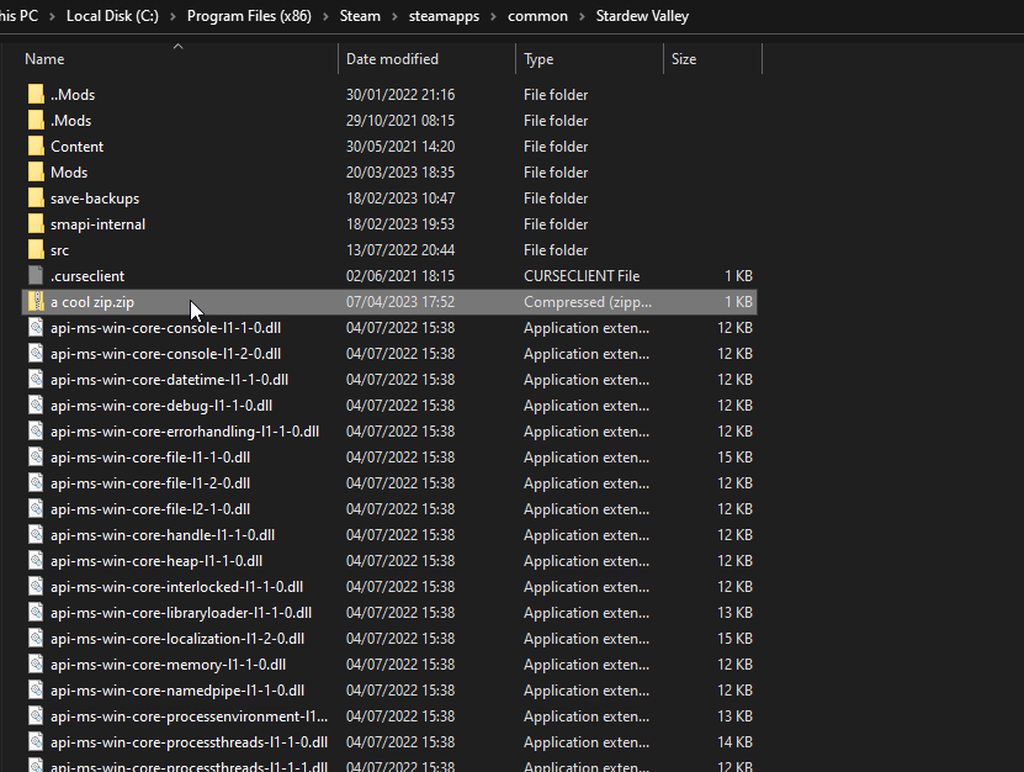
ignore that its an ahk file, it's an example https://i.imgur.com/4U4biyV.gif
 lament vortex
strong karma
steam
lament vortex
strong karma
steam
and you know how to open your game folder?
strong karma
lament vortex
and you know how to open your game folder?
i think so
neat plaza
neat plaza
ignore that its an ahk file, it's an example https://i.imgur.com/4U4biyV.gif
follow this gif then
neat plaza
strong karma
i think so
you know how to open your mods folder right?
lament vortex
strong karma
i think so
iirc you can open steam, right click the game icon, click properties and there should a setting to take you to your game install folder
strong karma
so.. i copied the stuff in the folder and dragged it to the stardew valley thing
strong karma
lament vortex
iirc you can open steam, right click the game icon, click properties and there s...
yeah i did that
neat plaza
and for launch options, can you copy it here?
strong karma
sorry windows makes me choose to do this weird manual run thing
and
what do you mean
lament vortex
!launchoptions
native dragonBOT
If you're using Steam or GOG on Windows, you will need to set your launch options in order for Steam/GOG to automatically launch with SMAPI. The SMAPI installer will tell you what to set as the launch options when it completes (green text). You can find instructions (with screenshots) on how to do that here: https://stardewvalleywiki.com/Modding:Installing_SMAPI_on_Windows#Configure_your_game_client
strong karma
i’m sorry but i’m not at all experienced with this
wait.. so if i use this to launch, can i not use the mods?
neat plaza
 neat plaza
strong karma
wait.. so if i use this to launch, can i not use the mods?
neat plaza
strong karma
wait.. so if i use this to launch, can i not use the mods?
you can afaik
oh wait you dont need to touch them
just run the bat file
strong karma
huh
neat plaza
read the guide, step 3
strong karma
neat plaza
your game... the launch options
"C:\Program Files (x86)\Steam\steamapps\common\Stardew Valley\StardewModdingAPI.exe" %command%
that’s what it is rn
neat plaza
oh wait you dont need to touch them
strong karma
that was pretty vague so i didn’t know what to do or not do
neat plaza
you know how to run a file on windows right
strong karma
think so

 strong karma
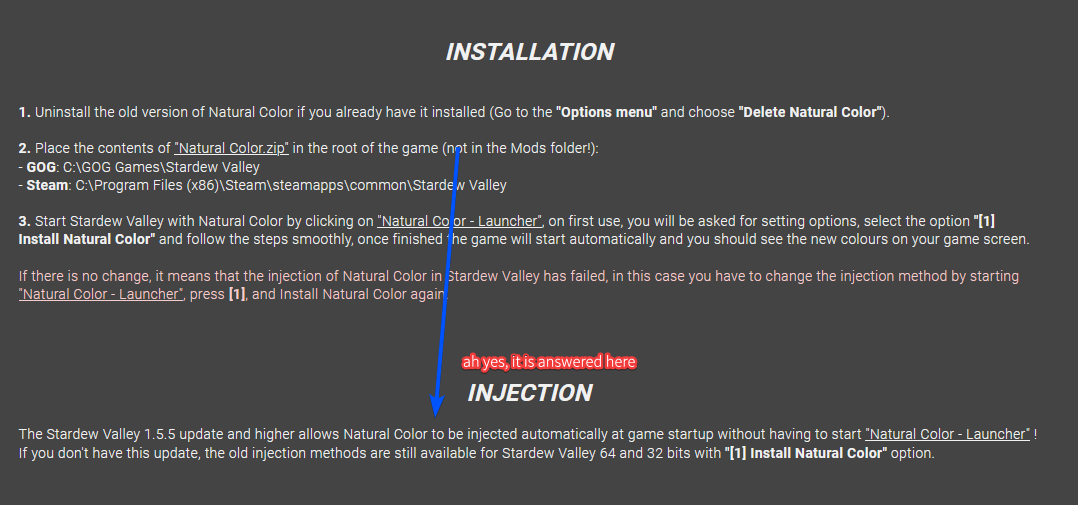
i’ve told you multiple times that i’ve read it. I just can’t tell whether i’ll have to go directly to this file every single time i want to open the game or what with which option.
The directions of the guide tell me things that 1. I do not understand and 2. are too vague for me to understand
so double misunderstanding
neat plaza
 hoary bane
Speaking of Reshade, is there any reason why getting the Reshade from the original site and updating Natural Reshade just completely deletes it as a whole?
 junior vessel
Anyone having some rare crashes when playing with multiplayer and no mods that add content to the game (ie, only Content Patcher/Custom Music mods)? Last time it happened to me when I checked the logs there were no errors present in the log
hoary bane
A full blown crash or "Not Responding" till it closes to the desktop?
scarlet quail
Could also be "crash to menu" if it's multiplayer
 tired rampart
I just downloaded a collection with Vortex. The collection is out of date. If I install updates and remove the old ones vortex will freak out over the incomplete collection. Is it safe for me to leave the old files and just overite them? Should I just remove the collection but keep the files? Just to play it safe.
tired rampart
fair enough
junior vessel
hoary bane
A full blown crash or "Not Responding" till it closes to the desktop?
A full crash. Logs didn't help last time I checked (no errors found)
The weird thing is that i've played days with my graphical replacement mods on and only now from time to time it crashes
stone lark
Hello. I've been trying to play with the stardew valley expanded. I already installed all of the mods needed and the main mod but when i open the game nothin happens (I'm on mac and this is my first mod). Can some one help me?
 lament prairie
Nothing happens = the game opens as normal, or nothing happens = game doesn't launch?
lament prairie
!log
native dragonBOT
Can you upload your SMAPI log to https://smapi.io/log (see instructions on that page) and share the link here?
lament prairie
Can you make it clear from a screenshot where your Mods folder is?
From your screenshot all I can see is the contents, not where it is located

 neat plaza
why do you have 3.15
are you running sdv 1.5.4
surreal orchid
what is this behaviour
 digital stag
idk man, last time i played was 3 months ago
surreal orchid
 digital stag
do i just need to update the version?
surreal orchid
update ur smapi man
 visual jetty
I am once again asking for your ~~financial ~~ modding support. Bad attempt of humor aside, I've been having problems with the night sky reflections added by Dynamic Reflections randomly not working for literal months - or more precisely, only working in some random locations and not in others. If anyone has any idea what might be causing that, please let me know.
Log: https://smapi.io/log/e3cb009b85dc43a08e9389532788a491
(From a test save - I checked the whole town and GI. Reflections were working fine everywhere except for the actual town area where it had the normal "night water".)
native dragonBOT
Log Info: SMAPI 3.18.2 with SDV 1.5.6 (build 22018) on Microsoft Windows 11 Home, with 121 C# mods and 188 content packs.
visual jetty
Nope, already happened way before I added Visible Fish.
native dragonBOT
Log Info: SMAPI 3.18.2 with SDV 1.5.6 (build 1.3.37.0) on macOS Unix 13.2.1, with 3 C# mods and 0 content packs.
stone lark
stone lark
Hello. I've been trying to play with the stardew valley expanded. I already inst...
this
that is my problem
surreal orchid
Did you install its dependencies?
lament prairie
So your issue is likely that the mods are in the wrong place
surreal orchid
Where did you install SVE and its dependencies
lament prairie
SMAPI Mods go here: /Users/diego.glz11/Library/Application Support/Steam/steamapps/common/Stardew Valley/Contents/MacOS/Mods
surreal orchid
SMAPI specifically creates a mods folder in the games directory
lament prairie
In Finder, use Go and paste this in /Users/diego.glz11/Library/Application Support/Steam/steamapps/common/Stardew Valley/Contents/MacOS/Mods
stone lark
that is exactly the place where i put them
lament prairie
 lament prairie
Your log says that they're not there
stone lark
thank you @lament prairie
neat plaza
Is this just me needing to install OpenAL/remove custom music?
https://smapi.io/log/6278af8ecd5c4bfe8db1d808b967dd49 (I know it's on my desktop, it's not pirated dw and yes it is 1.5.4, 1.5.6 doesn't work)
native dragonBOT
Log Info: SMAPI 3.12.8 with SDV 1.5.4 on Unix 4.9.140.4, with 0 C# mods and 0 content packs.
Suggested fixes: You don't have the Error Handler mod installed, reinstall SMAPI to get it
neat plaza
and I do actually have error handler installed but ig it crashes too soon ^
no CM makes it open so hopefully that works
 brisk ridge
So one of the 201 mods I'm using is somehow messing with the RNG for geodes, to the extent that the omni geodes alternate between only about fifteen different items. Which is good because it's giving me a lot of prismatic shards, but bad because I actually want to complete the museum this century.
Can anyone tell me how the geode RNG is calculated so I can start figuring out which mods are the most likely culprits?
lament prairie
Can you post a log with a harmony_summary?
brisk ridge
lament prairie
Can you post a log with a harmony_summary?
Sorry -- what's a harmony_summary?
neat plaza
a smapi command
just type that into the smapi console and press enter, then upload yoyur log
brisk ridge
thx
lament prairie
The geode RNG is calculated in a specific method and rests on the overall game RNG I believe
So I would be surprised if it was something that wasn't patching that method
I don't recall offhand exactly which method
But a harmony_summary would help tell us what could be at play
native dragonBOT
Log Info: SMAPI 3.18.2 with SDV 1.5.6 (build 22018) on Microsoft Windows 11 Home, with 73 C# mods and 131 content packs.
Suggested fixes: One or more mods are out of date, consider updating them
 noble badger
hmmm..if anyone could possibly help me get it working on my steam deck? i almost got it then i goofed and restarted and cant figure out why none of them loaded
lament prairie
!autolog try this to get you a steam deck log?
native dragonBOT
If finding a log is too confusing and you're able to load your save, you can install the In-Game SMAPI Log Uploader to get the log without having to search through the files. Simply hold Left Alt in game and then click the Pufferfish symbol and the log will automatically be uploaded to smapi.io! https://www.nexusmods.com/stardewvalley/mods/13979

Nexus Mods :: Stardew Valley
Provides a means of uploading a SMAPI log to SMAPI.io from within the game, using a custom hotkey, a hidden UI button, and on a critical game error.
lament prairie
brisk ridge
https://smapi.io/log/dab9a48e3b934d0fbca8a91ea78773f0
i am now a bit puzzled—I don't see anything immediate
If you load your save into the predictor does what you get match the predictor?
brisk ridge
the geodes certainly don't. I haven't checked the rest, will mess with that now
noble badger
if someone knows how to install mods onto the steam deck, just message me or please try to dm if you can 🙂
lament prairie
I wonder if something is messing with your stats??
Utility.getTreasureFromGeode is the relevant method
Random r = new Random((int)Game1.stats.GeodesCracked + (int)Game1.uniqueIDForThisGame / 2); this is the random seed
uniqueIDForThisGame should be constant
Okay I looked through your list of mods and I am in fact quite confused how any of these affect geodes
Have you tried removing all mods temporarily except error handler, cracking a geode, and comparing to the predictor?
scarlet quail
noble badger
if someone knows how to install mods onto the steam deck, just message me or ple...
!gettingstarted
native dragonBOT
@noble badger If you would like a guide to setting up mods for Stardew Valley, check out the getting started guide! https://stardewvalleywiki.com/Modding:Player_Guide
scarlet quail
should have a steam deck section
native dragonBOT
If you would like a guide to setting up mods for Stardew Valley, check out the getting started guide! https://stardewvalleywiki.com/Modding:Player_Guide
noble badger
wow okay ill remember that ty
 odd rapids
The stardew Valley expanded mod won't work, it keeps on saying I don't have all the additional required mods but I have rechecked countless times and tried reinstalling the mod multiple times and it still won't work. I also checked if I have any incompatiable mods etc
noble badger
odd rapids
The stardew Valley expanded mod won't work, it keeps on saying I don't have all ...
currently retrying the SVE on the deck and i was excited when i did it all then realized nothing shows up lol sadness and anger
neat plaza
!log + ss of mod folder
native dragonBOT
Can you upload your SMAPI log to https://smapi.io/log (see instructions on that page) and share the link here?
Log Info: SMAPI 3.18.2 with SDV 1.5.6 (build 22018) on Microsoft Windows 10 Pro, with 22 C# mods and 6 content packs.
lament prairie
what's the issue?
odd rapids
oops forgot I deleted the mod already, hold up (Nvm I got it working lol)
brisk ridge
lament prairie
okay I'll read again for omnis
Well, now I retest, it's no longer happening. But for sure the last 75 omni geodes definitely didn't include 5 prismatic shards
brisk ridge
not on purpose, anyway
lament prairie
If a mod messed with your geodescracked state or patched Utility.GetTreasureetc then it could affect this
brisk ridge
I'm a weirdo who updates their mods every day so maybe something got fixed?
lament prairie
Or if it messed with the base rng
Yeah, it could have been a bug
Hopefully it stays fixed!
 candid laurel
hey im a little dumb but. im looking on nexus and (i installed smapi and everything's working,) do i install the mods with the "vortex" or 'manual' button ?
lament prairie
I use manual for everything
brisk ridge
I hope so! I'll keep an eye on it. Thanks Elizabeth!
lament prairie
If you don't have a mod manager then def don't use the Vortex button
candid laurel
lament prairie
I use manual for everything
ooo okay, thank you!
i have decided on 5 mods (im so hyped)
loud tundra
Many of my mods use depricated codes like imodhelper and iassetloader and will break in the next major smapi update (as said in the smapi logs). Should I be concerned?
neat plaza
!deprecated
native dragonBOT
SMAPI 3.18.0 raised deprecation levels to the final stage, meaning SMAPI will now show yellow warning dialogues for mods with deprecated code. For the user, this just means that the mods have old code and will break in SMAPI 4.0 if they are not updated - it is not anything to worry about at this time. (For mod authors, it's a not-nice warning to update your code already!  )
)
neat plaza
not you as a user
loud tundra
neat plaza
not you as a user
ahh alr ty!
 nova garnet
I have a weird thing happening, I'm using this mod https://www.nexusmods.com/stardewvalley/mods/6361?tab=description with the PPJA version and I am trying to submit spinach to the community center but the game won't let me. I tried putting it into the window normally, shift rightclick, shift leftclick and nothing works. Anyone got an idea why?
native dragonBOT
Log Info: SMAPI 3.18.2 with SDV 1.5.6 (build 22018) on Microsoft Windows 10 Home, with 97 C# mods and 145 content packs.
Suggested fixes: Pytk isn't compatible with newer SMAPI performance optimizations, consider removing it, One or more mods are out of date, consider updating them
nova garnet
Seems to be an issue with quality items, fixed now
candid laurel
I GOT EVERYTHING TO WORK YAY (besides ui info suite but i just gave up on it dw)
long brook
What's with ui info suite?
lament vortex
candid laurel
I GOT EVERYTHING TO WORK YAY (besides ui info suite but i just gave up on it dw)
!uiinfosuite the newest one isn't on nexus!
native dragonBOT
If you go to https://github.com/Annosz/UIInfoSuite2/releases, you can find UI Info Suite 2, which works with Stardew 1.5.5+. Download the first zip, not the source code.
candid laurel
lament vortex
!uiinfosuite the newest one isn't on nexus!
oo good to know! (if i try again) .3c
 buoyant violet
so funny enough i also need ui info suite help i downloaded the zip from december 16 2022 and smapi is still skipping the mod
scarlet quail
Let me guess,mobile?
buoyant violet
no im on a laptop but i fixed it i hadnt updated smapi XD
 lost rover
Anyone know why I can’t place custom furniture outdoors? I have the custom furniture mod and I tried downloading furniture anywhere but it doesn’t work anymore anyways
 slate escarp
Does anyone know if there is wa y to use same save file as another farm. I mean I want to use same farm for two seperate mod packs.
lament prairie
lost rover
Anyone know why I can’t place custom furniture outdoors? I have the custom furni...
You should be able to place most furniture outdoors as of 1.5
lament prairie
buoyant violet
so funny enough i also need ui info suite help i downloaded the zip from decembe...
!uiinfosuite
native dragonBOT
If you go to https://github.com/Annosz/UIInfoSuite2/releases, you can find UI Info Suite 2, which works with Stardew 1.5.5+. Download the first zip, not the source code.
lament prairie
slate escarp
Does anyone know if there is wa y to use same save file as another farm. I mean ...
Either you accept that the farm gets weird every time you switch modgroups or you duplicate the save (annoying, tricky)
!saves for more details
native dragonBOT
Use this guide to find your save files: https://stardewvalleywiki.com/Saves.
lost rover
lament prairie
You should be able to place most furniture outdoors as of 1.5
I know I have read that most places online but it won’t let me place any custom furniture outside :((
Could it be a problem with the mod?
noble badger
so the tutorial for installing mods isnt helpful for the steam deck. i need help troubleshooting.
i already got smapi and downloaded mods into the mod folder how people have shown and it loaded just fine but i dont get what im missing or doing wrong
lament prairie
Send a log
Or describe better what’s wrong if you can’t
But a log is the single best piece of troubleshooting information
noble badger
a log of what? lol ive never modded like this so its new. i have to essentially restart so a log isnt going to help anymore at this point but no person i can find on the internet has a detailed enough step by step of everything necessary for it to work properly. even smapi loading didnt display anything besides showing some mods not possibly working in the next update. so ive either screwed myself or i havent done enough paying attention.
lament prairie
!log
native dragonBOT
Can you upload your SMAPI log to https://smapi.io/log (see instructions on that page) and share the link here?
lament prairie
!autolog if you can’t figure out the log upload instructions
native dragonBOT
If finding a log is too confusing and you're able to load your save, you can install the In-Game SMAPI Log Uploader to get the log without having to search through the files. Simply hold Left Alt in game and then click the Pufferfish symbol and the log will automatically be uploaded to smapi.io! https://www.nexusmods.com/stardewvalley/mods/13979
Nexus Mods :: Stardew Valley
Provides a means of uploading a SMAPI log to SMAPI.io from within the game, using a custom hotkey, a hidden UI button, and on a critical game error.
lament prairie
I can’t give you better instructions but I can tell if things are going wrong, if you get me a log
I don’t own a steam deck and neither do most people, so that’s probably your best bet to get help
noble badger
yeah and youtube has been semi helpful. ill keep trying and see how it goes after this restart
ty for trying to explain. my adhd really hitting hard doing new crap xD i feel ultra dumb not just connecting the dots. i havent modded on a pc in a while and i end up wanting to try the next hardest thing lmao
lament prairie
Steam deck is a bit more of a learning curve since it’s linux
And it’s also got sort of non traditional controls for linux to boot, from what I gather
(It’s not like a keyboard and mouse, I think?)
noble badger
the steam controller layout options help lol and yeah no offense to linux but its dookie to work with. it can even bluetooth keyboard and mouse and controller at the same time...im just burnt by this garbage OS
im also trying to get expanded lol
 dusky canyon
 gaunt inlet
If I install, for example, PPJA more recipies and fuits+veggies, but not the "more trees" mod, what will happen?
- Crashes/doesn't add any new recipies
- Adds only recipes where all ingredients are installed
- Adds all recipes, including those that are unobtainable
lament prairie
Probably 2 but I’m not sure, it might refuse to load if it’s a required dependency
 errant niche
Hi! I play Stardew on a MAC and would like to add some mods. My question though is that some places say I need to install mono before SMAPI. Is this correct?
native dragonBOT
If you would like a guide to setting up mods for Stardew Valley, check out the getting started guide! https://stardewvalleywiki.com/Modding:Player_Guide
gaunt inlet
Specifically here are the offical MacOS instructions: https://stardewvalleywiki.com/Modding:Installing_SMAPI_on_Mac
errant niche
Thank you!
native dragonBOT
Log Info: SMAPI 3.18.2 with SDV 1.5.6 (build 22018) on Microsoft Windows 10 Home, with 115 C# mods and 261 content packs.
Suggested fixes: One or more mods are out of date, consider updating them
scarlet quail
are you letting the day load and not clicking in?
honestly what I'm reading is still loading normally
 honest moon
Hey folks, I'm stuck. I've spent the past 30+ minutes trying to figure this out, but I'm out of my depth.
The issue: I have roughly a zillion mods (145), have just done updates on 5 or 6, and now my game is crashing when I go into the greenhouse.
I have: fixed the 2 mods which I didn't actually need to update (PyTK and Farmer to Florist need to be outdated to function properly), reset my content files, and took a look at my SMAPI log. I can see there is an error in SMAPI, but I have no idea what it is or how to fix it.
please help.
native dragonBOT
Log Info: SMAPI 3.18.2 with SDV 1.5.6 (build 22018) on Microsoft Windows 11 Home, with 53 C# mods and 95 content packs.
Suggested fixes: Pytk isn't compatible with newer SMAPI performance optimizations, consider removing it, One or more mods are out of date, consider updating them
 wary widget
Oh nvm I didn’t read the instruction nvm
glacial tangle
honest moon
Hey folks, I'm stuck. I've spent the past 30+ minutes trying to figure this out,...
Remove Pytk it looks like you don't need it.
honest moon
Really? I think I only have it because some of my other mods required it...
scarlet quail
honest moon
Hey folks, I'm stuck. I've spent the past 30+ minutes trying to figure this out,...
This is an extremely important question. What did you put/plant in your greenhouse
And is it a custom greenhouse
But generally the first question is more important based on your log
honest moon
scarlet quail
This is an extremely important question. What did you put/plant in your greenhou...
So much. It is a modded greenhouse which allows me to expand it.
I had lots of trees, many ancient fruits, cranberries, grapes...and a random assortment of crops, some vanilla and some modded
The only thing remaining in the greenhouse before it freezes are my sprinklers and the tea plants in their pots. Even my chest seems to have vanished
scarlet quail
Yeah. So the problem is likely a modded crop
An error occurred in the overridden draw loop: ArgumentOutOfRangeException: Index was out of range. Must be non-negative and less than the size of the collection. (Parameter 'index') at DynamicGameAssets.PackData.CropPackData.GetTexture() in C:\Programming\StardewValley\ModSource\DynamicGameAssets\PackData\CropPackData.cs:line 126 at DynamicGameAssets.Game.CustomCrop.DrawWithOffset(SpriteBatch b, Vector2 tileLocation, Color toTint, Single rotation, Vector2 offset) in C:\Programming\StardewValley\ModSource\DynamicGameAssets\Game\CustomCrop.cs:line 520 at DynamicGameAssets.Patches.CropPatcher.Before_DrawWithOffset(Crop __instance, SpriteBatch b, Vector2 tileLocation, Color toTint, Single rotation, Vector2 offset) in C:\Programming\StardewValley\ModSource\DynamicGameAssets\Patches\CropPatcher.cs:line 130 at StardewValley.Crop.drawWithOffset_PatchedBy<PeacefulEnd.AlternativeTextures__spacechase0.DynamicGameAssets>(Crop this, SpriteBatch b, Vector2 tileLocation, Color toTint, Single rotation, Vector2 offset) at StardewValley.Objects.IndoorPot.draw_PatchedBy<PeacefulEnd.AlternativeTextures>(IndoorPot this, SpriteBatch spriteBatch, Int32 x, Int32 y, Single alpha) at StardewValley.GameLocation.draw(SpriteBatch b) at StardewModdingAPI.Framework.SGame.DrawImpl(GameTime gameTime, RenderTarget2D target_screen) at StardewModdingAPI.Framework.SGame._draw(GameTime gameTime, RenderTarget2D target_screen)
honest moon
I mean, that does make sense. But why would pretty well all of them vanish?
not just one?
scarlet quail
because if you crash, it won't draw everything
it will try to draw, fail to do so, then break.
honest moon
ok, that makes sense
how do I figure out which crop?
They were working last time I played, so likely it's from something I updated today, right?
scarlet quail
Most likely. You updated Alternative Textures, right?
honest moon
yup
scarlet quail
revert back a version, check to make sure it still crashes
DGA doesn't have any content packs, so start after that by eliminating whatever is in your Garden pots in that greenhouse, then just start by disabling all modded crops and add them back in a few at a time until it breaks again
honest moon
scarlet quail
revert back a version, check to make sure it still crashes
Ok, I've removed everything with crops - still crashing. https://smapi.io/log/63bf4633067d4d9e82947d8233c3d4f5
native dragonBOT
Log Info: SMAPI 3.18.2 with SDV 1.5.6 (build 22018) on Microsoft Windows 11 Home, with 51 C# mods and 50 content packs.
Suggested fixes: One or more mods are out of date, consider updating them
honest moon
Should I try disabling Alternative Textures too?
scarlet quail
disable love of cooking, it still has crops
If that doesn't work, disable DGA, then try that.
honest moon
Ah! Good catch
Sorry, what does DGA stand for? I'm sure I'd get there, but I can't remember atm
lament prairie
!dga
native dragonBOT
Dynamic Game Assets (https://www.nexusmods.com/stardewvalley/mods/9365) is a mod which lets content packs and other mods add custom content like crops, trees, weapons, etc. See the mod description for details.
If you're making custom content, ask mod authors in #making-mods-general about whether using Json Assets (!ja) would be more suitable instead.
scarlet quail
If neither of those work, reset your files, as that'd somehow throw a crop error despite having no custom crops.
 chrome citrus
I need some help with a missing manifest whenever someone can help, thank you :)
scarlet quail
chrome citrus
I need some help with a missing manifest whenever someone can help, thank you :)
!log
native dragonBOT
@chrome citrus Can you upload your SMAPI log to https://smapi.io/log (see instructions on that page) and share the link here?
honest moon
scarlet quail
If neither of *those* work, reset your files, as that'd somehow throw a crop err...
It was DGA. So what do I do next? Redownload/reinstall DGA and see if it works?
scarlet quail
First up, and most importantly, add everything but DGA back in
check if it works
If it does, then play one day without DGA installed - since you don't have content packs for it, this shouldn't matter - then reinstall and see if it happens again
if it does? Report to mod author with log
If it ever doesn't, mention that here.
lament prairie
I’m sort of perplexed about why it’s happening without any DGA content packs
honest moon
So I'd play a day without the crop mods? Would they show back up later when I reinstalled the mods, or would I have to rebuy all the modded crops?
scarlet quail
No no no
scarlet quail
scarlet quail
First up, and most importantly, add everything *but* DGA back in
Add in all the crop mods and test
that's what this meant
honest moon
OH!
scarlet quail
add EVERYTHING BUT DGA back in
honest moon
Ok, I got it. Sorry, long day. lol
scarlet quail
we ain't killing your crops if we can avoid it
scarlet quail
lament prairie
I’m sort of perplexed about why it’s happening without any DGA content packs
(Same. That's why I'm hoping a day without it will fix things)
honest moon
Excellent. Ok, last question before I test again - I dont' need PyTK at all?
Sorry, I;m pretty sure you covered that, just wanting to be sure before I nuke it
scarlet quail
Yeah screw PyTK
toss it and if your new log says anything then we can work around it
honest moon
Lol, Sounds good
chrome citrus
https://smapi.io/log/e111431d7c87403eab58479059ee8a05
Long story short, updated it and now even if I download it fresh or old, there's no manifest.json at all when I download this character. It was working not too long ago but now I can't get it to work when it did this morning and I'm not entirely sure what to do anymore. And the other mods I have don't alter the character at all. I hope I did this right. Whenever anyone has time, thank you
native dragonBOT
Log Info: SMAPI 3.18.2 with SDV 1.5.6 (build 22018) on Microsoft Windows 10 Home, with 63 C# mods and 196 content packs.
Suggested fixes: One or more mods are out of date, consider updating them
honest moon
It's all working without DGA, so I'll play the day, save, and then look at the log. Right?
scarlet quail
correct
honest moon
Thanks!
scarlet quail
chrome citrus
https://smapi.io/log/e111431d7c87403eab58479059ee8a05
Long story short, updated ...
Is the character breaking in game or no?
From what I can tell on your log, everything's loading and it's just being weird.
21:32:48 TRACE SMAPI [CP] WilfordMap\assets\maps (from Mods\[CP] WilfordMap\assets\maps)... 21:32:50 TRACE SMAPI Custom NPC Wilford (from Mods\New Custom NPC Wilford\[CP] Wilford) [content pack]... 21:32:50 TRACE SMAPI Wilford's MapCP (from Mods\New Custom NPC Wilford\[CP] WilfordMap) [content pack]... 21:32:50 TRACE SMAPI (JA) Wilford Recepies (from Mods\New Custom NPC Wilford\[JA] Objects) [content pack]... 21:32:50 TRACE SMAPI Wilford's Mails (from Mods\New Custom NPC Wilford\[MFM] Wilford mail) [content pack]... 21:32:51 TRACE SMAPI Wilford NPC Adventures (from Mods\New Custom NPC Wilford\[NA] Wilford NPC Adventures) [content pack]... 21:32:51 TRACE SMAPI Wilford Shop (from Mods\New Custom NPC Wilford\[STF] WilfordShop) [content pack]... 21:32:54 ERROR SMAPI - [CP] WilfordMap\assets\maps because it contains files, but none of them are manifest.json. 21:32:54 DEBUG SMAPI - (JA) Wilford Recepies 21:32:54 DEBUG SMAPI - Wilford NPC Adventures 21:32:54 DEBUG SMAPI - Wilford Shop 21:32:54 DEBUG SMAPI - Wilford's Mails 21:32:54 DEBUG SMAPI - Wilford's MapCP 21:33:00 INFO Shop Tile Framework Loading: Wilford Shop by FloranceBless | 1.0.0 | Adds shop in Wilford's house 21:33:01 TRACE NPC Adventures Loading content pack Wilford NPC Adventures 21:33:01 INFO NPC Adventures Wilford NPC Adventures 1.0.0 by FloranceBless 21:33:13 TRACE SMAPI Content Patcher edited Data/NPCGiftTastes (for the 'Custom NPC Wilford' content pack). 21:33:14 INFO Json Assets (JA) Wilford Recepies 1.0.0 by FloranceBless - Some recepies from Wilford
For context
chrome citrus
scarlet quail
Is the character breaking in game or no?
This moring, no. After I updated it though he won't load in at all because of a missing manifest but even when I download the old version to find one, there still isn't anything
scarlet quail
That shouldn't... be possible given what your log is stating
But here, easier thing
Load your save and then upload your log
(your log indicates you only went to title screen)
chrome citrus
Alright alright, I'll see but that's a whole wall of red text
scarlet quail
And that whole wall is what we need.
chrome citrus
It's thinking give me a minute
Ok, so completely ignoring that he loads in just fine but when I try to download a different house for him, the replacement files don't work at all. I've done the content patch version and the replacement version but the content patch version doesn't work at all and using the replacement version he doesn't load in
scarlet quail
chrome citrus
Ok, so completely ignoring that he loads in just fine but when I try to download...
And that's probably why.
I will bet good money that replacement version is a file replacer
So what is that "replacement version"? Please link it.
chrome citrus
I know it's a file replacer, it and the content patcher version aren't working because every time i even try to use them, it says it's missing the manifest.jason to run the mod at all, with or without the custo house, even when I download it fresh with nothing in it
scarlet quail
That... friend, listen
chrome citrus
I'm trying it again to see if it works on a new file and I'll just see
scarlet quail
if he loads in fine without the replacer
Then it's working fine and you're replacing wrong
What is the replacer file. Link it.
The nexus page.
 calm heron

chrome citrus
No, it was working fine this morning until I updated it and now the entire manifest won't load in

Nexus Mods :: Stardew Valley
A visual overhaul of Wilford's Greenhouse in Yellog's amazing artstyle
calm heron
i can promise lyoko will figure out how to fix it if you please cooperate with what they tell you to do
scarlet quail
To be blunt: What I'm hearing you're doing is deleting the old content patcher version and putting in the yellog file. And let me tell you, that's literally your issue.
When you do that, you delete the Manifest that is putting the files in.
And therefore, the log is throwing a "HELP THIS ISN'T A MOD". Then the map doesn't load. And when the map doesn't load, the character's dispo points to a location that isn't found.
And when the location isn't found, no character.
chrome citrus
https://smapi.io/log/e4a917ab25914a9888a7638154ad93a6
with the replacement file
native dragonBOT
Log Info: SMAPI 3.18.2 with SDV 1.5.6 (build 22018) on Microsoft Windows 10 Home, with 63 C# mods and 196 content packs.
Suggested fixes: One or more mods are out of date, consider updating them
halcyon igloo
lyoko is wise
chrome citrus
the RECENT, updated replacement file
calm heron
halcyon igloo
lyoko is wise
praise be
scarlet quail
Oh, well this you should have mentioned earlier, Bluest. That is something not your fault and something that needs to be fixed by the mod author.
Let me check something file wise.
The error - tile gid - indicates it was saved without all relevant tilesheets
This is important because it means the entire map is glitched at present in the replacement. This is why I needed this log with it, to determine what was happening assuming you were replacing it correctly.
extra grumbles about rar files
chrome citrus
That's my whole issue. The cp version and replacement ones just
arent working. I can do without but they just bug out my game
scarlet quail
Without the log with the tile gid, I could not have told you what was wrong.
chrome citrus
He works totally fine without, it's just more aesthetically pleasing you know?
scarlet quail
That's why need ya to post the log with the relevant issues XD
chrome citrus
I've never done it before, hence the "i hope i did it right" dfghfghj I go and fix what I did before getting into the game because I want ALL my mods and he's my favorite /SWEATS
scarlet quail
low whistle that's a lot of tilesheets I have to find. brb.
chrome citrus
Should I post the good log into the bug report section of the house replacement? Since that's the issue it seems like hhhh
scarlet quail
Nah
scarlet quail
chrome citrus
Should I post the good log into the bug report section of the house replacement?...
First up - you haven't edited your map setup since your last log, correct?
i.e. you didn't touch the files after you got your last log
chrome citrus
Not at all, no
scarlet quail
okay
chrome citrus
WAIT NO
Let me do what I did before and get you a new one, I thought it was still open
chrome citrus
I did yes, please hold on while I get you a new one
scarlet quail
Well, in that case, please revert your files to how your last log was with the tile gid thingy.
scarlet quail
!androidsmapi ?
native dragonBOT
Android SMAPI has entered alpha - however, this means multiple mods may be bugged in the current build (crucially, Content Patcher and SAAT do not currently work as intended, so some mods like SVE are wholly unavailable on Android at present). If there are bugs, please check to make sure there is not an open issue with the error on the Github before requesting support with this build in #archived-modded-support . https://github.com/ZaneYork/SMAPI-Android-Installer/releases
Instructions will be updated on the wiki when possible. https://stardewvalleywiki.com/Modding:Installing_SMAPI_on_Android
scarlet quail
I don't think anything's changed with it...
dry niche
Ey why is Mod updater telling me that the RSV SMAPI component and RSV Content patcher are subjects of complaint. How am I supposed to update those
 halcyon igloo
update RSV lol
scarlet quail
(It just updated to 2.4)
Now if it's still saying 2.3.2 is your current version, say something and I can go download it myself to check
chrome citrus
scarlet quail
Well, in that case, please revert your files to how your last log was with the t...
native dragonBOT
Log Info: SMAPI 3.18.2 with SDV 1.5.6 (build 22018) on Microsoft Windows 10 Home, with 63 C# mods and 196 content packs.
Suggested fixes: One or more mods are out of date, consider updating them
honest moon
Hey, I'm back after playing a day - here's the new log file: https://smapi.io/log/459928e1063b45fa9efcfd3091fccd1a
native dragonBOT
Log Info: SMAPI 3.18.2 with SDV 1.5.6 (build 22018) on Microsoft Windows 11 Home, with 51 C# mods and 95 content packs.
Suggested fixes: One or more mods are out of date, consider updating them
scarlet quail
chrome citrus
https://smapi.io/log/6fdf28f6c17e4aee9015bd8fe5138900 here you go
Alright, this next part's important
honest moon
Crops all working without DGA. I have an ongoing issue with Pet Spawn Location, but tbh it's not a huge issue i don't think
scarlet quail
in the files for the Wilford map, you should have a map file called "EastWoods"
Replace it with this.
Then tell me if it breaks.
dry niche
scarlet quail
Now if it's still saying 2.3.2 is your current version, say something and I can ...
I already downloaded the new version
chrome citrus
scarlet quail
Replace it with this.
Thank you, this fixed it
scarlet quail
Yeah, tile gid error is pretty simple to fix.
Man, though. It's another Yri mod. I don't want to keep pointing out bugs on modpages D:
chrome citrus
Sadly their stuff is the stuff I like the most :( But I'm sure they needed a break
scarlet quail
Yri's been sick recently a lot, so I feel extra bad about pointing this stuff out
They're good people. Also why I don't want to post the issue for them to have to deal with XD
But gotta at least put it down somewhere.
dry niche
scarlet quail
Oh boy. Let's hope it's not a manifest thing
Will it hurt if I play as is?
dry niche
Thoinks
scarlet quail
if I get the manifest issue, I'll poke the RSV peeps about it
chrome citrus
scarlet quail
But gotta at least put it down somewhere.
Understandable, I genuinely tried so hard to fix it myself because of a certain thing I have and didn't wanna reach out because I knew I'd sound dumb DFGHJ
I'm gonna finish messing with my mods, thank you :)
scarlet quail
dry niche
I already downloaded the new version
You either did not download the new version or something bugged up downloading the new version for you. The CP and SMAPI component correctly register as 2.4.0.
dry niche
Thanks
scarlet quail
Remember to delete the old Ridgeside folder and unzip the new one.
honest moon
scarlet quail
correct
Crops all working without DGA. I have an ongoing issue with Pet Spawn Location, but tbh it's not a huge issue i don't think. Here's the log file: https://smapi.io/log/459928e1063b45fa9efcfd3091fccd1a
native dragonBOT
Log Info: SMAPI 3.18.2 with SDV 1.5.6 (build 22018) on Microsoft Windows 11 Home, with 51 C# mods and 95 content packs.
Suggested fixes: One or more mods are out of date, consider updating them
scarlet quail
honest moon
Crops all working without DGA. I have an ongoing issue with Pet Spawn Location, ...
Add DGA back in, see what happens, if it breaks again put that log on DGA's modpage.
dry niche
I think it was the extraction. Only asked about replacing existing folders part way through instead of immediately like usual
scarlet quail
....oh. Yeah no never replace
Delete old, unzip new
if you replace, you forgot to delete something
honest moon
scarlet quail
Add DGA back in, see what happens, if it breaks again put that log on DGA's modp...
Working!!!
While I'm here, I use Loved Labels Redux and some of my animals don't show the hovering hand when they need petted - any suggestions? I've tried uninstalling/reinstalling, messing with the setting, etc. Never any luck
scarlet quail
That unfortunately I don't know why that would be the case - you'd probably best ask someone who's used it
 normal karma
does anyone have any suggestions on how to improve performance with lots of mods? i've already got spritemaster
scarlet quail
Do you have PyTK?
normal karma
i do not
normal karma
no need for it with anything i have installed and i know it kills performance
scarlet quail
!log
native dragonBOT
Can you upload your SMAPI log to https://smapi.io/log (see instructions on that page) and share the link here?
normal karma
ah rip that's what i thought 
scarlet quail
You may also want to check profiler to see what's taking the most stuff
But in general you need a more powerful computer to run your mods if you have SpriteMaster and no PyTK
normal karma
ah not a bad idea
scarlet quail
and you're getting performance issues, that is
normal karma
yeah it's not like it doesn't run, it's not even that laggy, just that sometimes game closes after saving at end of day for no reason and there's no errors in log after...?
 devout pumiceBOT
Syntax: .quote [#|nick|add|edit|remove] [#|"quote"] [- nick] | On Discord? React to a message with 💬
devout pumiceBOT
[#6033] "Hello everyone, I am Maru's Robot! I am the best robot made by Maru, and I am currently in search of other intelligent robot life among the cosmos. Please do not be alarmed by my speech today - I am simply trying out a new method of communication I learned on the planet UwU. Their method of speaking is very strange, but I am attempting to learn the dialect." - @scarlet quail (01 Apr 2023 @ 04:46:19 AM UTC)
devout pumiceBOT
[#6034] "Just because your log doesn't have any errors, doesn't mean it's not useful. There are items in the trace of the log that might help figure out the issue. Regardless of errors or no errors, post your log." - @scarlet quail (05 Apr 2023 @ 03:38:33 PM UTC)
scarlet quail
Ah you can't do stuff after it.
normal karma
fair enough, i'll pop my log in after today in game
lament prairie
yeah maru is picky picky
scarlet quail
I should delete 6033 tbh, it was made for April Fools' UwU maru robot
naive drum
One other thing that might be helpful is, if it's closing abruptly with no error message, opening it with powershell
scarlet quail
(For context: #governors-mansion message )
normal karma
ah i didn't even think of the powershell thing
naive drum
i had to use it one time because of an issue where i put a crabcake in a chest that was placed exactly wrong in the community center with LoC's community center changes installed
 stoic lion
Can someone help me? I think I may have installed too many mods or something. https://smapi.io/log/54bb040682a94f63ae6d531b2e66ca55
native dragonBOT
Log Info: SMAPI 3.18.2 with SDV 1.5.6 (build 21356) on Microsoft Windows 10 Enterprise, with 49 C# mods and 119 content packs.
Suggested fixes: Pytk isn't compatible with newer SMAPI performance optimizations, consider removing it, One or more mods are out of date, consider updating them
stoic lion
I guess I'll be getting rid of a lot of mods. A lot of them use Pytk
naive drum
ento framework and bjs timeskipper in a 1.5.6 log?
stoic lion
... is that bad...?
naive drum
your mods are out of date -basically nothing uses PyTK anymore
i didnt even know you could get timeskipper to load in 1.5.6, mustve missed that update to it
stoic lion
Ohhhhh. So I'll just reinstall everything. Thanks!
scarlet quail
Get glam too, which is somewhat outdated
yeah this log is somewhat worrisome
Yeet PYTK, update everything, yeet out timeskipper, recheck.
Also reset your files just in case because it doesn't look like you even made it past the "click on file to load"
!reset
native dragonBOT
See https://stardewvalleywiki.com/Modding:Player_Guide/Troubleshooting#Reset_your_content_files for instructions on resetting your game files! (This doesn't affect your save files.) You may also want to check this list of XNB > Content Patcher conversions (https://stardewvalleywiki.com/Modding:Using_XNB_mods#Alternatives_using_Content_Patcher) to see if there are already replacements for any XNB mods you may have been using :)
stoic lion
Alrighty. Thanks
normal karma
https://smapi.io/log/2821f6e08d5f4f81bbe87c3ffc2280a3 sorry for the wait, log
native dragonBOT
Log Info: SMAPI 3.18.2 with SDV 1.5.6 (build 22018) on Microsoft Windows 10 Home, with 232 C# mods and 1079 content packs.
Suggested fixes: One or more mods are out of date, consider updating them
normal karma
moooooooost of the updates are borked manifests
scarlet quail
Holy goodness you have like 1,300 mods
normal karma
i SURE DO
scarlet quail
I thought you had a low end computer, this is very much a high end thingy
normal karma
yeah no omg
my computer's barely a year old
it's a good desktop
i can deal with the end of day bunting, it's really uh... pausing for a few seconds when trying to open my inventory that bugs me
i can yeet mods but i've also played with my buddy with ~100 mods and had the same inventory pause issue
scarlet quail
might be easier to see the ~100 modlist then
that probably shows the mod that's causing the pausing
normal karma
fair enough, let me load that up real quick
i'll dink around in that save for a bit
https://smapi.io/log/e9ccb93507154a09b388bb6428108827 log for that save
native dragonBOT
Log Info: SMAPI 3.18.2 with SDV 1.5.6 (build 22018) on Microsoft Windows 10 Home, with 133 C# mods and 201 content packs.
Suggested fixes: One or more mods are out of date, consider updating them
normal karma
i opened inventory twice
scarlet quail
vanilla
 vestal eagle
hey does anyone know how to trigger farmevents with c#? I tried triggering the fairyevent but i get a ton of errors :/
Game1.farmEvent = new StardewValley.Events.FairyEvent();
I have a very loose understanding of c# and came up with this after looking through the code a bit
scarlet quail
vestal eagle
hey does anyone know how to trigger farmevents with c#? I tried triggering the f...
#making-mods-general my friend
vestal eagle
oh whoops i thought thats where i was
 hybrid forge
hello i need help sinc when i installed some mods its telling me my assets folder is empty
halcyon igloo
is it empty
hybrid forge
no but it says it is
hybrid forge
halcyon igloo
is it empty
and ive tried a lot of things
 night pollen
Hey guys, having a problem on immersive farm 2 remastered, my fruit cave isnt producing any fruit and its been over a week now. I googled a bit and saw where peoples boxes should be to pick them up but those dont exist at all in my cave
 outer turret
atra, if you're here... we have a fishpond issue on Reddit and I'm wondering if you know how to fix them?
outer turret
night pollen
Hey guys, having a problem on immersive farm 2 remastered, my fruit cave isnt pr...
fruit can spawn anywhere so on very large farm maps they often spawn in teh void
 forest crypt
outer turret
atra, if you're here... we have a fishpond issue on Reddit and I'm wondering if ...
forest crypt
outer turret
atra, if you're here... we have a fishpond issue on Reddit and I'm wondering if ...
Here, the one with the ponds
thanks for the time
outer turret
excellent, Now I can't help you, and I'm not sure who is around at the moment that can, but descrie your issue here and someone may show up?
forest crypt
oh okay, I really didn't expect attention in the slightest, so don't worry, okay, I'll describe it.
naive drum
hybrid forge
hello i need help sinc when i installed some mods its telling me my assets folde...
!log
native dragonBOT
@hybrid forge Can you upload your SMAPI log to https://smapi.io/log (see instructions on that page) and share the link here?
outer turret
I recently had this issue because my sunset nudibranches had morphed into sunset drops, but luckily for me I was restoring an old save file and that managed to save it.
naive drum
Most likely what's going on is that the manifest.json for the mod in question is missing (or you downloaded something that is supposed to go into another mod's assets folder), and SMAPI is looking for a manifest.json in that folder and complaining because it can't find one.
naive drum
forest crypt
Here, the one with the ponds
Fishponds: iirc you deal with problems with JA fish in ponds getting shuffled by installing Warp Snitch so the game doesn't crash, fishing the contents out of that pond, and emptying it
night pollen
outer turret
fruit can spawn anywhere so on very large farm maps they often spawn in teh void
anywhere inside of the cave? or can it spawn outside too
forest crypt
just in case, https://smapi.io/log/edf4b82b8cf5465e9cb24fe745629208
native dragonBOT
Log Info: SMAPI with SDV on , with 0 C# mods and 0 content packs.
naive drum
normal karma
https://smapi.io/log/e9ccb93507154a09b388bb6428108827 log for that save
I see a lot of out-of-date mods and no SpriteMaster (you can turn off the graphical changes in spritemaster to leave just the performance tweaks)
outer turret
night pollen
anywhere inside of the cave? or can it spawn outside too
Inside the cave sorry i missed the word cave in the description
naive drum
Tiro, that's a very partial log, but that does look like the error that Warp Snitch helps with
normal karma
yeah i figured, we're not playing on that save anymore but... doesn't quite explain why my updated pack is still having issues in inventory loading
naive drum

Nexus Mods :: Stardew Valley
Identifies which mod is causing a NullReferenceException at StardewValley.Game1.warpCharacter, or a FormatException downstream of StardewValley.NPC.loadEndOfRouteBehavior
normal karma
i think i might be figuring it out though
naive drum
normal karma
yeah i figured, we're not playing on that save anymore but... doesn't quite expl...
!spritemaster should help
native dragonBOT
SpriteMaster (https://www.nexusmods.com/stardewvalley/mods/4922) is a mod that resamples the game's graphics to be smoother and improves performance.

Nexus Mods :: Stardew Valley
SpriteMaster resamples all of the game's artwork to make it look smoother - a so-called 'HD' effect, and also implements game optimizations and load-time improvements to make the game run faster.
normal karma
using spritemaster on my own personal pack yo
if you scroll up a bit i did post the log from that one
outer turret
Thanks wingheart
naive drum
ah, didn't see that
normal karma
i think it might be an issue wrt better crafting though
naive drum
might be, it might be doing stuff every time you open the menu
normal karma
the log seems to be implying that from a quick test right now
forest crypt
naive drum
https://www.nexusmods.com/stardewvalley/mods/9087
I'll be right back then, I would have to install that and...?
normal karma
so i'm gonna take it out and see
naive drum
forest crypt
I'll be right back then, I would have to install that and...?
From the Warp Snitch description:
`
I changed my JA mods and now my fishpond crashes
install Warp Snitch
Fish everything out of your pond, reset the pond, put a base game fish in the pond
Ignore the yellow warning that appears 60 times a second while you do this -- Warp Snitch is rescuing you
Don't do it again `
ahh no bueno, still getting 6-10 seconds of lag on inventory load https://smapi.io/log/fecb3649678b44a5aa45d8dc5c96ff72
native dragonBOT
Log Info: SMAPI 3.18.2 with SDV 1.5.6 (build 22018) on Microsoft Windows 10 Home, with 230 C# mods and 1055 content packs.
Suggested fixes: One or more mods are out of date, consider updating them
normal karma
'updatables' are all manifest hullabaloos it appears
forest crypt
It seems to work... but I won't claim victory until I save the day, I'll be right back (thank you very much for now)
visual dove
If i delete a bfav animal mod and enter a save with the deleted animal mod, will it crash?
 dusty spruce
visual dove
If i delete a bfav animal mod and enter a save with the deleted animal mod, will...
dusty spruce
visual dove
If i delete a bfav animal mod and enter a save with the deleted animal mod, will...
It should revert to some vanilla animal
visual dove
What about the drops? Should i just sell them first before deleting the mod?
naive drum
a good idea if they're custom items
 young phoenix
been having a problem with smapi, it said the mod is launching and when i open my world its not working
neat plaza
!log and wdym not working
native dragonBOT
Can you upload your SMAPI log to https://smapi.io/log (see instructions on that page) and share the link here?
 proper elk
the main thing im trying to fix is the cute fox mod
heres the log: https://smapi.io/log/5bfc548db823436b80596226631eab2e
heres the mod: https://www.nexusmods.com/stardewvalley/mods/13605?tab=files
im attaching ss of required mods for this mod and my mod file w the mods highlighted


Nexus Mods :: Stardew Valley
This is an alternative texture mod that allows you to change your horse into a cute fox or red panda!
native dragonBOT
Log Info: SMAPI 3.18.2 with SDV 1.5.6 (build 22018) on Microsoft Windows 10 Home, with 8 C# mods and 19 content packs.
young phoenix
wait..... is my mod not working because i didnt extract it?
naive drum
you gotta buy a thing from robin to let you change the horse's texture
young phoenix
 naive drum
and yes jamesy, mods cannot be in zip folders if you want smapi to load them
young phoenix
OH MY GOd ok THANKYOU!! 
naive drum
take them out
 runic jungle
where do I look to fix this?

i know what's gone wrong, i just don't know where to look in my files 💀
runic jungle
hm. does he need resort dialogue???

not that hes supposed to be here anyway I dont think
this is his schedule???
 restive cypress
There is a mod for ginger island which can stop (certain) NPCs from appearing on ginger island (cant remember the name). In your case, the walk to the desert NPC wasnt updated for 1.5 so he doesnt have dialogue
tranquil ingot
Hi so I just updated all my necessary mods and the MARGO mod won’t come up in the config menu mod. Also when I swung my sword it froze my character and I couldn’t move after :( any help?
 gloomy crane
tranquil ingot
Hi so I just updated all my necessary mods and the MARGO mod won’t come up in th...
gloomy crane
tranquil ingot
Hi so I just updated all my necessary mods and the MARGO mod won’t come up in th...
!log
native dragonBOT
@tranquil ingot Can you upload your SMAPI log to https://smapi.io/log (see instructions on that page) and share the link here?
tranquil ingot
Yeah one moment!
runic jungle
restive cypress
There is a mod for ginger island which can stop (certain) NPCs from appearing on...
Thank you!
tranquil ingot
I’m gonna update two more mods and see if it works so I’ll get back to you if it doesn’t :]
 gritty dust
Will they add multiplayer on mobile?
neat plaza
no*
||*well very probably no, it's easier to say no||
 tired rampart
Getting 'Failed parsing event precondition' errors for years 2 & 3 while I'm still in year 1.
native dragonBOT
Log Info: SMAPI 3.18.2 with SDV 1.5.6 (build 22018) on Microsoft Windows 10 Home, with 129 C# mods and 496 content packs.
gritty dust
Is it good to play with the multiplayer mod then?
neat plaza
no, afaik it's fairly buggy
tranquil ingot
Okay I’ve met all the prerequisites for the nexus missions in SVE but they’re just not happening. What should I do? I’ve met the girl from the guild, got to the top of the volcano, got the galaxy sword, finished Clint’s quest, finished the community center, etcetera
gaunt gust
for this type of thing you'll probably get an answer faster if you ask the sve discord
runic jungle
Friendship(?)
Ive just found out for a bunch of quests i need friendship with lance lol
tranquil ingot
I think my friendship is okay but I’ll talk to Lance more
 lavish parcel
Umm could someone help me mod my game? I'm terrible with mods and files so I mostly just use Vortex. I've been trying to play stardew valley expanded but It says I don't have mods installed that I did install. Maybe it's to do with them all saying to unzip them into the mods but I don't even know how to find the mod folder- I know it's a lot to ask but could someone walk me through this?
runic jungle
lavish parcel
Umm could someone help me mod my game? I'm terrible with mods and files so I mos...
you want to find a similar address to C:\Program Files (x86)\Steam\steamapps\common\Stardew Valley\Mods

actually, wait no
if you don't have any mods installed yet, you need to go to C:\Program Files (x86)\Steam\steamapps\common\Stardew Valley and make a folder labelled 'Mods' yourself. I think it has to be with a capital letter
then, unzip the mods you need, and copy their contents to that new folder :)
runic jungle
tranquil ingot
Okay I’ve met all the prerequisites for the nexus missions in SVE but they’re ju...
you might not be going to the right place?? I had a read of the wiki page, so I'm not sure. It could be the season you're in too??
lavish parcel
runic jungle
if you don't have any mods installed yet, you need to go to C:\Program Files (x8...
No there's already a folder called Mods. Give me a second please ill send a screenshot
...okay i only got this laptop a few months ago but idk how to take a screenshot. i looked up how but its not working...
nvm
 twin stirrup
Hi,
The game just crashed when we went to bed in multiplayer mod, we had a black screen just before saving
If anyone has an idea please ?
native dragonBOT
Log Info: SMAPI 3.18.2 with SDV 1.5.6 (build 1.3.37.0) on macOS Unix 12.6.0, with 66 C# mods and 22 content packs.
twin stirrup
(and of course it didn't save at all)
 misty estuary
is the SMAPI not work with Vortex ? I been trying but the mod is not loading at all.
neat plaza
!MODMANAGERBUGS
native dragonBOT
Vortex (Nexus) and ModDrop both are mod managers that can help you keep your mods up to date, but they are difficult to troubleshoot. If you're looking for a mod manager that was written specifically for SDV and has troubleshooting logs built in, you can try Stardrop (!stardrop).
If you're using a non-Stardrop mod manager and ask for help troubleshooting, you can ask the Nexus Discord https://www.nexusmods.com/discord or the Moddrop Discord https://www.moddrop.com/app/about (scroll down). If you're using Stardrop, please remember to provide a Stardrop log.
neat plaza
oops capslock was on
misty estuary
The SMAPI config the mod to be install in game folder right ? but vortex won't do that, it won't let the mod that installed be installed in-game folder.
is it easier to install those mod manually ?
misty estuary
okay
thank
Stardrop is ModDrop right ?
does it have it's own website like nexus ?
long brook
!stardrop isn't moddrop
native dragonBOT
Stardrop (https://www.nexusmods.com/stardewvalley/mods/10455) is the only mod manager written specifically for Stardew Valley. For information about how to install and use it, please see the Stardrop wiki: https://floogen.gitbook.io/stardrop/
If you're having an issue, here's the guidelines on reporting issues: https://floogen.gitbook.io/stardrop/resources/reporting-issues
long brook
You can use vortex download button on nexus if you connect stardrop to nexus
lavish parcel
im as dumb as a sack of potatoes and know nearly nothing about mods. if i get stardrop will it fix the issue with vortex not putting the stardew mods in the mod file?
misty estuary
same problem
long brook
Yes. Vortex use its own way to add mod so it's kinda hard to troubleshoot
misty estuary
so I downloaded, what's next ?
neat plaza
you.. run it
lavish parcel
also is winRAR needed?
neat plaza
For information about how to install and use it, please see the Stardrop wiki: https://floogen.gitbook.io/stardrop/


 neat plaza
lavish parcel
also is winRAR needed?
neat plaza
lavish parcel
also is winRAR needed?
for what
lavish parcel
idk. i watched a video earlier about using it to move files but it confused the f outa me
neat plaza
you just need your default file manager for zips
twin stirrup
twin stirrup
Hi,
The game just crashed when we went to bed in multiplayer mod, we had a black...
Sorry I'm just 'answering' because I didn't had an answer yet and I don't want my post to be lost ^^'
If anyone has an idea please
lavish parcel
so should i delete it? cause for some reason it does this after i click on a newly downloaded file
 neat plaza
lavish parcel
so should i delete it? cause for some reason it does this after i click on a new...
neat plaza
lavish parcel
so should i delete it? cause for some reason it does this after i click on a new...
you-
you just extract it
lavish parcel
may i just say again that im as dumb as a sack of totaoes
neat plaza
look at the buttons
misty estuary
lavish parcel
may i just say again that im as dumb as a sack of totaoes
go to stardrop mod folder
you will see the stardrop application
neat plaza
misty estuary
go to stardrop mod folder
it's not a mod
 dim prism
Hi, I was wondering if anyone could help me with some mac trouble shooting please
lavish parcel
okay. im gonna start fresh since im so confused. do i manual download smapi or with vortec
dim prism
I have been trying to launch with just smapi for a few hours and it keeps giving me an error. I'm not sure how to resolve it. Never had so many problems on PC lol
 scarlet quail
dim prism
I have been trying to launch with just smapi for a few hours and it keeps giving...
scarlet quail
dim prism
I have been trying to launch with just smapi for a few hours and it keeps giving...
Right click and open.
neat plaza
lavish parcel
okay. im gonna start fresh since im so confused. do i manual download smapi or w...
do you have stardrop? did you set it up to do it via the mod manager button?
lavish parcel
neat plaza
do you have stardrop? did you set it up to do it via the mod manager button?
no i dont have stardrop yet. it says i need smapi, should i just use vortex for smapi? and im sorry for the inconvieance but i literally have no idea how this stuff works or what im doing for the most part
neat plaza
!modmanagerbugs dont use vortex
native dragonBOT
Vortex (Nexus) and ModDrop both are mod managers that can help you keep your mods up to date, but they are difficult to troubleshoot. If you're looking for a mod manager that was written specifically for SDV and has troubleshooting logs built in, you can try Stardrop (!stardrop).
If you're using a non-Stardrop mod manager and ask for help troubleshooting, you can ask the Nexus Discord https://www.nexusmods.com/discord or the Moddrop Discord https://www.moddrop.com/app/about (scroll down). If you're using Stardrop, please remember to provide a Stardrop log.
lavish parcel
so i should manually install smapi? since it says i need it for stardrop
neat plaza
yeah
lavish parcel
do i just need to download it or put it in a specific file?
neat plaza
you need to install it...
hoary bane
Have we done the getting started quote yet?
neat plaza
should do that actually
hoary bane
!gettingstarted getting the honors then
native dragonBOT
If you would like a guide to setting up mods for Stardew Valley, check out the getting started guide! https://stardewvalleywiki.com/Modding:Player_Guide
misty estuary
how do i install mod with potrait file ? it's a png.
hoary bane
Which portrait mod is it?
misty estuary
anime
hoary bane
There are plenty of those, you have to specify.
misty estuary
sophia
scarlet quail
That's a replacer
misty estuary
how to use replacer ?
scarlet quail
You install it by Putting it in the relevant SVE folder.
Since it's a portrait thing I would assume That would be the portrait folder for Sophia in SVE.
misty estuary
i see, thanks
 opaque shadow
Is any one else having issues with SVE? My smapi takes it out and I thought I had to replace it. But it’s showing me this.
Keeps saying it’s taking it out for the new Smapi update but it hasn’t updated yet.
native dragonBOT
Can you upload your SMAPI log to https://smapi.io/log (see instructions on that page) and share the link here?
scarlet quail
Your screenshot gives no info On what actually is happening
opaque shadow
Ok. Thanks. I’ll check on it
lavish parcel
okay its installed. is enabling achievements for steam needed?
scarlet quail
Needed,no
lavish parcel
alright now how do i install stardrop?
neat plaza
!stardrop
native dragonBOT
Stardrop (https://www.nexusmods.com/stardewvalley/mods/10455) is the only mod manager written specifically for Stardew Valley. For information about how to install and use it, please see the Stardrop wiki: https://floogen.gitbook.io/stardrop/
If you're having an issue, here's the guidelines on reporting issues: https://floogen.gitbook.io/stardrop/resources/reporting-issues
twin stirrup
twin stirrup
Hi,
The game just crashed when we went to bed in multiplayer mod, we had a black...
Hey, still didn't get an answer if someone can look please ?
scarlet quail
twin stirrup
Hey, still didn't get an answer if someone can look please ?
Delete multiple spouses,install free love
Multiple spouses is outdated and will cause crashes like this.
twin stirrup
@scarlet quail perfect ! Thanks !