#archived-modded-support
1 messages · Page 148 of 1
 willow jay
 mild talon
Did AtraCore change a lot if you're not using Shovel Mod? Jw.
I know all their mods updated to fit w the latest but were new things added outside of the🥄 (no shovel emoji Ò.ô)
 potent kindle
So umm
the zyr's customizable sheds seem to be missing an entire room when using em
 native dragonBOT
Log Info: SMAPI 3.18.2 with SDV 1.5.6 (build 22018) on Microsoft Windows 11 Home, with 46 C# mods and 92 content packs.
Suggested fixes: One or more mods are out of date, consider updating them
 normal seal
Hey there, I'm wondering if anyone could help me fix a bug for the mod Help Wanted?
 scarlet quail
potent kindle
the zyr's customizable sheds seem to be missing an entire room when using em
scarlet quail
potent kindle
the zyr's customizable sheds seem to be missing an entire room when using em
15:23:46 ERROR Content Patcher Two content packs want to load the 'Maps/Shed' asset ((CP) Zyr's Multipurpose Shed and Redesigned Shed Layout). Neither will be applied. You should remove one of the content packs, or ask the authors about compatibility.
This is A) why I hate loads and B ) the cause of your error
potent kindle
scarlet quail
`15:23:46 ERROR Content Patcher Two content packs want to load the 'Map...
someone else said they saw that, but found a fix and they're not sure how they did it haha
scarlet quail
normal seal
Hey there, I'm wondering if anyone could help me fix a bug for the mod Help Wan...
You're going to have to be more specific
potent kindle
wondering if anyone knows a fix
scarlet quail
I mean, it's pretty simple if you're willing to edit the file, Noelle
Change "Load" to "EditData"
potent kindle
scarlet quail
Change "Load" to "EditData"

mind guiding me were to do that
i have absolutely zero experience with this stuff
scarlet quail
I don't know the files for it, but it's most likely in the content.json
I get loads have to be done, just as a clarification to the above.
I just dislike seeing them since a lot of the time it causes that "two want to load" error
potent kindle
scarlet quail
I just dislike seeing them since a lot of the time it causes that "two want to l...
these are the only load words in the content file
 scarlet quail
That's probably the one to edit, yes
potent kindle
scarlet quail
That's probably the one to edit, yes
the highlighted? or all the words stating to load?
normal seal
scarlet quail
You're going to have to be more specific
I'm having trouble with the default Help Wanted Mod uploaded by aedenthorn. I've got it active and working in game, the only problem is all gathering quests bug out and will not show my progression even if I gather the materials right after accepting the quest. It's done it for every single gathering quest I accept. I have no red error messages in my SMAPI log and I've downloaded the Help Wanted Quest Fixes mod and I still have the problem
scarlet quail
It looks like the file is defining the "size" dynamic token, so I'd need to see the values for that to make sure
the highlighted only
scarlet quail
First, help wanted quest fixes is old and probably shouldn't be used. It might still works but the last thing it says is it works with 1.3, two versions ago
Second, I don't think that's a bug with help wanted or it would be reported on Aeden's page a lot.
!log
native dragonBOT
Can you upload your SMAPI log to https://smapi.io/log (see instructions on that page) and share the link here?
scarlet quail
Log might help us figure it out.
potent kindle
@scarlet quail ok i think that fixed part of it? here lemme show a ss

so now the special sheds are working in tandem which is awesome
but the area to the right is still non existent for some odd reason haha
scarlet quail
New log, then
potent kindle
scarlet quail
New log, then
mhm on its way one sec
normal seal
scarlet quail
Log might help us figure it out.
Here you go! I'm new to modding so I hope I did this right https://smapi.io/log/8e964c4d92f249eea655c9bc5e7d0b5c
native dragonBOT
Log Info: SMAPI 3.18.2 with SDV 1.5.6 (build 22018) on Microsoft Windows 10 Home, with 86 C# mods and 111 content packs.
Suggested fixes: You don't have the Error Handler mod installed, reinstall SMAPI to get it, Pytk isn't compatible with newer SMAPI performance optimizations, consider removing it, One or more mods are out of date, consider updating them
potent kindle
scarlet quail
New log, then
native dragonBOT
Log Info: SMAPI 3.18.2 with SDV 1.5.6 (build 22018) on Microsoft Windows 11 Home, with 46 C# mods and 92 content packs.
Suggested fixes: One or more mods are out of date, consider updating them
scarlet quail
headdesk alright that shed mod fuckin' sucks
I'm gonna download and fix, one sec.
For the record, it's due to old code, since
15:36:28 WARN Content Patcher Ignored (CP) Zyr's Multipurpose Shed > Load shed: the FromFile field can't be used with an 'EditData' patch.
potent kindle
scarlet quail
For the record, it's due to old code, since
the mod was recently updated a few days ago
scarlet quail
To apparently force a load instead of an editdata, maybe
potent kindle
idk technical stuff sorry so im not sure why its poopin the can here haha 
scarlet quail
I guess it's not meant to be used with other shed mods but screw it, I'll see if I can't make it work normally code-wise.
potent kindle
scarlet quail
I guess it's not meant to be used with other shed mods but screw it, I'll see if...

I believe, Lyoko master of problem solving 
scarlet quail
Nah, don't believe yet. I gotta figure out the best way to patch in this map BS, and I need a working example in my mods that I know works first.
Right. That was a thing.
Change EditData to EditMap, please
And then try that
potent kindle
scarlet quail
Change EditData to EditMap, please
o alr
scarlet quail
normal seal
Here you go! I'm new to modding so I hope I did this right https://smapi.io/log/...
Where'd you get your mods from if you're new to modding?
Your mod list contains several old mods, including some that aren't even publicly available anymore
A lot of which are old and might bug
Plus Error Handler is missing
Which is pretty important for, y'know, handling errors.
normal seal
scarlet quail
Where'd you get your mods from if you're new to modding?
Nexus Mods for pretty much all of them, the only one I can think of off the top of my head that I went off that site for was Walks of Life
scarlet quail
...Yeah because Walk of Life is deprecated and MARGO should be used instead
I'm concerned as to where you found WoL
Because the mod author hid it.
scarlet quail
Well, now I'm concerned about your whole installation then if you went to sketchy sites for mods :S
Anyway
scarlet quail
Honestly, reinstall from scratch Deo on a lot of your mods. Update everything, reset your files too in case you put in any XNB mods
potent kindle
the room exists now, but it looks exactly like the other shed mod is replacing the room its tryna use as the first room
scarlet quail
That made no sense to me Noelle
Screenshot what you're seeing and put a new log in
That might help me understand what you're saying there
potent kindle
scarlet quail
That made no sense to me Noelle
oh srry i jumped the gun on excitement haha one moment
 normal seal
scarlet quail
Honestly, reinstall from scratch Deo on a lot of your mods. Update everything, r...
normal seal
scarlet quail
Honestly, reinstall from scratch Deo on a lot of your mods. Update everything, r...
Alright sounds cool, thank you for your help!
native dragonBOT
Log Info: SMAPI 3.18.2 with SDV 1.5.6 (build 22018) on Microsoft Windows 11 Home, with 46 C# mods and 92 content packs.
Suggested fixes: One or more mods are out of date, consider updating them
potent kindle
here we go
scarlet quail
So if I'm reading this right
The weird shed on the top left area is where you enter the shed
And that's the "redesigned shed layout" mod
and then the rest is supposed to be this zyr mod's shed
do I have that right?
potent kindle
scarlet quail
and then the rest is supposed to be this zyr mod's shed
yep!
i dont mind if the redesigned shed layout for the small shed is botched btw, i only like it for the large shed
potent kindle
scarlet quail
is this a big shed or a small shed
small
scarlet quail
That was actually not the answer I was expecting
potent kindle
LMFAO
basically i would like the redesigned shed for the large shed, then zyr's for the small shed
and this is a small shed, so if the redesigned has a way to remove it for the small shed
scarlet quail
oh you're going to have to do some frickin' coding for that
potent kindle
that would be spectacular
scarlet quail
I thought you were trying to merge the two
if you're trying to do that, you'd have to disable Redesigned for the small shed and disable Zyr's for the big shed
potent kindle
scarlet quail
I thought you were trying to merge the two
oh dear no, ik that doesnt work, someone said they tried already and it failed, they currently have the two seperate but have zero clue how they did it LOL
potent kindle
scarlet quail
if you're trying to do that, you'd have to disable Redesigned for the small shed...
is that a config thing?
scarlet quail
I mean, in a perfect world yes, but in this case no
 scarlet quail
for Zyr's, config wise you set it to replace the small shed
potent kindle
scarlet quail
for Zyr's, config wise you set it to replace the small shed
mhm, have done that
scarlet quail
But redesigned I believe edits both based on your trace
15:51:44 TRACE SMAPI Content Patcher loaded asset 'Maps/Shed2' (for the 'Redesigned Shed Layout' content pack). 15:51:45 TRACE SMAPI Content Patcher loaded asset 'Maps/Shed' (for the 'Redesigned Shed Layout' content pack). 15:51:45 TRACE SMAPI Content Patcher edited Maps/Shed (for the '(CP) Zyr's Multipurpose Shed' content pack).
so unless you can tell Redesigned to stop editing Maps/Shed? you're gonna need to hack out the code editing the big shed
er
the small shed, my bad
potent kindle
scarlet quail
`15:51:44 TRACE SMAPI Content Patcher loaded asset 'Maps/Shed2' (for th...
oh dear Lyoko im a goof... i think we can literally just disable small shed
{
"Recolor": "Earthy",
"Allow Casks in Sheds": "false",
"Small Shed Redesign": "true",
"Big Shed Redesign": "true"
}

scarlet quail
if you can do that on Redesigned Shed Layout, wonderful
in that case, you have literally zero problems and should do that and test
potent kindle
this is in redesigned shed layout, i have no clue tho, why the mod config didnt show this mod, since it didnt show it, i didnt even bother to check the file until u mentioned it haha
scarlet quail
yeah then the editmap thing you technically didn't need to do but honestly it's best for the future anyway
potent kindle
scarlet quail
yeah then the editmap thing you technically didn't need to do *but* honestly it'...
yeah im glad we got that part through just in case haha
gonna reload and test now, fingers crossed
scarlet quail
This is why you check configs first in the future XD
 icy heron
Hi, by me i am playing Multiplayer and i am kicking by loading the next day, but there is no Errors in the Sampi log
potent kindle
scarlet quail
This is why you check configs first in the future XD
yep, definitely remembering that haha
scarlet quail
icy heron
Hi, by me i am playing Multiplayer and i am kicking by loading the next day, but...
While your sentence makes no sense, a few things to ask since you're in multiplayer:
- are you the host
- Do you have the same mods as your friend/host/etc.
 tribal ridge
exactly?
scarlet quail
Alright, then before i ask for your log and your host's log
What do you mean by "you are kicking by loading the next day"
 fathom stratus
Can the Stardrop Mod Manager be used to toggle on and off SMAPI
scarlet quail
I... don't think so.
tribal ridge
you need smapi to run mods??
scarlet quail
I'm not an expert though
yes, beary
That's what they're asking though - to run vanilla or not vanilla
scarlet quail
Although tbh they can just... launch SDV normally? IDK if the mod manager does something weird otherwise. I just set SMAPI as a non steam game and don't think about it
icy heron
It says: The server hast disconected. And as soon as I´m out, it went on for the host
native dragonBOT
Can you upload your SMAPI log to https://smapi.io/log (see instructions on that page) and share the link here?
scarlet quail
We need at least yours and the host's
scarlet quail
doesn't matter.
 obtuse trout
Hi I'm trying to download SMAPI on my Android phone but keep getting this message
 scarlet quail
Still need both.
scarlet quail
obtuse trout
Hi I'm trying to download SMAPI on my Android phone but keep getting this messag...
!androidsmapi
native dragonBOT
There is no working android SMAPI right now, after the mobile 1.5 release. No Android SMAPI means no mods on Android right now. ZaneYork, the developer of Android SMAPI, has said he will work on it when he has time. You can follow this Github issue for details, but please do not harass him or spam the Github. https://github.com/ZaneYork/SMAPI-Android-Installer/issues/246
When there is one, the instructions here will be updated: https://stardewvalleywiki.com/Modding:Installing_SMAPI_on_Android
obtuse trout
Thank you
fathom stratus
Alright I got it figured out
It was the same as Vortex
If I open using Steam, vanilla, if I open using the Mod Manager, modded
 sick dirge
Helloo
SO
I HAVE A PROBLEMMM
HOW DO I MOD IN STARDEW VALLEY WHEN OM MOBILE
BC THIS IS HARD
Anyone has a good file app
Or
thing
native dragonBOT
There is no working android SMAPI right now, after the mobile 1.5 release. No Android SMAPI means no mods on Android right now. ZaneYork, the developer of Android SMAPI, has said he will work on it when he has time. You can follow this Github issue for details, but please do not harass him or spam the Github. https://github.com/ZaneYork/SMAPI-Android-Installer/issues/246
When there is one, the instructions here will be updated: https://stardewvalleywiki.com/Modding:Installing_SMAPI_on_Android
scarlet quail
You cannot mod on mobile at present.
And if you're not on Android, you can't mod period (no SMAPI for iOS)
sick dirge
I am on android
scarlet quail
I don't know if you didn't understand the above command
 robust bison
scarlet quail
You cannot mod on mobile at present.
robust bison
scarlet quail
You cannot mod on mobile at present.
.
scarlet quail
But SMAPI is not working on mobile at present
robust bison
No Android SMAPI means no mods on Android right now.
scarlet quail
So it doesn't matter if you downloaded SMAPI, it will not work, as 1.5 made the old version not work.

 neat plaza
please kindly read the messages sent
scarlet quail
Whenever ZaneYork finishes the mobile SMAPI port for 1.5
scarlet quail
Yes. And friend, I'll warn you you're typing like the #bulletin-board says spamming for levels is done
sick dirge
Alr
scarlet quail
so I would probably advise not hitting enter after every word.
 tiny radish
I installed the Child Age Up mod after adopting my son but before he came home. He will grown up?
sick dirge
Ok
scarlet quail
tiny radish
I installed the Child Age Up mod after adopting my son but before he came home. ...
I mean, he should? I don't see why he wouldn't. Worst case you uninstall until he's grown up
potent kindle
@scarlet quail https://smapi.io/log/698cee60d30d41d89657eb1a7d0556fc
one issue arises from another haha
 native dragonBOT
Log Info: SMAPI 3.18.2 with SDV 1.5.6 (build 22018) on Microsoft Windows 11 Home, with 46 C# mods and 101 content packs.
Suggested fixes: One or more mods are out of date, consider updating them
tiny radish
scarlet quail
I mean, he should? I don't see why he wouldn't. Worst case you uninstall until h...
He grown up but I don't know if I need to wait until he turns out a NPC or what
 icy heron
hi, how can i do a sampilog?
 lament prairie
!log
native dragonBOT
Can you upload your SMAPI log to https://smapi.io/log (see instructions on that page) and share the link here?
scarlet quail
potent kindle
<@235916317444538368> https://smapi.io/log/698cee60d30d41d89657eb1a7d0556fc
one ...
Is this where you got teleported to entering your shed?
potent kindle
scarlet quail
Is this where you got teleported to entering your shed?
nono
this is trying to leave
i walked in fine, and walked around and evverything, but the second i try to exit i just get thrown into the abyss and start running eternally haha
scarlet quail
yeah swap EditMap back to Load then
scarlet quail
My guess is EditMap doesn't edit in the necessary warp point
otherwise everyone would be giving the same error
scarlet quail
tiny radish
He grown up but I don't know if I need to wait until he turns out a NPC or what
!log
native dragonBOT
@tiny radish Can you upload your SMAPI log to https://smapi.io/log (see instructions on that page) and share the link here?
scarlet quail
It's more likely your Child Age Up mod isn't working with that, Celeizzy
Likely missing Child2NPC or LittleNPCs
tiny radish
alright, I'll ask there
tiny radish
thanks for the help 
scarlet quail
uh
Celeizzy
it's not a place to go ask
you put your log in there, save it, then put it in here
Man I dislike loads even more now then XD
tiny radish

scarlet quail
that last sentence was to Elizabeth, Celeizzy, not you
we need ya to put your log in the log parser, then the link in here
icy heron
native dragonBOT
Log Info: SMAPI 3.18.2 with SDV 1.5.6 (build 22018) on Microsoft Windows 10 Home, with 47 C# mods and 73 content packs.
icy heron
My hosts log: https://smapi.io/log/36118d44fd4b4b00b1bfbaa1c5c32e6b
native dragonBOT
Log Info: SMAPI 3.18.2 with SDV 1.5.6 (build 22018) on Microsoft Windows 10 Home, with 47 C# mods and 73 content packs.
tiny radish
https://smapi.io/log/2a7be043034a42d18ab960b1cab38ead @scarlet quail
native dragonBOT
Log Info: SMAPI 3.18.2 with SDV 1.5.6 (build 22018) on Microsoft Windows 10 Home Single Language, with 11 C# mods and 2 content packs.
Suggested fixes: One or more mods are out of date, consider updating them
scarlet quail
hmmmmmmmmmm. your error is interesting, dj. You are definitely getting some sort of error, but I can't read what it is (need a coder to parse the three separate ones). It's likely that is what is causing the dcing, regardless.
Whatever C# code bug is happening is crashing you out of the session, anyway, is the most likely thing
potent kindle
scarlet quail
hmmmmmmmmmm. your error is interesting, dj. You are definitely getting some sort...
all fixed now lyoko! tysm as always hahah lets hope no more issues now haha
scarlet quail
Celeizzy yours appears to... not know your child exists?
17:13:36 TRACE SMAPI Child Age Up (from Mods\ChildAgeUp) [content pack]... 17:15:08 TRACE SMAPI Content Patcher edited Data/animationDescriptions (for the 'Child Age Up' content pack).
tiny radish

scarlet quail
I know it's much more than Data/animationDescriptions in that Child Age Up pack, but that's all I can see applying
so I don't know why it isn't applying. Someone else will have to take a guess
Unless...
scarlet quail
tiny radish
<:SDVpufferwaaah:982138774635020288>
I doubt this is relevant, but just in case: Who is your spouse
tiny radish
abigail
scarlet quail
yeah then she should be supported
tiny radish

icy heron
@tired brook I have sent you a message at Nexus Mods
scarlet quail
........
tiny radish
I don't want to turn my son into a pidgeon to fix it
scarlet quail
dj please don't... randomly ping pathos about modded game support issues.
tiny radish
scarlet quail
tiny radish
<:SDVkrobussad:898395723924656189>
You shouldn't have to, it'll just take someone with more experience than me with Child Age Up to help you out
tiny radish
alright, thanks anyway for the help 
 dusky sandal
trying to install a portrait mod and idk how to use Portraiture
 dusky canyon
It describes how to use in description
icy heron
thanks for help
dusky sandal
dusky canyon
It describes how to use in description
and they added a video- sorry i did not pay attention to that
fathom stratus
I can't tell if the "Movement Speed" mod is working & enabled or not


Nvm, somehow one of the files didn't install
What would happen to a vanilla farm if I were to run a minor mod, like a mvmt spd mod? Would I not be able to play it vanilla again or does it just ignore the mod existed?
icy heron
Now it worked: Strange
 tired brook
icy heron
<@226803198218731520> I have sent you a message at Nexus Mods
tired brook
icy heron
<@226803198218731520> I have sent you a message at Nexus Mods
@icy heron The problem is that you (a farmhand) get disconnected when the host sleeps? Is that no longer happening per your last message?
icy heron
We both go to sleep and start the new day. And then loading the next day it says the sever disconect for me and the host has started the day just as normal. And it sometimes works and the other time it breaks again.
It´s diffrent between every Ingame-day. Now it works one day, the next the problem is back
today it says just this: [Quest Framework] Quest framework unloaded all stuff for this session.
Without any Errors
And I am back in the Main Menu
The hosts can play normal
tired brook
Hard to say what's causing it since there's no obvious issues in the log. Does it also happen if you both start the day, then immediately go to bed without doing anything?
icy heron
No, we do our tasks, then go to bed
tired brook
Try doing that to see if it still happens. (If you don't want to lose any days, the host can back up the save first: https://stardewvalleywiki.com/Saves#Back_up_or_transfer_between_two_PCs.)
 naive drum
fathom stratus
What would happen to a vanilla farm if I were to run a minor mod, like a mvmt sp...
naive drum
fathom stratus
What would happen to a vanilla farm if I were to run a minor mod, like a mvmt sp...
You'd be able to play it vanilla again yes
 mint narwhal
i need help with SMAPI
 icy heron
tired brook
Try doing that to see if it still happens. (If you don't want to lose any days, ...
icy heron
tired brook
Try doing that to see if it still happens. (If you don't want to lose any days, ...
My Host dosn´t know if it is so good to go the the Savefiles
mild talon
Do they mean possibly editing save files?
That's different and riskier
Backup saves is not the same
Only risk really is "reliving" yesterday, but it's not really that way either lol
icy heron
The Hosts says for him its to risky to do that
tired brook
Well, you can try going to bed right after starting the day a few times without the backup. You'll just waste a few days, but there's no time limit in the game.
icy heron
tired brook
Well, you can try going to bed right after starting the day a few times without ...
What do you think how many days we should take?
tired brook
Just long enough to know whether the issue still happens. That could be once if it happens right away, but otherwise it depends how often it normally happens.
icy heron
Its to late, we do this tomorrow
normal seal
Hey I was in here earlier trying to find a fix for a Help Wanted gathering quest bug. I'm wondering if there is anyone still in here that could help? My gathering quests wont track my progress when I harvest the items. I can send a log to help
 topaz matrix
normal seal
Hey I was in here earlier trying to find a fix for a Help Wanted gathering quest...
topaz matrix
normal seal
Hey I was in here earlier trying to find a fix for a Help Wanted gathering quest...
Did u report to the bug report on the mod page.
normal seal
topaz matrix
Did u report to the bug report on the mod page.
No my bad, should I have done that before coming here?
normal seal
topaz matrix
Did u report to the bug report on the mod page.
Alright I went back and left a report
 violet dragon
so i have a question for those who use the challenging comunity centre bundles, my bundles arent the right ones and im wondering which file i need to download and if it will change the bundles once i install it
 tidal wagon
08:56:17 ERROR Missing Gifts ERROR! Failed loading asset 'local/share/Steam/steamapps/common/Stardew Valley/Mods/MissingGifts/assets/bubbles.png' from SMAPI/treinke.missinggifts: the specified path doesn't exist.
So I went ahead and made that path on my Steamdeck, placed the files in there, and I still get this error. What could I be missing?
 dry niche
Hey I suspect this may be a common problem, but SMAPI keeps yelling at me about il8n and assets, one of which I think is related to SVE Immersive Farm 2 or whatever. Do I need them? Are they supposed to be there? What happens if I don't remove them? (am noob)
Says assets is empty and il8n has non manifest.json files
 latent ibex
Hello!! Does anyone play with Cannabis Kit mod https://www.nexusmods.com/stardewvalley/mods/1741
It says Artisan Valley is only required for the machines but I dont want the machines, but I still get this error: (PFM) Cannabis Kit - Artisan Valley Add-on 2.0.3 because it requires mods which aren't installed (ppja.artisanvalleyPFM)
Is there a way I can still play w/o the machines??
 dapper gazelle
Delete the PFM folder. Not sure what’s left of the mod after that or if there are missing components in the recipes bc you don’t have the machine-related stuff but I guess you’ll find out
latent ibex
thanks so much!! Id even be okay w just the crops!!
dry niche
dry niche
Hey I suspect this may be a common problem, but SMAPI keeps yelling at me about ...
Is there a place I can find the answer?
scarlet quail
dry niche
Is there a place I can find the answer?
!log
native dragonBOT
@dry niche Can you upload your SMAPI log to https://smapi.io/log (see instructions on that page) and share the link here?
 cerulean vigil
I have two mods that display the sell prices for stuff and I only want to have one but I can't figure out the name of either of the mods
 atomic lake
hi,I play with my bf in mod smapi , we have a problem where whenever we play in co op smapi seems to alway run 1 less mod than me examle mine runs 324 mods and his 323 mods and we have some problems when playing around some sprites wont show up. if anyone know how to solve this i appreciate this alot - ty someone helped me where to put this -
 azure gulch
Can anyone help me figure out how to fix this?
 lament prairie
!log for all of you
native dragonBOT
Can you upload your SMAPI log to https://smapi.io/log (see instructions on that page) and share the link here?
lament prairie
!json for cloud, put that file into this
native dragonBOT
JSON is a standard format for machine-readable text files, often used by Stardew Valley mods. If you need help with a JSON file, you can upload it to https://smapi.io/json, view an automatic validation summary on that page, and share the link with others.
native dragonBOT
Log Info: SMAPI 3.18.2 with SDV 1.5.6 (build 21355) on Microsoft Windows 10 Home Single Language, with 60 C# mods and 263 content packs.
Suggested fixes: Pytk isn't compatible with newer SMAPI performance optimizations, consider removing it, One or more mods are out of date, consider updating them
azure gulch
Will do that shortly!
lament prairie
cassidy: from all of you
scarlet quail
atomic lake
https://smapi.io/log/7f9c5e58f16f4421b36b64cf94e459f4
Like Elizabeth said, we need your bf's log too
cerulean vigil
I have two mods that display the sell prices for stuff and I only want to have one but I can't figure out the name of either of the mods
azure gulch
Here is the json that is wrong. I'm not quite sure how to fix it
naive drum
dry niche
Hey I suspect this may be a common problem, but SMAPI keeps yelling at me about ...
Sounds like you're missing part of the mod - specifically the manifest.json
So it's trying to interpret the mods asset folders as though they are mids
naive drum
violet dragon
so i have a question for those who use the challenging comunity centre bundles, ...
You set the config value correctly right?
azure gulch
https://smapi.io/log/7c613737c14748aab9ff1977255d306c this is my smapi log also. I have some other red errors if anyone can help with those
native dragonBOT
Log Info: SMAPI 3.18.2 with SDV 1.5.6 (build 22018) on Microsoft Windows 11 Home, with 122 C# mods and 466 content packs.
Suggested fixes: One or more mods are out of date, consider updating them
 opaque aspen
Can someone help me Im trying to download stardew expanded but it shows that it interferes with itself
cerulean vigil
violet dragon
anyone know of any mods for new professions?
Magic, excavation skill, MARGO. But those are the main ones, I don't know the riskier outliers
 calm heron
opaque aspen
Can someone help me Im trying to download stardew expanded but it shows that it ...
calm heron
opaque aspen
Can someone help me Im trying to download stardew expanded but it shows that it ...
!log
native dragonBOT
@opaque aspen Can you upload your SMAPI log to https://smapi.io/log (see instructions on that page) and share the link here?
scarlet quail
azure gulch
https://smapi.io/json/none/3dbe1c710c1b4bfc864b9b52a70cf84d
lordy lou I'm sorry. The file you put in the json is missing a comma on line 99
this breaks the entire thing
native dragonBOT
Log Info: SMAPI 3.18.2 with SDV 1.5.6 (build 22018) on Microsoft Windows 10 Pro, with 5 C# mods and 0 content packs.
azure gulch
scarlet quail
lordy lou I'm sorry. The file you put in the json is missing a comma on line 99
Dannng I never would have figured that one out. Can I just throw a common at the end like the other lines and be okay?
scarlet quail
yep, that's actually the solution cloud
Ducktales your log indicates the only mods you have outside of the base 3 are automate and winter grass
atomic lake
scarlet quail
Like Elizabeth said, we need your bf's log too
ok ill get it
scarlet quail
You don't have anything, not even the dependencies, for SVE installed
azure gulch
scarlet quail
yep, that's actually the solution cloud
Okay perfect, thank ya!
scarlet quail
blinks and sees vortex.deployment
Ah, you might have to redeploy.
otherwise if you're actually doing normal manual modding, mods are at C:\Program Files (x86)\Steam\steamapps\common\Stardew Valley\Mods
calm heron
i want to take lyoko to a cafe and tell them to take a break, haha
 jolly oriole
Hi, asking for some help with my Mac SDV Modded play -
SMAPI upload here - https://smapi.io/log/cf98328d5ae34e1da51ad7336226e0be
native dragonBOT
Oops, couldn't parse that file. Make sure you share a valid SMAPI log.
native dragonBOT
Log Info: SMAPI 3.18.2 with SDV 1.5.6 (build 22018) on Microsoft Windows 10 Pro, with 18 C# mods and 2 content packs.
scarlet quail
There are several problems with that, Adv, but first up please follow the instructions to get the actual log
as it is right now I'm just seeing that SVE crashed somewhere
!log
native dragonBOT
Can you upload your SMAPI log to https://smapi.io/log (see instructions on that page) and share the link here?
atomic lake
scarlet quail
you're missing two dependencies Ducktale
native dragonBOT
Log Info: SMAPI 3.18.2 with SDV 1.5.6 (build 22018) on Microsoft Windows 10 Pro, with 60 C# mods and 262 content packs.
Suggested fixes: Pytk isn't compatible with newer SMAPI performance optimizations, consider removing it, One or more mods are out of date, consider updating them
scarlet quail
SpaceCore and Expanded Preconditions Utility
opaque aspen
thank you
atomic lake
scarlet quail
SpaceCore and Expanded Preconditions Utility
mine?
scarlet quail
nope, although I think I found the issue on yours
jolly oriole
native dragonBOT
Log Info: SMAPI 3.18.2 with SDV 1.5.6 (build 1.3.37.0) on macOS Unix 12.6.3, with 4 C# mods and 0 content packs.
scarlet quail
give me a second to check to make sure it's not a version mismatch which will make the thing go bad fast for the two of you
otherwise I know which one is missing
scarlet quail
Oh no.
Cassidy I would just send your mods over to your BF because at least Raffadax trees is on a large version mismatch
(one of you has 2.3.0, the other has 3.3.0)
The missing mod is Raffadax NPCs, though.
Content Patcher, one of you has it, the other does not
cerulean vigil
I have two mods that display the sell prices for stuff and I only want to have one but I can't figure out the name of the other mod. I only found cjb sell prices
scarlet quail
.....and farm type manager gives Raffadax vs. Raffadax forage... 
I'm guessing you guys have Raffadax Complete production?
 dire fractal
Hello community, could any modder make an updated version of this mod? It's my favorite and I've been using it for years... Smapi warns that it will soon become incompatible. can anybody help me? The mod is this one, it increases the greenhouse and visually it is extremely beautiful.

Nexus Mods :: Stardew Valley
A more rewarding greenhouse with a 15x15 field, 16 spaces for trees and a cellar for extensive farming.
scarlet quail
dire fractal
Hello community, could any modder make an updated version of this mod? It's my f...
!deprecated
native dragonBOT
SMAPI 3.18.0 raised deprecation levels to the final stage, meaning SMAPI will now show yellow warning dialogues for mods with deprecated code. For the user, this just means that the mods have old code and will break in SMAPI 4.0 if they are not updated - it is not anything to worry about at this time. (For mod authors, it's a not-nice warning to update your code already!  )
)
scarlet quail
Don't worry about it right now.
dire fractal
scarlet quail
Don't worry about it right now.
Will I be able to continue using it even in future versions? he's the only one i like for greenhouse
scarlet quail
it will likely be updated in a future version
Right now you don't need to worry, as SMAPI 4.0 comes out with Stardew 1.6
so it's a while off.
jolly oriole
jolly oriole
https://smapi.io/log/dfb24d901f734d66b0567ca58ba07744
I'm just looking for some assistance because I truly can't figure out what's wrong. I have all these in the folder and they are brand new downloads, unzipped.
atomic lake
scarlet quail
.....and farm type manager gives Raffadax vs. Raffadax forage... <:SDVpufferthin...
yes
scarlet quail
Yeah I'd just reinstall Raffadax complete production on both of your ends
that's probably the cause of.... all of your problems, really
scarlet quail
jolly oriole
https://smapi.io/log/dfb24d901f734d66b0567ca58ba07744
Sorry on delay on this, but somehow you managed to load the C# part of SVE.... and nothing else
You need SVE's dependencies and need to reinstall SVE
I also don't know how you managed to only install SVE's C# part
jolly oriole
How did I manage that?! It was a straight up download from Nexus?!
atomic lake
scarlet quail
Yeah I'd just reinstall Raffadax complete production on both of your ends
ok ill go get this to work then
tysm
scarlet quail
jolly oriole
How did I manage that?! It was a straight up download from Nexus?!
My only guess is that you have the C# part in "Mods/Extended Edition_Mods/StardewValleyExpanded.dll"
jolly oriole
I'll delete all the files and download again... I don't know how I managed to fail that hard. Thanks @scarlet quail
scarlet quail
What is "Extended Edition _mods"
jolly oriole
it named that folder, I'm not sure
Should I go wild and delete it?
OH my god I think I know how it happened
Thank you, I think it got Russian Doll'ed
lament prairie
thatll do it
tiny radish
someone can help me with the child age up mod?
naive drum
dire fractal
Hello community, could any modder make an updated version of this mod? It's my f...
It's possible that it is updated, on the modders machine, and they're just waiting for 1.6 stardew to drop to upload it because some detail in the updated code relies on 1.6
scarlet quail
There will be a long beta period too. So it won't be doomed for a while
 topaz torrent
Can we mod on mobile now?
tribal ridge
i have an Issue

love of cooking isn't showing ANY recipes
https://smapi.io/log/aba92acaaca3404e8f574569be28925 here's my log but i couldn't find any errors
it's summer so i already have mom's cookbook
frying pan too!

wait i'm dumb, what's shown is dependent on what you have in your inventory 

 mild talon
cook from the world?
scarlet quail
I think it's one of the buttons up top
tribal ridge
thanks much!
scarlet quail
(If it's not, I believe it's in the config. I just know I have all recipes visible with LoC)
 vital gulch
Does anyone know what this bottom skill is?
 scarlet quail
... I mean, did you install a new skill mod?
vital gulch
Only Expanded.
scarlet quail
!log
native dragonBOT
Can you upload your SMAPI log to https://smapi.io/log (see instructions on that page) and share the link here?
vital gulch
It's taking a long long time.
For some reason.
Save & Parse is still loading.
Gave up. Tried six times and it was always just stuck loading.
lament prairie
!logtoobig maybe
native dragonBOT
If the log is too big, see here for how to fix that https://stardewmodding.miraheze.org/wiki/Debugging#If_the_log_is_too_big_/_parser_site_won't_load_it
scarlet quail
that or, since we're just determining the modlist
relaunch the game to the title screen
Then exit out and parse new log
native dragonBOT
Log Info: SMAPI with SDV on , with 0 C# mods and 0 content packs.
scarlet quail
!reset and also need a new log
native dragonBOT
See https://stardewvalleywiki.com/Modding:Player_Guide/Troubleshooting#Reset_your_content_files for instructions on resetting your game files! (This doesn't affect your save files.) You may also want to check this list of XNB > Content Patcher conversions (https://stardewvalleywiki.com/Modding:Using_XNB_mods#Alternatives_using_Content_Patcher) to see if there are already replacements for any XNB mods you may have been using :)
vital gulch
That is a bit too confusing for me to understand.
vital gulch
Yea, but running it through SMAPI
scarlet quail
Boils down to "verify game files"
also, again, launch game to title screen, exit, parse new log
native dragonBOT
Log Info: SMAPI 3.18.2 with SDV 1.5.6 (build 22018) on Microsoft Windows 10 Home, with 33 C# mods and 20 content packs.
Suggested fixes: One or more mods are out of date, consider updating them
vital gulch
That did something.
scarlet quail
That last skill is cooking
You have the Love of Cooking installed.
That adds a skill.
vital gulch
That... that makes so much sense. I'm just not at all used to cooking being a skill XD
The answer was so simple, but I was blinded by confusion.
native dragonBOT
Log Info: SMAPI 3.18.2 with SDV 1.5.6 (build 22018) on Microsoft Windows 11 Pro, with 45 C# mods and 28 content packs.
 clever citrus
hi im having trouble with my game crashing and i use mods
robust bison
!log
native dragonBOT
Can you upload your SMAPI log to https://smapi.io/log (see instructions on that page) and share the link here?
clever citrus
native dragonBOT
Log Info: SMAPI 3.18.2 with SDV 1.5.6 (build 1.3.37.0) on macOS Unix 12.6.3, with 29 C# mods and 43 content packs.
Suggested fixes: Pytk isn't compatible with newer SMAPI performance optimizations, consider removing it, One or more mods are out of date, consider updating them
clever citrus
here is the log!
okie but the trouble is that when i pick up a piece of furniture the game freezes and crashes
robust bison
remove cf
clever citrus
okie thank you! but i had a mod that added a bathroom after the 2nd farmhouse upgrade and told me to replace the farmhouse xnb files so i did but if i get rid of the custom furniture mod should it work?
scarlet quail
!reset
native dragonBOT
See https://stardewvalleywiki.com/Modding:Player_Guide/Troubleshooting#Reset_your_content_files for instructions on resetting your game files! (This doesn't affect your save files.) You may also want to check this list of XNB > Content Patcher conversions (https://stardewvalleywiki.com/Modding:Using_XNB_mods#Alternatives_using_Content_Patcher) to see if there are already replacements for any XNB mods you may have been using :)
scarlet quail
!xnbzola
native dragonBOT
XNB mods often break the game and are not recommended. See https://stardewvalleywiki.com/Modding:Using_XNB_mods for more info (and a list of Content Patcher alternatives), and https://stardewvalleywiki.com/Modding:Player_Guide/Troubleshooting#Reset_your_content_files to fix problems caused by XNB mods. For mod creators, see https://stardewvalleywiki.com/Modding:Editing_XNB_files for help unpacking & editing them (including for use with Content Patcher). https://media.discordapp.net/attachments/156109690059751424/575085766426886145/ZolasFury.png
 scarlet quail
But yes, also get rid of custom furniture
clever citrus
ok thank you all so much!
 ashen topaz
mild talon
ashen topaz
mild talon
Probably the author had to attend to the other parts of their life ?
Maybe needed a break b/c it's a complex task
 warm vigil
Hi guys, Sorry to interrupt. Can anyone help me please? I have a red error on my smapi.io
I have got a picture of it
 native dragonBOT
Log Info: SMAPI 3.18.2 with SDV 1.5.6 (build 22018) on Microsoft Windows 11 Home Single Language, with 108 C# mods and 125 content packs.
Suggested fixes: One or more mods are out of date, consider updating them
warm vigil
thank you for your help
warm vigil
oh, I see
Before I have got this error and the game was froze
but I try to restart it and play this time I got an error but no froze though
warm vigil
 dusty spruce
not much i can tell you though
dusty spruce
not much i can tell you though
thx for trying to help : )
cerulean vigil
Uh what happened here? As far as I know all I removed were texture mods I don't think I needed. (New save too) But plenty of red errors and the map is displaying wrong, ridgeside isnt generated, and some small not matching graphics on one building https://smapi.io/log/1448b084fddf481280a3711261033a43
native dragonBOT
Log Info: SMAPI 3.18.2 with SDV 1.5.6 (build 22018) on Microsoft Windows 10 Home, with 109 C# mods and 238 content packs.
Suggested fixes: One or more mods are out of date, consider updating them
 shy orbit
SpaceCore 1.12.0 because its DLL couldn't be loaded: Could not load 'C:\Program Files (x86)\Steam\steamapps\common\Stardew Valley\Mods\Stardrop Installed Mods\Stardew Valley Expanded Collection\Required\SpaceCore\SpaceCore.dll' because it was already loaded. Do you have two copies of this mod? the log doesn't seem to show where the other copy of the dll is coming, but that seems to be the issue
cerulean vigil
shy orbit
`SpaceCore 1.12.0 because its DLL couldn't be loaded: Could not load 'C:\Program...
Well I can confirm with 100% certainty there is no second one. it was working, I didn't add any files, only disabled some elle textures and bagi textures
shy orbit
cerulean vigil
Well I can confirm with 100% certainty there is no second one. it was working, I...
what if you remove the SpaceCore folder temporarily from that location and launch the game to see if it loads from somewhere else
or disable it in stardrop, however that works
cerulean vigil
shy orbit
what if you remove the SpaceCore folder temporarily from that location and launc...
native dragonBOT
Log Info: SMAPI 3.18.2 with SDV 1.5.6 (build 22018) on Microsoft Windows 10 Home, with 109 C# mods and 162 content packs.
Suggested fixes: One or more mods are out of date, consider updating them
shy orbit
looks like it comes from the skill training mod
 past wing
hello guys, my game keeps crashing when i pick up furniture. do i send the smapi log here?
 gaunt gust
past wing
hello guys, my game keeps crashing when i pick up furniture. do i send the smapi...
gaunt gust
past wing
hello guys, my game keeps crashing when i pick up furniture. do i send the smapi...
Remove Custom Furniture
cerulean vigil
shy orbit
looks like it comes from the skill training mod
Was that to me or the other guys
shy orbit
to you
cerulean vigil
How could it possibly be skill trainings fault
shy orbit
cerulean vigil
How could it possibly be skill trainings fault
https://i.imgur.com/0CALfA6.png i don't know how it works, but i guess it loads the dll too and breaks the spacecore installation
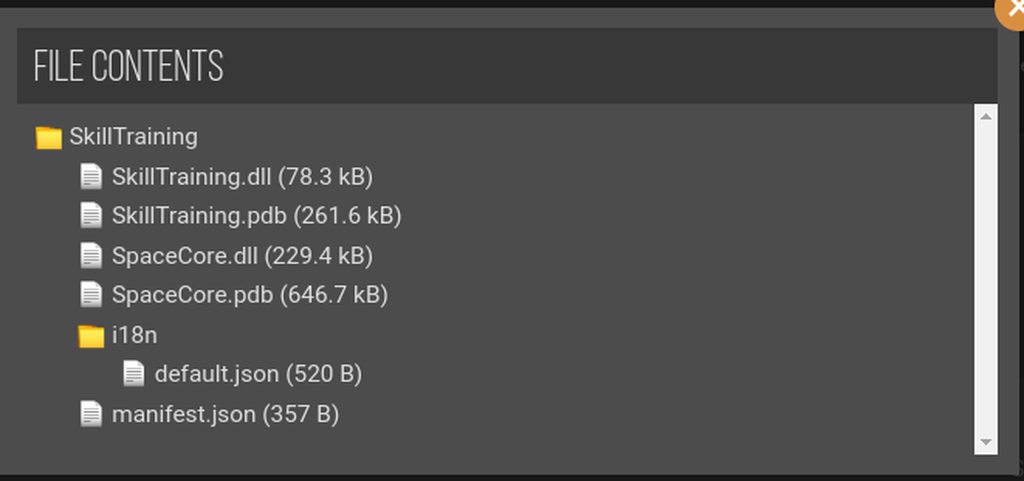
 surreal orchid
They lag the gME AS HELL
past wing
gaunt gust
Remove Custom Furniture
fixed, thank you and hope you have a great day
gaunt gust
shy orbit
https://i.imgur.com/0CALfA6.png i don't know how it works, but i guess it loads ...
(already tagged casey over it)
but yes, deleting the copies of spacecore out of that should work
cerulean vigil
shy orbit
https://i.imgur.com/0CALfA6.png i don't know how it works, but i guess it loads ...
I think I found the specific scenario that caused the errors. But I don't understand how. It seems to be when I disabled this BAGI folder thats in the /mods which of course puts the . in front of the name and moves it to the top of the list
Most of my mods are in the "Stardrop installed mods" section btw
re-enabling that folder resolves the series of errors
But why?
I forgot to send the image @shy orbit
 shy orbit
i don't really know, but if you send the log maybe someone can say why
cerulean vigil
I don't think the log includes any relevant data to that. I already sent the logs with errors, while the ones without are pretty clean
shy orbit
it probably does tbh
icy heron
Your problem is that you put your mods in an extra ordner. They must be in the mod odner
cerulean vigil
icy heron
Your problem is that you put your mods in an extra ordner. They must be in the m...
You can have your mods within other folders as long as its in the mods folder and not inside another mod
icy heron
Never read anything about that this is possible. I put my mods in the mod ordner and it works every time
neat plaza
it is very much possible and basically recommended for organisation
icy heron
neat plaza
it is very much possible and basically recommended for organisation
Okay, I don't know this.
gaunt gust
(it is, ofc, a load order thing.)
(usually modders do a good job resolving load order things internally/with each other, so load order is not relevant)
but for a while last year, for example, you had to make sure AtraCore loaded before SpriteMaster
(that has long been resolved)
cerulean vigil
Log 1: The way it is normally, a clean log https://smapi.io/log/ead426a6badc4cafb187731d97f0c4cd
Log 2: After disabling the BAGI texture folder in the root /mods folder. Spacecore is in fact still around and not in a disabled folder.
https://smapi.io/log/20550af3efee4d838127735f6f39c94c
native dragonBOT
Log Info: SMAPI 3.18.2 with SDV 1.5.6 (build 22018) on Microsoft Windows 10 Home, with 121 C# mods and 281 content packs.
Suggested fixes: One or more mods are out of date, consider updating them
Log Info: SMAPI 3.18.2 with SDV 1.5.6 (build 22018) on Microsoft Windows 10 Home, with 109 C# mods and 238 content packs.
Suggested fixes: One or more mods are out of date, consider updating them
cerulean vigil
@shy orbit The clean log is here now just in case you were interested
shy orbit
interesting. my (uninformed) theory: some mod in the fancy... folder make spacecore load the dll earlier, skill training checks if the dll is already loaded and then doesn't load it, so it doesn't prevent spacecore proper from loading
cerulean vigil
shy orbit
interesting. my (uninformed) theory: some mod in the fancy... folder make spacec...
I just tried debunking that by removing the fancy-BAGI folder from my mods entirely... But it didn't work the error remained so your theory is still possible
cerulean vigil
shy orbit
interesting. my (uninformed) theory: some mod in the fancy... folder make spacec...
So with BAGI removed its the same as it disabled. errors starting from the dll issue.
Meanwhile with skilltraining disabled, its all back to normal https://smapi.io/log/086f93c325e843e48aee26d5a928776e
I can't think of why the BAGI texture pack resolves the double dll issue since at no point does it rely on the mod with the dll.
Guess I'll have to remove skilltraining, it was going to be a useful mod for prestiging skills in MARGO but this on top of being a mod that endangers saves? too risky
native dragonBOT
Log Info: SMAPI 3.18.2 with SDV 1.5.6 (build 22018) on Microsoft Windows 10 Home, with 120 C# mods and 268 content packs.
Suggested fixes: One or more mods are out of date, consider updating them
dire fractal
hii, im new using mods, i am using cuter characters and i want to get them the noses, but i don't know how to, can someone help me? pls<3
native dragonBOT
Log Info: SMAPI 3.18.2 with SDV 1.5.6 (build 22018) on Microsoft Windows 11 Home, with 122 C# mods and 466 content packs.
Suggested fixes: One or more mods are out of date, consider updating them
azure gulch
Can someone help me with the error for the bush bloom mod?
surreal orchid
just to be clear what mod uses bush bloom
seasonal berries?
clean up the directory
you have several versions installed
also some items from Raffaldax are added by other mods also so it causes an internal error(just FYI)
 craggy tiger
i've got a uh. strange one. for some reason my game keeps erroring when im in it and doesn't let me go to bed anymore. i know i've got a lot of mods but i cant figure out which one it ishttps://smapi.io/log/443310b862f84fc8b9f7c85f57c89ca8
native dragonBOT
Log Info: SMAPI 3.18.2 with SDV 1.5.6 (build 22018) on Microsoft Windows 10 Pro, with 126 C# mods and 375 content packs.
Suggested fixes: Pytk isn't compatible with newer SMAPI performance optimizations, consider removing it, One or more mods are out of date, consider updating them
craggy tiger
oh maybe i delete pytk idk
surreal orchid
yea ditch PyTK and dependant mods
most of them alr have an update around PyTK
RIP "Harp of Yoba"
craggy tiger
dear god its sped up my game
craggy tiger
surreal orchid
yea ditch PyTK and dependant mods
nope, that didn't do it
(i work graveyard though so i'm going to bed) thanks :O i might just try deleting my most recent mods
 neat plaza
!gamepasssmapi
native dragonBOT
Installing SMAPI for Gamepass requires extra steps. Please see the guide here https://stardewvalleywiki.com/Modding:Installing_SMAPI_on_Windows#Xbox_app
 azure gulch
surreal orchid
just to be clear what mod uses bush bloom
azure gulch
surreal orchid
just to be clear what mod uses bush bloom
Theres a handful that use Bush bloom. Seasonal berries is where the boysenberries are from
dire fractal
!androidsmapi
native dragonBOT
There is no working android SMAPI right now, after the mobile 1.5 release. No Android SMAPI means no mods on Android right now. ZaneYork, the developer of Android SMAPI, has said he will work on it when he has time. You can follow this Github issue for details, but please do not harass him or spam the Github. https://github.com/ZaneYork/SMAPI-Android-Installer/issues/246
When there is one, the instructions here will be updated: https://stardewvalleywiki.com/Modding:Installing_SMAPI_on_Android
shy orbit
azure gulch
How do I fix this json?
azure gulch
I figured it out! I had to delete that whole line, it wasnt necessary
If that is what you did then thank you lol, I just didnt see your message
shy orbit
i'm not sure, deleted few lines i think
tiny radish
can someone help me with the child age up mod?
scarlet quail
dire fractal
hii, im new using mods, i am using cuter characters and i want to get them the n...
There is a config option to remove and return the noses.
scarlet quail
 latent aurora
same thing
latent aurora
same thing
Before this have you ever installed SMAPI
At any point in time that is.
scarlet quail
Odd.that's usually the issue for the error messages you are getting.
Because normally it's An Admin install of SMAPI that causes that error
Would the drive you install on have any administrative protections at present?
 sweet ginkgo
anyone have any support for mods on the switch for stardew valley?
neat plaza
have any support meaning can give help?
 snow socket
ive been getting this problem at 3 times
 neat plaza
!log
native dragonBOT
Can you upload your SMAPI log to https://smapi.io/log (see instructions on that page) and share the link here?
native dragonBOT
See https://stardewvalleywiki.com/Modding:Player_Guide/Troubleshooting#Reset_your_content_files for instructions on resetting your game files! (This doesn't affect your save files.) You may also want to check this list of XNB > Content Patcher conversions (https://stardewvalleywiki.com/Modding:Using_XNB_mods#Alternatives_using_Content_Patcher) to see if there are already replacements for any XNB mods you may have been using :)
scarlet quail
You may have done some bad XNB Installation in the past
snow socket
oh okay
gaunt gust
snow socket
ive been getting this problem at 3 times
Remove Custom Furniture
snow socket
gaunt gust
Remove Custom Furniture
TY IT WORKS NOW
latent aurora
scarlet quail
Would the drive you install on have any administrative protections at present?
yea cause my game downloaded in the windows app directory for some reason
scarlet quail
Yeah then that's probably why
latent aurora
although it's set to download in C:/xboxgames
latent aurora
yea
native dragonBOT
Installing SMAPI for Gamepass requires extra steps. Please see the guide here https://stardewvalleywiki.com/Modding:Installing_SMAPI_on_Windows#Xbox_app
scarlet quail
probably need to fix installation then
latent aurora
i couldn't find a solution 💀
i tried changing the download directory via the xbox app and it still downloaded in the windows apps folder
guess i'm hopeless
sweet ginkgo
anyone have any support for mods on the switch for stardew valley?
scarlet quail
I mean we have precisely one Switch modder and that's -
neat plaza
neat plaza
have any support meaning can give help?
same question for you as last time
scarlet quail
ah so they keep asking and then not responding.
neat plaza
well asked once and didn't respond to my question
scarlet quail
Here I'll be the annoying one to them one sec
neat plaza
nah nah its fine
scarlet quail
sweet ginkgo
anyone have any support for mods on the switch for stardew valley?
Define support
neat plaza
they probably just didn't see it
 novel cradle
How do I add mods on my pc
neat plaza
!GETTINGSTARTED
native dragonBOT
If you would like a guide to setting up mods for Stardew Valley, check out the getting started guide! https://stardewvalleywiki.com/Modding:Player_Guide
neat plaza
oops
novel cradle
I downloaded it via ms store
neat plaza
!gamepasssmapi
native dragonBOT
Installing SMAPI for Gamepass requires extra steps. Please see the guide here https://stardewvalleywiki.com/Modding:Installing_SMAPI_on_Windows#Xbox_app
scarlet quail
Then... there are instructions in the gettingstarted link
should be under "windows"
 solemn shoal
(It looks like it is on the Windows store, but that it's just the Game Pass version sold via the Windows store?)
 unborn aspen
hey is there an unnoficial update to the unlimited players mod?
apparently the current version of the mod isnt working now
native dragonBOT
To add more than 3 extra players to a multiplayer game, follow the instructions here: https://twitter.com/concernedape/status/1395243158460530689

@ArcaneDescent @JessYoMama You can do it without a mod. Go to %appdata%/StardewValley and open the file called startup_preferences. ctrl + f for "playerLimit" and you'll find something like this: <playerLimit>-1</playerLimit>.
Change the -1 to any number you like...
Likes
974
 Twitter
·
scarlet quail
Twitter
·
scarlet quail
Yeah once CA sent out that tweet it was over for Unlimited Players, it was just gonna die a slow death
(Because the entire mod became obsolete, that is XD )
 zinc heron
Is it enough for just the host to do it?
zinc heron
wow
scarlet quail
Host edited hers, and the rest of us joined
zinc heron
thx so much
unborn aspen
scarlet quail
Yeah once CA sent out that tweet it was over for Unlimited Players, it was just ...
makes sense
thankss
 onyx perch
does anyone seem to know what mod is the picture I sent under #images-and-memes? been looking forever T . T
neat plaza
try ask in #modded-stardew
dire fractal
scarlet quail
There is a config option to remove and return the noses.
oh yh i saw that and i was trying but when i get to the game the only that gets the configuration is the main character, but not the nps
maybe i did the wrong configuration
can someone help me plss
scarlet quail
"NoNose": "false", is the file version
If you want I can boot my game for the GMCM version
scarlet quail
The Generic Mod Config Menu version
i.e. how you change it in game without entering files
dire fractal
scarlet quail
The Generic Mod Config Menu version
yh
scarlet quail
alright, give it a mo, booting my game
dire fractal
but that's another mod, right?
neat plaza
yes
scarlet quail
I mean, yes, but you should have it anyway
dire fractal
oh okayy
scarlet quail
Generic Mod Config Menu is ubiquitous
like... you change so many mod configs via it
scarlet quail


How it looks for all the mod configs on the left
the right is SCA's config
and that you want the no-nose box unchecked
dire fractal
i seems easy, thank u!!!
 small sleet
is it normal for the game to take ages to load with mods?
scarlet quail
I mean, yes. But also, I'm guessing you have PyTK and/or you don't have SpriteMaster?
small sleet
scarlet quail
I mean, yes. But also, I'm guessing you have PyTK and/or you *don't* have Sprite...
whats pytk?
scarlet quail
...don't worry about it, if you don't have PyTK, that's good, means your load time isn't extended by that
!sm for SpriteMaster, which speeds stuff up
native dragonBOT
SpriteMaster (https://www.nexusmods.com/stardewvalley/mods/4922) is a mod that resamples the game's graphics to be smoother and improves performance.

Nexus Mods :: Stardew Valley
SpriteMaster resamples all of the game's artwork to make it look smoother - a so-called 'HD' effect, and also implements game optimizations and load-time improvements to make the game run faster.
scarlet quail
Disable resampling if you don't like the graphical changes
small sleet
ok thank you
scarlet quail
you'll still get the performance improvements
small sleet
i run 71 mods
scarlet quail
amount doesn't matter, generally matters which mods
so more expansions = longer load time, or mods which add a lot of items
small sleet
i play very expanded so thats probably it
scarlet quail
ah so you use the very expanded modpack? yeah
That's at least three expansion mods
SpriteMaster will help muchly
small sleet
ok thank you so much
 normal karma
https://smapi.io/log/2b89663480da4f4ba1ee4c79d3c6de74 trying to debug why better chests was throwing so many errors on me and my fiance's multiplayer game last night, anyone here more knowledgeable than me?
native dragonBOT
Log Info: SMAPI 3.18.2 with SDV 1.5.6 (build 22018) on Microsoft Windows 10 Home, with 132 C# mods and 166 content packs.
Suggested fixes: One or more mods are out of date, consider updating them
small sleet
scarlet quail
SpriteMaster will help muchly
do i just restart it after i add it to the mod folder?
scarlet quail
Correct. Remember - disable resampling if you don't like the graphical changes
small sleet
ok
small sleet
scarlet quail
Correct. Remember - disable resampling if you don't like the graphical changes
how do i do that?
scarlet quail
it's in the config
you have GMCM since you have very expanded
cog on the title screen in bottom left
just find spritemaster, there will be a button that you have to... uncheck? I think? if it's checked, uncheck, or vice versa, then save
small sleet
why is it saying i have 67 mods now instead of 71
native dragonBOT
Can you upload your SMAPI log to https://smapi.io/log (see instructions on that page) and share the link here?
scarlet quail
Like legit it would never
small sleet
i deleted one that wasnt working
gaunt gust
normal karma
https://smapi.io/log/2b89663480da4f4ba1ee4c79d3c6de74 trying to debug why better...
For fury stuff ask on his discord?
normal karma
ack looks like my log got overwritten by today's game
gaunt gust
Should be linked on the mod page
normal karma
my bad, i'll post later when we play again
gaunt gust
(I suspect it's "farmhand has null location while warping" but he would know for sure)
normal karma
thanks, i'll give that a shot
 solar haven
so, Leah sent me a letter and I think something's supposed to be attached to it. Nothing shows up and the letter won't go away. I've tried restarting the day and restarting the game, but nothing
 robust bison
!ppjadga I think might be this
native dragonBOT
The latest released version of PPJA (Project Populate Json Assets, a popular mod) is a conversion from JA to DGA, but it has some bugs in it, and the mod author has retired. Sticking with the older JA version is probably your best option.
You can download the JA version from the Old Files section on Nexus, or by downloading the latest versions of the standalone components instead of the megapack (except for Farmer to Florist, where you would need to look under Old Files in the standalone version).
scarlet quail
nope
scarlet quail
solar haven
so, Leah sent me a letter and I think something's supposed to be attached to it....
Remove FeTK
Tool Upgrade Delivery Service, if used, should be replaced with Mail Services mod
solar haven
I'm new to modding still. So let me explain what I have to do to myself, and please correct me if I'm wrong
I have to enter the sdv mods folder
delete FeTK
robust bison
oops
solar haven
and Tool Uprgrade service thing
download Mail Services
and none of this will affect my game's save files or anything?
scarlet quail
shouldn't, no
And yes, delete FeTK & Tool Upgrade Delivery Services and install Mail Services Mod, yes.
scarlet quail
...if you're having an issue with a mod, it may be best to ask here first with a log rather than whispering the mod maker for support first.
dire fractal
Sorry, I'm using his mod Buildable greenhouse but I want to be able to build the Immersive farm greenhouse and I don't know how, I'm new in these things 😦
native dragonBOT
Log Info: SMAPI 3.18.2 with SDV 1.5.6 (build 22018) on Майкрософт Windows 11 Корпоративная, with 119 C# mods and 235 content packs.
Suggested fixes: One or more mods are out of date, consider updating them
scarlet quail
dire fractal
Sorry, I'm using his mod Buildable greenhouse but I want to be able to build the...
This is explained in their mod description
Specifically (I guess I'll copy paste it since this came up yesterday too)
If you want to change your greenhouse map to a modded one follow these simple steps: Delete the ([CP] BuildableGreenhouse) folder within the Buildable Greenhouse Updated folder located in: "\Stardew Valley\Mods\BuildableGreenhouse" (please note that this folder might be in a different location if you use a mod manager) Now you can download any custom green house map you desire! I decided to use "Pookachu's Insane Greenhouse" in this tutorial. Download the according zip file and extract it into "\Stardew Valley\Mods" Now go to your newly installed mod folder. In my case: "\Stardew Valley\Mods[CP] Pookachus Insane Greenhouse" Open the "content.json" with a text editor of your choice Make the following changes (Just change the target, you don't need tiled or any other program): "Target": "Maps/Greenhouse", to "Target": "Maps/GreenhouseMap", Pay extra attention to GreenhouseMap! Save the edited file. You did it! Load up your game, happy farming!
dire fractal
thank you so much
scarlet quail
I'm not writing it again though I'm gonna backsearch next time because I'm lazy
vital gulch
Suggestions for extra quality of life mods? Nothing that would spawn stuff in, just like cute animals or bigger backpack... stuff like that. Just what you personally have found to be hidden gems. I might have those suggestions added already, but there could be neat hidden ones!~
scarlet quail
!modrecs
native dragonBOT
Check out https://stardewvalleywiki.com/Modding:Player_Guide/Getting_Started#Find_mods to find mods recommended by community mod authors and other popular mods, or see #mod-showcase for what the community has been working on!
 fast sandal
Does anyone know what this means
 scarlet quail
right click and open
otherwise it's the other mac thing which is fixable but I forget the quote.
oh, it is
.q 6004
 devout pumiceBOT
[#6004] "Summary of the issue:
Other bash-script dependent software discussing the same issue:
https://community.localwp.com/t/macos-13-ventura-and-open-site-shell/33870/13
https://community.scripture.software.sil.org/t/macos-ventura-cant-launch-build-terminal/3353/2
According to them, it’s a bug in MacOS Ventura not setting the quarantine flag properly for actions originating in bash scripts. The relevant part of the OS being triggered is the 'System Integrity Protection', which is documented here:
https://support.apple.com/en-us/HT204899
Potential fixes:
-
Right click on
StardewModdingAPIorStardewValleyUnix executable files in your game folder to open the game. -
Click the info icon, then click the file path displayed in the alert. This will take you to the folder with the SMAPI launcher, and you should be able to launch the game from there. This may not enable Steam connection, and it make make the game much more unstable.
-
Install iTerm and set it to be your default Terminal. This is not optimal if you like using Terminal, but otherwise seems like a perfectly workable solution.
https://iterm2.com/ -
Temporarily disable System Integrity Protection. This is not a great solution, because it leaves your computer vulnerable, and you should absolutely not leave your computer in this state." - @lament prairie (10 Jan 2023 @ 06:27:58 PM UTC)
fast sandal
It worked thanks!
 verbal stone
Hey, I was hoping to see if someone might know what could cause Pam's house to do this? There's nothing in SMAPI, and I can still enter and exit the house, it's just.... half invisible?? I don't have any mods that edit Pam's house, so far as I know, and nothing that I believe touches the outdoor town map other than Eemmie's recolor.
https://smapi.io/log/a4a447c7befe4bf9994859840dde49ac <-latest SMAPI log just in case, even though there's no error text for this glitch.
 native dragonBOT
Log Info: SMAPI 3.18.2 with SDV 1.5.6 (build 22018) on Microsoft Windows 10 Home, with 150 C# mods and 204 content packs.
Suggested fixes: One or more mods are out of date, consider updating them
 rancid wind
Are Mods already working on Mobile version 1.5?
 long brook
rancid wind
Are Mods already working on Mobile version 1.5?
long brook
rancid wind
Are Mods already working on Mobile version 1.5?
Not yet
rancid wind
long brook
Not yet
Do you have any predictions of when it will be back up and running?
long brook
No clue either
 wet rune
I'm guessing a Mod is intefereing... because Legend doesnt register in my Collections. I've now caught TWO
OH WAIT... he registered this time I think
Yeah he did. I wonder if I have a screencap to check before I caught the second one
dapper gazelle
verbal stone
Hey, I was hoping to see if someone might know what could cause Pam's house to d...
what happens if you remove Free Dusty?
FreeDusty edits spring_town and though I would assume it's only touching the dog house, it's hard for me to say b/c it's actually a C# mod. And it's very old (possibly pre-dates the community upgrades?). So I would start there.
verbal stone
Okay, thank you for the reccommendation. I'll try that once I finish this day.
 fickle osprey
https://smapi.io/log/6cd2fc54588b4c9a9db4de8cc306a3d5
someone please help! i moved everything onto a new PC last night and downloaded the same mods. for some reason it's giving me this error. I can't even save the day 😦
native dragonBOT
Log Info: SMAPI 3.18.2 with SDV 1.5.6 (build 22018) on Microsoft Windows 11 Pro, with 29 C# mods and 10 content packs.
native dragonBOT
Use this guide to find your save files: https://stardewvalleywiki.com/Saves.
scarlet quail
I believe atra said you would have to revert the day and destroy your fish ponds, or at least empty them
fickle osprey
i'm gonna try to empty them 🥲
fickle osprey
scarlet quail
I believe atra said you would have to revert the day and destroy your fish ponds...
so for some reason monster mushrooms were in one of my ponds????? idk, i thought i had coral in there. oof.
thank you so much!!!
scarlet quail
yup, that's what a json shuffle in a pond is
It makes the previously existing items within them change to different items
Then on new day, the game attempts to find fish pond data for the "mushrooms"... and there is none so the game freaks out
 torn whale
is it possible in multiplayer if both players change a config file differently or will it cause problems? (or does that depend on the specific mod?) like lets say for elle's town animals i want different butterflies than my co-op partner, i would assume that would be no issue? but a mod that lets you enable or disable a whole feature might cause issues if one person has it enabled and the other one doesnt?
native dragonBOT
See https://stardewvalleywiki.com/Modding:Player_Guide#Do_mods_work_in_multiplayer.3F for details on how mods work in multiplayer. :)

 celest plover
!androidsmapi
native dragonBOT
There is no working android SMAPI right now, after the mobile 1.5 release. No Android SMAPI means no mods on Android right now. ZaneYork, the developer of Android SMAPI, has said he will work on it when he has time. You can follow this Github issue for details, but please do not harass him or spam the Github. https://github.com/ZaneYork/SMAPI-Android-Installer/issues/246
When there is one, the instructions here will be updated: https://stardewvalleywiki.com/Modding:Installing_SMAPI_on_Android
craggy tiger
craggy tiger
i've got a uh. strange one. for some reason my game keeps erroring when im in i...
sorry to ask again but does anyone have any thoughts on this before i go brute forcing it
i did delete pytk but its still broke
verbal stone
If no one else has an answer, I'd recommend removing your mods in batches, and seeing if/when it starts working again. Last time I had an issue like that, I removed them in batches of ten, and it helped me narrow down quick enough what mod was causing the issue
craggy tiger
it wont mess up my save to do that right?
verbal stone
Just back up your save. If your issue is going to bed, then it might.
craggy tiger
mm. aight
verbal stone
that, or use a test save to test them
craggy tiger
the game like "soft crashes" wherein the camera no longer follows me and i cant interact with anything anymore is mostly the problem
i tried a test save but nothing came up so im a bit afraid my current game is just borked
verbal stone
Oooof. Fingers crossed for you that it's not. Otherwise, I'd definitely recommend backing up your save file and trying things that way.
craggy tiger
thanks for the advice :O
long brook
celest plover
!androidsmapi
Type it in #governors-mansion if only for yourself
long brook
 keen helm
I mean...
keen helm
I mean...
Better to see the log anyway
 silk ember
im not able to press okay, ive tried doing the windows button trick & it lets me use the mouse again but just not to press okay.. im frustrated lol idk what to do
 scarlet quail
silk ember
scarlet quail
silk ember
!log
native dragonBOT
@silk ember Can you upload your SMAPI log to https://smapi.io/log (see instructions on that page) and share the link here?
scarlet quail
Probably is a mod screwing with the okay
native dragonBOT
Log Info: SMAPI 3.18.2 with SDV 1.5.6 (build 22018) on Microsoft Windows 10 Home, with 21 C# mods and 24 content packs.
Suggested fixes: One or more mods are out of date, consider updating them
 bitter lantern
i haven't modded for awhile, and I went straight for a collection on nexus that had a whole bunch of mods. It was the Stardew Valley VERY Expanded one
I downloaded all the mods except Farm Type Manager
it won't let me download it, I can't find out why
 halcyon igloo
are you using vortex
bitter lantern
yeah
long brook
downloading collection for sdv is bad, try to download each of em
also manual installation is recommended or use stardrop mod manager
bitter lantern
i see
I do believe they did all get installed though
when I go into the mod folder in the files, they are all there
should I just download farm type manager separately and put it in the mod folder?
mild talon
if you wanted to see what might be going on w a visually glitched greenhouse.. what kinda patch summary patch export thing might you try?
the summary for the recolor mod and the export for Buildings maybe..?
halcyon igloo
bitter lantern
should I just download farm type manager separately and put it in the mod folder...
!modmanagerbugs most people just manually download anyway
native dragonBOT
Vortex (Nexus) and ModDrop both are mod managers that can help you keep your mods up to date, but they are difficult to troubleshoot. If you're looking for a mod manager that was written specifically for SDV and has troubleshooting logs built in, you can try Stardrop (!stardrop).
If you're using a non-Stardrop mod manager and ask for help troubleshooting, you can ask the Nexus Discord https://www.nexusmods.com/discord or the Moddrop Discord https://www.moddrop.com/app/about (scroll down). If you're using Stardrop, please remember to provide a Stardrop log.
halcyon igloo
mild talon
the summary for the recolor mod and the export for Buildings maybe..?
probably?
or just a full patch summary
bitter lantern
!stardrop
native dragonBOT
Stardrop (https://www.nexusmods.com/stardewvalley/mods/10455) is the only mod manager written specifically for Stardew Valley. For information about how to install and use it, please see the Stardrop wiki: https://floogen.gitbook.io/stardrop/
If you're having an issue, here's the guidelines on reporting issues: https://floogen.gitbook.io/stardrop/resources/reporting-issues

Nexus Mods :: Stardew Valley
An open-source, cross-platform mod manager for Stardew Valley. Includes mod profiles, update checking, SMAPI integration and Nexus Mods API support!Currently in open beta.
 viral compass
Does anyone know how to fix an issue where a random error shows up for no reason? Every time I try to put my mods in the mod folder of stardew and keep getting “error 36”. I’ve tried running “dot_clean” and deleting “.DS_Store” through the terminal per google’s advice, but it still hasn’t worked (I’ve also tried Safe Mode, but that hasn’t worked either). Btw I’m using a Mac and am playing on Steam. If anyone can help, it would be greatly appreciated!
scarlet quail
viral compass
Does anyone know how to fix an issue where a random error shows up for no reason...
!log
native dragonBOT
@viral compass Can you upload your SMAPI log to https://smapi.io/log (see instructions on that page) and share the link here?
scarlet quail
And if you can't do that,take a picture of the error
In this case it would be good to have either because error 36 is not exactly something we know here
viral compass
Alright! I’ll get to that soon.
This is the error that shows up when I try to put my mods in the mod folder of the game
 bitter lantern
do i need to move my mods into the Stardrop Installed Mods folder, to make my mods work?
 livid magnet
@azure dust - If I have the new Alpha Atieler does it work yet or has that not be done as I haven't seen the NPC shop show up yet
mild talon
the NPC is not a real NPC.. it's a static/fake NPC added via MEEP
the building doesn't show up for you at all? sounds like it's not installed right.. Have you shared a log yet @livid magnet
cerulean vigil
Any tips for reducing disconnects in multiplayer? my other player just disconnects sometimes. I don't even know if they can make it through a whole day
livid magnet
mild talon
the building doesn't show up for you at all? sounds like it's not installed righ...
Hangon let me get my log after I finsih up this day
 ionic fulcrum
viral compass
This is the error that shows up when I try to put my mods in the mod folder of t...
ionic fulcrum
viral compass
This is the error that shows up when I try to put my mods in the mod folder of t...
Can you try moving all your mods to a different folder and deleting this one? that might help
livid magnet
mild talon
the building doesn't show up for you at all? sounds like it's not installed righ...
native dragonBOT
Log Info: SMAPI 3.18.2 with SDV 1.5.6 (build 22018) on Microsoft Windows 10 Home, with 105 C# mods and 285 content packs.
Suggested fixes: One or more mods are out of date, consider updating them
bitter lantern
when I launch SMAPI from the Stardrop launcher, it loads 0 mods and immediately starts the game, I have all the mods enabled in Stardrop
 humble flame
have any of u guys had this glitch before where the bushes just kinda glitch out at the top while ur on ur farm... ik this is kind of specific lol i was just wondering if there was a fix or if my save is like broken

 cerulean vigil
the bush is still there, the fence is drawing over it for some reason
lament prairie
if it's doing that all the time, it's something to do with how the map is made
probably the top of the bush is Front and the top of the Fence is AlwaysFront or something
humble flame
its strange because it just started doing this and im in early summer and i have no clue what i did
lament prairie
that is a little weird
someone with a similar issue found it was SVE + AGE causing a bushes issue
cerulean vigil
Any tips for reducing disconnects in multiplayer? my other player just disconnects sometimes. I don't even know if they can make it through a whole day
lament prairie
try to keep your mods as identical as possible
also have them get the best internet they can
if they can go wired instead of wireless
you can also try cutting down the number of mods
cerulean vigil
lament prairie
try to keep your mods as identical as possible
we have perfect copies, mod configs included. I just sent them my entire mods folder for it
lament prairie
if you play LAN instead of over the servers that helps too
But obviously that requires being in the same place
cerulean vigil
lament prairie
if you play LAN instead of over the servers that helps too
Ironically the lan player has disconnected 3 times so far, but I have not gotten to seeing if the others disconnect at all
lament prairie
huh, when my brothers and I were having disconnects going to LAN fixed it entirely
I wonder if there's something else going on on your computer or internet
cerulean vigil
I'm hoping its just a mod responsible so I can turn it off. but I wouldn't even know how to locate one if there is
lament prairie
It's hard to say since disconnects aren't necessarily easy to reproduce
You can try removing mods and seeing if it seems to improve things
If there are any actual errors in the logs that would tell you
But I'm assuming it's not that, just random disconnects
If it's like "every time Bob goes into the Orchard, he disconnects", ok that's a mod issue
cerulean vigil
Sadly I have not seen any pattern or errors yet 😦
dire fractal
alright weird issue here: i've tried picking up this telescope (which i THINK is from custom furniture) twice and it crashed both times
https://smapi.io/log/b6cc93c1f1b04516b2c09f8602feedb3
native dragonBOT
Log Info: SMAPI 3.18.2 with SDV 1.5.6 (build 22018) on Microsoft Windows 10 Home, with 52 C# mods and 72 content packs.
Suggested fixes: Pytk isn't compatible with newer SMAPI performance optimizations, consider removing it, One or more mods are out of date, consider updating them
dire fractal
is there an alternative to it ..?
lament prairie
!furnitureconverter
native dragonBOT
If you want to convert your furniture from Custom Furniture to a different framework, you can use the Furniture Converter! Simply follow the instructions to convert it to Dynamic Game Assets (if you're testing a future game version, Content Patcher is also available). https://github.com/elizabethcd/FurnitureConverter
dire fractal
alr cool, thanks
long brook
bitter lantern
when I launch SMAPI from the Stardrop launcher, it loads 0 mods and immediately ...
Reinstall smapi and all mods that you install through vortex. The way vortex install mods is different
 lusty pine
so i don't know if anyone can help me but im trying to add stardew expanded and its showing an error of a mod i didn't install when all of the mods needed are installed
lament prairie
!log
native dragonBOT
Can you upload your SMAPI log to https://smapi.io/log (see instructions on that page) and share the link here?
viral compass
ionic fulcrum
Can you try moving all your mods to a different folder and deleting this one? th...
Ok it’s working now, thanks for the help!
bitter lantern
long brook
Reinstall smapi and all mods that you install through vortex. The way vortex ins...
I just messed with a bunch of stuff and got it to work for the most part. When I run stardew through steam, i can use my mods. But running it though stardrop doesn't load any mods, do I need to change my steam launch path for stardrop?
native dragonBOT
Log Info: SMAPI 3.18.2 with SDV 1.5.6 (build 22018) on Microsoft Windows 11 Home, with 13 C# mods and 0 content packs.
lusty pine
huh
lament prairie
okay so you installed one (1) part of the mod
install everything that comes with the download, first of all
all folders, ja sve, everything
!sve
native dragonBOT
Stardew Valley Expanded (https://www.nexusmods.com/stardewvalley/mods/3753) is a mod which adds a lot of new content and areas to the game. It has many dependencies, so be sure to follow the install guide which is on the github wiki along with FAQs and troubleshooting steps for common issues: https://github.com/FlashShifter/StardewValleyExpanded/wiki
lament prairie
follow the install guide here
ionic fulcrum
viral compass
Ok it’s working now, thanks for the help!
glad its working!
lusty pine
i have all those mods downloaded
lament prairie
- Stardew Valley Expanded 1.14.18 because it requires mods which aren't installed (FlashShifter.JA.SVE, FlashShifter.SAAT.SVE, FlashShifter.StardewValleyExpandedALL, FlashShifter.SVE-FTM).
you're missing a bunch of the other parts of SVE itself
lusty pine
what other parts
scarlet quail
When you download SVE, it comes in a zip folder
Inside the zip folder - or when you unzip it - there are multiple folders within it
you need all of those folders.
you apparently only have - or moved - the [CP] one.
dire fractal
any news for smapi mobile?
lament prairie
no
 neon schooner
I went to the link it's showing, but I understood absolutely nothing there
 topaz matrix
neon schooner
I went to the link it's showing, but I understood absolutely nothing there
topaz matrix
neon schooner
I went to the link it's showing, but I understood absolutely nothing there
!log
native dragonBOT
@neon schooner Can you upload your SMAPI log to https://smapi.io/log (see instructions on that page) and share the link here?
neon schooner
It's saying Windows can't find the ErrorLogs folder
long brook
it's smapi installation error, not smapi(game) error
neon schooner
Is this the wrong channel for help, then?
lament prairie
no this is the right channel
outside is pointing this out to aub
what is your windows version?
Like there's just something weird going with on with the installer
idk why it says that it exists but couldn't load
neon schooner
7, probably should have mentioned that ^-^'
long brook
this error 0x80070057 means storage issue when i searched it
lament prairie
I suspect that Windows 7 is often missing some of the stuff needed to run modern programs
You may need to do a manual install of SMAPI
and then see if you can launch SMAPI or not
neon schooner
lament prairie
You may need to do a manual install of SMAPI
Okay, how do I do that?
long brook
!gettingstarted there's a step on how to manuall install smapi there
native dragonBOT
If you would like a guide to setting up mods for Stardew Valley, check out the getting started guide! https://stardewvalleywiki.com/Modding:Player_Guide
neon schooner
Nice! Thanks for help so far guys! 😄
 wary widget
Quick question if I want to switch mods off I can just put them out of the mod folder and nothing would change in my file?
 mental quail
wary widget
Quick question if I want to switch mods off I can just put them out of the mod f...
mental quail
wary widget
Quick question if I want to switch mods off I can just put them out of the mod f...
depending on the mods, your save might crash. you can load it and see what happens, but don't end the day. if you want to change up your mods etc for different saves or for MP -
!modgroups
native dragonBOT
See this link for how to load different mod groups: https://stardewvalleywiki.com/Modding:Player_Guide/Getting_Started#Can_I_have_different_mod_groups.3F
wary widget
Ah ok ty
 still pine
I keep getting disconnected, the ping while getting dropped to the host is perfect, we both have 1000 gig connections.

 warped violet
im using SMAPI on Windows via Steam.
I swear i installed smapi correctly beause when i go to the default steam filepath for stardew vally i see a mods folder and files with smapi in the name, but when i put mods in that folder (unzipped file folders just like it said to) and launch the game via steam, nothing happens. its a completley vanilla game.
lament prairie
!launchoptions
native dragonBOT
If you're using Steam or GOG on Windows, you will need to set your launch options in order for Steam/GOG to automatically launch with SMAPI. The SMAPI installer will tell you what to set as the launch options when it completes (green text). You can find instructions (with screenshots) on how to do that here: https://stardewvalleywiki.com/Modding:Installing_SMAPI_on_Windows#Configure_your_game_client
 fiery orchid
My mod folder disappeared from the desktop
But still appear in the game what should I do?
mental quail
ahh elizabeth!!! I hope you get to catch up on sleep soon. you helped me around a month ago with narrowing down an issue I was having with MNF sprites not appearing, it turned out to be something with a recolor's tilesheets not being coded to overwrite or append, I don't recall now. can you please remind me what to enter in console to get the spring tilesheet to save, so I can post to imgur to include in bug report for that recolor's author
mental quail
fiery orchid
But still appear in the game what should I do?
can you please give more details?
fiery orchid
mental quail
can you please give more details?
Yeah. I was trying to download a mod but when I went back to drag the new mod into the folder the whole folder was gone.
naive drum
!log
native dragonBOT
Can you upload your SMAPI log to https://smapi.io/log (see instructions on that page) and share the link here?
naive drum
the mods folder is inside the stardew valley folder, wherever that is on your machine
the SMAPI log includes the filepath to that folder!
lament prairie
mental quail
ahh elizabeth!!! I hope you get to catch up on sleep soon. you helped me around ...
patch export Maps/springobjects and then it will be in your patch export folder in the game folder
mental quail
Alex, if you're on Windows - once you have the mod folder open, you can right click the mod folder name in the left pane of the file explorer window and select "pin to quick access" so you can more easily find it in future
fiery orchid
I found it thanks guys! I thought I would have to download all 58 mods again.
cerulean vigil
My other players keep getting disconnected with no noticable pattern.. How do I fix this
still pine
still pine
I keep getting disconnected, the ping while getting dropped to the host is perfe...
Still getting this disconnecting issue, any ideas? Both the host and I have the exact same mods.
cerulean vigil
still pine
Still getting this disconnecting issue, any ideas? Both the host and I have the ...
I think I've been having the same issue all day...
long brook
!mphelp disconnection issue can also occur on vanilla. so maybe try steps in this link or try again next time
native dragonBOT
For connection issues in multiplayer see the pinned post in #vanilla-tech-support (<#vanilla-tech-support message>) and also the wiki troubleshooting page (https://stardewvalleywiki.com/Modding:Player_Guide/Troubleshooting#Can.27t_connect_to_another_player_in_multiplayer).
long brook
it most likely gog server that connect the host and farmhands is being picky to you guys. iirc 1.6 will change gog server to another way (probably steam)
cerulean vigil
long brook
it most likely gog server that connect the host and farmhands is being picky to ...
I use just steam. possibly even just lan during one of my tests. Does gog server still matter in that case
long brook
i'm afarid i have little knowledge to anser that
 tight basin

 native dragonBOT
Log Info: SMAPI 3.18.2 with SDV 1.5.6 (build 22018) on Microsoft Windows 10 Pro, with 15 C# mods and 14 content packs.
naive drum
it does yeah, stardew uses a gog server for its multiplayer
 uneven spade
Has anyone run into mods that auto close mail as soon as you click the mailbox?
 naive walrus
Using any other recolor except for VPR causes this to happen > https://prnt.sc/Ykvt6uuVG_g4 i nailed it down to Lumisteria Tilesheets - Outdoor being the issue since once i remove it everything is perfectly fine, the problem is i use east scarp which depends on this mod.
 lament prairie
Per the mod page for Lumisteria's tilesheets:
Recolor mod authors are allowed to target the assets of this mod. However making a configuration option so this can be disabled is strongly suggested, in case of new tiles being added and similar situations.
So I don't think it has recolor compat
lament prairie
Also per the content.json for Lumisteria's Tilesheetss, nothing it does affects tiles outside of the tilesheets it has
so probably some other mod that depends on lumisteria's tilesheets is doing something
uneven spade
Well I have narrowed my problem down to... Ridgeside Village causing my game to skip over showing mail
naive walrus
the only mod i have that depends on it is east scarp.
lament prairie
I can't even tell what tiles those are
scarlet quail
uneven spade
Well I have narrowed my problem down to... Ridgeside Village causing my game to ...
That's more likely to be FeTK
lament prairie
like that's somewhere in stardew
scarlet quail
But I'd give a log if you haven't already
lament prairie
I see Claire but I have no idea where she goes or what she does
uneven spade
scarlet quail
That's more likely to be FeTK
I dont have FETK but gimme a sec for a log
lament prairie
broken mails may behave like that
scarlet quail
Claire only goes to Joja/Theater, and those tiles are next to the "garden" Pierre tends in SVE
Honestly, that's town tiles.
I would blame the "other recolors" they're using
naive walrus
Removing east scarp fixes it
scarlet quail
Because no Lumi tiles are used in town
naive walrus
but why hmm
lament prairie
broken mail will appear over the mailbox but not open properly when interacted with
scarlet quail
East Scarp is also not the cause, I have them working just fine in my current save, and I don't use recolor mods - even when I do use them on test saves, it works fine with Earthy
!log levitatin. The screenshot isn't enough and your statements are running into logical inconsistencies
native dragonBOT
Can you upload your SMAPI log to https://smapi.io/log (see instructions on that page) and share the link here?
uneven spade
lament prairie
broken mail will appear over the mailbox but not open properly when interacted w...
problem is it seems to happen to all mail unless I remove Ridgeside Valley (or mail framework mod but that also just turns off Ridgeside)
scarlet quail
Yeah that shouldn't be possible. It's more likely your ridgeside isn't installed correctly and the mail is broken within Ridgeside
Again, that's why we need the log
uneven spade
yeah sorry load times are jsut REAL slow with my game
scarlet quail
(Context, by the way, in case you think I'm just being dismissive - such an error, especially with mail, would be ubiquitous with people having installed RSV)
!sm for load times, you can disable resampling to remove the graphical changes
native dragonBOT
SpriteMaster (https://www.nexusmods.com/stardewvalley/mods/4922) is a mod that resamples the game's graphics to be smoother and improves performance.
Nexus Mods :: Stardew Valley
SpriteMaster resamples all of the game's artwork to make it look smoother - a so-called 'HD' effect, and also implements game optimizations and load-time improvements to make the game run faster.
naive walrus
scarlet quail
East Scarp is also not the cause, I have them working just fine in my current sa...
native dragonBOT
Log Info: SMAPI 3.18.2 with SDV 1.5.6 (build 22018) on Microsoft Windows 11 Pro, with 154 C# mods and 219 content packs.
Suggested fixes: One or more mods are out of date, consider updating them
scarlet quail
scarlet quail
(Context, by the way, in case you think I'm just being dismissive - such an erro...
(Anyway, following this up - it would be much much much more widespread if that was the case)