#archived-modded-support
1 messages · Page 147 of 1
 surreal orchid
 scarlet quail
Downloading only the mod itself will not make it work.
 proven meadow
how many dependencies are there on this mod
surreal orchid
check the page
 ionic scaffold
 native dragonBOT
Log Info: SMAPI 3.18.1 with SDV 1.5.6 (build 22018) on Microsoft Windows 10 Home, with 18 C# mods and 25 content packs.
Suggested fixes: One or more mods are out of date, consider updating them
scarlet quail
There's a lot. On the main page for stardew Valley expanded,click the requirements tab.
You only want the ones under requirements
Do not get any under mods requiring this file
surreal orchid
ionic scaffold
https://smapi.io/log/a9f47c0376e44957abb4e19375b9793a
Then have smb smart look at it
not me tho
ionic scaffold
it's alright 
surreal orchid
BTW can someone look at my log
.
Line Sprinklers just don't work, +red text which idk from where
proven meadow
for some reason it won't let me download always raining in the valley defencicy
i tired multiple times
can anyone help me plz
 keen helm
Archeologist Skill requires MARGO. All good to use it?
 dusky canyon
keen helm
dusky canyon
keen helm
Oh, ok
 compact heron
Okay hi, I need help I just joined. Reddit advised me to come here for mod support ;-;
basically, I got the mods to work yesterday using vortex, then left and added a few and now it won't even open, and if it does open properly, one key and it shuts off. I've tried everything I could find online, nothings working
native dragonBOT
Can you upload your SMAPI log to https://smapi.io/log (see instructions on that page) and share the link here?
compact heron
yeah I can show my log, Just know the colonial buildings mod is already gone from the log. I've tried reloading it but its what I get
Yeah thats my bad, I'm just hopeless with mods
native dragonBOT
Log Info: SMAPI 3.18.2 with SDV 1.5.6 (build 22018) on Microsoft Windows 11 Home, with 16 C# mods and 17 content packs.
 mild talon
hii.. trying to figure out why this modded sprinkler object won't work. I'm not able to place it on the ground :/
I was thinking it might be something w/ the object.json... ?
https://smapi.io/json/none/beb8f046f10645bbbef95700c62465a1
 mild talon
the sprlinker is a JA object, yes
is that why?
now that you mention it.. the only other modded sprinkler I have is from Prismatic Tools. and that one is not JA :/
 robust bison
does JA support sprinkler objects? 
I think it needs SMAPI or some sprinkler framework if it exists
 dapper gazelle
Line sprinklers used to be on JA before switching to DGA so yeah I think it does
 frank spade
hi im having problems going to the second day i think the problem is with saving the world and i get a lot of red text that i dont understand
surreal orchid
frank spade
hi im having problems going to the second day i think the problem is with saving...
!log
native dragonBOT
@frank spade Can you upload your SMAPI log to https://smapi.io/log (see instructions on that page) and share the link here?
mild talon
(trying to save the world does cause a lot of problems ngl)
frank spade
surreal orchid
!log
sure one sec
surreal orchid
mild talon
(trying to save the world does cause a lot of problems ngl)
Determination starts playing
native dragonBOT
Log Info: SMAPI 3.18.2 with SDV 1.5.6 (build 22018) on Microsoft Windows 10 Pro, with 54 C# mods and 74 content packs.
Suggested fixes: One or more mods are out of date, consider updating them
frank spade
wait i didnt see any updates
compact heron
can one of you guys help me?
compact heron
i had tried to get help earlier but i needed to go do the dishes
compact heron
compact heron
basically, I got the mods to work yesterday using vortex, then left and added a ...
here
im so confused and idk how to work mods
native dragonBOT
Stardrop (https://www.nexusmods.com/stardewvalley/mods/10455) is the only mod manager written specifically for Stardew Valley. For information about how to install and use it, please see the Stardrop wiki: https://floogen.gitbook.io/stardrop/
If you're having an issue, here's the guidelines on reporting issues: https://floogen.gitbook.io/stardrop/resources/reporting-issues

Nexus Mods :: Stardew Valley
An open-source, cross-platform mod manager for Stardew Valley. Includes mod profiles, update checking, SMAPI integration and Nexus Mods API support!Currently in open beta.
compact heron
I will seriously pay you just to help me thats how confused I am
surreal orchid
...
compact heron
so I just download this?
surreal orchid
So yeah Vortex is just unreliable
compact heron
I was told it was a great tool, I had no clue
robust bison
what do you need help with?
dapper gazelle
ok, can you explain in more detail what you mean by "don't work" here?
compact heron
okay I downloaded it and unzipped the file
 honest talon
So I’m having a problem with steam “quitting unexpectedly” on Mac. I’m not sure if the mods are the problem or if it’s a steam problem. This is my log https://smapi.io/log/d02ec53646694c209807c4fb910ab6af but I’m not sure if the crash is shown on there. This is what smapi shows me when it’s launched (not sure which of the two windows is reporting the crash so I included both) does anyone know why this might be happening?
 native dragonBOT
Log Info: SMAPI 3.18.2 with SDV 1.5.6 (build 1.3.37.0) on macOS Unix 12.5.1, with 23 C# mods and 19 content packs.
surreal orchid
like the game just doesnt see them
dapper gazelle
where are you looking for them (I assume you meant to reply to me haha)
surreal orchid
I've alr tried manual installation
surreal orchid
dapper gazelle
where are you looking for them (I assume you meant to reply to me haha)
in-game? crafting menu like listed on the nexus page
dapper gazelle
do you have the furniture catalog already or no?
compact heron
okay I got stardrop to work, now do i just, run the game?
surreal orchid
No I don't
surreal orchid
compact heron
okay I got stardrop to work, now do i just, run the game?
through Stardrop, with SMAPI
no
I don't
dapper gazelle
can you load up your game and type into the SMAPI console dga_store, and then scroll through the items and tell me if the line sprinklers are there?
compact heron
my Smapi still won' t open though, thats the issue
robust bison
does SMAPI work normally?
compact heron
no
basically it refuses to open and run
and if it does, a single key press closes it
ive tried everything I can find online
WAIT
STARDROP MIGHT HAVE MADE IT WORK
OMG THANK YOU GUYS
you all are the best! I can't thank you enough!
surreal orchid
dapper gazelle
can you load up your game and type into the SMAPI console `dga_store`, and then ...
they are
dapper gazelle
ok, so the game recognizes they're there
surreal orchid
Maybe Im not reading correctly:
Does exactly what it sounds like (and what's in the brief overview): Adds new sprinklers called "Line Sprinklers" that water in a straight line instead of only adjacent to the sprinklers. 4 tiles in a line for Basic, 8 for Quality, and 24 for Iridium! The recipes to craft these only cost one of the sprinkler they're a variant of and are available immediately!
dapper gazelle
could be a conflict with something that affects crafting/crafting menu then? possibly Better Workbenches or Custom Crafting Stations
no you are reading correctly. They show up for me in the catalog, the dga_store, and the crafting menu as soon as installed
surreal orchid
probably, I do have better workbenches, I'll delete them since better chests kind of makes them obsolete
dapper gazelle
Also possibly a weird conflict with Immersive Sprinklers, but this seems less likely since the game at least knows they're there
surreal orchid
no, Ive already ran Line+Immersive Sprinklers, so def not them
dapper gazelle
as for the other issue that's throwing a bunch of red errors, I believe it's b/c you don't have Farmer to Florist installed, unless I'm just missing it somehow
surreal orchid
yeah not that one, but my game doesnt crash so eh
dapper gazelle
(yeah if you're not going to use those F2F drinks you could always just go into that folder and delete them--if the red ends up bugging ya.)
surreal orchid
That definetly didn't come to mind, thx
honest talon
honest talon
So I’m having a problem with steam “quitting unexpectedly” on Mac. I’m not sure ...
Ahh it just happened again, I lost a bunch of progress in the game 😫
honest talon
You mean mine?
 vital gulch
Heya peeps, I don't think Stardew Valley Expanded is working properly.
scarlet quail
!log
native dragonBOT
Can you upload your SMAPI log to https://smapi.io/log (see instructions on that page) and share the link here?
honest talon
honest talon
You mean mine?
It’s a brand new MacBook (latest model) and doesn’t even heat up, always feels cold to the touch tbh
scarlet quail
Sadly I don't know macs or I'd help there
Unrelated, we'll need a log to see why it's going wrong for you
native dragonBOT
Log Info: SMAPI 3.18.2 with SDV 1.5.6 (build 22018) on Microsoft Windows 10 Home, with 21 C# mods and 4 content packs.
native dragonBOT
Log Info: SMAPI 3.18.2 with SDV 1.5.6 (build 1.3.37.0) on macOS Unix 12.5.1, with 23 C# mods and 19 content packs.
honest talon
honest talon
So I’m having a problem with steam “quitting unexpectedly” on Mac. I’m not sure ...
I also included more info in this message with screenshots as well
Oh wait nvm weren’t talking to me lolol
vital gulch
scarlet quail
you don't have SVE installed unrelated
Oh frick frack. Did I literally do all the parts except the actual Expanded XD
scarlet quail
that's what your log says
 tribal ridge
happens to the best of us
vital gulch
Gonna retry!~
scarlet quail
Also just to head off a potential issue - the title screen will not change with SVE installed
you'll see the changes in-game
 gaunt gust
honest talon
So I’m having a problem with steam “quitting unexpectedly” on Mac. I’m not sure ...
gaunt gust
honest talon
So I’m having a problem with steam “quitting unexpectedly” on Mac. I’m not sure ...
Let's try something
Completely kill the Steam process
honest talon
By just quitting it?
tribal ridge
task manager!
vital gulch
scarlet quail
you'll see the changes in-game
Can you loan an old save and see differences?
Ayee
 scarlet quail
answer is yes XD
vital gulch
The remade farm didn't load properly tho
scarlet quail
SVE doesn't come with a farm automatically
vital gulch
That's gotta be a new save file?
scarlet quail
You have to download that as an optional file
vital gulch
Okie, looking into that.
honest talon
gaunt gust
Completely kill the Steam process
I assume you mean force quit from the screen that lists all running applications, in which case steam doesn’t show up because it crashed, meaning it’s not running anymore
gaunt gust
It's mac so I'm less sure
I would personally ps aux|grep steam and make sure there are no instances of steam anywhere
But, also, are you using an M1 or M2 mac
honest talon
gaunt gust
I would personally `ps aux|grep steam ` and make sure there are no instances of ...
I don’t know what that means 😂
M2
gaunt gust
Try running the game not through steam
honest talon
I don’t actually open the steam app myself, I just click on the stardew icon on my desktop and the terminal window pops up for smapi, but steam automatically runs as well because the game is from steam. I’m not sure how to run it without steam running as well
gaunt gust
!gettingstarted
native dragonBOT
If you would like a guide to setting up mods for Stardew Valley, check out the getting started guide! https://stardewvalleywiki.com/Modding:Player_Guide
gaunt gust
Run it from the install directory
And make sure steam is closed
ps aux|grep steam in any terminal should show no instances of steam
(ps lists all processes, grep searches ones named "steam")
frank spade
im having a problem going into the second day i think the problem is with saving the world. here is the log: https://smapi.io/log/1552f9ffb6454aff961f2aa599cac3f5
native dragonBOT
Log Info: SMAPI 3.18.2 with SDV 1.5.6 (build 22018) on Microsoft Windows 10 Pro, with 58 C# mods and 73 content packs.
Suggested fixes: One or more mods are out of date, consider updating them
frank spade
no mods are actually out of date tho
 dusty spruce
yeah, saving the world is a hard job, we could use some Marvel heroes
frank spade
wdm?
vital gulch
scarlet quail
You have to download that as an optional file
All good, only thing that isn't working is a Better UI mod.
 native hinge
Hmm, I seem to be having an issue with animal husbandry mod and StarAmy's suite of mods (Quail, Bison, Horses, all showing the same error message, shown here:)
System.NullReferenceException: Object reference not set to an instance of an object.
   at AnimalHusbandryMod.common.DataLoader.<>c__DisplayClass35_0.<LoadContentPacksCommand>b__0(CustomAnimalItem c) in C:\Projetos\Stardew Valley\ModSolution\ButcherMod\common\DataLoader.cs:line 397
   at System.Collections.Generic.List`1.RemoveAll(Predicate`1 match)
at AnimalHusbandryMod.common.DataLoader.LoadContentPacksCommand(String command, String[] args) in C:\Projetos\Stardew Valley\ModSolution\ButcherMod\common\DataLoader.cs:line 397```And in game what couple modded animals I have in the playthrough so far are not able to be fed treats, though animals unaffected by this are
What is going on here and how would I fix it (or is it possible to while retaining use of the mods? It looks like it's supposed to be AH compatible)
 topaz matrix
native hinge
Hmm, I seem to be having an issue with animal husbandry mod and StarAmy's suite ...
topaz matrix
native hinge
Hmm, I seem to be having an issue with animal husbandry mod and StarAmy's suite ...
!log
native dragonBOT
@native hinge Can you upload your SMAPI log to https://smapi.io/log (see instructions on that page) and share the link here?
native dragonBOT
Log Info: SMAPI 3.18.2 with SDV 1.5.6 (build 22018) on Microsoft Windows 10 Home, with 81 C# mods and 395 content packs.
Suggested fixes: One or more mods are out of date, consider updating them
topaz matrix
native hinge
https://smapi.io/log/98be2ac0806d43ffba12d6c9d79dce76
Update your mods please
native hinge
Yeah
There's always some to update and I'm not sure one of those is related but I'll do it
topaz matrix
native hinge
Yeah
There's always some to update and I'm not sure one of those is related but ...
Then come back if the problem is still there
native dragonBOT
Can you upload your SMAPI log to https://smapi.io/log (see instructions on that page) and share the link here?
topaz matrix
Do this please
topaz matrix
Go to the link the governor listed
 blazing panther
native dragonBOT
blazing panther
native dragonBOT
Log found, uploaded to: https://smapi.io/log/3f060b08a0644237becab3675467664e
topaz matrix
blazing panther
!reset
native dragonBOT
@blazing panther See https://stardewvalleywiki.com/Modding:Player_Guide/Troubleshooting#Reset_your_content_files for instructions on resetting your game files! (This doesn't affect your save files.) You may also want to check this list of XNB > Content Patcher conversions (https://stardewvalleywiki.com/Modding:Using_XNB_mods#Alternatives_using_Content_Patcher) to see if there are already replacements for any XNB mods you may have been using :)
scarlet quail
Nah that last error is a mac specific thingy
I forget the quote elizabeth made for it
But it's something about creating something
gaunt gust
blazing panther
blazing panther
gaunt gust
<https://stardewvalleywiki.com/Modding:Player_Guide/Troubleshooting#Mac:_Content...
I've checked all of these work. The hidden files appear, the ErrorLogs folder is there, but I can't find the .local folder in Finder. I've copied and pasted the path and nothing shows up.
 blazing panther
gaunt gust
You're getting the error because that file *doesn't* exist, so make it exist
blazing panther
gaunt gust
You're getting the error because that file *doesn't* exist, so make it exist
Okay, where is the .local folder supposed to be? In what part do I create to create the subsequent folders?
gaunt gust
Do you know what ~ means on a mac
blazing panther
gaunt gust
Do you know what `~` means on a mac
Not really, mb. xP
gaunt gust
type, in a terminal, this exactly. mkdir -p ~/.local/share/StardewValley/Screenshots
blazing panther
Alr
gaunt gust
~ is your home directory on Mac, btw
blazing panther
I've pasted and hit enter. Should I try finding it again?
gaunt gust
cd ~/.local/share/StardewValley/Screenshots
blazing panther
Pasted and entered
gaunt gust
you should either have gotten an error message or you should now be in that directory
scarlet quail
Then boot SMAPI again
blazing panther
so Stardew, right?
it's booted up as normal, should I just play and see if it crashes again?
scarlet quail
p much.
native hinge
Ok, so I've updated all of my mods, and the remaining ones in the log are doing a thing where I download the correct version and drag them in and delete the old version, but it still says it's the old version
The Animal Husbandry Mod issue still exists
native dragonBOT
Log Info: SMAPI 3.18.2 with SDV 1.5.6 (build 22018) on Microsoft Windows 10 Home, with 82 C# mods and 393 content packs.
Suggested fixes: Pytk isn't compatible with newer SMAPI performance optimizations, consider removing it, One or more mods are out of date, consider updating them
native hinge
Wait can I use mods without Pytk? I thought it was one of the base ones
Things will break if I can't use it (I know there's stuff coming with like 1.6 and stuff)
scarlet quail
PyTK is old and should not be used if possible
if you have the most updated versions of mods, you won't need it
native hinge
Ah ok, just in general
 old girder
Hello, having a problem. downloaded smapi and added it seperate in steam. i wanted to keep one seperate for normal and one for mods but when i enter smapi my regular profiles are there. why is this? any help is appreciated thank you
native hinge
Ok, I did not know that, I'll try that, thanks
scarlet quail
Anyway, your StarAmy rules all appear to be broken
native hinge
How so, how do I fix that?
 tough spire
Hey! I use a mod called Bear Shipping Bin. It has an error in its content.json, the mod author used a DynamicToken "Recolour" that seems to not exist (i didn't find it on the wiki and CP readme), and SMAPI points that out too.
It's supposed to check which recolour you're using to apply the same recolour on the shipping bin.
What would be the correct way to do that, to recolour something based on your used recolour?
This is probably already documented, so if anyone can just point to where I can learn about it, please do. Thank you very much!
scarlet quail
old girder
Hello, having a problem. downloaded smapi and added it seperate in steam. i want...
do you mean your saves are visible?
Your wording indicates you're launching it with SMAPI
old girder
yes
my saves from the original are visible and they are constanyl updated as well when i am on the original sdv
scarlet quail
Yeah, that's normal
just as an FYI, do not load a vanilla save in modded unless you're planning on never playing it on vanilla again
it won't be affected unless you save
But if you load and save, then your file will forever only be launchable via SMAPI with error handler.
old girder
so just dont play the vanilla profiles on smapi?
scarlet quail
Correct.
old girder
theres no way around that? i wanted to experiment with adding mods on my main profile from vanilla without having permanent affects
scarlet quail
Back up your saves, then experiment
you can't save mod stuff and then undo it while keeping progress
old girder
i understand
scarlet quail
tough spire
Hey! I use a mod called Bear Shipping Bin. It has an error in its content.json, ...
Since you're trying to fix a mod, I might suggest #making-mods-general for this
old girder
how would i backup up vanilla profiles. just save the files somewhere else?
scarlet quail
!saves
native dragonBOT
Use this guide to find your save files: https://stardewvalleywiki.com/Saves.
scarlet quail
Yeah just copy your saves out somewhere else
SMAPI also automatically makes backups per days
tough spire
scarlet quail
Since you're trying to fix a mod, I might suggest <#156109690059751424> for this
thank you!
scarlet quail
native hinge
How so, how do I fix that?
Honestly, it depends. Reinstall the rules. If not, they may not work at present.
scarlet quail
uh
you should be able to post images here
this is actually the modded channel to do so
old girder
wont load
scarlet quail
try #images-and-memes then.
 scarlet quail
!saves
native dragonBOT
Use this guide to find your save files: https://stardewvalleywiki.com/Saves.
scarlet quail
instructions there.
they're in the appdata folder, which is hidden
So you'll have to follow instructions EXACTLY
old girder
ahh i see
thought it would be simple enough for me not have to go through the wiki haha
thank you Agent 
native hinge
scarlet quail
Honestly, it depends. Reinstall the rules. If not, they may not work at present.
Hmm maybe they don't work, I did uninstall and reinstall
What's the "Object reference not set to an instance of an object" part? It appears a lot in the yellow text above it about other mods
scarlet quail
object reference not set to an instance of an object is a generic error
Basically says "X doesn't exist, can't apply X"
native hinge
Ah ok, so it basically means it cant read the mod, thanks
mild talon
ah.. does anyone have an example mod where the JA onject token comes up? like, "spacechase0.JSONAssets.Example/My Custom Item"
i don't know where to ask. i know this exists.. just can't remember where I last saw it

 old girder
i tried going through all the right click options. there is nothing that says zip
mild talon
show ss of what it does say plz
scarlet quail
mild talon
ah.. does anyone have an example mod where the JA onject token comes up? like, "...
Irony here
{{spacechase0.JsonAssets/ObjectId: Grampleton Orange Chicken}}
mild talon
ah.. yes.. thank you!
scarlet quail
send to and then compressed (zip) file kt
I just did that for date night stuff last night
so I had examples on hand
mild talon
super helpful! was banging my head
idk even know how to articulate the thing. but thats exactly what i needed
old girder
i cant even snip a picture of the screen because when i press the snip button the options go away
i see the send to though option
thatll work
proven meadow
so when i want to turn off a certain mod on the vortex launcher how do i do that
mild talon
i'm on windows and use Shift+s+windows key
there's also PrtSc
mild talon
proven meadow
so when i want to turn off a certain mod on the vortex launcher how do i do that
i think it's called "employ" and the opposite
proven meadow
ok ty
mild talon
deploy? idk. some kind of ploy 😏
old girder
im on windows too. tried both the options for screenshotting and wont work
haha
windows 10
fn prnt scrn does nothing and the other u said didnt either
ohh the second one u mentioned now work
and it says the prt scrn button wont work because i dont have it set anywhere to save
mild talon
do you have this app thing - Snipping Tool ? (idk Windows 10 :<)
 old girder
i do have that thats what i originally tried to use
but when u press the snip button the left click of the file goes away because u press something else
mild talon
so something works now? send ss ;>
 scarlet quail
hover over send to
mild talon
@scarlet quail - DYK how to format it? does it need quotes around the whole thing? 
old girder
had to add to clipboard haha
mild talon
oh. you're here. sry for ping
scarlet quail
{{spacechase0.JsonAssets/ObjectId: Grampleton Orange Chicken}} needs the entire thing
example... one sec
old girder
couldnt find location of the saved snips werent in quick access
 mild talon
ok, cool. a number... wha
scarlet quail
no you shouldn't if the rest don't
either your other values need quotes or the value you have at present is right
I don't know what syntax you need though for whatever you're doing
mild talon
those values are for Vanilla so they're diff. syntax.. well, it's for a DGA recipe. the validator said it was fine but SMAPI freaked out. Guessing the JA object needs special identification here
https://smapi.io/json/none/c0ffed947956402d9a3d9d62e29a8a55#L9 - oh. no, now the validator is mad
 lament prairie
DGA and CP aredifferent
that is cp syntax jammed into a dga mod
i dont think thatwill work
mild talon
it's happy again with quotes around the whole token :/ ?
but you're saying SMAPI won't work with it?
lament prairie
hmm
mild talon
b/c they are not agreeing rn.
lament prairie
i just dont think this is valid dga
mild talon
the validator and the smapi
lament prairie
also this seems like #making-mods-general
yeah the validator can only do some really basic checks
mild talon
old girder
what is the thing you're trying to zip up anyway? j curious
proven meadow
so when i want to disable a mod on the vortex launcher what do i click again
 light marsh
How do I play modded multiplayer with my friend???
scarlet quail
!mpmods
native dragonBOT
See https://stardewvalleywiki.com/Modding:Player_Guide#Do_mods_work_in_multiplayer.3F for details on how mods work in multiplayer. :)
scarlet quail
Basically, have the same mods
light marsh
buh
scarlet quail
Yes, essentially, for the short version.
scarlet quail
there's exceptions but honestly it's easiest to duplicate modlists
 gaunt finch
Anyone know who David and Buddy are? I am stuck on 71/73 NPCs for the Introductions quest... I am beginning to think they don't exist
scarlet quail
DTZ characters
scarlet quail
One's... god, he's seperated from the city by a long way. I forget how you get to him
Another's in a house in the city
dapper gazelle
They shouldn’t count toward the intro tho I don’t think? 
scarlet quail
Sadly I think they do
But here's the kicker
You can meet them at the Block Party
gaunt finch
Thanks everyone! I missed the year 1 block party, will wait for the year 2 party to see if I can find them
dapper gazelle
(Checked the code for DTZ and they are excluded from TownQuest, which according to Esca's GitHub "excludes the NPC from "socialize" quests, which currently includes the "Introductions" quest at the start of the game.")
scarlet quail
If that's the case though, and those two are the only ones they're supposedly missing, who the heck are the last two?
 tribal ridge
i know this is a long shot but does anyone know which of my mods this bridge recoloring is from?

here's my modlist <:
scarlet quail
Depends, cass. if you have noclip, you can simply noclip to the statue
otherwise, you... figure out the maze. You just walk through it
 wooden briar
i didn’t even know no clip existed in stardew
tribal ridge
iirc that maze is pretty simple
gaunt gust
You have to duck under foliage for it at some point
 meager mango
wooden briar
meager mango
wooden briar
this isnt exact LOL but the path is something like this
 gaunt gust
Frankly I just jump it now
wooden briar
meager mango
this isnt exact LOL but the path is something like this
ah oke ty
i’m so dumb
meager mango
you have to go like all the way to the bottom and then stay all the way toward the left on your way up
dapper gazelle
tribal ridge
i know this is a long shot but does anyone know which of my mods this bridge rec...
top or bottom?
meager mango
honestly same lmao i spent too long figuring this out... dont get me started on the ||junimo forest||...
tribal ridge
bottom!
it mostly makes me upset that they aren't the same...
i can change them to a stone bridge but then there's some incompatibility with the water texture
dapper gazelle
I think it's medieval
 dapper gazelle
I think they're not the same b/c I thiiiiink the top one might actually be pulled from Daisy Niko's Tilesheets?
tribal ridge
ooooh
dapper gazelle
as opposed to the vanilla tilesheet one that looks similar
 minor bough
I know this is about mods themselves but can anyone help me with this
dapper gazelle
not 100% sure but the fact that they didn't both change does suggest it's not a vanilla asset
 native dragonBOT
There is no working android SMAPI right now, after the mobile 1.5 release. No Android SMAPI means no mods on Android right now. ZaneYork, the developer of Android SMAPI, has said he will work on it when he has time. You can follow this Github issue for details, but please do not harass him or spam the Github. https://github.com/ZaneYork/SMAPI-Android-Installer/issues/246
When there is one, the instructions here will be updated: https://stardewvalleywiki.com/Modding:Installing_SMAPI_on_Android
tribal ridge
oh no, modders have lives
minor bough
I know
Sorry it came out wrong
I meant that it probably won't be fixed for a long time
dapper gazelle
ok yeah I checked that medieval DNT mod you have and it fixes a lot of things but not the bridge funnily enough!
but I think Wayback Pelican Town does change the bridge
native hinge
Now my problem is mostly in the warning section, but BFAV as a whole seems to not be loading right, but it's not showing up as an Error, just a warning, except things aren't working that were
I tried uninstalling and reinstalling that and AnimalHusbandry but things are missing that weren't
https://smapi.io/log/29f3567f7868437d9836374852bca987
dapper gazelle
so that's where the incongruity is coming from I'm p sure xD
native dragonBOT
Log Info: SMAPI 3.18.2 with SDV 1.5.6 (build 22018) on Microsoft Windows 10 Home, with 81 C# mods and 378 content packs.
Suggested fixes: One or more mods are out of date, consider updating them
native hinge
and none of those things are in the mods that need updating
The mods are doing a weird thing where I install the proper version and then it still tells me it needs to be updated, but that's not the problem
minor bough
I swear I'm not trying to sound rude I'm just tired and can't make the words come out right
I'm not blaming
Or complaining
gaunt finch
scarlet quail
If that's the case though, and those two are the only ones they're supposedly mi...
I would be interested to know this lol
scarlet quail
 fervent linden
welp, my sve save of 17 hours just got randomly turned into a normal world
fervent linden
welp, my sve save of 17 hours just got randomly turned into a normal world
That shouldn't be possible
the SVE stuff has just disappeared?
Did you happen to save at all once you noticed that? (Hopefully not)
tribal ridge
i'd consult #archived-modded-support
 hollow coral
minor bough
hollow coral
minor bough
older build works, if you roll back your update to the update before the 1.5.6 android build. Otherwise the error your getting is caused by newer build thats not mod compatible yet. I already tested this myself downgrading my build and blocking its updates from the google play store
minor bough
How to downgrade without third party 😭
scarlet quail
....you shouldn't be able to legally downgrade, supernet
hollow coral
Well... you could scrape the older apk from your android download repo on your phone
scarlet quail
At least, based on everything said in here previously
hollow coral
You can legally do it? Even if you don't backup your apk builds
hollow coral
one way, is to uninstall the update from android, directly going to the app and there should be a uninstall update option, the other, is to completely uninstall the app, and reinstall it from the backup you made, or the backup repo on android. https://developer.android.com/training/data-storage/app-specific

Android Developers
minor bough
Nah I'm gonna sleep now thanks anyway
 olive perch
i get crash when i open bundles in Community Center
native dragonBOT
Can you upload your SMAPI log to https://smapi.io/log (see instructions on that page) and share the link here?
scarlet quail
Did you install any bundle mods?
olive perch
yeah just wait
olive perch
scarlet quail
Did you install any bundle mods?
no
scarlet quail
Hmmm.
Well, log anyway after you crash
normally what you describe is due to bundle mods though
hollow coral
i guess the 3rd solution is the illegal method but i dont suggest the illegal method as i don't pirate any of my games. Same goes for my switch games as well. I make my own legit self use backups. That said... the older build that i have notated and backed up is stardew_valley_1.4.5.145_145_com.chucklefish.stardewvalley . App monster pro's a wonderful utility for automated apk backups plain and non plain backup solutions*. I have these mods backed up as their the only ones i ever used.

 olive perch
scarlet quail
Well, log anyway after you crash
native dragonBOT
olive perch
scarlet quail
Well, log anyway after you crash
native dragonBOT
Oops, couldn't parse that file. Make sure you share a valid SMAPI log.
scarlet quail
the log please.
scarlet quail
that's just the errors
olive perch
yeah
scarlet quail
follow the instructions on the page
we need the log, not the errors
https://smapi.io/log/7f0754c26059425dab295ba73b09fd30 example of a log
native dragonBOT
Log Info: SMAPI 3.18.2 with SDV 1.5.6 (build 22018) on Microsoft Windows 10 Pro, with 99 C# mods and 218 content packs.
native dragonBOT
Log Info: SMAPI 3.18.2 with SDV 1.5.6 (build 22018) on Microsoft Windows 11 Pro, with 6 C# mods and 2 content packs.
Suggested fixes: One or more mods are out of date, consider updating them
native dragonBOT
See https://stardewvalleywiki.com/Modding:Player_Guide/Troubleshooting#Reset_your_content_files for instructions on resetting your game files! (This doesn't affect your save files.) You may also want to check this list of XNB > Content Patcher conversions (https://stardewvalleywiki.com/Modding:Using_XNB_mods#Alternatives_using_Content_Patcher) to see if there are already replacements for any XNB mods you may have been using :)
scarlet quail
well, two possibilities*
The other one you won't like, though - it's possible the translation is broken.
(Especially since it edits Data/Bundles.... which is probably bad)
oh, but you can update it
I'd do that
olive perch
im tryed to normal stardew(no mod) it still error
scarlet quail
Yeah then definitely reset
gaunt finch
Is there any way to debug a quest? I found buddy in DTZ and still showing 71/73. There’s only one NPC showing ??? on the menu
scarlet quail
normal stardew wouldn't be affected like that unless you did XNB mods, Blue, and that means you need to reset your files.
gaunt finch
I’m just gunna use debug completequest 9 to make it disappear lol
olive perch
im tryed to reset content files but he still errror
olive perch
updated mod
olive perch
scarlet quail
Does this still happen on a new file?
let me try
scarlet quail
The thing about this that I remember atra saying is that bundles are baked into a file, so if something's screwed up with it on a new file, that's one thing, but if it's just screwed up on one save, then the save is the problem
olive perch
quick question: im updated but console print it ( OhoDavi's StardewValley Anime Mods 1.5.0: https://www.nexusmods.com/stardewvalley/mods/1839 (you have 0.5.0) )

Nexus Mods :: Stardew Valley
I create mods for love interests and villagers Portrait
olive perch
scarlet quail
The thing about this that I remember atra saying is that bundles are baked into ...
got it
scarlet quail
Yeah but as long as you have the Content Patcher version, it wouldn't be a problem
That's just portraits, and that's fine.
That's what I meant when I said you had a short modlist
Essentially:
If it's happening in vanilla, I suspect XNB mods. But it's possible the edit to the bundles mod-wise killed the file from the old translation.
The game and SMAPI aren't the culprits, and neither are the three SMAPI mods that come with it. UI Info Suite 2 would not cause this, nor would Lookup Anything. Since the Anime mod is a portrait replacer, I have to thus assume the problem lies either in your game files, which you just reset and said were fine... or the translation mod.
In order to figure out which of the three, we'd need to test up to three scenarios.
- Vanilla file, check bundles in CC. If this works, then the game files are fine.
- New modded file, check bundles in CC, no translation. If this works, then the translation is likely the issue.
- New modded file, check bundles in CC, translation. If this works, it was the old update. If it doesn't, the translation is broken.
olive perch
ooh got it
new save is save
not error in new save
but can i fix it and still playing on error save?
scarlet quail
so I have some bad news for you
If the new save is not erroring, but the old one is
Your old save is screwed
olive perch
=)) shit
scarlet quail
The good news is the updated translation apparently fixed the issue
And I'm hoping you discovered this quickly enough in a file
But yeah, that file is no longer really usable normally, you'd have to debug complete the CC
Which I doubt is your goal
(You'd essentially skip the entirety of the CC)
olive perch
=)) yoja goal
scarlet quail
I suppose yeah that file would be forced Joja at that point
olive perch
tks u so much this is my first time i got error for 1 year play smapi =))
again tks u
oh but
my xnd mod still 0.5
olive perch
olive perch
quick question: im updated but console print it ( OhoDavi's StardewValley Anime ...
.
scarlet quail
you can update that one
olive perch
im updated in newest ver
scarlet quail
if it still gives you the error, it's probably a manifest issue
And that's something that can be safely ignored or updated yourself if you'd prefer
But as long as it's the Content Patcher version, it won't bug your stuff out
vital gulch
I think another of my mods isn't working. It's the Friends Forever mod.
scarlet quail
!log
native dragonBOT
Can you upload your SMAPI log to https://smapi.io/log (see instructions on that page) and share the link here?
olive perch
i knew it but im updated him to knew it version but when i open smapi him still give me log said you still in older version
scarlet quail
Also more importantly, Unrelated, how do you know it's not working?
scarlet quail
olive perch
i knew it but im updated him to knew it version but when i open smapi him still ...
Manifest issues means the mod has the wrong version number in the manifest. You can likely safely ignore it if you're sure you have the updated Content Patcher version
Yeah definitely log Unrelated
vital gulch
scarlet quail
Yeah definitely log Unrelated
native dragonBOT
Log Info: SMAPI 3.18.2 with SDV 1.5.6 (build 22018) on Microsoft Windows 10 Home, with 31 C# mods and 19 content packs.
Suggested fixes: One or more mods are out of date, consider updating them
vital gulch
Maybe it's working, I just don't see any friendship growth. So perhaps there isn't anything to worry about right now.
I'm only ten in-game days in. I guess friendship takes a while? It's been a long time since I've played.
scarlet quail
oh yeah. Unless you're giving gifts early, it will take a while
Talking only gives you 20 points a day tops, and you need 250 for a singular heart
ten in game days is not enough for a heart for anyone unless you gifted them.
And that's not counting decay from not talking to them.
vital gulch
Okay neat, I just wanna make sure I don't lose any progress, cause I can get distracted and not talk to people in game for months.
That's what the Fiends Forever mod does, stops the decay.
scarlet quail
yeah kinda figured, but I'm just mentally going "friendship mechanics SDV wise, XYZ happens..." 😛
vital gulch
Okie neat, things should be fine then!
 rustic cape
hi! im trying to download the generic mod config menu and its not working? when i open the game through smapi it doesnt say theres a problem with it, but its not showing up
scarlet quail
rustic cape
hi! im trying to download the generic mod config menu and its not working? when ...
!log
native dragonBOT
@rustic cape Can you upload your SMAPI log to https://smapi.io/log (see instructions on that page) and share the link here?
native dragonBOT
Log Info: SMAPI 3.18.2 with SDV 1.5.6 (build 22018) on Microsoft Windows 11 Pro, with 22 C# mods and 29 content packs.
Suggested fixes: Pytk isn't compatible with newer SMAPI performance optimizations, consider removing it, One or more mods are out of date, consider updating them
native dragonBOT
Vortex (Nexus) and ModDrop both are mod managers that can help you keep your mods up to date, but they are difficult to troubleshoot. If you're looking for a mod manager that was written specifically for SDV and has troubleshooting logs built in, you can try Stardrop (!stardrop).
If you're using a non-Stardrop mod manager and ask for help troubleshooting, you can ask the Nexus Discord https://www.nexusmods.com/discord or the Moddrop Discord https://www.moddrop.com/app/about (scroll down). If you're using Stardrop, please remember to provide a Stardrop log.
rustic cape
what do i do after that?
scarlet quail
If it doesn't work, you'll have to troubleshoot Vortex
rustic cape
im waiting for it to start up
also does PyTK do anything? is it necessary?
the mod config thing still hasnt shown up
scarlet quail
!log again but I'm betting it's Vortex
native dragonBOT
Can you upload your SMAPI log to https://smapi.io/log (see instructions on that page) and share the link here?
scarlet quail
PyTK isn't necessary anymore, no.
Any mod that "needs" it is old or lying
(And by lying I mean the manifest has a requirement for it that it doesn't need)
native dragonBOT
Log Info: SMAPI 3.18.2 with SDV 1.5.6 (build 22018) on Microsoft Windows 11 Pro, with 22 C# mods and 30 content packs.
Suggested fixes: Pytk isn't compatible with newer SMAPI performance optimizations, consider removing it, One or more mods are out of date, consider updating them
rustic cape
im removing PyTK
scarlet quail
Right. So here's the thing.
for some reason, in your mods folder, you have an assets and portraits folder that shouldn't be there, causing most errors, and a GenericModConfigMenu, which is also empty.
The log wonders if it's disabled in Vortex, and beyond that, IDK.
We are not really equipped to handle Vortex bugs in here, which is what it looks to be.
rustic cape
it says all of my mods are enabled
hmm
should i see if someone in the nexus discord can help?
scarlet quail
that'd be your best shot at this point.
rustic cape
okay! thank you for helping :)
proven meadow
i have a question if my friends don't have the mods i have can they still play with me even with my mods
 safe meteor
yes!
robust bison
proven meadow
i have a question if my friends don't have the mods i have can they still play w...
!mpmods
native dragonBOT
@proven meadow See https://stardewvalleywiki.com/Modding:Player_Guide#Do_mods_work_in_multiplayer.3F for details on how mods work in multiplayer. :)
frank spade
hi, i dont really know what the problem is but whenever i try to go to sleep it just gets stuck on the saving screen.
here is the log: https://smapi.io/log/d7ebc2632cb3493b999250f719d86dbb
native dragonBOT
Log Info: SMAPI 3.18.2 with SDV 1.5.6 (build 22018) on Microsoft Windows 10 Pro, with 59 C# mods and 72 content packs.
Suggested fixes: One or more mods are out of date, consider updating them
frank spade
native dragon
**Log Info:** SMAPI 3.18.2 with SDV 1.5.6 (build 22018) on Microsoft Windows 1...
this didnt work btw
dusty spruce
something severely fucked up your game saving, but looking at the list of mods and the log in general, i have no clue what
my only idea is that it could be the Bookcase mod
which is broken anyway and won't work
so get rid of it
frank spade
i dont have it
dusty spruce
 frank spade
 dusty spruce
it's not a Nexus mod
frank spade
so where do i find it
dusty spruce
in your Mods folder
frank spade
ohhhhh i used curse forge in the past it might be it
dusty spruce
yep, it's on Curseforge
dusty spruce
also, funny how you switched from a bad mod manager to another bad mod manager
frank spade
ok i deleted every mod on there
curse forge doesnt have modpacks for stardew valley i still use it for games like minecraft
now i cant even open a world
native dragonBOT
Log Info: SMAPI 3.18.2 with SDV 1.5.6 (build 22018) on Microsoft Windows 10 Pro, with 55 C# mods and 72 content packs.
Suggested fixes: One or more mods are out of date, consider updating them
frank spade
yeah i did see it but i thought it might have something
dusty spruce
it's possible the Bookcase mod broke the save lol
or rather, added some stuff that makes it only loadable with said mod, but it also breaks the saving process, so you can't progress any further
frank spade
no the problem now was with opening a brand new world
dusty spruce
oookay
what does it mean that you "can't open the world"
can you explain
there's at least 3 different things that could mean
frank spade
dusty spruce
what does it mean that you "can't open the world"
i said cant open a world
dusty spruce
again, that could mean like 3 different things
frank spade
but it like loads the game and stops responding with a black screen and the game curser on it
i might be able to take a screenshot
dusty spruce
have you tried... choosing the save file, and then waiting, without doing anything for a minute or five?
not even clicking the window
nor switching to another window
frank spade
there is no savefile choosing im opening a brand new world
dusty spruce
it's a common issue with Stardew, that if you click on it while it's busy, it may just hang for good
frank spade
ill try waiting again
dusty spruce
creating a new save file is also notorious for this
 naive drum
personally, i find alt-tabbing out of that always works - i play in windowed if that's relevant - but i don't click on the game or the SMAPI console while it's loading
 cyan zenith
How do i uninstall RSV on macos?
frank spade
i worked
frank spade
naive drum
personally, i find alt-tabbing out of that always works - i play in windowed if ...
i have two screens so i dont need it windowed
native dragonBOT
Log Info: SMAPI 3.18.2 with SDV 1.5.6 (build 22018) on Microsoft Windows 10 Home, with 51 C# mods and 30 content packs.
Suggested fixes: Pytk isn't compatible with newer SMAPI performance optimizations, consider removing it, One or more mods are out of date, consider updating them
surreal orchid
DGA Sprinklers still don't work, I deleted better workbenches but I can't delete CCS cause Trinkets
native dragonBOT
Log Info: SMAPI 3.18.2 with SDV 1.5.6 (build 22018) on Microsoft Windows 10 Home, with 51 C# mods and 30 content packs.
Suggested fixes: Pytk isn't compatible with newer SMAPI performance optimizations, consider removing it, One or more mods are out of date, consider updating them
 cursive tendon
hello could someone please help me? i got the game on pc yesterday and tried to put a mod that changes the icons of the villager
but no I cant find him I am scared I removed him from the games
 dire fractal
Hiii, i'm not really great with computers and i don't know what to do to install SMAPI :(. I originally installed Smapi like two months ago but i installed 10 mods without opening the game for the first time, in these two months i tried EVERYTHING but it never worked, now it tells me this. if i try to open the game non-compability version it doesn't run, can anyone help me? idk maybe i'm just dumb, thank you so much in advance and sorry for my English 🙂
 cursive tendon
dire fractal
Hiii, i'm not really great with computers and i don't know what to do to install...
cursive tendon
dire fractal
Hiii, i'm not really great with computers and i don't know what to do to install...
well as far as i know the game needs to have first time installation
the guide at the stardew valley wiki is really detailed
i would delete the whole game, save the mods and install again
keen helm
dire fractal
Hiii, i'm not really great with computers and i don't know what to do to install...
Seems like you're somehow using the 32-bit beta branch
SMAPI won't work with it
Do you have a 32-bit (x86) operating system @dire fractal ?
dire fractal
keen helm
Do you have a 32-bit (x86) operating system <@456226577798135808> ?
i don't think so, how do i check?
keen helm
Hold the Windows Key and press the Pause Break key
You should end up in a detailed screen for your PC specifications. Look for System type
 dire fractal
keen helm
You should end up in a detailed screen for your PC specifications. Look for **Sy...
dire fractal
keen helm
You should end up in a detailed screen for your PC specifications. Look for **Sy...
it says 64-bit operating system, x64-based processor
keen helm
Then you shouldn't be using the compatiblity branch
 vivid axle
hey can anyone help me figure out why seasonal characters and seasonal characters sve don’t work together? i had it fixed before but i’ve just updated the sve version and now it’s not working again. one always works but not the other and i cannot for the life of me find the answer again!
keen helm
dire fractal
it says 64-bit operating system, x64-based processor
Go back to the normal branch and verify integrity of game files just to make sure all files are as they should be
You should be able to install SMAPI after that without any problems
 devout terrace
smapi WON't load
keen helm
devout terrace
smapi WON't load
Working fine here (3.18.2). Have you tried restarting your PC? Sometimes it's all you need 🙂
dire fractal
keen helm
You should be able to install SMAPI after that without any problems
Thank you so much!!! i was able to install smapi, i've tried opening the game but it's not running, did i do something wroing or i am dumber than i thought? 😐
 violet kelp
Did the black box appear
Is the logo chicken or pufferchick
Did you set start up preference
dire fractal
yeah the box appears, the logo is a chicken and no i didnt
violet kelp
If the logo is chicken then you are launching the regular game
dire fractal
yeah the regular game with smapi installed
keen helm
dire fractal
yeah the regular game with smapi installed
When you launch the game, you're supposed to see a window like that

And the game icon should be different. In my case, somehow it's this instead of the pupperfish
 violet kelp
Find the exe with pufferchick logo and launch it from there
dire fractal
i tried to launch smapi to see if it said anything strange and it gives me this The game failed to launch: Microsoft.Xna.Framework.Graphics.NoSuitableGraphicsDeviceException: Failed to create graphics device!
it's not the first time i've had problems with the graphics driver
mild talon
surreal orchid
DGA Sprinklers still don't work, I deleted better workbenches but I can't delete...
Which mod are you using for DGA sprinklers?
(I don't have an answer JW cuz im trying to fix my sprinklers too)
keen helm
dire fractal
i tried to launch smapi to see if it said anything strange and it gives me this ...
According to some folks online, they fixed that by updating video drivers
lament prairie
keen helm
And the game icon should be different. In my case, somehow it's this instead of ...
This is normal
That’s the SMAPI logo on some operating systems
dire fractal
keen helm
According to some folks online, they fixed that by updating video drivers
it says i have the best version of drivers for my computer, i already knew this because i brought my pc to a computer engineer friend of mine (for another program that also had problems with the graphics driver) and she told me that i needed to add some stuff to the pc to make it work, anyways thanks everyone! you were really helpeful and kind 🙂
 serene dew
@tired brook After we last talked the game immediately crashed out with component:landscape on a game running Extra Map Layers. Since then, we haven't had a crash either with a game running Extra Map Layers or without it. Will continue to alternate across game sessions and hoping for an answer haha
surreal orchid
mild talon
Which mod are you using for DGA sprinklers?
(I don't have an answer JW cuz im t...
Line Sprinkleres
But the game knows they're there
mild talon
keen helm
And the game icon should be different. In my case, somehow it's this instead of ...
This looks like a steam power fist or a bumpy G. What is their logo supposed to be 🤔
surreal orchid
I use dga_store and I can take them
mine does that logo thing too its either from GOG or SMAPI console
Anyhow not a problem
mild talon
What happens when you click on one of the dga sprinklers in the _store?
native dragonBOT
Log Info: SMAPI 3.18.2 with SDV 1.5.6 (build 22018) on Майкрософт Windows 11 Корпоративная, with 117 C# mods and 228 content packs.
Suggested fixes: One or more mods are out of date, consider updating them
mild talon
Angry Grandpa and FTM
mild talon
surreal orchid
They're just not showing up in the menu
I heard of something like this with a different DGA object.. was a bird feeder I believe.
It wouldn't work if taken from the store, but only if crafted
Have you tried crafting a line Sprinkler?
surreal orchid
I don't have it in my craft menu
mild talon
Idk if that's innate to craftables in DGA or something for the bird feeders machines
Oh. What are the recipe unlock conditions?
surreal orchid
mild talon
Angry Grandpa and FTM
Ignore FTM Grandpa is the problem
surreal orchid
mild talon
Oh. What are the recipe unlock conditions?
They're listed as available from the start
lament prairie
CCS
CCS breaks DGA recipes
By removing them from the menu
Since it has some functionality to remove recipes
mild talon
Custom Crafting Stations?
lament prairie
Yes
mild talon
Oh you can't have ccs + dga recipes together in your mods??
lament prairie
You just can’t have CCS installed and have DGA recipes work at all
mild talon
(Is that my issue? I have CCS and I'm trying to do this dang Sprinkler. IDC if I craft it or not tbh. ...)
mild talon
So if the DGA sprinklers were not a recipe item, but ready-made, they could work? W CCS around
surreal orchid
No sprinklers work
lament prairie
You really just need to do a careful debugging process
mild talon
None of yours work?
lament prairie
Remove mods until the bad stuff stops
Test on a real test save with a limited mod set
surreal orchid
Oh nah
lament prairie
Compare a working sprinkler to the non working ones
mild talon
Sounds sanitary and scientific
surreal orchid
Line sprinklers work for me, they just don't show up in crafts. Maybe they can show in the wb
 brazen mortar
I'm pretty sure my game crashed, here's my log.
I have no clue what I could've done besides having Sebastian equipped in NPC Adventures and going to sleep.
https://smapi.io/log/5effe4554327478cad9291b3a188fc7d
I know I have outdated mods but at this point I never know what needs an update and what is just falsely telling me needs an update.
native dragonBOT
Log Info: SMAPI 3.18.2 with SDV 1.5.6 (build 22018) on Microsoft Windows 10 Home, with 146 C# mods and 347 content packs.
Suggested fixes: One or more mods are out of date, consider updating them
lament prairie
Vulgary: it’s because you have custom crafting stations
surreal orchid
I figured
lament prairie
You will never be able to craft your DGA items until you remove that mod
lament prairie
brazen mortar
I'm pretty sure my game crashed, here's my log.
I have no clue what I could've...
Sprites in detail is conflicting with something
brazen mortar
That caused the crash?
brazen mortar
I've seen the huge error it throws but it hasn't made my game crash
gaunt gust
Update spritemaster
if that does not work, remove spritemaster's scheduling optimizations
brazen mortar
I thought I already turned off the schedule optimizations. I got that recommended after Shane was acting weird
I couldn't figure out what touches schedules and what doesn't so I just disabled what options has 'schedule' in the description
mild talon
lament prairie
You will never be able to craft your DGA items until you remove that mod
Don't mean to repeat, but does this mean: you will never be able to use your dga craftables until ccs is gone? As well
surreal orchid
_
mild talon
Ah, that's good news then 😄
brazen mortar
Tbh SpriteMaster's config kind of scares me. I already thought I turned off all the schedule optimizations.
mild talon
Do you use GMCM? It's less scary that way than opening the whole toflg (acronym/letters?) Doc
brazen mortar
I do, but I still couldn't figure out what options did what unless they had a description
mild talon
Toml - I think (so close!)
native hinge
So I'm... having another issue with Animal Husbandry mod, and there also seems to be a BFAV issue (could this be that my SMAPI is in 1.6? The BFAV WARN errors at least). With AH I tried copy-pasting the treat numbers down through animal types to save time (all the cows/ducks etc), but might that have wrecked something in there?
By copy paste I just mean the numbers, not like, the animal names, though I'm wondering if there's something about spacing that could have messed things up
https://smapi.io/log/b544951f1cff4b97ae503f5f7d02fe9b
native dragonBOT
Log Info: SMAPI 3.18.2 with SDV 1.5.6 (build 22018) on Microsoft Windows 10 Home, with 81 C# mods and 379 content packs.
Suggested fixes: One or more mods are out of date, consider updating them
native hinge
(None of the mods that need updating are the problem, might be false positives since I ostensibly did update them)
lament prairie
your smapi is not in 1.6
i don't know if Bfav and AH are compatible or not offhand
and BFAV is kind of dying a slow death
native hinge
The two should be compatible
and yeah... unofficial update is already months old
I used it with trents for awhile, I think it might just be my copy-paste stuff
A couple of those like the peafowl one worked like 4 days ago...
mild talon
I use both BFAV and AHM btw
It looks like you did mess something up w AHM's json.
No idea what those bfav errors are...
native hinge
Yeah, they should work fine together, I'm just wondering if like, something about how I did the copy-paste stuff might have done something with formating
yeah the issue was after I did that
might just have to resign myself to doing them one by one :/
mild talon
You prob missed a comma or something. Copy and paste the customanimals.json into the validator on smapi.io and it'll help you find the error hopefully
native hinge
Ooh thanks
mild talon
Tangentially there's some weirdness w the AHM treats and BFAV. For whatever reason, many treats I've added to the customanimals.json don't work.
It seems like there's a "master list" and then all the little lists I add to the BFAV files. ...not sure if they show the same things.. I should check that! 🦆
native hinge
Hmm
mild talon
Also might be something w the animal names. Not sure which one is the official/internal name.
One bfav pack I have was translated from BR-PT so that confused things for me lol
native hinge
Ok I have the JSON, got a warning and a bunch of red and a bunch of yellow, but it also includes things I didn't touch in my copy-paste stuff so I don't know what to make with it
mild talon
You got an extra ] I think
It says line 405.. I just peeked quick. Correct me if I'm wrong
native hinge
Oh that might be it
mild talon
I'm not sure what you're saying there, but the goal is to have the validator say No errors!
mild talon
The wha
native hinge
but yeah I see it
This is my first time doing the JSON stuff
in smapi, yellow is WARN red is ERROR
native hinge
Ah ok
mild talon
I think it's visually differentiating things
native hinge
Might be
 autumn blade
https://smapi.io/log/0f2b3def0cd8444083cfd6e667ce92d3 How do I fix the fact the DCBurger's High-Res mod isn't working? It wasn't like this before so I'm really confused
native dragonBOT
Log Info: SMAPI 3.18.2 with SDV 1.5.6 (build 1.3.37.0) on macOS Unix 13.2.1, with 60 C# mods and 82 content packs.
mild talon
Are the Cuter ones actually BFAv? Jw. I knownthere are so many Cuter reskin packs
mild talon
autumn blade
https://smapi.io/log/0f2b3def0cd8444083cfd6e667ce92d3 How do I fix the fact the ...
Hmm

Are we using Vortex or some mod manager?
autumn blade
No I manually put them into the mod folder
Also I don't worry about the Ridgeside mods because it's only for shop portraits
mild talon
Is it meant to replace the pngs instead of standalone?
Ok. Hold on I'm not thinking much rn
native hinge
Huzzah it worked, thanks! Didn't know that JSON validator was even there but that's really useful to know
mild talon
Which portraits not working? Is it in the red errors?
autumn blade
I'm sorry if I'm not much help this is the first time the mod started acting up 
autumn blade
mild talon
Which portraits not working? Is it in the red errors?
It's the original npcs (Pierre, Abigail, etc.) from the DCBurger's High Res Portraits
mild talon
We help each other!
autumn blade
It said the portraits were too big
mild talon
Ok, so none of the ones being called out in the Errors then? **edit: i meant the skipped mods section whoops
autumn blade
 mild talon
Oh.. ok.. 256 usually
You should have a json for the HD portraits for size : /
autumn blade
mild talon
Oh.. ok.. 256 usually
You should have a json for the HD portraits for size : /
A json?
native hinge
A data file that has the details of the mod in it
mild talon
What's inside the DCBurgers High Res Portrait mod folder?
mild talon
(I'm not caffeinated yet and also not an expert, but I like helping people troubleshoot. So let's do this lol
autumn blade
Should I send pictures of all of them inside the folder?
mild talon
Sure
Not the portraits but the files data stuff, ya know? I don't need to see their faces

 autumn blade
Let me check
 kind sparrow
Hii uhh I am very new to doing mods with Stardew and I am not sure what's wrong. Here's the crash log:
native dragonBOT
Log Info: SMAPI 3.18.2 with SDV 1.5.6 (build 22018) on Microsoft Windows 11 Pro, with 38 C# mods and 30 content packs.
Suggested fixes: Pytk isn't compatible with newer SMAPI performance optimizations, consider removing it, One or more mods are out of date, consider updating them
mild talon
i think you sent me your SMAPI console in bg, thre config, the content.json, and the manifest.. those are cool but not what we're looking for i don't think
mild talon
kind sparrow
Hii uhh I am very new to doing mods with Stardew and I am not sure what's wrong....
i would say first-off, get rid of pytk
kind sparrow
mild talon
i would say first-off, get rid of pytk
like delete it and the mods using it?
autumn blade
mild talon
do you have this thing anywhere?
I don't have that
mild talon
An error occurred in the base update loop: System.Collections.Generic.KeyNotFoundException: The given key '1129' was not present in the dictionary. repeats 500 times... oh, man. uh...
mild talon
autumn blade
I don't have that
ok, i think that's the issue/an issue. it needs the size.json to rescale the images properly. :/
autumn blade
mild talon
ok, i think that's the issue/an issue. it needs the size.json to rescale the ima...
How can I get that? Or should I replace the CP version with the Portraiture version instead?
mild talon
whats the mod exactly?
autumn blade

Nexus Mods :: Stardew Valley
69 high-resolution portraits for all villagers
mild talon
hmm... that says it's for CP and PytK. has it been updated recently for HD Portraits?
autumn blade
Hasn't been updated since 2021
mild talon
i see. Oh, you have pytk too? it's dying/dead. i would yeet it
there's a PyTK Lite now.. that does rescaling. maybe that can help
 worthy prawn
pytk is seriously not worth it
mild talon
otherwise, https://www.nexusmods.com/stardewvalley/mods/10971 this is the best bet

Nexus Mods :: Stardew Valley
A framework for replacing NPC portraits with higher or lower resolution ones, and/or animated ones.
native hinge
Yeah the lite is the update it kept telling me was new, I got rid of it and nothings broken
autumn blade
Thanks so much! I was using pytk because the mods that changed the portraits needed it
mild talon
mild talon
there's a PyTK Lite now.. that does rescaling. maybe that can help
IDK much about Lite yet. just saw Plato uploaded it v recently as he's working to kill off the old PyTK
they don't anymore
Portraiture shouldn't. that's also by PLato iirc
autumn blade
I think I'm just going to get rid of LunaKatt's SVE and the high-res portrait for now and then look for new mods 
mild talon
check under Reqs on HD Portraits.. there are quite a few packs now for it
autumn blade
mild talon
Portraiture shouldn't. that's also by PLato iirc
Alright
Thank you again!
mild talon
mild talon
```An error occurred in the base update loop: System.Collections.Generic.KeyNotF...
@kind sparrow, yes, delete PytK.
I don't know what this big angry repeated error means but it sounds deep
sounds computery
but you can start there w 86ing PyTK 🙂
scarlet quail
kind sparrow
Hii uhh I am very new to doing mods with Stardew and I am not sure what's wrong....
Remove custom furniture and That should fix it
PYTK is not the error here but it should Be removed anyway
mild talon
DYK what's the key thing mean? hi Lyoko
scarlet quail
It means custom furniture is broken.
Put another way, something with custom furniture is not showing the actual furniture in game.
Because of that it's trying to spawn something that doesn't exist
It's a bug with the new update
If you ever see that and they have custom furniture that is the first thing you should always suggest rather than the PYTK thing.
mild talon
^ noted.
but key ..does that show up elsewhere? it sounds like a general term, not just CF
so is the new CF still just broken? see many people come around w errors and problems. i thought it was updated to fix this life
or it's a readjusting phase maybe (?)
i'm sticking to DGA now
and then eventually CP for the 1.6
scarlet quail
It's generally broken whenever somebody brings that in here
That term does show up elsewhere but usually the custom furniture error has Furniture in the Error
Which this one does
mild talon
🫡
surreal orchid
mild talon
```An error occurred in the base update loop: System.Collections.Generic.KeyNotF...
man imagine 50 line error repeating 1000 times
yea my log was 83 MB
mild talon
- Profiler
Ea one is like 20 pages rn for me
I think I can disable it now actually. to do
surreal orchid
Market Days random npcs are a PAIN
scarlet quail
This is why they need to become an optional file. and not necessary
Just yeet them
Market day is great! But the random npcs seem to cause more trouble than they're worth.
 merry moth
So I woke up this morning and suddenly Stardrop won't launch Smapi.
I was playing yesterday and it was fine, but now I've tried both by clicking the launch icon and going to File -> Start Smapi and....nothing happens.
lament prairie
If you launch SMAPI directly what happens?
merry moth
I tried restarting my computer and I tried readding the filepath.
If I launch it directly it seems to work fine.
The only problem is that I play with mod profiles through Stardrop.
lament prairie
Unfortunately I don’t know much about stardrop
You can try sending a log to peaceful
Stardrop log
merry moth
It's okay, thank you ;; If I can't figure it out I'll definitely do that.
 polar plover
my mods wont work and idk why ive looked up like the same things 15 times each and idk what to do
robust bison
!log
native dragonBOT
Can you upload your SMAPI log to https://smapi.io/log (see instructions on that page) and share the link here?
 willow jay
Hi, so uhm I'm very new to modding and stardew valley itself, but I'm trying to download the extended mod for stardew and I've watched videos and went through the online support guide and I'm still at a loss.
I downloaded all the extra support mods it requires and added them to the SMAPI mod folder and I'm not sure what I'm doing wrong or if I'm missing something
scarlet quail
willow jay
Hi, so uhm I'm very new to modding and stardew valley itself, but I'm trying to ...
!log for you too
native dragonBOT
@willow jay Can you upload your SMAPI log to https://smapi.io/log (see instructions on that page) and share the link here?
scarlet quail
I'm honestly assuming to start neither of you are booting SMAPI, but if both of you are I'll be both pleasantly surprised and able to troubleshoot using the log provided
polar plover
probably not im slow asl
scarlet quail
Attempt to find your log first
polar plover
i go to a sped school </3
scarlet quail
we'll go from there
polar plover
ok
willow jay
ill be honest im not sure either xD but we'll figure this out
polar plover
HOW DO I DO THIS IM ACC GONNA CRY
scarlet quail
First, let's not overreact and go to caps. That won't be helpful for troubleshooting
 neat plaza
which part can you not understand in the instructions
keen helm
polar plover
HOW DO I DO THIS IM ACC GONNA CRY
Calm down, you can do this, Lyoko is here to help you 🙂
neat plaza
actually I think I have a gif for it
scarlet quail
Second, Pillow took the words from my mouth
willow jay
im copying and pasting into the run tab, but it keeps telling me i typed soemthing wrong
scarlet quail
Yeah that probably means you haven't run SMAPI
willow jay
okk
polar plover
oh i feeel so slow rn im dead
scarlet quail
so. Soggy, you have the game on Steam, correct?
neat plaza
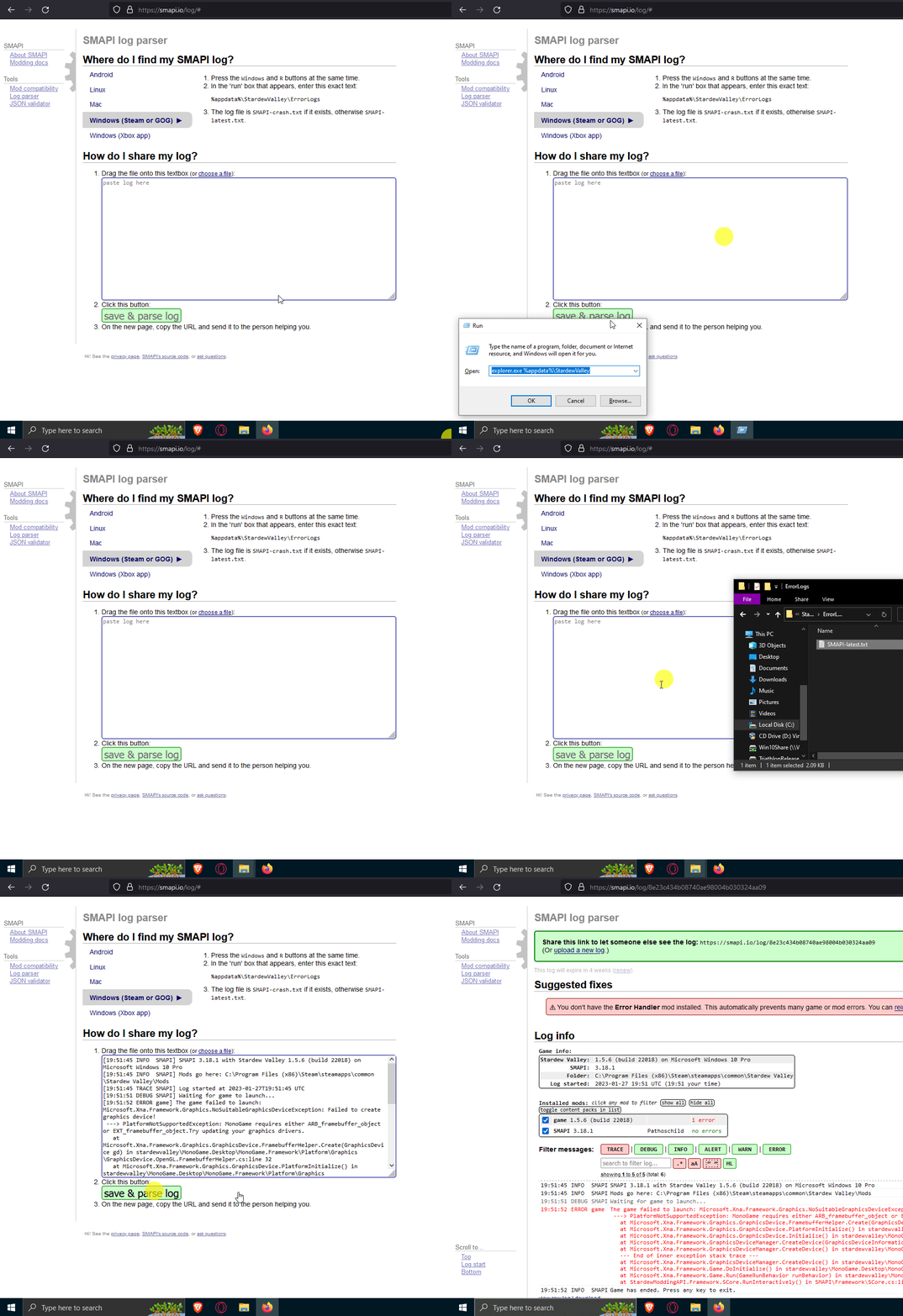
http://i.pil.ninja/image/21in2.gif (the bind to show the little box is windows + r)
 willow jay
yes
scarlet quail
right click stardew in steam, hover over manage, and go to browse local files.
let me know when you've done that.
kind sparrow
scarlet quail
Remove custom furniture and That should fix it
Is there any other mods for CF 
willow jay
alright
scarlet quail
Not unless you're using the furniture converter minchi
but you'll need to play a day without it, save, then re-add CF.
If it bugs, then you just can't use it at present
scarlet quail
willow jay
alright
From here, scroll down and double click to open StardewModdingAPI
Tell me if anything different happens from when you usually attempt to launch modded.
kind sparrow
scarlet quail
Not unless you're using the furniture converter minchi
I'm sorry but what's a furniture converter? I'm so new to this "-"
scarlet quail
!furnitureconverter
native dragonBOT
If you want to convert your furniture from Custom Furniture to a different framework, you can use the Furniture Converter! Simply follow the instructions to convert it to Dynamic Game Assets (if you're testing a future game version, Content Patcher is also available). https://github.com/elizabethcd/FurnitureConverter
kind sparrow
Oki, I'll do the thingy about the pyk and CF
neat plaza
(if you don't like a command line there is a ui for the same thing)
willow jay
Apologies for the terrible quality idk wt to say about this now because it's a lot worse than what it was before but I've been messing with this for 3 hours
 scarlet quail
no, that's good. Means SMAPI has run now
You're missing pretty much all the dependencies, but we'll get there in a sec.
Now proceed to follow the instructions from...
!log
native dragonBOT
Can you upload your SMAPI log to https://smapi.io/log (see instructions on that page) and share the link here?
scarlet quail
neat plaza
http://i.pil.ninja/image/21in2.gif (the bind to show the little box is windows +...
Use Pillow's GIF if it's unclear.
willow jay
 scarlet quail
soggy.
I cannot tell you how little screenshots help in here
I am really sorry to put it that way
But we need logs, screenshots help very little D:
robust bison
willow jay
unzip your mods
native dragonBOT
Files with the extension .zip, .rar, or .7z are archive files, which you can extract to get the actual files inside. For a .zip file, just right-click (or long-press on Android) it and choose the option like extract or uncompress. For .rar and .7z, you need to install third-party software first, like 7-zip https://7-zip.org/ on Windows (get the x64 version), Keka https://keka.io/ on macOS, PeaZip https://peazip.github.io/ on Linux, or ZArchiver https://play.google.com/store/apps/details?id=ru.zdevs.zarchiver on Android.
willow jay
I'm sorry it's alright dw I'm just rlly slow with modding
scarlet quail
I'm... actually more confused the longer I look at that screenshot
SVE is unzipped, the rest are not?
willow jay
So to unzip I extract them right?
scarlet quail
yes.
polar plover
oh oh i got the um thingy
hold on
the um
the log
i found it
now what do i do
robust bison
paste it here
polar plover
oh
scarlet quail
and by paste
They mean drag the SMAPI-latest file into the log parser
Then paste the link in here
Do not open SMAPI latest and paste it all in here - that won't be a usable log
scarlet quail
yep, the link of the website that you get after you hit "save and parse log"
native dragonBOT
Log Info: SMAPI 3.18.2 with SDV 1.5.6 (build 22018) on Microsoft Windows 10 Home, with 3 C# mods and 0 content packs.
polar plover
huh
scarlet quail
oooh you even enabled the trace, cool
Anyway. You're missing Content Patcher for most of your mods
However, you also happen to have a few xnb mods
!xnb
native dragonBOT
XNB mods often break the game and are not recommended. See https://stardewvalleywiki.com/Modding:Using_XNB_mods for more info (and a list of Content Patcher alternatives), and https://stardewvalleywiki.com/Modding:Player_Guide/Troubleshooting#Reset_your_content_files to fix problems caused by XNB mods. For mod creators, see https://stardewvalleywiki.com/Modding:Editing_XNB_files for help unpacking & editing them (including for use with Content Patcher).
scarlet quail
so whatever hairstyles, optional portrait, shirts, and skirt are, those are not usable in their present state.
polar plover
oh
scarlet quail
However, the rest will be enabled by downloading the Content Patcher mod.
polar plover
ok
scarlet quail
(It's needed for almost every content-adding mod anyway, so you should grab it regardless.)
 heavy sentinel
any idea why my screen is flickering like that? It happens randomly, resizing doesn't help
scarlet quail
The other ones you need to find relevant Content Patcher versions for - technically you can convert them too (third link in xnb command) but I doubt as a first-time modder that's the path you'd want to take.
Unfortunately, the names of those mods are extremely generic so we don't even know where to begin helping you find new ones.
robust bison
heavy sentinel
any idea why my screen is flickering like that? It happens randomly, resizing do...
do you have vsync enabled;/disabled?
willow jay
i think i got itto work? !
heavy sentinel
robust bison
do you have vsync enabled;/disabled?
it's enabled, when I disable it the screen gets wavy, turning it off and on fixes the issue but only for the current location
heavy sentinel
robust bison
do you have SM?
aaa sorry what does that mean?
robust bison
spritemaster
heavy sentinel
I don't
mild talon
Did you post a log, Atoms?
Maybe we can see potential mods if it's not a computer machine thing
Spooky strobey lightning would drive me nuts
scarlet quail
Honestly I don't think mods would cause flickering
I'd assume computer problems before I'd assume mods there.
heavy sentinel
native dragonBOT
Log Info: SMAPI 3.18.2 with SDV 1.5.6 (build 22018) on Microsoft Windows 11 Home, with 39 C# mods and 48 content packs.
Suggested fixes: One or more mods are out of date, consider updating them
heavy sentinel
there you go
surreal orchid
native dragonBOT
Log Info: SMAPI 3.18.2 with SDV 1.5.6 (build 22018) on Майкрософт Windows 11 Корпоративная, with 116 C# mods and 230 content packs.
Suggested fixes: One or more mods are out of date, consider updating them
surreal orchid
Angry Grandpa crashed the game
gaunt gust
surreal orchid
Angry Grandpa crashed the game
you'll need to use this version here: https://forums.stardewvalley.net/threads/unofficial-mod-updates.2096/page-102#post-78699
it's marked broken on the compat page
surreal orchid
oh
mild talon
heavy sentinel
there you go
Thanks for humoring the world's third worst detective 😅
mild talon
surreal orchid
oh
It does tell you that and includes links btw
I haven't had my yr3 review yet... Gonna check out this Angry Grandpa now 😄
