#archived-modded-support
1 messages · Page 111 of 1
 languid yarrow
 halcyon igloo
same diff
languid yarrow
```C:\Users*\AppData\Local\Programs\Python\Python310\lib\site-packages\bs4\builder_init_.py:545: XMLParsedAsHTMLWarning: It looks like you're parsing an XML document using an HTML parser. If this really is an HTML document (maybe it's XHTML?), you can ignore or filter this warning. If it's XML, you should know that using an XML parser will be more reliable. To parse this document as XML, make sure you have the lxml package installed, and pass the keyword argument features="xml" into the BeautifulSoup constructor.
warnings.warn(
Warp found
root: C:\Users*\Downloads\TMXL2CP-v0.1.4\CP\assets
Path: RooftopGarden.tmx
tiled --evaluate "C:\Users*\Downloads\TMXL2CP-v0.1.4\scripts\formatConv.js" "C:\Users*\Downloads\TMXL2CP-v0.1.4\CP\assets\RooftopGarden.tmx"
╔valuation de 'C:\Users*\Downloads\TMXL2CP-v0.1.4\scripts\formatConv.js'
"La lecture de la carte de mÚtadonnÚes C:/Users//Downloads/TMXL2CP-v0.1.4/CP/assets/spring_outdoorsTileSheet.png a ÚchouÚ : Fichier introuvable : C:/Users//Downloads/TMXL2CP-v0.1.4/CP/assets/spring_outdoorsTileSheet.png"
"La lecture de la carte de mÚtadonnÚes C:/Users//Downloads/TMXL2CP-v0.1.4/CP/assets/paths a ÚchouÚ : Fichier introuvable : C:/Users//Downloads/TMXL2CP-v0.1.4/CP/assets/paths"
qml: Map saved to C:\Users*\Downloads\TMXL2CP-v0.1.4\CP\assets\RooftopGarden_conv.tmx
Attempted to convert RooftopGarden.tmx to CSV Formatting... Unknown if successful
Conversion Complete
Remember to make any changes to now refer to the new map names in any other files you may have.
Press Enter to exit```
languid yarrow
halcyon igloo
same diff
that's like saying turn the heat off vs turn the heat on when going on a 2 month vacation
halcyon igloo
well it needs to be enabled
if it doesn't have the check / X then it's not enabled lol
halcyon igloo
let's just finish this lol
languid yarrow
k closing tiled btw
halcyon igloo
yeah that's fine
halcyon igloo
actually i think technically you could leave them as two separate mods?
lemme think on it for a sec
 tired brook
I think the game would crash when it tries to write to the file? If she's consistently getting a resolution issue, it might be better to fix that though. @charred anvil If you're interested, we could invite you to the Stardew Valley 1.6 alpha and see if we can get a fix for you in the game?
languid yarrow
k waiting
halcyon igloo
ok so we need to make sure all the warps are labeled right now
because i don't remember if it does that automatically or not lol
languid yarrow
how we do that?
halcyon igloo
ok so we need to open the maps in tiled
ugh my computer is being fucky too
the rooftop garden is enabled after the second farmhouse upgrade
so there will be a warp from the main farmhouse to the rooftop somewhere in farmhouse2
you need to open the farmhouse2 map in tiled
languid yarrow
file not recognized
halcyon igloo
FarmHouse2_marriage.tbin?
languid yarrow
oh tbin
halcyon igloo
in the CP/assets folder
languid yarrow
done
halcyon igloo
click around the tiles that have tiledata attached to them
looking for properties in the bottom left hand panel
one of them will have a warp to RooftopGarden
languid yarrow
not that im impatient but wouldn't it be faster if you do it and send me the results?
halcyon igloo
 languid yarrow
oh lel
halcyon igloo
i don't actually have the 2nd upgrade so i don't know where the warp is supposed to look like LOL
languid yarrow
btw path and spring_outdoorstilesheet.png couldn,t be loaded
halcyon igloo
that's fine
languid yarrow
what about using remote control software?
halcyon igloo
so the rooftop garden map is now named Custom_RooftopGarden instead of RooftopGarden

just change the name in the warp to Custom_RooftopGarden
languid yarrow
where?

 languid yarrow
shit somehow ended up with a 3x3 cursor and did some changes, reloading tiled
how do I go to farmhouse2 map and not rooftop garden?
halcyon igloo
open the farmhouse2 tile
languid yarrow
how?
halcyon igloo
from the CP mod part oops
like the one that wasn't TMXL
when you downloaded the farmhouse
languid yarrow
halcyon igloo
from the CP mod part oops
that changes everything
i mean, the picture i posted says tmxl
halcyon igloo
we're cleaning up the two mods so that they place nice together now lol
now that the actual map is converted
languid yarrow
ok now what do I do?

 languid yarrow
ok so already not having the same file content as you is more confusing
languid yarrow
that was never clearly mentionned before
halcyon igloo
halcyon igloo
from the CP mod part oops
unclearly but cut me some slack lol
languid yarrow
I never extracted the CP folder before 😛
halcyon igloo
LOL I THOUGHT I SAW YOU DOWNLOADED IT
languid yarrow
nop, only extracted TMXL so it can be converted to CP
anyway, dropping it to CP folder
 iron marlin
When my friend hosts with mods do i need to install the mods to see it too?
halcyon igloo
leave them separate
languid yarrow
also I'm saying these comments so it's clearly mentionned in the instructions you're sending
halcyon igloo
iron marlin
When my friend hosts with mods do i need to install the mods to see it too?
!mpmods
 native dragonBOT
@iron marlin See https://stardewvalleywiki.com/Modding:Player_Guide#Do_mods_work_in_multiplayer.3F for details on how mods work in multiplayer. :)
languid yarrow
halcyon igloo
leave them separate
😛

 languid yarrow
 halcyon igloo
halcyon igloo
halcyon igloo
this tile
 graceful sleet
Have a question. I have a CP that replaces the orange cat. Works fine at first then after a day it reverts back to the vanilla orange cat. The log isn't sshowing any conflicts. Any ideas what could be wrong? Here is my log. https://smapi.io/log/3ed67f1346b04cd190565f3c83af7bed
native dragonBOT
Log Info: SMAPI 3.18.2 with SDV 1.5.6 (build 22018) on Microsoft Windows 10 Home, with 131 C# mods and 157 content packs.
Suggested fixes: Pytk isn't compatible with newer SMAPI performance optimizations, consider removing it, One or more mods are out of date, consider updating them
languid yarrow
are there coordinates or am I to click on each tile hoping I have the same as yours?
languid yarrow
...
halcyon igloo
it's the one with all the arrows around it in my screenshot
iron marlin
halcyon igloo
!mpmods
Thanks
 halcyon igloo
last thing i do on discord today lol
 hoary bane
Rooting for you lot.
languid yarrow
halcyon igloo
it's the one with all the arrows around it in my screenshot
should've just said it's top right one with different color

 languid yarrow
what next?
halcyon igloo
well maybe it does NOW lol
halcyon igloo
halcyon igloo
change RooftopGarden to Custom_RooftopGarden bc that's what the map is called now that we converted it
languid yarrow
is it? cause I'm having trouble with a mod and need support and the fcking pytk/tmxl not working anymore
languid yarrow
halcyon igloo
change RooftopGarden to Custom_RooftopGarden bc that's what the map is called no...
how do I do that?
halcyon igloo
click on the text
 languid yarrow
???
languid yarrow
nothing happens if I left click on TileData
halcyon igloo
i think on yours it's calques?
languid yarrow
 languid yarrow
 halcyon igloo
graceful sleet
Have a question. I have a CP that replaces the orange cat. Works fine at first t...
halcyon igloo
graceful sleet
Have a question. I have a CP that replaces the orange cat. Works fine at first t...
this is making me sweat bc someone else has an issue with their CP texture not lasting lol.
languid yarrow
 halcyon igloo
okay in the bottom left under properties there's a warp
in the sidebar
and it says RooftopGarden
languid yarrow
 halcyon igloo
yeah click on it and change it to Custom_RooftopGarden
languid yarrow
 halcyon igloo
from the converted mod
 graceful sleet
I have restarted 3 times over the weekend and it happened the exact same with all three starts
halcyon igloo
graceful sleet
I have restarted 3 times over the weekend and it happened the exact same with al...
what's the name of the mod?
graceful sleet
Void Cat
halcyon igloo
o it's old
graceful sleet
True. I didn't think it would be a problem since it is a simple replacer
halcyon igloo
i don't think this ended up ultimately fixing the issue with the other person but we can try updating this one too and see what happens lol
languid yarrow
yeah I changed the name like you saw on my pic
Not sure what to do next
halcyon igloo
save it
in theory?? i think that's it??
again i don't have the second farmhouse upgrade lol
languid yarrow
so now I load the game with the mod moved to the mod folder?
graceful sleet
It isn't listed on the master mod compatibility list so I don't think there are any unofficial updates
halcyon igloo
languid yarrow
so now I load the game with the mod moved to the mod folder?
yep both parts
it's a short content patcher mod so it's easy enough
graceful sleet
How would I update it?
halcyon igloo
do you have the game open
graceful sleet
Not currently
halcyon igloo
ok if you launch the game next time run patch summary Kittentamer.VoidCat and see what it says
graceful sleet
how do I do that? Sorry, not really code savvy.
halcyon igloo
in the SMAPI console
graceful sleet
Gotcha
languid yarrow
halcyon igloo
it's a short content patcher mod so it's easy enough
I hope, for both our sake, your instructions are done easy to follow for the next person who wants to install the mod 😛
languid yarrow
halcyon igloo
and i didn't plan this out lol
forgot one thing tho

requirements still require pytk
on paper tho
halcyon igloo
delete the dependency in the manifest.json lol
or just ignore it
well
actually smapi might not load it
languid yarrow
yeah that's why I asked
languid yarrow
halcyon igloo
delete the dependency in the manifest.json lol
from where to where?
 halcyon igloo
how many mods do you have can you try loading it for me without doing anything to see lol
but yes you would just delete Dependencies and then everything inside inclusive of the []
languid yarrow
halcyon igloo
how many mods do you have can you try loading it for me without doing anything t...
but..but... my 289 mods on my small laptop 
I want to hear the fan 
all of that?
 graceful sleet
Still orange though weirdly when he is displayed on the UI, it still shows the black cat.
 halcyon igloo
graceful sleet
Still orange though weirdly when he is displayed on the UI, it still shows the b...
halcyon igloo
graceful sleet
Still orange though weirdly when he is displayed on the UI, it still shows the b...
can i get ALL of the output after the patch summary ?
with the void kittentamer whatever name from before
native dragonBOT
Can you upload your SMAPI log to https://smapi.io/log (see instructions on that page) and share the link here?
halcyon igloo
graceful sleet
Looks like it is too long for one post
need this bit
 native dragonBOT
Log Info: SMAPI 3.18.2 with SDV 1.5.6 (build 22018) on Microsoft Windows 10 Famille, with 4 C# mods and 2 content packs.
languid yarrow
lel custom npc from previous mod
halcyon igloo
can you run patch summary alone
graceful sleet
This is what I am getting
halcyon igloo
graceful sleet
This is what I am getting
can you run just patch summary without anything after?
lol mfw when the farmhouse adds a starter kitchen
 languid yarrow
meanwhile I'm stuck with a divided by 0 error
halcyon igloo
idk i merge my converted map with the rest of my CP pack for converted mods
graceful sleet
I ran patch summary and it created a massive list but when I searched for void cat, it wasn't showing up
halcyon igloo
languid yarrow
meanwhile I'm stuck with a divided by 0 error
might have to merge the mods after all lol

i think the issue is load order in this case where the farmhouse is trying to load the rooftop before we've actually added it
languid yarrow
...merge?
graceful sleet
He showed up when Marnie came to the farm and still shows up on the farmer info page so parts of it are still loading. So weird.
I haven't changed anything, added or subtracted
halcyon igloo
graceful sleet
He showed up when Marnie came to the farm and still shows up on the farmer info ...
can you change your content.json for the mod to this
    "Format": "1.28.0",
    "Changes": [
      {
         "Action": "EditImage",
         "Target": "Animals/cat",
         "FromFile": "assets/Kittentamers_cat.png"
      }
    ]
}```huh
 graceful sleet
And delete everything else?
halcyon igloo
@tired brook is there an issue with format 1.3 not having persisting changes with a Load action? This is the second instance I've heard of someone having an old CP mod not have persistent changes after sleeping
halcyon igloo
graceful sleet
And delete everything else?
yes
halcyon igloo
languid yarrow
huh
time to move ur furniture
graceful sleet
OK. I will try it.
halcyon igloo
literally do not know if that will work lol
tired brook
halcyon igloo
<@226803198218731520> is there an issue with format 1.3 not having persisting ch...
Not that I know of. Content Patcher will just internally convert it to the latest format, and "Action": "Load" is basically unchanged since 1.0. I'd be interested to know if it still happens after removing every mod except Content Patcher and the affected content pack though.
graceful sleet
Didn't work. Now he is orange everywhere.
It didn't load the mod. Here is the log: https://smapi.io/log/17d4d61a9c0b4812ac75305f721899da
native dragonBOT
Log Info: SMAPI 3.18.2 with SDV 1.5.6 (build 22018) on Microsoft Windows 10 Home, with 131 C# mods and 157 content packs.
Suggested fixes: Pytk isn't compatible with newer SMAPI performance optimizations, consider removing it, One or more mods are out of date, consider updating them
halcyon igloo
is there a Kittentamers_cat.png in your assets?
graceful sleet
So I redownloaded from Nexus it and the file is different from the one I had in my mod folder.
There wasn't in the file I had, but the redownload has a file with that name. Let me reload and see if that changes anything
Nope that didn't work. Let me try changing the content to what you suggested now that there is a png with the correct name.
 halcyon igloo
lol yeah i'm trying to figure out the 2nd farmhouse but yay it worked!
languid yarrow
you have 3 in-game days to figure it out
better hurry up, i'm using cjb cheat mod
and I toggled instant build 
graceful sleet
Still orange kitty. Should I just dump it and find a similar mod?
languid yarrow
halcyon igloo
lol yeah i'm trying to figure out the 2nd farmhouse but yay it worked!
ah yea, that is a problem
and rooftop is just void
https://smapi.io/log/10428076dcc74fd08e92321e7c0172a0
 tired brook
graceful sleet
Still orange kitty. Should I just dump it and find a similar mod?
tired brook
graceful sleet
Still orange kitty. Should I just dump it and find a similar mod?
Have you tried temporarily removing all mods except Content Patcher, Error Handler, and that content pack to see if it works then?
tired brook
The wiki says "first sunny Wednesday or Friday morning in Spring after earning 1,000g".
graceful sleet
Dang. I guess I will have to earn some cash
graceful sleet
What can I say? I am spoiled by mods
I only have CP, the mod I am testing, and error logger or I would have.
languid yarrow
sleep, quit the game, enable cjb, start the game, press P. add 1k gold
go sleep and witness your void cat
tired brook
It's fine to test with CJB Cheats Menu too, it won't affect Content Patcher.
graceful sleet
Thank GOD!
languid yarrow
satan*
yoba*
graceful sleet
Thank CJB
and @tired brook of course
Ok so after 3 days, void cat is still void colored
languid yarrow
nice
time to post your fix in the forum
meanwhile, I don't think I'll get additional support for my farmhouse :/
holythesea probly went to sleep
graceful sleet
What fix? I didn't do anything except take off all my other mods. The log wasn't showing any conflicts so I still don't know what the problem was.
tired brook
Try re-adding all your Content Patcher packs next, and see if it still works fine.
graceful sleet
Will that be ok if the packs have other dependencies?
languid yarrow
enable these dependencies
tired brook
Yep, those ones will just be skipped automatically.
languid yarrow
wait, enable all of them?
don,t you want to do it partially to at least find the cause of that cat skin mod failure?
tired brook
All the Content Patcher packs specifically. If it still works, then the conflict is probably from one of the non-Content Patcher mods.
graceful sleet
So it skipped 17 cp packs because they were missing dependencies. Void cat was still void, but mods of the really big mods like the CP for SVE were skipped. Do I add back all the dependencies for the 17 mods now?
tired brook
When it was broken before, was it broken as soon as you loaded the save or did it break after a day or two?
graceful sleet
When it happened before the black cat replaced the orange cat for a day or two then would revert to the orange cat. There weird thing is the icon on the farmer info screen was still black.
I restarted 3 times over the weekend and it happened the same each time
 lament prairie
What’s your cat’s name?
graceful sleet
Tarzan
lament prairie
Ok, not the duplicating cat bug then most likely
tired brook
So with all the content packs re-enabled (ignoring the ones that fail due to missing dependencies), the void cat works fine for a few days?
graceful sleet
yes
tired brook
Then yep, try re-adding the missing dependencies next.
graceful sleet
I am an idiot! I accidentally added back everything. Not only is he not void, he isn't even orange. He is some weird orange/grey hydrid. Could it be an issue with adopt skin?
tired brook
Yep. Try removing that one.
graceful sleet
The cat has the same pattern as the ones they add.
 long brook
That might be the reason your cat change skin after few days. AnS did that in the past (idk if it is caused by AnS randomize feature)
graceful sleet
That's what's doing it. He is back to void. Is there a way to prevent Adopt Skin from changing my pet?
Yup. Three days and still black.
Just checked. Adopt skin doesn't play well with any other mods that affect animal skins.
Surprisingly it doesn't show up in the logs.
tired brook
Seems like it's by design; the mod page says "Randomizes each animal's skin when created or born".
There might be a config option to disable it for the pet though?
graceful sleet
I guess there are ways to add skins from other mods and specify which skin you want for your pet but it is late and that is a task for tomorrow.
Thank you @tired brook and @halcyon igloo who I think is gone for the night. I truly appreciate your time, knowledge, and assistance.
tired brook
Welcome! Feel free to ask if you have any other issues.
graceful sleet
Thanks a million!
My actual black cat is craving a late night/early morning snack so I am off.
 lavish marlin
@fast river did something change recently in GMCM?
 fast river
No new updates since early December
 mild talon
(I dropped back to beta .12 and it's been fine again 🙂 )
 dire fractal
hey, so i downloaded the files for stardew expanded, but when i checked my folder, it appears i'm missing the folder for error handler
i don't have the error handler in my folder, does anyone know how to fix this?
 long brook
Reinstall smapi
dire fractal
do i need to move around any files, or should it put there automatically?
 vale halo
dire fractal
i don't have the error handler in my folder, does anyone know how to fix this?
vale halo
dire fractal
i don't have the error handler in my folder, does anyone know how to fix this?
ErrorHandler in that SS, 4th folder from the top
long brook
It auto add 3 mod that comes with smapi
vale halo
long brook
It auto add 3 mod that comes with smapi
which are all in the SS, so unless the SS is from someone else idk what's the problem
long brook
Could be different location
dire fractal
(sorry what's ss?)
long brook
Screenshot
vale halo
ss = screenshot
dire fractal
the ss is stolen from the page it's not my computer
 midnight ocean
hey so something funky is going on with my stardew, it launches, and smapi is waiting on it for launch. this is not smapis fault, as the application does technically launch, but the window does not, and it tells me its not responding. i move out my mods and saves, and uninstalled and reinstalled stardew on steam. i launch it vanilla, it's still not responding. i install the latest smapi, to see if errorhandler can help, it doesnt respond. i have 0 clue whats causing it, since uninstall/reinstall + vanilla game wont work
long brook
So when you launch SDV in vanilla, the game doesn't show up?
midnight ocean
correct
long brook
!legacy try this. Might be monobug wraith comes to you
native dragonBOT
There are some instances where you will need to use the compatibility version of the game. Please be aware that SMAPI/game mods are not compatible with this version.
On Steam: In your library, right-click Stardew Valley and select Properties... > Betas > then "compatibility" under the dropdown.
On GOG: From the game's page, click the settings icon > Manage installation > Configure... > then "compatibility" under the Beta channels dropdown.
long brook
But when you try steps above, you can no longer play modded (technically)
 gaunt gust
midnight ocean
correct
gaunt gust
midnight ocean
correct
!startuppref
native dragonBOT
If your resolution is messed up try deleting startup_preferences This can be found on Windows at %appdata% > Stardew Valley > it's in that folder, or C:\Users\Yourwindowsnamehere\AppData\Roaming\StardewValley or for Mac can be found at ~/.config/StardewValley To get here you'll want to go to your desktop, then in the menu bar select Go -> Go to Folder...
 dusty spruce
i wonder how much work would be needed to switch to FNA instead
gaunt gust
!log otherwise
native dragonBOT
Can you upload your SMAPI log to https://smapi.io/log (see instructions on that page) and share the link here?
dusty spruce
and whether it would be any better
midnight ocean
long brook
But when you try steps above, you can no longer play modded (technically)
i understandf that could fix it, but looking at it on steam its for 32 bit systems and i'm on 64 bit
gaunt gust
dusty spruce
i wonder how much work would be needed to switch to FNA instead
I think people blame monogame every time something odd happens
(Even when the issue may not be that)
dusty spruce
it doesn't help that its exceptions suck
long brook
Yeah, the first thing comes to my mind when vanilla sdv won't work is monobug
gaunt gust
(IE, the game semi regularly corrupts startup prefs and tries to launch wildly off screen)
long brook
Well i'll keep that in mind. Thanks atra
midnight ocean
yeah legacy doesn't even have the application show up due to being on 64 bit, i went back to the regular ver, deleted the start up pref, and tried launching again. the same problem with it launching, but the window not being there and the application not responding when right clicked on
im not sure if the log will do any good considering it doesnt load the mods but if you view the raw log it does say something abt some feature not being available https://smapi.io/log/3616fef8949c4c97b9316710132878da
native dragonBOT
Log Info: SMAPI 3.18.2 with SDV 1.5.6 (build 1.3.37.0) on macOS Unix 13.1.0, with 0 C# mods and 0 content packs.
Suggested fixes: You don't have the Error Handler mod installed, reinstall SMAPI to get it
gaunt gust
That isn't relevant
Interesting
Firstly, the 32 bit version should work on 64 bit (it just doesn't work with SMAPI)
I don't think I've seen this particular stopping point before
dusty spruce
"NoFpsCap: This feature is not available" is not interesting at all, i think it keeps showing on my machine too
vale halo
gaunt gust
Firstly, the 32 bit version should work on 64 bit (it just doesn't work with SMA...
not on mac tho, macos doesn't have any 32bit support whatsoever
and they are on mac according to the governor
gaunt gust
dusty spruce
"NoFpsCap: This feature is not available" is not interesting at all, i think it ...
(I'm pretty sure this refers to a feature that doesn't exist)
gaunt gust
vale halo
not on mac tho, macos doesn't have any 32bit support whatsoever
32 bit is what existed before dec 2021
Actually, hmmm
What was on mac for 1.5.4
vale halo
gaunt gust
32 bit is what existed before dec 2021
yes, and steam will give you a popup with an error message saying 32bit games aren't supported on this machine
if a game on steam shows mac compatibility, that doesn't show whether it's older macos or newer macos
only that at any one point in the game's history it was compatible with the at that time current version of macos
long brook
So it's mac being mac
vale halo
have you tried reinstalling smapi?
gaunt gust
The message itself isn't interesting but it gives me an idea of where things got stuck
Does that make sense?
vale halo
btw, on mac you don't set any startup/launch options in steam, that is a windows only thing for smapi
gaunt gust
Yeah, I know
vale halo
midnight ocean
yeah legacy doesn't even have the application show up due to being on 64 bit, i ...
just saying cause they mentioned it here
you can try using the verify integrity of game files in steam (note: that will uninstall smapi, you need to reinstall it afterwards), check if the game launches after doing that
gaunt gust
Startup pref isn't launch options
Startup pref is a file on the computer that lists things like "in a what sized window should the application launch in"
vale halo
gaunt gust
Startup pref isn't launch options
i don't think there is something as startup pref on the mac version of steam
gaunt gust
(This is a Stardew thing iirc)
vale halo
gaunt gust
Startup pref is a file on the computer that lists things like "in a what sized w...
where exactly is that file located on windows?
cause that too might be different depending on the os
long brook
In appdata for windows
vale halo
long brook
In appdata for windows
exact location pls
long brook
Specifically %appdata%\StardewValley
gaunt gust
!startuppref
native dragonBOT
If your resolution is messed up try deleting startup_preferences This can be found on Windows at %appdata% > Stardew Valley > it's in that folder, or C:\Users\Yourwindowsnamehere\AppData\Roaming\StardewValley or for Mac can be found at ~/.config/StardewValley To get here you'll want to go to your desktop, then in the menu bar select Go -> Go to Folder...
vale halo
gaunt gust
Anyways I'm not interested in arguing, sorry
i was just trying to find the file you mentioned on mac since i couldn't find it in the rest of the sdv files
gaunt gust
(I literally used the command less than five minutes earlier)
vale halo
i have no idea what the actual issue is, that you (or someone else) would have to help with, i just know my way around macos
vale halo
gaunt gust
(I literally used the command less than five minutes earlier)
didn't see that, sorry
vale halo
i am just trying to help, i'm not trying to argue
vale halo
gaunt gust
The message itself isn't interesting but it gives me an idea of where things got...
mind elaborating? cause i kinda got the impression you are the only one rn remotely having a clue about what might be going on with the game
 neat plaza
open your manifest file in vscode, click the UTF-8 (or other encoding) button in the bottom right and click, save with new encoding and choose utf8
if that fixes it, completely out of my control
what's wrong with the instructions? it's very clear
languid yarrow
neat plaza
open your manifest file in vscode, click the `UTF-8` (or other encoding) button ...
Just like @halcyon igloo I'm in bed right now so won't be able to do it but I'll try this morning
What's wrong is mainly that there are steps missing for an idiot user like me who needed a lot of support (see the whole convo about 4 hours ago) and it still didn't fix the problem
neat plaza
🤷
for sdvconvertergui it's very self-explanatory
for tmxl2cp, I don't see what's wrong with the instructions
neat plaza
neat plaza
🤷
for sdvconvertergui it's very self-explanatory
for tmxl2cp, I don't see what'...
by self-explanatory it's "download and run it, you can see what to do"
alr, if you don't want help I won't force help on you
languid yarrow
You tease
neat plaza
what
vale halo
@midnight ocean could you check the "about my mac" and tell me which exact version of macos you are on?
 minor gazelle
hey there! I'm playing on pc. While I play modded, none of my mods have anything to do with my issue and It's not mod related. I did a special order quest in order to get a crafting recipe. However, after I completed it, slept and opened the letter, I didn't receive the recipe (quality bobber if it's any help). I need this for perfection, but I can't repeat the quest so I'm really unsure what to do. Help please :)
vale halo
minor gazelle
hey there! I'm playing on pc. While I play modded, none of my mods have anything...
if it's not mod related probably better to ask in #vanilla-tech-support, but maybe someone in here still has an idea
minor gazelle
I did at first then I got sent here 
neat plaza
vale halo
if it's not mod related probably better to ask in <#337774601696313347>, but may...
if you have mods at all that is not a tech support question
vale halo
i see
 outer karma
i cant see the problem,
 neat plaza
!log
native dragonBOT
Can you upload your SMAPI log to https://smapi.io/log (see instructions on that page) and share the link here?
native dragonBOT
Log Info: SMAPI 3.18.2 with SDV 1.5.6 (build 22018) on Microsoft Windows 11 Home Single Language, with 5 C# mods and 3 content packs.
outer karma
i still cant open the game 😭
vale halo
outer karma
i still cant open the game 😭
what exactly do you mean by that? cause according to the log you sent the game launched just fine
outer karma
game closes itself a few seconds later when i open it
vale halo
you are on windows, there should be something in the launch options in steam, remove that and the game launches without smapi (best to copy paste it into notepad to add it back in later)
neat plaza
no you just don't open smapi
vale halo
or you open stardewvalley.exe directly like pillow said
forgot you could do that on windows
outer karma
alr, it works well without smapi
so the problem is smapi but i cant find the problem with it in logs
vale halo
the default thing would be to try and reinstall smapi
outer karma
i'll try. thanks for the help!
neat plaza
languid yarrow
neat plaza
Fixed the bug <https://github.com/AnotherPillow/sdvconvertergui/releases/tag/bet...
Watch me download source code 
@halcyon igloo pinging cause you'd like to know too, I think
neat plaza
tbh idm if you do, just don't complain about there not being compilation instructions when there are
 granite crown
is SMAPI required for any and all mods? or can some simpler ones run without it? (mobile version)
languid yarrow
!androidmods
native dragonBOT
If you're using SMAPI on Android, you'll need specific older versions of most mods. For a list of many of the most popular mods compatible with android SMAPI, see here https://forums.stardewvalley.net/threads/stardew-valley-mobile-mods-list.13322/#post-85980. For mods not listed here, they may or may not be compatible with android, but see https://stardewvalleywiki.com/Modding:Android for more info, including how to find a compatible version of a mod not listed in the first link.

Stardew Valley Wiki
This page explains how to install SMAPI (the tool which lets you use mods) on Android.
dusty spruce
!xnb
native dragonBOT
XNB mods often break the game and are not recommended. See https://stardewvalleywiki.com/Modding:Using_XNB_mods for more info (and a list of Content Patcher alternatives), and https://stardewvalleywiki.com/Modding:Player_Guide/Troubleshooting#Reset_your_content_files to fix problems caused by XNB mods. For mod creators, see https://stardewvalleywiki.com/Modding:Editing_XNB_files for help unpacking & editing them (including for use with Content Patcher).
dusty spruce
XNB mods are the only ones that don't require SMAPI
also good luck figuring out how to use them on Android
languid yarrow
@granite crown good news is I linked which version of mod works on android
neat plaza
languid yarrow
<@529032085927624745> good news is I linked which version of mod works on androi...
you didn't
languid yarrow
... I added the correct version of the mod that will work on android on the fioe that you can see in the link you can see above
neat plaza
but smapi doesn't so you didn't
granite crown
... yeah thats what im wondering
the post starts out by saying SMAPI android ect..
native dragonBOT
There is no working android SMAPI right now, after the mobile 1.5 release. No Android SMAPI means no mods on Android right now. ZaneYork, the developer of Android SMAPI, has said he will work on it when he has time. You can follow this Github issue for details, but please do not harass him or spam the Github. https://github.com/ZaneYork/SMAPI-Android-Installer/issues/246
When there is one, the instructions here will be updated: https://stardewvalleywiki.com/Modding:Installing_SMAPI_on_Android
granite crown
yes there is no working SMAPI
thats why i asked if mods work without it as well
neat plaza
not really
granite crown
im asking cause all i'd wanna do is stop time in game
neat plaza
oh,
no then, not at all
granite crown
not like a full cheat menu
languid yarrow

Yeah I keep assuming you meant 1.4
Cause at this point we all know smapi won't work on mobile 1.5
granite crown
yeah i know 1.4 works
and i know 1.5 SMAPI
thats why i specifically asked if something does work without it
neat plaza
can't pause time withoujt smapi
 charred anvil
tired brook
I think the game would crash when it tries to write to the file? If she's consis...
charred anvil
tired brook
I think the game would crash when it tries to write to the file? If she's consis...
What would that entail? Just curious.
granite crown
neat plaza
can't pause time withoujt smapi
well sh!t lol
just bought the game before finding out the mods aint working
dire fractal
how can i fix it

it happened when i upgraded my house
i had some custom furniture from a mod in my room
i removed it, but the bed wont get back to normal
if i cant fix it, can i remove the bed somehow?
charred anvil
dire fractal
how can i fix it
Guess you gotta sleep on an angle now
 somber comet
Need help
My girlfriend can join with all the mods using smapi, but i can't join the server with the same mods... It says connection failed
 rancid egret
does anyone know what mod the program want? ive searched nexus but no dice so far.

 gloomy crane
rancid egret
does anyone know what mod the program want? ive searched nexus but no dice so fa...
gloomy crane
rancid egret
does anyone know what mod the program want? ive searched nexus but no dice so fa...
stardew valley expanded
rancid egret
oh shoot i thought i extracted it all oops, thank!
oh my gosh i finally got every thing working hell yeah ! Thank you @long brook and @gloomy crane 
 summer swan
 tranquil wren
cant build the cellar even tho i have all the house upgrades
tranquil wren
cant build the cellar even tho i have all the house upgrades
Do you get any red when you try it in your SMAPI window?
tranquil wren
wdym
summer swan
You have the game and a 2nd window with lots of text.
tranquil wren
yes
summer swan
SMAPI window is the one with the text. Any red lines there?
summer swan
tranquil wren
yes
!log follow the instructions there.
native dragonBOT
@tranquil wren Can you upload your SMAPI log to https://smapi.io/log (see instructions on that page) and share the link here?
summer swan
I guess you found it. 😅
tranquil wren
'go' wont show up at the top
got it, had to do it a different way
all i got was this
native dragonBOT
Oops, couldn't parse that file. Make sure you share a valid SMAPI log.
tranquil wren
all that had popped up was 'SMAPI-latest.txt'
i tried using that but it said that ^
summer swan
You clicked "save and parse"?
tranquil wren
yes
'Oops, couldn't parse that log. (Make sure you upload the log file, not the console text.)
Share this URL when asking for help: https://smapi.io/log/f43936cb5a384af4828620f2c4b9d3bf
(Or upload a new log.)
Error details: Found a log message with no SMAPI metadata. Is this a SMAPI log file?'
native dragonBOT
Oops, couldn't parse that file. Make sure you share a valid SMAPI log.
summer swan
Yes. Saw it.
When you drag the file onto the huge square it should turn into lots of text.
native dragonBOT
Log Info: SMAPI 3.18.2 with SDV 1.5.6 (build 1.3.37.0) on macOS Unix 13.1.0, with 50 C# mods and 35 content packs.
Suggested fixes: Pytk isn't compatible with newer SMAPI performance optimizations, consider removing it, One or more mods are out of date, consider updating them
tranquil wren
i need pytk for a few mods
tranquil wren
yes
summer swan
That doesn't really work right now according to your SMAPI log.
tranquil wren
lemme try fixing it, i think ik the issue
tranquil wren
okay
neat plaza
!mobilebug
native dragonBOT
If you run into a bug in the 1.5 mobile update, please report it here: https://forums.stardewvalley.net/threads/report-1-5-mobile-issues-here.14953/
tranquil wren
i removed the extra mods
summer swan
Pillow is that for #vanilla-tech-support ? 😅
tranquil wren
duplicate mods*
summer swan
You're also missing Alternate Textures? 
tranquil wren
?
summer swan
Divine Decor 1.0.0 because it requires mods which aren't installed (PeacefulEnd.AlternativeTextures).
summer swan
Ok. Start the game and then upload a new log to see what's left.
Did you play the whole time like this or did you just start? 
tranquil wren
summer swan
Did you play the whole time like this or did you just start? <:SDVpuffersweats:5...
wdym 'whole time like this'
native dragonBOT
Log Info: SMAPI 3.18.2 with SDV 1.5.6 (build 1.3.37.0) on macOS Unix 13.1.0, with 52 C# mods and 39 content packs.
Suggested fixes: Pytk isn't compatible with newer SMAPI performance optimizations, consider removing it, One or more mods are out of date, consider updating them
summer swan
With all the red. As you say you're at the cellar upgrade I thought you might be further in the game. Or did you reinstalled the game and forgot half of the mods?
tranquil wren
im further in the game
tranquil wren
summer swan
With all the red. As you say you're at the cellar upgrade I thought you might be...
i thought i downloaded everything ;-;
summer swan
Your farm is missing a mod too.
tranquil wren
?
summer swan
Immersive Farm 2 Remastered 1.14.17 because it requires mods which aren't installed (FlashShifter.SVE-IF2R-FTM)
Oh. Probably just not correctly installed.
tranquil wren
should i uninstall and reinstall?
summer swan
Immersive Farm 2 Remastered from the SVE page has 2 folders: [CP] Immersive Farm... and [FTM] Immersive Farm ... <<-- The FTM folder is missing.
tranquil wren
tranquil wren
should i uninstall and reinstall?
?
summer swan
Yeah. That might be easier.
summer swan
The 2 Romanceable mods giving red (we don't talk about them here): Reinstall them too.
tranquil wren
which ones?
summer swan
Rasmodia and Rasmodius.
tranquil wren
ok
summer swan
Stardew SMAPI Mod Manager <- I don't know what that is.
summer swan
Ok. It's not a classic mod. Let's ignore that for now.
Start the game and upload a new log.
tranquil wren
native dragonBOT
Log Info: SMAPI 3.18.2 with SDV 1.5.6 (build 1.3.37.0) on macOS Unix 13.1.0, with 52 C# mods and 40 content packs.
Suggested fixes: Pytk isn't compatible with newer SMAPI performance optimizations, consider removing it, One or more mods are out of date, consider updating them
tranquil wren
native dragon
**Log Info:** SMAPI 3.18.2 with SDV 1.5.6 (build 1.3.37.0) on macOS Unix 13.1.0,...
i'll update them after this is done btw
summer swan
Btw try to avoid xnb mods in the future.
tranquil wren
okay
halcyon igloo
they’re not bad to convert i have like 7 open that i wanna do lol
summer swan
And Content 2 / Content / Contentt: Is that 3 times the same mod or are those 3 different mods?
tranquil wren
3 different
tired brook
charred anvil
What would that entail? Just curious.
We have a thread (basically a mini-channel) for players and modders interested in trying the Stardew Valley 1.6 alpha. It has instructions on how to switch to the alpha version on Steam. So first you'd switch to the alpha, and see if the issue still happens (since there are some related fixes already). If it still happens, we can look into what the issue is and possibly fix it in an upcoming alpha update (there's a new version every night).
summer swan
Try to load your save. Do NOT save it.
summer swan
If your save loads yes.
tranquil wren
still not an option
charred anvil
tired brook
We have a thread (basically a mini-channel) for players and modders interested i...
If you think it’s worth a shot, I’ll give it a try. You might have to hold my hand through it if you’re cool with that
summer swan
tranquil wren
still not an option
New log please.
tired brook
charred anvil
If you think it’s worth a shot, I’ll give it a try. You might have to hold my ha...
Sure! I'll add you to the alpha thread.
charred anvil
tired brook
Sure! I'll add you to the alpha thread.
Good think I work from home today lol. I’ll get my laptop open and running in a min
tranquil wren
native dragonBOT
Log Info: SMAPI 3.18.2 with SDV 1.5.6 (build 1.3.37.0) on macOS Unix 13.1.0, with 52 C# mods and 40 content packs.
Suggested fixes: Pytk isn't compatible with newer SMAPI performance optimizations, consider removing it, One or more mods are out of date, consider updating them
tranquil wren
only 'remove crib' 'open bedroom' 'remove southern room' and 'remove corner room' are an option
summer swan
Ok. No additional red. I guess that's good.
It's not in "house renovations".
It's "Upgrade house".
tranquil wren
thats not an option either
summer swan
Do you use a mod for the interior of your house?
tranquil wren
finally, it showed up
i had to restart the game
again
i think my mods were an issue somehow
summer swan
Oh. Maybe because you had to fix so many things it needed another restart.
summer swan
tranquil wren
i think my mods were an issue somehow
Don't ask me which one. Not worth bothering to begin with. 🤷♀️
 hardy pebble
hello, I’m kinda new to modding stardew valley and I would like to know how do i get the GH's Peach Body mod to work? I think I’ve done everything correctly, but the appearance of my farmer didn’t change ><
halcyon igloo
hardy pebble
hello, I’m kinda new to modding stardew valley and I would like to know how do i...
!log
native dragonBOT
@hardy pebble Can you upload your SMAPI log to https://smapi.io/log (see instructions on that page) and share the link here?
halcyon igloo
@vale flame what’s the stardrop issue again lol
i was assuming you were having some issue or sth with it not loading vanilla for some reason
 vale flame
oh no im not having any issue i just wanna make sure im doing/understanding it right
summer swan
@vale flame I would make a profile for "Vanilla" and not necessarily use the Default one to avoid confusion.
hardy pebble
native dragon
<@!305753984889651202> Can you upload your SMAPI log to <https://smapi.io/log> (...
vale flame
oh yes i wanted to do that i just didnt know if i could rename the default one
native dragonBOT
Log Info: SMAPI 3.18.2 with SDV 1.5.6 (build 22018) on Microsoft Windows 11 Home, with 19 C# mods and 26 content packs.
Suggested fixes: Pytk isn't compatible with newer SMAPI performance optimizations, consider removing it, One or more mods are out of date, consider updating them
halcyon igloo
probably bc it’s default lol just make a different group
i hate troubleshooting peach body lol
summer swan
@hardy pebble Your log says the mod is loaded. You might have to check the comments on the mod page for additional information.
And you're missing Fashion Sense?
halcyon igloo
have you poked around in the config in the menu yet?
hardy pebble
summer swan
<@305753984889651202> Your log says the mod is loaded. You might have to check t...
the commands work just fine but when i load the game the appearance of the farmer it's just the same so idk
vale flame
halcyon igloo
probably bc it’s default lol just make a different group
yeah it just bugs me that i can't get rid of default like wtf is default 😭
summer swan
hardy pebble
the commands work just fine but when i load the game the appearance of the farme...
And according to your log Content Patcher does what's necessary. Hence why I said to check the comments (not SMAPI commands 😉 ) on the mod page if there's anything kown.
halcyon igloo
what exactly does your farmer look like?
hardy pebble
summer swan
And according to your log Content Patcher does what's necessary. Hence why I sai...
okay I'll try and see what I can do thank you
summer swan
vale flame
yeah it just bugs me that i can't get rid of default like wtf is default 😭
"Default" profiles usually have another purpose: If all else fails with the others or if you accidentially delete all the others.
hardy pebble
halcyon igloo
what exactly does your farmer look like?
just the vanilla skin
vale flame
halcyon igloo
i hate troubleshooting peach body lol
luckily i never really had issues with peach body
halcyon igloo
i just hate doing sleeves
vale flame
yeah uh a lot of clothes look weird on those arms
native dragonBOT
If you would like a guide to setting up mods for Stardew Valley, check out the getting started guide! https://stardewvalleywiki.com/Modding:Player_Guide
summer swan
@dire fractal You use Steam? Did you set the launch options?
summer swan
Did you only download the mods or did you also install SMAPI and set it up?
halcyon igloo
is english your first language /genq
summer swan
But you haven't downloaded and installed SMAPI so far?
neat plaza
do you use steam/gog galaxy
where did you get your GAME
summer swan
No.
summer swan
@dire fractal What's your native language if I might ask?
neat plaza
did you put in launch options
native dragonBOT
If you're using Steam or GOG on Windows, you will need to set your launch options in order for Steam/GOG to automatically launch with SMAPI. The SMAPI installer will tell you what to set as the launch options when it completes (green text). You can find instructions (with screenshots) on how to do that here: https://stardewvalleywiki.com/Modding:Installing_SMAPI_on_Windows#Configure_your_game_client
halcyon igloo
are any of these screenshots familiar to you
summer swan
There's a Spanish Discord in #friends
Maybe that would be easier for you?
Ok.
You need to do that.
halcyon igloo
follow the instructions on that page
summer swan
That will tell Steam to start your game with SMAPI. Otherwise you start without mods.
neat plaza
did you run the installer
halcyon igloo
have you seen this text before
 neat plaza
did you run the installer
halcyon igloo
did you download SMAPI
go to the folder that you downloaded for SMAPI
did you extract your files as well
do your folder icons have a little zipper on them
neat plaza
you need to unzip
ik its for the installer but will work http://i.pil.ninja/image/bcd08.gif
 halcyon igloo
you need to have folders without little zippers on them
can you show a screenshot of what your folders look like now
if you’re on windows then windows+shift+S works
neat plaza
or printscrn
halcyon igloo
then after do you have a SMAPI folder without a little zipper on it?
neat plaza
thats the instalelr?
halcyon igloo
oh i see the installer window in the background l0l
the black window with the green text
noo bring it back 
ok run install on windows again
and do the same thing you did in that window before
and at the end copy and paste where the green text says
“copy and paste this”
copy the second line of green text
!launchoptions and follow these instructions in steam
native dragonBOT
If you're using Steam or GOG on Windows, you will need to set your launch options in order for Steam/GOG to automatically launch with SMAPI. The SMAPI installer will tell you what to set as the launch options when it completes (green text). You can find instructions (with screenshots) on how to do that here: https://stardewvalleywiki.com/Modding:Installing_SMAPI_on_Windows#Configure_your_game_client
languid yarrow
@halcyon igloo let me know when you're free so we can finish farmhouse map port
neat plaza
open sdv via steam
halcyon igloo
farmhouse map is ass lol do you have the unpacked game files
languid yarrow
Unpacked?
halcyon igloo
tbh i should see if i can upload a fix for it but idt dustbeauty is around
halcyon igloo
languid yarrow
Unpacked?
like all the tilesheets and pngs of the game
did a second window pop up
languid yarrow
halcyon igloo
like all the tilesheets and pngs of the game
I'm gonna assume that no I did not
summer swan
halcyon igloo
tbh i should see if i can upload a fix for it but idt dustbeauty is around
Is it about the kitchen area in that one?
halcyon igloo
summer swan
Is it about the kitchen area in that one? <:SDVpufferthinkblob:95863492563922539...
no it’s the conversion for the stupid rooftop
you need to change the warp name to Custom_RooftopGarden
and i can’t figure out a way to make content patcher work with me for EditMap lol
languid yarrow
halcyon igloo
and i can’t figure out a way to make content patcher work with me for EditMap lo...
Do I wait for you or switch to another farmhouse at this point?
halcyon igloo
you could just ignore the rooftop garden lol
until i see if i can upload a non-TMXL conversion of the farmhouse
languid yarrow
Yeah but the entire 3rd upgrade is broken. Black floor tile all around
Out of bound glitch
halcyon igloo
redownload that map
like the tbin specifically
for farmhouse2
and copy it into the folder
replace the one you have now
summer swan
Did you unpack the mods before you added them to your Mods folder?
neat plaza
neat plaza
ik its for the installer but will work http://i.pil.ninja/image/bcd08.gif
.
what folder are you in
send a screenshot
why would there be a mods folder there?
go to your game folder
 long brook
guys, i need a bit of help. i'm trying to convert Joja Cola Restock (from TMXL to CP) and already done the conversion. but when i click the machine, it won't open the shop. screenshot above show both content.json (left is converted+merge a bit, right is "shops" part on unvonverted content.json in TMXL). how can i make the machine open shop window> do i need to make STF mod for that?
 halcyon igloo
you have no custom locations loaded
long brook
what should i put there?
halcyon igloo
wait jk you don't need that haha
hold on
idk where the right sheet is from but that looks like a STF shops.json file
long brook
right sheet is from content.json inside TMX folder
halcyon igloo
can you show me a screenshot of the original TMXL
long brook
sure, wait a sec, the tmx folder?
 wanton dune
hello im having trouble getting smapi to run stardew :3 SAAT keeps crashing and i cannot figure out why. i uninstalled and reinstalled it as well as sdve which is what im using it for but smapi keeps telling me it crashed upon loading , listing all the audio errors , and then closing without opening stardew at all. here is my log parser if it helps :3 https://smapi.io/log/14275c66776e431e9666499207280b5f
native dragonBOT
Log Info: SMAPI 3.18.2 with SDV 1.5.6 (build 22018) on Microsoft Windows 10 Home, with 21 C# mods and 8 content packs.
halcyon igloo
wanton dune
hello im having trouble getting smapi to run stardew :3 SAAT keeps crashing and ...
without looking at the log have you plugged in some headphones yet
wanton dune
oh no am i supposed to
halcyon igloo
just try it lol there's a weird thing with audio sometimes
wanton dune
lmao okay i will and ill see if it works
halcyon igloo
@long brook i went and re-downloaded it lol but yes that should be put out into its own STF mod
long brook
ah i need to make STF mod then. i'll try learn stf code then
halcyon igloo
i converted this a long time ago i forget what the guts look like
STF is probably one of the easiest frameworks
you might also need to change the tile properties in tiled for the vending machine
 wanton dune
halcyon igloo
without looking at the log have you plugged in some headphones yet
wanton dune
halcyon igloo
without looking at the log have you plugged in some headphones yet
it worked tyvm !
long brook
sure, i'll learn about stf code first then mess around with tiledata
halcyon igloo
    "Shops": [
        {
            "ShopName": "JojaShop",
            "ItemStocks": [
                {
                    "ItemType": "Object",
                    "JAPacks": ["lycanglass.JCR"]
                },
                {
                    "ItemType": "Object",
                    "ItemNames": [
                        "Joja Cola"
                    ]
                }
            ]
        }
    ]
}``` literally just do this lolthanks holy
halcyon igloo
at least that's what i did and i get sodas out of it so
you can then go big and set the prices individually or sth if you like
i was lazy
long brook
halcyon igloo
at least that's what i did and i get sodas out of it so
Thank you so much holy. It works 
halcyon igloo
yay
neat plaza
?
languid yarrow
What's the command to run event?
 robust bison
debug ebi ID
midnight ocean
vale halo
<@214585554543575040> could you check the "about my mac" and tell me which exact...
version 13.1, i apolgoize for the late answer
 gleaming fossil
any clue why on the modded client(vanilla is fine), whenever I hit windows+shift+S, the screen is a few seconds delayed?
print screen too
vale halo
midnight ocean
version 13.1, i apolgoize for the late answer
can you try deleting the StardewValley folder in side the .config folder in your users directory? and reinstall the game on steam (without smapi first)? just to see if that fixes the base game not starting (to see hidden files/folder like .config you might need to show hidden files with cmd+shift+.)
midnight ocean
vale halo
can you try deleting the StardewValley folder in side the .config folder in your...
deleted it, reinstalled w out smapi, still not working
vale halo
midnight ocean
deleted it, reinstalled w out smapi, still not working
can go to the sdv preferences in steam and verify the integrity of game files?
also, are you on an intel mac or an arm mac?
midnight ocean
veifying integirty did not work, and im on an arm mac
 proud turret
THis probably gets asked alot but what happens to my old save files if i add a new mod to my game.. (lets take the marry willy mod for example) would it corrupt the file or would it work fine?
halcyon igloo
proud turret
THis probably gets asked alot but what happens to my old save files if i add a n...
it’s taking mods out that’s the rough part. so you’ll probably have to put more effort into going back to a vanilla save / won’t be able to
i add mods mid-save all the time lol
vale halo
midnight ocean
veifying integirty did not work, and im on an arm mac
are you using any betas for the game on steam? also, kinda stupid for me to only think about this now, but did you ever try restarting your computer?
midnight ocean
i did not restart my computer lmao i resetarted steam but not m computer, ill try that now, and no im not using any betas
okay so the good news is that that did fix it from not launching properly the bad news is the resolution is screwed up now
halcyon igloo
screwed up how
halcyon igloo
yep lol
midnight ocean
okay now i'll reinstall smapi and launch it w just that and then ill dump my mods in if that goes to plan
running fine w smapi now to dump my mods
vale halo
yeah, it's kinda sad how many problems can be fixed with a computer restart and how often that step in fixing stuff is overlooked
 coral trellis
henlo
i am very bad/unfamiliar with sdv modding as of now, and I'm running into some strange issues that I am not sure how to approach debugging
I've gone on a mod installing spree and got like... 20 in one go iirc, and afterwards, the game is suprisingly still pretty glued together, but the only issue is I have a hard time finding the clickbox for shop npcs, it seems almost like it's offset from their true position
(i know thats a bad idea btw, im just severely mentally ill and cannot be helped)
i heard a lot of stuff about some mods not working well with different zoom/ui scale values
might be it? I have it super zoomed out for my desktop setup
summer swan
Try a different zoom level and check if it fixes it?
coral trellis
also maybe a mod doesn't like that the window starts in a smaller size, and then I maximize the window afterwards
sure... is 100% the default?
ok well ui scale didnt do anything, let me check zoom
summer swan
100% is the default I think.
coral trellis
im pretty sure zoom isnt working either hmm
summer swan
Can you set the zoom to like 50%? That should make a noticeable difference.
coral trellis
it doesn't "feel" as bad, but I can tell that the same issue is causing the clickbox to be wonky
kk
sec
languid yarrow
Not sure if right channel but what's the point of mobile phone mod ringing often and how do I disable it?
coral trellis
yeah still no dice unfort
languid yarrow
Or make the ringing silent
summer swan
coral trellis
yeah still no dice unfort
And you're in windowed mode with increasing the size manually correct?
coral trellis
yeah...
i have no clue why this is happening lmao
I wonder if maybe shop tile framework is conflicting with non-stf based shop mods
because I have two of the latter in here, so maybe they take precedence and I'm sure they're not coded nearly as well as stf
summer swan
Does SMAPI has any hints (also known as "useful red")?
Otherwise: If you've suspects I would just disable one and check again. And then the 2nd one to see which one might causing it.
coral trellis
not sure
i dont think i saw one of the exceptions
yeah unfortunately no exceptions thrown, only warnings about soon-to-be unsupported method calls in mods
i do have the data layer display mod installed.... maybe it has a layer that holds the clickbox areas
dang nvm
also no dice
welp, at least since npcs are the only thing affected, I know it is somehow related to them only and not just clickboxes in general
 boreal thunder
I'm getting lots of iridium quality trash on my beach, it seems rather a lot of trash and was wondering if anyone else had the same issue? 11 driftwood, 6 cds, 5 newspaper, 4 coral, 1 Conch, and 3 rainbow shells
I'm in summer year 1 and spring went by without too much trash to speak of
summer swan
boreal thunder
I'm getting lots of iridium quality trash on my beach, it seems rather a lot of ...
Must be a mod. Vanilla trash (driftwood etc) has no quality.
 delicate oak
interface mods make my game crash (and my whole computer actually) idk if its a mod conflict or an amd thing lmao
summer swan
delicate oak
interface mods make my game crash (and my whole computer actually) idk if its a ...
!log
native dragonBOT
@delicate oak Can you upload your SMAPI log to https://smapi.io/log (see instructions on that page) and share the link here?
 novel wharf
hey im trying to set up and install SVE but it keeps giving me errors can someone help me?
summer swan
novel wharf
hey im trying to set up and install SVE but it keeps giving me errors can someon...
Upload your log to the link right above your post.
@boreal thunder If you don't know which of your mods changes trash: Maybe try to narrow it down and then ask in #modded-stardew ?
novel wharf
do i share link with you?
boreal thunder
Well if I had to guess it'd be stardew expanded since that is where the conch came from
summer swan
novel wharf
do i share link with you?
Yes. Just post the link.
native dragonBOT
Log Info: SMAPI 3.18.2 with SDV 1.5.6 (build 22018) on Microsoft Windows 11 Education, with 12 C# mods and 2 content packs.
summer swan
boreal thunder
Well if I had to guess it'd be stardew expanded since that is where the conch ca...
Than it might be better to ask on the SVE server if that's intentional.
boreal thunder
oh they have there own
novel wharf
its saying im missing mods but ive put them all into the folder
boreal thunder
I will do that then thanks
delicate oak
https://smapi.io/log/1928ebeeb1344257a6584ad446f260db nothing seems bad lmao
native dragonBOT
Log Info: SMAPI 3.18.2 with SDV 1.5.6 (build 21355) on Microsoft Windows 11 Home, with 54 C# mods and 87 content packs.
Suggested fixes: Pytk isn't compatible with newer SMAPI performance optimizations, consider removing it, One or more mods are out of date, consider updating them
summer swan
novel wharf
its saying im missing mods but ive put them all into the folder
You're missing ShopTileFramwork.
novel wharf
is that all im missing?
summer swan
novel wharf
is that all im missing?
SAAT too.
novel wharf
ok for some reason when i first tried to add them they didnt want to show up, very weird
summer swan
SAAT - Audio API and Toolkit (Framework Mod) Allows new audio to be added to the game.
Shop Tile Framework (Framework Mod) Allows custom shops to function.
<<-- Those 2 in the requirements section for SDV on Nexus.
summer swan
delicate oak
interface mods make my game crash (and my whole computer actually) idk if its a ...
You're playing on Steam Deck as it seems. Sorry, I've no idea about that.
novel wharf
all fixed thanks bud
delicate oak
summer swan
You're playing on Steam Deck as it seems. Sorry, I've no idea about that.
ty anyways xd
summer swan
delicate oak
ty anyways xd
Did you try simply restarting Steam and / or your pc?
delicate oak
summer swan
Did you try simply restarting Steam and / or your pc?
yes
summer swan
delicate oak
yes
Only idea I have: As you're suspecting UI mods, disable those UI mods and try again, to check if it's them. But I'm not sure about that as it seems Steam related. 🤷♀️
delicate oak
oh yea without them it does work but i want to play with them, the weird thing is that it used to worked but then it make my pc go wild and it solved by updating everything but now i have the same problem again and i have nothing to update (the 1 mod is a bug in the versions)
delicate oak
well i played around and made it a little bit better, instead of crashing my whole computer it just crashes the game and gives me this error

 tight moth
Have any of you guys, ever had an issue with installing a recolor mod, and now foragebles dont show up at all? I went entire spring without a single one showing up. The mod works fine, it does what its supposed to do. But not a single forageble show anymore. 
 lament vortex
recolors shouldn't affect that at all
tight moth
 Thats what I get for installing 89 mods in one go. Thank you, I will check what else it could be
delicate oak
delicate oak
well i played around and made it a little bit better, instead of crashing my who...
ok i fixed it, it was just pytk and the interface recolors that made the game make my memory go ^^^^^^ so i just removed pytk and now it works xd
 wet rune
I'm very confused. I went to the smapi page but there's no date on the most recent update announcement so not sure if it's recent or not.
lament vortex
? what do u want a date for
wet rune
To see if it's been updated since December or not
gaunt gust
Go to the release notes?
lament vortex
the latest is 3.18.2, the update notice there clearly says 3.18 update notes and has the patch notes for 3.18.1 and .2
wet rune
Nonu: none of those are a date
wet rune
Yes but I need to know when the last update was put out. So I know if I have it or not
And that way I need a date.
lament vortex
i dont understand why u need a date for that, but u can check on the github ig
click on release notes
wet rune
So that I know if there's been an update since 1.5 released on mobile that's why. Since 1.5 came out roughly the end of December or early january, then I know any update since then will be for my game
wet rune
Okay but how would I tell on the official smapi page when the last update was?
lament vortex
erm. you don't, idk. you can tell by the release version
robust bison
best bet is the GitHub or nexus
lament vortex
when u open smapi, your window screen will say opening smapi (version) and if there's an update Itll usually tell u in the very beginning
wet rune
Only if you happen to have a random series of digits memorized as opposed to checking the date it was released...
@robust bison I'll take a look at that thank you.
I just figured that the official page would be the most up-to-date right?
 azure kelp
Does anyone know the name of the mod that adds buffalo and deer to the game? I converted all my mods over to the mod manager and it seems some of them aren't showing up now. Not sure what to check as I can't remember what its called
I found it in my files nevermind
dusty spruce
"the" mod manager?
 dusky canyon
Stardrop
halcyon igloo
at least we hope lol
 fading cipher
I just started nodding in my Mac using steam. Everything was going great and then I must have accidentally changed something and now my left joycon and zl/zr dont work. Any idea how to fix this?
 tawny roost
does anyone know any mod that changes these light brown stairs?
 halcyon igloo
so tiny but you might have to edit the tilesheet? what's the interior mod
tawny roost
halcyon igloo
so tiny but you might have to edit the tilesheet? what's the interior mod
StarAmy's Comprehensive Walls and Floors
Industrial Kitchen and Interior
Industrial Furniture Set - For CP and CF
I don't know if one of these mods should change the stairs or if there's other mod
 compact kindle
Hey, is anyone running into problems getting SVE to run? I uninstalled all the prerequisite mods and redownloaded them but it still isn’t working.
Or I guess a better question is, have there been problems getting it to run on steamdeck?
halcyon igloo
tawny roost
StarAmy's Comprehensive Walls and Floors
Industrial Kitchen and Interior
Indu...
what farmhouse is that? i don't remember if that's vanilla or not lol
tawny roost
halcyon igloo
what farmhouse is that? i don't remember if that's vanilla or not lol
It's vanilla
halcyon igloo
i'd have to look at the tilesheet but it seems like something isn't covered?
tawny roost
There's nothing about stairs in the tilesheet of these mods
 rancid latch
someone help, my friends stardew game keeps saying smapi isnt updated when she has removed and installed smapi over 4 times already
 halcyon igloo
how did they re-install it
rancid latch
from what they through nexus
 topaz matrix
rancid latch
someone help, my friends stardew game keeps saying smapi isnt updated when she h...
topaz matrix
rancid latch
someone help, my friends stardew game keeps saying smapi isnt updated when she h...
the smapi window says 3.13.4
rancid latch
omg we're both slow lmaoo
summer swan
They shall redownload the latest SMAPI from Nexus and run that.
topaz matrix
rancid latch
omg we're both slow lmaoo
https://smapi.io/
download smapi from here and try installing it
rancid latch
they downloaded the new ver and uninstalled the older version but it still continuing to use the older version of smapi
 carmine dune
Hey y'all, I just need to make sure I don't screw this up. So, I used item spawner and got iridum tools.....problem is that now I have an extra iridum pickaxe, and the regular watering can and scythe I can't throw away. If those are the only 3 items in my backpack, could I use the "/debug clear" (which empties your inventory) to safely get rid of them? or would that clearout EVERYTHING in my chests too? I don't think it would, but I just want to be safe.
 dapper gazelle
yes, it'll just empty out your inventory 😄
(worst case just close out your game without saving, but I've used this command for tools as well and been fine  )
)
tawny roost
carmine dune
Hey y'all, I just need to make sure I don't screw this up. So, I used item spawn...
Install the spawner mod again if you removed it. open your save. Open the mod again and while you're in the mod window and can search for items... you can put the tools in the trash. you need to have the search window open to trash it.
in case by accident you throw a tool away and end up running out of them. go to the house of the perfect Lewis who has the lost and found there.
rancid latch
@winged tidehere you go bozo
 winged tide
LMFAOO
rancid latch
ask away
winged tide
hii guys, we fixed the problem 😭 just one more question
rancid latch
apologies to everyone
winged tide
is there anyway to fix this? it was the main mod i used for hair and idk if it’s a download issue or just on the creator’s end
 summer swan
Oh. The SMAPI-version one?
summer swan
winged tide
is there anyway to fix this? it was the main mod i used for hair and idk if it’s...
!log
native dragonBOT
@winged tide Can you upload your SMAPI log to https://smapi.io/log (see instructions on that page) and share the link here?
summer swan
Can you do this please?
winged tide
summer swan
Oh. The SMAPI-version one?
yess we fixed it
summer swan
Screenshots are horrible to read.
winged tide
summer swan
Can you do this please?
YES sorry
summer swan
Although. squeezing eyes You're using xnb-mods?
winged tide
no, i had these mods before and they were working with smapi until i had deleted and updated my mods
summer swan
Because it's not recommended to use xnb mods to begin with. Have you checked if there are CP-versions of the mods?
winged tide
i did, but i'll check again
summer swan
winged tide
no, i had these mods before and they were working with smapi until i had deleted...
It is possible that the warning was included in a version after the one you were using. 🤷♀️
rancid latch
summer swan
Can you do this please?
she needs help with the log thingy she doesnt know how to do it 💀
summer swan
There are instructions on the page when they're on smapi.io/log for the different systems.
winged tide
LMFAOO i figured it out.. the creator had a CP vers. on her blog. i guess they moved it
summer swan
winged tide
LMFAOO i figured it out.. the creator had a CP vers. on her blog. i guess they m...
Then use that one.
 minor kernel
is it rude if I share my log rn? I'm having trouble with a mod and I would like to ask for help
winged tide
yep! thanks
summer swan
minor kernel
is it rude if I share my log rn? I'm having trouble with a mod and I would like ...
No. Just post it.
minor kernel
native dragonBOT
Log Info: SMAPI 3.18.2 with SDV 1.5.6 (build 1.3.37.0) on macOS Unix 12.3.1, with 81 C# mods and 148 content packs.
Suggested fixes: Pytk isn't compatible with newer SMAPI performance optimizations, consider removing it, One or more mods are out of date, consider updating them
summer swan
@rancid latch Are you to intending to play multiplayer or both on singleplayer? If you're multiplayer you might have to make sure versions are matching again etc.
 static glen
Hi! I’m just started downloading mods and tried to open my game and the error message in the pic below came up. I play on Mac through steam, and have the newest updated versions of both Stardew and Smapi. If anyone could help me that would be great. The solution is prob pretty easy but I’m dumb. 🙂

 devout pumiceBOT
[#6004] "Summary of the issue:
Other bash-script dependent software discussing the same issue:
https://community.localwp.com/t/macos-13-ventura-and-open-site-shell/33870/13
https://community.scripture.software.sil.org/t/macos-ventura-cant-launch-build-terminal/3353/2
According to them, it’s a bug in MacOS Ventura not setting the quarantine flag properly for actions originating in bash scripts. The relevant part of the OS being triggered is the "System Integrity Protection", which is documented here:
https://support.apple.com/en-us/HT204899
Potential fixes:
Click the info icon, then click the file path displayed in the alert. This will take you to the folder with the SMAPI launcher, and you should be able to launch the game from there. This may not enable Steam connection, and it make make the game much more unstable.
Install iTerm and set it to be your default Terminal. This is not optimal if you like using Terminal, but otherwise seems like a perfectly workable solution.
https://iterm2.com/
Temporarily disable System Integrity Protection. This is not a great solution, because it leaves your computer vulnerable, and you should absolutely not leave your computer in this state." - @lament prairie (10 Jan 2023 @ 06:27:58 PM UTC)
static glen
Ok thank you!
compact kindle
https://smapi.io/log/ d7bf4e6906dc45897d304032563e3httos://
smapi.io/log/ d7bf4e6906dc45e897d3040326563e3
So, it's saying that I am missing the Farm Type Manager (FTM) but I am literally looking at it in my mod folder for stardew right now. I also downloaded the unofficial TMXL and PyKt files because I read that the ones on nexus mods are outdated. Any help would be a godsend thank you.
native dragonBOT
Log Info: SMAPI 3.18.2 with SDV 1.5.6 (build 1.3.37.0) on Unix 5.13.0.36, with 29 C# mods and 49 content packs.
Suggested fixes: Pytk isn't compatible with newer SMAPI performance optimizations, consider removing it, One or more mods are out of date, consider updating them
 astral plover
compact kindle
https://smapi.io/log/ d7bf4e6906dc45897d304032563e3httos://
smapi.io/log/ d7bf4e...
astral plover
compact kindle
https://smapi.io/log/ d7bf4e6906dc45897d304032563e3httos://
smapi.io/log/ d7bf4e...
- Farm Type Manager because you have multiple copies of this mod installed. To fix this, delete these folders and reinstall the mod: Mods/better fishing/FarmTypeManager, Mods/FarmTypeManager.
looks like you dragged the folder into better fishing
there are also some others you're missing
more grass, customwalls and flours... i'm sure you can figure those out yourself tho from reading the red text
compact kindle
Oh my god, it worked thank you @astral plover. I’ve been trying to get SVE to run for two days.
 spare berry
hi! so smapi keeps running the 3.18.1 instead of the newer one and i cant figure it out :( i cant run the mods i installed and i've run out of hope because im super dumb at modding - if anyone could help me out id rly appreciate it

 spare berry
i actually let it do its thing after following its instructions while i multitasked so i dont know if it did- should i run it again?
halcyon igloo
spare berry
i actually let it do its thing after following its instructions while i multitas...
yeah it doesn't hurt
 long brook
Yes
But if you wanna set smapi to launch when using steam, you should set launch option
spare berry
halcyon igloo
yeah it doesn't hurt
i think i figured it out! i forgot to extract smapi into the stardew valley folder, thats what tripped me up. ty for helping!


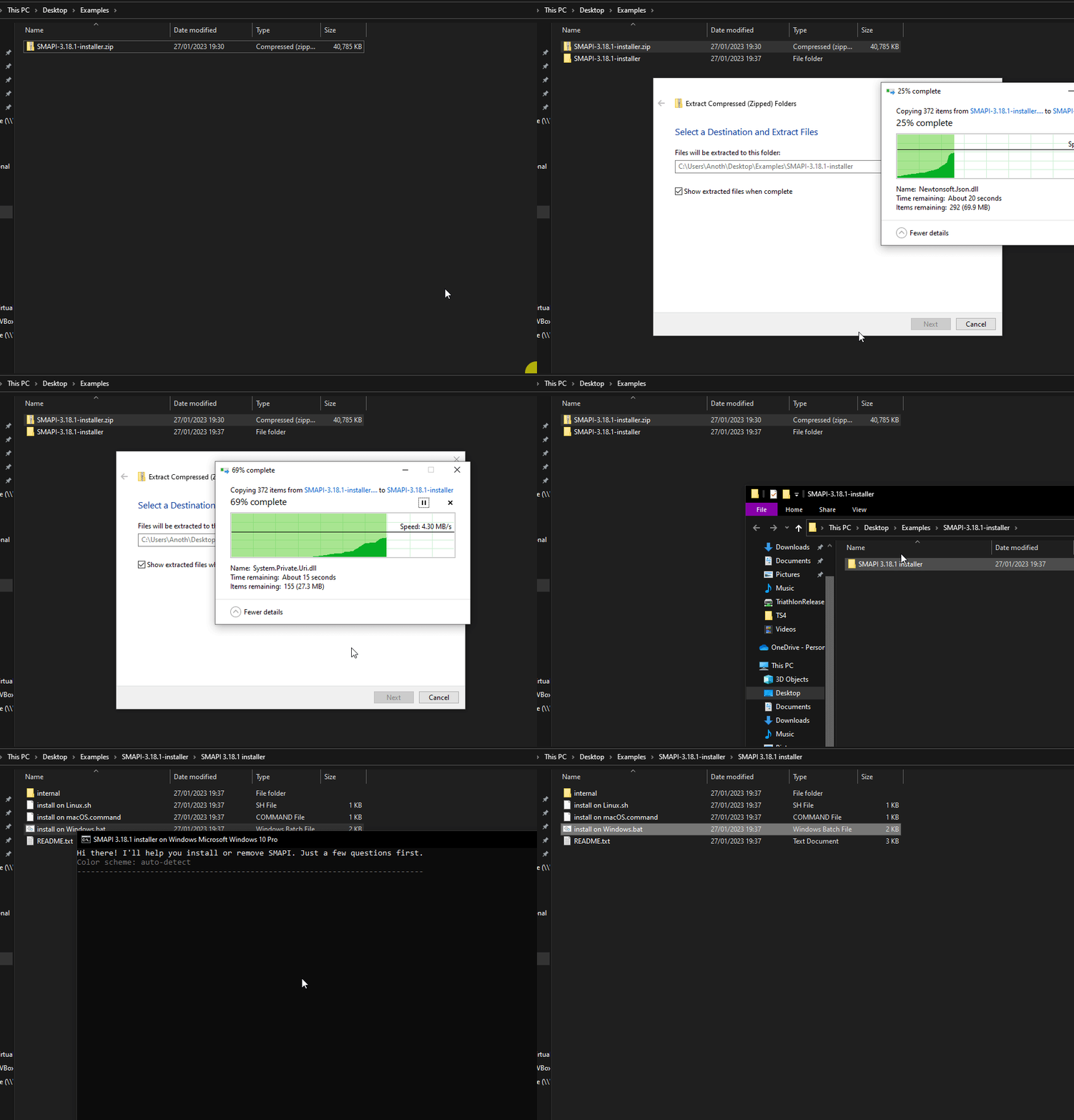
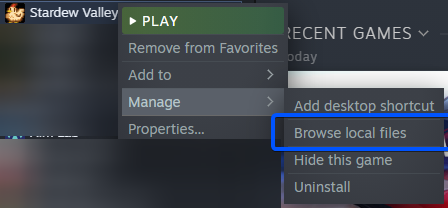 long brook
oh you use vortex
 outer dagger
ya
long brook
what happen if you launch sdv through vortex?
long brook
nexusmods or moddrop
outer dagger
it seems to close itself instantly
long brook
try reinstall smapi
halcyon igloo
 valid harness
will nexus do?
valid harness
will nexus do?
nexus is the biggest one. some mods are also on moddrop or github
valid harness
halcyon igloo
nexus is the biggest one. some mods are also on moddrop or github
oki thanks
halcyon igloo
there's a korean website too but you need to send in your ID to be verified for access
native dragonBOT
Log Info: SMAPI 3.18.2 with SDV 1.5.6 (build 22018) on Microsoft Windows 11 Home, with 120 C# mods and 162 content packs.
Suggested fixes: Pytk isn't compatible with newer SMAPI performance optimizations, consider removing it, One or more mods are out of date, consider updating them
 peak forge
mobile phone mod wont load correctly
it works in my friend's mod pack (that i have as well for multiplayer) and it worked for me not even an hour ago, but i went and booted up my save again and now the phone icon is missing and it says the mod broke
outer dagger
long brook
try reinstall smapi
hasnt seemed to change anything
long brook
outer dagger
hasnt seemed to change anything
do you reinstall smapi manualy or through vortex?
outer dagger
i can try manually, where should i put the file
long brook
peak forge
mobile phone mod wont load correctly
drop mobile phone config json to smapi.io/json and check where it throw error
peak forge
kk
long brook
outer dagger
i can try manually, where should i put the file
you can place the installer anywhere. extract the installer then run. there's a bug when insalling smapi through vortex iirrc
long brook
and also it's better to manually install mod or use stardrop mod manager instead of using vortex (in my experience)
long brook
missng " before key"
 peak forge
yeah i found it
and fixed it, now i just have to find the dang icon in my game
it up and disappeared on me
yeah the icon still isnt showing up
long brook
because you install mod through vortex, you need to launch sdv through vortex too
 frail tartan
is there any way to mod on iphone?
long brook
frail tartan
is there any way to mod on iphone?
no
long brook
outer dagger
just insantly closes
!startuppref try this
native dragonBOT
@outer dagger If your resolution is messed up try deleting startup_preferences This can be found on Windows at %appdata% > Stardew Valley > it's in that folder, or C:\Users\Yourwindowsnamehere\AppData\Roaming\StardewValley or for Mac can be found at ~/.config/StardewValley To get here you'll want to go to your desktop, then in the menu bar select Go -> Go to Folder...
long brook
!troubleshoot or this under game doesn't lauch
native dragonBOT
hey! Can I get you to run through this troubleshooting guide https://stardewvalleywiki.com/Modding:Player_Guide/Troubleshooting#Game_doesn.27t_launch? If none of the options there work, can you post the error message you get if you open SMAPI using the command line?
peak forge
hey its still telling me that its broken
ive already put the config in the json search thing and it says it didnt find any problems
im about to lose my mind ngl
long brook
I don't use mobile phone mod myself but you can send new log again so someone else can see what could be wrong
native dragonBOT
Log Info: SMAPI 3.18.2 with SDV 1.5.6 (build 22018) on Microsoft Windows 11 Home, with 120 C# mods and 161 content packs.
Suggested fixes: Pytk isn't compatible with newer SMAPI performance optimizations, consider removing it, One or more mods are out of date, consider updating them
peak forge
here's the new log
outer dagger
my mods aren't showing up when i launch SMAPI regardless of what i do, and it also wont even launch the base game

oops caps
long brook
when you launch stardewvalley.exe, the game won't launch either?
halcyon igloo
all my homies hate PlatTK
vale flame
not me y’all stay safe tho
long brook
What did you do?
long brook
When i test the mod without platotk just now, it works flawlessly
long brook
Do you really need platoTK tho?
vale flame
what mod