#archived-modded-support
1 messages · Page 78 of 1
 scarlet quail
 robust bison
I checked the trace and somehow missed that
 long brook
True, still learning a lot to troubleshoot and help people
 inland elk
@long brook @scarlet quail @robust bison not sure what part worked but i got rid of vortex and reinstalled all my mods and it works!! thank you three so much!! <3
 near terrace
inland elk
<@982971005339332680> <@235916317444538368> <@391734230314385409> not sure what ...
near terrace
inland elk
<@982971005339332680> <@235916317444538368> <@391734230314385409> not sure what ...
Vortex tends to mess up files when installing mods through it, which is why we don't recommend using it. If you'd like to use a mod manager, try Stardrop.
When you manually reinstalled, the installation happened properly because vortex wasn't there to yeet files into the void, thus fixing your issues.
inland elk
near terrace
Vortex tends to mess up files when installing mods through it, which is why we d...
LOL oh gosh heck vortex then!! tysm 
 bronze valley
https://www.nexusmods.com/stardewvalley/mods/6928?tab=description I was wondering would this mod work with a current version of stardew valley?

Nexus Mods :: Stardew Valley
This mod adds a new coop species : the guinea fowl. They drop feathers and sometimes eggs. The eggs can be used to make guinea fowl mayonnaise.
scarlet quail
it should provided you have the correct BFAV version (the unofficial)
bronze valley
oh yay thank you :D
 true junco
Idk if this is the place to ask but I downloaded immersive farm 2 and I cant find the cave that's on the farm. Like the bat or mushroom cave
Is it not on the farm?
near terrace
Are you not able to find the entrance to the farm cave?
I think you'd just have to wander around until you find it, if that's the case
 celest barn
true junco
Idk if this is the place to ask but I downloaded immersive farm 2 and I cant fin...
celest barn
true junco
Idk if this is the place to ask but I downloaded immersive farm 2 and I cant fin...
Does this video help? Should be around time stamp 4:35

Hello!
I have built this farm in Stardew Valley for about fifth days and yes, it was built by mods
You can download the mods here:
SMAPI: https://www.nexusmods.com/stardewvalley/mods/2400
CONTENT PATCHER: https://www.nexusmods.com/stardewvalley/mods/1915
CJB ITEM SPAWNER: https://www.nexusmods.com/stardewvalley/mods/93
STARDEW VALLEY EXPANDED...
true junco
celest barn
Does this video help? Should be around time stamp 4:35
https://youtu.be/nw4yhHG...
OH! i didnt realise that was the cave, bc i had checked on it before demetrius talked to me about it
ty!!
celest barn
true junco
ty!!
Np, I haven’t played with that mod so it took some searching ^^;
 languid yarrow
Content wise. Should I use ridgeside valley mod or stardew valley expanded mod for mobile?
 cerulean swallow
!log
 native dragonBOT
Can you upload your SMAPI log to https://smapi.io/log (see instructions on that page) and share the link here?
 hoary bane
languid yarrow
Content wise. Should I use ridgeside valley mod or stardew valley expanded mod *...
hoary bane
languid yarrow
Content wise. Should I use ridgeside valley mod or stardew valley expanded mod *...
This is more of a #modded-stardew question!
cerulean swallow
native dragonBOT
Log Info: SMAPI 3.18.1 with SDV 1.5.6 (build 22018) on Microsoft Windows 10 Home, with 28 C# mods and 37 content packs.
Suggested fixes: Pytk isn't compatible with newer SMAPI performance optimizations, consider removing it
cerulean swallow
my game just crashed and I'm terrified
hoary bane
I don't know why people don't !log in #governors-mansion instead if it's for them. 
languid yarrow
hoary bane
I don't know why people don't !log in <#257895149517013002> instead if it's for ...
Same thing as using #modded-stardew for off-topic convo.
cerulean swallow
hoary bane
I don't know why people don't !log in <#257895149517013002> instead if it's for ...
no it's not for me, I just don't know why my game crashed so I wanted to get my log to send it here
hoary bane
languid yarrow
Same thing as using <#933546639669493791> for off-topic convo.
Didn't we already go over this? 
hoary bane
cerulean swallow
no it's not for me, I just don't know why my game crashed so I wanted to get my ...
That's.. just what I said. But that's alright. 
cerulean swallow
hoary bane
That's.. just what I said. But that's alright. <:SDVpuffersquee:5628307835685437...
oh my bad then
anyway is it possible to check what's the issue?
 charred narwhal
Hi i was using old version SMAPI so I downloaded new version Smapi, but idk whats wrong it's just failed, even when I wanted to uninstall it. Anyone knows about this? ty

 dusty spruce
you probably already have the game running
you either forgot to close it, or it's stuck
if the former - just close it; if the latter - the easiest would be to just restart the PC
charred narwhal
I've already restarted many times 😭 and I checked all the necessary plugins like Content Patcher and Space Core, I updated them all, but still the same
dusty spruce
is F: a standard disk? or maybe a network share?
charred narwhal
yes it's standard disk
dusty spruce
no idea then
try manual install, i guess
!manualinstall
!smapimanualinstall
oh well
charred narwhal
alright I'll try, thanks
 sterile vortex
Hey, im currently played stardew valley modded in steam deck
I am trying to get the smapi logs
But I just being unable to get them
Followed the instructions in smapi.io/log
Can't find the "enter location" option in files
 raven mirage
Hi I installed SVE on my old save. However, now my greenhouse is floating on the middle of the water. Anyone know how to fix this? Thanks for you help alot.
long brook
Maybe use Reset Terrain Feature mod to reset placement
 lament vortex
rtf won't help with this, youd have to go to robin's and move the greenhouse there
raven mirage
Is Robin's the carpenter or it is a mod?
lament vortex
robin, the carpenter
raven mirage
Got it. I'll try to move it.
 finite dust
So I got a mod to replace the shoes in the game, and it says to copy the files in the mod and replace the ones under Content/Character/Farmer, but the files are png not xnb. if I convert them to xnb and replace them it should work right
lament vortex
!xnb
native dragonBOT
XNB mods often break the game and are not recommended. See https://stardewvalleywiki.com/Modding:Using_XNB_mods for more info (and a list of Content Patcher alternatives), and https://stardewvalleywiki.com/Modding:Player_Guide/Troubleshooting#Reset_your_content_files to fix problems caused by XNB mods. For mod creators, see https://stardewvalleywiki.com/Modding:Editing_XNB_files for help unpacking & editing them (including for use with Content Patcher).
lament vortex
you were already told this before, i dont understand why you want to do it despite that
finite dust
?
finite dust
native dragon
XNB mods often break the game and are not recommended. See <https://stardewvalle...
oh sorry you meant this prompt
yep I was but I am getting way too triggered by the shoes, so I'm willing to risk it 
sorry
lament vortex
ehh ok, just don't come asking for help if something breaks, as we'll always tell you the same thing
near terrace
finite dust
yep I was but I am getting way too triggered by the shoes, so I'm willing to ris...
Get fashion sense or JA shoe packs, you don't need to use xnb replacements at all.
sterile vortex
I'll ask again, if i get some luck - does anyone know how to reach the smapi logs in steam deck?
Following the instructions but can't find the option to "enter location" in Files
 limpid tartan
I need help- -I downloaded every mod needed for the SDV expansion mod and when I try to open up SMAPI the windows would pop up for a second and then disappear. It won't let me open it basically
 vapid crest
howdy! that's odd, can i ask what operating system you're on?
windows, mac, linux, etc?
limpid tartan
vapid crest
windows, mac, linux, etc?
windows!
vapid crest
alright! Did you get the game through steam or something else?
limpid tartan
vapid crest
alright! Did you get the game through steam or something else?
steam
 gaunt gust
!troubleshoot
native dragonBOT
hey! Can I get you to run through this troubleshooting guide https://stardewvalleywiki.com/Modding:Player_Guide/Troubleshooting#Game_doesn.27t_launch? If none of the options there work, can you post the error message you get if you open SMAPI using the command line?
gaunt gust
See especially part 2
limpid tartan
ok! thank u
vapid crest
atravita to the rescue again
hoary bane
finite dust
yep I was but I am getting way too triggered by the shoes, so I'm willing to ris...
What mod is it? There might already be an unofficial conversion out there rather than you needing to replace it.
 atomic dirge
quick question, does ui info suite2 still work, i understand the old one doesnt, but im curious about 2
 meager valley
it should
hoary bane
It does, that's the whole purpose of there being a second version.
atomic dirge
okay, also, any reason why my smapi install keeps failing
hoary bane
What's it saying and what platform are you on?
atomic dirge
on windows, its saying
The installer failed with an unexpected exception.
System.UnauthorizedAccessException: Access to the path 'D:\Program Files\ModifiableWindowsApps\Stardew Valley\smapi-internal' is denied.
would that have something to do with windows defender?
gaunt gust
!gamepasssmapi
native dragonBOT
Installing SMAPI for Gamepass requires extra steps. Please see the guide here https://stardewvalleywiki.com/Modding:Installing_SMAPI_on_Windows#Xbox_app
gaunt gust
Delete the game and start over
Gamepass changed the system like six months back but people who owned the game before that sometimes run into issues
If that doesn't work delete the game, force gamepass to update, and try again
atomic dirge
it worked that time, thanks
 cunning ridge
Ughhhh 
 scarlet quail
Whoever that npc is they don't have a spouse room
Or if they do it's not being patched in correctly
cunning ridge
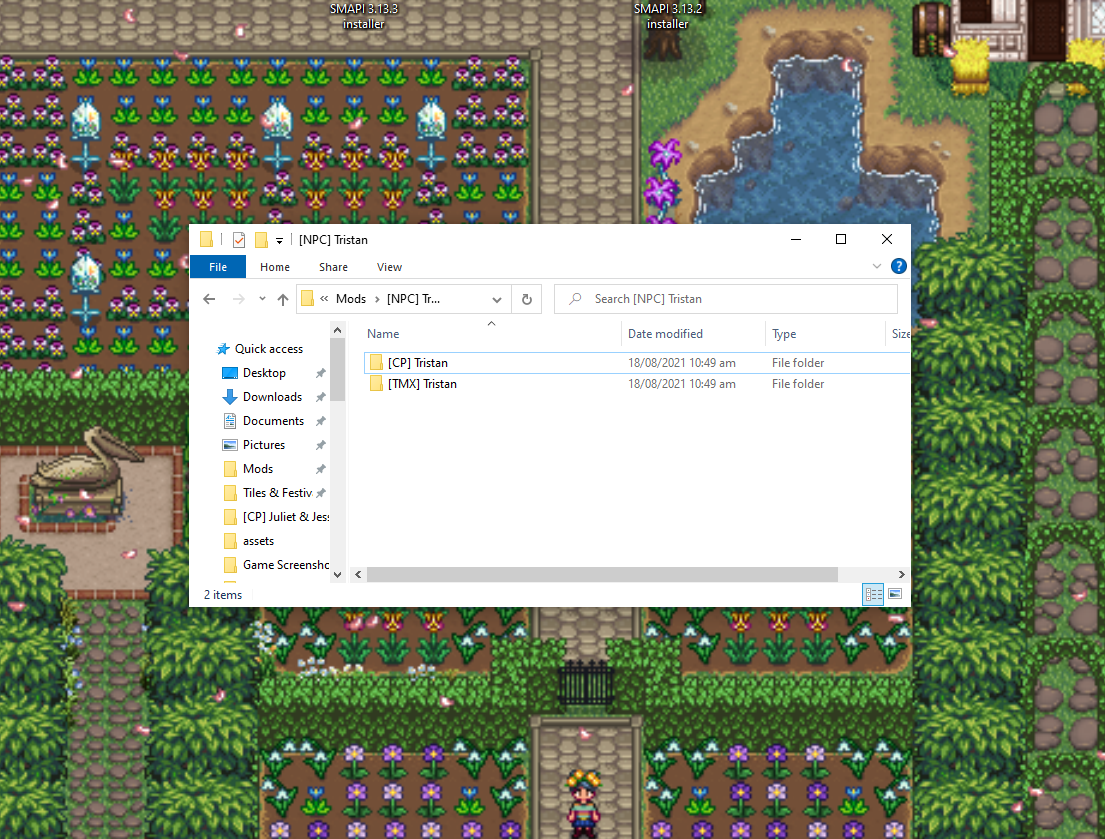
They do have, but in different folder and it's using TMXL so I guess that's the problem Custom Spouse Rooms has with it?
ahhh, right, my bad with that one, forgot about line in content json in CSR that excatly says that lol
scarlet quail
Yeah no tmxl will not work with it you'll have to convert
cunning ridge
Time to learn 
scarlet quail
Thankfully converting spouse rooms is super easy,barely an inconvenience
WIth tmxl toolkit (and its companion mod, PYTK) becoming increasing obsolete, some modders are moving away from wanting these frameworks. Sadly, a lot of older mods rely on these frameworks to load…
Or pillow converter
 neat plaza
you can also use https://github.com/anotherpillow/tmxl2cp :)
scarlet quail
Damn,that's right I should've recommended that to the person converting in making mods last night
cunning ridge
Much thanksies!
scarlet quail
Eh,the spouse room can be converted manually easily, But any maps definitely need that converter
hoary bane
neat plaza
you can also use <https://github.com/anotherpillow/tmxl2cp> :)
This works for spouse rooms as well..? 👀
scarlet quail
Yep!
hoary bane
🏃
neat plaza
took a bit of work to implement but works yep
 faint urchin
Hello, my game crash at the beginning of the scene after completing the Community center, the log indicate some drawing probleme. any idea for fixing this?
scarlet quail
It's still tmx map, so it'll work. Not as necessary with spouse rooms, but still useful
scarlet quail
faint urchin
Hello, my game crash at the beginning of the scene after completing the Communi...
!log
native dragonBOT
@faint urchin Can you upload your SMAPI log to https://smapi.io/log (see instructions on that page) and share the link here?
scarlet quail
That error is quite unspecific to us without a log
hoary bane
neat plaza
took a bit of work to implement but works yep
Thank you for the hard work.
faint urchin
https://smapi.io/log/6fb1c0e4f3e748269d9dd4a5d9ae1f19 sry, here is the link for the log
native dragonBOT
Log Info: SMAPI 3.18.1 with SDV 1.5.6 (build 22018) on Microsoft Windows 10 Professionnel, with 43 C# mods and 42 content packs.
Suggested fixes: Pytk isn't compatible with newer SMAPI performance optimizations, consider removing it, One or more mods are out of date, consider updating them
scarlet quail
Looks like one of your mods has a bad quest on the town board, so when the game draws the town for the CC, the board breaks and crashes game
I don't know which one though and Several of your mods are nsfw, so I can't test which
faint urchin
Found it, it was the "Help Wanted" mod, thx for the help
lament vortex
Pillow, I have a question abt the converter. I tried to run it to convert a DaisyNiko farm but got this instead C:\Users\danie\OneDrive\Documents\Dani\SDV\TMXL2CP-v0.1.3>py main.py Traceback (most recent call last): File "C:\Users\danie\OneDrive\Documents\Dani\SDV\TMXL2CP-v0.1.3\main.py", line 1, in <module> import src.conv as conv File "C:\Users\danie\OneDrive\Documents\Dani\SDV\TMXL2CP-v0.1.3\src\conv.py", line 2, in <module> import bs4 ModuleNotFoundError: No module named 'bs4'
neat plaza
you have the latest version right?
lament vortex
ye, i just downloaded it
neat plaza
alr, try py -m pip install requirements.txt
lament vortex
HINT: You are attempting to install a package literally named "requirements.txt" (which cannot exist). Consider using the '-r' flag to install the packages listed in requirements.txt
ERROR: No matching distribution found for requirements.txt```🤷
seems to be an issue with PIL than the tool
lament vortex
 well, i guess i'll try to do it manually or find another map
near terrace
Which map is it, out of general curiosity?
lament vortex
ultimate farm

Nexus Mods :: Stardew Valley
a massive immersive farm that includes fishing, foraging, mining, and more
neat plaza
oh
that'd be quick to manually convert
 halcyon igloo
wait nonu did u ever get expandable farm lol
slash if you did did you ever trigger the cutscene to get robin to tell you about it LOL
near terrace
lament vortex
https://www.nexusmods.com/stardewvalley/mods/6348
OH
halcyon igloo
also oh that’s the map my first save was on before i yeeted pytk lol
near terrace
lament vortex
https://www.nexusmods.com/stardewvalley/mods/6348
That's lovely, I think Pillow might be right about manually converting it too
halcyon igloo
i wish the dig spots still worked for artifacts
it took me weirdly long to find a chicken
near terrace
lament vortex
https://www.nexusmods.com/stardewvalley/mods/6348
Nonu just so you know, Daisy's since done maps that have features similar to what requires PyTK in this mod using content patcher only, so you can probably reference those while manually converting
lament vortex
oh! thank you
im gonna check it out. i love daisy's farms, i could probably use one of the newer ones  but i love complicating myself it seems
near terrace
I think just another farm map in particular might be a good reference point
near terrace
lament vortex
im gonna check it out. i love daisy's farms, i could probably use one of the new...
All my farm map mods are made by Daisy lol I love them
halcyon igloo
i might try and do ultimate farm again too i've realized that to do raffadax/ppja i need a lot of room lol
near terrace
halcyon igloo
i might try and do ultimate farm again too i've realized that to do raffadax/ppj...
Try Lavender Meadows or Sunflower Acres, they're pretty huge too! Also Capitalist Dream Farm
halcyon igloo
oo
nonu also got me changing all my saves lol
but i'm in winter and have like 4 buildings
also i tried to convert ultimate farm when i had started modding and then couldn't get the warps to work out right and got scared lol
slash i think i didn't have the unpacked tilesheets from vanilla for the maps
near terrace
Tiled scares me ngl
halcyon igloo
@neat plaza if tilesheets are missing from the assets folder is that a problem for the map conversion
neat plaza
uhhh
hoary bane
Depends.
neat plaza
might be, could just be CLI stuff
hoary bane
If the tilesheets are vanilla and is originated from the Content/Maps folder, it's probably fine to leave them out.
hoary bane
CLI?
hoary bane
The maps? tbins or tmx yeah.
halcyon igloo
fresh download fresh download
ok it looks lovely pillow
there are just zero tilesheets so it's ugly lol
lovely yet ugly
i kept missing warps when i tried to converted it manually the first time lol
 old frost
!log
native dragonBOT
Can you upload your SMAPI log to https://smapi.io/log (see instructions on that page) and share the link here?
neat plaza
old frost
!log
if you aren't responding to someone use #governors-mansion
 mellow crescent
Hello i have a random question, i dont know much abt this game yet im curious to try mods on my android phone sadly after i did all the tutorial i've learned from youtube,i cannot install the SMAPI stardew valley
Also i am new,please to meet you ^_^
neat plaza
!androidsmapi
native dragonBOT
The Android version of the game is quite a bit different from other ports and so needs a custom version of SMAPI. See https://stardewvalleywiki.com/Modding:Installing_SMAPI_on_Android for details on getting started.
lament vortex
halcyon igloo
nonu also got me changing all my saves lol
LOOOL i had sunflower acres but i needed a wee bit more space so im changing maps. i tried lavender meadows but i want something more organized
 errant hornet
scarlet quail
errant hornet
scarlet quail
!xnbzola
native dragonBOT
An XNB mod replaces some of your game's .xnb files to change the game (unlike newer mods that go in your Mods folder). This is an older type of mod that's no longer recommended, and can cause a number of issues. See https://stardewvalleywiki.com/Modding:Using_XNB_mods for help using them (and a list of alternatives using Content Patcher), and https://stardewvalleywiki.com/Modding:Editing_XNB_files for help unpacking & editing them (including for use with Content Patcher).
https://media.discordapp.net/attachments/156109690059751424/575085766426886145/ZolasFury.png
 scarlet quail
Okay so it will work here
I can live with not being able to use it in #modded-stardew XD
sterile vortex
Hi, i need some help
Ive been crashing in town - game loads half textures
After reading the sampi long, first i thought it was Quest framework and removed it alongside NPCs adventures
Next log, it mentioned Aerocore, and i removed it alongside Warp Network
Game still crashes in town
native dragonBOT
Log Info: SMAPI 3.18.1 with SDV 1.5.6 (build 1.3.37.0) on Unix 5.13.0.21, with 44 C# mods and 41 content packs.
sterile vortex
gonna test it right now xD
And i think we have a jackpot right here!
3 hours of my life lol
thanks
 hollow vault
Hi, my games lags a lot even even though I don't have only 40 mods. Is there a way for me to reduce it cause in the current state it is unplayable. The only mod I can think of is sve and I cannot delete as I wanna play it.
scarlet quail
Unfortunately SVE is likely the cause of your lag plus older hardware, as it's performance heavy
!log though might help, depending
native dragonBOT
Can you upload your SMAPI log to https://smapi.io/log (see instructions on that page) and share the link here?
scarlet quail
There are a couple solves depending on what's in your log
hollow vault
native dragonBOT
Log Info: SMAPI 3.18.1 with SDV 1.5.6 (build 22018) on Microsoft Windows 10 Home Single Language, with 20 C# mods and 10 content packs.
Suggested fixes: One or more mods are out of date, consider updating them
scarlet quail
Ah, yeah. Okay. So hardware issue on your end mainly, because that GPU is... well, old and based on my research an integrated GPU
I'm glad you don't have PyTK
I only have one suggestion for you then, that may help
!sm
native dragonBOT
SpriteMaster (https://www.nexusmods.com/stardewvalley/mods/4922) is a mod that resamples the game's graphics to be smoother and improves performance.

Nexus Mods :: Stardew Valley
SpriteMaster resamples all of the game's artwork to make it look smoother - a so-called 'HD' effect, and also implements game optimizations and load-time improvements to make the game run faster.
scarlet quail
Install that, disable resampling if you don't like the graphical changes
And your game should run faster. But there's only so much you can do with older hardware
You also may want to reinstall SVE, given the error there. (The mountain mist thing)
hollow vault
ok, thanks. I will try what you suggested
 warped yacht
hiya! question does Child Age Up work with multiplayer?
gaunt gust
No
hollow vault
scarlet quail
Install that, disable resampling if you don't like the graphical changes
How to disable resampling?
scarlet quail
go into GMCM (your config menu thing on main menu, or under options, look for "mod options" while in-game)
You'll see SpriteMaster, click it, and click the box about resampling
then hit save and the graphics should be back to vanilla
warped yacht
gaunt gust
No
thanks
 late finch
I keep spotting these waterfall corners being a different colour.
(screenshot reference is the waterfall on Immersive Farm Remastered, left side of the map)
recolour im using is Vibrant Pastoral
I also have Daisyniko's tilesheet and Gwen's Medieval DN tilesheet
all set to the same recolour options... is something else causing the mismatch?

 dapper gazelle
those corners are using a non-vanilla tilesheet that likely doesn't have recolor compat/options
late finch
yeah...are they not on Daisyniko's tilesheets?
dapper gazelle
I mean, probably not since Daisy has built-in recolor compat with VPR
That waterfall doesn't look like hers
late finch
yeah. now that you mention it.
but that just confuses me more lmao. @_@
trying to see why its doing that...
okay I think I found the culprit mod. ill probably be back with more technical questions later if I can't fix it by myself ; ;
thanks! actually pointing out the waterfall also wasn't DN's helped ! Haha
 echo scroll
!log
native dragonBOT
Can you upload your SMAPI log to https://smapi.io/log (see instructions on that page) and share the link here?
echo scroll
Hi there, I have an issue with the Marnie Quest where she asks for a cave carrot, if I give her the cave carrot its not ending the quest and instead she is unhappy to be reciving it. Can someone help, here is my SMAPI log: https://smapi.io/log/cafbf8a87b5b403b9ccdacb41780fdb3
native dragonBOT
Log Info: SMAPI 3.18.1 with SDV 1.5.6 (build 22018) on Microsoft Windows 10 Home, with 10 C# mods and 0 content packs.
Suggested fixes: One or more mods are out of date, consider updating them
 lament prairie
Hello you beat me to it 😛
I was going to ask if removing all mods the issue still occurred
echo scroll
gaunt gust
You need to go into her house with it
I am standing in her house with it
echo scroll
Yep its at 1:40
Ill load it vanilla and see if it still happens
Not sure what happened but when I exited her house and walked back in it triggered, maybe I entered at 8:50 or something as I have keys to the town.
late finch
nope. still cant figure out whats causing the waterfall situation.
I thought I had another tilesheet mod that affected it but...wasnt it.
so im confused.
heres my log.
https://smapi.io/log/77415271855f4402a2f09bbc434640f1
and here's a screenshot of the waterfall, if anyone recognizes that shape/texture from a specific mod. x_X
 native dragonBOT
Log Info: SMAPI 3.18.1 with SDV 1.5.6 (build 22018) on Microsoft Windows 10 Pro, with 60 C# mods and 144 content packs.
Suggested fixes: Pytk isn't compatible with newer SMAPI performance optimizations, consider removing it, One or more mods are out of date, consider updating them
late finch
thanks bot. im wildly aware.
late finch
screeches. I didnt even think about checking SVE files. youre so big brained.
okay. uuuh
cunning ridge
I think there was fix somewhere on nexus for that? / nvm, that was for Earthy
dapper gazelle
I'm not sure what the fix is though since I'm not sure when they were added? I know VPR for SVE exists though it's outdated (though there's a fix for the outdatedness in the comments iirc)
late finch
I can probably fix it myself with sprite splicing and basic code shenanigans I just was very hopeful for an easier solution today lmao
but thamks.
I guess I could also just get a newer recolour...
dapper gazelle
yeah, I feel ya. But I don't think a newer recolor is going to help unless a fix for that recolor has been made
basically Flash is using his own tilesheets which do not have recolor compat I think
cunning ridge
just copy exact recolour parts you need into sve files, shouldn't that fix it easily?
late finch
Spotted the comment with the fix from december 14th.
man I love this community. /ugly sobbing
dapper gazelle
personally I'd probably swap in some similar tiles from vanilla or daisyniko's tilesheets
that way they'll recolor properly
late finch
I am considering picking up the 'Bird replacements for babies and toddlers'
its been abandonned for so long...
im not a codemonkey but I have youtube and patience. x_x
 red lava
!log
native dragonBOT
Can you upload your SMAPI log to https://smapi.io/log (see instructions on that page) and share the link here?
 umbral ice
Has anyone run into this bug? Guessing it's a conflict between Ridgeside Village and SDV Reimagined 3 but SDVR3 says it's compatible with RSV as long as you change 2 config options which I did
 dapper gazelle
RSV doesn't touch the mountain map though. The conflict with RSV and SDVR3 is the backwoods.
(and festivals, but not relevant here ofc)
umbral ice
yeah that's what I thought, but those are the only two mods I have that should change anything outside of the Farm, unless Forest Farm of Secrets and Mysteries changes something in the mountains
lament prairie
Is the bug here just that it looks a little off?
dapper gazelle
like it looks like it was designed for when that's no longer blocked off
lament prairie
It’s possible it will look normal after the Boulder is gone
dapper gazelle
which looks to be in a few days based on the date!
lament prairie
Since I suspect the boulder is a hardcoded patch
umbral ice
oh wait is the boulder being gone a Vanilla thing? I thoguht that was a SDVE thing XD
dapper gazelle
on Summer 3 I think the boulder is removed...in vanilla
 surreal basalt
Hey, so im looking for something similar to CJB but for nintendo switch, my switch is already banned from online services so I can do basically anything to it but i cant find any guide detailing any sort of cheat system
any ideas?
or like even modifying my save file to have a good amount of money/levels
 royal arrow
surreal basalt
or like even modifying my save file to have a good amount of money/levels
royal arrow
surreal basalt
or like even modifying my save file to have a good amount of money/levels
You could try searching google for this. I know there are instructions out there for other save file edits
 gloomy oriole
Out of the Furry Farmer mods, I'm using Anthro Farmer Continued (https://www.nexusmods.com/stardewvalley/mods/7618?tab=bugs)

Nexus Mods :: Stardew Valley
Turns the player character into a furry! Best used with Anthro Characters Continued. Supports Stardew Valley 1.5. Usable only with Content Patcher at this time. Has no other mod dependencies.
lament vortex
? this is modded support
gloomy oriole
Sorry, pulling a conversation from "#making-mods-general" into here
I'm having a unique issue where my farmer loses his tail and gains what looks like a censor bar on the side view, but only wearing certain hats (The beanie and the squire helmet, so far)
lament prairie
Is it only the side view?
gloomy oriole
 gloomy oriole
Only the side view, and I am using many other mods, but I'm pretty sure I've isolated it strictly to this one (I don't have the censor bar issue when I remove the Furry Farmer mod)
Beanie is a vanilla hat, yes
lament prairie
Is it precisely the hats which obscure hair entirely?
Farmer base is kind of a hellhole of sprite stuff, but it sounds like the issue is "when the farmer's hair changes, the tail turns into a censor bar"?
Although it's hard to tell if this is on the same layer as the tail
Can you do a few patch exports?
!patchexport
native dragonBOT
A patch export makes a copy of specific stuff in your content folder so you can see what changes have been applied.
- Load up a save (with Content Patcher installed)
- Type
patch export <FILEPATHOFTHING>in the SMAPI console and hit return - Look in your
patch exportfolder in the game folder for the relevant json file or image - If it's a json file, you can share it via smapi.io/json. If it's an image you should just be able to look at it.
bronze valley
I got a mod for BFAV which adds pigeons but for some reason my pigeons end up turning into chickens when they grow up?
 lament prairie
Are you on mac?
bronze valley
nope PC
lament prairie
Hmm maybe the bug is spreading?
bronze valley
that's ominous haha
lament prairie
BFAV is sort of buggy in general due to the author not having updated it in years and it being on unofficial updates
It's actively broken on Mac in the way you describe
bronze valley
for some reason my turkey, black guinea fowl (not the tawny ones) and geese work?
lament prairie
It's possible the content packs are differently formatted?
I think there's two different content pack formats?
 restive grove
makes me think of "the ugly duckling"
 distant zodiac
hi, I'm modding on mobile and I'm mainly trying to get two specific mods to work being wear more rings and bigger backpacks. it's like 2 am and
I cba to figure it out rn
heres my log
https://smapi.io/log/a45813ca983f43d28eacdc5351fac525
native dragonBOT
Log Info: SMAPI 3.7.6.1 with SDV 1.4.5 on Android Unix 4.19.111.24412047, with 27 C# mods and 14 content packs.
Suggested fixes: One or more mods are out of date, consider updating them
distant zodiac
sorry if it's obvious I'm just hella tired and stupid rn and wanna get this to work before I sleep
lament prairie
I’m not sure these mods work on mobile if they’re throwing these errors
!androidmods
native dragonBOT
If you're using SMAPI on Android, you'll need specific older versions of most mods. For a list of many of the most popular mods compatible with android SMAPI, see here https://forums.stardewvalley.net/threads/stardew-valley-mobile-mods-list.13322/. For mods not listed here, they may or may not be compatible with android, but see https://stardewvalleywiki.com/Modding:Android for more info, including how to find a compatible version of a mod not listed in the first link.
lament prairie
Check that you have the right version
gaunt gust
More Rings and Wear More Rings are different mods
And I'm not sure Bigger Backpack ever worked on mobile
lament prairie
If you have the right version and they still aren’t working then it doesn’t work on mobile
lament vortex
Please report bugs on GitHub or Nexus.

This mod does not support android / mobile.```From the bigger backpack mod page
Wear More Rings isn't compatible with mobile either ^
distant zodiac
lament vortex
Wear More Rings isn't compatible with mobile either ^
ah damn
those ones were the most fun to me
gonna need to get a computer soon
 long heath
!log
native dragonBOT
Can you upload your SMAPI log to https://smapi.io/log (see instructions on that page) and share the link here?
native dragonBOT
Log Info: SMAPI 3.18.0 with SDV 1.5.6 (build 22018) on Microsoft Windows 11 Home, with 85 C# mods and 85 content packs.
Suggested fixes: Pytk isn't compatible with newer SMAPI performance optimizations, consider removing it, One or more mods are out of date, consider updating them
lament prairie
In what sense won't it work?
long heath
When I click my npc map location mod key bind it doesn’t work and also when i hit esc and do it manually it also doesn’t work it just closes it as soon as I open jt
lament prairie
Hmm looks like ---> FileNotFoundException: Content\Mods/Sevinae.EnchantedGroveFarm/WorldMap.xnb
long heath
What’s that mean?
lament prairie
Your farm claims it has a world map but it doesn't seem to be existing right now
Enchanted Grove Farm isn't loading the world map patch it should be loading
long heath
So do I need a separate mod?
lament prairie
I'm not sure if the mod is broken or possibly installed wrong
scarlet quail
Also the error handler is older than SMAPI so it might not be removing something
somehow though I think that \Mods/ portion is the problem
 lone dirge
Hi everyone. I just installed and updated some mods i had, now my game is freezing/taking long to respond. Can anyone tell me the errors? Here's my Smapi log: https://smapi.io/log/bd0148cb874a47438b74f08d14b31ffc
native dragonBOT
Log Info: SMAPI 3.18.1 with SDV 1.5.6 (build 22018) on Microsoft Windows 11 Home, with 39 C# mods and 51 content packs.
lament prairie
- ._ko.json file couldn't be parsed: Newtonsoft.Json.JsonReaderException: Can't parse JSON file at C:\Program Files (x86)\Steam\steamapps\common\Stardew Valley\Mods\InstantGrowTrees\i18n\._ko.json. This doesn't seem to be valid JSON.
A lot of files under the i18n folder of InstantGrowTrees seem sad
lone dirge
Best to just delete the mod compeltely, huh?
lament prairie
Other than that it doesn't look too weird
Definitely could do that, you could also try reinstalling potentially
lone dirge
Okay thanks, I'll see how that solves things
 summer hull
i just downloaded the mod again and its the same error. the ui info

 robust bison
!uiinfosuite
native dragonBOT
If you go to https://github.com/Annosz/UIInfoSuite2/releases, you can find UI Info Suite 2, which works with Stardew 1.5.5+. Download the first zip, not the source code.
summer hull
robust bison
!uiinfosuite
only this sir?
 robust bison
yes
summer hull
robust bison
yes
thank you!
native dragonBOT
Log Info: SMAPI 3.18.1 with SDV 1.5.6 (build 22018) on Microsoft Windows 11 Pro N, with 125 C# mods and 408 content packs.
Suggested fixes: Pytk isn't compatible with newer SMAPI performance optimizations, consider removing it, One or more mods are out of date, consider updating them
 marsh tree
I know I have some minor errors that aren't good but I'm looking to find out why SMAPI keeps crashing
it takes up the whole screen and doesn't let you switch windows without crashing
also if I don't touch anything while it's loading, it loads a darkened house but gets stuck at that point
 shell willow
marsh tree
I know I have some minor errors that aren't good but I'm looking to find out why...
shell willow
marsh tree
I know I have some minor errors that aren't good but I'm looking to find out why...
i’d say try updating the mods it says need to be updated first and then if you’re still having issues, we pinpoint the problem
shell willow
hm, that’s not reflected on your log

i’d take a look at updating or removing these because they are most likely the ones giving you trouble

 ember helm
Hi folks. I have been playing modded (Stardew Valley Expanded) local multiplayer and everything has been fine so far. But today we had the SDV Fair and since then my partner is unable to damage anything with her weapon. She can do damage with her tools, but weapons are doing nothing. No knockback and no damage. I, as the host, am not having this issue. Any ideas what could have caused this and how I can resolve it? Let me know if you need any additional info. Thanks!
marsh tree
Are there newer versions of those mods than what’s on Nexus?
marsh tree
some of them link to the exact same smapi page I downloaded them from today though
says downloaded december 21
I think it's not updating the log from before I updated the mods somehow
?
shell willow
oh!! then just run the game again and bring a new log
marsh tree
That’s what I did
I’ve tried running them game several times since updating and took the file from where the log parser told me
shell willow
well then, assuming that the log you sent is accurate as it should be, the fix is to update ur mods as well as remove pytk and mods that require it as a dependency because it’s simply outdated
 brave pond
anyone know how to record smapi using nvidia shadowplay?
shell willow
native dragon
**Log Info:** SMAPI 3.18.1 with SDV 1.5.6 (build 22018) on Microsoft Windows 11 ...
as said above, you can also remove pytk as a fix
marsh tree
Is there a fast way to find out which mods rely on it or do I have to go through them all again?
 ornate tide
what happens when you just run the vanilla game
also removing pytk will result in any mods just saying they cant load without it, so it will make it easy to see which ones to remove
marsh tree
I don’t know, I can check but I think it would be fine because the thing that’s giving me a crash report is smapi
ornate tide
have you ever been able to play the vanilla game?
marsh tree
Yes
ornate tide
have you ever been able to play modded normally?
ornate tide
!startuppref also try this, ignore the resolution stuff
native dragonBOT
If your resolution is messed up try deleting startup_preferences This can be found on Windows at %appdata% > Stardew Valley > it's in that folder, or C:\Users\Yourwindowsnamehere\AppData\Roaming\StardewValley or for Mac can be found at ~/.config/StardewValley To get here you'll want to go to your desktop, then in the menu bar select Go -> Go to Folder...
marsh tree
I face I played it modded yesterday and it was fine, then today it kept crashing so I updated everything and still this
*In fact
ornate tide
hmm yeah, that makes the startuppref thing more plausible then
do you have 2 monitors?
marsh tree
No
ornate tide
hmm, thats usually the problem. still worth trying though
marsh tree
Ok I’m trying that now
I do have remote access on my phone if that could be affecting it?
Nope still crashing
And taking over the screen
ornate tide
i have no idea, can you send a new log?
long brook
Yes. Run the modded game til crash then send the new log
native dragonBOT
Log Info: SMAPI 3.18.1 with SDV 1.5.6 (build 22018) on Microsoft Windows 11 Pro N, with 122 C# mods and 407 content packs.
Suggested fixes: One or more mods are out of date, consider updating them
marsh tree
it still says I need to update when I don't
also I don't even think it gets far enough for those mods to be the problem
scarlet quail
Okay, that log is a mess, but let's go through a few things
First, which mod are we trying to update.
marsh tree
I reinstalled all of them
scarlet quail
........so, all of them, then?
marsh tree
I'm not trying to update, that's a side issue, it won't even load the game
scarlet quail
Ah. Okay. That's different. Define it won't load the game though
Does it reach the start screen?
marsh tree
yes
scarlet quail
Okay. When between the start screen and loading into the farmhouse does it crash?
Or does it crash after?
marsh tree
right as it loads the farmhouse OR if I try to switch windows
scarlet quail
And define crash - do you mean it throws a "not responding" thing, or does the SMAPI auto-exit?
marsh tree
like when I left it alone it got as far as a dark farmhouse interior and then got stuck
but otherwise its when I try to load it in the background
or switch to a webpage or something
scarlet quail
Alright. You have a lot of mods. Do me a favor and load your save, don't switch windows, click your save on the load screen, then go get a drink of water or something
Let us know if after, say, 10 minutes, it's still not loading
Because based on your log and what you're saying, the game is still loading, then you click into it by tabbing in after swapping windows and it goes not responding
And that's why you never click into game while loading, because it'll stall and then basically refuse to load your modded game.
There are other potential problems, such as your log trying to apply greenhouse stuff and neither being applied, plus some XNB mods in your mod folder making me worried you put XNB mods in your content folder
But first, we'll make sure you can't actually load in by making your file load for at least 10 minutes. Your log indicates at least 5 minutes pass while it loads character portraits and stuff
marsh tree
Ok it’s been a while now and the screen is still black
scarlet quail
Hm. You don't have PyTK anymore so that wouldn't cause issues... let's see.
Your GPU's somewhat old but that's honestly a better GPU than most in here. Can you give your newest log?
I want to see based on the log how long things are taking to load and if they're still actually loading according to the log at that time period
Additionally, can you add SpriteMaster and then run the game after you've given your log and try to load?
!sm
native dragonBOT
SpriteMaster (https://www.nexusmods.com/stardewvalley/mods/4922) is a mod that resamples the game's graphics to be smoother and improves performance.
Nexus Mods :: Stardew Valley
SpriteMaster resamples all of the game's artwork to make it look smoother - a so-called 'HD' effect, and also implements game optimizations and load-time improvements to make the game run faster.
scarlet quail
marsh tree
Ok it’s been a while now and the screen is still black
It's also possible your SMAPI is just loading slow, but again, would need to see your (new) log to figure that out
!smapislow
native dragonBOT
For some players, SMAPI can take a while to launch the game. See this section of the troubleshooting guide for some common causes and possible fixes: https://stardewvalleywiki.com/Modding:Player_Guide/Troubleshooting#Game_lags_or_stutters_in-game
marsh tree
I think I've narrowed it down to a mod starting with S
it's spacecore I think
Yep it doesn’t have the problem when I remove spacecore
 obtuse surge
I'm sure many would say it's not wise, but is it possible to change to a modded farm map mid-playthrough? what're the consequences of doing so?
marsh tree
Ok now ridgeside village isn’t working
ornate tide
woahh spacecore was the problem? it was probably a submod of spacecore
spacecore is needed for some big frameworks like json assets
lament prairie
removing spacecore fixes loading problems in the sense that removing all the gas from a car fixes tire issues
As it’s a key dependency, removing it will make a whole bunch of mods not load
Your game will then load super fast because most of the mods are missing an important dependency and so aren’t even trying to load
But this probably isn’t the source of the issue
ornate tide
there are a few issues(missing dependencies, empty folders, duplicate mods) with the log but I don't really understand since they were able to play fine yesterday
when did you try to update everything?
marsh tree
Today
I went though every single mod at the only one that made a difference was removing spacecor- Ohhhh that probably means adding spacecore back in activated the problem mod eh? Damnit
marsh tree
Yes and I’ve been trying day 1 saves
Both crash
So basically it’s something that uses spacecore which doesn’t really narrow it down much
marsh tree
its something that uses json assets
joy
DUSTY OVERHALL
wait
no
i forgot to put json assets back in
long heath
lament prairie
I'm not sure if the mod is broken or possibly installed wrong
What do u think I should do?
 tardy remnant
What does this mean and how do i fix it?? I think i might have accidentally deleted some of stardews base files

Pls help😭
 neon cargo
try repairing the game in steam
click on the cog, then properties, then local files and lastly verify integrity of game files
tardy remnant
neon cargo
click on the cog, then properties, then local files and lastly verify integrity ...
I did it its still coming up with the same message
Nvm i think i got it working again
 sharp fiber
anyone know how to use cursor mods?
i try to use them but the original always covers it up
gloomy oriole
Dunno if this is rude to pipe up off topic but I am really impressed with how helpful and friendly the modding community is in here, y'all are super helpful and wholesome 
hoary bane
tardy remnant
What does this mean and how do i fix it?? I think i might have accidentally dele...
Clear your launch options.
hoary bane
sharp fiber
anyone know how to use cursor mods?
i try to use them but the original always co...
Installation should be nothing out of the ordinary and it should work right after, which cursor mod are you looking at?
 indigo shore
Hello! Yesterday I managed to convert dcburger's portraits to HD portraits with this mod
https://www.nexusmods.com/stardewvalley/mods/13599
Thus I was able to drop PyTK (yay!), there is only one thing and that is, shop portraits from other mods are now vanilla, does anyone know how to change said STF portraits?

Nexus Mods :: Stardew Valley
Patches for PyTK-based HD Portrait Mods into a Content Pack usable by HD Portraits by tlitookilakin, as well as a patcher to do it yourself.
 wintry summit
https://smapi.io/log/00e22ac7953b43b99ac558ce5b75226a theres a warn section that says "cat gifts uses deprecated code.." but mod compability says its fine to use? so should i delete it anyway?
 native dragonBOT
Log Info: SMAPI 3.18.1 with SDV 1.5.6 (build 22018) on Microsoft Windows 10 Pro, with 47 C# mods and 81 content packs.
Suggested fixes: One or more mods are out of date, consider updating them
lament vortex
!deprecated
native dragonBOT
SMAPI 3.18.0 raised deprecation levels to the final stage, meaning SMAPI will now show yellow warning dialogues for mods with deprecated code. For the user, this just means that the mods have old code and will break in SMAPI 4.0 if they are not updated - it is not anything to worry about at this time. (For mod authors, it's a not-nice warning to update your code already!  )
)
wintry summit
ooh i see, thank you
 pulsar marsh
Hi I need some help with modded moblie stardew
long brook
Ask away
pulsar marsh
I'm trying to get the Romanceable Rasmodia/ Romanceable Rasmodia mod to work but I can't figure it out.
 worldly ocean
Mobile is tricky you need to download mods before the 1.5 update
long brook
Those mod is newer than Dec 2020, they don't have version that older than that date. It won't work for mobile at the moment
pulsar marsh
Aww okie dokies thank you!
marsh tree
If anyone is still here from my problem before I have it narrowed down to like fiiiiiiive potential mods
Down to two!
It’s either custom companions or custom furniture
lament vortex
i don't know what your issue is, but CF is pretty buggy
marsh tree
It’s custom companions it looks like
Oh wait
No you’re right
Wait
Not sure
Nope I was right
Custom companions is the problem
Now whether that’s because of a clash or not I dunno
marsh tree
Goddamn it Ridgeside still isn’t working now
Why do so many mods require custom companions?!
Doesn’t it just add a new ability to do the mines with people?
Surely that can just be cut out
Also I already removed PYTK
It’s definitely something to do with custom companions, I ran it with everything but that and it worked
 dusky canyon
I have 1094 mods including Custom Companions and it works for me.
Doesn't CF require PYTK?
lament vortex
marsh tree
Doesn’t it just add a new ability to do the mines with people?
Youre thinking of NPC adventures
marsh tree
Ok so it can’t be custom furniture because it can run without PYTK
*cant
Ok so I’ve removed ones that need custom companions
Now to slowly re-add them and see which one’s the problem I guess?
hoary bane
CF needs Pytk though?
marsh tree
Yeah so it’s not the problem because it’s not working anyway
Besides, the game ran with it in there so it can’t be that
Ok custom companions works on its own
So it must be something that needs it
dusky canyon
Have log?
hoary bane
🪵
marsh tree
Hasn’t helped so far
restive grove
can you also abridge the main problem, I had a quick glance over the history but it's a bit hard to follow
marsh tree
Got it narrowed down to fellow clowns tilesheets, never ending adventures and the wayfarer but I can do without them
I think
I’m kinda curious which one it is but this has taken me too fucking long already 😅
restive grove
but what was/is the problem exactly?
marsh tree
God DAMNIT ridgeside still isn’t working!
Oh god
I forgot to put custom companions back in
So of course none of the- AAAAAAAARRRRGH
restive grove
are you using a mod launcher?
marsh tree
No
restive grove
or are you doing it manually?
restive grove
you'd have an easier time with this, if you used a mod launcher like Stardrop. that way you can have all the mods in the mods folder, but just tick the ones you want to launch/have different mod profiles
can have a vanilla profile, with nothing (or barely anything), different loaded mods with different friend's you're playing with, one with most things, etc
marsh tree
Downtown Zuzu, Durin’s Rest, Dusty Overhaul, East Scarpe or Ridgeside Village are the contenders now
scarlet quail
marsh tree
Downtown Zuzu, Durin’s Rest, Dusty Overhaul, East Scarpe or Ridgeside Village ar...
So essentially all of the major expansions, which are always the most resource intensive
Did you add sprite master like I asked before I went to sleep
marsh tree
No? I must’ve missed that? What’s sprite master?
scarlet quail
!sm
native dragonBOT
SpriteMaster (https://www.nexusmods.com/stardewvalley/mods/4922) is a mod that resamples the game's graphics to be smoother and improves performance.
Nexus Mods :: Stardew Valley
SpriteMaster resamples all of the game's artwork to make it look smoother - a so-called 'HD' effect, and also implements game optimizations and load-time improvements to make the game run faster.
scarlet quail
Put that on with all your other mods on as well
We'll cover disabling resampling if you don't like the graphical changes but the performance improvement is probably going to help you if your problem is literally the expansions
Because that just means that none of them is actually the problem,it's your hardware
 brave sparrow
can anyone help me troubleshoot this thing from my portrait mod? this just started happening today
https://smapi.io/log/5752fb854e7c4a60961c008418f9047f
native dragonBOT
Log Info: SMAPI 3.18.1 with SDV 1.5.6 (build 22018) on Microsoft Windows 10 Pro, with 38 C# mods and 60 content packs.
Suggested fixes: Pytk isn't compatible with newer SMAPI performance optimizations, consider removing it
brave sparrow
(please ignore the Lenny/RSV thing, that's been going on for a while and I will ask about it on the RSV discord soon)
marsh tree
I doubt it’s a hardware problem because I’ve gotten expansions to work before
gaunt gust
Keep in mind it's quadratic
Which means each additional map isn't "slightly slower" it's "a heck of a lot slower"
marsh tree
OMG I THINK THE SPRITE MASTER THING IS WORKING
scarlet quail
In other words,it is your hardware if you're having that many expansions at the same time
I hate to say I told you so but I told you so XD
So the problem was definitely your hardware Plus all the expansions
gaunt gust
SpriteMaster rewrites some of the game code so it runs faster
scarlet quail
And i'm sorry you wasted like eight hours on this when I told you it right before I went to bed but I didn't check to make sure you were using it XD
Anyway, You can disable resampling by going to the config menu and unchecking the box for it if you don't like the graphical changes
indigo shore
brave sparrow
can anyone help me troubleshoot this thing from my portrait mod? this just start...
I've haven't seen that wizard portrait error, phew
brave sparrow
for what it's worth, i also have the orangepie wizard portrait (in dcburger's art style) and that seems to be replacing whatever is going on with the dcburger one. but whenever i see red text i am afraid something is broken.
gaunt gust
brave sparrow
can anyone help me troubleshoot this thing from my portrait mod? this just start...
Gonna be honest: probably not
Pytk thing.
brave sparrow
is pytk just kind of fucked?
gaunt gust
Pytk is just really complicated and requires someone to look through the code and like I can't be bothered to read through pytk code
brave sparrow
i see, thanks
it wasn't doing this yesterday i swear! i have no idea what happened
indigo shore
brave sparrow
is pytk just kind of fucked?
Ye it's worth looking into the hd portraits patch mod
brave sparrow
Nexus Mods :: Stardew Valley
Patches for PyTK-based HD Portrait Mods into a Content Pack usable by HD Portraits by tlitookilakin, as well as a patcher to do it yourself.
indigo shore
yes
tho
it is a bit of a headache to have everything work correctly
spend the entirety of last night on it lmao
brave sparrow
oh no, that's the opposite of what i wanted to do lol
i might try it anyway though
indigo shore
yeah dw, the only weird error idk about is the wizard one, i have no idea why that is conflicting
i did notice warnings regarding the SVE portraits tho, you'd have to look into the mods comments because it requires duplicating some files
like, you need Morris.png and then MorrisTod.png and so on, it is better explain in the posts tho
brave sparrow
ok, i'll take a look
 little phoenix
@tired brook is automate able to use the Statue of Treasure from SVE? It doesn't work for me, I think since it is new to SVE and doesn't have a compatibility mod like PJA and such
lament vortex
You can add custom machines to the automate config, try adding it and see if it works
little phoenix

GitHub
Mods for Stardew Valley using SMAPI. Contribute to Pathoschild/StardewMods development by creating an account on GitHub.
native dragonBOT
Can you upload your SMAPI log to https://smapi.io/log (see instructions on that page) and share the link here?
scarlet quail
Also please don't... ping pathos at the first sign of trouble?
brave sparrow
indigo shore
i did notice warnings regarding the SVE portraits tho, you'd have to look into t...
i found the comment you referred to - doing this duplication got rid of the warnings for gunther and morris, but it turned marlon's into the same error as the wizard 😦
scarlet quail
Give a log before stating it doesn't work for you so we can troubleshoot first
little phoenix
ok!
brave sparrow
oh well, hopefully the orangepie version will still work
gaunt gust
little phoenix
https://github.com/Pathoschild/StardewMods/tree/develop/Automate that?
SVE would have to implement the automate api
I suspect not before 1.6
little phoenix
@scarlet quail https://smapi.io/log/9ba00dd4c12c4ddaa17f36dca0ecba0e
was that for me?
native dragonBOT
Log Info: SMAPI 3.17.2 with SDV 1.5.6 (build 22018) on Microsoft Windows 11 Home, with 74 C# mods and 54 content packs.
Suggested fixes: You don't have the Error Handler mod installed, reinstall SMAPI to get it, One or more mods are out of date, consider updating them
scarlet quail
technically yes but atra knows better
gaunt gust
little phoenix
<@235916317444538368> https://smapi.io/log/9ba00dd4c12c4ddaa17f36dca0ecba0e
Tl;dr - it doesn't work and don't expect it to work before stardew 1.6
gaunt gust
(I looked into doing it for RSV for the trash cans last March)
That's why I have the tap giant crops mod
That was my test case XD
scarlet quail
so what you're saying is "Stardew 1.6 this march as this anniversary of the initial realization" 😛
indigo shore
brave sparrow
i found the comment you referred to - doing this duplication got rid of the warn...
that's super weird
gaunt gust
Gonna be honest, the reason why I don't like these autoconvertors is that it does always require someone to manually fix the last 10%
Which is fine when that someone knows what they are doing
indigo shore
that's why I am the one in my friend group doing it, they are all waiting for me to share the zip file with all the mods working together 😭
 dire fractal
how do i mod my game
cause there's a specific mod I've seen youtubers have
where theres a chest infront of the farm and you can get any item from it
brave sparrow
you might be interested in this one, which i haven't used https://www.nexusmods.com/stardewvalley/mods/518

Nexus Mods :: Stardew Valley
Access your chests, dressers, fridge, shipping bin, and Junimo huts from anywhere and organise them your way. Transfer items without having to run around, from the comfort of your bed to the deepest m
other than that, here is a general guide https://stardewvalleywiki.com/Modding:Player_Guide/Getting_Started

Stardew Valley Wiki
Do you want to play Stardew Valley with mods? This guide is for you!
 tired brook
little phoenix
<@226803198218731520> is automate able to use the Statue of Treasure from SVE? ...
tired brook
little phoenix
<@226803198218731520> is automate able to use the Statue of Treasure from SVE? ...
Automate will hopefully be able to support custom machines automatically in Stardew Valley 1.6, but in 1.5.6 it does need a bridge mod. So if SVE doesn't provide one (and doesn't use a framework that does like PFM), it won't work with Automate yet.
dire fractal
im not understanding how to download mods can someone help mke
hoary bane
dire fractal
im not understanding how to download mods can someone help mke
!gettingstarted
native dragonBOT
@dire fractal If you would like a guide to setting up mods for Stardew Valley, check out the getting started guide! https://stardewvalleywiki.com/Modding:Player_Guide
dire fractal
ive tried using the wiki and ive followed the instructions and it still wont install
halcyon igloo
can you be more specific with what exactly is happening
dire fractal
hold on a sec ill look
i extracted the files
whenever i run "install on Windows.bat"
it wont work
scarlet quail
....that isn't specific
halcyon igloo
is there an error message or is nothing just launching or like
scarlet quail
be specific. Screenshot of what it says when it "doesn't work" if you can't type it out
there could be 100 reasons why it doesn't work, hence why we ask
dire fractal
 scarlet quail
Yeah that looks like the un-extracted version is being run
mind giving us a screenshot of the folder you're running the bat from?
 neat plaza
you didn't unzip it
dire fractal
i moved it to a folder that was empty
neat plaza
and why is it in your VLC folder..?
halcyon igloo
makes me wanna ask where the game is installed lol
halcyon igloo
it might come up later if it’s not the standard place
also again the folder isn’t extracted so extract it to downloads or sth
scarlet quail
right click the zip folder, hit extract all
then hit extract, assuming the checkbox of open folder when unzipped is checked, the new folder will come up
run bat from there
halcyon igloo
you have to click something that says extract or unzip, not just double click it to open in a browser
i feel like when i was a kid we couldn’t get file previews of zipped folders like this
sharp fiber
hoary bane
Installation should be nothing out of the ordinary and it should work right afte...
ive tried smaller hand cursor and hand cursor
dire fractal
scarlet quail
right click the zip folder, hit extract all
it dosent show extract all
nvm
ill reinstall
lament vortex
sharp fiber
ive tried smaller hand cursor and hand cursor
is it showing the default windows cursor, or the game's brown cursor?
dire fractal
ill go from there
halcyon igloo
in the screenshot you posted there is also an extract button
over the summer i made a joke wondering if how to zip a folder was boomer knowledge but now i feel like it is
 brave sparrow
Manual, vortex is generally not recommended for Stardew afaik
dire fractal
ok
long brook
You already downloaded the zip file of smapi. Just gi to the file, right click, then choose extract
scarlet quail
Also never download SMAPI with vortex
The rest, we never really care about
But never with vortex on SMAPI
long brook
dire fractal
i see the installer and the 2 dots above
right click on the zip file then choose "extract here". then there should be smapi installer folder on the exact same folder as the zip file. you can run the installer from that folder then, not from inside the zip
 long brook
uh your zip file is in vlc folder
 long brook
that's the zip folder opened by double click it. just right click the zip file (like the screenshot i sent)
halcyon igloo
in your downloads folder
long brook
no. just close that winrar
halcyon igloo
probably
dire fractal
ok
long brook
what folder that you usually used for downloading file?
the zip file should be there unless you choose different location
dire fractal
so what extract the entire folder
long brook
can you screenshot it first? don't double click the zip file
screenshot just like this
 dire fractal
 long brook
good, now you can run install on windows from that folder
 long brook
press 1
dire fractal
 long brook
when there is green text, don't close or exit imediately
dire fractal
no
long brook
press 1 again
 quick quarry
I need help. When I go to download smapi it says failed- needs authorization even tho I’ve already downloaded about 15-20 MBs of it
long brook
dire fractal
i did it
don't close that thing when there is green text
dire fractal
i havent
long brook
quick quarry
I need help. When I go to download smapi it says failed- needs authorization eve...
can you screenshot the error?
long brook
dire fractal
i havent
ok there should be text that something like
"......." %command%
you need to copy that
quick quarry
 long brook
quick quarry
long brook
quick quarry
where did you download the file from?
long brook
quick quarry
It said network failure but my internet is good
try changing browser
long brook
dire fractal
got it
then open steam, go to library, right click sdv, then click manage
dire fractal
k
quick quarry
long brook
try changing browser
To what
dire fractal
done i have steam open
quick quarry
neat plaza
you seem to have chrome there but not open
No I’m on Google chrome
quick quarry
I’ll try Microsoft edge
long brook
dire fractal
done i have steam open
go to library, right click sdv, then click manage
quick quarry
It says the same thing
dire fractal
long brook
go to library, right click sdv, then click manage
i dont see svd
halcyon igloo
stardew valley
dire fractal
is it under library or?
long brook
dire fractal
i dont see svd
sdv means stardew valley, under library
long brook
oh sorry not click manage, but properties
long brook
a window should popped up like this, then paste what you copy before to lunch option
make sure it's something like "........" %command%
 dire fractal
what launch options
long brook
see my screenshot
dire fractal
oh ok
neat plaza
the box that says launch options in it
dire fractal
i put it in now what
long brook
then you can close it and try launch the game
long brook
is there any error? OR is there black window that pop up then the game launch?
dire fractal
a black window then the game launched
long brook
congrats, now you're ready to mod sdv
long brook
to install mod, you have to know where your game folder is. to know that, you can right click sdv in steam library, manage, then click browse local file
dire fractal
ok thanks
long brook
there will be a folder named Mods, all your mods you wanna install chould be place there. to install mod, download a mod, it will come as zip just like smapi installer. extract that mod zip file then move the extracted folder into Mods folder
long brook
thanks for the correction lyoko
lament vortex
does anyone know what could be causing my GI farmhouse to look like this? the beams i mean

gimme a sec to send my log
native dragonBOT
Log Info: SMAPI 3.18.1 with SDV 1.5.6 (build 22018) on Microsoft Windows 11 Home Single Language, with 130 C# mods and 306 content packs.
lament vortex
im using aster's beam mod, and i want the beams to look like the darker wood color
im not sure if this an issue with the mod specifically or if anything else im using could be conflicting
quick quarry
Do I put the whole folder that I extract or just the content file
quick quarry
Thx
 thin ridge
so I have not been able to post a screenshot but this morning ive been experiencing the occasional screen tearing where like 20% of the screen will if im transitioning screens will show a bunch of distorted purple pixels for like half a second
native dragonBOT
Log Info: SMAPI 3.18.1 with SDV 1.5.6 (build 1.3.37.0) on Unix 5.13.0.21, with 33 C# mods and 41 content packs.
Suggested fixes: One or more mods are out of date, consider updating them


 scarlet quail
uh, Cookie, that uh. That sounds like something GPU-related
tulip: That's a file replacer
 modest mural
where should i put it ?
thin ridge
hmm i dont experience that with any other games ive found and it only started this morning\
scarlet quail
essentially, to use those you'll need to go into Ridgeside's CP folder and replace the folders that have the names of the folders in that mod with that mod's folders
So in CP Ridgeside in Ridgeside Village's main folder, delete BeachPortraits and replace with what's in this mod you have screenshotted to us
thin ridge
since ive added DSV my game as a whole has been acting up a bit and I need to configure a bunch of things to be more lightweight
modest mural
completely replace them ?
scarlet quail
yep
modest mural
ookay , i should probably save the files somewhere else tho ?
scarlet quail
honestly file replacers are a little ridiculous on that scale, but the author didn't want to write code to patch them in
neat plaza
you could always redownload RSV
scarlet quail
I mean probably, yes
modest mural
thank you thank you ! i’ll do that and see if it works
thin ridge
what should I do?
scarlet quail
Not sure you can do anything
But I will welcome anyone with more deck knowledge as to if there is a solve
modest mural
oh there’s one other that said the file was empty . another portrait mod for sve
should i drag the portrait files into the sve folder ?
thin ridge
ah do you think then I did find something that conflicts with linux?
modest mural
probably the same deal as before ? ._.
that’s inside the portraits mod folder though
 scarlet quail
that's also a replacer, but why the STF too?
lone dirge
Hi can someone check out my log for me? Game freezes and goes unresponsive, especially when trying to load a saved game. https://smapi.io/log/7de1dbf7aaf54f139e1871248ac39b52
native dragonBOT
Log Info: SMAPI 3.18.1 with SDV 1.5.6 (build 22018) on Microsoft Windows 11 Home, with 39 C# mods and 52 content packs.
dapper gazelle
shop portrait
thin ridge
who could I contact?
modest mural
scarlet quail
that's also a replacer, but why the STF too?
no idea , but there’s more portraits inside that file
lament prairie
STF folder has shop portraits that are specific to SVE
dapper gazelle
I just said why
lament prairie
Those have to replaced and can’t be patched
scarlet quail
dapper gazelle
shop portrait
ahhh, so like Suki and such, got it
lament prairie
Idk about the CP folder
thin ridge
whos the deck/linux tech people I could tag
modest mural
lament prairie
STF folder has shop portraits that are specific to SVE
yeah the mod has those in their style
lament prairie
But also DSV basically always comes with a performance cost, as do all seasonal outfits mods
scarlet quail
lone dirge
Hi can someone check out my log for me? Game freezes and goes unresponsive, espe...
Given your GPU plus your mods, please click your file on loading, then let it go for about 10 minutes
lament prairie
You can try the lightweight configs
scarlet quail
and by let it go I mean do not touch it nor your computer
modest mural
modest mural
yeah the mod has those in their style
should i try the same thing i did for the other one ?
dapper gazelle
just as an fyi, most mod authors include how to use their mods on the description page. And there are instructions on how to use these Nyapu ones. In this case, you're instructed to overwrite the portraits
lone dirge
scarlet quail
Given your GPU plus your mods, please click your file on loading, then let it go...
could it be that my computer cant handle all these mods? Thats why it is slow?
 silver marsh
hi hi! im with a problem with my smapi.. whenever i try to run the archive always ends with this error: ''Oops, couldn't find the game automatically.
Type the file path to the game directory (the one containing 'Stardew Valley.dll'), then press enter.1'' but there is no one archive w/ that name, the closer is "StardewValley.GameData..dll'' that I even tried to change their name but on the next step i recieve another error idk what to do
neat plaza
what version of sdv are you running
modest mural
dapper gazelle
just as an fyi, most mod authors include how to use their mods on the descripti...
i feel just as lost as before ._.
cuz i did put it in the mods folder but that didn’t work
 thin ridge
so I still would like to resolve this issue of mine..
silver marsh
neat plaza
what version of sdv are you running
the newest one!
robust bison
silver marsh
the newest one!
just put the game folder path
dapper gazelle
They want you to overwrite the SVE folders
modest mural
dapper gazelle
They want you to overwrite the SVE folders
how can i do that ?
dapper gazelle
the way you've been doing it per Lyoko's instructions
dapper gazelle
I'm tapping out. Good luck.
scarlet quail
Yes, swapping out the files
scarlet quail
lone dirge
could it be that my computer cant handle all these mods? Thats why it is slow?
This is likely, but that's why you should test and let it load for a while
There is a potential solve here but first we need to verify it's not something else
silver marsh
robust bison
just put the game folder path
this appear..
 scarlet quail
silver marsh
hi hi! im with a problem with my smapi.. whenever i try to run the archive alway...
scarlet quail
silver marsh
hi hi! im with a problem with my smapi.. whenever i try to run the archive alway...
That's.... not what archive means. Given your screenshot, where is your game located?
silver marsh
when i tried to rename appear another error
scarlet quail
specifically, Stardew Valley - where is vanilla Stardew located?
silver marsh
one sec
lone dirge
scarlet quail
This is likely, but that's why you should test and let it load for a while
Okay, I’ll let it load. This only happens with loading saves from the menu, the game runs fine when I get past it though.
scarlet quail
blinks where else would you load the save from?
If you mean the game is running fine but it takes ages to load, that's normal with a higher modcount or older hardware
lone dirge
scarlet quail
If you mean the game is running fine but it takes ages to load, that's normal wi...
Yeah that’s what I meant
scarlet quail
I thought you meant the game was having issues running in-game too, but if that's not the case, that's normal on how long it takes
So in that case
there's only one thing that can potentially help cut down that time
!sm
native dragonBOT
SpriteMaster (https://www.nexusmods.com/stardewvalley/mods/4922) is a mod that resamples the game's graphics to be smoother and improves performance.
Nexus Mods :: Stardew Valley
SpriteMaster resamples all of the game's artwork to make it look smoother - a so-called 'HD' effect, and also implements game optimizations and load-time improvements to make the game run faster.
scarlet quail
Install that mod, and disable resampling if you don't like the graphical changes
Otherwise, you're going to have to take out mods for it to run faster, and the main culprit would be SVE at that point
silver marsh
scarlet quail
That's.... not what archive means. Given your screenshot, where is your *game* l...
this?? srry english isnt my first language 😭
 scarlet quail
SpriteMaster will help load times, though, if that's your problem
lone dirge
scarlet quail
Install that mod, and disable resampling if you don't like the graphical changes
Will this mod conflict with recolor mods? Cause I have one of those
scarlet quail
silver marsh
this?? srry english isnt my first language 😭
Yes, but... you're missing a bunch of vanilla Stardew files there. Where did you get the game from?
silver marsh
scarlet quail
Yes, but... you're missing a bunch of vanilla Stardew files there. Where did you...
steam
scarlet quail
lone dirge
Will this mod conflict with recolor mods? Cause I have one of those
it will not. It will change the look of them unless you disable resampling
in which case it won't change the looks
okay. Milla, you're missing a crapton of vanilla Stardew files
please verify your game files in steam
lone dirge
scarlet quail
it will not. It will change the look of them *unless* you disable resampling
Okay thanks! Looks like it loaded, so I guess I just needed patience
silver marsh
I just reinstalled it there, because I thought the problem was in the version
scarlet quail
Like, you can't even run vanilla Stardew right now
silver marsh
scarlet quail
please verify your game files in steam
ok ok
scarlet quail
Because you don't have the exe, nor several files needed for it to load
silver marsh
it was running before I uninstalled the smapi files, one sec ill download it again
modest mural
done the thing but SMAPI says there’s an error
scarlet quail
I mean you know the drill by now tulip
shell willow
hi hello hi!! i’m having issues with being able to take screenshots (possibly related? i have to run smapi manually because the command doesn’t have permissions) if anyone doesn’t mind taking a look: https://smapi.io/log/6137d616cfcc4ab0a06ba5fb0c230789
native dragonBOT
Log Info: SMAPI 3.18.1 with SDV 1.5.6 (build 1.3.37.0) on macOS Unix 13.0.1, with 7 C# mods and 17 content packs.
modest mural
 scarlet quail
sigh tulip that means give us your log
modest mural
 scarlet quail
Screenshot is unhelpful there
modest mural
oooh sorry KDHDKDJ
how do i do that ?
scarlet quail
!log
native dragonBOT
Can you upload your SMAPI log to https://smapi.io/log (see instructions on that page) and share the link here?
scarlet quail
Also it looks like from the second screenshot you deleted the folders but then didn't replace them
or you deleted the entire CP folder but that's not what I said to do, I said - especially with Ridgeside - to delete the BeachPortraits, Wedding Portraits, etc. - the folder names inside the CP folder - and then put the new ones in
scarlet quail
shell willow
hi hello hi!! i’m having issues with being able to take screenshots (possibly re...
Elizabeth, you still around? I think you're the one that knows about this particular mac error of already exists thing?
(I'd ping but I don't know if I should in this case)
modest mural
native dragonBOT
Log Info: SMAPI 3.18.1 with SDV 1.5.6 (build 22018) on Microsoft Windows 11 Home, with 70 C# mods and 140 content packs.
Suggested fixes: One or more mods are out of date, consider updating them
scarlet quail
Yeah your log indicates you yeeted the entirety of the CP folder
(and the STF folder)
That's not how file replacing works
you yeet the parts that are in the file replacer mod, not the whole thing
modest mural
scarlet quail
or you deleted the entire CP folder but that's not what I said to do, I said - e...
i didn't delete them , i moved them and replaced them with the other files from the portrait mods
scarlet quail
Which means you deleted them to SMAPI
modest mural
so okay , get the folders back and switch the folders contents ?
scarlet quail
I think that's correct, assuming I'm reading your syntax correctly
Beach Portraits should replace beach portraits
Portraits should replace portraits, etc.
modest mural
should i only move the portraits or the portrait folders ?
like , the images themselves
shell willow
folders
thin ridge
with my game ive switched most of DSV to light and ultralight
and its when I load up the day that most of the stuttering and such happens
if I go to a deck based spot they gonna tell me to contact this server lol
scarlet quail
The problem, Cookie, is that what you're asking about no one has frame of reference on
if you told me sudden purple pixels on a PC, I'd assume your GPU is dying
thin ridge
I dont htink its a gpu issue
as its primarily a stuttering as the game loads
?
like it happens during those stutters
scarlet quail
So then it's not something in your log and related to SMAPI, so it's probably your deck trying to do too much at once
Otherwise, we have no clue
so we cannot solve your issue
lament prairie
where's my stuttering quote again
lament prairie
.q 5981
 devout pumiceBOT
[#5981] "(What are costumes if not IRL content packs?)" - @tired brook (28 Oct 2022 @ 04:27:14 PM UTC)
silver marsh
now that I reinstalled it shows this but there is no update on my steam
 lament prairie
.q 5891
devout pumiceBOT
[#5891] "Lag/stutter is unfortunately very hard to diagnose. There are a few potential causes:
- Background processes on your computer (ex. my game lags/stutters horribly when my computer changes from light to dark theme at nightfall)
- Garbage collection in the game/game framework.
- Certain functions within the game can cause lag/stutter (ex. forage spawn at specific times, screenshot triggering)
- Certain mods are more likely to cause lag/stutter, and may have config options to reduce them. (ex. seasonal outfit-type mods, FTM mods with many monsters spawning)
- Certain computer setups may experience more lag.
In terms of fixes, by cause above:
- You can try viewing Task Manager/Activity Monitor while the game is running to identify problematic background processes, and/or close other apps.
- Difficult to address as a user. Ameise has been trying to track this down but it has been proving elusive.
- See if the lag occurs at a consistent time and try to find mods that add a change at those times.
- Ask if there are config options for the mods you suspect. For ex., FTM (reduce monster spawn limit), DSV (use lightweight version), and Automate all have config options.
- If you have an Nvidia GPU, try typing
.q 5755in #governors-mansion for some possible settings to try. On Windows, you may also try things with setting SDV/SMAPI to specific cores or priority levels?" - @lament prairie (07 Mar 2022 @ 06:07:07 PM UTC)
scarlet quail
shell willow
hi hello hi!! i’m having issues with being able to take screenshots (possibly re...
This one
lament prairie
silver marsh
now that I reinstalled it shows this but there is no update on my steam
!legacymodding
native dragonBOT
In some rare cases, you may need to use the compatibility branch in order to play Stardew Valley, but SMAPI does not run with the compatibility branch. See here for more information on why it happens and how to solve it: https://stardewvalleywiki.com/Modding:Player_Guide/Troubleshooting#SMAPI_doesn.27t_work_with_the_compatibility_branch
For help or more information, ask in #archived-modded-support
silver marsh
tysm!!
lament prairie
shell willow
hi hello hi!! i’m having issues with being able to take screenshots (possibly re...
create a ~/.local folder and this should be fixable
That is, a folder named .local under your main account folder
scarlet quail
Ah, whew, you were the one who knew how to fix that XD Thank ya
lament prairie
You can either do this through Finder or through Terminal
If you're comfortable with Terminal, try mkdir ~/.local
lament prairie
If you prefer Finder, go to the main folder for your account (as in, the one that has Documents, Downloads, etc in it) and type command-shift-.
This shows hidden folders
It's a toggle, so if you accidentally hit it twice just hit it again
Then you can make new hidden folders (ones that start with a .)
shell willow
lament prairie
If you're comfortable with Terminal, try `mkdir ~/.local`
okie dokie, i popped this in terminal
is it supposed to give me an output or am i good?
scarlet quail
if I'm reading the really basic computer syntax correctly you can probably check if it made the directory
lament prairie
Not supposed to give an output afaik
You can do the steps before "make the folder" in Finder to check if it got made
scarlet quail
woo, I did read it right
shell willow
kk perf
scarlet quail
(I do not know mac stuff so I wasn't sure that's what mkdir meant)
lament prairie
mkdir = MaKe DIRectory
thin ridge
devout pumice
[#5891] "Lag/stutter is unfortunately very hard to diagnose. There are a few pot...
like if I turn DSV to ultra lightweight for almost everyone it reduces it
scarlet quail
Yeah that sounds like your deck literally can't handle all the stuff. That's why ultralightweight exists
Decks are not PCs, they are not as powerful as PCs, and therefore they cannot run as much as PCs
Your issue is likely overloading your modded game, so your GPU is being taxed beyond its ability to render stuff, hence pixelling
lament prairie
DSV is actually pretty strenuous, since if it's doing lots of outfit changes it has to "watch" for when it needs to change
scarlet quail
^^^^^^^^
thin ridge
isnt the outfit changes during screen transitions?
scarlet quail
Also I'm probably - when I don't have other things to do - going to put a Maru's robot quote for "Just because it hasn't errored before doesn't mean it won't error now" or something, because I feel it's necessary with modded game support lately XD
halcyon igloo
i had no idea dsv was so resource intensive lol
scarlet quail
...Not without SpriteMaster, I think, Cookie
That or I misread the convo about it earlier that atra and the other coders mentioned about spritemaster only loading on transitions
Honestly I should check the weebly to check
brb
thin ridge
halcyon igloo
i had no idea dsv was so resource intensive lol
I can run rdr 2 and i dont own elden ring but I hear that runs perfectly fine, its crazy to think that dsv would be putting such a strain?
lament prairie
Those aren't mods though
thin ridge
i can drop my fps to 30 and its still doing it
lament prairie
By its nature, modding is less efficient
Since it has to be patched into the code
Pathos did weeks of trying to reduce stutter and lag and a whole thread about it
thin ridge
i can just remove dsv but i honestly love it especially trans penny and the mermaid pendants 😦
lament prairie
Since he doesn't own a deck (and neither do I, or most people), there wasn't any deck-specific testing, but I wouldn't be suprised if it just is an ongoing thing that you can't fully eliminate
scarlet quail
furiously takes notes for the next time a user complains about stutter with their PC being able to run other games with more graphical intensity
(Because that does happen in here, so I want to give them the facts so they can understand)
lament prairie
You can try removing any other mods that might be intensive
You can try setting DSV to ultralightweight
Beyond that, you just have to decide how much stutter you can live with
thin ridge
lament prairie
You can try removing any other mods that might be intensive
is there a way to check which other mods that are pretty intensive ?
scarlet quail
The list basically boils down to "expansions" at that point
lament prairie
Anything that does a lot of patches on location change too
Or on time change
But also expansions
thin ridge
would rival hearts be intensive?