#archived-modded-support
1 messages · Page 44 of 1
 gaunt gust
It has drive issues
 sacred marten
Anyone knows what this is? I keep seeing it at random parts of towns in my game

 lament prairie
Yes, it’s fine to use
Just don’t randomly uninstall
If you need to uninstall, make sure to remove modded content like fish, crops, etc first
 sick tangle
ah ok
 woven shadow
this might be a better channel
hello friends
small question
if anyone is available
🥺
 neat plaza
!ask
 native dragonBOT
Ask your question or describe your issue here, and someone will help if they can!
sacred marten
woven shadow
hello friends

Nexus Mods :: Stardew Valley
This mod will make placing fences, floors, furnaces, etc. a much more streamlined experience.
try this mod it has an eraser mode that lets you get rid of items thats stuck
woven shadow
thank you so much kylie 🥺
omg wait
i don’t have a nexus account should i make one
😭
sacred marten
Your very welcome glade i can help you.. feel free to come back if you need more help 😄
woven shadow
❤️🥺
sacred marten
💕!
woven shadow
hello i’ll ask in here instead, i downloaded the CBJ mod menu (and have the mod config already) i am jus wondering how to access or if it’s supposed to show up anywhere
neat plaza
woven shadow
hello i’ll ask in here instead, i downloaded the CBJ mod menu (and have the mod ...
cjb.. mod menu?
woven shadow
thank you so much
P worked
not the mod menu my bad i mistyped it’s the mod cheats menu thingy
but P did work!! ❤️
sacred marten
yay!!
 cinder zephyr
👍
i think its P by default lol
i kinda forgot until i spammed like half of my keyboard
sacred marten
I added hair but it shows invisible.. what have i done wrong?
 scarlet quail
Was asleep, sorry. CFD file in Immersive Characters Shane
Custom Fixed dialogue (CFD) also got an update overnight, so might be that
 unborn raft
can someone help me figure out what the heck this means

This mod is causing 1 null responses at the flower festival but I can't decipher why from this text
please @ me if you have anything that can help
sacred marten
!log
native dragonBOT
Can you upload your SMAPI log to https://smapi.io/log (see instructions on that page) and share the link here?
sacred marten
Post your log.. it gives ppl a more in-depth look into the possible problems
unborn raft
native dragonBOT
Log Info: SMAPI 3.16.2 with SDV 1.5.6 (build 22018) on Windows 10, with 134 C# mods and 385 content packs.
unborn raft
I was in the middle of something so I hadn't posted it yet but here it is
 solemn shoal
When exactly is the error popping up in the log? What/who are you interacting with/talking to when it appears?
 dire fractal
Hi, I am new to modding and confused as how they're actually used. I downloaded SMAPI and Content Patcher, downloaded the mods into my mod folder, and then... how do I use them? None of the guides actually explains what happens after you've downloaded them, and the mods don't have any readmes.
 main ingot
smapi and content patcher dont do anything on their own
dire fractal
I opened my game and one of my save files to see if anything changed, and as far as I could see nothing did (cosmetic mod for changing how some farm animals look). No errors were thrown in Terminal (Mac)
main ingot
you need mods that use content patcher to make them like show up
also you have to unzip them, so if u have zip files in there .. no bueno
dire fractal
They use Content Patcher. They're unzpped.
main ingot
post a pic of ur mods folder then :O
dire fractal

 shy orbit
!log
native dragonBOT
Can you upload your SMAPI log to https://smapi.io/log (see instructions on that page) and share the link here?
dire fractal
I just don't know how to play with mods? Like do I need to do something in-game to get them to function? If I wanted a rabbit that had a modded color do I need to buy a new rabbit?
 cobalt yew
you shouldn’t, no
shy orbit
we can verify from the log that the mods are at least loaded and working
dire fractal
Ok let me read the SMAPI log page and run it
cobalt yew
they might be replacing a color u don’t have tho
like if the animal comes in several colors
dire fractal
Hm, do I have to share the link? It's got my name in it.
shy orbit
not necessarily. do the mods appear in the mod list and are there any errors or warnings on the log?
dire fractal
12:59:40 INFO SMAPI Loaded 4 mods: This section is shown. Click here to hide it. 12:59:40 INFO SMAPI Console Commands 3.16.2 by SMAPI | Adds SMAPI console commands that let you manipulate the game. 12:59:40 INFO SMAPI Content Patcher 1.28.1 by Pathoschild | Loads content packs which edit game data, images, and maps without changing the game files. 12:59:40 INFO SMAPI Error Handler 3.16.2 by SMAPI | Handles some common vanilla errors to log more useful info or avoid breaking the game. 12:59:40 INFO SMAPI Save Backup 3.16.2 by SMAPI | Automatically backs up all your saves once per day into its folder. 12:59:40 INFO SMAPI Loaded 2 content packs: This section is shown. Click here to hide it. 12:59:40 INFO SMAPI Pet Facelift 1.0.0 by siamece | for Content Patcher | Touches up and adds breeds + colours to pets. 12:59:40 INFO SMAPI Zhuria's Animal Retuxtures for ContentPatcher 1.0.0 by Zhuria | for Content Patcher | Unofficial conversion of Zhuria's Animal Retuxtures for ContentPatcher 12:59:40 INFO SMAPI Found 1 mod with warnings: 12:59:40 DEBUG SMAPI No update keys
Warnings were spat out for Zhuria's mod for animals I don't have (e.g. horse)
12:59:50 WARN Content Patcher Ignored Zhuria's Animal Retuxtures for ContentPatcher > Load Animals/horse #5: the When field is invalid: invalid Horse condition: invalid values (Clydesdale); expected one of None, Agro, Akhal, Akhal-saddle, Altaria, Clydsdale, Clydsdale-saddle, Dapple, Dapple-saddle, Epona, Epona-saddle, Fjord, Fjord-saddle, Ponyta, Ponyta-shiny, Rainbow, Spirit.
Otherwise no other warnings
AFAIK none of those warnings should impact being able to run it for animals I do have
How do mods generally work?
cobalt yew
yeah it looks fine to me?? odd
shy orbit
hm. what animals do you have? you can enable trace on the log site and search for Animals/Rabbit for example to see if any mod is patching that asset (the coop and barn animal sprites are mostly named like that)
dire fractal
Did search for Animals/Rabbit, no results (0)
unborn raft
solemn shoal
When *exactly* is the error popping up in the log? What/who are you interacting ...
It's during the flower festival when the option to ask someone to dance happens the response is "^1 null"
shy orbit
did you load a save on that log and do you have the animal? it's not always necessary but it might be needed to get the mod to apply
dire fractal
I'm sorry, I don't understand what that means.
I opened my game and opened an existing save. The animals look normal.
*non-modded
native dragonBOT
Can you do these steps to provide more info?
- Load your save and view the content that should be patched.
- Type
patch summarydirectly into the SMAPI window and press enter. - Upload your SMAPI log to https://smapi.io/log (see instructions on that page).
- Post the log link here.
dire fractal
Does "load your save" mean open the game?
shy orbit
the step 1 means to load a save and view the animal in this case
shy orbit
it just means getting to the farm basically
dire fractal
Ok. Farm is open. I interacted with my animals (the content that should be patched?)
What is the SMAPI window?
solemn shoal
unborn raft
It's during the flower festival when the option to ask someone to dance happens ...
If it happens when talking to an NPC, I don't see where that could be happening... I would definitely post it on Casey's (spacechase0's) page for the mod just to get the problem noted somewhere!
shy orbit
hm, i'm not sure how it appears on macs, but it's usually a black console window
that is open at the same time as the game when you launch it with smapi
dire fractal
I think that's the Terminal on mac. Let me try.
`=====================
== Content patches ==
The following patches were loaded. For each patch:
- 'loaded' shows whether the patch is loaded and enabled (see details for the reason if not).
- 'conditions' shows whether the patch matches with the current conditions (see details for the reason if not). If this is unexpectedly false, check (a) the conditions above and (b) your Where field.
- 'applied' shows whether the target asset was loaded and patched. If you expected it to be loaded by this point but it's false, double-check (a) that the game has actually loaded the asset yet, and (b) your Targets field is correct.`
`Pet Facelift:
Local tokens:
token name | value
---------- | -----
Cat 1 | [X] orange tabby
Cat 2 | [X] grey tabby
Cat 3 | [X] orange solid
Dog 1 | [X] retriever golden
Dog 2 | [X] german shepherd
Dog 3 | [X] lab chocolate
Patches:
loaded | conditions | applied | name + details
------- | ---------- | ------- | --------------
[X] | [X] | [ ] | Load Animals/cat
[X] | [X] | [ ] | Load Animals/cat1
[X] | [X] | [ ] | Load Animals/cat2
[X] | [X] | [ ] | Load Animals/dog
[X] | [X] | [ ] | Load Animals/dog1
[X] | [X] | [ ] | Load Animals/dog2
No current changes.`
`Zhuria's Animal Retuxtures for ContentPatcher:
Local tokens:
token name | value
---------- | -----
Cow-Brown | [X] None
Cow-White | [X] None
Dog | [X] None
Horse | [X] None
Pig | [X] None
Rabbit | [X] None
Rooster | [X] None
Patches:
loaded | conditions | applied | name + details
------- | ---------- | ------- | --------------
[X] | [ ] | [ ] | Load Animals/BabyBrown Cow #1 // conditions don't match: Cow-Brown
[X] | [ ] | [ ] | Load Animals/BabyBrown Cow #2 // conditions don't match: Cow-Brown
[X] | [ ] | [ ] | Load Animals/BabyPig #1 // conditions don't match: Pig
[X] | [ ] | [ ] | Load Animals/BabyPig #2 // conditions don't match: Pig
[X] | [ ] | [ ] | Load Animals/BabyPig #3 // conditions don't match: Pig
[X] | [ ] | [ ] | Load Animals/BabyPig #4 // conditions don't match: Pig
[X] | [ ] | [ ] | Load Animals/BabyPig #5 // conditions don't match: Pig
[X] | [ ] | [ ] | Load Animals/BabyPig #6 // conditions don't match: Pig
[X] | [ ] | [ ] | Load Animals/BabyPig #7 // conditions don't match: Pig
[X] | [ ] | [ ] | Load Animals/BabyPig #8 // conditions don't match: Pig`
[X] | [ ] | [ ] | Load Animals/BabyRabbit #1 // conditions don't match: Rabbit [X] | [ ] | [ ] | Load Animals/BabyRabbit #2 // conditions don't match: Rabbit [X] | [ ] | [ ] | Load Animals/BabyRabbit #3 // conditions don't match: Rabbit [X] | [ ] | [ ] | Load Animals/BabyRabbit #4 // conditions don't match: Rabbit [X] | [ ] | [ ] | Load Animals/BabyRabbit #5 // conditions don't match: Rabbit [X] | [ ] | [ ] | Load Animals/BabyRabbit #6 // conditions don't match: Rabbit [X] | [ ] | [ ] | Load Animals/BabyRabbit #7 // conditions don't match: Rabbit [X] | [ ] | [ ] | Load Animals/BabyRabbit #8 // conditions don't match: Rabbit [X] | [ ] | [ ] | Load Animals/BabyRabbit #9 // conditions don't match: Rabbit [X] | [ ] | [ ] | Load Animals/BabyRabbit #10 // conditions don't match: Rabbit
I do have baby rabbits so there's an issue with the conditions but I don't know what that means
shy orbit
ah i guess the second mod might have a config to enable the animals (and/or choose what kind of sprite to use)
you can use generic mod config menu to change the options
(it's a mod)
dire fractal
Do you have a link to get the config menu mod?
shy orbit

Nexus Mods :: Stardew Valley
Adds an in-game UI to edit other mods' config options.
dire fractal
Ok, thank you. I'll give that a shot, be back in a little bit.
shy orbit
no problem!
 mental quail
the game is taking eons to load. I noticed this in the console window.. any idea what it means?
 native dragonBOT
Log Info: SMAPI 3.16.2 with SDV 1.5.6 (build 22018) on Windows 10, with 148 C# mods and 247 content packs.
shy orbit
i don't know, but there is a big delay here without anything printed to the log 14:03:25 TRACE Build On Any Tile Accessed mod-provided API for Generic Mod Config Menu. 14:27:17 TRACE SMAPI Json Assets edited Data/Crops.. maybe the profiler mod would log something useful there https://www.nexusmods.com/stardewvalley/mods/12135

Nexus Mods :: Stardew Valley
This is a technical mod to help diagnose and triage performance problems in other mods.
 mental eagle
What is Error Handler Mode?
 robust bison
handles errors so your game doesn't always crash
sacred marten
Anyone have an idea what’s this red thing? I see it around town in different places
cobalt yew
artifact spot maybe?
sacred marten
Omg I’m so slow lol
cobalt yew
dfgdfkhg no you're good
 merry plank
Has anyone been seeing odd visual glitches like these showing up lately?

They started popping up a couple days ago on random screens.
mental quail
shy orbit
i don't know, but there is a big delay here without anything printed to the log ...
thanks for the suggestion... https://smapi.io/log/36925423214c4a3a9269496d68cf0ca6
native dragonBOT
Log Info: SMAPI 3.16.2 with SDV 1.5.6 (build 22018) on Windows 10, with 149 C# mods and 249 content packs.
mental quail
it did not take as long that time, but still slower than usual
 finite violet
can someone help me w my sve install??
 dusky canyon
merry plank
dusky canyon
merry plank
Do you have a log?
merry plank
native dragonBOT
Log found, uploaded to: https://smapi.io/log/e896e4e547904898aef99bed19c03c2b
dusky canyon
Remove Spritemaster and place in this version https://github.com/ameisen/SV-SpriteMaster/releases/tag/0.15.0-beta.9

GitHub
Removing unused code that was introspective into Content Patcher which was putting it into an invalid state and causing asset mismatches.
That may resolve your issue
If you get the error of Farmhouse Visits again (and you know if a particular thing you did/what happened) I'd suggest making a new log (on smapi.io/log) and make a bug report on the Farmhouse Visits mod page
The Tabitha NPC error may be because of Market Day (and if you see NPCs walk through things that can be an explanation)
mental quail
was spritemaster for me?
dusky canyon
Oh sorry, this was for MattB
But if you have Spritemaster and have a different beta version, try that I suppose
nevermind, I see you have it already
mental quail
I checked, yeah
I added pytk a few days ago for Portraiture, and it wasn't loading this slowly until just today
dusky canyon
Hmm.. any reason why you don't use HDPortraits*
(https://stardewmodding.miraheze.org/wiki/Tutorial:_HD_Portraits this is a very nice guide incase you want it haha)

The Stardew Modding Wiki
This guide is for anyone who wants to add a portrait with tiles larger than 64x64 pixels to their game.
mental quail
laziness... it was more work than I was up for, to convert, heh
I started out with that first
dusky canyon
Ahhh I get that
mental quail
didn't feel like troubleshooting what wasn't working and went with Portraiture
finite violet
would somebody be willing to help me install just the SVE pack i have followed the install instructions to the t and it isnt working
scarlet quail
!log
native dragonBOT
Can you upload your SMAPI log to https://smapi.io/log (see instructions on that page) and share the link here?
scarlet quail
Upload your log, Crumble. Also, let us know what specifically isn't working
finite violet
i cant get it to open properly i am very confused as to what the issue is give me two seconds to grab the log
scarlet quail
Again, specify. What do you mean by "open properly"
SMAPI isn't opening, SVE isn't loading, what
finite violet
native dragonBOT
Log Info: SMAPI 3.16.2 with SDV 1.5.6 (build 22018) on Windows 11, with 13 C# mods and 3 content packs.
finite violet
stardew can load but the mods aren't going with it
mental quail
!launchoptions did you do this?
native dragonBOT
If you're using Steam or GOG on Windows, you will need to set your launch options in order for Steam/GOG to automatically launch with SMAPI. The SMAPI installer will tell you what to set as the launch options when it completes (green text). You can find instructions (with screenshots) on how to do that here: https://stardewvalleywiki.com/Modding:Installing_SMAPI_on_Windows#Configure_your_game_client
scarlet quail
Hoo boy yeah there's... a lot wrong here.
So let's try and go in order
First off, you're at least showing a log, so you've launched SMAPI at some point. Let's ignore the steam button thing for the moment and, when we work on fixing here, only launch from StardewModdingAPI in your local files
You can fix the launch options after.
Second: You need to update several mods. Your content patcher version is 1.19.0, but you need 1.28.1. Are you downloading it on Nexus?
finite violet
i have been using moddrop but the update literally doesnt work so idk
scarlet quail
Yeah that's why.
Moddrop's main file is for Android
You need one of the optional files
scarlet quail
Even then I'd still use the Nexus version
But if you're doing moddrop
It's like 1.27 something
robust bison
CP
scarlet quail
Back on the original topic
Third, you need to delete the "linux" and "windows" folders in your Mods Folder, as they're not mods (no manifest.json). If they're needed to load, I'd be surprised.
If you do all of that, that should clear your red and while you'll still have purple (Content Patcher updates and so on) you won't have red.
finite violet
ok thank you!
scarlet quail
@flat apex { "LogName": "Schedule", "Action": "Load", "Target": "Characters/schedules/Mike", "FromFile": "assets/Schedule/Schedule.json", "When": { "HasMod:BusStopExpansion":false, "HasMod:SYS.Rooms.Mike": false, "HasMod:FlashShifter.SVECode": false } }, { "LogName": "Boarding Schedule", "Action": "Load", "Target": "Characters/schedules/Mike", "FromFile": "assets/Schedule/Schedule_Boarding.json", "When": { "HasMod:BusStopExpansion": true, "HasMod:SYS.Rooms.Mike": false, "HasMod:FlashShifter.SVECode": false } }, { "LogName": "Room Schedule", "Action": "Load", "Target": "Characters/schedules/Mike", "FromFile": "assets/Schedule/Schedule_Room.json", "When": { "HasMod:BusStopExpansion": false, "HasMod:SYS.Rooms.Mike": true, "HasMod:FlashShifter.SVECode": false } }, { "LogName": "SVE Schedule", "Action": "Load", "Target": "Characters/schedules/Mike", "FromFile": "assets/Schedule/Schedule_SVE.json", "When": { "HasMod:FlashShifter.SVECode": true } }, { "LogName": "NPC Dispositions", "Action": "EditData", "Target": "Data/NPCDispositions", "Entries": { "Mike": "adult/rude/neutral/neutral/male/datable/null/Town/summer 26/Gus 'uncle' Leah ''/BusStop 9 11/Mike" }, "Fields": { "Gus": { 9: "Mike 'nephew' Emily '' Pam ''" }, "Leah": { 9: "Mike ''" } } },
SVE Schedule is the only thing that loads if SVE is true.
 flat apex
You might want to tell Trent and Brimmi that as well
scarlet quail
So. In short. Whatever edits you are making, make it to the Schedule_SVE. Then move forward.
Who the heck are they?
flat apex
Trent is the Author of Boarding House who has been trying to help me with Mike, and Brimmi is the Author of Mike
scarlet quail
Okay. Well, I personally don't want Mike in my game so I feel that would be a little shitty to come from me, not going to lie. So first order of business, fix Mike's schedule in the SVE json and the content json for Mike entirely.
Load it, test it, and if it works, sweet.
If not, ask here again.
...to clarify: Fix the NPC disposition, change the SVE json to fit whatever schedule you want Mike in.
flat apex
@scarlet quail before you go I will be tagging Tent and then reporting to Brimmi what you’ve said and see if that works.
Do i have your consent to go through with the tag
scarlet quail
I mean. Go ahead if you want. But I would verify the changes work before tagging.
mental quail
yeah, test, then you could copy/paste the working edits into a post on nexus?
flat apex
Just to let you all know there’s now a few sets of edits for Mike to work. First is changing BusStopExpansion to CPBoardingHouse and then change any mention of BoardingHouse or BoardingHouse 2 to custom_boardinghouse_boardinghouse / custom_boardinghouse_boardinghouse 2. And that’s completely without SVE
and that thing about “custom_boarding” that’s for every instance in every file
not just the schedule or the manifest
scarlet quail
Right that's CP conversion of TMX maps in a nutshell
dusky canyon
Don't know if it's capital letter sensitive, so Custom_BoardingHouse_BoardingHouse
scarlet quail
Look I gotta do stuff - plans with peeps in a few hours - so here
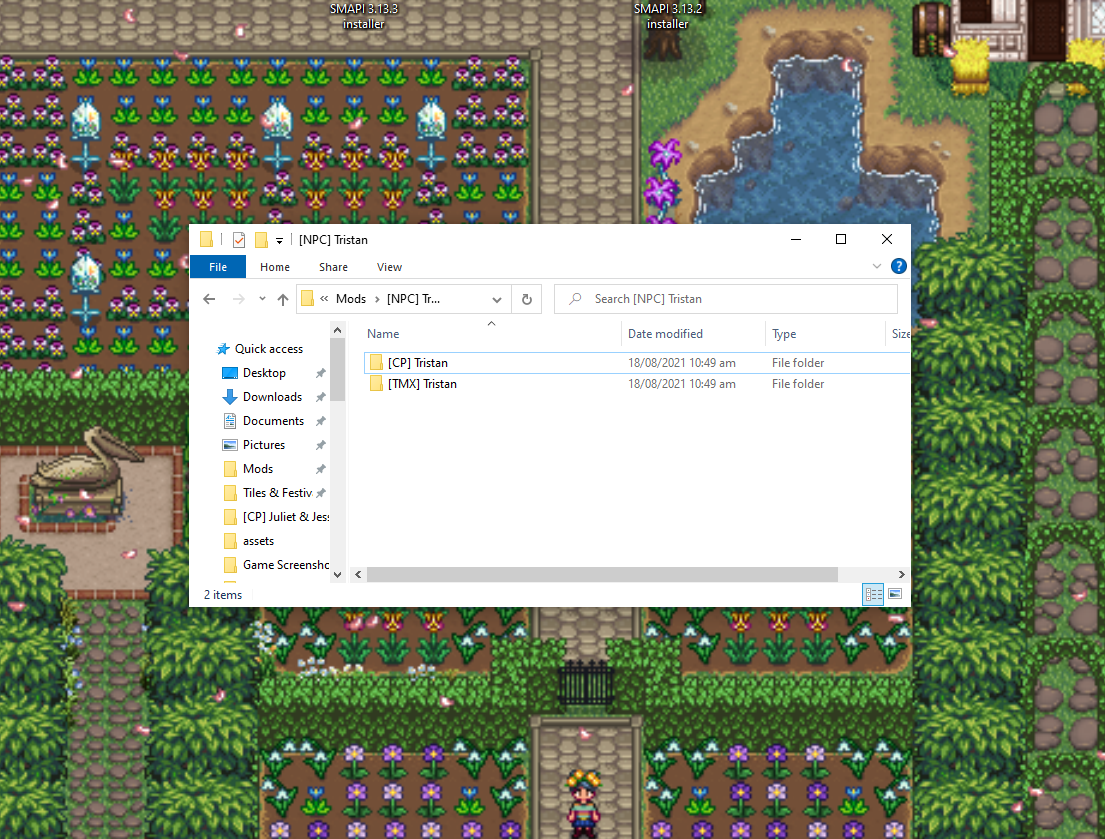
WIth tmxl toolkit (and its companion mod, PYTK) becoming increasing obsolete, some modders are moving away from wanting these frameworks. Sadly, a lot of older mods rely on these frameworks to load…
flat apex
Then according to you Lyoko … after making those edits to Mike to adjust for Boarding House’s new format after being converted to CP I have to do the same in SVE
scarlet quail
Correct.
The disposition and the schedules both must have the new map name in them
or the CP will throw the error
flat apex
so that means custom_boardinghouse thing
mental quail
find&replace can make it a little easier, hit control F
flat apex
wouldn’t it be easier to make a new json file and edit the manifest that combines the SVE schedule with BH schedule?
sorry I think my brain did a record skip again
scarlet quail
Not really, no
Find and replace is the easiest
Okay but seriously I gotta do stuff be back in a bit
dusky canyon
open all the .jsons you know those are in and then do this

(is what I do when changing stuff like that, with the correct values ofc)
mental quail
with this https://notepad-plus-plus.org/downloads/
merry plank
dusky canyon
Oh sorry, this was for MattB
Thanks, that seems to have fixed the problem.
shy orbit
mental quail
thanks for the suggestion... https://smapi.io/log/36925423214c4a3a9269496d68cf0c...
sorry, i was away, but okay, about 8 minutes with that mod setup and pytk doesn't seem too abnormal to me. i don't see any big delays either
 lapis comet
So, I can no longer see what's in my shipping bins and I'm not sure why? ETA: Here's my log if you need it: https://smapi.io/log/2b59915d673544a9ac7fab5b196dfdce

 dapper gazelle
lapis comet
So, I can no longer see what's in my shipping bins and I'm not sure why? ETA: He...
dapper gazelle
lapis comet
So, I can no longer see what's in my shipping bins and I'm not sure why? ETA: He...
hm seeing what's in your shipping bin I think is a feature of Better Shipping Bin? which I do not see in your log, so maybe you accidentally removed it? (or there might be another mod that also does that, but nothing in your log is jumping out at me)
 gritty mirage
hello! i was curious if theres a way to see what items created for the craftmaster achievement
scarlet quail
Or better chests
dapper gazelle
(yeah I don't see that one in there either unfort lol)
scarlet quail
Arf there's a thing for that in vanilla
It's show advanced crafting information in the options menu
Also I'm still technically out rn, back in like a half hour
gritty mirage
and itll show everything crafted?
scarlet quail
It'll show number crafted under each thing crafted
And if it hasn't been crafted it won't show that
gritty mirage
oh youre so right thanks
 iron crown
I'm trying to make a mod to change haley's dialogue and its not working do I have to put all the code in content.json ? this format isn't working
{
"Format": "1.19.0",
"Changes": [
{
"Action": "EditData",
"Target": "Characters/Dialogue/Haley",
"FromFile": "assets/Haley.json"
}
]
}
cobalt yew
i'm pretty sure it all needs to be in content.json, yeah
iron crown
ok I just tried that
[Content Patcher] Error preloading content pack 'GLGGH'. Technical details:
Newtonsoft.Json.JsonReaderException: Can't parse JSON file at C:\Program Files (x86)\Steam\steamapps\common\Stardew Valley\Mods[CP][CP] less rude haley\content.json. This doesn't seem to be valid JSON.
cobalt yew
if all else fails, i'd highly recommend just downloading another dialogue mod and inspecting how they did it. learning by dissecting other mods is really helpful
iron crown
what I did is copied the stuff from Characters/Dialogue/Haley
{
"Format": "1.0.0",
"Changes": [
{
"Action": "EditData",
"Target": "Characters/Dialogue/Haley",
"entries": {
scarlet quail
uh
you need to give more of the not a valid json error
usually you can figure out what's going on from the rest of that
iron crown
ok
scarlet quail
Like "line 58, position X" might show there's no comma on line 58
iron crown
[Content Patcher] Error preloading content pack 'GLGGH'. Technical details:
Newtonsoft.Json.JsonReaderException: Can't parse JSON file at C:\Program Files (x86)\Steam\steamapps\common\Stardew Valley\Mods[CP][CP] less rude haley\content.json. This doesn't seem to be valid JSON.
Technical details: After parsing a value an unexpected character was encountered: W. Path 'Changes[0].Entries.Introduction', line 8, position 104.
at StardewModdingAPI.Toolkit.Serialization.JsonHelper.ReadJsonFileIfExists[TModel](String fullPath, TModel& result) in E:\source_Stardew\SMAPI\src\SMAPI.Toolkit\Serialization\JsonHelper.cs:line 74
at StardewModdingAPI.Framework.ContentPack.ReadJsonFile[TModel](String path) in E:\source_Stardew\SMAPI\src\SMAPI\Framework\ContentPack.cs:line 80
at ContentPatcher.Framework.RawContentPack.TryReloadContent(String& error) in C:\source_Stardew\Mods.Pathoschild\ContentPatcher\Framework\RawContentPack.cs:line 78
scarlet quail
Yeah that's probably a comma error. Can you copy-paste the code around it?
And let me know what's actually on line 8
iron crown
I copied and pasted all the text in Haley.json
cobalt yew
something like this is what i remember dialogue mods looking like
 scarlet quail
Yeah that'd be why then. Notepad's outrageously bad for making a mod
iron crown
ik I'm spost to use that
scarlet quail
use notepad++ or VSC
cobalt yew
another example
 iron crown
scarlet quail
Yeah that'd be why then. Notepad's outrageously bad for making a mod
iron crown
scarlet quail
Yeah that'd be why then. Notepad's outrageously bad for making a mod
how so?
I'm just editing text
dapper gazelle
it's generally fine for making small tweaks yes
scarlet quail
you're making a mod right?
 ornate tide
editdata does not work with fromfiles (iirc)
scarlet quail
not EDITING one
iron crown
ornate tide
editdata does not work with fromfiles (iirc)
oh
dapper gazelle
honestly it'd be better if you posted your json in the validator and posted that here but this is also a #making-mods-general thing
iron crown
oh
scarlet quail
Right. That too.
iron crown
all the chanels are confusing
scarlet quail
Although I am famously anti-json validator because I'm just... what's the word... refusing to do the smart thing? XD
dapper gazelle
(yeah it's not a big deal, you're not being punished or anything. just letting you know lol)
I mean whether you want to use it for your own stuff is whatever, but it does generally make troubleshooting for the rest of us easier
iron crown
I should read the wiki more
cobalt yew
probably lmao
scarlet quail
iron crown
thx
this is gonna take a while
so tell me again why I need this bright confusing better notepad?
iron crown
ohhh
scarlet quail
Then tell us what's on line 8
iron crown
hold on lemme try smth
shy orbit
iron crown
I'm trying to make a mod to change haley's dialogue and its not working do I hav...
(Format version 1.19.0 won't take a FromFile for an EditData patch i'm pretty sure, so you'd need to change the version back to an older one probably if you want to keep the dialogue in json data file)
scarlet quail
(Also this notepad allows you to actually search because normally if you search in Notepad it doesn't match where it should match)
gaunt gust
(If your complaint is that notepad++ is too bright, vscode has a dark mode)
(It is pretty rainbow though)
gaunt gust
I prefer VSCode personally as it as a lot of other helpful features
Like a spellchecker
scarlet quail
Oh trust me I'm not telling you to swap off it, nicole professed all the virtues of it a bit ago
iron crown
I got it on darkmode
[Content Patcher] Error preloading content pack 'GLGGH'. Technical details:
Newtonsoft.Json.JsonReaderException: Can't parse JSON file at C:\Program Files (x86)\Steam\steamapps\common\Stardew Valley\Mods[CP][CP] less rude haley\content.json. This doesn't seem to be valid JSON.
Technical details: After parsing a value an unexpected character was encountered: W. Path 'Changes[0].entries.Introduction', line 8, position 104.
iron crown
line 8 is
"Introduction": "Oh... you're that new farmer boy, aren't you?^Oh... You're that new farmer girl, or whatever. Aren't you?#$e#Huh? Oh... I'm Haley.#$e#Hmm... If it weren't for those horrendous clothes you might actually be cute.^Hmm... If it weren't for those horrendous clothes you might actually be pretty... Actually, nevermind.$h",
shy orbit
!json
native dragonBOT
JSON is a standard format for machine-readable text files, often used by Stardew Valley mods. If you need help with a JSON file, you can upload it to https://smapi.io/json, view an automatic validation summary on that page, and share the link with others.
scarlet quail
yeah do what the command said. That doesn't seem to help us right here
probably since it's not in code format
iron crown
I copied everything from haley.json
scarlet quail
put it into the link above
Especially since what you shared doesn't have that capital W anywhere
So something isn't adding up
iron crown
ohhhh I think I fixed it
sorry hold on
ugh
okay new problem the mod is not working but there is no red text
haley is not saying test when I talk to her
scarlet quail
We definitely need to see that file in the json validator then.
That usually means whatever you wrote isn't being applied somewhere.
 long brook
 long heath
Whenever I open my game or menu in game it goes down where I can’t open it
long heath
Whenever I open my game or menu in game it goes down where I can’t open it
!log
native dragonBOT
@long heath Can you upload your SMAPI log to https://smapi.io/log (see instructions on that page) and share the link here?
native dragonBOT
Log Info: SMAPI 3.16.2 with SDV 1.5.6 (build 22018) on Windows 11, with 67 C# mods and 71 content packs.
scarlet quail
not you jake
long heath
ok
scarlet quail
Fox is doing something different
iron crown
chat to fast
iron crown
scarlet quail
or 1.28.0.
which one?
iron crown
okay I'll change that
[Content Patcher] Could not load content pack 'GLGGH': unsupported format version 1.28.0, you may need to update Content Patcher.
scarlet quail
second, capitalize that E
Third, update content patcher, that means you're not up to date
iron crown
scarlet quail
second, capitalize that E
wait that matters??
scarlet quail
Yes. Json Validator confirms it.
4 Changes[0] JSON does not match all schemas from 'allOf'. Invalid schema indexes: 3.
==> Changes[0]: Invalid value. Found 'entries', but expected one of 'Action', 'LogName', 'Target', 'Update', 'When', 'TargetField', 'Entries', 'Fields', 'MoveEntries', 'TextOperations'.
scarlet quail
entries to Entries
iron crown
okay updating
long brook
Is this convo better in #making-mods-general ?
scarlet quail
Probably. If this doesn't solve it I'll move us there. Nicole mentioned we should already, but they posted in here again.
scarlet quail
long heath
This needs to be the current problem for whoever checks in here. I don't know why Stardew window would automatically start sinking to the bottom of the screen, and personally I'd think it'd be unrelated to mods
iron crown
scarlet quail
Probably. If this doesn't solve it I'll move us there. Nicole mentioned we shoul...
okay i will
long brook
long heath
Whenever I open my game or menu in game it goes down where I can’t open it
Try run the vanilla sdv to check if the problem still occur?
iron crown
okay then
native dragonBOT
Can you upload your SMAPI log to https://smapi.io/log (see instructions on that page) and share the link here?
iron crown
oh I foudn thie thing [SMAPI] - Content Patcher 1.28.1 because it needs SMAPI 3.15.0 or later. Please update SMAPI to the latest version to use this mod.
scarlet quail
well, update smapi too
iron crown
UGH
scarlet quail
to be fair, if you're trying to make a mod you should update everything anyway.
iron crown
is there a long prosess to do that?
scarlet quail
Nope.
Just download it from smapi.io
Then run the installer again
it'll auto-update it
long brook
Updating thing is not that long
iron crown
I haven't updated smapi in a long time
long brook
It's because incompatibility between older smapi and new version of content patcher. So always check smapi update frequently
dusky canyon
I get this when asking to dance at the flower festival
https://smapi.io/log/984ca86e1d5e49da902991a20a004470?Page=4&PerPage=1000 (long log with patch summary)
 native dragonBOT
Log Info: SMAPI 3.16.2 with SDV 1.5.6 (build 22018) on Windows 10, with 242 C# mods and 777 content packs.
scarlet quail
That is... so strange. I swear I didn't put on IC-Shane after the flower dance so I thought it was fine. I don't know
Maybe someone else will.
iron crown
this is going to be hard with my wifi going in and out
dusky canyon
I tried it with multiple NPCs with different heart levels and it's still the same ;-;
iron crown
says the download is going to take 2 hours
dusky canyon
Ok!
 long brook
That's really bad internet. Downloading smapi (about 40mb) needs that long time?
iron crown
wait
scarlet quail
I'm guessing that's with the internet cutting out.
iron crown
it will take 1 or 11 or 120 minutes
scarlet quail
Basically, it's like steam's "more than one year" thing. Happens when internet dies.
iron crown
scarlet quail
Basically, it's like steam's "more than one year" thing. Happens when internet d...
I've never seen that before
lapis comet
dapper gazelle
hm seeing what's in your shipping bin I think is a feature of Better Shipping Bi...
Thank you! I've never had that mod before, so I just downloaded it and waiting for my game to load up!
iron crown
I think I installed it
scarlet quail
Well, run smapi, see what happens.
dusky canyon
scarlet quail
tell me if it still happens
Still happens, sadly :(

guess I'll try downgrading CFD?
scarlet quail
Well, that's actually good news. It means whatever happened with MissDirected not only isn't the fault of immersive shane, but something broke elsewhere
let me see her issue. She had a smaller modlist.
iron crown
did you say I was new to discord?
iron crown
ohh
[SMAPI] - Content Patcher 1.28.1 because it needs SMAPI 3.15.0 or later. Please update SMAPI to the latest version to use this mod.
main ingot
did u run the smapi installer
scarlet quail
you did not install it then, just downloaded
Unzip the smapi thing you downloaded, run the bat file assuming you're on windows, and follow the instructions
iron crown
I clicked on the install on Windows.bat
scarlet quail
And did you follow the instructions?
just double clicking it won't do anything
it opens a new window where you hit 1 a couple of times
iron crown
Oops! The installer couldn't delete C:\Program Files (x86)\Steam\steamapps\common\Stardew Valley\StardewModdingAPI.dll: [UnauthorizedAccessException] Access to the path 'C:\Program Files (x86)\Steam\steamapps\common\Stardew Valley\StardewModdingAPI.dll' is denied..
Try rebooting your computer and then run the installer again. If that doesn't work, try deleting it yourself then press any key to retry.
scarlet quail
do what it says. Reboot computer
Then run installer again
Because it should have access when it runs that.
scarlet quail
shrug however you installed the first time should have worked again
long brook
Access denied. That's why i never place my game path inside C drive anymore
scarlet quail
I can't really tell you anything else really.
iron crown
okay bye
see you in 2 hours when my computer is done restarting
okay I'm back
now just gotta load steam
dusky canyon
scarlet quail
Well, that's actually good news. It means whatever happened with MissDirected no...
So with CFD 2.0.2 I still get this (see screenshot). Then the dialogue ends. Then I talk to the NPC again and I get the (Ask NPC to be your dance partner) question. Then the dialogue proceeds as it's supposed to be.

I'll try 2.2.1 too I guess
scarlet quail
Hmmmmmmmm. That implies it's a Custom Fixed Dialogue issue.
dusky canyon
This is with IC Shane enabled
scarlet quail
Which means I am going to have to forward to Aeden if you can check after with IC-Shane disabled
dusky canyon
You want me to submit a bug report after that?
scarlet quail
Honestly that would be preferable. Include your log with it.
dusky canyon

scarlet quail
But yeah, now that I can see that it's happened with multiple people, one large mod list, one small, CFD downgrade fixed it mostly, that almost assuredly shows it as CFD
iron crown
okay I've downloaded smapi and cp it isn't working and there is no red text
native dragonBOT
Can you upload your SMAPI log to https://smapi.io/log (see instructions on that page) and share the link here?
iron crown
what do i do?
scarlet quail
click the link, follow the instructions
iron crown
I did
scarlet quail
okay, so are you on the page with your parsed log?
iron crown
Oops, couldn't parse that log. (Make sure you upload the log file, not the console text.)
Share this URL when asking for help: https://smapi.io/log/24517d6611c9434392e9052f08a73f40
(Or upload a new log.)
Error details: Found a log message with no SMAPI metadata. Is this a SMAPI log file?
I tried it again
scarlet quail
that's not the smapi log
that's your json
Follow the link's instructions.
!log
native dragonBOT
Can you upload your SMAPI log to https://smapi.io/log (see instructions on that page) and share the link here?
scarlet quail
do not look for a crash text, look for SMAPI-latest.txt
iron crown
where
scarlet quail
the link has the instructions as to where
iron crown
ok
long brook
Did you follow this instruction?
 native dragonBOT
Log Info: SMAPI 3.16.2 with SDV 1.5.6 (build 22018) on Windows 11, with 11 C# mods and 7 content packs.
scarlet quail
Okay. So the json you uploaded tells me a couple things
First, what gender is your farmer
scarlet quail
Yeah. If you're a woman farmer, the ^ separates the boy/girl thing
you only have test in the "male" area
iron crown
I'll try that again thx
scarlet quail
"Introduction": "Test, Male^Test, Female#$e#Huh? Oh... I'm Haley.#$e#Second dialogue, male.^Second dialogue, female$h",
iron crown
it is now working
scarlet quail
No problem. Have fun editing Haley's dialogue.
dusky canyon
I'm still testing but it seems with and without IC Shane it's still the same
iron crown
I have more questions
dusky canyon
dusky canyon
I did notice from 2.2.0 it showed this instead of the earlier screenshot (see reply)
 long brook
iron crown
thank you
long brook
iron crown
thank you
And also, consider to update some of mode you have. You can see what mods need to be updated from the smapi itself or the log you sent here previously
iron crown
long brook
And also, consider to update some of mode you have. You can see what mods need t...
um no
long brook
It's not a must, just saying it to consider it
scarlet quail
you don't really have to, just right click and hit edit with notepad++
it's a default right click option now
Wait holy shit Ribbit you've partway solved it
That's half working
It's glitched but it still allows a yes to be clicked on, it's just a very long "string" thingy
scarlet quail
Is... is right clicking really that bad, Fox?
dusky canyon
2.1.13 does not have any bugged dialogue at all
 scarlet quail
Okay. Then that means it's definitely Custom Fixed Dialogue
iron crown
scarlet quail
Is... is right clicking really that bad, Fox?
its just annoying
 scarlet quail
Submit that as a bug report to Aeden, and let them know it works perfectly on 2.1.13
This means it broke within the last couple of updates holy sheet.
I'm gonna go tag missdirected one sec
long brook
iron crown
by default it opens with notepad
Right click > Open with > Choose another app. There should be a small window pops up with check box "always use ...". Check that box and click on notepad++
scarlet quail
Sorry for ping, but Ribbit solved it. Custom Fixed Dialogue's newest update broke it. Aedenthorn is good at fixing their mods quickly and I'll let them know in their discord
Edit: Try the new bugfix, but it probably isn't fixable if the trace doesn't show anything from Custom Fixed Dialogue.
Edit edit: Aeden found it happening, stay tuned
iron crown
long brook
Right click > Open with > Choose another app. There should be a small window pop...
tried that
long brook
iron crown
tried that
Then? You json file should always opened by notepad++ then
 cunning ibex
since we're talking cfd, anyone know if this issue is caused by that, too?

have had multiple npcs say this
dusky canyon
Only thing I can suggest is try version 2.1.13/2.2.0 and see if it still persists
and then make a bug report
cunning ibex
will do!
dusky canyon
Do you have the weird dialogue when NPCs see you go through garbage too?
cunning ibex
i don't think npcs have seen me go through garbage recently haha
but i've had multiple messes with npcs suggesting gift ideas
 scarlet quail
Oh boy. Yeah no that's... oh dear.
oh you're getting that issue too trisk?
...hoo boy. I'm gonna have to downgrade too aren't I
dusky canyon
I also get a similar dialogue when building stuff at Robin's
iron crown
when I ask a question in #making-mods-general I get ignored
how do I edit heart event dialogue?
iron crown
it is?
scarlet quail
See if it happens
cunning ibex
2.1.13 or 2.2.0
cunning ibex
kk
scarlet quail
Then you're going to have to study up on event coding because A) that's not a subject I know much of and B ) you're going to have to code entire events
Not just swapping out dialogue.
cunning ibex
here's hoping i notice if it's fixed! only had a handful of problematic instances lol
scarlet quail
Like here. Let me get an example for you fox.
 lament vortex
can i send my warps.json file here (from cjb cheats) to figure out where the error is? smapi tells me it cant parse the file but i cant figure out what the issue is  https://smapi.io/log/7c853e511c2a473fa9c335a951584fec
scarlet quail
"4081148/e 47/t 1600 1900": "none/-1000 -1000/farmer 13 22 0 Sam 14 10 2 Sebastian 15 11 3 Emily 10 11 3 Maru 9 10 2 Shane 12 15 0 Elliott 17 14 1 Leah 18 14 3 Abigail 13 11 1 Penny 18 10 3 Harvey 8 11 1 Linus 21 5 2 Jodi 8 15 2 Vincent 8 16 0/viewport 12 11 clamp true/skippable/move farmer 0 -10 0 true/move Shane 0 -6 0 true/proceedPosition Shane/warp Shane -100 -100/proceedPosition farmer/move farmer 1 0 0 false/speak Sam \"Hi @. Thanks for coming.\"/faceDirection Sam 3/faceDirection Sam 1/faceDirection Sam 2/speak Sam \"Well, our gear's loaded already... Looks like everything's set.\"/jump Sam/pause 800/speak Sam \"Alright, everyone... let's get in the bus!$u\"/pause 600/move Abigail -1 0 0 true/move Emily 1 0 1 true/faceDirection Maru 1/proceedPosition Abigail/move Abigail 0 -2 2 true/move Sebastian -3 0 0 true/move Elliott -5 0 0 true/move Leah -5 0 0 true/globalFade/viewport -1000 -1000/pause 3000/speak Sam \"*gulp*... I'm starting to get really nervous.$8\"/pause 1000/playSound busDoorOpen/pause 4000/speak Sam \"Okay, here we are... wish me luck!$u\"/pause 800/changeToTemporaryMap SamShow/viewport -1000 -1000/warp Sam 18 14/faceDirection Sam 0 true/warp Sebastian 21 14/positionOffset Sebastian 20 -20/warp Abigail 15 13/positionOffset Abigail 40 -24/warp farmer 18 20/warp Elliott 20 19/faceDirection Elliott 0/warp Leah 21 19/faceDirection Leah 0 true/warp Maru 13 16/faceDirection Maru 1 true/warp Harvey 14 17/faceDirection Harvey 0 true/warp Emily 21 16/faceDirection Emily 0 true/warp Shane 16 20/warp Linus 31 14/faceDirection Linus 0 true/warp Penny 17 16/faceDirection Penny 0 true/faceDirection Sebastian 2 true/warp Jodi 11 19/warp Vincent 12 19/faceDirection Jodi 0/viewport 18 15 true/move farmer 0 -4 0/pause 3000/faceDirection Sam 2/pause 800/jump Sam/pause 1000/cutscene bandFork/mail afterSamShow/end dialogue Sam \"Hey. The show was a great success! Thanks again, @.\"",
That's Sam's 8 heart event.
You would have to code in different dialogue and make sure everything lined up.
iron crown
where did you find that?
scarlet quail
That's the other part. You'd have to code it into... this one was an event at the bus stop?
so the bus stop file targeted.
scarlet quail
It's a very long process and I'm not the one to explain it to you.
I refuse to learn event coding due to complexity. At least for now. Just realize it's not as easy as your dialogue mod.
iron crown
I have a long way to go before I can start doing stuff like that
long brook
lament vortex
can i send my warps.json file here (from cjb cheats) to figure out where the err...
Try reinstalling cjb cheat mod?
lament vortex
i have, the issue is that i have custom warps
and whenever i add them, smapi tells me it cant parse the file
thats why i asked if could send it
iron crown
oh also you know how you have a conversation with npc where there are multible choice answers
can I change that easly
scarlet quail
That can be included like the dialogue stuff, yes, but I don't have an example on hand.
I'd have to search... Juliet's dialogue? I can't remember
iron crown
I will look through my files
long brook
lament vortex
i have, the issue is that i have custom warps
Oh you add custom warps in the json. Sorry i didn't read your chat fully
iron crown
ik abigail asks you smth about her hair
lament vortex
long brook
Oh you add custom warps in the json. Sorry i didn't read your chat fully
no its okay! i didnt mention it, i didnt think of it lol
iron crown
I'll start there
long brook
lament vortex
no its okay! i didnt mention it, i didnt think of it lol
Try to ask that in #making-mods-general cause some modders active there too
lament vortex
okay  thank you
scarlet quail
@dusky canyon
Aeden put out a bugfix!
(This is why Aeden is quick XD)
Everyone with CFD issues please try out 2.2.3
cunning ibex
asjdflajf that was so fast
dusky canyon
I'm already trying it out hehehehehe
cunning ibex
didn't even have time to test 2.1.13
dusky canyon
Log 2.2.3: https://smapi.io/log/4528a407999d4a4588705f1c78fff964
Imgur link with images as example: https://imgur.com/a/lS77akA
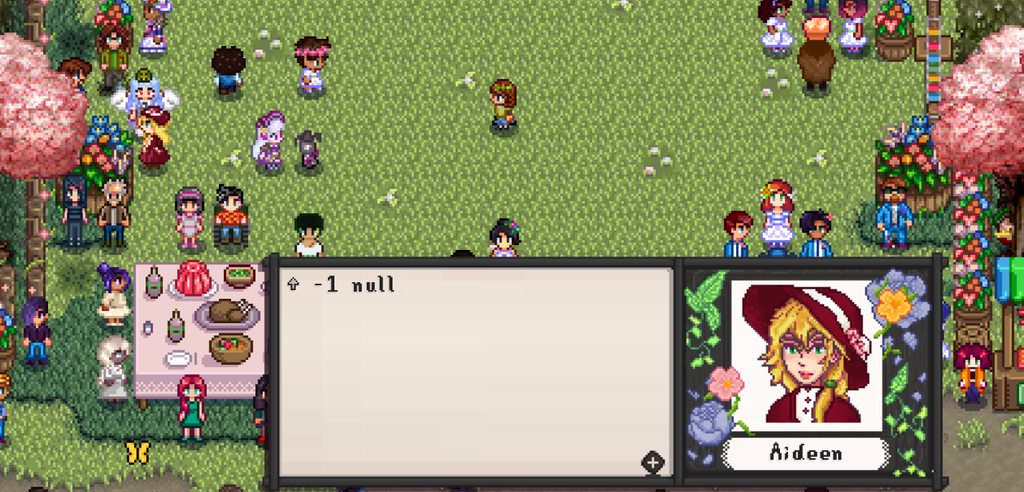
The issue still persists, I talk to the NPC, I first get the usual festival dialogue. Then I want to ask, I get "arrowsign -1 null" and then the big long one option text. (Like with 2.2.2 and 2.2.1)
 native dragonBOT
Log Info: SMAPI 3.16.2 with SDV 1.5.6 (build 22018) on Windows 10, with 242 C# mods and 777 content packs.
dusky canyon
Already added it also to the bug report
(so the exact same as with 2.2.2 and 2.2.1)
scarlet quail
Alright. Trisk if you can replicate your issue with a log too that'd be good
cunning ibex
will try!
long heath
long brook
Try run the vanilla sdv to check if the problem still occur?
it still does
scarlet quail
Then that's a vanilla issue, not mods
Please let those in #vanilla-tech-support know that in vanilla stardew- WITHOUT SMAPI - it happens.
And test on vanilla stardew only
long heath
i took all mods out of folder but idk how to take out smapi
long heath
steam
scarlet quail
Steam? GOG? Gamepass?
okay. So go to local files in steam
And boot "StardewValley"
I would tell you to delete launch options but that's probably not helpful for you
if it still happens when you boot it THERE, then tell us
long heath
yes it happens
scarlet quail
Then yes. Go to technical support and only boot from there when testing on vanilla Stardew for technical support
Because that's not a mod problem
@dusky canyon Downgrade to 2.1.13 and give the working log
Never mind. One moment.
aedenthorn — Today at 9:17 PM
I need a log from the latest version after the problem occurs
Apparently in the log you sent in here there was nothing from CFD.
dusky canyon
I forgot I'm in that discord too haha
yes correct, I mean- I don't see any error when that weird text happens
scarlet quail
Sweet so I don't have to be a go between 😅
dusky canyon
I'll get a new log and put that there
scarlet quail
The CFD stuff will be in the trace
 dry cliff
So I'm using the Bigger Farmhouse interior map with the custom spouse room fix for it and free love. But I'm having this issue with my spouse rooms:
Does anyone know if there's a way to correct this, or do I need to just go back to the base farmhouse?
 scarlet quail
Oh. Oh no.
Remove the custom spouse room fix. That is not helpful for current version.
There's a C# component that Asterisk & Aeden couldn't do. You'll need to remove the stairs to the third room.
in the config, that is.
scarlet quail
No probs, I know it isn't listed XD
I just remember trying that initially and thousand yard stare
dry cliff
If I put the regular custom spouse room in, and remove the stairs from the config, should the spouse rooms just start going off to the side like they were in the base farm?
scarlet quail
Correct. Here. Let me see if I have a current image of my entire farmhouse....
Okay, not super current
But here's an older version.

by older version I mean "same version you have currently, just not my current house setup"
dry cliff
Right. haha
scarlet quail
You can see the spouse thing. It'll go off to the right of where the third one is there
(I have seven, it just refuses to show all seven since, well, it's not seeing beyond its normal bounds)
scarlet quail
options menu, scroll all the way down to where the GMCM thing is, make the % thing next to the camera 25%, then click the camera button next to it
It's a vanilla feature, usable in modded.
dry cliff
Oh cool thank you
 scarlet quail
Well, uh.
long brook
Install content patcher mod
scarlet quail
^
It says right in the log XD
Since that's android, make sure to get the version for android
 wide axle
Woahh ok then I will try that
cunning ibex
scarlet quail
Alright. Trisk if you can replicate your issue with a log too that'd be good
talked to every npc, got 2 gift recommends and neither were bugged so either the issue is fixed or i just haven't experienced it yet 🙂
scarlet quail
well, good. At least ours got fixed XD
Ribbit's can't be fixed though, because the trace isn't reporting anything.
scarlet quail
So it's essentially not giving anything for aeden to work with
dry cliff
smapi-sempai
long brook
Just to make sure. These mod that flagged as using deprecated code (debug smapi) are still safe to use, right? Or should I stop using those mods?
https://smapi.io/log/a2f026a0d37143aea159992960429a9e
native dragonBOT
Log Info: SMAPI 3.16.2 with SDV 1.5.6 (build 22018) on Windows 10, with 37 C# mods and 5 content packs.
long brook
good to know, thank you
cunning ibex


smapi-sempai
iron crown
I found smth
"winter_Sun": "Oh, hello.#$q 29/30 winter_Sun_old#I made these two drawings. What do you think?#$r 29 20 Sun_29#I like the jungle island and the tiger.#$r 30 5 Sun_30#I like the orc with the battleaxe.#$r 29 -50 Sun_Bad#I don't like either of them.",
still don't know how that workd
dusky canyon
did you look at the wiki?
long brook
better ask on #making-mods-general tho
long brook
well there is the proper channel, wait or get their attention
iron crown
ik
dusky canyon
if the people currently online do not answer your question, it means they do not know the answer
iron crown
or there are other stuff in the chat
lament prairie
(Or that your question is phrased in a way that makes no sense)
iron crown
(what)
dusky canyon

lament prairie
I assume you’re complaining about no one answering your latest question, which I read but didn’t understand, and didn’t have the energy to figure out how to ask questions about until it did make sense. (And the real answer to is probably “try it and see”)
scarlet quail
Elizabeth is...correct. I know on the path to figuring out CP and Tiled stuff either people didn't know or didn't answer quite a few times
I still eventually puzzled through it.
scarlet quail
Much as it may seem like you're being ignored, it may simply be that people do not know the answers to your questions.
iron crown
dusky canyon
https://stardewmodding.miraheze.org/w/index.php?search=event&title=Special%3ASea...
uhmm
 mystic solar
scarlet quail
Sorry for ping, but Ribbit solved it. Custom Fixed Dialogue's newest update brok...
mystic solar
scarlet quail
Sorry for ping, but Ribbit solved it. Custom Fixed Dialogue's newest update brok...
So it's an issue with the customfixed dialogue not shane's mod. okay I'll keep tabs.
scarlet quail
Correct. Aeden found the issue after Ribbit had the same
They are working on it, so watch for an update and it should maybe be fixed. However it is taking a bit (for Aedenthorn standards - Aeden is extremely fast) so it might not be an easy fix
 hearty dagger
Hello. If I'll be playing with mods and I want to play with another person. Does they need to have the same mods I have?
scarlet quail
!mpmods
native dragonBOT
See https://stardewvalleywiki.com/Modding:Player_Guide#Do_mods_work_in_multiplayer.3F for details on how mods work in multiplayer. :)
scarlet quail
Short version yes.
Long version yes but you can have some different cosmetic only mods
But cosmetic only means like portraits. Adding in JA clothing or something is not cosmetic and will break something
(This is why short version is yes)
hearty dagger
scarlet quail
(This is why short version is yes)
Oh HAHAHA! Thank you!
long brook
Longer answer, use the exact same mod just to make sure
 long brook
!log
native dragonBOT
Can you upload your SMAPI log to https://smapi.io/log (see instructions on that page) and share the link here?
 hoary bane
 last quiver
ummmmm i am lost now my game is being weird
last quiver
ummmmm i am lost now my game is being weird
Reinstall SVE.
last quiver
it was working just fine a few days ago now it wont load it and i have twice
hoary bane
native dragon
Can you upload your SMAPI log to <https://smapi.io/log> (see instructions on tha...
Then ^
last quiver
@hoary bane
hoary bane
I'm right here, no need to tag.
last quiver
lol sorry
scarlet quail
We appreciate you saying you have twice, but that should only ever happen if the tilesheets are, as the log says, reordered. And SVE doesn't do that on its own with the current version
shy orbit
it's a problem with vortex currently
scarlet quail
Source: works for me. And for several others.
shy orbit
as far as i know
native dragonBOT
Log Info: SMAPI 3.16.2 with SDV 1.5.6 (build 22018) on Windows 10, with 29 C# mods and 15 content packs.
scarlet quail
!modmanagerbugs
native dragonBOT
Vortex (Nexus) and ModDrop both are mod managers that can help you keep your mods up to date, but they are difficult to troubleshoot. If you're looking for a mod manager that was written specifically for SDV and has troubleshooting logs built in, you can try Stardrop (!stardrop).
If you're using a non-Stardrop mod manager and ask for help troubleshooting, you can ask the Nexus Discord https://www.nexusmods.com/discord or the Moddrop Discord https://www.moddrop.com/app/about (scroll down). If you're using Stardrop, please remember to provide a Stardrop log.
hoary bane
Oh I think I've seen the discussion on that with Vortex, wasn't it being fixed?
last quiver
and yes i use vortex
scarlet quail
MANUALLY install Stardew Valley expanded and Grandpa's Farm.
hoary bane

scarlet quail
Do not reinstall via Vortex
hoary bane
You should consider using Stardrop instead if you want a mod manager.
scarlet quail
We can tell you the vortex fix when they find it
hoary bane
!stardrop
native dragonBOT
Stardrop (https://www.nexusmods.com/stardewvalley/mods/10455) is the only mod manager written specifically for Stardew Valley. For information about how to install and use it, please see the Stardrop wiki: https://floogen.gitbook.io/stardrop/
If you're having an issue, here's the guidelines on reporting issues: https://floogen.gitbook.io/stardrop/resources/reporting-issues

Nexus Mods :: Stardew Valley
An open-source, cross-platform mod manager for Stardew Valley. Includes mod profiles, update checking, SMAPI integration and Nexus Mods API support!Currently in open beta.
scarlet quail
I know it involves downgrading
But you need to manually install those two for now
Vortex is screwing the install up.
last quiver
ok .... yay 😓
long brook
I'm truly grateful to a modder here (forgot the name) that warn me using vortex a couple months ago and changing to another mod manager (in my case, stardrop)
last quiver
really is vortex that screwy
long brook
It has the reputation to screw up things
last quiver
i have used vortex the entire time and this is my first issue
long brook
Well for now you can follow what lyoko said
hoary bane
Latest version is a bit buggy I think.
You can try downgrading but I hear Vortex still tries to update itself even after that? Though I can't be too sure.
last quiver
ah ok thank you
scarlet quail
I know there was a Vortex downgrade that worked. I want to say the newest version that ends in .6
But I cannot remember for the life of me what it was
And I don't know where to search to find out D:
 delicate hollow
Been having some issues with random crashing, Not sure what's causing it.
It seems to only happen in multiplayer so far, and the crashes are 100% Random. Has happened 3 times so far.
Once when I was building a shed, another when going though the map, and the third time when buying a goat
long brook
!log for both you and your friend maybe
native dragonBOT
Can you upload your SMAPI log to https://smapi.io/log (see instructions on that page) and share the link here?
delicate hollow
long brook
!log for both you and your friend maybe
I'll try to log it when it happens again, but my friend doesnt use mods (Which may be why its happening?)
long brook
native dragon
Can you upload your SMAPI log to <https://smapi.io/log> (see instructions on tha...
No need to wait for other crashed occur. Just go to this link and follow the instruction
long brook
There will be link after tou press parse and save on the top of the web
delicate hollow
native dragonBOT
Log Info: SMAPI 3.16.2 with SDV 1.5.6 (build 22018) on Windows 10, with 30 C# mods and 9 content packs.
delicate hollow
like this?
ornate tide
wait your friend doesn't use mods?
delicate hollow
They refuse to use them
ornate tide
with 30 c# mods, thats most definitely the problem
delicate hollow
the mods I have shouldnt cause crashes, there all very small and more or less cosmetic
delicate hollow
mmm..
scarlet quail
!mpmods
ornate tide
mm not really, better safe than sorry. (also at some point if you did have children, they become actual npcs and since your friend wouldn't use mods it would break)
native dragonBOT
See https://stardewvalleywiki.com/Modding:Player_Guide#Do_mods_work_in_multiplayer.3F for details on how mods work in multiplayer. :)
ornate tide
why does your friend refuse to use mods?
delicate hollow
I'm not sure, they just say no and leave it at that
Its already caused issues. Idk what mod does it, but my map is different then the normal standered farm
There are some palces I cant go, but he can, and vice versa
its really weird
ornate tide
capitalist dream farm
delicate hollow
ah- I thought it like added its own farm
and not changed a current
damnnit
But yeah, for example, this happened while playing (Before it crashed)


its a bit funky
long brook
Get an agreement between you and your friend. Both use mod or both play vanilla. Better that way than one use mod and one doesn't
delicate hollow
I'll try my best
delicate hollow
scarlet quail
Nope. Any C# mods immediately cause problems.
But I assume the crash was from the game being confused
shy orbit
also childtonpc isn't multiplayer compatible even if both players have it as far as i know
delicate hollow
oh its not?
dfgth
ill remove it later
I've been having a pain getting mods to work. As it seems all the ones I want to use are outdated and dont work anymore
Like there was this one Bee antenna acc mod, but when I put it in, it said it wasnt for the mod loaded- even though the mod page said to use that mod loaded and api??
I assume the mod was too outdated for it to be even reconized
shy orbit
you can send a log here when that happens and someone likely can tell what the issue is
delicate hollow
Oh the loader tell me most times
*tells
it will warn me when a mod isnt loaded due to it either being outdated, or too old to be loaded (AKA not even reconized)
which is the issue im having, mods being too old
But that goes with modded anything, mods get outdated, and may not be updated
shy orbit
delicate hollow
Like there was this one Bee antenna acc mod, but when I put it in, it said it wa...
ah i see. looks like the mod author uploaded an xnb replacement version even though the description says it's for content patcher. you could convert it to content patcher format relatively easily but honestly the mod is so old that it might not work correctly anyway
delicate hollow
shy orbit
ah i see. looks like the mod author uploaded an xnb replacement version even tho...
Thats my point, the mod that I really wanted was from like last year
I really wanted the antenna, but yeah

long brook
!xnbzola
native dragonBOT
An XNB mod replaces some of your game's .xnb files to change the game (unlike newer mods that go in your Mods folder). This is an older type of mod that's no longer recommended, and can cause a number of issues. See https://stardewvalleywiki.com/Modding:Using_XNB_mods for help using them (and a list of alternatives using Content Patcher), and https://stardewvalleywiki.com/Modding:Editing_XNB_files for help unpacking & editing them (including for use with Content Patcher).
https://media.discordapp.net/attachments/156109690059751424/575085766426886145/ZolasFury.png

 frank grove
i THINK it’s finally working again
sorry elizabeth i meant to reply to my own message
scarlet quail
@mystic solar You around? If not, when you see this, please download the newest Custom Fixed Dialogue build to see if it fixes it.
long brook
Maybe ask on #vanilla-tech-support cause you play on vanilla sdv
 serene fable
alright
robust bison
that's a first
 void creek
can anyone help I have no idea what this means
 robust bison
void creek
can anyone help I have no idea what this means
robust bison
void creek
can anyone help I have no idea what this means
!log
native dragonBOT
@void creek Can you upload your SMAPI log to https://smapi.io/log (see instructions on that page) and share the link here?
native dragonBOT
Log Info: SMAPI 3.16.2 with SDV 1.5.6 (build 22018) on Windows 10, with 92 C# mods and 282 content packs.
scarlet quail
That's just a basic SpriteMaster error
It happens on occasion. Did your game bug at all when it happened?
or is it just "scary red text"
void creek
not really, but I always keep an eye on smapi in case something happens
yeah, it was the first time spritemaster showed red text
freaked me out 😂
scarlet quail
Alright. Then I won't need to tag, but Ameise: In case this is worrisome to you, SpriteMaster is throwing some red here
(I get that red from SpriteMaster sometimes. Unless it bugs, it's harmless)
and believe me...I've had SpriteMaster be not harmless before. thousand yard stare remembering beta 6
mystic solar
scarlet quail
<@534882808615927818> You around? If not, when you see this, please download the...
It worked! Thank you! 🙂
scarlet quail
Thanks! Passed that along to Aeden
 native dragonBOT
@frank grove Can you upload your SMAPI log to https://smapi.io/log (see instructions on that page) and share the link here?
frank grove
scarlet quail
nope nope nope
frank grove
it wouldn't move to the log parser thing
scarlet quail
!logtoobig
native dragonBOT
If the log is too big, see here for how to fix that https://stardewmodding.miraheze.org/wiki/Debugging#If_the_log_is_too_big_/_parser_site_won't_load_it
frank grove
thank you!
mystic solar
scarlet quail
Thanks! Passed that along to Aeden
What's his @?
scarlet quail
I mean here it's iLoveLucy but I'd just go to Custom Fixed Dialogue and click on the link for their discord server
 lavish marlin
scarlet quail
Alright. Then I won't need to tag, but Ameise: In case this is worrisome to you,...
lavish marlin
scarlet quail
Alright. Then I won't need to tag, but Ameise: In case this is worrisome to you,...
On beta 9?
scarlet quail
Looks like log is beta 7, so that's probs why
scarlet quail
shrug
lavish marlin
If it still happens on beta 9 I will be marginally upset
scarlet quail
True XD well, if they come around I'll tell them to update
 scarlet quail
snrk That confident in SpriteMaster's fixings, huh?
I feel like that's tempting fate
lavish marlin
Nope
Not confident at all
I'll be angry because I've been trying to fix that issue for months
shy orbit
frank grove
try switching multiple spouses to free love https://www.nexusmods.com/stardewvalley/mods/10021, it's supposed to be used on the current game version
(if that doesn't fix it, i'd suspect the charlie npc)
frank grove
thank you i was trying to scroll through legit eight hundred thousand lines of code
and then weirdly enough i couldn't recreate the issue--even though it's happened to me twice before
 fleet panther
I thought cellar and greenhouse are completely different things?
log: https://smapi.io/log/471e53a530784973bef0519d465360fe
 native dragonBOT
Log Info: SMAPI 3.16.2 with SDV 1.5.6 (build 22018) on Windows 10, with 46 C# mods and 130 content packs.
shy orbit
well they probably are, but who's greenhouse still replaces the cellar
you can delete the Cellar.tbin file from the mod to prevent it from doing it. probably doesn't result in anything too bad
 quaint relic
Hey, I'm using starblue and there are a few spots that aren't quite covered right. The most balls out obvious is the shadow beside the dumpster on the railroad/spa map... anyone got a fix for that? or can anyone tell me which tilesheet it's on so I can fix it myself?
 radiant valve
could anyone help me with altering the warps json for CJB cheats for East Scrap? i've tried to and even used a diff json but errors keep coming up and it doesn't work  https://www.nexusmods.com/stardewvalley/articles/798
Nexus Mods :: Stardew Valley
As written by the lovely Kopata/Malic (Creator of Jade).
Here are the warps for East Scarp, to cut and paste into the 'assets/warps.json' file.
Please note, take care editing json files fo
the smapi log : https://smapi.io/log/87ea60d5aded424ea6735cbd48a5d626
native dragonBOT
Log Info: SMAPI 3.16.2 with SDV 1.5.6 (build 22018) on Windows 11, with 85 C# mods and 104 content packs.
shy orbit
!json
native dragonBOT
JSON is a standard format for machine-readable text files, often used by Stardew Valley mods. If you need help with a JSON file, you can upload it to https://smapi.io/json, view an automatic validation summary on that page, and share the link with others.
shy orbit
it's easiest to check there
radiant valve
oh ty! do i need to pick something from the json format section
radiant valve
cool! well it says no errors atm, i guess i'll play and see  perhaps i made an error before
shy orbit
i mean there is probably an error, just not in the formatting. if you link it here i can take a quick look
radiant valve
shy orbit
hm, did you get the error when trying to warp somewhere?
via the cheat menu warps i mean
radiant valve
i couldn't open the warp menu at all, it was either blank or just wouldn't do anything when i clicked the tab
and, now it works fine i guess i did format it wrong before
ty for the help nontheless
shy orbit
ah okay
 ocean urchin
Hiya lovelies, was wondering if anyone could help me figure out an issue I'm having. (Disclaimer: I have a lot of mods :/ ) In my current playthrough I just got the copper pan. For some reason after using it to pan, if I talk to an NPC (vanilla or modded) while its equipped it changes as though I'm trying to give it as a gift. It then has no sprite and can't be used to pan anymore. Nothing comes up on the smapi log that I can tell https://smapi.io/log/b4962c6579624f0581ad334e64c58c88
 native dragonBOT
Log Info: SMAPI 3.16.2 with SDV 1.5.6 (build 22018) on Windows 10, with 139 C# mods and 194 content packs.
 merry beacon
[SMAPI] Found 1 mods with warnings:
[SMAPI] Patched game code
[SMAPI] --------------------------------------------------
[SMAPI] These mods directly change the game code. They're more likely to cause errors or bugs in-game; if
[SMAPI] your game has issues, try removing these first. Otherwise you can ignore this warning.
[SMAPI] - Almanac
worry or ignore ?
 thick lantern
Is there anybody else using adopt and skin
And their second horse disappears?
long brook
merry beacon
[SMAPI] Found 1 mods with warnings:
[SMAPI] Patched game code
[SMAPI] ----...
If the text is grey, you can ignore it. Yellow is warning and red means error
merry beacon
long brook
If the text is grey, you can ignore it. Yellow is warning and red means error
its llike the normal text color white
long brook
Safe to say you can ignore it
 dusty spruce
orrr you could read what it says
merry beacon
 dusty spruce
it literally tells you to ignore if you're not having any problems
merry beacon
👍
thick lantern
I might rephrase my question, anybody using adopt and skin, and manage to adopt extra horses? And the horse never disappear after reload game?
 frank ridge
haven't played stardew in a while and now i'm back. I forgot that I tinkered with the time, if anyone uses timespeed mod, is this the default speed or is it slower? because the days feel long as hell.
 long brook
Try press the default
frank ridge
This is the default
I think i messed with the actual mod files or something because every 10 minutes in the game is taking like 10 years
gaunt gust
Default is 0.7 each
long brook
Yeah, checked on wiki that default is 0.7 each while in skull cavern is 0.9
frank ridge
Yes I just put it in, thanks it feels normal now
 paper kettle
Can I manually put mods in here? The other mods were all added through vortex but I wanna add one that doesn't give vortex support

I can't find a /mod folder
long brook
The mod folder is in the game path (i don't remember in the case of using vortex tho)
 long brook
Yes that's the one you seek
paper kettle
okey thanks!
long brook
It's called /mods cause in a location name it is something like C:\blablabla...\steam...\mods
long brook
Have you add the mod and check if it is detected by smapi?
paper kettle
Do I do that when starting up SV?
long brook
Yes

 long brook
But the smapi and the game still launch?
paper kettle
Yeah it launches - some dependencies didn't load for some reason so I gotta download those again
long brook
I ditch vortex months ago so i have no expertise on troubleshooting this. Please wait for other people to help you
paper kettle
I can try to fix it otherwise I'll be back here
Yeah it's giving me red walls of errors even though I made sure I read the descriptions and downloaded each dependency. The mods are downloaded but it won't acknowledge it for some reason - I think it has something to do with the deployment failed message Vortex gave, even though no application has a mod file open

 long brook
Do you use the latest update of vortex? If yes, try to revert back to one version older
paper kettle
It only allows me to use current stable or beta for Vortex
I wanna ask how to go back a version but you don't use vortex xD
long brook
This couple weeks people have weird interaction with latest update of vortex. So might as well to check older chat using search chat and use vortex
 topaz field
im having a issue with it just loading forever when saving anyone know how to fix it? (log: https://smapi.io/log/eb29f645197242d0a93b6380633e4007)
native dragonBOT
Log Info: SMAPI 3.16.2 with SDV 1.5.6 (build 1.3.37.0) on macOS Unix 12.3.1, with 86 C# mods and 181 content packs.
 quiet umbra
 native dragonBOT
Log Info: SMAPI 3.16.2 with SDV 1.5.6 (build 22018) on Windows 10, with 221 C# mods and 299 content packs.
fleet panther
shy orbit
you can delete the Cellar.tbin file from the mod to prevent it from doing it. pr...
I removed Cellar.tbin from Who's Greenhouse, and its not working rip, I guess I have to remove one of the mods? 
log: https://smapi.io/log/877df7d3a3f14a0ab65ff4b088641900
 native dragonBOT
Log Info: SMAPI 3.16.2 with SDV 1.5.6 (build 22018) on Windows 10, with 46 C# mods and 130 content packs.
 cosmic lichen
anyone know how to fix the map? im using sve btw
 long brook
!log
native dragonBOT
@languid grotto Can you upload your SMAPI log to https://smapi.io/log (see instructions on that page) and share the link here?
 languid grotto
i was just about to add it
 glacial tangle
I'm getting this from installing a perfume maker mod. I'm pretty sure I got all the requirements..>< Any ideas?

 livid hamlet
native dragonBOT
livid hamlet
native dragonBOT
Log Info: SMAPI 3.16.2 with SDV 1.5.6 (build 22018) on Windows 11, with 278 C# mods and 762 content packs.
livid hamlet
SMAPI keeps crashing for me regardless of whether the save is new or old.
And it always seems to occur when I walk in a certain area on my farm.
long brook
glacial tangle
I'm getting this from installing a perfume maker mod. I'm pretty sure I got all ...
!log
native dragonBOT
@glacial tangle Can you upload your SMAPI log to https://smapi.io/log (see instructions on that page) and share the link here?
long brook
Most people that usually help here seems to be off
 hushed goblet
Has anyone ever experienced letters getting stuck in the mailbox when using Artisan Valley? It's happened with two different letters from PPJA mods. The first one I think went away when I installed Artisan Valley (I only had Fruits and Veggies)
Nevermind, I found a post from the past that attributed it to FeTK!
 sullen kettle
How do I check in the smapi log if a mod has been loaded and is working?
hoary bane
It flashes by quickly, but it'll indicate that it's been loaded correctly pretty early on.
Well, best way to check is to see the changes in game.
sullen kettle
okay, thank you
 trail pelican
Hello! By any chance does anyone know what is causing this? The first image is how the dialogue appears when I first talk to Robin (and it has happened with other characters before) and then the next dialogue box is just blank..


https://smapi.io/log/02fd87a804774abd95e14ccc121bda00 my log if it helps
native dragonBOT
Log Info: SMAPI 3.16.2 with SDV 1.5.6 (build 22018) on Windows 10, with 105 C# mods and 198 content packs.
 rancid dome
Can someone please tell me why grapeponta's Vanilla Interiors (VPR interiors only) isn't compatible with Fishing Trawler? - https://smapi.io/log/694e63a0877b480e981852fbb2613be4
 native dragonBOT
Log Info: SMAPI 3.16.2 with SDV 1.5.6 (build 22018) on Windows 10, with 159 C# mods and 328 content packs.
rancid dome
I don't see any files that would conflict with each other.
trail pelican
scarlet quail
Custom Fixed Dialogue is causing it
Alright thank you  I thought I had that updated already
shy orbit
fleet panther
I removed Cellar.tbin from Who's Greenhouse, and its not working rip, I guess I ...
i should have said it, but that's expected and normal, the patch doesn't work because the file doesn't exist. CP reports the error but it doesn't cause any problems, the mod just can't apply the patch
(except the intended "problem" of the mod not modifying the cellar of course)
shy orbit
rancid dome
Can someone please tell me why grapeponta's Vanilla Interiors (VPR interiors onl...
i don't know about that, but something seems to be wrong with content patcher. there are thousands of warning about invalid tokens, which definitely shouldn't happen
gaunt gust
rancid dome
Can someone please tell me why grapeponta's Vanilla Interiors (VPR interiors onl...
update spritemaster
rancid dome
gaunt gust
update spritemaster
Thanks! But How would this fix it? I took out the VPR interiors mod and Fishing Trawler worked fine
gaunt gust
rancid dome
Thanks! But How would this fix it? I took out the VPR interiors mod and Fishing ...
backsearch but ameise broke mod-added tokens, which Fishing Trawler definitely uses
rancid dome
gaunt gust
backsearch but ameise broke mod-added tokens, which Fishing Trawler definitely u...
Ahh okay. I thought I had it up to date but I guess I never installed it. I’ll try that, thanks!
 mental spear
save anywhere is broken for me now
it’ll get stuck on saving anywhere
when you force quit and reopen it’ll put you back in the proper place and time
but not save any of your actions for the day
native dragonBOT
Log Info: SMAPI 3.16.2 with SDV 1.5.6 (build 22018) on Windows 10, with 95 C# mods and 23 content packs.
dusky canyon
SaveAnywhere is really buggy and most likely will corrupt your save
mental spear
alright ill uninstall it
 lilac isle
hi i've never modded before or anything but i was wondering if anyone could let me know if it is possible to edit the redesigned farmhouse layout to only having the ground floor, without the attic, etc.? it isnt a config option so i'd like to see if i'm able to edit it (purely for my own use ofc bc it isnt my mod) https://www.nexusmods.com/stardewvalley/mods/11420?tab=description

Nexus Mods :: Stardew Valley
This mod replaces the vanilla FarmHouse maps with completely new layout and some additions.
robust bison
lilac isle
hi i've never modded before or anything but i was wondering if anyone could let ...
you could use tiled to remove the warp
lilac isle
robust bison
you could use tiled to remove the warp
would that just mean not being able to access the other parts?
robust bison
yes, anything above the ground floor
robust bison
the ladder would still be there, but you could remove that by replacing it in tiled
lilac isle
yeah its just this 1 i wanted to use, so if i figure out how i might just try to replace the staircase with a wall n windows
 dire fractal
this error keeps repeating itself infinitely in my game, does anyone know how to solve it?
[NPC Map Locations] This mod failed in the GameLoop.UpdateTicked event. Technical details:
NullReferenceException: Object reference not set to an instance of an object.
at NPCMapLocations.ModEntry.LocationToMap(String locationName, Int32 tileX, Int32 tileY, Dictionary2 customMapVectors, HashSet1 locationExclusions, Boolean isPlayer) in C:\source_Stardew\Mods.Bouhm\NPCMapLocations\ModEntry.cs:line 895
at NPCMapLocations.ModEntry.UpdateNpcs() in C:\source_Stardew\Mods.Bouhm\NPCMapLocations\ModEntry.cs:line 761
at NPCMapLocations.ModEntry.UpdateMarkers(Boolean forceUpdate) in C:\source_Stardew\Mods.Bouhm\NPCMapLocations\ModEntry.cs:line 646
at NPCMapLocations.ModEntry.GameLoop_UpdateTicked(Object sender, UpdateTickedEventArgs e) in C:\source_Stardew\Mods.Bouhm\NPCMapLocations\ModEntry.cs:line 478
at StardewModdingAPI.Framework.Events.ManagedEvent`1.Raise(TEventArgs args) in SMAPI\Framework\Events\ManagedEvent.cs:line 101
sullen kettle
Is there supposed to be a path here too or is it just like this? [this is East Scarp]
 ornate tide
its just like that
ornate tide
dire fractal
this error keeps repeating itself infinitely in my game, does anyone know how to...
!log
native dragonBOT
@dire fractal Can you upload your SMAPI log to https://smapi.io/log (see instructions on that page) and share the link here?
 gilded atlas
Hey there! @gaunt gust I wanted to reach out about the Json Assets update and the experimental version that works correctly? ^^ Found the direction to contact you on nexusmods.
sacred marten
!log
native dragonBOT
Can you upload your SMAPI log to https://smapi.io/log (see instructions on that page) and share the link here?
 lilac tusk
I need help with Adopt and Skin mod. I installed the Alternate Textures mod and all my animals except the cats reverted to their normal skins(not sure about the horse though). I removed AT and they still have their default textures. DO I need to sell them and get new ones to get the skins back or should they have gotten them back automatically after removing AT? They were fine before I put AT in. I'm sure I got all the stuff for AT out as I only had it and 2 mods to go with it. My log if needed: https://smapi.io/log/d841e546205d445ebca0815fdd4cc457
native dragonBOT
Log Info: SMAPI 3.16.2 with SDV 1.5.6 (build 22018) on Microsoft Windows 8.1, with 57 C# mods and 158 content packs.
ornate tide
what textures do you have in your adopt & skin folder?
also, did you try changing the animal skins with AT's shears? you have to buy it robin's
lilac tusk
I did yes, it told me none of them had alt skins for this season(Summer). I have skins for all the animals(mainly cats the most but the others as well).
I didn't get skins for AT as I was using the A&S.
All I know is they were fine until I tried using AT and now they are not even though I removed AT.
gaunt gust
gilded atlas
Hey there! <@853078462498340864> I wanted to reach out about the Json Assets upd...
Hi! Are you here about the splitscreen thing?
This binary here just fixes the splitscreen thing. Let me know if that wasn't your issue, or if you'd like to help me test the experimental version with a fair bit of performance improvements
ornate tide
lilac tusk
I did yes, it told me none of them had alt skins for this season(Summer). I have...
 hmm, that means the AT packs probably weren't made properly or you installed them wrong. But the thing is AnS has it's own animal skins folder and it will randomize between them. Im guessing AT overwrote that and now you have to manually set the skins for AnS again. You can check on the AnS modpage (https://www.nexusmods.com/stardewvalley/mods/4011) scroll down to console commands, and follow the manual texture commands.
lilac tusk
Okay though the skins do still show in the folder. I guess it is in game I have to do the reset?
That looks complicated...how do I know the id for them? And do I have to do it for each individual animal? That's a lot to have to do.
gaunt gust
Oh, if it's the weapons thing, that's this build.
gilded atlas
gaunt gust
Hi! Are you here about the splitscreen thing?
Hey there! I'm so sorry, I just realized in the nexus posts that it was affecting mods I don't use for my game play. I appreciate you getting back to me but everything seems to be working okay for now!
gaunt gust
np! Glad things are working for you 😛
ornate tide
lilac tusk
That looks complicated...how do I know the id for them? And do I have to do it f...
oops sorry, I forgot to check back. You can just try randomizing skins for all of them, to know the id is list_creatures all
 finite bear
https://smapi.io/log/df8b06ad12694fee8cea11523e36325e is there a fix for this custom furniture error? I'm no good at editing files without screwing something up. I'm using the mod-compatibility recommended Custom Furniture link etc, buuuut I still am getting red text, even after a full wipe and reinstal.
Elizabeth — Today at 6:19 PM Hmm, your CF problem is actually the content pack being broken Newtonsoft.Json.JsonReaderException: Can't parse JSON file at D:\SteamLibrary\steamapps\common\Stardew Valley\Mods\[CF] The Cowboy Life Expanded\EN\content.json. This doesn't seem to be valid JSON.
native dragonBOT
Log Info: SMAPI 3.16.2 with SDV 1.5.6 (build 22018) on Windows 10, with 85 C# mods and 425 content packs.
ornate tide
!json can you find that json and put it in this website?
native dragonBOT
JSON is a standard format for machine-readable text files, often used by Stardew Valley mods. If you need help with a JSON file, you can upload it to https://smapi.io/json, view an automatic validation summary on that page, and share the link with others.
gaunt gust
missing comma line 231
ornate tide
okay yeah