#mod_development
1 messages · Page 528 of 1
 lusty nebula
 hearty herald
The order in which to put on clothes? And is it instantly put on or do you que actions
lusty nebula
Basically it works so..The player spawns, the scripts removes any item the player might have in the inventory ( clothes only ) and then reloads the set ones ( Another thing that can be the cause of the delay )
 modest yarrow
lusty nebula
The delay, so far, I've noted seems to mainly comes from the clothes order ( to ...
modest yarrow
lusty nebula
The delay, so far, I've noted seems to mainly comes from the clothes order ( to ...
have you tried ?
getPlayerHotbar(0):refresh();
lusty nebula
@modest yarrow Nope need to try your suggestion too...
 hidden compass
Sorry to interrupt. I think this attached image shows the own prepared image, and it's displayed very clearly.
I have been struggling with the "image not displaying clearly" problem for a long time, and have yet to completely solve it. Do you have any ideas on how to display transparent PNG images clearly?
(Of course, I've tried image compression ratio, specifying image display size, etc.)
lusty nebula
@modest yarrow That didn't work unfortunately but you pointed me out in the right direction and so helping me finding the fix...Problem now fixed, thank you both guys!
lusty nebula
@modest yarrow Basically I've slightly changed the structure of the script ( Removing the function to remove the belt that is added by default by the game and that creates a double if you have already equipped your character with 1 belt in his inventory )
About your question I do not want still to say much about it but said in general is a mod about professions ( Let's say a very specific type ) and then ( attempts ) to add some new features, possibly never seen before
lusty nebula
Yes mate
 faint jewel
the luas in that mod dont even call animations?
also, ziboos code... always fires too. in or out of car.
local vehicle = player:getVehicle()
fixed that
 late hound
faint jewel
<@!388920638519115779> you around?
late hound
faint jewel
<@!388920638519115779> you around?
I am.
faint jewel
you wouldn't happen to know how to get aniumations to play while in a vehicle would you?
 hollow geyser
anyone know where i can see steam workshop mods that i have installed? id like to edit some but i cant figure out where they are in my files
lusty nebula
@hollow geyser Go to C:\Program Files (x86)\Steam\steamapps\workshop\content\108600 😉
They are all there
How many vampires we got still around here? 😄
Mmm..It seems none...The sun is about to raise... they all ran away LOOL 😄
faint jewel
blehblehbleh
hollow geyser
lusty nebula
<@!546165998387068928> Go to C:\Program Files (x86)\Steam\steamapps\workshop\con...
for some reason i dont even have that folder
faint jewel
how far up the tree do you get?
late hound
faint jewel
you wouldn't happen to know how to get aniumations to play while in a vehicle wo...
nope

 amber fossil
does it actually cut grass too?
modest yarrow
faint jewel
meep meep!
What was it then ?
faint jewel
craziness.
all of it craziness!
local function MowerAnimation(player)
    local vehicle = player:getVehicle()
    if vehicle == nil then return end
    if not string.find(vehicle:getScriptName(), "Base.RidingMower") then return end
    local seat = vehicle:getSeat(player)
    if not seat then return end
    player:SetVariable("VehicleScriptName", "Base.RidingMower")
end

local function MowerExit(player)
    player:SetVariable("VehicleScriptName", "")
end

Events.OnEnterVehicle.Add(MowerEnter)
Events.OnExitVehicle.Add(MowerExit)
To call it really crazy you should modify it in Abrams M1A2 tank LOOL 😄
faint jewel
a lawn mower?
 dusk saddle
Absolutely fantastic work on your part, that looks radical
 thin hornet
hidden compass
Sorry to interrupt. I think this attached image shows the own prepared image, an...
thin hornet
hidden compass
Sorry to interrupt. I think this attached image shows the own prepared image, an...
using ISUIElement and self:drawTexture() in render and getTexture() to load it first.
How do you try to draw the texture on your side?
hidden compass
thin hornet
using `ISUIElement` and `self:drawTexture() in render` and `getTexture()` to loa...
Yes, I am using ISUIElement's drawTexture, but the images I prepared by myself are blurred in the display.
Also, the attached image is an example of a belt slot, but in this one I just added the item settings and left the image display logic to Vanilla.
I'm wondering if there is a problem with the image file itself, since the image still doesn't display properly through Vanilla logic.
 thin hornet
@hidden compass is it a png and whats the size of it?
hidden compass
thin hornet
<@!925428965257150534> is it a png and whats the size of it?
Yes, it is a transparent PNG.
The example is 32*32 size, and the display size is the same scale.
The same was the case when I used ISUIElement to specify the image size and display it on my own.
thin hornet
in your screenshot the image you display is the one in the white square ?
hidden compass
thin hornet
in your screenshot the image you display is the one in the white square ?
I'm sorry for the confusion.
These are the images shown by slots 2 and 3.
The image in the white frame is just the original image tacked on for purposes.
 slate lynx
Hello everyone. In Hydrocraft, what is the differences with a mine and a dark mine?
thin hornet
so the image in slot 2 and 3 should look like the one in the white square right
faint jewel
awhat the hell mang
Events.OnEnterVehicle.Add(MowerEnter) THis is not firing THIS local function MowerEnter(player) print("Set anim Variable!")
hidden compass
thin hornet
so the image in slot 2 and 3 should look like the one in the white square right
Yes, I want so.
thin hornet
hidden compass
Yes, I want so.
did you try drawTextureScaled drawTextureScaledUniform etc
hidden compass
thin hornet
did you try `drawTextureScaled` `drawTextureScaledUniform` etc
Yes, I have tried drawTextureScaled. I specified the same size as the image size, and the display size was as intended, but the image was still messy. I haven't tried drawTextureScaledUniform, I'll try that later.
I think it's a problem with the image file itself, since the vanilla display process doesn't improve things like the belt slot mentioned above. FYI, when I display the unpacked (Vanilla's) image, it displays beautifully.
thin hornet
What software do you use for working your images
might want to check the color mode, probably need to be set to rgb
hidden compass
thin hornet
might want to check the color mode, probably need to be set to rgb
I tried some software, photoshop, gimp, ifran-view, web services etc.
In some of these cases, there was some improvement, but the display was not equivalent to the original image.
I'll look into it some more, thanks!
hidden compass
This is an original bmp image.
As an experiment, could someone please try to create a PNG image (with transparent white) using your method?
I'd like to use that image and see how it displays in my environment.

 fair citrus
yea its a bmp
 hidden compass
faint jewel
hidden compass
faint jewel
Thanks for your help.
Slightly improved, but still a little blotchy.
This result was the same as when I used the following service.
https://onlinepngtools.com/create-transparent-png


World's simplest online utility that creates transparent PNGs. Free, quick, and powerful. Import PNG, make PNG transparent.
faint jewel
what do you mean blotchy?
hidden compass
I mean not absolutely same on original (bmp's) pixcel.
hidden compass
Original is above bmp file.
Sorry, afk. Thanks ALL!
hollow geyser


first two mods ive ever done
the second one is something i edited and the first one is something i did all on my own
dusk saddle
Oh very nice, I just might have to check 'em out
hollow geyser
that would be very cool, thank you 🙂
 hollow shadow
slate lynx
Hello everyone. In Hydrocraft, what is the differences with a mine and a dark mi...
hollow shadow
slate lynx
Hello everyone. In Hydrocraft, what is the differences with a mine and a dark mi...
These kinda questions go to #mod_support but ill answer it anyways. Im certain that you need to use candles or torches and add them to the dark mine in a recipe.
 scenic mulch
Aye Lads, anyone know why my game crashes when I put "static" to "TRUE"? I'm trying to get my vehicle's door anims to work.
 cursive escarp
Not sure if this is the right place to ask but does anyone know of a good alternative to brita's weapons for server use?
 ornate flax
Please someone here tell me your working on a mod to make radio chat actually good. Like put the player name in the text. Like how it was working before
 strange sequoia
Anyone know if it's possible to restrain some haircuts for zeds by skin colors ? I want to make some more diverse haircuts (dreadlocks, african braids, etc...) and i thought it would look weird on a zed with white skin
 drifting ore
ola - just a heads up - no idea when this will happen (probably not for a few weeks) but the MP team are working on server side inventory mirroring to kill off any hacks spawning items. It's very possible if you spawn items in your mods directly on the client that your mod would get caught up in this, we'll have some legitimate way to spawn items in mods but it'd need to be mirrored on the server somehow (details unclear as of yet) so that the created items are not flagged as being illegitimately spawned. Sorry for any disruption this may cause but hopefully you can see why this is important to do in terms of anti-cheat.
this doesn't affect loot items obviously, as they will be covered by the base game system, but only if you're creating items directly yourself and this is not tracked and changed by the MP team during dev as its in your mod and not in our code
we'll get details to you all whenever this goes onto unstable on how to change your mod to legitimately spawn items but i have no info on how this would work yet.
 lost slate
drifting ore
ola - just a heads up - no idea when this will happen (probably not for a few we...
lost slate
drifting ore
ola - just a heads up - no idea when this will happen (probably not for a few we...
 worldly olive
Hello there!
Does somebody notice something wrong with this? I'm trying to add those two traits to the forage bonus, the thing is, for the first one it seems to work, I join a game and using debug I give the trait and I can see in real time the values changing but for the second one I don't 🤔 and I can't see any difference
if forageSkills then forageSkills.Pluviophile = { name = "Pluviophile", type = "trait", visionBonus = 0.5, weatherEffect = 10, darknessEffect = 0, specialisations = { ["MedicinalPlants"] = 3, ["Berries"] = 5, ["Mushrooms"] = 5, ["WildPlants"] = 5, } } forageSkills.Pluviophobia = { name = "Pluviophobia", type = "trait", visionBonus = -0.5, weatherEffect = 0, darknessEffect = 0, specialisations = { ["MedicinalPlants"] = -5, ["Berries"] = -5, ["Mushrooms"] = -5, ["WildPlants"] = -5, } } end
lusty nebula
I don't want to be wrong but I presume the issue is due to the fact that you placed them together after calling it ( If forageskills.....). I think you need each trait separated with its own " If.... " paragraph/section
Sample:
    forageSkills.Pluviophile = {
        name                    = "Pluviophile",
        type                    = "trait",
        visionBonus             = 0.5,
        weatherEffect           = 10,
        darknessEffect          = 0,
        specialisations         = {
            ["MedicinalPlants"] = 3,
            ["Berries"]         = 5,
            ["Mushrooms"]       = 5,
            ["WildPlants"]      = 5,
        }
    }
  end

   if forageSkills then
     forageSkills.Pluviophobia = {
        name                    = "Pluviophobia",
        type                    = "trait",
        visionBonus             = -0.5,
        weatherEffect           = 0,
        darknessEffect          = 0,
        specialisations         = {
            ["MedicinalPlants"] = -5,
            ["Berries"]         = -5,
            ["Mushrooms"]       = -5,
            ["WildPlants"]      = -5,
        }
    }
  end
Take alook at the Better professions and traits mod in the workshop there is script inside it that you should be able to modify accordingly to your needs quite easily
( It's structured differently but it works 100% )
The file you need as reference is in : C:\Program Files (x86)\Steam\steamapps\workshop\content\108600\2116762736\mods\BEFProfessions\media\lua\client
( Once you subscribed to the mod )
Basically you need only to change it with your professions and traits 😉
worldly olive
But that mod was updated in november 1, there wasn't the possibility to add custom traits at that point, how could it help me? I don't get it xD this is from the 41.66
lusty nebula
Use it and modify it it will work... 😉
worldly olive
Hmm I can't see anything there that helps me with the foraging stuff
lusty nebula
I forget you need also the professions framework
worldly olive
Maybe we are talking about different things
I need to insert the custom traits to the foraging table bonus, not to create them or anything, I already have them created and working
lusty nebula
Just guessing...maybe at the top of the script you need to add the require thing
worldly olive
I have it.
This is the entire file
require "Foraging/forageDefinitions"
-- Adds custom traits to the Foraging buffs/debuffs
if forageSkills then
forageSkills.Pluviophile = {
name = "Pluviophile",
type = "trait",
visionBonus = 0.5,
weatherEffect = 10,
darknessEffect = 0,
specialisations = {
["MedicinalPlants"] = 3,
["Berries"] = 5,
["Mushrooms"] = 5,
["WildPlants"] = 5,
}
}
forageSkills.Pluviophobia = {
name = "Pluviophobia",
type = "trait",
visionBonus = -0.5,
weatherEffect = 0,
darknessEffect = 0,
specialisations = {
["MedicinalPlants"] = -5,
["Berries"] = -5,
["Mushrooms"] = -5,
["WildPlants"] = -5,
}
}
end
lusty nebula
Shouldn't it be require ('Foraging/forageDefinitions');
worldly olive
My doubt is why the first one (Pluviophile) works but the second one (Pluviophobia) doesn't or at least doesn't seems to work based on the numbers
lusty nebula
() and ; missing
worldly olive
That's not required for that line
lusty nebula
Have you tried moving it to another folder ( of the lua folder one ) and see if it works?
Normally when I get similar issues is due to the fact that maybe you need to separate them in the right way. You can make an experiment ( Let's go for subtraction ).The first one works so try to make the second exactly the same with just slightly different values so you can, in first place, check/understand if it's fault of the strings or of the script structure
Just guessing have you tried putting them all together. I mean opening it with { then all the section inside and then
}
}
end
for closing
-- Adds custom traits to the Foraging buffs/debuffs
if forageSkills then (
forageSkills.Pluviophile = {
name = "Pluviophile",
type = "trait",
visionBonus = 0.5,
weatherEffect = 10,
darknessEffect = 0,
specialisations = {
["MedicinalPlants"] = 3,
["Berries"] = 5,
["Mushrooms"] = 5,
["WildPlants"] = 5,
},
forageSkills.Pluviophobia = {
name = "Pluviophobia",
type = "trait",
visionBonus = -0.5,
weatherEffect = 0,
darknessEffect = 0,
specialisations = {
["MedicinalPlants"] = -5,
["Berries"] = -5,
["Mushrooms"] = -5,
["WildPlants"] = -5,
},
})
end``` nimble spoke
This is what I use to insert trait/profession bonuses in the foraging system: require 'Foraging/forageSystem'
Events.preAddSkillDefs.Add(function()
Add you table and then forageSystem.addSkillDef(yourDef, false)
that is the standard way of adding, using the function provided for that
worldly olive
But should I create a new table for that?
I mean, instead of adding new values to the existing table I add a new table to the existing table? 🤔
Do you have an example mod that I can check?
nimble spoke
create a local table with definitions that will be inserted
Soul Filcher's Foraging Time
 worldly olive
nimble spoke
Soul Filcher's Foraging Time
worldly olive
nimble spoke
Soul Filcher's Foraging Time
I was reviewing it but to be honest couldn't understand 🤔
You mean this?
require 'Foraging/forageSystem'
Events.onAddForageDefs.Add(function()
forageSystem["professionBonuses"]["Homeless"] = 2;
forageSystem["weatherEffectModifiers"]["Homeless"] = 40;
forageSystem["darknessEffectModifiers"]["Homeless"] = 20;
end)
nimble spoke
worldly olive
I was reviewing it but to be honest couldn't understand 🤔
You mean this?
req...
Yes, but that is the build 41.65 method. It will change in 41.66
 weak jay
can anyone please tell me why the mod aint showing up in mainmenu - mods?
https://github.com/LordBloodfart/PZ-Into-The-Dead-Main-Theme/tree/main/Into The Dead Main Theme
GitHub
Contribute to LordBloodfart/PZ-Into-The-Dead-Main-Theme development by creating an account on GitHub.
 quasi geode
lusty nebula
Shouldn't it be require ('Foraging/forageDefinitions');
quasi geode
lusty nebula
Shouldn't it be require ('Foraging/forageDefinitions');
; is optional in lua. using () for require is a different format, generally used when you need to catch a returned value from the file in question ie:
local something = require("somefile")
edit: sorry ment to reply to your next msg, about ; and () being needed
worldly olive
nimble spoke
Yes, but that is the build 41.65 method. It will change in 41.66
Oh ok 🤔
I still don't get why this one works:
forageSkills.Pluviophile = {
name = "Pluviophile",
type = "trait",
visionBonus = 0.5,
weatherEffect = 10,
darknessEffect = 0,
specialisations = {
["MedicinalPlants"] = 3,
["Berries"] = 5,
["Mushrooms"] = 5,
["WildPlants"] = 5,
},
}
But this one doesn't:
forageSkills.Pluviophobia = {
name = "Pluviophobia",
type = "trait",
visionBonus = -0.5,
weatherEffect = 0,
darknessEffect = 0,
specialisations = {
["MedicinalPlants"] = -5,
["Berries"] = -5,
["Mushrooms"] = -5,
["WildPlants"] = -5,
},
}
Could it be related to negative values maybe? but I see that Unlucky is added the same way and I tested it and saw the changes
nimble spoke
maybe, I never tried that
weak jay
weak jay
can anyone please tell me why the mod aint showing up in mainmenu - mods?
https:...
please?
hollow shadow
faint jewel
meep meep!
 faint jewel
SOON! (tm)
hollow shadow
i need muh happy wheels in pz

 errant meteor
 daring palm
https://steamcommunity.com/sharedfiles/filedetails/?id=2763403731
daring palm
https://steamcommunity.com/sharedfiles/filedetails/?id=2763403731
use the stalker exo models, free to use
 hot patrol
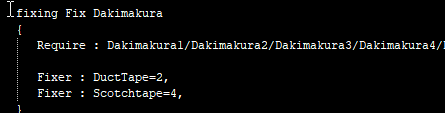
When creating a repair recipe is it possible to do something along these lines but have it actually work or does eacxh one need it's own individual recipe. https://i.imgur.com/xOGdaa5.png
 daring palm
errant meteor
use the stalker exo models, free to use
daring palm
errant meteor
use the stalker exo models, free to use
great idea. I may update it soon
errant meteor
👌
faint jewel
hehehe racing mowers!
 hot patrol
Hank hill would love that
faint jewel
don't read the red one.
 faint jewel
dog dale afternoon.
hot patrol
instant subscribe
faint jewel
that's also the allegro x9j beside it.
 errant meteor
faint jewel
hehehe racing mowers!
errant meteor
faint jewel
hehehe racing mowers!
can it destroy, body pillows?
hot patrol
faint jewel
i could set it to.
Good luck, m8

these bad boys are made of the strongest memory foam
faint jewel
well it WILL detroy a player zombie and EVERYTHING IT IS CARRYING.
 errant meteor
hot patrol
Good luck, m8
errant meteor
hot patrol
Good luck, m8
 hot patrol
Yep..
 hot patrol
When creating a repair recipe is it possible to do something along these lines b...
hot patrol
hot patrol
When creating a repair recipe is it possible to do something along these lines b...
So anybody got any idea on this?
drifting ore
Just discovered wood powered cars, I want it ig now 😆

 chrome egret
That's a fun idea
drifting ore
"The Volvo reaches a maximum speed of 120 kilometres per hour (75 mph) and can maintain a cruising speed of 110 km/h (68 mph). The "fuel tank" can contain 30 kilograms (66 pounds) of wood, good for a range of 100 kilometres (62 miles), comparable to that of an electric car."
not even bad
There is an trailer version too

Is it hard to make a trailer mod ?
drifting ore
mmmmmm, well you may see a mod to transfer your car to a wood powered car pop one day
 pearl prism
Very cool idea, and it matches the apocalypse idea
drifting ore
Yeah I said to myself "what do we have in abundance ig?", answer: wood!
pearl prism
 pearl prism
drifting ore
There is an trailer version too
pearl prism
drifting ore
There is an trailer version too
does the car need the trailer to work?
drifting ore
Yes
weak jay
weak jay
can anyone please tell me why the mod aint showing up in mainmenu - mods?
https:...
can someone help out plesi
pearl prism
Making this communication between trailer and vehicle was something that got me stuck in several mods
drifting ore
Ok so higher swingTime is slower right...?
Or is baseSpeed the only thing that affects attack speed I really don't understand
hot patrol
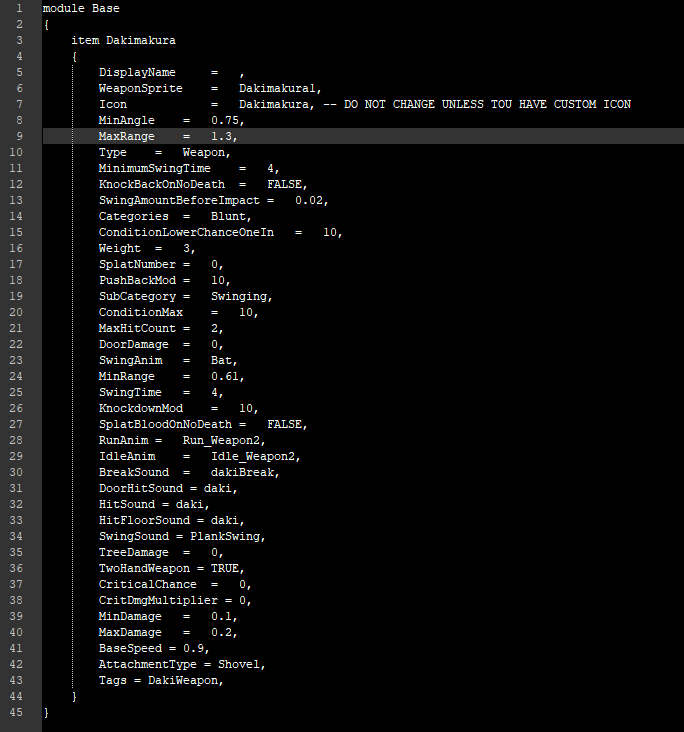
So I am working on making an addon thing for my pillow mod. How do I leave notes on code?
 drifting ore
I don't understand, do you mean code comments? In which case you already have one, it's just any text preceded by -- in Lua
faint jewel
                    if GrassBush:getProperties() and GrassBush:getProperties():Is(IsoFlagType.canBeRemoved) then```
why do these fire (and error) when i hit a fence?That will turn everything after the -- into a comment
hot patrol
drifting ore
I don't understand, do you mean code comments? In which case you already have on...
that isn't lua tho
it's just a .txt for that script
drifting ore
You right
hot patrol
I just want to leave instructions in the code for people to follow
drifting ore
I believe you can use /comment/
Err
/**
Comment
**/
But not 100% sure how it's parsed
Dunno if it works inline
hot patrol
hmm
I will try it. When I am finished would anyone mind looking at it and telling me if you think it is clear enough?
faint jewel
is there a list of zombie:getCurrentState() instances?
 pulsar niche
Would be cool to be able to block specific items being visible in looting menu =3
hot patrol
Anyone want to look this over and tell me if the instructions are clear enough? tbh Idk if It would even work. I kinda used true music as a base.
dusk saddle
Howdy folks, still haven't properly resolved this issue. Trying to get the OnCreate function to give me three different items instead of two, here's the script doo-dad stuffs:
    --Mac and Cheese box
function Recipe.OnCreate.OpenMacCheeseClassic2(items, result, player)
    player:getInventory():AddItems("CheetosPacket", "CheetosCheeseEmpty");
end
 willow estuary
dusk saddle
Howdy folks, still haven't properly resolved this issue. Trying to get the OnCre...
willow estuary
dusk saddle
Howdy folks, still haven't properly resolved this issue. Trying to get the OnCre...
    --Mac and Cheese box
function Recipe.OnCreate.OpenMacCheeseClassic2(items, result, player)
    player:getInventory():AddItem("CheetosPacket")
    player:getInventory():AddItem("CheetosCheeseEmpty")
end
Ah, so you just duplicate the get inventory thing? Gee whiz am I dumb lol
weak jay
does anyone know why the mod aint showing up in mainmenu - mods?
https://github.com/LordBloodfart/PZ-Into-The-Dead-Main-Theme/tree/main/Into The Dead Main Theme
GitHub
Contribute to LordBloodfart/PZ-Into-The-Dead-Main-Theme development by creating an account on GitHub.
 verbal quest
weak jay
does anyone know why the mod aint showing up in mainmenu - mods?
https://github....
verbal quest
weak jay
does anyone know why the mod aint showing up in mainmenu - mods?
https://github....
check the modding guide, mods need proper manifest info as found in the example mod and also if you open up the files for any workshop mod.
weak jay
verbal quest
check the modding guide, mods need proper manifest info as found in the example ...
is that the mod.info?
verbal quest
weak jay
is that the mod.info?
I haven't made any mods directly myself but I would believe so.
Just generally make sure you have all the workshop and game required manifest information
weak jay
where do i find the modding guide?
verbal quest
verbal quest
Also, always make sure to check pins in a modding channel.
They'll likely have the info you're looking for
Well change the info, that's duplicate info they could be conflicting
 rain current
anyone know if it's possible to restart the game server programmatically from within the game?
to achieve downloading mod updates on a schedule
chrome egret
From within the game seems unlikely, unless you can have something monitoring which can take action
But that's an ignorant answer
rain current
it seems like there may be some way to download workshop items from the lua though maybe which would be way cooler to have mods auto download and reload the lua on a schedule
thinking about it more though. the server and client both need to d/l the mod updates i believe so this might be a pipe dream of a task after all
chrome egret
right
the syncing is rough
I think if you had a listener that knew when a command was executed or phrase was said by particular users on the server, you could probably manage automatically shutting it down and running updates
But folks would be kicked, they would have to update their versions and rejoin
rain current
i guess if the server downloaded them though and a restart of it could be forced (with srver message warning in advance of course), then the clients would be forced to download it when they reconnect
chrome egret
yep
 cursive glade
chrome egret
I think if you had a listener that knew when a command was executed or phrase wa...
cursive glade
chrome egret
I think if you had a listener that knew when a command was executed or phrase wa...
My server already auto kicks and updates on its own, any idea how to relay a automatic message to the server letting everyone know restart is happening?
rain current
yeah man
i'm authoring a server messages mod and i am looking to include that as one of them

how does your server handle the auto kicks and updates? is it all outside of the game?
chrome egret
Sounds like you two each have the piece the other needs 😄
rain current
lol
chrome egret
Do you have a github (or other VC) source repo you could link in the workshop page?
Maybe it's me but I find it annoying to have to subscribe to a mod to examine its files
rain current
it is annoying and i will but i just got it all fixed
well working i should say
i wish steam workshop would let github be one of the links to add
chrome egret
Me too
Or allow a direct download of the source files
They're gonna get on your machine either way
rain current
i need to optimize the change for the disconnect message. i replaced the entire file but only added one line. still learning LUA
chrome egret
Have you checked out the relevant sections in the modding guide regarding compatibility? #mod_development message
rain current
i have which is why i know it can be optimized lol
just wasn't sure how to add in to that particular part of logic properly
i'll figure it out
 little vessel
Trying to make ripping clothes require scissors.
ClothingRecipesDefinitions = {};

ClothingRecipesDefinitions["Sheet"] = {materials="Base.RippedSheets:4" }
ClothingRecipesDefinitions["Sheet"].tools = {"Base.Scissors"};

ClothingRecipesDefinitions["FabricType"] = {}
ClothingRecipesDefinitions["FabricType"]["Cotton"] = {};
ClothingRecipesDefinitions["FabricType"]["Cotton"].material = "Base.RippedSheets";
ClothingRecipesDefinitions["FabricType"]["Cotton"].tools = {"Base.Scissors"};
Used the above code for it but no change. What gives?
hearty herald
I can only assume it doesn't overwrite the default one
Do you get 2 different options if you do have scissors?
little vessel
Nope.
The recipe I added is:
recipe Rip Clothing
    {
        [Recipe.GetItemTypes.RipClothing_Cotton],
        keep Scissors/Multitool,

        Result:RippedSheets,
        RemoveResultItem:true,
        Sound:ClothesRipping,
        Time:100.0,
        AnimNode:RipSheets,
        OnCreate:Recipe.OnCreate.RipClothing,
        Override:true
    }
 unique badge
Hey all. I have been poking around for awhile to find a "difficulty" mod. The problem is we got some folks on the sever that get got allot and we are trying to find one that will give everyone some more challenge without steam rolling the newbies. Does anyone have a suggestion?
hearty herald
little vessel
Nope.
The recipe I added is:
```
recipe Rip Clothing
{
[Recipe.Get...
I guess a sanity check would be to see if it appears inside the crafting menu?
 drowsy needle
Can anyone help me figure out what I'm doing wrong with my mod?
I'm trying to make it so that I can get these special scissors to spawn everywhere normal scissors can be found (including in zombies).
But I'm having trouble actually getting them to spawn.

This is the mod in question.
 placid hinge
@willow estuary Thank you so much for the script help. Had finally found a way through it cause of such
Now just left with the fun parts, trying to unbork the textures lol... yay me

 wise remnant
Is there a way to check if you already have a function registered w a specific handler?
So you don’t register more then one
Of the same
wise remnant
Not a bad idea thx 😃
drowsy needle
placid hinge
Plasma weapons?
placid hinge
Yup, the fallout kind
placid hinge
wise remnant
i'm not trying to diss but i find it comical that almost every error message you get revolves around "attempted index of non-table: null"
the erorr messages in the debugging process are always so obtuse

any tips at better debugging environment ?
 gilded hawk
How do clothing work?
Where are defined the values for the clothing protection?
Like I was looking into media\scripts\clothing\clothing_jacket.txt and I see the protection values, but where is defined that this jacket JacketLong_Random can protect the groin?
thin hornet
wise remnant
i'm not trying to diss but i find it comical that almost every error message you...
attempted index of non-table: null tell you alot. All you need is the line where this error happened.
 mossy portal
I have an idea for a mod but I have no idea how to mod
 tight tulip
No better time to learn than now!
wise remnant
@mossy portal whats the idea?
mossy portal
Do you guys know that tv broadcast where it’s like some guy saying the Knox event was caused by prions and shit in the food
And he mentions his book
wise remnant
@thin hornet hahaha it definitely slows down progress with this minimalistic environment
i even went through decompiling the source to give a SLIGHT advantage
thin hornet
wise remnant
<@!853353424040099860> hahaha it definitely slows down progress with this minima...
Not sure what you mean slow down the progress
wise remnant
@thin hornet progress of coding and design
thin hornet
the error tell you something is nil so if you know the line you should easily find the problem
wise remnant
the debug environment in this
thin hornet
i usually keep console.txt open in my notepad++ and just refresh it when i get an error
wise remnant
that'd be neat i was actually thinking of something similar ... taking stories like creepy pastas (with authors permission) and putting individual pages of the story as rare spawns throughout the world
keeping the pages discovered in consecutive order (maybe) so you slowly uncover differen't "survivor stories"
gilded hawk
gilded hawk
How do clothing work?
Where are defined the values for the clothing protection?
@thin hornet do you have any ideas about this?
thin hornet
gilded hawk
<@!853353424040099860> do you have any ideas about this?
probably in C:\Program Files (x86)\Steam\steamapps\common\ProjectZomboid\media\clothing\clothingItems\Jacket_Police.xml
and
C:\Program Files (x86)\Steam\steamapps\common\ProjectZomboid\media\clothing\clothing.xml
I never worked with clothing
gilded hawk
Thank you. but sadly I already looked into those two files 😦
Also is there a way to disable the localization? Like seeing only the raw text likeIGUI_health_Part
thin hornet
gilded hawk
Thank you. but sadly I already looked into those two files 😦
isnt it the scratch defense property for the protection?
 gilded hawk
Yes and no
It's the value of the protection, but not of which protection
Like JacketLong_Random
has
        BiteDefense = 20,
        ScratchDefense = 40,
Which is correct
problem is I don't understand how is set the protection for the individual piece
Like, the Police jacket does not protect the Thighs
But this one does
pain

My assumption is that this stuff is handled inside the JAVA code
like, media\lua\client\ISUI\ISGarmentUI.lua has a self.clothing:getCoveredParts()
But it's not defined anywhere in the lua
thin hornet
mhm
gilded hawk
gilded hawk
like, `media\lua\client\ISUI\ISGarmentUI.lua` has a `self.clothing:getCoveredPar...
    self.parts = {};

    local minX = 1000
    local minY = 1000
    local maxX = -1000
    local maxY = -1000

    for i=0, self.clothing:getCoveredParts():size() - 1 do
        local part = self.clothing:getCoveredParts():get(i);
        local texture = self.textures[part:toString()]
        if texture then
            table.insert(self.parts, part);
            self.listbox:addItem('dummy', part)
            texture = texture.texture
            if texture then
                minX = math.min(minX, texture:getOffsetX())
                minY = math.min(minY, texture:getOffsetY())
                maxX = math.max(maxX, texture:getOffsetX() + texture:getWidth())
                maxY = math.max(maxY, texture:getOffsetY() + texture:getHeight())
            end
        end
    end

    self.texturesY = 30
And the parts table gets populated with what you see here
 thin hornet
check characterTextures\BloodClothingType.java
gilded hawk
In vscode I only see zombie\characterTextures\BloodClothingType.class
tight tulip
You would need to decompile it.
gilded hawk
tight tulip
You would need to decompile it.
Oh, alright
God, this mod will take longer then expected
Well, I guess I will head to sleep and work on it tomorrow, cause it's nealry 2 am and I got work tomorrow
I will post updates here if I figure some shit out
thin hornet
so if you check inside inventory\types\Clothing.java
you have getBiteDefenseFromItem and getScratchDefenseFromItem
gilded hawk
Okay, I will decompile it, and give it look tomorrow 
 chrome egret
@sharp wind what script were you referencing for testing PZ without the dedicated server? Sounds nice not to have to configure all the port stuff required for the dedicated instance.
 sharp wind
chrome egret
<@!222954376677949442> what script were you referencing for testing PZ without t...
sharp wind
chrome egret
<@!222954376677949442> what script were you referencing for testing PZ without t...
search for my post, the links should be there
chrome egret
The link on MrBounty's github appears to 404 now
@drifting ore any chance of bringing that page back?
drifting ore

GitHub
Contribute to MrBounty/PZ-Mod---Doc development by creating an account on GitHub.
chrome egret
danke
 hidden bridge
is it possible to free look in the debug car editor? or am i locked to the orthographic view options?
 chrome egret
drifting ore
https://github.com/MrBounty/PZ-Mod---Doc/blob/main/Test%20MP%20mod.md
chrome egret
drifting ore
https://github.com/MrBounty/PZ-Mod---Doc/blob/main/Test%20MP%20mod.md
Does the .bat being run simply find a json file of the same name?
 drowsy needle
Reposting since I don't think I got a proper response: How do I make sure I did the "Adding an item to the loot tables" thing correctly?
And, uh... now I can't even seem to spawn the item in cheat menu's "Spawn item" menu.
Here's a zip of what I've got so far...
 austere garden
Hello there Chaps, I was wondering where can I go to look into doing retextures for some vehicles and if I can be shown to the right direction
scenic mulch
austere garden
Hello there Chaps, I was wondering where can I go to look into doing retextures ...
Go to common/ProjectZomboid/media/textures/Vehicles/. And you can find the vehicle textures there.
austere garden
And I'm guessing I use some form of photoshop of something of that nature?
 grizzled isle
Anyone familiar with CDDA book reading mod
I tried to apply xp multiplier code but it doesn't work
I copy pasted one section (that gives xp multiplier) from vanila OnReading.lua
 undone crag
gilded hawk
It's the value of the protection, but not of which protection
undone crag
gilded hawk
It's the value of the protection, but not of which protection
BloodLocation
weak jay
does anyone know why the mod aint showing up in mainmenu - mods? Filestructure and mod.info are as shown in the guide. And yes, i used the template
https://github.com/LordBloodfart/PZ-Into-The-Dead-Main-Theme/tree/main/Into The Dead Main Theme
GitHub
Contribute to LordBloodfart/PZ-Into-The-Dead-Main-Theme development by creating an account on GitHub.
drifting ore
chrome egret
Does the .bat being run simply find a json file of the same name?
No idea
hearty herald
weak jay
does anyone know why the mod aint showing up in mainmenu - mods? Filestructure a...
Is it in the steam folder too? I had problems trying to use workshop structure in the local mods place
weak jay
hearty herald
Is it in the steam folder too? I had problems trying to use workshop structure i...
the steam folder?
what steam folder
hearty herald
Thought you were using the workshop template
weak jay
the template in the pz local mods folder
weak jay
hearty herald
Thought you were using the workshop template
where do i find the workshop template?
 inland oyster
i would like to request someone make a sound file for heli event to play "HELICOPTER HELICOPTER"
gilded hawk
undone crag
BloodLocation
Oh wait, so LongJacket is a preset?
oooooooooh that's why sometimes it had multiple BloodLocation
item LongCoat_Bathrobe
    {
        DisplayCategory = Clothing,
        Type = Clothing,
        DisplayName = Bath Robe,
        ClothingItem = LongCoat_Bathrobe,
        BodyLocation = BathRobe,
        BloodLocation = Trousers;Jumper,
        Icon = BathrobeWhite,
        RunSpeedModifier = 0.9,
        ScratchDefense = 10,
        Insulation = 0.5,
        WindResistance = 0.35,
        FabricType = Cotton,
        WorldStaticModel = Bathrobe_Ground,
    }
 gilded hawk
willow estuary
gilded hawk
willow estuary
Can you strap rockets to it?
 odd notch

 pine tree
yeeeeeeeeeea boi, except a lot of clothing mods got wrecked by 41.66
nimble spoke
gilded hawk
I'm trying to edit this
DoParam basically loads an item value, exactly like you would add it to the item's script, like "Icon = Ham"
Some values seem to act weird though
gilded hawk
nimble spoke
DoParam basically loads an item value, exactly like you would add it to the item...
I tried to use it, did not work
I even tried this
                local arrayList = java.util.ArrayList:new()
                arrayList:Add({'LongJacket'})
                item:setBloodClothingType(arrayList)
I get this error
function: MxOverrideAllClothes -- file: TweakAllClothes.lua line # 97

LOG  : General     , 1645800174302> Object tried to call nil in MxOverrideAllClothes
LOG  : General     , 1645800174351> creating new sourcewindow: C:/Users/massi/Zomboid/Workshop/pz-fashionoid/Contents/mods/Fashionoid/media/lua/client/TweakAllClothes.lua
nimble spoke
what is your DoParam code?
gilded hawk
Ops sorry wrong line
item:DoParam("BloodLocation = [LongJacket]");
function MxOverrideAllClothes()
    local allItems = getAllItems();

    -- I'm using the for loop with :size() because getAllItems returns a `userdata` not a `table`
    for i=0,allItems:size()-1 do
        local item = allItems:get(i);
        local type = item:getTypeString()
        local clothingBloodType = tostring(item:getBloodClothingType())
        -- if getBloodClothingType is nil, it means that the item has no armor protection
        if not item:getObsolete() and not item:isHidden() and type == 'Clothing' and item:getBloodClothingType() ~= "nil" then
            local moduleAndName = item:getModuleName()..'.'..item:getName()
            -- print_table(getmetatable(item))
            if string.find(clothingBloodType, 'Jacket') then
                print(tostring(moduleAndName)..': '..tostring(item:getBloodClothingType()))
                -- local arrayList = java.util.ArrayList:new()
                -- arrayList:Add({'LongJacket'})
                -- item:setBloodClothingType(arrayList)
                item:DoParam("BloodLocation = [LongJacket]");
                item:DoParam("bloodClothingType = [LongJacket]");
                item:DoParam("BloodLocation = LongJacket");
                item:DoParam("bloodClothingType = LongJacket");
                -- editableItem:DoParam("DisplayCategory = LMAO");
            end
        end
    end

    print('allItems: '..tostring(allItems))
end
I litterally have no clue why none of this works
I'm just trying to change the BloodLocation of all Jackets to LongJacket
This stuff is litterally eating my brain ngl
Okay, not even DoParam("BiteDefense = 99"); works
Litterally no clue
nimble spoke
Where is it located? client, server, shared?
 nimble spoke
gilded hawk
client
nimble spoke
gilded hawk
client
Ok, in that case it will fail for MP, at least from my tests with Item Tweaker and my own code, being in client is not ideal, you should try shared.
Second, some values don't seem to work in my tests, in those cases overriding the whole item works. I don't know why
gilded hawk
nimble spoke
Second, some values don't seem to work in my tests, in those cases overriding th...
What do you mean? Do you have any example of the override?
nimble spoke
gilded hawk
What do you mean? Do you have any example of the override?
Simply add the item's full script to your mod, with the new blood location and it should work
gilded hawk
nimble spoke
Simply add the item's full script to your mod, with the new blood location and i...
Do you mean the clothing_something.txt?
nimble spoke
Yes, grab a jacket item and make a test
I believe some values don't work because they are loaded into whatever code uses it before the change takes place
gilded hawk
To be honest I don't want to use the the item.txt, because I want to make it dynamic 😐
nimble spoke
There's a good chance you can't make it dynamic
gilded hawk

Okay different question, what if instead of using DoParam I use this?
local arrayList = java.util.ArrayList:new()
                arrayList:Add({'LongJacket'})
                item:setBloodClothingType(arrayList)
I didn't manage to make it work but I know I'm close
I know item:setBloodClothingType exists https://zomboid-javadoc.com/41.65/zombie/inventory/InventoryItem.html#setBloodClothingType(java.util.ArrayList)
Javadoc Project Zomboid Modding API declaration: package: zombie.inventory, class: InventoryItem
But I'm having trouble passing an ArrayList to it >.<
nimble spoke
you don't need doParam for everything. To make it dynamic for example you can use item:setBiteDefense()
item:setScratchDefense()
gilded hawk
function: MxOverrideAllClothes -- file: TweakAllClothes.lua line # 105

LOG  : General     , 1645802446844> Object tried to call nil in MxOverrideAllClothes
Doesent work 😦
gilded hawk
gilded hawk
```
function: MxOverrideAllClothes -- file: TweakAllClothes.lua line # 105
LOG ...
 lusty nebula
The mod on which I'm working until yesterday was working ok. Now 41.66 and it generates 1 error...How the heck can I find what is causing the error? ( Checked the log but it doesn't seem to indicate nothing that could point me in the right direction )
gilded hawk
What the actual fuck setBiteDefense is actually nil
This is the content of getmetatable(someuserdata)
Okay, so if I'm understanding correctly this is a InventoryItem https://zomboid-javadoc.com/41.65/zombie/inventory/InventoryItem.html
Javadoc Project Zomboid Modding API declaration: package: zombie.inventory, class: InventoryItem
Of course it does not have it 
But it makes no sense that in the metatable i don't see setBloodClothingType
gilded hawk
gilded hawk
Okay, so if I'm understanding correctly this is a `InventoryItem` https://zomboi...
Nope, it migh be an even different class
https://zomboid-javadoc.com/41.65/zombie/scripting/objects/Item.html#getBloodClothingType() this one has getBloodClothingType but no setBloodClothingType
Javadoc Project Zomboid Modding API declaration: package: zombie.scripting.objects, class: Item
nimble spoke
setBiteDefense is in Clothing.class not InventoryItem.class many aitem properties are limited to the item type that uses them
gilded hawk
Yeah I realized, so I'm using a different approach to do my overide
gilded hawk
nimble spoke
setBiteDefense is in Clothing.class not InventoryItem.class many aitem propertie...
I was wondering, how can I require the ISInventoryPaneContextMenu
I need to hook to the ISInventoryPaneContextMenu.onWearItems function
I tried require("ISUI/ISInventoryPaneContextMenu")
But notthing happens 😐
faint jewel
IS it possible to make a weapon with a visible projectile? like oh say... a laser blast?
lusty nebula
Just be carefull guys because another thing they changed are the texture packs in 41.66 ( I was going crazy to find what was causing the error in my 41.65 mod I'm building )
If you work with mods that change the clothes or the menus layouts the thing above is better to be kept in mind ( If you don't want to lose half a day,like me, to understand what was changed and provoking issues )
thin hornet
Seems to have a bug with Switching car seat. Cant drive the cars anymore after that
lusty nebula
Yep you have to carefully check all ( Oh God ) there are a lot of unwritten things they changed
If you look at the log most of the most common mods works but they generate a pletora of warning and errors
( The EHE mod in particular )
..another thing I've noted, for i.e, is that in the items scripts they added a string/line too
sample: WorldStaticModel = BalaclavaFace_Ground, ( It wasn't there in certain items before the update to 41.66 )
gilded hawk
I finally did it!
Dynamic change of clothes values
 gilded hawk
Suprise 🌈
lusty nebula
@gilded hawk Damned modders LOOL 😄
gilded hawk
lusty nebula
<@!227427177300230146> Damned modders LOOL 😄
😛
gilded hawk
I was wondering is it possible to override the zomboid java code entirelly? 
 sharp prawn
Hey so we have our foraging zones completely gone on a modded map, we did a clean save and they are back. We have no idea how we deleted them. The foraging zones on vanilla and otheer modded maps is fine, just this one. I can provide save file if needed, but how would we fix it?
faint jewel
can anyone tell me a way to set a zombie to instantly dead AND burnt?
tight tulip
Anyone know the poster size limitations?
gilded hawk
Well, holy shit
I made transmog work

Now the issue is to make this work when you log back in, and I have no clue how to store the data 😐
gilded hawk
gilded hawk
I made transmog work
Now, only have to make all the UI for it, make it adapt to mods, and somehow store which item is transmogged into which one. This will be pain
lusty nebula
@gilded hawk Take a look at this discussion...skip to about the middle of it...maybe something that will point you out in the right direction
https://steamcommunity.com/app/108600/discussions/0/2918850377449993379/

 frank elbow
gilded hawk
I was wondering is it possible to override the zomboid java code entirelly? <:Th...
frank elbow
gilded hawk
I was wondering is it possible to override the zomboid java code entirelly? <:Th...
There are methods to do so but it'd require users of the mod to also patch their game
That is, there's no supported way (as far as I know)
 shell terrace
Whoops. Wrong channel. Sorry!
lusty nebula
sorry I have a mind lapsus....Anyone remembers where the file that controls the perks is located?
remembered...main creation method...
As reference they removed the following traits Hypochondriac and Short Tempered, the Patient and Gift Of The Gab traits are there but hidden, Light/Hardened drinker changed to Light/Heavy drinker ( both hidden )
lusty nebula
...and at least 2 new perks: Guard and Tailoring ( Can't yet find these following old ones, maybe removed?: Melee,Crafting,Passiv,Firearm,Spear,Combat )
sharp prawn
if foraging is broken on a map, would it be fixable with the chunkdata_xx_yy files? 41.65 build
 abstract sleet
anyone knows of a mod that increses shelf storage
lusty nebula
Update on perks ( Tested them all ) In addition to the ones previously reported above other perks working are: Agility, Crafting, Survivalist, Passiv,Firearm,LongBlade,Combat,Melee,Spear. Guard do not provoke issues or errors but is not displayed nor I've noticed any effect on characther skills enabling it.
IMHO guard perk is just a placeholder
sharp wind
gilded hawk
Okay good to know
will that mod be released?
gilded hawk
sharp wind
will that mod be released?
Yes, as soon as I make the UI work
And as soon as I get more coffe
sharp wind
cool, i just wanted to see how you dynamically set the defense value
I guess based on condition of the item
 tranquil reef
TheFunctions.FixCounterValue = function(specificPlayer)
    local counterValue = specificPlayer:getModData()["CounterValue"]

    if (type(counterValue) ~= "number") then
        counterValue = 0.0
    end

    return counterValue
end```I have this function, and I call it in another function with
    local counterValue = TheFunctions.FixCounterValue(specificPlayer) --EXPERIMENTAL

        if(self.didTheThing) then
          counterValue = counterValue - 1
        end
It starts at one in game, when didTheThing happens it does remove 1 from the value which makes it -1, but then if didTheThing happens again it doesn't decrease again
Does anyone know why this would happen?
 edgy ruin
will 41.66 break mods for 41.65?
dusk saddle
I don't think too many will, my mod still seems to be working fine, just about to set up the first public test iteration of it. You should be okay I'd say
wise remnant
lusty nebula
Yep you have to carefully check all ( Oh God ) there are a lot of unwritten thin...
They hired the EHE dev directly to work with them now didn't they"?
 nova skiff
chrome egret
tranquil reef
Does anyone know why this would happen?
nova skiff
chrome egret
tranquil reef
Does anyone know why this would happen?
Do you ensure that you're writing counterValue back to the ModData object? If the context calling FixCounterValue/self.didTheThing runs again before saving, you're essentially seeing a desynchronization of state.
It would "still think" counterValue isn't a number, reassigns the 0.0 value result, and then gets decremented to -1.0 again.
tranquil reef
I don't have the files open right now but those were the only two methods that mention it, so I guess not lol
chrome egret
That certainly could cause the issue. Hope that helps you root it out.
tranquil reef
Okay, thank you
chrome egret
Is 41.66 still available? I don't seem to be seeing the unstable version listed under Betas in Steam anymore.
tranquil reef
chrome egret
Is 41.66 still available? I don't seem to be seeing the unstable version listed ...
It already released, they probably just removed the unstable version since it's now built-in lol
Released about 6 AM EST today
wise remnant
anyone know if there's an event that fires on sandbox setting updates?
ive been scanning w/ the Every10minute one
but
in cases where player sets the daily time higher then default, that may fire alot slower
or less frequently i should say
hidden compass
Please let me cry, the mod I published died in a few days.😥
https://steamcommunity.com/sharedfiles/filedetails/?id=2762398967


 round kiln
is there some sort of list somewhere that tells us all of the names of the tiles?
more specifically stuff like floor tiles, wall tiles, etc
round kiln
hidden compass
Please let me cry, the mod I published died in a few days.😥
https://steamcommu...
prayers in the chat
round kiln
so uh, how do i test the code without uploading it into the workshop?
or something like that?
verbal quest
Hey modders, I haven't been able to test this very much but if you can test this to make sure you're Mod ID's are accurately being captured I would greatly appreciate it. https://github.com/TrainDoctor/PZModScraper
GitHub
Script to pull Workshop IDs and Mod IDs for Steam Workshop collections. - GitHub - TrainDoctor/PZModScraper: Script to pull Workshop IDs and Mod IDs for Steam Workshop collections.
This is a python script designed to pull all workshop IDs and Mod IDs from mods in a workshop collection.
 stone owl
Hey wanna ask. When adding a custom spawn point does the map folder need to be changed? Like with this mod https://steamcommunity.com/sharedfiles/filedetails/?id=2678653895&searchtext=louisville
 round kiln
so uh, how do i test the code without uploading it into the workshop?
round kiln
round kiln
so uh, how do i test the code without uploading it into the workshop?
figured it out
 stone rock
As of build 41.66, the location of the minimap has moved up slightly. Is there a way to roll back the location again like in build 41.65? The 41.65 version of the minimap lua file was overwritten with the 41.66 version, but the location does not change. Does anyone know how to move the damn minimap location?

 little knot
 faint jewel
oh snap i need to do that golf cart that was posted.
little knot
faint jewel
oh snap i need to do that golf cart that was posted.
Yes, sir!
We making the golfing mod real xD
 little knot
Oh hell yeah
 vivid flare
ok, then i dont have to do it anymore :>
there is lots of issues that still need fixing
and it needs new texture for blood and damage, etc
i asked about it when it was first posted, but got no reply
wanted to also animate it as much as possible, but it'll require uv map changes
little knot

faint jewel
quickie unwrapped again?
 lone spade
I was wondering - is it somehow possible to modify zombie attacks to only inflict bites? I've been wanting some true Resident Evil/The Walking Dead where zombies could only bite
Only workaround I've been able to come up was create invisible "anti-scratch" uniform to prevent zombies from scratching/lacerating, but it still makes me not take any injuries when scratch is blocked
faint jewel
okay nvm. you get me a better uvwmap... and i'll skin and set this up ALL DAY.
but i cannot uvw efficiently in blender.
 clear geode
No way to fix it??

 vivid flare
is the item in the Base. module or did you add a custom one
stone rock
It was of great help. Also, thanks for the in game minimap you made.😁
vivid flare
faint jewel
the cooler?
open/close and remove the box, yes
also removing the roof, being able to open the hood, stuff like that
clear geode
vivid flare
is the item in the Base. module or did you add a custom one
Hello! here is my script txt file
drifting ore
The Indie Stone Forums
RoboMat's Modding Tutorials - An introduction to modding for Project Zomboid - I - Introduction I1 - Where to start I2 - What is neededI3 - Lua TutorialsI4 - Other Resources II - The first steps II1 - Getting the connectionII2 - The entry point: Events III - The first mod III1 - Preparations III1...
Is this guide still a must read? Because some links / pics are not available anymore
And I'd like to start modding on pz
drifting ore
Made a guide to explain how I manage data transfert in multiplayer for my mod:
https://github.com/MrBounty/PZ-Mod---Doc/blob/main/Use commands.md
GitHub
Contribute to MrBounty/PZ-Mod---Doc development by creating an account on GitHub.
 dull orchid
Hey where can I make mods? I have inreal engine 4?
I have unity where can I make mods for the game
chrome egret
Neither of those engines are required for modding Project Zomboid
Start here: https://pzwiki.net/wiki/Modding
 pearl fable
 gilded hawk
hidden compass
Please let me cry, the mod I published died in a few days.😥
https://steamcommu...
gilded hawk
hidden compass
Please let me cry, the mod I published died in a few days.😥
https://steamcommu...
I'm confused what happened?
 autumn stump
Hey everyone 🙂 I am working on my first mod and I have just finished an outfit and just need to do something to distribute it or add it to spawn on the world. My idea was to either make it spawn on random zombies, on random military containers, or spawn it at a very specific location using coordinates. How could I do either of this? Thank you ^^
drifting ore
autumn stump
Hey everyone 🙂 I am working on my first mod and I have just finished an outfit ...
hey
Official Dislaik's Documentations
i am reading the wiki and i have found this for u
hopefully it gonna help u
hidden compass
gilded hawk
I'm confused what happened?
To achieve stealth, I used the vanilla ghost mode.
However, since stealth camouflage only makes disappear, I wanted to keep the footsteps, attack swings, and gunfire sounds, etc.
"Debug.PlaySoundWhenInvisible" in the debug options was default true in 41.65, so the sound was still played even when ghost mode was turned on.
However, in 41.66, the default is now false (dev said it's bug fix), so the sound no longer plays when ghost mode is turned on.
The value of the debug option can be changed from the mod, but since this option has a "debug only" attribute, changing the value to True does not effective.
I'm sure there are other requests like mine, "I have ghost mode on, but I want the sound to play".
So I've requested the developer to change it (default false is fine, but I'd like to at least be able to change the value from the mod).
gilded hawk
hidden compass
To achieve stealth, I used the vanilla ghost mode.
However, since stealth camouf...
Okay thank you for the explanation
hot patrol
Added addon support to my Dakimakura mod. Hopefully I did it right and made the instructions clear enough. I hope to see the workshop spammed with as many waifu mods as there are true music addons. 
autumn stump
I have found some info on how to spawn things and distribute them, I got a simple question though. Sorry if it is dumb, I am an artist and not a coder, so this is a bit of a bumpy road for me hahah. This is my code:
`require "Items/ProceduralDistributions"
table.insert(ProceduralDistributions.list["GunStoreDisplayCase"].items, "NewVest");
table.insert(ProceduralDistributions.list["GunStoreDisplayCase"].items, 50);`
My question is... Where I put "NewVest", what is this exactly? Is this the .xml in clothingItems folder that is named NewVest.xml? Or do I have to define what it is somewhere else? Thanks ^^
 real cape
anyone bored and interested in a fairly in depth mod idea? I'm not a modder but i can be a muse lol
 real cape
Ok so I hate the fact you have to canibalize good vehicle engines to get the spare parts to keep the few vehicles you like running fine. I know there are options out there for "crafting" your own parts from scrap and such but it just feels so bland and immersion breaking. My suggestion is to incorporate a few machines like metal lathes, mills, and drill presses, so you can really craft new parts. I think by including blueprints that needed to be found you could create another level of immersion and goal to the game. As of right now you have to wait to find the Laines manuals before you can tear apart brakes or suspension, mufflers ect. It would be cool if you had to find blueprints for say pistons, rings, headgaskets, timing chains. You could use the machines to craft the items and make "spare parts" recipes or hell maybe even "rebuild kits" as like a tiered system, have more items to create larger kits to repair higher percentages. Along with that could be made blueprints for the machines themselves that would teach someone how to "disassemble" the machines to take them places and possibly to build parts for the machines to keep them working as well. You could also incorporate tools that need to be changed out on the machines occasionally such as endmills, drill bits, and turning tools for the lathe. Honestly the sky is the limit for how in depth you would want to go but the idea is there. Just the fact of taking some scrap metal and "crafting" parts out of it is so unrealistic and game breaking but also trying to track down vehicles and only getting parts from them one time, is also unsustainable.
Planetalgol already has a mod that incorporates machine tools to build high end doors and windows. This is where I really got the idea from. Snake's modpack also incorporates a bunch of mechanics equipment to do things like change tires and such. Trust me if I knew how to script I would already be working on it.
frank elbow
You weren't kidding when you said in-depth, golly
Sounds neat, I hope someone takes you up on it & makes it
real cape
frank elbow
You weren't kidding when you said in-depth, golly
lol well I use Brita's weapons pack so I've been alive for almost 3 months. I have been doing a lot of base building and such but I really need more to make me want to go searching for things you know? If I had to go out looking for the machines and the blueprints that would add a huge amount of necessity to do such a thing. Not to mention imagine finding the machines, but not the blueprints for them, somewhere in a town. You could decide to run the noise risk in town to make the parts there until you can take them to your safehouse. you could literally weigh the option of ringing the dinner bell on yourself to be able to save that favorite truck of yours lol
 rustic oar
I suggest a mod who stop grass and tree to grow when u place a floor (wood / concrete / gravel / sand / every fuking flor you made thats not grass should stop them to grow plzzzz) we have a big city base with like 10 bulding several road and parking we cant spend all out time to take it off when normaly its not suppose to grow normaly in real life
 stiff furnace
Hey all, could I ask a quick question about recipes? I think I am making a simple mistake but I'm not exactly sure.
Before 41.66, I thought that I could make a recipe with flexible ingredients by doing this
recipe Sell Gold (2 for 200 points)
{
    Necklace_Gold/Necklace_GoldRuby/NecklaceLong_Gold/NoseRing_Gold/NoseStud_Gold/Earring_LoopLrg_Gold/Earring_LoopMed_Gold/Earring_LoopSmall_Gold_Both/Earring_LoopSmall_Gold_Top/Earring_Stud_Gold/Ring_Right_MiddleFinger_Gold/Ring_Left_MiddleFinger_Gold/Ring_Right_RingFinger_Gold/Ring_Left_RingFinger_Gold/WristWatch_Right_ClassicGold/WristWatch_Left_ClassicGold/Bracelet_BangleRightGold/Bracelet_BangleLeftGold/Bracelet_ChainRightGold/Bracelet_ChainLeftGold/BellyButton_DangleGold/BellyButton_RingGold/BellyButton_StudGold,
    Necklace_Gold/Necklace_GoldRuby/NecklaceLong_Gold/NoseRing_Gold/NoseStud_Gold/Earring_LoopLrg_Gold/Earring_LoopMed_Gold/Earring_LoopSmall_Gold_Both/Earring_LoopSmall_Gold_Top/Earring_Stud_Gold/Ring_Right_MiddleFinger_Gold/Ring_Left_MiddleFinger_Gold/Ring_Right_RingFinger_Gold/Ring_Left_RingFinger_Gold/WristWatch_Right_ClassicGold/WristWatch_Left_ClassicGold/Bracelet_BangleRightGold/Bracelet_BangleLeftGold/Bracelet_ChainRightGold/Bracelet_ChainLeftGold/BellyButton_DangleGold/BellyButton_RingGold/BellyButton_StudGold,

    Result:JenCard200,
    Time:1.0,
    Category:TraderJen,
}
I thought that would make it so a player would just need 2 of those items and the recipe would work - however, if the player just has even one of those items the recipe shows up like it works but then "crafting" the recipe gives the player nothing but an error. If the player actually has 2 of the items, the recipe works as intended...why is it showing that it works with only one item?
 keen beacon
Hello, i was thinking of asking you guys here since you probably have more in-depth knowledge about this. (And the mod-support channel is kind of... Yeah, you know) and it DOES have to do with mod creation rather than the "reinstall your mods" solutions offered in the mod support channel.
I was wondering if anyone has a theory on what could be causing a Linux specific error such as this:
https://steamcommunity.com/workshop/filedetails/discussion/2623855083/3191367619812438008/
Is there any difference between coding mods when it comes to windows and Linux? Isnt it the same for both OS? Are there some additional stuff that needs to be set for mods to work on Linux?
I mean there has to be at least one of you working on a Linux OS who might know something.
Is it a mod problem or a PZ problem? I'm just wondering who i should bother about this. The devs or the creator of the mod (ive already done the last thing i mentioned, so I'm basically just trying to help out any way i can)
 lusty nebula
Hey guys I have a question...When you spawn ( New game ) you chose which clothes to wear. Any idea where the file/s that controls it are located?
For example, even if you don't select it, by default the game adds to your character a belt. Where is located the file who control this?
 lavish sequoia
Are there any mods or tools exclusively meant for pruning map chunks, so fresh chunks can be generated?
lusty nebula
..and question number 2 how do you open a CLASS file?
lavish sequoia
Class files are compiled java files which you can somtimes unzip, and will find source code in them. But they're not generally editable files in the way a txt, .java, .png etc file might be.
The unzip part I may be confusing with jar files, but try with 7zip it will either tell you you can or cannot.
You can also find decompilation tools online but sooomething tells me you may be breaking EULA by doing that.
lusty nebula
Thanks mate I was exactly looking at JD right now 😉
lavish sequoia
glhf sometimes it wont do you much good because it referenced other binaries that you don't have access to
lusty nebula
I'm just searching where the file that auto-adds that damned belt is located LOOL
I've already removed it via script but I was curious if there was a way to directly edit the relevant file
 boreal egret
So I am a bit confused trying to reverse engineer this problem. I've seen several mods, typically less well-maintained ones, have issues taking items from a container such as your backpack, floor, containers in proximity, etc. Is there a specific method that changed here that I am not seeing? Are the context menus perhaps setup wrong?
lusty nebula
Reading your message I'm confused too mate 😄
( I can't understand what you mean, sorry )
boreal egret
Basically some mods whether it's for a normal context menu, building, or crafting will ONLY look for valid items in your main inventory, not any backpacks or anything you may be wearing.
And I am trying to figure out what is wrong there.
lusty nebula
So basically what you are trying to achieve? What you want to happen in detail?
Via script you can grab any item/clothes you want as far as I know...
boreal egret
Current behavior: The context menu won't recognize a valid item is in the players' backpack, but will recognize it if it's in their main inventory.
Desired behavior: The context menu searches for and recognizes items in all valid containers within proximity of the player.
IE: If you need three metal bars and a gas can, but the gas can is in your pack, it wouldn't consider it a valid option until you moved it to your main inventory. I want it to search bags as well.
lusty nebula
Ah ok...that is depending on the item of interest settings ( that you can vary at your will ).
I make an example: look at the behaviour of the lighter. You put it in your backpack ( with also the cigarettes ) then when you select " smoke " the lighter is " auto-brought " to the main inventory
IIRC to obtain what I guess you want, you'll have to play with items scripts and lua files
IIRC around in the workshop there is a mod that auto-drops the unnecessary ( or the ones redundant ) items in the backpack/equipped. By looking at the mod scripts/code you should get some hints to point you in the right direction I guess
boreal egret
Yeah just been searching about to try and find an apt example. 😛
lusty nebula
Other items that have a similar behaviour are the bandages and the rags
Another mod you can look at to take ispiration is the GEAR one ( The one dedicated to items attachable to backpacks in particular )
Same for clips and magazines, bullets, etc
boreal egret
I know More Builds recently had an update for this, but I'm not seeing anything relevant unfortunately.
 crimson spindle
Is it possible to find out if a player has already learned a recipe for a lua script?
pseudo code:
if player has not learned recipe and randNum < 5 then
  Give Special Item
else
  give generic Item
endif```local propaneTanks = getSpecificPlayer(player):getInventory():getItemsFromType("PropaneTank");
This is the one that's not pulling from backpacks and other containers as I would like.
  local type = split(material, '\\.')[2]
  local invItemCount = 0
  local groundItem = ISBuildMenu.materialOnGround
  if amount > 0 then
    invItemCount = inv:getItemCountFromTypeRecurse(material)```
This is from More Builds after they fixed it not pulling from backpacks.I am wondering if getItemsFromType is the problem.
I've not seen that actually used before tbh
But this concerns interacting with a world object so who knows. I'm just some goof that reverse engineers.
lusty nebula
@crimson spindle Sample:
{
  Base.BookCarpentry1,
  /*NeedToBeLearn:true,*/
  Result:Base.BookCarpentry2,
  Time:600.0,
  SkillRequired:FastLearner=4,
}```i have that part but this code is not part of a recipe
basically i want the recipe to be hidden until you discover something else and meet the minimum skill requirements
crimson spindle
no worries lol
boreal egret
Damn wish I was home so I could pull it up and test some changes. Oh well. Was just hoping it was something simple like outdated terminology because this mod is a bit old. 😅
lusty nebula
There's nothing simple if you start modding that's why we should get the masochist badge by default LOOL 😄
boreal egret
Just trying to fix up some old ones.
crimson spindle
this is the full code path of what im trying to do if it helps:
{
    Category:Health,
    keep HTFAC.HTFACMicroscope,
    HTFAC.HTFACTestTubeBlood=5,
    SheetPaper2,
    keep Pen/BluePen/RedPen/Pencil,

    NeedToBeLearn:true,
    CanBeDoneFromFloor:true,
    SkillRequired:Doctor=1,
    Time:250.0,

    Result:HTFAC.HTFACReportMicroscopic,
    OnCreate:HTFACAnalysisMicroscopic,
    RemoveResultItem:true,
}```

```function HTFACAnalysisMicroscopic(items, result, player)
    player:getInventory():AddItem("HTFAC.HTFACReportMicroscopic");
    HTFACBreakthroughChance(player);
    HTFACReduceDurability(items, player);
    HTFACAddXP(player, 5);
end```
This is the section I need help with:
```function HTFACBreakthroughChance(player)
    local breakthrough = ZombRand(0,100);
    local playerFirstAidSkill = player:getPerkLevel(Perks.Doctor);
    if breakthrough <= 0 * playerFirstAidSkill then
        if PlayerHasNotLearned recipe = true then -- <<  Need help with this section
            player:getInventory():AddItem("HTFAC.HTFACReportBreakthroughSpecial");
            HTFACAddXP(player, 50);
        else
            player:getInventory():AddItem("HTFAC.HTFACReportBreakthrough");
            HTFACAddXP(player, 50);
        end
    end
end```Yeah I am VERY certain getItemsFromType is the problem here.
FuelAPI doesn't use similar language at all.
nimble spoke
stiff furnace
Before 41.66, **I thought** that I could make a recipe with flexible ingredients...
Because a check is done for the first item row, it returns true, then another check is done for the second row and it also returns true, when the recipe needs to find and remove the second item, it can't as it was removed as the first item
stiff furnace
nimble spoke
Because a check is done for the first item row, it returns true, then another ch...
Gotcha. Thank you for your time and response. I figured it out lol - I just removed all the text and did a " = 10" at the end
 hexed sierra
can somebody tell me what mod cor955 uses that displays a health bar above the zombies?
https://www.youtube.com/watch?v=QmoMAIPI1uM

We're coming out swinging into elden ring, so let's rock
https://streamlabs.com/cor955/tip
If you prefer to not bother with streamlabs, you can use these links to support. Either way you just being here is awesome.
Paypal:
https://paypal.me/cor955?country.x=US&locale.x=en_US
Patreon:
https://www.patreon.com/cor955
Join the flock d...
hearty herald
There is a function for evaluating items recursively in an inventory which can return valid items
shovels = inventory:getAllEvalRecurse(
  function(item, player)
    return item:getType():contains("Shovel")
  end,
  ArrayList.new()
);
Try looking at inventory:getAllEvalRecurse
boreal egret
hearty herald
Try looking at inventory:getAllEvalRecurse
I'll try that when I get home. Thanks.
round kiln
is there some sort of modding documentation about the item spawning that you can see on counters and tables?
chrome egret
@boreal egret MrBounty explained some of this to me a while back #mod_development message
crimson spindle
crimson spindle
Is it possible to find out if a player has already learned a recipe for a lua sc...
Anyone know if this is possible for lua
hearty herald
I'm pretty certain it is possible, but I don't have a handle on things like that
crimson spindle
where do you even go to find all the different commands you can use with objects like player?
like i know you can do Player:getInventory()
where do you find that stuff out
hearty herald
the player class has a method called "getKnownRecipes"
crimson spindle
how did you find that?
 crimson spindle
thanks! im guessing the array all the known recipes so i just need to loop through it?
hearty herald
I think java list might have .Contains("thingToCheckFor")
crimson spindle
so like this?
if player:getKnownRecipes().Contains("Discover Weak Serum Formula") then hasNotLearnedWeak = false;
hearty herald
according to java8 https://docs.oracle.com/javase/8/docs/api/java/util/ArrayList.html

Yeah, but contains is probably lowercase... and maybe it needs to be :contains in lua?
crimson spindle
i know youre right
hearty herald
It's worth trying atleast.
crimson spindle
so the getknownrecipes works but contains isnt working
probably dont have the syntax right... i tried
player:getKnownRecipes():contains("recipe");
player:getKnownRecipes().Contains("recipe");
player:getKnownRecipes():Contains("recipe");
none worked so far
chrome egret
It would be your second example

GitHub
Guide to modding various aspects of Project Zomboid - Zomboid-Modding-Guide/README.md at master · FWolfe/Zomboid-Modding-Guide

 flint beacon
does anyone know where the file for all of the AnimNodes?
 slim swift
Hey guys.
I wanted to reach out and share a personal project I have been working on it's not really a mod but a server utility.
I am making a server watchdog tool that will notifies on discord if the server is reachable, a player join/leaves, and most importantly, in my opinion, it also notifies when a mod updates!
I couldn't find any other tools I liked that really did this so I thought I would make my own.
This is still a work in progress but I wanted to see if there was any interest in something like this. Or if there is something else out there like this that I'm not aware of.

 crimson spindle
@chrome egret thank you that was extremely helpful
 viral compass
slim swift
Hey guys.
I wanted to reach out and share a personal project I have been working...
viral compass
slim swift
Hey guys.
I wanted to reach out and share a personal project I have been working...
Looks dope
stiff furnace
Ah, nvm, gonna delete this. Did a weird issue 😦
drifting ore
slim swift
Hey guys.
I wanted to reach out and share a personal project I have been working...
I would honestly call it something like "ZomBot" or something so people know its PZ related
not everyone is gonna see "spiffo-bot" and understand yk?
slim swift
drifting ore
not everyone is gonna see "spiffo-bot" and understand yk?
Makes sense. Spiffo-bot is just what I called my webhook bot for my server. That would be configurable. This tool may also end up working for more than just zomboid.
 wanton cosmos
is ItemZed updated?
faint jewel
little knot
We making the golfing mod real xD
this has been my whole damn day AND night. Had to redo the uvw and than texture it.

 torn flame
Is it just me or most mods broke? Like True Music / True Actions, about 70% of mods I installed from workshop didn't load yesterday and I thought load order or conflicts were the problem, but today some of them have mark "MP <= 41.65"
pearl prism
These antihack systems have immense potential to give us mods a headache, i would like the devs to release more mod focused updates, how many percent of players use mods?
torn flame
Yeah, most of these that broke depend on it
torn flame
Mod Api should take priority over NPCs obviously
 soft eagle
hexed sierra
can somebody tell me what mod cor955 uses that displays a health bar above the z...
soft eagle
hexed sierra
can somebody tell me what mod cor955 uses that displays a health bar above the z...
i think its called combat text
sharp wind
Any idea why or how to get rid of error of these kinds?
ERROR: General , 1645972277794> 546,246,823> RecipeManager.LoadedAfterLua> no such function LuaCreate = "blahblah" in recipe "blahblahblahblahblahblah"
any, but mostly coming from Arsenal-26
I think they have to do with oncreate function call being in the wrong folder
they should be in server and not client
or that, shared
as when I put mine in server, I do not see such errors
should be okay in server since only when you load in then you can craft
you can not craft if you are not there?
drifting ore
good luck, Tsars server is patreon exclusive and he and co delete any questions about fixing the mod
hearty herald
crimson spindle
probably dont have the syntax right... i tried
```player:getKnownRecipes().cont...
:contains(text) should exist, are you getting an error or just never getting a true? If you never get true, maybe the string you are comparing to is wrong. You could try printing it all out and going through it... but might be painful 😂
gilded hawk
If I do
    local playerdata = player:getModData();
    playerdata.bipolarEnduranceTicks = 10;
Will bipolarEnduranceTicks be saved in the savegame file?
crimson spindle
hearty herald
:contains(text) should exist, are you getting an error or just never getting a t...
I figured it out. It was a syntax error with my one line if statement.
if player:getKnownRecipes():contains("recipe") then DOTHIS

Instead of this (LUA syntax):
if player:getKnownRecipes():contains("recipe") then DOTHIS end```ah, that'll getcha
Yo @drifting ore I'm finally getting around to trying some toy code based on your UI example, but I get a failure right away when trying to open my new window (based on custom key input):
LOG  : General     , 1645987978319> We executin' key handling yo
LOG  : General     , 1645987978321> It's the custom key dawg
LOG  : General     , 1645987978321> We openin' the UI my dude
LOG  : General     , 1645987978323> -----------------------------------------
STACK TRACE
-----------------------------------------
function: initialise -- file: ISUIElement.lua line # 13
function: initialise -- file: ISPanel.lua line # 12
function: initialise -- file: ItemSearchPanel.lua line # 11
function: onCustomUIKeyPressed -- file: ItemSearchPanel.lua line # 95

ERROR: General     , 1645987978324> ExceptionLogger.logException> Exception thrown java.lang.RuntimeException: attempted index of non-table at KahluaUtil.fail line:82.
ERROR: General     , 1645987978325> DebugLogStream.printException> Stack trace:
java.lang.RuntimeException: attempted index of non-table
Lines 94 and 95 of ItemSearchPanel:
local panel = ItemSearchPanel:new();
panel.initialise();
lines 10-13 of ItemSearchPanel:
function ItemSearchPanel:initialise()
    ISPanel.initialise(self);
    self:create();
end
ItemSearchPanel:new() in case it's relevant:
function ItemSearchPanel:new()
    local o = {};
    local x = getMouseX() + 10;
    local y = getMouseY() + 10;

    o = ISPanel:new(x, y, 100, 200);
    setmetatable(o, self);
    self.__index = self;

    o.backgroundColor = { r = 0, g = 0, b = 0, a = 1 };
    o.borderColor = { r = 0.4, g = 0.4, b = 0.4, a = 1 };
    o.buttonBorderColor = { r = 0.7, g = 0.7, b = 0.7, a = 0.5 };
    o.variableColor = { r = 0.9, g = 0.55, b = 0.1, a = 1 };
    o.zOffsetSmallFont = 25;
    o.moveWithMouse = false;

    return o;
end
I think it's the last update that do that. I need to check
drifting ore
chrome egret
Yo <@456226577798135808> I'm finally getting around to trying some toy code base...
But can you send me your code ?
chrome egret
drifting ore
But can you send me your code ?

GitHub
Contribute to TheCrimsonKing92/pz-item-searcher development by creating an account on GitHub.
drifting ore
O you use my UI exemple, not my UI lebrary mb
chrome egret
yeah
drifting ore
But otherwise it's juste panel:init
Not panel.int
panel.int(panel) == panel:init()
chrome egret
Sorry, I don't follow. I'm not calling panel.int(panel)
oh
use colon invocation, not dot
little knot
faint jewel
this has been my whole damn day AND night. Had to redo the uvw and than texture ...
That's looking amazing
sharp wind
that's most of hte auto mods
gilded hawk
Is there a boolean or function that tells me if the game is in debug mode?
frank elbow
gilded hawk
Is there a boolean or function that tells me if the game is in debug mode?
Core has getDebug which returns a boolean (presumably the value of the bDebug field)
Can be accessed via the global getCore
hexed sierra
soft eagle
i think its called combat text
thank you
thin hornet
there is also getDebugEnabled() which is a simple global function
 wet coral
where are downloaded mods stored?
trying to get into modding this game and I feel like the best way is to rummage through other people's stuff
thin hornet
wet coral
where are downloaded mods stored?
C:\Program Files (x86)\Steam\steamapps\workshop\content\108600
wet coral
ty
wet coral
ok I have searched the ins and outs of both those files and the files that the game tells you it puts the mods in
only folder I've found is one named 241100
faint jewel
 clear geode
faint jewel
https://steamcommunity.com/sharedfiles/filedetails/?id=2768119296
clear geode
faint jewel
https://steamcommunity.com/sharedfiles/filedetails/?id=2768119296
Hitting that 40 - 50 mph while the whole town chases ya 😆
faint jewel
and it's STUPID loud too... so you can pull them without hitting the horn that was installed for some reason XD
clear geode
This will be good for some runs out of town. Would it be possible to have modifications in the future? like some spiked plows on the front madmax style? haha
clear geode
I was thinking about adding some skeletal framework to it for an apocalpyse variant haha
 faint jewel
THAT is a dune buggy. not a go kart lol.
 round zenith
are there any guides for adding a page to the sandbox option page?
wise remnant
gilded hawk
If I do
```
local playerdata = player:getModData();
playerdata.bipolarEn...
i believe moddata doesn't last server reload
@round zenith i've never found any. I can help you
clear geode
Yeah ik, just didint know how to word the framework properly so i had to get the closest image i could xD
round zenith
@wise remnant have you done one in the past, I need something to reference as I have done the following and its putting Sandbox_ before everything
option ScrapCount
{
type = integer, min = 0, max = 999, default = 0,
page = CurrencyVariety, translation = Scrap Required to Make Bar,
}
File is a txt named sandbox-options
wise remnant
Yeah i was able to get it to work w/ my mod
round zenith
can you link your mod so I can review your files?
 fiery pecan
so uhhh. I noticed all this NPC talk.... I have a question regarding mod functions... Basically: I've finally figured out how to replace zombie outfits in my mod by XY coords, right? Will there be functions for NPCs too?
faint jewel
anyone good with the code that i can bug for a bit?
gilded hawk
frank elbow
Can be accessed via the global `getCore`
Thansk man
gilded hawk
Is it possible to make "invisible" clothing?
I need to add an hat to the game that has bite and scratch protection, but does not appear equipped. Because a friend of mine does not like wearing helmets to have head protection
 shut valley
gilded hawk
Is it possible to make "invisible" clothing?
I need to add an hat to the game t...
shut valley
gilded hawk
Is it possible to make "invisible" clothing?
I need to add an hat to the game t...
can't see why not. if you make a blank model and only export the bones, the game should just load the "model" and nothing will change. if that don't work you can go for the regular procedure for moddding clothes but just make a small triangle and hide it inside the player's head.
gilded hawk
shut valley
can't see why not. if you make a blank model and only export the bones, the game...
That's interesting, does the game have blank models?
Like, in Payday 2 I used the dummy unit when I wanted to use an empty 3d item
shut valley
gilded hawk
<:Thinkedit:585553743945400330> That's interesting, does the game have blank mod...
don't think so. but if you just export a blank fbx model using the pz armature. i don't think the game will care it would just load "nothing"
gilded hawk
Okay thanks, I will give it a try, but I don't have any 3d model software at hand for now
 winter bolt
gilded hawk
Okay thanks, I will give it a try, but I don't have any 3d model software at han...
winter bolt
gilded hawk
Okay thanks, I will give it a try, but I don't have any 3d model software at han...
just leave the model line blank on the clothing script lol
gilded hawk
winter bolt
just leave the model line blank on the clothing script lol
😮
I though the game would crash if I do
winter bolt
i dont think it causes any issues
 inland crater
So do you guys set your dev environment up inside your workshop directory? I guess in VS Code that's the best way to get access to libraries next to a multi-root directory
gilded hawk
inland crater
So do you guys set your dev environment up inside your workshop directory? I gue...
I'm using vscode with this setup
Workspace with the Worshop folder, the downloaded workshop folder, and the zomboid root folder
 inland crater
gilded hawk
I'm using vscode with this setup
Workspace with the Worshop folder, the download...
inland crater
gilded hawk
I'm using vscode with this setup
Workspace with the Worshop folder, the download...
That clears things up, I'm on linux and we have another Zomboid folder in our home directory, and then one in a hidden directory with all the /media/ files and lua libs in it but both have a workshop dir. I guess I'll work out of the hidden one then
appreciate it
gilded hawk
If you find a better way to setup vscode share it here, cause I'm fairly sure the setup can be improved, especially since I'm not using a folder with the decopiled class files
inland crater
I think in this case it would make more sense?
gilded hawk
Well if I could be bothered to decopile fully zomboid, I would work with
- Workshop
- Downloaded Workshop
- Zomboid
- Decompiled zomboid
inland crater
I think its strange I'm working out of my workshop folder but it is what it is. My idea was to add my mod to the /mod/ folder and add the java/zombies foldier as a folder making it a multi-root project*
seems convulted next to just adding the whole project as the root dir
gilded hawk
stone rock
@jagged fulcrum Hi, sorry for the sudden tagging. I saw the vanilla minimap you were making and wanted to make a full map of the Korean server I'm using, so I talked to you. I followed the article you posted on Discord in the past, but I had trouble making the minimap, so can you please explain in detail how to make the minimap? Of course, if you have free time.
- I requested a Korean sema map in steam mode, thank you for making it.^^
gilded hawk
I don't have much else to say tbh, cause i need to go back to work
But good luck with your setup @inland crater
inland crater
gilded hawk
But good luck with your setup <@!801315215429992461>
oh you helped I appreciate it
I was talking about my setup being shitty compared to yours
stone rock
If making maps is your own software, it would be very difficult for me to make them. I don't have that software. haha..
This is the entire world map used in our server, and there is a mini map you made (West Point Expansion, sema, etc.) and a map called landsole that we made is included. I'm trying to make that photo into a vanilla mini-map style .png file, but I thought it would be too many to ask of you, so I tried to make it myself.

yeah, right.
That's good news. If you're okay with it, may I ask for more in the Steam mod comments? Whenever I ask to add a map, I feel sorry for asking for fear that you will get tired. kk..
faint jewel
stone rock
This is the entire world map used in our server, and there is a mini map you mad...
what is the pink one under louisville
nvm drag strip survives.
stone rock
@faint jewel The pink area is Valley Station. + I don't live in an English-speaking area so I don't know what "nvm drag strip survives" means.
faint jewel
this is for drag racing cars. it's called a drag strip here.
 stone rock
thank you for the reply. It has been a huge help in mapping our server.😁
stone rock
faint jewel
this is for drag racing cars. it's called a drag strip here.
Valley Station contains the drag area you are talking about. And Valley Station is an area on the vanilla map. Am I understanding correctly?
faint jewel
i thought the squares were custom maps?
stone rock
faint jewel
i thought the squares were custom maps?
No, no, I just added color to distinguish the area. Of course, the divided area includes both the mod map and the vanilla map.
faint jewel
hey I am in need of assistance. i need to find out how to tell if a zombie is a crawler.
gilded hawk
stone rock
This is the entire world map used in our server, and there is a mini map you mad...
Do you mind sharing which mods are you using to have a map this big?
stone rock
gilded hawk
Do you mind sharing which mods are you using to have a map this big?
I'll change the names written on the division to English. wait please.
gilded hawk
stone rock
I'll change the names written on the division to English. wait please.
I will, thank you
 bold cobalt
gilded hawk
Do you mind sharing which mods are you using to have a map this big?
bold cobalt
gilded hawk
Do you mind sharing which mods are you using to have a map this big?
Ravencreek is one and I think fort redstone
faint jewel
i see eerie county and fort knox down south
stone rock
gilded hawk
I will, thank you
The mod map is marked separately (mod).^^
 gilded hawk
stone rock
The mod map is marked separately (mod).^^
gilded hawk
stone rock
The mod map is marked separately (mod).^^
Thank you
How can I require "ISUI/ISInventoryPaneContextMenu" from the shared folder? I can only require it from the client folder
Cause I'm trying to add an option there

Feel free to drop me some hints I will check it after work
 drifting stump
Why would you need it from the shared folder its a client thing
stone rock
In the case of our server, only the xml file is separated from the minimap mod folder you created and applied to the map folder. Because only the xml file is imported and used, there is no case where the map does not load. (Errors people say in the steam comments)
 stone rock
Landsol minimap is provided by default, but it is unstable like that. It is difficult and inconvenient to collect screenshots of such mini-maps to make a full map png file.
 nimble spoke
gilded hawk
Cause I'm trying to add an option there
nimble spoke
gilded hawk
Cause I'm trying to add an option there
You don't really need to require the file, you just need to detect the context for the player, and insert an option as needed
nimble spoke
There was a tutorial for that somewhere
 simple ingot
means " Wow lol maze of hell road"🤣
drifting ore
Thanks for the help everyone, published my first mod, it's QoL and shows weapon stats in-game
https://steamcommunity.com/sharedfiles/filedetails/?id=2762715872
 thin hornet
It seem that setting the player position (teleport) send a invalid packet that kick the player.
It is probably a good thing as this look like an anti-cheat system doing it's job correctly.
Now what I am wondering is how do I teleport a non-admin player from his client.
I have this custom spawn point thing where the player choose a location and it used to work with setX() setLx() but not anymore. So I tried running those same from the server side but it didnt actually move the client. So what is the new way of teleporting a client?
austere garden
Good Morning Gents, I previously asked on how I would go about learning how to edit textures for vehicles (modded) and was only told where to find the textures, I'm interested in modding some vehicles so that they represent the Umbrella Corp.
I was wondering how to go about actually editing the files and what not
errant meteor
austere garden
Good Morning Gents, I previously asked on how I would go about learning how to e...
There is a good amount of post every days asking for help, I would first check the pins or just google search, or wait for someone to take the time to help you
 tame mulch
austere garden
Good Morning Gents, I previously asked on how I would go about learning how to e...
tame mulch
austere garden
Good Morning Gents, I previously asked on how I would go about learning how to e...
Maybe this will help - https://theindiestone.com/forums/index.php?/topic/28633-complete-vehicle-modding-tutorial/
The Indie Stone Forums
Hello and welcome to my tutorial. It covers full workflow of vehicle creation for PZ. If you are a complete beginner in 3D modelling, you'll have to watch/read additional tutorials, I won't cover every aspect of model creation and 'where this button is located'. I divide vehicle creation in these...
 daring yacht
i was wonder if someone want to do mod together?
the idea what i have was doing artillery
tame mulch
It will be not easy)
daring yacht
i know
gilded hawk
🎉 Transmog and UI works
Now the last problem to solve is, how can I save data in the savegame? nvm im an idiot and forgot about reloadin the UI 
 lusty nebula
Do you think is possible to create a script that could let the player's character to drop an item in the moment he dies?
gilded hawk
Yep
lusty nebula
Anyone can write a simple sample?
 cerulean wedge
Hey guys 🙂
So I am getting into mapping and modding PZ and I’m trying to think of something that can incorporate my skills as an audio producer/engineer. My initial thought was to add voiceovers for the tv/radio, but it didn’t take long to realize that is quite ambitious (if it’s even possible).
So I’m picking the brain of the community to see if there are any ideas for an audio-centric mod that has been requested or desired that I could take a swing at? Or if anyone needs any audio produced for a mod they’re working on (SFX, voiceover [male or female], music, anything audio related) I’d be happy to lend a hand and collab on something!
hearty herald
lusty nebula
Do you think is possible to create a script that could let the player's characte...
lusty nebula
@cerulean wedge The big issue with sounds atm is that any custom sound will work in SP but not in MP ( Where only the vanilla ones are heard by other players )
thin hornet
lusty nebula
<@!414434336486719489> The big issue with sounds atm is that any custom sound wi...
?
Custom sounds works in MP
lusty nebula
Yep mate but they will create issues to other players. Let's take as example the previous update Brita's mod ( That was using custom weapon sounds ).They woorked yes....but in the current update she/he was forced to revert back to vanilla weapons sound otherwise in MP the weapon sound was creating alot of issues
thin hornet
but like what issue?
havent got any issues with my custom sound in this update not quite sure to understand the problem
lusty nebula
that when a gun was shot only the player firing could here the sound + problems with sound reverberations
( or rather weapons sounds breaking when echoing )
@hearty herald So to use it on a player I have to use Isoplayer?
hearty herald
Well, the function gets the player that died, which you can then access to do whatever you need to do, get the cell or whatever
gilded hawk
drifting ore
Thanks for the help everyone, published my first mod, it's QoL and shows weapon ...
Do you mind sharing the source?
gilded hawk
drifting ore
Sure
Thanks
hearty herald
looks fishy
lusty nebula
@hearty herald Sorry mate sometimes I sleep awake LOOL it was obvious...Many thanks for the help, legend! 😉
hearty herald
discred?
I was going to do a little shell of a method, but my keyboard is acting up so I can't get the character for code out...
 blazing granite
So in 41.66, the True Action mods seem to cause server crashes
sitting down is fine but every time I lie down the server i'm hosting just shuts down
haven't tested in solo, has anyone else experienced this?
austere garden
tame mulch
Maybe this will help - https://theindiestone.com/forums/index.php?/topic/28633-c...
Thank you Good Sir!
blazing granite
mod hasn't been updated so i'm guessing that's just why, but I wanna know if it's just me
drifting ore
lusty nebula
@Sputinik I think the cause is how Steam updates the mod. If you look at the mod folder is all messed up now. To fix completely delete the folder, resubscribe. Same for your server users.
blazing granite
will try that, thanks
Steam Workshop is convenient but it's really annoying sometimes
lusty nebula
Yes welcome to the mess LOOL
hearty herald
local function jimDied(playerThatDied)
  if playerThatDied:getForname() == "Jim" then
    print("Jim is dead!")
  end
end

Events.OnPlayerDeath.Add(jimDied)
It should work like that I think
gilded hawk
drifting ore
Thanks!
drifting ore
gilded hawk
Thanks!
No prob!
gilded hawk
drifting ore
No prob!
lusty nebula
@hearty herald Yep I was guessing something like
    if (PlayerRand(3) == 0) then --selects a random number between 0-3
        player:getInventory():AddItem("Screwdriver")
    end
end
Events.OnPlayerDead.Add(PlayerKilled);```I was wondering is ther a simple way to just add one extra line to a tooltip if the item is of type clothing?
hearty herald
Looks like it would work, I'm just personally hesitant about using variable names that are already used by things. For testing i would make it guaranteed or print something at the start.
drifting ore
gilded hawk
I was wondering is ther a simple way to just add one extra line to a tooltip if ...
Yep, but in that case it would probably conflict with the mod Show Clothes Material
gilded hawk
drifting ore
Yep, but in that case it would probably conflict with the mod Show Clothes Mater...
Ah 😐
drifting ore
What would you want?
lusty nebula
@hearty herald 0-3 is a 25% chance so in theory to get the 100% one you need values between 0 and 12 correct?
hearty herald
lusty nebula
<@!128822827003412480> 0-3 is a 25% chance so in theory to get the 100% one you ...
Just remove the if statement in it's entirety and it's guaranteed xd
lusty nebula
True! thanks mate!
gilded hawk
drifting ore
What would you want?
I need to add to the tooltip "transmog into NameHere" if the item is transmogged
 hearty herald
I know it's possible to add onto tooltips ingame
gilded hawk
I will see if I can make a simple inject, cause I can't be bothered to deal with all items height bs tbh
drifting ore
You know what, I think it might still work
hearty herald
gilded hawk
I will see if I can make a simple inject, cause I can't be bothered to deal with...
InventoryItem has methods, getTooltip() & setTooltip(stringtooltip).
You could check out a bunch of tooltips and see if you can just add onto the end then set it again
drifting ore
hearty herald
InventoryItem has methods, getTooltip() & setTooltip(stringtooltip).
You could c...
Yeah
gilded hawk
Isn't the tooltip set done only via Java?
lusty nebula
Yep take a look at Brita's mod for i.e
drifting ore
Something like
require "ISUI/ISToolTipInv"


local old_render = ISToolTipInv.render
local item = nil
local numRows = 0

local transmogText = nil

local old_render = ISToolTipInv.render

function ISToolTipInv:render()
    numRows = 0
    if self.item ~= nil then
        item = self.item
        getPlayer()
        if item and instanceof(item, "Clothing") then
            -- type of transmog code here

        else
            return old_render(self)
        end
    end
    local stage = 1
    local old_y = 0
    local fontSize = 0
    local tooltipFontSize = 0
    local lineSpacing = self.tooltip:getLineSpacing()
    local old_setHeight = self.setHeight
    self.setHeight = function(self, num, ...)
        if stage == 1 then
            stage = 2
            fontSize = getCore():getOptionFontSize() -- font size
            old_y = num
            num = num + numRows * lineSpacing
        else
            stage = -1 --error
        end
        return old_setHeight(self, num, ...)
    end
    local old_drawRectBorder = self.drawRectBorder
    self.drawRectBorder = function(self, ...)
        if numRows > 0 then
            local color = {0.68, 0.64, 0.96}
            local font = UIFont[getCore():getOptionTooltipFont()];
            self.tooltip:DrawText(font, transmogText, 5, old_y, color[1], color[2], color[3], 1);
            end
            stage = 3
        else
            stage = -1 --error
        end
        return old_drawRectBorder(self, ...)
    end
    old_render(self)
    self.setHeight = old_setHeight
    self.drawRectBorder = old_drawRectBorder
endIf you need to remove it again, you might need to do some recognizable format that you can detect and remove just that
drifting ore
I mean this is all lua
hearty herald
Just a thought: [tooltip:text], you can find position of "[tooltip:", search for next ']' then remove the character from the first [ to last ]
gilded hawk
drifting ore
Something like
```lua
require "ISUI/ISToolTipInv"
local old_render = ISToolTip...
Okay, looks good I will give a try
lusty nebula
The only issue I know of with the tooltips is that if you put a lot of written stuffs in it, the writing, depending on the video res will end off screen ( Personally I've never found a way to break a line without going to Java editing )
( Sample: take a look at the Brita's tooltip when it list the parts you can add to a weapon )
drifting ore
Yeah I haven't figured that out yet either
gilded hawk
drifting ore
Yeah I haven't figured that out yet either
I'm looking into the java to see if there is a simple way of doing it
faint jewel
I NEED AN ADULT (dev)
thin hornet
self.playerObj:setPosition(x, y, z);
causing
You have been kicked from this server. Malformed packet detected. Type 2.
setting position from server simply does nothing on the client so how are we suposed to change the player location without getting it kicked?
gilded hawk
God I'm expecting such a shitshow of compatibily issues with the new anti cheat 😐
thin hornet
Would be nice to have option to choose what part of the anti cheat we need/want
gilded hawk
local old_ISToolTipInv_render = ISToolTipInv.render
function ISToolTipInv:render()
    local result = old_ISToolTipInv_render(self)
    local tooltip = self.tooltip

    local layout = tooltip:beginLayout()
    local layoutItem = layout:addItem()
    layoutItem:setLabel(getText("Farming_Water_levels")..':', 1, 1, 1, 1)
    -- layoutItem:setValue(0, 1, 1, 1, 1)

    local y = layout:render(5, 5 + getTextManager():getFontHeight(tooltip:getFont()), tooltip)
    tooltip:setHeight(y + 5)
    tooltip:endLayout(layout)

    return result
end
It's a bit ugly but I think it's possible to make it work

 restive dune
any mods that let me make drugs
lusty nebula
In a function about items I can use .Add or .Remove...Can I use .Drop to let the item dropped on the ground?
thin hornet
lusty nebula
In a function about items I can use .Add or .Remove...Can I use .Drop to let the...
You need to create the item on the ground and then remove from inventory.
lusty nebula
...and how do you do that?
( I mean the part about creating the item on the ground )
thin hornet
playerObj:getInventory():Remove(item);
playerObj:getSquare():AddWorldInventoryItem(item, offsetX, offsetY, 0);
ISInventoryPage.renderDirty = true;
So I have to add that function then another one that removes the item correct?
thin hornet
the first line remove the item, the second add a copy of it on the ground the third refresh the inventory pane
you place this where ever you want
playerObj:getInventory():Remove(item);
square:AddWorldInventoryItem(item, offsetX, offsetY, rotationZ);
ISInventoryPage.renderDirty = true;
can be on any square, the offset and rotation is how the model will be placed inside that square
square:AddWorldInventoryItem(item, 0.5, 0.5, 0);
-- will be center of square with (zero) random rotation
I'm using this ATM but it gives me one error when I start the game ( As always LOOL ) What I'm writing wrong? I want the X item dropped on the ground when the player dies ( The first function is to remove the default belt the game adds at game start )
   Events.OnGameStart.Remove(RMMM_MilitarySpawn.RemoveBelt)
   local item = getPlayer():getInventory():getFirstTypeRecurse("Base.Belt2")
   getPlayer():getInventory():Remove(item)

end

function RMMM_MilitarySpawn.PlayerKilled(player)

   Events.OnPlayerDead.Add(RMMM_MilitarySpawn.AddScrewdriver)
   local item = getPlayer():getInventory():getFirstTypeRecurse("Base.Screwdriver")
   getPlayer():getInventory():Add(item)

end

playerObj:getInventory():Remove(item);
playerObj:getSquare():AddWorldInventoryItem(item, offsetX, offsetY, 0);
ISInventoryPage.renderDirty = true;


Events.OnGameStart.Add(RMMM_MilitarySpawn.RemoveBelt)
Events.OnPlayerDead.Add(RMMM_MilitarySpawn.AddScrewdriver)```have to be inside your playerKilled block tho
i supose
not sure what you want to do so i cant really help
function RMMM_MilitarySpawn.OnPlayerDeath(player)
   local item = player:getInventory():getFirstTypeRecurse("Base.Screwdriver")
   if item then
     player:getInventory():Remove(item);
     player:getSquare():AddWorldInventoryItem(item, 0.5, 0.5, 0);
     ISInventoryPage.renderDirty = true;
   end
end
Events.OnPlayerDeath.Add(RMMM_MilitarySpawn.OnPlayerDeath)
I want that when the player dies, in that moment he drops on the ground a certain item ( Let's say for example a book )
thin hornet
also its Events.OnPlayerDeath.Add
gilded hawk
@drifting ore I tried to use your code but idk why it's not working
require "ISUI/ISToolTipInv"
local item = nil
local numRows = 0
local transmogText = nil
local old_render = ISToolTipInv.render

function round(num, numDecimalPlaces)
  local mult = 10^(numDecimalPlaces or 0)
  return math.floor(num * mult + 0.5) / mult
end

function ISToolTipInv:render()
    numRows = 0
    if self.item ~= nil then
        item = self.item
        getPlayer()
        if item and instanceof(item, "Clothing") and TransmogCore.getItemTransmog(item) ~= nil then
            transmogText = "Transmogged into "..TransmogCore.getItemTransmog(item)
            print('transmogText')
        else
            return old_render(self)
        end
    end
    local stage = 1
    local old_y = 0
    local fontSize = 0
    local tooltipFontSize = 0
    local lineSpacing = self.tooltip:getLineSpacing()
    local old_setHeight = self.setHeight
    self.setHeight = function(self, num, ...)
        if stage == 1 then
            stage = 2
            fontSize = getCore():getOptionFontSize() -- font size
            old_y = num
            num = num + numRows * lineSpacing
        else
            stage = -1 --error
        end
        return old_setHeight(self, num, ...)
    end
    local old_drawRectBorder = self.drawRectBorder
    self.drawRectBorder = function(self, ...)
        if numRows > 0 then
            local color = {0.68, 0.64, 0.96}
            local font = UIFont[getCore():getOptionTooltipFont()];
            self.tooltip:DrawText(font, transmogText, 5, old_y, color[1], color[2], color[3], 1);
            stage = 3
        else
            stage = -1 --error
        end
        return old_drawRectBorder(self, ...)
    end
    old_render(self)
    self.setHeight = old_setHeight
    self.drawRectBorder = old_drawRectBorder
end
Modified so stil 1 error
   Events.OnGameStart.Remove(RMMM_MilitarySpawn.RemoveBelt)
   local item = getPlayer():getInventory():getFirstTypeRecurse("Base.Belt2")
   getPlayer():getInventory():Remove(item)
   end
end

function RMMM_MilitarySpawn.PlayerKilled(player)

   Events.OnPlayerDead.Add(RMMM_MilitarySpawn.AddScrewdriver)
   local item = getPlayer():getInventory():getFirstTypeRecurse("Base.Screwdriver")
   if item then
     getPlayer():getInventory():Remove(item);
     getPlayer():getSquare():AddWorldInventoryItem(item, 0.5, 0.5, 0);
     ISInventoryPage.renderDirty = true;
   end
end


Events.OnGameStart.Add(RMMM_MilitarySpawn.RemoveBelt)
Events.OnPlayerDead.Add(RMMM_MilitarySpawn.AddScrewdriver)```function RMMM_MilitarySpawn.RemoveBelt(...)
Events.OnGameStart.Remove(RMMM_MilitarySpawn.RemoveBelt)
local item = getPlayer():getInventory():getFirstTypeRecurse("Base.Belt2")
getPlayer():getInventory():Remove(item)
end
function RMMM_MilitarySpawn.PlayerKilled(player)
local inventory = player:getInventory()
inventory:Add("itemName")
end
playerObj:getInventory():Remove("itemName");
playerObj:getSquare():AddWorldInventoryItem(item, offsetX, offsetY, 0);
ISInventoryPage.renderDirty = true;
Events.OnGameStart.Add(RMMM_MilitarySpawn.RemoveBelt)
Events.OnPlayerDead.Add(RMMM_MilitarySpawn.PlayerKilled)
sorry that snippet make no sens
lusty nebula
trying Hobo finger crossed...
hearty herald
Well, your structure was odd I feel
thin hornet
function RMMM_MilitarySpawn.OnPlayerDeath(player)
   local item = player:getInventory():getFirstTypeRecurse("Base.Screwdriver")
   if item then
     player:getInventory():Remove(item);
     player:getSquare():AddWorldInventoryItem(item, 0.5, 0.5, 0);
     ISInventoryPage.renderDirty = true;
   end
end
Events.OnPlayerDeath.Add(RMMM_MilitarySpawn.OnPlayerDeath)
Konjima should work if you want to put it on the ground yes
One thing, why drop only 1? what if you're carrying like 5 of them
lusty nebula
@hearty herald My structures are always odd LOOL
hearty herald
now that I looked a little closer
Yeah it was really messed up 😂
You put the end of the method too early too I think
Didn't realise the stuff below the method was supposed to be part of it
Yes, what you want it certainly what konjima said then
lusty nebula
in item name I have to use simply ( for example ) screwdriver or Base.Screwdriver?
hearty herald
I think for items you use the script name
lusty nebula
Ok give me 3 mins to recap my brain is boiling LOOL
hearty herald
But the OnZombieDead example just uses "ScrewDriver", but eh
I think search by type uses script name
Because you want the correct class
drifting ore
gilded hawk
<@456226577798135808> I tried to use your code but idk why it's not working
```l...
Well first of all you need to set num_rows = 1 if there's transmogText, also I think the function should be TransmogCore():getItemTransmog(item)
hearty herald
local itemName = "Base.Screwdriver"
local function evalFunc(item, player)
  return item:getType() == itemName
end


function RMMM_MilitarySpawn.OnPlayerDeath(player)
  local items = inventory:getAllEvalRecurse(evalFunc, ArrayList.new()) -- Get all items that qualify from evalFunc
  if items then
    for i=0, items:size()-1 do -- Loop through all items and place each on floor
      local item = items:get(i)
      player:getInventory():Remove(item);
      player:getSquare():AddWorldInventoryItem(item, 0.5, 0.5, 0);
    end
    ISInventoryPage.renderDirty = true;
  end
end
Events.OnPlayerDeath.Add(RMMM_MilitarySpawn.OnPlayerDeath)
If you want to drop more than 1 item
Might have errors in syntax, but the principle of it should work
gilded hawk
drifting ore
Well first of all you need to set num_rows = 1 if there's transmogText, also I t...
Oh right
Thank you ❤️
lusty nebula
For the time being I need just one item to be dropped....Making tests now...Many many thanks guys your're great indeed! Again many thanks! 😉
hearty herald
One thing, not knowing what you're intending in the end. But the Get___recurse look through all items recursively, so it can fetch things from backpacks etc
lusty nebula
I'm happy like Pamela Anderson at the sexyshop now LOOOL 😄
hearty herald
If you don't want to get from backpacks, you don't want to use the recursive methods
- backpacks, belts, anything that has an "inventory" and can hold things
lusty nebula
Understood und danke mein Herr! 😉
strange sequoia
Anyone had this kind of glitch before ? Apparently for some people backpacks make my mod glitch, i can't seem to reproduce this glitch at all personally so i'm really not sure what to do https://steamuserimages-a.akamaihd.net/ugc/1843665539781307903/28EE19572F178AE5BDC32DE2C33E5E6260A3535E/?imw=5000&imh=5000&ima=fit&impolicy=Letterbox&imcolor=%23000000&letterbox=false

They tried with no other mods enabled and it still does this
faint jewel
how would i tell if a zmbie is a crawler?
if zombie and zombie:getCurrentState() == (ZombieOnGroundState.instance() or **OR WHAT?!** )then
 scarlet hornet
I have a really interesting mod idea, and I can provide some details on how it could function. Thing is, I barely know anything about Lua coding or modding in general. If anyone wants this idea to play around with it, just DM me and we can talk about it. I'm not asking to have a mod made for me, just wanna hand off a decent idea.
 sage wyvern
Im having difficulties getting a custom double window frame to work

It shows as single window frames instead of a dual
Sunstar Motels double windows work fine, and dont do this, but despite matching the tile properties to the working ones it displays as two
Others think it might be hardcoded
Anyone know about this??
lusty nebula
@hearty herald are you still around?
hearty herald
lusty nebula
<@!128822827003412480> are you still around?
sup?
lusty nebula
@hearty herald A question...
The script works like a charm
but the item dropped must be in my inventory to work. Can I set the script in a way that it will drop an item that I DO NOT have in the inventory ( for example a book about cooking )
faint jewel
faint jewel
`` if zombie and zombie:getCurrentState() == (ZombieOnGroundState.instance() or ...
Still need help with this.
 vast palm
Hey, so I was wondering. I was hoping to talk to Planetalgol about part of his armored door mod, but since his profile is private, and there's no commenting possible on his mod, does anyone have any contact with him, and would you be willing to relay my request? I'm trying to figure out how he did something, but I don't know enough of lua to understand it.
little vessel
He's usually around here, or you can ping him directly though I think he hates it.
vast palm
he is? I couldn't find him in the search
little vessel
vast palm
Hey, so I was wondering. I was hoping to talk to Planetalgol about part of his a...
@willow estuary
I will take the flak for you.
vast palm
ooh, that would explain it
I guess there's no modder role here? I assume people could really abuse that
lusty nebula
@rich path Looking at what you wrote instead of getFirstTypeRecurse do I have to use only getFirst correct?
hearty herald
I think so, if it exists 😂
hearty herald
I know you can get items not recursively
little vessel
vast palm
I guess there's no modder role here? I assume people could really abuse that
Well I don't actually use discord much so I don't know, but he will eventually get back to you. He's usually around.
And apologies to him in advance.
hearty herald
As for creating an item, you just ignore the whole part about getting the item in your inventory.
And just Additem("item") on the square instead
vast palm
I suppose it depends on how much he likes my mod ;P (which I can't take 100% credit for)
little vessel
vast palm
I suppose it depends on how much he likes my mod ;P (which I can't take 100% cre...
Everyone loves ItemTweaker
lusty nebula
hearty herald
As for creating an item, you just ignore the whole part about getting the item i...
Ok thanks,let's see what kind of mess I'll be able to create LOOOL
little vessel
I remember your nick just because of it.
little vessel
And I can't thank you or Algol enough. There's always someone down the line 😅
vast palm
I just wanted to improve mod compatability back in the day
thin hornet
👀
vast palm
but to see it still working 6 years later, and seeing it capable of doing more than I'd ever imagined is.... amazing
hearty herald
lusty nebula
Ok thanks,let's see what kind of mess I'll be able to create LOOOL
You might have to Create an item first to put it on the ground though, maybe chekc out InventoryItemFactory:CreateItem ?
late hound
vast palm
but to see it still working 6 years later, and seeing it capable of doing more t...
👍 👍
vast palm
wait, are you authentic Z guy?
hearty herald
I don't really know how it works that well 😂
late hound
vast palm
wait, are you authentic Z guy?
yea
lusty nebula
I was guessing that Planetalgol was just an ethereal presence that appears only at times, in completely fortuitous cases LOOL 😄
vast palm
your mod's cool too =)
It feels kinda surreal being here after 6 years and being well known o.o
thin hornet
lusty nebula
I was guessing that Planetalgol was just an ethereal presence that appears only ...
local item = InventoryItemFactory.CreateItem("Base.Axe");
are you also a modder Zakk?
thin hornet
vast palm
It feels kinda surreal being here after 6 years and being well known o.o
Everyone use ItemTweaker it's been a great help
lusty nebula
@thin hornet That's the script to evoke Planetalgol? 😄
vast palm
lol
faint jewel
i want an @ tag that gets all the reds lol.
little vessel
lusty nebula
I was guessing that Planetalgol was just an ethereal presence that appears only ...
I see him almost every time I need help. Him and Shurutsue.
faint jewel
it's like I NEED HELP DAMMIT.
little vessel
vast palm
are you also a modder Zakk?
I prefer to call myself "struggling"
vast palm
I have to admit, 6 years ago I was debating passing the mod onto someone else..
lusty nebula
what's his nick here?
little vessel
lusty nebula
what's his nick here?
Just posted above, won't ping him again as he must hate me already.
late hound
vast palm
It feels kinda surreal being here after 6 years and being well known o.o
I've seen many many modders use your mod and I have used it myself. It's cool to see the old-time modders jump back into the fray.
lusty nebula
Algol right?
vast palm
I left because of some bad blood between people I won't name
and also because ADHD and my lack of lua skill
gilded hawk
I'm finally fucking doooooooooooooooooooooooooooooooooooooooooooooooooone
https://steamcommunity.com/workshop/filedetails/?id=2768901065
We have transmog now!


 little vessel
vast palm
and also because ADHD and my lack of lua skill
little vessel
vast palm
and also because ADHD and my lack of lua skill
"my lack of lua skill"
Hello darkness my old friend. Keep up the off topic and Algol will be here in no time.
gilded hawk
vast palm
and also because ADHD and my lack of lua skill
Don't say more, I got the mod for you
https://steamcommunity.com/sharedfiles/filedetails/?id=2754581597
little vessel
little vessel
<@!456547581439377419>
Here @lusty nebula
lusty nebula
Finally I can play as Korky LOOL 😄
vast palm
lol
I'm looking into testing the build 41 modding capabilities
....as much as I can with my lack of skill lol
lusty nebula
Well IMHO there's a mod missing...we got many characters and traits but this one is really missing LOOL 😄 ( Spiffo's best friend )
 vast palm
Nah, in the PZ universe Alf is Spiffo
lusty nebula
Can you imagine playing in split screen as Spiffo and Alf LOOOL 😄
vast palm
"POV, you're a gun in the hands of your owner, watching as he gets eaten by zombies"
lusty nebula
Is this a ChuckNorris phrase? 😄
vast palm
but yea, back on topic, Algol's mod has a feature in it I really wanna try and look into, to try and see what can be done with it lol
little vessel
Which feature?
lusty nebula
@thin hornet Many thanks mate works perfectly! Brilliant! 😉 Thanks to you and Hobo for being crucial in helping me very much appreciated!!!! 😉
faint jewel
which one of those red names handles lua code a lot?
vast palm
uh, well the workshop as furniture and being used for recipes
little vessel
vast palm
uh, well the workshop as furniture and being used for recipes
I think I can be of (limited) help with that since I was looking into that to try and make the concrete mixer used in a "make concrete" recipe.
The crucial parts seem to be "OnTest:CanMetalworkStation," in the items recipe. It calls a function with the same name in "MetalworkStation_Recipe.lua" which basically puts the condition for use of the workstation.
vast palm
I also wanted to try and make a recipe check for multiple objects, but one step at a time I suppose
faint jewel
why does nothing work to say "is there a crawling zombie in this square" ???!!!???
drifting ore
on multiplayer I have raven creek and fortredstone but its not working in game why is that?
hearty herald
faint jewel
why does nothing work to say "is there a crawling zombie in this square" ???!!!?...
IsoZombie has a field call bCrawling
faint jewel
yeah and i can't get that check to work :/
thin hornet
faint jewel
yeah and i can't get that check to work :/
local isCrawling = zombie:GetAnimSetName() == "zombie-crawler";
i guess that could work
faint jewel
 local zombie = square:getZombie()
                if zombie and zombie:getCurrentState() == (ZombieOnGroundState.instance() or CrawlingZombieTurnState.instance())then
                   --things
                 end
CrawlingZombieTurnState.instance() is how i'm checking now and i get nada.
thin hornet
 hearty herald
That looks promising if you can't check bCrawling directly
wise remnant
this is how Customizable zombies does it
he uses reflection functions to check the zombie fields directly
very expensive CPU though
        for i=0, getNumClassFields(zombie)-1 do
            local field = getClassField(zombie, i)
            --print(tostring(field))
            if tostring(field) == "public boolean zombie.characters.IsoZombie.bCrawling" then
                bCrawling = field;
                break
            end
        end
local bCrawlingVal = getClassFieldVal(zombie, bCrawling);```Since zombies can crawl under vehicles, maybe there is another way to do what he wants? If it's vehicle related
wise remnant
i made a helper function using this code
faint jewel
                --zombie killing
                local zombie = square:getZombie()
                local isCrawling = zombie:GetAnimSetName() == "zombie-crawler";
                if zombie and (zombie:getCurrentState() == ZombieOnGroundState.instance() or isCrawling) then
                    vehicle:playSound("VehicleHitCharacter")
                    -- add spray here.
                    zombie:setHealth(zombie:getHealth() - 0.05)
                end
``` guess what i want to do with that?