#mod_development
1 messages · Page 275 of 1
 spare burrow
 bronze yoke
literally just```lua
local myColour = Color.new(0.5, 0.2, 0.8)
oh interesting
bronze yoke
the arguments are rgb and i'm pretty sure they're 0-1
 grand cloak
I just tested those but none of them worked
i suppose its because im using a modded fluid
how can I work with that?
bronze yoke
i think you pass the name of your fluid as a string
:contains("MyFluid")
i haven't worked with custom fluids yet but that looks like how it's meant to work
 clever surge
@late hound did you ever solve this? I'm getting this as well
 old ginkgo
 ashen mist
i want to make clothing ripping faster
ashen mist
i want to make clothing ripping faster
You’d need to modify the timed action associated with it.
 junior jewel
can anyone give me a run down of how the evolved recipe system works. example; making food on the stove ect.
grand cloak
bronze yoke
:contains("MyFluid")
i dont know if im doing it wrong or if thats not the way of doing it
but it didnt work
 maiden thistle
So how do i fix the instant actions problem


 dark wedge
maiden thistle
So how do i fix the instant actions problem
dark wedge
maiden thistle
So how do i fix the instant actions problem
It's by design. The "ISClothingExtraAction" has a time set of 1, so it's basically instant. This is how you fix it:
local _ISClothingExtraAction_new = ISClothingExtraAction.new
function ISClothingExtraAction:new(...)
    local o = _ISClothingExtraAction_new(self, ...)
    o.maxTime = 25
    if o.character:isTimedActionInstant() then
        o.maxTime = 1
    end
    return o
end```I personally found "25" to be a good value for that, but tweak it to whatever you want.

 iron siren
I have a mod which works fine in B41, but fails with B42 (shocking, I know ) ```
function RicksMLC_ChatIO:Load(delim, resetComments)
self:DebugModId()
DebugLog.log(DebugType.Mod, "RicksMLC_ChatIO:Load()" .. " modId: '" .. self.modID .. "' path: '" .. self.saveFilePath .. "'")
local fileReader = getModFileReader(self.modID, self.saveFilePath, true)
if fileReader and fileReader:ready() then
...
 ivory gyro
New server options / sandbox_vars for server owner (B42)
maiden thistle
dark wedge
It's by design. The "ISClothingExtraAction" has a time set of 1, so it's basical...
Where do i put this?
dark wedge
maiden thistle
Where do i put this?
media\lua\client\whatever.lua
Change 'whatever.lua' to a file name of your choosing. Restart the game and it should work.
ashen mist
making a crude whetstone mod rn
making it so you can make one with one rock
since i think having two is the issue with the current one
im calling it cruder whetstone
grand cloak
how can I add new properties to modded fluids?
 maiden thistle
dark wedge
`media\lua\client\whatever.lua`
Change 'whatever.lua' to a file name of your cho...
maiden thistle
dark wedge
`media\lua\client\whatever.lua`
Change 'whatever.lua' to a file name of your cho...
thank you someday i plan to learn how to code instead of Making a Frankenstein of code made in notepad

 crimson spindle
maiden thistle
thank you someday i plan to learn how to code instead of Making a Frankenstein o...
crimson spindle
maiden thistle
thank you someday i plan to learn how to code instead of Making a Frankenstein o...
Do what I do and start by making frankenstein code in notepad++ instead 🙂

 bright fog
grand cloak
how can I add new properties to modded fluids?
bright fog
grand cloak
how can I add new properties to modded fluids?
Not sure you can tbf ?
Might require something else
ashen mist
is there something wrong with this?

it's not showing up in game for some reason
same structure worked for my rope mod
 elfin stump
no spaces on craftRecipe names
elfin stump
ashen mist
is there something wrong with this?
try craftRecipe CraftCruderWhetstone
 mellow frigate
@dark wedge I will call my ModOptions file ExampleModOptions.lua
iron siren
ashen mist
is there something wrong with this?
maybe missing a "," after inputs{ ... } ?
 tranquil reef
Making mods that affect .class files, would decrypting, and then re-encrypting, make it work the same as it did before?
 round notch
Rat your rope mod had mod id of "ModTemplate" I forgot to say
ashen mist
shit
 stone garden
ashen mist
round notch
Rat your rope mod had mod id of "ModTemplate" I forgot to say
stone garden
ashen mist
round notch
Rat your rope mod had mod id of "ModTemplate" I forgot to say
updated and its still busted
what the SHIT
the recipe worked like an hour ago what the fuck happened
round notch
I spent 4 hours rewriting my anim script I'm done tonight mate 😂
ashen mist
why does it break AFTER being uploaded
god damnit
now the mod id wont update???
i changed the fucking files why are you stagnant
wait, maybe its the folder im storing developed mods in
i'll move that
okay that was it
reminder for modders then, dont store developed local mods in a folder within the workshop folder
store them elsewhere
it worked for me in B41, so i did it by force of habit
 small topaz
has anyone managed to figure out how to properly set up the mod.info file or to properly fill the "Version", "Author" etc. slots in the game's mod menu?
 bronze yoke
small topaz
bronze yoke
https://discord.com/channels/136501320340209664/232196827577974784/1319045631469...
bronze yoke
small topaz
bronze yoke
https://discord.com/channels/136501320340209664/232196827577974784/1319045631469...
awesome! thanks! 😊
ashen mist
okay i learned what it was
SO
my rope mod
uses recipes.txt
the whetstone one did too
so i changed it to recipes_fixing.txt
suddenly, it shows up and works
bronze yoke
oh my god don't use generic names like that
 lilac mural
How to make character pick up an item, before using it through custom timed action?
bronze yoke
every file name in your mod should be unqiue to your mod or you'll accidentally override or get overriden by something
bronze yoke
i like to do something like e.g. scripts/ModName/ just so that i don't have to give the files weird names because the folder name already covers it
for a smaller mod something like recipes_ModName.txt makes sense
lilac mural
lilac mural
How to make character pick up an item, before using it through custom timed acti...
I don't like just returning false in :isValid() when item is not in player inventory...
ashen mist
bronze yoke
i like to do something like e.g. ``scripts/ModName/`` just so that i don't have ...
so like this?
 bronze yoke
yeah, that sort of thing
small topaz
lilac mural
How to make character pick up an item, before using it through custom timed acti...
modding for B41 or B42? in B41, you can use a command like
ISTimedActionQueue.add(ISInventoryTransferAction:new(player, item, container, inv))
lilac mural
B42
lilac mural
small topaz
modding for B41 or B42? in B41, you can use a command like
```ISTimedActionQueue...
And yeah.. Trying this rn and it doesn't work for some reason..
ivory gyro
2KG The deer ?lol
 mellow frigate
Ok, this one was not as easy.. I hardly imagine the work needed for big mods like AuthenticZ.. https://youtu.be/9HJjJm6fqwQ
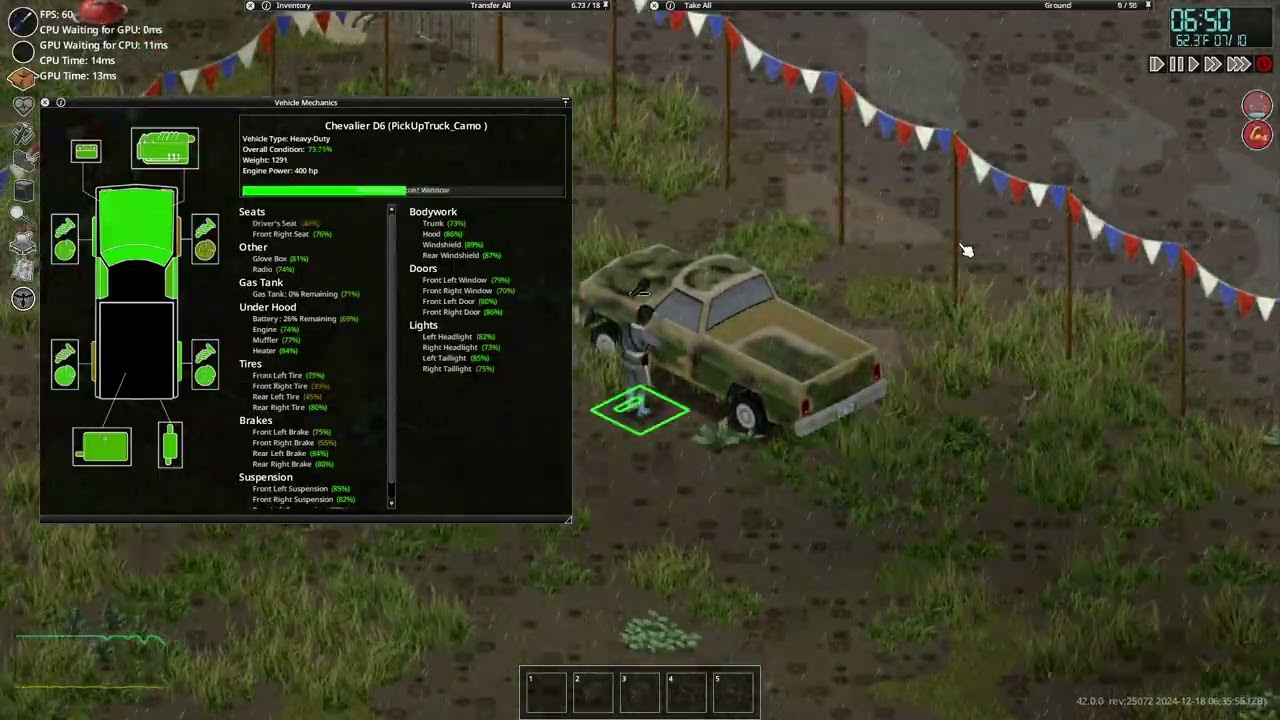
Ports AutoMechanics to B42 Single Player
small topaz
lilac mural
And yeah.. Trying this rn and it doesn't work for some reason..
if no one else knows, you probably have to check B42 vanilla code to check it should be done...
lilac mural
That's what I'm doing and rn it says ISTimedActionQueue:tick: bugged action, cleared queue and I don't know how to make it say where's the problem
elfin stump
lilac mural
That's what I'm doing and rn it says `ISTimedActionQueue:tick: bugged action, cl...
Prop1 and Prop2 in the new timedactions system, are what you are going for I think. but you need to use items that can connect to the bones, such as the Base.Screwdriver - if you find out how to add your own item I need to figure that out too. I think it is the same as B41 but not sure where to find a guide to do that.
bronze yoke
bugged action usually means an isValidStart failed
check the isValidStart functions of the timed actions you're calling
lilac mural
Ok, I'll check
elfin stump
If anyone figures out how to create an item that can be used in prop1 and prop2 successful, please let me know! 🙂
lilac mural
elfin stump
Prop1 and Prop2 in the new timedactions system, are what you are going for I thi...
What do you mean by 'connect to the bones'?
elfin stump
lilac mural
What do you mean by 'connect to the bones'?
Essentially held in the hand. Like a weapon or tool would be.
 queen oasis
lilac mural
Ok, I'll check
queen oasis
lilac mural
Ok, I'll check
if not action.character:getCharacterActions():contains(action.action) then is what triggers your error
 sick yew
Not sure if this is the place to ask, but the music folder. Where is the Untitled "34" song located? I went through the music folder in media and couldn't find it.
small topaz
lilac mural
That's what I'm doing and rn it says `ISTimedActionQueue:tick: bugged action, cl...
is definitely a bit weird since the vanilla code seems to call "ISInventoryTransferAction" quite often. The few examples I saw used it in an "if isClient() then ... else" construction though...
lilac mural
Yeah, I'm going through isValid part of ISInventoryTransferAction and still can't find what's wrong could be..
queen oasis
lilac mural
Yeah, I'm going through `isValid` part of `ISInventoryTransferAction` and still ...
are you trying to pick up a world object or a moveable?
lilac mural
lilac mural
How to make character pick up an item, before using it through custom timed acti...
Uh.. Just an item? Like, normal item. I just need to transfer it to player inventory
Am I using the wrong thing for this?
queen oasis
I'll have a look but I use:
ISTimedActionQueue.add(ISGrabItemAction:new(playerObj, object, time))
I also have used this one, but I'll try again...
queen oasis
local time = ISWorldObjectContextMenu.grabItemTime(playerObj, o)
ISTimedActionQueue.add(ISWalkToTimedAction:new(playerObj, square))
ISTimedActionQueue.add(ISGrabItemAction:new(playerObj, o, time))
could maybe just throw it into
ISWorldObjectContextMenu.onGrabWItem
this is what i usually use```lua
local inventory = character:getInventory()
if not inventory:contains(item) then
ISTimedActionQueue.add(
ISInventoryTransferAction:new(
character, item,
item:getContainer(), inventory))
end
That's literally what I have, if I'm not wrong
bronze yoke
if it's the same then i'd make sure the arguments you're passing are good
like is the item definitely an item?
lilac mural
Yeah, I'm checking this rn
queen oasis
bronze yoke
this is what i usually use```lua
local inventory = character:getInventory()
if n...
I tried that in 41 and it kept bugging out on me. Prob cause I'm stuffing 100 actions into the queue
and I'm just bad at this
small topaz
lilac mural
That's literally what I have, if I'm not wrong
could also try to use "if isClient() then" and then your transfer action. not sure if it will do smth for you but this is often used in vanilla B42 code
lilac mural
Is :zombie.inventory.types.ComboItem is an item?
bronze yoke
yeah, that should be correct
lilac mural
I'm trying to use :getItem() on it and it doesn't work for some reason
queen oasis
lilac mural
I'm trying to use `:getItem()` on it and it doesn't work for some reason
local objs = square:getObjects()
for i = 0, objs:size() - 1 do
local o = objs:get(i)
you can getItem() on o after that
if instanceof(o, "IsoWorldInventoryObject") and o:getItem():getWhatever() == "something" then
 random finch
I thought DisplayName would be the name displayed here?
    item Mov_PCZCore
    {
        DisplayCategory = Furniture,
        Type            = Moveable,
        Icon            = pczcore,
        Tooltip = Tooltip_ItemTraps,
        Weight              = 10,
        Capacity        = 20,
        UseWhileEquipped = FALSE,
        DisplayName        = PCZ Core,
        WorldObjectSprite    = pczcore_0,
    }
 tranquil reef
How do I reference one script from another
random finch
random finch
I thought `DisplayName` would be the name displayed here?
```lua
item Mov_PC...
Here is a snippet from ISBaseIcon. It seems to be using :getDisplayName().
            local bpItem = backpack and backpack.inventory and backpack.inventory:getContainingItem();
            if bpItem then
                if not backpack.inventory:getOnlyAcceptCategory() or (self.itemObj:getCategory() == backpack.inventory:getOnlyAcceptCategory()) then
                    local backPackOption = subMenu:addOption(getText("ContextMenu_PutInContainer", bpItem:getDisplayName()), self, self.onClickContext, 0, 0, contextMenu, backpack.inventory, {self.itemObj});

........
Rn it's almost like your code and of course it gives the same error with bugged action
    local playerInv = self.character:getInventory()
    if not playerInv:contains(self.flare) then
        ISTimedActionQueue.add(
                ISInventoryTransferAction:new(self.character, self.flare, self.flare:getContainer(), playerInv)
        )
    end
come to think of it i don't think i've ported any of my mods actually using that code yet, so it's possible something changed in b42...?
 sly gazelle
newbie question, but how can i "convert" b41 spawn point mod to work in b42?
like this one: https://steamcommunity.com/sharedfiles/filedetails/?id=3089460885
 lilac mural
bronze yoke
come to think of it i don't think i've ported any of my mods actually using that...
lilac mural
bronze yoke
come to think of it i don't think i've ported any of my mods actually using that...
Maybe, but I don't know how to debug it
ashen mist
ashen mist
it has to be an addiction
hint
 lilac mural
sly gazelle
newbie question, but how can i "convert" b41 spawn point mod to work in b42?
lik...
lilac mural
sly gazelle
newbie question, but how can i "convert" b41 spawn point mod to work in b42?
lik...
check pins
bronze yoke
well i took a look and the transfer action looks unchanged, so i have no idea what's going on
when are you adding the action?
lilac mural
In :isValid()
bronze yoke
ah, that's not a great idea, isValid is called every tick while the action is running 😅
lilac mural
Damn..
bronze yoke
you want to add the transfer action before adding your action
lilac mural
bronze yoke
ah, that's not a great idea, isValid is called every tick while the action is ru...
Oh god. Thanks everyone, that was the problem 😭
iron siren
Does anyone know or have the Keyboard. list of keybinds? I have used OnKeyPressed(key) if key -- Keyboard.KEY_F10 then , but that is for taking screenshots. There must be a list somewhere?
lilac mural
Okay, uh... How to correctly check if player is nearby the item that he's trying to pick up? Cause you can open context menu, walk away, and only then press the button
mellow frigate
iron siren
Does anyone know or have the Keyboard. list of keybinds? I have used `OnKeyPres...
 molten hornet
working hard or hardly working
queen oasis
lilac mural
Okay, uh... How to correctly check if player is nearby the item that he's trying...
if luautils.walkAdj(playerObj, square, true) then
that will make your player walk back if they have walked away
clever surge
no matter what I do getAllRecipes() always returns an empty list. Am I doing something wrong? :/
lilac mural
queen oasis
```if luautils.walkAdj(playerObj, square, true) then```
Yeah, that works, thx
bronze yoke
clever surge
no matter what I do `getAllRecipes()` always returns an empty list. Am I doing s...
for build 42? ScriptManager.instance:getAllCraftRecipes(), 'Recipe' recipes are legacy
clever surge
bronze yoke
for build 42? ``ScriptManager.instance:getAllCraftRecipes()``, 'Recipe' recipes ...
is there any page where I can find stuff like that? Some kind of deprecation log for b42?
queen oasis
it looks like a global in 42? but yea, it returns nothing
bronze yoke
clever surge
is there any page where I can find stuff like that? Some kind of deprecation log...
no 😅
 olive radish
One message removed from a suspended account.
sick yew
Anyone know where the new B42 music is? It's not in media/music
queen oasis
olive radish
One message removed from a suspended account.
put a copy in the 42 folder
ashen mist
i might need to make a fifth mod today
i've found that combining thread is broken
and the pick thread recipe only grants a single unit
olive radish
One message removed from a suspended account.
One message removed from a suspended account.
One message removed from a suspended account.
One message removed from a suspended account.
One message removed from a suspended account.
lilac mural
olive radish
One message removed from a suspended account.
check pins, it's the old one folder style
iron siren
Trying to use the InventoryItemFactory now gives the error "attempted index: CreateItem of non-table: null". Is the InventoryItemFactory class changed? ```
function RicksMLC_VendingMachineConfig:MakeContainer(containerList)
-- Returns: ContainerItem with items.
local container = InventoryItemFactory.CreateItem(containerList[2])
if not container then
...```
Ah.. checking the B42 LUA it calls instanceItem() ... dunno where that is in the java code tho
lilac mural
When creating custom model - you can only add texture file to it or something else? Like roughness or normal
clever surge
https://steamcommunity.com/sharedfiles/filedetails/?id=3387462212
Just made a small mod that increases the lifetime of batteries. It's my first real mod so would appreciate some feedback!
Not sure if my approach is the best way, I was trying to achieve this without hardcoding stuff, and so far everything seems to work. I'm just scanning for input items on the InsertBattery recipe. Sadly this won't work for radios and similar devices.
Code is here: https://pastecode.io/s/dgec4a9a

 pearl prism
hey, devs will you update this?
https://projectzomboid.com/modding/index.html
package index
 woven brook
Have multi z level cars been added in unstable?
 open drum
friends! remember we used to have remove result item parameter from Recipe script?
how that it doesn't work
is there any way to do the same thing? withouth using Lua?
woven brook
woven brook
Have multi z level cars been added in unstable?
I’ve heard rumors about it but I know nothing has been confirmed
bronze yoke
i think you don't need to add a result at all anymore
open drum
bronze yoke
i think you don't need to add a result at all anymore
tried it having the output {} empty
spare burrow
woven brook
Have multi z level cars been added in unstable?
I can confirm you can make a ramp and go up and down with a car
open drum
and it stopped the recipe from showing up in the crafting
spare burrow
i went down the construction basemenet on riverside at least
woven brook
spare burrow
I can confirm you can make a ramp and go up and down with a car
This is fucking amazing
Finally I can make that Rocky Mountain map
Out of town right now though
open drum
i have it '''
craftRecipe Use Elixir
{
time = 100,
tags = Survivalist;CanBeDoneInDark,
category = Wuro_Recipe,
needTobeLearn = false,
timedAction = MakingHammer_Surface,
    inputs
    {
        item 1 [Base.Elixir],

    }
    outputs
    {
    }
}
'''
but this doesn't show up in the crafting area
 ebon dagger
Anyone managed to get custom items to generate as loot yet? My Scavenger Skill mod is updated aside from getting the books to populate. I get no errors, but also no books lol
elfin stump
open drum
i have it '''
craftRecipe Use Elixir
{
time = 100,
tags = Su...
I just confirmed you can run without an output, so your issue I think is somewhere lse.
open drum
elfin stump
I just confirmed you can run without an output, so your issue I think is somewhe...
i see. ty for confirming it. Ill see where it went wrong then...
elfin stump
open drum
i see. ty for confirming it. Ill see where it went wrong then...
craftRecipe RipUpCDCGeneralGuide
{
timedAction = CDCRR.RippingUp,
Time = 60,
OnCreate = CDCRR_CollectCDCGeneralGuide,
category = Health,
Tags = InHandCraft,
inputs
{
item 1 [CDCRR.CDCKX93185RapidResponseGeneralGuide] mode:use,
}
outputs
{
    }
} - that is mine that worked without output for reference
Yeah if you want to do it standing anywhere I believe you need that
bronze yoke
i think you need InHandCraft or AnySurfaceCraft or it won't show up
woven brook
Wonder if devs will release documentation for tile biome generation 🤔
 last edge
does anyone happen to know if anyone's working on a b42 player respawn mod yet
open drum
wish someone would make the new tall grass to spawn more abundant even in house and roads
so it looks more 10 years later type scene
 viral spire
Haha, what if someone made a mod that made rats transmit the disease so you could pretend it's the Rat Plague from Dishonored, haha wouldn't that be crazy
ebon dagger
Ok, checking Lootzed, my books ARE in the distro list, but my "BookScavenging1" has the same spawn chance as "BookMetalworking5" even though, they dont have the same value in the BookstoreBooks table. Or at least should.

 ivory gyro
https://steamcommunity.com/sharedfiles/filedetails/?id=3387608427
B42 NEW MOD
Let me smoke and still be athletic !

 mint girder

1:11 Step 1 - Know your file locations
4:06 Step 2 - Storyboard your ideas out
9:03 Step 3 - Get your files from the game or other mods
11:47 Step 4 - Build your mod files
1:01:54 Step 5 - Create the textures (mislabeled in the video, oops)
1:19:45 Step 6 - Put your mod files in the right structure
1:30:37 Step 7 - Test your mod (please back up ...
Is this guide not useful anymore? i wanted to try and make a mod but in the PZ files recipes have input and output
open drum
does anyone know how this works?

Since actual multiplayer isn't here yet, me and @vivithedrawn had to try out good old splitscreen and it was a blast!
Credits:
""ZigZag" Kevin MacLeod (incompetech.com)
Licensed under Creative Commons: By Attribution 4.0 License
http://creativecommons.org/licenses/by/4.0/
"Surf Shimmy" Kevin MacLeod (incompetech.com)
Licensed under Creative ...
they are doing splitscreen multiplayer
 late hound
clever surge
<@388920638519115779> did you ever solve this? I'm getting this as well
late hound
clever surge
<@388920638519115779> did you ever solve this? I'm getting this as well
its related to scripts files that need to be rewritten, lot of busy work
 gaunt storm
I guys. I create maps for project zomboid, but this time I had a terrible problem that had never happened before: "The mod.info file does not exist in your mod" can you help me?
clever surge
late hound
its related to scripts files that need to be rewritten, lot of busy work
It was not my mod after all, this was the culprit https://steamcommunity.com/sharedfiles/filedetails/?id=3386729204
Apparently due to an extra comma in scripts\clothing_bags.txt
junior jewel
does anyone know where i can find the script for the campfire moveable?
bronze yoke
open drum
https://www.youtube.com/watch?v=9t8uGs6fdiE
you can just play splitscreen as long as you have a controller, just press a button on the controller and it'll come up with a prompt to make player 2
you can do it through steam remote play but it won't be a good time with any significant amount of ping
and controller controls for build 42 are unfinished
 brittle geyser
hi all, what is the best way to update my mod with the b42 structure, but also test both b42 and b41 functions remain the same? Should I make changes and then try launching both versions?
 cerulean yew
Hi Folks, sorry to bother you, but i need your help. I am experimenting the game with patch 42, but I have a small problem. I can't increase the capacity of the duffle bags/backpacks, as I did in the previous version of the game. It seems the capacity is stuck at 49, whereas I could make it go well beyond that value. Can you tell me if there are any values in other files that need to be changed? (sorry for my terrible english)
gaunt storm
brittle geyser
hi all, what is the best way to update my mod with the b42 structure, but also t...
I need this!
brittle geyser
 sacred harness
brittle geyser
hi all, what is the best way to update my mod with the b42 structure, but also t...
sacred harness
brittle geyser
hi all, what is the best way to update my mod with the b42 structure, but also t...
Check out the pinned messages
sacred harness
cerulean yew
Hi Folks, sorry to bother you, but i need your help. I am experimenting the game...
So, I'm not sure how you are currently doing it but I would assume its as simple as modifying the capacity attribute associated with the bags you want to modify in the clothing_bags.txt
If you want I can try and get it to work..
elfin stump
When spawning a waterbotte with a recipe output, is there a way to spawn it in an empty state?
sacred harness
elfin stump
When spawning a waterbotte with a recipe output, is there a way to spawn it in a...
Here is the item object definition for WaterBottle:
item WaterBottle
{
DisplayName = Water Bottle,
DisplayCategory = Water,
Type = Normal,
Weight = 0.1,
Icon = WaterBottle,
IconColorMask = WaterBottle_Mask2,
IconFluidMask = WaterBottle_Mask,
CookingSound = BoilingFood,
CustomEatSound = DrinkingFromBottlePlastic,
FillFromDispenserSound = GetWaterFromDispenserPlasticMedium,
FillFromLakeSound = GetWaterFromLakeBottle,
FillFromTapSound = GetWaterFromTapPlasticMedium,
Tooltip = Tooltip_item_OnlyPurifyMicrowave,
StaticModel = WaterBottle,
WorldStaticModel = WaterBottleFull,
Tags = CookableMicrowave,
/* OnCreate = SpecialLootSpawns.OnCreateWaterBottle, */
        component FluidContainer
        {
                ContainerName   = BottlePlastic,
                capacity        = 1.0,
        PickRandomFluid    = true,
                Fluids
                {
                    fluid           = Water:1.0,
                    fluid           = CarbonatedWater:1.0,
                }
        }
}
ah gotcha..
sacred harness
elfin stump
When spawning a waterbotte with a recipe output, is there a way to spawn it in a...
Here you go:
craftRecipe MakeImprovisedGasMask
{
timedAction = Making,
Time = 80,
NeedToBeLearn = True,
Tags = InHandCraft;Engineer,
category = Survival,
xpAward = Tailoring:5,
inputs
{
item 1 tags[Scissors;SharpKnife] mode:keep,
item 2 [Base.DuctTape],
item 1 [Base.RippedSheets] mode:destroy,
item 1 [Base.PopBottle;Base.WaterBottle] flags[IsEmpty],
}
outputs
{
item 1 Base.Hat_ImprovisedGasMask_nofilter,
}
}
elfin stump
sacred harness
Here is the item object definition for WaterBottle:
item WaterBottle
{
...
I did peek at that, but from what I can tell it always wants to spawn full if using output from a recipe. I may be able to create another waterbottle that spawns empty, or spawn it from a function and modify it, but I am not sure.
nice!
sacred harness
Change your output to be:
item 1 [Base.PopBottle;Base.WaterBottle] flags[IsEmpty]
sacred harness
Happy to help
 red tiger
clever surge
is there any page where I can find stuff like that? Some kind of deprecation log...
red tiger
clever surge
is there any page where I can find stuff like that? Some kind of deprecation log...
All I have to offer are git diffs. https://github.com/asledgehammer/PipeWrench/commit/fc46fa086b93a44df859a6326e060d340e54933c

 floral minnow
Hey y'all, I am not sure how to word my question so bear with me. I am trying to update a mod for my own use until it is properly done by the original author. I got the file structure setup correctly and was able to find the mod in the in-game modlist, however, after activating and reloading the Lua I got a CTD. Digging through the log I am finding the following: ERROR: General f:0, t:1734665280096> Item.OnScriptsLoaded > Could not find evolved recipe or template: 'Pasta' in item = Base.CannedTomatoOpen. However, the recipe file itself never makes mention of the base item so I am not sure what the best way to fix this for the time being would be. Any insight would be greatly appreciated!
 north heron
anyone have ideas why my items/models are now clipping into the floor? never had this issue in b41 lol???
 sacred harness
floral minnow
Hey y'all, I am not sure how to word my question so bear with me. I am trying to...
sacred harness
floral minnow
Hey y'all, I am not sure how to word my question so bear with me. I am trying to...
Recipes have been redone. Any B41 recipes are going to have to be reworked using the new recipe format... or at least most of them will need to be redone. If you want examples, take a look at the recipes_cooking.txt in the scripts folder.
 winter thunder
floral minnow
Hey y'all, I am not sure how to word my question so bear with me. I am trying to...
winter thunder
floral minnow
Hey y'all, I am not sure how to word my question so bear with me. I am trying to...
I think you might have got it flipped, the error isn’t in the recipe, the error seems to be in the item Base.CannedTomatoOpen ?
If you’ve changed the recipe for Pasta, the item itself might be looking for the no longer existing recipe?
winter thunder
floral minnow
Hey y'all, I am not sure how to word my question so bear with me. I am trying to...
What is the mod? Can crack it open and see if I can’t help you find any issue
 jaunty gate
small topaz
has anyone managed to figure out how to properly set up the mod.info file or to ...
jaunty gate
small topaz
has anyone managed to figure out how to properly set up the mod.info file or to ...
Inside mod.info.
modversion=xxx
author=xxx
versionMin=xxx
"versionMin" should fill in the ZomboidVersion on that screen.
floral minnow
winter thunder
What is the mod? Can crack it open and see if I can’t help you find any issue
I won't lie, it feels pretty sleazy trying to patch up someone else's mod, so I vastly appreciate the offer to look. I am looking at Superior Stews (3216871233) by Brattymaddy
cerulean yew
sacred harness
So, I'm not sure how you are currently doing it but I would assume its as simple...
Unfortunately no, it does not work. I have modified the file in: media/scripts/clothing/clothin-bags.txt but it has no effect in game.
winter thunder
floral minnow
I won't lie, it feels pretty sleazy trying to patch up someone else's mod, so I ...
Since it is for personal use only, it’s really not that bad. Looking under the hood of existing mods is a tried and true method of learning how to actually make mods work for this game 😂 but just give me a few, and I’ll see if I can’t find the issue
 dusk saddle
Howdy there lads and lassies, I'm struggling to recollect where (or even if) there's a file that lists the various item types that can be used in crafting. I think I've gotten reasonably close to patching my simple craftable PAWS characters mod, although I'm trying to see if there's a general item type for paper, sort of like how there's the tags[Write] for pens, pencils, markers, etc.
Speaking of which, Spiffo pens! Didn't know they were a thing, but they showed up when testing the recipe haha
cerulean yew
sacred harness
So, I'm not sure how you are currently doing it but I would assume its as simple...
There seems to be a limit or block that sets the maximum capacity of a duffel bag at 49, despite the fact that I chose a value much higher than 49
winter thunder
dusk saddle
Howdy there lads and lassies, I'm struggling to recollect where (or even if) the...
By paper, do you mean things that can be written on? Or specifically paper lol
dusk saddle
Things that can be written on, I suppose. The old recipe used to be just for a sheet of paper, but there are tons of new writable items now outside of those and journals
winter thunder
dusk saddle
Things that can be written on, I suppose. The old recipe used to be just for a s...
You can look for CanBeWrite = True, or if you want to exclude notebooks/journals, you can check PageToWrite = 1
dusk saddle
Ah, good stuff!
And do we know what file is where they keep the 'recipe' information for looking at notes, etc.?
winter thunder
dusk saddle
And do we know what file is where they keep the 'recipe' information for looking...
What do you mean?
winter thunder
floral minnow
Hey y'all, I am not sure how to word my question so bear with me. I am trying to...
I found the issue! :D Good news, it should be a simple fix. Bad news, it is going to take a little work lol
dusk saddle
Is there a lua file or something along those lines that contains some of the information on the 'Look at X' or 'Read X?'
I'm not quite sure how to properly explain it
winter thunder
dusk saddle
Is there a lua file or something along those lines that contains some of the inf...
Oh! Yeah, give me a second I’ll see if I can point you in the right direction
My windows explorer is freaking out for some reason 😭
floral minnow
winter thunder
I found the issue! :D Good news, it should be a simple fix. Bad news, it is goin...
Praise be to the FSM! What will I need to do? (Take your time my dude, you're clearly being pulled in a few directions)
winter thunder
dusk saddle
Thanks a ton!
No problem!
 copper abyss
Acouple issues now with my gun mod in b42...
-MuzzleFlash In Incorrect location
-Single Fire glitchs out the player
-Muzzle Offset location doesn't show in attachment editor
If somebody could help diagnose and fix these problems I would be very thankful.


 sacred harness
floral minnow
I won't lie, it feels pretty sleazy trying to patch up someone else's mod, so I ...
sacred harness
floral minnow
I won't lie, it feels pretty sleazy trying to patch up someone else's mod, so I ...
Here you go
floral minnow
 winter thunder
sacred harness
Here you go
winter thunder
sacred harness
Here you go
Beat me to it hahaha
floral minnow
Y'all are the best. Thanks so damn much!
sacred harness
Just rename the file to what it is current in the mod folder and replace the one in the mod folder
😄
winter thunder
The issue is that the new evolved recipes use the Template: line, while the old ones dont
sacred harness
And minimumwater
winter thunder
Btw, that mod legit just doubles the number of allowed items in evolved recipes, dont feel bad about tweaking it lol. Its 99.9% base game stuff
sacred harness
Yeah, when I saw that, I just told ChatGPT to double maxitems in this file and send me back the new one LOL
cerulean yew
@sacred harness can you help me, friend?
sacred harness
cerulean yew
<@355144715735269377> can you help me, friend?
Yah, working it now lol
Trying to see if there is a LUA file out there with max capacity on the bag item category
cerulean yew
sacred harness
Yah, working it now lol
ty, I'm desperate, I can't understand what the hell has been changed
sacred harness
Its all good. Everything I know I've pretty much picked up in the last two days....
cerulean yew
sacred harness
Trying to see if there is a LUA file out there with max capacity on the bag item...
imho, it's something about the character capacity... not the bag
winter thunder
dusk saddle
You're all good haha
Check the \Steam\steamapps\common\ProjectZomboid\media\lua\shared\TimedActions and look at ISReadABook.lua
sacred harness
cerulean yew
imho, it's something about the character capacity... not the bag
I thought you were trying to increase the bag capacity?
winter thunder
What is the issue? I can take a looksie too
sacred harness
For example, have a bag with 100 capacity and 99 weightreduction
cerulean yew
sacred harness
I thought you were trying to increase the bag capacity?
Yes, indeed, but I have the impression that the capacity of the bag is limited by a character value, probably. You can modify the bag all you want, but it doesn't go beyond a value of 49, and if I'm not mistaken, 49 is a capacity limit that the character has, without wearing a backpack. It was just a thought to get to the point
 sonic needle
for the love of god. make the zoom mod.
sacred harness
Okay, so the bag capacity still says 49 even though you set it to 100?
cerulean yew
sacred harness
Okay, so the bag capacity still says 49 even though you set it to 100?
i tried with 1000, with 9600000, with a lot of values, but it stucks at 49
dusk saddle
winter thunder
Check the `\Steam\steamapps\common\ProjectZomboid\media\lua\shared\TimedActions`...

cerulean yew
The staff does not want us to OP the character xD
sacred harness
Can you post a screenshot? I just want to make sure I'm understanding it right.
cerulean yew
sacred harness
Can you post a screenshot? I just want to make sure I'm understanding it right.
sure
winter thunder
Can you send the item script of the item you made/modified as well? Just to be sure
cerulean yew
sacred harness
Can you post a screenshot? I just want to make sure I'm understanding it right.
Now it's 63, idk the reason >_<
 winter thunder
Can you send the item script of the item you made/modified as well? Just to be s...
winter thunder
winter thunder
Can you send the item script of the item you made/modified as well? Just to be s...
If you could do this rq? I am not seeing anything native to the code that should be limiting this, seeing as there are existing containers that already hold more than that in the game
cerulean yew
winter thunder
Can you send the item script of the item you made/modified as well? Just to be s...
    {
        DisplayName = Duffel Bag,
        DisplayCategory = Bag,
        Type = Container,
        Weight = 1,
        /*Icon = Duffelbag,*/
        IconsForTexture = Duffelbag;DuffelBag_Green;DuffelBag_Grey;DuffelBagBlue;DuffelBagRed;Duffelbag_Sport;Duffelbag_Sport2,
        CanBeEquipped = Back,
        CanHaveHoles = FALSE,
        Capacity = 960000000,
        CloseSound = CloseBag,
        ClothingItem = Bag_DuffelBag,
        EquipSound = EquipDuffleBag,
        OpenSound = OpenBag,
        PutInSound = PutItemInBag,
        ReplaceInPrimaryHand = Bag_DuffelBag_RHand holdingbagright,
        ReplaceInSecondHand = Bag_DuffelBag_LHand holdingbagleft,
        RunSpeedModifier = 0.95,
        SoundParameter = EquippedBaggageContainer DuffleBag,
        WeightReduction = 100,
        WorldStaticModel = DuffelBag_Ground,
        Tags = IsFireFuel;IsFireTinder,
}```The question I ask myself is, does this apply to you? Or can you safely change the capacity of the bags?
winter thunder
cerulean yew
```item Bag_DuffelBag
{
DisplayName = Duffel Bag,
DisplayCat...
Can you try setting the weight reduction to 99? I know it sounds dumb, but having 100% weight reduction might be breaking something lol
cerulean yew
winter thunder
Can you try setting the weight reduction to 99? I know it sounds dumb, but havin...
ok, i try, man
 quasi kernel
My lootbox mod has given me the superior fit this run,,
 dark wedge
It seems like the capacity is hard-coded to not exceed 50. In the Java under "DoParam"
else if (var1.trim().equalsIgnoreCase("Capacity")) {
   int var23 = Integer.parseInt(var2.trim());
   if ((float)var23 > 50.0F - this.ActualWeight) {
      var23 = (int)(50.0F - this.ActualWeight);
   }

   this.Capacity = var23;
}
That's called on all scripts when being loaded.
dark wedge
I don't see any bags that have that high of capacity, just world containers. And those aren't impacted by that
winter thunder
dark wedge
It seems like the capacity is hard-coded to not exceed 50. In the Java under "Do...
Ah, thank you! Havent decomped the b42 yet, and the java docs arent updated yet
dark wedge
B41 definitely didn't do this
cerulean yew
I would like to know why the staff has to make these changes to complicate things for the players. I understand that it bothers having a character who can put everything in his backpack and therefore gives the idea of the OP, but what the heck, doing it this way means restricting the player's freedom.
winter thunder
cerulean yew
Now it's 63, idk the reason >_<
Here's the thing tho. 50 isnt a hard cap, seeing as it has been tweaked here
WAIT I THINK I KNOW WHAT IS GOING ON lmfao
dark wedge
that might be a visual bug?
or if weight reduction was changed, you suddenly have more weight
winter thunder
@cerulean yew What is your characters inv weight at?
cerulean yew
inventory?
winter thunder
Yea, like not the bag
cerulean yew
wait a moment
floral minnow
I will add that a modified bag will show less capacity than it actually has:

 dark wedge
You have Weight = 1,, and the Capacity is set to 49. So the logic I provided seems like that's it.
The code takes 50-Weight to determine the bag's capacity when it's set over 50
 winter thunder
dark wedge
You have `Weight = 1,`, and the Capacity is set to 49. So the logic I provided s...
winter thunder
dark wedge
You have `Weight = 1,`, and the Capacity is set to 49. So the logic I provided s...
Right, do you know what the .ActualWeight is doing?
Because that is the only thing modifying the 50, so somehow its seeming making it go above 50
cerulean yew
dark wedge
You have `Weight = 1,`, and the Capacity is set to 49. So the logic I provided s...
Yes, but I don't understand the point of having to code this value, imposing the limit of 50 on everyone. What do the staff care if I put an entire planet in my backpack?
winter thunder
cerulean yew
Does it do the same if you hold the bag in your hand?
cerulean yew
winter thunder
Does it do the same if you hold the bag in your hand?
i try, wait
cerulean yew
winter thunder
Does it do the same if you hold the bag in your hand?
here
 winter thunder
Can you open the bag lol
cerulean yew
winter thunder
Can you open the bag lol
exactly
dark wedge
winter thunder
Right, do you know what the `.ActualWeight` is doing?
At the point where this is initially called, the "ActualWeight" would be just 1.
else if (var1.trim().equalsIgnoreCase("Weight")) {
   this.ActualWeight = Float.parseFloat(var2);
   if (this.ActualWeight < 0.0F) {
      this.ActualWeight = 0.0F;
   }
}
and the capacity in the screenshot showed it was 49.
winter thunder
cerulean yew
Now it's 63, idk the reason >_<
Right, but I am still at a loss then for why it would go up in this one^
dark wedge
cerulean yew
Yes, but I don't understand the point of having to code this value, imposing the...
idk why it was done either. possibly due to the inventory management being done on the server though, limits the amount of items you can carry
winter thunder
Unless it is just a visual bug*
This all being said, you are in debug mode, so you can literally just turn on the setting for unlimited carry capacity
copper abyss
Acouple issues now with my gun mod in b42...
-MuzzleFlash In Incorrect location
-Single Fire glitchs out the player
-Muzzle Offset location doesn't show in attachment editor
If somebody could help diagnose and fix these problems I would be very thankful.


reposting this just so that I can get some help-
cerulean yew
winter thunder
This all being said, you are in debug mode, so you can literally just turn on th...
😢
cerulean yew
dark wedge
idk why it was done either. possibly due to the inventory management being done ...
One question, can you tell me which file contains that value? Maybe I can edit it with the DNspy program, although I am not an expert
dark wedge
cerulean yew
One question, can you tell me which file contains that value? Maybe I can edit i...
zombie\scripting\objects\Item.class
It's in the game's Java.
sacred harness
We might need to think outside the box here 🙂
If we cant mod the bag capacity over 63, then we could mod the ability to carry bags that are too heavy..
So you could carry three bags, full to the brim at 63, for a total of 189...
Just change this:
local willBeOverMaxWeight = function(character, item)
-- note this assumes the item is equipped. this check is not performed here
if not character or not item then return end
return not character:isUnlimitedCarry() and character:getInventory():getCapacityWeight() - item:getEquippedWeight() + item:getUnequippedWeight() > character:getInventory():getMaxWeight()
end
to this:
local willBeOverMaxWeight = function(character, item)
-- note this assumes the item is equipped. this check is not performed here
if not character or not item then return end
return not character:isUnlimitedCarry())
end
sonic needle
copper abyss
Acouple issues now with my gun mod in b42...
-MuzzleFlash In Incorrect location
...
are pz's aim anims broken rn in 42?
sacred harness
Otherwise... you might as well add a trait which gives you the ability to carry as much as you want.
copper abyss
sonic needle
are pz's aim anims broken rn in 42?
alotta stuff is messed up- my gun was completely backwards in b42, but completely fine in 41, the muzzleflash location is utterly broken too...
 onyx valve
copper abyss
Acouple issues now with my gun mod in b42...
-MuzzleFlash In Incorrect location
...
onyx valve
copper abyss
Acouple issues now with my gun mod in b42...
-MuzzleFlash In Incorrect location
...
In my weapons mod, all models with fbx were broken in version 42, including the muzzle, so I had to redo them to .x.
sacred harness
copper abyss
reposting this just so that I can get some help-
Sorry, not good with the modeling and stuff. Only good with code 😄
cerulean yew
sacred harness
Just change this:
local willBeOverMaxWeight = function(character, item)
-- n...
Excuse me, but is this a mod script? Because it's not like I'm able to create mods. I mean, sometimes I have modified and customised them, but I'm always talking about very simple things
copper abyss
onyx valve
In my weapons mod, all models with fbx were broken in version 42, including the ...
right- I use the modern version of blender and just use fbx
sacred harness
Yeah, it would be a lua
sonic needle
copper abyss
right- I use the modern version of blender and just use fbx
modern and fbx are correct.
copper abyss
if making my models into .x will fix these issues then please tell me how
sonic needle
.x is a...pretty bad choice 😦
it wont. he likely did somehting else. as file type wont fix it.
sonic needle
your rotation attachments etc are all wobbly, is what is wrong.
copper abyss
kinda sucks now all my hard work is gone
copper abyss
sonic needle
your rotation attachments etc are all wobbly, is what is wrong.
I don't understand tho, if my rotations work for 41 what makes 42 not work
sonic needle
pz gets its info from a ton of spots. script, model, attachmentdata, etc
42 changed some. melee weapons got up/down flipped for instance
dark wedge
uuughhhhh. this is hard-coded in the ItemContainer itself too:
private int MAX_CAPACITY = 100;
private int MAX_CAPACITY_BAG = 50;
private int MAX_CAPACITY_VEHICLE = 1000;
Even calling setCapacity directly on an inventory craps out:
public void setCapacity(int var1) {
   if (this.parent instanceof BaseVehicle && this.Capacity > this.MAX_CAPACITY_VEHICLE) {
      DebugLog.General.warn("Attempting to set capacity of " + this + "over maximum capacity of " + this.MAX_CAPACITY_VEHICLE);
   } else if (this.containingItem != null && this.containingItem instanceof InventoryItem && this.Capacity > this.MAX_CAPACITY_BAG) {
      DebugLog.General.warn("Attempting to set capacity of " + this.containingItem + "over maximum capacity of " + this.MAX_CAPACITY_BAG);
   } else if (var1 > this.MAX_CAPACITY) {
      DebugLog.General.warn("Attempting to set capacity of " + this + "over maximum capacity of " + this.MAX_CAPACITY);
   }

   this.Capacity = var1;
}
That's so annoying. Not sure how I'm going to get around that when attempting to merge inventories in one of my mods.....
cerulean yew
dark wedge
uuughhhhh. this is hard-coded in the ItemContainer itself too:
```java
private i...
Lmao.... but why?? >_<
copper abyss
sonic needle
pz gets its info from a ton of spots. script, model, attachmentdata, etc
42 chan...
I am pretty sure that rifles did too

I had to completely flip and rotate my rifle for 42
sonic needle
mine, work good. but im ...a bit nuts when its this.

 winter thunder
copper abyss
I don't understand tho, if my rotations work for 41 what makes 42 not work
winter thunder
copper abyss
I don't understand tho, if my rotations work for 41 what makes 42 not work
I wouldnt be surprised if they redid models for b42 or otherwise changed how they are interpreted. It could literally be that they had someone make models, and then realized all the models were flipped relative to the way Zomboid reads them, so instead of changing all the models they changed the code that reads them lmfao
cerulean yew
dark wedge
uuughhhhh. this is hard-coded in the ItemContainer itself too:
```java
private i...
Max Capacity 100? I don't understand
onyx valve
sonic needle
.x is a...pretty bad choice 😦
it wont. he likely did somehting else. as file ...
I know that fbx is the best but the game when using .x because everything is made for the .x files, that's what I think, since in 42 the muzzle of all my weapons left their place and the weapons rotated at 180
 copper abyss
onyx valve
I know that fbx is the best but the game when using .x because everything is mad...
copper abyss
onyx valve
I know that fbx is the best but the game when using .x because everything is mad...
if you can find the reason why this happened then tell me...
winter thunder
cerulean yew
Max Capacity 100? I don't understand
That would be for anything that is not an inventory bag or a vehicle. I would assume that is for things like furniture
dark wedge
cerulean yew
Max Capacity 100? I don't understand
that's for things that are not bags it seems.
copper abyss
idk if ash if correct or not, but I think they might be right
sonic needle
rotation. of the model. in blender.
cerulean yew
mmh... clear
sonic needle
after that. set new attachdata for muzzle etc.
floral minnow
I'd def trust Ash on this lol. Go look at their mods
copper abyss
sonic needle
after that. set new attachdata for muzzle etc.
its easier said then done
the attachment viewer in debug is broken
so locating attachdata with the new flipped models is difficult
cerulean yew
winter thunder
That would be for anything that is not an inventory bag or a vehicle. I would as...
In short, in simple terms, not even modders will be able to create a mod that can appropriately modify duffel bags
sonic needle
yeah look. whoever was behind a ton of the code lately Fumbled the keyboard like a 5 year old.

they call it unstable for a reason.
winter thunder
cerulean yew
In short, in simple terms, not even modders will be able to create a mod that ca...
Yes. You can set them to a max of 50 tho
sonic needle
copper abyss
its easier said then done
if the attachdata worked prior in 41. leave that for now.
its the model. export it a ton of ways and see what needs flipping.
cerulean yew
End of the fun... goodbye endless weight in backpacks
onyx valve
The truth is I don't know the reason, what I did was redo the models in .x and everything was fixed and I just arranged the muzzles and that's it. The only thing that's still broken is my MP9, the character contracts up to the waist, that's the only thing I'm investigating.
sonic needle
i am TELLING YOU.
copper abyss
sonic needle
if the attachdata worked prior in 41. leave that for now.
its the model. expor...
I've flipped the model in blender and gotten it in the correct location
so in the player/hands it is fixed
the only thing that is broken is the single fire and the attachment data
sonic needle
time to go edit the txt file attachdata 🙂
take one of them that has all 00's from a pz gun.
match the gun to yours sizewise before choosing
ie dont use m9 attachdata for a rifle...
then edit from there.
copper abyss
onyx valve
.
is your mod the "Rain's Firearms & Gun Parts"
dark wedge
cerulean yew
End of the fun... goodbye endless weight in backpacks
Get yourself a car apparently. The max weight for containers in a car is 1,000. If you're hitting that amount, then idk.
winter thunder
sonic needle
yeah look. whoever was behind a ton of the code lately Fumbled the keyboard like...
we needed to be 200% sure that isShop was true!
sonic needle
fumble that odd probably sets it to false ( ie, no shop for you. )
cerulean yew
dark wedge
Get yourself a car apparently. The max weight for containers in a car is 1,000. ...
I don't want to talk rubbish, but doesn't the weight affect the performance of the vehicle?
sonic needle
yes.

 tacit pebble
cerulean yew
End of the fun... goodbye endless weight in backpacks
tacit pebble
cerulean yew
End of the fun... goodbye endless weight in backpacks
this is only imagine, can't we make item's weight to 0 when it's in your backpack? idk this is possible to implement tho
sonic needle
my gun stuff isnt out yet. it was being remade for months. but got hit all the same by 42.
copper abyss
and another... that I don't wanna say because somebody might steal my idea...
sonic needle
your ideas are already done. or being done.
 cerulean yew
tacit pebble
this is only imagine, can't we make item's weight to 0 when it's in your backpac...
cerulean yew
tacit pebble
this is only imagine, can't we make item's weight to 0 when it's in your backpac...
mmh... idk
sonic needle
dont let it stop you aha.
copper abyss
idkkk
its a gun that you would be suprised isn't a mod yet
I ALMOST had it ready for 41
sonic needle
DM it. i will be suprised.
onyx valve
copper abyss
and another... that I don't wanna say because somebody might steal my idea...
Take your time, remember that 42 just came out

winter thunder
sonic needle
your ideas are already done. or being done.
Thats the joy of modding! I was racing b42 for a blacksmithing project I was working on. Had a fully kitted alloying system and everything, but real life got in the way haha
sonic needle
i had just started rotating boltcycle testing. its ruined. so yeah we all got hit
cerulean yew
tacit pebble
this is only imagine, can't we make item's weight to 0 when it's in your backpac...
perhaps put a negative weight reduction?
sonic needle
wasnt suprised, but idea is good
cerulean yew
@winter thunder @dark wedge However, in the next few days I will try to contact the staff or post on the forum to see if this weight thing can be changed, at least allow us to customise the values beyond a certain amount
copper abyss
onyx valve
Take your time, remember that 42 just came out

I hate it
I'm just a freshy modder guy
I dont wannttt everything I knowww to chaangeee
dark wedge
cerulean yew
<@226756001628422145> <@255358282862952449> However, in the next few days I will...
you can try asking here: https://discord.com/channels/136501320340209664/1318920979581501502
sonic needle
its the best time ever for PZ and modding.
cerulean yew
copper abyss
https://tenor.com/view/burn-in-hell-elmo-fire-flame-gif-15700527225415287510
Sorry, no offence, can you please avoid spamming on this channel?
cerulean yew
dark wedge
you can try asking here: https://discord.com/channels/136501320340209664/1318920...
thank you, Dhert
onyx valve
copper abyss
I dont wannttt everything I knowww to chaangeee
Jajajah the good thing is that you learn along the way.
copper abyss


whatever, only positive I see is that now at least there is acouple cooler stuff I can poke and make something cool eventually
tacit pebble
cerulean yew
perhaps put a negative weight reduction?
simply item:setWeight(0) maybe?
cerulean yew
tacit pebble
simply ``item:setWeight(0)`` maybe?
now i try ^^
tacit pebble
dont know this will even work because ive never changed something's weight before
with this
cerulean yew
tacit pebble
simply ``item:setWeight(0)`` maybe?
no wait a moment, do you mean, 0 weight ofr every item??
spare burrow
What could be causing my mod to be displayed and acceptable on build 42, but when a save is loaded the mod content is just not there? No errors or indicators something is going iffy
tacit pebble
cerulean yew
no wait a moment, do you mean, 0 weight ofr every item??
only when item is in your modded backpack
cerulean yew
tacit pebble
only when item is in your modded backpack
ah, the weight reduction...
tacit pebble
ah i just realized what you mean D: thought you wanna create a magical backpack
sonic needle
spare burrow
What could be causing my mod to be displayed and acceptable on build 42, but whe...
check its even enabled in the load save, mod manager. if thats even a thing now.
spare burrow
sonic needle
check its even enabled in the load save, mod manager. if thats even a thing now.
It is, in both
tacit pebble
sorry i came in middle
sonic needle
pathing issue, is likely
spare burrow
i'm checking by triage now (removing folders to see what happens)
winter thunder
if your file structure is wrong, it can cause this. I would download a mod off the workshop that is b42 compat and make sure your format is the same
They changed the file paths, so the typical structure for b41 doesn’t work anymore
spare burrow
i know, 42.0/common/41.0 subfolders and the like
gonna check a complex mod nevertheless
winter thunder
🫡
spare burrow
sacred harness
Dont use 41.0
media works for that yea, still won't use a 41 version of the mod
sacred harness
Correct
Basically, you are adding a 42 and copying your media folder into that 42 folder.
Alright, I'm off for now. Till tomorrow!
NIGHT!
onyx valve
But what would be the way to make a mod for the 42? Because this is just to update existing ones, right?
Or not?
sonic needle
make them all seperate if they are decently sized
small mods are ok for now
 merry grove
Heh, updating for new version be like

Also a lot of new visitors, normally most of my subs are from Collections
winter thunder
Yeah, definitely prime time to be releasing / updating
merry grove
I jumped in becuse I noticed a Dip in my subs
 floral minnow
 merry grove
You worry when this is the general trend
 floral minnow
Lol ok, fair enough
 boreal crane
that's a weird dip
merry grove
That's a 42 realsed Dip
Still need find out about new evolved recipies
Also should update the picture of the friuts and cut out the wild apples as they are in base game now
I cut them from the code, but I still should update the pic
Also Collections are your friend

I really need to get the Sandbox settings done.
Could be good idea to also allow pepole to change the forging skill required I guess
But for that I wait for the new docs
I still have no clue how to repeat this

 silent zealot
big spike in views for being early to update to B42.
 merry grove
It's nice
silent zealot
Probably a bunch of people thinking "surely this doesn't do what it says it does...."
 merry grove
Oh no
 humble cosmos
Hey y'all I am extremely brand new to trying to mod, I don't know java or lua but I did get something to work. Can anyone explain how overwriting lua codes works in modding? More info: I have a lua I've edited and it's in a mod folder but I left the name the same. what do I need to do to get the game to pull in and use my lua as opposed to the base game? It's uploaded on the workshop but doesn't show up in the mod list in game. Currently going back to old build to even be able to upload to the workshop,, and then switching back to b42 unstable to check if it's there
merry grove
silent zealot
Probably a bunch of people thinking "surely this doesn't do what it says it does...
I see why it doesn't have a lot of subs 
silent zealot
The proper way is (over simplified) you rename the original, then make a new function with the original name that calls the renamed original
That way you can have multiple mods adding stuff before/after the function without stompiong on each other.
merry grove
humble cosmos
Hey y'all I am extremely brand new to trying to mod, I don't know java or lua bu...
silent zealot
-- C:\Games\Steam\steamapps\common\ProjectZomboid\media\lua\client\Vehicles\ISUI\ISVehicleDashboard.lua


function ISVehicleDashboard:prerender()

    original_dahboardPrerender(self)

    if not self.vehicle or not ISUIHandler.allUIVisible then return end  -- don't run if not in a vehicle or UI is off... otherwise throws an error when getting out of a vehicle when it excutes one final time.
    local alpha = self:getAlphaFlick(0.65); -- flickering from crashes etc
    local chargelevel = self.vehicle:getBatteryCharge()

    if self.vehicle:isEngineRunning() or self.vehicle:isKeysInIgnition() then

        --print ("#### Battery Charge is " .. chargelevel)

        if chargelevel > 0.75 then
            self.batteryTex.backgroundColor = {r=0, g=1, b=0, a=alpha};
        elseif chargelevel > 0.50 then
            self.batteryTex.backgroundColor = {r=1, g=1, b=0, a=alpha};
        elseif chargelevel > 0.25 then
            self.batteryTex.backgroundColor = {r=1, g=0.5, b=0.1, a=alpha};
        elseif chargelevel > 0.01 then
            self.batteryTex.backgroundColor = {r=1, g=0, b=0, a=alpha};
        else
            self.batteryTex.backgroundColor = {r=0.5, g=0, b=0, a=alpha};
        end
    end
end```that is the lua from colored battery indicators (which is now in vanilla)
merry grove
HOW MANY MODS are now vanialla ? is the top 50 mods just in Vanilla now?
silent zealot
you can see I copy ISVehicleDashboard.prerender, then make my own ISVehicleDashboard.prerender that calls the original but also does extra stuff after.
silent zealot
merry grove
HOW MANY MODS are now vanialla ? is the top 50 mods just in Vanilla now?
Lots of small QOL things are in vanilla, it's great
humble cosmos
So what I'm changing is ISShovelGround.lua, I just copy the entire thing even if i am only adding a small paragraph?
silent zealot
BTW> the vanilla version of "open a can with a knife" risks stabbing yourself in the hand and bleeding to death because you were distracted by the knife becoming blunt and worn.
merry grove
I know I need my start as mr Fatty fat fat trait back
humble cosmos
is that simpler than trying to inject a small change
merry grove
Wait did anyone bring back Obiste trait yet?
silent zealot
humble cosmos
So what I'm changing is ISShovelGround.lua, I just copy the entire thing even ...
you don't copy the lua code into your lua file, you use lua to make a copy of the function: local original_dahboardPrerender = ISVehicleDashboard.prerender
merry grove
Oh nobody did >:)
I guess I going to work on bringing back weight traits
spare burrow
spare burrow
What could be causing my mod to be displayed and acceptable on build 42, but whe...
Finally discovered why - mod.info had the same mod id on root folder and b42 folder
 merry grove
Why?
 shrewd bolt
Can't say I've ever had a problem with that, on all the mods I've ported over, they all have the same ID as their B41 version.
spare burrow
I have no clue why, but i just renamed the root mod.info id to whateverbase and the b42 as the legit one
mod is done from scratch tho, may be the cause
 winter bolt
merry grove
I still have no clue how to repeat this
winter bolt
merry grove
I still have no clue how to repeat this
probably b41 multiplayer
cerulean yew
dark wedge
you can try asking here: https://discord.com/channels/136501320340209664/1318920...
Done! Let's hope they can accommodate the request
 silent zealot
As in, if you lose/gain too much weight you get the trait?
silent zealot
I think all you need to do is change the cost from 0
When I made a quick "betatester" trait to avoiding having to grind initial skill levels to try B42 it didn't show up as selectable, when I made it cost 1 point it did.
merry grove
So just make a TraitFactory addTrait and modify the cost?
silent zealot
I assume so.
But there would also be code somewhere for "on starting new game if they have this trait adjust their weight"
That might be missing in B42
cerulean yew
I just don't understand why they have encoded a lot of files, to which novices like myself can no longer have access for obvious reasons of computer ignorance >_>
silent zealot
What do you mean "encoded"?
cerulean yew
hard coded sorry
silent zealot
You mean the stuff in the java side of the game?
merry grove
It's called Technical Debt
cerulean yew
If we talk about debts, we can take up a collection ^_______^
cerulean yew
silent zealot
You mean the stuff in the java side of the game?
a lot of stuff, man
merry grove
Well the game is over 12 years old now
 devout abyss
Quick question - is a recipe for a custom item written in its own recipe file, or does it go into the item file?
elfin stump
devout abyss
Quick question - is a recipe for a custom item written in its own recipe file, o...
recipes will go into ../42/media/scripts/recipes/YOURMOD_Recipes.txt
items into ../42/media/scripts/items/YOURMOD_Items.txt
merry grove
Oh I hate they changed the name to "very high weight"
Also! weight works out of the box!
So just need to fix names and such make a pic and I can post
How do I check what errors is Lua throwing out?
Where are the icons?
As in Trait icons
There is like 1/10th of them in the actual folder labled Traits
elfin stump
merry grove
How do I check what errors is Lua throwing out?
Run your game with -debug tag to run the debugger, or you can search for console.txt and review that in something like notepad++ or vscode
humble cosmos
silent zealot
you don't copy the lua code into your lua file, you use lua to make a copy of th...
does the inside of my mod folder need to follow the file structure all the way to where the .lua file is in the games files
 sand saddle
Has someone managed to get "Require" (in mod.info) to work? no matter how i set up my mods i cant get it to recognize the required mod on b42.
 merry grove
I am not good at making thumbnails <w>
 bronze yoke
sand saddle
Has someone managed to get "Require" (in mod.info) to work? no matter how i set ...
bronze yoke
sand saddle
Has someone managed to get "Require" (in mod.info) to work? no matter how i set ...
just set the dependency to \ModID
they're supposed to be WORKSHOP-ID\MOD-ID but they're bugged right now to be just \MOD-ID, so heads up that you will have to change all of your requires when they fix it
sand saddle
bronze yoke
they're supposed to be ``WORKSHOP-ID\MOD-ID`` but they're bugged right now to be...
thanks. i was scratching my head here why it would not work -.-, i will need to revisit my mod anyway once the api is released. need to look up how they do the water weight anyway so i can maybe include it into my mod.
 near hull
sand saddle
Has someone managed to get "Require" (in mod.info) to work? no matter how i set ...
near hull
sand saddle
Has someone managed to get "Require" (in mod.info) to work? no matter how i set ...
Yep
sand saddle
i wonder how it will work with newly released mods then. they dont have a steam number till you have uploaded it...
near hull
You need to create a "42.0" folder and a "common" folder, inside 42.0 will be all the content of the mod (if there are no changes with respect to 41, then they will literally be duplicate files. Since those in 41 are the ones in the root folder
sand saddle
near hull
You need to create a "42.0" folder and a "common" folder, inside 42.0 will be al...
i know that. my structure is already up to that standard. i simply could not get the require to work. my submod for fish needs the main mod one active.
merry grove
I think that's better
 near hull
On the other hand, is anyone managing to get the new translations working? I've taken the time to translate everything into Spanish (based on the EN folder, obviously), but despite coding it to ANSI so that it accepts the accents and other characters, the game doesn't recognize the translation, which is why it looks weird.
For example, let's say here it should be marked as "cinturón", but it looks like "cintur?n"
 sand saddle
could the games font maybe not support it?
spare burrow
near hull
On the other hand, is anyone managing to get the new translations working? I've ...
Has comprobado que el encoding sea exacto el mismo que el del juego?
near hull
Mmm, tendré que revisarlo, pero suponiendo que la base de la 41 a esta no haya variado en gran medida (más allá de la infinidad de líneas), debería ser la correcta
merry grove
What the hell?
My Translation file just up end and DISAPPEARED
sand saddle
also unrelated : does someone know of a good cheat mod for b42? so i can run around and test my mod unbothered by the brain eating residents?
spare burrow
sand saddle
also unrelated : does someone know of a good cheat mod for b42? so i can run aro...
start the game with the -debug parameter
merry grove
sand saddle
also unrelated : does someone know of a good cheat mod for b42? so i can run aro...
https://steamcommunity.com/sharedfiles/filedetails/?id=3386556284&searchtext=debug
Supposedly is in english
 near hull
merry grove
What the hell?
My Translation file just up end and DISAPPEARED
near hull
merry grove
What the hell?
My Translation file just up end and DISAPPEARED
What exactly do you mean by disappeared?
merry grove
Literally the entire EN catalog was gone
oh well it wasn't a lot so I remade it
I have no clue and I wanna see what will happen
 random finch
Ive set the containerType in tile definitions and added the container to PropertyValueMap. Still the container name does not appear. Any ideas?
function PlayerConstructionZone.addContainerTypes()
local containerVals = IsoWorld.PropertyValueMap:get("container") or ArrayList.new()
if not containerVals:contains("core") then
containerVals:add("core")
end
end
Events.OnInitWorld.Add(PlayerConstructionZone.addContainerTypes)``` bright fog
sand saddle
Has someone managed to get "Require" (in mod.info) to work? no matter how i set ...
bright fog
sand saddle
Has someone managed to get "Require" (in mod.info) to work? no matter how i set ...
What did you write ?
bright fog
sand saddle
also unrelated : does someone know of a good cheat mod for b42? so i can run aro...
Literally debug mode lmao
Why do you want a cheating mod
merry grove
WHY IT DOUBLE
 bright fog
Just use debug mode
bright fog
merry grove
WHY IT DOUBLE
Bcs you copy pasta the code that adds traits ?
If I had to guess
merry grove
It worked fine before
merry grove
bright fog
Bcs you copy pasta the code that adds traits ?
And coppied it from the game itself
The problem is if I don't do Set MutuallyExlusives in my code it doesn't do Exlusive if I do it for some reason doubles them
Ah I SEE
Alright
I was just doing it wrong
There

that should fix it
Also is there a shortcut to reload LUA?
Alright I think it works now
bright fog
merry grove
Also is there a shortcut to reload LUA?
Debug mode
You should have a reload lua button bottom right of the main menu
round notch
merry grove
WHY IT DOUBLE
Prepare for trouble, make it double!
bronze yoke
steam takes a few minutes to scan new mods so it shows as private for a second
bronze yoke
the embed is going to be broken for a while because it's cached
round notch
merry grove
https://steamcommunity.com/sharedfiles/filedetails/?id=3387723299
Link worked for me
humble cosmos
will a mod not show up in game unless I make it public
like the files downloaded to my computer after I uploaded to workshop and subscribed
it may be broken and not working but I feel like it should at least show up in my mod list if it downloaded
bronze yoke
it should show up as long as you're subscribed to it
onyx valve
Working version for B42
https://steamcommunity.com/sharedfiles/filedetails/?id=3383901556
Now I'm going to sleep, good luck to everyone and remember to enjoy the journey
humble cosmos
I don't know anything about modding, lua, java, etc so I think 10 pm was a bad time to start learning and trying to do this in one night
All I am trying to do is get
round notch
Can you see it in your mods window when your subscribed to it?
humble cosmos
not in game
but in the properties I can
and it has a file size
I think I fundamentally misunderstand how functions work
I was trying to copy the example posted earlier
All this does it make it so you get clay sometimes when you fill a bag with sand/gravel/dirt but also you can still get worms
round notch
You'll still see your mod even if your lua files are wrong. I'd make sure your using the right file structure, including mod info
bright fog
merry grove
Weirdf
When it does that you have to wait a while for it to update
Or give a variant of the link
So I think adding & fixes it

Yeah
merry grove
Ah nice
bright fog
merry grove
Ah nice
Did you not make the preview a square ?
humble cosmos
round notch
You'll still see your mod even if your lua files are wrong. I'd make sure your u...
does that mean within the mod folder, as opposed to like the file path on my computer
round notch
Yeah. If your doing a B42 mod, you can subscribe to one on the workshop and see the structure that way and compare to yours
I imagine there's a thread for it but I'm on mobile and can't see one 😭
But your mod should be visible in the mod loader in game, if it's not, then the game isn't registering your mod properly which sounds like your structure is slightly off
humble cosmos

it's saying no mod.info now
I think I just am illiterate in looking at file structures in the threads
that people have posted
round notch
Have you got mod info in your B42 directory?
merry grove
Me looking at my mods after updating them
 humble cosmos

o that's progress

it's got an icon and everything
wow
I bet it works too
red errors are good right
round notch
Welcome to B42 😎
humble cosmos
can I just name my lua PatchISShovelground.lua to overwrite the basic one
or is that outdated
merry grove
humble cosmos
How do you add the icon?
humble cosmos
add icon to your mod info
quasi kernel
I think I've nearly finished this silly mod if anyone wants to give it a whirl sometime.
https://steamcommunity.com/sharedfiles/filedetails/?id=3385343596
 humble cosmos
32xx32
quasi kernel
Only thing I can think to do next is update items in the item stories thing but eh
humble cosmos

is it possible for me to put a second value to make the randomizer more likely to hit
or do i need to add another elseif
merry grove
This looks better


 opal temple
I want to spawn a Super Bulldozer after crafting a recipe. I am a beginner in coding, so I asked ChatGPT to generate this code, but it’s not working properly. I have already set up OnCreate: spawnSuperBulldozer.
May I ask why?
This is B41
 loud flare
What are the lua codes in B42?
If this works in 41 stable, how has it changed from it to B42?
local item = ScriptManager.instance:getItem("HazmatSuit")
if item then
item:DoParam("BiteDefense = 65")
item:DoParam("ScratchDefense = 65")
end```You could try addVehicleDebug("Base.Taxi", IsoDirections.E, nil, player:getSquare())
addVehicleDebug(String scriptName, IsoDirections dir, Integer skinIndex, IsoGridSquare sq) - that is the parameters you are shooting for I think.
 ebon dagger
I don't know what I am doing. But working on my first mod.
Here's Roxy saying Ara Ara
(I own the use/distribution to the audio, commissioned by the very Lovely Alexia Renaldis)
bright fog
humble cosmos
32xx32
Size doesn't actually matter
opal temple
elfin stump
You could try addVehicleDebug("Base.Taxi", IsoDirections.E, nil, player:getSquar...
Hmm... it seems it still didn’t work.
local vehicle = addVehicleDebug("Base.Taxi", IsoDirections.E, nil, player:getSquare())
                addVehicleDebug(String scriptName, IsoDirections dir, Integer skinIndex, IsoGridSquare sq)
elfin stump
opal temple
Hmm... it seems it still didn’t work.
> local vehicle = addVehicleDebug("Bas...
That second addVehicleDebug is a second message, just showing you what parameters to pass to that function. You shouldn't have that in your code.
You made need to search back on this channel to find more info on addVehicleDebug if that doesn't work.
 dull moss
am I missing something?
name=Evolving Traits World (ETW)
poster=poster.png
require=2859296947/MoodleFramework,2553809727/KillCount
url=https://steamcommunity.com/sharedfiles/filedetails/?id=2914075159
id=2914075159/EvolvingTraitsWorld
versionMin=42.0
modversion=9.0.0
icon=icon.png
description=Makes majority of vanilla traits dynamic (meaning you can earn them as you play). Additionally, adds a few traits, making all of them (optionally) dynamic.
authors=MusicManiac


shrewd bolt
Requires need to start with \. In your case, require=\2859296947/MoodleFramework,\2553809727/KillCount
dull moss
ah
uuuh
that didn't help 

modID for both dependenies do not have their workshopID in the modID field in mod manager
is that intended?
shrewd bolt
It needs to match their mod ID field, so if they don't have their workshop ID in their mod ID, then don't add it.
opal temple
elfin stump
That second addVehicleDebug is a second message, just showing you what parameter...
This worked! Thank you so much! 
dull moss
shrewd bolt
It needs to match their mod ID field, so if they don't have their workshop ID in...
that's how it used to be before but didn't it get changed in b42?
shrewd bolt
It's recommended, yes, but not required.


 shrewd bolt
Still need to have the \.
dull moss
oh
oh right cuz it expects workshopid
makes sense
ty, works
surely I will be able to launch the game and not get any errors

 sour island
Does it work with workshop ID yet? Last time I tried it did not.
So you'd just need the \ in front.
Which is also a bug that would be fixed soon.
Technically you shouldn't need a \ if you don't include a WID
shrewd bolt
It needs to match whatever the mod Id is that the mod maker used. So if they did it wrong, for example didn't use the workshop ID, it won't work.
sour island
So it's been fixed?
shrewd bolt
It's not really a bug from what I can see.
People should use <workshopid>/<modid>, but not all do.
So you need to use whatever they used.
shrewd bolt
It is optional, as I'm saying. The whole requiring \ might be a bug, however considering how many mods now have that, I doubt they'll change it.
sour island
🤷♂️ Better to pull the bandaid off sooner than later imo.
merry grove
dull moss
<a:confusednumbers:1139916511566381116>
Is this mod suppose to replace Dynamic Traits without the a bit of madness that was added later on?
dull moss
merry grove
Is this mod suppose to replace Dynamic Traits without the a bit of madness that ...
It already does
Been on workshop for a year
Literally DT but better
 tiny valve
Can anyone tell me which file is responsible for moodle background color? Previously it was UI.pack, but it seems to work differently now. Or I'm a fool and I'm doing something wrong.
dull moss
When exactly PZAPI is going up? in b41 with modoptions mod I was able to fetch mod options into shared lua files, now if I have in my shared folder
local modOptions = PZAPI.ModOptions:getOptions("ETWModOptions");
It fails to fetch them
function: ETWCombinedTraitChecks.lua -- file: ETWCombinedTraitChecks.lua line # 8 | MOD: Evolving Traits World (ETW)

ERROR: General      f:0, t:1734703794509> ExceptionLogger.logException> Exception thrown
    java.lang.RuntimeException: attempted index: ModOptions of non-table: null at KahluaThread.tableget(KahluaThread.java:1667).

What was the floders load order again? shared -> server -> client?
funny I was about to ping you :D
dark wedge
PZAPI is in client. If you're wanting to access it in shared, then you'll have to do it in an event like OnGameBoot
dull moss
could you elaborate a bit?
Like i know how events work
But I don't exactly get wdym
If I have a file with a bunch of common utility functions in my shared, they are called from other lua files
ah I see the problem
Thing is I was declaring them inside the file instead of functions, for example, this is the beginning of my file
local ETWCombinedTraitChecks = {};

local ETWCommonFunctions = require "ETWCommonFunctions";

---@type EvolvingTraitsWorldSandboxVars
local SBvars = SandboxVars.EvolvingTraitsWorld;

local modOptions = PZAPI.ModOptions:getOptions("ETWModOptions");

---@return boolean
local notification = function() return modOptions:getOption("EnableNotifications"):getValue() end;
---@return boolean
local delayedNotification = function() return modOptions:getOption("EnableDelayedNotifications"):getValue() end;
---@return boolean
local debug = function() return modOptions:getOption("GatherDebug"):getValue() end;
---@return boolean
local detailedDebug = function() return modOptions:getOption("GatherDetailedDebug"):getValue() end;```
so when game loads it won't be up yetwhile modoptions were up already
dark wedge
ModOptions was in shared before, but it didn't need to be as it was client only. The new system is definitely client only.
So you need to move those types of functions into client, or delay them until the game has booted.
dull moss
gotta do it in fucntions now 
i just have to move it inside functions, as when game boots it runs the lua file and thats why it errors
functions inside those files are called in-game only so it'll be fine
bronze yoke
why do you need client only code in a shared function anyway?
dull moss
its not client only
bronze yoke
well the options are
dark wedge
ModOptions are intended to be client only.
Sandbox options are the only ones that are "shared" to client and server
dull moss
as example: I give repair mechanic or whatever when client repairted x % durabiltiy of cars and got y levels of skill
problem is repairs are done on server side so if i want to have printouts to console (which is a mod option setting, not a sandbox setting so in MP it's not forced on everyone who doesn't want it), I have to have the check which gives repair mechanic in shared
its really just debug stuff
if i ditch all my debug prints it'll work as is
bronze yoke
how are you checking their specific options and printing to their log from the server?
dull moss
worked in b41 with modoptions
it was printing to server console I believe
I don't remember at this point, been a while since i done server stuff
bronze yoke
if it's printing to the server console shouldn't it be up to the host and not each individual client
dull moss
I honestly don't remember
i mostly played SP and i didnt get any reports of stuff not working
and with limited testing i done with friend it was working as intended
 ocean venture
Hello,
I'm working on a mod for Project Zomboid and need help retrieving the direction of a tile. Specifically, I want to know how to calculate or get the direction of the tile. I look in the API I'm lost 😢
Thanks in advance for your help!
ocean venture
I want to target the rails underneath a vehicle to lock its direction based on the orientation of the rail. The problem I'm facing is determining the exact direction of the rail relative to the vehicle.
Initially, I thought about calculating the alignment by checking every adjacent tile and comparing coordinates, but this approach seems overly complicated and error-prone. I'm not sure how to make this more efficient or reliable.
Does anyone have suggestions or ideas on how I can accurately and efficiently determine the rail direction under the vehicle without having to perform complex calculations for each tile? I’m a bit stuck and would really appreciate some guidance!
Thank you!
Yes it's to make a train.
But I have problems with the axes, the problem is what am I going to do when the rails turn 😬

 dull moss
shouldn't this work?
local modOptions;
local notification = function() return modOptions:getOption("EnableNotifications"):getValue() end;
local function weightSystemETW()
    if notification() then ... end
end

local function initializeModOptions(playerIndex, player)
    modOptions = PZAPI.ModOptions:getOptions("ETWModOptions");
end

Events.OnCreatePlayer.Add(initializeModOptions);
attempted index: getValue of non-table: null
EDIT: nevermind im fucking stupid, when chaning my settings from modOptions to new mod options i missed this setting it's literally just not there cuz it was never created
 mint hawk
Is there a way for me to overwrite a specific vanilla recipe? I want to mod a fix for the Crude Whetstone recipe and maybe a few others if I find some more bugged.
dull moss
why not just submit a bug report? it's unstable meaning it's being actively developed
mint hawk
Yea, it's been reported. But just to make the thing craftable until it's fixed.
 drifting ore
hay my mod just isn't showing up in the mod list.
grand cloak
why the hell my zombies are not biting anymore
did they change something in the code
drifting ore
dull moss
b42? make sure you have mod.info in proper places, check pins
no dice
dull moss
show you folders structure. if mod doesnt show up in mod manager than either folder struct is fucked or mod.info
drifting ore

 dull moss
check the forwarded msg above
 gaunt mantle
Big thanks to everyone making mods for b42 or updating current mods to b42, we appreciate you 💯
drifting ore
dull moss
check the forwarded msg above
no dice.
dusk saddle
Heya, back with another question here for Build 42. How are custom crafting sounds done now?
 tacit plover
dusk saddle
Heya, back with another question here for Build 42. How are custom crafting soun...
tacit plover
dusk saddle
Heya, back with another question here for Build 42. How are custom crafting soun...
i think they're being called directly inside the timedactions file on the scripts folder
dusk saddle
Hmm, I suppose I'll give it a look
Shoot, I'm not seeing anything for the animation for writing something down. Would you happen to know where that'd be located? Trying to get an animation for the character to write down a note
mint hawk
Ok well - I got the crude whetstone recipe fix working. But I don't think I can get it to overwrite the vanilla recipe? Not sure how to do that or if it's possible.
 marble turret
Hey everyone, I'm attempting to make a mod to fix the empty welding torch refill bug for b42. The recipe works when I hardcode the change into the game's recipes, but doesn't seem to appear ingame. Do I need to add anything aside from the recipe script to add a new recipe? The mod appears and seems to load fine, logs don't indicate any errors.
Here's the recipe script
{
        craftRecipe RefillBlowTorch
    {
        timedAction = Welding,
        Time = 50,
        OnCreate = Recipe.OnCreate.RefillBlowTorch,
        Tags = InHandCraft;Welding,
        category = Metalworking,
        inputs
        {
            item 1 [Base.BlowTorch] mode:destroy flags[NotFull] itemcount,
            item 1 [Base.PropaneTank] flags[NotEmpty],
        }
        outputs
        {
            item 1 Base.BlowTorch,
        }
    }
}
use tripple ` for multi-line code
mint hawk
Why does my recipe not have spaces between the words in the crafting menu? 😭
It should be showing like the vanilla recipe (Make Crude Whetstone) but instead it's showing up without spaces?

 gilded crescent
mint hawk
Why does my recipe not have spaces between the words in the crafting menu? 😭
gilded crescent
mint hawk
Why does my recipe not have spaces between the words in the crafting menu? 😭
I fixed this by just adding spaces in mine directly "craftRecipe Make Rough Whetstone" for yours or alternatively and arguably the proper way would be a translate file but I haven't figured those out for build 42
mint hawk
Ooooh okay. I figured we couldn't use spaces directly. It has been probably 10+ years since I really messed with Lua.
gilded crescent
mint hawk
Ooooh okay. I figured we couldn't use spaces directly. It has been probably 10+ ...
I thought it would break on mine as well, I was 100% sure it would but my translate file wasn't working so I just said screw it I'll try
definitely look into tranlate files later on though, probably a lot better of a way to do it honestly
mint hawk
I'll probably copy it from Common Sense - I can kind of see how it works I think
 gilded hawk
Is it just me or the common folder does not seem to work well? I have put my mod.info in it, but it's not loading the poster or the icon
gilded crescent
mint hawk
I'll probably copy it from Common Sense - I can kind of see how it works I think
perfetc, I would just do that first then, I tried to copy it from vanilla game files but it wasn't working for me
gilded crescent
gilded hawk
Is it just me or the `common` folder does not seem to work well? I have put my m...
pretty sure for Build 42 you need them in the 42 folder, that's where I put mine and it loaded, my common folder only has a media folder
gilded hawk
I have the 42 folder, but the poster.png is still not loaded

Something is clearly not working 😅
gilded crescent
gilded hawk
I have the 42 folder, but the poster.png is still not loaded
is mod.info and poster.png in the 42 folder? if it is then yeah something else might be wrong
gilded hawk
gilded crescent
is mod.info and poster.png in the 42 folder? if it is then yeah something else m...
mod.info and poster.png is in the common folder currently
gilded crescent
gilded hawk
mod.info and poster.png is in the `common` folder currently
try moving it to 42, I had an issue where if mod.info wasn't in 42 I couldn't upload on 42
 marble turret
mint hawk
It should be showing like the vanilla recipe (Make Crude Whetstone) but instead ...
marble turret
mint hawk
It should be showing like the vanilla recipe (Make Crude Whetstone) but instead ...
Did you just have to add a script or is there more to it? I'm working on something similar
 autumn temple
How do I view the new PZ animations in blender?
gilded crescent
gilded hawk
Yeah, good call, thank you
no worries glad it worked
mint hawk
marble turret
Did you just have to add a script or is there more to it? I'm working on somethi...
Yea, I just added a new crafting recipe. Just copy pasted the vanilla one, removed the second stone, changed the one stone from prop2 to prop1 and boom.
marble turret
mint hawk
Yea, I just added a new crafting recipe. Just copy pasted the vanilla one, remov...
hmm okay thanks, I'll keep poking at it
mint hawk
gilded crescent
try moving it to 42, I had an issue where if mod.info wasn't in 42 I couldn't up...
Heh, thanks from me too! I had the same issue and didn't even realize.
mint hawk
marble turret
hmm okay thanks, I'll keep poking at it
If you find a way to overwrite the vanilla recipe let me know - it just crashes my game anytime I do.
gilded crescent
mint hawk
Heh, thanks from me too! I had the same issue and didn't even realize.
lol glad I could help, it took me a while to figure that one out, was a pain in the ass last night
at one point I had 3 mod.infos
mint hawk
We should be able to keep it in the common folder but I guess that doesn't work right now.
autumn temple
I tried to import a .X file into blender but it wouldnt add the animations, so if anyone knows how to view the vanilla animations in blender?
gilded crescent
mint hawk
We *should* be able to keep it in the common folder but I guess that doesn't wor...
yeah, I hope they change that, I have no reason to update my mod.info so keeping it in Common makes more sense
since it's pulled from all versions
dull moss
autumn temple
I tried to import a .X file into blender but it wouldnt add the animations, so i...
you'd find better help in #modeling
mint hawk
Yea.
marble turret
mint hawk
If you find a way to overwrite the vanilla recipe let me know - it just crashes ...
Will do, I encountered the same thing attempting "Override = true"
dull moss
this is more for coding stuff
 thorny badger
I wish to make a building sign(A logo for a business on a server). Something that will go on the wall of the building.
Does this come under mapping or modding? What if I wanted the sign to be neon like the open signs and use electricity to light up? Does it go into modding territory then?
dull moss
there are no real rules on where to ask questions, it's just more likely you'll find help if you ask in correct channels
probably both in you case depending on issue you're fixing
bronze yoke
generally any kind of tile stuff goes to mapping


 coarse sinew
dull moss
was UI code changed? <:MichaelDespair:1091560348768809000>
Can't get my UI to u...
coarse sinew
dull moss
was UI code changed? <:MichaelDespair:1091560348768809000>
Can't get my UI to u...
They've revamped the UI API, and the new Build and Crafting menu use it. Did you insert your traits things in the Character Info panel? They probably changed it there too.
dull moss
coarse sinew
They've revamped the UI API, and the new Build and Crafting menu use it. Did you...
nah I have new character page
and it's a bit borked

imma go google if it's possible to have 2 steam game installs so i can have b41 next to b42

mint hawk
You can copy the entire project zomboid folder and just direct steam to that one in launch options when you want to swap versions.
gilded crescent
mint hawk
You can copy the entire project zomboid folder and just direct steam to that one...
alternatively you can "add non steam game to library" and direct it to the copied version, doubt it will load steam workshop though
sorry moon didn't mean to ping with that
mint hawk
gilded crescent
alternatively you can "add non steam game to library" and direct it to the copie...
It won't track playtime either.
gilded crescent
mint hawk
It won't track playtime either.
true
mint hawk
So for example my default path is /home/deck/.local/share/Steam/steamapps/common/ProjectZomboid/projectzomboid
All I need to do is add
/home/deck/.local/share/Steam/steamapps/common/ProjectZomboid/projectzomboid %command% and it will open the default install of Project Zomboid. But I copied B41 to it's folder so to change that all I need to do is /home/deck/.local/share/Steam/steamapps/common/ProjectZomboid41/projectzomboid %command%
Since my build 41 is just in ProjectZomboid41
I'm on Arch (steamdeck) so for a windows machine you obviously need to figure out what your path is and direct it there.
bronze yoke
it'll still load steam workshop and track playtime, it's still connecting to steam
autumn temple
I must resist...
But you can just rightclick the game on steam and open file location
bronze yoke
you can't even launch the game without it connecting to steam unless you turn off steam mode
autumn temple
then go back a single directory to choose build41
gilded hawk
Did anyone figure out how to use keybinds in B42? I saw the "B42 Native ModOptions Example" but I don't see how to actually listen for the keybind to be used
bronze yoke
wouldn't you just compare it to the option value OnKeyPressed?
dull moss
---Function responsible for opening up ETW UI
---@param keynum number
local function ETWShowUI(keynum)
    if keynum == PZAPI.ModOptions:getOptions("ETWModOptions"):getOption("UIToggle"):getValue() and getPlayer() then
        local playerObj = getSpecificPlayer(0)
        xpUpdate.characterInfo = getPlayerInfoPanel(playerObj:getPlayerNum());
        xpUpdate.characterInfo:toggleView(xpSystemText.ETW);
    end
end

Events.OnKeyPressed.Add(ETWShowUI);
as example
gilded hawk
Ah. very nice, thank you for the perfect example!
marble turret
@mint hawk Still haven't gotten mine to work, but it looks like "MetaRecipe: [Base game recipe name]," may solve your problem
sour island
dull moss
ISUIElement.lua got +200 lines in b42
Apparently there's a new uix object?
Haven't had a chance to sit down with anything other than just playing the game.
mint hawk
marble turret
<@269693015445078018> Still haven't gotten mine to work, but it looks like "Meta...
Thanks! Is there some official documentation somewhere?
red tiger
dull moss
ISUIElement.lua got +200 lines in b42
No surprise.
dull moss
sour island
Apparently there's a new uix object?
I am currently trying to fix this pain 

 red tiger
I think I might just replace all the UI in the game.
dull moss

marble turret
mint hawk
Thanks! Is there some official documentation somewhere?
Not that I've found, Common Sense uses it to add additional bandage cleaning options. Did it work?
bronze yoke
old ui is supposed to still work but xui seems to be intended to be the modern, easier approach
gilded hawk
My baby is coming to B42
 dull moss
 albion new pfp
bronze yoke
most of the game still uses the old ui anyway so it's not like it's deprecated
dull moss
ye so my assumption is that there's some fuckery going on with my mod options cuz i use them in ui as well
red tiger
Would be fun to just walk in and redo all the UI when they're also looking at upgrade from 2000's UI to 2008 UI.


 dull moss
just to be sure it doesn't really matter that lua file is in ui folder, right? I still can throw this at the bottom of it, right?
local function initializeModOptions(playerIndex, player)
    modOptions = PZAPI.ModOptions:getOptions("ETWModOptions");
    nonBarsEntriesPerRow = PZAPI.ModOptions:getOptions("ETWModOptions"):getOption("TraitColumns"):getValue();
end

Events.OnCreatePlayer.Remove(initializeModOptions);
Events.OnCreatePlayer.Add(initializeModOptions);
I mean I could write a React UI library for PZ with PipeWrench. xD
gilded hawk
is there a way to reload all the localization files while the game is still running?
dull moss
afaik no
bronze yoke
subfolders don't matter whatsoever
they're still part of the file path so they affect load order but there aren't magical properties given to your script by putting it in named subfolders like some people seem to think
dull moss

sacred harness
They should try and work in some sort of logical way of loading mods. Not sure what the best way of doing it would be but that would be really nice. Dependencies are great, however its mod to mod dependencies. If I have a mod that modifies backpacks and someone loads a backpack mod after mine, those backpacks arent affected.
mint hawk
marble turret
Not that I've found, Common Sense uses it to add additional bandage cleaning opt...
Thanks - I'm trying it but haven't gotten it to work yet.
round notch
bronze yoke
subfolders don't matter whatsoever
Which are loaded first?
dull moss
sacred harness
They should try and work in some sort of logical way of loading mods. Not sure w...
loadAfter
bronze yoke
you can avoid most load order issues with good code
gilded hawk
Do we know if the new new ModOptions and Keybinds allow you to have different keybind for split screen? Like, I want to be able to do split screen and have two different toggles for the prox inventory
dull moss
^
bronze yoke
round notch
Which are loaded first?
files load alphabetically a-z by their full path, and each of client, shared, server load in separate phases
sacred harness
LOL true, however thats asking everyone to be something they arent
bronze yoke
shared first, then client if it's not a server, then server (even if it's a client) (in singleplayer this is delayed until you actually start a game)
dull moss
if you done your mod properly so it modifies modded and non-modded backpacks then you can just add workshop ids into loadAfter in mod.info
mint hawk
It appears MetaRecipe = does nothing :c
bronze yoke
if you modify items through lua, all item scripts are loaded by the time any lua runs anyway, so you don't run into load order issues with that
sacred harness
dull moss
if you done your mod properly so it modifies modded and non-modded backpacks the...
Right, but that would require me to constantly look for new mods which create backpacks. I'm lazy.
If I could add loadAfter all containers.... then I wouldnt have to add anything else 🙂
gilded hawk
Is anyone interested in reviewing my code? I'm re-writing Proximity inventory for B42 and I welcome any kind of feedback
dark wedge
gilded hawk
Is anyone interested in reviewing my code? I'm re-writing Proximity inventory fo...
I'd be down to take a look in like 2 hours, about go run some errands. One thing I'm curious about is that inventories associated with bags now have a max capacity of 50, so is the new merged inventory limited by that?
P.s. I haven't worked on my inventory merging feature yet (ours run pretty different except for the actual transfer function, not trying to make it seem like i'm trying to steal your code)
gilded hawk
dark wedge
I'd be down to take a look in like 2 hours, about go run some errands. One thing...
Thank you! And I'm looking forward to hear from you
And, as far as I'm aware the 50 items limit is not causing issues with Proximity Inventory
200 items in the prox inv
 dark wedge
phew. glad to hear that the AddItem functions just forces stuff in there. after finding that limitation, was worried we were screwed.
gilded hawk
I'm currently using proximityButtonRef.inventory:getItems():addAll(items) addAll
quasi kernel
Question of the day, do I bother to update my Magnet Fishing mod for B42 at the given moment,,,
dark wedge
Nice. I do the same thing for external bags. nice to see that works.
quasi kernel
To my understanding they overhauled like everything in regards to fishing so I'll basically have to reprogram half the mod
dark wedge
Feel free to DM me when you want to share the mod, and I'll take a look when i can. like i said, probably about 2 hours until i'll be back at my desk though. 👍
gilded hawk
Thank you I will once I'm done working on it 😄
lilac mural
When I'm using script manager on custom scripts it sometime gives out error parsing error. out of bounds. Does someone knows what could be the problem?
marble turret
I've been at this for an embarrassingly long time and simply can't get this recipe to appear in game. It works fine when modifying the vanilla recipe, but this one just doesn't show up. Any ideas what may be wrong? Mod structure? Naming? The only change vs vanilla is the addition of itemcount, as underlined
 quasi kernel
Just realized that in order for me to update my magnet fishing mod I have to manually go through and find everything that'd be magnetic again

elfin stump
quasi kernel
Just realized that in order for me to update my magnet fishing mod I have to man...
Items now have a 'hasMetal' tag you might be able to leverage to make that easier.
elfin stump
gilded hawk
Is anyone interested in reviewing my code? I'm re-writing Proximity inventory fo...
I would be happy to help with a review as well. Long time user, love the mod! Really helpful for the death distribution checks 🙂
gilded hawk
elfin stump
I would be happy to help with a review as well. Long time user, love the mod! Re...
Thank you! I'll ping you too once im done 😄
elfin stump
gilded hawk
Thank you! I'll ping you too once im done 😄
Sweet! Good luck!
quasi kernel
elfin stump
Items now have a 'hasMetal' tag you might be able to leverage to make that easie...
This is true, though I don't know when it was last updated.
It may add more hassle than it solves if it's legacy.
Wait, nevermind I misread
floral minnow
elfin stump
I would be happy to help with a review as well. Long time user, love the mod! Re...
There is a temporary fix to that mod that Nepenthe makes mention of in the comments. I was able to use that to good effect for the time being.
quasi kernel
You said hasMetal tag, not :getMetal()
I wonder if I could manage to dynamically sort into tiers that way.
elfin stump
quasi kernel
You said hasMetal tag, not :getMetal()
Yeah there is a tag hasMetal in the item lists in scripts/items. You could either write a program to parse everything and find all hasmetals and give you a list, or you could find the tag somehow in your code. - AI coders are good at writing parsing apps if you don't want to waste your time with that to get a fast list out.
quasi kernel
So hasMetal is unique to B42?
elfin stump
I believe it is, I am not sure that we had tags at all before, maybe we did? But I am fairly certain this is brand new.
quasi kernel
Tags have been around since B41 at least, doing a quick search demonstrates hasMetal has been around for a bit, hm.
I'll run some code to get an idea of what items I can expect to see from it and work from there.
elfin stump
Might be what you want, I do think has metal doesnt specifiy if the metal is magnetic or not though, like BeerCan is hasMetal but by 1993 those were all aluminum. So there is that to consider, lots of non magnetic metals to worry about in here if you wanted to be accurate.
quasi kernel
True..
Probably best to avoid it perhaps.
Unless I want to sort with an exclusion list
Which could work, depends on how much hasMetal returns.
elfin stump
Yeah, might need to consider your options but hopefully that helps! 🙂
quasi kernel
Appreciate it, last time I was working on this I was exclusively looking at :getMetal()
Which was prior to even B41 to my knowledge.
(In terms of implementation, not since I've been modding. I started making mods in B41)
elfin stump
It is kinda fun looking back at all the old code, I don't remember writing most of it anymore haha
gilded hawk
@elfin stump @dark wedge
Hey guys I think I'm done porting most of the code to B42: https://github.com/mxswat/pz-ProximityInventory/tree/b42
Branch: b42
Please ignore the old B41 code in: Contents/mods/ProximityInventory/media

GitHub
Contribute to mxswat/pz-ProximityInventory development by creating an account on GitHub.
elfin stump
gilded hawk
<@597362304614662144> <@255358282862952449>
Hey guys I think I'm done porting ...
Sweet I will peek at that today once I get a moment here and will ping ya.
gilded hawk
elfin stump
Sweet I will peek at that today once I get a moment here and will ping ya.
Thank you!
elfin stump
marble turret
I've been at this for an embarrassingly long time and simply can't get this reci...
Nothing I could see wrong here, I tried it out by adding this same thing to my mod temporary to check if it shows up. It did show up in the recipe window. My text is the same as yours, so you may have an issue somewhere else.
module Base
{
craftRecipe RefillEmptyBlowTorch
{
timedAction = Welding,
Time = 50,
OnCreate = Recipe.OnCreate.RefillBlowTorch,
Tags = InHandCraft;Welding,
category = Metalworking,
inputs
{
item 1 [Base.BlowTorch] mode:destroy flags[NotFull] itemcount,
item 1 [Base.PropaneTank] flags[NotEmpty],
}
outputs
{
item 1 Base.BlowTorch,
}
}
}
marble turret
elfin stump
Nothing I could see wrong here, I tried it out by adding this same thing to my m...
Hey thanks a ton man, I hope you didn't have to transcribe it manually.
elfin stump
marble turret
Hey thanks a ton man, I hope you didn't have to transcribe it manually.
I did but typing is like breathing so no worries 🙂
marble turret
Does your mod have a similar structure?
elfin stump
It does in that it has recipes as well. All I did was create a separate text file in my recipes folder and inserted that code. If you have multiple recipes on one file, it could be an issue with syntax. - is console.txt reporting anything when it fails?
 crystal canyon
I need help making a function with the new liquid system. in b41 it was easy but now its a mess unless im looking at the wrong systems. Basically im making a teetotaler trait that prevents smoking and drinking alcohol. the smoking block works, but not the alcohol. I can still drink.
https://gist.github.com/KuroNeko87/03ee9ec919b3464696ae34228f7318d3
 marble turret
elfin stump
It does in that it has recipes as well. All I did was create a separate text fil...
marble turret
elfin stump
It does in that it has recipes as well. All I did was create a separate text fil...
Nope, no errors or anything. Is your recipes .txt named anything unique? That's the only recipe I'm trying to add. Maybe it's some weird whitespace thing
elfin stump
marble turret
Nope, no errors or anything. Is your recipes .txt named anything unique? That's ...
If that is the only recipe you are trying to add, it might be breaking elsewhere and it would be hard to tell. Can you add an item as well and see if it shows up in the item list? Or add a second recipe and see if that shows up, one that is exactly like vanilla with different name for example.
 dusty umbra
Hello everybody! I'm very unexperienced with Lua and PZ modding, so excuse maybe a dum-dum question, but I'm trying to create a small mod which will alter zombie stats. So I'm trying to figure out which function do what and what should I use in a code. At this point I have working barebones but still have to figure out a correct method to use. I'm referencing javadoc but unsure what results I'll get. So the questiong is: is there any way to use method in a console/debug to see what response I'll get? For example, for zombie.characters.IsoGameCharacter method getSpeedMod()
elfin stump
A difference I see between yours and mine is you have "42.0" and I have "42" but I am not sure that matters at all.
north heron
north heron
anyone have ideas why my items/models are now clipping into the floor? never had...
bump, still need help w/ this
mellow frigate
elfin stump
A difference I see between yours and mine is you have "42.0" and I have "42" but...
both 42.0 and 42 work as well
marble turret
elfin stump
If that is the only recipe you are trying to add, it might be breaking elsewhere...
Seems like it was a whitespace/weird character issue. I pasted the code into ChatGPT, asked it to remove whitespace or weird characters, and it worked. Thanks for your help!
The manual transcription was the cure afterall lol
elfin stump
dusty umbra
Hello everybody! I'm very unexperienced with Lua and PZ modding, so excuse maybe...
You likely want to reference this: https://projectzomboid.com/modding/zombie/characters/IsoZombie.html - to grab IsoZombie you can use events - https://pzwiki.net/wiki/OnZombieUpdate - OnZombieUpdate is probably what you might want to get zombies easily.
declaration: package: zombie.characters, class: IsoZombie
elfin stump
marble turret
The manual transcription was the cure afterall lol
Nice!
dusty umbra
elfin stump
You likely want to reference this: https://projectzomboid.com/modding/zombie/cha...
I'll take a look thanks, kinda a lot of resources to look into 😅
elfin stump
dusty umbra
I'll take a look thanks, kinda a lot of resources to look into 😅
You will put a script in ../media/lua/server and within that put the example that is on the OnZombieUpdate page, where it says "--Your Code Here" you can start with print(tostring(zombie)) - if that doesn't work you can find or generate a lua script to print a table and try passing zombie to that. - That should start getting you closer to where you need to be.
elfin stump
north heron
bump, still need help w/ this
It isn't just you, I have noticed that models that are thin and clipping on the floor as well. I think that the ground plane is shifted or something as it seems to affect a lot of models including vanilla ones. Things like magazines that are very flat seem to have the issue. It could have to do with your models origin and scaling as well. If you are able to take your model into a 3d program and move it upward so its origin is a bit lower, that might fix your issue - though it might be an issue they have on the radar since I have seen it with vanilla items too.
north heron
elfin stump
It isn't just you, I have noticed that models that are thin and clipping on the ...
tysm for the response, ill do it when i have the time :)
elfin stump
crystal canyon
I need help making a function with the new liquid system. in b41 it was easy but...
I would recommend filling that script with a lot more output to console to report what is happening. Your trait detection is working as shown by the smoking one, so you could add print("YOURMOD_CONSOLE: "..informationHere) along each step of the way. You have output for detection of alcohol but not for not detection of alcohol etc. I would fill it out with a lot of debug logging so you can track where exactly the failure is.
mellow frigate
Hello Lua perf people, I need advice: ```lua
--I have self being a lua table and use the following code in some render
self.instanceParam[stringKey].var1 = val1
self.instanceParam[stringKey].var2 = val2
self.instanceParam[stringKey].var3 = val3
self.instanceParam[stringKey].var4 = val4
self.instanceParam[stringKey].var5 = val5
-- and so on
--Is the following code an improvement or just added complexity ?
local param = self.instanceParam[stringKey]
param.var1 = val1
param.var2 = val2
param.var3 = val3
param.var4 = val4
param.var5 = val5
--and so on
quick question since I saw you typing. is there anything special I need to do with my code that uses MoodleFramework for B42?
getting a weird issue where my mod wont let me enable it because it says I need MoodleFramework, but I have it installed and enabled but its still giving me a dependency error
mellow frigate
autumn temple
quick question since I saw you typing. is there anything special I need to do wi...
nothing needed. you may wanna add to your mod.info "require=\MoodleFramework"
notice the "\"
autumn temple
ah, ok
grand cloak
am I able to see fluid names in debug mode?
mellow frigate
if you do it: when TIS will change their dependency check system, it may break
autumn temple
thanks 🙇♂️ didnt know we needed to add the \ now
mellow frigate
if you do NOT do it, you wil have users complaining : "mod does not work"
they will just have not activated the framework
quasi kernel
Is it weird that I'm not really worried about crazy version control in B42 so far..? I kinda released an update pre-emptively for visible generator range that accounts for the new height limits when the game doesn't actually do that yet, but the developers will probably fix in a hot fix soon.
Like, why have the specific version at the moment when B42 is still in unstable? I can understand down the line but atm it feels a bit redundant when you probably won't be able to fall back to previous versions of unstable.
I might just be weird for it, I dunno.
 fluid current
Trying to get https://github.com/Konijima/PZ-Libraries to work but the gradle task createRunConfigurations isn't there...
GitHub
Complete tutorial to decompile and use Intellisense for Project Zomboid modder. - Konijima/PZ-Libraries
id 'io.pzstorm.capsid' version '0.4.2' is in my build.gradle tho
dont have any experience with gradle but i'd assume this just pulls a package from somewhere
mellow frigate
quasi kernel
Like, why have the specific version at the moment when B42 is still in unstable?...
I like it: everyone can adapt to the version switch they want when they want how they want.
fluid current
cannot find a Java installation on your machine matching this tasks requirements: {languageVersion=8, vendor=any vendor, implementation=vendor-specific} for WINDOWS on x86_64.
i have java 8 installed and openjdk 17.0.13
ok just had to add java toolchain to the build.gradle
 drifting stump
mellow frigate
Hello Lua perf people, I need advice: ```lua
--I have self being a lua table and...
drifting stump
mellow frigate
Hello Lua perf people, I need advice: ```lua
--I have self being a lua table and...
second one would technically be faster but should be irrelevant
most of the performance hit is calling into java from lua
elfin stump
gilded hawk
<@597362304614662144> <@255358282862952449>
Hey guys I think I'm done porting ...
The code looks good to me, I am no lua master but I couldn't see anything that was going to break or make anyone mad.
I also temporarily added the code to my test platform and did a stress test as well found all functionality to be working and I was not able to generate any errors or exceptions.
-Auto looting from entire selection works.
-Looting individual item works.
-Looting a control-clicked selection works.
-No error or odd behavior if user tries to put item in prox inventory icon.
-looting between zombies and containers works
-looting only containers works
-looting only zombies works
-Zombie Only Sandbox Setting: This has the only issue I found.
I am prevented from looting containers, however they still get highlighted by the system.
Potential Issue: Users that do not know this setting is on or forget that may believe that containers are empty when they are not.
Overall everything looks great, that one issue when using Zombie Only setting is the only thing I could find.
I removed all code from my test platform as well.
Looking forward to the release of this one! 🙂
fluid current
fluid current
ok just had to add java toolchain to the build.gradle
'org.gradle.api.tasks.JavaExec io.pzstorm.capsid.zomboid.task.ZomboidVersionTask.setMain(java.lang.String)' now im getting this error when running setupWorkspace 😭
damned if i do, damned if i dont
autumn temple
im just really confused on why this is erroring in B42?
 elfin stump
autumn temple
im just really confused on why this is erroring in B42?
elfin stump
autumn temple
im just really confused on why this is erroring in B42?
BedroomSideTable has been removed.
autumn temple
oh? I saw it on the list of distributions
elfin stump
Let me verify but it was the same one breaking my code yesterday. Could maybe also be the casing.
autumn temple
