#🚧│tech-support
1 messages · Page 14 of 1
 charred echo
 halcyon yew
guess ill just be patient and wait for a fix lol
charred echo
If youre running a dedicated server you can try enabling direct-ip and try joining that way. Seemed to work for me
halcyon yew
7777 for the port im guesing?
charred echo
Yes, if you left it default
 autumn jewel
My wifi keeps crashing every time is try and join a server....is anyone else having this issues or is it just me
charred echo
Nice now my dedi went down and it won't even run the server lol
 vagrant quarry
ive just been using in-game hosting 🧐 and itj ust kicks me out to the menu every time i try to start server
charred echo
charred echo
Nice now my dedi went down and it won't even run the server lol
Crashed and now upon boot sits here lol what

 manic mulch
charred echo
Crashed and now upon boot sits here lol what
manic mulch
charred echo
Crashed and now upon boot sits here lol what
this means its set to direct IP
charred echo
manic mulch
this means its set to direct IP
If its set to direct IP does it disable P2P?
manic mulch
charred echo
If its set to direct IP does it disable P2P?
yes you need to use your internal ip of the host machine if its on the same local
invite code is disabled
autumn jewel
In so confused on what Windrose is doing to my wifi
I've tried every troubleshooting method I can think of
 rugged ice
wont load me into the main menu after booting. first time this has happened in 80 hours
autumn jewel
It just wrecks my wifi causes my router to reboot and then crashes
charred echo
Thats odd
rugged ice
autumn jewel
It just wrecks my wifi causes my router to reboot and then crashes
interesting problem
manic mulch
autumn jewel
It just wrecks my wifi causes my router to reboot and then crashes
maybe look for router frimware update?
autumn jewel
It's only Windrose doing it
 stray spruce
Please allow the use direct connect of a domain name (e.g., nameserver.net) instead of requiring a numeric IP address (xxx.xxx.xxx.xxx).
manic mulch
stray spruce
Please allow the use direct connect of a domain name (e.g., nameserver.net) inst...
ddns already works
autumn jewel
It's just really strange, it was working fine earlier this morning
Then I went to Boot it up tonight and now nothing
charred echo
Well thats a new one LOL
 stray spruce
Also, please prevent items from being transferred between servers. Items should remain bound to the server where they were obtained and not be usable on other servers.
manic mulch
charred echo
Well thats a new one LOL
how are you hosting ? the steam download? a contair? pterodactyl?
 indigo cedar
anyone else having issues logging into a friends dedicated server via IP connect?
charred echo
manic mulch
how are you hosting ? the steam download? a contair? pterodactyl?
VPS running Win Server 2022 and SteamCMD install
Just gonna try a fresh install and migrate, it made a whole second world somehow randomly
manic mulch
charred echo
VPS running Win Server 2022 and SteamCMD install
is the c++ updated?
charred echo
manic mulch
is the c++ updated?
Should be, everything worked great for past week or so until last nights update :/
charred echo
And after update, I could connect fine via P2P. My gf on same network couldnt. Switched to direct IP, then she could - but friend on a seperate network couldn't for either (but could on a hotspot). No idea whats happening.
 vernal vine
I’m stuck loading into the game and it won’t go to menu? Is it a normal thing happening right now?
autumn jewel
Yep so agian....unplugged my router...check firmware updates....checked everything....STILL CRASHES WIFI ON ATTEMPT TO CONNECT TO SERVER....works fine on single player...works fine for my freind....idk whats going on
manic mulch
charred echo
And after update, I could connect fine via P2P. My gf on same network couldnt. S...
yea the p2p has issues with local join olny thing that worked was direct ip for me anyway some have changed there p2p to host machine interal ip and had it work but didnt for me ( like p2p porxy 192.168.x.x) and turn direct ip off and see
halcyon yew
can someone screenshot the DirectIP settings, just wanna make sure im doing it right
autumn jewel
Is anyone having the same issues i am....i feel like im losing my mind here....
manic mulch
halcyon yew
can someone screenshot the DirectIP settings, just wanna make sure im doing it r...
 autumn jewel
Like....it cant be my wifi being the issue cause every other game i play is just fine
its only Windrose
halcyon yew
DirectConnectionServerAddress is it PublicIP:Port or port only in DirectonnectionServerPort
manic mulch
autumn jewel
Like....it cant be my wifi being the issue cause every other game i play is just...
now when you say it resets do you mean the router ? - or the game server ?
charred echo
halcyon yew
DirectConnectionServerAddress is it PublicIP:Port or port only in Directonnectio...
Just the public IP. ServerAdress like :129.x.x.x , port:7777
manic mulch
halcyon yew
DirectConnectionServerAddress is it PublicIP:Port or port only in Directonnectio...
nothing else needs changeing unless you used a custum port
autumn jewel
manic mulch
now when you say it resets do you mean the router ? - or the game server ?
The router
like it complelety knocks my wifi offline
manic mulch
well its a strange issue
charred echo
autumn jewel
The router
Haven't tried it myself but try a VPN maybe. Some ISPs are blocking stuff, and it might be freaking your router out? Just a guess
 minor rune
Hello, i have an issue with the infinite loading screen and cloud conflict thing pls help... i dont want to lose my 70+ hours of grind
 inner wing
Was there a recent update or something for the network? Things seem significantly worse when fighting anything
charred echo
inner wing
Was there a recent update or something for the network? Things seem significantl...
Something got changed and is booping lots of people. Some seem fine, its odd. I've been fine for a week or so no issues until last nights update.
manic mulch
inner wing
Was there a recent update or something for the network? Things seem significantl...
they did something to some relay-
inner wing
After multiple restarts every swing/attack everything is delayed just waaaay more....
autumn jewel
charred echo
Haven't tried it myself but try a VPN maybe. Some ISPs are blocking stuff, and i...
idk why ISP would be blocking it
and not any other games
charred echo
autumn jewel
idk why ISP would be blocking it
Its routing through their servers I'm assuming, and "match making".
autumn jewel
im just trying to connect to a private server
manic mulch
inner wing
After multiple restarts every swing/attack everything is delayed just waaaay mor...
 charred echo
Unfortunately if theyre relay servers bottleneck or go down, so does everyone using it. Might be overloaded.
inner wing
I don't have a problem with connecting, it's latency for sure... and that's worded like it'll make it worse
manic mulch
its a learning process i gues 🤷
rugged ice
I get this after trying to boot the game for ages

 fickle tiger
mine just crashes when i try and join a server, worked fine before.
 junior latch
Hi, could someone help me? I'm having trouble updating the server via Steam CMD. I'm using the correct commands, but when I enter the game, it doesn't load my save file.
charred echo
Yeah something is wrong with the server builds. I just did a completely fresh install, no mods or any saved data and terminal sticks - 0% cpu usage lol.
 minor rune
rugged ice
I get this after trying to boot the game for ages
minor rune
rugged ice
I get this after trying to boot the game for ages
Yep me too
autumn jewel
Could it be a Nitrado issue-
minor rune
I did everything and cant find any solution
autumn jewel
causing my wifi to go down when attempting to connect
rugged ice
minor rune
I did everything and cant find any solution
man
minor rune
Only way i found is if you delete save profiles and start all over again from scratch which I'm not gonna wadte again all this time to get back to where i was
rugged ice
yeah no im not deleting the character that took me 60 hours to get a frigate on
minor rune
Yesterday i was playing just fine
rugged ice
minor rune
Yesterday i was playing just fine
same
halcyon yew
swear this was around 15-20 before
 minor rune
But since 30 April and after, i just couldn't play at all the game
charred echo
halcyon yew
swear this was around 15-20 before
Is this your server utilization?
halcyon yew
jsut the windrose docker
charred echo
Yeah its nuked like mine
rugged ice
minor rune
But since 30 April and after, i just couldn't play at all the game
likely to do with the patch. may have to just wait
minor rune
It's just stuck on loading screen for an eternity then a main menu with emty menu and a red flag appears
rugged ice
just ran a file integrity thingy, we'll see if it helps (it never does, im huffing copium)
charred echo
rugged ice
just ran a file integrity thingy, we'll see if it helps (it never does, im huffi...
Wheres that cmd/file at?
halcyon yew
as long as u back up ur world u'll be fine
rugged ice
charred echo
Wheres that cmd/file at?
steam library, settings icon, properties, verify file integrity
charred echo
I was hoping there was a server side one
rugged ice
charred echo
I was hoping there was a server side one
idk i cant access the main menu
autumn jewel
Yeah thats the problem im having right now
Everything was fine this morning, i was playing the game just fine on the private server... i go to play it now and it just breaks my wifi and crashes my game... knocking everyone off the wifi and leaving me frustrated as hell
Single player works fine, Every other game works fine with Multiplayer and connecting to servers....its just windrose causing this issues
charred echo
Taking out your wifi is wild, i cant imagine what would do that
rugged ice
If you go into steam properties there may be a way to throttle windrose a bit, it must be aggressively prioritizing your network
autumn jewel
i dont see anything
 drifting prism
[2026.05.01-02.52.35:455][290]R5LogP2pGate: Warning: [1368290] ...R5P2pUeProxyForSocketSubsystem::OnDisconnect [[0x287221eb158]] Connection closed for dd70e4b59ece416393d1fa53c3ecb9fc. StatusValue 995. StatusMessage The I/O operation has been aborted because of either a thread exit or an application request.
[D:\Source\Build\work\gameRepoCheckoutDir\Plugins\R5BusinessLogicCore\Source\R5P2pGate\Cpp\Proxies\R5P2pUeProxyForSocketSubsystem.cpp:361]
I am getting this error on the new update, happened twice alreadyu
minor rune
rugged ice
just ran a file integrity thingy, we'll see if it helps (it never does, im huffi...
You mean about the loading bug?
rugged ice
minor rune
You mean about the loading bug?
yeah it didnt do anything
autumn jewel
this is so weird...
rugged ice
well, itd be weird if I didnt know why
the issue is I dont know how to fix it.
Theyre workling on issues with the cloud, which is what causes the loading issue. But for some reason disabling the cloud doesnt fix the loading
also from what I can find, deleting save data doesnt fix it since the recent patch so dont waste time deleting your saves
 sacred ginkgo
Every time I join the game and play for a while, it kicks me out. What’s the solution?
 distant hearth
I'm having the loading bug - both in the dedicated server and my local server. What can I do to avoid this? Is there a way?
fickle tiger
nothing
 limber falcon
Anyone else has this mini stuttering, item drop delay and higher fps problems in dedicated server?
minor rune
rugged ice
yeah it didnt do anything
indeed it didn't
rugged ice
im attempting a reinstallation. idk if itll do anything though
 lime topaz
autumn jewel
Yeah thats the problem im having right now
Everything was fine this morning, i...
lime topaz
autumn jewel
Yeah thats the problem im having right now
Everything was fine this morning, i...
That's not a game problem.
If your router gives up like that it either has some low-end hardware or some equally bad firewall rules.
I've seen tons of routers crash under load in games that use steam's server browser protocol.
For Windrose specifically, it's usually caused by some absolute dogpoo firewall setting, especially if you have a device from your local ISP.
minor rune
rugged ice
im attempting a reinstallation. idk if itll do anything though
did it already 4 times dont do it
lime topaz
minor rune
It's just stuck on loading screen for an eternity then a main menu with emty men...
Means your local save file is corrupted.
minor rune
its the sync of steam and game's saves and the save files
something is corrupted there and cant load
rugged ice
lime topaz
Means your local save file is corrupted.
all or most recent save
cus I have 2 worlds
2 characters
minor rune
lime topaz
Means your local save file is corrupted.
yea i did everything and the only solution is delete save files start from scratch again...better uninstall it thatn grind 70+ hours again in game
lime topaz
rugged ice
all or most recent save
Depends, the game is supposedly creating backups so you can try to roll back to one of those.
minor rune
i even sit and explored everything and even steam is not syncing and says "conflict"
lime topaz
Generally avoid using Steam Cloud for the time being.
autumn jewel
lime topaz
That's not a game problem.
If your router gives up like that it either has some...
well it seems to for using the Force relay connection now
minor rune
thing is that the corrupted file is somewhere between steam sync and local files
autumn jewel
but the main issue is it worked fine this morning
how can it just suddenly not work
minor rune
trust me i did even the most advanced research to fix this and its unfixable
autumn jewel
Worked just fine before the update too
minor rune
the corrupted file is between steam sync and local files
the only solution i found is deleting completely your save files and start again from 0 which nobody is going to do
for me i'd just uninstall the game
so i hope devs come to a solution about this
halcyon yew
yea im jsut gonna wait it out, its EA for a reason lool
minor rune
yep
im not going to touch more files that i need to become a full time programmer to solve this
lime topaz
autumn jewel
how can it just suddenly not work
Because it's using a DNS endpoint and the relay IP will change over time.
Some trash-tier ISPs will block entire IP ranges and do it in your router instead of doing it in their network.
Again, this ain't a game problem (it never is).
autumn jewel
so am i able to change my DNS
 potent girder
lime topaz
Because it's using a DNS endpoint and the relay IP will change over time.
Some t...
potent girder
lime topaz
Because it's using a DNS endpoint and the relay IP will change over time.
Some t...
its actually a known issue atm
autumn jewel
alright so synopses if anyone cares....
The game worked fine just before the update and this morning, no issues at all
now every time is try to load into my private server i have...it fails and causes my wifi to completely reset itself
however is works using the force relay connection option
Ive reset the box
check firewall stuff
Reinstalled the game
Went through everything in my power to fix it
and still with out checking
IT WILL WORK with force relay connection but not without it
Every single other game works just fine when connecting to servers so i dont see how it can be an issue with my wifi....even the other games i have the use p2p connection work fine...
halcyon yew
at least urs works lool
autumn jewel
so idk if like something is compleletly jacked up on the server end or if something broke in the server stuff that just took effect
lime topaz
The game server has certain minimum requirements, it needs AVX instruction set and apparently DX runtimes (specifically DSound.dll).
If you have ProxMox, you need to set the CPU as host to pass through the HW to the VM.
autumn jewel
but I dont know how it can be my wifi when its only Windrose giving me issues....its like driving me insane
 brittle agate
Is anyone else having an issue during or right after fast traveling that the game freezes now?
lime topaz
Remove GameUserSettings.ini from %LOCALAPPDATA%\R5\Saved\Config\Windows
brittle agate
brittle agate
Is anyone else having an issue during or right after fast traveling that the gam...
Currently I am installing the latest Nvidia driver to see if it helps, fingers crossed
 trim barn
@brittle agate i tried that and it didnt work for me
lime topaz
potent girder
its actually a known issue atm
Yes, the game devs are aware of certain ISPs giving customers terrible modems / routers, something I'm aware of for over a decade (I'm actively avoiding ISP gear wherever I can) 🥲
autumn jewel
is this something they are gonna be able to fix-
potent girder
lime topaz
Yes, the game devs are aware of certain ISPs giving customers terrible modems / ...
lol ok but those terrible routers were fine before the patch - totally checks out
brittle agate
holy mother of god bro i update my gpu driver and now windrose is making my cpu spike like mad on startup wtf
ive never heard my fans turn into a jet bro i got so much cooling on my rig lmao
9800X3D on an AIO btw
autumn jewel
potent girder
its actually a known issue atm
are you having the same issue im having of the game just completley nuking your wifi and kicking everyone off it
potent girder
no my games fine - just been following along
autumn jewel
i feel like im loosing my mind right now man....
like i dont get how its my Wifi being the issue
it worked just fine this morning
Xfinity never gave me any issues playing it before
lime topaz
None, but some needlessly aggressive anti cheats from other games can do this, especially if you play games such as BF6 or LoL and similar competitive games.
autumn jewel
its whatever at this point right now, i got it working by using the forced relay connection
so i can play right now
but ive never had to use that option until now
how can i default the game to have that checked so i dont accidently nuke my wifi
 willow seal
Does anyone know how to fix the long loading screen time? Iv updated drivers. It takes 20-30 minutes to load in offline and online.
lime topaz
Seems so, the frigate is being reported to lose framerate when fighting other frigates or just being near them.
I fought one of those with my Brig and it's noticeable compared to fighting on other brigs.
charred echo
Ahh seem the P2P disconnecting error my friends been getting joining my dedi is his save. He can join on a second/test character. Where are the steps to repair steam saves 😮
limber falcon
when i launch my game its stuck in infinite loading screen. Typical.. devs wanna patch and fix things but things get always worse before they are great again.
charred echo
Note - for long loading screens/P2P connection error on server... I had my buddy create a new character, join server fine. He left, closed game, joined in new character, exit to main menu, joined with old "corrupt" character and it worked lol.
limber falcon
I can't even get passed the loading screen to select characters so.. idk what to do. My buddy just bought monthly subscription to dedicated server as well and now its wasted.
charred echo
limber falcon
I can't even get passed the loading screen to select characters so.. idk what to...
Have you tried a fresh install of the game? graphic drivers up to date?
 fringe laurel
limber falcon
I can't even get passed the loading screen to select characters so.. idk what to...
fringe laurel
limber falcon
I can't even get passed the loading screen to select characters so.. idk what to...
please tell me its not with nitrado
limber falcon
fringe laurel
please tell me its not with nitrado
it is, why?
fringe laurel
oh god lol
theyre awful id rather you use any other hosting services trust me
and id wait till they actually check this issue because youd be wasting money
limber falcon
We noticed terrible delay, high ping and stuttering yesterday. We thought its cause of the state of the game not the servers fault.
fringe laurel
if something goes wrong theyre bad with their support so i mean you guys do what you wish its your server
just warning thats all
limber falcon
charred echo
Have you tried a fresh install of the game? graphic drivers up to date?
trying it right now, ur right my drivers weren't up to date, doing it now then trying again.
limber falcon
charred echo
Have you tried a fresh install of the game? graphic drivers up to date?
ye nothing.. still stuck in loading screen at launch.. RIP
charred echo
limber falcon
ye nothing.. still stuck in loading screen at launch.. RIP
Only other thing is maybe pc reboot. Or try turning cloud save off, load in, then turn it back on maybe thats causing issue
limber falcon
How do you turn cloud save off? did the reboot, did nothing.
lime topaz
fringe laurel
theyre awful id rather you use any other hosting services trust me
Absolutely none of them are any better 
lime topaz
limber falcon
How do you turn cloud save off? did the reboot, did nothing.
Steam client, library, windrose, RMB, properties and it's going to be in there.
limber falcon
Still nothing.. i dont get it.. wtf happend overnight!? Yesterday it was all good except the delay and stuttering ofcourse.. but at least we managed to play. Now its stuck in loading and can't do absolutely anything..
 cloud whale
stuck in loading too
 olive shell
Is the server down or undergoing maintenance? We're stuck on the loading screen.
 iron birch
update happened, they broke something really good
minor rune
well at least now i know its not my pc or my internet or my files anymore xd
 open lantern
the cause of the loading screen could be a corrupted save.
AppData\Local\R5\Saved\SaveProfiles
copy the backup of your latest working profile into the right place to repair it... or if you want to start over again, delete the profile folder
 fallow zinc
Remember the cloud crap you couldn't load the game and stuck on load screen having to delete the saveprofile from appdata? Well it seems cloud is not the issue. After 3 hours of gameplay I decided to take a break. When I went to turn it back on, stuck on loading screen again. This time, I'm on local save. How about dem apples?
 runic elk
ah ok i got it
u have to turn off cloud in steam than delete saveprofil and now i can start game
fallow zinc
runic elk
u have to turn off cloud in steam than delete saveprofil and now i can start gam...
Thanks for the response I appreciate it. You didn't read my message. I am local save now and it happened again. Cloud is disabled.
 feral briar
I cant seem to build and place anything down now i been trying everything even refreshed and wiped my server clean started a new one i closed steam and the game its self idk how to fix it
 modest helm
The wolves head looks more like a coyote now than a wolf, it was fine as it was before. Why the change?
I put this here because I didn't know where else to ask, sorry if it is in the wrong chat.
 ocean void
lime topaz
None, but some needlessly aggressive anti cheats from other games can do this, e...
ocean void
lime topaz
None, but some needlessly aggressive anti cheats from other games can do this, e...
I was starting up Ark Survival Ascended can Battle Eye be the culprit?
open lantern
Î found out, if I delete a char, the game will have the infinitive loop again... it is equal wich char I delete in game menu.
 formal hinge
how do i play the game with my friend when it crashes everytime we try? Yes i've tried the cloudsave crap and no it doesn't fix it. Yes we've tried new characters and world and no it doesn't fix it. Edit: we were playing just fine on Monday before this recent update
 pliant basalt
Hey guys, since the update yesterday, if im starting the game i am caught in a infinite loadig screen. Before the update their wasnt a problem starting the game. I tried to fix it with unistall the game what didnt worked. The only thing which does work is deleting the Save Profiles file in the structure. But starting always from the beginning isnt a long time soloution. So it would be nice if someone could help me with this problem.
Thx in advance 🙂
 grizzled plover
lime topaz
The game server has certain minimum requirements, it needs AVX instruction set a...
grizzled plover
lime topaz
The game server has certain minimum requirements, it needs AVX instruction set a...
Thanks for the info! I'll give that a try when I have a chance!
 faint ibex
Anyone else getting pretty bad lag when playing with friends? Like lag so bad you cannot even block blows lol
 queen crane
not sure if anybody else had the same issue, but after the update my hosted server either went from Invite Code to DIrectIP, or it now needed to be switched back, wasn't a problem before the update but happened as soon as the updated went live
 left wolf
hello if a friend try to join server his game crahed solo works.. any ideas?
formal hinge
having that same issue
 tough cypress
pliant basalt
Hey guys, since the update yesterday, if im starting the game i am caught in a i...
tough cypress
pliant basalt
Hey guys, since the update yesterday, if im starting the game i am caught in a i...
Same issue...Anibody has a solution ?
 mental gate
left wolf
hello if a friend try to join server his game crahed solo works.. any ideas?
mental gate
left wolf
hello if a friend try to join server his game crahed solo works.. any ideas?
try VPN
 mortal delta
I have spent 2 hours trying to join my friends dedicated server, is this games netcode genuinely spaghetti?
im more then sure its not only on my internet because NO OTHER GAME Gives me this amount of issues when it comes to joining/playing with friends
what black magic do I have to perform to not sit on a loading screen for 30minutes just for the game to decide "yea you didnt connect" and kick me back to the main menu.
 zealous ruin
guys i have a problem,i hosted the game for me and my friend and one more friend decided to join so i rented a server and trasfered my world,everyones world works but for me every other time i try to craft or do something similiar its just doesnt do anything and game leave to main menu in like 10 seconds,doest anyone have a clue what is that? its really annoying
 warped sun
everytime i try to play multiplayer, like host a game or join a friend, after loading it gets back right into main menu
mortal delta
warped sun
everytime i try to play multiplayer, like host a game or join a friend, after lo...
We just gotta deal with it and cry alone, we wil just be told our internet is the issue
 bitter prairie
Good afternoon, I have a problem. I rented a server on gportal for your game, but the server is not listed either through an invitation or through an IP address. The gportal technical support team has asked me to contact you.
 light oar
fallow zinc
Thanks for the response I appreciate it. You didn't read my message. I am local ...
light oar
fallow zinc
Thanks for the response I appreciate it. You didn't read my message. I am local ...
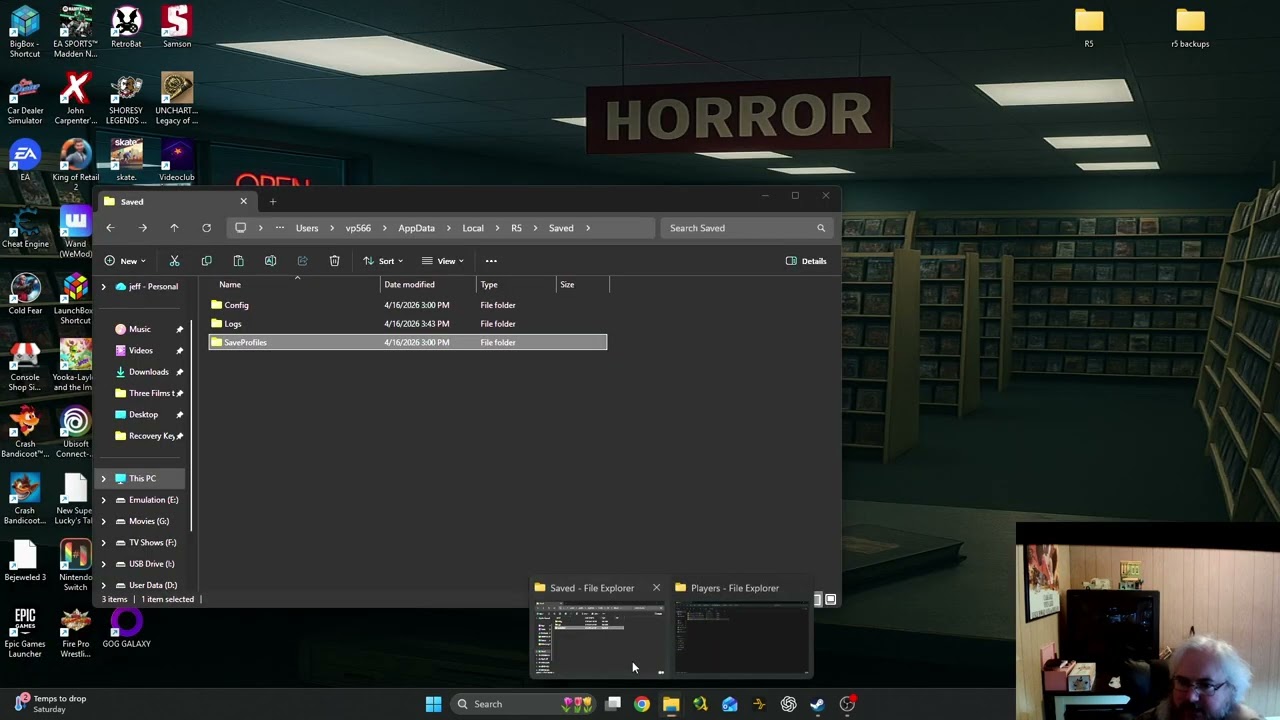
After a bunch of troubleshooting I figured out how to recover your save game on Windrose after getting stuck at loading screen.
warped sun
mortal delta
We just gotta deal with it and cry alone, we wil just be told our internet is th...
u got the same problem? is it because of the cloud save?
 neat gust
same, the Game didnt found my dedicated server 😢
mortal delta
warped sun
u got the same problem? is it because of the cloud save?
I think there netcode is just trash, I hear nothing but issues with p2p connection and its just as bad with dedicated servers
light oar
Multiple accounts in Accounts R5 folder and backups folder is main culprit
 mortal halo
ok i just delete my save on R5 it works but now i lost all i had , so need to restart again ROFL
 potent nimbus
My game wont open since last night, was playing till 2 AM no problem and now its 9 AM and broken, what happened and how do I fix it?
I dont even get to the launch main menu, just infite loading screen of the game tips loading screen
mortal halo
well they send me this https://playwindrose.com/faq/ and it works but now i lost all i had rofl
light oar
After a bunch of troubleshooting I figured out how to recover your save game on Windrose after getting stuck at loading screen.
potent nimbus
I'm not even getting to chose my save file, why would I need to delete them?
mortal halo
go check the video it will help u i got to late now rofl
well iam not a tech guy i just wanted to play the game ...
pliant basalt
light oar
https://www.youtube.com/watch?v=XG3yeCZo42I
Thx mate for me did that work 😉
mortal halo
GL thx
light oar
pliant basalt
Thx mate for me did that work 😉
Cheers mate
mortal halo
iam go rate the game now ... they deserve a 5 star game 🙂 just for this because its player fault donno how to manage their own files 🙂
potent nimbus
File management is automatic, I dont think you need to insult everyone that has a problem, including yourself - errors happen on early access games, so it's expected - i'll watch the video and see if it's relevant 🙂
neat gust
hi, i played today till 3 am all is fine, new stuff and better performence, after server restart i can play solo but the game didn´t find my dedicated server, invite code didn´t work, dirct IP didn´t work, only Solo game work. help pls.
 winter hamlet
I watched the video, it seems to work, but the folder appears different than what it shows. I'm not touching anything for now because I'm afraid it might make things worse. I hope they fix the problem today.
winter hamlet
neat gust
hi, i played today till 3 am all is fine, new stuff and better performence, afte...
You're lucky, there are people like me who can't even access the menu😂 😭
potent nimbus
light oar
https://www.youtube.com/watch?v=XG3yeCZo42I
I only have one account file, and the player files I delete just get re-created as soon as I launch
This is my life now
 light oar
winter hamlet
I watched the video, it seems to work, but the folder appears different than wha...
light oar
winter hamlet
I watched the video, it seems to work, but the folder appears different than wha...
You need to adjust for your setup - there is file AccountDescription.json in R5 folder that has the correct account number inside it. delete anything that is not account with that number. Also stop cloud saves
tha account number will be different for everyone
light oar
potent nimbus
I only have one account file, and the player files I delete just get re-created ...
Go back in this thread untill you find Windrose optimisation guide video. read the convo there. There was a gamer with the same problem, I walked him through it and it worked
potent nimbus
light oar
Go back in this thread untill you find Windrose optimisation guide video. read t...
Got a datestamp so I'm not scrolling for a while?
light oar
1:45 morning CEST
potent nimbus
Thanks, will look
potent nimbus
light oar
1:45 morning CEST
I have done all that already, no such luck 🙁
My savedprofiles backup folder only has one entry in it too, and it's todays date, so i get the impression somethign has gone VERY wrong
light oar
potent nimbus
I have done all that already, no such luck 🙁
My savedprofiles backup folder on...
going to PM
 woeful helm
anyone else having problems with servers not letting players connect?
 mellow geode
yep
 sand torrent
Hey i kept getting crashed for no reason
It was fine yesterday, i even lowered my graphics
Is there a way to find a log to these crashes and a way to report it?
mellow geode
So this is a known issue just started. interesting
 still trail
sand torrent
Hey i kept getting crashed for no reason
It was fine yesterday, i even lowered m...
still trail
sand torrent
Hey i kept getting crashed for no reason
It was fine yesterday, i even lowered m...
%localappdata%/R5/Saved/Logs
still trail
woeful helm
anyone else having problems with servers not letting players connect?
just disconnected/reconnected, no issues here
mellow geode
still trail
just disconnected/reconnected, no issues here
what country you in?
woeful helm
restartomg server temporairly fixes it
still trail
US
mellow geode
it might be a regional issue
 wanton vortex
So, my friend had just bought this game for me and I keep getting the DirectX 12 popup by I check my system and it says I have directX 12
 stray pier
mellow geode
it might be a regional issue
stray pier
mellow geode
it might be a regional issue
I have the same issue with connecting to my server and im in EU
mellow geode
stray pier
I have the same issue with connecting to my server and im in EU
I cant even load into the game atm. Infinite loading screen after Unreal logo
tried to disable cloud saves, no dice
stray pier
Oh, i replied wrong message lol. Im having same issue with @woeful helm
mellow geode
potent nimbus
This is my life now
Ever figure out the issue?
bitter prairie
the code invitation and the ip address do not see the server, what could be the reason?
 gritty laurel
Im unable to play on my server or single player it just crashes to windows everytime I restarted my nitrado server and same issue i tried to start a fresh solo game which loads in for about 3 seconds and crashes still 😅 the hot fix update is more of a hotbreak for myself was fine the night before and now its unplayable.
 dull kraken
hat jemand eine ahnung warum ich bei windrose im ladebild stecken bleibe nach dem ich mods getestet habe auf nem server und es nicht rein geladen hat wo ich die server mods installiert habe kam ich nicht weiter als dem ladebild und dann hab ich alles neu gemacht und bleibe immer noch im ladebild
 inner orchid
lime topaz
Seems so, the frigate is being reported to lose framerate when fighting other fr...
inner orchid
lime topaz
Seems so, the frigate is being reported to lose framerate when fighting other fr...
Damn
lime topaz
wanton vortex
So, my friend had just bought this game for me and I keep getting the DirectX 12...
Share basic specifications of your PC or share a full dxdiag report.
One way or another your PC is below minimum requirements, the question is if it's just a software issue or not.
 gilded flicker
hay guys just checking has anyone had the issue with game game not going passed the loadinfg screen???
 nimble cradle
Hey Folks, I get this desync/disconnect occur. - https://www.youtube.com/watch?v=TkkZtJV15wc
I raised a ticket with server provider, and they said come here.


 sand void
nimble cradle
Hey Folks, I get this desync/disconnect occur. - https://www.youtube.com/watch?v...
sand void
nimble cradle
Hey Folks, I get this desync/disconnect occur. - https://www.youtube.com/watch?v...
We are having the same issues on our server. Seams to be very common
nimble cradle
Hopefully devs sort it soon
 orchid prism
light oar
Go back in this thread untill you find Windrose optimisation guide video. read t...
orchid prism
light oar
Go back in this thread untill you find Windrose optimisation guide video. read t...
Hey, if we do that method, are there any risks to lose our last saved ?
potent nimbus
orchid prism
Hey, if we do that method, are there any risks to lose our last saved ?
I managed to restore my current save, the one used previous was lvl 8 instead of 10, but i just restored the latest "player" folder files, 1 by 1 and got my toon back from my last session
check the thread i linked in reply for more detail
A little trial and error to be sure, but till Devs give the green light that Steam sync is fixed it's all we got
sand torrent
Hey anyone have issue? I kept getting crash now after launching the game
sometimes after seeing the unreal engine logo
 tired night
sand torrent
Hey anyone have issue? I kept getting crash now after launching the game
sometim...
tired night
sand torrent
Hey anyone have issue? I kept getting crash now after launching the game
sometim...
Same here
The game load to the menu then get stuck when loading my save
 compact lodge
Anyone else had issues with instant crashing on startup?
Silent crash, no error message or anything
Starting up the game, instant crash
 night tulip
compact lodge
Anyone else had issues with instant crashing on startup?
night tulip
compact lodge
Anyone else had issues with instant crashing on startup?
Had that yesterday after updating my graphics drivers. Did a rollback and that fixed it.
light oar
Cyberpunk vibes
light oar
compact lodge
Anyone else had issues with instant crashing on startup?
@compact lodge check game support infinite loading subthread
 woven trellis
Good morning everyone. My server had a problem and I think I lost the save. However, I set up another one that also uses Steamcmd, but every time I try to enter the game, even before reaching the server selection screen, the game just shows "loading" and doesn't go any further. Does anyone know what to do? I already tried what the friend in the video above did in a video post, but it didn't work. Anyone help?
 simple verge
Ye seems like lot of issues connecting to servers today 🙁
Players cannot load in...
gritty laurel
simple verge
Ye seems like lot of issues connecting to servers today 🙁
Players cannot load ...
Not just servers its also single player, i cant play single player even on a new game nor can I play my nitrado server the game just crashes on load and shuts down every attempt. The game at this point is totally unplayable.
winter hamlet
but they still haven't solved the game login problem?
 hidden geode
I'm stuck on an infinite loading screen on my single play game like most people now.
 waxen geyser
@hidden geode Check the 0.10 folder, then intio players folder, within it, if you have one character you'll probably have two folders. one will have many files within it, the other just a few. Delete the one with few files and you should be able to launch the game
Basically it seems that an empty character profile is created as a duplicate of existing one and game won't launch because of it. Deleting the imposter helps
hidden geode
waxen geyser
Basically it seems that an empty character profile is created as a duplicate of ...
Thanks for the advise but i only have 1 folder in the players folder.
winter hamlet
waxen geyser
Basically it seems that an empty character profile is created as a duplicate of ...
I get the character code and then another code that is the same as the first but with the addition of "backup" at the end
waxen geyser
winter hamlet
I get the character code and then another code that is the same as the first but...
That is under SaveProfiles, right?
when you go into one code

 dense sparrow
Anyone having issues loading the main menu?
I’ve tried save profiles and such
Nothing works
waxen geyser
dense sparrow
I’ve tried save profiles and such
Nothing works
look under players folder here
if you have more folders than characters, one should be deleted
that is one of the solutions I guess
 fresh shoal
hello guys, after the update the game is acting very weird and worse 🙁
i have a i9 - 13 900k and a 4090 but whatever i do the game just locks up at 30 fps even tho i have set it ingame higher. and gpu and cpu usage is in the 10-20% range ... so its deffinitely not a hardware issue. Other games run flawlessly at 60+ frames so its not even locked somewhere on my pc like nvidia panel.
does anyone know what to do?
also every time i turn the game off and on it resets my settings.
dense sparrow
waxen geyser
look under players folder here
Yeah that’s the problem
It doesn’t work for me cause my player character is the one that’s corrupted
 dense sparrow
Welp time to do something else til this is fixed ಥ_ಥ
waxen geyser
and none of the backup options don't work?
dense sparrow
Can’t bring myself to play after all the resources/time invested
dense sparrow
waxen geyser
and none of the backup options don't work?
Nope
Scoured the internet for options
Event went through individual files
dense sparrow
waxen geyser
and none of the backup options don't work?
Used to be big into Valheim modding scene
So I’d like to think I know what I’m doing (but not really lmao)
So I’m just scratching my brain at what I can do here now
 sour tundra
dense sparrow
Anyone having issues loading the main menu?
sour tundra
dense sparrow
Anyone having issues loading the main menu?
I'm also having trouble getting it to start. It just keeps loading and loading, and I can't even get to the main menu...
waxen geyser
dense sparrow
Used to be big into Valheim modding scene
So I’d like to think I know what I’m ...
I'm trying to find out how to remove that one corrupted folder from geforce now 😄
the syncronisation is borked, it won't delete something you deleted locally, instead it will add the folders
simple verge
waxen geyser
and none of the backup options don't work?
yeee, manual backup os best T_T
 raw blade
I keep getting "fatal error" after sometimes 5 mins or then 45 mins , yesterday i played for 4 hrs and was no error at all . seems to do it randomly not sure what is going on
minor rune
anyone fixed it yet?
sour tundra
I've tried fixing the game, and I've even uninstalled and reinstalled it. I still can't log in to the main menu — what's going on?
dense sparrow
waxen geyser
I'm trying to find out how to remove that one corrupted folder from geforce now ...
I was running it without cloudsave
So no loading in additional folders
dense sparrow
sour tundra
I've tried fixing the game, and I've even uninstalled and reinstalled it. I stil...
But the issue definitely is a cloud sync issue
It corrupts the files due to creating too many player/id folders and then getting confused
And the only solution I’ve found (and don’t want to proceed with) is deleting my main character file and starting from scratch - which….no thanks
 dull trench
Unfortunately, game still crashes with Fatal Error. Other UE5 games run well on my system. Mostly happen while interacting with things or weather changes. Can't enjoy as it's crashing every 20 min +-
sour tundra
Delete my main character? Sorry, no way.
They must be able to figure out a way for me to get back to the menu where my character is. I only play on one server—am I seriously supposed to delete my save file, lose my level 13 character and all my quest progress, just so I can get back to the main menu? There has to be another solution.
It wouldn’t be fair to lose everything.
 quick ginkgo
The game has been working perfectly for the past 3 days, but today it started hanging on the loading screen. After waiting, I get an 'Application Hang Detected' error message. I haven't changed my hardware, and my PC specs are attached. Please help.


 wicked token
quick ginkgo
The game has been working perfectly for the past 3 days, but today it started ha...
wicked token
quick ginkgo
The game has been working perfectly for the past 3 days, but today it started ha...
I also have this issue now, also looking for help
woven trellis
potent nimbus
https://discord.com/channels/1260209458924224542/1499697549504942131
resolveu.
mortal delta
Keeping getting kicked back to menu from loading screen while trying to join friends nitrado server. they see my boat spawn then a minute or so later I get booted back.
Ive played in it before
server/game are both up to date (also no mods)
im on ethernet
light oar
minor rune
anyone fixed it yet?
Yes at least 3 times on this forum only. Check game support subforum
light oar
sour tundra
I've tried fixing the game, and I've even uninstalled and reinstalled it. I stil...
 balmy shoal
i found the 0.10.0 location budont understand what im looking at

 wanton forge
My game is stuck on loading and the character screen doesn't appear. What should I do?
 last sleet
someoone had a guide for how to move your single player game save over to a dedicated server, how do i do that or can someone pin me that guide?
i got a nitrado server but i wanna bring my save with me to it before i start playing on it
light oar
Quick, quick version. Enable steam cloud saves, start game, alt-f4, stop cloud sync. Find xxxxxxxxx(some numbers)_backups. Copy to some other place. Delete xxxxxx_backups folder. Go into main save folder, find 0.10.0 folder, delete contents of that folder, not the 0.10.0. Start game, create char and world. Exit game. Go into copied backups folder, find 20260501_time of your choosing
last sleet
was that in reference to me ? lol
light oar
Copy contents of backup 0.10.0 to main 0.10.0. Profit
light oar
last sleet
was that in reference to me ? lol
No
 iron ridge
last sleet
was that in reference to me ? lol
iron ridge
last sleet
was that in reference to me ? lol
Look in #1298583059402063926 for the guide to set up a Dedicated Server. Steps to do what you seek is in there.
mortal delta
mortal delta
Keeping getting kicked back to menu from loading screen while trying to join fri...
bump
last sleet
iron ridge
Look in <#1298583059402063926> for the guide to set up a Dedicated Server. Steps...
ugh this only shows how to set it up as if your computer is the host......not if youre using a service porvider likle nitrado
iron ridge
last sleet
ugh this only shows how to set it up as if your computer is the host......not if...
Somewhere in there should explain how to migrate your save from SP to MP. Should not matter if it is a host company or not. Providing of course they allow you to upload anything to the server. Been forever since I used a host company.
last sleet
yeah i think i found it buut some of the infortmation already isnt lining up
im transfering it from steam account to nitrado
and the file pathing is diff for me....when i click on my r5 folder there is no "saved" folder to click on after that
only binaries content and plugins
iron ridge
last sleet
and the file pathing is diff for me....when i click on my r5 folder there is no ...
Okay in SP the save is not in the install folder it is in User/AppData/Local/R5 you realize this?
The path on the server will be a bit different therefore the need for the guide.
dense sparrow
light oar
Quick, quick version. Enable steam cloud saves, start game, alt-f4, stop cloud s...
ive tried that! no luck
iron ridge
I have not personally done this but I am looking at my save files right now trying ot help someone else.
light oar
dense sparrow
ive tried that! no luck
Do you have save sync disabled and deleted contents of 0.10.0 folder, then started the game?
dense sparrow
light oar
Do you have save sync disabled and deleted contents of 0.10.0 folder, then start...
yes, then made character, and started again with cloud on - chose cloud save - same issue
tried deleting all but 1 character file per time, only the character im trying to save is corrupted
light oar
dense sparrow
yes, then made character, and started again with cloud on - chose cloud save - s...
Nonono
dense sparrow
light oar
Nonono
ok? is there another method?
last sleet
ok clearly im dumb, why wont it let me upload my wolrd folder onto nitrado am i clicking the wrong thin theres only add new directory, create new filed, and upload file......i thought itd be upload file but every time i go to upload the world folder it oppens it up and wants to upload only a single file fromt he whole folder i need to uploaod
 hearty creek
Its game playing upto wont let me login to server or offline mode just stuck on loading screen the goes back to main menu any ideas
iron ridge
last sleet
ok clearly im dumb, why wont it let me upload my wolrd folder onto nitrado am i ...
Okay it has been forever since I have had a host company however back then you needed 3rd party software to do this. Only worked if the host allowed it. I would consult the help Section with Nitrado should have your answers.
last sleet
yea i finally found a video
hes goin through all thattydownloading winscp now like u said
 fallen cliff
when setting up a dedicated server, which ports needs to be open? I dont use steamcmd, i set servers up myself
iron ridge
last sleet
hes goin through all thattydownloading winscp now like u said
Good to know TY as I was not sure something like that was still needed. Been more than 5yrs since I used a host.
iron ridge
fallen cliff
when setting up a dedicated server, which ports needs to be open? I dont use s...
Does not matter how you get the files just follow the guide in #1298583059402063926
That is direct to the guide different section.
mortal delta
mortal delta
Keeping getting kicked back to menu from loading screen while trying to join fri...
bump
potent nimbus
Any news on when we can turn Steam sync back on?
iron ridge
mortal delta
bump
Have a look in #1493364524705775657 even that first thread in there may have some help for you.
iron ridge
potent nimbus
Any news on when we can turn Steam sync back on?
#│announcements they mentioned that with yesterday's update.
 fast bison
this shows every time i try to load the game i verified the files tried backup folders but still
 iron ridge
fast bison
this shows every time i try to load the game i verified the files tried backup f...
iron ridge
fast bison
this shows every time i try to load the game i verified the files tried backup f...
Look in https://playwindrose.com/faq/ see if any of that helps. Also found in the first thread in #1493364524705775657
mortal delta
iron ridge
Have a look in <#1493364524705775657> even that first thread in there may have s...
yea non of whats listed is relevant, not sure what approach to take, I can join my friends p2p stuff just fine but I tend to get booted often and it makes it hard to explore
on the other hand I can rarely join dedicated servers but once i get it im fine until I decide to leave or get a bug that forces me to.
drifting prism
Hey has anyone figured out why the server throws so muchg white noise errors?
 fluid crystal
Heyyy any1 knows any new fix for the infinite loading screen? plsssss
fluid crystal
potent nimbus
https://discord.com/channels/1260209458924224542/1499697549504942131
It doesnt' work :/ already tried like 15x times
 snow pivot
Played the game fine on the 29th, and now on May 1st no go with being stuck on the loading screen
Not too keen on deleting all my progress
 kindred grove
fluid crystal
Heyyy any1 knows any new fix for the infinite loading screen? plsssss
kindred grove
fluid crystal
Heyyy any1 knows any new fix for the infinite loading screen? plsssss
do you change ur pc where u should play?
fluid crystal
kindred grove
do you change ur pc where u should play?
nope, same pc
kindred grove
did you try to paste the content of the backup folder and try?
dense sparrow
kindred grove
did you try to paste the content of the backup folder and try?
i have - no such luck
kindred grove
fluid crystal
nope, same pc
and disable steamcloud if u play all time in the same PC
fluid crystal
kindred grove
and disable steamcloud if u play all time in the same PC
yea all that
still have the infinite loading screen
kindred grove
fluid crystal
still have the infinite loading screen
If u tried the backup folder with steamcloud disabled idk what to do next. You have something corrupt in ur files. You can try to do a copy of saveprofiles folder in ur desktop. Delete that from the game directory and lauch the game. If it lauchs properly is something corrupted on ur saveprofile folder and idk how to solve that
fluid crystal
I've already deleted everything related to the game, reinstalled i, and the problem persists even though I have a “new” copy of the game and the original R5
 paper zinc
Question for pc builders thay know their stuff about cpus and motherboards.
Im thinking about upgrading my ryzen 7 5800x to a ryzen 7 9800x3d. But
Can I use my motherboard which is a Mpg x570 gaming pro carbon wifi ms -7b93
With the ryzen 7 9800x3d cpu?
My ram is currently a trident 16 gig Ddr4 ram as well
fallen cliff
ok, i'm trying to setup a dedicated server, i always setup my own, however, another game i also have a server setup for "Return to Moria" also uses the ports 7777-7778, does Windrose have to set to these ports in my router? or can i set them to different ones?
potent nimbus
fallen cliff
ok, i'm trying to setup a dedicated server, i always setup my own, however, ...
You can manually set them
 torn steeple
Any idea for Lightning optimalizations?
 woven horizon
the game is not loading into the menu
I have 70+ hours on the game and last night/today won't load into my game
I fixed it earlier by getting rid of another character I had created and now the issue has returned
I have tried all the so called "fixes" and I do not play with steam cloud enabled
potent nimbus
woven horizon
the game is not loading into the menu
I have 70+ hours on the game and last nigh...
Then you likely didnt do it correctly
https://discord.com/channels/1260209458924224542/1499697549504942131
run through the convo in this thread, it will fix it if it relates to the save files
 flat tiger
woven horizon
the game is not loading into the menu
I have 70+ hours on the game and last nigh...
flat tiger
woven horizon
the game is not loading into the menu
I have 70+ hours on the game and last nigh...
get the earliest back up save u have and replace the 0.10.0 Folder with your current one
like overwrite the 0.10.0 folder by using the one from the backup
 silk stag
potent nimbus
https://discord.com/channels/1260209458924224542/1499697549504942131
run throug...
silk stag
potent nimbus
https://discord.com/channels/1260209458924224542/1499697549504942131
run throug...
perma fix?
potent nimbus
if you keep Cloud Sync off, yes
silk stag
kk
flat tiger
potent nimbus
if you keep Cloud Sync off, yes
dont need it off
silk stag
thats not the video right, or should I just follow the video cuz its easier
potent nimbus
silk stag
thats not the video right, or should I just follow the video cuz its easier
Video gives a TLDR, run through the screenshots of the chat, thats the attention to detail version
 livid current
haw to rolll back to wersien befor update
potent nimbus
I also followed the video with no luck, speaking with apop solved it
silk stag
potent nimbus
I also followed the video with no luck, speaking with apop solved it
when he says deleting both backup directories, does he mean RocksDB_v2_backups and xxxxxxxxxxxxx_backups?

 potent nimbus
No, the two that were in my screenshot
silk stag
kk
potent nimbus
So for you or anyone else following it, it will be however many number of folders you have under the same file directory
 wary ledge
game keep locking up after a fast travel to Tortuga
woven horizon
potent nimbus
No, the two that were in my screenshot
it doesn't say anywhere where those 2 are in your screenshot
silk stag
woven horizon
it doesn't say anywhere where those 2 are in your screenshot
its under SaveProfiles, xxxxxxxxxxxxxxxx_Backups
potent nimbus
C:\Users\Username\AppData\Local\R5\Saved\SaveProfiles\numbersandothermagicalitems_Backups
 west shoal
Any possible solution for endless loading screen on intro for geforce now users ? I'm running it through mac so I have no ability to have local files, even temporarily
I am referring to endless loading screen on start
potent nimbus
does Geforce now get you to the same VM each time?
Never used it but i know its a "rent a virtual gaming PC" type of model right?
 honest glade
since this update the game just loading
potent nimbus
Read up 🙂
 woeful dagger
since the patch happend the game runs really poorly for me, before it was buttery smooth, anyone else got the same issue?
 leaden dragon
Some players are having trouble joining friends using an Invite Code after installing the latest patch (0.10.0.4.268). This update included changes related to language handling, and for some users it has unintentionally affected how connections are made between different regions.
I ran into the same issue when trying to connect with friends in another country. Neither “Direct IP” nor the “Force Relay Connection” option worked.
What finally solved it was adjusting my VPN. I changed my VPN location to match the country associated with the Invite Code, and the connection worked immediately.
If you’re using a VPN, try setting it to the same country as the server or the friend who sent you the Invite Code. This should resolve the connection problem for most people.
honest glade
still cant play the game what are the devs doing , they put a update and now game is unplayable
 toxic hamlet
RIP my save
the backups are all overwritten. great backup mechanism devs
this is going to make me flip tables

 warm jasper
Had another crash after fast traveling to Brethren of the Coast base (6-10 lvl), looks like their Tortuga equivalent. Fast traveling my alt character to the same spot and relogging my main seemed to fix. Is this just something happening at all large faction bases now?
Otherwise, the game runs great and I love the gameplay and freedom it offers
 sly raptor
I started Windrose once, played up to level 3, and now I get stuck on the start screen every time I launch it. I can't get back in, and I've already disabled cloud saving, but it doesn't work. Does anyone know when this will be fixed?
 chrome remnant
sly raptor
I started Windrose once, played up to level 3, and now I get stuck on the start ...
chrome remnant
sly raptor
I started Windrose once, played up to level 3, and now I get stuck on the start ...
Any updates on that? My freind opens the game and gets stuck in an infinite loading screen aswell. Can a mod give us some info about the situation?
sly raptor
chrome remnant
Any updates on that? My freind opens the game and gets stuck in an infinite load...
No Updates....i payed 30 Bucks for the game and i cant get a refund on steam...this must be fixed
mortal delta
tips for getting past the loading screen when trying to join a server? faq dosnt have anything ive not tried before, I can connect to p2p just fine (but I normally end up dcing not long after) compaired to dedicated where I struggle getting in but dont dc when I do
silk stag
mortal delta
tips for getting past the loading screen when trying to join a server? faq dosnt...
silk stag
chrome remnant
Any updates on that? My freind opens the game and gets stuck in an infinite load...
mortal delta
silk stag
https://discord.com/channels/1260209458924224542/1499697549504942131
dawg that bug is for the menu loading screen </3
silk stag
deleting my backups under saveprofiles folder has always fixed it for me, but then you lose your characters and worlds and keybind settings
silk stag
mortal delta
dawg that bug is for the menu loading screen </3
oh didn't realize they were two different bugs
mortal delta
yea, the menu 1 is a file problem normally caused by steamcloud and the multiplayer one is between the games bad netcode/ur own internet/firewall stuff
im lost because I can get into p2p fine but cant load into a dedicated, my friends see my boat load in then i get booted back to the menu
dull trench
Updated Crash Report
Issue:
After the latest update, the game runs longer (up to ~1 hour), but still crashes with a Fatal Error. The screen freezes, but the background audio continues.
Reproducibility:
Crash occurs after extended playtime (15–60 minutes). Timing varies.
System:
RTX 3080 Ti Laptop GPU, Windows 11, multiple clean NVIDIA drivers tested.
Behavior:
Screen freezes
Audio continues
Fatal Error appears
No VRAM error
No overlays, no mods, clean install
Suspected cause:
Likely Render Thread / RHI deadlock under UE5 DX12 (Nanite/Lumen/streaming).
My system is stable in other UE titles.
 thick flicker
toxic hamlet
RIP my save
thick flicker
toxic hamlet
RIP my save
me as well lose my 60hours playtime in my nitrado. gg dev
 timid heath
After installing the latest windows 11 update (KB5083631) i cant enter any world. Upon loading in it gets stuck. Music starts to play and after aprox 2 minutes the game crashes with an error message.
Edit: error message says the application has hung and will now close. We apologize for the inconvenience".
Uninstalling the windows 11 update did not fix the issue.
light oar
toxic hamlet
the backups are all overwritten. great backup mechanism devs
You may try to enable cloud saves, then run game once into infinite loading screen, just to repopulate backups folder on your machine, then disable cloud sa ves
 paper blade
apologies if this has been asked, i did search and not seeing it. i want to join a server by direct IP but when i go to play -> connect to server i only have invite code option. i have seen screenshots of people having a tab for direct ip but i dont have this tab.
neat gust
It works now, server found and no eternal loading screen, everything is fine 👍
 stark ore
Hey yall im new and am having some trouble with my game. I was playing it fine this morning and then after about the 2nd or 3rd hour, the game just closed itself. I tried opening it back up and got back to the menu and hit play and put me in the loading screen per usual. It then does one of two things. the first is it takes me back to the main menu or two it just closes the game. There was at one point it said out of video memory, but ive tried to work around that but still cant seem to get it to work. Thoughts?
 cyan peak
stark ore
Hey yall im new and am having some trouble with my game. I was playing it fine t...
cyan peak
stark ore
Hey yall im new and am having some trouble with my game. I was playing it fine t...
was just typing in here that i just started getting this as well. Load into my server, load screen, and then kicks me to main menu. Game doesn't crash, however after 3 attempts.
 toxic hamlet
light oar
You may try to enable cloud saves, then run game once into infinite loading scre...
toxic hamlet
light oar
You may try to enable cloud saves, then run game once into infinite loading scre...
It's on a dedi server.
light oar
toxic hamlet
It's on a dedi server.
Then I do not know
light oar
Ppbly the same but do not have it to test
stark ore
Thats what it seems, i just dont know how to fix it or if i can
hearty creek
i give up for today hopfully fix by tomorrow
 snow burrow
stark ore
Thats what it seems, i just dont know how to fix it or if i can
snow burrow
stark ore
Thats what it seems, i just dont know how to fix it or if i can
tbh it happens most when i fast travel so for the most part i can ignore it
stark ore
right, but in this case i cant get past the loading screen after trying to hit play
snow burrow
that was just happening for my friend we have yet to solve it and he is on nvidia gpu not sure but it sounds like windows mightve blundered an update cousing issues based on above^^
stark ore
interesting
 sacred hedge
Hello. Are the Windrose servers down at the moment?
autumn jewel
welll\
my issues of the game crashing my wifi router is gone now
idk what wwould have caused that to happen
warm jasper
snow burrow
tbh it happens most when i fast travel so for the most part i can ignore it
The crash, if that's the discussion, also happens on fast travel but to large places.
 lyric cipher
hi i have a infentiy loding scren.
 clever crescent
Anyword on the servers crashing when gathering resources yet?
fickle tiger
try and load a server... crash, try turn off frame gen... crash, save settings... crash....
lyric cipher
at this moring it was ok but now now chane
willow seal
Hello, I am also getting an infinite loading screen. I have disabled cloud storage, verified integrity of the files, updated my drivers, updated the game, restarted my pc, and turned off automatic updates. I have also renamed the R5 and SavedProfiles folders. Nothing is working.
fickle tiger
welcome to our world @willow seal
willow seal
Outstanding lol
 pulsar coyote
servers down? i try to alocate a server in NA and it says loading but kick me back to the main menu
 foggy kelp
pulsar coyote
servers down? i try to alocate a server in NA and it says loading but kick me ba...
foggy kelp
pulsar coyote
servers down? i try to alocate a server in NA and it says loading but kick me ba...
having similar issue. I solved by switching to a different region
 jagged hazel
hey, I have an issue where my girfriend cant join my game. It says that she left on my screen but the never even has joined to begin with + stuck on the loading screen even after that message. Same thing goes for when I want to join her
 mellow depot
having an issue joining a friend's server. Keep getting connection issues or says that the server cannot be found
 lean quartz
Infinite Loading screen too, for me. When it loads, it only comes up with this screen below.
I have tried the cloud storage thingamabob but still the same. I wanted to the the public-test method but I don't know how to access public-test.
I'm bummed and on a dead-end :/ 🙁
 snow burrow
sounds like NA servers are cooked for now RIP
jagged hazel
lean quartz
Infinite Loading screen too, for me. When it loads, it only comes up with this s...
it really sucks man, i've been trying to play this game for 3 hours to just not be able to connect. Im not even NA, im EU
 fiery obsidian
this game has been in early access for ~2 weeks. Not gonna try to troubleshoot anything for a while lol. why pull your hair out
lean quartz
fiery obsidian
this game has been in early access for ~2 weeks. Not gonna try to troubleshoot a...
It's the try-hard thomas battle on level 5 then meeting the infinite loading and checking out FAQ just to be told to delete my saves. Hahahahahah yes, I am pulling my hair out from different parts of the human anatomy than one. 🤣
fiery obsidian
lean quartz
It's the try-hard thomas battle on level 5 then meeting the infinite loading and...
early access gaming is either accepting it is broken and subject to change, or this
always pick option 1
 thorn fable
Anyone else having problems with all servers down? Is it normal now or it's my problem?
 upbeat jacinth
thorn fable
upbeat jacinth
thorn fable
 lean quartz
fiery obsidian
early access gaming is either accepting it is broken and subject to change, or t...
lean quartz
fiery obsidian
early access gaming is either accepting it is broken and subject to change, or t...
I don't mean to be rude. I understand your point. I am not \really\ pulling my hair off because of this issue. Lol.
This is a tech-support channel and people will report game issues in this channel. If you are just going to tell people not to "report" issues then what's the whole point of the channel?
fiery obsidian
who said anything about being rude or telling people not to report something
 granite yew
so Servers are not able to connect?
I am having that as well...
just wanted to know , before I go troubleshooting and just aceepting they are down for now 🙂
 frozen briar
granite yew
just wanted to know , before I go troubleshooting and just aceepting they are do...
frozen briar
granite yew
just wanted to know , before I go troubleshooting and just aceepting they are do...
facts, I was about to start changing all kinds of server stuff on my dedicated server lol
lean quartz
fiery obsidian
who said anything about being rude or telling people not to report something
You seem to be gatekeeping people from reporting issues because we should be "accepting" problems because the game is early access. Weird take.
fiery obsidian
I agree, very weird take
 high helm
Hello, I can't c onnect to my server? I click host and try to start it. It's trying to start as SEA wehn im NA too. but it loads, then puts me to main menu?
frozen briar
high helm
Hello, I can't c onnect to my server? I click host and try to start it. It's try...
Hello, it appears a lot of people are currently having the same issue. You arn't alone my friend.
granite yew
@frozen briar I feel ya dont want to make it worse by then goofing up the server 🙂
warm jasper
I bet if a lot of people have same issue they'll work on fixing it
 sharp plinth
Same issue here 🙂
granite yew
did some testing, created a new character and did offline, started up and let me play, but could not connect via direct ip or previously played servers buttons..
iron ridge
Guys highly suggest that you check no mods are running for anyone on the server. Server owners lock the server test alone to be sure.
Then submit a bug report do not just assume the devs read all this. If we all do our part in helping the development the game will rise up to be the best pirate game since Sid Mier's Pirate
 dreamy ivy
Anyone Else Having A Problem With The Game Booting? Mine Boots To A Black Screen Then Stops Loading, No Load Screen No Nothing Just Black Screen Then Stops
 outer python
After a number of attempts I was able to load into my save
 tired walrus
Dedicated server gets this error on start, known issue after the update or have I done a stupid somewhere?
Cannot create Coop NetServer. Error Login finished with error. ErrorMessage Server Authorization failed. Error 'Internal error [Internal error]' [D:\Source\Build\work\gameRepoCheckoutDir\Source\R5DataKeepers\Private\R5DataKeeperForServerCoop.cpp:214]
 granite tusk
any having a issue hosting a na sever
 bleak otter
Yes. Same. Other regions hosts successfully.
 fervent halo
bleak otter
Yes. Same. Other regions hosts successfully.
fervent halo
bleak otter
Yes. Same. Other regions hosts successfully.
Oh I hadn't tried hosting via another region. I'll test it on my end.
granite yew
I use gportal, and not able to login kicks, back to main menu both with recently played , and direct IP connect.
dreamy ivy
dreamy ivy
Anyone Else Having A Problem With The Game Booting? Mine Boots To A Black Screen...
Fixed It NVM
granite yew
or invite code. seems windrose can't talk to NA servers if they can connect to other regions, haven't confirmed.
fervent halo
Confirmed: Hosting a Save on NA kicks me back to Main Menu. Using CIS Server works.
I am located West Coast USA, utilizing a Save Sync file, if that information helps anyone troubleshoot.
granite yew
@fervent halo thanks for info.
I guess I ll wait it out.. maybe go touch some grass or something 🙂
 abstract ice
Dedicated server updated using SteamCMD is a different version that the steam game client currently so we can't join the server.
 cerulean sphinx
I didn't play the alpha but I did play the demo (alot). I just purchased the Early Release (fixed income, old, I can remenber when arcades where just pinball and pool tables) anyway the ER is unplayable. It's stuck on a loading screen forever then finally gets to what looked like the main menu minus the character and the menu with the only option is to quit. I think I'll give a few days to see if It's resolved, if not I'll submit for a refund. 0j omnjk
lime topaz
abstract ice
Dedicated server updated using SteamCMD is a different version that the steam ga...
Inspect steamcmd logs and see where it errors out.
 keen ridge
Is it just an NA problem currently or effecting everything? i was able to get on earlier but cant now at all
 hollow sand
I was about to ask the same, are the NA servers down? I keep trying to load in and going back to the main screen - halp
abstract ice
lime topaz
Inspect steamcmd logs and see where it errors out.
No error. The server runs fine but when trying to connect within the game client there is an error that says Server and Game client are different versions
I'm trying to copy files from the Steam game client's \R5\Builds\WindowsServer\ folder to the steamcmd's server location to see if that helps
lime topaz
abstract ice
No error. The server runs fine but when trying to connect within the game client...
You either had an error or it's not the server package that's different than it should be.
 terse kite
Anybody else experiencing game closes and return to main menu? Been playing the last 2 weeks without any issues until tonight
quick ginkgo
Why isn't anyone from the developers responding? There are over 40 people here with the same problem.
 lost gorge
my son bought the game after trying it on family share, my game runs just fine no issues at all here, but after he bought the game, and installed it through his steam. he wont get further then to menu screen, but, there is no menu, just a Quit button in the left corner.. we have tried to delete the game and destination folder on the computer quite a few times, even changed location for the game install, likewise have we tried to unhook the internet, and start that way. it is about all the help i could find online... now i turn to you.. please assist us, i have a desire to sink his vessel
 wet juniper
So I was trying to play this with my friend and was able to get to try and start the server then it kept not loading and going back to the main menu
so I did the whole cloud save disable and everything and now I have the infinite loading screen
 misty pecan
wet juniper
So I was trying to play this with my friend and was able to get to try and start...
misty pecan
wet juniper
So I was trying to play this with my friend and was able to get to try and start...
I came here to see if anyone else had issues setting up their save on Nitrado, im in a main menu loop as well and feeling like I just wasted yet another £10
 lost glade
@urban mason ? @sly adder ? @marble atlas ?
simple verge
misty pecan
I came here to see if anyone else had issues setting up their save on Nitrado, i...
its not only on nitrado
simple verge
quick ginkgo
Why isn't anyone from the developers responding? There are over 40 people here w...
I think even more
wet juniper
Is there no fix for the main menu loop?
 fallow mulch
anyone else having issues self hosting using the NA & EU option?
 rapid wyvern
ok i did this quest at the Ancient Village for the Boar Whistle and i did not get the Whistle and i cant redo it so now how to i get the pet?
high helm
Is NA still not fixed? jeez its been hours
 uncut inlet
anyone has an idea how to fix a bugged quest? i cant board a ship cuz "something is blocked the way" 🙁
 uncut inlet
simple verge
sink him
uncut inlet
simple verge
sink him
unsinkable, needs to be boarded
simple verge
ahhhh
uncut inlet
simple verge
or do this quest on another world
let me try this out
simple verge
ye then make another world and do it again there
[2026.05.01-20.51.26:220][973]LogOutputDevice: Warning:
[2026.05.01-20.51.26:220][973]LogSentrySdk: ---- SentryUrl ----
[2026.05.01-20.51.26:220][973]LogSentrySdk: query=id%3Aa1f9655c06254d0bace30015f77b960d
[2026.05.01-20.51.26:220][973]R5LogDataKeeper: [000968] ...ForServer::OnAccountBLDisconnected::<lambda> Account was disconnected. AccountId 27FC83E7426EA97C51A7F580C59D8FD6. bDisconnected false [D:\Source\Build\work\gameRepoCheckoutDir\Source\R5DataKeepers\Private\R5DataKeeperForServer.cpp:279]
[2026.05.01-20.51.26:221][973]R5LogNet: [000968] R5NetBlServerReactorV2::ProcessOnDisconnect Drop '10' client documents [D:\Source\Build\work\gameRepoCheckoutDir\Plugins\R5BusinessLogicCore\Source\R5Net\Cpp\BL\R5NetBlServerReactorV2.cpp:578]
[2026.05.01-20.51.26:221][973]LogStreaming: Warning: Took 664.53ms to ProcessLoadedPackages
lime topaz
lost gorge
my son bought the game after trying it on family share, my game runs just fine n...
It means the save file is corrupted.
https://playwindrose.com/faq/#faq-saves-restore-client
 bold hollow
Well it must be a Friday problem again. I can’t join the usual server I play on. It tries loading and then I get kicked to the log in screen. Just like last Friday.
 tiny spoke
infinite loading, i have a stable connection and i have verified game files.
This is when im loading the game itself, not connecting to a server.

 weak pecan
Same as thousands of other people
bold hollow
Same for me. I wonder if Nitrado does something on Fridays that trigger this.
weak pecan
Been like this for 3 days
simple verge
dense sparrow
OMG THIS FIXED MY INFINITE LOADING SCREEN BUG - FINALLLY YOHOOOOOOOOOOO
so tehcnically going to test and then retuirning back ?
simple verge
ok will try, wonder if it is for server only or all players would have to do this
lost gorge
@lime topaz Worked, thank you sir
@lime topaz i will be sinking someone, with a cannonball in your honor
dense sparrow
tiny spoke
infinite loading, i have a stable connection and i have verified game files.
Th...
simple verge
dense sparrow
https://discord.com/channels/1260209458924224542/1499411730131062975/14994167689...
i will try 😄
dense sparrow
lean quartz
Infinite Loading screen too, for me. When it loads, it only comes up with this s...
TRY THIS #│public-test-instructions message
IT WORKED AND IM ABLE TO PLAY AGAIN YOHOYOHO
 charred scroll
Just a reminder to keep your cloud saves turned off.
tiny spoke
dense sparrow
https://discord.com/channels/1260209458924224542/1499411730131062975/14994167689...
that's some testing, not a sollution, and i can't even see them type anything about my issue of booting the game.
 pastel meteor
Anyone having the same issue as me with the little boat, staying spawned back at an OLD base location upon reloading the game? Bare in mind, this old base has been flattened.
simple verge
I think this erroir from PTS might be exisitng in PROD
 simple verge
dense sparrow
https://discord.com/channels/1260209458924224542/1499411730131062975/14994167689...
simple verge
dense sparrow
https://discord.com/channels/1260209458924224542/1499411730131062975/14994167689...
do you know how to disable steam cloud on dedi server>/
charred scroll
pastel meteor
Anyone having the same issue as me with the little boat, staying spawned back at...
What's the issue exactly? The little boat never despawns
halcyon yew
FOR THOSE ON DOCKER/UNRAID...i switched it to Host mode and invite code is workign
weak pecan
dense sparrow
IT WORKED AND IM ABLE TO PLAY AGAIN YOHOYOHO
Followed all instructions and still cannot play my main character"level 13" on the PTS on my progressed offline server. I can and have been able to still use my main character on other peoples servers and if i create a new land can use him there
pastel meteor
charred scroll
What's the issue exactly? The little boat never despawns
Little Boat keeps at my old bases location, every load-in. I manually spawn it at my new base.
if i log out, and reload, the ships spawned back the old base. Id assume if there is no base there at all, it would spawn at my new one.
dense sparrow
weak pecan
Followed all instructions and still cannot play my main character"level 13" on t...
so you go into public test server, then go back to live version
public test is solely to purge your corrupted data
charred scroll
pastel meteor
Little Boat keeps at my old bases location, every load-in. I manually spawn it a...
Oh I see. Try spawning it at your new base, get in it, get out, and hopefully that should keep it where it is
weak pecan
dense sparrow
so you go into public test server, then go back to live version
OK, ill try it
dense sparrow
tiny spoke
that's some testing, not a sollution, and i can't even see them type anything ab...
it literally solved my issue, because when u load up publictest is deletes your corrupted data to proceed
 wind steppe
Since I bought the game, I haven't been able to play it because when I try to load a game, I get a message saying I don't have enough video memory (GeForce 3060 12GB). I thought the latest update would fix it, but it didn't. I've even tried lowering the graphics settings to the minimum.
dense sparrow
simple verge
I think this erroir from PTS might be exisitng in PROD
make sure to follow instructions to a t and backup character save beforehand, then when u enter public test mode, u can delete ur corrupted data
dense sparrow
wind steppe
Since I bought the game, I haven't been able to play it because when I try to lo...
try updating your drivers
 grand pelican
you guys stilll cant connect? i cant
pastel meteor
charred scroll
Oh I see. Try spawning it at your new base, get in it, get out, and hopefully th...
ive took that thing across to another island from my new base, and it still persists to respawn back at the old base (seperate island to my new one) once i log out and back in.
tiny spoke
dense sparrow
it literally solved my issue, because when u load up publictest is deletes your ...
interesting. well i started doing it after you said that earlier. just downloaded.
wind steppe
dense sparrow
try updating your drivers
I also updated the drivers and nothing changed.
dense sparrow
load in - then delete corrupt data, wander around singleplayer and leave then reenter to ensure it saves - then exit game, go back to main version. delete d2 files while in menu, then exit and run again as live version
charred scroll
pastel meteor
ive took that thing across to another island from my new base, and it still pers...
It must be homesick... Very strange. Mine stays wherever I leave it 🤔 Might wanna report it as a bug
tiny spoke
dense sparrow
it literally solved my issue, because when u load up publictest is deletes your ...
did you just DL the publictest then go back to defualt immediatly?
simple verge
well i just connected to my server using IP:Port instead of invite code and it works
😄
dense sparrow
tiny spoke
did you just DL the publictest then go back to defualt immediatly?
no you pop in and then you run around singleplayer
simple verge
but how do we access PTS tho
dense sparrow
read the step by step
simple verge
thats the part im missing there XD
dense sparrow
simple verge
but how do we access PTS tho
the password at the bottom of the forum
dense sparrow
simple verge
thats the part im missing there XD
PublicTest292026
simple verge
ah thats inv code?
dense sparrow
you plug that into the text line in the betas section of your game's properties
then it downloads the public test
tiny spoke
hmm
 pastel meteor
charred scroll
It must be homesick... Very strange. Mine stays wherever I leave it 🤔 Might wan...
pastel meteor
charred scroll
It must be homesick... Very strange. Mine stays wherever I leave it 🤔 Might wan...
sure is homesick, bless that little boat 😄 ill somehow find a way to report
tiny spoke
dense sparrow
no you pop in and then you run around singleplayer
with the same char, or any new one?
weak pecan
dense sparrow
so you go into public test server, then go back to live version
Yep did not work when i went back to live version
dense sparrow
weak pecan
Yep did not work when i went back to live version
did you go into the singleplayer game
weak pecan
yes
dense sparrow
tiny spoke
with the same char, or any new one?
same char
weak pecan
yes
dense sparrow
weak pecan
yes
did u run around and make sure it saves, then when u exit and go back to live u re-enter game
dense sparrow
weak pecan
yes
then you delete d2 and d2backup while in the main menu?
weak pecan
yep
dense sparrow
weak pecan
yep
did you try the troubleshooting section of the post?
dense sparrow
tiny spoke
with the same char, or any new one?
I did it on my main and went to my main sp world - ran like 5 feet, exited to menu, went back in, then exited game entirely to go back to live
weak pecan
nah cause it went as at stated it would, I had no issue with the saves coming back
dense sparrow
weak pecan
nah cause it went as at stated it would, I had no issue with the saves coming ba...
i dont quite understand
tiny spoke
i fixed it for them....
 weak pecan
dense sparrow
i dont quite understand
weak pecan
dense sparrow
i dont quite understand
Troubleshooting is only if you live backup saves did not come back correctly
TROUBLESHOOTING
If you were unable to restore your Live version backup saves during Step 3, follow the steps below:
dense sparrow
weak pecan
Troubleshooting is only if you live backup saves did not come back correctly
so you did not do the publictest?
weak pecan
yes, i did, and i have the same issue in Pub test that i do in regular version of the game.
I followed every single step, from top to bottom except troubleshooting, becuase troubleshooting is not another step, its a fix for if your files failed to load correctly if they did not when coming back from Pub test
dense sparrow
weak pecan
yes, i did, and i have the same issue in Pub test that i do in regular version o...
did you try this first?
go into your files go into RocksDB - you should see something that says account description
open that with notepad, youll see a long string of number/letters - thats your account ID
go into \RocksDB\0.10.0 and then open the accounts folder, delete all files except your matching ID
thats what got my game to run but then revealed the corrupted data
simple verge
guys, try first connecting via IP Adress : Port method instead of Invite code
 ashen whale
I have the infinite load screen. I turned off cloud. deleated R5. (saved back up) started game, made character, exited game. turned cloud back on and still infinite load screen. I verified the files, all good. I deleted and reinstalled. What's my next step or have I lost 26+hours of game?
simple verge
ashen whale
I have the infinite load screen. I turned off cloud. deleated R5. (saved back u...
SIngle player or server
ashen whale
Single player
weak pecan
dense sparrow
did you try this first?
Thats the only account ID i have under RocksDB 0.10.0 is mine
 tame cove
ashen whale
I have the infinite load screen. I turned off cloud. deleated R5. (saved back u...
tame cove
ashen whale
I have the infinite load screen. I turned off cloud. deleated R5. (saved back u...
i have that the same issue but my game take like 90% of my CPU and wont even open
frozen briar
I've read so many potential fixes I don't even know where to start now lol.
 solar lake
where is the ''Force Relay Connection'' setting ?
ashen whale
Nothin' huh?
 short kelp
Anyone know if there's a way to fix the save corruption issue while playing on GFN?
dense sparrow
weak pecan
Thats the only account ID i have under RocksDB 0.10.0 is mine
under the accounts page?
dense sparrow
tame cove
i have that the same issue but my game take like 90% of my CPU and wont even ope...
did you try #│public-test-instructions message
dense sparrow
frozen briar
I've read so many potential fixes I don't even know where to start now lol.
start here #│public-test-instructions message
dense sparrow
solar lake
where is the ''Force Relay Connection'' setting ?
specifically in servers
 spare owl
Hey I have an issue where the game won't launch but there is no error logs or anything
frozen briar
dense sparrow
start here https://discord.com/channels/1260209458924224542/1499411730131062975/...
Thanks, should I turn off cloud saving?
west shoal
potent nimbus
Never used it but i know its a "rent a virtual gaming PC" type of model right?
Sorry for the delay - It's actually a new, clean VM each time, no previous data. Before it does anything it synchronizes with cloud
I tried turning off cloud sync via actual Steam (not on GeForce now) and then running the game through GFN - it didn't work but it did say it didn't sync to the cloud.
I also tried adding the test realm through GFN but because this Virtual Machine is locked tight, it didn't allow a popup which would probably show when I click "check code" to add public test realm.
I'll try setting the public test realm locally through mac's steam and then trying to launch that from GFN, I'll update if I was able to do so.
And nope - even tho I added this locally on mac it doesn't show me public test realm as an option on GFN.
solar lake
dense sparrow
specifically in servers
how do you enable it?
 worldly current
I loaded into tortuga, my game crashed. Now whenever I launch my game it gets stuck in the loading screen. On single player
 glossy shard
Hello everyone. Does anyone perhaps know the new console commands ?
dense sparrow
frozen briar
Thanks, should I turn off cloud saving?
I didn’t need to the whole time
dense sparrow
solar lake
how do you enable it?
It was just a check off option on dedicated server
 languid vigil
Something going on with the game? I have infinite load start up tried the normal fix for deleteing the savedprofiles etc and the game will boot up again but when I reput the cloud sync back on it goes back to infitie load time for just the base menus... Seems like alot of people are having that issue today as well based on reviews of bugs and steam discussion boards - Anyone know if they are doing something?
charred scroll
languid vigil
Something going on with the game? I have infinite load start up tried the normal...
You need to keep cloud sync off
solar lake
So if i try to join friends or if i try to host myself the game loads for a bit and sends me back to main menu , my ISP is fine i have ip4 enabled and forced to 1.1.1.1 and still nothing, one theory is that i am in Easter Europ and that is the problem. any other theory's?
?
man i just want to be a pirate with my friends
 gaunt hound
Is there a way to fix a broken character save ?
dense sparrow
languid vigil
Something going on with the game? I have infinite load start up tried the normal...
Try #│public-test-instructions
This fixed it and you can keep cloud sync on
dense sparrow
gaunt hound
Is there a way to fix a broken character save ?
dense sparrow
charred scroll
You need to keep cloud sync off
You can keep cloud sync on after doing this
Saves character and everything while getting rid of corrupt files
warm jasper
worldly current
I loaded into tortuga, my game crashed. Now whenever I launch my game it gets st...
Make a new character on same world, go through tutorial then fast travel to Tortuga (you should still have all your existing structures, etc). Get there then log and switch to main. Seems to be an okay fix for now.
 fathom kayak
I hate to ask, but I am having a serious issue with Windrose restoring solo games I have deleted. I have disabled and reenabled cloud sync. Ive tried it with them turned on and turned off. Even with steam cloud saves for Windrose turned off, when I close game to desktop and restart, the game is restoring solo games I have deleted, which makes no sense because its doing it with steam cloud saves turned off. I have tried just about everything.
 arctic mauve
when i start up the game i get stuck on a loading screen and never make it to the main menu, ive tried uninstalling, restarting, updateing drivers and nothing helps
 stone crescent
Same
arctic mauve
i makes me very depressed tbh
stone crescent
I know the feeling,I just got the game myself
arctic mauve
i put 50hrs into it i love the game i just wish i new how to fix this issue
i even tried to play it on my other pc and still stuck on the loading screen
 civic reef
I'm using mornedhels in docker, and having nothing but issues now... seriously... it works stop trying to fix it!
 finite ibex
So got this error trying to open a hosted co-op game. It's been doing this for DAYS now, had no issue previously. Turning Global Illumination to Low fixed it?
 faint ibex
arctic mauve
when i start up the game i get stuck on a loading screen and never make it to th...
faint ibex
arctic mauve
when i start up the game i get stuck on a loading screen and never make it to th...
When this happens to me sometimes for some reason it just requieres an input, tru just spamming click. Also dont close the game from steam, try ending the process in the task manager that worked for me too when I could not get in and restarted from steam
arctic mauve
faint ibex
When this happens to me sometimes for some reason it just requieres an input, tr...
okay thankyou ill try that
 cerulean ravine
I have a buddy whos game wont launch at all. he launches to game, gets the logo, and then to the map loading screen before the menu but it will never go to the menu. he tried updating graphic drivers and verifying the game files within steam, but still has no luck. anyone know of a fix?
tame cove

Hey everyone! Today I got the issue where the initial game loading screen doesn't seem to ever end. After some troubleshooting I was able to get mine working so I wanted to share. Windrose Infinite Loading Screen Bug and Fix I stumbled upon this bug while experimenting with dedicated server management yesterday. To test the server, server settin...
dense sparrow
arctic mauve
when i start up the game i get stuck on a loading screen and never make it to th...
dense sparrow
tame cove
https://steamcommunity.com/app/3041230/discussions/0/837249163025614478/
#│public-test-instructions do this
dense sparrow
cerulean ravine
I have a buddy whos game wont launch at all. he launches to game, gets the logo,...
Do this
dense sparrow
arctic mauve
okay thankyou ill try that
Try this instead
I posted it so many times cause I searched up and down for solutions and this solved it
Saving my character and my time
 hoary scroll
I’m consistently able to host a co-op game and play for a little bit but then it inevitably crashes. Playing on steamdeck. First time after the latest update was a bit longer (maybe 5 minutes). Second time lasted about 1 minute.
 subtle thistle
i also made a powershell script and TS guide if your looking for a singular issue
https://discord.com/channels/1260209458924224542/1495848830510436354
 tropic lava
when I start the game and hit play the main menu freezes and I havent been able to play
granite yew
What worked for me if you are on Gportal server, instead of have invite code enabled, disable it and enable direct IP, logging with your server creds let me in... so if your using 3rd party I would try Direct IP..
cerulean ravine
Does anyone have an actual fix for someone that is stuck on the loading screen before the main menu besides a publix test version of the game?
 rich berry
Trying to load into friends server and clicking connect. Screen goes to loading screen for 10-15 seconds then i am kicked back to the main menu. No error messages.
 sharp cypress
I downloaded the steam tool for a dedicated server. Launched it once, but didn't really mess with it. Now, my normal game won't load. I get the loading screen, the tips are still cycling at the bottom, and I can hear the seagulls but it never appears to load. Is there a potential workaround other than deleting my game? I was able to launch it after kicking off the dedicated server (and played a different server than that one), but now I am stuck 🙁
 void crown
sharp cypress
I downloaded the steam tool for a dedicated server. Launched it once, but didn't...
void crown
sharp cypress
I downloaded the steam tool for a dedicated server. Launched it once, but didn't...
I don't think it was the server tool. Multiple people are having the same experience. Myself included.
sharp cypress
Finally got all 4 of the crew on at the same time, and now I am sad
void crown
Add my name to the list, folks. Game stuck on a perpetual loading screen, before main menu comes up. No interaction possible, aside from terminating process.
sharp cypress
I am trying the steps Ser Copperbottom recommended (the beta public test download) - will report momentarily!
Success!
 hasty urchin
dense sparrow
Try this instead
<#1499411730131062975>
hasty urchin
dense sparrow
Try this instead
<#1499411730131062975>
Do you have to do anything different with a dedicated server?
rich berry
rich berry
Trying to load into friends server and clicking connect. Screen goes to loading ...
I just want to get back to building my port 😑
 oblique tendon
Looks like I lost my cloud save completely. Is there no way to get it back? Game won't load at all if I have cloud save enabled. But without it I can create a new character.
dense sparrow
hasty urchin
Do you have to do anything different with a dedicated server?
Nope
dense sparrow
oblique tendon
Looks like I lost my cloud save completely. Is there no way to get it back? Game...
Try this #│public-test-instructions
You keep cloud sync and all your stuff
oblique tendon
dense sparrow
You keep cloud sync and all your stuff
Interesting. But would I need to just start a new game since my 40 hours is just gone it sseems.
 keen swan
so im getting an infinite load screen now and cant play... please help
dense sparrow
oblique tendon
Interesting. But would I need to just start a new game since my 40 hours is just...
absolutely not
dense sparrow
keen swan
so im getting an infinite load screen now and cant play... please help
follow the #│public-test-instructions
you set up the publictest beta, it detects your corrupted files, deletes them, then you go back to live version and whala - like nothing ever happened
dense sparrow
oblique tendon
Interesting. But would I need to just start a new game since my 40 hours is just...
if you deleted your saveprofile folder without a backup, then yeah its gone
OR more likely in your recycle bin
frozen briar
This is going to sound crazy, but we are able to login now after restarting out Nitrado server a second time. We fully shut it down waited a few minutes and then turned it back on.
 spring silo
Having issue while playing with a friend our missions are no longer shared and he's having issue with the Sacrfical Lamb quest. Shows iI completed it but still shows he has to do something at one of the ancient sites before going to the totem and offering the 23 items required.
lime topaz
wind steppe
Since I bought the game, I haven't been able to play it because when I try to lo...
Share the dxdiag report of your PC and describe where exactly in the game launch process does it crash (i.e. initial interactive screen, main menu, profile selection, loading into a world, etc.).
 granite ravine
Welp I deleted my saved profiles to start new and I can get through the ship part and then when I'm in the island I crash as soon as I bring up the steam interface to invite my friend to my private server.
I'm just going to wait for them to do more updates I guess because I've tried everything. It's early access so as long as they keep working on it I won't feel too bad about it.
 gentle dagger
Hello Everyone, Can someone help me, I keep on getting Fatal Error and Mostly Crashes every 5 mins in Game , I already watched in YT for some solutions but it always like that

 valid fable
Played on 4/30/26, with no issues.
Tried to play on 5/01/26, stuck on loading screen.
I've tried:
- disabling cloud save: No
- verifying game files: No
- uninstall/reinstall: No
- starting as Admin: No
- restarting Steam: No
- restarting PC: No
The only fix I've found is copying the %localappdata% R5 directory to desktop (safe place), deleting the %localappdata% R5 directory, turning off cloud save, then starting the game. - new character and world creation required
- obviously no sign of previous start(s) or previous world(s)
Whenever I try to use cloud save, even on the brand new character and world creation, I'm stuck on the loading screen. Then I go back, delete the same R5 directory, create new character, new world, and the game starts normally but only if cloud save is disabled
Obviously, this new character and world is isolated from any prior saves or characters. If I can recover the R5 directory I copied to the desktop, I don't see a way to merge the two different saves (original R5 or the new, temp(?) character) so, perhaps a server IS the best option. Once they figure this out, a temporary server character could be merged with recovered save. Hrmmm, I think.
drifting prism
valid fable
Played on 4/30/26, with no issues.
Tried to play on 5/01/26, stuck on loading sc...
Your world is corrupted, you are just kindca hosed.
I lost one world already, I started manually taking backups when I logout \
 pulsar harness
Стало выскакивать окно когда загружается игра - обнаружено зависание приложения. Это происходит когда создаёшь сервер, идет загрузка и в момент когда вроде должна запуститься игра, появляется музыка, но экран загрузки продолжает висеть и через некоторое время появляется окно, что обнаружено зависание приложения!
 covert wren
How do I fix game not loading I can't even get to the main screen
valid fable
drifting prism
Your world is corrupted, you are just kindca hosed.
Ok, thanks. Early access tax, I guess.
 steel jolt
Guys, my game is using 100% of my processor and 1% of my video card. Should I be worried? LOL
 weak nexus
Hello everyone!
I have been testing Windrose on my friends computer while i was staying with him and now got back home and just purchased the game. Is there a way for me to get all the work i did on my friends PC to just continue on my PC ?
 pale gull
Need help - server was having trouble letting my one friend connect, now it isnt letting ANYONE connect after a restart - the server is saying online. its with indifferent broccoli. i also asked them of course
valid fable
dense sparrow
Did yall do this????
Nah, I'm just gonna restart, run local only - for now. Sure, I had about 30 hrs into a prior save but so be it. Early access ain't gonna be perfect. Game is too good to give up on, at least for me. Just gonna settle in, correct some early errors I made, and get back to it.
 willow raptor
Hi, for some reason the first npc wont come ? i tried everything ive been reading
is somebody having the same issue
winter hamlet
but haven't they solved the infinite access problem yet?
 thorny idol
Still no update for players with corrupted savegame? Loading screen to the main menu still won't finish. I wanna play my game. 😄
covert wren
Same here this is something that needs to be fixed before anything else
It sucks when u pay hard earned money for game and even a server for the game and can't play it expashaly when ur a streamer
 flat dew
Hello, I completed the quest to obtain the boar whistle but my inventory was full. I didn't get the item and it's not around the statue. Can someone helpme? What can I do? thank
 snow tendon
flat dew
Hello, I completed the quest to obtain the boar whistle but my inventory was ful...
snow tendon
flat dew
Hello, I completed the quest to obtain the boar whistle but my inventory was ful...
it's probably gone however if u really want it just clear the location prepare 20 meat then make quickly a new character, pick the oils and there u have it all thats left is just to put it in the chest (dont delete this character tho until they fix inifty loading screen :C )
 rugged hearth
i cant select a world i try this in the biging i was able to enter one wolrd only now i cant enter any world can anyone help pls ?
 proven osprey
anyone know how to fix the game constantly taking me back to the main menu when i try to log into my world?
dense sparrow
valid fable
Nah, I'm just gonna restart, run local only - for now. Sure, I had about 30 hrs ...
aite, the public test allows you to restore your full saves but you do you i guess
 timid pawn
hi, game crash and now cant launch it (infinite loading after unreal logo) .. i deleted r5 folder , nothing change. if anyone have a solution.. (happens last night)
limber falcon
Hi! What setting to i need to increase to see lost loot on the sea from afar? (its not view distance.
covert wren
i removed my old save moved it to desktop game started working but had to create new game then the server i rent restarted and now stuck on infinite load screen again and game wont load to main screen
i guess i waisted my money on this game its ive boghten like 4 copys for friends pluss min then now i ccant play it
 astral kettle
Hi, I have a problem. As soon as I join our Nitrado server, the game crashes. It's been happening since the last update. Is anyone else experiencing this?
 dry tiger
I'm either stuck on the loading screen and when i come out of the loading screen i go where used to be the main menu but all the buttons are gone😆 😫
dry tiger
covert wren
i removed my old save moved it to desktop game started working but had to creat...
Thats sounds like what i been through to 😅
covert wren
dry tiger
I'm either stuck on the loading screen and when i come out of the loading screen...
i cant even load to the main screen
just lost myoriganal that i had 137 hrs of play time on then its now doing the same with my new lvl 2 person
winter hamlet
Guys, I'm fed up. I bought the game 2 days ago and only played it for a few hours, and now it won't even let me log in. I've been waiting for over 24 hours for them to fix the problem. I understand it's new, but did I spend money on this?
rugged hearth
i make a back up copy for worlds and players but when i restore it to the game file only the wolrd come back and i cant get my character back can anyone help pls
winter hamlet
Did the developers at least deign to provide some clarification, or an update on what they're doing?
 hollow hull
huh.. how long we have to wait u fix loading problems.. soon I really hope
sharp plinth
Hi guys I am completely new in to the game, I’ve tried to install a dedicated server to play co-up with a friend of mine, seems not to work because it keeps bringing me back to load screen. Am I doing something wrong?
covert wren
right now it seames like they dont care as long as there making there money
some one need to get on and fix the problem
hollow hull
have u ever buy a car without motor.. feel like that now
rugged hearth
sharp plinth
Hi guys I am completely new in to the game, I’ve tried to install a dedicated se...
Close steam back up then Go to appdata then r5 then rename the save-profile to 1 then try to play the game
winter hamlet
I hope they have the decency to release some information today, otherwise, in addition to a refund, I'll leave a negative review for the game in the hopes that other players will read it and avoid purchasing the game. I'm starting to feel scammed, and I don't like it.
hollow hull
rugged hearth
Close steam back up then Go to appdata then r5 then rename the save-profile to 1...
my game not start at all.. there is no saving anything
long loading and only quit button
covert wren
my game wont even load to main menu
hollow hull
network keeps 0%
 solar oxide
rugged hearth
Do the same thing
solar oxide
rugged hearth
Do the same thing
Doesn't work at all btw
covert wren
winter hamlet
I hope they have the decency to release some information today, otherwise, in ad...
im beginging to feel the same way
winter hamlet
solar oxide
Doesn't work at all btw
It's not true, I see people who can play
 rancid oak
Anyone else having rare and random freezes that end in a log-out?
hollow hull
steam will not refund.. steam shows playtime several hour and all is just trying load game
rancid oak
hollow hull
steam will not refund.. steam shows playtime several hour and all is just trying...
Tried disabling steam overlay/cloud save yet?
 naive jungle
so i'm having a problem with the game. it is stuck on a loading screen and won't go to the main menu to select a character or anything..
rancid oak
naive jungle
so i'm having a problem with the game. it is stuck on a loading screen and won't...
Tried disabling steam overlay/cloud save yet?
hollow hull
rancid oak
Tried disabling steam overlay/cloud save yet?
yep, not helping
solar oxide
naive jungle
so i'm having a problem with the game. it is stuck on a loading screen and won't...
You and hundreds of others mate
 gilded path
winter hamlet
I hope they have the decency to release some information today, otherwise, in ad...
gilded path
winter hamlet
I hope they have the decency to release some information today, otherwise, in ad...
 covert wren
rancid oak
Tried disabling steam overlay/cloud save yet?
covert wren
rancid oak
Tried disabling steam overlay/cloud save yet?
i have been tryig every thing i camn find for the last 4 hrs almost now
rancid oak
covert wren
i have been tryig every thing i camn find for the last 4 hrs almost now
reinstalled?
naive jungle
i haven't done cloud save. i tried the steam overlay and reinstalled
hollow hull
rancid oak
reinstalled?
not helping
solar oxide
gilded path
Early Access is not an automatic shield from all issues. You still need to address issues especially ones that prevent players from accessing your game.
covert wren
rancid oak
reinstalled?
tried 3 times even tryed difrent ssd
rancid oak
naive jungle
i haven't done cloud save. i tried the steam overlay and reinstalled
just disable it
might be it
hollow hull
rancid oak
just disable it
might be it
not helping .. game not go net
gilded path
solar oxide
Early Access is not an automatic shield from all issues. You still need to addre...
I never said it was a shield, but rather people need to keep in mind that the game JUST hit early access and like most if not all early access games, its only been out barely a few weeks. Things are going to be bumpy and turbulent. Not to mention that a lot of other players are not having the same issues so it isn't necessarily the ENTIRE game for EVERYONE is this way. Just something I wanted to have kept in mind for everyone
winter hamlet
gilded path
I understand this argument, but I only accept it when it's a bug, this is a serious structural problem. Not to mention the fact that none of us are playing for free anyway.
covert wren
when i got off the game at like 1 this after noon it was working fine and now i try to olad it up and all it dose is sit on the load screen and thats it
hollow hull
gilded path
I never said it was a shield, but rather people need to keep in mind that the ga...
yep.. I will wait even year but i hope they really work with this..
rancid oak
hollow hull
not helping .. game not go net
Is there anything under Users[YourUsername]\AppData\Local\R5\Saved
if so, delete it
solar oxide
rancid oak
Is there anything under Users\[YourUsername]\AppData\Local\R5\Saved
if so, delet...
This does not work
 frail basin
There are hundreds of people that don't have a problem. the point is to find out why some can connect while others can't. Constructive Help would help to pin point why there are problems and what they are. Like computer set up, specs and so on.
covert wren
nothing sesams to work or if it dose its only tem fix then it starte all over again
dry tiger
rancid oak
Tried disabling steam overlay/cloud save yet?
Yes , i tried. doesn't resolve it ..
rancid oak
frail basin
There are hundreds of people that don't have a problem. the point is to find out...
Windows has some installs going nuts while others don't
Good tip and good luck there...
rancid oak
dry tiger
Yes , i tried. doesn't resolve it ..
What if you let it load?
 sharp totem
So is a hot fix being planned to fix thee infinite loading screen issue?
hollow hull
rancid oak
Is there anything under Users\[YourUsername]\AppData\Local\R5\Saved
if so, delet...
wow.. that helps.. that u very much.. yippee.. how this now works ok!!
covert wren
rancid oak
What if you let it load?
i sat there and let it load for over 20 minits and nothing
rancid oak
hollow hull
wow.. that helps.. that u very much.. yippee.. how this now works ok!!
try again but in proper englisch pls
hollow hull
is that not english.. what.. i dont understand now
 haughty nimbus
please help me
dry tiger
Than i eventually i go to the main menu but all the buttons are gone... so i still can't play.. funny and frustrated at the same time😂
simple verge
Ye i was playing in the morning, then it kicked me and now loading screen
rancid oak
covert wren
i sat there and let it load for over 20 minits and nothing
Is there anything under Users[YourUsername]\AppData\Local\R5\Saved?
if so, delete it
rancid oak
hollow hull
is that not english.. what.. i dont understand now
sorry for the confusion
does it work now?
simple verge
frail basin
There are hundreds of people that don't have a problem. the point is to find out...
it doenst matter at all...
I can connect via IP port, but cannot viai nvite code.
Then later i couldnt connect at all.
This is 100% issue on their backend, and probably not that hard
specs don't matter for netcode
haughty nimbus
rancid oak
Is there anything under Users[YourUsername]\AppData\Local\R5\Saved?
if so, delet...
will i cause to my world lost the saves?
I stuck at loading screen after I restall the game
I have played 100 hours in it with my fds \
hollow hull
rancid oak
sorry for the confusion
does it work now?
yep.. in second it loads .. works ..
rancid oak
haughty nimbus
will i cause to my world lost the saves?
this will delete your character if you have one
make a backup if so
rancid oak
haughty nimbus
how to do it
copy the Saved or Worlds folder somewhere else
haughty nimbus
when i first down the game
this happaned and i did the rest r5 things
it worked but i lost my very first world
so i afraid if i do the same r5 things again I will lost the whole world again which is very frystating
 lament mist
good morning has anyone had a problem with it saying online server N/A
rancid oak
haughty nimbus
so i afraid if i do the same r5 things again I will lost the whole world again w...
just copy your Worlds/[world] folder to somewhere else
that backups your world
naive jungle
so what am i deleting in R5 exactly?
solar oxide
rancid oak
just copy your Worlds/[world] folder to somewhere else
that backups your world
The problem comes when you paste the saved filed back in, it breaks again Ali
 agile raptor
I have a dedicated server problem (I self host).
I had to uninstall everything, but kept a save of my world.
When I try to use it, it generates a new seed everytime erasing the parameters of "ServerDescription.json" Any ideas ? I tried few reddit solution but couldn t...
haughty nimbus
yup \
agile raptor
i don't know if we have the same problem LeChodeyCho
rancid oak
solar oxide
The problem comes when you paste the saved filed back in, it breaks again Ali
Oh?
Huh, that sucks
agile raptor
and good morning/day pirates 🙂
rancid oak
naive jungle
so what am i deleting in R5 exactly?
your \Saved folder
this will delete all your progress so make a backup
not sure if pasting those file back in will cause the same problem but... you can try
naive jungle
thanks
haughty nimbus
It will
rancid oak
agile raptor
and good morning/day pirates 🙂
morning to you good sir
haughty nimbus
I tried before …
rancid oak
haughty nimbus
I tried before …
sh*t
at least gaming is now possible
have you tried searching for corrupt files?
haughty nimbus
No reason for gaming again after I spent 150 hour in the worlds with my fds
Also their 150 hours too
Are there any official tech support here
rancid oak
haughty nimbus
Are there any official tech support here
there anything in the cloud?
naive jungle
Thank you for the help everyone. the game is working again now. i do not mind starting over
solar oxide
Hey everyone! Today I got the issue where the initial game loading screen doesn't seem to ever end. After some troubleshooting I was able to get mine working so I wanted to share. Windrose Infinite Loading Screen Bug and Fix I stumbled upon this bug while experimenting with dedicated server management yesterday. To test the server, server settin...
solar oxide
haughty nimbus
Are there any official tech support here
West go to their support chat on their website and submit a ticket. It's pointless trying to work it out here
limber falcon
Hi! What setting to i need to increase to see lost loot on the sea from afar? (its not view distance.
 foggy chasm
limber falcon
Hi! What setting to i need to increase to see lost loot on the sea from afar? (i...
foggy chasm
limber falcon
Hi! What setting to i need to increase to see lost loot on the sea from afar? (i...
the interactive map is pretty good for thaty
limber falcon
foggy chasm
the interactive map is pretty good for thaty
interactive map? whats that
dry tiger
solar oxide
https://steamcommunity.com/app/3041230/discussions/0/837249163025614478
Doesn't work for me ... i don't have a map with my deleted character.
 wet minnow
Anyone getting weird CPU temp Spikes? I just put a brand new Ryzen 9 9950x and water cooler in and opening the game it spiked to 100% usage with 90C?
fluid crystal
This might sound strange and make no sense at all but after spending hours trying to fix the endless loading screen, I connected to a friend’s radmin (hamachi) and everything worked perfectly (cloud disabled)
 sleek cedar
Hey, is there a way to extend the render options for lights within windrose?
specifically i have lights on a bridge i can see if i'm close by but if i go to the other side of my base the lights are gone ( i was wondering if i could put my view distance to utlra + somewhere in order to see the lights)

 late ginkgo
hey guys, so i got a problem.. i get stuck in the infinite loading screen.. i already deleted folders, the game itself, deactivated the cloud thing but its still not working.. any advises?
 arctic palm
I need some help, whenever I launch my game I get past the Unreal Engine logo and then get stuck on an infinite loading screen. I turned off Cloud Saving, reinstalled the game, updated my GPU drivers and restarted my pc and nothing seems to be working.
 dusky crow
Just had my game steam update and screw up my steam save and now I cant get to my level 9 char. Gear and everything.
I really want to continue and play but if this is going to be a issue I am going to have to wait till then cause I play multiple computers since I travel and play at home
I will be up for a little while longer but if cant contact me at me and I'll reply when I get up this evening would like to get this fixed pronto.
 ivory kestrel
arctic palm
I need some help, whenever I launch my game I get past the Unreal Engine logo an...
ivory kestrel
arctic palm
I need some help, whenever I launch my game I get past the Unreal Engine logo an...
Have you deleted a character in the past?
arctic palm
ivory kestrel
Have you deleted a character in the past?
I have yes
ivory kestrel
arctic palm
I have yes
There is several posts about how to find those and get rid of them. What is happening, is regardless how many times you reinstall, the cloud save is restoring the bad characters to your game, thus putting you back exactly where you started.
Go to this channel: https://discord.com/channels/1260209458924224542/1493364524705775657 and make a thread, so people can give you give advice without having to figure out the replies here.
 teal stirrup
Anyone know how to fix infintite loadingscreen throwing back to main manu
ivory kestrel
teal stirrup
Anyone know how to fix infintite loadingscreen throwing back to main manu
@karu samething, do you have any deleted characters prior to the update?
teal stirrup
no
ivory kestrel
teal stirrup
no
Then I would do the same thing, make a thread in the support channel, so people can help you in a thread conversation.
 quiet silo
Has anyone been able to get the game to work with CachyOS with NVIDIA? I have tried everything.
I keep getting the fatal error on launch.
 night obsidian
Is there a way to change the Controller Button Helps/labels to PlayStation naming instead of XBox?
 fallow swan
Guys, is the EU region available for playing now?
dusky crow
I dont have time for not tech support ideas guess I just get screwed on my save 🙃 I dont need to have twenty people tell me the ten things I have done already. I will try this again but if I lose another save im done till get this crap fixed. Never have a problem with 7 days, valhiem or any other games like this so please fix this crap 💩
woeful helm
Server not letting people connect kickicking back to meny, but people already on can play fine as long as they stay on the server
 broken canopy
i play with my mate yasterday for 14 hours and now today he cant join my server Plz help we dont wanna lose all progress
iron ridge
woeful helm
Server not letting people connect kickicking back to meny, but people already on...
Need more information if you are looking for help.
iron ridge
broken canopy
i play with my mate yasterday for 14 hours and now today he cant join my server ...
Common issue and despite what some say devs are working on fixes. One person said the Exp branch has a fix that worked for them so there is that. In the mean time head into #1493364524705775657 to look for some help with this.
broken canopy
he gets to loading screen then after some time it stops loading and the gets a Error that says Application Hang Detected and closes down the game
ivory kestrel
dusky crow
I dont have time for not tech support ideas guess I just get screwed on my save ...
It sounds to me, the problem is even though you are following the steps, each time steam cloud syncs its is putting the bad data back.
 prime vector
hi guys, when my friends joins me and when he loads in and starts playing his pc crashes does anyone know what the problem might be ?
 wide spindle
Guys i Notice when u build huge base the Fps goes down and down and down like from 140 to 50 is there a fix to that?
iron ridge
prime vector
hi guys, when my friends joins me and when he loads in and starts playing his pc...
That would depend on many unknowns. If the whole PC goes down likely a hardware issue. Just the game crashing could be different things. Kicked out the server could be internet.
iron ridge
wide spindle
Guys i Notice when u build huge base the Fps goes down and down and down like fr...
Do not build so large. Game is 1st month Early Access, optimization is not fully there. That happens with any game where you can build HOWEVER you do not notice it as much when devs have time to improve on optimization of the game.
 pastel quail
Anyone knows a fix for that horrible performance on 3060ti?
 dense ember
So, since the last update the game is 15-20min in the loading screen and then sends my to a screen with only a quit button. I tried restarting the pc, verifying the files and reinstalling... Same stuff...

On the laptop it's working... Guess I stick to the worse performance for the weekend

 undone drum
Hey - we are running a dedicated server that seems to keep corrupting the world files - is there anything we can do to make this less common? 🙁
it seems there's just a chance it happens when a player joins
The server logs go crazy with like an infinite documents logging when it happens and then no one else can join no one can join until a restart, then after a restart sometimes it's just broken 🙁
broken canopy
does any1 know where the new Force Relay Connection is i cant find it anywhere in the settings
undone drum
broken canopy
does any1 know where the new Force Relay Connection is i cant find it anywhere i...
it's under the password box when joining a dedicated server
iron ridge
dense ember
On the laptop it's working... Guess I stick to the worse performance for the wee...
Turn off Steam Cloud. Then move the save manually between PC and enjoy. Should work.
iron ridge
undone drum
Hey - we are running a dedicated server that seems to keep corrupting the world ...
By chance people trying to join with Mods? This a public server or friends?
Was talking to someone yesterday with an issue did not know buddy was running a Stack Mod.
dense ember
iron ridge
Turn off Steam Cloud. Then move the save manually between PC and enjoy. Should w...
No idea how to do that to be honest
undone drum
iron ridge
By chance people trying to join with Mods? This a public server or friends?
Was...
it's friends, private server only - I don't think anyone has mods
iron ridge
dense ember
No idea how to do that to be honest
Transfer save is not hard look for the Dedicated server guide for help. #1298583059402063926 so you know what files need to be moved. Disable Cloud through Steam settings.
iron ridge
undone drum
it's friends, private server only - I don't think anyone has mods
Try verifying that and maybe rollback to a backup. Lock server for just you and test then have friends join one at a time. See if it repeats and with who. All sorts of people having this issue. Someone said Experimental has a fix for some things that have worked for them. #1493364524705775657 has threads with people helping each other could help you.
undone drum
iron ridge
Try verifying that and maybe rollback to a backup. Lock server for just you and ...
yeah a rollback has fixed it before and I'm probably going to have to again 🙁
when the world doesn't corrupt and people stop being able to join we can't figure out apattern - we've had people join one at a time in different orders with no one player or combination being a problem. also not the number of players being a problem 🙁
iron ridge
undone drum
yeah a rollback has fixed it before and I'm probably going to have to again 🙁
...
Okay you sound like a seasoned server owner so that is helping you. Just a player like you so best I do is connect people to information. FYI there are server managers found in #1491867519395299508 but you need a role from id:customize to get in there.
undone drum
hey no worries, thanks for trying 😅
iron ridge
I do not know if Steam Clouds saves when you go into MP but maybe have everyone turn off the cloud till they fix that issue.
undone drum
my current plan is to recreate the whole thing from scratch and copy in the bear minimum for the known working world and hope that helps 😅
iron ridge
Always nice to meet people with patience and understanding. I know it can be aggervating to buy something you can not enjoy. Been down that road, got depressed as I have all my dead games segregated 30 of them EA abandonware. ROFL
Oh you really know your way around PCs. ROFL.
undone drum
haha the game we play most together in this group is star citizen - we are used to things not working 🤣
iron ridge
Check out the Mod channel might be some stuff there to help you. It is more than game mods.
 vestal hollow
game not loading for lots of people, this is a server sided problem. stuck on loading screen for hours. steam discussion is filled with the same questions
iron ridge
undone drum
haha the game we play most together in this group is star citizen - we are used ...
Can I DM you? Would like to ask about SC but no here would be rue.
rude
undone drum
go for it 🙂
iron ridge
vestal hollow
game not loading for lots of people, this is a server sided problem. stuck on lo...
No not so much a server side issue. Head to #1493364524705775657 and read some threads. Steam is the worse place to get information.
vestal hollow
iron ridge
No not so much a server side issue. Head to <#1493364524705775657> and read some...
still not working. this is mentioned too in the discussions
 meager sun
yo since the new update my game has been lagging a bit, anyone else?
vestal hollow
meager sun
yo since the new update my game has been lagging a bit, anyone else?
only yesterday a bit, with a 5090 9950x3d, today totally no game XD
iron ridge
Guys just trying to connect people to information. Best I can do just aplayer like you. Except I went to id:customize for my role and access to more channels.
So look around #1493364524705775657 read some and hopefully learn how to fix or how fast a fix is coming from Devs. They are active around here but also busy working on the fixes.
iron ridge
meager sun
yo since the new update my game has been lagging a bit, anyone else?
Verify game files. If you have 2 screens look at the Taskmanager while you are in game see if there is something that does not look right.
Been all through #1493348541177794601 and #1493364524705775657 this morning and that is not a popular complaint.
 viscid flame
I have two questions regarding server management. 1. I'm on a Nitrado 8 slot server with two ram upgrades, but it still hitches at sea. Is the trick to get more slots (is that a CPU upgrade under the hood that would help?)
2. Disabling shared quests. Does it work well? I've heard that it was bugged and didn't work.
 sterile hare
does anyone have experiences with hdr? not sure if i should activate it or keep it off since hdr is already on in my system
 bleak hare
Game dont load anymore...my 50 hours Charakter can load in Main Menu. when i delete the File and its a new char, it loads...
try every fix in the Website, Steam and here in DC...dont work
 glacial hatch
Did you ever figure this out? I'm trying to build my own docker image, and SteamCMD keeps throwing this when I try to install
glacial hatch
sterile hare
does anyone have experiences with hdr? not sure if i should activate it or keep ...
It makes things prettier, but can put extra strain on your CPU and GPU. I'd vote on if your machine can handle it and your monitor supports it
sterile hare
glacial hatch
It makes things prettier, but can put extra strain on your CPU and GPU. I'd vot...
ive kept it on and it looks quite good actually ingame. So i guess it was intented setup from developers.
 edgy abyss
is there a fix for this yet ?? game was working fine yesterday for me but now there an issue and i've try everything i've seen online

 round lichen
Hi yall I know you're in a conversation but i have a big problem. Im consistantly getting the "UE-R5 Game has crashed and will close / Fatal error!" crash message every 10 to 20 minutes or so and now I was fighting 3 level 15 warship frigates at once and nearly had them but the game crashed and now the progress for that is 0, I can live with it that the game crashes sometimes but it is getting very very VERY annoying and certain quests are now Impossible because high level ship combat takes so long that the game crashes before I can finish the fight. Is there any way to resolve this or am I stuck with it crashing all the time?
 fallow canyon
I am re-installing the game to see if it fixes my issue. The game isn't recognizing any world changes I do. Whenever I delete a world, it'll be back in my list on next restart, and if i add a world file to my local data folder, it doesn't appear. Is there any way to fix this?
minor rune
i done some steps from #│public-test-instructions nothing is restored unless if im doing something wrong
 mild sail
Hello everyone, I have a problem. I started the game yesterday, everything was fine, but today I can't launch it. It just gets stuck on the loading screen. I uninstalled and reinstalled the game, but nothing works. Am I the only one having this problem ?
 foggy kiln
glacial hatch
Did you ever figure this out? I'm trying to build my own docker image, and Stea...
foggy kiln
glacial hatch
Did you ever figure this out? I'm trying to build my own docker image, and Stea...
For me the issue was the CPU, it doesn't support AVX, so I went on to e-bay to get a 2nd hand board and chip to do the job. The instance wasn't loading at all.
 pliant shadow
mild sail
Hello everyone, I have a problem. I started the game yesterday, everything was f...
pliant shadow
mild sail
Hello everyone, I have a problem. I started the game yesterday, everything was f...
same problem here
valid fable
dense sparrow
aite, the public test allows you to restore your full saves but you do you i gue...
Hrmmm, interesting. I don’t know anything about the test server. Would you mind explaining how that works?
glacial hatch
foggy kiln
For me the issue was the CPU, it doesn't support AVX, so I went on to e-bay to g...
I think it was a temporary issue on Steam’s end. I ran the exact same command an hour later and it updated fine.
dense sparrow
ATTENTION TO ANYONE STUCK IN THE INFINITE LOADING SCREEN BUG
Do this #│public-test-instructions
Fixes your save and everything
Atleast it did for me
dense sparrow
valid fable
Hrmmm, interesting. I don’t know anything about the test server. Would you mind ...
When you load the beta public test it scans your files and finds the corrupted data
Then offers to delete it
Once you do that you’re pretty much good to swap back after some testing with singleplayer
Saved all my progress and my world and my characters
valid fable
dense sparrow
When you load the beta public test it scans your files and finds the corrupted d...
Excellent. I have a backup of the save folder before I started tinkering so I’ll take a run at that. Thanks.
 hearty seal
anyone having issues joining their hosted server ?
i click on play choose host a sever choose my sever click confirm it loads for a few seconds then kicks me back to the main menu
 tiny coral
hearty seal
i click on play choose host a sever choose my sever click confirm it loads for a...
tiny coral
hearty seal
i click on play choose host a sever choose my sever click confirm it loads for a...
Same but mine keeps stuck on loading
 sweet crypt
Infinite loading loop, caused by creating a new character. Deleting the old character exiting the game and reopening it.
 granite imp
So what I'm reading is the new patch is destroying peoples ability to host?
undone drum
granite imp
So what I'm reading is the new patch is destroying peoples ability to host?
The server I host has been up and down like a yo-yo since the patch dropped, sometimes restarting works, sometimes I have to roll back the world.
I've taken it down for now as it's eating my life 🤣
granite imp
Early access shenanigans
bleak hare
so what is the solution for the endless loadscreen?
 low solar
Has anyone seen similar lockouts to this menu loop when doing dedicated hosting?
 indigo marten
low solar
Has anyone seen similar lockouts to this menu loop when doing dedicated hosting?
indigo marten
low solar
Has anyone seen similar lockouts to this menu loop when doing dedicated hosting?
I'm getting the menu loop with in game hosting
 merry timber
someone manage to fix fatal errors ?
indigo marten
hearty seal
i click on play choose host a sever choose my sever click confirm it loads for a...
This is happening to me too
 dusk musk
bleak hare
so what is the solution for the endless loadscreen?
dusk musk
bleak hare
so what is the solution for the endless loadscreen?
Huhu 🙂
der Rolle nach, bis du aus Deutschland - daher versuch ich es mal auf Deutsch 😄
Mein Freund hatte auch das Problem, er hat folgendes gemacht:
SteamCloud deaktivieren
Drücken Sie Windows-Taste + R, geben Sie %localappdata%\R5\Saved\SaveProfiles\ ein und löschen Sie den Inhalt des RocksDB-Ordners, nicht aber den Ordner selbst.
Dort findet man auch einen BackUp Ordner. Von dort suchst dir einen Savestand raus, wo das Spiel sicher noch geladen hat (also am besten dort, wo du zuletzt erfolgreich spielen konntest (verlorene Seeschlachten ausgeschlossen xD).
Die Dateien in den SaveOrdner reinkopieren und ohne SteamCloud starten 🙂
Falls du Fragen hast, schreib mich gern direkt an 🙂
sweet crypt
bleak hare
so what is the solution for the endless loadscreen?
Was hoping the devs would fix
 pallid isle
Is there a solution for beeing stuck in the loading screen when starting the game ?
Game files are fine, i dont actualy want to delet my charackter and safe files so... solutions ?
 trim ore
so what I found help with trying to loading a save is switching off of DLSS
granite imp
So I studied into it. And oh my god it is so complicated to fix it. So generally our worlds are in danger of not being coop at any given point.
 hexed musk
i apologize if this has already been addressed, but i am getting an issue where i can load my world offline but not in hosting. is there anything i can do to solve this?
 twin barn
How do I load a backup save? I've been stuck in Tortuga (a bug specific to Tortuga for me) for at least three days. Loading screens related to fast travel or reconnecting tend to freeze the display. The game loads completely (sounds and ambient noise), but the screen remains completely frozen on the loading screen. The tooltips don't change. I tried creating a new character and then overwriting it with my save, but that didn't work. Does anyone know?
vestal hollow
can the loading issue get acknowledged? lol
twin barn
According to user testimonies, the problems related to loading in all its forms stem from their save system.
 iron bear
hearty seal
i click on play choose host a sever choose my sever click confirm it loads for a...
iron bear
hearty seal
i click on play choose host a sever choose my sever click confirm it loads for a...
Same here, any fix?
 inner hearth
Was anyone able to find a fix to the infinite loading screen? I have tried pretty much everything and idk what to do
 manic herald
When I try to join my hosted lobby it just returns me to the main menu after about 20 sec of loading, started today
dense sparrow
inner hearth
Was anyone able to find a fix to the infinite loading screen? I have tried prett...
This
#│public-test-instructions saved everything doing this
hexed musk
manic herald
When I try to join my hosted lobby it just returns me to the main menu after abo...
exactly same here. i believe we are still awaiting an answer
iron bear
I just selected the SEA server and it works xD
 half kestrel
hexed musk
exactly same here. i believe we are still awaiting an answer
half kestrel
hexed musk
exactly same here. i believe we are still awaiting an answer
Same Problem and i cant join any Online World
 balmy sundial
anyone else having issue using NA connection? it throws me out of loading screen multiple times
hexed musk
yes a lot of us are.
hexed musk
i just came to that conclusioin though, that its only NA/EU
 uncut vortex
Yes, same issue
hexed musk
CIS worked and apparently so did SEA for someone else
balmy sundial
roger that, i thought it was my vpn at first and i turned it off and still does it
third try let me in
granite imp
iron bear
I just selected the SEA server and it works xD
Everyone try this. It has something to do with the NA servers
hexed musk
ive tried 8 times and i cant but CIS got in first try
balmy sundial
i usually connect after multpile tries
uncut vortex
Got into SEA server first try.
 tall blaze
Is the EU & NA sever down?
half kestrel
SEA, CIS and EU/NA dosnt work -.- Tried alls 3 Methodes -.-
tall blaze
I finally got in, I am wondering if they are running out of server space.
 fading basalt
hello
im having an issue with the na and eu servers not being avablie
this is causing me not be be able to connect to any windrose online servers
ahhhh
i see there may be a issue atm
Jaxompharys [UHMZ], — 2:12 PM
Is the EU & NA sever down?
 grim helm
yea i click to play game the only I'm getting it a loading screen and that's it
fading basalt
I am getting a not connect
 valid orchid
I'm in CIS server, 1st try
 valid fable
Ok, if you follow the directions to the https://discord.com/channels/1260209458924224542/1499411730131062975, Steam will download a small update. Before all the drama, and before I started trying to troubleshoot the loading screen issues, I backed up my %localappdata% R5 folder (where all your progress is saved) to my desktop.
After trying various fixes, deletes, and restarts (nothing worked), I deleted the new %localappdata% R5 folder (the one newly created after I started tinkering), and copied my original backup %localappdata% R5 folder back into the game.
I then started the game (now using the Public Test Server build) and was greeted with this screen:
Sure enough, it checked my save file integrity and found a corrupted file. I clicked "confirm," a few seconds later I'm back in game with my original save in place.
I misunderstood what "public test server" meant. I thought I had to load into a public server of some kind. Nope. It just means you're playing a slightly different version of the game locally. I hope this helps. Good luck.

 slender dove
What connection service do I use if I'm in the u.s
 magic coyote
A lot of people not able to join servers rn?
 tight ledge
so i recently edited with my host settings for my world and now i cannot get in unless its solo 
 hallow beacon
yeah, the NA servers are down if you wanna host
 hexed mortar
all the connectivity servers seem to be down - EU & NA outright says its not available, the others say available but I can't connec to either
tight ledge
hexed mortar
all the connectivity servers seem to be down - EU & NA outright says its not ava...
my issue, it says available but brings me back after loading screen
hexed mortar
yep, same issue here.
 vague cliff
Man I joined to look for a fix and of course it's down the day friend buys the game
Welp
hexed mortar
Does anyone know if the Devs are aware?
 twilit basalt
Hi, I've been stuck on the loading screen for 30 minutes now. i have tried everything that i know, still stuck. can anyone help me?
dense sparrow
Idk how many times I need to say it
Do this to a T and it will fix your problems and save your saves
And will cure all your issues
And give you 1 million dollars
Ok those last 2 are a joke
But legit do the public test instructions
 empty whale
Can I get 3 million?
 sullen cedar
A friend of mine seems to be suddenly unable to stay in the game, gets instantly taken back to main menu when trying to host his world. As it doesnt sound infinite i didnt do the public test instructions haha
 ivory oriole
vague cliff
Man I joined to look for a fix and of course it's down the day friend buys the g...
ivory oriole
vague cliff
Man I joined to look for a fix and of course it's down the day friend buys the g...
the game crash as I was loading my world. This is a first
tiny coral
Change your video settings to 2X upscaler mode instead of 4X. Then it will work
ivory oriole
ivory oriole
the game crash as I was loading my world. This is a first
Just lowered all my settings including turning off frame gen to make it work
 stark radish
hello, I keep getting brought back to the main menu when I try loading my world to host
tight ledge
stark radish
hello, I keep getting brought back to the main menu when I try loading my world ...
 na servers are down apparently you need to do solo