#🚧│tech-support
1 messages · Page 13 of 1
 still trail
yeah that's what I was thinking. I have a cronjob to tarball mine regularly on linux
 magic crater
Can I run the dedicated server on Linux as well?
I saw that it should not be possible but wine/proton is a thing. Though maybe it's not recommended idk
still trail
magic crater
Can I run the dedicated server on Linux as well?
I do.
one caveat - you NEED wine updated to 11, it will initially work on 9 but eventually fail once your world gets past a certain point
that's been the only serious issue I've had though. headless ubuntu lts server
I run bare metal but if you prefer docker there's at least three floating around too
magic crater
still trail
one caveat - you NEED wine updated to 11, it will initially work on 9 but eventu...
Got it. Thanks a bunch!
 gentle thistle
whenever i attempt to join my friends server after a long time loading it goes straight back to main menu
 oblique nymph
I cant join game after opdate? Just stuck in loading game?
oblique nymph
Did you get it to work. Delete file ? And if yes what file ?
 abstract kindle
yes it ended up working after alot of actions and trys. your going to have to go on the R5 file from the User folder in there you will find files with dates. save them all on your desktop and start testing the dated files from latest to oldest. before doing that verify files through steam that could be a fast fix.
oblique nymph
oh dear. Ok will try.
 thorny copper
game crashes when joining server but single player is fine, i dont understand
abstract kindle
That should be an easy fix. its to do the IP Something if its set 4 change it to 6 and vise versa.
 scenic needle
Any Idea why it crashes when I get a call on discord?
abstract kindle
dont keep it full screen. windowed or windowed bordless should solve that issue
scenic needle
abstract kindle
dont keep it full screen. windowed or windowed bordless should solve that issue
I love you thanks a million homie!!!
abstract kindle
scenic needle
I love you thanks a million homie!!!
Always happy to help i was stuck with an issue and had to fix it which took me 4 hours to fix and lost a full level as 1 file was corrupted
 faint ibex
Unfortunate, seemed like a great containerized option lol
abstract kindle
well its a solve with the amount of issues as its early access
 deft sparrow
buddy got a server. right now it just keeps loading. never finishes. is there server issues atm>
worked just a few hours ago
abstract kindle
deft sparrow
buddy got a server. right now it just keeps loading. never finishes. is there se...
it is loading when joining the server or stuck at loading before the main menu?

 fickle tiger
@deft sparrow I got the same issue, I have a sever and cant connect to it since yesterday.
 dry salmon
I’ve never been able to join a coop game
 ocean pelican
faint ibex
Unfortunate, seemed like a great containerized option lol
ocean pelican
faint ibex
Unfortunate, seemed like a great containerized option lol
thanks me and @cursive flicker literally do this kind of work as a day job so we try to bring all the same best practices and will keep supporting the repo (we love the game)
i’ll prob make a steam community thread but either way sucks that the 400+ comment thread got deleted
 gray isle
deft sparrow
gray isle
deft sparrow
did you already try to use the launcher?
fickle tiger
I just got back in, this is what i did. open Windows Defender Firewall , Advanced Security, select Inbound Rules, found all the rules named windrose and deleted them. launched game, went to my server and firewall prompted like first time joining a sever, hit ok and im back in.
still trail
sounds like your network was set to public and swapped to private, causing rules to stop being useful. seen that happen before.
or the reverse
 toxic oracle
deft sparrow
gray isle
did you already try to use the launcher?
toxic oracle
deft sparrow
gray isle
did you already try to use the launcher?
what launcher. just load from steam. click the server. enter PW and go. but now it never loads.
 broken sparrow
this may be stupid but i'm new and can't figure out how to get to the actual game can someone help me?
again sorry if it was a stupid question
 vernal beacon
broken sparrow
this may be stupid but i'm new and can't figure out how to get to the actual gam...
vernal beacon
broken sparrow
this may be stupid but i'm new and can't figure out how to get to the actual gam...
download it on steam
broken sparrow
ok thanks
 floral sandal
Happened after downloading cursed forge
 vernal beacon
Try to verify your file
floral sandal
vernal beacon
Try to verify your file
Tried and it passed verification, clean uninstall/reinstall twice too
deft sparrow
fickle tiger
I just got back in, this is what i did. open Windows Defender Firewall , Advance...
thanks for the info. tried but no luck sadly
vernal beacon
floral sandal
Tried and it passed verification, clean uninstall/reinstall twice too
did you verify the files via steam?
floral sandal
vernal beacon
did you verify the files via steam?
yes
 turbid ether
is there someone who can join in a vc and help me figure out why i cant join my freinds server

 vernal beacon
try clearing your temp files maybe?
go %temp% in search then skip all that dont delete then restart steam all instances in task manager
floral sandal
vernal beacon
go %temp% in search then skip all that dont delete then restart steam all instan...
still same rip
somehow fixedd it
 clever crescent
Has the crashing issue with the picking up of resources been fixed yet?
@copper knoll Do you know if the issue with the crashing when picking up resources has been fixed on the servers?
deft sparrow
side note. my friend who paid for the server reset the whole server and it triggers a server update. now were all back on
faint ibex
ocean pelican
thanks me and <@323883331668279307> literally do this kind of work as a day job ...
This is why i do backups of important convos lol, as a swe student i can see the work and id never really seen a repo that used claude so it was quite interesting to see, thinking of getting the free month to test
 tight shale
I keep crashing while plaing Windrose, is there something I can do or check?
 manic mulch
tight shale
I keep crashing while plaing Windrose, is there something I can do or check?
manic mulch
tight shale
I keep crashing while plaing Windrose, is there something I can do or check?
just wait for patch and see if its better
tight shale
when is the patch?
manic mulch
in about 2 hours or so
 crude juniper
tight shale
when is the patch?
crude juniper
tight shale
when is the patch?
In less than 2 hours and 20 minutes.
tight shale
A friend downloaded the game and when he trys to play it, https://gyazo.com/1e5f8f1338892669f0c720980425830d

and can't play it does anyone know what"s going on
manic mulch
what video card are they useing
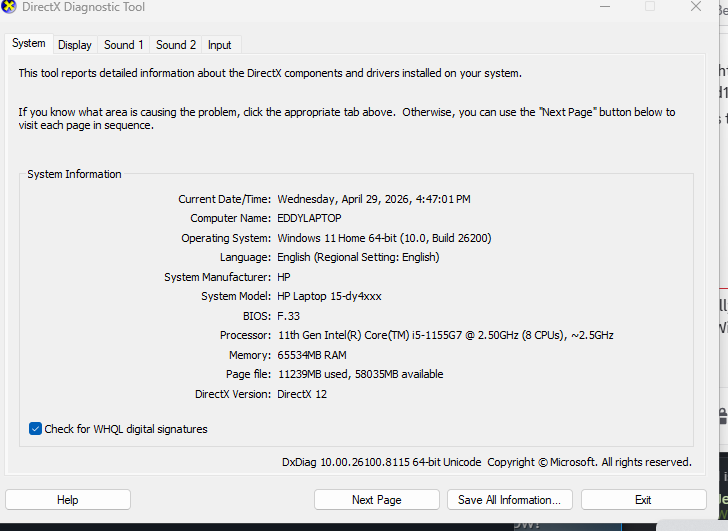 manic mulch
whats there display tab?
tight shale
don't know what a display tab?
manic mulch
its right there on the directx page
 chrome island
he's going to copy it, just a second
ocean pelican
faint ibex
This is why i do backups of important convos lol, as a swe student i can see the...
definitely lots of steering involved and helps that i've been doing it for over 10 years but my work even requires ai first eng it's wild to see things change so quick. If you use something like openrouter.ai then you can get a lot of free usage to try out
faint ibex
Oop, interesting, i will check it out! Thigs did indeed change quite quick, when I started studying no GenAI existed (een elss so coding agents) but only the future will tell how the whole thing plays out. Fortunately a lot of sectors still need junior programmers and do not rely so much on seniors + AI like banks and stuff 😄
tight shale
@manic mulch https://gyazo.com/b34e6260bf4415dcaa1ec7825473beab

 blissful stirrup
@tight shale If you have no Graphics Card it looks fine, if you do, you don't, your pc is running on integrated graphics which means you haven't installed the card or the drivers correctly.
tight shale
he's on a intel iris XE graphis,
manic mulch
thats the olny gfx they have right?
blissful stirrup
If they don't have a GPU and using IRIS XE, then they should go here and download the latest drivers for starters
https://www.intel.com/content/www/us/en/download-center/home.html
If that doesn't work either try putting -dx11 on steam launch options

Intel
Download new and previously released drivers including support software, bios, utilities, firmware and patches for Intel products.
manic mulch
tight shale
<@319741377476820993> https://gyazo.com/b34e6260bf4415dcaa1ec7825473beab
they shuold probly try this
 blissful stirrup
manic mulch
they shuold probly try this
blissful stirrup
manic mulch
they shuold probly try this
this but 11
but first make sure they have the latest drivers
 lime topaz
tight shale
<@319741377476820993> https://gyazo.com/b34e6260bf4415dcaa1ec7825473beab
lime topaz
tight shale
<@319741377476820993> https://gyazo.com/b34e6260bf4415dcaa1ec7825473beab
Iris Xe is not supported and won't be able to boot the game.
lime topaz
blissful stirrup
this but 11
No
tight shale
he did try to put dx 11, but didn't work
blissful stirrup
lime topaz
No
хуйno
manic mulch
tight shale
he did try to put dx 11, but didn't work
try the -12
blissful stirrup
I guess arc is right, iris XE isn't supported by the game
lime topaz
tight shale
he did try to put dx 11, but didn't work
Nothing they do is going to make the game boot on that GPU.
And it's the same for all other UE5 games using Nanite/VSM.
tight shale
ok, tyvm.
blissful stirrup
I'd trust @lime topaz , bro has made it his life goal to tell people Iris XE is not supported
 lime topaz
Technically, i tell people their win10 build is outdated more often, Intel GPUs are on like a third place in terms of occurrence 
 rich mural
I can't build a frigate. I have all the mats and the plans for it.
blissful stirrup
@lime topaz im on 1\0 too i hate 11
rich mural
I just click and it takes me back to the ship listing.
lime topaz
crude juniper
In less than 2 hours and 20 minutes.
Not soon enough 
lime topaz
rich mural
I can't build a frigate. I have all the mats and the plans for it.
If you don't have any mods, report it as a bug in #1493348541177794601
 charred scroll
rich mural
I just click and it takes me back to the ship listing.
charred scroll
rich mural
I just click and it takes me back to the ship listing.
Screenshot
 tacit granite
Hey everyone so yesterday I posted about my friend not being able to join my dedicated and now I can't join it. I saw someone else asked about it but didn't see an answer. I tried using the direct IP with password and port info and it just kicks me to main menu. Any help would be great because I've been trying to play this with my friend for weeks and I'm so so close...
charred scroll
There's an update coming in around 2-3 hours, might be worth waiting for that to see if it solves your issue
tacit granite
I can try invite code too I suppose I just wanna get this resolved so badly and I love this game I just hate the hiccups it comes with lol
manic mulch
tacit granite
Hey everyone so yesterday I posted about my friend not being able to join my ded...
was the dedicated server actualy set to directip?
charred scroll
And is it allowed through your firewall? Open ports etc?
tacit granite
I'm not sure. It shows the ip as well as an invite code and PW as well as the server version
tacit granite
charred scroll
And is it allowed through your firewall? Open ports etc?
Yea I was in last night but my friend couldn't join. He got in but now I wouldn't join. I got in now using the inv code now so...guess we will see
charred scroll
Sounds like it's sort of working 😄
 steep stream
hello i am having trouble getting windrose to run through a black screen when starting through steam. can i get technical support to help with the problem?
charred scroll
Have you tried verifying the game on Steam? If Steam is the platform you are using that is
steep stream
i tryed repairing not verifying
charred scroll
I think that's the same thing. What are your system specs? CPU, RAM, GPU?
Are your GPU drivers updated to the latest?
steep stream
954 gb cpu ssdi 16 g ram 12 g ik 1222700kf
manic mulch
tacit granite
I'm not sure. It shows the ip as well as an invite code and PW as well as the se...
okay but in the serverdiscption.json is direct connection set to "true"
steep stream
sorry gpu 10 g rtx 3080
tacit granite
I have no idea. Haha where do I even look at that?
manic mulch
tacit granite
I have no idea. Haha where do I even look at that?
in the R5 folder for the server
steep stream
nt gpu driveres are now up to date
tacit granite
Uuhhh
charred scroll
steep stream
nt gpu driveres are now up to date
What is your cpu?
manic mulch
tacit granite
Uuhhh
okay how are you runing the dedicated server ?
steep stream
april 28 th version 59636
tacit granite
I don't understand the question. I paid for the server. I turned it on. Right now I was able to get in thru the inv code and PW not the ip
manic mulch
tacit granite
I don't understand the question. I paid for the server. I turned it on. Right no...
so its not turned on then "directip i mean" if invite code is working
tacit granite
As long as I can get in I'm happy lol
manic mulch
yep
steep stream
intell 1222700kf
charred scroll
steep stream
intell 1222700kf
Alright specs are looking good, make sure you restart your pc now that your drivers are up to date. Then try and run the game
steep stream
hang on thats intell 12-1200kf
tacit granite
and "in" i certainly am now
 charred scroll
You're good to go, restart your pc, then try to run the game again
steep stream
black screen with music running in background
charred scroll
Try shift+tabbing a few times
steep stream
ok
blissful stirrup
@steep stream try alt+enter (puts games in windowed mode)
steep stream
omg i thihnk that worked
charred scroll
Shift+tab or alt+enter?
steep stream
both but alt enter made the priority and no blackscreen
blissful stirrup
go to game settings now and put it on borderless
charred scroll
Alright, hopefully it will be smooth sailing from now on!
blissful stirrup
charred scroll
Alright, hopefully it will be smooth sailing from now on!
such a kind potato
steep stream
yep got it thanks
 crimson stump
Hello community and developers,
I’m having an issue with my dedicated server. I set up a server on a home PC that runs 24/7 so I can play with friends and family.
We’ve spent quite a lot of time building and exploring the map, and everything was working perfectly. Last night around 23:00 I was still online and everything was fine.
However, this morning when I logged in, the map was completely blank. All constructions are gone and all exploration progress has been reset.
It’s important to mention that the character progress is still there — only the world (buildings and explored areas) seems to have been wiped.
Could this be caused by an update? Or does anyone know what might have happened?
manic mulch
crimson stump
Hello community and developers,
I’m having an issue with my dedicated server. I...
in the serverdiscption.json theres a world id (change that to read the correct folder)
 hollow hull
still same problem.. long loading and no network at all.. have anybody solve this yet ???


 tribal aurora
same here whit the loading screen
 spring geode
Any Aussies here? Was using a Nitrado Sydney server but it disconnects me constantly back to the menu last night. Very frustrating
 strong cedar
spring geode
Any Aussies here? Was using a Nitrado Sydney server but it disconnects me consta...
strong cedar
spring geode
Any Aussies here? Was using a Nitrado Sydney server but it disconnects me consta...
Yeah I feel that homie happening to me atm
 twin plume
Are there any server problems on Publisher Side?
My dedicated server shows
Cannot create Coop NetServer. Error Login finished with error. ErrorMessage Server Authorization failed. Error 'Internal error [Internal error]'
 candid topaz
me and my friends have no acess the the servers anymore just says N/A
spring geode
strong cedar
Yeah I feel that homie happening to me atm
Apparently Gportal is better. so I started up one, but my mate is still lagging on that making combat impossible. Didn't have any disconnects yet though. Don't see why this should be happening.
 cobalt rain
candid topaz
me and my friends have no acess the the servers anymore just says N/A
cobalt rain
candid topaz
me and my friends have no acess the the servers anymore just says N/A
same
candid topaz
cobalt rain
same
we got kicked out midgame
 halcyon whale
candid topaz
we got kicked out midgame
halcyon whale
candid topaz
we got kicked out midgame
its updating
 ivory oriole
Any update on the fix?
candid topaz
i updated it
 lapis sphinx
colorado usa down
 runic mirage
this is post update, i still have no ability to connect
 surreal hinge
halcyon whale
its updating
surreal hinge
halcyon whale
its updating
is there an anticipated down time?
 empty vortex
halcyon whale
empty vortex
halcyon whale
i alraedy finisehd mine
empty vortex
An hour or so, should be 40 more minutes
candid topaz
i see
manic mulch
anyone useing direct ip shuold be able to play agin the other stuff gona take time i think
candid topaz
sadge bed time then since its 3am night
twin plume
Ahoy @Lookout! Just a heads-up, we're going to roll out a "housekeeping" update for Windrose from 09:00 to 10:00, 30. April 2026 (your local date & time). Online play won't be available for approximately 30 minutes during that time.
 cedar bough
Just update my server and this happen. Can anyone help me?
 cobalt rain
cedar bough
Just update my server and this happen. Can anyone help me?
cobalt rain
cedar bough
Just update my server and this happen. Can anyone help me?
game is being updated
cedar bough
Oh okay thank u
 tardy wigeon
anyone knows how long its gonna take until the servers are back online?
cobalt rain
tardy wigeon
anyone knows how long its gonna take until the servers are back online?
steam just started my update download
 harsh prism
look up, Taraman just said
 outer python
this kind of outage normal with updates?
cobalt rain
outer python
this kind of outage normal with updates?
yes
tardy wigeon
cobalt rain
steam just started my update download
oh! thank you!
cobalt rain
they have to take the server down to update it
outer python
bummer, but thx
cobalt rain
np
tardy wigeon
Servers still not online after update 😭
 swift harbor
why is windrose apparently a live-service game that dies without the game owner's server being online?
I'm kinda confused what about this game needs a constant connection back to the Windrose servers?
manic mulch
cedar bough
Just update my server and this happen. Can anyone help me?
is it set to invite code? if so you will need to wait longer
manic mulch
swift harbor
why is windrose apparently a live-service game that dies without the game owner'...
its for invite codes to work
swift harbor
shouldn't direct IP work then?
 swift quest
Just updated whens server gnna be back online
manic mulch
swift harbor
shouldn't direct IP work then?
yes it dos
 open lantern
looks like an authentification gateway to connect clients per invite code to the hosts
swift harbor
manic mulch
yes it dos
It wouldn't let me host direct-IP at least internally. not a dedicated server, though
swift quest
I cant gwt it to let me host so me my buddy can play again
manic mulch
swift harbor
It wouldn't let me host direct-IP at least internally. not a dedicated server, t...
that wuold be why
 sweet thunder
My game crashed mid sail. Was wondering what was up, but seems others are having the same issue. Glad I didn't lose my progress.
 carmine rapids
is it just us or you guys have servers down ?
swift quest
Ya
swift harbor
suddenly kicks us out, no warning, lol
carmine rapids
we were fighting that fast boss and it desconected almost destroyed my keyboard
harsh prism
Servers are up
swift harbor
I could understand preventing new players from joining, but bringing the whole server forcibly down is... a choice.
-# not a good choice
 runic pagoda
what happened to the severs ): i cant get on
manic mulch
swift harbor
I could understand preventing new players from joining, but bringing the whole s...
then use a direct ip dedicated server 🙂
swift harbor
they should still fix that.
harsh prism
I closed Windorse and Steam down, then started it back up. Servers are up
swift harbor
their connection services going down shouldn't surprise shut down a hosted server
dedicated or not
 past fossil
Servers down. I´m woried to loose everything Just Restarted several times.
 knotty charm
this is the "housekeeping" update they mentioned earlier in #│announcements
my question is, will my Nitrado server update automatically, or will I have to do something?
manic mulch
swift harbor
their connection services going down shouldn't surprise shut down a hosted serve...
just like cloudflare going down and takeing most the internet with it right? its services on top of services.
 dawn latch
It popped up on Steam for me right now. Downloading the update from there.
swift harbor
manic mulch
just like cloudflare going down and takeing most the internet with it right? its...
okay that was clownshoes too
 rancid sail
Stil not fixst
manic mulch
swift harbor
okay that was clownshoes too
well you dont seem to understand that its a service a service gos down - are you able to connect to it? or use it?
swift harbor
the service didn't go down. I was hosting the game. my clients and I didn't go down.
if the data for that game goes through another service beyond connection, that's the issue. why.
it should be peer to peer like every other game
manic mulch
swift harbor
the service didn't go down. I was hosting the game. my clients and I didn't go d...
so you just dont like that its useing a proxy and not your connection right? (if you use direct ip its not a thing its peer to peer)
swift harbor
I couldn't host it direct IP while the servers were down either. It kicked me out.
cobalt rain
Playing on my friend's server and it says "server not found" hopefully it comes back soon
manic mulch
swift harbor
I couldn't host it direct IP while the servers were down either. It kicked me ou...
if your hosting threw game its self yes it will do that - becuse its still useing proxy- if you run the dedicated server - direct ip wont do that
 inland moat
im stuck in a loading screan when i start up the game?
 scarlet jolt
me too
crimson stump
Hello community and developers,
After the latest update, I’ve completely lost my world on my dedicated server.
Before the update, everything was working fine — we had built a lot and explored a large part of the map. Now the world has reset (blank map, no buildings), while character progress is still intact.
I do have a backup of the world, but when I restore it to the server, I get a version mismatch error — the client is not compatible with the server version.
So effectively, all our progress (buildings, resources, exploration) is gone.
Is this a known issue after the update?
Is there any way to convert or recover the old world to make it compatible with the current version?
Any help would be greatly appreciated.
 daring eagle
and i can't loading the server. not the same version (g-Portsl)
 keen heron
Ye, same here, getting 'client and server versions do not match' on g-portal. Potentially update hasn't been rolled out on g-portal or is having some issues
I've tried forcing an update through restarts/switch off and on but nothing yet
manic mulch
crimson stump
Hello community and developers,
After the latest update, I’ve completely lost m...
is this a bot or ? i saw the message earlyer and replyed the fix they didnt anwer
daring eagle
me too and i have start a ticket but nothing helps. How can i make an update on the server i have the ootion only found with automatic restart
keen heron
Nothing you can do with the current settings, if the update isn't there to grab then the server won't realise when restarting. Just have to wait. There's a setting called 'Restart for update' in g-portal, if you have that on, the server will automatically update when the update becomes available to it
crimson stump
manic mulch
is this a bot or ? i saw the message earlyer and replyed the fix they didnt anwe...
it was working what you say .. but now after update NO
crimson stump
manic mulch
is this a bot or ? i saw the message earlyer and replyed the fix they didnt anwe...
and im not BOT :)) LOL
 lilac parcel
The package for Dedicated Server does not seem to have been released yet at least seeing no updates yet for the Server Package so hence why it does now not work yet for many.
daring eagle
crimson stump
and im not BOT :)) LOL
your sure 😄
manic mulch
crimson stump
and im not BOT :)) LOL
change the same thing agin alos are you useing a panel of some sort ?
crimson stump
manic mulch
change the same thing agin alos are you useing a panel of some sort ?
didn't help ! i try ..
manic mulch
crimson stump
didn't help ! i try ..
okay are you useing a hosting servce or some sort of docker/panel on another pc?
lime topaz
lilac parcel
The package for Dedicated Server does not seem to have been released yet at leas...
"DeploymentId": "0.10.0.4.268-9d2ca277"
Server is out for a while now.
 frosty echo
is 10GB enough RAM for Nitrado server host services? or do I need more? i have 4 players online at a time
crimson stump
manic mulch
okay are you useing a hosting servce or some sort of docker/panel on another pc?
I’m running the server on an older PC that stays online 24/7.
It has dual Intel Xeon E5 processors and 32 GB of RAM.
All the world data and saves are stored locally on that PC.
frosty echo
lilac parcel
The package for Dedicated Server does not seem to have been released yet at leas...
i restarted my nitrado services 6 minutes ago and it installed the update
 terse pike
lilac parcel
The package for Dedicated Server does not seem to have been released yet at leas...
terse pike
lilac parcel
The package for Dedicated Server does not seem to have been released yet at leas...
they were released
manic mulch
crimson stump
I’m running the server on an older PC that stays online 24/7.
It has dual Intel ...
okay and are you useing something like pterodactyl panel?
terse pike
and they broke our map
runic mirage
is it back up?
 silent wind
Im having an issue that the game wont stop in steam when i close the game. it is showing as running , and i have to close down steam completly to be able to run the game again. anyone had the same?
crimson stump
manic mulch
okay and are you useing something like pterodactyl panel?
no simpl Terminal ( .bat File ) after i create the server with CMD
manic mulch
crimson stump
no simpl Terminal ( .bat File ) after i create the server with CMD
strange it shuoldnt be changeing worlds then o.0..
crimson stump
manic mulch
strange it shuoldnt be changeing worlds then o.0..
exactly.. that'S it why also wonder

 smoky zenith
god bless them haha
@clever yew
 manic mulch
crimson stump
exactly.. that'S it why also wonder
manic mulch
crimson stump
exactly.. that'S it why also wonder
okay so you shut the server down. - then changed the correct folder saved then started agin?
 rustic sluice
Updated my server and now it won't start 😮 Anyone else?
crimson stump
manic mulch
okay so you shut the server down. - then changed the correct folder saved then s...
ok il will try then i come back later ( and in not BOT ! again )
 latent hound
Anyone actually check if the SSD issue is fixed?
manic mulch
crimson stump
ok il will try then i come back later ( and in not BOT ! again )
lols i had wondered 😛
 clever yew
smoky zenith
god bless them haha
<@977995760228520037>
clever yew
smoky zenith
god bless them haha
<@977995760228520037>
Oh thanks the gods!
manic mulch
clever yew
Oh thanks the gods!

 clever yew
manic mulch
https://giphy.com/gifs/jukeboxsaints-kraken-tentacles-sea-monster-BUr2bF47czHJTp...
clever yew
manic mulch
https://giphy.com/gifs/jukeboxsaints-kraken-tentacles-sea-monster-BUr2bF47czHJTp...
I never said which gods. 😎

 potent nimbus
I cant connect to my friends hosted server after last nights reboot, do i need to get a new code from him?
keen heron
My g-portal server just updated on restart
clever yew
The day they add sharks and krakens, i'm going to have so many complaints. The ships already don't move fast enough.
manic mulch
potent nimbus
I cant connect to my friends hosted server after last nights reboot, do i need t...
they might need to update 🙂
clever yew
potent nimbus
I cant connect to my friends hosted server after last nights reboot, do i need t...
You both need to update your games. And also wait for any mod updates if you use them.
manic mulch
clever yew
The day they add sharks and krakens, i'm going to have so many complaints. The s...
really i thught the big boat gos fast
keen heron
daring eagle
me too and i have start a ticket but nothing helps. How can i make an update on ...
Try restarting your server now, mine just pulled update
clever yew
manic mulch
really i thught the big boat gos fast
It says for the BB Frig 21 max speed, but i've never seen it go over 20 kts.
manic mulch
clever yew
It says for the BB Frig 21 max speed, but i've never seen it go over 20 kts.
it feels fast to me

i saw it do 21 one time but olny once ;p
 fossil oxide
As of last night, I'm getting the following crash on my dedicated server whenever I try to connect. It was working fine the night before, and nothing changed in between. I've installed the latest update on both the client and server but it's still broken.:
R5LogNet: Error: [001017] FR5NetModule::StartupModule::<lambda> ASSERTION FAILED: result.bytes_transferred == buffer_->Length() [D:\Source\Build\work\grpcRepoCheckoutDir\src\core\lib\event_engine\windows\windows_endpoint.cc:355] [D:\Source\Build\work\gameRepoCheckoutDir\Plugins\R5BusinessLogicCore\Source\R5Net\Private\R5NetModule.cpp:35]
LogOutputDevice: Error: === Crash Stack Trace: ===
LogOutputDevice: Error:
LogOutputDevice: Error: [Callstack] 0x000000014ba9e4a8 WindroseServer-Win64-Shipping.exe!UnknownFunction []
LogOutputDevice: Error: [Callstack] 0x000000014ba9c77e WindroseServer-Win64-Shipping.exe!UnknownFunction []
LogOutputDevice: Error: [Callstack] 0x000000014bfcc86f WindroseServer-Win64-Shipping.exe!UnknownFunction []
LogOutputDevice: Error: [Callstack] 0x000000007b627e49 kernel32.dll!BaseThreadInitThunk() [Z:\home\windrose\serverfiles\R5\Binaries\Win64\dlls\kernel32\thread.c:61]
LogOutputDevice: Error: [Callstack] 0x000000017005dca8 ntdll.dll!RtlUserThreadStart() [Z:\home\windrose\serverfiles\R5\Binaries\Win64\dlls\ntdll\thread.c:285]
LogOutputDevice: Error: [Callstack] 0x0000000000000000 UnknownFunction []
LogOutputDevice: Error: [Callstack] 0x000000014bfcc7c0 WindroseServer-Win64-Shipping.exe!UnknownFunction []
LogOutputDevice: Error: [Callstack] 0x00000000036ec660 UnknownFunction []
LogOutputDevice: Error: [Callstack] 0x0000000000000000 UnknownFunction []
LogOutputDevice: Error:
X connection to :103 broken (explicit kill or server shutdown).
X connection to :103 broken (explicit kill or server shutdown).
Any suggestions?
Edit: saving the map locally and running it as solo/offline works fine
 arctic kraken
someone know why its kicking me out of the loading screen when i try to load into the solo map and get back to the selection?
 hot nebula
Quick question : I can't join our private server hosted by a friend... got kicked out of the game when playing this morning, had my friend reboot the game, then I got the update for the game itself on steam. Now it says that game and server versions don't match.
SteamCMD says the server is uptodate as well.
What's going on ?
tribal aurora
it seems like its fixxed thanks for fixxing the game love yall
 lyric lark
So the new update corrupted my save file. :/
It now just hangs at the loading screen after selecting the world.
tribal aurora
lyric lark
So the new update corrupted my save file. :/
damn
lyric lark
I'm also very surprised the Tortuga fast travel crash hasn't been addressed yet. It's pretty major.
For anyone else who may experience issues, I fixed it by turning off cloud saves, deleting SaveProfiles, starting a new game, turing cloud saves back on and then resyncing cloud (NOT local save)
 outer spade
hi. is anyone else got problem with Nitrado server after update? server cannot be found ?
 jolly basalt
my ping players isnt taking the udate
runic mirage
really long connection times when spinning up private servers again
fossil oxide
lyric lark
For anyone else who may experience issues, I fixed it by turning off cloud saves...
Thanks for the suggestion, no luck unfortunately, server crashes even with a completely new character 🙁
lyric lark
Bugger, sorry to hear man. :/
 proper bramble
Just updated dedicated server from steam, and on local client -- shows version mismatch
Did validation on both devices. The server is on my local network.
 livid epoch
fossil oxide
As of last night, I'm getting the following crash on my dedicated server wheneve...
livid epoch
fossil oxide
As of last night, I'm getting the following crash on my dedicated server wheneve...
Is this resolved? I fixed it by deleting and re-pulling the windrose docker image. Everything rebuilt and came back fine. JUST THE IAMGE, don't touch anything in the mounted volume.
fossil oxide
livid epoch
Is this resolved? I fixed it by deleting and re-pulling the windrose docker imag...
unfortunately not - I'll try a steamcmd reinstall later, just strange how it suddenly stopped working (before the update)
fossil oxide
I'm not running the docker image, I'm set mine up following this
proper bramble
proper bramble
Did validation on both devices. The server is on my local network.
This is the message shown on client side. Server is running straight off windows 10 professional, and was working fine before this update push, if that helps at all.

 hot tusk
I just updated my game on Steam, but my dedicated server is showing a message saying it's not compatible.
The server is hosted by Nitrado.
livid epoch
fossil oxide
I'm not running the docker image, I'm set mine up following this
https://discor...
Fair enough - back your world up and try to reinstall. Worked immediately for us.
livid epoch
proper bramble
This is the message shown on client side. Server is running straight off windows...
Has your server been updated?
proper bramble
livid epoch
Has your server been updated?
Yes i ran the update in steam for the Dedicated Server installation
livid epoch
proper bramble
Yes i ran the update in steam for the Dedicated Server installation
Both reading this under properties -> game version:

And the server has been turned off, patched, and turned back on again?
proper bramble
livid epoch
Both reading this under properties -> game version:

 still arrow
my server (dedicated AMP) won't load my savegame anymore :(sth. about a missing 1854568.sst. But that File doesn't even exist in older backups
proper bramble
livid epoch
And the server has been turned off, patched, and turned back on again?
Yes, I restarted the server entirely before and after restarting the device updating the server
lilac parcel
still arrow
my server (dedicated AMP) won't load my savegame anymore :(sth. about a missing ...
That is most likely new in mem data for manifest which calls that sst file, was everything shut down and non writing anymore before updating?
still arrow
jepp, shut everything down and then did an update (bofore that there was the version mismatch)
 vernal current
Game server keeps crashing after the update
livid epoch
proper bramble
Yes, I restarted the server entirely before and after ~~restarting the device~~ ...
And it reads the same version on the Dedicated Server exe?
vernal current
Can play for like 5 minutes before it shuts down.
lilac parcel
still arrow
jepp, shut everything down and then did an update (bofore that there was the ver...
If manifest calls 1854568.sst but it's nowhere to be found best you can do is revert to last known working world save backup basically, since basically "corrupt" at that state.
proper bramble
livid epoch
And it reads the same version on the Dedicated Server exe?
The first screenshot was from the server, this is from the client (my PC)
 livid epoch
proper bramble
The first screenshot was from the server, this is from the client (my PC)
livid epoch
proper bramble
The first screenshot was from the server, this is from the client (my PC)
Something's telling your client it's the wrong version. Do you have 2 versions of the server executable running? Is it possible to reboot the server box to flush out potential caching?
proper bramble
livid epoch
Something's telling your client it's the wrong version. Do you have 2 versions o...
i will reboot the physical machine again and retry. are there any changes to the batch file that launches it?
 granite ravine
Crashing immediately to steam after trying to load a private server oof
livid epoch
proper bramble
i will reboot the physical machine again and retry. are there any changes to the...
Don't know your launch config or server setup, but if there's a specific version specified in there it might cause conflict.
granite ravine
Should I be running proton 10-34?
proper bramble
livid epoch
Don't know your launch config or server setup, but if there's a specific version...

 dull carbon
Every time I use the fast travel feature, my PC freezes and everything stops working. Can you help me?
proper bramble
livid epoch
Don't know your launch config or server setup, but if there's a specific version...
server is win10 pro, was working with that .bat before this update for everyone
livid epoch
proper bramble
server is win10 pro, was working with that .bat before this update for everyone
Yeah, nothing in there suggests version conflicts. Give it a reboot, see if it clears out the problem. Restarted the client as well?
 polar tulip
Hi. Does anyone know how to fix the issue where me and my friend can't join each other's hosted game? Both just reverts back to the main screen without any errors
proper bramble
livid epoch
Yeah, nothing in there suggests version conflicts. Give it a reboot, see if it c...
yes, and verified files in steam's built in. but ill reboot both again and report back.
granite ravine
Yeahhh it's just crashing every time I try to host a private server
Steam deck: SSD 512 LCD model
Was working before now it's not
Back to enshrouded until they fix it I guess..
hot nebula
granite ravine
Yeahhh it's just crashing every time I try to host a private server
Steam deck:...
my friend says it's back online, at least for us
granite ravine
I'm trying to load into a private server and everytime I do it's not getting past the "map load screen"
I'm testing rn to see if it does the same on solo
Solo loads
fossil oxide
granite ravine
I'm trying to load into a private server and everytime I do it's not getting pas...
Sounds similar to my issue - does the server crash/restart when you try to connect?
 blazing wave
Does anyone know when the native Linux server will be released?
proper bramble
livid epoch
Yeah, nothing in there suggests version conflicts. Give it a reboot, see if it c...
Rebooted physical server, my own machine, same result
 granite ravine
fossil oxide
Sounds similar to my issue - does the server crash/restart when you try to conne...
granite ravine
fossil oxide
Sounds similar to my issue - does the server crash/restart when you try to conne...
So it has something I mean it goes right to black screen back to steam is then crashes
fossil oxide
Ah, sorry, this is private server hosted within the client itself?
granite ravine
It's a private server within the client yeah. Not a dedicated server
still trail
blazing wave
Does anyone know when the native Linux server will be released?
no timeframe yet but for now the windows one with wine/proton works really well, haven't had any issues since updating to wine 11
granite ravine
It was working as far as getting into the server and playing with someone before but would crash on the open seas.
Now it doesn't get past the load screen..
fossil oxide
granite ravine
It's a private server within the client yeah. Not a dedicated server
fair enough, not easy to tell if its the client or server side which is crashing then 🙁
granite ravine
The problem is that it was working fine except for when we traveled to the open seas before the update it wouldn't crash until we went sailing.
Now it crashes regardless whether I have someone joining or not. The only way it plays stable is if it's on solo
 narrow pier
Hello. Saw the update this morning, restarted my server, game is updated and now the game tries to connect to the dedicated (Nitrado) server, loads, then kicks back to title screen.
still trail
narrow pier
Hello. Saw the update this morning, restarted my server, game is updated and no...
Is it updated on nitrado's end? I scheduled my dedi to update and restart at 3 est and it was out of date, had to manually update it
Not sure what their update schedule looks like
narrow pier
still trail
Is it updated on nitrado's end? I scheduled my dedi to update and restart at 3 ...
Not sure, I am new to using Nitrado. How would I manually update the Nitrado server? I thought rebooting did the trick.
 foggy crane
hello, i have a dedicated server on steam, everything was fine playing with some friends and from yesterday 1 of my friends can;t join de server anymore everytime he try's to connect, the dedicated server shuts down....
still trail
narrow pier
Not sure, I am new to using Nitrado. How would I manually update the Nitrado se...
I don't use them so not sure. You can check /steamapps/appmanifest_4126920.acf for the build id to check though, should be 23016965
narrow pier
still trail
I don't use them so not sure. You can check /steamapps/appmanifest_4126920.acf f...
Okay thank you. Nitrado says it could be a few hours after update is pushed so may have to wait a bit. Thank you.
 simple verge
Huuge frame drops during boarding after the patch 🙁
 oblique chasm
Hello, I bought a couple of ship paint schemes, but they're missing. I have all three ships, and the ones I had are already there, but the new ones haven't appeared. Someone on my stream also complained about them being missing. Specifically, the ship side paint scheme. The sails and flags are there.
 cosmic yew
I need some help..
I had no Problems at all with this game, but since yesterday evening my GPU goes crazy high - thought okay, i'll hopp off - did Update, start the game and within 5 minutes into the game my GPU Temperature is at 80-85°C
I havnt build anything crazy, yet my settings arent ultra either - it just appeared out of nowhere
It also started to hardly stutter (3-6 sec. freezes)
 mortal delta
does anyone know if nitrado is up yet?
 lucid lynx
evening all not shore on what's going on with the game but every time i try and fire it up the game crashes and just goes back to my desktop screen with no error codes or any thing
livid epoch
oblique chasm
Hello, I bought a couple of ship paint schemes, but they're missing. I have all ...
Depending on the skin, they may only apply to specific variations of the ship. Blackbeard paint, for example, can only be put on the Blackbeard Ketch, Brig, and Frigate.
manic mulch
blazing wave
Does anyone know when the native Linux server will be released?
Maybe beta next week maybe
 half lodge
Nitrado server still down ? any updates ?
 prime shore
hello, i have probleme with game, when i select my friends server to join, the server crash, i also hasve this with my own solo game, when loading it loads me back to home menu. how can i fix this probleme plsse?
 zenith panther
prime shore
hello, i have probleme with game, when i select my friends server to join, the s...
zenith panther
prime shore
hello, i have probleme with game, when i select my friends server to join, the s...
I have the same problem, not even solo play loads.
It would be great if someone could help.
prime shore
my luck was that i have multiple steam accounts and they are in family libary, so i stil can play the game, but from other steam acc
 sand void
My mate is hosting a server, Ive not had any stuttering issues, but all the others who are playing have had it where both on ship, and combat, it stutters to unplayable.
Even after this mornings patch, it seams to be the same. Not a connection issue as the host is next to the sever, and he gets spikes. Our video settings the same. Any help or ideas would be grateful 🙂
 serene steppe
half lodge
Nitrado server still down ? any updates ?
serene steppe
half lodge
Nitrado server still down ? any updates ?
I have a Nitrado server and still no access either; we have to wait until they decide to do the update.
 terse osprey
sand void
My mate is hosting a server, Ive not had any stuttering issues, but all the othe...
terse osprey
sand void
My mate is hosting a server, Ive not had any stuttering issues, but all the othe...
Rubberbanding or FPS stutters?
sand void
terse osprey
Rubberbanding or FPS stutters?
more rubberbading for them
terse osprey
We've been having this, but there's absolutely no reason for it... The update hasn't done anything to resolve it
There's about 5 of us a couple are completely unaffected, but then the person is rubberbanding for everyone else, but everyone is fine
We tried Nitrado, and it was nothing but a lag fest even after a ticket
We swapped to someone hosting on a laptop, which was so much better but then once we started getting into it, there was this awful sailing lag making any combat entirely unplayable
Once we got to the first boss, we flat out had to migrate to one person hosting directly because all of us would die due to desync or the boss hitting people where they weren't
So now the host just rubberbands for everyone else but its at least remotely playable
I came here to ask about it but it seems the first two things I've seen are the exact same issue
mortal delta
yea the update did literally nothing for my connection issues, and as much as id love to say its my internet no other game kickes me out of sessions at the slightest sign of lag
and then I go and pay for a nitrado server to hopefully solve this issue thinking "hey there partnered, p2p is buggy so lets spend 12$" servers still arnt up, and apparently 12$ gets me 1 gig of ram on a server, so thats just not gonna run smooth at all regardless
lyric lark
Do Mahogany 13, 26 and 64 degree walls just... not exist?
The patch notes specify they added some missing triangles, but these are still missing.
But Mahogany 45 degree do. 🫤
mortal delta
mortal delta
yea the update did literally nothing for my connection issues, and as much as id...
and to put cherry on the pie not only do a spawn back on the starter island/base but I have to eat more food or suffer the downsides of being hungry
ivory oriole
Pls update me if black screen has been fixed
proper bramble
Restarted the server instance after full restart on both ends and still getting the version mismatch @livid epoch
livid epoch
proper bramble
Restarted the server instance after full restart on both ends and still getting ...
 proper bramble
livid epoch
https://giphy.com/gifs/computer-ron-swanson-parks-and-recreation-ktcUyw6mBlMVa
proper bramble
livid epoch
https://giphy.com/gifs/computer-ron-swanson-parks-and-recreation-ktcUyw6mBlMVa
 livid epoch
Think you're at the reinstall stage 🙁 Back up your game world first.
Might be worth running your local server in a docker container. Can pull the image down from a few providers, but indifferent brocolli have been amazing both in provision and support.
proper bramble
honestly, never messed with docker. and before the update things were just fine. and it seems apparent im not the only one with issues. is there a doc page where to see what files i need to backup for the server? and do i need to do it for the client side too?
 queen crane
Seems a bunch of hired servers arent working, im on aussieserverhosts and can't get it to work
livid epoch
proper bramble
honestly, never messed with docker. and before the update things were just fine....
There should be a guide somewhere. Maybe under #1493364524705775657 ? Docker's been easy. I run a Linux box for my mates, and 0 to us on the high seas took 3 minutes.
proper bramble
livid epoch
There should be a guide somewhere. Maybe under <#1493364524705775657> ? Docker's...
ill take a look, but like i said never used docker and just the .bat from steam for the dedicated server was working just fine before this update push
 solar cave
i have a bug, steam say me the update is blocked
 proven yacht
Hey, have you tested how to turn on new feature UseForceP2pConnection to true? i cannot find where i need to set it, it always false in logs on startup...
oblique chasm
livid epoch
Depending on the skin, they may only apply to specific variations of the ship. B...
I'm aware of this, but I don't see any changes to all three ships. There are still four rows of skins. Also, could you please give me the ability to change the crew color? I often get confused between the enemy and my pirates, and it's really annoying that everyone wears purple clothes. I'd like to be able to change the color of the pirates' gear. If that's too difficult, then at least make it a neutral color, but one that would make them stand out from the enemy.
 proper rampart
Does settings a password work with invite code? When i use my invite code on a server with password, I can connect to it without the password.
the ServerDescription.json shows my password and IsPasswordProtected = true
 oak python
My friend has a problem with the game; he launches the game and it gets stuck on the loading screen before the main menu. Do you have a solution for this problem?
 lyric lark
oak python
My friend has a problem with the game; he launches the game and it gets stuck on...
lyric lark
oak python
My friend has a problem with the game; he launches the game and it gets stuck on...
Very common issue it seems, but I've found a way to fix it. Be VERY careful and follow the steps exactly:
Right click the game in Steam and in the Properties turn Cloud Save OFF
oblique chasm
livid epoch
Depending on the skin, they may only apply to specific variations of the ship. B...
I found them on the stream where I bought them. Everything was unlocked, as you can see in the first screenshot. However, the skins on the ships themselves simply don't have them—four paint jobs and all the ones that were there. I already bought the second set of paint jobs, called the Brotherhood paint jobs, and they're missing.

 lyric lark
Then go into the game files and delete folder called SaveProfiles
Open the game and make a pirate, then exit once the pirate is made
Turn cloud saves back ON, and click that you want to use the Cloud save (NOT THE LOCAL SAVE!)
It'll resync, and you can continue as normal.
It has happened to me three times. The latest patch didn't address it at all despite being a well known bug.
proper bramble
@livid epoch would this have anything to do with anything? line 3
 lyric lark
I'm sure they're working on it regardless.
oak python
thanks pro
livid epoch
proper bramble
<@275063077865783297> would this have anything to do with anything? line 3
Quite possibly. Back it up, change it to the latest version, test 🙂
proper bramble
livid epoch
Quite possibly. Back it up, change it to the latest version, test 🙂
what is the proper version code?
livid epoch
proper bramble
what is the proper version code?
Does it say on the client main screen?
proper bramble
livid epoch
Does it say on the client main screen?
let me check
proper bramble
livid epoch
Does it say on the client main screen?
 livid epoch
proper bramble
livid epoch
proper bramble
Give that a go as the DeploymentId
proper bramble
livid epoch
Give that a go as the DeploymentId
ok stand by
seems like it rewrote it to 0.10.0.3.104-256f9653
livid epoch
Suggests something in your installation isn't updated properly, and it's overwriting it with what it knows.
Try making the file read only
proper bramble
i do not have shadow copy or whatever going on, but i will try again making it RO
 green parrot
hi everytone after the recent update i cant load into my world the game just keeps crashing saying the game has hang and will now shut --- Also is now using 100% CPU never did before
livid epoch
Terrible. Send me your graphics card so I can test.
proper bramble
livid epoch
Try making the file read only
** ** triple checked before making the json RO and ensuring it was using "DeploymentId": "0.10.0.3.104-256f9653", i mean to say it reset back to that
proper bramble
proper bramble
** ** triple checked before making the `json` RO and ensuring it was using `"Dep...
i changed it to "DeploymentId": "0.10.0.4.268-9d2ca277",
livid epoch
proper bramble
** ** triple checked before making the `json` RO and ensuring it was using `"Dep...
It may be getting generated when the server starts - in-game settings dumped out to JSON. It sounds like your executable is still on the older server version. Have you got a second installation going on? Checked file paths?
proper bramble
livid epoch
It may be getting generated when the server starts - in-game settings dumped out...
verifying all that now
 charred sequoia
i changed the upscaler to DLSS, fixed that problem for me at least.
proper bramble
livid epoch
It may be getting generated when the server starts - in-game settings dumped out...

so those IDs changed too after update
livid epoch
And it works?
proper bramble
nope, it starts loading with new ID, then game on client crashes
old ID shows DCd
still trail
Changing the id won't help if your server is out of date
proper bramble
still trail
Changing the id won't help if your server is out of date
i ran the update already via steam etc etc
 brisk fulcrum
hiyo sorry if this has already been asked. is there a way to change the difficulty settings on a dedicated server?
 vivid hemlock
brisk fulcrum
hiyo sorry if this has already been asked. is there a way to change the difficul...
vivid hemlock
brisk fulcrum
hiyo sorry if this has already been asked. is there a way to change the difficul...
unless you're the server owner i dont think you can change it
brisk fulcrum
vivid hemlock
unless you're the server owner i dont think you can change it
i am owner
still trail
proper bramble
i ran the update already via steam etc etc
For a dedi, check /steamapps/appmanifest_4126920.acf for the build id to check though, should be 23016965
If not, it's not properly updated for whatever reason
vivid hemlock
brisk fulcrum
i am owner
R5/Saved/SaveProfiles/Default/RocksDB/<game version>/Worlds/<world ID>/WorldDescription.json
make sure to back up the whole folder just in case
and turn off steam clouds
proper bramble
still trail
If not, it's not properly updated for whatever reason
yeah shows wrong location (the shortcut to the batch file, the desktop) and build is not right either
vivid hemlock
brisk fulcrum
i am owner
im not sure if the server setting are all same but this is what I got when I searched it up.
http://xrealm.com/en/blog/windrose-server-settings-guide
you can use this as a guideline i guess? the names for the tweaking and such.
xREALM
Optimize your Windrose dedicated server by customizing difficulty, combat, and world settings for a tailored multiplayer experience.
proper bramble
still trail
For a dedi, check /steamapps/appmanifest_4126920.acf for the build id to check t...
not sure why its using the desktop path when the game lives on another drive. and obviously the things are mismatched

 woven vessel
Hey. I updated my client. But SteamCMD seems to not update. In my ServerDescription.json its still '"DeploymentId": "0.10.0.3.104-256f9653",'
Do I have to delete the whole windrose folder and then reupload my game world or how is it handled?
proper bramble
woven vessel
Hey. I updated my client. But SteamCMD seems to not update. In my ServerDescript...
basically same issue i am having atm
woven vessel
proper bramble
basically same issue i am having atm
Are you using one of the two community docker containers in unraid by any chance?
 pastel wasp
VERY happy about this every time i would open my inventory FPS goes to 10 and stays there.
 proper bramble
woven vessel
Are you using one of the two community docker containers in unraid by any chance...
proper bramble
woven vessel
Are you using one of the two community docker containers in unraid by any chance...
no, hosted on win10pro not docker
woven vessel
proper bramble
no, hosted on win10pro not docker
Okay thats good that you use something different. Then its not the community app lol 😄
 neon python
hi, there is problem with teleporting bells. When u're using sometimes game freezing and its need to be restarted. After update and 1 freeze and restart game is no loading anymore, just infinity loading or freeze on loading screen.
 nimble cradle
neon python
hi, there is problem with teleporting bells. When u're using sometimes game free...
nimble cradle
neon python
hi, there is problem with teleporting bells. When u're using sometimes game free...
Yeah I get this too.
This error occurs

 modern lava
Hello, I have a problem. My character location icons won't disappear, even after clicking the button to remove them. Most of them are the ones in the sea. I have two on land, the rest are in the sea. Thank you for your help.
 queen rain
hi am having issues getting my game to load it was working fine a bout an hour ago but i alt tab to do something and havent been able to get in since
proper bramble
@livid epoch made progress, able to connect to server but all my fast travel points are gone along with markers and map uncovering is gone now. all i see is markers for quests on the map
woven vessel
I pulled the container again into a fresh folder. The then generated config file had the correct version number. I just copied in my old values and the old Game World. The server now works again.
proper bramble
ship and personal inventory is intact, but not sure exactly where if the base i have been working on is still there or where it is
queen crane
proper bramble
<@275063077865783297> made progress, able to connect to server but all my fast t...
that sounds like a whole new map, like when you switch between servers
proper bramble
i agree, and i attempted to put in the old seeds and map IDs so i could at least get connected to my server. doesnt explain why they changed up after the update (code, seed, etc)
queen rain
i was having issues with connecting to a a multi player game so i have tried playing it as a single player and it worked fine so i disconnected and tried connecting to the multi player game and it seems to be working for now
proper bramble
literally the only thing i did was run the update via steam on my dedicated server, along with the update on my client. it was working perfectly fine for me and the people that i play with before the update
 astral swift
I can't access our server that my friend created, and unfortunately I don't know how to restart it since I don't have any data.

 weak pecan
My Game just sits on the loading screen since the update, I cannot play the game now. I hear the sounds load in but it never leaves the loading screen. Ive restarted the PC/Steam, went to breakfast came back an hour later and still on loading screen.
proper bramble
i dont want to nuke the dedicated server and lose all the progress my friends and i have made thus far 😭
 vital rose
Hey all, anyone know if there was a corresponding server update to bump the version to match the client version? I'm running a private dedicated server through steamcmd and I'm checking the version available and it doesn't look like it's been updated...
fossil oxide
vital rose
Hey all, anyone know if there was a corresponding server update to bump the vers...
there was, and there is an update available via steamcmd
vital rose
Ok thanks. Weird that the build number isn't showing as being updated.
fossil oxide
livid epoch
Fair enough - back your world up and try to reinstall. Worked immediately for us...
A completely new install on a fresh proxmox container seems to be working, for a new world at least, unfortunately lunch break over so I didn't get a chance to copy our existing save to the new server yet
livid epoch
Shouldn't need to. Server files will be in your mounted volume, outside the container
fossil oxide
livid epoch
Shouldn't need to. Server files will be in your mounted volume, outside the cont...
it's an LXC, not docker
proper bramble
yeah for some reason it keeps wanting to revert to 0.10.0.3.104-256f9653 in the ServerDescription.json file. throws errors if i set it to read only @livid epoch
 iron nimbus
Game keeps stuttering and crashing. Any ideas? This is before and after the recent update.
 oak wharf
I cant trade or sell my insignes i camt even talk to anyone except mission related character. i tried repairing it on steam i tried re insatalling it i treied everything i could think off please help :*(
 molten bolt
ciao guys i can't even connect to my server, someone knows why?
 dusk knoll
After the update when I try to enter my world it just kicks back to main menu
 rugged heron
molten bolt
ciao guys i can't even connect to my server, someone knows why?
rugged heron
molten bolt
ciao guys i can't even connect to my server, someone knows why?
Same here
 frail orchid
"I am experiencing an infinite loading screen. The game gets stuck on the loading page and doesn't let me join the server
"I am experiencing an infinite loading screen. The game gets stuck on the loading page and doesn't let me join the server

 woeful yew
Anyone found out why some people can't join online anymore?
molten bolt
:(((
 sterile gazelle
Anyone having issue getting to the main menu at all? i just re installed the game and restarted my pc and still infinite loading screen
weak pecan
Yep
sterile gazelle
Thats wierd, i was just in the game an hour ago
weak pecan
They need to get this fixed
woeful yew
sterile gazelle
Anyone having issue getting to the main menu at all? i just re installed the gam...
Thats cloud issue. You can check the support website it has a step by step guide on how to fix that. Make sure you backup your profil folders
weak pecan
Already tried
does not work
I can get in the main screen but it will not load my SOLO offline game, I can join my friends server but not my own
sterile gazelle
Tried launching without cloud now but still nothing
woeful yew
Delete the profile from Appdata and let the game create a new char. Once you in go into a solo game and finish the beginner tutorial and when you land on the island pickup some items once done backup to the main menu and then exit the game. Whiile doing this your cloud service needs to be off. Once this is done you copy paste your old profile back in the appdata folder and turn on cloud and restart the game
sterile gazelle
woeful yew
Delete the profile from Appdata and let the game create a new char. Once you in ...
That worked, can this have been caused by the save editor?
I have used it once didnt work and rewerted to a backup
weak pecan
I did all of the above but im now stuck in an infinite loading screen on launch, cant even get to the menu now
molten bolt
i still have no acces to private server
woeful yew
sterile gazelle
I have used it once didnt work and rewerted to a backup
The way steam uploads and downloads files is a bit weird. Thats why it is always good to save your files just incase it messes up your cloud save so you can restore from local files
woeful yew
molten bolt
i still have no acces to private server
Same for me I can't host a game and I can't join anyone
 blazing cape
Is there a server browser / favourite list on the horizion for those servers who use direct connection over the UPnP stuff?
sterile gazelle
woeful yew
Delete the profile from Appdata and let the game create a new char. Once you in ...
Is the whole finish tutorial part necessary?
woeful yew
sterile gazelle
Is the whole finish tutorial part necessary?
Not sure about the tutorial part but it is necessary to pickup some items so the cloud realises it needs to update. Anykind of change in the inventory or level etc needs to be done
sterile gazelle
woeful yew
Not sure about the tutorial part but it is necessary to pickup some items so the...
Okey, thanks for explaining makes sense
 paper zinc
Yeaa update broke my game. The fatal error previously got stopped when I out post processing to low, all else on high. Now I cant even load in game. Infinit map screen. I tried pulling up steam to force close it sinxe the other methods didnt work, but the steam window went black and wouldn't go away so had to restart pc.
 median axle
so just installed the game on my desktop, had been playing on laptop, went to start it up and got a warning that it was unable to sync with cloud files and i may lose progress permanently.... anyone had this issue? or was it fine
sterile gazelle
median axle
so just installed the game on my desktop, had been playing on laptop, went to st...
You have the game on another pc yeah?
median axle
sterile gazelle
You have the game on another pc yeah?
yes first played it on my laptop and now trying to play on my desktop
sterile gazelle
I would just try tbh, if it fails just take the save file from your other pc
Most of the time, its just false flags
median axle
any chance you know where the player save file is at? i might go ahead and make a backup for it first just in case
sterile gazelle
median axle
yes first played it on my laptop and now trying to play on my desktop
There seems to be some issues with cloud sync atm btw so i expect a hotfix or something soon
median axle
sterile gazelle
There seems to be some issues with cloud sync atm btw so i expect a hotfix or so...
is it the saveprofiles?
sterile gazelle
median axle
is it the saveprofiles?
yup
 unkempt pendant
I seek help about a saved world. I can join it but mine friend can't. When I start different world, she will join normally, but our saved game that we played... She can't connect. I tried older saves but dont work.
rich mural
charred scroll
Screenshot
Here is the screenshot showing I have everything needed to build the frigate. Once I click build, it takes me back to my ships page and no new ship is there. It doesn't take my resources, thankfully. It's the same for the brig. I was once able to build the brig, but I deleted it to get mats for the frigate.
Things I've tried:
- deleting and re-making the wharf
- making a second wharf
- deleting and re-making my bonfire
- making a second bonfire
- using someone else's wharf in my base
- using someone else's wharf in their own base
- going back and re-defeating the first two bosses
This is affecting at least one other person that I know of on my server.
Thank you!

 paper zinc
Nvm. While low post processing setting fixed the fatal error, the new update brought it back even though that setting got rid of it. Ugh
oak wharf
I cant trade or sell my insignes i camt even talk to anyone except mission related character. i tried repairing it on steam i tried re insatalling it i treied everything i could think off please help :*(
still trail
woven vessel
Hey. I updated my client. But SteamCMD seems to not update. In my ServerDescript...
Not sure if you got an answer but you can update it via steamcmd
 twilit imp
goodday i and a couple off frieds rented a server and now with the new update everything is gone what we build and getherd trueout the game is there a selution for it becaus some of the things you only get while doing quests
 wild kiln
Has anyone ran into the "Error! App '4129620' stat is 0x6 after update job"
Trying this update on a server using the steam command but getting this error. Have tried re-installing steamcmd and removing the manifest file, but same error everytime
fossil oxide
fossil oxide
A completely new install on a fresh proxmox container seems to be working, for a...
No luck - after updating the serverID and putting my save back on, I'm getting the same issue
frail orchid
It is downloaded and the server does not enter
 fossil oxide
No luck - after updating the serverID and putting my save back on, I'm getting t...
fossil oxide
fossil oxide
No luck - after updating the serverID and putting my save back on, I'm getting t...
Will try restoring a backup from a couple of days ago in case the savefile corrupted or something, odd that it works fine in both solo/offline and when hosting locally
 clever crescent
manic mulch
i saw it do 21 one time but olny once ;p
clever crescent
manic mulch
i saw it do 21 one time but olny once ;p
I am also getting this sam error in my server as well
 amber tangle
hi, does anyone with intel arc b580 tried playing windrose on the newest intel driver? I wonder does it still cause blue screens?
fossil oxide
fossil oxide
Will try restoring a backup from a couple of days ago in case the savefile corru...
Interesting - restoring a backup from the morning of 28/04 (before my last session on the server) has worked...
molten bolt
twilit imp
goodday i and a couple off frieds rented a server and now with the new update ev...
UUUUUP same here
 clear cradle
im on epic and having loading issues, is it not just steam with this problem?
lime topaz
 woven igloo
how to fix this
woven igloo
how to fix this
It means something on your PC is blocking the files, typically antivirus or the game process still running at background.
Reboot your PC first and see if that resolves the issue.
 left wolf
nitrado server restart long time update
lime topaz
median axle
so just installed the game on my desktop, had been playing on laptop, went to st...
Steam Cloud for this game is not really working, it's best if you disable it till the devs improve their saving system (there's an experimental Beta branch for this FYI).
wild kiln
wild kiln
Has anyone ran into the "Error! App '4129620' stat is 0x6 after update job"
Try...
got this fixed following the post in "game-support"
 jade minnow
does anyone else have issues with vertical and horizontal monitor set up? the game starts on the wrong monitor (despite settings being on the correct one ) and after that the game isnt fully displayed on screen. Didnt have this issue pre patch today
unkempt pendant
woven igloo
how to fix this
Had the same problem today. restart of PC fixed it
molten bolt
hot nebula
Quick question : I can't join our private server hosted by a friend... got kicke...
UUUUP
DEEEEVS COULD YOU HELP US?
i don't want to loose 70h of crafting and buildings
unkempt pendant
We have the same problem. We can join new worlds but not the main one. I can, but my friend cannot.
Is there any way to prolong connection time before timeout? Seems like my friend pc takes too much loading time it disconnects them
[2026.04.30-15.06.44:040][342]LogNet: Warning: UNetConnection::Tick: Connection TIMED OUT. Closing connection.. Elapsed: 242.44, Real: 180.01, Good: 180.01, DriverTime: 242.74, Threshold: 180.00, [UNetConnection] RemoteAddr: R5:ec5fda0a830c458ba549110ac9caff86:, Name: R5NetConnection_2147306555, Driver: Name:GameNetDriver Def:GameNetDriver R5NetDriver_2147306559, IsServer: NO, PC: NULL, Owner: NULL, UniqueId: NULL:Grizz-870CB40748B1E946215DB7A19F579CB2
fossil oxide
unkempt pendant
We have the same problem. We can join new worlds but not the main one. I can, bu...
does the server crash when he tries?
I've fixed my crash! I downloaded the save from the server, played for 5 minutes to make sure the save updated, then uploaded it back to the server, and now it seems to be ok touch wood
molten bolt
i'm just an user onn a friend's server, i have no acces on saved game server's side, i suppose
hot nebula
molten bolt
UUUUP
On our end it's fixed : friend got the server update and now server and client are in sync.
I could play, no issue
fossil oxide
sounds like he will need to troubleshoot then 😩
 mortal belfry
Hi all,
Has anyone else had R5check issues on their dedicated servers?
I have already gone through the server host support who moved my server onto new hardware which initially seemed to fix the error, however about an hour in the server status changed from "fine" to "R5check [CH69/1|EN0/0|ER0/0]".
My (limited) understanding of this tells me that there is a channel error when reading Json string, however I have no idea how to stop this happening.
Restarting the game clears the R5check status temporarily, but it ultimately returns within 10-50 minutes of play. Happy to provide line from the R5 logs if that would help.
 mild wedge
Is everyone elses Nitrado server still down? I cant access it at all for the last 8 hours
clear cradle
is it just steam players with the loading issue? im on epic and my worlds wont load
unkempt pendant
fossil oxide
does the server crash when he tries?
I dont play over the server. We use ingame connecting to each other.
 wise hinge
mild wedge
Is everyone elses Nitrado server still down? I cant access it at all for the las...
wise hinge
mild wedge
Is everyone elses Nitrado server still down? I cant access it at all for the las...
I saw the update so I restarted our Nitrado server and it has been stuck on "A new update will be installed now" for the last hour or so
 signal hedge
Hi, why i'm still cannot host a game
 haughty jacinth
one of my friends is having issues playing via CrossOver...anyone else getting stuck on loading screen?
 radiant shoal
#1495518685719433246 for those with nitrado issues
mild wedge
wise hinge
I saw the update so I restarted our Nitrado server and it has been stuck on "A n...
how frustrating
 echo seal
is Nitrado been just awful for everyone?
wise hinge
echo seal
is Nitrado been just awful for everyone?
honestly it's been pretty stable for the $13 so far, some lag at times. This is the first major hiccup I've experienced, but also the first major update.
 raven lintel
Hello,
I'm hosting my own server and despite I updated both the game and server files on my server
the client and server version still does not match
Has anyone encountered the same problem, i was thinking it's the world version but i got no idea tbh..
mild wedge
raven lintel
Hello,
I'm hosting my own server and despite I updated both the game and server ...
I think everyones having this issue
 gusty pine
what do I do if one of the 3 x marks the spot maps got picked up, showed up briefly on my map and vanished completely?
echo seal
we basically dont both doing any kind of combat friday nights because the lag makes timing combat so much harder
raven lintel
reading the chat, i think that's what happen on thoses who bought Nitrado servers
so that's a dev problem in that case
radiant shoal
 storm oyster
Hi, im stuck on loading screen. Sameone have this problem?
 chilly sonnet
Just posting appreciation for them working hard on the cloud save issue 🙏 keep it up mateys
 lean marten
storm oyster
Hi, im stuck on loading screen. Sameone have this problem?
lean marten
storm oyster
Hi, im stuck on loading screen. Sameone have this problem?
Happened to me past 2 days, steps in this link worked right away the first day. Second day I had to reinstall the game and then it worked
https://store.steampowered.com/news/app/3041230?emclan=103582791475068287&emgid=725783900692939217

Updates, events, and news from the developers of Windrose.
mild wedge
my nitrado server is up
 sharp galleon
After the update, the game gets stuck on the loading screen. Deleting the save file opens the game, but reinstalling it causes it to get stuck again at the same point. Has anyone else experienced this problem?
 final beacon
Has anyone been having issues where they leave the windrose screen and their entire computer freezes up?
Im 90% sure whatever the issue is where thats been happening is due to the PCI-e not getting enough voltage
Update: Lowering post processing Seems to resolved the PCI-E voltage issue and raised it from 6.0 to 12.0
weak pecan
sharp galleon
After the update, the game gets stuck on the loading screen. Deleting the save f...
Yep same issue, I can even create a new character and join my main characters map but my main level 15 character cannot load into its own map, this is sooo dumb
 night tulip
I cant even start my game now after the updating my nvidia drivers. Just goes black screen and says nope not starting. And after 3 attempts it force rebooted my pc. Like what the hell.
 brisk girder
Hello, I’m not sure if anyone else is having issues with Windrose where the game crashes and the entire computer fully restarts.
It seems very random, since sometimes it happens in the game menu before even entering a match, while other times it happens after playing for a while.
When launching the game and reaching the main menu, the GPU immediately jumps to 98–100% usage while doing nothing, and then the game crashes, completely restarting the PC.
I’ve tried checking the game log, but it’s impossible for me to understand.
Has anyone experienced something similar?
All drivers are up to date.
GPU: RTX 3080
CPU: i7-14700K
night tulip
brisk girder
Hello, I’m not sure if anyone else is having issues with Windrose where the game...
Does the same for me now after updating my GPU drivers.
brisk girder
I’ve never had this kind of problem with any game before, even though I play titles that are far more graphically demanding. It’s frustrating, and I honestly don’t know what to do.
night tulip
Rolled back the drivers and that fixed it
brisk girder
night tulip
Rolled back the drivers and that fixed it
i never rolled back drivers, how to do it?
night tulip
brisk girder
i never rolled back drivers, how to do it?

Keeping your video drivers up-to-date is crucial for optimizing performance in Windows 11. But there are also rare instances where an update might create graphical anomalies in applications, produce choppy FPS (frames per second) in games, or affect the operating system's stability. If a driver update to your NVIDIA graphics card is causing prob...
brisk girder
nice thank you very much
final beacon
night tulip
Does the same for me now after updating my GPU drivers.
What roll back did you do?
Like which driver
night tulip
final beacon
What roll back did you do?
I installed the new version 596.36 nvidia drivers in the app today and that made my game not work and my computer crash. Did a rollback via the device manager and game is running again now.
final beacon
night tulip
I installed the new version 596.36 nvidia drivers in the app today and that made...
Okay but which driver
 daring pasture
Yeah my wife's pc just fully crashed and deleted her GPU (AMD) drivers
night tulip
final beacon
Okay but which driver
The graphics driver i just mentioned? 🤷
 wise urchin
What server host provider can you suggest? I tried GPORTAL but it was so unstable.
final beacon
night tulip
The graphics driver i just mentioned? 🤷
Okay but is it verison 596.36?
Or is there a specific version?
Like do I look for one and it completely wipes them?
night tulip
final beacon
Okay but is it verison 596.36?
Thats the version number in the Nvidia app yes. And that one broke my game
brisk girder
rolling back didnt fix it the scrrenshot showing 94% gpu usage (sometimg dips into 98-100%) its just in the main menu with an RTX 3080 and all graphics set to medium-low and DLSS.
Doesnt make any sense.

average frame rate: 30-35 fps
 fading mesa
Is it possible to move your Windrose Dedicated Server to a Hosted Server from a company? Been hosting a server for my friends off my computer and it's starting to slow down because we build a lot
 near talon
brisk girder
rolling back didnt fix it the scrrenshot showing 94% gpu usage (sometimg dips in...
near talon
brisk girder
rolling back didnt fix it the scrrenshot showing 94% gpu usage (sometimg dips in...
what res
night tulip
brisk girder
rolling back didnt fix it the scrrenshot showing 94% gpu usage (sometimg dips in...
Yeah im running high GPU also on mine but i am running 60fps at ultra settings
 lime topaz
brisk girder
Hello, I’m not sure if anyone else is having issues with Windrose where the game...
lime topaz
brisk girder
Hello, I’m not sure if anyone else is having issues with Windrose where the game...
Intel Raptor Lake and Nvidia Ampere are like the quintessential catastrophe combo:
https://community.intel.com/t5/Blogs/Tech-Innovation/Client/Intel-Core-13th-and-14th-Gen-Desktop-Instability-Root-Cause/post/1633239
+
https://www.reddit.com/r/hardware/comments/k5lgm4/psa_3090_3080_transient_load_spikes_north_of_500w/
That and Nvidia driver bugs galore.
So after having some issues with my new 10900k / 3090 system cutting out and rebooting I narrowed it down to the power…
 Reddit
brisk girder
Reddit
brisk girder
PFFF i dont know i will just give up, uninstall and wait for the game to fix what they need to fix as i am playing other titles more demanding and FPS never goes under 100-110FPS
final beacon
lime topaz
Intel Raptor Lake and Nvidia Ampere are like the quintessential catastrophe comb...
Okay so what type of issue is it, a Nvida drivers one?
brisk girder
lime topaz
Intel Raptor Lake and Nvidia Ampere are like the quintessential catastrophe comb...
That doesnt explain why this happens only in this game
lime topaz
brisk girder
That doesnt explain why this happens only in this game
Like those specific Nvidia cards blowing up in New World and it turned out to be faulty power stage design on certain RTX3000 cards.
Certain games can also trigger driver bugs while some other games won't.
 grim depot
my god its annoying that this game throws you out of dedi server randomly, and now cannot get back
brisk girder
lime topaz
Like those specific Nvidia cards blowing up in New World and it turned out to be...
That is the same saying this game crashes and others dont cauz its not well made? Don’t get me wrong, I appreciate all the help I can get, but that doesn’t really say anything at all.
 haughty adder
Hey guys, is there a way to see current players on nitrado server webinterface ?
 lethal light
Hello guys! I'm newbie in hosting own server. How can I keep my basic dedicated server "up to date" with all game updates? As I understand, after I moved the server folder from the steam directory it won't auto-update
 wanton saddle
For those with amd rigs : setting windows power mode to performance (not power options) fixed my low fps
modern lava
lethal light
Hello guys! I'm newbie in hosting own server. How can I keep my basic dedicated ...
Normally, the updates should happen automatically.
prime shore
ue keeps crashing
lethal light
modern lava
Normally, the updates should happen automatically.
But the manual says I have to move the "server folder" out of the game directory. Will it still get updates?
 pale gull
Is there a setting to change bell limit on a dedicated server?
 void remnant
anyone els having backpack issues? backpack upgrades no longer add extra slots
final beacon
lime topaz
Like those specific Nvidia cards blowing up in New World and it turned out to be...
This issue with a full computer freeze seems to be PCI-E power issue imma try a rollback now
lime topaz
lethal light
Hello guys! I'm newbie in hosting own server. How can I keep my basic dedicated ...
Depends on how exactly is it that you host the server.
 ocean void
Hello one quick question does Windrose run any anti cheat software
I had a Bluescreen today after closing Windrose and my PC Support said its most likely because of a anti cheat software
 dense flare
after the yupdate I am on a blank map. I have my character and my progress but no map and no base.
 pale kelp
When trying to load in to a solo game, it is not loading in.
Stuck at the loading screen and gets stuck
 keen coral
Im stuck on a forever Loading screen after launching the game
 shy crow
ocean void
Hello one quick question does Windrose run any anti cheat software
I had a Blu...
shy crow
ocean void
Hello one quick question does Windrose run any anti cheat software
I had a Blu...
no
 celest matrix
im trying to load up windrose and it just freezes every time i click something. ive restarted and verified files
ocean void
shy crow
no
Okay thanks
 nocturne rose
I logged out from multiplayer yesterday just fine. Now there was a patch and I can not connect to or host an online session, single player works just fine. Restoring a profile backup did nothing.... This sucks 🙁
 sturdy quarry
still cant connect to my partners game and vice versa i know this game is in early access but not to be able to join a coop game is pretty bad unless your a wiz on a pc which im not this game need some serious work needed just to get the basic stuff to work
keen coral
So do I have no way but to start the game over? Lol
Im stuck on the loading screen, can't select character
I've tried so many things and nothing works
 tulip glade
Not sure where to put this. I'm having an issue when launching the game it launches at full-screen and seemingly 4k and it keeps messing with all my monitors and windows since my monitors are only 1080p. Every time I have to get into the settings and change it back to borderless full-screen while only being able to see the top left corner of the game.
sturdy quarry
tulip glade
Not sure where to put this. I'm having an issue when launching the game it launc...
same here theres bugs galore on this game they fix one thing and 10 more appear
 rugged shoal
what file can you copy from an old server to a new server that contains your resources....items in storage chests and the like?
tulip glade
sturdy quarry
same here theres bugs galore on this game they fix one thing and 10 more appear
Yeah, wasn't sure if it was a bug or if something else was wrong since when it does that, every application on my computer will do the same thing.
But unfortunately with bugs, that typically how it goes, you fix one and 10 more appear.
 fierce ridge
tulip glade
Not sure where to put this. I'm having an issue when launching the game it launc...
fierce ridge
tulip glade
Not sure where to put this. I'm having an issue when launching the game it launc...
yeah same here, but mine launches in 6k for some reason and never saves my settings, so everytime I have to redo the settings over whenever I launch the game
ivory oriole
hello anyone solved black screen issue in the game
 tawdry stump
hey, I have the game on epic and when im hosting to go into my server it loads infinitely and won't let me in does anyone else have that?
12 hours ago was everything fine
nocturne rose
jup same here
all I get in the log file is
[2026.04.30-18.38.39:551][280]R5LogLoadingScreen: [004280] UR5LoadingScreenManager::UpdateCurrentReason No description for loading screen reason LoadingScreen.Reason.CoopProxy.WaitingForBLConnection [D:\Source\Build\work\gameRepoCheckoutDir\Plugins\R5CommonUtils\Source\R5LoadingScreen\Private\R5LoadingScreenManager.cpp:221]
tawdry stump
me and 3 other friends have this, I tried hosting a new server and it didn't fix it.
When I go offline it works just fine
 sturdy knot
Having an issue with running the dedicated server on my R240 PowerEdge, i start the batch file and it scrolls some text and then crashes. Running Server 2025, fresh install
 olive pulsar
tawdry stump
hey, I have the game on epic and when im hosting to go into my server it loads i...
olive pulsar
tawdry stump
hey, I have the game on epic and when im hosting to go into my server it loads i...
Yep, a bunch of us having the same issue if you scroll up. I’m playing with a group of folks on a Nitrado server and as of today I can no longer connect to it. Nor can I connect to a privately hosted game, nor can my friend connect to my game.
My friend can connect to the Nitrado server though, so apparently whatever changed is only affecting me.
I’ve tried all the usual troubleshooting things and none of them have helped. Always just loads infinitely.
tawdry stump
olive pulsar
Yep, a bunch of us having the same issue if you scroll up. I’m playing with a gr...
well this doesn't sound good man, I hope we get a fix soon
frail orchid
Download for the end, there is no solution????
 open lantern
same here Loadingscreen will never end.... no Game Menu will appear....
frail orchid
What is the solution?
 hallow stream
nice got my game broken as playing 2 diffrent computer... need to restore files from other computer, shame its 300km away from me....
 crimson otter
When I play the game after a while my PC is all alone for no reason
 merry orchid
Are the servers back up from yesterday's maintenance?
If yes, anyone else not able to launch a word online ?¹
-# ¹In direct ip mode, we are able to host
nocturne rose
sooo.. i set my nitrado server to directIP mode an now i can finally connect!!
 untold osprey
so do we just start over if we get infinite loading screen?
hallow stream
backup from old save will work...
olive pulsar
nocturne rose
sooo.. i set my nitrado server to directIP mode an now i can finally connect!!
@haughty jacinth can you give this a try for us?
 tough rune
Hello I'm having a problem with an infinite loading screen before the game menu even appears.
 iron ridge
tough rune
Hello I'm having a problem with an infinite loading screen before the game menu ...
iron ridge
tough rune
Hello I'm having a problem with an infinite loading screen before the game menu ...
How long have you left it?
What are your PC Specs?
CPU?
GPU?
RAM Amount?
open lantern
I uninstall the game... restart.... install new... and the loadings screen will never disappear....
PC: 9800x3d/5080/64GB
iron ridge
If you use the SEARCH in the top right and look for infinite loading screen as I just did many have this issue and many of them have solutions.
keen coral
iron ridge
If you use the SEARCH in the top right and look for infinite loading screen as ...
No solutions work lmao
sturdy knot
Fixed the dedicated server issue, now I have an infinte loading screen too
iron ridge
Ah well seen at least 2 or 3 claiming to have solution.
If you get this right after an update always always VERIFY game files through Steam.
sturdy knot
I'm on a 7800x3d/4080 super/64GB RAM and a Gen4 NVME
iron ridge
Just trying to connect people to solutions.
sturdy knot
It finally kicked me back to the main menu
iron ridge
sturdy knot
I'm on a 7800x3d/4080 super/64GB RAM and a Gen4 NVME
If running in 4K or WideScreen maybe revert back to normal screen/2k?
keen coral
I've verified, did a full reinstall, tried using an old backup save. Nothing, 64 hours gone lol
iron ridge
I have found some games for me if they are not installed on the same drive as Steam have horrible performance where my friends have no such issue. If that helps anyone.
sturdy knot
iron ridge
If running in 4K or WideScreen maybe revert back to normal screen/2k?
Running 4 monitors, my primary that the game is on is a 1440P/2K monitor 27"
I'm also on Bazzite/Linux
iron ridge
Ah was just a shot in the dark. Not a dev not an expert only trying to help.
Ah I do not know the first thing about Linux. Not even sure it is officially supported for Windrose.
 eager oasis
Quick question and I’m sure it’s been answered already but how do I get the new update to my dedicated server with indifferent broccoli?
tough rune
iron ridge
How long have you left it?
What are your PC Specs?
CPU?
GPU?
RAM Amount?
i played ealier today at 13:15 pm
Ryzen 5 5600GT with Radeon Graphics (3.60 GHz)
Radeon RX 560 XT (8 GB)
Ram16gb
did my game just broke out of nowhere?
open lantern
I played today after the patch for 10 minutes to see it is all ok... All works. since 8 p.m. germany, infinitive loading screen. The I uninstall it, restart pc, install it again, and : infinitive loading screen. on a R7 9800x3d/RTX5080/64GB machine.
 hasty bobcat
Guys, I was playing Windrose at a computer club and the screen keeps loading at the beginning. How can I fix it?
 lone cloak
eager oasis
Quick question and I’m sure it’s been answered already but how do I get the new ...
lone cloak
eager oasis
Quick question and I’m sure it’s been answered already but how do I get the new ...
All I had to do was update my game and then update the server, it restarts and it's live.
eager oasis
lone cloak
All I had to do was update my game and then update the server, it restarts and i...
Yea that was kinda a dumb question I found the “update” tab right after asking this lol
lone cloak
eager oasis
Yea that was kinda a dumb question I found the “update” tab right after asking t...
No you're good haha 🙂 Glad you found it! 💜
I'm having an issue with the infinite launch bug, when game launches. I've followed the FAQ but I don't HAVE the "C:\Users%username%\AppData\Local\R5\Saved" folder. The appdata folder doesn't exist. I've reinstalled my game three times after trying to make changes to mods/config/r5, renaming folders, its stressful, I was playing it just fine about 3 hours ago, I got off to do some stuff around the house and now I can't get back in :/
olive pulsar
lone cloak
I'm having an issue with the infinite launch bug, when game launches. I've follo...
That folder is hidden by default, you need to be sure your View Options are set to show hidden files/folders
 digital shell
i can get in if i create a new world but then my base is missing but still have progress
 scarlet drum
inifinte launch bug since the update today was fine playing last night and logged on today with infinite loading screen.
open lantern
It is a corrupt save maybe. Use the backup folder in your "AppData\Local\R5\Saved\SaveProfiles" with the latest working save and copy it into the folder without the "_Backups" suffix.
iron ridge
tough rune
i played ealier today at 13:15 pm
Ryzen 5 5600GT with Radeon Graphics (3.60 GHz)...
That is not enough RAM for the game. Check the Steam Store page as the game Requires 16GB FREE RAM you only have that installed. Far from an expert that is however your first issue.
 twilit osprey
yup after update cant join my friends dedicated server even with cloudflare WARP. Be carefull devs, if the bug would be inside the game (cant chop tree/ cant use boat) it would be not that punishable, but when you cant even launch game with your friends and have to use various methods to join game, and even then you cant.... You will lose players soon if you will keep going like that. Thats my guess.
tough rune
iron ridge
That is not enough RAM for the game. Check the Steam Store page as the game Requ...
My mistake, I installed the game on the 1TB SSD.
clear cradle
tawdry stump
hey, I have the game on epic and when im hosting to go into my server it loads i...
same, so i assume its not just a steam issue
lone cloak
So I got through it, deleted the folder, was able to launch but all my characters were gone, I can't seem to get them back now. Not for my solo or my dedicated server.
iron ridge
tawdry stump
hey, I have the game on epic and when im hosting to go into my server it loads i...
This happen after the update? Epic should have a way to verify the game files as Steam Does. Could be an issue when you updated.
 snow shoal
anyone know how to fix the infinity loading screnn issue whit out losing the charakter i got to the point where i manage to get the game running but every time i try to load my backup in its again in the loading screen
iron ridge
lone cloak
So I got through it, deleted the folder, was able to launch but all my character...
What folder did you delete? May have deleted your save.
iron ridge
snow shoal
anyone know how to fix the infinity loading screnn issue whit out losing the cha...
Many with this issue and if you use SEARCH you find many have solutions. I did this for others and there are too many threads to share them all.
scarlet drum
they all dont work it gota come from developer side ive tried them all for 6 hours believe me
profile, account and also server affects the log in process
lone cloak
The SaveProfiles one, it was the only thing that allowed my game to launch, just unsure how that's a fix when you have to start all over on everything 🙁
 iron ridge
scarlet drum
they all dont work it gota come from developer side ive tried them all for 6 hou...
iron ridge
scarlet drum
they all dont work it gota come from developer side ive tried them all for 6 hou...
Then if everyone reports it and supplies all the info they can it may get fixed faster. Only so many hours in a day so more people with the same issue means it could get more attention from devs.
scarlet drum
already have 😄
iron ridge
@scarlet drum Do you use Steam Cloud? There are a lot of issues with that and todays update notes said that fix is coming but not here yet. Suggestion was do not use Steam Cloud.
tawdry stump
iron ridge
This happen after the update? Epic should have a way to verify the game files as...
My game works now
Just backed my characters up and deinstalled reinstalled und verified the game files from epic and turned off the cloud option.
That seems to be the fix in my case
iron ridge
I can tell you in SP with a medium spec PC I have run on Epic with 0 issues and solid 60FPS. So little personal experience with issues.
iron ridge
tawdry stump
My game works now
Just backed my characters up and deinstalled reinstalled und v...
Yup Cloud Save was likely the thing.
@scarlet drum #🚧│tech-support message
See there solution maybe works for you.
scarlet drum
done a new load with cloud save off and on still nothing. from what i can see it conflicting profile, account settings as certain LOCK files or MANIFESTO files need to be in certain folders and the game then needs to read just one of those CORRECT profile + account settings that somehow ive tried to pinpoint but cant change my older account (OLD LOG) into the new working loading game.
using steam cloud it puts 5 more accounts and 2 more profiles into the folders which would confuse it even more
when it cant pinpoint the correct 2 files plus all the stuff in those files it continously loads as it cant find a profile or account to load. when you reinstall and delete the R5 folder it lets you start the game again
 honest glade
how to get game to work as all i get is loading
snow shoal
hm idk i really tried everything at this pint
 bronze leaf
Can anyone help me? My game doesnt start anymore. I have deleted local files, verified game files, reinstalled. It keeps stuck on loading when i start the game
 mild current
Checking in after latest update. Dedicated server issues, how goes it with them?
 fringe laurel
yeah my level 11 character is most likely going to be gone from this too having the same issue
open lantern
snow shoal
anyone know how to fix the infinity loading screnn issue whit out losing the cha...
Use the backup folder in your "AppData\Local\R5\Saved\SaveProfiles" with the latest working save and copy it into the folder without the "_Backups" suffix.
 stone trench
game keeps getting fatal error on main menu right after startup. yesterday was perfectly fine. today woke up to this. any ideas?
scarlet drum
they update it
d
now its broke
for a lot of people some people can fix it with save files but ive tried
all we need is when you log into the game to have a window come up with WHICH CHARACTER IS YOURS out of your now 10 profiles made after reinstalling it
snow shoal
open lantern
Use the backup folder in your "AppData\Local\R5\Saved\SaveProfiles" with the la...
alredy tried that i think my backup file is corrupted
scarlet drum
yep
fringe laurel
yeah my whole game is now cooked turning off the cloud made it worse now i actually cannot even get on at all rip
ivory oriole
@woeful hull check this thread alot have the same issues as yours
scarlet drum
yeah reinstalled with cloud off u can get on but no characters
with cloud on it confuses the loading process for the game
stone trench
only way i fixed it was to fully delete save file and launch with no cloud saves...
but you have to start over.....
 royal prism
any way to fix the infinite loading screen when i try to host my game with friend ? (happening since the update)
fringe laurel
yeah uh lol this might backfire everyone may not be happy but i hope im so wrong on this
they said no wipes but they may have to make us wipe characters
ofc till they fix it
stone trench
rip player base. inc bashing articles
stone trench
so if you want to play that bad fully delete save folder turn off cloud then launch. you gotta start over but better then nothing.
seems to be working everytime for me now.
scarlet drum
yeah with a new character and profile it will do
 flat tiger
fringe laurel
they said no wipes but they may have to make us wipe characters
flat tiger
fringe laurel
they said no wipes but they may have to make us wipe characters
Whats this about?
pale kelp
I'd rather not start over after spending 38 hours on this character
fringe laurel
flat tiger
Whats this about?
save issues right now with characters
scarlet drum
yeah ive been up to like 2.30am every night last week solo working on a server
pale kelp
I can't even log in to a solo game let alone the dedicated server I've been playing on
flat tiger
fringe laurel
save issues right now with characters
wait update me whats happening
so people cant load in?
scarlet drum
profile, account and server folders are confusing the loading process
so infinte loading
fringe laurel
its mixed some people cant even load onto the world they had some cant even get past the first main loading screen to get to main menu
scarlet drum
some people had backups other do not
flat tiger
scarlet drum
profile, account and server folders are confusing the loading process
when did this happen
stone trench
.... now im back to crashing on load up ....
flat tiger
like start i mean
scarlet drum
after todays update worked fine last night
flat tiger
scarlet drum
after todays update worked fine last night
interesting. do you use save editor mods or anything of that or are u vanilla?
stone trench
no mods at all fully vanilla
flat tiger
really weird
lone cloak
stone trench
.... now im back to crashing on load up ....
Are you on dedicated or a solo host?
 silk stag
anyone else getting infinite loading screen while hearing the beech in the background when launching the game?
 pale kelp
Was working fine at 1am
scarlet drum
vanilla just on a nitrado dedicated server with 2 others who dont even play but still can play
pale kelp
silk stag
anyone else getting infinite loading screen while hearing the beech in the backg...
This is the issue I have
stone trench
solo host. just trying to play on my own world but i cant even get past main menu
flat tiger
im able to load in solo on my own map
pale kelp
When loading in to a solo
silk stag
but you're able to get into the main menu?
flat tiger
lmme restart my game ill see if i have the same sort of thing
scarlet drum
cant even get into main menu
stone trench
i cant get into menu lol
stone trench
not all but a lot
scarlet drum
The ACCOUNT, PLAYER and SERVER has to be correctly linked for the profile to load correctly
ivory oriole
silk stag
we all experiencing this then?
alot my brother is getting black screen before the menu
scarlet drum
and it still wont work
 fleet spoke
Guys, thanks for adding triangles and other things that were missing. But please, add a 1x1 block that goes with this foundation in red. The blue ones go together, but what the hell is this weird 1x1 block doing in green? It doesn't match any other block.
 flat tiger
silk stag
we all experiencing this then?
flat tiger
silk stag
we all experiencing this then?
so are yall expeiriencing this dot dot dot process
 scarlet drum
its kind've funny how we can all spend hours fixing something we didnt even build. and still not fix it lol
silk stag
flat tiger
so are yall expeiriencing this dot dot dot process
yeah as soon as I launch the game, been sitting on loading screen for 25 minutes
ivory oriole
scarlet drum
its kind've funny how we can all spend hours fixing something we didnt even buil...
days if you count for fixing
hoping its address in a major patch
silk stag
sounds like its a game issue, will just wait for them to fix I think
stone trench
yeah nvrm mines fully dead. even after deleting save files it crashes shortly after getting to menu
flat tiger
silk stag
yeah as soon as I launch the game, been sitting on loading screen for 25 minutes
how did others again say they fixed it?
ivory oriole
its 40 hrs of gameplay that's going to be wasted because of a bug or game issue
scarlet drum
its annoying as my mate who doesnt even play much owns the server lol so its wastd time for me atm
scarlet drum
flat tiger
how did others again say they fixed it?
game backups which most of dont have or cant see which 1 is the older one plus messing with files in the actual folder using notepad
 cinder latch
Just wanted to shout out i play on a hosted server permanant since todays patch server keeps locking up forcing us to manualy restart the server.
scarlet drum
yeah there is known issues with nitrado servers but it should still alllow people into the game to see their characters to either select solo or server
 grizzled plover
Question... dedicated hardware server (not hosted) - launch the .bat file and it exits immediately , no log file. I've had as many as 4 instances of valheim running at the same time and it only utilized about 15% of 2 cores (Xeon E5) Any ideas? Update Nevermind - requires an SSD drive, I'll have to wait until I get home and build a new server - thanks anyway!
flat tiger
scarlet drum
game backups which most of dont have or cant see which 1 is the older one plus m...
so if you didnt back up a new created world its damaged?
scarlet drum
it appears like that to me. i cant navigate which combiations it needs with the folders and files to actually load my old character
ive got 3 accounts and 5 profiles after steam cloud only have one with a fresh start
dense flare
does anyone know what to do if you load in to a blank map? My base is gone. I can't see any of the map. I do see quest icons for the last 2 quests (I am level 14).
I basically only have what I've got on me and everything else is gone.
flat tiger
scarlet drum
it appears like that to me. i cant navigate which combiations it needs with the ...
how many worlds do you have that u dont use?
or dont really use
maybe if you try uninstalling and reinstalling
stone trench
did that also
scarlet drum
i have 1 world the dedicated nitrado server and 1 more my friends own hosted server. i only used 1 character which was level 12. i played on the server for 55 hours whilst 2 friends didnt play as much. i was playing last night late and logged on today to upgrade my stuff after gathering all mats last night and got inifnte loading screen so tried the fixes online as it said all the servers were up and fine with windrose
 brazen kindle
anyone having issues fast traveling to tortuga it freezes my game than i eventually get an application hung error msg and i have to restart my pc
twilit osprey
I mean i know its early access but damn, if it would be bugs with something else but not the launch game itself then it would be ok... but...
dense flare
I lost a base full of endgame stuff. I think the devs need to provide a way for admins to spawn in items, including coins, in case this happens again (which it will).
mild current
Anyone got dedicated server working with Ubuntu and Wine? I am using AMP but server crashes.
 livid glacier
My game freezes at loading screen and I cant quit the game sadge
livid glacier
brazen kindle
anyone having issues fast traveling to tortuga it freezes my game than i eventua...
getting that multiple times 10 min ago
 iron birch
okay so... i have a weird problem just tonight.
joined my friends world no problem, played for 30mins and got disconnected suddenly without any error messages and now trying to reconnect it's stuck at loading and throws me back to main menu..? even tried without firewall etc.
2 of my friends are playing rn normally but i just can't reconnect, any advices what could be wrong here?
brazen kindle
livid glacier
getting that multiple times 10 min ago
ye i had to restart my computer fixed itself
livid glacier
brazen kindle
ye i had to restart my computer fixed itself
oh ill try that too then. nice
twilit osprey
Game is fun, but i will give it a pause until devs will make this game playable...
twilit osprey
iron birch
okay so... i have a weird problem just tonight.
joined my friends world no pro...
give up same problem was with my friend and myself. Sometimes it works sometimes its not. I get tired of messing around, when i payed 30euro
scarlet drum
seems like most of us 😄
iron birch
twilit osprey
give up same problem was with my friend and myself. Sometimes it works sometimes...
so game issue? 😄 should have know update and they break something lol
flat tiger
scarlet drum
seems like most of us 😄
The backup issue is the only way around, luckily i had about a billion backups
 scarlet drum
can you explain how you did this
twilit osprey
flat tiger
The backup issue is the only way around, luckily i had about a billion backups
so some players even lost their chars?
scarlet drum
please lol
flat tiger
scarlet drum
can you explain how you did this
yep lmme just get the details so i dont gotta like type it all out
flat tiger
 frail orchid
الووو
scarlet drum
where even is that folder with all them in?
dense flare
<rant mode on> I get that this game is early access but losing 60 hours worth of progress/materials when an update is rolled out is nonsense. I didn't change my server, I just ran the app_update in SteamCMD and now when I load I have no map and my base full of materials is just gone. No fast travel markers, no idea where Tortuga or the fanction hubs are, just a bunch of grey and an empty beach. Beyond disappointing.

 stone trench
i figured out my issue.... -_-
flat tiger
stone trench
i figured out my issue.... -_-
what was it lmao
livid glacier
Restarted and it didnt work. getting the "Hung" warning
stone trench
i forgot to adjust my overclock settings
twilit osprey
i like how you guys try every single fix method when you shouldn't do it, its devs job to fix it, not yours
livid glacier
its fun to try tho
stone trench
irdc. i enjoy starting over occasionally. i can do better this time around
dense flare
dense flare
<rant mode on> I get that this game is early access but losing 60 hours worth of...
My husband is just starting to gather things again, but I'm mad because I wasted so many hours gathering materials! My time is worth more than that to me.
 autumn whale
Is everyone here stuck in loading screen?
stone trench
i was but dont take my advice on how to fix it
 scarlet drum
same
 twin barn
infinit loop in Tortuga for me
 cerulean oar
i just fixed mine
so i had a few mods . i updated them and i looked in my recycle bin and i accidentaly removed the pakchunk3-release steam file
hope that helps u . good luck
scarlet drum
"Unfortunately Steam Cloud Saves fixes are still in the works (we want to be especially careful with your game progress!), but even without them, it's going to be a substantial improvement of your experience in Windrose" on the announcement page earlier. that aged well
 inland arrow
Not getting stuck in loads but right after I fast travel almost always in Tortuga it freezes the entire game and i have to close. Does anyone know whats up with that?
night tulip
Sounds like an update needs to be rolled back and fixed before a rerelease.
inland arrow
Was happening before the update too :/
night tulip
Yeah the cloud save issues. Everything else not so much lol
scarlet drum
yeahmy backups are gone and the steam cloud saves arent helping at all i cant do anythnig else now been 9 hours of trying to figure it out
frail orchid
Here is a person who nominates the solution, a very smart Arab man
https://discord.com/channels/@me/1467199627240407222/1499520572449882273
Here is a person who nominates the solution, a very smart Arab man
https://youtu.be/CbokL0Sjc_k?si=ScipLhABeczKbRB0

Fix Windrose Stuck On Loading/Not Loading On PC,Fix Windrose Infinite Loading Screen On PC
frail orchid
cerulean oar
please help. what do i do??
Here is a person who nominates the solution, a very smart Arab man
https://youtu.be/CbokL0Sjc_k?si=ScipLhABeczKbRB0
Fix Windrose Stuck On Loading/Not Loading On PC,Fix Windrose Infinite Loading Screen On PC
 dusty chasm
why am i getting a server error when it all says available. I cant log into the server my buddy created??? i was playing on it just fine and then all of a sudden it just updated the game in steam and now i cant get back on the server
 jaunty wolf
I also just got DC'd from a friends dedicated server and cannot get back in
 inner orchid
anyone know why my fps has dropped really low since getting the new frig (blackbeards) i was on 80+ now on 35 when sailing or near it ? is it common with that ship?
 sage silo
Im playing on a steamdeck… ever since the update i cant join the dedicated server me and my friends are running. Anyone with same issue or a solution?
cinder latch
sage silo
Im playing on a steamdeck… ever since the update i cant join the dedicated serve...
same keeps happaning to our server just have to restart it thats it for now
sage silo
cinder latch
same keeps happaning to our server just have to restart it thats it for now
Restart the server ?
still trail
was the server updated?
cinder latch
sage silo
Restart the server ?
yes if its a rented server ourts is ZAP hosting the server locks up only thing can do is to restart the server
sage silo
still trail
was the server updated?
My friends are currently in there playing rn, so im assuming it has been.
sage silo
cinder latch
yes if its a rented server ourts is ZAP hosting the server locks up only thing c...
Ok ill ask the server host to do a reset, thanks!
 lunar oriole
So I did all the fixes that i could find for the infinite loading screen from, disabling cloud launching renabling cloud on the steam side, to updating my graphics card, to running as admin, and none of the fixes ive found have worked
livid glacier
im just going to wait to see if the devs need to do something
lunar oriole
its crazy how cloud just straight up screws the game over
still trail
lunar oriole
its crazy how cloud just straight up screws the game over
likely the fact it's hundreds and hundreds of small files
guessing best solution would be to archive them into one and expand in memory instead
that's what I do on my server, tarball the world for a backup so it's just one file
 pine compass
cinder latch
same keeps happaning to our server just have to restart it thats it for now
pine compass
cinder latch
same keeps happaning to our server just have to restart it thats it for now
yep same thing here, may be an issue with new patch
Im just putting the game down until its fixed I guess
olive pulsar
Part of the problem is people talk about infinite loading screen but there’s 2 different types. One is it loads infinitely and you never even get to the character selection
The other is it loads infinitely when you try to connect to a server.
The original issue has happened for quite a while and the fix usually involves restoring a backup of your character.
The new issue seems like more of a recent problem due to some changes to the networking. Someone posted that changing the server to use Direct IP connection might be a workaround, but I haven’t seen much confirmation yet.
lunar oriole
my issue is loading into the game, but i can load into the game when i disable cloud i just dont have my character
iron ridge
Also make sure that IF you are playing with others that 100% no one is running mods. https://discord.com/channels/1260209458924224542/1499498191052214302
Had this issue and the issue....buddy was running a mod and they were not. Simple things like that make for huge issues. Also a variable the Devs can not account for IF they do not know of it.
iron ridge
lunar oriole
my issue is loading into the game, but i can load into the game when i disable c...
That would be an issue with Steam. From what I have learned Steam is meant to backup your save in the cloud but the file should exist on your PC still. Have you looked in your AppData/Local forget the rest for the character files/
#1491867519395299508 has tools to help with working save files too.
unkempt pendant
Today me and my gf, we have found out that we need to disable Cloudflare WARP when we needed it before. The new update made it unconnectable with it.
iron ridge
Together between the 2 find a way to solve this for you.
still trail
iron ridge
Also make sure that IF you are playing with others that 100% no one is running m...
disabling mods is kind of a quick step to always take if you're running any
 warped sun
everytime i try to host a game, it gets back into main menu right after loading
still trail
even if you don't think they're related
iron ridge
still trail
disabling mods is kind of a quick step to always take if you're running any
That thread I linked to however the person did not know that their buddy was using a mod so they did not have the mod. I share information I think could help on any level. May not be much but in the past it has been a great help. I do this not just here however. Game is new so less info. Learn as I go so always happy for legit information.
 fading hull
Anyone know whats wrong with me joining my dedicated server? I previously was able to join and then i noticed some lag and then I disconnected to see if it would fix and when I tried rejoining, it wont fully connect me anymore. My friends are still able to join but I can't. I dont want to lose my players save progress has anyone encountered this and was able to resolve?
sage silo
fading hull
Anyone know whats wrong with me joining my dedicated server? I previously was ab...
Are you on steamdeck? Cause im having same issue
fading hull
sage silo
Are you on steamdeck? Cause im having same issue
No not steam deck
 steel thorn
olive pulsar
Part of the problem is people talk about infinite loading screen but there’s 2 d...
steel thorn
olive pulsar
Part of the problem is people talk about infinite loading screen but there’s 2 d...
what is that fix ? i have it while connecting on my server every second time. Strange thing... when i click i hear me attack.
fading hull
It definitely is something wrong with my player save file and i really dont wanna reset im level 13
 edgy hornet
yaaa im suddenly stuck in an infinite loading screen just trying to load into the main menu... it started with i was on the dedicated server i play on and suddenly couldn't interact with like doors and couldnt go into build mode so i quit out... now i cant even load into character seection suddenly (i had been playing off nd on on solo all day till now)
 trail wharf
Hello!
I'm having a couple of weird things happening in my game, and am wondering if this happens to anyone else and if anyone has a fix.
I've picked up Essense Arborum, but my discoveries don't show it highlighted and I can't build the table that turns it into bars. Other players on the server can build it.
My Forgotten Relics quest is telling me to find other writings in the swamp, but I have no map markers left. It says I have 3/4 priestess writings, but I don't know where the last one is.
 marble drift
I logged off while sailing... now when i try to log back in i just get an infinite loading screen. I restarted my computer and nothing. I can't even get to the character select screen.
trail wharf
marble drift
I logged off while sailing... now when i try to log back in i just get an infini...
Infinate loading before getting to the main menu seems to mean that the player info is corrupted 🙁
marble drift
So how did that happen? And do I reinstall or what?
 restive quail
marble drift
I logged off while sailing... now when i try to log back in i just get an infini...
restive quail
marble drift
I logged off while sailing... now when i try to log back in i just get an infini...
Have this happening to someone else right now.
fading hull
Yea my player info corrupted as well.. gonna go kermit sewer slides
restive quail
Except they were on our server, and the server crashed
marble drift
It appears to be something to do with Deleting a charcter from the in game menu
trail wharf
marble drift
So how did that happen? And do I reinstall or what?
The how I don't know.
My guess for fixing it would be - Go to C:\Users\USERNAME\AppData\Local\R5\Saved\SaveProfiles and rename the folder, that should get the game to work again but it will create a whole new player account. You could then try copying folders/files from the corrupted save to the new save to see if you can recover the world again.
I had the save corruption, when I was trying to move worlds between me and another person. I messed it up somehow and it wouldn't load.
marble drift
i recently did that
 light oar
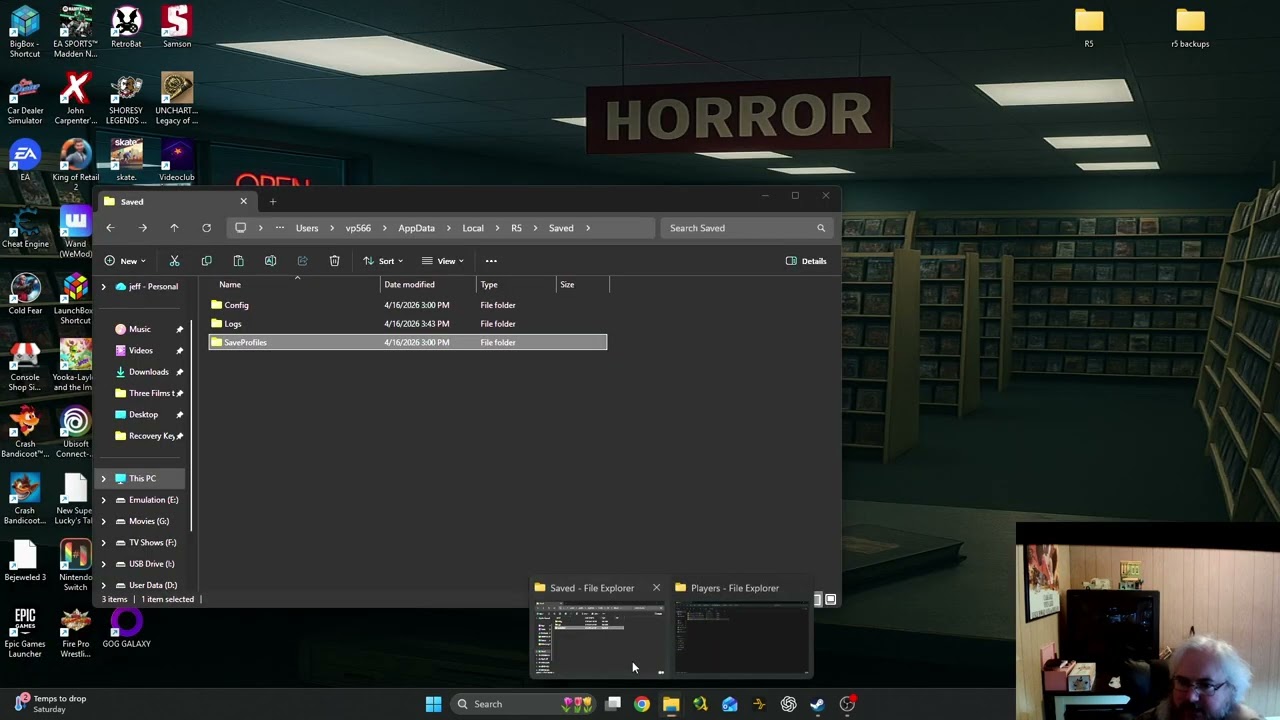
After a bunch of troubleshooting I figured out how to recover your save game on Windrose after getting stuck at loading screen.
trail wharf
I totally forgot, there should be backups in C:\Users\USERNAME\AppData\Local\R5\Saved\SaveProfiles
marble drift
Yep, that was the problem. Reccomend just not deleting any characters
Additional question since I'm having some FPS issues while playing. Which video setting affects performance the most? I used the "Auto-set Quality" button but i'm still having issues while in my base and while in naval battles.
edgy hornet
light oar
https://www.youtube.com/watch?v=XG3yeCZo42I
i watched this and followed along and i do not have those extra files...
light oar
marble drift
Additional question since I'm having some FPS issues while playing. Which video ...

Are you struggling with low FPS or stuttering in Windrose? In today’s video, we’re diving deep into the graphics settings to help you get the best performance without sacrificing that beautiful pirate aesthetic.
Whether you're trying to win naval battles with zero lag or just want a smoother experience exploring handcrafted dungeons, this op...
light oar
edgy hornet
i watched this and followed along and i do not have those extra files...
extra directories in Account? I copied everything away and deleted contents of Backup dir in AppData/Local/R5..... Then cleared everything in main folder, and just copied back 1 dir in Accounts that matches AccountDetails.json , then from backup folder coped Worlds and Players trying different dates (as the backup folder structure is date_time) until finding one that works, then going forwards by backup date with my main untill it stopped working.
with cloud saves off
edgy hornet
light oar
extra directories in Account? I copied everything away and deleted contents of B...
ya i dont have extra directories under account, players or worlds
light oar
edgy hornet
ya i dont have extra directories under account, players or worlds
Did you play coop with someone or only solo? Or someone played through Steam Familly/Game sharing?
edgy hornet
light oar
Did you play coop with someone or only solo? Or someone played through Steam Fam...
i mostly play on a dedicated server but sometimes i hop into solo if our serve ris down
and the game is on my accoun

attempting to load in with cloud saves off
 frozen talon
I cant connect to my dedicated server either with windrose. Windrose just updated. I am going to restart the server and see what happens
pine compass
frozen talon
I cant connect to my dedicated server either with windrose. Windrose just updat...
I think theres just connectivity issues rn
light oar
Does the world match the AccountDescription.json file content in RocksDB folder?
pine compass
You're far from the only one
edgy hornet
light oar
Does the world match the AccountDescription.json file content in RocksDB folder?
yes
light oar
edgy hornet
yes
Can u check your backups folder, it should have structure like
 edgy hornet
light oar
Does the world match the AccountDescription.json file content in RocksDB folder?
edgy hornet
light oar
Does the world match the AccountDescription.json file content in RocksDB folder?
or well the alphanumeric sequence matches the folder in account but players and world is different
 light oar
go 1 up. Should have 7656......._backup
edgy hornet
light oar
go 1 up. Should have 7656......._backup
?
 frozen talon
I restarted my Nitrado Server and restarted Windrose. after restarting Windrose the connect to server screen was slightly different. I am now playing on my server with my friends
pine compass
frozen talon
I restarted my Nitrado Server and restarted Windrose. after restarting Windrose ...
:0
light oar
edgy hornet
?
Cd Up to SavedProfiles directory
edgy hornet
light oar
Cd Up to SavedProfiles directory

 honest siren
crimson stump
Hello community and developers,
After the latest update, I’ve completely lost m...
honest siren
crimson stump
Hello community and developers,
After the latest update, I’ve completely lost m...
Did you ever figure this out? Update made server lose all progress
edgy hornet
 light oar
edgy hornet
light oar
edgy hornet
If you remember the last time it worked that list is in yearmonthday_time format
trail wharf
honest siren
Did you ever figure this out? Update made server lose all progress
Check to see if it changed the World ID in the ServerDescription.json. It did that to me and created a new world, but once I changed it back to the original one, my world was back
edgy hornet
light oar
If you remember the last time it worked that list is in yearmonthday_time format
like earlier this morning
proly the 12:54 pm one
honest siren
trail wharf
Check to see if it changed the World ID in the ServerDescription.json. It did th...
ty i'll look into it
edgy hornet
light oar
If you remember the last time it worked that list is in yearmonthday_time format
that folder also only has 1 folder in each of accounts/players/worlds
light oar
enter in that one 200260430_125415
trail wharf
honest siren
ty i'll look into it
Check R5\Saved\SaveProfiles\Default\RocksDB\0.10.0\Worlds to see if there's multiple world folders. The newer one is probably the one it just made - if there's only one folder though 🙁
edgy hornet
light oar
enter in that one 200260430_125415
 light oar
edgy hornet
that folder also only has 1 folder in each of accounts/players/worlds
light oar
edgy hornet
that folder also only has 1 folder in each of accounts/players/worlds
replace contents of Rocks_dB\0.10.0\ with those ones (backup the 3 directories first ofc)
edgy hornet
ok
light oar
if it does not work, try 1 earlier from 12:54
edgy hornet
ok
edgy hornet
light oar
if it does not work, try 1 earlier from 12:54
it loaded into the menu at least thx
light oar
good stuff!!!
Now, backup the player directory, and try to copy the ones later in the day
edgy hornet
light oar
good stuff!!!
now hopefully i can load into the server xP
edgy hornet
light oar
Now, backup the player directory, and try to copy the ones later in the day
?
i loade dintot he dedicated server im on
honest siren
trail wharf
Check R5\Saved\SaveProfiles\Default\RocksDB\0.10.0\Worlds to see if there's mult...
We keep changing the worldid but it keeps reverting back
light oar
if you played after 12:54 your player progress is in those 20260430_xxxxxxx directories. You can try to copy only the player directory to retain the progress
edgy hornet
light oar
if you played after 12:54 your player progress is in those 20260430_xxxxxxx dire...
funny thing is its way after tht 12:54 pm time but when i loaded into the server my progress was exactly wher ei left it when i first had the interact not work and had to force quit my game
light oar
ok, then keep the 12:54 one as at least it works
edgy hornet
ya ty very much 🙂
light oar
anytime
 snow hull
Release notes say that server was optimized when idle.
doesn't seem any better from looking at this
ah wait, disregard.. I got the update bug 🙁
Update state (0x3) reconfiguring, progress: 0.00 (0 / 0)
Update state (0x0) unknown, progress: 0.00 (0 / 0)
Error! App '4129620' state is 0x6 after update job.
olive pulsar
FYI, for those having the issue of not being able to connect to a server and it just gets stuck loading forever, try configuring the server to use Direct IP connect instead. That fixed it for me.
trail wharf
honest siren
We keep changing the worldid but it keeps reverting back
The server is shutdown when you changed it? If so, maybe copy the whole dedicated server folder to somewhere else on the computer? That way Steam shouldn't be able to touch it?
trail wharf
snow hull
Release notes say that server was optimized when idle.
Mine dropped from 20% CPU to 3% CPU when idle
snow hull
trail wharf
Mine dropped from 20% CPU to 3% CPU when idle
Yeah, looks great now.. had to clear manifest to shake steamcmd loose
 reef quail
So my friend STILL has the same issue of joining, where he will join my game, i see his ship spawn, i see him spawn, but then his game freezes on the loading screen and eventually gives a "Application hang detected" error, and crashes.
And there seems to be no reason behind it, its ENTIRELY random when it happens, and when it doesnt happen. We cant figure out what exactly the issue is.
Also the new force join thing they added doesnt help
honest siren
trail wharf
The server is shutdown when you changed it? If so, maybe copy the whole dedicate...
We use bisect hosting not local
 agile cloud
Hey does someone know how i can trasnfer my world to dedicated server?
honest siren
trail wharf
The server is shutdown when you changed it? If so, maybe copy the whole dedicate...
Yeah it is shutdown, I am very confused
trail wharf
honest siren
We use bisect hosting not local
Does bisect have admin software that lets you set the world id? Maybe it's overwriting the file? The other option, copy all the files from the old world folder into the new world folder and hope it works?
 pale wind
Sorry guys I think you're actively talking about this very issue, but confused about the responses. Any idea why I can't connect to my dedicated server? Using SteamCMD and getting this error. Just can't get it to work since the new update 
 trail wharf
agile cloud
Hey does someone know how i can trasnfer my world to dedicated server?
trail wharf
agile cloud
Hey does someone know how i can trasnfer my world to dedicated server?
Yes. You copy the folder under C:\Users\USERNAME\AppData\Local\R5\Saved\SaveProfiles\USERID\RocksDB\0.10.0\Worlds folder to your dedicated servers \R5\Saved\SaveProfiles\Default\RocksDB\0.10.0\Worlds folder and then set the world id to the folder name you just copied in the ServerDescription.json file in in servers R5 folder.
Assuming your user folder is on C:
 tame moat
so when is windrose going to fix their broken update ?
trail wharf
In the future?
tame moat
pff now
 fierce spoke
Waiting for a Hotfix
agile cloud
trail wharf
Yes. You copy the folder under C:\Users\USERNAME\AppData\Local\R5\Saved\SaveProf...
Perfect brother thanks !
honest siren
trail wharf
Does bisect have admin software that lets you set the world id? Maybe it's overw...
Yes, we changed it there too. It keeps creating a new world everytime we restart
trail wharf
honest siren
Yes, we changed it there too. It keeps creating a new world everytime we restart
For me, the file got updated by Steam once, but changing it made it work. If it's making a new world every time, there must be something wrong with the software that is controlling the server 🙁
honest siren
trail wharf
For me, the file got updated by Steam once, but changing it made it work. If it'...
Looks like it yeah... gonna open a ticket with bisect hosting see if they can resolve it, thank you for your help
trail wharf
honest siren
Looks like it yeah... gonna open a ticket with bisect hosting see if they can re...
I hope they get it sorted. I suggest backing up your world off their server, just in case. Probably overly cautious, but if they can't fit it, you could maybe move it somewhere else.
 near radish
can i get a refund?! i'm not about to delete my save files for a second time! give me a refund how do i get a refund
trail wharf
near radish
can i get a refund?! i'm not about to delete my save files for a second time! gi...
Don't know how to get a refund, but did you try restoring them from one of the backups?
near radish
nah i shouldnt have to do this bs or look up how to do this bs
 merry oriole
we have a odd error where our dedicated server says its updated but still says a client version mismatch. i think we need a hot fix lol
 digital drift
honest siren
Looks like it yeah... gonna open a ticket with bisect hosting see if they can re...
digital drift
honest siren
Looks like it yeah... gonna open a ticket with bisect hosting see if they can re...
Yeah defo give us a holler! 🙂
trail wharf
merry oriole
we have a odd error where our dedicated server says its updated but still says a...
Is this a ded server you downloaded running locally?
merry oriole
trail wharf
Is this a ded server you downloaded running locally?
my buddys running it locally on his spare pc
trail wharf
near radish
nah i shouldnt have to do this bs or look up how to do this bs
I can tell you how to do it. It's happened to me too a few times.
 mild sigil
My game just updated today and I tried to manually update my dedicated server (it said it updated successfully) but it still says the versions do not match. I have tried multiple things from the website and it still says they do not match. Does anyone know how to fix this?
trail wharf
merry oriole
my buddys running it locally on his spare pc
Same setup as me. I made a copy of files and use them to run the server, that way I can have Steam delete and redownload files if updates fail, without it messing with my server settings and world files
trail wharf
mild sigil
My game just updated today and I tried to manually update my dedicated server (i...
Same issue as @merry oriole . My suggestion is backup your server files, make sure you have the world files (R5\Saved\SaveProfiles\Default) backed up, then delete and have it redownload everything, assumign you only have one set of files.
merry oriole
trail wharf
Same issue as <@162977499976957952> . My suggestion is backup your server files,...
we just tried that and yea same thing
 fading kayak
trail wharf
Same setup as me. I made a copy of files and use them to run the server, that wa...
fading kayak
trail wharf
Same setup as me. I made a copy of files and use them to run the server, that wa...
Yes I get that also, here is how I fixed it, just re-run the install script, dont remove anything, will not over write your saves. But backup always.
for some reason the steam update scripts dont work
trail wharf
I used the Steam desktop client to download the server files, before copying the files over, making sure I didn't copy the ServerDescription.json file. SteamCMD doesn't always work for me
haughty jacinth
Changing your Nitrado server to connect via direct IP seems to fix the forever loading screen issue by the way
 autumn jewel
So idk whats going on with my game, but when i attempt to connect to my freinds sever...it casues my router to reset and knock everyone off my wifi
 azure wind
Is there any known issue with Windrose locking up if you tab to another window?
I run dual monitors and didn't have a problem until around monday. now everytime I tab out to type in Discord or anything else, Windrose locks up and I have to restart my computer to be able to restart Windrose.
 glass bay
light oar
https://www.youtube.com/watch?v=XG3yeCZo42I
glass bay
light oar
https://www.youtube.com/watch?v=XG3yeCZo42I
I followed the instruction from this video and I am still having the infinite loading glitch. I even went and deleted the whole R5 folder and reinstalled the game and it's still happening.
 charred echo
One of my players on my dedi is hitting "GsStream P2pClient is broken ... BL P2PGate disconnected ... " - is everyone getting this? Any fix?
autumn jewel
Is there any reason why connecting to Server would cause it to complety crash my router
 halcyon yew
correct me if im wrong but last time i got it working again...
Backup world > delete docker container > reinstall > move world > change Server Description to poitn to world ID...that should be it rihgt?
 potent girder
trying to put a copy of my world in my local games folder to build on one and adventure on the other, but have the same maps and progress.
google says I should be able to change the name of the world folder as long as I change the name in the json file to be the same as the folder.
when i run the game the new copy is there. But when I launch that one it starts to load and then kicks me back to the main screen.
anybody know a work around?
pale wind
mild sigil
My game just updated today and I tried to manually update my dedicated server (i...
having the same issue, dont know the fix
charred echo
I switched to Direct IP and now all my PCs at home can connect... One player is "is BLConnected with session 33C736... at R5.log:3360 and still stuck State 'BLConnected' with NetAddress '' at R5.log:3477
No NotifyAcceptedConnection or Join request exists for Corey’s session. ISP issue?
sturdy knot
If I do "Direct connect" rather than invite id what port do i put if it's on my local network ? what would i put for others outside of my network to join? I port forwarded 7777 and 7778, problem i'm having is InviteID is causing never-ending loading screen
charred echo
charred echo
I switched to Direct IP and now all my PCs at home can connect... One player is ...
Running on a hotspot fixed it...? Wut
halcyon yew
is anyone eseeing Unexpected BL Disconnet?