

1 messages · Page 4 of 1
 upbeat rivet
It might be because, I haven't added instructions for the sound in the prompt.
For videos like these, what should I put in the prompt?
https://youtu.be/Faz3sNwL4rw?si=z5tmhWK5Yxoex3uO
 viscid fjord
veo2 doesn't generate sound, people add it with something else, I a few tools have been mentioned here
 visual sapphire
 upper badge
让她动起来

 strong karma
https://m.youtube.com/watch?v=WFVLWo5B81w&pp=ygUTZm9sZXkgc291bmQgZWZmZWN0cw%3D%3D
I recommend recording your own sound FX. It's super easy and fun too!
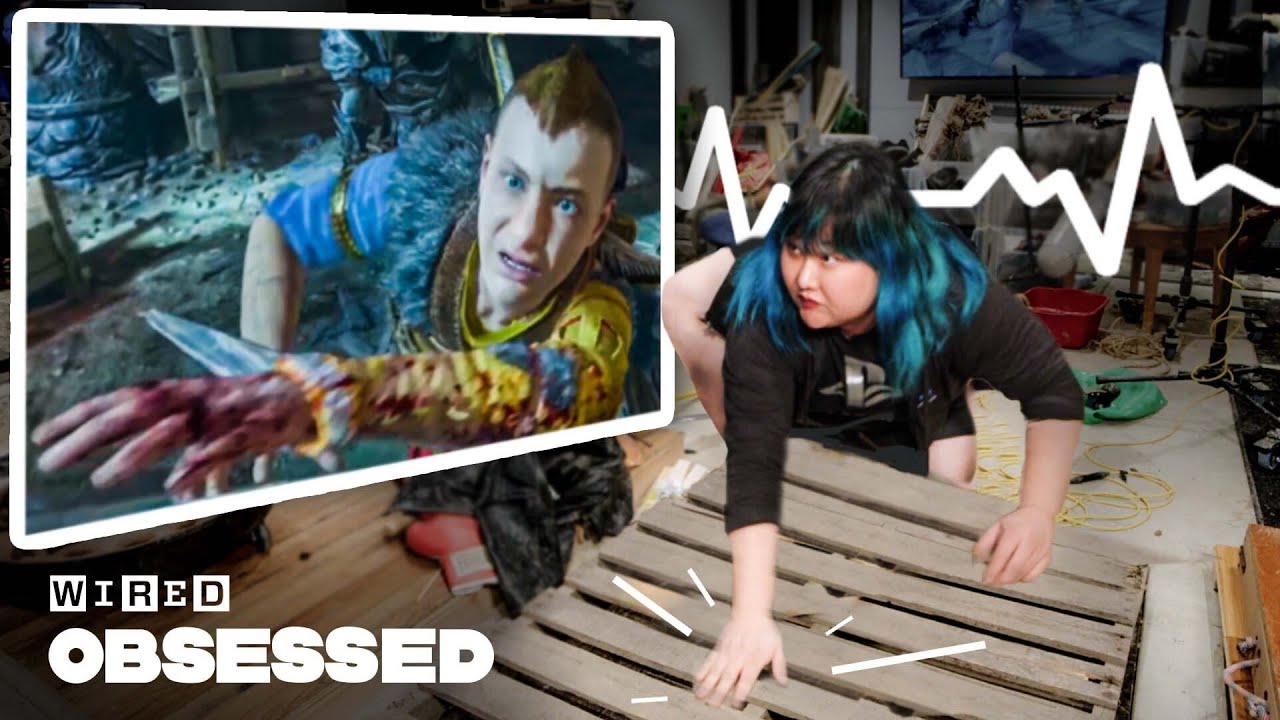
Ever wondered how they make the sound effects we hear in video games? Meet Joanna Fang, foley artist for PlayStation Studios and master at creating sounds for movies and video games like God of War: Ragnarok. We step inside Sony's foley studio to see Joanna at work, turning plungers into running horses and manicotti into broken bones.
Direct...
 rocky matrix
I've seen this as well.. anyone noticed it?
 craggy pawn
Does anyone have a way to access veo 2 ?
 hexed marsh
yeah
craggy pawn
hexed marsh
yeah
for free?
craggy pawn
yes about a week ago
craggy pawn
hexed marsh
also sign up for the whisk animate
is it veo 2?
hexed marsh
yeah it utilizes veo 2 under the hood i think
craggy pawn
hexed marsh
give it some time
Do you have an idea of the expected time
hexed marsh
craggy pawn
hexed marsh
yeah it utilizes veo 2 under the hood i think
oh nice
craggy pawn
i will trye
craggy pawn
hexed marsh
i sign up here
hexed marsh
good luck, hope u get access soon
craggy pawn
hexed marsh
good luck, hope u get access soon
thank you
craggy pawn
hexed marsh
good luck, hope u get access soon
Do you have access to veo 2?
hexed marsh
yes
craggy pawn
How much do you rate out of 10?
hexed marsh
10
craggy pawn
Is it really that great?
hexed marsh
it's best model for AI video generation hands down
there is no other model that produces the consistency and overall quality of VEO 2
craggy pawn
hexed marsh
it's best model for AI video generation hands down
Yes, I have watched a lot of videos about it on YouTube
craggy pawn
hexed marsh
there is no other model that produces the consistency and overall quality of VEO...
You're right. 100%
Does it support 4k
hexed marsh
check out #flow-videos・📹 to see some videos
and if you have prompts, send them in #flow-tips-n-tricks・✏️
i think its 720p for now but the quality is so good you won't even notice
craggy pawn
hexed marsh
check out <#1294402841628250162> to see some videos
and if you have prompts, ...
Yes, I'm see it
hexed marsh
everything else makes up for it
craggy pawn
hexed marsh
everything else makes up for it
Yes, even the videos it generates appear exaggeratedly realistic!
hexed marsh
it impresses me every time i use it to say the least
whisk animate will be a lot of fun too
craggy pawn
Yes, it's a strong model, even stronger than sora
 crisp basalt
is it just me or
im noticing the artifact in the generated video now
like it become more obvious now
 near gate
crisp basalt
im noticing the artifact in the generated video now
near gate
crisp basalt
im noticing the artifact in the generated video now
i just noticed it now.. it ruins everything :/
hexed marsh
hm i haven't noticed that
crisp basalt
hexed marsh
hm i haven't noticed that
Check what zen posted in gallery
 waxen lodge
i need videofx access please
 nova ferry
crisp basalt
im noticing the artifact in the generated video now
nova ferry
crisp basalt
im noticing the artifact in the generated video now
happening since a few days at least 50% of my renders
rocky matrix
Yes same here. Check the background. @main saddle I just wanted to also make you aware of this and so many generations that is not useable due to artifacts
crisp basalt
rocky matrix
Yes same here. Check the background. <@1241115137684013129> I just wanted to als...
Feel free to post your vid in thread I made in bug channel https://discord.com/channels/1172568727942860810/1352132020368572437
 dim glen
Guys is it possible to upload a picture and turn it to a video on Veo 2?
 rustic topaz
please don't ban me
rustic topaz
crisp basalt
have you tried it yet? how was it?
crisp basalt
Oh I’m not subscribed to Poe , I’m on Freepik plan atm
rustic topaz
damn I want to know how good it is compared to Kling
Kling is god-darn expensive to me atm
crisp basalt
rustic topaz
damn I want to know how good it is compared to Kling
Oh
When it comes to visuals, Veo excels at generating realistic visual effects and accurate physics-based collisions.
Kling 1.6 Pro is impressive, but what makes Veo stand out is how naturally the video looks,
I tried Veo image-to-video on Freepik a few days ago, and I’m really impressed with the results. It still struggles a bit with following prompts, but overall, the experience has been great.
rustic topaz
the biggest problem I get with veo is that it keeps changing scenes, it gives cuts and edits I don't want
crisp basalt
rustic topaz
the biggest problem I get with veo is that it keeps changing scenes, it gives cu...
oh so far i havent got any ,,, jump cut or changing scene especially with image to video mode
 mental mulch
Hey how do i gen a video thats not in slow motion
rustic topaz
i mean, you can ask the model to do fast motion, but it surely will have some ai shenanigans to it
you should try repeating the word fast motions, fast movements, etc
rustic topaz
to be honest, does anyone even use TV mode?
 sharp field
Does anyone know how to get into early access to VEO2?
rustic topaz
the register form closed a while ago
crisp basalt
rustic topaz
to be honest, does anyone even use TV mode?
Yeah, the non early access users use it all the time
hexed marsh
crisp basalt
Yeah, the non early access users use it all the time
made me chuckle ngl
yo did anyone ever get access to whisk animate via the recent form yet?
crisp basalt
that was corny
 solid tide
nova ferry
happening since a few days at least 50% of my renders
solid tide
nova ferry
happening since a few days at least 50% of my renders
Yes, same here! Looks like Moiree, or as it was filmed from a screen. More than 75% of my shots have it, would say since 3-4 days
Look at here cloth here
Thats what usually might happen with older cameras, when fine patterns are filmed, you get a moiree effect.
near gate
@main saddle I have been waiting for months pls invite me my email is: alexloopy21@gmail.com pls invite me!
It feels like eternity
😧
Btw please do not kick me out of the server for begging but I have been waiting tooo longgggg
hexed marsh
lool
crisp basalt
solid tide
Yes, same here! Looks like Moiree, or as it was filmed from a screen. More than ...
Ohhh TIL it’s called moiree
crisp basalt
Looks like the moiré effect isn’t showing up anymore, at least based on what I’m seeing in my latest generated video.
 balmy mica
Does anyone know when the next open registration is?
crisp basalt
I don’t even bother opening the videofx library page on my phone anymore, it always refreshes itself before any video loads, then suddenly crashes with a error message.
crisp basalt
balmy mica
Does anyone know when the next open registration is?
Nobody really knows for sure, but if you’re looking to try out the Veo 2 model, there’s another signup form available,it’s for Whisk Animate, which uses Veo 2 to bring your generated images to life.
Never mind it’s closed now lol

It was opened for like almost one week
balmy mica
🥲
I’m eager to use it for my business
I’ll check it out, tysm
The wait list with VideoFX?
What’s the difference by the way? (I’m new to all this) If I can use it in Poe, is it still a good idea for me to join the wait list on VideoFX for example?
crisp basalt
balmy mica
What’s the difference by the way? (I’m new to all this) If I can use it in Poe, ...
Yeah it’s a good idea to join the waitlist anyway,
balmy mica
Oh wow
Is it possible for me to feed it a png image of clothing that I designed and have it generate a video with that piece of clothing in it?
crisp basalt
Maybe Veo 3 😝
balmy mica
I watched one of his videos and got hooked, I’m still binging 😂
mental mulch
Can I get some help
how do i have videos generate on videofx without having the videos come out with slowmotion
is there a certain prompt im missing
 surreal flicker
mental mulch
is there a certain prompt im missing
surreal flicker
mental mulch
is there a certain prompt im missing
Try using keywords such as fast, motion and etc
mental mulch
like fast motion
surreal flicker
mental mulch
like fast motion
Yes
mental mulch
how do I make a keywords
surreal flicker
mental mulch
how do I make a keywords
Ah just use those types of words in the prompt
balmy mica
I see 2 versions of Veo 2 on Poe, there’s Veo-2 and Veo-2-Video but both are marked official and only one is by Google, what’s the difference?
mental mulch
Good question
balmy mica
I’ve been trying to feed it my fantasy prompt but it ends up coming out cartoonish/3D rendered with awkward movements
crisp basalt
balmy mica
I’ve been trying to feed it my fantasy prompt but it ends up coming out cartooni...
Yeah that’s another thing Veo model struggles atm, well I shouldn’t say struggle but it’s more of how user prompted it.
 young moon
does videofx only generate 8 second videos?
can it generate youtube video lengths like 10 mins or sth practically for those who have access to it?
young moon
surreal flicker
From what i’ve seen
oo, is there a way to practically generate youtube video clips like 10 mins practically by appending 8 second videos or is it just not practical and just manually video edit yourself for best effectiveness?
surreal flicker
young moon
oo, is there a way to practically generate youtube video clips like 10 mins prac...
For now you can only combine the 8 second clips separately to form some sort of video
young moon
surreal flicker
For now you can only combine the 8 second clips separately to form some sort of ...
oo i see, thanks for the information man 🙏
surreal flicker
young moon
oo i see, thanks for the information man 🙏
there was this instance where a website provider had veo 2 along with an image to video option which google shortly told them to remove
Implying i2v may be coming out with the opportunity to extend the previously generated videos
 lusty nymph
Where is this from?
crisp basalt
And luma still can’t do it right with their generated video
 wet kiln
This new story im generating with ChatGPT and Veo 2 is gonna be sick I can feel it
 wet ice
guys ... we got a new update ?
crisp basalt
WOAH

HOLY MOLY @edgy holly ITS HERE
image to VIDEO

ACTUALLY NO ! LMAO

Ahhhhhh finally
 wet ice
🙋♂️ 🫡 😎
crisp basalt
this is a very good update

so now your generated video from the past is shown on main page too this is actually nice!
 wet kiln
OOOOOOOOOOOOOOOOOOOOOOOOOOOH?!!!
Great! Time to create 38 scenes for this 5 minute story :d
wet kiln
It feels like its faster
crisp basalt
it is!
wet kiln
:gasp:
Its already at 30%
and i just started generating my next scene
Oh dang I thought the generations got more cursed and then I realized I accidentaly clicked Veo 2 - Fast mode
 hushed rain
If anyone wants to check it out, I just released a short dark fantasy film: ALL Veo-2!
https://youtu.be/YDlME4qvER8

Presenting: The Bridge. An AI Short film utilizing Google’s Veo-2. I’m really proud of this one, as my goal (as always) is to push storytelling, performance, and narrative in this emerging art form, and I feel like I managed to pull something close that off here.
Every shot here utilized Veo-2, although there were a few post-generation tricks ...
 hardy halo
Wow you guys are fast! Just launched a new UI update. Let us know what you guys think 🙂 #flow-announcements・📣 message
crisp basalt
@hardy halo generate five videos !!! That's very generous of you guys!!
hushed rain
and by "film" I mean...short. It's like 2 minutes. haha
 fierce nimbus
We listen we listen hhaahah
hushed rain
hardy halo
Wow you guys are fast! Just launched a new UI update. Let us know what you guys ...
haha, seriously? I've been cranking on an AI Film for the last 4 days and we get this update 30 minutes after I release it?! hahah (kidding: thank you very much!)
I guess I gotta go make another one now...
wet kiln
hushed rain
If anyone wants to check it out, I just released a short dark fantasy film: ALL ...
This is AMAZING. I'm actually in the works of creating a film too
I hope it comes out great
crisp basalt
oop - i think those link contains y our .. stuff thingy
hushed rain
wet kiln
This is AMAZING. I'm actually in the works of creating a film too
apprecate it!! LOTS learned here! If you go into VideoFX Prompts, check out the FWD that @crisp basalt did (not sure who the original author was) on Scene Split in your prompt. That is a KILLER hidden feature.
 thick umbra
yay! new ui! now we need image to video!
thick umbra
hushed rain
and by "film" I mean...short. It's like 2 minutes. haha
hey tim!
kinda image to video? but i can't import my own images :<
 crisp basalt
its actually text to image to video haha, im sure its not ready yet for early access users.
thick umbra
crisp basalt
its actually text to image to video haha, im sure its not ready yet for early ac...
its on the API though. so maybe they are still making it better on labs idk
wet kiln
https://www.youtube.com/watch?v=TG1BNR-wC9I Trailer of the story I'm creating
crisp basalt
Overall, the new VideoFX UI update looks much cleaner and more polished.
The layout is more organized, and the larger video previews make it easier to browse generations. Overall, it feels more modern and user-friendly compared to the previous version. I'm really happy with the update ❤️
 wet kiln
crisp basalt
Overall, the new VideoFX UI update looks much cleaner and more polished.
The la...
wet kiln
crisp basalt
Overall, the new VideoFX UI update looks much cleaner and more polished.
The la...
Yeah the previous version felt like watching videos on a card or something
crisp basalt
crisp basalt
Overall, the new VideoFX UI update looks much cleaner and more polished.
The la...
Really appreciate all the improvements you guys made to the VideoFX tool, especially the UI!
 verbal hatch
crisp basalt
Overall, the new VideoFX UI update looks much cleaner and more polished.
The la...
verbal hatch
crisp basalt
Overall, the new VideoFX UI update looks much cleaner and more polished.
The la...
did the flickering effect disappear after the update?
wet kiln
verbal hatch
did the flickering effect disappear after the update?
NnnnnOPE
wet kiln
verbal hatch
did the flickering effect disappear after the update?
Oh dang it's kinda worst than before
verbal hatch
wet kiln
Oh dang it's kinda worst than before
has the quality gotten worse?
wet kiln
verbal hatch
has the quality gotten worse?
No
crisp basalt
invm i think its fine
verbal hatch
the flickering never went away...
wet ice
verbal hatch
the flickering never went away...
what flickering guys?
wet kiln
It's called a moiré effect. A visual effect that two similar patterns, when superimposed, create a new, often unwanted, pattern of wavy or striped lines
It was barley visible but now it's slightly more visible
crisp basalt
i had to put it to output only one video for text to image to video so it wont introduce jumpcut
at least from what ive tried so far
 hot bough
gosh I need access 
crisp basalt
from what ive tried so far yeah
i dont know dont quote on me that tbh, but, i tried with 2 output only
only 1 out of 2 didnt do jump cut
fierce nimbus
losign which prompt?
crisp basalt
Oh yeah i was about to say that
 shrewd bone
ah ye, kinda odd but just gotta click "Use Prompt"
seems like the library loads a lil faster
wet ice
great visual ex... now i understand
crisp basalt
One thing I really like about the new update is that in the text-to-image-to-video process, it now generates four image variations, and we get to choose the one we like best.
 verbal hatch
I wonder if they'll ever remove this flickering effect? The update is certainly cool, but I'd like to see the flickering effect gone.
crisp basalt
just a suggestion but is it possible to add the delete video button on the main page too?

That way, it’s easier to delete a generated video we don’t like without needing to go all the way to the library page 
 ashen yoke
Say more about what you mean by overshot it?
 winged plinth
shrewd bone
ballet
winged plinth
shrewd bone
ballet
My fav style.
ashen yoke
mental mulch
Just dont like how laggy it becomes now
I'm not running into lag -- I kinda miss the gray'd in little prompt space because I like that feature in Whisk .. but it's not a complaint
wet kiln
 fierce nimbus
ashen yoke
I'm not running into lag -- I kinda miss the gray'd in little prompt space becau...
fierce nimbus
ashen yoke
I'm not running into lag -- I kinda miss the gray'd in little prompt space becau...
which prompt space?
 unique abyss
wet kiln
https://www.youtube.com/watch?v=IvsFkn4j8D0&ab_channel=Veo2Movies My newest stor...
unique abyss
wet kiln
https://www.youtube.com/watch?v=IvsFkn4j8D0&ab_channel=Veo2Movies My newest stor...
Like the consistency you are able to achive.
wet kiln
unique abyss
Like the consistency you are able to achive.
Thx!
ashen yoke
fierce nimbus
which prompt space?
The space with grayed out sample prompt
hardy halo
Everything is public and free to share!
visual sapphire
Just need someway to stich videos together + continue from last frame etc
 tacit aspen
Amazing Update!
 sage hare
new UI is goated
 torpid cedar
Interesting UI. The text to image feature seem bugged tho
Just release the img2video. 😁
 sturdy atlas
torpid cedar
Interesting UI. The text to image feature seem bugged tho
sturdy atlas
torpid cedar
Interesting UI. The text to image feature seem bugged tho
is there something in particular that is bugged with text to image?
torpid cedar
@sturdy atlas it doesn't complete the full task. I generate the image and then the scene gets bugged error related
Whisk seems to have the same problem
sturdy atlas
torpid cedar
<@1181408271869947947> it doesn't complete the full task. I generate the image a...
hmmm will investigate, thank you!
hexed marsh
whisk animate 😮
 ripe jetty
I want pizza now name dropping Domino's
 small lake
Does anyone have good prompting resources for using VideoFX to generate realistic videos of people?
upbeat rivet
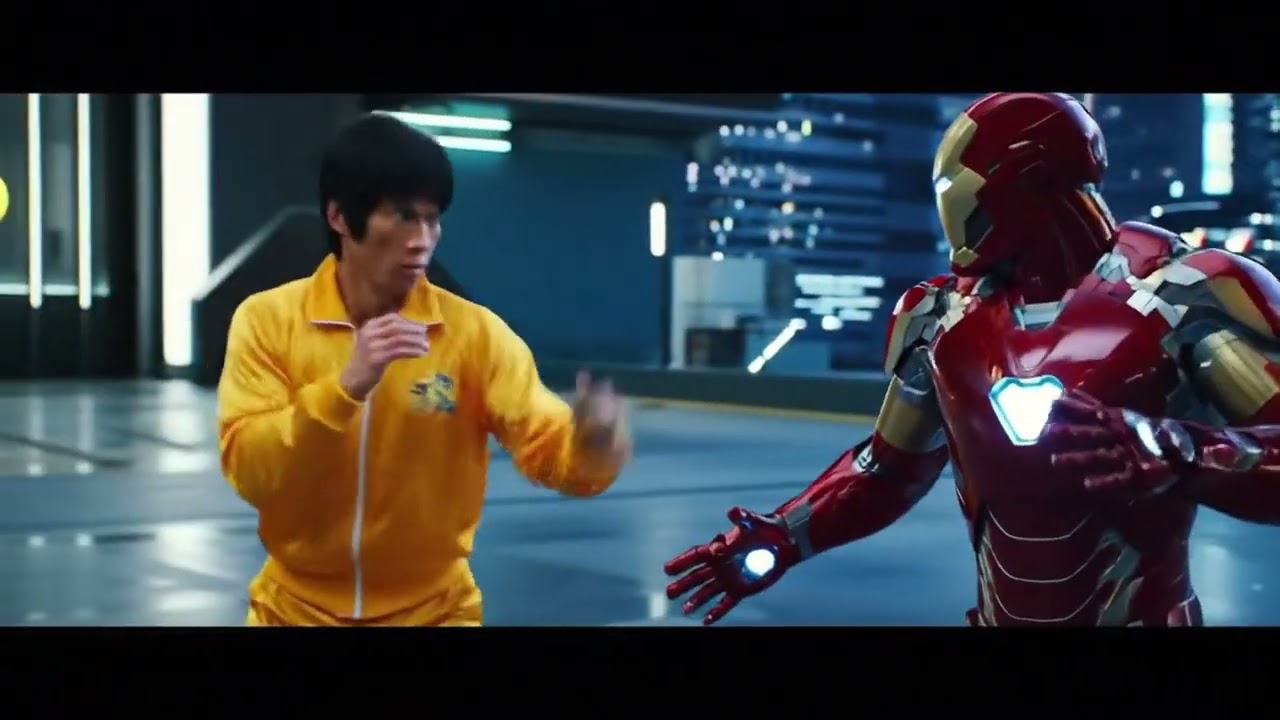
@small lake I believe that the resource you are looking for is the Google Gemini app. I used it to create videos of Bruce Lee fighting characters. I believe that it is okay with doing Bruce Lee because, no one owns his image. But, I don't think you would be able to create videos of someone else who is still alive.
My newest creations :
https://youtu.be/Faz3sNwL4rw?si=z5tmhWK5Yxoex3uO
 ornate kelp
anyone else having issues with text-to image-to video. Generating the image fine, but it’s not generating the video. Just gets to like 10% and disappears
crisp basalt
ornate kelp
anyone else having issues with text-to image-to video. Generating the image fin...
What was the image and prompt if you don’t mind
ornate kelp
crisp basalt
What was the image and prompt if you don’t mind
It seems to be for everything I try, so it’s def not a filter issue I.e “hotograph capturing an elegant grey Siberian cat lounging gracefully on a plush, modern couch. The cat’s luxurious, dense fur is a silky gradient of shimmering silver and smoky charcoal tones, accentuating its majestic appearance. Its vivid emerald-green eyes, almond-shaped and expressive, gaze thoughtfully ahead, reflecting gentle indoor lighting that softly illuminates its whiskers and highlights intricate facial details. The ears, tipped slightly forward in a relaxed yet alert position, add to the feline’s sophisticated charm. The cat sits poised with a serene dignity, its thick tail neatly curled around its paws, emphasizing its regal and composed demeanor. The couch beneath is upholstered in soft, textured fabric with subtle hues of muted grey and taupe, providing a complementary backdrop that enhances the cat’s natural beauty. The setting feels cozy, peaceful, and inviting, expertly framed to showcase the refined textures, subtle shadows, and meticulously detailed clarity characteristic of professional animal photography”
I get the image, then it when I prompt for the motion it just disappears. For even something simple as “the cat leaps off the couch””
ornate kelp
Thanks will do!
I feel like I had a similar issue in the past when I was logged in on 2 devices, but I can’t tell with the new UI
ashen yoke
Thanks for these latest posts -- I cleared my cache because I was running into similar problems running on Firefox; the image generating but then crashing out when going to video
 obsidian summit
Did that fix the issue?
ashen yoke
ashen yoke
Thanks for these latest posts -- I cleared my cache because I was running into s...
Spoke too soon; added it to the bug list
obsidian summit
I'm experiencing it too.
ashen yoke
obsidian summit
Did that fix the issue?
nope 😦
ashen yoke
ashen yoke
nope 😦
well that's no good
obsidian summit
I guess the positive thing is I'm not the only one experiencing the issue.
crisp basalt
ashen yoke
Thanks for these latest posts -- I cleared my cache because I was running into s...
Have you tried other browser?
obsidian summit
crisp basalt
Have you tried other browser?
Tried both chrome and firefox
crisp basalt
hmm
if possible, try to screen record the steps leading up to the crash
Or at least take a screenshot of the crash itself, it might help the labs team investigate it more effectively
obsidian summit
crisp basalt
if possible, try to screen record the steps leading up to the crash
Just posted a screen record of the issue.
 plain lava
hi! I've been having the same imageToVideo failure at ~8-10% all afternoon. It was working for me this morning.
 silk hill
plain lava
hi! I've been having the same imageToVideo failure at ~8-10% all afternoon. It w...
silk hill
plain lava
hi! I've been having the same imageToVideo failure at ~8-10% all afternoon. It w...
you have image to video?
plain lava
I meant creating an image first in VideoFX, and then using it as "first frame" for my video prompt.
silk hill
bah
 crystal ermine
Guys any of you got access to both VideoFX & Whisk Animate? Could you guys tell me are there any differences in quality, functionality etc? And maybe show us the same action done by both VideoFX & Whisk Animate? Thanks.
crisp basalt
It’s basically Imagen Fast Model
And Veo Fast model being used to animate
Don’t quote me on that 
 paper inlet
In Whisk, I added three subjects, an otter and a snail generated by Whisk, and an image of a metal puzzle ring from the internet. I put in a simple prompt to create the two composite images. I animated the one on the left, reusing the same simple prompt. Then I took the prompt generated by Whisk and put it into VideoFX (Veo 2 - Fast Mode).


This is the prompt generated by Whisk: "A smooth-coated, dark brown otter sits on a light beige sandy beach, attempting to solve a complex silver metal wire puzzle, while a light brown shelled snail with a grayish-brown body watches from nearby; calm turquoise sea and blue sky background.
A smooth-coated otter with dark brown, wet fur sits on a light beige sandy beach, its body slightly hunched as it manipulates a silver metal wire puzzle with its paws. The puzzle is composed of several interconnected loops and wires, forming a complex three-dimensional shape. The otter's dark eyes are focused on the puzzle. Nearby, a snail with a light brown, spiraled shell and a textured grayish-brown body sits on the sand, seemingly observing the otter. Small waves lap gently at the shore, leaving a thin line of wet sand. The sand is relatively smooth with small footprints and debris. In the distance, a low-lying, tree-covered headland extends into the calm turquoise sea under a clear blue sky. Several small, brightly colored buoys are visible in the water. The lighting is bright and sunny, suggesting midday."
Veo2 (regular mode)
crystal ermine
paper inlet
Veo2 (regular mode)
I think I actually prefer Veo2 fast mode result. Thanks guys @paper inlet @edgy holly @crisp basalt I guess I still have to get Veo2. Hope Georgia re-open the reg.
crisp basalt
crystal ermine
I think I actually prefer Veo2 fast mode result. Thanks guys <@76284213617754112...
Whisk Animate uses veo2 fast mode btw
crystal ermine
crisp basalt
Whisk Animate uses veo2 fast mode btw
Yeh I read your previous post, but there's a difference in what's produced by Whisk Animate & Veo fast on Video FX as shown by heatherhelen 🙂
crisp basalt
crystal ermine
Yeh I read your previous post, but there's a difference in what's produced by Wh...
I forgot whisk animate specifically uses VEO 2 Fast Mode Image2Video model
crisp basalt
paper inlet
Veo2 (regular mode)
This one was text to video right?
paper inlet
I think the Whisk: text-to-image > Animate workflow is similar to the Veo 2: text-to-image-to-video workflow. In other words, the workflow is your prompt > image generated > model generates a new prompt for the video > video is generated.
I generated both of the Veo2 videos, fast and regular, with straight text-to-video, using the same prompt auto-generated by Whisk.
Here's the text-to-image-to-video workflow in VideoFX with Veo 2 - Fast Mode, where you generate the image first and then create the video. Unfortunately, I can't get the video to generate. It's not working. But, you can see that the text-to-image part creates an image that looks more like the Whisk generated image.

So for the workflows, it's either 1) text-to-image-to-video workflow available in Whisk Animate or VideoFX; OR 2) text-to-video available in VideoFX.
 forest raptor
oooooooops
Btw, "female astronaut 16 bit videogame" is blocked
but "astronaut 16 bit videogame" isnt
no female astronauts apparently
back in the kitchen
ah, "astronaut woman" is fine
ah no. blocked.
now the videos also have a different name, no need to rename them every time!
 iron matrix
Were having some issues today with Video generation! Please hold tight and hopefully we will have things fixed soon!
silk hill
anyone getting this when they try to make anything in whisk
 solid tide
For me regular T2V Veo 2 is working, but Text to Image to Video is only working with Veo Fast
As reported above, makes like first 5% then gets canceled.
Just reporting, as its stated already going to be fixed. 🙏 
wet kiln
Really? It's working for me.
crisp basalt
converted the videofx web into electron based app,
 forest raptor
silk hill
anyone getting this when they try to make anything in whisk
forest raptor
silk hill
anyone getting this when they try to make anything in whisk
yah
 true locust
Slow vertical tracking shot: The camera moves upward, revealing "Tekzo", a 10-year-old boy with spiky electric-blue hair and glowing cyan eyes, standing in his secret high-tech garage. He gazes in awe at his cyber-tech glove, which emits neon-blue energy trails. Floating holograms display futuristic schematics around him. The dimly lit garage flickers with monitors, scattered gadgets, and robotic parts, while sparks of electricity and digital particles swirl in the cyberpunk atmosphere. Animated movie quality.
iron matrix
just to be sure, when you say "still not working" you mean you're getting "Something went wrong" toasts. Or is there something else going wrong?
crisp basalt
iron matrix
just to be sure, when you say "still not working" you mean you're getting "Somet...
Mine was “something went wrong”
crisp basalt
wait its generating very fast, im using normal model right now
crisp basalt
crisp basalt
wait its generating very fast, im using normal model right now
i mightve spoken too soon

 iron matrix
crisp basalt
iron matrix
crisp basalt
Sorry for now you can only use Veo 2 (not Veo 2 - Fast Mode) with I2V and T2I2V! This will hopefully change in the near future
crisp basalt
Ok so when u picked Fast Mode, it will show that toast
Ahh! I understand now
Thank you so much yall ❤️
iron matrix
mental mulch
Just dont like how laggy it becomes now
this should be fixed now, please give it another try!
hardy halo
Image to Video is live!! Know y'all have been waiting for it... Had to really fight to get this one out so please read the disclaimer and generate responsibly!!! #flow-announcements・📣 message
 main saddle
hardy halo
Image to Video is live!! Know y'all have been waiting for it... Had to really fi...
near gate
main saddle
hardy halo
Image to Video is live!! Know y'all have been waiting for it... Had to really fi...
near gate
LOVE YALL🫶🫶 THANK YOU SO MUCH!!!
crisp basalt
hardy halo
Image to Video is live!! Know y'all have been waiting for it... Had to really fi...
Just from this message, I can already tell how hard you guys had to fight to make it happen. Major respect 🫡
Yeah, I think this one still needs some prompt tweaking. In my case, it added a jump cut to something totally unrelated to the image I uploaded.
let me cook again with the prompt
Also just want to say I appreciate how the thumbnails for image-to-video or text-to-image-to-video don’t just show the first frame, but still clearly represent that it's an image-to-video generation. It’s a subtle touch, but really helpful. 👌

 maiden depot
wow it's so fast too! compared to t2v. this is fantastic 😎
hardy halo
Please share your outputs and feedback! We want to hear about what works and what doesn't
maiden depot
Just wish that the prompts were always visible at the bottom of every batch when i leave the page and return. That's a super useful addition
hardy halo
maiden depot
Just wish that the prompts were always visible at the bottom of every batch when...
Do you mean you wish they stayed in your prompt box?
hardy halo
crisp basalt
referring to this actually!
Got it! We'll add that to the list
wet kiln
Yaayyy now I can create visual stories more faster now! :DDDDD.... As long as theres no weird cursed stuff in the videos that is.
maiden depot
agreed. especially since we have the ability to go fullscreen with the new ui anyways. but it would be nice to be able to have a ui toggle between like small and big thumbnail and then like detail view as we have a whole history now. or just having the videofx toggle in the library page would be nice.
 narrow dove
hardy halo
Image to Video is live!! Know y'all have been waiting for it... Had to really fi...
narrow dove
hardy halo
Image to Video is live!! Know y'all have been waiting for it... Had to really fi...
THANK YOU, FINALLY. I knew this moment would come!
 swift mauve
hardy halo
Image to Video is live!! Know y'all have been waiting for it... Had to really fi...
swift mauve
hardy halo
Image to Video is live!! Know y'all have been waiting for it... Had to really fi...
Thank you, I waited for this, I couldn't see what I really wanted to create, which I couldn't with text to image to video or text to video, but now it is the best, image to video. 🤗
hardy halo
Sharing this image I've loved doing Image2Video with. I've been prompting "tv static turns into x" and you can make x whatever tv show you want!
 torpid cedar
Img2video isn't working
 stray copper
torpid cedar
Img2video isn't working
stray copper
torpid cedar
Img2video isn't working
Can you say which error do you get? In console
stray copper
torpid cedar
Img2video isn't working
My first try also not worked, as I understand, need upload exactly 16:9 image, you can try
torpid cedar
stray copper
Can you say which error do you get? In console
It loads up and disappears. I check library blank with 8 secs
crisp basalt
hardy halo
Sharing this image I've loved doing Image2Video with. I've been prompting "tv st...
crisp basalt
stray copper
My first try also not worked, as I understand, need upload exactly 16:9 image, y...
actually i tried upload image thats not 16:9 exactly, it still went through and generated, downside is its looks stretched
stray copper
torpid cedar
It loads up and disappears. I check library blank with 8 secs
Try exactly 16:9, maybe it will help you
crisp basalt
 iron matrix
crisp basalt
actually i tried upload image thats not 16:9 exactly, it still went through and ...
iron matrix
crisp basalt
actually i tried upload image thats not 16:9 exactly, it still went through and ...
we might be able to help with this in the near future 👀
hardy halo
torpid cedar
It loads up and disappears. I check library blank with 8 secs
Can you share what image and text prompt you used?
crisp basalt
torpid cedar
Seems 16:9 only works.
looks sick regardless
verbal hatch
This is a very cool update that adds generation Video of his image
paper inlet
I tried I2V with a photo of a painted car, attempting to bring the painting on the car to life. I asked Gemini to help me optimize the prompt. The first image is the photo of the car. The second image is a screenshot of the VideoFX library showing the two videos. For some reason, when I download the one on the left, the thumbnail appears to be for the video on the right, although it still plays as what it is. Also, the video on the right is upside-down. 🙃 Here's the prompt: "A sunlit street scene captures a vintage Volvo 240, its boxy silhouette adorned with a whimsical, abstract painting reminiscent of Monet's water lilies. The car's surface is a canvas of swirling blues and greens, suggesting a tranquil pond. Soft pink and white daubs hint at budding flowers. The painted water is gently rippling, the floral shapes slowly unfurling into vibrant lotus blossoms, their petals opening in a dreamlike dance. The surrounding urban environment remains still, contrasting with the ethereal motion on the car."

 stray copper
torpid cedar
Seems 16:9 only works.
stray copper
torpid cedar
Seems 16:9 only works.
nice 
crisp basalt
paper inlet
I tried I2V with a photo of a painted car, attempting to bring the painting on t...
the model was struggle cuz the image wwasnt 16:9 i assumed haha hence the upside down
torpid cedar
Yeah but I wanted to use my other images that aren't 16:9
torpid cedar
hardy halo
Can you share what image and text prompt you used?
My initial image and it's not 16:9

Lol you can see where i was going with it
paper inlet
The upside-down one.
crisp basalt
paper inlet
The upside-down one.
Omg
stray copper
torpid cedar
My initial image and it's not 16:9
)))
 crisp basalt
at least u can manually rotate it later 😅 but still thats so bizarre
hardy halo
I think its becuase the file size is too large
Sounds like we really need cropping 😅 Coming soon, stay tuned!
torpid cedar
I mean if it's 1:1 I'm fine with that as well
upbeat rivet
When I try to use the Videofx, it takes me right to my library. How do I get to the prompt?
torpid cedar
It seems to fail on a lot of stuff . This image is 16:9 and just said cinematic. It loads up and fails like the rest@hardy halo

 charred dock
Guys im happy, because image to video finnaly here, honestly i've been waiting for it)
lusty nymph
@main saddle Seeing your status "Need coffee" I got you 😅
main saddle
lusty nymph
<@1241115137684013129> Seeing your status "Need coffee" I got you 😅
THANK YOUUUUU
 rigid venture
IMG2VID - Taking an image of a desk I had as a concept for a project and got some cool perspective shifts
forest raptor
ooooooooooooooooooooooooooooooooooooooooh

maybe I can try to make the upload image work as a reference to video! let's try!!
first test: ok, must consider the size of the original image
test 2: seeing if it can be used as a reference-to-video tool. almost
test 3: fixing the image size issue (also what was that at the end?)
wet kiln
forest raptor
test 3: fixing the image size issue (also what was that at the end?)
An AI hallucination
maiden depot
so something that would be such an incredible time saver here I've noticed, would be if when we "use prompt" is if the reference image that was used with the prompt also was copied over instead of having to re-upload everytime i want to change something
 sharp harbor
biggest issue with IMG2VID so far is just sticking to the original image. It loves to cut to a completely new shot very quickly most of the time. I'm sure future iterations will fix this!
sage hare
What a great day to be a veo tester
 edgy pasture
sage hare
What a great day to be a veo tester
edgy pasture
sage hare
What a great day to be a veo tester
I wish I was one lol
 weary tendon
@main saddle YEEEIYYY!!! I2V works so well. Great job. One question. I noticed the "seed" input is gone. Will it come back? 🥹
weary tendon
forest raptor
ooooooooooooooooooooooooooooooooooooooooh
lusty nymph
weary tendon
<@1241115137684013129> YEEEIYYY!!! I2V works so well. Great job. One question. I...
If you click on generate image option instead of upload its there 🙂
ashen yoke
Super woot on the new image to video feature, Google Labs humans of humanity
solid tide
Not sure if its the right place for UI Improvements:
➡️ The Prompt window in the middle of the screen (desktop)** should really get a drop down / fold down button**,
so it is not all over the place, when using /reusing long prompts.
💡 Only way to make it small again atm is to delete the prompt in the window, which is a bit annoying
edgy pasture
Hi, good night! I was wondering if the YouTube version of Veo2 is the same as Veo2-fast. Does anyone know? Thanks
mental mulch
When I try to do a image to video generation from Veo 2 - Fast Mode, it'll say "Switched to a compatable model. Please submit again to confirm." and when I do so, it'll say "Oops, something went wrong.". And it persists every time. I have tried refreshing, I have tried different images. It will not work.
I also tried Clearing cookies
am I the only one getting this issue
Text to Video works fine.
It's just I2V
Guess im stuck with Text to Video until a fix comes in
No matter what image I use, same issue
So its persisting
 outer aspen
Hey this is amazing!
narrow dove
Wow, what a quality! Now you can create consistent videos! THANKS 🙏🙏🙏
I took my little brother's toy as a reference.

Unsuccessful animations
Successful animations
crisp basalt
iron matrix
Sorry for now you can only use Veo 2 (not Veo 2 - Fast Mode) with I2V and T2I2V!...
@wet ice
wet ice
crisp basalt
Thanks for clarifying 🫡
wet ice
crisp basalt
P.s this implies we need to be careful not to reach that monthly limit too fast? did that change considering the above?
crisp basalt
wet ice
P.s this implies we need to be careful not to reach that monthly limit too fast?...
I'm not 100% sure if that impacts the monthly limit. Might be worth checking with the team just to be safe
 cosmic venture
Omg image to video! Thank you so much google  I cant wait to show my friends videos from my art
mental mulch
I cant use it
Whatsoever it will always say Something went wrong
Im still having this issue like 4-5 hours later
sage hare
I got an idea
What if you screenshot the end of each video, and put it in img to video
And then attach all the extensions together
Boom endless vid
paper inlet
sage hare
I got an idea
Or select a video to start from and the last frame is auto-selected, so you can bypass the screenshot step.
paper inlet
It's not a feature. I was just adding to your idea.
paper inlet
Even more advanced would be a way to select the exact frame from the video you want to start from.
sage hare
That doesnt work btw
paper inlet
It would be a new feature.
paper inlet
 molten bear
Hello, how do i get access to VideoFX?
main saddle
molten bear
Hello, how do i get access to VideoFX?
hi!! welcome to the Google Labs community server appreciate your enthusiasm to try VideoFX!
the best way to sign up for VideoFX access at this time is to join via the VideoFX waitlist. if you're looking to have a video generated, we have a wonderful pool of community members in #flow-tips-n-tricks・✏️ who might be able to generate one for you! you'll be able to find this channel and more within the VideoFX section of the server (where we are now) -- here's the breakdown of those channels:
#flow-announcements・📣 - for timely announcements about VideoFX.
#flow-general・🌊 - for general VideoFX chatter!
#flow-tips-n-tricks・✏️ - brainstorm prompts, and share your prompt requests with VideoFX users who may be able to generate a video for you (please ask kindly!)
#flow-videos・📹 - to showcase & view VideoFX generations
#1319424187730755636 - a place for members to submit VideoFX bugs 🪲
please let me know if I can answer any questions!

Thanks so much for your interest. We review all submissions on a rolling basis.
Google Labs is a place to play and experiment at the intersection of creativity and AI. We’re committed to building AI in partnership with creators and artists to better understand how these generative tools can help people express themselves, whether creating tex...
molten bear
main saddle
hi!! welcome to the Google Labs community server <:google_labs:12523234915047219...
thanks for the info
Oh ok, interesting, thanks 👍
wet kiln
@crisp basalt what are they adding?
crisp basalt
Credits
wet kiln
crisp basalt
Credits
You're kidding.
crisp basalt
I mean, it’s expected, even Whisk Animate has “credits”. For early access users, they’ll just reset monthly once you’ve used up all your Whisk Animate credits.
wet kiln
crisp basalt
I mean, it’s expected, even Whisk Animate has “credits”. For early access users,...
Wait that has credits?
crisp basalt
Yeah
wet kiln
crisp basalt
Yeah
A friend of mine with Whisk Animate told me that
I thought they were lying
crisp basalt
It's not clearly visible in the interface at the moment, for the early access users ofc. But once the tools are released to the public, an actual credit system will be implemented 💯
wet kiln
crisp basalt
It's not clearly visible in the interface at the moment, for the early access us...
Oh good god
crisp basalt
I don’t see it as a bad thing, it’s normal.
I'm all in and excited to see where this tool takes us ,I'll keep supporting it all the way, from early access to the day it opens up to everyone
 fierce valve
rigid venture
IMG2VID - Taking an image of a desk I had as a concept for a project and got som...
fierce valve
rigid venture
IMG2VID - Taking an image of a desk I had as a concept for a project and got som...
this is cool! what was your prompt? did you give camera direction or did the model just freestyle?
rigid venture
'slow zoom in desk, slow zoom on desk around monitor, art, animation, 2d'
thank you also! :)
one shot with just that on these too. less clean versions but still pretty awesome to see with it^^
I'll share some more stuff once i have some bg scenes developed, the thought of animating over the top and it not be completely static really fuels me hahah
dim glen
Hey, has anyone tried Image-to-Video? How accurate is it with people? If it's good, I'd love for someone to help me test something. Thanks.
surreal flicker
dim glen
Hey, has anyone tried Image-to-Video? How accurate is it with people? If it's go...
You can request your prompts in #flow-tips-n-tricks・✏️
rustic topaz
when can we have Keyframes and negative prompt XD
near gate
lowkey wish we could train our own characters soon with Veo 2, but that’s probably not happening anytime soon😪
crisp basalt
near gate
lowkey wish we could train our own characters soon with Veo 2, but that’s probab...
There’s a workaround for it but I haven’t tried it
dim glen
surreal flicker
You can request your prompts in <#1337164214631927872>
The I2V?
dim glen
surreal flicker
Ye
Ok thanks lemme do it.
crisp basalt
crisp basalt
There’s a workaround for it but I haven’t tried it
I can confirm that workaround actually worked ahaha
 analog sedge
Img to vid pretty underwhelming
hushed rain
crisp basalt
There’s a workaround for it but I haven’t tried it
the Split Scene trick? Used it quite a bit. Can confirm it works.
crisp basalt
hushed rain
the Split Scene trick? Used it quite a bit. Can confirm it works.
yeah ive tried it too, it works really well
torpid cedar
Waiting patiently for the fix on img2video. None of my images working just goes into oblivion...
winged plinth
All i2v?
torpid cedar
Basically even at 16:9
silk hill
is there any way to get image to video to not cut to a completely different shot 😦
edgy pasture
hushed rain
the Split Scene trick? Used it quite a bit. Can confirm it works.
Oh I recently saw your video and tried it. Works great!
mental mulch
It was situated tyvm tho
mental mulch
It was taken care of
crisp basalt
thats good to hear
mental mulch
I cant make my videos in real time/fast motion
No matter what prompt i type in, itll be slow
paper inlet
mental mulch
No matter what prompt i type in, itll be slow
What is your image and prompt for I2V?
crisp basalt
mental mulch
I cant make my videos in real time/fast motion
Maybe don’t prompt it to be fast or slow, just leave it like that and do 4 output
mental mulch
BREAKING: A Fan-Made #Yugioh Movie Project is now in the works, courtesy of @GoogleDeepMind's VideoFX/Veo 2 AI Generations. Planned to be released later this year.

 X
·
visual sapphire
X
·
visual sapphire
is the stretched videos from img2vid fixed yet
mental mulch
It hasn't been stretched for me
mental mulch
Is there a limit on generations on VideoFX?
It keeps giving me Something Went Wrong again
crisp basalt
mental mulch
Is there a limit on generations on VideoFX?
When there’s a limit it will let you know
crisp basalt
mental mulch
It keeps giving me Something Went Wrong again
This one is probably the model safety filter doing its thing
crisp basalt
mental mulch
Its persisting
does it persist when u do text to video
crisp basalt
yeah that means safety filter doing its thing
what was the image and whats the prompt if u dojntmind
mental mulch
Oh I see, Im just trying to make a movie and I guess the safety filter is preventing me from making dark scenes
Which is understandable
crisp basalt
The safety filter’s suuuper sensitive to some words in the prompt, even if the user didn’t type anything sus, it still gets flagged. The image-to-video thing got this "prompt enhancer" thing going on, where it basically looks at both the image and whatever you typed in the box together.
So even if your prompt clean, the combo might still trip the filter.
crisp basalt
i mean ,
For the img2vid feature, think of the prompt box like giving instructions. Just write your prompt as you normally would, but make sure to include something like (Do not include any words that might trigger the safety filter) at the end.
In my case, i did it like this
 mental mulch
It's still resisting
crisp basalt
can u dm me the image
crisp basalt
safe to assume that it detect something from the image that cause it to trip the safety filter
mental mulch
I tried a news reporter talking and it still resisted
crisp basalt
same image?
It would be impossible for you to specifically hit limit just for img2video feature only
mental mulch
crisp basalt
It would be impossible for you to specifically hit limit just for img2video feat...
I mean whats the limit
crisp basalt
mental mulch
I mean whats the limit
Nobody really knows. A few people here have actually hit the limit, but the exact video quota isn’t clear. It resets monthly, but how many you can make before that reset is still a mystery
but those who hit the limit can still generate videos using Veo Fast Mode, assuming the limit they reached was for the normal mode.
@mental mulch
 mental mulch
Im on Opera GX
crisp basalt
mental mulch
Im on Opera GX
you can still do it lol
crisp basalt
If you’re still having issues, go ahead and create a thread in #1319424187730755636 It's best to create a thread so that the staff can keep track rather than getting your issues buried in this channel by other people's messages.
You might get better explaination from the staff if you properly create the thread.
Also, the staff do read the threads, so even if you don’t get a reply, assume they’ve seen it. 🙂
crisp basalt
mental mulch
Fast Mode doesn't work with Img2Video tho
yea' its disabeld for img2video only
im gonna assume you have exhausted your quota for normal mode (2.0) for img2video
crisp basalt
iron matrix
Sorry for now you can only use Veo 2 (not Veo 2 - Fast Mode) with I2V and T2I2V!...
mental mulch
crisp basalt
im gonna assume you have exhausted your quota for normal mode (2.0) for img2vide...
For the month? 😭
So im just screwed for a month??
crisp basalt
mental mulch
For the month? 😭
possibily
but dont quote me on that, wait until a staff clarify
U got whisk animate?
does your whisk animate still able to generate animate video ? (i dont think whisk animate credit is linked to videofx credit )
crisp basalt
Yeah, Whisk Animate credits are separate from VideoFX credits.
oh you finished your credfit
mental mulch
This movie creation is gonna take longer than I thought
crisp basalt
Whisk Animate gives you 100 credits per month, with each video costing 1 credit.
mental mulch
lol
crisp basalt
let me dm you
crisp basalt
im gonna assume he was trying to get the model to generate real-time speed videos, which probably led to him cranking out a bunch of videos and eventually burning through his i2v model quota
 magic flower
What's the best, accessible ways to access veo2 image to video?
crisp basalt
magic flower
What's the best, accessible ways to access veo2 image to video?
through api or videofx?
tacit aspen
The last update refreshed my limits, so just not doing as much this go round so it lasts.
crisp basalt
Oh by the way, VideoFx has a new early access registration form
magic flower
Right, but I don't have early access..
crisp basalt

Thank you for your interest in VideoFX! Please note that we review all submissions on a rolling basis. Join this waitlist for access to Google Labs' video generation tool, VideoFX, powered by Veo 2.
By submitting your responses in this form, you acknowledge that you are of the minimum age required to provide data processing consent in the applic...
gibe it a shot tho, I've seen a few people here get access recently. They review all submissions on a rolling basis.
 copper hawk
crisp basalt
[Well, you can register , they do rollout on ](https://docs.google.com/forms/d/e...
copper hawk
crisp basalt
[Well, you can register , they do rollout on ](https://docs.google.com/forms/d/e...
Only people in America can do this right?
via USA (you probably already know what i mean)
crisp basalt
copper hawk
Only people in America can do this right?
 copper hawk
crisp basalt
copper hawk
crisp basalt
Oh yeah im slow, thats probably why I never got accepted when it first rolled out last year in May
crisp basalt
This is the new form tho
Also, they did discord early access rollout like months ago
which is how most of us got in
copper hawk
Oh damn
crisp basalt
 copper hawk
crisp basalt
copper hawk
crisp basalt
How did I never notice this
crisp basalt
well did you notice the whisk animate announcement?
copper hawk
crisp basalt
[Well, you can register , they do rollout on ](https://docs.google.com/forms/d/e...
oh yeah this is different
copper hawk
crisp basalt
well did you notice the whisk animate announcement?
Ye I got accepted into that, im just using that rn
copper hawk
Yeah
 atomic bough
the videofx created videos that people make are... interesting
ashen yoke
Just a general note of appreciation for VideoFX. It's been helping me visualize some of my learner's digital storytelling projects, helping me visualize some of the ideas I'm trying to put together, and generally making me happy when there's a whole lot to be sad about these days. So thanks, Devs. Your work is appreciated.
crisp basalt
Google is cookin somethin big for us behind the scene im sure 👀
wet ice
crisp basalt
Google is cookin somethin big for us behind the scene im sure 👀
what makes you think this? 😎
 snow remnant
How Do I get access to videofx??? I've been waiting forever 😖
 flint dagger
Hola cómo puedo hacer para que una foto cualquiera la transforme en cualquier estilo artístico que está de moda?
snow remnant
Gotcha hopefully beta will be over with soon
snow remnant
😂 well I'd rather get in for free but there's still freepix for now
 stark warren
Does anyone know what the video switched style half way through? Any thoughts and tips are appreciated!
crisp basalt
stark warren
Does anyone know what the video switched style half way through? Any thoughts an...
Can you clarify your question? is it the transition to the "daytime" of the video "?
mental mulch
This is seriously a forest fire, i try to gen 4 image2video videos and it stops at 5-7% with the error
crisp basalt
stark warren
Does anyone know what the video switched style half way through? Any thoughts an...
I want to assume you were asking “why the video switched style” uhhh if the user prompt contain something like “style change” or something then it will give that result I guess
mental mulch
My PC has nothing to do with it
mental mulch
Just think obviously VideoFX is still in Early Access
winged plinth
Did Veo Fast disappear? I’m not seeing it anywhere now.
viscid fjord
fast shows up normally here
 fair gust
winged plinth
Did Veo Fast disappear? I’m not seeing it anywhere now.
fair gust
winged plinth
Did Veo Fast disappear? I’m not seeing it anywhere now.
mine is gone too
obsidian summit
Yes - saying "oops something went wrong" both t2v and i2v
fair gust
obsidian summit
Yes - saying "oops something went wrong" both t2v and i2v
yup mine too, nothing works right now
winged plinth
Might be some updates happening.
main saddle
hang tight y’all! I’ve flagged this to our teams 🙏
obsidian summit
main saddle
hang tight y’all! I’ve flagged this to our teams 🙏
Thank you.
winged plinth
main saddle
hang tight y’all! I’ve flagged this to our teams 🙏
Fixed, thanks/
crisp basalt
Wait, we can use “fast mode” for img2video now?
small lake
is there a portrait mode on VideoFX?
viscid fjord
nope
viscid fjord
crisp basalt
Wait, we can use “fast mode” for img2video now?
tried it, it said switch to a compatible model
crisp basalt
Oh
 shell drift
Hello, if I need to take this to another channel, please let me know. But I signed up for the waitlist in December and I haven't heard anything. Is this common to be this long before hearing anything?
Okay I figured but also wanted to make sure I wasn't a one off case
 rain hatch
Hi mods,
I’ve been on the waitlist for videofx since December.
Sometimes I imagine a version of me who got access. he’s having fun.
I’d like to meet him. Could you help?
thanks
maiden depot
something I would love to see is if the video I generated was with Fast Mode or regular Veo 2 mode on the flip card...
 rain cipher
Does anyone have an idea when the early access message from Google will arrive? I really want to try it. Google, please message me.👀 😩
wet kiln
rain cipher
Does anyone have an idea when the early access message from Google will arrive? ...
You can give me a prompt and I can generate it for you if you like
10,000 people? Dang Google deserves a break
ONE HUNDRED THOUSAND?!!
 acoustic hill
rain hatch
Hi mods,
I’ve been on the waitlist for videofx since December.
Sometimes I imagi...
acoustic hill
rain hatch
Hi mods,
I’ve been on the waitlist for videofx since December.
Sometimes I imagi...
Me too (┬_┬)
upbeat rivet
@rain cipher Only if you want to... You can send me the prompt you want to try, and I will immediately show you what it makes. 👍
crisp basalt
Ah new update!
Cropping yess!!

@edgy holly also img2video can now be use with Veo Fast Mode 👀
@paper inlet i think youre gonna like the new update 👁️
Img2Video Fast Mode

img2video fast mode is actually giving less jumpcut to random scene now! This is very nice!

Maybe the image you uploaded is already cropped to fit/16:9 ?
crisp basalt
Actually one of my image i input was exactly 16:9 and it still shows the crop tool,
crisp basalt
ah finally a proper error message that shows if the prompt/image couldnt be generated due to filter
 hardy halo
You guys are so on top of it! Just pushed an update so there's cropping, better error messages, and I2V works with fast mode now! #flow-announcements・📣 message
stark warren
crisp basalt
Can you clarify your question? is it the transition to the "daytime" of the vid...
I uploaded the image and prompted the motion with no expections of scene change. All other generations had this issue as well. I was wondering if anyone had any idea on why this was happening? Or if anyone can provide tips on how to mitagate this behavior.
hardy halo
stark warren
I uploaded the image and prompted the motion with no expections of scene change....
Can you try the same image with fast mode now? it may have different quality
stark warren
hardy halo
Can you try the same image with fast mode now? it may have different quality
Will do
stark warren
hardy halo
Can you try the same image with fast mode now? it may have different quality
Here's what I got:
"Skier swaying from side to side, heavily breathing causing the shoulders to raise"
hardy halo
stark warren
Here's what I got:
"Skier swaying from side to side, heavily breathing causing ...
hmm i think the issue here is that the image is very different from your prompt. I would add more detail to your text prompt around the camera movement (zoom out to see the skier on top of a hill) or try a different image that makes it more clear he's a skier
stark warren
hardy halo
hmm i think the issue here is that the image is very different from your prompt....
Thank you, I just tried a couple prompt varations and I'm recieving results close to what I want.
stark warren
hardy halo
hmm i think the issue here is that the image is very different from your prompt....
mental mulch
Still wont work for me
I2V just straight out hates me
@hardy halo Can I get some serious help, please?
I've been waiting 4 days on this issue of instant errors when I generate with a image, I tried every image that I can think of and it refuses to generate.
iron matrix
mental mulch
<@754013885899604081> Can I get some serious help, please?
I've been waiting 4 ...
Were working on it I promise Michael! 😢
visual sapphire
Google doesn’t like people with the name Michael.
 wooden helm
visual sapphire
Google doesn’t like people with the name Michael.
wooden helm
visual sapphire
Google doesn’t like people with the name Michael.
Why
rain cipher
wet kiln
You can give me a prompt and I can generate it for you if you like
Thank you very much, but is Google still accepting people for this beta version?
wooden helm
Cool never heard of this before.
nova ferry
any advice to look back in Library for thousands of videos? Search doesn't seem to help (it looks like missing some) and scrolling down is way too slow (for the bast 5 hours I'm slowly scrolling and now I'm only a week behind).
narrow dove
hardy halo
You guys are so on top of it! Just pushed an update so there's cropping, better ...
How nice it would be if you could make videos with sound at once. 👀✨
The videos would be even more lively! 🌌
unique abyss
Or sound to video with prompt, like the (uploaded) image to video
 knotty flax
rain cipher
Thank you very much, but is Google still accepting people for this beta version?
knotty flax
rain cipher
Thank you very much, but is Google still accepting people for this beta version?
I got access today
crisp basalt
knotty flax
I got access today
oh like just now?
i want to prove to these people who think google labs didnt read your form etc
knotty flax
I got it an hour ago. Applied a week or two after wait-list came out I think. Definitely the longest wait between this and other labs waitlists but that's kind of understandable. I already did a ton of testing through API when that became available
crisp basalt
ah i see, well come on in and join the fun @knotty flax ✨
youre in on the right time after they did many update to the videofx tools
knotty flax
I noticed for a brief moment yesterday that on freepik, the API tool I was using that choosing start AND end image was available for Veo 2. That could be coming feature.
crisp basalt
wait what
start and end is availalble in api?
ah no its still start image only

but, expect start frame and end frame coming to the videofx 👀
knotty flax
I noticed it yesterday specifically available for Veo 2 on freepik on my way out the door and figured I'd test later but it was gone. Maybe they need to do testing. They removed start image for a bit when Veo first came out there
crisp basalt
img2video was briefly available for api but google disabled it after few weeks, then later reenable again
knotty flax
Yeah from the Google form thing
analog sedge
We need more aspect ratios
Atleast 9:16 one
everything is on reels nowdays
Also who is the genius on google behind the new veofx layout?
10-20 videos running in the background making my PC slow and I have rtx 4090
unique abyss
There are some reports that some users are seeing this. Of course, rollouts usually happen in bits and pieces. I have Gemini Advanced, but am not yet seeing this, on the app or on the web.
wet kiln
rain cipher
Thank you very much, but is Google still accepting people for this beta version?
I have no idea
crisp basalt
edgy pasture
they actually released veo2 on Gemini ??
this
edgy pasture
unique abyss
There are some reports that some users are seeing this. Of course, rollouts usua...
That’s cool, ig I need to resubscribe to it
 slim sorrel
Sooo I got into VideoFX today. I keep getting this error, sorry if this has been asked before.. but am I doing something wrong?

 molten seal
crisp basalt
ah no its still start image only
molten seal
crisp basalt
ah no its still start image only
I htink the end frame option was showing maybe because you had another engine selected like Kling, before choosing Veo2.
mental mulch
the errors have resolved but Now im having trouble generating images it keeps saying im generating too quickly with t2i2v when i waited like 5-10 mins already
paper inlet
Is anyone else missing videos in their VideoFX library? I'm missing videos from 3/24 - 3/30.
winged plinth
paper inlet
Is anyone else missing videos in their VideoFX library? I'm missing videos from...
You're not alone, for me I keep getting crashes after scrolling through a few videos, and I’m never able to view older ones in the library. On the generation page, the “Load More” button only loads a couple of pages, then stops completely.
paper inlet
winged plinth
You're not alone, for me I keep getting crashes after scrolling through a few vi...
I like the new minigrid that @crisp basalt pointed out. I prefer the scroll-loading vs. having to keep clicking the "Load More" button. But there are videos missing, in either library link, this one with the minigrid and "Load More" https://labs.google/fx/aitk-web/videofx-tt/tools/video-fx OR this other one that loads by scrolling https://labs.google/fx/aitk-web/videofx-tt/library?type=videofx
winged plinth
paper inlet
I like the new minigrid that <@177384925576691712> pointed out. I prefer the sc...
Yeah, the library’s still a work in progress, so it’s mostly basic functionality for now. My best practice is to download the gens every 8 to 10 to avoid issues.
crisp basalt
Also, is there a way to remove failed or incomplete generated videos? A few of them, including this one, are still showing on the main page even though they no longer appear in the library
 mental mulch
Speaking of, also the error messages on the top right should at least have a clear all button
torpid cedar
Like I mentioned celebrities aren't gonna work always
edgy pasture
Do they allow it?
crisp basalt
nope
edgy pasture
I’ve never tried
torpid cedar
At times I might get one with Gen-4
crisp basalt
anything involving public figure seems to not work
torpid cedar
I did get this cool Bart simpson one though
crisp basalt
wait on veo or
torpid cedar
Veo
crisp basalt
WAIT is spongebob still working on veo
i do know someone actually posted al ot of spongebob from veo
i forgot who
torpid cedar
crisp basalt
torpid cedar
OOH THATS DOPE THO
wait did u prompt it bart simpson in the input prompt
torpid cedar
No it's image
edgy pasture
Was it I2V or just text?
torpid cedar
I2v
crisp basalt
the cropped part at the beginning , the model does know what subject it is to be able to generate a zoom out like that
torpid cedar
Yeah the intelligence
crisp basalt
torpid cedar
I2v
through api or videofx?
torpid cedar
Fx
crisp basalt
oh thats interesting,
torpid cedar
Since me working with Runway. I've gotten better with certain image to video options
crisp basalt
also i kinda understood how Image2Video in videofx works
The user uploads an image → The system uses a multimodal model to analyze and understand the contents of the image → It generates a descriptive prompt based on what it sees → Then it reads the user's text input → Merges the image-based prompt with the user's prompt → Creates a final combined prompt → And finally, generates the video output.
torpid cedar
I heard veo 2 is coming on Gemini as well
crisp basalt
yeah theyre working on it for a while now
torpid cedar
Didn't release for mine yet
crisp basalt
its a slow roll out i think
torpid cedar
Yes
 odd citrus
It already released to some people? I remember they've catched it looking at the logs that they will implement it but it wasnt out to anyone
crisp basalt
well we are getting close to "public" release , maybe later this year
odd citrus
crisp basalt
well we are getting close to "public" release , maybe later this year
If its already out in gemini Id say its one month out
crisp basalt
oh yeah the gemini one , u can get veo access through google one ai plan
torpid cedar
Yeah not an official global release
crisp basalt
so if anyone havent redeem the "try gemini advanced" save those up for when they release veo in gemini 👀
torpid cedar
I've had Gemini since day one
Lol paid for everything
Considering I'm an android person
dim glen
crisp basalt
The user uploads an image → The system uses a multimodal model to analyze and un...
Wrigley how accurate is it with people's Images
crisp basalt
dim glen
Wrigley how accurate is it with people's Images
well it can definitely detect if the image contains IP, or public figure , celebrity
hence it will reject the generation right after user submit
torpid cedar
Midjourney has it's own uniqueness just like imagen 3 does. But if we are truly honest with ourselves. Native gen is the top tier of image generation thus far.
dim glen
Oh wow but I'm just curious. Does it like alter the original look of the uploaded image? Like if I upload my own picture, will it maintain the original look?
crisp basalt
Ever since the ChatGPT image tool dropped, people’s expectations are totally changing
I hope google cookin something good for imagen
dim glen
crisp basalt
well it can definitely detect if the image contains IP, or public figure , celeb...
If you don't mind, can I send you a picture privately to help run some prompts? That's if you don't mind. (I don't wanna share it here)
crisp basalt
dim glen
Oh wow but I'm just curious. Does it like alter the original look of the uploade...
it actually keep it consistent
also yes you can dm me
dim glen
crisp basalt
also yes you can dm me
Thanks.
torpid cedar
crisp basalt
I hope google cookin something good for imagen
Google already has this just not fully implemented
crisp basalt
definitely
torpid cedar
Probably will upgrade some stuff too
Veo is still top video model then it's Runway Gen-4
Don't sleep on them either
dim glen
crisp basalt
also yes you can dm me
Messaged you
torpid cedar
A future idea for you guys at Google. Being able to upload an image while it describes the prompt to generate anew. Would be cool for a video 2 video output as well
paper inlet
crisp basalt
Also, is there a way to remove failed or incomplete generated videos? A few of t...
My videos of the mural, the blue volvo, and the teal VW rabbit, etc. are all gone. Everything from 3/24 - 3/30 is missing from my library. cc:ing @iron matrix
crisp basalt
actually yeah i wanted to mention that too, i think i realized some , not many , but few of the vids were gone from my library
paper inlet
crisp basalt
actually yeah i wanted to mention that too, i think i realized some , not many ...
Also, videos that I could see yesterday that I created on 3/31 (the anthropomorphic otter in the tropical market) are now all gone.😱
 fierce jackal
wheres the best plave to add sound effects and audio?
rocky matrix
does anyone know what the TT Slow is?
 fierce jackal
Nope haven’t seen that
rigid venture
trophy thomas mode
near gate
Question is Veo 2 coming out on Gemini on Monday???
iron matrix
are you on the correct url? https://labs.google/fx/aitk-web/videofx-tt/tools/video-fx
Also when you say gone, what do you mean? Can you see boxes, or are the actual generations non existent?
paper inlet
The videos are missing from either link. 1. From the prompt input page: https://labs.google/fx/aitk-web/videofx-tt/tools/video-fx
2. From the library button: https://labs.google/fx/aitk-web/videofx-tt/library?type=videofx
For #1, there are two empty boxes, which I think are failed gens and don't account for the number of missing videos, as there were many.
For #2, there are many empty boxes, but I still don't think it accounts for the number of missing videos.
 near gate
rocky matrix
does anyone know what the TT Slow is?
near gate
rocky matrix
does anyone know what the TT Slow is?
did you try it?
near gate
near gate
Question is Veo 2 coming out on Gemini on Monday???
I just got Gemini advanced so excited 😆 😍 I still don’t know when Veo 2 is coming out on Gemini
silk hill
has anyone figured out how to make image to video NOT cut to random different shots after less than a second of the videos it generates?
wooden helm
iron matrix
are you on the correct url? https://labs.google/fx/aitk-web/videofx-tt/tools/vid...
Will there be new registrations open for video FX in future?
nova ferry
paper inlet
My videos of the mural, the blue volvo, and the teal VW rabbit, etc. are all gon...
same here. did you get it solved?
dim glen
Could someone please help me run i2v? Pic and prompt #flow-tips-n-tricks・✏️
paper inlet
nova ferry
same here. did you get it solved?
iron matrix
wooden helm
Will there be new registrations open for video FX in future?
yes there will be at some point!
Sorry for the issues with the library! It will be one of the first things we take a look at on monday 👍 thank you for letting us know!
crisp basalt

See how creators are using Veo 2, our state-of-the-art video generation model, to bring their wildest ideas to life. Veo 2 delivers 4K outputs, expansive styles, and more detail than ever. With enhanced realism, advanced motion capabilities, and unparalleled camera control, it produces videos with exceptional detail and fidelity. Learn more abou...
breath taking 👏
 teal oak
something funky going on with videofx today?
Keep getting this error: There doesn't seem to be anything here. Try a different prompt and check out our content policies here."
dim glen
I'm still working on the short movie I'm creating about an imaginary country. With ChatGPT, native image generation and editing, Gemini, and now VO2 for image-to-video, I think my work is going to be much simpler. So, could someone please help me animate this picture? Picture and prompt #flow-tips-n-tricks・✏️
 whole veldt
i signed up for videofx, how long did it take yall to get accepted?
crisp basalt
whole veldt
i signed up for videofx, how long did it take yall to get accepted?
Mine was .. a day
That because the registration for discord community was open for one day , and most of us got in!
whole veldt
crisp basalt
That because the registration for discord community was open for one day , and m...
ahhhhhhh
crisp basalt
whole veldt
i didnt know there was a discord until today but i reregistered like a month ago
crisp basalt
It was this
crisp basalt
whole veldt
i didnt know there was a discord until today but i reregistered like a month ago
But from the looks of it I think Veo 2 is getting closer to public release
crisp basalt
whole veldt
is there any way at all to still get in?
Well , nothing you can do but to wait for now sadly
whole veldt
crisp basalt
Well , nothing you can do but to wait for now sadly
ok, thank you for you helpp
crisp basalt
Recently Gemini got this
 whole veldt
crisp basalt
Recently Gemini got this
whole veldt
crisp basalt
Recently Gemini got this
are you able to make videos from it?
crisp basalt
So maybe lookout for any update from Gemini
crisp basalt
whole veldt
are you able to make videos from it?
Apparently yes you can
aistudio website will also have veo-internal model ready so stay tune for that too
whole veldt
crisp basalt
Recently Gemini got this
is this in google cloud? sorry i havnt used much of the gemini models
crisp basalt
whole veldt
is this in google cloud? sorry i havnt used much of the gemini models
Oh this is Gemini website
It’s not rolling out to everyone yet,it’s a slow rollout
 old mesa
I've noticed that i2v fast mode makes cars go backwards - like, all of the time.
normal mode doesn't have this problem.
odd citrus
old mesa
I've noticed that i2v fast mode makes cars go backwards - like, all of the time.
interesting, nice catch. will try
 sick hawk
crisp basalt
aistudio website will also have veo-internal model ready so stay tune for that t...
sick hawk
crisp basalt
aistudio website will also have veo-internal model ready so stay tune for that t...
Thanks dude
Been waiting to test that, but it wasn't live again to test.
AM gonna teat that there
Now.
crisp basalt
old mesa
Ahhhh i love how veo maintains those classic old video feeling
most of the ai video generation model that ive tried would straight up "enhance" the quality , erasing those old video feels aesthetic
old mesa
crisp basalt
Ahhhh i love how veo maintains those classic old video feeling
Yeah! I generated it in v7 from Midjourney. However, in i2v (not fast mode) it likes to change the quality ughhh
crisp basalt
old mesa
one trick I’ve used is flipping the script with a bit of reverse psychology
Instead of saying “people running away from [subject],” I’d write “people running towards the subject.” And surprisingly, it works.
 keen compass
@crisp basalt it's alright
near gate
crisp basalt
aistudio website will also have veo-internal model ready so stay tune for that t...
Wait does that mean the full veo model would be available for free 🤯
 dark osprey
crisp basalt
Recently Gemini got this
dark osprey
crisp basalt
Recently Gemini got this
Why do I not have it?
 near gate
its legit though

 warm flint
It's been a while since I've seen weird minecraft gens
crisp basalt
near gate
its legit though
We can expect this during the upcoming Cloud Next event. 👀
fierce jackal
Trying to use my phone to make things and I’ve noticed videos never load, is this a common issues for people?
ornate kelp
fierce jackal
Trying to use my phone to make things and I’ve noticed videos never load, is thi...
I keep one tab open on the video generation tab, and another on the library tab and just refresh the library tab when the video is done and it loads there.
fierce jackal
fierce jackal
ornate kelp
I keep one tab open on the video generation tab, and another on the library tab ...
Genious
 rotund yarrow
Am I missing something? Video gen is waitlisted?
edgy pasture
crisp basalt
We can expect this during the upcoming Cloud Next event. 👀
oh amazing, had no idea they were doing an event
crisp basalt
@edgy pasture heads up ,
 silk hill
crisp basalt
<@841443550982176778> heads up ,
silk hill
crisp basalt
<@841443550982176778> heads up ,
where's this from?
crisp basalt
silk hill
where's this from?
Aistudio website changelog, it was shown this briefly before they removed it all of sudden
edgy pasture
crisp basalt
<@841443550982176778> heads up ,
Hoping there is a cooldown instead of monthly limit like Sora 🔥
Maybe they changed it
hushed rain
News is starting to drop:
https://techcrunch.com/2025/04/09/google-brings-a-music-generating-ai-model-to-its-enterprise-cloud/
Veo 2 video creation model has been enhanced with new editing and visual effects customization options. The company has also launched a voice-cloning feature powered by Chirp 3, Google’s audio understanding model, for “allow-listed” users. And the Imagen 3 image generator now delivers what the company describes as “significantly” better performance.

Google has rolled out updates to several of its proprietary media-generating AI models available through its Vertex AI cloud platform.
WHOA:
As for Veo 2, the model can now remove background images, logos, and objects from existing videos, and extend the frame of video footage (to convert landscape video into portrait, for example). It can also now adjust the camera angles and pacing in AI-generated scenes to create timelapses, drone-style clips, and more, and it can interpolate between specified beginning and end frames.
crisp basalt
hushed rain
WHOA:
As for Veo 2, the model can now remove background images, logos, and objec...
CRAZY
hushed rain
The event is in a few hours...can't WAIT.
crisp basalt
AH I’m so excited
crisp basalt
hushed rain
WHOA:
As for Veo 2, the model can now remove background images, logos, and objec...
@edgy holly Google actually cooked BIG ONE for us
lusty nymph
hushed rain
The event is in a few hours...can't WAIT.
is it live for everyone to watch?
torpid cedar
So what about the 4k resolution we were supposed to get?
edgy pasture
hushed rain
WHOA:
As for Veo 2, the model can now remove background images, logos, and objec...
AMAZING 🔥
edgy pasture
lusty nymph
is it live for everyone to watch?
12 noon EST, so 2 hours and a half from now
torpid cedar
I have the Gemini astra feature already
Because I have the latest A.I Samsung Galaxy as well
lusty nymph
edgy pasture
12 noon EST, so 2 hours and a half from now
Thanks a lot!
torpid cedar
I may sound bias...but I love Google stuff. Android all day.
crisp basalt
torpid cedar
I may sound bias...but I love Google stuff. Android all day. <:google_labs:12523...
Even tho I moved on from being pixel fanboy (I’m iOS user now) I still love Google stuff as well
torpid cedar
crisp basalt
Even tho I moved on from being pixel fanboy (I’m iOS user now) I still love Goog...
That's cool. I never looked back having android. I used an iPhone before and didn't like the applications setup.
molten seal
Is there a live link somewhere ?
lusty nymph
molten seal
Is there a live link somewhere ?
looking for it too
edgy pasture
molten seal
Is there a live link somewhere ?

Save the date! #GoogleCloudNext is back in Las Vegas on April 9–11, 2025.
lusty nymph
edgy pasture
https://cloud.withgoogle.com/next/25
Thank you!
edgy pasture
lusty nymph
Thank you!
Welcome!
There’s this one too https://www.youtube.com/live/Md4Fs-Zc3tg?si=cRL_U9od3rvOz910

Organizations around the world are driving change with innovative solutions, boosting efficiency, empowering employees, engaging customers, and fueling growt...
wet ice
thoughts?
edgy pasture
Are the changes only on Vertex or will they come to videofx and Gemini too?
 proven anchor
I see it in ai studio now
rocky matrix
proven anchor
I see it in ai studio now
you do? where? I can't see it
wet ice
8 s max? 720p max?
proven anchor
yes
wet ice
well that's disappointing :))
proven anchor
says coming soon for frame rate and resolution
fair gust
Hey im not able to generate a photo of a shirtless man working out? does this break rules?
I mean image to video
@hardy halo
proven anchor
no never signed up for anything
edgy pasture
proven anchor
no never signed up for anything
Did get an API key or put your credit card there?
Maybe its rolling out
proven anchor
nope
 covert urchin
proven anchor
covert urchin
proven anchor
404 page for me
crisp basalt
I think not everyone get it 🥲
The negative prompt section is really needed in videofx !

so far im not sure if it actually work but let me try something

the negative prompt does work,

https://cdn.discordapp.com/attachments/1319424140028940358/1359612776305135716/Generated_File_April_10_2025_-_3_34AM.mov?ex=67f81d92&is=67f6cc12&hm=3b19c9c6705cd727c830709fb9161dfb74c257491407d9aa2e9a7fb02110bd66& cuz earlier it gave me this , when i didnt put anything in negative prompt
either Poe forgot to turn on something
near gate
I am trying to use veo 2 on my google ai studio account with gemini advanced how do I get to use veo 2 on google ai studio and Gemini as well?
???

 molten seal
edgy pasture
https://cloud.withgoogle.com/next/25
molten seal
edgy pasture
https://cloud.withgoogle.com/next/25
Forgot to tell you thank you.
 nimble glen
near gate
I am trying to use veo 2 on my google ai studio account with gemini advanced how...
nimble glen
near gate
I am trying to use veo 2 on my google ai studio account with gemini advanced how...
No veo 2 there. Use it on Vertex AI
edgy pasture
molten seal
Forgot to tell you thank you.
You’re welcome!
near gate
nimble glen
No veo 2 there. Use it on Vertex AI
😭
hushed rain
Nah-- Matt was working off the same info as all of us. I borked that this morning to. Admittedly, the way the model notes were written, it SEEMED like we were getting it in Gemini.
mental mulch
I hit my generation limit last night do I gotta wait til May 8th now?
 brisk panther
mental mulch
I hit my generation limit last night do I gotta wait til May 8th now?
brisk panther
mental mulch
I hit my generation limit last night do I gotta wait til May 8th now?
Yeah unfortunately
brisk panther
Damn. Veo 2 via Google studio only gives you a few gens then stops working? That sucks lmao
brisk panther
Yeah, it's just that I've been trying to get access to this since it was first announced. Everyone around me got beta access from the site, and to be honest, I'm really the only one among them that haven't yet. I'm sure there are alot of other people in the same situation, because there's only so many you can accept before it becomes a problem considering it's a free test. But yeah, makes sense. Atleast I was able to generate 2 videos
2 is better than none 😂
Hopefully there'll be a way soon that I can generate more without needing to pay a fortune
fierce jackal
brisk panther
Damn. Veo 2 via Google studio only gives you a few gens then stops working? That...
I mean it was obvious that it wouldn’t be completely free once released unfortunately, being its video gen, cost a lot more
brisk panther
fierce jackal
I mean it was obvious that it wouldn’t be completely free once released unfortun...
Oh yeah definitely. That's why I was hoping to get into the beta access while it was free, but nothing worked out 😂
Yup. Surprised they had the free beta open for so long considering the amount of people that were in it. Must of cost alot. I was gonna get a plan on an external app to get access, but the prices were crazy 😂 I think like 20$ for maybe 5-10 videos? 5 seconds each
fierce jackal
brisk panther
Oh yeah definitely. That's why I was hoping to get into the beta access while it...
That bites, when are they gonna stop the beta access anyway?
brisk panther
fierce jackal
That bites, when are they gonna stop the beta access anyway?
Have no idea. I was hoping to get into it even for a little before it ended, but it seems they are already planning the pricing and access if I'm not mistaken
fierce jackal
brisk panther
Have no idea. I was hoping to get into it even for a little before it ended, but...
Ah
I better use what I can of it the
Then*
brisk panther
fierce jackal
I better use what I can of it the
Yup. Any idea exactly how much the ai studio mode gives you? It seems I'm able to generate one video every 30esh minutes. Wish they said exactly what the rate limits and quota was
edgy pasture
brisk panther
Yup. Any idea exactly how much the ai studio mode gives you? It seems I'm able t...
The free tier is based on the paid tier’s usage, so they could never give a rate limit or quota. As for the paid tier, there are 3 types and tier 1 (only add you credit card, no chargers needed) gives you 50 RPD
brisk panther
edgy pasture
The free tier is based on the paid tier’s usage, so they could never give a rate...
Oh yeah that makes sense. I forgot Google ai studio had an option to put in money like that. Any clue on how much money per video?
edgy pasture
brisk panther
Oh yeah that makes sense. I forgot Google ai studio had an option to put in mone...
No idea
edgy pasture
brisk panther
Oh yeah that makes sense. I forgot Google ai studio had an option to put in mone...
35 cents per second USD on the Gemini API and 50 cents per second on Vertex AI USD
brisk panther
edgy pasture
35 cents per second USD on the Gemini API and 50 cents per second on Vertex AI U...
Damn yeah that is quite a bit understandably 😂 and the api is what the gemini ai studio uses?
edgy pasture
brisk panther
Damn yeah that is quite a bit understandably 😂 and the api is what the gemini a...
Yes, pretty expensive
I wanted to see the price for Veo2-fast, no idea what it would be
brisk panther
edgy pasture
I wanted to see the price for Veo2-fast, no idea what it would be
Probably cheaper. But for my use cases, I wouldn't even bother to try it. Does whisk animate use veo 2 fast?
Oh yeah. That's what I got access to. Whisk animate. The veo 2 on that is really different
crisp basalt
brisk panther
Oh yeah. That's what I got access to. Whisk animate. The veo 2 on that is really...
It’s still the same Veo 2 model, just fine-tuned to animate an images more smoothly without jump cuts or glitches.
 cobalt junco
o I still get some funny glitches 😉
brisk panther
crisp basalt
It’s still the same Veo 2 model, just fine-tuned to animate an images more smoo...
So "Veo2-animation" almost. It lacks alot of movement I find, but I guess that's it's purpose to make cool animations
cobalt junco
I can get some pretty cool stuff out of whisk
crisp basalt
brisk panther
So "Veo2-animation" almost. It lacks alot of movement I find, but I guess that's...
If I recall correctly , whisk animate uses veo 2 distilled model or something I forgot
brisk panther
crisp basalt
If I recall correctly , whisk animate uses veo 2 distilled model or something I ...
So almost like the fast model? Not entirely sure what the distilled one is lol
cobalt junco
it's nice and quick and easy for a mockup to tune in VideoFX hehe
crisp basalt
It seems like a lot of people are misinterpreting what Whisk Animate is actually meant for. (Don’t worry I’m not judging 😄) While it does use the Veo2 model, that doesn’t mean it’s designed to output the same kind of cinematic results you’d expect from something like VideoFX or other AI text-2-video/image-2-video models.
Whisk Animate leans more toward casual, fun use cases.
For example, turning your design into a simple turnaround or giving life to a static blueprint. It’s more of a visualization tool than a full production engine.
brisk panther
The new models on suno use to end up becoming free for everyone, but it's been months and I've only gotten the 10 generations they give when you download the app 😂
Yeah, I wasn't really asking about it here necessarily, our conversation just headed in the direction for me to say it
What apps have it that much?
brisk panther
I'm aware.
 blazing plover
brisk panther
blazing plover
blazing plover
brisk panther
blazing plover
That's a cute video haha
blazing plover
brisk panther
That's a cute video haha
Thanks 🙂 My favorite part is that it made the bumblebees wobbly and clumsy, just like in real life 🙂
brisk panther
blazing plover
Thanks 🙂 My favorite part is that it made the bumblebees wobbly and clumsy, jus...
Haha yup 😂 was that whisk animate or regular veo 2?
blazing plover
Veo 2
blazing plover
brisk panther
Haha yup 😂 was that whisk animate or regular veo 2?
There's another one in the Whisk gallery I made as well Lol
analog sedge
How do we get access to the new veo2
nimble glen
analog sedge
How do we get access to the new veo2
easy. go to google ai studio.

 vapid stratus
DO we already have access to the in paintying in Veo 2?
crisp basalt
nope
vapid stratus
nimble glen
easy. go to google ai studio.
Mone doesn't look like that
nimble glen
vapid stratus
Mone doesn't look like that
its not rolled out to everyone on google ai studio.
crisp basalt
Probably best to shift this convo about AIStudio over to#off-topic・🐢 or #general・🧺 since this channel’s meant specifically for the Google Labs VideoFX app.
actually no we do have a thread https://ptb.discord.com/channels/1172568727942860810/1349795590988365846
torpid cedar
Google definitely cooked based on the current LIVE STREAM...
nimble glen
crisp basalt
Probably best to shift this convo about AIStudio over to<#1316518681618157589> ...
Peoples asked where to get veo i just responded 
rocky matrix
torpid cedar
Google definitely cooked based on the current LIVE STREAM...
what live stream?
torpid cedar
Google live stream yesterday
torpid cedar
They have one up to April 11th I think
crisp basalt
but yeah they cooked so much for us, and the labs team are actually cooking something big for us too as of right now 👀
crisp basalt
the one from aistudio is it?
torpid cedar
Yeah vertex has all in one
crisp basalt
its a really clean ui ngl
 torpid cedar
Yeah labs needs that but their img2video feature still buggy
Plus I don't like the crop adjustment as much. They just need ratios added to use for whatever output is needed
I'm loving Project Astra on my Gemini app too. It can see and remember anything
crisp basalt
torpid cedar
I'm loving Project Astra on my Gemini app too. It can see and remember anything
i have a huge need for that one ugh
 cyan flame
All of my video generations are gone from my library. Is this intentional?
torpid cedar
A bug
charred dock
Hello @everyone! In the future, with Veo 2, we might get a feature called "V2V" (video-to-video).
torpid cedar
It's not far-fetched
wet kiln
I haven't created a visual story in a whiiile
viscid fjord
Anyone else unable to select the normal Veo 2?
rocky matrix
viscid fjord
Anyone else unable to select the normal Veo 2?
Same for me
outer aspen
Just got Veo 2 through AI Studio! Not special anymore haha
There's negative prompting as well as generation length selection of 5-8 seconds, and even a 9:16 aspect ratio option
Frame rate and resolution cannot be changed yet but they're shown as coming soon
crisp basalt
outer aspen
Just got Veo 2 through AI Studio! Not special anymore haha
Just a little heads-up, it’d be awesome if you could share your output in #1349795590988365846 . The VideoFx channel’s mainly for the Google Labs VideoFX tool. 😄
outer aspen
crisp basalt
Just a little heads-up, it’d be awesome if you could share your output in <#1349...
Makes sense! Haha, interesting how it's the same model but through different systems. Hopefully we can get the same features through VideoFX soon
outer aspen
crisp basalt
its a really clean ui ngl
lol
At this point surely AI Studio warrants more than a thread
crisp basalt
I mean, a Discord server just for AI Studio would probably do the trick, but no worries, that was just a little reminder 😊
outer aspen
crisp basalt
I mean, a Discord server just for AI Studio would probably do the trick, but no ...
There's one for Gemini in general
 raw swan
hey everyone, for those who got access to veo 2 on google ai studio, what is the rate limit and every how much time it gets reset?
mental mulch
How do I use Vertex AI for Veo without having to pay
crisp basalt
mental mulch
How do I use Vertex AI for Veo without having to pay
You have access to videofx already tho,
mental mulch
crisp basalt
You have access to videofx already tho,
I hit my limit 😂
crisp basalt
Well veo on vertex ai also have much higher limit than videofx
mental mulch
Ok and does it cost money
crisp basalt
Soon to be yes
mental mulch
mental mulch
I hit my limit 😂
A month is seriously too long :/
 mighty bramble
Are people still getting early access to videofx? I submitted the waitlist months ago now but still no dice

 merry solar





 glossy path


