#Lethal Quantities
1 messages · Page 3 of 1
 sharp dagger
 fringe plover
Solace has a 35 for Hoarding and a 20 for Flea, but I had a similar issue to yours.
sharp dagger
like it wasn't always 1 hoarding
if it spawns a hoarding
there's like 3 total
coming out of different vents or same vents
fringe plover
At the same time?
fringe plover
That's pretty odd. I've never seen that when playing on Solace myself.
sharp dagger
we talking 20 seconds later, there's a party of 3
also they seem to hug close to us often
I'm assuming that's symbiosis screwing with them
Symbiosis isn't needed in the pack anyways... I just wanted it to stop the bug of them keeping their loot on death
fringe plover
I had issues with Locker and Boomba not spawning on most modded maps I added, I'm hoping LQ can help me solve that, lol.
sharp dagger
you know what- i DID experience A boomba
i remember that
I'll do some manual tweaking per planet tbh
😮💨
fringe plover
Hmm. Personally I would just increase the values to a high number and use something like UnityExplorer to see if they spawn through a series of days.
 tranquil patrol
I don't see any glaring issues with your presets file. Could be an LQ bug, could also just be another mod. Do you have LLL configs on?
sharp dagger
nope
tranquil patrol
And do you also have a log to see exactly what spawned
sharp dagger
Only thing LLL does is have preview 'n sort set to something
although I still don't like looking in LLL and seeing duplicates
wonder when that'll be fixed <~<'
it shouldn't cause anything- cause I'm not letting LLL do stuff in that department but
like... stop causin' duplicates >->'
they have the same name
fringe plover
Apparently LLLFixed fixes the duplication issue, but I have no clue if it has anything to do with LQ.
sharp dagger
what is this exactly?
 tranquil patrol
That's why I'm here, trying to bridge the learning curve a little
 tacit thunder
basically what debby said
 sharp dagger
I can't wait for a preference thingy
when doing the changes i'm trying to do, I'd like it if everything was automatically hidden in the list
so I don't gotta keep clicking hide-all per preset
., .
tacit thunder
i dont think any of the custom enemies apart from what you manually set would spawn on exp
tacit thunder
sharp dagger
when doing the changes i'm trying to do, I'd like it if everything was automatic...
yeah, it's part of the preferences on the todo list
sharp dagger
like
both the parent and the moon has no rarity
so it goes to "only if the moon would spawn it naturally"
the mods cause these enemies to spawn everywhere
so should it not spawn everywhere? .- .
tacit thunder

looking at your experimentation one, out of the unselected ones, only the shy guy spawns according to its config
sharp dagger
Masked should too
tacit thunder
none of the other enemies spawns in experimentation by default
sharp dagger
shy and masked should spawn anywhere 'n everywhere . n.
but we went 15 days without seeing a natural one
we did see one masked - but it was spawned in as an assignment
and I'm assuming the assignment mod overrides the requirements of LQ spawning stuff
cause a dog did spawn indoors
near the end in atlantica o -o
i shouldn't say "assignments"
it's huntdown
they're darn same-ish though
tranquil patrol
sharp dagger
shy and masked should spawn anywhere 'n everywhere . n.
You have the rarities ticked in the Global preset tho, so they'll never be using the config rarities
tacit thunder
this is the vanilla experimentation:
 sharp dagger
Yeh
since global has the rarity - it should be in all of em since they're in all the lists o -o
tacit thunder
but debby is right, your global preset has masked set to 3, so i dont think it's that likely for masked to spawn
it's a really low chance though
if you increased the chances i think it would definitely spawn
sharp dagger
I mean, we went 15 days - surely somethin' more than a lot of hoarding 'n snares would've appeared .,. .... and yeh I am testing that rn
gonna just jack masked x1000 and go to a moon with mask that has no rarity but still on the list
just to see if it works
wait a minute
ok hold up
am i overcomplicating something potentially here
@tacit thunder
let's say you unticked all those rarities
and global has nothing
if you landed on experimentation - you'd still see hoarding bugs and snare fleas - right?
since by default they'd spawn
tranquil patrol
Yea
sharp dagger
so could i not just... ... uncheck every enemy tab - and just add all enemies to the global list, with the rarity's unchecked- and thus that'd have every enemy that should defaultly spawn - spawn on all moons...?
tranquil patrol
Yea
tacit thunder
yeah that should work
sharp dagger
and even if a few enemies in the global tab has a set rarity - that would still compete with the default rarities each individual moon has on their individual enemies
on the ones that don't have a rarity set
tacit thunder
yes
sharp dagger
leave it to me to overcomplicate something 😓
ffs <~<
(╯°□°)╯︵ ┻━┻
back to the drawing board
I like how in the rarity section- you can put E
only e.
the best number
;p
tacit thunder
hmm
tranquil patrol
"e" is a mathematical constant so
sharp dagger
So,.... for example - the snail is modded, but there's no rarity on it, but it's in global - and all have that global. that means, experimentation (for example) will read the snail is there - and allow snail to spawn on experimentation cause the snail's config has 20 as the rarity and the mod tries to make it spawn on all moons
right? . ,.
tranquil patrol
Only enemies in the enemies list of a moon can spawn on that moon
You'd need to have the snail in Experimentation's list
sharp dagger
but what if experimentation has the enemy tab unticked
so it's just taking from global - and the global has no rarity ticked
tacit thunder
tranquil patrol
Only enemies in the enemies list of a moon can spawn on that moon
i think the snail mod adds it to all vanilla moons by default
but yeah it should work if you set it in global
sharp dagger
I wish i could wrap my head in the order of operations... ...
or actuallly
actually
you know what
that's another thing to shove onto the to-do
have some sort of debug/dev button/config-setting so when you're on the moon
it'll either input it in the console, or in some little window
what LQ changed
or what LQ affected
tacit thunder
i dont really want to affect the in-game ui
sharp dagger
then just shove it as console outputs o ,o... some sort of feedback of "Hey, Spawnable enemies: [this], scrap yada-yada [changed like this]" to give some sort of feedback
tacit thunder
i can probably do that
sharp dagger
cause currently, if I wanna test this mask thing (which I'mma do real soon after I... stop distracting myself here) - I gotta set the number high and then with the dev mods, go to the map and just wait to have it happen
whereas if I just landed and the console spat to me "Hey, Masked enemies in the list - but can't spawn" me: I fucked up
tacit thunder
you can use the unity explorer to view the values directly
sharp dagger
damn unity explorer >->
tacit thunder
it works for all of the stuff
sharp dagger
too many numbers 'n buttons
(╯°□°)╯︵ ┻━┻
I lose myself in this darn web editor already - don't gimmie an airplane's amount of buttons . ,.
tranquil patrol
Welcome to the digital world
tacit thunder
¯_(ツ)_/¯
 azure timber
@tranquil patrol sorry for tagging, will u make this mod possible to affect the weight of factory and mansion dungeon?
tacit thunder
you can already change it, the factory is the Level1Flow and the mansion is Level2Flow
those are the names given by zeekerss
azure timber
tacit thunder
you can already change it, the factory is the Level1Flow and the mansion is Leve...
i know but it doest work
tacit thunder
what does your presets.json look like, and which moon are you trying to set the weights for?
azure timber
here is my preset, and I only have egypt and wesley moons installed, I adjust weight for all moons
tacit thunder
ok so what doesn't work?
you are changing the weights of the factory and mansion dungeon here
 azure timber
tacit thunder
you are changing the weights of the factory and mansion dungeon here
azure timber
tacit thunder
you are changing the weights of the factory and mansion dungeon here
yes, but when i check in terminal by typing simulate, their percentage goes back to default
tacit thunder
the simulate command doesn't account for any modifications made with this mod
azure timber
the office dungeon also have this problem
tacit thunder
when you actually land on the moon it will be correct
azure timber
tacit thunder
the simulate command doesn't account for any modifications made with this mod
no, it can simulate, it shows correct weight for other dungeon
tacit thunder
have you tried landing to make sure?
azure timber
tacit thunder
have you tried landing to make sure?
not yet, ill try tonight🙏🏻
tacit thunder
ok, i have been using it for my modpack and have encountered no issues. i don't use the simulate command and everything loads fine
azure timber
@tacit thunder but for the Level1Flow and Level1FowExtraLarge, should I set them both have the same weight?
tacit thunder
no, you should really only use Level1Flow and change the size using the factory size multiplier option
Level1FlowExtraLarge was originally for titan
here's the simulate command being discussed
#1213985212686532638 message
azure timber
tacit thunder
Level1FlowExtraLarge was originally for titan
oh, so it specially for titan, I thought extralarge is a difficult version and set all A rank and above moons using it
tacit thunder
no, it is just larger
azure timber
tacit thunder
no, it is just larger
so if i want a custom moon have larger facility dungeon i can use extralarge also? sorry just want to make sure
tacit thunder
you can... but it's advisable to change the factory size multiplier instead and use the regular Level1Flow
 azure timber
understand🙏🏻
 pliant elm
actually wait just so I understand
if I select global and set scraps up there, would that mean that LQ tries to make them spawn on all moons?
I assume if the scrap already exists in a moons spawnpool it wont overwrite the weights or would it?
 sly nymph
Im sorry but is this really true? I have no scrap at all at any moon but i have everything setup in global and it works fine
azure timber
tacit thunder
ok, i have been using it for my modpack and have encountered no issues. i don't ...
this is the simulate of cosmocos, u can see LLL can simulate what LQ has done, just without factory and mansion map, no matter landing on moon or not

 tranquil patrol
sly nymph
Im sorry but is this really true? I have no scrap at all at any moon but i have ...
tranquil patrol
sly nymph
Im sorry but is this really true? I have no scrap at all at any moon but i have ...
If you have the scrap list unticked it'll just be whatever the default scrap list would be with your mods
azure timber
@tranquil patrol sorry for tagging, just wants to make sure is LLL simulate command cannot fully simulate the weight that changed by LQ?
tranquil patrol
azure timber
<@308146403794747393> sorry for tagging, just wants to make sure is LLL simulate...
Yeah the simulate command doesn't take LQ into account
azure timber
but why it still has the outcome like the photo above?
tranquil patrol
sly nymph
yeah but i have no scrap list on the moons
When you say you have no scrap list, do you mean you have the scrap lists ticked and they're empty, or you have them unticked but when you tick them it's empty?
sly nymph
tranquil patrol
When you say you have no scrap list, do you mean you have the scrap lists ticked...
i have this in global

and this on all the moons
 tranquil patrol
Yeah if you have it unticked on all the moons it'll be the default scrap list based on your mods
If you tick it and empty the list, then nothing will spawn
sly nymph
i might be misunderstanding you but all the moons spawn scrap from the global scrap list
tranquil patrol
sly nymph
i might be misunderstanding you but all the moons spawn scrap from the global sc...
Are you certain? Moons don't inherit lists as far as I'm aware
Do you have scrap on the Global list that you've seen spawn on a moon that definitely doesn't have it as a default scrap?
sly nymph
like an item that doesnt come from mods?
i have so many scrap i dont know anymore which comes from mods
tranquil patrol
No like a scrap that you have added to the Global list that definitely doesn't spawn on the moon
sly nymph
not sure which doesnt spawn on which moons since so many scrap are from mods
but i think the guitarr spawned which should spawn only on a certain interior i think?
tranquil patrol
If it's the weezer guitar, I've seen it on factory before LQ existed so idk
 pliant parcel
sly nymph
but i think the guitarr spawned which should spawn only on a certain interior i ...
pliant parcel
sly nymph
but i think the guitarr spawned which should spawn only on a certain interior i ...
no
tranquil patrol
sly nymph
not sure which doesnt spawn on which moons since so many scrap are from mods
Seems like it isn't using the Global list but just the default list for the moons
tranquil patrol
If you haven't changed the scrap list for any moons then they should have the default scrap list
If you tick the scraps
sly nymph
there are items thats not in the list that i have found
crown, heavy potion, rubber ducky, demonic painting, chemical jug
tranquil patrol
Hmm. Well there's one way to check for sure. Disable all but one scrap in the global preset, land on a moon, if it isn't filled with only that scrap then it isn't inheriting the list
sly nymph
and it cant work like global preset + default list?
pliant parcel
sly nymph
crown, heavy potion, rubber ducky, demonic painting, chemical jug
was the crown in the dungeon interior
sly nymph
pliant parcel
was the crown in the dungeon interior
nah facility
pliant parcel
wowie
tranquil patrol
sly nymph
and it cant work like global preset + default list?
To my knowledge the lists never inherit, but you're claiming they do so idk anymore
sly nymph
i did find crown in dungeon interior too but it disappeared when reloading the save, i think because of BetterItemSaving mod
sly nymph
tranquil patrol
To my knowledge the lists never inherit, but you're claiming they do so idk anym...
i will try to do more proper testing when i have the time
tranquil patrol
I'll probably test it when I get on the PC too
 waxen frost
sharp dagger
then just shove it as console outputs o ,o... some sort of feedback of "Hey, Spa...
waxen frost
sharp dagger
then just shove it as console outputs o ,o... some sort of feedback of "Hey, Spa...
as far as your masked experimentation (ha!) goes that's already a thing in logs..
...
spawn chance range min/max : 0, 7; time of day percent: 0,2777843
spawn chance range min/max (non integer) : -0,4493589, 7,550641
Setting enemy numberspawned to 0 to start: Girl
enemy #0 probability - 18
Setting enemy numberspawned to 0 to start: Lasso
enemy #1 probability - 0
Enemy 1 could not be spawned. current power count is 0; max is 15.
Setting enemy numberspawned to 0 to start: Bunker Spider
enemy #2 probability - 64
Setting enemy numberspawned to 0 to start: Centipede
enemy #3 probability - 52
Setting enemy numberspawned to 0 to start: Blob
enemy #4 probability - 38
Setting enemy numberspawned to 0 to start: Flowerman
enemy #5 probability - 25
Setting enemy numberspawned to 0 to start: Crawler
enemy #6 probability - 47
Setting enemy numberspawned to 0 to start: Hoarding bug
enemy #7 probability - 48
Setting enemy numberspawned to 0 to start: Jester
enemy #8 probability - 66
Setting enemy numberspawned to 0 to start: Puffer
enemy #9 probability - 16
Setting enemy numberspawned to 0 to start: Nutcracker
enemy #10 probability - 60
Setting enemy numberspawned to 0 to start: Walker
enemy #11 probability - 7
Setting enemy numberspawned to 0 to start: Herobrine
enemy #12 probability - 23
Setting enemy numberspawned to 0 to start: Locker
enemy #13 probability - 14
Setting enemy numberspawned to 0 to start: Boomba
enemy #14 probability - 20
Setting enemy numberspawned to 0 to start: HarpGhost
enemy #15 probability - 198
Setting enemy numberspawned to 0 to start: Shy guy
enemy #16 probability - 6674
Setting enemy numberspawned to 0 to start: Spring
enemy #17 probability - 13
Setting enemy numberspawned to 0 to start: Knight
enemy #18 probability - 40
ADDING ENEMY #16: Shy guy
Adding 3 to power level, enemy: Shy guy
enemy #0 probability - 18
enemy #1 probability - 0
Enemy 1 could not be spawned. current power count is 3; max is 15.
enemy #2 probability - 64
enemy #3 probability - 52
enemy #4 probability - 38
enemy #5 probability - 25
enemy #6 probability - 47
enemy #7 probability - 48
enemy #8 probability - 66
enemy #9 probability - 16
enemy #10 probability - 60
enemy #11 probability - 7
enemy #12 probability - 23
enemy #13 probability - 14
enemy #14 probability - 20
enemy #15 probability - 198
enemy #16 probability - 0
Enemy 16 could not be spawned. current power count is 3; max is 15.
enemy #17 probability - 13
enemy #18 probability - 40
ADDING ENEMY #10: Nutcracker
Adding 1 to power level, enemy: Nutcracker
...
You can also see here how/why ShyGuy isn't working
pliant elm
okay unfortunately LethalQuantities cant fix the LLL custom scrap issue either
replaced egypt scrap list with experimentation and still only encountering vanilla scraps
sharp dagger
waxen frost
```
enemy #0 probability - 18
enemy #1 probability - 0
Enemy 1 could not be spaw...
I don't get that
current power is 3, max is 15, could not be spawned
nothing is higher than 3 power
what could fail to spawn - even though there's 12 power of room?
and if it's choosing the enemy with 0 of probability, why is it attempting to choose something with 0 probability?
waxen frost
Enemy 1 could not be spawned. current power count is 3; max is 15.
that's just printed because the weight is 0. It's not the most intuitive logging. I'll give you that. Just vanilla things :p
it's not choosing that enemy at this point. Just going through them and if applicable stating reasons why it's not even considered to spawn.
tranquil patrol
pliant elm
replaced egypt scrap list with experimentation and still only encountering vanil...
It should work. Do you still have LLL configs on?
pliant elm
no :/
I didnt enable anything in LLL configs
tranquil patrol
pliant elm
no :/
I didnt enable anything in LLL configs
Could you send your json?
pliant elm
sure, in a sec
okay so since then I did more stuff here and there, but the principle is the same
I replaced Maritopia's scrap list with experimentation and still only vanilla scraps spawn on Maritopia
@tranquil patrol
tranquil patrol
 pliant elm
tf
right, I guess I must've made an error while pasting
or could it be that I auto formatted or smth
tranquil patrol
Probably auto format, idk
tranquil patrol
So you know the original problem, or just the json not working?
tranquil patrol
Ah okay cool
pliant elm
but ill test rn
tranquil patrol
The log should say if the config loaded or not
pliant elm
okay I think its just regenerating every time I change it, so maybe auto format really is ruining the config and in practice it works, but I cant figure out if I'm right lol
@tranquil patrol sorry for ping 👀
tranquil patrol
I'm here, there just isn't really much info to go on in the log lmao. It's all "working", but if it's just regenerating the config ofc it's working
pliant elm
oh well, unlucky
I just did a quick scan to see what scrap spawned and still only vanilla, but here
just out of curiosity I changed it so only one type of LECore scrap spawns, and it still defaulted to vanilla scraplist xD
oh I didnt
check the box...
...
tranquil patrol
Yeah everything in here is completely unchecked :((
pliant elm
checking the boxes probably wont hurt then lmao
tranquil patrol
Also it seems like Aquatis doesn't work, its level name might be weird
pliant elm
ah nah I just have it disabled
tranquil patrol
Ahh okay
pliant elm
yea I think, I'll just wait for LLL to fix this scrap issue really
I'm glad this works like this, and LQ can make custom scrap spawn on LLL moons but
honestly too much work for just own enjoyment
this mod is still amazing though
fringe plover
Hey! It seems that Shy Guy is spawning more often than my LQ values state, and it has stumped me. Anyone got an idea?
sly nymph
i think is does something with the value you also have on the shy guy config
fringe plover
Hm. Would I need to leave the value blank on the config for it to disperse correctly?
fringe plover
Alright. I'll try that.
fringe plover
Not sure if I'm doing anything wrong here, but, I made the shy guy the only enemy available to spawn on SecretLabs, and disabled every other enemy on LQ, but for some reason default enemies are still spawning?


 dense timber
try checking rarity of all of them and setting them to 0?
tranquil patrol
Yeah what Mari said. If you keep them on the list with rarity unticked, they'll use rarities set in Global. If they're not set in Global, they will use the default rarities for that moon
@fringe plover
fringe plover
Weird. So, I gave values to ShyGuy and Coilheads, and I allowed ShyGuy to spawn a maximum of 3 times, yet masked (which were set to 0) and coils kept spawning.
I'm curious if the config overwrites LQ, since I have that set to 1 right now.
tacit thunder
the shy guy rarity is overriden by their config
fringe plover
Ah, okay. Kinda sucks that there isn't a way in the Scopophobia config to set him to specific moons.
 midnight halo
guys what do i do my friend told me to stop making them wait 5 minutes for the game to unfreeze every time we go to titan cuz i made it so titan is guaranteed to have over 50 thousand scrap (and it doesn't crash)
pliant parcel
what
 radiant shadow
pliant parcel
what
radiant shadow
pliant parcel
what
same brother
midnight halo
oh and they also want me to fix Aquatis cuz the only scrap is tragedy masks and the only enemy is the masked indoors
radiant shadow
whats the point of having 50,000 scrap
midnight halo
money
radiant shadow
its not like ur gonna take it all
radiant shadow
okay.. if ur name has trust, then i will trust u. 😩
pliant parcel
you still arent getting all 50 thousand items
midnight halo
but i didn't
pliant parcel
what
pliant parcel
yeah
midnight halo
thats Experimentation
pliant parcel
but also teleporting would still not get you all 50k items
radiant shadow
 midnight halo
pliant parcel
but also teleporting would still not get you all 50k items
midnight halo
pliant parcel
but also teleporting would still not get you all 50k items
no like i teleported every single scrap into the ship
pliant parcel
ok then whats the point
radiant shadow
 midnight halo
idfk
pliant parcel
😭
midnight halo
experimentation has for the most part the only scrap being 6 billion value maxwells from LethalThings
pliant parcel
I will never mod lethal company to this point what the hell
midnight halo
i love capitalism
my friend does to
anyway im gonna continue being mr craps
i mean mr crabs
radiant shadow
the more u talk, the more i dont understand what the hell ur doing 🥹
midnight halo
😦
am quick
ok i made a new file
gonna speedrun inf money
done

i love this mod
tacit thunder

sharp dagger
Ok so
I'm metaphorically banging my head against a wall
I did what I last stated in terms of setting a global, leaving rarities unchecked (aside from the enemies I wanna influence) and seeing if it spawns things
results: The moons do spawn default things, even if rarities aren't checked, so it is fetching from the default list of enemies
it also is spawning masked on moons that shouldn't have them, at a rate set correctly
however
the spawning is screwed up some way, and I don't know how or who's doin' it
because on a moon where by default a hygro is 4%
3 of them spawned within like 20 seconds. Whereas a snare flea had like 11% chance, Spider had 27%, Hoarding 17... Literally 2 boombas spawned at 8.8% but none of these should-be-spawning-at-least-once else is happening. They're also spawning in droves ...
I don't know if that's supposed to happen - but it's ridiculous seeing the console just spam within like 30 lines that 6 enemies were spawned inside within 15 in-game-time minutes happening
spawns just feel ... off. I can't tell if the semi-uncommon enemies can spawn because it seems to spawn armies of blobs 'n hoarding bugs and not touch at least 1 of the other 3 rare enemies in numerous days . ,.
fringe plover
sharp dagger
it also is spawning masked on moons that shouldn't have them, at a rate set corr...
I had this happen earlier when I was testing for only ShyGuy. I think it has something to do with MaskedEnemyOverhaul if you have that mod.
fringe plover
sharp dagger
spawns just feel ... off. I can't tell if the semi-uncommon enemies can spawn be...
I've been noticing this as well. I was playing with 6 people earlier and the only inside enemies I've seen were looting bugs, masked, and the blobs, even when their values were lower than most enemies. I didn't see the locker (which I have at mostly a 10-20% on each moon) spawn at all, and I've been stumped about enemy spawns for a while, lol.
Most of those enemies spawned past 10AM-11AM too, which is weird.
Doing singleplayer runs, though, I noticed spawns were pretty much normal. I'm hoping it's not a weird desync kinda thing with players.
sharp dagger
fringe plover
I had this happen earlier when I was testing for only ShyGuy. I think it has som...
I removed the mod prior to this testing
A part of me is afraid if I have to regenerate the config from scratch
er- the json
think MEOW causes something that requires the LQ json to need to be recreated?
actually-
do you have infernis @fringe plover ?
fringe plover
Yes, I do.
sharp dagger
Mind ticking the enemy tab
and giving me an image
of what it should look like defaultly
 sharp dagger
 fringe plover
oh huh, I thought I modified the bees
sharp dagger
So
fringe plover
gonna have to do that, they're really annyoing
sharp dagger
i mean
I tested 5 days
ran around like 70% of the facility and spotted no bees
but at the same time, I'm not spotting the rare enemies..
fringe plover
I had them come up before, and each time its a death sentence because they dont stop following
sharp dagger
ah - I shall think about that o- o....
although i guess that's what my regen possibilities and beekeeper possibilities are for
warrants a want for those
do LQ presets update whilst the game is up?
like- if I (for example) shift the rarity of something
can I then land into infernis and it's changed?
fringe plover
From what I've been told by Debby, yes.
sharp dagger
ok-
for testing purposes... right
if I just jacked the rarity of the enemies I'm trying to see
and it does appear
then that means it COULD'VE
appeared the entire time
and I'm just unlucky
yes?
fringe plover
It's a possibility
fringe plover
If you're talking about a modded enemy, some of them have it where their configs overwrite any editing
For example ShyGuy
sharp dagger
(╯°□°)╯︵ ┻━┻
fringe plover
I was trying to test him out earlier and set him to 75% on SecretLabs
sharp dagger
how do I know if an enemy's config overrides
fringe plover
Never saw him spawn
sharp dagger
or doesn't
fringe plover
Hm
sharp dagger
hecc...
fringe plover
Most accurate way I've seen is just to download the mod and go to any modded moons, cause some mods dont do overrides and instead just add to the default pool
(example Locker)
 crisp stone
fringe plover
Most accurate way I've seen is just to download the mod and go to any modded moo...
crisp stone
fringe plover
Most accurate way I've seen is just to download the mod and go to any modded moo...
wym the default pool
fringe plover
If they spawn on every moon then they prob override
So
On LLL, when I installed the locker and boomba, it showed on Infernis and all the default moons for enemies that were able to spawn
It basically added to the "default pool" ig. I may be wording this wrong
sharp dagger
so technically
I need to leave this game
because herobrine and shy guy potentially override LQ's attempt of setting rarities
fringe plover
Didn't show on any other modded moon, and thus, didnt spawn at all
 indigo pewter
I looked into the shyguy code because I was having issues changing his spawn rates
sharp dagger
does LQ affect it?
fringe plover
But, enemies like the rolling giant and shyguy, it uses their configs instead to determine spawn rates, and doesnt add it to the pool
indigo pewter
The way it works is by calling a function on BeginEnemySpawning that, as a consequence of the way its implemented, overrides any changes made by any other mods
I'm working on a mod that disables this function so that LQ can control shyguy's spawn settings
sharp dagger
so even if LQ says 5000 rarity
fringe plover
indigo pewter
The way it works is by calling a function on BeginEnemySpawning that, as a conse...
That makes a lot of sense because I spent 2 hours earlier trying to figure out why I couldn't change his spawnrates through LQ
sharp dagger
Shy guy butts in and says "Hey, no, config says 20"
and so shy guy rolled in the list is " - 20"
indigo pewter
sharp dagger
Shy guy butts in and says "Hey, no, config says 20"
exactly
sharp dagger
😮💨
indigo pewter
most other mods just change it once in a way that lets LQ intercept it
fringe plover
It's annoying too, cause mods like RollingGiant let you set specific moons with rarities, which would be cool to have for ShyGuy since he's so OP to the point where I don't want him on free moons
indigo pewter
Yeah
I just built the code for a mod that should let shyguy be edited by LQ, going to test it now
sharp dagger
@tacit thunder Hey- another thing to add maybe to the todo list. Can you somehow like, add a warning when mousing over specific entities from mods? Detect the ID "ShyGuy" for example when mousing over it like this:

and if the name is red (maybe?) - that means trying to change the rarity is useless
or maybe have the word "Rarity" Red
fringe plover
indigo pewter
I just built the code for a mod that should let shyguy be edited by LQ, going to...
Hope that goes well. Would be nice to see smth like that, lol.
sharp dagger
So in the editor, if it detects "ShyGuyDef", Color text "Rarity" [yada yada, hex red]
crisp stone
sharp dagger
<@282697035063361537> Hey- another thing to add maybe to the todo list. Can you ...
and how would it tell what it cant mess with
sharp dagger
a manually controlled list
people report Shy guy no work
set somewhere, if ShyGuyDef exists, change the Rarity text to red for it
crisp stone
tell shy guy dev to fix it
sharp dagger
or just put a red rarity text to inform the user to use their config .- . ....
I don't even know if they're in this server atm either - but they're clearly not the only enemy suffering this
crisp stone
fix the problem or tell the user the problem exists, i wonder which is better 🤔
 slim iris
sharp dagger
I don't even know if they're in this server atm either - but they're clearly not...
slim iris
sharp dagger
I don't even know if they're in this server atm either - but they're clearly not...
#1200318186424377374
sharp dagger
Well one is just a simple line to change the text red, the other could possibly require a whole rework of rarity 'n spawning mechanics ., .
I feel like the coloring of a word is easier than changing how an entity spawns
but maybe I'm wrong in that regard . ,.
crisp stone
putting a bandaid on a stab wound is easier too doesnt mean it's the best way to solve the problem 😛
indigo pewter
ideally all monster creators should implement the monster spawn stuff the same way
fringe plover
indigo pewter
ideally all monster creators should implement the monster spawn stuff the same w...
^
indigo pewter
but the world isnt perfect
sharp dagger
There should be literal guides on how most mods should implement things so it all follows a pattern
slim iris
is the shy guy's rarity set to 0% by default? i feel like it'd be better if it wasnt added to the spawnable enemies list at all, since scopophobia seems to be handling it internally anyways
crisp stone
i can only do so many things
fringe plover
slim iris
is the shy guy's rarity set to 0% by default? i feel like it'd be better if it w...
It's set to a weight of 15 by default
indigo pewter
why cant you simply foresee every possible compatibility issue and pre-emptively patch it in a way that is unbreakable?
sharp dagger
^ Every AAA studio firing their QA team as they say to their devs-
crisp stone
indigo pewter
why cant you simply foresee every possible compatibility issue and pre-emptively...
because im not potatoepet 😛
indigo pewter
LMAO
sharp dagger
I miss that fuckin' mod -~ -
indigo pewter
I dont miss the watermark
sharp dagger
I'm glad some modders are like, trying to pick up the slack that was created when it poof'd - and there's a whole concept thread about basically getting what was gone back in.... but that thread is as conceptual as concept-art in a video game .,.
gladsome ... gladsome is a word?
huh-
i thought I typo'd there, but it's a word.
 fringe plover
On LLL, when I installed the locker and boomba, it showed on Infernis and all th...
fringe plover
fringe plover
On LLL, when I installed the locker and boomba, it showed on Infernis and all th...
Looking at logs again, this is wrong 'cause shyguy also inserts itself into spawn pool. L on me.
Idk then.
sharp dagger
it inserts, but also doesn't care for LQ rarities
sharp dagger
so that's not even a way to tell if it's an entity that'll do that or not
(╯°□°)╯︵ ┻━┻
fringe plover
Nope
sharp dagger
😒
don't mind me
will just RELAUNCH THE GAME....
see you after the lord of the rings director's cut... <-<'
fringe plover
I'm used to it after editing a singular value lmao
"Oh, this scrap value is too high, lemme change it rq then restart so it applies"
indigo pewter
every time the game tries to start spawning enemies, scopophobia finds and removes any entries from the spawn pool that match "Shy guy" and then re-inserts itself into the pool with the config settings
so LQ does successfully edit the spawn settings, but then those changes get removed and replaced when enemies start to spawn
theoretically if LQ did the same thing on enemy spawn it could prevent this issue, assuming its able to run after all other monster mods like scopophobia
idk if its possible to guarantee order of execution
theoretically you could create a BeginEnemySpawning() prefix patch with a very high priority (and/or use HarmonyAfter on some hardcoded list of mods like scopophobia, if you really wanted to) that re-updates the spawn list, and that would fix issues from any mods like this
 indigo pewter
yeah I agree
I'm just throwing it out there that its possible
im also content with making my own band-aid
crisp stone
band-aids like this give life to things that should seek treatment or die imo
when mod a does a patchjob to fix mod b it just ends up a mess in the long run
indigo pewter
yeah a band-aid is not the ideal solution
but it's quick and cheap and gets the job done until a real solution comes out
crisp stone
the most permanent solutions are temporary ones
radiant shadow

Thunderstore
Disables the Scopophobia spawn settings patcher, allowing the Shy Guy monster to be configured by overhaul mods like Lethal Quantities / Advanced Company
noice i saw ur patch just dropped 🙏
the freaking thumbnail 🤣
indigo pewter
lmao I had some time to kill while building and launching... and oops just realized I used the wrong readme file on there

 sharp dagger
During one of my test landings... bro... Herobrine and Ghost both appeared prior to the ship finishing its landing 😅

I don't know what's causing this
 crisp stone
because spawning uses time..
sharp dagger
actually, I'm too tired to even question the logic of why time manipulation would mess with an entity that should spawn based off the timer being shown to the player and synced to it no matter how slow or fast it reaches it -w-'... I'm like 22 hours sleep deprived...
crisp stone
the timer being shown to the player is based off the time your manipulating..
sharp dagger
The timer has a constant it follows. It knows how many minutes pass per second. It should know 12:54 is when the enemy comes out. All it should care about is when it hits 12:54 or later. - u-
sharp dagger
that consistently follows a patterned time
crisp stone
i mean it goes from hour x to hour y consistently yeah
but when it gets there is not constant
sharp dagger
how... what do you mean .,.
crisp stone
if a day is really short, hours are going to change faster
crisp stone
sharp dagger
but base-game never has that happen
yeah thats why i asked if you were fucking with time
sharp dagger
but why wouldn't the enemy just wait for the timer to pass a number
sharp dagger
I'm makin' it go slower tho
the world is progressing slower
also if you know of a solution to that, poke lgu 'bout it .- .
although I guess in a sense (albeit, unintentional) - it's a side effect of extending the day. A give and take I suppose...
fringe plover
sharp dagger
During one of my test landings... ***bro***... Herobrine and Ghost both appeared...
How do you see enemy spawns in the console?
sharp dagger
I look in the console o-o? ... .. am i too tired to read that correctly 😓 ?
or wiat uh
lesslogs - i set each mod to display all (most of them)
and i enable bepinex to show me console
'n log to disk and console all in there.
sry xux
i go now 🙃
fringe plover
Oh, okay.
waxen frost
sharp dagger
I wonder what's the math causing the number to be forced to 1360
it's the rarity you set times the value of the spawncurve of that enemy at the given key (progress throughout day from 0-1).
and yeah messing with time will change a lot of the spawning mechanics. increasing deadline days amount will also severely mess with it
sharp dagger
I wanna know why deadline days even messes with it, and if it does - why can't it just be forcibly capped (wherever it messes with it) to act as 3 days until it's under 3
don't ask why I'm still awake, sleep is not a friend.
tranquil patrol
I'd avoid drastically altering the passage of time if you want precise control over spawn mechanics, unless you learn to use spawn chance curves and spawn chance falloff curves etc
Which if you do decide to get into, I made this tool to help visualise it
 tacit thunder
sharp dagger
<@282697035063361537> Hey- another thing to add maybe to the todo list. Can you ...
tacit thunder
sharp dagger
<@282697035063361537> Hey- another thing to add maybe to the todo list. Can you ...
i'd have to hard code values, and like batby said, it's really not something that is feasible since it's expected that all enemy spawning mods kind of set the rarities at the start, rather than where they do now, or have an option in their config to enable/disable
for now it'll just have to remain as something to keep in mind, which enemies will/wont spawn
that patcherpatcher mod looks pretty good though
indigo pewter
indigo pewter
theoretically you could create a BeginEnemySpawning() prefix patch with a very h...
this is a solution that doesnt require hardcoding anything (but you shouldnt have to do this, its more proper for the monster mods to fix it on their end)
tacit thunder
i would like to be able to modify enemy spawning directly before the enemy spawn functions are called, but it would completely override mods like brutalcompany minus
most mods do their logic in RoundManager#LoadNewLevel so i can only really do stuff there with a lower priority
and then let those mods add their changes
indigo pewter
hmm yeah its impossible to programmatically know which mods need to have higher or lower priority than LQ
I think the only way to do it in a way that doesnt require hardcoding and doesnt break anything would be to have a toggle that enables it and a config where you can enter what values to pass to HarmonyBefore (if thats even possible)
then it would have higher priority over say scopophobia, and the user would enter say brutalcompanyminus to have LQ's patch run before it instead of after
or the inverse, give it a low priority and the user enters what to put into HarmonyAfter
and if its a config you could set a default value for known mods like scopophobia if you wanted to
 earnest wedge
Does this mod have a conflict with Weather Multipliers when moon prices are changed? I was playing fine, decided to update moon prices in my config, and now the game is crashing when people try to join, and the last thing in the log is weather multipliers syncing
earnest wedge
should I switch to meteo multipliers?
 silver prism
earnest wedge
should I switch to meteo multipliers?
silver prism
earnest wedge
should I switch to meteo multipliers?
yes
its more updated
and less buggy
its a fork of weather multipliers pretty sure
tacit thunder
^
 vale escarp
if im using lethal quantities, should i set herobrine in monsters or just the torch? for instance slenderman is better to only set pages as scrap because that causes him to spawn @muted knoll @tacit thunder
tacit thunder
no clue how herobrine is configured to spawn, but i added him in the enemies list directly
 muted knoll
Damn, double ping
vale escarp
sorry this is the last step to my lq
tacit thunder
i just treated herobrine like the ghost girl
vale escarp
bet
muted knoll
The torch is just a funny rare item that i just added cause why not
sharp dagger
muted knoll
The torch is just a funny rare item that i just added cause why not
What do you mean? You added it as a minecraft reference to sell scrap. It's an obvious indicator that the Herobrine mod is working correctly, and even tests your knowledge of changing the sounds of picking up a scrap and putting it down. It was just added as a hobby. A callback. c:
(also, I question if you're thinking of adding all the other items that was used during the alpha days of Minecraft to "Summon" Herobrine)
which, tell me if I'm wrong, is Gold blocks... ... obsidian...?.... and fire
(gonna fact check myself)
||fuck me, it was netherrack? ... thought the original shrine didn't have netherrack||
dense timber
Is there an easy way to add multiple scrap at once in every moons? I downloaded Abandoned COmpany Assets and I need to add them to every moon
tacit thunder
no... but you can add all to the scrap for every moon, then set the rarity in the global scrap
it's not particularly ideal but it works, somewhat
 dapper marten
the experience having to modify all the scrap rarities on all the moons 🥲
 tacit thunder
🙃
 azure tundra
Surely.. Lethal quantities could automate this, or maybe "General" does exactly that with moon specific loot being an additional stuff to add to the pool? A good system would be if General was everything and specific was like an offset, you would be able to reduce gold bar spawn and add items special items you only wanted on that moon and increase rates of whatever.
In practice you'd never want to mess with specific. Since there might be 40 moons installed and modder may have intent and have added quest like items.
But... I haven't learned how it's done yet so I'm kinda asking and kinda saying it would be nice.
crisp stone
LethalLevelLoader is the answer to this problem in the future
tranquil patrol
Yeah with an LLL scrap system presumably you could have LLL define what scrap spawns on every moon with rarities, and that would then feed into LethalQuantities' default lists?
crisp stone
Like Dungeons, you’ll be able to inject scrap into moons via moon name, author/mod name and via tags
Tags are the futureee
azure tundra
Cool. Same issue with enemy spawns and interior chances of course. We want weights and even exclusivity sometimes but a fairly even spread so that no content is ever missed just because you wanna try new moons.
I don't wanna click on a single moon at any point, or dungeon. I want the creator to have autonomy over their vision. But all the stuff could be there. Only at most me double checking that I like how many Masked for example spawn generally.
sly nymph
tacit thunder
no... but you can add all to the scrap for every moon, then set the rarity in th...
Is it confirmed to work like this?me and someone other were discussing this as well. I have no scrap at all on any moons, just global and i can see other items other than default on the moons
tacit thunder
sly nymph
Is it confirmed to work like this?me and someone other were discussing this as w...
yes it would work
but the moon's scrap still needs to have the item in the list, if it's enabled
sly nymph
I dont have the scrap check box checked on any moon
tacit thunder
ok then whatever you change on global will be set for all moons
sly nymph
I see, thanks
tacit thunder
👍
tacit thunder
azure tundra
Surely.. Lethal quantities could automate this, or maybe "General" does exactly ...
yes, that's what the global preset is, and how each preset can have a parent
sly nymph
And just a quick question, im on the phone so cant check rn but can you change rarity of interiors for each Moon in with LQ or should i use the interior mods own config for that?
azure tundra
tacit thunder
yes, that's what the global preset is, and how each preset can have a parent
What does the child do, overwrite? Is there an options to use child data as a multiplier? That'd be sick.
Sorry it's a lot of info haven't tried it as yet, still just messing with mod compats first then working the scraped data your presets.json provides
tacit thunder
sly nymph
And just a quick question, im on the phone so cant check rn but can you change r...
yes you can
tacit thunder
azure tundra
What does the child do, overwrite? Is there an options to use child data as a mu...
the child takes precedent over any parents
so you can set some general settings in the parent, and then fine tune it in a child preset
azure tundra
So I'll kinda just have to delete it or clone and tweak.
tacit thunder
yeah
cloning a default preset is preferred, so that you have the original to reference
azure tundra
That'll mean I have to take a deep look at each moon and interiors initially offered state to identify the modders intent. Ouch.
tacit thunder
yes, unfortunately
azure tundra
I might code something. If it works out you can have it. Storing the default then adjusting the child based on combining child and parent.
But I'm not super at statistics.
tacit thunder
not sure how you plan on combining the child and parent, but lq already "flattens" the presets into a single preset
azure tundra
Combining by any number of math. Average the values in child with parent for example.
tacit thunder
i guess that works
azure tundra
With special cases. Some moons or interiors have special loot or enemies.
More necessary ideas of special cases once I take a good look. Unfortunately I wanna actually play the game some day and not necessary be spoiled on everything lol.
tacit thunder
i just configure things on a case by case basis manually and it's been working out pretty well
 urban canyon
any currently known incompat issues?
tacit thunder
not afaik, the only things would be other mods overriding LQ values
 rustic kindle
tacit thunder
not afaik, the only things would be other mods overriding LQ values
rustic kindle
tacit thunder
not afaik, the only things would be other mods overriding LQ values
does LLL overrride lq? Config
tacit thunder
i think it should
azure tundra
...Not for items spawns right? Because that makes it sound like it'd be impossible to get Abandoned Company Assets to load on preconfigured moons.
tacit thunder
not abandonedcompanyassets i dont think
vale escarp
Any shot this gets ported to an in game ui that's a little more simple?
azure tundra
It is a bit confusing but making it ingame would be a massive UI/UX project and it'd be cramped unless you use a similarly small font. This is a productivity tool if you ask me.
Everyone is better off keeping it out-of-gaming.
tacit thunder
vale escarp
Any shot this gets ported to an in game ui that's a little more simple?
probably not, i have no clue how to make unity UIs
sly nymph
tacit thunder
i think it should
but only if this setting is true? in LLL config

 strong bough
sly nymph
but only if this setting is true? in LLL config
strong bough
sly nymph
but only if this setting is true? in LLL config
yes
 solemn pendant
How do I add football to the spawn table so it would work with using LethalQuantities? Right now the enemy just sits in the void and does nothing after spawning. No errors.
 tacit thunder
solemn pendant
How do I add [football](https://thunderstore.io/c/lethal-company/p/Kittenji/Foot...
tacit thunder
solemn pendant
How do I add [football](https://thunderstore.io/c/lethal-company/p/Kittenji/Foot...
i'm not really sure, ive been encoutering that exact situation myself
sly nymph
for some reason i get these spawns

even tho i have other settings in LQ

is wasnt like this a few days ago
tranquil patrol
The final probability is based on the spawn curves ontop of the weights
sly nymph
but i dont even have blob or crawler or bracken in the settings
it just looks like the default settings
tranquil patrol
Oh I see, hmm
I mean idk how accurate the logged probabilities are tbh, could it be the case that those probabilities aren't correct? Just spitballing
tranquil patrol
What do your other enemies lists look like?
sly nymph
i see the reason now, its lethalevelloader that overrides it somehow

but this is false
 tranquil patrol
Oh weird, are you able to turn the config off altogether?
sly nymph
i removed the lethalleveleditor.cfg and it works correctly now
tranquil patrol
Odd
sly nymph
i tihnk maybe because i added a moon the other day it activated the cfg somehow
fringe plover
So, I noticed each time I load into offense, the value for locker is different, even though I have it set to an 80 as of right now. Does it not show LQ probabilities in the console?

 tranquil patrol
fringe plover
So, I noticed each time I load into offense, the value for locker is different, ...
tranquil patrol
fringe plover
So, I noticed each time I load into offense, the value for locker is different, ...
The probabilities are the final chance after the weights have been multiplied by whatever value/s are present in the spawn curves. All this means is that the locker has a slightly lower chance of spawning at the moment that log was made
fringe plover
Ah, okay.
rustic kindle
tacit thunder
i think it should
how do i do it so it doesent do that
tacit thunder
just disable the specific portions you don't want to use in the LLL config
azure timber
does anyone know what is the id of the don't touch me button? i want to add it through lethal quantities
sly nymph
DTMEnemy
 olive plank
Im new to using this mod and i was wondering how i could stop a specific item from spawning on all moons
I want to use immersive scrap, but im also using scoopys and i want to disable immersive scraps weapons
midnight halo
olive plank
Im new to using this mod and i was wondering how i could stop a specific item fr...
I don't think there's a great way to do this but ppl can correct me if I'm wrong, I would think you would have to go to the moons you want it to be removed from and remove those weapons from the Scrap list (check Scrap and remove those weapons)
tacit thunder
yeah, that's the only way
olive plank
Oh
Well i guess i have been tweaking
None of my scrap adding mods have been working
tacit thunder
rip
you can always clone one of the auto generated presets, delete the original, and then reload the page, which will regenerate a preset for the level
olive plank
tacit thunder
you can always clone one of the auto generated presets, delete the original, and...
Oh crap i forgor about that
Ive just been hosting a server thinking that the scrap will get added to the loot table
tacit thunder
yeah, unfortunately not. i intend to add a reset to default button or something like that at some point
olive plank
I have been hating on immersive scrap for no reason
 surreal flicker
How can I make more enemies spawn sooner with the spawn curve?
tranquil patrol
I have a tool for visualising that hold on
surreal flicker
👀
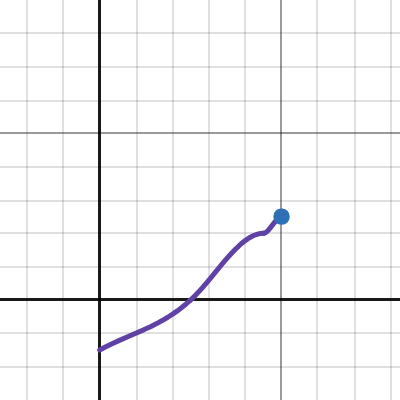
 upper sable
global prices don't seem to work
have everything set to 500 but it's using their default prices
tranquil patrol
upper sable
global prices don't seem to work
Do you have the moons listed in the other presets "prices" list?
upper sable
in global i have every moon except company listed as 500, in some moons i have other moons listed as 0, not one moon should have its default price
tranquil patrol
Are you sure the config is working at all? I'm fairly certain that should be working
upper sable
wait no the 0 price ones are working for the moons
but not the global price
so i have to set every moon individually to 500 for every single moon for a modpack with 20-ish moons, brilliant
tranquil patrol
Just add all moons to every price list and leave the prices unticked if you want them to use the global price
surreal flicker
Ok guys
Foggy/dark map
Up to 18 coil heads (by end of day 6AM) as the only enemy except for one masked (half inside & half outside, inside can escape)
This was by 2PM (time was sped up 3x, 7AM Start, 6AM End)

I died seconds after this screenshot as one came behind me and as you can see my flashlight was on the verge of death
tacit thunder
what was your enemies list...
tacit thunder
hmmm very interesting....
surreal flicker
It was intentional
 surreal flicker
Hey dark map, flashlights die quick. Jump scare
It's an always night map
oh yea also had dead coil head bodies around the map
so
it fit the theme IG
tacit thunder
asteroid is great for that
tacit thunder
 astral marten
@tacit thunder
Why is lethal quantities lying to me.
#1194042915840872548 message
It is showing every other outside monster on the level other than the Forrest Keepers that spawn.
Also another question.
If I change the exterior weights for a moon without touching an added moded monster spawn weight. Can I adjust that modded monsters config and have it pass the change to the Lethal Quantities Presets.json?
Also if I add a new monster mod later will its spawn weights get grandfathered in?
tacit thunder
no, if you add any new mods or if the default enemies changes, the new weights will not be reflected in the preset. youd have to delete the old preset for that level and let it regenerate
 fervent scaffold
Hello! I am noticing that one of the modded moon packages in my profile are missing from the config preset. How do I generate them?
tacit thunder
does the moon show up in the terminal when you join the game?
and when you upload the presets.json file after that, does it appear?
fervent scaffold
tacit thunder
and when you upload the presets.json file after that, does it appear?
Now it does! Thank you for the help
tacit thunder
👍
 dull wharf
Hey @tacit thunder ! I was thinking about something, right now we have 3 configs for the spawns, 1 inside (Enemies) and 2 outside ( Daytime and Outside). Do you think it's possible to add more of these (even tho they don't exist in base game)?
It would add some more control over what to spawn and when.
tranquil patrol
What else would there be?
dull wharf
tranquil patrol
What else would there be?
I mean it's still for inside and outside, but more of them like 3 for inside 3 for outside for exemple
tranquil patrol
I'm struggling to think what you could do with that that you can't with just one
tacit thunder
i have multiple parent inheritance on the todo list, which should sort of make it possible?
dull wharf
tacit thunder
i have multiple parent inheritance on the todo list, which should sort of make i...
Oh how does that work ?
dull wharf
tranquil patrol
I'm struggling to think what you could do with that that you can't with just one
So for exemple you have 2 outside right now
tacit thunder
well, instead of one parent, you can apply multiple parents to one preset
so like GlobalOutside, ThemedOutside, SpecificOutside
dull wharf
and you can spawn different monsters on morning than on evening
dull wharf
tacit thunder
so like GlobalOutside, ThemedOutside, SpecificOutside
But that would mean only one of those works at one time right ?
tacit thunder
it would depend on the exact settings you have set
since currently it'll look to the parent for any settings, then look to that parent's parent, etc
but this way it'll look through each parent for an acceptable value
dull wharf
ok so if you can chose to use multiple of them i guess yeah it would work
tacit thunder
yeah
dull wharf
Cool, looking forward to it ! Thanks
tacit thunder
👍
tranquil patrol
dull wharf
and you can spawn different monsters on morning than on evening
You can do that with the ones available tho. The only reason there's a daytime one and they aren't combined is simply because Zeekers made it that way, it's very easy to set it up to instead just be inside and outside
There's different power levels ig but it's balanceable
Plus the daytime enemies don't even really need power levels, just a max amount each
dull wharf
tranquil patrol
You can do that with the ones available tho. The only reason there's a daytime o...
How can you do that with one file ?
for exemple i want bugs to spawn only on morning, dogs to spawn only at mid day and giants to spawn only on evening ?
tranquil patrol
Yeah, each enemy has its own spawn curve you can change
tranquil patrol
There are probably ways to make it a little more user friendly with your suggestion, but I think it would probably complicate things with how daunting it is already
dull wharf
yeah for sure
but i didn't thing of your way, i wasn't touching idividual enemy spawn curves
only the main one
tranquil patrol
I mean yeah I get it completely, they're more hidden
 tight gate

my idea of what LQ could possibly look like
the concept isn't rlly finished and i dont feel like working on it rn
slim iris
so i'm thinking of adding masked enemy spawns for all levels for #1200695291972685926, is there a way i can do that that's compatible with LQ and other spawn control mods? (i'm assuming LLL as well)
pretty sure what i previously tried (during pre-launch mirage) was I added the masked enemy to StartOfRound.Levels.Enemies as well as OutsideEnemies.
would simply doing that cause any problems with LQ?
i imagine it's more about load order, and whichever runs last keeps their changes
tacit thunder
no, that should work just fine
LQ would probably pick up the mirage values as "default' values like any othe rmodded enemy
slim iris
ah sounds good, thanks!
astral marten
slim iris
so i'm thinking of adding masked enemy spawns for all levels for <#1200695291972...
Will this be done is a way where the spawn values of themed moons are respected. So If I set Mirages Masked rarity to 20. Other rarities that are higher will stay higher.
@tacit thunder
I struggle to understand how LQ takes priority and on what. Can you explain this too me?
#1213985212686532638 message
@tacit thunder
crisp stone
slim iris
so i'm thinking of adding masked enemy spawns for all levels for <#1200695291972...
just realized you could probably actually accidentally do this in the upcoming LLL with a tiny tweak
hm
 green narwhal
astral marten
<@282697035063361537>
green narwhal
astral marten
<@282697035063361537>
the double ping 💀
slim iris
astral marten
Will this be done is a way where the spawn values of themed moons are respected....
not sure what a themed moon is, and tbh not sure what the answer is until i experiment with it a bit
slim iris
crisp stone
just realized you could probably actually accidentally do this in the upcoming L...
even if i do it the way i mentioned will there be any issues with mirage and LLL?
i just want users to be able to have increased masked spawns even if LLL isnt installed
edit: i just realized the method i described earlier wont pick up modded moons depending on where i patch, so maybe i should just use LLL as a soft dependency
tacit thunder
astral marten
<@282697035063361537>
I struggle to understand how LQ takes priority and on wha...
LQ changes the values first, so any mods that would change spawns will do so after and override any values set by LQ
sly nymph
tacit thunder
LQ changes the values first, so any mods that would change spawns will do so aft...
wait really? because it works in the opposite way for me
tacit thunder
yeah, since LQ has a lower priority value, it should always execute before other mods
sly nymph
looks like there is some difference, but some mods like herobrine should have weight as well, i have it on 5 in herobrine config

shy guy has 5 in its config as well but showing as 1 in the log
harpghost is 1 in its config but showing 79 for some reason in the log
tacit thunder
according to debby: #1213985212686532638 message
astral marten
slim iris
not sure what a themed moon is, and tbh not sure what the answer is until i expe...
For example. Atlas Abyss is built around the masked enemy. On Atlas Abyss the spawn weight for masked is 100. The way it was done in MEOF is you set a weight and it applies it to the moon's interior. So Atlas Abyss' masked spawn rate dropped to 20 by default. Changing the entire spawn balance on the moon.
slim iris
astral marten
For example. Atlas Abyss is built around the masked enemy. On Atlas Abyss the sp...
i suppose what i could do is not touch the weight if it's above a certain threshold, cuz what im aiming for is to just make it spawn more often by default, and make them spawn on every moon
(with a config option to turn spawn control off on mirage ofc)
 vapid cave
I'm trying to use LQ to get data on chance of enemy spawns, weather and minimum-maximum scrap and difficulty for a custom moon but for some reason the moon isn't showing up in my Preset file
Is there something I need to do? I'm new to using LQ😅
tranquil patrol
vapid cave
I'm trying to use LQ to get data on chance of enemy spawns, weather and minimum-...
As long as the moon is available, it should show up in a presets file upon opening a game
So just make sure the moon is actually working, that it is available in the store etc
vapid cave
It does work
I even loaded in
Wait does the game need to be running while I edit the preset file?
tranquil patrol
Nope
vapid cave
Odd, can you get it to work? the map is Budapest
tranquil patrol
I've never used custom moons and don't rly have the time rn to figure it out, but I know others have been able to use custom moons with LQ
vapid cave
tranquil patrol
I've never used custom moons and don't rly have the time rn to figure it out, bu...
It might be an issue with Budapest, it's pretty outdated
tranquil patrol
Yeah maybe, I think a bunch of moon mods are moving away from LethalExpansion to using LethalLevelLoader so things might be more stable soon
vapid cave
I'm trying to get the values for someone remaking it for LLL 🙃
tranquil patrol
Ahh I see, well that's a predicament
Maybe someone else will be able to help more, I've never used custom moons so idk
surreal flicker
@tranquil patrol questions
tranquil patrol
How can I help
surreal flicker
anything below 0 spawns nothing?
 tranquil patrol
Yeah the y value is a chance multiplier, and anything multiplied by 0 is 0, negative values in probability effectively mean 0, so yeah
surreal flicker
ok was wondering
I have a time of day extender so I'm trying to adjust everything differently because I have time go by faster for longer nights
tranquil patrol
Also you need to add another value at the end of the table with the same Y but slightly bigger X to make it visualise your full table of values
surreal flicker
another X value?
tranquil patrol
Yeah here just add another x1 of like 1.1, and y1 of 4.99 etc

 tranquil patrol
Yeah you should see the graph actually extend to 1 rather than stop before

Like here it stops at 0.96
surreal flicker
 tranquil patrol
Yeah perfect
surreal flicker
cool ty
tranquil patrol
Npnp
If you're curious as well, the "chosen value rounded down" bit is mostly just for the Traps curves, cause it uses the curve to determine how many traps to spawn, and obv it can only spawn a whole number of traps
surreal flicker
traps I'm not worried about, the mods I have set it to where I like it
"Traps outside"
tranquil patrol
Oh dear, good luck
surreal flicker
👍
waxen frost
vapid cave
It might be an issue with Budapest, it's pretty outdated
I just finished manually setting loot tables for over 30 moons in my pack so I can say with a high level of certainty: the problem is that it's an LE moon. I found in LQ LE moons are missing their own and vanilla loot in the loot table when presets are generated. It has only scrap there that was manually added by other mods like moreinteriors (army helmet, ..), scoopy (fireaxe, weezer guitar, ..), advancedcompany scrap (toy car, light shoes, ..)
waxen frost
tranquil patrol
If you're curious as well, the "chosen value rounded down" bit is mostly just fo...
out of curiosity. how does that work again? does ist just randomly choose a keyframe or actually a random key on the curve?
tranquil patrol
waxen frost
out of curiosity. how does that work again? does ist just randomly choose a keyf...
Yeah it just picks a random Key value
Do if 1 was 10 and 0.9 was 8, and it picked 0.95, 9 would be the number of traps
Idk to how many places the random value is, cause idk Unity
waxen frost
yea, it's interesting cause it's kinda not intuitive to set probabilites for varying amounts of traps to spawn that way.
ig it just rolls a random double 0-1 and then gets the value at that key (rounded) from the curve
vapid cave
waxen frost
I just finished manually setting loot tables for over 30 moons in my pack so I c...
I used LLL config to get a rough estimate, I figured this was the case
waxen frost
waxen frost
yea, it's interesting cause it's kinda not intuitive to set probabilites for var...
like make it 20% likely to spawn 5 mines and 80% to spawn 10. Most times in this game it's weights but here it's curves 😄
tranquil patrol
waxen frost
yea, it's interesting cause it's kinda not intuitive to set probabilites for var...
I think the value is floored but yeah. Zeekers probably just used the animation curves again for it cause he had already used it so much for the other things. Though it is sort of nice that you can spread the probabilities out unevenly, like having x= 0.9, y = 6 and x = 1, y = 12 si there's like a 90% chance it's below 6, but that last 10% is much more volatile
waxen frost
vapid cave
I used LLL config to get a rough estimate, I figured this was the case
I can get you the values saved to AC presets if you want. it has stuff like dungeon size which lll doesn't have in its config
vapid cave
waxen frost
I can get you the values saved to AC presets if you want. it has stuff like dung...
That'd be great! The moon is Budapest, you can dm me the info
waxen frost
tranquil patrol
I think the value is floored but yeah. Zeekers probably just used the animation ...
yea, absolutely. One doesn't have to achieve exact values or probabilities anyways. Just sometimes a bit hard to wrap your head around how to achieve the stuff you envision for profile.
tranquil patrol
Yeah that's why I made the desmos thing tbh, cause it isn't very intuitive for anyone but Zeekers who has direct control over the project settings
Which is fair, it wasn't made to have the public prying
waxen frost
vapid cave
That'd be great! The moon is Budapest, you can dm me the info
sorry for the bloated loot table. important stuff at the top. dungeon size is 3
surreal flicker
@tranquil patrol Thoughts on this flow?
 tranquil patrol
Depends on the enemy you're spawning and how impactful it is but this could work
surreal flicker
coil heads 😏
tranquil patrol
Ah then yeah I think that's good
I just noticed I think I accidentally deleted one of my presets files
I'm
Cry
surreal flicker
oh no 😢
I really wanna use the don't blink mod but I only want it to trigger when near coil heads
slim iris
@tacit thunder LQ's patch for registering its spawns is RoundManager.Awake as a postfix patch right?
i'm assuming other mods that change spawns should do a prefix patch so LQ can pick up the modified value(s) afterwards?
tacit thunder
it changes the spawns in the roundmanager loadnewlevel
it uses the awake just to get the defaults
slim iris
ah gotcha
oh wait since it's on a prefix patch as well, am i supposed to just set my patch's priority higher than yours? since you said LQ will pick up the changes
@crisp stone if i register my spawn rate changes in RoundManager.LoadNewLevel as a high priority prefix patch, does that sound like it'd be compatible with LLL as well? or will LLL just completely rewrite the spawn rate changes i've made?
i could still do a soft dependency and just use your new method(s) if LLL is found and just default to what i mentioned, but if a soft dependency isn't required, i'd prefer just doing that instead
crisp stone
i dont do stuff on loadnewlevel 👍
slim iris
does doing a patch like that sound like it could conflict with LLL though? just wanna make sure
cuz im just not sure how LLL handles other mods changing spawns
since LQ seems to just accept any changes as part of its config
crisp stone
nothing your looking to do rn should cause any issue with LLL until I do stuff that you'll want to use instead
slim iris
sounds good, if you do end up doing stuff then i'll fix it later
tacit thunder
slim iris
oh wait since it's on a prefix patch as well, am i supposed to just set my patch...
doing changes on startnewround shouldn't cause any issues, no matter the priority
if you do use roundmanager.loadnewlevel, then yes, you'd need to use a priority lower than 100
i think lethallib registers custom enemy rarities in the startofround awake patch, which is probably a good place if you want to make any changes appear "default"
GitHub
My personal modding tools for Lethal Company. Contribute to EvaisaDev/LethalLib development by creating an account on GitHub.
tranquil patrol
Can I clarify about this real quick.. With LethalQuantities changes, is there much of a performance hit or increased loading times while using it? And are the performance hits mostly for the host, or does each player run the changes individually?
I'm probably wording that question terribly but hopefully you get the picture
@tacit thunder
I'm goin bed soon
tacit thunder
sorry, i already went to bed
there's an increased loading time the first time a player joins or hosts a game, but once you're actually playing, there's pretty much no impact on any joined players, and very little on the host
tranquil patrol
tacit thunder
there's an increased loading time the first time a player joins or hosts a game,...
Alright thank you, sounds good
 hallow cosmos
I'm thoroughly stuck and I sadly can't search Discord fourms, so please forgive me for my stupid question but does anyone know why every bit of scrap I set a weight to in Global ends up being 1 pound unless the weight is set for the same scrap on each individual moon?
tranquil patrol
hallow cosmos
I'm thoroughly stuck and I sadly can't search Discord fourms, so please forgive ...
Haven't heard that one before, so a perfect question tbh. This sounds like it could be a bug, but I'd need more info on how you have the file set up to say for sure
hallow cosmos
I can send over my preset, but I don't think it'd help. Tried on a fresh one with just the scrap modified and it was still 1 pound, even if the only enabled mod was LQ
midnight halo
hallow cosmos
I can send over my preset, but I don't think it'd help. Tried on a fresh one wit...
you should still send it for confirmation and if it doesnt make any sense even to us it's probably a bug
us as in Banana or Debby
Debby i don't think devs but does help a lot
hallow cosmos
Sure! Sorry for the mess, here you go. If you need any log files I'd be happy to send them over. I scrubbed them myself for anything but I didn't even see a single warn message. I also should note that I had some friends on and that no matter what I did, their weights were always set to the defaults that the game had. (ie. Big Bolt being set to 12lb, but was registering as 19lb to them) I had my friend send over their Presets.json as well, and it was the exact same as the one in the modpack so I don't think it was an issue with the code transfer.
I was certain I was just missing something, but if it's really a bug I'm sorry to add more work onto you guys!! 😅
tranquil patrol
hallow cosmos
Sure! Sorry for the mess, here you go. If you need any log files I'd be happy to...
I will have a look later if someone else doesn't <3
tranquil patrol
midnight halo
Debby i don't think devs but does help a lot
Correct I just like to help to take pressure off Banana, and I think I have a good idea of how it works
 silk stream
tacit thunder
if you do use roundmanager.loadnewlevel, then yes, you'd need to use a priority ...
silk stream
tacit thunder
if you do use roundmanager.loadnewlevel, then yes, you'd need to use a priority ...
How do you change the spawn Weight of an enemy on every Moon?
tranquil patrol
silk stream
How do you change the spawn Weight of an enemy on every Moon?
Untick the weight on every moon, and then set a new weight in a parent preset (usually Global)
tacit thunder
yeah that's pretty much the only way
tacit thunder
hallow cosmos
I'm thoroughly stuck and I sadly can't search Discord fourms, so please forgive ...
the weights might be host only currently... that's a bug for sure. i dont know why it would set it to 1 pound though, id have to look into it
it's not really recommended to change the weight per moon though, since i don't know how that affects existing scrap on the ship
tranquil patrol
hallow cosmos
Sure! Sorry for the mess, here you go. If you need any log files I'd be happy to...
I'm not sure if it matters, but is the .json named Presets.json in everyone's config folders? Cause the file you sent over is called "uG1PhOW.json"
hallow cosmos
Yes it's named Presets.json for everyone, my filenames get scrambled when I send them. Sorry for the confusion!
tranquil patrol
From what I'm seeing in the file it seems like everything is set up correctly. Only thought is, like Banana said, having different weights on different planets might be causing issues. I'd recommend setting weight in Global and unticking the weight for all scrap on all moons
hallow cosmos
hallow cosmos
I can send over my preset, but I don't think it'd help. Tried on a fresh one wit...
I'd tried it with a fresh config with only the weights set in Global. Still only 1 pound.
tranquil patrol
Hmm must be a bug then :(
Worth sending the log for Banana just in case @hallow cosmos
hallow cosmos
Can do! Lemme grab a fresh one for yall.
tacit thunder
yeah, ill have to do some testing, it's definitely pretty strange
hallow cosmos
Here, I put it in a pastebin to avoid cluttering up the chat. https://pastebin.com/0ebrdBMd
LQ and BepInEx are the only two mods enabled, on a fresh save with only the V-type engine and Big bolt values modified. I'd loaded in, picked up an engine, then left the moon.
tacit thunder
👍
hallow cosmos
Let me know if there's anything else I can do make the process easier for you!! I hate presenting bugs to mod devs, I know the pain 😓
tranquil patrol
Better to do it than not tbh. The bug exists regardless of whether or not you find it, it's just about how you bring it up
Like "how dare you, how could you be so dumb as to allow this bug to exist???" vs "hey i found this bug, here's all the info"
slim iris
hey banana, how compatible is LQ alongside LLL? is it required to disable LLL's spawn control configs?
there was a mention of it in #modding-general so i just wanted to double check
tranquil patrol
Well, we were talking about interiors specifically, idk about the rest
slim iris
oh whoops i missed that part, thought it was about spawning the whole time 😅
waxen frost
LQ changes spawns way after LLL does anything with them. It does most of its stuff in LoadNewLevel prefix.
I think if you change values in LLL config LQ would see those as default values when it generates presets.
slim iris
yeah thats what i remember banana saying it does, but turns out debby and mickmick were talking about interiors instead of spawns
waxen frost
oh i see
tacit thunder
slim iris
hey banana, how compatible is LQ alongside LLL? is it required to disable LLL's ...
it should work just fine with LLL afaik
👍
 ionic crag
hello, does LQ ignore interior mods spawn rate config if i change them in the WebUi?
tacit thunder
depends on which mods, but probably
ionic crag
Which interior that LQ doesn't support?
green narwhal
Hey, how does LQ work with MeteoMultiplier? Which mod's configuration gets applies?
tranquil patrol
green narwhal
Hey, how does LQ work with MeteoMultiplier? Which mod's configuration gets appli...
LQ doesn't change scrap value based on weather, so both work
green narwhal
tranquil patrol
LQ doesn't change scrap value based on weather, so both work
i'm asking because MM changes scrapValueMultiplier and scrapAmountMultiplier in RoundManager, and - i'm guessing - this mod does the same
tranquil patrol
I'm pretty sure Banana uses Meteo in his own games so I'm p sure it's okay
green narwhal
okay, that's good to know 😄
tacit thunder
im not sure, but meteo multiplier probably overrides LQ
i mostly use meteo for the random moon price changes, and it works pretty well
tacit thunder
ionic crag
Which interior that LQ doesn't support?
it should work with all interiors
 lament hemlock
Does anyone know if the .json for LQ overrides the general configs for modded enemy or dungeon spawns? For example, the spawn rate in the rolling giant config. Or should I disable those from their own configs and just use LQ.
dull wharf
LQ will take what you set in the mod config as default
if you change it in LQ, LQ settings will take the priority
Unless it's not compatible ( ex: shy guy without the mod that patches it)
dull wharf

Thunderstore
Disables the Scopophobia spawn settings patcher, allowing the Shy Guy monster to be configured by overhaul mods like Lethal Quantities / Advanced Company
green narwhal
dull wharf
https://thunderstore.io/c/lethal-company/p/DBJ/ShyGuyPatcherPatcher/
that's good to know
tranquil patrol
dull wharf
Unless it's not compatible ( ex: shy guy without the mod that patches it)
Would you happen to know what other common enemies have their own patchers? Or what I should look for to determine whether they have one?
dull wharf
tranquil patrol
Would you happen to know what other common enemies have their own patchers? Or w...
To my knowledge there isn't any other, but i think others should work
tranquil patrol
Hm alright, thanks. I've heard whispers of others but nothing concrete
dull wharf
Shy guy didn't because is spawning was made in a way that he patches after LQ if i remember right
dull wharf
tranquil patrol
Hm alright, thanks. I've heard whispers of others but nothing concrete
Oh which one ? had problems spawning shrimp and fiend outside myself but Banana could spawn them by putting a higher value on the spawn curve
tranquil patrol
I heard of Immortal Snail but I haven't gotten round to testing it at all so could be false
dull wharf
I don't have that one either so maybe it's true haha
slim iris
not sure if it's true, but i remember someone saying they "spawn" while you're in the main menu 🤨
tranquil patrol
Wh what, how does that even work
crisp stone
slim iris
not sure if it's true, but i remember someone saying they "spawn" while you're i...
cap
skinwalker person was misinformed
tacit thunder
the fiend ive have similar issues with, not sure though. the rolling giant may have some? but unconfirmed. freddy kreuger im not sure whether or not it's meant to be spawned in through vanilla methods, and i don't spawn slenderman because there's the page mechanic
peepers have their own spawn mechanic too so i dont add those
slim iris
hey banana, do u happen to know if there's EnemyType "prefabs" that's stored somewhere?
just wondering since not every moon will have a SpawnableEnemyWithRarity of what i need, and while i have the enemy's prefab, i wouldn't know what to set the rest of the values as
crisp stone
slim iris
hey banana, do u happen to know if there's ``EnemyType`` "prefabs" that's stored...
no
all the info u need is spawnableenemywithrarity
slim iris
that's what i'm trying to make, since a bunch of levels are missing one for masked enemies.
i suppose the simplest solution is to just use the first one found in the list, and copy it to the rest, but that sounds hella scuffed
crisp stone
No u just
spawnableenemywithrarity mynewonw = new SpawnableEnemyWithRarity()
and just set the two values
slim iris
yeah but one of the values is an EnemyType and that's what i'm trying to figure out, since i only have a prefab of the MaskedPlayerEnemy, is there some basic fundemental thing im missing here 🤔
crisp stone
how did you get the prefab
slim iris
grabbed it from NetworkManager.NetworkConfig.Prefabs.m_Prefabs in a postfix GameNetworkManager.Start patch
crisp stone
oh
slim iris
oh wait......
crisp stone
don’t
crisp stone
slim iris
it's an enemy type there
wym by that
slim iris
the prefab there contains an EnemyType but i only saved it as a GameObject which is why i was confused
crisp stone
you want the enemytype of it yes, safest way is to find it in the levels
Oh does enemyai have a reference to enemytype
slim iris
oh wait yeah that's the thing i'm looking at actually whoops
im just being extra dumb cuz it's 7am
slim iris
crisp stone
don’t
when u said this, are u referring to taking the prefab from m_Prefabs though? cuz if so, what exactly is wrong with that?
crisp stone
its fine just was worried that you might be editing it at unideal moment
slim iris
ah
crisp stone
If it has enemytype then your gucci
slim iris
yeee sounds good
thanks a bunch for the help, i'll credit u and banana on my next release 🙏
crisp stone
yipeee
solemn pendant
Is there ever going to be compatibility between LQ and Football?
Right now when it spawns it just stands in the void doing nothing and only activates (sometimes) when you pick up its item, the train.
||Or is there already a fix for this that i don't know about?||
 mint laurel
can you edit prices of store items with this?
tacit thunder
solemn pendant
Is there ever going to be compatibility between LQ and [Football](https://thunde...
not sure how football is coded, so i cant really provide compatibility atm, unfortunately
tacit thunder
mint laurel
can you edit prices of store items with this?
no
tacit thunder
slim iris
when u said this, are u referring to taking the prefab from ``m_Prefabs`` though...
yeah i think that is the most ideal way
 tulip wharf
heya, i just want to make sure how this works: if i check anything in the WebUI, then that setting will get replaced no matter how other mods set it, and if it's not checked then it's default?
for ex. i want The Saint scrap to spawn on Vow, so i check Scrap in Vow's preset and add The Saint, and when i do this everything that's not in the Scrap List will not get spawned? (Parent in Global, which is default)
indigo pewter
yes
Vow will only spawn the items in the item list for Vow, regardless of what any parent presets have configured
any setting that is checked in the vow item list will be applied for vow specifically
if a setting for a listed item is not checked, it will inherit the value from its parent preset
if the parent preset (or its parent, or its parent, etc) does not have that setting checked, it will not be touched by LQ
tulip wharf
is there a way to get the default list of things? or it's the list generated when you check it?
indigo pewter
its the list generated when you check it
if you need to regenerate the default list, you need to delete the preset and assign a fresh new one to the moon
tulip wharf
gotcha, thank you!
tulip wharf
just to make sure, after these i need to turn everything in the config TRUE right?
oh nvm it's only for legacy
dense timber
Is it possible to delete unused moon entries?
tranquil patrol
dense timber
Is it possible to delete unused moon entries?
They'll regenerate the defaults when you delete them but yeah
tranquil patrol
tulip wharf
just to make sure, after these i need to turn everything in the config TRUE righ...
Yeah just leave the config all disabled
dense timber
tranquil patrol
They'll regenerate the defaults when you delete them but yeah
How do you delete them that's what I'm asking
tranquil patrol
dense timber
How do you delete them that's what I'm asking
Click on the text above the moons that says "Presets" and then you should see a delete button next to all the presets
earnest wedge
Does this mod work with Hullbreaker? It seems the settings from the preset are overriding things like Item Mystery (turns all items into pickles) only works on items that I haven't adjusted with LQ, and the Landmines event seems to be getting overridden by the landmine spawn curve I have from LQ.
tacit thunder
not sure about the mystery and stuff, but maybe?
hullbreaker should definitely override LQ if anything
id have to take a look though since im not sure where they're making modifications
 urban terrace
@tacit thunder hey question for you, through making my own moon i've realized there's no mods that let you edit the "Threat Level" property of moons, is that something within the scope of stuff that LQ could possibly edit?
like how Titan is threat level S etc
since you can sort by threat level for some of the terminal mods and people adjust the difficulty of moons, it would be cool to be able to edit it if possible, idk how hard that would be
sly nymph
urban terrace
<@282697035063361537> hey question for you, through making my own moon i've real...
TerminalPlus calculates the rank by its own
urban terrace
oh sick, that must have been in the most recent update
I can see that now in its changelog thats cool
sly nymph
But i agree that it would be useful to be able to change in LQ as well
urban canyon
yeah i really wanna be able to edit this
tacit thunder
sorry, it's been on the todo list but i havent had the time to work on LQ
waxen frost
earnest wedge
Does this mod work with Hullbreaker? It seems the settings from the preset are o...
yea, everything from hullbreaker will be overriden by LQ if you set it. I'm working on a fork of hullbreaker that is fully compatible with LQ. I mean it's pretty much done. I just haven't released the latest version which makes it compatible
I think the latest original hullbreaker release also has a bug with the item mystery event, where it doesn't reset until you switch moons.
tacit thunder
hmm
 weak hollow
waxen frost
yea, everything from hullbreaker will be overriden by LQ if you set it. I'm work...
weak hollow
waxen frost
yea, everything from hullbreaker will be overriden by LQ if you set it. I'm work...
any chance you could make it similar to the ambiguous fork?
waxen frost
weak hollow
any chance you could make it similar to the ambiguous fork?
that's it actually 🙂 I just haven't pushed an update yet
crisp stone
urban terrace
<@282697035063361537> hey question for you, through making my own moon i've real...
next lll should have options for this
because i now have a system to dynamically assign the most relevant risk level based on calculated dynamic level difficulty
waxen frost
tacit thunder
hullbreaker should definitely override LQ if anything
I checked your code and comments in there and you're thinking of priorities the wrong way around I'm pretty sure.
Priority.Normal (default) is 400. You have 100 on your LoadNewLevel Prefix which means every other prefix without defined priority comes before LQ and thus LQ overrides any changes with its own values. I use priority 50 on my LoadNewLevel prefix in Hullbreaker fork to change rarities and stuff after LQ does.
I have to admit as it's my first time doing anything with Harmony their documentation on this is super bad and I had to figure that out by trial and error.
tacit thunder
hmm, i was under the impression that lower priority numbers executed first
but i see, ill have to add a fix for that next update
 severe harness
Uh should I submit a log file for now, I tried out the mod via v50 to see if it works and no
Eh might as well for at least documentation's sake
Game hangs when generating seed for a moon
tranquil patrol
I heard that the flow for generating interiors changed so that could be it
tacit thunder
it seems like the enemy power level variable name was changed
ill do some testing on my end and fix it
crisp stone
tacit thunder
it seems like the enemy power level variable name was changed
power level is now split into outside and inside
and RoundManager.dungeonFlowTypes is now a little data class which is just <DungeonFlow, int dungeonMapSize> dict