#Technical Computer Building/Learning
1 messages · Page 4 of 1
 dusky siren
Do you think there is no chance it could run on medium setting? 🥲😅
 slow oxide
also if i remember the omen has all of the ram slots accesible, upgrade the ram to 32gb
dusky siren
I don’t understand much of laptops, is this possible do you think it would be to expensive ?
If the gpu isn’t good not sure if it’s just better to buy a brand new one even tho I didn’t really want to go down this route 😂
slow oxide
dusky siren
Do you think there is no chance it could run on medium setting? 🥲😅
medium would need you to get something along the lines of a 2080 or a 3070
dusky siren
Could you recommend me a laptop that isn’t too expensive that would allow me to run the game on max or medium settings please 🙏?
slow oxide
dusky siren
Could you recommend me a laptop that isn’t too expensive that would allow me to ...
how much money to burn?
dusky siren
When I bought this laptop I paid over £1000 but I don’t want to pay that much
I know laptops always cost more which is annoying
But for me works better for the space
I used to have a desktop and I know that with the amount I paid on the laptop I could have built a much better computer 😣
dusky siren
What is your specs if you don’t mind me asking ? Do you have a desktop?
slow oxide
dusky siren
What is your specs if you don’t mind me asking ? Do you have a desktop?
An AMD ryzen 7600 and a radeon RX6700XT
dusky siren
I think it would be better to get a desktop what is your thoughts on this?
slow oxide
runs the character demo on med-high
dusky siren
I’ve seen a girl YouTuber she runs the game in max settings and looks amazing the fame but I cant imagine how much she paid 😂🤣🤣
Game *
slow oxide
dusky siren
I’ve seen a girl YouTuber she runs the game in max settings and looks amazing th...
the demo makes 4090 cards sweat and that’s a 3000$ gpu
slow oxide
dusky siren
Omg 😱
yeah https://youtu.be/d39vpTzBgys?si=PwvDy-W84f_-jI4x
that’s a 4090 getting tortured in the character creator on max settings
(look on the top left)
dusky siren
I will have a look thank you !
slow oxide
dusky siren
I think it would be better to get a desktop what is your thoughts on this?
how much money are you willing to burn for the pc?
 acoustic rose
slow oxide
1000 quid gets you a 3050 laptop
acoustic rose
slow oxide
1000 quid gets you a 3050 laptop
Since when? You can get RTX 4060 Laptops for 800€ currently.
 burnt shard
Just bought an RTX 4080 and it runs till now pretty much anything on 4K with 100-200 FP's easily without even getting hot, so probably 4070-4080 is the best option for 'high end' gaming currently.
slow oxide
acoustic rose
Since when? You can get RTX 4060 Laptops for 800€ currently.
this MSI laptop with a 6GB 3060(if you like more VRAM) https://www.scan.co.uk/products/156-msi-crosshair-15-qhd-165hz-i7-12700h-16gb-ddr4-1tb-nvme-ssd-6gb-rtx-3060-usb-32-gen1win11-home-a?utm_source=webshare&utm_medium=link&utm_campaign=share
slow oxide
dusky siren
When I bought this laptop I paid over £1000 but I don’t want to pay that much
the list^
acoustic rose
slow oxide
this MSI laptop with a 6GB 3060(if you like more VRAM) https://www.scan.co.uk/pr...
MSI RTX 4060 for 800€ https://www.notebooksbilliger.de/msi+thin+gf63+12vf+290+799743
 reef mortar
slow oxide
this MSI laptop with a 6GB 3060(if you like more VRAM) https://www.scan.co.uk/pr...
reef mortar
slow oxide
this MSI laptop with a 6GB 3060(if you like more VRAM) https://www.scan.co.uk/pr...
@dusky siren 6GB VRAM is below the recommended specs of 8 GB VRAM though, this would definitely cause some issues. I think for the AI object generator you need 8GB VRAM, idk what else this would influence though bc Im not that familiar with VRAM.
If buying something new I wouldnt go for a 2060, and even less 3050 because of the low VRAM. I would get at LEAST a 2070 or 3060 (with 8GB+ VRAM), but preferably 3070/2080/4060 or better.
slow oxide
reef mortar
<@238762433697546240> 6GB VRAM is below the recommended specs of 8 GB VRAM thoug...
a RX6700M laptop would be enough with 10GB of VRAM (rare sight, but good value on the secondhand market in the UK)
reef mortar
slow oxide
a RX6700M laptop would be enough with 10GB of VRAM (rare sight, but good value o...
Yeah that one looks good too, Im not too familiar with AMD GPUs😅
slow oxide
reef mortar
Yeah that one looks good too, Im not too familiar with AMD GPUs😅
a RX6700 is like a 3060ti equivalent
reef mortar
Ahh alright thats good enough yeah
 flat shuttle
acoustic rose
flat shuttle
Is this laptop good - https://www.very.co.uk/lenovo-loq-gaming-laptop-156in-fhdn...
flat shuttle
acoustic rose
flat shuttle
Is this laptop good - https://www.very.co.uk/lenovo-loq-gaming-laptop-156in-fhdn...
Not bad necessarily but at that price point you would ideally want an RTX 4060.
acoustic rose
flat shuttle
Is this laptop good - https://www.very.co.uk/lenovo-loq-gaming-laptop-156in-fhdn...
I can't exactly tell you which one is the best one (wouldn't chose the first 2 tbh) but generally you can get a good laptop with a 4060 for that money. I advise to look up a few reviews of those under 1000 pounds and get the one you prefer.
slow oxide
acoustic rose
I can't exactly tell you which one is the best one (wouldn't chose the first 2 t...
under 1000 gets you that Medion laptop i posted with a 4070 #1274579528928464938 message
slow oxide
flat shuttle
Is this laptop good - https://www.very.co.uk/lenovo-loq-gaming-laptop-156in-fhdn...
also the lenovo LOQ line of laptops got infamous manufacturing defects
flat shuttle
Thank you
acoustic rose
slow oxide
under 1000 gets you that Medion laptop i posted with a 4070 https://discord.com/...
Yeah, might be good idea but would still check reviews. Also the 4070 laptop edition is kind of a scam because it's just ~10% faster than the 4060 unlike the desktop version where the difference is huge and both laptop versions have the same amount of VRAM as well.
 dull seal
https://www.very.co.uk/lenovo-loq-15-gaming-laptop-156in-fhd-144hznbsprtx-4060-intel-core-i7-24gb-ram-1tb-ssd/1601048374.prd - whats everyones thoughts on this? I mentioned it before, but I havent bought yet as I'm still 50/50
 old hatch
hi guys!! could someone recommend me a gaming laptop, (obviously it can handle most games at high graphics settings) in addition to playing I have to make some architectural renderings, for the price between 1000-under 2000€
slow oxide
dull seal
https://www.very.co.uk/lenovo-loq-15-gaming-laptop-156in-fhd-144hznbsprtx-4060-i...
Don’t get the LOQ, it’s a very problematic lineup
go for the Legion lineup instead
slow oxide
old hatch
hi guys!! could someone recommend me a gaming laptop, (obviously it can handle m...
Region?
slow oxide
 sonic mural
What's wrong with that lineup?
sonic mural
What's wrong with that lineup?
many build quality issues
blank screens, displays falling off, etc
slow oxide
old hatch
hi guys!! could someone recommend me a gaming laptop, (obviously it can handle m...
on the low end I found this HP Omen with a 4060ti https://www.galaxus.de/en/s1/product/hp-omen-16-wd0275ng-1610-intel-core-i7-13620h-16-gb-512-gb-de-notebooks-42407735?tagIds=614
and on the high end, this bonkers i9HX equipped laptop from Gigabyte with a 8GB 4070 https://www.caseking.de/gigabyte-aorus-16x-asg-63dec65sh-40.64-cm-16-inches-165-hz-i9-14900hx-rtx-4070-gaming-laptop/NBGB-235.html (though keep in mind you need to undervolt the i9 to reduce stability issues)
old hatch
slow oxide
Region?
europe, italy
slow oxide
 remote pasture
Guys I need help Which one is better ??
https://a.co/d/btCcbkY
Or
https://a...
remote pasture
Guys I need help Which one is better ??
https://a.co/d/btCcbkY
Or
https://a...
the acer, coz it's got a good ryzen in it
remote pasture
slow oxide
the acer, coz it's got a good ryzen in it
Ok thank uuu
old hatch
slow oxide
the acer, coz it's got a good ryzen in it
so is Ryzen better than RTX?
old hatch
slow oxide
on the low end I found this HP Omen with a 4060ti https://www.galaxus.de/en/s1/p...
tysm but unfortunately one is sold out while the other is not available in my country😩
acoustic rose
old hatch
so is Ryzen better than RTX?
Ryzen are AMD CPUs, RTX is Nvidia GPU. CPUs and GPUs are different things
old hatch
acoustic rose
Ryzen are AMD CPUs, RTX is Nvidia GPU. CPUs and GPUs are different things
amazing, so is Ryzen better than Intel Core?
slow oxide
old hatch
amazing, so is Ryzen better than Intel Core?
If you come by it, then yeah
because Intel did quite some dirty moves to rule the laptop market
old hatch
slow oxide
If you come by it, then yeah
oh kk, between Lenovo Omen Msi Asus, which one should I choose?
slow oxide
old hatch
oh kk, between Lenovo Omen Msi Asus, which one should I choose?
probably between the legion, rog, or the omen
 peak matrix
guys i have a question can i run this game for 1660 super with i5 8400 8gb of ram and what setting and resolution
acoustic rose
peak matrix
guys i have a question can i run this game for 1660 super with i5 8400 8gb of ra...
Try to updgrade to 16GB RAM, that's the weakest part of your build. The rest isn't great either and technically below the minimum requirements but I'm fairly certain it will run on lowest settings 1080P
peak matrix
thank you for the insight
dull seal

Tulpar T7 V20 Series
just wondering if anyone has heard any reviews about this brand? I cant really seem to find anything anywhere
old hatch
slow oxide
probably between the legion, rog, or the omen
Do you know better brands or are the ones I told you are good?
regarding Hz, screen size and battery, how do I know if the computer is good?
 vocal axle
old hatch
Do you know better brands or are the ones I told you are good?
vocal axle
old hatch
Do you know better brands or are the ones I told you are good?
I'm biased but omen I have an omen
old hatch
vocal axle
I'm biased but omen I have an omen
kk ty
old hatch
vocal axle
I'm biased but omen I have an omen
Operating system Windows 11 Home
AMD Ryzen™ 7 7840HS processor
RAM memory 16 GB RAM
Hard Disk1 TB SSD
Display40.9 cm (16.1"), FHD (1920 x 1080), 165 Hz, 7 ms response time
Graphics Card NVIDIA® GeForce RTX™ 4070 (8 GB)
is this good? it is an OMEN 16-xf0006nl
old hatch
vocal axle
Let me see
Operating System Windows 11 Home
Processor AMD Ryzen™ 7 8845HS
RAM16 GB RAM
Hard Disk 1 TB SSD
Display43.9 cm (17.3"), QHD (2560 x 1440), 240 Hz, 3 ms response time
Graphics Card NVIDIA® GeForce RTX™ 4070 (8 GB)
this one?
old hatch
vocal axle
Yes
there are 2 slots for the 16gb RAM, one 8 slot and the other one too, is it good or is it better to have only one slot?
vocal axle
Depends on memory space
Which this game requires alot
I had to delete alot of my games off my laptop to play the demo
2sticks are better than one
old hatch
no sorry
old hatch
vocal axle
Depends on memory space
I was talking about the Ram
vocal axle
Sorry im dyslexic I read that wrong
old hatch
nono I wrote ssd convinced it was the ram💀
vocal axle
It is good
Even though I am personally not going to use my omen since it can barely run the game at high specs so I'm building a pc instead of using my laptop
acoustic rose
old hatch
Operating System Windows 11 Home
Processor AMD Ryzen™ 7 8845HS
RAM16 GB RAM
Hard...
The 4070 laptop GPU is worse than the recommended 3070 Ti Desktop but it's closer it than it is to the lower end minimum requirement 2060 so that's good. On another note, I don't know if you really want to pay extra for that 240HZ QHD screen because you're probably not going to need that.
old hatch
vocal axle
Even though I am personally not going to use my omen since it can barely run the...
oohhh kk, I have to buy a laptop because I will have to take it with me to university, however I went on Rate My PC, and I calculated one Omen with AMD Ryzen 9 7940HS and NVIDIA GeForce RTX 4070 and it tells me that it is 98% good
old hatch
acoustic rose
The 4070 laptop GPU is worse than the recommended 3070 Ti Desktop but it's close...
I would like a good PC for doing architectural renderings, since I go to university, but that can handle most games, I play mostly Overwatch, Fortnite, The sims, Minecraft, Roblox, Genshin and other games, since mine has an Intel Core i5-10210U CPU 1.60GHz 2.11 GHz processor and an Nvidia GeForce MX130 graphics card, I would like to be able to not lag and have good graphics
in general I am forced to buy a gaming one for architecture
acoustic rose
old hatch
in general I am forced to buy a gaming one for architecture
Yeah thats fine and basically the only solution. I was just specifically mentioning the 240HZ because that seemed pretty overkill unless you're focusing on competetive shooters for example.
old hatch
and from what I understand by watching many videos, gaming laptops are too expensive and unlike desktop computers, they don't handle games as well, so I wouldn't want to spend a lot on a computer when one that could cost less is better
old hatch
acoustic rose
Yeah thats fine and basically the only solution. I was just specifically mention...
I would prefer to have excellent graphics on simulation games and Genshin, and have low performance but at least not lag on shooting games
because I have a ps5 , so I don't care about having a particular graphics on the pc for shooting games
reef mortar
old hatch
I would like a good PC for doing architectural renderings, since I go to univers...
If u wanna take it with u to uni every day Id recommend not getting a 17 inch laptop, even 15.6 I find too big and heavy to take with me every day
old hatch
reef mortar
If u wanna take it with u to uni every day Id recommend not getting a 17 inch la...
oh kk, tysm but if it's smaller doesn't it negatively affect the Hz and quality?
reef mortar
old hatch
oh kk, tysm but if it's smaller doesn't it negatively affect the Hz and quality?
No not at all. The Hz is just screen refresh rate, aka how many frames it can show per second. This isn't affected by screen size, a 10 inch 120 Hz screen will function the same as a 42 inch 120 Hz screen.
As for quality, it's actually the opposite if you're talking about resolution. The resolution (1080p for example) will be distributed across an entire screen. The amount of pixels in total will be the same for a bigger vs smaller screen if both are 1080p, but a bigger screen has to distribute these pixels across a larger area, compared to a small screen. This results in a bigger screen having less pixels per inch (ppi) aka less sharpness. So a 1080p small screen would be sharper than a 1080p big screen.
The only thing you would be losing is screen real estate (and maybe some immersion)
slow oxide
reef mortar
No not at all. The Hz is just screen refresh rate, aka how many frames it can sh...
And before anyone says “but the eyes can only see 24 frames per second”
try looking at a 120hz display with a game running at 120fps
I guarantee you’ll start moaning in movie theaters about the movie being laggy 🤣
 orchid steeple
Um idk but think my laptop broke 😭, it’s stuck on the loading screen that shows up when first turning it on and idk how to fix
Anyone by chance know how to fix ?
 mild crow
Will Radeon 7600M XT as an eGPU be enough to play this game? I'm not too knowledgeable on GPUs.
 hearty totem
@slow oxide I ping you bc you know things
old hatch
acoustic rose
The 4070 laptop GPU is worse than the recommended 3070 Ti Desktop but it's close...
new generation computers almost all have 4070 and above, can I find something with 3070? and why is it better than the 4070/80/90?
acoustic rose
old hatch
new generation computers almost all have 4070 and above, can I find something wi...
No no, the 4070 is faster than the 3070 Ti but there is a difference between the Desktop card and the laptop version. In the case of the 4070 the laptop version is significantly slower than the dedicated desktop card and it also happens to be slower than the desktop 3070 Ti. I mentioned that because the recommended specs refer to the desktop versions of the card and not the laptop versions.
A 4070 laptop is still faster than a 3070 laptop, just not faster than the desktop 3070 (Ti).
old hatch
acoustic rose
No no, the 4070 is faster than the 3070 Ti but there is a difference between the...
oohhhh kk
old hatch
acoustic rose
No no, the 4070 is faster than the 3070 Ti but there is a difference between the...
Do you think it's worth paying 200€ for the 4070 instead of the 4060?
it is the Legion slim 5 gen 9, 16'' HDR 400 240Hz, Ryzen 7 8845HS, 32gb RAM(2 x 16), 1T SSD
acoustic rose
old hatch
Do you think it's worth paying 200€ for the 4070 instead of the 4060?
it is th...
Depends on whether the GPU is the only difference and the laptop is the same otherwise.
Performance wise the laptop 4070 is not that much faster than the 4060 unfortunately.
acoustic rose
old hatch
Do you think it's worth paying 200€ for the 4070 instead of the 4060?
it is th...
This video should give you a decent idea of the performance difference: https://youtu.be/jI95wab1IPU
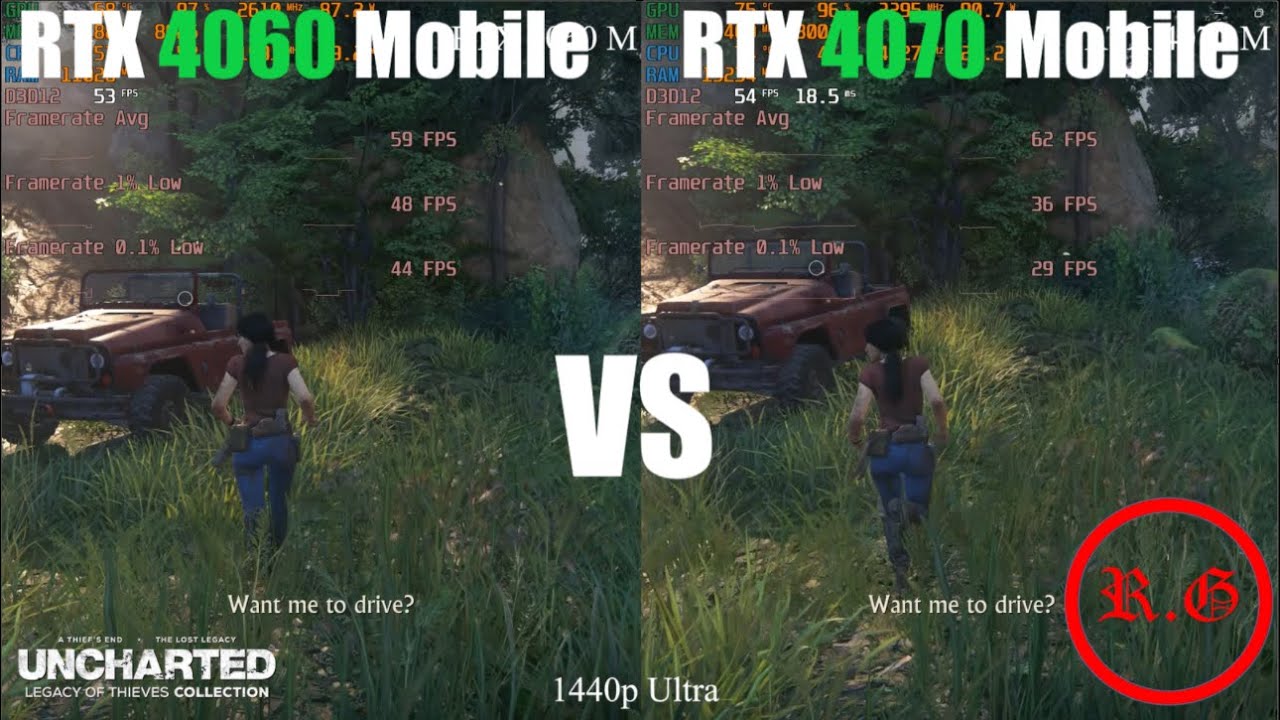
Laptop 1:
Acer Nitro An515-58
i7 12650H
16GB DDR5 4800
nvidia geforce RTX 4060 8GB 140W
Laptop 2:
MSI Pulse 15 B13VGK
i7 13700h
32gb ddr5 5600
nvidia geforce RTX 4070 8GB 140W
Video Chapter:
00:00 god of war
00:30 uncharted legacy of thieves collection
01:00 a plague tale requiem
01:30 cyberpunk 2077
02:00 forspoken
02:30 microsoft flight simu...
slow oxide
mild crow
Will Radeon 7600M XT as an eGPU be enough to play this game? I'm not too knowled...
7600M should be on par with a 3050ti/3060, a bit on the low end but should be good
mild crow
slow oxide
7600M should be on par with a 3050ti/3060, a bit on the low end but should be go...
What if the connection of the 7600M eGPU is via Thunderbolt 4 instead of Oculink? Would it still be good enough?
slow oxide
mild crow
What if the connection of the 7600M eGPU is via Thunderbolt 4 instead of Oculink...
It would tank the performance by 60% vs Oculink https://www.tomshardware.com/pc-components/gpus/high-end-external-gpus-still-suffer-a-performance-hit-oculink-tests-show-up-to-a-23-drop-with-an-rtx-4090

Tom's Hardware
The faster the GPU, the higher the performance loss.
so it wouldn't suffice for the power tradeoff
mild crow
slow oxide
so it wouldn't suffice for the power tradeoff
I see.. 🥺 I was thinking of getting 7600M XT and connect it to my UMPC via USB4 to play inZoi. But I guess that would still not be enough.
slow oxide
mild crow
I see.. 🥺 I was thinking of getting 7600M XT and connect it to my UMPC via USB...
steam deck?
mild crow
slow oxide
steam deck?
Ayaneo Kun. 😅 It has 7840U with 780M as iGPU.
remote pasture
I have a question .. do yall think 1TB is enough to play InZoi with ?
acoustic rose
remote pasture
I have a question .. do yall think 1TB is enough to play InZoi with ?
Yes, but it just depends on your remaining storage
old hatch
hi guys it's me again, this is the final decision, can anyone tell me among these computers which is the best? I already have an idea about which one to buy but I want to know other opinions
ROG Zephyrus G16 https://estore.asus.com/it/rog/90nr0iu1-m000t0-rog-zephyrus-g16-2024.html
MSI Cyborg 15 https://www.amazon.it/dp/B0CSDL152S?tag=tuttot-21&linkCode=osi&th=1&clickref=feed
MSI Katana 17https://www.amazon.it/MSI-B12UDXK-053IT-Notebook-i7-12650H-Garanzia/dp/B0CSDKVS6Z?source=ps-sl-shoppingads-lpcontext&ref_=fplfs&smid=A9TWZDCQTO008&th=1

ASUS eShop Italia
OFFERTE SPECIALI PER STUDENTI E INSEGNANTI registrati al Programma ASUS EDU.
Clicca qui per saperne di più!
SCOPRI LE CUFFIE
ROG CETRA TRUE WIRELESS!
(scorri in fondo alla pagina per ordinarle con
il tuo Notebook)
Scheda grafica NVIDIA® GeForce RTX™ 4050 Laptop GPU 6GB GDDR6
Windows 11 Home
Processore Intel® Co...

I Portatili MSI dispongono di 2 anni di garanzia anche se acquistati attraverso partita IVA!

I Portatili MSI dispongono di 2 anni di garanzia anche se acquistati attraverso partita IVA!
and the last one I have to write the specifications
Legion Slim 5 Gen 9 (16" AMD)
Processor : AMD Ryzen™ 7 8845HS Processor (3.8 GHz up to 5.1 GHz)
Operating system : Windows 11 Home 64
Memory : 32GB DDR5-5.600MHz (SODIMM) - (2 x 16GB) upgrade selected
First hard drive : 1TB SSD M.2 2280 PCIe Gen4 TLC upgrade selected
Display type : 16" WQXGA (2560 x 1600), IPS, anti-glare, non-touch, HDR 400, sRGB 100%, 500 nits, 240 Hz, thin bezel, low blue light
Graphics Card : NVIDIA® GeForce RTX™ 4060 8GB GDDR6 Notebook GPU
Webcam : FHD 1080p with dual microphone
Color : Moon Grey
Battery : 4-cell lithium-polymer battery, 80 Wh
Power Cord : 230W Slim 3-Pin AC Adapter - Italy
remote pasture
acoustic rose
Yes, but it just depends on your remaining storage
It’ll prolly be the only downloaded game I’ll play
slow oxide
old hatch
Legion Slim 5 Gen 9 (16" AMD)
Processor : AMD Ryzen™ 7 8845HS Processor (3.8 GH...
go for that
32 gigs of ram ain't no joke
old hatch
slow oxide
32 gigs of ram ain't no joke
do you think i can change it (in the future) to a 64gb of Ram?
slow oxide
old hatch
do you think i can change it (in the future) to a 64gb of Ram?
seems like it https://laptopmedia.com/guides/how-to-open-lenovo-legion-slim-5-16-gen-9-disassembly-and-upgrade-options/

#CommissionsEarned Lenovo Legion Slim 5...
both slots available
old hatch
slow oxide
go for that
btw tysm for all!
why can i choose whether to install the operating system or not?
https://www.lenovo.com/it/it/configurator/cto/index.html?bundleId=83DHCTO1WWIT1
acoustic rose
old hatch
why can i choose whether to install the operating system or not?
https://www.len...
Because you don't need a Windows license (free version) or you could use Linux etc.
You can buy a windows key online for like 10€. You just need a USB stick before that to install Windows though.
old hatch
acoustic rose
Because you don't need a Windows license (free version) or you could use Linux e...
yeahhh because to have windows 11 on the new computer I have to pay 100 euros more👹
acoustic rose
old hatch
yeahhh because to have windows 11 on the new computer I have to pay 100 euros mo...
Yeah, personally I wouldn't even pay the 100€ for Win 10 either. Just get a key for a few bucks instead and activate it then.
slow oxide
acoustic rose
Yeah, personally I wouldn't even pay the 100€ for Win 10 either. Just get a key ...
or just use MAS (Microsoft Activations Scripts), and forego all costs xD (don’t use if it’s a company computer)
 normal sonnet
acoustic rose
normal sonnet
willthis computer run inzoi https://www.bestbuy.com/site/lenovo-legion-7i-16-ga...
normal sonnet
acoustic rose
normal sonnet
willthis computer run inzoi https://www.bestbuy.com/site/lenovo-legion-7i-16-ga...
Yes, not max settings but it will run decently well.
 north cedar
normal sonnet
willthis computer run inzoi https://www.bestbuy.com/site/lenovo-legion-7i-16-ga...
north cedar
normal sonnet
willthis computer run inzoi https://www.bestbuy.com/site/lenovo-legion-7i-16-ga...
quite a decent specs. As molpensohn said, you might be able to run it on ultra when this game has been fully optimized
 wind grotto
north cedar
quite a decent specs. As molpensohn said, you might be able to run it on ultra w...
wind grotto
north cedar
quite a decent specs. As molpensohn said, you might be able to run it on ultra w...
what settings do yall think a 4060ti in a pc can run it at? i was under the assumption id have to upgrade it pretty soon for the monitor resolution i eventually want to upgrade to (from 1080 to 2k)
north cedar
wind grotto
what settings do yall think a 4060ti in a pc can run it at? i was under the assu...
How many gigs ? 8 or 16 ?
wind grotto
16
north cedar
Well, with 16 you can set it to max settings. But if you play it in 2k, might wanna change the settings a bit, shadow or reflections set to med or high for example. Or MSAA set to 4x
As long as this game support dlss and nvidia frame generation, you can run it on max settings
wind grotto
north cedar
As long as this game support dlss and nvidia frame generation, you can run it on...
perfect! thank you!
 languid lotus
Hey i have question can i upgrade my laptop it i7 the graphics is intel hd 620 it hp envy 360
is it possible to change the graphics
acoustic rose
languid lotus
Hey i have question can i upgrade my laptop it i7 the graphics is intel hd 620 i...
You can't upgrade a laptop GPU. You're either going to need to get a new laptop with a dedicated GPU or get a desktop PC.
languid lotus
acoustic rose
You can't upgrade a laptop GPU. You're either going to need to get a new laptop ...
thank you
 pearl egret
Hello! I wanted to ask a question about my GPU. I've been wanting to play this game with my friend, but I don't know if my computers will run the game.
I will drop my GPUs down below and I'd really appreciate some sort of a response, it can be a simple yes/no, or it can be a long response explaining stuff to me.
PS: I know nothing about computers... etc.
My main computer : Radeon RX 570 Series
My second computer : Radeon RX Vega
 limpid helm
I want to build a pc, I new to the pc stuff, any recommendations I would appreciate it, is already looked up what inzoi requires but idk if that’s enough for a pc
acoustic rose
pearl egret
Hello! I wanted to ask a question about my GPU. I've been wanting to play this g...
Main Computer: significantly below minimum requirement but should probably run/start the game but it won't be a good experience.
Second computer: integrated GPU, game might not even properly start unfortunately.
acoustic rose
limpid helm
I want to build a pc, I new to the pc stuff, any recommendations I would appreci...
Budget would be helpful. Also PC hardware prices vary quite a bit depending on where you live. USA or Germany us very cheap for example compared to some other EU countries or South america etc.
limpid helm
I live in New York
May I show you what I got on the list ?
To see if what I got is good
acoustic rose
limpid helm
May I show you what I got on the list ?
Yes
limpid helm
Oki

The H9 Flow CM-H91FW-01 is designed to cool o powerful GPUs with its expansive thermal capabilities, featuring a ten fan capacity and numerous 360mm radiator mounting options. A perforated top panel takes cooling even further, and a unique wraparound glass design with a dual-chamber layout is the...
Can you see everything or just the gaming case?
https://www.amazon.com/dp/B09FWYK5M9?psc=1&ref_=cm_sw_r_apin_ct_W6KESHVAQ607BK8F02QA&language=en_US
Intel Core i9-12900KF Gaming Desktop Processor 16 (8P+8E) Cores up to 5.2 GHz Unlocked LGA1700 600 Series Chipset 125W https://www.amazon.com/dp/B09FWYK5M9?psc=1&ref_=cm_sw_r_apin_ct_W6KESHVAQ607BK8F02QA&language=en_US

Intel Core i9-12900KF Gaming Desktop Processor 16 (8P+8E) Cores up to 5.2 GHz Unlocked LGA1700 600 Series Chipset 125W
acoustic rose
Just the case. I recommend using PCpartpicker.com and just put every part in there
limpid helm
https://www.amazon.com/dp/B0815XFSGK?psc=1&ref_=cm_sw_r_apin_ct_XKR92EV26W5RV8H2WM3S&language=en_US
AMD Ryzen 7 5800X 8-core, 16-Thread Unlocked Desktop Processor https://www.amazon.com/dp/B0815XFSGK?psc=1&ref_=cm_sw_r_apin_ct_XKR92EV26W5RV8H2WM3S&language=en_US

Be unstoppable with the unprecedented speed of the world’s best desktop processors. AMD Ryzen 5000 Series processors deliver the ultimate in high performance, whether you’re playing the latest games, designing the next skyscraper or crunching scientific data. With AMD Ryzen, you’re always in the ...
OLOy DDR4 RAM 16GB (2x8GB) Owl Aura Sync RGB 3200 MHz CL16 1.35V 288-Pin Desktop Gaming UDIMM (MD4U0832160BHVDA) https://www.amazon.com/dp/B09R7GJCJN?psc=1&ref_=cm_sw_r_apin_ct_XKR92EV26W5RV8H2WM3S_1&language=en_US

OLOy DDR4 RAM 16GB (2x8GB) Owl Aura Sync RGB 3200 MHz CL16 1.35V 288-Pin Desktop Gaming UDIMM (MD4U0832160BHVDA)

The most advanced GPU for gamers is here - the GIGABYTE Radeon RX 7600 XT GAMING OC 16G Graphics Cards. Experience unprecedented performance, visuals, and power efficiency with AMD Radeon RX 7000 Series graphics cards.
That’s all I got
acoustic rose
limpid helm
That’s all I got
It's missing a few parts and has 2 CPUs if I see that correctly? What is the budget roughly?
limpid helm
$960 plus taxes is like $1k
I want to wait till prime day which is October 8 to see if some of the price go down
acoustic rose
limpid helm
$960 plus taxes is like $1k
Amazon often doesn't have the cheapest prices for PC hardware, maybe there will be some deals but PCpartpicker already chooses the cheapest deal anyway, so I would recommend getting something like this:
https://pcpartpicker.com/list/fyVBfy
combined with this $399 https://www.microcenter.com/site/content/bundle-and-save.aspx bundle.
Ps: ignore the CPU 7700X in the PCpartpicker list, it is just a placeholder for the bundle with the same price.
Part List - Radeon RX 7700 XT, Montech XR ATX Mid Tower

Micro Center
Shop bundle deals with featuring processors and more!
limpid helm
Is it safe to buy from there? And sorry to bother lol
I will take a look
It meets all the inzoi requirements right ?
limpid helm
acoustic rose
Amazon often doesn't have the cheapest prices for PC hardware, maybe there will ...
The bundle deal seems very good
slow oxide
pearl egret
Hello! I wanted to ask a question about my GPU. I've been wanting to play this g...
it ain't running on a RX570, should probably cough up an upgrade to a RX6700XT or better
acoustic rose
limpid helm
It meets all the inzoi requirements right ?
Yes, it meets all requirements and all of the sellers are safe (Newegg and Amazon at least) but you could just look for the 2nd cheapest retailer for the power supply for example if you want to make sure.
And microcenter deals are really amazing, but you have to get these bundles from a physical microcenter store I believe.
 steel folio
I've upgraded recently to an AMD Radeo 6750 XT 12GB GPU from GTX 1080,32GB RAM from 16 ,and a Ryzen 3 3600 CPU overclocked to 4.2MHz from a Ryzen 5 1600.Should've got the 5600 but ended up reading Motherboard CPU compatibility wrong(i'm a simpleton).Only use 1080p for gaming tho,hopefulyy will be ok.What i had lagged badly with the demo.
acoustic rose
limpid helm
The bundle deal seems very good
Just saw that the bundle got discounted from 400 to 350. You're 100% not going to get a better deal for that kind of money in the near future I believe.
limpid helm
acoustic rose
Just saw that the bundle got discounted from 400 to 350. You're 100% not going t...
Yea
slow oxide
steel folio
I've upgraded recently to an AMD Radeo 6750 XT 12GB GPU from GTX 1080,32GB RAM f...
you should update the BIOS if you're hopping on the 5000 series bandwagon
but the 3600 should do okay as a stopgap
old hatch
old hatch
Legion Slim 5 Gen 9 (16" AMD)
Processor : AMD Ryzen™ 7 8845HS Processor (3.8 GH...
Hi guys! it’s me again, at the end I bought this computer(the one noted in the message) for €1400, but watching a video I found the Omen 16 for €1200 with these features, can someone tell me which one is best?
OPERATING SYSTEM: Windows 11 Home PROCESSOR: AMD Ryzen™ 9 7940HS RAM MEMORY: 16 GB RAM HARD DISK: 1 TB SSD SCREEN: 40,9 cm (16,1"), FHD (1920 x 1080), 165 Hz, 7 ms response time GRAPHICS CARD: NVIDIA® GeForce RTX™ 4070 (8 GB) CHARACTERISTICS: 4 Zone RGB Backlit Keyboard - Audio by Bang & Olufsen - Wifi 6 - 3 Years Warranty and 12 Months of McAfee LiveSafe™ Included
I have a doubt because I think this processor is better, so I would like to understand if mine is better than this one or not
acoustic rose
old hatch
Hi guys! it’s me again, at the end I bought this computer(the one noted in the m...
This definitely has a better CPU and GPU as well.
As I previously implied you are paying a lot for the screen with the Legion 5.
It's 240Hz 1600P vs 165Hz 1080P (Omen)
old hatch
acoustic rose
This definitely has a better CPU and GPU as well.
As I previously implied you ar...
so what would you do?
acoustic rose
old hatch
so what would you do?
Depends on your personal needs / preference. I personally don't really care about the screen that much because I often have my laptop plugged into a monitor anyway but that may not be the case for you. The higher resolution is also nice but you notice that way more on something like a 27 inch monitor than a 16 inch laptop in my opinion.
As for the 240Hz I can't really comment because I haven't used anything above 165Hz but the general consensus is that it's hardly noticeable and only really worth it if you're competitively playing games like CS2 or R6 etc.
 twilit olive
old hatch
so what would you do?
twilit olive
old hatch
so what would you do?
Prendere un giga cazzone
limpid helm
I have another question @acoustic rose on the processor for the inzoi recommendations, there are two things “ AMD Ryzen 5800 and intel i7 12700”, do I just buy one of those two or both?
acoustic rose
limpid helm
I have another question <@261793379225042944> on the processor for the inzoi rec...
You buy neither. You only need and want to buy one CPU, a (normal) PC doesn't have 2 CPUs.
The Ryzen 7 7700X (from the bundle) is better than either of these.
The recommended specs are only a general (minimum) recommendation. You don't need to buy any of the specifically recommended parts.
limpid helm
acoustic rose
You buy neither. You only need and want to buy one CPU, a (normal) PC doesn't ha...
Oh ok thanks, both options are good
slow oxide
acoustic rose
You buy neither. You only need and want to buy one CPU, a (normal) PC doesn't ha...
Instructions unclear, bought a dual socket TRX40 motherboard
hearty totem
slow oxide
Instructions unclear, bought a dual socket TRX40 motherboard
TRX40? crap I got a TRS80
mild crow
Can I play in low settings with Ryzen 7 7840U, Radeon 780M, can be set to 54W TDP and 64GB RAM?
 wild cedar
What laptop is the better
im new i want to buy my first laptop with my first game do you which is better plz
slow oxide
wild cedar
im new i want to buy my first laptop with my first game do you which is better p...
how much money are you burning away?
wild cedar
slow oxide
how much money are you burning away?
Idk which is good
slow oxide
wild cedar
Idk which is good
well, you could dump 3250$ on a 4090 equipped Legion laptop
that'll plow through any game easily
reef mortar
Okay but 4090 in laptops is such a waste
At least go for a pc if youre spending that much money to actually get all the power from the 4090
slow oxide
reef mortar
At least go for a pc if youre spending that much money to actually get all the p...
MPC-1700 is a rugged portable computer that includes a lunch box style chassis, a high performance multi-core CPU, up to seven expansion slots, and supports desktop and professional graphics cards. It comes with an integrated 17.3 inch full HD LCD monitor and keyboard.
and somehow stick a 4090 in there
wild cedar
I need something low not very expensive I can’t afford
 dusky ember
wild cedar
I need something low not very expensive I can’t afford
dusky ember
wild cedar
I need something low not very expensive I can’t afford
So from a few benchmarks I found:
Ryzen 5 3600
16GB RAM DDR4
RX 6600
At 1080P Cinematic, no ray tracing or upscaling, in the Character Studio gets 30 FPS in the room scene, and 41 FPS in the blank background screen.
Extrapolating that, you'd probably expect 25-30 FPS while in game at these settings.
i5 13400
32 GB RAM DDR4
RTX 4060 Ti 16GB
At 1440P Cinematic, with DLSS on at balanced, Ray tracing ON, gets you 56 FPS in the room scenes, and 81 in the blank background screen.
You can expect 45-55 FPS in game.
Seeing this, if you're looking at strictly a laptop (Which I don't recommend), you'd probably want a laptop with a 30 series Nvidia GPU. The CPU matters less as the settings increase, but RAM will still be important. I'd recommend the 3060 12GB. The FAQ recommends a 2060, but that is likely running the game at 1080p LOW at 60 FPS. If you're okay with that a 2060 laptop should work.
I'm going to take a guess and say that a 3060 laptop with a Ryzen 5 5600 and 16GB of RAM should net you 100 FPS, plus or minus 10% at 1080p Medium with DLSS on quality, with ray tracing OFF. Very playable at these settings, and the game should still look good, but not the best quality, obviously.
Please look at the reddit thread on Laptop Deals for this month's best laptop deals. I'd recommend the laptops $850 and above in the Deals of the Month section, and the laptop, Lenovo LOQ Gaming Notebook is my top pick.
Also, without knowing your budget, it makes it hard to make recommendations for you. If these are too expensive, please tell us your budget

Reddit
Explore this post and more from the LaptopDeals community
wild cedar
Wow nice
Thanks
Lenovo - Ideapad 1 15.6" Full HD Touchscreen Laptop - Ryzen 5 7520U with 8GB Memory - AMD Radeon Graphics - 256GB SSD - Abyss Blue
HP - Victus 15.6" Full HD 144Hz Gaming Laptop - Intel Core i5 - 8GB Memory - NVIDIA GeForce RTX 3050 - 512GB SSD - Performance Blue
GXMO 15.6" Laptop Computer, 16GB RAM, 512GB SSD, FHD 1920x1080, Quad-Core Intel 12th Gen N95 Processor, Traditional Laptops, Backlit Keyboard,HD Camera, Fingerprint Reader Unlock Silver https://a.co/d/2YGXwUu

GXMO 15.6" Laptop Computer, 16GB RAM, 512GB SSD, FHD 1920x1080, Quad-Core Intel 12th Gen N95 Processor, Traditional Laptops, Backlit Keyboard,HD Camera, Fingerprint Reader Unlock Silver
Is those good ? Will work on inzoi ?
dusky ember
The first one will not work at all. It uses integrated graphics. That means the CPU is doing the graphics processing rather than having a dedicated chip (The GPU) to do that. It will be extremely slow, not just for inZOI but for any game that isn't Roblox.
The 2nd one has a 3050 GPU. The 3050 is 20% slower than the minimum requirements recommended (The 2060). It's way better than the first one, but still very unlikely to actually be able to run the game at anything higher than 1080P low, 30FPS.
You realistically want to target 1080P medium 60FPS, because you will get a balance between quality and performance while not breaking the bank for a $2000 laptop.
I'm looking at the prices of the laptop you linked and I'll be honest - You're not going to find anything that will run this game at that price.
You'll need to spend at least $500
dusky ember
At least $500
wild cedar
Okay I can do 500
dusky ember
3060 12 GB laptop is what I would recommend for you to get. The thing with laptops are though is that they don't tend to decrease in price as fast as hardware for desktops. So, if you look for a 3060 12GB, you'll probably find laptops that range from $600 to $900, but you can get a much better 4060 laptop for the same price.
Again, you should probably get something like the $850 Acer Nitro V Gaming Laptop:
https://www.ebay.com/itm/126528135922

eBay
Do more, quicker than ever across multiple applications with the centralized generative AI assistance of Copilot in Windows. Accessible with a single touch of the Copilot Key. AI-Driven Graphics Experience lifelike visuals and unparalleled performance with the cutting- edge GeForce RTX 4060 laptop graphics.
If you're really stuck on budget, then you might have to search for used or refurbished laptops on Ebay or Amazon
wild cedar
Okay cool
dusky ember
Maybe something like this:
https://www.ebay.com/itm/205026194369

eBay
Its slim design and lightweight build make it easy to carry, while the powerful hardware ensures high performance for daily use. NVIDIA GeForce RTX 3060 with 6GB GDDR6 VRAM. MSI GF65 Thin 10UE-213US Laptop.
The only thing with that laptop is though, its the 6GB version of the 3060, which is much slower than the 12GB version, so I wouldn't really recommend it
A 2060 8GB might actually be faster
wild cedar
dusky ember
Maybe something like this:
https://www.ebay.com/itm/205026194369
I may try to get that one
dusky ember
Keep in mind that I don't recommend it. It might not run the game as well as you would want
But its better than the choices you sent earlier
wild cedar
Yeah okay
dusky ember
https://www.ebay.com/itm/296741702267
This is the same as the recommended specs

eBay
NVIDIA GeForce RTX 3070. Alienware Gaming m15 R4 15.6" Laptop PC Computer. Alienware m15 R4 Laptop Gaming PC. The Alienware m15 R4 also features advanced cooling, customizable Alien, and a range of ports to connect all your gaming gear.
You can easily find used 3070 laptops for $600-700, which is probably what you should look for price wise
slow oxide
dusky ember
You can easily find used 3070 laptops for $600-700, which is probably what you s...
@wild cedar or if you're lucky, some used RX6700M laptops goes for around those prices too with usually more VRAM
wild cedar
slow oxide
<@1283807714371309661> or if you're lucky, some used RX6700M laptops goes for ar...
Okay thanks it very too expensive
wild cedar
Oh yes good pries it will work on inzoi ?
It almost close 600 dollar for MSI Delta at Walmart
dusky ember
slow oxide
<@1283807714371309661> or if you're lucky, some used RX6700M laptops goes for ar...
I mean, I agree that VRAM is important here, but the main reason that I am recommending Nvidia is for the better features. Though, I'm sure that a game like inZOI would have a lot of textures and use a lot of VRAM, I would think the goal at that price point would be to use DLSS and Frame Gen lol.
That being said I own a 7900 XTX
slow oxide
dusky ember
I mean, I agree that VRAM is important here, but the main reason that I am recom...
frame gen being a moot point since AFMF exists for Radeon, but for DLSS i do agree
dusky ember
Well, I mean the fact that you agree with DLSS means that you kind of have to go with Frame gen too so also a moot point from you 
slow oxide
that and DLSDR (if you hate TAA with a passion)
but thats locked to 40 series cards
and newer versions of DLSS
dusky ember
4070 laptops can be found for less than $1000 which is very reasonable
slow oxide
yeah, case in point that you need at least 800-1000$ for a decently specced gaming laptop
dusky ember
I don't think at deal prices you can spec a desktop at the same price point with similar specs ngl.
slow oxide
dusky ember
I don't think at deal prices you can spec a desktop at the same price point with...
SFFPCs do tend to be slightly better at that price point
slow oxide
yeah if you’re still chasing portability
dusky ember
I wouldn't wish that on anyone
I've built three and the first one was a disaster cause I underestimated the amount of research I needed to do
slow oxide
and the rarity of slim blower AIBs for the GPUs
 olive oriole
:p sorry if someone asked and it was answered, but does anyone know if there’s a specific PC build with the same exact / better specs
like a prebuilt
acoustic rose
olive oriole
:p sorry if someone asked and it was answered, but does anyone know if there’s a...
Exact / better specs than what ecxactly? The official recommendation?
slow oxide
olive oriole
:p sorry if someone asked and it was answered, but does anyone know if there’s a...
US? then Cyberpower or Starforge would be your best bet
olive oriole
acoustic rose
Exact / better specs than what ecxactly? The official recommendation?
yup yup
olive oriole
slow oxide
US? then Cyberpower or Starforge would be your best bet
thank youu ^^
dusky ember
olive oriole
thank youu ^^
It would help if you could provide a budget but here is what I would recommend:
https://starforgesystems.com/products/navigator-pro
Or you can go with a cheaper build with an AMD card if you don't care about ray tracing.

Starforge Systems
Step up your game and accelerate your frames with the Navigator Pro! Regardless of if you're looking to enjoy the stunning visuals of your favorite open world title or dominate the battlefield and climb the ranks, this system is built to deliver a truly excellent gaming adventure.
olive oriole
thanks a lot i appreciate it smm
acoustic rose
dusky ember
It would help if you could provide a budget but here is what I would recommend:
...
13600KF + 4070S for 2000USD is terrible value. That's 4080 Super budget range. So a prebuilt should at least have a 4070Ti Super for that price.
acoustic rose
olive oriole
thanks a lot i appreciate it smm
If you really want a prebuilt / don't want to build it yourself then I would suggest checking out this subreddit: https://www.reddit.com/r/buildapcsales/
They frequently post good deals and the comments / upvotes are often a good indication whether it is a good prebuilt. The deals you're looking for should roughly be in the $1000-$1500 price range. (RTX 4070(S) / RTX 3080 upwards or AMD RX 7800XT upwards.)

Reddit
A community for links to products that are on sale at various websites. Monitors, cables, processors, video cards, fans, cooling, cases, accessories, anything for a PC build.
 copper cove
Do you guys think the acer nitro 17 laptop would be good for inzoi
Windows 11 Home
AMD Ryzen™ 5 8645HS processor Hexa-core 4.30 GHz
NVIDIA® GeForce RTX™ 4050 with 6 GB dedicated memory
17.3" Full HD (1920 x 1080) 16:10 IPS 165 Hz
16 GB, DDR5 SDRAM
512 GB SSD
dusky ember
copper cove
Do you guys think the acer nitro 17 laptop would be good for inzoi
Windows 11 H...
What's the price of that laptop? I'm assuming like $600 to 700?
You should look for a graphics card with at least 8GB of VRAM like a 4060 laptop.
eBay
Do more, quicker than ever across multiple applications with the centralized generative AI assistance of Copilot in Windows. Accessible with a single touch of the Copilot Key. AI-Driven Graphics Experience lifelike visuals and unparalleled performance with the cutting- edge GeForce RTX 4060 laptop graphics.
copper cove
Tysmmmm
copper cove
dusky ember
What's the price of that laptop? I'm assuming like $600 to 700?
It was like 1,100 bucks I wanted to buy it but thanks for stopping me from buying it
hearty totem

 midnight coyote
@frigid valve https://a.co/d/apGw45q

Be unstoppable with the unprecedented speed of the world’s best desktop processors. AMD Ryzen 5000 Series processors deliver the ultimate in high performance, whether you’re playing the latest games, designing the next skyscraper or crunching scientific data. With AMD Ryzen, you’re always in the ...
 frigid valve
midnight coyote
<@263787977275080704> https://a.co/d/apGw45q
frigid valve
midnight coyote
<@263787977275080704> https://a.co/d/apGw45q
NO WAY
midnight coyote
Don’t buy it all out tho cause I need one 
I used pc picker to find the one that fits my motherboard
frigid valve
 its on sale so u gotta buy quick
midnight coyote
frigid valve
<a:KEKW:1024469383428444190> its on sale so u gotta buy quick
I don’t get paid till Friday 
frigid valve
midnight coyote
I don’t get paid till Friday <:cryingandshaking:820714264650055732>
 u might have time
midnight coyote
frigid valve
<:nyooooooo:1004843789510267042> u might have time
Pray that I get paid 2k for this week
limpid helm
I bought the amd Radeon rx 6800, but I hurd rx 6800-7600 xt is better, will I be ok with the rx 6800?
acoustic rose
limpid helm
I bought the amd Radeon rx 6800, but I hurd rx 6800-7600 xt is better, will I be...
Rx 7600 XT is definitely worse than the 6800. The 7700XT is close in performance but actually has 4GB less VRAM. The RX 7800 XT is better but differenct price region. If you got the 6800 for a good price its more than fine. Very good card for the money (about 350-400 USD).
acoustic rose
midnight coyote
<@263787977275080704> https://a.co/d/apGw45q
Thats actually not even that good of a deal. The 5900X is 210€ in germany and USA is usually cheaper as well. I just checked price history and it was 215 until recently actually as well on amazon.com
If it's just for gaming (and you already have an AM4 motherboard) I would actually recommend a 5700X3D insteand. Better for gaming and cheaper as well.
midnight coyote
acoustic rose
Thats actually not even that good of a deal. The 5900X is 210€ in germany and US...
theyre likke 300-400 here and as a struggling college student i cant afford really that
when looking up through pc part picker this was one off the ones at least that i could tell that would fit my motherboard so i wont have to upgrade
acoustic rose
midnight coyote
when looking up through pc part picker this was one off the ones at least that i...
So you're not from the US? Because the amazon link is for USA that's why I'm confused why you're mentioning "300-400".
midnight coyote
acoustic rose
So you're not from the US? Because the amazon link is for USA that's why I'm con...
i am from us but everywhere ive seen is expensive as hell lol. i can barely save up for the cpu
acoustic rose
midnight coyote
i am from us but everywhere ive seen is expensive as hell lol. i can barely save...
Which CPU exactly? The 5900X was $215 until recently on amazon.com and the 5700X3D is $209 and actually better for gaming, available on amazon as well.
midnight coyote
acoustic rose
Which CPU exactly? The 5900X was $215 until recently on amazon.com and the 5700X...
the one i shared the link for. im currently below recommended specs for inzoi but if you have the link for the 5700x3d from amazon ill gladly take a look
i have an asus b550 plus motherboard so some new ones cant fit
acoustic rose
midnight coyote
the one i shared the link for. im currently below recommended specs for inzoi b...
https://www.amazon.com/dp/B0CQ4H4H7X?psc=1&language=en_US Thats the 5700X3D
and this site is very useful to check price history, it shows the 5900X was actually even cheaper until recently https://camelcamelcamel.com/product/B08164VTWH?context=search

Welcome to the power of X3D. AMD Ryzen 7 5700X3D features exclusive AMD 3D V-Cache™ technology for world-beating game performance.
acoustic rose
midnight coyote
i have an asus b550 plus motherboard so some new ones cant fit
The 5900X and 5700X3D both work on a B550 motherboard just fine. You may need a BIOS update but you're probably going to need that anyway for both of those.
midnight coyote
acoustic rose
The 5900X and 5700X3D both work on a B550 motherboard just fine. You may need a ...
 oh thanks for the advice that helps
my current cpu was the r 7 3700 but ive had it for like 4 years
limpid helm
acoustic rose
Rx 7600 XT is definitely worse than the 6800. The 7700XT is close in performance...
I got the rx 7600xt, hopefully I didn’t just do a bad decision
limpid helm
acoustic rose
The 5900X and 5700X3D both work on a B550 motherboard just fine. You may need a ...
I got the motherboard msi pro B650 with the ryzen 7 5800x 8-core
acoustic rose
limpid helm
I got the motherboard msi pro B650 with the ryzen 7 5800x 8-core
Did you already order it? That will not work. B650 is not compatible with the 5800X.
limpid helm
acoustic rose
Did you already order it? That will not work. B650 is not compatible with the 58...
Yea I did and it’s on its way, maybe I can just return it
limpid helm
acoustic rose
Did you already order it? That will not work. B650 is not compatible with the 58...
Which one is compatible?
acoustic rose
limpid helm
Which one is compatible?
B650 is for AM5 CPUs like, so Ryzen 7000 series and not 5000 series.
acoustic rose
acoustic rose
Amazon often doesn't have the cheapest prices for PC hardware, maybe there will ...
Just stick to this. Its the best value for money and everything is compatible
limpid helm
Okay thanks
acoustic rose
limpid helm
Okay thanks
Edited the pcpartpicker list to change the GPU (that specific model got more expensive) and removed the CPU. Keep in mind that you need to buy the $399 microcenter bundle for this build. The pcpartpicker list includes everything else you need.

Micro Center
Get it now! Find over 30,000 products at your local Micro Center, including the AMD Ryzen 7 7700X, Gigabyte B650 Gaming X AX v2, G.Skill Flare X5 Series 32GB DDR5-6000 Kit, Computer Build Bundle
Part List - Radeon RX 7700 XT, NZXT H5 Flow (2022) ATX Mid Tower
mild crow
Can I play in low settings with Ryzen 7 7840U, Radeon 780M, can be set to 54W TDP and 64GB RAM?
acoustic rose
mild crow
Can I play in low settings with Ryzen 7 7840U, Radeon 780M, can be set to 54W TD...
It supports directX12_2 so the game should at least be able to launch (unlike with some older iGPUs) but it's significantly below min. requirements so the game will probably run very poorly.
dusky ember
mild crow
Can I play in low settings with Ryzen 7 7840U, Radeon 780M, can be set to 54W TD...
Tbh, it might be worth for you since you already have a decent laptop to get an external GPU enclosure and a 4060 or 4070. Ofc, you probably won't be able to make all of that portable but tbh high end gaming is not the most portable thing anyways.

Thunderboltcompatible GPU Dock Case TH3P4G3 Metal Housing Box Support OLED Display Temperature Control Fans Kit TH3P4G3 Metal Housing Box GPU Dock Case- with OLED- Display Cooling Fans Thunderbolt-compatible Support SFX-FLEX Features: The case- for TH3P4G3 Thunderboltcompatible GPU dock, supportA...
This doesn't have a power supply so you will need to buy one, but since it's just a GPU you won't need anything more than 500 watts.
 heady quail

eBay
SSD: 1TB M.2 SSD / 2TB M.2 SSD. M.2 heatsink: Ultra-efficient heatsink reduces M.2 SSD temperatures by up to 20°C for unthrottled transfer speeds and enhanced reliability. RAM: 16GB/32GB/64GB DDR4. 1 x CPU_OV jumper.
Can someone with good knowledge on gaming pcs tell me if this is good to run inzoi on high graphics and still handle other games with mid-high graphics
acoustic rose
heady quail
Can someone with good knowledge on gaming pcs tell me if this is good to run inz...
No, it's an older workstation focused CPU and 64GB RAM is overkill while the GPU (RTX 4060) is rather mediocre. You can do a lot better for the price, especially if you build it yourself.
heady quail

Destroy the competition with the CYBERPOWERPC Gamer Xtreme VR series of gaming desktops. The Gamer Xtreme VR series features the latest generation of high performance Intel Core processors and ultra-quick DDR RAM to easily handle system-intensive tasks, such as high definition video playback and ...
What about that pc
I’m not really sure I feel comfy building my own yet just because I don’t wanna buy parts and mess anything up, yes I’m there are many tutorials but just not my path yk
north cedar
heady quail
https://a.co/d/dbb0Ygh
It's pretty good tbh
Idk about the 4060 ti performance for inzoi, but it's quite a decent card. As long as you play it in 1080, i don't think there'll be any problem
heady quail
The current laptop I have now ran inzoi character creator well with my specs being, i7 11th gen, 512GB SSD (with inzoi downloaded and other games I had 200GB left over) a 3070 gpu and 16gb of ram
But who knows what the performance will be when the full game is out so I want to upgrade
acoustic rose
heady quail
I’m not really sure I feel comfy building my own yet just because I don’t wanna ...
I would really advise to try to build it yourself. The second deal you posted is not terrible but it only has 16GB RAM and you really want 32GB and ususally its very slow ram and the morhterboard only has 2 slots etc. and you're only getting a 4060 Ti with 8GB. There are good prebuilts sometimes but for $1250-1300 you can get a 4070S or 7900 GRE. Here is a video showcasing just how much perfromance you're missing out on: https://www.youtube.com/watch?v=r7uQilKzIyg

Explore the ultimate showdown between the RTX 4060 Ti vs RX 7900 GRE in our comprehensive test across 20+ games at 1440p resolution with ray tracing plus dlss 3 & amd fsr. If you're looking for the best graphics card for your gaming needs, watch the video to see the results and find out which card is the perfect fit for you.
This video is spons...
reef mortar
heady quail
The current laptop I have now ran inzoi character creator well with my specs bei...
Honestly I would wait altogether with upgrading, a laptop 3070 is probably around 3060 level for pcs, so theres a good chance you will be able run inzoi at least somewhat decently. When its out you will be able to decide better which new specs you really want because we can see how the game actually runs, plus by that point the new generation GPUs might be out which will decrease prices of the older ones
And you would have the time to invest into researching building your own pc if that's still a possibility
heady quail
Okay thank you guys
So any recommendations on what to get to start building my own pc
I mainly play life sim games on high on my laptop right now but I also want to start creating and getting into other games aswell
I want to stay in a 1,200-1,300 price range
acoustic rose
heady quail
So any recommendations on what to get to start building my own pc
https://pcpartpicker.com/list/BTqgdH
Alternatively an RTX 4070 Super for the GPU (instead of AMD 7900 GRE). Usually I recommend that one over the AMD card (personal preference) but at $530 vs $600 the AMD card is just the better deal in my opinion. They used to be closer in price.
Part List - AMD Ryzen 5 7600, Radeon RX 7900 GRE, NZXT H5 Flow (2022) ATX Mid Tower
 cold briar
any recommendations for a gaming laptop that will allow me to play this game? I already have a Mac pc and book and I don’t have space for another pc. Thanks!
wild cedar
Do you think Lenovo laptop will work on inzoi
I’m try to buy laptop same time with my college and game
wild cedar
I have to get laptop like 500$
slow oxide
wild cedar
Do you think Lenovo laptop will work on inzoi
does your Lenovo laptop happens to be a Legion? If not, then you're out of luck for 500$
unless you're willing to gamble on a LOQ
wild cedar
I’m send to you pic
wild cedar
slow oxide
does your Lenovo laptop happens to be a Legion? If not, then you're out of luck ...
Not legion
Visit the SAAV Store
SAAV X1 Prebuilt Gaming PC Desktop - Intel Core i5 3.4GHz, 8GB RAM, GEFORCE GTX 750 GDDR5 GPU, 512GB NVME SSD, WiFi 5, Bluetooth, Win 10, Mouse Keyboard, PC Gaming Computer Desktop, 1-Year Warranty
slow oxide
wild cedar
Visit the SAAV Store
SAAV X1 Prebuilt Gaming PC Desktop - Intel Core i5 3.4GHz, ...
take a gamble on this instead https://www.bestbuy.com/site/lenovo-loq-15-6-gaming-laptop-fhd-amd-ryzen-5-7235hs-with-12gb-memory-nvidia-geforce-rtx-3050-6gb-512gb-ssd-luna-grey/6578512.p?skuId=6578512

Best Buy
Shop Lenovo LOQ 15.6" Gaming Laptop FHD AMD Ryzen 5 7235HS with 12GB Memory NVIDIA GeForce RTX 3050 6GB 512GB SSD Luna Grey at Best Buy. Find low everyday prices and buy online for delivery or in-store pick-up. Price Match Guarantee.
3050 ain't the shiniest of cards but should be okay for 900p inzoi
dusky ember
900p 
dusky ember
heady quail
I want to stay in a 1,200-1,300 price range
I would recommend taking the time to do a lot of research on your own. After all, its your own money, and once you purchase and build your PC, you will have to maintain it on your own. Things you would want to learn about specific to gaming are:
How do companies like Intel, AMD, and Nvidia classify their products?
What do each of these companies offer compared to their competition?
How should I allocate my budget for each PC component?
What sort of balance between price, quality, and performance do I want to target for the games I play? (IE, Value?)
How does compatibility factor into my component choices?
How does upgradability factor into my component choices?
What features do I get at each price point, and do they make sense for me?
It's a lot of money. Consider it like you're purchasing a car. You're not going to drop a few thousand to tens of thousands on a car without doing proper research.
This is an awesome hobby. There are a lot of videos on YouTube that can help you get started.
I recommend watching:
LinusTechTips
JayzTwoCents
Der8auer
Gamers Nexus
Daniel Owen
Also, you can look up benchmarking videos to give you an idea of what sort of performance you should expect from inZOI. It won't be a 1 to 1 performance comparison from one game to another, but you can see how a certain piece of hardware compares to another piece of hardware, and the percentage difference is pretty consistent.
That being said, I really do not recommend building a computer RIGHT NOW. I would personally wait until January when the 50 series GPUs come out, and the 9000 series X3D chips. This is for 2 reasons:
- Prices would likely drop when they come out for current parts, but make sure to keep your eye on them. The prices might go up if the 50 series comes out at the wrong pricing, or if its a disappointing launch.
- Prices for current parts are likely comparable to their newer versions, so purchasing now does not make much sense if you can spend the same amount and get more later.
That being said, if you really need a PC now, or you want a PC ready for inZOI at launch, I would really recommend trying to fit a 4070 Ti Super into your budget, and perhaps going to an older CPU platform like AM4.
The 5600X is good enough of a CPU, and won't bottleneck the 4070 Ti Super.
You could also spend a bit more and get the 5700X3D, which will give a significant performance boost.
However, the 4070 Super is a great card for $600. 12GB of VRAM is just barely enough for high quality 1440p gaming on the best triple A games, as I see from benchmarks (VRAM usage is around 8 to 12GB on the 4070 Ti Super, so there are likely not many games that will push the 4070 Super past that 12GB VRAM).
Going for a the 4070 Super would allow you to get a better CPU, though I'd still wait until new X3D chips come if this is the choice you make, since they will give a decent performance boost.
Benchmarks
https://youtu.be/0qQ9UlA7uUw
https://youtu.be/G0yuPS2ReQg
Will it bottleneck? Read comments!
https://youtu.be/Ihlsqjl4LbU

In this video, I compare the gaming performance of four different graphics cards at 1440p resolution. The cards I tested are the RTX 4070 12GB, RTX 4070 SUPER 12GB, and RTX 4070 Ti SUPER 16GB. I tested these graphics cards in 10 different games to provide a comprehensive overview of their capabilities. If you're looking for the best graphics car...
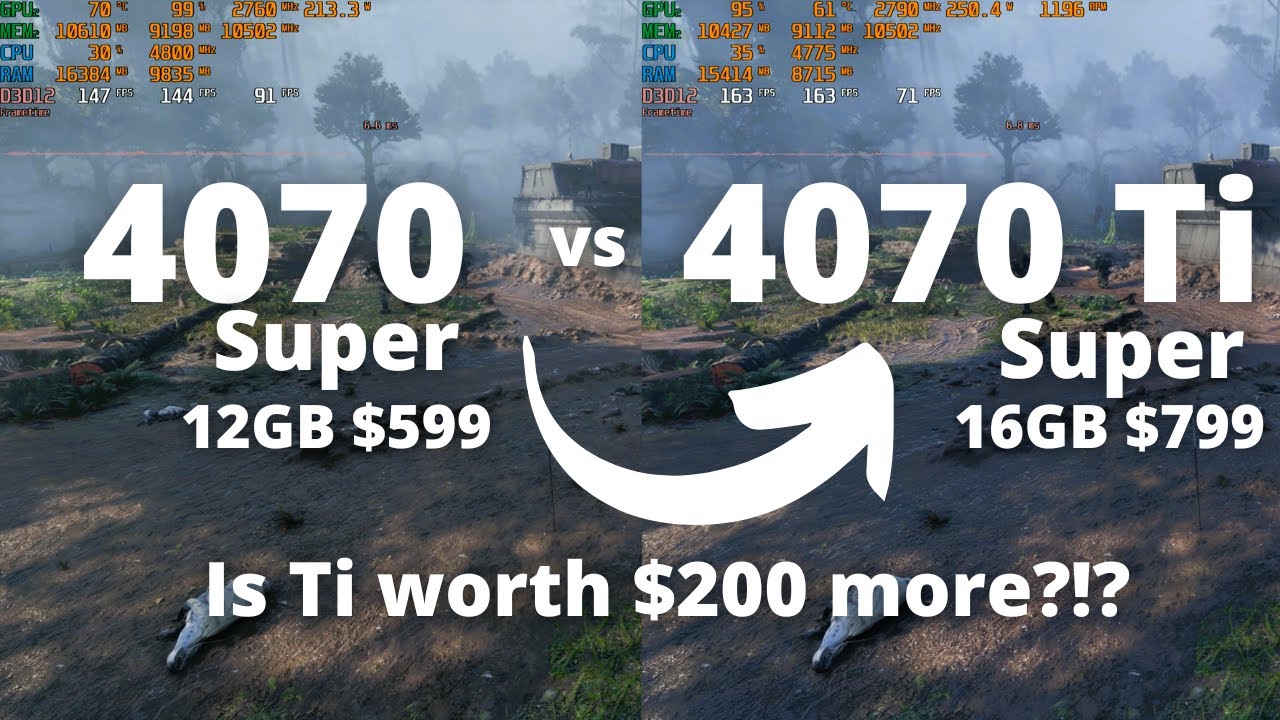
Check out Jawa! The place for gamers to buy and sell PC hardware: https://bit.ly/JawaOwenFeb24 Use code OWEN10 for $10 off your first purchase.
Is it worth spending $200 more to get the 4070 Ti super and its 16GB of VRAM over the the 4070 Super? Let's find out! We will test them in the latest games with all the latest settings and features teste...

Testing Nvidia GeForce RTX 4070 Ti Super with AMD Ryzen 5 5600x in 15 different games at 1440p, DLSS/RTX on & off...
Timestamps:-
0:00 The Last Of Us Part I
1:29 The Finals
2:47 Starfield
4:41 Star Wars Jedi Survivor
6:00 RTX/DLSS 3 Star Wars Jedi Survivor
7:15 Hogwarts Legacy
8:32 RTX/DLSS 3 Hogwarts Legacy
9:55 God Of War
10:59 Forza Horizon...
limpid helm
My pc not turning on
slow oxide
dusky ember
I would recommend taking the time to do a lot of research on your own. After all...
No, LTT does not count as informational anymore, they’re more of a tech entertainment channel now.
That being said, I think we should probably wait for RDNA 4 to get released to for a (hopefully) a bit of more bang for your buck
slow oxide
dusky ember
That being said, if you really need a PC now, or you want a PC ready for inZOI a...
Also, a 7900 GRE offers similar performance for cheaper if you don’t need all the schmancy Nvidia doodads like CUDA or generational-locked DLSS versions https://youtu.be/tFKhlplCNpM?si=_EvBbc3UVkxmomPf
(and being from you, I'm probably shooting myself in the leg for this)

See MSI QD-OLED Gaming Monitors: https://msi.gm/GetQDOLED
Go QD OLED Global: https://msi.gm/GoOLEDGlobal
Go QD OLED Australians: https://msi.gm/GoOLED
Support us on Patreon: https://www.patreon.com/hardwareunboxed
Join us on Floatplane: https://www.floatplane.com/channel/HardwareUnboxed
Buy relevant products from Amazon, Newegg and others belo...
the 12gb of VRAM for the 4070S is very not worth the price it’s commanding
and this game being on UE5, it’s gonna need a lot of that to run well
dusky ember
slow oxide
the 12gb of VRAM for the 4070S is very not worth the price it’s commanding
That's because you only look at the VRAM. For $600, upscaling, best frame generation, and best RT performance, I'd say those features, if you do use them and value them, is worth at least 1/5 of a GPUs value on its own.
dusky ember
slow oxide
and this game being on UE5, it’s gonna need a lot of that to run well
Also, this is just not true what?
Black Myth Wukong at 1440p uses 7-8GB of VRAM, DLSS quality, very high.
Palworld, 1440p no upscaling, epic, uses about 6GB.
Alan Wake, 1440p no upscaling, uses 9-11GB
Red Dead Redemption 2, 1440p Quality only uses 6-7GB.
All of these games are UE5 and there are more games on proprietary engines like Cyberpunk that get similar results. And this is not just looking at only the 4070 Super. The 4070 Ti Super also gets comparable VRAM usage at the same settings. It's not like it is trying to use more but doesn't have it
For 1440p gaming, the 4070 super is 100% capable and I would recommend it over any AMD card in that price bracket GIVEN YOU USE THE FEATURE SET!
Also... This is like an obvious thing but why would inZOI themselves recommend a 3070, which has 8GB as the recommended spec if it wasn't going to be enough to run their game?
dusky ember
slow oxide
No, LTT does not count as informational anymore, they’re more of a tech entertai...
Finally, regarding this, I do not disagree, but that's only because you're looking at their channel as a whole. They still have tutorials and reviews and testing and benchmarks that they post as well as in house labs testing. They are definitely reliable especially after the whole debacle like last year.
slow oxide
dusky ember
Also, this is just not true what?
Black Myth Wukong at 1440p uses 7-8GB of VRAM,...
well if you're gonna start talking about the 4070ti super, the price bracket is already beyond anything decent that AMD could offer. But as a whole, the 4070ti super is really just a slightly more cut down 4080 on the same AD104 die as the 4080 super (same amounts of VRAM, 256bit bus), so it should treated more as a 4080 non-super than a 4070.
In that case, if the budget allows, go buy that instead
dusky ember

I only used the 4070 ti super as a reference point as to how much VRAM games actually use
Why are you talking like it was my main point
slow oxide
dusky ember
For 1440p gaming, the 4070 super is 100% capable and I would recommend it over a...
but yes, if you do use DLSS, ray reconstruction, frame gen, etc, then go for the RTX
also about the VRAM, there's inevitably some mods that's gonna improve the vanilla textures (i.e 4K texture mods) that would need more of it
dusky ember

The Sims, while being on a less intensive engine, uses 2-3GB, 3-5 with a TON of mods. I don't expect UE5 to make it triple to over 12GB.
heady quail
dusky ember
The Sims, while being on a less intensive engine, uses 2-3GB, 3-5 with a TON of ...
Thanks for that
Basically 12GB will be just enough is what you’re saying ??
It’s not like I want to play the game on every ultra setting but I still want it to look good and run smooth
dusky ember
If you're not playing at 4K, but even then I think 4K might just barely reach 12GB. I expect at 1440p, the game will use 10GB maximum.
ofc this is all speculation
but I'm making educated guess based on similar games and relative performance and available knowledge etc.
heady quail
I read somewhere saying they might make it so people with out the best specs can also play
I hope that’s true

Level up your setup with the iBUYPOWER SMI7N47S01, the perfect gaming PC build for someone looking to upgrade their computer system for art, editing, and gaming. This prebuild utilizes professionally vetted components to create a high-performing machine that lets you do everything from streaming,...
dusky ember
I mean, I think if they really want to compete with the sims they have to
the sims is not a demanding game by any means
heady quail
I’ve found that desktop opinions??
I’m not looking to build a pc just to put that out there
heady quail
LMAOAOAO LOWKEYYYY
I can make it work😭😭😭
But rate scale 1-10
Not even just to run inzoi but other games that utilize unreal engine 5
dusky ember
to be honest, if you just built your own with that budget you could literally make it look nicer, and you learn how to maintain your computer at the same time
heady quail
And I also play second life
I wish someone can just make the list of parts I need and I just order it ugh
dusky ember
I'd say that this PC is a 5/10. Even though the specs are good, I worry about the things these sort of vendors really skimp on. It only has 16GB of RAM, uses a 14700F with an air cooler, and likely the motherboard and power supply won't be very good
If you buy a prebuilt it really shouldn't be from anywhere except from an actual notable prebuilt company
dusky ember
If you really don't want to build one, my online friends have gotten good experiences with Starforge.
But they are expensive
That's really the only thing
HOLY WHAT

Starforge Systems
Starforge Systems is proud to announce a partnership with another exciting Anime IP! Frieren: Beyond Journey’s End is a widely beloved series that has taken the world by storm in recent years. Our collaboration with them includes a Limited Edition PC, acrylic inserts in the Starforge Plate Light, Desk Mats and Wall Art
I DIDNT EVEN KNOW THIS WAS A THING
heady quail
Yeahh a little pricey
dusky ember
Anyways, from starforge, I'd recommend this if you want to use ray tracing at 1440p high:
https://starforgesystems.com/products/navigator-pro?_pos=2&_fid=89e6e08b5&_ss=c
Starforge Systems
Step up your game and accelerate your frames with the Navigator Pro! Regardless of if you're looking to enjoy the stunning visuals of your favorite open world title or dominate the battlefield and climb the ranks, this system is built to deliver a truly excellent gaming adventure.
Note its $500 than the amazon one, but you get 32 GB of RAM name brand, custom cables, water cooler, name brand power supply, name brand motherboard.
heady quail
I may consider building one
dusky ember
If that's the case, I'd really wait until January when new parts come out
or literally until end of october when intel releases their new cpus at least
heady quail
What specific parts would I need if I invest in a i7 14700k??
There would be a price drop on that right??
dusky ember
To preface, I would NOT recommend the 14700K for 2 reasons.
- Intel 13th and 14th gen are SUPER power hungry. They generate a lot of heat. Intel had a big issue with voltage and chips degrading, but they have fixed that. Even then, its a platform I struggle to recommend.
- LGA 1700 is the socket that 12-14th gen use. It is now a DEAD socket. This means there won't be any new CPUs being released for it. If you want to upgrade in the future, you will need to buy a new motherboard as well.
That being said, if you are considering a 14700K, this is what I recommend you do:
Wait till end of October when Intel releases their new generation of chips, and check their performance/price. They've already confirmed that the CPUs will at least match previous gen performance while being much more power efficient.
If the launch is disappointing, then purchase a 14700K.
I own a 13600KF, and I hit 80C while gaming playing games like Satisfactory
These chips are super power hungry
Also, a 14700K is probably way more than you need at your budget. If you're planning on playing games and only games, and nothing like compiling code, rendering, etc, then you should invest more on your GPU.
heady quail
Alrighttt
dusky ember
heady quail
Alrighttt
At $1500, you're kind of at the cusp of getting a higher quality computer. If you just spent a bit more:
https://pcpartpicker.com/list/K6WRpB
Though, if you budget is really solid, you can switch that 4070 ti super for a 4070 super and buy extra fun stuff like case fans and a nicer case and a water cooler.
Part List - AMD Ryzen 5 7600X, GeForce RTX 4070 Ti SUPER, NZXT H5 Flow (2022) ATX Mid Tower
Part List - AMD Ryzen 5 7600X, GeForce RTX 4070 SUPER, Antec FLUX ATX Mid Tower
heady quail
Any builds for intel i7 instead of Ryzen 5??
I currently have a laptop with an intel i7 12th gen
And no liquid cooling
dusky ember
You'll need a water cooler if you're going intel. Laptop chips are way different from desktop chips. They are way more power hungry and generate way more heat.
Unless you buy like a 13400F
Which is I guess classified like an i3?
I'm researching this and honestly, if you're comfortable running your CPU near 75C, 90C max, then go for it. For me, that turns my room into a sauna cause there isn't great ventilation.
@heady quail
Otherwise, you'd want water cooling
dusky ember
What are you doing with this computer?
Are you playing games or doing professional workloads?
You're trying to spend too much on the CPU which won't affect your gaming performance much, if at all
I'm recommending AMD if you are buying, literally right now, because:
- They are cheaper
- They don't need big coolers.
- A 7600X won't even bottleneck a 4090, because buying a good graphics card = higher graphics = more load on GPU = less load on CPU.
For these reasons, you really should spend LESS on your CPU.
That said, I do not recommend that you build a PC now. You should wait until at least end of october.
There's not much else to be said regarding this.
limpid helm
Any good power supply ya can recommend?
acoustic rose
limpid helm
Any good power supply ya can recommend?
Depends on your hardware / how much watts you need.
limpid helm
The one I had came broken it didn’t turn on, nothing
Part List - AMD Ryzen 7 7700X, Radeon RX 7600 XT, Corsair 4000D Airflow ATX Mid Tower
acoustic rose
limpid helm
The one I had came broken it didn’t turn on, nothing
If those are all the parts, then it is indeed missing a power supply. MSI MAG A750GL PCIE5 is a good PSU, a bit overkill but good if you want to upgrade GPU later to something more powerful.
limpid helm
I already got a power supply but it came dead, and I’m looking for another one that’s better
That will be compatible with my parts
limpid helm
What if I get the MSI MAG A850GL PCIE5 is that one good
acoustic rose
limpid helm
What if I get the MSI MAG A850GL PCIE5 is that one good
You could do that as well but as I said it's mostly for upgradeability because you would even be fine with 550W with your current specs.
But apart from that, are you really certain that the PSU is the issue? Why do you think your power supply is dead. Was everything connected properly, turned on etc?
limpid helm
acoustic rose
You could do that as well but as I said it's mostly for upgradeability because y...
Yea I even had someone helped me and I followed the instructions and watched videos and everything
Like the pc doesn’t turn not even a light on
And it has a lot of bad reviews about people having the same issue
dusky ember
limpid helm
Like the pc doesn’t turn not even a light on
This could be PSU, motherboard, or CPU.
The easiest part to test and replace would be the PSU.
If you're located in the US, microcenter techs may be kind enough to lend a power supply to diagnose the issue. Anything more might cost money
Also, if you are looking to buy a power supply, I would highly highly recommend the brand Super Flower. They are a supplier, meaning they make the base model power supply for many name brand companies. Their PSUs are cheap and reliable.
limpid helm
dusky ember
The easiest part to test and replace would be the PSU.
Yea I replaced it, it’s arriving tmr
Thanks for the information
hearty totem
dusky ember
If you're located in the US, microcenter techs may be kind enough to lend a powe...
your average PC repair shop in the US would fix it for cheaper than the replacement of a mobo
js
dusky ember
hearty totem
your average PC repair shop in the US would fix it for cheaper than the replacem...
Your average repair shop in the US would have the brain cells not to open up a power supply to fix it.
hearty totem
dusky ember
Your average repair shop in the US would have the brain cells not to open up a p...
not open the PSU lol but to check if it works you don't need to crack it open
dusky ember
What did you say then that was any different from what I said
Also, I used to work at microcenter and we would do simple diagnostics for free
Ofc if we found an issue we would need to be paid to fix it
I never mentioned anything about fixing, just diagnosing
hearty totem
dusky ember
What did you say then that was any different from what I said
open vs fix. to be fair you can't fix without opening most times. please know that I barely belong in this thread* 
dusky ember
hearty totem
open vs fix. to be fair you can't fix without opening most times. please know th...

What I meant was, what was different from you mentioning "Your average repair shop" vs me mentioning "Microcenter"?
hearty totem
microcenter ain't yo average shop lol your average shop is in a strip mall run by some guy in his 40s with a part-time clerk
dusky ember
Ok? Both are going to fix your shit, and I only said microcenter because some microcenter locations do FREE diagnostics on certain parts that are easy to diagnose
hearty totem
absolutely valid 
I'm js you're probably going to find the 40yo before a close microcenter unless you're lucky
dusky ember
hearty totem
absolutely valid <:cookietime:871549877644050453>
I'm js you're probably going ...
This is literally just an argument for a mechanic vs a dealership.
I really wouldn't recommend a local repair shop unless you have history, or if your friends have history, or if they have a extensive and long list of reviews over a long period on Google.
Meanwhile, Microcenter is a brick and mortar chain that specializes in these things. There is no chance they will scam you, other than having you pay a little extra for that guarantee.
That being said, I've worked in both, local and chain PC repair stores, and the two local stores I've worked at, one would often store old parts from customers to redistribute to other customers, (Very shady and untrustworthy business practice, so I left), and the other would buy things to order (Usually the standard).
Microcenter gets their stuff from the supplier so after diagnostics, if the customer wants, we fix or replace the parts right there.
 dusky ember
hearty totem
your average PC repair shop in the US would fix it for cheaper than the replacem...
dusky ember
hearty totem
your average PC repair shop in the US would fix it for cheaper than the replacem...
What in this original reply suggests to me that, that was your main comment? To me, it looked like you were arguing that a local store would fix things cheaper'
Now it looks like that you're just changing what you were saying
Overall, this is a useless talk

hearty totem
I wouldn't be able to compare the prices as I've never been to a microcenter, but aight
hearty totem
dusky ember
What in this original reply suggests to me that, that was your main comment? To ...
than the replacement of a mobo
dusky ember
Where the fuck did anyone ever mention a mobo other than me?
And even then I was just listing that as a possibility
hearty totem
can we not fight? lol the issue in question was a PC not starting which led them here
dusky ember
Also, most damage that would cause no power on a motherboard are things that aren't diagnosable (IE you can't really find specifically what is causing the issue other than spending more time going through it with a multimeter).
dusky ember
Istg I thought I was going crazy considering you thought it would be cheaper to fix a motherboard than to replace it and I'm glad 99% of the internet agrees with me.
 ionic walrus
I currently have an intel i5 & a 1660 Ti graphics card , I was thinking of upgrading to the latest i7 or i9 and getting a 4070 super , i have a 4k monitor aswell, would that be a good setup for using a 4k monitor?
acoustic rose
ionic walrus
I currently have an intel i5 & a 1660 Ti graphics card , I was thinking of upgra...
What i5 do you currently have? For (native) 4K you would want something like a 4080 but you obviously can just play in 1440P instead or use DLSS.
Today new Intel chips are releasing (current gen has/had some instability issues) or you could go for a Ryzen chip.
 somber burrow
I have a 12th Gen Intel(R) Core(TM) i7-12700KF 3.60 GHz, and an RTX 4070, ans also have 64 GB (32 + 32) GB of RAM. WIll that be enough to execute inZOI?
 harsh mountain
yes
somber burrow
harsh mountain
yes
nice, ty
ionic walrus
acoustic rose
What i5 do you currently have? For (native) 4K you would want something like a 4...
i have Intel(R) Core(TM) i5-9400F CPU @ 2.90GHz 2.90 GHz
dusky ember
ionic walrus
i have Intel(R) Core(TM) i5-9400F CPU @ 2.90GHz 2.90 GHz
Tbh, there is no big reason to upgrade to a current CPU right now. Any FPS gain you will see will be in the 1% lows. Since you're planning on playing at 4K, you are even more GPU bound, rather than CPU bound, so tbh, you don't really have to upgrade the 9400F (It won't bottleneck anything worse than a 4070 super at 4K, maybe only in 1% lows).
Ofc, a better CPU = more stable 1% lows = less frame drops and stutters, but realistically, you can get away with buying a 7700X and it will last you for the next 2 GPU generations after the 50 series/RX 8000 series.
But if you need high productivity performance for work, then I would recommend AMD. Intel right now is looking a lot worse, especially with the new core ultra that released today (Worse to equal performance in gaming, 5-10% increase in certain productivity workloads, overall lower power draw and more power efficient).
Multi-core workloads really suffer on the new core ultra now, and I don't really recommend 13th-14th gen because it is a dead platform (LGA 1700 is now discontinued, for 1851).
If you need something only for gaming, literally wait until Nov 7th and the 9800X3D has already been confirmed to release at that date
Finally, the 9950X3D should have fixed the issues that arose from the 7950X3D.
If you follow tech news, you would know that the 7950X3D design was flawed as it had a dual CCD (Chiplet) architecture, but only one of the CCDs had a 3D V-cache (AMD's large gaming cache).
In order to ensure that the CCD with 3D cache, AMD used core parking so that the CCD with the v cache was being used, but this increased latency and core parking wasn't always smooth, causing it to underperform compared to the 7800X3D.
The 9950X3D however, has been rumored to have the 3D v cache on both CCDs. This eliminates the need for core parking. The only thing is that it is probably going to be released months after the 9800X3D.
So, in conclusion, this is a REALLY bad year for CPUs in general, and an even worse year for Intel (13th and 14th gen instability and degradation issues, and the poor Core Ultra 200 series launch).
This is why I'd really recommend looking to purchase an AMD CPU.
Here's some benchmark videos from reputable channels that can get you a good perspective on this:
https://www.youtube.com/watch?v=XXLY8kEdR1c&pp=ygUMZ2FtZXJzIG5leHVz
https://www.youtube.com/watch?v=_X8Kr43xbk8&pp=ygULMjg1ayByZXZpZXc%3D
https://www.youtube.com/watch?v=zY7_Pb9URgg&t=384s&pp=ygULMjg1ayByZXZpZXc%3D
https://www.youtube.com/watch?v=3n537Z7pJug&pp=ygULMjg1ayByZXZpZXc%3D
https://www.youtube.com/watch?v=9xgN46TBBGg&pp=ygULMjg1ayByZXZpZXc%3D
Sponsor: Thermaltake Tower 600 Case on Amazon https://geni.us/wjtN
The Intel Core Ultra 9 285K CPU just launched. This review of the Intel 285K CPU includes gaming benchmarks, looking at some of the best gaming CPUs in 2024, power efficiency comparisons of Intel vs. AMD, workstation and Adobe application benchmarks, and more. This benchmark focu...

Well the Intel Core Ultra CPUs are here. We kick off coverage with the Core Ultra 9 285K CPU and test Productivity, Gaming, Thermals, Voltage, Power Draw and overall performance... is this CPU worth it? Maybe... Maybe not....
Huge thank you to Falcon Northwest for providing us with their flagship Talon for our testing purposes. Check out Falco...

Visit https://www.squarespace.com/LTT and use offer code LTT for 10% off
Save 10% and get Free Shipping at Ridge by using the code LINUS at https://www.ridge.com/LINUS
We tried REALLY HARD to find some positives about Intel’s Core Ultra 200S Processors. There are a lot of cool features and improvements, but if you’re strictly gaming you may wa...

Get 20% OFF + Free International Shipping @Manscaped with promo code HARDWAREUNBOXED at http://manscaped.com/hardwareunboxed #manscapedpartner
Support us on Patreon: https://www.patreon.com/hardwareunboxed
YT Membership: https://www.youtube.com/channel/UCI8iQa1hv7oV_Z8D35vVuSg/join
Buy relevant products from Amazon, Newegg and others below:
AM...

Get the new Thermal Grizzly 1851 Contact Frame here:
https://www.thermal-grizzly.com/en/blog/intel-core-ultra-200-new-products-for-intel-s-arrow-lake-processors
Music / Credits:
Outro:
Dylan Sitts feat. HDBeenDope - For The Record (Dylan Sitts Remix)
-----------------------------------...
The titles aren't very convincing 
ionic walrus
dusky ember
Tbh, there is no big reason to upgrade to a current CPU right now. Any FPS gain ...
Wow that was very informative, thank you so much ! All i really care about is running games with very good fps , with my 1660 Ti , alot of the new games are just too harsh on my gpu since i play on a 4k monitor, I think the 4080 is too expensive tho , so thats why im thinking of doing a 4070 super
ionic walrus
ionic walrus
Wow that was very informative, thank you so much ! All i really care about is ru...
Im worried that if i have to get a new motherboard to fit it on tho , i want the 3 fans one thats overclocked
dusky ember
What do you mean 3 fans one thats overclocked....?
Like a motherboard with VRM fans and can overclock the CPU?
@ionic walrus
With a 9400F, if you plan on upgrading the CPU, you're essentially forced into buying a new motherboard. The 9400F is LGA 1151. The latest for Intel is 1851, the previous gen intel was 1700.
LGA 1700 encompasses 12th, 13th, and 14th gen.
LGA 1851 currently only has the Core Ultra 200 series.
The 14700K is probably the only thing I would recommend from Intel right now, but again, since it is a dead platform, if you plan on upgrading in the future, you will have to buy a new motherboard as well. Another thing to note is that 13th and 14th gen chips consume a FUCK ton of power. Anywhere from 120W to 200W when gaming. This means you'll probably need at least a beefy air cooler, or a 280mm water cooler and up.
On AMD's side, you have AM4 and AM5
AM4 is EOL (End of life), but still has amazing gaming chips for cheap.
AM4 encompasses Ryzen 1st gen through 5th, and realistically if you are going AM4, you would only purchase the 5th generation, specifically the 5800X3D.
AM4 is definitely an option for you to pick even though its dead, because it has one of the best low end gaming chips for cheap (5800X3D).
Meanwhile, AM5 is AMD's current platform and has the 7th and 9th gen chips. (6th and 8th gen I believe were laptop only).
7th gen has great multi-purpose chips that can do both workloads. At the low end, the 7700X is a good choice. While the 7800X3D is the current king of gaming CPUs, its currently low on stock, so it is being jacked up to oblivion (Currently $600+ on Amazon in my area).
If you are looking for a chip with great gaming performance and upgradability, I would highly recommend waiting for the 9800X3D. It's likely going to be released around $500, but it will also likely dethrone the current strongest gaming CPU in the 7800X3D.
ionic walrus
dusky ember
What do you mean 3 fans one thats overclocked....?
Theres a RTX 4070 Super with 3 fans on it , meaning its longer than the one with 2 fans on it
dusky ember
Oh. I see
What's your current budget to upgrade? And what is your power supply wattage?
You have an older PC, so making sure your PSU is up to standard is important
ionic walrus
dusky ember
What's your current budget to upgrade? And what is your power supply wattage?
My current budget for a GPU is like $700
Budget for a CPU is like $500-600
dusky ember
ionic walrus
Theres a RTX 4070 Super with 3 fans on it , meaning its longer than the one with...
Oh... wait I see what you mean. Yeah, no worries on this. It uses PCIE which is a standard slot for like decades now. The 4070 will fit on any motherboard. If you're worried about the length, its more important to see if your case has clearance.
ionic walrus
Im not sure what my current power supply is , its a prebuilt i purchased from ibuypower years ago
dusky ember
ionic walrus
Im not sure what my current power supply is , its a prebuilt i purchased from ib...
Based on your specs, it's probably likely its no better than a 600W power supply
Power supplies are usually one of the main components a prebuilt company will try to give you the cheapest option of
ionic walrus
dusky ember
Oh... wait I see what you mean. Yeah, no worries on this. It uses PCIE which is ...
Oh okay thats good to know
dusky ember
Are you planning on building on your own or are you getting another prebuilt?
ionic walrus
dusky ember
Power supplies are usually one of the main components a prebuilt company will tr...
Can i check the wattage from my pc setting?
ionic walrus
dusky ember
Are you planning on building on your own or are you getting another prebuilt?
I wanted to upgrade my computer, just open the case and upgrade the parts thats already in it
I also want to upgrade my ram sticks from 16 GB to 32 GB too , i know thats an easy install
dusky ember
Okay, just to let you know, the main things I am worried are:
-
Your case might be too small to fit a triple fan GPU.
-
Your case might be an M-ATX case. Motherboards come in 4 size standards, from largest to smallest: E-ATX, ATX, M-ATX, and ITX.
If it is M-ATX, you will have to make sure you get a board that supports it. -
Your power supply is likely not good enough to support a powerful GPU. The 4070 super recommended minimum is 550 watts, but tbh, it's highly likely you have a 500W power supply, maybe a 600W. It's also likely not at all power efficient.
Power supplies usually have an efficiency curve that peaks at around 50-70% usage, so you will want to get a power supply that will be around double to 1.5X what you actually need If you can afford it without compromising on your other components
It would be useful if you have that receipt from Ibuypower and if you can just type out the specs sheet.
As for your budget, I think you can re-allocate it a bit. $400-500 on CPU and motherboard, $800-900 on GPU. With that amount, you can a get a 4070TI Super. The 4070Ti Super really should have just been called a 4080, and the 4080 is really a 4090, and the 4090 is really a Titan class card.
Sorry, my mistake, if you're upgrading, you will probably want to upgrade your PSU. $400 on CPU/Mobo, $150 on PSU, the rest on the GPU. And that's hoping if your case can fit the components you want, otherwise you will need to get components that fit or buy a new case.
Oh, also, I almost forgot. Any upgrade you do would require you to buy brand new RAM. You are running on DDR4, and current platforms, excluding 13th and 14th gen on certain motherboards run on DDR5(13th and 14th gen support both DDR4 and DDR5, but its dependent on what motherboard you buy that determines which RAM will be compatible).
AMD meanwhile, AM5 is completely DDR5, and AM4 is DDR4. Intel Core Ultra 200S is DDR5 only as well.
Unfortunately your system is just at that age where you might have to upgrade every component (except for maybe the case), if you want to continue to have good upgradability.
Holy shit. Super Flower 1200W 80+ platinum PSU is on sale for $140.
https://www.newegg.com/super-flower-leadex-platinum-se-sf-1200f14mp-v2-1200w/p/1HU-024C-00037
@ionic walrus If you can stretch your budget a bit, I recommend you just upgrading your entire system:
Part List - AMD Ryzen 5 7600X, GeForce RTX 4070 SUPER, Thermaltake View 270 ATX Mid Tower
Sorry, I forgot to add fans. You can buy both the fans and the fan controller on amazon. You only need 3, but you can fit up to 7 in the case it looks like:
Part List - AMD Ryzen 5 7600X, GeForce RTX 4070 SUPER, Thermaltake View 270 ATX Mid Tower
ionic walrus
i found my receipt
dusky ember
Oh awesome lol
ionic walrus
dusky ember
It would be useful if you have that receipt from Ibuypower and if you can just t...
iBUYPOWER Slate MR Mirror Finished Tempered Glass ARGB
Processor Intel® Core™ i5-9400F Processor (6x 2.90GHz/9MB L3 Cache)
Processor Cooling Certified CPU Fan and Heatsink
Memory 8GB [8GB x 1] DDR4-2666MHz ADATA
Video Card MSI VENTUS XS GeForce GTX 1660 - 6GB GDDR5 (VR Ready)
Storage 480GB ADATA SU630 SSD
Game Bundle [FREE GAME CONTENT] - Get World of Tanks Premium for 7 Days Plus MORE! - w/ Purchase of iBUYPOWER Gaming PC
Motherboard ASUS TUF B365M-Plus Gaming (WiFi) w/ RGB
Power Supply 500 Watt - Standard 80 PLUS Bronze
Internal Wireless Network PCIe Wireless Network
Operating System Windows 10 Home
Keyboard iBUYPOWER RGB Gaming Keyboard
Mouse iBUYPOWER Gaming Optical Mouse
Warranty 3 Year Standard Warranty Service
dusky ember
give me a second to look up that case
also you only have 8GB of ram. its pretty crap ram too
ionic walrus
okay, yeah you was right 500 watt power supply
dusky ember
yeah and its also bronze
ionic walrus
i upgraded my ram , i have 16 GB now
dusky ember
thats the lowest power efficiency rating
ADATA SU630 sounds like a 2.5 Sata SSD
"Certified CPU Fan and Heatsink"
It's probably the fan that comes with the CPU
ionic walrus
Sounds like it would be better to buy a new PC tbh
dusky ember
Ok yeah, i was right
Your case is M-ATX
Your PSU is 500W bronze
And your motherboard is low of the low of the low
ionic walrus
my PC only cost $800 , so i expect it to be lacking in so many areas
dusky ember
dusky ember
And your motherboard is low of the low of the low
actually the motherboard isn't terrible just not great
You will have to upgrade it anyways
ionic walrus
hmm okay
do you think buying a new built PC would just be better?
less hassle too lol
dusky ember
Yeah if you want to upgrade CPU and GPU, you will have to upgrade the PSU, motherboard as well at the very least, and maybe ram depending on what CPU you want
And at that point the only thing you're keeping is the case
ionic walrus
dusky ember
And at that point the only thing you're keeping is the case
yeah basically
dusky ember
Oh yeah, and you will need a new cooler
So yeah
literally only the case
You could keep the case and save $60-70
but since its M-ATX you will have to buy parts that will fit in it
ionic walrus
If i buy a new PC, I would probably spend like $2,000
ionic walrus
I was thinking of getting a GPU for a temporary fix for now , but it sounds like i just need a whole new PC at this point lol
dusky ember
- Your PC is low end for even that time period, so many parts are just not great for someone who wants something for longevity.
- Your PC is also at that age where its 3-4 generations old. A lot of standards have changed since then, so upgrading a part means you will have to upgrade something else too.
If your budget is $2000, then you can definitely fit something like a 4070 Ti Super
ionic walrus
dusky ember
1. Your PC is low end for even that time period, so many parts are just not grea...
I wouldnt have known that without your help , thank you so much. I kinda figured I was super outdated , thought i could save some money and just upgrade what i need but i might aswell go all out on a new one. This PC is from 2020 lol
dusky ember
oh shit
actually
you might want to buy soon
Newegg just restocked their 7800X3D
so its at a normal price
ionic walrus
you have the link?
dusky ember
let me get you a pcpartpicker list so you have everything
ionic walrus
okay
dusky ember
hm actually
i mispicked some parts give me a sec
Do you care about a lot of RAM at all?
cause if you get a 7800X3D and if you want a 4070 Ti Super, then you can get 32 GB max
ionic walrus
dusky ember
Do you care about a lot of RAM at all?
Kinda , i also do video editing and multi-tasking stuff
32 is fine
dusky ember
If you get a cheaper CPU, then you can get 64 with the 4070 Ti Super
ionic walrus
64 is kinda overkill for me lol
dusky ember
No prob, i personally have 64 so I thought to ask
Part List - AMD Ryzen 7 7800X3D, GeForce RTX 4070 Ti SUPER, Antec FLUX PRO ATX Full Tower
Here it is
ionic walrus
okay
dusky ember
Also, here is the link for the case:
https://www.amazon.com/Antec-Included-High-Airflow-Radiator-Full-Tower/dp/B0DDNS2SY3/ref=sr_1_1

Introducing FLUX Pro, Antec's brand new flagship case model that is meticulously engineered for functionality, performance and style. Crafted from heterogeneous materials including metal, glass and wood, along with many other innovative features, Flux PRO delivers absolute aethestics with outstan...
For some reason it doesn't show up on pcpartpicker
harsh mountain

dusky ember
The Antec Flux Pro was recently reviewed by Gamers Nexus, one of the most reputable and long lasting hardware channels today. They universally said that it is head and shoulders above most other cases.
For $179, you get a case with a built in fan controller hub and 6 ARGB fans
For that price, that is actually a really good deal
ionic walrus
oh wow that is good
dusky ember
The reasons why it is so good is:
Easy to build in
Amazing airflow
Those are the 2 main things you really look for in a case, and things like material quality, compatibility, asthetics, come later
That being said, for $179, its a premium case, without a too premium of a price tag
Ofc, if you want a different case, I would recommend the Corsair 4000D. Its $50 cheaper, and I think comes with 3 fans.
With no fan hub (I think).
The only thing is, you might want to get a corsair power supply as well, if you want to keep the drive bay since it can get hard to build in if you have a lot of power supply cables. Corsair power supplies have their cables plugged in on the side, rather than the back of the PSU, which makes them perfect for corsair cases (obviously).
I just, highly recommend Super Flower as a brand because:
-
They are an OEM, meaning they manufacture the power supplies for other reputable brands.
-
Their platinum level power supplies are extremely cheap for their wattage. 1000W platinum PSU at $129 is insane. Usually these would be around $160-$200.
ionic walrus
hmm okay , I will check it out , probably gonna start buying the parts in a week or two
dusky ember
awesome good luck
if you need any help u can just ping me
i'll see it within a day tbh
ionic walrus
just added you as a friend , so i can send you a picture of it when i get everything built
harsh mountain
ur so helpful Kurata 
dusky ember
@ionic walrus
I'm not trying to make you question decisions, but I want you to make as informed of a decision as possible. I did just check and saw that the 9800X3D thats coming out in 2 weeks is rumored to release at around $480 to $530. To be honest, it might be worth to wait till then, but it could also release at a greater price (Unlikely because the 9950X is at $600), and if it does release at a higher price, the 7800X3D might not be available anymore.
Just to let you know, if you want something new.
ionic walrus
dusky ember
<@458040616044199937>
I'm not trying to make you question decisions, but I wan...
ouu okay , I can wait then
 tame stump
Do yall think this’ll work https://a.co/d/7oN9rd7

The Cooler Master HAF 5 Pro raises the bar as a leading gaming PC computer, delivering exceptional cooling and performance that outshines the competition. With this setup, you can enjoy a wide range of popular games, including ROBLOX, Minecraft, Call of Duty, Fortnite, The Sims, League of Legends...
dusky ember
Yeah, if you don't want to build your own PC. That isn't really a bad deal.
Ofc if you built your own PC at the same price you can both make it to what asthetic you want and also get better parts.
@tame stump
tame stump
I really want an msi but it’s up to my parents and my dad told me to look at this so I was just checking along with checking the games I play to see if it’s compatible with it
dusky ember
What games do you play? besides obv inZOI when it comes out
And also what settings do you want to target?
(resolution, quality, and FPS)
tame stump
Simulator games and fighting games and sometimes I try to make some edits and life sims like animal shelter and pcvr games the quality doesn’t really matter as long as I can see it really good and probably like 165 or higher and like 1080p
dusky ember
tame stump
Simulator games and fighting games and sometimes I try to make some edits and li...
So, that PC would honestly perform better at 1440p, and should hit 120FPS+ at 1440p high, maybe with DLSS, maybe not. I'm not too familiar with the game you mentioned. It definitely is VR capable.
The reason why it would perform better at 1440p is because at 1080p, you're closer to being CPU limited, since your CPU is trying harder to push more and more frames. You might get higher FPS, but you might also get lower 1% lows, which means more stuttering.
It does sound counter-intuitive, but it makes sense with this analogy;
Imagine the CPU like an intern who signs off on papers or something, and each sheet is 1 frame.
Lets say his boss is the GPU. The intern needs to get these papers done and sent to his boss, so the boss can confirm them. Like a stamp of approval (Rendering textures, lighting, etc).
At low resolutions, there are way more papers coming through, maybe like 200 per second. If the intern can only do 150 papers per second, while the boss is super fast and can do up to 300 papers per second, the boss will be waiting on the intern to get the papers through. This means, at moments where there are spikes, you could say that is like a sheet of paper that has some element that makes it complex to sign off on. This could make the intern suddenly slower for a short time. (FPS drops).
At higher resolutions, there are less papers coming through, like 150 papers per second. The intern can work at a pace he is comfortable at, and there will be less "mistakes" or difficulty processing complex papers, since he has time to make sure they are correct before handing them off to the boss.
Usually when gaming, you always want to be GPU bound rather than CPU bound because waiting on the CPU to complete its tasks means that you're more likely to have unstable frametimes and more lag spikes, even if your average FPS is higher.
@tame stump If you're comfortable with building a PC yourself, I can provide you a build based on the same price of the PC you showed earlier
But I'm heading to bed now, so just ping me and I'll see it sometime tomorrow 🙂
acoustic rose
dusky ember
Newegg just restocked their 7800X3D
$450 isn't the normal price (unless it was significantly cheaper until a few hours ago) and why would you need a 7800X3D at 4K. Just get 7700X microcenter bundle + 4080Super.
dusky ember
acoustic rose
$450 isn't the normal price (unless it was significantly cheaper until a few hou...
You clearly aren't following anything tech related if you think $450 isn't at least normal. The 7800X3D has been hovering $600+ for at least a month now.
$450 is $20 below MSRP
acoustic rose
dusky ember
You clearly aren't following anything tech related if you think $450 isn't at le...
I am very much following tech that's why I'm saying $450 is a bad price. I consider $350 to be normal because that's what it was going for a few months ago and that's what I would pay for it.
No reason to spend $120 extra amidst supply constraints etc.
dusky ember
7800X3D gives 10-15% more performance at 40W less power draw, and frame times are smoother by about 2 ms. Plus, value is subjective. I don't see how you "considering" something to be normal makes it normal to someone else.
Also, if you paid any attention, I did recommend the 7700X at first. The 7800X3D is a nice to have. And even then, why would you even recommend the 7700X when the 7600X3D is ~5% faster than the 7700X in gaming?
And to say your following tech whilst quoting outdated prices is just stupid at best.
acoustic rose
dusky ember
7800X3D gives 10-15% more performance at 40W less power draw, and frame times ar...
10-15% more performance at 1080P with a 4090, not even remotely close to 10-15% at 4K and a 4080S for example. That also means the 7600X3D will be at best 1% faster most likely and the reason I don't recommend it is because its literally more expensive and sucks for anything other than gaming with it's downlocked 6 cores.
dusky ember
That's why you don't look at averages, do you think i don't know that? 1% lows would be massively increased compared to other CPUs with less cache. That's really the only thing you should care about with a CPU at the high end
acoustic rose
dusky ember
And to say your following tech whilst quoting outdated prices is just stupid at ...
How is it stupid. Product is avaible for months at 330-350 and then it increses 450. That obviously makes it less attractive and not as worth buying anymore.
acoustic rose
dusky ember
That's why you don't look at averages, do you think i don't know that? 1% lows w...
Then show me 1% lows at 4K. Go on. Using a 4080 ideally
dusky ember
Bro, you can look that up yourself, you're just being argumentative LOL
midnight coyote
Please do not argue in the thread  if you have an issue you can argue in dms or create a ticket if you have an issue with a member of the server
 worn pecan
If you’re going to be rude and argumentative to any statements and or opinions made in this wishlist/thread, Please simply unfollow the thread and move on. No need to waste time and energy on such frivolous things! 💐
heady quail
dusky ember
You clearly aren't following anything tech related if you think $450 isn't at le...
I was just looking into the 7800X3D performance. Do you know where I can find a prebuilt with this cpu and a 4070 processor ??
I plan on purchasing around Christmas or after so price should drop correct??

Ryzen 7 7800X3D (7950X3D) vs Core i7 13700K l 1080p
Buy Ryzen 7 7800X3D at newegg.com - http://bit.ly/43e3VxW
Ad - 0:00
Games :
Returnal - 0:21
CYBERPUNK 2077 - 1:12 - https://gvo.deals/TestingGamesCP2077
The Last of Us Part I - 2:06
Microsoft Flight Simulator - 2:58 - https://gvo.deals/TestingGamesMFS20
Hitman 3 - 4:00 - https://gvo.deals/T...
dusky ember
heady quail
I plan on purchasing around Christmas or after so price should drop correct??
I'm not sure what AMD's plans are for the chip after the 9800X3D launch so honestly it might be out of stock or low stock at that time, which would increase the price. Even if it is last gen, and even if the 9800X3D beats it, the 7800X3D still easily beats every other chip including 9000 series non-X3D and 14th gen and new Core Ultra 200, so it will definitely still be a very sought after chip.
Also the fact that reviewers have been calling it literally the "King of gaming" so like everyone knows the chip is like the best.
If they keep making new 7800X3Ds after the 9800X3D launch then maybe the price will drop as long as supply is up.
But actually if you're looking into prebuilt, it should be cheaper since prebuilt companies get them lower priced, and when they are low stock it is usually scalpers who resell them.
I just don't know if they will still be available around Christmas
heady quail
Okay good to know
If they are available tho that would be a good choice for gaming right
Particularly inzoi
I also plan on using it for when gta comes to pc
I’ll still play some sims, vr chat, second life (black dragon viewer) and also fortnite
I have these on my omen 15 gaming laptop it runs well but I think it’s time for an upgrade it’s very loud now
dusky ember
heady quail
If they are available tho that would be a good choice for gaming right
The CPU really only impacts the 1% lows in gaming. It's all up to what resolution and what game you play.
E-sports titles like CS:GO, League Of Legends, DOTA, etc. will have noticeable performance differences between something like a 7700X and a 7800X3D.
But for games like inZOI at 1440p and up, you will only see differences with 1% lows, IE stuttering. I'd recommend you look at benchmarks comparing AMD CPUs to other AMD CPUs.
Also, that video looks outdated. The 13700K is only about $300 in the US now I'm pretty sure
Yeah, $297 on Amazon
heady quail
Oh okay
dusky ember
heady quail
Oh okay
Yep, you're better off spending more money on getting a better GPU. In that case, I'd very much consider these aspects when purchasing:
- What resolution are you playing at? 1440p or higher? or not?
- What features do you want in a GPU? Ray tracing? Frame generation? Upscaling? If these are important, then I would consider Nvidia.
- Are you budget constrained and you're not too concerned about extra features? I would consider AMD in this case.
heady quail
Hope my questions aren’t annoying anyone in anyway, some people tend to get rude
But I just want feedback from those with more knowledge
dusky ember
heady quail
https://www.newegg.com/p/3D5-002D-000D6
Not a bad system by any means. But, like always, for $1500, building it on your own will definitely get you a much better computer for the price.
With this, I'd be worried about the rating on the power supply (It's probably bronze rated, which means lower power efficiency), and the motherboard (It just says B650 motherboard which suggests a low end motherboard. This could impact things like connectivity for devices and storage or whether or not you have good wired/wireless internet).
Even if you're not comfortable with PCs, I'd still recommend that you learn even if you get a prebuilt because its a big purchase and you'll want to know how to take care of a computer. It's air cooled so you'll have to do things like clean dust out of it, diagnose any potential issues, etc.
You'll also be able to build it to how you want it to look like
I've got friends who couldn't find the aesthetic they wanted so they asked me to help them find parts to do stuff like build an all white PC
Or like find parts that fit a certain color scheme
@heady quail https://pcpartpicker.com/list/fTkHfy
Part List - AMD Ryzen 5 7600X, GeForce RTX 4070 Ti SUPER, Thermaltake View 270 ATX Mid Tower
Slightly worse CPU, but much better GPU, motherboard, and PSU.
GPU is more important with gaming anyways, so you shouldn't be worried with a CPU downgrade
heady quail
I wanna switch to a amd cpu for sure
I only know what cpu gpu and storage space I want
Like what to actually get
Ik there’s more stuff to it ofc but I don’t wanna get the wrong things and they don’t work together that’s my fear
Like I don’t want to get something that’s doesn’t fit in the case or effects the other components negatively
dusky ember
well, thats why i picked out a list. pcpartpicker has tools that checks compatibility with parts, so if there are no warnings at the bottom of the page, then it is all compatible.
heady quail
Oh that’s what that link is thank you
I was trying on another cute but it just asked me to pick the parts no compatibility check
dusky ember
so the one thing they dont check is the case compatibility, but thats easy to look up
https://www.thermaltake.com/view-270-tg-argb-mid-tower-chassis.html
This is the case

Built for amazing viewing, the View 270 TG ARGB Mid Tower Chassis is an ATX case that features tempered glass front and left panels, and comes with a pre-installed CT140 ARGB Sync PC Cooling Fan at the rear.
If you scroll down a bit, you can see that they show compatibility for the 4 major parts for fitting inside the case
motherboard, cooler, power supply, gpu
420mm for gpu gives you plenty of clearance
heady quail
Okk
dusky ember
It only has 1 case fan on the back, so I'd recommend buying at least 3 case fans to push air out on the top
https://www.amazon.com/Thermalright-TL-C12C-S-Computer-Included-Quantities)/dp/B0BKKFBR9R/ref=sr_1_1

Thermalright TL-C12C-S X3 CPU Fan 120mm ARGB Case Cooler Fan, 4pin PWM Silent Computer with S-FDB Bearing Included, up to 1550RPM Cooling Fan(3 Quantities)
 spare cypress
any good prebuilt pcs for the recommended inzoi pc stats specs whatever recommendations please
i do not know how to build a pc and i am too lazy to learn how to build a pc please 🙏🙏
slow oxide
spare cypress
any good prebuilt pcs for the recommended inzoi pc stats specs whatever recommen...
How much money are you willing to burn?
(here’s hoping I won’t get shooed off again😅)
spare cypress
slow oxide
How much money are you willing to burn?
honestly no more than like ~1250
ionic walrus
spare cypress
any good prebuilt pcs for the recommended inzoi pc stats specs whatever recommen...
@dusky ember
 plucky junco
Ughh. Whats the cheapest pc i can buy to run this game 😭😫
dusky ember
spare cypress
any good prebuilt pcs for the recommended inzoi pc stats specs whatever recommen...
Ngl, the last line kinda rubs me the wrong way, because a PC is like a car. Even if you don't build your own car, you need to learn how to take care of it. But I get it.
Do you live near a Microcenter? Ngl, it will be your best bet at that budget. You can have them build it for you and you can also make use of their exclusive deals.
dusky ember
plucky junco
Ughh. Whats the cheapest pc i can buy to run this game 😭😫
Look at FAQ and the minimum specifications. That's the cheapest PC. It's not going to run well though
I'm 99% sure the minimum specs target 1080p 30FPS at low. Which is just barely playable
spare cypress
dusky ember
Ngl, the last line kinda rubs me the wrong way, because a PC is like a car. Even...
i 100% get what you mean. i seear ill learn how to take care of it 😭
unfortunately i do not id have to cross the border 😭😭
dusky ember
spare cypress
i 100% get what you mean. i seear ill learn how to take care of it 😭
unfortuna...
damn canadiarians
Do you have a memory express
jesus christ these prices are insane
Is your budget $1250 in canadian or US?
Holy their build pricing is actually quite reasonable.
dusky ember
@spare cypress
So, I'm making some assumptions here:
- Your budget is CAD.
- Your budget doesn't include the cost of labour for building the PC.
The recommendation I'll make you is to check out this link and scroll down to "Custom Sytem Build - Standard" or "Premium".
https://www.memoryexpress.com/TechZone/Index.cm.aspx
Show them this list as well as the memory express links below:
https://ca.pcpartpicker.com/list/82mjjH
CPU - MOBO Bundle: https://www.memoryexpress.com/Products/BDL_MM00004302
Cooler:
https://www.memoryexpress.com/Products/MX00123780
GPU: https://www.memoryexpress.com/Products/MX00131614
RAM:
https://www.memoryexpress.com/Products/MX66405
Storage:
https://www.memoryexpress.com/Products/MX00129794
PSU:
https://www.memoryexpress.com/Products/MX00130937
Case:
https://www.memoryexpress.com/Products/MX00126776
Remember to price match and such. If you go with the 3rd party cooler, the build cost is $25 extra. You can go with the stock cooler. The 5600X isn't that power hungry. I'd even recommend it, tbh, if you want to save money.
Having them build it with the stock cooler is an extra $75 total, $25 for the windows key.
With the Deepcool cooler, its $100 total, $25 for windows key.
This is probably the best PC you can get in CAD, ngl. I don't see many prebuilts beating this, especially considering that they also tend to skimp on parts like the motherboard, RAM, or power supply.
 mint timber
oh damn
mild crow
dusky ember
Tbh, it might be worth for you since you already have a decent laptop to get an ...
How about this eGPU specially made for my device: https://ayaneo.com/goods/8872322105589
Would it be enough or do I really have to go with 4060 at the very least?
dusky ember
7600M XT is a mobile graphics card. It's a weird card ngl. I haven't really seen it that often
Tbh. I don't think its worth for 2 reasons
- Its a built in external GPU dock. You can't upgrade it, I don't think.
- Overpriced. You're paying more for the design rather than functionality.
Whether if it will run your game, again, depends on how YOU define "run". For me, running a game = 120 FPS and above at 1440p medium, no RT, no upscaling, no frame gen.
If you want ray tracing, this won't cut it
If you want higher resolution, it should be able to run at 1440p medium quality upscaling (90% upscaling) at 60 FPS and above minimum, I believe.
mild crow
So by medium settings, would it work? Or at least 1080p 60fps?
dusky ember
If you're not doing ray tracing, sure
mild crow
Even if the connection to eGPU is by USB4? I don't mind not using RT.
dusky ember
So again look at the FAQ here:
Recommend Specs:
Requires a 64-bit processor and operating system
OS: Windows 10/11
Processor: Intel i7 12700, AMD Ryzen 5800
Memory: 16 GB RAM
Graphics: NVIDIA RTX 3070 (8G VRAM), AMD Radeon RX 6800 XT
DirectX: Version 12
Network: Broadband Internet connection
Storage: 75 GB available space
MINIMUM Specs:
Requires a 64-bit processor and operating system
OS: Windows 10/11
Processor: Intel i5 10400, AMD Ryzen 3600
Memory: 12 GB RAM Graphics: NVIDIA RTX 2060 (8G VRAM), AMD Radeon RX 5600 XT
DirectX: Version 12
Network: Broadband Internet connection
Storage: 60 GB available space
You can see for recommended, they recommend a 3070 8GB, and for minimum they recommend a 2060 8GB.
You can look up "[Insert GPU model] techpowerup" into Google and click on the techpowerup link for your graphics card. On the side there is a relative performance table that is fairly accurate.
https://www.techpowerup.com/gpu-specs/radeon-rx-7600m-xt.c4013
For the 7600M XT, its recommended resolution is 1080p, and it is about 12% faster than the 2060 SUPER, but 37% slower than the 3070.
I believe minimum settings are targetting 1080p low or medium 30 FPS, so this might be able to hit 60FPS. Its a UE5 game so expect it to be pretty demanding.
Ofc, my estimates could be off since the game is not out yet and minimum could be targetting 1080p low at 60FPS, but I'm not sure and rather would be safe than sorry.
Better yet, wait till the game comes out and you see some benchmarks before deciding.
For me though, I'm hesitant to buy something I don't have any control over upgradability on
It's likely not going to be worth anything if you want to sell it in the future, maybe like 1/4 or 1/5 of the price in like a year
slow oxide
mild crow
Even if the connection to eGPU is by USB4? I don't mind not using RT.
If you’re doing laptops then a RX (insert gen)600 card isn’t worth it
also you need Oculink 2 or Thunderbolt 4 at least for eGPUs
USB4 ain’t cutting it
you’re better off buying a eGPU shroud and getting a secondhand 3060ti/RX6700XT instead
dusky ember
slow oxide
also you need Oculink 2 or Thunderbolt 4 at least for eGPUs
USB4 supports both TB3 and TB4. But TB4 is rare on USB4. He would need to check the laptop model and make sure of this. Realistically though, both TB3 and TB4 have the same bandwidth limits, just that TB4 is more stable when closer to the limit.
It's gonna be slower than PCIE 4x16 obviously though, which is why this is something I'd never get. I'd rather just remote to my home PC to game on the move.
slow oxide
dusky ember
USB4 supports both TB3 and TB4. But TB4 is rare on USB4. He would need to check ...
yes, Parsec w/Tailscale is free
or Teamviewer if you’re feeling masochistic
mild crow
slow oxide
also you need Oculink 2 or Thunderbolt 4 at least for eGPUs
Oh, I meant the USB-C port that supports Thundetbolt 4 on my UMPC.
So what eGPU is good enough for my handheld PC that doesn't have too much diminishing returns in terms of power and cost?
My target is 1080p with 60fps but I'm fine with 45fps or 30fps as long as it's stable.
slow oxide
mild crow
So what eGPU is good enough for my handheld PC that doesn't have too much dimini...
ehh, considering you're holding an Ayaneo (which type?) from the looks of it, should do fine on low-mid settings with AFMF enabled if you get the eGPU add-on
slow oxide
or if you're willing to hold out a bit longer you could get this eGPU mount that's in the process of being restocked, and spend the remaining ~400$ on a RX6750XT (which has a slightly better punch than the RX7600M)
https://aoostar.com/products/aoostar-ag01-egpu-dock-with-oculink-port-built-in-huntkey-400w-power-supply-supports-tgx-interface-hot-swap?variant=49246191223082
mild crow
slow oxide
ehh, considering you're holding an Ayaneo (which type?) from the looks of it, sh...
I have the Ayaneo Kun
I'll look into that as well
Thanks
 rare scarab
just buy 4090 and no need to worry abou inZOI or another game you wanna play with 😎
slow oxide
@grizzled path how much is the person asking for that PC
 grizzled path
slow oxide
<@456226577798135808> how much is the person asking for that PC
grizzled path
slow oxide
<@456226577798135808> how much is the person asking for that PC
its already mine
i bought it for 475
slow oxide
oh lol, in that case upgrade the GPU to a better one
everything looks okay for it except the card
grizzled path
isnt a 2060 pretty good tho
rare scarab
https://www.tomshardware.com/reviews/gpu-hierarchy,4388.html check out this link if u wanna see gpu hericay
slow oxide
rare scarab
https://www.tomshardware.com/reviews/gpu-hierarchy,4388.html check out this link...
hmm, the 7900XT eeking slightly ahead the 4070Ti super for cheaper
rare scarab
slow oxide
hmm, the 7900XT eeking slightly ahead the 4070Ti super for cheaper
yeah, for raw performance, but in ray tracing and upscalling, AMD slighty bad on it, i have 4080s and 7800xt
slow oxide
rare scarab
yeah, for raw performance, but in ray tracing and upscalling, AMD slighty bad on...
but yeah, if your gaming all time it's very much worth the hit
unless you dabble in AI and other professional software
rare scarab
slow oxide
but yeah, if your gaming all time it's very much worth the hit
funny enough i use my 4080s for work and 7800xt for gaming lol
i use blender
slow oxide
rare scarab
i use blender
same, but it's serviceable on my amd card
ain't stupid fast but it gets the job done in a quick enough pace
anyways enough rambles lmao
spare cypress
dusky ember
<@1201297504239628399>
So, I'm making some assumptions here:
1. Your budget is...
you are an absolute angel i frickin love you /p
mild crow
rare scarab
just buy 4090 and no need to worry abou inZOI or another game you wanna play wit...
I'm concerned about how much the bottleneck is tho. Especially since it'll be connected via Thunderbolt 4 and not Oculink.
dusky ember
mild crow
I'm concerned about how much the bottleneck is tho. Especially since it'll be co...
Literally every single GPU you buy that works on PCIE 4x16 will be bottlenecked
So at that point, there is no point in concerning yourself with it
The only reason you'd buy a 4090 though is if you plan on upgrading it later on into an actual PC.
That's like the only justification I can think of
For reference:
TB4 is 40 Gbits/s
PCIE 4.0 x 16 = 256 Gbits/s
Just checked, the 7600M XT you bought, being a mobile GPU uses a PCIE 4.0 x 8, using 8 lanes, so thats 64 Gbps. So technically there is 24Gbps of speed that is locked to you.
So even that would get bottlenecked over TB4
Actually, nevermind I'm just dumb. It probably wouldn't. You wouldn't saturate every lane to max when gaming at even 1440p medium with no RT, upscaling, or frame gen tbh
Thunderbolt 4 is 40 Gbits/s which is about 5GB/s. At 4K, medium, 50% upscaling, RT, no frame gen...
4K 50% upscaling = upscaled from 1080p.
In FHD, each pixel is 32 bits, means about 8MB per frame, throw in some effects and details you would average about 10-12MB per frame. Let's say 11 MB to make it easier.
At 120 FPS = 1.32GB/s
Throw in assets, draw calls, etc. which is actually most of the data, you're looking at anywhere from 4-8GB/s of bandwidth required
You're going to be limited less by the resolution and quality, but instead more by how much you're trying to load/draw at once tbh.
rare scarab
https://www.youtube.com/watch?v=2Z504XroB5k if you guys on tight budget, wait for RDNA 4
dusky ember
Yeah, but the game is releasing likely in Dec. RDNA 4 is January at the earliest.
rare scarab
one month is not that long to wait, game wont even run anyways
FOMO is the bad thing ever
dusky ember
Wdym the game won't run? Most people based on Steam Hardware Survey have hardware that is either between the minimum and recommended spec, or exceed the recommended spec.
Also saying "If you're on a tight budget, buy something releasing new" makes no sense
If you're on a tight budget buy a 6750XT
slow oxide
rare scarab
FOMO is the bad thing ever
I think what you’re trying to say is to wait for next gen to go out to make the current gen cards cheaper
rare scarab
slow oxide
I think what you’re trying to say is to wait for next gen to go out to make the ...
yes, my english kinda bad, anyways we just wait 5000 series release in next year first
dusky ember
9800X3D looking exciting as AMD fixes many of the issues that they knew of on the previous generation 7800X3D, but did not have the time to design a solution to.
https://www.youtube.com/watch?v=amQOwllDXWE&pp=ygUUOTgwMHgzZCBnYW1lcnMgbmV4dXM%3D
rare scarab
rip intel ultra launching
heady quail
I have a 2060 on my laptop aswell and it ran the character creator smoothly even when hooked up to a monitor no lag
Ik the game is gunna be more intense but I’ve been getting high quality games on it for some time
And running at very high settings aswell
My cooling pad does its job
I’ve found this pc and I might just get it after inzoi releases
Please don’t rec me to build I choose not to.
acoustic rose
heady quail
https://www.bestbuy.com/site/allied-gaming-patriot-gaming-desktop-amd-ryzen-7-58...
For that money you should at least be getting a 4070
rare scarab
Prebuilt pc are scam lol
heady quail
lol the price isnt bad and 3070 is fine for me as i dont play that many heavy games.
not all are scams lmao
acoustic rose
Most of them are but thats beside the point. At that price a 3070 is definitely not a great deal. For a similar amount you can and should get a 4070. The 8GB VRAM are not great.
rare scarab
acoustic rose
Most of them are but thats beside the point. At that price a 3070 is definitely ...
agreed, as in future, everyone slowly upgrading to 1440p now, even in steam survey this month proof that
heady quail
My laptop cost more than this so the price isn’t bothering me I’m satisfied the performance is good for me that’s really all that’s matter
And its upgradeable so I have the choice to do that in the future
rare scarab
Agreed, well at least you make good choices using a desktop, so you have room to upgrade soon, slowly
heady quail
I’ll upgrade depending on my needs
acoustic rose
Its hardly upgradeable with a 5800X (at least on the CPU side) and you would need to instantly buy RAM as well because 16GB at that price is a crime.
You can get a prebuilt with a 4070 and 32GB RAM for a very similar price so I just don't quite understand the argument here.
heady quail
I don’t need a beast of a pc
Who’s arguing? ??
Very confused on where you came to that conclusion
rare scarab
It’s not about beast or not, its about the price with that performance 😂
acoustic rose
heady quail
Very confused on where you came to that conclusion
argument as in point/reason
heady quail
Let’s see if there are actual prebuilt with better specs for that price tho I doubt it
acoustic rose
rare scarab
rare scarab
why this link didnt popup
rare scarab
acoustic rose
https://www.bestbuy.com/site/yeyian-phoenix-iron-mesh-gaming-desktop-intel-i5-14...
good deal
heady quail
heady quail
Please don’t rec me to build I choose not to.
If this comment could be respected
Not interested in building.
heady quail
acoustic rose
https://www.newegg.com/p/N82E16883630062?Item=N82E16883630062
That first link in this how would the airflow be on that are the fans not blocked off by a lot
heady quail
rare scarab
that’s prebuilt 😂
You sent a yt video for a build🧏🏽♀️
rare scarab
heady quail
You sent a yt video for a build🧏🏽♀️
no i said for molpen link is, my bad
but anyways, we just wait for the game to released, no point arguing here
heady quail
Lord
No one’s arguing
If ya have better recs fine but I’m not interested in a build
And so a question
acoustic rose
heady quail
That first link in this how would the airflow be on that are the fans not blocke...
Airflow doesnt really matter that muche, especially not with these specific parts. They're goint to be 3C hotter or cooler, no impact on performance.
heady quail
Is the i5 gen 14 processor good??
I heard intel 13th and 14th gens aren’t good or the best let me say
acoustic rose
Yes it;s similar to the 5800X, a bit weaker in multicore and similar for gaming. And only the K SKUs were affected by the instability issues, this probably uses a alder lake die anyway. TLDR: Yes, its good and safe to buy.#
heady quail
Let me list games I like to play
rare scarab
If you get 5800x3d you will fly to heaven 😂
acoustic rose
heady quail
Let me list games I like to play
The i5 4070 PC will perform better in every game basically because the GPU is much faster and 32GB RAM.
heady quail
Fortnite, TWD 1-4, second life, sims, VRchat, mortal kombat, and gta ( I want whatever pc I get to last till gta 6 pc release in maybe two years??)
heady quail
acoustic rose
The i5 4070 PC will perform better in every game basically because the GPU is mu...
Okay thanks 🙏🏽
rare scarab
heady quail
Fortnite, TWD 1-4, second life, sims, VRchat, mortal kombat, and gta ( I want wh...
sims if u play with mods, need ton of RAM my lady
heady quail
I’m aware of that
rare scarab
I have 180+ and it eat 15gb of it 😂
heady quail
But my laptop doesn’t even have 32 and handled my heavy cc/mods folder well along with the other games I have on it
acoustic rose
heady quail
But my laptop doesn’t even have 32 and handled my heavy cc/mods folder well alon...
Its not like a game will not run or crash when you have 16GB RAM most of the time but you might still notice a big performance improvement with 32GB and 32GB is just way more future proof in general. Anyway, my point was that for the same amount of money 32GB is a good idea.
tame stump
Is 165 good for a monitor
 sudden portal
What if I have i5 core would it run ok? For me?
TPV 15.6" Laptop Computer (Intel Core i5 / 16GB RAM/ 512GB SSD), MS Office 2024, FHD Display with 100% SRGB Color Gamut, Windows 11 Pro Notebook PC with Dual Band Wi-Fi, Webcam (Silver)
This is what I have
 cunning anchor
sudden portal
TPV 15.6" Laptop Computer (Intel Core i5 / 16GB RAM/ 512GB SSD), MS Office 2024,...
cunning anchor
sudden portal
TPV 15.6" Laptop Computer (Intel Core i5 / 16GB RAM/ 512GB SSD), MS Office 2024,...
Do you know what generation your i5 CPU is? And what graphics card does it have? I noticed that it doesn't have a dedicated graphics card, and to meet the requirements, you’d need at least a 10th generation i5 and a graphics card with 8GB of VRAM. The RAM you have is perfect, so that's good.
dusky ember
tame stump
Is 165 good for a monitor
This question means nothing. What resolution is the monitor? What is the refresh rate? What brand is it? What panel is it? Literally means nothing. It could be a crap monitor for 165 or a really good monitor for 165 but we can't answer the question without knowing any of that.
dusky ember
sudden portal
TPV 15.6" Laptop Computer (Intel Core i5 / 16GB RAM/ 512GB SSD), MS Office 2024,...
This computer won't run any games that require a GPU as a minimum spec at any reasonable level of performance, regardless of what the CPU is, how much RAM you have, etc.
The minimum spec requires you to have a GPU for 2 main reasons.
-
The GPU is faster at rendering frames than the CPU, so you will actually be able to play the game and not be watching a slideshow.
-
The GPU VRAM can store the texture the game requires, and therefore you need enough VRAM at a low enough latency for it to run smoothly and without any texture issues. Look up "Monster Hunter Wilds Polygons" if you want to know what I mean by texture issues.
Anyways, that PC won't run inZOI at any meaningful level of performance really. Maybe 10 FPS at best. A lot of what you listed is just marketing drivel that these companies put in the title to draw in people who don't understand what any of those words mean. i5 means nothing because we don't know what generation it is. It could be a 6600K from 2015 or a 14700K from last year. No clue what it is. The amount of RAM is enough, but, that only factors into like 10% of what runs a game.
Likely, if you want to play inZOI at an enjoyable performance, you will need to get a better computer.
@acoustic rose @rare scarab
Meanwhile, I read all of this, and while I don't disagree, I can't really endorse your pushy behavior on this.
I've been in this business for a long time, and had a few arguments with customers on this as well. Ultimately, it boils down to what the person who is spending their own money wants.
Is all fine and dandy to want to be helpful, but being condescending and judgmental over someone's spending choices just comes out as being controlling and manipulative.
It comes down to what the other person wants and not what you want or you believe to be best for them, because that is not your choice to make. Realistically, I think that @heady quail getting any prebuilt for at least a somewhat okay value is good enough, because that's literally how 90% of all PC-geeks got started. I got started after I got scammed by a friend into buying an i5 6600K and GTX 970 for $900, and I learned from that.
Rather than expecting everyone to listen because you just happen to know slightly more than them, it is better to show the options they have, make a recommendation, and let them pick it. The more you try and act all high and mighty, the less people would want to seek help from you.
I'd rather show people the tools to make decisions on their own rather than tell them the answer
That being said, @heady quail the recommended spec is a good place to start looking for computers. Prebuilts are good for starters, even if it isn't what I would recommend either if you're looking for the best value.
But, I think it would be good for you to make use of websites like techpowerup and more marketplaces like Newegg or Microcenter if you have one available to you, since they are much better than stores like Best Buy and Amazon. This is because Best Buy doesn't really specialize or make all their money on tech. They are just a wholesale store for all sorts of electronic devices, so they tend to increase their margins on certain products.
Meanwhile, Techpowerup is useful because they have a performance estimator for GPUs. It can help you make comparisons between difference pieces of tech.
Example, you can google, "Techpowerup RTX 3070" to look at the specs sheet for the RTX 3070, but you only need to look at the "relative performance" chart. You can compare it to other GPUs in the chart and then find different GPUs that fit your budget.
Realistically, you don't need to care about the CPU or RAM as much as people say you do. As long as its 5000 series or higher Ryzen CPU, or a 12th gen intel or higher, you will be fine. 16 GB of RAM will be good enough, and honestly RAM is the easiest part to upgrade, so not too worried about that.
You don't seem like you're the type to want to upgrade within a couple generations of releases, so buying something that doesn't have a clear upgrade path is not a big deal. You can just use a good computer for like 5-8 years and then upgrade the entire thing.
Anyways, the 4070 PC is the best value for money as its on sale, and Newegg is a trusted distributor of tech stuff. I would probably just buy that and use it till it dies.
grizzled path
if anybody wants i can link the e-bay seller who sold mine (2060 graphic card 16gb ram 1TB).
it was 480 euros which imo is a steal and i received the computer basically perfect and it does run inzoi
cunning anchor
If anyone sees a very good price on the RTX 4060ti 16Gb, let me know, I only need that component on my PC I currently have the GT 730
 long bane
iOs will be supported for the game at some point?
midnight coyote
long bane
iOs will be supported for the game at some point?
There is no word on iOS support at the moment
long bane
midnight coyote
There is no word on iOS support at the moment
Thanks!
dusky ember
cunning anchor
If anyone sees a very good price on the RTX 4060ti 16Gb, let me know, I only ne...
Just wondering, do you need the features from RTX like Ray tracing, DLSS, and frame gen? If not, you'd get the same performance for less with an AMD GPU. Usually at the low end, it's more economical to get AMD GPUs since Nvidia GPUs at the low end aren't even that good for their features.
Anyways, for a new 4060 TI, you're looking at $450. I don't see anything that's cheaper than that.
Prices aren't likely to go lower until close to January.
cunning anchor
dusky ember
Just wondering, do you need the features from RTX like Ray tracing, DLSS, and fr...
Yes, I have investigated and for the main use that I am going to make, which is 3D modeling, renders... I see that the Nvidia ones are better
cunning anchor
dusky ember
Anyways, for a new 4060 TI, you're looking at $450. I don't see anything that's ...
Thanks, it was in case someone found a better offer than me
sudden portal
can you guys show me what pc or laptop I need it has to be on Amazon bc I can’t find anything 😭
cunning anchor
dusky ember
This is the cheapest one I can find.
https://www.walmart.com/ip/MSI-Ventus-GeFo...
thanks for the help!!
cunning anchor
sudden portal
can you guys show me what pc or laptop I need it has to be on Amazon bc I can’t ...
what is your budget?
sudden portal
It doesn’t rlly matter jst in the hundreds
dusky ember
sudden portal
It doesn’t rlly matter jst in the hundreds
For less than $1000, i would look at r/laptopdeals and then their monthly post for deals.
sudden portal
Alr ty yall♥️
dusky ember
sudden portal
Alr ty yall♥️
sudden portal
That looks very good for inzoi!
16 Inch Laptop Computer, Gaming Laptop, 16GB RAM 512GB SSD, Intel 12th Gen N95 Processor(up to 3.4GHz), FHD 1920 * 1200, 180 Angle Opening, Fingerprint Unlock, Backlit Keyboard, Windows 11 Pro
I found one more how’s this one?
I’ll jst get the one on eBay if it doesn’t go right
cunning anchor
dusky ember
I would get this:
https://www.ebay.com/itm/305718430632?amdata=enc%3AAQAJAAAAoH...
The one Kurata sent you will surely work for you, and it's a very good price.
cunning anchor
sudden portal
16 Inch Laptop Computer, Gaming Laptop, 16GB RAM 512GB SSD, Intel 12th Gen N95 P...
Can you send a link to the laptop that you have seen?
heady quail
dusky ember
That being said, <@851293265356390421> the recommended spec is a good place to s...
Yeah this is the reply I’ve been trying to get thank you so much
cunning anchor
sudden portal
Sure
Unfortunately that equipment is not useful for inZOI
sudden portal
Can you share one that is ? It has to be on Amazon
cunning anchor
I'm going to look to see if I find something good, do you want a PC or laptop?
cunning anchor
sudden portal
Can you share one that is ? It has to be on Amazon
This is one, this PC would play the inZOI game very well, I'm going to keep looking to see if I can find something like that cheaper https://www.amazon.es/Greed®-Mk2-High-Gaming-Raytracing/dp/B0C1C8HNFP/ref=sr_1_8?crid=2IZ2RFVP086OF&dib=eyJ2IjoiMSJ9._Sl-k-BtRdNWdtYGLYY45aa1lkEmTbZyxTAtWxu5kvzq0GU_iZMgYIm0tE5Tg__UUTkO06fk4S_ROfHxNPkgI9M6wSD4UXmGKHHxGN4x5douhxQ_bWfHksHhDkJSR9TCzIfVENusnNqGvqjdkXJmpS0OEGDWmJNkTGt0T67crJzJ0VgBWn65ne1PhVIv7gqUNEXTNMRs16-nqBVi9FQ_thmeQfvxfFbYFfLcAhmB9tFEnBKgpNJeODLLPFZHwqtYWhOxsmb3iKrJDcPei4Xif8ZWibYQU10W07JZTZAgBxA.3d9a2_9MJR9krjH3Wmwkhbp6hC5NZdmMONM5YClN-5I&dib_tag=se&keywords=pc%2Bcon%2Brtx%2B4060&qid=1730732454&refinements=p_n_feature_browse-bin%3A1482671031&rnid=949833031&s=computers&sprefix=pc%2Bcon%2B%2Caps%2C123&sr=1-8&ufe=app_do%3Aamzn1.fos.5e544547-1f8e-4072-8c08-ed563e39fc7d&th=1
sudden portal
Alr ty
cunning anchor
sudden portal
Alr ty
Is that price too excessive for you?
sudden portal
No it’s good I jst need to make sure it can ship to USA
Dang it’s not working can u jst tell me the things that I need for it n ill find the right one
cunning anchor
sudden portal
Dang it’s not working can u jst tell me the things that I need for it n ill find...
Sistema Operativo (SO): Windows 10/11 de 64 bits
Procesador: Intel i7 12700 o AMD Ryzen 5800
Memoria RAM: 16 GB
Tarjeta Gráfica (GPU): NVIDIA RTX 3070 con 8 GB VRAM o AMD Radeon RX 6800 XT
DirectX: Versión 12
Conexión de Red: Conexión de banda ancha a Internet
Almacenamiento: 75 GB de espacio disponible
You have a monitor and the peripherals (mouse and keyboard)?
sudden portal
Yes
cunning anchor
I have given you the recommended requirements so that it works without problems for you
sudden portal
You have know idea how much you have helped me
cunning anchor
sudden portal
You have know idea how much you have helped me
nothing!, good luck and enjoy the game when it comes out!
cunning anchor
sudden portal
One more thing- tell me which one is best
Neither of them are enough for you, the problem is that this game is oriented for powerful computers, so a dedicated graphics card and a good processor to complete it are essential.
cunning anchor
sudden portal
Can you help me find one? I’m lost rn😭
Ok, tell me the location of your Amazon so I can see what you get and not send you things that you can't buy by location.
reef mortar
sudden portal
One more thing- tell me which one is best
Both of these are missing graphics cards (GPU) entirely, you need at least an RTX 2060 GPU or AMD equivalent listed on inzois steam page
You won't be able to play it at all without a graphics card, and the better the graphics card, the better your performance will be in general
cunning anchor
sudden portal
Philippines
dusky ember
If you're buying on Amazon, expect to spend at least $850 on a laptop to be able to meet the minimum spec
sudden portal
reef mortar
Both of these are missing graphics cards (GPU) entirely, you need at least an RT...
Ok 🤯
dusky ember
Anything cheaper isn't going to cut it
dusky ember
cunning anchor
https://www.amazon.com/CyberPowerPC-i7-14700F-GeForce-Windows-GXiVR8040A16/dp/B0...
this is why i hate prebuilts
that pc is so top heavy
14700F for a 4060 TI smh
cunning anchor
dusky ember
that pc is so top heavy
I know, in my case I put it together myself, piece by piece, which is the most advisable thing when buying a PC if you understand the minimums.
sudden portal
Oh alr
dusky ember
Its only guaranteed to come with a power cable and the laptop. anything else would be extra that they arent obligated to provide
this is a crazy deal
sudden portal
Any uhm monitor is fine right 🤔 😳
cunning anchor
sudden portal
Any uhm monitor is fine right 🤔 😳
What monitor do you have? and its characteristics?
heady quail
@dusky ember I’ve sent you a private message for more feedback if that’s ok
sudden portal
I’m thinking abt ordering a uhm Acer monitor
dusky ember
sudden portal
I’m thinking abt ordering a uhm Acer monitor
thats like me saying "im buying a blue car"
Whenever you need help with purchasing decisions either link us the product you're looking to buy or your budget
cunning anchor
sudden portal
I’m thinking abt ordering a uhm Acer monitor
ahhhh, send me a link and I'll see, do you want to play in FullHD or 4K?
sudden portal
👍🏽 👍🏽
Uh I doesn’t matter I’ll play in whatever’s best
4K? Or fullhd which one should I go with?
cunning anchor
sudden portal
4K? Or fullhd which one should I go with?
That's more personal. I have fullhd because it's cheaper and personally it doesn't mean anything to me, so on a personal level I would recommend fullhd.
dusky ember
cunning anchor
That's more personal. I have fullhd because it's cheaper and personally it doesn...
Wdym its more personal? It is not just a personal preference at all. Also, saying "fullHD" then "4K" is weird. You're using two different standards to say the same thing: Resolution. Use one standard lol. Thats like saying "hes 6'4 and shes 165cm" like it makes no sense.
Anyways, its not personal at all because playing at a certain resolution depends on your hardware.
dusky ember
sudden portal
4K? Or fullhd which one should I go with?
What PC did you plan on getting?
sudden portal
Idk yet 😭
dusky ember
Yeah, so you should figure that out before buying a monitor
If you get a slower PC and get a 4K monitor, you're not going to be able to run your games at 4K
sudden portal
Dang I needa pc and a laptop and monitor!
dusky ember
If you get a laptop you don't need a monitor
If you get a desktop then yes you do need at least one monitor
sudden portal
I might jst get a pc bc I already have a monitor
The one I showed but it’s a bit different
dusky ember
ok then sure. What monitor is it btw? It would help to know this to make picking a PC easier
sudden portal
It’s a tv type monitor
dusky ember
do you have the model
sudden portal
Yes it’s a tosunra
dusky ember
So thats the brand. Do you have the model?
There should be a sticker on the back that has the model
dusky ember
lemme look it up real quick
dusky ember
Is it a small tv monitor?
like 20 inches from one corner to the other about?
Just want to make sure so I found the right one
sudden portal
Yes
dusky ember
ok well
Its a 1366x768. To be honest you're better off getting a new monitor
It's low resolution, but its also small, so you might be good if you're okay with slightly lower visual quality
But this wouldn't be considered "HD"
Full HD is 1920x1080, Quad HD is 2560x1440, and Ultra HD is 3840x2160.
For you, if you're getting a PC, I would recommend 1920x1080p 120hz monitor to save money
the frame rate is way more important than resolution.
If you're getting a laptop, you don't need a monitor
 heady shuttle
Guys, does the game run well on my asus tuf gaming a15 laptop, 8gb mram, nvidia rtx 2050, 512gb hard drive, adm ryzen 5?
 haughty furnace
System Requirements
OS: Windows 10/11.
Processor: Intel i5 10400, AMD Ryzen 3600.
Memory: 12 GB RAM.
Graphics: NVIDIA RTX 2060 (8G VRAM), AMD Radeon RX 5600 XT.
DirectX: Version 12.
Network: Broadband Internet connection.
Storage: 60 GB available space.
midnight coyote
Please remember Inzoi Resource is not a verified source of information. Refer to the steam Page or #faq for any specs
dusky ember
sudden portal
This one that yall sent me
You don't need a monitor then
The laptop has a screen
 weak moth
Hey can someone tell me if this pc good for inzoi?
acoustic rose
weak moth
Hey can someone tell me if this pc good for inzoi?
https://store.minisforum.co...
Unfortunately not. It has a laptop CPU with integrated GPU so the game might not even launch and if it does it will perform very poorly. You generally won't find a mini PC (at that price point) that is able to play the game well.
If that is your price range then I would recommend the used market for desktop PC (full sized, NOT mini PC/portable etc.) that can play the game or spending more (ideally at least 650USD).
weak moth
acoustic rose
Unfortunately not. It has a laptop CPU with integrated GPU so the game might not...
Alright thanks so much & no not my price range, i just wanted that color. Both thanks!!
frigid valve
.
 tough umbra
https://a.co/d/92L7Nu7. Will this laptop work for InZoi? I found it on Amazon going to get it for Black Friday or Cyber Monday
dusky ember
tough umbra
https://a.co/d/92L7Nu7. Will this laptop work for InZoi? I found it on Amazon g...
It will barely be ok. Since its renewed its not going to go down in price.

eBay
Lenovo LOQ 15 15.6" 1920 x 1080 FHD 144Hz Gaming Notebook Ryzen 7 7435HS 16GB RAM 512GB SSD NVIDIA GeForce RTX 4070 Luna Grey. Processor Model Ryzen 7 7435HS. Product Line LOQ. Product Series LOQ 15. Standard Refresh Rate 144Hz.
get this one instead
Only $50 more for waaaaay better graphics card
tough umbra
Nice
weak moth
Looking at the OMEN from Best Buy… i really don’t want to build a pc
Any good suggestions anyone?
slow oxide
long bane
iOs will be supported for the game at some point?
iOS? Nope
iPadOS? Highly unlikely but slim chance
MacOS? Maybe in the future
slow oxide
tough umbra
Nice
do i remind you that there's some build quality issues with 2024 LOQs, just keep that warranty at handy just in case
tough umbra
slow oxide
do i remind you that there's some build quality issues with 2024 LOQs, just keep...
Ahh ok
 vestal viper
Hi.
I have a question.
Do you think an AMD Ryzen 7 5800X CPU and a Radeon RX 6600 8GB GPU will be able to run inzoi?
I'm planning to upgrade to those.
Is there a GPU that's afforadble, and it can also run the game on high settings?
acoustic rose
vestal viper
Hi.
I have a question.
Do you think an AMD Ryzen 7 5800X CPU and a Radeon RX 6...
They will definitely be able to run the game, although not at the best settings very likely. What specs do you currently have If you mind sharing?
vestal viper
acoustic rose
They will definitely be able to run the game, although not at the best settings ...
For CPU I have a Ryzen 3 3100, and for GPU I have a GeForce GTX 1650 4GB.
I'd really love to play it with the settings set to high, but I'm on a budget, unfortunately.
Do you, by any chance happen to know about a GPU that is affordable and can also run inzoi on higher/better settings?
The AMD Ryzen 7 5800X CPU that I'm planning to upgrade to is the one recommended, right?
acoustic rose
vestal viper
The AMD Ryzen 7 5800X CPU that I'm planning to upgrade to is the one recommended...
The recommendation just signifies the rough level of a CPU that is ideal, the specific CPU (5800X) is not really important. In your case I would recommend buying a 5700X3D instead if it's roughly the same price (better for gaming) or getting a 5600/5700(X) but with a better GPU.
A (significantly) better GPU would be a 6750XT for ~ 300USD: https://pcpartpicker.com/product/4RrRsY/xfx-radeon-rx-6750-xt-12-gb-speedster-qick-319-core-video-card-rx-675xyjfdp
Everything meaningfully more powerful tends to be 400USD+ unless you buy a used GPU (RX 6800, RTX 3070 possibly if it's <$260).
PS: Used 6700XT or 6750XT can also be very cheap sometimes.
If you can't stretch your budget then I would actually recommend a 5600 + 6750XT over a Ryzen 7 as the GPU difference would be way bigger overall for gaming in this case.
Also, check your power supply. Your current parts are very low power so maybe your PSU is also bad/doesn't have enough PCIE connectors for a GPU like the 6750XT.

XFX Speedster QICK 319 Core Radeon RX 6750 XT 12 GB Video Card (RX-675XYJFDP)
vestal viper
acoustic rose
The recommendation just signifies the rough level of a CPU that is ideal, the sp...
Thank you. 🙂 I'll check these out.
dusky ember
God I want this so baaaad

Elevate your game with the world's first Dual UHD Monitor – Samsung's 57" Neo G9 Curved Gaming Monitor. Features 57" screen size, 1000R curve with Quantum Matrix Technology powered by Quantum Mini LEDs for astounding levels of visual accuracy and unparalleled definition. 240Hz Refresh Rate, 1ms r...
But its too long