#✅RenoDX: Clair Obscur - Expedition 33
9302 messages · Page 10 of 10 (latest)
 lucid drum
 thin pike
Starting to wonder if you just didn't read the instructions. You have to menu for Reno to take slider effect as well. It doesn't just work.
People been using with Ultra+ since they both were out.
No other way to even play.
lucid drum
I have to menu?
thin pike
Instructions..
World doesn't reload LUT actively
I mean literally hit pause
Where you see the characters
lucid drum
I did this like 4 months ago. So correct me if im wrong. Because again it worked b4
When in game...just chilling
Standing. I opened menu and changed settings in overlay
It changed actively in world
Does it still do that?
lucid drum
Oh fuck so you had to change it, go to main menu and reload save?
 grim hinge
I think you have to open the graphics menu
lucid drum
Bro, before you rip me.
thin pike
Just character menu worked for me
grim hinge
ok maybe just pause and unpause don't remember
lucid drum
Your English isnt good lmao
thin pike
My English isn't good?
lucid drum
Not being a dick but explain.
lucid drum
Hahaha
thin pike
Literally all I told you was to menu, and my English was bad. Now I get why mods don't want to enable comments on Nexus. Lol
lucid drum
Just meant like, elaborate.
lucid drum
thin pike
Maybe it's changed, last I recalled since release we had to menu.
"We had to menu"
Like what does that mean lol.
thin pike
Well, you got two whole menu buttons..
Also the instructions still spelled it out last I recalled.
lucid drum
The intrusions arent bad...I was wondering why it wasnt hooking
Nothing about selecting win shipping exe
lucid drum
@thin pike do you remember if the game brightness setting is void?
It doesnt change anything.
Only thing that works is peak brightness and UI. So it wasnt how I installed reshade.
Unless using RTX RR and SS presets somehow fucks this mod up
 trim anchor
it has not changed
lucid drum
trim anchor
it has not changed
So correct me if im wrong...because this never happened b4.
Wait b4 I talk ill test
@trim anchor is this the issue? In engine.ini
trim anchor
wdym
lucid drum
 trim anchor
you don't need to touch engine.ini
the addon automatically applies the necessary cvars
lucid drum
rgr
so essentially Reno works like. Youd adjust contrast, open menu, close. see effect?
it never did that on first release
so weird.
trim anchor
lucid drum
so essentially Reno works like. Youd adjust contrast, open menu, close. see effe...
yes, but its game dependent
trim anchor
the game doesn't rebuild the lut on every frame
so you have to pause the game in order to rebuild the lut
lucid drum
dude I believe you, Im just baffled
no word of a lie, when mod first came out, any setting I changed applied while standing still
now, no setting applies unless its UI or peak brightness
all other settings dont work
b4 it did
ill try change and menu open
brb
trim anchor
idk maybe they changed it in a future update, but this is how ue5 games usually are
lucid drum
Possibly dude...Possibly
@trim anchor dude.
Youre right.
LMAO
Im sorry for all the confusion
I was so perplexed because b4 it just worked out of the box.
No need to open and close menu.
So thanks for your help
grim hinge
lucid drum
worked ingame, no menu needed
the old mod was a workaround that had much worse results
the new way has better results because it edits the code within the lutbuilder
but that comes with the limitation of having to manually trigger the lutbuilder to rebuild
lucid drum
grim hinge
the old mod was a workaround that had much worse results
Yeah its a good think i came back at a later time. Game looks better for sure
 patent lintel
Hi guys, i don't know why but with renodx unreal hdr doesn't work, the sdr mode works without problem but when i restart the game after selecting unreal hdr the game just starts in sdr and reshade doesn't do anything. The line in engine ini gets added i checked but it just doesn't work
What can i do to fix it?
 trim badger
Hey apologies for being ignorant if the fix for this is already mentioned somewhere but with the latest version of the game (1.4.1 i think) when using renodx the game just boots to a black screen and I gotta kill it from task manager. Is there a fix for this?
I've attached the reshade log. Thanks.
 sterile monolith
aldur
 signal anchor
For people using Ultra+, does it work with clair obscur fix?
 river spruce
seems like the mod is broken with the new update (loads but lags and crashes during the intro cutscene)
 jagged portal
@grim hinge Should I leave this to you?
grim hinge
jagged portal
<@251818887526612992> Should I leave this to you?
Yes
 south urchin
grim hinge
Yes
south urchin
grim hinge
Yes
don't you hate this game ?
 carmine onyx
south urchin
don't you hate this game ?
carmine onyx
south urchin
don't you hate this game ?
yes but he loves me and i'm french
so he decided to do it
after years of glazing his pizzle on youtube
 tulip thicket
river spruce
seems like the mod is broken with the new update (loads but lags and crashes dur...
tulip thicket
river spruce
seems like the mod is broken with the new update (loads but lags and crashes dur...
For me the mod work just fine with and without frame generation after the update
river spruce
tulip thicket
For me the mod work just fine with and without frame generation after the update
on an existing save or starting a new one?
this is my first time playing it but it might just be a specific issue at the start of a new file?
grim hinge
south urchin
don't you hate this game ?
Yes
No idea what could be causing the crashing though
 hearty lava
https://x.com/skx_doom/status/1999445376223629490?s=46
the devil who single-handedly destroyed UE5 titles with fog has a name
I'm super happy for being responsible for a 0.001% part of the art direction of this wonderful game!
Of course not directly, but this is still most probably the biggest project showcasing my "Screen Space Fog Scattering" plugin 🥹
Once you see it, you cannot unsee it...
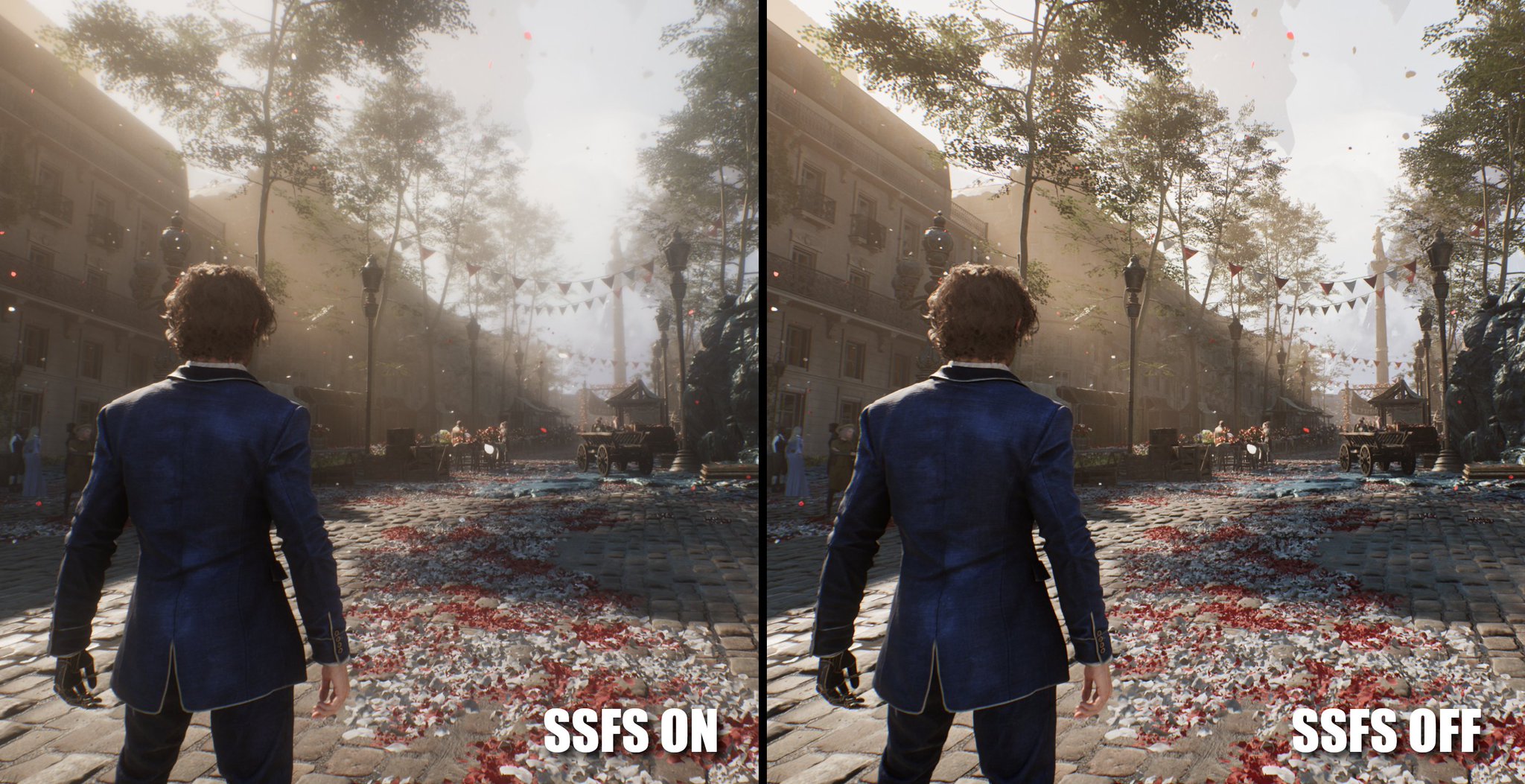
 X
·
tulip thicket
X
·
tulip thicket
On low resolutions it might look better without the fog
hearty lava
 fiery orchid
didn't know realistic fog reproduction was "destroying" games
fiery orchid
didn't know realistic fog reproduction was "destroying" games
i think this fog destroys colors, details and highlights
its the worst implementation ever
fiery orchid
you aren't supposed to see everything in detail when there's fog in real life
hearty lava
fiery orchid
you aren't supposed to see everything in detail when there's fog in real life
u are not supposed to have always fog in real life
fiery orchid
and what if the artists decided they wanted fog in this scene
it's not like all unreal games are always covered in fog
hearty lava
fiery orchid
and what if the artists decided they wanted fog in this scene
it's not like all ...
the great majority of them actually do
fiery orchid
maybe big productions
lil timmy's indie project isn't going to have fog in every scene
 worldly jetty
hearty lava
the great majority of them actually do
worldly jetty
hearty lava
the great majority of them actually do
use ultra plus mod for e33 it allows you to control fog scattering intensity to your taste
hearty lava
worldly jetty
use ultra plus mod for e33 it allows you to control fog scattering intensity to ...
already removed of course
 grizzled jackal
I like it, good to know that U+ can control the intensity of it
 hybrid wind
hearty lava
already removed of course
hybrid wind
hearty lava
already removed of course
Like, entirely?…
That must look like utter doodoo
trim anchor
hearty lava
https://x.com/skx_doom/status/1999445376223629490?s=46
the devil who single-han...
it also uses that one anime physics plugin thing
sterile monolith
hearty lava
already removed of course
fully?? thats wild to me... i have scattering turned down to 0.8, looks very good
with it off the game looks very wrong
 nimble panther
grim hinge
No idea what could be causing the crashing though
nimble panther
grim hinge
No idea what could be causing the crashing though
Todays patch mentions the game not launching on win11, maybe this is why. They are working on a fix at least
 flint trench
Hello sorry to bother. i'm trying to install the mod. I have used Reshade as per instruction and put the file in the correct folder. then downloaded snapshot then started the game. i see no diffirence between presets and off please help
 gaunt cobalt
If I use the dedicated RenoDX mod for the game
Do I still need DLSSFIX when using frame generation?
flint trench
I wanted to add also that i'm doind the same steps as on silksong and there i can see clear difference between off and preset 1. here i see no difference. been trying with unreal on and sdr on the menu no difference also. how do i know if its working properly?
flint trench
gaunt cobalt
If I use the dedicated RenoDX mod for the game
Do I still need DLSSFIX when us...
what do you mean dedicated RenoDX? also i'm trying to install with no luck
 hidden pilot
flint trench
I wanted to add also that i'm doind the same steps as on silksong and there i ca...
hidden pilot
flint trench
I wanted to add also that i'm doind the same steps as on silksong and there i ca...
presets don't apply in real time on most UE5 games. you have to enter the expedition menu (the one with the characters on the screen, the start button in your pad iirc) and the preset will be applied
however as soon as you start the game with the default preset enabled you should notice a big difference compared to sdr
 snow sleet
gaunt cobalt
If I use the dedicated RenoDX mod for the game
Do I still need DLSSFIX when us...
snow sleet
gaunt cobalt
If I use the dedicated RenoDX mod for the game
Do I still need DLSSFIX when us...
No, just set the toggle in the RenoDX menu to Unreal HDR and restart your game
flint trench
Hello, thank you very much for your answer. i really dont know if its working atm. i will make some tests now but so far no luck. i set it to Unreal HDR as im using DLSS but really theres no difference.
gaunt cobalt
snow sleet
No, just set the toggle in the RenoDX menu to Unreal HDR and restart your game
So that’s in general? Or it’s on a case by case basis?
or is it for the Universal RenoDX
flint trench
is it ok if i have not used nexus mod but reshade with only the snapshot file? @hidden pilot
hidden pilot
flint trench
Hello, thank you very much for your answer. i really dont know if its working at...
if you want to test it start a new game in a new save slot, skip cinematics, walk to maelle and move your camera up to the sun. the sun nits should be the same as your peak brightness on the slider
hidden pilot
flint trench
is it ok if i have not used nexus mod but reshade with only the snapshot file? <...
hmm maybe is outdated
#1425391769335496816 message
here you have the latest version
i already completed the game a few days before the dlc patch and I already uninstalled it so I cannot test it right now but with that version it should work
snow sleet
gaunt cobalt
So that’s in general? Or it’s on a case by case basis?
Case by case. DLSSfix is for games where the mod upgrades SDR to HDR. For Clair, the Unreal HDR setting uses the engine’s native HDR output and then fixes it from there, so it just works with frame gen
hidden pilot
flint trench
is it ok if i have not used nexus mod but reshade with only the snapshot file? <...
yes, snapshot is from october so it's outdated. i don't know if it still works but there are new versions so you should try them
flint trench
hidden pilot
yes, snapshot is from october so it's outdated. i don't know if it still works b...
ok sir. i really appreciate your help. now i have the new file. what slider are you referring to when you say i shall look at the sun
gaunt cobalt
snow sleet
Case by case. DLSSfix is for games where the mod upgrades SDR to HDR. For Clair,...
Oh thank you very much for the information
Is The Chronos case similar to E33? Sorry being off topic
hidden pilot
flint trench
ok sir. i really appreciate your help. now i have the new file. what slider are ...
peak brightness, you should adjust it to your screen maximum peak brightness
besides you can adjust highlight saturation to 55-60 if you like it but otherwise default settings are good
flint trench
ok i am doing some test right now sir
snow sleet
gaunt cobalt
Oh thank you very much for the information
Is The Chronos case similar to E33? S...
Based on the Cronos mod description it should be similar since it fixes the native HDR, so you shouldn’t need DLSS fix for it
flint trench
hidden pilot
peak brightness, you should adjust it to your screen maximum peak brightness
hello sir, i'm back. unfortunately no luck theres no difference whatsoever with off and preset. here is a screenshot of settings

only thing i notice if i move ui brightness it works
anything else no change
snow sleet
You need to open and close the expedition (inventory) menu in-game to apply any changes
flint trench
yes, also tried to reload entirely
hidden pilot
that's weird
can you take a screenshot with some highlights in it and upload it here?
gaunt cobalt
snow sleet
Based on the Cronos mod description it should be similar since it fixes the nati...
Tysm for the info!
 desert hearth
There's a 3 second freeze occuring each time before entering the battle. This mod is the culprit, specifically Unreal HDR Upgrade method. Any way to fix that?
hybrid wind
Are you using Ultra+? I remember it being the cause during my playthrough, and I just loved with it lol
hidden pilot
I played the game without Ultra+ and had the same issue, it's the Unreal HDR path what causes it.
 raven wadi
From what I remember hearing it is Ultra+ lowering the settings for the combat sections
Which you can turn off
 wild minnow
The freeze before combat is happening because of RenoDX, back when I played I had no Ultra+ and I experienced it. From my testing it appears that for some reason with RenoDX installed the game is taking a screenshot before entering combat and saving it in Local AppData, in the Sandfall folder.
When I finished my playthrough I had more than 30GB of 4K screenshots in there that I didn't take (there wasn't even a photo mode before) and they all corresponded to combat transition scenes.
hidden pilot
wild minnow
The freeze before combat is happening because of RenoDX, back when I played I ha...
i should check that folder 😂
wild minnow
Yeah, it's a weird bug, I just noticed it because of the massive size that folder reached for no reason.
 merry seal
Weird, I just checked that folder and have several in there, haven't made it too far in the game though.
sterile monolith
wild minnow
The freeze before combat is happening because of RenoDX, back when I played I ha...
ive got the same problem
 weary swan
wild minnow
The freeze before combat is happening because of RenoDX, back when I played I ha...
weary swan
wild minnow
The freeze before combat is happening because of RenoDX, back when I played I ha...
I have the random screenshots in that folder too however mine doesn't freeze. I think It's because my PC is really strong and the C drive is a pcie 5.0 drive lol
Also my game isn't on the C Drive so that probably helps not slow it down when it's taking a screenshot
 frosty rain
I had the same bug aswell
 lone drum
holy shit the game looks so much better without the horrible sharpening
This game has some of the worst image quality ive seen with out of box settings
with some fixes it went from garbage to beautiful
sterile monolith


 sterile monolith
 sterile monolith
 snow sleet
lone drum
This game has some of the worst image quality ive seen with out of box settings
snow sleet
lone drum
This game has some of the worst image quality ive seen with out of box settings
i've never seen what this game looks like without U+ and Reno and I think I'm afraid to
desert hearth
wild minnow
The freeze before combat is happening because of RenoDX, back when I played I ha...
Interesting, I had 3g of screenshots there as well. Is there a way to stop this?
I tried to deny access to that folder, will launch the game later to see if that work. Unless it crashes the whole thing 😄
lone drum
snow sleet
i've never seen what this game looks like without U+ and Reno and I think I'm af...
Beginning of the game i think is the worst, the moment it switches into gustav u notice how horrible it looks with the sharpening
maybe its the combination of chromatic abberation, film grain and high sharpening
gaunt cobalt
my eyes are hurting lol

here after installing renodx and ultra+

still need to configure the settings
lone drum
gaunt cobalt
my eyes are hurting lol
i swear this feels even worse ingame than looking at images
first time you boot into this game with no configs, it genuinely looks so bad
dont even think its a case of "art design" its just so oversharpened hair etc looks so bad
The lowres cutscenes with 30 fps are also artistic choice 
gaunt cobalt
Yeah first time I booted the game I couldn’t believe that anyone sane would ship a game like that
flint trench
Maybe i have found my problem. i got error on logs that addon is 17 and api is 17 ehre to find api 17
flint trench
"the requested API verion (17) is not supported (16)
sterile monolith
flint trench
Maybe i have found my problem. i got error on logs that addon is 17 and api is 1...
you need to use newer reshade
reshade is on 6.6.2 now, sounds like you are on 6.5.1 perhaps
wild minnow
desert hearth
Interesting, I had 3g of screenshots there as well. Is there a way to stop this?...
That could work as a temporary workaround, we have to see though if it stops the freezes altogether. Ideally the best outcome would be a fix in RenoDX itself to avoid the bug at the source if at all possible.
desert hearth
So, with denied access screenshots aren't generated, but the problem still persists, interesting.
sterile monolith
desert hearth
So, with denied access screenshots aren't generated, but the problem still persi...
Yep same situation
sterile monolith
 sterile monolith
 sterile monolith
 sterile monolith
wild minnow
sterile monolith
wild minnow
Thank you for linking, very nice to see 
 neon spire
lone drum
This game has some of the worst image quality ive seen with out of box settings
neon spire
lone drum
This game has some of the worst image quality ive seen with out of box settings
Yeah it's bad, boiling shadows everywhere.
 wicked sonnet
Whats happening here?
 jade laurel
anyone seen an issue with the fight menus being greyed out after installing renodx?
jade laurel
 jade laurel
nvm I had the clairobscur fix mod installed, I removed that and it seems to have fixed it. Its back again, not sure why it worked once
carmine onyx
I have same issue except it insta crashes 
 elder void
carmine onyx
I have same issue except it insta crashes <:doomerWojak:1309186255669432412>
elder void
carmine onyx
I have same issue except it insta crashes <:doomerWojak:1309186255669432412>
It lets you play if you don't use analysis tool though? Yes. Most of the crashes I had were almost instant I'd say.
carmine onyx
elder void
It lets you play if you don't use analysis tool though? Yes. Most of the crashes...
Correct
I can tick all lilium Shaders except the analysis and it won't crash
elder void
carmine onyx
I can tick all lilium Shaders except the analysis and it won't crash
Just happend to me in this game so far. Weird isn't it?
carmine onyx
elder void
Just happend to me in this game so far. Weird isn't it?
Yeah
sterile monolith
Mods both got updates, make sure you delete older versions entirely
https://www.nexusmods.com/clairobscurexpedition33/mods/134?tab=files
https://www.nexusmods.com/clairobscurexpedition33/mods/200?tab=files

Nexus Mods :: Clair Obscur: Expedition 33
Changes the descriptions of Skills, Pictos and Weapons to better match what they do in the game with numerical values for their base damage and their multipliers.This mod also attempts to convey
Nexus Mods :: Clair Obscur: Expedition 33
Sometimes it's hard to know if the place you visit is higher or lower level than yours. This mod aims to prevent that happening.
carmine onyx
@sterile monolith the analysis crash seems to only happen at 4k res
not below
hence why it works for u

sterile monolith
carmine onyx
<@204813053311582218> the analysis crash seems to only happen at 4k res
That's so weird but good deductions
nimble panther
I don't remember the name of the area but the cliffs where you go looking for a rock, is it supposed to be so damn dark there? I was having trouble seeing some enemy attacks because they were nearly full black
 finite garnet
nimble panther
I don't remember the name of the area but the cliffs where you go looking for a ...
finite garnet
nimble panther
I don't remember the name of the area but the cliffs where you go looking for a ...
i think its their eye adaptation implementation try using ultra+
nimble panther
Yeah that could have been it. Lighting seemed pretty wonky for the outdoor area
merry seal
I've been seeing this red banding/posterization a lot, is this intended behavior? I'm using the UE HDR path for framegen and have Reno set to Musa's preset.

 jagged portal
merry seal
I've been seeing this red banding/posterization a lot, is this intended behavior...
jagged portal
merry seal
I've been seeing this red banding/posterization a lot, is this intended behavior...
Turn off force anistropic in nvidia control panel
finite garnet
merry seal
I've been seeing this red banding/posterization a lot, is this intended behavior...
Musa’s preset
the irony
 plucky finch
It's weird how everyone suddenly has issues with the mod once Musa started to sab... I mean work on
merry seal
jagged portal
Turn off force anistropic in nvidia control panel
That was it! Thanks, never would have thought that was the problem.
plucky finch
 carmine onyx
grim hinge
The other ui issues was stuff I didn’t touch
carmine onyx
grim hinge
The other ui issues was stuff I didn’t touch
Well fix it dumbass

Uh but cbuffer idk how to code c++ hurdur
Not my goat

grim hinge
Ok but I’m also gonna break the tonemapping
carmine onyx
 thorn cargo
So started playing Expedition 33 and installed the renodx HDR mod like I have for many games before (almost a requirment now for non-HDR supporting games) heck even HDR supporting games (looking at you Starfield with your auto-hdr shilling)
HDR mod is enabled, HDR analysis shows its doing it job. I'm not using Framegen just Quality DLSS and was getting random crashing with it enabled. I tried disabling RTSS, Steam overlay to no avail.
I do have Nvidia app forcing latest "recommend" DLSS driver, not sure if that has caused anybody issues like im experiencing. dunno
plucky finch
Allegedly disabling HAGS in win11 helps with the crashes
finite garnet
the only crash i experienced with this peak game was save crash which you need to load a different save first then back to original save
thorn cargo
I''ll keep HAGS in mind. I just spent the past hour playing after not enabling the lilly HDR analysis tools that somoen mentioned was causing insta crashes. Even if it was check marked and disbled to not show. For me it wasn't instant crashing but tried unchecking it and crashes seemed to have went away. Very weird
lone drum
game also used to have (idk if longer present) issue with DLSS
i think dlss quality made me crash but dlaa didnt
 rocky current
game runs great with reno dx, thanks for the work 

carmine onyx
thorn cargo
I''ll keep HAGS in mind. I just spent the past hour playing after not enabling t...
ya lilium shader breaks in some ue5 games
insta crash
lucid drum
sterile monolith
can you share your Reno overlay settings?


 nimble panther
 lofty quail
How is it possible ?
lofty quail
How is it possible ?
Frame gen maybe?
lofty quail
nimble panther
Frame gen maybe?
hdr analysis cause thsi bug

 austere tiger
plucky finch
Allegedly disabling HAGS in win11 helps with the crashes
austere tiger
plucky finch
Allegedly disabling HAGS in win11 helps with the crashes
whenever i do that it disables DLSS for me in games..last I tried
@plucky finch do you remember what default paper white was for this game out of the box
Feels like it was about 300
grim hinge
question doesn't make sense
plucky finch
Disabling HAGS kills slop generation, which is only a + in my book
And the game never supported HDR officially in the first place, so there's no "default" PW value
austere tiger
plucky finch
Disabling HAGS kills slop generation, which is only a + in my book
And the game ...
What do you mean slop generation, like artifacts? Do you not use DLSS or is it just my DLSS that disables when I turn off HAGS? Lol
plucky finch
I don't use FG
 hollow gazelle
guys im really new at this so im sorry if im asking something dumb... im installed the xgp edition also downloaded reshade but it wont find the game by itself.... also when i browse the .exe in the winGDK folder it just shows an error
carmine onyx
hollow gazelle
guys im really new at this so im sorry if im asking something dumb... im install...
Point to gamelaunchhelper.exe
trim anchor
Hags might give you like 5-10% extra fps depending on the game
but usually its not really any different
for some stuff hags does murder your performance
like for some stuff that involves tensorrt
nimble panther
Do games use tensorrt?
 small fiber
does anyone know if DoF is fixed in the latest NVslop drivers?
 quasi jetty
Hello 🙂 unrelated to renodx (i was about to install it) but my games keep crashing, clicking on the start menu is enough to make it crash, changing options too, clicking on my second screen too, alt+tab too.. I saw some people here having this kind of trouble too but didn't find the fix yet, any help pls ?
 steady elm
quasi jetty
Hello 🙂 unrelated to renodx (i was about to install it) but my games keep crash...
steady elm
quasi jetty
Hello 🙂 unrelated to renodx (i was about to install it) but my games keep crash...
The best solution is: don’t stop playing, never alt tab, full zen focus on e33
@grim hinge Would agree, the game deserves your full attention
quasi jetty
steady elm
The best solution is: don’t stop playing, never alt tab, full zen focus on e33
Good thing thats what I was planning to do lmao
Fr tho I've done a fresh windows install, no problem ever since. I even got more fps now lmao
steady elm
grim hinge
Play some ubislop instead
But ubislop doesn’t have such good lore and story
And the music is worse too
grim hinge
Adam and Eve doing parkour with the apple of Eden is better lore than expedition 33
Also Jesper Kyd solos
steady elm
Adam and Eve doing parkour with the apple of Eden
I would play that lol
grim hinge
steady elm
> Adam and Eve doing parkour with the apple of Eden
I would play that lol
That’s literally in ac brotherhood
Nvm it’s ac2

UPDATE: 4/15/2010 Comments will be disabled because all everyone is putting is that whats already obvious like "oh thats Adam and Eve" Im tired of seeing people's opinions on this and they dont even know what theyre talking about. So nonsense should be kept to those people, im tired of listening to retards. I DONT CARE ABOUT WHAT ANYONE THINKS O...
steady elm
looks fun. apart from shadows I never played an AC :D
nimble panther
"a bit" is a massive understatement 😉
 viral helm
are these settings ok? idk if I put too much brightness, the game looks kinda dark but might be because I'm in a shaded area


 quasi jetty
Hello, i'm looking for support, I've been struggling a lot to make the damn thing work, install reshade + reno + e33 reno file
but it never worked, i had the washed out feeling of hdr enabled on sdr content
and now the game won't even launch anymore
it keeps crashing just before the first menu, and it'll stop only if i remove reno/reshade from the game
quasi jetty
no one to help please ?
it seems to not crash now but i still have no hdr on the game
 marsh grotto
quasi jetty
it seems to not crash now but i still have no hdr on the game
marsh grotto
quasi jetty
it seems to not crash now but i still have no hdr on the game
I don't know if you solved this already, but you need Reshade with add-on support and the game-specific RenoDX file.
Also make sure hdr isn't accidentally disabled somehow
nimble panther
I hadn't played with the latest reno update until today but it works just fine here 🤷
 hollow obsidian
works fine for me as a first time user
 round lagoon
Is the standalone mod still better than ue extended as it is about a year old now?
austere tiger
round lagoon
Is the standalone mod still better than ue extended as it is about a year old no...
a new version was posted to Github this April
GitHub
Renovation Engine for DirectX Games. Contribute to clshortfuse/renodx development by creating an account on GitHub.
round lagoon
Ah so the pinned one is much older.
austere tiger
round lagoon
Ah so the pinned one is much older.
And here, Lazorr posted an even newer version in May but you have to join the Ultra+ Discord, tons of fixes
#1370218900247285790 message
 gilded cloud
Wow I'm so lost with setting this game up. Classic RenoDX install, I'm using FrameGen if it's of any importance, so I selected that option in Reno settings. Looks like it works in gameplay, but not on the intro cutscene, maybe because FG doesn't kick in as it is locked at 30 FPS ? Any idea to help me ?