#wowhead-feedback-support
1 messages · Page 33 of 1
 royal torrent
 zenith oar
the gleam widget/app is asking crazy permissions like change who you follow or manage your channels
 teal dragon
You don't have to accept any you're uncomfortable with but those are permission groups, some are needed to perform certain actions that you tell it to perform and others are just part of the permission group. For Twitter it needs to change who you follow so that you can follow, as part of some of the entry methods. Manage your channels, I assume for Discord, would be for things involving that permission. I can assure you that the Gleam widget isn't going to do anything you're not aware of, only what you select to do in the list. You can remove permissions you no longer wish to continue after you complete the action; if you wish.
zenith oar
it could just check who I follow without making the change itself
anyway, I think it looks bad and in this day and age of app leaking data scandals it seems bad to do that though I'm sure that app will collect tons of monetizable info for wowhead, so best of luck there
you could stick to the easter egg hunt style, that was great and self contained
teal dragon
It's asking for permissions that could be needed for any Gleam giveaway you may view. It may not be relevant in this specific case.
We don't monetize anything from Gleam.
zenith oar
then they'll monetize and won't give it to you 😃 that's even worse 😃 <tin foil hat>
teal dragon
We like the Egg Hunt as well, but the types of giveaways we host are based on our particular goals at the time. Gleam doesn't use any of the information we obtain from giveaways on our account. That's our information, not theirs, and is handled in accordance with our Privacy Policy. If Gleam were to use any of that information they'd be violating the law and our agreements with them. I recognize that you added <tin foil hat> but wanted to address it nonetheless.
 plucky fractal
Is the entry for discord regarding the giveaway bugged? I have joined the discord server, but it keeps saying "continue" and bounces me back to it, even tho i have joined the discord server.
 pallid temple
worked for me earlier this day, could be a permissions issue
 viscid skiff
I am using iconSize: 'medium' in my tooltip config like this : javascript var whTooltips = { colorLinks: false, iconizeLinks: true, renameLinks: true, iconSize: 'medium', hide: { dropchance: true, sellprice: true, maxstack: true } };
This unfortunately prevents me from using the functions $WowheadPower.refreshLinks() or $WowheadPower.init() as those remove the generated icons.
 trail leaf
The Server Error on classic.wowhead.com is known I suppose?
 vernal vale
looks like it's all across wowhead atm
 small ore
switching database to 8.2, got some hiccups, we are looking
 snow oar
Yeah I think we broke the site D:
 valid ivy

small ore
i did, well, indirectly :\
plucky fractal
It seems it's back up. Thanks guys!
 drifting holly
seems to be up, though, quests look like this and tooltips show "Quest not found"
plucky fractal
Assuming the numbers are the quest ID ?
small ore
where do you see that?
plucky fractal
It's meant to show the quest name but at the time when the site came back up after an error it was displaying the ID's rather than the name.
So it's probably sorted itself out now..
plucky fractal
damn cache xD
small ore
we've cleared some more caches, let us know if you find more
drifting holly

Wowhead
Meet with Genn Greymane on the Wind's Redemption. A level 120 Nazjatar Quest. Rewards . Added in World of Warcraft: Battle for Azeroth. Always up to date.
some tooltips still not working ^
small ore
noted
viscid skiff
anyone knows if the problem I talked about is known or if the config I use is incorect? how do I fix it on my side?
teal dragon
I'll ask for you.
 boreal walrus
Is there anyway the dressing room could have a mode to show only one item per appearance? Right now when you're looking through leather legion drop shoulders for example you get dozens of entries for the same exact shoulders, maybe because of warforging? it makes it really hard to browse for items or find specific items you don't already know the names of.
 dry goblet
I've written a small guide for the Midsummer Fire Festival and I'd like to get it approved before the event is over (I should know by now that it takes a few weeks for a guide to be approved, and that I should submit them earlier 😅) - is there anything I can do to make that happen? 
 crude urchin
@dry goblet hi. please contact Sas148
dry goblet
okay will do, thank you 😃
 grizzled frost
Just want to give a massive thanks for the public tooltip support
https://www.wowhead.com/tooltips
Saved me a few hours of coding 😄
Wowhead
A script to add Wowhead tooltips to your World of Warcraft site. Options for icons, ranks, and more. Works on Items, Spells, Recipes, Enchants, etc.
viscid skiff
@teal dragon no news?
teal dragon
@viscid skiff the dev made a ticket to investigate, looks like a bug. Uncertain how long he'll need to fix it, given other priorities, but they'll look into it.
viscid skiff
k thx
 arctic cairn
Is a list of 8.2 undocumented changes coming?
 lavish geyser
The "Today in Nazjatar and Mechagon" is marked as PTR, may want to switch that to Live 😄
crude urchin
@lavish geyser fixed. Thank you
 humble delta
Getting atm
 cloud spear
well. at least its not just me 😦
 radiant pier
I'm only getting that on the murloc vendor delete thing (basically the last news)
Seems to be working now.
 stuck wadi
gateway timeout 502
humble delta
it's happening to any page for me
 dreamy meadow
went on poage front page had loaded but then i clicked refresh and then i got the issue with the error message again
 calm summit
I'm too scared to refresh any of my 50 wowhead tabs! :scared:
 flat ocean
There are times when I'm on Wowhead mobile, and as I scroll I get redirected to a suspicious website.
 raw wren
site still down?
 regal hollow
it's up for me
 peak notch
seems to be working now 😄
 stoic acorn
@flat ocean When you see that you need to send feedback from that device and select "Bad advertisement" as the type of feedback. That will send the history of the most recent advertisements shown to you so the team can track them down.
flat ocean
Thanks!
 fair pumice
the WoWhead article for the Sylverian Dreamer mount might be misleading for idiots like me, thinking "subscription" is synonymous with "game time" since I "subscribe" with [in-game gold]->wowtokens->[game time].
The article states: "Players that already have 6 months or more of active subscription will receive the mount free of charge" whereas the Blizzard post specifically states "Players on an existing 6-month recurring subscription with a future renewal date" which does correct any misunderstanding, but only if people read that far down.
https://www.wowhead.com/news=292782.3/new-store-deal-subcribe-for-180-days-and-receive-sylverian-dreamer#comments
I don't know if that's worth specifically addressing, but I was under this impression even about the Dreadwake mount offered last year.

Wowhead
Blizzard added a new Game Time deal in the store. Purchasing 6 months of Game Time, or subscribing for 6 months will give you the new Sylverian Dreamer mount. The combo for 6 months of game time goes for US$77.94. You can also purchase the mount separately for US$25.
 timber spruce
Is it possible to change your screenname on the website? I kinda want to change my name after 10 years, but don't want to make a new account, because I would lose all reputation and stuff :S
crude urchin
@timber spruce of course. Please send an email to feedback@wowhead.com from email address associated with your Wowhead account.
Make sure to include desired username and 1-2 alternatives.
timber spruce
Awesome, will do! Thanx ❤
 summer glen
is tracking battle pets broken on wowhead?
both the profiler and the battle pet tracker is empty
all the other trackers seems to work fine
 summer glen
I tried another browser, will try to turn off all extensions
turning off browser extensions did not work
Does my character work for you?
crude urchin
doesn't work as well
summer glen
it seems like it is my character
using another alt seems to work
that's a work around at least, but is there any way to reload my character on wowhead in any way?
my character seems fine on battle net
crude urchin
kindly await reply from staff
summer glen
okay
I deleted my character profile and tryed resyncing with battle net, but that just keeps crashing
teal dragon
I'll ask someone to look into that Galnis.
teal dragon
@summer glen Seems to be an issue with Blizzard's API. For whatever reason it's telling us you have no pets.
Unfortunately there's nothing we can do to fix this. You may need to report this to Blizzard directly. Here's the API call for your character: https://eu.api.blizzard.com/wow/character/ravencrest/galnis?fields=pets&access_token=US575oCwmY0eicXgqpoqDi7UYGH0D3FQ00 -- You'll see in there that it says you have 0 collected and 1195 not collected.
 ancient vortex
why are so many of the nazjatar quests missing in wowhead? like "bounty: dangerous creatures"?
teal dragon
If you don't find it on www try ptr: https://ptr.wowhead.com/quest=55837/bounty-dangerous-creatures -- we have to do a lot of data pushes before everything is on live as we rely on users to see this in-game using our Wowhead Client to get it added to www. Patch week is pretty busy and we do pushes pretty often but for a couple weeks you'll want to check both subdomains if one or the other doesn't show it.
ancient vortex
did blizzard nerf rep you get for legendary pet battle items on mechagon? I got 75 rep for turning in a quest item
ok, thanks for the answer above ^
 proven mortar
guys, how can i get the Wowhead bot to my server ? :D Cuz saw it on 1
teal dragon
proven mortar
I see only Jeeves in there D:
 crystal olive
we don't have a wowhead bot, just the webhook for news
crystal olive
for guides and stuff? yes
stuck wadi
https://ptr.wowhead.com/quest=56761 "Rustbolt Requisitions: Lane Snapper" but says "Bring 20 Storm Silver Ore to Gila Crosswire"
Wowhead
Bring 20 Storm Silver Ore to Gila Crosswire. A level 120 Mechagon Quest (Daily). +75 reputation with Rustbolt Resistance. Added in World of Warcraft: Battle for Azeroth.
 viscid heart
"dont bring me what i ask for, bring me what i want"
 orchid citrus
Quest descriptions like that are taken straight from Blizzard's data, it's not something we can manually change unfortunately
teal dragon
Thanks to @vernal sigil for making us our current server icon GIF to celebrate 4th of July, America's Independence Day. We liked it so much decided to put it up for the week rather than a single day. 
 errant moss
https://www.wowhead.com/mission=2144/batten-the-hatches is marked as a WoD quest should be BFA
Wowhead
A level 120 mission with 3 followers. Required item level: 800. In the Missions category. Added in World of Warcraft: Battle for Azeroth. Always up to date.
 versed hamlet
Hiya, I keep getting this even though I'm absolutely sure my password is correct
I checked via the website, I use a password manager
the name is correct
I have NO idea what I'm doing wrong
crude urchin
@versed hamlet It's a known issue. Please send an email to feedback@wowhead.com from email address associated with your Wowhead account to get assistance.
Thank you!
teal dragon
Yeah you're probably not doing anything wrong, will likely just require me to make some adjustments to the account if you reach out via feedback@wowhead.com
versed hamlet
@crude urchin Thaaaaaanks!
 vagrant glen
Feedback for the Sivara guide: https://www.wowhead.com/guides/abyssal-commander-sivara-azsharas-eternal-palace-raid-strategy-guide
Wowhead
Guide to defeating the Abyssal Commander boss encounter in the Eternal Palace Raid on Normal and Heroic difficulty and includes a list of loot.
The link behind "Frozen" of "Frozen Ground" is wrong, is it not?
links to: https://ptr.wowhead.com/spell=295807/frozen
should be: https://ptr.wowhead.com/spell=300961/frozen-ground
Wowhead
The target's body turns to ice, freezing them for 5 sec. This is an NPC Ability. A spell from World of Warcraft: Battle for Azeroth. Always up to date.
Wowhead
Frozen ground chills all players standing in it, inflicting 15 Frost damage and applying stacks of Frost Mark. This is an NPC Ability. A spell.
 viral pivot
im trying to get the tooltip for a ilvl 430 /w socket benthic piece: https://www.wowhead.com/item=169810/azshari-stormsurger-legs&spec=253&bonus=1517#see-also but theres no option for a socket
Wowhead
This epic mail armor of item level 385 goes in the "Legs" slot. Added in World of Warcraft: Battle for Azeroth. Always up to date with the latest patch.
Also, i was trying to look at two other mail legs, https://www.wowhead.com/item=165536/deathhunters-legguards?bonus=4800 https://www.wowhead.com/item=168874/cherished-empresss-leggings?bonus but the tooltip isnt showing. All that happens is i get a box with "loading..." in it. Ive tried clearing cache, using chrome, incognito chrome, and microsoft edge
Wowhead
This epic mail armor of item level 385 goes in the "Legs" slot. It is looted from Prelate Za'lan. Added in World of Warcraft: Battle for Azeroth.
Wowhead
This epic mail armor of item level 415 goes in the "Legs" slot. It is looted from Aethanel. Added in World of Warcraft: Battle for Azeroth. Always up to date.
and inprivate /w edge
 rustic cedar
Is the BFA Attunements page not working? When I load my character, most of the progress on the Attunement page is inaccurate even though my character profile is updated. For example, it says I'm 13.4% of the way to Exalted for Honorbound while my character profile shows 56%.
 neat cape
Is the premium setting to remove ads a server side or client side (cookie)? I have had the remove ads setting revert to showing ads multiple times now.
 timid osprey
It seems to be server side. It carried across browser and computers for me.
teal dragon
@rustic cedar what is the realm, region and character name?
@neat cape there is no setting to remove ads, that's off by default. There's a setting to turn ads on, which is stored server side. You appear to be inadvertently turning them back on.
neat cape
@teal dragon I can assure you I am not turning ads back on as I directly go back and turn them off as soon as I see ads. Just an FYI. I will let you know if it happens again.
teal dragon
@neat cape I can see that right at this moment you have the preference to enable ads checked in your settings. Unless I'm completely misunderstanding the situation you should go to https://www.wowhead.com/account=premium#preferences and uncheck the first box to disable ads again.
arctic cairn
Blizz hotfix in a new quest? I can't seem to find prototypes for profit at all in your database
Found it - just showed up for me
rustic cedar
@teal dragon Realm: Burning Blade - US Character: Ardemius
neat cape
@teal dragon that’s my problem I did earlier today
teal dragon
I'll turn it off for you now. I'm unaware of any instances where it would turn itself back on.
@rustic cedar That # you see on the attunement page is the most accurate for attunement purposes. It's accounting for things like hated, etc. The profiler, iirc, ignores hated in the %. Or perhaps I have it backwards. I wouldn't pay any attention to the % in the profiler for attunement purposes. Just know you have to get to Exalted to unlock that attunement, that's the primary reason that's displayed.
viral pivot
is there any fix to the issues i listed above?
teal dragon
@viral pivot I can't replicate the tooltip issue you described. They're both loading for me. I'm not sure about the socket one. Let's see if @small ore can chime in on that: he's looking for the ilvl 430 version of this w/ a socket: https://www.wowhead.com/item=169810/azshari-stormsurger-legs&spec=253&bonus=1517
viral pivot
crap now the stormsurger legs arnt loading either, was loading 12 hours ago...

Grabilla - screen capture and desktop recording software.
This screenshot was captured and uploaded with Grabilla: 2019-07-04 04:04:21
teal dragon
Can you try clearing your cache and looking again? You may also want to try a different browser to see if the issue persists.
viral pivot
deleted cookies and cache from both edge and chrome, and used chrome, chrome incognito, edge, edge inprivate all same issue
teal dragon
Are you running any sort of internet security that may be interfering with browser activity?
viral pivot
huh, if i do a search in wowhead of the item and go to the page that way it works but if i click links it doesnt
i have a vpn that i use but no change whether its on or off
testing.. https://www.wowhead.com/item=169810/azshari-stormsurger-legs?bonus=1517 https://www.wowhead.com/item=169810/azshari-stormsurger-legs
Wowhead
This epic mail armor of item level 385 goes in the "Legs" slot. Added in World of Warcraft: Battle for Azeroth. Always up to date with the latest patch.
Wowhead
This epic mail armor of item level 385 goes in the "Legs" slot. Added in World of Warcraft: Battle for Azeroth. Always up to date with the latest patch.
teal dragon
Unfortunately I'm out of ideas here, without being able to replicate it that is. When Pigeon is around hopefully he can find out where the version with the socket is hiding or if it's missing altogether. Tooltips... without replication, this is hard to track down.
After clicking those links:
viral pivot
for me the one without the bonus shows, the one with bonus does not
but removing the ?bonus for the deathhunter legguards and cherished empress's leggings from the links above didnt fix it, nor does searching for those items through wowhead fix it on those either.
 white ocean
https://www.wowhead.com/azerite-essence-power/blood-of-the-enemy-85 (Rank 3) is throwing a 404 error
 weak shuttle
 twilit helm
What happened to ZAM ?
also is this in any way related to ZAM or wowhead? https://image.prntscr.com/image/cP56Nz5aTB_XvB27wtX9ew.jpg ??
 crystal olive
@twilit helm ZAM became Fanbyte (check https://www.zam.com/ )
That's just a gold seller using the name
Fanbyte
Wowhead. Stormshield. Fanbyte. The hottest games, the most reliable online resources. Come join our community of 35 million of the world's most passionate players.
teal dragon
There's a place near here selling sushi called ZZAAMM, it's not affiliated either. 
twilit helm
well - you should be ... free sushi for affiliates soounds like a great deal 😄
teal dragon
Due to the multiple earthquakes in California the past 24 hours some of the Wowhead team have decided to move into an airplane for the foreseeable future. Internet connections may be spotty. We thank you for your patience.
 hardy bloom

 hardy dome
Can you by now filter for mount improvements in the item search?
viscid heart
https://www.wowhead.com/mount-equipment-items isnt like there are many
Wowhead
A complete searchable and filterable list of all Mount Equipment in World of Warcraft: Battle for Azeroth. Always up to date with the latest patch (8.2.0).
 glossy girder
Hello wowhead, I come in peace 😃
little chart I made while trying to figure out if Ironhoof Destroyer is dropping less likely than it should
I have to ask if wowhead has any archived data about number of kills and drops between 18th october 2018 and today
 weary furnace
Pages keep freezing for me. Currently entire firefox is frozen but I'm going to test if it's extension related. Appears to be a script constantly trying to resize an element (if this profiler is doing what I think it is)
plucky fractal
Mine is too. Even on phone.
 tawny blade
What page are you on?
weary furnace
Any
tawny blade
There was mention of the Profiler
plucky fractal
Same any page. It won’t load. The front page for me.
And since I can’t load the front page I can’t load any others.
stoic acorn
I believe they are talking about the "profiler" in their browser. For what it's worth I'm unable to reproduce the issue:
timid osprey
I'm also unable to reproduce it in Firefox with or without ad block extensions enabled or whether I'm logged in or not. Seems to be working just fine.
stoic acorn
Chrome Canary 77.0.3842.0 x64 (Windows) here
timid osprey
Chrome seems to be working just fine, too, and I have more intensive blocking addons in it. I'm pretty sure it's a configuration issue.
Or network.
 robust mason
i made a recent change regarding checking content size relative to sidebars. i think the issue might be extension- or ad-related since nothing should be continually resizing the content. i can revert the change for now while we investigate.
plucky fractal
Mines working on PC, just not phone.
timid osprey
Oh, just curious, was a patch for the new styling made to fix the horizontal scrolling in guides?
robust mason
i just now reverted the change which likely caused the freezing issue reported by @weary furnace
i'm not aware of any recent changes to address horizontal scrolling in guides (there may have been some, I just don't know)
timid osprey
Yeah, it was when the new design was released. We noticed from guides' content (only examples I found were tables) caused horizontal scrolling, which forced the ToC navigation to overlap the content without a background. I know the specific guide I'd posted here has been fixed, but I don't remember the CSS details to know if it was just a fix made to the guide or something done global to prevent the issue for ever occurring. ^^'
glossy girder
where can I ask for support?
plucky fractal
@glossy girder This channel would do.
glossy girder
I was informed that wowhead staff was on a weekend break and they may have missed my message, and that I should post again.
So, here it goes: there is a chance that Ironhoof Destroyer is bugged in some way and as a result of that - it drops much less likely than it should. I've been paying attention to this subject for a few months. Some people think that Ironhoof is not the only one, but I can't represent them, cause I wasn't dedicated to research other mounts.
I compiled data from some archived wowhead pages, but I don't have data between 18th October and now. If anyone on wowhead could provide some snapshots of this information from this time window, I would have enough material to present to blizzard, in hopes they look into it.
(I don't need entire webpages, only the number of kills and number of drops)
 lone dirge
Can anyone open the Mechagon guide at https://www.wowhead.com/guides/mechagon-junkyard-tinkering ? I'm just getting an empty guide from it.

Wowhead
A detailed guide for Patch 8.2 new zone Mechagon and its features such as new tinkering system, blueprints, construction projects, rares and collectibles.
tawny blade
We're looking into it
lone dirge
Awesome, thank you very much ❤
tawny blade
This should now be fixed
If you come across more weird guides, let us know and we'll fix!
 thick ice
Hello, I've seen some new quests not translated into Spanish, how can I help to translate them?
Wowhead
[Speak with the spirits who wander around the Highborne Estates.] Una Misión de Nazjatar de nivel 120. +75 reputación con Ankoan Hojamarea
crude urchin
@thick ice by using Wowhead Client to upload game's data https://www.wowhead.com/client
Wowhead
The Wowhead Client is a little application we use to keep our database up to date, and to provide you with some nifty extra functionality on the website like Today in WoW.
thick ice
I'm already using it, I'll upload it when I log out
What kind of information do it also send? I thought it was about the information about the drops and loot
crude urchin
translations too
 orchid jay
Im not really one to complain, but i dont think i should have to pause an autoplay video with obvious spoilers unless i specifically click that i want the spoilers just for going through the wowhead posts on the from page
I get that its news but even your article makes it clear its spoiler territory.
orchid citrus
Hey, this video was not supposed to be on our video ad (we usually have videos from past patches, like 8.0 stuff on it). We will talk to our video ad unit and have it rectified.
tawny blade
Yeah, for some reason the ad company ignored my playlist and automatically pulled new videos from Wowhead's YouTube, which happened to be the raid cinematic. We've asked them to go back to my playlist asap.
tawny blade
The video issue should now be fixed by our ad company, sorry for the inconvenience!
orchid jay
Thanks im glad it wasnt intentional~
 last saddle
How old is the Wowhead search algorithm? As old as the site itself? Type three letters before it will suggest? Not catching things that are close or misspelled. I sometimes find it easier to use Google to find something on Wowhead.
timid osprey
@last saddle, if you actually submit the search (hit the return or enter key) and it will provide results for similarly spells results.
last saddle
As old as the site itself?
stoic acorn
If you are just here to be argumentative, this isn't the channel for that.
last saddle
"The search has worked this way for a very long time." Yea I know.
timid osprey
It does what you want, you just need to hit one more key.
last saddle
It has always been an irritant. The three letter limit on suggestions and often not finding results that Goolge will.
timid osprey
- The number of results for one or two characters is insanely long
- The suggestions list is not the search
- The search is powered by Google and does exactly what you want
last saddle
The suggestions that pop up may contain what I am searching for but if I type one more letter the suggestions disappear.
timid osprey
Then the suggestions don't match what you typed, that simple. They're suggestions, not search results. Doing an actual search dynamically like that is much more intensive and really not worth the effort when you need only hit that one key to get the search results.
It's simple logic. A suggestion box does a x % y and a search does x % y || x == y || x -+*/ z % y (just an example, the actual algorithms are significantly more complex). The calculation requirements to produce search results on a database as large as Wowhead's is ridiculous.
Doing a one- or two-character match, as you want, will turn a .0003 second calculation into a .4 second calculation. Yeah, doesn't sound like much, but when you add in recalculations with each character change, it adds up fast.
Combine both of those into the suggestion box and that .0003 second calculation suddenly becomes a 2.4 second calculation, increasing exponentially for each typed character so that all near matches can be returned.
last saddle
An example on Wowhead search "Of forgotten me" What you are looking for is "OF forgotten memories." Wowhead suggests nothing anywhere near what you are looking for. Do the same search on Google and bam, first suggestion is the correct answer.
timid osprey
Google gives me nothing related to WoW when I search for that string. Wowhead gives me nothing until I remove "Of" and it then gives me: https://www.wowhead.com/quest=55683
timid osprey
You're still comparing apples and grapes.
You can't compare Google's suggestion box to Wowhead's, the scope of data available to them is insanely different.
It doesn't help any that you're searching the Live site. Try switching to Classic and searching, maybe add one more character.
last saddle

Wowhead
Travel to the Undercroft - at the southernmost section of the Eastern Plaguelands - and recover Taelan's Hammer. Return to Tirion Fordring upon completion of your objective.
Live
timid osprey
Yes, but I'm pretty sure the suggestions ignore obsolete quests.
last saddle
I don't understand why you are being so defensive about my feedback. Wowhead is a search for information site. Search should be it's strong point.
timid osprey
The search does what you want, though, it's stricter about it's results than Google.
glossy girder
wowhead search bar does nothing with less than 4 characters, so the limit is 4, not 3
4 being the bottom line
sadly there is the same limitation for subsequent words, not just the first one
 maiden mason
Quest completion isnt showing up on the Nazjatar quest page. Anyone else having this problem or know how to fix it?
 tardy trellis
Any chance someone can change the Crimson Tidestallion guide so the Taco is the first thing listed? Would prevent people like me sinking 1k gold before realizing we need an item that may not spawn today
 neat quartz
@tardy trellis if you switch realms there is most likely a murloco one. Just enter the group finder and type murloco and you should find a realm!
tardy trellis
I did end up getting the Taco. But others may not be as lucky
neat quartz
True true
Anyway they should probably include that info in their guide. It saved me 1k gold and got me a new mount.
 rose forge
I need some support, I can't post in the recruitment channels?
plucky fractal
I don't see anything that would prevent you from posting in there @rose forge.
How exactly are you unable to post in the Recruitment channels?
rose forge
@plucky fractal It dissapears right after I post it
plucky fractal
Ah, I see it now. The bot auto deletes it due to your message containing too many emojis. If you get rid of some it should go through.
 humble igloo
Is there any plans to update the Stanza In game events calendar? I am subscribed to it through Google calendar on my phone and it hasn't shown an event in quite a while.
arctic cairn
@humble igloo I'm showing events all the way to June 2020 on mine.
Oh I'm subscribed to wows calendar and wowhead... NVM false alarm. Wowhead hasn't updated it for a while
humble igloo
Last update on mine was August of last year
arctic cairn
I'll get you a stanza link for world of Warcraft - give me a minute.
humble igloo
Thanks 👍
arctic cairn
Powering Calendars Everywhere
It shows 2017 but it's the only wow one I'm finding so give that a try and see if it populates
humble igloo
Hmm, so far it hasn't populated but I might still need to sync
 spare shuttle
where is the icon to click on guides to make one my favorite? I'm not seeing the empty star anywhere
crude urchin
@spare shuttle
teal dragon
@humble igloo @arctic cairn I updated Stanza last month with events for a full year. They're showing for me under the 'World of Warcraft' category (I didn't bother changing the defaults, wasn't easily done via mass import). Perhaps you're not subscribed to that category: https://www.stanza.co/@zam-wow
Make sure you're subscribed to the World of Warcraft category and sync it up, should be working fine.
It's also here, embedded, if you ever need/want it outside your calendar app: https://www.wowhead.com/calendar
humble igloo
Yep I was syncing the wrong category, I had "In-Game Events" picked rather then "World of Warcraft". It seems to be working correctly now, Thank you Sas!
arctic cairn
Ahhhh ok I see
spare shuttle
@crude urchin ok, somehow i missed it? Now it's not letting me click the star on the crimson tidestallion - it fills in the star, and then it's blank again. It did let me click the bfa mount guide, so idk. Thank you for responding!
 nimble temple
tardy trellis
nimble temple
tardy trellis
Hey guys don't remember my wow head account, so I'll post it here. Today's Mechagon guide is missing a quest. "Taking the Air out" is a rare drop while on the adventure Co quests
Name's Gandem btw
This quest is obtained from the item Venture Co. Rocket Box which drops from:
/way 47, 38 Profit Maker Grifa
/way 42, 41 Lifting Specialist Gogo
/way 45, 49 Share Stealer Wonka
/way 39, 32 Problem Solver Skitz
 manic vigil
Hey guys
Is there a way to clear character planner of all characters? I have a couple stuck and I can't delete them
aka 'Profiles'
aka 'Lists'
 hollow sparrow
is anyone else having trouble uploading screenshots?
I haven't been able to for the past 20 min
teal dragon
@manic vigil send an email to feedback@wowhead.com requesting the deletion of all profiler data and be sure to include your username and email associated with the account.
@hollow sparrow still happening? What sort of error are you getting? On what page are you trying to submit? Attach the file here if you can.
 fickle berry
Wow weekly wrap up from a discord bot gives an error
hollow sparrow
@teal dragon Hi, the page is: https://www.wowhead.com/azerite-essence-power/blood-of-the-enemy-99
Wowhead
Your Heart of Azeroth seethes with anger. BattlegroundsAchievement: "Battlefield Master"Vendor: Marshal GabrielLocation: Ashvane Docks, Boralus
Tested comments and screenshot upload again today, still inoperable. Here's the code at the end of the error page: Monday, 15-Jul-2019 12:24:33 GMT
7a4beb4c98b2762808b7d731cd9052fe
I was able to submit the screenshot on another "Blood of the Enemy" page, but NONE of the ones on this particular page and tab , under "Azerite Essences" (the four different ranks) accept comments/screenshots:
Wowhead
The largest World of Warcraft (WoW) information site, featuring guides, news, and information on classes, professions, azerite, raids, transmog, and more.
plucky fractal
Noticing the same error as Cole mentioned.
Other pages work fine so it's related to these specific pages (the Rank 3 item page doesn't work at all).
teal dragon
Thank you I've passed that along to be looked into.
hollow sparrow
@teal dragon thanks, appreciated!
timid osprey
Hmmm, is the link the only option for saving the classic gear plans?
tawny blade
at the current time yes, it's similar to how you can link and share talent calc setups
 sage folio
How can I disable the cinematics autoplaying nonstop?
teal dragon
That's one of our ad units. The primary source of revenue for site operations. It plays cinematics when there's not a ad running. We opted to do that so it had some relevance rather than being back to back ads 100% of the time. This ad unit, as well as all the others, can be removed with a Premium subscription for $1 or less per month. More info here: https://www.wowhead.com/premium
 boreal harness
was https://wow.zamimg.com/widgets/power.js changed in the last couple of days? it appears that the refreshLinks() function isn't working anymore.
crude urchin
@boreal harness could you please post a link to the screenshot on our forums https://www.wowhead.com/forums&topic=293890&p=4365426?
boreal harness
@crude urchin will do
 median brook
hello. im trying to do a wowhead account, i just verified my email and next step to make a name. but whenever i make a name and enter it. i get "Internal error." what does it mean?
(update): ok, this is weird. seems like it made my account but it didnt work correctly on my chrome. well i guess its solved?
teal dragon
@median brook I'm not sure what's happening there but if you're having issues still accessing an account please email me via feedback@wowhead.com so I can look into it. Include the email used, desired username, etc. Thank you.
teal dragon
@boreal harness That issue should be resolved now.
 frosty tiger
@teal dragon dude, tagging people at 7 in the morning.. 6 in UK. That's not cool.
teal dragon
Our site services the entire world, it wouldn't matter when the ping happened it would inconvenience someone. Sorry. 😐
 zealous wadi
There loads of ways you can set your phone to Dnd until you wake up. And set it so various apps don’t ping you. As a fellow uker
 silk tree
I submitted a wow guide for review and its been pending for nearly 2 weeks. What gives?
crystal olive
@silk tree it was approved yesterday
silk tree
thanks @crystal olive i hadn't yet checked today. is that kind of delay typical or were y'all backlogged or something?
crystal olive
lots of classic guides to review, so it gets delayed a bit
but usually it takes at most a week
 zenith rivet
I added the webhook to my group’s discord & now we have so many posts coming in from wowhead that it feels like spam. Is there a way to filter what we get from wowhead? If not how can I remove the hook?
orchid citrus
What people usually do is create a channel used only for the webhook, so you could do that to prevent spam. If you still wish to have the webhook removed, you can go to Server settings > Webhooks, then mouseover the webhook you wish to remove and click the red X on the top-right corner of the webhook's window.
 tired kestrel
Just wanted to make a quick note that certain users on this server are sending very inappropriate DMs to other members here asking them to watch them on cam sites. I have received 2 such messages just this week. The latest was from user @plucky fractal. I have reported this to Discord support as well, but wanted to give everyone a heads up.
If any staff need a copy of the message or more details please feel free to message me.
regal hollow
I received a similar message a few days ago, but forget to check which server he was part of to be able to contact me.. so while I can't fully confirm the information above, it has happened to me too.
orchid citrus
Hey, whenever you receive a message like that please send a DM to staff or any moderators, if possible with the user ID. We will get them banned as soon as possible. This is totally inappropriate and against server rules.
hardy bloom
Also, you can disable messages from individual servers for people who aren’t your friends - I would recommend doing this on any large server
tired kestrel
Thanks, didn't realize that was enabled
zenith rivet
@orchid citrus thanks for the info. Made suitable changes. 😁
 acoustic thicket
Could we possibly get a separate channel for classic recruitment? 😃
 charred garnet
That ^
zenith oar
is the phone verification thingie to (try to) avoid spam ? hopefully it's not collected
hardy bloom
It’s by discord. Don’t think wowhead gets any info
zenith oar
this is the only server I am on that just started to require it so I am curious
teal dragon
It's a Discord mechanism we enabled but your # isn't shared with us.
orchid citrus
We were being spammed by bots who were pming people malicious websites, so we enabled phone verification on the server (should be temporary). That information is not shared with us, so we will never see your phone number.
viscid skiff
anyway I don't want to share my phone informations with discord, so this is not a good move
teal dragon
It was already removed....
viscid skiff
obviously otherwise I wouldn't be able to write here ^^'
but I wanted to express the concern for future decisions
teal dragon
If it becomes necessary to turn it on again, to prevent mass spamming of DMs from bots, we'll take appropriate action. In general it won't be enabled here.
 versed steppe
i cant get wow head news to appear on my discord i need help ive tried everything
teal dragon
Once you add the webhook you'll see news display once a new article is published. @versed steppe There hasn't been any news since you posted your message so if you haven't seen anything yet that's to be expected.
versed steppe
@teal dragon thank you so much I was getting so frustrated went through and redid everything 5 times lol then gave in and just decided to wait.
 cerulean mural
i guess the attunement page needs udpateing
Wowhead
Track your progression towards attuning for and completing various Battle for Azeroth content and see what your character has left that they can do to progress.
since those are no longer obtainable
 raw nexus
dont know if this is the right channel but whenever i try to look up "prince typhonus" i get a bad gateway error
i can look up other things just i cant look up that one mob
teal dragon
Can't reproduce: https://www.wowhead.com/npc=152681/prince-typhonus
Wowhead
Prince Typhonus is a level 122 Rare Elite NPC that can be found in Nazjatar. The location of this NPC is unknown. This NPC is the criteria of I Thought You Said They'd Be Rare?.
tawny blade
I've ticketed the attunement page to remove that section @cerulean mural, thanks for the feedback@
 normal fossil
hello, i need help, i donwload the wowhead client and put the username/passw , but cant loguin tellme check user/passw i change the passw in site but nothing
crude urchin
@normal fossil it's a known issue, thanks. Please send an email to feedback@wowhead.com from email address associated with your Wowhead account to get assitance.
 compact radish
Seeing errors like this on certain pages while browsing the site, is unique to wowhead.
Aaand now the whole page went wonky.
compact radish
Problem seems to have resolved itself
white ocean
Bug: Unchecking and re-checking the select multiple checkbox on https://www.wowhead.com/azerite-finder without any powers selected causes additional items to be added to the list - reproducible in both FF and Chrome for any class/spec combo
Wowhead
Find which World of Warcraft items offer the Azerite Powers you're looking for. Filter by class and power to see a list of matching items.
and in FF selecting a power takes you to the spell page for it rather than engaging the tool in a meaningful way
teal dragon
Ticketed both of those for devs to investigate @white ocean thanks
white ocean
np
 mental night
Seems like you cant format comments anymore? means its a block of text. bad to read, bad to write.
teal dragon
Comments or replies to comments? You've never been able to format replies to comments as they're meant to be brief. You should be able to format parent comments extensively.
@white ocean those Azerite Finder issues should be resolved.
timid osprey
hides in the corner
arctic cairn
Shame on you! Lol
timid osprey
Seems to be loading fine here.
timid osprey
What page?
arctic cairn
Main
timid osprey
Hmmm...yeah, loading fine on all my browsers and phone. Guess ya gotta wait for staff. 😦
 faint jetty
chrome doesnt load it for me, same message. FF works fine though
timid osprey
slides the power button out of sight
 north vault
Eh, do we have a problem with Crucible of Fire's RPP?
PPM*
the tooltip says 1.25 but your page says 3
crude urchin
usually items' values are correct since they're imported directly from WoW client and I'd like to suggest referring to them but hotfixes may impact accuracy. Mistakes in tooltips happen
crude urchin
@earnest silo can you please give us more details or provide a screenshot?
 azure forge
I'm getting the same thing with classic wowhead
 indigo sentinel
Umm can I ask why there is a time for tomorrow in the error page
Tuesday, 30-Jul-2019 00:23:16 GMT
Nevermind its timezones
 viscid hearth
@tawny blade
tawny blade
Hey - we don't really see a traffic dip, can you try reloading the page and see if it persists? is this on a. certain page??
viscid hearth
on all links I've tried
 frozen mantle
same here
 neon mist
I always log in to the wowhead home page and I'm getting the same message. Have done multiple attempts/reloads.
Maybe this is a new feature for those of us with the premium account! :~O
 molten merlin
I get the Server Error page by just typing in www.wowhead.com
azure forge
works on my verizon phone but not on my cox pc service.
neon mist
Whatever I did to offend you...SORREEEEEEEEEEEEEEEEE!!! QQ
viscid hearth
lol
 steady coyote
feels like a cdn issue to me
tawny blade
we're looking into it, might be a fairly niche issue
molten merlin
thank you @tawny blade
neon mist
Ya know, playing WoW without access to wowhead is like...playing WoW without access to wowhead...NAPTIME!
viscid hearth
that's what I was thinking @steady coyote
tawny blade
Seems to be an issue with our authentication service, we're looking at it!
tawny blade
I think it should be fixed now, please try again
neon mist
I just was able to lg in. The blackhole has been closed by @tawny blade
viscid hearth
working now thnx @tawny blade
crude urchin
@earnest silo can you send most recent log files at feedback@wowhead.com? You can find them here C:\ProgramData\Wowhead\Wowhead Client\log
These files would be greatly appreciated.
crude urchin
@earnest silo thank you!
humble igloo
tardy trellis
Is this really concidered an ad?
viscid heart
yes, because in between those are adds
video->add->video->add->video->... (not sure about the video to add ratio)
tawny blade
Yes, having the video unit allows us to run video ads, which are more profitable than the image ads. this type of ad covers a lot of our site expenses
tardy trellis
Is it supposed to autoplay the videos? It causes a lot of data issues for phone users
teal dragon
Yes, it has to autoplay for ads to be inserted. The best option if you're experiencing data issues is to consider our Premium subscription for $1 or less per month which removes this ad and all ads on the site. Alternatively I would encourage you to try, whenever possible, visiting the site when you have a WiFi connection. If none of that is feasible I'd have to suggest a in-and-out mentality when on a limited data connection.
tardy trellis
Isn't there a way to show video ads without the full YouTube videos playing? Like when I'm on mobile I barely stay on a webpage long enough for the full video to play, so it's not like any ads are loading.
tawny blade
For effective monetization by industry standards, the youtube videos alternating with the ads is the optimal setup. This is how its set up on many other gaming and general sites
tardy trellis
Okay
 vague lintel
hello i am a Blood deathknight and i am checking https://www.wowhead.com/guides/blood-death-knight-azerite-traits-powers-armor-bfa-battle-for-azeroth#azerite-powers-ring-1-generic-traits i have a chest (https://www.wowhead.com/item=168361/naga-centaurs-shellplate&bonus=4822:1487) with the Deep Cuts and Undulating Tides on ring 1 (secound ring) and it dont show those as an alternative in the best to choose same with many gear nowaday and mostly on ring 1 (second ring) :/

Wowhead
Everything you need to know about the Heart of Azeroth and Azerite Powers for your Blood Death Knight. Find the best Azerite Traits, the best Azerite Armor, and more. Updated to Battle for Azeroth.
Wowhead
This epic plate armor of item level 400 goes in the "Chest" slot. It is looted from . Added in World of Warcraft: Battle for Azeroth. Always up to date.
 regal burrow
Two of the patch icons are linked insecurely in this guide, https://classic.wowhead.com/guides/tailoring-classic-wow-1-300
crystal olive
@regal burrow see if that fixes it
regal burrow
@crystal olive yup! excellent 
crystal olive
👍
teal dragon
@regal burrow About that, is there some setting in the browser to enable that sort of notice? I wouldn't mind seeing that myself so I can fix insecure image URLs when I encounter them. I'm sure there are plenty around from prior years.
stoic acorn
It should print a message in the Developer Tools console whenever that is encountered
teal dragon
Yeah I'm sure it does, but an icon like that would make it easier to notice.
regal burrow
@teal dragon I'm not sure about Chrome, but on Firefox you can toggle security.mixed_content.block_display_content to have it block insecure content.
However, it will block it and just not show it. I'm using uMatrix to show that broken icon instead. You can try it here, https://mixed.badssl.com/
teal dragon
Thank you! :)
regal burrow
There's also a setting called security.mixed_content.upgrade_display_content that automatically upgrades insecure content to https instead, but that won't help spot errors 😛
teal dragon
Notice: Wowhead will be down for scheduled maintenance tonight at 10pm PDT. We hope to return within 1-2 hours. We thank you for your patience.
Edit: the site has returned!
 young jackal
just got Server Error
crude urchin
Can you give us a link?
young jackal
I meant wowhead website, it has server error
teal dragon
wowhead.com is giving you a server error?
young jackal
yea, 2 mins ago, now it loading but slowly
young jackal
yea, it does, thanks!
plucky fractal
Just a minor thing : On today in eu it says cataclysm timewalking but since it tuesday , the reset hasnt been in eu ( its wednesday ) im not sure if that wrong or good
today in wow * eu
teal dragon
It shows up one day early for EU because TIW at the moment only looks at NA for events, regardless of region selection. We're aware of this and would like to eventually improve it but it happens so briefly that it hasn't warranted immediate attention. Sorry for any confusion.
plucky fractal
No problem there 😉
 noble field
Site still having issues?
First I got the maintenance page, and now I get this
https://i.imgur.com/UyHT4Ek.png
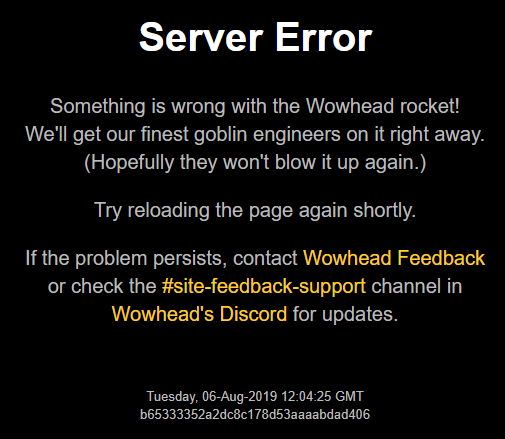
It's the same issue Aliaena mentioned earlier - first the server error, then the site loads very slowly after a couple of refresh attempts
It seems to be related to accounts in some way. If I'm logged in, the site loads slowly or gives me a server error, but after logging out it loads instantly
Scratch that - it might not only be account-related. Searching is slow, direct item links load slow, but frontpage and articles on the frontpage load instantly.
Caching issue perhaps?
 tidal brook
also getting the server error page
when trying to view gondria, arcturis an spawned ghost jormungar from petopia
small ore
hey all, we're having some issues after the database maintenance earlier. we are aware, and will be looked at asap.
 delicate zodiac
@small ore Thanks for info! 😗
tidal brook
cool thanks good to know srry if redundtant posting
timid osprey
I get that error when trying to access Classic. Trying to access the normal website gives me a timeout error. :S
 peak charm
Well I can access Classic, but the wowhead.com is saying Server Error 😮
Ok, it seems everything is back to normal ❤
timid osprey
Classic just loaded, but still getting the timeout on the normal site.
 sudden topaz
Howdy! Any plans/consideration to making a "retail only" webhook for Discord? I see there's a "classic only" and the all news, which I currently use, but would be potentially interested in one specifically without classic news. Thanks!
 glass elm
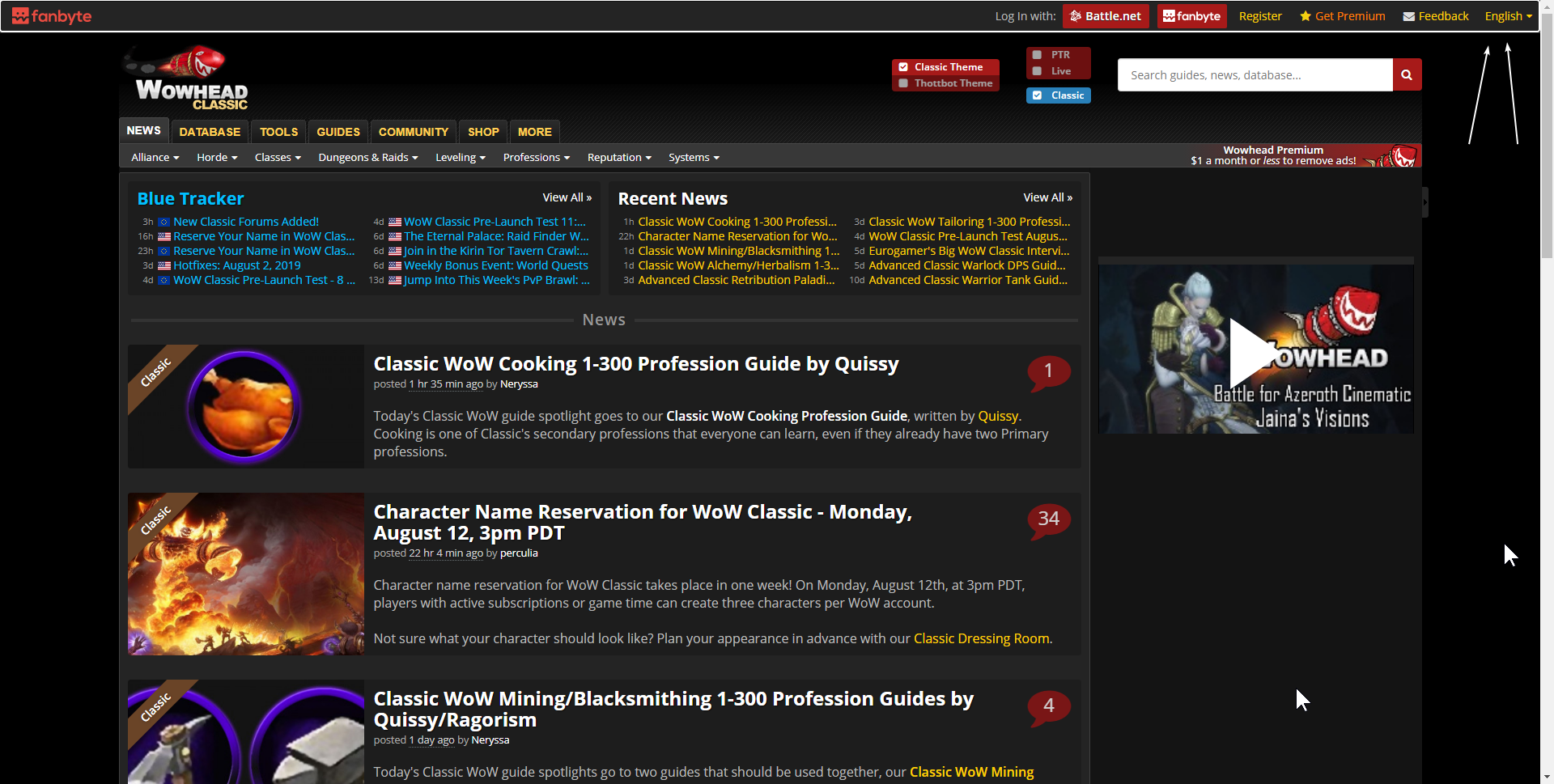
Hello guys, i hope it is the right place to post that kind of feedback, in the english version of classic wowhead the user can switch between English and any other languages but in the french version the little drop down list for languages disapeared see below. Additionally the Log In with / Register / Get Premium / Feedback are all getting scrapped.
English version
https://i.imgur.com/zHEOuTF.png
French version
https://i.imgur.com/yqPkyZ3.png
 crude urchin
Yes, the header is broken on all non-English versions of the site
 modest pawn
teal dragon
modest pawn
teal dragon
Clear your cache, the site has been back since 11pm PDT yesterday (minus some occasional database lag).
@glass elm @crude urchin became aware of that issue yesterday. A ticket for our dev team is already in the queue. Hope to have it resolved in a week or two (if not sooner).
glass elm
@teal dragon got it thanks
 prisma crescent
teal dragon
prisma crescent
teal dragon
In your profile there will be a tab called 'Outfits'.
crude urchin
 plush stump
Could the page for displaying soundkits be improved to show all the sound file ID's it plays? e.g. https://www.wowhead.com/sound=888/levelup could have a tab listing the sound file(s)
Wowhead
A sound in the User Interface Sounds category. Always up to date with the latest patch (8.2.0).
I'm the author of MuteSoundFile, and sounds can only be muted via file ID, not soundkit ID
Showing all the file IDs on that page would make the whole process a lot more user friendly, and I could direct my users to use wowhead, which I cannot currently do.
hardy dome
Spell rank 1300 for https://www.wowhead.com/spell=299357/condensed-life-force , isn't that a bit much?
Wowhead
Your spells and abilities have a high chance to impale your target with a spike of Azerite, causing [2028 * (1 + Versatility) * (1.25)] Fire damage.When an Azerite spike deals damage, all damage you deal against that target is increased by 5% for 6 sec.
 pseudo nebula
female worgen eye color is faulty on the model viewer
crystal olive
@hardy dome that's just how far scaling Blizzard has in their data
@pseudo nebula which eye color?
pseudo nebula
All of them
It’s stuck on 1 eye color
Glowing eyes don’t work either
Glowing eye scar face only shows the glow effect around the eye for example
hardy bloom
i believe the eye color thing is an issue with the models currently
it MIGHTVE been solved this build
not sure
crystal olive
@junior moon
 junior moon
@hardy bloom thx for report I put it in the bug list
junior moon
Wowhead
Try out armor sets on any World of Warcraft character. Test different transmog and plan your wardrobe.
use PTR if u want those 2x faces
😛
hardy dome
@crystal olive they may have data but as long as essences have only 4 ranks, i don't think we should display the whole range.
crystal olive
@hardy dome essences don't scale with rank, they scale with the ilvl of your neck
Ranks just include additional effects
 stoic creek
I just realized the wowhead client is still looking for WowB.exe for Classic. Classic now uses Wow.exe aswell, for this last massive stress test, so you're missing out on some data I'm afraid =/
teal dragon
We're aware, an update will hopefully go out later today. Thank you though for the heads up.
plush stump
Was this not the correct place for my request and is there a better place?
pseudo nebula
eye glow still doesn't work
it just shows the eye color of face one but this is glowing eye face
it shows that eye color on all faces
pallid temple
@plush stump Should be correct to ask here. You can also try an email to feedback@wowhead.com iirc
 winged pasture
Not sure if this is already a thing, but guides for classic dungeon quests and where to get them would be really useful. 😃
timid osprey
@winged pasture, every individual classic dungeon guide I've been in has a section for dungeon quests. You can access them from https://classic.wowhead.com/dungeon-guides.
Quissy and Sh3rro have a lot of individual dungeon guides posted. 😃
 manic iris
Heya! Anyone i can get in touch with regarding having a discord added to the wowhead page?
plucky fractal
@manic iris Sas148 is the person to talk to about that. I'm sure he'll see this when he logs on if not, you can shoot him a PM in a day or so.
teal dragon
@plush stump Sorry, you can send an email to feedback so I can properly review and route your request. I do want to temper expectations though, sounds aren't a priority for the site. Have to use our resources wisely.
@manic iris I do prefer any Discord Community Server list requests to go to feedback@wowhead.com. Thank you.
 north flume
cant seem to load any characters in https://www.wowhead.com/flying - is it down perhaps ?
Wowhead
Track your progress towards unlocking Flying with the Pathfinder achievement and see what you have left to do.
teal dragon
Loading okay for me. Are you getting an error? Do you have a screenshot? What's an example character name, region and realm?
north flume
name is Slâx
I can only get it to show that on chrome though, works on ffox
Ah, privacy badger
never mind, my bad
teal dragon
No problem. Glad you figured it out. :)
pallid temple
@lament gate not sure if elvui has their own discord, but this here is the wrong place for that question.
 lament gate
kk
 jolly isle
Ah... enough time's gone by, guess it's to stop spambots, huh? Anyways, I've been having a bit of trouble with the site. While I can access any page through google, the main page of wowhead just says it's down for maintenance. I use the chrome browser if that's relevant.
 brisk hearth
Same here, getting the maintenance message since a couple of days already
plucky fractal
@jolly isle @brisk hearth There shouldn't be any issues reaching Wowhead in terms of maintenance. Try clearing out your cookies to see if that solves it.
jolly isle
How do I do that?
brisk hearth
I can access the general mainsite but for classic I get the maintenance message
plucky fractal
Shift + F5 should do it.
jolly isle
Oh fancy that, it did. Thanks.
plucky fractal
You're welcome.
 chrome temple
is the latest client version 1.9.36 ?
crude urchin
@chrome temple 1.9.37
chrome temple
ty - the updated version now recognizes classic - it does not install the addon
also - it doesn't seem to recognize BfA - the button keeps marking "detect" - and sometimes errors out with "invalid path"
 turbid radish
Any wowhead staff on at the moment?
plucky fractal
@turbid radish Just post your question and a staff member will respond when they see it.
 tropic light
Hey, could somehow help me with this bug on wowhead.com ?
plucky fractal
Have have you tried to do to fix it?
tropic light
Dont know how to fix it ^^
timid osprey
What page is it on?
tropic light
when I type wowhead.com
timid osprey
Hmmm, loading perfectly fine for me. Have you tried an alternate browser?
stoic acorn
You can try reloading without the cache (Ctrl + F5 usually), but if you are seeing it on multiple browsers you may be having an issue with your ISP not letting you connect to some parts of the site.
 hardy estuary
This has been happening for the last fifteen minutes or so for me. (ctrl+f5 to no avail)
 glad cedar
I am also having the above problem ^^
teal dragon
If you're getting Server Errors that's not something clearing cache or Ctrl+F5 is going to resolve. Please provide the URL in your browser when you encounter that so we can investigate. Thank you.
 slate elm
Just wanted to say great job with the classic gear planner! Added functionality has been a great asset, only problem is that white/grey items do not appear. It would be great if you got pick white/grey gear for making early level gear sets. Thank you very much for making this tool
 cunning mist
Stat weights don't seem to be working for Classic. https://classic.wowhead.com/rings/side:2/class:4/weights:37:119:96:77:20:21/weight-values:1:17:20:1:1:1.7
tawny blade
it's a known issue and something we're still working on
 scarlet storm
Are there any plans to separate the news reporting to discord between classic and regular WoW with the Bot? So many of us just don't care for classic nor the development of it and all of the updates to go with it. I love the bot though, and love getting the WoW news delivered to discord - will there be a way for us to choose in the future, or is it kinda "take it or leave it"?
 slate delta
@scarlet storm - I was wondering the same thing! But opposite. Do we have the ability to only see CLASSIC/Vanilla news, updates and server status instead of the current ones?
scarlet storm
We don't currently, as far as I can see...but I was hoping they could be separated
slate delta
Yes, that would be nice to select one or the other. But, it might as well be "take it or leave it"
tawny blade
We've decided to keep everything together in the main webhook to help promote our classic site. Based on analytics, we are seeing a high number of click-throughs onto the classic news. The front page news does have a filter option though where classic news can be removed
 brave yoke
Hey Support Team, I am trying to compile some gear lists on classic.wowhead.com, but the feature doesn't seem to be working. For example, I'm looking at URL (https://classic.wowhead.com/item=15815/hameyas-cloak) -> click 'Add to list...' -> 'Create New List...' -> 'Equipment Set' -> I enter the name of the list, then click 'OK'. After that, I cannot see any lists on my user profile, nor do I see the list I tried to create when I want to add a different item to it; all I see is 'Create New List...'. I've tried this in Chrome and Firefox, and also in Incognito mode. Any idea if I'm doing something wrong?

Wowhead
This green cloak of item level 60 goes in the "Back" slot. It is a quest reward from Hameya's Plea. In the Cloaks category. Added in Classic World of Warcraft.
tawny blade
Try using https://classic.wowhead.com/gear-planner instead
Wowhead
Plan and share your Classic character's gear and see their resulting stats, secondary stats, and resistances.
you'll get a stat breakdown there as well
 spark notch
yo, i have wowhead premium, how do i get the role in disc?
Wowhead
The largest World of Warcraft (WoW) information site, featuring guides, news, and information on classes, professions, azerite, raids, transmog, and more.
timid osprey
@spark notch, the #roles explains that:
If you have Wowhead Premium, I can manually add that role to you, just send me (Sas148#0001) a private message with your Wowhead username and email address. Thank you for your support!
spark notch
ty
regal hollow
says roughly the same in #welcome-rules but yeah, just message Sas148 the username on Wowhead, and connected email (as The Tsu already said, too) and give him a business day's worth of time to work his magic.
timid osprey
I forgot it was in there, too. I just think, a role question? Let's check the "roles" channel. ^^'
hardy bloom
might i suggest changing the old news to Peak News or something and hiding it like the giveaway channel so its only present when relevant?
that way you can still have all news articles during peak news periods
teal dragon
The channel will still work as the old one did, anyone in this server will still see news via our webhook in that new channel. We'll pick up to two news posts per hour to "publish" to anyone who also follows the new channel type.
It's basically a second layer is all, which will go unnoticed by the vast majority really.
hardy bloom
ah ok
teal dragon
We didn't want to ignore the new feature entirely but it doesn't necessarily meet the needs of most of our users, we'd still encourage everyone to use our webhook directly instead to get all news to their preferred server/channel: https://www.wowhead.com/webhook -- but anyone who wants to use the new 'follow' function can do so, but they may miss things here and there if there's ever more than 2 articles in a single hour.
hardy bloom
might be smart to start doing a daily news roundup when neccesary
that way you could cover all of the news that day in the new channel
without having to keep publishing 2 articles every hour
¯_(ツ)_/¯
teal dragon
I could do something like that manually actually, should the need arise. 🙂
 delicate knoll


 crude urchin
plucky fractal
Separate news streams for regular and classic news?
teal dragon
We have two webhooks for users to choose from: all news or classic only. We don't have any plans for additional webhooks at this time. The #latest-news channel in our server will always show all news.
 viral void
Hi! I had a database question regarding tables and how to implement them properly in excel for loot.
 north cave
Is there currently an issue with adding the Wowhead webhooks at the moment?
/news-webhook that I'm directed to from the actual feed doesn't show me any add buttons.
/webhook that I found online does have add buttons and sends me to the connect to discord page, but when I click "Authorize", nothing happens on my server and I'm redirected to "Page Not Found."
 young granite
@north cave same with me BUT if you check the "News-Feed" button in general on wowhead (https://www.wowhead.com/news&rss) it says its down
edit: the link seems to work now, will check the webhook for discord again
Wowhead
The largest World of Warcraft (WoW) information site, featuring guides, news, and information on classes, professions, azerite, raids, transmog, and more.
 blissful notch
Someone can say me how to configure wowhead webhook ? I wrote !wowhead-webhook in my server and the bot respond me : @blissful notch, Success! You are now subscribed to the Wowhead Webhook
But I dont know how to configure
teal dragon
There's no configuring a webhook, you'll just receieve any news pushed out to it now. The last news was pushed at 12:18p PDT. You can confirm your webhook is working properly once the next article is released.
blissful notch
Okok, and there is no webhook for get avert for inconming assault for example
teal dragon
No, there's no webhook for that, just all news or classic-only news.
stoic acorn
Still hoping for that no-classic news 😛
teal dragon
Don't see it happening, but I do hear you. :P
plucky fractal
So there’s a news stream for people who only want classic, but not one for people who only want current WoW?
timid osprey
Yep
stoic acorn
Those us that suffered enough the first time through have to suffer PTSD 😛
timid osprey
I'm amongst those, but I'm looking forward to playing it.
 red parrot
lul
north cave
I'm still having an issue with adding the Wowhead webhooks at the moment.
/news-webhook that I'm directed to from the actual feed doesn't show me any add buttons.
/webhook that I found online does have add buttons and sends me to the connect to discord page, but when I click "Authorize", nothing happens on my server and I'm redirected to "Page Not Found."
pallid temple
In the healing meta article, [npc154465] is probably supposed to be a link to another add (just before the headline Specific Fight Mechanics).
crude urchin
@pallid temple fixed, thank you!
pallid temple
np, just before I wanted to ping Squishei as the author. 🙂
Probably the wrong npc though - Earthen Guardian is a friendly one.
 analog gulch
would be great to have separate news feeds for classic and retail, makes it pretty annoying trying to follow retail news when 9/10 news are about classic. Please dont shoot me for not liking classic ty
orchid citrus
We have no plans to make a retail-only news webhook. Our classic site is currently competing wity classicdb.ch, a database that has existed since before Classic beta and is using our content to promote their database. Unfortunately, their hosting provider specializes in protecting piracy websites and drawn-out lawsuits, so a court battle against them would not only be very expensive for us, but would last for years.
We understand that people with no interest in Classic might be aggravated by the Classic news (especially now that its so close to launch), but we need the traffic generated by the webhook so that Classic Wowhead can continue on with the same robustness as our Retail database. We're very sorry for the inconvenience 😦
 thick fox
why does nothing show up when looking for "increases/decreases rep with bloodsail buccaneers" in the classic npc search? does it have to be datamined through people playing with the wowhead client or what?
 quasi hinge
I'm having the same issue as @north cave, With the webhooks, if something has been posted about it previously i apologise.
tawny blade
It's a bug we're looking at today
quasi hinge
Ok, Thank you 🙂
thick fox
@tawny blade what about my question?
tawny blade
I don't have an answer yet, that's why I didn't respond
 fringe cape
Is there anyway we could get a Webhook that doesn’t include classic news??
I only ask cause I got ocd and running a discord that will house Retail and Classic Guild, and just want to have the news separated lol
Kinda sucks that the normal webhook also includes classic news
timid osprey
Not likely. It's been asked several times in recent weeks.
 wise yoke
When is the M+ affix rotation going to be updated on wowhead 
timid osprey
Currently, the only webhooks are for all or classic and every response to asking for a non-classic webhook can be summarized as: not likely.
fringe cape
@timid osprey they should just edit the All to be retail only lol
stoic acorn
They posted a lengthy response a few messages before yours:
https://discordapp.com/channels/107362567793422336/173241171064127489/613379645512876044
timid osprey
Again, not likely. Besides, both are technically retail. Maybe a separate webhook will be done after the launch if popularity for Classic maintains, but I wouldn't be surprised if they don't want to do it because Classic might end up being nothing more than a momentary nostalgia fest that passes in a couple of months.
fringe cape
What your saying makes 0 sense, they’ve taken the time to make a separate webhook, a whole classic section of website, Classic news lol the fact there’s a separate webhook, classic news shouldn’t be in the normal webhook lol
By your logic they shoulda waited to do everything just to make sure classic maintained lol
stoic acorn
We agree with you, the Wowhead staff have a different opinion though 😉
fringe cape
And I said retail you can call it tons of thing current WoW, 2019 wow, bfa, Classic is classic lol
tawny blade
There's been more discussion here about a classic vs retail web hook, which no other WoW fansite offers, vs the fact that sites have copied 100% of wowhead including front-end code and thousands of screenshots. The alternative to not promoting the Classic site is to shut it down, most people wouldn't bother trying to make one after such horrible community behavior.
fringe cape
@tawny blade I feel like you guys already have both
Just don’t include classic news in the all one
Then while spectrum is covered
We can easily implement both webhook
tawny blade
I've explained that we need to promote the classic site, which includes being promoted in the web hook the vast majority of our players use
fringe cape
We can’t divide 1 wenhooj lol
But your not promoting classic to people who don’t want to play classic they just gloss over it
tawny blade
We don't believe the loss in users who will simply forget to install a new classic web hook is worth the traffic loss at the current time. We frequently revise analytics, but this is our decision at the current time.
We are seeing a lot of clicks on the main web hook atm.
stoic acorn
Wolfe I'm sure the percentage of people that only care about retail are in the minority right now.
stoic acorn
Then don't subscribe to both webhooks?
fringe cape
I have 2 separate channels in my discord
1 is wow news 1 is classic news
So classic ppl can mute 1 or the other
If they aren’t interested in that
Or anyone can mute lol
I’m an organization freak lol
tawny blade
@quasi hinge the webhook has now been fixed
quasi hinge
Thank you ❤
 tawny forge
hello there. quick question. are the gt and lt filters working currently? i can't get them to function
crystal olive
any example that isn't working?
fringe cape
@tawny blade how come your latest news channel has a newspaper icon
How does 1 do that lol
stoic acorn
It's only available on select servers currently: https://support.discordapp.com/hc/en-us/articles/360028384531-Channel-Following-FAQ

Discord
Are you a fan of pizza? Do you like getting pizza delivered to your house? Have you ever wished you could get pizza delivered right to your server? Well, if your favorite pizza topping is announcem...
fringe cape
Ty
Also another question I have a raider io webhook that I changed Icon for on my discord
I’ve changed the wowhead classic webhook Icon
And it still comes out as wiwhead lol
teal dragon
I think you'd need to bring that up with Discord. We don't have any control over that mechanism. 😐
fringe cape
Alrighty lol gotta figure out how to bring that up with them
 quartz tree
Yes, want webhook sans classic.
 wild relic
did you noticed wrong calculation for mages between Int and Crit in % on lvl 60 ?
teal dragon
You'd need to elaborate quite a bit more for us to look into any discrepancies like that.
 dense mica
Have you considered a separate news channel for Classic?
teal dragon
We have considered it, but we've decided against it. We've elaborated a bit as to why here: https://discordapp.com/channels/107362567793422336/173241171064127489/613379645512876044
wild relic
Yesterday I tried for the magicians in my guild, who I join, to show the differences that make up the 5% Int of the Gnome at the end. In the first place, I kept to what the equipment planner threw out of you. When I was a bit startled then that was the difference with 0.3% Crit at 18 Int I've tried the whole on key and my have found a mistake. According to your guide there are 59.5 int for 1% crit but in the planner it is 11.1 int for 1% crit, so the conversion value is different in the guide and planner. And even if that were true, where did these values come from? is there a source? even if that goes too deep, I try to understand the conversion. I have counted with 0.0167% so far.
plucky fractal
Hi. I'm an independent developer looking to mine some data from the coming Classic release, in particular the auction house.
Since there's no web API available yet by Blizzard, I wonder how WowHead will do it and if you guys are offering any sort of API yourselves
teal dragon
We do not offer any API on Wowhead and there are no plans to do so. I don't believe we have any intentions of mining auction house data.
You'd probably be better suited asking the creator of https://theunderminejournal.com/#contact if he has any intentions of doing so though.
plucky fractal
Ok, it makes sense that you don't have an API for others, that would be a lot of work 🙂
Wowhead shows things like the buyout price for most items. If not mining the data, how did you get your hands on that information?
teal dragon
That information is taken directly from https://theunderminejournal.com
teal dragon
You as well 🙂
@wild relic Please send all that information, plus URLs to specific gear planner layouts with the discrepancies and I'll have it sent to our developers to look into: feedback@wowhead.com
wild relic
@teal dragon so i send it to that e-mail ?
plucky fractal
Correct @wild relic
wild relic
Nice thx
 sleek flint
Hey guys, I played around with the gear planner and I see that for enhancement shaman the default 5% block and parry (if talented) is not shown. Only the additional from stats and talents.
tawny blade
make sure you have the shield equipped to activate the talent
when I equip a shield and then add points into the talent, I see block increase
sleek flint
Block from talents are added, but there's a base 5% block and parry before any from stats and talents. That's what missing. Dodge, block and parry should all start from 5%, but only dodge is working correctly now.
crude urchin
@humble igloo please see https://discordapp.com/channels/107362567793422336/173241171064127489/613379645512876044
humble igloo
I retract my statement.
plucky fractal
Is there a way to update my username? I changed my Battle tag ages ago but it still shows my old one when I re link my B net account
crude urchin
@plucky fractal you meant username on the site?
plucky fractal
Yeah I assumed it defaulted to my Btag as that was what it used to be
crude urchin
Send an email at feedback@wowhead.com from email address associated with your Wowhead account. Please make sure to include preferred username and 1-2 alternatives
;)
 verbal heart
Hello! Who/how can I take up contact about an issue where Wowhead's site is unavailable most of the time from my IP/network? My ISP says connection between them and Wowhead seems fine and that it's probably something between Wowhead and my IP range
stoic acorn
This annoying popup appears to have been changed from a "close once and it's gone" to needing to be closed for every single item.
(Once closed for a specific item it stays closed for just that item.)
timid osprey
^ I can confirm this is happening for me in two different browsers.
quartz tree
I figured it out... it's annoying but since the webhooks won't exclude classic you can add a filter bot
tawny blade
Don't believe we changed everything, it was always that way
teal dragon
Yeah there haven't been any changes to that behavior Arcane.
stoic acorn
It definitely used to be a per-browser cookie that hid that for all items, I would have to click it once when clearing site data or setting up a new browser but that was it. It would have to be relatively recently that it changed to per-item.
 unborn merlin
I just wrote a .net core console app to listen to the wowhead rss feed, and ignore any items in it with the word classic
then post the valid items (8.1.5+ wow news) as webhooks to my server
downside is i have to have the console app running at all times
teal dragon
@verbal heart you can write into feedback@wowhead.com with all available details. Please elaborate, be specific, include screenshots and we'll look into it. But 99% of the time it's something specific to you or your computer that we don't control. Still I'm happy to look into it.
stoic acorn
The item ID is in the key name in Local Storage
Maybe a change was made to be type specific, and accidentally included the item id?
teal dragon
I can say with near certainty that it defintely hasn't been touched in weeks, if not longer. Per item is the only way I ever recall it behaving as well.
stoic acorn
For anyone that wants to fix the above behavior, this will "click" that for every single item and quest found in Classic if you run these in the console of a Wowhead site:
for (let i = 1; i <= 24283; i++) { localStorage.setItem(`highlight-classic-link-type-3-${i}`, true); }
for (let i = 1; i <= 9665; i++) { localStorage.setItem(`highlight-classic-link-type-5-${i}`, true); }
I would love that to be a global toggle though, because the above is an ugly hack at best.
verbal heart
Thanks @teal dragon! Reason I wrote is because it's happening on 10+ computers (different OSses, browsers), phones, tablets, and while the issue is there, all those devices can access the site fine from a 4G hotspot
And we tried resetting routers, using Google's DNS, there were different routers involved etc, so I think we ruled out that it was a local device thing
stoic acorn
Include the output of traceroute www.wowhead.com (tracert on Windows), that should show you where the traffic is stopping (assuming that is the issue).
verbal heart
I will, thanks!
verbal heart
I'll move the support question to your hosting service, since it looks like I can reach the first node of Instart, but not any further. I'm also unable to reach https://www.instart.com from any device or network in our street. in fact I can't reach any site hosted by them.
Thanks for the Traceroute tip, I found this out after puzzling with WinMTR
 prime spoke
is this channel for feedback on the discord server as well? or just for the website
 rancid copper
both
prime spoke
Figured as much! 🙂
Just wonder if y’all could consider splitting classic and retail guild recruitment into separate channels.
teal dragon
@verbal heart Let me know what they tell you, I'd be curious to find out what the problem is/was.
@prime spoke Now that we're almost at launch, sure. I've added relevant classic- channels to the LFG categories.
brave yoke
Hey support team - I've been using your classic gear planner quite a bit, and it has been discovered that it is not calculating rogue crit chance properly. For example, I will reference this saved build: https://classic.wowhead.com/gear-set/sealed-fate-t0-966
The total agility is 318. Rogue gains 1% crit for every 29 agi. 318 / 29 = 10.96. Add the + 7% crit from gear, and +5% crit from the Malice talent, and we end up with 22.97% crit chance. This has been checked against a community-approved Rogue spreadsheet.
The classic gear planner shows 27.28% crit chance for the same build - a difference of 4.31%.
Would it be possible to look at your algorithms and make the necessary corrections to show the correct crit chance?
Wowhead
Sealed fate t0 is a gear set from World of Warcraft. Always up to date with the latest patch (1.13.2).
compact radish
News on the main website just started rending like this in Chrome a few moments ago
No adblock/javascript blocking
teal dragon
What's wrong with it @compact radish ?
compact radish
Uh. Well up until then the front page has never only displayed two articles per page
teal dragon
Ah, I see. You have categories filtered out under 'Types'.
Restore the deselected types and you'll see all 10 again.
compact radish
Oh wow. So thats it then. I didnt realize that all the posts were about classic
teal dragon
Classic is the big news right now, so yeah it's dominating the news cycle, It'll end up being PTR not too long from now.
compact radish
You guys should consider re-working the news section so that eve when filters are applied the 10 most recent non-filtered news stories are displayed.
Wouldn't be an incredibly taxing project as there are freely available examples using popular libraries like Jquery available that could be adapted.
crystal olive
you're underestimating the cost of changes like that in a 15 year-old system, specially with the potential impact issues on that implementation may cause.
it is something that would be really cool to have, but at the same time, really, really low priority
teal dragon
Further we can't spare the resources to improve this functionality right now as it would require us to take someone off something that would benefit the majority of users to refine something that is barely used. We're open to eventual improvements, but it'll have to be when there's spare time... which likely won't be soon with Classic and 8.3 around the corner.
crystal olive
maybe if we have a content draught after 8.3!
compact radish
Ah, Ive been in development for 2 decades but I obviously don't know how well optimized your codebase is and what level of staffing you have.
teal dragon
Yeah that's often the best time. Assuming there is one. But then again BlizzCon will hit... possibly another expansion announcement. It's hard to be certain.
compact radish
Or the metrics on feature usage
teal dragon
Yeah, don't expect you to be aware of that, but we're always evaluating those things. The vast majority of our visitors don't filter any news.
This was added as a compromise for those who wished to do so.
compact radish
Yeah, it's been rather cumbersome to visit wowhead lately and have to wade through the classic posts despite not visiting the classic subdomain.
It just didn't click with me when I hit the filter button that it was the reason the page stopped populating 10 stories
Thanks for your time!
teal dragon
No problem at all. 🙂
plucky fractal
Hi, just wanted to drop by and mention that there are two double-mentions of the same quests on the quest tracker in Mulgore => Both given by Morin Cloudstalker.
https://www.wowhead.com/quest=765/supervisor-fizsprocket (no longer seems to be in the game)
https://www.wowhead.com/quest=26180/supervisor-fizsprocket
https://www.wowhead.com/quest=764/the-venture-co (no longer seems to be in the game)
https://www.wowhead.com/quest=26179/the-venture-co
Not sure if this is intentional. It's certainly confusing when you're trying to complete every quest. (If there's any way for me to hide quests on the tracker individually, please do let me know)
 frank charm
the wowhead site is not loading?
teal dragon
@plucky fractal Please send that to me via feedback@wowhead.com so I can pass it along to be looked at.
@frank charm What do you mean? Have a screenshot? Site is loading fine for me.
frank charm
it says ERR_TIMED_OUT, i can access any other site than wowhead
teal dragon
On Chrome?
frank charm
yeah google chrome
teal dragon
Does the behavior persist in Incognito Mode?
frank charm
yeah still not loading
teal dragon
Can you see if the behavior persists on a different browser, like Firefox or Edge?
frank charm
Firefox and Edge not working either, both out of incognito mode, maybe because im eu?
teal dragon
I had you check so we can rule out the browser itself, the issue apparently lies with the computer or network you're using. Can you try on a mobile device, that's not connected to your home's wifi, and see if the site loads?
It's likely that it'll load in that scenario.
frank charm
it works now with phone data nice
teal dragon
If so, you're going to want to consider checking your internet security software to see if it's blocking us for some reason (though normally it would say so). You may also want to try restarting your router and/or performing a ipconfig /flushdns in your Command Prompt.
I'd only consider resetting the router if your phone can't load the site when connected to the same WiFi.
If your phone can load the site while connected to the same network then the issue is isolated to your other device.
 tropic bramble
not loading for me either
EU as well
tried flush dns, other browsers, other google dns, and isp dns
did you find a solution @frank charm
viscid heart
no issue here, germany
viscid heart
https://discordapp.com/channels/107362567793422336/173241171064127489/614580366086242314 that should be true for that issue too
frank charm
Same country here @tropic bramble but no just gonna use my mobile data
frank charm
Yeah
tropic bramble
yousee?
frank charm
Yeah also yousee
tropic bramble
zz
 loud rivet
I'm from Belgium and I can't reach the site either; seems to be an issue with some data center
 chilly forge
Same problem here and yousee
loud rivet
tracert reaches 141.136.99.106, owned by GTT Communications Inc in France, then starts timing out
chilly forge
What was the IP to run the tracert to?
viscid heart
should work with the name
loud rivet
just www.wowhead.com, not sure about the ip...
chilly forge
Yep mine goes dead after 141.136 aswell
crude urchin
You can use VPN or extensions like FriGate to access the site for the time being.
 uncut gull
am I the only one who has issue with the "Add to list..." menu?
 outer dirge
Just wanted to add that I also can't connect to wowhead.com. It's been down for a few days. It's not dns related. It resolves the IP just fine. It doesn't answer pings though. (It does for my friends, who's one a different ISP.)
Also in DK on Yousee (TDC). So I guess just unlucky peering.
 lapis spade
Netherlands here, same problem as above
 plush timber
Im from Poland. Same problem here. UPC is my internet provider.
 jaunty hound
Having issues accessing the website from Sweden on Telenor ISP
Traceroute shows it leaves ISPs network and then dies on the way to the destination.. it works on mobile ISP however.. seems like a peering issue?
Dies on hop to 80.249.212.213 when trying to access wowhead.com (dns resolves to 159.180.84.14)
verbal heart
From my earlier issues, I've contacted ISP again (since friends I asked in different areas of the country had the same issue with the same provider), and turned out those times they tested the connection it was one of those rare times it was working fine
People/support from my provider (KPN, Netherlands) now admitted it doesn't work from their side either (anything with Instart) and are looking into it
159.180.84.14 was the last node I could reach too, usually, sometimes not even, but usually the last node was part of instart-ic-something
VPN to reach the site in the meanwhile was a good suggestion, didn't think of that earlier
 regal crest
Same issue here as Aubrey
 twilit pewter
Hi, my ISP told me to contact you for support regarding an issue, which is that I cannot access www.wowhead.com from our home network. It would appear my IP address is being "actively blocked". Is this the right place to look for support on this matter?
 fast matrix
Same issue here, Poland UPC @twilit pewter is likely right
viscid heart
with so many people with the same issue where on some the ISP says that its a issue in between i doubt that its blocked ip adresses
twilit pewter
it may have been an automated system reacting to some common file blocking us. wouldnt surprise me
stoic acorn
Oh I don't doubt it's a blocked IP range, but it might be before the traffic is hitting the Wowhead network.
twilit pewter
I doubt we're intentionally blocked to inconvenience us
yeah it gets blocked in zürich for me
I live in the Netherlands
stoic acorn
For those of you that are currently blocked, I'm sure the staff would appreciate this information (include your source IP, and likely the traceroute/tracert output) in order to help track this down:
https://discordapp.com/channels/107362567793422336/173241171064127489/614570390118727701
The CDN provider Wowhead uses doesn't seem to have any public "IP health check" page, my guess would be that you aren't able to load their site either: https://www.instart.com/

Instart
Instart, the leading cloud-based web application security platform, improves the security and speed of your web apps and APIs.
twilit pewter
I assume the site isn't supposed to be all white with no content? 😛
stoic acorn
Definitely sounds like an issue with the CDN 😆
stoic acorn
Oh I'm not part of the Wowhead staff, just another user
twilit pewter
Okay, but at least you're someone 🙂
and you did figure out a bit, which could be useful for wowhead
stoic acorn
To be fair, @verbal heart figured it out yesterday:
https://discordapp.com/channels/107362567793422336/173241171064127489/614598771950616585
And said their ISP was working on it here:
https://discordapp.com/channels/107362567793422336/173241171064127489/614865978219823124
verbal heart
Yea I was fiddling a lot along the route because 1) I know these questions of "hapl I can't load site" are 99% of the time maybe bad cookies/browser etc and a local problem so I didn't want to waste anyone's time with that and 2) I wanted to figure out as much as I could where the issue might be so I only bother the right party first
That's where I found out that no one that I talked to could reach anything related to Instart (including their own site) from my ISP, and then others pitched in too from different countries
Could potentially be an issue at our ISP (they're our main national ISP and maintain most connections, other countries are often routed through us via Amsterdam), but people I talked to from Germany didn't have issues and it seems a bit wide spread so I'm more inclined to think something at Instart went wrong
twilit pewter
hmm yea Im going to eat my words. I dont know if KPN needed to access instart. they accessed wowhead maybe without instart somehow
verbal heart
My support representative I talked to from KPN also couldn't reach instart.com/wowhead.com, neither could people using KPN on their forums
I think you might have had the same I had twice before, where the support guy could reach it, but it turned out I could reach them too just fine as it was one of those few moments in the day it worked
twilit pewter
my support representative could. possibly coincidence
verbal heart
Yea that's why I moved on thinking it's not them because it was a coincidence time wise, I couldn't reach them for hours and then right as I got in contact with someone I realised the connection was fine for ~10 minutes
twilit pewter
I wasn't as fortunate that I was able to reach the site when they could
verbal heart
At this point I'm more inclined to contact Instart as they might know more about what's going on, but I'm waiting on what KPN will find out once they get back to me (they're bound to get to something soon as they do host a lot of other sites other than Wowhead and this potentially affects a lot of people)
twilit pewter
but we compared tracert's
does sound this is not a KPN problem, but rather a problem with instart and only by extension a problem with wowhead. Wowhead may have an easier time contacting instart, though as we can't even access their site (except on our phone)
verbal heart
Very true, I'm a bit curious what they (KPN) will reach to and see what they say, meanwhile I'm using VPN/phone to use the site
chilly forge
Most northern countries dies at 141.136.99.106 due to routing
frank charm
same here Battle, after that one tracert says Request timed out
jaunty hound
yeah, cant load instart.com either
plucky fractal
Imagine if we had the technology for this
fast matrix
It didn't work earlier for me and now it does, check it guys wheter you can reach wowhead now 2 😄
 fickle osprey
no change from Denmark 😔
jaunty hound
no change here either..
plucky fractal
What's the problem?
 pale thorn
Can't access it from Belgium as well
jaunty hound
it IS on instart side btw.. I've done a lookup on the address it gets stuck on during traceroute and it does belong to instart
 frigid ingot
Do I feel silly now trying everything possible on my end to fix it before checking this discord X) not working for me from The Netherlands either
jaunty hound
So just for the sake of clarity, my traceroute breaks on below IP (80.249.212.213)
name:    Instart Logic
contact:    peering@instartlogic.com
switch:    pxc-tc5-159
asnum:    33047
vlan:    ISP
v4_isp:    80.249.212.213
v6_isp:    2001:7F8:1::A503:3047:1
v4_mc:    f
v4_mdx:    f
routeserver:    t
colo:    Equinix AM5
speed:    10GE
iftype:    LR
The other IP people have in their traces does not directly say it's allocated to Instart but seems to be in FR.. I guess it's up to admin staff to figure it out with Instart
orchid citrus
@plucky fractal I explained a couple days ago why we don't have any plans for a retail-only webhook. The gist of it is, our Classic site is currently fighting for promotion over other databases that are directly copying our content, and as these are hosted by a provider that specializes in protection of piracy websites, a lawsuit would not only be very expensive, but it would take years for any meaningful results. So unfortunately, to ensure Classic Wowhead has a fair chance of being as strong as our retail database, we need as much exposure as we can - Which includes the webhooks.
We understand that retail people might be annoyed with the heavy flow of Classic news, but honestly, we can't do much about that - Blizzard has been very slow with retail stuff, both on live and PTR. We estimate that Classic news will die down a bunch as the release happens and the many blue posts slow down.
plucky fractal
Oh, I see... thanks for explaining it!
orchid citrus
You're welcome! Again, sorry for the inconvenience but our hands are tied 😦
plucky fractal
I understand. I'm just glad I got it explained so well 😊
 wanton steppe
not sure where to post but cant seem to connect to wowhead. just getting request timed out. tried pinging it and ping 159.180.84.14, tried running a tracert, https://gyazo.com/edb441bf386bf1827dde38a154fce8ce, seems like i can get request few times, but keep not getting responds, only wowhead that does this atm.
stoic acorn
There seems to be a widespread issue across the EU currently with the CDN Wowhead is using.
wanton steppe
ah ok, Thanks arcanemagus
teal dragon
For those of you with issues connecting to the site from EU, I just wanted to take a moment to make you all aware that we have received your reports from here, and via feedback/Twitter, and have been sending it to our operations team to follow up on. From what we can determine this seems to be isolated to a small number of users overall, in specific regions, while connecting through our CDN Instart. As best we can tell, the issue lies with them, but we're pursuing resolution options in the meantime and making sure Instart is aware of the trouble some of you are experiencing. We appreciate your continued patience.
 lunar tartan
Unsure if this is the right place to post this sort of info but in the undead article, under the heading Guide Highlights the links for the mage and warlock guide both redirect you to the wrong respective guides - https://classic.wowhead.com/undead
Wowhead
Undead are one of the playable Horde races in Classic WoW. In this article, we will go through everything that there is to know about an Undead, including racials, class options, lore, mounts, and more.
teal dragon
@lunar tartan I'll get that fixed up now. Good eye. Appreciate you letting us know.
lunar tartan
I'll be just going through heaps of the web pages, is this the correct place to post if i find any more issues?
teal dragon
Sure this is fine, or you can also email feedback@wowhead.com or use the 'Feedback' button on the upper right of the site.
That page has been fixed.
teal dragon
Those of you with the connection issue to the site, can you check this doc and see if you can provide me the `x-instart-request-id' please? https://docs.instart.com/instart-cdn/troubleshooting-delivery-issues/how-to-use-browser-developer-tools-to-collect-the-x-instart-request-id-header/
Actually you probably can't load that site. Ugh
If you're on another browser let me know, I can screenshot those instructions.
I also would appreciate your IP, the ISP you're using when encounter this and your physical location. You can send to me via PM if you'd rather not type that info in public.
So those 4 things would be helpful. Thank you!
@wanton steppe @jaunty hound @frigid ingot @pale thorn @fickle osprey @frank charm @verbal heart @twilit pewter @regal crest @plush timber @outer dirge @chilly forge @loud rivet @tropic bramble ^^^^^^
tropic bramble
sent pm
fickle osprey
This morning, in Denmark, the wowhead sites are very slowly and and only partially loading ... but not timing out. Instart site is not loading, but is also not timing out.
Edited to add: Loading sometimes, and with a lot of "connection reset" error messages.
teal dragon
I understand, if you could provide me the 4 things I requested above, I'd appreciate it.
teal dragon
Apparently they also want:
1.
# traceroute 159.180.84.14
# telnet 159.180.84.14 80
# telnet 159.180.84.14 443

2.
# traceroute 159.180.93.9
# telnet 159.180.93.9 80
# telnet 159.180.93.9 443
 grim mantle
Problems here too, Netherlands via KPN/Telfort ISP. Using vpn to reach the site now with no problems until it's sorted out. Glad I came to discord and saw that it's not just me.
teal dragon
@grim mantle Getting your IP and if you can do the tracerts above would help me to relay that to Instart (the CDN responsible for this).
stoic acorn
Note that telnet isn't installed by default on Windows machines, a semi-equivalent set of commands that you can run on Windows:
Search in your Start Menu for PowerShell and run the following in the window that shows up:
tracert 159.180.84.14
Test-NetConnection -ComputerName 159.180.84.14 -Port 80 | Select -ExpandProperty TcpTestSucceeded
Test-NetConnection -ComputerName 159.180.84.14 -Port 443 | Select -ExpandProperty TcpTestSucceeded

tracert 159.180.93.9
Test-NetConnection -ComputerName 159.180.93.9 -Port 80 | Select -ExpandProperty TcpTestSucceeded
Test-NetConnection -ComputerName 159.180.93.9 -Port 443 | Select -ExpandProperty TcpTestSucceeded
@teal dragon I'm not sure if we can even give the header value given it fails before we even get response (Headers are returned as part of the response).. I'll PM you the rest of the information
 wary meteor
In Sweden here reporting in to have these problems when I am using wi-fi. Noticed it yesterday evening (24th august). Not sure when I last time used Wowhead before that, but this is the first time I have had problems.
jaunty hound
its the issue with Wowhead CDN as mentioned above. It helps if you provide your traceroutes etc (check a few messages above)
plush timber
I did nothing but site is working for yesterday noon.
 analog abyss
same issue as everyone else. Sweden, telenor is the ISP. Cant access wowhead from my pc works fine on mobile
 warm wyvern
Same here. Netherlands, KPN is the ISP
frigid ingot
I'm also unable to return the header info so it'll have to do without
Sent you a PM with all info I can get you @teal dragon
twilit pewter
having trouble executing the telnet commands and the "replacement" commands. tracert did work, though
I'll be away from home for a few hours, so this (including PM) will be all the troubleshooting from me for now
 slow mirage
Me and couple friends from Norway is having the same issue as well. Fingers crossed its not a problem when classic comes out, would be bad to miss such a good resource! 🤞
frigid ingot
If you can provide Sas148 with the requested it could be a giant help! :)
jaunty hound
You can still access wowhead via a VPN but please beware of playing wow while on VPN as it does increase a risk for ban. Blizzard can flag that as if you are account sharing.
viscid heart
can also be a safety ban if you suddenly login from weird places
jaunty hound
If you want a workaround for current issue accessing Wowhead, don't want to use a VPN, and telnet 159.180.93.9 80 / telnet 159.180.93.9 443 worked for you, (at least for now) the following does the trick:
Edit your hosts file (On Windows C:\Windows\System32\drivers\etc\hosts, on MacOS: /private/etc/hosts, on Linux: /etc/hosts) and add the following lines to it:
159.180.93.9 wowhead.com
159.180.93.9 www.wowhead.com
159.180.93.9 classic.wowhead.com
159.180.93.9 ptr.wowhead.com
159.180.93.9 wow.zamimg.com
You will have to save it as administrator of your machine. Also this will only work if you are actually able to reach the set IP via telnet. Putting IP in browser will not load the Wowhead website, but should give you a 404 error from Instart CDN. And as I mentioned - it can break at any time.
Important: Once the real issue is fixed you really should remove those entries..
What the above does: it overrides the DNS lookup of the domains in the list and forces it to go to the IP specified. And yes, it also fixes for now the websites that use wowhead tooltips (as those load from wowhead.com).
If this does not work, please check if the hosts file actually got saved. Easiest way is to ping wowhead.com - if the IP it shows is not 159.180.93.9 - it was not saved. Use google for a detailed guide on how to save the hosts file properly (or check links here: https://discordapp.com/channels/107362567793422336/173241171064127489/615173587879591966)
Slow or unreachable? If you are unable to reach 159.180.93.9 or its responding slow, you could try 159.180.83.131 instead.
Depending on your network setup, you might be able to do this for the entire network at once (currently I have this configured on my UniFi gateway).

Discord
Step up your game with a modern voice & text chat app. Crystal clear voice, multiple server and channel support, mobile apps, and more. Get your free server now!
frigid ingot
I'll just check wowhead on my phone when I need it
jaunty hound
Sure, but some people probably do really want those tooltips at Raidbots and Bloodmallet, etc. Just another solution that actually won't get you banned as VPN might 🙂 The more options there are for current workarounds - the better it is
warm wyvern
So it should also work when you paste the IPs in your browser also?
jaunty hound
no it wont unfortunatelly, as it checks explicitly the hostname (host-based routing).. so the server behind that answers on that IP needs to also receive a proper hostname that you used to request data from. That is why you need a host file / DNS level override
fickle osprey
Blows kisses at @jaunty hound for his workaround.
frigid ingot
Overriding my DNS didn't work :<
jaunty hound
@frigid ingot if you open https://159.180.93.9 in your browser, does it give a 404 page?
 tired raft
Hi!
I come from Denmark, me no other acquaintances here from Denmark, can not get over the wowhead at all, what could it be? 🙂
frigid ingot
Yes it does
InstartRequestID: 7593940511034732570:FVA01-CPVNPPRY11:1566738954:6
nginx
jaunty hound
is your host file actually saved?
@frigid ingot you can test it by doing a ping to wowhead.com.. if it doesnt show that IP - host file wasnt saved
tired raft
me ?
jaunty hound
@tired raft if you scroll above alot of us have this issue.. i posted a workaround above that works at least for some people 🙂 https://discordapp.com/channels/107362567793422336/173241171064127489/615155881604022272
frigid ingot
I couldn't reach the first of the IPs when I ran the lines in Powershell, maybe that could be it?
tired raft
Is this this link ---> https://159.180.93.9/? 🙂
jaunty hound
@frigid ingot I can't reach 159.180.84.14 but i can reach 159.180.93.9. That is why it says to edit hosts to point to 159.180.93.9
frigid ingot
Weird: I am the only one that uses this PC yet I don't have the administrator rights to save them
jaunty hound
its not weird, its normal Windows settings 🙂 I used VSCode but and it prompts to retry as admin. Otherwise there are other ways of doing it.. https://ittutorials.net/microsoft/windows-10/edit-hosts-file/ and https://winaero.com/blog/edit-hosts-file-windows-10/
Tutorials
There are times when you want to change where a certain domain URL points to without making changes to your private or public DNS server. The easiest way to do that is using the hosts file in Windows 10 and other operating systems. Table of contentsShort History of Hosts file...

Winaero
Every Windows version comes with a special Hosts file which helps resolving DNS records. In addition to your network configuration, the file can be used to define a domain=IP address pairing.
@tired raft the address with IP itself wont work (but if it gives a 404 page) you can follow my workaround outlined here: https://discordapp.com/channels/107362567793422336/173241171064127489/615155881604022272
jaunty hound
you might need to mark file as not read only (in file properties)
frigid ingot
That's not it
tired raft
Yes you do not make any sense, why is wowhead all of a sudden down? I just reset my pc, there brides not be anything there and use it as late as yesterday
viscid heart
it isnt down
jaunty hound
Wowhead CDN has issues, thats why workarounds for some people
tired raft
So it makes no sense to me that I can not get in at all when I have just reset my pc today
frigid ingot
It has nothing to do with your PC
tired raft
When will the Wowhead CDN get up and run any normal again?
frigid ingot
There's no way to tell, really
tired raft
For I can in any case now, here, the solution does not work, so I just excited when the CDN to Wowhead comes up running normal again
jaunty hound
solution does work if you follow all steps properly, but it naturally is your call if you want help figuring how to apply it or not 🙂
viscid heart
temporary workaround VPN
jaunty hound
or hosts 😛 because VPN can get you banned when playing 🙂
 quartz sequoia
So i'm sitting here reading this. I'm not the only one unable to load WoWhead at all?
jaunty hound
you are not the only one, no
quartz sequoia
Well thats mildly infuriating right before classic 😠
tired raft
@jaunty hound You just wrote it works for someone and others works the solution not on it you have even page and wrote
For me it does not work
jaunty hound
@tired raft it works depending on if you can get the IP to show you the 404 page. But it requires to follow instructions to the point
tired raft
@jaunty hound Fun It also I have even side and spend fucking long time on, the solution works NO! You even wrote that the solution works for someone and for others it does not work, you have yourself side and said and wrote
jaunty hound
if you do a ping wowhead.com in command prompt - does it show old or new IP? if it's not the one you set in hosts file - it didnt get saved properly
quartz sequoia
where do u change which IP it should ping to. when even i ping wowhead in cmd it just says 100% loss
tired raft
@jaunty hound Why pages you type ' ' for someone works the method on and for others it does not work ' '
jaunty hound
because depending on how your ISP routes, it will work for some people, and not work for others. This is an issue on the network (also called "peering").
@quartz sequoia "ping wowhead.com" and see what IP it shows for you? 🙂
quartz sequoia
159.180.84.14:
tired raft
So sorry but method does not work her
jaunty hound
@quartz sequoia ok, try doing the changes I linked here https://discordapp.com/channels/107362567793422336/173241171064127489/615155881604022272
You will see it working if ping shows the new IP (one set in the host file)
@tired raft what IP does it show when you open Command Prompt (Windows - type "cmd" and open command prompt", then type "ping wowhead.com")
tired raft
Me and my friend just side and mess with this fucking hour and try to follow your shit that doesn't work, we don't get any IP forward or anything! So it does not work, my friend works for IT every day, so he knows what he is doing and he says to me the method that does not particularly use for whatsoever
jaunty hound
thats good for your friend. But you are not answering the question, so i can't help you further unless you actually answer those 🙂
tired raft
I have fucking trouble your question, so sin you should read my text again, for there so difficult also in
 fathom sapphire
@tired raft worked fine for me, he's just trying to help. Don't act like a dickhead
jaunty hound
@quartz sequoia you might have trouble saving it if you just use notepad. I've linked a few tutorials for it a bit higher up. https://discordapp.com/channels/107362567793422336/173241171064127489/615173587879591966
tired raft
@fathom sapphire Yes but it does not work here in DK where I come from, for there fun probably no IP or any other shit forward with the method we have fun enough side and rooting with it for half an hour though, so just ten quiet dick Hovde herself
head
@fathom sapphire And I can the hard not be any dick head, as I am a girl, so like you write Dick Head, to a girl, a little embarrassing not? 😉 😂
wary meteor
Haha wtf, just chill and leave it mulle
tired raft
Teel?? ?
jaunty hound
good to hear!
tired raft
It seems so not pure shit method, me and my friend have abandon the method it does not work as it should, so we wait for the real CDN to Wowhead to come up and work again
warm wyvern
Works @jaunty hound , thanks!
crude urchin
tired raft
Well it does not me my friend to mess with it there when the real CDN comes to and work again, to delete it again
tired raft
A guide who doesn't work a damn
crude urchin
Well no one's guarantee that the guide will work. You can use a VPN
Apparently the guide works for some people
jaunty hound
I've updated the details on how to validate if the hosts file actually got saved as well as note about saving hosts file properly to make it work.
 warped sedge
@jaunty hound Thanks a lot! its working now 👌
 wheat lagoon
wowhead is down again
 quick notch
Hello, I was wondering if there was a way I could pull the models from the modelviewer and attempt to use those files for 3d printing cosplay gear
wheat lagoon
there probably is question is how
quick notch
that's why i'm asking
jaunty hound
@wheat lagoon Wowhead itself is up - I'm fairly sure the problem is routing (as some of us still experience in the last couple of days). Please see the pin for a potential workaround
outer dirge
Also works for me 🙂
 weary gull
im subbed and i only get the retail option in the dropdown menu from the battle.net launcher
will probably change once the game actually launches, give it time 🙂
jaunty hound
You should not need to do anything special if you are subbed. This is however a slightly wrong channel for it I think 🙂 I suggest #classic-wow . But you should not need to do anything besides maybe updating your launcher. You should be able to start classic if you are subbed and reserve your name
Humm shouldnt be but i deleted beta once i saw "Live: World of Warcraft Classic" in the dropdown. I had both at one point (beta and non-beta classic). Try uninstalling that one and see if it clears it up. You should be able to access it for name reservation already
if you had Beta installed, sorry thought you said you had it installed
to my knowledge everyone should see a version dropdown above Play button to choose between retail and classic. Can't see why it wouldnt work. Maybe safest to start a support ticket with Blizz because you should have access to classic already to do a name reservation
weary gull
i think its confusion about what dropdown menu Razzberry is talking about. in the app you should be able to pick, subbed or not subbed
jaunty hound
Either way - i think #classic-wow is a better channel for this
weary gull
think he is talking about the dropdown in the system tray icon
jaunty hound
I doubt it will show there as it's just a "version" of WoW, not a separate game (imagining how Blizz thinks about it). So check my screenshot above of where to find it ..
wheat lagoon
@jaunty hound doesnt work on my phone either therefor wowhead is basically Down
jaunty hound
@wheat lagoon phone with wifi on or off? because it does work for me here with my workaround for routing. Now even if its without wifi enabled, you may still be routed to same IP that is faulty routing with your ISP
@edgy dust responded in #classic-wow
jaunty hound
Lucky you 🙂 Just tested here again and it still is the same issue getting to 159.180.84.14 from my place (thats what domain resolves to for me via Google / Cloudflare DNS)
fathom sapphire
strange, I can also reach the instart website again
jaunty hound
yeah, most likely routing from your ISP (which one is it?) is working now
then you can reach wowhead, instart and even fanbyte.com (which you shouldnt be able to if wowhead is unreachable as they go on same CDN POP it seems)
fathom sapphire
KPN (netherlands)
so if anyone else with that provider can confirm
fanbyte working aswell yeah
chilly forge
Denmark TDC/yousee still borked
jaunty hound
@chilly forge out of curiosity - did telnet 159.180.93.9 80 work for you? I'm not sure if Denmark has a different IP that works for you compared to what I've been able to verify
wary meteor
Also not working here, connection timed out on my phone. Sweden here (bredbandsbolaget I think)
jaunty hound
@wary meteor you are on the same ISP as me 🙂
wary meteor
Not too fuzzed about it, just letting ya know that it still aint working 😁
does that mean you also got bredbandsbolaget? 😅
jaunty hound
yes, well Telenor nowadays
wary meteor
Ah right
chilly forge
@jaunty hound sent you the messeage i get
jaunty hound
Thanks saw it. I guess the pinned workaround should work for you then. As that IP seems to be working even from your location
chilly forge
Ah that worked but slow loading
 gilded girder
I hope the CDN will fix the problem soon (KPN, netherlands) here
can't connect to fanbyte.com either
fathom sapphire
Weird, it was working again earlier for me using KPN. Not anymore now..
tropic bramble
@jaunty hound the hosts edit worked for me, thanks.
jaunty hound
It probably worked for KPN earlier without workaround during some temporary route traffic took, and now it's back to its original route which is broken again. It's a shame but at least we are not completely blocked off from access and have a few options to choose from
tawny blade
It's been relayed to me that the provider may have implemented a fix. Can people with issues see if it's now improved?
gilded girder
still can't connect from KPN :(
tawny blade
can you message me your IP so we can test?
you can test it at https://www.whatsmyip.org/
Your IP Address plus Port Scanners, Traceroute, HTTP Compression Test, Ping, Whois, DNS, IP Geo Location, Password Generator and many more tools and how-to's
gilded girder
okay
 faint fossil
I was looking around at the new classic gear planer which is very cool, and I found some items I am pretty confident aren't in the game.
Wowhead
This green staff has an item level of 90. In the Staves category. Added in Classic World of Warcraft. Always up to date with the latest patch.
and a few other staffs that are the same sort of weird thing
Thanks for all the great products!
twilit pewter
the page title loads (KPN)
might be temporary. the site loaded without CSS again
trying with the console active, it doesnt load at all
 umbral rivet
how do u save as admin with aubreys workaround? just asks me to save in documents instead
 cinder goblet
You can save to another location and just move the file into the directory
umbral rivet
and overwrite the original one then?
cinder goblet
I would make a backup of it