#reforger_troubleshooting
4 messages · Page 6 of 1
 hazy thistle
 rough estuary
My friend can't connect to my server, he gets Failed to start with selected mods
It's a dedicated server, and others can join just fine. He already reinstalled the game, deleted the entire My Games\ArmaReforger folder before the reinstall.
rough estuary
23:24:58:135 RPL : Pip::Terminate
23:24:58:135 RPL : IReplication:: Terminating``` neat lichen
Any ideas what could be causing a player being unable to drive a vehicle? My buddy had issues getting any vehicles to move when he had controllers plugged in, vehicle would show some sort of response but not actually move, now that he had disconnected every controller vehicle has no response whatsoever to the default keyboard binds 🙁
rough estuary
Did he restart after disconnecting the controller?
neat lichen
yeah hes been trying to drive vehicles since Reforger came out apparently
 rapid ravine
rough estuary
My friend can't connect to my server, he gets `Failed to start with selected mod...
rapid ravine
rough estuary
My friend can't connect to my server, he gets `Failed to start with selected mod...
he might need to purge all his mods and start over downloading. ive found if you have mods you DONT need it can do this
 stuck sand
Having some strange issues with vehicles. Have a few different controllers fitted, hotas and driving sim. These are all on a powered usb hub. When I remove all controllers then reset and jump back into reforger, jeeps don’t move though I can steer. Trucks start moving backwards….
Any ideas?
 open tartan
Hello, i would like to note issue that when i close game or Arma Reforger crashes it keeps stopping endlessly in steam, until i close or restart steam, its very annoying because game crashes often.
 median rose
so i guess the crashing error when creating a terrain is still there?
 novel creek
so i reinstalled windows 10 last night, tried to launch the game today crash on start up
 tight dock
Oh you have fresh install? okay what do logs say?
novel creek
21:27:12:082 ENGINE (E): IFileSystemWin32::WaitForData->GetOverlappedResult failed with GetLastError 362
21:27:12:082 GameProject user settings load from profile @"ReforgerEngineSettings.conf"
21:27:12:082 PLATFORM (E): Unknown keyword/data 'Material' at offset 762(0x2fa)
21:27:12:082 ENGINE : Engine user settings config loaded
21:27:12:083 ENGINE (E): IFileSystemWin32::WaitForData->GetOverlappedResult failed with GetLastError 362
21:27:12:084 GameProject user settings load from profile @"ReforgerGameSettings.conf"
21:27:12:084 PLATFORM (E): Unknown class 'ings' at offset 203(0xcb)
21:27:12:084 PLATFORM (E): Unknown keyword/data 'Sh' at offset 488(0x1e8)
21:27:12:084 ENGINE : Game user settings config loaded
21:27:04:876 ENGINE (E): IFileSystemWin32::WaitForData->GetOverlappedResult failed with GetLastError 362
21:27:04:876 INIT (E): Unexpected data 'null' at offset 0(0x0)
tight dock
Uhoh, you can do this... Delete the whole ArmaReforger folder in Documents\My Games\ (Please note, that if you used tools to create some mods, back them up first cause they are most likely in that same folder, unless you moved them)
Then validate integrity of game cache with steam
tight dock
np
novel creek
how did u figure that out ?? did u have the same issue or something?
tight dock
call it a hunch
 chrome stump
hey guys im having a few problems booting up my game
02:17:38:777 ENGINE : FileSystem: Adding relative directory 'C:\Users\Custom\Documents\My Games\ArmaReforger\profile' to filesystem under name profile
02:17:38:778 ENGINE : Initializing engine.
02:17:38:778 ENGINE : CLI Params: -beservice
02:17:38:989 ENGINE : FileSystem: Adding package './addons/data/' (pak count: 7) to filesystem under name ArmaReforger
02:17:39:009 ENGINE : FileSystem: Adding package './addons/core/' (pak count: 2) to filesystem under name core
02:17:39:009 RESOURCES : ResourceDB: loading cache (id=0 name=ArmaReforger path=./addons/data/resourceDatabase.rdb)
02:17:39:094 RESOURCES : ResourceDB: loading cache (id=1 name=core path=./addons/core/resourceDatabase.rdb)
02:17:39:095 RESOURCES : ResourceDB: loading cache (id=2 name=profile path=C:\Users\Custom\Documents\My Games\ArmaReforger\profile/resourceDatabase.rdb)
02:17:39:811 RENDER : (NOT OK) Adapter 'AMD Radeon HD 7900 Series' does not support feature level 12_0
02:17:39:812 RENDER (E): Couldn't find any compatible adapter.
02:17:39:812 ENGINE (E): Failed to initialize Enfusion engine
02:17:39:812 ENGINE (E): Unable to initialize Enfusion
tight dock
Here is your problem: 02:17:39:811 RENDER : (NOT OK) Adapter 'AMD Radeon HD 7900 Series' does not support feature level 12_0
chrome stump
anyway i can bypass it?
tight dock
youd have to ask the management i dont know what feature level 12_0 means
chrome stump
Its something to do with the amd gpu i think
tight dock
if i were to take an educated guess is: Your gpu is just too old dude, quick google reveals this is card from 2011, (But i could be wrong)
chrome stump
well im saddened by this im gonna look at upgrading soon as really wanna play arma reforger any suggestions on cards?
tight dock
im not the best guy to give you advice on that xD
chrome stump
these are sad times XD
tight dock
Hey, i could be wrong, maybe wait for second opinion 😄
chrome stump
Ill defo wait for a second opinion
 zealous jacinth
chrome stump
Ill defo wait for a second opinion
zealous jacinth
chrome stump
Ill defo wait for a second opinion
You'd need to look for a way to run Direct X11. That card doesnt support DX12. There are possible workarounds I've found on google, but i cant speak for any of them. different ones on google but I did find this https://forums.bohemia.net/forums/topic/238683-reforger-on-dx11/
Bohemia Interactive Forums
So, at steam Reforger community i was given a solution to run it on my old 760 GTX running DX11: The solution to launch the game on old nvidia keplers, and maybe some other video cards that support (or maybe not) DX12, as well as video cards from AMD Quote 1, Go to github [github.com] 2. Download...
thats like the only thing I could find on BI stuff though, the rest is random blogs
 obtuse aurora
The games minimum specification is DirectX 12.
GCN1 / Radeon HD 7900 series hardware only supports up to feature level 11.1 / 11_1
zealous jacinth
Performance wise even if you find a workaround, its 90% likely to be unplayable/definitely sub 30 frames per second. But, you never know.
zealous jacinth
chrome stump
well im saddened by this im gonna look at upgrading soon as really wanna play ar...
https://pcpartpicker.com/products/video-card/ normally go from here myself, depends on price range though. the GTX 1650 is a pretty good deal right now at $219
Choose A Video Card
which I believe is the minimum recommendation for Reforger itself
 obtuse aurora
userbenchmark is a bad site, been caught red handed so many times in their reviews and fudging numbers.
TPU is probably the best and their gpu database is pretty good https://www.techpowerup.com/gpu-specs/

TechPowerUp
chrome stump
Desktop
 white aurora
Exception: Access violation. Illegal read by 0x7ffd2f5fa9c0 at 0x10
[RtlAllocateHeap]: ??? addr:0x7ffd2f5fa9c0
SymGetSymFromAddr:126, addr:0x7ffcd8f1bb58
SymGetSymFromAddr:126, addr:0x80
SymGetSymFromAddr:126, addr:0x7ffcd8f47ee0
SymGetSymFromAddr:126, addr:0x58b79b45
SymGetSymFromAddr:126, addr:0x7ffcd90518d4
SymGetSymFromAddr:126, addr:0x80
SymGetSymFromAddr:126, addr:0x7ffcd8f1422f
SymGetSymFromAddr:126, addr:0x7ffcd8f1422f
anyone know what the issue is?
 compact flax
I had the same issue yesterday, so I verified the files in Steam and now it works again. So that's something you can try first
 copper dragon
User: DESKTOP-CA1F0R7\jakub
Computer: DESKTOP-CA1F0R7
Mode: Client
Command line: "F:\SteamLibrary\steamapps\common\Arma Reforger\ArmaReforgerSteam.exe" -beservice
Exception: Access violation. Illegal read by 0x7ff774574c40 at 0x18
SymGetSymFromAddr:487, addr:0x7ff774574c40
SymGetSymFromAddr:487, addr:0x7ff774581eb5
SymGetSymFromAddr:487, addr:0x7ff7745866e8
SymGetSymFromAddr:487, addr:0x7ff77459efd5
SymGetSymFromAddr:487, addr:0x7ff774561ba2
SymGetSymFromAddr:487, addr:0x7ff77415d456
SymGetSymFromAddr:487, addr:0x7ff774988411
SymGetSymFromAddr:487, addr:0x7ff774a968f7
SymGetSymFromAddr:487, addr:0x7ff7745291f8
SymGetSymFromAddr:487, addr:0x7ff77452638e
SymGetSymFromAddr:487, addr:0x7ff774521eb0
SymGetSymFromAddr:487, addr:0x7ff774521bde
SymGetSymFromAddr:487, addr:0x7ff7745228ec
SymGetSymFromAddr:487, addr:0x7ff774521bde
SymGetSymFromAddr:487, addr:0x7ff7742c1089
SymGetSymFromAddr:487, addr:0x7ff7742bf753
SymGetSymFromAddr:487, addr:0x7ff7742c082f
SymGetSymFromAddr:487, addr:0x7ff774d45446
SymGetSymFromAddr:487, addr:0x7ff7745cb8e9
SymGetSymFromAddr:487, addr:0x7ff7745cbad0
SymGetSymFromAddr:487, addr:0x7ff7745c557d
SymGetSymFromAddr:487, addr:0x7ff774cd0eb2
SymGetSymFromAddr:487, addr:0x7ff774cd126e
SymGetSymFromAddr:487, addr:0x7ff774cd4304
SymGetSymFromAddr:487, addr:0x7ff774171b41
SymGetSymFromAddr:487, addr:0x7ff774e76d51
SymGetSymFromAddr:487, addr:0x7ff7746c2076
[BaseThreadInitThunk]: ??? addr:0x7ffef7fe7034
[RtlUserThreadStart]: ??? addr:0x7ffef9e22651
[RtlUserThreadStart]: ??? addr:0x7ffef9e22651
"
Anyone knows whats up, started popping up right now, cant launch game master or scenarios
 grizzled walrus
copper dragon
User: DESKTOP-CA1F0R7\jakub
Computer: DESKTOP-CA1F0R7
Mode: Client
Command line:...
grizzled walrus
copper dragon
User: DESKTOP-CA1F0R7\jakub
Computer: DESKTOP-CA1F0R7
Mode: Client
Command line:...
It's just generic crash.
Try without add-ons
Then try to verify the game
Also you could clear you documents/MyGames/ArmaReforger folder
 last canyon
I was getting the same access violations as the folks above and tried all of the same fixes (verified files, reinstalled Reforger, reinstalled all of the mods, deleted profile files). Eventually I tried to install Reforger on another different drive (my F drive instead of C) and now I'm getting a new and novel error in a warning popup box:
F:/Steam/steamapps/common/Arma Reforger/ArmaReforgerSteam.exe
Insufficient system resources exist to complete the requested service
This occurs exactly when BattlEye starts up and BE window gives this error:
20:57:04: Starting BattlEye Service...
20:57:07: Launching game...
21:01:18: Note: File blocks can be ignored if they don't cause problems with the game.
21:01:18: [INFO] Blocked loading of file: "F:\Steam\steamapps\common\Arma Reforger\ArmaReforgerSteam.exe".
21:01:18: Failed to launch game.
It appears to me that a lot of these access violations are battle eye going overboard
FWIW, I was running no other programs and my system has easily run Reforger before
UPDATE: I deleted all of the files in the battle eye folder and reverified and it fixed both thos bug just above AND fixed the Access Violation errors
 runic hare
I need some help on my modded server
I can join my own modded server but when my friends join, they crashed
There is no connection problem when I run a non-modded serer, and my friends can join normally
10:36:51:743 DEFAULT : BattlEye Server: Adding player identity=0x00000000, name='PlayerName'
10:36:51:743 DEFAULT : BattlEye Server: 'Player #0 PlayerName (xxxxx) connected'
10:36:52:230 DEFAULT : BattlEye Server: 'Connected to BE Master'
10:36:52:230 rpl::Pip::FixedStep
10:36:52:230 NETWORK (E): RplConnection::ValidationError remote script source code checksum does not match! local=0xda5ba8ca remote=0x6a520702
10:36:52:382 rpl::Pip::FixedStep
10:36:52:382 DEFAULT : BattlEye Server: Disconnect player identity=0x00000000
10:36:52:383 DEFAULT : BattlEye Server: 'Player #0 PlayerName disconnected'
 wanton dagger
Hi, a friend of mine tries to play multiplayer with me but he keeps getting disconnected. I know it's a common problem but for him it's much more frequent than for me. Is there something to decrease how often he gets disconnected?
 woeful flare
wanton dagger
Hi, a friend of mine tries to play multiplayer with me but he keeps getting disc...
woeful flare
wanton dagger
Hi, a friend of mine tries to play multiplayer with me but he keeps getting disc...
is it just kicking him back to main menu without saying anything?
wanton dagger
woeful flare
is it just kicking him back to main menu without saying anything?
It´s the Session Error message
tight dock
Than its ye ole standard error, recommend you wait for patch next week and hope for best
stuck sand
so update on my driving issues, with no controllers connected, I now jump in a vehicle and it shoots forward on its own, i have no brake and no reverse haha cant make this up
 cinder yacht
Hello,
First of all my PC config "Asus Rog Strix x570-F gaming with 3900x / Asus rog strix 1080 and game on a SSD nvme"
I want to stream the game but they crash regularly because the game eat all the vram available.
How i can limit the vram the game take to let my obs / google chrome take some of the vram for runs ?
I have test many preset but they have no incidence on the vram utilisation
tight dock
Limiting fps could help
cinder yacht
tight dock
Limiting fps could help
Thanks for the tips 👌
rapid ravine
cinder yacht
Hello,
First of all my PC config "Asus Rog Strix x570-F gaming with 3900x / Asu...
limiting fps won't help when it comes to your vram. fps will more directly effect the power going into the processor actions so it would reduce overheating=. VRAM is memory (obviously) and is directly related to resolution and the amount of processing that has to go into a frame to make the image because each "layer" takes more memory. So: Reducing resolution will have the biggest effect. Reducing post-processing and the big one is shadows because reducing shadows reduces the gfx-cpu work even MORE as well as reducing the buffer work the shadows get temporarily stored in.
 shut belfry
cinder yacht
Hello,
First of all my PC config "Asus Rog Strix x570-F gaming with 3900x / Asu...
shut belfry
cinder yacht
Hello,
First of all my PC config "Asus Rog Strix x570-F gaming with 3900x / Asu...
reduce texture quality
 pseudo shard
Anyone get this error when they are trying to publish their mod with the workbench?
BACKEND   (E): Http Error apiCode="ResourceNotFoundError", message="Resource asset not found"
BACKEND   (E): [RestApi] ID:[4] Error Code:400 - Bad Request, apiCode="ResourceNotFoundError", message="Resource asset not found"
BACKEND   (E): Error Code:400 - Bad Request, apiCode="ResourceNotFoundError", message="Resource asset not found"
It doesn't link to an asset that it's looking for or anything? So I'm not sure where to even start debugging.
rapid ravine
pseudo shard
Anyone get this error when they are trying to publish their mod with the workben...
do you have any other mods used in yours? a 400 code is exactly what it says, something being asked for is missing. so i'd assume there's a mod or something being referenced with a wrong id
 knotty flint
my config still doesnt work
Pastebin
Pastebin.com is the number one paste tool since 2002. Pastebin is a website where you can store text online for a set period of time.
ENDER : Detected 1 output devices:
RENDER : Dummy output (Dummy device for our dummy render.), 1920x1080 (offset 0x0)
RENDER : GPU_DUMMY (0xFFFF) (Enfusion dummy render) with 1 GPU detected, VRAM 128MB (fast 128MB), shared 128MB, driver version 0, stereo not available
RENDER : Multithreaded resource creation is not supported
RENDER : Multithreaded command buffers are not supported
RENDER : Compute units are not supported
RENDER : Structured buffers are not supported
RENDER : Concurrent frames limit 2
RENDER : Shader precision support 16bit is not supported
pseudo shard
rapid ravine
do you have any other mods used in yours? a 400 code is exactly what it says, s...
Only capture and hold, do i have to declare it somewhere other then on creation? Is there someway to see what is being asked for?
Hmm trying to sort this one out, any help would be appreciated
RESOURCES (E): Wrong&patched resource GUID in @"script" for property m_SourceWorldPath resource name @"worlds/Editor/Test/EditableEntityImages.ent"
BACKEND   (E): Http Error apiCode="", message="ErrID: 9dce3ccb-8d6c-4f18-a90c-e61426732f2f: Identity conflict usually means identity is already created."
BACKEND   (E): [RestApi] ID:[7] Error Code:409 - Conflict state, apiCode="", message="ErrID: 9dce3ccb-8d6c-4f18-a90c-e61426732f2f: Identity conflict usually means identity is already created."
BACKEND   (E): Http Error apiCode="ResourceNotFoundError", message="Resource asset not found"
BACKEND   (E): [RestApi] ID:[9] Error Code:400 - Bad Request, apiCode="ResourceNotFoundError", message="Resource asset not found"
BACKEND   (E): Error Code:400 - Bad Request, apiCode="ResourceNotFoundError", message="Resource asset not found"
 bronze lark
@knotty flint ran the JSON through an online verifier, it seems fine at least syntax wise. Have you tried it without any mods?
 native jungle
@chrome stump what exact model is that amd card?
@chrome stump anyhow, I'd suggest the first thing you do is update your drivers to the latest for that card. https://www.amd.com/en/support
 jagged shore
knotty flint
https://pastebin.com/7XVGSx59
jagged shore
knotty flint
https://pastebin.com/7XVGSx59
Hi, I assume you have removed value of dedicatedServerId on purpose (otherwise, that also needs to be filled in).
These are relevant errors:
BACKEND   (E): Http Error apiCode="ResourceNotFoundError", message="Resource assetVersion not found"
BACKEND   (E): [RestApi] ID:[2] Error Code:400 - Bad Request, apiCode="ResourceNotFoundError", message="Resource assetVersion not found"
BACKEND   (E): Error Code:400 - Bad Request, apiCode="ResourceNotFoundError", message="Resource assetVersion not found"
Your config is probably referencing some mods incorrectly. Adding them one-by-one, these prevented the server from starting:
    "modId": "596A191CD8088CAB",
    "name": "MXM"
}```
There is an error "Attempt to download an empty addon 596A191CD8088CAB - Salty Weapon Pack - 1.0.26" which suggests what is wrong with it.
```{
    "modId": "ECC61978EDCC2B5A",
    "name": "campaign"
}```
This one seems like it doesn't exist (causes the above "ResourceNotFoundError").

Removing both of them, I was able to start the server.My issue is resolved however some addons are causing errors
Gonna try and remove mods and manually readd
woeful flare
alright so my game was working fine last night i wake up this morning with this crash report.
Program: F:\SteamLibrary\steamapps\common\Arma Reforger\ArmaReforgerSteam.exe
Reason: Access violation. Illegal read by 0x7ff627d4ae7f at 0x28
SymGetSymFromAddr:487, addr:0x7ff627d4ae7f
SymGetSymFromAddr:487, addr:0x7ff627e24b0a
SymGetSymFromAddr:487, addr:0x7ff627e2677b
SymGetSymFromAddr:487, addr:0x7ff627e2611b
SymGetSymFromAddr:487, addr:0x7ff627d04150
SymGetSymFromAddr:487, addr:0x7ff627cf5afd
SymGetSymFromAddr:487, addr:0x7ff627cf58d0
SymGetSymFromAddr:487, addr:0x7ff6270e34b2
SymGetSymFromAddr:487, addr:0x7ff6270e35e0
SymGetSymFromAddr:487, addr:0x7ff6282cfe72
[BaseThreadInitThunk]: ??? addr:0x7ffb210654e0
[RtlUserThreadStart]: ??? addr:0x7ffb2222485b
[RtlUserThreadStart]: ??? addr:0x7ffb2222485b
(Press Retry to debug the application - debugger must be attached)
Runtime mode
CLI params: beservice
any ideas
Trouble shooting steps:
Delete folder in documents my games.
Uninstall battleye by .bat file in ArmaReforger battleye folder where games installed.
Deleted folder battleye in game install folder
Verified integrity of game files via Steam
none of that worked any ideas?
tight dock
Does log get created when you launch or just crash report?
woeful flare
that is the crash report after i try and connect to a modded server i own the server and its setup correctly i was going to see if i try another modded server if i can connect to make sure its not the server
woeful flare
after looking at the console.log it looks like its the mission file.
unmoddedserver works and i checked and triple checked the servers config.json and everything looks fine so ill figure this out soon i think
thank you @tight dock for the help
tight dock
np
 trail fractal
When I spawn it takes like 30 seconds for me to start seeing players. Is this a connection issue, a game bug, or is it caused by a slow hard drive?
rapid ravine
trail fractal
When I spawn it takes like 30 seconds for me to start seeing players. Is this a ...
connection. it's the server loading up the status of the entities around you. its mainly when you spawn into an area you weren't at before because it's not loaded into your memory and the server has to tell you client where everything is
trail fractal
Aight cool, so its beyond my control. For some reason the time it takes to see players for me seems 5x worse than for others
 plush nova
trail fractal
Aight cool, so its beyond my control. For some reason the time it takes to see p...
plush nova
trail fractal
Aight cool, so its beyond my control. For some reason the time it takes to see p...
Network streaming slows down if you can't resolve the instancing of entities quick enough - slow PC / acknowledge quick enough - slow connection. Once there is time it might change to spawn you only when things are loaded in for fairness reasons.
 snow plover
Unable to load mods, any fixes? (Cannot load selected mods)
tight dock
snow plover
Unable to load mods, any fixes? (Cannot load selected mods)
delete teh mods manually from client:
- close game
- go to your addons folder C:\Users<your fancy username>\Documents\My Games\ArmaReforger\addons
2.5. If you are making any workshop addons yourself, please backup them now, as by default they are stored here too - Delete them all
snow plover
ah
Still keep failed to load mods, onto a server now.
https://cdn.discordapp.com/attachments/585964125432315905/986730970126352404/unknown.png Just using one mod, It's enabled on the server too.
 tight dock
Hmm, did you check logs?
snow plover
I can load a singleplayer GM..
 wise minnow
Still getting internal errors. I can stay in servers for a few minutes which is a big improvement (used to DC in 30 seconds). Any new fixes for it I can try.
stuck sand
Such a shame they can’t sort this crashing nonsense on a game that cost £25, won’t be playing it till it’s fixed now. Just downloaded hell let loose for £17 on cdkeys and enjoying uninterrupted combat 👍🏼
snow plover
stuck sand
Such a shame they can’t sort this crashing nonsense on a game that cost £25, won...
HTL was early access too 🙂 https://www.pcgamesn.com/hell-let-loose/steam-release-date Also left early access about a year ago.
PCGamesN
The WW2 team-based shooter wraps up its Early Access run with more than a million players
 carmine mesa
Hi, I’m unable to start solo gm with mods I’ve downloaded from the workshop(Xbox user). When I try to start the solo gm, a prompt comes up saying:
“Compile error
Can’t compile “Game” script module
Scripts/Game/UI/HUD/KC_VonDisplay.c(155): Overloaded function ‘Update Transmission’ not compatible”
 hoary fern
trying to write this up as I already suspect the cause of the issue, but im absolutely baffled as to why. TLDR is emboldened
subpar PC for reforger, GTX 970 w/ 16gb DDR4 RAM, i5-6400, 64 bit windows.
playing in multiplayer, FPS is fine until I attempt to turn the viewport around, causes a ~1 second freezeframe
I suspect the issue is with RAM, as reforger seems to be refusing to use more than 3GB of RAM at a time, as such when I turn the camera it's loading directly from the hard drive and thus causing a freezeframe
I do suspect its an issue of reforger thinking it cant use more RAM
reforger is on a HDD, it's unviable for me to have it on an SSD for long-term
I didn't have this issue on game launch, considering this is an issue that presents itself on loading into a game, it's recent to within the last few updates
I will attempt to run reforger on SSD and see if that improves, that'd atleast prove that it's attempting to load directly from the hard drive and thus causing the freezeframe issue
tight dock
Ssd should help, but then again do these freezes happen every time you do 180 turn or only when you load into new area? Also in mp there can be other issues that could cause this, like game streaming to you all whats new in this area... perhaps try to replicate this in SP. To eliminate mp as variable
hoary fern
tight dock
Ssd should help, but then again do these freezes happen every time you do 180 tu...
these freezes happen whenever I turn the camera, not just a 180 degree turn. I suspect reforger renders a narrow field of view and thus requires quickly loading in the stuff newly in-view, which would explain the freeze if it's foregoing RAM and loading it straight from a hard drive.
I could move the camera an inch to adjust my aim and that'd cause a freeze, I will try and replicate in SP
that is if the issue persists on SSD, which I do believe will improve
tight dock
hoary fern
I could move the camera an inch to adjust my aim and that'd cause a freeze, I wi...
You can easily confirm that by observing hdd RW activity in task manager, but do try in sp
hoary fern
that's what I was doing and that's exactly what I concluded, there was no noticeable change in RAM but there was CPU and drive usage
tight dock
hoary fern
that's what I was doing and that's exactly what I concluded, there was no notice...
Does the hdd read max out when it happens?
hoary fern
tight dock
Does the hdd read max out when it happens?
im uncertain of this, but it's irrelevant now, because not only does this happen in singleplayer game master, its happening on SSD too
https://www.youtube.com/watch?v=_90gMfoDvds
@tight dock
freeze each time I move the mouse, roughly
reforger is using ~4GB of ram, not the whole 9

this is on SSD
tight dock
Yeah, that is quite... unplayable.
hoary fern
I will remind that this /wasnt/ an issue until an update or so ago
its not like I just got the game and have had this from the beginning, no, ive had a decent amount of hours playing the game
hoary fern
tight dock
Yeah, that is quite... unplayable.
I've found another potential cause, and this one's pretty weird
GPU usage.
roughly 80% rendering while stationary, it is a GTX 970 and fairly dated so this is normal, remember FPS is fine while stationary
moving forward for several seconds then checking task manager shows the GPU not being used nearly at-all (0-2%) while I've been moving ingame

now what's causing this and how can we rectify it, problem on my end is possible
tight dock
Yeah i think i saw it before, but it was laptop gpu that time :/
hoary fern
this is a PC desktop
and has worked previously, whereas I suspect the laptop gpu didnt work at all
tight dock
hoary fern
and has worked previously, whereas I suspect the laptop gpu didnt work at all
It worked, but that stuttering you show was there, not to such great extent tho. Dunno may be worth posting this to feedback tracker, so it doesnt get burried here
hoary fern
gone ahead and done that
tight dock
Oh, i meant this https://feedback.bistudio.com/project/view/66/
But i guess that works too
hoary fern
yeah im aware, doing that too
hoary fern
@lone bough ill bump up the settings to max and then restart
 lone bough
hoary fern
<@267285803720245258> ill bump up the settings to max and then restart
lone bough
hoary fern
<@267285803720245258> ill bump up the settings to max and then restart
ok I saw you used low settings... vsync off also?
hoary fern
vsync off as always
lone bough
hoary fern
vsync off as always
driver version chart I just pulled from reddit, maybe one of these is better for you
wtf I can't post images imma dm u
lone bough
hoary fern
vsync off as always
I think you're onto something as yesterday I've had THREE gpu driver crashes, and they happened when exiting server to main menu 😄
after latest patch
hoary fern
I turn vsync off with EVERY game, its a bit of a bias considering it used to have a hefty effect on performance simply to fix screentear, which I didnt find particularly bad to begin with.
lone bough
I have a 3080 tho, but maybe latest patch introduced some gpu shenanigans
I have the AMD vsync thing that can do it on lower fps, usually worth it for me since I have an ultrawide and the tears are just so much wider
hoary fern
update- my driver was quite considerably out of date and, according to some tests done externally, is potentially one of the worst drivers to use on reforger
gonna attempt with the latest version of driver
hoary fern
@lone bough no change with the driver update... sigh
hoary fern
hoary fern
https://www.youtube.com/watch?v=HHLY13I1YbE
if anyone wants to review this video and see if they have any other fix ideas, feel free to ping me with em
jagged shore
hoary fern
if anyone wants to review this video and see if they have any other fix ideas, f...
Not a fix idea, but it might help figure out what is going wrong if you recorded a trace from your system and shared it with devs (eg. adding link to google drive as part of ticket on feedback tracker).
Here is a guide on how to do it: https://tinyurl.com/etwtracing
This post can be found through and an alternate version of these instructions can be found here. If your Windows computer is running slowly – if a program takes a long time to launch, if a game has…
 neon vapor
When I install mods they don't appear in any of the boxes in Conflict gamemode (singleplayer)
tight dock
neon vapor
When I install mods they don't appear in any of the boxes in Conflict gamemode (...
Some mods have special boxes and some are plainly broken. Its more of an mod issue. Read mod description, sometimes it has some insight.
 burnt flame
does anyone know how to fix the workshop constantly refreshing every few seconds?
hoary fern
hoary fern
I've found another potential cause, and this one's pretty weird
GPU usage.
rou...
playing in administrator fixes this @tight dock @lone bough @jagged shore
ill see if there's a more certain fix in the future, but thanks for the help
atleast it fixes it in singleplayer, yet to test MP, etc
so this is clearly some kind of permissions issue, albeit perplexing
jagged shore
That system trace I mentioned could shed some light on it.
obtuse aurora
iirc the GTX 970 had lots of low gpu-usage issues across a variety of games, there was a huge thread about it on the geforce forums, it seems to be a thing with that particular GPU and pretty random on who and what games it affected, I don't think Nvidia ever officially acknowledged it either.
You could try running DDU to completely remove all gpu drivers and their components on your system in Windows safe-mode, rebooting into normal Windows and reinstalling the drivers fresh to rule out a bad driver or driver component causing your issue.
rapid ravine
neon vapor
When I install mods they don't appear in any of the boxes in Conflict gamemode (...
conflict is a scenario, and for weapons for mods to be in the boxes they need to be included in the scenario itself, which means you need to edit that, which would then make that new version of conflict dependent on those mods
 prisma raven
The disconnecting is getting unbearable. Does BI plan on making the game playable or not??
 snow palm
hoary fern
I've found another potential cause, and this one's pretty weird
GPU usage.
rou...
snow palm
hoary fern
I've found another potential cause, and this one's pretty weird
GPU usage.
rou...
I had similar issue caused by Windows GPU scheduling
tight dock
hoary fern
playing in administrator fixes this <@219852510955962368> <@267285803720245258> ...
Oh? Thats funky
 silk eagle
FYI for anyone getting BSOD (Blue Screen of Death) when launching the game with BattlEye: If it's "page_fault_non_paged_area" or something along those lines, its either driver verifier, or windows security, try adding an exclusion to it
 solid merlin
Anyone else unable to bind buttons on Reforger xbox?
 remote sphinx
im getting "BACKEND (E): Http Error apiCode="ResourceNotFoundError", message="Resource assetVersion not found"" when trying to start a dedicated server any pointers? all ports are open etc
jagged shore
remote sphinx
im getting "BACKEND (E): Http Error apiCode="ResourceNotFoundError", message="...
Maybe it couldn't find one of the mods on workshop.
remote sphinx
jagged shore
Maybe it couldn't find one of the mods on workshop.
no mods, i removed them just in case
tight dock
remote sphinx
im getting "BACKEND (E): Http Error apiCode="ResourceNotFoundError", message="...
Yes set path to working directory
Working directory is where server executable resides
remote sphinx
tight dock
Yes set path to working directory
Working directory is where server executable ...
directories are set, server starts and then destroys
 loud swan
remote sphinx
im getting "BACKEND (E): Http Error apiCode="ResourceNotFoundError", message="...
loud swan
remote sphinx
im getting "BACKEND (E): Http Error apiCode="ResourceNotFoundError", message="...
I had a similar issue, turns out I had an extra comma in the JSON. Try using a JSON validater to make sure it's formatted correctly.
tight dock
remote sphinx
directories are set, server starts and then destroys
Wait, you sure you have nothing in mods?
(Cause if you did copy pasta from wiki, there is examples like explosive goats(that mod doesnt exist))
loud swan
What is the current version of the dedicated server? My client is 0.9.5.73 but my server is 0.9.5.44 and steamcmd says it's up to date. So everyone trying to connect gets a "Wrong game version" error
tight dock
loud swan
What is the current version of the dedicated server? My client is 0.9.5.73 but m...
Did you use force_install_dir?
loud swan
Oooh, no I didn't
tight dock
Yeah, you have another server downloaded somewhere now ;)
tight dock
Np, it happens, also if you dont, use validate when updating, just in case.
Like app_update 1874900 validate
remote sphinx
tight dock
Wait, you sure you have nothing in mods?
(Cause if you did copy pasta from wiki,...
nothing in mods, i removed all mods from the json and no mods in addon folder
remote sphinx
loud swan
I had a similar issue, turns out I had an extra comma in the JSON. Try using a J...
i doubled checked that also as ive made that error before
tight dock
Hmm, it seems wierd if you can check console.log if its actually loading config that you want. Also if it does, mayhaps pastebin config somewhere, so we can gaze into it. Just remove any sensitive data like pwds, server id (first param) any public ip.
remote sphinx
Pastebin
Pastebin.com is the number one paste tool since 2002. Pastebin is a website where you can store text online for a set period of time.
 steel sequoia
Hi, i have some controllers pluged in on my PC (Saitek X-56 HOTAS, Logitech G29, Farming sim Sideboard), is there a option to disable the controller input fpr Reforger???
Or is there a way to unbind the controller inputs yet????
remote sphinx
Pastebin
Pastebin.com is the number one paste tool since 2002. Pastebin is a website where you can store text online for a set period of time.
steel sequoia
steel sequoia
Hi, i have some controllers pluged in on my PC (Saitek X-56 HOTAS, Logitech G29,...
or is Bohemia still ignoring that issue?
obtuse aurora
remote sphinx
https://pastebin.com/v7FVzYXp
Which OS are you running your server on? and is it fully updated
remote sphinx
obtuse aurora
Which OS are you running your server on? and is it fully updated
Win10 VM fresh installed and updated
tight dock
Hmm, not unupdated win 7 then :P. are you blocking any outbound traffic from server exe?
Example.json is the one you want to use?
C:\Users\Remote\Desktop\arma\ServerConfig\example.json
remote sphinx
tight dock
Hmm, not unupdated win 7 then :P. are you blocking any outbound traffic from ser...
nope 😂 all out bound ports are forwarded, and yes i was lazy and didnt change the name 😂
tight dock
Cause the error you mention occurs twice, both complaining about same thing, thats why i asked about example
Also, its not a fix to your issue but these params are useless"m_eEditableGameFlags": 6, "m_eDefaultGameFlags": 6, "other": "values"
Other than that, i cant check more indepth cause im on phone. But config looks okay.
remote sphinx
okay so ive now caused a different issue but the 400 error is no more
tight dock
Thats progress!
What did you cause?
remote sphinx
i got angry deleted the game files and re installed btw
now its unable to initialize the game
tight dock
With exact error?
How do you manage these.... also censoring your ip was just defeated by this picture
remote sphinx
true
direct image link posted the image, also its not my ip address anyway, its hosted on a remote server
tight dock
Im honestly outta ideas.
Also you may wanna ask in #reforger_servers and someone will look at it.
remote sphinx
thanks for the help anyway! we made progress
 dry thunder
If I click on "Recently played" or "Favorite" then click back to "All" I get the No connection to back end error. Upon restarting the game it's fixed, as long as I do not do the sequence mentioned earlier.
 steel ridge
Hey, so I just got a crash, don't know if it was caused from updating the RHS mod or what, but what I'm supposed to send otuside of the crash report and error report?
https://pastebin.com/tEc5djAV
Pastebin
Pastebin.com is the number one paste tool since 2002. Pastebin is a website where you can store text online for a set period of time.
gonna try to reverify files and see if that helps
 whole acorn
RplConnection::ValidationError remote script source code checksum
tight dock
whole acorn
RplConnection::ValidationError remote script source code checksum
Outdated mod on client or server?
whole acorn
tight dock
Outdated mod on client or server?
yes you are right and thx for the responds. I actually did not want to post this here ... I didn't even notice it 😅 Sorry for the rude message.
 hollow egret
Hey all. Just started to freeze up on pc when loading everon. Anyone else with this issue?
 drowsy rampart
Hi there
I don’t know if here the correct place to give my feeds
But since infusion engine came with lots of amazing details
Here is the problem
When firing from BTR or any other vehicle
The muzzle flash don’t reflect on the vehicle body
Specifically when playing with rainy night
Thank you very much for your hard working
tight dock
I think its #reforger_feedback you are looking for
drowsy rampart
Thanks @tight dock
 grim idol
i try to connect to a server, always get booted to the main menu after first try. then it automatically refreshes the server list, and no servers pop up and i get "no connection with backend" message
i dont know what to do
restarting the game lets servers show up again, but the process just repeats itself
zealous jacinth
its a bug in the newest update, no solutions really besides the restart
 unborn brook
yo guys serious question. is the server disconnection issue fixed yet?
like, the game released almost 6 weeks ago..
grim idol
NOTHING is fixed, and there is only one active server on multiplayer now, less than 50-60 people playing at a time
such a disappointment
unborn brook
Jesus Christ.... thats depressing 😂
grim idol
because i really like the game
unborn brook
i thought for sure after 6 weeks id come back to people praising it for fixing it
yeah legit but i cant play it for long enough to actually get anywhere
idk, it does seem like they're updating it tho pretty regularly but we'll see what happens
zealous jacinth
compounding issues for sure, kills any continuity. I'm sure the pop will get a bump when its 99% stable for folks
just hoping for the magic patch eventually so we can get into a nice cycle of uhh...playing and giving feedback
 loud crystal
can somebody suggest is it drivers issue or shaders issue https://i.imgur.com/APGORYi.png where to report? Am i only one who has it? It happens when i set hardware antialiasing 2 or more. On current image there is 8x HWAA. If i set 2x then ground surface is half the screen and rest is water and clouds. When I look down then full screen is more or less ok, but not 100% ok. Graphics card is Nvidia RTX 2060. Using linux so proton is involved.
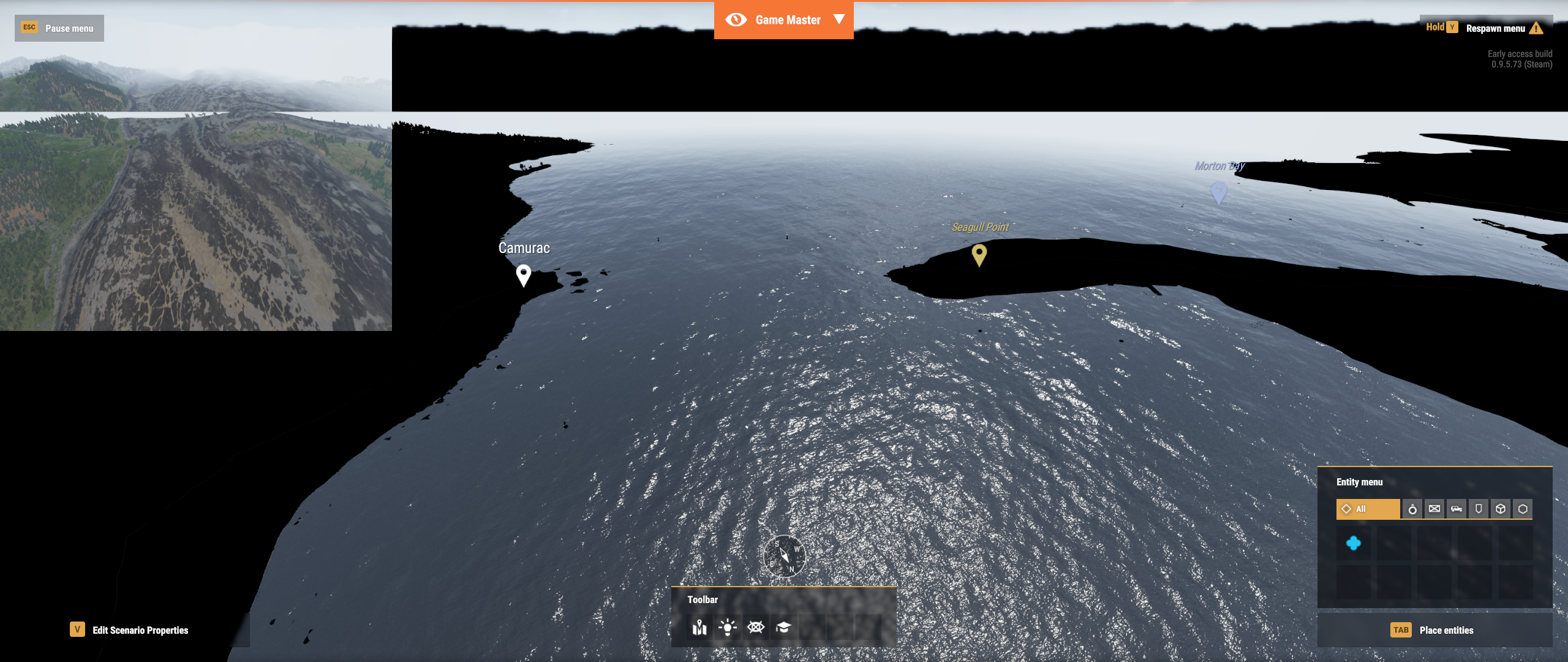
if i don't use HWAA then view is ok but no hardware antialiasing then.
obtuse aurora
loud crystal
can somebody suggest is it drivers issue or shaders issue https://i.imgur.com/AP...
Did you create a ticket on the feedback tracker? [https://feedback.bistudio.com/project/view/66/], that is the best place to report stuff to ensure the devs have an report logged
loud crystal
no i did not
pseudo shard
I can't find any servers, I literally have to completely restart the game and not press refresh to see the server list and I'm pretty sure its missing 90% of the servers and if I take too long looking at them they all disappear and it tells me theres a problem with my internet, which there is not, I know for a fact there is no problem on my side, there is not a single other game in my library of over 500 titles that gives me this error, this is a Reforger problem, another one that I cannot report using the crash reporter, so probably a shit tonne of people are also having this problem and it's not being reported to Bohemia. I have tried every patch and this is the first time I've had this issue, and I have it regularly regardless of time of day, or anything that could result in a network issue on my side, the server browser is consistently broken with new update, can't join games at all, Well I could join one of the 10 servers that pop up, but there no people on them, and I know there should be at least 100 more servers.
Honestly, I'm ready to give up on this game, which is unfortunate because I'm a massive arma fanboy and I love the new engine, I have spent days doing nothing but making maps and missions with the new tools, but with all the server issues theres no point in doing that, the community for this game will die out very quickly if it hasn't already because its multiplayer only, and you can't play with each other without massive issues. Too much playtime for a refund aswell, shame.
Yep, I for sure can't see all the servers, it shows me the same 10 servers in an infinite loop if i scroll through the list, completely broken game, sure would be cool if they released something to do in singleplayer other then the tutorial so I would have SOMETHING to do while they fail to fix their servers. Guess I'll just go play something else, might aswell just uninstall it.
 hazy glade
pseudo shard
I can't find any servers, I literally have to completely restart the game and no...
hazy glade
pseudo shard
I can't find any servers, I literally have to completely restart the game and no...
do you have any filters enabled ( X )
also make sure your firewall is not blocking any reforger connection
pseudo shard
hazy glade
do you have any filters enabled ( X )
no sir, and if it was blocking It wouldn't "time out" after showing me servers, it would never show me any.
hazy glade
what servers do you see? can you screenshot the view?
zealous jacinth
Don't bother trying to troubleshoot it. It is indeed their end. Restart works, I suggest using favorites or history to browse if you find something populated. Waiting for more fixes myself
 ruby turret
Been kicked off the same server 4 times in a row
Will just leave the game alone for tonight, hoping for better luck tomorrow
 lofty saffron
have come back to the game 4 weeks after trying it last. the server search function seems to break and I need to restart the game (tho the filter system never worked - but now seems to break things)
 topaz basin
For the past 4 days, I have been unable to load up any of the "All" workshop page to search for any mods; the only exception is the workshop page for mods that I already downloaded. And since last night, I can't get the server search function to work, as in none of the servers appear and then I get an backend error. Although this is sometimes briefly fixed after restarting my game.
loud crystal
don't know is there any point to debug or search possible causes for DC issue as we have not much understanding what is going on under the hood or what should be going on. But i captured some network traffic. When i pressed join button the session started with DNS query to get IP and followed with the quite stable UDP packet exchange between peers. Then after 54 solid seconds client started TCP/TLS conversation with BI server which ended with [FIN, ACK] packet and after that client sent 4 [RST] packets. At that point i was kicked from server. My best bet is that there is no network issues in routers or where ever on the line but there is some kind of logic error inside software.
hazy glade
loud crystal
don't know is there any point to debug or search possible causes for DC issue as...
All technical problem ideas are likely useful 👍
 dire junco
After looking at the Known Issues list and the recent posts, I'd also like to add that I have regressed from not being able to join servers (This was around 4 weeks ago), to not being able to load any server on the server list (Now). Whenever I go into the multiplayer screen to select a server, I instead get this. https://cdn.discordapp.com/attachments/656800815012380672/989593764454608996/unknown.png

Troubleshooting I've tried are:
-Verifying Integrity
-Reinstalling
-Flushing DNS
-Using Google's DNS
-Using VPN
-Changing from WiFi to direct Ethernet
-Changing routers
-Deleting my profile folder in the Arma Reforger's My Documents folder
-Turning off BattleEye
-Praying
None has yet to work, same issue every time.
Also of note, I cannot load any mod at all in the workshop page, it is infinitely loading the workshop page.
 scenic wind
dire junco
After looking at the Known Issues list and the recent posts, I'd also like to ad...
scenic wind
dire junco
After looking at the Known Issues list and the recent posts, I'd also like to ad...
not only you have the problem, since a few hours i get the same error message
tight dock
May be that backend went down (on their (back) end)
scenic wind
yeah maybe, my dedicated servers are still connected, just the client got no connection.
tight dock
yeah DS dont complain
scenic wind
yeah, so i think there are maybe two different infrastractures for ds and clients
plush nova
It takes some time for DS to time out since heartbeats are long etc. yeah it seems like services are down
scenic wind
okay, this is strange, some week ago my client had always connection to the BE server but the DS has instantly stopped to work 🤷♂️
tight dock
plush nova
It takes some time for DS to time out since heartbeats are long etc. yeah it see...
Ive just restarted server when i wrote it. It didnt complain
 daring vortex
So my game crashes whenever I open terrains/common/sky/skybox
07:58:31:748 RENDER (E): Current material class MatSkyDomeSun doesn't support needed vertex format (VDNormalUV2), object MaterialSphere.xob (material Terrains/Common/Sky/SkyBox/SkyDome_Sun.emat)
Exception: Access violation. Illegal read by 0x7ff78eabee0f at 0x0
[zlibVersion]: ??? addr:0x7ff78eabee0f
[zlibVersion]: ??? addr:0x7ff78eb618df
[zlibVersion]: ??? addr:0x7ff78eb6356a
[zlibVersion]: ??? addr:0x7ff78eba7e22
[zlibVersion]: ??? addr:0x7ff78edab7d7
[zlibVersion]: ??? addr:0x7ff78f11029a
[zlibVersion]: ??? addr:0x7ff78f112f45
[zlibVersion]: ??? addr:0x7ff78eb5e6aa
[zlibVersion]: ??? addr:0x7ff78eb5f44b
[zlibVersion]: ??? addr:0x7ff78ea37116
[BaseThreadInitThunk]: ??? addr:0x7ffab40c7034
[RtlUserThreadStart]: ??? addr:0x7ffab4942651
[RtlUserThreadStart]: ??? addr:0x7ffab4942651
 shy roost
dire junco
Troubleshooting I've tried are:
-Verifying Integrity
-Reinstalling
-Flushing DNS...
shy roost
dire junco
Troubleshooting I've tried are:
-Verifying Integrity
-Reinstalling
-Flushing DNS...
that prayer part had me dying lol for ive been praying to find a good group to play with
 quick sand
So I’ve restarted my game and unistalled. Multiple times. My servers are still down?
tight dock
quick sand
So I’ve restarted my game and unistalled. Multiple times. My servers are still d...
You cant see servers?
quick sand
Nope
tight dock
quick sand
Nope
Win 10?
 brisk viper
He’s on Xbox
quick sand
Correct Xbox
tight dock
Oh, dont mind me then
 midnight bridge
quick sand
So I’ve restarted my game and unistalled. Multiple times. My servers are still d...
midnight bridge
quick sand
So I’ve restarted my game and unistalled. Multiple times. My servers are still d...
NAT type open? Did you tried to clear your mac address in Xbox network settings?
midnight bridge
quick sand
My mac address?
It worked for many Xbox gamers here.
 timber plover
Hello I encountered this problem Access violation Illegal read by 0x7ff98adba9c0 at 0x10 when trying to log into my server with mods.
I have already deactivated the firewall, and checked the integrity of the files,Can you help me?
tight dock
Try uninstalling battleye or running game as admin
tight dock
Tried clearing Documents\My games\ArmaReforger ?
loud crystal
timber plover
Hello I encountered this problem Access violation Illegal read by 0x7ff98adba9c0...
what about without mods?
timber plover
It works
timber plover
tight dock
Tried clearing Documents\My games\ArmaReforger ?
I try now
timber plover
tight dock
Tried clearing Documents\My games\ArmaReforger ?
I tried deleting the profile folder,but nothing
loud crystal
timber plover
It works
if it works without mods then i would start testing mods one by one.
timber plover
I only have one mod installed
loud crystal
then you can test some other mod. is there any reports for this current mod.
timber plover
loud crystal
then you can test some other mod. is there any reports for this current mod.
I try to test other mod,i hope it will go
I tried to test other mod,but nothing
loud crystal
well then it's broken
if there is no log about what is happening when mod is loaded or when you connect to server at the moment when memory violation occurs then it is quite difficult to guess what might be an issue here.
timber plover
Log C:\Users\emman\OneDrive\Documenti\My Games\ArmaReforger\profile\crash.log started at 2022-06-25 15:31:40 (2022-06-25 13:31:40 UTC)
DESKTOP-MM2I50P, 25.06 2022 15:31:40
Unhandled exception
Program: D:\SteamLibrary\steamapps\common\Arma Reforger\ArmaReforgerSteam.exe
Reason: Access violation. Illegal read by 0x7ff98adba9c0 at 0x10
[RtlAllocateHeap]: ??? addr:0x7ff98adba9c0
SymGetSymFromAddr:126, addr:0x7ff93de8bb58
SymGetSymFromAddr:126, addr:0x80
SymGetSymFromAddr:126, addr:0x7ff93deb7ee0
SymGetSymFromAddr:126, addr:0x54e86f51
SymGetSymFromAddr:126, addr:0x7ff93dfc18d4
SymGetSymFromAddr:126, addr:0x80
SymGetSymFromAddr:126, addr:0x7ff93de8422f
SymGetSymFromAddr:126, addr:0x7ff93de8422f
(Press Retry to debug the application - debugger must be attached)
Runtime mode
CLI params: beservice
loud crystal
this unfortunately is not helpful even for BI devs which i'm not. Access violation is already sign that some developer (BI or MS) did not put much effort to add some code for guards to check bounds before trying to mess with memory or allow other parties to do this. Like log message points out there was unhandled exception and because it was unhandled by game code there is no meaningful and helpful log message about the real problem.
timber plover
Unfortunately, I cannot share the photo of the crush reporterbecause in this chat it does not share files
loud crystal
what about mods you have tested are these public or your own?
loud crystal
official mod?
timber plover
Yes,Bohemia Interactive
loud crystal
tired this mod on BI server and my client did not crash.
timber plover
I think I got the mod right: "mods": [
{
"modId": "591AF5BDA9F7CE8B",
"name": "Capture & Hold",
"version": "1.0.0"
}
]
loud crystal
looks ok
timber plover
I don't understand why then
loud crystal
can you connect to BI server with this mod?
just to know is it your server only or others also
timber plover
I've seen videos on YouTube where it works
loud crystal
yes with reforger there is this strange thing that it works for others and not at all for the others.
there are some empty servers with this mod where you can see at least that your client is ok. if it is. and then you know that server need's some attention.
timber plover
I tried in another empty server and it keeps crushing
loud crystal
well then it's client. and probably your server is ok
timber plover
What mod do you recommend?
loud crystal
and i'm out of ideas 🙂 seems that i don't have that issue so who knows what it is
loud crystal
timber plover
What mod do you recommend?
can not recommend any mod in current state. seems that lot of things might misbehave and crash or do what ever nonsens
but you can still try out what you like and maybe you find something what works for you
timber plover
loud crystal
there are some empty servers with this mod where you can see at least that your ...
Thank you very much, if so, what do you recommend I revise in the server as settings?
lone bough
crashes are about the same with and without mods, but users cant update mods while joining servers right now so they get discouraged
 marble plinth
Constantly getting "No connection with backend"
 umbral wyvern
Is there a link for minimum hardware requirements for Reforger?
compact flax
umbral wyvern
Is there a link for **minimum hardware requirements** for Reforger?
https://store.steampowered.com/app/1874880/Arma_Reforger/ it's halfway the page (as with all Steam product pages)
 slow swift
Wondering if anyone could shed some light on an issue.. When I load into a scenario with or without mods loaded, I cannot move my character.. Is there a fix of some sort by any chance?
 nimble hinge
Do the mod tools require higher specs? I'm having issues with reloading scripts and the world editor and I'm wondering if 12g of ram is just a little shy of enough
lone bough
nimble hinge
Do the mod tools require higher specs? I'm having issues with reloading scripts ...
I know it sometimes crashes when reloading while you have world editor open
did anyone fix the problem with GPU usage being higher when game is not in focus vs in focus?
game barely uses any GPU while in focus but as soon as I alt tab it goes up to 80%
nimble hinge
@lone bough yup. That's it. It's very frequent for me. Even without having opened the editor.
lone bough
omg now gpu usage 100% doesnt matter what I do, fps down to 15
started when I opened the map
loud crystal
what might be the problem or internal condition when multiplayer server list ping column has no values but only three dots ("...") for most of the servers? I see 7 servers with ping "999+" but rest of the list has no ping value only dots.
nimble hinge
@lone bough about this issue. I went out and bought another 16gigs of ram and it hasn't slowed or crashed since. Pretty sure there's a memory leak
lone bough
nimble hinge
<@267285803720245258> about this issue. I went out and bought another 16gigs of ...
o nice, maybe that's the issue then but I got 128 gigs so I probably wouldn't have noticed anyway
glad u got it working
nimble hinge
Oh wow
timber plover
timber plover
---------------------------------------------
Log C:\Users\emman\OneDrive\Docume...
I still have the same problem after the update.
jagged shore
timber plover
I still have the same problem after the update.
In your path to log, I see it mention OneDrive. Do you have backing up of documents using OneDrive set up?
 valid hedge
Hey all, I haven't played for two weeks. Is the network booting issue still the same?
jagged shore
valid hedge
Hey all, I haven't played for two weeks. Is the network booting issue still the ...
There were some improvements but causes are different for different people. Best is to try it and see if it has improved for you.
 north raft
i tried it yesterday, i have had no DC for over 2h, i only had full game crash
lone bough
servers and clients still crash, but I only play game master, so maybe other game modes are fine
lone bough
hey so whats the deal with things in game master suddenly taking 20 seconds to spawn when multiple game masters are present
since latest update
problem is game master missions rely on these things not taking long to spawn to keep the mission going
plush nova
lone bough
hey so whats the deal with things in game master suddenly taking 20 seconds to s...
Do you mean it takes a while for you to see what another GM spawned?
lone bough
plush nova
Do you mean it takes a while for you to see what another GM spawned?
things I spawn as well, but when I was solo GM (as in the only one on server) it seemed to be much quicker
I didn't see anything in server logs
plush nova
lone bough
things I spawn as well, but when I was solo GM (as in the only one on server) it...
Hmm, yeah you wont see anything on it, it is possible the streaming budget is being hit and to save server from melting it prevents instant streaming.
Otherwise having multiple GM's is kind'a intensive, its basically like having all characters/vehicles/entities that you spawned streamed in, so it can slow things down performance wise as well.
lone bough
so were streaming budgets changed with recent update?
plush nova
No, but networking of "big packets" was, that only happens with complex compositions.
lone bough
we were the only 2 people on the server, we plopped some arsenal boxes and a squad of infantry, and at some point it took more than 10 seconds to add more things
is there any server config variable I can try changing just to see if it makes any difference?
plush nova
You can try and take a look at budgeting and streaming deltas if you wish, I will pass it on to QA just in case.
lone bough
sure, I was also told that for someone it took a minute to spawn new AI squads, but I wasn't able to get it to be this slow - that server had more players on it though, like 10, two game masters
not sure if this increases with player count
maybe I can try reproducing this with peertool
plush nova
Yup, characters are nearly the most complex entity you can spawn, they can take a while depending on hardware
lone bough
that's ok, I don't expect any of it to be instant, but there was a change after the update
oh no, peertool doesnt connect 😦
lone bough
plush nova
Yup, characters are nearly the most complex entity you can spawn, they can take ...
I was able to reproduce it alone on a server, it happens a bit later - with 2 people you could say it happens twice as fast, assuming we were adding things at the same rate, now, I waited a few minutes and placing ANY new entities takes a few dozen seconds - up to a minute
there's no chance that all entities are being sent every time anything is created, right? like, increasing the size of the data to be transmitted this way
plush nova
No
lone bough
I waited a few mins to maybe see if after a few minutes this returns to normal, as if the pipes were choked/things were being created too fast
would you like me to post videos of this to the feedback tracker?
plush nova
Sure, just link it back here so I can push it trough
lone bough
interestingly, the new entities sometimes appear almost immediately after I delete something, though might be a coincidence
lone bough
plush nova
Sure, just link it back here so I can push it trough
I know there's a lot of entities in the video's session, but removing these did not really speed up placement of new ones afterward 🧐
added one more vid
lone bough
would this be a causing a game crash?
16:50:46:378 DEFAULT   (W): Target weapon is not set in weapon manager
16:50:54:960 UpdateEntities
16:50:54:960  SCRIPT    (E): Can't delete instance (of class: 'WeaponComponent') with 2 references
This is something that happens when a player character is deleted afair - nothing critical
lone bough
ok
lone bough
got a crash again, also with this as the last line
17:39:33:535 SCRIPT (E): Can't delete instance (of class: 'WeaponComponent') with 2 references
Program: C:\Program Files (x86)\Steam\steamapps\common\Arma Reforger\ArmaReforgerSteam.exe
Reason: Access violation. Illegal read by 0x7ff649d0693f at 0x60


Class:      'SCR_AICombatComponent'
Function: 'Event_OnWeaponChanged'
Stack trace:
scripts/Game/AI/Components/SCR_AICombatComponent.c:521 Function Event_OnWeaponChanged

SymGetSymFromAddr:487, addr:0x7ff649d0693f
the stack trace is now more relevant than b4 update - great
lone bough
19:12:52:685 rpl::Pip::FixedStep
19:12:52:685  SCRIPT       : FINISHED
19:12:52:685  RPL       (E): IReplication::Finalize: Item was removed from replication on local machine before the replication could do it! item=0x80047C81 con=0x1
19:13:07:405 RPL       (E): Socket error occurred during receive. Socket dead.
19:13:07:451 RPL       (E): ClientImpl event: socket died (identity=0x00000001)
no crash just a disconnect with this one
jagged shore
First error should not be fatal. Socket error is most likely cause of disconnect. It happens when OS reports some kind of error. Planning to improve logging of those, but it might be hard to figure out even with better logging.
lone bough
well at least it wasnt a crash! the above access violation happened to me 3 times today
valid hedge
I was circle strafing a proned enemy at 1 meters distance, hip fired at least five shots into him. Saw the impact VFX for each shot. He didn't die. I don't think I have the patience 😆
timber plover
jagged shore
In your path to log, I see it mention OneDrive. Do you have backing up of docume...
In my documents no
 quartz umbra
they still didn't fix internal error
 stray plank
valid hedge
I was circle strafing a proned enemy at 1 meters distance, hip fired at least fi...
stray plank
valid hedge
I was circle strafing a proned enemy at 1 meters distance, hip fired at least fi...
Maybe enemy had Armor 1000$ premium DLC. 🤔 Ahh, sorry, this is not a EA game. Probably just common bug.
 opaque raft
How is this still not fixed
hazy glade
opaque raft
How is this still not fixed
What is this you refer to?
lone bough
the thing with the thing, u know
 tardy kindle
Joining a dedicated server is asking me to downgrade my mod version, even though server is running the latest version
if I comply it obviously doesnt connect
I think its because Im using "Direct join" but have a server selected in the list that has the lower version
tight dock
tardy kindle
Joining a dedicated server is asking me to downgrade my mod version, even though...
Are you running the server? Or just joining?
tardy kindle
both
im working around it by making my server public and passworded
but its definitely a bug
tight dock
Yup. But out of my own curiosity. Are you using version parameter for mod in servers config?
tardy kindle
no
still cant connect though, client log is only giving:
19:35:00:868 NETWORK      : Starting RPL client, connecting to address 192.168.2.48:2001
19:35:00:869 RPL          : Starting client
19:35:30:932 RPL       (E): ClientImpl event: handshake timeout (identity=0x00000001)
its happening to multiple people, connecting to conflict seems to work fine tho, only happens for overthrow (59B657D731E2A11D)
server logs:
19:35:00:870 RPL          : ServerImpl event: authenticating (identity=0x00000000, address=192.168.2.48:64313)
19:35:30:874 RPL          : ServerImpl event: authentication timeout (identity=0x00000000)
19:35:30:876 NETWORK   (E): AuthFailureCallback called (identity=0x00000000
19:35:30:878 RPL          : ServerImpl event: connection refused (identity=0x00000000)
Hmm logs dont state that there is mod version missmatch. The ussual script checksum blah blah..
tardy kindle
no this is nothing to do with mod version mismatch now
both versions are exactly the same and it let me connect without asking to downgrade
tight dock
Hm, try setting only password but leave server visible
tardy kindle
thats what i did
tight dock
Nvm i forget things fast
tardy kindle
its obviously an issue with my mod, but its only giving
19:35:30:874 RPL : ServerImpl event: authentication timeout (identity=0x00000000)
exactly 30 seconds after someone tries to connect
so I cant exactly debug it.. and it works fine with peertool in the editor
tight dock
Yeh in my testing thats standard timeout for client
Perhaps put it in feedback tracker
tardy kindle
hmm it seems to be trying to remotely load a save file from the client
tight dock
How so?
tardy kindle
ill gather some data and submit something
19:34:19:973 SCRIPT : RequestLoad: $profile:.backed\OVT_Campaign_Eden.json
definitely didnt ask it to do that
tight dock
Do you know if it happens with any mod or just this one?
tardy kindle
no idea
but that file doesnt exist so its trying to load it anyway and triggering my SaveLoadComponent
which errors
ill submit that to feedback tracker
tight dock
Ill try some random mod later. So it was visible false and passworded right?
tardy kindle
visible: true and passworded
tight dock
Oh? Why did you have to use direct connect then?
tardy kindle
it is nothing to do with the visibility of the server
or direct join, im talking about a completely different problem from that
im saying that the dedicated server will try to load a save that doesnt exist and this can cause problems when it tries to Deserialize
i can code around it but will submit a bug anyway because I dont think it should trigger Deserialize with a blank struct
tight dock
tardy kindle
I think its because Im using "Direct join" but have a server selected in the lis...
Oh nvm then i was going off that
tardy kindle
ancient history
jagged shore
tardy kindle
server logs:
```
19:35:00:870 RPL : ServerImpl event: authenticating (...
That log sequence means that server didn't authenticate the join request with backend in time.
tardy kindle
yes thats what it says
jagged shore
tardy kindle
```
19:34:19:973 SCRIPT : RequestLoad: $profile:.backed\OVT_Campaign_E...
Does it say .backed in log? That sounds like a typo somewhere, since those should be stored in .backend (missing n). If that's coming from vanilla and not mod, then definitely good to report it on feedback tracker.
jagged shore
If they are also trying to save into .backed, then that write will fail as well.
tardy kindle
it writes and reads the saves fine
jagged shore
Ah, could be just logging issue then.
tardy kindle
yep
I ended up solving that error anyway, was just spawning dynamic entities in EOnInit
 woven merlin
Heyyy so I have a problem on Reforger,I can’t drive any Vehicles,Everytime I get into one it puts itself into Auto Handbrake then when i try to release the Handbrake the Game will put it back Up making it Literally impossible to move forward,I tried rebinding and all that but nothing is working does anyone know how to fix this?
lone bough
wat I didn't even know there's a handbrake
woven merlin
lone bough
wat I didn't even know there's a handbrake
bruh moment
lone bough
------------------------------------
DESKTOP-6FD5QJJ, 02.07 2022 13:14:02
Unhandled exception

Program: C:\Program Files (x86)\Steam\steamapps\common\Arma Reforger\ArmaReforgerSteam.exe
Reason: SEH exception thrown. Exception code: 0xc0000374 at 0x7ffb9faac0a9

[RtlIsZeroMemory]: ??? addr:0x7ffb9faac0a9
[RtlIsZeroMemory]: ??? addr:0x7ffb9faac073
[_misaligned_access]: ??? addr:0x7ffb9fab4e92
[_misaligned_access]: ??? addr:0x7ffb9fab517a
[_misaligned_access]: ??? addr:0x7ffb9fabf665
[RtlGetCurrentServiceSessionId]: ??? addr:0x7ffb9f9c829f
[RtlFreeHeap]: ??? addr:0x7ffb9f9c7631
[free_base]: ??? addr:0x7ffb9d61218b
SymGetSymFromAddr:487, addr:0x7ff7e6c96d52
SymGetSymFromAddr:487, addr:0x7ff7e7211da7
SymGetSymFromAddr:487, addr:0x7ff7e7212b8d
SymGetSymFromAddr:487, addr:0x7ff7e72126ef
SymGetSymFromAddr:487, addr:0x7ff7e7215940
SymGetSymFromAddr:487, addr:0x7ff7e764ef70
SymGetSymFromAddr:487, addr:0x7ff7e764f64b
SymGetSymFromAddr:487, addr:0x7ff7e7776778
SymGetSymFromAddr:487, addr:0x7ff7e777ce28
SymGetSymFromAddr:487, addr:0x7ff7e732fb56
SymGetSymFromAddr:487, addr:0x7ff7e7300c0b
SymGetSymFromAddr:487, addr:0x7ff7e72fd6c4
SymGetSymFromAddr:487, addr:0x7ff7e72fc04b
SymGetSymFromAddr:487, addr:0x7ff7e714bcdc
SymGetSymFromAddr:487, addr:0x7ff7e72a96d6
[BaseThreadInitThunk]: ??? addr:0x7ffb9ee454e0
[RtlUserThreadStart]: ??? addr:0x7ffb9f9a485b
[RtlUserThreadStart]: ??? addr:0x7ffb9f9a485b
 olive tendon
Hello
Well, I have a USB Mic, but ingame i only can talk 1 time, i mean i just press "T" once and then i cant keep talking
i need disconect mi mic and reconnect again to press T once and same problem... I already set the default dispositive in windows config and steam config but I still have the same problem... any idea? hotfix? fix? pacth?
really need help 😦
tight dock
Check if there is any clue to it in the logs
olive tendon
how i do that?
tight dock
Go to Documents\My games\ArmaReforger(profile) and open console.log see anything with tag AUDIO
olive tendon
17:17:10:432 AUDIO (E): Voice 153718(0xc285fab0) cannot be set as output voice 153719(0x2463cca8), because other output voices has different sampleRate (48000, 44100).
17:17:10:861 AUDIO (E): Voice 153786(0xc285fd20) cannot be set as output voice 153787(0xc354bf30), because other output voices has different sampleRate (48000, 44100).
17:17:11:412 AUDIO (E): Voice 154012(0xc285fec0) cannot be set as output voice 154013(0x1fe85878), because other output voices has different sampleRate (48000, 44100).
17:17:11:821 AUDIO (E): Voice 154082(0x1fdab6a0) cannot be set as output voice 154083(0xc354b7f8), because other output voices has different
17:03:57:296 AUDIO : -->New device state is DEVICE_STATE_NOTPRESENT (0x00000004)
17:03:57:296 AUDIO : -->New device state is DEVICE_STATE_NOTPRESENT (0x00000004)
17:03:57:401 AUDIO : -->New device state is DEVICE_STATE_NOTPRESENT (0x00000004)
17:03:57:401 AUDIO : -->New device state is DEVICE_STATE_NOTPRESENT (0x00000004)
17:03:57:421 SCRIPT (W): Unable to assign group leader with replication ID = -2147277221!
17:03:58:087 AUDIO : -->New device state is DEVICE_STATE_ACTIVE (0x00000001)
17:03:58:087 AUDIO : -->New device state is DEVICE_STATE_ACTIVE (0x00000001)
17:03:58:259 AUDIO : -->New device state is DEVICE_STATE_ACTIVE (0x00000001)
17:03:58:259 AUDIO : -->New device state is DEVICE_STATE_ACTIVE (0x00000001)
tight dock
Hmm could try setting sample rate to match, might help and if you have the option. (But thats for output)
Im unsure what these device states are, perhaps busy or disconnected?
tight dock
olive tendon
busy not, discconected neither
Hmm i had simlar issue in a3 when i had my usb 2 headset plugged into usb3 slot
olive tendon
oh
I have plug mi usb mic in a usb 3
and i have configurated in 48k hz
letme change the config
tight dock
Did it work?
olive tendon
i change my sample rates to 44.1 but Reforger still detect 48 sample rate, i wanna shutdown my pc and try again
tight dock
If i read correctly the sample rate issue is for output (speaker/headphone) part.
Whats more related to your issue is that game detects that your audio device changed to device_state_notpresent or disconnected
Like your mic briefly looses connection
olive tendon
19:12:43:693 SCRIPT (W): Unable to assign group leader with replication ID = -2146970946!
19:12:47:419 SCRIPT (W): Unable to assign group leader with replication ID = -2146982195!
19:12:58:020 SCRIPT (W): Unable to assign group leader with replication ID = -2146982931!
19:13:00:415 SCRIPT (W): Unable to assign group leader with replication ID = -2146970213!
19:13:12:536 SCRIPT (W): Unable to assign group leader with replication ID = -2146969686!
olive tendon
tight dock
If i read correctly the sample rate issue is for output (speaker/headphone) part...
This appear when i disconect and reconect the device
then i cant talk one, but after y can do it any more, so every time i push T o Caps to talk in console appears this
olive tendon
olive tendon
19:12:43:693 SCRIPT (W): Unable to assign group leader with replication ID = ...
.
olive tendon
olive tendon
then i cant talk one, but after y can do it any more, so every time i push T o C...
I cant*
tight dock
Dont think thats related to audio. Perhaps due to a short lag when you try to initiate voice and it fails
olive tendon
I find some identic problem in disscusion or in this discord
tight dock
Might be a far cry, but reinstalling device drivers?
olive tendon
but no body have solutions lol
olive tendon
tight dock
Might be a far cry, but reinstalling device drivers?
probably i hate this issue
tight dock
I mean i have dirty workaround, just toggle your voice and hope you dont die :).
olive tendon
Bro i fix the issue, i uninstall the driver
tight dock
Lol
 gentle drum
After the last update, something seems to be wrong with the Arsenal for mp missions. I place down an arsenal and during playtesting, it's full of equipment, then after returning to edit mode and saving, during the game on the client shows arsenal is empty.
unborn brook
bruh
 median mason
olive tendon
I find some identic problem in disscusion or in this discord
median mason
olive tendon
I find some identic problem in disscusion or in this discord
“Assign group leader” logs are unrelated to audio. It’s a spam caused by one of our script systems incorrectly handling network streaming. It’s known and will be addressed in one of the future updates.
olive tendon
No problem, the real issue was the software of my usb mic, I uninstall the software and the issue doesnt exits more
ruby turret
For some reason everytime i try and join the ELAN life server, the game crashes after the loading screen
hazy glade
they probably got something broken
you best to contact their admins to see if they can figure out whats wrong
lone bough
ruby turret
For some reason everytime i try and join the ELAN life server, the game crashes ...
if its modded u may need to wipe your addons folder
lone bough
seems like a lot of people are getting unpredictable checksum mismatches when joining modded servers
like, they might have the same mod version, but wiping their addons folder and redownloading makes it work
once this is fixed modded servers will be doing much better
I don't have steps to reproduce because it's seemingly random for me
though I feel like it happens more after mods are updated
so maybe its something to do with mod updates, not mod downloads (since clear addons directory usually resolves it), I don't know
ruby turret
lone bough
once this is fixed modded servers will be doing much better
due to internet limiting in my nation wasting 12 gigabytes is a stupid idea, so i will just wait for a fix
grizzled walrus
Make sure that you don't have any rdb files in your profile (add-ons folder is ok) while connecting to multiplayer server. This will cause data mismatch error and won't allow you to connect.
Rdb is resource database and could be created if you tried Workbench without using any mod. Some people unpack their mods into profile folder, that can be also reason.
Mods can get corrupted during download or update, it's an issue we are looking at. Corrupted mod can cause multitude of issues.
As @lone bough mentioned above, clear your mods folder and redownload is currently best workaround
lone bough
yeah I'm pretty sure addons folder is clean for me when it happens
also I saw download progress go to like 200% at one point
@grizzled walrus sorry for the tag, do you know if there is going to be enforcement for which order mods load in, based on server config.json for example?
so loaded in same order as on server
 slender cedar
i've been getting disconnected from servers a lot with a pop up saying 'internal error', is that a reforger thing or is it just my shoddy internet?
 sly current
reforger thing
lone bough
also why is the map lowering my FPS to like 5 sometimes
compact flax

Although there are hundreds of possible reasons, from a bad script running to someone with a bad connection trying to access the server.
lone bough
is there any workaround for it so I don't have to restart my game?
map as in the item
now its 2 fps
every time I open map it gets slower
grizzled walrus
lone bough
every time I open map it gets slower
Known issue, no workaround known
Should be fixed in next update (hopefully, maybe, most probably)
tardy kindle
I can never update any mods atm in the workshop.. will sit at 0% downloading. Have to manually delete the folder from addons and re-download it
 blissful forum
I had the same problem, had to unsubscribe the resub to fix it
 lyric crater
hi! I have an arma reforger dedicated server. the server works fine, however I cant join using my public IP because my router dont have natloopback, and when I put in direct connect the lan address of the server the game dont find the server. Im using windows 10 to host. Any help?
 sick eagle
lofty saffron
i kinda want my money back hey
sick eagle
lofty saffron
i kinda want my money back hey
Same 🥲
unborn brook
Have they definitively fixed the DC issue yet?
It's been about 10 weeks since I refunded
lofty saffron
unborn brook
Have they definitively fixed the DC issue yet?
I played yesterday for less than five minutes and got a disconnect. Tbf, there was maybe a total of 50 people playing across all public servers. Not quite a thriving multiplayer scene
unborn brook
Jesus Christ. Thank God i Refunded Then 😂
This has gone down the shitter
lofty saffron
Yeah I really wish I could get a refund. Considering how long it's been with these game breaking bugs and how they intend to only support the game for a year or two before arma4, I feel a bit cheated for having paid what a finalised game normally goes for
lone bough
how do we stop the excessive GPU usage when window not in focus? or is this a reporting error?
 vapid dove
Is there something up with the workshop atm? I'm getting a lot of 'The response from the server took too long. Check your internet connection and try again." It eventually worked but it still seems spotty?
lone bough
same for me
vapid dove
Still can't search for anything on Workshop without 'The response from the server took too long. Check your internet connection and try again." popping up
I tried my VPN in-case my IP was being rate-limited and there's no change boss
 cosmic vale
lmao battleye just blocked arma reforger itself from loading
 still ravine
still issues with the workshop i see
cinder yacht
Yes. The workshop have many problem from yesterday morning. No communication from BI about that.
We are not able to connect to a server with mod :/
 raw sequoia
cinder yacht
Yes. The workshop have many problem from yesterday morning. No communication fro...
raw sequoia
cinder yacht
Yes. The workshop have many problem from yesterday morning. No communication fro...
It’s being looked into at this very moment. Should have a fix very shortly.
cinder yacht
Thanks for the answer. We wait them 😉
raw sequoia
cinder yacht
Thanks for the answer. We wait them 😉
Issue should be resolved.
Thanks for the patience!
cinder yacht
raw sequoia
Thanks for the patience!
Thanks to you to have take time to respond ! 😉
Have a nice day
lone bough
Unhandled exception

Program: C:\Program Files (x86)\Steam\steamapps\common\Arma Reforger\ArmaReforgerSteam.exe
Reason: Access violation. Illegal read by 0x7ff7e71072d6 at 0xffffffffffffffff


Class:      'SCR_LoadoutPreviewComponent'
Function: 'SetPreviewedLoadout'
Stack trace:
scripts/Game/UI/Menu/GameMode/SCR_LoadoutPreviewComponent.c:46 Function SetPreviewedLoadout
scripts/Game/UI/Menu/GameMode/SCR_DeployMenuTile.c:416 Function SetPreviewedLoadout
scripts/Game/UI/Menu/GameMode/SCR_DeployMenuTile.c:330 Function InitializeTile
scripts/Game/UI/Menu/GameMode/SCR_SelectLoadoutSubMenu.c:86 Function UpdateLoadouts
scripts/Game/UI/Menu/GameMode/SCR_SelectLoadoutSubMenu.c:58 Function OnMenuShow
scripts/Game/UI/Menu/SubMenu/SCR_SuperMenuBase.c:100 Function OnTabShow
scripts/Game/UI/Components/WidgetLibrary/SCR_TabView/SCR_TabViewComponent.c:225 Function CreateTabContent
scripts/Game/UI/Components/WidgetLibrary/SCR_TabView/SCR_TabViewComponent.c:307 Function SelectIndex
scripts/Game/UI/Components/WidgetLibrary/SCR_TabView/SCR_TabViewComponent.c:349 Function ShowTab
scripts/Game/UI/Menu/GameMode/SCR_RespawnSuperMenu.c:277 Function UpdateTabs
scripts/Game/Groups/SCR_GroupSubMenu.c:57 Function ConfirmSelection
scripts/Game/Groups/SCR_GroupSubMenu.c:65 Function HandleOnConfirm
scripts/Game/UI/Components/WidgetLibrary/SCR_NavigationButton/SCR_NavigationButtonComponent.c:55 Function OnClick
Program: C:\Program Files (x86)\Steam\steamapps\common\Arma Reforger\ArmaReforgerSteam.exe
Reason: Access violation. Illegal read by 0x7ff7e703693f at 0x60


Class:      'SCR_AICombatComponent'
Function: 'Event_OnWeaponChanged'
Stack trace:
scripts/Game/AI/Components/SCR_AICombatComponent.c:521 Function Event_OnWeaponChanged

SymGetSymFromAddr:487, addr:0x7ff7e703693f
SymGetSymFromAddr:487, addr:0x7ff7e7036987
SymGetSymFromAddr:487, addr:0x7ff7e767df07
SymGetSymFromAddr:487, addr:0x7ff7e710f648
SymGetSymFromAddr:487, addr:0x7ff7e710f0e5
SymGetSymFromAddr:487, addr:0x7ff7e7101ac0
SymGetSymFromAddr:487, addr:0x7ff7e70267bc
SymGetSymFromAddr:487, addr:0x7ff7e79341ef
SymGetSymFromAddr:487, addr:0x7ff7e79343ee
SymGetSymFromAddr:487, addr:0x7ff7e6cc86f5
SymGetSymFromAddr:487, addr:0x7ff7e70e3d0c
SymGetSymFromAddr:487, addr:0x7ff7e71b8ad2
SymGetSymFromAddr:487, addr:0x7ff7e78bbc65
SymGetSymFromAddr:487, addr:0x7ff7e78ad6bd
SymGetSymFromAddr:487, addr:0x7ff7e78ad490
SymGetSymFromAddr:487, addr:0x7ff7e6c945f2
SymGetSymFromAddr:487, addr:0x7ff7e6c94720
SymGetSymFromAddr:487, addr:0x7ff7e7e8b032
[BaseThreadInitThunk]: ??? addr:0x7ffb9ee454e0
[RtlUserThreadStart]: ??? addr:0x7ffb9f9a485b
[RtlUserThreadStart]: ??? addr:0x7ffb9f9a485b
2 crashes within the last 30 mins
sick eagle
raw sequoia
It’s being looked into at this very moment. Should have a fix very shortly.
And when will DCs will be fixed? 🙄
raw sequoia
sick eagle
And when will DCs will be fixed? 🙄
We've addressed a number of different issues regarding disconnects and networking, but not all of them. There is no singular issue to fix everything, unfortunately. However, we'll continue to work on them until they are completely resolved.
sick eagle
Alright, thanks!!
 charred saddle
Why i cant join my Modded server or any modded server at all ..?
I always get a crash
Access violation illegal read at ....
Why ?
 cedar gulch
 tardy shale
 charred saddle
Still cant Join any modded Servers ...
still getting this at crash Report
Reason: Access violation. Illegal read by 0x7ffde839a9c0 at 0x10
zealous jacinth
 median vessel
ok so im having problems with arma 3
median vessel
ok so im having problems with arma 3
could give a shot and try to help ya, I sent you to the arma reforger troubleshooting but I actually dont see an arma 3 troubleshooting channel in this discord. Any way you can send the error message itself?
 silver nest
charred saddle
Still cant Join any modded Servers ...
still getting this at crash Report
Reaso...
silver nest
charred saddle
Still cant Join any modded Servers ...
still getting this at crash Report
Reaso...
Having the same issue here
 raw spoke


 summer crater
I'm having issues.
I have no VOIP in the game, to be more specific, I can hear people but they cannot hear me. Initially, I would be able to speak for approx 30 seconds to 5 minutes. Then the VOIP input would cease, effectively leaving me mute. When the game is running, I can test the microphone through other programs (Discord, Steam, Windows, and my sound driver software) and I can absolutely confirm that the microphone is working properly.
I've been trouble shooting this for days and recently re-installed the game. Now I have ZERO mic input. Again, the microphone works properly.
I have tried multiple encoding profiles, I have disabled all sound inputs such as VR headset, I have made sure my mic is the default device, I have gone into Steam and verified it is all default.
I can deal with crashes, I can deal with lag, I cannot deal with this. There is only ONE other report that I have been able to google that had another user having the same issue, but was not solved.
tight dock
summer crater
I'm having issues.
I have no VOIP in the game, to be more specific, I can hear ...
-
Make sure mic is selected as default communication device in windows settings.
-
someone had simlar problem and he removed drivers and it worked flawlesly
summer crater
I can't just uninstall my drivers, I have a DAC
But I will check my logs to see what I can dig up
16:01:26:299 AUDIO : Device: Speakers (2- Sound Blaster X3) - Channels: 2, Sample rate: 48000
Is the only entry under Console.log that contains AUDIO
tight dock
Thats normal
summer crater
Now I'm getting
17:36:05:685 AUDIO : -->New device state is DEVICE_STATE_UNPLUGGED (0x00000008)
17:36:05:685 AUDIO : -->New device state is DEVICE_STATE_UNPLUGGED (0x00000008)
17:57:26:917 AUDIO : -->New device state is DEVICE_STATE_NOTPRESENT (0x00000004)
17:57:26:917 AUDIO : -->New device state is DEVICE_STATE_NOTPRESENT (0x00000004)
17:57:27:028 AUDIO : -->New device state is DEVICE_STATE_ACTIVE (0x00000001)
17:57:27:028 AUDIO : -->New device state is DEVICE_STATE_ACTIVE (0x00000001)
However, I restarted my game, joined a server. Still unable to speak, but no errors in the new log.
cinder yacht
"1. Make sure mic is selected as default communication device in windows settings."
This is i think the problem for you with micro no function but you ear sounds 😉
summer crater
As I stated earlier, the mic is the default device already and is the only enabled device.
tight dock
You have exactly same issue that guy above had. I agree tho. It is annoying and game should be able to solve that. But atm, it is what it is.
summer crater
I've removed literally every sound related driver, I am unable to get those errors to pop up at all.
Even on matches where I can join and talk for about 30 seconds.
lone bough
is there anything in today's patch that aims to fix the things I got errors for and posted at monday by chance?
compact flax
Did you post it on the feedback tracker, and did the status change there?
Otherwise it will most likely be at the bottom of the list or not added to the internal tracker at all
lone bough
bro I just wanted a yes/no answer
 short igloo
Did you press the report crash button in the crash reporter dialog?
If not, then probably not.
If yes then either yes, or it will be fixed later
For crash reports its a bit hard currently to connect public/internal progress. There is no feedback process to the user
lone bough
I've seen issues in feedback tracker remain in assigned state despite them being fixed as well
thanks
short igloo
Yeah seems the feedback tracker flow isn't working well. Do you have a example ticket?
lone bough
uh I know of an old one https://feedback.bistudio.com/T165607 this one is 100% fixed
 sonic spruce
short igloo
Yeah seems the feedback tracker flow isn't working well. Do you have a example t...
sonic spruce
short igloo
Yeah seems the feedback tracker flow isn't working well. Do you have a example t...
The mysterious feedback tracker workflow 
 snow nova
Is it a known issue that rifle doesn't respond when right mouse click?
 lean steeple
When I accidentally press ALT+ENTER my screen gets smaller. I'm not sure why I end up pressing it so much but it's happened a few times now. When I press it again it maximizes but it maximizes onto my secondary monitor and nothing I do will get it onto the main one until I exit (and one time I had to modify the ReforgerEngineSettings.conf file).
Is there any way I can fix this? Would it be considered a bug? I tried it with several other games including Arma 3 and whereas ALT+ENTER does make it smaller a second press maximizes it onto the same monitor.
grizzled walrus
lean steeple
When I accidentally press ALT+ENTER my screen gets smaller. I'm not sure why I e...
Alt+enter is standard windows shortcut to switch between fullscreen/maximized and window form.
There is not much we could do about it - we don't want win shortcut to stop working and we not gonna change usage of alt as for freelook.
(wait until you hear about commanding AI in arma 3 with freelook and trying to select 4th soldier in your team)
grizzled walrus
lean steeple
When I accidentally press ALT+ENTER my screen gets smaller. I'm not sure why I e...
actually sorry, I didn't read fully. As for maximinzing to different monitor, seems to be not-common issue. I had it once, but usually it works just fine. I use it when I want to actually change monitor, just alt-enter to window, drag it to other lcd, then alt-enter to maximize.
If you keep having this all the time, please report feedback tracker issue with more information, especially your hardware and graphics settings (can be copy of .conf file from profile)
lean steeple
grizzled walrus
actually sorry, I didn't read fully. As for maximinzing to different monitor, se...
Will do! Thank you!
sonic spruce
lean steeple
When I accidentally press ALT+ENTER my screen gets smaller. I'm not sure why I e...
have you tried win+shift+arrowbuttons as a workaround to move the window?
lean steeple
sonic spruce
have you tried win+shift+arrowbuttons as a workaround to move the window?
Yeah no matter what I did it always went full-screen on the secondary. Even when it was on the primary when windowed.
sonic spruce
lean steeple
Yeah no matter what I did it always went full-screen on the secondary. Even when...
Hm and the hotkey wouldnt move it back on the main window? wonky
lean steeple
Yeah windows and arrows would move it around but alt enter always jumped it back to the secondary display. I tried modifying the .conf file to be closer to my A3 one too since that wasn't doing it but that didn't help. I thought maybe because the window was smaller it was opening on the smaller monitor. A3 had a bigger size and wasn't doing that so I made the window size identical but it didn't help
sonic spruce
Ah oki
lone bough
any fix for camera stuck in one perspective?
grizzled walrus
lone bough
any fix for camera stuck in one perspective?
I didn't see any workaround yet, but I also cannot reproduce bug on my side
lone bough
grizzled walrus
I didn't see any workaround yet, but I also cannot reproduce bug on my side
seems to happen to me usually after I get killed and respawn
if I get a 100% repro I'll post
ruby turret
never had that happen to me but Ive have had the mouse wheel speed control stop working for a little and start working after 30 sec or so, for the camera btw
grizzled walrus
ruby turret
never had that happen to me but Ive have had the mouse wheel speed control stop ...
Make sure that you are not looking at user actions or bunker compositions. Both of those can steal mouse scroll input
lone bough
do items left on the ground not despawn anymore?
grizzled walrus
lone bough
do items left on the ground not despawn anymore?
They should, what did you observe exactly?
lone bough
I can't post a picture here but like 56 million items next to an arsenal and guns left on the ground long after fighting ended
I usually don't see so many items on the ground
I'm exaggerating the number but it really was a lot
lone bough
also when I open a box with tab I can't pick up items from it
instead, they appear at my feet
items on ground definitely dont despawn (game master server)
 tawdry carbon
Anyone have a GTX980 and experiencing heavy flickering with Reforger? Keep waiting for a patch to fix it on my end but it hasn't been addressed.
Windows11 64bit, latest nvidia drivers...
Reforger is unplayable for me, I've tried all video settings.
lone bough
video?
cinder yacht
tawdry carbon
Anyone have a GTX980 and experiencing heavy flickering with Reforger? Keep waiti...
Try to Block fps to 60. Maybe that help 😉
cinder yacht
Someone with this problem and have a solution to solve it ?
Command line: "D:\Program Files (x86)\Steam\steamapps\common\Arma Reforger\ArmaReforgerSteam.exe" -beservice
Exception: Access violation. Illegal read by 0x7ffa766da9c0 at 0x10
[RtlAllocateHeap]: ??? addr:0x7ffa766da9c0
SymGetSymFromAddr:126, addr:0x7ffa004ebb58
SymGetSymFromAddr:126, addr:0x80
SymGetSymFromAddr:126, addr:0x7ffa00517ee0
SymGetSymFromAddr:126, addr:0x8adda053
SymGetSymFromAddr:126, addr:0x7ffa006218d4
SymGetSymFromAddr:126, addr:0x80
SymGetSymFromAddr:126, addr:0x7ffa004e422f
SymGetSymFromAddr:126, addr:0x7ffa004e422f
grizzled walrus
lone bough
instead, they appear at my feet
Yeah one of the bugs which got more visible in latest update. Will be gone in next one, sorry for that.
 halcyon loom
Has there been any way to fix a problem on Reforger where it will not pick up your mic
tight dock
halcyon loom
Has there been any way to fix a problem on Reforger where it will not pick up yo...
You need to have your mic set as default communications device in windows settings. (If you are on xbox, i dunno)
halcyon loom
tight dock
You need to have your mic set as default communications device in windows settin...
Xbox
lone bough
grizzled walrus
Yeah one of the bugs which got more visible in latest update. Will be gone in ne...
infinite item carry capacity is definitely something
 stoic night
cinder yacht
Someone with this problem and have a solution to solve it ?
Command line: "D:\...
stoic night
cinder yacht
Someone with this problem and have a solution to solve it ?
Command line: "D:\...
I have this exact issue and nobody seems to know how to fix it.
loud crystal
i'm starting to see reasons like this "Kick cause code: category=1 'REPLICATION', reason=6'<unknown>'" What does it mean? whole day was none but now had two within very short time.
cinder yacht
stoic night
I have this exact issue and nobody seems to know how to fix it.
Yes other people have the same Problem. I hope BI DEV look to find a solution 😉
short igloo
Just make sure to press the "Send" button in the crash reporter
 azure folio
when i try to join the elan armalife server i get this error
Program: E:\SteamLibrary\steamapps\common\Arma Reforger\ArmaReforgerSteam.exe
Reason: Access violation. Illegal read by 0x7ffb4173a9c0 at 0x10

[RtlAllocateHeap]: ??? addr:0x7ffb4173a9c0
SymGetSymFromAddr:126, addr:0x7ffaa399bb58
SymGetSymFromAddr:126, addr:0x80
SymGetSymFromAddr:126, addr:0x7ffaa39c7ee0
SymGetSymFromAddr:126, addr:0xc4f3ea9a
SymGetSymFromAddr:126, addr:0x7ffaa3ad18d4
SymGetSymFromAddr:126, addr:0x80
SymGetSymFromAddr:126, addr:0x7ffaa399422f
SymGetSymFromAddr:126, addr:0x7ffaa399422f
Like Dedmen have said. All Time Press Send Button in Crash report window.
That help BI Devs to find a solution 😉
 tidal burrow
for some reason, on my PC reforger looks kinda crappy even on ultra graphics. any idea how to fix it? i got a new graphics card recently (rtx 2060 12gb) and it just doesn't look great. like distant objects are blurry. I have this issue in some other games too
tidal burrow
OK, give me a couple minutes @lone bough
@lone bough https://prnt.sc/WpRAxyomGjer
objects further than 100-200 meters out just look kinda bad and undetailed. The game just seems kind of uncanny and the lighting seems off.... this was taken on ultra graphics
lone bough
is your object detail maxed out and stuff?
if you haven't edited your LOD bias in your graphics drivers then the game looks like it's supposed to
games usually lower detail of objects away from you to make it run smoother
tidal burrow
i haven't messed with my drivers at all
lone bough
compare your screenshot with that of someone else, it might just be fine
tidal burrow
alright
 worldly plaza
dude some reason arma reforger uninstalls my AMD Driver if play it for long periods of time
like 2 hours it just turns off my monitors and when i turn it back on my drivers are gone. When I turn my whole PC back on.
compact flax
Reforger can do a lot, but not uninstalling software from your computer...
Sounds more like a faulty GPU or broken drivers.
worldly plaza
I would say that but its a fresh GPU, and i keep my computers pretty stable
The other thing is that its only arma reforger doing it. No other games have ever done it.
ruby turret
My old amd drivers uses to do that, I Had to reinstall them
not with arma however, just in general
 rocky blade
does this mean the workshop is down? BACKEND (E): Http Error apiCode="workshopApi.uploadManifestInvalid", message="Asset bundle manifest is invalid. Referenced dependency doesn't exist or isn't accessible" error code 400 - bad request
rocky blade
looks like I had a duplicate dependency! 🤷♂️
grizzled walrus
If someone has a problem with switching to third person, please send me your Documents/My Games/ArmaReforger/profile/.chimeraUserInput.conf on DM
Its possible it got corrupted during update between versions, would be nice to confirm solution on one of you, people.
Thanks
lone bough
it only happens to me after dying, then I ESC -> Respawn and it works again... unless this is a different issue
tidal burrow
at some points buildings seem to disappear/not load correctly, and only show windows and their interiors
ruby turret
yeah its noticeable in multiplayer but not in single player
tidal burrow
ok so it’s not just me theb
vapid dove
tidal burrow
at some points buildings seem to disappear/not load correctly, and only show win...
I've never had that bug and the first time I noticed it was when I was watching the review of Reforger from IGN released a month ago
I DO have the game installed on an SSD, to add to that
ruby turret
ive installed in on HDD because I forget to select a different drive :C
ruby turret
is that work? im lazy
tidal burrow
yeah just go to local files
hazy glade
worldly plaza
The other thing is that its only arma reforger doing it. No other games have eve...
Do you mean the drivers are really uninstalled or do they crash and you have to restart to get them back running
worldly plaza
hazy glade
Do you mean the drivers are really uninstalled or do they crash and you have to ...
Ok so what happens is my monitors appear to turn off. Yet my computer is still running ima try lower graphic settings but my Hardware doesn't seem to be strained that much. Sometimes it will remove my AMD drivers, if they are crashing. By that i mean they disappear after i restart my computer to fix the monitors.
hazy glade
This could be something you need to contact AMD for.
obtuse aurora
worldly plaza
like 2 hours it just turns off my monitors and when i turn it back on my drivers...
dude some reason arma reforger uninstalls my AMD Driver if play it for long periods of time
[21:34]
like 2 hours it just turns off my monitors and when i turn it back on my drivers are gone. When I turn my whole PC back on. (edited)
It's probably Windows 10/11 TDR (Timeout Detection and Recovery) kicking in - which by default if it detects no output or stalled device output (which basically it sees as no device output/non-responsive device such as while a GPU is busy rendering or busy doing long computations), Windows will then reinstall the display driver to recover the OS to avoid a hard restart, it's not exclusive to AMD hardware, it can equally happen with NVidia GPU's or iGPU's.
I own both AMD and NVidia GPU's and have had this happen with both.
FWIW the same thing also happened to me with BF1 in DX12 mode before I re-adjusted my TDR settings in the system registry.
The best guide/most straight-forward guide I have found for adjusting the relevant registry entries to adjust the TDR delay values is Substance's which you can find here: https://substance3d.adobe.com/documentation/spdoc/gpu-drivers-crash-with-long-computations-tdr-crash-128745489.html
As always a disclaimer: Editing the registry is entirely at your own risk, create a backup of your registry before making any changes which you can use to recover from.
lone bough
yep happens with rtx 3xxx series on Windows 11 as well, some game engines are worse than others (looking at you UE5  )
)
 solid nacelle
Just got reforger, launched the game and all my textures are very broken. (although terrain textures seem to be ok) Uninstalled game, verified files, still broken.
grizzled walrus
solid nacelle
Just got reforger, launched the game and all my textures are very broken. (altho...
gpu drivers? what gpu you have and is it fully compatible with dx12
solid nacelle
grizzled walrus
gpu drivers? what gpu you have and is it fully compatible with dx12
let me check real quick
solid nacelle
grizzled walrus
gpu drivers? what gpu you have and is it fully compatible with dx12
Fixed. Updated drivers and it works perfectly. Thank you so much!
lone bough
the what? your euler angles are broken?
 rotund thistle
Hello, we are a bunch of 10 people and we have a Server hosted by nitrado. Normally we play one evening in the week, mostly CAH. Every time we play i get disconnected or i cant join the server. The bandwith goes to the limit and i got kicked. I am the only one in the group who plays with a 4G connection. We figured out that if i connect to the server as the first player, there are no connection issues any more. The same Problem was solved in the same way with another player. Maybe it helps someone of you.
grizzled walrus
rotund thistle
Hello, we are a bunch of 10 people and we have a Server hosted by nitrado. Norma...
DM as for more info, thank you for the report.
rocky blade
I guess mission saves are still broken? 😦 08:34:03:794 SCRIPT : RequestSave: $profile:.backend\Conflict20PVEG.json 08:34:03:799 BACKEND (W): JsonApiStruct :: Object name="m_EditorStruct", not initialized!!!Shouldn't it be trying to save in the .save folder, not .backend?
jagged shore
Print is incorrect afaik. Path where it's being saved is different.
median mason
Indeed, the print is going to show ".save\XYZ.json" in one of the future updates
 broken venture
rocky blade
I guess mission saves are still broken? 😦 ```08:34:03:794 SCRIPT : Re...
broken venture
rocky blade
I guess mission saves are still broken? 😦 ```08:34:03:794 SCRIPT : Re...
I have looked into it and we pinpointed the issue. We'll have to tackle it in following updates. Thanks for the report.
lone bough
cant even spawn on a server after the update, game just hangs
with the environment sound looping in the background
oh ok it unhanged, I was just impatient
rocky blade
broken venture
I have looked into it and we pinpointed the issue. We'll have to tackle it in fo...
Thanks for tackling that so fast! 😎
 indigo arch


No clue what that means
If it's any help I also wasn't able to hear anyone speaking to me, even when they were trying
 bronze frost
On xbox i just tried loading up modded gamemaster after the update and im getting
scripts/Game/UserActions/OVT_OpenStorageAction.c(14): Only NULL assignment is allowed
lone bough
you'll need to contact the mod creator
 winter apex
indigo arch
https://cdn.discordapp.com/attachments/973389174898061312/999433144933556336/unk...
winter apex
indigo arch
https://cdn.discordapp.com/attachments/973389174898061312/999433144933556336/unk...
I just got this error
never got it before either
lone bough
right, these messages being reported are new (as in, their display - before this they were in the logs only)
valid hedge
"S" no longer makes my infantry move backwards. If I rebind to something different, it works. If I rebind back to "S", it does not work. "S" does work for reversing a vehicle