#enfusion_external_tools
1 messages · Page 1 of 1 (latest)
 vagrant linden
 restive raft
I created a tool that bulk-places entities using coordinates and orientations read from a JSON file.
If anyone else needs something like this, here it is:
https://github.com/Til-Weimann/entity-placement-plugin

 rain elm
restive raft
I created a tool that bulk-places entities using coordinates and orientations re...
rain elm
restive raft
I created a tool that bulk-places entities using coordinates and orientations re...
doesn't this already exist in the form of a CSV import?
json is more fun though
restive raft
rain elm
doesn't this already exist in the form of a CSV import?
idk
rain elm
restive raft
idk
there's this thing called Import Tool in World Editor which does a CSV import, but yours is nicer so I'm gonna yoink it next time I need to add 500000 trees to a map
restive raft
let me know if you need it, i added some more features to my private version as well, like Relative Y support, Normal Snapping etc.
rain elm
I only need it to align to terrain, because my export tools will already randomize sizes, rotations and what not
restive raft
the tool does take its time though, especially with lots of trees (10k+) it can take a couple of minutes
rain elm
I'm ok with waiting, even though this seems to be much longer than the CSV Import tool that's built-in
restive raft
i haven't figured out the bottleneck yet
rain elm
you probably have to read the whole json file in order to iterate
with csv you can do line by line
restive raft
yep, that might be it
rain elm
but I'm ok with having my dataset split into smaller json files or whatever, doesnt matter, I prefer working with json over csv anyway
only thing it's missing is the csv import uses first element of each line as the prefab to create
so I can randomize variants myself in my tools
in case you're interested the import tool csv format is as below
ResourceHash PosX PosY PosZ QuatX QuatY QuatZ QuatW Scale
as a workaround I can have separate json files per individual prefab so not a big deal
thanks for coming to my ted talk, great to see this plugin
restive raft
the plugin has randomization as well, you can just add multiple prefabs, but if you need it i guess you could also easily implement it yourself
rain elm
in the options yea
restive raft
So i updated it, it's now called Import Objects Extended, reads CSV, can blend between rotation and terrain normals, and supports optional Resource Hashes next to the Prefab Pool.
https://github.com/Til-Weimann/import-objects-extended
Edit: Long loading times are also fixed now, was due to the way I was determining flags
 gaunt pine
Guys, complete tutorial to generate island heightmap with TerreSculptor. French speaking, but, thanks to my work on transcription, good quality for the subtitles.
https://youtu.be/Oj23TLRGJQg

#arma #reforger #modding #game_development #jeuxvideo
Dans cette vidéo, nous apprenons les bases pour créer une ile à partir d'un champ de hauteur généré dans TerreSculptor et modifié à la marge dans Gimp.
Terresculptor est un outil totalement gratuit, téléchargeable là : http://www.demenzunmedia.com/home/terresculptor/
GIMP est également un...
 wanton storm
gaunt pine
Guys, complete tutorial to generate island heightmap with TerreSculptor. French ...
wanton storm
gaunt pine
Guys, complete tutorial to generate island heightmap with TerreSculptor. French ...
it doesnt work for me... help
gaunt pine
wanton storm
it doesnt work for me... help
You have to be more specific if you want some help, folk.
 rain elm
 neat hill
<@267285803720245258> Tool I wrote for batch material creation
neat hill
<@267285803720245258> Tool I wrote for batch material creation
where do you load the emat list from?
neat hill
Those are duplicates saved in profiles folder
rain elm
where do I drop my World Editor plugin, here?
 waxen island
Yes. I think external just means "non BI source"
 celest verge
So I made a new texture for the base game BDU trousers and I can't seem to change the Arsenal Icon. Anyone run into this before? I added my icon image as a 600x600 pt png (before importing) and set the icon under SCR_UniversallInventoryStorageComponent. The name and description changed like I wanted, but the arsenal icon doesn't change. Anyone know why this isn't working?
 junior pewter
Have you restarted workbench?
Also there should be an attribute in the inventory storage component called preview that allows you to change what model is shown in the inventory preview
celest verge
junior pewter
Have you restarted workbench?
Yeah, tried restarting. It is working for the helmets, but the blouse and the trousers don't seem to work. I am guessing they get called from somewhere else?
celest verge
junior pewter
Also there should be an attribute in the inventory storage component called prev...
Oh this might be my problem, Ill look for that
celest verge
junior pewter
Also there should be an attribute in the inventory storage component called prev...
So I activated the "display worn model" and there is a tiny tiny pair of pants in the display window now lol. I cant tell if that is my pair of pants or if it is the pants icon.
 shell crescent
that is my pair of pants that is your pair of pants. Reforger doesn't use picture for in game loadout system and instead everything is based on models present in game
celest verge
shell crescent
`that is my pair of pants ` that is your pair of pants. Reforger doesn't use pic...
Sweet, so I can use the x,y,z coordinate system just above it to bring it in to view? I am going to give it a shot.
shell crescent
https://community.bistudio.com/wiki/Arma_Reforger:Faction_Creation#Creating_retextures_using_overrides SCR_UniveralInventoryStorageComponent > Custom Attributes > PreviewRenderAttributes
celest verge
shell crescent
https://community.bistudio.com/wiki/Arma_Reforger:Faction_Creation#Creating_rete...
Thanks for pushing me to the guide, but I have already done this tutorial and it doesn't explain this. I'll see if I can bring it into view and post my results
 shell crescent
most likely you have some super huge bounding box on this item and camera is far away from it
 dusk bronze
Am I crazy or did someone not make a tool to generate a satmap texture from the painted areas?
rain elm
dont think so but easy to do with something like substance designer in 10 minutes
dusk bronze
waxen island
Simple tool to convert PAA files from source folder to PNG files in destination ...
How does that work exactly? There seems to be no .exe or something in the tool
waxen island
In Visual Studio, you should be able to clone my repo, then build it. The powers that be don't appear to appreciate built applications being linked so it's a do it yourself deal.
 fringe nimbus
rain elm
dont think so but easy to do with something like substance designer in 10 minute...
fringe nimbus
rain elm
dont think so but easy to do with something like substance designer in 10 minute...
By using your heightmap ?
rain elm
fringe nimbus
By using your heightmap ?
what do you mean?
fringe nimbus
rain elm
what do you mean?
To generate a satmap in substance designer did you use your heightmap ?
rain elm
fringe nimbus
To generate a satmap in substance designer did you use your heightmap ?
no I used the painted masks
fringe nimbus
rain elm
no I used the painted masks
ok i need to learn how designer works 😄
dusk bronze
neat hill
https://github.com/Zelik89/ArmaReforgerTools
Hey there! What exact format do the textures need to be? I exported the required textures as TGA 8 RGBA, and the Alpha channel seems not to be working unfortunately
as in it's just white
neat hill
@dusk bronze did you manually add an alpha channel?
dusk bronze
nope
using shadermap I exported a roughness map for the BCR texture, and an AO map for the NHO texture
all the files (Albedo, Height, Normal, Roughness, AO) are in TGA 8 RGBA, and the RGB channels in photoshop work great, it's just the alpha channel that doesn't seem to be working
neat hill
Oh duh, you're using my Photoshop scripts. It could be a Photoshop issue. I don't remember which version I wrote it for. If you want you can send me the files and I can test on my end after I get off work tomorrow.
Could possibly be because they're 8 bit but I doubt it.
 lethal helm
dusk bronze
Hey there! What exact format do the textures need to be? I exported the required...
lethal helm
dusk bronze
Hey there! What exact format do the textures need to be? I exported the required...
it needs to be 32bit (4 channels x 8bit channel) TGA btw. I think the default is 24bit
rain elm
photoshop will only save alpha channel in tga if you use 32 bit mode
I would suggest looking into a tool that is actually meant for textures like substance designer if you expect to be doing this a lot
rain elm
is there some tool I can use to pack an image to edds outside of workbench?
 placid granite
rain elm
is there some tool I can use to pack an image to edds **outside** of workbench?
placid granite
rain elm
is there some tool I can use to pack an image to edds **outside** of workbench?
i think the only way now is rip it via some memory ripper
illegal to eject but legal to inject lol
rain elm
I can write something to pack the uncompressed edds (easy) myself, but I'd rather not, as it's technically reverse engineering?
rain elm
dropping my old workbench plugin for aligning entities, helped me make grids, randomize trees and align hot wheels tracks, see video for "modes"
 full jetty
think I'm being an idiot, but how do I add plugins? I don't see an "add plugin" option or any folder
restive raft
full jetty
think I'm being an idiot, but how do I add plugins? I don't see an "add plugin"...
You download the script files and put them into the YourProject/scripts/WorkbenchGame folder.
If you want to follow conventions, e. g. scripts/WorkbenchGame/WorldEditor/ThePlugin, but somewhere in the WBG folder is enough afaik.
full jetty
sorted, cheers!
neat hill

GitHub
Various Tools For Arma Reforger. Contribute to Zelik89/ArmaReforgerTools development by creating an account on GitHub.
 dusky berry
Hi, is there a script to make a perfect circle with splines?
neat hill
Terrain Porting Software
 lethal crow
Please make extension for scripting in VS Code.
 scenic moat
dusky berry
Hi, is there a script to make a perfect circle with splines?
scenic moat
dusky berry
Hi, is there a script to make a perfect circle with splines?
If u need them…ask 😉
dusk bronze
Currently only includes photoshop script
 fleet apex
Hi,
is someone aware about a tool that can create polylines in shape format from object positions?
 wicked kettle
fleet apex
Hi,
is someone aware about a tool that can create polylines in shape format from...
wicked kettle
fleet apex
Hi,
is someone aware about a tool that can create polylines in shape format from...
A week or so ago I was working on dynamically drawing polyline shapes based off a sector in an arma 3: warlords mission.
tool I was using: Geometry textbook.
fleet apex
wicked kettle
A week or so ago I was working on dynamically drawing polyline shapes based off ...
Funny. Do the textbook provide the shp format definition, too?
 glacial yew
Good evening all, I can’t recall when but I read somewhere about a script to extract bone positions from workbench. Does anybody know if it’s a thing and eventually if it’s possible to obtain it? Thanks in advance
neat hill
glacial yew
Good evening all, I can’t recall when but I read somewhere about a script to ext...
I wrote it, will have to see if I can find it
glacial yew
If you’d manage that would be great and much much appreciated 😊
 sullen hearth
Hi! I'm making a map and other mods but I need to switch often between my PC and a laptop. So far I've used OneDrive to keep everything synced but I've noticed it struggles sometimes, and I've read that's not the best solution and can cause issues. So what's the best solution to share the same project between 2 PCs? Thanks!
shell crescent
You can use Github - this way you would also have history of the project and could roll back so unwanted changes.
sullen hearth
Thank you! The only problem with GitHub is the limited storage space, my map is 4Gb now. In my experience OneDrive was working quite well but starts having issues when the engine creates a lot of files (i.e. when I reimport the satellite map)
shell crescent
Perhaps more hardcore solution is setting up NAS and VPN (like wireguard) to it. Using external USB drive could be also an option
waxen island
sullen hearth
Thank you! The only problem with GitHub is the limited storage space, my map is...
The R3D team uses Amazon CodeCommit for our repositories. Simple and cheap. I think Ralian pays a couple cents a month for all our repositories in total.
 hard portal
do anyone know how to make a mod for arma for rp
lethal helm
hard portal
do anyone know how to make a mod for arma for rp
you download the tools from steam - these are available once you have purchased reforger on steam and you go about creating whatever your heart desires
You also don't go about this discord server crossposting - read #rules
gaunt pine
Hi guys
Did anybody manage to export spline to an external format, like svg, for example ?
restive raft
gaunt pine
Hi guys
Did anybody manage to export spline to an external format, like svg, for...
There's already a World Editor tool for it
gaunt pine
restive raft
There's already a World Editor tool for it
Do you mean this one ?

To my knowledge, it only exports polylines, not splines.
restive raft
Oh then i don't know
gaunt pine
Enfusion splines don't seem to be standard bezier curves. After hours, I didn't manage to replicate Enfusion splines in svg format. Too bad. If anybody could help, it would be great.
restive raft
Actually I am curious about the definition of the splines shape as well
gaunt pine
Same coordinates in Enfusion and in svg viewport (conversion relative -> absolute) and here is the result :

 restive raft
It's different to how it works in Arma 3 as well
Tried doing a road import as a test from A3, looked pretty different
 celest fulcrum
hi guys how do i create such vfx maps in f.e. Quixel Mixer
 neat hill
celest fulcrum
hi guys how do i create such vfx maps in f.e. Quixel Mixer
neat hill
celest fulcrum
hi guys how do i create such vfx maps in f.e. Quixel Mixer
Look up a Quixel Mixer tutorial?
celest fulcrum
neat hill
Look up a Quixel Mixer tutorial?
there aint one
 hybrid hemlock
There is a really good one
celest fulcrum
hybrid hemlock
There is a really good one
for vfx maps ?
lethal helm
celest fulcrum
hi guys how do i create such vfx maps in f.e. Quixel Mixer
That is not really a VFX mask, there is no B channel in VFX maps
VFX is basically a mask, where R = dirt and G = mud, but the mask controls the position of other maps being overlayed.
Haven't used Mixer in ages, but if there is any option to create a new channel, that could be used as you deem necesary\
same thing stands true for _GLOBAL_MASK, with the exception that is using all 3 channels -> RGB instead of just RG like the VFX does
celest fulcrum
lethal helm
same thing stands true for `_GLOBAL_MASK`, with the exception that is using all ...
ok thx
gaunt pine
Agricultural Field Generator (POC)
 coarse drift
Hey guys, does someone maybe know why blender looks so different than mixer here ?

 crimson jetty
blender's only rendering the base colour/diffuse - missing normal map, roughness, metal
coarse drift
Hey guys, how do i start of woth the Rigging of a btr in blender ? How to make the same armature structure for moveable doors and stuff ?
 opaque bane
Is anyone here a Blender wizard who can suggest a good way to rig the belt from the M60 box mag sample Mr Reyhard provided in #reforger_samples ? I've not tried to rig something like it before so I'm stuck on the best method that will also work and keep the belt links connected. (Shown in the video)
 lofty agate
Currently looking for an alternative download for the Ballistics for excel addon since the download from the main bfx page is down
 old sun
opaque bane
Is anyone here a Blender wizard who can suggest a good way to rig the belt from ...
old sun
opaque bane
Is anyone here a Blender wizard who can suggest a good way to rig the belt from ...
@sinful rover
 open star
Is there a tool or software that’s free to use to make topo maps out of custom maps? Or if I took a screenshot of my custom sculpt map?
 austere maple
crimson jetty
blender's only rendering the base colour/diffuse - missing normal map, roughness...
austere maple
crimson jetty
blender's only rendering the base colour/diffuse - missing normal map, roughness...

 digital arch
Hello - what tool is everyone using to generate real world heightmaps? I tried QGIS 3.34.14 but the plugin for it seems to be broken for this...
 pliant nexus
Tried InstantTerra a while ago but its not free
 shadow thunder
As we may know you cannot add hotkeys to Enfusion for most things.. I've made an AHK script to add new polylines with middle mouse button. maybe splines coming soon idk (new polyline shortcut hotkey) https://github.com/Dorkwing/enfusion-new-polyline-via-middle-mouse-script

GitHub
download auto hotkey... right click (arma reforger tools shortcut)... edit with notepad.. change the filepath to the location of "enfusion_polyline_middle_mouse_.ahk" - Dorkwing/e...
 plain coral
Blender PBR batch imported and node setup I knocked together from old parts. With adobe putting £300 price tags on thier software blender is very decent free alternative.
Can handle 200+ 2K PBR imports per batch on a good PC (64GB RAM+).
USAGE:
You will need to have Node Wrangler enabled which you should have anyway as its a great addon.
Create a new blend file. Add a single plane and select it.
Open Blender text editor and paste the script into it.
Change FOLDER_PATH line 4 to the folder containing all the PBR's you want to add to your asset library in this batch.
Save the blend file.
Click the play button in the middle top of the text editor.
It should open asset browser where the text editor was. It has put you in Current File mode You should then use the + to add a new catalog.
Drag and drop your files into the new catalog file. (You can nest catalogs as well)
Repeat.
You should then link to this blend file from your main project linking the assets and catalogs.
I have 64Gb RAM and even my PC stuttered hard crashing hard when importing a thousand PBR materials in one go so be warned!!
I would limit each import to 20 PBR files (150 images [Alb,AO,Norm etc etc) to be on the safe side.
*If you're on a low-mid end system use ctrl+/ on line 88 to disable the automatic preview generating.
Then you can manually do it later by clicking on the asset browser Asset and opening its N menu and clicking generate.
OR preferably do smaller batches as it will probably melt your system. *
If someone who actually codes want to clean this up and make it work better be my guest.
restive raft
Seamless Satmap Tool
This new tool allows terrain makers to easily generate high quality satmaps.
- Takes material parameters into account for full fidelity (color modifiers + UV scale)
- Much quicker than previous methods
- No blending artifacts (like the other satmap tool has)
https://github.com/Til-Weimann/tilw-terrain-tools
GitHub
Custom Arma Reforger terrain tools created by TilW - Til-Weimann/tilw-terrain-tools
restive raft
Enhanced Map Tool (forgor to post this here)
This new tool can generate much prettier and more readable paper maps for your terrains.
Guide: https://github.com/Til-Weimann/tilw-terrain-tools/wiki/Enhanced-Map-Tool
GitHub
Custom Arma Reforger terrain tools created by TilW - Til-Weimann/tilw-terrain-tools
fleet apex
Gimp 3.0 is out
https://www.gimp.org/downloads/

The official download page for all things GIMP! Please only use the official binaries provided here unless you really, really know what you’re doing (it’s the only way to be safe). We try to provide binaries in-time with regular releases, but may occasionally be delayed as the packagers …
 honest birch
fleet apex
Gimp 3.0 is out
https://www.gimp.org/downloads/
honest birch
fleet apex
Gimp 3.0 is out
https://www.gimp.org/downloads/
Just launched it. Pretty splash screen.
hybrid hemlock
I made an improved version of the Satmap generator if any other map makers are interested. This one is UI based and has better fail stating.
https://github.com/Aphex123/Reforger-Satmap-Gen

GitHub
Arma Reforger Satmap Generator. Contribute to Aphex123/Reforger-Satmap-Gen development by creating an account on GitHub.
 strong wave
Is that built from the seamless satmap tool or entirely separate?
 eternal beacon
hybrid hemlock
I made an improved version of the Satmap generator if any other map makers are i...
eternal beacon
hybrid hemlock
I made an improved version of the Satmap generator if any other map makers are i...
Getting these errors, even after manually defining the folders as per listed structure

the GUI works but when you hit "browse" it just returns errors instead of selecting a folder
hybrid hemlock
eternal beacon
Getting these errors, even after manually defining the folders as per listed str...
So in the folders it's expecting .PNG with the exact same name as in the mask and the materials folders
hybrid hemlock
strong wave
Is that built from the seamless satmap tool or entirely separate?
Expanded upon
restive raft
I would say it expands maybe on the original script by granQ but not really on the Seamless Satmap Tool, as mine works differently both internally and externally, and has features this one doesn't have.
hybrid hemlock
restive raft
I would say it expands maybe on the original script by granQ but not really on t...
oh yes its based on that first one my mistake.
 still hill
Wanted to share a project I've been working on over the past week or so: https://landaire.github.io/enfusion_tools/
Built out of slight frustration with not being able to do full text search in the Enfusion Workbench, I wrote an app that reads game data and allows you to navigate it.
It reads PAK files from your local filesystem and parses on-demand, so it's not pulling data from my server or anything like that.
I've got some other possible QoL things planned like typed search (e.g. finding components on prefabs) and revision diffing.
It's a bit rough around the edges since I've not really put any time into polishing.
This is Rust cross-compiled to WASM so the browser perf isn't too bad, but there are native bins in the repo: https://github.com/landaire/enfusion_tools/releases
 harsh bear
still hill
Wanted to share a project I've been working on over the past week or so: https:/...
harsh bear
still hill
Wanted to share a project I've been working on over the past week or so: https:/...
great job man, this will be extremely handy for some use cases. figuring out vanilla prefab hierarchies and setups by hand is a pita
fleet apex

GitHub
Simple heightmap generator. Contribute to jice-nospam/wgen development by creating an account on GitHub.
 flint hill
https://www.youtube.com/watch?v=OgMLGfxvXEY&t=52s
has anyone used this plugin and successfully put a car in the game?

 gritty heart
flint hill
https://www.youtube.com/watch?v=OgMLGfxvXEY&t=52s
has anyone used this plugin ...
gritty heart
flint hill
https://www.youtube.com/watch?v=OgMLGfxvXEY&t=52s
has anyone used this plugin ...
Used it for weapon setup, seems to work alright. I had some dramas with scale being way off but I'm pretty sure that was a me issue as I was scaling multiple meshes at once
 azure canyon
Hey @restive raft I’m getting a “can’t find image in data folder” error for my custom material/texture but I have both a png and jpg versions saved exactly in the directory it requests. Any clues?
 strong smelt
https://github.com/Rendszerguru/ArmaPAK-TC
Total Commander plugin that allows for managing Arma Reforger .PAK archives, viewing files, and extracting them, with automatic EDDS → DDS conversion.


GitHub
📦 Arma PAK Plugin for Total Commander. Contribute to Rendszerguru/ArmaPAK-TC development by creating an account on GitHub.
 quick zenith
^ Important to note that executables like that can contain ANYTHING and do ANYTHING on your computer.
You should be careful, especially when source code is not provided or you don't fully trust the author.
strong smelt
quick zenith
^ Important to note that executables like that can contain ANYTHING and do ANYTH...
As the plugin is a WCX (DLL) and was developed with good intentions, I didn’t initially consider that a non-directly executable file could still raise security concerns. That’s a valid observation — so I’m now including the source code.
 urban scarab
@quick zenith Any chance you could update InterceptAR to work with latest version? I get this message trying it INTERCEPT (E): Intercept plugin "D:\SteamLibrary\steamapps\common\Arma Reforger Tools\Workbench\interceptPlugins\examplePlugin.dll" is outdated relative to intercept host and refuses to load INTERCEPT (E): Tried to load plugin interceptPlugins\examplePlugin.dll but it refused to be loaded
 half parcel
i don't know if was post before, but VUE 2023 terrain generator is free forever
https://www.bentley.com/software/e-on-software-free-downloads/
Bentley Systems | Infrastructure Engineering Software Company
Unlock the legacy of e-on software! Enjoy free downloads of VUE, PlantFactory, and PlantCatalog.
 analog tulip
still hill
Wanted to share a project I've been working on over the past week or so: https:/...
analog tulip
still hill
Wanted to share a project I've been working on over the past week or so: https:/...
your a god send
vagrant linden
half parcel
i don't know if was post before, but VUE 2023 terrain generator is free forever
...
there seem to be some commercial use limiations within the EULA but pretty cool set of tools nontheless
 shell dirge
does anyone have a better solution than github for map project sharing
 hushed wadi
I am trying to use Rokoko blender tools to retarget the armature and have issues where the legs get fcd, anyone have any experience with the mixamo rig to armature ?

Nevermind. I used the wrong bones for legs
still hill
still hill
Wanted to share a project I've been working on over the past week or so: https:/...
Just updated enfusion_tools to support build diffing. It's kinda janky and not as feature-rich at all as you'd get out of typical filesystem diffing tools, but works if you want a quick check without dumping all the data to disk.
If you've used the website before ( https://landaire.github.io/enfusion_tools/ ) and don't see the "Diff Builds" button you may need to clear the site cache by using CTRL+SHIFT+R on the page. Otherwise there should be new native builds at: https://github.com/landaire/enfusion_tools/releases
Thought this might be useful for people trying to see what's new in experimental. Note: this currently only shows files under /scripts/ and /Configs -- mostly for performance. If there's interest in other dirs let me know.

 opaque bane
hushed wadi
I am trying to use Rokoko blender tools to retarget the armature and have issues...
opaque bane
hushed wadi
I am trying to use Rokoko blender tools to retarget the armature and have issues...
Very keen to see the results from this! 🙂
hushed wadi
https://x.com/KnoWhatCeb/status/1953401579752579473 I got further @opaque bane
I improved upon the mocap test scene slightly. Just curious how far I could take it =P #ArmaReforger

 X
·
shell crescent
X
·
shell crescent
you are using mixamo anims or rokoko suit?
hushed wadi
I wish a could afford that, just the mixamo anims
 shut cove
hushed wadi
I am trying to use Rokoko blender tools to retarget the armature and have issues...
shut cove
hushed wadi
I am trying to use Rokoko blender tools to retarget the armature and have issues...
what is this zesty pose lol
 plain depot
are there anything that allows external db?
gritty heart
plain depot
are there anything that allows external db?

GitHub
A database framework to connect the Enfusion engine with SQL-, document- and local file databases. - Arkensor/EnfusionDatabaseFramework
 pine bolt
Hi there,
I'm sharing a quick addon I've made today to fasten my workflow.
if it will help some peoples, it's a nice bonus 🙂
https://github.com/Javelin-prog/Blender_LOD_View_Switcher

GitHub
A Blender add-on for quickly switching Level of Detail (LOD) object visibility directly from the 3D Viewport header. - Javelin-prog/Blender_LOD_View_Switcher
azure canyon
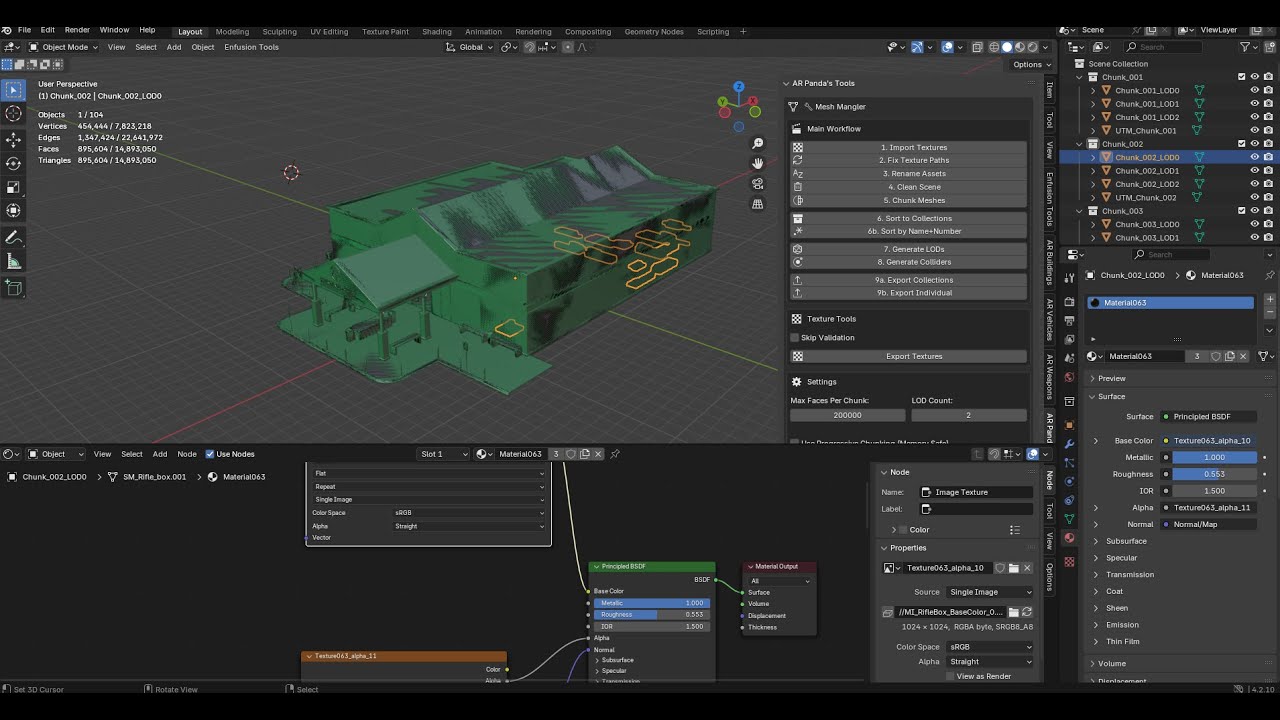
GET 50% OFF FOR THE NEXT 48 HRS CODE: PANDATOOL50
https://pilotpandatools.gumroad.com/l/pjnoad
Thank you for all your support, I am apart of the modding team for Casual Ops Central discord.gg/driftusy
You can also msg ne in the blender tools channel at discord.com/invite/arma
I am NOT a professional modder in any capacity, I do this for fun. ...
This is a tool I made for me and my team, if you’d like to support continued development of this addon consider checking it out, or if you’re a hobbyist and can’t spare the cash (like me) reach out and maybe I can send you a code 😉
 ancient crescent
azure canyon
This is a tool I made for me and my team, if you’d like to support continued dev...
ancient crescent
azure canyon
This is a tool I made for me and my team, if you’d like to support continued dev...
Isn’t this technically monetization of enfusion tools?
azure canyon
ancient crescent
Isn’t this technically monetization of enfusion tools?
No because it’s my own code?
ancient crescent
azure canyon
No because it’s my own code?
But if it does anything like colliders or anything to do with enfusion tools that Bohemia provides then it is
azure canyon
ancient crescent
But if it does anything like colliders or anything to do with enfusion tools tha...
Colliders aren’t copyrighted by Bohemia. Tools such as this have existed since before arma was even a thing. I haven’t received any complaints from Bohemia about it
ancient crescent
azure canyon
Colliders aren’t copyrighted by Bohemia. Tools such as this have existed since b...
The collider that come with enfusion tools?
azure canyon
ancient crescent
The collider that come with enfusion tools?
Colliders are just a mesh amigo
With a fancy name
Again, if I get any complaints, I’ll take it down 🤷♂️
ancient crescent
azure canyon
Colliders are just a mesh amigo

Colliders have special materials made for the enfusion engine to recognize lol
But I’ll drop it
azure canyon
ancient crescent
Colliders have special materials made for the enfusion engine to recognize lol
🤷♂️
azure canyon
I delisted it for now, but if any devs see this and have any input it would be greatly appreciated 🙏
fleet apex
As I understand your tool it only "reference" by "naming" the colliders to the enfusion standards so it will work with the engine. All these information are available and given by BI:
https://community.bistudio.com/wiki/Arma_Reforger:Enfusion_Blender_Tools:_Objects_Tools
Every mod dev do the same thing by hand when he imports 3d models.
neat hill
fleet apex
As I understand your tool it only "reference" by "naming" the colliders to the ...
Yes, there is nothing illegal about selling a plugin that works along side EBT.
As long as it doesn't touch workbench or EBT it should be completely fine.
It just blows my mind that people want to sell plugins that AI could spit out for free with a decent prompt.
 fair ocean
neat hill
It just blows my mind that people want to sell plugins that AI could spit out fo...
fair ocean
neat hill
It just blows my mind that people want to sell plugins that AI could spit out fo...
Some people would rather just pay for a plugin that does it all for them instead of fighting with ai to do it and them bridging the gap.
neat hill
fair ocean
Some people would rather just pay for a plugin that does it all for them instead...
There is no fighting ai to do it. Blender and it's apis have been out for years and are highly documented. So try again. Swooping in and try to capitalize on people who don't know any better is incredibly scummy.
fair ocean
neat hill
There is no fighting ai to do it. Blender and it's apis have been out for years ...
No one's forcing them to buy it :/
still hill
Just published my Rust library for reading PAK files: https://crates.io/crates/enfusion_pak. It's zerocopy unless you use one of the Caching file wrappers.
Supports async/sync readers and will work in wasm contexts. An async example can be found here: https://github.com/landaire/enfusion_tools/blob/main/crates/enfusion_pak/examples/dump_file/main.rs
This is the lib used for https://landaire.github.io/enfusion_tools/
 fickle plinth
BACKEND (E): [RestApi] ID:[121] TYPE:[EBREQ_WORKSHOP_UploadAssetFile] Error Code:524 - Unimplemented 5xx, apiCode="", uid="", message=""
DEFAULT (E): Uploading failed! Reason: ""
 upbeat umbra
fickle plinth
BACKEND (E): [RestApi] ID:[121] TYPE:[EBREQ_WORKSHOP_UploadAssetFile] Error Co...
upbeat umbra
fickle plinth
BACKEND (E): [RestApi] ID:[121] TYPE:[EBREQ_WORKSHOP_UploadAssetFile] Error Co...
Error Try the suggestions in this Community Tip to help you fix Error 524: A timeout occurred. Background Error 524 error indicates that Cloudflare made a successful TCP connection to the origin web server, but the origin did not reply with an HTTP response before the connection timed out. Typically, Cloudflare waits 100 seconds for an HTTP response. If the origin doesn’t respond in that time, Cloudflare closes the connection and you’ll see “Error 524: A timeout occurred”. [PRO UP SELL] Qui…
azure canyon
is this still an issue or am i the only one?
 normal kernel
azure canyon
is this still an issue or am i the only one?
normal kernel
normal kernel
https://feedback.bistudio.com/T194844
normal kernel
azure canyon
is this still an issue or am i the only one?
normal kernel
normal kernel
https://feedback.bistudio.com/T194844
Still ongoing
 vale grotto
Anyone here know how to integrate a SVN server to the engine?
 tidal fjord
ask LLM
strong smelt

GitHub
📝 Changelog – Arma PAK Plugin for Total Commander
Version 1.0.0
Added
Full-text search inside PAK archives: Use Total Commander’s "Find Files" (Alt + F7) with "Find text" enabl...
 native tusk
If someone needs an automatic Photoshop skript with output resolution choosing option to convert albedo, normal, roughness, metallic and ao to BCR, NMO i can give it to you
fleet apex
native tusk
If someone needs an automatic Photoshop skript with output resolution choosing o...
Sounds nice. The best way would be to provide it by github with a installation instruction.
 elfin cypress
still hill
Wanted to share a project I've been working on over the past week or so: https:/...
elfin cypress
still hill
Wanted to share a project I've been working on over the past week or so: https:/...
I know this is old, but jesus-christ, funny how looking here, I see someone started a very similar project to what I'm currently doing now.
I'm hoping I can catalogue every mod, item, asset and such into a database from as many versions of as many mods as I can, tracking changes, stats, current stats, ect.
Users can select mods and versions, then load data for those assets, hopefully allowing modders, mission makers or just users to understand the difference between stats of weapons.
Maybe an update broke a stat, or someone just doesn't seem right component wise.
Maybe a staff member / user wants to see what is actually avaliable to the users with these mods.
Or a mission maker just wants to tick box remove or add items to an arsenal loadout in a simple list.
 late sierra
^ this would actually be very helpful.
 timid sapphire
Hey, just asking to make sure: are we allowed to open the games .pak files and make tools to do so? I've seen a few tools that do this but I want to make sure before doing it myself
restive raft
timid sapphire
Hey, just asking to make sure: are we allowed to open the games .pak files and m...
I believe the EULA does not allow it, but there is no way BI can enforce this. If you don't use it for bad things, you will probably be fine.
Especially if you just use it to e. g. better understand how some things work and don't upload content from the game.
strong smelt
timid sapphire
Hey, just asking to make sure: are we allowed to open the games .pak files and m...
Which tool exactly do you mean regarding the .pak file?
timid sapphire
strong smelt
Which tool exactly do you mean regarding the .pak file?
Tools like ArmaPAK-TC
edit: and I am asking if it is okay to make these tools as I'd like to make one
strong smelt
timid sapphire
Tools like ArmaPAK-TC
edit: and I am asking if it is okay to make these tools a...
I meant, what kind of custom tool would you want for the .pak files?
Because ArmaPakTC was mainly made so you don’t have to open the Workbench if you just want to quickly check something.
As @restive raft says, as long as you use it for purposes that don't violate the EULA, it should be fine.
 limber rune
Hi, I have some questions about the Reforger REST API.
I've been trying to receive callbacks for a while now; I can send data, but I'm not receiving the results.
I tested the example from the wiki and it doesn't work either. (https://community.bistudio.com/wiki/Arma_Reforger:REST_API_Usage)
class RJL_Database
{
    string contextURL;
    ref RJL_RestCallback m_Callback;

    void RJL_Database()
    {
        contextURL = "http://127.0.0.1:8000/";
    }

    void RunQuery(string sql)
    {
        if (!m_Callback)
            m_Callback = new RJL_RestCallback;

        ExecuteRequest(sql);
    }

    string BuildQueryPath(string query)
    {
        if (!query)
            return string.Empty;

        string safeQuery = query;

        safeQuery.Replace(" ", "%20");

        string queryPath = "runQuery?sql=" + safeQuery;

        return queryPath;
    }

    void ExecuteRequest(string sql)
    {
        RestContext ctx = GetGame().GetRestApi().GetContext(contextURL);

        // Hard code for tests
        sql = "SELECT 1";

        string queryPath = BuildQueryPath(sql);

        Print("LOG:" + queryPath);

        ctx.GET(m_Callback, queryPath);
    }
}

class RJL_RestCallback : RestCallback
{
    void RJL_RestCallback()
    {
        Print("RESTCALLBACK INIT");

        SetOnSuccess(OnSuccessCallback);
        SetOnError(OnErrorCallback);
    }

    void OnSuccessCallback(RestCallback cb)
    {
        Print("SUCCESS CALLBACK!");
        Print("HTTP: " + cb.GetHttpCode());
        Print("DATA: " + cb.GetData());
    }

    void OnErrorCallback(RestCallback cb)
    {
        Print("ERROR CALLBACK!");
        Print("HTTP: " + cb.GetHttpCode());
        Print("DATA: " + cb.GetData());
    }
}
I'm not receiving the callbacks, nor even the "SUCCESS CALLBACK!" or "ERROR CALLBACK!" logs.
I'm testing directly from the Workbench console, using the following code:
RJL_Database t = new RJL_Database;
t.RunQuery("");
 wheat zinc
Your database is not alive long enough to receive the result. Check how I did it here https://github.com/Arkensor/EnfusionDatabaseFramework/blob/armareforger/src/Scripts/Game/Drivers/WebProxy/EDF_WebProxyDbDriverBase.c
Also this question looks a lot like normal scripting to me. So probably wrong channel
GitHub
A database framework to connect the Enfusion engine with SQL-, document- and local file databases. - Arkensor/EnfusionDatabaseFramework
limber rune
wheat zinc
Your database is not alive long enough to receive the result. Check how I did it...
Thx man, you saved me.
It worked perfectly, using the self-references.
 small cedar
I want to take a moment to show case the reason my servers and internet crashed 20 times today....

terrible external tool. do not recommend....
 cursive barn
I see some orange hue, have you tried running a non-orange firmware?


 strong smelt
 hasty mountain
Been playing around with making my own mission planning tools. Very much WIP
hasty mountain
Been playing around with making my own mission planning tools. Very much WIP
Could this be used to create the Frontline mod known from Arma 3 as well?
 zinc pilot
strong smelt
Could this be used to create the Frontline mod known from Arma 3 as well?
zinc pilot
strong smelt
Could this be used to create the Frontline mod known from Arma 3 as well?
Still trying to find some time to reimplement it in Enfusion Script 🥲
hasty mountain
strong smelt
Could this be used to create the Frontline mod known from Arma 3 as well?
Never played that mod.
 flint falcon
hasty mountain
flint falcon
hasty mountain
Thats pretty sick
 south urchin
hasty mountain
south urchin
hasty mountain
Idk why but I always have soft spots for projects like these
 old heron
hasty mountain
old heron
hasty mountain
Reminds me of WARNO game, the visualization of blue and red area
 blazing marsh
hasty mountain
Been playing around with making my own mission planning tools. Very much WIP
blazing marsh
hasty mountain
Been playing around with making my own mission planning tools. Very much WIP
is this public?
hasty mountain
blazing marsh
is this public?
No, it's still WIP
blazing marsh
hasty mountain
No, it's still WIP
you let me know when it is 😉
hasty mountain
blazing marsh
you let me know when it is 😉
Will do. We have kinda joined it with another tool our team has been working on which is pretty awesome if I do say so myself lol
 candid geyser
hasty mountain
candid geyser
hasty mountain
How did you manage to get that image so clear
I built a web app that does the same thing you are doing and I am still using old map data from arma 3
I mean my web app doesn’t actually affect in game mechanics but it’s a tool for mission planning etc


Also I have live tracking of ai and players all manageable by admin
 olive fulcrum
candid geyser
How did you manage to get that image so clear
olive fulcrum
candid geyser
How did you manage to get that image so clear
i think he is using leaftleet js plugin that can assemble huge amount of screenshot to recreate full map
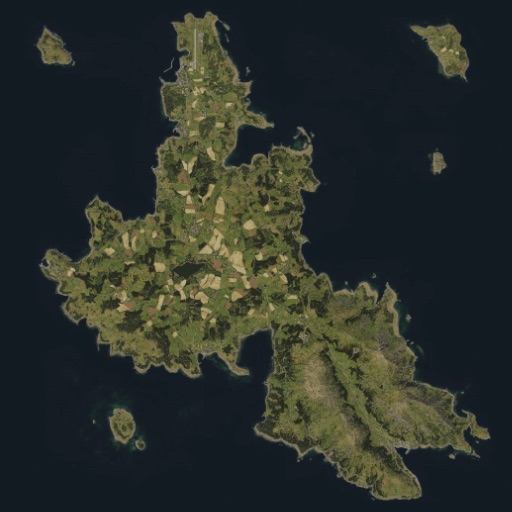
Interactive multi-layered map of Everon for Arma Reforger. Includes supplies, vehicle spawns, and more.
candid geyser
Ok I am using a custom script to do this, and render my map, I just need to retrieve the map data and my system will set it up. How can I get those images and geo data from the tools?
hasty mountain
olive fulcrum
i think he is using leaftleet js plugin that can assemble huge amount of screens...
Yes, this. Was going to put together a video showing how to use it.
candid geyser
Thank you guys🙏🙏🙏
 fluid vapor
Not sure if this is the right place, but some of you here might be able to help me:
#enfusion_terrain message
fluid vapor
candid geyser
I mean my web app doesn’t actually affect in game mechanics but it’s a tool for ...
Have you heard about TacOps?
 hasty mountain
fluid vapor
<:hmmyes:1147624204909433022>
hasty mountain
fluid vapor
<:hmmyes:1147624204909433022>
Haha. I have to finish making my OP first for my community 😛
candid geyser
fluid vapor
Have you heard about TacOps?
Yes bro, I think TPM created it, and it’s an amazing tool that all milsim units should use! my app does the same, and some more stuff but my map markers are synced in game. And I have integrated tdl too.
fluid vapor
candid geyser
Yes bro, I think TPM created it, and it’s an amazing tool that all milsim units ...
Actually I created it 😅
TPM helped me out tho
candid geyser
Damn hahahaha great job!! Also I used your map export tool to get my image as well!
fluid vapor
candid geyser
Damn hahahaha great job!! Also I used your map export tool to get my image as we...
It is NOT my map export tool, that ones goes credit to someone else
candid geyser
ok sorry lol I am getting everything wrong hahaha
But yes I have used it and it’s great! I made a custom script to crop it and make a single huge image as my app uses a custom leaflet that works like that for reasons lol 🤣
But I think you should see how to implement live map and map markers synchronization between app and game in tac ops. It is possibile. I did it. I can help you if you need some stuff. I literally finished full integration and synchronization yesterday.
fluid vapor
candid geyser
But yes I have used it and it’s great! I made a custom script to crop it and mak...
TacOps uses highly optimized webP tiles for speedy and dynamic rendering, based on the tiles output from that script. But tbh, it could all be more streamlines. Id rather have a script that creates one big ass image that I later then programmatically crop to the exact bounds, cutting off out of map void etc and then slice via script. But that is another task for down the line. The current way works good enough.
fluid vapor
candid geyser
But I think you should see how to implement live map and map markers synchroniza...
That sounds like a really cool idea, I didnt think this was possible. I assume you do live JSON edits to the profile folder and read that on the server?
candid geyser
fluid vapor
That sounds like a really cool idea, I didnt think this was possible. I assume y...
Hit me in private
 tardy kite
candid geyser
But I think you should see how to implement live map and map markers synchroniza...
tardy kite
candid geyser
But I think you should see how to implement live map and map markers synchroniza...
Are you releasing this?
candid geyser
the problem is to do this my map uses a database and it needs to elaborate the data from each server and each session, for now it works amazing for one server and one app, i dont really know how to scale it and make it public. but yes my goal is to make it public and have multiple sessions/communities but it will take time to figure out the whole scale thing. but i guarantee you it works great. no performance isues or stuff like that.
and about the database etc, if there are a lot of players, a lot of maps and a lot of data. it will get expensive very quickly, i dont want to be the one having to pay for everyone lol.
Also there is not only map data, you have other stuff like intel assets data elite links and other things that are in the app. The app shows thermal imaging too. All those entities are tracked so it’s a lot of data. Also multi layer capability, so players don’t just send markers to the game but whole layers, and they can be staked etc
candid geyser
Ok, coming soon lol

 ripe plover
Does anyone know if there is a way to get a GPU capture of the shaders in reforger?
*that's publicly available?
neat hill
ripe plover
Does anyone know if there is a way to get a GPU capture of the shaders in reforg...
Why?
ripe plover
neat hill
Why?
The artist I'm working with wants to replicate the way the PBR textures work on the vanilla buildings (eg with the brick/mudding/wear baked into the RGB channels) and I was trying to explain to him how the layering works with the masks - I wanted to show him what something like pix or render doc looked like so he could better understand how the math worked when merging layers of materials together.
We're hoping he'd be able to get his substance painter setup so that he could edit the mask in a way that would show the proper output while he's editing rather than looking at RGB masks and guessing until it's in the engine.
neat hill
He can look at the nodes of a multimaterial in blender and see how that all works.
 rugged charm
ripe plover
The artist I'm working with wants to replicate the way the PBR textures work on ...
rugged charm
ripe plover
The artist I'm working with wants to replicate the way the PBR textures work on ...
RenderDoc?
Or Marmoset Toolbag
ripe plover
I don't know if blender has access to the shader that reforger uses to render the material - Having a capture from the directx api would help a lot in understanding in how the GPU is actually merging the textures rather than guessing at it.
rugged charm
rugged charm
RenderDoc?
Launch Reforger through RenderDoc directly instead of trying to attach to an existing process.
Point it at the Reforger executable, launch it from within RenderDoc, load into a scene, then capture a frame when you’re looking at the geometry you want to inspect. From there you can drill into the draw calls on the building mesh, see all the bound textures including the mask channels, and step through the shader pipeline.
Worth noting BattlEye may not be a huge fan of this
neat hill
 ripe plover
rugged charm
Launch Reforger through RenderDoc directly instead of trying to attach to an exi...
ripe plover
rugged charm
Launch Reforger through RenderDoc directly instead of trying to attach to an exi...
Awesome - Ty, that's what I was looking for - I thought I had to include the capture api in the source. When I've used renderdoc in the past, I usually only include the capture hooks in debug builds.
lethal helm
ripe plover
The artist I'm working with wants to replicate the way the PBR textures work on ...
pbr multi is explained on the wiki. You can replicate the individual masks directly in both painter amd designer with direct viewport manipulation just fine, without requiring renderdoc
 trim quail
Hey everyone, I recently made a tool to auto-convert ARMA 3 P3D models and audio files into Enfusion. Will automatically go from P3D to FBX to Enfusions .XOBs, PAAs into PNGs/EDDS, create the model with the correct textures, and create a basic prefab with working rigid bodies based on the Arma 3 collision layers. It'll attempt to auto match material layers so concrete things behave like concrete, wood behaves like wood etc. Also features material name matching. So you can auto replace all glass from an arma 3 model to use a more proper glass material from arma reforger. Lastly also support converting arma 3 .oggs to .wav. Most of the application works without a hitch, theres a few limitations of course, such as no animations, transparent materials need to be adjusted to include an alpha map (but the textures are ported and assigned properly!), and interactions. For any static assets like buildings, walls, fences, rocks, those all work great tho. If you have any questions lmk, might help someone else. Last thing, this is for converting your existing unbinarized P3Ds if you worked in A3, dont expect to be making the next CUP https://github.com/russellocean/p3d-to-enfusion
GitHub
Contribute to russellocean/p3d-to-enfusion development by creating an account on GitHub.
I'll be uploading a short video showcasing how it works later
candid geyser
south urchin
candid geyser
 fleet apex
trim quail
Hey everyone, I recently made a tool to auto-convert ARMA 3 P3D models and audio...
fleet apex
trim quail
Hey everyone, I recently made a tool to auto-convert ARMA 3 P3D models and audio...
Hi, great tool. BTW: I found this video:
https://www.youtube.com/watch?v=a_IpyImqFD4
Maybe is the this node is helpful for decimation.
Head to https://squarespace.com/cgmatter to save 10% off your first purchase of a website or domain using code CGMATTER
⭐my site⭐ ➟ https://www.cgmatter.com/


 strong smelt
Version 1.1.6 (Latest)
✨ New User Experience (UX)
- Quick Extract Options (F5 / Alt+F9): ⚡ A new, compact dialog appears before extraction, allowing you to modify extraction settings on-the-fly. This prompt can be disabled in the settings for a silent workflow.
🧠 Intelligent Features
- Smart Extract (Dependency Handling): 🧩 The plugin automatically identifies associated files (e.g., textures from
.xobor.emat) and extracts them alongside the main file across all currently active archives within the session. - Intelligent Folder Structure: 📂 Optionally preserves the original internal folder hierarchy during file copying and extraction (
KeepDirectoryStructure), and automatically resolves path conflicts to prevent nested folder chaos.

GitHub
📝 Changelog – Arma PAK Plugin for Total Commander
Version 1.1.6 (Latest)
Fix: Prevent the extraction options dialog from appearing when using Total Commander's Viewer (F3) for a faster, uninte...
candid geyser
candid geyser
hahahahahaah why i did not put the voice in there 🤣
neat hill
candid geyser
hahahahahaah why i did not put the voice in there 🤣
Because your video quality looks like the gif
candid geyser
neat hill
Because your video quality looks like the gif
Lol hahahaha now I understand u should see my monitor then 🤣🤣
 ember forum
candid geyser
Lol hahahaha now I understand u should see my monitor then 🤣🤣
ember forum
candid geyser
Lol hahahaha now I understand u should see my monitor then 🤣🤣
If you're using OBS Studio for recording you need to make the output at least 1080p with >=30 FPS
candid geyser
I use screen capture 👽💀
small cedar
strong smelt
## **Version 1.1.6 (Latest)**
### ✨ **New User Experience (UX)**
* **Quick Extr...
I'd say you be asked to remove this it's against EULA fyi, talking from experience 🙂
strong smelt
small cedar
I'd say you be asked to remove this it's against EULA fyi, talking from experien...
I appreciate your concern regarding the EULA. However, the intent behind this tool is strictly to provide a streamlined workflow for veteran modders who have been part of the community since the OFP days.
This plugin offers the same transparency that the official Workbench already provides. It is designed as a bridge for those who find the Workbench environment unfamiliar, allowing them to study how assets work and learn from them without changing the underlying accessibility of the game files. It’s about education and maintaining a classic workflow, not about enabling malicious intent—which I personally condemn. Ultimately, it doesn't grant access to anything that isn't already accessible via official tools; it just makes the learning process more intuitive for a specific generation of creators.
small cedar
regardless of intent my dude I know this will have the same issues that my tools did. Id talk to @vagrant linden before it becomes an issue 🙂
and I don't disagree with any of what you've said.
I just dont want folks making cool things to get banned when trying to help with the right intentions
strong smelt
My goal is to support the community, not to cause any friction. That being said, if this tool is found to be in conflict with any policies, I am fully committed to cooperating and making the necessary adjustments to ensure compliance.
vagrant linden
strong smelt
My goal is to support the community, not to cause any friction. That being said,...
Technically any reverse-engineering is forbidden.
And it's not enough to say I don't condone wrong use of my tools. People who do such things don't care about what you say.
strong smelt
vagrant linden
Technically any reverse-engineering is forbidden.
I understand, and I want to respect those boundaries. Just to clarify your perspective: where do you draw the line? Does simply browsing the .pak archive structure (treating it like a directory) already count as forbidden reverse-engineering in your view, or is it specifically a file conversion (like EDDS to standard formats) that crosses the line?
I'm trying to figure out if there is a 'safe' version of this plugin that provides the file-system comfort for veterans without stepping on BI's toes.
vagrant linden
strong smelt
I understand, and I want to respect those boundaries. Just to clarify your persp...
In strictest technical sense all of that is reverse engineering.
But we can perhaps tolerate some things that dont enable anykind of theft, like unpacking (ripping in essence) and converting 3d models. Textures are also unfortunately questionable due to how some assets in mods may be licensed.
However Im not sure what benefit from just browsing the files gives.
This is a conversational opinion at this time though.
strong smelt
vagrant linden
In strictest technical sense all of that is reverse engineering.
But we can pe...
I appreciate your openness and the clarification. I completely understand why 3D models and licensed textures are a sensitive area.
To answer your question about the benefit of browsing: for a Total Commander user, it’s all about navigation, speed, and organization without any intent of deep reverse-engineering:
Reference & Learning: Many veterans prefer searching for file names, folder structures, or config entries (.conf, .scripts) directly in a file manager. It’s much faster to use Alt+F7 in TC to find where a specific script is located than to wait for a heavy UI to load.
Dependency Checking: Simply verifying if a file exists or where a path leads without having to 'import' or 'extract' anything into a project.
Side-by-side Comparison: The 'Old School' comfort of being able to compare two folders (one local, one inside a PAK) side-by-side to see what changed or what's missing.
So, in this form, do you think it still falls into the 'tolerable' category?
restive raft
I agree, being able to inspect resources as files (i. e. text) is very useful, especially when you want to inspect vanilla resources and see their exact definition.
This can technically also be implemented in the Workbench, I'm not sure why it isn't already a thing.
vagrant linden
restive raft
This can technically also be implemented in the Workbench, I'm not sure why it i...
ticket pls 🎟️
restive raft
Made one https://feedback.bistudio.com/T198642
But even aside from this particular thing, it can be very useful to have access to a PAK in terms of files in various other ways, so I don't see the benefit of such tools (for legitimate use cases) going away at all. Two more examples Icebird didn't mention:
- The ability to do a full, arbitrary file content text search across the entire PAK - like if you want to find out every place a certain class or attribute is referenced, or where some specific configured value comes from.
- Data recovery from the Workshop version. Of course, regular backups or VCS can avoid data loss in the first place, but it still happens to modders every now and then, who without an option for recovery from the Workshop PAK, might lose dozens or hundreds of hours of work.
 solemn arrow
First
 rapid grotto
wow you're so cool you got first
 hollow dome
solemn arrow
First
hollow dome
solemn arrow
First
what does this tool do? please add description
 ancient swallow
I think you can add your own plugins to the workbench, i imagine that is what this is for?
quick zenith
3rd party tools seems the main intention. But yes you can also make workbench plugins, this could be for that too
ancient swallow
Interesting
 shut kiln
I like that workbench tools are a thing
 true ruin
For those of you that use Substance Painter, here is an export preset for the new file types that Reforger uses. https://mega.nz/file/f3JykQaD#LAyUEBSk97Mdv218CFPu0lb73B2CJ55lN6cCXcZZW7U
If there is a more preferred way of uploading this, please let me know!
 obsidian mango
thanks
lethal helm
true ruin
For those of you that use Substance Painter, here is an export preset for the ne...
can you post a screenshot of the exporter?
true ruin
Yessir
Albedo and Roughness are in the BCR map, and Normal, Metallic, and AO are all in NMO
leading me to believe BCR means "Base Color/Roughness" and NMO is "Normal, Metallic, Occlusion"
 polar egret
Huh? How do you get two alphas in an RGB map?
unless... using Normal's blue channel as an extra alpha?
true ruin
There is no blue channel for normals, only Red and Green. I was a little confused by that myself, but it's what the workbench says is right, so I'll take what I can get.
 vague veldt
normals only use 2 channels yeah, warthunder also uses normals + blue and alpha for material
 dense nova
true ruin
There is no blue channel for normals, only Red and Green. I was a little confuse...
dense nova
true ruin
There is no blue channel for normals, only Red and Green. I was a little confuse...
It's correct, we compress the channels of various textures types into the two main ones, BCR and NMO, meaning less data, more optimized
The result is that the textures look 'weird' when viewing them out of context, for example in a regular image viewer because we don't use RBG+A in a traditional way.
lethal helm
is there additional info on the other shaders? multimat equivalent for instance?
also, about the wetness
dense nova
lethal helm
is there additional info on the other shaders? multimat equivalent for instance?
Depends what you want to know 😄
true ruin
dense nova
It's correct, we compress the channels of various textures types into the two ma...
Thank you very much for the further clarification, I had a feeling it would be something along those lines
 torpid vector
Is there an updated BEServer spec for server Rcon? current rcon client tools dont display elements correctly
 boreal thicket
torpid vector
Is there an updated BEServer spec for server Rcon? current rcon client tools don...
boreal thicket
torpid vector
Is there an updated BEServer spec for server Rcon? current rcon client tools don...
Whats not showing and what is?
torpid vector
PlayerName is showing as PlayerName 😄
lemme load into my server and ill grab you a screenshot
 toxic light
Feel free to make and share Workbench plugins (you can upload them to Workshop), there should be a sample on github already https://github.com/BohemiaInteractive/Arma-Reforger-Samples/tree/main/SampleMod_WorkbenchPlugin
Our mission is to have every important tool in Workbench. So if you are missing a tool, please make it as a part of the Workbench using the plugins or give us a feedback and we can consider making it or give you more power to make it using the plugins. Only this way we can keep the development environment of future Arma consistent and compact. 😉
GitHub
Modding Samples. Contribute to BohemiaInteractive/Arma-Reforger-Samples development by creating an account on GitHub.
 spark wharf
toxic light
Feel free to make and share Workbench plugins (you can upload them to Workshop),...
spark wharf
toxic light
Feel free to make and share Workbench plugins (you can upload them to Workshop),...
github copilot plugin for the script editor? 👀
toxic light
spark wharf
github copilot plugin for the script editor? 👀
We do not use copilot, do not have any experience with it. But it is interesting idea indeed.
spark wharf
👍 good to hear, unsure how useful it would be at the start and not knowing the language but it works quite well for python and c#.
are there any plans to create an official vs code plugin that add enforce scripting support to vs code?
And while I'm at it... a plugin to support git(hub)?
 merry lintel
true ruin
For those of you that use Substance Painter, here is an export preset for the ne...
merry lintel
true ruin
For those of you that use Substance Painter, here is an export preset for the ne...
Love you
true ruin
I did get a chance to double check that against Reyhard's later posted version, and it appears to be identical aside from the file name, so those of you that grabbed mine instead of his should still be good to go!
toxic light
spark wharf
are there any plans to create an official vs code plugin that add enforce script...
no, there is not such a plan.
 fresh pine
toxic light
Feel free to make and share Workbench plugins (you can upload them to Workshop),...
fresh pine
toxic light
Feel free to make and share Workbench plugins (you can upload them to Workshop),...
So that means I'll be able to do a Workbench plugin to turn OSM data into an Arma map in a single click? 😮
toxic light
fresh pine
So that means I'll be able to do a Workbench plugin to turn OSM data into an Arm...
I am not familiar with the format and it also depends on what you want to import. You can check existing plugins, possibly Export Geographic data plugin. It exports vector data (polylines) in GeoJSON or SVG. I assume that import can be done in a very similar fashion.
fresh pine
OSM stores data in its own format, but the previous OSM -> Arma map workflow used to rely on 3rd party OSM data exports as "shapefiles" (which is a common format used by GIS)
toxic light
fresh pine
OSM stores data in its own format, but the previous OSM -> Arma map workflow use...
There is Import Shapefile plugin, so possibly it will solve your usecase
fresh pine
but that's too many steps hehe 😄
I want a single click :3
So I'm gonna make it single click
😄
I'll have a look at how to do that then. It should be a rather straightforward "workflow". Draw a bounding box on OSM, query its contents using their API, go through the data and place stuff accordingly.
 jovial jetty
torpid vector
Is there an updated BEServer spec for server Rcon? current rcon client tools don...
jovial jetty
torpid vector
Is there an updated BEServer spec for server Rcon? current rcon client tools don...
On which Port do you connect via rcon to the server?
boreal thicket
Default used to be 2302 or something close to that in a3
torpid vector
I set mine to 1 port below the game port (don't forget to open those in your firewall), put your BEServer_x64.cfg file in the \battleye\ folder which is in the same folder as your profile.
The file contents uses the same format as Arma 2/3.
@jovial jetty ^
jovial jetty
thx for the info. tested all ports, but not below the gameport 😄
torpid vector
no problem 🙂
 agile zephyr
Are there any details on server querying already? 🤔
 light cedar
toxic light
Feel free to make and share Workbench plugins (you can upload them to Workshop),...
light cedar
toxic light
Feel free to make and share Workbench plugins (you can upload them to Workshop),...
how does one do this in a fresh project? I tried just adding the files into an existing project, but for some reason they sample plugin otpion for world Editor isn't showing up. It does show up in the default .proj
quick zenith
light cedar
how does one do this in a fresh project? I tried just adding the files into an e...
Did you put them into the same filepath?
When I put them into "Scripts" folder in my mod it doesn't work.
But If I put it in Scripts/WorkbenchGame/Test/SampleWorldEditorPlugin.c, it works.

like this. I think WorkbenchGame folder is very important
 quick zenith
Ingame scripts actually also require to be in Game or GameLib folder (or GameCode too, didn't try that one), there is a way to have a custom folder but I don't recommend it
light cedar
Do you also happen to know how I could debug config loading? I'm really just trying to figure out why I can't use the Shapefile importer fully 😄
quick zenith
I never tried that
But #enfusion_terrain has proven very resourceful, maybe you just need to poke blud harder
light cedar
im sure he'll appreciate 😄
 finite rivet
true ruin
For those of you that use Substance Painter, here is an export preset for the ne...
finite rivet
true ruin
For those of you that use Substance Painter, here is an export preset for the ne...
You're reaching illegal levels of awesome my dude, keep it up!
 woeful iron
is there a way to get the UIWidget from a WorldEditorTool script to refresh it?
 tepid drum
I've been having a hard time finding what I'm looking for across the various file types that aren't easily searchable so I created a plugin to dump them to the local file system https://github.com/pennyworth12345/ReforgerDumper
 frail mantle
any tools to convert edds files into tga or png (for modding purposes)?
 teal canyon
I made some Substance Designer graphs for those who have maps already made and would like to merge them into BCR and NMO/NHO maps.
These are designed to be used with Substance Player which you can download and use free of charge.
https://github.com/KaiXOF/Substance-Enfusion-Texture-Map-Graphs/
GitHub
I've created a number of Substance Designer graphs for those who wish to convert/merge their PBR Texture maps into their Enfusion Engine Compatible Counterparts. - GitHub - KaiXOF/Substance...
 hard condor
Is or will there be a way to establish a database connection?
Is an extension like extdb for Arma 3 possible?
Or is it only possible with an rest API?
 steep urchin
just API rest ( don't work ) i think
 graceful mortar
meant to be able to use api. but last i heard it was broken
 left bay
when using a REST api, how to get apikey or any other credentials securely from the system? Or would one make the api publicly available w/o auth?
 simple remnant
For anybody who has messy file structure when making mods, I made a template which is easy to follow and keeps you organized. Has a folder for Mod backups, and a text document to paste links to assets you are downloading off the internets for reference all in one convenient place, and a place for your Blender files, imports, exports, textures, ect. Put on your drive of choice and just copy the Mod Template inside the Arma Reforger Mods folder whenever you are starting a new mod. I've seen some of your Desktops in screenshare before... So here ya go ❤️
quick zenith
left bay
when using a REST api, how to get apikey or any other credentials securely from ...
you can read files on disk in $profile directory for example
 cinder drum
Since external tools are welcome with the new engine, are there any plans on opening up some of the file format specifications like .edds, .xob, ...?
lethal helm
i would assume it isn't considering these files are protecting the content
south urchin
lethal helm
i would assume it isn't considering these files are protecting the content
You can get workbench to give a file that you can then use to convert to png or whatever for textures
one of those unexpected features I guess 
 lilac rampart
Hello for a few days I am completely blocked I can not find how to correct this error on Zmodeler to make a 3D car to put it in UV Mapping it blocks me completely because when I render nothing is displayed
 lethal helm
for 3ds max people (if any are left), quick FBX export tool considering the interoperability, saves a ton of time for me
    category:"Enfusion"
    toolTip:"FBX quick export"
(
    if $ != undefined then (
    filename = getFilenameFile maxfilename
    exportpath = maxFilePath + filename

    pluginManager.loadClass FBXEXPORTER
    FBXExporterSetParam "SmoothingGroups" true
    FBXExporterSetParam "SmoothMeshExport" false
    FBXExporterSetParam "Triangulate" false
    FBXExporterSetParam "Animation" false
    FBXExporterSetParam "Lights" false
    FBXExporterSetParam "ASCII" true
    FBXExporterSetParam "UpAxis" "Y"
    FBXExporterSetParam "FileVersion" "FBX201500"
    FBXExporterSetParam "Skin" true

    exportFile exportpath #noPrompt selectedonly:true
    )
    else (
    messagebox "Nothing Selected" title: "FBX Not Exported"
    )
)
 dark island
anyone knows how export bones from maya in fbx to enfusion? my model is fine but without bones... i bind the "bone/Skeleton" to the model
lethal helm
dark island
anyone knows how export bones from maya in fbx to enfusion? my model is fine but...

@AlwarrenSidh and if you cannot find the bones, make sure you have <export skinning> checked
 Twitter
·
Twitter
·
worked for my 3ds max workflow
dark island
I have found the issue ☺️ thx!
 deft prairie
https://i.gyazo.com/73396712630c0afc851aa577123f95e6.gif Just made this simple tool to grab all the Ids and versions for adding mods to the server. Mainly for my self. But if anyone wants it. Ill put a link up in a second.
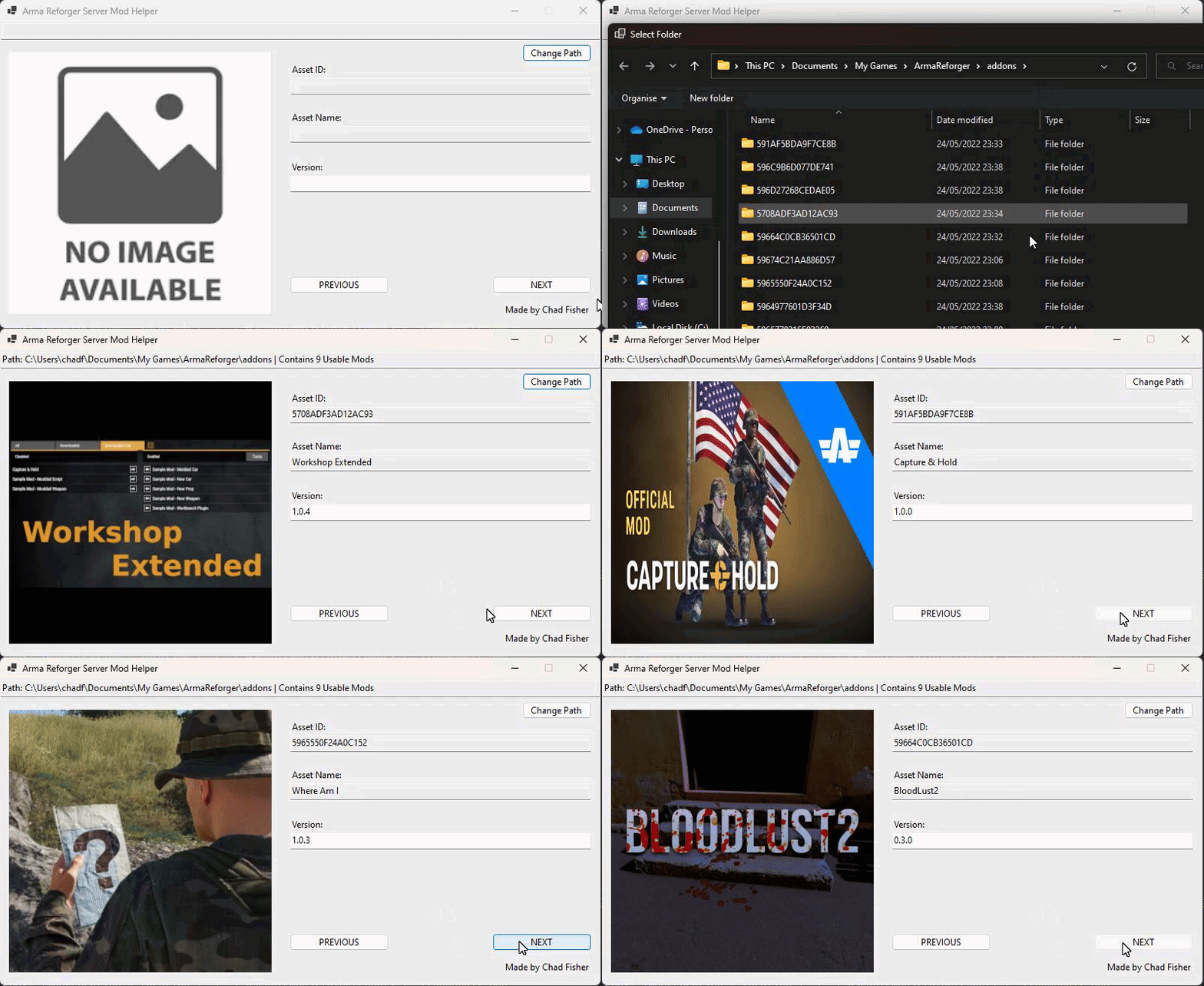


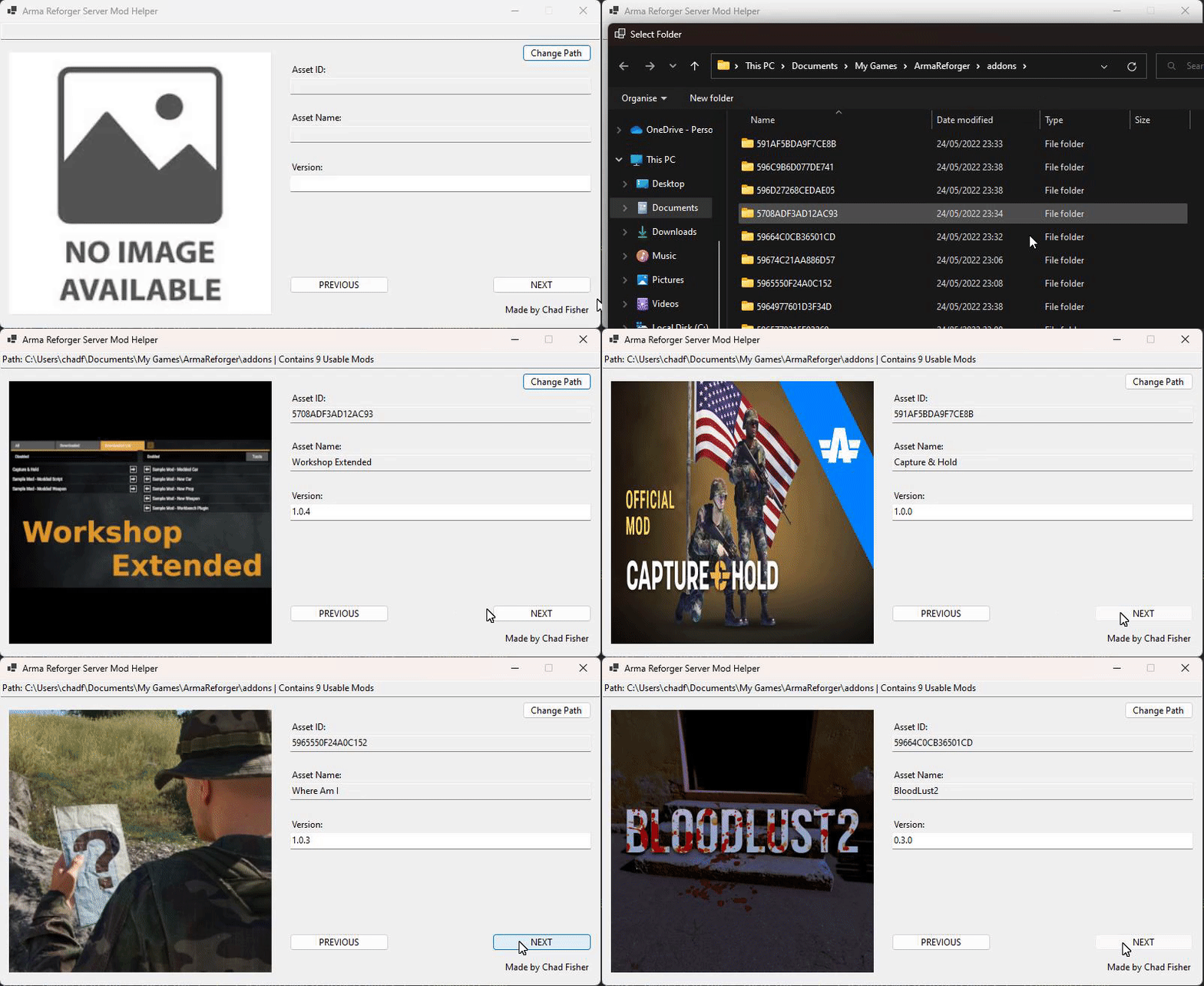 neat hill

GitHub
Various Tools For Arma Reforger. Contribute to Zelik89/ArmaReforgerTools development by creating an account on GitHub.
Currently only includes photoshop script for converting textures
Made it for myself but figured some people might have some use for it
 timber oar
Does anyone know of any alternatives to using Terra Incognita to create satmaps from real world data?
waxen island
Simple tool to convert PAA files from source folder to PNG files in destination folder. Currently only bulk converts all PAA files in source folder.
https://github.com/BigBenDevs/PAAtoPNG/tree/master
GitHub
Convert PAA files to PNG. Contribute to BigBenDevs/PAAtoPNG development by creating an account on GitHub.
 late willow
timber oar
Does anyone know of any alternatives to using Terra Incognita to create satmaps ...
late willow
timber oar
Does anyone know of any alternatives to using Terra Incognita to create satmaps ...
Sadly not an answer but would be awesome with a script/tool that would export screenshots of the terrain ingame from say 200 meter so then could patch together a sat map based on the actually objects placed/mask.
rain elm
late willow
Sadly not an answer but would be awesome with a script/tool that would export s...
some fiddling with substance designer would get you that