1 messages · Page 1 of 1 (latest)
 ancient field
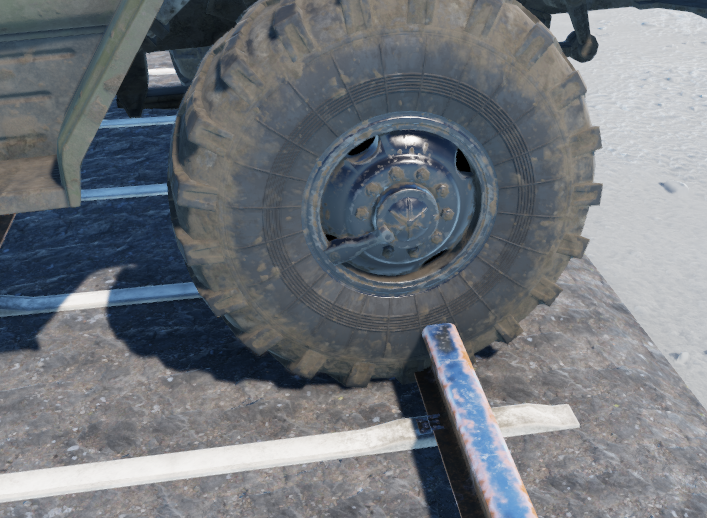
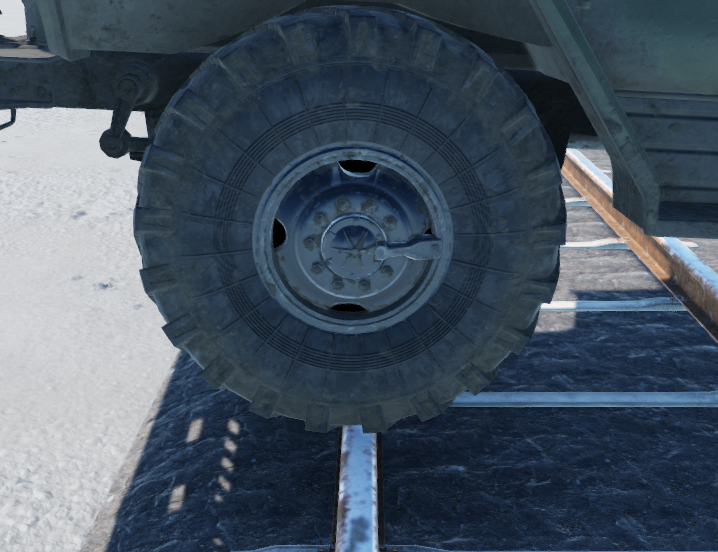
It seems wheels are only raycast wheels, any hope we could get some volumetric wheel colliders?
https://i.imgur.com/LcJ60rM.png
https://i.imgur.com/mA88WBE.png
 high sparrow
ancient field
It seems wheels are only raycast wheels, any hope we could get some volumetric w...
high sparrow
ancient field
It seems wheels are only raycast wheels, any hope we could get some volumetric w...
Wheels are represented by raycast, yes. As for volumetric wheel colliders, I already have one working prototype but there are things that need to be solved first before introducing such feature.
<@&105623147411202048> Can we have threads here, please?
 daring rapids
high sparrow
Wheels are represented by raycast, yes. As for volumetric wheel colliders, I alr...
daring rapids
high sparrow
Wheels are represented by raycast, yes. As for volumetric wheel colliders, I alr...
Sounds cool, I also would love to see volumetric wheels. The 1 flaw of the vehicle simulation currently (and it really is like the only flaw) is that torque is not directed downwards when you're crawling over obstacles because the wheels are just a raycast. Maybe colliders would help with that.
Also +1 to having threads here
 elfin compass
shouldn't the raycast wheel be colliding with that object if it has collision?
 craggy tendon
elfin compass
shouldn't the raycast wheel be colliding with that object if it has collision?
craggy tendon
elfin compass
shouldn't the raycast wheel be colliding with that object if it has collision?
there is only 1 ray cast from center of wheel downwards, which leads to unsatisfying and weird effects when colliding with small geometry. For terrain (rolling landscapes) its sufficient, but not for detailed interaction with other collision geometry. If the wheel touches with another part than the bottom most point, it just phases through until center is directly above it, and then the wheel pops up immediately
heres a description how physx handles it
https://docs.nvidia.com/gameworks/content/gameworkslibrary/physx/guide/Manual/Vehicles.html#wheel-contact-beyond-raycasts
ancient field
elfin compass
shouldn't the raycast wheel be colliding with that object if it has collision?
This is how the raycast looks

So if it is only projecting a single ray downwards you will never be able to roll over things smoothly where the front of the tire could engage before the bottom (more raycasts or volumetric colliders allow you to climb over steeper objects and react better to small geometry)
This is a circle wheel collider ^^
 sullen falcon
I want this object to fall down if a car hits it. What should i do ?
 elfin compass
per chance is the raycasting locked to one or is it possible to have say, two additional rays located a bit further out?
ancient field
No way to modify any of that, its all in the engine source
 thorny osprey
why would they choose a inferior system?
 ruby shadow
sullen falcon
I want this object to fall down if a car hits it. What should i do ?
ruby shadow
sullen falcon
I want this object to fall down if a car hits it. What should i do ?
what happens when you hit it right now?
sullen falcon
ruby shadow
what happens when you hit it right now?
it just disappears
ruby shadow
sullen falcon
it just disappears
huh, that's interesting
it has a collider and all right?
sullen falcon
ruby shadow
it has a collider and all right?
yes
ruby shadow
I don't understand why would it disappear 😦
sullen falcon
:/
ruby shadow
is your entity set to static?
sullen falcon
no
ruby shadow
i mean in the entity not in the rigidbody parameters
sullen falcon
where is it
 ruby shadow
sullen falcon
where is it
ruby shadow
sullen falcon
where is it
flags
sullen falcon
 ruby shadow
havent experienced this yet so not sure what's going on there 😦 sorry
if it's setup exactly the same like other props you can push around then it might be some bug :S
sullen falcon
do you know any prop that falls down when you hit it
ruby shadow
I remember the small military tents move around when I crash into them with a vehicle
{01AE5FD77A9A4C21}Prefabs/Structures/Military/Camps/TentSmallUS_01/TentSmallUS_01.et
this one
for example
so maybe try copying settings from it
 tight remnant
also wooden crate should react quite nicely to vehicles
sullen falcon
ruby shadow
```{01AE5FD77A9A4C21}Prefabs/Structures/Military/Camps/TentSmallUS_01/TentSmallU...
It worked!
ruby shadow

sullen falcon
I did the exact things and it worked.
What I just need was the "SCR_DestructionMultiphaseComponent"
Thanks man.
ruby shadow

ancient field
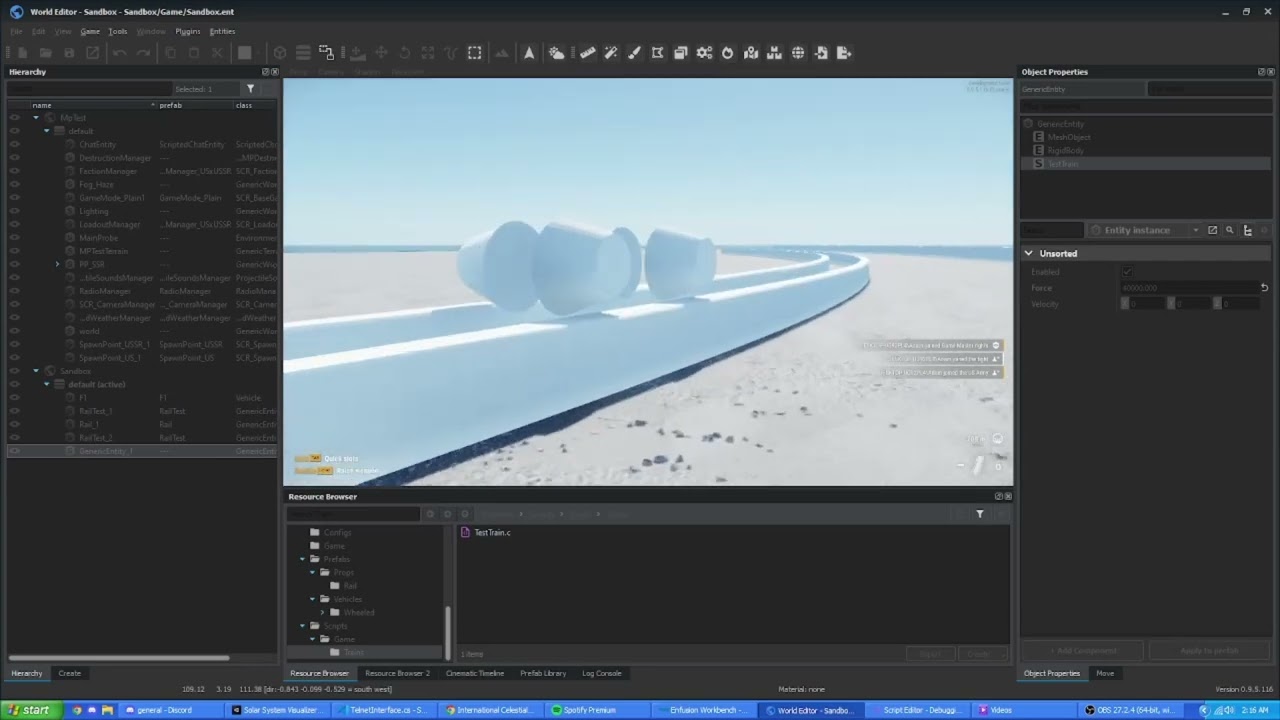
Is there anyway to decrease how forceful the physics engine resolves collisions? I've tried playing with the restitution value in my physics material with no luck, I actually haven't noticed a single difference between 0 and 1. (0 should be perfectly inelastic and 1 being perfectly elastic) Trying to create trains that behave realistically in how they realign the wheels to make a corner. It behaves as expected but with some caveats where it starts jumping vertically for what I assume is a collision resolution. https://www.youtube.com/watch?v=LIbnxpwQhps
I tried playing with my project physics iterations which helped only a very small amount, I maxed it out to 60 iterations in the video above. I've also tried a combination of 60 iterations and 240 ticks, no luck.
I've also tried playing with the different response indexes for different types of momentum but that hasn't helped either
thorny osprey
are you really trying to make trains work in that fashion? or just meshing around ?
ancient field
started out as messing around, if I can resolve the jumping then I'd like to make something more fleshed out using this method
I could always script a method to fake it, but it'd be pretty awesome to have it work true to life 😛
I've also tried a method with geometry blocks attached to a vehicle and have a similar issue with the collisions being wayy too strong and causing the car to just jerk back and forth and lose a ton of momentum. (disabled lateral friction as well so it wasn't a tire issue)
thorny osprey
well to be honest I dont think you are ever gonna get a train to work using this method, I remember in gmod you can make trains like this but it was also rough to say the least. the guy who made the arma 3 mod for fast roping ,towing and what not made one for trains maybe you should ask him how its done.
ancient field
I've done it in arma 3 🙂 It definitely works, but only if you can tune the physics to allow it
I will look into scripted options though, not the end of the world to do it that way
ruby shadow
I would only make the train react to physics of the track when it derails, otherwise just follow a spline
high sparrow
ancient field
Is there anyway to decrease how forceful the physics engine resolves collisions?...
There is so much that can go wrong, I don't even know where to start.
The restitution: you can check if it works simply by just letting go a sphere on the ground from sufficient height and see how it bounces of with various settings. There is one unfortunate detail: if you change properties of physics material, you have to restart workbench for changes to take effect.
Jumping on the rails can be also caused simply by its geometry. How is it represented? Are all normal vectors correctly smoothed across the surface? The same applies to the "wheels" as well.
Also how far are you from world origin?
Nevertheless it is interesting test-case for physics engine 👍 Will thing about it when testing features.
ancient field
high sparrow
There is so much that can go wrong, I don't even know where to start.
The resti...
Ah I wasn't aware of needing to restart the workbench, that could explain why I didn't see any changes with restitution.
Normal vectors for each face are pointing radially outward from their respective face in this case, it is a cylinder with one end scaled down so normal vector will actually be pointing a bit outwards as well. I've also tried an "L" shape where the normal vector of the rail and train are directly opposite each other with no significant change in jumpiness.
I am near world origin, within 500m.
high sparrow
ancient field
Ah I wasn't aware of needing to restart the workbench, that could explain why I ...
have you tried to make the cylinder more smooth in terms of vertex count, like to increase its "roundness". Other thing to try is making round corners on the rails just to help smooth out the collision handling.
I agree with others that this is far from ideal case of how to simulate train but from physics point of view there shouldn't be anything to prevent you to do such thing.
ancient field
high sparrow
have you tried to make the cylinder more smooth in terms of vertex count, like t...
I have, rounded corners were more unstable in terms of lateral jerkiness
Vertex count hasn't helped either since the cylinder isn't actually rotating. The same face is always in contact with the rail
I agree as well, this is definitely not the ideal way to do it. But definitely should be doable, and more of a I want to do it sort of thing
high sparrow
ancient field
I have, rounded corners were more unstable in terms of lateral jerkiness
Vertex count hasn't helped either since the cylinder isn't actually rotating.
And how are the wheels moving in the video then?
ancient field
frictionless surface with force added to CG in local forward direction (+z)
The "wheels" aren't wheels at all. They are just there to guide the body back to the center of the track
They could be wedge shaped and do the same thing
high sparrow
ancient field
frictionless surface with force added to CG in local forward direction (+z)
ok that's weird, the guides should be rolling:
https://www.youtube.com/watch?v=vkzgcJGdUnA
have you tried it instead trying to force them to slide?
ancient field
In this case rolling vs not rolling means nothing. In the real world rolling is what provides the ability to accelerate the entire body. In video game we can apply any fictitious force we want to achieve acceleration of the body. I will try it though.
If anything rolling may add even more vertical jumpiness, at least my intuition says so
ancient field
Wow interesting, I stand corrected.
Rolling cylinder does WAY better with very little jumpiness. Changed my script to apply a torque instead as well
@high sparrow https://youtu.be/eKoMXcLJxb4
 stone parcel
ancient field
<@326629801106604032> https://youtu.be/eKoMXcLJxb4
stone parcel
ancient field
<@326629801106604032> https://youtu.be/eKoMXcLJxb4
The winXP theme caught me off guard
 vocal lintel
omg I absolutely love it, recently tried to switch my pc to win xp sounds
ruby shadow
why do vehicles go uphill faster in reverse?
tight remnant
reverse gear have quite often higher ratios than first gear
ruby shadow
and on the other hand moving uphill forward seems to be much slower than it should
tight remnant
https://letting.ru/en/struzhka-v-korobke-peredach-uaz-buhanka-prichiny-vse-chto-neobhodimo/ UAZ-469 and UAZ-452 family has the following gear ratios: 1st gear - 4.124, II gear - 2.641, III gear - 1.58, IV gear - 1.00, reverse - 5.224.
higher gear ratio helps with going uphil
ruby shadow
tight remnant
higher gear ratio helps with going uphil
I just noticed that it may not be the car but not being able to go full throttle when driving it, because if I script it to go at max throttle it climbs nicely
but when I drive it I never get high RPMs in the lower gears, and eventually stall if it's very very steep
nvm all that, now it works fine, it seems it was all in my head, just stalled once because of a gear change, sorry
 fiery ermine
Hey, does anyone know a solution to prevent vdm?
thorny osprey
vdm?
fiery ermine
running over players with vehicles
 onyx hatch
just don’t run them over
 mortal osprey
onyx hatch
just don’t run them over
mortal osprey
onyx hatch
just don’t run them over
facts
 inland citrus
ancient field
Wow interesting, I stand corrected.
inland citrus
ancient field
Wow interesting, I stand corrected.
What if you put a big ball between instead of on the rails? Or two balls connected with an axle?
 timber flame
Is there some way to get the vehicle clutch to function like a real clutch instead of a game clutch? i.e. when the car is in gear and the engine ticking over the vehicle would forward without control input.
ruby shadow
can we bind collision events to scripts? run a script on collision?
 unique lantern
ruby shadow
can we bind collision events to scripts? run a script on collision?
unique lantern
ruby shadow
can we bind collision events to scripts? run a script on collision?
Mabye IEntity::EOnTouch?
high sparrow
ruby shadow
can we bind collision events to scripts? run a script on collision?
IEntity::EOnContact, don't forget to enable the event in entity/component mask for your entity/component where you want to override this method 🙂
ancient field
What causes an object to fall through terrain? I've tried a ton of layer masks and presets without success. I can walk into the object and collide with it if I remove gravity, but if it has gravity it falls through the terrain
ancient field
update: seems it doesnt like my triangle mesh for a collider. switched to a box collider and it worked
ruby shadow
any clue how can I cancel a running trace move?
 dim pebble
ruby shadow
any clue how can I cancel a running trace move?
dim pebble
ruby shadow
any clue how can I cancel a running trace move?
There is none that I can see. What are you hoping to solve by having this?
ruby shadow
dim pebble
There is none that I can see. What are you hoping to solve by having this?
no reason to continue running the trace if it hits something I want
ruby shadow
are explosion area effects just raycasts against firegeometry?
 royal pier
ruby shadow
are explosion area effects just raycasts against firegeometry?
royal pier
ruby shadow
are explosion area effects just raycasts against firegeometry?
not sure I will take a look, many games I know use physics spheres to simulate explosions in games, but my guess is that bi have used the raycasts because it would be more realistic to real world explosions with shrapnel
 blazing pawn
Why do the "Destroy Spawn Objects" (from SCR_DestructionMultiPhaseComponent) not spawn in MP on a dynamic rigidbody entity?
Did not find id = 0x40000029 item = @"ENTITY:25" ('Tree','Assets/Vegetation/Tree/Pinus_Sylvestris/Dst/t_pinus_sylvestris_2f_dst_base.xob') at <95.311005 0.980000 137.380005> in Spatial Map at < 0; 0>
ruby shadow
perhaps relevant https://feedback.bistudio.com/T165765
blazing pawn
ruby shadow
perhaps relevant https://feedback.bistudio.com/T165765
Yeah looks like the same bug
 slim zodiac
Hey there,
Is anyone aware of a method of locking/freezing an axis of a rigid body? Basically I want to force a rigidbody to always be upright
blazing pawn
Why is my custom model not colliding with the terrain? Same layer as eg. a bottle (PropFireView) but only my model is falling through the ground 😦
 sharp herald
blazing pawn
Why is my custom model not colliding with the terrain? Same layer as eg. a bottl...
sharp herald
blazing pawn
Why is my custom model not colliding with the terrain? Same layer as eg. a bottl...
does it have this?
 blazing pawn
sharp herald
does it have this?
blazing pawn
sharp herald
does it have this?
yes, I even copied the bottle and just changed the mesh
ancient field
blazing pawn
Why is my custom model not colliding with the terrain? Same layer as eg. a bottl...
What type of collider did you create for it? I've had issues with triangle mesh colliders not working sometimes for terrain collision, usually switching to a convex collider fixes my issues
blazing pawn
ancient field
What type of collider did you create for it? I've had issues with triangle mesh ...
UTM
ancient field
Yeah, try something else like convex
UCX
In blender there is a button to automatically make a shape convex as well
ancient field
I'm not sure if its a bug. I believe somewhere on the wiki it might say why, or it is a bug and I am wrong. I forgot 😦
stone parcel
slim zodiac
Hey there,
Is anyone aware of a method of locking/freezing an axis of a rigid ...
check Physics::SetLinearFactor
slim zodiac
Thanks!!
ruby shadow
how do I make a shell bounce 
slim zodiac
ruby shadow
how do I make a shell bounce <a:duckcry:696365064147697735>
Thats honestly a great question, did you end up figuring it out?
I'm surprised theres no bounciness or restitution style parameters for rigidbodies
ancient field
slim zodiac
Thats honestly a great question, did you end up figuring it out?
I'm surprised...
There are in the physics materials; butttt I haven't gotten it to work
ruby shadow
slim zodiac
Thats honestly a great question, did you end up figuring it out?
I'm surprised...
no - the shell move component projectile disappears when it hits something, even with collision triggers removed, and regardless of what I put in deflection settings
high sparrow
ruby shadow
no - the shell move component projectile disappears when it hits something, even...
projectiles currently support bouncing only from specific objects like terrain. Other than that it is not possible atm. It's partially missing feature and partially a bug.
ruby shadow
high sparrow
projectiles currently support bouncing only from specific objects like terrain. ...
ok, I'll just be patient for now, then, thanks
ruby shadow
are some kind of rope physics planned for the future?
high sparrow
ruby shadow
are some kind of rope physics planned for the future?
in the near future, no
ruby shadow
fair
timber flame
ancient field
There are in the physics materials; butttt I haven't gotten it to work
It works fine to me. E.g. I put down a sphere collider with 0.5 friction and 0.88 restitution (coefficients from studies of footballs), and I have a functioning football, can dribble it around a bit or throw it and it behaves in a remarkably realistic manner. Maybe you made the same mistake as me at first; the MPTest terrain is made of sand which has 0.05 restitution so things don't bounce on it. Also you must restart Workbench after changing physmat properties to see changes.
ancient field
timber flame
It works fine to me. E.g. I put down a sphere collider with 0.5 friction and 0.8...
Ahhh, that must have been it. Definitely didn't check the MPTest terrain material
 odd seal
Damn I hate the way Enfusion handles ragdolls.
ruby shadow
is there an explosion effect / damage type combo that can move vehicles but not move characters as much?
can a projectile produce the same effect that ramming something with a truck would?
physics wise
 peak pike
Good question also I think bullets are not manipulatable any more(were in arma 3)
With scripting you should be able to get the transform, just like ragdolls do, they push the body based on impact transform, but I think you may have to manually do this
stone parcel
peak pike
With scripting you should be able to get the transform, just like ragdolls do, t...
afaik this is done in the C++ side
peak pike
What about the OnDamage events for HitZones?
Isn't that a way to get hit position for vehicle?
 unique lantern
Yes you can get the impact positions and normals like this via OnDamage. But not sure how you would go from there scripted
 vague ether
is anyone working on a Multi Raycast Wheel collider system ? the Single Raycast we have rn is so bad.
peak pike
vague ether
is anyone working on a Multi Raycast Wheel collider system ? the Single Raycast ...
Could you elaborate? I would like to know more
ruby shadow
how do I make EOnContact fire when colliding with things like buildings?
hope its just layer presets
... even though the thing does collide
just doesn't fire the event
is there a layer preset that collides with buildings + terrain + entities and allows me to have user actions?
its a grenade, and there is a layerpreset in the grenade move component
but... it doesnt fire my EOnContact
peak pike
Do you mean like when a grenade hits a wall or the ground and makes a sound like *clink clank*
Do you have the event mask set for the entity u want the EOnContact to fire on?
SetEventMask(EntityEvent.CONTACT);
 blissful pasture
is dayz fully enfusion now?
stone parcel
blissful pasture
is dayz fully enfusion now?
no and wrong channel
 patent grove
Hello everyone, I just created an object (sewer) but while doing my test the navmesh does not want to enter my sewer (photo). compared to a vanilla house
 ruby shadow
you have navmesh generation controls
so you can tweak how close/far to/from walls it goes
also this is physics channel
I think for your sewer you can regenerate only relevant tiles with different settings?
patent grove
walkable raidus work
 ruby shadow
can I mash multiple rigidbodies together with joints to make a horrible rope physics thing?
timber flame
ruby shadow
can I mash multiple rigidbodies together with joints to make a horrible rope phy...
Mabybe with 6DOFSpring. If you read this implementation it's basically a chain of spring joints: http://nehe.gamedev.net/tutorial/rope_physics/17006/ . Alternatively maybe the engine exposes enough to implement in Enforce as described on that page.
OpenGL Tutorials, Demos, Games and More...
high sparrow
ruby shadow
can I mash multiple rigidbodies together with joints to make a horrible rope phy...
yes, like Steve-E said, you can use the Physics6DOFSpringJoint for it but I'm warning you, the stability and performance will be far from ideal.
ruby shadow
high sparrow
yes, like Steve-E said, you can use the `Physics6DOFSpringJoint` for it but I'm ...
I think I tried it once but it became gmod physics pretty quickly so will try it again sometime in the future
 random acorn
Hi, I know ARMA 3, and one aspect that is definitely problematic when using tanks is the immovable stone fences; in real life boulders are dangerous at high speed, however stone fences can be destroyed by a MBT, and is not believable it will full stop it from 70km/h. is there any plan to improve this?
ruby shadow
random acorn
Hi, I know ARMA 3, and one aspect that is definitely problematic when using tank...
I don't know how Arma Reforger would handle tanks as there aren't any
random acorn
ah ty, good to know
ruby shadow
but what I do know is that if your vehicle is heavy enough you can drive through some walls, including buildings
it's a great feeling when an enemy squad is defending a building and you just drive the back of your truck into it through the wall and attack them
random acorn
any plan to add MBT in reforger?
ruby shadow
didn't see any tracked vehicles in the roadmap
unfortunately the worst thing about 0.9.7 is you can't stack BTRs anymore

rip btr stacking
 narrow night
random acorn
any plan to add MBT in reforger?
narrow night
random acorn
any plan to add MBT in reforger?
The only working tank is a sherman m4 and consideringing humvees dont, tanks shouldn't either
random acorn
ruby shadow
bummer xD
 amber mason
ruby shadow
amber mason
ruby shadow
Do they actually float now? i know they used to but they've seemed to decide to stop actually working
ruby shadow
amber mason
Do they actually float now? i know they used to but they've seemed to decide to ...
the blackhawk mod broke their amphibious features, so they dont float if the mod is enabled
amber mason
I seee, That makes sense actually. I hope it gets fixed it was a fun little thing to have in the arsenal when Gm'ing. Thank you bacon
 steel rivet
ruby shadow
the blackhawk mod broke their amphibious features, so they dont float if the mod...
steel rivet
ruby shadow
the blackhawk mod broke their amphibious features, so they dont float if the mod...
is that still the case?
 muted sail
Can I use enfusion engine to create fixed wings?
timber flame
muted sail
Can I use enfusion engine to create fixed wings?
In that you have a rigid body upon which you can apply forces and build a vehicle controller upon, yes. In that the engine helps you by simulating anything; no.
ruby shadow
how do I stop my vehicle from slowing down rapidly when turning?
 fleet zenith
ruby shadow
how do I stop my vehicle from slowing down rapidly when turning?
fleet zenith
ruby shadow
how do I stop my vehicle from slowing down rapidly when turning?
Turn less
thorny osprey
@fleet zenith I've seen you got lost from kiddy land #reforger_xbox
fleet zenith
thorny osprey
<@880261566371622912> I've seen you got lost from kiddy land <#9768805686859735...
That’s how physics work though
 coral summit
ruby shadow
how do I stop my vehicle from slowing down rapidly when turning?
coral summit
ruby shadow
how do I stop my vehicle from slowing down rapidly when turning?
Maybe it has something to do with the differential ?
"Locked differentials will ensure both wheels on an axle always rotate at the same speed. This provides great grip but is not ideal for turns, where wheels are meant to rotate at different speeds."
Taken from the car creation guide
 paper oar
ruby shadow
also, how do I apply physics force to ragdolls?
paper oar
ruby shadow
also, how do I apply physics force to ragdolls?
I think CharacterAnimationComponent::AddRagdollEffectorDamage should do it.
ruby shadow
paper oar
I think CharacterAnimationComponent::AddRagdollEffectorDamage should do it.
Dope. Also can I bounce them like a pinball machine using rigidbodies?
unique lantern
paper oar
I think CharacterAnimationComponent::AddRagdollEffectorDamage should do it.
Are we able to revert back a character from ragdoll again? To achieve a temporary tazer effect?
ruby shadow
I know you can set ragdoll to inactive but honestly haven't tried
 lavish lion
unique lantern
Are we able to revert back a character from ragdoll again? To achieve a temporar...
lavish lion
unique lantern
Are we able to revert back a character from ragdoll again? To achieve a temporar...
Yes you can now, you can test it by enabling in debug menu (Character -> Enable ragdoll debug), and then use melee attack to toggle between ragdoll or not
ruby shadow
There seems to be something happening to the ragdoll where after some time not moving it becomes inactive, is there a way to selectively extend or disable this timer?
lavish lion
ruby shadow
There seems to be something happening to the ragdoll where after some time not m...
In CharacterAnimationComponent you should have a property Ragdoll Disable Timer
ruby shadow
Perfect, thanks
unique lantern
lavish lion
Yes you can now, you can test it by enabling in debug menu (Character -> Enable ...
What would the script command be to disable ragdoll?
lavish lion
unique lantern
What would the script command be to disable ragdoll?
CharacterControllerComponent::SetUnconscious(false/true), should only be called on the owner though
There is no way to just activate the ragdoll, you need to go through unconscious state
unique lantern
owner and not authority?
ruby shadow
I was able to activate ragdoll by creating it against a character entity and setting it to active
Though maybe I created a new one but it sure did work
lavish lion
Yes of course you can create your own ragdoll by using PhysicsRagdoll::CreateRagdoll but you will need to do the work yourself, I mean, matching bones position, synchronisation ect ect. But if you use CreateRagdoll function, you should be able to do it on any entity and not only characters
lavish lion
unique lantern
owner and not authority?
Yes owner for now ..
ruby shadow
is ragdoll, grenade, vehicle the only thing with synchronized physics in multiplayer? as opposed to things like props
 cobalt gate
Hi i imported a fbx model one more time but this time the body isnt rigid and doesnt work when i put the rigid body component and configured that one like a rock of the map for example... idk why some help?
tight remnant
cobalt gate
Hi i imported a fbx model one more time but this time the body isnt rigid and do...
coral summit
As a theoretical question; Is it possible to add artificial weight to vehicles ? So they're top-heavy and easily tip over ? I've just had an idea in my head recently that involves it.
high sparrow
coral summit
As a theoretical question; Is it possible to add artificial weight to vehicles ?...
You can change the weight by changing the mass of the vehicle's chassis via RigidBody API as well as changing it's inertia tensor. Other than that there is no support for dynamically changing weights on the body or adding some additional via another object if that's what you're asking for.
coral summit
Oh I see, thank you! 
 regal sable
There is also a 'Center Of Mass' property on RigidBody component on vehicle prefab
timber flame
Anyone implmeneted a motocycle in a game before? Thinking about how to stop the bike falling over and drive fun e.g. Apply torque on Y axis, or a weight-shifting control system.
tight remnant
in a3 it was typically done by making 4 wheels
personally I did setup with 6 wheels - 2 wheels very close to each other on front & rear axle + 2 small wheels in the middle of bike for proper weight balancing
steel rivet
I imagine you just put wheels on the sides like training wheels
Just give them a lot of suspension movement
tight remnant
some of the games and mods are also faking weight shifting/tilting by animating whole motorcycle with some proc animation
and usually this is the easiest solution
timber flame
hmmm ok; will experiment with extra wheels and see if it's fun.
regal sable
I wonder if it's possible just to recreate the real motorcycle with two wheels and hope it will self-stabilize it? 😄
timber flame
regal sable
I wonder if it's possible just to recreate the real motorcycle with two wheels a...
I made it first with a sidecar; works great. but remove the sidecar and it falls over very easy.
Just tried with extra wheels and whilst it works, I'm not really satisfied with the result.
regal sable
irl bike gets stabilization from the fact that front wheel is free to steer however it wishes
so I wonder if you can let it do so, or does it rather lock steering to the angle dictated by steering inputs
timber flame
I'm going to go play some other games with Motocycles, get a feel for the handling and try and reason about how it works and why it's fun.
regal sable
I can only remember cyberpunk and there it's unrealistic 😄 he steers it like a car and doesn't lean at all 😄 GTA V felt better in a way.
thorny osprey
wut? you barely steer the wheel after a certain speed
its mostly leaning your body. its only when you are really slow do you actually make some meaningful steering inputs, probably the only exception to this is with a sidecar
regal sable
thorny osprey
wut? you barely steer the wheel after a certain speed
yes, or did I say otherwise somewhere? 🤔
high sparrow
regal sable
I wonder if it's possible just to recreate the real motorcycle with two wheels a...
Unfortunately not, you would have to create completely custom controller along with simulation. Enfusion does not support single-track vehicles in any way rn.
unique lantern
high sparrow
Unfortunately not, you would have to create completely custom controller along w...
Literally unplayable. PLS FIX. I think a fake two wheel works fine. Wasn't the bike done like it in arma 2 dayz mod? Those steered quite ok
high sparrow
unique lantern
Literally unplayable. PLS FIX. I think a fake two wheel works fine. Wasn't the b...
The question was about real two wheeled vehicle with balancing so ¯_(ツ)_/¯
unique lantern
You can add some leaning etc via animations maybe. So physics is detached from what it looks like.
coral summit
Maybe self-stabilization could be achieved by dynamically changing the location of center of mass depending on the rotation change by which side the bike is tilting.
coral summit
But are two-wheeled vehicles completely out of the picture ? Will the engine liturally not let you import a vehicle if it doesn't have more than 4 tires ?
high sparrow
coral summit
But are two-wheeled vehicles completely out of the picture ? Will the engine lit...
The built-in functionality supports only vehicles with two wheels per axle and 2 axles minimum rn if we are talking about existing simulation component (VehicleWheeledSimulation). It doesn't mean you can't script something completely custom.
coral summit
Gotcha, thanks!
timber flame
Two wheels in the same position works like one wheel. e.g. with the sidecar is actually 6.
ancient field
You can also do self stabilization by calculating the angular momentum vector for each wheel and applying it correctly, which should produce self stabilizing behavior. For leaning you then add another torque that you could scale appropriately with steering input
 teal relic
How would I go about slowing down the bullet speed and changing its velocity?
ruby shadow
teal relic
How would I go about slowing down the bullet speed and changing its velocity?
muzzle component in the weapon prefab, I think
ruby shadow
is there some docs for destruction multi phase component?
ruby shadow
also, when a vehicle is going at a high speed and an explosion happens under it, it doesn't take any damage, even though the damage speed is set to 0 which is instant, is this a bug?
ruby shadow
when this happens I see this in the log and the vehicle takes 0 damage:
UpdateEntities
 WORLD        : PostFrame
  WEAPON    (D): Damage was precomputed
when the vehicle takes damage I see the individual hitzones in the log after the above line
I even see the trace lines with little red spheres at the end but no damage applied to vehicle

also I'm sorry if this is not the right channel for this
 dawn cedar
That's weird. Even if the speed wasn't instant they should still be taking damage anyways. The only thing I can think of is the damage reduction from the hitzones being too big. Thanks for the report.
dawn cedar
ruby shadow
is there some docs for destruction multi phase component?
Not yet.
ruby shadow
if you'd like to test it, this happens when you drive over a "AT mine" from the Game Master FX mod at a relatively high speed, though now I've implemented a galaxy brain workaround where I force the vehicle to be on fire every time (still doesnt take damage, but at least the mine does something)
but when driven over at low speed then it has no problem sending the hummvee into space
here's a comparison, recorded in different places though (but I verified terrain surface angle and stuff doesn't matter), I added the set on fire thing after those tests
 sonic shoal
How can i make explosion center be upper?

 ruby shadow
is the charge's origin under the car?
sonic shoal
ruby shadow
is the charge's origin under the car?
no, its right in vehicle
ruby shadow
is a client on a server aware of the angular velocity of a vehicle driven by someone else?
as in is that computed or is it passed to movement interpolation?
 woven vessel
ruby shadow
is a client on a server aware of the angular velocity of a vehicle driven by som...
woven vessel
ruby shadow
is a client on a server aware of the angular velocity of a vehicle driven by som...
No, only linear velocity. Angular will/should always be 0.
ruby shadow
thank you I guess this is why my hind turret stabilization script didn't work on a client 😄
 rustic harbor

Connecting 3 objects with a ball socket

Doing the same with fixed joint.
the inputs are the same for both classes, but the ballsocket is adding an offset for no apparent reason.
rustic harbor
 steel rivet
Fruit by the foot
 uneven root
Mmmmm rope physics
muted sail
:D,
 elfin kraken
When I add a pocket to the vest, it sticks to the floor. What can I do

 fringe swallow
elfin kraken
When I add a pocket to the vest, it sticks to the floor. What can I do
fringe swallow
elfin kraken
When I add a pocket to the vest, it sticks to the floor. What can I do
Not rigged properly for me
Or just the position set in the vest check the offset
elfin kraken
I have adjusted the offsets but am I missing something in this right menu?

 slow fossil
elfin kraken
I have adjusted the offsets but am I missing something in this right menu?
slow fossil
elfin kraken
I have adjusted the offsets but am I missing something in this right menu?
can you show your pouch prefab. Maybe you are missing something on that
 rotund atlas
elfin kraken
I have adjusted the offsets but am I missing something in this right menu?
rotund atlas
elfin kraken
I have adjusted the offsets but am I missing something in this right menu?
Is the pouch skinned to the skeleton, if not, try picking the pivot ID as spine5 and see if it connects and moves properly.
If it is skinned and you imported the bones etc on it, you will need to share shots of your settings etc.
elfin kraken
The game's own pocket model falls to the ground. It works normally, when I add a new slot or change the place with the start slot, it falls to the ground.
elfin kraken
rotund atlas
Is the pouch skinned to the skeleton, if not, try picking the pivot ID as spine5...
i didn't try this
blazing pawn
Where / How is the projectile collision calculated? I see no rigidbody on them and EOnTouch/EOnContact is not being triggered by them or the entity they are colliding with 🤔
woven vessel
blazing pawn
Where / How is the projectile collision calculated? I see no rigidbody on them a...
It's processed by DamageManagerComponent/HitZoneContainerComponent but I'm not sure how much access you will have in script.
blazing pawn
woven vessel
It's processed by DamageManagerComponent/HitZoneContainerComponent but I'm not s...
Hmm there are only 2 components on the projectile InventoryItem and ShellMove. If the the DamageManager is included in the ShellMove its not accessible at all
ruby shadow
blazing pawn
Where / How is the projectile collision calculated? I see no rigidbody on them a...
maybe you could describe what are you trying to do?
blazing pawn
ruby shadow
maybe you could describe what are you trying to do?
Im trying to make a one way projectile collider. So one way it goes through and if it comes from the other way it will collide.
PhysicsBlock on the projectile and the collider is not working and its not registering the projectile hitting my collider in EOnTouch/EOnContact.
ruby shadow
I guess you have the physics flags set already?
blazing pawn
Yes, it works for vehicles
Maybe I can teleport the projectile to the other side before colliding or spawning a new one on the other side after colliding
woven vessel
blazing pawn
Hmm there are only 2 components on the projectile InventoryItem and ShellMove. I...
It's what gets hit that has it
blazing pawn
woven vessel
It's what gets hit that has it
Ohh right, but if it doesn't have it the Projectile deletes itself before triggering Touch or Contact I guess.
So there is no way of manually stopping a projectile colliding then. You can only see the damage it dealt on a HitZone.
 lime salmon
rustic harbor
lime salmon
rustic harbor
@tame sage
ancient field
Few questions:
ruby shadow
hmm adding force did work for me with vehicles
while turning off gravity did nothing, setting mass to 0 did turn off gravity
ancient field
hmm, wonder what I did wrong. I have a component and in onsimulate I add a force. it works for a regular rigidbody object, but not a vehicle
blazing pawn
ancient field
hmm, wonder what I did wrong. I have a component and in onsimulate I add a force...
rb on vehicle might be inactive, need to activate it first
ruby shadow
how reliable are projectile collisions at super high speeds? ie. projectile speed 10000
ancient field
ruby shadow
how reliable are projectile collisions at super high speeds? ie. projectile spee...
My experience is extremely unreliable
I added a check if the object is below terrain every frame then it collided and teleport it to the terrain height and explode it
 buoyant compass
is it possible to stop a door from opening with something that stay in front of it like a table or something like it?
 lavish root
buoyant compass
is it possible to stop a door from opening with something that stay in front of ...
lavish root
buoyant compass
is it possible to stop a door from opening with something that stay in front of ...
players can definitely block doors from opening and closing, so based on that I'd say it possible to mod it in.
buoyant compass
lavish root
players can definitely block doors from opening and closing, so based on that I'...
well if you move at the same time as the door opens the player will slide through the opening door
lavish root
buoyant compass
well if you move at the same time as the door opens the player will slide throug...
thankfully props dont usually move
buoyant compass
and the prop dont colide with the door
 remote flame
I don't know if this has been reported but I think there's a game engine bug with prefabbed slots. I have a wing which extends my base vehicle in length, when I attach it to a slot, I can collide with it with my character, as I can walk on it, I can collide with other vehicles, but I can not collide with terrain or building objects. I drive through these as if my wing is not registering the colliders but everything else is.
steel rivet
You just have to have the collider on the base prefab
dawn cedar
sonic shoal
How can i make explosion center be upper?
In the warhead prefab you can go to the base trigger component and modify the trigger offset value to change the origin of the explosion.
timber flame
PHYSICS (W): *HUGE* collision test against terrain. Is it possible to disable this warning? HUGE collision tests against terrain is exactly what I want to be doing.
ruby shadow
no, it is not possible to disable the warning
I was playing with multiple prefabs on a vehicle with their own collision the other day, and it seems like only the main meshobject collider of a vehicle can stop the vehicle from moving, is there something I did wrong? I attached some stuff in the slot manager component -- though the BTR turret also doesn't collide in a way that affects the vehicle
ruby shadow
does applytorque work?
 dark iris
ruby shadow
does applytorque work?
dark iris
ruby shadow
does applytorque work?
impulse torque and force appear to only work on rigid bodies, but I'm assuming they are similarly applied like in unreal engine?
ruby shadow
no I mean regardless of what I put in applytorque, nothing happens to my rb
hence I'm asking if it works
ancient field
ruby shadow
no I mean regardless of what I put in applytorque, nothing happens to my rb
This works for me:
class TorqueTestComponentClass: ScriptComponentClass {}

class TorqueTestComponent: ScriptComponent
{
    [Attribute()]
    vector m_Torque;

    override void EOnInit(IEntity owner)
    {
        super.EOnInit(owner);
    }

    override void EOnSimulate(IEntity owner, float timeSlice)
    {
        super.EOnSimulate(owner, timeSlice);

        owner.GetPhysics().ApplyTorque(m_Torque);
    }

    override void OnPostInit(IEntity owner)
    {
        super.OnPostInit(owner);
        SetEventMask(owner, EntityEvent.INIT | EntityEvent.SIMULATE);
        owner.SetFlags(EntityFlags.ACTIVE, true);
    }
}```maybe it doesn't work on a vehicle?
ruby shadow
ancient field
This works for me:
```c
class TorqueTestComponentClass: ScriptComponentClass {}
...
Yeah I did this on a vehicle and it doesnt have any visible effect
m_physics.ApplyTorque(vector.Forward * 10000);
ancient field
ancient field
Few questions:
- Do vehicles not use the rigidbody class? Modifying "use gravit...
I wonder if these are related
I was trying to add force to a vehicle the other day and couldnt get it to work
That torque test component I wrote yesterday I tested on a prop
ruby shadow
applyimpulse works
that's why I'm confused
I need to use something like applytorque for my vehicle because if I use set angles then it breaks all collision
ruby shadow
alternatively a way to retain collisions when using set velocity and set angles would also be pretty cool, without phasing into terrain and stuff (but it might be impossible since I am overriding velocity)
I also wonder if phasing into things is caused by a surface material of the collider and how I could set it up to bounce off of everything
remote flame
Is there a material physics I can use to prevent water from coming though?
ruby shadow
there's no water volume simulation so I don't think so
remote flame
I spent like all day yesterday playing around with colliders and materials, should of just asked and got my answer 🤣 Hopefully this gets added to the engine at some point, especially when official boats are out
timber flame
ancient field
I wonder if these are related
If I Deactivate VehicleWheeledSimulation component, the vehicle looses gravity. Activating the component again, it does not regain gravity. 😠
ancient field
timber flame
If I Deactivate VehicleWheeledSimulation component, the vehicle looses gravity. ...
😢
timber flame
ruby shadow
while turning off gravity did nothing, setting mass to 0 did turn off gravity
This actually worked for my use case, but then VehicleDamageManagerComponent gives divide by zero errors.
ruby shadow
does xbox have like, more gravity or something? my controllable entity cant ascend on xbox but can on pc
 true linden
ruby shadow
does xbox have like, more gravity or something? my controllable entity cant asce...
true linden
ruby shadow
does xbox have like, more gravity or something? my controllable entity cant asce...
I’ve notice some vehicles behave differently on Xbox than on pc
ruby shadow
true linden
I’ve notice some vehicles behave differently on Xbox than on pc
I made the mistake of applying physics forces in a way that depended on framerate, so with 30 fps / xbox was half as powerful as in my testing with 60 fps
stone parcel
ruby shadow
I made the mistake of applying physics forces in a way that depended on framerat...
The fallout way 😉
ruby shadow
stone parcel
The fallout way 😉
impulse * (timeSlice*59.4) fixes everything
ancient field
*59.4, I love the specifics
ruby shadow
yep, that magically brought all the things to how they worked when I tested them with 60 fps
of course initially I tried 60, then 59... but it was too high
ruby shadow
ok next problem, collider is unreliable, can phase through terrain
ancient field
Layer setting, but not sure which one
ruby shadow
I can't phase through vehicles but can through terrain and buildings at high speed
so the collisions work for the last two cases but only at slow speed
peak pike
ruby shadow
ok next problem, collider is unreliable, can phase through terrain
I think this may be a bug, but I'm not sure
I had simialr experience
It also didn't happen 100% of the time, but definitely does happen A LOT
true linden
ruby shadow
I can't phase through vehicles but can through terrain and buildings at high spe...
What colliders are you using
ruby shadow
true linden
What colliders are you using
just a cylinder
ruby shadow
example
note I am using applyimpulse to move the object
switched to UCX and seems better
now I need twice as much speed to phase through things
stone parcel
ruby shadow
example
Can you enable CCD on it and test?
ruby shadow
slightly better
stone parcel
ruby shadow
slightly better
Read the docs of EnableCCD method
and set your params accordingly
You can change the state at runtime as well
So in certain scenarios, certain settings might be better than others
ruby shadow
oh I thought just making the sphere not 0 enables it
also, do the physical material settings work correctly? I wanted to try making the thing bouncy like a rubber ball
stone parcel
ruby shadow
also, do the physical material settings work correctly? I wanted to try making t...
You have to restart workbench for them to take effect after a change
ruby shadow
it appears setting restitution to 100 does not make me launch into the stratosphere, though
ancient field
ruby shadow
it appears setting restitution to 100 does not make me launch into the stratosph...
Maybe there is a cap at 1
ruby shadow
perhaps, I kinda expected gmod physics to happen
remote flame
I am using a front wing prefab slot which extends the vehicle so I need to use the physics from the wing as its destructible. I have manged to get a decent set up with the destruction, just one issue left, I cannot collide with terrain buildings/objects. I can even walk on the collider. Anything more I can do?
 ruby shadow
I think you would have to uncheck Disable physics in the slot where you have the wing but that just makes it collide with parent and parent will damage it
remote flame
Yeah that's exactly what happens
ruby shadow

remote flame
Turns into a bouncing mess when I do that. I can add the collider for the front wing back into the main model but if the front wing is gone, the physics will still be there
There is a deactivate physics on attaching which is unchecked which should mean, the vehicle simple collider/Complex should interacted with the terrain
remote flame
Just ran a test on the Ural with the slotted prefab for the canvas, that also does not collide with the terrain
 stone parcel
remote flame
Just ran a test on the Ural with the slotted prefab for the canvas, that also do...
stone parcel
remote flame
Just ran a test on the Ural with the slotted prefab for the canvas, that also do...
Do you want it to interact with Terrain but not entities?
steel rivet
slotted entities dont interact with terrain
remote flame
In the case of a slotted entity extending the length of the vehicle, you would have thought the physics set in the slot would apply. In this case, I want vehicle preset
ruby shadow
what should I do to my rigidbody when I give and take ownership to/from a network client? I think gravity of the rigidbody being simulated in places that arent controlling it makes the movement jitter a bit when looking at it at a different client
remote flame
@stone parcel so the vehicle its self interacts with the terrain, the slotted prefab does not even though this was given the vehicle layer
true linden
remote flame
<@272245679013888011> so the vehicle its self interacts with the terrain, the sl...
Look at the uaz wheels they are slotted
remote flame
@true linden yeah thats a good shout , they use triangle mesh colliders and hitzone containercompact in the prefab. I will give that a go I guess
rustic harbor
@remote flame Just attach one of the uaz wheels to your vehicle and see if it collides terrain
remote flame
Well I have set it up and its doing the same thing @rustic harbor its working to a certain extent. I can sometimes lose the wing by crashing into the terrain that's good, but its still going through the wing. The wheel radius is set in the vehicle wheeled sim so I am sure thats what is giving it the physics and not the actual set up in the prefab. You would have thought adding the vehicle layer in a collider should be enough for even a slotted entity to apply the correct physics.
ruby shadow
The problem seems to be that you cant disable physics only vs parent but keep everything else?
steel rivet
true linden
Look at the uaz wheels they are slotted
Wheels don’t collide with terrain. The vehiclewheeledsimulation deals with all of that
lavish lion
ruby shadow
what should I do to my rigidbody when I give and take ownership to/from a networ...
You could try to use NwkMovementComponent. This should gives your entity some simple interpolation in multiplayer.
ruby shadow
lavish lion
You could try to use NwkMovementComponent. This should gives your entity some si...
this works great, my issue tho is that it seems like the rigidbody is simulated on other client when being controlled by someone else, so far I got rid of this behavior by setting sim state to inactive for everyone other than the player controlling my entity, is there a better way?
like lets say I control my entity but your game tries to simulate it anyway, it kinda looks like this is what was happening
lavish lion
ruby shadow
this works great, my issue tho is that it seems like the rigidbody is simulated ...
You should do that, this is how vehicle is done currently
ruby shadow
nice, accidentally did something the right way
 flat violet
ruby shadow
<@393508675047784448>
flat violet
ruby shadow
<@393508675047784448>
scripty magic or regular SCR_destructionmultiphase ?
ruby shadow
flat violet
scripty magic or regular SCR_destructionmultiphase ?
not even that, just the base one
flat violet
which one?
ruby shadow
it says base in the name of the component
flat violet
? destruction base?
 ruby shadow
there may be something in your entity that cant be used with it?
flat violet
hmm, yea probably, im trying to add it to ERA block from t14
 autumn trout
How do I get my armor to actually have bullet collision. I've set the rigidbody component to firegeo and set the materials on the colliders but they still don't have fire collision and for some reason the colliders don't even animate with the visual geometry even though they're a UTM duplicate with the same rigging.
Here's an example of the lack of collision
 autumn trout
I figured out the collision issue but I'm at a loss with the collider animation issue.
blissful pasture
ruby shadow
<@393508675047784448>
bro how
ruby shadow
blissful pasture
bro how
physics
blissful pasture
 mental yoke
how can you force clothing to stick to a body mine kinda just fly around 😛
ancient field
mental yoke
how can you force clothing to stick to a body mine kinda just fly around 😛
#enfusion_animation would be best place, you probably didn't weight the vertices correctly
ancient field
Is there anyway to apply force to an entity with VehicleWheeledSimulation? ApplyForceAt is ignored when called in EOnSimulate with that component
ruby shadow
ancient field
Is there anyway to apply force to an entity with VehicleWheeledSimulation? Apply...
I used ApplyImpulse for my airplane """"flight model"""" successfully, but it was in EOnFrame or something like that, not on simulate
ancient field
ruby shadow
I used ApplyImpulse for my airplane """"flight model"""" successfully, but it wa...
Gotcha so itd be frame dependent if done there. I wonder if multiplying by timeSlice would be sufficient to fix that
Id really like to use the wheels of wheeled sim with custom physics on top
woven vessel
Forces are cleared every time wheeled simulates, that's why you can't apply impulses to it. It will not stay like this forever (but it's also not my call 😄 ).
ruby shadow
yeah I basically have a wheeled simulation component and I apply the impulse in EOnFrame and it works
ancient field
woven vessel
Forces are cleared every time wheeled simulates, that's why you can't apply impu...
Ah okay, thanks for the info!
ancient field
When should you use an impulse vs a force? Also whats the difference between applying an impulse and directly modifying the velocity vector?
ancient field
Also is it possible to GET the inertia tensor? There is a method for setting it, but I can't find one for reading it
timber flame
ancient field
Also is it possible to GET the inertia tensor? There is a method for setting it,...
Right click on wheeled or helicopter simulation component "Compute local intertia"
ancient field
timber flame
Right click on wheeled or helicopter simulation component "Compute local interti...
What about for non vehicle/heli sim components
Just a prop for example
timber flame
ancient field
What about for non vehicle/heli sim components
Not that I know of.
ancient field

Should these work? I've tried to modify them but don't notice any change
Specifically iterations and ticks
timber flame
ancient field
I think all of the configs in this menu are loaded before any mods, so chaning the values wont work in any of them.
stone parcel
ancient field
Should these work? I've tried to modify them but don't notice any change
Whenever you change something physics related, restart workbench as a rule of thumb 😅
ancient field
stone parcel
Whenever you change something physics related, restart workbench as a rule of th...
Ahhh, that worked! Thanks
stone parcel
ancient field
Ahhh, that worked! Thanks

ancient field
stone parcel
<:PES5_Wicked:827518508437995581>
Any idea what would kill an xbox and what I shouldn't set it to?
stone parcel
ancient field
Any idea what would kill an xbox and what I shouldn't set it to?
As with PC, many things 😅
You have to be specific
ancient field
😛 I'll probably just experiment for now and then test on my xbox when it comes time.
 umbral hornet
Where do i tweak the center of mass? My TGB40 is very prone to tip over
ancient field
umbral hornet
Where do i tweak the center of mass? My TGB40 is very prone to tip over
Rigidbody component you can set COM manually
umbral hornet
Could you do a printscreen?
tight remnant
You can create COM_Vehicle empty object in Blender do define center of mass
thorny osprey
What could be the reason that im barely getting any steering? 🙂
I´ve copied the ural prefab, so nothing really changed atm except the modelfile
So im thinking colliders?
ruby shadow
like the car doesnt turn? did you assign wheels correctly?
ancient field
Not sure if I have configured something incorrectly but my character has the ability to influence a physics objects thats super heavy and has a large inertia tensor in ways I wouldn't expect. Any ideas?
https://youtu.be/Pko5B30YZrA
steel rivet
Can you just ragdoll the player when they contact the vehicle while it is moving?
ancient field
Yes, that could be a work around if this isn't an issue on my end
ruby shadow
dude changed his name and I was wondering for two full minutes how he got access to Plato's A10 before release
stone parcel
ruby shadow
dude changed his name and I was wondering for two full minutes how he got access...

ancient field
ruby shadow
dude changed his name and I was wondering for two full minutes how he got access...
🥷
thorny osprey
this one has cute profile pic so I will allow it
 tired monolith
So when I import a model with bones, skinning, colliders, and all of that stuff showing up properly, how, and I add it to the “mesh object” of a prefab base like the APC prefab base, how do I keep it from hair falling through the map when I try to spawn it in GM???
I’m doing something wrong in either blender or in the import settings. I can’t figure it out and I’ve tried a lot of stuff.
ruby shadow
so eoncontact wont fire for when player capsule bonks an object right? since player capsule is not actually a physics object
any alternatives?
tired monolith
So basically when I import my mesh and object into the game and I label it with UTM and I try to set up the collision using the blender tools it doesn’t work when I add it to a prefab and try spawning it in GM. All it does is fall through the floor. I am very new to this so I don’t know how everything works exactly and I’ve been trying for the last few days to get it to work. I I’ve tried relabeling it and exporting skinning and setting up as simple Box collider and everything I can possibly think of to get it to actually work. When I set up a vehicle prefab and put my model as the mesh object it just clips through everything and falls through the map.
 ancient crag
when you look at the .xob in the tools under the collider menu do they show up as having been added with no warning symbol?
tired monolith
Yes. I believe so
However they just don’t interact at all with anything when I try to slap it onto a vehicle prefab.
I’m basically using one massive UTM collider to just see how to get them to work. I’ve also tried using just one big simple box as a collider and neither of them want to interact with anything.
tight remnant
Can you post screenshot from workbench showing thy collider?
What is parent prefab of your vehicle prefab?
tired monolith
these are the 2 different sets of colliders I have attempted to use. keep in mind I have messed around and tried setting up the layers differently and setting the materials in blender but that didnt work.


The parent prefab I have been using is the “Wheeled_APC_Base”
 lost ferry
tired monolith
these are the 2 different sets of colliders I have attempted to use. keep in min...
lost ferry
tired monolith
these are the 2 different sets of colliders I have attempted to use. keep in min...
Don't use trimesh for vehicle. Use UCX (convex mesh). Make sure each convex mesh is its own separate object. Double check mesh is convex before exporting. Will fail importing with errors. Use vehicle or vehicle complex.
tired monolith
lost ferry
Don't use trimesh for vehicle. Use UCX (convex mesh). Make sure each convex me...
Ok thanks for that. I’ll try that and see if it works.
tight remnant
your UBX_hull has wrong game mat. You could perhaps use UCX instead of UBX to see if it making a change
other than that, it could be also caused because of missing wheels configuration
 crude trail
tired monolith
these are the 2 different sets of colliders I have attempted to use. keep in min...
crude trail
tired monolith
these are the 2 different sets of colliders I have attempted to use. keep in min...
Btw your most recent version of this removes the m1a1s turret
tired monolith
Don’t download it because I’m only uploading it to test minor changes.
ruby shadow
so when are we getting voronoi fracture?
ancient field
ruby shadow
so when are we getting voronoi fracture?
https://pybullet.org/Bullet/phpBB3/viewtopic.php?t=7707
Looks like it has already been experimented with in bullet physics. Would definitely be cool to see in Enfusion.
 blissful lotus
How would I go about making a hanging lamp swing when hit by a bullet?
rustic harbor
@blissful lotus attach it to whatever it's "hanging" from with a physics joint
ancient field
What does the VehicleWheeledSimulation solver update rate get used for? I'm thinking its for increased accuracy on suspension components to reduce over-compensation between frames, but unsure.
 knotty moss
Hello si I'm trying to get my firegeo to show up on the player but doesn't seem like it's working I've done this with helmets as you can see I child the firegro to spine5 and nothing happens it shows up in the xob format but not in the game any ideas
 tight remnant
knotty moss
Hello si I'm trying to get my firegeo to show up on the player but doesn't seem ...
tight remnant
knotty moss
Hello si I'm trying to get my firegeo to show up on the player but doesn't seem ...
geometry is not animated in world editor viewport. Switch to play mode
also see this discussion #enfusion_model message
knotty moss
Sorry I fixed this but thanks for the help 😄
coral summit
Is it possible to exert force onto a vehicle to push it into a direction upon an action ?
 plain gale
How about Physics.ApplyForce?
coral summit
Oh yeah, that does seem like it. Just wanted to know if it's possible, I have an idea regarding it. Thanks. 
unique lantern
coral summit
Oh yeah, that does seem like it. Just wanted to know if it's possible, I have an...
Physics.ApplyImpulseAt() is what you might need if you want your action to be directional e.g. from where the player is standing, in the direction of the car * how hard to push. A force is constant, like gravity, an impulse is a short yeet.
coral summit
The short impulse would be better in that case. I just thought it would be interesting to try for tanks, to have them recoil with such a push when firing. 
unique lantern
oh you mean like when a vehicle fires its heavy turret guns?
steel rivet
I think bacon had a mod that did that but it did not work because it was before servers controlled vehicles
coral summit
unique lantern
oh you mean like when a vehicle fires its heavy turret guns?
Yeah, I saw some videos of tanks in some mods and the firing was absolutely recoilless. 🥴
Anyway, just wanted to know if it'd work since I had the idea for a while
ancient field
unique lantern
`Physics.ApplyImpulseAt()` is what you might need if you want your action to be ...
Impulse is a force multipled by some amount of time. It is equivalent to adding a small amount of velocity if you divide the input impulse by mass of the object.
Impulse = integral of (mass*velocity)
Impulse also equals the change in momentum (or change in velocity if you divide by mass since momentum = mass*velocity)
technical description, a short yeet is also valid interpretation
ApplyForce is equally as valid.
vector myForce = “100 0 0”;
physics.ApplyForce(myForce);
physics.ApplyImpulse(myForce * timeSlice);
I believe these two statements are equivalent
I believe you want to use ApplyForce for relatively small forces and ApplyImpulse for relatively large forces
Here is an actual detail of impulse vs force for bullet physics
ruby shadow
steel rivet
I think bacon had a mod that did that but it did not work because it was before ...
it did work, but only on the server, so you would have to rpc that the thing fired to the driver
it should work better now, as you can apply the physics serverside and it just works
lavish lion
You should still apply on both driver and server to not have any desync. Otherwise the driver will see his vehicle teleport on the client, if you apply it only on the server
ruby shadow
right
coral summit
Are cloth physics doable in Enfusion ?
rustic harbor
@coral summit doubtful as the flags use proc animations iirc
Well sorry, didn't really answer your question. Doable as in can the engine support it? Probably so. Currently no though. But you could maybe get by with the shader the leaves use to emulate the wind blowing the fabric at least
Also never know what the fur stuff is going to include. It may include some stuff involving wind as well, making it another viable option, maybe.
coral summit
It would make some stuff easier, but yeah I suppose it'd have to be animated in a software
rustic harbor
Morphs would probably work great for that. If we had the walking animation in blender, we could morph depending on animation frame
coral summit
I do have a general idea how it could be achieved to look like it's actual physics, but I'm not sure if it's even possible that way
Probably better for #enfusion_animation
 vagrant bramble
I'm struggling with making GL-launched parachute flares. I have the 'magazine' for the UGL working fine. It has a TimerTriggerComponent set to SpawnPrefabEffect. That Prefab is my flare candle and dynamic light. Unfortunately I can't get the 'candle' to fall at increased drag or reduce gravity. My guess is it needs to be a submunition, but using it as a submunition effect makes it immediately shoot to the center of the earth. What gives?
ancient field
I'm having a hard time trying to get two vehicles connected via a 6DOFJoint to behave appropriately with server authorative vehicles. I've tried playing with network tolerances but can't get much to work correctly. I've ensured that the owner of the two vehicles is the same player and the owner of the vehicles is simulating the joint locally. I've also tried simulating the joint on the authority in addition to the client with no luck. Any suggestions?
Should I abandon hope of this working for now? Should I switch back to client authorative vehicles for this application?
peak pike
You have to run the adjustments on all clients
And server
I don't know the specifics, but I tested some things with SAV||server authorative vehicles|| and it works okay if I call it from the server and execute on all clients
I don't know about joints, but for modifying the vehicle parameters. That works okay
ancient field
peak pike
You have to run the adjustments on all clients
I was under the impression only the owner and authority are responsible for prediction. Proxies shouldn't have any say I believe. I'll give it a shot creating the joint on all proxies but I don't think it will do anything
peak pike
Everything simulates the vehicle, but ONLY server simulation is syncronized
Server sends server data, clients use it to correct errors.
timber flame
ancient field
I'm having a hard time trying to get two vehicles connected via a 6DOFJoint to b...
lavish lion
peak pike
Everything simulates the vehicle, but ONLY server simulation is syncronized
This is not true. Only owner and server simulates the physics of the vehicle. Remote proxies, so other players, just see a replay of the data.
peak pike
Oh, I see, my bad, I was wrong
Good to know, this kind-of makes things easier for adding new features related to cars.
ruby shadow
so my projectile has explosion impulse that pushes physics objects around but it doesnt throw characters around
or rather the warhead
so I wonder if this is even supposed to work or not
ruby shadow
it seems like vehicles are pushed around with explosion impulse multiplier whereas ragdolls are pushed around with explosion damage values
ancient field
ruby shadow
so my projectile has explosion impulse that pushes physics objects around but it...
Time to make script that ragdolls player if over a certain amount 😄
fringe swallow
hi is it possible to walk on a floating object in water ?
timber flame
fringe swallow
hi is it possible to walk on a floating object in water ?
Yes, if it's just floating in place, like the buoys outside harbours on Everon.
fringe swallow
timber flame
Yes, if it's just floating in place, like the buoys outside harbours on Everon.
Nice and did you know about vehicle
timber flame
fringe swallow
Nice and did you know about vehicle
Not natively supported by game. May or may not be possible to script this behavior in current version, idk.
fringe swallow
Thanks that's what I thought
rustic harbor
fringe swallow
Nice and did you know about vehicle
Floating vs driving. If floating yes. If driving no. As in we can't link characters to to the local space of vehicles and have them walk around. Though @stone parcel said it was possible but not very intuitive. I've done numerous tests and still haven't gotten it to work correctly.
fringe swallow
rustic harbor
Floating vs driving. If floating yes. If driving no. As in we can't link charact...
Perfect 👍
rustic harbor
fringe swallow
In fact it’s for driving vehicles on moving plateform
I don't recall the outcome of my testing with that. I'll have to take a look when I get home.
Iirc that's possible atm. I don't recall if I had to do some hacky stuff or not though
royal pier
rustic harbor
Floating vs driving. If floating yes. If driving no. As in we can't link charact...
maybe add a trigger to whatever the floating surface is and once it is triggered make a script that ensures the players position is in relation to the object, almost like a parenting transform thing, but idk if it is currently possible bc i dont script in enfusion and i think a few core libraries are un-editable/blocked form our view afaik
rustic harbor
royal pier
maybe add a trigger to whatever the floating surface is and once it is triggered...
What you described is literally what I've done numerous tests trying to solve. Walking on a floating object is fine. We just can't "link" the characters to the local space of vehicles, thus keeping us from walking around on moving vehicles.
ruby shadow
rustic harbor
What you described is literally what I've done numerous tests trying to solve. W...
What happens when you apply velocity of the vehicle you're standing on every frame to your character?
rustic harbor
Not sure. I tried everything I could think of to try to get AddChild to work with players to vehicles as to not need to run anything on tick. Last I tested animations break.
ruby shadow
I'm worried doing it the silly way might be more realistic
rustic harbor
ruby shadow
I'm worried doing it the silly way might be more realistic
It possibly could be. Lol
royal pier
rustic harbor
What you described is literally what I've done numerous tests trying to solve. W...
yeah that is a shame, maybe BI adds some more documentation on this sort of thing
ruby shadow
EOnContact isnt very reliable for character collision, is there an alternative?
blazing pawn
ruby shadow
EOnContact isnt very reliable for character collision, is there an alternative?
Yeah character and contact only triggers if you jump and it activates the rigidbody I think. Same with vehicles (but Idk if thats different now with the new vehicle system)
Maybe raycast in every direction but thats expensive
ruby shadow
ouch dang that is indeed not efficient
ruby shadow
collision trigger component does not get triggered in grenades
so I guess this makes it not possible to make hand grenades that explode on impact
dark iris
What is the purpose of material overriden props in explosioneffect?
Any information on how to use it?
 ripe sonnet
any idea of what's going on here?
like this visual glitch of the wheels
just happens when leaving the vehicle
tight remnant
ripe sonnet
any idea of what's going on here?
you are playing vehicle getout animation of wrong vehicle? Check vehicle animation instance
ripe sonnet
I duplicated the M998 prefab and using almost everything for there
tight remnant
You would have to create new animations (including animation workspace) to disable those unwanted m998 animations
ruby shadow
was kinda hoping EOnContact would've fired when a grenade collided with a player 😦
dark iris
ruby shadow
was kinda hoping EOnContact would've fired when a grenade collided with a player...
Probably have to use a collision trigger component
 velvet oriole
I'm having problems with GetPhysics().SetVelocity() and IEntity.SetYawPitchRoll().
It seems calling SetYawPitchRoll() messes with the velocity?
If i use GetPhysics().SetAngularVelocity() instead of SetYawPitchRoll() the speed set by SetVelocity() is consistend, with SetYawPitchRoll() the speed is reported as the same, but the actual distance is much less. My problem is that I cant manage to use SetAngularVelocity() to have the object face the desired direction 😦
 clever heron
Does anybody have some experience working with helicopter simultation
unique lantern
velvet oriole
I'm having problems with GetPhysics().SetVelocity() and IEntity.SetYawPitchRoll(...
YPR is not related to physics. It's to set the entity transform instantly. If you want to make something spin by physics over time then you use angular velocity as you correctly observed.
 boreal pelican
is there a way to combine character locomotion on floating objects, like a yacht for instance? So character looks as if he is keeping his balance on a floating object?
timber flame
boreal pelican
is there a way to combine character locomotion on floating objects, like a yacht...
try something like EOnFixedFrame(){ player.SetVelocity(player.GetVelocity() + yacht.GetVelocity()) }
that is dumb pseudocode but you get the idea
 somber quest
Arma has always sucked with this so good luck
 dusky cove
I wonder if it's possible to add Euphoria style rangdoll physics to Arma Reforger. Like physics based hit reaction animations. 
umbral hornet
Anyone knows if articulated steering is possible? Think how a Volvo A30 works:
 rustic harbor
Yes
dark iris
umbral hornet
Anyone knows if articulated steering is possible? Think how a Volvo A30 works:
Use a procedural animation for steering0 to rotate the articulation point
 empty tinsel
Do we know anything about BI plans for flight model? Hopefully much better than Arma3.
 frosty lintel
empty tinsel
Do we know anything about BI plans for flight model? Hopefully much better than ...
frosty lintel
empty tinsel
Do we know anything about BI plans for flight model? Hopefully much better than ...
Not really. They implied there would be an advanced heli flight model, but that might only come with A4, it's not on the roadmap at least.
As for planes, they won't add any to Reforger, so we don't know either.
empty tinsel
frosty lintel
Not really. They implied there would be an advanced heli flight model, but that ...
An advanced helo flight model would be good 👍
 fleet fjord
I bought a pirate ship from epic and i want to make it float / driverable for now. What I ask people in this chat or another
I'm new to modding and I need some direction
timber flame
fleet fjord
I bought a pirate ship from epic and i want to make it float / driverable for no...
Follow this tutorial: https://community.bistudio.com/wiki/Arma_Reforger:Car_Creation A boat in Reforger is just a car without any wheels.
ancient field
How is the bounding box offset on the buoyancy component meant to work? Yesterday (pre 1.1) I manually modified the way the points were calculated to add the bounding box offset vector to each point so the entire offset was applied, but now the Buoyancy component is c++ side and I can't do that anymore. I want all of the buoyancy points to be offset in the Y direction by a meter or two because the floats on my object are below the center of mass. But the 4 main buoyancy points are in a plane intersecting the COM.
In the picture you can see the offset is only applied to the two points in the middle of the object, not to all of the points

Also is there a way to make the buoyancy component on a child object work on the parent? (I would prefer this instead as the floats and landing gear are setup as slots) then I don't need separate water physics for the plane hull
lavish lion
Bounding box offset is already added for each point, you don't need to do that
ancient field
lavish lion
Bounding box offset is already added for each point, you don't need to do that
The four points on the outside remain at the same Y level as the center of mass

the red ones stay at center of mass Y, and the blue ones move down based on the Y offset
 lavish lion
Yes this is normal, because it only influence the AABB of the object, it doesn't influence offset of each point.
Offset the AABB will not change the side/forward height
ancient field
Should I scale the Y instead then?
lavish lion
No, the only way would need to move the COM, or, create a feedback tracker ticket of a new property to offset every point
I do feel that bounding box offset is not really what was intended in the first place, and more like a point offset as you would want
ancient field
I'll write a feedback tracker ticket. Hopefully in future they may be computed from geometry volumes instead for more detailed buoyancy
lavish lion
It is very simple buoyancy, if you need more complex one, just create your own. But this always come as a cost for sure.
Current bounding box is taken from mesh bounding box, to be as precise as possible
ancient field
Thanks for insight!
 hexed tangle
hey, couple questions about colliders and rigid body physics. I have a prop with a collider and a rigid body applied. for some reason when placing vehicles on top of it, they glitch and interact weirdly. for example in a server helicopters will teleport all over the place when turned on and wheeled vehicles can't drive on it. is this a problem with my rigid body set up or is the collider mesh too complex? thanks in advance.
timber flame
hexed tangle
hey, couple questions about colliders and rigid body physics. I have a prop with...
Have you chosen a Collision layer? If so, try another https://community.bistudio.com/wiki/Arma_Reforger:Collision_Layer
hexed tangle
timber flame
Have you chosen a Collision layer? If so, try another https://community.bistudio...
i have set as propfireview
timber flame
hexed tangle
i have set as propfireview
I couldn't tell you which one, but I think maybe using a different layer preset will help you
hexed tangle
it shouldn't mess with vehicles tho?
the props in game with the same layer don't act funky like that
timber flame
You're suspicious your collider might be too complex, how complex is it?
hexed tangle
timber flame
You're suspicious your collider might be too complex, how complex is it?
a little, about 1500 polys, tho it is a big model. 333m to be exact
the model itself is very low poly for what it's worth
timber flame
Sounds fine from my memory... so idk.
hexed tangle
well I'll try Messi with the layer set up. maybe even create a new box collider instead of a trimesh as it is set up rn.
rustic harbor
Try Rigid Body > Layer Presets > Vehicle
hexed tangle
rustic harbor
Try Rigid Body > Layer Presets > Vehicle
tried it out just now, didn't seem to change anything tbh. vehicles still desynch a lot. maybe it's the simulation state?
tight remnant
hexed tangle
hey, couple questions about colliders and rigid body physics. I have a prop with...
Check Response Index in RigidBody - if your prop is not destructible but has SmallDestructible Response Index, then vehicle might glitch with it
hexed tangle
tight remnant
Check Response Index in RigidBody - if your prop is not destructible but has Sm...
oh hey, I got it fixed it yesterday by changing the layer present to BuildingFire thanks.
 vast nimbus
hello, I wanted to know what scale size of a map is big enough and what size do the assets (houses, roads, trees etc) have to be or scaled to?
 teal rain
If I brought a model lets say a house for example that comes with collision and import it to my terrain would the house have physics? for example would i be able to wall into the house without phasing through the house? Or is there a steps that I have to do to make it a solid object
frosty lintel
teal rain
If I brought a model lets say a house for example that comes with collision and ...
Follow the FBX import tutorial
 neat vine
Hello, I have an issue with my vehicle mod. Whenever I move it in Gamemaster and the wheel colliders touch the ground it does crazy spins and goes flying. Any idea what the issue could be?
rotund atlas
neat vine
Hello, I have an issue with my vehicle mod. Whenever I move it in Gamemaster and...
Going to assume your colliders on your wheels are wrong layer preset. But that is a guess. If it is a modded vehicle, look at the xob file of a vanilla vehicle of the same/similar type, look at their skeleton, empties and collider setups. Easiest way to learn what you need on yours.
 lament granite
Hello, I imported a vehicle but I have a small collision issue; it seems to be penetrating the ground but can still collide with other vehicles. Do you have any idea where this might be coming from?
neat vine
rotund atlas
Going to assume your colliders on your wheels are wrong layer preset. But that i...
I fixed my layer presets for the colliders but it still goes flying
Any idea what else it could be?
rotund atlas
Off the top of my head, not really. I am still going to assume it is collider based, but I am not sure how exactly. Does the prefab have mass etc setup for the mesh?
neat vine
rotund atlas
Off the top of my head, not really. I am still going to assume it is collider ba...
That fixed my issue!
Thanks alot
narrow night
tight remnant
Check Response Index in RigidBody - if your prop is not destructible but has Sm...
Hey Reyhard, apologies for the seemingly random tag, but i have a question regarding aircraft in relation to the modded physics.
Is it possible for BI to make a video documentation regarding adjusting/tweaking helicopter physics and configuration for modders to use?
tight remnant
narrow night
Hey Reyhard, apologies for the seemingly random tag, but i have a question regar...
Written documentation is preferred first, since videos takes more time to be produced. No idea when documentation for it will be released although task is somewhere in the backlog
 livid prairie
Playing around with the ballistic resistance of cars, I trimmed it so 5.56x45 is not going through two car doors, however even no damage is given to a person behind it, the exit holes are visible. Is there an elegant way to turn it off earlier, otherwise I will have to increase the thickness.
livid prairie
livid prairie
Playing around with the ballistic resistance of cars, I trimmed it so 5.56x45 is...
An easy solution is to lower the penetration depth of the ammo.
boreal pelican
anyone know where helicopter flight model physics code is located?
ancient field
boreal pelican
anyone know where helicopter flight model physics code is located?
Not in script
 twilit silo
Question to devs. Will you equip Enfusion with flight model physics for A4?
ruby shadow
hope things like weapons eventually stop sometimes phasing through terrain
rustic harbor
ruby shadow
hope things like weapons eventually stop sometimes phasing through terrain
Your weapons?
rustic harbor
ruby shadow
pass through randomly when dropped, maybe it depends on the angles
I know most of the weapons on the Workshop don't have the correct colliders to prevent it.
ruby shadow
I'll double check if the rpg7 I got is from the workshop
do you know which mod is this launcher from?
rustic harbor
ruby shadow
I'll double check if the rpg7 I got is from the workshop
If you're the one that made it just make sure you have a collider with the Weapon layer preset. If it's still happening otherwise then it's a bug.
You didn't have to make a video showing that it was a default weapon lol
ruby shadow
well, maybe someone on the engine team needs to see it, it would be interesting if I didn't know what colliders are after making guns for 2 years
it's not just weapons, vehicles as well, though they need higher velocity
seems like the likelihood increases with angular velocity
rustic harbor
ruby shadow
well, maybe someone on the engine team needs to see it, it would be interesting ...
I didn't assume you made the weapon. I assumed whoever made the weapon didn't do it correctly. It would be interesting if you didn't know what a collider was after making weapons for 2 years but the same can be said about the person making their first weapon yesterday.
rustic harbor
ruby shadow
seems like the likelihood increases with angular velocity
Probably so, it doesn't happen much(if any) that I've seen with AI/players getting killed and dropping them.
ruby shadow
I used to be able to drive through buildings with a truck a while back
rustic harbor
I've never experienced that. I have experienced gettingy barrel through a fence or wall and being able to shoot to the other side.
ruby shadow
oh yeah I can phase into a sandbag wall and shoot out of it no problem under some circumstances
rustic harbor
ruby shadow
oh yeah I can phase into a sandbag wall and shoot out of it no problem under som...
Always replicable?
ruby shadow
sure, if some conditions are met I can phase into most stationary objects
 austere python
ruby shadow
seems like the likelihood increases with angular velocity
austere python
ruby shadow
seems like the likelihood increases with angular velocity
funnily they kinda fixed it in A3 by making it so the Z of simulated entities can't go below 0.
ruby shadow
0 being terrain level?
austere python
yeah, ATL (above terrain level)
But sometimes it ends up in an object that repeatedly (usually weapon holders) has its Z corrected falls back through terrain again and repeat 🫠
IMO they should make it the same here, does not make sense for Z of physics simulated entity to go below terrain.
I've never tried, what is beyond the terrain edge in Enfusion, infinite sea with the bed at the lowest Z of the terrain?
 restive phoenix
I made a ball with physics, its falling down, when its up in the air, but then it´s not getting stopped by the ground or anything else 😅 . Wich layer preset should I use in Blender for my Collider? I tested some but doesn´t work so far :/

 restive phoenix
Okay, ist working now. I used two colliders, Vehicle and PropFireView. Both with a sphere as collider.
I also set the CCD Radius in the RigidBody up to 0.100
 lavish lion
austere python
IMO they should make it the same here, does not make sense for Z of physics simu...
lavish lion
austere python
IMO they should make it the same here, does not make sense for Z of physics simu...
It does, because we have holes in terrain now 😉
lavish lion
ruby shadow
Where
Experimental, you can define tiles has holes
ruby shadow
Damn why do I find this out while being like 3 countries away from my workstation
lavish lion
Bu there is still some issues with it, that needs to be addressed, not every feature in the game is handling it well
timber flame
lavish lion
Experimental, you can define tiles has holes
How? When this version came out I checked terrain tool and didn't see any button or UI for it.
lavish lion
timber flame
How? When this version came out I checked terrain tool and didn't see any button...
Actually you are right, holes has been disabled for public for now 😄
timber flame
lavish lion
Actually you are right, holes has been disabled for public for now 😄
I think 3rd time someone from BI accidently told me this was a feature 🤣
stone parcel
lavish lion
It does, because we have holes in terrain now 😉
NiiRoZz exposing feature, which is not yet in game 
(sry I had to haha)
#enfusion_ai message
 tough orbit
lavish lion
Bu there is still some issues with it, that needs to be addressed, not every fea...
tough orbit
lavish lion
Bu there is still some issues with it, that needs to be addressed, not every fea...
for current maps developers, will this just be a feature updated for tiles or will this break the old tiles system that's in-place meaning having to re-do maps?
lavish lion
tough orbit
for current maps developers, will this just be a feature updated for tiles or wi...
No will just add new feature for the tiles, it will not break anything
 dull merlin
https://medal.tv/games/arma-reforger/clips/i3uIgi2MBnjTY0Srs/d1337QW0a8hE?invite=cr-MSxreFcsMjQwNjYxNzMzLA is this something that we can hope a fix in next update ? (gettin yeeted far away at 10s)

6 Views. Watch Untitled and millions of other Arma Reforger videos on Medal, the #1 Game Clip Platform.
 fiery dagger
dull merlin
https://medal.tv/games/arma-reforger/clips/i3uIgi2MBnjTY0Srs/d1337QW0a8hE?invite...
fiery dagger
dull merlin
https://medal.tv/games/arma-reforger/clips/i3uIgi2MBnjTY0Srs/d1337QW0a8hE?invite...
Never had that happen to me. Do you experience that commonly?
dull merlin
i wont say commonly but enough to get multiple videos of it
sullen falcon
When I add a 3rd pouch to the grenadier vest, it is not moving with the vest itself. I tried adding a new slot and naming it "MagPouch3", but that way there was no movement at all and the pouch was standing on the ground, so I tried changing the Etool slot's prefab to pouch and adjusted its position. But this time it's not moving with the vest. And there is no pivot ID.

 sullen falcon
I'm trying to add a mat to the backpack but it doesn't have any physics.
 ancient crag
sullen falcon
I'm trying to add a mat to the backpack but it doesn't have any physics.
https:...
ancient crag
sullen falcon
I'm trying to add a mat to the backpack but it doesn't have any physics.
https:...
To get it to animate you need it to 'stick' to a bone
If you're using BaseLoadoutClothComponent and adding a slot for it, you need to give it a Pivot ID that is the bone you want to stick it to (if I remember right backpacks are almost always on Spine5)
If the dropdown is empty and doesn't have any options, you can open the prefab in a text editor and add it by hand

then just reimport the prefab and it should move with the rest of the backpack -this will also mess up your offset (offset is based on the position of the bone), so you'll need to reposition it again
sullen falcon
ancient crag
then just reimport the prefab and it should move with the rest of the backpack -...
Man, you are a lifesaver! It worked, thank you so much...
 brisk scarab
Is it possible to make a flying vehicle that can fly like a flying saucer? Full 6DOF hovering?
Like basically a space ship with inertial dampening
Or would I have to do some weird thing where the game things it's a jeep or helicopter
ancient field
brisk scarab
Is it possible to make a flying vehicle that can fly like a flying saucer? Full ...
You can simulate anything you like. The only time you need to make it a jeep or helicopter is when you want features they provide (like wheels). If you dont want wheels then just code the physics from scratch for how the flying saucer should behave. You can apply forces and moments to a rigidbody easily using the physics class of the entity
You could also write your own wheels if you wanted, its just a lot of work
brisk scarab
Oooo that is pretty fantastic. Thanks! I'm going through the modding tutorials and everything seems really flexible.
 plucky kelp
Hi! I am not sure if I am asking this in the right section. Is there a simple way to fix how a person holds this bayonet? Its base is an M9 pistol, I am ok with hand position, but want to rotate the bayonet 90 degrees.

 tight remnant
there might be few ways, one might be creating prefab with hierarchy and rotating child entity (bayonet) over there
and then assigning it to character
plucky kelp
tight remnant
and then assigning it to character
Thanks for your help. Could you perhaps explain it more detailed? I am not so experienced with such modifications.
tight remnant
create base entity, put bayonet as child of that entity, add hierarchy to bayonet, rotate it, save it as prefab
 plucky kelp
tight remnant
plucky kelp
tight remnant
Thanks so much! I will try it.
vague ether
lavish lion
It does, because we have holes in terrain now 😉
Wonder if this was scrapped or if it will come at some point lol 0.o
 fleet jackal
plucky kelp
Hi! I am not sure if I am asking this in the right section. Is there a simple wa...
fleet jackal
plucky kelp
Hi! I am not sure if I am asking this in the right section. Is there a simple wa...
Take a look at my 'melee_base' add-on on the workshop.
I use the same method as was suggested by others answering your question.
plucky kelp
fleet jackal
Take a look at my 'melee_base' add-on on the workshop.
I use the same method as ...
Thanks, I'll check it out.
 sonic schooner
I am using a water erase material inside my ship to eliminate water inside. It visually removes it but doesn't effect the physics below the waterline. Any way of doing this?
ruby shadow
oh wow I forgot about this, I dont think so but maybe there's a way
 short steeple
Agreed we need rushing rapids
I'm able to turn up the speed of the water but no waves 
ruby shadow
yeh you can alter waves in ocean sim material I think
sonic schooner
ooooo
dull merlin
any idea if the new physic when people get out of helo can be altered ? players dying a lot in koth :/
ancient field
Is it possible to decrease physics timestep for a specific entity? (increase frequency of simulation for that entity) I know there is an overall physics timestep that can be adjusted in the project settings, and in the vehicle wheeled sim there is a solver update rate that I assume solves the wheeled sim at a higher frequency than the normal physics loop, but that seems to be only for the wheeled sim
dull merlin
still have players going into funny physics stuff
ruby shadow
that is indeed quite funny
 finite bramble
ancient crag
If the dropdown is empty and doesn't have any options, you can open the prefab i...
finite bramble
ancient crag
If the dropdown is empty and doesn't have any options, you can open the prefab i...
I need some help with this, if I were to copy and paste the prefabs "text view" and edit the Pivot ID on a text editor / notepad thing, how would I reimport the new text? Seeing that the text view in game cannot be edited.
finite bramble
Do I need to save it as some type of file or something? I keep on trying the "import files" option but it says "Registration Complete 0 out of 0" and doesn't do anything
finite bramble
Nvm just found out I could go to my own file and just go through there and import it back in
Sick as hell
love you Loco
ruby shadow
 bold cedar
what happen here?
bold cedar
what happen here?
you might want to disable physics interaction between your slotted prefabs and the parent
thorny osprey
Is it known if Reforger will have building destruction? And if so, will it have destruction similar to A3 (damage layers and finally entire mesh collapses), or more nuanced destruction (Battlefield 1, The Finals etc)?
 fickle osprey
it will have some basic destruction but its unknown if its merely a state switch like a3 or more advanced. i dont know of more information than shown in the roadmap up to know.
austere python
For AR something simple akin to A3 is expected.
 hardy yarrow
austere python
For AR something simple akin to A3 is expected.
hardy yarrow
austere python
For AR something simple akin to A3 is expected.
ooo, would love to see a4 iterate on this and have bad company 2 type destruction :>
 lyric marlin
Trying to configure helicopter simulation for my mod and scratching my head. Basically I'm making a tandem rotor helicopter - thus the main rotor is located far forward of the center of gravity, and because of that it can't fly. Is the only realistic solution to move the rotor pivot to the center of mass? Not sure what adjusting tail rotor properties might accomplish.
Answer - yeah just pivot on the COM.
 solemn fiber
hardy yarrow
ooo, would love to see a4 iterate on this and have bad company 2 type destructio...
solemn fiber
hardy yarrow
ooo, would love to see a4 iterate on this and have bad company 2 type destructio...
Not terribly impossible, but it would definitely have to be built into the engine from the ground up.
It must be more than doable nowadays. I know it was very resource heavy back in the day, but computers have quantum leaped since then.
I mean look at the particle effects you get with starfield. Entire planetary rings. All the dust is simulated.
Granted it's a single, single-player scene - but there's got to be a way to do a limited hack and/ version for multiplayer.
 last citrus
In regards to destruction, this may interest you somewhat. #reforger_experimental message
solemn fiber
Thanks for that. Although it's pretty lame if it's only in the world editor. It means it's not dynamic. Just for those people that want to make tunnels/caves, which pretty much we already have.
ruby shadow
no in-engine voronoi fracture? literally unusable
timber flame
ruby shadow
no in-engine voronoi fracture? literally unusable
I tried it, but the algos I was porting need FP64 to work right. I did get convex hull working; could use to generate a mesh collider on import.
 brazen void
ruby shadow
you might want to disable physics interaction between your slotted prefabs and t...
brazen void
ruby shadow
you might want to disable physics interaction between your slotted prefabs and t...
Where do you do this? im having a similar issue
ruby shadow
brazen void
Where do you do this? im having a similar issue
in the slot
brazen void
fixed it thanks
Next question for any 3dsmax users, has anyone managed to do custom attributes in 3dsMax? cant get my head round how to use this parameter editor
for my coliders
 fading oyster
just do it in the import settings of the xob, dont waste time with these attributes
bold cedar
Does anyone know what is happening here and how I could fix it? I have a finished model with the same problem and I didn't want to fix it because I thought it was a unique problem to that vehicle because it was very high, however I see that the same thing is happening with this one and I would like it not to move when you leave it still
 shadow vigil
Hey guys, I'd like to be able to play around with heli sensitivity, this 1.2 update has made flying the mi8 boat more like flying a cargo ship and i want make it pre 1.1 haha.. Any idea where to start?
 hard swallow
shadow vigil
Hey guys, I'd like to be able to play around with heli sensitivity, this 1.2 upd...
hard swallow
shadow vigil
Hey guys, I'd like to be able to play around with heli sensitivity, this 1.2 upd...
probably look at the components on the mi8 prefab
blissful pasture
bold cedar
Does anyone know what is happening here and how I could fix it? I have a finishe...
are you using vanilla animation graph for that
if so, all your bones have to be in the exact same spot as the vanilla vehicle, or they teleport when the animations start
only way around this is, if you want to keep your bones where they are, is to make your own vehicle door and steering animations
bold cedar
blissful pasture
if so, all your bones have to be in the exact same spot as the vanilla vehicle, ...
Oh I see, it makes sense, thanks for the info, but I fixed it by unchecking a box in the axes section
solemn fiber
Do we have access to cloth physics like for like a trench coat or a poncho?
timber flame
solemn fiber
Do we have access to cloth physics like for like a trench coat or a poncho?
no
 cold needle
How do i make my own textures for vehicles and other things
cold needle
oops wrong channel mb
 fossil escarp
Hy i am so sorry to send an other help message but i am stuck in every project 
This time is regarding the shell trajectory
i duplicate the t14 prefab and replace by my own canon but when i shoot on the same target my shell drop extremely fast and seems to spawn offest


Do you knwo how ca i tweak that ?
sonic shoal
fossil escarp
Hy i am so sorry to send an other help message but i am stuck in every project <...
it can be speed coef in muzzle component, shell setting (speed, parent velocity), spawn point and muzzle end point in muzzle component of gun. But I see that trajectory is green, which means shell didnt drop much velocity - so thats probably thing in sight component, you need to put in pointinfo right bone
so the sight reticle will be centered and follow gun
fossil escarp
sonic shoal
it can be speed coef in muzzle component, shell setting (speed, parent velocity)...
thanks you i have tried and it not work i have redo a full prefab and now it's working ^^ i guess i would not have my answer but i am unstuck thanks you anyway
 empty hawk
Hi, I'm tryng to make a push action for an object (just like the vehicles: SCR_PushVehicleAction) but it doesn't move. I think it's because Pyhisics.GetMas() returns 0 kg but i don't know why. Any ideas?
Physics physics = pOwnerEntity.GetPhysics();
float mas = physics.GetMass();
Print(mas);
If getmass returns 0, it means probably that your rigid body is configured as static in the prefab
 topaz surge
I posted this in another channel but perhaps this channel is more appropriate:
Hello, new to this server and modding so apologize if I should post this somewhere else. I'm trying to create an artillery calculator for some modded mortars and I'm having trouble getting my calculations to line up to the ballistics as they occur in game. I've looked at the wiki page and I found that the ballistics calculations only account for gravity and air drag;
on https://community.bistudio.com/wiki/Arma_Reforger:Weapon_Creation/Prefab_Configuration#Creating_Ballistic_Table it says that the formula for air drag is "F = a/v^2 * 1/m, where F is the drag force, a is the (de)acceleration of bullet, v is the speed of the bullet, m is the mass of the bullet."
My understanding of the above is that F is the air drag parameter set on the shellmovecomponent of the bullet, so to simulate the path we need to solve for the deceleration at a given point, which gives us a = F * v^2 * m. This value is the magnitude of the drag vector, which has direction opposite velocity. We would then add this drag vector plus gravity to the velocity at a point to calculate it's overall deceleration.
Is the above correct? If so, I still seem to be getting much, much different results. The mortar in the mod that I'm trying to calculate this for, for instance, has (from what I was able to see in reforger tools) an initial muzzle velocity of 250m/s and the gun it's fired from has a initial velocity coefficient of 1.5, which results in a total initial velocity of 375 m/s. Using my above calculations, I get a max range of something like 8000 meters, which is waaayyy above the actual max range that it is in game, which is only like 1500 meters. I'm not sure why the discrepancy is so large
Here is the code for my calculations in case that is where the problem lies:
 ruby shadow
maybe you could make some use of the autogenerated AI ballistic tables?
Workbench can generate those for any shell and missile projectile
topaz surge
I've not worked with those before, Idk if I'm reading the table right but I don't think it's generating properly

as I read it, x is distance, y is aim height, z is time, but at the bottom of the chart is has like 3000m and an aim height of 2980, which even if the elevation was in miliradians would be like 170 degrees so idk about that
tight remnant
y is height below muzzle
or bullet drop in other words
in any case, you can check VBA script in spreadsheet that is shared
I think your calculation is missing proper time step
topaz surge
tight remnant
or bullet drop in other words
is the bullet drop in meters? So x = the horizontal distance the bullet had traveled since being fired horizontally, y is the vertical distance it dropped, and z is the time? If that's the case, the table says that at t = 2.689, the bullet has dropped 35.647 meters, which is faster than gravity
topaz surge
Ahhhhh yeah my bad In my head i was just doing .5 * g * t and not .5 * g * t^2
the projectile is has a mass of .25
if I reduce air drag to 0 and re-generate the ballistics tables, it seems to line up with gravity at the start, but the values for how much it drops seem to become smaller than gravity
For instance at 16.71 seconds, the table shows a drop of 1277.193 meters, when doing .5 * 9.81 * 16.71^2 = 1369 .6 meters
If air drag is 0, gravity should be the only force affecting its position, right? does the game use a lower value for the gravity constant?
topaz surge
Okay so I managed to make my simulations line up with the game. What seemed to be the problem was that when calculating the deceleration due to drag, I multipled by the mass, when I apparently needed to divide by mass. I'm unsure about this though, because the formula on the wiki says you need to multiply by it? Is it a typo on the wiki? @tight remnant
 tight remnant
topaz surge
Okay so I managed to make my simulations line up with the game. What seemed to b...
tight remnant
topaz surge
Okay so I managed to make my simulations line up with the game. What seemed to b...
1/m is inverted mass
Did you just multiplied by mass? (*m) it's not the same thing as 1/n
topaz surge
tight remnant
1/m is inverted mass
What I mean is, The formula on the Page says F = a/v^2 * 1/m, but we must calculate a so we isolate it on one side. To do so, we must perform operations that cancel out the other terms on the right side. So we Multiply both sides by v^2 to get F * v^2 = a * 1/m. Then we multiply both side by m to get F * v^2 * m = a
a/v^2 * 1/m = a/(v^2 * m)
tight remnant
first of all, you want to calculate most likely velocity, not acceleration, since air drag is known
or perhaps I don't understand what you are trying to achieve?
topaz surge
tight remnant
or perhaps I don't understand what you are trying to achieve?
The goal is to calculate the trajectory of a bullet or projectile launched with an initial velocity. At any moment in time, we know F, v, and m. In order to calculate where the object will go, we have to calculate the acceleration, which is determined by gravity and drag.
I've already solved the problem I was having. My solution works. All I'm saying is that I'm 99% sure the equation on that page should be F = a/v^2 * m, not F = a / v^2 * 1/m
tight remnant
How do you know velocity after 3s?
topaz surge
By starting with an initial velocity and calculating the accleration at incremental time steps. I'm sure there's a formula that you could create with some higher-level math techniques, but I just do it with a simulation
tight remnant
You need to calculate velocity (vector) and then apply it every time step
topaz surge
yes
tight remnant
Ok, but that is velocity, not acceleration
topaz surge
yes, but to calculate the velocity vector for the next time step, you need to calculate the acceleration, otherwise you don't know how the velocity changes over time
lyric marlin
Calculus is useful here
shadow vigil
Anyone point me in the right direction?
I have my bag being placed in the right position but I must be missing something with the physics or components... As you can see once it is built, the ladder seems to always point in this exact location. Even if i place the bag from a different position.
ignore the collision thing, was testing different things to make it work
lyric marlin
shadow vigil
Anyone point me in the right direction?
I have my bag being placed in the right...
Are you setting the rotation of the ladder entity? When it's placed via script it shares world coords iirc
Also a couple days late haha hope you figured it out
shadow vigil
lyric marlin
Are you setting the rotation of the ladder entity? When it's placed via script i...
Nah negative haha, I havent scripted anything for this, I have just been using components.
solemn fiber
shadow vigil
Anyone point me in the right direction?
I have my bag being placed in the right...
Lol mine bag 😂
thorny osprey
I'll try over here as well.
Trying to get the "FlareEffect_40mm_M661_Green.et" to fall. There a flaremovement.ct, and I've played with those values but just stays in the sky. Looked at the ammo how it was built.
What is the trick to effect gravity on an object?
 elder pelican
thorny osprey
I'll try over here as well.
Trying to get the "FlareEffect_40mm_M661_Green.et" ...
elder pelican
thorny osprey
I'll try over here as well.
Trying to get the "FlareEffect_40mm_M661_Green.et" ...
I've tried placing a few things in WB and they either stay in the air, or get placed on the ground. I've tried to activate gravity and mess with some values in rigidbody and its the same. I haven't tried in game master to see if its any different. Are you placing this effect in the world or spawning it in?
thorny osprey
elder pelican
I've tried placing a few things in WB and they either stay in the air, or get pl...
Tried both, place it and spawn it in with a slot in SF
elder pelican
Like if I place a jeep in the air, it will spawn on the ground, if I place a soldier it will spawn dead on the ground. If I place a UGL grenade it will stay in the air too. I tried to activate physics/gravity on a jerrycan and it spawned on the ground.
I searched for a different entity to see if there was a physics one but nothing.
I think physics don't work from init, and projectiles need to be fired for things to kick in. A helicopter placed in the air will spawn on the ground burning..
Same old operation flashpoint physics\gravity. Newton never existed in the Armaverse  .
.
thorny osprey
@elder pelican Thanks bud for the info and effort. It is weird. I think Newton would be pissed.
rustic harbor
elder pelican
Like if I place a jeep in the air, it will spawn on the ground, if I place a sol...
All these things that you're spawning in the air that have active physics, they're all falling to the ground. Jeep is spawning and falling to the ground, soldier is falling and hitting the ground and dying, helicopter is falling and getting destroyed.
rustic harbor
thorny osprey
I'll try over here as well.
Trying to get the "FlareEffect_40mm_M661_Green.et" ...

Being a projectile, it falls through the map.

It will land on a vehicle though lol
thorny osprey
@rustic harbor That might work because I am using it to mark an arsenal position. I'll look at that. Thanks.
lavish lion
thorny osprey
I'll try over here as well.
Trying to get the "FlareEffect_40mm_M661_Green.et" ...
You should be able to call method Launch on FlareMovementComponent, which should make it active and fall. I don't think there is a property to make it falling when it is spawned
 warm bay
do anyone know how to fix this? items lost rigid after unload from inventory
shadow vigil
In the rigid component what are your settings
 steep sparrow
warm bay
do anyone know how to fix this? items lost rigid after unload from inventory
steep sparrow
warm bay
do anyone know how to fix this? items lost rigid after unload from inventory
once its in the inventory it loses it, i dont think theres a „fix“ as all inv items dont have a collision
maybe theres a smart guy who knows a good solution but as far as my knowledge goes you need for example a script thats places down a prefab for you
stone parcel
warm bay
do anyone know how to fix this? items lost rigid after unload from inventory
Did you add the rigid body dynamically (From script)?
rustic harbor
stone parcel
Did you add the rigid body dynamically (From script)?
I talked to you about that issue over a year ago and you were supposed to help me get it sorted, lol. I tried whatever you told me to do at the time and it didn't work.
stone parcel
rustic harbor
I talked to you about that issue over a year ago and you were supposed to help m...

Time to revisit it then
rustic harbor
stone parcel
<:notlikemeow:700311897937018890>
I may or may not have sent you a test project. I don't recall.
lavish lion
warm bay
do anyone know how to fix this? items lost rigid after unload from inventory
This is expected, physics is disabled as soon as you put into your inventory. And never set it back when dropped.
You could just mod SCR_UnviersalInventoryStorageComponent::OnRemovedFromSlot method, and add a condition to check if it is your item, and if so, call InventoryItemComponent::EnablePhysics
rustic harbor
lavish lion
This is expected, physics is disabled as soon as you put into your inventory. An...
Tried that.
It didn't work.
lavish lion
Did you try to add a ItemPhysicalAttributes in your item, and set the simulation state to collision ?
rustic harbor
lavish lion
Did you try to add a ItemPhysicalAttributes in your item, and set the simulation...
I'll test that when I get back home and let you know.
rustic harbor
lavish lion
Did you try to add a ItemPhysicalAttributes in your item, and set the simulation...
Tested. No worky.
I'm also testing with a custom InventoryItemComponent
steep sparrow
 distant zodiac
warm bay
do anyone know how to fix this? items lost rigid after unload from inventory
distant zodiac
warm bay
do anyone know how to fix this? items lost rigid after unload from inventory
have the same issue with deployable mortar. It is then difficult to find an action menu on an object to dismantle the mortar back to the crate
I just wonder why vanilla deployable radio doesn't have that issue
Maybe the position update should be triggered on the object somehow when it's dropped from inventory.
warm bay
I think the radio has different model for these actions, but i might be wrong. I need to dissect radio thoroughly
shadow vigil
distant zodiac
Maybe the position update should be triggered on the object somehow when it's dr...
Look at my ladder mod on the workshop
ruby shadow
what was the trick to making it so my physics object doesnt go through other objects and terrain given sufficient speed? CCD doesnt help
peak pike
ruby shadow
what was the trick to making it so my physics object doesnt go through other obj...
I did this once by spawning a bigger geom to the Physics
The weapon magazines would fall through the ground otherwise.
 lavish lion
ruby shadow
what was the trick to making it so my physics object doesnt go through other obj...
lavish lion
ruby shadow
what was the trick to making it so my physics object doesnt go through other obj...
There was an issue with collision with terrain, it has been solved recently in Enfusion, but it will probably come in two major update for Reforger
ruby shadow
I can also phase through things like doors, fly into vehicles etc
lavish lion
Probably too small, or try to increase ccd radius
ruby shadow
do you know how the GM floating camera allows radio to be used?
I want the same for my controllable that isnt a character
to still speak through the character
wrong channel for this tho probably
lavish lion
No I don't but pretty sure I saw complains that you can't hear direct voice around GM Camera. I know that VON is mostly using player controller
ruby shadow
Yeah but I actually want radio
GM can hear and speak over radio
Can't change frequency but that's OK
lavish lion
Probably using some fake radio item. It seems in code it expect that there is a radio transceive
Use SetTransmitRadio on VoNComponent
Probably this is what GM uses
And SetCommMethod to set to speak over radio
ruby shadow
interesting
lavish lion
It seems that SCR_VONController is doing most of the job communication to the VonComponent
I would check the ActionVONBroadcast in debug, and see if it goes correctly through all the method when you press the key to talk over the radio
ruby shadow
ok thank you will give it a shot
ruby shadow
I guess that GM part is not visible in script
lavish lion
It is, there is no GM part outside of script
ruby shadow
Ah ok I couldnt find it I guess I'll look again later
lavish lion
Did you try to debug it, does it fail saomewhere specific ?
ruby shadow
I dont know where to look in diag menu
lavish lion
No I said debug in script editor in ActionVONBroadcast when you try to speak over radio
lavish lion
Check class SCR_VONController
ruby shadow
looks like when I take control of my entity something calls SCR_VoNController.RemoveEntry on everything and then when VONChannel is called it doesn't have the radio freq anymore under m_ActiveEntry
ruby shadow
thats fine thanks it pointed me in the right direction, looks like I won't be able to easily make it work
blazing pawn
So for this rocket I changed the rotation via transform + SetVelocity but I guess that doesn't combine very well. (It laggs weirdly)
#enf_showroom message
I guess I should use angular velocity to rotate it, right?
ruby shadow
I used physics and it was smoother
ruby shadow
blazing pawn
So for this rocket I changed the rotation via transform + SetVelocity but I gues...
blazing pawn
that do be smooth 
ruby shadow
I wanted to link you to the video with it being homing not guided but I can't find it
some of my shitty code is in that thread though
blazing pawn
But you also SetAngles() not via angular velocity
But it is super smooth with angular velocity
ruby shadow
I thought I used physics, maybe I confused it with something else, sorry about that
blazing pawn
Interesting that it worked for you, mine glitches out with set angles
ruby shadow
Well it was like 25 years ago
blazing pawn
fair
 grave ledge
How exactly do you configure autohover to work, currently my drone sinks down when autohovering, is there anyway to fix this?
blazing pawn
Shouldn't my entity be stable if I ApplyForceAt at 4 evenly offset points at the same time? It keeps spinning 
ruby shadow
offset evenly from COM?
ruby shadow
hmm I feel like that should work
unless your COM is changing somehow??? does it do that when you have slotted entities?
ancient crag
silly question but is the weight of supplies or inventory items simulated when carried in vehicles?
fiery dagger
ancient crag
silly question but is the weight of supplies or inventory items simulated when c...
I don't think so, I'd been meaning to test if that lowers the suspension any. Might be able to open the diag menu and look at the suspension values loaded and unloaded?
ruby shadow
I found an incredible bug whereby vehicle wheeled simulation on modded vehicles is broken ONLY on Linux dedicated server https://feedback.bistudio.com/T186285
I would like assistance in working around this until it can be fixed upstream
I ruled out it being the network by artificially inducing packet loss and higher ping (and also hosting the servers on different continents)
 short nest
Is it possible to move simulated wheels on a vehicle with animation or something like that? I have a heli that has the option to put the gear up but the sim wheels always stay where they are
 elfin belfry
short nest
Is it possible to move simulated wheels on a vehicle with animation or something...
elfin belfry
short nest
Is it possible to move simulated wheels on a vehicle with animation or something...
No idea if this works but, what if you try and influence the tire size like it's done on damaged tires when they go flat ? I believe you can influence simulated wheel size in runtime. Now, if a value of 0 still collides with the environment at the center of the wheel, you could just make a very large wheel with it's center in the landing gear compartment, which would leave the center inside that compartment once tire size is at 0.
Probably sounds jank as hell, but hey. 🤣
lyric marlin
Is there an easy way to do helicopter landing gear that won't cause my helicopter to glitch on the ground due to suspension balance?
lyric marlin
This problem seems to be inherent with vehicles with an even number of wheels due to lack of sway bar to connect systems - so what happens is the vehicle teeters constantly without any resolution for energy. It's literally a perpetual motion machine!
lyric marlin
ruby shadow
better off just not using wheel sim
Guess I'm going this route with all of the issues this system has...
ruby shadow
Well when I made the best vtol air vehicle in Reforger I just did my own thing
ruby shadow
Whats up with the shrek bj emoji
 nimble hazel
Does anyone know what might cause a vehicle to always screech it's tires when the brakes are applied? The vehicle also vibrates lol
 quaint tinsel
lyric marlin
Is there an easy way to do helicopter landing gear that won't cause my helicopte...
quaint tinsel
lyric marlin
Is there an easy way to do helicopter landing gear that won't cause my helicopte...
the wheels dont actually move for some reason so I dont even know if its possible, the way we did it is just fake it so the animation auto plays and extends whenever the helicopter gets near the ground
or else you could land a helicopter with retracted gears and it will just float because the simulated wheels dont actually move
 glossy venture
i it possible to.. tilt simulation wheel sideways?
i know the answer is probably "do u brain damag" but i wanted to ask
lyric marlin
glossy venture
i it possible to.. tilt simulation wheel sideways?
i know the answer is probably...
nah it's set in stone in runtime
And no methods exposed to do anything
#winning
glossy venture
quaint tinsel
or else you could land a helicopter with retracted gears and it will just float ...
i am pretty sure simwheels do move no matter what, if sim is enabled
glossy venture
lyric marlin
Is there an easy way to do helicopter landing gear that won't cause my helicopte...
what is "glitch out" anyway? im trying to figure out sim thing, and ive seen my car jumping around. tha was due t ofew things, namely very short suspension travel distance, very hard suspension, and very low amount of clearance
quaint tinsel
glossy venture
i am pretty sure simwheels do move no matter what, if sim is enabled
you cant move the sim wheels on a helicopter, if you want to make a retracted landing gear
at least we couldnt get it working before
helicopters are different from cars
glossy venture
quaint tinsel
you cant move the sim wheels on a helicopter, if you want to make a retracted la...
you saying heliwheels do NOT have suspension logic?
quaint tinsel
they do have suspension but you cant make the move any other way I believe

but if you figure it out let me know because we wanna do retractable landing gears manually instead of making them automaticallly deploy on distance
glossy venture
what if you parent suspension logic to an animated bone?
and move it upward via animation?
i never tested it so im asking
i know that you cannot change attachment points on runtime, but hwat about moving bone?
quaint tinsel
they are already assigned to the bone or else the suspension wouldnt work
lyric marlin
My idea was trashing the suspension sim and building my own
Even the base game helicopter slides around
lyric marlin
I’ll have to get a clip to demonstrate
Here’s my helicopter though when friction is set high. Ironically setting friction low on one of the axises fixes it sliding on flat ground
glossy venture
looks like some collision clipping
lyric marlin
My theory is that similar to how a table with 3 legs is more stable than one with 4 (3 point of contact made)
Not a collider issue because setting wheel friction low fixes it
glossy venture
i seen some guns sliding around because of bcollision issues
lyric marlin
So basically the suspension is constantly trying to reach nominal
So when aft suspension springs off the ground the forward creates an equal force in the opposite direction. I’m sure if I used 3 wheels it wouldn’t react as violently, also I think COM and model orientation plays a role
Since the suspension technically is pushing backward due to model having nose high attitude for import
glossy venture
in fbx all models should face Y+
lyric marlin
Rotated on the longitudinal access about 4 degrees
And yes I’m tracking that, it is
glossy venture
rotation of base mesh actually does NOT influence the flight afaik
some colliders, however, might
lyric marlin
It does, rotation in prefab editor doesn’t have effect
There is no difference if my helicopter model is vertical if I want it to fly belly forward
Assuming it’s tail isn’t colliding with the ground
glossy venture
what if you move COM helper back Y- 3 meters?
if you using that helper as COM ingame, that is, and not creating generic one on import
lyric marlin
I’ll see what that does but I haven’t had a large amount of time to mess with that, it’s set based on real life weight and balance so moving it isn’t ideal
Basically, I've tried every combination of wheel parameters to get suspension working on a 4 wheel helicopter and I have failed because of the limitations in the game. The closest I got to getting it right is what it is right now, which causes it to slide sideways very easily. I believe that the suspension does not lose energy like any system would in reality, thus it creates a perpetual feedback loop bouncing between the wheels, with wheel friction essentially being the only way to lose that energy (unfortunately a value close to 1 leads to a bounce)
tight remnant
quaint tinsel
the wheels dont actually move for some reason so I dont even know if its possibl...
you could set radius of wheels to 0, no?
there is api for that at least, wheel damage is using that
quaint tinsel
tight remnant
you could set radius of wheels to 0, no?
interesting, I didnt see that, ty sir
glossy venture
tight remnant
you could set radius of wheels to 0, no?
reyhard, is it possible to tilt simwheels?
tight remnant
dunno
glossy venture
its a "no"then
tight remnant
no, I don't know
glossy venture

by tilting i meant this
but not visual mesh, actual simulation wheel. probably that is not possible
since it will be way more complex calcualtion
 errant elk
glossy venture
huh
errant elk
glossy venture
huh
We also never figured out how to solve this issue on our helicopters
grave ledge
How in depth is the physics engine in reforger, like is there a way to pull air density of an area to calculate lift
Or would I have to manually create my own values for calculating air density
grave ledge
Why does doing GetOwner().GetPhysics().ApplyForce("0 0 0") move my object, shouldn't this not apply any force
ancient field
grave ledge
Why does doing GetOwner().GetPhysics().ApplyForce("0 0 0") move my object, shoul...
send full code setup that reproduces
grave ledge
    override void EOnSimulate(IEntity owner, float timeSlice)
    {
        super.EOnSimulate(owner, timeSlice);
        for (int i = 0; i < 4; i++)
        {
            vector force = vector.Up;
            // Get the air density
            float airDensity = m_aRotorControllers.Get(i).CalculateAirDensity();
            // Gets the velocity of the air displaced by the rotor
            float velocity = m_aRotorControllers.Get(i).CalculateInducedVelocity();
            force = force * (m_aRotorControllers.Get(i).CalculateRotorForce());
            if(m_aRotorControllers.Get(i).CalculateRotorForce() > 0)
                Print(m_aRotorControllers.Get(i).CalculateRotorForce());

            rb.ApplyForceAt(force, m_aRotorEntities.Get(i).GetOrigin());
        }
    }
the force vector is 0 0 0 and it sends my object flying whenever I try to apply the force
grave ledge
Just the rotor in worldspace as it's in the slotmanager of the drone
stone parcel
That is like sending no code at all 😅
Show what your custom methods do as well CalculateInducedVelocity, etc
grave ledge
    float CalculateAirDensity()
    {
        vector alt = GetOwner().GetOrigin();
        float temperature = SEA_LEVEL_TEMPERATURE - TEMPERATURE_LAPSE_RATE * alt[1];
        float pressure = SEA_LEVEL_PRESSURE * Math.Pow((temperature / SEA_LEVEL_TEMPERATURE), (GRAVITY / (TEMPERATURE_LAPSE_RATE * AIR_GAS_CONSTANT)));
        float airDensity = pressure / (AIR_GAS_CONSTANT * temperature);
        return airDensity;
    }

    float CalculateLiftCoefficient()
    {
        float liftForce = droneRb.GetMass()/4 * GRAVITY;
        float referenceArea = Math.PI * Math.Pow(m_fRotorRadius, 2);
        float liftCoefficient = (2 * liftForce) / (CalculateAirDensity() * Math.Pow(CalculateInducedVelocity(), 2) * referenceArea);
        return liftCoefficient;
    }

    float CalculateInducedVelocity()
    {
        float thrust = droneRb.GetMass()/4 * GRAVITY;
        float rotorArea = Math.PI * Math.Pow(m_fRotorRadius, 2);
        float inducedVelocity = Math.Sqrt(thrust / (2 * CalculateAirDensity() * rotorArea));
        return inducedVelocity;
    }

    float CalculateRotorForce()
    {
        float rotorArea = Math.PI * Math.Pow(m_fRotorRadius, 2);
        float angularVelocity = m_fRPM * (2 * Math.PI) / 60;
        float airDensity = CalculateAirDensity();
        float rotorForce = 0.5 * airDensity * rotorArea * CalculateLiftCoefficient()  * Math.Pow(angularVelocity * m_fRotorRadius, 2);
        return rotorForce;
    }
Rotor force returns 0 because the rotor RPM is 0, so the force vector at 0 rpm is always 0 0 0, however apply a force vector of 0 0 0 sends the drone so far into the sky CalculateAirDensity() literally breaks from the altitude readings
stone parcel
So
if you manually do rb.ApplyForceAt("0 0 0", m_aRotorEntities.Get(i).GetOrigin());
Does that still cause it?
grave ledge
Yes
grave ledge
override void EOnSimulate(IEntity owner, float timeSlice)
    {
        super.EOnSimulate(owner, timeSlice);
        for (int i = 0; i < 4; i++)
        {
            vector force = vector.Up;
            // Get the air density
            float airDensity = m_aRotorControllers.Get(i).CalculateAirDensity();
            // Gets the velocity of the air displaced by the rotor
            float velocity = m_aRotorControllers.Get(i).CalculateInducedVelocity();
            force = force * (m_aRotorControllers.Get(i).CalculateRotorForce());
            if(m_aRotorControllers.Get(i).CalculateRotorForce() > 0)
                Print(m_aRotorControllers.Get(i).CalculateRotorForce());

            rb.ApplyForceAt("0 0 0", m_aRotorEntities.Get(i).GetOrigin());
        }
    }
Yep, I increased the mass so you can see it in a not extreme example
It's only with ApplyForceAt()
ApplyForce works as expected
stone parcel
grave ledge
ApplyForce works as expected
Pls test in exp