#enfusion_model
1 messages · Page 31 of 1
 fathom bolt
 fathom bolt
it's worked ?
 sweet kettle
yes
fathom bolt
beautiful
sweet kettle
setting item mode to default seems to have been the fix
fathom bolt
know i need to understand how animation works 😄
sweet kettle
I've been stuck at this for hours aaaaah man this feels good
fathom bolt
your hands are in the right position ?
sweet kettle
ehhhh...
 fathom bolt
i don't know cause we have a memory point called "snap_hand_right"
but yes i think we need to do the anim in blender and after...
sweet kettle
I'd imagine that it's an animation thing?
Since you might wanna have a completely different gripping hand pose
fathom bolt
yes but how can we change that

 dense pelican
fathom bolt
yes but how can we change that
dense pelican
fathom bolt
yes but how can we change that
there is sample file .bled in Samplemod
fathom bolt
yes but i don't understand how can i adjust the hand
fathom bolt
it's was bugged after a relaunch i see all bones...
fathom bolt
dense pelican
There is a finger rig and bone u see it
you know were you put the anim for the hand ?
 mental onyx
@fathom bolt Do you have to publish the mod first in order to test it? Using world editor to run game master with an arsenal box does not show anything. I have Asset, prefab and config for my binocular.
 swift anvil
Hello, allow me to come to you. I installed the enfusiontools plugin on blender but it shows me this message. Could you please help me.
"Valid path to addon folders hasn't been provided"
fathom bolt
mental onyx
<@644637220946313237> Do you have to publish the mod first in order to test it? ...
No you can test it with world editor. Follow the last step 👍
If you have a problem tell me
https://community.bistudio.com/wiki/Arma_Reforger:Weapon_Modding
 latent flax
sweet kettle
kinda https://puu.sh/J0ZMd/a8b24b2d0a.jpg
latent flax
sweet kettle
kinda https://puu.sh/J0ZMd/a8b24b2d0a.jpg
So your the lad who ported the Honey Badger.
sweet kettle

mental onyx
fathom bolt
No you can test it with world editor. Follow the last step 👍
If you have a pro...
Loading the base.ent file all I see is grey, nothing anywhere?
dense pelican
fathom bolt
you know were you put the anim for the hand ?
can find skeletion visualization in anim editor
same as blender bone name
fathom bolt
mental onyx
Loading the base.ent file all I see is grey, nothing anywhere?
At the top left File>Load and search a world in the Reforger file
dense pelican
hand is "SampleWeapon_01\Anims"
fathom bolt
After that drop your prefab and play
 knotty cedar
swift anvil
Hello, allow me to come to you. I installed the enfusiontools plugin on blender ...
fathom bolt
knotty cedar
swift anvil
Hello, allow me to come to you. I installed the enfusiontools plugin on blender ...
fathom bolt
With the tutorial world it work well
fathom bolt
dense pelican
hand is "SampleWeapon_01\Anims"
Ok im going to search this
dense pelican
and just waiting tutorial anim-node from BI
 dull yew
Are resolution lods still a thing?
knotty cedar
dull yew
Are resolution lods still a thing?
Yes
 rain wadi
 keen pulsar
Do we have a tutorial on the different type of textures? Im not understanding where rough/met are placed and how the new nrm are generated?
fathom bolt
BCR MAP :
RGB+A = Albedo + Roughness
In substance painter you can put your base color/albedo map in the rgb and the roughness in the A
So enfusion took the color in RGB and take the roughness in the A channel
keen pulsar
And for metal?
 sly frigate
Anyone a hint how to export from blender to the toolbox? (import from .blender to the game) (a normal model, no anim, or terrain)
fathom bolt
R+G+B+A
R = directX normal map
G = directX normal map
B = metalness
A = AO
keen pulsar
WEll that is for sure a new concept for me, thank you
fathom bolt
i can do a screenshot of the export profile for substance if you want
keen pulsar
It looks like reyhard may have done the work for us
#enfusion_model message
fathom bolt
so you have all 😉
 fathom bolt
And now the config !
 hidden yarrow
lmao i wish
its cool that size doesnt really matter anymore this one here is 116m but should be 170m just didnt scale it right
keen pulsar
Size doesnt matter?
hidden yarrow
never did💯
keen pulsar
I mean in terms of technical LOD limitations 😄
hidden yarrow
there is still some size max but this seems alot better now
keen pulsar
Sweet, wonder what the size limits will be. Im still learning how to figure out how to even navigate these tools.
hidden yarrow
i could try making the model bigger but the importing took like 10 min so im not going to
 junior thorn
fathom bolt
So enfusion took the color in RGB and take the roughness in the A channel
junior thorn
fathom bolt
So enfusion took the color in RGB and take the roughness in the A channel
me i use an other shader
i can choose directly
and add metalness and normal map and roughness , AO ...
easily

 thorn topaz
did you apply the transform?
 glacial bobcat
thorn topaz
did you apply the transform?
glacial bobcat
thorn topaz
did you apply the transform?
uh i don't think so, where is it?
😆
thorn topaz
@glacial bobcat in blender select your mesh then press Ctrl+A, this will bring up an "apply" menu, select "All transforms."
be aware that this will reset the origin point to 0,0,0
glacial bobcat
I tested I still have the problem
thorn topaz
Hmm strange, that usually resolves any normals facing the wrong way. Does your mesh have any materials applied and if so are they two sided?
glacial bobcat
no I didn't apply anything I just imported it
 eager topaz
Hey if size doesn't matter, I wonder how carrier decks may be made now, do yall think it may not be separated into 6 different LODs?
Or are there other reasons that has to take place?
fathom bolt
LODs is for optimization they change with the distance or with the amount of data loaded
like if you are at 1km for a weapon why display it in full quality ? so we use lods
eager topaz
Oh I'm aware of Level of detail meshes haha, I was just wondering why carrier decks specifically have separated sections
 limpid wolf
eager topaz
Oh I'm aware of Level of detail meshes haha, I was just wondering why carrier de...
limpid wolf
eager topaz
Oh I'm aware of Level of detail meshes haha, I was just wondering why carrier de...
size limitations
 unreal marlin
is there a rudimentary guide on how to import a simple static object. I still cant figure it out even while looking through the sampled "Newprop"
 glad sable
Hello, where can I find bones for Blender?
 tacit eagle
Have anyone figured out how to export the memlods?
 lime comet
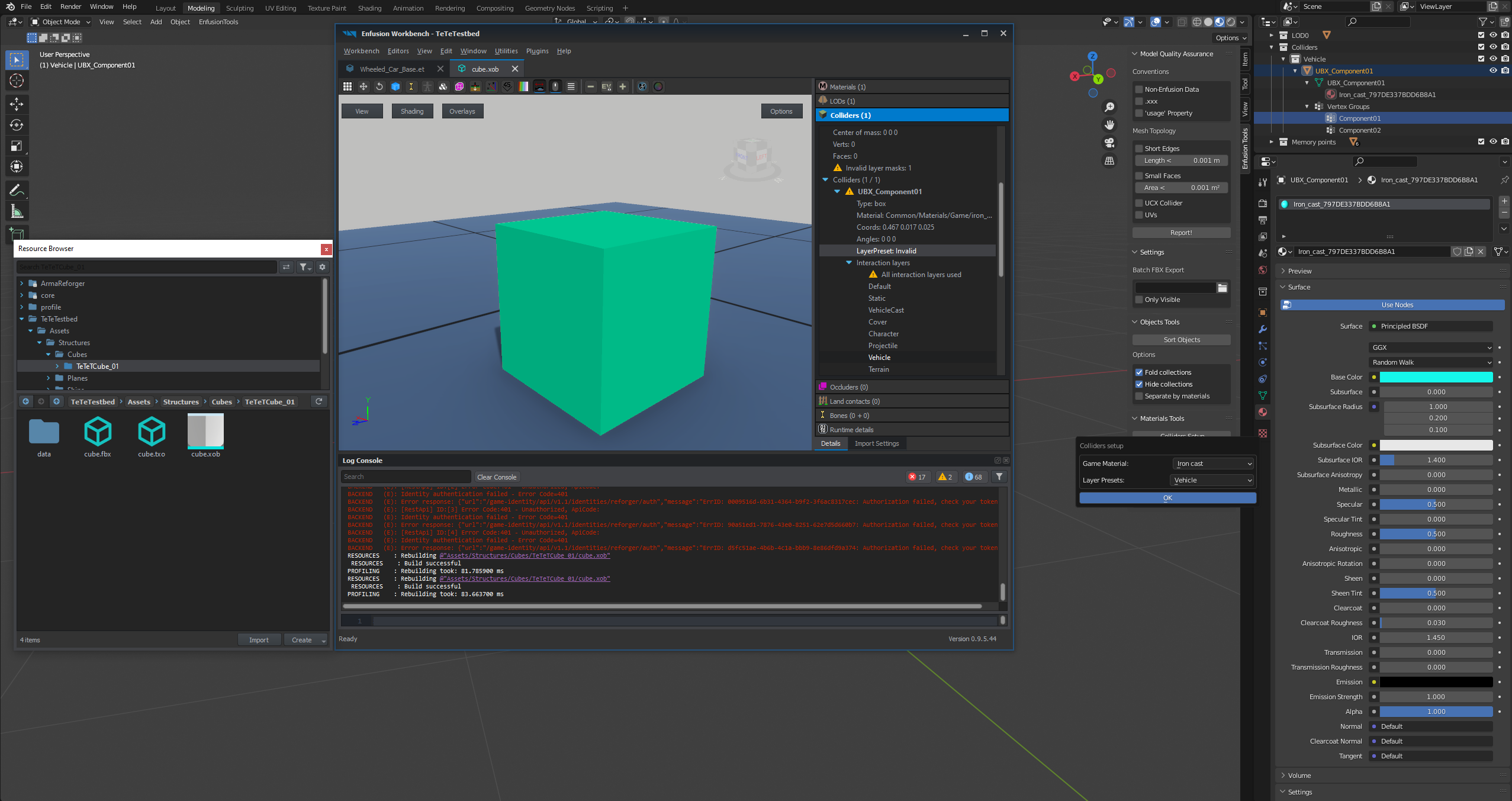
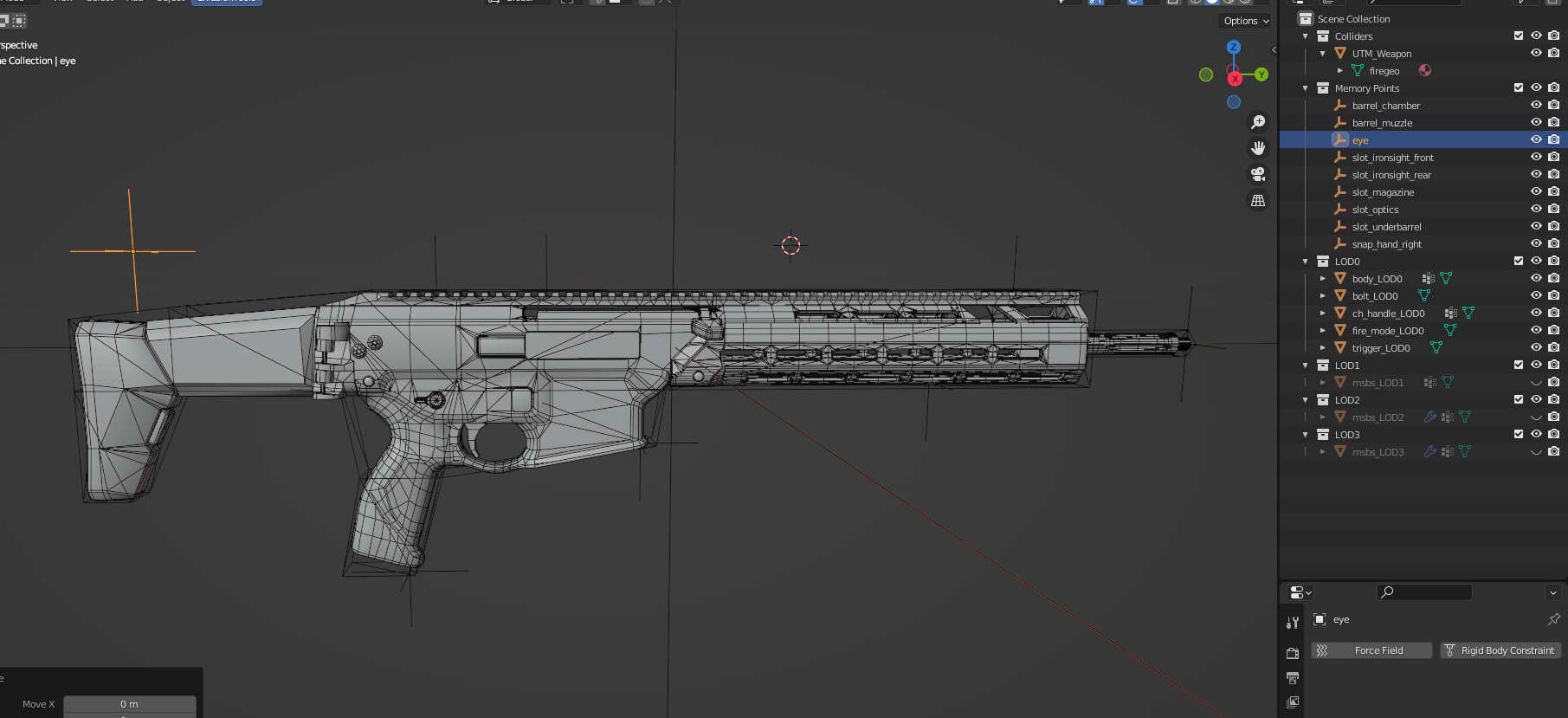
On my cube the collider displays a exclamation mark on 'Invalid layer masks: 1' and the exclamation mark in yellow triangle is also besides Colliders->UTM_Geometry . Any ideas?
knotty cedar
lime comet
On my cube the collider displays a exclamation mark on 'Invalid layer masks: 1' ...
You need to assign a layer preset

 lofty cedar
glad sable
Hello, where can I find bones for Blender?
lofty cedar
glad sable
Hello, where can I find bones for Blender?
Shift + A > Armature, from there the rigging process is very similar to Unreal Engine, so if you can find a tutorial on that, it should walk you through the steps.
knotty cedar
tacit eagle
Have anyone figured out how to export the memlods?
you mean like memory points that we used in arma 3 to snap things to and stuff? if so, those are null objects in blender (if im using the right term) that need to be named accordingly (correct prefix that you can find in documentation soon) and they show up in the Bones section of the xob 🙂
lofty cedar
tacit eagle
Have anyone figured out how to export the memlods?
Memory points seem to be emptys now in Blender as opposed to vertices, so be careful that you haven't set your export to ignore emptys!
lime comet
knotty cedar
You need to assign a layer preset
where do I find the Basic Options dialog? Workbench or Blender?
knotty cedar
lofty cedar
Memory points seem to be emptys now in Blender as opposed to vertices, so be car...
exactly 🙂
knotty cedar
lime comet
where do I find the Basic Options dialog? Workbench or Blender?
blender
lofty cedar
I haven't quite gotten as far as animations, but I take it those names will be important for reusing existing vanilla animations?
The bones as well as their w_ prefix?
 lean cargo
can you export the models of the characters from enfusion to blender?
 white fractal
anyone knows how to delete materials from a fbx model? https://prnt.sc/pExPeQJJ6GX0
lofty cedar
lean cargo
can you export the models of the characters from enfusion to blender?
I don't think you can export, but there is a sample model here that you may be able to use. I believe there is another in the weapon's animation files... I need to have a look at that one myself.
https://github.com/BohemiaInteractive/Arma-Reforger-Samples/tree/main/SampleMod_NewCharacter

GitHub
Modding Samples. Contribute to BohemiaInteractive/Arma-Reforger-Samples development by creating an account on GitHub.
lean cargo
lofty cedar
I don't think you can export, but there is a sample model here that you may be a...
how do i import the sample mods in the workbench?
lofty cedar
white fractal
anyone knows how to delete materials from a fbx model? https://prnt.sc/pExPeQJJ6...
A simple right click and delete worked for me from the file viewer... if you want I can get you a screenshot
white fractal
lofty cedar
A simple right click and delete worked for me from the file viewer... if you wan...
yes please.. thank you!
tacit eagle
lofty cedar
Memory points seem to be emptys now in Blender as opposed to vertices, so be car...
They are not excluded when exporting. Could it be because that i am missing a working rigg at the moment?
 uneven seal
Are there any recruitments about the collider mesh? Closed or convex or something?
lofty cedar
lean cargo
how do i import the sample mods in the workbench?
I believe there is a more comprehensive tutorial somewhere here, but ultimately you want to download the files and get them into your mod directory which is stored here:
C:\Users\User\Documents\My Games\ArmaReforger\addons
lean cargo
lofty cedar
I believe there is a more comprehensive tutorial somewhere here, but ultimately ...
Ok thank you
lofty cedar
tacit eagle
They are not excluded when exporting. Could it be because that i am missing a wo...
Would you be willing to work in VC?
tacit eagle
VC?
lofty cedar
I don't know that a missing rig would cause the memory points to not show up, as I personally did the rig before the memory points.
lofty cedar
tacit eagle
VC?
Voice Chat
tacit eagle
yeah sure, no problem
white fractal
for file viewer what do you mean exactly? @lofty cedar
lofty cedar
white fractal
for file viewer what do you mean exactly? <@217004728620548096>
Sorry, one moment while I grab a screenshot
white fractal
dw, no problem!!
lofty cedar
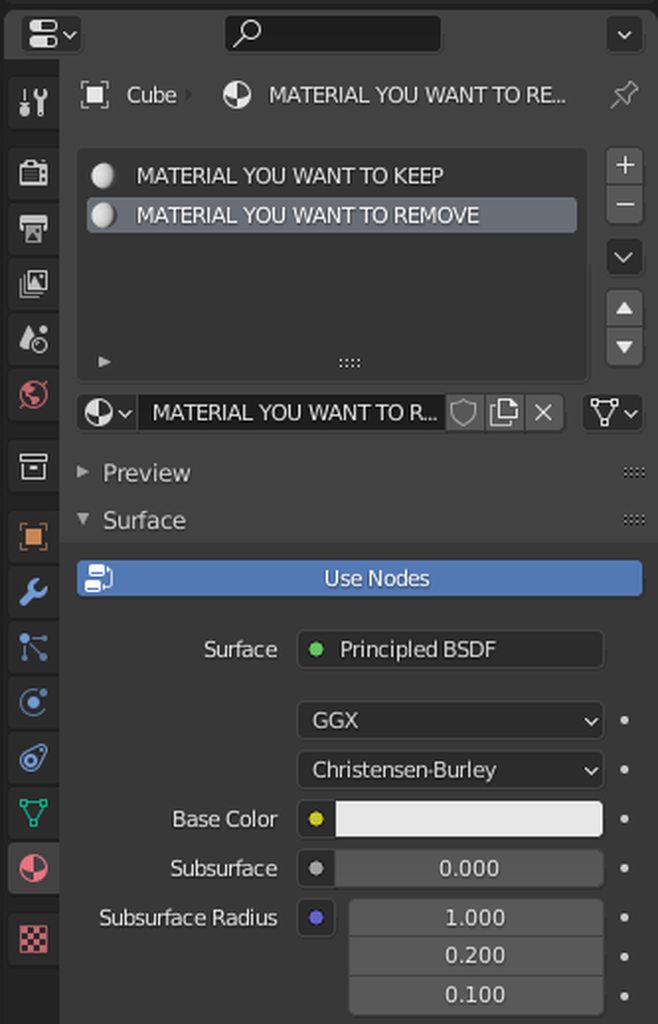
Upon further reflection, I've found that I am still waking up. Removing a material from an fbx can be done rather easily in blender, but I'm not so sure as to what the process would be for that in Enfusion. For Blender, all you have to do is import the fbx, maneuver to the materials tab (which I've pictured here), select the material you want to remove, and press the minus button that is immediately to the right of the materials list.
https://imgur.com/a/6Rtwr0J
 white fractal
thank you vespade!
i'll try it now
what i found is that i have to delete the lods... and there are thousand of them.. lol
 rustic rain
Has anyone found a way to reverse engineer exporting a model
lofty cedar
rustic rain
Has anyone found a way to reverse engineer exporting a model
As in pulling a model from the game?
rustic rain
lofty cedar
As in pulling a model from the game?
Yes
lofty cedar
I don't believe you can, but if you need something to reference, I'd recommend you to the #reforger_samples samples
rustic rain
Yeah I downloaded that.
fathom bolt
knotty cedar
You need to assign a layer preset
where did you find this window ?
rustic rain
Just want to export them so its easier
lofty cedar
I haven't read up on it much, but from what I've seen, once it's locked, it stays locked
rustic rain
lofty cedar
I haven't read up on it much, but from what I've seen, once it's locked, it stay...
Thats stupid...
lofty cedar
If it's from the samples, all the files are accessible from Windows Explorer
those files are unlocked
lofty cedar
rustic rain
Thats stupid...
It's a safety precaution so that artists don't have their work stolen from them
you're still able to view the model in its entirety from within the engine, though!
fathom bolt
All files can be modified just right click and duplicate into your mod
lofty cedar
Is that the case for models as well?
fathom bolt
with enfusion
rustic rain
Let me try that
lofty cedar
There isn't a duplicate option for xobs
fathom bolt
why you want the .xobs and not the prefab ?
lofty cedar
The prefab does not contain the model, it references it
He wants the model so that he can work externally from the engine
fathom bolt
oh so you can't its a protection
lofty cedar
From what I understand and see, you cannot export models once they've been locked, this also seems to go for animations
fathom bolt
lofty cedar
That allows you to change characteristics, but not the actual 3D asset
fathom bolt
yes you need to keep the original files
so for the bis files it's normal
like arma 3 when its binarized
lofty cedar
white fractal
what i found is that i have to delete the lods... and there are thousand of them...
You have to delete the LODs? That doesn't sound right 😬
lofty cedar
fathom bolt
like arma 3 when its binarized
Precisely
uneven seal
Are there any recruitment about the collider mesh? Closed or convex or something?
rustic rain
they really fucked it with locking all the shit
uneven seal
fathom bolt
but you can always check with the plugin for blender
how?
fathom bolt
in the main folder of the arma reforger tools you have a blender folder
with the plugin
uneven seal
and where can i check it in blender?
rustic rain
Anyone know where I can find the blender addons?
uneven seal
fathom bolt
in the main folder of the arma reforger tools you have a blender folder
@rustic rain
fathom bolt
To install the plugin in blender :
In Blender go to "Edit" "Add-ons" and Install at the right top corner
just select the .zip plugin
and of course turn in on
lofty cedar
You then also need to extract the data zip somewhere, and point your plugin to the extracted data folder
fathom bolt
i missed this part lol
fathom bolt
Little WIP 😉

 violet smelt
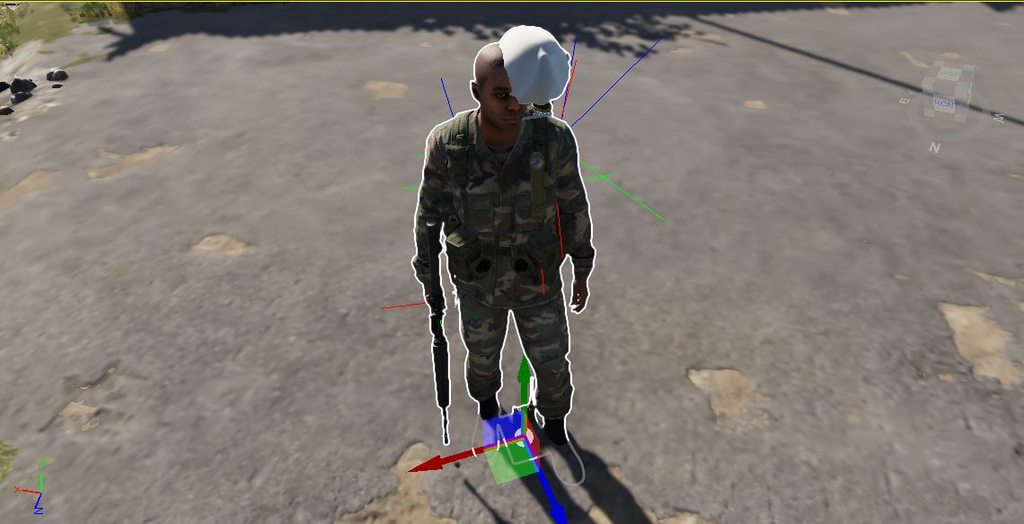
Can anyone explain this
driving me insane
or the model will be at their feet
Does it require bones?
 sly bridge
i would assume that to be a helmet of sorts
violet smelt
Yes
I cant make the helmet work or any of the other models I made
And this is a sample model
sly bridge
it most likely requires bones, just like arma3 did
violet smelt
So just enable bone maybe 🤔
sly bridge
not sure, but definitely have a looky over existing helmets in reforger
violet smelt
Yeah I have
over the past two days
Nothing has helped
looks like bones also did not help
sly bridge
did you duplicate an existing asset?
having a look at the booney, it seems it is skinned to the “head” bone
 eager hill
It's half broken, but I can finally shoot it https://streamable.com/jy1avs
 sly bridge
violet smelt
Is that not the right vertex
sly bridge
violet smelt
Is that not the right vertex
 violet smelt
Ok I have it set to that already
violet smelt
Lol
The headgear makes no sense
Workbench it looks fine
In world editor its the worst
After I turn it into a prefab
It looks like prefabs completely ignore the bones
.....
figured it out
 plain citrus
hey ! I've open the SampleMod_NewWeapon but when i want to test in world editor i dont see the Assets_Showcase_Base.ent .
Can you help me ?
 serene halo
How to create prefab for static object, that i imported?
violet smelt
The bones are 100% broken
 pure kayak
hey guys, whats the process to rig to the new body?
 winter current
what's the difference between UTM and UCX in the fire geo? wondering why it's a different prefix but can't find info on it
 last hill
violet smelt
In world editor its the worst
last hill
violet smelt
In world editor its the worst
No matter what I tried, I couldn't even get mine to show up as an equipment item so at least you got that far.
pure kayak
violet smelt
figured it out
how did you manage to get the rigging done?
last hill
pure kayak
how did you manage to get the rigging done?
I personally skin set my model to the sample new character fbx skeleton rig, 100% to head as my mod was a helmet
But can't say it works as can't get it to appear ingame
pure kayak
damn
i got my stuff ingame using prefabs
but the rigging wont work so fml
how'd you skin it? just armature deform?
last hill
pure kayak
how'd you skin it? just armature deform?
Using skin modifier in 3ds max
last hill
pure kayak
i got my stuff ingame using prefabs
Yeah my prefabs didn't work for it to show as an item lol so can't even test
lofty cedar
 bright raft
Not much but honest work
bright raft
Not much but honest work
Very nice, have you set up any animations for that, or is it just using the M16 anims rn?
bright raft
Just vanilla anims. I am surprised how intuitive the tools are
 spark raptor
winter current
what's the difference between UTM and UCX in the fire geo? wondering why it's a ...
spark raptor
winter current
what's the difference between UTM and UCX in the fire geo? wondering why it's a ...
That's the shape of the collider, the possible options are:
UCX: Convex Mesh
UBX: Box
USP: Sphere
UCS: Capsule
UCL: Cylinder
UTM: Concave Mesh
When you use box, sphere, capsule or cylinder, it tries to detect the centre and dimensions of the object based on your mesh, then it throws the mesh away and just stores those parameters (like for a sphere, it will only store the centre and radius). Using the simple colliders instead of convex/concave mesh is better for performance.
winter current
spark raptor
That's the shape of the collider, the possible options are:
```
UCX: Convex Mes...
oh, quite the dramatic change from simply making everything simple and convex. thanks for the info!
spark raptor
pure kayak
So i cant even export with bones
Is "Import Settings" -> "Export Skinning" checked in Workbench on the .XOB's properties? (If not, checking it and then clicking "Reimport resource" should bring in the bones)
 oblique hinge
pure kayak
is the rig provided in the samples broken?
oblique hinge
pure kayak
is the rig provided in the samples broken?
The rig provided in the samples works, however if you import it into blender and export it again it stops working
oblique hinge
violet smelt
figured it out
How did you do it?
 fervent solar
stupid question, how do you set up the armatures and empties for weapons?
last hill
@waff is that not covered in the weapon modding tutorial?
fervent solar
huh theres a weapon modding tutorial?
pure kayak
spark raptor
Is "Import Settings" -> "Export Skinning" checked in Workbench on the .XOB's pro...
it seems to have bones now but its still not rigging to the character , is there anything else?
checking the model, when i move bones it moves the uniform too, so it should work
pure kayak
violet smelt
It looks like prefabs completely ignore the bones
it actually seems its teh same issue as this
spark raptor
pure kayak
it seems to have bones now but its still not rigging to the character , is there...
There's no settings that would stop the binding of the mesh to the bones as far as I recall, you can select a bone in the .xob preview and rotate/translate it to check it.
pure kayak
i did that
it works in the xob preview
but on the prefab it doesn't work at al
yeah i dont understand this at all
i think im just gonna give up until docs are released for this
i cant get the prefab to load any bones at all
rain wadi
Maybe you need a specific component?
 round orbit
How are colliders added to a model?
rain wadi
round orbit
How are colliders added to a model?
Did you make your colliders in Blender?
pure kayak
rain wadi
Maybe you need a specific component?
what do you mean exactly?
round orbit
rain wadi
Did you make your colliders in Blender?
I have the vest, I just need to create the collider in blender and import it?
rain wadi
pure kayak
what do you mean exactly?
I had to add a specific component in my prefab to make the colliders work. It might be the same for bones.
pure kayak
i copied a prefab uniform already made
that should have all that already no? i just swap the model
rain wadi
round orbit
I have the vest, I just need to create the collider in blender and import it?
Yup, create the colliders, use the Enfusion Tools for Blender to add the correct layers and then export it to FBX. The colliders must be named in a specific way. Check the Reforger Samples if you want an exemple. https://github.com/BohemiaInteractive/Arma-Reforger-Samples

GitHub
Modding Samples. Contribute to BohemiaInteractive/Arma-Reforger-Samples development by creating an account on GitHub.
rain wadi
pure kayak
that should have all that already no? i just swap the model
I don't know :/
pure kayak
so, just to check, i dont need the colliders in my model? or do i
cause maybe thats it
and what part is the collider anyway
if anyone has ideas on how to fix this DM me/ping me please, i'll be back on later but im desperate to fix this up
winter current
pure kayak
so, just to check, i dont need the colliders in my model? or do i
Colliders are the geo and fire geo, you need them.
 cyan girder
Go get the sample model, its really explanatory in the blend file 🙂
winter current
just follow the sample and use the blender addon to assign the materials
pure kayak
i got it, still cant work it out
cyan girder
Its a box.
winter current
simple shapes for the geo, more detailed for the fire geo like always
 worthy citrus
how do you stop doors from teleporting to 0,0 in your prefab when you open them?
 chrome plaza
hey lads, wondering if i purchased a weapon model from sketch fab, could that be imported straight into the workbench? or are there other steps that need to be taken first? 3D format is Autodesk FBX (fbx) for reference :)
hidden yarrow
There is still some stuff that you have to do in order to get it working
But you could drag the fbx into the tools and the model would work
But thats JUST the model so it doesnt actually do anything
To find out what you have to do to get it to work take a look at the samples weapon
chrome plaza
Thanks for the reply mate, just wanted to make sure before i purchased
appreciate it
hidden yarrow
Np id wait till the document for new weapons is out so you know what you are getting into
last hill
The weapon modding guide is out already.
fervent solar
yeah lol, i've been trying to do it knowing nothing about modding for any game and just having a bit of 3d modeling experience
hidden yarrow
Not the creation one
The modding one is just about editing existing ones
But you can peace bits together to kinda get it working
hidden yarrow
bright raft
https://i.gyazo.com/d539a1d71921a654d2fa964c5defdcf6.mp4
Riverx managed
last hill
I know Greg has dropped a working weapon
fervent solar
ive got something to the point where it shoots, but all the animations are broken and the camera clips inside the gun when you ads lol
last hill
fervent solar
ive got something to the point where it shoots, but all the animations are broke...
Looking at existing weapons, there are a lot of weapon proxy points to be set up, but I am not 100% sure on what each does or position etc. I dare say modding from scratch would be more in depth than modding existing.
I hope they add a character modding guide for headgear etc etc
fervent solar
yeah. I managed to kinda figure out the proxy points, mainly just carrying over the ones on the example file, and i made a little collider mesh but I have no idea how to do the bones and everything, i'll prolly continue once a guide for weapon creation comes out
 sage bay
made a model and its pretty much the same as the sample. but how do i use it as a local mod?
hidden yarrow
You can load it in the world editor
sage bay
hidden yarrow
You can load it in the world editor
like in reforger?
hidden yarrow
Tools
sage bay
yeah ive done that but i just wanted to see if i set up the configs right and place it in gamemaster
hidden yarrow
Ah idk bout game master but ive seen people place their guns in world editor and then pick them up as a player to test them
 candid mica
yeah I'm at the same point, I can place and use it in the world editor, but have no idea how to get put it in game as a GM
round orbit
fervent solar
yeah. I managed to kinda figure out the proxy points, mainly just carrying over ...
What example file are you using for character modding? I am trying to add a new vest but I can't get the colldiers and firegeo to work
fervent solar
oh, im trying to do weapon modding lol
i was using the stuff in #reforger_samples
something weird i noticed is that I placed all the memory points down in blender, named them, and they dont appear in the workbench when I look for them under bones, it's the same way for the sample weapon
last hill
@waff did you change export settings in the toolkit itself to import bones
And then hit reimport
cyan girder
It says in the tutorial to use the world from the sample mod. But the weapon sample mod doesn't have the world in it. How do you cross import?
fervent solar
last hill
@waff did you change export settings in the toolkit itself to import bones
i have not, where would I do that?
last hill
When you open up your xob in the content browser. Next to details is import settings tab. Check box next to bones or animation or something. On my couch in the lounge room with my son, going off memory
fervent solar
ah, thank you
round orbit
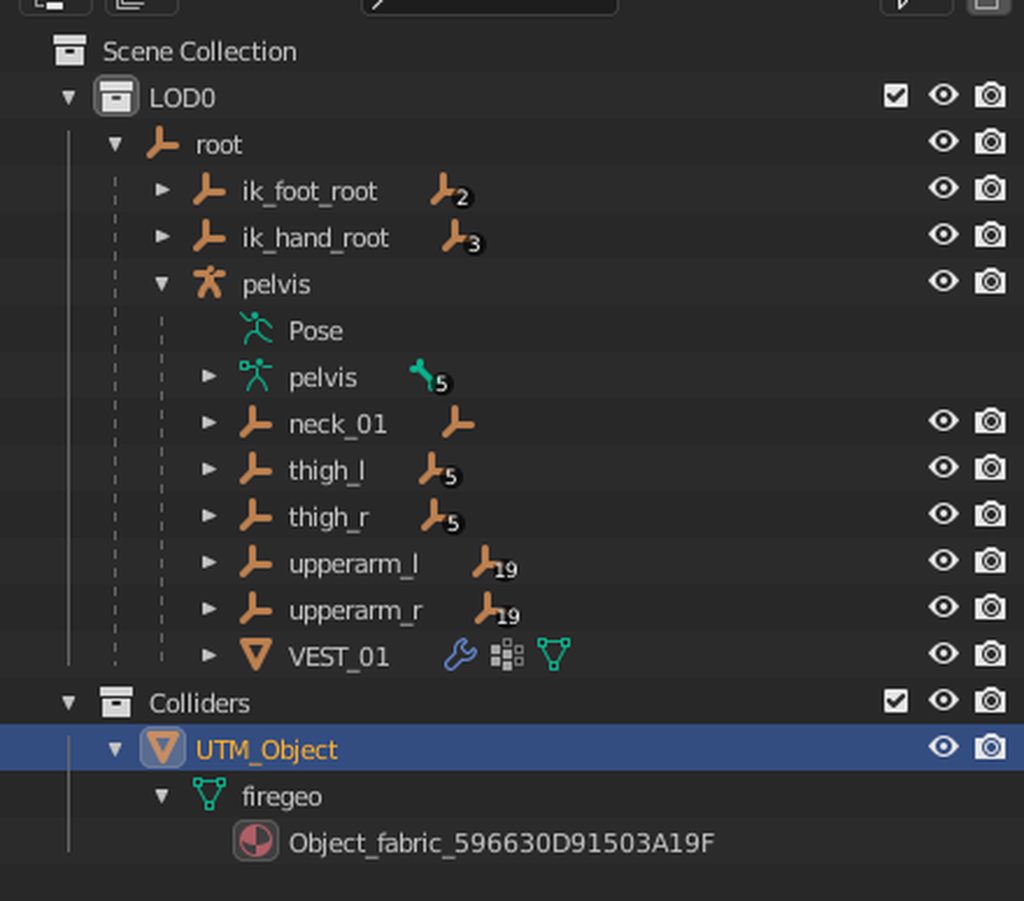
Anyone know why I am getting invalid layer masks on my colliders? https://imgur.com/a/pHe134x


 digital vector
round orbit
Anyone know why I am getting invalid layer masks on my colliders? https://imgur....
digital vector
round orbit
Anyone know why I am getting invalid layer masks on my colliders? https://imgur....
look https://gyazo.com/9dbf44039c4166f3db10fa56fa2fb194 in blender
 round orbit
That's what it needs to be? Hopefully we will have a vest or headgear sample soon
digital vector
And when you export don't forget to check the box https://gyazo.com/25242b8f5881c11392d37729cd119979

 deft owl
When you make a collider is it just any simple geometry in blender? Is there a max vert count or a specific way to do it for optimizing physics collisions?
pure kayak
3 hours later in the tools i still can not get prefabs to use rigging
please can someone tell me what the hell im supposed to do with this
keen pulsar
Has anyone figured out if hiddenselection equivalents are a thing? Looking to import a model with a variety of asthetics which was originally hidden via selections
 honest wave
I'm just trying to figure out how to import a model still
 inland ginkgo
I need to figure out how to get vests working
So far I have imported with textures and LODs all set up. But that's where I'm stuck lol
Hopefully a sample comes out
pure kayak
You stuck on the rigging part quebec?
inland ginkgo
I dont even know what the rigging for a vest is meant to be like
winter current
i'm stuck in fully setting the armature on the model, never had to deal with this on dayz vehicles so it's a journey lol
pure kayak
im stuck with prefabs as you can see by my bitching above
pure kayak
i got hte rigging working fine, its just getting it into an item
cause the prefabs wont load my bones
winter current
pure kayak
i got hte rigging working fine, its just getting it into an item
have you checked the modded weapon tutorial? the inheriting part might be it
you gotta make sure your item gets defined as a proper entity/prefab
pure kayak
got it, i'll check that too
pure kayak
still didn't work
has anyone actually managed to get anything in? uniform ,vest headgear anything
 clear aspen
Yes, check #enf_showroom
 jade forum
a friend got a shirt in-game and into the arsenal, but it isn't animated, it just kinda floats at the characters chest as they move around
pure kayak
same here
thats what im trying to fix and its driving me fucking bonkers
worst bit is its all rigged correctly and it works in the model viewer
jade forum
one thing he found was that if you add your model as a child of one of the test characters in the animation editor, then it breaks
but just testing it alone works fine
winter current
clear aspen
Yes, check <#976591280786276362>
need to see more video of those assets actually working cause dropping them literally in the game is an actual joke and i'm pretty sure it's what most people have done and are trying to showcase
jade forum
yeah, adding it as a child in the animation editor seems like a faster way to check if it will work in game or not afaict
clear aspen
winter current
need to see more video of those assets actually working cause dropping them lite...
I wasn't saying they got it to be functional just that they got them in-game. From his question I assumed the getting it in-game was his issue rather than the getting it functional lol
pure kayak
jade forum
yeah, adding it as a child in the animation editor seems like a faster way to ch...
Any ideas how to get the body in to add the uniform piece as a child to it?
pure kayak
clear aspen
I wasn't saying they got it to be functional just that they got them in-game. Fr...
i mean, i did say its the rigging issue with prefabs thats the issue
i got it ingame with working bones and all that
jade forum
go to workspace, then scroll down to the preview models, right click one and then "Add Child Model..."
clear aspen
pure kayak
i mean, i did say its the rigging issue with prefabs thats the issue
Ah, I didn't see that on my phone, sorry
winter current
clear aspen
I wasn't saying they got it to be functional just that they got them in-game. Fr...
yeah, i've been sitting on the vehicle i'm working on since borderline an hour post launch and i still can't get it to work lol
pure kayak
the jacket i made just refuses to rig properly
winter current
i think besides specific things on models for each type of item the biggest problem is dealing with prefabs, it's not exactly that intuitive and it's by far the biggest problem we're all trying to sort
pure kayak
and prefabs are just wonk to me
winter current
there's even things on the samples that i don't get why they don't work properly, like the Golf car for example, it doesn't have animations for getting in the car
so why do i even need an entire rig for it? because it probably handles part of the interaction actions too i guess
pure kayak
3.6 hours its taken and i still cant get past the rigging
pure kayak
does it work when equipped?
inland ginkgo
nah I haven't done the rig
inland ginkgo
is it hard?
like what im thinking, is it possible to like just put into the mixamo autorig and just mess with the bone properties it makes so i can import it to reforger?
fathom bolt
So no any news for hand anim for weapons ?
winter current
interesting, so you can get actions without even having a full rig
how did you set the prefab for it?
jade forum
the prefab is pretty easy, just clone it off of some existing equipment for the same slot and change the name/mesh/preview mesh
inland ginkgo
^
jade forum
although the cloning is a funky process, you need to open the prefab in the world editor, then drag it from the top left into your addon folder in the bottom resource browser
winter current
jade forum
the prefab is pretty easy, just clone it off of some existing equipment for the ...
yeah that doesn't work with vehicles, at least not without something extra i'm missing
jade forum
oh lol, I missed the messages where you mentioned vehicles
yeah I'd just pray at that point (and find something else to do until they properly document the tools)
inland ginkgo
Yeah but similar idea with all prefabs, you can open the prefab and reference it when making your own
pure kayak
jade forum
the prefab is pretty easy, just clone it off of some existing equipment for the ...
i already managed that, the issue is, despite my uniform top moving with the bones in the model preview, it wont move on the prefab uniform
winter current
i don't know what i did now that my car appears on it's side and it's freaking huge lmao, something on the armature i guess lol
pure kayak
but im not sure if its true but if it is thats just
jade forum
that would be par for the course at this point lol
winter current

 bronze sentinel
I think they mean "Duplicate to 'project name' " don't they?
 tidal latch
bronze sentinel
I think they mean "Duplicate to 'project name' " don't they?
tidal latch
bronze sentinel
I think they mean "Duplicate to 'project name' " don't they?
not exactly, there is inherit prefab in addon action in Resource Browser attached to World Editor but sadly it is broken in current public tools
it will be available in next update though
 potent crystal
anyone else having issues with helmets not appearing in the arsenal?
ive basically copied everything the already in game helmet has and the sample helmets but i cant seem to get them in the arsenal
been at it for like 5 hours now losing my mind
jade forum
yeah that's just configs being dumb, try copying your addon out of the addons folder and then adding it back with the "add existing" button
assuming you did actually override the original arsenal config
potent crystal
no i inherited it
jade forum
inherting means you've copied it but non-conflicting changes to the original should still apply
but the game is still referencing the original to actually build the arsenal
so you need to override
potent crystal
lets see if my project lets me in again cause its been starting to crash everytime i open the prefab folder
jade forum
does that work in-game with animations?
jade forum
oh lol
yeah we've got the exact same bones and it doesn't work
so not sure how we should "set" them like that
inland ginkgo
are the bones properly weighted to the mesh?
like you dont just have a pair of bones and a mesh, you gotta connect it
jade forum
unless importing nuked the weights, yeah
inland ginkgo
ight
fathom bolt
@tidal latch did you know you can I make a custom hands anim for weapon ?
pure kayak
like i can move the bones around and it moves the uniform with it
but i cant get it to do that ingame on the prefab
inland ginkgo
ok
winter current
i don't get what i have wrong on my model that the scale breaks when importing to wb lol, looks fine on blender but huge on wb
jade forum
they aren't the same program, they don't work on the same scales. you should import the templates/examples from github into blender to get the scale right
pure kayak
that looks like my issue tbh
tidal latch
fathom bolt
<@105548653594193920> did you know you can I make a custom hands anim for weapon...
I hope the push that part of documentation to wiki today
pure kayak
Reyhard milord
winter current
jade forum
they aren't the same program, they don't work on the same scales. you should imp...
it all broke when adding the armature modifier to the lod0 parts
pure kayak
may we have some advice on rigging? we cant get it working ingame properly
jade forum
yeah that's the same problem literally everyone is having lmao
tidal latch
in any case, you need to look at p_rfl_sampleweapon_01_ik.anm in https://github.com/BohemiaInteractive/Arma-Reforger-Samples/tree/main/SampleMod_NewWeapon/Assets/Weapons/Rifles/SampleWeapon_01/Anims
GitHub
Modding Samples. Contribute to BohemiaInteractive/Arma-Reforger-Samples development by creating an account on GitHub.
the notice how it is plugged in sample https://github.com/BohemiaInteractive/Arma-Reforger-Samples/blob/17ba195d50ddac7337efc0a19420cdfdff76a250/SampleMod_NewWeapon/Prefabs/Weapons/Rifles/SampleWeapon_01_base.et#L33
GitHub
Modding Samples. Contribute to BohemiaInteractive/Arma-Reforger-Samples development by creating an account on GitHub.
pure kayak
so theres literally no way to get equipment ingame as of now
tidal latch

GitHub
Modding Samples. Contribute to BohemiaInteractive/Arma-Reforger-Samples development by creating an account on GitHub.
pure kayak
as in, working eqp
tidal latch
pure kayak
may we have some advice on rigging? we cant get it working ingame properly
have you seen how sample helmet was done?
glad sable
 winter current
there's something everyone is missing or it's not working basically
 tidal latch
ah, and you are doing it in blender, right?
glad sable
yes
 carmine lily
Same issue for chad 3ds max users
tidal latch
let me verify one thing quickly
winter current
winter current
lmao https://imgur.com/a/TuzJcRm
fixed this. my parenting was wrong, it needs to be armature and object, not bone.
potent crystal
jade forum
so you need to override
I overrided it and result was me crashing Everytime I placed the Arsenal. Wanted to yeet my keyboard ngl
tidal latch
yes, in Blender there is issue with Armature bone - basically any new gear that you create have to use exactly same skeleton. 3DS Max doesn't have such issue so if there is some problem with import, then please provide me more details
pure kayak
what details do you need?
tidal latch
some pics from 3ds max
tidal latch
there is one that I know but it is a paid addon - there might be some free alternatives but I'm not aware of them. In any case, paid addon is not a proper solution so let me discuss it later and I will let you know what can be done about it
inland ginkgo
how did you guys get the bones? (like where to get them from)
carmine lily
https://i.imgur.com/iHU8KrQ.png Heres what I've got, and I still have the issue. Also, with the default import settings have the whole skeleton rotated 180 degrees.
 pure kayak
thanks, if possible a ping would be amazing if theres a fix
jade forum
considering 3dsmax and blender users get the exact same problem surely there's a problem somewhere else
tidal latch
carmine lily
https://i.imgur.com/iHU8KrQ.png Heres what I've got, and I still have the issue....
ahh, 180 deg issue something different 🙂
carmine lily
Well, The weights don't work either when loaded onto the character.
tidal latch
 pure kayak
so it seems 3ds max and blender have the same problem
carmine lily
Yea, I did that.
tidal latch
you need to rotate model in importer (in importer, not in mesh)
carmine lily
It fixes the rotation, but the mesh doesn't animate with the character.
pure kayak
^ this is the issue i have too
tidal latch
carmine lily
Well, The weights don't work either when loaded onto the character.
and is something as simple as helmet working for you?
pure kayak
My rigging does work too by the way and i used blender, its just when placed onto a prefab item
carmine lily
I've copied the prefab from the base M88, replacing the worn model, so I'm not sure what the issue might be?
lofty cedar
inland ginkgo
how did you guys get the bones? (like where to get them from)
Reforger Samples
potent crystal
🥲 this is pain
tidal latch
pure kayak
^
this again different issue
potent crystal
Helmets are like a pain to figure out to Just get in the Arsenal overall
pure kayak
that issue is the one i've been trying to describe
potent crystal
And it’s to the point that I can’t even touch my project folders without it crashing
pure kayak
its, working in the mesh viewer (the rig) but ingame it doesn't animate
tidal latch
carmine lily
I've copied the prefab from the base M88, replacing the worn model, so I'm not s...
so same custom helmets are also not working for you?
carmine lily
Let me check real quick, From what I looked at with reimporting the FBX samples, They suffered the same issues.
But maybe I missed something this time around.
tidal latch
so you loaded sample helmet to max and it was not working?
carmine lily
No, I loaded only the sample character for my KLMK smock. As I wanted to use the existing weights on the base character to cheat on weight painting.
Also to match with the hands, etc.
tidal latch
ah, I was curious if it also happens with something as simple as helmet
pure kayak
it happens with anything gear related
tidal latch
pure kayak
its, working in the mesh viewer (the rig) but ingame it doesn't animate
as I mentioned, it's not working due to that armature bone
tidal latch
it's not working in game since skeleton has match base body
and base body doesn't have Armature bone
pure kayak
the rigging works though
inland ginkgo
lofty cedar
Reforger Samples
https://imgur.com/UQU2MdX this the right rig? Got it from the headgear (newcharacter) sample
there
spark raptor
pure kayak
the rigging works though
You could try adapting this to the version of Blender you're using, it's basically commenting out 3 lines:

Last updated: September 04, 2017 As of Unreal Engine 4.16, this is no longer needed. From the Unreal Engine 4.16 Release Notes : New: The FBX importer updates: Now imports collision models under th…
carmine lily
Okay
Sample helmet works
but I didn't import and export it from 3ds max
just as is from github.
lofty cedar
inland ginkgo
https://imgur.com/UQU2MdX this the right rig? Got it from the headgear (newchar...
There are a few files in there, pick whichever one applies best to you. Whether it's custom character, headwear, or weapons... there may even be more
carmine lily
So I'll import and export and see if it breaks then
tidal latch
could you try it out of curiosity?
tidal latch
steps for vest are basically same as for helmet
inland ginkgo
Yeah
carmine lily
tidal latch
could you try it out of curiosity?
Okay, So it works, both the samples and by importing into 3ds max and exporting, the mesh works perfectly. I'm guessing the sample character is busted or something, I assumed that the sample character had the same set up as it would for the helmet if not more so.
tidal latch
and can you try loading character template and exporting it from max?
carmine lily
Yep, 1 sec
pure kayak
been messing with the skeleton trying to get it to work
is Scene_Root > Root correct?
winter current
tidal latch
steps for vest are basically same as for helmet
what sets the interaction actions exactly? i do see the actionmanager component but in the model that's defined by the armature? memory points? i can't figure out why i can't get in my car basically
carmine lily
tidal latch
and can you try loading character template and exporting it from max?
https://i.imgur.com/sUzxyyE.png So I imported and exported the sample character, and everything seemed to be fine. Had 163 bones in total. I decided to give my custom mesh a try, and the mesh seems to be animated now! but the weights are completely messed up and I'm not sure what I did wrong. The weights are fine in 3ds max so not sure why it would be messed up like this?
 tidal latch
spark raptor
You could try adapting this to the version of Blender you're using, it's basical...
tidal latch
spark raptor
You could try adapting this to the version of Blender you're using, it's basical...
ah, tried it but it doesn't work
inland ginkgo
carmine lily
https://i.imgur.com/sUzxyyE.png So I imported and exported the sample character,...
progress....
tidal latch
carmine lily
https://i.imgur.com/sUzxyyE.png So I imported and exported the sample character,...
are you sure vertices are not skinned to more than 4 bones?
inland ginkgo
progress is made
carmine lily
tidal latch
are you sure vertices are not skinned to more than 4 bones?
Let me see, I have a feeling that there is definitely verts skinned with more than 4 bones.
pure kayak
if any of you guys work it out in blender or the devs make a fix please ping or dm me about it
carmine lily
tidal latch
are you sure vertices are not skinned to more than 4 bones?
Okay, so I set bone Affect Limit to 3(and then 2) and it's still exactly the same.
winter current
this action thing is driving me nuts cause it's also literally the only thing missing completely from the guide on the wiki, i need more coffee
tidal latch
@winter current on equipment you mean?
winter current
tidal latch
<@102547990710857728> on equipment you mean?
vehicles
 dark cedar

Heckler & Koch G11 assault rifle used in the U.S. Advanced Combat Rifle program.
The Advanced Combat Rifle Program weapons evaluated the:
- Steyr ACR: https://youtu.be/9Ltga6RhDjc
- Colt ACR: https://youtu.be/SdIQwFGRI6o
- Heckler & Koch G11: https://youtu.be/E_didDgUjn0
- AAI ACR: https://youtu.be/j-bxGo5wN2o
.
if only
winter current
tidal latch
<@102547990710857728> on equipment you mean?
"How actions are working and how to add custom one" that part is missing from the guide posted on the wiki
 tidal latch
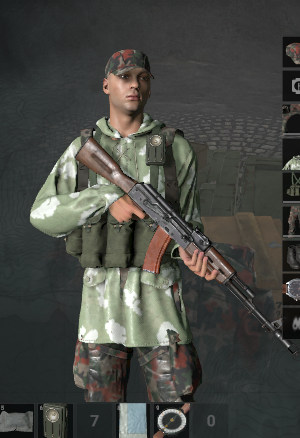
thanks @carmine lily for testing it some small fix. Samples will be updated today with correct character template 🙂
 pliant pendant
so what was the problem?
tidal latch
some mambo jambo when exporting from maya to fbx
this is not going to fix Blender issue though - as I mentioned, it is completely different problem
pliant pendant
so it's fine from 3ds max?
tidal latch
yes
pliant pendant
I feel like maya always has issues trying to work with other things
tidal latch
or any other autodesk software
pliant pendant
3ds max is usually fine
it seems to have the least issues exporting FBX from my experience
tidal latch
pliant pendant
I feel like maya always has issues trying to work with other things
eh, it was more my fault. I'm generally now using Blender more often and I probably missed some option when exporting to fbx
pliant pendant
I still can't get over maya not even allowing you to name your objects with numbers
tidal latch
haha, yes
fathom bolt
So extract anim from Blender don’t work properly at the moment ?
tidal latch
animation export from Blender to enfusion is working - you just need to use TXA exporter from Enfusion Blender Tools plugin
fathom bolt
Ok good
And you confirm that the part for hands anim for weapon will be published today ?
tidal latch
I hope that at least basics will be there, in any case, this is question for #enfusion_animation
fathom bolt
Thanks
inland ginkgo
carmine lily
https://i.imgur.com/VedAd01.png
So... Are you using blender or another software?
jade forum
he's in 3dsmax
and is technically cheating, since he used a fixed version of the character template that isn't on github yet
inland ginkgo
where did he get the fixed version
jade forum
as long as you're exporting directly to TXA from blender, things should work once the fixed character template is public
inland ginkgo
yeah im trying to export my vest with the bones
jade forum
inland ginkgo
where did he get the fixed version
from a bohemia person, so I don't think he's allowed to share it. And I only know because I've been backseat developing with him lol
tidal latch
inland ginkgo
yeah im trying to export my vest with the bones
even though there will be update to samples today, keep in mind that this is not going to fix Blender issue ( see #enfusion_model message )
 calm rune
tidal latch
there is one that I know but it is a paid addon - there might be some free alter...
calm rune
tidal latch
there is one that I know but it is a paid addon - there might be some free alter...
As someone who owns way too many blender addons. Out of curiosity which addon is it that gives us the fix?
tidal latch
calm rune
As someone who owns way too many blender addons. Out of curiosity which addon is...
https://blendermarket.com/products/better-fbx-importer--exporter there is option to ignore armature node

quite pricey
inland ginkgo
I guess i'll just wait then
I am however not even getting any bones detected when I import my fbx to enfusion
carmine lily
inland ginkgo
I am however not even getting any bones detected when I import my fbx to enfusio...
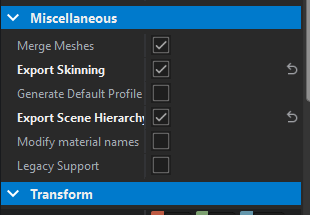
These are what I use to get the bones working
inland ginkgo
ight
carmine lily
they are in the import settings on the right for workbench
tidal latch
winter current
"How actions are working and how to add custom one" that part is missing from th...
this is part of documentation that will be released soon.
round orbit
tidal latch
thanks <@154759151510224896> for testing it some small fix. Samples will be upd...
Are the templates up :D
tidal latch
ETA is today evening
knotty cedar
Collider Shape:
Name for collider shape model = COLLIDER SHAPE_name_of_the_object = UBX_Car or UCS_wall1_part1 for example.
Collider shapes (primitives, which can be created in most 3d software) and their correct naming prefix:
UBX_ - box
UCX_ - convex
USP_ - sphere
UCS_ - capsule
UCL_ - cylinder
UTM_ - triangle mesh (trimesh)

 thorny cobalt
knotty cedar
**Collider Shape:**
Name for collider shape model = COLLIDER SHAPE\_name\_of\_t...
pliant pendant
thorny cobalt
knotty cedar
**Collider Shape:**
Name for collider shape model = COLLIDER SHAPE\_name\_of\_t...
pliant pendant
so what's the deal with fire geometry now? I looked at the BTR and the FG in that seemed like it was just a regular low poly mesh, not made up of a bunch of convex components
knotty cedar
pliant pendant
so what's the deal with fire geometry now? I looked at the BTR and the FG in tha...
Ehm, are you checking out Colliders section of BTR? It has like 50 convex collider shapes (used as fire geometry) 😄
inland ginkgo
are the import settings permanent when importing other stuff or do I have to reimport?
pliant pendant
it had colliders but the one that had FG in its name was just a single simple mesh
spark raptor
inland ginkgo
are the import settings permanent when importing other stuff or do I have to rei...
When a new .xob is created from a newly imported .fbx it gets it's own import settings.
winter current
progress, i can drive my car now lol. but the wheels and steering move in the opossite directions lol
 misty cave
intentional fr
knotty cedar
pliant pendant
it had colliders but the one that had FG in its name was just a single simple me...
 inland ginkgo
spark raptor
When a new .xob is created from a newly imported .fbx it gets it's own import se...
inland ginkgo
spark raptor
When a new .xob is created from a newly imported .fbx it gets it's own import se...
thanks
pliant pendant
oh yeah but I mean for the body
inland ginkgo
do you guys also have a really long loading time when importing and rebuilding resources like assigning new materials?
I assume its cpu based ofc but it takes a fair while for me.
knotty cedar
pliant pendant
oh yeah but I mean for the body
I think I know what you are getting at, basically you can combine usage of simple primitive colliders and triangle meshes (UTM_ prefix)
pliant pendant
I'm talking about the UTM_FG_body component
it seems to be all of the external armor as just one mesh
with an armor material
not like in Arma 3 where the body had to be made up of a bunch of convex components
being able to use triangle meshes for fire geometry will be very useful
winter current
it's basically the same idea but now we have prefixes for the shape itself for optimization purposes
pliant pendant
building the armor entirely out of convex components took a really long time in A3
if it was a more complex shape you'd have like 200 components
knotty cedar
pliant pendant
building the armor entirely out of convex components took a really long time in ...
Yes this is great way to deal with complex shapes, you can create a lowpoly UTM_ (custom triangle mesh) which saves a ton of effort and even polygons as opposed to building the whole complex thing out of seperate primitive components
pliant pendant
so far I'm glad the two things that were the most time consuming for vehicles in A3 appear to not be a thing anymore
shadow lods and firegeo out of convex components
I assume it's still one material per component though?
knotty cedar
pliant pendant
I assume it's still one material per component though?
Not for Trimesh 🙂 You can assign multiple game materials (physmats) to different polygons/faces. You need to make these material assigns in Blender (or wherever you created your model to be exported to fbx)
pliant pendant
oh does the triangle mesh in firego not even need to be closed?
it doesn't seem to be on the BTR
the part where the turret would go looks to be just open edges
if I just need to make a simple mesh for the body and apply different armor thickness materials to different faces, that will make creating firegeo so insanely simple compared to A3
knotty cedar
pliant pendant
oh does the triangle mesh in firego not even need to be closed?
It's not a technical requirement to have Trimesh be closed mesh but just know that backfaces don't react.
 swift goblet
 abstract burrow
I understand that now there is no division into FG and Geometry lods?
pliant pendant
looks like it's just collision and FG geometry
knotty cedar
Well for certain situations/assets you may still want to seperate FG and View geometry, you can do so by creating seperate colliders with each assigned to the correct LayerPreset
abstract burrow
In arma 3 I make full-fledged armor with all thicknesses and full-fledged materials with their own densities and types of surfaces. Is it possible here too?
pliant pendant
looks like you can, it's just much simpler
you can just make one mesh for the body and apply different thickness materials to the appropriate faces
looks like physical materials with thickness still exist
knotty cedar
Yea you can use different components with different physmats (that determine penetration and stuff) or you can create convex/trimesh colliders and assign different materials to different face/polygon selections like that.
abstract burrow
Hmm. Ok. Thanks
dense pelican
@inland ginkgo Any amateurs of equipment in blender? looks amateur nothing
misty cave
it crashes everytime i reimport something
inland ginkgo
dense pelican
<@278070714572079105> Any amateurs of equipment in blender? looks amateur noth...
Could you elaborate sorry. Not sure what you mean.
round orbit
-
I created a new mod in Enfusion Workbench.
-
Import 3D model into Enfusion Workbench for it to generate my files. https://imgur.com/a/j56Qskx
-
Configure my Enfustion tool to my new generated folder in my documents. https://imgur.com/a/EqIdwmM
-
Import my FBX that is in the same generated folder through the EnfusionTools tab. https://imgur.com/a/iXKSiW2
-
Rename my collection to LOD0. https://imgur.com/a/TPPQ3mW
-
Add a collection, rename it to Colliders.
-
Add a mesh cube, rename the mesh cube to UBX_Vest_JPC.
-
Rename my mesh data to firegeo.
-
Export as FBX file over the old one. https://imgur.com/a/aGqLZ8U
-
Getting layer mask error. https://imgur.com/a/OBNacfG
What am I doing wrong, what must I do?
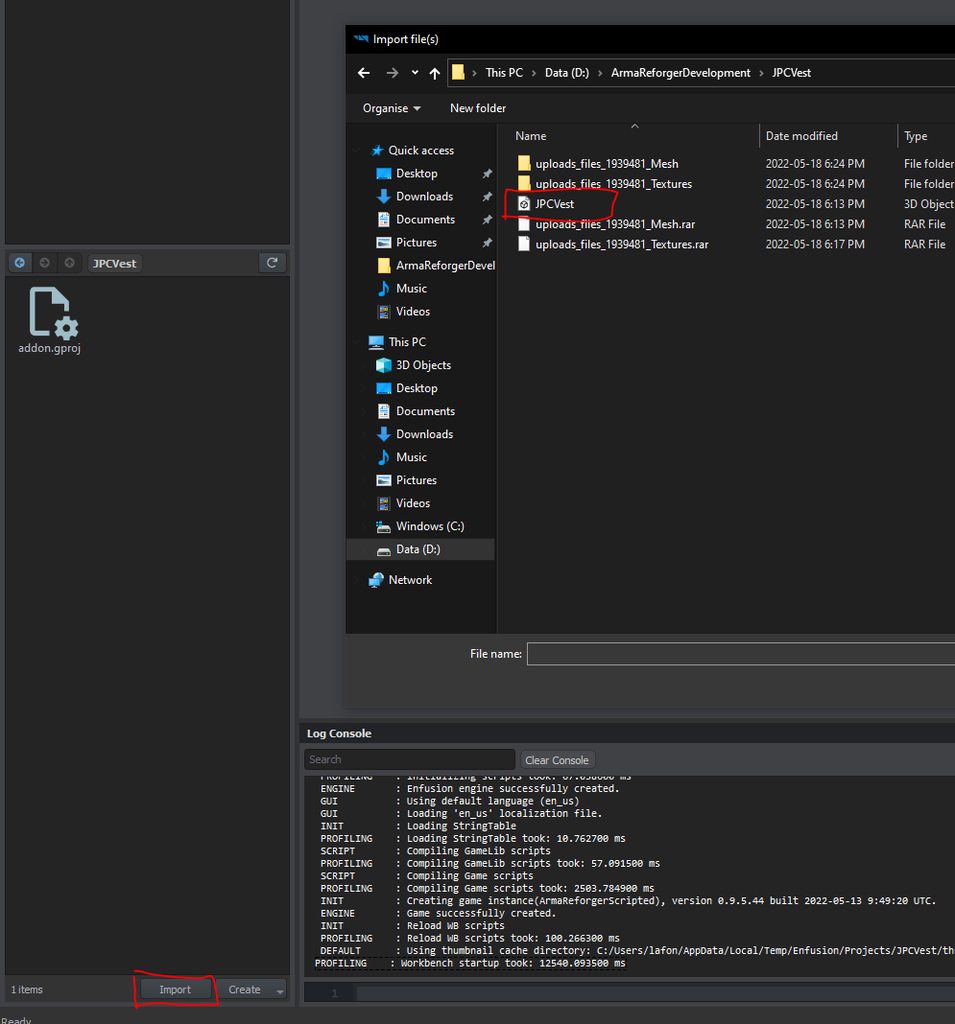
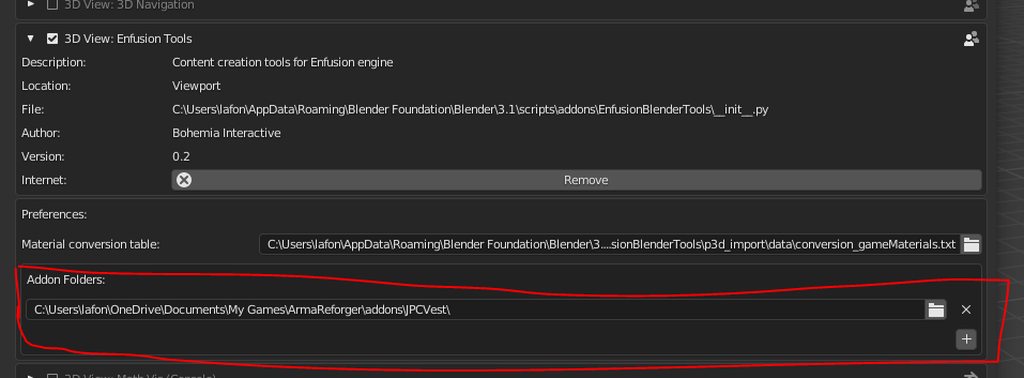
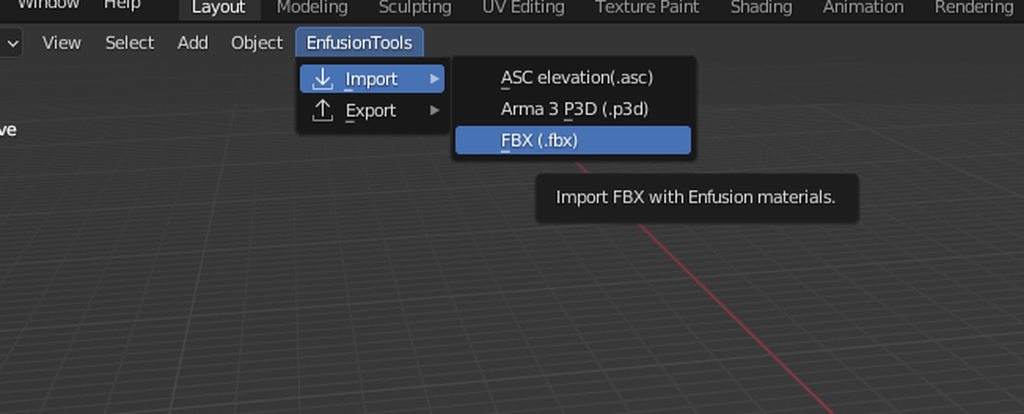
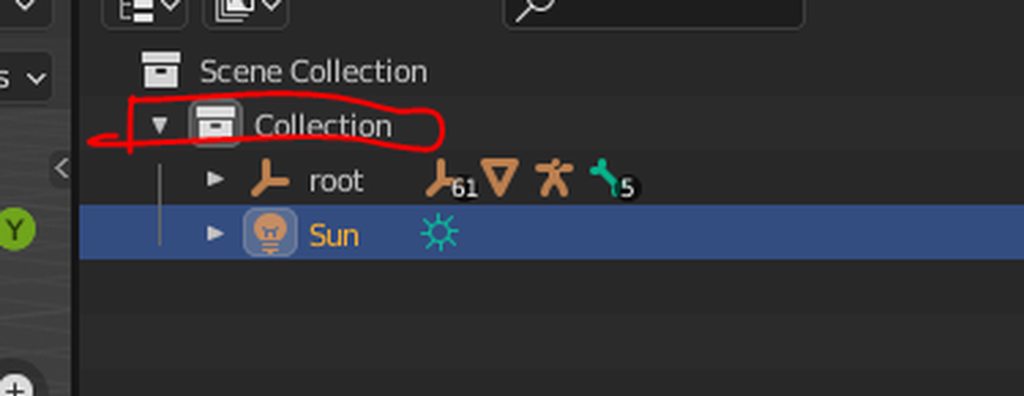
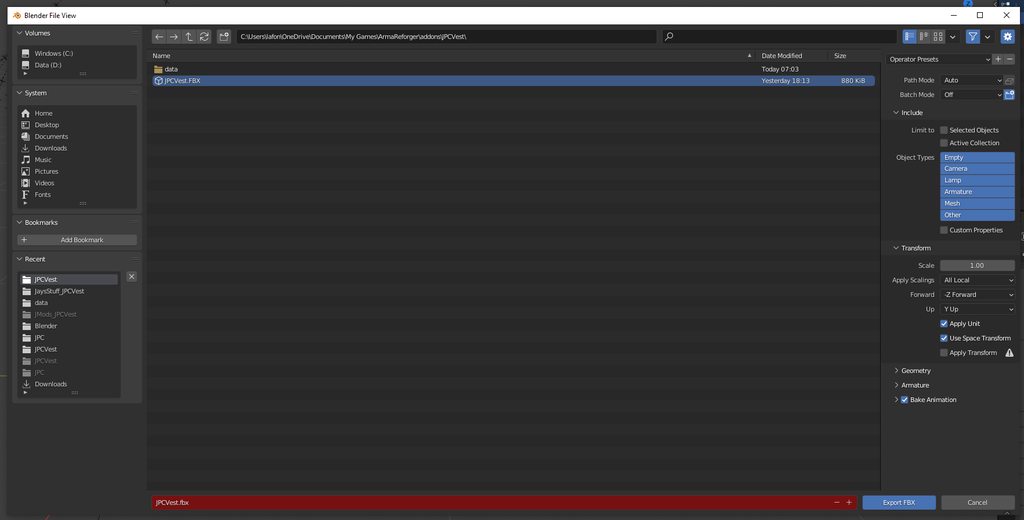 dense pelican
inland ginkgo
Could you elaborate sorry. Not sure what you mean.
dense pelican
inland ginkgo
Could you elaborate sorry. Not sure what you mean.
In the basic sample, the vertex group of the soldier body is assigned to the equipment. my guess that all types of clothes have to be vertex group and amateur together.

or maybe related transnfer weight paint
inland ginkgo
im not using that example, i just imported the 'Headgear_Example' fbx for the armature
instead of opening the .blend file
knotty cedar
round orbit
1. I created a new mod in Enfusion Workbench.
2. Import 3D model into Enfusion ...
Looks like LayerPresets (applied to collider to specificy usage of said collider) are missing, it's something speficified in fbx, so in blender before export. I may be able to assist with this after I have lunch 🙂
round orbit
knotty cedar
Looks like LayerPresets (applied to collider to specificy usage of said collider...
Thanks! I am trying to do my research but I haven't done any of this before. Any help would be lovely thank you!
 drowsy heart
Hi,guys, I want to ask about the normal smoothing model, I can choose "By impedance angle" by Shift+E in ARMA3 tool OB to achieve the normal smoothing function, but I don't know how to achieve this function in Enfuison
https://drive.google.com/file/d/1DauwxwkhFfUy4T6vrTDo42z-BBCMxPYW/view?usp=sharing, https://drive.google.com/file/d/1H-JsCqvD2Ts_4fTtTUfQYybiUsiTZL3F/view?usp=sharing, https://drive.google.com/file/d/1hq92_MmGZPGIvZV_UQMIvzOLxy3ehJKI/view?usp=sharing, https://drive.google.com/file/d/1u4dXvSngi38nYs51quL9PiaAl7lL1tit/view?usp=sharing


 spring ferry
Any idea how to apply transformations?
I'm trying to adjust a magazine relatively to the weapon
Or is it not possible and I should do it in a model itself?
dense pelican
ARAM is the same, my guess. There is weight paint and this is related to the vextex group. The vertex group of the soldier body must be transferred to the equipment.
 pliant pendant
drowsy heart
https://drive.google.com/file/d/1DauwxwkhFfUy4T6vrTDo42z-BBCMxPYW/view?usp=shari...
pliant pendant
drowsy heart
https://drive.google.com/file/d/1DauwxwkhFfUy4T6vrTDo42z-BBCMxPYW/view?usp=shari...
check your normal map whether it's directx or opengl, I'm not sure which enfusion uses but yours might be the opposite
if yours is directx try exporting opengl instead and vice versa
hidden yarrow
Its directX
eager hill
spring ferry
Any idea how to apply transformations?
You can do it in prefab settings. Muzzle component should have Magazine Position property at the bottom. https://imgur.com/LVMFDgF
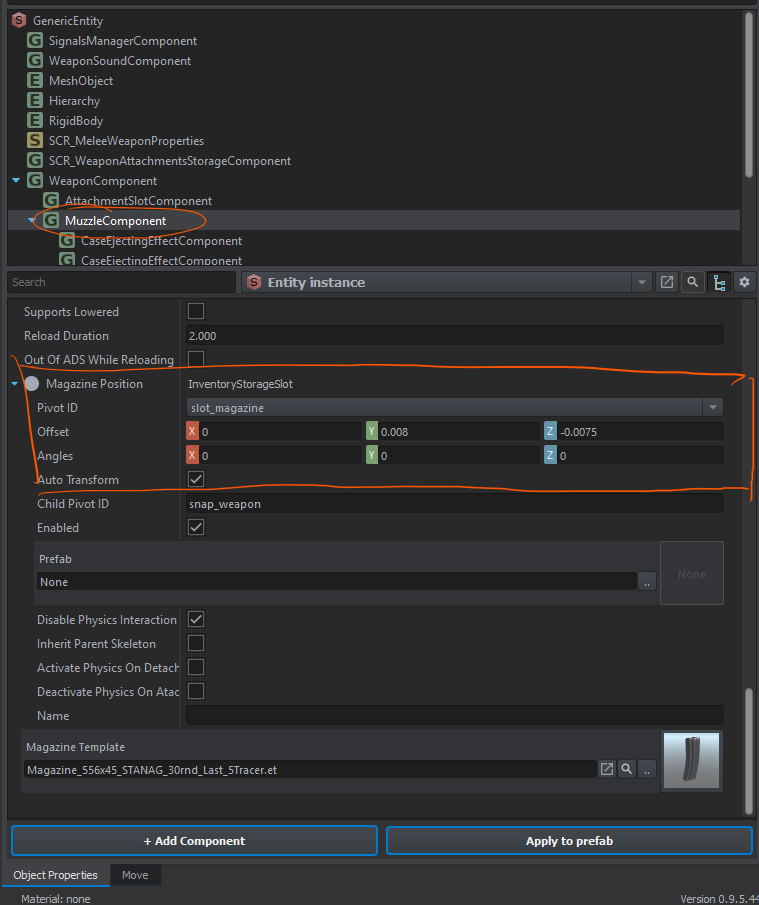 pliant pendant
you mean enfusion uses directx normal maps?
hidden yarrow
Yeah
tidal latch
spring ferry
I'm trying to adjust a magazine relatively to the weapon
don't forget to add snap_weapon thing to magazine
drowsy heart
pliant pendant
if yours is directx try exporting opengl instead and vice versa
I try this is not work
pliant pendant
does it look different?
inland ginkgo
i used opengl normals and they worked
drowsy heart
pliant pendant
does it look different?
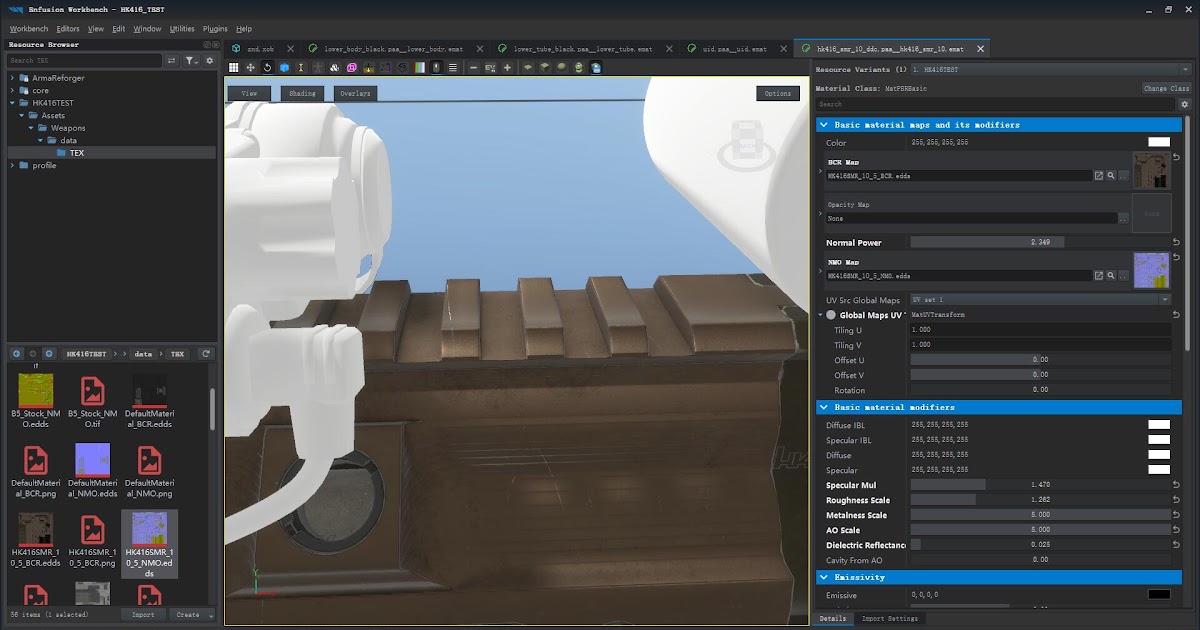
Google Docs
pliant pendant
yeah that looks the same
it either didn't export from SP or didn't import into enfusion
eager hill
What should I do with collider? I keep getting error about it https://imgur.com/XWfnqm5
 hidden yarrow
Maybe check your export and see if the normals are actually on there?
tidal latch
eager hill
What should I do with collider? I keep getting error about it https://imgur.com/...
do you have enfusion blender tools installed?
eager hill
tidal latch
do you have enfusion blender tools installed?
yep, and added that data folder
this is the error I get https://imgur.com/Z3Aso8v
 tidal latch
click on UTM_Weapon and assign some game material

afterwards, you might need to click on that arrow and then reimport it again
 eager hill
I get some kind of python error in blender. I'll try to reinstall addon
tidal latch
make sure that that data folder is first entry in addons list
alternatively, you an change assigned material in import settings
 eager hill
tidal latch
make sure that that data folder is first entry in addons list
eager hill
tidal latch
make sure that that data folder is first entry in addons list
can you show me how settings of tools in blender should look?
tidal latch
do you think you could wait a little bit? I will post pics to wiki in ~30 minutes
eager hill
tidal latch
do you think you could wait a little bit? I will post pics to wiki in ~30 minute...
no problem with that
knotty cedar
@round orbit Refer to Reyhard's screenshot to see how to apply layerpreset to collider: https://discordapp.com/channels/105462288051380224/976159912679850004/976816317162209280
drowsy heart
@knotty cedar hi I hope I am not disturbing you, I would like to ask if you know the solution to this problem? https://drive.google.com/file/d/1DauwxwkhFfUy4T6vrTDo42z-BBCMxPYW/view?usp=sharing, https://drive.google.com/file/d/1H-JsCqvD2Ts_4fTtTUfQYybiUsiTZL3F/view?usp=sharing, https://drive.google.com/file/d/1hq92_MmGZPGIvZV_UQMIvzOLxy3ehJKI/view?usp=sharing, https://drive.google.com/file/d/1u4dXvSngi38nYs51quL9PiaAl7lL1tit/view?usp=sharing
 vivid raft
What are enfusion blender tools? And where can I find these?
knotty cedar
vivid raft
What are enfusion blender tools? And where can I find these?
Arma Reforger Tools on Steam
knotty cedar
drowsy heart
<@156003128163041280> hi I hope I am not disturbing you, I would like to ask if ...
Keats if you DM me a .zip containing your mod data I can have a look in workbench myself
vivid raft
knotty cedar
Arma Reforger Tools on Steam
ahh...I thought there is an addon for blender for modellers
knotty cedar
vivid raft
ahh...I thought there is an addon for blender for modellers
There is, it can be found here if you have Arma Reforger Tools installed on Steam: Steam\steamapps\common\Arma Reforger Tools\Blender
drowsy heart
knotty cedar
Keats if you DM me a .zip containing your mod data I can have a look in workbenc...
Ok thanks a lot, I'll go upload the ZIP now
glad sable
@tidal latch sorry to disturb you. Do we have a fix for Blender bones issue?
spring ferry
the weapon modding guide mentions using Assets_Showcase_Base.ent world to preview the weapon
how do I get this world into my project?
tidal latch
glad sable
<@105548653594193920> sorry to disturb you. Do we have a fix for Blender bones i...
only this one - #enfusion_model message
tidal latch
spring ferry
the weapon modding guide mentions using Assets_Showcase_Base.ent world to previe...
try launching SampleMod_Main addon
it will load all other addons
mental onyx
Is it possible to merge multiple .xob's into one? I have a riflescope and scope rings separate.
glad sable
tidal latch
only this one - https://discord.com/channels/105462288051380224/9761599126798500...
Ouf too pricey 😠 Any free option or do we need to wait for a fix?
spring ferry
tidal latch
try launching SampleMod_Main addon
BACKEND   (E): [RestApi] ID:[2] Error Code:401 - Unauthorized, ApiCode:
BACKEND   (E): Identity authentication failed - Error Code=401
BACKEND   (E): Error response: {"url":"/game-identity/api/v1.1/identities/reforger/auth","message":"ErrID: 93f8bfd7-c991-47fe-adcc-262c2206db9f: Authorization failed, check your token."}
BACKEND   (E): [RestApi] ID:[4] Error Code:401 - Unauthorized, ApiCode:
BACKEND   (E): Identity authentication failed - Error Code=401
BACKEND   (E): Error response: {"url":"/game-identity/api/v1.1/identities/reforger/auth","message":"ErrID: a809b885-dfea-49a7-8e0c-9d11fea1de6b: Authorization failed, check your token."}
BACKEND   (E): [RestApi] ID:[5] Error Code:401 - Unauthorized, ApiCode:
BACKEND   (E): Identity authentication failed - Error Code=401
BACKEND (E): Error response: {"url":"/game-identity/api/v1.1/identities/reforger/auth","message":"ErrID: 75be3231-8d51-4a5b-8725-dd138795bcb2: Authorization failed, check your token."}```That's what I get and it doesn't load the addon
tidal latch
I'm pretty sure there is something more useful above
rest api/backend comms is not relevant here
spring ferry
DEFAULT   (E): game project dependency not found: 5614E4829EAE4BB1
 DEFAULT   (E): game project dependency not found: 5614E482B628B28D
 DEFAULT   (E): game project dependency not found: 5614E482B37103E5
 DEFAULT   (E): game project dependency not found: 5614E48153A5B50D
 DEFAULT   (E): game project dependency not found: 5614E482BF83E310
 DEFAULT   (E): game project dependency not found: 5614E4816F653D1A
 DEFAULT   (E): game project dependency not found: 5614E48126E3ADF2
 ENGINE       : Initializing engine.
ENGINE (E): Addon 'SampleMod' dependency '5614E4829EAE4BB1' can't be added```I've tried other solution which is super ugly and basically one time - you can copy paste TXO of your helmet, name it somewhat differently, open txo in text editor and then reimport it. Hacky as hell. Otherwise we will see what other options are there. There are few but it might range from few days to weeks
tidal latch
spring ferry
```
DEFAULT (E): game project dependency not found: 5614E4829EAE4BB1
DEFAULT ...
you will have to add other samples to enfusion project launcher
all dependencies have to be there basically
swift anvil
Hello, I can't find how to debug this collider would you have a solution please?
 spring ferry
tidal latch
you will have to add other samples to enfusion project launcher
spring ferry
tidal latch
you will have to add other samples to enfusion project launcher
Appreciated 👍
spring ferry
Any idea what causes this:
GetResourceObject @"{5EAF2E0DC137E6F8}Assets/Weapons/Rifles/SampleWeapon_01/mauserM96_LODs.xob"
 RESOURCES (E): Wrong&patched resource GUID in @"Assets/Weapons/Rifles/SampleWeapon_01/mauserM96_LODs.xob" for property UTM_Weapon resource name @"material/metal.gamemat"
 RESOURCES    : GetResourceObject @"{536BF67B2052B869}material/metal.gamemat"
  RESOURCES (E): Failed to open
RESOURCES (E): Wrong&patched resource GUID in @"script" for property m_SourceWorldPath resource name @"worlds/Editor/Test/EditableEntityImages.ent"```I think metalness doesn't display properly
uneven seal
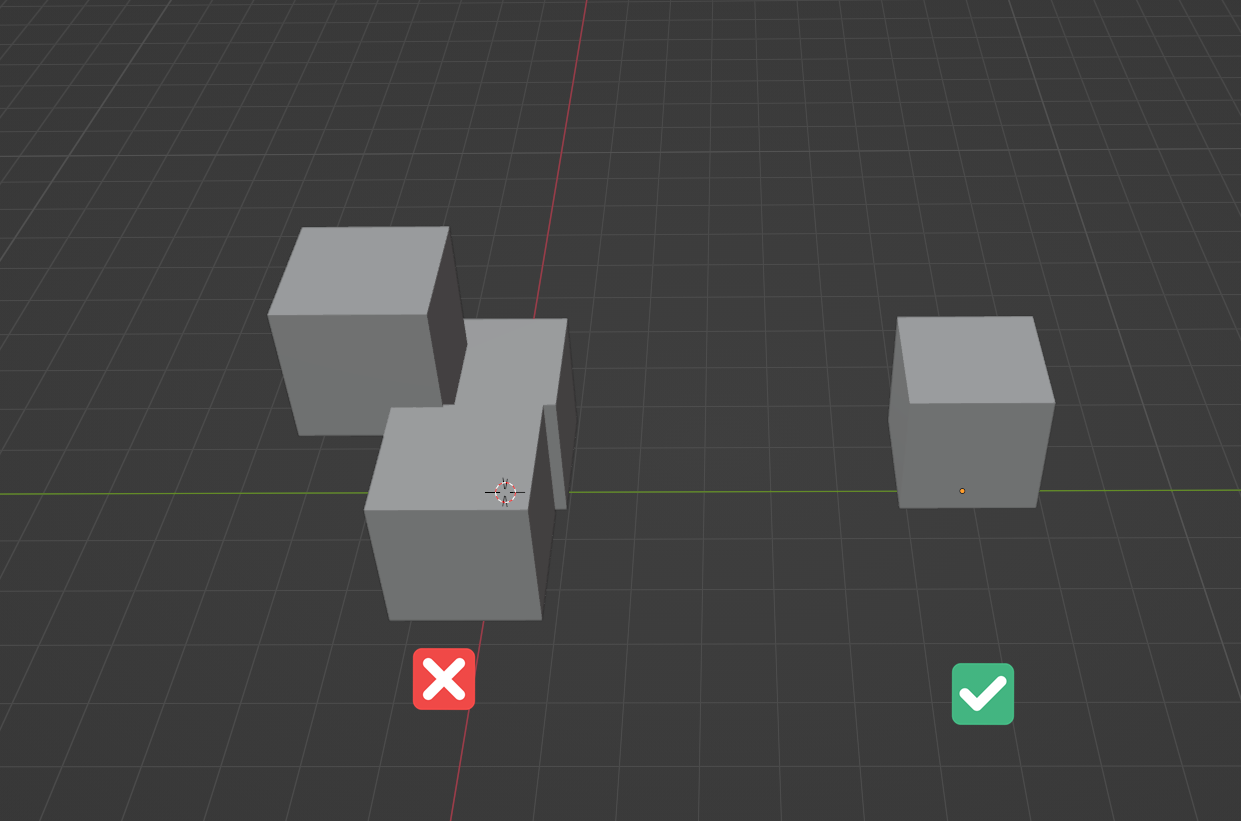
can someone explain me why the workbench is accepting the right one and the left not? As an collider
 tidal latch
spring ferry
Any idea what causes this:
```
GetResourceObject @"{5EAF2E0DC137E6F8}Assets/Wea...
tidal latch
spring ferry
Any idea what causes this:
```
GetResourceObject @"{5EAF2E0DC137E6F8}Assets/Wea...
wrong game materials assigned to colliders
tidal latch
eager hill
no problem with that
eager hill
tidal latch
https://community.bistudio.com/wiki?title=Arma_Reforger:Enfusion_Tools:_P3D_Conv...
I got it to work just a second ago. There had to be some kind of conflict between blender addons, because it works now after using new install of blender. Both, the old and the new one are 3.1.2 versions
knotty cedar
swift anvil
Hello, I can't find how to debug this collider would you have a solution please?
You must apply LayerPreset to colliders in Blender
 winter current
and make sure to check export custom properties when exporting or else they won't appear correctly in wb
knotty cedar
uneven seal
https://i.imgur.com/rdG4vv6.png
Hard to tell without seeing your collider section in Workbench or your scene hierarchy/model naming in blender.
 timid onyx
I am new to this scene, and want to do uniforms/headgear. Will there be a guide eventually on the process in the wiki.
 gloomy stump
Yeah, no one knows how long until then though.
calm rune
So I duplicated an exsisting prefab and replaced the model with my own but Im still seeing the handrails and mag from the old one and they are gone all loopy - https://cdn.discordapp.com/attachments/289868433229742091/976847302281011240/unknown.png

anyone have a fix for this?
eager hill
@calm rune Those are other prefabs that are attached to the weapon prefab. If you search for m16 prefab, you should take that base one. It won't have a handguard
Alternatively you can also remove them in prefab components
swift anvil
knotty cedar
You must apply LayerPreset to colliders in Blender
I try this and I call u
 calm rune
eager hill
<@165928416669990912> Those are other prefabs that are attached to the weapon p...
calm rune
eager hill
<@165928416669990912> Those are other prefabs that are attached to the weapon p...
ty!
mental onyx
How could we make suppressor and bipod work? Since there isn't any working basegame examples of that. I guess it would have to be scripted? Sucks tbh, specially the bipod thing 😦
lime comet
still fighting the Colliders on my cube, LayerPreset: Invalid. Screenshot at https://tetet.de/arma/reforger/reforger-colliders-invalidLayerpng.png

 slender steeple
knotty cedar
**Collider Shape:**
Name for collider shape model = COLLIDER SHAPE\_name\_of\_t...
slender steeple
knotty cedar
**Collider Shape:**
Name for collider shape model = COLLIDER SHAPE\_name\_of\_t...
here (mad69000)
eager hill
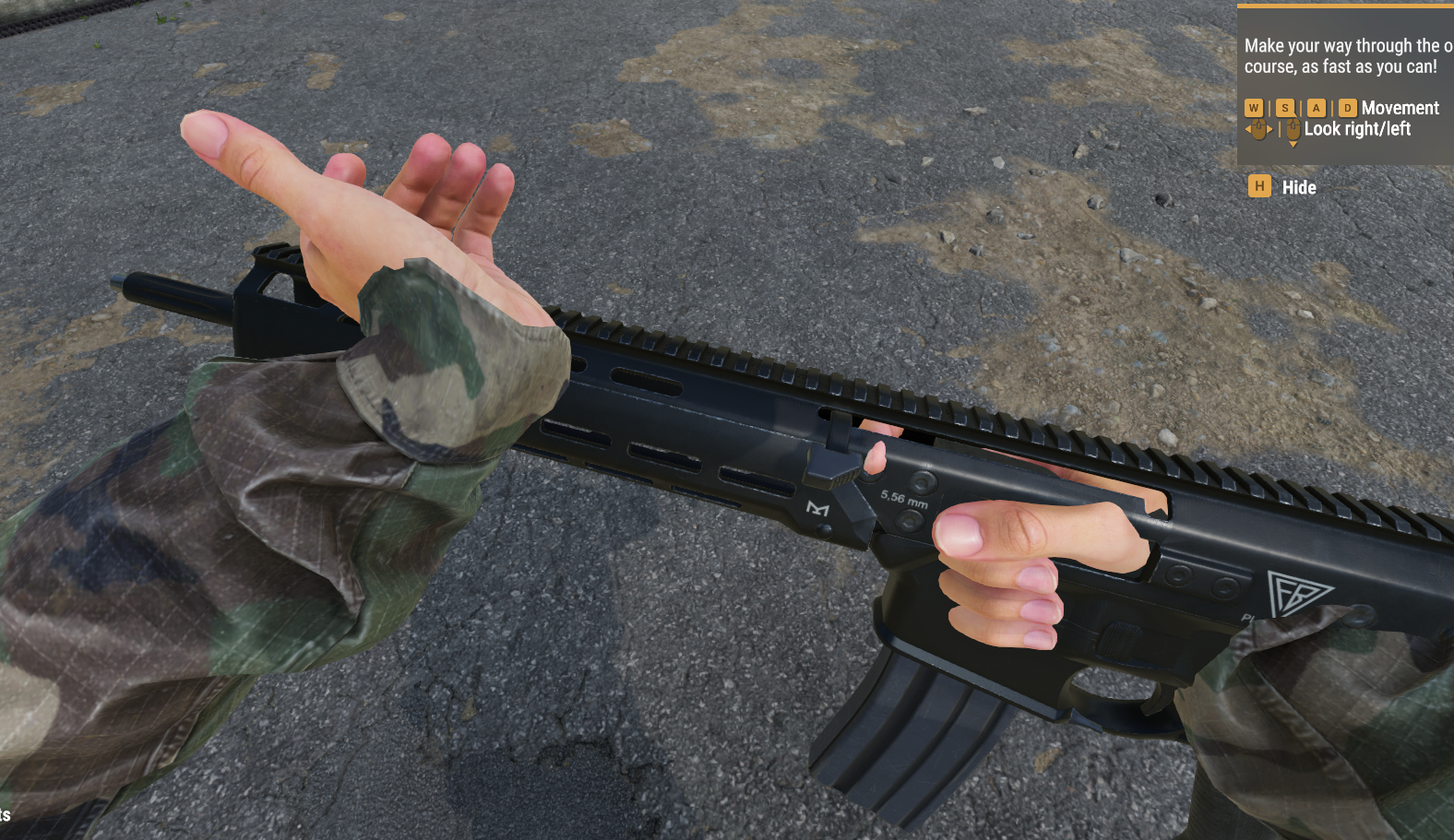
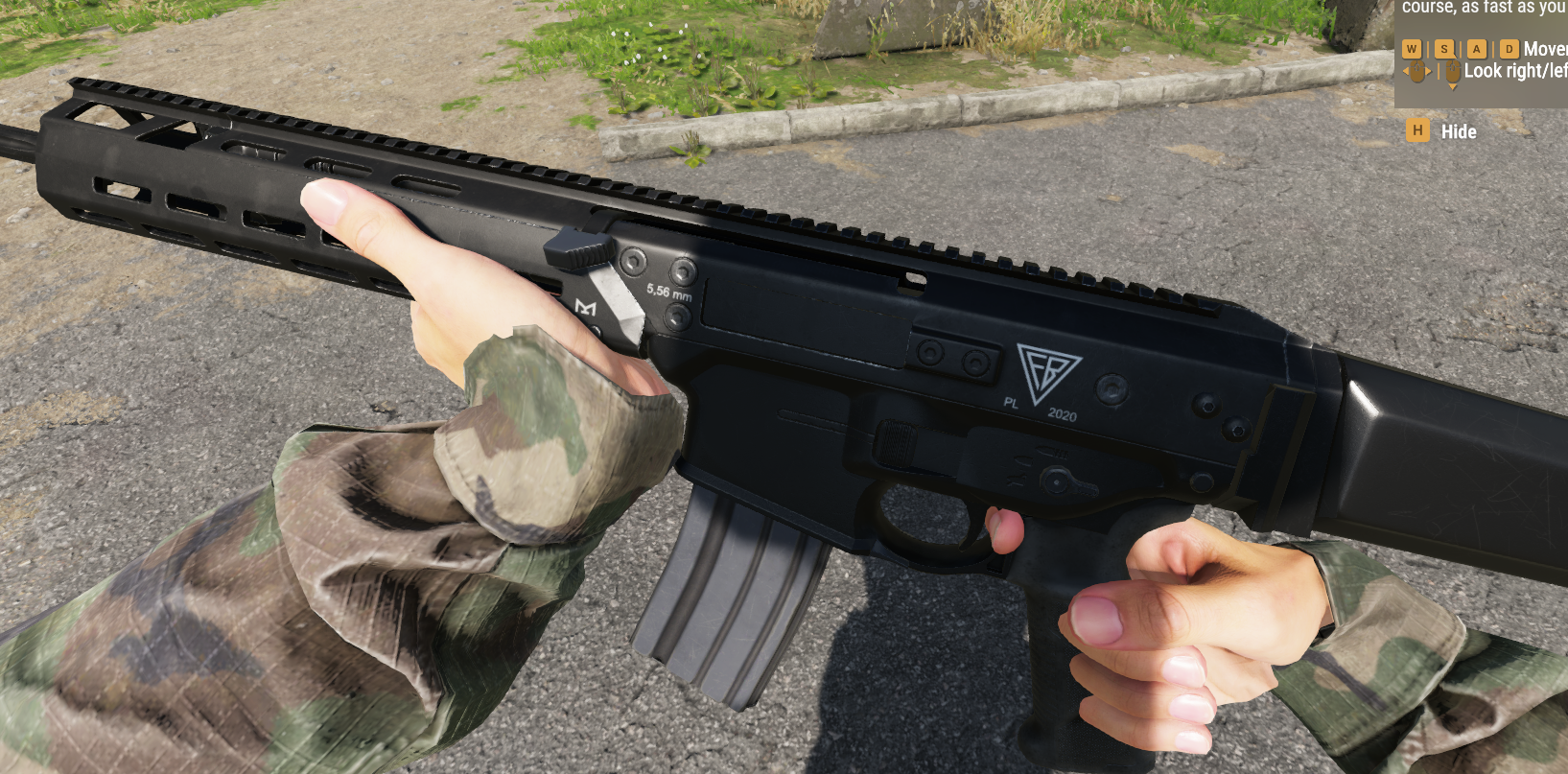
How do I change hands position on weapon? https://imgur.com/utrwrMb
 edgy ether
Hello together,
is there a Faces Move Top function in Workbench? or similar for textures?
 tawny summit
eager hill
How do I change hands position on weapon? https://imgur.com/utrwrMb
tawny summit
eager hill
How do I change hands position on weapon? https://imgur.com/utrwrMb
Try moving the gun itself if possible
eager hill
tawny summit
Try moving the gun itself if possible
you mean in blender?
tawny summit
eager hill
you mean in blender?
Into the hands
eager hill
tawny summit
Into the hands
I'm not sure what do you mean
tidal latch
he means that you select all objects and move them around, until weapon fits into hands
eager hill
tidal latch
he means that you select all objects and move them around, until weapon fits int...
I'll try that
I guess it works https://imgur.com/P7yMsfh
 ocean dagger
anyone attempted custom animations?

 simple meteor
what manipulations are necessary for the colliders to work?
rain wadi
simple meteor
what manipulations are necessary for the colliders to work?
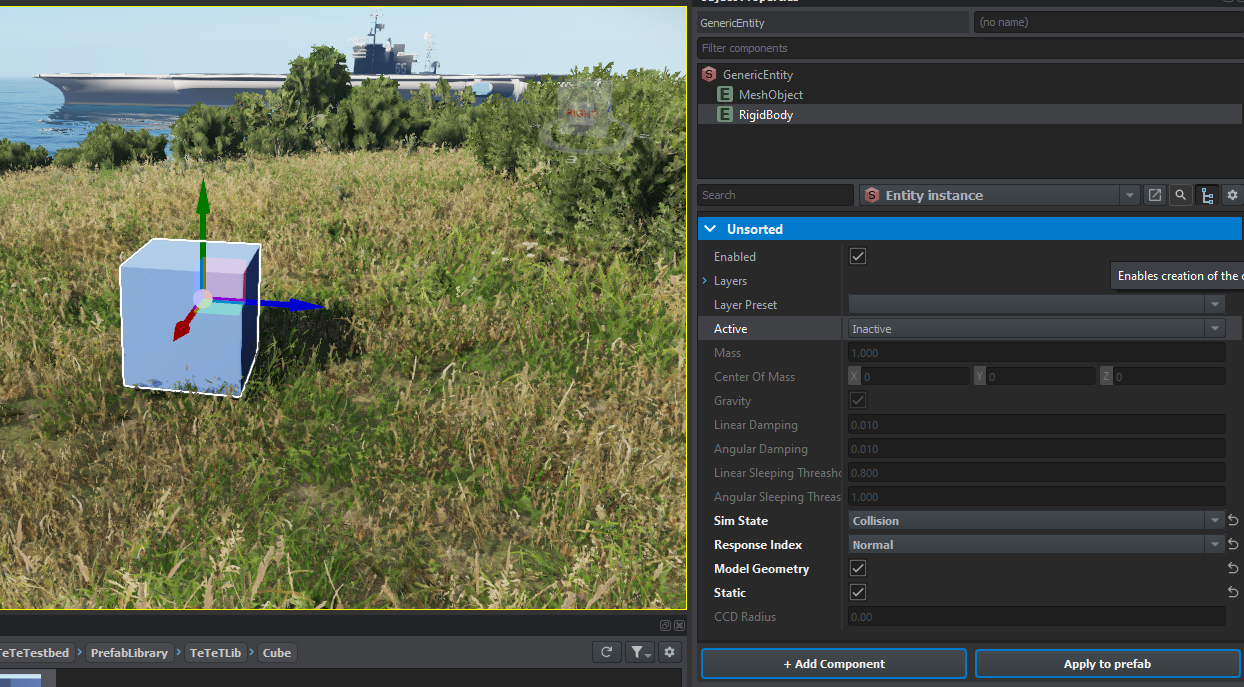
Add the "RigidBody" component to your prefab and configure it
simple meteor
rain wadi
Add the "RigidBody" component to your prefab and configure it
omg thanks 🙏
shadow is generated by engine with the 3d model ?
hidden yarrow
Yeah
simple meteor
amazing
 lean spruce
edgy ether
Hello together,
is there a Faces Move Top function in Workbench? or similar for ...
lean spruce
edgy ether
Hello together,
is there a Faces Move Top function in Workbench? or similar for ...
How to tell if someone is German in one line 😄
keen pulsar
Has anyone figured out if hiddenselection equivalents are a thing? Looking to import a model with a variety of asthetics which was originally hidden via selections
tacit eagle
slender steeple
here (mad69000)
Thx
simple meteor
rain wadi
Add the "RigidBody" component to your prefab and configure it
@tacit eagle
how can I know what I'm doing wrong https://prnt.sc/6RsJVNamQBQB
 deft owl
simple meteor
how can I know what I'm doing wrong https://prnt.sc/6RsJVNamQBQB
deft owl
simple meteor
how can I know what I'm doing wrong https://prnt.sc/6RsJVNamQBQB
I believe there are specific naming conventions for geometry pieces. Check if you named them correctly by referencing samples. Someone also posted a list of them but I forgot where
lime comet
it's pinned in this channel, the Colliders naming convention
simple meteor
I think i'm good ? https://prnt.sc/cU1C6u85_Im-

even if it's in yellow when I check "show invalid shapes" colliders works
deft owl
Maybe try using multiple simples like boxes? There might be limitations with mesh colliders idk tho
bright raft
Can prefabs be ported from one project to another?
simple meteor
I tried with box before same thing
deft owl
Did you set the layer for the geometry piece?
You can do it in blender or in import settings in workbench
simple meteor
do you mean that ? https://prnt.sc/54j2DV5VDijI
 simple meteor
thanks anyway
deft owl
What about export settings, did you include keep custom properties? I remember seeing that somewhere
simple meteor
I didn't change any export settings
eager hill
Finally it works as it should. https://imgur.com/pfCSbWF
 violet smelt
Jesus
My model isn't animating with the character
:[
Even tho I set it to do that.
I'm forsaken
 lone orbit
eager hill
Finally it works as it should. https://imgur.com/pfCSbWF
lone orbit
eager hill
Finally it works as it should. https://imgur.com/pfCSbWF
nice work
 timid tartan
eager hill
Finally it works as it should. https://imgur.com/pfCSbWF
timid tartan
eager hill
Finally it works as it should. https://imgur.com/pfCSbWF
wait how do you test your mod?
 crude oar
tutorial map
simple meteor
eager hill
Finally it works as it should. https://imgur.com/pfCSbWF
nice
violet smelt
Can someone help me
I can't animate my hat to the character
He just moves his head around and it does not follow
potent crystal
Atleast your able to see yours, mine won’t even show up in the Arsenal
violet smelt
I mean that part wasn't hard
potent crystal
Mine keeps pulling out the uno reverse card on me and saying try harder
violet smelt
Wow
You guys are really having that much problems.
I can help if you really need it
potent crystal
Please cause I legit at this point have no clue what I’m doing wrong
I’ve basically followed everything that the sample helmet has and put it in the Arsenal as an item and it’s like nope I don’t exist still
fathom bolt
hi someone know who can i play different sound with one prefab ? like i don't know for a weapon
in component
 wheat bay
How do I set an imported model as a model I can spawn in game like a prop? And or is there already documentation on this?
inland ginkgo
violet smelt
He just moves his head around and it does not follow
same issue, you have to wait until the devs release correct skeleton.
and use 3ds max instead of blender
lime comet
resolved the Colliders invalid layer mask by exporting FBX with 'custom properties' enabled in Blender. But I still can run through my .xob cube in the world - do I need to give it a prefab/config to make it a 'real' game object?
simple meteor
rain wadi
Add the "RigidBody" component to your prefab and configure it
@lime comet I think it's your problem
lime comet
Thanks, but I have a more basic prob right now, how do I get a .et prefab for my xob?
or do I just copy any and manipulate?
simple meteor
I don't know sorry
lime comet
I think your advice is spot on with RigidBody, at least the prefab I placed (some barrel) shows this, but my object only has MeshObject
eager hill
timid tartan
wait how do you test your mod?
I've loaded tutorial world and placed the weapon prefab around player spawn. In world editor you can press green arrow button at the top and it'll start the game inside the editor.
timid tartan
eager hill
I've loaded tutorial world and placed the weapon prefab around player spawn. In ...
appreciate it bro
hidden yarrow
lime comet
I think your advice is spot on with RigidBody, at least the prefab I placed (som...
Add component i think
inland ginkgo
lime comet
Thanks, but I have a more basic prob right now, how do I get a .et prefab for my...
Get a et prefab from the base game, duplicate it, then edit prefab to use your model and save
rain wadi
simple meteor
<@105782726350618624> I think it's your problem
indeed
tidal latch
violet smelt
He just moves his head around and it does not follow
you can use skeleton attached to head example
inland ginkgo
tidal latch
you can use skeleton attached to head example
does the current skeleton work if you use 3ds max?
rain wadi
lime comet
Thanks, but I have a more basic prob right now, how do I get a .et prefab for my...
Launch the World Editor. Drag and drop your xob from your ressource browser into the viewport. Add the components you need. Select the GenericEntity you just created and drag/drop it in your ressource browser again. Name it and it will create a .et file. You now have a prefab.
tidal latch
inland ginkgo
does the current skeleton work if you use 3ds max?
for head? yes
inland ginkgo
alright, because I'm using the head thing with blender which ofc doesn't work due to blender. I'll be testing 3ds soon
fathom bolt
no body know how to change the sound with differents attachments ?
lime comet
rain wadi
Launch the `World Editor`. Drag and drop your `xob` from your `ressource browser...
Awesome, the RigidBody component is now assigned to the prefab .et file, can still run through my cube, but it's a huge step forward, thanks!
tidal latch
is it with 3ds max? If yes, then you have most likely some error in configuration
lime comet
set the RigidBody up like this (SimState: Collision, Response Index: NormaL, Model Geometry checked, Static checked) and it works now: https://tetet.de/arma/reforger/reforger-rigidbody.png
 swift anvil
knotty cedar
You must apply LayerPreset to colliders in Blender
swift anvil
knotty cedar
You must apply LayerPreset to colliders in Blender
It does not work :/
swift anvil
same prob 😢
 tidal latch
swift anvil
same prob 😢
tidal latch
swift anvil
same prob 😢
are you exporting FBX with custom properties enabled?
 steady cairn
Guys, if somebody know, what's my problem
Adding any model and one or two sides are not visible, what problem can be?


format fbx
 hot pumice
any info on the size limit of models?
fathom bolt
steady cairn
Guys, if somebody know, what's my problem
Adding any model and one or two sides...
faces orientations maybe
to do it well make 2 faces one outside, one inside
1 face 1 point of view
steady cairn
fathom bolt
faces orientations maybe
to do it well make 2 faces one outside, one inside
1 fa...
it's a doubling of effort
steady cairn
it's can't be such dumb
fathom bolt
finally work ?
steady cairn
fathom bolt
First 3D model ?
yes and no
inland ginkgo
fathom bolt
finally work ?
yep
 twin oriole
So I've got my gun model now what next 🥲
 fathom bolt
inland ginkgo
yep
fathom bolt
inland ginkgo
yep
gg
steady cairn
first experience in tools
eager hill
twin oriole
So I've got my gun model now what next 🥲
now create a prefab. Or just be lazy like me and place m16_base prefab, change mesh in MeshObject component and then drag that prefab back to resource browser
inland ginkgo
even got vests to work
twin oriole
eager hill
now create a prefab. Or just be lazy like me and place m16_base prefab, change m...
You're talking to me like I'm somebody who knows what the hell he's doing 🤣
fathom bolt
twin oriole
You're talking to me like I'm somebody who knows what the hell he's doing 🤣
it's so simple... dude rly ? 😂
eager hill
twin oriole
You're talking to me like I'm somebody who knows what the hell he's doing 🤣
open world editor and do what's on the picture https://imgur.com/frUi5H5
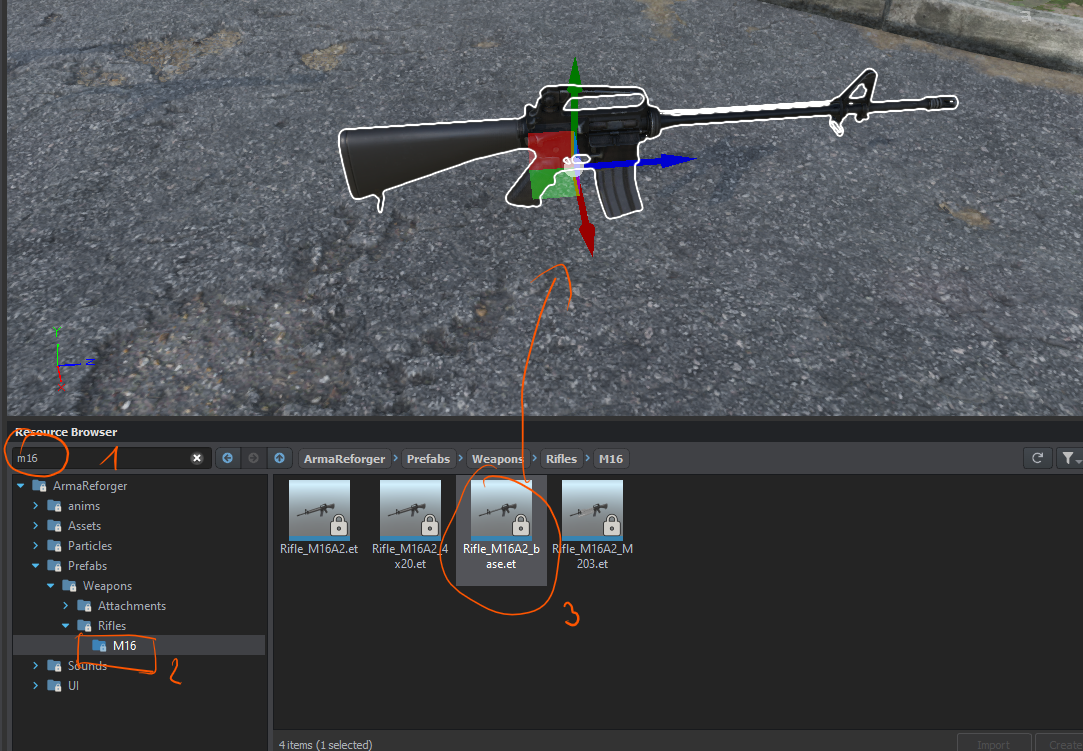
next do this https://imgur.com/vyQgrVb
 normal quail
Current material class MatPBR doesn't support needed vertex format (VDNormalColor) - Current getting this when trying to texture an object using Material class MatPBR - Anyone else had this?
eager hill
@twin oriole and then just drag it back to the resource browser and set the name of it
normal quail
@eager hill Tell me your a rovers fan 😄
twin oriole
Apparently I'm having trouble with geometry..
eager hill
twin oriole
Apparently I'm having trouble with geometry..
what's wrong?
eager hill
normal quail
<@328586801197350932> Tell me your a rovers fan 😄
rovers?
bright raft
Pretty janky but works
https://imgur.com/a/QKcAkEC
 eager hill
bright raft
Pretty janky but works
https://imgur.com/a/QKcAkEC
eager hill
bright raft
Pretty janky but works
https://imgur.com/a/QKcAkEC
How did you get that scope to work?
bright raft
I duplicated vanilla scope prefab
Then inside my model added extra lens which later become rendertarget inside workbench
Then added bones for eye
And it started to work
Then just added my custom reticle texture for SpecterDR
a bit buggy with fov
eager hill
Doesn't sound too complicated
eager hill
bright raft
a bit buggy with fov
I've seen somewhere a setting for fov
bright raft
Yes there is, changed it and it now works, but there is a slight bump during animation
bump in fov*
eager hill
Also in sights component there is something called camera recoil amount
eager hill
bright raft
love component based structure
it's great. I wonder if it's possible to add attachments on top of other attachments
bright raft
Did not go that far 😄
eager hill
It'd allow us to make mlok-picattiny attachments
twin oriole
Oops..

 supple heart
simple meteor
supple heart
simple meteor
beautiful
 smoky panther
Nice
simple meteor
why the soldier sulking
deft owl
How do you apply a geometry layer in blender? I cant find the menu for it
simple meteor
 deft owl
Do I have to setup the material library/layer presets? I only have the option of None
simple meteor
what u mean ?
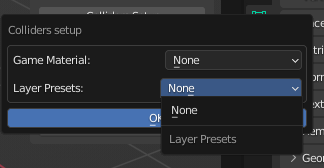
 deft owl
I think it may because I dont have the addons folder set. is it the addons folder to arma reforger install or of my mods folder?
 round orbit
Does reforger accept proxies like DayZ? Essentially I want to have a vest with slots on it, when you put a certain pouch in that slot, that pouch shows up on the model but that same slot can be switched out by other pouch and the new pouch updates the vest model?
What do the numbers at the end of the material stand for
 gloomy stump

GitHub
Modding Samples. Contribute to BohemiaInteractive/Arma-Reforger-Samples development by creating an account on GitHub.
round orbit
So even after using a sample, I don't have the option to choose my layer when selecting my UTM https://imgur.com/a/Rl5EGx2
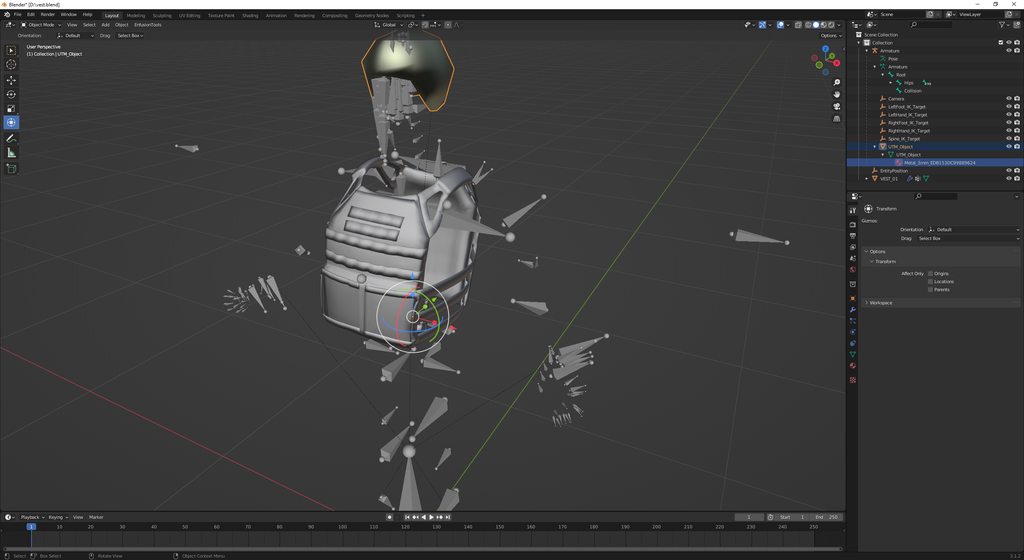 winter current
round orbit
Does reforger accept proxies like DayZ? Essentially I want to have a vest with s...
winter current
round orbit
Does reforger accept proxies like DayZ? Essentially I want to have a vest with s...
If you check the vehicle sample prefab there's a component that handles the glass windows of it, which are setup in a similar way to proxies like in dayz, i haven't played around with it but it caught my attention due the glass windows being separate models from the main mesh
 warm mist
Does the engine still require different LOD States? or does the engine auto generate them for 3d assets??
deft owl
Anyone get this error when trying to add a wheel position to an axle on a VehicleWheeledSimulation?
Object array property Wheel Positions has not defined base class of insider objects
 carmine vapor
mental onyx
carmine vapor
mental onyx

Originally a project I wanted to do in A3, but with my extremely limited scripting skills I never could implement it with the features I wanted sadly.
knotty cedar
warm mist
Does the engine still require different LOD States? or does the engine auto gene...
LODs must still be created manually (or partially automated within 3d software) however we now use fewer geometries. I.e. no more need to make shadowlods
eager hill
How should we use SuppressorComponent? I suppose it's intended for muzzle devices or at least name suggests it https://imgur.com/a/wwGAdaq
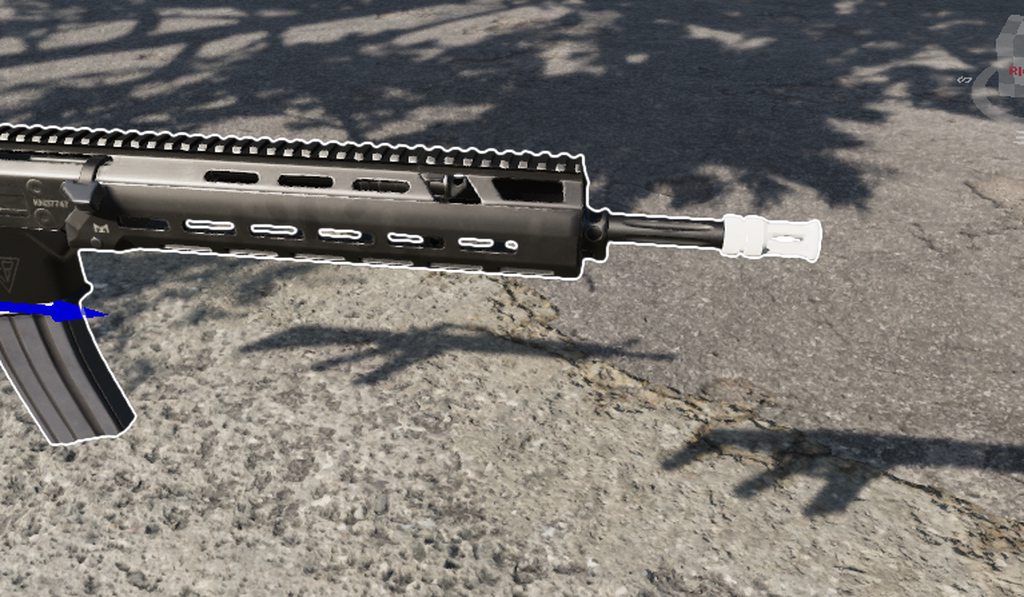 swift anvil
 eager hill
If we want to change sounds or recoil of the weapon, should we do it as child of this component or add certain things to the attachment prefab?
 wheat bay
Has anybody been able to create Game Master Prefab Assets that you can access in the menu?
fathom bolt
eager hill
If we want to change sounds or recoil of the weapon, should we do it as child of...
it's my problem now i need to disable muzzle flash when i have an accessory but i dont understand who
fathom bolt
eager hill
How should we use SuppressorComponent? I suppose it's intended for muzzle device...
i've make a suppressor but i need to change all the sounds (but we have the bis documentation) but for muzzle flash :/
eager hill
fathom bolt
i've make a suppressor but i need to change all the sounds (but we have the bis ...
please let me know if you find a way to do it
fathom bolt
eager hill
please let me know if you find a way to do it
i've searching in the GL prefabs i didn't found anythings and i've tried multiple component and architecture but can't overwrite the base component
eager hill
fathom bolt
i've searching in the GL prefabs i didn't found anythings and i've tried multipl...
That's the same problem I had, nothing seems to affect the weapon
deft owl
Not sure whats going on but I cant add wheels to axles in either my custom prefab, sample car, or base game prefabs. I get this error:
https://i.imgur.com/K5S4gVy.png
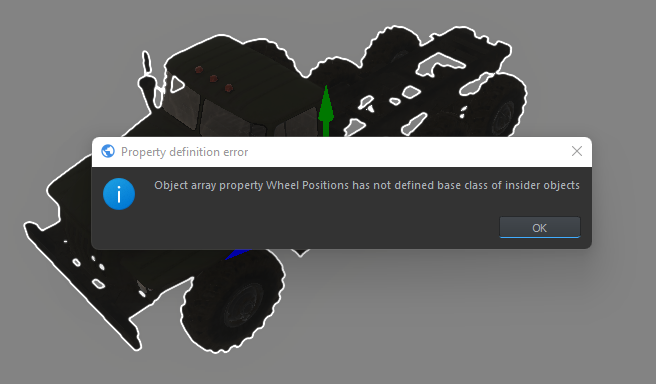 tacit eagle
anyone here working with blender?
how to get from samples specific SampleMod_NewFaction a model into blender
so we can change it
it asks for P3D while there are only META files
and emat file too
calm rune
Import --> FBX --> choose which sample you wish to import.
fathom bolt
eager hill
That's the same problem I had, nothing seems to affect the weapon
yes if we understand how to overwrite a component it's good
tacit eagle
calm rune
Import --> FBX --> choose which sample you wish to import.
emat and META files work that way?

it doesnt
nothing can be readen even on fbx
 spark marlin
Any fellow Finns here for the hype?

 hoary bronze

 round kestrel
???? 😄
 round orbit
Does anyone have an idea why this is happening? I don't get the pickup prompt and the vest isn't attached to the player model.
https://gyazo.com/ae0acb42f58d223492dfc4f72d561897
https://gyazo.com/4dcd1927bafbfc301ed432b5cb4d92a8
https://gyazo.com/183cc539c106fdbd06dcae83c68bae63


 vivid raft
I am very fresh to modding and want to start with adding probs. I open the sample mod NewProb and open the FBXs in Blender to try to understand what is needed. There is meshes with NNN in the name. What are these meshes for?

I have understood that only Cube meshes are possible as Colider meshes? Is that right? How would you make a colider mesh for a round rock?
last hill
Do a quick discord search, been posted a lot already mate.
last hill
vivid raft
I have understood that only Cube meshes are possible as Colider meshes? Is that ...
There was a list of each collider mesh, more than just cube. Can't recall but a search on the discord might find it.
deft owl
vivid raft
I have understood that only Cube meshes are possible as Colider meshes? Is that ...
You can make a convex mesh
Check wiki for fbx import
round orbit
knotty cedar
**Collider Shape:**
Name for collider shape model = COLLIDER SHAPE\_name\_of\_t...
@vivid raft
vivid raft
round orbit
<@292073811275415562>
Thanks got it. In the example they use only box shape...I did not know you can use different names for different shapes.
round orbit
Yeah you can
sage bay
can someone point in the right direction to get my model placeable in GM?
wheat bay
I've been trying to figure that out myself
sage bay
yeah im not trying to remake a whole new GM mode if i dont have to
wheat bay

I think it has to do with the stuff here. There is a Config File that points to locations of Place able/Editable objects
I could be entirely wrong, but it's where my current knowledge has led me
sage bay
yeah no go
 zenith quartz
I can't get any of my memory points to import.
Or bones.
Collider and LODs import but nothing else.
last hill
That using the old character rig or they give the new one?
zenith quartz
Er sockets I guess is what they're called now.
(Still called memory points in sample weapon.)
lofty cedar
tidal latch
there is one that I know but it is a paid addon - there might be some free alter...
Hey reyhard! I spent some time looking into how we could go about fixing the extra armature bone that's seen when importing blender fbx's, and I found a fix! I'm happy to explain the process if you'd like. It's only a rename of the dummy node and a couple parents to make it come out the way the default weapons seem to. (It doesn't require any other blender plugins or addons)

Assuming, of course, you haven't already fixed said issue
For those of you not following, this is what the sample currently imports as:
https://imgur.com/pG1aokk.png
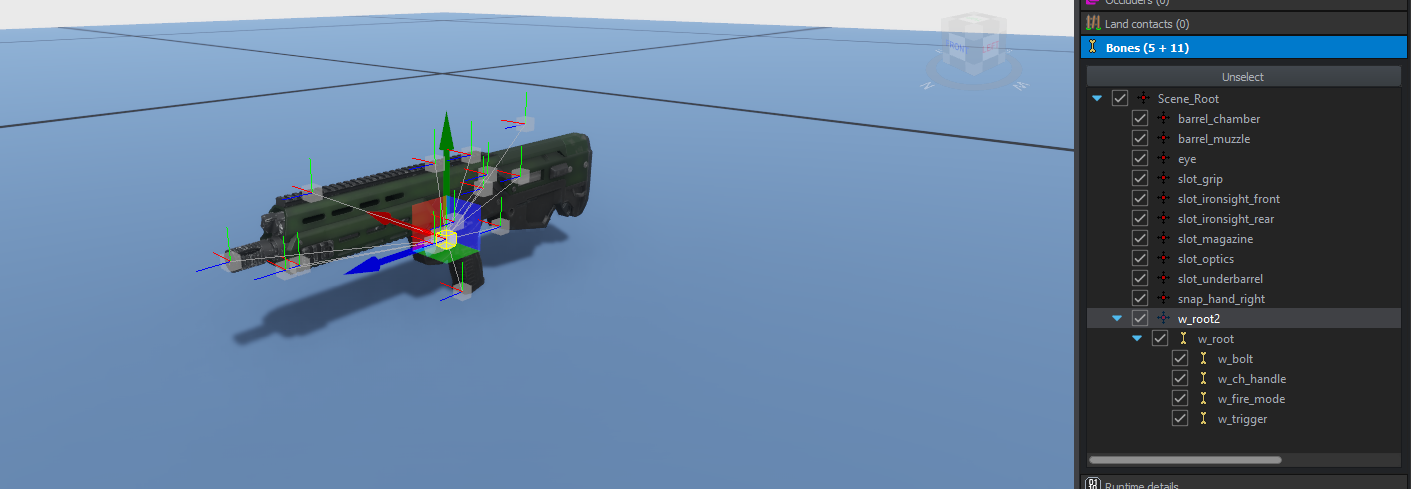
 lofty cedar
I'm curious why that and Export Skinning are not on by default
hidden yarrow
zenith quartz
fixes it
Will this make it so mem points are also imported?
last hill
lofty cedar
I'm curious why that and Export Skinning are not on by default
Be good if it was able to be set up as default
zenith quartz
hidden yarrow
Will this make it so mem points are also imported?
Think so.
last hill
hidden yarrow
Will this make it so mem points are also imported?
Try it and see
hidden yarrow
I would if i wad at my pc ill try and test it in the morning
Been having trouble importing memory and colliders
last hill
Good to see some folk figuring stuff out. Fingers crossed the sample gets updated if not already done. I don't have a clue of time zone or rough time to expect it. Docs are slowly filtering through for us also which is good
 lofty cedar
zenith quartz
lofty cedar
zenith quartz
It's beautiful
pure kayak
I got a helmet in finally, but does anyone understand how to hide it in first person?
zenith quartz
lofty cedar
Hey reyhard! I spent some time looking into how we could go about fixing the ext...
How did you do this?
I'm having a similar-ish issue.
Albeit my bones aren't even showing up as bones but as sockets...
I've gotten this far but it just doesn't recognize my bones.

Also w_slide_end and w_trigger_end appear for some reason.
lofty cedar
zenith quartz
Also w_slide_end and w_trigger_end appear for some reason.
Don't forget to turn off the leaf bones on the fbx export settings
 lofty cedar
That is the only bone it looks like? Your trigger bone didn't import
zenith quartz
Oh I removed it for now, no trigger on my test model.
lofty cedar
Otherwise everything in your last screenshot looks right aside from w_root being an empty instead of a bone 🤔
lofty cedar
Yup

 lofty cedar
You shouldn't need that one, as your armature acts as your root bone
Give me a moment
Not at my pc to take a screenshot
zenith quartz
OK. I can send my file if that'd help? I have no clue how armatures and such work haha.
Never used them before.
 bright lichen
a side by side blender vs. enfusion screenshot would be very handy
bright lichen
much appreciated
 bright lichen
yeah, to see the correct way of doing it :)
"correct" meaning one that works, we're all clueless here lol
 valid torrent
ive been searching through this entire channel with no answer and it would be lovely to see a screenshot