#enfusion_model
1 messages · Page 20 of 1
 delicate condor
since you would break all teh texturing when splitting it up and rearraging the pieces
modeling does not work the way you imagined
 patent wren
Alright, thanks for answers. Looks like the best way to do the thing will be to buy model (that have proper license) or make it myself and configure it.
delicate condor
patent wren
Alright, thanks for answers. Looks like the best way to do the thing will be to ...
welllll
buying a model is a gamble
you might get a model that you need to touch up just a a bit to get it working in game, or you might need to clean it up more than making a new one takes time
there is a lot of stuff that a game model needs that dont exist in bought models.
so depending on how your skills are with 3D modeling, buying might be a hindrance in the learning process
patent wren
I work with cad software, but not blender, i am not artist. So the modelling could be an issue, I wanted the model to have the same quality as vanilla asset, that is why i wanted to reuse the asset.
https://www.turbosquid.com/3d-models/pkp-pecheneg-machine-gun-735680
I was thinking about using this model?
delicate condor
Youll still need to learn blender quite a bit to get all the techical stuff and distance lods done
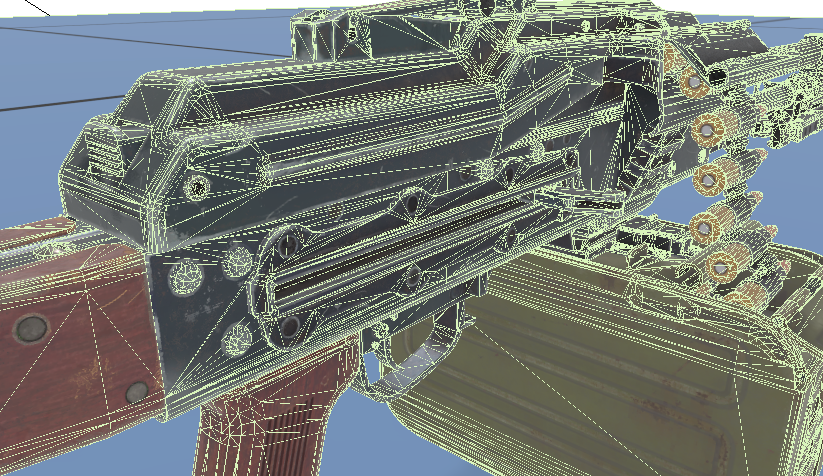
the weapon is also quite polygon heavy so it might need cleaning up substantially
I would perhaps recommend starting from something simpler to get the workflow down.
 fluid fern
hey, i have still this error
 stray bridge
fluid fern
hey, i have still this error
stray bridge
fluid fern
hey, i have still this error
how about you send in a screenshot of your setup or the file itself to have a look at it, most likely peeps wont find the error by just this error msg otherwise they would have replied
fluid fern
stray bridge
how about you send in a screenshot of your setup or the file itself to have a lo...
stray bridge
for peeps who doesnt wanna download it but might be able to

since they changed how this sound muffling thing works inside buildings I never got back into it 
fluid fern
I've already done 2 buildings, with the same rigor as this one, but I can't explain why it doesn't work.
stray bridge
looked at the wiki quickly, looks alright to me
 fluid fern
Yes ^^ it's not my first try ^^ but I don't understand, when I import it I check the right parameters.

 latent moon
How does one rig colliders? It seems that the armature modifier does not work for them when I inspect the model in WB.
 fierce pawn
latent moon
How does one rig colliders? It seems that the armature modifier does not work fo...
fierce pawn
latent moon
How does one rig colliders? It seems that the armature modifier does not work fo...
this works
not sure why the armature doesnt want to work a lot of the time even though its mentioned in the wiki
 midnight path
fluid fern
Yes ^^ it's not my first try ^^ but I don't understand, when I import it I check...
midnight path
fluid fern
Yes ^^ it's not my first try ^^ but I don't understand, when I import it I check...
im having same issue

wtf does that mean
@last parcel if its not too much trouble could we get a screenshot of how you set up your portals?
 last parcel
exactly like they do on the wiki
midnight path
dang, thats what we are doing and its giving us trouble
last parcel
if you search for template BSP, there is a quick shitty template that i made for blender.
fluid fern
midnight path
im having same issue
I redid it by hand and it worked fine. I left the sockets but redid the prt_ by hand.
fluid fern
midnight path
im having same issue
But the sounds are not changed in the house, while the portal and bsp are imported.
 lunar mulch
Please, Help!
How can i fix that:

 wicked dirge
lunar mulch
Please, Help!
How can i fix that:
wicked dirge
lunar mulch
Please, Help!
How can i fix that:
you need to assign a pivot bone for the holster
lunar mulch
wicked dirge
you need to assign a pivot bone for the holster
Thank you for your answer, but I don't know how to do it.
wicked dirge
lunar mulch
Thank you for your answer, but I don't know how to do it.
There is Pivot ID parameter in the slot configuration. But it might be that you need to add it through text editor if you cant select a bone
lunar mulch
wicked dirge
There is Pivot ID parameter in the slot configuration. But it might be that you ...
There ?
 wicked dirge
in the .et file
lunar mulch
wicked dirge
in the .et file
Like that?
 wicked dirge
I think "Spine1" with quotations
lunar mulch
wicked dirge
I think "Spine1" with quotations
Than you !! I try.
wicked dirge
yeah just checked its with quotes and you need to see what bone exactly
I would assign same bone that you weighed the belt to
lunar mulch
It's done, but it still doesn't work. I have to go to work, I'll see about it this evening.
There is no tutorial for this?
 lunar mulch
wicked dirge
I think "Spine1" with quotations
lunar mulch
wicked dirge
I think "Spine1" with quotations
It actually works, thank you very much.
You had to restart the game for this to take effect.
wicked dirge
lunar mulch
It actually works, thank you very much.
You had to restart the game for this to ...
ah yes, or reimport the prefab
 torn token
Hey people! I'm new to reforger well I've played Arma 3 a lot in the past. I'm getting into car creation and I can't figure out how to convert my xob model file to .et
 tidal latch
torn token
Hey people! I'm new to reforger well I've played Arma 3 a lot in the past. I'm g...
tidal latch
torn token
Hey people! I'm new to reforger well I've played Arma 3 a lot in the past. I'm g...
https://community.bistudio.com/wiki/Arma_Reforger:Car_Creation you can take a look at this tutorial
there is also one bit more complete from community
torn token
I've looked at the car creation tutorial but don't believe there was anything on how to convert to ET, you know where I could find the community's?
tidal latch
torn token
I've looked at the car creation tutorial but don't believe there was anything on...
et = prefab
torn token
Thank you!
tidal latch
 wet skyBOT
torn token
!verify
wet skyBOT
torn token
!verify
Check your messages!

 sly bridge
torn token
Oh wait Im stupid those are my normals lol, I need to create bump maps xd
sly bridge
torn token
Oh wait Im stupid those are my normals lol, I need to create bump maps xd
NMO = normals (RG channels) + metalness(B channel) + AO (Alpha channel)
torn token
Okay, thanks man! 🙂
sly bridge
torn token
Okay, thanks man! 🙂
for more info see the pins in #enfusion_texture
 outer hull
So question...
I have a model that has several parts, made sure its rigged correctly, but then parts of the mesh just disappears when importing, and then if I joint all the mesh together, it just disappears entirely
 torn token
How do you merge models into the .et file?
Only time when I had mesh disappear is because it had to many vertices but it may not be related to your situation
delicate condor
outer hull
So question...
I have a model that has several parts, made sure its rigged corre...
Are all separate parts same scale?
outer hull
delicate condor
Are all separate parts same scale?
yeah, they;re all the same scale, and I applied all transform too
torn token
I figured out the .ET situation, looked online to learn how to do it. Now whenever I add scripts to my vehicle some scripts make my car disappear
 tidal latch
torn token
tidal latch
torn token
those are components. 0 means they are not inherited
you should inherit as it was mentioned in tutorial
torn token
I'll look over that part again, and thanks again.
@tidal latch thanks man, I got the hang of it now.
torn token
is there a list out there with the parts name for the car models? Like etc UTM_FG_Body_01, UCX_FG_LIGHT_FL and etc
 calm isle
I'm really struggling with getting this optic set up, I tried my best to copy the PSO-1 and follow the wiki, but I feel like I've hit a wall

 steel hare
torn token
is there a list out there with the parts name for the car models? Like etc UTM_F...
steel hare
torn token
is there a list out there with the parts name for the car models? Like etc UTM_F...
you mean collider setup?
tidal latch
calm isle
I'm really struggling with getting this optic set up, I tried my best to copy th...
wrong uvs most likely. You can check sample on github how its setup
patent wren
Hello guys, would you please happen to know how are the suppressors achieved on guns? im looking at wiki and i havent found a mention there
stray bridge
patent wren
Hello guys, would you please happen to know how are the suppressors achieved on ...
have a look at bacons Suppressors mod. Supressors are a modded thing and not base game
patent wren
stray bridge
have a look at bacons Suppressors mod. Supressors are a modded thing and not bas...
Ah, that explains it. Is there a guide on how to make my gun accept the bacons suppressor or i have to reverse engineer it somehow? Im pretty new to this
stray bridge
patent wren
Ah, that explains it. Is there a guide on how to make my gun accept the bacons s...
I would have to look into the mod but usually this works with components you can add. If you wanna add ur own supressors as a mod you have to look at it, cant tell out of my head. Make sure to not violate any license
patent wren
stray bridge
I would have to look into the mod but usually this works with components you can...
Im making sure to no violate any license, i purchased the model on fab. ^^ I dont want to make my own suppressor, just want to make sure that i can attach suppressor. So i can subscribe to the https://reforger.armaplatform.com/workshop/5AB301290317994A and then open it to learn how to make the changes needed?
 tidal latch
stray bridge
have a look at bacons Suppressors mod. Supressors are a modded thing and not bas...
tidal latch
stray bridge
have a look at bacons Suppressors mod. Supressors are a modded thing and not bas...
suppressors are 1.2.1 experimental. Better to wait for new patch
stray bridge
true ^
 shell hedge
there are very little changes required to port from the mod to vanilla, but yeah I know you guys dont like the mod
shell hedge
patent wren
Im making sure to no violate any license, i purchased the model on fab. ^^ I don...
yes there is a sample there no problem
patent wren
shell hedge
yes there is a sample there no problem
The man himself, thanks!
patent wren
Do we know an estimate for the 1.2.1 release? ^^
sly bridge
no
but i doubt there is edit valid edit reason not to wait on vanilla implementation rather than use another mod for it
you can always use experimental branch to set it up, and then move that to stable
if you don't wanna wait
shell hedge
there is one, wanting a working suppressor in current main branch
sly bridge
shell hedge
there is one, wanting a working suppressor in current main branch
sure. with the extra work required to move from one to another\ ¯_(ツ)_/¯
shell hedge
yeah, you'd have to waste a whopping 2 minutes
just because you disagree does not make a reason invalid for someone, the dude can make his choice on his own
sly bridge
shell hedge
just because you disagree does not make a reason invalid for someone, the dude c...
i edited my initial message from no reason to valid reason. of course he can make the choice on his own
shell hedge
if I dont agree its invalid
sly bridge
sly bridge
but i doubt there is *edit* valid *edit* reason not to wait on vanilla implement...
for bacon's sake -> if you want suppressors in the main branch right now, bacon's mod is the only already existing option as dependency, or make your own implementation if you so choose to. The choice is obviously yours, validity of such endeavor is a personal choice
happy? @shell hedge
shell hedge
wrong, my mod is not the only option
sly bridge
shell hedge
wrong, my mod is not the only option
rly? what's the other option(s)?
shell hedge
you could make your own mod
sly bridge
shell hedge
you could make your own mod
nitpicking much? edited just for you
shell hedge
now it says it like my mod is the only option as dependency, so you cant use your own mod as a dependency?
sly bridge
shell hedge
now it says it like my mod is the only option as dependency, so you cant use you...
already existing option as dependency
shell hedge
also you spelled endeavour wrong
calm isle
tidal latch
wrong uvs most likely. You can check sample on github how its setup
Should I be looking at the PiP lens model UV specifically?
 distant cape
calm isle
Should I be looking at the PiP lens model UV specifically?
distant cape
calm isle
Should I be looking at the PiP lens model UV specifically?
just unwrap your pip mesh, this is just a circle, right click-->unwrap
torn token
Having issues with the reforger tools not picking up my bones and sockets
 deft owl
torn token
Having issues with the reforger tools not picking up my bones and sockets
deft owl
torn token
Having issues with the reforger tools not picking up my bones and sockets
make sure "export skinning" is selected in import settings of xob inside workbench
torn token
Not sure what I'm doing wrong, am I missing something? Whenever I right click on actionmanagercomponent it doesn't give the option to select them
I'll check
Where do I find that option at? Right clicking the xob file?
fierce pawn
torn token
Where do I find that option at? Right clicking the xob file?
Double click it and there is a import settings button
torn token
fierce pawn
Double click it and there is a import settings button
Found it and thank you!
 gloomy fable
I assume they didn't give us the vanilla .xob files of the vehicles, right?
torn token
They didn't that I know of
They give you a sample car to mess around with it and learn from
Also tutorials online on car modding and car creation 🙂
gloomy fable
I really want to get to know the guy who made all the vehicle models, creating 50 different materials for 10 different cars and mixing them up, so it will be impossible to balance them in any ballistic sense.
calm isle
tidal latch
wrong uvs most likely. You can check sample on github how its setup
thanks, I was using that as a reference but you were right, the UV was off
on mine, to be clear
torn token
I can't edit any of the vehicle's horsepower, torque, or set any vehicle configs in the world editor
I even tried modifying an arma reforger one and nothing shows up. Guess ill go back to the tutorials again see what I missed
Nothing, im guessing its a bug with the software 😦
patent wren
Im gonna see what is faster, there is no chance of me making mod that involves coding 😄
But another question is, should i try to model guns strap?
fierce pawn
torn token
Nothing, im guessing its a bug with the software 😦
What are you trying to edit exactly because editing horsepower and such is for sure possible 
patent wren
Did any of you tried to make a sling for a gun in reforger?
torn token
fierce pawn
What are you trying to edit exactly because editing horsepower and such is for s...
I'm creating a new vehicle, and the option isn't showing up for some reason.
tidal latch
how is it not showing up?
torn token
 torn token
herp a derp, thanks man lol
shell hedge
I have two ultrawides and it's still not enough send help
tidal latch
shell hedge
I have two ultrawides and it's still not enough send help
i'm pretty sure it will work fine after you will add third ultra wide screen
otherwise, try 360 screen
 tidal latch
torn token
torn token
tidal latch
torn token
torn token
Okay and thanks for helping me 🙂
I found the missing setup, actionsmanagercomponent, I thought for sure I set it up already but now having an issue with the actions not being able to add @tidal latch
tidal latch
describe your problem please
torn token

Whenever I try to create, and select the bones it doesnt show up in the list
It shows the drivergetin and driveridle, and etc etc but doesnt show up in the action contexts


@tidal latch
I figured it out, looked at the tutorial and sorry for bugging you!
 sullen sable
Anyone know how to fix this mag? its fixed after a reload but upon pulling the gun out of arsenal, the magazine is in the trigger guard. Ive tried clicking on the offset under magazine position and dragging it which helped put it in the right place AFTER the reload but not from the get go...
 torn token
Can anybody tell me why it says obstructed when there isnt any doors?
 fierce pawn
torn token
Can anybody tell me why it says obstructed when there isnt any doors?
fierce pawn
torn token
Can anybody tell me why it says obstructed when there isnt any doors?
its referencering the doors defined in the basecomparement manager
you define the doors used to get in at the top there and then each comparment has a doorinfo list with the doors used to access that comparment
if a compartment has a empty door info list or all doors to that comparment are blocked it says obstructed
i bet its jsut the doorinfo list of the driver comparement is empty 


 fierce pawn
oh yea you need to fil in the door info list at the top too
torn token
What do I put in there?
fierce pawn
 torn token
It doesn't show that
fierce pawn
torn token
What do I put in there?
for sure the entry and exit positions
torn token
That probably my problem

 fierce pawn
compartmentdoorinfo
torn token
This llook right?
 fierce pawn
the comparmentdoor reference is for when a part of vehicle refercenes a door somewhere else. like a btr70s turret using the btrs doors
fierce pawn
torn token
This llook right?
yea should be good just fill in the entry and exit positions
torn token
Okay, and thank you toni 🙂
fierce pawn
if you vehicle has no doors you can tick the fake door too
and it will skip the door animations
fierce pawn
torn token
PointInfo?
yea
torn token
Okay
fierce pawn
i always just put a vannila uaz next to it and check what that has 😂
just realized its here too Configuring compartments
torn token
This game has a lot more to it compared to 4x4 Evo 2, thats where I'm coming from. 4x4 Evo 2 is more simple lol.
I've learned a lot though so far, probably take me 100 hours or so just to learn this all.
@fierce pawn What script defines the extra parts that they put on the stock uaz? I'm trying to merge my model over to the stock UAZ see what that does
fierce pawn
torn token
<@112138888285331456> What script defines the extra parts that they put on the s...
all in slotmanager
torn token
Thanks
patent wren
Guys, chatgpt tells me i can remove the magazine from my bullpup pkp and use vanilla model in workbench? Is that correct?
Also, would it be considered blasphemy if my bullpup pkp would not be reloaded with feed tray opened, but with belt just stick through?
outer hull
patent wren
Guys, chatgpt tells me i can remove the magazine from my bullpup pkp and use van...
You’ll need the custom animations because of how it’s positioned
Like the one in game would stick out because I tried using that route, but in the end using a custom animation for the mag model would be the way to go
 patent wren
outer hull
Like the one in game would stick out because I tried using that route, but in th...
patent wren
outer hull
Like the one in game would stick out because I tried using that route, but in th...
Wait what? Is there already a mod of it?
Yeah i kind of knew i will have to do custom animation, just wanted to know if i can remove the box mag from my model, and use vanilla in workbench
patent wren
outer hull
You’ll need the custom animations because of how it’s positioned
How long are you working on this?
outer hull
patent wren
Wait what? Is there already a mod of it?
Yeah i kind of knew i will have to d...
No to the model and mod, since I just started working on the gun this morning, and I got most of the stuff done for it, so probably thjs weekend I’ll be fully done
patent wren
outer hull
No to the model and mod, since I just started working on the gun this morning, a...
Thats weird, i wrote about me working on the same thing few days ago, did you got inspired by me? 😄
outer hull
patent wren
Thats weird, i wrote about me working on the same thing few days ago, did you go...
Nah, I was looking at FAB last night
Also the UV for that gun was kinda meh, so I re-UVed the entire model
patent wren
outer hull
Nah, I was looking at FAB last night
I made Naugad uplad it to fab so i can get it and make the mod 😄
outer hull
Oh nice
patent wren
Nice, but since you are apparently way faster and better at this, now my effort is futile T_T
Do you plan bipod? @outer hull
Also by the looks of it, its a bit too small on the picture
outer hull
patent wren
Nice, but since you are apparently way faster and better at this, now my effort ...
I mean you could still probably continue it, since it would be a good learning experience
outer hull
patent wren
Do you plan bipod? <@185681489961287680>
Bipod would probably be in the second variant, so two variants of it would be the move
patent wren
outer hull
I mean you could still probably continue it, since it would be a good learning e...
I just wanted the gun to be on the servers i play on... Well i wanted to convince someone to make it, but now i spent whole week spending money for various models and working on it 😄 im sad
torn token
Anybody have any idea why I can't enter into my newly created vehicle? I get option in get in as driver but it does nothing except make my character stuck for about a minute.

@fierce pawn
patent wren
outer hull
Bipod would probably be in the second variant, so two variants of it would be th...
Doesnt make sense to have version without bipod imho, also did you shortened the stock, the og have to much of a long lenght of pull.
patent wren
outer hull
Bipod would probably be in the second variant, so two variants of it would be th...
And for the love of god please dont make the guy hold it by a gas block, i noticed that on vanilla pkm and that is the last place you want to hold a gun 😄
fierce pawn
torn token
usually this is something with how the compartments are setup and then animation graphs in the vehicleanimationcomponent
you can just toggle teleport in and out for now though and it should work for a start
 tardy cargo
torn token
Anybody have any idea why I can't enter into my newly created vehicle? I get opt...
tardy cargo
torn token
Anybody have any idea why I can't enter into my newly created vehicle? I get opt...
The vehicle can smell you aren't wearing pit vipers and drinking white claws
So it doesn't let you in. You aren't fit for the pit
More than likely you don't have your entry point setup correctly in the actions manager and linked correctly in the compartments.
If you inherited it should be as simple as moving the actions in actions manager. If you started a prefab from scratch I pray for your sanity
 vestal turret
Made a South African M63 Staaldak helmet. Now just need to get it working with the character.
 vestal turret
Whoops! Gotta figure out what is going on there but nice to see it somewhat on a head now.

 surreal ore
vestal turret
Whoops! Gotta figure out what is going on there but nice to see it somewhat on a...
vestal turret
surreal ore
Dude, read the wiki. https://community.bistudio.com/wiki/Arma_Reforger:FBX_Impor...
surreal ore
vestal turret
Whoops! Gotta figure out what is going on there but nice to see it somewhat on a...
vestal turret
surreal ore
Dude, read the wiki. https://community.bistudio.com/wiki/Arma_Reforger:FBX_Impor...
Will do
 calm karma
Does anyone know what is linked to the "Collision" bone on the base character body?

 steep willow
surreal ore
Dude, read the wiki. https://community.bistudio.com/wiki/Arma_Reforger:FBX_Impor...
steep willow
surreal ore
Dude, read the wiki. https://community.bistudio.com/wiki/Arma_Reforger:FBX_Impor...
I tried this with a vest, didn't work at all

And yes, I did read the page about vests
surreal ore
steep willow
I tried this with a vest, didn't work at all
Then you're clearly doing something wrong.
steep willow
I know, the problem is I don't know what

 steep willow
Hmmm...
torn token
fierce pawn
usually this is something with how the compartments are setup and then animation...
Thanks 🙂
steep willow
steep willow
Hmmm...
Okay, it seems I DID do the procedures right, but used the wrong skeleton due to some confusion with the wiki
torn token
fierce pawn
you can just toggle teleport in and out for now though and it should work for a ...
Driver_Idle is the postion right in the driver's seat, and driver get in is outside the door is this configed right?
 stray bridge
vestal turret
Whoops! Gotta figure out what is going on there but nice to see it somewhat on a...
stray bridge
vestal turret
Whoops! Gotta figure out what is going on there but nice to see it somewhat on a...
armature probably missing / not connected in blender
fierce pawn
torn token
Driver_Idle is the postion right in the driver's seat, and driver get in is outs...
Should be fine .
torn token
fierce pawn
Should be fine .

Character is doing this now and I am like I got this far why now!!!
I got all the bones and sockets in the right spots
I put them right on the steering wheel, pedals, shifters
Like he acts like he's going in the right position and all when hes fully in he does this!
fierce pawn
Usually it should play the default driver animation hmmm
torn token
I watched him get in from the side view he was lined up and everything
Once the animation was over he does that
torn token
Ill try it and thank you 🙂
That didnt work, I tried a different seat type. Same result
 torn token
tardy cargo
Did you start this prefab from scratch?
torn token
tardy cargo
Did you start this prefab from scratch?
No, I used a default vehicle_base
 tardy cargo
Your animation issues are related to an lack of setup or incorrect setup of the animation stuff.
If this is your first time doing a vehicle you'll find it easier and more fruitful to inherit a UAZ or Jeep willies (Jeep Willies for a 2 seater) and edit/change. This will get you driving faster and help you learn what's going on inside the prefab.
I would reccomend doing that and keeping your current prefab and fiddling with both. You'll learn alot from inheriting a jeep willies and changing everything inside you can transfer over to your fresh prefabbed vehicle.
And if at the end you decide you want to persue your original prefab you can enter it with more knowledge and comfort on vehicles.
torn token
Okay, and thank you for the advice! 🙂 I'll definitely try that.
torn token
tardy cargo
And if at the end you decide you want to persue your original prefab you can ent...
Vehicle i'm making is based exactly off the UAZ 469 in game, well it's a different model of course as you can't rip arma reforger's models.
It is also my very first vehicle I'm making to 🙂 and any help I get I greatly appreciate
fierce pawn
you can also start by duplicating uaz469_base. that way it will still inherit from wheeled_base but starts out with being the same as the uaz
sullen sable
anyone know why I can't change the starting position of this magazine? Once I hit the reload its fine but starting position won't budge...Am I not supposed to add collider's to my lower or what? I try adjusting my offset but it won't budge.
 torn token
@fierce pawn idk if you're around but need your assistance 🙂
fierce pawn
Yes
torn token
What would cause my car to sink under the map?
I set up the collisions and all, and my wheels don't spin either when I start the car up.
fierce pawn
If it has a vehiclesimple collider then it should be impossible to fall below the map
torn token
vehiclesimplecollider? is it a script?
fierce pawn
torn token
vehiclesimplecollider? is it a script?
No it’s part of the model
 fierce pawn
Oh they aren’t correction configured that’s why there is that yellow question mark next to them
fierce pawn
You should either change the layer preset in the import settings or you can do it with the engision blender tools
torn token
I got the blender enfusion tools, I'll try to set it up with that
@fierce pawn Thanks Toni 🙂 for being there
 hazy vault
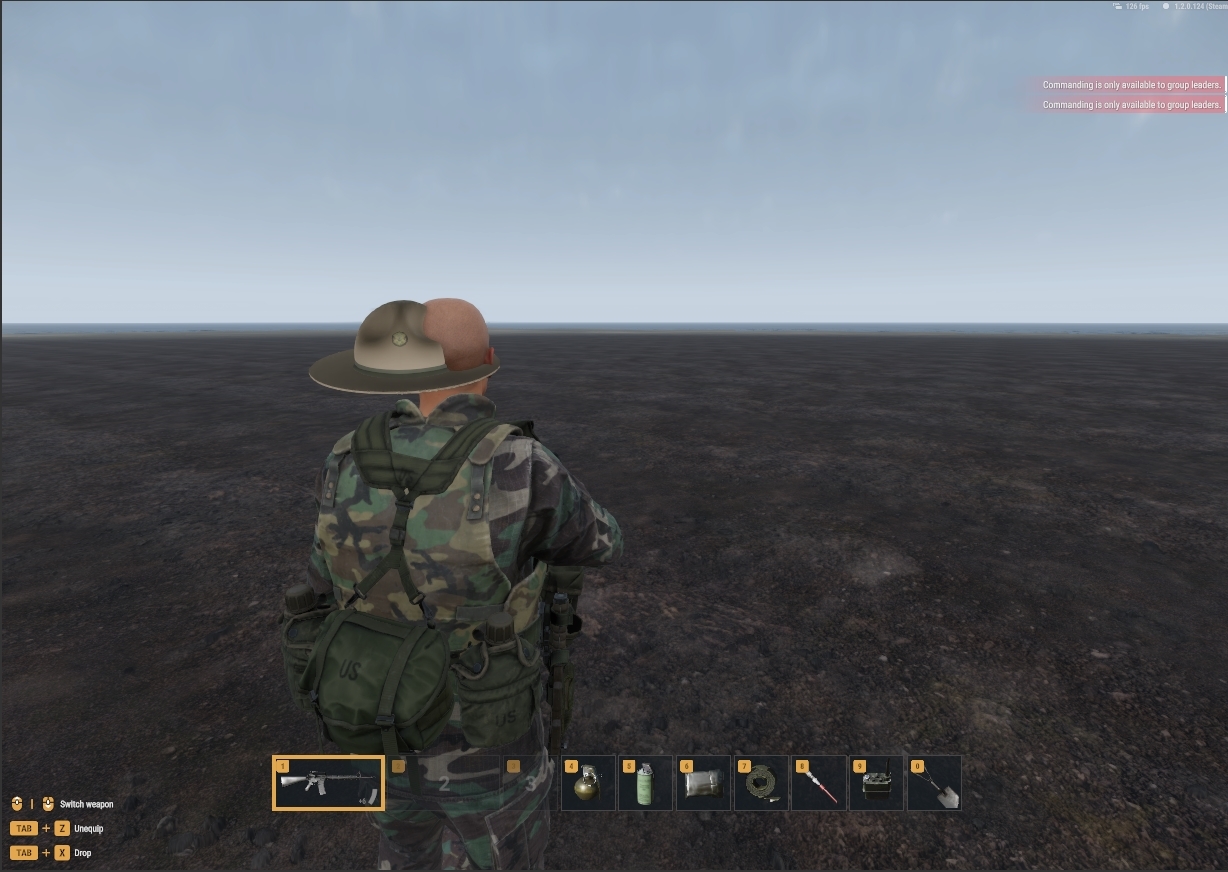
My hat is being applied backwards and off put in the world space but looks fine on bones
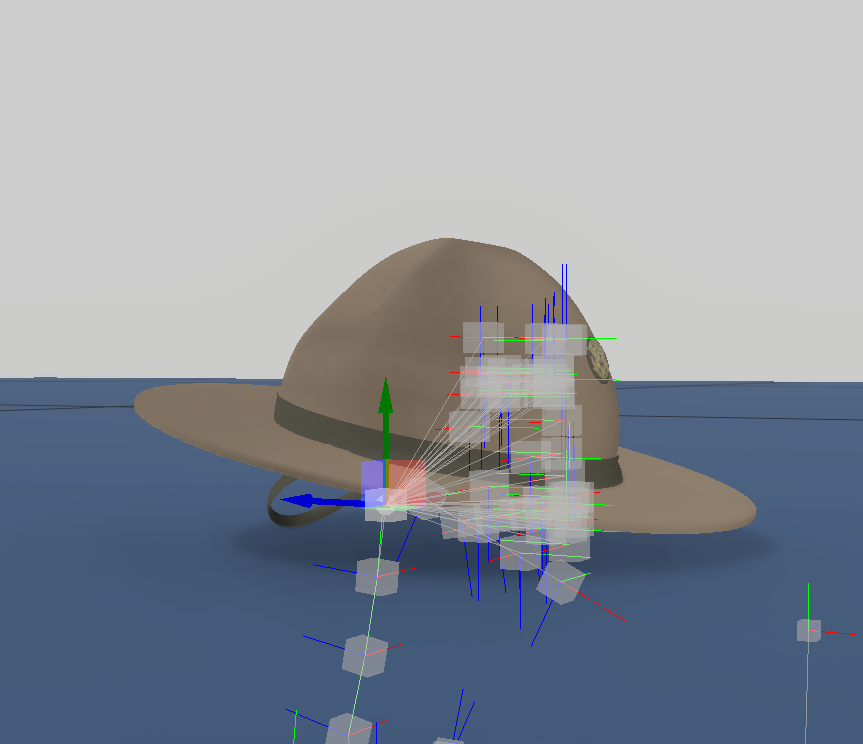
The one I have selected is head, the others are face
 deft owl
hazy vault
My hat is being applied backwards and off put in the world space but looks fine ...
deft owl
hazy vault
My hat is being applied backwards and off put in the world space but looks fine ...
do you have the vertices weight painted to a bone? https://www.youtube.com/watch?v=SCWZr-It1bE
🔔 Subscribe! 🔔
Subscribe ► https://www.youtube.com/channel/UCQaeCs2hL2I7EK88fOZhWBw?sub_confirmation=1
☝️ In this blender 3 tutorial you will learn weight painting for beginners. We have a fish model example and we will rig this and add it to the mesh. Then test it out in pose mode and do the correct weight painting setup
Subscribe: https:/...
fierce pawn
torn token
It has colliders, and I put in cylinders for the wheels, box for collisions
Oh and btw the colliders for the wheels are mostly only there to trigger mines and such . All the physics driving simulaton is separate in wheeledvehixlesimularionCompontne
torn token
Okay, and I have the colliders properly configured all to vehiclesimple and the darn thing still goes under the map. It bounces, the wheels sink half way first and then it eventually goes under the map
@fierce pawn
Maybe I got something mis configed in the slotmanager for my wheels?
fierce pawn
The vehicle should be able to drive with just a collider and wheelsimualtion even if there are not whel models attached
Screenshot the collider window again
It would be best to just give it one vehiclesimple collider like a box or something and put the rest to firegeomerty or don’t export them at all yet
torn token

 hazy vault
deft owl
do you have the vertices weight painted to a bone? https://www.youtube.com/watch...
hazy vault
deft owl
do you have the vertices weight painted to a bone? https://www.youtube.com/watch...
I believe so https://gyazo.com/48c9424f75961232677fa48eb262741a
 fierce pawn
torn token
fierce pawn
torn token
Make sure the UTM one doesn’t have vehiclesimple . Really you should only have one sort of box for it
If you compare it to the ones on the uaz for exemplar
torn token
Okay, I'll cross reference with the UAZ and do my best to copy the settings off the UAZ
fierce pawn
your model also has no bones too. so the wheel positions will be totally wrong probably insdie the vehicle
they are definied here

if you have the colliders and that set up it should be able to drive even if the wheels wont visually move
torn token


I have bones on the model, I used the ones from the sample car, I ripped them off that.
I also inherited the uaz_wheeled_base.et and replaced all the models with mine. I had to modify it some because it crashed my enfusion tools
I wish I could rip the armatures, bones, and sockets off the UAZ
fierce pawn
torn token
Oh ok I just saw that here that there were no bones
torn token
Sorry lol I forgot to check the show bones option xD
fierce pawn
It should always display on the right side there though . Did you import skinning on that new model ?
torn token
Let me check, I may have not
Do I have to re-make a .et file everytime I update the model files?
fierce pawn
No
Just if you totally delete a model mesh for example it deletes the import settings and you need to check export skinning again for exemplar
torn token
Yeah, they should set it to where you dont have to do that every time
fierce pawn
If you just put in the new fbx and it also keeps the import settings
Basiclly just don’t delete the xobs . Just update the fbx and reimport
torn token
Im not giving up on this until I have it working in game and everything is perfect even though I've spent nearly 100 hours so far on this
🙂
Once I learn how to do this all it wont take me that long for the next one hehe
@fierce pawn is it okay that i add you as a friend?
fierce pawn
Yes
 warm hawk
How to find face by id/number in blender 3.6? Scene shows only the count, not the selected.
 wicked jasper
warm hawk
How to find face by id/number in blender 3.6? Scene shows only the count, not th...
wicked jasper
warm hawk
How to find face by id/number in blender 3.6? Scene shows only the count, not th...
Thats the only way I know to see the face id. Im using 4.2, maybe in 3.6 the indices option is the viewport overlays menu


 warm hawk
wicked jasper
Thats the only way I know to see the face id. Im using 4.2, maybe in 3.6 the ind...
warm hawk
wicked jasper
Thats the only way I know to see the face id. Im using 4.2, maybe in 3.6 the ind...
thanks ✅
wicked jasper
🫡
 stiff reef
Anyone was able to figure out how the sound reverb inside buildings is configured? I can't make it work even using a vanilla house and adding all the components...
wicked dirge
stiff reef
Anyone was able to figure out how the sound reverb inside buildings is configure...
it would seem to me that this is not the right channel for this question, try configuration or audio_makers
last parcel
it is accutaly the correct one, you wíll need an BSP and Light portals to make sound in buildings to work
stiff reef
last parcel
it is accutaly the correct one, you wíll need an BSP and Light portals to make s...
Thanks! But when I import the model in Workbench I need to setup something else? Because no matter what I try the sound remains the same as outside... Everything else works fine and I have no errors in Logs
last parcel
you need to import with that turned on in the XOB, also the prefab needs to scr_destructiviblebuildingentity with relativ Y and is building Checked
 vestal turret
hazy vault
https://gyazo.com/8d0ee64dfdc2d9a66958cf98e0101608
vestal turret
hazy vault
https://gyazo.com/8d0ee64dfdc2d9a66958cf98e0101608
Same issue with my helmet. Did all the steps twice but same result. Not sure exactly what the cause is, followed wiki as well but it doesn't tell me where I went wrong. Unless it is the bone amount which says it should have (1+163) bones in total. Mine says (3+153) and that is what the problem might be.
 wicked dirge
its totally what your problem is
hazy vault
vestal turret
Same issue with my helmet. Did all the steps twice but same result. Not sure exa...
I would reimport the skelton and re-center it
for my hat I just painted head and neck I believe
vestal turret
wicked dirge
its totally what your problem is
I used this skeleton which is from the samplehelmet.
 wicked dirge
vestal turret
I used this skeleton which is from the samplehelmet.
wicked dirge
vestal turret
I used this skeleton which is from the samplehelmet.
you are probably exporting it wrong
vestal turret
wicked dirge
you are probably exporting it wrong
One thing I did notice was the wiki didn't show so many vertex groups on their end.
But if you say it is probably the export I'll try export with different settings, I did make sure to disable add leaf bones and enable custom properties which AFAIK are the two most important.
 hazy vault
vestal turret
One thing I did notice was the wiki didn't show so many vertex groups on their e...
hazy vault
vestal turret
One thing I did notice was the wiki didn't show so many vertex groups on their e...
Texture painting also fixed mine
vestal turret
hazy vault
Texture painting also fixed mine
Do you mean weight painting?
I did weight paint two of the vertex groups, the head for the hard part of the helmet itself and the strap for the jaw


Spine5, Neck1, Neck3, RightShoulder and LeftShoulder vertex groups are unpainted completely blue so they don't affect the helmet.
hazy vault
yea weight painting my bad
I am also new so my way might not be the best way but I only had the four required elements on mine
wicked dirge
its not your weight painting. The bone count in export is wrong
if the bone count is not right, the object does not work
hazy vault
vestal turret
Do you mean weight painting?
Which skeleton export did you use ?
vestal turret
I used the helmet sample skeleton
hazy vault
Earlier mine had too few bones, I went back to the original file and reimported and it fixed it
Must have deleted something that counted as bone
Just fresh download it, throw the current helmet on the fresh Skelton and rexport- and import
lunar mulch
You need to uncheck Add Leaf Bones.
 vestal turret
lunar mulch
You need to uncheck Add Leaf Bones.
vestal turret
lunar mulch
You need to uncheck Add Leaf Bones.
I made sure I unchecked that during export 🫡 but it looks like Blake and Assassin are right it is the number of bones causing it
hazy vault
vestal turret
I made sure I unchecked that during export 🫡 but it looks like Blake and Assass...
Did using a fresh Skeleton fix it ?
wicked dirge
vestal turret
I made sure I unchecked that during export 🫡 but it looks like Blake and Assass...
Be aware that the skeletons in current reforger stable and experimental 1.2.1 are different. If you make a helmet based on 1.2.0 skeleton it will stop working when 1.2.1 becomes stable. If you use the 1.2.1 skeleton now, it will not work outside of experimental tools
vestal turret
wicked dirge
Be aware that the skeletons in current reforger stable and experimental 1.2.1 ar...
Oh geez thanks for the heads up Soul. I'll perhaps wait then for 1.2.1 to reach stable and then do it with that skeleton.
wicked dirge
You can already do it with exp tools and game to be ahead of the game
sullen sable
Does anyone know a good tutorial for adding bones to a gun model in blender? or would anyone be willing to teach me?
 deep trout
I have my model with textures applied using Multimat, and it also has its colliders. What step should I follow next to ensure my model casts shadows and doesn't look too bright inside?
tidal latch
vestal turret
I made sure I unchecked that during export 🫡 but it looks like Blake and Assass...
most likely you are missing empty objects
see picture from dob.FR for export settings and verify that you have those bones in Workbench
 stiff reef
I'm still having issues with my building and portals... If I import it in Workbench and check "Generate BSP" I get this error: "RESOURCES (W): UpdateAreaPortals(): Orphaned AreaPortal 'PRT_01' (0) inside area 0! Check the model, it's leaking."
I've remade all the portals, moved and scaled them around, checked the BSP geometry, all with no luck
 faint scarab
wicked dirge
You can already do it with exp tools and game to be ahead of the game
faint scarab
wicked dirge
You can already do it with exp tools and game to be ahead of the game
This is the hook I've been waiting for. Stupid question: to update my mod to the next version do I have to create a new mod in experimental mode or just upload my main mod?
patent wren
Guys, i am remodeling a weapon and i dont know if i should make details like radiuses in geometry or make all edges sharp (90°) and make it look round with normal map or displacements?
How detailed should the models be
sly bridge
patent wren
How detailed should the models be
have a look over vanilla weapons
available PBR shaders that are used for weapons in reforger do take advantage of baked normal maps, however these do not use displacement maps
patent wren
sly bridge
available PBR shaders that are used for weapons in reforger do take advantage of...
Is there a way to display the mesh in workbench? I havent play too much around the workbench, only used it to compare my model with vanilla 😄
sly bridge
it is yes, open the xob, from left corner you can toggle the wireframe overlay
patent wren
sly bridge
it is yes, open the xob, from left corner you can toggle the wireframe overlay
Thanks a lot!
Btw, how well do you think BI modeled the guns? I am using their gun as a reference, instead of picture?
sly bridge
how are you using their models as reference? what do you mean by that
what i said is to have a look over the amount of details they have so you have a general idea about how to make your own, especially in regards to meah details such as chamfers
patent wren
sly bridge
how are you using their models as reference? what do you mean by that
I look at theirs and look at mine then decide what needs to be changed, something is too wide or too narrow, some rivets are on wrong position 😄 I am not unpacking their models or anything like that.
sly bridge
patent wren
I look at theirs and look at mine then decide what needs to be changed, somethin...
you are way better off looking at proper refs for most stuff, because every single 3d model has things that are artistic interpretations
deep trout
deep trout
I have my model with textures applied using Multimat, and it also has its collid...
Hello, does anyone have any idea how to do it? 
patent wren
sly bridge
you are way better off looking at proper refs for most stuff, because every sing...
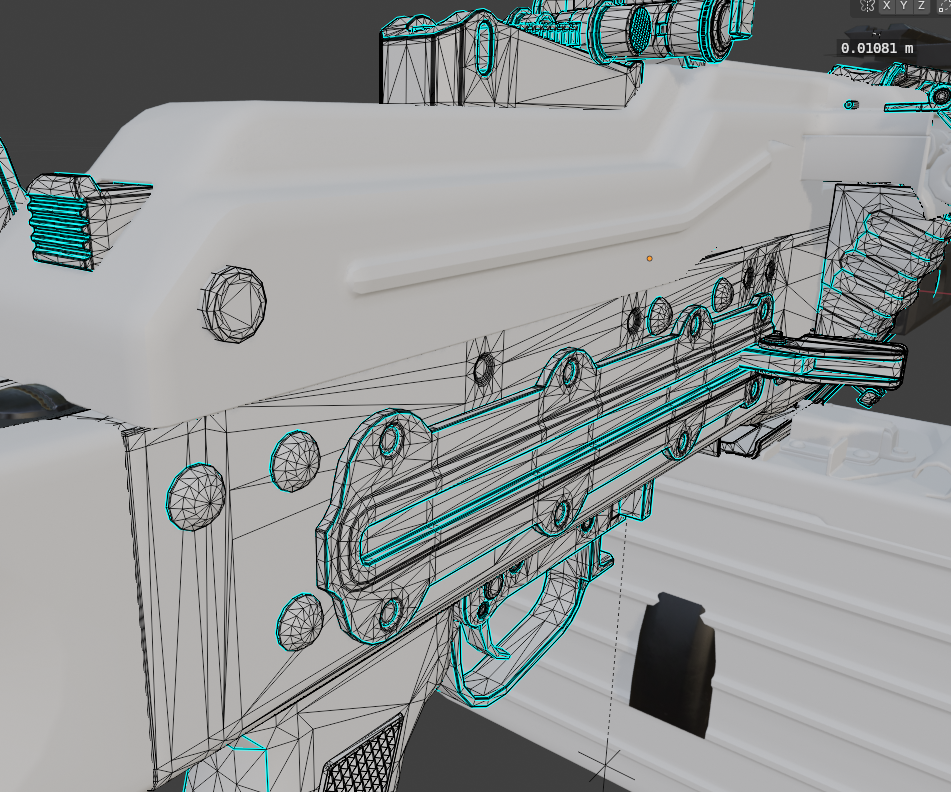
i hope my model is not too detailed, but looking at the game model, i think its on par? What do you think?
 topaz willow
What’s the poly counts and how do they compare? That’s basically what you need to look at
patent wren
I dont know how to display polycount in workbench, but my polycount is 374k.
209k after tris to quads
sly bridge
patent wren
I dont know how to display polycount in workbench, but my polycount is 374k.
that is quite a lot
there is a ton of very small geometry where you could get away with a single bevel, and even more where all these bevels and chamfers are not needed whatsoever
and you could just bake that down
patent wren
sly bridge
and you could just bake that down
That is the plan, thanks, i found somewhere i should get to 20-25k faces?
For LOD0
sly bridge
it depends on a lot of things, you can actually check the polycount for all meshes in workbench, including the vanilla pkm
patent wren
sly bridge
it depends on a lot of things, you can actually check the polycount for all mesh...
Could you please reveal to me how?
 nova granite
patent wren
Could you please reveal to me how?
nova granite
patent wren
Could you please reveal to me how?
Go to the reforger assets folder in workbench and open up the .xob file for the pkm/object you want to check then click on the “LODs” tab on the right side of the window, will show polycount and material count for each LOD
patent wren
nova granite
Go to the reforger assets folder in workbench and open up the .xob file for the ...
Thank you very much, that was helpful, now i know it have 35k faces in LOD0
fluid fern
Hi, I have a problem with my slidingdoorcomponent, it only gouges in the X axis when I want it to gouge in the Z axis. What can I do?
Has anyone seen this problem before?

 sand pagoda
sly bridge
there is a ton of very small geometry where you could get away with a single bev...
sand pagoda
sly bridge
there is a ton of very small geometry where you could get away with a single bev...
this looks like triangulated SUBD0 mesh 
 calm rune
patent wren
That is the plan, thanks, i found somewhere i should get to 20-25k faces?
calm rune
patent wren
That is the plan, thanks, i found somewhere i should get to 20-25k faces?
All of this geo on the forgrip can be baked.
 last parcel
deep trout
Hello, does anyone have any idea how to do it? <:notlikemeow:700311897937018890>
last parcel
deep trout
Hello, does anyone have any idea how to do it? <:notlikemeow:700311897937018890>
https://community.bistudio.com/wiki/Arma_Reforger:FBX_Import Read about probe and Portals.
 cerulean patio
how i fix this mask?
 tidal latch
cerulean patio
how i fix this mask?
tidal latch
cerulean patio
how i fix this mask?
what we are seeing here?
 shy nexus
so im making a heli and the rotor wont change to the blured model idk if i borked the colliders or something
patent wren
calm rune
All of this geo on the forgrip can be baked.
Oh yeah, this is the first model where i see knurling modeled. Im getting rid of this pistol grip anyways, but yes, all these tiny details will be baked in ^^
patent wren
I just found out that this exist:
https://www.cadsketcher.com/
And im like wow, thats what i needed
CAD Sketcher
CAD Sketcher is a free and open-source project looking to enhance precision and parametric workflows in blender by bringing CAD like tools, features and usability to blender.
cerulean patio
tidal latch
https://community.bistudio.com/wiki/Arma_Reforger:Character_Gear_Creation/Headge...
TMC HAHO mask
cerulean patio
tidal latch
https://community.bistudio.com/wiki/Arma_Reforger:Character_Gear_Creation/Headge...
thankss
 clear kelp
 cerulean patio
Is there any sample model for gloves??
outer hull
cerulean patio
Is there any sample model for gloves??
if you already have the models for the gloves or planning to make gloves, you can use the sample character as the refrence
cerulean patio
outer hull
if you already have the models for the gloves or planning to make gloves, you ca...
is that the model of my glove is straight, it doesn't have curves in the fingers, in this case it would be the 3D base
 outer hull
cerulean patio
outer hull
cerulean patio
match the gloves as close to the hands as possible, and the go to sculpt tool to try and position the fingers
 cerulean patio
ok ok
calm rune
cerulean patio
Apply the texture as you are doing it to try and see how bad you are stretching the UV.
I know it’s hard to folks who do not have the knowledge yet but that is why it is best to make your own models from scratch. If you are taking something that was not made specifically for the reforger base body then you run the risk of stretching the UV when you start pushing and pulling to make the model fit reforger a base body.
Then your textures look all wonky
cerulean patio
rog
torn token
Anybody got any ideas why its not giving me the option to enter my vehicle? I set the bone up to it and also driver_getin and I aint getting nothing on my screen. I duplicated Uaz469.et and modified that one. I resetted the actions and added the actions that comes with my model and everytime I reset the actions from the UAZ469 and add mine it breaks the option to enter the vehicle.
fluid fern
stiff reef
I'm still having issues with my building and portals... If I import it in Workbe...
Have you find a solution?
Because i have same errors, its first time when i saw that
 flint swift
can anyone help me and explain how to get multiple colliders on 1 building if thats even possible?

Building : Shop
Colliders are: Metal , wood , brick (shop)
they take different parts of the building
fluid fern
flint swift
can anyone help me and explain how to get multiple colliders on 1 building if...
Uncheck "Mege tri meshes" when your reimport xob file
 flint swift
oh wow thanks
fluid fern
RESOURCES (W): UpdateAreaPortals(): Orphaned AreaPortal 'PRT_02' (1) inside area 0! Check the model, it's leaking. RESOURCES (W): UpdateAreaPortals(): Orphaned AreaPortal 'PRT_01' (0) inside area 0! Check the model, it's leaking.
I have this error when i reimport my .xob file, I've redone my portals and I'm still getting it wrong.
I've checked my BSP and I don't have any errors, did you or did you already have this?
flint swift
No i don't. it worked for me
stiff reef
fluid fern
Have you find a solution?
I've checked again the model and there was some issue in the topology, once I remade it the error is gone.
I'm not sure if it was related to the BSP volume or LOD0
fluid fern
stiff reef
I've checked again the model and there was some issue in the topology, once I re...
Topology?
stiff reef
I think that the floor or the roof in my building was not properly set, so the rooms aren't sealed and the engine can't create BSP volume properly... But that's just my guess...
fluid fern
stiff reef
I think that the floor or the roof in my building was not properly set, so the r...
Yes, but if that had been the case, I would have had an error with the bsp import, wouldn't I?
sullen sable
@tidal latch any idea what I'm doing wrong here? I'm trying to make an Aimpoint T2 optic on a riser mount but I keep getting this error message and there is no collimator displayed inside my optic.
I've tried making duplicates of the AP2K as well as the RHS T2. Nothing seems to work however. I've set my optic bones in blender to match as well.


 stiff reef
fluid fern
Yes, but if that had been the case, I would have had an error with the bsp impor...
stiff reef
fluid fern
Yes, but if that had been the case, I would have had an error with the bsp impor...
If the model isn't correct you get the error once you import it in Workbench and check "Generate BSP"... If it's not selected the model is imported without errors
fluid fern
stiff reef
If the model isn't correct you get the error once you import it in Workbench and...
Yep, i’m going to rebuild bsp
 tacit eagle
Do we have humvee sample?
sly bridge
no
tacit eagle
If i want to add extra parts to the existing humvee, how can i know the sizes? of current humvee
sly bridge
trial and error + using the ingame measuring tool
wicked dirge
you can also create slots in the prefab and add your additions to the slots. The slot position would then be the origin of your additions
 tranquil bronze
Hello, I just started into modding of arma, I did everything according to the wiki and other youtube tutorials but I cant seem to find solution for this problem. The helmet is offset, I have tried vurious bone models with some being 163 in total and some more. I took bone models from vurious sites. Please someone help me out.

 wicked dirge
in exp it should be 230
wicked dirge
in stable bone count is 163
you have to follow this totorial to the letter
it has the template file in the text
 wicked dirge
tranquil bronze
wicked dirge
tranquil bronze
This is the new skeleton for version 1.2.1
Just wait til this Thursday and it will work
wicked dirge
On Thursday 1.2.1 is released and from that point the 230 bone skeletons will be required
For stable
If you download experimental game and experimental tools and load your mod in exp workbench it should work already
Also all mod that have not updated to 230 skeleton will stop working
hazy vault
wicked dirge
On Thursday 1.2.1 is released and from that point the 230 bone skeletons will be...
Is the new Skelton out yet ? On the git?
sly bridge
hazy vault
Is the new Skelton out yet ? On the git?
yes, it has been for about a month or more
 leaden trench
I keep following these AI mesh generation papers that come out. Latest one is really impressive. https://trellis3d.github.io/ A couple more years and AI will do useful subdivision modelling
shell hedge
https://meshy.ai still has some problems but it'll get there

Meshy - Free 3D Models Generated from Images and Text
Meshy is an AI 3D model generator that helps to effortlessly transform images and text into 3D models in seconds.
patent wren
shell hedge
https://meshy.ai still has some problems but it'll get there
Oh my, can it use batch of images of the same item from multiple angle for better accuracy?
shell hedge
no idea
I think I saw a model on huggingface that generates a short video of the "asset" spinning and then extracts it to a model
it should be in trending somewhere
 nocturne quartz
I just want an AI that can do retopo 😦
stiff reef
When I validate my model (LOD0) I get a lot of "Non-convex edges". Is that a problem or I can ignore them as long as they are not on the collider geometry? Thanks!
 white garden
Anyone got a tutorial on how to generate colliders for imported objects?
stray bridge
white garden
Anyone got a tutorial on how to generate colliders for imported objects?
You create colliders in blender based on your model
patent wren
 patent wren
delicate condor
What a big box you have
patent wren
delicate condor
What a big box you have
Yeah, the box is subject to replacement, but this one have texture, so im using this one for pictures.
Its from lower poly model. Also the body only have placeholder textures, i want to make it crisp so im focusing on geometry now, then im slowly learning quixel mixer.
patent wren
delicate condor
👍
Just realized the handguard rail doesnt have the circular pattern of holes on that side yet, making it feel very flat in that spot.
 tacit eagle
Where i can fined the animated doors in the prefab im trying to attach stuff on the doors
 shell hedge
they will be in slot manager component, try searching door in resource browser in the hummvee folder
 zenith quartz

 unkempt harness
Is it good idea/possible method to do model in Fusion 360 and then import to Blender and export as FBX?
or it is not recommended way to do solid modeling for game models
I've found answere here #enfusion_texture message
sly bridge
unkempt harness
Is it good idea/possible method to do model in Fusion 360 and then import to Ble...
it is yes
patent wren
zenith quartz
https://cdn.discordapp.com/attachments/1246926012759932980/1316460039476871259/i...
Im wondering if all those geometry is hard surfaced? Even the radiuses on edges? I am trying to mimick the level of quality, but it sounds counter intuitive. could you please reveal the secrets? 😄
patent wren
And what shading settings do you use to take this screenshot please?
zenith quartz
patent wren
Im wondering if all those geometry is hard surfaced? Even the radiuses on edges?...
Blender remesh workflow, I'd check out Chamferzone's flashbang or revolver tutorials for more information.
 zenith quartz
I'd only recommend it if you've got a good amount of RAM.
I have 64 gb.
Otherwise it can freeze your PC up.
last parcel
Indeed, its slow workflow with loading Times
patent wren
zenith quartz
Amazing, thanks! i only got 32GB but at 6000Mhz, maybe that will help 😄
last parcel
No, load Times will still be slow unfortunaly
 silent scroll
what is causing this? all I did was put the clothing on new armature using the same vertex groups from last armature
 stray bridge
silent scroll
what is causing this? all I did was put the clothing on new armature using the s...
stray bridge
silent scroll
what is causing this? all I did was put the clothing on new armature using the s...
whats that lol, probably weights are not correct. You got 230 bones total?
silent scroll
I figured it out
some reason new character weight template faced the wrong direction then the armature did was wierd
cerulean patio
wicked dirge
On Thursday 1.2.1 is released and from that point the 230 bone skeletons will be...
mine has 225 bones, I think I got the wrong model (I got the one from github) lol
stray bridge
cerulean patio
mine has 225 bones, I think I got the wrong model (I got the one from github) lo...
the new character is on the git for 2 month now
wicked dirge
cerulean patio
mine has 225 bones, I think I got the wrong model (I got the one from github) lo...
you are probably exporting it to fbx wrong
read the instructions carefully
 tropic flicker
stray bridge
the new character is on the git for 2 month now
tropic flicker
stray bridge
the new character is on the git for 2 month now
link please
tropic flicker
tropic flicker
link please
oh i find, this skeleton works! https://github.com/BohemiaInteractive/Arma-Reforger-Samples/blob/main/SampleMod_NewCharacter/Assets/Characters/SampleCharacter/Character_Weights_Template.blend

GitHub
Modding Samples. Contribute to BohemiaInteractive/Arma-Reforger-Samples development by creating an account on GitHub.
calm isle
as of the new update I can't hide this helmet in first person, it's seemingly only this helmet


the material is plugged into the right model, any other edit changes in the world
seemingly half my headwear materials now just don't hide in first person when they did previously
 paper summit
came wondering the same thing lol
calm isle
yeah I still can't figure it out, even duplicating existing materials doesn't really work
 edgy ginkgo
using the skeleton updater I get this....

doing it on a *.blend file
I'm missing a step and not sure what I need to do with the batch file updater
C:\Users\USERNAME\AppData\Roaming\Blender Foundation\Blender\4.2\scripts\addons\EnfusionBlenderTools\txa\batch
is where I found it in my system which is where the documentation says to get it
tidal latch
edgy ginkgo
C:\Users\USERNAME\AppData\Roaming\Blender Foundation\Blender\4.2\scripts\addons\...
 glossy pond
Because it might be helpful to people here:
torn token
Any clues why my vehicle aint showing up in the spawn menu? I have both config files the PlaceableEntities > Vehicles > vehicle.conf and EntityCatalog > CIV > vehicle_entityCatalog_CIV.conf
I even set the editablevehiclecomponent script to and it still doesn't show up I'm very confused and don't know what files or scripts to look through to fix it
 rancid glade
hello, i need to update my mod because my hats are not anchored anymore to the head. bones are still here, i read above there is a new character model. I guess it's that one i need to use to export again from blender ?


 fossil crater
rancid glade
hello, i need to update my mod because my hats are not anchored anymore to the h...
fossil crater
rancid glade
hello, i need to update my mod because my hats are not anchored anymore to the h...

Arma Reforger
Learn about important upcoming modding changes.
stray bridge
rancid glade
hello, i need to update my mod because my hats are not anchored anymore to the h...
new skeleton has 230 bones in total btw
rancid glade
got 240 bones and still not working....

 shell hedge
how much is 1 + 240
shell hedge
damn
sand pagoda
more is not always better
rancid glade
shell hedge
how much is 1 + 240
i dont know how to count
i would say 26 ?
shell hedge
dont give up
rancid glade
surreal ore
No 230
yeah i have 230 bones in my blender when exporting, i select only armature.001 + the targets + my 4LOD
but still get 374 BONES once imported in enfusion workbench
there is a high probability that im dumb, but i don't see where i fail here

 wicked dirge
rename armature.001 to Armature and when exporting deselect "leaf bones"
rancid glade
wicked dirge
rename armature.001 to Armature and when exporting deselect "leaf bones"
problem solved, leaf bones was unchecked but somehow still checked, had to restart blender and reimport
 hushed shoal
Could anyone help me with the new skeleton setup, haven't used blender much and no matter what i try the item that I am trying to setup is still set to the right of the characters neck...
fluid fern
Hello hello, I have the impression that the BSPs no longer work since the update, do you have the same thing?
last parcel
you will need to add worldsubscene componet onto the prefab, for some reason BI changed that without telling anyone
vestal turret
Has anyone run into the massive helmet problem? It is caused by the armature modifier in blender. If I delete the armature modifier and import again into Reforger it will return to its correct size but floats on the head and slightly to the side. I am using the character weight template skeleton.


exporting without modifier, helmet correct size but because it has no armature modifier it will not sit correctly on the head.

 sharp remnant
Looking for some one who can make models, also someone who knows scripting and Animation.
Rigging and weight too
 last hill
vestal turret
exporting without modifier, helmet correct size but because it has no armature m...
last hill
vestal turret
exporting without modifier, helmet correct size but because it has no armature m...
If clothing it must have the armature for the player character in the samples.
tidal latch
vestal turret
exporting without modifier, helmet correct size but because it has no armature m...
apply transform to helmet
 plucky salmon
Hello !
Did someone know why my characters (even ia), looks like that when i load my world ?
 sharp remnant
So got an issue.
Sorting armour and it refuses to conform to the body and just floats, all IK points, all bones are set it just floats ingame.
Can i get some help.
Dm me please.
 honest pine
tidal latch
apply transform to helmet
honest pine
tidal latch
apply transform to helmet
worked with a vehicle, we'll try on the helemt thanks Reyhard
 sweet mist
Hello everyone!
Has anyone ever had this problem with helicopters?
In fact when I start the helicopter after a few seconds the dashboard disappears.
No matter how much I search, I can't figure out what could be causing this :/
However, I seem to have everything configured. The bones and colliders of the dashboard are done !
If someone can help me and know where this problem come ? :/

 shell hedge
hahaha what
Register Damage? does cockpit have a healthbar? maybe its being destroyed?
maybe you could try with this
 sweet mist
shell hedge
Register Damage? does cockpit have a healthbar? maybe its being destroyed?
sweet mist
shell hedge
Register Damage? does cockpit have a healthbar? maybe its being destroyed?
Ok i'll try this 🙂
nop ahah not working ^^
i'll try another thing
shell hedge
I have honestly never seen this
sweet mist
Ahah yes me neither!
All the time when there is weird stuff it's for me 😄
last hill
sweet mist
Hello everyone!
Has anyone ever had this problem with helicopters?
In fact when...
Test using the default helicopter cockpit panels?
sweet mist
last hill
Test using the default helicopter cockpit panels?
Yes it's doing the same thing with the default one O.o
last hill
I am not too sure. Have you tried pausing in GM and searching around in the ground/air for it? Could be warping for some reason or another? I haven't personally had this issue in any of my helo work
sweet mist
last hill
I am not too sure. Have you tried pausing in GM and searching around in the grou...
Yes I looked everywhere around and above and below but I don't see it.. It's like it disappears :/
But when I don't check merge physics on the slotmanagercomponent the dashboard stays in place
So i think maybe a problem with the dashboard physics but it's the same with the default one so i don't understand ahah
last hill
sweet mist
Yes I looked everywhere around and above and below but I don't see it.. It's lik...
There could be a collider present in the vanilla bird that is behaving differently to your bird, resulting in issues with merging physics. Usually if you enable merge physics you will get a warning in the log console tab. Good luck figuring it out, I've gotta head to bed.
sweet mist
last hill
There could be a collider present in the vanilla bird that is behaving different...
Ok i'll try to check that 🙂 Thx 🙂 good night ! 🙂
 night sleet
Is there a new tutorial for hat/helmet models?
A sample blender file will also be useful to me.
stray bridge
night sleet
A sample blender file will also be useful to me.
there is a sample in their git
GitHub
Modding Samples. Contribute to BohemiaInteractive/Arma-Reforger-Samples development by creating an account on GitHub.
 vestal turret
Fixed... found out the issue, my parent type was set to bone instead of object. Only took almost a month to figure out and by accident 😭

For those of you that may encounter the same issue. Make sure your parent type is set to object not bone in relations section.

 sacred vessel
not sure why my mobile command trucks arent deployable anymore.

 honest pine
last hill
There could be a collider present in the vanilla bird that is behaving different...
honest pine
last hill
There could be a collider present in the vanilla bird that is behaving different...
When putting the modded dashboard on a vanilla UH-1 it doesn't depop and play dashboard animation, does it help getting an idea ?
sweet mist
I find the solution ! That was so simple ahah ! i just delete all the slot in SlotManagerComponent and put it again and it's working ^^
hazy vault
For clothing, has everyone found it easier to use the plugin or manually redo the clothing
sacred vessel
hazy vault
For clothing, has everyone found it easier to use the plugin or manually redo th...
plugin?
 livid hull
hazy vault
For clothing, has everyone found it easier to use the plugin or manually redo th...
livid hull
hazy vault
For clothing, has everyone found it easier to use the plugin or manually redo th...
The plugin has a one button solution, that is way easier than manually redoing everything
 misty solstice
night sleet
misty solstice
night sleet
Kinda happy the GF mod is inspiring more sci fi mods for reforger
night sleet
misty solstice
Kinda happy the GF mod is inspiring more sci fi mods for reforger
Yes, I had a lot of fun playing such modes in Squad and Arma 3. So I said to myself, "Hey, why don't I create one myself?"
misty solstice
night sleet
Yes, I had a lot of fun playing such modes in Squad and Arma 3. So I said to my...
Exactly what the galactic forces mod did
night sleet
misty solstice
Exactly what the galactic forces mod did
Yes, I really support what you do. I like to create and play missions for myself in single-player mode with GF.
 plush torrent
sullen sable
Anyone know how to fix this mag? its fixed after a reload but upon pulling the g...
plush torrent
sullen sable
Anyone know how to fix this mag? its fixed after a reload but upon pulling the g...
@summer sierra
 summer sierra
sullen sable
Anyone know how to fix this mag? its fixed after a reload but upon pulling the g...
summer sierra
sullen sable
Anyone know how to fix this mag? its fixed after a reload but upon pulling the g...
its the point that the mag is in, point info or whatever
theres more to it as well, if its the stock mag he used for the model and if thats a different mag as well
plush torrent
i think he alr fixed it lol you just wanted the link
plush torrent
sacred vessel
not sure why my mobile command trucks arent deployable anymore.
wahts server is this?
sacred vessel
plush torrent
wahts server is this?
tbn road to saigon vc pve
ive made my own scenarios and they work very stable. i dont almost no memory loss. and am starting to bring in assets to improve the quality of things.
running about 7.5gbs memory with 800 hardcore AI
patent wren
So, if i make a modded weapon, get it to workshop and test it in game and it all works fine, can i just use it even tho my poly count is slightly bigger than the vanilla weapon?
stray bridge
Yes, just takes more performance. Make sure to do lods
patent wren
stray bridge
Yes, just takes more performance. Make sure to do lods
Thanks, yeah i was thinking, only the person in 1st p. view will see the LOD0 right? Even in third person it loads LOD1?
I read this, but there is no guides on what is the limit to ensure smooth performance
I opened the pkm in vanilla and found out it have 35k faces, but is this the limit or i can have lets say 50k (random number, not my polycount)
stray bridge
patent wren
I opened the pkm in vanilla and found out it have 35k faces, but is this the lim...
you can
patent wren
Does this page still apply even for reforger?
wicked dirge
patent wren
Does this page still apply even for reforger?
https://community.bistudio.com/wi...
specifics no, but in general of course more materials and more textures will always be less performant.
but in enfusion instancing works different than in previous engine so its less of a concern than it was before
last parcel


 turbid moss
Oh yeah, rk95
 fringe elbow
Hi everyone I had a quick question I'm messing around with making Building Props like skyscrapers and when I was testing with AI Troops they could stand on the top and walk around it was solid but when I tried any kind of Helicopter or Vehicle it just passed right through. What am I missing?
stray bridge
Did you use buildingfireview as a layer for the colliders?
 light vault
fluid fern
Yep, i’m going to rebuild bsp
light vault
fluid fern
Yep, i’m going to rebuild bsp
@stiff reef @fluid fern Did you get a resolution on your BSP issues? I'm getting this error, which was similar to yours: "RESOURCES (W): ExtractConvexEnvelope(): AreaPortal 'PRT_19' (18) doesn't have vertices assigned! Check the model, it's leaking" ...I have about 20 portals and getting this error on 2...can't see why, everything looks good in Blender
 late spear
Not sure if this has been asked but I am having an issue that I can't edit my own model prefabs after I closed them. this is only happening with my newer models that I have added. It acts the same as a locked asset. Anyone have an idea why this would happen?
late spear
fringe elbow
Hi everyone I had a quick question I'm messing around with making Building Prop...
What class is the building and do you have the colliders setup properly? Make sure you have buildingfireview set as well
light vault
light vault
<@566983883934007296> <@135107111485964288> Did you get a resolution on your BSP...
OK. I THINK I worked this out...
So there are 2 variables at play here: 1) direction of the portal normal and 2) alignment of the portal mesh to the "inside" or "outside" of the opening that it's covering. I found that if I had the portal mesh normal facing 1 specific direction AND alignment on 1 specific side of the opening it worked fine
 faint wyvern
hi. can anyone link me a video of someone importing models into blender an setting it up for workbench
 silk glen
what you guys think? I'm learning character modelling
 fluid fern
light vault
<@566983883934007296> <@135107111485964288> Did you get a resolution on your BSP...
fluid fern
light vault
<@566983883934007296> <@135107111485964288> Did you get a resolution on your BSP...
Yep i rebuild bsp and its good
cerulean patio
Can someone help me? I made a vest preset using the RHS as a base, I positioned the pockets, but when I put it on the vest, it goes back to the original, does anyone know what it could be?
 vital swallow
Is it somehow possible to import a .fbx without the vertex color. When I use one with vertex color, the color is overlayed the texture and visible at play time. Maybe it is also possible to just disable this behavior.
sly bridge
vital swallow
Is it somehow possible to import a .fbx without the vertex color. When I use one...
clear the vertex color before importing the fbx
vital swallow
Well, I thought there might be a way without the need to do this.
wicked dirge
cerulean patio
Can someone help me? I made a vest preset using the RHS as a base, I positioned ...
@roze_princess did you follow the instructions?
cerulean patio
wicked dirge
@roze_princess did you follow the instructions?
yes yes, I read the page and managed to solve it, I was doing it wrong
 remote canopy
i think this i the right channel to ask this but can you extract the character models with eqiupment from the game?
like i want the model to wear specific equipment
nova granite
remote canopy
i think this i the right channel to ask this but can you extract the character m...
no, you cannot extract any models from the game
remote canopy
now i am confused how do you mod equipment into the game?
remote canopy
nova granite
https://community.bistudio.com/wiki/Arma_Reforger:Character_Gear_Creation
thank you
 mortal mortar
Hey guys, I'm having an issue in which in engine shading goes to shit even if in blender looks okay. For example...


Do I need to manually clean topology for that?
topaz willow
I wonder why you wouldn't bake those details in with a normal map, or for the case of the firemode selector, why not overlay a cylindrical mesh on top of the flat plane? 🤔
if it's your model, that is
mortal mortar
it's not my model. I have all the baked textures already.
if it was my model then yeah I would probably do it like that (the con is that selector wouldn't be animated but no one notices that anyhow lol)
I'm still curious about why the engine has shading issues with an apparently clean topology
topaz willow
ah, unfortunate, are those shading issues apparent in the normal map?
shell hedge
could also look at where your edge breaks are
mortal mortar
This is a closeup of the lower receiver selector area topology

all I can think of is adding some supporting edges and see how it goes
sly bridge
adding a loop around the holes could fix this
in any case, enfusion has issues with very thin (small) triangles
mortal mortar
ah that might be it then I guess
it made it worse lol...
guess I'll just have to manually try stuff
Okay... so Enfusion loves N-Gons.

 sly bridge
mortal mortar
sly bridge
mortal mortar
nope, it is triangulated, pretty sure you cancheck the wireframe
topaz willow
hey if it works, it works, sometimes you dont question it 😄
mortal mortar
sly bridge
nope, it is triangulated, pretty sure you cancheck the wireframe
so it re-triangulates them on import?
mortal mortar
topaz willow
hey if it works, it works, sometimes you dont question it 😄
but yeah that's what it seems like... good old airforce humor..
"Evidence of shading problem detected"
"Evidence removed"
Problem solved (?)
 woven meadow
Does anybody know how to get roughness and metallic textures on a helmet?
As PBR basic doesn't have them
 frail wyvern
anyone know how to do a bug report for the experimental?
 last ingot
frail wyvern
anyone know how to do a bug report for the experimental?
last ingot
frail wyvern
anyone know how to do a bug report for the experimental?
Hey @frail wyvern, you can create an account, and make an item on the BIS Feedback Tracker @ https://feedback.bistudio.com/
last parcel
not the best texturing work but its something 🙂
 sacred vessel
looking for someone who can help me learn the gear rigging, i have the skelton plugin and the head template, the character animations plugin
all blender plugins, ive scaled my project to the character but having a hard time with learning by reading as i learn better hands out and visually . anyone got time to watch a stream and give a hand once i do one im confident i will have no issues, unless something changes
last parcel
played around with the metal textures abit and i am finnaly happy with it, also added that shoulderpad that is on the buttstock.

 sand pagoda
slap some AO, curvature, a bit of noisy dust and call it a day
shell hedge
I recognize that grunge texture
topaz willow
If they used Substance Painter, I think it’s one of the defaults available in it
nocturne quartz
nice but why didnt you just make real geo for the holes in the hand guard?
the new "next gen" this gen has such features, gas tube and all already in place just like how BI has the kalashingcough and the em16ers
tacit eagle
I imported my saxophone in the workbench, is animation next for the object? It looks strange on the soldier (it's floating in the air above him).
 idle hinge
mortal mortar
so it re-triangulates them on import?
idle hinge
mortal mortar
so it re-triangulates them on import?
Someone correct me if I am wrong but basically every mesh is always purely triangles. N-gons, quads and the likes are just ways that 3d modelling software tries to make it easier for the artist to work with a given geometry.
mortal mortar
Yeah, basically. But it was funny to me to discover that enfusion basically doesn't care about your own clean topology as "it will interpret it in its own way", while fucking up things in the process.
I'm pretty new to this stuff but clearly when it comed to enfusion, being ocd with topology doesn't render the expected results (no pun intended) lol
 lavish sparrow
Can we not change Basebody_Male_01? Why can't we copy it and modify it?
sly bridge
lavish sparrow
Can we not change Basebody_Male_01? Why can't we copy it and modify it?
?
lavish sparrow
sly bridge
?
NVM i just needed to copy the CharacterBasebody. I was trying to duplicate the model
patent wren
Texturing and optimizing in process

 vagrant plaza
I saw there was a head model somewhere that one could download so you could scale helmets correctly and avoid clipping. Is there a similar model for the entire body + head?
stray bridge
vagrant plaza
I saw there was a head model somewhere that one could download so you could scal...
yes on the github
vagrant plaza
stray bridge
yes on the github
nice thanks!
 lofty wolf
mortal mortar
I'm pretty new to this stuff but clearly when it comed to enfusion, being ocd wi...
lofty wolf
mortal mortar
I'm pretty new to this stuff but clearly when it comed to enfusion, being ocd wi...
If you want it to look exactly as it does in ur modelling software, triangulate ur mesh before export. I haven't actually used enfusion tools so maybe im mistaken but alot of software i use interprets quads and ngons differently so its a step i do before export i assume thats the same here.
mortal mortar
I mean this was triangulated
lofty wolf
oh wow and it still reworks it?
mortal mortar
It just fucked up the shading for some reason
Even if it looked perfect with a matcap on blender
I solved it getting rid of a bunch of edges and letting enfusion rework it lol
lofty wolf
Great that worked for you, not so great that it does that in first place lol
faint wyvern
can someone show me the basic sctructure of armature on a tank in blender before importing to workbench
mortal mortar
lofty wolf
Great that worked for you, not so great that it does that in first place lol
Yeah no idea.. 
honest pine
faint wyvern
can someone show me the basic sctructure of armature on a tank in blender before...
check existing tanks mods xob ?
vagrant plaza
can custom vests include arms and legs?
shell hedge
yes
vagrant plaza

im thinking specifically like the parts outlined in red.
they are fit very snuggly to the body/jumpsuit
shell hedge
any clothing item in the game can include any clothing on the character
vagrant plaza

ok, but i mean if i want those arm things over the clothes of the character, surely they would need to deform the clothes to fit??
i guess im asking if i can make the stuff i outlined in red part of the vest like in the picture I sent or if the vest should be its own item and the jumpsuit including the parts outlined in red should be another?
shell hedge
I dont know how you would make them "deform the clothes to fit"
vagrant plaza
hmm, i could have sworn that there was a vest in reforger that deformed the clothes underneath in order to prevent clipping
ok there is definitely deformation when certain vests are equipped to certain clothes

 rocky sedge
Most jackets in refroger have a deformed version alongside the default, you select it in the prefab
vagrant plaza
ok thanks nice! im pretty sure that confirms that i will also need to make the arm armor and the leg armor part of the jumpsuit in that case. im guessing the deformed version is just a single deformer version for all armors and not for specific armors.
 steep marsh
Is there a tutorial how i can animate bullets from a magazine and the feeding belt?
vagrant plaza
cloth looks awful because im new to marvelous designer. armor fits nicely though!
 shell hedge
Right, there is a "normal" and "deflated" version
 full canopy
Hey it's been a minute since i've done clothes in Reforger, I have the new bone count figured out but I completely forgot how I fixed this in the past.
Yes only 3 bones are rigged to one vert.
 stray bridge
transfer weights from the lod0 to your model
lod0 is given with the new skeleton on the git
(same blend file) or was it fbx cant remember lol
full canopy
Yeah that's how I rigged it, it's using the body weights from reforger
Looks like only verts that are rigged to Hips are having the unrigged issue
stray bridge
how many bones you got in total?
check the vertex groups if smth is off, maybe try to delete all and transfer them again just to make sure
full canopy
The bone count is correct, or else they wouldn't animate at all, it's 230 in total.
full canopy
stray bridge
how many bones you got in total?
check the vertex groups if smth is off, maybe ...
I'll try that just to be sure
stray bridge
hard to tell whats exactly wrong by just this screenshot xd
full canopy
It's very clear lmao
The verts aren't rigged/animating like the rest of the clothes are. If it was a miscounted bone issue nothing would be animated.
stray bridge
full canopy
The verts aren't rigged/animating like the rest of the clothes are. If it was a ...
you mentioned it already
full canopy
Great, so i've already explained the issue.
Here I got a video if you need
I've had this issue in the past months and months ago, like January/December
But it never popped up again and I don't remember what the fix was.
The BI wiki documentation is out of date and doesn't seem to have a clear place for common issues such as these.
stray bridge
I can offer you to send me the fbx / blend file and I try it myself to fix it, but I cannot tell you whats exactly wrong I would have to test it out myself.
Maybe someone else knows it tho and will read this later
full canopy
Go for it.
calm rune
full canopy
zero weights on that piece that still floats so it stretches.
stray bridge
full canopy
Go for it.
 full canopy
well, if it's zero weights than why does it work in belnder
 stray bridge
 stray bridge
ill send you the fbx back
stray bridge
full canopy
What prefab did you use as a base?
my own custom one, off my diving mod. Just relaced the xob
calm rune
https://www.youtube.com/watch?v=_95zijAgj2E @full canopy

You will find the blender files for the weight reference and skeleton in the #enfusion_blender_tools channel of the official Arma Discord server.
FBX Import Documentation - https://community.bistudio.com/wiki/Arma_Reforger:FBX_Import
full canopy
stray bridge
my own custom one, off my diving mod. Just relaced the xob
Weird, import settings?
stray bridge
full canopy
Weird, import settings?
just ticked the export skining box
and rotated it 180 because my blend setup is ass xd
full canopy
Huh, I tried both with and without hierarchy, let me try unticking hierarchy again
I appreciate it homie.
stray bridge
full canopy
I appreciate it homie.
np
maybe some weights are off in certain angles / positions. Was just a quick job
full canopy
Yeah huh, you just use the regular blender FBX export right?
stray bridge
full canopy
Yeah huh, you just use the regular blender FBX export right?
I use the reforger tool addon for blender
 full canopy
Fair enough I kinda forget that existed lmao
calm rune
This is why I stopped helping people in this community. Learn to read(wiki) and whatch that video. It will solve all your issues. Or just come here, wine and moan until someone does the work for you like is happening. Have a great day.
full canopy
stray bridge
Even exporting with that didn't seem to do it, I am exporting at .01 scale, should I scale down in blender itself?
stray bridge
vergy def. is not terrible for this community lol
calm rune
Me? the guy who makes free sh*t for everyone to use and doesn't start drama but will respond to it when disrespect is thrown at me. Please, use the 'leave server' option. Bye.
stray bridge
full canopy
Even exporting with that didn't seem to do it, I am exporting at .01 scale, shou...
thats my setup in blender, export it all, tick the skinning box in tools, done
 calm rune
stray bridge
vergy def. is not terrible for this community lol
calm rune
stray bridge
vergy def. is not terrible for this community lol
Thanks Ben but judging by the horse reaction its the RHS tag in front of my name thats an issue.
stray bridge
calm rune
Thanks Ben but judging by the horse reaction its the RHS tag in front of my name...
tbh rhs is overhated I feel like
but all that sh*t is none of my business, I do my mods and help peeps out if possible. Leave me alone with all the other stuff lol
full canopy
stray bridge
thats my setup in blender, export it all, tick the skinning box in tools, done
Alrighty, well I'll keep trying, I appreciate what you've done.
 inland sentinel
calm rune
Thanks Ben but judging by the horse reaction its the RHS tag in front of my name...
inland sentinel
calm rune
Thanks Ben but judging by the horse reaction its the RHS tag in front of my name...
RHS does great work. Vergy does great work. I have no understanding why this guy started this stuff but I will say that not everybody is like that and for the most part the Arma community is pretty good. Comparing to DayZ where it was littered with pretentiousness. It's a big difference
RHS quite literally held Reforger alive pre 1.0 there would be no community at all if it wasn't for RHS, darkgru and eventually WCS
last parcel
slight changes to the model to fix some stuff, also redid the UV to make it look a bit better.


 slim hornet
Hi there, hopefully this questions shouldn’t be in another thread.
I am very much an amateur in Blender, but I have a model of a watchtower that I want to import into Reforger. I have the model made, but I still have no idea how LODs work…collision… all the stuff that makes it work… I was hoping to get a willing individual to send me some good resources. I have read a lot of BI’s resources, and I have a general idea what it means but I don’t know how to put it in practice. Any help would be appreciated!
stray bridge
lods = instalod tool (search on google)
colliders = collisions (UTM_xy)
-> collision mesh of your watchtower (create custom one or lazy way, copy paste ur mesh)
&& (collider creating plugin for blender, forgot the name)
name the newly created mesh to UTM_xy
blender addon (plugin from bi) comes with tools, set collision (UTM_xy) to layers: buildingfireview and eg wood
inside tools, create a prefab -> drag and drop the .xob (mesh) which you imported to tools, into the world, add rigid body component to it, tick boxes „model geometry“ and „static“, drag an drop this from the list on the left into a mod folder eg called prefabs. Boom prefab created, with a collision.
missed some stuff here but these are the basics
you will encounter errors but guys here will help you out ^^
slim hornet
Much appreciated man!
slim hornet
stray bridge
lods = instalod tool (search on google)
colliders = collisions (UTM_xy)
-> coll...
Thanks for the advice! This might be a stupid question, but I've done the LODs at this point and it dawned on me... should it already be textured before doing LODs? Gotta play around with colliders next!
 neat canopy
slim hornet
Thanks for the advice! This might be a stupid question, but I've done the LODs a...
neat canopy
slim hornet
Thanks for the advice! This might be a stupid question, but I've done the LODs a...
Yep, first texture and then do the Lods 😄.
slim hornet
neat canopy
Yep, first texture and then do the Lods 😄.
shoot... well at least I thought of it myself lol!
Thanks man!
vagrant plaza
im going to try to retopologize this. is there anything i should keep in mind that is specific to the enfusion engine? i feel like i remember seeing someone talk about the triangulation being weird when their model was imported into the engine??
 shell hedge
that user seemed to at least partially fix the issue by letting enfusion triangulate it for itself
vagrant plaza
hmm guess ill just see what happens then 
sand pagoda
vagrant plaza
im going to try to retopologize this. is there anything i should keep in mind th...
not really anything special in enfusion, besides it doesnt really like tiny faces, but other than that, just follow standart procedures

 minor night
My dream is a T-55 AM mod, I just put it there, if a talented pal see that and fall in love with the T-55AM 👀
faint scarab
calm rune
zero weights on that piece that still floats so it stretches.
I have the same problem, I see that on spine 1 and 2 the weight is very low, but this doesn't happen on all the shirts I have, so I can't understand the logic with which the problem occurs since I always use the same model! Anyway, one problem at the time, i'll try togive some weight to that bones and i
will see what happen!
vagrant plaza
groza

 gusty needle
Hi,
i have a question regarding verticies. Currently I'm working on a large city with multiple buildings.
I "finished" one building and got a verticie count of 340k and 187k Faces. Is this a lot or okay for a quiet large building? (It has 18 rooms which are normal sized and a lot of details inside)
(I didn't optimize for verticies and probably will add multiple lods for the building)
Don't wonder about how it looks, Most of the building is inside a mountain.

 gusty needle
Also, here’s another building:
This one has a vertex count of 211k and 124k faces.
Both buildings are still work-in-progress: entities are yet to be added, doors are missing (I’m making them separately for animations, etc.), lamps/lights are not added yet, and both buildings will eventually include elevators.
 fringe elbow
Hi guys quick question I'm trying to make an arm shield, I'm using Zeliks Heads to make it as an extra piece of armor I've tried duplicating the mesh to make that a collider, Followed by the steps of making body armor and implementing those same steps but every time I get it on my character's wrist my rifle is pinning and saying the material of the shield isn't the armor_20mm I put it as but still Flesh.
tacit eagle
Aneyone has aney idea how to rig a humvee roof?
Trying to get the gunner work.
honest pine
tacit eagle
Aneyone has aney idea how to rig a humvee roof?
Trying to get the gunner work.
make your turret having the vehicle skeleton, vertex group moving part
tacit eagle
honest pine
make your turret having the vehicle skeleton, vertex group moving part
How do i do that?
honest pine
is this a custom turret ?
 mint summit
Any one happening to be working on Quonset Huts? Trying to figure out how hard it would be to port this from A2.
vagrant plaza
mint summit
Any one happening to be working on Quonset Huts? Trying to figure out how hard i...
Can you share a picture of what it looks like? The one from A2 that is. If its a simple model I could probably make one for you.
mint summit
@vagrant plaza Id think they could be ported from A2 or even dayZ its in there as well and probably a better textured model.


 vagrant plaza
I think I can just model this for you. I'm not sure what BIs policy is around porting stuff from other games, even if it is their own.
 raven rock

can someone help me?
I created a helmet, made the bones, but when i put it in the game it looks like this]
 inland sentinel
Can't import models from dayz. A2 has assets they released to the public that can be used
raven rock
its arma reforger
from what i realized i was using the old bones model
but even with the new, the error still persists
i have 1+223 bones now


 hidden storm
It will be nice, if someone can created some defibrillator
gusty needle
hidden storm
It will be nice, if someone can created some defibrillator
Just get some from turbosquid and just import it into Arma
last parcel
mint summit
<@269116186652835841> Id think they could be ported from A2 or even dayZ its in ...
My buildingpack already has that building in it.
 tidal latch
raven rock
tidal latch
raven rock
you are using wrong export settings in blender
don't forget to export empty objects too
since you have 224 bones in WB, and there are 6 empty objects. I can pretty sure say that is the issue. Here you have some pics with correct export settings https://community.bistudio.com/wiki/Arma_Reforger:FBX_Import#FBX_Export
 mint summit
vagrant plaza
I think I can just model this for you. I'm not sure what BIs policy is around po...
mint summit
vagrant plaza
I think I can just model this for you. I'm not sure what BIs policy is around po...
That would be awesome and I’m not familiar either with the policy but a port would be simple I’d think and the quickest, let me know how it goes though I’ll keep an out for it! If you could a tan variant would be perfect for my Camp Talega Map, once I get it working of course these past couple days have proved troubling for me.
mint summit
last parcel
My buildingpack already has that building in it.
You have a tan variant??
mint summit
last parcel
My buildingpack already has that building in it.
What’s the name of your mod pack?
last parcel
Wolfsbuildingpack and i don't have a tan version in their but its quite simple to make it tan just duplicate the material, and make a new prefab with that material on it.
mint summit
last parcel
Wolfsbuildingpack and i don't have a tan version in their but its quite simple t...
how do i access the building pack and edit on the engine?
uninstalled and reinstalled and the AMD error is gone

but still crashing
raven rock
tidal latch
since you have 224 bones in WB, and there are 6 empty objects. I can pretty sure...

I'm exporting this
 thick crescent
im trying to learn how to rig armor to models but i cant find anything to use as a base in blender
tidal latch
thick crescent
im trying to learn how to rig armor to models but i cant find anything to use as...
https://community.bistudio.com/wiki/Arma_Reforger:Character_Gear_Creation/Vest have you read that?
You could always use sample itself
stray bridge
thick crescent
im trying to learn how to rig armor to models but i cant find anything to use as...
you can find samples on the github
 merry rivet
Whait is the reason for door frames to be like this, and not to be realistic like this: https://cache.willhaben.at/mmo/5/817/291/395_1528360682.jpg


 muted hollow
Hey, I know I asked this in another channel, but does anyone have a recording of this stream they did for modeling?
http://youtube.com/post/Ugkxdr5PYlujEmjbP4aBnumY-9pUWXac53z4

YouTube
Join us Wednesday, December 18th at 2000 UTC for our third Modding Boot Camp! Artist Antonios Koutsouradis will guide you through creating an in-game asset f...
idle hinge
merry rivet
Whait is the reason for door frames to be like this, and not to be realistic lik...
My guess would be that the doors are being used in multiple different buildings and some have thinner walls where it might look off if the door frame is wider.
Havent checked though
wicked dirge
merry rivet
Whait is the reason for door frames to be like this, and not to be realistic lik...
You do know there are more than 1 type of door frame in the world right?
shell hedge
No every door frame in the world is the same
merry rivet
wicked dirge
You do know there are more than 1 type of door frame in the world right?
No, I wasn't aware of that. But what Drakenberger said sound plausible.
wicked dirge
not even all the frames in my apartment are the same
merry rivet
I want to know, because I want to make my own buildings and doors, and if I should do the doors the same way, or the other way. I think I want to try the other way
wicked dirge
thats completely up to you
merry rivet
Yeah... I just thought I might stumble upon an unknown problem... maybe with colliders, or with shadows in the rooms or something like that. That's why I wanted to know why the doors are made like that. But if it's just because of different wall widths, then I'll do it differently.
 tall skiff
Is there a measure tool for the enfusion editor. As in I wish to measure aspects of a window.
 hexed sandal
Working on a new head... 🧟♂️

 ancient walrus
tall skiff
Is there a measure tool for the enfusion editor. As in I wish to measure aspects...
ancient walrus
tall skiff
Is there a measure tool for the enfusion editor. As in I wish to measure aspects...
There’s one in world editor looks like a comb in the tabs not sure what it’s capable of but it measures
 quaint nacelle
Hey, do you know what type of collider handles collisions between a vehicle and the terrain?
quaint nacelle
?
ancient walrus
isnt the cylinder of the wheels ?
faint wyvern
quaint nacelle
Hey, do you know what type of collider handles collisions between a vehicle and ...
UBX_, UCX_, USP_, UCS_, UCL_, UTM_ prefixes are used to mark Colliders (Box, Cylinder, Sphere, Capsule, Cylinder, and Trimesh respectively)
quaint nacelle
I was talking more about the layers of these colliders
faint wyvern
what are you tyring to do i dont get what you mean
ancient walrus
the wheels ahve a radius setting if you mean the wheels are falling through ?
honest pine
 lost quartz
I have a model that is used as a character gadget. it consists of two meshes that use two different materials. when it's held in hand, one of the meshes randomly disappears depending on camera position (or rather, only sometimes randomly appears). it seems to be dependent on the camera position and/or angle. otherwise it looks fine in workbench resource browser, inventory grid preview, render targets and when dropped as item in-world.
I have no experience with modeling whatsoever, so I suspect this is something trivial - but I have no clue where to begin looking at. could it be that the disappearing mesh gets culled, because some of its faces overlap/are contained inside the other mesh? there's no anim, rig, occluders or anything else - just two static meshes.
shell hedge
Is it very small? Is its origin close to origin of parent?
Or rather maybe scene root not origin
Vaguely remember there being an issue where something was culled when the scene root was outside the camera frustum, even if it still overlapped the bounding box
lost quartz
size of a smartphone, the disappearing mesh is the device screen. so yeah, both are relatively small and close to each other
shell hedge
Does adjusting pixel size scale for the screen prefab make any difference?
 next crown
How does one import from unreal to enfusion
lost quartz
@shell hedge where is that defined? I think I have never touched that
shell hedge
Meshobject component in the prefab
lost quartz
let me see
shell hedge
Just max it out lol
Also make sure your screen has the same amount of LODs as the body, as it might be switching LOD and since your screen doesn't have some N level it culls it
lost quartz
yeah, both are LOD0 only
shell hedge
Shouldnt matter then
Pixel size scale might
Could also try adding more triangles to the screen 
lost quartz
no luck with pixel size scale
shell hedge
 was worth a shot
lost quartz
I may eventually resort to merging them into a single mesh with single material, but that's not ideal. and of course it'd be nice to understand why is this happening
shell hedge
I wonder if it still happens if you make it comically big
That would mean it's something to do with triangle count
If it's just two triangles it might be the case, but I honestly dont know
lost quartz
big as in scaling factor, or big as in mesh complexity?
shell hedge
If it still gets culled then maybe not enough triangles, if it doesnt then its bounding box/size
ancient walrus
lost quartz
no luck with pixel size scale
is it a texture dissapearing or model face ? in texture i noticed a setting would affect draw distance
lost quartz
ancient walrus
is it a texture dissapearing or model face ? in texture i noticed a setting wo...
screen is made of 10 faces, they pop in/out all at once. it somehow depends on both angle and distance to camera; it can disappear both at 20m and 20cm
the only consistent behavior is that it never appears when viewed as gadget from character point of view, i.e. as the player will see it 🤣
ancient walrus
i havent had it with model yet but textures i had it tho
well i mean i only fixed it by adjusting texture off course
lost quartz
it seems to be happening only with widget render texture. I just swapped it for some random vanilla material and it's fine 😐
mint summit
Anyone here able to get models from google earth? I know there’s a way to do it but I can’t get it to work.
I need some models for the Marine Corps Base Hawaii I’m working on, I’m tired of piecing together the in game models to match the footprints of the real work counterpart.
ancient walrus
lost quartz
it seems to be happening only with widget render texture. I just swapped it for ...
check the settings in the material i messed with mine and draw distance went up significantly especially if it has alphas
lost quartz
ancient walrus
check the settings in the material i messed with mine and draw distance went u...
nah no alphas involved in my case, but I'll try to poke around. at least now it's narrowed down to material/render target being the problem
lost quartz
ancient walrus
check the settings in the material i messed with mine and draw distance went u...
changing "cull" from "ccw" to "none" in material options seems to sort the problem. yet I'm wondering why, and why with render target texture only, as afaik it's related to triangles winding order, so the way the model itself is constructed
ancient walrus
lost quartz
changing "cull" from "ccw" to "none" in material options seems to sort the probl...
I changed the ones below that tab I think from opaque to translucent or decal and had similar results it may be of no significance but I also added an heiirachy component as seen in the graffiti et I have bonjnfo but presume it’s to z fighting or something might be culling not sure at all tho but it helped my graffiti
 polar vault
Could anyone give me a tldr why this happens when I've added this backpack model to a Props_Base.et, also tried adding the .xob to a duplicated Alice backpack. Is the error in Blender and not Workshop? Don't mind the textures, they're just placeholders.


..bedtime, hopefully one of you champs know the answer by looking at these pics
nvm, figured it out seconds after comparing Alice backpack with my own. It was literally just the wrong .xob in Worn Model. ggs.


 verbal rampart
First timer here. I imported a model into my project from Sketchfab, but the size was pretty small. So I edited my prefab scale to 6.615. It looks good when it's first placed in the World Editor, but when I picked it up, then drop it from inventory, it goes back to the original size. How do I make the scale permanent?
stray bridge
verbal rampart
First timer here. I imported a model into my project from Sketchfab, but the siz...
rescale in blender
verbal rampart
Was worried someone would say that but it wasn't too bad. Thanks
mint summit
Who has the best tutorial for uniform creation I need something that goes from model to engine. I have a purchased model I need to texture and get into the engine
stray bridge
I dont think theres a full tutorial for enfusion available.
Thats a lot of steps.
the wiki is your best friend to learn the basics
faint wyvern
mint summit
Who has the best tutorial for uniform creation I need something that goes from m...
arma just released a good tut on a creating an importing on there youtube
nocturne quartz
polar vault
nice trader's wooden backpack from kenshi
polar vault
nocturne quartz
nice trader's wooden backpack from kenshi
Looks a bit better now with the proper texture, still a bit low poly, but I don't mind it atm

 tacit bloom
Can someone please tell me how to get the colliders working on this? When he lays down, it stays up, and it appears the rounds go straight through the collider. I used the same "game material" in blender that I used with the helmet, but the helmet seems to work fine with the material used and the settings within Enfusion. Any help would be appreciated. This is the last step before I push this mod out
 summer sierra
tacit bloom
Can someone please tell me how to get the colliders working on this? When he lay...
summer sierra
tacit bloom
Can someone please tell me how to get the colliders working on this? When he lay...
the colliders have to be weight painted, and also animated in the prefab or assett, cant remember exactly where
tidal latch
tacit bloom
Can someone please tell me how to get the colliders working on this? When he lay...
https://community.bistudio.com/wiki/Arma_Reforger:Character_Gear_Creation/Vest/Prefab_Configuration#Creating_equipment_part also make sure prefab is configured correctly
 twin kraken
Did I do the LODs right for a 3D model.

Am I supposed to separate and LOD parts of my model that move?
cerulean patio
I made a jacket, then when I put it on it works ok, but when I put on any vest it goes back to the original prefab
 hybrid pond
Is there a measure tool in workbench?
turbid moss
hybrid pond
Is there a measure tool in workbench?
 hybrid pond
I was looking for one to use on objects
calm isle
I'm trying to rig a wristwatch as a worn piece of clothing, I used LeftHand but that's proven problematic since the wrist moves quite a bit and the watch is relatively static, anyone know what other bones I should rig it to or if there's a mod that has a .xob I can look at?
calm isle
correct, I mean as a wearable item on your wrist
 thin lagoon
RHS's Garmin then
I didn't realise the base game watches didn't appear on the wrist, didn't pay much attention to that
calm isle
RHS's garmin doesn't work the same way, it uses a series of animations rather than rigging the model to the wrist, at least from what I looked at
thin lagoon
Those animations will still have the rigging no?
calm isle
No
It doesn't work the same way and works for their use case, but it would be overcomplicating it considerably to do it the same way
sand pagoda
calm isle
RHS's garmin doesn't work the same way, it uses a series of animations rather th...
we literally attach it to one of character bones
animations are used only for inspection
calm isle
sand pagoda
we literally attach it to one of character bones
I'm a little confused then because when I looked at the xob it didn't have any bones, and there was no "wear" model, at least not one that was labeled "watch" or "garmin"
sand pagoda
yep, there is no bones in XOB
iirc we just modded basebody to allow attaching
or something like that
calm isle
I see, well I appreciate the clarification on that
 grizzled spoke
ing
 median current
Hello, excuse me for disturbing you Do you know what the dimension of a door is on the game I am modeling a building
tacit bloom
Hello gents, I am attempting to make this suit explosive resistant to a significant degree, certain areas kinetic resistant against bullets, and slightly fire and incendiary resistant. I had colliders at first but then I used the entire helmet and suit and added the InventoryItemComponent to both the helmet and the suit, and added all of the protected hit zones against kinetic, frag, explosive, etc. in the variables described above. However, after testing in the test world one 40mm grenade absolutely wrecks the character. We used 10mm armor, cranked up the protected hit zone protection levels to class 4, and he still dies to 40mm. Keep in mind we removed the colliders to test this setting out, but we used this other method to use the entire suit using multiple Protected Hit zones through custom attributes to separate the protection ratings for each damage type. Nothing seems to be working. The goal is to make an EOD suit, where the plates on the front of my model protect from kinetic (bullet damage?), the helmet kinetic as well, and the rest of the suit is explosive and fragmentation resistant to a significant degree and should absolutely be able to take a 40mm round and some larger explosives, where pretty large explosives would not kill but would knock out and injure the player, cause bleeds, etc. Obviously massive explosions within close range should kill him, but not a 40mm at or near the feet.
Any help would be greatly appreciated.


 calm rune
median current
Hello, excuse me for disturbing you Do you know what the dimension of a door is ...
calm rune
median current
Hello, excuse me for disturbing you Do you know what the dimension of a door is ...
Real life dimensions
median current
calm rune
Real life dimensions
I am remaking a map of an RP game. I am trying to do my best with the dimensions when I walk around the game map.
sly bridge
calm rune
Real life dimensions
it’s bit bigger tbh. You ca measure things in the workbench (there is a tools for it that has a measure tape icon)
stray bridge
 sweet mist
Good morning ! Sorry but I was wondering if anyone knows the solution to my problem. since the last update of the game and enfusion tools the windows of my vehicles are overexposed even though I have not modified the parameters of my emat and it did not do that before the update
 stray bridge
sweet mist
Good morning ! Sorry but I was wondering if anyone knows the solution to my prob...
stray bridge
sweet mist
Good morning ! Sorry but I was wondering if anyone knows the solution to my prob...
just play with roughness and the basecolor of the glass material, should be "fixable"
sweet mist
stray bridge
just play with roughness and the basecolor of the glass material, should be "fix...
Ok i tried it but maybe i just didn’t modify enough ^^
I’ll try again later ! Thx 🙂
last parcel
you could also just use the glass from the reforgers vehicles.
stray bridge
last parcel
you could also just use the glass from the reforgers vehicles.
thats what im doing ^ using glass textures from the base game and playing around with the sliders (glass texture -> opacity not base color 😉 )
sweet mist
last parcel
you could also just use the glass from the reforgers vehicles.
Yes i think i tried that too but i had the same problem ^^ that’s weird ahah
tidal latch
tacit bloom
Hello gents, I am attempting to make this suit explosive resistant to a signific...
I think only one item in config will be used
You have two entries - for kinetic and then explosive separately. That is not going to work
Also, materiał in this component is only used for particle effects.
tacit bloom
tidal latch
I think only one item in config will be used
I was honestly kind of afraid of that, so I went the opposite way and worked backwards. It ended up working!
sweet mist
stray bridge
thats what im doing ^ using glass textures from the base game and playing around...
I tried with the game glass and it does the same thing.
The only thing that works is when I lighten the interior texture of the vehicle
But that makes my interior not great :/
 sage zodiac
median current
Hello, excuse me for disturbing you Do you know what the dimension of a door is ...
sage zodiac
median current
Hello, excuse me for disturbing you Do you know what the dimension of a door is ...
There is a page on the wiki that has a bunch of suggested dimensions for doors and windows but idt they are accurate. Might be best to plop a building down in workbench and try to measure it with the tool
stray bridge
sweet mist
I tried with the game glass and it does the same thing.
The only thing that wor...
but the glass and the interior material are different materials right, how does this even effect the glass.. hm I cant tell you a 100% fix I would need to play around with it aswell
sweet mist
stray bridge
but the glass and the interior material are different materials right, how does ...
Yes it's two different material ^^
But it's weird cause i did the update of my VAB and in game we don't have the overexposed ahah it's just in the workbench 🤷🏻♂️
 patent flower
Anyone know why my helmet is showing in red in the iventory? it also shows in red on last lod when looking at model in workbench

and is this anything to do with it?
 tacit bloom
tidal latch
I think only one item in config will be used
tacit bloom
tidal latch
I think only one item in config will be used
Thanks for all your advice, I ended up finishing the mod. Thank you again so much!
https://reforger.armaplatform.com/workshop/64521BDFB4718ECD-EOD-9BombSuit

Arma Reforger
The EOD-9 BombSuit and Helmet system offers the user protection from explosive blast threats, overpressure, fragmentation, impact, and heat/flame certified at the NIJ 0117.01 standard.
wicked dirge
patent flower
your last LOD is probably not assigned the same emat as the other LODs, or also possible that you have some werd UV layout on last LOD. You can check both in the xob. The collider is unrelated but also broken, you should check the xob import settings for the collider and select the right layer preset (check a working helmet) and also the armor material
patent flower
wicked dirge
your last LOD is probably not assigned the same emat as the other LODs, or also ...
Thanks
 cyan girder
So when I add both the mount and the optic, it get stuck to the default ironsights eye point and I can't switch to the aimpoint's. But if I remove the mount I can switch between the irons point and the optics point. And if I do that and then re-add the mount it works fine. What could be causing the regular optic being forced?
 tidal latch
cyan girder
So when I add both the mount and the optic, it get stuck to the default ironsigh...
tidal latch
cyan girder
So when I add both the mount and the optic, it get stuck to the default ironsigh...
do you have attachment obstructs enabled on AttachmentSlotComponent perhaps?
cyan girder
Yes, which my understanding means it should skip over the mount attachment and show the optic one.
tidal latch
on which attachment slot do you have it?
also, do you have Sights Switch Skip enabled on optic?
cyan girder
I don't have enfusion open right now but its like this:
- The mount (obstructs enabled)
- The optic slot as a child of the mount (obstructs disabled).
tidal latch
afair this property is confusing and I would try disabling obstruction on the mount
IIRC, the function checks for obstructions at each level of the entity hierarchy. When the mount has obstruction enabled, the function will return false, preventing the optic slot from being used, even if the optic slot itself has obstruction disabled.
I still don't understand the logic of it or how it could be used but it is what it is
cyan girder
For now I'm just exporting the mount to the reciever model so its always there. Its something I can always work out later. I haven't seen any other mod* do it.
I did try asking ChatGPT and Claude for a script that would dynamically hide the rail like you could in Arma 3 but that isn't an option because enable field isn't accessible from scripting.
cyan girder
Hiding a visual mesh
Based on whether or not it's child component has an optic attached.
tidal latch
then there are many options for it
from like changing transparency of that mesh (like helmets for instance are doing in 1st person view) to changing visiblity flag or just removing that attachment when something else is attached
median current
Hello, I have a little question, do you know how we can create personalized windows and if it works with a transparent material

 broken mauve
Hey guys, just a question from a modding perspective.
How detailed are Arma Reforger models compared with Arma 3? In terms of polycount for clothing, armor and helmet.
Are they significantly more detailed compared to Arma 3? Or roughly similar in terms of polygon numbers?
I am currently modelling some 40k armors, and hope to make it future-compatible with Arma 4/reforger in terms of model quality. So would sincerely appreciate if anyone can help out with my questions!
 nova latch
broken mauve
Hey guys, just a question from a modding perspective.
How detailed are Arma Refo...
nova latch
broken mauve
Hey guys, just a question from a modding perspective.
How detailed are Arma Refo...
Vertice count generally you want under 5k if possible alongside being able to set up LODs so not everything renders in for everyone even if you're not near it
stray bridge
median current
Hello, I have a little question, do you know how we can create personalized wind...
in blender, change the material in tools to glass and use glass textures from base game
wicked dirge
nova latch
Vertice count generally you want under 5k if possible alongside being able to se...
@broken mauve this 5k statement is incorrect. Reforger models are substantially higher polycount-wise. Best thing to do is open Workbench and browse through the game xobs to see how they are setup in terms of number of polies, number and size of textures and LODs
this will give you a good idea how to be consistent.
last parcel
the vests in Reforger varies in their polycount from 3.4 to around 10k
the russian 6b vest sits around 4.5 k if i remember correctly while the pilots vest sits at around 10k
cyan girder
tidal latch
from like changing transparency of that mesh (like helmets for instance are doin...
Is this on the wiki or do you know how to do it quickly? If so that would also help me do a special reload animation where they are holding two magazines at once.
tidal latch
You can search here a little bit - especially in #enfusion_scripting
tacit eagle
@raw shell why did you block me did i commit any offence?
broken mauve
wicked dirge
<@376633869975158784> this 5k statement is incorrect. Reforger models are substa...
Thank you, really appreciate this!
broken mauve
wicked dirge
<@376633869975158784> this 5k statement is incorrect. Reforger models are substa...
How many polys and vertices are there in a standard BDU by the way? I’m thinking of just basing my models off this. I don’t have reforgers yet so cannot check haha 😢
sly bridge
broken mauve
How many polys and vertices are there in a standard BDU by the way? I’m thinking...
you can check it yourself in workbench…nevermind….
last parcel
if you are talking about the body armour it's 4.6k, and if you are talking about the pants and jacket they are 8.4k for jacket and 5.5k for the pants,
broken mauve
last parcel
if you are talking about the body armour it's 4.6k, and if you are talking about...
Thanks this is exactly what I need, really appreciate it! 👍
broken mauve
last parcel
if you are talking about the body armour it's 4.6k, and if you are talking about...
How many poly are there for boots, just curious
last parcel
3.1k
broken mauve
last parcel
3.1k
Cheers mate!
 outer rover
I’m trying to get into the modeling and modding for arma reforger any tips on how to make models?
stray bridge
outer rover
I’m trying to get into the modeling and modding for arma reforger any tips on ho...
in blender, on youtube there are hundreds of tutorials
 void field
Does collision still need to be defined for walkable surfaces for buildings and such? I'm coming from a totally different engine but I do recall when I made some buildings or A3 I have to separately model the floors so the player could walk on them. Hopefully I'm asking in the right channel 🙏
steel hare
stray bridge
in blender, change the material in tools to glass and use glass textures from ba...
how can one use the glass texture from the base game in Blender? 
stray bridge
steel hare
how can one use the glass texture from the base game in Blender? <:meowawww:9583...
why would you wanna use it in blender, you want the model in reforger no?
If you try to "force" it, you cant export the texture but you could screenshot it (lol) and add an image texture in "shading" to the material and do all the other steps to achieve glass in blender.
steel hare
stray bridge
why would you wanna use it in blender, you want the model in reforger no?
If yo...
I read your last message like that one can use the base game textures in Blender. But I guess you were only referencing to the material settings from the Blender tools or?
stray bridge
"change the material in tools to glass and use glass textures from base game"
idk where you read that but still why would you wanna use base game textures in blender, makes no sense to me
stray bridge
steel hare
I read your last message like that one can use the base game textures in Blender...
No I didnt reference to any material settings in my sentence, I was telling him where to do this and what he might wanna use from the base game once the model is imported
and with "tools" I mean Arma Reforger Tools
hybrid pond
Is there a tutorial/guide on making building prefabs?
patent wren
Does the game inherits everything to other lods or i have to make new bones and skinning for that please?
patent flower
Im trying to set up some eyewear that apprears when placed in headgear inventory, now my glasses show in inventory view in gamebut in normal view they are on the florr. anyone know why?


2nd question, when i remove the glasses from the headgear inventory and then put it back in they do not show...
nocturne quartz
yessing

 wary inlet
nocturne quartz
yessing
wary inlet
nocturne quartz
yessing
Looking good now to animate it unfolding from backpack
shell hedge
I tried implementing such animation but scale of joints is not supported for some reason
tidal latch
In RV such anim was done without scale although quality of that was not the greatest
in any case, you could also use mesh morphing in this case
or some tools which are transforming mesh morph to skeletal animation
https://www.youtube.com/watch?v=g8JAZ0gkOhs seems someone already tried using shape keys


 wicked dirge
Morphs would be logical to me too, and you can control it via script
shell hedge
Arent morphs inflating mesh size? Anyway not having scale support for joints is super weird, but work in progress engine I guess
I did end up using morphs for my parachute but I didnt spend time making it look good because using joints will look better every time, so I'd rather wait for scale support
wicked dirge
shell hedge
Arent morphs inflating mesh size? Anyway not having scale support for joints is ...
a morph between shapes can be from any one shape to any other shape
shell hedge
What was the reason they chose joints for facial animations instead of morphs?
ancient walrus
I think I would use blender to create a few models using cloth physics and swap them out myself I tried that key frame and geometry to shape and or point stuff and I had a break down lol
tidal latch
shell hedge
What was the reason they chose joints for facial animations instead of morphs?
morphs you have to do per animation. There is no way right now to attach morph to mesh. With head that is a no go since you want to create as many anims as you want without having to update head model. If there would be a tech to attach morphs to head, then probably animators would be bit more happy about such solution (easier to do - also from community POV - current implementation is translating morphs to skeletal animation under the hood and that is also the reason why there is no Blender solution atm)
shell hedge
Ah OK I thought it was something about performance
wicked dirge
morphs could potentially be a solution to something like fitting chinstraps of helmets to chin