#enfusion_model
1 messages · Page 14 of 1
 indigo halo
 spiral hedge
Hey, i have a small Problem with a easy Prop Model. i imported it like all other (with PropFireView Collider), then i created a simple Prefab with: MeshObject, RigidBody and RPLComponent. But if i put the Prefab in the world, it only works on Localhost, the Client is Crashing with RPL Error:
rpl::Pip::ProcessNetToGame
 RPL       (E): IReplication::JIPError: Inconsistent item table on Slave connection. Item is missing or different item was loaded in its place. (item=0x400256DD layout=script::Game::SCR_BaseGameMode con=0x0)
 RPL       (E): IReplication::JIPError: Inconsistent item table on Slave connection. Item is missing or different item was loaded in its place. (item=0x400256DE layout=script::Game::SCR_ArsenalManagerComponent con=0x0)
 RPL       (E): IReplication::JIPError: Inconsistent item table on Slave connection. Item is missing or different item was loaded in its place. (item=0x400256DF layout=script::Game::SCR_CompositionSlotManagerComponent con=0x0)
 RPL       (E): IReplication::JIPError: Inconsistent item table on Slave connection. Item is missing or different item was loaded in its place. (item=0x400256E0 layout=script::Game::SCR_GroupsManagerComponent con=0x0)
 calm rune
Who are the character artist at BI? Wondering if there is some magical way of weight painting or if it is a topology issue on my end for stretching like this. Everything seems to be weighted correctly but no matter there is stretching.

 leaden trench
calm rune
Who are the character artist at BI? Wondering if there is some magical way of we...
leaden trench
calm rune
Who are the character artist at BI? Wondering if there is some magical way of we...
Smooth the weights. Use "corrective smooth baker" add-on for a more magical way of smoothing weights than just pressing the smooth button with high num of iterations.
 full canopy
Still no way to generate portals for the interiors of buildings? I'm still getting the crash that people are reporting when checking "Generate BSP" in order to get portals in my building.
leaden trench
full canopy
Still no way to generate portals for the interiors of buildings? I'm still getti...
Sometimes it's working with "Force create portals" option ticked on import settings

make sure all things correct like having MatLightPortal material on the planes
full canopy
leaden trench
Sometimes it's working with "Force create portals" option ticked on import setti...
Yeah I was afraid to try that option and heed the warning it gives but
Seeing as how it's something rather than nothing, I appreciate you letting me know 👍 :)
And yea I have the material name correct, do the portals have to create an enclosed space? Since while I did have a room completely sectioned off for testing it still never wanted to work.
leaden trench
full canopy
And yea I have the material name correct, do the portals **have** to create an e...
nope. They are really basic it's equivalent to just putting spot light in the centre of each window frame. I don't think they even need a building to work.
full canopy
Hell yea, obviously now I need to tweak it but that's super helpful
 full canopy
leaden trench
nope. They are really basic it's equivalent to just putting spot light in the c...
full canopy
leaden trench
nope. They are really basic it's equivalent to just putting spot light in the c...
Even for interior culling?
leaden trench
how the engine is actually rendering I have no idea; its kinda a black box, just tweak things until it looks acceptable
full canopy
Lmao yeah if it works it works, I really appreciate it man.
leaden trench
full canopy
Lmao yeah if it works it works, I really appreciate it man.
The crashes drove me mad for a few days; I always want to belive I'm doing something wrong, not that it's just broken
full canopy
Yeah I hope the engine devs get around to fixing it for us, of course it's more important that the actual devs have it working.
calm rune
leaden trench
Smooth the weights. Use "corrective smooth baker" add-on for a more magical way ...
Unfraternally it was $16 for the addon but it was worth it. Final product was great!
 faint scarab
Yes, that's what I did in the end imagining it was the fastest method, but the result wasn't good, the fingers bent around the objects but not completely, the end part of the phalanges remains straight, also the texture makes a mess because it seems that the fingers, when they are open, drag a part of the texture from the palm. Anyway, I'll try again until I figure out what I'm doing wrong. Thank you.
 eager hill
full canopy
Hell yea, obviously now I need to tweak it but that's super helpful
eager hill
full canopy
Hell yea, obviously now I need to tweak it but that's super helpful
Remember you can't use those assets in arma and share that mod. Those assets are ripped from stalker games and without their permission you can't use them.
spiral hedge
@DEVs, can you please check the Item Preview Renderer? A lot of time the Items get rendered with ultra low Texture quality. If you then attach the item, the Preview will change to good quality. i already set the Preview LOD to 0, but this does not change anything. I do also not understand why this is a problem. If you press TAB/Inventory all Items from your Character get instantly render in good quality. I also played arround with FOV and Camera Distance, but this also does not make any changes. Sometimes, the same Item renders well in preview, on the next launch it looks like shit. Thanks
 last hill
It seems to be a method of fixing the lag in the Arsenal crate, I believe it is displaying the lower MIP on the texture maps. It is only a recent change.
 sick shard
I think there was a option where you can set the render lod I can't remember where I seen it though so not much help
 tidal latch
it is Preview LOD param which R34P3R mentioned
spiral hedge
tidal latch
it is Preview LOD param which R34P3R mentioned
Yep, but LOD does not change the Texture MIP. It looks like a lot of time the Renderer use the lowest Mip available.
I now did a Test and imported the Textures with out MIP and now the Item looks beautiful in Preview!
tidal latch
I don't think it is the case - MIP will be still influenced by graphic settings
although I'm not 100% sure
spiral hedge
Do you know if we can Limit the Quality of MIPS in the stettings?
spiral hedge
Currently the engine creates 11 MIps where 7 - 11 are not useable
 shell hedge
yes you can reduce amount of mips in import settings
spiral hedge
shell hedge
yes you can reduce amount of mips in import settings
Where? 😄
faint scarab
Here's the problem I'm telling you about! It seems that some vertex is going their own way and destroying the mash


 surreal ore
I don't think BI ever planned on doing gloves. Otherwise our A-Pose wouldn't have crinkle fingers
faint scarab
surreal ore
I don't think BI ever planned on doing gloves. Otherwise our A-Pose wouldn't hav...
Maybe. In fact, I used your mod to create prefab for the gloves!
surreal ore
I've tried gloves a few times myself and ended up with various results
I'm also not an asset makers so
 sly bridge
surreal ore
I don't think BI ever planned on doing gloves. Otherwise our A-Pose wouldn't hav...
sly bridge
surreal ore
I don't think BI ever planned on doing gloves. Otherwise our A-Pose wouldn't hav...
can't you use the rigged version, adjust the knuckles into the mesh of that glove, transfer weights, manual cleanup the verts, profit?
shell hedge
some dudes got gloves to work
sly bridge
shell hedge
some dudes got gloves to work
it's 100% possible, just need to properly cleaup the weights after transfer
shell hedge
yea I didn't look at them up close for very long but there appeared to be no artifacts
tidal latch
pro tip - transfer weights for each finger separately
 wicked dirge
🤯
faint scarab
tidal latch
pro tip - transfer weights for each finger separately
wait, how is it possible?
tidal latch
you can select one finger in reference mesh, invert selection, delete it - this way you will reduce chance that vertex from glove finger will stick to nearby finger, instead of desired one
faint scarab
tidal latch
you can select one finger in reference mesh, invert selection, delete it - this ...
I'm going to try!
No, maybe I overestimate my abilities... 😅 .
calm rune
tidal latch
pro tip - transfer weights for each finger separately
This because if not weights from other fingers will bleed over onto the next.
Should have kept reading, Reyhard said the same thing 🤣
faint scarab
calm rune
This because if not weights from other fingers will bleed over onto the next.
And it seems like my case! But I don't think I understand how to put into practice what Reyhard says, I think I really lack the knowledge base to be able to do it on Blender!
@tidal latch Could separating the fingers from the hand also work? Otherwise I don't understand something, and maybe it's my inexperience, if I reverse the selection and eliminate will I also lose the weight of the rest of my body ref? And I have to import, select and delete the weight reference for each finger, I guess?
 inner girder
shell hedge
some dudes got gloves to work
inner girder
shell hedge
some dudes got gloves to work
I’ll have to take another look but I think our tfbb gloves have very little artifacts but now I wanna go check real quick 😅
tidal latch
faint scarab
<@105548653594193920> Could separating the fingers from the hand also work? Othe...
When you are transferring weight, there is afair option to limit it to your selection only.
faint scarab
tidal latch
When you are transferring weight, there is afair option to limit it to your sele...
Lock Unselected?
spiral hedge
The Gloves are not my problem.. but the stupid Arms... They does not fit together.
 faint scarab
spiral hedge
The Gloves are not my problem.. but the stupid Arms... They does not fit togethe...
faint scarab
spiral hedge
The Gloves are not my problem.. but the stupid Arms... They does not fit togethe...
Are the hands from the reference model or are they part of the gloves? Of all the problems I've had, this has never happened to me!
I also have those gloves but I can't even import them, because when I make the parents they get bigger on the model.
last hill
faint scarab
I also have those gloves but I can't even import them, because when I make the p...
Apply scale* transforms on everything before you parent.
spiral hedge
After 2H of painting and sculping... not again 🙂

 plush shard
spiral hedge
After 2H of painting and sculping... not again 🙂
plush shard
spiral hedge
After 2H of painting and sculping... not again 🙂
Nice, whats the vert count on the trousers? And how does the topology look
 simple thicket


Can someone point me in the right direction as to how I’d get this onto the workshop I’m extremely new so I have no idea where to start but the maker said I have to implement the 3d item onto the engine then make it a mod pack
sly bridge
simple thicket
Can someone point me in the right direction as to how I’d get this onto the work...
what is the question here. Point towards what preciselly?
this is the set you want to download, correct? - https://www.cgtrader.com/3d-models/military/military-character/military-game-ready-rigged-western-sepecial-forces-operator

CGTrader
Model available for download in Autodesk FBX format. Visit CGTrader and browse more than 1 million 3D models, including 3D print and real-time assets
simple thicket
Yes
I want to get it onto the mod workshop but I have no clue how I’d even begin to get the item there after buying it
 stuck kraken
How long are you playing Arma REforger? Or since when have you played an other Arma title? Would be interesting for the start of the conversion.
stuck kraken
simple thicket
I want to get it onto the mod workshop but I have no clue how I’d even begin to ...
I asume you started with Arma Reforger as XBox player right?
simple thicket
stuck kraken
I asume you started with Arma Reforger as XBox player right?
Yes
I’ve played abit of Arma 3 until my pc burnt in a fire
But I main Xbox now
stuck kraken
OK. Let's start from zero: Enfusion or Arma Reforger do not work after the principle that you load a "fully dressed doll" as a mod. Every piece (helm, weapon, wepon sight, boots, vest, etc.) are different pieces (or can be part of a mod).
It is more like: Arma Reforger provide you a naked doll and you can put some clothes or weapon on.
So first step would be to decide, what part of this "Game Ready modular Character" you would make as a mod for Reforger
sly bridge
simple thicket
I want to get it onto the mod workshop but I have no clue how I’d even begin to ...
yeah well, you would need to know more than just the basics of a 3d software, that is with minimal work on the existing models.
Just from the top of my head
- converting textures to reforger's
- transferring weights to the reforger's bone system
- doing all the LODs necessary for all the models, including visual and collision
- importing and setup
- doing the encoding - prefabs etc in workbench
simple thicket
sly bridge
yeah well, you would need to know more than just the basics of a 3d software, th...
Okay thank you I’ll start researching all this I appreciate you both helping
stuck kraken
"Game Ready" in the name of this model on CG Trader means not "you can load it out of the box in any game engine". It means: "All necessary parts and systems are there. How to convert and configure for your game is on your side".
stuck kraken
simple thicket
Okay thank you I’ll start researching all this I appreciate you both helping
Here in the channel are some helpful links pinned. There also some reference models available. Maybe thats a good point to start to tinker around the whole topic.
sly bridge
simple thicket
Okay thank you I’ll start researching all this I appreciate you both helping
to be honest, if you have zero experience with both 3d software and modding tools, i wouldn't purchase it if i were you. You also have no access to a PC, you cannot distribute these files after purchase to someone else - license is individual for the one that makes the purchase
simple thicket
Ohhhh okay thank you soo much I’ll definitely have to do some research and watch some videos, and yes I’ll definitely hold off on purchasing the items. Thank you again for your time
faint scarab
last hill
Apply scale* transforms on everything before you parent.
Thank you so much, problem solved! 🙏🏽
calm rune
simple thicket
Ohhhh okay thank you soo much I’ll definitely have to do some research and watch...
Also if you are doing this so you can learn how the whole process works then that is fine but if you are doing this because you want to use those models in game then I can tell you that there is 15+ mods on the workshop that all uses this same gear so you do not have to go through the trouble or spend your money on these specific models.
simple thicket
calm rune
Also if you are doing this so you can learn how the whole process works then tha...
Well I was gonna do it for abit of both tbh I wanted to start making mods so the server I help in has there own stuff rather than using tfm and etc not that there’s anything wrong with it but I feel like the less dependency’s means less moving parts so less chance of errors
 quasi tulip
Hello, currently I am importing models into enfusion and I would like to know if I have to add the collision manually, I tried to import as a mesh collider but it does not seem to work
 surreal ore
quasi tulip
Hello, currently I am importing models into enfusion and I would like to know if...
sly bridge
surreal ore
quasi tulip
Hello, currently I am importing models into enfusion and I would like to know if...
sly bridge
are you trying to import the entire set from kitbash in a go?
 coarse peak
For you clothing modders what would cause a item not to show up in two different mods like I have a medic arm band in the us arsenal in the us mod pack then one in Russia arsenal in the German pack but it disappears when you run the mods together
last hill
coarse peak
For you clothing modders what would cause a item not to show up in two different...
Replied on modders lounge
coarse peak
Thanks boss man
 bleak depot
What is the Max size of a Building to Import in reforger? 40 x 40m or more?
sly bridge
more
 sleek forum
How do I make MLOD?
it has no texture as of now
I made LOD for it but idk how to texture it
 obsidian pine
Hey i would like the whole process of exporting a 3d model, importing it in enfusion, and making a weapon, or vehicle etc in video, to understand how it work, someone know one ?
sly bridge
obsidian pine
Hey i would like the whole process of exporting a 3d model, importing it in enfu...
exporting a 3d model from where?
the info is available on wiki, there are also samples (see pinned in this channels = #reforger_samples )
obsidian pine
Doesnt matter, i dont know anything about all that
sly bridge
sleek forum
it has no texture as of now
what has no texture?
obsidian pine
Yeah that's doc, thanks. I mean like the video of a modder doing its work
sly bridge
obsidian pine
Yeah that's doc, thanks. I mean like the video of a modder doing its work
no idea if there are any publicly available
sly bridge
sleek forum
MY last "MLOD"
MLOD means something different in the context of arma franchise btw
sleek forum
im making a structure and last LOD is just a box and idk how to apply texture to that box LOD
sly bridge
sleek forum
LOD 5 in my case
ahm, generally speaking you should texture the first lod, then keep reducing/collapsing/decimating until you reach the last LOD size.
surreal ore
Also if you don't know how to texture objects you should watch Blender tutorials.
sleek forum
I have textures and I know how to, just last LOD is missing texture idk why
surreal ore
If you textured the first lod and did what Pufu said the last lod will still be textured
sly bridge
sleek forum
im making a structure and last LOD is just a box and idk how to apply texture to...
generally speaking last i did structures for A3, i was transferring (render to texture) textures from one mesh to another using projection
sly bridge
surreal ore
If you textured the first lod and did what Pufu said the last lod will still be ...
generally speaking last LOD for multimaps are not multimaps anymore
sleek forum
Reforger has material called MLOD and thats what im trying to apply to my last LOD
sly bridge
let me have a look, not sure what you mean
sleek forum
ok thanks
sly bridge
sleek forum
ok thanks
looking over the FarmHouse_E_1L01.xob -> doesn't matter that how the material is called. Unlike the first 4 lods, the last one (lod 5) is not a MatPBRMulti anymore, is a simple MatPBRBasic with a single BCR texture
i don't know of any other way but to bake texture from one LOD to another (you can bake/render to texture) any type of map.
i can't tell you how to do it in blender because i am not a blender user, but pretty sure that info is available with a simple google search
obsidian pine
So in theory ( not saying i will do cause it looks complicated asf ) if i buy a 3d model on sketchfab i can import it in game and make it what i want ? Depending if its a weapon or vehicle ?
sly bridge
obsidian pine
So in theory ( not saying i will do cause it looks complicated asf ) if i buy a ...
depends on a number of factors on that 3d model (license, type of textures, mesh density etc etc) but in theory yes, should be possible
obsidian pine
For license i guess its ok if its bought. Well sound interesting but its a lot of work from what i see in the docs
i guess the easiest thing would be assets, cause cars and gun there is animations etc
sly bridge
obsidian pine
For license i guess its ok if its bought. Well sound interesting but its a lot o...
not all licenses are the same. Example - editorial license doesn't allow you to use it ingames
obsidian pine
oh, always heard for mods its ok to use stuff from other games etc
sly bridge
obsidian pine
oh, always heard for mods its ok to use stuff from other games etc
it isn't, quite the contrary. Any use of ripped content in arma franchises will end up with your account permanently banned and the mods removed
obsidian pine
Ooooh yeah i heard that too 😄
 covert rune
Hello, quick question,
It's possible to resize an asset from the game inside Workbench ?
Like make a big asset from a little vanilla asset
 covert dune
If you click on the red cube in the top of the component list of a prefab on the right, there is "Scale" under Coords and Angles.
 wary inlet
it is one of enfusions key features i believe
 quaint lark
Hello! I ordered clothing models for DayZ. In Reforge T the pose is different, is it possible to adequately make a port from one T pose to another?
sly bridge
quaint lark
Hello! I ordered clothing models for DayZ. In Reforge T the pose is different,...
define ordered clothing models for dayz
surreal ore
Sounds like he paid someone to make a model for DayZ and now wants to port said model to Reforger.
 woeful hollow
quaint lark
Hello! I ordered clothing models for DayZ. In Reforge T the pose is different,...
woeful hollow
quaint lark
Hello! I ordered clothing models for DayZ. In Reforge T the pose is different,...
bend the sleeves of a garment at a certain angle in blender and that's it
there is a dummy Arma Reforger character and on top of it load a 3d model of clothing/equipment, and then use the "sculpting" tool to move areas of the clothing so that the character does not protrude from under the clothing
woeful hollow
quaint lark
Hello! I ordered clothing models for DayZ. In Reforge T the pose is different,...
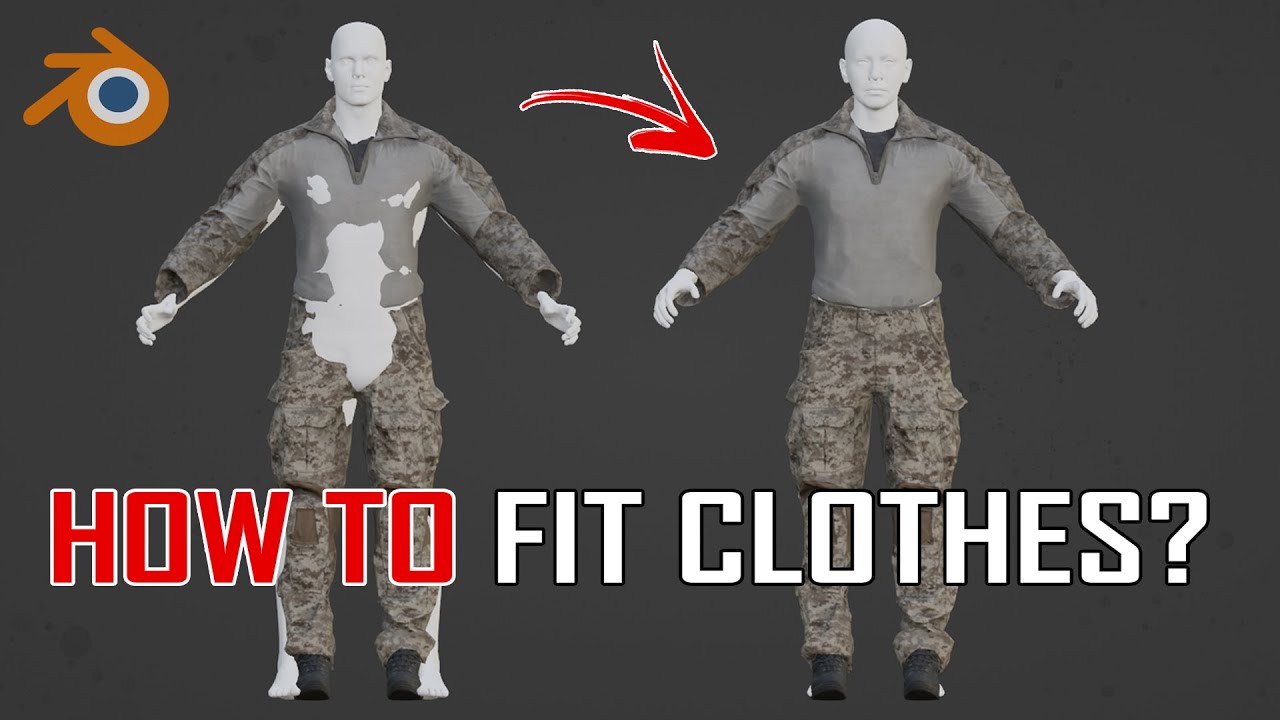
In this tutorial, we will take a look at how to pose clothes of any type on different character meshes from various engines or games.
We will use a mixture of different tools, from proportional editing vertices to Pose and Grab brushes from the Sculpting Menu.
Hope you find the video useful!
sly bridge
surreal ore
Sounds like he paid someone to make a model for DayZ and now wants to port said ...
if that is the case there are 2 options.
use the already rigged model to fit the next rig model, collapse - re-rig, and or sculpt move
quaint lark
surreal ore
Sounds like he paid someone to make a model for DayZ and now wants to port said ...
that's exactly how it is
 latent moon
Anyone experienced this type of flickering with imported models? I'm using a vanilla concrete texture, hence I think it must something to do with the model.
sly bridge
latent moon
Anyone experienced this type of flickering with imported models? I'm using a van...
double faced? is it anything more spectacular than some simple geometry?
latent moon
Not sure what you mean with spectacular 😅
It seems only the tunnel is affected. My fake terrain above seems fine.

I have to admit is my very first asset in Blender, so I might have made some beginner's mistake. I'll check if I can detect if I have an issue with double faces.
sly bridge
latent moon
I have to admit is my very first asset in Blender, so I might have made some beg...
is that your working geometry? because pretty sure reforger doesn't import ngons, as such might be some autotriangulaiton issue
the fake terrain is all quads
latent moon
I thought Enfusion can do the triangulation itself. Didn't get any different results when I added the triangulate modifier to them.
sly bridge
latent moon
I thought Enfusion can do the triangulation itself. Didn't get any different res...
it does, if it can
latent moon
So it's safer to just add the tirangulate modifier I guess.
Still even with it, I do get the flickering, but that might be double faces.
sly bridge
latent moon
Still even with it, I do get the flickering, but that might be double faces.
mind if you show the reforger wire?
latent moon
Looks to me it did the triangulation just fine

 sly bridge
latent moon
Looks to me it did the triangulation just fine
sly bridge
latent moon
Looks to me it did the triangulation just fine
might be, not sure. you using a normal PBR, correct?
even if in this particular case it might work, the recommendation would be to never have ngons in game mesh files on export because you might have issues with everything made from spline (so basically ngons) that turns into a mesh in an automated fashion
latent moon
Nvm., seems to be the material I used that caused it. It's gone with a different kind of concrete texture.
Thanks for the pointers!
wary inlet
latent moon
Anyone experienced this type of flickering with imported models? I'm using a van...
the music was a nice touch 👍
bleak depot
sly bridge
more
Gives a Limit? You know that?
sly bridge
bleak depot
Gives a Limit? You know that?
never tested it, @shell hedge might know
shell hedge
I tested a small mountain and it was fine
latent moon
Neat, so together with the fake terrain texture, you could technically build extensive bunker systems 😄
Although you can't have a road on top of it.
surreal ore
bleak depot
What is the Max size of a Building to Import in reforger? 40 x 40m or more?
1mile x 1mile x 1mile

Placed on surface of MPTest map
player is standing on top of it but you can't see him lol
latent moon
The problem is more that importing and cutting a piece out of your terrain in Blender seems problematic. Mine always crashes when I go to edit mode 😢
surreal ore
When trying to import the asc?
latent moon
Importing as asc works fine. I can inspect it too, but then switching to edit mode causes freezes and eventually a crash.
The mesh might be to big to be edited in Blender, i dunno.
I guess I could write a script that edits the asc to cut out the area of interest and then import and edit it in Blender.
asc is really just a header and a matrix with the altitudes from what I see.
surreal ore
Yeah, just choose the position and import it to Blender
bleak depot
surreal ore
1mile x 1mile x 1mile
Nice thx 💪 i hope, it worked with all function. Boxvolum, geometrys, Lightning and so on
 hasty radish
anyone have any good tutorials on making a skeleton for a car?
latent moon
Hmm, seems the fake terrain material is restricted to a size of 145m x 145m
 sly bridge
hasty radish
anyone have any good tutorials on making a skeleton for a car?
sly bridge
hasty radish
anyone have any good tutorials on making a skeleton for a car?
there are samples, including a car
tidal latch
also, principle is the same as here https://community.bistudio.com/wiki/Arma_Reforger:Weapon_Creation/Asset_Preparation#Skeleton_Setup_.26_Mesh_Rigging
hasty radish
yea i used the weapon tutorial its much easier to follow
surreal ore
latent moon
Hmm, seems the fake terrain material is restricted to a size of 145m x 145m
That looks like messed up uvs
latent moon
The fake terrain material doesn't use UVs. There seems to be kind of a grid on the terrain and this bug happens when the material crosses the grid. I managed to fix it by cutting the mesh in 4 pieces along those grids.
There's still another bug though. There is a kind of camera angle-dependent clipping happening to the grass, which becomes more pronounced the larger the vertical distance between the mesh and the terrain is.
sleek forum
old post but do you have blend file with probes and stuff for reference by any chance? Im trying to finish my structure and im stuck on probes and portals
surreal ore
sleek forum
old post but do you have blend file with probes and stuff for reference by any c...
 dawn chasm


 fluid fern
Hello, I wanted to apply patches directly on the uniforms of my mod but it's pretty buggy.
I copied the mod us expansion component properties to see but my patch stays in the air and doesn't stick to the uniform.
Have you had this problem before?
coarse peak
Either bones or weights wrong
 worthy siren
i tried exporting a piece of my model as FBX and importing to arma tools as a test, and half of the model is transparent when i rotate around it in enfusion tools, any idea what may cause that?

 shell hedge
backface culling in your material
worthy siren
gonna go google that
okay i kind of understand what it is, i still dont know how this issue is tying in specifically, and how i rectify it, would anybody be able to point me in the right direction?
covert dune
Could it be a setting in the .emat file ? Not entirely sure myself
worthy siren
think ive found a relevant video
surreal ore
 worthy siren
surreal ore
worthy siren
surreal ore
this is within enfusion? i dont understand im sorry
 light eagle
In your material in workbench. Scroll down till you see CCW
worthy siren
dont even know if ive exported correctly tbf
not having much look finding that in enfusion
 surreal gate
Does anybody know how are the vanilla plant models animated? It looks like the .xob files are somehow animated without any bones or anything.
shell hedge
Material
surreal gate
That's amazing, thanks.
I've just tested it real quick a got a building to wiggle like a tree.
shell hedge
swap all materials in the game to wiggly materials when injected with morphine
faint scarab
So guys, I finally successfully exported my gloves from Blender to the tool and they fit the character perfectly, but now I have another annoying problem. When I import the fbxs into Enfusion they turn black, ignoring the material parameters! What could be the problem?


 last parcel
Check if there is a vertex color not spooking around
faint scarab
It was that! Thank You!
wary inlet
worthy siren
not having much look finding that in enfusion
go to the material you have applied to the mesh, you will find the culling settings there it will be a dropdown, it looks exactly like the image Zelik posted. if that does not work or you dont get optimal results go back to blender and and duplicate the mesh and keep it in position but flip the normals, either that or add a solidify modifier
 tiny frigate
If I wanted to use a different character model like an asset u could find where would be the best place to look?
sick shard
Cgtrader ir sketchfab or turbo squid you could get some
worthy siren
wary inlet
go to the material you have applied to the mesh, you will find the culling setti...
thank you mate shall give it a go
calm rune
worthy siren
thank you mate shall give it a go
Make sure you know what license is being used for the model and what the license means.
worthy siren
calm rune
Make sure you know what license is being used for the model and what the license...
not a clue what you mean
calm rune
worthy siren
not a clue what you mean
I replied to the wrong person, ignore me 🤣
worthy siren
calm rune
I replied to the wrong person, ignore me 🤣
lol give me a chance im clueless at the best of times!
worthy siren
began work on an ATMP supacat. i have a scale model and some pictures to go off of and it seems a more manageable task than the tank to begin with
 shell hedge
you got this
worthy siren
thank you bacon!
wary inlet
worthy siren
began work on an ATMP supacat. i have a scale model and some pictures to go off ...
that would be fun to drive!
sly bridge
@silk monolith please use #enf_mods_feedback for such inquiries, this is exclusive to model making question, with an emphasis on makers
 silk monolith
I keep getting it confused I’m 😭😭 sincerely sorry it’s not on purpose
 vague granite
Is there a way for me to create an arsenal box containing only the mod items I would like? I'm finding the arsenal very polluted with things I won't use.
sly bridge
vague granite
Is there a way for me to create an arsenal box containing only the mod items I w...
you want to create a new model for the arsenal box?
vague granite
Yes
There I would put vanilla items + some specific items from task force mattock and others
sly bridge
vague granite
Yes
what is the question in regards to the modelling part? for the prefab question use #enfusion_configuration
vague granite
Ok, thanks
wary inlet
vague granite
Is there a way for me to create an arsenal box containing only the mod items I w...
you would need to make a separate faction config for the arsenal and then assign required weapons, apply this config to a modded version of the vanilla arsenal box and bam
 hot kayak
vague granite
Ok, thanks
hot kayak
vague granite
Ok, thanks
lemme know if you get it to work please cause ive been working on the same thing
stuck kraken
Hi, I hope this is the right channel: Is there a way to create a new prefab from Reforger parts? For example but some stones together as a new prefab(soomething like compositions in A3)?
stuck kraken
I'm a litte confused by the naming: Are "compositions" in Reforger the same as "compositions" in A3? Because this page
https://community.bistudio.com/wiki/Arma_Reforger:Game_Master:_Composition_Configuration_Tutorial
says: "Game Master compositions are prefabs that have to be created, configured and maintained in a specific way in order for them to work correctly in Arma Reforger:Game Master. "
I want only put some destructible prefabs together as a new prefab if this is possible. Do I need create a composition for that or only a new prefab?
tidal latch
compositions are special kind of prefabs which can be i.e. placed on special slots in game master
regular prefabs can be made out of several prefabs too - some of them are already constructed like that
I think trash bin is one of such examples
stuck kraken
Thanks! I've managed to create a new prefab. 🙂
The only thing who I've question is:
- I created a new prefab from the same prefab (e.g. stones). I put the other stones under the hierarchy of the first stone, then I drag and drop it to my prefabs.
- If I use this prefab in the editor, it spawns all parts of it.
When I double click it, it show all parts in the .et. But when I click "Edit base prefab" it shows only the "base prefab" (obviously). How can I edit the prefab (for example to add another stone)?
- Do I have to save the "world" where I edited the new prefab together and export every time the new prefab or is there another way to edit the existing costom prefab directly?
surreal ore
Create a test world. Drag the prefab you want to add shit to into the world. Add whatever you want to its hierarchy. Then drag that prefab to the resource browser. It will ask you to put in a name for the new prefab. Boom, new prefab with extra stuff added to it. Now delete the one in your world and add the newly created one to the world.
I find it easier to modify prefabs in an actual world as opposed to modifying them by opening the prefab in world editor.
sleek forum
Any idea what Im missing? Sound inside buildings still wont change


This dummy material is also shown separately and not part of the building mesh
but it is in collider settings tho...
 shell hedge
do you have an interior probe in your building?
sleek forum
shell hedge
do you have an interior probe in your building?
if I try to parent EnviromentProbe_Default to my structure Workbench crashes, but if I try to use Probe_Barn from vanilla structure then I can parent it and it shows volumes, but still no sound


 shell hedge
sleek forum
if I try to parent EnviromentProbe_Default to my structure Workbench crashes, bu...
shell hedge
sleek forum
if I try to parent EnviromentProbe_Default to my structure Workbench crashes, bu...
You need a probe that uses the volumes you defined in your mesh
obsidian pine
I would buy that
sleek forum
shell hedge
You need a probe that uses the volumes you defined in your mesh
How can I make one for my structure if Default one crashes my tools?
shell hedge
sleek forum
How can I make one for my structure if Default one crashes my tools?
You make it just like any other thing. You can create all entities manually then save them as prefab.
Compare your building with a vanilla building. If your building does not work the same way then there are differences.
I can't tell you what specifically is wrong with your very specific project so this is my best advice.
obsidian pine
Did anyone ever tried importing stuff from magicavoxel ? Idk if its even possible
I know you can export from magicavoxel to blender. So i guess its possible
sleek forum
shell hedge
You make it just like any other thing. You can create all entities manually then...
Made my own now and it didnt crash this time, copied some values from vanilla building and still no sound difference


 shell hedge
Is that an interior probe prefab? Does it have your volumes assigned?
Does your building have all the required components?
sleek forum
shell hedge
Does your building have all the required components?
I think thats the same probe as in vanilla prefab yes. I didnt noticed any options to assign anything. My Structure now has LODs, Colliders, BOXVOLs and 1 portal for now, still need to test how multiple portals work

so I think it has all the components
shell hedge
sleek forum
I think thats the same probe as in vanilla prefab yes. I didnt noticed any optio...
Place a vanilla building side by side with yours. Compare all components and children that aren't furniture. This is step 0
sleek forum
I did just that, its just a probe
shell hedge
If your mesh and prefab is setup exactly the same as vanilla then you have hit a bug you may want to report on the feedback tracker.
sleek forum
I think I missed something, but I just have no idea what
sleek forum
Well if anyone has any idea what the problem might be then please let me know, been stuck with this for few days now🤦♂️
shell hedge
Either something is not setup the same as vanilla or there is a bug. I suggest going over your and a vanilla mesh and prefab and you will eventually find the difference if there is one. You may need to compare everything, not just what you think is relevant.
sleek forum
@bleak depot
last parcel
have you tried using ProbeHouse_Base instead
bleak depot
Your boxvol is a simple Cube. Portals, Windows and so on is not important for That.
I dont work with Blender, but Check the enity-component like vanilla, and put the probehouse_base into the Model. You See with Click on the probe is Connected to the boxvol. Im Not Home… sry. Later i can send you more Details via DM
sleek forum
last parcel
have you tried using ProbeHouse_Base instead
I did and nothing
sleek forum
bleak depot
Your boxvol is a simple Cube. Portals, Windows and so on is not important for Th...
Thank you! I would really appreciate that🙏
Probe detects the BOXVOLs, Its connected with lines
bleak depot
sleek forum
Thank you! I would really appreciate that🙏
What is the Problem? The Boxvol gice you only a shadow effect on the Building
shell hedge
do you have all the components vanilla buildings do and are they configured? rigidbody for example?
sleek forum
shell hedge
do you have all the components vanilla buildings do and are they configured? rig...
yes I do
shell hedge
and you are sure they are configured exactly the same? what about the mesh xob?
sleek forum
sleek forum
Probe detects the BOXVOLs, Its connected with lines

But even shadows are a bit off
sleek forum
shell hedge
and you are sure they are configured exactly the same? what about the mesh xob?
I think so yeah
surreal ore

Everything needed for a buildinig
BOXVOL must have a material named "dummyvolume"
for portals "Generate BSP" should be used in import settings
sleek forum
surreal ore
BOXVOL must have a material named "dummyvolume"
it has
surreal ore
Oddly enough, the model i've used as a building example since the beginning now crashes when i import it lol
sleek forum
surreal ore
Oddly enough, the model i've used as a building example since the beginning now ...
interesting, let me know if you find the issue
surreal ore
I needed to tick Force Create Portals
sleek forum
Boxvolumes work?
surreal ore
yes
last parcel
Boxvolumes has always worked portals not as much,
surreal ore
I also didn't add an acutal collision for the player, in my example fbc
fbx*
portals work fine
 last parcel
Only if tick in force create that makes it think its one room not multiple
surreal ore
without force create it crashes when imported
sleek forum
idk what im missing then I really dont...
if you open your mesh model should dummy matrerial be listed there? Its showing dummy material only on collider setup under Materal Assigns for me... @surreal ore
surreal ore
 sleek forum
yes here I have it also
surreal ore
it should only be there
dummyvolume material should only be assigned to the BOXVOL
it has nothing to do with the collider
and shouldn't be assigned to it
Oh, I see how portals work now, multiple groups of shared portals iiuc

 sleek forum
also shadows are strange
sleek forum
sleek forum
also shadows are strange
ok this was fixed with Generate BSP ticked
@surreal ore any other idea why sound inside structure might not work?
Is there something missing on my terrain? I have sound world Eden
surreal ore
nope
I'm also not using more than one BOXVOL
so idk if that's an issue or not
as i've not tried with more than one
 shut bloom
Can anyone explain why my Glass is not snapping into the correct space? I copied the Sample car to the exact even adding the Child Pivot but it just stays right there :(

 last hill
shut bloom
Can anyone explain why my Glass is not snapping into the correct space? I copied...
last hill
shut bloom
Can anyone explain why my Glass is not snapping into the correct space? I copied...
Can you show the xob for the car?
shut bloom
 shut bloom
last hill
Can you show the xob for the car?
shut bloom
last hill
Can you show the xob for the car?
Or do you want to see something specific
last hill
Your options on the right, showing the colliders/bones/etc
 last hill
Did you apply scale before exporting? Can you show the glass model and it's options?
shut bloom
last hill
Did you apply scale before exporting? Can you show the glass model and it's opti...
yes origin is at Scene root
It works fine with every Socket BUT the ones that are moving :(
last hill
I am not 100% sure, but do the base vehicle doors animate via proc-anim? If so and you are sharing their animations, your vehicle bones might not match, resulting in it sitting in a weird place.
shut bloom
last hill
I am not 100% sure, but do the base vehicle doors animate via proc-anim? If so a...
no they dont they are Animated since there is no PAP file for that atall
In blender*
last hill
I thought I'd start with the basics of the workbench, but I'll step back and let vehicle modders hopefully help you
shut bloom
I mean using a offset works but might not be the best thing
Well thanks for trying xD
tidal latch
I noticed that child pivot is no longer working if merge meshes are turned on in slot
Merge meshes are by default on
bleak depot
sleek forum
Is there something missing on my terrain? I have sound world Eden
its a custom map or your map? You can work with more as one Boxvol. thats not a problem. sound = portals. portals with gameMat "MatLightPortal" assign? i think, your portals worked correct.
sleek forum
bleak depot
its a custom map or your map? You can work with more as one Boxvol. thats not a ...
its my map
bleak depot
sleek forum
its my map
on on the vanilla map? you have the same problems?
shut bloom
tidal latch
I noticed that child pivot is no longer working if merge meshes are turned on in...
I tried that funny enough didnt fix it even with merge tri meshes off
tidal latch
In slot component?
shut bloom
Thx for the insight though that might be useful in the future
shut bloom
tidal latch
In slot component?
Ohhhh
shut bloom
tidal latch
In slot component?
Merge Tri Meshes? I cant seem to find that option int the Slot component?
tidal latch
Physic merge
shut bloom
Ah yeah that does not change anything either
tidal latch
shut bloom
Merge Tri Meshes? I cant seem to find that option int the Slot component?
I don't remember how is it called exactly
tidal latch
shut bloom
Ah yeah that does not change anything either
You can check sample car
shut bloom
funny enough its 1:1 like the sample car for some weird reason it does not work for mine xD
tidal latch
shut bloom
funny enough its 1:1 like the sample car for some weird reason it does not work ...
You can check that it will break it by enabling it
Otherwise you could show us where do you have child pivot located
Also, make sure that your skeleton is fine - animations can misplace it
shut bloom
tidal latch
Otherwise you could show us where do you have child pivot located
Directly on the bone like in the sample car.
shut bloom
tidal latch
Also, make sure that your skeleton is fine - animations can misplace it
Iam still unsure about that since my steeringwheel is broken but the door Anims work fine.
tidal latch
And are you sure it's not anim issue? Have you tried it with disabled anims?
shut bloom
tidal latch
And are you sure it's not anim issue? Have you tried it with disabled anims?
Hmm no I could try that
shut bloom
tidal latch
And are you sure it's not anim issue? Have you tried it with disabled anims?
Its not that either as I expected still borken with both procedual and the Vehicle Anim Component Disabled
tidal latch
shut bloom
Its not that either as I expected still borken with both procedual and the Vehic...
And have you tried somewhere else if your child pivot is working?
Can you post screen with slot manger component and glass panel?
 shut bloom
tidal latch
And have you tried somewhere else if your child pivot is working?
shut bloom
tidal latch
And have you tried somewhere else if your child pivot is working?
iam unsure how I would do that honestly.
tidal latch
Change and see if something is changing in game
shut bloom
Ok i fixed it such a dumb mistake. I forgot to reimport the Window in Engine with Export Skinning enabled.💀
shut bloom
I really dont want to annoy anyone but I do have another problem I cant seem to fix. my Fire Geo Does not move with the Bone even though it should.

 tidal latch
Is it parented?
Skinning is not working on colliders, only whole objects can be moved
shut bloom
tidal latch
Is it parented?
its both parented and skinned
but what iam moving is also just 1 Object
Weirdly enough the same thing also does not work on the Sample car the colliders dont move
 lime trench
any rumors on someone working on a UH-60 Blackhawk (or a look-a-like)?
 dusty plume
lime trench
any rumors on someone working on a UH-60 Blackhawk (or a look-a-like)?
dusty plume
lime trench
any rumors on someone working on a UH-60 Blackhawk (or a look-a-like)?
not the place to ask, but here #1146132348652494899 message
tidal latch
shut bloom
its both parented and skinned
can you show pic from blender?
it should not be skinned
on sample car only trunk is animated as geo
shut bloom
tidal latch
can you show pic from blender?


 tidal latch
shut bloom
tidal latch
shut bloom
show me relations tab in blender
shut bloom
 shut bloom
ah interesting i used the Sample car it has it linked to Object
tidal latch
see what I said about trunk
 tidal latch
oh, I see, wrong version is on Github
shut bloom
tidal latch
oh, I see, wrong version is on Github
Ahhh ok now that makes a whole lot more sense now xD
tidal latch
or actually, I fixed it once and exported broken version again and since a while it is like that
in any case, you can use method which is listed on headgear tutorial
tidal latch
shut bloom
Ahhh ok now that makes a whole lot more sense now xD
#enfusion_model message this one
shut bloom
tidal latch
in any case, you can use method which is listed on headgear tutorial
did that this is causing a bit differnet confusion

much apprechiate the help btw i was getting stuck on this for hours
tidal latch
shut bloom
did that this is causing a bit differnet confusion
wrong scale on skeleton or collider
also, pls turn off pings when making replies - one is enough
shut bloom
scale on armature and colliders are on 1 though
shut bloom
 tidal latch
can you select parented collider?
shut bloom
 shut bloom
tidal latch
also, pls turn off pings when making replies - one is enough
shut bloom
tidal latch
also, pls turn off pings when making replies - one is enough
sorry never realised this was a thing.
tidal latch
have you tried removing skinning and armature modifier?
is that door looking fine in blender viewport?
shut bloom
tidal latch
have you tried removing skinning and armature modifier?
that was it.
tidal latch
good!
shut bloom
Fire Geo is now also Animated. Perfect THANK YOU very much now I can focus on doing all the Anims.
tidal latch
I got to go now so hopefully no more problems for you today 😉
shut bloom
tidal latch
I got to go now so hopefully no more problems for you today 😉
I think this is all of it for today thanks allot for the help :)
 rose raven
The kinetic penetration resistance multipliers for glass and armored glass are higher than for armor metal which is higher than generic metal and cast iron.
Windshields op.
tidal latch
indeed, glass shatters though. It is old as world story of hardness vs brittleness
 shell hedge
love those electric contact points on the rail
plush shard
 zenith quartz
https://cdn.discordapp.com/attachments/872868903334858803/1200284583665614888/im...
zenith quartz
https://cdn.discordapp.com/attachments/872868903334858803/1200284583665614888/im...
i just nutted every where
 stable oasis
I don't know if I'm in the right place here, but the model I made has some problems even though everything was done correctly, is it displayed like this in the game? Does anyone know what I could do? I've already tried everything


 iron brook
stable oasis
I don't know if I'm in the right place here, but the model I made has some probl...
iron brook
stable oasis
I don't know if I'm in the right place here, but the model I made has some probl...
If you look on the bones tab on the right picture you see 0 + 163, meaning that your mesh isnt skin to any of the bones.
iron brook
I am not sure how it is done in Blender, i am working with Maya, but shouldnt be that hard to find a tut in YT.
There are some details here. https://community.bistudio.com/wiki/Arma_Reforger:Character_Gear_Creation/Headgear/Asset_Preparation
Look under Skinning asset
stable oasis
ahhh then I think I've already found my mistake, I'll have to take a look haha, thank you
coarse peak
he forgot to transfer weights when weighting to bones we got it fixed
 stiff reef
Hi! I'm new to 3D modeling and texturing, where I can find some sort of guide on how to create trees and plants for Reforger? Thanks!
obsidian pine
Hey, using the enfusion tool plugin when i want to setup collider i got this
 shut bloom
obsidian pine
Hey, using the enfusion tool plugin when i want to setup collider i got this
shut bloom
obsidian pine
Hey, using the enfusion tool plugin when i want to setup collider i got this
you have to follow the naming convention for Collider. https://community.bistudio.com/wiki/Arma_Reforger:FBX_Import under Collider Shapes.
obsidian pine
shut bloom
you have to follow the naming convention for Collider. https://community.bistudi...
im soo dumb, thank you mate !
obsidian pine
Is there any video, that for exemple from blender with the basic cube do the collider thing, export the thing, import it to the game ? I did inherit on a other prefab, i chand its xob to my cube and now i have collisions, idk if its the right way to do but it does work now
iron brook
If your model has collision, adding a RigidBody to your entity should be enough to cause collision.
obsidian pine
Nope, i add collision setup in blender, i exported and imported it, i had the collider in infusion, i added a rigidbody but still had no collision, i saw someone on the discord saying to inherit an existing prefab so you dont have to make it from scratch, so i took a electric pole changed his xob to my model and now it work
tidal latch
obsidian pine
Nope, i add collision setup in blender, i exported and imported it, i had the co...
https://community.bistudio.com/wiki/Arma_Reforger:Prop_Creation#Creating_prefab
If you don't use one of the mentioned prefabs as a base, then you will have to go through more steps like setting collision. In some cases base prefabs might be missing RigidBody component and in such scenario, it will be necessary to add such component and enable Model Geometry option inside of it.
with focus on Model Geometry
obsidian pine
tidal latch
https://community.bistudio.com/wiki/Arma_Reforger:Prop_Creation#Creating_prefab ...
Yeah i think ive read that from a dev here on the discord, there's just too much to read when its the first time. So what ive done is good ? Maybe electric pole is not a good prefab to inherit from tho
but now i know about props_base, i will not struggle anymore in the future. Thank you devman
 flint swift
does anyone have a guide on how to make Graffiti, (custom graffiti to put on walls)
shell hedge
have a look at how decals are setup in the game
 willow sand
Anyone know why my game keeps crashing when I hit anything marked red in the cockpit
 flint swift
shell hedge
have a look at how decals are setup in the game
flint swift
shell hedge
have a look at how decals are setup in the game
i seriously have no clue how it works, i want to make a prefab (prop or blue .et file) with a custom graffiti but have no ideo how to make props... im looking at the arma reforer assets tutorial but have no ideo how to start.
just extremely simple custom graffiti to put on walls, like no hitbox or anything like that, like just a png and i can place it like props
last hill
willow sand
Anyone know why my game keeps crashing when I hit anything marked red in the coc...
I would guess something wrong with your firegeo collider setup in Blender or Workbench, but pure guess from the lack of info on that shot.
willow sand
last hill
I would guess something wrong with your firegeo collider setup in Blender or Wor...
Yeah it has something to do with that but couldn’t figure out why exactly. Even if I change the fireview to something completely different it keeps crashing when I hit somewhere in that area
 deft owl
willow sand
Yeah it has something to do with that but couldn’t figure out why exactly. Even ...
deft owl
willow sand
Yeah it has something to do with that but couldn’t figure out why exactly. Even ...
Did you try changing the fireview material?
It could be a bad reference causing it to crash perhaps
flint swift
sorry for asking again but does anyone have a guid on how to make a Prop? (i don't understand the prefab basics guide at all) i want to make a custom Graffiti spray on the wall (like an prop / .et)
tidal latch
flint swift
sorry for asking again but does anyone have a guid on how to make a Prop? (i don...
https://community.bistudio.com/wiki/Arma_Reforger:Prop_Creation there is this. If you don't understand prefab basic guide then it will most likely too hard for you
https://community.bistudio.com/wiki/Arma_Reforger:Weapon_Modding start with this tutorial to get basic idea how to do things
flint swift
wow alr thanks anyway
willow sand
deft owl
Did you try changing the fireview material?
Tried that. Changed it to 5mm metal but still crashed...
tidal latch
willow sand
Tried that. Changed it to 5mm metal but still crashed...
that thing is red is the collider? If yes, then it is extremely complex
willow sand
tidal latch
that thing is red is the collider? If yes, then it is extremely complex
It‘s not the actual collider it‘s just that area where it crashes
If I hit it anywhere else it‘s fine
tidal latch
so how does collider look like?
willow sand
tidal latch
so how does collider look like?
 tidal latch
what are those faces?
 tidal latch
could you try making some simple collider from scratch?
willow sand
tidal latch
could you try making some simple collider from scratch?
I don't actually think it has anything to do with the collider itself I even tried using the arma 2 uh1y as the fireview
willow sand
tidal latch
could you try making some simple collider from scratch?
I'll try
tidal latch
you can also try to disable Merge Meshes in import settings
that might prevent ctd but root cause of the issue will be gone.
willow sand
tidal latch
you can also try to disable Merge Meshes in import settings
It has something to do with the cockpit texture or material I removed it for now but thanks for the help
 steep willow
Having a bit of a problem with the software correctly labeling bones as such

And indeed making them in the correct order
 tidal latch
steep willow
Having a bit of a problem with the software correctly labeling bones as such
tidal latch
steep willow
Having a bit of a problem with the software correctly labeling bones as such
how does it look like in blender?
steep willow
tidal latch
how does it look like in blender?
I'll show ya soon
tidal latch
stable oasis
if its model from Arma 3/RV engine, then you might consider learning how to make simple anims and move arms so it fits that character - after that you could transfer weights
steep willow
Want me to send the blend file or...?
 tidal latch
and how did you set vertex groups?
steep willow
tidal latch
and how did you set vertex groups?
I selected the mesh and hit assign
tidal latch
to which bone?
steep willow
w_root
 tidal latch
barrel chamber you mean?
steep willow
Yep
tidal latch
and what is moving in viewport if you move chamber bone in workbench?
steep willow
tidal latch
and what is moving in viewport if you move chamber bone in workbench?
Nothing at all
stable oasis
stupid question, my tshirt model has to have rigs so that it works in the game, right? The model I use consists only of polygon
steep willow
As it should be
tidal latch
have you checked colliders too?
tidal latch
stable oasis
stupid question, my tshirt model has to have rigs so that it works in the game, ...
yes, you need rig
steep willow
tidal latch
have you checked colliders too?
And that is concerning the bones how?
stable oasis
oh man, can I add another one to my model?
tidal latch
steep willow
And that is concerning the bones how?
have you checked if collider is not moving with bone?
steep willow
tidal latch
have you checked if collider is not moving with bone?
I have, I just said that
tidal latch
are you sure?
steep willow
The collider doesn't move
tidal latch
and how does skeleton looks like in Blender?
tidal latch
steep willow
The collider doesn't move
hierarchy to be precise
steep willow
What?
tidal latch
hierarchy of the armature in Blender
 tidal latch
and btw: is this blender 4.0?
steep willow
Indeed it is
calm rune
stable oasis
You can use the lattis modifier or try the pose in the scultping tab.
 stable oasis
Well, I don’t need to do the whole thing without rigs 😂
calm rune
stable oasis
Well, I don’t need to do the whole thing without rigs 😂
In this tutorial, we will take a look at how to pose clothes of any type on different character meshes from various engines or games.
We will use a mixture of different tools, from proportional editing vertices to Pose and Grab brushes from the Sculpting Menu.
Hope you find the video useful!
stable oasis
@calm rune I wrote something to you privately^^
tidal latch
steep willow
Indeed it is
Not sure if it could influence it somehow but ebt only support lts 3.6. You can also send me model via dm and I can take a look at it tomorrow at work
 fluid solstice
@willow sand very interested in your buildings! They will be added to the mod soon? 😄
steep willow
Now I'm getting a new problem with the sight:
It displays no detail, only color

No reticle, not even what it is pointing at
steep willow
Okay, now I need to somehow get the reticle into the center
 surreal ore
@ashen fjord https://discord.com/channels/105462288051380224/292271129303842817 solicit only in this channel
faint scarab
Hi Guys, someone can tell me why did this thing happen? Why did the glove in the first image look like that?

 calm rune
faint scarab
Hi Guys, someone can tell me why did this thing happen? Why did the glove in the...
calm rune
faint scarab
Hi Guys, someone can tell me why did this thing happen? Why did the glove in the...
Looks like marked hard edges. To get rid of it select the whole mesh then CTRL + E --> Clear Sharp
 reef sun
Anyone know how to fix this?
Current material class MatPBRCamo doesn't support needed vertex format (VDNormalUV2Color)
reef sun
reef sun
Anyone know how to fix this?
`Current material class MatPBRCamo doesn't support...
Found it, the Attribute "Byte Color" breaks it. After removing it everything works again

 tacit eagle
How can i add custom building and make it work in game? is there aney guide for this?
 karmic adder
tacit eagle
How can i add custom building and make it work in game? is there aney guide for ...
stuck kraken
karmic adder
https://community.bistudio.com/wiki/Category:Arma_Reforger/Modding/Tutorials/Ass...
karmic adder
tacit eagle
How can i add custom building and make it work in game? is there aney guide for ...
stuck kraken
karmic adder
https://community.bistudio.com/wiki/Category:Arma_Reforger/Modding/Tutorials/Ass...
Hi, I playing also around with importing buildings. I used the the sample packages. I managed to import a model. The imported xob has some materials and one LOD but no collider.
My question is: Do I have change the import procedure because of missing collider or comes the sample building without a collider? I use blender for the first time so I would appreciate some help or hints here. 🙂
stuck kraken
Edit: Problem with LODs and Collider Import is solved: Don't use Blender 4.0 🙂
stuck kraken
Hi, can I use LODx also as a collider?
last hill
stuck kraken
Hi, can I use LODx also as a collider?
It might work but also might cause issues, safer to make the colliders following the shape requirements for the collider type you need.
stuck kraken
last hill
It might work but also might cause issues, safer to make the colliders following...
Thanks for answer. I used LOD1 which looks exatly like a collider that I needed. This is an interim solution until I understand more blender.
 tawdry nest
Outta curiosity
Anyone able to tell me how to import a model type? I’m looking to make some Crye based kit for my Milsim guys, and frankly anyone that’d want to use them; Just very new to the whole “modding” scene
 tidal latch
tawdry nest
Anyone able to tell me how to import a model type? I’m looking to make some Crye...
tidal latch
tawdry nest
Anyone able to tell me how to import a model type? I’m looking to make some Crye...
https://community.bistudio.com/wiki/Arma_Reforger:Character_Gear_Creation/Vest
also keep in mind IP Rights, if you intend to use someone else mesh https://community.bistudio.com/wiki/Intellectual_Property
tidal latch
 jovial hornet
hello guy i think i miss something someone can help me please ?
calm rune
jovial hornet
hello guy i think i miss something someone can help me please ?
jovial hornet
hello guy i think i miss something someone can help me please ?
calm rune
jovial hornet
hello guy i think i miss something someone can help me please ?
- You do not import the basebody with the vest
- What is your question? telling us you are "missing something" could mean 500 other things.
jovial hornet
heya sorry this my probleme sorry i forget to put an image
 jovial hornet
i dont why i have more 200 bones in it ^^*
 opal magnet
can anyone help me out with this i tried making a uniform and when i imported it and put it in game its like this and idk how to fix this at all this is my 2nd day using enfusion so excuse me if this is a dumb question 😭

 surreal ore
opal magnet
can anyone help me out with this i tried making a uniform and when i imported it...
surreal ore
opal magnet
can anyone help me out with this i tried making a uniform and when i imported it...
Scroll up like 6 messages. lol
zenith quartz

 opal magnet
surreal ore
Scroll up like 6 messages. lol
opal magnet
surreal ore
Scroll up like 6 messages. lol
oh looool sorry haha
 tawny sundial
I'm trying to get my first vehicle ingame, using the Humvee prefab as a template for all the configs, but with a custom model. Any ideas why the wheels are turning around their x axis? 😅 
surreal ore
seems the bone for the wheels isn't oriented correctly
opal magnet
would anyone know where i would get a skeleton for making tops/pants etc?
sly bridge
opal magnet
would anyone know where i would get a skeleton for making tops/pants etc?
afaik you don’t need one
surreal ore
opal magnet
would anyone know where i would get a skeleton for making tops/pants etc?
https://github.com/BohemiaInteractive/Arma-Reforger-Samples/tree/main in the new character samples

GitHub
Modding Samples. Contribute to BohemiaInteractive/Arma-Reforger-Samples development by creating an account on GitHub.
opal magnet
ah ty
now i need to figure out if theres a way to remove arms from poking out when you have the uniform on 😭
surreal ore
if you set your prefab up correctly then the arms would be hidden with a jacket on
opal magnet
yeah i just got it now haha
still tryna get to learn all of this its my 3rd day even touching blender let alone the workbench lol
surreal ore
id say most of the basic questions have been answered quite a few times.
Use discords search function, And if you can't find an answer then ask, as im sure someone has ran into the same problem before and asked about it. In most cases at least.
flint swift
Hey, when making a building in blender, do i need to use prefabs from arma reforger (doors, windows) or can i use other ones?
jovial hornet
hello someone are free to help me with the gear
sly bridge
flint swift
Hey, when making a building in blender, do i need to use prefabs from arma refor...
you can use BI existing models (and prefabs), your own custom made, and/or both
sly bridge
jovial hornet
hello someone are free to help me with the gear <:meowheart:981465942842302494>
what help does the gear requires? (as in more information would be needed in order to get the help)
flint swift
sly bridge
you can use BI existing models (and prefabs), your own custom made, and/or both
Thanks!
tawny sundial
My vehicle hovers several centimeters from the ground. Any ideas whether this is a model/collider or a config issue?
 covert dune
tawny sundial
My vehicle hovers several centimeters from the ground. Any ideas whether this is...
covert dune
tawny sundial
My vehicle hovers several centimeters from the ground. Any ideas whether this is...
Maybe the wheel radius in VehicleWheeledSimulation_SA Component>Axles>Wheel is bigger than the visual wheel ? I never messed with this myself, so apologies if I'm wrong. 😅 Either way whatever sets the size for the invisible wheel collider may be too big, that's what comes to mind.
full canopy
That would be my guess too, Pop open the vehicle debug menu I think with Ctrl+alt and go through those menus, veeeerry helpful for debugging and visualizing vehicles.
indigo halo
Hello guys, I’m trying to make my own jacket model. I sculpted and sewn it in t-pose and I’m now facing the dread armpit issue. Any suggestion/guidelines on how I can sew on a A-pose character? Arms are making me second guess my choice 😊
leaden trench
indigo halo
Hello guys, I’m trying to make my own jacket model. I sculpted and sewn it in t-...
I don't know anything about sewing/cloth sims, but I do know a little about making characters look good. I guess you refer to "the dread armpit issue" because there are funky spikes or stretching under the arm after transferring the weights from the Weights template? In this situation you need to smooth out the vertex weights. One way is to go in paint mode, select all and then press the button that says "Smooth" with some number of iterations. However this solution is a bit naive/limited and might not get you the results you want. For best results you can use delta mush algorithm; you can get this add-on to do that. https://blendermarket.com/products/corrective-smooth-baker
 indigo halo
Thank you!!!!
 upper torrent
tawny sundial
I'm trying to get my first vehicle ingame, using the Humvee prefab as a template...
upper torrent
tawny sundial
I'm trying to get my first vehicle ingame, using the Humvee prefab as a template...
Looks like a minor problem
 slow turret
Have any of you added a fixture to the back of the SignCommercial prefab so that it fits a regular sign pole? I know nothing of model-making, so fingers crossed someone has / can say it is easy to do?
 tawny sundial
full canopy
That would be my guess too, Pop open the vehicle debug menu I think with Ctrl+al...
tawny sundial
full canopy
That would be my guess too, Pop open the vehicle debug menu I think with Ctrl+al...
Thanks for the debugger tip! And thanks to AkiKay for the suggestion too!
Using the debugger I was able to tell that the simulated wheels were not aligned with the wheel objects (still not sure why). Setting an offset in the VehicleWheeledSimulation_SA component resolved the issue, and everything seems to work fine 

 shrewd sage
hey guys, does anyone know how i can import an fbx file with embedded textures into the tools
or is this not possible, as i currently just get a blank texture - and unlike unity where you can just extract the textures, im not sure how this is done
 cosmic prawn
shrewd sage
hey guys, does anyone know how i can import an fbx file with embedded textures i...
cosmic prawn
shrewd sage
hey guys, does anyone know how i can import an fbx file with embedded textures i...
You still need to import the textures (from TGA etc) by dragging and dropping them in there also (usually into the data folder next to it), assigning them to materials if needed and then apply those onto the object via the mesh component. Check existing vanilla models and their folder structure. Further reading: https://community.bistudio.com/wiki/Arma_Reforger:FBX_Import
Also please do not cross-post your question, you found the right one here to ask so please wait for an answer here
shrewd sage
sorry - wasnt sure which one to use
what is tga btw?
i dont know if i did this wrong, but i just created a 3d patch and then made the image a material
 hard wave
what could be the isue here?
 tidal ice
Helloh I am back with questions, posting here since this seems to be sort of a mix of object/model and texture?
So I'm playing around with replacing the coat of arms decal on the side of the FIA UAZ, i tracked the source of the icon on it down to
UAZ prefab itself -> SlotManagerComponent -> FIA_CoatOfArms_decal -> UAZ469_FIA_CoatOfArms_decal.et -> MeshObject -> UAZ469_FIA_CoatOfArms.xob -> Coat_of_arms_FIA.emat
So if I'm understanding it right the emat of the actual decal image is part of the .xob decal object, however I dont think I can duplicate the .xob to my addon to reuse it and just change the decal emat(?), is thre some other way of doing it that I'm missing or would I need to create a new object for the new decal?
Talking about this coat of arms decal
 deft owl
tidal ice
Helloh I am back with questions, posting here since this seems to be sort of a m...
deft owl
tidal ice
Helloh I am back with questions, posting here since this seems to be sort of a m...
One way to do it would be to create a new variant of the base UAZ prefab and add a new slot with your custom decal prefab
If you want to reuse the FIA_CoatOfArms.xob I think you can make a prefab of it and modify the materials in the meshobject component for that new prefab
tidal ice
oooooooooooooooh
I'm stupid, thank you @deft owl
I should have propably folded out the materials section in the decal prefab, I completely overlooked that and only saw the object


deft owl
No worries!
tidal ice
 Thats pretty cewl
 hard wave
what could be the isue here?
hard wave
hard wave
what could be the isue here?
Anyone got some knowledge on this 🥲 ?
stuck kraken
shrewd sage
what is tga btw?
Truevision TGA, often referred to as TARGA, is a raster graphics file format created by Truevision Inc. (now part of Avid Technology). It was the native format of TARGA and VISTA boards, which were the first graphic cards for IBM-compatible PCs to support Highcolor/truecolor display. This family of graphic cards was intended for professional co...
stuck kraken
hard wave
Anyone got some knowledge on this 🥲 ?
Maybe the same as here:
#enfusion_model message
 finite quartz
hard wave
Anyone got some knowledge on this 🥲 ?
finite quartz
hard wave
Anyone got some knowledge on this 🥲 ?
And Set you spring rate that Matches your vehicle and the Center of mass
hard wave
stuck kraken
Maybe the same as here:
https://discord.com/channels/105462288051380224/97615991...
it creates a wheel

right in the middle of the whole car
cant change
i think thats what make it do this

i can see the wheel when i toggle this
 hard wave
so i was thinking
isnt the car mod form Bi ment to be preafab edited? do i just look at the things and make my own sort of ?
tidal latch
hard wave
so i was thinking
isnt the car mod form Bi ment to be preafab edited? do i just ...
https://community.bistudio.com/wiki/Arma_Reforger:Vehicle_Creation you have some basic tutorial here
hard wave
tidal latch
https://community.bistudio.com/wiki/Arma_Reforger:Vehicle_Creation you have some...
yep thats what i used
 astral hull
If you need help with cars dm me
 midnight path
if your car leans the wrong way when turning, increase this value in the 'RigidBody' Component

@hard wave
 kindred grove
sorry if this is not the place for it, but is there any good tut. for making custom skins? like reskining jackets and stuff?
midnight path
kindred grove
sorry if this is not the place for it, but is there any good tut. for making cus...
ask in #enfusion_texture
jovial hornet
hello guy i think i made a mistake here ^^

i guess it's from here i dont know how to change it
 jovial hornet
I guess this a entity's position but when I delete it he made me this results you
 indigo halo
hello guys i'm having a problem. I shrinkwrapped 2 pockets on my jacket model in blender, one on the right arm and one of the left one. When I import it in game though i see that the right one is shown correctly while the left one is inside the mesh instead of outside. The shrinkwrap method was project on negative Z side, in blender it looks correct, normals are recomputed to point outside, i'm a bit at a loss as to what could the reason be. Any idea?
 fathom void
hey guys im little bit stuck modding my weapon i dont know which parameters or configuration I should change to locate better my weapon

when aiming half of the stock it goes inside of the head
any advice are welcome
 willow sage
Sure, but there is a lot to read.
https://community.bistudio.com/wiki/Arma_Reforger:Weapon_Modding
The most accurate according to your problem
https://community.bistudio.com/wiki/Arma_Reforger:Weapon_Animation/Basic_Tutorial
But what is more important also
https://community.bistudio.com/wiki/Arma_Reforger:Weapon_Animation/Setup
Reyhard did a good job there and i would suggest you to check this guides, directly from BI source.
worthy siren
hey everyone im still working on making a vehicle mod for arma, however im kind of stuck wondering about whats next after creating a mesh. I have a mesh with no textures or animations currently and was wondering what would be the ideal next step of the process. Like do i need to set all the bones and rigging in blender or does that happen in arma tools? is this a good point to bake some basic textures like the ones shown? Essentially the models at a stage where it can import to reforger tools successfully with no obvious problems with the mesh, and where the hell should i go from here?
 surreal ore
I believe that step one should always be visual lods. For a vehicle i'd say 5 at least. Get your model looking the way you want, including texturing and materials. Then, in the case of vehicles id do the collisions next, lastly worrying about the rigging. Other people may do things in a different order. The choice is always yours.
sly bridge
some surefire focus

 surreal ore
sly bridge
some surefire focus
surreal ore
sly bridge
some surefire focus
I wanna see the UVs
sly bridge
surreal ore
I wanna see the UVs
sure will send them to you once i bake these down
surreal ore
Mine are never good. I just like seeing how people do theirs.
shell hedge
Cylinder UVs 
surreal ore
I'm less concerned about that portion lol
shell hedge
Ah right I forgot about triplanar
sly bridge
surreal ore
I'm less concerned about that portion lol
split where there is a hard edge. pretty easy
surreal ore
Yea, I was meaning i was less converned about seeing those portions.
concerned*
The part that attached to the barrel is interesting.
slow turret
Anyone familiar with a free model that looks something like this? It's a norwegian transformer station.
 leaden trench
slow turret
Anyone familiar with a free model that looks something like this? It's a norwegi...
leaden trench
slow turret
Anyone familiar with a free model that looks something like this? It's a norwegi...
? It's literally a box with a roof on. Just make the model yourself it will only take a few minutes
slow turret
Never made a model before, but if you say so I'll give it a go I suppose.
Scratch that. Last time I tried modding I once made an udder-gun for Quake III Arena in Milkshape. It looked horrible. But I was young.
surreal ore
slow turret
Never made a model before, but if you say so I'll give it a go I suppose.
If you're not a modeler and don't wanna learn find a free usable (license permitting) asset to use. Don't let random dudes on the internet throw shade your way.
slow turret
surreal ore
If you're not a modeler and don't wanna learn find a free usable (license permit...
Yeah, that's what I figured. Only have so much time with a job and kid and all, so modelling might be stretching it a tad too far atm 🙂
covert dune
Try duplicating Shed_02_square. same with the materials and then mess around with the material to get the wood a bit brighter. There's a little section to tweak the color above the plank textures. Could also try to duplicate the window frame and recolor that blue in it's material settings, or attach a child prefab with something that looks like the blue one in the picture. It should do, I think. Attaching the antenna could also be done via child prefab.
slow turret
covert dune
Try duplicating Shed_02_square. same with the materials and then mess around wit...
Clever! Now that I WILL try 🙂
covert dune
There's also some other shed prefabs if you like another more.
slow turret
covert dune
There's also some other shed prefabs if you like another more. <:meowheart:98146...
Yeah, or the airfield-ones. I'm going to try a few.
 deft scarab
Hello i have a problem with my belt with holster, the problem is that the prefab does not stay glued to the character in the workbench while he is moving
surreal ore
deft scarab
Hello i have a problem with my belt with holster, the problem is that the prefab...
Improper weight painting or you're not reimporting with correct settings to get the bones to import
 delicate condor
slow turret
Scratch that. Last time I tried modding I once made an udder-gun for Quake III A...
delicate condor
slow turret
Scratch that. Last time I tried modding I once made an udder-gun for Quake III A...
milkshape3D was what I started with long ago 😄
worthy siren
surreal ore
I believe that step one should always be visual lods. For a vehicle i'd say 5 at...
okay thanks man collisions isnt something id even thought about, textures then i guess next
slow turret
covert dune
There's also some other shed prefabs if you like another more. <:meowheart:98146...
A preliminary run with green planks (they're green on most stations) and parts from the bus-shed seems not too shabby. hardest part was making the only single plank - a destroyed one - straight enough to use 🙂
 slow turret
delicate condor
milkshape3D was what I started with long ago 😄
slow turret
delicate condor
milkshape3D was what I started with long ago 😄
Ahh, yes - that is proper long ago, isn't it? 😄
delicate condor
 covert dune
slow turret
A preliminary run with green planks (they're green on most stations) and parts f...
covert dune
slow turret
A preliminary run with green planks (they're green on most stations) and parts f...
Sweet!
hard wave
can you attach things to helmets without making completly new models ?
i want smth like this
 jovial hornet
May be when you texture ?
 light vault
Coming back to restart some modding after about 3 months away from it. In Enfusion I successfully re-published a structure I had already made (I didn't change anything). In Reforger I successfully downloaded the mod and enabled it. In Game Master I used to be able to find my mod in the entity browser and add it successfully to the map. But now I can't see my mod at all. Does anyone have any suggestions as to where this is might be going wrong? I assume something has changed in relation to making the mod visible in GM?
jovial hornet
Try to republish
hard wave
surreal ore
Yes
🥹 any idea how ?
stuck kraken
hard wave
🥹 any idea how ?
If you make it as a 3d model:
- make model of the thing you will attach in blender
- import it to enfusion as a new prefab
- texture it
- duplicate helm prefab
- edit duplicated helm prefab
- drag and drop your thing prefab into the hirarchy tree on left side
- adjust position of your thing
- save with "blue disc symbol"
hard wave
stuck kraken
If you make it as a 3d model:
* make model of the thing you will attach in blen...
thats how i done it but when i take the helmet on it (The thing)stays on the ground
jovial hornet
hello guy i want to create patchs for my team milsim but i know how to weight and everything but now i want to know how to importe in game ?
i guess it's different from the vest !
surreal ore
importing rigged assets regardless of what they are works the same
jovial hornet
i can importe mod from the workshop ?
Sorry misunderstood 😅
I don't get it how to put patch in reforger i don't see what item I can use ?
surreal ore
I think you should do some searches on this discord and learn more about what you're trying to do before you start trying to do it.
surreal ore
hard wave
thats how i done it but when i take the helmet on it (The thing)stays on the gro...
The thing should be on the helmet not the helmet on the thing.
hard wave
surreal ore
The thing should be on the helmet not the helmet on the thing.
ofc
let me show
it is the helmet prefab


it is not my first time i can make things stuck to vehicles but not this for some reason
surreal ore
Because vehicles and helmets are completely different things.
Find a helmet that's doing why you're trying to do and use it as an example.
covert dune
Doesn't the US goggle helmet do this ? I assume it would
hard wave
covert dune
Doesn't the US goggle helmet do this ? I assume it would
no they are togehter as an xob

there is nothing vanilla that dose this
surreal ore
Helmets used to do it, that one specifically
Just take a look at {156DC7109CEE6F69}Prefabs/Characters/Vests/Vest_ALICE/Variants/Vest_ALICE_AR.et
covert dune
I actually thought the same thing but the goggles were stuck to the character's rootbone after I attached them this way lol

 quasi valve
Is it possible to make a model of this that actually works as a laser designator? here is a 360 https://ilumbont.sirv.com/Laser Target Locator Module (LTLM)/Laser Target Locator Module (LTLM).spin
 light vault
jovial hornet
Try to republish
light vault
jovial hornet
Try to republish
Thanks. I had republished it. However, looking again, I see I made a silly mistake!
hard wave
surreal ore
you found it in prefabs?
hard wave
well it looks like it should be added to the slots in baseloadoutclothcomponent
thats how the vests do it
most of stuff there dont use boning
it is just aplied through the component
it just dont work for my little insignia

thats how vests do it
hard wave
well if anyone can get anny attachments on helmets i would love to get some insight
tiny frigate
So does anyone know how to make a new character model?
calm rune
tiny frigate
So does anyone know how to make a new character model?
Need more specifics. The actual human body or clothing?
tiny frigate
Like human body
tiny frigate
calm rune
Need more specifics. The actual human body or clothing?
i have a robot and would like the put it in the game somehow
calm rune
tiny frigate
i have a robot and would like the put it in the game somehow
Could be difficult unless the body and limbs all line up with the skeleton correctly. If not then weights and animations will make it look very wonky.
tiny frigate
calm rune
Could be difficult unless the body and limbs all line up with the skeleton corre...
alright would u say it would be better to just make it into some type of clothing that changes the normal player model when wearing?
calm rune
tiny frigate
alright would u say it would be better to just make it into some type of clothin...
Right now, yes.
tiny frigate
calm rune
Right now, yes.
alright thanks
tiny frigate
calm rune
Right now, yes.
How would i go about doing that?
hard wave
tiny frigate
How would i go about doing that?
I guess scale the model so the character fits in it
Make parts
Like arm and chest together = shirt
Legs = pants
Head = helmet
sly bridge
@worthy hingenothing to do with this channel. Please use #enf_mods_feedback
 worthy hinge
sly bridge
<@209339990671491072>nothing to do with this channel. Please use <#9794053528503...
worthy hinge
sly bridge
<@209339990671491072>nothing to do with this channel. Please use <#9794053528503...
okay, thanks
tiny frigate
hard wave
I guess scale the model so the character fits in it
alrighty thanks
delicate condor
tiny frigate
How would i go about doing that?
probably depends how much experience you have with 3d modeling and how you have designed your robot
tiny frigate
delicate condor
probably depends how much experience you have with 3d modeling and how you have ...
Ah ok its from a like website i downloaded it
delicate condor
tiny frigate
Ah ok its from a like website i downloaded it
 does not sound promising.
is it from some game?
delicate condor
there can be ripped models there too 😅
delicate condor
buut if its not same shape and size as the arma man then it might break quite a lot if you go change it to be the same size
tiny frigate
 tiny frigate
delicate condor
buut if its not same shape and size as the arma man then it might break quite a ...
tiny frigate
delicate condor
buut if its not same shape and size as the arma man then it might break quite a ...
I scaled it but these are the robots
delicate condor
oof yeah pretty strong guess is that those wont really work out
they are humanoid
but they are not human
the mechanical joints wont play with the human animations
tiny frigate
delicate condor
but they are not human
could i just like make them a suit then make the character model invisible?
delicate condor
sure they still likely cant animate with the human animations
tiny frigate
Would it look terrible?
delicate condor
usually yes
tiny frigate
Ah what if i get custom animations?
delicate condor
could be different matter
tiny frigate
Alright
delicate condor
not quite sure if Refoger can do that though
tiny frigate
ah ok
delicate condor
I recall that was quite challening at least if it was possible at all
delicate condor
cant say I immediately recognize them but then again I have not seen all the games either
tiny frigate
Ye i mean i searched for a while and didnt see them at all just like through google images for robot soldiers so idk
delicate condor
tiny frigate
Ye i mean i searched for a while and didnt see them at all just like through goo...
I took a look too. Found the models on cgtrader
they are very high quality models to be honest
but perhaps a bit too high poly for game use..
650k tris for single character is quite a lot 😅
it is a bit odd that they are free like that and the author does not seem to have really done much else over there
but its not unheard of
tiny frigate
delicate condor
I took a look too. Found the models on cgtrader
so i shoudlnt use it?
delicate condor
I cant say for sure if they are really free. But it would take a huge amount of work to get them in game ready state
I dont suggest it as a first project
tiny frigate
ah dang
tiny frigate
delicate condor
I dont suggest it as a first project
Is terminator allowed on arma cause i orignally was gonna do a terminator model but idk anything on the copyright?
delicate condor
Terminator specifically is someones IP of course, but a humanoid robot that looks like steel skeleton could be made without it being direct copy of the movie Terminator designs.
tiny frigate
delicate condor
Terminator specifically is someones IP of course, but a humanoid robot that look...
ah ok
delicate condor
if you wanted to make exact Terminator look and use the name then I think you would have to ask permission to use the likeness from whoever owns the IP
but I do recommend you start from learning to make your own things
tiny frigate
ah ok it was jsut annoying cause it took me so long to find anything that was kinda good
delicate condor
as you will need that knowledge anyway to be able to process any model into one that works in game
tiny frigate
Ye
delicate condor
models off the internet, free or bought are not really a shortcut if you dont know what to do with them.
and learning by using a "ready model" can be difficult
Id say it is easier to learn by starting from 0
tiny frigate
Alrighty
hard wave
delicate condor
not quite sure if Refoger can do that though
could do a complete new character of them
hard wave
delicate condor
and learning by using a "ready model" can be difficult
i have learned quite some stuff using premade stuff
it is a good starting ground! he wont get the skills fast trying to do models from scratch for arma quality
hard wave
hard wave
it is the helmet prefab
@delicate condor you know anything about helmets and attachments i want small insignias on them but stuff isnt sticking like when on Alice vest and shit
tiny frigate
hard wave
could do a complete new character of them
How would i do that?
delicate condor
you would have to study how characters and their animations are set up in Reforger, then create the new animations for the robot(s) and get those exported into Reforger fitting file formats so you can import them into the game.
I dont think there is much in way of guidance on how thats done for reforger
animation making in general has quite a lot of material
delicate condor
hard wave
<@150949769953411072> you know anything about helmets and attachments i want sma...
nope, I would have answered your questions way back if I knew how to help
tiny frigate
Ah oki
slow turret
So due to newbie-ignorance I now have a lot of prefabs with "Pixel Size Scale" set to 1 when it needs to be 10 ... can I avoid opening every single prefab and changing the setting for each mesh in there?
wicked dirge
slow turret
So due to newbie-ignorance I now have a lot of prefabs with "Pixel Size Scale" s...
if these prefabs are all deriving from a single base, you just change it in the base
slow turret
wicked dirge
if these prefabs are all deriving from a single base, you just change it in the ...
I thought they did. I was wrong :/
wicked dirge
slow turret
I thought they did. I was wrong :/
and why not change that?
i mean you Pixel Size Scale could be just a tip of the iceberg
slow turret
Yeah, I guess. Its a few hundred prefabs to check so a bit of work. But you're right. It should be fixed
wicked dirge
if its that many, even more reason to do it. You can probably edit the .et files directly in VisualStudioCode and use some regex to fix this very quickly
but what do they inherit from?
or several of your own base classes?
or several vanilla base classes?
slow turret
I duplicated a few vanilla assets the all really stem from
surreal ore
slow turret
Yeah, I guess. Its a few hundred prefabs to check so a bit of work. But you're r...
What do you have a few hundred prefabs of? Lol
slow turret
Road signs 🙂
surreal ore
Yeah those should all definitely inherit from a single base prefab
There's a plugin to do that for you
surreal ore
Yeah
In the plugins drop-down
I could be mistaking it for something I made though
But I'm pretty sure there's a plugin for mass creation of inherited prefabs
slow turret
Yeah, I see there is something like that there. I'll have a look tomorrow. Thanks again, Zelik 🙂
stuck kraken

Follow Me:
Instagram: https://www.instagram.com/graffinityofficial
TikTok: https://www.tiktok.com/@graffinity
Fiverr: https://www.fiverr.com/users/honzamiller/
Like, Subscribe and Share the video with your Friends!
Chapters:
0:00 - Intro
0:20 - AmbientCG
https://ambientcg.com/
0:54 - Texture Ninja
https://texture.ninja/
1:25 - 3D Textures
ht...
Might be helpful
karmic adder
 hollow bluff
Can somebody help me out
hollow bluff
Can somebody help me out
That's not how you ask a good question.
hollow bluff
karmic adder
That's not how you ask a good question.
I am just confused on how to get my mods to appear in the game master section I have re moddled what I needed to but I don’t know how to make it spawn able
karmic adder
hollow bluff
I am just confused on how to get my mods to appear in the game master section I ...
You want to know how to add a prefab to GM?
hollow bluff
Yes
I have re done a humvee for my unit
But can’t get the mod to pop up even after downloading it
I don’t know how to get the model from enfusion engine to game master
I published my mod and when I downloaded it it won’t pop up in my gm
hollow bluff
Can i DM ?
So I followed the step to step process on Bohemia interactive and it did not work I believe I may be doing something wrong or not understanding a certain step of any model makes see this please explain how to get you model be able to be spawned via GM
tidal latch
what kind of asset are you doing?
hollow bluff
I remodeled the humvee and retuxtured it adding a logo and i just copy the assets from arma reforger to the file
tidal latch
how did you verified that your asset is missing? Did you added localization to asset? If not, then keep in mind that asset cannot be searched for - it will be still visible if you would i.e .use modded filter and scroll through the list
is it visible in game master when you are running game in workbench viewport?
hollow bluff
So I published the mod then installed it then opened my server scrolled through the GM and could not locate my model anywhere would you be ok with opening a dm so that I I don’t mass type?
tidal latch
I would prefer to discuss it here
have you tried to verify it in Workbench viewport?
hollow bluff
Yes I saved all changes the mod is on the workshop currently it just doesn’t pop up in the gm vehicle section
I searched through every one
tidal latch
just to be sure, so you checked it in Workbench? I'm asking again since I'm confused about mention of workshop
hollow bluff
Yes I currently have my mod installed on my server it just can not be found anywhere In the gm menu
tidal latch
lets forget about workshop/mod first please
first it will be important to get it working in Workbench
hollow bluff
Ohh ok
tidal latch
are you sure you overriden files? Can you show some pics from Workbench?

 tidal latch
how does it look like in SCR_PlacingEditorComponent?
hollow bluff
 tidal latch
so is you config added? I don't see it on the list
ps: win + lshift + s is more efficient for taking screenshots 😉
hollow bluff
Lol thx
 tidal latch
hollow bluff
tidal latch
ps: win + lshift + s is more efficient for taking screenshots 😉
tidal latch
hollow bluff
tidal latch
ps: win + lshift + s is more efficient for taking screenshots 😉
I’m not logged into dis on my pc yet
tidal latch
 tidal latch
that doesn't look like correct config
and you have also this changed for some reason


 hollow bluff
hollow bluff
hollow bluff
This was in game btw after enabling and starting the mod nothing will pop up
Would you like me to start a new project and you can walk me through it ?
tidal latch
I'm going to bed soon so I'm afraid not
you can check samples on github to see how they are done
GitHub
Modding Samples. Contribute to BohemiaInteractive/Arma-Reforger-Samples development by creating an account on GitHub.
hollow bluff
alright i appriciate it if i wait do you think someone would walk me through it?
im on my pc now
hollow bluff
Thank you so much I figured it out
tidal latch
hollow bluff
Thank you so much I figured it out
What was it if you don't mind asking?
hollow bluff
It was a config file you fully have to override it you can’t just duplicate it like you could in arma 3 engine im just now confused on how to get text on vehicles like police for instance on a humveee but I appreciate the help I got it sorted
tidal latch
#enfusion_model message ah, that's why I asked about it over there
surreal ore
tidal latch
https://discord.com/channels/105462288051380224/976159912679850004/1208148713675...
Unrelated but someone was asking in scripting, are we unable to change the style sheet anymore?
I figured you'd know for sure.
jovial hornet
https://www.youtube.com/watch?v=_95zijAgj2E&ab_channel=Vergy Hello guy i fallow his instruction but i dont have any bones it is normal ?

You will find the blender files for the weight reference and skeleton in the #enfusion_blender_tools channel of the official Arma Discord server.
FBX Import Documentation - https://community.bistudio.com/wiki/Arma_Reforger:FBX_Import
jovial hornet
i got 0+163
last hill
jovial hornet
i got 0+163
Weight transfer selecting the source (existing sample model) then the target (your model). Select your model first, then shift click the armature skeleton, then control + p - parent with empty groups, export again.
You missed a part or did a part backwards.

 surreal ore
Improper weighting
jovial hornet
ah !
jovial hornet
surreal ore
Improper weighting
how i weithing the veste ?
tidal latch
https://www.youtube.com/watch?v=C7N7BP-j2rY here you have one of the tutorials

We begin out venture into weight painting. This video goes over how to begin on the dress we have been making. Along with showing you a couple basic tools I hope you find the little tips added through out are helpful as well.
please share ,subscribe and like, it means everything to me and happy blendering!
you can search for Blender weighting tutorials on youtube
jovial hornet
Thanks mate
wary inlet
surreal ore
Improper weighting
yeah, the other arm looks way to overweight than the other 😆
astral hull
tidal latch
https://www.youtube.com/watch?v=C7N7BP-j2rY here you have one of the tutorials
How do I do springs in enfusion from blender, is there a relevant blender tutorial that will translate over to enfusion? I know I have to make a custom .pap for it, I see the uaz has working springs but the .pap doesn’t tell me anything useful
An explanation on how the uaz springs are weighted would suffice
last hill
Did you take a look at the sample car in Blender? I am not sure if it does, but it may have springs with weighting to look at?
 blazing perch
hey guys, can someone describe easiest way how can i add smth like this on car?

i mean white lines
 sullen sable
I'm having a hard time importing models into workbench from Blender.
I'm copying the entity in blender, saving it as UTM_(original entity name).
I then set the colliders to metal 10mm min and buildingfireview. I export FBX, uncheck bake animations and add leaf bones.
I then import to workbench and it says it has no geometry. I add a rigid body and theres no collisions...
What am I doing wrong?
tidal latch
sullen sable
I'm having a hard time importing models into workbench from Blender.
I'm copyi...
where does it say it has no geometry? How many faces has your collider?
sullen sable

 sullen sable
tidal latch
where does it say it has no geometry? How many faces has your collider?
sullen sable
tidal latch
where does it say it has no geometry? How many faces has your collider?
It says I have no geometry under the colliders tab in the workbench. What do you mean by how many faces?
tidal latch
what does Log Console say?
vertex/triangles/faces
most likely your collider is too complex
sullen sable
console log doesnt say anything...its literally blank
tidal latch
Make sure that you don't have any filter enabled
it should at least show you info that asset was reimported
sullen sable
Reimported model and got this. You were right. How can I remedy this?
 tidal latch
Create new simple collider from scratch?
sullen sable
What do you mean? As in build the model myself from scratch or when setting the colliders set it as something else?
tidal latch
build the model myself from scratch
this
you could also try to simplify mesh with decimate modifier but result will be probably suboptimal
sullen sable
Yeah....I have no idea how to do that and already purchased this one from CGTrader...
Is there a video tutorial I can follow to simply the mesh with decimae modifier?
tidal latch
I guess there should plenty of them on youtube
sullen sable
tidal latch
I guess there should plenty of them on youtube
Do you know what the vertices/faces budget is?
sly bridge
sullen sable
Do you know what the vertices/faces budget is?
the lower the better. collision should be as simple as humanly possible - ideally simplest boxes
sullen sable
sly bridge
the lower the better. collision should be as simple as humanly possible - ideall...
Thanks PuFu. Do you know a rough ball park to get them to? I'm talking with the modeler now and hes going to try get it down but was wanting to know where he needed to be.
tidal latch
65535
sly bridge
sullen sable
Thanks PuFu. Do you know a rough ball park to get them to? I'm talking with the ...
starting from the visual mesh is the wrong way to do it. the hard limit (which i don’t know) is irrelevant, the higher the worst is gonna be perf wise
sly bridge
tidal latch
65535
ahh the good old 2^16
sullen sable
Thanks guys. I appreciate ya!
tidal latch
https://community.bistudio.com/wiki/Arma_Reforger:FBX_Import#Collider_shape here you have more info
spiral hedge
Hi, does someone else notice problems with "Materials Override" ? I have a shirt with different Materials/Colors. even if i override the Worn and Item Material, it will still show the Material based from the Model.
surreal ore
Do a search in this discord. I've helped people who don't know how that works at least a few times.
I did it for you.
spiral hedge
How this should help? I know how it works and it also worked without problems. Since the last Patch it seems not to work well anymore... but now i know the texture channel..
hollow bluff
How would you go about building a custom sign for instance like a base entrance sign?
surreal ore
spiral hedge
How this should help? I know how it works and it also worked without problems. S...
How does it not help? If you read a bit i explain it. You must not know how it works because it's not broken, it works exactly the same as usual.
spiral hedge
surreal ore
How does it not help? If you read a bit i explain it. You must not know how it w...
Please test it on BaseLoadoutManager... its not working anymore 😦
plush shard
blazing perch
hey guys, can someone describe easiest way how can i add smth like this on car?
Editing the 2d texture
All depends if the uvs are good
surreal ore
spiral hedge
Please test it on BaseLoadoutManager... its not working anymore 😦
Reload the prefab and it works fine.
spiral hedge
Already Reimport, Reload, checked the ET with Notepad++ its always the wrong Material 😦
And now the strange thing: If you place the character in the world, it have different Pants on LocalHost and Client side
surreal ore
Not sure what you're doing wrong as i've tested with peertool and have no replication errors
midnight path
blazing perch
hey guys, can someone describe easiest way how can i add smth like this on car?
edit the BCR
or add stripes as a decal
spiral hedge
surreal ore
Not sure what you're doing wrong as i've tested with peertool and have no replic...
If you need custom Character do you Inherit or Duplicate the original ones?
 pure kayak
messed with the tools for the first time in ages

 jovial hornet
https://youtu.be/_SlsyxPS6uc?si=qP3aJHhxnz3qqUEz is Still the same process for weight vest in reforger ?
Hello everyone. I hope this quick tutorial helps you.
Twitter: https://twitter.com/Elfishori19
Instagram: https://www.instagram.com/1arma3_artw...
.
.
.
.
.
.
#arma3 #blender #blender
spiral hedge
surreal ore
Reload the prefab and it works fine.
Found the Problem.
Not working: GameEntity : "{8A5424D1A2AA6595}Prefabs/Characters/Uniforms/Jacket_US_BDU_base.et" {
Working: 'GameEntity : "{B89432A8B5F489E5}Prefabs/Characters/Core/Uniform_Base.et" {
bleak depot
sullen sable
Thanks guys. I appreciate ya!
make a simple UBX_FireGeo with material and test it
pure kayak
how does adding protection to a helmet work? i added a UTM mesh to my helmet and set it to fire geometry with 5mm metal, but it doesnt work, instead just adding a blood/flesh effect to the shell and not protecting at alll
 tidal latch
pure kayak
how does adding protection to a helmet work? i added a UTM mesh to my helmet and...
tidal latch
pure kayak
how does adding protection to a helmet work? i added a UTM mesh to my helmet and...
Have you read wiki tutorial?
pure kayak
i cant remember if i have it or not, i did it how i did some older helmets on older versions, think i got it working now by making it 7mm
tidal latch
I would recommend reading it then - everything is explained over there 😉
pure kayak
okay, doneso, pretty happy with the results


is it possible to load two alpha textures at the same time? say if i wanted to do a transparent helmet net?
cause if i loaded the net texture, it'd make the model visibile in 1st person
pure kayak
the above question still stands, but i did a 3d net for now
 pure kayak
tidal latch
https://enfusionengine.com/api/redirect?to=enfusion://ResourceManager/~ArmaRefor...
pure kayak
tidal latch
https://enfusionengine.com/api/redirect?to=enfusion://ResourceManager/~ArmaRefor...
apologies but, what does this link do? it just takes me to a blank page. i figured it'd open the file in the workbench if they were open but no luck there either
tidal latch
pure kayak
apologies but, what does this link do? it just takes me to a blank page. i figur...
https://community.bistudio.com/wiki/Arma_Reforger:Resource_Manager:_Options#Register_"enfusion://"_protocol here you go - this thing is basically mentioned in all beginner tutorials so I assumed you noticed it already
pure kayak
oh, my bad then
i dont really remember a lot of this, i read the tutorials on certain things but either missed this or my memory on them is of a way outdated version
vague granite
Hello, I have a mod ready and I would like to publish it. How do I make it appear in the workshop for Gm's to use? Are there any tutorials?
surreal ore
Wrong channel
vague granite
Well, this is a mod channel. When the mod is finished it needs to be posted.
surreal ore
This is model makers channel
Questions about mod publishing have absolutely nothing to do with model making
Regarding your question though. I'd suggest either looking on the wiki or doing a search on this very discord, I'm sure your question has been answered over 100 times.
sly bridge
baked. need to add some smaller details, including decals

 vague granite
surreal ore
This is model makers channel
vague granite
surreal ore
This is model makers channel
Well, as far as I know a model needs to be published, I don't believe they are made just for the sake of it. In any case, you would be more helpful in indicating where I can find it than simply answering "wrong Channel".
sly bridge
vague granite
Well, as far as I know a model needs to be published, I don't believe they are m...
my doode, wrong channel, why do you even argue about it? use #enfusion_configuration
surreal ore
I'm just confused as to why people don't read descriptions of channels or even use discords built in search function.
surreal ore
sly bridge
baked. need to add some smaller details, including decals
Still want to see those UVs man. Lol
sly bridge
surreal ore
Still want to see those UVs man. Lol
i know
bleak depot
i have an issue with the lightentity... my walls are closed but the light... any idea?
 slow turret
This suspension bridge is an important feature in the terrain I'm recreating, and I've come pretty close ... but any idea how to fake the suspension cables?
 karmic adder
slow turret
This suspension bridge is an important feature in the terrain I'm recreating, an...
karmic adder
slow turret
This suspension bridge is an important feature in the terrain I'm recreating, an...
Have a look at how the powerline cables work - maybe you could just use that
Would even allow for dynamic setups
slow turret
Sounds clever. I'll dig into that and see if I can make it work.
 sand pagoda
bleak depot
i have an issue with the lightentity... my walls are closed but the light... any...
sand pagoda
bleak depot
i have an issue with the lightentity... my walls are closed but the light... any...
show building geo
if 2 walls are not directly connected with geo, it might cause this bug
bleak depot
sand pagoda
show building geo
I try it and make Geo Bigger. Problem is still Alive
Is the Lightning Blocked bei geometry or bei Resolution Model?
light vault
I'm reviewing a model in Blender which I had previously successfully imported into Enfusion. In Blender when I click on Enfusions Tools -> Colliders Setup I get the Blender error "Communication error with Workbench app". I have Workbench open. This worked fine previously. I checked that API is enabled in Workbench. Anyone got some tips on what might be going wrong here? Thanks
last hill
light vault
I'm reviewing a model in Blender which I had previously successfully imported in...
Are you running experimental? I am not sure.
light vault
last hill
Are you running experimental? I am not sure.
I do have Reforger Experimental installed. But I’ve had that for ages. Wasn’t a problem previously. I updated Blender to 3.6.9 and also reinstalled the Enfusion Blender Tools to v1.0.0. Same error occurs.
last hill
light vault
I do have Reforger Experimental installed. But I’ve had that for ages. Wasn’t a ...
Tried disabling the option restarting the workbench and steam and trying to enable again?
worthy siren
update on 50cal ATMP. Am i able to use already existing materials in reforger and apply them to my model in the tools just to get some placeholder mats on it?

 light vault
last hill
Tried disabling the option restarting the workbench and steam and trying to ena...
light vault
last hill
Tried disabling the option restarting the workbench and steam and trying to ena...
You mean disable the “enable API” option in Workbench? I tried that too
last hill
Disabled and then restarted steam from scratch? Try asking in the workbench channel itself, someone might know how to resolve.
light vault
last hill
Disabled and then restarted steam from scratch? Try asking in the workbench chan...
Thanks mate. I’ll try it out. I’ve dropped a note in the Blender Tools channel…
shell hedge
are player held weapons always LOD0?
last hill
shell hedge
are player held weapons always LOD0?
Memory serves, they should be, unless the model is massive poly count. There might be something in the code but you are one of the King's of digging for code.
 woven swallow
Its been a long time since i touch blender.. "lack of inspiration" lol
https://www.youtube.com/watch?v=kTaZK3lHT_8&ab_channel=EnriHenz

 errant sleet
Idk if this is the right room but where should i be pointed to if i am trying to create a uniform mod for arma refroger?
last hill
errant sleet
Idk if this is the right room but where should i be pointed to if i am trying to...
If it's a model, here. If it's a purchased model and you want to inject it, trying enfusion generic or tools.
Some disagree with using this channel for those kinds of questions as you're not a model maker, but a mod maker.
shell hedge
channel says creation and usage
tidal latch
slow turret
tidal latch
<#976159689668722718>
Allright, sorry 🙂
 minor sable
Hi, I would like to ask if when you are making new material for helmet FireGeo colider with density, thickness and kinetic resistance. Where do I make such a material? Is there some good resources, I wasn't able to find them.
last hill
minor sable
Hi, I would like to ask if when you are making new material for helmet FireGeo c...
If you duplicate an existing material similar to your needs and modify the values then plug it in and test.
Doing so also allows you to modify the bullet impact decals etc as well.
minor sable
Thank you, found it
 lusty comet
What file format do i need to import a building model from blender to put into enfusion?
stuck kraken
lusty comet
What file format do i need to import a building model from blender to put into e...
 flint ivy
Just started learning to 3d model last week in addition to primarily focusing on animation at the moment. Hoping to complete it and many other things and hopefully put it in Reforger at some point.
Can anyone recommend a polycount to aim for, for a Reforger weapon?
 calm rune
flint ivy
Just started learning to 3d model last week in addition to primarily focusing on...
calm rune
flint ivy
Just started learning to 3d model last week in addition to primarily focusing on...
30-40k
flint ivy
calm rune
30-40k
Apologies for the questions, is that with Sub-D?
calm rune
flint ivy
Apologies for the questions, is that with Sub-D?
lowpoly
shell hedge
just use official game weapons as reference
for example the m16 has 20k in LOD0
unfortunately depending on the weapon you may not be able to hit that, so at least ensure you have LODs
 lusty nebula
shell hedge
for example the m16 has 20k in LOD0
lusty nebula
shell hedge
for example the m16 has 20k in LOD0
thats the old M16
lusty nebula
flint ivy
Just started learning to 3d model last week in addition to primarily focusing on...
as people said before, look into the guns ingame/other games. I dont like generalizing since it really depends on the gun
lusty nebula
shell hedge
you guys went LOD -1 with this one
the thing is, its pretty normal to have a viewmodel (higher polycount) that you just use for first person and menus.. we just don't have that.. (yet or maybe ever)
shell hedge
I did notice LOD1 kicks in at like 1.5 meters already so it's no biggie
lusty nebula
flint ivy
Just started learning to 3d model last week in addition to primarily focusing on...
There's no rigid polycount budget, these depend on the shape and size of your gun. Based on the shapes I see in you model, I dont think you will ever need more than 20k, probably even half of that.
It's important that you give extra attention to silhouette, because that's where mostly you will see the lack of polygons. I added a super exaggerated example just so you get the idea.
Aside from that, you obviously want to optimize the model where you can. But its hard to tell you how, at the moment, since I have no knowledge of how far your 3d skills go.
Once you get to the lowpoly stage, you can ping me if you want and we can have a look at it again.
 flint ivy
Thanks man thats very helpful!
Ive got the magazine to go then it'll be refining topology and I should then be able to progress to converting it to low poly.
shell hedge
doing LODs for a block 2 handguard with all the holes and RIS rails was a little tedious
lusty nebula
thats the life of manual LODing
shell hedge
I counted like 2000 clicks for LOD1
or rather just viewed the amount of points before and after
didn't do all of LOD1 manually tho
shell hedge
lusty nebula
thats the life of manual LODing
sorry to tag you but what if workbench could throw a lot of nasty warnings that an asset was imported without LODs? I'm positive a lot of modders don't know about LODs even
I don't mean prevent them from using the asset, just make it known that LODs are missing
it's the #1 low client fps issue for modded servers right now I'm almost certain
sly bridge
shell hedge
I don't mean prevent them from using the asset, just make it known that LODs are...
indeed +1 -> there should be a set of warnings for such things
calm rune
Yeah it is kind of crazy how some of the top mods on the workshop do not even have LODs and these creators know just how important they are.


 wicked dirge
shell hedge
I did notice LOD1 kicks in at like 1.5 meters already so it's no biggie
wicked dirge
shell hedge
I did notice LOD1 kicks in at like 1.5 meters already so it's no biggie
this is modifiable no?
shell hedge
yes