#enfusion_scenario
1 messages · Page 24 of 1
 torpid tundra
 solar shard
well its not that more difficult then the former sqf scripts. its class based which is hard for me but I see the advantages. My issue is, the whole syntax is foreign for me especially when editing scripts created by other
I see a lot of folks in here who dont struggle with that like I do
 worthy glade
HA, then there's me, green as can be
torpid tundra
I hardly used sqf in arma 3 I just built my missions using 3den enhanced as R3vo managed to integrate most into the editor
And made really really good missions
 quasi jay
What ID do you mean specifically ?
worthy glade
i made okay missions in ofp copying other people's scripts. i think people still make videos playing my 'ctf corridor' back when i was +walkingdead+ Kick
torpid tundra
What about the flux capacitor integration module for ZF43 nodes? Do they tie in with the yankeedoodle lane attachment components 🤨 = new editor
worthy glade
torpid tundra
What about the flux capacitor integration module for ZF43 nodes? Do they tie in ...
just go ahead and program a turboencabulator from scratch, that'll help you make a mission
torpid tundra
Ah yes thats it! I am able to link the core prefablicated enhancements from this so I can dribble some more
Gonna go play Arma 3 editor 🤤😂
worthy glade
just make a new prefab from scratch, no big deal
torpid tundra
I'm not even gonna attempt to bud I don't get this editor in the slightest compared with the user friendly arma 3 one which I have spend 3k hours in and I didnt have to read any guides to learn that because it was self explanatory
solar shard
quasi jay
What ID do you mean specifically ?
I have duplicated ex0 aiSpawnComponent and the coopTriggerSpawner. The way I understand the trigger, I can add a default component. Which would be now my dubbed version entSpawnComponent (since its meant to spawn an entity).
But: I cannot find out the Id of the new entSpawnComponent to write it in the new trigger script.
And: just by dubbing the aiSpawnComponent and change its name and class inside doesnt make it a new SCR as I fear, since I cannot find it in the component to add it manually to the trigger. You see, i have no idea what im doing 😄
solar shard
torpid tundra
I'm not even gonna attempt to bud I don't get this editor in the slightest compa...
well I love that I can now just drag a fireplace into the scene and it has a setting to enable or disable the lit. Not to speak of OFP's inflame true 😉
thats more then enough user friendliness for me
torpid tundra
solar shard
well I love that I can now just drag a fireplace into the scene and it has a set...
In arma 3 there was fireplace and fireplace burning 😂
solar shard
Im very well aware of this ^^
quasi jay
solar shard
I have duplicated ex0 aiSpawnComponent and the coopTriggerSpawner. The way I und...
Well, I have no idea what you are doing too. 😅
You are looking for a reference to your new component that you added to some entity?
solar shard
I think so. There is this trigger by ex0
SCR_BaseTriggerEntity : "{5BB84B3E6A0B46C5}Prefabs/MP/Triggers/CoopTrigger_Base.et" { ID "5966F2A96DE950B4" components { SCR_AISpawnerComponent "{5966F2A840D93A01}" { m_bUseTrigger 1 m_aWaypointsList { "WP1" "WP2" } } RplComponent "{5966F2A87A6B4E62}" { } } SphereRadius 10 ClassFilter "ChimeraCharacter" }
line 1 gets the id of the base trigger, as you told me via RMB.
Line 2 is an ID I dont know.
Line 4 is the ID of the SCR_AISpawnerComponent, which I dont know how to find out.
I dublicated the SCR_AiSpawnerComponent in the hope to create my own component. But whats its ID. And how to implement it, since it doesnt show up when adding a component to an prefab. its registered.
I will try to write it from scratch out of the editor instead of dublicating it.
quasi jay
solar shard
I will try to write it from scratch out of the editor instead of dublicating it.
I would suggest you to create modded class SCR_AiSpawnerComponent and overriding whatever you need.
That way you don’t even have to change the prefab
solar shard
but I still need the AiSpawnerComponent for other purposes 😄
worthy glade
Zeal can you figure out how to make a trigger play a custom song for me thanks
solar shard
haha. no way. other stuff to do right now 😄
worthy glade
xD
solar shard
and btw, instead of me, there are avid trigger folks here around
 unkempt parrot
Does anyone know where I might find user created missions on my PC, as I’d like to host them on a dedicated server - if that’s allowed
 mental cove
unkempt parrot
Does anyone know where I might find user created missions on my PC, as I’d like ...
mental cove
unkempt parrot
Does anyone know where I might find user created missions on my PC, as I’d like ...
If the mission is on the workshop you just specify that in the server config files and it will go and download it
quasi jay
unkempt parrot
Does anyone know where I might find user created missions on my PC, as I’d like ...
Try documents/MyGames/ArmaReforger/addons
solar shard
quasi jay
I would suggest you to create modded class SCR_AiSpawnerComponent and overriding...
I appreciate your help. I do it now the own way without dubbing stuff. Just writing it by scratch to learn it. Can you lead me to the right direction in my user script: all I want is to create an specific entity at the position of the trigger. So something like getPos thisTrigger to speak.
quasi jay
Yeah, you will need to get ResourceName of the prefab you want to spawn. Then Load the Resource from that given ResourceName and then spawn it using GetGame().SpawnEntityPrefab()
Create new EntitySpawnParams, set their TransformType to World and as transorm use the tranform of you entity (GetOwner)
worthy glade
Holy are you speaking spanish
 sullen aspen
Mission making is hard
 crisp rain
Maybe in the beginning, just need to keep pushing through and youll start getting the hang of it. ex0 has 2 sample projects plus you have the tutorial and Capture & Hold mod to use as references for learning. It'll get easier over time with more documentation as well but at this stage it'll take some elbow grease.
 west karma
That link is old this is the new one:
https://github.com/Herbiie/ArmAReforgerMissionMakingGuide/wiki/1)--ArmA-Reforger-Mission-Making-%7C-Getting-Started

GitHub
A guide for making a basic Arma Reforger Mission, editted as I learn! - 1) ArmA Reforger Mission Making | Getting Started · Herbiie/ArmAReforgerMissionMakingGuide Wiki
 hot sandal
Anyone knows how to lock vehicles yet? I have found disabling the SCR_CarControllerComponent will make it so that you can't start the engine but the vehicle itself is still fully accessible.
sullen aspen
I got the ai part down. But the Task thing boggles my mind. In the samplecoop mission the S is blue and then when i add it it's red.
Then you also need some inits scripts to make the task sync work. And that is a bit to far for me right now. For now i will try again next week.
I did think the inheritance is pretty cool. The example maps are also intresting. I would like the readme to be a bit more explaining what does what and best practice.
sullen aspen
hot sandal
Anyone knows how to lock vehicles yet? I have found disabling the SCR_CarControl...
What happens if you make the vehicle static?
solar shard
quasi jay
Yeah, you will need to get ResourceName of the prefab you want to spawn. Then Lo...
I will die dumb and lonely
but I love how you try to make me learn 😄
hot sandal
sullen aspen
What happens if you make the vehicle static?
No effect.
worthy glade
The everon life people figured out vehicle keys and locking, but the vast majority of modders seem intent on not sharing anything
 proud sorrel
solar shard
I will die dumb and lonely
proud sorrel
solar shard
I will die dumb and lonely
Yeah, I couldn't parse like 10% of that lol
 iron hollow
hot sandal
Anyone knows how to lock vehicles yet? I have found disabling the SCR_CarControl...
iron hollow
hot sandal
Anyone knows how to lock vehicles yet? I have found disabling the SCR_CarControl...
i saw some LockComponent
hot sandal
From jumping to the script definition I gathered it is more for which game master can edit it.
quasi jay
solar shard
I will die dumb and lonely
I am not at my pc the whole day, so I cannot really help you much more. 😅 Although I would like to
solar shard
quasi jay
I am not at my pc the whole day, so I cannot really help you much more. 😅 Altho...
As said, I dont expect your help. Its your weekend. I just dont wanna die so damn dump. Its frustrating not to understand the simples basics 😄
ok, so I have the ressourcename of the thing I want create: {5A2220DD0C16958B}Prefabs/MP/Spawning/SpawnPoint_US.et
now I need two things. a function to CREATE this ressource at a position. And a function to GET the position of the current trigger. That cant be that hard. Just thinking loud.
west karma
solar shard
As said, I dont expect your help. Its your weekend. I just dont wanna die so dam...
Damn dump?
hot sandal
hot sandal
Anyone knows how to lock vehicles yet? I have found disabling the SCR_CarControl...
Disabling the ActionsManager seems to remove most actions (get-in etc.) but leaves open weapon slots and cargo.
worthy glade
ActionsManager eh
hot sandal
I'm assuming the Life stuff uses custom scripting, I was just curious.
worthy glade
I wonder if that's part of the car prefab
mental cove
Would anyone know why a custom task isnt appearing in the objectives list, my move task works fine but not my custom task
they appear on the map fine, just not in the list on the left
 barren heart
I think the list cares about these entries in the task manager seen here. Might be worth starting there.
 solar shard
mental cove
Would anyone know why a custom task isnt appearing in the objectives list, my mo...
solar shard
mental cove
Would anyone know why a custom task isnt appearing in the objectives list, my mo...
are they in the right order, added as in the task manager?
barren heart
could also just not be assigned to your faction unlike the move ones for some reason
mental cove
Yeah the tasks work, appear on the map and can be completed. I think biscuits might be on the right track with the TextsManager since those attributes are empty for me
 exotic reef
hot sandal
I'm assuming the Life stuff uses custom scripting, I was just curious.
exotic reef
hot sandal
I'm assuming the Life stuff uses custom scripting, I was just curious.
looks like SCR_VehicleSpawnProtectionComponent.IsProtected() is responsible for vehicle locking. i'm not sure how to override components though
hot sandal
Could break the prefab, create an inherited class and exchange that component, I suppose.
mental cove
somehow i have managed to inverse my problem, only my custom tasks appear in the objective list and default move ones do not.
progress of a kind I suppose
 crimson summit
I was 95% done with my scenario and then the editor crashed. Now I cant find my world. Has someone else had this problem?
 heavy phoenix
I need to read this thread. Imma make some weird stuff....
crimson summit
crimson summit
I was 95% done with my scenario and then the editor crashed. Now I cant find my ...
Ok nevermind I'm stupid. I launched a different project
barren heart
Sooo if you decide to make a custom trigger for a trigger task. Make sure you add a hierarchy component so it can actually reach the child entity. 300 breakpoints latter......
 long oyster
Heyaa, Crashes the server fully 2 minutes in.
 slow thicket
long oyster
Heyaa, Crashes the server fully 2 minutes in.
slow thicket
long oyster
Heyaa, Crashes the server fully 2 minutes in.
Which scenario and are you 100% sure its this mod?
long oyster
slow thicket
Which scenario and are you 100% sure its this mod?
It's the only mod loaded,
St Phillipe crashes the fastest,
LeMoule can go for 8-13 minutes before it happens.
slow thicket
Interesting. I'm having no issues loading it locally and I know there was a server for St Phillipe running before without issues but its completely possible its the mod. Have you tried hosting a vanilla server yet?
long oyster
Vanilla runs fine, I have 2 servers up.
slow thicket
Okay, I'll see if I can figure out what it is. I'm not sure if it could have to do with the AI.
Thank you for letting me know
long oyster
I'll see if i cna get a full log here shortly
slow thicket
That would be awesome. Feel free to dm me if necessary.
 hardy prawn
Does anyone know how to launch the CinematicEntity sequence?
slow thicket
long oyster
I'll see if i cna get a full log here shortly
Just thought of something, was it failing as soon as you downloaded it or did you update it. I heard someone had an issue after updating and reinstalling fixed it.
long oyster
slow thicket
Just thought of something, was it failing as soon as you downloaded it or did yo...
You can get into the mission, but after 2-3 minutes on St Phillipe the server will just hard crash without log.
long oyster
slow thicket
Just thought of something, was it failing as soon as you downloaded it or did yo...
wait its not even crashing nvm its like reloading the mission
21:33:02:000    RESOURCES (E): Wrong&patched resource GUID in @"scripts/Game/Components/Gadgets/SCR_ConsumableItemComponent.c,86" for property <missing-def> resource name @"Assets/Items/Medicine/Gauze_01/Gauze_01_packed.xob"
***GAME LOADED ABOVE***
RESETTTING BELOW???
21:33:02:118 UpdateEntities
21:33:02:118  WORLD        : Frame
21:33:02:118   DEFAULT      : FPS: 59.4, frame time (avg: 16.8 ms, min: 2.8 ms, max: 76.2 ms), Mem: 2984771 kB, Player: 0, AI: 78, Veh: 0 (0), Proj (S: 8, M: 0, G: 0 | 8), RplItemsS: 78
21:33:04:416 ENGINE       : FileSystem: Adding relative directory '/home/amp/.ampdata/instances/FoxGaming2/arma-reforged/1874900/AReforgedMaster' to filesystem under name profile
21:33:04:417 ENGINE       : Initializing engine.
Really weird. Okay I'm going to try to host a server and test it.
 vestal sky
Does anyone know how to lock an AI soldier in a sentry turret? I've managed to make him mount it at start but if he sees a target he directly gets out
proud sorrel
Has anyone had luck attaching an entitity to another prefab, like a vehicle? Looking to try to make a mobile respawn
mental cove
Anybody know how to make tasks work in multiplayer, when joining a server running my mission they dont appear, playing it locally they do still show up. And when going into game master on the dedi server they also show up, so maybe something to do with that?
proud sorrel
I know capture and hold has an RTO radio respawn, but I don't know how it works
long oyster
slow thicket
Really weird. Okay I'm going to try to host a server and test it.
Don't even know what settings I changed, but its not crashing now
slow thicket
long oyster
Don't even know what settings I changed, but its not crashing now
Lol great to hear. If you do figure out what it was or have more issues let me know.
 zinc wharf
@sullen talon Any advice for searching the terrain for flat/empty areas. Something like BIS_fnc_findSafePos from Arma 3. If you could point me to any particular functions or components in the engine that are doing something similar?
long oyster
slow thicket
Lol great to hear. If you do figure out what it was or have more issues let me k...

 proud sorrel
Anyone know where to get the mod ID after you publish your mods?
proud sorrel
proud sorrel
Anyone know where to get the mod ID after you publish your mods?
Nevermind, found it in search.
Is there a tutorial on publishing missions yet? I realize I missed a ton of information (i.e. the /mission folder)
mental cove
is there a way to copy a component from one object to another, I have tried right clicking and copying group properties but pasting them doesn't work so is there a way to just move a whole component
also right clicking a disabled object seems to crash the world editor
long oyster
slow thicket
Lol great to hear. If you do figure out what it was or have more issues let me k...
nvm sometimes it will crash randomly at beginning, and sometimes it doesnt
 sullen talon
zinc wharf
<@261877528057085952> Any advice for searching the terrain for flat/empty areas....
sullen talon
zinc wharf
<@261877528057085952> Any advice for searching the terrain for flat/empty areas....
Not really, you would have to make your own I am afraid - altho this is not my domain, perhaps someone other will know
 austere cobalt
proud sorrel
Is there a tutorial on publishing missions yet? I realize I missed a ton of info...
austere cobalt
proud sorrel
Is there a tutorial on publishing missions yet? I realize I missed a ton of info...
https://github.com/Herbiie/ArmAReforgerMissionMakingGuide/wiki/3)--ArmA-Reforger-Mission-Making-%7C-Finishing-The-Mission#publishing-your-scenario
GitHub
A guide for making a basic Arma Reforger Mission, editted as I learn! - 3) ArmA Reforger Mission Making | Finishing The Mission · Herbiie/ArmAReforgerMissionMakingGuide Wiki
 unique minnow
how do you change the display name of a faction? for example under "ui info" for USSR on the "FactionManager_Editor.et" prefab I can see its listed as "#AR-Faction_USSR" which im guessing is a reference to a file or variable or something that contains the string that is displayed in game? i may be totally wrong, but basically my question is how would I go about making my own faction, or editing the base ones. thanks
 mental ferry
anybody get the "Script:Virtual Machine Exception occurred! Check log for more info" Error?
I check the log and its talking about phonebooths and shit. I did nothing with phonebooths lol
barren heart
Maybe its suggesting you phone for help 😄
mental ferry
I dont know what its suggesting
mental cove
so I found another weird dedicated server bug, placed vehicles have all animation disabled on their turrets
proud sorrel
mental cove
so I found another weird dedicated server bug, placed vehicles have all animatio...
I noticed that when I tried to use the Humvee with the turret. Have you tried dynamically spawning it?
sullen talon
unique minnow
how do you change the display name of a faction? for example under "ui info" fo...
If a string begins with "#" it is usually a localized string key which refers to the string stored in the string table (.st files) - seealso "String Editor"
worthy glade
proud sorrel
I noticed that when I tried to use the Humvee with the turret. Have you tried dy...
how does one dynamically spawn things
unique minnow
sullen talon
If a string begins with "#" it is usually a localized string key which refers to...
thankyou
sullen talon
worthy glade
how does one dynamically spawn things
I think the method is called SpawnEntityTemplate or similar?
unique minnow
sullen talon
If a string begins with "#" it is usually a localized string key which refers to...
would you happen to be able to shed some light on my other question to, regarding how I could iterate through the towns on a terrain? I know the logic I would like to implement, but I'm unsure of how to go about it.
proud sorrel
Whoa, you're still up @sullen talon ? o_o
sullen talon
proud sorrel
Whoa, you're still up <@261877528057085952> ? o_o
Yeah, but I'm going to bed 😄
proud sorrel
Dang, was going to start rapid firing questions lol
sullen talon
unique minnow
would you happen to be able to shed some light on my other question to, regardin...
Hmm, I am not sure if there is anything that would identify villages, I'd go about placing an entity in each of them and then collecting these entities somewhere
unique minnow
sullen talon
Hmm, I am not sure if there is anything that would identify villages, I'd go abo...
okay, thanks so much for your time
proud sorrel
Okay, I'm starting the recording for the Official ™️ UselessFodder Arma Reforger Mission Making Tutorial
 hollow siren
proud sorrel
Okay, I'm starting the recording for the Official ™️ UselessFodder Arma Reforger...
hollow siren
proud sorrel
Okay, I'm starting the recording for the Official ™️ UselessFodder Arma Reforger...
look forward to it!
 signal cloak
How do you package a gamemodeocmponent into a prefab?
 icy jacinth
signal cloak
How do you package a gamemodeocmponent into a prefab?
icy jacinth
signal cloak
How do you package a gamemodeocmponent into a prefab?
Once you have it set up the way you like just drag into your resource browser and it will make a prefab
signal cloak
Do I need to remake the prefab upon changes?
icy jacinth
Not sure, I haven't played around with them too much yet
mental cove
signal cloak
Do I need to remake the prefab upon changes?
hitting apply to prefab in the bottom right should change the prefab in the folder
heavy phoenix
icy jacinth
Once you have it set up the way you like just drag into your resource browser an...
This is so much like unity, it's insane.
 karmic forge
I am wanting to implement a custom game mode, how do I go about creating a prefab like GameMode_Base.et, but with my game mode as the script instead?
crisp rain
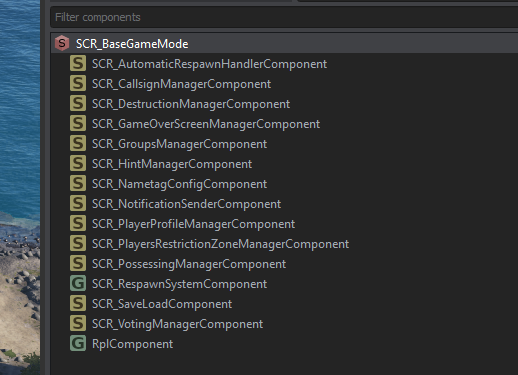
this is the base game mode, just components for various actions. If you're going from scratch you'd want to take a look at these and the logic to make sure you cover bases. could probably just make a prefab and then start making your own components to tie into it.
This is the 'Plain' game mode so it just has these basic components, there are deathmatch and team deathmatch game modes which probably just have more components attached than this plain one
karmic forge
Yeah I'm wanting to use that as a base class and overwrite some methods. It's creating a prefab from / for my script that I don't know how to do
crisp rain
Check pins for creating a prefab, probably a few pins down in the list
karmic forge
Thanks!
 wheat valve
is there a way to have triggers reset after a certain or random amount of time?
crisp rain
I can take a look tomorrow when I get some free time
solar shard
Ok I achieved a lot of stuff lately in my NightOps test thing. I will write a tutorial about certain aspects the next days. Especially about AI mounting turrets, adding addActions to win a mission (e.g. capturing a objective) or losing conditions. Works all fine.
But with two things I struggle. How to use spawnEntityTemplate to create a prefab dynamically at a IEntity trigger position?! @sullen talon you mentioned that but I cannot find any reference to that.
And how to iterate a loop in a script to somehow change the position of a entity periodically?
Simple stuff like that will kill my whole Sunday. LETS MOD 😂
 keen phoenix
The fun of arma modding!
Is the in-game workshop down for anybody else? Haven't been able to access it for hours now
solar shard
Yeah and I love to make progress. Especially after the very first 24hours. But it’s crazy to struggle a whole day about that simple stuff we did since OFP 20 years ago so east.
keen phoenix
Yeah right? It's like learning a new language to me completely, I like to think I was a pretty good mission maker for arma 2 & 3 but I only ever touched the surface of scripts, this is definitely fun
solar shard
That’s me. Absolutely. But it’s great what we achieved last days with the support of the Bohemia guys here.
keen phoenix
I couldn't figure out how neutralize tasks find the unit to be neutralized, I'm looking into components wondering if there's a manager I'm missing, had to download somebody elses example mission to see that the task sets itself to the unit you place it on, seems so simple now haha, I need to get out of the old arma engine mindset
solar shard
And I remember good the days when the OFP demo came out and we had no 2d editor - nothing. And yet, we made missions for the demo just with notepad guessing coordinates and so on.
keen phoenix
haha that's crazy, I only got into it all when arma 2 came out, I remember my first day trying to tediously write out "this addWeapon "" and "this addmagazine", 20 times just to do custom loadouts for me and my mates, thinking I was making the next big campaign
good fun, very excited for this game because of how much it offers without killing my computer
 magic oasis
Morning all...
 distant moon
Good Morning dude
magic oasis
I'm looking through this SampleCoop template mission trying to figure out tasks. There is a SCR_EliminateTask but I cant find it anywhere to add, any idea what I am mmissing?
ohhhh, its a custom prefab....
wheat valve
has anyone figured out how to make a landmine? like a trigger that can use an RPG7 explosion.
 median oar
Does any one know how to add the selectable(ingame) scenario to the mod? i have now a TDM mode and i just want to be able to start it xD i can maybe find it here from above : https://github.com/Herbiie/ArmAReforgerMissionMakingGuide/wiki/3)--ArmA-Reforger-Mission-Making-%7C-Finishing-The-Mission#publishing-your-scenario
GitHub
A guide for making a basic Arma Reforger Mission, editted as I learn! - 3) ArmA Reforger Mission Making | Finishing The Mission · Herbiie/ArmAReforgerMissionMakingGuide Wiki
 magic glen
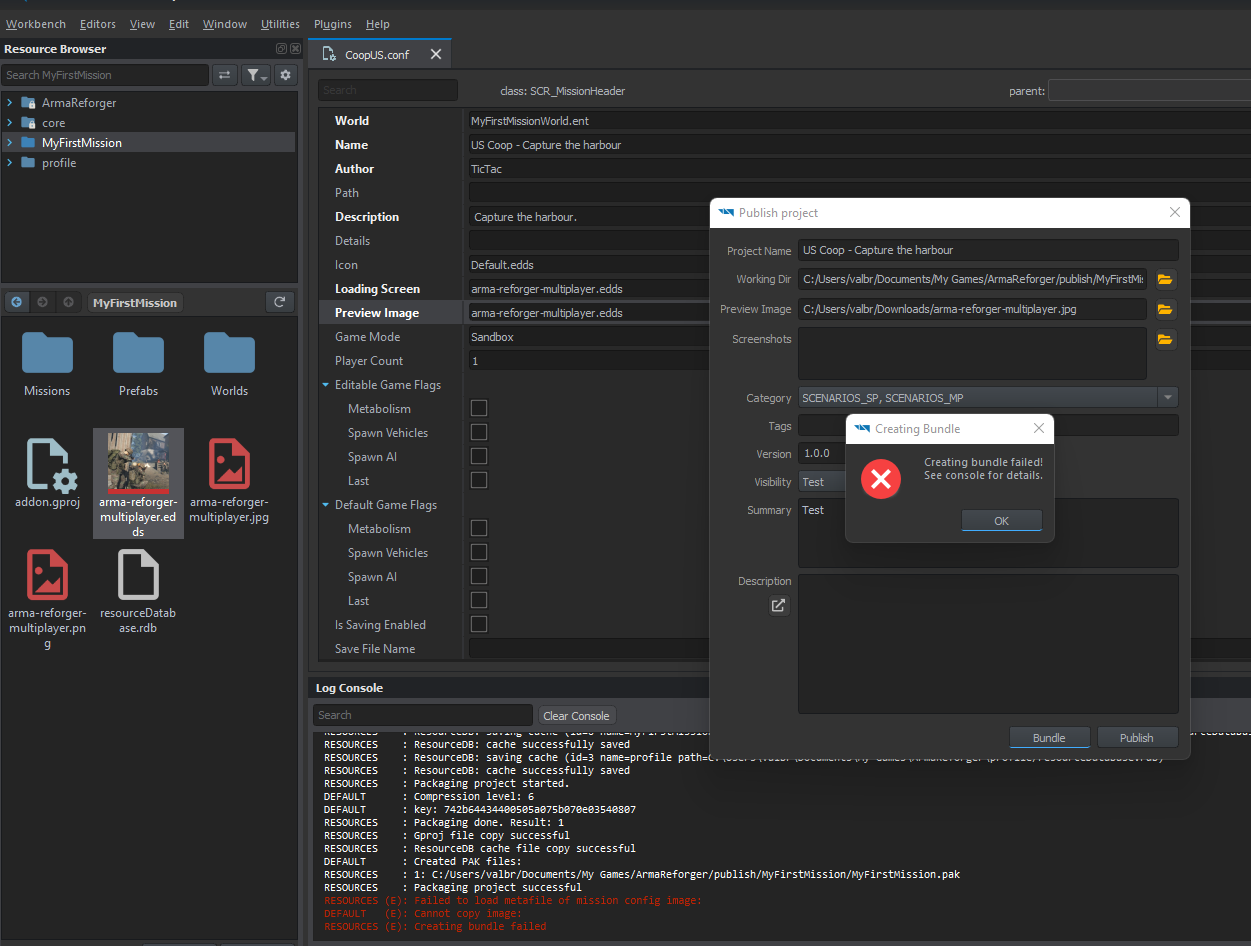
Hi all ! I need some help to publish my first test mission :
I follow this tutorial : https://github.com/Herbiie/ArmAReforgerMissionMakingGuide/wiki/
I have trouble at the last step to bundle my mission, I got this on the console log :
RESOURCES (E): Failed to load metafile of mission config image:
DEFAULT   (E): Cannot copy image:
RESOURCES (E): Creating bundle failed
Can someone help me please ?
GitHub
A guide for making a basic Arma Reforger Mission, editted as I learn! - Pages · Herbiie/ArmAReforgerMissionMakingGuide Wiki
keen phoenix
magic glen
Hi all ! I need some help to publish my first test mission :
I follow this tutor...
I found this happened when I didn't have images set, I believe you need the .edds image
keen phoenix
wheat valve
has anyone figured out how to make a landmine? like a trigger that can use an R...
I wish! I'll let you know if I find any cause
magic glen
keen phoenix
I found this happened when I didn't have images set, I believe you need the .edd...
In the publish window ?
Because I set one
 torpid tundra
https://mobile.twitter.com/IvanBuchta/status/1527957589274796034?s=20&t=I64Gyq8kdBuie3JGldLJlQ
Looks like a New Eden is planned at "some point" 😊😊😊

@G4nDalf_EG We want the full-featured 3D Editor as much as the community, but it's a complex task which will take time. :) #ArmaReforger's Game Master is the necessary step to develop a new in-game editor, scenarios can be made in #EnfusionEngine Workbench too.
 Twitter
·
keen phoenix
magic glen
In the publish window ?
Twitter
·
keen phoenix
magic glen
In the publish window ?
It has to be in a certain resolution, could that be the issue?
magic glen
keen phoenix
It has to be in a certain resolution, could that be the issue?
Following to the tutorial, I set it at 576x324 for the loading screen and I take the same image. I tryed both png and jpg : same issue
keen phoenix
Hm I'm not sure then mate, sorry
Just to clarify, before you publish. The CoopUS.conf .edds photo should be in that resolution
But yeah if you followed the tutorial I'm not sure
magic glen
yes I imported it form the png and it converted it in edds
solar shard
magic glen
Following to the tutorial, I set it at 576x324 for the loading screen and I take...
They have to be in the mod folder. Not in downloads
magic glen
@keen phoenix I fixed it by delete all pictures and reimport it, delete the picture in my mission folder and copy it again and rename it in preview.jpg (like default in the publish window)
magic glen
solar shard
They have to be in the mod folder. Not in downloads
Yep, it was, I thing I missed something but it's work now, Thx ! 🙂
 timid chasm
https://github.com/Herbiie/ArmAReforgerMissionMakingGuide/wiki/3)--ArmA-Reforger-Mission-Making-%7C-Finishing-The-Mission
GitHub
A guide for making a basic Arma Reforger Mission, editted as I learn! - 3) ArmA Reforger Mission Making | Finishing The Mission · Herbiie/ArmAReforgerMissionMakingGuide Wiki
median oar
Ah fuck it still doesent appear as a scenario only as mod. Does some know what could happen?
median oar
Thanks that fixed to problem for me as well 😄
 pliant rock
I hope they make stuff like this more flexible in the future
 brisk notch
hello everyone, I'm having issues on turning on the lanterns in my mission, am I missing some xxxmanager object?
I just added an entity called LanternMilitary_US
[solved]
had to set properly the starting status in the lantern entity
https://docs.google.com/document/d/1i7s8IhEgCypr8yiauZ_GgNuoijxZtODCqu-11dvEjog/edit?usp=sharing
Google Docs
median oar
Is there any default prefabs to let groups respawn?
iron hollow
really wish the snap to ground move tool didn't put things on top of trees
magic oasis
Is anyone able to jump on voice with me and hold my hand through making a simple destroy a vehicle task? I kinda get all the components but am really struggling to stitch it all together.
magic oasis
so i got the guy to enter the static but he doesn't feel like shoot me.. any idea why that could be?
solar shard
The basic AI stuff like perception manager is added?
magic oasis
It is, yes
ahhhhh. hang on.....
was lacking SCR_AIWorld but that also has no effect
magic oasis
yeah, just tested that and they are
solar shard
Then I have no clue but adjusting the compartment settings till it works 😉
magic oasis
i put an unarmed single character on there....
solar shard
This could be issue.
It’s recommended to only use groups via base_spawn. Either create one with only one member or several and give them a defense waypoint near the turret. Either way, when the compartment component is setup correctly, one will use the turret
magic oasis
Thanks, i will keep trying
unique minnow
the spawn radius on the spawnpoints does not seem to make me spawn anywhere other than on the base point still?
barren heart
@solar shard Is this the sort of thing you were after, made a generic component for spawning prefabs of triggers https://streamable.com/z8ra2e
 solar shard
barren heart
<@721320175504457740> Is this the sort of thing you were after, made a generic c...
solar shard
barren heart
<@721320175504457740> Is this the sort of thing you were after, made a generic c...
while you are right I already solved it with the support of Joe Malley. In my current NightOps version, there are several bonus objectives which allows you to unlock (spawn) new US_spawn points. But thank you. This looks awesome.
solar shard
magic oasis
Thanks, i will keep trying
you can always download my sourcecode and copy stuff or use it for tutorial purposes:
https://github.com/Zealous666/AR_NightOps1985
the current code include stuff like:
- tasks for bonus and main objectives
- trigger to spawn enemies dynamically
- enemies on patrol, arming vehicles & bunker turrets
- trigger to spawn more spawn points on the fly
- trigger to win the mission by capture of the truck via AddAction
- trigger to loose the mission when truck gets destroyed
- daytime and weather setting
- loadout & respawn system
- mobile respawn attached to an vehicle
GitHub
Test- and Demo-Environment of Arma Reforger coop scenarios - GitHub - Zealous666/AR_NightOps1985: Test- and Demo-Environment of Arma Reforger coop scenarios
barren heart
Wow you've got a lot going on in there all ready, I might have to take a look later on.
distant moon
Is just amazing to see the community in action .
pliant rock
yes
 left lava
How to End tasks in OnTriggerEmpty() ?
magic oasis
Can you transfer prefabs between projects?
unique minnow
Does anyone know why even if you increase spawn radius it always spawns you exactly on the spawnpoint?
magic oasis
unique minnow
Does anyone know why even if you increase spawn radius it always spawns you exac...
Does that function only work if there is someone else on the point. That’s how I read it but I am probably wrong.
unique minnow
magic oasis
Does that function only work if there is someone else on the point. That’s how I...
i dont see anything like that
magic oasis
unique minnow
i dont see anything like that
Maybe I dreamt it. Sure I read the tooltip or something. I’m AFK will double check later.
slow thicket
Okay Im dumb how do I change the initial weather? I know I need to use the time and weather manager but after that im lost.
magic oasis
slow thicket
Okay Im dumb how do I change the initial weather? I know I need to use the time ...
Just do what I did and smash the sliders until something works. Coolest thing is that it takes effect in real time before you even load the mission.
pliant rock
yeah, just try some things out in both components
magic oasis
Had a lot of fun watching the AI on patrol at night. Really like how only the squad lead has his light on. Not sure if this is intend but cool nonetheless
slow thicket
magic oasis
Just do what I did and smash the sliders until something works. Coolest thing is...
Which sliders actually effect the weather? Time works fine but when I change the initial state for the weather its always clear as soon as I load in
slow thicket
Possibly... How do I disable it
solar shard
open in in its default layer and in "unsorted" you can untick the "enabled" box as you can do with a lot of elements. Then lock the default layer and pray that it takes some till it will magically reset itself.
slow thicket
Lol okay thank you!
Still I cant get the damn clouds to stay, am I suppose to be editing anywhere other than "Initial State"
 zenith void
im following herbii guide but the trigger script throw an erro any idea why > Function "ScriptedEntityFilterForQuery" is marked as override, but there is no function with this name in the base class > in the paste bin its line 4, 7 in the script tool
exotic reef
i've uploaded a small mission called Farm Assault you guys can try out. took 2 days for 5 mins of gameplay lol
barren heart
Ahh nice these soldiers seem to know the way to the farm 😛
exotic reef
zenith void
im following herbii guide but the trigger script throw an erro any idea why > Fu...
you have to extend SCR_BaseTriggerEntity. post your code
exotic reef
barren heart
Ahh nice these soldiers seem to know the way to the farm 😛
yeah they even know how to open doors, sometimes. but going upstairs is too much for them
zenith void
exotic reef
you have to extend SCR_BaseTriggerEntity. post your code
u mean the radius its at 800 and post you code i dont understand that reference..
exotic reef
no i mean copy paste your script so we can see what the problem is
zenith void
Pastebin
Pastebin.com is the number one paste tool since 2002. Pastebin is a website where you can store text online for a set period of time.
exotic reef
the first line is missing, it should say something like 'class myTrigger : SCR_BaseTriggerEntity'
barren heart
@exotic reef Well I don't seem to be able to complete your mission, not down to any bugs I just apparently suck and keep dying 😄
exotic reef
if you hang back the friendlies should clear them out. there are 1 or 2 enemies that can randomly spawn in houses though. once you kill all enemies the mission will end
brisk notch
hello, I'm facing a weird situation, with timeandweather manager, when the mission starts, the time of the day is correct but... the clock (and the time of the day) is not changing, it is locked at the starting time, any suggestion?
 cyan yoke
brisk notch
hello, I'm facing a weird situation, with timeandweather manager, when the missi...
cyan yoke
brisk notch
hello, I'm facing a weird situation, with timeandweather manager, when the missi...
set a time multiplier
iron hollow
did you disable the default manager included in eden
barren heart
Yeah I did that and completed it now. Rambo I am not.
brisk notch
iron hollow
did you disable the default manager included in eden
nope, thx, I'll do it immediately
 random heart
hey guys, I'd like to delete an object from a prefab, do you know a way to do it ?
Obviously I tried deleting it but an error message appears saying I can't
I can't move the object out of the prefab, and hiding it only works in the world tool, once the scenario launched it appears to players
barren heart
You can right click the prefab entity in the left pane and break prefab instance if im understanding you right. If you want to permanently change the prefab you can right click it in resource browser and edit prefab.
random heart
barren heart
You can right click the prefab entity in the left pane and break prefab instance...
you are a life saver, thanks a lot
(and if some1 has the same problem, it did work : right click on the prefab in the left panel list and "break prefab")
brisk notch
brisk notch
nope, thx, I'll do it immediately
[solved] thx Cuel, there was a conflict with the timeandweather manager of Eden
magic oasis
brisk notch
[solved] thx Cuel, there was a conflict with the timeandweather manager of Eden
Worth checking the log. I had similar and it literally told me what the problem was.
brisk notch
sorry to bother you, I'm facing another issue with AI reactions, not sure if I need to setup AI Skills or something similar anywhere in a config file.
Here it is my situation:
I'm using waypoint type "patrol" for a group of AI (rifle team) these units are respecting the waypoint and when they ear a rifle shot they are reacting properly going to the source of the rifle shot. At this point unfortunately looks like they are not able to see the opponent, they go very close to the enemy before starting to answer to the enemy fire
Any suggestion?
do I need to setup a starting alert level of the AI?
random heart
is it at night ?
brisk notch
random heart
is it at night ?
during the daybrake
magic oasis
solar shard
It’s recommended to only use groups via base_spawn. Either create one with only ...
"Create entity @"ENTITY:2305843009213693970" ('GameEntity','Assets/Weapons/Tripods/6T5/Tripod_6T5.xob') at <5030.547363 28.683001 11955.031250>
SCRIPT (W): Wrong type VEHICLE used!- #AR-EditableEntity_Tripod_6T5_PKM | entity: GameEntity<0x000002AE546BEAD8>, prefab: '', pos: <5030.55,28.683,11955>"
I get this far when trying to get a guy from group on PKM
Any ideas?
solar shard
at what point do you get this? you use the compartmentManager for that?
magic oasis
sorry, should have been more clear. This is in the log when I start the gmae in the viewer
it might be unrelated though
never mind. I get it with no group or waypoint so must not be the issue
slow thicket
brisk notch
sorry to bother you, I'm facing another issue with AI reactions, not sure if I n...
Having the same issue with one of my scenarios, let me know if you figure out what is causing it
brisk notch
slow thicket
Having the same issue with one of my scenarios, let me know if you figure out wh...
you too during daybreak?
slow thicket
Mine is at sunset
brisk notch
slow thicket
Mine is at sunset
which latitude and longitude are you using? I have the feeling that the geo coordinates could be in some way connected
slow thicket
LAT: -7.105 LONG: 75.737
random heart
could one of you run the same test at midday ? I saw some parameters in the editor how lightening impact how IA "see"
it may be bugged
slow thicket
Yeah I increased the time and it improved
vestal sky
magic oasis
"Create entity @"ENTITY:2305843009213693970" ('GameEntity','Assets/Weapons/Tripo...
I've gotten this before but managed to get the guy in the PKM by placing a defend waypoint by it. It's just a warning and I couldn't see what exactly causes it.
magic oasis
vestal sky
I've gotten this before but managed to get the guy in the PKM by placing a defen...
Ok. Thanks. Does it take some time? For me the guys just stand about doing nothing. No one gets on the gun. 🤷♂️
vestal sky
Takes 1-2 seconds to move to it but should happen instantly basically
Can they enter it if you use the gamemaster commands?
I had problems with this yesterday and was a bit tricky to get it to work
 maiden lodge
About prefab, how can I edit an prefab ?
I made an duplication of an existing prefab but I can't find how to edit it (remove elements for example)
brisk notch
random heart
could one of you run the same test at midday ? I saw some parameters in the edit...
looks like the sun (and the visibility) for the AI is not the same the players have, maybe it is a different timezone or latitude/longitude
magic oasis
vestal sky
I had problems with this yesterday and was a bit tricky to get it to work
Did you have to change anything in the compartmentManager?
vestal sky
No, I only placed down a defend waypoint over the sentry, added the waypoint to the groups static waypoints and poof it worked
random heart
brisk notch
looks like the sun (and the visibility) for the AI is not the same the players h...
you edit the parameters for the time being to disabled the impact of lightning on AIs
exotic reef
maiden lodge
About prefab, how can I edit an prefab ?
right click on it in the hierarchy and "Break"
maiden lodge
Oh okay and how I recompose it ?
exotic reef
make your changes then click & drag the instance into your resource browser. it will be saved as a new prefab
maiden lodge
Thank you ! (That's not very intuitive)
magic oasis
Can anyone point me to a guide or info on making a simple move/destroy task?
brisk notch
random heart
you edit the parameters for the time being to disabled the impact of lightning o...
nope, unless it was accidental
meanwhile I tried to manage the parameters of the TimeAndWeatherManagerEntity and now is working way better
here the screenshot
https://docs.google.com/document/d/1exXAYxvslrYpdyFVIlFo01NkKIwILXPCud9wsF3TVBA/
still need to figure out which one of the changes is impactfull and which is not

Google Docs
disabled EventHandlerManagerComponent disabled RplComponent disabled Automatic Time Advancement set initial Day Time >6 am set Latitude 4 set Longitude 20
karmic forge
Any examples for spawning? I want to respawn the player in a radius around a spawn point. Can't get the spawn radius setting to do anything, and can't seem to change the player's spawn point either
 rotund glade
Sorry for asking, I could not find it in search. How can we change the speed of AI patrols? I cannot find anything in waypoints or group behaviour. I dont need patrols running all the time
brisk notch
karmic forge
Any examples for spawning? I want to respawn the player in a radius around a spa...
maybe I'm wrong but the player spawn in the center of the area, just in case there is already somebody in the center the spawn radius is applied
exotic reef
rotund glade
Sorry for asking, I could not find it in search. How can we change the speed of ...
if you use patrol waypoints they will walk
rotund glade
exotic reef
if you use patrol waypoints they will walk
Ah..... so "move waypoint but just different move" as they say in the description..... Very intuitive. Thank you for the help. Much obliged.
brisk notch
sorry everyone but I'm really confused about how to test the mission in MP,
is there a way to run the mission on my pc and give access to remote players?
My mission is already in the workshop of course
crisp rain
Started a series for people brand new to making missions, going into co op in the next video and then future videos will focus on adding specific features. https://www.youtube.com/watch?v=2BM7stNyaNk

Today in the enfusion workbench powered by the enfusion engine we are making a base arma reforger mission for you to build up from. The mission in this video is geared more to singleplayer but in part 2 we can discuss co-op and multiplayer aspects including expanding the mission.
Win condition trigger script: https://pastebin.com/4fYGXJbh
Shout...
 night jewel
Heyo i have a question xD i managed to make my own Waypoints, however the Image which im loading from the ImageSet like in the Tutorial has some problems
i'm accessing the Image like this:
Waypoint.LoadImageFromSet(0, BuildingIconImageset, "USSR_Base_Main_Select");
The Variable BuildingIconImageSet looks like this:
[Attribute("{F7E8D4834A3AFF2F}UI/Imagesets/Conflict/conflict-icons-bw.imageset")] //ArmaReforger/UI/Imagesets/Conflict/conflict-icons-bw.imageset
protected ResourceName BuildingIconImageset;
Does someone have any idea why this is happening? 😄
 crisp rain
Haven't tinkered with loading images but that waypoint is better than the north star
brisk notch
where I can find the scenarioID of my edited mission?
crisp rain
night jewel
crisp rain
Haven't tinkered with loading images but that waypoint is better than the north ...
i think i will leave it like this for now, it serves the purpose 😄
I don't want to spend too much time on it right now xD I'm going on with other things
crisp rain
Not a bad plan at all! Definitely serving its purpose out there :D
 narrow path
Has anyone figured out the ability to place probabilty of vehicles or items yet? is that not implemented atm
sullen talon
night jewel
Heyo i have a question xD i managed to make my own Waypoints, however the Image ...
Don't forget to .SetImage(0);
night jewel
sullen talon
Don't forget to .SetImage(0);
hm doesnt help :/
Waypoint.SetOpacity(0);
Waypoint.LoadImageFromSet(0, BuildingIconImageset, "USSR_Base_Main_Select", true);
Waypoint.SetImage(0);
In the comments of the ImageWidget class it says, that calling this function is switching to another Image, if its loaded
So i guess the error happens on loading the Image from the ImageSet
night jewel
Yes as I thought, the LoadImageFromSet method returns false when it tries to load the image
 manic cloak
Where can I find the SzenarionID of my custom world?
crisp rain
night jewel
Holy shit, I got it xD
I have changed the variable "BuildingIconImageset" as follows:
From:
[Attribute({DCEAF860DE9F72DF}UI/Imagesets/Conflict/InfoImageSet.imageset]
protected ResourceName BuildingIconImageset
To:
protected ResourceName BuildingIconImageset = "{DCEAF860DE9F72DF}UI/Imagesets/Conflict/InfoImageSet.imageset";
I dont know what the Attribute Makro does, but somehow I can't access the ImageSet that way.
But anyway, it works now and I can finally go to sleep satisfied xD
crisp rain
Nice man, thanks for sharing the solution :D
 vast oar
is there a mod for having loadout slots, so you choose a slot like 'squad leader' and get a specific loadout, but nobody else can take that slot because youve taken it already?
because the loadout system in the game by default is just choose 1 out of 5 and anyone can also choose the same, like you can have 8 machine gunners in your squad
crisp rain
You'd have to look at the workshop to see if there is a mod for that
then you'd need to find a server running that mod
 carmine swan
You could create yourself some kind of custom manager that inherits from the LoadoutManager or even just a custom component to stick on the loadout manager that keeps track of how many each type of loadout has been selected. I don't know for certain, but I have to imagine there's some kind of event that gets fired that you could hook into when a loadout is selected.
If there is, you just increment a counter value every time someone selects a loadout and decrement it when someone changes their loadout or disconnects (aka deregisters). Anyway, that's how I'd do it. Mind you, I haven't actually tested that but it doesn't seem like it would be too difficult to do.
Might play around with that kind of idea.
iron hollow
can i replace the root in a prefab? got a custom game mode but moving over all the attached components felt like a lot of work
 willow inlet
carmine swan
You could create yourself some kind of custom manager that inherits from the Loa...
willow inlet
carmine swan
You could create yourself some kind of custom manager that inherits from the Loa...
You can also inherit and specialize SCR_BasePlayerLoadout
austere cobalt
carmine swan
You could create yourself some kind of custom manager that inherits from the Loa...
Is there some tutorial or example how this event stuff works?
Can you hook into events on a global lvl so for example can some nonrelated component that is placed alone for itself listen to player killed events?
willow inlet
austere cobalt
Is there some tutorial or example how this event stuff works?
Can you hook into ...
Spawn character prefab, find EventManager on it - check events which are raised. You can hook on those from kind of anywhere.
Or - if its local player only GetPlayerController
carmine swan
I don't know of any tutorials going over events in arma specifically (yet), but events and event listeners are a software development topic not specific to just arma so you can look up the overall concept of how they work and look into how they have it implemented in Reforger.
 real elbow
trying to troubleshoot a scenario causing replication errors when trying to join it via dedicated server. Could this be caused by too many prefabs being placed?
can't join the server succesfully - can host the scenario/mission on local and via scenario's from primary game menu
carmine swan
is there a specific error you're getting that can provide some more context?
real elbow
yeah - one moment
getting loads of these: 15:46:47:842 RPL (E): IReplication::JIPError: Inconsistent item table on Slave connection. Item is missing or different item was loaded in its place. (item=0x40043FD2 layout=UniversalInventoryStorageComponent)
15:46:47:842 RPL (E): Expected:
15:46:47:842 RPL (E): cpp_layout=_RplComponent_Layout
austere cobalt
carmine swan
I don't know of any tutorials going over events in arma specifically (yet), but ...
I get the concept. You throw an event and add listeners which react to that but there are million ways how this could be implemented and work.
But if they are really available from anywhere it would be great can't wait to test it out tomorrow.
carmine swan
Does this scenario load okay in the reforger tools or do you get errors there too? it seems like the wrong component is on an object or something? it's expecting one thing, getting another. If you get the same error when playing in tools, you will need to track down what component it actually wants and put that on whatever item is throwing that error.
that's just what i gather from that error message haha i could be wrong and the devs might have some better insight
real elbow
no errors when playing in tools or launching via scenarios lol
carmine swan
weird
carmine swan
devs might have a better idea, then. Ihaven't done anything with dedicated servers yet so pretty limited knowledge there
real elbow
before i go down a troubleshooting rabbit hole... anyone have issues with placing "large" amounts of prefabs?
like- building 2-3 new military bases worth of assets
carmine swan
austere cobalt
I get the concept. You throw an event and add listeners which react to that but ...
I mean, events typically are available from anywhere. You're just creating a listener that is waiting for a specific event and when it's fired you do stuff. Typically, you should be able to get the instance of whatever object fired the event and do stuff with it. But yeah it will take some experimentation. I have yet to do that myself so right now it's just conceptual based on general game dev concepts 😛
narrow path
kind of a weird question, my pc is way above specs for the game and everything else in the workbench works well for me, but the script editor is super unresponsive, has anyone else ran in to this issue and fixed it or anyone know any causes?
 radiant summit
@solar shard playing latest version. Lighthouse objective seems to auto complete. Showed before I killed anyone in the area. Got in BTR while New Spawnpoint text showed, it said Completed APC, not New Spawnpoint continuously pops up. Been going for a few minutes now
Ok, it stop once I unlocked a new Spawnpoint. One thing I’d note for these, is may not trigger them being unlockable if there’s enemy presence? It’s the radio uplink one. This one completed correctly though.
Still at the radio uplink. Seems like the dynamic spawning is placing them just a few meters away. Unless there was a nearby patrol…
radiant summit
Ok. Killed all enemies guarding, no victory. Destroyed the truck, defeat screen.
EDIT: ah I see it’s been changed to capture the truck, not destroy.
narrow path
what am i doing wrong with the below code causing it to end the mission with defeat/FIA has won the game, When im trying to get it to say Victory/FIA has won the game.
override void OnActivate(IEntity ent) { SCR_BaseGameMode gameMode = SCR_BaseGameMode.Cast(GetGame().GetGameMode()); // Get the game mode for the end script Faction faction = GetGame().GetFactionManager().GetFactionByKey("FIA"); // Get the winning faction Key int fiaIndex = GetGame().GetFactionManager().GetFactionIndex(faction); // Get the winning faction key's index gameMode.EndGameMode(SCR_GameModeEndData.CreateSimple(SCR_GameModeEndData.ENDREASON_EDITOR_FACTION_VICTORY, 1, fiaIndex)); // End the mission! };
crisp rain
is this all of the script or is there more?
solar shard
radiant summit
Ok. Killed all enemies guarding, no victory. Destroyed the truck, defeat screen....
Hey appreciate your play testing and feedback. Yeah I noticed yesterday night that the tasks auto complete when playing the map online while everything is alright when playing out of the editor. That said, you will have a hard time if you don’t know the final task: (capture, not destroy anymore). The system in the background is setup that way that the mission fails when you destroy the truck and wins, when you capture it via userAction.
The BTR dynamic spawn point is disabled right now due to a critical bug.
The others at lighthouse & radio should work normal but also need adjusting regarding enemy presence. Buggy too it seems. It should complete (und unlock once all enemies are dead) but I feel I have to rework that too.
I will setup the tasks again from scratch since right now it has become a hell of bugs and I noticed that the weather system also resets itself still! (It should start in the evening and getting dark very quick, but most time it’s just noon) Will bug fix as much as I can tonight since I really want to finish it and continue to make a bigger one on main island. Plan to make 4-5 coop missions in the mod as a MP campaign but right now it lacks on vehicles to fulfil all my plans which will be a homage to Cold War crisis. To be honest, testing all this stuff on a dedicated server is another challenge
 atomic tree
Is it possilble to delete buildings and other map objects in a mission/mod? Currently I only know how to add those things but not how to delete/hide the original stuff.
If I try deleting buildings then I get the message
"You are about to delete entities also from inactive layer(s).
Do you still want to proceed?"
If I proceed then the changes are not persistent. How can I solve this?
 thin ermine
atomic tree
Is it possilble to delete buildings and other map objects in a mission/mod? Curr...
thin ermine
atomic tree
Is it possilble to delete buildings and other map objects in a mission/mod? Curr...
fairly sure you can't remove from the original map
 strange raven
I know how to change weapon to the model, but i cant customise the weaponry. ( i could find the weaponry itself but i don’t know how to put it on models)
Do you guys know how to put it on….?
 lean scroll
thin ermine
fairly sure you can't remove from the original map
lean scroll
thin ermine
fairly sure you can't remove from the original map
But removing or at least hiding by script should be possible? But idk which method would delete/hide it.
 modern elm
i have seen you can move it, may be you can move it benealth the surface or someplace away?
thin ermine
lean scroll
But removing or at least hiding by script should be possible? But idk which meth...
I suspect there'll be a 'hide objects' like in arma 3
left lava
How to add waypoint to SCR_AiGroupSpawner ?
narrow path
crisp rain
is this all of the script or is there more?
That's it as far as I can tell
iron hollow
left lava
How to add waypoint to SCR_AiGroupSpawner ?
can't see any such script in the core files, it's from a mod?
left lava
AISpawnerGroup in scripts/Gamelib/Genrated/AI/AISpawnerGroup.c
vestal sky
lean scroll
But removing or at least hiding by script should be possible? But idk which meth...
I think there's a disable value or smth. I've seen nightops use it to remove a trigger once it's been triggered
It's in like the main flags for objects along with a few other such as "static" or "editor"
solar shard
hmpf, having a lot of crashes lately. That said since yesteray, in the editor. Am I the only one?
iron hollow
left lava
AISpawnerGroup in scripts/Gamelib/Genrated/AI/AISpawnerGroup.c
ah that's why i didn't find it. if you're just looking to spawn a group and give it a waypoint you might be better off spawning a prefab group so you get it configured properly
did you get it to spawn the group with members?
left lava
iron hollow
ah that's why i didn't find it. if you're just looking to spawn a group and give...
The goal is to make finite group waves, the prefabs do not allow it right ?
iron hollow
you can spawn as many prefabs as you want
i made a infinite ai spawner with waypoints by just modifying the spawner in the sample-coop mission to respawn once the group was killed
solar shard
vestal sky
I think there's a disable value or smth. I've seen nightops use it to remove a t...
Just a heads up to that.
The current NIGHTOPS version has a lot of bugs lately which I didn’t find. Doing it just again from scratch with more streamlined solutions and some new features like custom Loadouts etc
austere cobalt
iron hollow
i made a infinite ai spawner with waypoints by just modifying the spawner in the...
How do you keep track of the AI (alive or dead)? via trigger? I have my whole mission in a big SCR_ChimeraCharacter trigger which periodically iterates over an array of AIs and respawns then when dead. But this seems to me super hacky.
iron hollow
m_group.GetOnEmpty().Insert(OnSpawnedGroupEmpty);
for that one i just respawn once the group is empty
barren heart
Just reading the patch notes "Fixed: AI sometimes don't see players in very dark area, even from upclose".
vestal sky
Had an AI 2m in front of me at midnight and he didn't see me
iron hollow
did you try now with the latest patch? it came out like in the last hour
barren heart
Had about 30 blufor and opfor makes friends in the castle, the very illuminated castle at that 😛
unkempt parrot
Has anyone figured out how to host a workshop mission on a dedicated server?
Seems like the days of PBO's are over
 torpid mural
unkempt parrot
Has anyone figured out how to host a workshop mission on a dedicated server?
torpid mural
unkempt parrot
Has anyone figured out how to host a workshop mission on a dedicated server?
I do. What's your issue?
sullen talon
unkempt parrot
Has anyone figured out how to host a workshop mission on a dedicated server?
Downloaded mod has ServerData.json which contain all the necessary information, the rest is documented on Biki
 amber tinsel
Couldn't find much yet, so I made a tutorial for custom missions based on what I figured out so far.
(just now, after recording, found out about the coop sample, so I guess I'll do an updated one soon :p)
https://www.youtube.com/watch?v=AyGeke4kDck
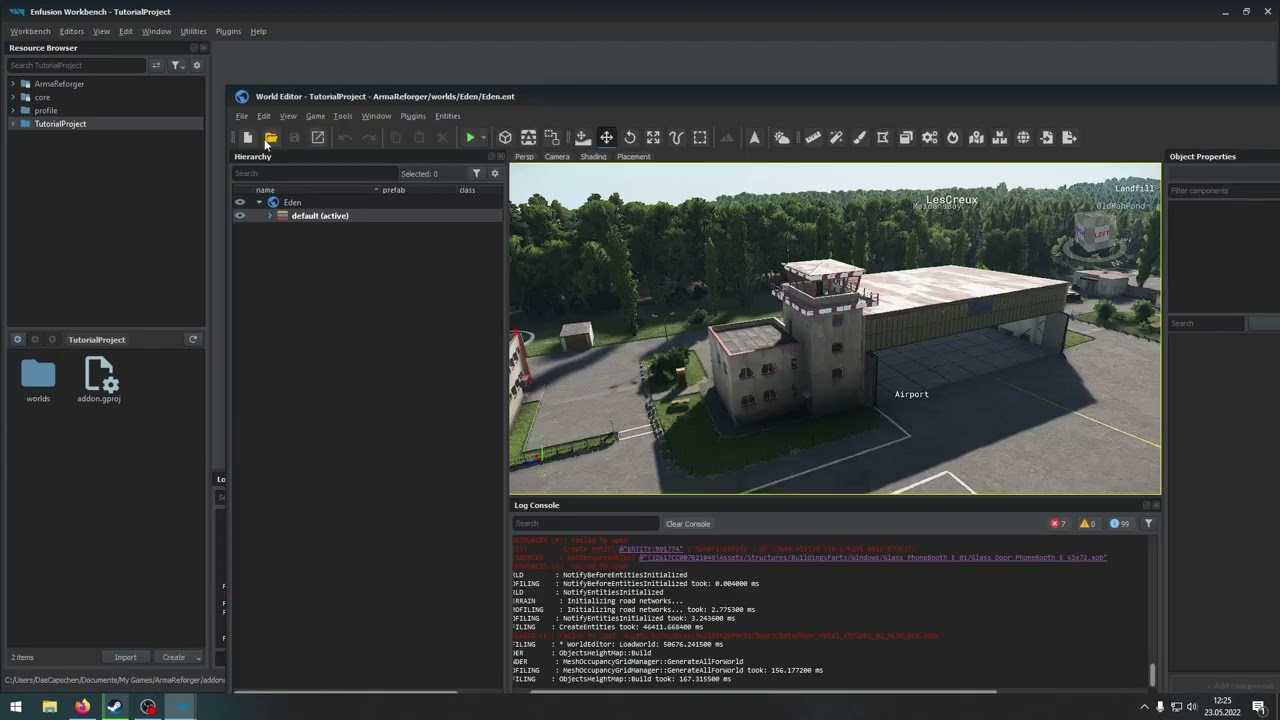
Learn the basics of how to create a scenario for Arma Reforger in the Enfusion Workbench!
More Documentation should be coming, check here: https://community.bistudio.com/wiki/Category:Arma_Reforger/Modding
 fathom merlin
Hey, quick question. I'm trying to play a Team Death match mode on my custom world but have a variety of issues.
A) I dragged an obscene amount of managers and prefabs for testing so I'm not sure why what I have works
B) When G is pressed, or on random, I get the following error
Class:      'SCR_VONController'
Function: 'InitEntries'
Stack trace:
scripts/Game/VON/SCR_VONController.c:353 Function InitEntries
scripts/Game/UI/HUD/QuickMenu/SCR_QuickMenu_BaseDisplay.c:171 Function OnOpen
scripts/Game/UI/HUD/QuickMenu/SCR_QuickMenu_BaseDisplay.c:346 Function OnMenuOpen```

C) Sometimes a helmet of USSR soldier is visible in FP mode.


__

What steps do I need to take to successfully set up the world to my required game mode?

Have a bit of a mix at the moment
tried removing all the stuff and copying only prefabs from Reforger maps, still didn't work properly
 winter grove
solar shard
hmpf, having a lot of crashes lately. That said since yesteray, in the editor. A...
winter grove
solar shard
hmpf, having a lot of crashes lately. That said since yesteray, in the editor. A...
When GenericWorldPP_Default prefab shows up in my resource browser, my workbench crashes. Curiously, this happens in new projects I make but does not happen in an older project I have.
narrow path
fathom merlin
Hey, quick question. I'm trying to play a Team Death match mode on my custom *wo...
you doing pvp or coop?
fathom merlin
pvp
narrow path
are you using the capture and hold as dependency?
fathom merlin
I'm not, I originally thought you could make this simply a TDM. Can I still add the dependency?
narrow path
idk about adding a dependency after making the project i assume u could, but idk how maybe Ex0 knows more. there is a TDM game mode prebuilt in the game files and using GM_Eden does have alot of the managers that are required already placed in the map. could help
fathom merlin
wondering I can add the dependency here

actually, seems like I can open the project with additional addons, let's see if that works
right click
 narrow path
okay then yeah do it that way
fathom merlin
maybe not lol
 narrow path
I have no idea, like i said i haven't messed around with adding dependencies after the project has begun out of habbit from previous arma games.
fathom merlin
tried to add it as dependency and it just destroyed my project 😄
solar shard
winter grove
When GenericWorldPP_Default prefab shows up in my resource browser, my workbench...
Just noticed that the game crashes after several seconds once the camera is in the town of Etui on the northern island (NightOps mission). Since the last update. Maybe a memory leak.
fathom merlin
narrow path
are u able to remove the dependency you added?
I'm now unable to open any project in workbench. If I try...INIT : Workbench startup
ENGINE       : Creating engine.
ENGINE       : FileSystem: Adding relative directory 'C:\Users\LastNickLeft\Documents\My Games\ArmaReforger\profile' to filesystem under name profile
ENGINE       : Initializing engine.
ENGINE    (E): Addon 'ArmaReforger' dependency '591AF5BDA9F7CE8B' can't be added
ENGINE    (E): Addon 'EnfusionPostProcess' dependency '58D0FB3206B6F859' can't be added
ENGINE    (E): Addon 'ArmaReforger' dependency '591AF5BDA9F7CE8B' can't be added
ENGINE (E): Cannot initialize game project settings!```tf it cant add reforger files to the project? did u accidently remove it or core as dependency?
fathom merlin
no, just added an extra dependency in one project, then tried to open it again and now all projects can't open
narrow path
try going in to #reforger_troubleshooting the BI memebers tend to keep an eye on that channel they may be able to help.
barren heart
I had that error yesterday after changing the project name, it was giving that error plus other odd stuff. Deleted profile folder and all sorts before eventually restarting PC then it was just fine 🤷♂️
fathom merlin
I have removed addon folder with the original project. validated files. Gonna try to restart PC for the second time now
still nothing
 hazy raven
Hello everybody, i have a issue, i made a mission with the herbiie's Tutorial, at the end i don't have anything in my scenarios ingame. can you help me ?
narrow path
hazy raven
Hello everybody, i have a issue, i made a mission with the herbiie's Tutorial, a...
are u using the placeholder images
solar shard
hazy raven
Hello everybody, i have a issue, i made a mission with the herbiie's Tutorial, a...
Sticky posts tried?
 narrow path
yeah using any other image other than the ones u have rn and it should work
hazy raven
so i change the images and everything gonna work ?
narrow path
]should do
hazy raven
Ok thanks i give it a try.
solar shard
Really, check the stickies. Your fault is just one possible several with that issue. It’s all explained there several times.
There are some things which can go wrong with the missionHeader we all went through
 halcyon patrol
Is the enfusion workbench tool designed and intended for mission making or are you guys just working with what you've got
hazy raven
@solar shard I will sorry for the inconvenience, i will check the sticky messages.
narrow path
halcyon patrol
Is the enfusion workbench tool designed and intended for mission making or are y...
u can make missing in it
solar shard
hazy raven
<@721320175504457740> I will sorry for the inconvenience, i will check the stick...
All fine. Was just a hint.
solar shard
halcyon patrol
Is the enfusion workbench tool designed and intended for mission making or are y...
The mission workbench is intended to do everything including total conversions. So yes, you can totally can make missions with that. Maybe someday a simple mission editor will come too once the game has made more progress but right now, that’s what we got (and it’s awesome thanks to endless possibilities€
hazy raven
@halcyon patrol Making simple PVE PVP mission, is not so difficult, the ui is counter intuitive but like Zeal says the possibilities and opportunity are huge !
vast oar
is there a sample coop mission by BI in the workshop?
ah theres one on github, not ingame
solar shard
Yes. coopSample. It’s in the sticky too.
vast oar
is there a solution to assigning only 1 loadout per spawn
solar shard
And, not by BI but with more stuff in it, mine for example. The NightOps mission from the sticky. And several awesome tutorials from folks of this place are there too.
solar shard
vast oar
is there a solution to assigning only 1 loadout per spawn
You mean to limit them?
vast oar
i mean theres 8 slots in a Squad, i want only 1 to be a SL, 1 to be Medic, 1 to be AR, 1 AAR, 1 Grenadier, etc
something like that
solar shard
Not so sure. Read the question several times here but don’t know the answer.
mental cove
vast oar
i mean theres 8 slots in a Squad, i want only 1 to be a SL, 1 to be Medic, 1 to ...
There might be a better way, but you could make a class that inherits from loadout manager and modify or add some functions that remove loadouts when a player joins
narrow path
You could just make a group and set it as playable, and then figure out how to eneable player to slot in to the group
fathom merlin
@narrow path was able to resolve the issues
and implement capture and hold
only issue I still have now is that my US characters keep getting killed on spawn. Not sure if that's due to there being some sort of zone that you can't leave?
mental cove
Anyone figured out the end screens yet, I have an endscreen defined in the SCR_GameOverManagerComponent, but I keep getting an error when trying to use it.


 steady nimbus
How can I set sequential tasks for a coop mission? Like, Move to A, Move to B, Kill C, Extract at D, then set it to one faction and customize the task description.
sullen talon
steady nimbus
How can I set sequential tasks for a coop mission? Like, Move to A, Move to B, K...
You would have to create them with your script one by one, on completion, I think. There is a completion callback though! @quasi jay ?
sullen talon
fathom merlin
only issue I still have now is that my US characters keep getting killed on spaw...
Are you talking about C&H specifically?
sullen talon
sullen talon
Are you talking about C&H specifically?
There is a "SpawnArea" that kills enemy units in 10 seconds
steady nimbus
sullen talon
You would have to create them with your script one by one, on completion, I thin...
well, that's unfortunate
fathom merlin
sullen talon
Are you talking about C&H specifically?
I'm using C&H game mode. Where is that defined? Is it the Penalty time?
it's odd, because the AI was spawned away from that area
sullen talon
fathom merlin
I'm using C&H game mode. Where is that defined? Is it the Penalty time?
It's an entity in the world SCR_SpawnArea, I believe
 solar shard
mental cove
Anyone figured out the end screens yet, I have an endscreen defined in the SCR_G...
solar shard
mental cove
Anyone figured out the end screens yet, I have an endscreen defined in the SCR_G...
Just on the phone right now but what is NEUTRAL? Like a Mission tie? Thinking about faction keys.
fathom merlin
sullen talon
It's an entity in the world `SCR_SpawnArea`, I believe
with CH mode, I see there is a config for each mission type. I've created mine, where can I apply this?
 mental cove
solar shard
Just on the phone right now but what is NEUTRAL? Like a Mission tie? Thinking ab...
mental cove
solar shard
Just on the phone right now but what is NEUTRAL? Like a Mission tie? Thinking ab...
its just an alias for an int, like EDITOR_NEUTRAL is 1000, but I figured my issue out, I was using GameOverBase.layout instead of EndScreen_Default.layout. In the content layout attribute
 small narwhal
Does anyone know How to work SCR_ScoringSystemComponent?
I tested TeamDeathmatch prefab and I killed AI soldger but the score is not counted up.
Do I need to place the another something prefab or component?
sullen talon
fathom merlin
with CH mode, I see there is a config for each mission type. I've created mine, ...
It should appear in the 'Scenario' menu automatically.
fathom merlin
where can I open this menu?
sullen talon
fathom merlin
But penalty time is tied to the SpawnArea
fathom merlin
yeah.. much appreciate the advice <3, seems like it's a combination of issues.. there is an issue with the defined mission area. as US I keep getting "you are behind enemy lines return to your objective" and I still keep getting killed. Just going through CH default maps to see where that is defined
sullen talon
fathom merlin
yeah.. much appreciate the advice <3, seems like it's a combination of issues.. ...
That is the SCR_SpawnArea doing that!
crisp rain
No need to apologize, we are all here to learn :)
west karma
Do any of the examples have a way of doing "slot screen" type groups with set roles and loadouts? Or something close to?
hazy raven
@west karma You are the best ! You make a perfect tutorial ! Huge thanks !
west karma
I just typed up what other people said to do haha the peeps here like @solar shard @exotic reef @sullen talon are the ones who worked things out
hazy raven
@solar shard I find the issue for my mission, i forgot the (s) in missions.... I am sooo dumb !
crisp rain
@hazy raven A few people following my tutorial reached out and had the same problem. Its semi common so dont beat yourself up :P
crisp rain
west karma
Do any of the examples have a way of doing "slot screen" type groups with set ro...
Do you have an image example of what you're referring to?
west karma
crisp rain
Do you have an image example of what you're referring to?
I mean like ArmA 3's slot screen?
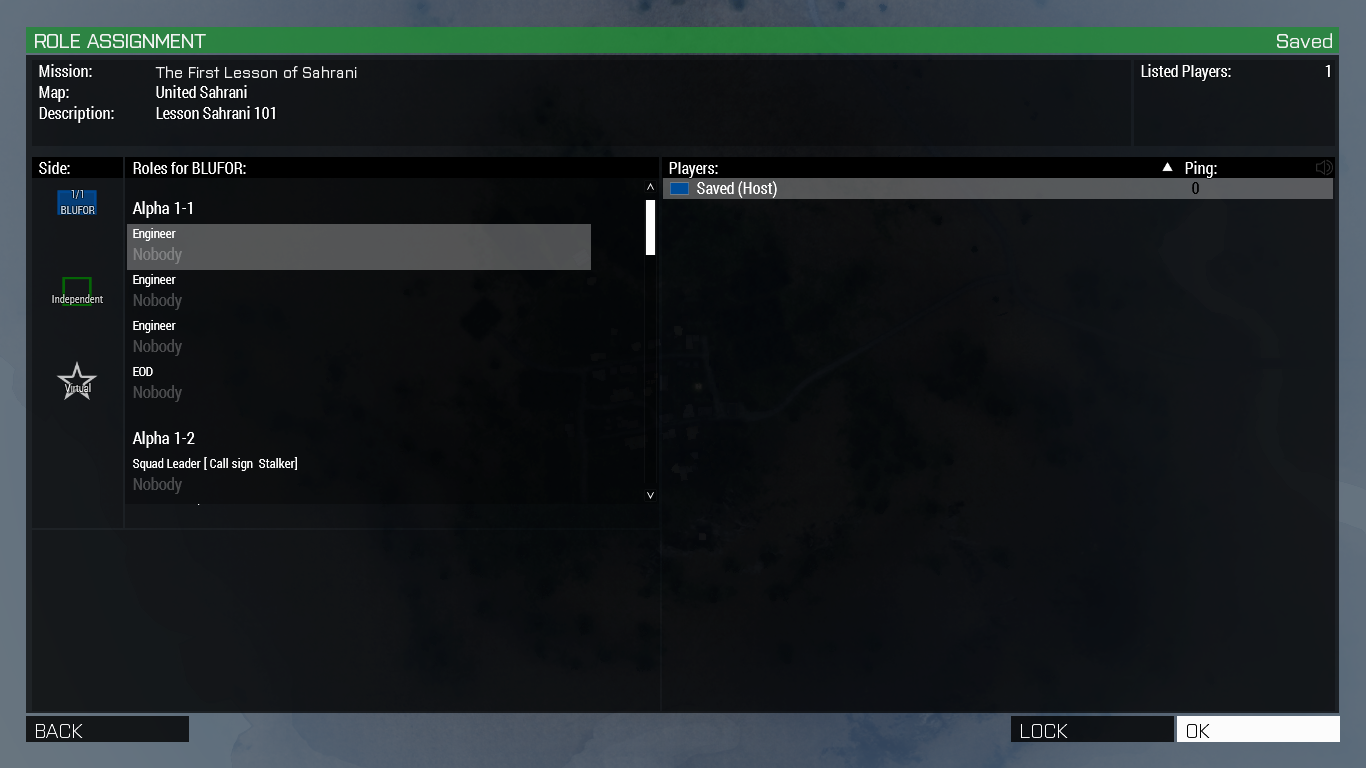 crisp rain
Ahh
I haven't come across anything similar yet
I think the loadout from capture and hold would probably be the closest, would have to see how it works and then build up something new.
west karma
Groups and limited loadouts
OR groups, spawn everyone as unarmed and then have squad equipment boxes
solar shard
west karma
I just typed up what other people said to do haha the peeps here like <@72132017...
And I just did what ex0 and the others here explained to me! All credits to the folks!
crisp rain
I have something similar on my list herbiie so if I get to it before someone has a solution ill let ya know what I find
vast oar
i followed sneaky's guide and made a mission, i can sorta make missions now. still need to figure how to create limited loadouts so there can only be like 1 machinegun and 1 grenadier per team
i dont like squad equipment boxes. i hate people spending 15 minutes RP dressing up at the start of an op, what a waste of everyone's time
in A3 we create templates in advance with all the correct slots and loadouts and outfits, you just pick your slot and ready to go
west karma
Speaking of @exotic reef :
https://github.com/Herbiie/ArmAReforgerMissionMakingGuide/issues/1
Was IsAlive defined in SCR_BaseTrigger or was it defined in the building trigger type I was using before?
If the latter could someone go in and grab the code for IsAlive from the Compaign_BuildingTrigger so I can add it to this script for the tutorial - I'm back on barracks atm so have no access
GitHub
Hi I have been following your Mission Making tutorial and got to the script section for ending the mission. following the instructions when Validating the code i get an error on the "overr...
west karma
vast oar
i dont like squad equipment boxes. i hate people spending 15 minutes RP dressing...
100% agree but if the choice is that or nothing then idk. There will be a way to do limited loadouts though because this is reforger, maybe in the RespawnMenu or the LoadoutManager
solar shard
vast oar
in A3 we create templates in advance with all the correct slots and loadouts and...
Yeah, virtual arsenal always feels like a cheat room.I’m a fan of either respawn Loadouts which already is implanted or persistent inventories.
vast oar
our thing looks like this https://i.imgur.com/pybHarP.png and when you die and if its not a one-life op, then you just respawn with the same loadout (fresh). makes it fast and whoever is leading an op can see what he got and he lacks, rearrange people before they fuck off to play dress up
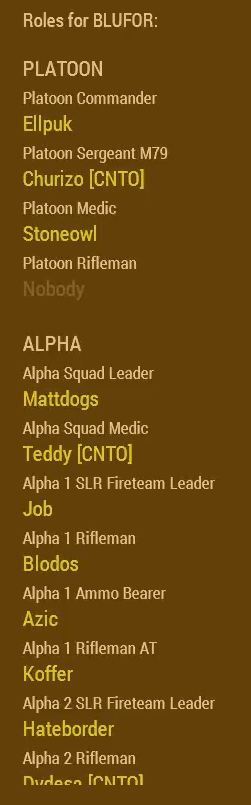
guess we'll have to wait for actual programmers or BI to help figure this out.. it definitely requires a UI element where you see a list of this sort and ability to click in and out of roles, etc
west karma
I suspect the way it will be is somehow finding out what loadout everyone in the group has so you join the group and select the SL loadout and boom you're SL
crisp rain
herbiie ill check if the script validates on my end in a minute here
west karma
Maybe add to the tag manager something to display your loadout with it
west karma
crisp rain
herbiie ill check if the script validates on my end in a minute here
Cheers bbz
solar shard
Well avid coders are providing more and more GUI stuff in #enfusion_scripting and folks like @sullen talon are here not just to support us but also to study what we need the most I guess.
Early access is just a week. We have to patient and creative.
west karma
Indeed!
crisp rain
I posted on the github issue
 ruby basin
Hey, does anyone know how I can remove the soviet faction from the conflict gamemode and only have it as PVE?
ruby basin
ruby basin
Hey, does anyone know how I can remove the soviet faction from the conflict game...
I found it
solar shard
ruby basin
Hey, does anyone know how I can remove the soviet faction from the conflict game...
For the search: faction manager -> isPlayable
ruby basin
solar shard
For the search: faction manager -> isPlayable
Thanks, also another question is game master included in conflict or do I need to add it?
solar shard
thats another gamemode afaik. altough you can use it while testing maps out of the editor which is very useful to observe your scripts, AIs or triggers once you have changed the default "esc" binding in the workbench settings -> world editor
maybe you can add the corresponding component to your own gamemode. dont know
ruby basin
Thanks again, Ill take a look at it
barren heart
@solar shard Big thanks for making me realise I can rebind exit play mode.
solar shard
lol
crisp rain
Are you talking about using Esc to access game master?
solar shard
my moment of glory between all this Pros here 😄
crisp rain
Also these food usernames and I haven't eaten lunch yet D:
barren heart
😄
solar shard
crisp rain
Are you talking about using Esc to access game master?
sort of. I use ESC SHIFT to leave game testing. So I can use ESC to reach GM
crisp rain
You can use Y(hold) to access it in game
magic oasis
I use Esc all the time to back out of inventory etc. I totally need to rebind that in Enfusion
crisp rain
I did a couple of times and left the editor but that punishment helped my brain understand to just use TAB
solar shard
crisp rain
You can use Y(hold) to access it in game
yeah but, was @magic oasis said, there or enough reasons to rebind it 😄
crisp rain
oh yeah probably other reasons to do it
I should rebind mine to shift+esc while im thinking of it
steady nimbus
@crisp rain I'm following your tutorial on YouTube, I'm just starting with this editor and I'm having problems with my game mode as Plain, Greenfor is always neutral/unresponsive and when I put single units instead of groups they're always static no matter the faction. Any ideas?
crisp rain
If you place a single unit (not from a group) you need to go into the components and check the 'enable ai' box. That's why I just use groups and then alter them as I see fit
steady nimbus
Perfect, thank you, what about green as a neutral unresponsive faction? Same process?
west karma
@crisp rain Thanks for that, I am glad it wasn't me haha
Though I should really have clocked that, didn't need to be at my PC for it haha
crisp rain
Umm. As for green being neutral im not positive because I actually haven't placed them. , I am done with work in ~1hr and I can check and get back to you after some troubleshooting
@west karma It's fine, you said you don't really code so it would have been hard to notice what was going wrong with that script he posted + the error messages. Essentially he was going to starbucks to order a pizza (using a function that didn't exist in the class he inherited from)
magic oasis
crisp rain
If you place a single unit (not from a group) you need to go into the components...
That could be the key to unlocking my problem with using a single dude on a static.
west karma
Ikr should've followed the guide! Has pictures and everything 😛
I don't code at all. Literally the only code I know is SQF from ArmA 3. Tempted to look into c# or c++ basics, whichever it is enfusion is based on
crisp rain
c# is really close, I do plan to make a beginner series on EnScript but itll be a couple weeks before its all together.
@magic oasis hope it fixes your problem :D
solar shard
west karma
Ikr should've followed the guide! Has pictures and everything 😛
I don't code a...
this. thats me!
west karma
I really wish there was local hosting so I could play with a small group without needing to have a dedicated server
solar shard
true true
crisp rain
Probably something to come in the future, it was really nice in arma3 just 2 minutes you could throw up a mission from your pc
west karma
Ye
Has anyone tried setting groups to be playable? Seen that button but not touched it
steady nimbus
crisp rain
Umm. As for green being neutral im not positive because I actually haven't place...
I appreciate that
narrow path
Why cant i see my mission in my scenarios list, ive done what the pin says got it in a diffirent folder not using placeholder images not sure what im missing?
crisp rain
Is the folder within your addon called 'Mission' or 'Missions'?
narrow path
missions
crisp rain
Did you copy your addon into a new folder that was used in the launch params? If so make sure you copied the latest version of your mission
narrow path
yeah before i started making a mission, i saw people having issues with the original place that it saved to, so I move the default to C:\Mission\MeauxCapture . So it will be the latest version
then in launch params i have this -addonsDir "C:\Mission" -addons MeauxCapture
crisp rain
The most common problems seem to be using 'Mission' instead of 'Missions' within their addon, config problem (not changing from default .edds for example). Other than that it's hard to go through everything. I suggest trying to make a new project with bare minimum (just base world and sub scene) then setup your config and try to get that to show up in your scenarios list
mental cove
So im still having a problem with getting tasks to work on a dedicated server, they show up just fine in single player and in the editor. They are also completable on the server so im suspecting this is a UI thing, has anybody had something similar?
steady nimbus
mental cove
So im still having a problem with getting tasks to work on a dedicated server, t...
I'm still trying to figure out how to make it work in the editor lol
mental cove
perhaps related, though the icons are still visible when playing

 nocturne mist
What is a EnvironmentProbeEntity?
magic oasis
crisp rain
c# is really close, I do plan to make a beginner series on EnScript but itll be ...
my gunners now gun. thanks 🙂
 digital knot
I might have missed the tip if anyone already asked, but is there a way to test a scenario in multiplayer without publishing it on the Workshop ?
It seems the dedicated server can only load mods from the workshop, contrary to the Reforger client
But for now, player-hosted game are not a thing, yet
crisp rain
You can use the 'PeerTool' within the editor
@steady nimbus I am going to take a look now at your problem, give me a few. @magic oasis glad to hear it!
digital knot
crisp rain
You can use the 'PeerTool' within the editor
Game > Play game > Localhost + PeerTool ?
is that supposed to allow friends to join me ? Because it seems I can't even find a valid server on localhost, default port
might have something to do with Defender though
crisp rain
No it opens up a new window for each client so you can tab between them
digital knot
I'm afraid I don't understand
oooooh might need to install the dedicated server tool
that's why nothing happens
 fervent fractal
Is it possible to recreate missions like Antistasi, Liberation, H&M... in this new engine?
steady nimbus
crisp rain
<@168164084561346561> I am going to take a look now at your problem, give me a ...
Thanks, I noticed that when you choose SCR_FactionManager, the only one that comes with all 3 factions is the one already included on GameMode_Editor_Full
All the other have US and Russia or no factions
left lava
fervent fractal
Is it possible to recreate missions like Antistasi, Liberation, H&M... in this n...
Yeah i think
crisp rain
@steady nimbus ---mayyyybe---- let me test something in a fresh mission
magic oasis
Anyone feel like giving me a lesson on creating a simple move task? I feel like im smashing my head against a wall 😦
crisp rain
Like setting a waypoint in the editor for AI to move to when the game starts?
magic oasis
No, i got that OK. I'm struggling with creating any kind of task. Starting with a simple move task. Been trying to dissect the sample coop mission but I just can't et it to work
crisp rain
@steady nimbus ok just stick with the FactionManager_Editor for now, it looks like the FFA and USxUSSR managers don't like each other :P they're both essentially telling the game 'there is 1 faction' and the other is saying 'no there are 2' leading to an ocean spawn if you're blue/red
west karma
Can probably merge the scripts from the two or somesuch
crisp rain
FactionManager_Editor is a prefab with all 3 factions, so you could use that or just make your own prefab with all 3 factions listed in the object properties.
digital knot
prefabs are actually awesome. Even if I can't get to understand how most of them work, I can feel the complexity one can reach by using these
magic oasis
OK, i got move tasks working. Though I feel like i just chucked poo at the wall until something stuck!
crisp rain
It's very nice, you just build something and go 'well I might use this again so I can save all of these custom settings/orientation' and just drag it into the project as needed
razorclam nice job! That's how it works, we just keep slinging until it sticks :P
magic oasis
oh snap!! so i jst drag the instance to the resource browser to create a prefab!!
crisp rain
:)
 barren lava
Has anyone figured out how to get AI to use vehicles? The GetIn waypoint works just fine, but they immediately leave the vehicle to complete their other waypoints.
crisp rain
Easy as 1, 2, 3 to create a prefab #enfusion_scenario message
@barren lava AI haven't taken their drivers ed course yet
barren lava
lol, well that's a shame.
magic oasis
well.. making my own prefab of a camp fire grouped with a burning particle effect and then putting it in a folder call compositions was my Enfusion peak!.......... Until i found out the camp fire comes with a action to light it..... oh well.... on to the next one.....
steady nimbus
crisp rain
<@168164084561346561> ok just stick with the FactionManager_Editor for now, it l...
hahha yeah I was stuck there all day, I'm using _editorfull for now, just need practice now
crisp rain
Nice, well glad its solved so you can move on to something else now :D
steady nimbus
learning curve here is insanely slow lmao
crisp rain
We all have different learning curves but the good thing is we also have plenty of time. There is no deadline or rush!
barren heart
Hmm if you don't use spawn immediately on groups and instead call SpawnUnits() say via a trigger.
Each time its called it adds whatever units were set for the group to the group, again and again.
Could be useful to someone, say if you wanted to increase AI group size based how many players were in the trigger defending?
Whereas for me I just have way too many generals on the beach now 😐
narrow path
How do i get my server to load my cuztom mission? I have bundled it but everytime i try and launch it it says game destroyed and closes the cmd, with no error log outputted.
crisp rain
id check #reforger_servers
narrow path
Yeah i asked in there some dude said increease log level then he dipped out and no one else has responded -_-
Like this is what i dont get, when you bundle a mission it converts most in to json and its supposed to create a serverdata.json and manifest json files but for my mission it does not but when downloading and opening the nightops mission it does. Like wtf is going on
 kind prairie
wish they kept the old mission making editor
 pale cedar
@barren heart Have you uploaded your mission file? I really would love a working example of a number of the things you did in your mission.
barren heart
@pale cedar I haven't yet, can do though if you'd like. I'm just about to finish removing some parts that were giving null errors in the editor.
I got a little prefab mad in places, they got nested, it got angry. After that you should be able to have an error free look 🙂
pale cedar
Cool, I liked your mission, and I'm interested in creating singleplayer mission, since the game could really use some.
Could you ping me if you upload the mission, thanks.
barren heart
Yeah will do, spoiler alert I wanted it to be two player coop but some of the code I wrote gave me a few worries about how well it would function.
So its probably best you wanna make SP at least until I work out how I'm gonna test multiplayer stuff. 😛
pale cedar
Well, I guess if turned out as a happy accident
barren heart
@pale cedar Right here is the current version I'm about to hit publish on. There is still an error if you go down into the prefab folder. Apparently it just doesn't like AI groups in prefabs so just hit ignore.
https://github.com/Biscuits101/ATG
GitHub
Assassinate General Makarov: Arma Reforger Mission - GitHub - Biscuits101/ATG: Assassinate General Makarov: Arma Reforger Mission
crisp rain
Nice dude, ill give it a try tonight :D
proud sorrel
Okay, after teasing it a ton, The COMPLETE Guide to Making Custom Missions in Arma Reforger IS OUT!
I put 12 hours planning, recording, & editing, this video will show everything you need to know to make and publish a custom coop mission
I hope it helps! If it did, drop a 👍 to help spread to more folks so we can get some more AWESOME missions on the workshop!
ALL of the Resources for this tutorial: https://hq.uselessfodder.com/p/how-to-make-missions-in-arma-reforger.html
Buy awesome tactical games: https://nexus.gg/UselessFodder
Join in future operations: https://discord.gg/UselessFodder
Support the channel and community: https://patreon.com/UselessFodder
This is a COMPLETE guide to making a custom ...
pale cedar
@barren heart Thanks man. 👍
lean scroll
@west karma been trying to follow your guide, works perfect until you tell us to copy the endgamemode user script over
zero success with trying to figure out how to get those scripts to work
crisp rain
@lean scroll You're copying the script in and the game doesn't end? What specifically is the problem you're experiencing?
lean scroll
no the workbench wont even validate
crisp rain
Can you paste your script in here, use 3 of these ` before and after to format the code
lean scroll
i am actually watching your video now sneaky
so ill come back to it once im finished
hang on ill post the script in his documentation
Pastebin
Pastebin.com is the number one paste tool since 2002. Pastebin is a website where you can store text online for a set period of time.
crisp rain
gotcha, you can skip to the 'game end logic' timestamp as thats exactly where I start adding the script
Just want to make sure you didn't repeat this mistake, a few people put the wrong trigger in on accident https://github.com/Herbiie/ArmAReforgerMissionMakingGuide/issues/1

GitHub
Hi I have been following your Mission Making tutorial and got to the script section for ending the mission. following the instructions when Validating the code i get an error on the "overr...
lean scroll
ah you know what this is it
crisp rain
No worries, I posted a solution at the bottom of that post or you can just follow the video to verify the right trigger and you'll be all set!
lean scroll
yeah validates fine now, thanks sneaky! your video is awesome too thanks for all the hard work
crisp rain
Hey you're welcome, glad we could solve the problem. and thank you :)
crisp rain
@barren heart Mission complete  Only feedback so far would be to spread out the enemies down by the beach area a little bit, there were so many wandering the road together lol.
barren heart
You're not wrong, they even cause each other traffic jams lol. I'll take a look tomorrow, I think I'd just discovered the cycle waypoint in that area and was just happy to see them moving around at the time 😛
crisp rain
Overall great starting point!
 dense wagon
For SCR_CaptureArea, has anyone figured out how to link it to a polyline?
 slate garnet
Has anybody figured out the equivalent to triggerActivated?
proud sorrel
slate garnet
Has anybody figured out the equivalent to triggerActivated?
I was looking for this earlier, too. I think the base triggers don't actually track whether they've been activated.
slate garnet
proud sorrel
I was looking for this earlier, too. I think the base triggers don't actually tr...
Yeah, I can't seem to find any resources on it. Which is a shame, wanted to endMission when all conditions were met. Nothing that can't be solved with clever design though.
proud sorrel
slate garnet
Yeah, I can't seem to find any resources on it. Which is a shame, wanted to endM...
I think you would have to define a new object type with that as an object variable
(Sorry if bad terminology. C# isn't my thing)
slate garnet
s'alright, it's really not mine either.
solar shard
barren heart
Yeah will do, spoiler alert I wanted it to be two player coop but some of the co...
Welcome to my wild world. Rebuilding the mission from scratch since two days again and again thanks to null pointers all the time and MP issues with the “Coop framework”.
One thing I can’t figure out and I’m hearing from others too, when using @sullen talon coop framework based on the Eden.et world, the tasks won’t work after restarting the editor. If you move / replace then it works till next restart.
 GUI       (E): ImageWidget::LoadImageFromSet can't load ImageSet 'UI/Imagesets/Tasks/Task_Icons.imageset'```

That won’t happen if you build your own world. It has to conflict with the eden.et as the “weather manager” does too btw. That’s why in coopSample everything works flawless I guess. Only work-around is to place a “baseTaskManager” as @mental cove figured out. That way it works in SP but not MP at all.TaskManager must be above Tasks in terms of layers, ideally move all sorts of managers to the too (layers can help)
solar shard
sullen talon
TaskManager must be above Tasks in terms of layers, ideally move all sorts of ma...
@sullen talon thats my hirachy right now. TaskManager is above the tasks as you mean, right?
But should be the "EDEN" sub-world of eden.et BELOW my NightOps layers to prevent the weather daytime conflicts we all see here all the time? That would explain SO MUCH (and I would love you even more) 😄
 vast oar
@proud sorrel is the video worth checking if already followed some other guide for example Sneaky's? based on the timestamps it seems to be covering the same topics
magic oasis
sullen talon
TaskManager must be above Tasks in terms of layers, ideally move all sorts of ma...
Id be interested to know why that needs to be like that?
@solar shard picking apart you mission has helped me a lot. 🙏
sullen talon
solar shard
<@261877528057085952> thats my hirachy right now. TaskManager is above the tasks...
Do you by any chance have it duplicate? Eg. there could be one manager in some of the Eden layers
solar shard
magic oasis
Id be interested to know why that needs to be like that?
<@721320175504457740> ...
That was my Intension. And to proof as soon as possible that PvE can be a thing in reforger. FUBAR reddit 😂
It will be a little 3-Mission-Campaign I will update from time to time. No so complex as my Arma 3 NightOps missions obviously but meant to be picked a part. Sourcecode on GitHub will be released too.
solar shard
sullen talon
Do you by any chance have it duplicate? Eg. there could be one manager in some o...
There is the default one on the Eden.et where we created the sub-world from (as told in the C&H tutorial). We cannot remove or disable it since it keeps resetting itself after restart. That’s the thing we are struggling with.
We are discussing it here on a daily basis since all of us had this problem. But no long-term solution so far.
sullen talon
solar shard
We are discussing it here on a daily basis since all of us had this problem. But...
Check the components on the C&H game mode - there is one that sets the time and weather without the need of touching the entity. Not sure how I called it, probably something Time, Weather ish
magic oasis
solar shard
It will be a little 3-Mission-Campaign I will update from time to time. No so co...
I was looking at the script in the trigger to spawn the spawn points last night. I was like, oh shoot, I understand this! 😂
solar shard
sullen talon
Check the components on the C&H game mode - there is one that sets the time and ...
I will look into that later and if it works, I will contact @west karma & all the other tutorial writer about that. Thank you.
solar shard
magic oasis
I was looking at the script in the trigger to spawn the spawn points last night....
That credit goes mainly to @mental cove who just creates a universal, prefab-based one so we can use it on vehicles too and spawn points attached to vehicles. Will be in my next version.
magic oasis
How can I transfer a prefab to a new project?
solar shard
Custom one? There are in the corresponding folders
magic oasis
I tried to copy the file from the location to mine but I’m sure it didn’t work. Will check it out again.
solar shard
Or just copy my world into your one and jump between the worlds in editor. But that could cause other issues
sullen talon
solar shard
I will look into that later and if it works, I will contact <@213027352379260929...
Yeah, we used it in the official addon, so it should work and if you want to do some custom magic you can get inspired there
lean scroll
Is there any sort of mission brief/map objective/hints system?
magic oasis
solar shard
Or just copy my world into your one and jump between the worlds in editor. But t...
I just take screenshots of everything then replicate it in my world. That’s basically how I’ve been learning.
rotund glade
lean scroll
<@213027352379260929> been trying to follow your guide, works perfect until you ...
N.B. Make sure you are using SCR_BaseTriggerEntity and not another entity such as BaseGametriggerEntity. SCR_BaseTriggerEntity has certain functions predefined that are used in the script. Using another entity type will not work.
solar shard
sullen talon
Yeah, we used it in the official addon, so it should work and if you want to do ...
I will look into that, thank you! Right now I spend my lunch-break with a thing, Im messing since days. I tried to replicate your code of the uaz destroy logic, to finish tasks in other triggers or actions on my own, but having a hard time with it. Thas basically my code for example in a userAction, which for itself and to send the mission, works fine:
    override void PerformAction(IEntity pOwnerEntity, IEntity pUserEntity)
        {

        SCR_EditorTask task = SCR_EditorTask.Cast(pOwnerEntity.GetWorld().FindEntityByName("obj_primaryTsk_1"));
        GetTaskManager().FinishTask(task);


        SCR_PopUpNotification.GetInstance().PopupMsg("COM TRUCK CAPTURED");

        SCR_BaseGameMode gameMode = SCR_BaseGameMode.Cast(GetGame().GetGameMode()); // Get the game mode for the end script
        Faction faction = GetGame().GetFactionManager().GetFactionByKey("US"); // Get the winning faction Key
        int usIndex = GetGame().GetFactionManager().GetFactionIndex(faction); // Get the winning faction key's index
        gameMode.EndGameMode(SCR_GameModeEndData.CreateSimple(SCR_GameModeEndData.ENDREASON_EDITOR_FACTION_VICTORY, -1, usIndex)); // End the mission!
    }```

But thats, what crashes the game when actually doing it:

```NULL pointer to instance
Class:      'SCR_CaptureVehicle'
Function: 'FinishTask'
Stack trace:
Scripts/Game/Tasks/SCR_BaseTaskManager.c:709 Function FinishTask
Scripts/Game/Coop/SCR_Capture.c:9 Function PerformAction
Scripts/Game/Interactions/SCR_InteractionHandlerComponent.c:152 Function DoProcessInteraction
Scripts/Game/Interactions/SCR_InteractionHandlerComponent.c:509 Function OnPostFrame```theres lots of guides showing the same stuff - open eden.ent, create a sub-scene, add some logic to it, perception, AI, loadout, etc etc. seems rather pointless after you do it once... should just make it once and export, then use it as a base for all future missions 🤔
i mean it should maybe even exist built-in the workshop as a template because its always the same. the only time it will change is when a new map is added, so you load a different map
solar shard
vast oar
theres lots of guides showing the same stuff - open eden.ent, create a sub-scene...
That was the very first thing I did after setting all up. Dubbing the world as a template.
vast oar
nice did you find a convenient way to have it saved and reused as a template?
im thinking if i just save it, once i reload it it will continue from where i left it and overwrite the template-ness of it... i guess you just copy-paste the entire folder and back it up somewhere?
random heart
Could'nt you create a prefab with the said logic ?
solar shard
Exactly that. For example, in my NightOps mod, I have a world folder and in it folders for every mission. I just have a mission_0 with just a subbed world, all it’s layers and managers which I use for all missions.
I could store all managers in a prefab or as a child-node, but in my way all layers and comments are there too.
vast oar
if i download NightOps will i be able to load it in workbench and see this structure?
btw i played NightOps a few days ago, it was creating an endless amount of respawn points not sure if youre aware of this bug or maybe even already fixed it
solar shard
the 2 days old version is very buggy. Im redoing it from scratch right now. Maybe can upload it tonight. The respawn thing and the unstable task framework are the most urgent things I aim to fix.
but yes, you can download it from github and load it in the workbench. Its just not the perfect version right now as you already figured out.
GitHub
Test- and Demo-Environment of Arma Reforger coop scenarios - GitHub - Zealous666/AR_NightOps1985: Test- and Demo-Environment of Arma Reforger coop scenarios
vast oar
ive never opened an ongoing project need to figure it out. i mean i add the .gproj file to the workbench and load it, but it loads up empty as if i just loaded a completely brand new unnamed empty world 🤔
ok i think i got it. load the .gproj file and then doubleclick the .ent file in Worlds
weird though.. whats the point of loading the .gproj if you still have to go search for the files... shouldnt it just load you straight into where the project was saved?
solar shard
sullen talon
Check the components on the C&H game mode - there is one that sets the time and ...
that would make C&H a dependency for that mod just cause of one module, or do I miss something here?
 lavish granite
Is there a way to make a coop mission without the C&H module? More like old school one life only missions, slotting screen and all?
solar shard
lavish granite
Is there a way to make a coop mission without the C&H module? More like old scho...
ofcourse
solar shard
sullen talon
Check the components on the C&H game mode - there is one that sets the time and ...
Do you mean by any chance that? That doesnt seem to be so detailed as the weather manager.
 sullen talon
solar shard
Do you mean by any chance that? That doesnt seem to be so detailed as the weathe...
sullen talon
solar shard
Do you mean by any chance that? That doesnt seem to be so detailed as the weathe...
Yes, peek into it to see how it's implemented - it's fairly simple
solar shard
Well maybe I miss something but it looks to simple. I love the things I can setup detailed in the time weather manager
But I will give it a chance and find out how to configure a custom Id. Thanks 🙂
sullen talon
solar shard
Well maybe I miss something but it looks to simple. I love the things I can setu...
Check the API in the component
solar shard
sullen talon
Check the API in the component
Roger That
solar shard
vast oar
ive never opened an ongoing project need to figure it out. i mean i add the .gpr...
If you wait around 24hours I can provide you are more stable and streamlined solution with the newest GitHub commit. @lavish granite and it’s without c&h
vast oar
im waiting. id love to see a well made template for mission making
mine is very very basic, basically it just has the mandatory components like sides, perception, ai, etc. really the most basic mandatory stuff that must be added into every mission
solar shard
Well it’s not as perfect and complex as the Arma 3 stuff we provide but thanks to ex0’s patience we are making progress 😂
lavish granite
Awesome, thanks!
mental cove
sullen talon
TaskManager must be above Tasks in terms of layers, ideally move all sorts of ma...
I just did this (Deleted a disabled baseTaskManager object and moved my custom task manager to a new layer) And now my mission enters an infinite loading screen when playing through the actual game and not in the editor
rotund glade
solar shard
If you wait around 24hours I can provide you are more stable and streamlined sol...
I'll just jump in the convo here. Basically you update the "NightOps" and we can nip the base features for a standard Co-Op, save it as a new prefab then?
Words came out a bit quickly there, but you might still know what I mean
solar shard
rotund glade
I'll just jump in the convo here. Basically you update the "NightOps" and we can...
Yep that’s my Intension. I have put the basic coop stuff in my first misssion (which needs urgent bug fixes actually) like custom Loadouts, dynamic enemy spawn, additional Respawns on the fly or different task variants.
Will do 1-2 more missions with SLITLY more complex approaches. I upload it on GitHub on a regularly basis since last week.
But I’m no avid coder and no official game designer. So don’t expect too much.
mental cove
Ok so I fixed the infinite loading screen, (had a reference to a file i deleted), but still no tasks in mp
rotund glade
solar shard
But I’m no avid coder and no official game designer. So don’t expect too much.
Nor am I. But after the ease in Eden in A3 I am struggling to get every asset needed into every mission, eeeevery time......
But yes... Cheers m8.
solar shard
@mental cove btw I noticed, when disabling a prefab not via its own "enabled" tickbox but via the "disabled" flag in GENERAL, most time editor crashes with the most prefabs if you want them edit later on.
solar shard
sullen talon
Check the API in the component
I isolted that scriptpart where time and weather is defined and wrote my own little one. Added as a component to my own coop gamemode, but nothing happens. Time is still the default one. Either cause my script never kicks in or while the daytimemanager from the eden.et (which we cannot get rid of) overwrites it I guess?

[ComponentEditorProps(category: "GameScripted/GameMode/Plain", description: "Manager component allowing to adjust custom time and weather")]
class SCR_CustomTimeManagerClass : SCR_BaseGameModeComponentClass
{
}

//------------------------------------------------------------------------------------------------

class SCR_CustomTimeManager : SCR_BaseGameModeComponent
{
    //! Manager singleton instance, assigned on first get call
    private static SCR_CustomTimeManager s_pInstance;


    [Attribute("30", UIWidgets.Slider, "Duration in seconds after which session is terminated when game ends.", params: "0 60 0.01", category: "CaptureAndHold")]
    protected float m_fEndGameDuration;

    //! If enabled custom weather Id will be used on session start. Authority only.
    [Attribute(defvalue: "0", desc: "If enabled, custom weather Id will be used. Authority only.", category: "CaptureAndHold: Environment")]
    protected bool m_bUseCustomWeather;

    //! Weather IDs are the same as used in the TimeAndWeatherManager. Weather set on game start. Authority only.
    [Attribute(defvalue: "", desc: "Weather IDs are the same as used in the TimeAndWeatherManager. Weather set on game start. Authority only.", category: "CaptureAndHold: Environment")]
    protected string m_sCustomWeatherId;

    //! If enabled custom time of the day will be used on session start. Authority only.
    [Attribute(defvalue: "0", desc: "If enabled, custom time of the day will be used. Authority only.", category: "CaptureAndHold: Environment")]
    protected bool m_bUseCustomTime;

    //! Time of the day set on game start. Authority only.
    [Attribute(defvalue: "12", desc: "Time of the day set on game start. Authority only.", category: "CaptureAndHold: Environment", params: "0 24 0.01")]
    protected float m_fCustomTimeOfTheDay;```
    //------------------------------------------------------------------------------------------------
    /*!
        Forcefully sets weather to provided weatherId. Authority only.
    */
    protected void SetWeather(string weatherId)
    {
        if (!m_pGameMode.IsMaster())
            return;

        if (weatherId.IsEmpty())
            return;

        TimeAndWeatherManagerEntity weatherManager = GetGame().GetTimeAndWeatherManager();
        if (!weatherManager)
        {
            Print("Cannot initialize weather: TimeAndWeatherManagerEntity not found!", LogLevel.WARNING);
            return;
        }

        weatherManager.ForceWeatherTo(true, weatherId, 0.0);
    }

    //------------------------------------------------------------------------------------------------
    /*!
        Forcefully sets time of the day to provided value. Authority only.
    */
    protected void SetTimeOfTheDay(float timeOfTheDay)
    {
        if (!m_pGameMode.IsMaster())
            return;

        TimeAndWeatherManagerEntity weatherManager = GetGame().GetTimeAndWeatherManager();
        if (!weatherManager)
        {
            Print("Cannot initialize TimeOfTheDay: TimeAndWeatherManagerEntity not found!", LogLevel.WARNING);
            return;
        }

        weatherManager.SetTimeOfTheDay(timeOfTheDay, true);
    }

    //------------------------------------------------------------------------------------------------
    /*!
        Initialize the manager.
    */
    protected override void EOnInit(IEntity owner)
    {
        super.EOnInit(owner);

        if (m_bUseCustomTime)
            SetTimeOfTheDay(m_fCustomTimeOfTheDay);

        if (m_bUseCustomWeather)
            SetWeather(m_sCustomWeatherId);
    }
}```Does anyone know what causes this error
RESOURCES (E): Failed to load metafile of mission config image:
DEFAULT   (E): Cannot copy image:
RESOURCES (E): Creating bundle failed`
``` Trying to bundle my mod and keep giving me this errordid you try delaying the call a bit?
solar shard
iron hollow
did you try delaying the call a bit?
talking to me? I would not know how to do it. Have no clue what Im doing here nor about the scripting language ^^
proud as fuck just to isolate the righ script part 😉
pliant rock
ruby basin
Does anyone know what causes this error
```
RESOURCES (E): Failed to load meta...
are you using .edds files that are not part of your mod? If yes, import images into your mod and use those
solar shard
ruby basin
Does anyone know what causes this error
```
RESOURCES (E): Failed to load meta...
images have to be in your project folder, have to correct format and size
ruby basin
pliant rock
are you using .edds files that are not part of your mod? If yes, import images i...
I am yea, Ill give that a shot and see
pliant rock
ah, also the size is important, was a very crude one
iron hollow
solar shard
talking to me? I would not know how to do it. Have no clue what Im doing here no...
yeah, might want to use PostInit aswell over EOnInit
GetGame().GetCallqueue().CallLater(<SomeMethod>, 1);
pliant rock
ruby basin
I am yea, Ill give that a shot and see
Size needs to be 576x234
barren heart
@solar shard I just tried the
        weatherManager.SetTimeOfTheDay(3.0, true); ```

Nothing, then I disabled my time and weather manager so only the default eden one exists and now it workswait two seconds.
-
where did you put those codelines in. At the end?
-
so you only have the default one from eden inside now it works? Thats exactly what I want to achieve since own placed ones conflicts the whole time with the default one we are forced to use
ah I think I get about point 1
you put it two times in at the currect getters
barren heart
- yep looks like GetTimeAndWeatherManager() can grab the wrong manager
- I just shoved them in my task assignment section for testing since I know it gets called reliably
solar shard
hmmm, didnt worked for me. I only have the default weather manager in the eden.et and this is my current code:
[ComponentEditorProps(category: "GameScripted/GameMode/Plain", description: "Manager component allowing to adjust custom time and weather")]
class SCR_CustomTimeManagerClass : SCR_BaseGameModeComponentClass
{
}

//------------------------------------------------------------------------------------------------

class SCR_CustomTimeManager : SCR_BaseGameModeComponent
{
    //! Manager singleton instance, assigned on first get call
    private static SCR_CustomTimeManager s_pInstance;

    //! If enabled custom weather Id will be used on session start. Authority only.
    [Attribute(defvalue: "0", desc: "If enabled, custom weather Id will be used. Authority only.", category: "Environment: Weather")]
    protected bool m_bUseCustomWeather;

    //! Weather IDs are the same as used in the TimeAndWeatherManager. Weather set on game start. Authority only.
    [Attribute(defvalue: "", desc: "Weather IDs are the same as used in the TimeAndWeatherManager. Weather set on game start. Authority only.", category: "Environment: Weather")]
    protected string m_sCustomWeatherId;

    //! If enabled custom time of the day will be used on session start. Authority only.
    [Attribute(defvalue: "0", desc: "If enabled, custom time of the day will be used. Authority only.", category: "Environment: Daytime")]
    protected bool m_bUseCustomTime;

    //! Time of the day set on game start. Authority only.
    [Attribute(defvalue: "18", desc: "Time of the day set on game start. Authority only.", category: "Environment: Daytime", params: "0 24 0.01")]
    protected float m_fCustomTimeOfTheDay;```
/*!
        Forcefully sets weather to provided weatherId. Authority only.
    */
    protected void SetWeather(string weatherId)
    {
        if (!m_pGameMode.IsMaster())
            return;

        if (weatherId.IsEmpty())
            return;

             TimeAndWeatherManagerEntity weatherManager = GetGame().GetTimeAndWeatherManager();
        weatherManager.SetTimeOfTheDay(3.0, true);
        if (!weatherManager)
        {
            Print("Cannot initialize weather: TimeAndWeatherManagerEntity not found!", LogLevel.WARNING);
            return;
        }

        weatherManager.ForceWeatherTo(true, weatherId, 0.0);
    }

    //------------------------------------------------------------------------------------------------
    /*!
        Forcefully sets time of the day to provided value. Authority only.
    */
    protected void SetTimeOfTheDay(float timeOfTheDay)
    {
        if (!m_pGameMode.IsMaster())
            return;

             TimeAndWeatherManagerEntity weatherManager = GetGame().GetTimeAndWeatherManager();
        weatherManager.SetTimeOfTheDay(3.0, true);
        if (!weatherManager)
        {
            Print("Cannot initialize TimeOfTheDay: TimeAndWeatherManagerEntity not found!", LogLevel.WARNING);
            return;
        }

        weatherManager.SetTimeOfTheDay(timeOfTheDay, true);
    }

    //------------------------------------------------------------------------------------------------
    /*!
        Initialize the manager.
    */
    protected override void EOnInit(IEntity owner)
    {
        super.EOnInit(owner);

        if (m_bUseCustomTime)
            SetTimeOfTheDay(m_fCustomTimeOfTheDay);

        if (m_bUseCustomWeather)
            SetWeather(m_sCustomWeatherId);
    }


}
What do I miss here?
ruby basin
Thanks for the help @pliant rock and @solar shard, one last question is that how do I convert it into a edds, is there a tool in workbench or do I need to do in Photoshop?
solar shard
.edds are just renamed .tga actually. So photoshop is fine or just a png sending through a online tga converter is even enough
barren heart
@solar shard I dont see anything wrong with your code, unless your setting it to 3am then straight back to 6pm when the next section now works with the TimeAndWeatherManager now disabled. Maybe comment that bit out and recompile
solar shard
which part do you mean exactly, am I blind? where did you get that 3am?
tried several runs btw with different time. Its always those 09:10am from the eden default
ruby basin
solar shard
.edds are just renamed .tga actually. So photoshop is fine or just a png sending...
So save as tga then just rename it to a edds?
Thanks again
solar shard
ah maybe cause of that "authority only part" if its not gamemod gm return...
barren heart
//weatherManager.SetTimeOfTheDay(timeOfTheDay, true);```
So I meant comment out the second bit as maybe you were expecting night and getting day if both were working.
But if its reading 9 in game then I guess neither are working.
Maybe try shoving the top line somewhere you know for sure runs or add a breakpoint to see if its being reached@solar shard Is this how you test the time in game btw, its easier done in the day I take it lol.
 solar shard
lol. I just open the gamemaster and read it from the display. But I did your variant too just to make sure.
barren heart
Ahh that is much easier haha
solar shard
barren heart
<@721320175504457740> I just tried the
``` TimeAndWeatherManagerEntity weatherM...
Im still courious how you achieved that.
barren heart
@solar shard So this wont be too helpful but
    protected override void OnTaskUpdate(SCR_BaseTask task)
    {
        super.OnTaskUpdate(task);

        if (task.GetTaskState() == SCR_TaskState.FINISHED)
        {
            foreach (SCR_BaseTaskExecutor taskExecutor : m_aTaskExecutors)
            {
                AssignNextTask(taskExecutor);
            }
        }
    }```
```protected void AssignNextTask(SCR_BaseTaskExecutor taskExecutor)
    {
        foreach (SCR_BaseTask task : m_aInitialTasks)
        {
            if (!task)
                continue;

            if (task.GetTaskState() == SCR_TaskState.FINISHED)
                continue;

            // Setting the target faction invokes things so only do this when needed
            // IE due to completion of previous task and not a player joining the current task
            if (task.GetTargetFaction() != m_pTargetFaction)
                task.SetTargetFaction(m_pTargetFaction);

            // Assign the first task that is incomplete
            AssignTask(task, taskExecutor, false);

            // TESTING
            m_pTaskManagerUIComponent.ToggleCurrentTask(true);

            m_CurrentWaypoint = task;
            break;
        }

        TimeAndWeatherManagerEntity weatherManager = GetGame().GetTimeAndWeatherManager();
        weatherManager.SetTimeOfTheDay(3.0, true);

    }
ah I see
barren heart
I just shoved it in here, its ultimately called from the TaskManagers OnTaskUpdate so maybe this is an server master/authority thing and you component is the local player authority
solar shard
I totally misunderstood you. right
barren heart
I still have a very poor understanding of authority stuff in reforger atm, need to work out local dedicated servers from the editor so I can begin to wrap my head around it
solar shard
in the end this is meant like isServer?!
barren heart
@solar shard yeah, if I understand you right.
and this is from the method were trying to call.
    Sets the current time of the day.
    Only issuable by the authority.
    Automatically broadcast to all clients.```

So there is evidence for it needing to be from the authoritySo I made my images and save them as tga then renamed and now it's telling me Try reimporting the texture (.edds), but I can still open them in Photoshop as edds
solar shard
and did you do it? (right click on them in the workbench -> re-import
ruby basin
Now it just says Failed to load then the path, and re-import is greyed out
solar shard
barren heart
<@721320175504457740> yeah, if I understand you right.
and this is from the meth...
hmpf. So I tried everything. You proved, its possible to do via trigger etc. But Im not able to follow @sullen talon hint and use the C&H script to make my own one. Everyday here, I feel a little bit more dumb 😛
@barren heart once again, thank you for your kind support!
ruby basin
solar shard
and did you do it? (right click on them in the workbench -> re-import
I reimported them and even renamed them back to tga then imported them then renamed them in workbench and I still can't open them. That is what it's like in workshop, renaming them in there adds the .tga at the end and renaming them in the actual mod folder works but then they can't be read by workshop
 solar shard
I really dont know then but using another method to get the TGA if its a compressed file format. And you checked the sizes?
ruby basin
solar shard
I really dont know then but using another method to get the TGA if its a compres...
8.10 MB (8,501,555 bytes) for the tga, then when I rename it it goes to 1.04 MB (1,101,020 bytes)
solar shard
I mean the scale / resolution
ruby basin
720x960 and 576x234 right?
solar shard
I have actually used on both, PNG and EDDS the 576x234 but I dont think that this is the issue. Sorry that I cant help
ruby basin
solar shard
I have actually used on both, PNG and EDDS the 576x234 but I dont think that thi...
It's no problem, thanks for the help and insight anyway. Ill try and see what's going on and see if I can get it working
solar shard
@barren heart okay, final approach when trying to follow @sullen talon hint to use his C&H script:
[ComponentEditorProps(category: "GameScripted/GameMode/Plain", description: "Manager component allowing to adjust custom time and weather")]
class SCR_CustomTimeManagerClass : SCR_BaseGameModeComponentClass
{
}

//------------------------------------------------------------------------------------------------

class SCR_CustomTimeManager : SCR_BaseGameModeComponent
{
    //! Manager singleton instance, assigned on first get call
    private static SCR_CustomTimeManager s_pInstance;

    //! If enabled custom weather Id will be used on session start. Authority only.
    [Attribute(defvalue: "0", desc: "If enabled, custom weather Id will be used. Authority only.", category: "Environment: Weather")]
    protected bool m_bUseCustomWeather;

    //! Weather IDs are the same as used in the TimeAndWeatherManager. Weather set on game start. Authority only.
    [Attribute(defvalue: "", desc: "Weather IDs are the same as used in the TimeAndWeatherManager. Weather set on game start. Authority only.", category: "Environment: Weather")]
    protected string m_sCustomWeatherId;

    //! If enabled custom time of the day will be used on session start. Authority only.
    [Attribute(defvalue: "1", desc: "If enabled, custom time of the day will be used. Authority only.", category: "Environment: Daytime")]
    protected bool m_bUseCustomTime;

    //! Time of the day set on game start. Authority only.
    [Attribute(defvalue: "18", desc: "Time of the day set on game start. Authority only.", category: "Environment: Daytime", params: "0 24 0.01")]
    protected float m_fCustomTimeOfTheDay;```
/*!
        Forcefully sets weather to provided weatherId. Authority only.
    */
    protected void SetWeather(string weatherId)
    {
        if (!m_pGameMode.IsMaster())
            return;

        TimeAndWeatherManagerEntity weatherManager = GetGame().GetTimeAndWeatherManager();

        if (weatherId.IsEmpty())
            return;

        if (!weatherManager)
        {
            Print("Cannot initialize weather: TimeAndWeatherManagerEntity not found!", LogLevel.WARNING);
            return;
        }


        weatherManager.ForceWeatherTo(true, weatherId, 0.0);
    }

    //------------------------------------------------------------------------------------------------
    /*!
        Forcefully sets time of the day to provided value. Authority only.
    */
    protected void SetTimeOfTheDay(float timeOfTheDay)
    {
        if (!m_pGameMode.IsMaster())
            return;

        TimeAndWeatherManagerEntity weatherManager = GetGame().GetTimeAndWeatherManager();


        if (!weatherManager)
        {
            Print("Cannot initialize TimeOfTheDay: TimeAndWeatherManagerEntity not found!", LogLevel.WARNING);
            return;
        }

        weatherManager.SetTimeOfTheDay(timeOfTheDay, true);

    }

    //------------------------------------------------------------------------------------------------
    /*!
        Initialize the manager.
    */
    protected override void EOnInit(IEntity owner)
    {
        super.EOnInit(owner);

        if (m_bUseCustomTime)
            SetTimeOfTheDay(m_fCustomTimeOfTheDay);

        if (m_bUseCustomWeather)
            SetWeather(m_sCustomWeatherId);

        Print("Custom Weather Manager initialized");
    }

}```

Still not overwriting the default weather manager 😦If we can get this thing to work I guess we are all happy not to struggle with the weather management conflicts
barren heart
Let me steal that component and have a stab at it brb
ruby basin
@solar shard Got it to work, just needed to make the png then import the png and it made the edds for me and then just had to right click and re-import
crisp rain
If you guys don't figure it out by the time I am done with work I can take a stab at the weather problem
solar shard
crisp rain
If you guys don't figure it out by the time I am done with work I can take a sta...
That would be awesome! Actually my break is over and I’m at work too again. 😉
solar shard
barren heart
Let me steal that component and have a stab at it brb
I just created that component and added it to my gamemode as it is part of the original gamemode in c&h with no own weather manager placed in the scene (just the default one from Eden.et)
ruby basin
I am editing the conflict gamemode to only have US enabled as playable but everytime I save and start the mission Soviets are marked as playable again, anyone have any ideas on why this is happening?
 main tangle
ruby basin
I am editing the conflict gamemode to only have US enabled as playable but every...
main tangle
ruby basin
I am editing the conflict gamemode to only have US enabled as playable but every...
Quick question, how did you open the Conflict mission in Enfusion? I've been trying to open CTI_Campaign_Eden.ent and it crashes the editor pretty consistently once it loads to around 80%.
ruby basin
main tangle
Quick question, how did you open the Conflict mission in Enfusion? I've been try...
File -> Load World -> ArmaReforger -> MP -> CTI_Campaign_Eden.ent, can't say that It does that for me, just having saving issues for my changes I am attempting to do
main tangle
Huh, that's basically what I was doing. I'll fiddle around with it some more but at least I know it should be possible to open that file now.
sullen talon
ruby basin
``File -> Load World -> ArmaReforger -> MP -> CTI_Campaign_Eden.ent``, can't say...
Core data are read only. Find the campaign faction manager - right click - override (in your addon) - set the value there.
ruby basin
Yea I know what you mean now ex0 thanks for the help
May sound dumb but I guessing from what you told me, I don't need the world stuff or do I?
 wraith elm
I'm setting up a patrol of several waypoints for some AI, using a cycle waypoint to make sure they don't just stop when they get to the end. Is there a way to make them go back to the same waypoints in reverse order when they reach the last waypoint, or do I have to add the same waypoints in reverse to the list of waypoints to cycle?
barren heart
@solar shard Double and triple checking im not wasting anyones time but I think I've finally got it
And dont worry I took a long lunch break in the middle of banging my head off the wall 😛
solar shard
barren heart
And dont worry I took a long lunch break in the middle of banging my head off th...
Lunch is important!
proud sorrel
vast oar
<@145278694515146752> is the video worth checking if already followed some other...
It's pretty similar. I cover a lot of the nitty gritty details, so it might be worth putting on in the background while you work, but otherwise you're probably good to skip it
barren heart
@solar shard Here's the component, a small but very important section was missing. I understand components way better now though 😄
You can add it to any type of game manager and set its params
solar shard
Will look into this tonight. You earn a cake already! 🍪
barren heart
or ```class Night_Class: SCR_BaseTriggerEntity
{
override void OnActivate(IEntity ent)
{
SCR_ForceTimeAndWeatherComponent.GetActiveComponent().SetTimeOfTheDay(3.0);
}
};```
Directly activate via triggers etc, issues might happen with the trigger method in multiplayer though not tested it.
night jewel
heyo, can someone tell me how to run my own mission on my dedicated server?
I have a server where steamcmd runs, but my mission/mod is missing the ServerData.json filei....
that's all I have:
 lean scroll
did you bundle it in workbench?
 west karma
lean scroll
<@213027352379260929> been trying to follow your guide, works perfect until you ...
west karma
lean scroll
<@213027352379260929> been trying to follow your guide, works perfect until you ...
Should give you an error and tell you what's not validating?
crisp rain
@west karma I helped him out and got it resolved, wrong trigger
west karma
But I put it in bold 😢
night jewel
@west karma btw I created the mission with your instructions on Github, but I can't find a way to get it to work on my server.
As a mod I can add it but that does not work unfortunately
west karma
night jewel
<@213027352379260929> btw I created the mission with your instructions on Githu...
I've not done any server work sorry
night jewel
😦
west karma
I haven't even actually tested my tutorial in MP... just assumed it worked
crisp rain
I'm working on a server tutorial, should be up by friday
night jewel
haha sad tho xD I can't test it either because my server doesn't recognize it as a mission xD
lean scroll
west karma
But I put it in bold 😢
herbie i must have had an older version up
so not your fault man
you updated it i see that
thanks for the guide btw its a great resource
solar shard
barren heart
<@721320175504457740> Double and triple checking im not wasting anyones time but...
works flawless and I see what you changed to my approach. Will be implemented in the coop gamemanager I provide with the nightops map for everyone
thank you very much for your support!
sullen talon
barren heart
or ```class Night_Class: SCR_BaseTriggerEntity
{
override void OnActivate(I...
TimeAndWeather should replicate itself, but time and weather can only be set from the authority (for example the server).
west karma
crisp rain
I'm working on a server tutorial, should be up by friday
Is there anything mission making side that you need to do to make it work on the server?
barren heart
@sullen talon Yeah I noticed it said "Sets the current time of the day. Only issuable by the authority. Automatically broadcast to all clients.".
Just not 100% yet what clients are going to run on various entities etc yet. I'm sure it'll make more sense when I test things on the server.
solar shard
proud sorrel
It's pretty similar. I cover a lot of the nitty gritty details, so it might be w...
Request: make the video about setting up your own dedicated server hosting your own custom mod 😂
sullen talon
barren heart
<@261877528057085952> Yeah I noticed it said "Sets the current time of the day. ...
It's dropped on clients automatically, as they don't own the trigger, so it shouldn't be a big deal
solar shard
sullen talon
It's dropped on clients automatically, as they don't own the trigger, so it shou...
Speaking of that. You commented the weather system used the same IDs as the manager. But can’t find there any IDs…
sullen talon
solar shard
Speaking of that. You commented the weather system used the same IDs as the mana...
 proud sorrel
solar shard
Request: make the video about setting up your own dedicated server hosting your ...
proud sorrel
solar shard
Request: make the video about setting up your own dedicated server hosting your ...
Thatd the next one coming 
solar shard
sullen talon
Yeah I studied that window. But what IDs? I’m blind 😂
barren heart
@solar shard try cloudy, rainy, clear and overcast I think
Oh and the rainy one has sound when done this way 😄
solar shard
iD == state ?
solar shard
barren heart
Oh and the rainy one has sound when done this way 😄
Combined with the Rain prefab. Wohooo. Finally 🥳
sullen talon
I think it's these ones 🤔 
 solar shard
sullen talon
I think it's these ones 🤔 <:think_turtle:700311400094105672>
solar shard
sullen talon
I think it's these ones 🤔 <:think_turtle:700311400094105672>
👍🏼😬
It’s your comment. So I’m just askin 😉
narrow path
is there anyway of importing layers to another world at all? Kinda like the merge mission function from A2/3
solar shard
sullen talon
I think it's these ones 🤔 <:think_turtle:700311400094105672>
You are right. I will add the words in to the comment of the script as long as buscuits trigger solution
wraith elm
narrow path
is there anyway of importing layers to another world at all? Kinda like the merg...
Looks like the layers are saved as files in the same directory as the world, so I'd assume you can copy them from there? Or if it's an entirely separate project then you could locate the actual files in Explorer and copy them over from there.
 narrow path
wraith elm
Looks like the layers are saved as files in the same directory as the world, so ...
narrow path
wraith elm
Looks like the layers are saved as files in the same directory as the world, so ...
Yeah i think i tried that at one point but it then threw errors left and right but i was just figuring things out ima try that, if it doesnt work, then do the old copy > CTRL SHIFT V paste
wraith elm
Ah, okay. If you're looking to save time setting up basic game logic every time you make a new mission, maybe you could set up a prefab with all that stuff already made? I have very little experience with this so far, though, so I don't know enough about how things work to know if that'd be practical.
narrow path
yeah ive yet to mess around with creating custom prefabs yet
lean scroll
Just starting off mission making using @proud sorrel 's great vid. Is there an easy way to edit a spawn loadout - I'd like to add a custom combo of clothing / weapon
Appreciate it's a very noob question
Presume I need to create a new Loadout Resource?
 solar shard
lean scroll
Just starting off mission making using <@145278694515146752> 's great vid. Is th...
solar shard
lean scroll
Just starting off mission making using <@145278694515146752> 's great vid. Is th...
yeah thats easy. You find it in my nightops mission since yesterday with three custom loadouts.
But basically, just locatio those character_......et, copy the prefab and edit it
austere cobalt
Hi does anyone know how the ScoringSystemComponent works? It seems it does not work out of the box.
solar shard
you find the clothings in one component, the weapon slots have each an component for its own and then there is an inventory component where you can add ammo etc to specific pouches...
 slender gull
Is it just me, but when i search "world" in resource browser at world editor, all enfusion tools crash.
Ok, its actually when ever GenericWorldPP_Default.et is trying to load thumbnail my editor crashes.
narrow path
yeah dont do that or save anything to a reado only file or try and delete lots of things at once these all crash the editor
 fossil crag
https://community.bistudio.com/wiki/Arma_Reforger:Capture_%26_Hold_Setup
I followed every step in Capture & Hold wiki, and I got 0 B mod in the workshop without a mission. What is the problem?
 solar shard
is it published? its pretty well explained and discussed here. Look at the pinned posts.
crisp rain
@fossil crag I have a video in #reforger_capturehold if you finished the wiki part of the tutorial you can skip to the end of my video to chapter "testing scenario without workshop"
hazy raven
@sullen talon @quasi jay Thank you for the Coop mission ! That really help me with my mission idea, but i have a question and a idea to propose. Why not make the CoopTriggerSpawner (SCR_BaseTriggerEntity) able to randomly spawn units in a predefined zone, with the possibility to chose how much units you want by choosing prefabs in ArmaReforger/Prefabs/Groups/(Blufor/Opfor/Indfor). This would make possible to spawn a lot of unit very quickly. I don't know how to script it but... I give you my idea.
solar shard
lean scroll
Just starting off mission making using <@145278694515146752> 's great vid. Is th...
Just uploaded a new version with custom loadouts and some stability fixes. More to come thanks to ex0's feedback. Task system still needs a total rework, especially for MP.
GitHub
Test- and Demo-Environment of Arma Reforger coop scenarios - GitHub - Zealous666/AR_NightOps1985: Test- and Demo-Environment of Arma Reforger coop scenarios
 deep prairie
how do i get gameid for coop mission i just make for a server?
 deep prairie
this is what i get GUID 5970B9A395F16FA2
hazy raven
Yes i think is the thing you are looking for.
hazy raven
Sorry
deep prairie
how to u set the mission time starts? and weather
hazy raven
You have to put a TimeandWeatherManager.et you can find that in Arma Reforger/Prefabs/World/Game.
deep prairie
tyy
 vernal shadow
Are there any good tutorials out there on how to setup a custom faction? 🙂
solar shard
@proud sorrel I actually learned one thing in your Video 😎 Was suggesting all the time to folks to create TGAs and rename them to EDDS for the preview images. Had no clue that workbench does that for you by just draggin em in 😂
lean scroll
Hi all. I've laid down all the necessary components to disable automatic respawn. But at spawn, the menu doesn't appear - my character falls spawns in air and falls to the ground, and only then when he dies does the menu appear


first picture is cycle waypoint second is the group
is this how you should set it up to make them constantly cycle between those two waypoints?
 midnight olive
Went to work on a mission I was prototyping last night, met with a nice Illegal read error today 
At least WB itself and other worlds are loading correctly.
vernal shadow
lean scroll
is this how you should set it up to make them constantly cycle between those two...
I'd recommend just typing it in the cycle waypoint instead of both sinces the cycle activates the waypoints to save time.
This ofcourse depends on if you have a group that have some more waypoints that you dont want/need under the cycle one.
Also. You dont have to type in the cycle waypoints name. 😄
solar shard
lean scroll
Do you have by any chance the hit reg manager in your world?
Check your console output if some managers can’t be loaded due already exists (mostly in the Eden.et)
lean scroll
Ok thanks - yes I do have it in the world
solar shard
Make a test without it. It conflicts if there is already one. Solved that issue for me.
lean scroll
Ok thanks buddy. I'll try that now. Also I just realised - I am trying to edit the prefab without copying it to my world/project. Didn't realise I have to copy it over in order to adjust / add to the prefab. Will try both now
solar shard
You surely should edit your own instance via “duplicate prefab to (…mod…)”
lean scroll
I hope i've not overwritten the default prefabs - or are they locked/protected
lean scroll
vernal shadow
I'd recommend just typing it in the cycle waypoint instead of both sinces the cy...
so basically what you are saying is theres no need to put in the cycle waypoints into any object properties?
just place the cycle waypoints down and select the waypoints?
solar shard
They are locked and usual workbench just crashes when you try to save a locked thing
lean scroll
Thanks Zeal
solar shard
But always make your own copy to keep your stuff clean
lean scroll
this server needs discord threads enabled.
im confused on this then, how does an AIgroup know they are to cycle?
if you dont call the cycle waypoint anywhere on object properties...
it seems to be working just fine so im not sure what the issue is
if its just best practice id like to know why just for my knowledge base
vernal shadow
lean scroll
so basically what you are saying is theres no need to put in the cycle waypoints...
You need to put the cycle waypoint's name into the groups Static Waypoints.
What you dont need is to put in the names of the patrol points in the groups Static Waypoints. Atleast i haven't done it and so far it has worked fine. 😄
vernal shadow
As long as the waypoint names are set in the cycle waypoint you should be good. It saves a lot of time.
lean scroll
oooh so the AIgroup ONLY need the cycle waypoint
vernal shadow
Yeah.
lean scroll
that makes sense and that does save time thank you
magic oasis
but does the cycle waypoint need to be at the end of the waypoints to cycle?
lean scroll
from what ive just been told, thats what were discussing
magic oasis
oh 🤦♂️
lean scroll
you just place the waypoints into the cycle waypoints properties
then tell the AIgroup to use the cycle waypoint
it should repeat on its own i think is what they are saying
someone correct me if i misunderstood
barren heart
Cycle waypoints should be
patrol7
patrol8
and static should be
patrolcycle1
and just make the cycle loop infinite with -1 or a set number of times.
lean scroll
thanks biscuits
 silent canopy
what is the component that allows a plain game manager to have the ability to use Zeus, when Im debugging locally zeus is availiable but when on server it is not available even by vote
i think its editor in editor out?
barren heart
Not sure about the component but have you tried login in with admin? '#login password' or something like that
silent canopy
barren heart
Not sure about the component but have you tried login in with admin? '#login pa...
i think its related to the votingManagerComponent. If you look at a game mode that has that set up in voting that mode has 2 other templates active EDITOR_IN and EDITOR_OUT which has the threshold for amount of votes to allow a game master. I think thats it. it wouldnt need it running locally
vernal shadow
I'd recommend logging in as admin, i tried adding the editor_in / editor_out but it just seemed to kick the person after winning the vote.
barren heart
@silent canopy https://streamable.com/azne3v


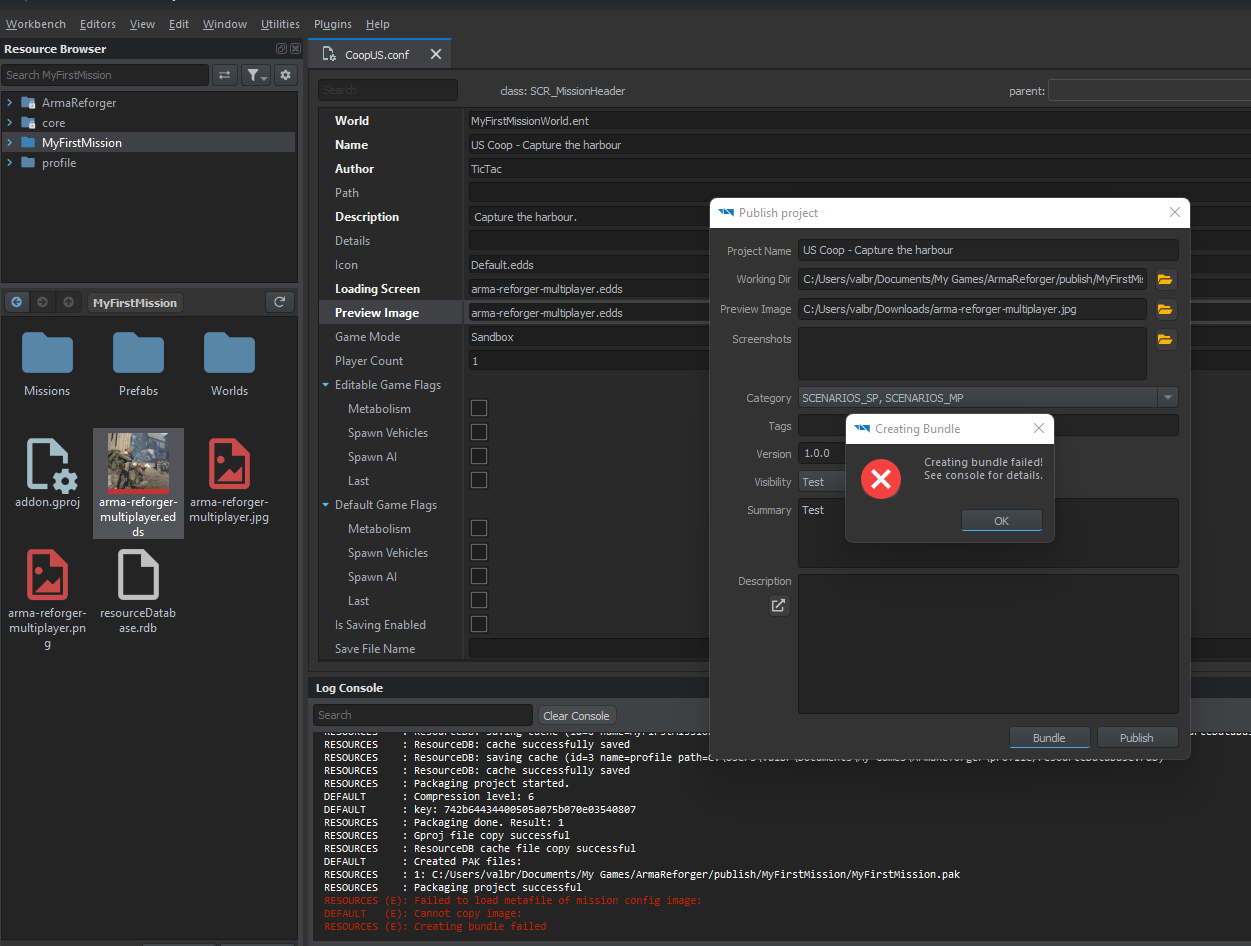
 vernal shadow
Is there a way to change the name of the faction you are joining. I've been able to kinda change it but then it just tells me "No deployment points available!"
magic oasis
Guys, how can i delete a mission from the workshop?
 balmy imp
lean scroll
Hi all. I've laid down all the necessary components to disable automatic respawn...
balmy imp
lean scroll
Hi all. I've laid down all the necessary components to disable automatic respawn...
Did you manage to solve this, I just get spawned into the ocean without menu loading and on attempt to respawn just a black screen with magazine ui, afaik its identical to several setups i have seen outside of the faction key being a new faction I have in my faction manager.
halcyon patrol
barren heart
Cycle waypoints should be
patrol7
patrol8
and static should be
patrolcycle1
an...
Thank you sir
lean scroll
Nope 😦 I had identical behaviour when I deleted the gamemodeplain (saved in my own project)
restarting from scratch now to see if there's any improvement
silent canopy
barren heart
<@360944406452502529> https://streamable.com/azne3v
nice, thats helpful
lean scroll
Instead of the cycle waypoint syncing with other waypoints, can it be seen as a “container” for the other waypoints which loops?
 primal ridge
Loadout_Action_SaveLoadout does not work ingame it does not show the option on the arsenal prefab is there some thing i misst?
 lunar latch
I dont know how i can have such a hard time figuring this out but how do I just make a mission on the eden terain where i can run around. I dont want to use the Capture and hold sample. I simply want the map and a spawnpoint
worthy glade
lunar latch
I dont know how i can have such a hard time figuring this out but how do I just ...
you need herbiies tutorial
lunar latch
worthy glade
you need herbiies tutorial
Thanks
primal ridge
thanks for the help kapa found it out myself after long intensive testing
magic oasis
Oh wow, you really need the task manager above the tasks!
another night wasted of debugging that I should have known the answer to
brisk notch
hello everyone, is there a way to invite friends to play a coop mission i made without running the map on a dedicated server?
 toxic geyser
lean scroll
Nope 😦 I had identical behaviour when I deleted the gamemodeplain (saved in my ...
toxic geyser
lean scroll
Nope 😦 I had identical behaviour when I deleted the gamemodeplain (saved in my ...
Did you have spawn on camera enabled?
toxic geyser
balmy imp
Did you manage to solve this, I just get spawned into the ocean without menu loa...
You need to have a faction-specific spawner, then in the game mode set it to 0 or 1 depending on how many factions
 ember cobalt
brisk notch
hello everyone, is there a way to invite friends to play a coop mission i made w...
worthy glade
ember cobalt
brisk notch
hello everyone, is there a way to invite friends to play a coop mission i made w...
worthy glade
is it documented somewhere what the AI behaviour is for the different waypoinys
waypoints^
lean scroll
Can you rename the Managers/Modes/GameObjects without any conflicts? I would like the hierarchy names to be smaller to fit my screen
main tangle
I am still unable to open the conflict mission in the editor. When I open the World Editor, press "Load World" and select CTI_Campaign_Eden.ent I only ever manage to load around 80-90% before I crash. Am I doing anything obviously wrong? Is there a crash log for the editor somewhere that I can take a look at?
 mighty axle
does anyone know how to spawn a respawnable group of ai using the scr faction control trigger? (yes ik how to respawn ais and waypoints)
mighty axle
main tangle
I am still unable to open the conflict mission in the editor. When I open the Wo...
have you changed your mission directory?
outside the reforger tools folder
i lost 100% of my missions and test saves that were saved in the default location
main tangle
Yeah I'm saving to a different directory in my Documents folder.
lean scroll
If I delete a bush from the Eden map for my scenario, will it dissapear for all players who enable my mod
regardless of the scenario?
worthy glade
i dont think it'll get deleted
i dont think you can remove things atm
if i recall, if you did they might have to redownload the whole map
silent canopy
barren heart
<@360944406452502529> https://streamable.com/azne3v
I have one last question about this, what password would you use for this, would you set it in your server config?
lean scroll
How do I create a group from scratch? I would like to be able to exactly fine tune where a soldier will spawn in
 visual stump
I was going to try and make a mission. Anyone else try to load up eden world and you just have water?
lean scroll
visual stump
I was going to try and make a mission. Anyone else try to load up eden world and...
On the left hand menu browse the world, find any asset in the Eden map in the hierarchy, press F
 opal jackal
visual stump
I was going to try and make a mission. Anyone else try to load up eden world and...
opal jackal
visual stump
I was going to try and make a mission. Anyone else try to load up eden world and...
youre supposed to, fly around a little bit
unique minnow
is it possible to set one spawn point to multiple factions?
visual stump
Appreciate it.
 keen torrent
Hey everyone! Just started digging into the enfusion tools. I've gotten the basics of getting spawns setup and placing down Ai. I want to recreate the ARMA 2 style Insurgency game mode (clearing the red squares on the map where enemies have spawned). Does anyone know the best way to get started with this? I'm assuming I need to learn how to spawn Ai dynamically and then somehow have the squares show up on the player map, but I have no idea how to do either of those things.
Any direction would be greatly appreciated!
lean scroll
I'm going to attempt to figure out if I can create a custom group somehow
Help! I keep spawning into the water even though I have a respawn point and the managers!!!
Any solution?
SCRIPT (E): No spawn point could be picked, are there any present in the world?
I've added a RespawnMenuManager and disabled AutomaticRespawnManager, and it does show the menu, however I try to deploy to the respawn position and it does not do anything
Is this perhaps a bug?
This is additional logging when I try to use the menu:
SCRIPT       : Loadout req. lock lock engaged! [X]
SCRIPT       : Loadout req. lock lock disengaged! [ ]
SCRIPT       : SCR_RespawnComponent::PlayerLoadoutSet response received: OK
SCRIPT       : SpawnPoint req. lock lock engaged! [X]
SCRIPT       : SpawnPoint req. lock lock disengaged! [ ]
SCRIPT       : SCR_RespawnComponent::PlayerSpawnPointSet response received: OK
SCRIPT       : SpawnPoint req. lock lock engaged! [X]
SCRIPT       : SpawnPoint req. lock lock disengaged! [ ]
SCRIPT       : SCR_RespawnComponent::PlayerSpawnPointSet response received: OK
SCRIPT       : SpawnPoint req. lock lock engaged! [X]
SCRIPT       : SpawnPoint req. lock lock disengaged! [ ]
SCRIPT       : SCR_RespawnComponent::PlayerSpawnPointSet response received: OK
SCRIPT       : SpawnPoint req. lock lock engaged! [X]
SCRIPT       : SpawnPoint req. lock lock disengaged! [ ]
SCRIPT       : SCR_RespawnComponent::PlayerSpawnPointSet response received: OK
SCRIPT       : SpawnPoint req. lock lock engaged! [X]
SCRIPT       : SpawnPoint req. lock lock disengaged! [ ]
SCRIPT       : SCR_RespawnComponent::PlayerSpawnPointSet response received: OK
SCRIPT       : SpawnPoint req. lock lock engaged! [X]
SCRIPT       : SpawnPoint req. lock lock disengaged! [ ]
SCRIPT       : SCR_RespawnComponent::PlayerSpawnPointSet response received: OK
SCRIPT       : SpawnPoint req. lock lock engaged! [X]
SCRIPT       : SpawnPoint req. lock lock disengaged! [ ]
SCRIPT       : SCR_RespawnComponent::PlayerSpawnPointSet response received: OK
SCRIPT       : SpawnPoint req. lock lock engaged! [X]
SCRIPT       : SpawnPoint req. lock lock disengaged! [ ]
SCRIPT       : SCR_RespawnComponent::PlayerSpawnPointSet response received: OK
SCRIPT       : SpawnPoint req. lock lock engaged! [X]
SCRIPT       : SpawnPoint req. lock lock disengaged! [ ]
SCRIPT       : SCR_RespawnComponent::PlayerSpawnPointSet response received: OK
For some reason, I added a SCR_RespawnTimerComponent and it magically worked, it seems like its needed even if you aren't going to have a timer
 ionic lark
Do i need scripts for tasks? Or am i good to go with prefabs?
lean scroll
toxic geyser
Did you have spawn on camera enabled?
yes I did - I'm an idiot lol
Took me 2 hours to realise it
lean scroll
keen torrent
Hey everyone! Just started digging into the enfusion tools. I've gotten the basi...
Best to start really simple bud - a single objective mission to begin with. Then build from there
solar shard
keen torrent
Hey everyone! Just started digging into the enfusion tools. I've gotten the basi...
You can use the coopSample for dynamic spawn. Or the NightOps map to look how you can implement them dynamically or with faction control triggers and tasks.
But what you want to achieve needs a little framework you should first draw as a concept.
keen torrent
solar shard
You can use the coopSample for dynamic spawn. Or the NightOps map to look how yo...
This is what I have concepted and implemented so far.
Vehicle with respawn and arsenal attached to it - Implemented (Works perfectly!)
Dynamic spawns that trigger ~300m from objectives with patrol and defend waypoints - Implemented (Worked after some stupid mistakes)
I have the basic framework for all the spawning complete. Now I just need to figure out how to draw a shape on the player map and have it change color based on enemy presence.
The CoopSample was a HUGE help in setting up the dynamic spawns
solar shard
Ah. I did some early tests with markers of all sort. One is in my map. But wasn’t able to achieve something similar to the C&H mod. That’s actually the best place to look how it is done.
Would love to learn how you solved the vehicle Respawn system.
keen torrent
Will do! Thanks Zeal!
lean scroll
Is there a way to place map markers (that are visible on briefing and throughout the game). I.e an exfil marker
solar shard
lean scroll
Is there a way to place map markers (that are visible on briefing and throughout...
As just said… looking forward if someone figured it out. Hadn’t the time to dig deeper into that yet.
lean scroll
thanks Zeal - missed that message
 warm cape
can someone help
01:56:45:118 GetResourceObject @"{2B5389075F3947BA}Missions/TDM_Durras.conf"
01:56:45:118 RESOURCES (E): Failed to open
01:56:45:118 RESOURCES (E): MissionHeader::ReadMissionHeader cannot load the resource 'Missions/TDM_Durras.conf'!
01:56:45:118 ENGINE (E): Unable to read the mission header '{2B5389075F3947BA}Missions/TDM_Durras.conf'
01:56:45:218 ENGINE (E): Unable to initialize the game
01:56:45:228 ENGINE : Game destroyed.
solar shard
I know it was discussed here several times, but did someone figured out how to publish on xbox yet? Is this even possible at the moment?
 elder stirrup
How to use localization strings? I have create new localization Id and want to implement it in Description field in Briefing.
I try to user # prefix before localization string, But localization doesn't work.
lean scroll
Ai getin as gunner in MG nest, use defend waypoint over the nest.
lean scroll
Operation Blue Light is published. An initial try at an OFP type, relatively linear, infantry based mission. Lots of walking / infil / exfil, a little bit of shooting. Thanks @solar shard, @balmy imp, @west karma, @proud sorrel
solar shard
lean scroll
Ai getin as gunner in MG nest, use **defend waypoint** over the nest.
and to add to that, add compartment component to the MG nest to config it
sullen talon
lean scroll
For some reason, I added a ``SCR_RespawnTimerComponent`` and it magically worked...
This seems like a bug indeed 🙂
deep prairie
waiting for Hearts and Mind mission :/
 grand dock
Has anybody found a way to edit the name of the groups that the player can join? I would like to change the names from atlas red 1 etc. to something else
deep prairie
any idea how to stop player from instant death?
slender gull
Has anyone figured out how to make objectives?
Because I am looking at tutorial scene and WP markers dont hold any data expect their name.
 barren heart
@slender gull Do you mean the little X markers from the tutorial mission, with distances etc?
slender gull
barren heart
<@166564708743118850> Do you mean the little X markers from the tutorial mission...
No, those are just gameobject with SCR_MapDescriptorComponents.
slender gull
barren heart
<@166564708743118850> Do you mean the little X markers from the tutorial mission...
Having these would be my goal.

 green hill
slender gull
Having these would be my goal.
green hill
slender gull
Having these would be my goal.
looking for the same actually
 sand belfry
lean scroll
For some reason, I added a ``SCR_RespawnTimerComponent`` and it magically worked...
sand belfry
lean scroll
For some reason, I added a ``SCR_RespawnTimerComponent`` and it magically worked...
Hey buddy, you need a spawn entity!! It is located in the prefabs folder, drag it into your world as you would with an object. Just set one up and you'll be good to go.
slender gull
Gosh...
It seems to be partially hardcoded.
 barren heart
Ah ok I use them in my mission along with the popups that the player would normally hold J for.
And the distance waypoints. But the task aspect isn't MP safe yet so I wouldn't use my method. Need to work on it some more.
The coop sample is where I started though, essentially if you have an SCR_BaseTask, or realistically a specialised form of one, moveTask etc.
You have to set its faction to the faction that you want to be able to accept it.
You can force accept through taskExecutors by calling AssignTask in the manager and passing a task and a taskExecutor (player task controller thing).
Which you can manage a list of through OnPlayerRegistered/OnPlayerDisconnected events.
The tutorial was fairly difficult to track everything down. You can get what you want with less complicated means though I reckon than the tutorial uses.
slender gull
Thanks, Will test that out.
Really strange and annoying that they don't use their own layer system so it would be easy for learn from.
mental cove
slender gull
Gosh...
It seems to be partially hardcoded.
The tasks are really complicated I have a framework for making tasks almost done, just need to get JIP bugs fixed and then I will send it to you if you want
barren heart
Well damn I was gonna be doing that today, that would be awesome 😄
green hill
mental cove
The tasks are really complicated I have a framework for making tasks almost done...
@mental cove can i ask, what would a framework like that look like? I think I should be interested in that
mental cove
I have some custom task classes with their own support classes and stuff, a custom task manager that takes a list of strings as an argument. And a taskMarker class, you place the task marker class down fill out the stuff about it then put the name in the task manager and it creates one there at runtime
slender gull
barren heart
Well damn I was gonna be doing that today, that would be awesome 😄
How well does Arma handle depencies to others mods?
Most package managers are super neat and you can upgrade them independently.
And there's also obselete tags, etc.
green hill
that sounds sweet
mental cove
or you dont put the name in the taskManager and call a function to create one in code
barren heart
@slender gull I don't think its as neat yet, it seems to just have the GUID as a dependency and therefore no versioning. But I'm just basing that of the addon.gproj file
 ID "SPMissionTest"
 GUID "59692495D59B0AB6"
 TITLE "Assassinate General Makarov"
 Dependencies {
  "58D0FB3206B6F859"
}```"no versioning"
As a software developer, Yiks!
barren heart
The servers seem to support versioning so its kinda odd to not see it in the dependencies, reckon it'll change.
slender gull
barren heart
The servers seem to support versioning so its kinda odd to not see it in the dep...
But still, Enforce seems to take big leaps from RV3.
This hierarchy shorting still drives me nuts.
 barren heart
Oh god I hadn't noticed that yet. If you don't like that have you noticed this ?
 slender gull
Sometimes, you just have to fire designers...
 magic kiln
Does anyone know how to integrate vehicle spawning into my Scenario/World? I have found these "Vehicle Rapair Points" which apparantly have a chance to spawn a vehicle. But so far none spawned. Also I tried to add the "SCR_VehicleSpawner" component, add the prefab-vehicles it should be able to spawn and tested it. But still ... no vehicles spawning. Can anybody please help?:(
slender gull
Eh, How can I make my map targets larger?
I set scale everywhere to 5, but size stayed the same.

 grand dock
slender gull
Eh, How can I make my map targets larger?
I set scale everywhere to 5, but size ...
grand dock
slender gull
Eh, How can I make my map targets larger?
I set scale everywhere to 5, but size ...
how does one place map markers?
slender gull
grand dock
how does one place map markers?
Create GenericEntity and add component SCR_MapDescriptorComponents
But as you can see from my screenshot, its not wanted outcome.
Thats how tutorial example made them.
grand dock
thank you!
solar shard
slender gull
Create GenericEntity and add component SCR_MapDescriptorComponents
But as you ca...
I never get passed that point btw 😉
looks exactly as my exmaple ^^
keen torrent
barren heart
Oh god I hadn't noticed that yet. If you don't like that have you noticed this ?
Why would you make me see this! It's ruined for me now...haha
 mystic kestrel
how can i assign waypoints or targets to players in my missions so players know where to go?
 blazing quartz
The camera stopped working in the world editor on the wasd keys. The camera only works with the mouse. Tell me how to turn it on.
 near vault
Hi folks, what, where would be the best tutorial for me to follow to get started with coop mission design (Not a newbie to OFP/Arma mission editing scripting, but heyho that has now changed a lot)
i dont wanna start from a template, would rather start from scratch so i can understand what is going on better
 warm pawn
slender gull
Create GenericEntity and add component SCR_MapDescriptorComponents
But as you ca...
warm pawn
slender gull
Create GenericEntity and add component SCR_MapDescriptorComponents
But as you ca...
There is a MapDescriptorDefaults.conf file linked in individual map configs which configures descriptor types, in your case you could add MDT_Target and configure it there, or configure it through script (MapDescriptorComponent & MapItem API)
Im not super sure if setting size from the component attribute works, but you have no quad selected so it might just be that the default red icon cant be scaled 🤔
blazing quartz
The camera stopped working in the world editor on the wasd keys. The camera only works with the mouse. Tell me how to turn it on.
HELP
solar shard
near vault
Hi folks, what, where would be the best tutorial for me to follow to get started...
Look into the pins for:
coopSample by BI
Tutorial git by Herbii
Tutorial Video by useless fodder
Tutorial Coop scenario „NightOps“ by myself.
solar shard
mystic kestrel
how can i assign waypoints or targets to players in my missions so players know ...
The current task framework is a limitless bit lackluster when it comes to MP but never the less it’s in the sample
near vault
Thx Zeal, am kinda watching Fodders Utube tutorial, is that gonna be ok or will it take me down bad paths ?
solar shard
It’s awesome for a simple Start an we all didn’t passed that point 😉
near vault
ok m8 thx for the help, one more question, placing down player entities, if say i placed down a squad with say 1 x mg and a typical squad setup, would that limit player selection to just 1 x MG or could all players select an MG role ?
solar shard
Never tried that out. Give me a shout when you tried it.
But I’m not sure there is a lobby system and on the other hand I don’t know how the Respawn works without Loadouts. Give it a shot!
near vault
k thx
grand dock
has anybody figured it out how to create a spawn that lets you spawn as a soldier that was already placed as an a.i.? Like arma 3 where you could choose what soldier you want to play as in a given list?
slender gull
warm pawn
There is a MapDescriptorDefaults.conf file linked in individual map configs whic...
Wow, that just breaks my brain why such a work around.
But then again, its Bohemia.
Ain't suprised.
lean scroll
At the moment, is there any way to limit the group size of a mission? i.e I have 3 loadout slots in my mission on the loadout selection screen. Does this mean that unlimited people could join the mission and pick one of the 3 loadouts, or does it mean that only 3 people could join, and once a loadout is used, it dissapears from the menu?
unkempt parrot
Hello mission makers, is anyone able to point me to how one might setup a simple scenario to place on a custom island so people can play it in the workshop?
near vault
trying to follow fodders youtube tutorial, am at adding RespawnMenuHandler component section which sghould load faction selection screen etc, when pressing play button, but it's taking me straight into the gameworld, any ideas what i haven't done correctly (The default autrespawnhandler component is disabled) ??
barren heart
@near vault Play from camera position ticked?
lean scroll
barren heart
<@106057722012655616> Play from camera position ticked?
This one had me stuck in the editor for 2 hours scratching my head 🥲
Finally realised when I noticed the height I was dropping in from was changing every now and then
Deffo one of these moments
 barren heart
Ha yeah I think I'd be confused as all hell by that one. Glad it happened to someone else first 😄
west karma
near vault
Hi folks, what, where would be the best tutorial for me to follow to get started...
https://github.com/Herbiie/ArmAReforgerMissionMakingGuide/wiki/1)--ArmA-Reforger-Mission-Making-%7C-Getting-Started as I don't think it's pinned

GitHub
A guide for making a basic Arma Reforger Mission, editted as I learn! - 1) ArmA Reforger Mission Making | Getting Started · Herbiie/ArmAReforgerMissionMakingGuide Wiki
west karma
unkempt parrot
Hello mission makers, is anyone able to point me to how one might setup a simpl...
Same link for you too 🙂
unkempt parrot
west karma
Same link for you too 🙂
Ty dude
 hollow fulcrum
Would anyone know why possibly I'd be getting stuck on the Deployment screen while using the RespawnMenuHandler? After choosing a loadout and going to the deployment map, pressing deploy just clicks the button and nothing happens -- I turned off the AutomaticRespawnHandler so I could get the loadout menu.
 magic oasis
hollow fulcrum
Would anyone know why possibly I'd be getting stuck on the Deployment screen whi...
magic oasis
hollow fulcrum
Would anyone know why possibly I'd be getting stuck on the Deployment screen whi...
Throw in the spawn timer module. 👍
Don’t ask me why. 😂
hollow fulcrum
Ahh thanks haha!
lean scroll
sand belfry
Hey buddy, you need a spawn entity!! It is located in the prefabs folder, drag i...
I already had one in lol
magic oasis
@solar shard do you think the script you used to add spawn points on a trigger would be a good place to start to spawn a new task on completion of another?
solar shard
not so sure. first for all, the script causes trouble. I just replaced it with a simpler method for the respawn points. But Im looking to see how you establish dynamic tasks. BTW @mental cove who makes a lot of great mechanics for this alreay, is creating a MP task framework since at least yesterday for countless hours. Dont know how he's making progress but I guess we can all profit from that.
magic oasis
Thanks. I need to dig into the task management stuff more.
west karma
magic oasis
Throw in the spawn timer module. 👍
Isn't it because without the timer it doesn't know how long respawn is?
solar shard
thats the one thing which isnt working in MP environment on my system right now. Still struggling with other things but thats the next thing on my to-do (or Joe Malley provides a great solution, which I assume)
magic oasis
west karma
Isn't it because without the timer it doesn't know how long respawn is?
I’m quite sure it was exactly the same in A3 🧐