#enfusion_gui
1 messages · Page 1 of 1 (latest)
 dull nebula
specifically in my case I'm working with radial menus, but despite me being able to get ContainsEntry(entry) to return true, when running RemoveEntry(entry) it does nothing
dull nebula
class SimpleRadialMenuEntry : ScriptedSelectionMenuEntry
{
    override void OnPerform(IEntity user, BaseSelectionMenu sourceMenu)
        {
        SCR_CustomRadialMenuComponent menu = GetMenu() // gets menu component from player, inherits SCR_RadialMenuComponent

        bool before = menu.m_pRadialMenu.ContainsEntry(this);
        Print("before: " + before);

        menu.m_pRadialMenu.RemoveEntry(this)

        bool after = menu.m_pRadialMenu.ContainsEntry(this);
        Print("after: " + after);
        }
}
Example code, as expected outputs the following in console
before: true
after: false```But the menu entry is still there in the radial menu, and when triggered the next time still outputs true before
changing menu.m_pRadialMenu.RemoveEntry(this) to menu.m_pRadialMenu.ClearEntries(0) makes the entry disappear from the menu, but both before and after output true in console for some reason
(might be some async stuff going on meaning ClearEntries() is run in another thread after the second check, but I have no clue)
@fossil sorrel did you encounter any weirdness like this making extended reload back along?
 fossil sorrel
dull nebula
<@261877528057085952> did you encounter any weirdness like this making extended ...
fossil sorrel
dull nebula
<@261877528057085952> did you encounter any weirdness like this making extended ...
Maybe because the entry is kept alive during OnPerform?
I am not sure tbh, haven't touched RMs in a bit
 opaque vigil
   ENGINE    (E): Can't find menu class "{77C9CE7B6788265A}scripts/Game/UI/Modded/myScriptedUI.c"
  GUI       (E): Can't open menu 'myTestGui_ID'```
Does this mean it cant find the file? or is it the class in the file?I changed the class name inside the file to the name of the file but it still doesn't work
 wheat shore
opaque vigil
I changed the class name inside the file to the name of the file but it still do...
wheat shore
opaque vigil
I changed the class name inside the file to the name of the file but it still do...
Inside chimeraMenus.conf, there's a Class field, it should match your class inside myScriptedUI.c

 worn marten
opaque vigil
``` GUI : Creating menu 'myTestGui_ID'
ENGINE (E): Can't find me...
worn marten
opaque vigil
``` GUI : Creating menu 'myTestGui_ID'
ENGINE (E): Can't find me...
In this chanel pinned mesages there is a little tutorial i made with some help from other people. It may help you in your GUI journey 😋
opaque vigil
worn marten
In this chanel pinned mesages there is a little tutorial i made with some help f...
Yeah that’s the one I’m following haha, think I might be doing something wrong though. 🤣
worn marten
Then get sure that you have done the step 10. There you add your GUI ID to the chimera enum in order to call it later.
And check that the classname from step 11 and 8 are the same
opaque vigil
Yep, that stuff all worked. Thanks
 empty tusk
Anybody have an example of filling a dialog with the contents of an array with variable size? Can I just keep cramming it with widgets in a for loop? Like if I looped this?
void UpdateScoreBoard()
	{
		if (!m_wRow)
			m_wRow = GetGame().GetWorkspace().CreateWidgets("{6A35197F312D6592}UI/layouts/HUD/Scoring/ScoreWidgetRow.layout", m_wTable);
		TextWidget waveWidget = TextWidget.Cast(m_wRow.FindAnyWidget("Wave"));
 faint anvil
Can you put UI on models in game space?
faint anvil
Can you put UI on models in game space?
Yes someone showed an example in the script channel
worn marten
empty tusk
Anybody have an example of filling a dialog with the contents of an array with v...
This can help you.

This populates the ContentWidget in void init() and then the tabs are shown or hidden on selection
In SCR_TabViewComponent you may find something useful too. It's the one i used to make ARU_ManageLayoutsComponent
This is how it ended.
The layouts shown in the video:
1 empty
2 has some parameter.
https://youtu.be/N9oKRfXQU0w?t=30
 worn marten
faint anvil
Can you put UI on models in game space?
worn marten
faint anvil
Can you put UI on models in game space?
I found something but not the same:
#enfusion_scripting message
o is this one:
#enfusion_scripting message
empty tusk
worn marten
This is how it ended.
The layouts shown in the video:
1 empty
2 has some parame...
Beautiful. You can do so much with this right here. Thanks!
faint anvil
Thanks
faint anvil
I managed to get it working, i will try and make a example project
 kind cradle
anyone know what .layout drives this:
 kind cradle
anyone know what .layout drives this:
kind cradle
kind cradle
anyone know what .layout drives this:
I'm adding my own "score board" in the upper left corner of my screen and this keeps drawing overtop. I've gone through all of the info displays for the "DefaultPlayerControllerMP.et" in the HUD manager and can't seem to locate what is drawing this. I'd just like to bump it down about 200px.
worn marten
kind cradle
anyone know what .layout drives this:
It is the {D89BBA18F99053D6}UI/layouts/HUD/Chat/ChatHud.layout.
I have seen that when you are on the respawn menu the chat is moved down, so not sure if changing the position in the layout will have other consequences. Maybe you can do the same and only move or hide the chat when your "score board" is displayed
kind cradle
worn marten
It is the `{D89BBA18F99053D6}UI/layouts/HUD/Chat/ChatHud.layout`.
Thank you so much, that was exactly what I needed. Works like a charm now.
wheat shore
I just came into this, when you have too much elements in the tab component, it won't fit automatically (like adding three dots in the middle) or I am missing something ?
 worn marten
I think it won't. But in your case I you may have some options (from less to more complex):
- resize each tab size a bit more
- Select the option "Show Text Only When Selected Tab" in the SCR_TabViewComponent (image atached) --> Requires to add a Icon (see properti description tooltip)
- Script it to hide the tabs. Showing only 3 or 4 tabs and make the others appear when you are approaching to them. (there is a method to hide/show tabs, i have used it and works fine)
 faint anvil
Don't put 400 tabs in one UI :D
 limpid gazelle
Anyone find a way to mod these 2 pre-deployment tabs?

 worn marten
limpid gazelle
Anyone find a way to mod these 2 pre-deployment tabs?
worn marten
limpid gazelle
Anyone find a way to mod these 2 pre-deployment tabs?
Why you can't mod those? what do you want to do?
limpid gazelle
Trying to assess if there is a straight forward way to change the completely useless Loadout tab to an arsenal screen
 worn marten
The GUI is the RespawnSuperMenu.layout
I haven't messed with game GUI "overrides" but you will have to change it in the TabViewRoot0\Components\SCR_TabVIewComponent\LOADOUT\Element layout or you can add your own

You don't want the predefined loadouts and you want to change it for an Inventory layout with items right?
limpid gazelle
yeah
empty tusk
So what do I do if I want some GUI updated Onframe differently for each client? Do I use the player's hudcomponent?
Not sure where to start for this one. I've got something that only works for 1 player and broadcasting that would be a terrible idea.
I've looked at some bit of the campaign that draws icons for buildings but I can't figure out how that code runs independently for each client.
worn marten
empty tusk
So what do I do if I want some GUI updated Onframe differently for each client? ...
You can create some flag that is managed by the server. When a player opens the GUI you send a request to the server and then the server checks if someone is on that GUI, if not the server sets a flag to True and returns a succesfully request to the requester.
Although i I'm not very clear with all the Rpc stuff applied to the GUI. Since you are not using a component held by some entity doing RPC sutff requieres you to use some other entity. I had to do a quite complex stuff just for propagating variables to server and all players ...
empty tusk
I'm trying to do an essentially always on 3d marker that is different per player and needs constant onframe updates
worn marten
what is the class you are using OnEachFrame method of?
empty tusk
I've created a component that inherits from basegamecomponent
In hindsight, maybe it should be a player component
empty tusk
Well using the Eonframe from a player component didn't work. I guess I'll have to broadcast something?
worn marten
from a player component you should be able to mkw a RPC call to the server or broadcasted to all yes. Because i think that player has ownership by default on this one but i would need to check it.
empty tusk
I just don't know what to broadcast to kick off an onframe loop. Broadcasting that function itself would be madness.
 worldly sphinx
your broadcast would be the trigger that sets it live
empty tusk
Oh, it would trigger the class? Or do I have to broadcast the onframe function?
worldly sphinx
have a function that enables your loop when executed, execute this function via rpl
or something
empty tusk
Yeah not just a loop. I need to get my clients to run EOnFrame
worldly sphinx
so, a function that enables the frame eventmask?
empty tusk
Ah crap is that what I'm missing? I didn't set eventmask.
I'm already doing lots of stuff on clients through a game mode Onframe but this gui stuff is better off in a seperate class that just doesn't seem to start that stuff.
SetEventMask(EntityEvent.FRAME);
		SetFlags(EntityFlags.ACTIVE, true);
Something like that in the Init?
worldly sphinx
yea, more or less
 heavy oasis
Did someone knows where can I check how the ammo icon in hud get its data from? Magazines left or ammo left for example
worn marten
heavy oasis
Did someone knows where can I check how the ammo icon in hud get its data from? ...
Did you found the .layout where it's used?
Oh it is on WeaponInfo.Layout
SCR_WeaponInfo.c
Line 901
How i found it?
All the Widgets present on the layout needs to be referenced somewhere so if you search the widget name "m_MagCountText" in the "Script Editor"/ "Text Search" configured with "Look In" as "Entire Solution" you will see where is referenced (something like .Cast("m_MagCountText")). In this case the variable has the same name. From here you can search where this variable is used in order to do X stuff.
heavy oasis
Thanks!! Got it
worn marten
@tulip quartz we can add stuff in the scopes UI 🥳 , FYI
This is a range example

Not sure if it's a good implementation but what I did is this:
Add new Layer
- Inherit the
PictureInPictureSightsLayout.layoutwith new name: SPK_PictureInPictureSightsLayout.layout - Add an Overlay and Text Widgets (Text widget with name: Text0).
- In the Scope's 'SCR_2DPIPSightsComponent'/PIPSights Category change the "PIP Layout Resource" by the new one
** Script on SCR_2DPIPSightsComponent in order to show the range** - Modd the SCR_2DPIPSightsComponent (NOTE: better to create your own class and inherit from SCR_2DPIPSightsComponent , I modded it to go fast).
- Add this:
I can improve some stuff but for now this is an early version XD
NOTE: For SCR_2DOpticsComponent seems to don't work due to PostFrame not running (so this example is only useful in PictureInPictureSightsLayout.)
 tulip quartz
Damn that's impressive. Big thanks for sharing, I'll try to dog into it later
 stiff seal
Is there any way to 'mask' the reticle illumination? Alternatively to do something like in A3 where you could set an emissive texture so it would only glow at night?
for reference, I'm looking to do something like this where only the tip is illuminated:
https://www.redwolfairsoft.com/media/catalog/product/cache/92109b5bc73ebc41f4ba08fbd08f8f55/G/-/G-12-017-3L.jpg
 worn marten
stiff seal
Is there any way to 'mask' the reticle illumination? Alternatively to do somethi...
worn marten
stiff seal
Is there any way to 'mask' the reticle illumination? Alternatively to do somethi...
Something like these?

This is from the SampleMod_NewWeapon in the ArmaReforger Samples, you can toggle illumination with "LCTRL" + "mouseWheel Down"
stiff seal
no, more like: what if I just wanted to make the dot or one of the lines illuminate
 stiff seal
Didn't seem to work for me
 lunar forge
Wouldn't be surprised if you had to edit SCR_2DPIPOpticsComponent in order to achieve your desired effect
 half solstice
iirc the reticle gets overwritten in that component ^^^^
worldly sphinx
is there a way to add effects through UI such as saturation?
I know you can do it to an image but what about everything that's under it? (as in, what you see through the camera)
worn marten
worldly sphinx
I know you can do it to an image but what about everything that's under it? (as ...
this sounds like it should be in the 2DPIPSightsComponent

I don't know if some of these parameters help you. Maybe you will need to make your own 2DPIPSightsComponent and a custom layer adding this saturation.
The render target has some other render effects

 past stirrup
I would kill for a video intro to GUI modding, is anyone aware of a video that covers atleast the basics?
worldly sphinx
no but you could specify your current issue? or just looking to start?
worn marten
past stirrup
I would kill for a video intro to GUI modding, is anyone aware of a video that c...
In the pinned messages ther is one. Its about how to do a basic GUI
past stirrup
worldly sphinx
no but you could specify your current issue? or just looking to start?
Was just looking for the basics and yeah thanks @worn marten I've just seen a few different implementations and it's hard to collate the different learnings over the life of this channel.
worldly sphinx
zip ties and duct tape
 bronze jetty
How to place TextListBoxWidget in layout editor? When i place that the WB exit or crashing without message.
worn marten
you can't use that widget (bugged and it seems that isn't the one to be used for ListBox)
you have to use the layout prefab named: ListBox.layout
you can drag that layout into your own layout and it will be like a prefab. Or if your intentions are to modify it, you'll have to duplicate the ListBox.layout with a new name myListBox.layout and then drag it to your layout.
I said the word layout to many times XD
worldly sphinx
how do I widgets in world space
worldly sphinx
 static raven
https://discord.com/channels/105462288051380224/976155351999201390/9932088949502...
static raven
https://discord.com/channels/105462288051380224/976155351999201390/9932088949502...
dope, do you have the component script in text format?
static raven
worldly sphinx
dope, do you have the component script in text format?
[ComponentEditorProps(category: "GameScripted/Texture", description: "")]
class SCR_WidgetAsTextureComponentClass: ScriptComponentClass
{
};

class SCR_WidgetAsTextureComponent: ScriptComponent
{
    override void EOnInit(IEntity owner)
    {
        super.EOnInit(owner);

        Widget root = GetGame().GetWorkspace().CreateWidgets("{DAE5DC43D9CCB844}UI/layouts/Sights/WidgetAsTextureLayout.layout");
        RTTextureWidget renderTargetTexture = RTTextureWidget.Cast(root.FindAnyWidget("RTTexture0"));

        renderTargetTexture.SetGUIWidget(owner, 0);
    }

    void SCR_WidgetAsTextureComponent(IEntityComponentSource src, IEntity ent, IEntity parent)
    {
        SetEventMask(ent, EntityEvent.INIT);
    }
};
I would suggest to create some attributes and remove the hardcoded behavior 🙂
worldly sphinx
static raven
```csharp
[ComponentEditorProps(category: "GameScripted/Texture", description: "...
thank you
static raven
worldly sphinx
thank you
Make sure to add your widgets inside a RTTextureWidget and then bind that RTTextureWidget to an entity

The entity then has to have a texture path pointing to $rendertarget in one of it's emats like in the video
worldly sphinx
static raven
The entity then has to have a texture path pointing to `$rendertarget` in one of...
yeah that was super easy thank you
worldly sphinx
static raven
The entity then has to have a texture path pointing to `$rendertarget` in one of...
I noticed there are a couple render targets in the selection, does this mean there is a limit to the number of them that can be in the world at a time?
or is it per material?
static raven
worldly sphinx
or is it per material?
per entity instance
worldly sphinx
dope
 wild berry
Does AR have a prefab yet for an |---------------------||----------| style slider that only shows the current position (not a full filled bar)? I can probably build one myself but if it exists somewhere that would be much better to use. I am not sure if I saw anything like it in the game yet or not
worldly sphinx
static raven
Make sure to add your widgets inside a `RTTextureWidget` and then bind that `RTT...
this is pretty cool
turns out you cant use it in emissive texture (directly)
wild berry
wild berry
Does AR have a prefab yet for an |---------------------||----------| style slide...
Coming back to this, I was able to setup a few basics and I attached a ScriptedWidgetComponent to keep track of the invisible slider change, but I am not really sure how to best move the indicator via script. Right now I tried using AlignableSlot::SetPadding which somewhat works, but the problem is that the I do not know the original unscaled size of the widget, so I can't hardcode any factors to have it be at the very right when the slider value == max value. Is there a way to use any relative values? I thought about making the progress indicator a child of the hidden slider so I can say 50% padding ... but I am not really sure how this would work out

Even without scripting, if I set the padding to be 135 then it is in the center somewhere, but as soon as the number input on the right gets bigger it of course is no longer the correct number :/


In DayZ we had some options where we could choose relative vs absolute offsets etc. I am not sure how to achieve something similar in AR
worldly sphinx
how does the progress bar calculate the thing?
wild berry
All engine side
worldly sphinx
 aw
aw
wild berry
The problem is essentially that I can not get the original non scaled size that was set in the editor via script, but I can get the scaled one. But then I can only set the non scaled numbers and no the scaled ones ... Each missing what I need
The only option I see that might work is wrapping things in a FrameSlot each ... those seem to be the only ui slot type that has getters and setters, but I hope there is a nicer way of doing this
worldly sphinx
there's get screen pos, get screen size, but nothing for size of the widget in the widget class?
or is screen size the scaled size of the widget?
wild berry
The widget sizes in workbench are relative to what resolution you configured, by default 1080p. if you play on 2k like me the getters on widget return the scaled values which are of no use, because all the other setters refer to the original 1080p res
worldly sphinx
I would take a stab at this if I only knew how to add scripts to widgets... not there yet
wild berry
Different question, how are you supposed to use a UI prefab that is at a different size, e.g. a button in the prefab that is 100 x 50, but where I use it I want it to be as tall as the vertical layout for example ... Adjusting all the individual sizes of the hierarchy elements of the prefab to fit where I want to use it hopefully is not the desired way to use them ...
static raven
wild berry
The problem is essentially that I can not get the original non scaled size that ...
WorkspaceWidget workspace = myWidgetHere.GetWorkspace();
 // Removes the scaling of the scaledWidth value.
float width = workspace.DPIUnscale(scaledWidth);
// Performs the scaling to the width value so widthNew = scaledWidth.
float widthNew = workspace.DPIScale(width);
afaik, that should do it
worldly sphinx
wild berry
The widget sizes in workbench are relative to what resolution you configured, by...
you're gonna laugh at this! the worst possible way I could find was to create a horizontal scrolling layout with a HUGE panel hidden inside it, and then read GetSliderPos to at least get "percentage traveled"
not sure if stupid or genius  takes me back to CSS
wild berry
worldly sphinx
you're gonna laugh at this! the worst possible way I could find was to create a ...
i see, this will probably not work with having the slider thin and cross the line does it?
wild berry
static raven
```cs
WorkspaceWidget workspace = myWidgetHere.GetWorkspace();
// Removes the s...
i'll try this and see
worldly sphinx
wild berry
i see, this will probably not work with having the slider thin and cross the lin...
well the slider itself is an image from an imageset, so it can be whatever you want it to be, but it feels wrong to have 4000px wide panel inside the layout item just for the scroll
static raven
float scaledDown = GetGame().GetWorkspace().DPIUnscale(scaledUp);
You fed it 1 again
@wild berry Check SCR_MapDragComponent::DragWidget as an example of how to use it
wild berry
    override bool OnChange(Widget w, int x, int y, bool finished)
    {
        if (w == m_wSlider)
        {
            float width, height;
            m_wSlider.GetScreenSize(width, height);
            width = w.GetWorkspace().DPIUnscale(width);
            Print(width);

            float progress = m_wSlider.GetCurrent() / m_wSlider.GetMax();
            Print(progress);

            AlignableSlot.SetPadding(m_wSliderPosIndicator, width * progress, 0, 0, 0);

            if (m_sChangeSound) SCR_UISoundEntity.SoundEvent(m_sChangeSound);
        }

        return super.OnChange(w, x, y, finished);
    }
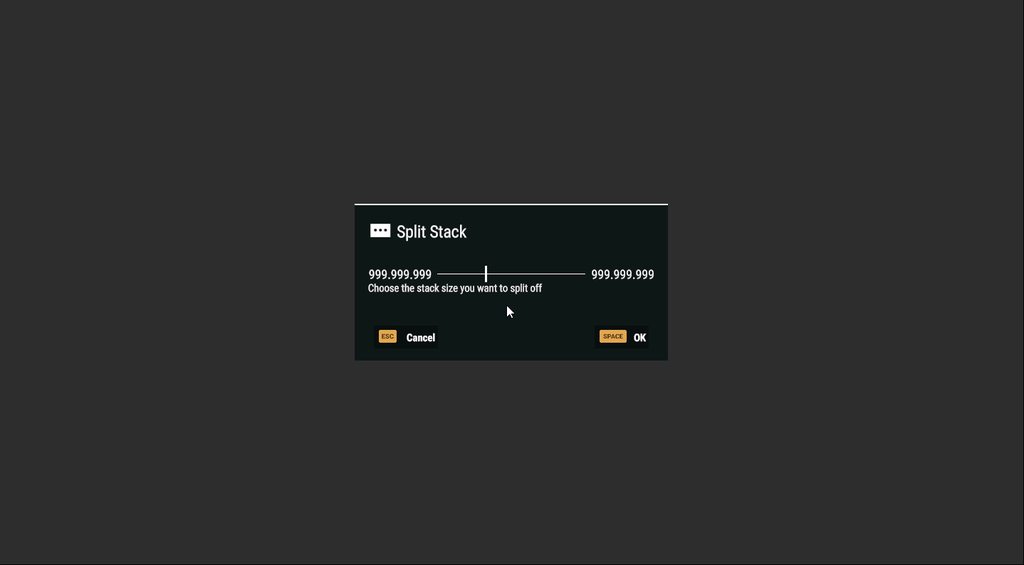
Now I only need to take care of the width of the slider vs the progress bar, as the slider is 3px wide and on 100% it would be 3 px too far to the right

 wild berry
static raven
Now, make it console friendly
wild berry
static raven
Now, make it console friendly
It already is, because it is using the underlying slider you can use dpad or sticks to move it left and right on console
static raven
wild berry
It already is, because it is using the underlying slider you can use dpad or sti...
ah I see, it reminds me of those custom inputs done with pure HTM+CSS that use hidden checkboxes or sliders with name/labels hehe
wild berry
It conflicts a bit with when you want to navigate to the inputs on either side to put in a number but if you put a number in it does not matter that you accidently moved it left and right while getting there ... so I am willing to accept that flaw until a UI designer has a better idea for it and reworks the split menu
wild berry
Wtf ... after editing UI stuff my game now looks like this when in menu: entirely blurry ... fun fact, I removed all the changes I made ... I must have fucked my workbench somehow

Yup, created a fresh mod and spawned from camera ... it is the workbench causing this. How the hell did this happen ... and how do I undo it 
worldly sphinx
you accidentally turned on potato mode
but the items in the background behind the UI are in 100% render scale?
wild berry
This is the default blur filter but I have no idea why it is active. I restarted my whole god damn pc
worldly sphinx
the only thing left to do is to wipe workbench profile?
wild berry
Already did, this must be a registry setting
Oh no, it was inside on of the .save directory file that save engine settings
worldly sphinx
yeah there's settings there or something
wild berry
Something must have been broken in there
worldly sphinx
graphix/engine settings
but how do u even change these while in the UI editor I have no clue
 worldly sphinx
when I open the game menu in play mode and try to change a setting I get a crash
100% of the time
wild berry
Man why is every fucking piece of this game so broken
I add a UI element to a prefab

It is saved in correct order in the file

I build the UI or restart workbench: Fucking first item is now last

The prefab item ignores its order ...
I am so sick of everything I want to touch in this game go up in flames ...
worldly sphinx
I hope it gets better
worn marten
yep the UI has a lot of bugs and unfinished stuff. I think this is the reason they haven't published any doc in the wiky about it 
static raven
wild berry
I build the UI or restart workbench: Fucking first item is now last
The Z Order of children of a HorizontalLayoutWidget will change their order of appearance
Did you change that in one of the children?
If not, then I would suggest to explicitly define the order there
The first item being 0, second one being 1, etc
wild berry
Z order should normally just decide who is in front and who is back ... wtf
But you are correct, I guess the same property is re-used for situations where things are not on top of each other. Putting Z 1 into the thing I added did the job. Still I would assume that the order is given naturally by which one is added first via the layout file. But I assume on prefab merge the prefab data is appended last rather than prepended first
static raven
wild berry
Z order should normally just decide who is in front and who is back ... wtf
But ...
It did the same stuff in DayZ but it was called Priority there, I guess it made more sense with the naming back then
dull nebula
Any idea why even duplicated layouts are completely uneditable? I just want to edit one of the field manual entries but nothing can be changed
It can be added to, but nothing can be deleted or changed otherwise, are layouts protected like entity prefab instances where they need to be broken to be edited?
worn marten
If the layouts are using widgets prefabs you must change that prefabs or replace them by another custom prefab that you have.
You can check if the widget comes from a prefab in the hierarchy view
wild berry
Also sometimes you need to restart workbench
 dry tundra
Got a question. So I’m trying to run a code whenever I click on the map. I have been trying to use onclick but not having any luck. I am able to click my custom icons on the map but that’s it. Currently I click on a custom icon which then brings up a small GUI. I then want to be able to click off the GUI any where on the map and have it close. If anyone can just point me in the right direction that would be great.
half solstice
@worn marten Are you around?
worn marten
half solstice
<@327549657888718849> Are you around?
yep
worn marten
Unfortunately yes, but not GUI related. I was trying to copy equipment between players and ... it isn't a two lines code 😦
oh and this #enfusion_configuration message (where i had to search the conditions to access an item/weapon storage using the inventory)
that's all i have messed with it
half solstice
Dang. I'm looking to do an alternate inventory, kinda like Tarkov has for their alpha container.
Like a 5x5 grid that is only accessible by the owning player.
Not sure where to even begin. I messed with it awhile back and not sure how far along I got with it. I'll have to take a look when I get home
 wraith relic
Hey guy's!
May can someone plz help me find 2 things?
- I need to find the overlay V.F.X. you get as soon as you open the inventory. The black border overlay V.F.X. thing.
- Where do BI apply/handle their bleed V.F.X. overlay stuff or their overlay V.F.X. stuff in general?
wild berry
wraith relic
Hey guy's!
May can someone plz help me find 2 things?
1. I need to find the over...
When I remember correctly the inventory is all just the .layout file. Even the semi transparent background
worldly sphinx
wraith relic
Hey guy's!
May can someone plz help me find 2 things?
1. I need to find the over...
blood visuals on clothes comes from dirt (R channel?) of cloth materials, inventory is a UI layout
wraith relic
In A3 there was this stuff like "Gaussian Blur" and "Radial Blur" which could be modified to have different intensity color and so on.
We don't have them in enfusion?
worldly sphinx
there is a blur widget, the ESC menu uses it
I haven't seen a radial blur widget, but I think there was a radial blur post process effect
ah in case you're asking about the blood screen effect then it's in one of the layouts, screen effects I think
wraith relic
Okay so i will check the layout stuff then.
Many thx! @worldly sphinx @wild berry 😉 👍
 coarse birch
Is there a cleaner way to get a component of a widget?
closeButton = SCR_ButtonComponent.Cast(SCR_ButtonComponent.GetComponent(SCR_ButtonComponent,"CancelButton", m_wRoot));
closeButton.m_OnClicked.Insert(close);

If you want buttons like these you may use SCR_NavigationButtonComponent. this one has a shorter way:
SCR_NavigationButtonComponent m_Confirm = SCR_NavigationButtonComponent.GetNavigationButtonComponent(WIDGET_NAVIGATION_CONFIRM, m_wRoot);
if you want to use SCR_ButtonComponent there isn't any other way than doing like your code (afaik) or maybe if you are going to use it a lot make your own static function in yourMod_Global.c
coarse birch
Thank you👍 I just looked at it and thought this can't be the way to just get a component😂
half solstice
@worn marten You happen to be around sir?
worn marten
half solstice
<@327549657888718849> You happen to be around sir?
Hi, you still there?
half solstice
Yeah man
Think you can give me a hand with something?
I'm not great with UI stuff lol
worn marten
yes of course
half solstice
DM or here?
worn marten
Start here. And if it gets long we may speak in private and then come here again with the conclusion.
half solstice
Fine by me
I'm working on the ability to change a vehicles materials via GM mode
The way id like to do it would involve too much work for end users trying to add the option for their vehicle
but it looks way better

This is the way I would like to do it
do you know of a way that i could populate the dropdown with strings from a component on the vehicle?

the vanilla way is to manually add them to the Values om the edit.conf
In*
worn marten
To resume what we did with Zelik question: Populating dropdown list getting the variables from a component placed in the edited entity (in his case the vehicle) - GM UI.
Dummy component
- Create this component and add it to some entity or prefab.
// Dummy component Class
class myComponentClass : ScriptGameComponentClass
{
}

// Dummy component
class myComponent : ScriptGameComponent
{
    protected ref array<ref string> myInfoList = {};
    protected int currentSelectedItem = 0;

    // -----------------------------------------------------------------------------------------------------
    array<ref string> GetInfo()
    {
        return myInfoList;
    }

    // -----------------------------------------------------------------------------------------------------
    int GetCurrentSelectedItem()
    {
        return currentSelectedItem;
    }

    // -----------------------------------------------------------------------------------------------------
    void SetCurrentSelectedItem(int index)
    {
        currentSelectedItem = index;
        Print(currentSelectedItem);
    }

    // -----------------------------------------------------------------------------------------------------
    override void OnPostInit(IEntity owner)
    {
        // This will initialize myInfoList with 10 strings
        myInfoList.Clear();
        int count = 10;
        for(int i = 0; i < count; i++)
        {
            myInfoList.Insert("Info_"+i);
        }

        // The selected item will be the second.
        currentSelectedItem = 1
    }
}
Game master UI
- You must create a new class inheriting from one class that is child from
SCR_BaseEditorAttribute.
[BaseContainerProps(), SCR_BaseEditorAttributeCustomTitle()]
class SPK_MyUtilityEditorAttribute : SCR_BaseFloatValueHolderEditorAttribute
{
    // Nothing here yet
}
- Compile.
- Got to
Editor.confand override in your addon. - Add a new Attribute and set it like the image (we are going to add the values trough script, so no need to add them here):

Populating the combobox
- We are going to use the ReadVariable() method in order to get and save the array from our component (saved in
myStringArray). Also we are going to set the current selected item in the dropdown list since it seems that it is the main purpose of this method. - Then we are using GetEntries() to Build all attributes using the saved array.
- See attached code (#enfusion_gui message)
- NOTE: In this case we are using
SCR_BaseFloatValueHolderEditorAttributealthough we could inherit fromSCR_BaseEditorAttributedirectly and the only thing we'll need to add is this variable definition:c++ protected ref array<ref SCR_EditorAttributeFloatStringValueHolder> m_aValues;

This was done with @half solstice 💪
half solstice
Looks Perfect @worn marten
I'm glad it was done easily and I didn't have to dig way down the hierarchy
Wait @worn marten You need to add the WriteVariable function
worn marten
Yep you are right i forgott it hehe
half solstice
and include a function in your component to set currentSelectedItem
    override void WriteVariable(Managed item, SCR_BaseEditorAttributeVar var, SCR_AttributesManagerEditorComponent manager, int playerID)
    {
        if (!var) return;
        SCR_EditableEntityComponent editableEntity = SCR_EditableEntityComponent.Cast(item);

        IEntity owner =  editableEntity.GetOwner();
        if (!owner)
            return;
        myComponent myComp = myComponent.Cast(editableEntity.GetOwner().FindComponent(myComponent));
        if (!myComp)
            return;

        int selectedItem  = var.GetInt();


        myComp.SetCurrentSelectedItem(selectedItem);
    }
    void SetCurrentSelectedItem(int current)
    {
        currentSelectedItem = current;
    }
Done thx
half solstice
Awesome. Hopefully someone else can find it useful
 wild helm
Would make for a good..... blog
worldly sphinx
anyone figure out a way to do strings with GM attributes?
 burnt axle
How can I get a background image to scale to screen size? I'm having a hard time getting it to work. I've tried using an overlay at 1920x1080, then underneath a scale widget with "scale to fill", and then an image.
Never meets both width and height. Something always gets scaled down
half solstice
@worldly sphinx You can use the above method then return the name from the value.
That sounds confusing
If you can't figure it out let me know and i can give you a hand
What you'll want to do it manually write to the values, have the name or description be your string, and the float be your index. the index is what is written and read.
Well manually writing to values may not be needed for what you're doing.
worn marten
burnt axle
How can I get a background image to scale to screen size? I'm having a hard time...
Did you try with ScaleWidget? I havent messed with it but i think that @wild berry did so maybe he can help you.
wild berry
worn marten
Did you try with ScaleWidget? I havent messed with it but i think that <@1818646...
I did not end up needing it, but scale widget would only reserve the space. Even if you put the image inside I think it is always filled only with aspect ratio. So it's not stretched. If you want a full screen image make it 16:9. If it's a square make it same width and height.
worldly sphinx
half solstice
<@267285803720245258> You can use the above method then return the name from the...
I mean input field, write text into an attribute
worldly sphinx
a while back it was not supported, because strings couldn't be replicated out of the box
but I was hoping some superhero already hacked around it with something like using int ascii codes for every character or something
my use case would be a small system to allow Game Masters to write intel into a note object
via attributes
wraith relic
Enfusion Elite meeting! 😉👍
MarioE still missing...!
worldly sphinx
MIA
 static raven
worn marten
static raven
worn marten
strings should not be ref'd
And this ref inside method/functions scopes should not be done as well
 static raven
burnt axle
Never meets both width and height. Something always gets scaled down
static raven
burnt axle
Never meets both width and height. Something always gets scaled down
is this what you want?
static raven
@burnt axle Or do you want it to stretch like this?
burnt axle
static raven
<@107634525856612352> Or do you want it to stretch like this?
Hmm, I just want a background image to cover all canvas sizes.
static raven
burnt axle
Hmm, I just want a background image to cover all canvas sizes.
but in which way?
cover, stretch, contain?
From the examples here

The object-fit CSS property sets how the content of a replaced element, such as an or , should be resized to fit its container.
which one?
worn marten
static raven
And this ref inside method/functions scopes should not be done as well
To bw honest i dont understand when the ref has to be used. I use it when the workbench forces me to do it heheheh.
burnt axle
static raven
but in which way?
object-fit: cover;
 outer condor
can i get help with my modding file on nitrado please
i have downloaded the mod and then added them to my nitrado file but then i go to start my game it loads but then comes back stating mods failed to start
{
"dedicatedServerId": "nitrado_ni5018967_1",
"region": "EU-LN",
"gameHostBindAddress": "45.159.7.74",
"gameHostBindPort": 20800,
"gameHostRegisterBindAddress": "45.159.7.74",
"gameHostRegisterPort": 20801,
"adminPassword": "own",
"game": {
"name": "WAR UK SERVER",
"password": "own",
"scenarioId": "{28802845ADA64D52}Missions/23_Campaign_SWCoast.conf",
"playerCountLimit": 16,
"visible": true,
"supportedGameClientTypes": [
"PLATFORM_PC",
"PLATFORM_XBL"
],
"gameMode": "",
"gameProperties": {
"serverMaxViewDistance": "1600",
"battlEye": true,
"networkViewDistance": "500",
"serverMinGrassDistance": "0",
"disableThirdPerson": true
},
"mods": [
{
"modId": "5A0F704C88A1702F",
"name": "Mk19 Vehicle Mounted on M1025",
"version": "1.0.8"
},
{
"modId": "596707316B43E818",
"name": "Colt 3x20",
"version": "2.0.3"
}
]
},
"a2sQueryEnabled": true,
"steamQueryPort": 20801
}
worn marten
outer condor
can i get help with my modding file on nitrado please
Hi this question has more sense in #reforger_servers
burnt axle
static raven
is this what you want?
Also I've just realized this is probably what I want. What's the setup for that?
static raven
burnt axle
Also I've just realized this is probably what I want. What's the setup for that?
How to automatically resize an ImageWidget without scripts
Using the CSS rule object-fit as a reference (https://developer.mozilla.org/en-US/docs/Web/CSS/object-fit)
"Fill" behavior:
-
Use
ScaleWidgetas container with theImageWidgetas the direct child. -
In
ScaleWidgetselect theScale to Filloption inScale Modeparameter from theBehaviorgroup. -
In the child
ImageWidgetset theSizestructure from theAppearancegroup to the desired aspect ratio in the formx:y(for example: x = 16, y = 9 for a 16:9 aspect ratio).
-- If you want to use the original aspect ratio of the image then provide in the actual size of the image. -
Provide the desired alignment for the ImageWidget (center center, top center, etc like the
background-positionrule in CSS) in theSlotstructure under theTransformgroup.
"Contain" behavior:
-
Use
ScaleWidgetas container with theImageWidgetas the direct child. -
In
ScaleWidgetselect theScale to Fitoption inScale Modeparameter from theBehaviorgroup. -
In the child
ImageWidgetset theSizestructure from theAppearancegroup to the desired aspect ratio in the formx:y(for example: x = 16, y = 9 for a 16:9 aspect ratio).
-- If you want to use the original aspect ratio of the image then provide in the actual size of the image. -
Provide the desired alignment for the ImageWidget (center center, top center, etc like the
background-positionrule in CSS) in theSlotstructure under theTransformgroup.
The object-fit CSS property sets how the content of a replaced element, such as an or , should be resized to fit its container.
burnt axle
Thank you!
dull nebula
okay so I've been trying to figure out what has happened but I'm confused, after the update a button in my modded inventory UI has just stopped working with this error appearing whenever I open the inventory
SCRIPT (W): [AnimateWidget.PrepareAnimation] Widget to animate is missing
There have been zero changes made to the script for it or the layout and I don't know what has happened
worn marten
dull nebula
okay so I've been trying to figure out what has happened but I'm confused, after...
I'm having this same Warning but my buttons still work. Wich kind of button are you using?
dull nebula
worn marten
I'm having this same Warning but my buttons still work. Wich kind of button are ...
It's just a normal button widget, with an overlay image and text
worn marten
 worn marten
dull nebula
It's just a normal button widget, with an overlay image and text
worn marten
dull nebula
It's just a normal button widget, with an overlay image and text
I use This buttons, you can find them in some arma reforger layouts. they use the SCR_NavigationButtonComponent
I'm not getting the warning anymore but i don't understand why XD
dull nebula
worn marten
I use This buttons, you can find them in some arma reforger layouts. they use th...
Same, I switched over to it last night and all is working again, just had to copy the component I had to the new button. Still weird that normal button widgets have just stopped working apparently though
dull nebula
#enf_showroom message
@shut inlet Do you have any code examples of how you did this? I'm trying to set up highlighted zones on the map and that's basically exactly what I want but no clue what to do.
Of it any new way of doing things has come up I haven't been able to find
dull nebula
I'm starting to give up with buttons after the update, I'm finding that basically every other button in my mod is now just spamming SCRIPT (W): [AnimateWidget.PrepareAnimation] Widget to animate is missing and not working. I got one specific one working but now even the prefab button WLib_NavigationButtonSmall.layout is just spamming the same error even with nothing done to it, once again all was fine before the update.
half solstice
@worn marten Have you been able to successfully get a new fnt file to import correctly?
I just tried to no avail
They'll import but their meta files aren't correct
worn marten
I haven't imported any .fnt file yet
All i have done is set a specific font in a TextWidget
half solstice
My idea was to override the font used but there doesn't seem to be a way if we cant get new fnt files to work
wraith relic
Hello! 😊
Someone here skilled in GM UI modding?
I would like to add some more A.I. related functionality to it.
Something like a "Hold" / "Force Stop" to make A.I. stay at their position not moving.
Another thing: "Move in Formation" to make A.I. always keep formation even during combat.
All the coding stuff is already done i just need a way to execute it.
In GM A.I. group menu there are already 2 gray unused buttons witch i would like to use for this.
So any kind of info about GM A.I. UI modding would be greate. 😉
worn marten
@wraith relic we did this with Zelik a few days ago. Maybe it can help you.
#enfusion_gui message
I don't know how to add a new UI line thou i should look into it (that doesn't exist previously)
wraith relic
Oh nice many thx. 👍
Yes i have to get somewhat more into it just to find the point of where to start with it.
I rly hope UI modding is somewhat more easy than in RV.
 wraith relic
Nope it's where you can give move orders to A.I. group's.
Like "Force Move" or where you can pick the '"Defend" wp.
Right next to them there are 2 empty gray buttons without any function.
worn marten
ok
wraith relic
Well i don't mind tbh where to do it all i need is a button so i can execute stuff.
 wraith relic
Oh wow this looks rly promising! 😉
worn marten
Do you know if the waypoints orders are set in the AI?
worn marten
let's say that you have placed a "get yourself a shoot waypoint" (LOL that would be fun XD) i can't see where are this orders given to the AI.
here
 wraith relic
They use classes and BTs
worn marten
So now the only thing missing is where is this "connected" with the UI waypoints
wraith relic
Exactly. 😉
 wraith relic
Do you know where the buttons of this are defined?
Maybe they can be modified directly?
So the BTs are linked to the wp prefab?
worn marten
yes I'm going to try to do a full example
wraith relic
Oh thx. ☺️
worn marten
Add new waypoint to GM
Command.conf
- Go to:
{658F6DBE4AFAFA23}Configs/Editor/ActionLists/Command/Command.confand Override in your Addon. - Open the
Command.confin your addon folder. - In Actions Array, Add Element:
SCR_WaypointBaseCommandAction. - In the new created Element.
4.1 In Info set class:SCR_UIInfo
4.2 Set a Name, Description and the Image that will be shown in the Game Master UI Button (e.g.{06E8B9992EF04374}UI/Textures/Editor/Toolbar/Commanding/Toolbar_Commanding_SpawnPoint.edds).
4.3 Set Action Group to "COMMAND_WAYPOINT".
4.4 Set Command Prefab:E_AIWaypoint_MyWaypoint.et

I don't know yet how to make all the Waypoint behaviour stuff but the order would be:
Waypoint Behaviour (.bt) --> Create the: waypoint prefab (AIWaypoint_MyWaypoint.et) using: SCR_AIWaypoint --> Configure the prefab entity SCR_AIWaypoint --> Generate the Editor prefab --> Configure the Command.conf
You know how it works?
wraith relic
Wooooow!!! 😍
That's exactly what i wanted! 👍
Yes i know i just need the GM UI stuff. 😉
worn marten
ok hhehehe I need to learn how to make a new .bt to make some silly stuff and then i will be able to make the full tutorial
wraith relic
I can make th .bt
worn marten
 wraith relic
You mean like the WP_Defend.bt?
Yes you can just open them in BT editor and save them.
In profile folder.
Is the icon you used from vanilla?
worn marten
wraith relic
Is the icon you used from vanilla?
yes in the same folder than the other ones in the same command.config
worn marten
ok np. i have to leave to.
wraith relic
Alrigh. Many thx for your help! 👍
 lilac vessel
Hey,
Wanted to know if anybody else have childs of RTTexture0 widget covered for some reason ?

 swift cosmos
You mean them not rendering in preview?
lilac vessel
Most likely yeah, trying to figure it out somehow
swift cosmos
Thats intentional
You can circumvent it by building your UI in a seperate file.
And then inserting it into the RTTextureWidget as a prefab
lilac vessel
Oh okay, will do that that way
lilac vessel
Is there any way to assign $rendertarget with opacity?
Like to leave only text on the render area?
We want to leave the screen open because of the emission and method to turn it off and on when that is needed. Covering it will be a bad idea.

 worn marten
I think yes because scopes use it
Scopes use the rendertarget to visualize the reticle on a texture but i dont remember how it was configured right now. I can take a look this afternoon/night. Or maybe someoane else can help you in the mentime.
 stuck mesa
lilac vessel
Is there any way to assign $rendertarget with opacity?
Like to leave only text ...
stuck mesa
lilac vessel
Is there any way to assign $rendertarget with opacity?
Like to leave only text ...
There are so many options there 😄
Made me think of a radial menu.
I wonder if that would be hard to implement there
There is radial menu layouts and stuff in the game files
lilac vessel
stuck mesa
There are so many options there 😄
Made me think of a radial menu.
I wonder if t...
I just wanna to make it like it is in real life, but first i need to understand how to achieve that.
This is why we are searching for something like @worn marten said.
Next stop will be ui improvements and other stuff.
worldly sphinx
lilac vessel
Is there any way to assign $rendertarget with opacity?
Like to leave only text ...
this is why I've had text on mine be on a small 2 triangle plane between the backlight and glass, because then i could use alpha settings to force opacity around the text without affecting the whole thing
wraith relic
@worn martenI have everything show up in the GM UI but whenever i click the icon nothing happends...
It works with vanilla waypoints like: E_AIWaypoint_Defend.et or E_AIWaypoint_ForcedMove.et but whenever i use my own waypoint.et it does nothing... 🤪
Guess i'm doing something wrong... Is it very complicated to explain how to make my own wp prefab?
I found this: http://community.bistudio.com/wiki/Arma_Reforger:Game_Master:_Editable_Entities_Configuration but somehow i don't get it is it even the right place to look for this?
worldly sphinx
but your icon DOES show up in the task menu?
wraith relic
yes
worldly sphinx
and does it inherit or duplicate an existing WP?
wraith relic
I can click it.
worldly sphinx
anything in the logs when you click it?
wraith relic
Idk... lol
worldly sphinx
wut
wraith relic
I was trying differet things.
worldly sphinx
you want to invent your own wp?
worldly sphinx
ok, so duplicating an existing one is probably a good place to start
lilac vessel
I'm messing with material alpha bias, because im unable to set the text to black color.
There is one line below the current frequency which is turned black in the target layout.
In play mode it's blank even that i have changed $targetrender to white.

 worldly sphinx
wraith relic
I try to create a HOLD wp make A.I. stop and not move at all.
worldly sphinx
wraith relic
I try to create a HOLD wp make A.I. stop and not move at all.
if you want a wp entity just make it so its setup the same as existing ones, dont try random stuff
worldly sphinx
lilac vessel
I'm messing with material alpha bias, because im unable to set the text to black...
do you have this state of the thing in the repository?
lilac vessel
Yes but i have changed a lot since last commit bc perhaps I found a way.
worldly sphinx
lilac vessel
Yes but i have changed a lot since last commit bc perhaps I found a way.
what you can do is put the background of the display part of the rt texture (in the UI layout) and then you dont really need to bother worrying about alpha
and then you can also use albedo as emissive and have backlight coming from it
lilac vessel
worldly sphinx
and then you can also use albedo as emissive and have backlight coming from it
Yep that's the way, but then we will lost a dirty and cavities stuff around the screen 🥲
worldly sphinx
lilac vessel
Yep that's the way, but then we will lost a dirty and cavities stuff around the ...
you don't, I mean literally use your display's texture in the ui widget, just put it in an Image widget
wraith relic
@worldly sphinx Yeah... A.I. is rly fun! But this stuff... It's just EVIL!!!
worldly sphinx
and then you draw whatever you want over it with text widget and you get whatever brightness and color you want
lilac vessel
😐 kill me if that won't work then
Idea is really promising, lets f**k it up directly in workbench.
worldly sphinx
it might help if the display uses a separate material or not, depending on the mesh, but it will work since the rt texture widget approach is basically a screenshot to texture hack
lilac vessel
Yeah this is what I showed you yesterday because i think that i can learn from my mistakes. 🥲
They are actually separate
Okay diving in.
stuck mesa
Are the anchors and stuff completely broken in the ui editor?
They used to work fine in dayz ui editor
The transform

and presets

They don't even show which one is active any more
There used to be a way to switch between % and pixles
I assume I'm just using it wrong right now, but seems weird 😄
worldly sphinx
when you click these buttons it changes your left/top/right/bottom values etc
they work
stuck mesa
oooh 😄
The ui tool needs some ui work
The preset seems to transform valujes as well
Sometimes I have only padding, sometimes transform, sometimes the sizeX is displayed, sometimes offset values

 stuck mesa


 worldly sphinx
loving the mag indicators
stuck mesa
Thanks.
I have this issue, the circlie refuses to admit it's at 25%
If I set the value to 0.25, it's not 1/4th of the circle
stuck mesa
Same
worldly sphinx
weird
stuck mesa
 worldly sphinx
and if you set min 0 max 100 and progress 25?
worldly sphinx
thinking it's some rounding whatever
stuck mesa
 stuck mesa
SCR_RadialProgressBarUIComponent
worldly sphinx
RadialProgressBar.layout?
 worldly sphinx
how do you test it? I change progress and it doesn't do anything
even in live preview
 stuck mesa
Weir,d I can go straight in the budget_item and change the progres and it "works"
worldly sphinx
 stuck mesa
Try this one {CEF284E84CA5EAB6}UI/layouts/Editor/Budget/Budget_Item.layout
worldly sphinx

 worldly sphinx
hahaha wtf
stuck mesa
Try verify files for reforger and workbench on steam
worldly sphinx

yea I can adjust the mask on the progress bar but the script doesnt seem to run
override void HandlerAttached(Widget w)
    {
        if (SCR_Global.IsEditMode())
            return;
this might be why
your script probably isnt different though is it?
I started the game in world editor and it updates now 😛
stuck mesa
aah
worldly sphinx
I think it might be a problem with the mask image or something
 worldly sphinx
stuck mesa
aah
worldly sphinx
stuck mesa
aah
here you go bro use this as the mask image in Alpha Masking under Progress Bar
this should have better color distribution in the gradient than the vanilla one
put it (the .edds after import) here
 stuck mesa
Thanks
stuck mesa
works nice, thanks again

I got stuck debugging code until I realized the UI was broken 😄
worldly sphinx
it do be like that sometimes
lilac vessel
Oh, it looks awesome.
bronze jetty
Possible get imageset resourcename and used imagename from ImageWidget?
worldly sphinx
don't think so, might have to just assign them from script all the time just to store the values
stuck mesa
Aww, just had the same question.
🙏 maybe in enfusion 2
bronze jetty
Hi again!
How can i get certain sibling ButtonWidget from ButtonWidget?
I try this:
Print(w);
Print(w.GetParent());
auto unlock = w.GetParent().FindAnyWidget("ButtonUnlock");
Print(unlock);

Widget root = w.GetParent().GetParent().GetParent();
Print(root);

ButtonWidget ul = ButtonWidget.Cast(root.FindWidget("Window.WindowLeft.ButtonUnlock"));
Print(ul);

Widget sib = w.GetSibling();
Print(sib);
Returns:
SCRIPT : Widget w = ButtonWidget<0x000002F4B9399ED0>
SCRIPT : WindowWidget<0x000002F4DE7C0C60>
SCRIPT : Widget unlock = NULL
SCRIPT : Widget root = FrameWidget<0x000002F6D1693EB0>
SCRIPT : ButtonWidget ul = NULL
SCRIPT : Widget sib = ButtonWidget<0x000002F4B9399FE8>
I'm sure the names is ok.
i don't want use 'while' for get siblings and check all
worldly sphinx
can u show the hierarchy
 bronze jetty
findany and findwidget returns null too
worldly sphinx
uh might be a silly question but you did save the layout right, and you're using the correct one
bronze jetty
i think because while loop can get the widget if i set name before
only pathname find not working
worn marten
I dont understand what are you tring to do, get button inside button?
worldly sphinx
I think he just wants to get ButtonUnlock
Widget sib = w.GetSibling();
Print(sib);
can you print name of this lol in case its actually not the right child
bronze jetty
its accidentally the right button but its only luck 😄
i named button and use
Widget sibling = w.GetSibling();
while (sibling) { if (sibling.GetName() == "BUTTONUNLOCK") { changeColor(sibling, lockSelected); break; } sibling = sibling.GetSibling(); }
worldly sphinx
wait names are case insensitive?
since this works
I have done some GUI stuff and fetching widget by path worked 100% of the time
worn marten
m_wRoot = GetRootWidget();
m_wRoot .FindAnyWidget("ButtonUnlock");
not at home but try this
bronze jetty
i think problem is the code not inside ChimeraMenuBase class
so not contains GetRootWidget();
my code inside handler
ScriptedWidgetEventHandler
worn marten
ok, then forget that method hehehe
bronze jetty
ye maybe no pathfinding here
i do manual find with while loop, maybe slower but working fine
worldly sphinx
I'd be interested in trying to figure this out if you want to supply project file
I like obscure problems like this
bronze jetty
maybe later, i not gave up yet 🙂
worldly sphinx
giving up is for losers
bronze jetty
problem solved thx for bacon
 shy vapor
Is such thing possible? Can one ui widget mask out/change color of the other one?

Like on this image. At first option 1 is selected and text has the same color as the background while the option 2 is black
And when i interact with it so the selection bar goes behind option 2 and swaps colors of text labels?
shy vapor
Thanks, I'll see what I can do then
worldly sphinx
Is there a text input widget?
shy vapor
@worldly sphinx I just found another way to do it, which is much simpler

just by using a font
worldly sphinx
wat
shy vapor
worldly sphinx
wat
the thing i was asking yesterday
shy vapor
worldly sphinx
Is there a text input widget?
isn't EditBoxWidget a text input?
shy vapor
no idea, i only know that such thing exists
shy vapor
Should the font after generating bitmap look like this?

fixed it, scaled the font 10x in fontforge
 bronze jetty
Hi! I have some problems with SCR_ListBoxComponent. Any idea how can i deselect item before remove? Problem is m_iCurrentItem protected variable keeps value, SetItemSelected(num, false); not allowed to use -1 value and not change m_iCurrentItem.
When i use next time the GetSelectedItem() before selection maybe index is out of elements range.
bronze jetty
solved with complicated code, but would be fine restore m_iCurrentItem to -1 on deselection :]
shy vapor
Is there any specific reason why it's not possible to add a custom space glyph?
Also, how do I add unicode characters into TextWidget?
 plush ibex
Hey guys, does there currently exist a mod for a fireteam hud much like Shacktac Hud from arma 2/3
stuck mesa
No
Anyone know if there's a way to mask over normal layers?
I want to have a UI that is like a box with text and image.
Then I want the UI to fade from the top to bottom until it's invisible
worn marten
plush ibex
Hey guys, does there currently exist a mod for a fireteam hud much like Shacktac...
I think it doesnt exist yet.
worn marten
stuck mesa
Anyone know if there's a way to mask over normal layers?
I want to have a UI tha...
Not sure havent tried masks in GUI
stuck mesa
I used some for blur and images before, but seems like kinda annoying that I can't mask over entire layouts
worn marten
stuck mesa
I used some for blur and images before, but seems like kinda annoying that I can...
You can suggest it on feedback tracker. If you do it share the link 😉
stuck mesa
Sure
stuck mesa
 stuck mesa
So about the snowflake icon, is using a + sign for health like illegal because of red cross or something?
Are modders allowed to use a + sign for health?
worldly sphinx
anyone play with adding custom actions to the radial menu yet?
stuck mesa
worldly sphinx
anyone play with adding custom actions to the radial menu yet?
I take it the radial menu only works for controllers, becaus I've not seen any yet
stuck mesa
worldly sphinx
Is there a way to do something clever with inventory inspection gui to make something like a weapon configurator?
Like an arsenal box you open and you get the inspect screen and you choose attachments and stuff
And then deposit selected gear into your inventory
worn marten
worldly sphinx
Is there a way to do something clever with inventory inspection gui to make some...
the actual inventory weapon inspection is a weapon configurator. I don't understand what is missing there?
 tawny sigil
did you solve it? I got my own conflict faction going.. but then it got broke by same thing, when I check the sample conflict.. same thing, doesn't let you spawn
worldly sphinx
so the radial menu only supports 6 items? are there plans to make it dynamic and perhaps allow modders to add custom actions to them?
I would love weapon attachment actions to be in a radial menu
half solstice
@worldly sphinx what were you looking for in a weapon configurator?
worldly sphinx
half solstice
<@267285803720245258> what were you looking for in a weapon configurator?
something like the new inspection mode with attachments and stuff, but sort of like an arsenal so you configure the gun before you pick it up
half solstice
I started to test some stuff the other day, id like to have different barrels and buttstocks and such that are exchangeable and actually alter the performance of the weapon
 kindred glacier
Hello guys, new to reforger tools, very different from Arma 3. Any guides where I can start creating my first add-on? Also I've seen examples of Ui added to an object as texture, is it possible to make interactive ai as object texture?
worn marten
kindred glacier
Hello guys, new to reforger tools, very different from Arma 3. Any guides where ...
Hi, maybe this can help you:
First Steps
https://www.youtube.com/watch?v=aUqsOU3r5c8&ab_channel=Spyke
Generic
- Actions and Hints - #enfusion_scripting message
- How to Kill object - #enfusion_scripting message
- Delete Vehicle - #enfusion_scripting message
GUI
- First steps - Button and Hint - #enfusion_gui message
- Lists - #enfusion_gui message
0:00 Create Project
0:26 Create Test World
1:33 Place a Prefab into the world
1:50 How to add an existent User Action to a prefab
3:52 How to create a Custom User Action and show Hint
7:45 How to create a Prefab
9:14 How to change an instance property and apply to prefab
kindred glacier
static raven
```csharp
[ComponentEditorProps(category: "GameScripted/Texture", description: "...
trying out this snippet and can't figure out why nothing is happening, since I'm added this component to the object and replaced numbers with my layout GUID and nothing seems to be happening 😅


 kindred glacier
figured it out, picture was too small
kindred glacier
Guys do you think it would be possible to tie Context Action buttons to UI buttons?
 merry marsh
Guys, I duplicated the chimeraMenus config to my project and append there my gui, but script that I am using to open it says that it is not defined
Is there any defined references to a config files that I missed?

 static raven
merry marsh
Guys, I duplicated the chimeraMenus config to my project and append there my gui...
static raven
merry marsh
Guys, I duplicated the chimeraMenus config to my project and append there my gui...
Check the pinned message
merry marsh
static raven
https://discord.com/channels/105462288051380224/976159778965438494/9805344723720...
i did the same
static raven
It says override, not duplicate
merry marsh
static raven
It says override, not duplicate
ok, followed the steps one more time
nothing changes
it shows me that enum appended with my ui, but then compiler says its not
 static raven
merry marsh
it shows me that enum appended with my ui, but then compiler says its not
static raven
merry marsh
it shows me that enum appended with my ui, but then compiler says its not
Did you restart workbench?
Or compile and reload scripts
merry marsh
static raven
Or compile and reload scripts
yes
but it still wont work
merry marsh
static raven
Or compile and reload scripts
Wait... Is there a difference between naming folders like Scripts/Game/UI/Modded and another names?
I ve just changed folder names, and probably get it to work. What's the difference, explain please
wraith relic
@worn marten Hey just wanted to say many thx for helping me back than with the GM UI stuff!
I've finally had some time to mess with it and got it working.
But without your tutorial it would have been much harder for me to figure it out.
Many THX! 😉 👍
worn marten
wraith relic
<@327549657888718849> Hey just wanted to say many thx for helping me back than w...
Hey, glad it helped. 💪
worn marten
merry marsh
Wait... Is there a difference between naming folders like Scripts/Game/UI/Modded...
Some functionalities requiere to be done inside some folders. For example if you want to create a config class the script that defines that class must as minimum setup be inside scripts/Game/someOtherFolderIdontrememberNow, .
And another important reason is to make it in a standard way.
The modded folder is useful when overriding. To be able to distinguish between the original file and the modded one.
worn marten
merry marsh
Guys, I duplicated the chimeraMenus config to my project and append there my gui...
Thats because the enum override is missing. Step 10. From thw GUI guide
merry marsh
worn marten
Thats because the enum override is missing. Step 10. From thw GUI guide
thank you so much bruh ❤️
it works
wraith relic
Hey guy's!
I have two questions plz.
1.: I did edit the GM A.I. group interface by adding some stuff.
Now whenever i double click the A.I. group icon in GM it tells me:
Allow script 'Scripts/Game/Editor/UI/Menus/EditorAttributesDialogUI.c:25'
from addon 'CRX'
to access potentially dangerous
method 'BaseContainerTools.LoadContainer'?
How can i get rid of this message?
2.: I've added some stuff to the GM A.I. Character interface.
I would like to show/hide some stuff of it whenever specific conditions are met.
For example the blood setting of the interface will disappear when A.I. was killed however my stuff keeps getting displayed.
Guess it's because i'm use the default dropdown .layout.
If i duplicate the default dropdown .layout where am i supposed to put the condition in? There is so much weird stuff i totally don't understand...
Is there any good tut about the .layout modding somewhere already?

 elfin otter
thank you for your tutorial! this helps a lot, but I want to pass data to my templated listbox element. Cant get to work with class Managed - can someone help please?
worn marten
wraith relic
Hey guy's!
I have two questions plz.
1.: I did edit the GM A.I. group interface ...
This maybe helps you as reference
worn marten
elfin otter
thank you for your tutorial! this helps a lot, but I want to pass data to my tem...
If you have your own listboxElement you'll nedd to make your own ListBixElementComponent (placed inside the element layout) its not hard but im not at home until tomorrow to give you a good guide
elfin otter
worn marten
If you have your own listboxElement you'll nedd to make your own ListBixElementC...
its already done, I just have no Idea, how to pass data to listelement, while you're using AddItem(), there are 3 params (string, Managed, Resource) - As I got it, Managed is for passing data to component, but I didnt find how it must be done
worldly sphinx
wraith relic
Hey guy's!
I have two questions plz.
1.: I did edit the GM A.I. group interface ...
- you can try starting workbench with parameter -scriptAuthorizeAll
- inside your attribute code, do a check against damage manager's IsDestroyed or whatever
kindred glacier
Would it be possible to create something similar to this: https://www.webkit.org/blog-files/3d-transforms/poster-circle.html using currently available tools in reforger? I want to simulate image rotation effect with motion blur effect but can't quite figure it out. I've seen that reforger has in built frame animation handler but that is not fully solving my problem.
worn marten
elfin otter
its already done, I just have no Idea, how to pass data to listelement, while yo...
You need to create your own myListBoxComponent
2 options:
- inheriting from ListBoxComponent and overriding the AddItem and _AddItem, and maybe some other methods in order to fit with your element.
- Duplicate ListBoxComponent.c and modify ther all you need. (changing the name class of course)
wraith relic
Spyke & bacon:
Many thx appreciate all tiny bit of help in this very topic.
Well i was able to fix 1. problem looks like i was using a wrong/empty class e.g. attribute class.
wraith relic
Oh i found out how to hide/show stuff in the GM A.I. UI.
If you like something to not show/display in specific A.I. UI simply check the condition in given UI class script and if it not match use: return null;
Pretty damn easy! If you know... 😉
merry marsh
worn marten
You need to create your own myListBoxComponent
2 options:
- inheriting from List...
did some stuff this way, and got some fails with itemclick event (at least itemclick, becuz i didnt try any other)
but by looking in code it should be working

but its not
kindred glacier
is there a way to dynamically change position of image widget?
merry marsh
kindred glacier
is there a way to dynamically change position of image widget?
there is menu update function
if there is a way to change - try to explore this one
worn marten
kindred glacier
is there a way to dynamically change position of image widget?
Not sure, there is a GetScreenPos but i can't see a SetScreenPos
worn marten
merry marsh
did some stuff this way, and got some fails with itemclick event (at least itemc...
Wich error are you getting?
merry marsh
worn marten
Wich error are you getting?
fail, not an error
its just not running any events from m_OnClicked
worn marten
if your element is inheritting from SCR_ListBoxElementComponent you shouldn't have any trouble
merry marsh
No, i made my own
inheritting from ScriptedWidgetComponent
worn marten
then try with SCR_ModularButtonComponent instead. It is the minimum setup for listbox i guess
merry marsh
nah, m_OnClicked still not working
kindred glacier
worn marten
Not sure, there is a GetScreenPos but i can't see a SetScreenPos
super strange stuff, so reforger has no option for dynamic controls?
worn marten
merry marsh
nah, m_OnClicked still not working
try to place this elementLayout into some layout (not in listbox) and once opened click on it to check it. Get sure that your component is on that element layout to
merry marsh
worn marten
try to place this elementLayout into some layout (not in listbox) and once opene...
i realize it only now - it cant work without listbox component, cuz listbox sets the events on elementLayout, it doesnt do it itself.
thats why i cant place it somewhere else
worn marten
oh yes thats right sorry i didn't rememebr that
merry marsh
worn marten
oh yes thats right sorry i didn't rememebr that
anyways - i added m_OnClicked (hint stuff), put it in overlay widget and it still not handle my clicks
 worn marten
Can you send me your project to take a look?
worldly sphinx
spent a chunk of time editing an UI override, hitting ctrl+s and all, then opened it again and none of my changes saved

worn marten
 worn marten
worldly sphinx
spent a chunk of time editing an UI override, hitting ctrl+s and all, then opene...
worn marten
worldly sphinx
spent a chunk of time editing an UI override, hitting ctrl+s and all, then opene...
i think thats because the layout you are editing is not the "original" you may be editing a layout prefab but not from the prefab itself. can you check?
worldly sphinx
oh that might be it I'll pay attention to it next time I look at this
worn marten
yes it's not easy to see right now. In my opinion something to improve from their side. We should open a suggestion ticket maybe.
 late shore
What should I use for adding clickable Discord link? Button widget?
or at least how do I enable cursor
worn marten
late shore
What should I use for adding clickable Discord link? Button widget?
You can look at NewsSubMenu.layout and SCR_NewsSubMenu.c
GetGame().GetPlatformService().OpenBrowser(url);
do u know how to enable mouse mby?
worn marten
late shore
do u know how to enable mouse mby?
enable? do you mean show/hide mouse?
the mouse is shown automatically when a Dialog Opens
late shore
worn marten
the mouse is shown automatically when a Dialog Opens
I have some kind of a spawn waiting screen, but no access to a mouse
worn marten
What do you use in order to show that hud?
You should be using this
GetGame().GetMenuManager().OpenMenu(ChimeraMenuPreset.myTestGui_ID);
For SCR_ListBoxComponent::AddItemAndIcon, does anyone know what the iconName parameter refers to and how I can find out about it?
Same with the itemLayout parameter
worn marten
at the scr_listboxcomp handler you need to add the pictureElement instead of the textElement (i dont remember the exact name).
Then you can call AddItemAndIcon inserting some edd or picure set as parameter.
half solstice
@worn marten Is there a way to show a hint on the screen to a specific player?
worn marten
half solstice
<@327549657888718849> Is there a way to show a hint on the screen to a specific ...
If you want to show the Hint on the player/Client that has your GUI Opened then you only need to execute the hint function like it's done here: #enfusion_gui message
If you want to show the hint to a specific player (let's say that you have a player listbox and you want to show a hint to the selected player) then you need to make a Server RPC call and from there make a Broadcasted RPC call. In the final function that is broadcasted you will need to filter if the client reciving that call has the same player ID that you want, and then show the hint.
In order to make that first Server RPC Call from the player that has the GUI opened, you will need to have some prefab with a RpcComponent with that client as owner.
I'm not an Rpc expert but this is what i know.
I think that current procedure is to create that component on the chimerCharacter_Base Prefab.
Althou, I don't like to have all the community rpcComponents related stuff there because i think that for those loading 1231232 adons will be a mess. There isn't any Wiky documentation about it yet afaik.
So, to avoid that, In my addon i have created a prefab that is spawned for each player and that gives ownership to him when connected. Then from a Singleton Class i can always find the client owned prefab and use it.
Maybe @wild berry can show more light on the last i said 😉
 tiny steeple
How to get mouse wheel scrolling information with ScriptedWidgetEventHandler?
i use OnMouseWheel(Widget w, int x, int y, int wheel) but int wheel value is most of the time is 0, with strong scrolling sometimes -536870912 or 536870912
stuck mesa
tiny steeple
How to get mouse wheel scrolling information with ScriptedWidgetEventHandler?
i...
for keybinds use AddActionListener
    // vanilla code
    m_InputManager.AddActionListener("MapWheelUp", EActionTrigger.PRESSED, OnInputZoomWheelUp);
scripts\Game\Map\Modules\SCR_MapCursorModule.c```The best way I have found is to try to add a action thingy and use the keybind system
tiny steeple
i need only the value of scrolling.
maybe SCR_ScrollBarComponent methods give the best solution for me
static raven
tiny steeple
How to get mouse wheel scrolling information with ScriptedWidgetEventHandler?
i...
Those numbers are a bit suspicious, aren't they? 😅 .
-536870912 in binary is
11100000000000000000000000000000
and
536870912 is
00100000000000000000000000000000
static raven
I will ask and see but I would guess it should be the number of steps and the direction of the scroll represented by the sign
tiny steeple
static raven
Those numbers are a bit suspicious, aren't they? 😅 .
`-536870912` in binary is ...
Suspicious? For me not, i'm not programmer, for me int is integer 😄 Thx for info, i will do some tests later.
tiny steeple
How to disable cursor and enable moving while menu is open?
Edit:
I see cursor options in chimerainput contexts but don't know how to use it.
I have own ChimeraMenuBase what is opened by MenuManager.
Where and when need to activate own context? Or how to assign context to menu? Refs or actions need to add for enable moving?
tiny steeple
static raven
Those numbers are a bit suspicious, aren't they? 😅 .
`-536870912` in binary is ...
other way to get scroll value found:
float scrollUP = GetGame().GetInputManager().GetActionValue("MouseWheelUp");
MouseWheelDown gives the inverse of that value
tiny steeple
just some observation: I tried save and load inventory and i see some strange weight differences with quick slots
 worn marten
tiny steeple
just some observation: I tried save and load inventory and i see some strange we...
worn marten
tiny steeple
just some observation: I tried save and load inventory and i see some strange we...
Thats a vanilla functionality right? You should open a ticket on feedback tracker
tiny steeple
if i have time i walk around and make ticket but my 4 months old feedbacks marked only "Assigned" and "Awaiting for internal testing" :]
tiny steeple
this weight problem mutch complicated then i thinked, grenades not refreshing all inventory informations when you put item to it, other items make refresh and you get correct grenade count too
there is 3 different problems in inventory, i sent report
worldly sphinx
what controls changing icon to grey when editable vehicle is destroyed?
burnt axle
How do I hookup the buttons in my layout to work with xbox/keyboard input? (spacebar for OK button, esc for cancel button, and whatever xbox default is for those)
Also is it possible to assign a minimum/maximum height requirement to something that's sizing mode is set to auto? Padding isn't what I want
burnt axle
burnt axle
Also is it possible to assign a minimum/maximum height requirement to something ...
SizeLayoutWidget
worn marten
burnt axle
How do I hookup the buttons in my layout to work with xbox/keyboard input? (spac...
Yes you should use SCR_NavigationButton. There you set up the action you want.
burnt axle
worn marten
Yes you should use SCR_NavigationButton. There you set up the action you want.
I saw this script, what is an "action"? When i looked into the script it was just a string
worn marten
Yes its the action string name
burnt axle
Do I need to register a function to an action?
worn marten
Nope
You only havw to put the action namw there. Look to some exit button that uses it and you will understand
E.G. AR_Confirmation_Ok
You will see how the button automatically changes to show the needed key
burnt axle
Also, is it possible for scroll wheel to scroll a ScrollView component? So far mine doesn't react to it
worn marten
Sorry not at pc to show you with images 😅
burnt axle
No worries! Anything is appreciated
worn marten
burnt axle
Also, is it possible for scroll wheel to scroll a ScrollView component? So far m...
Mm maybe is for the focus or some component missing
 vocal fog
Any good tutorials out there atm that go over gui modding and game mode creation? Had a look myself but couldn't find anything.
worn marten
vocal fog
Any good tutorials out there atm that go over gui modding and game mode creation...
Hi, check the pinned messages.
And this can help you for other stuff.
https://forums.bohemia.net/forums/topic/241297-how-to-start-first-steps-solved/
Bohemia Interactive Forums
torials I made while helping people in Arma Discord First Steps Video: Generic 1. Actions and Hints -#enfusion_scripting message 2. How to Kill object -#enfusion_scripting message 3...
vocal fog
worn marten
And this can help you for other stuff.
https://forums.bohemia.net/forums/topic/2...
Thank you very much i will check this out 🙂
burnt axle
Is it possible to give controller users a cursor in a layout?
or should the UI just be designed to work with dpad
burnt axle
worn marten
You will see how the button automatically changes to show the needed key
So I got this part working, but my button event is not being called after pressing the key on controller
works on mouse, keyboard also not working
worn marten
burnt axle
or should the UI just be designed to work with dpad
As far as i can tell, there is no vanilla way. You have to make the custom navigation for your layout
worn marten
burnt axle
works on mouse, keyboard also not working
wich action are you using?
the actions have some "use context" so if you are not in some allowed context for that action maybe doesn't work
burnt axle
worn marten
wich action are you using?
"DialogConfirm" and "MenuBack"
Ahh, I think I found what im missing.
GetGame().GetInputManager().AddActionListener("MenuBack", EActionTrigger.DOWN, Callback_OnBackButton);```You can hook into the action to call a specific function
Putting this into my OnMenuOpen resolves the issue:
        GetGame().GetInputManager().ResetAction("MenuBack");
#ifdef WORKBENCH
        GetGame().GetInputManager().AddActionListener("MenuBackWB", EActionTrigger.DOWN, Close);
#else
        GetGame().GetInputManager().AddActionListener("MenuBack", EActionTrigger.DOWN, Close);
#endif
```mm that shouldn't be necesary
if you initialize it like that it should work. In your case you call to Close method
        m_Cancel = SCR_NavigationButtonComponent.GetNavigationButtonComponent(WIDGET_NAVIGATION_CANCEL, m_wRoot);
        if (m_Cancel)
        {
            GetGame().GetWorkspace().SetFocusedWidget(m_Cancel.GetRootWidget());
            m_Cancel.m_OnActivated.Insert(OnCancel);
        }
Removed mine and tried this and didn't work 😦
        m_okayButton = SCR_NavigationButtonComponent.GetNavigationButtonComponent("Confirm", m_wRoot);
        m_cancelButton = SCR_NavigationButtonComponent.GetNavigationButtonComponent("Cancel", m_wRoot);

        if (m_okayButton)
        {
            m_okayButton.m_OnClicked.Clear();
            m_okayButton.m_OnClicked.Insert(Confirm);
            GetGame().GetWorkspace().SetFocusedWidget(m_okayButton.GetRootWidget());
        }

        if (m_cancelButton)
        {
            m_cancelButton.m_OnClicked.Clear();
            m_cancelButton.m_OnClicked.Insert(Close);
            GetGame().GetWorkspace().SetFocusedWidget(m_cancelButton.GetRootWidget());
}```oof, I forgot to switch to m_OnActivated
works now
burnt axle
Now i need to figure out how they do focusing for different widgets so I can replicate. I have a listbox I want to scroll through as well
worn marten
in the ListBoxComponent you can see how it is done i think
wraith relic
Someone know's how to gray-out part's/settings like BI made with the A.I. character bleeding override?
The box which is grayed-out ( not usable ) until you set the switch above it to yes ( true )?
Is there a bool i can use or is it part of the specific layout?
worn marten
You may be able to change it in the script.
Bohemia Interactive Forums
torials I made while helping people in Arma Discord First Steps Video: Generic 1. Actions and Hints -#enfusion_scripting message 2. How to Kill object -#enfusion_scripting message 3...
On GUI - Gamemaster maybe you can findout something useful
wraith relic
Many thank's Spyke! 😉👍
Will check and see what i can get done with it.
 alpine bluff
Does the Vietnam war radio mod not work or do I know how to get it to work😂
 steady canopy
you just spawn a radio and turn it on
alpine bluff
I did and it’s still playing the default music
I also have the mod that adds the radios to most vehicles. Could that be interfering with it?
steady canopy
alpine bluff
I also have the mod that adds the radios to most vehicles. Could that be interfe...
maybe
 wary pike
Wanted to know if there was anyway to track kills? Anyone know if this is possible?
worldly sphinx
wary pike
Wanted to know if there was anyway to track kills? Anyone know if this is possib...
BaseGameMode.OnPlayerKilled ? this seems like a scripting question
wary pike
worldly sphinx
BaseGameMode.OnPlayerKilled ? this seems like a scripting question
Thanks Bacon and yes and no as I wanted this knowledge for GUI reasons.
worldly sphinx
does anyone know how to configure the controls so that a radial menu stays on only when buttons are held? I tried the checkbox in the radial menu but it immediately closes when opened
toggling this makes the radial menu immediately close when opened

maybe I'm missing some context somewhere
worldly sphinx
I think it might not actually be the menu because when I open it then the input I was holding goes down to 0
nvm works now no idea how I did it
 onyx flint
How do I render a camera view on a layout?
worn marten
This is how pip scopes work
I cant remember the component name right now but it was something like "scr_2dpipsightcomponent"
If you look into some telescopic scope you will find it
onyx flint
worn marten
This is how pip scopes work
Not exactly what I want, pip scope is camera to world via material
I want camera rendered on a GUI Layout, not in the world (If thats even possible)
Like the Arma 3 Drone previews (top right)
https://dev.arma3.com/assets/img/post/images/oprep_drones_4.jpg
 worldly sphinx
onyx flint
Not exactly what I want, pip scope is camera to world via material
I want camera...
worldly sphinx
onyx flint
Not exactly what I want, pip scope is camera to world via material
I want camera...
pip scope is camera to UI layout to mesh texture, remove the last part to keep it just in the UI
so just use a RenderTarget widget, without RT Texture
onyx flint
worldly sphinx
pip scope is camera to UI layout to mesh texture, remove the last part to keep i...
Ohh interesting. I will try that, thanks
 brazen anchor
Is there a GUI tutorial out there? I feel like I'm lost and keep trying but I am just not used to this. I feel like CSS is much easier to understand than this... maybe I just am not good at GUI.
worn marten
brazen anchor
Is there a GUI tutorial out there? I feel like I'm lost and keep trying but I am...
Bohemia Interactive Forums
torials I made while helping people in Arma Discord First Steps Video: Generic 1. Actions and Hints -#enfusion_scripting message 2. How to Kill object -#enfusion_scripting message 3...
There isa GUI category in this link
worldly sphinx
UI editor stops saving changes when I move a widget in hierarchy
nvm now it works?
worldly sphinx
where is the input for the player list combo box defined? I would like to implement a combo box but no idea where the xbox button mapping for it would be
also copy pasting stuff in layout editor hierarchy crashes
half solstice
Is there a listener I can use for getting what i'm hovered over or what im currently dragging?
worn marten
half solstice
Is there a listener I can use for getting what i'm hovered over or what im curre...
not sure if it was a listener but you can take a look into inventory code they use something similar for drag and drop items
worldly sphinx
how do I use a button prefab without it crashing workbench every time I try to drop it into the hierarchy? I think UI editor gives me the most crashes in general
worn marten
worldly sphinx
how do I use a button prefab without it crashing workbench every time I try to d...
wich prefab button are you using?
worn marten
that button is using some custom component?
worldly sphinx
vanilla component, but it doesnt matter I'll do it the hard way to not waste time
worn marten
maybe that component is searching for some widget that you don't have on your prefab have you checked that?
worldly sphinx
no I'm not going to put any more time into this
will try again in a few weeks
do you know what do I need to do to make my menu listen to actions such as PlayerMenuMute so I can reuse the same button binding?
it appears AddActionListener ran by the button component doesn't do it
nvm I had to activate the context
now I wasted 20 minutes trying to figure out why my button doesn't work and it turns out the UI editor just didn't save my changes
I move a widget into another in the hierarchy, Save, restart Workbench, changes reverted
button is under the widget in the file when I open it with a text editor, but when I open the layout in the UI editor it isn't
worn marten
This happened to me too but not so much. I didn't get to find the steps to reproduce it thou
worldly sphinx
so in order for me to be able to scroll a listbox, the listbox (which has a scroll layout) needs to be inside another scroll layout widget, and then it stops working midway through scrolling
if I don't put it under a scroll layout then its own scroll bar doesn't work at all
nvm fixed it by pressing random buttons
 wintry topaz
what video file/Fromat is needed for the VideoWidget?
wintry topaz
i dont know. i want to try it D: and mp4 is not supported
wintry topaz

worldly sphinx
is there a radio button widget?
worldly sphinx
hmm why does SCR_ListBoxComponent select the first item by default in a menu but not in a dialog?
burnt axle
What should I modify so that hints draw on top of my layout?
burnt axle
burnt axle
What should I modify so that hints draw on top of my layout?
z order = -1
worn marten
Anyone knows if not setting m_cListBoxItemsCategories::m_iCurrentItem when using SCR_ListBoxComponent::SetItemSelected is something intended or a bug?
I'm asking this because i'm preselecting the first item in the listbox after populating it. Although, after that if I select any other item (using cursor) the item that I've selected toggles to selected (thats ok) but the preselected item is still selected (visually).
As far as I've seen it is because OnItemClick needs m_iCurrentItem to be greater or equal than 0 to toggle it, and that happens only after the first selection using the cursor, so ...
Item 0 --> Preselected after populating.
Item 2 --> Selected after preselection using cursor.
 worldly sphinx
I need some ideas on how to sort every item inside a list box by value, alphabetically
burnt axle
worldly sphinx
I need some ideas on how to sort every item inside a list box by value, alphabet...
Just make a sorted array and add to list box after array is sorted
worldly sphinx
that's smart, unfortunately, I am not very smart, so I tried sorting by changing z order of all the widgets which worked but now focusing on the first element no longer focuses on the first visible element
worldly sphinx
alright this works way better thanks
burnt axle
worldly sphinx
that's smart, unfortunately, I am not very smart, so I tried sorting by changing...
Wouldnt z order only move them forward in z space? So no sorting in top-down xy
worldly sphinx
I don't think it works like z-index in css
 sharp socket
Any advice on making a hologram sight or set illumination to always be on for a reticle? I'd imagine it's a script for the second one?
static raven
worldly sphinx
I don't think it works like z-index in css
@burnt axle #enfusion_gui message
In widgets that automate the layout for you, z order becomes the order of appearance (priority actually, and it was previously called like this)
worldly sphinx
okay so I got my listbox sorted alphabetically and all is well! recommendations for a search box, similar to game master entity list? I guess I can just copy how that works unless there's a simpler/better option
burnt axle
worldly sphinx
okay so I got my listbox sorted alphabetically and all is well! recommendations ...
For my search box i just remove everything and readd ones which match the search case with string.contains
worldly sphinx
I hope it's relatively fast, I have like 400 records
burnt axle
Yeah probably a better way
worldly sphinx
actually its ok if its a little slow
burnt axle
Maybe spawn everything in the listbox and then toggle only the ones that are relevant? (If you can do that with listbox elements)
burnt axle
Yeah I think you should be able to. Iirc then each listbox element is a widget because there is a listbox prefab that defines how an element looks
worldly sphinx
true, hopefully this doesn't mess with navigation
burnt axle
Worth a shot
I used the FieldManualUI search widget but wrote my own search function, if you need reference
worldly sphinx
thanks
I probably can't test this with a gamepad can I
I don't have xbox onscreen keyboard
but that's ok. whatever
burnt axle
I wonder if there is a way to test on screen keyboard on pc
I need that functionallity
I have a controller but nothing happens when I select the edit box with it
worldly sphinx
what if you uhh, disconnect your keyboard and activate the input box on gamepad
nope that didnt work I don't know what I expected
 rain acorn
wintry topaz
what video file/Fromat is needed for the VideoWidget?
rain acorn
wintry topaz
what video file/Fromat is needed for the VideoWidget?
could you try .wmv video?
wintry topaz
I will try it later today
worldly sphinx
that's a format I haven't seen for a while
onyx flint
Can't import .wmv 😦
worldly sphinx
you can try playing it from profile folder
$profile:somefile.wmv or something like that
onyx flint
Yeah I tried putting it in the project folder but same with other formats: Not playing the video
worldly sphinx
I mean profile folder not project folder
rain acorn
nevermind, seems code for that is commented out actually
worldly sphinx
onyx flint
Time to make a ticket to uncomment that code
rain acorn
it's not implemented for dx12 so its more than just uncommenting it
worldly sphinx
@wraith relic on PC you have number keys 12345679 for weapons and other actions, so the radial menu is not really that useful
wraith relic
Hmm... Yeah guess you right.
Still look's cool tho. 😎
worldly sphinx
burnt axle
Worth a shot
good enough
burnt axle
worldly sphinx
good enough
🥵
So thats with toggle and not with deleting and reinstantiating new rows in the listbox?
@worldly sphinx
worldly sphinx
burnt axle
So thats with toggle and not with deleting and reinstantiating new rows in the l...
yes, I scan all elements of listbox and do SetEnabled and SetVisible on the widget
burnt axle
Sweet
 median tulip
Is it possible to edit the colors of the vanilla vehicle HUD ? I found these .layout files but they look more like presets than files that have the vanilla layout saved.
worldly sphinx
possibly, all the widgets have a color setting
but sometimes they are controlled through script
also chart widgets when
median tulip
I'd love to try and remove the orange colors and give the icons their appropriate colors. Just cannot find how to change this stuff.
There's a config file that mentions the icons, but no color settings there either
And in the .layout they are white, which cannot be right as they're orange ingame
median tulip
I think it's in SCR_BaseVehicleInfo.c which seems to suggest all the icons are linked, so I cannot change their seperate colors
It's also read-only and cannot be overriden. Oh well. 🥴
 desert mortar
Which .layout file contains the magazine round count icon on the bottom right?
desert mortar
median tulip
I think it's in SCR_BaseVehicleInfo.c which seems to suggest all the icons are l...
You could mod the file
worn marten
desert mortar
Which .layout file contains the magazine round count icon on the bottom right?
This one right?
 desert mortar
worn marten
This one right?
desert mortar
worn marten
This one right?
Yes
worn marten
 desert mortar
Thanks
worn marten
I think is this one
half solstice
median tulip
I think it's in SCR_BaseVehicleInfo.c which seems to suggest all the icons are l...
duplicate to mod and use modded keyword. All scripts are read-only and can't be overwritten lol Not from the context menu at least.
median tulip
Oh wait. Huh. I did duplicate it earlier and it was still read-only. Now that I opened my workbench back up it's free to edit
It changed it's mind it seems
Now I just need to find a way for whatever utilizes this script to use my version.
half solstice
@median tulip When you duplicate to your mod, change the name and you won't have the read-only issues.
worldly sphinx
is there somewhere a doc on how rich text widget works?
static raven
worldly sphinx
is there somewhere a doc on how rich text widget works?
What would you like to know about it?
worn marten
worn marten
Anyone knows if not setting `m_cListBoxItemsCategories::m_iCurrentItem` when usi...
Hi, I opened a ticket about this and they solved it. Until it is deployed they gave me a workaround.
I know some people here are using listbox to so maybe it's useful for someone else.
https://feedback.bistudio.com/T171377
worldly sphinx
static raven
What would you like to know about it?
just which html tags it supports etc
stuck mesa
No way to draw ui on the world?
 craggy halo
There is, take a look at PIP scope, you can do that wherever you want
stuck mesa
You're right! I can do anything if I believe in myself 👍
worldly sphinx
stuck mesa
No way to draw ui on the world?
you can draw it as texture on meshes like the pip optics do, one less complicated example than the pip optics would be my laser rangefinder attachment (just much simpler code) in one of my mods
I suppose if you want floating gui elements then a plane would do, and make it billboard itself
stuck mesa
Nice thanks, it seems pretty cool and powerful, lots of potential
worldly sphinx
stuck mesa
Nice thanks, it seems pretty cool and powerful, lots of potential
if you need some kind of demo I can put something together? otherwise you can just open RIS Laser Attachments
stuck mesa
I actually got it in-game working 😄
Not sure on how I will apply it, but UI appears in world and also occluded by the world
worldly sphinx
stuck mesa
Not sure on how I will apply it, but UI appears in world and also occluded by th...
I don't know if this is still relevant in current version but there is a potential crash when LOD changes while the rendertarget is applied, just a warning
stuck mesa
Which is what I wanted.
It's also a good solution for another problem:
I wanted the debug shapes in real game, but this can actually work as a cool alternative
Yeah, I noticed, there's a lot of crashes when doing stuff with RTtexture 😄
worldly sphinx
but since most of my rendertargets are just 2 triangle planes I havent had any need to make any LODs
stuck mesa
I'll keep that in mind, thanks
 shell surge
worldly sphinx
if you need some kind of demo I can put something together? otherwise you can ju...
shell surge
worldly sphinx
if you need some kind of demo I can put something together? otherwise you can ju...
Id take that demo if you have some time to kill.. no rush though
 winged vessel
is there any way to get a preview image of a building (by prefab or in world). The following doesnt seem to help
ItemPreviewWidget img = ItemPreviewWidget.Cast(m_wRoot.FindAnyWidget("Image"));
ItemPreviewManagerEntity manager = GetGame().GetItemPreviewManager();
if (!manager)
  return;

img.SetResolutionScale(1, 1);
        manager.SetPreviewItemFromPrefab(img, building.GetPrefabData().GetPrefab().GetResourceName());
 balmy fossil
hi all guys thanks again for the advice and help from you to always create more engaging mods and scenarios, thanks, after that I wanted to ask you, I'm adding objects to vehicles such as flags and external protection my question is: how do I do it to enlarge or reduce the object I want to add? currently what i do is go to the prefab slotmanagere add storageitem and what i can do is just tilt the object and move it up down left right but i can't find the command to adjust the volume of the object does anyone have a tutorial to share?or anything else ?thanks have a good day in advance 😄
worn marten
balmy fossil
hi all guys thanks again for the advice and help from you to always create more ...
Hi, This is a question for #enfusion_configuration more than GUI.
balmy fossil
Thanks @worn marten
 latent yarrow
Is removing the in-game voice chat overlay as well as adding a squad radar possible?
worldly sphinx
while keeping the voice chat functionality active? yeah, definitely
squad radar is a bit harder but definitely possible
stuck mesa
latent yarrow
Is removing the in-game voice chat overlay as well as adding a squad radar possi...
you can do anything if you believe in yourself
worldly sphinx
unless you're trying to mod something in enfusion that isnt allowed
stuck mesa
I think you can still make mods like for example star wars, but you can't share it on the official workshop
worldly sphinx
I meant things that are literally impossible (for us) such as modding engine functions
stuck mesa
squad radar is pretty simple, the arma 3 mod is on github 😄
stuck mesa
worldly sphinx
I meant things that are literally impossible (for us) such as modding engine fun...
ohh yeah, we don't have MASKWidgets to maks other stuff
imagine having a mask over your entire UI, that would be so good
worldly sphinx
I played borderlands 3 the other day and really liked that they make their level maps/minimaps by just displaying the navmesh
we probably can't do this in enfusion yet can we
I can only preview/visualize navmesh in workbench I think
shell surge
yes and afaik there are holes when there is a building
worldly sphinx
yep thats how I know borderlands used a navmesh for minimap hahaha
swift cosmos
I wondered about why their minimap is the way it is but didn't think of navmesh, thank you
worldly sphinx
assuming I'm correct it's a clever idea


 placid sigil
very nice, i'm wondering if it's possible to automatically assign options to number keys, similar to the csgo buy menu?
 hollow heath
a lot is possible, but of course with complexity there needs to be a tradeoff of whether it can be useful and at the same time generic to work with all
the way i designed the rhs radial is that it should work with any number of compatible devices both on the weapon and gear (you can think of turning on a strobe fixed to a helmet)
worn marten
hollow heath
Thats amazing 😉 looks great
wary pike
So I just want to get a simple text widget to appear on screen. Can anyone provide some code on how I would do that?
worldly sphinx
appear... where? when?
wary pike
The entire time.
I just want it to stay on screen.
The text widget will be acting as a watermark basically.
worldly sphinx
well you could override an existing UI layout and add your text in
worldly sphinx
if you override an existing layout that displays on screen somewhere already then thats all you need since the game will display it
 grim marsh
I need help modding
worn marten
grim marsh
I need help modding
If you are not more specific in what you need noone is going to be able to help you.
worn marten
This is not a question for gui chanel. Ask on #reforger_servers
Also you should take a look into reforger wiky. There you can find a wiky page about server startup parameters and how to get your server ready.
@grim marsh oh and take a look into the pined messages on the server chanel to.
burnt axle
What could cause my UI to not display when not in workbench? Works fine in workbench but when loaded in game I can't see it. Also only happening to one of my UI's, the others work
 shy scarab
hi guys, im looking for some info about change briefing window right here(screen), sry for english and thank`s in advance

 rustic cypress
shy scarab
rustic cypress
shy scarab
What change are you thinking about?
 fringe verge
Hello! I'm in the process of adding a new game mode (without standard respawn function) based on GamemodeBase and added my own menu that opens with a key, but I noticed that some information was missing in the interface (WeaponInfo) and alpha was missing in the inventory. Any guesses at what stage it could be broken?


 fringe verge
shy scarab
hi guys, im looking for some info about change briefing window right here(screen...
fringe verge
shy scarab
hi guys, im looking for some info about change briefing window right here(screen...
SCR_RespawnBriefingComponent I suppose, but never touch that by myself. (Наверное через него можно выйти на что нужно, но я этим не занимался еще)
shy scarab
fringe verge
SCR_RespawnBriefingComponent I suppose, but never touch that by myself. (Наверно...
Thanks 😄 (Спасибо большое 😄 уже натыкался гляну)
 ebon herald
I wanted to add a new item to an array inside a base game layout by overriding it, but for some reasons when I reload it, all elements from the base game get removed. Has anyone seen this issue before?
worn marten
ebon herald
I wanted to add a new item to an array inside a base game layout by overriding i...
Pls give us more information about the specific layout you are overriding and the item that you are adding.
ebon herald
I'm trying to add an image set to the Imagesets field of MapWidget in map.layout.
LAB6 Markers seems to do that successfully, but when I try it, only my entry remains, which breaking LAB6 Markers and anything else that tries to mod this field too.
I even tried to make a duplicate of LAB6 Markers' map.layout and then change the resource id manually in the meta file to produce an override, but to no avail.
 sage current
ebon herald
LAB6 Markers seems to do that successfully, but when I try it, only my entry rem...
sage current
ebon herald
LAB6 Markers seems to do that successfully, but when I try it, only my entry rem...
Hi, when making that layout I remember that modding of that property in MapWidget was not possible via workbench, so I had to use text editor for that
ebon herald
sage current
Hi, when making that layout I remember that modding of that property in MapWidge...
Could you send me your map.layout. I don't trust the duplicate option 😅
sage current
sure, I thought you can just open it from the mod, but then I recalled it's not possible to do so with packed data. Although maybe you could duplicate it to your addon through workbench, and thus unpack it? Anyway here it is.
   Prefab "{000000009C582FB6}"
   Imagesets {
    "{BCD5479864D1A79A}UI/Textures/Map/topographicIcons/icons_topographic_map.imageset" "{F7E8D4834A3AFF2F}UI/Imagesets/Conflict/conflict-icons-bw.imageset" "{9AF52DEEF08E7F74}UI/Imagesets/Editor/editor_icons_map.imageset" "{D6BEE647C47E3E9E}UI/map/PR_MapIcons.imageset"
   }
  }
You see it's pretty sad, I had to duplicate the original values too 😦
ebon herald
I see there's no proper to it atm 
 slender sierra
Trying to override the main inventory menu, tried to do the override in "Mod" feature within Workbench, but it ended up not allowing me to delete certain aspects of the inventory menu to be replaced.
So attempting to override manually (if possible) by overriding the chimeraMenus.conf and replacing the layout pathing within to reflect my mod's, but it doesn't seem to work in-game 🤔 What am I missing/could be doing wrong?
worn marten
Some gui elements are prefabs so if you try to delete it will ignore you.
You must delete the prefab on the inventory gui wher it was placed for first instance i think
slender sierra
Gotcha, I’ll give it a try in a bit
slender sierra
Actually, still can't seem to figure it out
slender sierra
If I just duplicate the InventoryMain.layout, I'm able to delete parts of it no problem. But I guess it's just when overriding it, the issue exists?
Assuming because I'm overriding, can't delete what exists in the layout, only change or add on to. So next question is, how do I go about directing it to use a new inventory layout? Nevermind, overriding the chimeraMenus.conf seems to work now. Guess I'm all set to go, just misunderstood the override feature
 half zinc
My workbench seems to crash whenever I try to move a TextListBoxWidget in my layout. Outside usual crashes where it pops up with a "send report" dialog, it just crashes to desktop with no dialogs or running process.
Seems to be able to reproduce it rather reliably with the same layout and TextListBox.
Is there a way I should report the crash and any kind of logs I could find and attach?
worn marten
half zinc
My workbench seems to crash whenever I try to move a TextListBoxWidget in my lay...
Take a look here. There is a "GUI List" category with the solution to your problem.
https://forums.bohemia.net/forums/topic/241297-how-to-start-first-steps-solved/
Bohemia Interactive Forums
torials I made while helping people in Arma Discord First Steps Video: Generic 1. Actions and Hints -#enfusion_scripting message Spoiler ScriptSetup 1. Create this folders: Scripts/Game/generated/UserAction/Modded. 2. In Modded folder crea...
We cant use that control i dont know why is still aviable.
half zinc
worn marten
Take a look here. There is a "GUI List" category with the solution to your probl...
ahhh. Thanks!
worldly sphinx
is there a convenience function somewhere to show an error hint thing?
winged vessel
worldly sphinx
is there a convenience function somewhere to show an error hint thing?
SCR_HintManagerComponent.GetInstance().ShowCustom("Hi my name is bacon and something went wrong lol pls send halp");
awesome, thank you
winged vessel
yw
 nimble sapphire
SCR_HintManagerComponent.ShowCustomHint() is slightly safer because it checks for the existance of a HintManagerComponent before calling ShowCustom().
half zinc
I seem to struggle applying background colour to my layouts and get it to show up ingame. Is there a particular way I need to apply colour for something like that?
Right now I have been trying to use the "Apperence - Color" attribute on the VerticalLayoutWidget that contains my dialog. But I don't see any colour change being applied. I tried OverlayWidgets and SizeLayoutWidgets too with similar results.


 worn marten
I think that they use a picture as a bacground. Take a to some of theyr menus
half zinc
Oh. I purposely steered away from the pictures as I assumed I could do a color fill. But maybe that is through picture widgets. I'll try it out
slender sierra
half zinc
I seem to struggle applying background colour to my layouts and get it to show u...
panelwidget will do it
set widget style to rover_sim_colorable
half zinc
Cheers! That works
 dusty yarrow
Hello, I don't know if this is where I should ask my question or in Scripting, but I'd like to know if it was possible to integrate an image in the middle of the screen with an actionmanagercomponent that would work with the gui? for example, display a page from a book when you interact with it, or even better, change the display/texture of the screen on my pc (my pc prefab) with an image/text etc.
worn marten
Both things can be done. I only know how to make the firstone thou. (look here GUI Hint button, #enfusion_gui message)
Discord
Discord is the easiest way to communicate over voice, video, and text. Chat, hang out, and stay close with your friends and communities.
dusty yarrow
worn marten
Both things can be done. I only know how to make the firstone thou. (look here G...
oh great news! I'm already going to try to do the first one, display my page image on my books, then I'll try to change the display on the screens afterwards!
worn marten
dusty yarrow
oh great news! I'm already going to try to do the first one, display my page im...
Ok, i would use a navigation button insted of the button i use in the guide. Because it has the hotkeys stuff. But as a first aprouch is fine
dusty yarrow
worn marten
Ok, i would use a navigation button insted of the button i use in the guide. Bec...
Ok great, thanks for the tip, I'll come back to you here when I get stuck xD
worn marten
Np 💪
 feral ginkgo
hey guys, recently set up a server in arma reforger for a pretty stock conflict game mode. Im interested in having some kind of either rules board, or a custom loading screen. I found an asset in the workshop thats labled custom loading screen. It appears the dev who created it made it so that the community could use it to publish informatino about a server such as rules and a discord link. However when opening it in arma reforger tools im unable to save any changes to the project due to me not being listed as a collaborator. if anyone has any sudgestions or pointers on how i could bypass this or perhaps create my own loading screen please send me a dm
half solstice
@feral ginkgo you use it as a dependency you don't open someone else's mod and make changes
 burnt crag
use that mod as a dependency and override the file(s) with the links to the images etc
feral ginkgo
copy that! thanks guys i really apprecate your help!
feral ginkgo
hmm now upon saving this its crashing lol
 brave hinge
Hello, I am trying to do an area to be always follow mouse position not with just drag but follow until click. Like in gamemaster mode you click action buttons to move units and circle appear. Any ideas on how to do it?
worldly sphinx
so can we import fonts yet?
rain acorn
worldly sphinx
so can we import fonts yet?
since the beginning I think?
just try to import ttf in Workbench
 rain acorn
and what if you just try to put ttf into the game and open it?
worldly sphinx
into the project folder?
rain acorn
yes
worldly sphinx
seems to work
rain acorn
I think there should be a button to generate bitmap
 rain acorn
on the left side
rain acorn
crash as trash or does it crash workbench?
worldly sphinx
crash
dang I thought I can place comic sans in the same path/name as roboto condensed and override everything to be in comic sans but it was a failure
I also tried overriding default.styles and applying comic sans in place of roboto and that didn't work 😦
not being able to change the default fonts to comic sans is a roadblock for the cursed reforger project
burnt crag
Im starting my search for the color of conflict control points, anyone happen to know where to find that?
worldly sphinx
faction color?
burnt crag
burnt crag
Im starting my search for the color of conflict control points, anyone happen to...
Got it! SetIconName in SCR_CampaignMapUIBase.c 😎
burnt crag
worldly sphinx
faction color?
nah control point color
I made a conflict where you have to cap everything and the gross purple was making me 🤮
interesting:```c
class Color: Managed

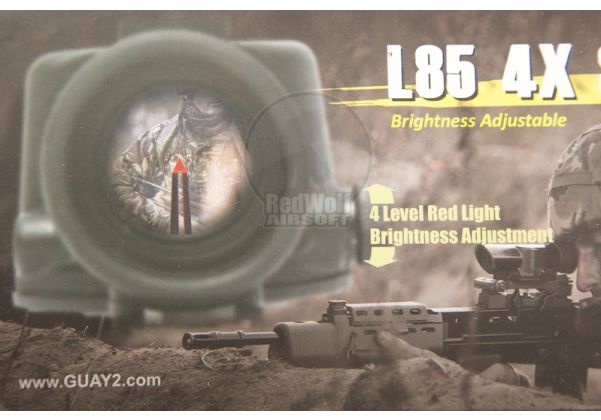


 worldly sphinx
What's the pickaxe recipe
feral ginkgo
is LoadingScreen.layout and PreloadScreen.layout sceneiro specific? Im tying to create a welcome screen for my server and after over an hour creating one i've got this

upon loading the mod into the "mods" [} area it doesn't appear to overwrite the default loading screen in Conflict Everon
my loadingscreenegn.c is the following
modded class ArmaReforgerLoadingAnim: BaseLoadingAnim
{
const string LAYOUT = "{67DDD8A66C5FC5D3}EGN/UI/layouts/Menus/loadingScreen.layout";
};
feral ginkgo
oh now im wrist deep in some SCR_missionheaders
 inner osprey
does anyone know how to play on mooded servers like greegodx and tyler 1 did back in the say thanks
 jade crane
inner osprey
does anyone know how to play on mooded servers like greegodx and tyler 1 did bac...
jade crane
inner osprey
does anyone know how to play on mooded servers like greegodx and tyler 1 did bac...
? Modded servers on reforger have all the mods available to download when you try to connect.
What are you having issues with??
dusty yarrow
would anyone have a tutorial on how to get to grips with the layout tool? to position it correctly etc it's a bit of a pain.
hollow heath
havnt seen one, its a bit of trial and error. You can duplicate complex vanilla layout into your mod and play around with it, also seems like some things like slots are not editable via the UI and need to be adjusted in the txt of the .layout
winged vessel
its all about nesting vertical and horizontal layouts
then if you need things to layer on top of each other (ie absolute css positioning) you use an overlay layout and everything inside that can be positioned on top.. good for if you want a background color/image etc
size layout widget can be used when you need to set a specific size for something
but most of the time all you should need is horizontal + vertical and use padding
sage current
Is it possible to draw something pixel by pixel in UI? 🤔
sage current
I did that in arma 3 quite fine, was thinking of trying it in in Reforger.
https://steamcommunity.com/sharedfiles/filedetails/?id=2281685552
worldly sphinx
there needs to be a faster way than image widget, maybe panel widget or something
I remember doing things like this with wiremod in garry's mod
sage current
Well. Only one way to know if it will explode. 💥
But seriously it should survive this, it can handle lots of widgets already. Just look at workshop ui. The glorious workshop UI 😋
winged vessel
pixel by pixel is going to be slow and memory intensive yes, but its possible
but if you can do it with lots of small widgets (ie icons) instead, that runs pretty fast and the engine can handle UI with thousands of them
especially if you use imagesets, so its only one image with lots of icons
sage current
winged vessel
pixel by pixel is going to be slow and memory intensive yes, but its possible
but how can I draw pixel by pixel? is there some canvas which supports that?
winged vessel
then its only one draw call per imageset