#reforger_workbench
1 messages · Page 28 of 1
 harsh walrus
 mellow mortar
Well that’s something
 proper widget
I just reinstalled the tools and the game and still cant create a project 
Do I need to make a bug report?
harsh walrus
proper widget
I just reinstalled the tools and the game and still cant create a project <a:NM_...
Download the samples, copy them in and see if you can at least open them
and yeah I would
(just copy them into your projects directory and they'll show up)
proper widget
harsh walrus
(just copy them into your projects directory and they'll show up)
I have to select add existing but I get the same error https://i.gyazo.com/21a7f2454de5df8d26167597d77ecf48.png
harsh walrus
what happens after clicking okay?
proper widget
just open up the dialog to select a gproj again
 jagged pilot
small tip. save your projects GUID's somewhere. I just accidentally deleted the project and without that your mod is loose on the workshop.
You can set a new projects GUID to an older projects and it will update that project on the workshop.
 willow wraith
Has anyone figured out this damn debugger? It keeps telling me my game is connected but all my debugger controls are greyed out, I never hit my breakpoints (even though my code runs if I check the mod in game), and anything I run in the console does nothing...
harsh walrus
willow wraith
Has anyone figured out this damn debugger? It keeps telling me my game is connec...
make sure you're looking at the console in script editor not world editor
otherwise idk
Works fine for me
willow wraith
I am, it lets me click the "Run" button but nothing happens 😦
If you do Print("Hello World"); in the console does that show up in your Output window?
 pastel copper
Yes if it gets called
harsh walrus
So you're loading into the game in world editor, doing whtever triggers your script, then looking back at the console in script editor?
willow wraith
No... the actual game. Am I dumb? 😅
harsh walrus
I'd open up a world in world editor and do it
willow wraith
Opening the Script Editor while the game is running automatically attaches the debugger via the default port,
Per the docs
harsh walrus
Yeah no idea lol
world editor basically is running the game within the tools though so that's how I do it
willow wraith
Also consistent with the "Game Connected" message I'm getting... just nothing works.
harsh walrus
hm yeah
sure your mods are being loaded
World editor is easy because it does that all for you 😂
willow wraith
That's the funny thing, if I tick my mods in the workshop section then my mod works but script editor seems to stop recognizing its connection to the game because my "Run" button on the console is greyed out.
and If I reload script editor with the mod ticked then it never gives me the "Game Connected" message
mellow mortar
@wise axle Any news on your „publishing breaks the mod“ problem?
harsh walrus
willow wraith
That's the funny thing, if I tick my mods in the workshop section then my mod wo...
oof
Yeah I'd recommend just trying the tutorial/eden mission (or VR in the samples) in the world editor lol
 wise axle
mellow mortar
<@182874757178327040> Any news on your „publishing breaks the mod“ problem?
wise axle
mellow mortar
<@182874757178327040> Any news on your „publishing breaks the mod“ problem?
Republished a couple times (changed nothing) and now it's working
bizzare
so it's on workshop now as Stamina Bar xd
willow wraith
@harsh walrus thanks I was going insane
willow wraith
Yeah I got it working with world editor now
harsh walrus
Nice
world editor is really really nice
Especially it's integrations with the other tools
 native relic
reforger workbench world editor the terrain sculpt tools doesnt work, someone knows why?
 lucid bolt
How do you move around with the camera in the world editor mine is just stuck to one side like top, back, or right
harsh walrus
native relic
reforger workbench world editor the terrain sculpt tools doesnt work, someone kn...
The stock terrain is locked
If you make a new terrain you can
harsh walrus
Hm I remember something like that happening, I'll jump in and see if I can remember it
lucid bolt
It's like my camera is locked in the corner
 humble anvil
did anyone already figured the workflow to import anything into reforger?
surely yeah, but any vids or tutos?
 mellow edge
Sorry if this is the wrong place, but I want to create a really simple mission on reforger to test it out (10 min job on the Eden editor). Is it best to use Game Master or can the workbench be used simply to create scenarios?
 hardy marsh
humble anvil
did anyone already figured the workflow to import anything into reforger?
hardy marsh
humble anvil
did anyone already figured the workflow to import anything into reforger?
this ^^, I wanna see if I like the workflow and learn it
 vague holly
mellow edge
Sorry if this is the wrong place, but I want to create a really simple mission o...
vague holly
mellow edge
Sorry if this is the wrong place, but I want to create a really simple mission o...
Game master is real-time only, no saving. It is the Zeus equivalent. From what I've heard of others, workbench is extremely difficult to make scenarios in.
 glossy relic
Anyone else unable to publish a mod due to an API error? I'm trying to test a sample weapon mod and I can't compile/publish it.
 ruby jungle
has anyone done the capture and hold setup tutorial? On step 5 it says find a suitable scenario location and they choose St Philippe, but it does not saw how to choose it. Any help would be appreciated.
 wheat cloud
You just put the spawn points near it
 fathom pine
Is there any high profile mod makers (red hammer, ace, cup etc) say there workin in mods for reforger?
 hexed pine
How are colliders added to a model?
 real matrix
 fathom yarrow
how can i add water?
 rugged sapphire
anyone know where I can find solid documentation for the workbench?
haven't been able to find much outside of the BI github page
which is pretty cool I'm ngl
rugged sapphire
humble anvil
did anyone already figured the workflow to import anything into reforger?
+1 on this
 brazen plaza
How are we gonna be able to make new maps ?
 worn eagle
hexed pine
How are colliders added to a model?
worn eagle
hexed pine
How are colliders added to a model?
you have to add them in the blander. you just throw some cubes over the model and join them. then you need to rename it to UTM_Name
hardy marsh
brazen plaza
How are we gonna be able to make new maps ?
No one knows, we were supposed to get documentation today and didn’t
brazen plaza
wheat cloud
pls giv scripting commands docs
Scripting commands?
wheat cloud
Like this
Obviously if is pretty self explanatory, but to see whats available for map markers, respawn, gear, ect
 serene iris
wheat cloud
https://docs.google.com/document/d/116vVaxW02aydAI-VDHLhW4USuLEiJDNS2YoiFCmkv-M/...
serene iris
wheat cloud
https://docs.google.com/document/d/116vVaxW02aydAI-VDHLhW4USuLEiJDNS2YoiFCmkv-M/...
Where did you find this at, or did you make it yourself?
wheat cloud
One of my buddies linked it on our discord
serene iris
Do you know where the source is?
 fallow ginkgo
read everything here https://community.bistudio.com/wiki/Category:Arma_Reforger/...
fallow ginkgo
fallow ginkgo
read everything here https://community.bistudio.com/wiki/Category:Arma_Reforger/...
dunno why they separated those articles, they should be all together imo
 tepid valley
wheat cloud
serene iris
Do you know where the source is?
tepid valley
wheat cloud
serene iris
Do you know where the source is?
nope
brazen plaza
the material editor is so nice
 vague hamlet
 soft marsh
anyone know how to get AI to turn on when in the workbench?
soft marsh
anyone know how to get AI to turn on when in the workbench?
the AI has some AI components and one of them has a property ai enabled or so and this needs to be checked
 spark briar
Is there a way to bind hit particles not to a specific weapon, but to all at once?
 sand fox
Dum question, I know it's possible to create custom gui elements, but is it possible to replace the whole default inventory menu?
soft marsh
vague hamlet
the AI has some AI components and one of them has a property ai enabled or so an...
I tried that, didn't work 
sand fox
Also for what is the core dependency?
 sour lantern
Anyone know how to adjust the center of mass/attachment point for Magazines
Trying to crate a custom PMAG but cant get the magwell/Animation to lineup
Thanks for any help
 forest oxide
Ok, I don't know if I'm missing something - Has anybody managed to run the MPTest example? I do not spawn in if I switch to game mode (aka Preview)
I spawn at 0,0,0 as an immovable entity
soft marsh
ah, I saw that, placed it in the world and still nothing
am I supposed to do something with it?


in that case, do AI not shoot at you when you play in editor?
because they didn't do that either
ah

yeah, gun shots didn't set em on alert either for me
 forest oxide
thank you
 hazy crypt
sour lantern
Anyone know how to adjust the center of mass/attachment point for Magazines
Tryi...
hazy crypt
sour lantern
Anyone know how to adjust the center of mass/attachment point for Magazines
Tryi...
Center of mass can be imported from fbx if it's correctly named and exported empty (in blender) prefix is COM_
 patent tundra
Following the Wiki Weapon Modding Tutorial.
Mentions "Inherit Prefab"
I really can't find that button anywhere...
I think they mean "Duplicate to 'project name' " don't they?
sand fox
So we have a dependency system right, so basically I could create a lib or base mod and others can built upon it right?
Gosh I love these mod tools
 golden sapphire
Hi all, sorry for asking what I assume is a common question (i had a quick peek and couldn't find an answer), but is there any guide on creating missions available? The new tools look very powerful but also intimidating!
fwiw i have found the capture and hold setup tutorial, but that seems to almost exclusively use resources that comes from the capture and hold mod which doesn't seem to help in getting started on anything else 😄
 junior canyon
For anyone trying to get the weather manager to work from scratch make sure you drag and drop the weather state machine in rather than finding it through the directory otherwise it will hard crash
 lost minnow
Is it some how possible to retexture uniforms or are they locked for the time being?
And have anyone figured out how to setup a string table with prefixes?
https://github.com/7Cav/CavAddon/blob/main/Prefabs/Characters/Uniforms/Jacket_US_BDU_CAV.et#L7
when using #CAV-Uniform_BDU_CAV_Blouse_Name that is printed rather then the actuall string table
string table here: addon.gproj
also setup the prefixees here i think: https://github.com/7Cav/CavAddon/tree/main/Configs/Workbench/LocParser
 lost raptor
Anyone figured out how to efficiently navigate the World Editor yet? Like is there a 2D map view hidden somewhere? Scrolling with the camera seems highly inefficient, just as clicking on random objects in the scene graph until you end up in an interesting location.
lost minnow
What i have done is first selecting a object so i get to the island THEN i use rightclick to lookaround and move from there not found any 2d map
So unsure if there are any smarter way atm
lost raptor
That's what I've been doing as well but it's terribly inefficient.
forest oxide
Same for me
 wide wind
lost raptor
Anyone figured out how to efficiently navigate the World Editor yet? Like is the...
wide wind
lost raptor
Anyone figured out how to efficiently navigate the World Editor yet? Like is the...
I look up the airfield and press f on it
thats a good start for me
Its so hard to learn this new workbench but I love it so much already
forest oxide
I have a simple skeleton (I just spawn in as a soldier and that's it), but I can't seem to be able to export it to the Scenarios, locally. I created a Mission Header, replaced the preview images etc with my own. It does show up as a "downloaded" addon, but when I activate it, I can't see it in the Scenarios list.
Any step I am missing?
 vague pecan
forest oxide
I have a simple skeleton (I just spawn in as a soldier and that's it), but I can...
vague pecan
forest oxide
I have a simple skeleton (I just spawn in as a soldier and that's it), but I can...
Known issue, only shows up in scenarios if it's a fully packaged and published add-on. Test scenarios from the world editor
forest oxide
vague pecan
Known issue, only shows up in scenarios if it's a fully packaged and published a...
Thank you!
And coupled with "Error 400 can't log in" ... isn't that a nice catch-22
lost minnow
vague pecan
Known issue, only shows up in scenarios if it's a fully packaged and published a...
nice for that clarification i was doing that as a bypass
forest oxide
(To be fair, there are very clear disclaimers everywhere about the unfinished state of this title)
wide wind
im just pissed about the netcode but thatl be fixed within the month im sure
 raven arrow
Hey, I am very new to modding and blender
Is there a tutorial on how I can import a prop from blender into the workbench?
wide wind
No, but it should be fairly simple
import an obj or an fbx
aswell as the textures I think
I dont have much modding experience but Ive done stuff in blender
thats such an awsome thing 🥵
raven arrow
Thank you very much, I will give it a go! 🙂
"Cannot drop anything in here.
This folder is read-only."
😩
wide wind
raven arrow
"Cannot drop anything in here.
This folder is read-only."
😩
make a new folder
wide wind
raven arrow
Gotta say though, it's sad we cant send screenshots here
this is so true
raven arrow
Okay so I got the asset to show in-game, but it does not have any collision
Could you tell me how I would go on to do this as I don't quite get what you mean
 neon raven
Is t here a way to look what's inside a prefab?
Let's see I'd like to see what everything is inde the CaptureAndHold_Major.et
Any ideas?
raven arrow
Thats what I did, but no luck
https://cdn.discordapp.com/attachments/130022200009818112/976792217375100948/unknown.png
hazy crypt
Some extra info regarding collider shapes:
name for collider shape model = COLLIDER SHAPE_name_of_the_object = UBX_Car or UCS_wall1_part1 for example.
collider shapes (primitives, which can be created in most 3d software):
UBX_ -box
UCX_ - convex
USP_ - sphere
UCS_ - capsule
UCL_ - cylinder
UTM_ - triangle mesh (trimesh)
native relic
guys should i use faction manager or SCR faction manager to add a faction?
neon raven
So the CaptureAndHold_Major.et is the SCR_CaptureAndHoldArea.c script in a "visual" and placable form and the Attribute are the things we can change on the side in the wold editor right? 
raven arrow
Honestly I have no clue, sorry 😒
The only thing I changed is the object type to only mesh
https://cdn.discordapp.com/attachments/130022200009818112/976792796113563688/unknown.png
If you could give me a hand then that would be great 😄
 turbid mountain
hazy crypt
Some extra info regarding collider shapes:
name for collider shape model = COLL...
turbid mountain
hazy crypt
Some extra info regarding collider shapes:
name for collider shape model = COLL...
Can you put that in #enfusion_model (I think there it fits best?) and pin it there? You can just right-click pin
Also to fix the angled text you can do UBX\_ instead of UBX_
sand fox
Is SVN some kind of source control tool?
turbid mountain
sand fox
Is SVN some kind of source control tool?
yes
raven arrow
:c
sand fox
turbid mountain
yes
Hmm, do we also might get git lfs support directly in the editor?
raven arrow
Hey dedmen, could we possibly get permission to send screenshots in here?
 worldly minnow
It's hilarious that we have SVN integration. The fuck uses that nowdays
raven arrow
I'll play around with it a bit more then
Thank you for your help though, really helped me out
neon raven
worldly minnow
It's hilarious that we have SVN integration. The fuck uses that nowdays
Arma3Sync does 
And it has it's reasons
worldly minnow
I think you just made my case 😉
turbid mountain
sand fox
Hmm, do we also might get git lfs support directly in the editor?
Probably possible with plugins.
Bohemia doesn't use git internally, and there are LOTS of priority things that need to be worked on, so don't expect that to happen soon
turbid mountain
raven arrow
Hey dedmen, could we possibly get permission to send screenshots in here?
Yes, I'll foward
sand fox
turbid mountain
Probably possible with plugins.
Bohemia doesn't use git internally, and there ar...
Alrighty ty for the answer
 rotund cargo
I really don't want to spam about this but I really can't get my head around it...
How in the world does the arsenal boxes work ?
Debug console doesn't show any error, I don't think I'm missing any prefab but the boxes keep showing empty, what am I doing wrong ? 
Am I supposed to add items in there myself ? That wouldn't be an issue, but I can't find any way to do that either 🤔
lost minnow
check if you can find the already existing item list
native relic
someone knows why my thumbnail doesnt appears on my addon?
rotund cargo
lost minnow
check if you can find the already existing item list
Well, I've been looking at script files to understand how all of this works, so far I've only found a typo in a comment but that's about it 
And I'm pretty sure I don't have to go this far to make the arsenal work
People here seem to just drop the box and... Well it just works ?
lost minnow
does the prefab item have any settings for listed arsenal items?
(limited ability to check my self, ive been digging in prefabs allot yesterday and it look like all stuff is pressent there)
rotund cargo
I might have found something like this yeah, hold on I'm trying to add something
rotund cargo
lost minnow
(limited ability to check my self, ive been digging in prefabs allot yesterday a...
Well yeah, that's the weird part. All the other prefabs are working right off the bat for me, but not this one 
lost minnow
rotund cargo
Well yeah, that's the weird part. All the other prefabs are working right off th...
open one of the missions in workbench and see if the item that you placed down also have the adjusted list
rotund cargo
lost minnow
open one of the missions in workbench and see if the item that you placed down a...
Yeah, I'll do this thank you
lost minnow
If not that could mean that ether that the items are not replaced or you use a inherit item so its a new """"classname"""" if you will
brazen plaza
So what mods are in the world ? Anyone working on anything cool?
lost minnow
brazen plaza
So what mods are in the world ? Anyone working on anything cool?
trying to make a simple retextured uniform but stuck with model and string table
 alpine brook
There are a fix for the login to workbench issue?
brazen plaza
I’m excited to see al the new stuff
As a console player new to arma
I can say I’m very pleased with what I’ve experienced so far
Ambushes are shit scary
Me and my platoon were in a convoy, making sure our supply trucks reached the next objective
And the next minute, a bunch of society’s run down the the hillside both left and right and start lighting us the fuck up with rpgs and grenades
rotund cargo
lost minnow
If not that could mean that ether that the items are not replaced or you use a i...
Conflict gamemode doesn't seem to use the same system, that's weird. But I'll dig this further on my own, thanks for the help 👌
wide wind
lost minnow
trying to make a simple retextured uniform but stuck with model and string table
Tell me if you have any luck I wanna do the same thing LMAO
brazen plaza
Wtf
lost minnow
wide wind
Tell me if you have any luck I wanna do the same thing LMAO
I manage to get the uniform to use the texture in preview but because the model is read only i cant save it https://ibb.co/VBH5gfG
 ashen totem
Do use think that DayZ mod will be brought on Arma Reforger ?
brazen plaza
Hey it looks great though
wide wind
lost minnow
I manage to get the uniform to use the texture in preview but because the model ...
It looks so good why does it have to be locked 🤬🤬
rotund cargo
@lost minnow I finally managed to put items in there, thank you very much 🙏
wide wind
I hope we are able to figure out uniform modding fully
I'm gonna make some much once someone figures it out 😩 😩
lost minnow
Well if we got access to atleast parameter changes to model file (dont remember the file extension name) i would be happy
lost minnow
rotund cargo
<@128915444009664512> I finally managed to put items in there, thank you very mu...
Do you use a string table for the name? or you just dump the name in the item btw? cause i have problem with string table xD
wide wind
lost minnow
Well if we got access to atleast parameter changes to model file (dont remember ...
I wonder if we could figure out how to make a 3d modelled base for uniforms and have it integrated with the games characters 🤔
native relic
someone knows how to add a vehicle to a faction on editor?
rotund cargo
lost minnow
Do you use a string table for the name? or you just dump the name in the item bt...
No string table, I'm gonna have to add each item by hand
🙃
lost minnow
wide wind
I wonder if we could figure out how to make a 3d modelled base for uniforms and ...
i used Prefabs/Characters/Uniforms/Jacket_US_BDU.et as a base class and just added stuff on top of it.
Its the asset /Assets/Characters/Uniforms/Jacket_BDU_M81/modelfile.whatever
that have the actual texture applied
(spelling grammar and writing not my strong side.)
wide wind
I know but I think we won't be able to use that as an actual mod from what I know
raven arrow
Okay, I managed to solve it by adding a RigidBody component and turn on Model Geometry
 elfin belfry
@turbid mountain what does bohemia use if not git? floppy disk sharing?
lost minnow
wide wind
I know but I think we won't be able to use that as an actual mod from what I kno...
yeah that was my problem. So if you find a way to mimic or inherit from it or use it?
they use svn
turbid mountain
particularly ones that are better suited for literally 100s of gigabytes of binary data, like game assets
elfin belfry
I dont think git is bad. I once initialized repo in C:/ and versioned my whole disc. Pretty based
wide wind
lost minnow
yeah that was my problem. So if you find a way to mimic or inherit from it or us...
I wonder if I could just shill out some money and get a model of bdus as a base 🤔
Uniform stuff
wide wind
we would have used the base uniform but its locked
lost minnow
there are no options to duplicate or copy the base model file
dont remeber the file name atm
/Assets/Characters/Uniforms/Jacket_BDU_M81/modelfile.whatever
its located there
wide wind
If you figure it out brostrom let me know so I can make divisional patches 😈
lost minnow
@brazen plaza my current repo stage is pressent here: https://github.com/7Cav/CavAddon
xob is the file i that hold the terxture so i need to make a compleat new mech just to be able to retexture it?
!
seen
ill test it in 2 h
if it works i will litterly give you a littel start at the side of the book
 compact zephyr
I dont get what I am doing wrong, when I switch out the MeshObject in the prefab to one of my models. Sometimes my model shows up properly in the viewport, but other times it refuses to show up. No matter what I do the original model is there in the viewport, I can save the prefab and the MeshObject changes are saved properly, it clearly says its using my .xob file but its still showing the original .xob in the viewport.
lost minnow
that is amazing
wide wind
I'd get on and try it but for now im gonna ask this to get it.out of the way
How do I download the base texture to retexture it?
lost minnow
yeah i litterly took 6 screenshots xD
and puzzled them togeter
i trying to use the string table with no effect
so i resorted to use that shown above. But it works for me
neon raven
turbid mountain
particularly ones that are better suited for literally 100s of gigabytes of bina...
Git with LFS maybe? 
turbid mountain
Even that gets quite large when you have years of hundreds of people pushing changes, and everyone needs to have the full history downloaded.
It doesn't scale as well as SVN.
And i don't even see the issue with SVN in the first place, it works nicely, battle hardened and worked for years, no reason to change
wide wind
lost minnow
yeah i litterly took 6 screenshots xD
Could you send it to me?
Just so its easy for me to do it too lol 🤣
lost minnow
wide wind
Could you send it to me?
if you have photoshop i can 😛
neon raven
turbid mountain
Even that gets quite large when you have years of hundreds of people pushing cha...
My first encounter with SVN was back in the day when it was the only way to download Star Gate mod for Garry's Mod, second encounter was Arma3Sync now.
But in the meantime, I fell in love with git. But yeah, I never used it for games and all my projects are relatively small apps, usually CLI ones.
It all has it's uses, but i think GIT just took the role of the "better" versioning system and is presented as such
raven arrow
Okay, so I am still stuck with the whole collision ordeal
It works fine with a simple cube with 6 faces, I am even able to stretch one of the edges to create a ramp and it still works
But the moment I add more edgeloops it stops recognising the collision mesh and spits out errors in the log

 spiral wraith
I may be completely blind, but I wrote simple script and tested it in world editor, it works. How do I actually export it? I can compile it etc, but I do not actually see the option to build/export it.
 fair oriole
is workbench crashing much for you guys ?
It crashes every time i try to save a terrain
raven arrow
Occasionally crashes when it loads for a playtest
fair oriole
right
i keep getting the same reason in the logs. "Reason: Access violation. Illegal read by 0x7ff7eeaf5463 at 0x50"
 spark edge
i cant make a new project anyone able to help?
https://prnt.sc/LsiQZFwQYf8I

yea i just reinstalled it
https://prnt.sc/HA5K284VAF7t nothing in there

ok thanks
https://prnt.sc/qmFD_GC_kAP_ that core file wont work
 turbid mountain
you probably don't need to add the core file
only the ArmaReforger.gproj in game addons folder
spark edge
its not in steamapps anymore?
turbid mountain
it should be
spark edge
ah i went to wrong drive 2 secs
native relic
EditablePrefabsComponent_EditableEntity from where that comes?? its on a config on a sample, but when creating a config that class doesnt exists!
lost minnow
Workbench play nice with junctions btw
PS > ll

    Directory: C:\Users\andre\Documents\My Games\ArmaReforger

Mode                 LastWriteTime         Length Name
----                 -------------         ------ ----
l----          2022-05-18    18:39                addons -> D:\ArmaRAddons\
d----          2022-05-18    21:15                profile
nope that editor is way complicated to make a mission lol
however i made a map building upside down lol
compact zephyr
New weapon this time or replacement?
Good
I have a pretty good AX50 model, specced to the Danish military with Full attachments. Would be cool to get it in, but currently struggling on my Binocular. I'm trying to configure it to have the same ALT + Scroll wheel variable zoom like the M21 Sight has.
Try and right click on the prefab on left side, and click the break prefab instance. It will turn red, then make your change. And save as a new prefab
Yeah np 🙂
Anyone know how I can "merge" two .xbo's into one?
 lofty granite
fair oriole
i keep getting the same reason in the logs. "Reason: Access violation. Illegal r...
lofty granite
fair oriole
i keep getting the same reason in the logs. "Reason: Access violation. Illegal r...
Are you trying to save in a locked folder?
compact zephyr
I have a scope and scope rings as seperate objects. But would obviously like to have them in the same .xob
fair oriole
lofty granite
Are you trying to save in a locked folder?
no i dont think so it is the default My Game folder in the documents folder?
lofty granite
Are you saving the terrain you are making in project folder you made? , as acceses violation pops up when its saving towards one of those locked folders from the enfusion engine other could be to try to launch it in adminstatior mode and se if that fixes it 🐸
fair oriole
Ah i made sure that the folder was not set t readonly but win 10 keeps resetting it. I will see if i can fix that part first
lofty granite
👍
alpine brook
There are a fix for the login to workbench issue?
I can't login or something to bundle it offline?
compact zephyr
Try what I Said above. Right click on the Prefab you are editing on the left side. Hit break Prefab instance, it will turn red. Then do your changes and save it as a new prefab
After you have done your changes drag the edited Prefab down into one of your own folders and save with your name of choice
I have had the same issue before where the save prefab choice is greyed out Even tho I have done multiple edits.
That Sucks, ive had the same issue and that workaround fixed it for me.
It seems to me that the Prefab edits are a bit hit or miss. Maybe a bug like you Said?
 warped crypt
Have you figured out how to do that by now?
lost minnow
warped crypt
Have you figured out how to do that by now?
possibly will ty out something in a couple of minutes, will return with results
 hasty shoal
Anyone else is having trouble with the script editor debugging? I have the script editor connected to the game and use to be able to execute commands with the console, but somehow it doesn't work anymore... (Should print the test in the output window)
 vague wren
Where can I find a scripting documentation?
 modern vine
 cobalt jay
vague wren
cobalt jay
vague wren
Ahh ok, do you know how I can add a Interaction to an Prefab?
turbid mountain
vague wren
How is the "mouse wheel" menu called in Arma?
"Action Menu" in Arma 3.
In Enfusion there is ActionManagerComponent i think its called
vague wren
Thank you
warped crypt
lost minnow
possibly will ty out something in a couple of minutes, will return with results
👍
warped crypt
lost minnow
<@300612653607288834> it kind of works
Oh nice, so what did you do?
lost minnow
added a changed .emat on worn materials override
https://cdn.discordapp.com/attachments/689183240430289074/976805664405987368/unknown.png
https://cdn.discordapp.com/attachments/976019427483074621/976805858660995152/unknown.png
Provided by @brazen plaza
 mortal arch
Hey there, I got a noob question regarding the World Editor:
Can You make holes in a map mesh as like entrances for "real" underground terrains or will it be the old tricks for building tunnels?
 obsidian flume
Hit apply to prefab on the bottom right after your changes?
I can't wait to use all your guys new weapons
really? interesting.
compact zephyr
Hey Lewd, how have you gone about fixing hand placements etc for your custom guns?
lofty granite
i am having a wierd issues with the arma reforge tool I dosn't seem to want to launch propely, i get to the screen to select my project and after that nothing
tried reinstalling it and validating files - fixed it after reinstalling the main game, could be possible update that did some funky to my tools
 fleet anchor
@brazen plaza have you figured out how to specify
 teal basin
has anyone figured out why the workbench crashes when saving a world?
lofty granite
^most likely you are saving to a lockedfolder, you need to save towards you're own project folder
teal basin
lofty granite
^most likely you are saving to a lockedfolder, you need to save towards you're o...
That was it. Nice! Thank you!
compact zephyr
How do you actually send images in this chat? Using Imgur share link works perfect in some other channels. But here it wont embed properly?
teal basin
compact zephyr
How do you actually send images in this chat? Using Imgur share link works perfe...
People can just click your link. Embeds disabled just to stop bad images from popping up in the discord
lofty granite
teal basin
That was it. Nice! Thank you!
np
compact zephyr
teal basin
People can just click your link. Embeds disabled just to stop bad images from p...
Yeah but look at Lewd's m16 picture, its properly embedded. I dont see a link at all, just the image
teal basin
You can copy and paste an image into the chat
compact zephyr
teal basin
You can copy and paste an image into the chat
Doesn't work for me
Whatever, I posted some pictures in #enfusion_model Managed to get my AX50 Model in, looks alright. Needs some texture changes and small stuff done. But not bad for a start.
Yeah which should be easier to make this time around I've heard
lost minnow
How do i make sure a image have the following image data format when converting?
TEXFMT_BC7_SRGB (99)
 twin osprey
I see we have https://docs.google.com/document/d/1viZSm7OquK8vhahskP0Bthy9uQufmz2PA01g1SHzFd0/edit# for talking about creating a new world/terrain, but is there anything that explains how we can actually set up a unit in this new world and walk around? (Without basing our project off the C&H mission)
wheat cloud
twin osprey
I see we have <https://docs.google.com/document/d/1viZSm7OquK8vhahskP0Bthy9uQufm...
twin osprey
Yeah I tried this yesterday and it didn't work, but i'll try it again
wheat cloud
Those 5 modules are what you need to create a TvT scenario
lost minnow
Allright i have figured out how to make a uniform retexture reliable
twin osprey
wheat cloud
https://i.imgur.com/JiIakMn.png
In this image, there is a custom loadout manager. What should I be using there?
LoadoutManager_potat2
wheat cloud
Oh
sorry
uhhh
LoadoutManager_USxUSSR.et
You need to duplicate it though if you want to change the default gear
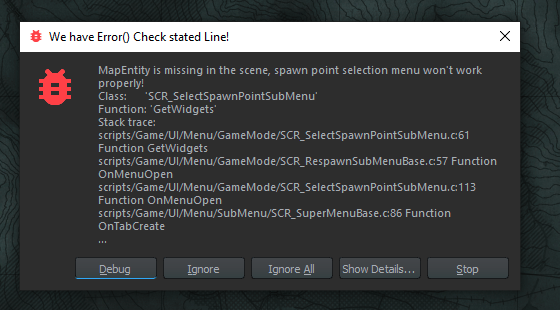 wheat cloud
Probably something with your map
wheat cloud
Sorry I cant help more I haven't really looked into that side of things
twin osprey
It's just frustrating how complicated it is to get anything to test without basing it off the original map/C&H
 last glacier
does somone have the googledoc on creating a new world. saw it last night
cant find it now
twin osprey

Google Docs
Thanks Special thanks to pond, RedisMad, Miro, Ivan, Branzik, Kllrt, and Blud (and probably a bunch of others but there’s 3 different terrain chats right now and it’s getting hard to track). 75% of this was mentioned by them in one of the terrain channels. Introduction New terrain tools for Arma...
last glacier
lit. thanks
 sudden smelt
Hello,
When I try to bundle a project (Just a scenario by following tutorial on wiki) I have this error:
RESOURCES (E): Failed to load metafile of mission config image:
DEFAULT   (E): Cannot copy image:
RESOURCES (E): Creating bundle failed
So I can't bundle and test my scenario in game
twin osprey
Well I added a map entity and i'm able to run it, but I still can't control my character and my camera is just positioned at the unit's boots 🤣
lost minnow
QUICK GUIDE FOR NEW ITEMS RETEXTURE
-
Make a duplicate of the item you want to use
example\Prefabs\Characters\Uniforms\Jacket_US_BDU.et
save it as the same name as the origionalJacket_US_BDU
This is now inherited to the mod ready to be used. -
Select edit Prefab for
Jacket_US_BDUThis opens the world editor.
In the word editor Resource browser find your copy ofJacket_US_BDU -
Right click it and select
Inherit Prefab in Addon.
Select a name of choiseJacket_US_BDU_inherited -
The new uniform is now ready to be edited
Jacket_US_BDU_inherited
To retexture a item select theObject Properties>BaseLoadoutClothComponentand add a newWorn Material Overridenow select your imported texture.
I made a texture puzzling peaces together from screenshots.
turbid mountain
sudden smelt
Hello,
When I try to bundle a project (Just a scenario by following tutorial on...
See pinned messages in #enfusion_scenario
turbid mountain
lost minnow
**QUICK GUIDE FOR NEW ITEMS RETEXTURE**
1. Make a duplicate of the item you want...
Maybe post that in #enfusion_texture, it will go under here
lost minnow
@warped crypt @brazen plaza @wide wind
 dusty elbow
Is it worth learning Reforger modding now or should I wait a few weeks for more documentation to come out? Seems like a lot of the documentation is pretty sparse
turbid mountain
dusty elbow
Is it worth learning Reforger modding now or should I wait a few weeks for more ...
Wiki documentation will only take a couple days until its all up
dusty elbow
turbid mountain
Wiki documentation will only take a couple days until its all up
That's fine, I'll wait until then, just wanted to know. Thanks

 oak jay
guys can sombody give me a tip how i can edit original texture
i want to retexture some models
twin osprey
 late hare
On the left hand side, click on an entity that is in the world and press F to move your camera to it
late hare
thanks
 old cosmos
is there a way to create a custom tearrain yet? cause i have seen one on the workshop, but i dont know how the person did it
turbid mountain
Yes, see #enfusion_terrain
 golden oxide
There seems to some funkyness with the arsenal boxes, try setting the item type to default instead of weapon see what happens
brazen plaza
Is there anyway to view a mods contents?
One mod here has 141mb but I can't figure out what it adds
Well that's fair
golden oxide
yeah IDK I have the same issue
fair oriole
i cant seem to get the tool to save the island, it always crashes. Win10 seems to keep resetting the folder permissions to read only
twin osprey
Hm do wheels just not collide with props?
https://streamable.com/xalhv6
 golden oxide
the wheel objects are really "real"
the phsyical diameter is an axle parameter
could be a collision mesh thing too
twin osprey
Yeah I guess I just mean it's odd that the physics realizes the body of the vehicle is colliding and not where the wheel is supposed to be represented
alpine brook
DO the update fix the login problemes to workbench ?
 sacred moth
alpine brook
DO the update fix the login problemes to workbench ?
sacred moth
alpine brook
DO the update fix the login problemes to workbench ?
it's not explicitely stated so, but it could : https://reforger.armaplatform.com/news/may-19th-update
Fixed: Services for addon publishing linked to Workbench
 outer nacelle
Is there a way to make a http call from the Server to a Rest API?
Or any method to save Data persistant
 worn charm
it's like that for everyone, you have to wait for the devs to update the skeleton
blender also has issues
elfin belfry
So basically you paid 30$ for a non working game. Fine...So you decided to make free content for others by modding. It already costs you your own time + 30$. And now you can't even mod it because nothing works basically. 😄
worn charm
are you using blender or 3ds max?
me too, tried using the skeleton from the fbx file and it still didn't work
weighted and all
 strange kayak
workbench crashes for me whenever i want to save a world. does someone know a fix ?
i dont get any error it jsut closes
worn charm
How did you get it to work?
and its the skeleton from the 'Headgear_Example' fbx?
could you show me your export settings?
because your like the only person to get blender to work with skeleton
sorry to bother
and your using the Headgear_Example fbx?
alright thank you
spiral wraith
I tried to search around workbench, but how do you actually build/export mod? Wrote some hello world and tested it in the world tool, but cant really find the option to export/build it
 tight dune
twin osprey
Hm do wheels just not collide with props?
https://streamable.com/xalhv6
tight dune
twin osprey
Hm do wheels just not collide with props?
https://streamable.com/xalhv6
you are most likely using wrong layer preset, which is not interacting car wheels
brazen plaza
Anyone here know how to take a prefab from the game, and save it as a new prefab after editing it?
worn charm
im still getting a floating helmet, do you think you could like send screenshots going over the bones and like what vertex grouped you weighted too? @brazen plaza
you dont have to but im kinda stuck here and you are my best bet
yeah ok
any chance you could send over an fbx you have?
i understand if you dont wanna
yeah
ok
because i legit just tried exporting the fbx and that didn't even work
 void hollow
i think he is dont know about weight trasnfer


 rocky stag
what does DEFAULT (E): Kicked from game. group=1 reason=3 mean when joining own server from workbench?, got battleye disabled
tight dune
I'm curious though, how did you get matching skeletons?
worn charm
meanwhile im trying to simply import and export the example fbx without touching it and it doesn't work
skill issue
tight dune
didn't you get armature bone?
aahh, helmet doesn't have that issue since nothing is skinned to it, right.
so armature is not created in this case
worn charm
its turned on
rocky stag
rocky stag
what does DEFAULT (E): Kicked from game. group=1 reason=3 mean when joining ow...
incresed log level on a server, guess
thats the issue?
BACKEND (E): [RestApi] ID:[7] Error Code:418 - I'm a Teapot, ApiCode:
RPL : ServerImpl event: connection refused (identity=0x00000000)
worn charm
i think i have something wrong with my import settings but just dont know what
its either that or my blender is ruining it
bruh
yeah
i cant
it controls the whole skeleton
it deletes all the bones when i remove it
ill try looking it up
I have no clue how you are using blender and dont have an armature bone?
 meager locust
Hey! Has anyone managed to start a scenario from the Workbench with "Server localhost" selected and actually connect to it from inside the game?
tight dune
worn charm
ill try looking it up
try headgear or head examples
blender creates armature bone only when root bone in mesh is skinned to something
in case of character, it has to be skinned so that character is working correctly
worn charm
thats what I get on a fresh import
and im not sure how to fix it
i think i might've figured it out
I GOT IT WORKING
thanks you
this fixes a ton of issues i was having
 knotty lark
Hey guys, is there a quick guied or tutorial on how to start modding with the workbench? Just need some sample projects to understand the process.
Thank you!
brazen plaza
Ok I duped it and renamed it, then when I try to edit the prefab, I cant delete certain assests within it. and saving prefab doesnt seem to save it
 fallow willow
If I wanted to create a script that would add points on the map when the map was open, would I have to mod SCR_MapEntity and loop into the OnMapOpen and OnMapClose and add stuff in there to manage the markers? Just want to see if I am remotely on the right track...
 minor depot
Idk if this would be the right place but when I try to save a project it just crashes causing me to have to restart all my work. Does anyone else have that problem as well ?
 hazy forum
Hello, let´s make a trend, we need VR support, done by the devs, or the community, but we need it
I don´t know if it´s possible to do it with Workbench
 lament cloud
compact zephyr
lament cloud
compact zephyr
Does anyone know if the PIP Aiming with Sights work for Binoculars as well? I haven't seen a PIP option for the Optics selection. And I tried adding the PIP sight component on my bino but that did not work. Variable zoom doesnt seem to work either with Binoculars..
brazen plaza
Is there a way in the editor to be able to switch between game and editor view while playing in the editor/in game mode (everything is greyed out when in play mode)? Similar to Unreal Engine or Unity where you can switch between the editor and game windows while playing to see the scene hierarchy and inspect things in runtime. That'd be very helpful for troubleshooting and tinkering.
 wraith dust
i noticed theres a heli controller in files can anyone do something with that?
raven arrow
Does anyone happen to know the dimensions of a doorway in reforger?
 thin rapids
Where can I download the workbench tools?
 deep grove
thin rapids
Where can I download the workbench tools?
deep grove
thin rapids
Where can I download the workbench tools?
Steam > Library > Click 'Games' dropdown box > tick the "Tools" checkbox > You should see "Arma Reforger", "Arma Reforger Server", and then "Arma Reforger Tools" - this is the Enfusion Engine to create mods and stuff.
thin rapids
deep grove
Steam > Library > Click 'Games' dropdown box > tick the "Tools" checkbox > You s...
Cheers man this helped a lot cant wait to start all of this!!
teal basin
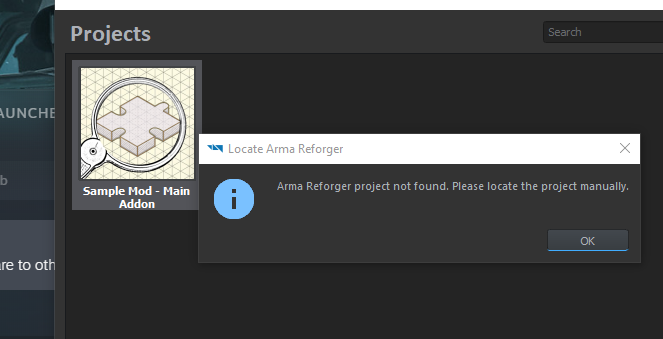
I think my workbench is broken. Reinstalled the tools and the base game, validated files, tried clean install. Still says "Arma reforger project not found. Please import manually." But I can't import any project or create a new one. It just gives me this pop up no matter what I click
wide wind
when I go to put a texture on something it does not show my folders but only arma reforger and core
 vocal sinew
hello did anyone figure out how to create custom prefabs from scripts?
 whole ore
@compact zephyr Binos seem to be not PiP, I’ve used them on both faction sides and they haven’t been.
It’s a bummer
wide wind
how do I test a mod in game?
teal basin
teal basin
I think my workbench is broken. Reinstalled the tools and the base game, validat...
Figured it out
vague wren
In which Component can I make a weapon shoot, without someone holding it?
native relic
https://imgur.com/yjmKvr4 how i fix this? i cant edit object properties
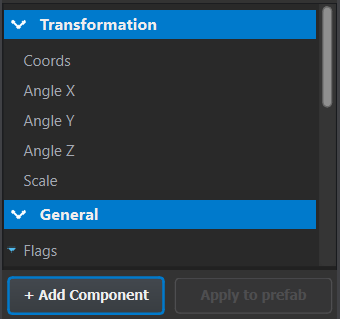
@turbid mountain do you know how to fix this?
turbid mountain
no
turbid mountain
is that in world editor or where?
wide wind
lost minnow
**QUICK GUIDE FOR NEW ITEMS RETEXTURE**
1. Make a duplicate of the item you want...
I apreciate this, but it still does not explain alot about how to add the textures or how to put the uniform in game
 vague wren
In which Component can I make a weapon shoot, without someone holding it?
vague wren
vague wren
In which Component can I make a weapon shoot, without someone holding it?
Or rather how can I make a script fire a gun
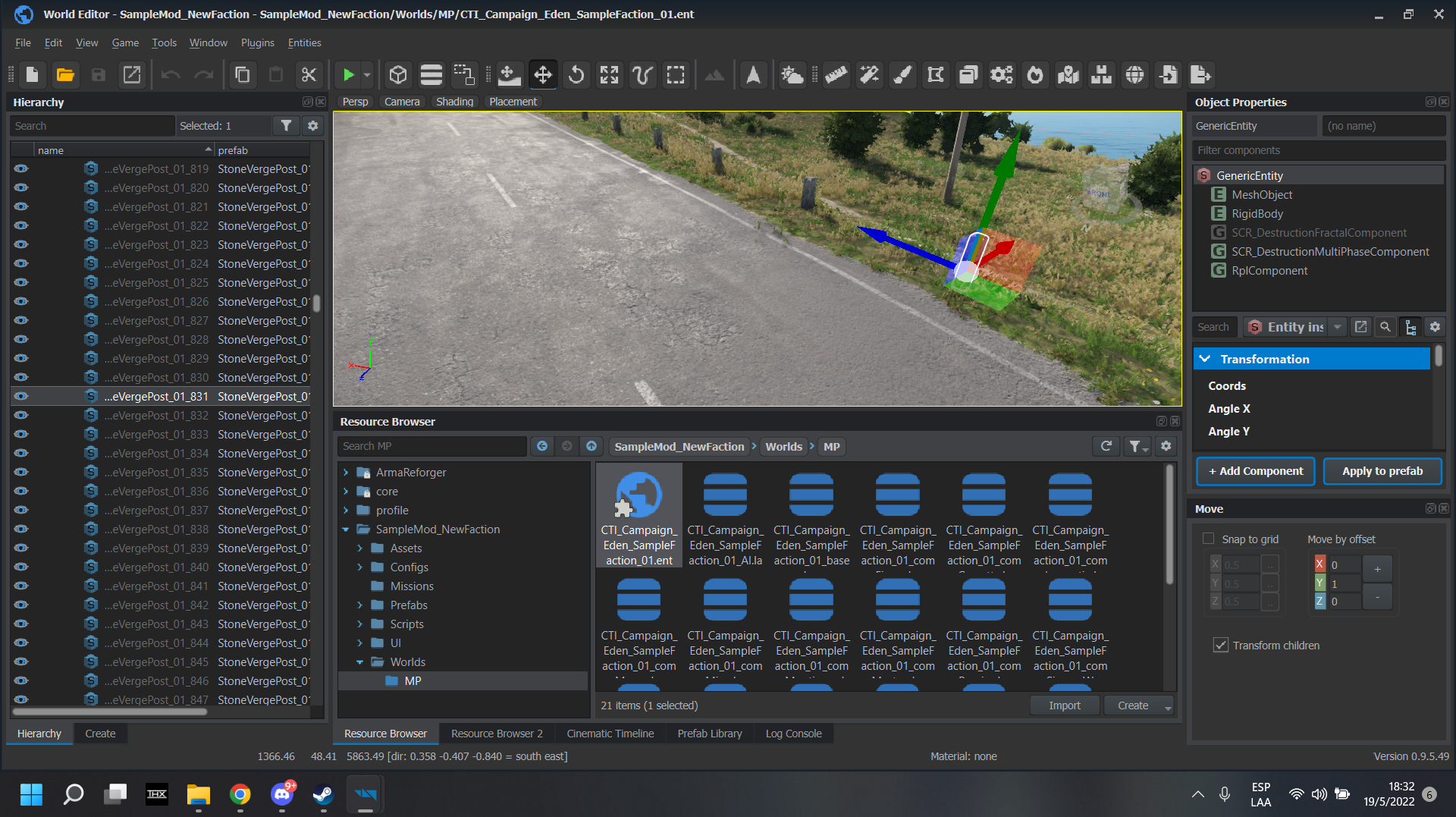 native relic
happend with my files too
native relic
theres no error
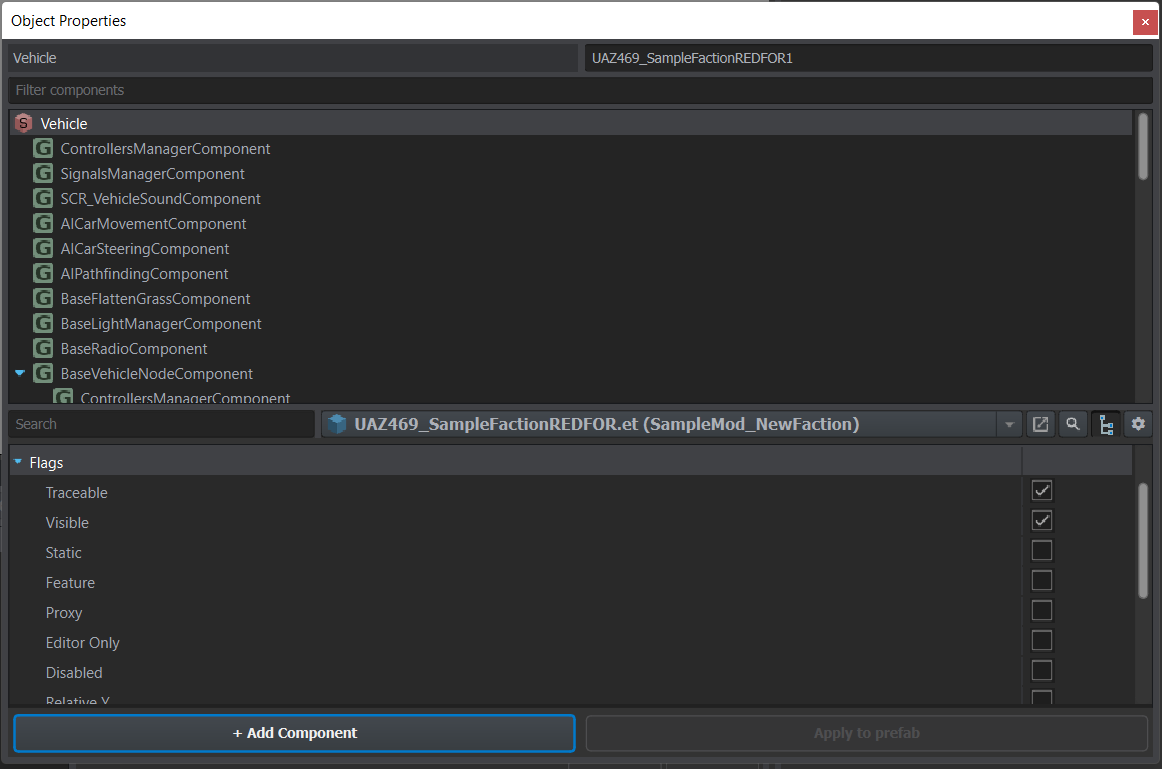
https://imgur.com/o7phEGO as you can see no errors

this warning appears
but shouldnt affect the editor
how can i uninstall completely the tools? maybe it will work
as when i uninstall from steam, and reinstall, the projects still appear so theres some appdata that is being stored on the pc even when is uninstalled
but i dont find where they are installed
also, if i "paste" the values on the object properties, they got changed
so its a visual bug that doesnt let you see what are you doing
 modern niche
turbid mountain
I get this when opening Tutorial.et
modern niche
turbid mountain
I get this when opening Tutorial.et
How do you open that?
The world
 spiral delta
is anybody having issues with reforger tools? Can link a dump if it helps, won't allow me to save any subscenarios without crashing
vague wren
can I view all methods of a prefab?
modern niche
spiral delta
is anybody having issues with reforger tools? Can link a dump if it helps, won't...
nope im all good
spiral delta
minor depot
Idk if this would be the right place but when I try to save a project it just cr...
seems he has the same problem^
native relic
@turbid mountain the worst is that it was working yesterday, so i dont know how it got broken :C
vague wren
Im still not finding any method that makes me use a weapon 😦
native relic
@turbid mountain i just found which was the bug
it was an overflow
if i made the object properties window very big i can see the options
and i could rezise it
it was this https://imgur.com/m2X34E9
i fixed it putting it like this https://imgur.com/u7BBRAI
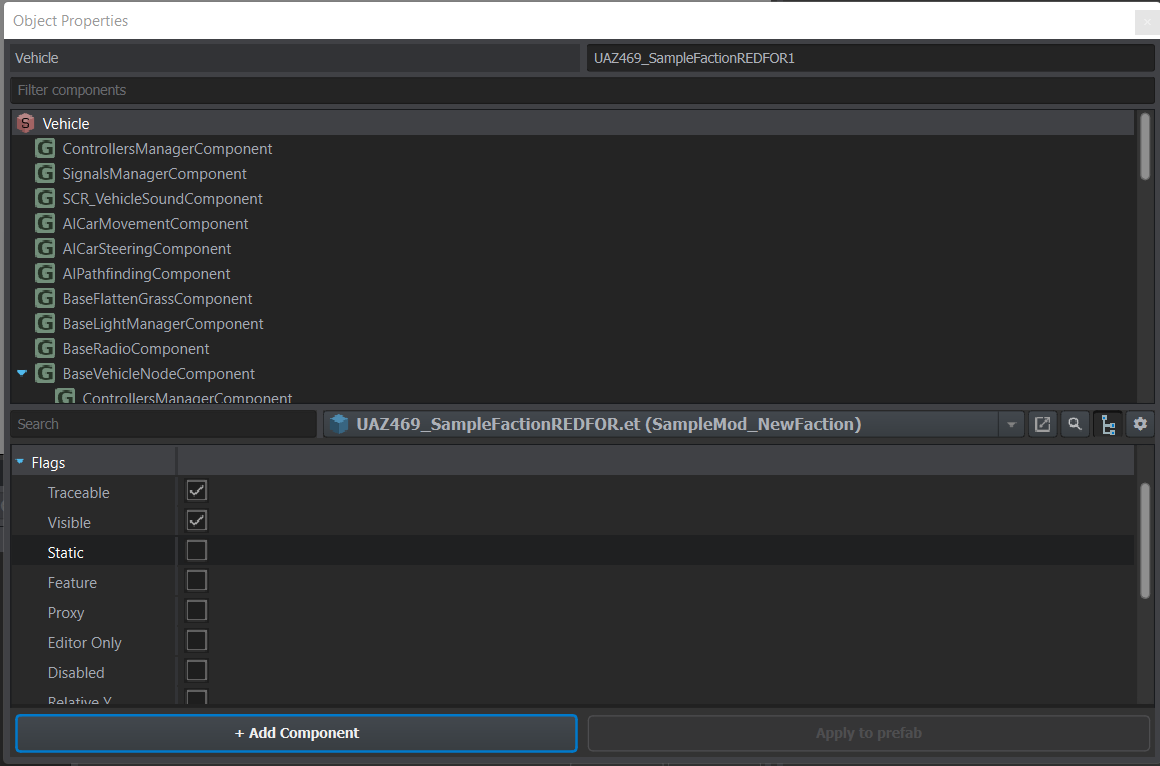
it look likes that theres no side scroll if theres overflow
brazen plaza
starting to get used to the new way of scripting
making progress on the first phase of BloodLust2: https://forums.bohemia.net/forums/topic/189963-bloodlust-version-20220413/?do=findComment&comment=3460164
Bohemia Interactive Forums
fallow willow
If I wanted to create a script that would add points on the map when the map was open, would I have to mod SCR_MapEntity and loop into the OnMapOpen and OnMapClose and add stuff in there to manage the markers? Just want to see if I am remotely on the right track...
 quartz anchor
anyone having problems logging in to the enfusion workshop to publish a project?
 dim thunder
So anybody have any idea where I could find the script for spawning on players?
harsh walrus
Is anyone having issues signing into workbench?
Just says invalid username/password, which is definitely is not
 quartz wren
I am subscribed to Capture & Hold, but it does not show up in Projects, anybody have solution?
Also tried to "Add existing" from mod folder - nothing
quartz anchor
quartz wren
I am subscribed to Capture & Hold, but it does not show up in Projects, anybody ...
it should be the one called 591AF5BDA9F7CE8B

 quartz anchor
okay thats weird
 inner crypt
Is there any documentation on the workbench? Like a tutorial for dummies like me?
fallow willow
I'm a senior software engineer and experienced in C# and the documentation is severely lacking on the scripting side.
I can't even figure where to do basic things, so I doubt someone not in this field would know where to start.
 mighty glacier
Can’t be that experienced then….the documentation is lacking but saying it’s impossible for anyone without a CS background to understand the basics is a bit of a reach
fallow willow
Sure, the basics on how it technically works is there. But the documentation on the classes and areas of the game to modify is essentially non-existent. You have to search keywords in the explorer and reverse engineer what the game is doing in order to know where to modify it. And that is way too time consuming for me, with all the other projects I have going on. So it's disappointing.
 opaque mica
Getting a RestApi 404 error identity authentication failed when trying to login or publish... is this stuff still broken?
dim thunder
@fallow willow to be fair it's pretty well commented and structured
I've had to work on codebases of less quality with less docs for work
fallow willow
Can't disagree with that statement.
Also a whole new IDE that will take time getting used to. Nothing like visual studio's capabilities, but it's just got a learning curve.
 tight pasture
fallow willow
I can't even figure where to do basic things, so I doubt someone not in this fie...
tight pasture
fallow willow
I can't even figure where to do basic things, so I doubt someone not in this fie...
this
 wicked crag
Hey so currently I'm trying to add a model onto a vehicle using SlotManagerComponent however to add something to the vehicle I need it to be a prefab but my model is a .xob Is there a way to make it into a prefab?
dim thunder
What I'd like is just a few more example projects and snippets
hasty shoal
Does someone know how to get your localplayer? aka player you are controlling
harsh walrus
Is there a way to remove something from the workshop
given it will no longer publish i'd like to take it down
(randomly stopped publishing with the error)
BACKEND   (E): [RestApi] ID:[15] Error Code:500 - Internal Server Error, ApiCode:
DEFAULT   (E): Uploading failed! Reason: ""
RESOURCES (E): Publishing failed
Drag xob into the world (empty is fine) in World Editor, it creates generic entity or something out of it. Drag that one back to resource browser to create prefab out of it
wicked crag
Forgot to mention I figured it out thanks :)
 weary fern
hazy crypt
Drag xob into the world (empty is fine) in World Editor, it creates generic enti...
weary fern
hazy crypt
Drag xob into the world (empty is fine) in World Editor, it creates generic enti...
Where do you drag it? Because it's all blocked for me wherever I try to drag it
hazy crypt
Will give you specifics when I arrive at the office 😅 🏙️ 🚈
weary fern
No problem, take your time. I tried to do it and drag into the Resource Browser but it was the Red no symbol.
vague wren
Which Component or Method is used in a Weapon to make it shoot from a script?
 river thicket
Anyone knows of a good way to share the project with the team?
 tribal plaza
river thicket
Anyone knows of a good way to share the project with the team?
tribal plaza
river thicket
Anyone knows of a good way to share the project with the team?
If you are a team working on a project, best way is to use versioning system like subversion or git. Best is to share project sources, not build packages or something like that.
river thicket
tribal plaza
If you are a team working on a project, best way is to use versioning system lik...
Okay sounds great, thanks!
turbid mountain
modern niche
How do you open that?
When you open work bench, you have "World Editor" button right on the center of the screen. Click that, and then open a world there
turbid mountain
native relic
i fixed it putting it like this https://imgur.com/u7BBRAI
Thank you!
Did you make a feedback tracker ticket? otherwise I'll make one for you
native relic
turbid mountain
Thank you!
Did you make a feedback tracker ticket? otherwise I'll make one for ...
I didnt
It's very easy to replicate :P
turbid mountain
Oki I'll take care of it
 eternal moss
is there some auto-save? can't find any setting
the world editor kinda likes to crash randomly when putting down entities and i lose all progress
native relic
Published addons with the workbench are obfuscated? I haven't checked if they are
tight dune
native relic
Published addons with the workbench are obfuscated? I haven't checked if they ar...
no, they are not
wicked crag
Hey so I have created a modified vehicle how would I go about having it listed in the game master?
and would my vehicle be available for servers to use?
vague wren
How can i send pictures into this channel?
 daring cargo
Hello, probably a stupid question, but.. where I can download the editor? Didn´t find any link on the website nor on the Steam 🙂
vague wren
When you own Reforger, its on Steam called "Arma Reforger Tools" under "Tools"
In your Steam Library
tight pasture
Why is shit read only do I have to mess with perms to remove it?
vague wren
No you can create a Inherited Prefab https://community.bistudio.com/wiki/Arma_Reforger:Weapon_Modding#New_Variant_Creation
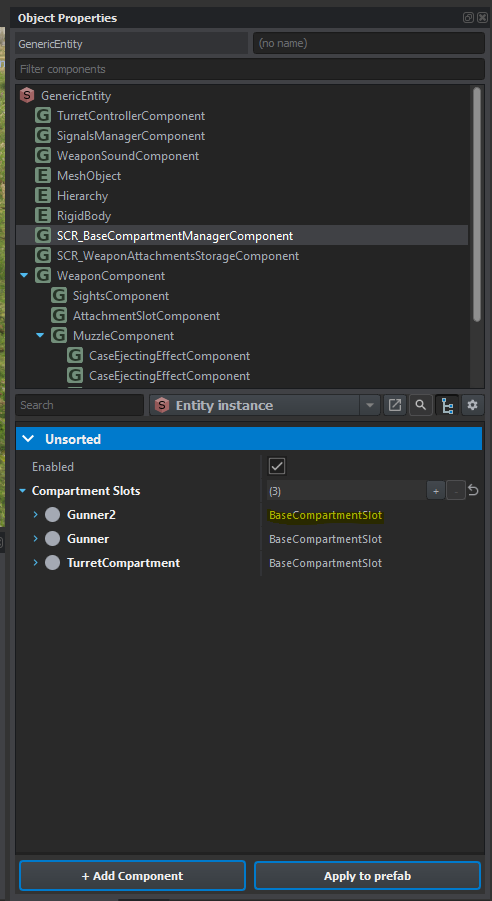
Does anyone know how I can make a Compartment Slot use TurretCompartmentSlot instead of BaseCompartmentSlot?
daring cargo
vague wren
When you own Reforger, its on Steam called "Arma Reforger Tools" under "Tools"
damn.. haven´t noticed that one. Thx.
harsh walrus
anyone know what's happening here when trying to publish? ```
BACKEND (E): [RestApi] ID:[5] Error Code:500 - Internal Server Error, ApiCode:
DEFAULT (E): Uploading failed! Reason: ""
RESOURCES (E): Publishing failed
Not only an internal server error but reason = "" 😂.
And whenever i try to login it says successful but console says error 400
 cinder cairn
vague wren
How can i send pictures into this channel?
cinder cairn
vague wren
How can i send pictures into this channel?
You can upload them to an image sharing website and then post the link here
hazy crypt
weary fern
Where do you drag it? Because it's all blocked for me wherever I try to drag it
Check out the gif to see these dragging in action but details are here: https://community.bistudio.com/wiki/Arma_Reforger:Weapon_Modding#New_Variant_Creation
 vague wren
How can I change this Class to be TurretComparmentSlot? https://imgur.com/NkznZqi
 wicked crag
If anyone knows the process of adding a modified vehicle into the editor/gamemaster I would greatly appreciate it :D
Actually I've noticed my mod gets disabled every time I try to go into game master
^ got that part worked out
 wicked crag
My b earlier I posted my modpack as Private so I just moved my modpack files somewhere else and download it then removed it and placed my original files back
brazen plaza
Can someone let me know if its possible to add a gore system? Like blood trickles from a wound onto a surface?
 inland forge
I have been working on a couple tutorials for the tools as there doesn’t seem to be much online yet. For importing textures I made a substance painter exporter for the texture format in the tools, is it ok If I drop a google drive link to it here?
lost minnow
wide wind
I apreciate this, but it still does not explain alot about how to add the textur...
Just a matter of drag and drop in a JPG or PNG in to the workbench to were you want it in the file browser and it will automaticly be converted to a EDDS.
It is possible to change the import and re import it in the editor by selecting the texture and pressing a button down right (forgot the name)
 magic temple
how do I log into the enfusion workbench with my steam acc?
like the steam account login for bohemia cc
brazen plaza
magic temple
how do I log into the enfusion workbench with my steam acc?
log into the bi website and then set a password
then use that with your steam email
 iron idol
someone can point me in the right direction to create my own prefab entity?
magic temple
but I dont have a current password?
brazen plaza
should just be able to set a password, thats what it said when I logged in with steam
magic temple
says, error old passwrod missing
 cursive orbit
is there classes/functions reference for Enfusion like we have for SQF?
magic temple
cheers travo
Anyone know how I can get a scenario to appear in the scenarios tab? I enabled it in the workshop tab but nothing
brazen plaza
you figure it out?
 junior sinew
enabling sample core fixed it for some other samples
brazen plaza
junior sinew
enabling sample core fixed it for some other samples
enabling what? is that ingame or in workbench
junior sinew
within the sample mods there's a mod called sample core
brazen plaza
junior sinew
within the sample mods there's a mod called sample core
yeah i enabled it when it first asked upon creation, was i not supposed to?
junior sinew
idk, i didn't have it enabled at first and activating it seemed to resolve my problem for some sample mods
 magic temple
Is there anyway to get the game to re-read a mod's directory? It doesn't seem like its receiving any changes im making.
 agile crow
Is there any published guides on how to add models etc? I know it's early but I'm excited to see some learning tools so the modding ball can start rolling a bit more
tight pasture
everyone is in the same boat
just gotta wait while people figure things out
and make tut's
turbid mountain
cursive orbit
is there classes/functions reference for Enfusion like we have for SQF?
See pinned messages in #enfusion_scripting , second pin.
official one is WIP
cursive orbit
turbid mountain
See pinned messages in <#976155351999201390> , second pin.
official one is WIP
thank you
tribal plaza
Hello. Workbench is more related to Enfusion rather then Arma Reforger. It would be clearer to name this as #enfusion_workbench (next to #enfusion_engine ) and put it into the Enfusion Modifications categories. It is just a small detail.
vague wren
Tried that, it says "There are no classes to change!"
iron idol
any idea how to get AI to enter a vehicle?
Ive tried putting the GetInNearestVehicle tree but no effect
Do i need to set those variables inside the behaviour tree manually?
fallow willow
How do you go from writing a script and loading it in reforger for debugging? I tried "Compile and Reload Scripts" but it just says 0 B when I look in the Downloaded tab in the Workshop.
vague wren
https://community.bistudio.com/wiki/Arma_Reforger:Script_Editor#Debugging "Connecting the debugger"
Basically you can run your script in the World Editor and have the scripting Editor open and it will be connected
fallow willow
Oh, so you don't do it from having the game open?
vague wren
Nope
Just drag & drop your thing that has the script into the world editor and hit "Run" on top
fallow willow
It's just a script. It isn't a thing
vague wren
Ahh, so its not connected to an entity
I think there is a "Run" option in the Script Editor aswell but idk if it works just out of the box
fallow willow
class SCR_MapMod : ScriptComponent
{
    // If the map is open or not
    protected bool m_bIsMapOpen;
    protected bool m_bIsFirstTimeOpened = true;

    // Map Instance
    protected SCR_MapEntity m_MapEntity = null;

    // When the script initializes
    override void EOnInit(IEntity owner)
    {
        // If the map is null, get the instance
        if (!m_MapEntity)
            m_MapEntity = SCR_MapEntity.GetMapInstance();

        SCR_MapEntity.GetOnMapOpen().Insert(OnMapOpen);
        SCR_MapEntity.GetOnMapClose().Insert(OnMapClose);
    }

    protected void OnMapOpen(MapConfiguration config)
    {
        Print("SCR_MapMod: The map was opened");
    }

    protected void OnMapClose(MapConfiguration config)
    {
        Print("SCR_MapMod: The map was closed");
    }
}
It's just this basically
vague wren
I think you have to put your script somehow in the world
I dont think theres a script "emulator"
fallow willow
I just figured it would automatically run on each client/player.
vague wren
Ahh ok, did you add the script to the player? Or how did you do that
fallow willow
I didn't do anything. Just wrote the script.
Like in SQF days, mods would initialize themselves on init.
Without attaching to things
vague wren
Didn't really do SQF, but nice to hear that it works just like that
fallow willow
Ok, so I loaded Eden, and added a character down, but no idea how I become that character or add my script to it...
vague wren
I cant tell how to add a script to something either. I cant find my script when i click "Add Component"
weary fern
hazy crypt
Check out the gif to see these dragging in action but details are here: https:/...
Thank you so much! Your gif showed me I had the Prefab Library open, so it wouldn't work. I appreciate you getting back about this!
 stark bobcat
vague wren
Basically you can run your script in the World Editor and have the scripting Edi...
stark bobcat
vague wren
Basically you can run your script in the World Editor and have the scripting Edi...
I can't tell if I'm being absolutely dense here, but when I hit play on the world editor I lose my cursor. How can I open the script editor to use the console?
vague wren
Try alt-tabbing or opening the inventory via Tab and you should have a cursor
stark bobcat
awesome, thank you
vague pecan
So just trying to setup the most basic of game modes here. Added these prefabs and set FIA to be the only playable faction in FactionManager, added the FIA unarmed loadout to LoadoutManager_Base and I get the following error:
SCRIPT (E): Cannot set loadout 0 to player 1! Is loadout index valid?

camera just spawns in the ocean and cant do anything
brazen plaza
Do you need to add a default loadout?
brazen plaza
No idea but that error seems to suggest the list of loadouts is empty
vague pecan
ok I think I used the wrong Loadout class
hmm nope even using LoadoutManager_Editor gets the same error
ill keep exploring, if anyone knows whats up pls ping me 🙂
 static cloak
I see these errors when starting the workbench: Authorization failed, check your token. What to do about it?
tribal plaza
static cloak
I see these errors when starting the workbench: `Authorization failed, check you...
Can you share relevant part of the log please?
static cloak
 INIT         : Reload WB scripts
 PROFILING    : Reload WB scripts took: 76.752700 ms
 DEFAULT      : Using thumbnail cache directory: C:/Users/User/AppData/Local/Temp/Enfusion/Projects/TeTeTCube/thumbnails
PROFILING    : Workbench startup took: 6247.524000 ms
BACKEND   (E): [RestApi] ID:[2] Error Code:401 - Unauthorized, ApiCode:
BACKEND   (E): Identity authentication failed - Error Code=401
BACKEND   (E): Error response: {"url":"/game-identity/api/v1.1/identities/reforger/auth","message":"ErrID: 22b239bd-bff7-4b1e-9b86-bb6d29a100e8: Authorization failed, check your token."}
BACKEND   (E): [RestApi] ID:[4] Error Code:401 - Unauthorized, ApiCode:
BACKEND   (E): Identity authentication failed - Error Code=401
BACKEND   (E): Error response: {"url":"/game-identity/api/v1.1/identities/reforger/auth","message":"ErrID: 4f238b9f-1ae0-472c-8404-4644a6ef1871: Authorization failed, check your token."}
BACKEND   (E): [RestApi] ID:[5] Error Code:401 - Unauthorized, ApiCode:
BACKEND   (E): Identity authentication failed - Error Code=401
BACKEND (E): Error response: {"url":"/game-identity/api/v1.1/identities/reforger/auth","message":"ErrID: 15374e2d-655a-4589-b62c-6da2019e6b50: Authorization failed, check your token."}```Thx. You do not need to worry about these now. We know about it, will be solved soon. It has no impact on your work, even it says it is an Error.
static cloak
tribal plaza
Thx. You do not need to worry about these now. We know about it, will be solved ...
Thanks, but I face another problem, I cannot login - thought it was related. When entering my email and password I get BACKEND (E): Identity authentication failed - Error Code=404and a line with a long token and BACKEND (E): [RestApi] ID:[8] Error Code:400 - Bad Request, ApiCode: . Any ideas?
I logged into accounts website with same email and password, no probs
tribal plaza
static cloak
Thanks, but I face another problem, I cannot login - thought it was related. Whe...
You get these messages when entering your Bohemia Account email and password in Workbench - Login dialog?
static cloak
tribal plaza
You get these messages when entering your Bohemia Account email and password in ...
exactly, yes
tribal plaza
static cloak
exactly, yes
Please do it again and send relevant extract of the log. Make sure that there is not any personal information of yours like Bohemia account email so you not share it here.
static cloak
no idea what token contains, so sent via DM, thanks
 obsidian elbow
this might be super obvious, but is there a way I can open a new project without having to close and relaunch workbench to get back to the project launcher?
 graceful ore
vague pecan
So just trying to setup the most basic of game modes here. Added these prefabs a...
graceful ore
vague pecan
So just trying to setup the most basic of game modes here. Added these prefabs a...
Make sure the loadout has the FIA faction assigned in it
tribal plaza
obsidian elbow
this might be super obvious, but is there a way I can open a new project without...
not at the moment
obsidian elbow
ah okay, thanks!
iron idol
How do I create an entity prefab ? I can create an entity in my mod directory with an arbitrary entity but then I cant edit that and put an entity I want
How do I create an entity prefab directly with the entity I want?
vague pecan
graceful ore
Make sure the loadout has the FIA faction assigned in it
that was it, thanks 🙂
 twin tapir
Well, I'm going to ask this in here because the terrain channel was unsure: I'm creating a terrain, and I've gotten the map entity working, but there's a pretty glaring issue with it.
For some reason, the topography map that I exported from the map data is not lining up with the actual terrain. The sat image appears to be correct, but the .topo file just won't line up, no matter what I do to it.
vague pecan
is there a reforger equivalent of "setCaptive" or a CIV faction?
or do I have to mod that in
weary fern
Has anybody figured out how to register placeable prefabs for the Game Master yet? I've gotten pretty close I think.
alpine brook
Did you know why i cant see my mod folder when i try to change some edds file https://imgur.com/a/c7uDHwk
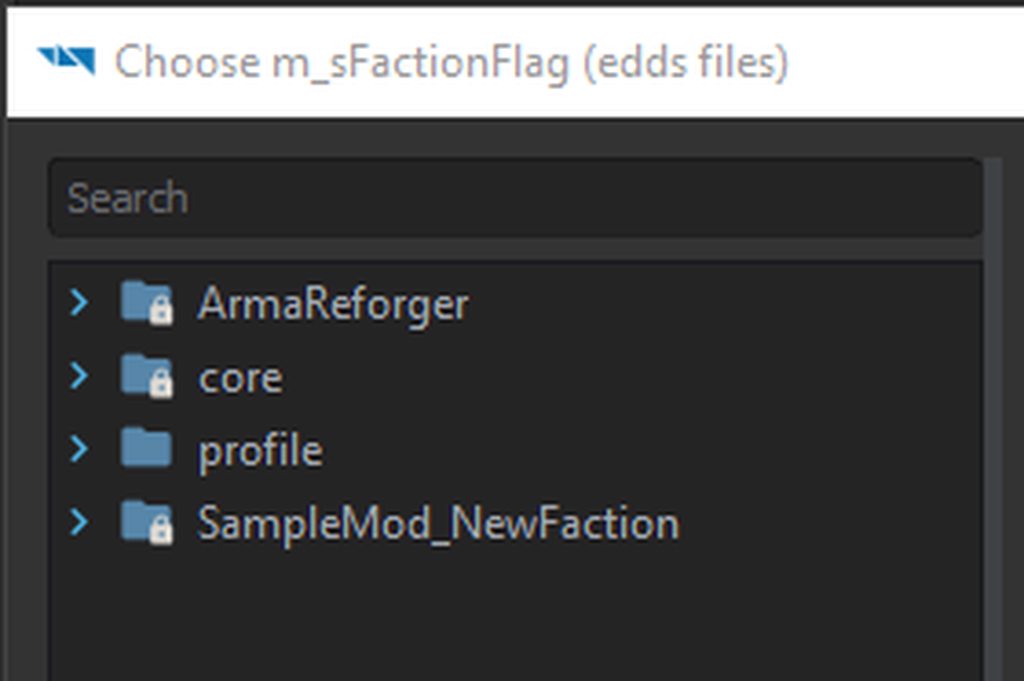 jagged pilot
weary fern
Has anybody figured out how to register placeable prefabs for the Game Master ye...
jagged pilot
weary fern
Has anybody figured out how to register placeable prefabs for the Game Master ye...
Your prefab also needs SCR_EditableEntityComponent but iirc that should be it, else also run the create/update editable entities plugin on the prefab and use the new E_ prefab. But that should not be required.
Wrote this for someone else. Ask if it's unclear.
Sadly the plugin that allows you to generate a preview image isn't working for me.
weary fern
jagged pilot
```I assume you already know about overriding the EditorModeEdit prefab from the...
I did this I believe, but I don't know about the Override
jagged pilot
Needs to be overwrite
weary fern
I created prefabs, and set up the component
jagged pilot
Not duplicate
jagged pilot
You can add a config file to the EditorModePrefab or just add your asset directly. Works either way. Config way is just cleaner for the future and works better with the plugins.
weary fern
Which Config file needs to be created? And does it matter where?
jagged pilot
Take a look at the sample NewProp
It just adds a cupboard that is placeble in GM. Very clean and explains itself well. Can't give you more then that rn, as I am on my phone
weary fern
No problem, that should be enough, but I can't find NewProp lol
jagged pilot
GitHub
Modding Samples. Contribute to BohemiaInteractive/Arma-Reforger-Samples development by creating an account on GitHub.
weary fern
Ah, Okay. Do I do add existing to open these?
iron idol
How do I create an entity prefab ? I can create an entity in my mod directory with an arbitrary entity but then I cant edit that and put an entity I want
How do I create an entity prefab directly with the entity I want?
jagged pilot
weary fern
Ah, Okay. Do I do add existing to open these?
Yes
iron idol
iron idol
How do I create an entity prefab ? I can create an entity in my mod directory wi...
Ugly solution: open the .et file, and fill in your desired entity class manually
jagged pilot
iron idol
How do I create an entity prefab ? I can create an entity in my mod directory wi...
Drag the xob into the world editor right click the instance and click create prefab
 magic veldt
hey, I am trying to add a new part I made part to a vehicle but I cant make it stop incoming rounds. They go through it as if it was never there.
does anyone know how I can fix that?
dusty elbow
When I open Eden.ent, I end up in the middle of the ocean. In the tutorial I'm following, the guy is on Everon when he opens Eden.ent
modern niche
turbid mountain
When you open work bench, you have "World Editor" button right on the center of ...
Ok thx
iron idol
jagged pilot
Drag the xob into the world editor right click the instance and click create pre...
I dont have any .xob, was trying to create my own trigger prefab based on SCR_BaseTriggerEntity.
jagged pilot
That's a component
You need to create a prefab first to use that components or you need to write a enscript class that inherit the component
To create a new component based on SCR_BaseTriggerEntity
iron idol
almost, SCR_BaseTriggerEntity would be the parent which gets a component thats doing stuff when the trigger gets activated like spawning ai or blowing up vehicles
but ive yet to figure out how to add my own component, its not showing up when i want to add it
 sonic rampart
dusty elbow
When I open Eden.ent, I end up in the middle of the ocean. In the tutorial I'm f...
sonic rampart
dusty elbow
When I open Eden.ent, I end up in the middle of the ocean. In the tutorial I'm f...
Happened to me turn your camera speed up fly up into the sky and have a look around you’ll find the island
iron idol
u can also double click any entity in the hierachy window
dusty elbow
sonic rampart
Happened to me turn your camera speed up fly up into the sky and have a look aro...
Found it, thanks
 terse snow
Does logging in to your account in Workbench work for others?
sonic rampart
terse snow
Does logging in to your account in Workbench work for others?
not atm but if you load up the game and click the profile icon in top-right then sign in there and then re-launch workbench it seems to work
terse snow
sonic rampart
not atm but if you load up the game and click the profile icon in top-right then...
It worked, thanks! 🙂
 vapid aspen
I am having an issue with the workbench will crash every time i have 2 or more tabs at the top open, if i swich from 1 tab to the other and back it will crash, with an error of
Faulting application name: ArmaReforgerWorkbench.exe, version: 0.9.5.0, time stamp: 0x62841f52
Faulting module name: Qt5Core.dll, version: 5.15.2.0, time stamp: 0x5fa4dd59
Exception code: 0xc0000005
Fault offset: 0x0000000000134260
Faulting process id: 0x5ff0
Faulting application start time: 0x01d86c76ff02f7f2
Faulting application path: C:\SteamLibrary\steamapps\common\Arma Reforger Tools\Workbench\ArmaReforgerWorkbench.exe
Faulting module path: C:\SteamLibrary\steamapps\common\Arma Reforger Tools\Workbench\Qt5Core.dll
Report Id: ef7e067d-cea1-4906-a579-aa30b63be0ce
Faulting package full name:
Faulting package-relative application ID:
brazen plaza
How do i view the AK example rifle i downloaded in the workshop within the workbench?
sonic rampart
brazen plaza
How do i view the AK example rifle i downloaded in the workshop within the workb...
unzip the project somewhere on your pc open workbench, click open existing then navigate to the project file in the folder you unzipped
brazen plaza
That doesn't explain how to find the project I downloaded from the workshop though.
 fast yacht
where can i download the workbench?

 little nimbus
How do these coords translate?
 little nimbus
fast yacht
tools = workbench? why people calling different names lol
little nimbus
fast yacht
tools = workbench? why people calling different names lol
I think it's because it will become one thing, that each game will reference as workbench?
brazen plaza
@sonic rampart Care to elaborate where workshop files are located?
little nimbus
brazen plaza
<@106438472822210560> Care to elaborate where workshop files are located?
In your: documents folder > my games > arma reforger tools*?
Anyone have any idea why this is popping up in console.log of an internal server? 20:03:58:365 SCRIPT (E): Trying to unregister a SCR_LoadoutManager, but different one is registered! 20:04:03:914 SCRIPT (E): Trying to unregister a SCR_LoadoutManager, but different one is registered!
brazen plaza
Thanks ^
turbid mountain
vapid aspen
I am having an issue with the workbench will crash every time i have 2 or more ...
The data you sent isn't helping anyone to figure out what the problem is, and people can't tell you how to fix it
Just use the crash report dialog and send the crash report, that will send it to programmers who can fix it.
vapid aspen
turbid mountain
The data you sent isn't helping anyone to figure out what the problem is, and pe...
and where do i find this crash report dialog?
turbid mountain
It should pop up when it crashes 
vapid aspen
it dosnt a box just pops up saying

 fossil charm
I've also never seen the crash report dialog on any of the crashes I've had so far. But mine didn't even show the above dialog, just poof and it's gone.
brazen plaza
WASD keys not working for me to move camera in World editor.Whats wrong?.Any solution/option?
fossil charm
brazen plaza
WASD keys not working for me to move camera in World editor.Whats wrong?.Any sol...
Are you holding the right mouse button. You have to hold the right mouse button.
brazen plaza
fossil charm
Are you holding the right mouse button. You have to hold the right mouse button.
Yes.if i use right mouse click it work but i see some my friends don't need to hold right mouse button and its hard to do while moving around the map or work with objects
fossil charm
brazen plaza
Yes.if i use right mouse click it work but i see some my friends don't need to h...
Not sure about that, I always have to hold the RMB to move the camera in the World Editor with WASD. 
 fiery scaffold
How do I edit one of the sample mods?
turbid mountain
Can someone send me a workbench crash that is reproducible with some specific steps?
I need to make my workbench crash
got one
vapid aspen
turbid mountain
~~Can someone send me a workbench crash that is reproducible with some specific ...
i create a new project, import a UVed model, then click on the material spot and it opens a new tab and if i click back on the model tab and try to rotate around the model it crashes
 daring gull
So I'm running into a really weird issue where when I try to open my project it says "Arma Reforger project not found. Please locate the project manually." When I go to do that it says "This is not the Arma Reforger project. Please try a different one." Anyone else know what's going on?
turbid mountain
daring gull
So I'm running into a really weird issue where when I try to open my project it ...
run the game via steam first, and then the tools
daring gull
Does the game need to be open for the tools to work?
turbid mountain
no
daring gull
hmm I had already launched the game and been working on the project for a while
but seemed to work anyway, thanks
 dry path
Is there a way to make the Cinematic Timeline export as a video format and not in individual .png/.bmp?
compact zephyr
Sights FOV Info
Base Zoom
Zoom Max
What do these actually mean? Its limited to 1-15
I want to do a 3-20 optic
 elder oyster
tribal plaza
Please do it again and send relevant extract of the log. Make sure that there is...
elder oyster
tribal plaza
Please do it again and send relevant extract of the log. Make sure that there is...
Any update on this? I got the same issue. Wasn't sure if you guys resolved it in DMs
 desert warren
is it easy to change some weapon to shoot rockets instead of bullets?
elder oyster
Oh wait, I think I fixed it... I closed it and tried again and it worked
desert warren
is this up-to-date? https://community.bistudio.com/wiki/Arma_Reforger:Weapon_Modding#Configuration I can't say I can follow this 100%

 tranquil saffron

getting this when bundiling
says cannot copy preview image and then this directory
its the publish directory and then some previewImage
vapid aspen
i get this in the log window when i load
RENDER : (OK) Adapter 'NVIDIA GeForce RTX 2080' supports feature level 12_0
RENDER : (OK) Adapter 'Intel(R) UHD Graphics 630' supports feature level 12_0
RENDER (W): Adapter 1 (Intel(R) UHD Graphics 630) failed to provide some output
RENDER : Basic screen setup:
RENDER : Back buffer format : TEXFMT_R8G8B8A8_SRGB (29)
RENDER : MSAA : 4 samples
RENDER : Detected 2 output devices:
RENDER : Generic PnP Monitor (.\DISPLAY1), 2560x1440 (offset 0x0)
RENDER : Generic PnP Monitor (.\DISPLAY2), 1920x1080 (offset 2560x0)
RENDER : GPU_NVIDIA (0x10DE) (NVIDIA GeForce RTX 2080) with 1 GPU detected, VRAM 8010MB (fast 0MB), shared 16294MB, driver version 512.77, stereo not available
RENDER : Multithreaded resource creation is supported
RENDER : Multithreaded command buffers are supported
RENDER : Compute units are supported
RENDER : Structured buffers are supported
RENDER : Concurrent frames limit 2
RENDER : Shader precision support 16bit is not supported
RENDER : Main RT format setup.
RENDER : Main RT format for quality 0 : TEXFMT_R11G11B10F (26)
RENDER : Main RT format for quality 1 : TEXFMT_R16G16B16A16F (10)
RENDER : Reload shaders
RENDER : Shader version 49
the only one that comes as a warning is
RENDER (W): Adapter 1 (Intel(R) UHD Graphics 630) failed to provide some output
i crash when ever i have 2 or more tabs open and try to switch between them
 fierce pagoda
Is it possible to preview prefabs without closing the currently open world?
Disregard, was using the wrong window
tranquil saffron
[RestAPi] ID:[11] Error Code: 400 - Bad Request, ApiCode:
error when publishing
anyone have any ideas what it means?
 crystal bridge
what file type does a model need to be to import it i have tried way to many options that did not work to make me think this new engine is not "newbie friendly" xD
worn eagle
sometimes i when am in the world editor it wont let me move with wsd dose anyone know how to fix this
fathom pine
Someone make keyboard and mouse work on Xbox please!
wicked crag
Has there been any talk about adding more control over addons/mods? Such as viewing download count/statistics, removing screenshots and possibly editing description/summary without updating? Also removing mods lol
brazen plaza
protip: Shift+F11 maximizes the game window in the editor
Shift+F10 binds to the escape key
 zinc lagoon
How do you get to the workbench?
 tribal sorrel
Has anyone else had this huge list of data come up randomly in their workview?

I can't seem to figure out how ot get rid of it
harsh walrus
anyone know a fix for a new project not having the right folders in resource browser 😂
Usually I just remake my project but that aint working now 😂
 grave elm
How to switch into Map Mode in World Editor?
magic temple
is there any difference between the different worlds? like the GM_Eden.ent, Eden.ent?
 twilit rivet
tribal sorrel
Has anyone else had this huge list of data come up randomly in their workview?
twilit rivet
tribal sorrel
Has anyone else had this huge list of data come up randomly in their workview?
"Left Control + Numpad 2" to flip between the views
To enter the diag menu hold "Windows + Left Control + Left Alt". From there you can use "Up" and "Down" to navigate the current menu, "Left" and "Right" to change the setting and then use "Right" to enter a sub menu and "Backspace" to leave a sub menu
 frail juniper
anyone know how to fix reforger tool keep crashing if open more than 1 tab
 grizzled sand
do you get an error message?
frail juniper
nothing.. it just close the program
 urban hollow
Can someone just make an easy mode conflict with map markers and team icons? 🤣
 boreal moss
Autosave feature when?
boreal moss
frail juniper
nothing.. it just close the program
Check the error.log?
 tight dune
desert warren
is this up-to-date? https://community.bistudio.com/wiki/Arma_Reforger:Weapon_Mod...
tight dune
desert warren
is this up-to-date? https://community.bistudio.com/wiki/Arma_Reforger:Weapon_Mod...
it is still missing pictures which should make it more clear but it should be up to date. What issue do you have?
worldly minnow
All my editor widgets are broken, checkboxes are not rednering etc
 lapis basalt
I have a weird issues here, I can't select the Category at all. somehow ended up in this where I can Bundle, but cant Publish. If I go one commit back, the Bundle doesnt work, but the category selection does...

And now back to this bug... great.
 magic temple
How do I open the map in the editor?
lapis basalt
magic temple
How do I open the map in the editor?
magic temple
Where does that specify how to open the map?
I mean like the paper map, not a world
lapis basalt
ah ye not sure about that one then.
fiery scaffold
Alright so I have this one fbx model of a gun
So what do I do now
To make it into an actual gun
and not just a static model
desert warren
tight dune
it is still missing pictures which should make it more clear but it should be up...
I was having issues with the first steps, maybe I was looking in the wrong places, I dunno.
Method 1: Create Inherited Prefab
On that new prefab inside SampleMod_ModdedWeapon addon, click on "Inherit prefab"
There is no "Inherit prefab" when I right click it.
Next I couldn't do this, I have Resource Browser windows and World Editor window, but not sure how I'm supposed to drag and do this:
Click on the entity instance in Hierarchy window and drag it back to Resource Browser, still in the World Editor window. A new window will pop up and ask to specify the name of the new entity prefab
not sure about the rest, kind of gave up
tight dune
desert warren
I was having issues with the first steps, maybe I was looking in the wrong place...
#enfusion_configuration message there is bug in workbench right now
desert warren
oh ok
tight dune
or wait
desert warren
I just wanted to try to mod a weapon (maybe the M2 tripod) to shoot grenades or rockets, as an experiment, is that possible?
tight dune
this is still correct
the method over there is correct
Resource Browser (and only one which is attached to World Editor - it is not present in a separate Resource Browser window this is really important
native relic
I had been using workbench for 42hs since launch, this shit Is amazing
tight dune
in any case, I will add pictures to it in a moment - it should be much more clear
desert warren
yes, please, pictures or even video tutorials would be excellent, if possible
tight dune
check the page now
I have yet to figure out how to autoplay gifs in wiki
in any case, there is plenty of pictures, gifs (in gif or short videos in mp4) but uploading it to wiki is bit slow
 sweet verge
i am following the tutorial of the script, where do I specify in the workbench the audioresource?
sand fox
Is there some way to test my mods without uploading them first?
jagged pilot
sand fox
Is there some way to test my mods without uploading them first?
World Editor -> Load GM_Eden. Drag your prefabs into the world click on the drop down next to the play button. Set it to play at camera position. Hit play
If you don't need the GM game mode, the multiplayer test world also works and loads significantly faster.
sand fox
Whoa ty so much
sweet verge
how do I commit suicide in the game? is killing myself with a grenade considered suicide?
tight dune
yes, killing yourself with grenade is indeed a suicide game wise
sweet verge
then my script is not working, cause i don't hear the music i set in the script
tight dune
do you have some error in console?
desert warren
tight dune
I have yet to figure out how to autoplay gifs in wiki
they seem to be autoplaying for me, I'll check it out soon, thanks!
sweet verge
tight dune
do you have some error in console?
nothing regarding the script, or resource missing
after i have created both script files is there anything i need to do in the world editor?
I have added a print message in my script to test, but it doesn't come out in the log console
how do I add the scoring system?
solved
tight dune
desert warren
they seem to be autoplaying for me, I'll check it out soon, thanks!
I fixed it some time ago 🙂
cursive orbit
is there way to adjust view distance in World Editor?
desert warren
sorry, I don't get it, where is this resource list in resource browser?
New Ammo Config can be created in Resource Browser by using in Resource List. From that context menu select "Config File" under "Create Resource" tab and type the name of the new config, e.g Ammo_545x39_Modded.conf. It will ask to specify the kind of config to be created; search for Magazine and select "MagazineConfig" from the filtered list.
ok I got it, but
I have no "create resource" tab, it was under Resource Browser -> Create -> Config File
tight dune
that is context menu and there is Create Resource tab
 sweet verge
how do I turn off debug info in upper left corner of the world editor
sand fox
jagged pilot
World Editor -> Load GM_Eden. Drag your prefabs into the world click on the drop...
I'm a bit confused about this prefabs thing
I'm just trying to load my mod which modifies the inventory
jagged pilot
sand fox
I'm just trying to load my mod which modifies the inventory
If you don't have a model to test, just open the multiplayer test world and open your inventory to see if it works. I was assuming you had made a new model prefab to test
sand fox
jagged pilot
If you don't have a model to test, just open the multiplayer test world and open...
Oh oki, so the mods just load up automatically
jagged pilot
Yes
sand fox
Tyty
desert warren
nice, now whenever my ak bullet hits something it explodes like an rpg 😄
crystal bridge
what file type does a model need to be to import it? i have tried way to many options that did not work to make me think this new engine is not "newbie friendly" xD
tight dune
crystal bridge
what file type does a model need to be to import it? i have tried way to many op...
FBX, you can find details here https://community.bistudio.com/wiki/Arma_Reforger:FBX_Import
crystal bridge
ight thx
 plucky burrow
How do I get around the Error Code 400 to login with Workbench?
terse snow
plucky burrow
How do I get around the Error Code 400 to login with Workbench?
Login ingame at first, then in Workbench
plucky burrow
terse snow
Login ingame at first, then in Workbench
aha I didn't spot the in-game login, thanks 👍
vague wren
Can someone help me with this?: #enfusion_scripting message
 ocean sinew
-resolved-
 thin trout
Did the FileIO thing get fixed? Or is it still unsafe to download mods?
 manic snow
It was always safe.
tribal sorrel
twilit rivet
"Left Control + Numpad 2" to flip between the views
To enter the diag menu hold...
Thanks for this
twin tapir
As you can see, the topography map is just off in the top right corner, and I can't figure out what's causing it
Hopefully someone here will know
 spiral orbit
twin tapir
Hopefully someone here will know
spiral orbit
twin tapir
Hopefully someone here will know
what happens when you zoom in?
twin tapir
The Topography map disappears, and there's no topography lines on the map itself
spiral orbit
afaik the code that scales the contours should be done on the same level with forest areas etc but those seem to be working from your image 🤔
spiral orbit
Have you tried it outside of GM mode as well? It shouldnt matter but they are different in some cases
Anyways it looks like a bug, please report it feedback tracker with all the map files attached
cursive orbit
how to open map in World Editor?
vague wren
Either: In World Editor "File" -> "Load World" and select or double click in Resource Browser
 lavish pewter
is there a way to mods on xbox arma without pc
or 3d models
 hybrid dragon
Pc mod tools are required to make mods
 errant notch
Do we know if anyone is working on a revive mod?
 thick field
idk how this engine works at all why is everything set to read only
vocal sinew
is that freaking Stratis? 😄
twin tapir
Yus
vocal sinew
Phew 😄 I knew I could recognize the shape anywhere 😄
Did anyone solve the login issue? I am getting the 401 error code and there were multiple users experiencing the same issue. So any hint to solve it?
Identity authentication failed - Error Code=401
twin tapir
log in in reforger first
vocal sinew
Well, I did that even before the launch stream ended
So I am logged in reforger already
yup, double checked, I am logged in the game
twin tapir
I mean open reforger and then open tools
vocal sinew
wtf
 unique bay
anyone having the problem that enfusion crashes on every open? i tried to create new project, and open others, both cases, it just closes and does nothing.
vocal sinew
like let the game log in first and then while still running the game, open the tools? 😄
twin tapir
Yep
vocal sinew
jesus
twin tapir
Should only need to do it once
vocal sinew
can't imagine folks with less RAM budgets do this
twin tapir
Tools aren't exactly intensive
You don't need to do anything, just open both and login
then you can close it again
If it works, great, if not, who knows
check your bohemia account, make sure you've got everything correct
vocal sinew
Do I need to relog in the reforger?
twin tapir
¯_(ツ)_/¯
vocal sinew
 twin tapir
Nah
vocal sinew
still got the error, even when following your procedure
twin tapir
Who knows tbh ¯_(ツ)_/¯
hexed pine
Anyone know how I can change the item preview in the inventory?
 twin tapir
I'd search the message history
Uh...I think that's probably the wrong place to ask that
 teal plover
I removed ArmaReforgerOnline.bin found in "My Games\ArmaReforger\profile" and then re-logged in, and that worked for me
vocal sinew
Will try
vocal sinew
teal plover
I removed ArmaReforgerOnline.bin found in "My Games\ArmaReforger\profile\" and t...
yup, this worked flawlessly
thx
and I logged straight from the tools
and I stayed logged in in the game 😄
teal plover
No problem - hopefully it'll also be properly fixed soon
weary fern
Probably already known by people, but for those who may not, you can Fullscreen the Editor with F11 to play the game largescreen without stuff.


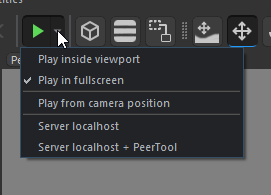

 candid pilot
how do you make a entity a prefab?
vocal sinew
candid pilot
how do you make a entity a prefab?

Gist
How to create custom Prefab in Enfusion Workbench. GitHub Gist: instantly share code, notes, and snippets.
candid pilot
vocal sinew
https://gist.github.com/ffredyk/dab0d76ff0c1a25bbb791f384688e510
thank you ❤️
 devout nest
me and my friend are trying to figure out how to create our own prefabs so we can have instances of our own custom scripts in the world. is this the right approach to creating game logic for a gamemode? if so, how do we create our own prefabs/entities?
vocal sinew
literally two messages above you, there is an example
it's a package of entities basically
devout nest
haha should have just scrolled up a bit, thank you
vocal sinew
anyone knows if the World Editor has some kind of 2D map?
twin tapir
Only way to do it is to load into the map with a valid MapEntity
turbid mountain
what do you mean? available to the right?
It is just there, what are you trying to do?
Ah! one sec
here

ahh
 cunning delta
i tried to publish my mod yesterday and it was stuck at processing so i aborting it, i tried republishing it today and for some reason it still says your last upload is still being processed. please try again later, is there anyway i could fix this?
 mossy zephyr
is it only me or is that a common bug that when i try to rotate/pan/select object (world editor) then my camera rotates to top view and is impossible to rotate unless i use in workbench one of the options in view menu or 2x click object in hierarchy in world editor?
magic temple
Do i need to publish a mission for it to show up in my scenarios? I followed the capture and hold tutorial but it doesn’t appear in my scenarios tab
 median bone
wheres the blender plugin located in the tools again?
mossy zephyr
median bone
wheres the blender plugin located in the tools again?
\steamapps\common\Arma Reforger Tools\Blender (RMB on Tools in steam -> Manage -> inspect local files or something like that and u will be in the right place)
median bone
aha, thanks
mossy zephyr
magic temple
Do i need to publish a mission for it to show up in my scenarios? I followed the...
i didnt try scenarios but iirc i had to push the "Bundle" button which is located in the window that you open by pressing Workbench->Publish Project (inaccessible until you log in) and if that doesnt help then you can set mod to private when publishing
magic temple
mossy zephyr
i didnt try scenarios but iirc i had to push the "Bundle" button which is locate...
Where’s bundle? I can’t see it, maybe just me being blind
mossy zephyr
magic temple
Where’s bundle? I can’t see it, maybe just me being blind
when you go to: Workbench (top left corner) -> Publish Project ->
 magic temple
ill try that thanks
graceful ore
cunning delta
i tried to publish my mod yesterday and it was stuck at processing so i aborting...
Happened to me when submitting C&H as well, no repro unfortunately. What mod is it? I'll report it, if you have any logs that'd be great
cunning delta
the mod is Shipment Alpha test also lemme get the GUID if need, and for logs i think it mightve crashed while uploading so idk if i have them,
graceful ore
Shipment Alpha, noted, thanks
cunning delta
5964191A718A43B4
magic temple
Anyone else get Server connection failed. Publishing not available when trying to publish?
lol, is there anyway to fix it?
rough
 pseudo turtle
Why is bundling even bound to an online service? I get the workshop upload but bundling should work without an internet connection ...
 pulsar dove
Someone should make a heli or ghillie suits for the game
brazen plaza
ayy the workshop is back up
magic temple
When bundling, I get
RESOURCES (E): Failed to load metafile of mission config image:
Anyone know how to fix this?
 green rivet
magic temple
When bundling, I get
```
RESOURCES (E): Failed to load metafile of mission conf...
green rivet
magic temple
When bundling, I get
```
RESOURCES (E): Failed to load metafile of mission conf...
Not to be that guy, but you go into your mission config file (see other people's uploads for examples) & you add an image
magic temple
green rivet
Not to be that guy, but you go into your mission config file (see other people's...
There is an image... config files come with default images.
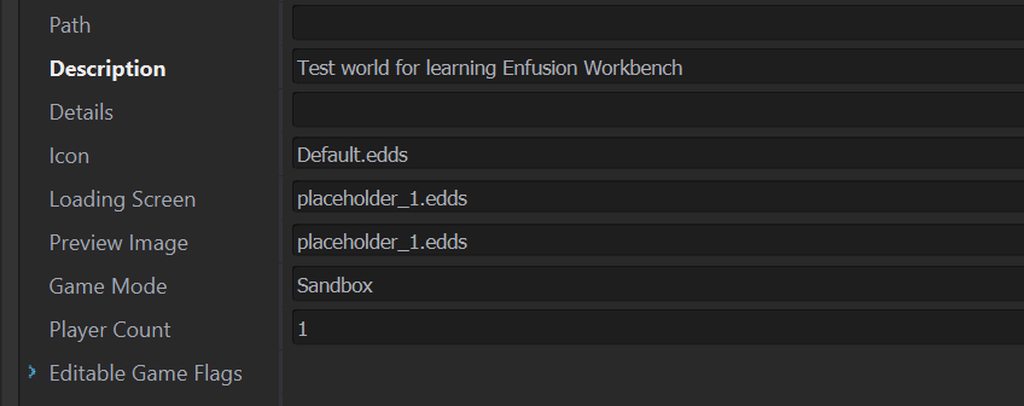
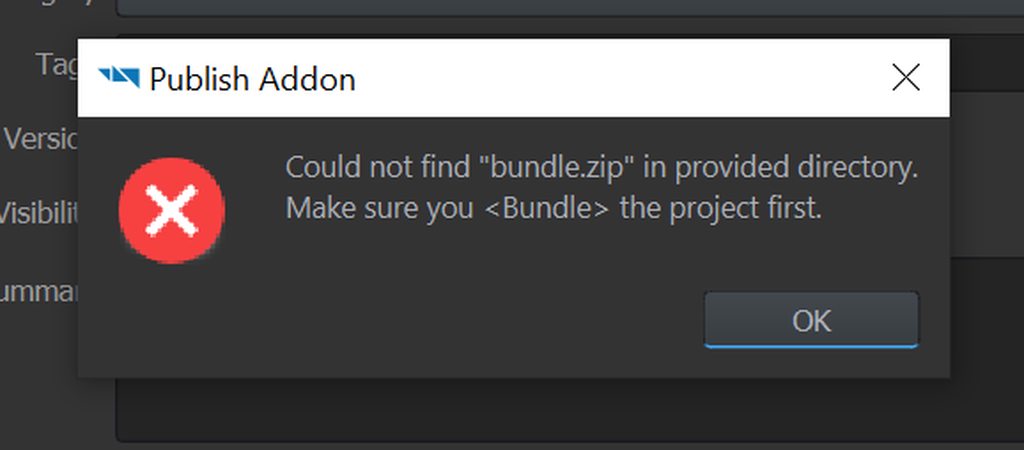
 winter lion
Is there a UV preview editor in workbench?
magic temple
@green rivet
green rivet
magic temple
<@720482992631447563>
test upload a new project with nothing in it and then act accordingly
if it works then copy the stuff over, else - you have bigger problems
magic temple
same shit :/
green rivet
magic temple
same shit :/
i can only reccomend reinstalling the AR tool and then testing it out with an empty package
magic temple
yeah just uninstalled it, tried it with the original and it still doesn't work will try the empty backage
 fleet drift
how to use tarrain tools?
magic temple
yeah it bundled an empty one, no idea why
Yeah the problem is the mission config file, without it the mission bundles fine but with it, it freaks out
brazen plaza
So how does modding “work”?
Do you export things to a “mods” folder that you download, and the scripts/assets organize themselves into a mirrored directory structure?
I am new to the interface entirely, the bohemia site seems@to not have much intro tutotials
green rivet
alpine brook
How to remove mod from the workshop ?
tag me if u find out lol
easier than ever
 past thicket