#arma3_launcher
1 messages · Page 3 of 1
 lusty pendant
lusty pendant
lusty pendant
 lost steeple
and thats the latest one?
that one is a crash when closing the game (and timestamp doesn't match the rpt you sent)
lost steeple
i have only these files in %localappdata%\Arma 3

 whole breach
Here's the log; I think I did it right.
 hollow niche
So I'm asking for a friend of mine and he has an issue with his arma steam launcher, the problem is quite simple
- launch from steam
- wait
- stops playing with no error message at all and the launcher just doesn't launch at all
task manager says suspended and we've been trying and finding methods that do not work at all
list of stuff we tried:
uninstalling and reinstalling
validating files
removing mods
firewall
 lyric elm
whole breach
Here's the log; I think I did it right.
lyric elm
whole breach
Here's the log; I think I did it right.
Indeed the launcher process is creating the folder.
But the stack of the code that did the creating, doesn't show that the launcher even did that
The launcher itself, is also creating a "addon.pbo" ???? wtf

Huh
That code does really exist.
"legacy mod syncrhonization strategy" ??
creates a modfolder, with a "addon.pbo" inside it. I have never seen this code before
There is the normal synchronization.
That creates the link in !Workshop folder, for every mod.
But if you have a "legacy" mod, before steam UGC (instead steam remote storage API), then that mods only pbo (if it has multiple, only the fist pbo is taken and the others are ignored), is copied into game folder
Question is, how the heck did you manage to find a legacy non-ugc mod
Next question, why do we even have that code, but I'm know I'm never gonna get an answer to that
 drowsy junco

if you need some legacy mods to test - these should still be on workshop i'd assume
can check steam logs for id if needed
lyric elm
I don't want to test
 carmine willow
lyric elm
That code does really exist.
"legacy mod syncrhonization strategy" ??
creates a...
carmine willow
lyric elm
That code does really exist.
"legacy mod syncrhonization strategy" ??
creates a...
happening for me with devcon
carmine willow
drowsy junco
if you need some legacy mods to test - these should still be on workshop i'd ass...
they are but are really outdated, in my case i keep seeing devcon is installed popup on launcher start
 ashen idol
I have had a great issue with the launcher for official servers. Selecting "Official Servers" only works once, and not all of the servers will be listed. But if I click on "Official Servers" a 2nd time, the list isn't populated - it only gives me a one-time return on my request. So if it didn't show the server I actually want to join, I have to log out of Arma 3 back to the launcher, and start all over again. Each log on gives me only a one-time list from the browser. It's painfully annoying to have to keep logging out then back on to Arma 3 just to get the browser to work somewhat for me. Isn't there any way to get this fixed at all? Most all other multiplayer games I play pops up a full server list of available servers every time I ask for them - don't know why Arma 3 won't do that....
 lament yacht
Uh, if you're talking about the server browser in A3 then it's not a launcher issue?
 rugged cobalt
Anyone getting "enumeration operation may not execute." when opening the launcher? Been occurring for the past 24 hours. It appears to be reparsing my steam workshop subscriptions and identifying it the launcher. I checked and my SSD has space and the !workshop folder is intact and working.
Edit I tested in default, development and profile branches. Same issue with the launcher.
Edit2 - I can run the game from within the ARMA 3 folder without issues. It appears to be launcher and steamworkshop related. I noticed the following files were updated - SharedResources.dll, Utils.dll, SteamLayer.dll and SteamLayerWrap.dll
Edit3 - the problem went away so it may have been some weird steam sync error?
 vivid beacon
rugged cobalt
Anyone getting "enumeration operation may not execute." when opening the launche...
vivid beacon
rugged cobalt
Anyone getting "enumeration operation may not execute." when opening the launche...
idk if this will help but try turning battleeye off and on
rugged cobalt
vivid beacon
idk if this will help but try turning battleeye off and on
I tried it with BE ON and OFF, it is not a BE issue. It appears to be a Steam going down issue so the workshop is not syncing... I mean, it should not overflow and spam error messages, then crash out. It should just say workshop is down or no connection and go into some compatibility mode where it reads the mods locally on the host.
 runic tiger
I jsut noticed that whenever I pull the launcher to the left side screen some weird black vertical line shows up, I have to drag launcher closer to the center to have it disappear. Is it a launcher bug or something with Win11?
 carmine willow
runic tiger
I jsut noticed that whenever I pull the launcher to the left side screen some we...
carmine willow
runic tiger
I jsut noticed that whenever I pull the launcher to the left side screen some we...
launcher bug, it's the shadow borders that get misplaced on startup
gets corrected when you move the window
 tidal trellis
this is popping up when the games isn't running

 sterile moth
Make sure you have no arma3.exe relates instances in Task Manager. If you do force close them
tidal trellis
i do not
sterile moth
Restart Arma 3 Launcher and/or restart Steam
tidal trellis
did both didnt work
sterile moth
Then restart PC
tidal trellis
it works thx
carmine willow
or you know, hit close game
 pale sigil
my arma 3 launcher is crashing after selecting any one of the tabs. the arma launcher starts but as soon as I select a tab it crashes
 cosmic nebula
Google is being unhelpful. Every time I click on the mods screen on the Arma 3 launcher, it signficantly slows my PC down for a period of several seconds. Obviously I have a lot of mods installed, but is there any way to mitigate this complete freeze?
pale sigil
cosmic nebula
Google is being unhelpful. Every time I click on the mods screen on the Arma 3 l...
oh it slows down your pc? the launcher just closes for me
pale sigil
anyone have a possible solution? I've tried every possible step there is and nothing is fixing this issue
lament yacht
How many mods do you guys have?
cosmic nebula
250
pale sigil
lament yacht
How many mods do you guys have?
none right now (besides a couple of test ones roughly 30)
here is a video with what is happening and also the log
battleye and parameters work, but as soon as I click on the news, mods, or dlc tab it just crashes and closes
lament yacht
hmm, no crash message, just silent close?
pale sigil
lament yacht
hmm, no crash message, just silent close?
yeah, its weird
ive never ever had this happen before
I mean i've had 1500-1600 mods installed at once one time and it didnt act like this so its definetly not the mods
lament yacht
Can you open the options menu in the launcher? Top right.
pale sigil
yes
lament yacht
Try disabling both analytics and hardware accel.
lament yacht
Did it ever work on that windows install & hardware?
pale sigil
yes
lament yacht
When did it stop working?
pale sigil
today
I've been trying to figure out the cause for 5-6 hours now but no luck unfortunately
I've restarted my computer, reinstalled Arma 3 completely, uninstalled all mods, deleted everything in workshop folder, ran the launcher on safe mode and turned off hardware acceleration, updated drivers needed for the arma 3 launcher, deleted everything from arma 3 folder in C:\Users[user]\AppData\Local\Arma 3, and also ran the sfc /scannow code in command prompt to "try" to fix files (It did end up finding corrupt files but that didn't fix anything)
lament yacht
Try deleting arma3launcher.exe.config in the A3 program folder.
lament yacht
yeah. If that doesn't work, try deleting the whole AppData\Local\Arma 3 Launcher folder.
pale sigil
gave me a settings corrupted error, (because I deleted it) but still the same issue
ill try what you said
pale sigil
lament yacht
yeah. If that doesn't work, try deleting the whole `AppData\Local\Arma 3 Launche...
Tried this too, same situation
lament yacht
yeah no idea then. Maybe windows updated and broke something. Maybe your SSD is eating itself.
pale sigil
Im sad bro 😭 just wanted to play arma 3 for once
but I guess I have to wait/keep figuring it out
lament yacht
I think there is a third party launcher somewhere.
pale sigil
arma3sync?
lament yacht
thought there was another one but whatever
pale sigil
idk we will see
lyric elm
pale sigil
here is a video with what is happening and also the log
App: Command line: "C:\Program Files (x86)\Steam\steamapps\common\Arma 3\arma3launcher.exe" -noWorkshop
Why are you starting the launcher with a -noWorkshop parameter?
lyric elm
A sudden disappear, could be a crash in the C++ part of the launcher (The C# part would generate a exception log, for the C++ part we have no crash handling that would write a dump)
You'd have to get a crashdump out of it manually.
https://www.poppastring.com/blog/taking-a-hang-dump-or-crash-dump-with-procdump
You would launch arma launcher.
Then run procdump -e -ma arma3launcher
then make arma launcher crash, and it should write a dump that I can then look at
pale sigil
lyric elm
> App: Command line: "C:\Program Files (x86)\Steam\steamapps\common\Arma 3\arma3...
Because I saw someone else run that command, and it helped for them since someone said steam could be the issue
Like the workshop side of steam
lyric elm
I don't see how that can help them.
Considering "-noWorkshop" does not exist. That's a parameter for Cities Skylines.. Not Arma
pale sigil
weird, ill try what you said
pale sigil
lyric elm
A sudden disappear, could be a crash in the C++ part of the launcher (The C# par...
where would I go to run that code?
pale sigil
lyric elm
A sudden disappear, could be a crash in the C++ part of the launcher (The C# par...
nevermind I found out how and I got this code
 lyric elm
dump count not reached 🤔
It should write a dump file
a .dmp file, either on desktop, or next to the procdump application?
procdump.exe -e -ma arma3server.exe crash_server_a3_full.dmp
I found this example. Maybe need to specify the filename for the dump manually? 🤔
pale sigil
lyric elm
`procdump.exe -e -ma arma3server.exe crash_server_a3_full.dmp`
I found this exam...
yeah I had to type arma3launcher.exe
ill do what you wrote out
I downloaded procdump idk if thats the right way to do it
lyric elm
yeah it is
pale sigil
ok
lyric elm
I just need the .dmp file that hopefully plops out somewhere
pale sigil
im going to move the procdump folder somewhere else other than my downloads so it doesnt have any issues
pale sigil
lyric elm
I just need the .dmp file that hopefully plops out somewhere
here is the entire thing. it says the dump folder is in the Procdump folder but theres nothing in there besides the exe

 lyric elm
Dang thats some high-powered discord nitro there 😄
I'll take a look
pale sigil
💀
lyric elm
☠️

It is crashing, while looking for "BindingExtensionExtension"
Neither that, nor "BindingExtension" exists anywhere in our code.
I can find only references to .NET MAUI ui framework, which.. we are not using, the code base of the launcher is from before MAUI existed.
Microsoft's own code, is crashing, while dealing with some microsoft stuff that we are not even using.
pale sigil
aw hell naw so you're saying i need to factory reset my dogshit computer
lyric elm
Maybe you can run the launcher in some older compatibility mode (properties of launcher exe, in.. whatever the name of that tab is), maybe that stops it from why-ever trying to use newer stuff
pale sigil
oh yeah true let me try that
nope still the same issue. I give up 😭 ill just use arma3sync
lyric elm
Okey dug deeper.
We were looking for the type "Binding", which is a valid thing.
But while looking up "Binding" it finds "BindingExtension", which shouldn't even exist, and craps itself.
I have no idea what to do about that. I'd blame windows update
pale sigil
lyric elm
Okey dug deeper.
We were looking for the type "Binding", which is a valid thing....
typical windows update
lyric elm
The solution was to uninstall KB5064401
lusty pendant
lyric elm
The solution was to uninstall KB5064401
Is the launcher always borked with KB5064401 installed currently? 
lyric elm
I do not know
 warm tide
lyric elm
The solution was to uninstall KB5064401
warm tide
lyric elm
The solution was to uninstall KB5064401
how does one do that?
Im on win 11 and cant find it
runic tiger
warm tide
how does one do that?
Im on win 11 and cant find it

Having trouble after a Windows 11 update? Want to roll back a problematic update? In this video, I’ll show you how to uninstall Windows updates in Windows 11 safely and effectively. Whether it’s a cumulative update, driver update, or security patch, I’ll guide you through different methods to remove updates using Settings, Control Panel, a...
warm tide
runic tiger
https://www.youtube.com/watch?v=9LR1_cCJwhM
This did not fix it
 frigid raft
cosmic nebula
Google is being unhelpful. Every time I click on the mods screen on the Arma 3 l...
frigid raft
cosmic nebula
Google is being unhelpful. Every time I click on the mods screen on the Arma 3 l...
I have the same issue. For me it doesn't happen until I right click on a mod or expand it and then click on the "more options" button.
The launcher will then freeze for about 30-60 seconds and absolutely throttle my PC for that time. Launcher window will spawn a black outline and everything is extremely slow until this time passes. It never happens twice in a row, usually happens only the first time
lament yacht
It's hardware accelerated, so I suppose it might be rendering the entire modlist onto a texture that's excessively large...
You could try disabling hardware acceleration in the launcher options, but I'm not sure that it works.
frigid raft
lament yacht
You could try disabling hardware acceleration in the launcher options, but I'm n...
I have hardware acceleration disabled already, tried that a bit ago
 lavish solar
My launcher is stuck on please exit the game to manage your mods. I have been trying to fix this for well over a full day now the launcher thinks the game is still open, however it is not. I logged in to my computer as admin after trying to end the process that I found in the details tab of task manager and getting access denied on my personal account, and still get access denied on admin. I tried running the task kill command in the admin command prompt that didn't work either. I am at such a loss here I do not know what to try next. I tried uninstalling and reinstalling I tried installing all the distros I tried a normal restart the only other option I have yet to try is a fresh windows install. If anyone has an idea on how to fix this that would be great.
lament yacht
After restarting windows, is there an Arma process running?
lament yacht
It sounds like you somehow added a startup script that's starting Arma as a system process.
lavish solar
I checked that I found nothing
lament yacht

See what programs are configured to startup automatically when your system boots and you login.
lavish solar
Ok I will have to look into that when I get home from work
 desert bear
Hello everyone I'm trying to get out of the limitation in every way possible in this game so i decide to ask someone more understanding, maybe I'm doing something wrong are any of this command hurt anything in the game ( I've been using them since i have the game ) -nologs -noSplash -malloc=system -hugepages -world=empty -noborder
sterile moth
What is the limitation
 sick maple
pale sigil
here is a video with what is happening and also the log
sick maple
pale sigil
here is a video with what is happening and also the log
my launcher is doing the same stuff
but i did not have the last windows security update installed
tried to reistall arma aswell
pale sigil
sick maple
but i did not have the last windows security update installed
Yeah my issue was one of the recent window updates
sick maple
mine isnt sadly
 mystic reef
yo guys anyone know why does this happen ?
lyric elm
mystic reef
yo guys anyone know why does this happen ?
I assume your game crashes?
Send logs
!rpt
 vapid haloBOT
Arma RPT
Arma generates an .rpt log file on every run. This log file contains a lot of information like the loaded mods or any errors that appear, and can be very useful for troubleshooting problems.
To get to your RPT files press Windows+R and enter %localappdata%/Arma 3
Additionally see the wiki page for more info: https://community.bistudio.com/wiki/Crash_Files
To share an rpt log here, please use a website like https://pastebin.com/ (Set expiry time to 1 week or less) to upload the full log, that way the people helping you can take a look at it and try to figure out with you the problem you encounter.
Note: RPT logs can hold personal information relevant to your system, the game or others.
 somber loom
Should the extra threads option remain on for all 3 options after 2.20 if I have the threads to spare?
lyric elm
No you shouldn't set it at all
somber loom
😄 Good to know now!
 oak zodiac
Hello all, i am having a problem with my Arma Launcher it never loads any news and Loading Data on the bottom never goes away, everytime i start the Launcher it goes through like its installing all my mods again every time? any idea how to fix this?


 fervent lintel
I'm having this really annoying bug with the launcher, not sure if anyone has heard of this but it's getting to me.
When I open the launcher, everything is fine, but when I right click a mod (like to repair it), my entire system lags out to the point I can't click anything or alt-tab. Even the mouse movements are extremely lagged out. It basically holds my PC hostage. It just happened, and I timed it: 6 minutes and 32 second where my system was like that.
What's weird, is my task manager doesn't show any excessive usage in CPU or GPU on my other screen (even though it's update rate is also visibly lagged out).
Even weirder, if I search a mod, effectively reducing the amount of shown mods in the launcher, there is no lag or stalling (which has been my workaround).
Oh, and finally, after the initial lag out time, I can freely right click with no lag until I restart the launcher fresh
runic tiger
how many mods are you subscribed to?
fervent lintel
runic tiger
how many mods are you subscribed to?
If I remember right ~1300
Though, I've been over 1000 for years now and this hasn't been a problem
 clear onyx
Unless you are actively using those 1300 mods, try unsubscribing from a bunch to reduce the size of the list
you maybe crossed a critical number of lines and the launcher can't process that many line, thus the lag issue
runic tiger
I have to redownload my mods once a year or two to maintain the lag because it gets worse with time. And reinstall always helps
 sullen lagoon
Hello i am unable to launch the launcher. I can start the game by going into the steam folder, but the launcher itself crashes before it instantiates. It is a fresh install on a fresh ssd.
I uninstalled and reinstalled anyways still go the same error. Tried reverifying as well. I unsubscribed from all mods too. Deleted the caches and reverified etc.

I also repaired and reinstalled .net 4 and C++
sullen lagoon
day 3 of waiting for help with my issue.
runic tiger
spamming won't help.
Make a ticket on the feedback tracker if you haven't yet and wait patiently.
carmine willow
sullen lagoon
Hello i am unable to launch the launcher. I can start the game by going into the...
provide the text file stored at the desktop
sullen lagoon
carmine willow
provide the text file stored at the desktop
I ran it through ChatGPT and did all of its recommendations and im still getting the same thing
carmine willow
sullen lagoon
I ran it through ChatGPT and did all of its recommendations and im still getting...
llm doesn't know shit about tech
whole breach
sullen lagoon
I ran it through ChatGPT and did all of its recommendations and im still getting...
Don't use ChatGPT for this stuff.
sullen lagoon
whole breach
Don't use ChatGPT for this stuff.
yeah I was desperate and google didnt help either lol
carmine willow
bruh
sullen lagoon

 calm mauve
Alright so I urgently need help that's why I'm here on discord I play Arma 3 since 2016 and never encountered anything like this always had more than 200 mods lately I took a break from it since I bought Arma Reforger and wanted to play with it a little bit then 1 month ago I guess, I tried launching Arma 3 again but it gave me an error saying: Reason: [-105] in a few words it wanted me to reinstall Visual C++ 2022 and that's what I did after some research on reddit etc... I tried reinstalling the 2013, 2015, 2022 version restarting the PC everytime but that didn't fix it so I just reinstalled the game after 1 week of trying every solution. Now I got another problem the launcher starts but after it says loading data it crashes instantly without any error and I don't know if it creates a log about it.
Tried to fix it with some tips I found on steam forums and reddit but nothing it is still like that I only found this temp solution that is launching it without opening steam but I don't have any mod or DLC with it so it's pretty useless.
After the reinstall it just tries to reinstall some mods even if those are already downloaded and installed in the workshop folder, please help guys
 lyric elm
calm mauve
Alright so I urgently need help that's why I'm here on discord I play Arma 3 sin...
lyric elm
calm mauve
Alright so I urgently need help that's why I'm here on discord I play Arma 3 sin...
If it crashes, the log would be on your desktop
calm mauve
lyric elm
If it crashes, the log would be on your desktop
on my desktop?
there is nothing there
calm mauve
nah don't worry man give me a second I'll find it
calm mauve
lyric elm
I'll give you another path to check in about 15 minutes
is it called launcher.log?
lyric elm
I'd think there's more. I'll check once I get to a PC
calm mauve
calm mauve
is it called launcher.log?
Tried searching on google but I found only this one
calm mauve
lyric elm
I'd think there's more. I'll check once I get to a PC
I found another launcher log sometime ago in another folder but can't remember which one
lyric elm
calm mauve
is it called launcher.log?
Sorry for the delay.
Yeah thats somewhat what I was thinking of.
But this folder might have more files? These Exceptions would be crash logs

The problem happens on steam sync, so maybe there is something useful in the steam files
Specifically its the syncing of the modlist.
You said it wants to reinstall some mods, but n the log I see no mod downloads, it seems to always crash before the downloads start?
calm mauve
lyric elm
Specifically its the syncing of the modlist.
You said it wants to reinstall some...
The download doesn't start because steam says not enough disk space
calm mauve
lyric elm
Sorry for the delay.
Yeah thats somewhat what I was thinking of.
But this folde...
alright one second
yeah I don't have any of those
lyric elm
I don't know what to do.
Does steam actually not have enough disk space to download the mod?
Maybe unsubscribe some unused mods?
We can probably manually get a crashdump of the launcher but thats so annoying
#arma3_launcher message See this
calm mauve
lyric elm
https://discord.com/channels/105462288051380224/311478997169209354/1412044326435...
alright
procdump -e -ma arma3launcher in a cmd?
lyric elm
Yeah, after downloading procdump, second link in that post
I only used that method maybe twice so far
calm mauve
lyric elm
Yeah, after downloading procdump, second link in that post
alright I'll give it a shot
calm mauve
lyric elm
I only used that method maybe twice so far
So I downloaded procdump and installed it but when I open the launcher and at the same time I do the command in the cmd it says it is not recognized as an internal or external command but indeed I installed it
lyric elm
procdump doesn't need installing
its a stand alone exe file
you just need a CMD open in same folder as it is
calm mauve
lyric elm
you just need a CMD open in same folder as it is
you mean this?
 lament yacht
Yeah but it also needs to know where arma3launcher.exe is. Probably easiest to copy procdump into the Arma program folder and run it from there.
calm mauve
lament yacht
Yeah but it also needs to know where arma3launcher.exe is. Probably easiest to c...
alright
thanks
so I just run both at the same time?
lament yacht
No, you use procdump to run arma3launcher.
calm mauve
oh alright I guess
lament yacht
actually I'm making assumptions
calm mauve
lyric elm
https://discord.com/channels/105462288051380224/311478997169209354/1412044326435...
I mean I'm trying to follow this
lament yacht
I'm not actually sure whether it works for this case because it's crashing immediately on launch?
Ah, probably needs -w
Yeah so run it from wherever with procdump -w -e -ma arma3launcher. Then start the launcher.
calm mauve
lament yacht
I'm not actually sure whether it works for this case because it's crashing immed...
I mean probably 5 seconds after I launched it
it says loading data when it crashes
done
I mean both closed automatically
lament yacht
I don't know where procdump writes the crash dump.
lyric elm
calm mauve
I'll just wait for dedmen in the meantime
allo.
Procdump shouldn't need to know where the exe is, I think it finds it by name
so just plucking it on desktop is fine
and if you SHIFT+RightClick on empty area on your desktop, windows offers you a "powershell window open"
Then you can just paste the procdump in there
I think you'd then have to run it immediately after opening the launcher
I'm trying to have dinner while finishing two projects while having to go to bed in 10 minutes  Not the best time for me to be helpful
lament yacht
Ah, it tells you where the dump folder is when you run it.
Looks like this in powershell:
 calm mauve
lament yacht
Looks like this in powershell:
calm mauve
lament yacht
Looks like this in powershell:
alright I'll try that in a minute

 lament yacht
It doesn't matter which one you use.
calm mauve
alright then I already did it yesterday
calm mauve
lament yacht
Looks like this in powershell:
I'll check the folder one sec
calm mauve
lament yacht
Looks like this in powershell:
Sooo it should be in the same disk as arma or?
I mean the log
calm mauve
lament yacht
Usually just where you ran it from.
alright
soo I guess it didn't create any log
one second
Tried running it as admin and still doesn't work
 lyric elm
Running procdump/cmd as admin
or the launcher?
the launcher should not be admin
I don't know why it would deny?
lament yacht
It allows it here and I didn't even run procdump as admin. Same user is normally fine.
Could be some extremely locked-down windows or AV settings, I guess...
Google does not suggest any way that this can happen other than wrong user / not running as admin. I suppose if you somehow ran the launcher as system...
calm mauve
lyric elm
Running procdump/cmd as admin
nah procdump
lyric elm
I have no solution advice if that doesn't work 😭
calm mauve
lament yacht
Could be some extremely locked-down windows or AV settings, I guess...
I mean I had kaspersky turned off while doing so
calm mauve
lyric elm
I have no solution advice if that doesn't work 😭
yay
lyric elm
Well if you had some other debugger maybe. But that's even more of a mess that I can't explain. And if this fails to attach that should too
calm mauve
lyric elm
Well if you had some other debugger maybe. But that's even more of a mess that I...
hm alright thanks man
 upbeat bear
Maybe try running windows in safe mode then giving it a whirl. That's obviously not a solution but maybe it'll give you a very broad spectrum of what to approach that could be messing it up if it does work
Kind of a hail Mary tho tbh
5 or 6 years ago I remember have a really bizarre issue where I couldn't delete Steam games, even as Admin. It turned out that there was an intel service running that was somehow overriding my ability to do so
Perhaps some sort of driver or service has gone haywire causing a permission issue which somehow is messing with the whole thing
calm mauve
upbeat bear
Maybe try running windows in safe mode then giving it a whirl. That's obviously ...
Alright I'll give it a shot thank you
calm mauve
upbeat bear
Maybe try running windows in safe mode then giving it a whirl. That's obviously ...
I love you man it went perfectly fine it created the log
Now how do I put it here since it is 389 mb?
lol
When procdump closed itself I only saw [error] access violation could that be the thing that is making the launcher crash?
lyric elm
calm mauve
Now how do I put it here since it is 389 mb?
7z or zip archive makes it smaller
google drive maybe? just make sure itss shared to be read by everyone
calm mauve
alright one minute
calm mauve
lyric elm
google drive maybe? just make sure itss shared to be read by everyone
Google Docs
calm mauve
Tell me if it is fine, I mean on google drive
lyric elm
calm mauve
Tell me if it is fine, I mean on google drive
I can download it.
Inconveniently we have a small issue that means I probably cannot analyze any crashdumps this week :/
There's a chance that it'll be fixed today but I don't have confidence.
calm mauve
lyric elm
I can download it.
Inconveniently we have a small issue that means I probably ca...
Alright that's fine man don't worry
lyric elm
@calm mauve now the big question.
Are you trying to intentionally waste my time, or did you actually forget that you are pirating our games?
calm mauve
lyric elm
<@374985499615428610> now the big question.
Are you trying to intentionally wast...
Uh?
I'm not pirating anything
I literally got the game on steam
lyric elm
You are pirating
calm mauve
what?
lyric elm
Maybe uninstall the game, purge the game folder and reinstall it
You are running a pirated game, that's why its crashing
calm mauve
Can I atleast know what happened?
lyric elm
lyric elm
You are running a pirated game, that's why its crashing
^ that
calm mauve
But I literally reinstalled the game on steam
lyric elm
I don't know how or why, maybe you forgot that you did that.
But the game you are running, is pirated. Maybe when you reinstalled it, you left that still in there? 🤷
Make sure its fully uninstalled and everything deleted
Maybe have to reinstall your steam client
calm mauve
Man I literally don't know what's wrong with it
I reinstalled the game earlier
Shouldn't it be already fixed?
clear onyx
as he said, when you uninstall a game, not everything is deleted
make sure you do before reinstalling to prevent any "old" file to meddle with the new install
clear onyx
C:\Program Files (x86)\Steam\steamapps\common\Arma 3
this one
calm mauve
Yeah mine is in another location of course but understood
Are there any configs or things in the arma 3 folder or nah?
Because I never deleted the entire folder
clear onyx
ok
idk if your profile folder must be deleted too, but in doubt, delete also
C:\Users"Your name"\Documents\Arma 3
calm mauve
clear onyx
ok
idk if your profile folder must be deleted too, but in doubt, delete also
C:\...
That's where the profile is
So I guess I'm just gonna delete the other folder
clear onyx
calm mauve
Are there any configs or things in the arma 3 folder or nah?
most are saved in your profile folder, this one has your comps (local), keybinds, ... basically it's like starting the game for the first time
there are multiple folders
calm mauve
clear onyx
most are saved in your profile folder, this one has your comps (local), keybinds...
Alright alright I'll give it a shot then
Thank you
clear onyx
make sure to delete both C:\Users"Your name"\Documents\Arma 3 and C:\Program Files (x86)\Steam\steamapps\common\Arma 3
those are different
calm mauve
There were like 7gb or something that steam didn't delete when I unistalled it I guess you guys are right
calm mauve
clear onyx
make sure to delete both C:\Users"Your name"\Documents\Arma 3 and C:\Program Fil...
Yeah but the first one got my profiles and stuff
clear onyx
Dedmen is rarely wrong tho ^^
clear onyx
calm mauve
Yeah but the first one got my profiles and stuff
this one saves your settings and stuff, idk if there is anything really important there, but in doubt ...
calm mauve
clear onyx
this one saves your settings and stuff, idk if there is anything really importan...
I checked it out before
clear onyx
if you made scenarios you want to keep, I'd do aa backup save tho
calm mauve
clear onyx
Dedmen is rarely wrong tho ^^
About?
clear onyx
calm mauve
About?
everything Arma-related, he's one of the last dev actively working on the game now
others are still working on it, but Dedmen is the main father of the last update (not CDLC) the game had
calm mauve
clear onyx
everything Arma-related, he's one of the last dev actively working on the game n...
Oh actually didn't know that
thanks for the info tho
clear onyx
I recommand you to do your test before downloading them
calm mauve
clear onyx
I recommand you to do your test before downloading them
I mean the mods were literally 400 gb
clear onyx
calm mauve
I mean the mods were literally 400 gb
that's a lot, I'd bet you don't need half of it
my mod folder is 57Gb rn, and I clean it up once or twice a year
calm mauve
clear onyx
that's a lot, I'd bet you don't need half of it
my mod folder is 57Gb rn, and I ...
I mean I never deleted any mods since 2016 lol
I guess this is an opportunity to do that
clear onyx
calm mauve
I guess this is an opportunity to do that
you have a lot of free space now ^^
calm mauve
clear onyx
you have a lot of free space now ^^
Exactly HAHAHAHAH
calm mauve
clear onyx
as he said, when you uninstall a game, not everything is deleted
make sure you d...
Alright thank you guys now it works perfectly
rugged cobalt
Can someone check the mod protocol or whatever it is? In DayZ launcher, if I click on the more info button, it will bring the mod up in the Steam Client, where as the ARMA 3 Launcher would open a webbrowser link? How to resolve this so it performs the same as the DayZ SA Launcher?
clear onyx
why does it need resolving ?
carmine willow
rugged cobalt
Can someone check the mod protocol or whatever it is? In DayZ launcher, if I cli...
arma is not dayz and you have no idea what are you talking about
lyric elm
rugged cobalt
Can someone check the mod protocol or whatever it is? In DayZ launcher, if I cli...
You cannot do this, but we might look into it if we remember.
Or make a feedback tracker ticket as a feature request so we won't forget.
lyric elm
carmine willow
arma is not dayz and you have no idea what are you talking about
And you should stay out of conversations you clearly don't understand.
carmine willow
okay
 vivid spoke
am looking the server arma 3
sterile moth
!lfg
vapid haloBOT
Are you looking to play with people?
pick one channel:
#looking_for_game to tell others you want to play
#looking_for_unit to tell others you are looking for a group
#communities_arma_reforger or
#communities_arma3 to browse through advertised groups
Note: Please follow the templates in those channels (if applicable), and do not use them for discussions.
 small adder
lyric elm
And you should stay out of conversations you clearly don't understand.
small adder
lyric elm
And you should stay out of conversations you clearly don't understand.
hey mate.
can you or someone from your team please talk to the devs? It's really getting extremely annoying that the bug with the server list has been there forever, even after reinstalling, etc., and has now become worse than before. Nowadays I just need to go into the editor and I can't join any official server anymore because no servers are shown. Every time you have to restart Arma, really every single time. If you then go directly to official servers, you might manage to connect 4 or 5 times before the server list disappears again. Friends are not shown, etc., etc. Please, please fix this finally. I'm not the only one who has this bug.
runic tiger
but... but he is the dev?
small adder
runic tiger
but... but he is the dev?
I would blame the somewhat incorrect translation
vivid spoke
Hello guys am looking Server Arma 3
clear onyx
!lfg
vapid haloBOT
Are you looking to play with people?
pick one channel:
#looking_for_game to tell others you want to play
#looking_for_unit to tell others you are looking for a group
#communities_arma_reforger or
#communities_arma3 to browse through advertised groups
Note: Please follow the templates in those channels (if applicable), and do not use them for discussions.
lyric elm
small adder
hey mate.
can you or someone from your team please talk to the devs? It's reall...
Can't reproduce
small adder
lyric elm
Can't reproduce
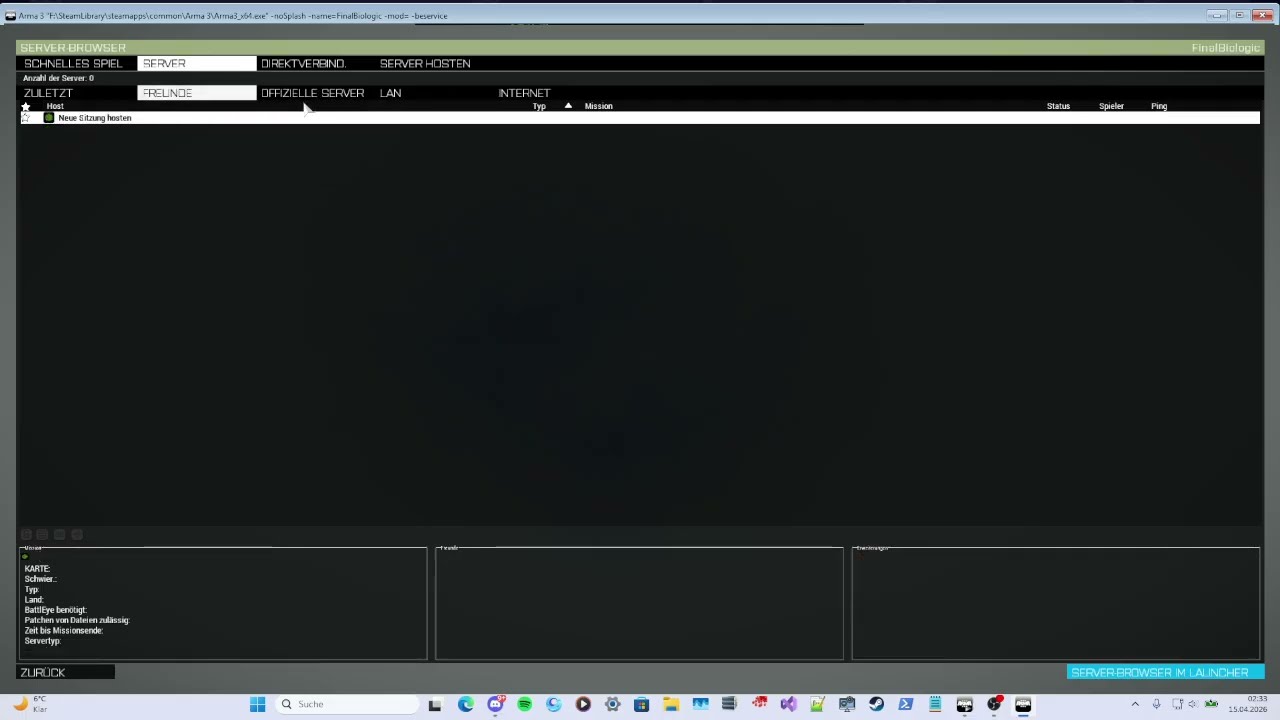
Nobody knows how the bug occurs; once you have it, it never goes away. Regardless of profile change, reinstallation, etc.
small adder
lyric elm
Can't reproduce
Nobody knows how the bug occurs; once you have it, it never goes away. Regardless of profile change, reinstallation, etc. !
lyric elm
small adder
https://youtu.be/Q0yJg74XBDc?si=x-NoMv9Msd_Z15E_
Start game. Multiplayer. Click on Official servers, wait 5 seconds for it to load.
Join zeus altis. Join through in game master slot, wait for it to load. Disconnect. (Note you get connection lost while trying to return to role selection. I get back to role selection just fine, and then have to properly disconnect))
Official server list is ^not being shown for me, but it was for you.
Click on LAN, INTERNET (Internet list doesn't load either), FRIENDS, OFFICIAL SERVERS.
List doesn't load.
Go back to main menu. Open multiplayer again. Server list still doesn't load.
lyric elm
Easier repro.
Start game. Multiplayer. Click on Official servers, wait 5 seconds for it to load.
Click on LAN, INTERNET, FRIENDS, OFFICIAL SERVERS.
Servers still load.
Click on LAN, INTERNET, FRIENDS, OFFICIAL SERVERS.
Servers don't load anymore..
Go back to main menu. Open multiplayer again. Server list still doesn't load.
lyric elm
363.433: STEAM: STEAMWORKS: [S_API WARN] ISteamMatchmakingServers rate limited a server list refresh for appid: 107410, you are refreshing too often
Clicking on official servers tab, is spamming steam with requests. And then Steam is blocking us because we spam too much.
Because we try to request all official servers, and apparently we have 499 official servers..
Our official server list apparently also contains DayZ (that's my guess) servers, and we try to check for them. That part is out of my realm, but its being investigated.
lyric elm
A nice journey.
We don't really need to use Steam, we already have the list of all ip/ports of official servers, there is not really any point to making a steam query, filtering by the IP's, for steam to basically just give us a copy of the list we already have.
For direct-connect, we can already directly ping a server. So we can re-use that right?
- Every direct query lookup, actually does 15 lookups. The port you specified, and then +12 on the portnumber 15 more times. Great, that's gonna work well when querying 500 servers...
- After you use direct connect once, the "LAN" tab in server browser breaks, you cannot query for LAN anymore.
- The game crashes when querying so many servers because of a missing multithreading lock
- After fixing all of that, only 16 servers are displayed. 16 is a hardcoded limit and the size of the fixed-size array that stores the results. In February 2002 the decision was made that 16 results ought to be enough for everyone. Same as the decision of "The user probably got the port number wrong, lets try +12 15 times to see if they were somehow off by a multiple of 12"
I'm deleting code that was written in 2002 for the first multiplayer code for OFP, and has not been touched by anyone since the original programmer put it down
lament yacht
Every direct query lookup, actually does 15 lookups. The port you specified, and then +12 on the portnumber 15 more times. Great, that's gonna work well when querying 500 servers...
Does anyone rely on this functionality? Because I suspect it causes far more problems than it solves.
There's a common issue where when you launch Arma with -connect it somehow connects to the wrong server. Not sure if related.
lyric elm
lament yacht
> Every direct query lookup, actually does 15 lookups. The port you specified, a...
I don't think so, I think I'll remove that too. At minimum I need to disable this if we query official servers
I guess not much harm to leave it on for direct connect, whatever
lament yacht
It's harmful when you have to explain to people why the launcher keeps connecting them to the wrong server :P
Direct connect from inside A3 doesn't do it so that's the usual workaround.
lyric elm
What kinda nonsense question is that.
Why was something that didn't need touching not touched? really?
lyric elm
And we continue.
There is a hardcoded refresh every 3 seconds, for your LAN server list. We're re-using the same for official servers, but.. refreshing 500 servers every 3 seconds is a bit brutal.. So make that configurable to 30 seconds..
Now.. after 15 seconds all servers fade out and the server browser is empty, until after 30 seconds it refreshes.. Turns out the maximum session age is hardcoded in two places, one uses a named constant, the other just hardcoded 10 (for fadeout start) and 15 (for fadeout end) in the listbox rendering code.. That took a bit to find.. Well make that configurable too and set it to something sensible according to refresh timer..
Maintaining 25 year old code 😄
I think I'm almost there though
lyric elm
Should be ready in next weeks prof.
Internet server list still breaks, and we have no fallback for that.. I don't want to deal with that. Maybe I will
carmine willow
and the launcher server list is fine and well coded?
will it be possible to have some of the filtering commodities the launcher has such as filtering cdlcs or servers with modlists the user doesnt have?
maybe a warning in official servers tab when the user isnt vanilla? and only show cdlc terrain servers if the optional dlc is loaded
lyric elm
small adder
https://youtu.be/Q0yJg74XBDc?si=x-NoMv9Msd_Z15E_
Fixed on profiling branch now
small adder
lyric elm
Fixed on profiling branch now
In what way? Do you mean checking a box in the launcher for the respective profile?
small adder
lyric elm
Loading the server list is fixed
okey i try 🙂
small adder
lyric elm
Loading the server list is fixed
Unfortunately not, I will upload the video in a moment
small adder
im sorry
small adder
lyric elm
But but I tested it 😭
 small adder
lyric elm
<:meowsweats:707626030613135390>
small adder
lyric elm
<:meowsweats:707626030613135390>
One possibility, I think, would be to handle it with the server list in such a way that you go through the server list and pick out the ones you want to have as favorites, then put a check in the launcher in the profile settings 'load only favorite servers'
small adder
small adder
One possibility, I think, would be to handle it with the server list in such a w...
almost above or below "start with the same unit as last time"
lyric elm
small adder
One possibility, I think, would be to handle it with the server list in such a w...
Too much work
 broken shard
When does the launcher set/save what preset/mods should be loaded on next launch? It feels pretty hit and miss on wether the launcher will save the current modlist correctly
lament yacht
I remember it doesn't save it if the launcher crashes. And that's the most common way of closing the launcher :P
carmine willow
broken shard
When does the launcher set/save what preset/mods should be loaded on next launch...
on proper application exit
 steel wasp
Dumb question time. What controls this? Server in question runs WS, RF and EF as a requirement, but viewing the server in the launchers server tab would have you believe no CDLC is required... 🤔
 clear onyx
Looking at the list of DLCs above, looks like only DLCs, not CDLCs, are taken into account
steel wasp
I have looked at other servers that have that field populated correctly. So there is a control for it somewhere I am pretty sure.
As shown here, seems to work. Just no idea how to configure/control.
 clear onyx
isn't it in the attributes of the mission in editor ?
whole breach
Maybe it has to do with the terrain?
steel wasp
Required addons in mission sqm are automatically written though. If it was controlled by the mission you would think it would be auto populated in that case. 🤔
lament yacht
I'm not honestly sure how you'd make that not work.
It doesn't need a mission running or verifySignatures.
As far as I know it figures it out from the -mod command line.
I suppose you could load ws with -servermod instead but that would be wrong.
steel wasp
lament yacht
As far as I know it figures it out from the -mod command line.
This is what I also thought.
Oh, I am already using -servermod in launch params for the server. 😬
steel wasp
I mean the content loads. So I don't think it's being used incorrectly...?
lament yacht
-servermod is specifically for mods you want to load on the server and not on the clients.
steel wasp
Huh, I guess that makes sense.
Never really thought about that tbh. 😅
I think that has sorted it. Thanks @lament yacht. 🙂
 urban ruin
My launcher keeps failing to initialize with a -103 code I've tried reinstalling Microsoft visual and all of other troubleshooting advice across reddit and forums but the launcher refuses to cooperate any help with this is appreciated.
carmine willow
urban ruin
My launcher keeps failing to initialize with a -103 code I've tried reinstalling...
launcher is a .net framework application so maybe get that checked and your os installation
but that's likely not the problem, check its logs
urban ruin
carmine willow
launcher is a .net framework application so maybe get that checked and your os i...
My .net is fine how do I go about checking out the logs?
carmine willow
urban ruin
My .net is fine how do I go about checking out the logs?
%localappdata%\arma 3 launcher i think
urban ruin
carmine willow
%localappdata%\\arma 3 launcher i think
found the following in the logs: [FATAL] 1: ShellWindow: System.BadImageFormatException: Could not load file or assembly 'SteamLayerWrap.dll' or one of its dependencies. is not a valid Win32 application. (Exception from HRESULT: 0x800700C1)
carmine willow
urban ruin
found the following in the logs: [FATAL] 1: ShellWindow: System.BadImageFormat...
try deleting the launcher folder and verifying files
perhaps check if the antivirus is causing issues
urban ruin
carmine willow
try deleting the launcher folder and verifying files
perhaps check if the antiv...
I gave it a try and SteamLayerWrap.dll is in the launcher folder but its still giving the fatal error as if its missing
carmine willow
urban ruin
I gave it a try and SteamLayerWrap.dll is in the launcher folder but its still g...
it's not missing but it says it can't load it
urban ruin
yes I don't know what could be causing it not to load though
urban ruin
carmine willow
it's not missing but it says it can't load it
Thank you for the help! I just restarted my computer after reinstalling visual and it fixed
carmine willow
urban ruin
Thank you for the help! I just restarted my computer after reinstalling visual a...
nice, thank yourself not me
small adder
lyric elm
But but I tested it 😭
hey how's it looking, any news? 🙂
lusty pendant
small adder
hey how's it looking, any news? 🙂
Are you actually on profiling branch like dedmen said?
your video shows 2.20.152984 which is stable/default, NOT prof
small adder
lusty pendant
Are you actually on profiling branch like dedmen said?
your video shows `2.20.15...
I am completely normal in the server list if that's what you mean. The bug that the list is not displayed correctly can indeed be triggered by constantly switching between servers through the settings. The only thing that works is to join via a direct IP address search.
lusty pendant
small adder
I am completely normal in the server list if that's what you mean. The bug that ...
Fixed on profiling branch now
https://dev.arma3.com/profiling-branch
it won't be fixed on the default steam branch until 2.22 releases

Arma 3 | Official Website
Experience true combat gameplay in a massive military sandbox. Authentic, diverse, open - Arma 3 sends you to war.
small adder
lusty pendant
> Fixed on **profiling branch** now
https://dev.arma3.com/profiling-branch
it wo...
I will try to understand that and somehow apply it, but thanks for now, if I have questions I will get in touch 🙂
lyric elm
small adder
hey how's it looking, any news? 🙂
I retested couple days ago and it worked
Our QA also told me it doesn't work though, but after they told me I tried again and it still worked for me 😢
small adder
lusty pendant
> Fixed on **profiling branch** now
https://dev.arma3.com/profiling-branch
it wo...
I installed the dev version but it didn't help. Even in this version, the same error occurred.
 oblique niche
this is domain of @hollow urchin so please only good feedback and suggestions / ideas chat, thanks
 plucky junco
I've got one, during ALiVE map indexing the launcher likes to use up 100% of the CPU
it's because ALiVE is writing to a file in @ALiVE/indexing/map_name/x/alive/addons/strategic/objects.map_name.sqf
and the launcher seems to be scanning whatever is being written
(and it slows down the indexing process majorly ofc)
 spark idol
It'd be nice if local mods were sorted by Watched Folder @hollow urchin (it's all a mess D:)
 sand jetty
In the MODS tab, please add the number of mods after "Loaded mods" and "Available mods" so that I don't have to count them manually every time. 🙂
Something like "Loaded mods (24)" is enough.
Oh, and I demand more kawaii themes. Thanks.
 cursive tulip
Bug(-ish): "unload all" mods, start game, and the next time they're all loaded again. Shouldn't the last setting be remembered?
 hazy storm
@cursive tulip i was led to believe that is how its supposed to be? Not sure i see the same.
cursive tulip
If you have an "unsaved preset", all mods are remembered. If you edit a saved preset but don't save, all mods are remembered. But if you unload ALL the mods, the selection is reverted to the saved preset.
 hollow urchin
Thank you guys for the feedback. I'm sorry for the lack of response, I'm in the read-only mode as I'm caught in and between releases. But you might find most of the issues you've mentioned here fixed to a some degree in todays dev-branch, though no kawaii themes for @sand jetty (yet).
plucky junco
❤
 tidal aurora
i just upgraded to: I7-7700
asus rog strix z270e
CORSAIR Vengeance LPX 16GB
windows 7 ultimate x64
1070 strix
and arma just dosnt launch from the launcher. It launches it, I can see it in task manager. but i hear no music, i dont see the window pop up via overlay or on my bottom bar.
lyric elm
"I just upgraded to the latest high-end hardware and a 8 year old operating system"
Any RPT output? How much Ram does Arma use when it just sits there in Task-Manager?
@tidal aurora
tidal aurora
according to bohemia, arma runs on win 7.
All my games except for arma work fine
lyric elm
Yeah I know.. Just doesn't really fit that latest high-end scheme of your hardware ^^ Soo.. RPT?
tidal aurora
sorry, rpt? I believe I've generated one of these files for a teammate who was helping me out but cant quite remember how
export launcher logs?
lyric elm
%appdata%\..\Local\Arma 3
lyric elm
Why?
lyric elm
Ouw gosh.. Please use pastebin or only paste the last few lines.. Posting walls of text is ugly
tidal aurora
yeah my bad
tidal aurora
last line is just ----
lyric elm
Is Arma using 0% CPU when it hangs?
tidal aurora
yessir
lyric elm
Well.... That's gonna be fun to diagnose.. I would tell you attach a debugger and give me the callstack of the mainthread and the arma3 module base... But.... You probably don't know what half of that is ^^ So....
At that point Arma should load it's PBO's. It's obviously stuck while or before doing that...
tidal aurora
¯_(ツ)_/¯
you can walk me through it
I'm more of a hands on kinda guy. haha. I hate problems I cant's see
lyric elm
I wanted to sleep 3 hours ago ^^ I'm in bed with my laptop now.. So... I won't do that now ^^ Try #perf_prof_branch for now.. Maybe that magically works..
Or.. You are using Battleye right? Try starting it without battleye
tidal aurora
already the no battleeye thing
no clue how to start with per f prof. is it not like dev branch where i just enter a pw?
lyric elm
You can do that too.. PW is somewhere in the #perf_prof_branch channel... Or you download the arma3.exe from dropbox.. Put it into your Arma folder and just start it by double clicking
tidal aurora
which arma folder, the steam one?
ran it, now using 22,996k
still no cpu use, or properly launching
 jaunty viper
Seems the launcher still changes the language (to system dafault, probably) after every major game update. In the launcher options it still shows desired language, so I have to select my native lanugage, click "No" when prompted to restart launcher, switch back to English and then finally restart. Not a major problem, but slightly inconvenient.
 vernal steppe
@jaunty viper I can confirm that. Really annoying
@oblique niche One crash log from my Arma 3 Launcher: https://www.file-upload.net/download-12566550/Logs.zip.html
 thin zenith
guys
when ı open the launcher it says steam is offline when steam is fully online. ı can go into store, community and other stuff, ı always need to restart steam when ı see it
 void dirge
Anyone know of a Launcher cache or some way to removed old unwanted presets. No matter how many times i delete presets, they stay in the dropdown list.
Also i think it would be nice to have a way to view more mods on a screen at once., either smaller boxes (opposed to full screen-width with mostyl blank space) or tabs for categories. Like a terrains tab, weapons/gear tabs, vehicles etc etc.
void dirge
Is the a roadmap anywhere for the Launcher and it's development in the future, features being considered/tested etc etc. I took a break from arma for over a year and when i came back I thought this to be the greatest change in a long time. Glad it's replaced all that mod repo stuff, it was good and all but a pain to admin.
spark idol
It would be nice if the launcher received a Steam/Local mod filter option.
hazy storm
@spark idol it already does?
spark idol
It does? Shall check
Negative~
No filter for a big list of mods of varying versions both local and workshop based.
So it would be nice if that got added.
hazy storm
Local mods do not have the valve logo
spark idol
Yes, I am aware.
But I have a lot of mods, and I'd like half of them to go away when I want to use steam-only versions and not accidentally click a local version. And vice versa.
sand jetty
Launcher spelling error: http://i.imgur.com/GzvHSfX.png
hollow urchin
is there any way of adding a custom theme / background picture to the launcher?
cursive tulip
@hollow urchin I don't think so, not easily at least, but there is one hidden background you can enable: http://i.imgur.com/OsASTio.png
😄
hollow urchin
@Greenfist#3021 that's one fancy launcher 😄 not exactly what i was looking for but thx anyways. btw what does RC stand for?
lyric elm
#dev_rc_branch @hollow urchin Release Candidate
 native kettle
Good Day all, my Arma 3 Launcher is freezing up and crashing after launch when im selecting any categories. Please Advice!!
drowsy junco
(read FAQ) make a FT ticket, attach logs and notify Wizard
 hushed zodiac
@native kettle https://feedback.bistudio.com/T126607
 cyan forge
anyone noticed that the launcher doesn't seem to pick up on any mods since the 1.76 update? Or is that just me...?
plucky junco
might have to readd a watch folder if you've used that before
cyan forge
seems to just be on Tanoa. Someone else has reported the same for Esseker... I have 3 exile mod servers; Altis, Tanoa & Malden, only Tanoa affected and only on the vanilla arma launcher. a3launcher.com works fine and picks up all the correct mods.....
 keen halo
Is there a way to see what add-ons are "red" in the launcher? Something other then a number. Thanks.
 frail mica
what do you mean by "red"
sand jetty
In the server browser probably.
 leaden berry
anyone have any experience with memory allocators now and hugepages?
leaden berry
specifically if people are using tbb4/jem still, if people are using huge pages parameter, and wahts the difference between tbb4/jem?
 lucid ibex
I have had issues where using TBB would cause me to crash on launch with some mods, then switched to JEM and I'd not crash
 primal mortar
Any friendly Aussie clans that run missions late at night?
 lone herald
@primal mortar that’s a question for #looking_for_unit
primal mortar
sorry, I have no idea how I posted this here
 stoic quarry
nvm got it
stoic quarry
@prisma owl I think your problem is to run it in x32 since you have a laptop
lone herald
@stoic quarry Dead or not we don’t cross post for visibility. That’s a great way to have your posts deleted.
stoic quarry
Yeah ik it was from a while ago
lone herald
Ah, my mistake, didn’t see the date, though the message still stands 👍
stoic quarry
Yeah I deleted it
 winter pivot
i dont see the mods i subed to them in the workshop
 hushed canyon
hello i wanted to pick someones brains about issues with starting my server on a rented host. so using TADST my server loads up fine using
-port=2302 "-config=C:\Users\mr jingles pc\Desktop\takiserver\TADST\default\TADST_config.cfg" "-cfg=C:\Users\mr jingles pc\Desktop\takiserver\TADST\default\TADST_basic.cfg" "-profiles=C:\Users\mr jingles pc\Desktop\takiserver\TADST\default" -name=default -filePatching "-mod=@CUP_Maps;@extDB;@infiSTAR_A3;@life_server;@Takistan_life;@task_force_radio"
but on my rented server i use there "bat" like
-ip=193.111.186.135 -port=2302 -profiles=arma3 -config=server.cfg -cfg=arma3\arma3.cfg -filePatching -mod=@CUP_Maps;@extDB;@infiSTAR_A3;@life_server;@Takistan_life;@task_force_radio -name= -serverMod=
also tried
-ip=193.111.186.135 -port=2302 -profiles=arma3 -config=server.cfg -cfg=arma3\arma3.cfg -filePatching -mod=@CUP_Maps;@Takistan_life;@task_force_radio -name= -serverMod=@infiSTAR_A3;@extDB;@life_server
just comes up with
lyric elm
But the bikey into the keys folder.
This is #arma3_launcher not #server_admins.
That error has nothing to do with your startparameters
hushed canyon
sorry i was wondering if i was in the right one
lyric elm
Discussion related to official Arma 3 Launcher application
hushed canyon
ah but i added no bikey keys onto my server on my dedi
lyric elm
That's what I just said.
hushed canyon
no like on my dedi i just have a3.bikey also on my rented server i have a3 bikey dedi works rented does not
lyric elm
But the bikey into the keys folder. .
hushed canyon
they are
lyric elm
You just said there is only the a3.bikey
hushed canyon
yes that is all i need
lyric elm
No.
hushed canyon
it works fine on my dedi
but on my rented it does not also when i made my own bat file i got the same probelm but when using tadst it works fine
hushed canyon
there is non
lyric elm
go to @task_force_radio\keys.
hushed canyon
i understand the message but when loading it with tadst it loads fine doesnt throw up the key errors
lyric elm
Go to @task_force_radio\keys. Are there keys in there?
hushed canyon
yes
hushed canyon
i mean for the taki_server ect
hushed canyon
@takistan_life
lyric elm
do the pbo's have bisigns atleast?
hushed canyon
no
lyric elm
So you want to disable bisign checking?
hushed canyon
ok now this is a grey area how would i do that
hushed canyon
lolololol yes i am doing before you sent that thank you
i was excepting a quicky wiser way from yourself 😉 thank you
@lyric elm man thank you its all come clear like hooking up to the matrixs
 dawn glen
If you disable I bisign checking people can come onto your server with mods like personal arsenal and cheat menus
Unless you set up script restrictions which from what you've already I said I seriously doubt you plan to do
hushed canyon
yes im an idiot on tadst it was set to 0 so yes works fine on my bat file config set to 2 and also on the rented server config so yeah class A idiot
do i get a prize or anything
lyric elm
No.. Sounds typical lifer to me
hushed canyon
yep yep im new to life stuff i normally do epoch exile servers
lyric elm
Posting in wrong channel. Unable to google by themself. Making some idiotic mistake that could easilly be solved by just reading or logical thinking... All normal stuff
hushed canyon
ahhhh i see asking for help comes at a price insults cool story
lyric elm
¯_(ツ)_/¯
hushed canyon
i guess sorry and thank you are wasted
lyric elm
Why insult though?
You called yourself an idiot.
You did post in the wrong channel.
You could have solved this by a easy google search.
You could have solved this by reading and comparing your config files.
You could have solved this by logical thinking that signature errors might be related to your signature checking settings
hushed canyon
indeed but sometimes it take someone with a little knowleadge to point in the right direction i only ever come here as a last resort
dawn glen
It's internet culture to insult, we really love you deep down inside
lyric elm
Atleast it works now and you learned stuff. That's the most important
dawn glen
I asked the same questions the first time I tried to run a life server
hushed canyon
yes you showed me the way about creating the keys didnt know i could do that as such and i have just learned aload from you pointing me in the right way
dawn glen
Taki life isn't a good place to start if you don't have a strong developer behind your server, it's complex and uses mods which are hard to Dev with, and the taki life community is filled with RDM and screeching
hushed canyon
in the words of donald trump "nobody loves learning more then i do"
dawn glen
Fake news
hushed canyon
na i have been running servers for a couple years but only just moved to a3 couple months ago
i have a really good dev helping too but he is a dayz fan boy 😂
dawn glen
Oh good stuff
hushed canyon
we have a couple exile servers all good i am a big fan of tlr on arma 2 but its dead KIA or killed by a3 hahaha
lone herald
The title of this channel is launcher_arma_3. The channel description states “Discussion related to Official Arma 3 launcher application”
You can see why people get annoyed.
dawn glen
To be fair, there are a lot of channels
lyric elm
To be fair each one has a descriptive name and description.
It's like being on a forum and posting your bug report in the News section because there are too many sections and you were to lazy to scroll down to the bug-reports section.
lone herald
When in doubt there is #arma3_questions
 grim atlas
hi there my friend is having the ''Waiting'' problem with the mods in A3L i've tried to help him out but i cant figure it out i think i tried everyting but maybe someone knows another fix here please someone help
frail mica
i think we should start by adding some punctuation marks...
lyric elm
I don't know that the "Waiting" problem is. Is it that problem where a Human waits for a thing that is already done but doesn't realize it's done?
frail mica
are you just seriously assume a life form/race (human)?
i'm offended and need to retreat to my savespace
/s
hollow urchin
has restart and launch ever worked?
closing an open arma and joining a new server with 1 click
oh wait now it works
hmk
sand jetty
I've hit some kind of mod limit. The launcher stops recognizing the mods when they add up to over 18 or so. It just looks like this instead of all green: https://i.imgur.com/XWFLJ4h.png
Works fine again if I just remove a couple of mods. Have anyone had this issue?
lone herald
We run over 19 on occasion and its not that
hollow urchin
No there is a mod limit on how much info the protocol can send to clients. Really depends on name of mod in mod.cpp / meta.cpp
For example tryk add-on using the full name instead of abbreviation uses up alot more
 glad wharf
I have 32 mods running at a time 👀
hollow urchin
Yep its due to ammount of info that is sent, not by amount of addons
I seen the issue happen with under 10 addons
The issue is also documented in the protocol on the biki
glad wharf
The lag is shit but still runs well enough
 hoary ether
When i use the launcher to start arma in gives thr game a weird skip type lag forever until i turn it off and run the exe
frail mica
explain this again please, but this time use punctuation marks. i have no clue what you are trying to say...
hollow urchin
He is saying that when i use the launcher to start arma, it gives the game a weird skip tupe of lag forever, until i turn it off and run the exe.
frail mica
rules of the internet:
pictures, or it did not happen
frail mica
the actual error, smartass 😄
 fickle osprey
I was just reading over this, and i found that so funny lmao @sand jetty
hollow urchin
you can toggle the launcher to close after game start
and you can also disable 3d acceleration for the launcher ui
hollow urchin
yeah I've had this too on the rooskei server
probably a networking issue of one of the dependencies
like a rotten game server route
or a rotten server
or rotten battle eye
or rotten steam
havent investigated errors though
usually I can stay on for hours on end without issues
 lucid glade
Does anyone know why you get disconnected when connecting to a server through the launcher? It works flawlessly when connecting ingame
 remote tide
@lucid glade Works for me, possible issue may be that your game is taking too long to load, and your session is timing out. Cause? Computer may be too slow, or you may be running mods?
lucid glade
@remote tide Hmm it's not the pc. The server (my own dedicated) is running wasteland and I have no trouble connecting to other servers via the launcher.
 woven elm
Hmm maybe it has changed then or the launcher uses different place than the in game browser
If appdata doesn't contain that I'd recommend checking steam's user data folder. I've never checked arma stuff from there
hollow urchin
List of favorites servers isn't stored anywhere in Launcher configuration, it's synced with Steam server browser.
 fleet nymph
Assuming it's to keep persistence among installations?
 dim rune
Guys? I have a Problem with the Arma Launcher.
The Launcher says he would download the mods although nothing happens. The Mods that should be downloaded sometimes flicker with a loading bar and then continue to do nothing again.
Steam Downloaded something in between but now doesn't do anyting anymore.
When I click to join a Server with missing Mods, the normal window opens but nothing is downloaded.
I found the Bug Report that if there are too many mods the Launcher might have a Memory Issue but I don't have that many mods and the bug report also says it's fixed.
frail mica
original arma 3 launcher?
dim rune
Original
frail mica
close and restart both, steam and the launcher
dim rune
ALready did, and tried launching as Admin
frail mica
make sure you have enough disc space on your harddrive
dim rune
40GB should be enough right?
lyric elm
Depends on the amount of mods you load
frail mica
not if you ask me
https://i.imgur.com/Tpha0uK.png
😄
dim rune
Ye I just noticed I once wanted to move all my Arma Stuff to my 3rd SSD (128GB) and it was too small.
I removed a lot of stuff since then but it quickly becomes quite a lot.
I'll reinstall Arma until tomorrow and check back.
Luckily now that I moved to a new home, this is finally an option. In my old home I would've needed at least a week for the base game and another week for the mods and dlcs
hollow urchin
 edgy lodge
Only use the mods listed @hollow urchin
Or if its your server than make sure you put the cup bisign files into the keys folder on your sserver
dim rune
So... I just reinstalled Arma entirely and the SSD has 93.6 GB free space.
I subbed to only around ~17 Mods (CUP included) but 16GB RAM so Memory shouldn't be a problem
Also noteable should be that I sometimes don't connect properly to GTA Online, some packets just get lost or something, might also be a port problem, I really don't know. That may have the same problem source like this problem.
drowsy junco
@dim rune gets the logs, make A3 FT report, notify Wizard
dim rune
I put the logs over here @drowsy junco http://pinboard.tesserakt.pro/Arma3Launcher_Log_20180109T194521_AHeuwes.zip
drowsy junco
Bohemia Interactive Forums
Hello fellow community members,
i hope everyone is having a good time playing around in the Alpha and testing it out.
Many of you will encounter issues that...
dim rune
Oh, FT is short for Feedback Tracker 🤦🏽
I don't need to post a bug.
I just have a Problem with my connection that affects Arma as well and I need a solution.
If I open a ticket now it's not going to be read until next month and a patch may come in the next few years probably.
hollow urchin
@dim rune If you do not open the ticket at all, no one will ever read it. I promise.
@dim rune Do you have D: drive?
hollow urchin
Go to Launcher options, Mods tab, change the path there.
hollow urchin
Sorry about that, Launcher should have fixed that automatically, for some reason it didn't. My apologies.
dim rune
That's a thing that might need a Ticket in the Feedback Tracker but I don't know how I could possibly provide more Info about that since I don't know myself how that happened.
hollow urchin
There's no need for the ticket now, I just happen to be the guy who can and will fix it.
dim rune
oh okay. Awesome
 distant idol
I cannot load any mods. It always says there is no Add-ons folder in the mod folder. The mod does not have the right format. What can I do?
lyric elm
do you use workshop to get your mods?
distant idol
yes
lyric elm
and the default launcher to run arma?
distant idol
yes
lyric elm
Don't doublepost #rules 😉 #arma3_questions
distant idol
Someone already tried to help me here #arma3_questions
yeah sorry
I posted it into #arma3_troubleshooting but then saw the #arma3_launcher channel and thought it would be better to post it here.
 left bridge
drowsy junco
left bridge
drowsy junco
Wizard is there still chances for features/non fixes at this point with the A3 launcher?
Would really love to see a "mass repair mod" option by some means.
If you do frequent mod updates, Steam/the launcher doesnt pick them up for hours or even days, or not at all and you have to use "repair mod" to force it to update.
 gloomy mural
anybody have any idea why when i start arma 3 it disables my windows audio. Which at that point i cant reenable it without a restart. This happens with and without a headset
lyric elm
@gloomy mural Drivers up to date? Btw that belongs to #arma3_troubleshooting
hazy storm
@lyric elm double poster that already has / had a convo in #arma3_troubleshooting :/
lyric elm
Oh.. Get the pitchforks!
hazy storm
FM cut em loose this time, unfortunately we'll have to stash our pitchforks till the next double poster :/
which I feel anymore, won't be long
 tiny talon
help me plz.we i want to download workshop mods it foesn't show on steam client.
 thorny trail
Hello there. Recently I upgraded my PC to 4k. And I have some issues with launcher. Pop-up windows spawn at wrong possition(somewere at bottom right).
System DPI set to 175%. Is there any hope to get a fix?
 mighty oyster
It´s anybody having problems with the Workshop downloads and bugs with the launcher? I just reinstalled the game in a new machine and i cannot download a lot of mods properly. First, the workshop downloads do not appear in Steam. In second place, when i download most of the mods they appear as "damaged" so i have to download them again, but seems like some are stucked into a loop. Any idea of why this is happening? A friend of mine also said me that his Workshop downloads do not appear too.
 simple forge
i cant get my fucking mods
to work
cup is corrupted
but the repair function does not work
simple forge
where do you delete it from
removing it from a3 launcher
doeesnt delete it
going to the filel ocation doesnt either
lyric elm
Steamapps/workshop/107410/<some number>
The path isn't 100% correct but you should be able to find it
lyric elm
Did you read what I told you?
unsubscribe + delete manually + maybe restart steam + subscribe again.
Or just don't load the mod from workshop
hollow urchin
Sometimes steam workshop messes up. If it refuses to download etc, you just need to wait afew days for it to fix itself.
Or you can see about downloading the addon manually i.e you can download CUP from CUPs Website
lucid ibex
I'm having the same issue and have already deleted them, cleared download cache too, in the hopes Steam will hurry up and download them again
 rich barn
Is it just me or does the launcher have some sort of memory leak? I keep mine running for hours, as it doesn't close when i run the game. Doing terrain dev. saves me a few clicks not closing it. After a few hours it keeps crashing and windows says I run out of memory .. which i'm not
crash log
this happens every day
 peak surge
@rich barn Never experienced that here tbh. Just fyi.
 tough oracle
hello im get banned plz help
 median wharf
What's up buddy? Could you screenshot the ban message you are given.
And move it over to #general_chat_arma
@simple forge try and change download server through steam.
frail mica
@tough oracle
Let me guess, KotH? If so, move your complaint to their offical discord, pls.
median wharf
Probably an infi ban
frail mica
Shit happens... 😄
lyric elm
He already went offline about 3 minutes after he posted that message. I don't think he cares about what you have to say about that.
frail mica
Likewise i care about his ban 😂
lyric elm
No I won't.
hazy storm
they need to get that shit fixed lol
 random hill
same as some of you..CUP terrains -Core failed to downloads, it claims the path to mod folder not set, tried almost everything chat and forums suggests, and it's still the same. Once it's done downloading, steam report the update status to Canceled and it restarts the download from scratch ... (2.6mbps is a pain when downloading 6GB...)
lyric elm
Enough free disk space?
random hill
80gb free
steam is downloading it but ARMA doesn't appear on the window
i'm submitting a bug reports on the feedback tracjer
random hill
can still hope
hollow urchin
nothing cups can do with steam download issue, except point you at other download links
random hill
update: it downloaded properly
unsubbed, restarted steam, subbed to workshop and left it to download while out of the house
 granite plume
is there a way to export all the paths of the launchers loaded mods? the export to HTML crap is useless for cmd stuff.
user/appdata has some text files with presets but its all in steamID numbers not actual paths.
syncing client server and HC mods is damn painful
 brittle lynx
I think you can copy the file paths from the .rpt
granite plume
weird i can see the launch params inside the rpt but it only shows 5 out of 30 mods actually enabled???
there is no hidden generated par file the launcher uses? or some serialized file that a BI tool can open?
lyric elm
there is a par file. But no.
 fervent blaze
I'm banging my head against the wall with our pingperfect server not appearing in the launcher browser. it works on the in-game browser, but not the launcher. We've set our CFG up to ping perfect's instructions from the helpdesk, but no change. It's also timing out on master.bistudio.com and the A3 laucher server checker. Anyone have ideas?
lone herald
#server_admins channel might be better
hollow urchin
@fervent blaze
If its timing out on a3launcher server checker you messed up your port forwarding / firewall
If its an ovh gameserver believe they have their own firewall you need to sort out
fervent blaze
Pingperfect claims the port forwarding is set correctly, and when we initially GOT the server it did show up in the launcher browser, additionally another group we are friendly with uses ping perfect and doesn't have this issue. I dont have access to verify port fowarding is set correctly because pingperfect doesn't give me access to that, but they claim it is.
hollow urchin
Chances are they messed up then, nothing anyone can do for you here if you don't have root access to the box.
You need to bug your GSP provider
lyric elm
Probably unable to click the "repair" button because monitor is not plugged in.
sand jetty
Lol wat.
lyric elm
Interpolating missing information is a hard job. You can ultimately just guess or wait till you get the information.
 steady crane
any chance the issues with big screens / 4k will be resolved in near future?
would be enough to allow resizing of dialogs like mod dependencies and the eula dialog
they are so huge that the buttons at the bottom stick out of screen and it's a PITA to work around this bug
granite plume
when you use direct connect in the launcher, does it automatically enable mods required by the server (or does it use whatever was enabled in your list at the time?)
or is there a way to do a direct connect but enable the mods i want to use?
hollow urchin
it automatically does it
 fiery kestrel
i want arma 3 server ip address
lyric elm
@fiery kestrel Yes? Get one then?
 ebon kite
@mk420350#8600
Just to make absolutely clear, this is not a discord for any particular Arma server. It's basically a bunch of people from all over the Arma-verse.
So when y-
Oh, they're gone.
lyric elm
No. He's there. Just offline
ebon kite
Tagging system just being a butt then.
lyric elm
As always 😄
 crude tundra
crude tundra
crude tundra
ok
crude tundra
does wizard sleep for ever
 lime idol
he may enjoy his weekend too 👀 hehe
but a wizard is never late nor is he early... he arrives precisely when he means to!
lone herald
☝️
 silver jungle
well, I am trying to run a dedicated server through "tadst" and I am using mods, everytime I try to launch the dedicated server it take 15 min to load and then crashes at the very end, any idea somebody?
lyric elm
I don't see the relation between a dedicated server launching slowly.
And the Arma 3 client launcher.
silver jungle
sorry, i do not know where I should post this, I do not see a "Dedicated server" chat
lyric elm
silver jungle
ok, thanks
lyric elm
Is for.. Server Admins.
fiery kestrel
Hello i am looking for arma 3 good server
lone herald
@mk420350#8600 Can you please stop spamming all the channels looking for servers? Use #communities_arma3 if you are looking for a community to play with.
 quaint pagoda
Have anyone found a fix for this problem yet?
"Server can't transmit all data; some allowed mods might be missing or their signatures not recognized"
https://i.imgur.com/n3E4gSh.png
lyric elm
He won't. BI knows that problem for over a year.
But there are workarounds if your mod list is just a little too big. You can edit the names of the mods in the mod.cpp inside the @mod folder on the server. Make them shorter and more Mods will fit.
quaint pagoda
I tried that. Didn't work. Guess we're running too many mods. Do you know what the character limit is?
 twilit jungle
I had that issue on my windows box, try restarting the entire computer. That seemed to fix it for me @quaint pagoda
quaint pagoda
I'm afraid I cant do that as we're using a rented server so we dont have any access aside from a Control Panel.
 vital bane
@havok you need to review your keys folder and make sure there no old-obsolete keys. Also remove any non essential mods from -mod section. In my experience it breaks after 20 or so mods, depending on what you have loaded.
 real drum
@fathom needle Signature mistmatch means literally a signature mismatch. Repair your mod and make sure nothing is corrupted
 fathom needle
I mean to say about the server
Have long mods and it shows Red
If i use 5 mods they are fine for showing in launcher
and more its showing red
real drum
Well yes, the two signatures must match on the server and client. Have you tried another server with the same mod? Can you copy the exact error?
fathom needle
Yes i use Steam Workshop as the main branch for all the mods downloaded using Steamcmd and they all have Symbolic Link to Steamapps folder . If i run Server with any 5 mods it shows green but if it becomes more than 5 it gives kind of error on Arma 3 Launcher area but it shows fine in Arma3 in Game Browser
It basically says Servers cant transmit all data; some allowed mods might be missing or their signature not recognized
real drum
Yes, do you have verifySignatures set to anything above zero? You need to place the mod keys inside the keys folder in the root of your setver installation
real drum
Why 3? lol
fathom needle
Not 3 its 2
maxPlayers = 46; // Maximum amount of players. Civilians and watchers, beholder, bystanders and so on also count as player.
kickDuplicate = 1; // Each ArmA version has its own ID. If kickDuplicate is set to 1, a player will be kicked when he joins a server where another player with the same ID is playing.
verifySignatures = 1; // Verifies .pbos against .bisign files. Valid values 0 (disabled), 1 (prefer v2 sigs but accept v1 too) and 2 (only v2 sigs are allowed).
allowedFilePatching = 2;
real drum
make sure to format walls of text like this: #info_help_tips
Have you tried redownloading the mod and making sure a clean download would do the trick?
sometimes it gets corrupted during dl
fathom needle
Tried it lot of time
All mods get easily downloaded everytime i do on the server
and next is i copy all the .bikey to keys folder
 last moth
Something about UDP packet cutting off the mod list. If it's too long (too many mods) the launcher just can't tell what mods a server is running.
real drum
Didn't you say there is only 5 though? That shouldn't be causing problems
If i use 5 mods they are fine for showing in launcher ?
fathom needle
Yes
fathom needle
I have deleted all the keys and readding them just in case [a3.bikey is not deleted 😝 ]
real drum
Super mods? Sounds pretty super
lone herald
No, some people (aka idiots) repackage multiple mods into one (think A3L) and say "but I only have one mod" (thats 50GB in size)
real drum
Oh, I see. 😞
fathom needle
No i have all the mods seperate in each and every seperate folder and they are having symbolic link from steamapps folder like what Arma 3 game itself does
fathom needle
Is anyone else also using Steam Workshop Mods with Symbolic Link ?
real drum
^ Yes, you should have no problem. Sounds like a corrupt download to me
fathom needle
Is it something related to 64 bit version of arma 3 server ?
 ripe kayak
no
 ashen surge
anyone else noticed this? don't try it before reading this fully. If you open A3 launcher, then go to parameters / all parameters / click the favourite star on the left of memory allocator (64 bit). and BAM! yo ucan NEVER ever get rid of it being a favourite.
more free mildly annoying pointless favourites clutter tips coming soon lol
 slim heath
sounds like #fakenews 😀
 pine isle
Anyone knows if there is a way to load an entire mod collection into the Launcher?
last moth
Export from the launcher to get an html, which can be dragged into a launcher.
real drum
Or add a watched foldwr
pine isle
Ah I see, many thanks! Was thinking if one gives out a big collection and wants it to be easy for the user to load them up, im guessing the html is the easiest at that point.
real drum
Well, a watched folder is literally selecting a folder and mods are added as new mods are throwin in that folder
pine isle
Oh cool, ill check that out! Thanks!😃
 iron valley
Watched folder doesn't help with selecting the right mods for a specific server though?
real drum
@iron valley Not the point. Anyone knows if there is a way to load an entire mod collection into the Launcher?
If you select a server and press setup mods any containing mods that are required that exist inside the watched folder will load regardless of location. Same applies with local mods
they don't have to be ws mods
fathom needle
Does anyone know how to copy Arma 3 mods of Steam Workshop and make it work on other system
fathom needle
Doesnt work
lyric elm
Does work. That's what i do
fathom needle
I want to use Steam Workshop method
lyric elm
You want to copy workshop mods from workshop to workshop?
fathom needle
YEs
But steam doesnt allow that for some reason
My friend is having a problem to download 1 mod so i sent him drive
fathom needle
So i need to run as Local Mod on my friends system ?
lyric elm
yes
 boreal cave
another system, like different OS?
lyric elm
What?
 pastel badge
Is there an argument that launches arma in fulscreen window? As I understand the only options you can tick are windowed or fulscreen, but you should be able to write an argument that launches it on windowed fullscreen right?
lucid ibex
It'd likely be listed somewhere if you could
pastel badge
Hella weird because you can turn it on in Arma client itself
lyric elm
no there is no argument for that
 mortal trellis
It will not work for me idk why it just glitches out
mortal trellis
hmmm
 sacred crypt
Hello everyone. I have a rather big issue with the Arma 3 Launcher for which I cannot find a solution. The game itself runs fine, if I go INGAME to the server browser and then to the internet tab, it get sfilled with servers. However if I try to browse the internet servers (or any server really) from the launcher, I get nothing. When I inspect the arma 3 launcher serverbrowser.service logs I get a ton of spam of this
2018-07-11 16:29:33,208 [ WARN] 21: ServerBrowser.Service: Server failed to responsed to rules request: 0.0.0.0:0
2018-07-11 16:29:33,330 [ WARN] 21: ServerBrowser.Service: Server failed to responsed to rules request: 0.0.0.0:0
2018-07-11 16:29:33,330 [ WARN] 21: ServerBrowser.Service: Server failed to responsed to rules request: 0.0.0.0:0
2018-07-11 16:29:33,399 [ WARN] 21: ServerBrowser.Service: Server failed to responsed to rules request: 0.0.0.0:0
Any ideas?
I have checked firewall, AV, Ports and reinstalled the game already. With and without mods enabled I ge t the same result
 jovial lodge
Hear with your ISP, i had my Xbox live ports blocked once because they thinked im running p2p traffic 😂
 ashen crypt
Install arms3 launcher run your game through that. Have steam open. I get all kinds of crazy sht too if I try to run armas launcher
Arma 3
ashen crypt
Correction A3 launcher
 glacial acorn
hey so i have a problem where when i want to import a mod preset the import button is grey what can i do?
frail mica
rules of the internet: pictures or it did not happen
would help the trouble shooting tho
glacial acorn
@frail mica sent a screen
frail mica
send it here for others to see also
 brazen dagger
keep restarting the client at some point it will be fixed
i get it after i remove a preset
or sometimes at boot
 sour cliff
hello, I created a new profile in Other Profiles (a 6th one) and it works via -name= and in 3rd party launchers (arma3sync), but the Arma 3 Launcher still isn't showing it in the "Profile" parameter dropdown menu (only the older 5 profiles) .. restarting the launcher 4 times (so far) hasn't helped -- any idea where it keeps its cache? .. thanks
sour cliff
figured it out; the profile is defined not only by the directory name, but also by <name>.* prefixes of profile/vars files inside, renaming those too made the game and launcher "see" the profile
 spring holly
👾
hollow urchin
Hello, I need help for the mods and the addons to can play in multiplayers on Arma 3
frail mica
No cross posting, keep it to #arma3_questions
 jovial blaze
hollow urchin
jovial blaze
hollow urchin
Running a server. Someone told me Arma launcher will download the mods automatically when you try to join? I thought only A3 launcher did this.
 sly dove
Yep, they just need to find and connect through the launcher.
hollow urchin
Ty
lyric elm
probably yeah
 river shoal
@hollow urchin If you properly enforce mods by adding them into the mission.sqm
hollow urchin
@river shoal oh, didn’t know that. Thank you. Do they go in addons or autoaddons?
river shoal
Addons @hollow urchin
hollow urchin
sorry for the ping @river shoal, but how to find the proper names for the addon section? they all seem to vary from the parameter and folder names.
river shoal
cfg patches. of each respective mods main cfg @hollow urchin
hollow urchin
ty!
 civic garden
hey guys, is it possible to see my own server in the launcher's serverbrowser while ingame? just want to check if its visible. got some troubles with the ports
 somber sun
Yes you can.
In the launcher options, there is an option to let the launcher opened while the game run.
spring holly
@everyone
lyric elm
@quaint garden ^
 quaint garden
@spring holly that won't work for you. But nevertheless, please don't @ everyone on this server
spring holly
k
@quaint garden really sorry was a friend typing with my keyboard he made me a prank
 compact heart
Is there any way to open the launcher in the linux version, to turn on workshop mods and such?
lyric elm
"the" launcher. no.
you probably need to symlink the workshop mods into the arma directory manually? I guess.
 terse musk
@hollow urchin or dont join any custom server
woven elm
The launcher's server browser has been sooo slow for some time. It loads servers very slowly so it's basically useless. Checked the Steam's own server browser and that's loading servers fine so it's something about the launcher.
I think I read someone mention the same thing a while ago. Any known solution? 🤔
drowsy junco
had the same here
frail mica
@hollow urchin
please change your avatar. the usage of this variation of the swastika is illegal in some countries
lone herald
...and violates the rules of this discord.
 winged remnant
hello i have an issue with the arma 3 launcher, when i try to initiate arma 3 from steam, it doesn´t do that, instead it shows an error "system.outofmemoryexception"
anyone knows from where that error comes from?
 brisk merlin
do you have enough ram for arma?
winged remnant
i have 16gb
brisk merlin
yeah but do you have it also free when you start arma, because the error message say you don't have enough when you start arma
brisk merlin
hmm, but arma works without the launcher?
winged remnant
yeah
but i actually want the launcher to manage my mods and find my clan´s server
 olive magnet
I'm sure you have already done this but it doesn't hurt to ask, have you vertified you game files?
winged remnant
(i know i can do it inside the game) but it´s strange that error for me
yeah, i verified them like 3 times
olive magnet
oh boy
winged remnant
i uninstaled the game and downloaded it again, still the same error
idk what´s generating that error
olive magnet
hmm maybe your c++ libraries are screwed
winged remnant
🤔
olive magnet
hold on the download link to repair/reinstall them is somewhere on this discord. I just need to find them
winged remnant
okay
winged remnant
thx
olive magnet
 glacial hamlet
OK why is my ace keep getting blocked by BE
lyric elm
Because battleye does that randomly every couple weeks
Either you wait or just stop using battleye
frail mica
a little more information would be nice
lyric elm
Don't load 2 year old ACE stuff @errant wagon
 errant wagon
so can some just send me a pic of their mod list for apx?
I tried what you said didn't help
lyric elm
send me your RPT and I'll tell you which file to remove
errant wagon
okay
lyric elm
@errant wagon you are loading ace twice. @ace and @ACE Everlight the everlight one being terribly outdated. But I can't find the pbo that would load the serverconfig.hpp
errant wagon
so where could I get a file for the serverconfig.hpp?
lyric elm
you don't
it shouldn't exist
get rid of the broken ace everlight crap thing and see if that changes something
errant wagon
okay imma do it thanks
errant wagon
does anyone know what mod involves ace_sitting?
lyric elm
ace... sitting... I guess
errant wagon
says its something morethan just that
lyric elm
well sitting is a module from ace
 elfin wasp
 brazen merlin
anyone willing to teach me how to play arma 3
lone herald
Play through the boot camp , VR training, Showcases and the Single player campaign. Once you have done that, come back with any questions you may have.
 odd falcon


 lone herald
Additionally, your comment has nothing to do with the launcher.
 reef urchin
everytime that i open my A3 Launcher it automaticaly closes, what should i do ?
hollow urchin
Guys, I've Subscribed to mods through steam workshop, after they finished downloading, I opened up Arma 3 Launcher, and there is a yellow clock icon beside them, it shows like I didn't download nothing. What seems to be the problem? Am I gonna re-download them again?
hollow urchin
Did that, nothing changed. The yellow clock icon says "the path for the mod folder is not set."
drowsy junco
did you verify that in a3 launcher options (top right)?
hollow urchin
I didn't get what you mean really?
 toxic fossil
That often happens if steam crashes during download or if you blue screen. Steam somewhat forgets what it was doing.
Go to Steam\steamapps\common\arma3!workshop - check that your mods are there.
winged remnant
what should i do? when i open the launcher and i try to go to the mods section, it says that the game is running but it isn´t (i restarted my pc twice and it continuous to say "the game is running, close it to change mods")
winged remnant
nvm, i fixed it (i had to use safe mode on my pc)
 verbal comet
@winged remnant try to verify your files
 idle sage
Will this even think about playing arma 3?
 sacred apex
ya
lyric elm
Why would BI make a official linux launcher if they are not even making a official linux version anymore at all?
hollow urchin
@lyric elm The linux version is at 1.82
You're a furry, your opinion doesn't count.
frail mica
🍿
 gentle karma
Exactly the windows version is at 1.88 almost 1.90
 twin depot
please behave
 old field
Hello,someone know it is possible from an ftp via cloud to read a mod,read pbo etc.. and not read it locally on the client?
frail mica
What do you have in mind?
lyric elm
sure... technically it is
old field
I would like the launcher to read all the content of the mod that is hosted in the cloud and not locally. For this you can have hosted in an ftp repository for example.
I try this but when load the path route the mod seems corrupt and don't find anything inside him.
I think this is because does not find the relative path where the mod is hosted
 wide thorn
These above are what I see trying to get on a server
I wonder why is Arma 3 turning into a headache
🤔
gentle karma
@wide thorn Looks like your missing the "arma3_x64.exe"
- Verify game files through steam
- Make sure your launching in 64bit from the launchers params tab > https://i.imgur.com/RYmi9jk.png

 mint cliff
Anybody know why i get this message when trying the launch the game with battleye? 'C:\Windows\System32\CoreUIComponents.dll'
hollow urchin
what message? just a file path and nothing else?
mint cliff
blocked loading of this C:\Windows\System32\CoreUIComponents.dll'
hollow urchin
maybe battleye is outdated, can you force it to update or reinstall it?
 young galleon
Local battleye installation has unistall and install batch files
mint cliff
So how do I fix it?
lyric elm
Wait till the battleye servers stop throwing a fit.
 buoyant sentinel
@mint cliff maybe go to steam and see if you can verify game files. (Game library --> Arma 3 --> Right click --> Properties --> Local files --> Verify integrity of game files)
mint cliff
i`ve tried that and its still coming up with Blocked loading of file 'C:\Windows\System32\CoreUIComponents.dll'
lyric elm
might be infected by malware, or be malware