1 messages · Page 1 of 1 (latest)
 brisk kraken
Hey guys wantet to play a PVE Server. I have used the normal Arma Launcher and automatically downloaded the mods but i have this error.
Server name: [GER/ENG] AVMG.EU >Chernarus|PVE|Zombies< Exile|DMS|RoamAI|CDAH
Address: 148.251.87.4:2402
Server version: 208149743
Required game version: 2.8.0
Map: Cup_chernarus_A3
Mission: Chernarus
Players: 5/30
Guys? PLS HEEELP^^
 sterile moth
Try to repair CBA
brisk kraken
its completly new installed. I repaired it with no change
tryed to start it inside from arma also the problem. Yesterday i did reinstalled all mods
sterile moth
It could be the server's fault
brisk kraken
Hmmm shit
brisk kraken
Tried a other serve and had the same prob.
Let check arma and all mods. Had no issues. Reinstalled cba same prob.
Any idea?😩😩😩
 languid siren
brisk kraken
Hey guys wantet to play a PVE Server. I have used the normal Arma Launcher and a...
languid siren
brisk kraken
Hey guys wantet to play a PVE Server. I have used the normal Arma Launcher and a...
You sure that server allows CBA?
brisk kraken
Yes because it is automatically loading all mods.
 hollow urchin
just before it happened i was installing local mods no more than 5 gb when i tried to playtest them my arma kept crashing on loading addons
restarted and it started happening
hollow urchin
hollow urchin
(happens when i press the refresh button ((arrow going around in a circle)))
hollow urchin
hollow urchin
what i've tried so far:
reinstalling arma 3
restarting computer
verifying integrity of game files
clearing cache.ch and verifying
running all arma programs as administrator
 lament yacht
Have you tried removing your local mods?
lament yacht
Delete the local mod folders directly. It's probably stuck on something nasty in there.
Should be in %steamLibrary%/Common/Arma 3
lament yacht
Depends where you put it.
hollow urchin
i was dragging and dropping into the launcher
lament yacht
sighs
ok, open C:\Users\[username]\AppData\Local\Arma 3 Launcher\Local.json
username is your username, AppData is hidden.
hollow urchin
i know
both of those
hidden items showing

you want me to open this file
or dlete it
lament yacht
I said open
As text, in case you have anything weird bound to JSON
notepad or whatever
hollow urchin
ok and
lament yacht
That should tell you where you have local mods installed. You can either go kill them or remove the entries from that file.
hollow urchin
yippie
 undone crystal
Greetings!
After a crash a few days ago 2 things started happening:
I get an error message saying that "Cant sync saves to cloud" although i always had cloud sync disabled.
Every time i try to join a server, or even launch vanilla unmodded arma, the launcher keeps loading a specific mod by force. This mod is not selected on the mods list. 3rd party launcher called "A3 launcher" launches the game fine without issues.
Could someone please provide some troubleshooting guidance?
Thank you!
lament yacht
@undone crystal Check whether you have anything in "command line" on the parameters tab in the launcher.
undone crystal
I did. Nothing related to mods
 kind fiber
So I am having this issue where I can not find my groups server I know its up because others are on it and or can see it any idea what I can do???
 undone crystal
Greetings!
After a crash a few days ago 2 things started happening:
1) I get an...
undone crystal
undone crystal
Greetings!
After a crash a few days ago 2 things started happening:
1) I get an...
Bumping my question because the launcher is still not working.
Did a repair on Arma3 which changed nothing. Removed all parameters from launcher which changed nothing. I am still lost and the launcher is unusable. Any help is appreciated!
languid siren
tried verifying your arma files?
kind fiber
languid siren
tried verifying your arma files?
Who you asking
kind fiber
If its Angar he has already done that and if its me I have also done that
kind fiber
kind fiber
So I am having this issue where I can not find my groups server I know its up be...
Any ideas anyone
kind fiber
Yes
@lament yacht I can but the reason I need to see it on here is because I need to know what mods I need or what I can use (as additional mods)
lament yacht
Yes, but once you've direct connected (even if kicked out due to missing mods), it should show up in "recent" in the launcher.
Another way is that you can add the server in steam favourites, and then it'll show up in launcher favourites.
lament yacht
steam->view->servers->favourites, add a server button.
Need to use port+1, so for example 2303 if the server's game port is 2302.
kind fiber
I see that my servers are there in the favorites tab
lament yacht
Not in launcher favourites though?
kind fiber
Correct
lament yacht
I guess your launcher is broken.
kind fiber
Ya I have had no one give me an answer unfortinatly I have uninstalled to.
lament yacht
You could try clearing all its user data out. Might help.
kind fiber
How ?
lament yacht
Try clearing [user]\AppData\Local\Arma 3 Launcher maybe
lament yacht
I don't know, you cut off all the information.
kind fiber
Tried both files neither worked.
 winter lotus
can someone help i cant see my units in the arma 3 launcher
sterile moth
Its normal. Arma 3 Units is fairly unstable service and often get offline
 leaden tundra
hi when i try to play it says admin ban i havent played it in a while idk what i did i just play and barley talk
i was gonna play it again but it keeps on saying im admin banned
i tried to get on one of my favortited servers since a while and it says something bohemia admin ban and i tried to go on more and says it
kind fiber
kind fiber
So I am having this issue where I can not find my groups server I know its up be...
So update on this when I use WiFi I can see the servers but when I use Ethernet I cant any idea why it’s like that??? PS I am on desktop I prefer if I can keep Ethernet.
undone crystal
undone crystal
Greetings!
After a crash a few days ago 2 things started happening:
1) I get an...
For my second issue, go to C:/Users/your_user/App_Data/Arma 3/ and delete everything inside the folders that end with Cache.
The Failed to Sync to Cloud error persists, but does not seem to have an impact to anything so far.
Tags for search: no mods, launcher force loads mods, can't unload mods, cant unload mods,
 thin sandal
hey so ive been having this issue where when i try to boot up arma 3 by pressing the yellow play button, it shows a text saying "The code execution cannot proceed because (BLANK) was not found. Reinstalling the program may fix this issue" i tried turning battleye on and off but that wont work, there is another page saying something about a missing DLL? im not too sure, cause it wont show me what the missing DLL is. anyone able to help me out?
Here is some context:

 lament yacht
Usually means that you need to reinstall the VC++ 2013 redistributables.
thin sandal
ill try that out rn thanks
lament yacht
They do mention a bug there where it uninstalls the x64 version if you update the 32-bit version, which might be why this happens to people.
 floral horizon
lament yacht
probably latest versions: https://support.microsoft.com/en-us/topic/update-for-v...
floral horizon
lament yacht
probably latest versions: https://support.microsoft.com/en-us/topic/update-for-v...
Do you have to reinstall after you download or should it just work
 haughty raft
hi im having problems to launch the game can anyone help me


 fresh bluff
Hello could you press this button and post the file you get, on a ticket on https://feedback.bistudio.com.
That way we can look into what might be causing the issue.

 lyric elm
haughty raft
hi im having problems to launch the game can anyone help me
lyric elm
haughty raft
hi im having problems to launch the game can anyone help me
Put that message about the cloud file provider into google and follow the steps you find
haughty raft
 lyric elm
That information is useless as its not our bug, its Microsoft's OneDrive
 zenith gust
hello i have a problem , if I start Arma 3 I go to the main menu it takes 5 sec and they freeze but if i go instantly in arsenal doesn't crash
hollow urchin
How to unlink my steam to an arma Account
I dont Have access to the old Account
Nvm
 outer holly
Arma 3 is not in my steam library for some weird reason, and so in oreder to install it on my laptop. I had to go to the store page (on steam) and hit play game, not add to library so I could then install it from my library. Now ive got an updating arma 3 window and not installing arma 3....?
 ruby glade
outer holly
Arma 3 is not in my steam library for some weird reason, and so in oreder to ins...
ruby glade
outer holly
Arma 3 is not in my steam library for some weird reason, and so in oreder to ins...
you've probably filtered your games list
outer holly
no I've checked all games are "showing" yet arma 3 is missing.
ruby glade
outer holly
no I've checked all games are "showing" yet arma 3 is missing.
go to View > Hidden Games
see if you see Arma there
outer holly
ruby glade
see if you see Arma there
Yes found it wtf? how do I unhide it as I don't remember hiding it in the first place lol.
ruby glade
add it to a collection
or remove the filters
outer holly
nvm got it lol too stoned atm lol
getting everything set back up in arma should be easy af, I mean look how I just mastered that shit lmfao I'm doomed.
Is there a list of the top mods in use atm for arma 3?
 left vector
yes go onto steam workshop and filter by most subscribed
this isnt the channel for that thougy
 deep plover
hi - does anyone know why the mods presets revert back after I rename them?
like the next time I reopen the launcher they are not saved
how can I modify the mods presets and make sure it is saved?
lyric elm
Type that message into google, its some error with microsoft onedrive
 subtle zephyr
My Arma isn't even running

The launcher showed this when I booted it up. I tried opening the game then exiting, I tried the task manager, I've validated the game files
It won't let me manage my mods
languid siren
Tried "close game" like it says?
subtle zephyr
I've even uninstalled the game completely, then reinstalled it. It's still broken
lament yacht
have you tried restarting windows
 little marsh
Why aren't all my presets sorting alphabetically? I renamed a few, and they went right into alphabetical order. However, not all my Dev_ presets are in the same block
 subtle zephyr
@lament yacht thank you
 bitter folio
whoever formally warned me that wasn't very nice, i was just trying to get my question answered
the question fit those 3 threads
sterile moth
ICYM: #rules
any violation of the intellectual property right of others is prohibited!```yeah but the question applied to all of the places
sterile moth
Then what?
A question that could fit more than one place and you shouldn't post the same post everywhere are not trade-off
left vector
bitter folio
yeah but the question applied to all of the places
And is only meant to be posted in one 😉
 spring bane
arma wont load past "loading core configs"

ive tried reinstalling the game
and verifying the integrity of the files
but both didnt work
sterile moth
How many Mods you load?
spring bane
sterile moth
How many Mods you load?
none
sterile moth
Remove Dta folder from Arma 3 install folder and try verify
spring bane
okay ill try that
spring bane
sterile moth
Remove Dta folder from Arma 3 install folder and try verify
It didnt work
sterile moth
Hmm... How long you've wait in this screen?
spring bane
sterile moth
Hmm... How long you've wait in this screen?
it stays stuck forever
sterile moth
Like how long? Not forever
spring bane
sterile moth
Like how long? Not *forever*
how long this has been happening for?
sterile moth
A split second to a few seconds
spring bane
the max ive waited on the screen was like 20 minutes
sterile moth
Well now that's certainly not normal
spring bane
yea and its been like this for a couple months
sterile moth
Did you moved ANY pbo file from somewhere to somewhere?
(I doubt this is a case tho, just in case)
spring bane
sterile moth
Did you moved ANY pbo file from somewhere to somewhere?
no i dont think so
sterile moth
Or, let's say did you installed any “Mod” like ReShade manually?
spring bane
No i only installed mods off of the steam workshop
sterile moth
Do you have any launch parameters you set in Launcher?
spring bane
no i dont
sterile moth
Hmmm... I think I'm out of an idea
left vector
have you tried steamverify and/or reinstalling
spring bane
left vector
have you tried steamverify and/or reinstalling
yea and it hasn’t worked
 mortal bluff
Hey
For some reason my mouse in game is big and the mod list under at the main menu is a bit big
ruby glade
mortal bluff
For some reason my mouse in game is big and the mod list under at the main menu ...
Decrease the interface size in video options
mortal bluff
To what size? @ruby glade
ruby glade
whatever you prefer 
 digital latch
Somehow my game got stuck trying to load a handful of mods I previously configured. I choose in the launcher to launch without mods, but it still loads them (the "-mod=..." line is empty in RPT but further down the log it still verifies signatures and loads the mods). I verified game files in steam and restarted computer, issue persists. Has anyone seen anything like this?
lament yacht
Maybe if you managed to add -servermod in parameters.
digital latch
Ok fixed it. I had recently left an "ArmA3.par" file in my game directory with the mod spec. Apparently the game automatically reads that file which I didn't know.
lament yacht
It will if you have -par="ArmA3.par" in parameters.
If it reads it without -par then that's fun.
digital latch
No -par flag so i guess it was fun times.
 inland hazel
I tried launching arma on steam tho this pops up instead.
 fresh bluff
are you using the launcher?
inland hazel
fresh bluff
are you using the launcher?
Yes
fresh bluff
do you have any launch parameters in launcher, or in steam parameters for the game?
inland hazel
fresh bluff
do you have any launch parameters in launcher, or in steam parameters for the ga...
Im not sure
How do I check?
inland hazel
@fresh bluff
fresh bluff
rightclick on game, properties then the box at the arrow
Or in launcher see pic

 inland hazel
fresh bluff
rightclick on game, properties then the box at the arrow
Or in launcher see pic
inland hazel
fresh bluff
rightclick on game, properties then the box at the arrow
Or in launcher see pic
Oh
No I dont have any parameters
inland hazel
fresh bluff
rightclick on game, properties then the box at the arrow
Or in launcher see pic
Where do I get to the launcher
fresh bluff
start the game throught steam or go to the folder you installed arma in and double click launcher.exe
inland hazel
But this pops up if I start it threw steam

@fresh bluff

Also it only shows up as a tool instead of a game
inland hazel
fresh bluff
you want Arma 3 not arma 3 **server **<a:popcat:943169425262121001>
i bought arma 3
but it only shows the server
inland hazel
fresh bluff
you want Arma 3 not arma 3 **server **<a:popcat:943169425262121001>
where do i find it than
@fresh bluff

@fresh bluff Nevermind, somehow the purchase failed
I fixed it.
Thanks for the help
mortal bluff
whenever i go in game my interface is big as I set it to normal and then in editor it has everything like big or so
hollow urchin
im having trouble launching the game can anyone help
i just downloaded for the first time
hollow urchin
hollow urchin
im having trouble launching the game can anyone help
May you send screenshots or be more specific
Like it will launch then just black screen
someone helped me thx
 ornate steppe
hello everyone after a few minutes arma crash and i have this error code that appears, anyone know where it could come from please?http://image.noelshack.com/fichiers/2022/39/4/1664481964-sdqsqss.png
 runic tiger
ornate steppe
hello everyone after a few minutes arma crash and i have this error code that ap...
runic tiger
ornate steppe
hello everyone after a few minutes arma crash and i have this error code that ap...
do you have a usb headset/headphones?
also does it crash randomly, so in launcher (as you posted here) or after you start a mission or campaign?
ornate steppe
runic tiger
do you have a usb headset/headphones?
no I don't have usb headphones and it's after launching the missions that it crashes
I think it comes from my new map because I tested with my other maps and it does not crash the game crashes only with my new map
runic tiger
it could be caused by map indeed, you can check the RPT file for any errors that happened before your game crashed
!rpt
 vapid haloBOT
Arma generates a .rpt log file each time it's run, which contains a lot of information like the loaded mods, or any errors that appear, this log file can be very useful for troubleshooting problems.
To get to your RPT files press Windows+R and enter %localappdata%/Arma 3
Additionally see the wiki page for more info: https://community.bistudio.com/wiki/Crash_Files
To share an rpt log here, please use a website like https://sqfbin.com/ to upload the full log, that way the people helping you can take a look at it and try to figure out the problem you're having together with you.
Note: RPT logs can hold personal information relevant to your system, the game or others.
 forest fox
I've been having this error for a little over a month. It's preventing me from playing any server, but it's only with the more recent HTML files. Idk if it's a mod error or a client error, but ANYTHING that at least sheds some light on what the FUCK I need to do to fix it would be greatly appreciated. Thanks yall!
 lament yacht
You know you don't need to import presets to play on a server...
forest fox
lament yacht
You know you don't need to import presets to play on a server...
The servers don't let me join unless I have the mods installed and loaded. Not sure what to tell you other than the information I've given, I do hope it is enough to help us come to some sort of conclusion.
lament yacht
Click on server in launcher, and then the "join" button next to it. Should give you a list of the required mods that the server is running.
forest fox
lament yacht
Click on server in launcher, and then the "join" button next to it. Should give ...
Word, just b/c I'm curious... what could cause this issue?
hollow urchin
Hey all. Sorry to bother, but Arma 3 Launcher keeps changing my mod preset everytime I launch the game. For some mods to work, load order matters, and it gets aggravating when I both make and save a preset - only for it to get changed again anytime I start the game. Is there any way to stop this?
Tried deleting the APPDATA files for Arma 3 and Arma 3 Launcher, but it's still doing it.
 thin grail
my launcher doesnt save anything, if i import a mod list it will auto dewlete when i start up arma the next time, if i make changes to my current statup params it gets changed back to what they were on the next start
ornate steppe
runic tiger
it could be caused by map indeed, you can check the RPT file for any errors that...
hello sorry I didn't see your message here are the rpt
16:07:01 No product.bin found, using defaults for a core engine.
16:07:01 SteamAPI initialization failed. Steam features won't be accessible!
16:07:01 Splash window: Unable to load config file: dta\splashwindow.bin
ornate steppe
lyric elm
You are not launching Arma from the Arma directory
How can I verify this because I don't really see where to go?
lyric elm
in steam, right click on arma 3 and browse local files
there check if dta folder is there,
and try launching arma exe directly from that folder
 patent moat
How to stop launcher automaticly downloading addons?
runic tiger
patent moat
How to stop launcher automaticly downloading addons?
unsubscribe them in workshop
 dark epoch
why am i not able to launch scenarios in eden editor now
languid siren
dark epoch
why am i not able to launch scenarios in eden editor now
Looks like you have mods on, either work out what one could cause it & remove it
or try without any mods at all.
dark epoch
languid siren
Looks like you have mods on, either work out what one could cause it & remove it...
alright
 tiny bolt
When I load the game and click on it it does a weird glitchy thing then doesn’t allow me to play anyone know how I can fix this?
lyric elm
tiny bolt
When I load the game and click on it it does a weird glitchy thing then doesn’t ...
Try going to parameters and enabling windowed mode
tiny bolt
that works but its really smalland i can't go into full screen or it just sends me out the game again
I fixed it nvm
ty
 small spade
For some reason arma isnt loading for me
its just a screen with the backround
Can anyone help me
runic tiger
fresh install, with no mods?
small spade
Yeah
Or eh
I reinstalled it
I had it before and it did the same
so I just uninstalled it
and I also had downloaded a mod my friend had given me
runic tiger
how long did you wait during that black screen, arma can load for a good few minutes on slower HDD drives
!rpt
vapid haloBOT
Arma generates a .rpt log file each time it's run, which contains a lot of information like the loaded mods, or any errors that appear, this log file can be very useful for troubleshooting problems.
To get to your RPT files press Windows+R and enter %localappdata%/Arma 3
Additionally see the wiki page for more info: https://community.bistudio.com/wiki/Crash_Files
To share an rpt log here, please use a website like https://sqfbin.com/ to upload the full log, that way the people helping you can take a look at it and try to figure out the problem you're having together with you.
Note: RPT logs can hold personal information relevant to your system, the game or others.
runic tiger
you can try checking that folder and send an rpt file here
small spade
There was no black screen I think
wait
I deleted it
the mod
it says it cannot find it
runic tiger
idk then, hard to tell what's the issue if there are no error or crash files
maybe try verifying files through steam
small spade
Idk how
runic tiger
runic tiger
you could, or restart your pc just in case
small spade
kk
I did it
still the same
Ill show you a pic of what it is
its just that

Is it just loading
runic tiger
it's supposed to be a launcher, can you resize it or something? maybe it's just bigger than your screen
runic tiger
im out of ideas to be fair, there might be an error log just for launcher but I would have to check if it is generated
maybe someone with green nickname can help, for now you could go to Feedback Tracker website and make a ticket with all necessary info and someone could know the solution
for sure you're not the first one with that issue but usually reinstall or file verification helps. Maybe it's something with your GPU drivers or your firewall/antivirus is blocking something
small spade
runic tiger
for sure you're not the first one with that issue but usually reinstall or file ...
maybe the gpu
ill check those too
runic tiger
you can try downloading these files from the top and compare whatever is said here to what you have enabled/installed
small spade
I downloaded both
I tried to open it with safe mode
can I ping someone with a green name?
Or no?
runic tiger
maybe DM Dedmen and hope he's some free time to help
small spade
kk
 void burrow
Anybody have an issue (or is it just a quirk of the launcher) where enabling/disabling mods in a large modlist (150+ mods) lags the launcher for like ~2-5 seconds?
I will enable or disable a mod, and the launcher freezes for that length of time.
It's really, really annoying.
And it doesn't do it if no mods are active.
Even though I have ~750 inactive mods, only when there are 150+ active does the launcher lag.
small spade
Idk because my launcher somehow doesnt exist
void burrow
small spade
Update your graphics drivers
Reinstall the game just in case Verifying missed something
Try disabling DPI Optimizations or whatever?
Make sure you aren't using any launch arguments
Anything and everything could be the cause afaik, but that looks like a bad install or a graphics driver issue.
small spade
I did reinstall the game
and verify files
idk how to do the other two because my brain is malfuctioning lately
void burrow
Try deleting the files and then uninstalling on Steam. Like everything.
steamapps/common/Arma 3
Documents/Arma 3
Users/YOURUSER/Appdata/Local/Arma 3
Users/YOURUSER/Appdata/Local/Arma 3 Launcher
void burrow
small spade
idk how to do the other two because my brain is malfuctioning lately
What is your GPU?
void burrow
Hit the windows key, type System Information, It's under Components -> Display -> Adapter Description
small spade
GTX 1660
void burrow
Okay
1660 SUPER?
Or 1660?
Or 1660Ti?

Download the latest official NVIDIA drivers
Go here, make sure it's like this

But change Geforce GTX 1660 to whatever you have
Then hit search
And hit download.
small spade
void burrow
Or 1660?
1660
void burrow
Wait for the program to install, run it, then choose Express installation.
Once it finishes, restart your computer by using Windows Key + X then press U then press R
Just a quick shortcut to do a graceful restart, so that programs don't get force stopped
small spade
press u and r after it opens?
void burrow
Yup
void burrow
No
void burrow
Okay, first just worry about downloading the Driver.
void burrow
You don't need to do that anyways, it's just a handy shortcut.
I can show you the clicky way to restart lol
small spade
ik how to restart
void burrow
Don't use your power button!
small spade
o
void burrow
It's not really an issue but don't tempt the fates ;)
small spade
ok
void burrow
 small spade
Im downloading it
void burrow
Once you download it, run the program it installs. Choose Express Installation (Recommended)
void burrow
Then just let it install. Your screen might go black for a few seconds at one point, that's it "switching out the drivers" afaik.
It might not fix the issue, but it's always good to update drivers.
void burrow
That's not my fault haha
small spade
ik ik
void burrow
It's a 800MB file man
small spade
Idk though
void burrow
It's not even a gigabyte
small spade
it says I need 250mb
and I got 1gb at that one
Imma delete smt
kk fixed it
Done
I downloaded it
small spade
void burrow
Once it finishes, restart your computer by using Windows Key + X then press U th...
Do I do that now?
done btw
void burrow
Did it work
void burrow
void burrow
Anybody have an issue (or is it just a quirk of the launcher) where enabling/dis...
Anybody know the answer to this? View the message I’m replying to.
small spade
Nope
didnt work
thanks for helping though
Also I cant send a troubleshoot report
runic tiger
void burrow
Anybody have an issue (or is it just a quirk of the launcher) where enabling/dis...
It's not a issue, it's just how it is. Few updates ago it launcher would just break if you have more than ~940 mods installed. If you think something works slower than it used to just unsubscribe from all mods and reinstall the game
void burrow
runic tiger
It's not a issue, it's just how it is. Few updates ago it launcher would just br...
Well, that sucks! Thanks!
 craggy trench
hey guys my launcher says most of my mods are not allowed on the server i have yet they are all green on the main veiw, will they still be usable its ace and things like that
languid siren
Its a readme for server installation?
It literally tells you what you are doing wrong
 south jackal
im having a problem with the launcher as when i launch it with no mods selected it launches with like 7 addons
does anyone know how to fix this?
ruby glade
south jackal
im having a problem with the launcher as when i launch it with no mods selected ...
check the PARAMETERS and make sure the Command Line option is unchecked
south jackal
ruby glade
check the PARAMETERS and make sure the Command Line option is unchecked
oh my god you are a genius!!! i would give you a handy if you were here right now! thank you!
fresh bluff
 dawn latch
How do I fix this?
dawn latch
How do I fix this?
In the root folder of arma there is a Arma3server.exe that you can make a shortcut to.
hollow urchin
so im trying to install a preset for my unit but whenever i do it just gives me this
 languid siren
Possibly wrong file format.
hollow urchin
it should be the right one, i double click on it and takes me to the whole preset thing
languid siren
tried manually importing it?
hollow urchin
no
languid siren
Preset > Import > Find your file
hollow urchin
you mean this?

i have been trying that
it is weird because some older presets work
languid siren
send the html, See if lets me
hollow urchin
does it work
languid siren
nope, its bugged for some reason.
try saving the preset again
 pastel plank
Hey, big of a recent problem but downloaded mods don't appear in the launcher. Like I download them through steam, all good but going into the launcher nothing comes up to say they've actually been downloaded, they just don't appear. I'm not entirely sure but I'm getting to the point of just HTMLing my entire modlist and unsubbing then redownloading all of them or just reinstalling the game.
Has anyone else had this issue and could lend a hand?
 rugged wolf
Seems to becoming a trend. 2 others in Arma3_Troubleshooting. And probably more in the past days.
Did any of you have Windows update itself to a new version? Or reinstall to factory conditions.
See one of the 2 mentioned above: #arma3_troubleshooting message
 queen plaza
rugged wolf
Seems to becoming a trend. 2 others in Arma3_Troubleshooting. And probably more ...
queen plaza
rugged wolf
Seems to becoming a trend. 2 others in Arma3_Troubleshooting. And probably more ...
Been having the same issue and I’ve tried the symbolic command but didn’t do anything. I’ve had to launch them locally to just check out a couple of mods I installed.
Unfortunately it’s only Arma doing this to me, tested it to make sure I wasn’t going crazy and installed a hearts of iron IV mod and it installed n showed in their launcher
lament yacht
If mklink doesn't work then that would explain why the launcher can't do it.
Maybe a permissions issue.
queen plaza
I can’t even really think of what the issue could be cause it was working fine like 4 days ago
Then all of a sudden Saturday morning it just goes nope
lament yacht
Does mklink give you an error message?
 wind oar
So, I've spent 24 hours trying to solve this issue:
Arma Launcher does not detect, nor show newly subscribed mods.
I have tried:
Un and re subscribing
Restart Launcher, Steam, Computer
I even reinstalled all of Arma and my mods (500GBs)
Nothing has worked, please help 🥺 🙏
queen plaza
lament yacht
Does mklink give you an error message?
no but still nothing is showing up
i used aswell a hardlink shell program and it didnt work
sterile moth
Is it just me or people getting the same missing Mods issue very recently? 🤔
wind oar
I'm not alone?
lament yacht
As Valen said above, there's been a few cases.
@wind oar Which windows version is that?
wind oar
Windows 10
lament yacht
Any third-party AV?
queen plaza
missing newly installed mods and updates for mods unfortunately
wind oar
lament yacht
Any third-party AV?
Idk what AV is, but I'm only using the base Arma3 Launcher
lament yacht
antivirus.
wind oar
Nope, only Windows anti-virus
lament yacht
So does it manage to create the links in the !workshop folder or not?
queen plaza
on my end no
wind oar
lament yacht
So does it manage to create the links in the !workshop folder or not?
I'm not smart enough know what this means
lament yacht
Most of the launcher data for this seems to be in Users\[username]\AppData\Local\Arma 3 Launcher
would be tempted to try deleting various json files in there after making a backup.
Local.json. Steam.json and UGC.json especially.
wind oar
If you're willing to walk me through it, I'm willing to try what it takes to get it working
lament yacht
Nah, honestly you'd need to have a good idea what you're doing. This is strictly experimental. I have no special knowledge of how the launcher works.
wind oar
Dang it
lament yacht
Chance of screwing things up further is pretty high if you're not used to explorer abuse.
wind oar
Alrighty
wind oar
wind oar
So, I've spent 24 hours trying to solve this issue:
**Arma Launcher does not det...
So we'll just having to wait for someone with the deep esoteric knowledge of Arma3 fixing to find an answer to our query
queen plaza
looking at the misc.json im guessing "subscribedAppIDs" is talking about the subscribed mods but not entirely sure
list of numbers is very short tho
nevermind
wind oar
Welp
queen plaza
well i just found the steam native log
constant error of the subscribed mod numbers back n forth saying
Steam Layer: Found item with no tags.
wind oar
Hast thou found the bane of the Arma Launcher?
queen plaza
dont know
lament yacht
can you paste a snippet?
lament yacht
"normal errors" there are just some SteamLayer: Null context and Initialization failed.
queen plaza
thats the only ones that show for this year
cause the steam layer found item with no tags shows for february
lament yacht
better than mine then :P
queen plaza
im so lost lmao
wind oar
Me too bro
queen plaza
i was tempted with reinstalling arma and my mods but then i was like nah lemme not cause it probably wont fix anything and then i'll be stuck with no mods
wind oar
I tried that, it won't fix it. The problem persists
lament yacht
I don't think it even deletes the launcher data.
wind oar
...
queen plaza
i started having these issues on the 3rd so im looking at the launcher log to see if anything shows
wind oar
Mine also started on the 3rd
queen plaza
yeah i was trying to download a mod for a buddy of mines op for his unit, was bringing my guys too for that and i had to sit back and let my guys go cause nothing was updating or even popping up on the launcher
and it was weird to me because hours before that occurred i was able to install stuff perfectly fine
wind oar
I had the same, luckily was able to find the same mod on Armaholic, but that's only a stop gap, and not a long term replacement
lament yacht
Checked, it does know how to rebuild if you delete/rename Steam.json and UGC.json.
Don't know if it'll fix anything but it shouldn't do any unrecoverable damage :P
wind oar
queen plaza
armaholic exists?
My bad, not armaholic, but another similar site:
https://catalogue.smods.ru/archives/102688
Read more about North Takistan at Mod, Structure, Terrain on Skymods.
queen plaza
2022-12-05 22:59:50,899 [ERROR] 25: Launcher.Steam.LauncherSteamFacade: System.InvalidOperationException: Request was not created. SteamAPI was not initialized
at SteamLayerWrap.UGCDetailClientWrap.RequestUGCDetails(IEnumerable`1 publishedIds, Boolean includeDescription, Boolean includeMetadata, Boolean includeKeyValuePairs, Boolean includeChildren)
at Launcher.Steam.LauncherSteamFacade.<>c__DisplayClass69.<RequestUgcDetailAsync>b__68(ISteamAPIWrap api)
at Utils.LockedWrapper'1.Do(Action'1 action)
at Launcher.Steam.LauncherSteamFacade.<>c__DisplayClass69.<RequestUgcDetailAsync>b__67()
at Launcher.Steam.LauncherSteamFacade.SteamApiRunnerOnBeforeTick(Object sender, EventArgs eventArgs)
this popped up every time i launched the launcher on saturday
and today
dont know what any of this shit means but ya know
lament yacht
Not before?
queen plaza
not before
lament yacht
there's that UGC thing again :P
queen plaza
yup
so im guessing i should try n deleted the UGC.json n see if it does anything
ok so dont delete the steam one
it recreates but gets rid of the list of mods on the launcher list that you are already subbed to
doesnt fix the issue unfortunately
wind oar
Just as an answer seemed to present itself it was swept away
wind oar
We're doomed
lament yacht
I got rid of both and it rebuilt the whole list in a few seconds.
wind oar
lament yacht
I got rid of both and it rebuilt the whole list in a few seconds.
A solution? 👀
lament yacht
nah, means that it's not related to the problem. Yours isn't rebuilding because something else is busted :P
lament yacht
Is this HDD or SSD?
queen plaza
yeah i would have it on my ssd
however
i dont think 22 GB of free space will suffice
lament yacht
yeah I bought a second SSD for Arma :P
queen plaza
yeah i have 2 HDDs n 1 SSD
wind oar
lament yacht
yeah I bought a second SSD for Arma :P
Me too
wind oar
Me too mate
lament yacht
Is it still rebuilding?
queen plaza
lament yacht
Is it still rebuilding?
i threw back in my old one
lament yacht
So we don't know if it works?
wind oar
Your sacrifice will be remembered
queen plaza
well thats not good
none of my mods are showing still in the launcher
like there are no mods for me to even rebuild
all that shows rn is my local stuff
the steam.json yeeted itself n shows up but wont rebuild the content inside to show my mods on the launcher
wind oar
Well shit
queen plaza
after coming back home from the gym i think i figured out what the issue was for me
think its dumb but i think i figured it out
sterile moth
If you think if it is, you want to post what it was and how you did solve
queen plaza
well from my end looking at the misc.json it was listening numbers from my F drive
which were workshop content for my other games i have installed
i had my arma 3 installed on my D drive and ofc my arma 3 workshop content was also listed in my D drive
my guess is it somehow overrided itself, unfortunately i didnt realize this until after i uninstalled and began reinstalling the game but this time to my F drive
waiting for my arma to finish installing cause i have 9 GB left but once its done (and installing my mods) i'll see if it works
but thats the only thing i can say i noticed that the content folder with all of my mods wasnt listed in the misc.json file
rugged wolf
wind oar
So we'll just having to wait for someone with the deep esoteric knowledge of Arm...
Not really. since this seems to be a problem many experience you can post the issue on Bohemia's feedback tracker as a bug report. Or however you want to class it. Either way, Dedmen or other BI dev working on the launcher can't do anything they don't know about. And reading it here isn't a guarantee they see it.
rugged wolf
wind oar
I had the same, luckily was able to find the same mod on Armaholic, but that's o...
According to Google someone seems to have made an Italian domain for storing Arma mod archive: www.armaholic.it Whether it has the same content as the former popular Armaholic, that remains to be investigated.
runic tiger
rugged wolf
According to Google someone seems to have made an Italian domain for storing Arm...
that website has only reuploads of A3 mods that are available on Steam Workshop.
rugged wolf
Figures, Anyone can choose a popular name for a different top-level domain and steal the fame.
 dark heath
I think that the workshop problem is all across Steam
steamstat.us has had a "Community WS Error" for the past few days
 rigid gale
i verfiy my game and rapier it
i deleted some mods
i cleared steam caches
the mods wont show up and everytime i download a mod steam shows the mod is downloading but it dosent show inside the propties or in the arma 3 launcher
 runic tiger
it's an issue with Steam it seems, so no way of fixing it until Valve solves the problem.
queen plaza
dark heath
steamstat.us has had a "Community WS Error" for the past few days
I don’t think it’s a workshop problem because workshop would be broken for every game that has a workshop. I’ve tested this by downloading stuff from Xcom 2, company of heroes 2, Gmod, and hearts of iron IV, all download fine except Arma
To me doesn’t make sense aswell how it would be a select few with workshop issues and not the entire community
wind oar
rigid gale
i verfiy my game and rapier it
i deleted some mods
i cleared steam caches
the ...
Alot of people, including myself, are having this issue
Report it on the BI forums so the devs see it
wind oar
Alright, I've reported the 'Launcher not recognizing newly subscribed mods' issue on the forums:
https://feedback.bistudio.com/T169246
queen plaza
well
i fixed my issue
mine i guess was just a failed transfer to different drives (even tho i dont remember transferring)
i think had to uninstall everything i was subscribed to so this'll be fun resubbing to my mods
queen plaza
wind oar
Only problem with that is, what if my mods don't resub
mine resubbed
like i said about mine, my misc.json was listing a totally different content folder in a completely different drive
wind oar
Imma be honest, I have no clue what that means
queen plaza
all i did was just uninstall and reinstall to the proper drive and then unsub all my mods
misc.json is the code file that lists your content folder where your mods are being downloaded from the workshop
rigid gale
so what the fix excality
queen plaza
for me it was just moving my arma to the proper drive
idk if its the same case for you guys
rigid gale
like move it to another drive????
queen plaza
mhm
i had it originally in my D drive
and it started registering my F drive
so i just moved it to my F drive
wind oar
Mine has always been in the C drive
queen plaza
like i said idk the other cases but that was my personal issue
wind oar
Dang it
wind oar
F
pastel plank
Yeah, from what I've gathered from my end, which is mostly the same, subbing will download on steam, however launcher, no go. I go into the !Workshop in my A3 folder in steam and try to search for the mod exactly and it just doesn't exist. Now I thought it was something stupid since I had this AGES ago where I downloaded too many mods which did something similiar so I've started going through and uninstalling some mods, now my A3 launcher and Steam seem to not be talking and unsubbing from one area and not the other and causing the launcher to think the files are corrupt when they're really not there.
Now updates work apparently, but actually subbing and unsubbing don't. I recently, as in this morning at 5 o'clock, updated to the newest windows but this has been happening before that.
Now from what I'm reading and what I've gathered, this is a Steam issue. Not sure if there was an update recently but it doesn't seem to be cooperating with the A3 Launcher at all.
And could it be a coincidence this happened not long after Reforger got its update?
lyric elm
I'm pretty sure something was changed on the steam side
We did nothing, and all of the sudden several people in several places reporting issues with workshop items in launcher
I think even DayZ Launcher also has similar issues
But somehow it doesn't affect everyone?
pastel plank
lyric elm
I think even DayZ Launcher also has similar issues
But somehow it doesn't affect...
 Very odd indeed
possible fix on the way? would be pretty pog
lyric elm
No idea whats going on
 obsidian rampart
I am also getting that issue too lol, the mods do download to \SteamLibrary\steamapps\workshop\content\107410 so thats cool lol
pastel plank
lmao I can't even move the folder to another hard drive because I apparently don't have enough space when I have 1.2 TB available
 quiet harness
Im here to report the same thing
On my experience, steam does download the mods but does not communicate it to the launcher
I changed the "listening" folder to the place where steam downloads the content and the new mods show up, however the launcher thinks they are local mods
rugged wolf
That would be an easy workaround. Does it show the full mod names? Or just ModID numbers?
rugged wolf
Hmm, not as nice.
quiet harness
which makes the launcher very slow and prone to crash
By both i mean it sometimes shows modID, others shows the names
i also tried messing around with the appworkshop file but it didnt matter
edited, tried deleting it so steam would redownload it (it did) but nothing worked
wind oar
Yeah, same for me mate, I've gotten nothing to work
I've posted on the BIStudios forum, but gotten no response:
https://feedback.bistudio.com/T169246
runic tiger
FYI making multiple tickets about the same stuff doesn't make it solved any faster. There's at least three already
wind oar
I made it yesterday, and I didn't know there were others
rugged wolf
From different people isn't the issue. People might give different details that lead to finding the cause. But multiple tickets about the same issue by the same person doesn't make sense.
wind oar
I haven't made multiple, I only made the one
rigid gale
i deleted the game with the mods and install it again all in one 365gb with the game ofc and it didnt fix anything
the only thing we need to do is waiting cuz i spend 6 hours trying to fix it i trid alot of stuff i moved it from a drive to another drive and its still didnt fix anything
wind oar
Yeah, welcome to the club mate
rigid gale
oh sorry i meant 468 GB
rugged wolf
wind oar
I haven't made multiple, I only made the one
I was addressing it in general, not personally about your ticket.
lyric elm
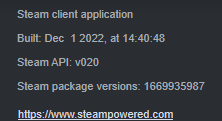
Can someone who has the mods in launcher issue, go to their steam to Help (at the top) - Info about steam or just "about steam" or smth, the bottom most thing
and tell me when the steam client was "created", is it newer than dec 1?
languid siren
lyric elm
Can someone who has the mods in launcher issue, go to their steam to Help (at th...
 lyric elm
._. so its not related to the steam version then.
I have the same version but don't have the problem
languid siren
idk could be. I know steam has had specific issues that only affected certain people (remember seeing a bugfix for users with over 1000 games) possible that us with problems meet some strange criteria.
lyric elm
I'm pretty sure valve changed something.
Maybe its some kind of spam protection if you have many mods, which is why I cannot get it yet
lyric elm
I think I might need some launcher logs.
They can be found in
%localappdata%/Arma 3 Launcher/Logs
Usually subscribing a mod and it showing up in launcher looks like:
2022-12-08 10:36:42,285 [ INFO] 15: SteamExtensionStorage: NMI: Updating items states
2022-12-08 10:36:42,304 [ INFO] 15: SteamExtensionStorage: NMI: Done
2022-12-08 10:36:42,304 [ INFO] 15: SteamExtensionStorage: NMI: Finally
2022-12-08 10:36:52,286 [ INFO] 39: SteamExtensionStorage: NMI: Refreshing details: ...
2022-12-08 10:36:53,498 [ INFO] 24: SteamExtensionStorage: NMI: Processing list
2022-12-08 10:36:53,498 [ INFO] 24: ExtensionListUpdater: Processing (Added): 2895905998 - CF_BAI
2022-12-08 10:36:53,499 [ INFO] 24: SteamUgcDownloadManager: Item was installed: 2895905998
2022-12-08 10:36:53,499 [ INFO] 24: TaskQueue: Task queue: Enqueued task Enqueuing extension CF_BAI, steam:2895905998 for synchronization
2022-12-08 10:36:53,499 [ INFO] 41: TaskQueue: Spinning task queue: Enqueuing extension CF_BAI, steam:2895905998 for synchronization
2022-12-08 10:36:53,499 [ INFO] 24: ExtensionListUpdater: Processing (Dependencies):
2022-12-08 10:36:53,499 [ INFO] 24: ExtensionListUpdater: - requesting info for unknown items
2022-12-08 10:36:53,500 [ INFO] 41: TaskQueue: Task queue: Operation Utils.Threading.Tasks.TaskQueueElement completed
2022-12-08 10:36:53,508 [ INFO] 36: SteamExtensionStorage: Junction created: O:\SteamLibrary\steamapps\common\Arma 3!Workshop@CF_BAI <- O:\SteamLibrary\steamapps\workshop\content\107410\2895905998
2022-12-08 10:36:53,508 [ INFO] 36: SteamExtensionStorage: Junction created: O:\SteamLibrary\steamapps\common\Arma 3!Workshop@CF_BAI <- O:\SteamLibrary\steamapps\workshop\content\107410\2895905998
2022-12-08 10:36:53,520 [ INFO] 36: SteamExtensionStorage: Extension is installed and ready. pid = steam:2895905998
2022-12-08 10:36:53,523 [ INFO] 35: SteamExtensionStorage: Hash recalculated after sync: pid:steam:2895905998, hash:39E6F011; dir: O:\SteamLibrary\steamapps\common\Arma 3!Workshop@CF_BAI
2022-12-08 10:36:53,539 [ INFO] 35: InnerSyncHelper: Mod synchronization done: pid = steam:2895905998; dir = O:\SteamLibrary\steamapps\workshop\content\107410\2895905998
2022-12-08 10:36:55,519 [ INFO] 24: ExtensionListUpdater: - updating existing items
2022-12-08 10:36:55,519 [ INFO] 24: ExtensionListUpdater: - done
2022-12-08 10:36:55,519 [ INFO] 24: SteamExtensionStorage: Added:1; Updated: 0; Deleted:0; Unchanged:21
2022-12-08 10:36:55,519 [ INFO] 24: Launcher.Steam.SteamDownloadManager: Enqueued for bakground download
2022-12-08 10:36:55,519 [ INFO] 24: Launcher.Steam.LauncherSteamFacade: StartDownloadByHandle
2022-12-08 10:36:55,520 [ INFO] 24: SteamExtensionStorage: NMI: Updating items states
2022-12-08 10:36:55,521 [ INFO] 1: ServersViewModel: Action: Add
2022-12-08 10:36:55,521 [ INFO] 23: Launcher.Extensions.ExtensionManager: End compose
2022-12-08 10:36:55,527 [ INFO] 24: SteamExtensionStorage: NMI: Done
2022-12-08 10:36:55,527 [ INFO] 24: SteamExtensionStorage: NMI: Finally
2022-12-08 10:36:55,582 [ INFO] 1: ExtensionManagementViewModel: RefreshExtensionsView
2022-12-08 10:36:56,563 [ INFO] 24: Launcher.Steam.SteamDownloadManager: Finishing download
Maybe the people with issues get some exceptions or errors in there?
left vector
I have over 300 mods with no issues like this 🤔
 dusty needle
Alright, I'm in the right folder
I see FileSync, Steam.Native, Steam.Wrap, Launcher, ServerBrowser.Service, and Launcher.1 text files all from today, reinstalling stuff
everything else is old exceptions from November or earlier so I don't think that applies
what do you need here @lyric elm ?
dusty needle
oh right, I need to verify myself or something before I can send files
lyric elm
just DM me? That should work?
lyric elm
Oki I got a thing, its #arma3_launcher message this again.
Interesting, now to staring at code and trying to figure out how or why that might happen
https://partner.steamgames.com/doc/api/ISteamUGC#CreateQueryUGCDetailsRequest
Returns a new UGCQueryHandle_t upon success, and k_UGCQueryHandleInvalid in the following situations:
- unNumPublishedFileIDs is less than 1.
- An internal error occurred.
Ah the famous internal error. Neat ⚰️
lyric elm
Found a bug in the launcher, if it fails (because steam has some internal error) it doesn't retry until you restart the launcher.
I don't think fixing that would help much though, if it would, then restarting the launcher would be a workaround
runic tiger
sooo it's all Steam's fault and Gaben has to fix it now?
lyric elm
Well we didn't touch anything, just suddenly the steam requests are failing, so I'm inclined to blame steam
But I'll make a fix so the launcher will keep retrying, maybe that helps
runic tiger

 worn bronze
immersion ruined
lyric elm
Someone wanna try?
Watching the launcher.log in %localappdata%/Arma 3 Launcher/Logs
this will probably log a exception every 10 seconds if steam keeps failing.
Or it will just work on a retry, if it works on second try or smth then I guess we have a "fix"
languid siren
lyric elm
Someone wanna try?
Watching the launcher.log in `%localappdata%/Arma 3 Launcher/...
log shows a constant repeat of https://pastebin.com/eUK0QnsG
Pastebin.com is the number one paste tool since 2002. Pastebin is a website where you can store text online for a set period of time.
lyric elm
jup, so steam keeps failing then :harold:
I don't think there's more i can do
wind oar
So what do we do now?
lyric elm
maybe steam debug mode would have more info, but I would need to have the issue myself..
Maybe I just need to subscribe 200 mods :harold:
Mh actually, I have an idea
wind oar
Oh?
lyric elm
I don't have to subscribe 200 mods, I just need to pretend I am subscribed to 200 mods, I can just copy that list of ID's and send that large request
If it is the high number of items, that should let me repro
left vector
I doubled checked and I've got ~250gb mods and on the 1st december version without the issue
300 mods in all
lyric elm
While this doesn't work.. well...
Don't subscribe to new mods :harold:
Or manually link them :harold:
uff
Reproduced! 
Man I just wanted to go home 
BAM

I'll fix it tomorrow. If you need a quick workaround, be subscribed to less than 1000 mods (Why do so many people have more than that :U HOW :U
yeah the other person who I got logs from had 1746
runic tiger
does it count subscribed missions and compositions?
lyric elm
I think all subscribed items yes
I think I will have a fix in about 20 hours and then I'll post a build in here, and then we'll have to see how we will handle it regarding game update hotfix whatever
🛏️ has priority sadly 😢
left vector
subscribed mods and compositions definitely driving those numbers up lol
being able to easily unsub from them without having to go to every workshop page would be nice but still
runic tiger
if you go to "your items" or whatever its called in English, go to subscribed and select Compositions/Scenarios category you can unsub from them one by one without going to separate workshop item pages
left vector
wait you can wha
lament yacht
What's the starting point there?
left vector
omg you can
left vector
Think so unfortunately
lament yacht
Scenarios are listed in library->right click on Arma 3->workshop, not sure about compositions though.
languid siren
Only thing you csnt do is unsub from deleted compositions.
lyric elm
Thats fixed on #perf_prof_branch 🫂
dusty needle
Ay, good to hear, looking forward to the fix. In defense of my mod count tho, I basically am at the point of being an addict to this game so
wind oar
lyric elm
I'll fix it tomorrow. If you need a quick workaround, be subscribed to less than...
Imagine now having half of the workshop subscribed to
rugged wolf
lyric elm
I think all subscribed items yes
Per game/Arma 3? Or total needs to be less than 1000?
lyric elm
Should be Arma 3
rigid gale
so now we only have to stick up with 1000 really god job steam really good job
wind oar
Dedmen's gonna try to fix it tmr
rigid gale
i hope so i reinstall my game and all of my loadouts are gone because of this thing its really pissed me off i had like over 200 loadouts
wind oar
rigid gale
i hope so i reinstall my game and all of my loadouts are gone because of this th...
You know you could have saved those, right?

This Video will show you how to keep your profile settings when creating a new Profile on Arma 3. This includes custom controls such as joysticks as well as Recent and Favourite Servers.
"This video was created using content of Bohemia Interactive a.s."
"Copyright © 2017 Bohemia Interactive a.s. All rights reserved."
"See www.bistudio.com for m...
rigid gale
wind oar
You know you could have saved those, right?
yes i know i already backed up my profile files to another folder before the install everything was there just not the loadouts
wind oar
Ah, you forgot to grab the loadout part then
You can just grab the whole character profile, and it'll take everything from loadouts to settings to missions
rigid gale
its ok i do it if something happend for now i have 22 loadouts now
rigid gale
@lyric elm really thank you for your hard work
wind oar
I second this
rugged wolf
rigid gale
yes i know i already backed up my profile files to another folder before the ins...
Launcher mod-profiles are in the launcher section of your windows user Appdata\local folder
lyric elm
don't use this, use the Steam RC branch instead
That should be working, can someone confirm?
Atleast my test works fine with this
lyric elm
lyric elm
lyric elm
**don't use this, use the Steam RC branch instead**
That should be working, can...
Good then we use this as temp workaround till we release some update
dusty needle
also confirm working, massive thanks for the fix
worn bronze
lyric elm
Good then we use this as temp workaround till we release some update
Update performance branch with new exe
dark heath
not working for me, getting this error when i try to run it
 lyric elm
worn bronze
Update performance branch with new exe
lyric elm
worn bronze
Update performance branch with new exe
Due to reasons, that's not an option
lyric elm
dark heath
not working for me, getting this error when i try to run it
needs to be in Arma folder, where the normal launcher exe normally is
 ruby sorrel
I can confirm it runs for me, too. Many thanks for the workaround 
worn bronze
lyric elm
Due to reasons, that's not an option

dark heath
lyric elm
needs to be in Arma folder, where the normal launcher exe normally is
thanks dude, it works
 shadow stirrup
lyric elm
**don't use this, use the Steam RC branch instead**
That should be working, can...
shadow stirrup
lyric elm
**don't use this, use the Steam RC branch instead**
That should be working, can...
Thanks! You just saved my day!
 little narwhal
@lyric elm i am jungleboy1234 from reddit. Please sticky my post so we can help fellow arma 3 players who dont access discord to see the hotfix (until full fix release). Thanks again it is working!
wind oar
lyric elm
**don't use this, use the Steam RC branch instead**
That should be working, can...
You're the best
little narwhal
just for anyone FYI - it seems the launcher doesnt contain some of the parameters you may have previously added to improve performance e.g. memory allocator settings, no world, etc, this will need to be recreated on that tab on the launcher. At least for me, idk about anyone else yet.
lyric elm
little narwhal
<@90532520101183488> i am jungleboy1234 from reddit. Please sticky my post so we...
am not reddit moderator, cannot sticky
 astral tartan
Started having an issue today where the A3 Launcher won't download or update Steam Workshop mods. I've tried restarting steam, restarting my PC, logging out of Steam and back in, clearing the Steam download cache, using the beta version of Steam and going back to the regular version, but none of it has done anything.
Anyone have any suggestions other than uninstalling everything, reinstalling Arma and redownloading 800+ gigabytes of mods?
left vector
pins
astral tartan
That seems to have fixed it. Thank you.
 trail goblet
@lyric elm Thank you, the Launcher Fix works...Legend
little narwhal
now i need someone to tell me where can i redownload mods i unsubbed. I was removing some mods that came up with a broken chain because they were outdated/not compatible, but i think it can be resubbed now 😄
rugged wolf
Use your brain to remember which mods (or scenarios) those were. Or check every mod you still have subscribed if they have any dependancies listed on their page.
 outer flame
little narwhal
now i need someone to tell me where can i redownload mods i unsubbed. I was remo...
outer flame
little narwhal
now i need someone to tell me where can i redownload mods i unsubbed. I was remo...
u could add them to a "collection" or just favorite them
outer flame
lyric elm
**don't use this, use the Steam RC branch instead**
That should be working, can...
Thank you, that launcher you sent is indeed definitely working amazingly.
My only question is if anything was shared about how soon could we expect a hotfix to implement it through Steam itself?
I'm asking this because Steam some times replaces the "fixed" launcher with the "old broken" one (because it is the current "official" version), which makes it impossible to perform verify integrity of the game files.
outer flame
little narwhal
now i need someone to tell me where can i redownload mods i unsubbed. I was remo...
also could add them to a "mod list" (html file)
 drowsy olive
languid siren
I can say that finally mods have been recognised as downloaded
drowsy olive
languid siren
I can say that finally mods have been recognised as downloaded
Wheres the rest of the context for this? having the same issue and i want to follow the steps
runic tiger
drowsy olive
Wheres the rest of the context for this? having the same issue and i want to fol...
Pinned, download the launcher and put the exe in your Arma 3 folder
 frail star
I need help my Bulldozer always opens when i want to launch Arma 3...
outer flame
frail star
I need help my Bulldozer always opens when i want to launch Arma 3...
check the parameters, you probably checked the "Bulldozer" parameter
frail star
Parameter in the Laucher or Object Builder ?
sterile moth
Launcher
frail star
Okay so apparently i didnt checked Bulldozer but for some reason there was no profile selected.
I guess that happen because i used O2 with Steam closed and wanted to view my Model.
But it works now
little narwhal
outer flame
also could add them to a "mod list" (html file)
i didnt save them to either and forgot what they were lol. Oh well, i guess if i dont play it its not needed. I mean i'm the one with like a billion workshop subs (hence i had experiecned this issue/bug) lol.
 golden ermine
little narwhal
just for anyone FYI - it seems the launcher doesnt contain some of the parameter...
golden ermine
little narwhal
just for anyone FYI - it seems the launcher doesnt contain some of the parameter...
So your parameters got reset after replacing the EXE? Anyone else?
runic tiger
it saves the parameters I'm using but it doesn't remember the window size I set before closing it, however it's not really an issue
golden ermine
But is that new to this custom EXE? We're deciding whether to update to main branch, and hints of new issues sway things away from doing so just before Xmas 
runic tiger
well the old launcher cached any changes to the window size and position, the new one with Steam fix goes back to a default very smol window every restart
lyric elm
The new one doesn't come from our build servers, it's a home build. I guess that could cause that
We could put a buildserver one in here and test that
golden ermine
We are currently preparing a public RC-Branch; should arrive today. Still not decided whether it will go to main branch this year, but it would be 100% compatible with main any way.
languid siren
lyric elm
The new one doesn't come from our build servers, it's a home build. I guess that...
I had a weird full screening issue, resolved it now (it kept full screening but with taskbar).
PIP was also maxed out.
But I think, that's it so far.
outer flame
golden ermine
We are currently preparing a public RC-Branch; should arrive today. Still not de...
God, I want to be notified when the RC branch goes public (if it comes with the fixed launcher)
golden ermine
A recent Steam Workshop change may cause subscribers of many #Arma3 mods to no longer see them in Launcher. RC-Branch offers a fix and is fully compatible with main branch (it only updates Launcher).
💡Details: https://t.co/YmiKPDa6pX
📥Steam access code: Arma3LauncherFix210RC
 Twitter
·
little narwhal
golden ermine
So your parameters got reset after replacing the EXE? Anyone else?
Twitter
·
little narwhal
golden ermine
So your parameters got reset after replacing the EXE? Anyone else?
yeah thats right. I had to reapply settings. Its not a biggie for me though because i was only using the tick box ones, but for someone who has lots obv a bit of an issue
sterile moth
golden ermine
Here you go: https://twitter.com/ArmaPlatform/status/1602329664034410498
rugged wolf
golden ermine
Here you go: https://twitter.com/ArmaPlatform/status/1602329664034410498
Community managers active in the Steam discussion channels might also need to post a warning about this issue. Or give a heads up about it some how.
 viral ice
hi how work the fix for the luncher pls ? i dunno what i need to do
wind oar
viral ice
hi how work the fix for the luncher pls ? i dunno what i need to do
Look in the pinned comments
viral ice
yeah idid but i don't know what i need to do. what is rc branch ? where do i put the code in steam ?
sorry im very noob
wind oar
I have no idea, I used the exe dedmen put in here
viral ice
you just execute the exe ?
wind oar
Put it in the Arma3 folder, so it replaces the current launcher. And boom.
Idk how to do it the proper way either
viral ice
yep it's not very explicit what we have to do with the RC thing...
the code is not working it seems so...
wind oar
That sucks
viral ice
@wind oar thx for your help
wind oar
Of course mate
golden ermine
viral ice
yep it's not very explicit what we have to do with the RC thing...
The steps are here: https://dev.arma3.com/rc-branch
I'd recommend this approach over using the custom EXE file.
Experience true combat gameplay in a massive military sandbox. Authentic, diverse, open - Arma 3 sends you to war.
viral ice
@golden ermine i did the step and put the coďe... but the code don't work
sterile moth
Make sure you didn't have spaces or some invisible characters
viral ice
i checked twice and copy/paste : Arma3LauncherFix210RC
steam don't recognize it
rugged wolf
I tried it too yesterday, didn't work either. But today it did. Strange.
golden ermine
Try fully quitting Steam client and restarting it, sometimes it needs to fetch the latest online configuration.
viral ice
steam --> livrary --> arma 3 properties --> Beta --> enter the code --> steam tell me the code is not working
;-;
 hollow bane
viral ice
i checked twice and copy/paste : Arma3LauncherFix210RC
steam don't recognize i...
hollow bane
viral ice
i checked twice and copy/paste : Arma3LauncherFix210RC
steam don't recognize i...
When I copy the code you pasted, there is a zero width character at the end.
sterile moth
Indeed there is
viral ice
Arma3launcherFix210RC
sterile moth
Think it is case sensitive
hollow bane
Yea, it is case-sensitive. The L in launcher should be capitalised.
Arma3LauncherFix210RC
viral ice
😞 not working either maybe i will wait a new update
sterile moth
golden ermine
Try fully quitting Steam client and restarting it, sometimes it needs to fetch t...
Tried this?
viral ice
yep relunch steam even the computer
 upbeat wave
I cant download some mods from workshop.. I click subscribe and they dont appear on the launcher
I tried the RC thing , put in the code and restarted the launcher but no luck
rugged wolf
Are they actual mods? Or are they really scenarios? If in that case, they don't show up in the launcher mods page. But when you choose a scenario for the particular terrain (in multiplayer) or the single player scenario tab.
wind oar
golden ermine
The steps are here: https://dev.arma3.com/rc-branch
I'd recommend this approach ...
@upbeat wave Look at this
wind oar
lyric elm
**don't use this, use the Steam RC branch instead**
That should be working, can...
If that doesn't work then use this
 drowsy junco
is it a known/common issue that the A3 launcher tends to forget changes to what parameters are set to favorite?
it seems at times it is unable to store changes in the setup
runic tiger
It's known to happen on the newest gaben-proof version, both this and forgetting the window size
drowsy junco
hm i am only running the perf branch - dont think this has the fixed launcher, does it?
hollow bane
Perf branch is using the stable as a base, but the new Launcher is only on RC right now. Or the special dedmen build of the launcher that is pinned in this channel.
 broken shard
btw is there a reason that the list export for presets is still a thing?
(as in exporting a preset as a list, not as an actual preset)
is there an actual use case for it?
 lyric wharf
I got a problem that I'm hoping maybe someone else dealt with before. The parameters settings in my A3 Launcher keep resetting every time I restart the game and I'm not sure if there is a fix for it since I'm on Ubuntu.
rugged wolf
I am not a linux user, so don't take my word for correct. Sounds like file/folder permissions issue causing it to not save them. But that is just speculation. The official linux version of Arma 3 is way out of date. Not sure if that is the cause. But thesedays you should use the Windows install of the game with that not-an-emulator-wrapper software that I can't remember the name of. Proton-something? Maybe it does something special with how your profile files and the launcher settings are stored.
lyric elm
I've heard about it, afaik it's a bug without fix
rigid gale
is the workshop items still have a limt?
rigid gale
yeah
sterile moth
I do believe it is not released as the public branch yet, but you can try it out from the pinned post
lyric wharf
rugged wolf
I am not a linux user, so don't take my word for correct. Sounds like file/folde...
Hard to say. It remembers my mod load order but not the parameters. Funnily enough, the DLC tab has a visual glitch where the word "DLC" is more like "DL C."
But did an op with a unit that uses BattleEye and had no issues besides that.
hollow urchin
to much channels idk where to put this but I downloaded some mods and
 sterile moth
!steamverify
vapid haloBOT
Steam file verification process:
Right Click on game -> Local Files -> Verify Integrity of game files
Arma 3
Steam Workshop Mod repair process:
Open Launcher -> Right Click on mod -> Repair
The first process will automatically verify Steam Workshop items as well.
sterile moth
hollow urchin
to much channels idk where to put this but I downloaded some mods and
Try this^
fresh bluff
and maybe check your dependencies
 dire citrus
Hi i don't know if this is the right spot for this but i can't figure this out?

 waxen wadi
you need either Western Sahara CDLC (https://store.steampowered.com/app/1681170/Arma_3_Creator_DLC_Western_Sahara/) or its compatibility data (https://steamcommunity.com/sharedfiles/filedetails/?id=2636962953&searchtext=western+sahara) to get rid of that error
dire citrus
i don't need the aegis stuff and i tried to get rid of it but it just doesn't work
So i just removed the aegis stuff but then
 lament yacht
Apparently you have another mod that depends on Aegis.
wind oar
@lyric elm Thank you for all of your work on the Launcher problem, means alot you resolved it so fast
runic tiger
if a preset has space character in its file name like preset .preset2, it is impossible to delete it through launcher and will always come back on launcher restart. Possible to be tweaked or not really?
it doesn't have that space character in its name in launcher in the preset list
 pulsar quiver
Hello my launcher cant install a particular mod. Any ideas?
Troubleshooting done:
Repaired mod, resub mod, manually checked the workshop content folder, and the mod is there, but strangely, it's not showing up in the !Workshop folder.
When I try to add local mod pointing to the directory of the steam workshop content folder, it shows up fine.
i.e. files are downloaded but won't install. The said downloaded files can be added as local mod.
drowsy junco
is there a chance to see the launcher forgetting the "favorite" settings being fixed?
any information/files/logs needed to narrow down the source of the issue?
hollow bane
Did you use the EXE Dedmen provided, or the one from the RC/now Stable? Logs are useful as always, I don't think there is a ticket for this issue yet, right?
drowsy junco
I am on perf branch and did not grab the exe itself provided. From what i understand, the latest is available since yesterday for any branch.
Plus it was not something to be fixed or new, no?
I made a private ticket with the logs. Couldnt find any other ticket, but as there is no search filter for category exposed, you have to rely on good naming.
1.5.150.150 is the version i have atm
hollow bane
Yesterday we updated the launcher on Profiling, yes.
lyric elm
runic tiger
if a preset has space ` ` character in its file name like `preset .preset2`, it ...
should be fixable, ticket plox
runic tiger
lyric elm
should be fixable, ticket plox
sterile moth
Possibly fixable by re-installing VC2013 and/or DirectX
sterile moth
Is it just me or, does the Launcher not let me to leave my mouse from Launcher (mouse cannot leave the area of Launcher) unless I do Alt+Tab after the latest update? Dev-Branch rn
 hasty elm
sterile moth
Is it just me or, does the Launcher not let me to leave my mouse from Launcher (...
hasty elm
sterile moth
Is it just me or, does the Launcher not let me to leave my mouse from Launcher (...
Works for me
hasty elm
sterile moth
Is it just me or, does the Launcher not let me to leave my mouse from Launcher (...
I had something like this a long time ago, try to look at the "Enable edge swipe" option
Some forums even advise to lower security, I do not understand how this is even related lol

 carmine willow
can i suggest a way to export -mod command lines from the set of mods of choice?
runic tiger
there are 3rd party programs for that already afaik
waxen wadi
For the mod sets i use just copying the launch parameters from arma's own rpt works. Can't guarantee it would work with big mod counts, though
runic tiger
https://a3config.byjokese.com/stringGen.html this works pretty good, I had a custom app that was looking for clientside/non-server-side mods and was creating a bunch of files for HC, server and client, but it gone 
carmine willow
is there something that detects what should go as -serverMod instead of -Mod?
what alternative launchers are out there?
sterile moth
hasty elm
I had something like this a long time ago, try to look at the "Enable edge swipe...
Well, just realized that I don't even have the issue anymore even though I didn't do anything actually than restarting Windows, guess was a Windows' hiccup
carmine willow
runic tiger
there are 3rd party programs for that already afaik
im talking about integrating a export function right in the launcher
drowsy junco
if you do "repair" (mod), it stops the current active download/update of another mod and switches over to the selected
is that intended?
rugged wolf
waxen wadi
For the mod sets i use just copying the launch parameters from arma's own rpt wo...
rpt truncates the commandline it shows if it is too long. Usually due to many mods.
waxen wadi
Hence the second part of my message 🤷♂️
carmine willow
you can always just grab it within process explorer
 visual zinc
Is there a way to export the "commandline" the launcher uses to start the game with all current settings?
I'd like an easy way to create a shortcut directly in the launcher with certain mods + to load into an editor mission when i work on a mission over a longer period of time. its all there just not the button or any way to create this shortcut 😢
runic tiger
if its for mission making why not use html presets?
visual zinc
can a html do that?
 runic tiger
oh, I forgot people use this since selecting mod set from presets menu and choosing the mission in editor is around 30 seconds of difference
one way would be to copy the command line from RPT file but it might not render it fully if you use too many mods
another - copy the process name from task manager, unfortunately I forgot how to dump info from it
rugged wolf
visual zinc
can a html do that?
That screenshot has got nothing to do with the HTML preset. Look in the Mods tab of the launcher. Whatever mods you enabled for that mission you are creating, you can export the list to a html file that others can drag over to the launcher to subscribe/download/load those mods as well.
screenshot of what I mean.
 visual zinc
I feel like you missunderstood my question:
I would like to create a shortcut with all parameters, INCLUDING mods, but also, for example, editor mission file.
Is there a way, to export all PARAMETERS from the launcher, it is currently set at?
carmine willow
runic tiger
another - copy the process name from task manager, unfortunately I forgot how to...
process explorer or process hacker is the way, you cant in windows task manager unless you can capture the text field
carmine willow
visual zinc
I feel like you missunderstood my question:
I would like to create a shortcut w...
you can't, launch the game and copy it with a task manager that allows so
pulsar quiver
pulsar quiver
Hello my launcher cant install a particular mod. Any ideas?
Are there really no solution for this issue here?
I even posted a ticket and got nothing yet
https://feedback.bistudio.com/T169699
The mods are downloaded fine in my PC
Currently it's these four:
FnF
IFX window break
Immerse
Antistasi Plus 2.0


I initially suspected it was related to hdd space because my HDD where I store my user documents went kaput recently and I had to create a new user document folder in other HDD
pulsar quiver
pulsar quiver
But they're downloaded fine and I can even make them as local mods via launcher.
drowsy junco
visual zinc
I feel like you missunderstood my question:
I would like to create a shortcut w...
get the current command line from the rpt and put into a batch file
@pulsar quiver you need to attach the launcher logs to your ticket
pulsar quiver
drowsy junco
<@274826248981577729> you need to attach the launcher logs to your ticket
Oh damn I forgot about that. Figures.
Is it Launcher.log or Launcher.1.log?
Now that I've checked the log. Could it be because of this?

D: was my broken HDD
drowsy junco
the whole folder from C:\Users\XXX\AppData\Local\Arma 3 Launcher\Logs
 mental topaz
How to change launcher background?
runic tiger
mental topaz
How to change launcher background?
 mental topaz
thx
carmine willow
why launching -server does not cause the close the game to manage mods message?
hollow urchin
ahhh
carmine willow
are features that 3rd party launchers already have going to be added?
lyric elm
unlikely
carmine willow
how about important stuff such as exporting command line and executable selection?
no?
i had a bug where switching accounts caused the launcher to completely redownload already subscribed items
maybe it was steam not the launcher
i ended up deleting everything and validating
lyric elm
unlikely
carmine willow
because its too niche or its on maintenance patches only?
lyric elm
Because I have better things to do
If I'd have time to waste, sure, but I don't
carmine willow
you're the lead programmer?
lyric elm
I am the programmer that would do things on the launcher
lyric elm
yeah
carmine willow
good to know, thanks
carmine willow
carmine willow
why launching -server does not cause the close the game to manage mods message?
?
drowsy junco
carmine willow
how about important stuff such as exporting command line and executable selectio...
no ideal but you can get the info from the rpt log and put it into a batch file
rugged wolf
carmine willow
drowsy junco
no ideal but you can get the info from the rpt log and put it into a batch file
already talked about that earlier, i know
carmine willow
rugged wolf
* if you don't use so many mods the line gets clipped at the end of the max char...
Again a better alternative is pulling it from a task manager
rugged wolf
The better alternative is learning how to write commandlines and the parameters in the proper way. 😉 And write them yourself in a batch-file, or powershell script I guess thesedays
carmine willow
yeah but its a lot of mods
thats why its easier to grab it from the launcher preset
i know how to write commandline parameters, its the mod list that i have a issue with
 fleet vessel
Hi guys, just wondering if anyone can help me with a technical issue i'm having. Whenever I launch my arma 3 Launcher my Launcher is saying plesae exit game to manage mods... I don't have the game open and I have looked in task manager and it defo isn't open so I can't edit my mods as the launcher thinks the game is running when it isn't. anyone know a fix. many thanks
please @ or DM me many thanks!!
drowsy junco
@fleet vessel upload your logs here a zip (remove sensitive information if any first)
see: #arma3_launcher message
 somber loom
Why is my launcher re-downloading all of my mods from scratch if they're already downloaded and in the workshop folder?
rugged wolf
Steam/the launcher gets confused sometimes about the mods it has. Get's it's paperwork about it in a turmoil and figures it needs to repair/redownload everything. Haven't experienced it myself yet. Many other have.
carmine willow
you're not spending disk space anyway
fleet vessel
@drowsy junco Can I PM you them?
or screen share so you can see and point me in right direction?
fleet vessel
Please SOMEONE help me.. i'm at my wits end with this issue
drowsy junco
drop in here or make ticket at https://feedback.bistudio.com/maniphest/task/edit/form/3/
drowsy junco
@carmine willow https://feedback.bistudio.com/w/ft_a3_howto/
carmine willow
any advice specifically for launcher issues?
uhhhh
the launcher crashes im experiencing do not generate a exception log
carmine willow
and post it to ft?
i think i found something in steam.native.log
i found the issue i think
2023-02-08 12:27:59,048 [ERROR]   2: SteamLayer: Class MonetizedServers destroyed with lock count 1
2023-02-08 12:27:59,061 [ERROR]   2: SteamLayer: ..\El\ParamFile\paramFile.cpp(903) : Assertion failed 'false'
2023-02-08 12:27:59,061 [ERROR]   2: SteamLayer: Class SteamManagerConfig destroyed with lock count 2
2023-02-08 12:27:59,061 [ERROR] 2: SteamLayer: ..\El\ParamFile\paramFile.cpp(903) : Assertion failed 'false'```don't think thats it. That might happen on shutdown, doesn't really matter
carmine willow
dang it
carmine willow
lyric elm
don't think thats it. That might happen on shutdown, doesn't really matter
its effectively the reason, event log says
Faulting module path: G:\SteamLibrary\steamapps\common\Arma 3\Launcher\SteamLayer.dll
2023-02-08 12:27:53,030 [ INFO]   1: LauncherViewModel: Initialized News
2023-02-08 12:27:53,860 [ INFO]   5: Launcher.Extensions.ExtensionManager: Store Steam preloaded
2023-02-08 12:27:57,378 [ INFO]   7: Launcher.Extensions.ExtensionManager: Store Local preloaded
2023-02-08 12:27:57,379 [ INFO]   1: LauncherViewModel: Initializing preset managers
2023-02-08 12:27:58,225 [ INFO]   1: ExtensionManagementViewModel: RefreshExtensionsView
2023-02-08 12:27:58,248 [ INFO]   1: LauncherViewModel: Preset initialized
2023-02-08 12:27:58,303 [ INFO]  20: SteamUgcDownloadManager: Steam UGC Download manager initialization 0
2023-02-08 12:27:58,303 [ INFO]  20: SteamExtensionStorage: Wait for content list changed...
2023-02-08 12:27:58,409 [ INFO]  17: Launcher.Dlc.DlcManager: End compose
2023-02-08 12:27:58,523 [ INFO]  21: Launcher.Extensions.ExtensionManager: End compose
2023-02-08 12:27:58,523 [ INFO]   1: LauncherViewModel: - Initializing connection to Steam client...
2023-02-08 12:27:58,596 [ INFO]   1: ExtensionManagementViewModel: RefreshExtensionsView
2023-02-08 12:27:59,048 [ERROR]   2: SteamLayer: Class MonetizedServers destroyed with lock count 1
2023-02-08 12:27:59,061 [ERROR]   2: SteamLayer: ..\El\ParamFile\paramFile.cpp(903) : Assertion failed 'false'
2023-02-08 12:27:59,061 [ERROR]   2: SteamLayer: Class SteamManagerConfig destroyed with lock count 2
2023-02-08 12:27:59,061 [ERROR] 2: SteamLayer: ..\El\ParamFile\paramFile.cpp(903) : Assertion failed 'false'```normal startup looks like this
dedmen, do you want this in FT?
uhhhhhh
actually my bad
that log doesnt correspond to the same launch
the posted log session crashed because of Faulting module path: G:\SteamLibrary\steamapps\common\Arma 3\Launcher\MSVCR120.dll
but yeah
i had a crash where steamlayer was the issue
the logs are just abruptly cut off
but it did happen during startup
im not sure how to interpret Assertion failed 'false'
carmine willow
lyric elm
don't think thats it. That might happen on shutdown, doesn't really matter
it happens on startup
why does the preset show up as unsaved on startup?
how do you troubleshoot crashes that provide no logs?
carmine willow
now it magically stopped crashing
waxen wadi
if you use launcher 🤷♂️
 languid siren
You didnt read what i linked clearly
waxen wadi
from the linked doc

 cunning palm
-limitFPS=60 or "-limitFPS=60" dont work
waxen wadi
server FPS limit
🤔
drowsy junco
isnt this server only anyway?
 opaque wyvern
Anyone know why certain servers don't show up on the launcher? For example Antistasi community server 1 and 2 was showing up yesterday but server 2 doesn't show up today. Another server, similar problem. If i go into Steam -> View -> Servers sometimes i can see it in all of the lists be it favorites, internet, sometimes i can only see it in history. Today i can see server 2 in favorites and it can query player info when i look at the info. But if i press join server, it doesn't show me the mod list to join. It doesn't show up in the favorites tab in the launcher either. A bit more technical side, when i press join server in working servers it first queries game server for example 2302, then Steam query port 2303, then it shows the mod list and server info in launcher. With the servers that don't work, it queries the game server but it gets stuck at Steam query port and it keeps retrying for a bit then gives up. I tried with a VPN, different Steam regions selected from the client, deleted launcher related profile folders none of it worked and i need help.
To add i can join the servers no problem while in-game, they also show up in the lists.
Just not the launcher
opaque wyvern
I tried to use mobile hotspot internet and i can see the servers when i'm connected like that.
opaque wyvern
I don't know if it's something to do with ISP or modem but i guess i'm out of luck if is ISP related
But it's really weird that it's the same ip with different ports that are getting blocked
Another thing to note, when i connect with mobile hotspot, refresh and see the problematic servers, even if i switch back to my normal internet i still can refresh and see those servers until i restart the launcher
I can click join and the mod information loads
 hardy remnant
i was launching Arma 3 and there was this error i just igored and a note thing with the crash
 jovial bobcat
Anyone knows what causes the error Unable_to_init_DXGI when I open arma with mods?(works fine having no mods enabled)
runic tiger
jovial bobcat
Anyone knows what causes the error Unable_to_init_DXGI when I open arma with mod...
a broken mod probably
small spade
My launcher doesn't work.
 lyric elm
wow I've never seen that 🤔
Press WIN+R type %localappdata% and run
in there find "Arma 3 Launcher" folder and delete it (It will delete your mod presets if you had any stored)
Also find the "Bohemia_Interactive" folder. In there is a folder that starts with arma3launcher.exe
delete that too. Try if launcher works now
small spade
lyric elm
Also find the "Bohemia_Interactive" folder. In there is a folder that starts wit...
Sadly it didn't work.
 lyric elm
I don't know then :/
small spade
Welp I guess I wont play with my friends 😔
drowsy junco
@small spade you can launch the game directly via the arma3_x64.exe or use a custom launcher from the community
small spade
drowsy junco
<@1019304541939830784> you can launch the game directly via the arma3_x64.exe or...
Yeah I did that. It was a pain to enable the mods though but meh
rugged wolf
small spade
Sadly it didn't work.
I think Dedmen implied you need to verify the install through Steam. Not only to delete the file and folder.
small spade
Oh
small spade
rugged wolf
I think Dedmen implied you need to verify the install through Steam. Not only to...
Wait how can I verify it?
rugged wolf
small spade
Wait how can I verify it?
!steamverify
vapid haloBOT
Steam file verification process:
Right Click on game -> Local Files -> Verify Integrity of game files
Arma 3
Steam Workshop Mod repair process:
Open Launcher -> Right Click on mod -> Repair
The first process will automatically verify Steam Workshop items as well.
small spade
rugged wolf
!steamverify
Sadly it also did not work
 bitter grove
are there startup parameters to put you directly into the virtual arsenal?
small spade
Im not sure but I think the issue is my ram because its like 7 years old. Now when I play the game it crashed and today when I was trying to reopen it, it couldn't respond. Ill just upgrade my pc someday
runic tiger
I am unable to remove local mods from Launcher, once I click on "remove from list" they get aut-included, any other way to get rid of them?

I checked \AppData\Local\Arma 3 Launcher but I don't see any file that would keep the data of mods detected by launcher
looks like it happens only with mods that have a number in front of their name (at least all that start with "3G" in my case)
lament yacht
Curious. There's "watched folder" functionality in the launcher but I don't think that would be name-dependent.
runic tiger
I have no watched folders set
lament yacht
gonna guess that it's an old "feature".
 night crystal
It's someone else's problem, not mine, but he says he's tried reinstalling the game, verifying integrity of game files, computer formatting, turning off the firewall, port forwarding, and server searching, but he can't find the one server he wants to connect in Arma 3 Launcher. Does anyone know how to solve this?
lament yacht
Can anyone else connect to that server?
night crystal
I can see that server, and can connect to it
sterile moth
How about ingame browser?
night crystal
He says he can see it in-game browser, but that server uses a lot of addons, so he needs connect as Arma 3 Launcher to connect to it.
sterile moth
Yeah, this is at least not the "worst" situation
But strange indeed, I think never heard of such issue
Is he sure he has NO filters?
night crystal
Server name he wanna connect is "[Addon] 울산서버 비번공오이 디코:E8evAPQAYd", and I can also find it quickly because the ping is low by local standards. This screenshot is a situation that he showed.
 sterile moth
Very strange... one and only server is missing?
night crystal
I also searched a lot of articles related to that problem to help him, but there was no proper solution.
sterile moth
Is this on Perf branch?


 grand fiber








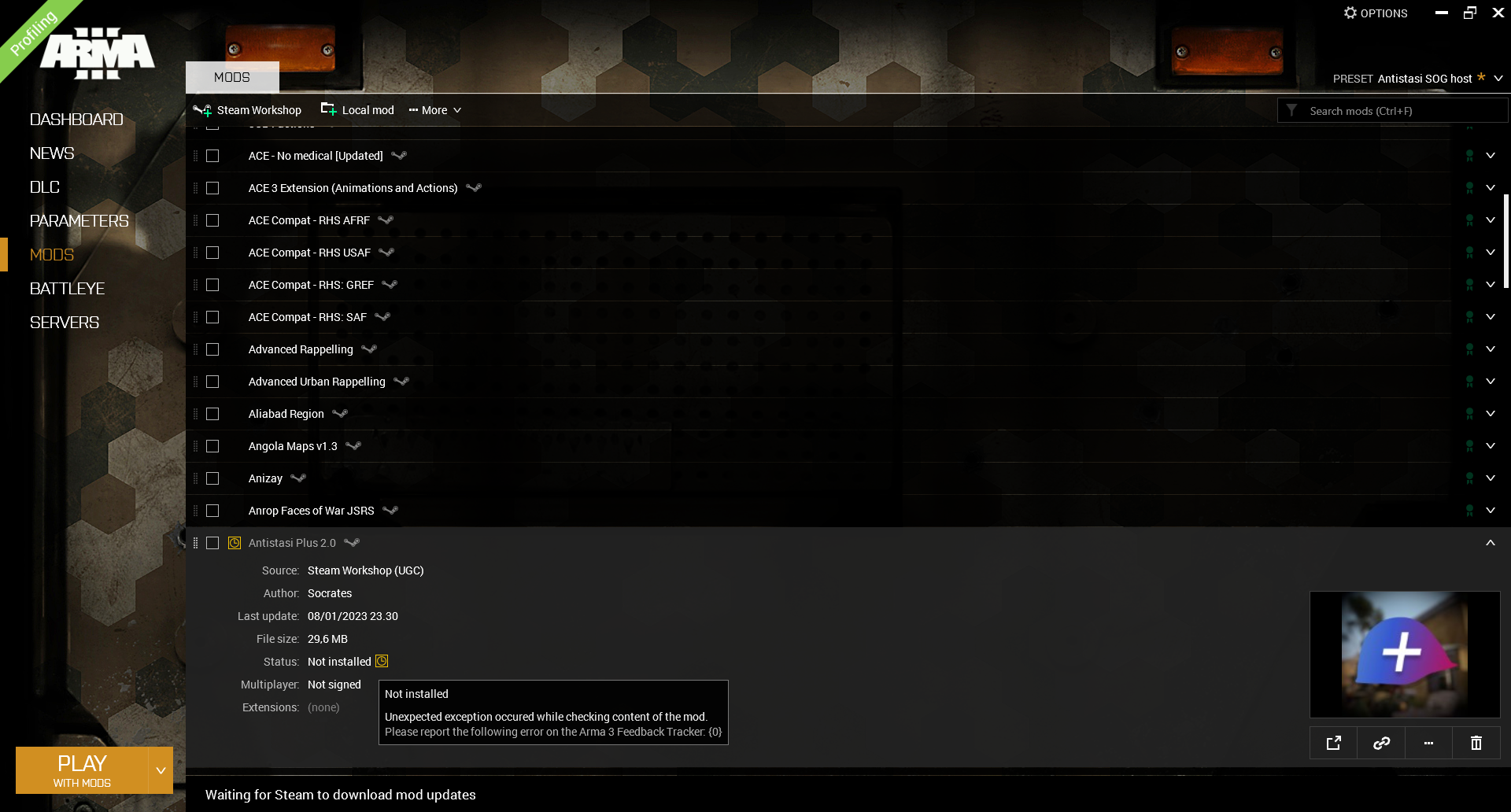
 dusk vessel