#arma3_troubleshooting
1 messages · Page 159 of 1
 pine kite
Anything like LAMBS, VCOM, other AI mods?
 pine kite
I guess no AI mods. But I don't know enough about that Alive. Seems to be a mission editor module. Who knows what it does to squad creation and their waypoints. Somebody else may explain this.
 umbral narwhal
ALiVE is kinda responsible for its AIs. If it wants them out of the vehicle then it'll get them out of the vehicle.
 fringe salmon
should i just disable it?
umbral narwhal
If you're not using it, absolutely. It's not a mod that you should load unless you're using it.
fringe salmon
alr
fringe salmon
umbral narwhal
If you're not using it, absolutely. It's not a mod that you should load unless y...
didnt make a difference
just made the AI even dumber
there has to be a command for them to stay in there, no?
umbral narwhal
If they're moved in with moveInCargo then they stay there as long as they're not in combat mode, IIRC
If you want them to stay in there even with shooting going on then setting the group to careless should work.
umbral narwhal
Err, other way around usually
Combat is the one where drivers are less inclined to follow roads.
umbral narwhal
sighs
pine kite
Safe should make them follow roads. But I don't know how that is shown in Alive or whatever.
umbral narwhal
You never said how they're getting in there in the first place.
There are a lot of ways of setting group behaviour in Arma but I don't know if you're spawning this lot with the editor, with Zeus, from someone else's mission or what.
fringe salmon
umbral narwhal
You never said how they're getting in there in the first place.
they spawn in the car
pine kite
How does the car get there?
umbral narwhal
I should give up at this point, but Arma doesn't spawn anything on its own. Cars, soldiers, whatever. Something has to tell it to.
 burnt imp
fringe salmon
the car spawns with soldiers
burnt imp
fringe salmon
the car spawns with soldiers
To spawn cars WITHOUT soldiers, uncheck the box at the very bottom-right of the editor that says to spawn soldiers in vehicles.
burnt imp
fringe salmon
whatever i think i fixed it anyway
How?
 elder sand
How do I unstuck my controls when I use the pelter/demining UGVs and do the mistake of getting in the turret cam?
 golden nova
go to the previous camera through scroll menu?
 fresh heath
How do I zoom in on a drone
pine kite
Numpad plus and minus
 wary sequoia
In the Arma CFG it has my CPU detected as a Ryzen 7 3700x; changed PCs and now have an intel CPU; how can I fix it?
 sleek karma
how do i do that
 umbral narwhal
You are loading a mod that depends on another mod that you're not loading.
pine kite
sleek karma
Not sure what this means
It needs some mod called 'flying legends', 'sab' could mean a faction abreviation, or abreviation of the person that made it.
burnt imp
elder sand
How do I unstuck my controls when I use the pelter/demining UGVs and do the mist...
Mouse wheel scroll > UAV Terminal.
This will open up the terminal and let yoh choose the flying controls
 cyan abyss
i'm having some issues with installing mods on a linux server
some seem to work just fine while others don't work at all
elder sand
burnt imp
Mouse wheel scroll > UAV Terminal.
This will open up the terminal and let yoh ch...
UGV, Contact DLC tracked demining drone and such
umbral narwhal
@cyan abyss Lower-cased everything?
cyan abyss
yeah i double checked everything
ACE especially is causing alot of issues it seems
could that be because it's linux based?
umbral narwhal
I don't know. I thought people normally managed to run ACE.
cyan abyss
yikes now i think ive entirely broke it
pine kite
Start from a known good, default setup. Playtest if it starts a Bohemia Interactive multiplayer mission. Play with difficulty settings if you want. When succes, try a custom/workshop mission without mods. (of which you know someone or many have played it succesfully) If it works add one or two mods. Test if they properly show up. Then add more mods while you keep the rest of them. As some may depend on others and you need them eventually. Revert a step whenever it failed and figure out what went wrong.
cyan abyss
yeah i reinstalled a vanilla server, i'll go from there
 left jolt
Every time i try to load the game this happens can anyone help?
 umbral narwhal
Repair Arma in steam.
 exotic sable
left jolt
Every time i try to load the game this happens can anyone help?
exotic sable
left jolt
Every time i try to load the game this happens can anyone help?
Go to your Steam Library, right-click on Arma 3 > properties > local files > verify integrity of game files. The probability of some files arriving wrong after installing Arma 3 seems to be about 50% or greater!
cyan abyss
pine kite
Start from a known good, default setup. Playtest if it starts a Bohemia Interact...
Doing it over again and it seems to work perfectly now, mustve missed something small somewhere that fucked it all up
 nocturne ginkgo
I tried to play single player and then I'm on the loading screen and then get kicked out of the game and then the error message comes up:

Or this:

Or this
 pine kite
Verify your game through Steam. Looks like some files are missing or corrupted. Follow the next Bot response.
!steamverify
 rustic eagleBOT
Steam file verification process:
Right Click on game -> Local Files -> Verify Integrity of game files
Mod repair process:
Open Launcher -> Right Click on mod -> Repair

 plain raptor
it's only if you have mods
nocturne ginkgo
i dont have mods
plain raptor
yes so you don't have to do that
just reinstall arma 3 if you tried verifying the game files and it doesn't work
pine kite
It would actually be:
Open Launcher -> Click Mods tab -> Right Click on mod -> Repair
nocturne ginkgo
I dont have mods
exotic sable
Go to your Steam Library, right-click on Arma 3 > properties > local files > verify integrity of game files.
nocturne ginkgo
I already checked the game, everything was fine
pine kite
nocturne ginkgo
I dont have mods
I know, but if you did. And eventually you will very likely.
nocturne ginkgo
exotic sable
Go to your Steam Library, right-click on Arma 3 > properties > local files > ver...
I have already done that.
nocturne ginkgo
pine kite
I know, but if you did. And eventually you will very likely.
what do you mean?
pine kite
I mean that you may not be using mods at this time. But eventually you might feel the desire to use mods in your game. And then you know where to find that.
plain raptor
Yes, but that's not the answer to his question
nocturne ginkgo
pine kite
I mean that you may not be using mods at this time. But eventually you might fee...
Uh you mean that alright
plain raptor
reinstall your arma 3
pine kite
It's just a correction of that bot message.
plain raptor
of course
nocturne ginkgo
But I still have the problem
plain raptor
they should update the bot
plain raptor
nocturne ginkgo
But I still have the problem
did you try reinstalling arma 3
if not, do it.
pine kite
Those bot messages are listed in a Google Doc linked somewhere in a pinned message. Polpox (Not sure who) has suggested I add to it but again I am completely lost where that is.
nocturne ginkgo
alright
nocturne ginkgo
plain raptor
did you try reinstalling arma 3
i try it
plain raptor
pine kite
Those bot messages are listed in a Google Doc linked somewhere in a pinned messa...
f
pine kite
Found it: #discord_server message
burnt imp
nocturne ginkgo
Or this:
Woah. This error definitely looks like:
- You're trying to play on a server (not singleplayer self-hosted)
- You have mods installed
Solution: Remove the files (mods) listed in this error.
pine kite
But aren't those base game files of Arma 3?
umbral narwhal
Either that or auto-downloaded DLC, yes.
Initial answers were correct. It's massive data corruption in the base game. If steam verify doesn't help then reinstall.
 pseudo widget
@gilded oriole Try updating your GPU or changing graphic settings
 gilded oriole
In fact, I tried this, but you can't see anything I can't even read what's written on the screen
pseudo widget
What kind of GPU you got?
sleek karma
when i load into the game it still makes my cursor weird so i cant click on anything
 clear forum

 steady inlet

 pine kite
I'm guessing that is a action of Battleye, blocking loading of some Nvidia driver DLL.
 void yew
yeah but I dont know what to do to get it to work
pine kite
Well, try and disable Battleye to rule it out. You won't be able to join servers that require it. But you can atleast try and play the game.
 pine kite
yeah, I would not delete that. But first check if the same happens with disabled Battleye. There is a tab in the launcher for that.
void yew
I want to join servers though.
pine kite
Then you will have to find non-Battleye protected servers for the time being.
At the least it is for testing if this is actually the cause.
void yew
yeah, the game launched
pine kite
Then you got to report this error message, and maybe this detail of the file to Battleye so they can find out why it is blocked and update their program.
void yew
how so
pine kite
You want it fixed, right?
pine kite
They have a website. And while there is #arma_battleye , I don't think the developers of Battleye go there. The Battleye developers need to know that their program is blocking a probably legit GPU driver.
I mean you can try and update your drivers first too. Maybe Battleye will accept it then.
But that date seems recent enough.
void yew
hmhm
umbral narwhal
Assuming that it is a legit GPU driver :P
 crimson iris
me and my friend are trying to start up servers for us 2 to play on, but when we start them, they don't show up. we both have port forwarded our routers. we have it on internet, we have the same mods and everything. I can't figure out the problem. if you have a solution or could help us please add me so i can add you to a call. thanks
 balmy merlin
void yew
<@418755689662382080> i restarted my PC and it worked?
balmy merlin
void yew
<@418755689662382080> i restarted my PC and it worked?
Then theres no issue until it happens again
 shell nacelle
https://pastebin.com/RBTag3RY No Mods
https://pastebin.com/8ReV0wmr Mods
I encounter the same issue on each where It hangs on the loading screen before main menu.
Pastebin
Pastebin.com is the number one paste tool since 2002. Pastebin is a website where you can store text online for a set period of time.
Pastebin
Pastebin.com is the number one paste tool since 2002. Pastebin is a website where you can store text online for a set period of time.
 wind ember
A few people in our group can no longer join our server on the profile they've been using for months/years. However, upon creating a new profile it will let them join. This hasn't occurred to normal issues like mod changes or server adjustments, since we rarely change them. Even old missions that we have all played before cause the issue.
Anyone else had a similar issue to this?
golden nova
wind ember
A few people in our group can no longer join our server on the profile they've b...
well I had, but only with the default profile that is created when you open Arma 3 for the first time. Once I made my custom one it's all good.
Some ppl from my unit reported that issue too, this may be something to do with Steam caching files and not doing it well.
wind ember
Okay i'll get them to take a look, although some have had issues with new profiles now so could be a deeper issue.
Thanks!
fringe salmon

why are they stopping
the road is clear
they can literally drive in

How do I fix this?
 crimson reef
Hey guys could really use some help here been trying to start an arma 3 server running the antistasi cam Lao nam mode I can get the server up and running for myself but my friends can’t seem to either find it or if they do they get stuck in a loading screen. Can someone help me figure out what I’m doing wrong
umbral narwhal
Localhost or dedicated?
umbral narwhal
!localhost
rustic eagleBOT
To host a server or a game session locally, you need to make sure first that your WAN address / external IP uses the IPv4 protocol!
Check your router’s status page in the settings to confirm. (If in doubt, ask your ISP, Websites like “whatismyip.com” give you a false positive!)
Local servers and games can not be hosted on an IPv6 network, or IPv4 via DSlite tunnel!
https://www.avg.com/en/signal/ipv4-vs-ipv6
Once you have confirmed that your connection uses the IPv4 protocol, you need to manually open / forward the ports 2302-2306 UDP (https://community.bistudio.com/wiki/Arma_3:_Dedicated_Server#Port_Forwarding)
See your router’s manual on how to do that, or ask google: “<your router model> + port forwarding”
umbral narwhal
Figuring out what's wrong with anyone else's port forwarding setup is a lot of work.
 scarlet cedar
I can't not join my server once i ask it to start with mods but without i work just fine how do i fix this problem i have Copy my Mods From the Client to the server and tell it to boot with the mods but it just say it's missing a (Signature mismatch) when it's start
cyan abyss
on a server running ACE, how would i automatically make everyone spawn with earplugs?
pine kite
scarlet cedar
I can't not join my server once i ask it to start with mods but without i work j...
You probably have verification enabled on the server. But neglected to put the key-files of the mods in the keys folsder of the server. Or the keys that are already there for that mod do not match with the mods you copied.
scarlet cedar
pine kite
You probably have verification enabled on the server. But neglected to put the k...
Thanks it works now 🙂
 main bison
My arma always has a problem everytime I open it up and my keyboard just never works on it anymore
pine kite
"has a problem every time I open it up"
Make sure you verify your install through Steam. But otherwise you need to better define what you experience as problems. It's pretty vague.
"my keyboard just never works" Could it be you are using a key-combination that makes Windows choose to switch to a different input language/keyboard layout? Windows settings/Devices/Typing/Advance Keyboard settings/Input language hot keys/Change Key Sequence button
 brittle condor
I am unable to join my friends server, let alone any other servers. I have tried restarting arma, downloading arma, it can get past my firewall, and I have checked the integrity of the game files with steam. I just keep getting "connecting failed" every time I try to join my friends server. It was working fine on Friday. I don't understand why it has suddenly stopped working.
 verbal sentinel
@brittle condor Do you have a VPN?
shell nacelle
shell nacelle
https://pastebin.com/RBTag3RY No Mods
https://pastebin.com/8ReV0wmr Mods
I encou...
Is anyone able to assist on my issue cause I've tried a good bit of stuff
verbal sentinel
@shell nacelle I've been reading it over for a while now. The only thing that stands out to me is this error: 2:48:10 Canceling the list loading process, the load of the file failed: C:\Users\Blaine\AppData\Local\Arma 3\MonetizedServersCache\list.json
brittle condor
verbal sentinel
<@204284299090853888> Do you have a VPN?
I have 2
verbal sentinel
Try turning them off and then connecting. My vpn tends to mess with me when I load into servers
brittle condor
There both off
shell nacelle
verbal sentinel
<@181045481269362688> I've been reading it over for a while now. The only thing ...
Do you think deleting /list.json and reverifying may help?
verbal sentinel
I'm not 100% sure as I haven't seen that error in a long time. I would try deleting it and reverifying just to be sure. If the server is already hanging, deleting it wont make things any worse.
shell nacelle
Of course thanks in advance in if works!
 shrewd tapir
I am Blue's friend. What would prevent a clean install from connecting to servers (even official "vanilla" servers like KOTH) via instantly displaying "Connecting Failed"? He does not have VPNs enabled, his ping is within threshold, and he has all required DLCs/addons enabled.
brittle condor
shrewd tapir
I am Blue's friend. What would prevent a clean install from connecting to serve...
My original message: #arma3_troubleshooting message
verbal sentinel
@shrewd tapir Does the server display any message while he is joining?
in the bottom left area.
shrewd tapir
Nothing on the console/in-game
Watching his screen, the message pops up the moment he clicks on connect to server. If he connects via launcher, same thing. The game boots and immediately fails to connect before anything registers on the server console
verbal sentinel
Are you both running the same version of the game? IE DEV or STABLE branch?
shrewd tapir
He is on stable
Server should be on stable.
How I've set up my server via TADST

No one else from our community is having this issue.
verbal sentinel
He isn't having any port issues correct?
shrewd tapir
None as far as I know.
verbal sentinel
Do you have an IPv4? Are you behind an unusually strict firewall?
shrewd tapir
He said that nothing on his end changed it was only 2-3 hours apart from able to connect to not being able to connect to anything
Again, it isn't server-side, it's client-side since he can't even connect to official servers.
verbal sentinel
That's what's leading me to believe it has to be something with the ISP or router.
Does the server have battleeye enabled?
shrewd tapir
It doesn't.
verbal sentinel
Tried with both the official launcher and the A3 launcher?
shrewd tapir
Official launcher?
verbal sentinel
The launcher you get when you launch the game via steam
Verses the modded launcher.
shrewd tapir
What is the other one that doesn't looked like this?

 shrewd tapir
Oh wow, haven't seen A3 Launcher in forever.
Nope, the standard one.
Think using A3 Launcher might help?
I just installed it to try to help Blue with figuring it out and my anti-virus blocked adware from A3 Launcher 😢
 restive zephyr
how do you let players talk to you in zeus?
shrewd tapir
In text or voice?
restive zephyr
both, im zuesing right now and need to ask the players questions
shrewd tapir
Global chat should work.
restive zephyr
theyre not able to communicate in text or voice
us02w is the server im in rn and its not working to my knowledge
 weak girder
how do i paste text into the activation box on a trigger
 steady hawk
Ctrl+V
weak girder
yeah i tried multiple times it wont work
steady hawk
Then your clipboard have no text
weak girder
i copied the script to my clipboard and it still wont paste into the on activation box on the trigger
steady hawk
Make sure you copied properly
weak girder
i highlighted the script pressed copy
steady hawk
Try to paste outside Arma
weak girder
yeah it pastes but when i go into arma the bar freezes for 1 second then doesnt paste
steady hawk
Try without Mods
weak girder
ok
its still not working
this is the script im trying to use
onEachFrame {
{
_x setPosASL ((getPosASLVisual plane1) vectorAdd [(_forEachIndex+1) * 30,(_forEachIndex+1) * 30,0]) ;
_x setVectorDirAndUp [vectorDir plane1,vectorUp plane1] ;
_x setVelocity velocity plane1 ;
} forEach [plane2,plane3,plane4] ;
} ;
its an old wingman script
steady hawk
Where actually trying to paste into?
 wind olive
it has never been like this
i swear
same with shooting sounds if they are behind me they are quiet af @steady hawk
 steady hawk
wind olive
same with shooting sounds if they are behind me they are quiet af <@122565573384...
steady hawk
wind olive
same with shooting sounds if they are behind me they are quiet af <@122565573384...
Did you tried to verify the game?
wind olive
should i do that ?
steady hawk
Yes
wind olive
k doing it rn
wind olive
checked it , i try it again now
its still there @steady hawk
can it be because of the os?
 uncut trellis
Do you have some sort of 3d sound system or headset?
 hoary jetty
Any mods loaded?
Might be an issue or something with the way that it handles directional sound, like what horriblegoat is suggesting, maybe your headphones for example
steady hawk
I don't think a Mod can do such feature. Unless it does have some extensions, which is most unlikely since it is recorded on a KoTH server
USB Headset might be the issue, too
uncut trellis
surround sound systems dont work with arma so anything like that could be breaking it
 barren eagle
Why I have had trouble launching Arma. Havent played in a while. This is the case: Whenever I try to start arma it goos to a black screen and then straight quits. The game runs on the background I can see that because of the tab on the bottom on the screen. If I try to click on the game it shows the home screen of arma like a second and then goos to my desktop
Can someone please help me, if you know what the problem is please pin me
uncut trellis
first try verify your game files on steam, then make sure your drivers are up to date
then make sure you start the game without any mods
if all that still gets you crash, check if the rpt log file has any information whats happening
!rpt
rustic eagleBOT
Arma RPT
Arma generates a .rpt log file each time it's run, which contains a lot of information like the loaded mods, or any errors that appear, this log file can be very useful for troubleshooting problems.
To get to your RPT files press Windows+R and enter %localappdata%/Arma 3
Additionally see the wiki page for more info: https://community.bistudio.com/wiki/Crash_Files
To share an rpt log here, please use a website like https://sqfbin.com/ to upload the full log, that way the people helping you can take a look at it and try to figure out the problem you're having together with you.
Note: RPT logs can hold personal information relevant to your system, the game or others.
 round elm
can anyone tell me why my game keeps crashing?
0xC0000005 - ACCESS_VIOLATION
please @ me
uncut trellis
round elm
can anyone tell me why my game keeps crashing?
check access violation wiki page for common reasons for the 000005
round elm
they are telling me a bunch of stuff that im no expert in. i updated my drivers and trying again
it just keep fucking crashing. i have no idea why!!
round elm
memory allocator? like what am i reading?
barren eagle
uncut trellis
if all that still gets you crash, check if the rpt log file has any information ...
Tried to start with "forced windows mode" and it worked normally but when I tried to get it into fullscreen it went black again and brought me to my desktop
uncut trellis
try updating your gpu drivers
uncut trellis
round elm
memory allocator? like what am i reading?
you are reading about the possible problems related to the error you are getting
there is no simple answer that would solve it
steady hawk
Also as HG and wiki said STATUS_ACCESS_VIOLATION is really a common error message there's no one and only way to solve. If you really want to solve it you need to tell us what was the Mods, missions, situations... or whatever
round elm
im trying to join the NAK server
and i only have enhanced movements
when i halo jump and when im about to hit the ground it crashes
im going a steam validate now but idk if that will help
il also restart my PC but there should be nothing that would be messing with my PC
uncut trellis
make sure you join servers through launcher server browser so you actually have correct mods to join
round elm
i do
uncut trellis
and try other servers. could be some problem with the server too
uncut trellis
check the rpt log
and if you are using usb headset it could be a sound related issue
check pinned messages for that
uncut trellis
is it on usb dongle
round elm
yeah
uncut trellis
then its usb device
round elm
oh okay
uncut trellis
so yes
uncut trellis
you can test if the usb sound is the problem by unplugging the device
round elm
im trying with no headphones
uncut trellis
unplug the dongle too
round elm
i did midlaunch il try again if it doent work
uncut trellis
arma does not like swapping audio devices while its running
round elm
seems to workign so far!
 steady hawk
STATUS_ACCESS_VIOLATION is really a common error code, it tells you literally nothing. You need to tell us more info, Mods, Missions, Servers(Single/Multi) and, most importantly, do you use USB headset?
 brisk talon
Nop, jack ones
i play on a multiplayer sv, i don't know if I can say the name and it's attached to steam's workshop mods
 oblique hazel
Alright, i have tried setting up a server with TADST but i end up stuck in an infinite loading screen when trying to connect, any suggestions?
pine kite
More info. Post the RPT log file. What, if any, mods did you try to use. Does it also happen when you don't try to load a mod, but just basic vanilla Arma 3 multiplayer mission?
We can't rely on mind-reading.
 quaint jewel
fringe salmon
kEEPS CRASHING ON joining server...
quaint jewel
fringe salmon
kEEPS CRASHING ON joining server...
all crashes are inside memory allocator.
Try setting allocator to "system" in Arma launcher parameters
 atomic vortex
i nned some help when i try to press play on a scenario it does nothing
pine kite
It probably does something. If it doesn't maybe your mouse button is bad.
brisk talon
brisk talon
i play on a multiplayer sv, i don't know if I can say the name and it's attached...
Any idea?
uncut trellis
brisk talon
Any idea?
once you give more details about the mods you use then perhaps. otherwise look up what was answered here #arma3_troubleshooting message
 supple crescent
Hey, does anyone know how to resolve an issue entailing this error? "Cannot open object a3_dgr_scopes\reticles\dagger_4x_thermal.p3d"? I've been trying to make a mission for this unit I'm a part of, and this error keeps showing up.
I'm sure it's a mod issue due to this error coming from the mod files.
 tardy trench
Guys the ATOC things - the white pixels where they should be transparent - with the Radeon drivers has popped up again for me any ideas what to do or which driver version fixed / fixes this?
pine kite
The solution then was to disable ATOC in the graphics settings.
uncut trellis
supple crescent
Hey, does anyone know how to resolve an issue entailing this error? "Cannot open...
disable mod that is broken pretty much
nothing you can really do if mod is broken except notify its maker and hope it gets fixed
barren eagle
Why I have had trouble launching Arma. Havent played in a while. This is the case: Whenever I try to start arma it goos to a black screen and then straight quits. The game runs on the background I can see that because of the tab on the bottom on the screen. If I try to click on the game it shows the home screen of arma like a second and then goos to my desktop
The problem doesnt show if I "force window mode"
exotic sable
Verified integrity of game files yet?
uncut trellis
try deleting your old profile. perhpas some broken settings have been saved into it
make a backup just in case
tardy trench
pine kite
The solution then was to disable ATOC in the graphics settings.
Right that's what I am doing atm. I know it had been fixed a while ago, so I was hoping to roll back to that driver version .
pine kite
I'm an Nvidia guy now, so can't help with that. I would guess that all/both GPU manufacturers keep old versions available somewhere.
fringe salmon
quaint jewel
all crashes are inside memory allocator.
Try setting allocator to "system" in Ar...
Ah ok. Will do. Thanks!
fringe salmon
Trying to mess around with some screenshots, any idea how to remove that orange backdrop?
It's there when I change the focus, but it doesn't want to focus..
 steady hawk
It's an Artwork Supporter feature. Click other slider than that
 open obsidian
when i try to join my dedicated server on the mission(new mission) it will come up with an error saying cannot open file of the missions name ive used mutiple methods of getting the PBO file and im kinda stuck at what to do
steady hawk
What EXACTLY is the error message?
 steady hawk
And what 2729879341. is?
open obsidian

i was told to take the id in the url and find the workshop file that corisponds to that
steady hawk
Don't redistribute file that you don't own.
open obsidian
ok sorry
steady hawk
I don't know how a Dedicated server works but a mission's pbo name should be in this format: missionName.islandName.pbo
steady hawk
...from Workshop?
open obsidian
the arma3 workshop
steady hawk
I don't know what your question is
open obsidian
do you know what the file location of scenarios downloaded from the workshop
steady hawk
By default
C:\Users\*your username*\Documents\Arma 3\Saved\steam or
C:\Users\*your username*\Documents\Arma 3 - Other Profiles\*your Arma 3 username*\Saved\steam IIRC
open obsidian
also do you no a way to have admin in a non dedicated server
steady hawk
Define server.cfg location in command line and just #login
pine kite
Subscribed mission also end up in my 'Steamlibrary\userdata\yourSteamID\ugc\referenced\someLongNumberFolder' . Only when you started and saved in it does it end up in Documents\Arma 3 (-Other Profiles\username )\Saved\steam
In a local hosted server (meaning from within the game) you ARE the admin. No need to login with password. You just use the debug screen, or stop the mission through the regular user interface.
fringe salmon
steady hawk
It's an Artwork Supporter feature. Click other slider than that
How do you mean?
steady hawk
Slider. Bottom right
 jaunty narwhal
How do I improve my viewing ddistance on alaptop
pine kite
Generally speaking you let the game autodetect your graphics settings. Then play with rendering distance to get to see far enough as you need tactically and what is beneficial to your FPS. Viewing distance may be limited by the server if you were trying to join that.
 marble marsh
Hello,
I'm having some issues with my dedicated server, I'm trying a new Antistasi on Takistan, I put the pbo in the missions folder on my server and followed the steps on Gunter Serverloh's channel, but for some reason it's still not working. I uploaded CUP Terrains Core and Maps for Takistan but they won't load, is there a procedure I'm missing?
umbral narwhal
Well, you would certainly need CUP terrains to load...
marble marsh
I know, but I don't know why they won't ahaha
umbral narwhal
wrong command line usually.
pine kite
Always start with a basic installation, make sure that works. Then consider adding mods.
 stone oyster
hello just got the game off steam and it wil not launch
i hit play in the arma launcher and nothing happens
steady hawk
Any errors?
stone oyster
no it says its installing addons and all that but then never launches the game
steady hawk
You mean the Arma 3 logo and progress bar screen right?
 maiden ingot
Warlords US#01w


 wise ether
Hey, how can I start a server for me to play with a friend?
uncut trellis
!localhost
rustic eagleBOT
To host a server or a game session locally, you need to make sure first that your WAN address / external IP uses the IPv4 protocol!
Check your router’s status page in the settings to confirm. (If in doubt, ask your ISP, Websites like “whatismyip.com” give you a false positive!)
Local servers and games can not be hosted on an IPv6 network, or IPv4 via DSlite tunnel!
https://www.avg.com/en/signal/ipv4-vs-ipv6
Once you have confirmed that your connection uses the IPv4 protocol, you need to manually open / forward the ports 2302-2306 UDP (https://community.bistudio.com/wiki/Arma_3:_Dedicated_Server#Port_Forwarding)
See your router’s manual on how to do that, or ask google: “<your router model> + port forwarding”
uncut trellis
wise ether
Hey, how can I start a server for me to play with a friend?
you may need to do this, but starting a local hosted game is from launchers server tab and host button at the right bottom
 humble heart
just wanted to ask if this is a problem with my arma or a mod and how do i fix it
 steady hawk
!steamverify
rustic eagleBOT
Steam file verification process:
Right Click on game -> Local Files -> Verify Integrity of game files
Mod repair process:
Open Launcher -> Right Click on mod -> Repair
steady hawk
Verify the game via this
humble heart
aight i'll try
 static creek
Hi can someone help me with a problem
static creek
does anyone know why, whenever i try to join a server it says "Battleye Restart Required"?
steady hawk
Next time please don't post your question all around the place. The answer is: You need to enable BattlEye through the Launcher
 halcyon adder
Has anyone encountered this issue in multiplayer? There's constant log spam about the following, repeated for a number of different CUP items and their information being empty. This makes sense that this CUP information is not being found, as CUP is not in the modpack.
However, what causes these CUP items attempting to be accessed? These errors are on both client and server rpts. Could this error spam happen if one player loads CUP and uses CUP gear, or is something else causing it?
13:04:19 Warning Message: No entry '.picture'.
etc etc```

This error appears fairly consistently in the logs, but at certain points it seems to freeze the server for ~30 seconds, including non-arma applications like Teamspeak and Remote Desktop.^ I've seen similar momentary errors when people access ace arsenal loadouts from previous modpacks with different mods, but never to this degree
umbral narwhal
The .picture is the little 2d picture of the weapon used in the arsenal and some other UI stuff. I'm not sure why the server would ever care about it.
Not enforcing common item mods across server/client seems like a terrible idea in general though.
 late herald
hi i want to host on internet, for my friend to join and it says that he cant join
halcyon adder
halcyon adder
Has anyone encountered this issue in multiplayer? There's constant log spam abou...
fix
burnt imp
late herald
hi i want to host on internet, for my friend to join and it says that he cant jo...
Have your friend load only the same mods as you AND that the server uses a terrain that both of you have access to
!localhost
rustic eagleBOT
To host a server or a game session locally, you need to make sure first that your WAN address / external IP uses the IPv4 protocol!
Check your router’s status page in the settings to confirm. (If in doubt, ask your ISP, Websites like “whatismyip.com” give you a false positive!)
Local servers and games can not be hosted on an IPv6 network, or IPv4 via DSlite tunnel!
https://www.avg.com/en/signal/ipv4-vs-ipv6
Once you have confirmed that your connection uses the IPv4 protocol, you need to manually open / forward the ports 2302-2306 UDP (https://community.bistudio.com/wiki/Arma_3:_Dedicated_Server#Port_Forwarding)
See your router’s manual on how to do that, or ask google: “<your router model> + port forwarding”
 shadow raptor
If anyone can help me with this, my modpack got DCMA'd and now I get this when I try to reupload it
 uncut trellis
shadow raptor
If anyone can help me with this, my modpack got DCMA'd and now I get this when I...
uncut trellis
shadow raptor
If anyone can help me with this, my modpack got DCMA'd and now I get this when I...
dont use crap that gets dmcad
support the original makers
not thieves
oh wait its you whos doing the reuploading
just dont
you dont have permission to reupload mods
use workshop colletions
shadow raptor
uncut trellis
dont use crap that gets dmcad
I have private mods that dont have USP, and some guy from USP DCMA'd it
uncut trellis
they aint private if they are on workshop
shadow raptor
uncut trellis
they aint private if they are on workshop
Gatekeep, and Hyun are all private mods
uncut trellis
if they are publicly shared they are not private
 twin crest
anyon know what this is?
 uncut trellis
twin crest
anyon know what this is?
uncut trellis
twin crest
anyon know what this is?
one of the mods you are using is missing another mod it requires
twin crest
uncut trellis
one of the mods you are using is missing another mod it requires
the mods that are loaded dont even contain that file thats on the pic
umbral narwhal
Are you loading any mods at all?
 manic dirge
can anyone help with arma 3 anti stasi. Petros died and i got killed just after the relocate HQ screen and now i cant relocate the HQ?
uncut trellis
twin crest
the mods that are loaded dont even contain that file thats on the pic
you are loading it. otherwise it would not pop up
if you have installed mod manually you might have put it in the arma 3\addons folder which is reserved for the games own pbos only
twin crest
yes
twin crest
ok
umbral narwhal
@manic dirge You mean you don't have the relocate HQ screen anymore?
manic dirge
umbral narwhal
<@!642442581304672287> You mean you don't have the relocate HQ screen anymore?
none at all
literally staring and petros body
umbral narwhal
If it's a dedicated server, disconnect and reconnect.
If it's community version, save and reload.
manic dirge
its a hamachi hosting
umbral narwhal
If it's localhost and original Antistasi then you may be in some trouble :P
manic dirge
umbral narwhal
If it's localhost and original Antistasi then you may be in some trouble :P
dont say that
can i do a reload of the last persistent save
umbral narwhal
Sure. If you don't have autosave then you'll lose progress but that's it.
If you do have autosave then it'll probably just work.
manic dirge
well i have the hourly save going but that doesnt do anything
would the local saves be in the Steamapps
umbral narwhal
It saves to the Arma profile.
[username].vars.arma3profile, if you want to make a backup.
You can also try just running [] spawn A3A_fnc_placementSelection as local. Should pop up the placement map.
manic dirge
thank you
manic dirge
umbral narwhal
It saves to the Arma profile.
what i ended up doing is aborting into the parameters menu and then initiated the last server save it had on record which luckily didnt overwrite it. thank god the autosave didnt overwrite it
umbral narwhal
It wouldn't necessarily have been that bad if it did save.
There is a limit to how much state it saves :P
Hence save/reload is often a good way to fix stuff.
fringe salmon
For some reason whenever I try to save scenarios my game crashes
 hushed pond
Anyone know why Arma reports ~131 TiB of available virtual memory in logs?
uncut trellis
swap disk
hushed pond
I assure you the server has nowhere close to that amount of storage, in any form
well server or client, shows in both rpt
umbral narwhal
It'll just be using an OS function. Not like it's actually counting your storage itself.
Because you can allocate memory that isn't backed by anything (uncommitted), OSes may set arbitrarily large limits.
fringe salmon
i need help
im trying to import .p3d
into blender
and it says this

i got armatoolbox and everything
its just when i try import the .p3d file it dont work
steady hawk
You cannot import binarized p3d
fringe salmon
can u elaborate
steady hawk
There're two types of p3d. Binarized and unbinarized. Most of existed p3ds are binarized, which cannot be edited
fringe salmon
how do i check if its Binarized or unbinarized
steady hawk
You cannot import binarized p3d
In the other words if it can't be imported it is binarized
fringe salmon
but like
how do i check if i can import it or not
and is their i way i can make it unbinarized
steady hawk
You cannot make a binarized p3d unbinarized
steady hawk
More like they just make Arma 3 models in Blender
 fossil rain
Hey guys, a friend of mine has problems in ArmA3 with weapon scopes and screens in vehicles or binoculars. Scopes dont show markings, Screens dont show range or any other information and binoculars dont have any overlay same as scopes not showing any information just zooming in.
pine kite
Support-by-proxy is not really effective. Have your friend report here with screenshots and a list of mods he uses. Relaying that stuff is slow and prone to misunderstanding.
fossil rain

This is normally a 2d scope not showing any markings
and this is a binocular not having any overlay.

Okay, it seems we have just figured it out by comparing Game Settings, all his ACE User Interface Settings where turned off.
 compact fox
Has anyone problems with exit to desktop on RX 6600 after few minutes of play (a specially when many elements start to work on screen)? I try it without addons on clean game and with many parameters due to memory and CPU usage but still the same effect - other games work without problems only ARMA3 crash
 native drum
so ive been having an issue with a respawn point in a mission file i been working on , i thought i did every thing right with the respective multiplayer modules and such but it just keeps respawning me at the point of death. any ideas
umbral narwhal
What model is your SSD?
 bronze river
is the target hot?
pine kite
Color of image. Is it white hot or black hot? It's cyrillic so impossible for me to tell that.
If the vehicle is not hot, it will not lock on. Still hard to tell what is hot and what is cold in this.
Ok, then top image is black hot, bottom image is white hot. But in top image wheels are hotter than vehicle body, so it probably has had it's engine turned of for a while. So it is cooler.
You will have to scare it so it turns on engine and moves away.
Or use some other way to guide it.
uncut trellis
fringe salmon
so how do people import
They don't. Arma 3 models or models from mods can't be edited. Models are made from scratch
bronze river
it will take a short while for it to get hot for vanilla vehicles, not sure if your target isn't vanilla vehicle.
try using the radar lock by pressing R
fringe salmon
Anyone having this issue?
https://www.reddit.com/r/armadev/comments/384pmo/blur_on_respawn/
Every time I spawn in via the editor or even in the main menu (background scene); there is a blurry effect. It only goes away when I open another menu.
 fringe salmon
Hi guys, this has happened to me a few times while staring a new game as soon as I spawn everything in my screen looks blurry, from the scenery to my gun to my guy in third person view, it looks like a water paint. It also happens sometimes after playing for a couple of minutes. In order to get rid of it I have to exit the game and get back in, ...
also found a post here saying the same thing
I am still having this issue its quite strange
 primal aspen
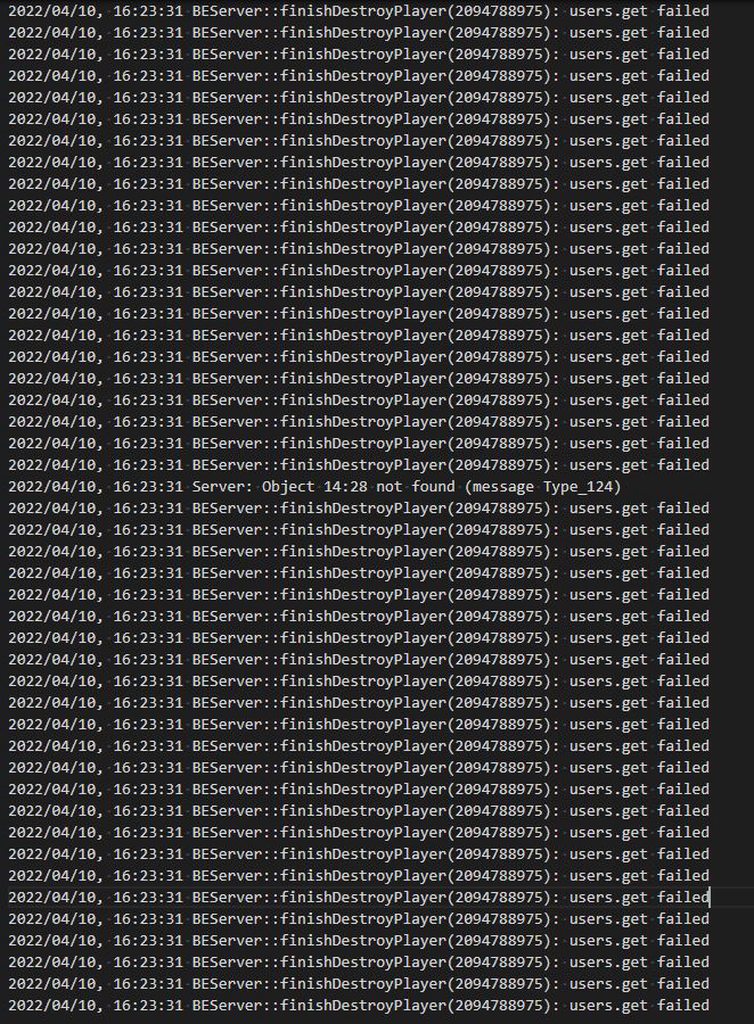
Anyone know what causes these messages in an RPT or how to prevent them? Whenever we get these, it causes severe lag spikes that last for several minutes for some reason. https://imgur.com/a/keshNvn
I assume it has something to do with players timing out 2022/04/10, 16:22:33 Slow network for player name='EArnold', ID=2094788975, steamID=76561198054028582. DisconnectTimeout too high (17/90000 ms) but they don't seem to disconnect? It just sits there spamming it for several minutes and everyone feels the lag/desync - not just the guy timing out.
 static creek
Does anyone know why my Arma keeps crashing when i join servers. somtimes i can play for a while without crashing, but other times it crashes before i load in
fringe salmon
static creek
Does anyone know why my Arma keeps crashing when i join servers. somtimes i can ...
This is usually caused by mod incompatibilities, bad mission files on the server, or underperforming hardware causing the game to hang for too long on loading. At least, that's what causes my crashes (Status Access Violation) and it can happen at any time.
static creek
Do you know how to fix it?
Im playing on a laptop, but the graphics card and cpu are pretty good
Intel I7 and RTX 2070
fringe salmon
You kinda can't.
static creek
so its just a hardware problem
fringe salmon
Also, with Arma 3, newer hardware doesn't necessarily mean better
static creek
would more storage help?
fringe salmon
I've not crashed once of my i5-4690k. I've crashed about 17 times since I upgraded to an i5-6600k
static creek
huh
fringe salmon
static creek
would more storage help?
Probably not. You can always bring the issue to the attention of the server owner but if it is an issue with the mission file they might not even fix it
Arma seems to prefer older hardware (around the 4th generation for processors) for some ungodly reason. It's a pretty badly optimised game engine.
static creek
k thanks
fringe salmon
I wish there was more I could do
You can try installing arma 3 to an SSD to hopefully bring down loading times, which might help a little, but it didn't help much for me other than make booting the game back up again less tedious after a crash
static creek
I do just have one more question though
I just realized that last night and this morning, i was playing just fine, it was only until about around this time that i cant even join any server or singleplayer game without crashing.
 steady hawk
What do you expect? Is that picture relevant to your question?
 echo ginkgo
well I was hoping it would show me my statistics but nothing shows, the sc is just to show what I saw
steady hawk
That's the thing we call statistics. What kind of things you wish?
burnt imp
echo ginkgo
well I was hoping it would show me my statistics but nothing shows, the sc is ju...
On your screenshot, there is a column that is labeled Statistics. It shows a list of what you killed. If you just want numbers and pictures, then click the arrow on the bottom right of the panel, just above CONTINUE
 jovial wraith
Is there a way to change the measurements to of speed and height to knots and feet as I hate meters as that’s not what we use over here in the uk really takes the immersion away when your constantly having to do calculations in altitude
 patent panther
does anyone know how to see why you got vac banned ?
Bans applied by the Game Developer
Arma 3 - View Help Page
Game Bans are not VAC Bans and they are issued by the individual game. Steam Support is unable to remove your in-game bans or to provide you with further information about your ban. All the information you can receive about the ban has been provided to you in-game.

 humble wagon
Battleye bans are done by battleye not by developers, but for developers. Best is to check the #arma_battleye channel pinned messages and contact Battleye on their website with the details they need to have for check out your ticket. Quick sidenote: if you have run cheats or other stuff that is BE ban worthy you will not get a answer as they really don't reply to people who got banned for the right reasons.
golden nova
issue: AI does not want to follow me but will listen to the "move there" order. When separated in more groups and told to regroup, they will group up on the second person in team or anybody that was not selected.
Sometimes happens randomly, sometimes happens when using Team Switch, basically they no longer listen to the squad leader but will follow the 2ic. I remember this being a thing back in Arma 2 and OA, so I guess this is an unsolvable bug?
 rustic eagleBOT
Steam file verification process:
Right Click on game -> Local Files -> Verify Integrity of game files
Mod repair process:
Open Launcher -> Right Click on mod -> Repair
steady hawk
Verify the game via this. You can just capture your screen using Prt Sc or Shift + Windows + S to capture your PC screen
 shell yarrow
Ok
 void fjord
hey
my arma 3 is not saving missions
If I exit and save in a mission and want to play it later the save just does not exist
any fixes?
 vocal sequoia
So, i'm trying to figure out why the AI is sometimes absolutely atrocious with using launchers - switching constantly between rifle and launcher when targeting a vehicle, etc.
Current theory is that without the player keeping constant eyes on the target, the AI loses it immediately
 cinder tulip
Heyo, i've look for some time now but cant find any info on this other than it being patched in 2016. For some reason today my game drops from an avarage of 90-120 to 15-25 after around 45-60 minutes into playing. Multiple missions, mods, no mods, always the same.
 late tapir
i have that happen too actually. except mine drops to like 7-15
sometimes it fixes itself, sometimes i have to restart the mission
 vapid moon
hey guys, whenever I use steam link and try to make missions in editor, if I move my camera, it goes crazy. almost like the sensitivity is big, but it works fine if I do it locally so idk. any fix?
umbral narwhal
@void fjord Make sure you shut down Arma the slow way, not alt-F4
 crude walrus
Why wont my scenario show up when im hosting a server?
Ive subscribed to it and it still wont show up
umbral narwhal
Did Steam finish installing it before you started Arma?
crude walrus
umbral narwhal
Did Steam finish installing it before you started Arma?
Restarted arma multiple times
burnt imp
vapid moon
hey guys, whenever I use steam link and try to make missions in editor, if I mov...
Looks like you isolated the problem to be a connection related problem. I would go check a forum focused on the Steam Link to see someone else who hadls had the problem
vapid moon
I've seen two threads about the same problem, no solution tho
burnt imp
crude walrus
Why wont my scenario show up when im hosting a server?
Double check the terrain the scenario is on. Then choose that terrain when hosting, then pick the scenario.
crude walrus
burnt imp
Double check the terrain the scenario is on. Then choose that terrain when hosti...
Bro ive selected the correct map
burnt imp
crude walrus
Bro ive selected the correct map
Check it the problem is only for one or some scenarios. If you can load up other scenarios from the workshop, then the problem is the non-working scenarios themselves.
fringe salmon
alright so i have a problem, after around 20 minutes of playing on a given server my network adapter just fails. this doesn't happen with any other game i play and it doesn't happen when im browsing the web. the troubleshooter wont even launch when this happens and ive tried to keep control panel open so i can trouble shoot it but when the troubleshooter launches it gets stuck on detecting problems until the arma 3 server kicks me out and my adapter magically works again all advice is valued as i actually dont know what to do from here
umbral narwhal
Change network driver or get another network adapter, I guess.
fringe salmon
umbral narwhal
Change network driver or get another network adapter, I guess.
is there not any other way ?
umbral narwhal
Arma is just bog-standard UDP spam. If it's breaking your network driver/firmware then that's bugged.
fringe salmon
alright thanks for the info
umbral narwhal
If you're not sure that it's actually the adapter breaking then try disabling any 3rd-party firewalls.
fringe salmon
when i say my adapter breaks i basically mean that it loses all connections and dosent even show the local wifi hell when i try to open the wifi connection tab it looks like i dont even have a wifi adapter connected
umbral narwhal
yeah ok, that's fairly strong evidence :P

 umbral narwhal
If it's still doing that after a verify then you'll probably need to reinstall.
When you do, make sure it's completely finished before you try running Arma.
shell yarrow
Ok
shell yarrow
umbral narwhal
If it's still doing that after a verify then you'll probably need to reinstall.
It worked thank you so much man
 gusty sentinel
i need someone who knows arma server. i have it mostly set up im just having some addon issues
umbral narwhal
Provide your command line, non-working server RPT and a description of the problem and someone will probably figure it out.
gusty sentinel
umbral narwhal
Provide your command line, non-working server RPT and a description of the probl...
no clue what that mens
means
golden nova
!rpt
rustic eagleBOT
Arma RPT
Arma generates a .rpt log file each time it's run, which contains a lot of information like the loaded mods, or any errors that appear, this log file can be very useful for troubleshooting problems.
To get to your RPT files press Windows+R and enter %localappdata%/Arma 3
Additionally see the wiki page for more info: https://community.bistudio.com/wiki/Crash_Files
To share an rpt log here, please use a website like https://sqfbin.com/ to upload the full log, that way the people helping you can take a look at it and try to figure out the problem you're having together with you.
Note: RPT logs can hold personal information relevant to your system, the game or others.
golden nova
you should look for same files on your server, it's content should tell you what is wrong with your addons.
and command line is the bat file or anything where you declare addons you load
pine kite
And if you can't find the file, make sure the server is run without the -noLogs parameter. THen recreate the problem so it gets logged in the RPT file.
gusty sentinel
golden nova
you should look for same files on your server, it's content should tell you what...
so i know the addon that are fucked i just have no idea on how to fix thi shit
if anyone can get on a vc rq to help that would be great if not thats fine also
golden nova
if an addon is broken then ask its creator to fix it
gusty sentinel
golden nova
if an addon is broken then ask its creator to fix it
its not the addon itself i just dont know how to explain it. shits weird this my first time starting a server
pine kite
Start without mods, make sure you know and can run a vanilla MP mission first.
 tawdry atlas
im trying to join my friends server but the server just doesnt show up
does anybody have a fix for this
umbral narwhal
Is this a local hosted server?
tawdry atlas
yea it is
tawdry atlas
umbral narwhal
Get him to tick the UPNP box and sacrifice a chicken
yea he did that
we both tried it
still not working
uncut trellis
!localhost
rustic eagleBOT
To host a server or a game session locally, you need to make sure first that your WAN address / external IP uses the IPv4 protocol!
Check your router’s status page in the settings to confirm. (If in doubt, ask your ISP, Websites like “whatismyip.com” give you a false positive!)
Local servers and games can not be hosted on an IPv6 network, or IPv4 via DSlite tunnel!
https://www.avg.com/en/signal/ipv4-vs-ipv6
Once you have confirmed that your connection uses the IPv4 protocol, you need to manually open / forward the ports 2302-2306 UDP (https://community.bistudio.com/wiki/Arma_3:_Dedicated_Server#Port_Forwarding)
See your router’s manual on how to do that, or ask google: “<your router model> + port forwarding”
uncut trellis
portforwarding is likely needed
pine kite
Meaning: address the chicken sacrifice chant to the login page of the router.
umbral narwhal
Nothing happened in Arma. Port forwarding can break because your internal IP changed, because your ISP decided not to give you a proper IP anymore, because your shitty 3rd-party firewall decided to kill things, because your router firmware was updated, because your router ran out of some internal resources and needs a reboot...
tawdry atlas
i think its prob because i changed my router
umbral narwhal
That would definitely do it, yes.
tawdry atlas
ight thanks for the help
pine kite
Or a VPN reroutes your traffic elsewhere.
But yeah, different router, no port forwarding anymore.
 bronze veldt
Guys, I am having trouble getting a decent FPS, and I know my rig is good enough. When playing Warlords, I can only seem to get 30 FPS on standard graphics. When I play other servers I can SOMETIMES get 50-60 What I find odd is that according to task manager, the game will not use my entire GPU, and neither my CPU/RAM is maxed out by other programs or the game. I can play modern games in high graphics modes, not too sure why I can't have that here.😦
My specs are:
Intel i7-4770k
16gb 2133 ram
Seperate SDD for games (less than 1 year old)
GTX 1070ti msi 6gb
late tapir
which one of ya'll gonna tell him 
 turbid relic
Oh boi.
late tapir
my hardware is about 5 years newer than yours and i rarely get more than 40fps
it is what it is what is arma what it is
turbid relic
bronze veldt
Guys, I am having trouble getting a decent FPS, and I know my rig is good enough...
This is ARMA 3 for ya. Its intended to run on older machines and are CPU intensive. You can easily get good FPS in single player but dont think of having high FPS in multiplayer with people + ai + mods running.
bronze veldt
turbid relic
This is ARMA 3 for ya. Its intended to run on older machines and are CPU intensi...
My processor was made in 2013 xD. These are hard individual hitting cores and HT w/ 8 logical. Are you saying not may people can get amazing fps when people + ai + mods are running?
late tapir
nobody runs the game at 60fps+
turbid relic
Define 'Amazing' ?
late tapir
even people who spend like $10k on a PC barely able to hit 60
bronze veldt
I'm not picky, 60 is all I want
late tapir
dslyecxi's videos used to be 30fps up until a few months ago when he upgraded to a new pc lol
turbid relic
bronze veldt
I'm not picky, 60 is all I want
Single player? Definitely. Multiplayer? Good luck!
bronze veldt
Okay thanks for the answers. I bought this game recently. As long as I know nothings wrong with my stuff I am cool w/ it. & yep multiplayer, Warlords
 umbral fractal
when I download mods for arma 3 from the steamworkshop they don't show up in the launcher
they show up as this in the workshop folder however

can anyone help me out?
steady hawk
Which it is?
umbral fractal
that's the antistasi mod
steady hawk
URL?
umbral fractal
i just realized i think its not even supposed to show up in the mods thing because it its a scenario
 steady hawk
It is
 hidden urchin
Battleye blocking windows files, Causing Arma to just crash or hang. How should I approach this?
pine kite
Contact Battleye through their website. Tell them they need to fix their stuff by providing details. Figuring out which windows file it is would be the start.
hidden urchin
pine kite
Contact Battleye through their website. Tell them they need to fix their stuff b...
Is it a battleye thing and not with my side? Chances it'll be fixed if there is an update to battleye or through time?
pine kite
Don't know, post a screenshot of the error. I have no idea when battleye updates/fixes are implemented. Probably happens automatically through Steam or Arma updating.
Someone had a similar error which involved his GPU driver from Nvidia. He fixed it through reinstalling that iirc.
hidden urchin
Might aswell dig into it, otherwise I'll be turning BE off for now.
 umbral narwhal
that's an impressively low resolution. Have you tried changing it?
 brave jay
It changed by itself
I just launch arma that that happen
I can’t even read the words
umbral narwhal
Click the toolbox button on the right at the top.
brave jay
 umbral narwhal
Second tab, then second button down.
late tapir
looks like the Ancients language from Stargate SG1
brave jay
Oh ok
bronze river
what is this arma for mobile?
pine kite
Arma -10 (EGA graphics edition)
Did this happen to only Arma 3? Or also your OS or other games?
If the former, I would copy/paste your profile files (username.arma3profile and username.vars.arma3profile in 'Documents/Arma 3' or 'Documents/Arma 3 - Other Profiles') to get different names as backups of them. Then remove the originals. Could be that the GPU settings got corrupted. Arma 3 will make new ones. See if that normalizes that.

 mental river
brave jay
Is there a setting to make it smaller
mental river
brave jay
Is there a setting to make it smaller
Interface size
 toxic agate
Guys i was making the aviation course but this appear, i just put a simple plane and this keep appearing and it always kick me out of the game, this have been happening to me since yesterday and i dont know what is causing this, if someone knows what is happening please message me.
 golden nova
it can be anything. If you don't get this error when placing vanilla planes then some mod is broken probably
toxic agate
golden nova
it can be anything. If you don't get this error when placing vanilla planes then...
Oh
I will check that
golden nova
I mean "status access violation" can be a result of 100s of possible bugs so it's hard to tell, but assuming you run mods it might be one of them that is either bugged or has issues with other mods you run
toxic agate
golden nova
I mean "status access violation" can be a result of 100s of possible bugs so it'...
Ok thx for the possible answer
golden nova
https://community.bistudio.com/wiki/Arma_3:_Unusual_process_exit#0xC0000005_-_ACCESS_VIOLATION here's more about the error code
toxic agate
golden nova
https://community.bistudio.com/wiki/Arma_3:_Unusual_process_exit#0xC0000005_-_AC...
Oh fix it
Thx
 vapid whale
does anyone know why this is happening?
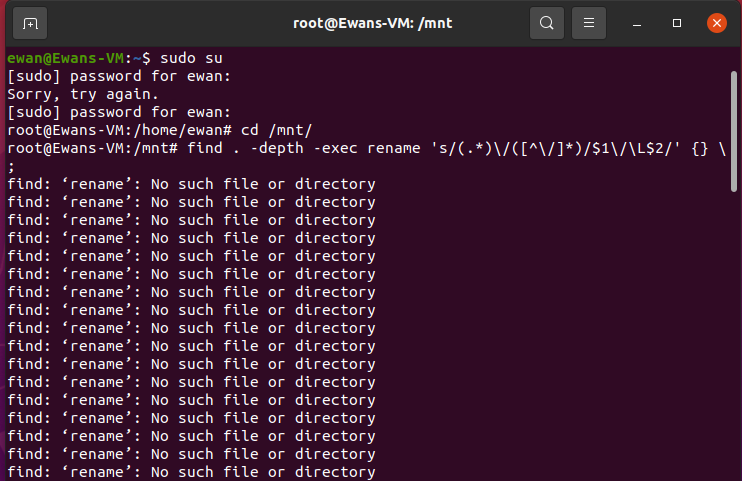
ive got the mods i want to rename in the /mnt/ folder but when i run the command listed on bohemias wiki that is what happens
burnt imp
vapid whale
does anyone know why this is happening?
If you don't get any answers here, try #server_linux
 agile ibex
hola
my
arma 3 keeps crashing upon start up
status access violation
whenever i play without mods it opens up completely fine, however when ever my friend boots up the mods he can get into it.
i have the RPT file if anyone wants it.
turbid relic
agile ibex
i have the RPT file if anyone wants it.
send
agile ibex
agile ibex
umbral narwhal
Have you considered only loading what you need :P
its 81 mods

 steady hawk
Not sure what you mean. You want to make the interface smaller?
brave jay
Yes
steady hawk
Then video settings > Interface size
brave jay
When I change the interface size it become like this
 steady hawk
Did you restart the game?
steady hawk
Can you elaborate what is going on in that last picture? Isn't that normal for a video settings?
brave jay
 brave jay
When I change the interface size it become like this
brave jay
brave jay
When I change the interface size it become like this
I change the aspect ratio to 4:3
steady hawk
What display mode you use?
brave jay
I use full screen. Resolution 1600x900(16:9) interface small
steady hawk
Did you ever changed the UI layout?
brave jay
How do I change that?
steady hawk
Sounds like you didn't. Game Options > Layout tho
brave jay
Oh ok. All this problem happen after my launcher crash and the setting change by itself
steady hawk
It's solved or not?
steady hawk
Why?
brave jay
Because I cannot find the right resolution for my computer
steady hawk
Why? If you know what your screen is, you can just search it
Or just search “how to check resolution”
brave jay
Ok thank a lot
 boreal wraith
Not sure where to ask (here or Antistasi discord) but I'm having issues with aircraft crewmen and passengers emerging from shot down aircraft unscathed. Is this an issue with Antistasi or a base game issue? Dedicated server with ACE and a couple movement/rappelling/towing mods
Has anyone else experienced this?
quaint jewel
agile ibex
status access violation
If you have a .mdmp, please send it to me (in .zip archive)
Unless you already fixed it by not loading mods
uncut trellis
boreal wraith
Not sure where to ask (here or Antistasi discord) but I'm having issues with air...
It is a mod issue. Which mod is hard to say though.
 agile rampart
i'm trying to free up some space on my ssd, but when i unsubscribe from arma mods, it says they're removed but the files aren't deleted
 patent kettle
That's just Steam being steam, it should remove it eventually.
If you need the space now I've written a simple utility app for that issue exactly: https://github.com/veteran29/workshop_cleaner
agile rampart
patent kettle
That's just Steam being steam, it should remove it eventually.
i've been waiting since last night, i dunno bro
umbral narwhal
@boreal wraith Normal for ACE.
boreal wraith
That's what I was afraid of, probably something to do with the bleed out/incapacitated feature.
pine kite
brave jay
Can I have a recommended resolution
How about settng the aspect ratio back to 16:9. 4:3 obviously gave you a much narrower field of view.
agile rampart
wtf is wrong with steam, it still doesn't delete my mods
@patent kettle thanks btw
patent kettle
the app works? good.
late tapir
maybe your steam is installed in a folder where you need elevated rights
like c:\program files (x86)
umbral narwhal
@agile rampart You did restart Steam, right? That usually gives it a kick.
agile rampart
umbral narwhal
<@!261799390342152192> You did restart Steam, right? That usually gives it a kic...
i restarted my whole damn computer
 tardy wraith
hey guys, anyone here experienced with setting up KOTH servers?
having issues getting my "rules" section to display anything other than the default
 earnest flint
Can I get some assistance with server hosting.
When I try to host server via unpn it just tells the folks joining that the server is not responding
I've tried checking the ports to see if they are open and they are.
I've also checked my firewall and it allows arma 3 to work
And I was able to host before but not now
I've been tryin to get this to work for a few days now and ive just run our of ideas
umbral narwhal
- Check that your router's WAN IP is actually the same as your external IP.
- Check that you're forwarding the ports to the correct internal IP.
- Try turning off your firewall entirely.
I've seen setups that looked correct and simply didn't work though. I suspect routers just update themselves with new bugs.
There's no way to diagnose why a port forwarding setup isn't working. All you can do is set it up correctly and hope.
umbral narwhal
Note that you either use UPNP or port forwarding, not both
umbral narwhal
UPNP should be as simple as enabling it on your router.
but if you port forward then that may break it.
 burnt dirge
loading into a scene from the editor was fine for me, but one day the loading screen started getting stuck at 90% and taking 15-20 seconds longer than usual
has this happened to anybody else
would there be any info about this in the rpt file? i have logging disabled
umbral narwhal
Not if you have logging disabled, no.
Probably won't be anyway, but worth a shot.
earnest flint
earnest flint
Ice been just using upnp
update on this
So it says the upnp works just fine and that it loads up and all but when my friends try to join it shows them this

i have no idea what theissue is
uncut trellis
may need to use portforwarding instead?
earnest flint
ive tried that
pine kite
Who says upnp is working?
earnest flint
it doesnt come up with an error when it goes through
so im assuming the upnp is working
pine kite
Well, I don't trust that upnp in any way. I have better experience with manually setting it up in the router.
earnest flint
so
tried port forwarding again
the server opens with the ports
but
my friends still cant join
it still does the whole server not responding thing
i have the ports open
uncut trellis
have you opened the steam gaming ports
umbral narwhal
@earnest flint Did you check any of the three things I said?
earnest flint
yes
earnest flint
uncut trellis
have you opened the steam gaming ports
yes
ive tried restarting my router
i can join other folks servers to they just cant join mine
umbral narwhal
If you checked everything I listed and your settings are all correct then either your router is bugged or your ISP is blocking incoming connections.
earnest flint
umbral narwhal
If you checked everything I listed and your settings are all correct then either...
if its blocking incoming connections how do i fix that
umbral narwhal
You can't.
umbral narwhal
Double-check everything though. It's more likely that you made a mistake somewhere.
uncut trellis
also might be worth trying restarting computer just in case.
earnest flint
uncut trellis
also might be worth trying restarting computer just in case.
restarting what
uncut trellis
👆 edited
earnest flint
uncut trellis
also might be worth trying restarting computer just in case.
i did this
umbral narwhal
You could maybe send your vars file elsewhere to continue your campaign.
Which ISP is this btw?
earnest flint
cableamerica
uncut trellis
make sure any extra firewalls are not blocking the incoming connections either
earnest flint
i think
earnest flint
uncut trellis
make sure any extra firewalls are not blocking the incoming connections either
i turned off every firewall
uncut trellis
last time I did portforwarding on my machine I had to open the steam ports, the Arma ports and then make sure firewall let through the hosting
earnest flint
its so weird
because 1 day it worked
next it didnt
i got no fucking clue why this is happening
pine kite
If you can't get it working with your home connection. Then you could try to get all your friends on Hamachi or some equivalent VPN-like solution. Or spend the bucks to rent a server on the internet.
 wild comet
hey guys I got the old classic Exit code: 0xC0000005 - STATUS_ACCESS_VIOLATION
Can anyone help me lol
steady hawk
No. STATUS_ACCESS_VIOLATION is a "generic error" and nothing else. You have to tell what is the situations
 near hollow
Anyone know the fix for the Launcher not deleting presets? I delete them but the files remain in the preset folder and when i restart launcher the preset that i deleted is still there
uncut trellis
you got onedrive in use?
vapid whale
anyone know why this is happening?

 half yarrow
Hey, so Im running an antistasi server, but Im trying to turn persistence off
Only trouble is, when I set it to off and restart the server, it doesnt show up on the server list anymore
Ive got no idea why, so any help would be much appreciated
 vestal sundial
Hi, I'm trying to make a scenario on the Livonia map. I can't get more than 30 FPS in certain areas. Even in the eden editor where cpu shouldn't be an issue. I already tried setting graphics to way below what my card can handle. The game's automatic settings are way higher than what I play with. I even disabled certain graphical features like anti-aliasing entirely but I can't get above 30FPS
umbral narwhal
Normal. Livonia is a performance disaster for some reason.
vestal sundial
I can literally max everything out and get 20 FPS with full viewrange and then put everything back to low settings and get 30...
umbral narwhal
Do you have any AIs spawned or is it just you?
vestal sundial
I'm in the editor so that shouldn't be the problem.
I have some things placed down but within my viewrange is only my character and three vehicles
I actually hid more map assets than I placed down other things so far 😄
 lavish plank
When I try and load client addon settings my ArmA stops responding, and restarting arma then resets every addon and addon control setting.
Is there a way to revert it?
 near zodiac
so i have an issue with a buddys of mines game he can launch the game via the local files WITHOUT the launcher and it will open however if he tries to open it via the launcher or hitting the play button on steam it crashes instantly
 rancid kite
I'm having an issue with getting into third person view
I have reassigned the key but it's not working in editor mode or my exile server
umbral narwhal
Might be restricted by difficulty settings. Veteran disables third person.
rancid kite
it shows 3rd person view in enabled
in difficulty settings
I found that one of my mods are causing third person to stop working, does anyone know what mod would cause this?
https://gyazo.com/7cf1e9b0dd2d029f49cd08eb84c9fdbc

also found out that it was exile
pine kite
Server profile can override difficulty settings, among which the ability to view 3rd person.
 left star
yo anyone can help me out? I uninstalled IFA3 and some other mods to free up my disk space but for some reason it doesn't do anything. Launcher shows me its uninstalled and same thing in the mods folders but it didn't free anything, there's still 20gb+ of content as if the mods were still there.
I uninstalled it from the launcher btw
left star
nvm I had to re-subscribe and unsub from workshop
pine kite
left star
yo anyone can help me out? I uninstalled IFA3 and some other mods to free up my ...
Find the mod ID number from the link shown in the Steam workshop page. There is a folder somewhere deep inside the Steam library with the same name. Remove that or it's contents. If you did not unsubscribe from it then Steam will re-download the files. For me it is in somewhere like: C:\Steam_library\steamapps\workshop\content\107410\thatModIdNumber
There are programs that analyze the folderstructure and count up how many space it takes. Like TreeSize or WinDirStat. It might help to narrow down the largest folders.
 jaunty crescent
Anyone know what this might be?

comes up in eden editor when I play them ission
may I specify, happens with a addons called gcam
pine kite
A scripting error. Bad mod or mission. Tell the creator he needs to fix it.
gusty sentinel
yo still havving addon issues on my dedicated server
anyone smart knw how dedicated servers work?
burnt dirge
does anybody know why loading screens get stuck at 90% for like 20 seconds when loading into a scenario
 tribal kiln
does anyone have zeus enhanced?
i have a problem of not being able to select anything
and even add editable objects and stuff
i can click the type and faction selection on the top but not at the bottom with the units
tribal kiln
umbral narwhal
Looking at your modlist, the surprise is that anything works at all.
 uncut trellis
start by using only zeus enhanced and see if that work
then add mods in small numbers to see what breaks it
@tribal kiln
there is no other solution
tribal kiln
itll take a while but you got it
uncut trellis
 pine kite
gusty sentinel
anyone smart knw how dedicated servers work?
pine kite
gusty sentinel
anyone smart knw how dedicated servers work?
Many people in here do. But we are not psychic. As much as I think I am sometimes. 😉
If you didn't understand what I meant. We don't know what your problem is. Explain it. We can't probe your mind. Guessing usually also does not work. Post your details about the problem.
Also, if it is server related, there is also #server_admins and channels for Linux and Windows, which ever that applies to your server.
tribal kiln
uncut trellis
https://tenor.com/view/mando-way-this-is-the-way-mandalorian-star-wars-gif-18467...
I FUCKING FOUND IT
its by the automedic mod
which people say has game breaking code

 oak hamlet
need help with my custom difficulty not working on the server
pine kite
My psychic sense is telling me that you are placing that in the server config right next to the mission cycle. Which would be the wrong file. It needs to be in the userprofilename.arma3profile file.
oak hamlet
pine kite
My psychic sense is telling me that you are placing that in the server config ri...
afrim thank you Valen
pine kite
Hah, psychic senses do work. But not always. 🙂
 umbral narwhal
First one. .vars.arma3profile is not user editable.
oak hamlet
i keep getting this dumbass error when i select my mission, it has every mod on the server from the modpack, no client side visual mods etc
 vapid whale
how do i upload my own mission to my arma 3 server
ive looked in my mpmissions folder where it saved on the disk and there is no .pbo file
it is just mission.sqm
 verbal meadow
I've been getting multiple errors, this is my first time starting up Arma 3, I gives me an error that says "A3_3DEN"
I had also got an error from the battleye service.
And 'a3\anims_f_epa\data\anim\sdr\cts\hubcleaned\wounded\hubwoundedprone_idle1.rtm'.
uncut trellis
verbal meadow
I've been getting multiple errors, this is my first time starting up Arma 3, I g...
it probably did not install right. try verifying the game files on stema
umbral narwhal
@vapid whale Dedicated servers will only run missions packed into a PBO.
 sour kite
Anyone know how to restart server on warlords Redux #11 is not allowing anyonr to fast travel
 fathom raven
Problem: Being admin and typing in #missions (to change map and set parameters) results in "session lost" every single time on public servers.
How to fix this? 
umbral narwhal
Are you a voted admin or a real one?
fathom raven
Yes voted.
umbral narwhal
Might just be blocked in server config then.
Voted admins can have restricted permissions.
fathom raven
its all public zeus servers...
umbral narwhal
They probably all copy each other's config.
fathom raven
So Zeus is unplayable for me currently?...
fathom raven
umbral narwhal
Might just be blocked in server config then.
Why...? This would stop public servers working at all.
umbral narwhal
Can't you just use the map that's running?
fathom raven
The parameters are the problem.
You cant build in a verry large radius of the players, bleedout time is too short, etc.
 sweet spruce
Hi so ive got a friend whos trying to make custom composistions for an op hes running however he cant place down any of the compositions that are his. he can place down workshop subbed compo's but any that he makes dont want to work?
fathom raven
*Was finally told a solution, when one goes into the lobby and not into the game #missions doesnt result in "session lost".
Still would be nice to have a fix for that problem, lots of zeus i spoke with didnt knew a solution and just stopped playing the game. I try to tell them about said solution.
 maiden grove
anyone know why my performance is tanking?
where as all my friends with weaker rigs can get around 60 to 80 fps i only got 15 to 30
I used to get high frame rates as well
but now idk what happened but its just not getting above like 26
exotic sable
@maiden grove could be any number of reasons. If you have something else running at the same time, only you can sort that out. Checked on Task Manager?
maiden grove
exotic sable
<@245888056903598080> could be any number of reasons. If you have something else...
nah nothing out of the ordinary, it seems to be just arma as well that this happens to
exotic sable
Is your monitor plugged into your GPU or motherboard? Cos I did that once :D
exotic sable
Specs? What have you got?
maiden grove
i7-7700k / 2060 special edition / 4tb SSD / 32gigs of ram
cpu isnt the best for this day and age but still i used to get good frames on arma :/
exotic sable
Yeah, it should def be doing better and you said it used to.
When did performance get poor, was it a gradual change or sudden?
maiden grove
sudden from what i recall
im at a loss here, ive tweaked settings as much as i can
reinstalled as well
nothing
exotic sable
maiden grove
sudden from what i recall
After an Arma update, or a change in mods? Have you tried how Arma runs without mods? Something might be out of date and broken.
maiden grove
without mods the issue maintains
cant recall if it happened after anything specific
vapid whale
How would I go about setting up alive war room on a rented server
The Alive wiki says I need to put the alive.cfg file into a directory but I don’t have root access to the server since it’s rented
umbral narwhal
which directory? Most server providers will let you upload to the Arma folder upwards.
uncut trellis
maiden grove
im at a loss here, ive tweaked settings as much as i can
check if you have any heavy gpu enhancement features on
 remote bay
has anyone ever had the issue where your arma server just shuts off, no crash or anything. Running off a contabo VPS
using tadst
maiden grove
uncut trellis
check if you have any heavy gpu enhancement features on
any idea where i could check that good sir?
 pearl sorrel
vapid whale
How would I go about setting up alive war room on a rented server
pearl sorrel
vapid whale
How would I go about setting up alive war room on a rented server
- follow their wiki, its pretty simple.
- Join their discord.
pearl sorrel
maiden grove
im at a loss here, ive tweaked settings as much as i can
Are you throttling yourself? Having video settings at too low can have the same if not worse effects as hving them too high.
 terse lava
how do you map configs for PS5 Remote
pine kite
I don't know what is special about a PS5 Remote thingy. But in the keybind configs you usually just press the keyboard key, joystick switch or mouse button which you want to bind and it is detected.
But you'll probably need a lot more key than that controller can offer. Make sure you have a keyboard near you connected.
terse lava
everytime i shoot it unloads my clip though
pine kite
Does it do some kind of autofire? Depending on the fire mode of the weapon if may be automatic instead of single shot. Usually you change that with the F key.
terse lava
yea but it doesn't let me release the trigger
pine kite
I think others have asked about it in the past too. So maybe you find something by using the search function.
terse lava
and how/can you set up motion controls for leaning or cant you
why can't steam and Arma just make a legitimate config
pine kite
Q an E for temporary. Ctrl Q and Q for holding it.
It is a legitimate keyboard layout config: #general_chat_arma message
Arma 3 isn't played on Playstation, so it isn't really the logical controler for it.
terse lava
is there avideo on how to map controls to PS5 or will it work on steam controller?
pine kite
Search for it! I don't know. I don't have one.
 thorn grove
You want to play Arma with a controller? Have fun aiming my dude.
I'm not sure about the DS5 controller, but when I was still using my DS4 and DS3, I needed an extra piece of software to make windows recognize it as an Xbox controller.
PlayStation controllers aren't recognized properly on windows.
uncut trellis
Arma is not very controller friendly game. Some people say they have had some success with it but have not ever seen any guides about it
bronze river
for run and gun maybe, but for tactical gameplay or commanding squad or even utilizing tactical movement that would be a pain.
late tapir
playstation controllers are recognized natively on windows now through Steam
since 2018 i think
im pretty sure some people use controllers for driving/flying for some odd reason, but i cant imagine playing infantry with it, aiming at a pixel 400 meters away lol
thorn grove
I found steam recognition of DS4 as hit and miss. Some games would work, others would still require the ds4windows software.
But idk about the ds5. I don't own any consoles anymore.
I love the Master Race
late tapir
never had issues with controllers on PC apart from From Soft games (sekiro, darksouls 2)
they have spaghetti code for controller recognition
 raven lintel
Anyone know how to change my default profile name? I've renamed my account & deleted all the files and reinstalled arma but its still using the old name
Default is set to AaronH & I want to use AaronH as the name for my other profile with all my settings
golden nova
you can't rename default profile, you have to create a new one. You could transfer the settings from the old one to new but I can't help with that.
raven lintel
golden nova
you can't rename default profile, you have to create a new one. You *could* tran...
I'm aware but surely there has to be a way to "regenerate" the default profile
as like I said I have no clue where its getting the name its using from
golden nova
it's named after the default user on your PC.
pine kite
raven lintel
Anyone know how to change my default profile name? I've renamed my account & del...
It is taken from the name of your Operating system account name. You can't change that. Make a secondary profile if you don't like the name.
raven lintel
pine kite
It is taken from the name of your Operating system account name. You can't chang...
My problem is its using the name I want my secondary profile to be 😭
pine kite
Choose a different name. Twice the same won't work.
And if you renamed your OS user account then that was just the display name. It doesn't change the actual user profile folder name.
You can however make a new user account on your computer with different name than AaronH. But transfering those data isn't so easy.
raven lintel
pine kite
You can however make a new user account on your computer with different name tha...
Fixed it
got my default profile renamed
Win + R Search "lusrmgr.msc"
Inside there you can rename the old name, delete the profile restart you PC and load up arma and it changes
pine kite
In my experience it doesn't change the userprofile name 'under the hood' in Windows. Just shows a different name. So network logins get confusing.
raven lintel
Well if it causes me problems I'll just rename it back but its fixed my issue for now haa
pine kite
Sure, if you are happy with it now and it works for what you need, go with it.
 round sinew
So. Simply i downloaded arma after a long time. I tried to revive my flying skills but 80% of my downloaded factions were missing although i had them loaded. Then i noticed a mod that was loaded when in launcher it shows that it is not loaded.
steady hawk
What exactly you didn't load and what exactly it loads?
round sinew
Discord.Edate
sedesatsest
 pseudo widget
Did you press Play in Singleplayer or Play in Multiplayer? Sometimes factions don’t work in Singleplayer you have to play in Multiplayer
round sinew
I know thats the thing. When i was leaving for a job the factions were showing in zeus.
steady hawk
What exactly the picture supposed to tell?
round sinew
This is the mod that loads
But i have it disabled
but still it loads into the game and shows in zeus.
steady hawk
Did you ever moved any pbo file from A to B?
steady hawk
Sounds like you did
round sinew
And is there a way how to revert it?
steady hawk
Remove the wrong pbo
pine kite
Can the mod he downloaded be so messed up by itself that it puts the pbo in the wrong folder in the hierarchy?
steady hawk
Never heard of
round sinew
I downloaded pretty known mods that are updated a lot
like ace,cup,nlarms
cba etc.
steady hawk
IDK what TTS Beam Laser is but you probably have it in any addons folder in root Arma 3 folder, which is always loaded folder?
pine kite
That screenshot shows a very selective part of the screen. It doesn't rule out that the mod is still selected in the launcher and loading when Arma 3 is started. Show the entire screen.
 steady hawk
That's not the entire Mods
round sinew
i know but