#arma3_troubleshooting
1 messages · Page 140 of 1
 regal eagle
regal eagle
regal eagle
yes
im in it but they cant join
they dont see it in server tab
Cant even invite them
 torn meteor
Do people rp in this server?
 uncut trellis
as in in the chat?
torn meteor
no i mean general is this a rp server?
torn meteor
okey bye
uncut trellis
 regal eagle
I cant join other servers
uncut trellis
you wont if you have mods loaded
 mental river
regal eagle
I cant join other servers
mental river
regal eagle
I cant join other servers
Then the problem is your internet connection
mental river
regal eagle
I turned all mods off still cant join
If it's like that screenshot you posted the problem is not mods
What is your windows language?
regal eagle
swedish
mental river
I think I recall people having problems with the game in RTL languages
ok it's fine then
Try running the game in windowed mode
See if it shows the slots

 regal eagle
yes
 rustic eagleBOT
Arma RPT
Arma generates a .rpt log file each time it's run, which contains a lot of information like the loaded mods, or any errors that appear, this log file can be very useful for troubleshooting problems.
To get to your RPT files press Windows+R and enter %localappdata%/Arma 3
Additionally see the wiki page for more info: https://community.bistudio.com/wiki/Crash_Files
To share an rpt log here, please use a website like https://sqfbin.com/ to upload the full log, that way the people helping you can take a look at it and try to figure out the problem you're having together with you.
Note: RPT logs can hold personal information relevant to your system, the game or others.
 mental river
Btw also check steam
Make sure it's online
And you see the message "steam is online" in launcher
regal eagle
How do i get the RPT into the sqfbin site
mental river
regal eagle
How do i get the RPT into the sqfbin site
Copy paste the contents
Then hit save
Then send the link
regal eagle
Nothing happens when i paste :/
mental river
Dm the file to me
regal eagle
Cant
mental river
Why not?
regal eagle
 mental river
Can you DM me normally?
regal eagle
no
regal eagle
Wont allow me to paste their either
mental river
the problem is on your end
people use that site all the time
regal eagle
lack of skill 😔
 static wyvern
I really want to delete a profile in Arma but it keeps coming back
please, can someone help me
mental river
static wyvern
I really want to delete a profile in Arma but it keeps coming back
Delete its files
static wyvern
i have video proof of the profile getting deleted in 2 ways and still coming back
I did
twice
mental river
regal eagle
lack of skill 😔
To press Ctrl+C and then Ctrl+V? 
You can also rclick and select copy, and rclick and select paste
regal eagle
nothing
mental river
Do you even select any text?
regal eagle
Is it suppose to be a RPT file?
mental river
Yes
Open the file
Select all (ctrl A)
Then copy
Then paste
Don't copy the file itself
regal eagle
😔
 forest ember
My headless client joined the server successfully but is failing to assign itself to the headless client role, hence none of the AI spawn. What could be causing this?
mental river
regal eagle
<@!360154905148653568>
Don't touch cpu count and extra threads
And use Intel TBB for malloc
regal eagle
?
mental river
regal eagle
?
In launcher parameters
mental river
Probably not
But that's bad anyway
Your rpt doesn't have anything useful
Run the game again and join a server
regal eagle
Im in
regal eagle
im in 👍
 mental river
regal eagle
im in 👍
mental river
regal eagle
im in 👍
@quaint jewel that's interesting 👀
Don't touch cpu count and extra threads
And use Intel TBB for malloc
mental river
🤔
mental river
ok cool 👍
regal eagle
mental river
> Don't touch cpu count and extra threads
> And use Intel TBB for malloc
how much does this effect the game even?
 hollow saddle
hey guys sorry to bother im running a linux server and one of my players was banned but I want to unban him now - however i cannot find the ban.txt file does anyone know where it might be or what i can do to unban the player i cant find much help online unfortunately
 vapid whale
My server crashed on startup, these are the errors i got:

can anyone troubleshoot this
vapid whale
nvm i have infact fixed it
 thick ginkgo
for some reason anytime I'm messing around with high command in antistasi my volume goes to about 1/4 permanently
any kind of fix for this?
mental river
thick ginkgo
for some reason anytime I'm messing around with high command in antistasi my vol...
I'm assuming it's game volume?
not windows
thick ginkgo
mental river
I'm assuming it's game volume?
yes, I checked windows
weird thing is if I look at a map it's completely fine
ACE is used
mental river
do you play in single player?
thick ginkgo
nope I'm on a dedicated at the moment
mental river
so you're the owner?
thick ginkgo
yes, the dedicated is on a different machine
it feels like it's acting like I've got my map up or something
mental river
can you test if this solves your problem?
0 fadeSound 1
I believe so? the sound is very variable, in/outside a vehicle
it's kind of hard to tell
mental river
if that solves it it must be a scripting problem. Not sure which mod. Maybe Antistasi itself
thick ginkgo
I don't think it did, it's still unusually quiet
 quaint jewel
mental river
<@90532520101183488> that's interesting 👀
quaint jewel
mental river
<@90532520101183488> that's interesting 👀
not really...
People shouldn't touch stuff they don't understand
mental river
quaint jewel
not really...
People shouldn't touch stuff they don't understand
yeah but I mean why would it affect MP connection?
is that a bug or something?
 warped plume
How do I change my mouse sensitivity to a specific number??

like this is a slider- I wanna change it to a number lmao
I checked configs but it appears as "Medium"
 harsh heron
Not sure if this is the place for this question. I am currently using Arma 3 Tools and attempting to binarize p3d files. I am pressing the button on the GUI on Tools and it brings me to a folder, I attempt to execute the binarize.exe and it opens a command prompt and closes it immediately. Any help would be great
quaint jewel
warped plume
Go to
My Documents/Arma 3
open the <arma player name>.Arma3Profile file in notepad (not the .vars.Arma3Profile!)
search for "mouseSensitivity"
There are
mouseSensitivityX=1.2089115;
mouseSensitivityY=1.2089115;
quaint jewel
harsh heron
Not sure if this is the place for this question. I am currently using Arma 3 Too...
Addon Builder would do that automatically for you when you let it pack your whole mod into a pbo
you usually don't specifically binarize p3d's
harsh heron
Alright thanks mate, I will try that now
 crystal pulsar
I have a problem with my arma 3's cursor thing, sometimes, when the arma 3 is generally just bugging out for me, basically it not responding, I mostly use the task manager to basically delete the process, in order to actually be able to continue playing. Though when I will do that, a weird glitch would eventually begin happening once the arma 3 has loaded, cursor itself is shown normally, the thing is, if you point something directly at, it wont really be "interacting" with it, and the cursor itself would be moved to the right, which makes me interact with not the button which I have pointed my cursor at, but the thing to the right.
If you didnt understand that, I will soon send a video of me experiencing the glitch
 wise barn
Looks like your game pops out of focus for some reason.
Run it in full-screen windowed mode
 sudden oracle
Hey so a friend of mine is trying to setup a server and is getting this error which is uh very weird, https://media.discordapp.net/attachments/673122774755180544/856964550376554526/unknown.png

any idea what this could be/causing this?
wise barn
did he copy the mod key files from the key folder to the server's key folder?
sudden oracle
yeah
 gaunt ridge
Hey
Have a issue I hope somebody can help me with.
When I launch Arma 3 from steam workshop it runs fine.
When I launch Arma 3 from Arma 3 Sync it crashes and gives following error;
Fault time: 2021/06/22 21:52:25
Fault address:  B4EC9C30 00:B4EC9C30 Unknown module
file:
world:
Prev. code bytes: 4D 88 F2 0F 10 4B 10 0F 11 45 88 F2 0F 11 4D 98
Fault code bytes: FF 57 20 33 D2 45 33 F6 44 8B F8 FF C0 0F AF C0
Report the crash on feedback tracker. With the proper crash report (.mdmp, .rpt)
 placid monolith
Help
mental river
placid monolith
Help
What's your problem?
placid monolith
So when I join a server and pick my role I instantly get kicked so I haven’t been Abe to play multiplayer
mental river
placid monolith
So when I join a server and pick my role I instantly get kicked so I haven’t bee...
What is the error message?
placid monolith
Wait
One second
Wait I am going to send a screenshot
Cause there is no error code
mental river
placid monolith
Cause there is no error code
If you get kicked it should say why
 mental river
Have you enabled battleEye?
placid monolith
What is that
mental river
It's an anti cheat engine
Check in launcher to see if it's enabled
mental river
placid monolith
After I check the box can I start playing
Yes
mental river
placid monolith
And it was not enabled
So that was the issue then
mental river
Well if you happen to have any other issues feel free to ask (in appropriate channels ofc)
placid monolith
Like this one?
mental river
Which one?
placid monolith
This channel
mental river
Yeah this is for troubleshooting
If you have gameplay questions, etc. there are channels for that as well
placid monolith
Ok thanks and have a beautiful day
 wise barn
like what?
 inland inlet
The task bar and all that stuff
wise barn
video option: fullscreen window
 quaint prairie
i have a problem where every time I spawn into a mike force or editor my player character spawns in with a gasmask that no matter what i do it always spawns on me
uncut trellis
perhaps you have set it as part of your profile
mental river
quaint prairie
how do i fix?
change your profile
quaint prairie
i only got one
mental river
quaint prairie
i only got one
yes but change your profile picture
if it has a mask, remove it
quaint prairie
where do find my profile picture
mental river
quaint prairie
where do find my profile picture
 quaint prairie
THANKS
 umbral scaffold
Receiving a 502 (Bad Gateway) error from the Wiki ATM.
Didn't know whether to put here or the Wiki channel.
Anyone else getting that?
umbral scaffold
Yeah cheers. Not working all that great for me, but maybe I can see what I can find.
 delicate elm
If you search google for what you want from the biki and get a link you can then plug that into the Wayback Machine's URL
umbral scaffold
I got around it... Wanted a list of EH's, but "addEventHandler" page wasn't working to go off, so I went for addMPEventHandler, selected that link then scrolled back up to the list of EH's. I mainly work off the Scripting Commands page anyway, so not too much of a difference. Just WBM was handling a page funny. Appreciate the assistance, Grahame.
 royal crescent
hey so uh, i got this?
https://gyazo.com/f87e7ff42b3c1b1ca2af05170143d4de

oh i restarted steam n it's fine
lmao
 grim token
Everytime I reach the part on the helicopter for the prologue I get disconnected.
 sturdy tulip
Just got an access violation


if i understand correctly they're trying to read AE535EF5 which doesn't exist
thing is, is it software or hardware related ?
and is it necessary that i check my ram
 visual orbit
Hi so I have been trying to set up a server through UpNp and my friend is unable to join. I have checked my router and the correct ports have been opened through upnp. I provided him with my ipv4 address and port 2302
mental river
sturdy tulip
and is it necessary that i check my ram
verify the game data first
sturdy tulip
alright
 pine kite
visual orbit
Hi so I have been trying to set up a server through UpNp and my friend is unable...
pine kite
visual orbit
Hi so I have been trying to set up a server through UpNp and my friend is unable...
How exactly does that start? What are the X.Y.Z in the IP4 adress x.y.z.*
visual orbit
pine kite
How exactly does that start? What are the X.Y.Z in the IP4 adress x.y.z.*
I'm sorry but what do you mean by how does it start? Because when I start it I can get in the game and play but he can just not join
pine kite
IPv4 address is made up of 4 numbers seperated by dots. What are the first 3 numbers?
If you gave the wrong IP number, then his game is trying to look for a server address in the wrong place/network.
visual orbit
Can I just give my whole IP address? I mean it's the public one
pine kite
Ok, that is what I wanted to make sure. Local IP addresses have a specific begining.
visual orbit
98.1 this is the first three numbers
pine kite
If you made a typo and it infact begins with 192.168.x.y then it is a local address and he can't do anything with that.
UPnP doesn't always work correctly. You really need to have UDP ports 2302-2306 open in both the router and firewall of the server.
visual orbit
okay I will try to do that. Just udp?
visual orbit
got ya got ya. I will let you know how that works. It may take a sec as I am currently away from my computer
pine kite
No problem, I'm not in a position to help troubleshoot this myself. Beyond writing here a bit.
visual orbit
roger roger. Thank you!
visual orbit
okay so I figured it out. My isp uses CGnat and so I will call them later to fix the problem
pine kite
Yeah, that can be the issue. Not common, but happens
 vast trout
I have an issue, where when ever I try to host a server the players that are trying to join can't find the server( this is with port fording set up ). can some one help?
 fringe salmon
I need help my arma 3 wont launch

yeah i just bought to dlsc
dlcs
and i want to play them
quaint jewel
Google "The cloud file provider is not running."
its something with microsoft onedrive

 umbral spear
nevermind, i found the fix
 golden nova
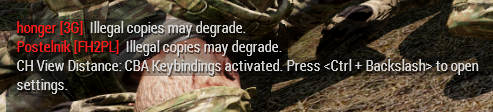
https://i.imgur.com/pIBsWGY.png (Illegal copies may degrade) what in the hell is that error? I've spent over 3k hours in Arma (legal copy of course) and battleye is disabled on both my client and the dedicated server. I'm seeing it for the first time
 river flame
 burnt sky
How do I fix []:'bin/config.bin/CfgPatches/CTab\ not an array? It's whenever I load in my modded character and the patches won't load.
burnt sky
How would I be able to fix that? Or check which mods are broken.
uncut trellis
trial and error
wise barn
How would I be able to fix that?
you can't. the mod creator must fix it
@burnt sky
 dull garden
Hi
 drowsy bough
trying to play some WLA amalgamation, and these notifications on the right are obviously a little fuckered. any way to fix this?

sorry in advance if wrong section.
mental river
dull garden
Hi
English only. #rules
mental river
drowsy bough
trying to play some WLA amalgamation, and these notifications on the right are o...
What is your interface size?
drowsy bough
it should be default, other interface elements appear just fine
it was set to small. but that doesn't change the notif in my screenshot it seems
mental river
drowsy bough
it should be default, other interface elements appear just fine
It's a mod. Some mod makers don't account for the interface size when they make a GUI
mental river
drowsy bough
it was set to small. but that doesn't change the notif in my screenshot it seems
Ok so it may not be the issue
drowsy bough
mental river
It's a mod. Some mod makers don't account for the interface size when they make ...
makes sense, know of anywhere i can go ask? im not sure if WLA amalgamation is even still a popular scenario
mental river
drowsy bough
makes sense, know of anywhere i can go ask? im not sure if WLA amalgamation is e...
I've personally not even heard of it
You can ask on their Workshop/BI forums page, or their discord. Not sure if it's active
 abstract thistle
anybody know how to fix battleye query timeout i tried reinstalling battleye and arma 3 i also turned off windows defender nothing is working
drowsy bough
i have several units in my squad, and i want to put them 2 by 2 on quad bikes, then have them follow me (also on a quad bike). is there any way to do that? or does AI only naturally follow when on foot
 shy pasture
What is the requirements for binarizing addons?
I've got "Build failed. Result code = -1083741819"
Dumps + log: https://drive.google.com/file/d/1sAenXRvxM-NJDzm-mz6YFQ5UFmt0ISEb/view?usp=sharing
Google Docs
pine kite
drowsy bough
i have several units in my squad, and i want to put them 2 by 2 on quad bikes, t...
They should follow you if you gave the regroup order to their drivers.
Be mindfull of the formation though. Don't want them crashing into trees in a Wedge or line formation. When in Safe-mode they follow road more carefully. When in combat mode they can go cross-country.
mental river
shy pasture
What is the requirements for binarizing addons?
I've got "Build failed. Result c...
are you sure it doesn't contain errors?
shy pasture
Not sure, but I can't see anything in log, so this is why I'm asking about requirements 🙂
I will not be able to find error in a large mod without logging.
mental river
shy pasture
Not sure, but I can't see anything in log, so this is why I'm asking about requi...
are you using addon builder?
shy pasture
Yes
mental river
shy pasture
Yes
did you test the config in the game to make sure it "compiles"?
shy pasture
Nope. I'll try.
grim token
Arma 3 keeps just crashing for me, it just shuts down in when I'm doing campaign
and doesnt say anything
mental river
grim token
Arma 3 keeps just crashing for me, it just shuts down in when I'm doing campaign
did you verify the game data?
!verify
 pallid krakenBOT
mental river
!verify
pallid krakenBOT
mental river
!verify
Verification is disabled on this server.
mental river
ok 🤣
grim token
yes
rustic eagleBOT
Arma RPT
Arma generates a .rpt log file each time it's run, which contains a lot of information like the loaded mods, or any errors that appear, this log file can be very useful for troubleshooting problems.
To get to your RPT files press Windows+R and enter %localappdata%/Arma 3
Additionally see the wiki page for more info: https://community.bistudio.com/wiki/Crash_Files
To share an rpt log here, please use a website like https://sqfbin.com/ to upload the full log, that way the people helping you can take a look at it and try to figure out the problem you're having together with you.
Note: RPT logs can hold personal information relevant to your system, the game or others.
grim token
yweha gimme a sec
 glacial barn
anybody here know how to rebind interact like why is it spacebar
 steady hawk
Common > Use Selected Action
mental river
grim token
Bit late, but can I DM you my RPT since it holds personal info
ok
it's not that personal tho
it only contains the system info, like how much RAM you have, what is you Windows version, when you ran the game, what mods you're running, etc.
grim token
@mental river ?
mental river
grim token
<@360154905148653568> ?
looks like a mission bug
make a ticket on https://feedback.bistudio.com/project/view/1/, and upload the crash dump (.mdmp file) and the rpt file so the devs can fix it.
 waxen thunder
I've got a TrackIR 5 and just got Arma 3. I'm playing through Contact and I noticed the my head won't "roll" or "lean" using my TrackIR. Is there a way to get this working?
fringe salmon
heko
mental river
waxen thunder
I've got a TrackIR 5 and just got Arma 3. I'm playing through Contact and I noti...
playing through Contact
not sure if the head can do that when you're on foot
you can only do that in vehicles
waxen thunder
Ok, I did manage to figure out the "lean" feature. I just needed to make the TrackIR profile far more "pronounced" when sliding left or right.
It was doing it, it was just so subtle I couldn't notice.
Thanks for the info @mental river I'll try it out in a vehicle next ime I'm in one and see if it's working.
fringe salmon
i need a admin
to talk to
bc my frend got band from the discord bc his acc got hijacked
and he got it back
it whas spaming links that steal acc
but he got his acc back
and wants unban
how do i get suport ticket
or who shoud he talk to
mental river
fringe salmon
or who shoud he talk to
ask in #discord_server
 trim crypt
Hey, just got my hands on arma 3 and cannot use the direct join feature
searched nearly everywhere for advice but its not going to well
Feeling kinda lost
mental river
trim crypt
Hey, just got my hands on arma 3 and cannot use the direct join feature
direct join?
and what do you mean you can't?
trim crypt
Direct connect feature
I am entering the ip and port and its just closing the window
no loading screens
no error messages
battle-eye is up and running
mental river
trim crypt
I am entering the ip and port and its just closing the window
are you sure the server even exists?
uncut trellis
does it not show up in server browser?
and are you trying in game or in the launcher
trim crypt
server browser is not loading any servers besides the official ones
in game and launcher
uncut trellis

so in launchers internet tab nothing shows up?
also make sure you dont have any active filters
trim crypt
ill check again on filters
uncut trellis
for comparison if you are in the official tab, only official servers show
 trim crypt
working in launcher
but as soon as I try to connect I am stuck in the game loading screen
uncut trellis
does your game start normally if you just run it?
also do you alt tab out of it?
if you do, that can hang it up
try running the game in windowed or borderless window mode
just to see if that works any better
trim crypt
sure, Ill change that up
it does run if I just hit the start button
as soon as I try to connect to custom servers it just doesnt want to
trim crypt
official servers work
they are all fine
trying it now with one over the launcher
it worked now
over the filter
direct connect seems to be the problem
Well
Thank you guys !
Appreciate the help
hollow saddle
again sorry to keep asking but i havent found anything helpful with unbanning a player have tried ingame and tried finding the bans.txt file but none of these are working or available
 regal scroll
Hey everyone, I'm trying to lower the ramp on the V-22B Osprey, but its not lowering. I've been watching another streamer be able to lower the ramp by simply scrolling to the option to lower. Has anyone encountered this issu?
 safe niche
hello
Can someone please help, when I join my units server I get kicked off so often with the message. "You were kicked off the server: Player signature could not be verified", sometimes "Signature verification timed out."
rustic eagleBOT
Arma RPT
Arma generates a .rpt log file each time it's run, which contains a lot of information like the loaded mods, or any errors that appear, this log file can be very useful for troubleshooting problems.
To get to your RPT files press Windows+R and enter %localappdata%/Arma 3
Additionally see the wiki page for more info: https://community.bistudio.com/wiki/Crash_Files
To share an rpt log here, please use a website like https://sqfbin.com/ to upload the full log, that way the people helping you can take a look at it and try to figure out the problem you're having together with you.
Note: RPT logs can hold personal information relevant to your system, the game or others.
 hollow cove
Could someone give me a hand. A server keeps booting the game back to a default arma mission and wont load a custom mission
wise barn
check your server RPT files
 earnest heart
regal scroll
Hey everyone, I'm trying to lower the ramp on the V-22B Osprey, but its not lowe...
earnest heart
regal scroll
Hey everyone, I'm trying to lower the ramp on the V-22B Osprey, but its not lowe...
The V-22 isn't in vanilla ||except as an underwater wreck||, so it must vary by the (V-22 depicting) mod
 sage pawn
 proud wedge
Port forwarding isn't working
proud wedge
Port forwarding isn't working
Did you forward the ports on your router AND make firewall exceptions?
When people mention port forwarding, a step that's often overlooked is making firewall exceptions.
However, I'm here with a problem of my own: I'm having difficulty getting CUP maps to play ball with my server (in Liberation scenarios, to be exact). I have the @ folders in my server directory, I put their keys in the keys folder, they're in the mod command line in the .bat file (along with other mods that have worked dozens of times), and yet whenever I boot up the server and go to select a mission, there are no role slots available. I'm able to load up and select a role in my Liberation scenario in Cam Lao Nam (through an atypical means of dragging all of the addons from "vn" into the addons folder in the server directory. While not what others do, it actually worked in my case. I'm wondering, would doing that with CUP work as well?) with no apparent problems. I'm losing my mind over this.
If you have a solution, please @ me.
mental river
sage pawn
However, I'm here with a problem of my own: I'm having difficulty getting CUP ma...
have you touched CPU Count, Extra Threads, or Memory Allocator settings?
sage pawn
mental river
have you touched CPU Count, Extra Threads, or Memory Allocator settings?
Nope.
rustic eagleBOT
Arma RPT
Arma generates a .rpt log file each time it's run, which contains a lot of information like the loaded mods, or any errors that appear, this log file can be very useful for troubleshooting problems.
To get to your RPT files press Windows+R and enter %localappdata%/Arma 3
Additionally see the wiki page for more info: https://community.bistudio.com/wiki/Crash_Files
To share an rpt log here, please use a website like https://sqfbin.com/ to upload the full log, that way the people helping you can take a look at it and try to figure out the problem you're having together with you.
Note: RPT logs can hold personal information relevant to your system, the game or others.
mental river
sage pawn
Sure, one moment.
where did you get the mission?
it feels like it's outdated, or you haven't loaded the required mods
23:11:45 Warning Message: mpmissions\__cur_mp.reshmaan\mission.sqm/Mission/Entities/Item77.type: Vehicle class Land_fortified_nest_big no longer exists
wait hold on
it looks like the game didn't load any of your mods
sage pawn
The Reshmaan mission came from a guy in the Liberation Discord server; Takistan (which had the same problem as this; I just posted this log because it's basically the same as the others) was the most recently released version.
mental river
sage pawn
The Reshmaan mission came from a guy in the Liberation Discord server; Takistan ...
yeah my bad. like I said, the game didn't load any of your mods
sage pawn
Why didn't it load the mods?
sage pawn
What's weird is that the way I had it before, it loaded all the mods.
I'll give this a try, one moment.
mental river
sage pawn
What's weird is that the way I had it before, it loaded all the mods.
also I think you have a @ at the end (not sure if it is causing any issues)
sage pawn
When I looked at my batch file, there wasn't one.
mental river
ok then it was just truncated
sage pawn
It's taking a little more time than usual to load up, which might be because it's loading the mods, so this could be the fix.
sage pawn
Goddamnit. Still no slots. It loaded a bunch of other mod-related missions though.
And that's for both Takistan and the other one.
mental river
sage pawn
Goddamnit. Still no slots. It loaded a bunch of other mod-related missions thoug...
post the rpt again
sage pawn
mental river
sage pawn
the game has loaded 48 mods
how many did you have?
looks like some were not loaded (judging by the errors)
mental river
mental river
or it's just throwing millions of errors! 😄
I was right! 😄
sage pawn
Is there a quick way to check how many?
mental river
looks like only this wasn't loaded
1:54:37 Russia Rearmed | Russia Rearmed | false | false | NOT FOUND |
sage pawn
mental river
looks like only this wasn't loaded
1:54:37 ...
That's an ALiVE faction I made myself, just replacing some CUP AFRF units' weapons.
mental river
sage pawn
That's an ALiVE faction I made myself, just replacing some CUP AFRF units' weapo...
well it wasn't loaded
sage pawn
Is that what caused the crash, and if so, how do I enable it?
mental river
is CA_LauncherMagazine from your "mod"?
mental river
well idk. but if you check lines 3727 and onward, you'll see thousands of errors
how did you copy the mods to your server?
maybe they're corrupted
sage pawn
I went into the game directory, to that hidden folder that contains all of the mod @s. I copied those folders from the Arma 3 directory to my server folder.
mental river
sage pawn
I went into the game directory, to that hidden folder that contains all of the m...
can you maybe try running the normal game exe?
with those mods?
sage pawn
How would I do that? All I know how to do is the .bat method I saw on YouTube.
mental river
sage pawn
How would I do that? All I know how to do is the .bat method I saw on YouTube.
is that a dedicated server?
sage pawn
Yes, it is.
sage pawn
Yeah, and I've played it with friends several times. I had to copy its addons folder into my server's addons folder and that enables us to play (somehow).
mental river
sage pawn
Yeah, and I've played it with friends several times. I had to copy its addons fo...
it says NOT FOUND tho
sage pawn
That's so weird. I don't know why it would say that. I'm also able to play Global Mobilization the same way, I should mention.
mental river
sage pawn
That's so weird. I don't know why it would say that. I'm also able to play Globa...
I know. it's correct. but check the server folder again. maybe you deleted it or something
sage pawn
What am I looking for specifically?
mental river
a folder named vn
sage pawn
It isn't in there. Do I copy vn from the Arma 3 folder?
mental river
yes
sage pawn
Wait one. This'll take a minute (or more).
mental river
sage pawn
Wait one. This'll take a minute (or more).
once you're done try running the game again. (also fix that other mod of yours)
if you still run into issues, ping me
sage pawn
mental river
once you're done try running the game again. (also fix that other mod of yours)
...
I'm not sure how to fix it to tell you the truth.
Also, thank you so much for helping me with this.
mental river
sage pawn
I'm not sure how to fix it to tell you the truth.
Also, thank you so much for h...
just check the folder name
you put Russia Rearmed for the name. make sure a folder by that name is there (spoiler alert - there isn't)
 ionic geode
Has anyone had any issues with helicopters not deploying ropes so I can sling load? I have it on my server but only 1 helicopter will do it?
sage pawn
mental river
just check the folder name
you put `Russia Rearmed` for the name. make sure a fo...
There is a @Russia Rearmed folder though. Does it have to not have @ in front of it?
mental river
sage pawn
There is a @Russia Rearmed folder though. Does it have to *not* have @ in front ...
you must put the @ in the bat
it doesn't matter what you put for folder names. but using @ helps you detect what is a mod
sage pawn
I didn't realize I'd left that out of the command line.
It has since been fixed. Could that be what was breaking it?
mental river
I don't know. maybe
sage pawn
Hopefully that's the fix. It would make sense, since both missions use a unit template with those units included. I just didn't realize it wasn't loading at all due to that accursed typo.
I'll wait for vn to finish copying and then I'll fire it up and give it a go. Will the server automatically load vn or am I going to need to create an @ for it? Also, like I said, I copied the addons folder into the server directory; would this cause a crash or conflict of some kind, and whether it does or not, do I need to delete all of the SPF files from it?
vn has finished copying over, I'm now starting up the server.
Aaand same deal as before. Will send over an .rpt.
And to my horror, a new problem presents itself, namely that whenever I load up the Liberation Cam Lao Nam scenario that was working before, it now completely kicks me out of the mission and back to the mission selection screen when I fire up the scenario.
mental river
sage pawn
it seems to me that you either have a corrupted mod, or a mod that is bad and is messing up cfgAmmo class
because of these errors:
2:38:33 Warning Message: No entry 'bin\config.bin/CfgAmmo/CA_LauncherMagazine.simulation'.
2:38:33 Warning Message: '/' is not a value
sage pawn
mental river
it seems to me that you either have a corrupted mod, or a mod that is bad and is...
Is there any way to check to see which? I've got a bunch of mods and I have absolutely no knowledge of how they work. I'm not good with advanced coding and scripts and whatnot.
mental river
sage pawn
Is there any way to check to see which? I've got a bunch of mods and I have abso...
I recommend that you verify all mods using the launcher, then copy them again
also test the scenario with that mod pack on your PC (not server) to make sure it works before using it on the server
@sage pawn if you don't know how to verify mods, open Arma 3 Launcher, right click on the mod, and select repair
don't verify them together
one at a time (wait for it to finish in Steam)
sage pawn
mental river
also test the scenario with that mod pack on your PC (not server) to make sure i...
I trialed it on a LAN server before moving the mission file to my server device.
sage pawn
mental river
<@!202982443932712961> if you don't know how to verify mods, open Arma 3 Launche...
Do I verify then copy each mod, or do I verify them all one at a time and then copy?
mental river
sage pawn
Do I verify then copy each mod, or do I verify them all one at a time and then c...
doesn't matter. I recommend that you verify them all first, then copy (it'll be faster probably)
also try to load the mods on the server in the same order as the game launcher
if you look at your rpt (the first two lines), you'll see (altho sometimes it's truncated)
sage pawn
I'll give that a go. Will report back when done.
I will say, looking at the game launcher on the same device as the server, the mods are rather randomly ordered. I know CBA A3 is like the nucleus of most mods but it's below a lot of random shit.
sage pawn
mental river
doesn't matter. I recommend that you verify them all first, then copy (it'll be ...
Verified them all. No error messages or redownloads or anything.
Will copy them over now.
mental river
sage pawn
Verified them all. No error messages or redownloads or anything.
also run the game to make sure
and check the rpt to make sure there are no errors
mental river
yes
sage pawn
Where are those located?
rustic eagleBOT
Arma RPT
Arma generates a .rpt log file each time it's run, which contains a lot of information like the loaded mods, or any errors that appear, this log file can be very useful for troubleshooting problems.
To get to your RPT files press Windows+R and enter %localappdata%/Arma 3
Additionally see the wiki page for more info: https://community.bistudio.com/wiki/Crash_Files
To share an rpt log here, please use a website like https://sqfbin.com/ to upload the full log, that way the people helping you can take a look at it and try to figure out the problem you're having together with you.
Note: RPT logs can hold personal information relevant to your system, the game or others.
mental river
the client rpt is called arma3_date.rpt
server is arma3server_date.rpt
mental river
there are still errors 
sage pawn
Fuck. I don't know what I'm doing wrong.
mental river
also
3:12:31 @Virtual Arsenal Anywhere | @Virtual Arsenal Anywhere | false | false | NOT FOUND | | |
3:12:31 @extDB3 | @extDB3 | false | false | NOT FOUND | | |
3:12:31 @bCombat | @bCombat | false | false | NOT FOUND | | |
3:12:31 @acearsenal | @acearsenal | false | false | NOT FOUND |
these were not loaded at all
sage pawn
Oh, that's because those were non-Steam mods I had loaded on my desktop. Forgot about those, that's my fault entirely.
mental river
sage pawn
Oh, that's because those were non-Steam mods I had loaded on my desktop. Forgot ...
anyway, can you run the game with nothing except cup mods?
mental river
sage pawn
ok. your CUP is fine. so something else is breaking them.
keep loading the mods one by one. once the game is loaded, open the rpt and search for Warning Message: No entry. if there are none, it's good. otherwise stop
no need to upload the rpt here anymore. you can do it on your computer
(the rpt is just a text file; you can open it with notepad; I recommend Notepad++ or VSCode)
sage pawn
I use NP++ as well. 👍
I'll try going one at a time. I should mention that I haven't copied any of the folders over yet.
So just to confirm, do I have to completely boot up the game and get to the main menu for the rpt to generate?
mental river
sage pawn
I use NP++ as well. 👍
I'll try going one at a time. I should mention that I h...
I haven't copied any of the folders over yet.
yeah, probably no need
nothing was corrupted apparently.
you probably have a bad mod
So just to confirm, do I have to completely boot up the game and get to the main menu for the rpt to generate?
yes
sage pawn
mental river
you probably have a bad mod
Bad mod as in what?
mental river
sage pawn
Bad mod as in what?
a mod that is not written properly (buggy/broken)
sage pawn
Any guess what it could be?
sage pawn
Fair enough. It was worth asking.
mental river
@sage pawn if you want to shave off some time, you can load them in groups
e.g. break them in two groups. load group 1. if ok, ignore it. it's group 2 that's breaking them (and vice versa)
then break the faulty group in another two groups and keep doing this
e.g. I have mods 1 to 10;
I load mods 1 to 5 first; if broken -> no need to load 6-10 (one of mods in 1 - 5 is broken)
now I break 1 to 5 into two groups: 1-3 and 4-5
and keep doing this till I find the culprit
sage pawn
Okay, I found "No Entry CA_Launcher" errors. Lemme backtrack and figure out which mod it is.
The culprit is Arma 2 Sounds for CUP.
mental river
sage pawn
The culprit is Arma 2 Sounds for CUP.
ok. now load every mod except that one and see if there are no errors
sage pawn
mental river
ok. now load every mod except that one and see if there are no errors
Yep. It was just the sound mod.
I don't understand why that would be causing problems, and I really wish it wasn't because I really enjoy it.
mental river
so you can join the server ok now?
sage pawn
I haven't copied the mod folders over yet. Once I do that, I'll give it a try.
I was just testing the mods systematically.
mental river
sage pawn
I haven't copied the mod folders over yet. Once I do that, I'll give it a try.
no need. just don't load it on the server either
mental river
sage pawn
I haven't copied the mod folders over yet. Once I do that, I'll give it a try.
if the author still updates it, you can ask them to fix it
sage pawn
mental river
no need. just don't load it on the server either
By that do you mean don't load any of the mods or just the problematic mod?
I'm a little confused by the verbiage.
mental river
sage pawn
By that do you mean don't load any of the mods or just the problematic mod?
problematic one of course
sage pawn
Gotcha.
Copyin' all the shit (minus the problem mod) over now.
A thought occurs: with audio mods, if you have one on while making a mod, will it be put on as an automatic ingrained requirement or does the mod only utilize whatever's directly involved in its conception (so like if you made a custom unit that combined RHS and CUP stuff but had JSRS on, for example - would it just use RHS and CUP, or would JSRS be dragged into it as well?)?
mental river
sage pawn
A thought occurs: with audio mods, if you have one on while making a mod, will i...
no. mod making is not like mission making. you'd only need another mod if you explicitly use it in the mod.
(altho tehcnically that's how missions get dependency on mods - by using their assets; altho some mods automatically "inject" stuff into the mission)
sage pawn
mental river
no. mod making is not like mission making. you'd only need another mod if you ex...
So everything has been copied over except for the sound mod (which I think is clientside anyway). I will fire up the server and see what happens.
Holy mother of fuck! It... at least shows player slots; whether or not it'll boomerang me back to the mission select screen once I boot up the mission is the question.
Fuckity fuck. Yeah, it just shoots me back to the mission select screen as soon as I start loading in.
mental river
pls tone down the swearing
sage pawn
Didn't realize that was a problem but apologies.
mental river
sage pawn
Holy mother of fuck! It... at least shows player slots; whether or not it'll boo...
anyway, check if it's because of battleEye or something
sage pawn
I don't have it running on the server.
sage pawn
You mean my machine, or...?
mental river
sage pawn
You mean my machine, or...?
yes your PC, not server
sage pawn
Nope, it's disabled in the launcher.
Which .rpt log am I looking at - the server or the client?
sage pawn
What am I looking for (keywords)?
mental river
sage pawn
What am I looking for (keywords)?
look at the bottom, where it starts to connect to the mission
I don't remember what it says
maybe starting mission?
sage pawn
 mental river
sage pawn
mental river
sage pawn
yeah probably that's it
see if it says anything about why you get disconnected
sage pawn
I didn't get a message in-game, I should mention - it just kicked me back to the mission select screen. If you mean the .rpt, it mentions recompiling ALiVE and all that but doesn't really say anything that stands out as "you have been kicked" (but I'm not seasoned in decoding these .rpt files).
mental river
sage pawn
I didn't get a message in-game, I should mention - it just kicked me back to the...
upload the rpt
sage pawn
mental river
I don't know what these lines are trying to say (10162):
4:48:28 Shutdown normally
4:48:29 SimulWeather - Cloud Renderer - noise texture file is not specified!
4:48:29 Deinitialized shape [Class: "C_Soldier_VR_F"; Shape: "a3\characters_f_bootcamp\common\vr_soldier_f.p3d";]
4:48:29 c:\bis\source\stable\futura\lib\network\networkserver.cpp ClearNetServer:NOT IMPLEMENTED - briefing!
@sage pawn wait, you didn't even unload the faulty mod
sage pawn
Because I thought it would work clientside but not serverside.
sage pawn
rip
mental river
plus you can't load mods that are not allowed by the server
sage pawn
You can if you nor the server don't have Battleye on; that's how it's worked for me in the past.
I've taken off the bad mod, starting up the server...
Yeah, no bueno. Just kicks me back to the start menu, but that message about unaccessible ladder points persists.
mental river
sage pawn
Yeah, no bueno. Just kicks me back to the start menu, but that message about una...
are the errors gone now? can you upload the rpt again?
sage pawn
I'm not sure which errors we're talking about here.
The errors relating to launchers are out of the way, but there's more, I'm sure.
mental river
it makes no sense to me.
perhaps someone else can take a look at it?
sage pawn
mental river
it makes no sense to me.
perhaps someone else can take a look at it?
Crap. Well, at any rate, I appreciate your assistance and dedication. Hopefully at some point I can get this sorted out.
 coral otter
What addons do you have loaded ? can i see a screenshot? ^^
sage pawn
coral otter
What addons do you have loaded ? can i see a screenshot? ^^
Sure, one moment.
(1/2)

(2/2)

That's all the stuff in my server folder.
coral otter

sage pawn
Earlier we determined that the only faulty mod is this sound mod that replaces the CUP Weapons' sounds with those from Arma 2.
coral otter
As a first, would check game file integrity, since there was a faulty mods all together
And then unloading one mods per one mods, like for a starter the "Arma 3 Custom buildings - Original" since it seems there is some missing config somewhere building related
sage pawn
coral otter
As a first, would check game file integrity, since there was a faulty mods all t...
I already verified all the mods, one by one rather than all in one go.
I'll take off custom buildings since I don't even think any of my other mods use that one.
coral otter
 5:09:24  ➥ Context: mpmissions\__CUR_MP.Takistan\stringtable.xml
 5:09:24 Starting mission:
 5:09:24  Mission file: kp_liberation (__CUR_MP)
 5:09:24  Mission world: Takistan
 5:09:24  Mission directory: mpmissions\__CUR_MP.Takistan\
 5:09:25 Warning: Unaccessible ladder point for AI (already used for actionbegin2) in ca\structures_e\housec\house_c_2_ep1.p3d
 5:09:25 Warning: Unaccessible ladder point for AI (already used for actionbegin2) in ca\structures_e\housec\house_c_2_ep1.p3d
 5:09:25 Warning: Unaccessible ladder point for AI (already used for actionend2) in ca\structures_e\housec\house_c_2_ep1.p3d
 5:09:25 Warning: Unaccessible ladder point for AI (already used for actionend2) in ca\structures_e\housec\house_c_2_ep1.p3d
 5:09:25 Warning: Unaccessible ladder point for AI (already used for actionbegin3) in ca\structures_e\housec\house_c_3_ep1.p3d
 5:09:25 Warning: Unaccessible ladder point for AI (already used for actionbegin3) in ca\structures_e\housec\house_c_3_ep1.p3d
5:09:25 Warning: Unaccessible ladder point for AI (already used for actionend3) in ca\structures_e\housec\house_c_3_ep1.p3d```Yeah, I was getting that a lot and I think there lies the problem, but the problem is that I don't know what causes that.
It happens on another map too, and presumably on Cam Lao Nam as well.
coral otter
Well..

If you want my train of thought on it, i would say you might have a second faulty addon :x
sage pawn
Booting up le server to put your theory to the test.
Yeah, no.
Let me fetch the .rpt.
SSDD. It's still mentioning the "Unaccessible ladder point for AI" error despite having disabled the mod on both my client and the server.
sage pawn
I got CUP from the Workshop.
Both Terrains (Core and Maps). After downloading and verifying/repairing them for possible damage, I copied the file folders from the Arma 3 director to my server folder, added any and all keys to the keys folder, and added the mods to the batch file's command line argument.
coral otter
I don't know then
I'm guessing it's coming from either CUP or affiliated, why, where, and when idk :/
sage pawn
sigh
Juuust fabulous. Now I can't even play on my server. No idea what the hell the problem is (probably because it seems to like changing on the fly), I've verified my mods and submitted more .rpts than I can keep track of...
Thank you for your aid, @coral otter. I'm going to bed. If anybody else can think of some solutions to the problem I'm faced with (TL;DR below for those just tuning in), @ me and I'll get back to you when I regain consciousness.
TL;DR:
- Original problem was two new modded Liberation missions I'd set up had no slots.
- Fixed the slots problem, went through a few troublesome mods in the process, but a new problem appears: whenever I load up any scenario, it lets me pick slots but kicks me to the main menu midway through the loading process.
- Most recent client .rpt file attached.
 somber current
How do I add my own Control present? and add Arsenal
steady hawk
- Mod
- Your own Arsenal? Script it
steady hawk
Wha?
somber current

KEEP SUBTITLES ON FOR CONTROL EDITS!
VANILLA ARMA 3:
An hour seems long until you realize how much time you saved.
I hope to have at least helped ONE person out with this video.
IMPORTANT:
I heard from someone that the quick menu was a tiny bit distracting, so now just hold space while scrolling to activate quick menu.
► Timestamps:
0:00 Wh...
Thats the guy i got em from
steady hawk
This does what? Explain please
somber current
he has already done presets
steady hawk
I'm not going to download a very suspicious zip
somber current
and control settings
yeah sounds scummy
but its not strange or anything

thats whats inside
steady hawk
If so, you were taught in the video?
somber current
the problem is that none of the things pops up and the control presents he made isn't there
steady hawk
What did you followed? I'm not going to watch the entire video that longs more than 10 minutes
Jeez almost an hour video...
steady hawk
And you did what?
somber current
thats my arsonal i got the thing installed and renamed but it dosn't work

I did the thing he asked so put the Arma 3 into the Documents
renamed it
and checked twice
went into the game
and there is nothing imported
steady hawk
- Please don't spam Enter to post short sentence
- Perhaps you did put it into a wrong profile?
somber current
the one im currently using is the same as the ones i have to rename
 steady hawk
Then put into the profile folder, not the default profile folder
fringe salmon
Does this game kind of pre-cache shaders? I have a slow drive (5400rpm) and I've noticed some stuttering in the first minutes after starting the game and playing the tutorial missions
specs: i5 9300H (locked to 3.6ghz) - 16gb ram 2666mhz - GTX1650 Mobile - 1TB Toshiba 5400rpm 2'5 HDD
pine kite
Perhaps better asked in #hardware_vs_arma
fringe salmon
Trying to join some MP servers, keep getting error messages
"BattlEye initialization failed"
I'm trying to join from the in-game server list

does this mean this server requires mods or DLC's for me to play in?
how 2 sort servers that don't require mods/dlc's
As soon as I click on join server now I get to the loading screen and then it automatically kicks me back to the server list
wise barn
@fringe salmon
You are missing a ton of mods. Don't randomly join servers via in game server browser, use the arma launcher server tab
fringe salmon
am I doing smthng wrong
wise barn
The arma launcher prompt you to download missing mods and to activate them
fringe salmon
wise barn
<@456226577798135808>
You are missing a ton of mods. Don't randomly join servers...
got it, how do I sort to servers that don't require mods
wise barn
Not sure if you can sort that actually. Would have to look but I'm not at home
fringe salmon
'k, thx, i'll figure it out later, I think it's my internet failing that won't let me
 fringe salmon
hey guys, i'm having a rather strange issue where i cannot customize vehicle attributes on any vanilla vehicles or veteran mod vehicles.
has anybody else had that issue or have a fix?
thanks
steady hawk
@violet sentinel
Did you followed any of these:
https://community.bistudio.com/wiki/Arma_3:_Unusual_process_exit#0xC0000135_-_STATUS_DLL_NOT_FOUND
 violet sentinel
yeah i verified file integrities but thats about it cause i dont know what DirectX or anything else on the list is..
if your free right now would you be down to hop in a call im with a buddy that im trying to play with
 strange hatch
it gives him an error code then it says its not detecting a "dll" or
fringe salmon
fringe salmon
hey guys, i'm having a rather strange issue where i cannot customize vehicle att...
disregard, i've fixed it. it was a really low quality mod that i had loaded lol
 fallow hawk
hi when i try to launch a battle in editor it comes up with things not being found and it says blocked loading when i go to the menu how can i fix this
 fleet hazel
Hi, recently I've been noticing a weird bug with spawned units during our unit mission. The spawned units are "stuck" in a dragging animation and only get unstuck after shots being fired or when some other action happens. This happens in Mike Force, Liberation and Exile mod
(sorry about the screenshot quality, hope it demonstrates my point)

Last time it happened was yesterday during Mike Force, with the server running only CBA and TFAR Beta mods, with some clients using Enhanced Movement as well. The server is running on Linux. Anyone got any ideas what could be causing this?
fallow hawk
fallow hawk
hi when i try to launch a battle in editor it comes up with things not being fou...
nvm was an issue wiht batlte eye
 little oak
 steady hawk
Verify the game
steady hawk
For all those people who find it more convenient to bother you with their question rather than to Google it for themselves.
fringe salmon
hmm trying to put a liberation mode onto a dedicated server but it just keeps looping back to the role selection screen whenever i click ok

 my bad
 latent raptor
i need help w ALive. is this the right place to look for that?
latent raptor
moved to alive discord.
 drowsy nacelle
It seems my microphone doesn't work on Arma, the keybind does work but when I talk no one can hear me :/
pls help?
mental river
drowsy nacelle
It seems my microphone doesn't work on Arma, the keybind does work but when I ta...
have you selected that microphone as the default input device in Windows?
drowsy nacelle
Ye, it works on other apps it's just arma
mental river
drowsy nacelle
Ye, it works on other apps it's just arma
did you actually check?
that it's the default device?
drowsy nacelle
Yeah
pine kite
Are you transmitting on the correct group? (comma, dot keys to cycle)
drowsy nacelle
I also checked that on all groups no one seemed to hear me
pine kite
I've had my mic not working once because I set the privacy/security options in Windows to prevent apps from using the mic. (Wild guess)
drowsy nacelle
Hm not sure if that could be it because every time they ask the microphone access I just say yes
Yeah that should not be the problem
 pine kite
Don't know, have you checked your mic with other applications to work?
drowsy nacelle
Ye checked on TS and Discord everyone could hear me
mental river
what about the in-game volume?
drowsy nacelle
My microphone volume is max if that's what you mean
mental river
drowsy nacelle
My microphone volume is max if that's what you mean
hmm then I have no idea.
maybe try running Arma as admin...
drowsy nacelle
Thanks anyways for sticking around
 cerulean lance
Go to join any/all server, this happens.
NO Mods.
Verifying does nothing.
1-week old Windows install.
16GB RAM
1060 6GB
2700x
X470-F

Any ideas?
 frosty compass
i downloaded some mods of the workshop and in subscribed items (on steam) it says they are subscribed but in my downloads its doing this thing that ive never seen it do before, it is also not showing up in my Arma launcher mods, help?
nvm im good
 gaunt oxide
I'm not sure if this is the place for this question, but I rented a Nitrado server a few days ago and I'm having quite a difficult time setting it up with mods
if im in the wrong place then please redirect me lol
fringe salmon
Everytime I go into the server browser my router shits itself and my internet just stops responding
 fringe salmon
anyone ever experience Sector controls, specifical;ly the sectors themselves breaking in Multiplayer...basically I cannot load in to the mission when a sector is down. I can repeat this bug by removing the sector and boom i load right in...
mental river
gaunt oxide
I'm not sure if this is the place for this question, but I rented a Nitrado serv...
If your problem is Arma related, yes.
What is the problem?
fringe salmon
@Stephan#8008 firewall issues maybe?
mental river
fringe salmon
Everytime I go into the server browser my router shits itself and my internet ju...
What about ingame browser?
But anyway, the problem is not Arma.
Check your Steam pings. Maybe it's too high
gaunt oxide
I built a mission using the ALiVE mod along with several other mods, mostly stuff that adds factions weapons etc. everything kind of worked when running a server with TADST (my friends couldn't connect over the internet but hamachi allowed them to connect via LAN.) The problem is that I rented a server from Nitrado and I can't get the server to show up in the server browser. I used Filezilla to upload all the mod files to the server and added the mods to the command line in the server. But the server doesn't show up
gaunt oxide
yes I've tried that and looking it up by the server name
 lusty terrace
My router has UPNP enabled but I Still get the error that the Port Foward failed how can I fix this?
 wheat trench
Hello, I've tried searching over and over again but can't seem to figure out how to load 60+ mods onto a dedicated server, from everything I've combed over I put something like "-mod=@ace;@ACE 3 Extension (Animations and Actions)" but the issue lies in that the shortcut to the arma server exe has a limited amount of characters that can be inputted and thus I quickly run out of space and can't load many mods
 wheat trench
yeah
steady hawk
You can use a bat file instead
start "" "F:\SteamLibrary\steamapps\common\Arma 3\arma3server_x64.exe" -mod=[...]Like this
steady hawk
See? Asking correctly makes a correct answer.
steady hawk
How'd ya did it?
wheat trench
so quote the directory leading to the mod?
steady hawk
Should be
wheat trench
-mod="C:\Program Files (x86)\Steam\steamapps\common\Arma 3!Workshop@6 x 6 All Terrain Vehicle"
steady hawk
Prolly should do
wheat trench
alrighty, I'll give just that mod a try
I just realized I wonder if an issue where both my client and the dedicated server are wanting to use those files will arise
mental river
@steady hawk @wheat trench just do:
"C:\Program Files (x86)\Steam\steamapps\common\Arma 3\Arma3Server_x64.exe" -noSplash -enableHT -hugePages "-mod=..."
no need for start
steady hawk
Oh yeah. That was just my solution, not really smart at bat files
mental river
you can remove the noSplash stuff
steady hawk
But anyways, better than not working
wheat trench
alrighty, I'll give that a shot
OOH
that seemed to have done it
I'm seeing all the extra factions and such
thanks y'all for the help
 steady hawk
Just in case Profiling?
 karmic halo
dev
 thorn igloo
Oh oh
mental river
I don't get it
thorn igloo
I had the same problem
mental river
karmic halo
Is there a way to fix this?
is your driver up to date?
also what is the GPU?
thorn igloo
I put a fan towards the CPU to cool it down and it’s helping but idk what’s the main cause
karmic halo
It's all up to date
It has something to do with windows and how it handles driver timeouts or so
Arma 3 is in fact the only game I ever had this.
mental river
karmic halo
Is there a way to fix this?
what if you ran the game in windowed mode?
karmic halo
Dunno
mental river
open Arma3.cfg
set displayMode=1;
then make the file read-only
when the game is in the menu switch to full screen
hopefully that'll do it
karmic halo
Found something about a registry change, let me test that
mental river
ok 😄
karmic halo
I'll report back whether or not that helped
mental river
karmic halo
Yeah, didn't work
what about what I said?
karmic halo
Not an option
mental river
karmic halo
Not an option
well at least your game might launch successfully
it's worth a try
at least you know why it's happening (if that's why)
fringe salmon
I have a very strange phenomenon - I have a mission that I have edited, but when I start the server and connect to it, it does not download the mission. Even if I delete the entire MPMissionCache folder, it won't download the mission - but it is playable. Where the heck is it downloading the mission from, is there another folder other than the MPMissionCache?
mental river
fringe salmon
I have a very strange phenomenon - I have a mission that I have edited, but when...
are you using mods?
fringe salmon
Only VN/CBA nothing else
fringe salmon
WTH .....
11:50:25  Mission file: co15_Escape_SOGPF_PAVN_vs_MACV_and_ARVN (__CUR_MP)
11:50:25  Mission world: Cam_Lao_Nam
11:50:25  Mission directory: mpmissions\__CUR_MP.Cam_Lao_Nam\
There is no folder __CUR.MP.Cam_Lao_Nam not on the dedicated, not on my client
mental river
fringe salmon
WTH .....
```
11:50:25 Mission file: co15_Escape_SOGPF_PAVN_vs_MACV_and_ARVN ...
is the mod loaded?
fringe salmon
Yes, and it also works the whole mission, but just, it's not edited, it's just the old version. Funnily enough, I can now also place new objects in the MP and so on, they are then also there, but it never loads the mission into the MPMissionCache - it seems to pull them from somewhere else (MP means, play as MP from editor - before, when i did start to play this mission, it was downloaded to the mpmission cache, now it starts without downloading anything, even if i edited the mission)
Also if I unzip the edited mission and open it in the editor, then it has version=60, but if I save it, then it gives version=54 (old version) again. I just don't understand where it takes this information from....
gaunt oxide
is anyone here experienced in running a server through Nitrado? Setting mods up is very confusing
gaunt oxide
nvm apparently Nitrado is a nightmare to try to use with mods. looking for another provider if anyone has suggestions
lusty terrace
My router has UPNP enabled but I Still get the error that the Port Foward failed how can I fix this?
wise barn
Check your router’s status page in the settings to confirm. If in doubt, ask your ISP. Websites like “whatismyip.com” give you a false positive.
Local servers and games can not be hosted on an IPv6 network, or IPv4 via DSlite tunnel!
https://www.avg.com/en/signal/ipv4-vs-ipv6

Once you have confirmed that your connection uses the IPv4 protocol, you need to manually open / forward the ports 2302-2306 UDP.
https://community.bistudio.com/wiki/Arma_3:_Dedicated_Server#Port_Forwarding
See your router’s manual on how to do that, or ask google: “<your router model> + port forwarding”```It's the spaces in the paths to the mods. Whenever you see a space in the foldernames leading upto a file or folder, encapsulate it with double quotes. It's a Windows thing.
wheat trench
ah gotcha, thank ya
 wet summit
Would questions about hosting a private game be better here or in #server_windows? Didn't want to do a dedicated server just trying to host with UPnP for scenarios on the fly.
Been trying on and off for weeks but haven't been able to host a private game. Port forwarding being a headache and my game not showing up for friends once active.
Read that someone went so far as too call their ISP and got it sorted. Xfinity's chat was a bit of a waste of time for me.


quaint jewel
port forwarding might not even be possible if your ISP doesn't let you
if they don't give you your own IP address (its shared by multiple people to save money and resources), its often just not possible
For playing with only a few friends, Hamachi or similar tools are probably the best way
wet summit
I've been digging through the router's admin tools and believe I have all the port stuff set up properly.
quaint jewel
Yeah. But if your router doesn't even get the ability to choose port forwards (because its controlled by the ISP side already) thats not gonna help
wet summit
Just been looking for an easy way to connect in private to show new friends how to play.

quaint jewel
UPnP never worked for me.
But back when I still had my own IP address (I don't anymore  ) I had no problems with manual forward. 2302-2306 UDP (I think you only need 2305 or even less without battleye)
wet summit
Is there a way to tell if the router's port settings are being overruled by ISP?
Or do I need to make a dreaded phone call
quaint jewel
yeah there are some port forwarding test tools
I never found a reliable one.. or non-shady looking one though
wet summit
I tried Hamachi with the same friend who's been trying to see if I become visible fiddling with ports but Hamachi didn't work at the time either.
quaint jewel

wet summit
Would an error pop-up when starting the server?
 quaint jewel
Man NAT punching for Arma servers would be neat 
wet summit
It lets me get past that message and to the role assignment screen
quaint jewel
That looks like UPnP? That never worked for me
wet summit
ah
Any recommendations for sandbox stuff in private to show newbies around?
maybe there's some public sandbox server I'm unaware of with like 2-4 or lockable slots
quaint jewel
with or without mods?
wet summit
without would be fine, I've given up on running workshop missions/mods in co-op after all this
quaint jewel
without you can always try to catch a public/official zeus server.
You just need to grab the zeus slot
Just important that the zeus is set to god mode (in slot selection screen, theres a configure button in the top right)
wet summit
Will give port forward one more try then switch to trying that.

This seems accurate, yeah?

quaint jewel
yes. If the IPv4 address is the internal IP of your computer
wet summit
Was strange, I kept getting two different ipv4's showing up. One my friend could see that looked like a normal IP and one that I could see that was way shorter, 10.0.0.(number)
quaint jewel
10.* sounds like a internal
you have a external from internet->router (whatismyip.com shows it to you) and a internal one from router->your pc
wet summit
when trying to connect they use the external one?
quaint jewel
yes
they use the external one.
Your router sees the request on the port, and due to your port forwarding entry it forwards it to your internal ip
I can lend you my server if you want, should be able to leave it up for the week
Edit: too late I'm asleep now
 keen iris
Hey guys anyone know how to fix this
 keen iris
i did google didn't find anyone :/
quaint jewel
 wise barn
delete / uninstall one drive as long as you don't use it
quaint jewel

keen iris
weird that one drive is causing an issue since i've had one drive for multiple years with arma never had this problem :/
wise barn
¯_(ツ)_/¯
uncut trellis
I forwarded steam ports too to get local hosting to work
 cerulean skiff
Im having extreme performance issues with Arma 3, I have tried resetting my computer, making sure my specs are good enough, and checked my wifi but i cant get more than 4 FPS anywhere in the game. Can someone assist me?
 daring tulip
cerulean skiff
daring tulip
cerulean skiff
it is but i tried low and it didnt change the frame rate
cerulean skiff
yeah it sucks
uncut trellis
use autodetect for video settings and set your view distance to something reasonable, like 2000
and see how that goes
also what are your computer specs
and also have you installed the game on HDD or SSD and on internal or external drive
and is it desktop of laptop
cerulean skiff
the autodetect gives me ultra on almost everything, i tried even lower than 2000 view, my specs are better than the suggested things (it would take me too long to find all my specs), I dont know which i installed it on but i do know its internal drive, and im on desktop.
@uncut trellis
 iron sentinel
is there anyway to increase view distance on targeting pods (like in the A-10) seperate from overall view distance? like I want my overall view distance to be around 5000km and my view distance while looking at the targeting pod at 12000km.
steady hawk
5000km and 12000km? 
wise barn
nope, not possible
mental river
iron sentinel
is there anyway to increase view distance on targeting pods (like in the A-10) s...
I didn't know A10 could fly into space 
steady hawk
Not possible by default but by some scripts can be done, I think
fringe salmon
I cant change my name
 steady hawk
Create a new one and change
mental river
fringe salmon
I cant change my name
Do you even have a profile?
fringe salmon
yes
mental river
If you did it'd appear on the left
steady hawk
Then verify the game
mental river
fringe salmon
if i click to Apply my arma is crashing
Did you create a new one?
fringe salmon
yes
mental river
Then yeah verify the game
fringe salmon
k
0xC0000005-Status_Access_violation
crash code
my game is crashed if i click to apply
wise barn
1: close the game and verify your installation via steam
2: if the issue is still there, check your read/write permissions of your documents folder, specially folders that are connected to arma
fringe salmon
ok
wise barn
3: if the permissions are all correct for the documents folder and subfolders, delete all files in ..documents\arma 3 and ..documents\arma 3 other profiles that end with .Arma3Profile, then restart the game
fringe salmon
ok
mental river
fringe salmon
ok
Do you know how to verify the game?
mental river
fringe salmon
<@!360154905148653568>
...
Well, right click on the game in Steam. Select properties.
Then go to Local Files, and select verify integrity of game files
 zinc shard
People I have ARMA3 on linux. But version is 1.80. Actual servers are 2.04. How I update the game to 2.04?
Ty
fringe salmon
ok i fix this
 thin portal
anyone know why i cant go into third person?
quaint jewel
zinc shard
People I have ARMA3 on linux. But version is 1.80. Actual servers are 2.04. How ...
Run the game via Proton
coral otter
thin portal
anyone know why i cant go into third person?
Difficulty settings most likely
 tough escarp
Been having an issue with FFV in modded vehicles (CUP and Legion Stable) specifically, the players just go into the rotors or just nowhere at all, they don't sit properly into the FFV seats and just dissappear, is there a way to fix this on a dedicated other than fresh install?
uncut trellis
refresh your animation cache
in user\arma 3 files somewhere
refresh as in delete and run the game so it remakes it
 unborn cloak
game freezes/low fps; macos big sur, intel i5, 8gb ram, radeon pro 575 graphics
even when i turn the graphics all the way down and the draw distance to the lowest
why is it lagging/freezing so much??
also, i cant see/go to any other windows while in arma 3
for some reason
mental river
unborn cloak
even when i turn the graphics all the way down **and** the draw distance to the ...
are you using the integrated graphics card?
make sure your laptop is using the dedicated graphics card (your radeon pro 575 graphics, not the intel one)
unborn cloak
im not on a laptop @mental river
im on a 2017 27" imac
theres only the radeon pro
unless im missing something big
mental river
unborn cloak
im on a 2017 27" imac
so you're running macOS?
uncut trellis
ah
mental river
Arma is slow even on Windows...
unborn cloak
yes its arma
uncut trellis
this is why it is quite important to mention your specs when you say you have trouble
Arma is not supported on Mac anymore
unborn cloak
theyre above
unborn cloak
uncut trellis
Arma is not supported on Mac anymore
yeah im on an older version of arma 3
uncut trellis
well we cant really help with that
unborn cloak
im probably not the only one on mac in this server
uncut trellis
pretty much
the mac version is pretty much obsolete
and cant be used in multiplayer
unborn cloak
youre not being helpful, please leave
uncut trellis
A) I have not been rude.
B) You did not start your question yesterday with "I run Mac version of the game and it runs poorly"
which would have saved a lot of headscratching
but I'll leave you to it. Good luck.
unborn cloak
at least im ordering my pc parts today
quaint jewel
@unborn cloak If you come here to get help. Don't tell people who are helping you to "shut up".
If you don't want help. Please leave.
quaint jewel
The only rude thing I saw here was the person telling someone trying to help to leave and shut up
unborn cloak
maybe its just coming off as rude
 cunning sierra
unborn cloak
cunning sierra
unborn cloak
ypu
 velvet jungle
unborn cloak
maybe its just coming off as rude
velvet jungle
unborn cloak
maybe its just coming off as rude
I don't see anything rude. If anything your the one that is been rude. When a fellow member of the community is trying to help you out.
unborn cloak
velvet jungle
I don't see anything rude. If anything your the one that is been rude. When a fe...
yeah it may have come off like he was "rubbing it in"
but it wasnt any help i knew the limitations of the mac build
tough escarp
@uncut trellis does refreshing the animation cache work for a server?
fringe salmon
need help
I've already been kicked off 2 official bohemia servers with no message other than "you've been kicked from the server" randomly
it's on the same 2 servers I've already been playing on for a few days now and it happens randomly and it just happened while I was preparing this cool operative
any way of knowing what it is or how to fix it?
I also keep losing connection every once in a while after a long playthrough, that happened since I changed my ticks per sec on steam because opening the server browser would make my router shit itself
uncut trellis
tough escarp
<@!150949769953411072> does refreshing the animation cache work for a server?
dont know
fringe salmon
nvm, Just realized it was the official server that crashed, checked the server browser and now it's got zero players...
does this happen often?
tough escarp
@uncut trellis you were right, it worked, thank you
fringe salmon
everytime I open the map my FPS drop to 2 on this server after it crashed
can't give move orders if it's this slow
 uncut trellis
That's a lot of stuff on there
fringe salmon
Well yeah it's warlords mode but it isn't meant to be 2 fps
i've noticed it goes back to normal when I zoom in to an specific area* so maybe it's some kind of bug someone did on purpose(?)
idk
forest ember
when you zoom in, you're no longer processing the other stuff on the map so it will go back to "normal"
fringe salmon
It didn't lag like that before, even with multiple marks from different players
also asked in server and other people were experiencing the same issue, had to wait for a server restart
then it fixed it
 dense lance
Howdy ya'll I am in need of some help. I have been playing Ravage Livonia by OpticCobra with a friend but when I try to boot it up solo with the recommended mods and contact dlc I get this message and crash. Any ideas what could be throwing me this error? I have verified my files in steam but it didn't help.
 dense lance
Hmm good point, they where not listed in the workshop description but are common enough that most would probably have it installed. Will tick those on and report back.
wise barn
not quite sure, but the sandbags could be in Terrains Core
dense lance
Hey hey it works now! Thank you sir
Gonna get greedy and another question. When my friend and I run ravage Livonia in multiplayer we respawn directly on top of our bodies when we die. Does anyone know how we might be able to change that?
wise barn
i'm not familiar with that missions, sorry
this might lead you to success
https://community.bistudio.com/wiki/Arma_3:_Respawn
dense lance
Hmmm so it would see it is set to the spawn on body. Any idea what kind of spawning parameters are usually used on dayz style ops like this?
wise barn
no clue, sry
dense lance
You did me a solid linking that wiki article at least. I can try and fiddle with setting respawn markers around the map. Better than what we are dealing with currently.
wise barn
👍
fringe salmon
Hello people
I have a problem here with Arma
There is no sound
Arma is not even showing up on volume mixer
Anyone has similar experience? Please help
steady hawk
Make sure you're using correct Audio device
fringe salmon
How to check?
mental river
fringe salmon
How to check?
rclick on speaker icon in tray -> sounds
mental river


 mental river
it looks fine
fringe salmon
I mean
The speaker itself seems not problematic
But it is probably the game's problem
I can't find the game in the volume mixer after opening the game
The same thing happend on my father's PC as well but not on my old PC
mental river
fringe salmon
I can't find the game in the volume mixer after opening the game
have you checked "no sound" in parameters?
@fringe salmon or just upload the rpt here:
!rpt