#arma3_troubleshooting
1 messages · Page 134 of 1
 steady hawk
 wise barn
make sure your internal GPU (CPU graphics) is disabled
wise barn
still, make sure CPU graphics is disabled
wise barn
where did you check?
 rigid panther
bios
 wheat jay
hello all, unsure whether to ask here or in #server_admins but i cant connect to my server because its saying the following.
 wise barn
rigid panther
bios
wise barn
rigid panther
bios
good
wheat jay
all of the files are signed bar one which i had to recompile and sign myself, and all mod keys are in the server's key folder
wise barn
did you try the editor thing yet?
rigid panther
wise barn
did you try the editor thing yet?
yes im getting 30fps
barely playable
but better than 7fps
wise barn
out of ideas ¯_(ツ)_/¯
@wheat jay
as it says, not the same version
keys are present in the server's keys folder?
wheat jay
yes sir
rigid panther
wise barn
out of ideas ¯\_(ツ)_/¯
fuckfuckfuckaaaaaaaaaaaaaaaaaaaaaaaaaaaaaaaaaaaaa
wheat jay
is there some strange arma thing where all of the keys must also be present in my local files?
wise barn
@rigid panther
just calm down... reduce profanity pls
 narrow reef
wheat jay
all of the files are signed bar one which i had to recompile and sign myself, an...
narrow reef
wheat jay
all of the files are signed bar one which i had to recompile and sign myself, an...
It says UAS antimaterial isn’t signed. Try connecting without that.
wheat jay
narrow reef
It says UAS antimaterial isn’t signed. Try connecting without that.
im presuming signed means it has its own .bisign file ?
rigid panther
wise barn
<@!647033548272041985>
just calm down... reduce profanity pls
how can i be calm if im not getting my daily dose of drugs
wheat jay
 narrow reef
wheat jay
is there some strange arma thing where all of the keys must also be present in m...
narrow reef
wheat jay
is there some strange arma thing where all of the keys must also be present in m...
Is the server running it? Does the server allow it?
wheat jay
narrow reef
Is the server running it? Does the server allow it?
yes the server has the exact same
narrow reef
That key needs to be in the server keys folder, and match the key on your machine.
wheat jay
thats the key and its on both the server and my own machine 🤔

 wheat jay
¯_(ツ)_/¯ x2
narrow reef
wheat jay
thats the key and its on both the server and my own machine 🤔
Are mods allowed in the config file?
wheat jay
starting parameters etc? ye
i was getting the exact same error until i signed and created keys for the two mods that were giving the error
wheat jay
probably around that ye
rigid panther
hmm
wheat jay
depends on your hardware etc
wheat jay
yep 😉
rigid panther
:(
wise barn
rigid panther
is 40 to 60 fps normal?
with your CPU and GPU, totally normal
rigid panther
wise barn
with your CPU and GPU, totally normal
what cpu and gpu do i need for a consistent 60fps?
wise barn
a CPU that can be OCd to 4.5-5GHz
16GB of 3600MHz CL14 RAM
a nvidia 20xx or amd RX 5xxx GPU
basically a machine for +1500€
and even then you will have frame drops below 60
rigid panther
:<
wise barn
age has nothing to do with it
wise barn
it's the engine and what it can do / does
there is no other engine that can do what arma needs
rigid panther
i alt tabbed out of the game and the game crashed
wise barn
full screen or full screen windowed mode?
rigid panther
full screen
wise barn
use the latter
rigid panther
kk
wise barn
game on SSD or HDD?
rigid panther
hdd
rigid panther
i dont have an ssd
wise barn
reduces the micro stutter and lag spikes drastically
wise barn
rigid panther
i dont have an ssd
time to get one then 😄
rigid panther
i use hdd with optane so its better than normal hdd
wise barn
for real... this is 2021... get an SSD drive 😄
rigid panther
dude.. im not rich
 shut socket
He is giving you help to make your game run better
wise barn
🙃
better?
wise barn
anyway, this is the best you can do
rigid panther
yes
its not worth getting any electronics now
price would probably fall after a year or a two
wise barn
prices for SSDs are pretty steady for the last 2 years
you can get a 1TB drive for under 100€
 wise barn
i recommend WD blue
rigid panther
ye
wheat jay
Say if i have a folder called @Mod1 and i have 3 .pbos inside but each pbo has a different bisign and i have 1 key for each pbo, so 3 keys in total. Will that work or does every pbo inside the @Mod1 have to be signed by the same?
 grim tinsel
wheat jay
Say if i have a folder called @Mod1 and i have 3 .pbos inside but each pbo has a...
grim tinsel
wheat jay
Say if i have a folder called @Mod1 and i have 3 .pbos inside but each pbo has a...
Why would you have 3 different bikeys?
wise barn
if this is about a "modpack"
just don't...
wheat jay
i got permission to add 3 separate mods to one @grim tinsel
i know the whole illegalities of doing such without, dw @wise barn 😆
wheat jay
rigid panther
why is the collisions in arma so bad
vehicle i presume you mean?
wheat jay
if youre in multiplayer i think its just dodgy de sync
singleplayer just call it arma being arma i guess 😆
wise barn
rigid panther
one dude flew into space
not arma exclusive btw
rigid panther
cyberpunk moment
wise barn
skyrim, gta, stalker, farcry, you name it
 uncut trellis
wheat jay
i got permission to add 3 separate mods to one <@!159639570638438401>
uncut trellis
wheat jay
i got permission to add 3 separate mods to one <@!159639570638438401>
its not just about the "illegalities" but mod packs often just break up because mods are not meant to be mashed up together or taken apart and combined with some parts removed
and it makes it very difficult if not impossible to debug
because there could be a bug in a mod inside
or there could be a bug from your mash up
wheat jay
oh yes i'd believe that 😄
 reef glade

 grim tinsel
you need to unfold the right side
grim tinsel

grim tinsel
you get my "easiest question of the day" award today 🏆
 acoustic bramble
Hi! I've a problem with Steam and Arma. I've changed for a new computer and as I reconnect to Steam, I've lost off my library all the stuff I've buyed! Anyone can help me or give me some tips?
uncut trellis
did you log in with your old account or did you create new account?
and this is kinda a problem you need to talk about to Steam customer support
acoustic bramble
I've logged with my actual account. The same that was on the old pc
wise barn
@acoustic bramble
contact steam support
acoustic bramble
Done, they told me about countries and moving place. I' didn't move at all (except my fingers to type this)
wise barn
steam / valve are the only ones that can help you ¯_(ツ)_/¯
acoustic bramble
thanks anyway
shut socket
Steam support can be nice, just tell them everything
 karmic halo
I am trying to debug a mission we played a few days ago to figure our why the performance is so bad. However, trying to load it with diag.exe just crashes the game.
https://sqfbin.com/sigokoxuyaxinafijala
Any idea what else I could do?
 quaint jewel
I also take diag exe crash reports on FT
Uh
there is an assert..
did you press "repeat" ?
repeat means "crash me into debugger now" which without debugger (which you won't have) means "crash me now"
don't press the "crash me now" button
quaint jewel
The RPT says "breakpoint" which sounds very much like the repeat button
 quaint jewel
usually just press abort if you don't care about it
could also report it to CUP people 😄
karmic halo
I thought Abort would kill the game 😄
Isn't ignore the button I should press if IDK 😄
quaint jewel
either ignore or abort
karmic halo
Abort did it
karmic halo
quaint jewel
could also report it to CUP people 😄
Might be worth a shot but will not solve the issue any time soon.
quaint jewel
will also not be your issue
karmic halo
Only if it causes the perf issues
quaint jewel
perf issues sounds like profiling build
karmic halo
wdym?
 karmic halo

 karmic halo
 quaint jewel
huuuuuh wat
last thing starts at 95ms, and next thing is 185ms :u
Dunno what its doing inbetween there
karmic halo
I have no clue what I am doing 😄
quaint jewel
Remind me tomorrow and I'll look what it might be
karmic halo
Want a ticket?
quaint jewel
no
 fringe salmon
Does anyone know how to fix this? My Arma dashboard runs at version 2.02, while my dedicated server (using TADST) is running on 2.00.

 night eagle

I'm setting up TFAR and I'm getting this,
What does it mean?
Now I'm getting this.
 night eagle
I think I fixed it,
But when connecting to the teamspeak it doesn't drag me into the correct teamspeak channel
 weary sky
Get a proper version of TFAR, or even better, install TFAR 1.0 beta
You can also check out the Discord server of TFAR to learn more about those specific issues (tip: read the rules and faq before asking questions)
karmic halo
quaint jewel
Remind me tomorrow and I'll look what it might be
Reminding 🙂
quaint jewel
@karmic halo its updating AI sensors (what can they see, objects blocking view)
Ugh there's more detailed logging that would show me whats going on but its disabled 😄
So yeah, thats gotta be sufficient, AI vision checking between all AI units.
The cLVis are visibility checks/raycasts. There are only very few of these.
So do you have lots of AI thats far apart or disableSim?
quaint jewel
maybe it helps to not only disableSim, but also disable sensors
quaint jewel

 pastel leaf
can anyone help please
 steady hawk
https://community.bistudio.com/wiki/Arma_3:_Unusual_process_exit#0xC0000005_-_ACCESS_VIOLATION
Unless you provide more info than this, we can't say much expect this URL
pastel leaf
and how do i get more info
steady hawk
...You already have. MODs, Missions, Servers, Whatevers
And the Situation. As you can see STATUS_ACCESS_VIOLATION is a pretty common error. There's no way to solve only with the error code
pastel leaf
this is the modpack and i was in 3den Editor making an OP
steady hawk
And?
pastel leaf
nvm
steady hawk
¯_(ツ)_/¯ We're not here to be trolled
steady hawk
You asked for the help, you denied our help. Okay then...
shut socket
I feel this is getting more and more common
grim tinsel
shut socket
I feel this is getting more and more common
Eh happens every now and then 
shut socket
Well it happened just yesterday too
 warm marsh
So, I'm trying to make a mission, and when I save it to the MPmissions folder, instead of a PBO, it's an SQM. I've tried using 7zip and PBOManager to convert it into a pbo, it doesn't work.
shut socket
How doesn't it work
wise barn
@warm marsh
explain step by step how you save it
wise barn
stop
warm marsh
Ok
wise barn
explain the step of saving
warm marsh
I click the save button at the top left corner
wise barn
meh
grim tinsel
warm marsh
I click the save button at the top left corner
You have to export it rather than just saving it
warm marsh
I tried that
wise barn
export as -> multiplayer
grim tinsel
Top left scenario -> export -> MP
wise barn

grim tinsel
then the pbo is in your arma 3 files -> mpmissions
grim tinsel
wise barn
<:blobdoggoninja:740253958236405983>

warm marsh
wise barn
grim tinsel
then the pbo is in your arma 3 files -> mpmissions
in detail: arma 3 root folder MPmissions folder, NOT in the documents MPmissions folder
grim tinsel
Yep
warm marsh
o o o h
wise barn
..\Steam\steamapps\common\Arma 3\MPMissions
warm marsh
And it should say "___.Altis" right?
shut socket
On altis it should
grim tinsel
^
wise barn
if it is on altis, it's missionname.altis.pbo
wise barn
do you have file extensions visible in the explorer?
warm marsh
Sorry?
wise barn

WinZip - Knowledgebase
In order to avoid confusion regarding your saved files, you may want to configure Windows to show all common file extensions, such as .zip. This will help differentiate between different archives (...
warm marsh
Nope
wise barn
do it 😄
warm marsh
Wait you mean like PBOmanager and stuff?
wise barn
no
warm marsh
oh
warm marsh
For example, I named this MICH2000 Snek, but I don't see a .png at the end of it, even after the extension thingy.
 wise barn
ok, follow the instructions of the link i posted earlier
warm marsh
I did already
wise barn
download this file (no worries, it's an empty text file).
if it just shows test, something is wrong. if it shows test.txt, you did everything right
 sly echo
kicked off game battle eye needs restart
i closed game a few times still no work am i doing anything wrong?
grim tinsel
make sure BE is enabled @sly echo
sly echo
grim tinsel
make sure BE is enabled <@!436861909837545485>
is that in settings or where to find it?
grim tinsel
launcher BE tab
wise barn
 sly echo
battle eye is on
shut socket
Then you should be good to go
sly echo
yeah it did work thanks
 pine kite
fringe salmon
Does anyone know how to fix this? My Arma dashboard runs at version 2.02, while ...
pine kite
fringe salmon
Does anyone know how to fix this? My Arma dashboard runs at version 2.02, while ...
Don't you think it will be hard for Arma 3 game client 2.02 to communicate with server 2.00? Also that Line about Current Steam AppId means the server is started from the game client folder. The server recognises client files (in particular a specific text file with that number) Solution: Install the server into it's own folder, not together with the game client.
wheat jay
hello again, i did a full reinstall of mods both client and serverside, copied keys etc and im still getting these errors on all mods, the following is what shows up in the server console but ingame it displays full list.
A:\Steam\steamapps\common\Arma 3\!Workshop\@Robert Hammer Pistols Pack Reupload\addons\rh_de.pbo are not signed by a key accepted by this server. To play on this server, remove listed files or install additional accepted keys and i have no idea what else i can do

 wise barn
@drowsy current
you have a customer
@wheat jay
delete those mods. those are illegal reuploads
use the original versions by Robert Hammer
wise barn
not until you use the original mods and the issue persists. my guess now: mod issue with the illegal mod
wheat jay
its showing every mod as not being signed even though they were taken straight from the workshop 🤔

same thing @wise barn
wise barn
you must copy the files from the mod's keys folder to the server's key folder
 toxic valve
The new Exile.bikey from dropbox its not on the Folder and on serverfiles its old i think
wheat jay
ive done what Thomas has said but still

ive already copied the mods keys to the server key folder
rigid panther
@wise barn remember i was saying i got 7fps bug?
apparently it wasnt the game or bad drivers
it was this weird setting on the gpu which set openGL rendering or some setting to my gt 730 and not my main GTX 1650 which bottlenecked it. Idk why the driver thought it was a good idea to crossfire (nearly) 2 completely different gpus
imo its probably good if to set it to some other gpu only if it doesnt bottleneck
so yeah that explains why the main gpu usage never went beyond 20%
im gonna try that setting with a intel igpu and my gt 730 to see if its of any benefit
wise barn
why do you even have a GTX 1650 and a GT 730 in it? this makes no effing sense at all
only the 1650 can do SLI anyway, but even if the 730 could do it, it would be more like pulling the handbrake while doing 80km/h
same goes for AMDs crossfire btw
rigid panther
wise barn
why do you even have a GTX 1650 **and** a GT 730 in it? this makes no effing sen...
- i said like sli because the gt 730's video was coming out of gtx 1650
- i overclock the the gt 730 for fun and its at the 100th percentile rn
wise barn
Still, this two cards are so far apart, you're literally pulling the handbrake on your rig
rigid panther
no i fixed the problem
the drivers were trying to use both at the same time
now i made it independent
i like low end parts, its fun tweaking the settings and overclocking them
its more satisfying than slapping an rtx in have it get 60fps at max graphics
rigid panther
For me it drops to 40ish at the HQ in 77th JSOC with everyone assembled in a near full server (60 ppl)
grim tinsel
Sounds like a question for #hardware_vs_arma , but I doubt there are a lot of pcs that have a minimum fps of 60
shut socket
It depends on if arma want to play nice. Some days it overheats my computer in an hour on the lowest settings. Some days I can leave it on something like warlords all day.
 near hollow
Anyone know why the module create diary entry sometimes works on MP but sometimes doesn't? I have it for "all playable units"
Or have I found bug
weary sky
I believe it's just bugged because the module runs before/after the players are on the server (and therefor may or may not create the diary entries correctly), which is relatively normal.
I never used the module, but based on the code it was never designed for MP to begin with.
It's better to just script it in your mission instead of using the modules.
fringe salmon
Okay so I’ve got a problem in Zeus
I’ve made a Zeus mission with just the curator and logic entity
Game runs fine
But shortly after starting - the sound bugs out
The sound gets all skippy and stops working at all, I have to reboot the scenario
Sometimes it happens, sometimes it doesnt
grim tinsel
Mods? @fringe salmon
fringe salmon
Yes but this isn’t an issue in any other scenario - including Zeus scenarios made on the base maps
And if I listed all my active mods we’d be here all day
 wispy marsh
Why won’t my windows key work, I’m stuck on arma and can’t exit without exiting arma
grim tinsel
wispy marsh
Why won’t my windows key work, I’m stuck on arma and can’t exit without exiting ...
Ctrl alt del then open task manager
 dreamy hedge
i've been having an issue starting the game up and almost forgot i was in this server haha, i was wondering if anybody knows about a bug where when the game starts from the launcher it gets stuck on a black screen? any help is appreciated greatly, i went so far as to uninstall the game twice and unsubbed from all my mods thinking that years of collecting mods finally broke something lol
also might be worth mentioning i've tried verifying cache
wise barn
Can you even get to the menu?
dreamy hedge
nope, it goes from the launcher to the loading graphic and then gets stuck on the black screen
wise barn
Looks like a error msg in the background that is setting the load up to hold. Try alt+enter to leave full screen and check if another arma related window is open
dreamy hedge
generally when i try to exit i have to tab out to use task manager and i haven't seen another window but i can try it right now
okay well for some reason this time it made it past the bohemia interactive logo but another window hasn't popped up and i can't tab out on that monitor
it is stuck on the black screen
i'm gonna use the task manager on my second screen to end task and i can give an error message after it ends if that helps?
wise barn
Run the 64bit exe directly from the install folder and set your display to windowed full screen
dreamy hedge
i'll try it
just straight to black screen again and not responding as well
which also kept happening when it gets stuck
yeah it's stuck for good, gonna end task
uncut trellis
@wispy marsh Windows key is disabled so you don't accidentally lose focus of screen in middle of fight.
Alt+tab still works but the game often crashes if you are in full screen mode. So if you need to tab out often you will want to play in borderless window mode
wheat jay
regarding my previous issue, is there some limit to the amount of mods a server can have loaded? i have tried three increments on the steammaxprotocalsize 1024, 2048 and 3072. only 2048 seems to be having any effect.
shut socket
uncut trellis
<@642888266739089480> Windows key is disabled so you don't accidentally lose foc...
Alr so I get that you can alt+tab, but is using alt+esc an unknown thing?
rigid panther
guys
why does my gtx 1650 barely hit 30fps on lowest settings with 1080p 50% scaling
grim tinsel
#hardware_vs_arma @rigid panther
 proven yacht
playing the eastwind campaign on Crossing Paths and every time i get to regroup after the first objective my team just holds position in town and doesnt do anything. The town is clear but nothing happens.
any help? its super frustrating.
 fervent stream
My arma 3 dedicated server isn't starting up and it's displaying this error:

here are the mods I'm using:
Does anyone know how I can fix this error?
 frank apex
I think you might need to reinstall ace on the server
or one of the mods is breaking it
ifa3mortar
proven yacht
is ifa3 compatible with ace at all?
proven yacht
gotcha
fervent stream
which i have loaded
i tried reinstalling the ace compat but no luck
ill try reinstalling ace then reintalling ifa entirely
fervent stream
yeah still nothing after reinstall
shut socket
Try repairing everything that is having issues
fervent stream
shut socket
Try repairing everything that is having issues
Sorry for my ignorance, but how does one do this
uncut trellis
shut socket
Alr so I get that you can alt+tab, but is using alt+esc an unknown thing?
doesnt matter which way you want to tab out.
shut socket
fervent stream
Sorry for my ignorance, but how does one do this
Click on the mod in the launcher. There should be a three dot thing, if you click that there should be a repair mod button or smt like that
shut socket
uncut trellis
doesnt matter which way you want to tab out.
But do people just not know that it is a thing
uncut trellis
does it matter?
shut socket
Not really, just people never say it
fervent stream
fervent stream
My arma 3 dedicated server isn't starting up and it's displaying this error:
This issue has been resolved
 slim peak
@shut socket my volume mixer doesnt have access to the mic, is there some other mixer i dont know about
shut socket
It should, or it isn't connected properly
slim peak
right click the speaker option and click "open volume mixer" right?
shut socket
No, press the windows button in the bottom left, settings, search "Mixer"
slim peak
very interesting, i didnt know
thank you so much
ill see if it works once im done installing whatever magic update has came out
 stiff pike
hello i have a problem with the editor, so, when i open the config viewer in the editor, the game freezes, basically, the loading screen (the same screen when you open a map, with the map info, the one in the screenshot) shows up and then it gets stuck at like 25% of the bar, and it stays there stuck. i have to shut down the process with task manager.
 uncut trellis
possibly you can have mods that have such errors in them that it breaks
stiff pike
uncut trellis
possibly you can have mods that have such errors in them that it breaks
i see, by any chance do you know what kind of mods make that happen?
my english is broken lately my apologies
uncut trellis
no idea
grim tinsel
stiff pike
i see, by any chance do you know what kind of mods make that happen?
Nope there isnt a definitive list
stiff pike
aight
makes sense
ill try and wait for a while and if it doesnt work then 😛
thanks for the help fellas
 lapis burrow
my aspect ratio isnt saving
i change it to something else
then it just stays the same
anyone know a fix?
lapis burrow
nevermind it fixed itself
how do i use UAV terminals
ive used them before
but when i use scroll wheel the option isnt popping up
lapis burrow
ya they are the same
i take out a nato uav backpack and nato terminal and it still doesnt pop up
shut socket
Make sure the mission allows you to use it
lapis burrow
does the virtual arsenal allow it?
shut socket
Wdym
 queen wadi
?
 uncut trellis
missing mod
wise barn
and why TF is this mod called @1814297223?
shut socket
I think its what its called in the !Workshop file
wise barn
jup, but never in the launcher
 real roost
Hello together, have the following problem. Is there a possibility to fix Arma 3 frames to 144 because I have a 144HZ monitor?
wise barn
lol, no...
no fix for something that is not broken 😉
real roost
 wise barn
80-90FPS will be the absolute max that you can tickle out of your system, and that not even steady
so, vsync will do nothing for you
real roost
when i'm in the main screen i get the 144fps permanently. as soon as I go ingame 90 or 75 fps. do not know what else to adjust. in arma3.cfg there is 144
wise barn
because there is nothing more to adjust
you will not get 144FPS to sync your monitor to
real roost
But I already had 180 fps and 150 fps but no permanent 144 fps to set, with vsync I only get 90 out
what do i have to do to get more?
wise barn
arma fps depend on many factors. your rig, the mission, the server, mods.....
wise barn
real roost
what do i have to do to get more?
you can't
real roost
also not in graphics settings and arma3.cfg?
wise barn
no... nothing
real roost
okay thanks
wise barn
👍
real roost
just do not understand how others get 144 fps out
then I'm best set to 60 fps and vsync?
wise barn
that's something you could do. i'd just deactivate it all together and have bouncing but higher FPS
real roost
okay, maybe you have tips on good attitudes? There are a few things that need not be set to Ultra at Arma
wise barn
the thing with arma is, if you lower settings, you shift load to the CPU
keep it in autuodetect and maybe reduce PIP
set view distance to 3000-3500
real roost
okay thx
 elder compass
These are the mods I use
I am getting err 0xC0000022 - STATUS_ACCESS_DENIED
grim tinsel
Can you replicate the crash without any mods loaded?
elder compass
mid game
wise barn
troubleshooting 101: try to replicate in vanilla first
wise barn
elder compass
It seems to happen when the game is tasked a lot
:steam and arma are running as admin.
here is the command line I use to start the game
-nologs -exthreads 7 -maxMem= 5 -cpuCount= 4 -malloc=tbb4malloc_bi_x64 -profiles=Profiles
wise barn
just.... don't....
leave it all vanilla
you need logs to figure out mod issues, and the rest is useless
elder compass
so don't mod arma ?
not yet at least?
 winged carbon
Hey! Anyone maybe know, what is that error?
Object id Veh-0 is not static
How fix that?
wise barn
more context please
winged carbon
21:56:18  ➥ Context:     [] L55 (RRPServer_WarZone\code\RRPServer_WarZone_impulse.sqf)
    [] L12 (RRPServer_WarZone\code\RRPServer_WarZone_impulse.sqf)
    [] L33 (RRPServer_WarZone\code\RRPServer_WarZone_impulse.sqf)
    [] L41 (RRPServer_WarZone\code\RRPServer_WarZone_impulse.sqf)
    [] L36 (RRPServer_WarZone\code\RRPServer_WarZone_impulse.sqf)```
Line 55 in this function ```}catch{```What is the reason for this error, where should I dig?
wise barn
is it your code?
winged carbon
yes
wise barn
shut socket
xd
fringe salmon
So, I've created a static IP address and opened the ports (ie. 2302-2305) and my friends are still unable to see my server ... what am I missing or is there another step that should be done.
shut socket
You could just have them direct connect
wise barn
static WAN or LAN address?
fringe salmon
shut socket
You could just have them direct connect
They tried that to no avail...
fringe salmon
wise barn
static WAN or LAN address?
static wan...
wise barn
IPv4 or IPv4 over DSlite?
fringe salmon
IPv4
Do I have to have the UPnP box checked? I didn't check it because others have told me that it makes your system vulnerable ... correct me if I'm wrong about the UPnP
pine kite
Upnp doesn't allways work out of the box. Routers need to have this enabled. As this can be a security issue. Manually setting port forwarding the specific ports in the router (default 2302-2306 UDP) to the local IPv4 address of the server should make it work. Also make sure the firewall of the server computer is enabled to accept those incomming ports.
fringe salmon
pine kite
Upnp doesn't allways work out of the box. Routers need to have this enabled. As ...
I'll double check the firewall. Thanks to each of you for your advice.
pine kite
it could be either or, you use UPnP, or you do the portforwarding setting. But I guess it depends on the router firmware atleast.
elder compass
hey so I accidentally deleted the config for arma 3 how do I get it back without having to re download the entire game tried validating files didn't fix it
wispy marsh
I tried over clocking my CPU and now my pc won’t like turn on. It tries to boot but it just sits running and doesn’t give signal to monitor
shut socket
Not really an Arma problem...
 ionic crater
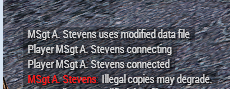
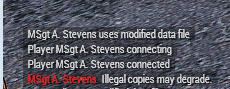
Does anyone know what "Illegal copies may degrade." means when we have people connect to our server, it seems to be happening to most people who connect to our server today, however, they have never had issues in the past and I know they own legal copies of the game itself
steady hawk
What kind of server?
ionic crater
Zeus template with mods
steady hawk
What kind of Mods?
ionic crater
CUP, RHS, ACE, CBA, Plus a heap of custom mods for our community, we have not changed any of our mods for about 4 weeks now and we have only been getting this error today
steady hawk
How/when the error appears?
ionic crater
https://i.gyazo.com/8a54041a9b926190da1fecdfc4087691.png in the chat messages when we log into the template itself
 steady hawk
I neither have experienced with this but could you try verify server machine/game?
 median hawk
ionic crater
CUP, RHS, ACE, CBA, Plus a heap of custom mods for our community, we have not ch...
median hawk
ionic crater
CUP, RHS, ACE, CBA, Plus a heap of custom mods for our community, we have not ch...
You don’t happen to have anything to do with cough cough star warfare’s by any chance if you catch my drift
ionic crater
Nope, none of "those" mods in our mod pack, its all modern realism mods
median hawk
Ok very interesting do you run a dedicated server
https://www.google.com/amp/s/amp.reddit.com/r/arma/comments/68hlvb/illegal_copies_may_degrade_message_when_joining/ I would check this thread and do research on it

reddit
I've been playing the game without a hiccup for the past 6months. But now I get the message "illegal copies may degrade" in whatever server I...
 warm olive
Hey Guys, I just got some doubts which i want you guys to see whether you can clarify me. I own a copy of the game and all DLCs except the GM one. I do run a lot of popular workshop-(only) mods like JSRS, Enhanced Soundscape, movement, RHS mods, NiA,VCom AI etc., which enhances single player experience as i do not play multiplayer. I downloaded nearly 200+ single player scenarios from Steam workshop and all of a sudden I was hit with a BSOD and i was unable to look at the error code as it restarted too fast. My SSD got corrupted (i think) and it failed to get detected in BIOS. I tried restarting, unpluggin the cable and repluggin again, nothing worked. I went to a nearby service station to get it checked and the guy changed the power cable of the SSD and it worked, but the OS was corrupted. I was forced to flash a new OS( i had all my data backed-up on another drive). BSOD happened when i was trying to download a scenario from the workshop and Arma 3 was not even running. I just want to know if Arma 3 is the culprit behind this and can anyone relate to this. Or is it just a rare case of an SSD power cable failure which i find it hard to believe as the SSD is just 6 months old(ADATA SU630 240 GB). Any help, tips, opinions and suggestions on this is greatly appreciated. Thank you so much guys.
P.S. The above-mentioned BSOD was the "SECOND" episode as the "FIRST" BSOD occurred a couple of days before this incident when i was actually in-game in Arma 3 editor. I "Alt-tabbed" the editor and the PC crashed and BSOD occurred and same thing happened, SSD failed to get detected. But at that instance, the SSD was eventually detected after a couple of restarts. I have an internet ongoing issue right now and i cannot download and verify the game by myself. So i just wanted to confirm this with you guys. Thank you
The "200" workshop scenario contents were not downloaded all at once. It is just a cumulative figure. i would have just downloaded may be 4 or five mods weighing just a couple of MBs when i was hit with the second BSOD episode. Arma 3 was not even running at that time contrary to the first instance. I am unable to download the game and check for myself as my internet connection installation is delayed.
ionic crater
median hawk
Ok very interesting do you run a dedicated server
Yes its on a Dedi, I will check out the article, thanks
 toxic bear
Ok, idk if anyone else has had this general issue, but I got it a while back, whenever I go and start a client hosted server, via the host server tab in arma, I set it to internet and enable Upnp, but it doesnt pop up for any of my friends, even when they try connecting through the servers domain/name, note i didnt have this issue when i first played arma, it only started a while ago
shut socket
toxic bear
Ok, idk if anyone else has had this general issue, but I got it a while back, wh...
Once audiocustoms is on dm him about it
He seems to know a lot about that
wise barn
The main reason why people can't connect to private/local hosted sessions is, not having real IPv4.
Many ISPs hand out IPv6 and reserve IPv4 for business customers. The casual customer has to use IPv4 via IPv6 DSlite tunnel which arma can not handle. To verify this, contact your ISP
 lime pond
Hey
I need help
I have a kit box for my unit
I got new kits
so I put them in the sqf file
and it shows me an error
let me send it here
f.e.

same error on all
steady hawk
IDK what your mission/MOD is but just a bad author's bad job
uncut trellis
@warm olive while I'm not an expert, I would say it sounds like there was trouble with the drive and yes using Arma triggered it but the issue was with the drive and quite possibly doing anything that required reading and writing from it would have caused it.
warm olive
Thanks for the reply @uncut trellis . The computer repairs guy changed the power cable for the SSD and the PC is working fine since then. It's been like 10 days. I couldn't install arma 3 and check for myself unfortuantely as i still don't have high bandwidth internet connection. Somehow my installation is getting delayed.
OS is there on the SSD. Will it clash with Arma 3?
uncut trellis
Should not
warm olive
Okay.
What to do if SSD doesn't get detected. Again when Arma 3 is run in it?
Only BIOS will be available at that time
uncut trellis
If it has guarantee left it may need to be swapped
warm olive
Alright sir. I'll see what I can do with it. Thanks so much
 nimble pike
hey guys, what can i do if an enemy has spawned underneath a building. is there a way to kill him or teleport him?
shut socket
You could move him in zeus
nimble pike
since i am relatively new to this how do i open zeus?
shut socket
Y
nimble pike
thanks, for some reason this guy is not coming up in zues as in i cant interact with him
uncut trellis
rather odd.
does it matter that its there tho?
also does it show in map view of zeus
nimble pike
unfortunately yes, i can't continue unless i kill this guy. even teleporting where he is does not work as he seems to be half under the map
wise barn
is the AI spawned before mission start (did you place it in the editor)?
nimble pike
its a resumed LAN multiplayer lobby so i presume its spawned before?
uncut trellis
can you create something next to it that could shoot it?
wise barn
The Ai won't show up in Zeus then
nimble pike
fixed it
placed a truck inside the building and everything blowed up including myself
wise barn
If you read through this, you will find a way on how to interact with preplaced objects in zeus
https://forums.bohemia.net/forums/topic/163919-manipulate-preplaced-objects/
Bohemia Interactive Forums
Is it possible to manipulate objects placed by hand in the editor, but in-game as Zeus? I primarily want to know for the virtual ammo box system. So if I placed an ammo box in the editor, could I move it around as Zeus? Thanks!
nimble pike
thanks for the help
wise barn
👍
 analog bison
Why can't I select these?

it wont let me choose one of those roles, if i disconnects it goes back to the mission before
 heavy crystal
When I look at the server list, everything is on a different version or requires a passcode. But a lot of them work when I join for some reason. Not sure what’s up here.
Could this be due to me launching arma w/o battle eye?
shut socket
Some servers could be using mods
analog bison
analog bison
Why can't I select these?
Does anyone know why this is happening?
 pliant rapids
Does anyone had delays tied to UI events ingame?
When i'm pressing escape midgame/switching tabs in asset browser in EDEN editor, waiting for server etc - everything tied to UI have significant, noticeable 2-3 sec delay before showing menu
Game has this UI delays with and without any mods on completely fresh install and i can't find anything about it in the internet
PC is more than enough to bear A3 - 9700K, 32GB RAM, GTX1080 and NVMe SSD with plenty of free space
And i noticed that my much less performant laptop does not have this delays, everything is blazingly fast as it should be
i noticed this behaviour sometime when i switched my display from 1080/60hz to 1440p/144hz with Adaptive Sync, wonder if this is the reason of this problem
uncut trellis
mods?
pliant rapids
no mods at all
i will record a video when i will be at my PC
 warped token
My in game sound is broken for example my gun sound effects only work for CUP but they are really quite, base game and other things are not working at all another thing in vehicles they make no sound when im in first person but in third person the make sounds
I tried base game and its the same
grim tinsel
warped token
My in game sound is broken for example my gun sound effects only work for CUP bu...
tried verifying game files via steam?
wise barn
Seems more like another issue...
Do you use an USB audio device? Bluetooth / wireless with a dongle?
@Paddy#7838
@warped token
warped token
wise barn
Seems more like another issue...
Do you use an USB audio device? Bluetooth / wir...
Yea I use usb
warped token
grim tinsel
tried verifying game files via steam?
Yes I have
Like I don’t have the problem in any other games only arma
steady hawk
USB Audio device is really hated by Arma 3. Use 3.5s
steady hawk
But Arma 3 had hiccup with it. This issue's really often to see in this topic
 spice spear
Does RHS have a public discord? 🧐
uncut trellis
no
 echo ravine
has anyone ever encountered an issue in multiplayer where vehicle turrets will stop syncing between players? so like, a turret will always stay facing one direction for everyone while the person in that turret is moving it around
I've seen it happen with vehicles from a lot of different mods and even with the GM tanks, I was wondering if anyone ever encountered this
it seems like it might be related to some kind of desync but I have no idea since it happens kinda rarely so it's hard to track it down
wise barn
i suspect desync
shut socket
Might just be the turret/turret mod
echo ravine
like I said I've seen it happen with a lot of different vehicles from a lot of different mods
one of those being a tank from GM
it might happen with vanilla stuff but I can't tell because I never play with vanilla stuff
uncut trellis
if you can repro it with vanilla, then that would make more solid case for bugtracker
uncut trellis
no?
shut socket
Not really an arma thing, might want to check your hardware
uncut trellis
arma uses both cpu and gpu so it is normal for it to also need power to run
and hes gone?
fringe salmon
Help

 jade shoal
fringe salmon
Help
jade shoal
fringe salmon
Help
Do you have a AMD GPU?
my friend has a AMD GPU and gets the same issue all the time, we have not been able to fix it
uncut trellis
are your drivers up to date?
fringe salmon
uncut trellis
are your drivers up to date?
Wich drivers
fringe salmon
The launcher just say Dead XD
uncut trellis
have you verified your game installation from steam library?
fringe salmon
Means?
jade shoal
fringe salmon
Wich drivers
You can use the GeForce Experience application made by Nvidia to update your drivers:
NVIDIA
NVIDIA GeForce Experience Auto Update Drivers and Optimize Game Settings
fringe salmon
I bought it of steam
uncut trellis
yes but perhaps some files did not download properly
fringe salmon
jade shoal
You can use the GeForce Experience application made by Nvidia to update your dri...
Already installed but thank you ^^
jade shoal
k
uncut trellis
google "verify game files on steam"
uncut trellis
 uncut trellis
:L
fringe salmon
Well that will take some time
uncut trellis
well its the first thing that needs to be checked when something does not work
also make sure you dont have any custom launch parameters set up in the launcher
fringe salmon
Alright I'll be back later
wise barn
@fringe salmon
_DEVICE_REMOVED is a win10 thing...
previous versions (7/8/8.1) where not affected by this. drivers / cards sometimes have micro dropouts but usually fix themselves within a short time, but MS reduced the time threshold for detecting this as an error with win10 to a ridiculous small amount.
it can be changed in the registry, but not recommended if you get this error once in a while
 glossy matrix
can someone help me out, so i installed arma 3 on Steam, and the game is installed, it is physicaly in folders etc... tho Steam still ask me to "install it" and aparently cuz of that my game wont update. What to do ?

is there a way to force update or manual update?
uncut trellis
have you tried just restarting your computer
uncut trellis
maybe your steam install is bugged?
shut socket
It does that for me too
fringe salmon
wise barn
<@456226577798135808>
``_DEVICE_REMOVED`` is a win10 thing...
previous versions...
I was getting it as soon as I joined any server or the editor. Even when I was playing "Old man" as soon as I could start playing
shut socket
I just re-install it overnight
fringe salmon
glossy matrix
can someone help me out, so i installed arma 3 on Steam, and the game is install...
Oy yo got 15 Msgs
wise barn
fringe salmon
I was getting it as soon as I joined any server or the editor. Even when I was p...
as i said, it's a windows issue
shut socket
Idk, it takes the least brain power to I do it
fringe salmon
wise barn
as i said, it's a windows issue
Yea so not in my way to fix it cuz me and windows = Bad
glossy matrix
with my current internet speed... it would take weeks to dowload whole thing and mods
wise barn
@fringe salmon
you might be able to find useful information here:
https://www.nvidia.com/en-us/geforce/forums/geforce-experience/14/150018/dxgi-error-device-removed/
before you edit anything, create a restore point and backup valuable data first
fringe salmon
I always create a restore point before installing or changing anything that is not from steam or official websites
But I ll try
fringe salmon
Yup
glossy matrix
so i decided to reinstall arma 3.. tho when i deleted and resterted the pc.. i only have 7gb of free space.. even workshop mods were just like 40gb.. so dafq happend ?
fringe salmon
i think it was a steam bug or glitch, dunno really
but next time it happens, make sure this option is last option and nothing worked "reinstall arma 3", do some research, etc.. . in trying to figure it out without reinstalling the arma 3
shut socket
Go into Program files (64x/86x) steam>steamapps>common> And delete arma 3
glossy matrix
yep i did research
and nothing helped
google told me to fix library, change it, relocate game and add new steam library but steam didnt allowed me cuz it is already created on that disc (i have only 1 disc), do this, do that. couldnt play arma 3 cuz it wouldnt update... so im forced to try and install it again. Maybe it will work this time.
and if steam wont recognize game again then guees i will have to reinstall it each patch..
Wish they could add option to patch from acctual Arma 3 launcher and not that problematic steam.
 hallow kelp
Hello, I run a server and since the new update 2.04 I went to update it using SteamCMD and it says it's up to date but when I launch it, it's stuck on 2.02. Is there a fix for this or did I do something wrong?
 drifting imp
anybody able to look at a RPT to help me diagnose an issue
seems like if its not one thing its another and just cant get missions to work on my server anymore
steady hawk
At least you should describe your issue
drifting imp
im not even sure anymore its either between i keep getting "118 delayed functions running" if thats the issue but i could atleast attempt to load into the sever before
but now my server crashes on start up with a completely remade mission with barely anymods
uncut trellis
first stop is to test without any mods
as mods are always unstable variable in testing
drifting imp
right it works fine with ought and it worked with my previous mod list from yesterday before i condensed it, but anticipating it would have a issue due to removing mods. so i recreated the mission with the new mod list and now its having issues
shut socket
Then its a mod problem, you will need to find which mod is causing it
drifting imp
is there a easy way to id the issue or is it all just brute forceing it till you figure it out?
shut socket
Brute force
drifting imp
that makes me sad
god i wish it could just be simple lol
or atleast not as time consuming
shut socket
Arma rarely is
drifting imp
thats unfortunate well i guess ill get to it then
 alpine jackal
hallow kelp
Hello, I run a server and since the new update 2.04 I went to update it using St...
alpine jackal
hallow kelp
Hello, I run a server and since the new update 2.04 I went to update it using St...
having the same issue. anyone?
client is 2.04 but server is stuck at 2.02, steamcmd saying "already up to date"
quaint jewel
are you on a custom branch?
alpine jackal
it's the "-beta" thing but i think that is standard for a dedicated server(?)
at least the wiki seems to say so
quaint jewel
what beta thing
alpine jackal
sec
quaint jewel
no beta is not standard/required
quaint jewel
🤔
alpine jackal
the update script also contained this beta thing by default, so it seems right to me
i think without beta it downloads the client data as well, so beta is for dedicated?
quaint jewel
-beta public would be explicit public branch I guess
no
233780 is dedicated
with or without beta
you can try setting validate
app_update 233780 validate
alpine jackal
i'll try that
alpine jackal
it worked, the server is now on 2.04 and joinable, thank you.
and they might wanna change the wiki stuff if the "-beta" part shouldn't be in there...
shut socket
Might want to talk to Lou Montana
 dense topaz
Anyone know how to fix arma 3 using very high power usage on task manger and that makes my game lag?
pine kite
alpine jackal
and they might wanna change the wiki stuff if the "-beta" part shouldn't be in t...
-beta is needed to get a specific legacy version, or the profiling version: like SET A3serverBRANCH="233780 -beta legacy -betapassword Arma3Legacy196" or SET A3serverBRANCH="233780 -beta profiling -betapassword CautionSpecialProfilingAndTestingBranchArma3"
 obsidian nebula
I need some help. Everytime I try to export a map mission, it only doesn't export a pbo. If I open the file, the only thing in it is a mission.sqm
 flat hollow
bruv im having this problem with an banana courser
idk why
its making my operating dreadful
steady hawk

grim tinsel
obsidian nebula
I need some help. Everytime I try to export a map mission, it only doesn't expor...
the exported pbo should in your arma 3 game files -> mpmissions
fringe salmon
Can someone help me? i was a zeus in a server and my game just closed and i had a messege about arma closing by itself now i can't join public servers only some work like 2 - 3 servers i was able to join
 brave hawk
try closing Arma, check Steam data cache, and retry connecting
fringe salmon
how
 inland bridge

LetMeGoogleThat.com
For all those people that find it more convenient to bother you with their question than to google it for themselves.
fringe salmon
grim tinsel
do you... not know how to use google?
but what do i searche
grim tinsel
grim tinsel
did you try verifying game files?
^
fringe salmon
my english sucks now aaaa
grim tinsel
without the did you try
fringe salmon
holy shit
grim tinsel
and with a steam at the back
fringe salmon
that is epic
inland bridge
Already posted the link Lou
fringe salmon
@grim tinsel I dunno if it worked but i can't join servers where there are no players
the ones with players i can join
grim tinsel
inland bridge
fringe salmon
What do i do
inland bridge
I don't know what do you mean you cannot join
pictures, info bud
that's what we gonna need
fringe salmon
the loading screen
 inland bridge
It's either loading with patience
inland bridge
what server anyway
fringe salmon
zeus servers
same work some dont
also i tried to join like warlord it wont let me
i can only join to ones with players
@inland bridge
inland bridge
Any mods?
brave hawk
tried restarting the PC itself, too?
fringe salmon
inland bridge
Any mods?
No
fringe salmon
brave hawk
tried restarting the PC itself, too?
No only arma did
elder compass
OK so I have made a custom FOB and encircled it with A ellipse (A) and set CSAT to global with ALiVE and NATO to ellipse (A) with ALiVE and blacklisted CSAT from ellipse (A) with ALiVE but NATO AI are not occupying the FOB I checked in the ALiVE orbatron and the faction I used for NATO is supported any help?
 cyan plover
Same issue here server is on 2.02 my pc updated to 2.04 and does not work i have had to set my pc as legacy in beta to get it to work.
@alpine jackal same here
elder compass
how do you set it to legacy?
I don't see it in dev branch
NVM I figured it out
Arma3Legacy202
cyan plover
Yup i want to know where @alpine jackal found the steam cmd file on the server
elder compass
IDK honestly
Oops not talking to me LOL
Dwerkjem and derkevevin are very similar
cyan plover
yep
 peak zinc
does anyone knows a fast way to debug why a mission of mine suddenly has random lag spikes ever 2-3 seconds? I tested the map without my mission (chernarus_summer from cup) and no issues. It must be my mission then. I wonder what could cause this, maybe a script or something else?
alpine jackal
cyan plover
Same issue here server is on 2.02 my pc updated to 2.04 and does not work i hav...
i dropped the "-beta" part and just did app_update 233780 validate
if i understood you right and you needed the beta for something, i don't really know what to do.
shut socket
peak zinc
does anyone knows a fast way to debug why a mission of mine suddenly has random ...
Debugging is never fast. Try removing some mods, add/or disable scripts. It could also be the map
alpine jackal
cyan plover
Yup i want to know where <@164879138845360128> found the steam cmd file on the s...
you mean the log file? it should be in your server's profile folder. i set my profile path manually and don't know what the default is. but it should be .rpt files, i just renamed to txt or it wouldn't let me upload.
peak zinc
shut socket
Debugging is never fast. Try removing some mods, add/or disable scripts. It coul...
Thanks for your reply.
the map itself isn't the issue. Tested that on it empty (without my mission or anything added except one vehicle). Mods also don't seem the issue as with them on another map I have zero issues. So it must be something with my mission that causes this behaviour.
Probably I will debug that later.
cyan plover
alpine jackal
you mean the log file? it should be in your server's profile folder. i set my pr...
The server provider sorted it out he forced the upgrade
 loud hemlock
Server isnt showing up in server list?
alpine jackal
loud hemlock
Server isnt showing up in server list?
is this the first time you start running the server, or was it showing up fine before?
loud hemlock
first time
alpine jackal
is it a rented server, or your own?
loud hemlock
rented
alpine jackal
did they setup the commandline, or did you do it?
loud hemlock
i did
alpine jackal
hmm not sure what the connect ip part does. but isn't that a LAN ip?
loud hemlock
i dont think so, i dont have control of that part of the command line anyweays
alpine jackal
ah i see. well i don't know much about rented servers, if it were your own i would have said check the ports, but they probably have that covered ^^
alpine jackal
also there was an issue with servers not updating to the latest version, but looking at the log it seems like yours is already at 2.04 🤔

 static wyvern
So I quit Arma 3 and it crashed my computer so bad a blue screen didn't even come up. Just the last noise I heard looped for about 20 minutes before I restarted
shut socket
static wyvern
So I quit Arma 3 and it crashed my computer so bad a blue screen didn't even com...
Sometimes you need to kill it through task manager
shut socket
warm marsh
I have that too, I need to wait a bit for stuff to show up
warm marsh
shut socket
I have that too, I need to wait a bit for stuff to show up
So how long do I wait
shut socket
Like a minute or 2
warm marsh
shut socket
Like a minute or 2
Still doesnt work
static wyvern
shut socket
Sometimes you need to kill it through task manager
Task manager wouldn't open, all i got was a monitor full of black and none of my inputs were being registered
my computer fucking crashed, not the game
shut socket
So, its a your computer problem?
static wyvern
no, because no other game has done this to my computer
 limpid karma
guys can't speak from von
microphone works normaly in discor or teampseak
but in arma 3 players cant hear me
i am using usb type headset
uncut trellis
there are different communications channels in game, are you and the others on same channel?
and is your headset setup as default audio device
 zinc prawn
Hey guys I’m still having trouble with people hearing me in game not it shows I am so idk if people are ignoring me or if my mic isn’t working
steady hawk
^ this guy doesn't have 3.5 but USB
zinc prawn
Also it worked fine with my blue snowball which is a usb mic
steady hawk
What worked fine
steady hawk
Then use it?
zinc prawn
i dont have it
steady hawk
???
zinc prawn
what do u mean ??? i dont have it
steady hawk
The other mic you had but you don't have it???
zinc prawn
yes i dont have the old mic
steady hawk
Had and have, yeah...
zinc prawn
i dont have it. is right
steady hawk
¯_(ツ)_/¯
zinc prawn
bruh what do u mean
steady hawk
“The mic I have got an issue, and the one I had before never got an issue.” The answer is one and only: use the other mic
zinc prawn
yes ik but i dont have the other mic like i stated before
steady hawk
If you don't have, buy one. Simple isn't it
steady hawk
¯_(ツ)_/¯
steady hawk
Guess so.
zinc prawn
telling me to buy the mic again isnt gonna help
steady hawk
For real, Arma 3 had some hiccup with USB Audio devices. The best way to avoid it is just use 3.5
zinc prawn
ok well u could have said that insted of just saying. "If you don't have, buy one. Simple isn't it"
so ig im just not gonna play it and if i do without vc
steady hawk
I've recommended to use 3.5 before
zinc prawn
yes and i said i dont have a 3.5 mic
so u could have said y to use one instead of saying go buy a new mic for 1 single game
steady hawk
That's what I should admit, but that's how it is, somehow. Blame Windows or Bohemia or whoever, IIRC a Windows update corrupts it heard so
zinc prawn
ok thanks im just noy gonna play the game ig
 hot cargo
is there a reason why my ai teammates don't shoot enemies? they just stare at them
steady hawk
What situation?
hot cargo
Combat red mode and they just stare at the enemy. They'll only shoot unless I tell them to engage a specific target
And when they kill the target, they stop shooting, even though there are other hostiles
steady hawk
Which sides? BLUFOR? OPFOR? Independent?
hot cargo
BLUEFOR vs OPFOR. I'm using a modded OPFOR (Taliban insurgents) if that makes a difference.
The OPFOR shoot the blufor however
steady hawk
Make sure it's not happening in vanilla, empty mission but some units
hot cargo
Okay I'll test and report back
hot cargo
yeah so i used vanilla units and they were working normally
does that mean the faction mod I used is broken?
steady hawk
Highly doubt a faction would affect AIs. What Mods do you have?
hot cargo
a bunch of mods lol. But I tested with Community Factions Project by AuburnAlumni
i tested with vanilla BLUFOR and modded BLUFOR vs. modded OPFOR as well. Same problem
steady hawk
Why you ask?
fringe salmon
Because i have the same thing and i know how to fix this
steady hawk
Never heard that than 3.5
hot cargo
okay its not the modded factions i think. Whenever I give them a loadout in ACE arsenal, they don't fire unless told to.
fringe salmon
Btw there is a Youtuber trying to be mayor of london
he has 5%
now maybe even more
grim tinsel
Sounds like something for #offtopic_arma 
shut socket
What is the issue
 thick stirrup
Getting this ever since the recent gameupdate. Game has bee nfine for over a year before this. Any help appreciated

 grim tinsel
thick stirrup
Getting this ever since the recent gameupdate. Game has bee nfine for over a yea...
grim tinsel
thick stirrup
Getting this ever since the recent gameupdate. Game has bee nfine for over a yea...
Try verifying game files via steam
thick stirrup
👍 Will try, not hoping for much, I never have much luck with verify
uncut trellis
well its the stuff you added.
nothing more can really be said unfortunately
profiling branch or dev branch diagnostics exe or some such had a thing to see how much performance different things like scripts or object draw etc takes
and I did not see your earlier question. so no need to get snippy.
shut socket
More then 100+ players ina arma will cause problems
 slow dawn
My spacebar isn’t working in arma3
steady hawk
Check the keybinds
 steady hawk
F12 is your friend tho. Try to use Enter
uncut trellis
it plays locked sound
steady hawk
Is it?
uncut trellis
in the video
thu-du
at least sounds like it to me
@slow dawn is this in campaign? in multiplayer or what
uncut trellis
are you supposed to get into the vehicle?
steady hawk
Never heard that feature. I thought lock feature just hides action
uncut trellis
but is it your task?
slow dawn
And reset game and pc too
steady hawk
Is that a yes or no?
uncut trellis
have you tried in editor
steady hawk
After you seek the AAFs?
steady hawk
Not hard
uncut trellis
editor - select map (VR is fastest to load)
on right side panel find cars on the list
select one from the list, drag it to the view
and assuming its not empty (yellow marker} hit preview at the bottom
 vestal patrol
when I went to the arma 2 website, it asked me to verify my age, and I accidentally clicked "confirm" before putting in my age, and the default date was set to today so the website believes that I am 0 years old. now I am permanently blocked from viewing the website LMAO
 steady hawk
Clear the cookie
vestal patrol
how
steady hawk
Google knows
frank apex
I can't believe your teaching this 0 year old how to bypass the age gate. tut-tut-tut...
grim tinsel

near hollow
does anyone know how to fix this? where it just sticks on "Starting" and im forced to restart steam every time i subscribe to a mod or it updates.

ive tried clearing download cache but yea **** steam is great ****
shut socket
Ask steam support not arma people
near hollow
well i thought someone else may have encountered the issue since... It only happens with arma stuff not any other game.
but thanks for your input
 obsidian summit
Im running into an issue with a self hosted dedicated server
it was working yesterday, i havent changed anything but today the game just loops on the loading screen and the rpt keeps spitting this error
Server error: Player without identity J. "Sparky" Dusk (id ******)
with the*s being my steamID
well, so it turns out it works, it just took a solid 60 seconds to put me in the slotting screen...
night eagle
My Arma uninstalled itself?
It's in my files,

And I just launched it via my files
But steam is telling me to install it.
 wise barn
steam hickup. are the files still in the folders? if so, reinstall it at the exact same location. steam will do a file check and verification and rebuild the game to the library
 shut socket
They might be downloaded, I know I had that and they were downloaded and they worked as if they were downloaded, but they had the downloading symbol
night eagle
No, they're downloading bit by bit.
 shut socket
Dang
wise barn
i thing it's just doing an error check of the existing data and validates it. it might look like a download on steam and the launcher
night eagle
Hm, alright. This happened to a friend recently and he had to reinstall everything so I thought I'd have to as well.
pine kite
Check your network traffic in task manager. Then you'll see if it is actually downloading. Doesn't really mater though, it needs to work through that to make sure the game can play again. Nothing the BI team can do anything about it
fringe salmon
dedicated server won't start up nothing has been changed here is server rpt
https://pastebin.com/MC0epfiC
Pastebin
Pastebin.com is the number one paste tool since 2002. Pastebin is a website where you can store text online for a set period of time.
wise barn
@fringe salmon
no idea what kind of log that is, but that's not an RPT file
fringe salmon
thats all there is in the rpt
wise barn
anyway, this is your issue
ErrorMessage: Cannot open file 'addons\missions_f_epa'
verify/repair your server installation
fringe salmon
yea i think thats the right way to go but unfortunately with nitrado i think that means wiping everything
wise barn
open a support ticket
they should be able to repair the server installation without a wipe
fringe salmon
awesome, thanks again audio
night eagle
@wise barn Hey! So, I'm sorry for pinging you but it's about my Arma 3 uninstalling.
I had to reinstall my mods.

BUT
I had 300gbs free before WITH the mods installed but now it's taken?

Did I like install me mods twice? Cause it's really weird how I went from 300gbs to 30gbs.
wise barn
maybe. idk.
you need to check your folders
night eagle
I don't even know where to begin with that.
night eagle
Give me 1 sec.

Yeah then,
If I unsubscribe these won't work sadly.

Kinda need em for my unit.
wise barn
search for this file. it should appear only one time in one folder
cba_settings.sqf
if it appears more than that, you are most likely to have duplicate mods. this way you can find the folder locations
 night eagle
Alright, thanks.
I'll give an update in a sec.
@wise barn Before I did that, magically my disk has gone back down?
 wise barn
oh, so the update wasn't fully done when you shared your first pic?
wise barn
don't worry:
night eagle
Let me use the cba_settings.sqf rq.
wise barn
steam is downloading a compressed file and extracts it. once the extraction is done, it deletes the compressed file
wise barn
meaning: always have double the required space available


 wise barn
one is the original steam storage folder (the one with a number), and the !Workshop folder is basically just a link to the number folder
night eagle
Alright.
peak zinc
Mods: A3;curator;kart;heli;mark;expansion;jets;argo;orange;tacops;tank;enoch;aow;@Chernarus_Isles;@cupterrainsmap;@cupterrainscore;@heloturb;@airpturb;@dynasound2;@ehsound;@acemod;@acemod-ext;@CBA_A3;@advrope;@AFRF_DEV;@USAF_DEV;@GREF_DEV;@SAF_DEV
Version 2.05.147535
Fault time: 2021/05/02 05:45:42
Fault address:  AE2F3224 00:AE2F3224 Unknown module
file:     Madley
world:    chernarus_summer
Prev. code bytes: 00 00 41 8B 08 89 08 48 83 C0 04 41 0F B6 52 FE
Fault code bytes: BF 00 01 00 00 83 E2 03 0F 84 7E F2 FF FF 49 8B
=======================================================
note: Minidump has been generated into the file C:\Users\Aebian\AppData\Local\Arma 3\arma3_x64_2021-05-01_14-58-34.mdmp
``` interesting, my Arma suddenly froze while moving in 3DEN around and died. I wonder if the Fault address just means it didn't know the name of the module when Arma crashed or if a module got called that is missingah, the error msg begins earlier with
Exception code: C0000005 ACCESS_VIOLATION at AE2F3224``` interestingDoes anyone know why we get that player without identity spam in the rpt
Ita causing a lot of our group members a long wait to get into the lobby sometimes over 1 minute I know it doesn't seem like much but looking at black screen for 1 minute feels like 1 hour lol
I wonder if the devs can do anything if the game detects that error to at least just make it only spam once or mute itself lol