#arma3_troubleshooting
1 messages · Page 133 of 1
 sturdy hound
 steady hawk
Arma 3 uses Windows' default audio device. Make sure your mic is
 fringe salmon
Okay so heres the issue. My brother PC is a Dell laptop that meets the minimum spec for Arma 3 exactly. The only difference is it has 8GB of RAM and not 4. Its an intel HD 4000 and an i3-3110m 2.4ghz.
The game keeps crashing at random points
And shows an error saying "device removed"
 wise barn
win10 issue
explanation:
fringe salmon
So.... TL;DR = Use windows 7?
I did eliminate this issue in the past by using an older driver (Version 15 instead of 24) but I really could use this working on windows ten as its my college laptop and I need the features - but my brother also uses it to play arma 3 with me
wise barn
with win10 the threshold for outputing errors for driver micro dropouts was reduced to an insane minimum. so, as soon as the GPU / driver has a small hickup (all prior win versions ignored it and let it unhang itself), the system crashes.
there are some tuts on google on how to edit the registry entries to a more suitable level
fringe salmon
So in theory, increase the error threshold = possible fix?
fringe salmon
Editing registry can have serious effects on the pc, I get it aha
wise barn
this means editing the redistry which can cause extreme issues if not done right
create a restore point before doing that
fringe salmon
Say I then take the HDD with the edited registry and plug it into another laptop with a different card (which I do daily), will this reset the registry
wise barn
no
fringe salmon
Okay so I can still swap between PCs without issues... Good.
Is there a link you can send me to one of those sites?
 sage meadow
Trying to change my resolution to 16:9 wide but it is stuck in Auto stretch and keeps reverting back. I've deleted the cfg file twice, as well as manually entered the resolution in the cfg. Reinstalled the game and nothing. Any suggestions?
wise barn
what's your screen resolution?
sage meadow
2560X1440
wise barn
use windowed mode and set the res to this
sage meadow
It just reverts back to auto stretch.
wise barn
which is 16:9
 graceful pawn
Hey guys, trying to setup an Arma 3 dedicated server on Azure running on Ubuntu 18 LTS. The server is not showing up or allowing direct connect from Arma clients.
Does the steam user that is running the dedicated server require an Arma purchase, or should I debug elsewhere?
wise barn
ask in #server_linux
graceful pawn
thank you
wise barn
👍
 ornate narwhal
Can someone tell me why my friends can't join me on Arma
Im doing Internet, I have set my port forward
 uncut oyster
@ornate narwhal Why dont you try to play on LAN using Hamachi? (not sure is this forbidden)
 scenic gate

 grim tinsel
Make sure that you have a unit that is designated as player and not just playable
scenic gate
i understand that i have 1 set as player thats just them as a group as i said its for a training map and for some reason my last 5 attempts of maps have been like this
 grim tinsel
Hm not sure, sorry
scenic gate
thats fine

thats some more backstory i spawn like this^
ignore the bottom left errors

 fallen hound
Editing the FoV in config doesn't seem to edit my FOV in game at all
Any ideas how do fix?
 meager sedge
Hello evry 1 so it seems random but my game runs fine till randomly it frezze (and i need to restart to play again)
 shut socket
scenic gate
ignore the bottom left errors
shut socket
scenic gate
ignore the bottom left errors
If you have a problem you shouldn't be ignoring errors...
 fleet tree
i cant even play arma. when it opens in goes minimized and i cant see it and if i try to go into the application it goes to black for a few seconds then goes back to being minimized
alt+enter dont fix it
shut socket
Just wait, it might take a minute
fleet tree
ok
scenic gate
shut socket
If you have a problem you shouldn't be ignoring errors...
There just mod errors i get them alot the game runs fine
fringe salmon
i want to play a mission with my friends but one of my friends has this problem
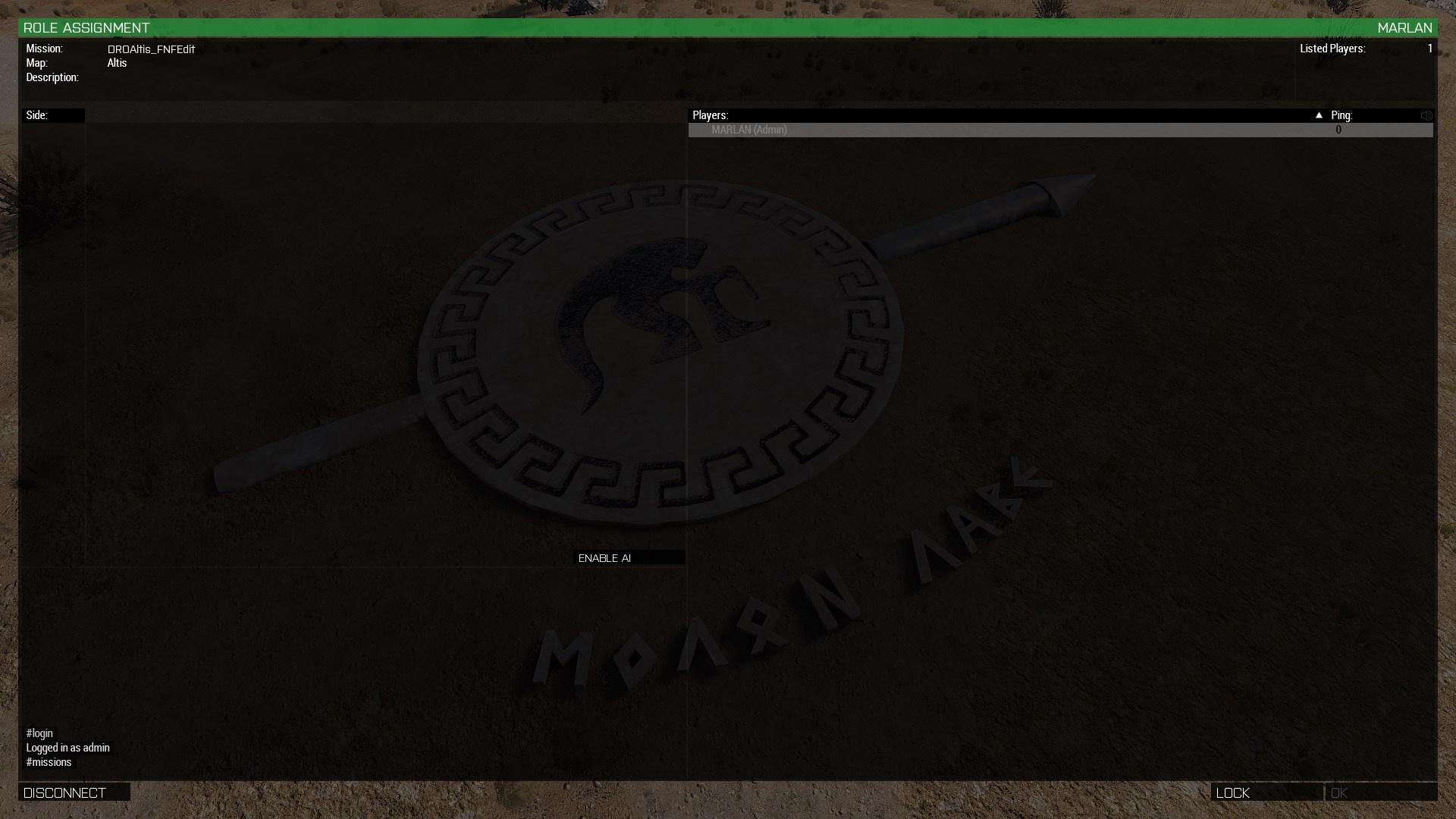
whenever he connects he joins but then gets this screen:

and cant select any roles. after pressing on ok it loads for a while and then says receiving data
shut socket
Does it happen with every mission
wise barn
@fringe salmon
launch a server with a vanilla mission for testing
fringe salmon
ok im gonna start a vanilla mission and see if it happens with everz mission
it still does the same thing
he cant select any roles
he for some reason has 0 ping same as me
ok well the issues is between us two
i tried connecting to him and it didnt work but my friend could connect to him
fringe salmon
whenever i try connecting to my friend it doesnt work, but when he connects to me it works
 sullen canopy
can any1 help im having issues with mod keys when launching my server. Any1 ??
wise barn
copy the keys from the mod's keys folder to your arma server keys folder
 jovial pivot
I am having an issue in Eden editor multiplayer. I recently upgraded my pc and everything worked fine before I upgraded. I am having an issue were on a new empty map with 1 unit down I get 1 FPS in multiplayer mode. This did not used to be the case before and I dont have a FPS issue when I use Eden editor singleplayer. Any help would be appreciated.
grim tinsel
jovial pivot
I am having an issue in Eden editor multiplayer. I recently upgraded my pc and e...
Do you mean when you launch an eden editor multiplayer preview?
jovial pivot
Yeah
The bottom right button that can either say play in singleplayer or play in multiplayer.
fringe salmon
@tacit temple check that either both the server and the connecting players are running battleye or they both aren’t and if it is enabled check to be sure everything is up to date
Is it your own physical box or rented? If it’s rented you can probably contact support for more information.
 tacit temple
is the newest error

rented dedicated. i sorted the battleeye issue now i get this
key is in the folder
run a bunch of dayz servers. first run at an arma 3 server, and i can honestly say, i miss omegamanager haha
when we load in, it doesnt tell us it requires exilemod either
fringe salmon
Can you give an HTML of the mods you’re using?
fringe salmon
The error says you need the keys for exile. Is it a modified version?
grim tinsel
did you take the keys from the exile mod folder? @tacit temple
tacit temple
not that im aware of. downloaded from workshop
fringe salmon
Did the mod get installed on the server?
tacit temple
as far as i know
the folder is on the server, mod line in start.bat
key is in the folder
tacit temple
grim tinsel
did you take the keys from the exile mod folder? <@!414169679385460737>
key is not included in exile mod folder
grim tinsel
Huh
Might be good to ask on the exile discord then, iirc its linked in #channel_invites_list
fringe salmon
Keys should be in the folder called keys, download from an official source and check for the folder
tacit temple
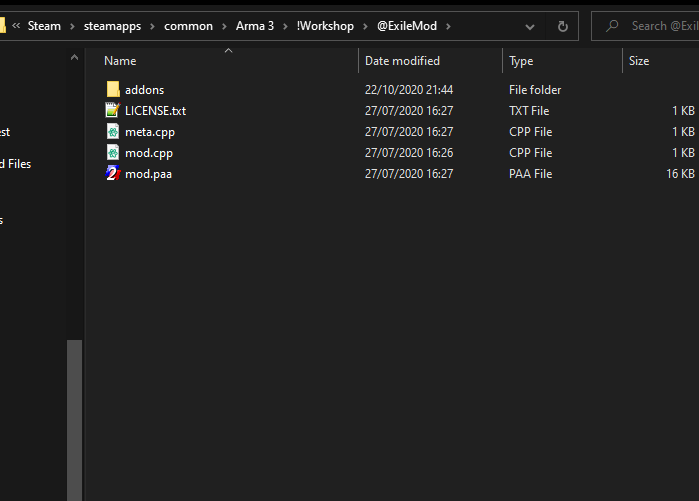
no keys folder included
but i do have a key downloaded from server files
it is in the keys folder

yup, key that i had was wrong....downloaded the new key from exile discord and it fixed it, not sure why they havent included it in the server download files
just cant get it to show up in the launchers. but i can direct connect
 buoyant heron
I have a friend getting "0xC0000005 - ACCESS_VIOLATION". He tried all the fixes in the wiki, but none worked. So far, he can some times load into a server, but when he spawns into the map his game crashes. Other times, he spawns, moves around a little, and then crashes. When he uses a gun, it usually makes no sound
 potent eagle
Can someone help me?
shut socket
buoyant heron
I have a friend getting "0xC0000005 - ACCESS_VIOLATION". He tried all the fixes ...
Ask him to validate his files. I had that before on KP liberation. Found out it was because of lag that crashed my arma.
buoyant heron
shut socket
Ask him to validate his files. I had that before on KP liberation. Found out it ...
alright, will do. He told me he did so a couple of times before. He recently re-installed the game, but kept having the same issue
shut socket
I had to set my settings to the physical lowest
buoyant heron
👌
shut socket
If you are on a custom map repair that mod
buoyant heron
it's on Takistan
shut socket
They you would want repair either cup or 3CBA
buoyant heron
alright
@shut socket lmao, verifying files after reinstalling the game seems to have worked. ty
shut socket
np
grim tinsel
potent eagle
Can someone help me?
You'll have to share some more info about your issue
(also pls no ping as im going to sleep kthxbye)
potent eagle
It says no DLL found
wise barn
what says DLL not found?
shut socket
It
tacit temple
how would one WIPE an arma 3 server?
 weary sky
Git Gut!
Unless you want something less legal, in that case 🔨
potent eagle
wise barn
_what_ says DLL not found?
I was thinking of a issue im working out with one of my other games, my apologies. Heres whats going on w/ Arma 3
 wise barn
shot in the dark that helped several in the past: reinstall vcredist for 2013
 potent eagle
wise barn
shot in the dark that helped several in the past: reinstall vcredist for 2013
potent eagle
wise barn
shot in the dark that helped several in the past: reinstall vcredist for 2013
Where do i find vcredist?
 pine kite
Microsoft Visual C Redistrubutable 2013 : https://www.microsoft.com/en-us/download/details.aspx?id=40784

Microsoft Download Center
The Visual C++ Redistributable Packages install run-time components that are required to run C++ applications that are built by using Visual Studio 2013. For an updated version of these redistributable packages, see KB 3138367.
potent eagle
pine kite
Microsoft Visual C Redistrubutable 2013 : https://www.microsoft.com/en-us/downlo...
Got a new issue D:
 grim tinsel
potent eagle
Got a new issue D:
grim tinsel
potent eagle
Got a new issue D:
What were you doing when the game crashed?
potent eagle
grim tinsel
What were you doing when the game crashed?
Launching it
grim tinsel
Hm
potent eagle
File:///C:/Users/frank/OneDrive/Desktop/Arma%203%20Preset%20mods%20list.html my mods list if it helps at all
grim tinsel
potent eagle
File:///C:/Users/frank/OneDrive/Desktop/Arma%203%20Preset%20mods%20list.html my ...
 we cant access files on your computer, you'll have to upload it here
Also can you try replicating the issue without any mods loaded?
grim tinsel
potent eagle
^
Ah, if it works fine without any mods try loading only half of your mods to see if that breaks it
if it doesnt try the other half
then if one of the halves breaks it split that down to halves again, and so on until you find the mod causing the problem
and if you can replicate the issue with just that mod loaded please
- try repairing the mod in the launcher (right click)
if that doesnt fix the error, please do head to that mods steam workshop page and ask for help thre (if there are no other support places listed like discord/forum/...)
potent eagle
I tried launching it and making a sandwich and when i came back it was up, thanks for your help!
grim tinsel

 light vault
anyone know what cause such low framerate on the livonia map?
grim tinsel
light vault
anyone know what cause such low framerate on the livonia map?
could be caused by a lot of stuff
light vault
oh so it like depends on your setup?
grim tinsel
ye depends on a bunch of factors
 zinc gulch
 frosty pivot
could i get some help?
so basically i click play with mods and stuff and it starts launching the game and then i says the game closed yet it never launched
 steady hawk
Can you launch in vanilla?
frosty pivot
steady hawk
Can you launch in vanilla?
nope
wise barn
frosty pivot
wise barn
https://community.bistudio.com/wiki/Arma_3:_Unusual_process_exit#0x00000035_-_ER...
thank that helped me out
 plush plume
Hello, i've been playing arma 3 for a little bit but I cant seem to get solid frames. As you can see in this screenshot earlier i took my right and my left monitor show that my load/usage is fine and temps are low but my fps just keeps dipping and in cities it goes below 40 and sometimes 30 fps, is there a fix?
 wise barn
no fix, expected behaviour
plush plume
oh its not just me?
wise barn
nope
wise barn
this has less to do with optimisation rather than how the engine was build back in the days
plush plume
Okay thanks thats a relief i thought my computer was bugging out or something
wise barn
there is also nothing to compare with, since this is the only public available engine that can do what arma does
plush plume
well the game is lots of fun so ill continue playing even though it gets a bit laggy here and there
wise barn
are you running the game from HDD or SSD?
plush plume
SSD
wise barn
good
plush plume
ill pray for the people running on hdd
wise barn
the FPS are similar, but they experience way more micro stuttering due to longer loading timers for texture data
steady hawk
Also, 30 is enough to play since you won't perform 360 quickscope
 floral fern
have a little clue as to where to start but anyone know what this would be
 weary sky
A missing or broken mod...
steady hawk
Enable a MOD that does contains NE_hh60g
floral fern
might be a missing mod
steady hawk
Indeed. That's what we both said
floral fern
Yeah i was agreeing with you. had the mod typed up in the mods.txt but didn’t have it loaded in the server so it so it was trying to load a mod it didn’t have
fringe salmon
would anyone happen to know how I remove addons from a scenario? I accidentally loaded my scenario up and saved it with mods on that I didn't want and now I'm afraid people are gonna have to download mods in order to play my scenario.
grim tinsel
fringe salmon
would anyone happen to know how I remove addons from a scenario? I accidentally ...
you can manually remove the dependencies from the mission.sqm file
fringe salmon
grim tinsel
you can manually remove the dependencies from the mission.sqm file
If I go into the sqm and just delete the text from the sqm it will remove it?
or the text on the mods?
grim tinsel
uh try searching in this discord for "dependencies", that should bring you to an earlier instance of someone explaining it
fringe salmon
ok
all I'm seeing is about people trying to get the mods back into their mission.
oh well
I'll try deleting the specific text and hope my pc doesn't explode or smth
fringe salmon
hmmm
ok
Gonna be honest
I've never really worked with files this way before and have never made a backup in my life
so If I just copy and paste the whole file would that be the same thing as a backup? lol
 static wyvern
Yeah, i do the same with KSP. Just make sure you know how to put it back when you're done
grim tinsel
fringe salmon
so If I just copy and paste the whole file would that be the same thing as a bac...
yeah just copy the file into another location (for example copy the entire mission folder onto your desktop)
 stoic stump
anyone else getting lots of issues on units.arma.com?
it's REALLY SLOW
can't even manage applications
just gives an error
and it takes a full minute to load into: https://units.arma3.com/my-units
Arma 3
Experience true combat gameplay in a massive military sandbox. Authentic, diverse, open - Arma 3 sends you to war.
 quaint jewel
Just like every friday/saturday
 remote mauve
So when I load up my game after fixing the issues with my mod from #arma3_model and #arma3_config, when I place down my vehicle it crashes my game with a status access violation, and gives
Fault address: 4D4FBE2F 00:4D4FBE2F Unknown module
in the RPT...
quaint jewel
sounds like corrupt p3d
remote mauve
It might be the p3d that was giving me errors...
quaint jewel
I could look at your crashdump, but I think it'd be a waste of time :U
remote mauve
I'm just fixing my p3d that was giving me errors 🤷♂️
remote mauve
It was the P3Ds
 left wolf
@fringe salmon
Here's what I wrote up for our community :
---‐‐------------------------
How to fix a mission that has changed mods that aren't critical to the mission . . . Advanced Procedure!
--‐--------------------------
If you have a mission you would like to fix due to a missing mod that isn't critical to the mission (example : GreenMag), you can accomplish this by editing the mission.sqm file in the mission folder. (Be aware that if you mess with anything else, you'll probably break your mission).
- Make a backup/copy of your mission you are trying to correct and change the version accordingly.
- We will use your copied mission as the 'fixed' mission as to preserve your original work.
Now find your copied mission you just made (do a search if you don't know where it lives or check somewhere like
C:\Users<your name>\Documents\Arma 3 - Other Profiles<your handle>\mpmissions<mission name>).
Open up the mission.sqm file located inside the mission folder and it should open up in notepad (easiest way) and
scroll down until you find the section that reads : addons[]= (it's near the top of the file).
Again, if the mod isn't a critical part of your mission, just delete the line containing the mod dependency (example :
"greenmag_main", ) from the mission file and save the result. - Reload your 'fixed' mission in editor to test.
☆ Doing it this way preserves your Attributes and Addon Option as you set them up originally and they will not need correcting in the 'fixed' mission. And don't forget to copy and paste any other folders (images) into the 'fixed' mission folder.
 knotty heron
in the address bar for direct connect is filled with x86. etc and i cant delete it
it seems infinite

i straight cant delete it all its infinite
grim tinsel
knotty heron
i straight cant delete it all its infinite
strg+a
/ ctrl+a
and then delete
you props copied in an rpt log or something like that
knotty heron
grim tinsel
strg+a
ty
 lost abyss
Is this the correct channel to ask for mission troubleshooting within the editor?
grim tinsel
lost abyss
Is this the correct channel to ask for mission troubleshooting within the editor...
 balmy knot
Hi, just today I'm having an issue with my dedicated server, it's taking a long time for clients (incl. myself) to connect and mission files aren't being sent out, so selecting a mission that clients don't already have downloaded won't work
It just started happening today, yesterday worked fine, I'm at a total loss
Firewall & Router settings are fine as they were before (I did double check)
I've scoured my config/basic
I've tried running without mods
I'm so lost
and if I wait to connect, and load a mission, it just doesn't send and there's no roles
 grim tinsel
balmy knot
https://i.imgur.com/i8hWtWV.jpg
grim tinsel
balmy knot
https://i.imgur.com/i8hWtWV.jpg
have you checked your rpt log?
balmy knot
grim tinsel
have you checked your rpt log?
Pastebin
Pastebin.com is the number one paste tool since 2002. Pastebin is a website where you can store text online for a set period of time.
grim tinsel
server doesnt need to have blastcore and jsrs
balmy knot
I'll try taking them out but I don't think it's a mod issue, I've tried loading with no mods and I have the same issue
Still no work
weary sky
Achilles and ZEN... That's asking for problems...
Unfortunately the log doesn't show loading the mission on the server, so hard to tell why the server has a problem with it.
Which usually means problems with mods, either missing ones or broken ones.
balmy knot
even with no mods loaded I'm having the same issue
SteamAPI initialization failed. Steam features won't be accessible!
does this mean anything
i think I figured it out
Overthrow fucked all of my mission files up
 mighty tapir
ok so
arma 3 decided today it wanted to not be installed
it of course was still installed
so i did the thing where you make steam check files for arma
it found it and it launches fine
however its reinstalling all of my mods
my game is located in G:
its reinstalling the mods in C:
i checked G my mods are still their
its just not loading them
so to recap arma 3 is re-downloading all of my mods in the wrong folder (C instead of G) even though i still have the mods installed on G it just decided not to load them because fuck me
@ me if you can help thanks
 uncut trellis
you may need to set your workshop folder again to correct location
this is a Steam bug and could be useful if you report it to Steam support
mighty tapir
thanks will do
 full cave

Hey all..any tips on what to do about that error message?
Happens whenever I try to load or start anything
wise barn
contact the exile devs to fix their stuff
steady hawk
Don't smash your Enter so frequently
 keen bone
i deleted my old profile and it jsut keeps coming back i even deleted the files and reinstalled the game!
steady hawk
Write, your, issue, and, what, did, you, do, precisely, and, accurately
keen bone
i made a new profile on arma3 called Tuesday. i did that on the day i downloaded the game (about 9 days ago) i made a new profile yesterday. Because i was told to do so in a TUT on how to change your FOV. So at this point three porfiles. The directory profile "Tubst" witch i never created, "Tuesday" and "Zone". when i load up arma3 it loads up Tuesday instead of Zone so i went into the game changed it to Zone and deleted Tuesday. I then restarted my game. Upon loading up i was met with the Tuesday account still existing and the zone account not being selected as the primary account. So i deleted the profile files in the C:\Users\tubst\Documents\Arma 3 - Other Profiles. Then restarted my game and then yet again upon loading up i am met with zone not being selecting and Tuesday still being a profile in the profile select so i FULLY re-installed the game and yet again met with zone not existing and Tuesday Being the primary account selected and the tubst account there aswell (dont know what account that is)
what the qsution is, how do i get RID of tuesday and make zone the PRIMARY account selected
 astral sable
delete it in the files or bettey yet in the arma launcher go to parameters and find main profiles
 tame nymph
uhh I need help, I've been trying to join my friend in a private server and every time I join it kicks me. I've got the same mods and everything so what do I do?
steady hawk
Errors?
 lament briar
I've been trying to fix this 0xC0000005 - STATUS_ACCESS_VIOLATION from the ends of time and I recently got back into arma but have been getting memory leaks due to playing in 32 bit. I could NEVER run this game on 64 bit because I get this status access violation and every google search leads to no resolution so I'm hoping someone has a solution that isn't on the bohemia wiki, reddit, or the forums that hasn't been said
Things I've done: Reinstalled the game (multiple times), changed security allowances, disabled firewall, changed memory allocation tool, Deleted appdata, verify integrity of cache, updated graphics card, memory check, defrag, CURRENTLY moving my arma 3 to an SSD but probably wont work, i dont have MSI afterburner installed, my gpu and cpu temperatures are fine
wise barn
did you reinstall vcredist for 2013?
lament briar
yes
the ONLY way i can play this game is using 32 bit
but i cant play on high ram servers with a lot of ai because i get the 3 fps bug and crash shortly after
wise barn
it looks like you got some severe OS issues then
wise barn
pretty much not possible to debug (afaik)
when was the last time you did a fresh installation of windows?
lament briar
this computer is less than 2 years old
so whenever i made it
It's the only game i've ever had such a hassle with
wise barn
arma is very picky... no doubt about that.
i consider every OS installation that is older than 6 months as "meh"
and over one year never happens to my machines
i suggest you do a clean swipe and do a fresh installation of your computer.
not just for arma, but also to get rid of a 💩 ton of obsolete and cluttering data trash
lament briar
maybe, just wanted to see if anyone had any secret linus tech tip before i go back into trash 32 bit mode
wise barn
a tip, if you decide to do a fresh installation of your machine (very recommended):
once the OS and all needed drivers and basic software is installed (no personal data), get "clonezilla" and create a disk image of your OS drive. from now on, if you do a reinstallation, you just use the created image to copy it back to your OS drive.
i do this since ages and a fresh install of my PC (personal data not included) is done in 20ish minutes, rather than half a day
 unreal wasp
I have a squaddie that keeps getting from the server to the server choice screen and has to log in again.
Here is picture of error.

Any idea what issue is and how to fix?
wise barn
unreal wasp
Thank you!
 ocean nacelle
It won't let me launch Arma
wise barn
that's not really useful information for troubleshooting.
be more specific please
ocean nacelle
I tried to launch Arma from the Arma launcher, and it said "Game load failed"
I only have 499 mods in because im making a cross-verse cinematic
uncut trellis
first you start with 0 mods and see if that works
that many mods running is just you begging for trouble
so if 0 mods works, then you start the long process of testing which ones dont work together or at all.
@ocean nacelle
ocean nacelle
Okay
 viral jewel
Hello people.
 inland bridge
Sup
viral jewel
So I installed some senarios and when I try to launch them it just wouldn't launch.
inland bridge
Check the date of the scenarios on the steam workshop
Also see if you have all of the mods required
inland bridge
Most likely not functional anymore
viral jewel
So is there no way I can play them?
steady hawk
Again: that contains NO INFO. You should tell us: What did you do exactly, what is happening, what is the supposed goal
wise barn
checking your server RPT files also helps
viral jewel

This is one of the scenarios.
I have the mods installed and when I launche it kinda flickers and then nothing.
No error message no loading.
When I try launching it again it nothing happens.
steady hawk
Launch how? Nothing happens how?
viral jewel
In single player/senarios.
viral jewel
I click play.
wise barn
where?
steady hawk
DRO things are listed in Multiplayer
steady hawk
No
viral jewel
Video might be too large for discord.
steady hawk
Screenshots are nuf
viral jewel
steady hawk
DRO things are listed in Multiplayer
DRO?
inland bridge
What I'm getting from what you are saying is that you are basically trying to launch the scenarios but it doesn't launched for some reason
steady hawk
The mission. Dynamic Recon Ops
viral jewel
inland bridge
What I'm getting from what you are saying is that you are basically trying to la...
Yup, exactly.
viral jewel
steady hawk
The mission. Dynamic Recon Ops
Oh.
inland bridge
Do you see it?
 steady hawk
Indicates that you had some garbage MOD
viral jewel
steady hawk
DRO things are listed in Multiplayer
Where exactly in multiplayer?
wise barn
look at your image... you screenshotted "multiplayer"
steady hawk
Launch your server, you'll see it in the missions browser (or whatever its called)
viral jewel
Ah.

Am I doing this right?
I can't enable AI. Nothing happens when I click it.
Nothing changes, no response.
wise barn
give it a sec/min
sometimes it takes a while for missions to load in the background
viral jewel
viral jewel
So... Is it loading in this picture?
viral jewel
Aight I'll wait.
steady hawk
It won't take more than couple minutes... Try another mission/DRO if it's not workin
viral jewel
I tried a couple. Same results.
this is before i click play

this is after

It's just nothing...
steady hawk
Try not in single but multi, once again
viral jewel
Alright.
steady hawk
Also, if you have unnecessary MODs, get rid of them
wise barn
back to square one to verify the basics work:
unload all mods and launch a vanilla mission
continue from there
viral jewel
Tried multiplayer thing again. Nothing. Tried unloading all mods. Still nothing.
steady hawk
Verify your game then
 neat portal
how do I begin troubleshoot this?
Do i start with mission or addons?
Fault address: 815B1069 00:815B1069 Unknown module
steady hawk
When and how it happened? That doesn't contain any useful info
neat portal
You're telling me.
Wish it fkn did.
Die on server, abort, reconnect and after selecting a different role and loading in it crashes with status access violation
wise barn
modded?
steady hawk
MODs? Servers?
neat portal
Modded yes.
this is a previous .rpt
Curious that it's failing on a vanilla pbo
Have verified and changed memory allocator too
Fault address:  815B1069 00:815B1069 Unknown module
file:     Altis_V12 (__CUR_MP)
world:    Altis
Prev. code bytes: E7 00 01 73 13 57 56 48 8B F9 49 8B F2 49 8B C8
Fault code bytes: F3 A4 5E 5F 49 8B C3 C3 0F BA 25 DF 45 E7 00 02
14:45:32 "SecondaryWeapons_postInit"
14:45:32 "SecondaryWeapons_hook Fired"
14:45:32 File read error: addons\weapons_f.pbo,ERROR_NOACCESS
14:45:32  at 00000170797CF000: base 00000170797CF000, size  1000, state RESERVE, protect, type
14:45:32   ReadFile error. Offset 5036000, address 00000170797CF000. Err 3e6 - Invalid access to memory location.

14:45:32   File read recovery from error 3e6 has failed with error 3e6: Invalid access to memory location.

14:45:32 Error 3e6 reading file 'addons\weapons_f.pbo'
14:45:32 ErrorMessage: Invalid access to memory location.
14:45:32 Application terminated intentionally
ErrorMessage: Invalid access to memory location.```Looks like a corrupted vanilla file, but IDK
neat portal
Which is what has me stumped.
Because it's happening on more than one client,
The mod list isn't hurrendous and they're all relatively high-traffic mods
I don't want to have to tear apart every single script in the mission so all I'm wondering is if someone has a good area to start in
Trying to eliminate if it's the mission now
neat portal
I can play other servers with different mods so it's isolated to this server from what I can tell
steady hawk
If you trapped yourself into a problem, first doubt your MODs. Always.
neat portal
rgr, I'll see how much hair I have left at the end of this
viral jewel
steady hawk
Verify your game then
How? Also how do I know if a senario is working or no?
Can I send you the mission so you guys try it for yourself? Might be an issue with the mission.

Here it is if you'd like to try.
steady hawk
viral jewel
How? Also how do I know if a senario is working or no?
For all those people who find it more convenient to bother you with their question rather than to Google it for themselves.
viral jewel
Ah sorry.
I know it's a bit annoying i bought the game recently and don't know what to do.
I'll go check something else sorry mate.
steady hawk
No sorry allowed for me, especially if you believe that's your fault or ignorance. Just try, and thank me later or not
fringe salmon
texture bug? everything went burrr
 fringe salmon
it didnt do this while i was offline playing just here when i got the art of war update and higher
steady hawk
It may just happened because KOTH has A LOT of players/objects/whatevers than usual singleplayer missions, but IDK
Try update your GPU driver
fringe salmon
alright thanks mate
steady hawk
And? What is the problem? Situation? MODs? Did you opened a TeamSpeak client? Did you enabled the plugin?
You're dead, looks like Pro tip: you can edit your post
 fathom quarry
i did
steady hawk
...Did what?
fathom quarry
i did enabled the plugin
steady hawk
Answer my every questions
fathom quarry
i opened teamspeak
steady hawk
Answer my every questions
fathom quarry
alright
when i load in arma 3 with Task force radio it says not connected to teamspeak
do i need to own a server slot to work?
steady hawk
Are you trying in Singleplayer?
fathom quarry
yes
steady hawk
 Of course it won't work
wise barn
and you need to be connected to a teamspeak server
fathom quarry
i did multiplayer
fathom quarry
wise barn
and you need to be connected to a teamspeak server
do i need to buy a server slot for it to work?
wise barn
no...?
you need to be on the same teamspeak server of the server you are playing multiplayer on
otherwise TFAR won't work
fathom quarry
do i need a bookmark server?
wise barn
ok...
have you EVER used teamspeak at all?
fathom quarry
i used
wise barn
so, you know what teamspeak is and how it works, right?
fathom quarry
Yes
wise barn
good...
you want to play on the server from unit XYZ, and that server requires TFAR. this means, that this unit also has their own teamspeak server.
you then not only join their game server, but also their teamspeak server for TFAR to work and NOT spit out the not connected to teamspeak error
if you load TFAR and it is not required, you get this error. same as running TFAR and not being connected to a teamspeak server
fathom quarry
do i need a bookmark server for it to work?
fathom quarry
wise barn
are you trolling me?
no
wise barn
then read it again, but slowly this time.
TFAR doesn't give a 💩 about if a server is bookmarked or not
the important part is, that the teamspeak server you are joining is related to the game server you are on
 idle thicket
Anyone know why i keep getting Disk write error, only on arma 3
shut socket
uncut trellis
bad luck? cursed?
All of arma is cursed
weary sky
True... It has taken over my life for years...
ocean nacelle
My computer is saying this, and I tested it
 uncut trellis
how about if you try without mods?
 night eagle
How do I change the names of the civilians?
 shut socket
You can give them a (name) after their name using the init name
 fierce birch
 strange coral
hey all, have a friend that is suddenly in god mode. realized he couldnt be killed while playing Dynamic Bulwarks then tried other scenarios and he still cant be killed any ideas?
shut socket
What mods do you have?
 lunar hollow
Hi guys, im not sure if im in the right chat for this question but, i was wondering on how one can make a private lobby so my friends and i could play co-op missions together. I am newer to arma 3 and have basically no idea what im doing but i've tried making a server before and it didn't work. any help would be appreciated thanks in advance.
 remote perch
My game runs around 115fps but it will stutter down to like 1 and it’s starting to happen more and more
pine kite
@lunar hollow Please don't double/cross post in different channels, it's against the rules. Check here. #arma3_questions message
lunar hollow
Yeah sorry I just wasn’t sure which chat to ask my question in thanks though
shut socket
remote perch
My game runs around 115fps but it will stutter down to like 1 and it’s starting ...
Arma does that sometimes. It may also be that there are a lot of things around.
I also know that if my computer gets too hot it drops fps like crazy
 dim ember
A while back ago i was searching a script to make the scope more "Realistic" on RHS scopes but now i wanna put it back to normal and i have no idea how?
and its getting annoying. Some scopes doesnt work at all anymore. It more like zoom out, most SU230 scopes i think was is called are fucked
they look like this
 grim tinsel
Cant you just disable your script?
dim ember
idk how im not a guy that knows a lot of scripting things
i have no idea how or where 😆
steady hawk
If you can't just remember, try the minimal settings
grim tinsel
Ok so how did you enable the script? @dim ember
dim ember
in editor i pressed escape and local or global execute it in de debug console i think
not sure
grim tinsel
then you should just be able to restart the game to remove it
steady hawk
*Restart the mission
grim tinsel
Or that
dim ember
i cant its this like ... forever
grim tinsel
Ah, then i recommend asking in the place you found the script in
dim ember
in every server or place it is like this
steady hawk
Then restart the game
grim tinsel
you props changed some setting somewhere using the script
dim ember
steady hawk
Then restart the game
well i had this problem a while i ago, i restarted my game a lot of times
dim ember
grim tinsel
you props changed some setting somewhere using the script
any idea where i can find it? 😄
grim tinsel

steady hawk
No idea ¯_(ツ)_/¯
steady hawk
Listen you said completely vague things. You better to SPECIFY anything that would related to the issue
dim ember
ill try to find where i found it from maybe there they can help me
steady hawk
You wouldn't I think, if you can't find one here
Pro tip: vague question only gets vague answer
dim ember
alright i pretty sure i found the video from where my problem started
dim ember
so i activated PIP mode in addon option under CBA weapons but i tried turning it off and it wont turn off its still in PIP
shut socket
There is a PIP settings in the video settings
dim ember
Yeh but its just for the quality and im just trying to turn it off
But it aint working
But thanks.
 slim peak
Anyone know why my mic would suddenly refuse to work? Nothing has changed in the 2 days since I was last on but now it won’t work
fringe salmon
I spend like 3 days trying to port forward but i think its my router its just a piece of shit
shut socket
slim peak
Anyone know why my mic would suddenly refuse to work? Nothing has changed in the...
Check your mixer settings. It may just be that your mic isn't selected as arma's mic
pine kite
fringe salmon
I spend like 3 days trying to port forward but i think its my router its just a ...
Maybe, but without an example of what you tried, or info on what brand/model it is no one can help with that. You just made a statement no one can do anything with.
 compact helm
Hey guys. How can I prevent editing in my profile fovTop and fovLeft
shut socket
You could go into your profile in your files and change it to what it originaly was
left wolf
@compact helm
Make the file read only in the file's properties.
 fast sable
Hi, when i use my HOTAS i get very low FPS on arma, around 9. When i do not i get around 40 with the mods i use. Can someone help?
pine kite
Might be useful to state what HOTAS that applies to. Different brands and models.
fringe salmon
https://steamcommunity.com/sharedfiles/filedetails/?id=1129927793 trying to get this to work for when i do mini ops with friends so it doesnt need TS, but for some reason it wont work. I don't get an error message or anything. I made sure to transfer the AFAR folder into my mission folder, make 2 notepad files and put the right code in each before saving them as init.sqf and Description.ext but it does nothing. Any ideas as to what I'm doing wrong? Ive tested in multiplayer and singleplayer
 fringe salmon
shut socket
Why not just use tfar?
fringe salmon
shut socket
Why not just use tfar?
Because that would require TS

thats the inside of the mission file
 hardy dragon
These are rather confusing

The entire contents of the script file for "problem 1" is...
params [ "_classname" ];
[ _classname , { [ ( _x select 0 ) ] call F_checkClass } ] call BIS_fnc_conditionalSelect;
 pearl umbra
What do you mean? Error messages tell you you are using an undefined variable
hardy dragon
Well I assumed with problem 2 that there would be a missing bracket or something, perhaps I just need to count them all 🤔 but that "problem 1", what does that script even do? I should add; I'm basically tinkering with one of the KP Liberation missions.
pearl umbra
I have no idea, but you are using the _classname variable without ever assigning to it
Actually I see it is set in params, so you are probably not passing the correct arguments when calling the script/function
hardy dragon
Technically not 😂 I didn't write that line of text, but if it's not going to stop anything in the game from functioning then I'll ignore it for now.
Problem 2; would you say I just need to look for all of the ['s and ]'s and make sure there is the same number of them? This is the bit it's complaining about...

For the record I've been tinkering with this for a couple of weeks, it's just these few snags that seem to be nagging me now.
pearl umbra
Read the error messages, [ and ] is not the problem
blufor_squad_inf_light is never defined/assigned to
hardy dragon
mmmm I wonder
It's in the presets

but would it need to be called from somewhere else 🤔
pearl umbra
Send the entire file
hardy dragon
sure thing, one sec..
this is the file it's flagging up
the blufor_squad_light_inf is referenced here
pearl umbra
Oh, if it is defined in custom.sqf you need to call that before using it
hardy dragon
but I'm wondering if it should be appearing somewhere else as well; most likely I should check through the scripts that spawn friendly troops
pearl umbra
I don't think custom.sqf is being called
hardy dragon
figures
it should be; one sec...
Here for example:

I've set each of those snippets in the kp_liberation_config.sqf to use 'custom', the only one it seems to complain about it that light infantry squad in the Blufor custom.sqf 🤔
pearl umbra
Put a diag_log "something" in custom.sqf, and check if it shows up in the rpt
hardy dragon
Just at the top?
pearl umbra
That is because it is the first one it encouters, script stops running after that
Yeah
hardy dragon
right, makes sense
Ok now I'm confused. Those errors appeared when I got to the lobby, and my 3rd problem that I hadn't mentioned yet was that my parameters were being ignored and I couldn't change them via the lobby... Well I just went to the lobby and changed my parameters 😂 going to try spawning in now and see if it's borked in any way............................
Ok here come some errors; I'll come back to you in a bit, I've got to drag my laptop back to the house and then read through these to see if I can work out what's up.
wait...
now it's complaining about line 15 which is this

Shouldn't it be saying "This is a list of XYZ" above that? 🤔
pearl umbra
What is the error message?
Wait, you need a semicolon after the first line
Like this: diag_log "something";
 unique frigate
Hey I got a problem with a scenario I'm playing with my friends. After a save and load I cannot open group management
hardy dragon
I just spotted something as the console was doing its thing... Don't suppose this has anything to do with it:
 pearl umbra
Probably not
hardy dragon
not convinced 😂
 pearl umbra
Does it say "something" anywhere?
If not, then custom.sqf is not being called, which would explain why the variables aren't defined
hardy dragon
oddly no
but you're right, that explains that 🤔
ah
it has pointed me at a stray comma though 😂
pearl umbra
Here is a list of everything that is wrong in the script:
hardy dragon
uh oh... 😄
pearl umbra
Easier to read in the terminal with colors though...
The line with the error on it will be the middle one
Most of the time
Some of the errors might be caused by the errors that come before it
112 trailing comma, 224 missing closing ", 238 missing closing "
 torn tartan
heyho i have a question
pearl umbra
Fix those and Arma will be happy
hardy dragon
pearl umbra
112 trailing comma, 224 missing closing ", 238 missing closing "
Looking now, thanks
pearl umbra
@torn tartan I very much doubt that is expected behavior
hardy dragon
that 6pdr gun has lost me. The missing quotes on 224 and 238 are easily fixed, but trailing comma on 112....
["LIB_M1919_M2",30,30,0], //M1919 Browning
["fow_w_6Pounder_usa",100,200,0], //57mm AT Gun
["LIB_M2_60",60,60,0] //M2 60mm Mortar
pearl umbra
Looks like you removed that one already
hardy dragon
It's going to be a eureka moment where it's something really small staring me in the face
hm
lemme give this a whirl then
pearl umbra
In the file you sent "LIB_M"_60" ... is on line 112, had a comma after the ] which shouldn't be there
hardy dragon
OIC
fair enough
Haha that's funny... So progress; the fixes you suggested of course helped. One or two tiny things still going on but I can easily sort those, one of which was... I loaded into the Platoon Commander slot and was greeted by the word "SORRY" in the biggest font size imaginable, and underneath it said "You are not authorized to play the commander slot" 🤣 right, I know where I stand.
Anyway thanks @pearl umbra , hopefully I can finish tinkering from here.. 🤞
pearl umbra
You're welcome, feel free to ask again if you have more issues
hardy dragon
I think the arsenal might actually be the last snag; when I spawn in my arsenal shows me -everything- from the base game, DLC, and mods. I basically want it to only list a handful of equipment. Everything seems to suggest that the arsenal being used is custom.sqf but it's clearly not 🤔 I wonder if the ace arsenal is buggering it up.

the server thinks it should be correct too 😂

 bleak mason
hello i have a Nitrado server(i use FTP to transfer the mods) i have put the mods in the server then put them in the key folder. buttttt when i try to connect with the server it says mods not allowed on the server. can someone please help
shut socket
Posting it twice isn't going to help
bleak mason
sorry it said error when i sent it to this. so i sent it to the question one
remote mauve
I unsubbed from a lot of my mods that I don't need, and this happened

Repair doesn't work, and if I press Remove mod, it just freezes my launcher
 grand perch
Alright I need help Im using a mic that uses a XLR cable and a sound mixer the system is connected to my pc VIA usb... My mic works on discord. GTA. ETC, however it doesn't work on games that use independent sound systems meaning they don't rely on steam. Such as ARMA, Steam picks up my mic and when I do mic tests it plays back what I say into my mic. I can hear my game but when I use VC No-one can hear me. I've tried everything from making steam admin too checking if my mic is default win 10 mic which it is. as well ive tried making it a comm device and it still won't work so I changed it back to default. Please if you can help that would be amazing Thank you for your time reading this!
shut socket
Check your mixer
shut socket
Just that it is used by arma
grand perch
My mixers software doesn't display that
shut socket
On your computer settings
grand perch
It displays basic sound stuff
shut socket
Sorry, I should be more specific about this stuff
grand perch
Please
shut socket
If you search in your computer settings "Mixer" it should show up and show something like...
grand perch
alright
shut socket
this
 grand perch
Im loading into arma to check
shut socket
Alright
grand perch
yeah it says its being used
uncut trellis
Arma uses system default sound device(s)
grand perch
 shut socket
That should work
uncut trellis
dunno. I have very simple setup
grand perch
My setup isnt as complex as it seems
the circled sound device is my microphone and mixer

Default device
uncut trellis
@wise barn might be able to help when he wakes up
grand perch
alright
because its not just arma that its scuffed in
it doesnt work in a game called Phasmophobia either
wise barn
@grand perch
what "mixer" is it that you have?
wise barn
Well, no surprise to me that you are having some issues... This device was mainly designed to work with iOS and pro tools.
I just arrived at work, will suggest you a workaround later
wise barn
"converted" is the keyword here. They simply took the iOS drivers and made them somewhat working-ish with windows.
Gimme an hour or two and I'll come back to you
grand perch
You are right, alright... Thank you a lot for your time talk to you soon!
wise barn
@grand perch
I'm still at work and got no access to a pc to look up some stuff, so my solution for you might be a bit vague (explaining out of my head)
If you haven't already, download and install OBS.
Also download and install Virtual Cable
https://vb-audio.com/Cable/
Open OBS and create an new scene. Add your mic as an input device (duet mic input). Also add filters like noise canceling ect to it if you like.
In your OBS audio settings, activate the monitoring for your mic and select the virtual cable input as device.
Now go to all your applications (TeamSpeak, discord, Skype, ect) and select virtual cable output us your device. Do this also for your windows sound options.
If you got questions, ping me please. I might be at home in 6h or so to answer in more detail
VB-Audio Virtual Cable and App's
pearl umbra
@hardy dragon And there are no errors when the arsenal custom.sqf is being called?
hardy dragon
I've tried going down the long and arduous method of blacklisting instead 😂 just need to test it but at work right now
remote perch
My game runs around 115fps but it will stutter down to like 1 and it’s starting to happen more and more, it does it in the main menu and it’s only on Arma
 pastel leaf
hey i need help u have been getting this error for a long ass time and i tried everything i can from verifying the game to making the game run in administrator and full screen off and etc I have the report file saved on my PC
wise barn
no keyboard error usually means you have no keyboard plugged in
pastel leaf
I do tho
wise barn
no hard disk found means your hard disk is not plugged in propperly
pastel leaf
oh okay can you tell me how to fix it
wise barn
USB device initialisation failed often means you don't have enough power on the USB port
i keep going until i hit the error you actually mean
or you just simply tell us
(i hope you get the hint 😉 )
pastel leaf
remote perch
My game runs around 115fps but it will stutter down to like 1 and it’s starting ...
i also have this problem too and i have arma 3 on my SSD
pastel leaf
wise barn
(i hope you get the hint 😉 )
i am guessing you want a screenshot of the error?
wise barn
BINGO
💯
😄
pastel leaf
it takes like 15 min
wise barn
take your time
pastel leaf
btw how to i fix the ffps problem too i run arma 3 at 60 fps fine and randomly it goes to 1-2
do you have a fix for that too?
wise barn
could be a thousand reasons
pastel leaf
damn
wise barn
mods, mission, server setup.......
pastel leaf
on the server i am the only one
wise barn
could be a combination of some or all
grand perch
wise barn
<@422030262571106328>
I'm still at work and got no access to a pc to look up som...
Alright
grand perch
Im doing it rn ill give you the results
wise barn
🤘
grand perch
@wise barn When I listen to my self with the vb audio it echos really badly
grand perch
Do I need voicemeeter btw?
wise barn
no, not necessarily


 grand perch
ok
grand perch
@wise barn I stopped getting feedback from vitual after I closed and reopened obs
wise barn
ok good, so it's working now?
grand perch
no
wise barn
🤔
grand perch
like im not getting any feedback
the cable stopped workin g
already tried removing and reinstalling drivers
wise barn
deactivate and then reactivate the cable
 wise barn
weird...
OBS still running and routing still as i explained in the pictures?
grand perch
yes
wise barn
oof...
reboot?
grand perch
yes
grand perch
ima just uninstall it and reinstall it
wise barn
ok.
i'm kinda out of ideas then.
wise barn
ok, good. still got the echoing / feedback when you set the monitor output to monitor only (mute output)?
wise barn
did you set the virtual cable as your default recording device?
wise barn
do you see the UV meter in the sound settings move when you talk into your mic (virtual cable)?
wise barn
ok, this is really weird
grand perch
ik
wise barn
when you press caps lock, your name appears on the bottom left corner?
and ingame audio options the microphone bar is full right?
grand perch
yes
I see my name and it shows im speaking however when I say can anyone hear me noone responds
wise barn
well, VC works. that's for sure.
i get the feeling that they either trolling you, or have VON muted 😄
got no other ideas
grand perch
Von is max
wise barn
which means you can hear them
grand perch
yes
wise barn
do you have any other mic for testing? 3.5mm jack?
grand perch
nah
wise barn
dang
grand perch
my yeti used to work on a game called phasmophobia when I got the rode nt1-a
It stopped working
wise barn
the yeti is usb right?
grand perch
yes
wise barn
is it still plugged in?
wise barn
hmmm... you could give it a try. just to rule out arma
grand perch
ok
no need to try I know its gonna work
it worked on phasmophobia
so heres the weird thing
my mic I use works with all games that use steams vc engine
however it doesnt if it relys on something else
wise barn
when did you get the duet?
grand perch
a couple years ago never used it
wise barn
ok, no chance for a refund then
grand perch
yeah
it doesnt matter to me
as long as discord works
Like gta works fine
so idk why any other game doesnt work
wise barn
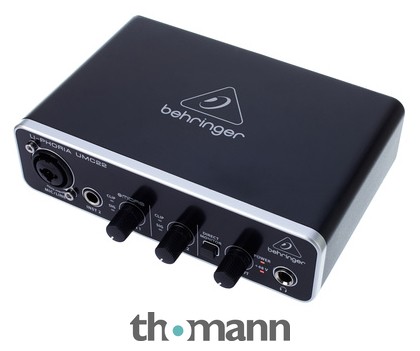
imo, it might be better to sell the duet and get a more up to date interface.
you can get good budget interfaces from behringer for 40ish euro which works for sure
Musikhaus Thomann
2-Channel USB Audio Interface 16 Bit / 48 kHz, 2 Inputs and 2 outputs, 1 Combi jack XLR / 6.3 mm jack and 1x 6.3 mm jack, MIDAS-designed microphone preamp with 48 V phantom power, Guitar input, Signal and clip display, Direct monitoring with level...
 rustic apex
i have arma for about a year and this is the first time this has happen i also did all the things on the website so idk at this point
 quaint jewel
Dll not found, is the question which dll.
Windows update could've broken it
rustic apex
quaint jewel
Dll not found, is the question which dll.
Windows update could've broken it
what can i do to fix it
also the question is how to play arma Normal
rustic apex
nvm fixed it
 summer kraken
bro i just got this game how do u even play multiplayer lmao
steady hawk
No lmaos are needed for this question. To join into a server, from Arma 3 Launcher is the best way IMO
summer kraken
ok I just downloaded thank you
what would u say is a good server to get started with?
steady hawk
Singleplayer
 waxen yarrow
Hello, Im new to arma 3 and i want to play a mod called Iraq - syrian conflict but for some reason i cannot locate were to play it in the arma game.
steady hawk
wise barn
@waxen yarrow
afaik it is a content mod, not a scenario mod. you either join a server that uses this mod, or create your own scenario in the eden editor
weary sky
What are you trying to publish?
steady hawk
Yeah, which kind of?
Did you accepted the latest agreement here?
https://steamcommunity.com/workshop/workshoplegalagreement/

 wise barn
modded or vanilla?
pastel leaf
modded
wise barn
try unmodded first
pastel leaf
i can send you the mod list if you want
pastel leaf
wise barn
try unmodded first
i tried and i had the same error too
wise barn
might be a too small page file issue then.
google for "increase page file"
pastel leaf
oki
pastel leaf
wise barn
might be a too small page file issue then.
google for "increase page file"
it was at 4 gb now its at 12 hope i fixed it
 keen ledge
Hello, I was wondering if anyone ever had an issue with the space-bar when building in arma3?
wise barn
building? what?
keen ledge
Generally, space-bar works to activate a move of an object but for some reason, I can move the object but when I go to place it the space-bar does not work
so strange, first time ever this has happened to me in arma
steady hawk
None of the thing you're talking about is vanilla feature. You should specify which one's doing that
wise barn
please... for the sake of it... when you use mods, name them....
keen ledge
Sorry, i may be in the wrong channel, its for arma 3 exile,
keen ledge
thank you, sorry for the confusion
steady hawk
Note that such things can be discussed here, but there should have more info about it
 light canyon
Yesterday I ran a mission on a dedicated server, using the AoW coffins draped with the flags.
In editor I set them to the UK flag, in local SP/editor MP testing it worked as intended, however on running the mission on a dedicated they switched to the US flag.
Is this a known bug?
light canyon
Testing this in editor using
setobjecttextureglobal and referencing the UK flag works.
does so using Zeus enhanced on a dedicated and executing the script doesn't seem to 😕
 worthy vector
i dont think my in game mic is working, i press caps lock and the icon shows up but no one can hear me
 shy tusk
In which channel are you "transmitting"? You can use < and > on your keyboard to circle between the available channels. I.e. if you want to talk to your Squad and you are talking to the "Vehicle channel", then they won't be able to hear you
worthy vector
ye i tried that but none of them worked
shy tusk
Then might be mic issues.check if it works fine with other games. Make sure that it's not muted and Arma has permission to use your mic. Other than that, ain't sure what the problem might be
fringe salmon
Everytime I launch arma tools it opens and closes immediately, any fix?
 jaunty island
Everytime i launch ARMA i get this. I've scanned and repaired with nothing found missing or broken, has anyone got any ideas?

 restive sequoia
try with a different ingame user profile
or delete your old one if you have nothing important inside (campaign progress, eden stuff etc)
grand perch
jaunty island
Everytime i launch ARMA i get this. I've scanned and repaired with nothing found...
Have you tried reinstalling arma?
jaunty island
I am doing that as we speak.
grand perch
Maybe delete all the files and have arma automatically reinstall them
If it doesnt work
with the reinstallation
jaunty island
I've also removed any trace of my "profile"
 jaunty island
Thanks mate! Hoping it gets done in time for my units op!
jaunty island
Nope, same issue. \
 shrewd ridge
Hey, im currently running into a problem with the vanilla arma 3 launcher and also the A3launcher(tried Arma3Sync, thats starts but wont show any of the addons when i still had them downloaded from workshop). When i try to open them nothing happens. I already followed the troubleshooting guide, unsubscribed my workshop items, reinstalled arma 3 multiple times, deleted the arma 3 profiles in documents and the arma 3 launcher folder in appdata/local.
redist is installed and up2date
safemode didnt work
also tried changing to dev build and back
shrewd ridge
FYI for people running into the same problem : deinstall KB4601050
it breaks .net framework applications cause of a handle error
 agile saffron
Okay so I am having the weirdest glitch
So basically, for whatever reason, only in arma, I can only hear most audio out of one ear, BUT, I can still hear auxillary audio (bullets landing, vehicle engines, wind blowing, crickets, etc.) out of both ears. AND I can't hear gunshots at all, but I can still hear explosions. I can also still hear things like youtube videos and discord calls without issue.This problem just randomly appeared a few days ago after about 5000 hours (whoops) of no issues. So far, i've verified that the issue is coming from my headphones, as I tried playing the game with a different pairs of headphones, and it worked fine on the other headphones, but not my main pair. I've also tried disabling all mods, updating, uninstalling, and reinstalling audio drivers, so basically, everything obvious. I just want to see if anyone here can help me fix because I don't want to have to try to reinstall because of my shitty internet (300 KB/s on a good day). Any help is appreciated 🙂
steady hawk
USB Headset?
agile saffron
Wireless
uncut trellis
Bluetooth?
agile saffron
With a USB adapter plugged into your PC or PS4, you can enjoy the comfort of the Cloud Flight S completely free of a cord. Equipped with Qi charging capability.
uncut trellis
so USB
agile saffron
yeah USB😅
steady hawk
Yeah... Arma 3 has a hiccup with any USB audio things. Just forget about it... and plug others...
uncut trellis
well first could try making sure its not in some surround sound mode
Arma has only stereo audio
steady hawk
Well, I don't have them so... I just heard so. But everyone seems had such things
uncut trellis
any device you use, needs also be set as Windows default device
because Arma uses only the default device
steady hawk
(for now)
agile saffron
Okay, so for some reason, I never use surround sound so I never realized that apparently the button has stopped working
I'm guessing that's something to do with the issue but surround sound isn't on
So might reinstalling fix this? Because with mods, reinstalling is easily going to take me a month🙁
Wouldn't be Arma if everything just worked
uncut trellis
no its not Arma problem as much I think
more a windows sound problem
and how that connects to Arma
 sage forum
I am hosting a server and I have signature verification enabled. It works for most players however for some players different mods fails to verify. Anyone know a solution?
wise barn
solution: everyone must have same mods as the server
pine kite
When the verify fails then it must be something wrong with those mods on their end.
 onyx hound
an issue with A3 and battle eye, anyone heard of this or know a solution ?

it only happens when attempting to run a3 with battle eye enabled
 vague lava

 onyx hound
yeah it’s not mine it’s my friends but he has tried everything, uninstalling reinstalling run as admin, disable antivirus
nothing seems to change
 delicate agate
Hello. I was building a modded mission and realized that I don't spawn with my weapons. I am using the BI basic respawn set up, using modules from the main game. I have playable units that have everything, their weapons, uniform, ect. But when I spawn in a LAN server, My player doesn't have his weapons. He has the rest of his loadout, even the ammo for his gun, But no weapon. Has anyone had an issue like this? How can I fix it?
shut socket
Does it happen with every gun?
delicate agate
Well, I have not tested many, but it happens to all loadouts I am using. Let me test that
I've tested 3 from different mods, They all Did not work.
shut socket
Does it work in eden?
delicate agate
What do You mean by that? I am using Eden for all of this
shut socket
Like singleplayer eden
delicate agate
Yes.
shut socket
Does the respawn menu show that the kit has a gun
delicate agate
When I activate it, yes.
But it shows as a loadout that The unit started with. I placed a unit, and then I changed the loadout. When I look at the "choose loadout" option It shows the old one, Not the one I gave the Unit.
agile saffron
so my audio issue randomly fixed itself tonight. no apparent reason, just did
 lucid crater
Could someone tell me why our server is having this memory leak https://www.mediafire.com/file/5dpgg286xiybawi/arma3server_2021-04-16_16-06-21.rpt/file****

MediaFire
had to upload the rpt cause its over 8 mbs an i dont have nitro XD
weary sky
Haven't seen the log file, but it's most likely caused by a bad mission script or bad mod.
 distant fossil
I've validated my files yet the Import Button is still missing! Please help
 steady hawk
Not there. Click More button in the middle of the screen
distant fossil
Has it been moved?
steady hawk
IIRC never
distant fossil
grim tinsel
<@!206440135556988929> make a bug report on the feedback tracker please
Where is the feedback tracker located?
 rigid panther
ive been getting 5 to 7 fps and never goes beyond it despite the game running well over 60fps yesterday, i tried reinstalling the game, changing the gpu, updating the gpu driver, tried the weird commands to help boost performance
steady hawk
Disable all MODs if you find an issue, ALWAYS
rigid panther
nope
i joined 77th jsoc as usual today and suddenly i get that lag
yesterday the server i played in ran fine was good
steady hawk
Try in single
shut socket
Or in a diffrent server
rigid panther
steady hawk
Try in single
same problem
i tried everything literally
single and vanilla servers
its def a bottleneck somewhere
its not that slow if it ran fine yesterday
anyone knows of any fix?
i need to get my daily dose of arma or ill go insane
shut socket
Did your video settings change?
rigid panther
nope
the gpu usage never goes above 20%
help me plez 😢
i did not play arma the whole day and im going crazy
steady hawk
Just chill and wait until someone throws a favor
rigid panther
i cant chill im gonna go nuts
also for some reason the arma runs on 32 bit
idk why
steady hawk
Because you orders to run 32. There's 64
rigid panther
wht mine is 64

@steady hawk
something is wrong with the driver
i get 200 fps in cs but now barely 60 fps with very noticable input lag
 patent kettle
IIRC one of the recent Windows 10 updates is causing issues for some people:
https://www.ghacks.net/2021/04/15/kb5001330-windows-update-is-reportedly-causing-performance-drop-in-games-failed-installs-and-bootloops/
rigid panther
weird i dint update anything
wise barn
@rigid panther
easy, easy...
just chill and hold your breath for a sec. count to 10 and do this:
start the arma launcher
go to "parameter" tab
on platform select 64-bit
rigid panther
@patent kettle it says gtx 1650 had no problem but i have the same gpu
rigid panther
wise barn
<@!647033548272041985>
easy, easy...
just chill and hold your breath for a sec....
oh ok thanks SM
wise barn
but don't expect wonders. you won't be getting 60FPS most likely. 40FPS are copmmon and to expect
wise barn
the launcher is 32bit
rigid panther
no the game itself
wise barn
the game is whatever you select in the tab i told you
wise barn
rigid panther
no the game itself
where does it tell you that it is 32bit?
rigid panther
wise barn
where does it tell you that it is 32bit?
task manager
after launching the game
wise barn
screenshot plz
rigid panther
wait
wise barn
 wise barn
have you ever installed mods? did you ever copy something to the arma 3 root folder?
rigid panther
well helps a bit
rigid panther
wise barn
have you ever installed mods? did you ever copy something to the arma 3 root fol...
ace
wise barn
how?
rigid panther
but its disabled
wise barn
via steam workshop?
rigid panther
by adding local files
wise barn
first: that BS to do. use the steam workshop for mods
second: where did you install the mod?
rigid panther
wherever the launcher brought me
rigid panther
i just copy pasted it from a zip file
wise barn
this is essential
rigid panther
i deleted all my mods, was only a few
wise barn
did you ever but something into ..\Steam\steamapps\common\Arma 3\Addons?
rigid panther
yeah there i think
wise barn
NEVER EVER do that
rigid panther
y
wise barn
this is the arma 3 root folder. everything in there will be launched at startup, no matter what
wise barn
👆
dis
you got two options now:
1: you delete the addon folder and reinstall arma
2: you identify every PBO that is not vanilla arma and delete that
rigid panther
steady hawk
Uninstall doesn't remove “added files”
it was a complete delete and reinstall from steam
steady hawk
Nope
wise barn
as a rule of thump: if you don't know what you are doing exactly, keep your fingers off of it and use the steam workshop only!
steady hawk
Search other addons folder in DLC folders
steady hawk
If you ever done that terrible putting a pbo into addons folder, search and get rid of them, for your life
rigid panther
yeah i dont think i did that
steady hawk
wise barn
ok. now launch arma, go to the editor and place a unit.
press play (bottom right) and check your FPS
(select any terrain, like altis)
rigid panther
ok
i feel like its a gpu issue
its been stuck at 18% since this problem
and its across all games
wise barn
then you have a CPU/RAM bottleneck
rigid panther
nuuu but it was fine yesterday
no joke
60-70fps
perfectly fine
and today weird crap
wise barn
PC or laptop?
rigid panther
pc
wise barn
what CPU?