Steam file verification process:
Right Click on game -> Local Files -> Verify Integrity of game files
Arma 3
Steam Workshop Mod repair process:
Open Launcher -> Right Click on mod -> Repair
The first process will automatically verify Steam Workshop items as well.
#arma3_troubleshooting
1 messages · Page 20 of 1
 rustic eagleBOT
 pine kite
It might be worded differently in your own language.
 keen nimbus
pine kite
It might be worded differently in your own language.
keen nimbus
pine kite
It might be worded differently in your own language.
I understand that it just says "Verify the integrity of the game files" here, it's not there. I don't know the exe file or just the caching file, also looked through the right mouse button, but we didn't find it
pine kite
This is in Dutch, but you need to press the bottom button.

 umbral narwhal
The tab is now "Installed files" rather than "Local files" in english.
Changed in the UI update I think.
pine kite
Might have been changed with the recent Steam app update probably.
keen nimbus
Thx

 proven sail
hello, does anyone know why my friends can't see my server? I have my ports open, my internet settings are set to a private network and i've enabled the ports on firewall
please send help
 wet dragon
guys I wanna join a server of my unit and when I click join type in password and click ok it loads me for like 5 seconds and then it just cancels out and brings me back to where i was before. I tried verifying files restarting game and pc
 uncut trellis
wrong password perhaps
wet dragon
uncut trellis
wrong password perhaps
the password works
I load into it and after 5 seconds it just brings me back
uncut trellis
check your logs, maybe there is some clue
proven sail
proven sail
hello, does anyone know why my friends can't see my server? I have my ports open...
i've also tried both UPnP and normal port forwarding
umbral narwhal
Check if you're on CGNAT.
wet dragon
it's fixed now
proven sail
umbral narwhal
Check if you're on CGNAT.
do i enable it somewhere?
umbral narwhal
No, it's something imposed on you by your ISP.
proven sail
how do I check it
umbral narwhal
You can detect it by checking your WAN IP in your router settings.
If it's different from your publicly-visible IPv4 (and/or in a private address range) then you're on CGNAT and you're screwed.
proven sail
so i have to check if my ip on router is different from mine?
umbral narwhal
The router will have two IP addresses, an internal (LAN) one and an external (WAN) one.
plus maybe some IPv6 but that doesn't matter.
proven sail
umbral narwhal
The router will have two IP addresses, an internal (LAN) one and an external (WA...
yes
umbral narwhal
You compare the WAN one with your publicly-visible IPv4, like you get from googling "what's my IP".
Although sometimes google decides to be weird and only show you the IPv6.
proven sail
so if the wan address of the router is different than my IPv4 then im in the bad position?
umbral narwhal
These are all IPv4
proven sail
yea i get that
umbral narwhal
I'm just clarifying it there because google sometimes gives you the IPv6.
If the WAN IP starts with 10.x or 100.x then it's definitely CGNAT.
 proven sail
umbral narwhal
If the WAN IP starts with 10.x or 100.x then it's definitely CGNAT.
proven sail
umbral narwhal
If the WAN IP starts with 10.x or 100.x then it's definitely CGNAT.
so if it doesn't start with 10.x or 100.x then it's not CGNAT yes?
umbral narwhal
No, they might be doing something weird.
192 is also CGNAT but weird.
Usually they use 192.x for the LAN side and 10 or 100 for the CGNAT.
proven sail
 umbral narwhal
CGNAT anyway. Your only option for hosting is to use VPN software like Hamachi or Zerotier.
umbral narwhal
actually, are you just using multiple layers of routers internaly...
because that would explain the 192
proven sail
umbral narwhal
actually, are you just using multiple layers of routers internaly...
2 routers connected to a modem
proven sail
i just want to clarify that i was able to host a server like a year ago
but now it's broken
i didn't change anything along the way
umbral narwhal
It's entirely possible that you have CGNAT -> router 1 NAT -> router 2 NAT
but that's kinda hard to check
proven sail
the routers are not connected to each other
umbral narwhal
Don't really care anyway. It's hard enough to diagnose this stuff remotely with a simple network.
So I'm outta here.
proven sail
umbral narwhal
Don't really care anyway. It's hard enough to diagnose this stuff remotely with ...
i think it doesn't work because I have a shared IP, i checked on it and it seems like that's the cause
 hard brook
Any ideas how I can fix mic not working in voice chat in game?
uncut trellis
hard brook
Any ideas how I can fix mic not working in voice chat in game?
no crossposting on multiple channels thanks. as per #rules
hard brook
just thought some one wouldbe able to help plus its only 2 chanels questions and troubleshooting appologese
uncut trellis
hard brook
just thought some one wouldbe able to help plus its only 2 chanels questions and...
rules are still the same. and a question on either channel will be noticed and second one is just clutter
 wanton marsh
@uncut trellis can u help me ?
hard brook
ye ye i get it dw
uncut trellis
wanton marsh
<@150949769953411072> can u help me ?
no
wanton marsh
bruh
uncut trellis
its about 50/50 and I got no clue what you need help with. no is safer answer
wanton marsh
go in #arma3_questions
uncut trellis
bruh. you been given help already
 zealous pelican
My microphone seemingly isn’t working
Nobody can hear me on any channel when I use push to talk
 steady hawk
Check pinned
 turbid pond
Is is possible to check which asset is causing the No entry 'bin\config.bin/<something> error? The addon(s) is not present in the scenario dependencies but it is making the scenario return to the lobby stage. My guess is that the addon is one of the dependencies. I know the delete/remove X and check if it shows up method but was wondering if there's something else I can do.
 quaint jewel
turbid pond
Is is possible to check which asset is causing the `No entry 'bin\config.bin/<so...
quaint jewel
turbid pond
Is is possible to check which asset is causing the `No entry 'bin\config.bin/<so...
run game with -debug parameter, that may give you something
Sometimes you can just look at the config path and recognize the classname, they are usually tagged with mod's tag
turbid pond
Roger that, thanks for the quick tip
quaint jewel
alternatively script commands configSourceMod configSourceAddons can tell you who last modified a entry. In case its a broken basegame entry
Recently had some mod break my main menu, but couldn't see which.
I ran configSourceAddons on the main menu UI config, and it listed me all mods that modify it. Which were only 3. one of which being the base game. That made it quick to track down
turbid pond
quaint jewel
alternatively script commands configSourceMod configSourceAddons can tell you wh...
I have removed the Zeus/Game Master module and the error didn't pop up.
I guess that it doesn't like config errors.
quaint jewel
zeus will load many configs
If there is a config error, it will only be reported if something loads it
So now that you removed it, nothing is loading that config anymore. But the error is still there
turbid pond
Yeah, true true. Is it possible to skip the error warnings, so it doesn't throw me back to the lobby? I know where the config error is but I'm asking more from a quick and dirty testing perspective.
quaint jewel
server config has an option to ignore mission load errors
turbid pond
ignoreMissionLoadErrors = false; this one right? edit: ofc set to true 😛
 fading pulsar
This will only do if mission error occurs during load.
If: you select role, click next, past briefing screen, then error that ends mission occurs, you will still be thrown out.
turbid pond
fading pulsar
This will only do if mission error occurs during load.
If: you select role, cli...
oh
 thick ginkgo
https://www.youtube.com/watch?v=jdP_uWpF7g8
my players without SOG, but with the compatibility data mod, can't join some non-dlc terrain missions, and I don't know why
Anyone run into this before?
 steady hawk
Maybe verify?
 dire relic
hi everyone i am having problem with getting inside of vehicles sometimes, when other players gets in i cant but after that when they leave the vehicle i can enter the vehicle
do yall know the solution
 golden nova
mods?
dire relic
golden nova
mods?
that i use or helicopters?
golden nova
that you are using
dire relic
rhs mod for little bird
golden nova
I know that this thing used to happen with ACE mod loaded, if you do friendly fire you can't sit in the same vehicle as your "victim" and they have to pardon you
otherwise idk
dire relic
is there any way to disable it ?
golden nova
admin probably can
I'm have basic knowledge of ace, if there are no server settings in addon options for that then admin probably would have to make a custom ace version with proper PBO file removed. There is an invite to ACE discord server in #channel_invites_list so you can ask there for details
 molten gull
!status_acess
uncut trellis
molten gull
!status_acess
What are you trying to do?
 uneven brook
hey, whenever i attempt to load into arma 3 through thte launcher it displays this.

but im actively running at 60Hz and at the graphics settings it’s telling me to, what more does it want me to do?
it does this whenever i try to load i’ve been at this for over 45 minutes, and have restarted my computer and changed the graphics settings about 10 times
umbral narwhal
Err, what graphics settings are you changing?
uneven brook
my hertz, i was running at 55Hz and i changed it to 60
umbral narwhal
I mean it's Arma's graphics settings it's complaining about, not windows, and you can't see those unless it can display something.
uneven brook
so would i need to change something in arma?
umbral narwhal
Conventionally what you do there is start the game in "safe mode" but I'm not sure that Arma has one.
uneven brook
i don’t know what that is, i’m relatively new to PC and still figuring stuff out
umbral narwhal
Ok, go to Documents\Arma 3. Look for the file Arma3.cfg in there, and open it with notepad.
Should have these lines in it:
fullScreenWidth=1920;
fullScreenHeight=1080;
refresh=60;
 pine kite
And what is that one at the top?
umbral narwhal
It's the top one. Click on "view" and make sure that "show file extensions" is ticked.
Otherwise windows hides the file extension, which is fucking degenerate.
uneven brook
so i’d right click on the file and click on view?
umbral narwhal
Instructions may not be accurate because I'm not sure what windows version that is.
uneven brook
it should be windows 11
umbral narwhal
Nah, you right click and select "open with".
The file extensions thing is just general advice so that you can see what you're doing.
uneven brook
okay, i open it with notepad right?
umbral narwhal
yes.
 umbral narwhal
...huh
uneven brook
what?
maybe i’ll just uninstall and reinstall and let you know?
it might be because i’m clearly missing a file lmao
umbral narwhal
The file's there. I guess it just hasn't written anything to it yet because Arma hasn't managed to run successfully.
uneven brook
true
umbral narwhal
But then I've never heard of Arma failing to pick the right screen mode.
umbral narwhal
no
uneven brook
cuz i’m going to uninstall and reinstall and i’ll just PM you when it’s done
oh alright no worries
uneven brook
that’s actually really smart
i think i’ll uninstall and reinstall, maybe my whole settings changing fucked it up somehow
umbral narwhal
One thing: If you have multiple graphics adapters, make sure you're using the right one.
uneven brook
i don’t think i do, but i’m not sure how i would check that
umbral narwhal
Number of sockets on back of PC :P
uneven brook
i see
umbral narwhal
Oh, you can tick for "force window mode" in the launcher parameters and then you'll at least see something.
uneven brook
i’ll give it a shot
i need to cool off for a bit though i’m getting needlessly frustrated
 fringe salmon
umbral narwhal
But then I've never heard of Arma failing to pick the right screen mode.
fringe salmon
umbral narwhal
But then I've never heard of Arma failing to pick the right screen mode.
There was a comment #community_forum saying Arma was picking triple-screen when they had a double-monitor setup
But that was because it wasn't supported.
uneven brook
is this a good sign?

GUYS

SOMETBING HAPPENED
IT WONT LET ME GO INTO FULLSCREEN WHAT THE SHIT
IT WORKED
steady hawk
No allcaps, thanks
thick ginkgo
steady hawk
Maybe verify?
no dice on client end
I'll try reinstalling the server I guess
uneven brook
i got it working!
 fringe salmon
Enjoy
You will totally get to know Staff Sergeant Adams very well, and will be popping beers after the campaign is over
Happily ever after
pine kite
I would say "Happy prologue" instead.
 jovial bridge
can anybody help with file provider is not running
umbral narwhal
It's onedrive-related but I'm not sure if the correct approach is to fix it or remove it.
fringe salmon
right
im having this
issue
and its driving me fucking insane
for some reason when i open the game this movie thing plays in the backround
and
it doesnt
fucking
stop
jovial bridge
umbral narwhal
It's onedrive-related but I'm not sure if the correct approach is to fix it or r...
i removed onedrive lol
umbral narwhal
@fringe salmon There is this in pinned messages:
If you have a background sound/audio while you're playing the game (not in launcher) there most likely is a YouTube or other video platform is playing in the Steam Overlay's Browser. Shift+Tab by default to open it and close every browser there.
fringe salmon
omfg thank you so much
jovial bridge
lol this game is so damn old
fringe salmon
real
jovial bridge
arma 4?
fringe salmon
needs to be made without the campaign costing money
steady hawk
Please don't too derail the topic and no to textwalling, thanks
Also indeed OneDrive thingy would be a good issue to pin. I'll write in hours if I don't forget
fringe salmon
We need the bot to just auto send a message when the words "in the background" plays at this point
steady hawk
Just check the pinnnnnn
steady hawk
steady hawk
Also indeed OneDrive thingy would be a good issue to pin. I'll write in hours if...
addeddd
 digital sedge
is there any way to fix horrible lag spikes while playing the game, i just got it and its kinda not playable ata ll
uncut trellis
have you installed the game on external HDD?
digital sedge
uncut trellis
have you installed the game on external HDD?
yea
Is that bad?
dont have alot of storage on my pc so i use a external for all games
uncut trellis
usually external drives are slow
and Arma reads a lot of data when it runs
so yes
that is the cause of your lag spikes
digital sedge
Thanks
umbral narwhal
External SSD would probably be fine, assuming it's on USB 3+
External HDD is even worse than internal HDD
 strange latch
"KnowsAboutChanged" Group Eventhandler seems a bit wonky, the knowsAbout value will never reset to 0, even when you teleport away, skip hours, make it nighttime, have objects in between... Is that intended? Is there a workaround?
umbral narwhal
That's normal for knowsAbout. You need about 5min real time without sight for it to reset, IIRC.
Otherwise it only rises.
See targetKnowledge if you want more info about when and where an object was last spotted.
strange latch
Oh, 5 mins? Ok I was not patient enough then. Even when time compressed?
umbral narwhal
You mean SP time acceleration or just setTimeMultiplier?
I would expect SP time accel to speed it up, but setTimeMultiplier certainly shouldn't.
strange latch
Hm I think it did not when upping SP time accel
jovial bridge
can anybody help with file provider is not running
umbral narwhal
Remove Onedrive
 jaunty cedar
Hi, I have a problem with a bisign. I'm trying to update Unsung and for uns_dong_ha.pbo I cannot create a correct .bisign file with DSUtils: ```---------------------------
Arma 3
Signature C:\arma3mods@unsung\addons\uns_dong_ha.pbo is wrong. Error 0x22. Test FAILED!
OK
the other pbos are signed correctly, not sure what's going on
golden nova
Maybe the pbo was built wrong
jaunty cedar
yeah, seems so, if I build it with addonBuilder, the resulting signature works. Gonna check with Mikero on makepbo and what I did wrong
thanks for the suggestion, @golden nova !
jovial bridge
umbral narwhal
Remove Onedrive
thx larper
 tender arch
Any idea what coul be causing roles to not be able to be selected after changing missions? Admin isn't locking the role list or anything.
I also am unable to run commands or change parameters after changing missions as well.
 indigo needle
Why can’t I load into a game
Like it just freezes my game or it goes to a black screen and freezes again
 steady hawk
Ah yes, a black screen, that tells nothing...
indigo needle
Exactly
I can’t even do nothing
The game loads in and everyhting but as soon as I press play it just freezes
steady hawk
Press play, where?
steady hawk
So Launcher
 golden nova
!steamverify
rustic eagleBOT
Steam file verification process:
Right Click on game -> Local Files -> Verify Integrity of game files
Arma 3
Steam Workshop Mod repair process:
Open Launcher -> Right Click on mod -> Repair
The first process will automatically verify Steam Workshop items as well.
indigo needle
steady hawk
What's your PC specs?
Probably they ain’t good enough lemme check
steady hawk
GPU?
indigo needle
Rx 6600
indigo needle
Nope
steady hawk
Then do
indigo needle
Alr
molten gull
rustic eagle
i started getting the access violation. try rolling back gpu drivers.
 bronze river
may want to cover the Device and Product ID
 topaz field
https://medal.tv/games/arma-3/clips/1i28VnopvzgR3d/d1337zYfnhd2?invite=cr-MSx4M0gsMTYyMTgzMjQ2LA
dose somebody know why some weapons like cup sometimes there sound gets cut?

Watch Untitled and millions of other Arma 3 videos on Medal, the largest Game Clip Platform.
 waxen dragon
Hello, I have a problem and I don't know how to solve it, do you have a solution please?

 wraith jay
Good Afternoon,
Running into an issue where I am attempting to update my mod with arma 3 tools addon builder.
Arma 3 is not running in the backround

 violet pumice
The same addon(s) build completely fine on my end
wraith jay
Okay I did literally NOTHING and it works now
wraith jay
My arma being so weird today, trying to publish and getting this error code
 wraith jay
Yea unsure how to resolve this Dx Any tips
 median bear
idk if this belongs in here but sometimes when I die it doesn't let me respawn, nor can I leave the game anyone know how to solve this?
it doesnt let me send a picture only the link but it looks like the respawn menu but it doesnt let me interact with it for some reason
oh nvm here

 ocean cosmos
if you had zeus open press the zeus keybind again
median bear
I didn't have zeus at the time
sometimes it happens when I dont have zeus, or when I have zeus but when I hit the keybind again it dont work 🤷
ocean cosmos
odd, thats the only time its happened to me
 thorn apex
I have a strange control bug, and I was testing it because change to crawling while sprinting while using the mod was didn't work properly, but suddenly the all contorol didn't work properly, and when I press the WASD key, the movement works out of control. It may be because i was using mod, but I think might be a keyboard or mouse bug.
To be more specific, if I press WASD or press another Key, it will work like a hitting another key in fast speed, making it impossible to move properly.
steady hawk
Sounds like a AnimDataCache issue
thorn apex
steady hawk
Sounds like a AnimDataCache issue
ok, what i should do?
steady hawk
Get to Profiles folder, find AnimDataCache folder, delete it and relaunch the game
thorn apex
steady hawk
Get to Profiles folder, find AnimDataCache folder, delete it and relaunch the ga...
Ok trying now
thorn apex
steady hawk
Get to Profiles folder, find AnimDataCache folder, delete it and relaunch the ga...
Ok Out of control is solved, but sprint to prone animation dosen't work. can i may fix this?
nvm i find fix
 errant gulch
Would there be any reason why it takes me 30+ seconds to get in zeus with CBA+ACE+CUP+RHS? I know in the past it was almost instantaneous. Especially with the whole zeus cache thingy?
golden nova
"zeus cache thingy" is outdated.
and you either are not telling us the whole mod preset or your PC is just ass, I can load into zeus with CUP Units/Vehicles/Weapons + all RHS and ACE in split second.
strange latch
umbral narwhal
That's normal for knowsAbout. You need about 5min real time without sight for it...
You are right, after about 6 minutes it starts decaying, but it is veeeeery slow, after 10 minutes im still at 3.9
errant gulch
golden nova
and you either are not telling us the whole mod preset or your PC is just ass, I...
Yes Zeus cache is outdated, because ArmA had an update and implemented it. And it would load quickly for a long time. But recently I noticed that in editor it takes a long time to load into zeus. Which if I am in a server zeusing, its almost instant. It didnt used to be like that before. Thats why I am asking. I am running:
R5 1600X, RX 6600XT 8GB VRAM, 16GB. Shouldnt be the problem.
My arma profile is pretty old file, as in I used the same profile for years, I wonder if that could have effected it. Because I am pretty sure sized of profile files effect arsenal load times.
 vague stream
object rendering distance broken for me, this is on complete stock
objects don't wanna render beyond 3km unless i zoom in
this is a real pain when trying to use planes
sliders are on max
even tried to do the console command, but nothing it renders everything only if zoomed in
uncut trellis
vague stream
object rendering distance broken for me, this is on complete stock
in singleplayer or multiplayer?
vague stream
whats that
uncut trellis
hmm seem like the bot is down
vague stream
been like that since i bought the game honestly but only recently i tried planes
uncut trellis
its a log file of what goes on when you run the game
vague stream
its needed in this case right?
much can i tell by word really is that i had no mods on
uncut trellis
you can link it here, someone else might have ideas too
vague stream
uncut trellis
you can link it here, someone else might have ideas too
asked a couple of friends of mine to do the same they seem to get the same issue too
maybe its just how a3 handles lod at this point
to recreate just go anywhere in a jet and max out objects distance
uncut trellis
no normally viewdistance slider goes up to 120000 and renders that far

 trim zenith
Whenever I try to launch Arma3 (first time right after downloading today) I get an error. I have tried uninstalling and reinstalling battleye and restarted my pc multiple times, updating my graphics card, updating windows, uninstalling and reinstalling arma, and running it with windows defender off. I have not seen anyone else with a similar issue after looking it up on google. But I think it means STATUS_ENTRYPOINT_NOT_FOUND so it could be a missing DLL. But having little to no knowledge in computer science I dont know where to look or what to do.
 umbral narwhal
Is there another error message before that one?
trim zenith
umbral narwhal
Is there another error message before that one?
Nope
I click PLAY the launcher closes (due to a setting) loads for 10 seconds than that error message pops up
umbral narwhal
What if you don't use that setting?
trim zenith
It happened before the setting but I'll try again
Still doesnt work and same error
 umbral narwhal
Yeah I dunno, that's a rare one.
Do you have Arma installed anywhere odd?
mapped drives etc.
trim zenith
umbral narwhal
Do you have Arma installed anywhere odd?
I have it on my D: drive which C: is my default but I have everyother steam game on D: and they all work
 wraith haven
trim zenith
I have it on my D: drive which C: is my default but I have everyother steam game...
wraith haven
trim zenith
I have it on my D: drive which C: is my default but I have everyother steam game...
where on your D drive?
if the path is long, it might cause some issues.
STATUS_IO_REPARSE_TAG_NOT_HANDLED.
means there's something wrong with a file or directory.
you gonna have to use procmon to see what is actually wrong
Here's how you gonna have to solves this.
- Run procmon
- Run Arma 3
- look for STATUS_IO_REPARSE_TAG_NOT_HANDLED error
- using where the error happens and when it happens might be able to figure out what is causing it, and fix the file
other than that. Verify your game download. Don't just uninstall it and reinstall it. Actually go into the proprieties in steam for Arma and click verify game data.
pine kite
Or you press that bottom on the bottom and prepare a report. Then post that on the Feedback tracker so the devs can take a look next monday. Isn't a fix in the short term. But might help in the long run.
 vestal turret
My dedicated server(locally run) is only displaying default missions now. None of my custom missions or Dynamic recon ops are available. Last time I launched the server this wasn't a problem, now I've tried sever restarts several times to no avail.
I'm sure it's something very simple that I'm overlooking, just coming here for a nudge in the right direction so my unit isn't waiting on me.
 obsidian acorn
Hi - i downloaded this https://steamcommunity.com/sharedfiles/filedetails/?id=2066129906 modpack, and this modpack only, however, my arma 3 only boots up to a black screen

Steam Workshop: Arma 3. After searching through the workshop for several hours these are the mods I find to be most enjoyable when playing Arma3 that make sense and are not too crazy. Most of the mods I use in this collectio
i suspect it might be a problem since i don't have all the DLCs owned
 autumn thunder
Hey guys, i play arma 3 on steam and since few month, i can't connect to any server. I tried to reinstall the game, check files, Battle eye is running, check my fire wall, disable windows defender, i have no dlc, just the game... Whene i try to connect i wait few seconds and i get "connecting failed"
 rain warren
does anyone know how to fix annynoing music trailer after i launch the game?
it keeps playing music even when im in the game
in lobby too
and i cant turn it off
reinstall didnt helped
and its doubled
like 3 tracks are played at the same time
its annynoing asf
steady hawk
Check the pinned
rain warren
okay thanks
i had intro somehow turned on in steam
wait nvm
its still playing
i closed all the tabs but its still playing
 thorn swift
Did you restart Arma after changing?
uncut trellis
youll have to complete verfication at #✔role-selection
i think you have enabled the minigame
there is this space invaders type minigame when game is on sale
you move the tank at the bottom with A D and whoot with space
no
just play it until you die I suppose
I dont remember if you can quit it
 rough ibex
hi
can this channel work for server setup help?
im trying to setup a server with AMP control panel but i cant connect, this happens in console https://i.imgur.com/CM3NzVx.png

 buoyant pewter
So, I downloaded a .pbo MP mission from a friend and when I try to load it up in the eden editor it doesn't show up.
I don't know if putting it in the MPMissions folder is wrong as this is where something exports to rather than imports from, but if anyone could help me out it would make my day.
Can anyone help me with this issue?
steady hawk
Eden Editor requires a folder not a pbo
 fast ravine
i constantly get a "battleye: query failed" error when i connect to my dedicated server (and my dedicated server only)
any ideas what could be wrong?
fringe salmon
uncut trellis
you move the tank at the bottom with A D and whoot with space
It's difficult lol
I only get up to Apex
No way I'm reaching Contact
fringe salmon
Hello ,I would like to copy some binery information on my mission directy from the game with a script/console but i find nothing on the subject can someone help me on this ?
steady hawk
What exactly is your purpose? What exactly you're trying?
fringe salmon
i would like to unbinarize my mission from the game that's it
steady hawk
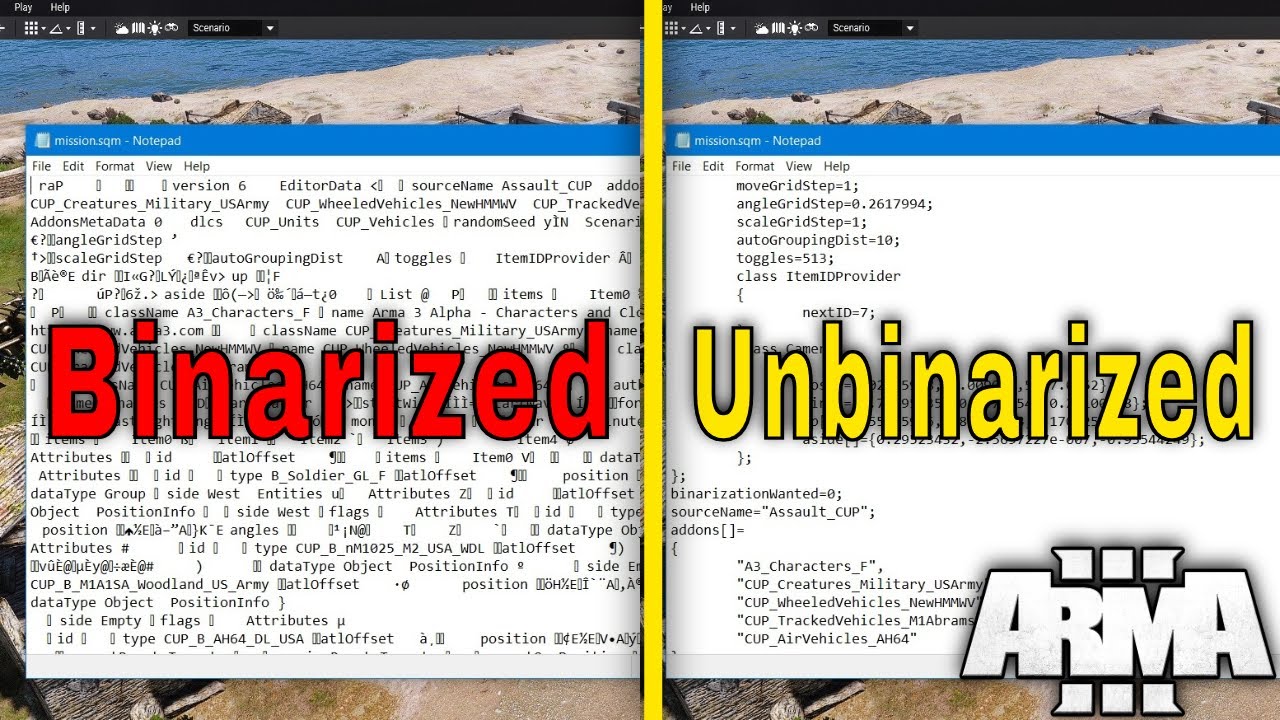
Today i will be showing you two methods on how to unbinarize a mission.sqm.
Question
Why would i want to unbinarize a mission.sqm if i binarized
the mission that requires mods?
Answer
If a mission has a mod dependency and is binarized and one of or all of the
mods used in the scenario is missing, corrupt or whatever issue (no...
 steady hawk
Is it even related to unbinarize mission.sqm?
 lime sphinx
what's happening inside the running mission (including debug console) has nothing to do with mission being binarized or not
steady hawk
I really am confused
lime sphinx
does not compute
steady hawk
Seriously what is the goal?
What... you've never implied your goal until your last
It is impossible after all
fringe salmon
is anyone able to help me? my convoy is working but the soldiers don't enter and they just wait by the convoy shortly before it drives off, i have 4 groups, 3 of them are soldiers and the last one is 3 HEMTT transports, previously i had the HEMTTs each assigned to a soldier group but that caused them to run over the squads and break formation, so i made the HEMTTs their own group and now nobody is entering the convoys
 autumn umbra
we are trying to host a server via hamachi but we cant connect each other?
how we can fix that
we cant port forwarding
autumn umbra
can anyone help me?
 split scarab
I got promoted zeus on a lan server but the zeus create tab not appearing even tried pressing every word on my keyboard it still not appearing

 ripe idol
i installed
a few mods for arma 3
and it doesnt work on zues
but if i use them on eden editor
it works there
can someone hlep pls
uncut trellis
You would need to talk to the mod maker. Not all mods are made to work in or with zeus
 lost nacelle
I can't get anything to launch with proton, the play button changes and then goes back to play, i've tried switching versions of proton and the unix launcher, but nothing works
nvm, some sysctl variables werent set
 foggy cradle
im probably not the first one to talk about huge frames drop, But Im not much of PC expert but when i open up task manager is see that arma 3 is only consuming 20% of my CPU, in the same time ARMA 3 Is running on average 15 FPS on some server, all my settings are set to low and disabled , is there is anyway i can boost up my frames to atleast 30 FPS ? so it becomes fairly playable ? My CPU is not the best but decent , Its I7-2600 3.40Ghz , GPU is Radeon RX 560 and 16 Gb Ram
ocean cosmos
Increase graphics
foggy cradle
ocean cosmos
Increase graphics
increase my graphics to get better fps ?
ocean cosmos
yes
foggy cradle
weird
ocean cosmos
read wiki optimisation guide
umbral narwhal
low + disabled shadows is the fastest setup I found.
i7-2600 is really marginal though.
I have a 4790 and I'd consider that borderline for playability on the heavier servers.
foggy cradle
umbral narwhal
low + disabled shadows is the fastest setup I found.
i have every settings set to low and Disabled if possible but i believe the issue is on the View distance
like if you ever heard of Karmakut , YTer's Liberation server when they get into close to enemy position and they get to spawn my frames drops even more even im not way close to them
umbral narwhal
Object view distance is basically the #1 performance setting.
You set it as low as you can stand if you want more frames.
foggy cradle
yep , already done
fringe salmon
games suddenly become unplayable for me. Yesterday was 90+fps on ultra, but now the games stuttering like crazy all the time. even on the menu
 weary sky
Since the game itself didn't change, what's the difference between yesterday and today?
split scarab
split scarab
I got promoted zeus on a lan server but the zeus create tab not appearing even t...
help
 pastel pawn
does anyone know why my game crashes when i use ace on geforce now?
ocean cosmos
geforce now is not able to run ace
uncut trellis
pastel pawn
does anyone know why my game crashes when i use ace on geforce now?
GFN does not support that kind of mods
 broken igloo
Any idea what would cause this to happen? A weird script error and the camera pans straight up into the sky upon turning out of the commanders position of RHS AFRF T-90A (2006)

And why the heck a "power lines" script would have anything to do with a tank lol I don't get it
steady hawk
The path seems to be CUP Terrains
broken igloo
Hmm. Well the map is Fayshkhabur, Iraq, which requires CUP Terrains Maps and Core... interesting
split scarab
split scarab
still not working

i didnt press anything the create tab just wont appear + (doesnt work on eden editor)
rough ibex
hey guys i still need help on making my server run with BE
anyone down to help? linux based
fringe salmon
does somebody know what name of this turret and how to make this turret stay in the air?
 idle glade
What does this mean exactly?
 uncut trellis
idle glade
What does this mean exactly?
uncut trellis
idle glade
What does this mean exactly?
seems like steam thinks you dont own something
what do you do to get it pop up?
 brisk heart
split scarab
still not working
brisk heart
split scarab
still not working
this is step 1 unless you can reproduce the issue with no mods
 uncut cloak
 split scarab
brisk heart
https://discord.com/channels/105462288051380224/141866231362879488/1047444997642...
split scarab
brisk heart
https://discord.com/channels/105462288051380224/141866231362879488/1047444997642...
thx it worked
 stone kayak
If anyone can help I’d greatly appreciate it
 weary sky
Sounds like a broken mod and not running TFAR
It would help more if you could post your .rpt log file, that contains more info than a "screenshot"
stone kayak
My game has been seemingly randomly crashing every 10 to 15 minutes when I’m in game with exit code 0xC0000005 so I wasn’t sure if that could be the problem
Sorry I’m a little new to this. Where do I find the .rpt log?
stone kayak
Hopefully this is helpful, thanks for the help
 solemn gust
Does anybody know how to fix this error? I keep on getting it while trying to spawn into online servers. The game works fine in singleplayer, but when join a server I make it to the server lobby where I choose my role, but after I start spawning in, the game loads in half way and then crashes. (It does the same thing without mods)
 quaint jewel
solemn gust
Does anybody know how to fix this error? I keep on getting it while trying to sp...
quaint jewel
solemn gust
Does anybody know how to fix this error? I keep on getting it while trying to sp...
Click the prepare report button and send it to me
solemn gust
dms?
quaint jewel
ye
quaint jewel
solemn gust
dms?
Well I would prefer without friend request. If you cannot do that then maybe just send it right here in channel
solemn gust
the folder is bigger than 25mb so I cannot send it in chat
i made saved the rpt as a note so you can read it
quaint jewel
ooo not good 
Uh that's very neat, interesting. Thank you
Ok its official, I must be stoop
Though to be fair I changed hundreds of lines and missed one side fact about one of them
Fix is building 🫂
weary sky
stone kayak
Hopefully this is helpful, thanks for the help
I'm afraid that log file doesn't show a lot, it doesn't even have the full start up of the game logged, let alone the error.
So please provide one which was logged the moment you got the error, or if you restart the game and get the same error again simply the latest .rpt file.
Also make sure you have '-noLogs' disabled in the startup parameters (can be done in the Launcher)
fringe salmon
hey. im trying to upload a mod to the steam workshop. but everytime im trying to select the mod with the files this error comes? (sry for my bad english lol)
 ocean cosmos
your addons folder is in the wrong place
|_ addons
   |_ yourpbo.pbo``` should be the structure
 ocean cosmos
addons should not be inside of a folder, and your mod folder's name should begin with an @
uncut trellis
Id recommend looking at how other mods structure their folders
 narrow mason
hey so does anyone know if custom compositions and scenarios are saved by steam cloud or not? i had to reinstall windows on my pc due to issues and now all my custom stuff is gone when i go into editor
steady hawk
Not
narrow mason
so you mean i lost everything
steady hawk
If you have no backup, yes
solemn gust
quaint jewel
Though to be fair I changed hundreds of lines and missed one side fact about one...
so?
solemn gust
yeah, I got a 40 something mb update
I remeber I sent the message after the update
Because it didnt fix anything
I will try again when I get home I guess
fringe salmon
huh?
 quaint jewel
solemn gust
I remeber I sent the message after the update
quaint jewel
solemn gust
I remeber I sent the message after the update
Yeah we did two updates today
quaint jewel
fringe salmon
huh?
You're loading a broken mod
fringe salmon
yeah i know its my mod but idk what the problem is
i did everything right i guess
quaint jewel
Two CfgPatches classes it says
Search for "CfgPatches" in all your mod files, there should only be one
Maybe you're also #include ing your CfgPatches file twice
fringe salmon
im just reversing the version
solemn gust
quaint jewel
Yeah we did two updates today
Just got home and it works now. Appreciate the help 🙏
pine kite
ocean cosmos
addons should not be inside of a folder, and your mod folder's name should begin...
The @ in mods is not a requirement, just a convention people made up in the past.
 cosmic scarab
Help? Its stopping me from being able to launch the game


 golden nova
cosmic scarab
Help? Its stopping me from being able to launch the game
golden nova
cosmic scarab
Help? Its stopping me from being able to launch the game
verify game files throughh steam
!steamverify
rustic eagleBOT
Steam file verification process:
Right Click on game -> Local Files -> Verify Integrity of game files
Arma 3
Steam Workshop Mod repair process:
Open Launcher -> Right Click on mod -> Repair
The first process will automatically verify Steam Workshop items as well.
stone kayak
stone kayak
weary sky
I'm afraid that log file doesn't show a lot, it doesn't even have the full start...
Hopefully this one is more helpful
weary sky
Other than some broken mods, all this log file shows is a ACCESS_VIOLATION (see https://community.bistudio.com/wiki/Arma_3:_Unusual_Process_Exit#0xC0000005_-_ACCESS_VIOLATION)
And still doesn't show the issue from the screenshot you originally posted, so I suggest to figure out which mod is exactly causing it by enabling/disabling them till it either works or breaks.
stone kayak
Thanks I very much appreciate the help
 queen nest
hello! ive had this issue for well over a year now across multiple installations, both with mods and without
when using zeus on a turrent, if i die or exit by pressing y, my controls get completely locked
i also cant control any more ai
it locks me until i restart the mission, is there any fix to this??
ive done so much investigation i have no clue what could be causing it atp
golden nova
it is a known issue for dying when in a gunner seat in any vehicle, been there for years and probably won't be fixed
queen nest
golden nova
it is a known issue for dying when in a gunner seat in any vehicle, been there f...
fuck
is there any other specific things c causing it or
it is so annoying
or just ways to prevent it
golden nova
idk I'm not a dev, I only know that it happens on the gunner seat
golden nova
best way to prevent would be not taking the gunner seat.
alternatively if you have access to debug console you can "attach" the zeus module back to yourself, assuming the zeus module and your base unit have variable names
queen nest
huh havent heard of that before
golden nova
I can't find the exact issue report now but iirc the problem was that your dude is disconnected from the module for some reason, hence the weird lock into the "camera" rather than going back to the unit
queen nest
golden nova
I can't find the exact issue report now but iirc the problem was that your dude ...
do you know if there any universal patch mods or stuff which would fix this'
ik arma doesnt really have those mods but aaaa
golden nova
queen nest
do you know if there any universal patch mods or stuff which would fix this'
no, there is no patch for that because the cause it not known
I mean anything other than "dying in gunner seat does that"
golden nova
you can get Zeus Enhanced mod and instead of remotely controlling the gunner, give him a suppress order so he'll shoot where you're pointing
queen nest
might just have to use that lol
also with the command you gave me, do i have to use the varible names of things instead of player assignCurator myCurator;
like if i named the unit x and the zeus module z
would i do x assigncurator z;?
golden nova
player should be changed to you playable unit variable name, if it's a singleplayer scenario then can be left as is, myCurator should be changed to your game master module var name
queen nest
thanks!
sadly that command doesnt fix the issue
just tried it
thanks for the help tho :)
golden nova
also found the related tickets:
https://feedback.bistudio.com/T173162
https://feedback.bistudio.com/T124848
and there is some more. @tall palm wrote that that's not reproducable, but perhaps this has changed now
queen nest
im able to reproduce it consistantly now
golden nova
so feel free to make a new ticket and add steps to reproduce so devs may look at it one day (but again, I doubt it will be fixed as it's been there for 6 years)
queen nest
yea ima do that
the way im reproducing it feels like a super common action i dont know how people havent noticed this more
its happening every time i even just leave an attack heli turrent remote control lol
 wild depot
closed due to maintenance?
 fringe salmon
can someone help?
everytime im updating my mod and starting the game it gets a error
steady hawk
This doesn't tell anything useful
fringe salmon
yeah idk
 cunning willow
minor issue, but I upgraded to win 10 recently and now when I alt tab to arma, then alt tab back to the previous window, it will act as if I pressed the alt key. Not the end of the world, but anyone know a way to remedy this? x3
 night depot

Nothing about the server has changed since we last loaded it
The server has a key for the map in it
I have the map loaded
I have no clue what the hell is going on
weary sky
Jumo terrain got an update on the 9th, so either the keys are incorrect, or the keys have gone currupt with the update
golden nova
any ideas why Arma would perpetually and successively use more RAM when alt-tabbed (and paused)? First screenshot is when alt-tabbed and I'm writing this message, 2nd is when I focus back on the game. If left alt-tabbed for long enough it will crash because I'm out of memory. Also when I focus back some assets just seem to reload, because they dissapear and appear back. I'm not running any custom parameters, this happens with and without mods, although clean vanilla takes RAM much slower
edit: this does not occur if I alt-tab but the game is not paused

 topaz field
hey guys so im having a problem that some weapons sound disappear when under fire like supp guns sound just gets cut off
 golden nova
 pine patrol
 simple sparrow
Okay so I am trying to start a dynamic recon operations mission with myself and 1 other person, the problem is they cannot join even after clicking join game through steam overlay, and the arma server browser does not show my server
could anyone possibly help us with the situation? We are able to vc if it helps
umbral narwhal
Do you have admin access to your router?
umbral narwhal
Ugh, go on then. I assume you're going to stream your desktop.

 uncut trellis
start by verifying steam install with
rustic eagleBOT
Steam file verification process:
Right Click on game -> Local Files -> Verify Integrity of game files
Arma 3
Steam Workshop Mod repair process:
Open Launcher -> Right Click on mod -> Repair
The first process will automatically verify Steam Workshop items as well.
uncut trellis
@astral coral
 astral coral
I'm a Brazilian player and I need help, I looked on youtube and I also didn't find anything about it, I already uninstalled and installed it again but the same error happened
astral coral
uncut trellis
start by verifying steam install with
I also tried that but it didn't work
uncut trellis
astral coral
I also tried that but it didn't work
did you follow the suggestions in the wiki page I linked
 faint shale
Anybody know how to fix lag when shooting or effects happen? I can play at Ultra 60+ and happens, but same time at low settings it does too..
uncut trellis
faint shale
Anybody know how to fix lag when shooting or effects happen? I can play at Ultra...
if you can, install the game on a fast SSD
slow disks (old HDD/ external usb drive etc are usually very slow and cause loading lag)
faint shale
uncut trellis
slow disks (old HDD/ external usb drive etc are usually very slow and cause loa...
Okay, I'll try that bud
 cerulean sinew
Hey guys, while trying to join the KOTH server (non infantry) I keep getting this error (although infantry servers work fine)....
Session lost - File 'C:\C4G\US5\live\rhsmods@RHSGR
EF\addons\rhsgref_a29.pbo' not found.
steady hawk
Probably repairing the Mod might fix it
cerulean sinew
What mod? I'm not playing with mods.
cerulean sinew
When I load RHSGREF it asks me to load 2 more mods as dependencies
that normal?
Last time I tried that, it told me the mods are not compatible.
steady hawk
Normal, although that's not my primary question's answer
cerulean sinew
Same error :/
Session lost - File 'C:\C4G\US5\live\rhsmods@RHSGR
EF\addons\rhsgref_a29.pbo' not found.
steady hawk
steady hawk
Which server you are joining?
^
steady hawk
That is a gamemode not a server
cerulean sinew
Codefour #5
steady hawk
RHS indicates you need RHS Mods
cerulean sinew
RHS vehicle
steady hawk
?
cerulean sinew
I added RHS mods and still get this random error
uncut trellis
cerulean sinew
Session lost - File 'C:\C4G\US5\live\rhsmods\@RHSGR
EF\addons\rhsgref_a29.pbo' n...
do you try to join through the game or through launchers server browser
steady hawk
cerulean sinew
What mod? I'm not playing with mods.
So you lied?
cerulean sinew
steady hawk
So you lied?
Yeah I lied... (i was confused)
steady hawk
Then just repair the RHSGREF
uncut trellis
use the launchers server browser as it can set up servers mods for you before you start up
cerulean sinew
That worked! Thanks @uncut trellis
 spring harness
Me and my friends are brand new to pc and just want to play together in the same server to mess around. How can we do this? We’ve tried port forwarding but everyone’s connecting fails everytime theres an attempt to join.
 honest kernel
Guys help me when i join the game it starts playing some random music and its repeating it.
steady hawk
I said pinned
steady hawk
Do you know what a pin
honest kernel
Thank you now i can play.
quaint jewel
golden nova
any ideas why Arma would perpetually and successively use more RAM when alt-tabb...
There are a few things that get queued up when tabbed out, but where the queue processing is disabled. For example some sounds (unless you enable sounds in background)
Though I wouldn't expect that to amount to gigabytes of space
quaint jewel
pine patrol
Press the report button and send it to me
 distant ibex
cant resume my campaign
steady hawk
Restart =/= Revert
distant ibex
steady hawk
Restart =/= Revert
it says i deleted files or smth
and lists
300 files
steady hawk
It is because you've unloaded Mods you've loaded before
Ignorable, you can just restart the mission
distant ibex

 neon rain
i accidentally banned 2 friends from a multiplayer server and i want to unban them
what do i dp
steady hawk
In the first place you want to play in vanilla
neon rain
neon rain
i accidentally banned 2 friends from a multiplayer server and i want to unban th...
how can i unban them
 worn jungle
neon rain
how can i unban them
worn jungle
neon rain
how can i unban them
In case of banning, ban.txt file is created in root Arma 3 directory that contains a list of banned UIDs. To unban a user by UID (UID is the only option) or to clear the ban.txt:
#exec unban "98749837498374"
#exec clearbans
how do i find all this
worn jungle
neon rain
how do i find all this
neon rain
worn jungle
https://community.bistudio.com/wiki/Multiplayer_Server_Commands
do i do all this in a server/game or do i do it in arma files
worn jungle
If you take a look of pages
In game ->
You can access the command line by pressing the chat key (default /).
In the chat input window you can type any of the following commands in and confirm them with the enter key.
You have to add the # character before the command.
neon rain
i dont get it
pine kite
cunning willow
minor issue, but I upgraded to win 10 recently and now when I alt tab to arma, t...
Alt Tab-ing works better if the game settings are set to Full Screen Windowed.
pine kite
neon rain
i dont get it
The file ban.txt is on the drive/storagespace/whatever of the server. It lists whoever you banned in the past. Use that to find the unique identifiers. Then when in a running server, login as admin, use the chat command as shown to unban the right unique identifier of the person you banned accidentally.
cunning willow
pine kite
Alt Tab-ing works better if the game settings are set to Full Screen Windowed.
I have that x3
pine patrol
I keep geetting this eeverytime I load in

I have just downloaded the game as well no mods
weary sky
Could be a lot of things, but one of common things I've seen with new players is OneDrive; which seems to prevent Arma from accessing the profile files in MyDocuments
night depot
weary sky
Jumo terrain got an update on the 9th, so either the keys are incorrect, or the ...
Understood, I appreciate it. I'll reupload the latest version and keys to the server
spring harness
Me and my friends are brand new to pc and just want to play together in the same server to mess around. How can we do this? We’ve tried port forwarding but everyone’s connecting fails everytime theres an attempt to join.
umbral narwhal
Step 1: Spend a few weeks learning network engineering.
Step 2: Realise that you're on CGNAT anyway so you're screwed.
pine kite
Join the same official Arma 3 server
umbral narwhal
Alternative step 3: Pay for a dedicated server, discover it's even harder than step 1.
 autumn forge
Hey new player here but i can't be heard in voip/von and my headset is set to be my default audio and microphone please help I even cleaned out all the files and reinstalled the game but still having the same problems
uncut trellis
autumn forge
Hey new player here but i can't be heard in voip/von and my headset is set to be...
Is your headset setup as steam default device too?
autumn forge
uncut trellis
Is your headset setup as steam default device too?
Yes it is but i can stream it in case i missed something
uncut trellis
Cant look, doing stuff.
autumn forge
that oki i appriciate you helping me
autumn forge
uncut trellis
Is your headset setup as steam default device too?
I use a razor headset Kraken V3 X
 old kelp
Issue
Client Side Door Bug
Description
When another player opens a door, the door does not open on my side. Players seem to phase through a closed door. I am not able to see nor go through threshold despite other players being able to. I have to open the door myself to be able to cross through.
Frequency
Seemingly random intervals. Once it happens once, it is consistent for the rest of the op/game until client game restart.
Notes
Happens on rented host server. Cant remember if it happens with other modpacks. Has definitely happened on other private servers.
Specs
FX-8350
1660 Ti
32gb DDR3 RAM
7200rpm HDD
Please ping for any replies, thanks
uncut trellis
old kelp
**Issue**
Client Side Door Bug
**Description**
When another player opens a doo...
most likely a mod issue
distant ibex
anyone know why ace doesnt load at game startup? it shows an error stating that the version isnt the updated/new version and just doesnt load the mod
i got it from steam how would i get an updated version
pine kite
Check which version you actually have. Could you have subscribed an older reuploaded version that someone abandoned?
neon rain
pine kite
The file ban.txt is on the drive/storagespace/whatever of the server. It lists w...
Im trying that now how would i do it
pine kite
Most rented servers have a way to do file management, through FTP for example.
If you login on the server via the chat menu: #login youradminpassword then you can execute those server command in chat.
neon rain
pine kite
Most rented servers have a way to do file management, through FTP for example.
Its not rented its a hosted private server
I will ask again: How do i unban friends from a private hosted server.
pine kite
If it is a hosted private server you have more direct access to the files and folders. Go search it.
neon rain
pine kite
If it is a hosted private server you have more direct access to the files and fo...
I’ve searched on the internet and i cant seem to find my ban.txt folder anywhere
I’ve opened it in steam and loaded it in my files and cant find anything
pine kite
Duhh, the file is on your server. not on the internet. And the solution was given twice after your asked it. Read the past messages.
 balmy kraken
been a while since i played arma, just moved my drive with arma and all my mods onto a new computer, all of the old mods are there, as they are in the !workshop folder but in the launcher its saying they all need to be downloaded again
is there a way that i can just verify them all at once cos they are on the drive
but its saying they all need to be downloaded
fringe salmon
Hey all not 100% if this is the right chat or even the right server to sek help about this but any input would be welcome. I lead a small community of friends who over the years have done a lot of FPS gaming, last year we got into AMRA 3 playing on public servers and joining friends groups this month we decided to front thecash to get our own server unless asked i will avoid providing the name of the service provider and the server is now up whenever i try to load a set of mods onto the server using the services in browser portal I find that the server then has serious issues with numerous feature of the core mods (ACE3) failing to function and bugs popping up. please don't see this as an ad for any mod in particular but find below the list of mods in our most recent preset also note that this and all previous modlists have been tested and worked well in singleplayer:
CBA_A3 Steam https://steamcommunity.com/sharedfiles/filedetails/?id=450814997
CUP Weapons Steam https://steamcommunity.com/sharedfiles/filedetails/?id=497660133
ace Steam https://steamcommunity.com/sharedfiles/filedetails/?id=463939057
RHSUSAF Steam https://steamcommunity.com/sharedfiles/filedetails/?id=843577117
NIArms All In One (V14 Onwards) Steam https://steamcommunity.com/sharedfiles/filedetails/?id=2595680138
Zeus Enhanced Steam https://steamcommunity.com/sharedfiles/filedetails/?id=1779063631
RHSAFRF Steam https://steamcommunity.com/sharedfiles/filedetails/?id=843425103
CUP Units Steam https://steamcommunity.com/sharedfiles/filedetails/?id=497661914
Advanced Rappelling Steam https://steamcommunity.com/sharedfiles/filedetails/?id=713709341
ktry scopes(ace) Steam https://steamcommunity.com/sharedfiles/filedetails/?id=2703341108
CSF - NEW ACE RHS COMPATIBILITY Steam https://steamcommunity.com/sharedfiles/filedetails/?id=1956960252
NIArms All in One- ACE Compatibility Steam https://steamcommunity.com/sharedfiles/filedetails/?id=1400566170
outlw magRepack for ACE Steam https://steamcommunity.com/sharedfiles/filedetails/?id=2476559740
Zeus Enhanced - ACE3 Compatibility Steam https://steamcommunity.com/sharedfiles/filedetails/?id=2018593688
RHSGREF Steam https://steamcommunity.com/sharedfiles/filedetails/?id=843593391
RHSSAF Steam https://steamcommunity.com/sharedfiles/filedetails/?id=843632231
Zeus Additions Steam https://steamcommunity.com/sharedfiles/filedetails/?id=2387297579
CUP Vehicles Steam https://steamcommunity.com/sharedfiles/filedetails/?id=541888371
ACSTG AI Cannot See Through Grass Steam https://steamcommunity.com/sharedfiles/filedetails/?id=2946868556
NIArms All in One - CUP Compatibility Steam https://steamcommunity.com/sharedfiles/filedetails/?id=1400569717
CIA_JSOC_mas Steam https://steamcommunity.com/sharedfiles/filedetails/?id=680335535
Fawks' Enhanced NVGs Steam https://steamcommunity.com/sharedfiles/filedetails/?id=2513044572
L3-GPNVG18 Panoramic Night Vision Steam https://steamcommunity.com/sharedfiles/filedetails/?id=313041182
Spartan Tactical PMC Steam https://steamcommunity.com/sharedfiles/filedetails/?id=660594136
Elite Warriors Stamina Carry Capacity Steam https://steamcommunity.com/sharedfiles/filedetails/?id=703879851
Military Gear Pack Steam https://steamcommunity.com/sharedfiles/filedetails/?id=736829758
Theseus Services Steam https://steamcommunity.com/sharedfiles/filedetails/?id=646999497
JCA - Modular Carrier Remake Project Steam https://steamcommunity.com/sharedfiles/filedetails/?id=2989752481
Zeus Enhanced - Advanced Rappelling Compatibility Steam https://steamcommunity.com/sharedfiles/filedetails/?id=2980483498
NIArms Core Steam https://steamcommunity.com/sharedfiles/filedetails/?id=667454606
The issues/bugs we are encountering now include:
- Ace Medical actions don't complete with the progress bar popping up and then remaining empty.
- related to ACE as far as ive heard we have a bug where ground vehicles seem not to have any acceleration above like 1km/h and cant turn. i found on reddit posts saying this was an ACE issue but while those posts said it could be fixed with a restart or map change that has NOT fixed the issue.
- Zeus menu often lacks healing or other ACE options.
now while i am new to ARMA 3 modding and the managment of ARMA servers I feel like there has to be somehting im missing as many of the key mods in the above list are popular and ive tried to source compat mods where i can.
PLEASE if anyone can advise me if I am just an idiot that missing somehting or if me and my fiends are being scammed or something that would be good ive tried working through this issue over the last week and have so far burnt over 30 hours on it and while the server company is nice enough in their support tickets their policy seems to be "have your tried reinstalling and restarting the server? ow you have the try it again."
autumn forge
Mic is still not coming through on arma but on any other game its perfectly fine i had two people try and help me already. As you can see the audio and microphone are already set as my default this has been a thorn in my side for the past two days. When i press the push to talk my mic shows up in the bottom left but for other people my name doesnt even pop up(thanks to the guys who joined vc yesterday and tried helping me)

 weary sky
fringe salmon
PLEASE if anyone can advise me if I am just an idiot that missing somehting or i...
weary sky
fringe salmon
PLEASE if anyone can advise me if I am just an idiot that missing somehting or i...
First step is checking the .rpt files to see if there are any errors popping up, which hopefully identifies the mod causing the issues (either locally or on the server).
Next is going through the preset and enabling/disabling one at a time to see when the issues are there and when not, which will tell you the mod causing the issues.
fringe salmon
weary sky
First step is checking the .rpt files to see if there are any errors popping up,...
for the tech challenged where would I find these I asume i can find client side iterations on my local install location what under what sub file and how to I find them under the server files which i would be viewing remotely via their website what file path am i looking for?
also I cant tell you how glad i am that your first words wasnt "yeah those mods dont work noob."
think this is what your after??
fringe salmon
weary sky
First step is checking the .rpt files to see if there are any errors popping up,...
yeah that second step is gonna be a pain as you cant disable mods from the server only install and uninstall and there is a decent delay/lag each time your try to install or uninstall any mods.
let me know if theres anything i should do before i mass uninstall and star reinstalling the mods one at a time again.
weary sky
fringe salmon
think this is what your after??
Well, first of all the server is not running any mods, so that's the first part of the problem
fringe salmon
mmmmm
alright so installing the mods doesnt make them run on the server lol.
so its tagging all those mods as clientside mods?
weary sky
No, you need to add them to the startup parameters (which is either manual or automatically depending on the server tool you use)
fringe salmon
so i copy the mod list to the server mods when i find where thats hidden?
give me a min gonna look around see if I can find any options for that on the browser tools
sigh they just wiped all the installed mods
back to trying to find the mods to install before i can find how to set them to be server mods.
weary sky
Btw... Great support from the hoster if they didn't even see something simple as that...
fringe salmon
I'll trydownoad ace and get that working with your support sounds like the tech support im paying for is just fuckin me around
sorry to be a pain man
and thanks for your time.
I'll delete these later to avoud giving the company free press

just showing you that I have "Installed" the ACE3 and its dependency.
found this under a section called commandline section

would I be right to assume i need to copy paste the mod listing from client mods into server mods?
weary sky
No, it should only list them behind the -mod parameter.
Server mods will only be loaded on the server and are not required for the client (eg. if you use a mod for database connections)
fringe salmon
alright hat makes some sense
man they got me alike a sucker i sent them an email before i started the rental and was like how hard is it to set up and operate a AMRA 3 modded server im new to this and they where like "easy we can have your mods set up and the server live within the hour."
a week later and hours and hours later honesly I am near tears at this point feeling ive let my mates down as their all looking forward to this tomorrow.
wait brain jst kicked in the -Mods section is showinig all the mods from my last preset. now just eh two i have now.
I'll restrt the server again hope it updates.
even after restart it still shows mods that have been uninstalled. christ this feels like a mess to me
fringe salmon
yeah it aint a bas install or comflict bewteen mods have a look at these clips
ACE Car bug???
ace medical glitch
weary sky
Never seen issues like that with ACE, and I've been using it since Arma 2... I'm 100% sure it's not ACE causing it.
So there's obviously a mod which is breaking ACE, and even vanilla vehicles...
Guess your local .rpt file will contain some script errors, or at least mentions something going on.
balmy kraken
my TFAR plugin doesnt do anything? just tried to open it but it just opens with teamspeak and then does nothing
quaint jewel
fringe salmon
yeah it aint a bas install or comflict bewteen mods have a look at these clips
The clips look like mod conflict, send rpt
quaint jewel
fringe salmon
found this under a section called commandline section
Your modlist is already bad/broken.
You are atleast loading one mod twice. Check your mods
quaint jewel
balmy kraken
my TFAR plugin doesnt do anything? just tried to open it but it just opens with ...
What do you mean with teamspeak?
it should open with the teamspeak plugin installer, thats a file inside your teamspeak directory
fringe salmon
fringe salmon
quaint jewel
Your modlist is already bad/broken.
You are atleast loading one mod twice. Check...
yeah that would be great if i could go to one place and see what i was running but the admin panel of the browser tool shows only two mods. ACE3 and its dependency CBA_A3
weary sky
fringe salmon
That's the server rpt, and shows no mods loade (again)
fringe salmon
do you lads need to see any files from my pc?
balmy kraken
quaint jewel
What do you mean with teamspeak?
well i installed the mod and went in the teamspeak folder of tfar and the task_force_radio plugin's icon was the little blank piece of paper, not the ts logo and when i tried to open it asked me what it wanted it to open it with which i thought was odd because usually it just starts the installer, so i went and found ts and selected that for it to open with but now it just opens teamspeak when i run the plugin and nothing happens
fringe salmon
dont think you need rpt from my pc or even if i have one lol
quaint jewel
balmy kraken
well i installed the mod and went in the teamspeak folder of tfar and the task_f...
Well instead of selecting TS, select the plugin installer (its next to the Teamspeak exe)
weary sky
The client .rpt shows a lot more, although in this case the issue is simple; the server is not loading the mods at all so a lot of things break because of that.
quaint jewel
fringe salmon
dont think you need rpt from my pc or even if i have one lol
Well the video you recorded, that shows the problem.
I'm pretty sure you didn't record that on your dedicated server.
We want to see the problem, so show the RPT of where the problem appears (on your client)
fringe salmon
dedicated? no
just a rental server which is wherer the recording occured.
i can share teh servers address if that helps
quaint jewel
fringe salmon
i can share teh servers address if that helps
no it doesn't
fringe salmon
rpt files from my client i assume would be under the folders for the arma install?
quaint jewel
!rpt
rustic eagleBOT
Arma RPT
Arma generates a .rpt log file each time it's run, which contains a lot of information like the loaded mods, or any errors that appear, this log file can be very useful for troubleshooting problems.
To get to your RPT files press Windows+R and enter %localappdata%/Arma 3
Additionally see the wiki page for more info: https://community.bistudio.com/wiki/Crash_Files
To share an rpt log here, please use a website like https://sqfbin.com/ to upload the full log, that way the people helping you can take a look at it and try to figure out the problem you're having together with you.
Note: RPT logs can hold personal information relevant to your system, the game or others.
balmy kraken
quaint jewel
Well instead of selecting TS, select the plugin installer (its next to the Teams...
its not next to the ts3client_win64.exe for me
fringe salmon
quaint jewel
balmy kraken
its not next to the ts3client_win64.exe for me

blame teamspeak for giving it a bad name, and for it not working properly
fringe salmon
cheers @quaint jewel no way i was gonna find that burried down there
didnt realise games generated so many secondary folders away from their main install path
quaint jewel
fringe salmon
Mh that looks absolutely fine, no errors or problems 🤔
fringe salmon
grat so i aint crazy and i the world biggest moron lol
was worried there for a second
balmy kraken
quaint jewel
blame teamspeak for giving it a bad name, and for it not working properly
thanks for that, been aaaaages since ive installed it and never had to do that last bit before so was bit confused but works now
quaint jewel
fringe salmon
found this under a section called commandline section
There in "Client mods" you should have ace and cba and nothing else.
fringe salmon
balmy kraken
thanks for that, been aaaaages since ive installed it and never had to do that l...
dont worry sure ill make the same mistake when i set it up once my lads get us a TS server to use.
fringe salmon
quaint jewel
There in "Client mods" you should have ace and cba and nothing else.
I KNOW RIGHT?!? and Ive even restared the server and checked the page that shows what mods ive downloaded onto the server from the steam workshop.
quaint jewel
I always thought ACE wouldn't let you join the server if there was a mod missmatch, but that probably just doesn't work when neither ace nor cba are loaded on the server
fringe salmon
man I am glad i aint crazy was wondering for awhile there
youd think that the ace menu wouldnt show up then lol but guess its just a broken UI from my client side install?
so waht do you think yell at the company to install the mods?
 raven horizon
You might want to check your ticket before yelling at me 
fringe salmon
I feel almost like ive been scammed i thought their broswer tools where gonna make it so easy and I could do something nice for my mates and get this set up for us.
fringe salmon
raven horizon
You might want to check your ticket before yelling at me <:kekChamp:814684982559...
greetings
raven horizon
Heya 
fringe salmon
alright fair enough man not mad at you but for someone that knows shit all about this i feel like im in free fall
raven horizon
No worries, been there felt like that when I had to set up my private server. Definitely not a fun time 
fringe salmon
hold up let me bring this up on my other monitor see if i can find what im sure is a very simple tick box?
raven horizon
Just give your server a quick restart and check again for stuff, I'm sorting out other customers but i'll try to keep an eye over here as well.
fringe salmon
raven horizon
Just give your server a quick restart and check again for stuff, I'm sorting out...
legend

so if i understand right the server will now run the mods listed beside teh Default - Mods setion? which still shows mods taht I had removed from the server??
raven horizon
Yup, should be loading those right now
fringe salmon
alirght cheers now i am beginging to see the design logic.
but why is it showing mods that where uninstalled?
when i check the install tab from the steam workshop area it confirms only ACE3 and CBA_A3 are installed?
raven horizon
Excellent question 
fringe salmon
man idk how you lads do this all day i deal with data and policy analytics all day and I staight feel like your talking witchcraft lol
raven horizon
Oh this is easy compared to other games, far from ideal sometimes but definitely easier than dealing with Project Zomboid Mod Collections
fringe salmon
raven horizon
Oh this is easy compared to other games, far from ideal sometimes but definitely...
lol that was teh other game my group was thinking about renting from your lot. by sounds of it I will call veto if they try that shit
raven horizon
fringe salmon
lol that was teh other game my group was thinking about renting from your lot. b...
I wouldn't even try myself, too messy. Try the server now, also were you able to log into the server and check things?
fringe salmon
raven horizon
I wouldn't even try myself, too messy. Try the server now, also were you able to...
will check now arma was having a moment launching

its working
alrigth now i just have to try get it to work when i readd the other mods...

 raven horizon
Awesome, glad to hear that! 
fringe salmon
man i hope the server doesnt take 20mins to download tiny mods again
raven horizon
🤞
fringe salmon
i tried to donwload some tiny compat mod the other day and it sat there for like half an hour making me sweat
raven horizon
Strange, unless the Steam servers were a bit congested it should've downloaded all of that in a sec.
fringe salmon
yeah i think its your servers being like "where is it its so small i cant see it." as it seems to happen more when downloading small mods like under a 10MB
raven horizon
Will take note of that and pass it to the right people to check 
fringe salmon
cheers might also be my shit Aussie NBN but even mine isnt normally that bad
right so mods like CUP and RHS and then their mods or should i go like CUP then its dependencies and then the same for RHS and then solo mods last?
so glad its working now im worry about breaking it lol
raven horizon
From what I've tested myself, the order I gave you on the ticket should be a good base. Might need to tweak things or move things around if you're using something that requires it but overall it should work fine right out of the box
Don't want to hijack the whole channel for this since it might be better to keep it within a ticket or our own Discord at most 🙂
quaint jewel
The mod order should not matter at all
if the mod was written properly, the mod itself contains info about what order it needs
raven horizon
I usually recommend trying to keep it organized as a general rule of thumb for people that don't know much about how servers work. It helps with those mods that aren't written properly 😛
But sure, i'm by no means an expert on Arma 3 so I'm definitely flawed when it comes to troubleshooting A3 stuff (Since my specialization is mostly on Source Engine and some other games).
fringe salmon
my intned to to load the following any redflags from anyone before i start?
CBA_A3 Steam https://steamcommunity.com/sharedfiles/filedetails/?id=450814997
RHSUSAF Steam https://steamcommunity.com/sharedfiles/filedetails/?id=843577117
CUP Weapons Steam https://steamcommunity.com/sharedfiles/filedetails/?id=497660133
CUP Units Steam https://steamcommunity.com/sharedfiles/filedetails/?id=497661914
RHSAFRF Steam https://steamcommunity.com/sharedfiles/filedetails/?id=843425103
CSF - NEW ACE RHS COMPATIBILITY Steam https://steamcommunity.com/sharedfiles/filedetails/?id=1956960252
ace Steam https://steamcommunity.com/sharedfiles/filedetails/?id=463939057
NIArms All In One (V14 Onwards) Steam https://steamcommunity.com/sharedfiles/filedetails/?id=2595680138
Zeus Enhanced Steam https://steamcommunity.com/sharedfiles/filedetails/?id=1779063631
Advanced Rappelling Steam https://steamcommunity.com/sharedfiles/filedetails/?id=713709341
L3-GPNVG18 Panoramic Night Vision Steam https://steamcommunity.com/sharedfiles/filedetails/?id=313041182
CIA_JSOC_mas Steam https://steamcommunity.com/sharedfiles/filedetails/?id=680335535
CUP Vehicles Steam https://steamcommunity.com/sharedfiles/filedetails/?id=541888371
Theseus Services Steam https://steamcommunity.com/sharedfiles/filedetails/?id=646999497
Spartan Tactical PMC Steam https://steamcommunity.com/sharedfiles/filedetails/?id=660594136
Military Gear Pack Steam https://steamcommunity.com/sharedfiles/filedetails/?id=736829758
JCA - Modular Carrier Remake Project Steam https://steamcommunity.com/sharedfiles/filedetails/?id=2989752481
Task Force 373 MH-47G SOAR Chinook Steam https://steamcommunity.com/sharedfiles/filedetails/?id=2993751324
RHSGREF Steam https://steamcommunity.com/sharedfiles/filedetails/?id=843593391
RHSSAF Steam https://steamcommunity.com/sharedfiles/filedetails/?id=843632231
CUP ACE3 Compatibility Addon - Weapons Steam https://steamcommunity.com/sharedfiles/filedetails/?id=549676314
NIArms All in One - CUP Compatibility Steam https://steamcommunity.com/sharedfiles/filedetails/?id=1400569717
NIArms All in One- ACE Compatibility Steam https://steamcommunity.com/sharedfiles/filedetails/?id=1400566170
Zeus Enhanced - ACE3 Compatibility Steam https://steamcommunity.com/sharedfiles/filedetails/?id=2018593688
Zeus Enhanced - Advanced Rappelling Compatibility Steam https://steamcommunity.com/sharedfiles/filedetails/?id=2980483498
Fawks' Enhanced NVGs Steam https://steamcommunity.com/sharedfiles/filedetails/?id=2513044572
Community Factions Project (CFP) Steam https://steamcommunity.com/sharedfiles/filedetails/?id=1369691841
Zeus Additions Steam https://steamcommunity.com/sharedfiles/filedetails/?id=2387297579
WebKnight's Two Primary Weapons Steam https://steamcommunity.com/sharedfiles/filedetails/?id=2976569274
I'll try follow the load order your reccomended @raven horizon
more curisous if any of these mods are known issues to the community
quaint jewel
I don't see anything known bad
balmy kraken
apologies im back lol, my arma and its workshop folder is on my d drive, but the space on my c drive is decreasing???#
bronze river
balmy kraken
apologies im back lol, my arma and its workshop folder is on my d drive, but the...
could be windows update leftover, try clean up disk using 'disk cleanup'
other thing like driver update can fill drive C if left unchecked
pine kite
You probably have a new Steam library that contains all the workshop files for every game on your C-drive. Transplanting a drive doesn't really work with how Steam keeps mods and workshop content. It certainly won't work with how The Arma 3 !workshop folder works. It contains links to mod folders which are now broken.
pine kite
I've heard of very technical ways. But never done myself. Nor do I have time to explain it now.
balmy kraken
yeah dont worry i wont bother enquring about that lol
balmy kraken
pine kite
You probably have a new Steam library that contains all the workshop files for e...
considering im going to have to move computers again soon, if i delete arma (which is on D) and then log out of my steam account (because this computer is not mine im just using it temporarily) will that get rid of the storage that is being used by the steam library for the mods im downloading
i just dont want to delete arma and all that and then for some reason still have some of the C drive taken up by the mods i downloaded even if i deleted arma and logged out of my steam cos its my buddies pc and just want to keep it clean for him considering i have to download quite a few mods
apologies if thats a bit diffifcult to comprehend
uncut trellis
If steam is installed on C then steams download cache could be taking extra space
fringe salmon
alright this ride isnt fun anymore lol
now two of my members are having this error pop up when they try to launch the game. sorry for shit pic but its all he could manage at 4am
 pine kite
@balmy kraken The stuff from the steam workshop (mods/scenarios) end up in YourSteamLibrary\steamapps\workshop\content\107410
As said before, those are where the real mods are, they are the destinations of symbolic or hard link folders in Arma 3/!workshop folder.
Arma 3 is installed in another folder: YourSteamLibrary\steamapps\common\Arma 3
On which drives they are exactly is something you need to figure out. And which are newly created after installing Steam and Arma 3 or which are leftovers from your older install.
The mods or workshop content does not seem to be specific for any Steam account. So if others on that computer also login to steam their workshop subscriptions seem to be coexistant with yours. In that case I would be carefull with removing all mods. Only unsubscribing should remove those mods automatically. But it's been know for Steam or the Launcher to leave them there.
pine kite
fringe salmon
now two of my members are having this error pop up when they try to launch the g...
I would say let them shutdown Steam app and the Arma 3 launcher (and game itself). Then manually remove the file Arma 3\Addons\ui_f.pbo from the Arma 3 root install folder. Then start Steam and verify the game.
!steamverify
rustic eagleBOT
Steam file verification process:
Right Click on game -> Local Files -> Verify Integrity of game files
Arma 3
Steam Workshop Mod repair process:
Open Launcher -> Right Click on mod -> Repair
The first process will automatically verify Steam Workshop items as well.
balmy kraken
pine kite
<@1010647951305085060> The stuff from the steam workshop (mods/scenarios) end u...
apologies if i am not on the same page and im waffling, but if i were to delete the whole 107410 folder would that make space? ive just found that folder and can see all the mods that have numbers for their names, and my mate who owns this computer doesnt play arma anyway so would i be safe to just make sure this folder is deleted when i delete everything that i need to delete off this pc?
uncut trellis
balmy kraken
apologies if i am not on the same page and im waffling, but if i were to delete ...
yes that would make space
balmy kraken
okay
uncut trellis
as long as you dont run your steam account again so it starts downlooading the mods
balmy kraken
okay cool
 unkempt panther
Hey all! 👋 does anyone have a moment for some troubleshooting?
ie; for some reason an icon doesn't appear over bodies/crates to loot or get items. The first mission of Prarie Fire requires you to load up with equipment and I can't even get an icon on the crates to access them... this is solo campaign
I even loaded the vanilla campaign and its still happening
golden nova
are you playing with any mods?
 severe ermine
Hello guys, I'm playing with mods and when I start a game on foot I crash, but if I start a game in a vehicle and play in it everything is fine until I get out, any fix ?
I have 368 mods
severe ermine
Majority are graphic mods, performance mod and units
weary sky
well, at least 50% of them are either broken or break other mods...
and "performance mods" ? never heard of those...
by default do mods decrease performance, no matter what they do
severe ermine
Like bug fix, the tweaks and stuff like render distance, cleaning
weary sky
well, it's obvious that it doesn't work 😉
severe ermine
And ai mods
I dont use it for fps i have enough just there because of the mod pack
The problem is that there is a lot of tiny mods that make the difference ig
And i dont want to remove them
weary sky
as already said; don't use so many mods... 1) you don't need them, 2) it breaks stuff and 3) there's no computer in the world able to run that without running it at 5FPS max...
severe ermine
In my case i have a single mod that make my game crash when i go on foot
severe ermine
weary sky
as already said; don't use so many mods... 1) you don't need them, 2) it breaks ...
Nah i run with like 70 fps
ocean cosmos
no, you cant run at all which is why you are in this channel
(i hope youre proud of that one lou)
 inner marten
Any troubleshooting tips for constant crashing on a 7900xtx?
20 min in, the whole system freezes
umbral narwhal
For Arma 3?
inner marten
umbral narwhal
For Arma 3?
Only Arma 3
GPU driver crash
Every other game runs great
umbral narwhal
Always close to 20min or more like 0-1hr?
 timber pumice
Been having CPU/memory issues. Had no trouble loading 100+ mods + DLC in June, suddenly game crashes every time I open arsenal on 80 odd mods.. RPT doesn’t show mod errors, and I was told by the amazing wiki I have a memory issue. A3 has access to all my memory, and this has been repeated with just A3 and A3 launcher open.
steady hawk
Check the pinned to see what Mod is causing
 slow light
I actually have a small problem. When playing Global Mobilization, my keybind for the scope mode isn't working. Arma 3 vanilla works fine. Is anyone having a solution for that?
 fringe edge

please help me fast just buyed this game and allready spend 2 hours
trying to fix it
steady hawk
fringe edge
i have cheacked it

dont understand the last
how to run it with walker
have done the 4 step
but the last i dont know
uncut trellis
fringe edge
have done the 4 step
Make sure you actually did the redist install correctly. that is usually what the problem is
if nothing works it could mean your windows install is broken
 viral jungle
why doesnt EZM work in pub zeus anymore
it worked earlier for me and now its broken
umbral narwhal
@fringe edge When you reinstalled VC2013, did you install both the x64 and x86 versions?
 spiral wolf
I am 300 hours into Arma 3. I play on a heavily modded server, FPS is as expected (20-30fps when busy), no complaints there. My issue is that since I hit 200 hours on the game if I open the map my game drops to 2fps until i zoom nearly all the way in.
This happens in single player, editor, and in other servers. With and without the mods installed. I am at my wits end with this and really need help figuring out what the hell is causing this.
I have done a full fresh windows install, fresh steam and Arma 3 install. I have a fully vanilla game at this moment, and the map still tanks my fps from 70fps (Vanilla runs really well in the first scenario) right down to 2fps.
umbral narwhal
What's your GPU?
spiral wolf
RX 6750 XT
 magic hill
I need help, everytime I click play on steam the launcher pops up then closes then pops up in a loop stopping me from doing anything. I have verified files and restarted
I am not tech savvy enough to figure out what to do next myself
magic hill
steady hawk
PC Specs? OS?
uhh, i have a windows 11, 16gb of ram, ryzen 7, and i think a 3060
This hasnt been an issue before this install
steady hawk
Is this your first Arma 3 playthrough so far?
magic hill
i have like 17hrs
steady hawk
So it suddenly happens?
magic hill
sometimes immediately othertimes 10 seconds
steady hawk
I can suggest to reinstall DirectX 11 and Visual C 2013
magic hill
What is that
steady hawk
Google it
"Reinstall DirectX" and "Reinstall Visual C 2013" should tell where and which to install
magic hill
Thank you
steady hawk
Also, just in case, any visible error messages?
steady hawk
IIRC if Launcher fails/crashes sometimes it produces a error log text file. Do you have one?
It should be in your Desktop if there is one
magic hill
IIRC?
steady hawk
If I Recall Correctly - a frequently used abbreviation
steady hawk
Then disregard
magic hill
ok
What type of download do i wnat in thye c thing
\
What type of download do I want in the C thing?*
steady hawk
You can edit your post anytime tho
If you have 64 bit OS, 64, if not (32 bit), 84
But I think you need 64
steady hawk
Try it
magic hill
attmpeting
its holding for now (knock on wood)
I haent pressed any buttons
nope it dosent work, the instant i pressed unload mods it crashed
steady hawk
Hmm
magic hill
I don't know what is going on
steady hawk
Then I can suggest two things:
- Since you reinstalled DX and C, reboot your computer
- Delete arma3launcher.exe and verify
magic hill
ok
steady hawk
Maybe easier to reverify for now
steady hawk
Please report back later
magic hill
Will do
Computer is up again just running through startup
Trying to launch the game now
Is this relevant
it popped up with an opersa installer error
magic hill
steady hawk
Please report back later
ok it still isnt working but everytime it boots it starts validating something but stops when it crashes
steady hawk
Reverify yet?
magic hill
yes
magic hill
Who is dedmen?
steady hawk
One of the few people who worked on Arma 3 to maintain
magic hill
Is he on the discord?
steady hawk
Yup, green dude
magic hill
oh, do i just dm him?
steady hawk
You may not want to ping him directly unless he asks to do so
magic hill
so dont do that
steady hawk
He frequently checks here so he may notice your issue. But since he's an employee and it's a weekend... yeah
steady hawk
OR, if you really want to play Arma 3 whatsoever, you can probably launch arma3x64.exe directly
magic hill
I need to load mods
steady hawk
You can manually set launch params... but painful
That's why the Launcher exists but anyways
magic hill
I go back to school in two days so he might check before then
steady hawk
Monday is a national holiday in our country. Luckily it's not a case in Dutch
steady hawk
He should be worked in Dutch, mmaaaaybe Czechia so think the timezone gap
magic hill
about 15-20hrs
steady hawk
But anyways I'm out of the clue now. You maybe want to rest or play other game
magic hill
Good idea thanks
steady hawk
'ight. Somehow I feel some sympathy when I meet similar timezone dude 🙂
steady hawk
Yeah I'm far Eastern
fringe salmon
anyone familar with Tier 1 Artillery by BlackAlpha? tried it with my modpack in singleplayer and it works great but when i add it to my server it doesnt seem to work right can get the Arty computer up and have a radio which seems to work but arty assets never show up on the listing no matter how long I wait.
 untold trout
fringe salmon
anyone familar with Tier 1 Artillery by BlackAlpha? tried it with my modpack in ...
untold trout
fringe salmon
anyone familar with Tier 1 Artillery by BlackAlpha? tried it with my modpack in ...
how do u play singleplayer? im pretty new to the game so im sorry if i am asking a weird or stupid question
fringe salmon
untold trout
how do u play singleplayer? im pretty new to the game so im sorry if i am asking...
from main menu use scenarios and select which you wanna play. i downloaded one from the workshop for pilot training and a mod called single player cheat to act as a snadbox to test shit out it.
pine kite
steady hawk
Monday is a national holiday in our country. Luckily it's not a case in Dutch
Not something we celebrate obviously. But it was the date MH17 was shot down in Ukraine. A (inofficial) day of remembrance it would be.
pine kite
untold trout
how do u play singleplayer? im pretty new to the game so im sorry if i am asking...
There is the single player menu on the front page of the game. Has the East Wind campaign on Stratis and Altis, showcases to explain what you can do in the game. Time trial to flex your hand eye coordination. Scenarios is quite empty when you start for the first time. You need to subscribe to (singleplayer) scenarios in the workshop for them to appear. In many cases you can also start a local server for yourself (without connecting to the internet) and try out the built in multiplayer scenarios solo or perhaps with some AI. (doesn't always provide AI)
 serene prawn
I've had this issue for quite a while but still can't find a fix. I thought it had something to do with Nvidia GeForce Experience, but alas no hope.
This happens both modded & Unmodded, CDLC or no CDLC.
https://www.reddit.com/r/arma/comments/yh4euu/rendering_issue_scenario_objects_disappear/

Someone had suggested memory leaks; Which since this was happening unmodded I figured it was my hardware. However after replacing my Ram Sticks, I'm still having the same issue.
I've verified my files and reinstalled as well
Memory isn't peaking and GPU doesn't peak unless it gets really bad
umbral narwhal
This has happened to both a bud of mine and I whenever we play this mission. I did a stress test and it started happening again.