#arma3_troubleshooting
1 messages · Page 8 of 1
 lime sphinx
 low sapphire
cant find it
 steady hawk
However: I'm 99.99% sure that you'll fix nothing if you find !Workshop folder. I still don't know what is the exact problem for you, though
lime sphinx
you can also open it through arma launcher. Mods tab, press ... in any mod, then "Open folder in Windows Explorer" 🤷♂️
low sapphire
lime sphinx
you can also open it through arma launcher. Mods tab, press `...` in any mod, th...
just takes me to the steamapps workshop folder
so its not stored in my games main directory
which is weird
steady hawk
Mods are stored there, nothing's weird
low sapphire
My problem tho has to do with my game crashing every time I load arma with mods once I go into editor
I noticed that some of my mods are listed as numbers like the games workshop ID and others are listed by name once I load the game
when I load only the mods listed by name the game works fine
lime sphinx
well, judging by RPT you've uploaded 4 days ago you have mods loaded from D:\SteamLibrary\steamapps\workshop\content
low sapphire
lime sphinx
well, judging by RPT you've uploaded 4 days ago you have mods loaded from `D:\St...
yes, its weird that theyre not in the main directory because every other game has a spot for mods in the games main directory but thats besides the point
for example some of my Polpox mods load fine
but Artwork enhancer loads as a number

I dont understand why they load like that even after unsubscribing and redownloading
But I cant play the game
steady hawk
!rpt
 rustic eagleBOT
Arma RPT
Arma generates a .rpt log file each time it's run, which contains a lot of information like the loaded mods, or any errors that appear, this log file can be very useful for troubleshooting problems.
To get to your RPT files press Windows+R and enter %localappdata%/Arma 3
Additionally see the wiki page for more info: https://community.bistudio.com/wiki/Crash_Files
To share an rpt log here, please use a website like https://sqfbin.com/ to upload the full log, that way the people helping you can take a look at it and try to figure out the problem you're having together with you.
Note: RPT logs can hold personal information relevant to your system, the game or others.
steady hawk
What does this file say?
lime sphinx
because they don't have mod.cpp and get named after the folder they're loaded from https://cdn.discordapp.com/attachments/737175675818999898/1044883331013152828/image.png

totally logical game behavior. Isn't a source/sign of any problems.
steady hawk
A Mod from SW should have the proper name on SW when it loads
low sapphire
lime sphinx
if it's linked into !Workshop by launcher. And they're not for this person, judging by their RPT
lime sphinx
-mod=D:\SteamLibrary\steamapps\workshop\content\107410\843425103; still linked directly from steamapps\workshop\content without linking into game folder 🤷♂️
low sapphire
I was just looking at a possible error
someone said duplicate files could be a problem
All I know is Arma used to work fine no matter how many mods I had loaded and none of them conflicted with eachother then one day my game just kept crashing every time I tried to load my mods and play
lime sphinx
Fault address: 75527402 01:00146402ll C:\WINDOWS\System32\KERNELBASE.dll 🍿
low sapphire
lime sphinx
`Fault address: 75527402 01:00146402ll C:\WINDOWS\System32\KERNELBASE.dll` 🍿
what does that mean I'm not very tech savvy
lime sphinx
kinda sounds like a problem outside of Arma mods (or Arma in general), tbh
low sapphire
from what I read its a windows system file that naturally comes as part of windows 11 why would that cause an issue?
 golden nova
because W11 is far worse stability-wise compared to older Windows versions
low sapphire
Idk Arma is so confusing to me GTAV is very arguably a very difficult game to mod and edit you have to use multiple 3rd party systems to install files and change files and it still doesnt give me as much trouble as Arma
Like I'm most likely going to have to downgrade my entire windows just to play Arma with mods
lime sphinx
although other dumps seem to have different errors. Of the 4 dumps i see, 2 are different addresses in Arma 3.exe, 1 is in KERNELBASE.dll, 1 is straight up "Hey, the game tried to allocate more than 32-bit executable can and stopped intentionally"
low sapphire
I read that apparently random redistributables in Kernelbase.dll are the issue and that I'd have to go look through my systems dump files to find which ones need to be deleted
lime sphinx
or maybe try to run 64-bit executable of arma 🤷♂️
low sapphire
yeah I got the same crash thats actually why I switched to 32bit as a suggestion for a fix
im gonna load it rn
yeah just crashed again
as a status access violation per usual
this time its d3d11.dll
Like im lost if anyone has any advice
this is a memory related error
that my game gets a false reading of RAM and crashes
and why is my Arma 3 the only game affected
and what do the mods have to do with it, the game runs smooth without any mods
lime sphinx
well, the end-all-question of this channel, as it seems. Do you use a USB headset (or other USB audio devices)?
now that i read coupe thousands lines back, all of 32-bit executable crashes seem to be out-of-memory ones. So the affected executable/dll is most likely just whatever tried to get some memory last
low sapphire
lime sphinx
well, the end-all-question of this channel, as it seems. Do you use a USB headse...
yes a usb headset, ext hardrive, and a usb mouse
golden nova
low sapphire
yes a usb headset, ext hardrive, and a usb mouse
to soothe our curiosity, can you try starting your Arma with headphones unplugged
the 64bit version
 gusty flicker
Good morning! Someone can help me with this error please? ^^
 steady hawk
You would need to tell us more information about your crash
golden nova
my guess it's because you load 82 mods, some of which are probably broken or unstable
gusty flicker
golden nova
my guess it's because you load 82 mods, some of which are probably broken or uns...
we are 20 with the same mods and tried with arma base and other presets
golden nova
so you're saying that when you start base game with no mods, you get that error?
and when does it happen, on loading screen, in editor?
gusty flicker
golden nova
and when does it happen, on loading screen, in editor?
It hapen just at launching the game
golden nova
!rpt
rustic eagleBOT
Arma RPT
Arma generates a .rpt log file each time it's run, which contains a lot of information like the loaded mods, or any errors that appear, this log file can be very useful for troubleshooting problems.
To get to your RPT files press Windows+R and enter %localappdata%/Arma 3
Additionally see the wiki page for more info: https://community.bistudio.com/wiki/Crash_Files
To share an rpt log here, please use a website like https://sqfbin.com/ to upload the full log, that way the people helping you can take a look at it and try to figure out the problem you're having together with you.
Note: RPT logs can hold personal information relevant to your system, the game or others.
golden nova
find that file and send it here, preferably upload it to sqfbin and paste the link
 pine kite
low sapphire
My problem tho has to do with my game crashing every time I load arma with mods ...
pine kite
low sapphire
My problem tho has to do with my game crashing every time I load arma with mods ...
I think your Arma 3 install is badly messed up. Somehow the junction folder "!Workshop" got removed. It is an important part of the install and launcher mechanism to get mods from Steam working. Uninstall the game. Make sure there is no Arma 3 folder left in the SteamLibrary\Steamapps\Common folder. Make sure the game and the launcher and even Steam are completely shut down while you do this. Then try a reinstall or Arma 3 via Steam.
Did you upgrade from Windows 10 to 11 while having Arma 3 installed already?
 proper flicker
I used my scroll wheel to interact with vehicles and turrets and I installed a couple mods, and that went away after I removed all the mods I still cant interact with my scroll wheel.
 bold nova
my game looks really weird for no reason and its almost like theres no shadows or sun at all and the terrain looks really dark now as well and the terrain seems to change when i get close to it in the editor

 golden nova
the terrain changes because satmap (far texture) is different than the actual terrain paint (close texture), and it probably looks like that because author made it like that.
golden nova
probably old, maybe ported from A2, maybe done before new lightning was present.
bold nova
like my entire game looks weird at all times
golden nova
show me screenshot from Altis then
bold nova
ok
one second

the terrain looks way more fucked up on altis
but the lighting looks decent
i have literally high settings
i dont understand what causes the terrain and lighting to look so bad
for almost all maps
this started happening after i installed some modpack from my friend
it had a lighting mod in it but i uninstalled it
@golden nova
 uncut trellis
@bold nova test without any mods loaded
bold nova
okay
uncut trellis
have you looked through the keybind settings?
bold nova
terrain still looks
weird
and messed up
i loaded it up without mods
the thing is all maps looked fine even if they were old for me
like for example takistan
now it just all of a sudden started looking really weird and dark and theres no shadows at all or anything
or sun
bold nova
ok ill try
proper flicker
uncut trellis
have you looked through the keybind settings?
I cant find the keybind
uncut trellis
sounds like something got pretty messed up
 umbral narwhal
@proper flicker Should just be "Use default action"?
Although I'm not 100% sure what you're saying is broken.
proper flicker
when I use the scroll wheel it can interact with a vehicle, but when I go to the action I want I cant confirm it
umbral narwhal
"Use default action" then. Check nothing else is bound over it.
proper flicker
turning on the engine on a vehicle and such is not the default action
so how will I be able to do that?
I solved it
low sapphire
golden nova
to soothe our curiosity, can you try starting your Arma with headphones unplugge...
I tried it same crash error
low sapphire
pine kite
Did you upgrade from Windows 10 to 11 while having Arma 3 installed already?
yes however since then I've completely reinstalled the game twice and validated files multiple times, as I am at a lack of options I'm going to do it again
 open hull
 umbral narwhal
Probably missing the MSVC 2013 x64 runtimes. They have a nasty habit of uninstalling themselves.
Describes an update that fixes issues in Visual C++ 2013. Includes descriptions of the issues that are fixed by the update.
steady hawk
And/or Direct X too
 hollow raft
anyone know how to fix i just got the game
 steady hawk
!steamverify
rustic eagleBOT
Steam file verification process:
Right Click on game -> Local Files -> Verify Integrity of game files
Arma 3
Steam Workshop Mod repair process:
Open Launcher -> Right Click on mod -> Repair
The first process will automatically verify Steam Workshop items as well.
steady hawk
Try this verification process
hollow raft
ok this worked thank you
 toxic inlet
low sapphire
yes however since then I've completely reinstalled the game twice and validated ...
toxic inlet
low sapphire
yes however since then I've completely reinstalled the game twice and validated ...
Heya i checked your crash files and passed it on the the programmers, we'll let you know what we can find 
 hollow mulch
I cant seem to download mods from steam, it will subscribe to the mod but wont download, and if i refresh the workshop page it shows im unsubscribed :(
pine kite
Does this happen with other games too? Or just Arma 3/via the launcher?
 fathom raven
Problem:
-Internet crashes when joining an ArmaIII server!
-It doesnt matter which server, it results in connection lost in arma, the internet connection of the whole pc comes back after 2minutes.
-My internet is stable 100to150Mbps download 40Mbps upload before trying to connect to a server.
-I already tried to decrease server browers pings per minute from 5000 to 500 or 250 etc, changes nothing.
-I found multiple forum threads with no working solution. https://feedback.bistudio.com/T78760
Does anyone has an actually working fix or atleast knows the cause? Its driving me insane and makes me miss the weekly mission of our group, who now have not enough players and might cancel it.
golden nova
fathom raven
Problem:
-Internet crashes when joining an ArmaIII server!
-It doesnt matter w...
last comment in that ticket says that poster can't play any game in multiplayer mode. Are you sure your internet isn't blocking anything through firewall or maybe by ISP?
 wet solar
My msg was deleted?
low sapphire
toxic inlet
Heya i checked your crash files and passed it on the the programmers, we'll let ...
Hey i've got my game working again so far its been running about an hour and some change
However something is wrong with the reshader
I can't use it or my game will crash
golden nova
wet solar
My msg was deleted?
You're getting that error with mods, so there is one solution:
start your game with no mods and see if it crashes; if yes, verify game files through steam. If no, then you have a broken mod loaded.
(idk why it was deleted, managed to download your rpt tho)
wet solar
I verified steam it's all good there
golden nova
and best way to find a broken mod is load them one by one and start your game everytime until you get that error again.
wet solar
I used editor in the past many times with the same modset
golden nova
but mods are being updated, perhaps now one is not compatibile with another.
wet solar
Copy, i shall try that
golden nova
btw I think bot deleted your message because you attached files and afaik you have to be verified for that - you have to acknowledge the rules in #rules
low sapphire
So does RL8 reshader no longer work with Arma3 or is it just a problem on my end?
golden nova
you would have to ask the RL8 maker since it's unofficial addon
better uninstall it and get normal reshade in its place
fathom raven
golden nova
last comment in that ticket says that poster can't play any game in multiplayer ...
On some days i can connect to servers but always with internet going really bad for a moment while joining (sounding like a robot in discord etc), on bad days it fully crashes.
If it would be firewall related, how to fix that?
And if i call my ISP, what to tell them for them to solve the problem? They will be a bit confused if i tell them a "game" crashes my internet.
golden nova
I am not a network person so can't help much. Do you have any 3rd party software on your PC like an antivirus or something? It may have just gone mad and decided to block some connections because of reasons, I had similar issues with Insurgency Sandstorm (but without whole network going down)
golden nova
fathom raven
And if i call my ISP, what to tell them for them to solve the problem? They will...
does the internet go down only in your PC or phones and everything connected by Wifi too?
is your PC connected through a wire or wifi?
fathom raven
Only on PC.
Wifi, usually very stable. (i spend hours on optimizing every aspect on it, but none of it fixed the crash by arma)
golden nova
you can try resetting your network in Windows settings, perhaps something is poopoo there, broken drivers or such
Settings -> Network & Internet -> Network Status -> Network Reset
golden nova
I'm not sure if such internet outages are registered by system but if Windows does this, you can open the Event Viewer and look for "Administration events" or whatever it's called in English, it should list all warnings and errors regarding hardware or software failures
to do that you open the powershell thingy with Win+R and type eventvwr.msc
low sapphire
golden nova
better uninstall it and get normal reshade in its place
when you say Normal Reshade which reshade are you referring to?
golden nova
low sapphire
when you say Normal Reshade which reshade are you referring to?
ReShade - Advanced post-processing everywhere.
the 5.5.0 without "full add-on support"
low sapphire
thank you
fathom raven
golden nova
Settings -> Network & Internet -> Network Status -> Network Reset
It unfortunately didnt change anything :(
fathom raven
golden nova
to do that you open the powershell thingy with Win+R and type *eventvwr.msc*
Im gonna check it out.
 zealous ledge
whenever i try to switch my laser pointer from IR to visible it just keeps switching to IR
 bronze river
there are no visible laser on vanilla
 hexed grove
Anyone know how to fix this issue with a dedicated server? " Server error: Player without identity siren (id ) " this error is spammed in the console and can't load into the mission, it's A3Wasteland. I've looked through various forum posts about adding port parameters to the config file and that doesn't fix it.
 vapid flume
Hi, i have created simple retexture for CTRG vests, it don't give any errors anywhere, you can use them in BI or ACE arsenal w/o issue. I can place playable character in editor with other equipment then get into game, and get my retextured vest from arsenal ingame but if i try to launch with my vest already added in editor, game hard freeze, it gives "APPLICATION HANG" 0x005 iirc, there is nothing in the crashlog. Any idea what might cause it? There is only simple config.cpp for retexture(dependencies etc), and retexture file.
 ocean cosmos
what size and file format is the textuee
vapid flume
2,369KB, paa . I have never seen issue like this, when it works fine in main menu arsenal but it crashes when AI/character is wearing it in eden but it works fine if i get in from arsenal ingame
ocean cosmos
size as in resolution
vapid flume
ocean cosmos
size as in resolution
2048x2048, i have send you link to it in PM, its 3am for me so I will come back to it tomorrow
proper flicker
does this mod still work

I have tried to make it work but it is not working for me at all
 unreal jacinth
How can I fix this issue, i get it when I try and join my dedicated server which is hosted on a seperate computer
 low sapphire
Got a question about Arma not recognizing reshade I've got the latest version installed I removed my old files by uninstalling through the installation application, I then reinstalled with all my normal shaders. However my Arma just seems to launch and not recognize that reshade is installed as I cannot access it while in game
golden nova
low sapphire
Got a question about Arma not recognizing reshade I've got the latest version in...
Which .exe file did you select in the installation wizard?
Because it has to be the same as the one you actually start
 brave imp
Hey, so I'm trying out speakeasy, but when I test it by turning the gps on, the gps wont turn on
I don't think it recognizes my voice
pine kite
Do you even have a GPS in your inventory slot?
brave imp
Yes, after training the speech recognizer, it does gps now... but it still doesn't do that much else
It keeps accidentally taking screenshots and doesn't reload even though I have ammo
 pine kite
You can have voice attack tell what it recognised. Then change the text of the command to match what you speak with any itallian accent.
What keybind makes screenshots on your computer? Some programs use the Fnumber keys for it. Arma 3 uses that for AI selection.
brave imp
F12
the steam screenshot
I was trying to select the second soldier in my squad and tell him to uncrouch
I was also trying to open the door with voice command
pine kite
SpeakEasy does use that key to select the higher numbers of AI units. (I think it can handle 20 oer 30 AI max)
brave imp
Well, its never gonna recognize my accent.
pine kite
I meant to say you can add the recognized words as alternatives. Maybe your accent makes it misinterpret. But if it recognises and acts on the mistake then it still works. 🙂 😉
brave imp
Well, don't speech recognition softwares only recognize extremely mild American General accent?
pine kite
I forgot SpeakEasy also has a discord of it's own: https://discord.gg/MF7TAzU
brave imp
And well, I have the thickest Italian accent
Yeah, I tried the discord, nobody responded
pine kite
Might take a while.
wet solar
@golden nova so, without mods editor works fine but my friends with the same modlist are able to use editor flawlessly
golden nova
maybe one of the mods didn't download completely or downloaded corrupted, idk
the troubleshooting process is the same, start adding mods one by one until it crashes again so you'll know what is the culprit
vapid flume
vapid flume
Hi, i have created simple retexture for CTRG vests, it don't give any errors any...
anyone have any idea whats wrong?
wet solar
game crashes as soon as i try to load any map or anything like open editor or load into server
golden nova
I think I already told you what to do. Game works without mods but breaks with them = broken mod
maybe your PC is to weak to handle that much mods, or you messed up in launcher parameters
this, why do you need these
 wet solar
It happened out of the blue
Some videos over the internet suggested some of them
The threads are auto
wet solar
golden nova
maybe your PC is to weak to handle that much mods, or you messed up in launcher ...
Yep yep, i will just reinstall al of them i just posted that because I thought u might wanna look at the other file
Sometime it works
Sometimes it crashes
So i highly doubt is being something vroken
vapid flume
"C0000005 ACCESS_VIOLATION at 30D45404" i think it might be like honger said, too many mods might crash your game when they are used in mission together. Some of my friends with slower PCs had this issue, (pretty random, mostly with HDDs)
wet solar
vapid flume
"C0000005 ACCESS_VIOLATION at 30D45404" i think it might be like honger said, to...
I have a NVME ssd tho a low cpu count cpu but good clock speeds (4.3ghz) and ht enabled
And do note it's happening out of the blue and i used to play with the same modset in the past
And it's working sometimes
There are like 200 mods installed(90 loaded)
Looks like reinstalling arma is the only option
vapid flume
wet solar
Looks like reinstalling arma is the only option
it won't help iirc
wet solar
What's weird is i never had any issues like this in the past year
vapid flume
you can try to repair it with steam option
vapid flume
did you repaired mods also? in a3 launcher
wet solar
No, arma doesn't verify them?
golden nova
wet solar
Virt + phys?
physical RAM
vapid flume
no, sometimes they corrupt themselves with update or while downloading, you have to repair them in A3 launcher
in mods section, press 3 dots, repair there on each mod, i know it is a lot
golden nova
maybe you're just out of memory, my Arma with ~40 mods can use even 8GB
and game crashing with no pattern sounds like the effect of that
wet solar
Ok so i moved, my profiles from docs to arma install folder and i am able to join and stuff.
I will try more and let you guys know
 pearl sorrel
golden nova
this, why do you need these
pearl sorrel
golden nova
this, why do you need these
the only issue here is the -nologs (this makes it harder to see what issues are in an rpt
wet solar
It gets futher but again crashes with like 40 mods
pine kite
Try with 20, then 10, then 5. Start small, keep adding mods one by one until it breaks.
Get to the cause by finding the one that makes it break. Or find the one that makes it throw up because of too much memory use and nothing left.
The RAM size is important. You know those silicon hershey bars you stick into the motherboard. Virtual memory is something you do not want to use. That is usually slow spinning harddrive space, or even if on SSD, it is still much slower than RAM memory. If you can't tell the difference, show a screenshot of the Taskmanager Performance tab.
 spark cape
Try with @CBA, @gentle crescent and if you use CUP and/ or RHS and see if you have the same problem
wet solar
Copy
wet solar
spark cape
Try with @CBA, <@301945240237899776> and if you use CUP and/ or RHS and see if y...
So just load those 4?
But why would the mods start throwing tantrums out of the blue
I used to game with acceptable 30 fps on 50 player ops
With those mods
pine kite
The past is not important or relevant. What is happening is now.
wet solar
Yep
I will do what u said
U suggest any smart way to do it? Testing 150 mods would take a lot of time
pine kite
Once you figure out what the issue is, you can research why it is different than the past.
Divide in halve. Let the server tell you which halve is bad. Divide the bad halve in halve again. Repeat. Then you should end up with just one.
spark cape
what i meant was that: start with those mods as they are the most common ones, if it's a problem we let the team know it's wrong so they can release a hot fix, if they work then add more mods until you get a crash, then you feel free to say which mod it is that stopped working
wet solar
pine kite
Divide in halve. Let the server tell you which halve is bad. Divide the bad halv...
I shall do this asap
wet solar
spark cape
what i meant was that: start with those mods as they are the most common ones, i...
Ack
vapid flume
@wet solar try w/o mod which have this "kka3_facepalm"
 lyric hollow
Seen a few other ALIVE specific questions here, apologies if in wrong channel:
When I attempt to reset my password on ALIVE: War Room, it spits back an Error 500 message. I've tried on different networks, two emails etc. All the videos on war room online are either dated or skip my issue, am I just oblivious?
uncut trellis
alives own discord might be best place for such technical question
lyric hollow
I am very oblivious then, thank you 
 tribal condor
Does anyone know why I can’t copy my full faction data on the Orbat maker? (If anyone uses it)

I would go to the Alive discord but it’s been dead longer than George Washington
Nvm I'm just gonna start over
wet solar
@vapid flume Battle eye is blocking tons of ace dll files
steady hawk
Try to fix ACE
steady hawk
Right click on ACE in in launcher, Repair
wet solar
I reinstalled ace
vapid flume
wet solar
<@279306154654302208> Battle eye is blocking tons of ace dll files
It happens when you are offline
wet solar
Right, also does cleaning ur standby list too much damage the ram?
A mod reinstall fixed it
Arma doesn't seem to be able to save my modlists
 torn abyss
Hello! I am completely at a loss. There is a feature on my server that if a bullet hits me, I fall to the ground. I'm looking for this, can it be a mod or an Arma feature?
ocean cosmos
iirc its a feature of ACE but sounds like youve not got it configged properly
steady hawk
It is possible to have similar not killed but downed feature in vanilla game
torn abyss
Thx guys! What ACE module do this?
pine kite
ace medical i guess
torn abyss
Thanks
 idle oracle
So im doing VR training im in helicopter advanced, i land in the circle by the refueling truck and it sends me back, please help me out
 steady hawk
Install and load the missing Mod whatever it is
 snow kettle
Question, I have some factions that arent being seen when In Zeus.
I'm suppose to see more then jus these.. But I dont see them
 bronze river
snow kettle
Question, I have some factions that arent being seen when In Zeus.
bronze river
snow kettle
Question, I have some factions that arent being seen when In Zeus.
what is not being seen
are you sure its not on opfor or indfor tab?
 solemn prairie
snow kettle
Question, I have some factions that arent being seen when In Zeus.
solemn prairie
snow kettle
Question, I have some factions that arent being seen when In Zeus.
make sure that you select all unofficial addons in the zeus module
cause you may have addons that where only used in the existing mission file
 slow comet
snow kettle
Question, I have some factions that arent being seen when In Zeus.
slow comet
snow kettle
Question, I have some factions that arent being seen when In Zeus.
I would also try checking your addon settings. Zeus Enhanced (which it looks like you have loaded), does have an option to limit what factions are shown in zeus. (Should be called Zeus Enhanced - Faction Filters or something similar).
 reef jacinth
how does one solve this stupid STATUS_ACCESS_VIOLATION bs
like im playing in arma and my arma jusst crashes at any god damn time
im fed up with the problem
 fading wasp
The playable AI on warlords respawn on their groups position after death instead of respawning back at base. They respawn at base normally only if their group is all dead https://streamable.com/qjmzs4

any solutions appreciated
pine kite
reef jacinth
like im playing in arma and my arma jusst crashes at any god damn time
Does it happen when you are not using any mods?
snow kettle
bronze river
what is not being seen
It's all NATO factions..
snow kettle
solemn prairie
make sure that you select all unofficial addons in the zeus module
Already tried that 😢
snow kettle
slow comet
I would also try checking your addon settings. Zeus Enhanced (which it looks lik...
Lemme check that right now.
snow kettle
Didn't work.
 bronze osprey
snow kettle
Didn't work.
bronze osprey
snow kettle
Didn't work.
What mod is it? There's a chance they omitted some config info from the CfgPatches class which will prevent it from being seen in Zeus, even though it might be visible in 3den.
 rustic mesa
Stupid question, was playing a SP scenario and accidentally switched to an AI teammate and can't switch back to squad lead. Is there a way to do so or am I stuck?
snow kettle
3CB
golden nova
rustic mesa
Stupid question, was playing a SP scenario and accidentally switched to an AI te...
can't switch, you mean you can't open the menu under U? If so, do you have debug console enabled?
rustic mesa
golden nova
can't switch, you mean you can't open the menu under U? If so, do you have debug...
Group management shows my character ungrouped. However the Squad Radar shows my squad lead and the other unit that was in the squad.
Can't seem to open the debug console, same keybindings as multiplayer?
golden nova
rustic mesa
Group management shows my character ungrouped. However the Squad Radar shows my ...
the squad "menu" from lower left of your screen is shown only to the squad leader, if you see the hex icons over your teammates that means you're still in that team.
Debug console is available when you press Escape if scenario allows usage of it (or if you run a mod like SSCPM)
does pressing U do anything?
alternatively if you rebinded stuff, the control name in the Controls settings is "Team Switch", U by default
 leaden summit
hello, when i play in lan with my friends, they can't do damage to the enemies, only their bullets go through them. Anyone knows how to solve this?
rustic mesa
golden nova
does pressing U do anything?
It opens the Group Management screen with the character I switched to shown as "Ungroupped". Managed to leave the old squad by creating/leaving a new one. Unfortunately currently playing as a different character but still working fine.
Thanks for the help!
uncut trellis
leaden summit
hello, when i play in lan with my friends, they can't do damage to the enemies, ...
Quite possible you are using different mods each
The game does not like that
reef jacinth
pine kite
Does it happen when you are not using any mods?
yes
golden nova
do you have a USB headset? Are you sure you're not out of RAM or VRAM when playing the game?
 gusty hatch

okay I can't seem to post the image in #western_sahara for some reason but I can here
the Tura faction under Independent, using Zeus, their Infantry Group is missing
and only the Motorized Infantry group is present
 steady ivy
Can someone help me
 pearl sorrel
Load the required mod...
steady ivy
Also is there a way to stop free lookin
steady hawk
Left Altx2
 steady hawk
What is normal? What is this?
steady ivy
Yuh
steady hawk
Well I don't stop it from marching into the mountain of problems
steady ivy
What
steady hawk
tldr Mods can break any part of the game, especially if you load tons of them
steady ivy
Mmm Alr
steady ivy
Is there a way to remove the crosshair?
golden nova
in difficulty settings.
 opal brook
Hello guys,
I have a question/problem for you
I can not join my server if I run arma3server with server.cfg and I can join if I run arma3server without server.cfg
Arma 3 Console version 2.10.149954 x64 : port 2302
10:10:28 Host identity created.
10:10:28 Connected to Steam servers
10:10:32 AureProd uses modified data file
Warning: failed to init SDL thread priority manager: SDL not found
And my player is blocked in uses modified data file and after long time he is timeout kick
golden nova
I guess it's a linux server, error says you're missing SDL so you should install it. And if it still shows up, fix your server.cfg file
opal brook
how can i fix the server.cfg
I fix SDL error but I have the same problem
Arma 3 Console version 2.10.149954 x64 : port 2302
10:48:27 Host identity created.
10:48:27 Connected to Steam servers
10:48:52 AureProd uses modified data file
and for server.cfg file I have test with copy of wiki tuto
opal brook
@golden nova I have investing and in server.cfg if verifySignatures = 0 the server work but if verifySignatures = 1 or 2 the server don't work
golden nova
perhaps you're using mods without keys and/or you haven't uploaded them to your server
opal brook
@golden nova well I have no mods selected on my games and none in my server and in keys there is only a3.bikey
it's the same problème but there are not solution in forum : https://forums.bohemia.net/forums/topic/167148-problem-with-verifysignatures/
Bohemia Interactive Forums
Hello. So after yesterday update our server refused to let anybody join. It is not that it kicked everyone, anybody that try to join get to stay on that stripped black/gray screen and never get into lobby to select map etc. What is more strange is you always get that small server window named Arm...
uncut trellis
opal brook
it's the same problème but there are not solution in forum : https://forums.bohe...
They seem to have solved it at the end
uncut trellis
Well I don't know more about it, just wanted to point out that their solution was to quote the startup different.
opal brook
thanks but i still have the problem
opal brook
re Hello guys,
I have a question/problem for you
Arma 3 Console version 2.10.149954 x64 : port 2302
10:10:28 Host identity created.
10:10:28 Connected to Steam servers
10:10:32 AureProd uses modified data file
And my player is blocked in uses modified data file and after long time he is timeout kick
And my server is vannilla and no mods
And I can join in my server if I change verifySignatures = 2 to 0
And for the same configuration the server work on my private server but don't work on my ovh vps
 vale finch
hey anyone know how to fix the battleeye issue (battleeye client not responding)
what i have done so far
*verify the game
*re installed the game
*restarted my router
pine kite
Did you enable battleye client service in the launcher battleye tab?
Or is the service even installed in the Windows Services window?
vale finch
its enabled. but first it was all good but since the last 2 weeks it broke
pine kite
Did you get that message in the game, or when working with some server?
vale finch
I have played in the server with no issues but it suddenly happened
pine kite
vale finch
On a server but i ve heard it might be the server
Was it an official server, or hosted with some company? Or was it someone's private server hosted at home?
Anything can be because of a hidden bug. You never know they exist until the critter reveals itself in daylight. It would need to be replicated and shown how to Bohemia feedback site. Just expecting it to be because there was an update is just fooling yourself into having a cause. There are plenty of other things that can break network connectivity.
vale finch
Its from a discord server idk i same the is advertising so yeah.
pine kite
The discord has nothing to do with the Arma 3 server. So I don't know what to make of this. If it was a home Arma 3 server then maybe they got their port forwarding reset or server got a different IP.
 serene falcon
I am not sure if theres a massive amount anyone knows about this
22:25:12 Warning Message: Addon 'A3_Aegis_Armor_F_Aegis_APC_Wheeled_01' requires addon 'Vehicles_f_lxWS'
my immediate assumption was the fact that Aegis is reliant on I think 2 DLCs being Apex and Western sahara
the question being is it possible to mount a mod to a server either without its dependency or is it possible to mount the dlcs to the server without forcing players to own them
 quaint jewel
serene falcon
quaint jewel
serene falcon
server refuses to start
until either 'aegis' is unmounted which then makes it refuse to start until the mod that requires 'aegis' is unmounted for the same reason
unless theres a way to make it so mods without their dependency mounted dont stop the server from starting
uncut trellis
You may need to set the server on the CDLC branch
People joining likely will need to own the dlc or use the compatibility mod (with dlc restrictions)
serene falcon
uncut trellis
You may need to set the server on the CDLC branch
assuming I dont know how to do that
serene falcon
there a big ol button saying install cdlc
but post doing that server still giving the previously listed error
uncut trellis
So you also start WS?
serene falcon
WS?
serene falcon
brought to new tab

did a whole load of lines of process
said done and close the tab
not sure if WS is a different department or not
uncut trellis
No but you will need to make the server start it along with your mods
Like you need to set it to start when you play the game
uncut trellis
Yes if that's how you start the server
serene falcon
its the line that dictates which mods are loaded?
uncut trellis
Idk specifics. And it might even vary between server hosts. You could check if you host offers any guides on that
 dreamy anchor
hey im having an issue with my game hanging on loading profile options
pine kite
serene falcon
its the line that dictates which mods are loaded?
yes, folder WS (or whatever it is called) needs to be added to the list of loaded mods.
pine kite
dreamy anchor
hey im having an issue with my game hanging on loading profile options
It is probably giving an error message. At least if did for me the other day I was messing with the contents of my profile settings.
vale finch
what do i do..... tried a lot
 golden nova
vale finch
what do i do..... tried a lot
golden nova
vale finch
what do i do..... tried a lot
mods?
vale finch
mods are on if u mean that
golden nova
then disable them and see if game starts
if it does, it means you have a broken mod
how to troubleshoot broken mods - disable them all and start testing while adding one by one until it breaks again, then you'll know what's the issue
vale finch
oke thx
 river surge
I'm not sure if this is a troubleshooting issue or a mission maker issue:
When I load up a mission with my modlist, it kills me and makes me respawn the moment I load in. It does this on dedicated servers too. Myself and my script writer have looked through it and determined it's caused by... a mod. Which mod? Who knows, there's 71 of them. Does anyone know of a mod that does this that can make my life easier?
Out of this modlist specifically ^
golden nova
is this the mission making modlist or the one you're connecting with?
if you want to determine whether that's a mod issue or not, make an empty mission with these mods with just one playable unit and see if it kills you - if it doesn't then it's not a mod issue
river surge
golden nova
is this the mission making modlist or the one you're connecting with?
This is both the making modlist and the connecting modlist
river surge
golden nova
if you want to determine whether that's a mod issue or not, make an empty missio...
We've tested that already, it is a mod issue
golden nova
river surge
We've tested that already, it is a mod issue
so you're telling me that when you start an basically empty map with the same modset you get killed on respawn too?
and you shouldn't use clientside mods to build missions.
river surge
golden nova
so you're telling me that when you start an basically empty map with the same mo...
It's not on respawn. When the mission starts, rather than just putting you on the map you die
This is on a populated map, but the same thing happens if I just drop a unit and play.
river surge
golden nova
and you shouldn't use clientside mods to build missions.
I think the only clientside mod I have in the list is enhanced map
Unless I missed one, which is very possible
I have it because the vanilla map is hard for me to read.
ocean cosmos
looks like its probably an RCO issue
river surge
It was happening before we added RCO, the reason I'm trying to fix it is because RCO can't load when we keep respawning every time lol
I'm wondering if it's 3den Enhanced or something
golden nova
river surge
I think the only clientside mod I have in the list is enhanced map
stuff marked with red are mods that I have experienced clogging RPT or straight up breaking our missions or server when they were used to create the mission


3den enhanced shouln't be loaded by clients or server, it's only for the mission making purpose
river surge
Oh wait I don't need those on when I make the mission?
golden nova
they don't add any items do they? They are only overhauls of client (+ server for some of them), they do not introduce anything placeable or editable within the mission
build a simple mission with the red stuff out and see if respawn issue persists
river surge
Okay, let me test that
golden nova
river surge
btw is that Contact box there because you have loaded Contact (not platform) on server? I'm asking because I've never done that and judging by how many troubles it already causes in singleplayer it may be even worse in MP
river surge
golden nova
btw is that Contact box there because you have loaded Contact (not platform) on ...
Contact? Like the DLC?
We don't have any DLC loaded onto the missions or the server
golden nova
hmm, alright
river surge
It works without the mods, let me add our respawn script to see if that works with it as well
Eeey, it works
Okay, nice
Thanks!
golden nova
np
advice for future, always make three mod presets - one with necessary mods for making the mission, one with that base + server-side stuff, one with base + whatever you need for client, some mods are just not made to be run everywhere, sound overhauls and ace/movement overhauls are some of them
river surge
Gotcha
New issue, I removed the respawn scripts from the mission I was making and now I can't pick playable slots
golden nova
you mean the old mission with "fixed" preset?
ocean cosmos
Doesn't 3den enhanced have a handful of times it makes the mission dependent on it?
river surge
golden nova
you mean the old mission with "fixed" preset?
The one I sent the clip of, yeah
golden nova
create a new scenario with that new modset and use Merge option to merge the old one with new one so it will get rid with any hidden dependencies that were created with old mod preset
golden nova
ocean cosmos
Doesn't 3den enhanced have a handful of times it makes the mission dependent on ...
3den enhanced is dependency-free
river surge
The what option?
ocean cosmos
golden nova
3den enhanced is dependency-free
Bruh moment, time to remove
golden nova
river surge
The what option?
Scenario -> Merge
golden nova
it will copy everything that is on map, you may have to manually copy custom folders from old mission to new one, I don't remember
 golden nova

river surge
No, I didn't merge it wrong, I accidentally overwrote the old save trying to save the blank mission
golden nova
copy the "backup" from your server if you didn't delete it
river surge
It hadn't gone on the server yet 
ocean cosmos
resisting the urge to tell you that isnt how you merge missions
always make backups of shit
ocean cosmos
i back up every map i make to google drive just in case
that doesnt help now anyways
back shit up, lesson learnt I suppose
golden nova
ocean cosmos
Bruh moment, time to remove
the only time you'll ever see a warning about missing 3den Enhanced is when you try to edit a mission without the mod while it was created with it - but even force loading that won't break anything, 3den Enhanced stuff is saved to sqm as a script or something, you just won't be able to overwrite it unless you load up the mod. For the end user it is not required
ocean cosmos
oh wait yeah cos it modifies the file itself it still says its needed makes sense
golden nova
I've made over 80 missions for my unit and we never loaded 3den enhanced, no issues noticed, so I think I'm 100% right 
 fringe robin
somebody mind helping me out with setting up UPnP on arma 3 using ATT?
(PC) Haven't found any working solvers on google so.
ocean cosmos
setting up UPnP is done on your ISPs side iirc
fringe robin
homie
what
i am a stupid ass teenager
sorry to tell you but idk what that means
ocean cosmos
internet service provider
fringe robin
andddd how am i suposed to do that
ocean cosmos
do it again then 🙂
fringe robin
minecraft and unturned
ocean cosmos
same principle, just diff ports
fringe robin
yes but what port to do
ocean cosmos
According to portforward.com
TCP: 2344-2345, 27015, 27036
UDP: 2302-2306, 2344, 27015, 27031-27036
fringe robin
what
ocean cosmos
Best looking up a youtube guide
ocean cosmos

Quick guide covering the basics of port forwarding an Arma 3 server.
My Twitter: https://twitter.com/ArmaGuides
My Facebook: https://www.facebook.com/arma.guides.3
Our Steam group: http://steamcommunity.com/groups/arma...
That should be what you need
ocean cosmos
Obviously for your router it'll be different
fringe robin
ill try it out
ocean cosmos
But same principle
fringe robin
ocean cosmos
But same principle
there are still problems
some of my things dont patch up
whatsoever
ocean cosmos
some of your whats
ocean cosmos
yeah dont share anything like that here
ocean cosmos
i would recommend emailing your ISP customer support about port forwarding in that case
probably 50% of the time theyll be helpful
ocean cosmos
your routers console?
ocean cosmos
thats what they do in the video
ocean cosmos
If you've got one that's reliable that you used for minecraft/unturned go for it, but some can return false values
fringe robin
mk
pine kite
ocean cosmos
setting up UPnP is done on your ISPs side iirc
Well, it is the router that should accept UPnP requests. If it doesn't you may need to enable it. If you ISP provided the router, they may have disabled it, or it was disabled by default. But if you can find it's Port Forwarding settings in it anyway, try that: Forward UDP protocol ports 2302-2306 to your computer's local IPv4 address. @fringe robin
serene falcon
pine kite
yes, folder WS (or whatever it is called) needs to be added to the list of loade...
apex too?
follow up anyone know what this is?
10:49:57 Warning Message: Addon 'I_USA' requires addon 'O_USA'
pine kite
Apex should already be loaded, as it is a Bohemia Interactive DLC.
creator DLC are treated differently.
fringe robin
pine kite
Well, it is the router that should accept UPnP requests. If it doesn't you may n...
what
i didnt find
anything about UPnP
fringe robin
pine kite
Well, it is the router that should accept UPnP requests. If it doesn't you may n...
also problem
how to i forward it to my ipv4 address
serene falcon
pine kite
creator DLC are treated differently.
yeah the dependency warning on the WS dlc is gone the newer issue is something about I_USA?
pine kite
fringe robin
how to i forward it to my ipv4 address
You will have to login to the configuration menu of the router.
fringe robin
well i
ok
is there a way we can like talk and solve this
cuz i dont
understand
fringe robin
cause ive got at&t
so it doesnt show anything about forwarding
at all
just base host port, grobal port range, service name, and protocol
pine kite
Other than knowing AT&T is a service provider, I know nothing about their equipment.
If you don't understand what this portforwarding is or how networking works, then don't even try to host a server from home. You could mess up the settings.
fringe robin
i know how it works i just dont understand the way your describing it
i've port forwarded before
but the way its being shown to me is
not comprehending
in my mind
pine kite
Well, how did you set it for that minecraft server?
You needed ports, and an IP address.
umbral narwhal
might be in the wrong interface. Triggers and firewall look very similar.
 umbral narwhal
That looks like a first-part thing.
umbral narwhal
So you create a service definition, and then somewhere else you forward it to a particular machine.
 pine kite
Service name is whatever you like; global port range is 2302-2306 ; base host port is your computer's local IPv4 address (10.x.y.z, or 192.168.x.y, or 172.16-31.x.y)
umbral narwhal
nah, base host port is 2302
fringe robin
umbral narwhal
nah, base host port is 2302
^
 crude schooner
Ya. It has an example
pine kite
sorry, right
crude schooner
I'm confused to not seeing a target IP.
umbral narwhal
It's a common thing to separate the two parts.
crude schooner
Maybe it detects what PC you are accesing it from?
umbral narwhal
One part creates a service definition, second part assigns that service to a PC.
Sometimes they're in completely different parts of the interface.
pine kite
Well, base host port then would just be 2302 indeed, whatever the starting port will be. In some cases you want it to start on another port.
fringe robin
crude schooner
Maybe it detects what PC you are accesing it from?
i think this
cause
when i set it up
and add it
it shows my desktop name
crude schooner
^ neat.
fringe robin
im just confused
pine kite
Strange, what if the computer that needs to be port forwarded doesn't have a browser. Then you couldn't as it won't be detected.
crude schooner
That was my thought.
fringe robin
what 
crude schooner
Regardless let's not confuse the guy.
umbral narwhal
/me shrugs
pine kite
Sorry, just thinking outloud.
crude schooner
TLDR networking can be a horror show.
umbral narwhal
is there a list of active port forwarded services anywhere?
fringe robin
yall already confused the guy ngl
umbral narwhal
(there's always a list)
crude schooner
pine kite
Sorry, just thinking outloud.
I'm the guy doing what your doing normally. lol..... Work has me watching what I think out loud more since I end up confusing people mroe often then not.
crude schooner
fringe robin
yall already confused the guy ngl
👍 we were all there at one point.
pine kite
Really, try to find documentation /manual how this router works. It sometimes has help pages. And if it is AT&T there are probably loads of people that tried to port forward with it and maybe explained it.
Dont set anything unless you are confident what it should be.
fringe robin
im jus confusde
pine kite
research and investigating is the solution to being confused.
crude schooner
Google Fu is a powerful skill. I'm in IT and I spend most of my day googling.
fringe robin
 crude schooner
See if it works.
umbral narwhal
Did you chop a column on the right
crude schooner
Dito
fringe robin
wjat
crude schooner
I assume it's [delete]
 crude schooner
hazzah
umbral narwhal
And what's the table called?
pine kite
Yeah, too small screenshots.
fringe robin
 crude schooner
Gotta make sure it's forwarding and not triggering, done that enough times...
fringe robin
 pine kite
Ok, see if you can find some page about reservations of IP for your desktop.
umbral narwhal
Some of them are dynamic so they work from the hostname.
fringe robin
 umbral narwhal
DHCP-triggered.
fringe robin
umbral narwhal
Don't tick UPNP.
pine kite
don't set the UPnP checkmark
umbral narwhal
UPNP is an alternative to port forwarding and will conflict.
crude schooner
been there brother
pine kite
What is the name of your server/localhosted session?
pine kite
Gotta come up with a smarter name than that.
crude schooner
Server Test 003 Final Master Version Remake.
fringe robin
crude schooner
At least that's how my artists seem to name stuff 😠
fringe robin
 pine kite
Could have just kept it simple with "Kangg's folly"
fringe robin
3
lmk if it works
ping
if it does
password is "what"
anyone able to help me test?
this guy got off
crude schooner
I'm going to be doing my own testing so I can check that too. I'll be able to help in a sec.
torn abyss
Any solution/idea?
https://www.youtube.com/watch?v=sfYLKDN_mk0
 golden nova
torn abyss
Any solution/idea?
https://www.youtube.com/watch?v=sfYLKDN_mk0
golden nova
torn abyss
Any solution/idea?
https://www.youtube.com/watch?v=sfYLKDN_mk0
Yes, fix your mods
torn abyss
golden nova
Yes, fix your mods
Could you be a little more detailed, please?
golden nova
Yes, let me just get my magic glass ball to find out what mods you run.
golden nova
Have you tried disabling ace?
torn abyss
I think it has to do with the ACE mod
torn abyss
golden nova
Have you tried disabling ace?
I will in next step
But the ACE is the base of lot of used mods
slow comet
ACE doesn't normally do that, so there's a good chance it's another mod you have loaded. So unless you can recreate it with just ACE, it's something else in your modlist.
steady hawk
A good way to check which Mod is a faulty so it does the issue for you:
- Prepare the Mod list
- Remove the half of the Mods
- Run the game
- If the issue is still there, repeat from step 2 so you'll half the halved list until you get the minimum Mods list to reproduce the issue
- If the issue isn't there, try the other half of the Mods
torn abyss
Thx @steady hawk, will try
pine kite
torn abyss
Any solution/idea?
https://www.youtube.com/watch?v=sfYLKDN_mk0
Don't let us guess to the problem. State what the issue is in text.
torn abyss
pine kite
Don't let us guess to the problem. State what the issue is in text.
AI sliding on the ground and shootin
steady hawk
steady hawk
A good way to check which Mod is a faulty so it does the issue for you:
1. Prepa...
Indeed what Valen said - the text should be the primary way to state what's wrong, image and any media should be the secondary
ocean cosmos
steady hawk
A good way to check which Mod is a faulty so it does the issue for you:
1. Prepa...
Needs to be made into a bit command tbh
 steep pivot
can someone explain to me how to edit server settings for a server, like ace and etc on a dedicated server
or well force the setting or are they just done via the SQM files
for missions
golden nova
you can either do that in Options -> Addon options -> Mission and change stuff there so it's applied only mission-wise, or in the same tab set stuff for Server, override both mission and clients and export it to a file
if you mention ace then I assume you're using CBA too, here's an extensive tutorial about settings system https://github.com/CBATeam/CBA_A3/wiki/CBA-Settings-System
GitHub
Community Base Addons for Arma 3. Contribute to CBATeam/CBA_A3 development by creating an account on GitHub.
steep pivot
been there and doesnt make sence to me, do we need to do anything in the server config files in our dedicated server files or ingame@golden nova
golden nova
if you want to set settings only for one mission then you do it in game when you are making the mission
steep pivot
no we need it for all the time
golden nova
are you running CBA on your server?
steep pivot
yes
golden nova
then open editor with the mods you play on (the ones you want to configure), Options -> Addon options -> Server, change values there and overwrite both mission and server, click on export so it copies the content to your clipboard and paste it into a file that you have to create -> cba_settings.sqf
https://github.com/CBATeam/CBA_A3/wiki/CBA-Settings-System everything is here and with CBA this is the easiest thing to do in the world, just give this a read
 hollow wave
@golden nova Hi, same issue with the same unit, basically what we need it to force the in game addon server settings for every single mission, so basically is this something we need to do every time, or do these settings simply save to the editor file, then export it to multiplayer and add it to the server as the SQM file?
hollow wave
also we have literatly no idea how to make an SQF file, pretty new to this, everything else we know, its just this thats throwing us off
steady hawk
An SQF is just a text file with the extension SQF, nothing else, no special software is required
hollow wave
so i just add .sqf to the end of the file name when saving it or?
steady hawk
Replace .txt to .sqf, that's it
hollow wave
ah ok perfect, and where exactly in the server would i need to put said file, i tied uploading the cba_settings.sqf file from my workshop files directly into the one on the server as a replacement but it wouldnt upload it
also we are using host havoc as our provider if thats any help
steep pivot
steady hawk
Replace .txt to .sqf, that's it
where do we have to place that file
hollow wave
this is what we are stuck on, just ran the server now but it hasnt dont anyt of the settings that are on the terrain file
umbral narwhal
You can just change the server tab of CBA settings, and then it'll remember for that server for any mission (stored in the profilename.vars.arma3profile file).
The server tab is greyed out unless you login as admin.
hollow wave
@umbral narwhal ok so how to go i about doing this?, ideally i just need to have the addon setting run the exact same setting for every single file without needing to set it manually every time
ocean cosmos
Go to the server tab of CBA settings then make sure you click overwrite mission at the end
Make sure you're not overwriting mission if it's a client side setting though
hollow wave
yeah all that is already done, its the fact that when we run the server, and we join, the settings are not applied to the server when its live for some reason
umbral narwhal
You went into options->addon options, changed server settings and it didn't remember next time?
hollow wave
no, it remembers them if i run the server off my system personally, or when i open the file in the editor, but when its on the server itself, eveything is back to default
umbral narwhal
But did you change them on the server or only locally?
hollow wave
ok i found the file your refering to, im assuming its this?, and im just throwing the exported settings into here?

just replace them with my own?
and im assuming i dont need the 1st line?
umbral narwhal
I don't know what anyone was expecting you to do with the exported settings.
First thing to do is determine whether your server remembers settings, and if not, why not.
hollow wave
this is what i mean im getting a lot of conflicting answers, but im assuming i just swap these ones in the vars file out for me own?
so everything in that screenshot is default, thats whats in the file when i open it, there not the same as the settings im wanting to run
umbral narwhal
You can't edit a vars file directly. You'd have to unbinarize and rebinarize it.
There's a perfectly good UI for changing these settings. Use that first.
hollow wave
im able to just open the file in my server control panel?
umbral narwhal
Maybe, but if you edit the thing you'll probably just break it.
It's not supposed to be editable in a text editor.
hollow wave
yeah i have no clue what im doing when it comes to this stuff, i just need to get these settings sorted out then everything is done, i just have no clue how
umbral narwhal
Start your server. Connect to it as admin. Change a server setting. Shut down. Restart. See if it worked.
hollow wave
ok give me like 20 mins
i imagine i can just load my saved server settings when im logged in as admin?
umbral narwhal
On what, Discord?
hollow wave
changed settings, just shutting it down and restarting now
fringe robin
umbral narwhal
On what, Discord?
arma
umbral narwhal
Never used Arma's voice stuff. Looks like it uses the default mic so you'd have to make sure that's set up correctly in Windows.
hollow wave
ok looks like it remembered everything, do i need to do this everytime i change mission file or will it just stay this way now?
umbral narwhal
If it's on the server page then it'll stay.
hollow wave
also noticed people are getting kicked off by battle eye for no reason, that being myself, the other admins, regular players
it just kicked us off with no reason after a few minutes
seems to be doing it every time without fail, no idea whats causing it though
umbral narwhal
Is this on a server where other people can talk fine?
fringe robin
yes
fringe robin
umbral narwhal
Is this on a server where other people can talk fine?
i could hear everyone and everyone was talking just fine
gusty hatch
has the top down mode selector on Titan MPRL compact been fixed?
steady hawk
In what sense?
gusty hatch
in that I tried to press F to switch to top down mode while locked on using the Titan MPRL compact launcher
and I couldn't switch to the top down mode
steady hawk
Are you sure you're using AT round?
gusty hatch
yes just spawned a default AAF AT guy
using the AT rounds
the PCML I can still switch to top down mode though
gusty hatch
yes I have all the aegisverse thing
steady hawk
Then try in vanilla
umbral narwhal
vanilla PCML has a top-down mode.
steady hawk
Hm, I always thought it only has direct attack
umbral narwhal
Not sure about the default key for that. I don't think it was F. I have it bound to home.
steady hawk
It should be F (change firemode)
gusty hatch
that's freaky, the titan top down mode came back
it might be aegis that disabled it somehow
steady hawk
Thought you're saying about Titan?
umbral narwhal
Mods can break whatever they like.
steady hawk
AKA tweak
umbral narwhal
Like ACE removes the command-guidance functionality on the Titan :/
steady hawk
I've just loaded Aegis Mods, and it has top-down finely? 🤔
bronze river
umbral narwhal
Like ACE removes the command-guidance functionality on the Titan :/
yeah hate that thing, hold tab to guide the rocket
steady hawk
Now what? Elaborate
brave imp
 solar tundra
well i cant play because of something id
solar tundra
well i cant play because of something id
Have you tried verifying your files?
solar tundra
brave imp
Have you tried verifying your files?
how do i do that
steady hawk
!steamverify
rustic eagleBOT
Steam file verification process:
Right Click on game -> Local Files -> Verify Integrity of game files
Arma 3
Steam Workshop Mod repair process:
Open Launcher -> Right Click on mod -> Repair
The first process will automatically verify Steam Workshop items as well.
solar tundra
ok
but than why is there so many people saying they have tried everything on steam and reddit and cant fix it and want refunds
steady hawk
STATUS_ACCESS_VIOLATION does only mean generic error, nothing else
Everyone have their own error
steady hawk
What
solar tundra
why would an error say acces violation
it should instead say error
or like error checking files
steady hawk
I don't know, I didn't named it
steady hawk
It doesn't really matter how you feel, are you trying the verify process?
solar tundra
no im playing another game now i expected the discord server to take longer to give an answer
brave imp
Tried Dynamic Combat ops. It spawned me outside the map
 pine kite
solar tundra
why would an error say acces violation
pine kite
solar tundra
why would an error say acces violation
Some bug or thing causes the code to look up the wrong place in memory. That is why it says an access violation. Code should not be sniffing in illegal places. Something the mod creator did or wrote it in a certain way made that possible. Or sometimes faulty hardware/temperature issues. It's hard to tell which mod went out of line though. It is the operating system that generates that error code. It doesn't know the difference.
golden nova
because of what Valen wrote
check your mods, keep task manager open to monitor the usage of CPU and ram, watch the temperatures
uncut trellis
solar tundra
ok
Turn off all mods and try if the game runs
solar tundra
golden nova
check your mods, keep task manager open to monitor the usage of CPU and ram, wat...
my house is already in charbon
its too late for that XD
hollow wave
anyone here have experience with the simplex support services mod?
we are using it to run a set of scripts for our vehicle spawners but the code look like it being delayed before it does what its supposed to and we have no idea how to fix it
pearl sorrel
 final rose
when using zeus i dont get the markers for AI OPFOR or BLUFOR not even objects.. anyone know what causes it?
 final rose
tried that - even get the same thing with vanilla AI (placed a NATO ammo bearer MX rifle etc etc) still cant see, tried replacing the game master module too
sent the mission file to friends - zeus works for them perfectly
ocean cosmos
What mod are you trying to use the module from?
final rose
i want to say ACE (sorry im stupid im sitll learning mission making etc)
ocean cosmos
ACE doesn't have that module
Update Editable Objects module in Zeus is usually from Zeus Enhanced
final rose
i dont have any client sided on atm as this is just a basic standard mission maker preset
ocean cosmos
Then you need zeus enhanced
final rose
i fixed it... im so stupid... didnt have "add objects to curator" checked in settings
 smoky silo
https://clips.twitch.tv/HealthyProudPotKappa-AHUnhOMvog6x5E9y
Is there any way to avoid that jump?
If you are with weapon on the back and walking slow and press Z the player made that quick movement
But only if you are walking slow, if you are moving "normal" like in the first try you do it correctly
I think that it is a bug

 fringe salmon
Guys who can help me, how I change zoom on sniper like from 10x to 20x, in arma 3
ocean cosmos
dont crosspost this in 3 channels
umbral narwhal
If your scope already has 10x and 20x then numpad + by default.
If not then you'd need to make a mod.
ocean cosmos
they only have ir or flashlight
 calm mesa
Anyone know how to fix the "Warning Message: Addon 'CUP_Vehicles_ACE_compat' requires addon 'CUP_AirVehicles_AH6'" error?
calm mesa
I do have all the ACE compat mods
steady hawk
Then load CUP Vehicles
calm mesa
is in there
I just don't know what's wrong because I tested this preset last week and it was fine but now it doesn't want to work. I did delete all the mods in the dedicated server and re-installed all 39 mods in the preset and now it doesn't want to work. Cancelled a game last night because of it..
steady hawk
Where's your ACE Compat for CUP located?
calm mesa
Just below CUP Vehicles
steady hawk
Try to remove the pbo and re-install the pbo
Wait I think I misunderstand what you meant
 steady hawk
Have you repaired the CUP Vehicles?
calm mesa
Yes
Warning Message: Addon 'CUP_Vehicles_ACE_compat' requires addon 'CUP_AirVehicles_AH6'
That's what's stopping the server from launching
hang on might know the error...
calm mesa
HAHA FIXED IT
steady hawk
What it was?
calm mesa
Was missing another ace compat mod
smoky silo
smoky silo
https://clips.twitch.tv/HealthyProudPotKappa-AHUnhOMvog6x5E9y
Is there any way t...
nothing about this? D:
uncut trellis
smoky silo
nothing about this? D:
probalby some mod issue
uncut trellis
then probably not possible to avoid it. If you can reproduce it in vanilla you can make a bugtracker ticket with video and reproduction instructions.
but at this stage of Arma 3 development there may not be anything that can be done about it
ocean cosmos
Should be fixable by swapping the anim sets in config, no..?
smoky silo
uncut trellis
then probably not possible to avoid it. If you can reproduce it in vanilla you c...
where i can do this?
^?
uncut trellis
link can be found in #arma3_feedback_tracker
smoky silo
uncut trellis
link can be found in <#108187245529268224>
Done thanks! No hope that it will be fixed, but at least i did my part XD
crude schooner
 alpine sequoia
Having a problem, ArmA seems to have just uninstalled mods even though I'm still subscribed to them
Tried importing a modlist that has them, told me to install them, tried doing it, did nothing, restarted and they're just not showing up again no matter what I do.
It also corrupted a bunch of the mods I had installed
I've tried verifying file integrity and it did nothing
slow comet
alpine sequoia
Having a problem, ArmA seems to have just uninstalled mods even though I'm still...
Two things you can do for missing mods. Either unsubscribe and resubscribe to each mod from the workshop, or go one by one down your modlist and repair every mod through the arma launcher. (Mods section, right click a mod, repair)
fringe salmon
ArmA 3 server browser doesn't work on 64 bit, only at 32 bit.
I have a 64 bit machine, but my arma 3 server browser has stopped working on the 64 bit version of the game. It only works on the 32 bit version, which is extremely unstable. Have over 2700 hours and this is the first time encountering this issue, any help?
umbral narwhal
What exactly does "stopped working" mean?
fringe salmon
server browser has nothing in it
trying to join a server via the launcher or friendlist results in an endless loading screen
bronze river
try joining via ingame browser?
fringe salmon
bronze river
try joining via ingame browser?
its empty
ingame one is empty, friendslist and launcher result in endless loading screen
everything works fine on the 32bit version, this issue is only on 64bit
but the 32bit one crashes all the time
umbral narwhal
What's in the server console? What about the RPT?
fringe salmon
server console?
in the launcher, all my console and stuff are empty
not sure what RPT is
umbral narwhal
Are you sure you have a server :P
fringe salmon
No, you misunderstand
i cant join servers
like
i cant play multiplayer
on the 64 bit version
umbral narwhal
oh, sorry, misread.
fringe salmon
all good
umbral narwhal
use steam verify to repair Arma 3.
umbral narwhal
hmm, might actually be something lower than Arma that's broken.
fringe salmon
probably, maybe firewall or something?
umbral narwhal
That would be the first suspect, yes.
bronze river
try using the perf_branch just in case?
solar tundra
!steamverify
rustic eagleBOT
Steam file verification process:
Right Click on game -> Local Files -> Verify Integrity of game files
Arma 3
Steam Workshop Mod repair process:
Open Launcher -> Right Click on mod -> Repair
The first process will automatically verify Steam Workshop items as well.
solar tundra
how do i check the game files????????
golden nova
it literally says in bot's message.
solar tundra
golden nova
it literally says in bot's message.
I did the repair it just showed me something wrong o fix it game still doesn't work
steady hawk
“it shows something wrong, so I can't still play the game” never makes sense to troubleshoot. Write things precisely.
pine kite
fringe salmon
everything works fine on the 32bit version, this issue is only on 64bit
There is no two seperate xx-bit versions of the launcher. There is only the arma3launcher.exe file. (whether it is 32 or 64 bit I am unsure.) There are 2 versions of the game client though. That also have a serverbrowser in the multiplayer section.
Probably your firewall is missing settings for the 64-bit version of whatever arma3 executable you are trying to load, or whatever executable you think the serverbrowser has.
Taskmanager says arma3launcher.exe is 32-bit.
fringe salmon
Yeah the launcher browser works fine, the issue is joining games and finding games within the 64bit arma 3 exec
pine kite
You need to use the launcher serverbrowser anyway if you want to join servers that are modded. As, 9 times out of 100 (99 out of 100??) the server needs mods you don't have enabled in the game. The launcher takes care of that before the game is started. Once in the game, you can't change mods anymore. And servers can refuse you based on the mods you have loaded. Only use the ingame browser if you are absolutely sure nothing needs to be changed mods wise.
And then the 64-bit game client should still be able to show servers in the internet tab. I did have issues with the official server tab staying empty. (in the past, no longer)
solar tundra
steady hawk
“it shows something wrong, so I can't still play the game” never makes sense to ...
Basically there is no clear text or video telling me how to fix the problem STATUS_ACCES_VIOLATION
pine kite
There are some error codes with probable solutions for it: https://community.bistudio.com/wiki/Arma_3:_Unusual_process_exit
But you could have an unknown cause. Test without any mods to rule out badly coded mods. Narrow it down to that one, if it is because of mods. Then don't use that one. (And notify the creator of it)
 karmic halo
I have recently upgraded my system and now I get this error after x minutes

Is this driver related? Running a 1070 here.
pine kite
DXGI means DirectX Graphical~~ Interface~~ Infrastructure. So I guess yes.
karmic halo
Gonna try an older driver now.
pine kite
I've had that error on my brand new laptop a couple months back. since trying solution 6 of the following I haven't had it since: https://appuals.com/fix-dxgi_error_device_removed/#:~:text=The error “DXGI_ERROR_DEVICE_REMOVED” usually occurs,graphics card%3B hence the error.
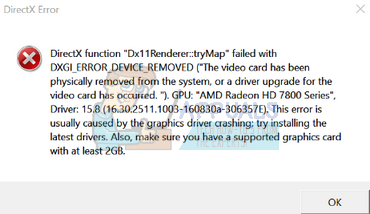
Appuals.com
The error “DXGI_ERROR_DEVICE_REMOVED” usually occurs when your graphics card isn’t able to run on your computer properly. The computer momentarily loses
karmic halo
Thanks, gonna try that
karmic halo
Ah, this is fun....
None of the things helpe
Reducing power limit of the gpu to 50% also doesn't prevent it from crashing
other games crash as well
nothing in the event viewer
(╯‵□′)╯︵┻━┻
golden nova
buy new PC
have you tried changing your drivers from Gaming to Studio? I think all 1XXX series allow to use both, you could reinstal DirectX too if you haven't done that yet

 solar tundra
pine kite
There are some error codes with probable solutions for it: https://community.bis...
solar tundra
pine kite
There are some error codes with probable solutions for it: https://community.bis...
I have no mods
Bruh i read the web and like whyyyy
I don't wanna spend 5 hours to figure out why my game isn't working
If the game arma 3 has a bug that bad not fixed i honestly feel scammed
steady hawk
Then provide us more info. When it does happen, how it does happen, where did you bought the game, PC specs, much more if we need
golden nova
solar tundra
If the game arma 3 has a bug that bad not fixed i honestly feel scammed
if I can play it without issue then it's not a bug but you're doing something wrong, so you're scamming yourself.
solar tundra
golden nova
if I can play it without issue then it's not a bug but you're doing something wr...
I downloaded the game 4 days ago and I haven't touch the game files or added any mods
golden nova
does your PC meet the game's requirements? do you have your GPU drivers up to date? Have you checked the RAM usage and temperatures when the game is running?
steady hawk
Pretty much you've ignored what I've said
golden nova
USB headset? Windows 11?
steady hawk
Oh yeah, USB Headset, it might be. Somehow I frequently forgot about it
 dusty swan
Not sure if this belongs here, but it's a mod related question.
in CTAB when I spawn multiple squads of AI in, I can only see myself on the bluetracker, am I missing something or is it a bug?
golden nova
CTAB will show you only the units that also have CTAB in their inventory afaik.
dusty swan
golden nova
CTAB will show you only the units that also have CTAB in their inventory afaik.
Ah that might be it, I'll check
@golden nova that fixed it, thanks
karmic halo
pine kite
I've had that error on my brand new laptop a couple months back. since trying so...
Well, good news. Seems the issue had nothing to do with the GPU afterall, but with the memory not working properly if XMP was enabled.
solar tundra
golden nova
USB headset? Windows 11?
I have a usb headset
golden nova
disconnect it and see if your game is still crashing
disconnect before starting the game ofc
if it's not crashing anymore, check the pinned messages here, specifically the one by Paul_1705
pine kite
solar tundra
I have no mods
Fair enough, that limits your search further. But yes, you do want to spend hours to fix it. Because you want to play the game. We don't know if it is a bug in Arma3. As R3vo figured out, such errors can be hardware related as well as software related. We don't have your system. Only you can.
solar tundra
true
but than that means the game is either too buggy or requires way to precise equipment
steady hawk
solar tundra
but than that means the game is either too buggy or requires way to precise equi...
Have you ever read and tried what honger said
pine kite
It is allways buggy in the eyes of those who do not check if their own hardware or practises are at fault. "Arma being Arma" is usually a case of PEBKAC.
steady hawk
Or probably because Engine limitation - but whatever, you have to listen to others, and do your job, not rant
uncut trellis
solar tundra
but than that means the game is either too buggy or requires way to precise equi...
did you test if the game runs without the USB headset?
And no the game does not require very precise equipment, the USB issue is caused by buggy update in Windows 10 long time ago and affects very narrow amount of usb headsets. Most people play the game just fine.
Also it is very possible you have something wrong in your windows install so checking out the unusual process exit wiki page is very useful and often solves this kind of issues
 half cloak
okay, so; I've been trying to fix this for a few hours now, saw on a Steam Workshop comment that it's a common issue, and am hoping to find another solution.
So the last few days, but noticed today, I haven't been able to download new mods from the workshop; sort of. The download on Steam goes through, and when I go into the workshop folder, the files are there, but it doesn't seem to be copying the mods over to the !Workshop folder in the Arma 3 directory, which means they're not showing in launcher. I've tried verifying my files, restarting the launcher half a dozen times, unsubscribing and resubscribing a dozen, restarting Steam, restarting my computer, trying to reboot the workshop by tugging the workshop.acf file for Arma, etc
The comment said they had to delete all of their mods and redownload to fix it, but I've got some 800gb of Arma content and really don't want to go through all of that, has anybody else encountered this bug, or how to fix it? I did a few searches on here before posting but didn't see anything
umbral narwhal
IIRC it's actually the Arma launcher that creates the !Workshop links.
In the launcher's mods list, check More -> add watched folder.
There's a restore default option there which might help.
Not sure though because none of the options really apply to workshop mods.
half cloak
yeah that sadly did nothing and I have no idea what's going on
 cosmic eagle
Hello I have a problem about Arma 3 F keys doesn't work on Vehicle Buttom
anyone have solution about it?
steady hawk
What does it mean Vehicle Buttom?
cosmic eagle
The Interactive button for Helis
steady hawk
What Interactive buttom?
cosmic eagle
steady hawk
What Interactive buttom?
wait hold on let me upload the photo

This buttom i mean