#arma3_editor
1 messages · Page 48 of 1
 broken inlet
 dim kindle
any help?
dim kindle
any help?
there are already respawn tents (I think they're called something with camps)
so you just need to set up the respawn settings and give them those
dim kindle
oh ok thanks
 sturdy jolt
Hey yall I got a quick question
so I'm doing a tank mission, and I'm trying to set up a point where a tank will ambush the players, my question is, hjow do I get the tank to stay quiet and wait, until they hit the trigger, at which point it'll start moving and shooting
 keen jolt
sturdy jolt
Hey yall I got a quick question
so I'm doing a tank mission, and I'm trying to s...
keen jolt
sturdy jolt
Hey yall I got a quick question
so I'm doing a tank mission, and I'm trying to s...
https://community.bistudio.com/wiki/combatMode use blue first, then set it to red
https://community.bistudio.com/wiki/setBehaviour use careless, then change to combat
 uneven leaf
I have a small problem, im using the eden enhanced mod and im using the ambient animation option, i put it to play the watch animation, so the unit can guard, but when i kill the unit the bodie just falls straight through the ground
 plain gale
@uneven leaf What do you expect? A dead unit dancing?
uneven leaf
no
i expect it to stay part of the map
and fall to the ground
not just fall straight through it so its just a gun left
plain gale
It doesn't fall through the ground for me
Any other mods?
Are you using Attach and Can exit?
plain gale
I cannot reproduce that issue.
uneven leaf
if i use attatch will it be fixed?
plain gale
Try it
plain gale
It might be. Idk
 prisma oyster
Any other mods?
prisma oyster
Start with that
Add them one by one to check what does what
uneven leaf
i think i found the problem
if i shoot them in the back they dont die instantly, (im using ace) so they exit the animation, but if i shoot them in the head they die instantly so the are still playing the animation
any ideas on how i fix this?
 harsh rune
How do i make gunfire visible like there is a gunfight, because i tried using Polplox's fake fire and it does not work for some reason
and is there animations for JM's Legion? for shields and spears
harsh rune
Are there any animations that handle utilizing a shield
 last aurora
not in vanilla arma afaik
harsh rune
im using JM's Legion mod
 sick abyss
I have fallen in love with the South Asia map
 dull magnet
Hi ! do you know where can I find this kind of fuel tank ? https://www.pronal.com/wp-content/uploads/2019/03/reservoirs-souples-hydrocarbures.jpg
in arma ? Thanks !
last aurora
if even, then with the stuff that came with the Contact DLC
broken inlet
nah pretty sure heli dlc added those
they're called fuel bladders or something like that
last aurora
crazy... you're actually right
broken inlet

last aurora
@dull magnet
props > structures (altis) > military > fuel bladder
dull magnet
Alright thanks ! Found it !
 rotund comet
i am missing some syntax to google. is there somthing to make placed objects like map objects? my ai navigates bad through manually placed structures. is there some kind of hidden wall so they avoid driving into it?
prisma oyster
not really
rotund comet
does this behave different if you have made the object as "simple" and simulation disabled?
 bold wraith
Hi, quick question does continue apply to while loops?
keen jolt
yes
 delicate grotto
So, I've discovered something mildly annoying. All maps have a "base" wind speed that the wind speed can't be dropped below using Zeus or normal Eden editor environment tools. Does anyone know of a way to change this without creating a whole new map?
... Maybe setWind will work.
setWind works.
 patent steppe
Map Wind
If using ACE :
Addon Options has an ACE Weather choice that has an option for built in map wind.
 vestal perch
@rotund comet no. And if you build things out of parts AI cant navigate that kind of constructions. AI navigates on objects by model incorporated paths.
so basically, AI wont work with massive compositions
and there is no way around that
 strong marsh
Does anyone know if the Bastion object in the editor (livonia DLC) is able to have its castle door open??
Ok nevermind but different question. The doors are able to be opened, but what about the
vestal perch
@strong marsh?
strong marsh
@vestal perch I don’t see any special state to open the doors in the object, so I could like control it with a script. But I spawn in with a civ and I can open the doors
I want it to spawn with the doors locked and after a certain time unlock
 wet drum
how do i make captain scott millers character play an animation (changing variable name changes his face), can anyone advise please?
vestal perch
playMove switchMove commands?
 thorn wyvern
this setIdentity "Miller" will reset the face back to the correct one
wet drum
vestal perch
playMove switchMove commands?
Tried these initially, but didnt work, but thanks anywho 👍 😄
dim kindle
how do i make a vehicle only spawn when the player role inside it is selected
broken inlet
trigger with an "alive" condition thats synced to a show/hide module thats synced to the vehicle could work @dim kindle
dim kindle
0.o
broken inlet
have the vehicle be hidden by default and then
if "unit alive" -> trigger activates show/hide module -> module shows the vehicle
^ not actual code
dim kindle
@broken inlet hidden how?
broken inlet
using another show/hide module
broken inlet
?
if you have a unit called "unit" thats alive and do "alive unit" (not real code), that should return true
!alive would check for dead
 onyx aurora
Is there any way to widen the display in the briefing tab?
I'm wanting to put an image in there but it won't fit and scaling it down blurs it too much
last aurora
no, unless you want to go deep into UI elements coding/scripting
and even then i'm not sure if that's possible
onyx aurora
Ok, thanks.
 boreal oar
Might be better in scripting or just the ask_questions_here - not sure... (scripting / debug ... but for an editor application)
Hey all, I'm trying to set up a something in the editor where a script spawns a vehicle. Ideally it would have a specific paintjob that's not one of the default spawns (but DOES exist in the garage). I understand this is possible w/ _vehicle setObjectTextureGlobal [0,"texture"];
The problem I'm running into is getting the Texture names. I've tried naming a sample vehicle as "VehTest", and then running the scenario and using _texture = getObjectTextures _VehTest; and having the first slot watch for _texture ... which I think is the correct usage (I'm a newb on the debug console)??? But I'm not seeing anything in the watch window. Am I missing something?
TIA
 wind raptor
@boreal oar Read https://community.bistudio.com/wiki/Variables#Scopes to understand what you're doing wrong (it's the underscores).
For the watch field, just getObjectTextures VehTest would suffice.
boreal oar
Thank you!
 shrewd flicker
hey guys, i have a BRDM that will be spawned by a TMF wave spawner in a trigger. Than, I have another trigger (which will be triggered after the first one) to skip waypoint "hold" of the BRDM. However, that is not working. Could be the issue with the wave spawner?
Beacuse I have the thing working on different car that is already there, not spawned by wave spawner...
yeah removing the brdm from the wave spawner will work 🤣 but still concerned about the answer
 reef lintel
I guess your trigger needs a reference to the brdm.
 round pendant
sorry to butt in on the chat, but would using unsimulated simple vehicles be better performance savers than the wreck objects if i was to use a good few?
reef lintel
Yeah simple objects are the best for performance
Assuming the wrecks are not that already
round pendant
from what i can see i can only disable simulation for the wreck objects (ural, orca etc) whereas a vehicle like HEMTT or a hatchback i can enable as a simple object etc
so simple it is i guess 😄
reef lintel
Ah well its possible that the wrecks are simple by default.
round pendant
hmm any ideas how i could check if they are?
reef lintel
Dont know. Maybe @prisma oyster has an answer
round pendant
hopefully, i see he got a promotion to bohemia.net 😆
round pendant
ye last time i was chatting to him he was but a simple veteran moderator tsk tsk
prisma oyster
round pendant
ye last time i was chatting to him he was but a simple veteran moderator tsk tsk
promotions promotions
round pendant
prisma oyster
promotions promotions
congratulations sir, well deserved
prisma oyster
round pendant
hmm any ideas how i could check if they are?
most if not all of the default assets only allow the "simple object" checkbox for when it is possible/worth
wrecks are most likely nothing on performance, don't stress it 🙂
round pendant
prisma oyster
most if not all of the default assets only allow the "simple object" checkbox fo...
very well, thank you!
 sacred briar
prisma oyster
promotions promotions
sacred briar
prisma oyster
promotions promotions
Congratulations Lou! 🙂
prisma oyster
sacred briar
Congratulations Lou! 🙂
Thanks!
 gray arrow
i am trying to put a backpack in as an item into a units vest because the unit im in uses TFAR
ive tried addItemToVest but it doesnt seem to work
boreal oar
Not sure, but can you add an inventory container to another inventory container? I know backpacks can go in crates, vics, etc. But can they go in vests?
 fading goblet
If the vest is big enough, sure you can
Although I so believe most gear items have limitations to where they can be placed (eg. backpack can't be placed in Vest slot), so could be that it's locked from non-containers... In that case it becomes #arma3_config
delicate grotto
Help? Trying to use the CUP Takistan civilian units in the Civilian Presence Module. It's claiming that I'm missing an open bracket, but I just copied the code from the bistudio wiki and slapped in the class names.
_this setUnitLoadout selectRandom ["CUP_C_TK_Man_02", "CUP_C_TK_Man_04", "CUP_C_TK_Man_07", "CUP_C_TK_Man_08", "CUP_C_TK_Man_01_Coat", "CUP_C_TK_Man_03_Coat", "CUP_C_TK_Man_05_Coat", "CUP_C_TK_Man_06_Coat", "CUP_C_TK_Man_07_Coat", "CUP_C_TK_Man_01_Jack", "CUP_C_TK_Man_02_Jack", "CUP_C_TK_Man_03_Jack", "CUP_C_TK_Man_04_Jack", "CUP_C_TK_Man_05_Jack", "CUP_C_TK_Man_06_Jack", "CUP_C_TK_Man_08_Jack", "CUP_C_TK_Man_01_Waist", "CUP_C_TK_Man_03_Waist", "CUP_C_TK_Man_04_Waist", "CUP_C_TK_Man_06_Waist", "CUP_C_TK_Man_07_Waist",];
keen jolt
delicate grotto
Help? Trying to use the CUP Takistan civilian units in the Civilian Presence Mod...
because of the last comma
 umbral star
Okay so. I've run into a bit of an issue when it comes to something in my mission. This might be a little too complicated to do however I'm hoping it won't involve me spending 5 weeks on it.
For this mission, players will be paradropped via H-21 helicopters before moving to secure a landing site. This landing site originally was going to be tied to a trigger that would simply spawn everything in when they moved into Pyrgos but I've decided to make it a little more involved and in turn, complicated for myself. I wanted to have the helicopters fly over and drop off the "supplies" in order to build the landing site, using the build feature I've seen used in the campaign and in DRO however I have no idea how to do it and I'm not sure I can ever have the objects that they're attached to be moved let alone para dropped. So my questions are-
- How do I set up the build function on an object that will allow players to set up objects.
- Can these objects once set up to build said fortification be moved around like an ace object and loaded into the cargo of a vehicle.
- Do these items need to be pre-placed in order to build what is already set up or can they be sat say, in the middle of a field, be built and the build objects attached to the original object be set up in a pre-place position?
keen jolt
umbral star
Okay so. I've run into a bit of an issue when it comes to something in my missio...
unless you know scripting it won't be easy for you. also I'm not sure if there are any pre-made scripts you can use, so you may have to script the whole thing.
umbral star
Damn. Alright I'll have a scout around to see if there's some type of mod for it, otherwise it's triggers
keen jolt
but learning sqf isn't that hard if you've done programming before
it's a pretty straightforward language
umbral star
If there's a video for it I'll sit down and try to learn it, but this is for like 1 zeus mission
Never to be used again
dim kindle
@umbral star I understand it's not easy to write down, but your description of the exact gameplay functionality is a bit vague. I'm stuck with questions like: what kind of objects do you want players to build? Simple objects, turrets, or compositions? How are the dropped resources "used" gameplay wise in building? And are players given freedom to place these everywhere? It could save you a lot of headaches if you could restrict one of these aspects.
Another idea would be to use a Workshop mod such as: https://steamcommunity.com/sharedfiles/filedetails/?id=1224892496
umbral star
Well to explain it a little better or attempt to. The things being built would be like a couple of crates and sandbags to set up a defined drop zone, boarders if you will with some medical tents and an area to store ammunition that will be dropped later. These objects can not be moved, they are completely static and mainly used as cover and as a landmark for pilots
dim kindle
I recommend this, because even if you managed to cook up this gameplay functionality, you'd still need to troubleshoot it in multiplayer before showing it.
OK
umbral star
Yeah we have grad trenches already. This seems like it will be a headache so I'll just get them to set up trenches around the area
dim kindle
You could script a paradrop of crates that drop on each location, and have "engineer" units get an addaction to turn those into the tents, crates, and sandbags you like.
So you are restricting the locations beforehand. This is doable.
umbral star
Yeah, but, the creates "containing the supplies" would be paradropped in via helicopters piloted by players so the pilots are sitting on their hands
dim kindle
Paradropped? Or sling loaded? That would make it more interesting for everyone involved, and give more control.
umbral star
Well the crates would be loaded into the cargo using ace, then as they approach the boxes would be dropped. I was thinking they would act as regular boxes until they hit the ground in which they hit a trigger and turn into a static object you could hold space on to "build"
But in all honesty this sounds like a major league headache
Especially for something for just one op
So I'll probably set up something for when they walk away and hit a trigger it'll just spawn all the pre-place objects
dim kindle
I do not think you have to fuss too much about the air dropping part.
I would still recommend sling loading, since parachute physics are not exact in Arma, and it will be very complex to script movement of the crates once they are on the ground. You could simply place an addaction in the init of each crate, that allows players to transform it into your medical tent etc.
the addaction would be the only scripting part, as far as I can tell here.
umbral star
We'll see how it goes. I got a week to get this done
dim kindle
Well here's a starter: https://community.bistudio.com/wiki/addAction
And if you are dead set on airdropping (don't recommend); http://killzonekid.com/arma-scripting-tutorials-epic-armour-drop/
Good luck.
Feel free to drop specific questions in the scripting channel 😄
umbral star
I will try
dim kindle
insert yoda meme
 sinful zenith
gray arrow
i am trying to put a backpack in as an item into a units vest because the unit i...
sinful zenith
gray arrow
i am trying to put a backpack in as an item into a units vest because the unit i...
Pretty sure you cannot put a backpack into a vest, and how would that help you with TFAR anyway?
 fast ginkgo
Hey guys!! Is it possible to change respawn "type" in mission parameters (through the description.ext), for example on mission start through the mission parameters, the player can either chose to respawn on a custom position, or disable respawn and instead switch to squad member on death ?
So switching from Respawn=3 to Respawn=2, if i'm not mistaken
gray arrow
sinful zenith
Pretty sure you cannot put a backpack into a vest, and how would that help you w...
all long range tfar radios are backpack radios
sinful zenith
but they won't be on your back if they are in your vest
 elfin harness
Hey, anyone know what I'm doing wrong with my sqf scripting?
Made a carrier setup and then it spawns in under the water?
https://docs.google.com/document/d/1btwh_7QhI1NoEu653W-81ixTBPsLsCZ2ZfG6N2TJ3PA/edit?usp=sharing
<new to using Zeus and all this stuff
keen jolt
elfin harness
Hey, anyone know what I'm doing wrong with my sqf scripting?
Made a carrier set...
Don't use setPosXXX on carrier objects
They're multi part objects
What you do only moves one part
Also you're using setPosWorld
Even if it worked that sets the model center
elfin harness
I'll be honest, all I had been doing was placing the items where I wanted them and saving the sqf
It was funny pasting in the sqf and seeing the ships at the bottom of the ocean
 placid delta
Does anyone know a simple way to have units spawn with no gear on their initial load-in? (So that they can get their equipment from an arsenal box, for example)
 quartz spade
placid delta
Does anyone know a simple way to have units spawn with no gear on their initial ...
quartz spade
placid delta
Does anyone know a simple way to have units spawn with no gear on their initial ...
Simplest way is to have the player units be BLUFOR Survivor units.
Slightly less simple way is to change the units' loadouts in the arsenal.
Best way is to use commands like removeAllWeapons
placid delta
Can that be done in the unit's Init?
quartz spade
Yes it can. this removeAllWeapons
quartz spade
Or removeAllWeapons this
I always forget the order :confounded:
 leaden ermine
hey quick question, in the eden editor why do backpacks that are static props move about, or shift back to default rotation, ive got a backpack im laying on the ground so idisabled simulation and made it a simple object, but it still moves. just wondering, thanks 🙂
prisma oyster
leaden ermine
hey quick question, in the eden editor why do backpacks that are static props mo...
it's because the backpack itself is not the object, the object that has a disabled simulation is the invisible "weapon holder"
and when you try to pick the backpack, it changes appearance of the weapon holder without "emptying" it by picking the content
leaden ermine
hmm, is there a way that i can fix it so it stays put? im specifically making a casualty collection point so im using a medical backpack i found in the props tab and just laying it down on its back. thanks 🙂
 deft barn
Hello everyone, I would like to ask who has made. PTC file particles related tutorial, very grateful
placid delta
In Zeus missions, has anyone else ever run in to "insufficient resources" and know how to resolve it?
prisma oyster
placid delta
In Zeus missions, has anyone else ever run in to "insufficient resources" and kn...
That's #zeus_discussion 😉
placid delta
quartz spade
Or `removeAllWeapons this`
I always forget the order :confounded:
So I tried a couple things...
I started with
removeAllWeapons this;
removeGoggles this;
removeHeadgear this;
removeVest this;
removeUniform this;
removeAllAssignedItems this;
clearAllItemsFromBackpack this;
removeBackpack this;
but what I found was, while it worked, it also stripped the corpse down to the underwear when the player died and ragdolled.
in the hopes of having it not apply to the ragdoll, I tried this, but it didn't seem to work at all:
removeAllWeapons player;
removeGoggles player;
removeHeadgear player;
removeVest player;
removeUniform player;
removeAllAssignedItems player;
clearAllItemsFromBackpack player;
removeBackpack player;
Does anyone know what method I might be able to use to have the unit's equipment removed on initial spawn, but then have it not run again when the unit changes to a ragdoll? (so that the equipment stays on the dead body rather than the body becoming "naked" after death)
Not sure if this belongs in #arma3_scripting
quartz spade
Can you elaborate on this? removeAllWeapons this; Only executes at mission start, it should not be able to run again. Did you add it to the init field of the playable units?
Tests on my machine shows that players lose everything to the underwear at mission start. At death, they keep any equipment they pick up.
What result do you want from this? I don't believe I fully understand your intention.
placid delta
quartz spade
Can you elaborate on this? `removeAllWeapons this; ` Only executes at mission st...
so the behavior I was seeing was that they were getting stripped on death. what you were describing above was the desired behavior. we want them without gear on initial spawn because our players' expectation is that they gear up from an arsenal box in the spawn area.
this change to the init script seems to produce the expected behavior:
while { alive player } do
removeAllWeapons this;
removeGoggles this;
removeHeadgear this;
removeVest this;
removeUniform this;
removeAllAssignedItems this;
clearAllItemsFromBackpack this;
removeBackpack this
@placid delta
_unit setUnitLoadout (configFile >> "EmptyLoadout");
one line to remove all items and other gear
placid delta
Does that work as-is, or are you implying "configFile" should be subbed for an actual config file in the mission folder?
placid delta
@plain gale It seems like that worked initially, but does not apply for join in progress players. Any ideas?
placid delta
plain gale
How and where do you execute it?
I have it in the player units' init field
 sacred schooner
How would I add a re-spawn point for a side on a player character?
I've tried syncing a respawn module to a playable character and the code below.
They both work when they're objects, vehicles, AI. but if a player takes control (i.e. picks that role and the AI is no longer playing it), the respawn position get's removed.
[west, "Yellow","Yellow Squad Spawn"] call BIS_fnc_addRespawnPosition;
 bronze moth
I made my first 2 steam workshop missions, can anyone try them out and give feedback? I know a pretty good amount about mission making but could definitely be better
also sorry if this is the wrong channel
keen jolt
bronze moth
I made my first 2 steam workshop missions, can anyone try them out and give feed...
bronze moth
Thanks
keen jolt
@bronze moth
I accidentally had the Unsung mod installed while creating this, and although I didn't use any assets from it, it is a required mod.
if you don't use any assets from that mod, first save the mission.sqm in unbinarized mode.
Then delete all references to Unsung in the file.
You can rebinarize the mission.sqm after that.
Be sure to keep a backup in case something goes wrong
bronze moth
I can try but I have no idea how to do that besides unbinarizing, thank you though I’ll try
keen jolt
bronze moth
I can try but I have no idea how to do that besides unbinarizing, thank you thou...
just remove the binarized check in eden and save the mission
then open mission.sqm, find addons[] and remove all references to unsung addons
bronze moth
Oh okay, I’ll definitely do it then thanks
This is only a problem with the two missions I have up currently, for the third I don’t have the mod loaded
Okay so I went onto the editor for the 1st mission and I don’t know what I did but I think I accidentally saved it while changing the map to part 2, if that makes no sense then in other words there is nothing on the map and I still have the scenario to play and whatnot but the editor version is gone. I can fix part 2 though
keen jolt
bronze moth
Okay so I went onto the editor for the 1st mission and I don’t know what I did b...
didn't you keep a backup?!
Be sure to keep a backup in case something goes wrong
bronze moth
no no no I'm not talking about removing the mod, basically when I started part 2 I already had all the settings and flags on the map set up so I just used the same map, but I guess I accidentally saved it after I removed all the structures and people because now there's nothing there
keen jolt
ok
bronze moth
it's fine, i guess part 1 can stay the same at least i can fix the second
because people can also just skip the first
bronze moth
I think I fixed it for part 2, im gonna try testing it without unsung loaded
bronze moth
I have been getting rid of the parts but they keep being re-added for some reason, whenever i try to load it it gives me a "error loading the scenario"
plain gale
placid delta
I have it in the player units' init field
You wanna put that in the initPlayerLocal.sqf file
placid delta
plain gale
You wanna put that in the initPlayerLocal.sqf file
Ah OK, I will try that then. Thanks for the help.
 trail brook
Hi, all.
I'm making a mission that begins with a "cinematic" helicopter entrance that the player spawns in. I have also set a blufor respawn with custom position set. In singleplayer everything works well, including starting spawn and respawn systems. The problem I am running into is when the mission is taken online. Even with startOnSpawn = 0; in description.ext within the mission file, It still takes you to the respawn menu.
Would really like to keep this helicopter bit in, as this is one of my friend's first operations in the game, and I thought it would add to the experience.
Thanks in advance.
prisma oyster
startOnSpawn is not doing what you think it does
Try respawnOnStart @Vargo#7340
oh.
@trail brook
trail brook
Oh shit thats probably it lol.
trail brook
prisma oyster
startOnSpawn is not doing what you think it does
Try respawnOnStart @Vargo#7340
Actually, I do have it as respawnOnStart. Just got it confused when I asked for help. Still doesn't work. 😦
prisma oyster
-1
trail brook
Tried that too earlier, spawned at 0,0. Will try again.
dim kindle
respawnOnStart = 0;
trail brook
dim kindle
respawnOnStart = 0;
yes that is what I had.
dim kindle
maybe you have a } in the wrong place
broken inlet
can you post the entire description.ext?
broken inlet
hm
trail brook
that's copy and pasted
dim kindle
have you made sure it says ext at the end
trail brook
yup
dim kindle
are u using a function for the respawn
trail brook
as in the module thingy? Yes. I heard that might've caused an issue, so I added respawn_west to the init just in case. I can try making it a regular old marker instead.
dim kindle
yep
just make it respawn blufor on the module and do nothing to the unit
then go to multiplayer in the attributes and make sure custom respawn position is selected
if it all breaks again dm me and ill walk you through it
trail brook
okay let me try that.
broken inlet
trail brook
as in the module thingy? Yes. I heard that might've caused an issue, so I added ...
respawn_west shouldnt be in the init but rather tha variable name afaik
bronze moth
So I want to use the trigger condition in my mode where when opfor is not present it will end the mission, except since there are multiple objectives how would I make it so that it only ends if all the zones have no enemies? And no, I don’t want to cover the whole map because then if the enemies run away it would be a large scale hide and seek
keen jolt
bronze moth
So I want to use the trigger condition in my mode where when opfor is not presen...
check if any triggers are still not activated when one activates
if ([trigger1, trigger2, ...] findIf {!triggerActivated _x} == -1) then {
...//end mission
}
So am I putting this in all of their init lines?
 median drum
["B_Ship_Gun_01_base_F","StaticMGWeapon","StaticWeapon","LandVehicle","Land","AllVehicles","All"] - MK45 Hammer  lAnDvEhIcLe
keen jolt
median drum
`["B_Ship_Gun_01_base_F","StaticMGWeapon","StaticWeapon","LandVehicle","Land","A...
it's a static weapon
keen jolt
bronze moth
So am I putting this in all of their init lines?
in their activation statements
bronze moth
keen jolt
in their activation statements
Alright thank you
median drum
keen jolt
it's a static weapon
keen jolt
bronze moth
Alright thank you
I meant statements  (corrected)
bronze moth
I put it there, won’t let me accept it I get an invalid number warning
keen jolt
bronze moth
I put it there, won’t let me accept it I get an invalid number warning
that wasn't the actual code
you have to edit it
and you have to remove the comments
bronze moth
oh okay, sorry I am not very in depth with the code parts of editing missions haha
bronze moth
keen jolt
you have to edit it
so what exactly would I be changing? I’m sorry, I just don’t know what I’m doing when it comes to this
keen jolt
bronze moth
so what exactly would I be changing? I’m sorry, I just don’t know what I’m doing...
[trigger1, trigger2, ...] <- this has to be your array of triggers
...//end mission <- you have to place the mission completion code in here
bronze moth
am I supposed to change any numbers? It’s still giving me an invalid number error and I’m assuming it has to do with the -1 or _x?
keen jolt
bronze moth
am I supposed to change any numbers? It’s still giving me an invalid number erro...
it has to be whatever you named your triggers
bronze moth
well I just named the two I have down now as trigger1 and trigger2 since that’s already written in what you sent me
keen jolt
bronze moth
well I just named the two I have down now as trigger1 and trigger2 since that’s ...
then change it to [trigger1, trigger2]
bronze moth
I think it works now, I didn’t get the error
so am i putting this new code into every trigger I make, but also adding more triggers (trigger3, trigger4)?
keen jolt
bronze moth
I think it works now, I didn’t get the error
did you also put the mission completion code?
bronze moth
yep, I think I put it in the right place because there isn’t any error code
keen jolt
what did you put?
bronze moth
normal end mission code, "End1" call BIS_fnc_endMissionServer;
keen jolt
ok
keen jolt
bronze moth
so am i putting this new code into every trigger I make, but also adding more tr...
then yeah
if you name your triggers in a pattern you can make that code simpler
bronze moth
I just started the mission without anyone in one of the zones, it didn’t end
so it’s working
bronze moth
keen jolt
if you name your triggers in a pattern you can make that code simpler
I could
keen jolt
bronze moth
I could
_allDone = for "_i" from 1 to n do {
  if (!triggerActivated (missionNamespace getVariable [format["trigger%1", _i], objNull])) exitWith {
    false
  };
  true;
};
if (_allDone) then {"End1" call BIS_fnc_endMissionServer;};
all you have to do is change n
bronze moth
what’s this for?
keen jolt
your triggers would be trigger1, ... , triggern
bronze moth
so with this do I not have to add every trigger’s name or what?
keen jolt
bronze moth
so with this do I not have to add every trigger’s name or what?
yeah just change n
(but you must name your triggers as I said #arma3_editor message)
or change the pattern
"trigger%1"
bronze moth
so all my triggers are named trigger1, trigger2, etc. but then I use this code in them? i seriously know nothing about how this works
keen jolt
bronze moth
so all my triggers are named trigger1, trigger2, etc. but then I use this code i...
it's the same code as this:
#arma3_editor message
bronze moth
ok, am I still writing the name of every trigger in this one
bronze moth
oh okay, then I am just putting this code in every trigger but have to “change n”? thank you for helping i would not know what to do otherwise
keen jolt
bronze moth
oh okay, then I am just putting this code in every trigger but have to “change n...
yeah
n obviously is the number of the last trigger
trigger1, trigger2, trigger3, trigger4 -> n=4
bronze moth
ahh alright, so once all of the triggers are placed then let’s say the last one is 8 I would write 8 instead of n
keen jolt
yup
bronze moth
ok hold on I’ll place all the triggers and test it I’ll be back
yep I think it works now I killed all the enemies in a zone and it didn’t end, thank you so much
keen jolt
bronze moth
yep I think it works now I killed all the enemies in a zone and it didn’t end, t...
but the question is does it end when you kill the enemies in all zones?!
bronze moth
Well I’ll have to test that but there are 9 different zones right now across the map so it’ll take a second
keen jolt
bronze moth
Well I’ll have to test that but there are 9 different zones right now across the...
{_x setDamage 1} forEach (allUnits - [player])
bronze moth
alright I’ll test it
It finished the mission and also killed the helicopter pilot so I died immediately lmao
for context you start in a helicopter that lands in the main base
bronze moth
as in blufor yes
bronze moth
oh okay well it ended the mission when it killed everyone anyway so i don't need to test it again
 dense mortar
Hallo, I've been having this issue where opfor bots (the playable slots that don't actively have a human in it) respawn on blufor respawn positions on occasion. I've tried using both the respawn map marker with proper variables for both teams and the respawn module (with the team selected). I'd like to keep the respawning bots, as its helpful for the co-op battlefield 2 mission style. Can anybody tell me how to keep them out of my spawn?
dense mortar
Ah I figured out part of it, they like to go to the first module, and they like to spawn on the random coordinate respawn that for what ever reason gets created next to the module.
 grizzled scaffold
Need some somewhat niche help with high command - doing a manhunt gamemode, but in high command mode as soon as friendly units see the single player, they’re marked exactly on the map no matter what. Is there a way to remove enemy markers, or at least prevent the enemy from being marked constantly?
keen jolt
grizzled scaffold
Need some somewhat niche help with high command - doing a manhunt gamemode, but ...
Did you try unchecking the enemy markers in difficulty settings?
 fervent swift
So I've made an 'opfor not present' trigger and synced it to an 'end scenario' module, but even though there are two opfor soldiers well within the trigger's reach, starting the scenario causes the module to end it immediately. Why is this?
keen jolt
just don't use the module
fervent swift
Somehow it suddenly works fine now.
grizzled scaffold
keen jolt
Did you try unchecking the enemy markers in difficulty settings?
Yes, it’s not just generic enemy markers on the map, it’s via the high command interface
 ruby sparrow
HC interface does that for some reason. I would say just don't use it
dim kindle
whats the best way to spawn an p3d object using empty/system markers?
prisma oyster
dim kindle
whats the best way to spawn an p3d object using empty/system markers?
createSimpleObject
dim kindle
so i just make an empty sys marker give it a variable name then make some init.sqf to spawn whatever i want and prob use getpos setpos if needed?
prisma oyster
getMarker*Pos but yeah
dim kindle
ty
 rain verge
Alright, Im trying to Make a multi-player Mission. I have spawn points, Vehicle respawns, and Player slots set up. I need figure out how to make an I&A scenario. Any good ideas on where to get started?
harsh rune
Anyone know how to put it to where AI are being cared for by medics but have blood and actual bullet wounds in their body?
 flint cedar
A quick non script way is to drop them from a height 🙂
 sudden anchor
how do I disable dying on start? I already disabled respawn on start but now i get killed on start. I can see it in the kill feed says (insertname) killed. Its a ravage mission if that helps
last aurora
@sudden anchor
you might find useful information here
https://community.bistudio.com/wiki/Arma_3:_Respawn
sudden anchor
last aurora
<@!299017075702366208>
you might find useful information here
https://community...
will check but I have doubts its a respawn issue. it used to be but i fixed that looking through literally every wiki and forum, spent many many hours researching haha
ya tried literally everything on that wiki related to respawning
I'm thinking maybe i need a script that respawns me instantly to last location on start and restores gear but make it a one time thing
sudden anchor
last aurora
<@!299017075702366208>
you might find useful information here
https://community...
ya so i turned god mode on and whats happening is it teleports me under the map or something its pitch black. and it also doesnt make a difference how i place my character or were it literally teleports me
sudden anchor
last aurora
<@!299017075702366208>
you might find useful information here
https://community...
ya its teleporting me way outside of the map out underwater lmao.
last aurora
Then your initial respawn setup is borked, idk
sudden anchor
last aurora
Then your initial respawn setup is borked, idk
ah ok, will look into that then i guess haha thanx for trying to help!
last aurora
👍
sudden anchor
ya even without a respawn system in place it still happens damn im stumped lmao
last aurora
something is fubar with our mission...
sudden anchor
haha indeed!
leaden ermine
... that moment when your making a really cool mission, and you go to open it the next day, but instead of open you hit the save icon, and without picking up on it yet, you go to select your save file... and your mission file gets blanked over since you saved your existing mission to a blank map rather than opening it.... stupid me.... anybody else just mindlessly mess up like this in arma eden editor?lol OOOF ... F for respect. lol luckily it was a small template
prisma oyster
backups
leaden ermine
yeah ive started to duplicate my files but i forgot to do it to this one lol
prisma oyster
if you can, use git 🙂 keeps a history of edits
leaden ermine
git? whats that ill have to look into it
plain gale
I have always wanted an optional setting which would make the editor automatically create a backup of the mission.sqm.
When saving it should first copy the current mission sqm and add the date to it and then save.
I might create a ticket.
 cyan garnet
i'm just starting to get into making some custom compositions on arma 3 for personal use with my friend group, specifically for vehicles.
if one was to say that they want to strap a GAU-8 to an AE86, how would someone do that?
i know that attach scripts exist, and i've been using them to attach m2s and refueling cans onto vehicles.
but i don't exactly have a GAU-8 as a prop, if someone knows a good way to do this, it'd be much obliged.
(sorry if this aint the right channel for it lol)
vestal perch
@cyan garnet cant do it.
since you have no object for it
well there is a way but that involves you making the object first
cyan garnet
vestal perch
well there is a way but that involves you making the object first
i see. i was gonna attempt to just strap a whole A-10 onto it and do some wacky crap to attempt to jank my way through it. thanks for the info
 earnest needle
cyan garnet
i'm just starting to get into making some custom compositions on arma 3 for pers...
earnest needle
cyan garnet
i'm just starting to get into making some custom compositions on arma 3 for pers...
you can do it at least functionally with no model for the cannon though
this addWeaponTurret ["gatling_20mm",[-1]];
this addMagazineTurret ["2000Rnd_20mm_shells",[-1]];
ah i see, thank you.
cyan garnet
earnest needle
you can do it at least functionally with no model for the cannon though
just curious, how would i switch what seat controls the turret?
im at my very beginnings of screwing around with scripting so ye
earnest needle
cyan garnet
just curious, how would i switch what seat controls the turret?
On the right the second argument defines the "path" of the turret, you can see all turrets of a vehicle with allTurrets
https://community.bistudio.com/wiki/addWeaponTurret
https://community.bistudio.com/wiki/allTurrets
cyan garnet
alright, thank u
keen jolt
 silver stream
How do I stop units from automatically grouping?
silver stream
How do I stop units from automatically grouping?
you mean when you place them?
silver stream
keen jolt
you mean when you place them?
yes
keen jolt
don't place them too close
you can also ungroup them manually
silver stream
okay thx
keen jolt
if you need to you can move them close to each other after you've placed them
 past sun
@silver stream you can disable that behavior from 3Den Settings > Preferences > Misc > Auto Grouping
silver stream
past sun
<@!533692004526325760> you can disable that behavior from 3Den Settings > Prefer...
Oh thanks!
 topaz nova
Hello. Is there a way to get debug console created objects to show up in the editor sidebar as normal?
last aurora
wdym?
topaz nova
Thanks. I was handed a script that uses createVehicle so I'll have to change all those calls.
fervent swift
So I want to set up a scenario where the clock is stuck at a certain point at night until blufor reach a town that they're supposed to hold against opfor. When Blufor reach the town, time starts ticking towards dawn while a carefully selected song starts playing at just the right time that it crescendos just about when the sun rises. How do I go about setting it up so the sun rises at the right time?
prisma oyster
fervent swift
So I want to set up a scenario where the clock is stuck at a certain point at ni...
you can use setTimeMultiplier to set a slower pace for daytime (e.g 1% of real time) then setDate to the proper time
fervent swift
Aha, so if I start the scenario with the time multiplier set to 0 and then make a Move waypoint with the OnActivation argument "SetTimeMultiplier 1", that would make it so time starts progressing normally only when the players are in the right place?
prisma oyster
you cannot have it at 0 iirc
but more or less yeah
please note, players with watches will see the time not going "properly"
fervent swift
prisma oyster
please note, players with watches will see the time not going "properly"
Eh, it's probably not going to be a problem.
 oblique harness
when i setup multiplayer ops with playables, i cant spawn with the weapon loadout that i set in eden editor, how to i keep the loadouts on when you spawn in?
last aurora
@oblique harness
Have a read here
https://community.bistudio.com/wiki/Arma_3:_Respawn
oblique harness
Thx 👍
bronze moth
This is my first time trying to use tasks and basically what I’m trying to do is make it so that you can’t finish task 3 before finishing task 1. Using “trigger activated” just makes the task get automatically assigned when you finish the first task and skips the second. It’s kind of hard to describe but is there any way to make it so that you can’t complete a task until the previous one is finished?
wind raptor
Are you setting the task states using modules and triggers?
bronze moth
Yes
I think I got it to work by using the “=true” condition instead of triggerActivated
The reason why this was a problem was that the second task required you to go back to where you started and when you spawned in it would just complete task 2 and start task 3
keen jolt
bronze moth
I think I got it to work by using the “=true” condition instead of triggerActiva...
wat?
wind raptor
The test is always whether the condition is true: triggerActivated MyTrigger is (implicitly) the same as triggerActivated MyTrigger == true.
bronze moth
It’s hard to explain but basically I was trying to make it so that the “task complete” trigger could only be activated once the other tasks were done but when I set it up with trigger activated, it just completed the task immediately
keen jolt
I think you mean #creators_recruiting ?
wind raptor
bronze moth
It’s hard to explain but basically I was trying to make it so that the “task com...
Might have been using the wrong trigger or the condition was slightly off, can't tell without more info. Does it work now?
 glad ice
i think that is for mods
keen jolt
glad ice
i think that is for mods
no not necessarily. if you want to ask someone to work with you that's the place.
glad ice
damn this server and its 200+ channels
bronze moth
wind raptor
Might have been using the wrong trigger or the condition was slightly off, can't...
Actually I think I was wrong I don’t think it worked, now all the triggers just activated immediately haha
Basically what I want is to make it so you can’t complete the second and third tasks before the first one is complete
But when I use “triggerActivated”, it makes it so that the task just gets assigned before you can complete the second one
What I want the triggers to do is become available to fire once the first task is complete, but instead of that they just fire immediately
grizzled scaffold
doing a sector control linked to spawn ai but the vast majority of blufor units kinda just... stand around by their spawnpoint
this is the exact same module setup as is supposed to be setup, and the exact same one that has worked before
i'm not entirely sure what has changed to cause this, but they just aren't really getting waypoints
bronze moth
are there any enemies they can see? you might have to turn up their courage factor and if they aren't required to fight exactly set them to "careless"
grizzled scaffold
i fixed it by just moving the spawnpoint lol, they're doing their thing now
sector control and spawn ai is a surprisingly good way to get an ambient battle going on in vanilla
wind raptor
bronze moth
What I want the triggers to do is become available to fire once the first task i...
Can you post the full condition statement of each (relevant) trigger?
bronze moth
wind raptor
Can you post the full condition statement of each (relevant) trigger?
I used an old tutorial for the tasks that involved “succeeded” and “assigned” triggers for each task, so that’s what that means. Taskassigned1 just says “true” because it’s the first task so it doesn’t matter. Tasksucceed1 says “!alive intel” and the activation is “any player present”. This is because the first task is to take some intel. The first task works completely fine, it’s the second and third that are problems. Taskassigned2 says “triggerActivated tasksucceed1;” and it works fine. Tasksucceed2 is “any player present”, and the condition says “this”. That’s because the second task is to move to a location. Task 3 is in 3 parts. Taskassigned3a says “triggerActivated tasksucceed2”, and taskassigned 3b and 3c say the same. Tasksucceed3 says “any player present” and the condition is “this”. That’s because the third task isn’t exactly one objective, but instead it gives you 2 minutes to prepare for an ambush and the “sub-tasks” are for planting mines and such. The real problem is that you can easily complete task 2 by going to the location before task 1 is finished, which will in turn start task 3. If I make the “tasksucceed2” have “triggerActivated tasksucceed1” as it’s condition, then the second task will just succeed immediately after task 1.
Sorry if this explanation is way too long haha
wind raptor
That is indeed a complicated explanation.
bronze moth
Basically to understand the problem just read the last few sentences
wind raptor
You can get rid of the first trigger entirely, if you place the task module without a trigger linked it will do its thing when the mission starts, just like when linking a trigger with true condition to it.
bronze moth
Oh, okay
Well it’s because the trigger sets a 5 second delay
Sometimes loading screens glitch out and when it appears at the beginning they may not see it if the loading screen is there
wind raptor
I believe the solution to your problem with tasksucceed2 is simple.
You need to combine both conditions, "Any player present" and triggerActivated tasksucceed1. You can do this like so:
this && triggerActivated tasksucceed1
Oh, okay I will try this when I am on again in an hour or two
Will this fix the problem entirely?
wind raptor
Well it will change the condition of tasksucceed2 to be any player present and tasksucceed1 has been activated, so being in the trigger area without Task 1 being completed will not activate the tasksucceed2 trigger and, similarly, having Task 1 completed but not being in the tasksucceed2 trigger area will also not activate the tasksucceed2 trigger.
bronze moth
Okay I'm going to test this now, thank you for this otherwise I would've been looking up things on google and it would not have been very reliable
This worked perfectly, thanks. Do I have to do this with the third trigger as well so the fourth works well?
wind raptor
Which ones are the third and fourth triggers?
bronze moth
I have not added the 4th yet, and in the message I wrote the 3rd is split into parts
Speaking of, I have been testing for the past hour or so and the 3rd ones will not succeed, I realized the problem may be that I was only using one trigger for three tasks but using 3 triggers didnt help
wind raptor
Taskassigned3a/b/c with condition triggerActivated tasksucceed2 should be good.
For Tasksucceed3 it might be good to change the condition slightly to avoid the trigger activating when a player passes through its area at some point before the trigger is needed: this && triggerActivated Taskassigned3a.
bronze moth
Well it’s confusing, the “succeed” triggers (there’s three now) don’t set off. I have the countdown trigger timer on them set to 120 (2 minutes I think) and they never fire for some reason so I may be stupid or something but otherwise there’s something wrong
wind raptor
What condition(s) are they using?
bronze moth
wind raptor
`Taskassigned3a/b/c` with condition `triggerActivated tasksucceed2` should be go...
I did what you said here and now they work, I just have to get the convoy working
 wicked linden
Anyone here got an idea on how to make certain objects(buildings etc.) light up on thermal imaging?I only found the setVehicleTIPars regarding anything for thermal vision.
last aurora
iirc objects need a thermal mask (to the model applied) and be heated up
wicked linden
Aw damn i guessed so but that would be way too much effort for what im trying to do rn.Ty for the quick awnser tho! 🙂
 deft tree
Is there a way to load up a vanilla scenerio into the eden editor. I want to make a custom warlords scenerio but am not too keen on the thought of placing every asset individually.
deft tree
Ive tried editing the code of the missiom folders and then pack then them back into a pbo. But that seems to break it completely. So ove dropped back to the editor. Just hoping to get a jump start as I am new to the eden editor.
 supple juniper
Really need some help with my Mission, I moved a mission file to a new map, and even though the classnames of the buildings on the new map are in the configs, the interaction to buy the house does not pop up, and input would be greatly appreciated (Willing to tip if you can help me solve this personally)
I would like to avoid placing new buildings and using hide terrain objects to redo every city in the map
deft tree
Ooftah. That seems like a lot of work
I am just starting to learn about the eden editor :o
supple juniper
I've got a fairly hefty modded life framework
Thats why I'm offering $$ Because it's gotta be somebody who knows what to do ahaha, I know a fair bit and I can't get this one figured out
deft tree
Do you know how to load up a vanilla mission into the editor. I cant seem to get it to work
supple juniper
wym vanilla mission, like a gamemode?
deft tree
Warlords
32 players. Whole island of altis. To be exact
MP_warlords_01.Altis
As it is known in the files
supple juniper
You should be able to move that to your singleplayer missions folder in your documents under your chosen arma profile
and open it in the editor
deft tree
In documents. Duuuur
supple juniper
take the entire mission folder and put it in the missions folder in arma 3 / missions, it should work
deft tree
I was placing it in the arma 3 direct files under steamapps
deft tree
Done. Firing up arma now
Trying to create a mix of invade and annex with antistasi all mixed into the world of Warlords gameplay
Is there a way to lock assets in the "i" menu behind a trigger. Like you capture a small airport and gain access to transport helicopters but not attack helicopters or planes
That didnt work
vestal perch
word of an advice though. You learn a lot better when you do it from 0
deft tree
Having a template helps a lot though. Eventually I will build from the ground up. But for right now with my total eden editor knowledge at less then an hour, i am trying to get a boost up. I dont have the time for trial and error and all the tutorials I have looked at are ancient
Got it
Is the arsenal available to edit in the editor?
bronze moth
deft tree
Is the arsenal available to edit in the editor?
Yes. Right click any unit
There's also scripts for ammo crates that make it so you can use the arsenal mid-game and set up your class
deft tree
Ok. I stated my question incorrectly. It is not the virtual arsenal I want to edit. But the request menu for the warlords game menu. In particular, the vehicles and aircraft section as I want to add more vehicles then is available.
deft tree
I accidentally loaded the eden editor with the enchance movement rework mod and now it wont let me load it up without the mod enabled. Is there any way to fix this?
plain gale
open the mission.sqm
addons[]=
{
    "A3_Props_F_Orange_Humanitarian_Camps",
    "A3_Props_F_Enoch_Military_Equipment",
    "A3_Props_F_Enoch_Military_Camps",
    "A3_Structures_F_EPA_Civ_Constructions",
    "A3_Structures_F_EPA_Mil_Scrapyard",
    "A3_Structures_F_Items_Vessels",
    "A3_Structures_F_Civ_Camping",
    "A3_Structures_F_Ind_Transmitter_Tower
Look for addons and remove everything which is related to that mod
deft tree
I tried that and it said it couldnt load it. Maybe i missed something
I will look again. Waiting to see if this vehicle respawn system works properly
Do i have to renumber all the "Items". Enchance movment is #8 and there is an item list that is 600 something large
Yeah i still get an "Error while loading scenerio" notification
prisma oyster
try opening a blank mission and merge it into it
deft tree
Hmm. Will try that next. For now another question
I am trying to make certain vehicles spawn for the players once a warlords section has been captured. Would connecting a vehicle respawn point with a warlords capture point via "set trigger owner" accomplish this? I want the vehicles to spawn only after the point has captured. So you capture some partially hard zone and get rewarded with a tank that respawns once every 20 minutes or so.
Or would i need to do something else to accomplish this?
The merging thing worked. Thank you so much @prisma oyster
I have learned my lession with mods and the eden editor lol
prisma oyster
glad to hear!
deft tree
Do you by chance know the answer to my previous question. I am pouring through tutorials. But honestly. I have no idea what i am looking for
prisma oyster
deft tree
Is there a way to load up a vanilla scenerio into the eden editor. I want to mak...
that one?
deft tree
deft tree
I am trying to make certain vehicles spawn for the players once a warlords secti...
Nein. this one.
prisma oyster
IDK the Warlords system so nope, not me
deft tree
Do you know invade and annex by chance?
prisma oyster
nope
prisma oyster
I know SQF, C#, JS and my missions and tools, that's it 😄
deft tree
Know how to create a side mission? Actually. I think i can look that one up
I wounder if i can classify all the warlord positions as sidemissions with rewards.
last aurora
Warlords is a pretty deep hard-coded mission, relying on many specialized functions. Editing it to what you suggest requires a very deep understanding of the mission code an coding skills
prisma oyster
see also
https://community.bistudio.com/wiki/Category:Function_Group:_Warlords @deft tree
deft tree
Omfg I love youm thank you. I have some understanding of coding. Mostly due to monkey see monkey do...monkey fails and tries again. And again, and again, and again, until success is achieved. Failure is guaranteed. Success is strived for and will eventually be achieved. One way or another. @prisma oyster
 worthy star
Hi! I would like to organize a campaign on the Indochina mod for this summer, but I need the help of someone who knows well in mission configuration in order to proceed with a scenario with self-managed bots, I I don't know much about it, but I know it's done on youtube, I've already seenit. Like, the NPCs move alone, defend the areas alone, and there is no need for zeus who direct control everything from A to Z
I have about 3 months to organize this, if someone can help me 🙂
Thank you in advance and have a good day 👋
(I already have bases in zeus, in creating a mission etc ... but absolutely no knowledge to configure this kind of mission)
deft tree
Trying to basicly merge invade and annex, warlords and antistasi into one game mode.
 small patrol
That's wild
worthy star
Is that possible ? 😅
Otherwise, any mod wich provide the same thing but with the Modern Era ?
Like, speaking with civilians, inspect cars, etc....
deft tree
I have not seen any form of dialog options in Arma before. But have rarely explored in depth player created scenarios. I a assume it is possible but you would likly have to provide your own sound files for the dialog if you want audio. Othwrwise i imagine it would be possible to do so via text. Old man has some of that. So it is possible.
worthy star
So, it's not a mod ?
broken inlet
Afaik hearts and minds (mission) and alive can do dialog
aside from individual scripts
deft tree
No. Ai can be programmed via the base game. I set up a convoy that will patroll across the entire map. No dialog though
Are those options made available in the eden editor? @broken inlet
broken inlet
dunno, dont use alive much
and to use the H&M stuff you'd have to look at their license first etc
worthy star
How does Alive works ?
broken inlet
have a look at their website
worthy star
ok thanks
deft tree
I totally forgot alive existed
It kept throwing an error when i was trying to load up an antistasi scenerio. So i deleted ot and never looked back
cyan garnet
having a weird issue with my custom compositions. i created them previously in the VR space, they work fine, but their placement is a bit... odd?
they all face direct north like a friggin cult no matter their rotation in the editor.
i checked if they got attached to something, but there aren't any objects near them that they'd attach to.
sinful zenith
turn off the follow terrain thing
sinful zenith
🤔
cyan garnet
it's really odd
i've had it happen once before with my weaponized AE86s but this is the first mishap i've had with my humvees.
moved their positions from there to somewhere else, still the same issue. tried rotating them all i could but yeah, same thing
bronze moth
wind raptor
What condition(s) are they using?
So now the convoy will not start driving, but this is probably an easy fix
 patent python
anyone had the issue of starting spawn not being on aircraft carrier regardless of type of respawn for MP
not sure if its my description.ext causing it or not understanding something in .ext vs an issue with the spawners and not understanding them\
gray arrow
are the Contact DLC's "defunct" items usable outside of Contact mode?
gray arrow
not there
prisma oyster
although… if it isn't listed there, then it is Contact data, therefore Contact only I'm afraid
gray arrow
damn
grizzled scaffold
do abandoned vehicles count towards the manpower cap of SpawnAI?
grizzled scaffold
also, is there a way to automatically destroy abandoned vehicles after a certain time, without putting anything in it's init box? obviously with SpawnAI i can't just add something to a vehicle's init box
(either that, or i need some way to insert something into the init box of any vehicle spawned through the SpawnAI module)
 balmy yarrow
So, AI playable units can respawn on markers (and objects) named respawn_west (or whatever side) but not on any other method of respawning like modules or the BIS_fnc? Seems like an oversight to me. I really wanted to use the module so I could name the spawn and easily disable/enable as the mission needs. For some time I had it so the respawn modules themselves were named "respawn_west1" and so forth but this clutters the respawn menu because every repsawn doubles, one for the module and one for the name. I have changed to creating markers when needed but this way I cant name the location and its just that much more tedious to design. Any help would be appreciated.
harsh rune
How do i put it to where there is visible bullet holes, blood, wounds on an AI while doing a cinematic picture?
vestal perch
you can alter their health state
bronze moth
yep, set health to 20% maybe
harsh rune
How do i do that in editor?
how do i put in fake fire and make it visible in camera like visible on the end of the gun barrel?
bronze moth
there should be some artwork mods that allow that
bronze moth
harsh rune
How do i do that in editor?
double click (or right click and select attributes) on a unit and health/armor is one of the top options
 finite grove
hey guys kinda new to the editor, looking for some help regarding triggers, anyone know much about them?
small patrol
What help? Vague question will only return vague answer
bronze moth
finite grove
hey guys kinda new to the editor, looking for some help regarding triggers, anyo...
they basically are required to make anything ever work
 clever crescent
I'm making a mission with the Players having control over a VTOL Jet as a CAS asset, so I'm looking to place AAA to challenge them.
There is an issue with this however; The AAA I want to use does not fire at this specific VTOL - in fact the only thing that fires at it (that I know of) is the Surface to Air missiles on some of the vanilla vehicles.
I've tried with Vanilla, LAMBS and VCOM but it made no difference.
I've also tried reinstalling the mod its from and verifying my Arma.
Does anyone have any thoughts on how to make this work or should I just use SAMs to challenge them?
prisma oyster
it may be:
- an AI mod issue
- a VTOL configuration issue
- a SAM configuration issue
clever crescent
I've tried with the two big AI mods and Vanilla, I've tried with Vanilla and modded AAA emplacements (I'm looking to use the auto cannons on them not so much the missiles) and to no avail.
But I spoke to someone else using the same mod as they didn't have this issue?
prisma oyster
then ¯_(ツ)_/¯
clever crescent
That's my current stage, but I kind of need to figure it out
wind raptor
What specific AAA and what VTOL are you using?
clever crescent
I'm using the Valkyrie from There is Only War Beta 5, and the AAA I want to use is the Hydra which is from the same mod.
That being said I'll use just about any AAA if it fires at the VTOL
wind raptor
Does your AAA have crew? It can't fire if it's an empty vehicle (yellow icon) or simple object (grey icon).
clever crescent
The AAA effectively fires at any other enemy flying vehicle I've tried
I should note that any AAA does perfectly track the VTOL, if just doesn't fire
wind raptor
Guess you'll have to ask the TIOW creators then, I have no further ideas.
clever crescent
The thing that thew me was the fact that it fired the SAMs front the vanilla AAA at it. I've got no clue why it did whilst nothing else fired
worthy star
Hello ! I have a question, is it possible for a Zeus to hear player speaking with Task Force Radio when he is flying in Zeus Mode (listening people the Zeus's watching) ?
wind raptor
Yes, there's a setting for that somewhere in the TFAR Addon Options.
bronze moth
I have a skip waypoint trigger set up to make a convoy start driving but it won't work, any tips on why this would be happening and how to fix it?
wind raptor
We'll need some more info: Who has which waypoint, which waypoint is linked to which trigger, what is the trigger condition and how are you keeping the convoy stopped / waiting?
bronze moth
I'm loading into the editor, I'll let you know
So the convoy is opfor, the trigger is a “skip waypoint, opfor present” and is 100m around the convoy. The condition is “triggerActivated tasksucceed3a” because this is the same mission that I was having my other problems with, and the convoy is being stopped by a hold waypoint. The trigger is linked to the hold waypoint with a “set waypoint activation” and then it has a move waypoint to the part of the road the players are near.
clever crescent
Is there any easy way for me to let my players edit the pylons on their vehicles mid mission without zeus interference?
wind raptor
Maybe somebody has created a scripted framework or a mod for that, but I don't know any.
wind raptor
bronze moth
So the convoy is opfor, the trigger is a “skip waypoint, opfor present” and is 1...
Why not link the waypoint directly to the tasksucceed3a trigger?
bronze moth
Because for some reason it didn’t work when I made that trigger a skip waypoint one, I could try again though
wind raptor
If there are two things I hate it's triggers and waypoints.
Did you verify that the trigger activates with something like systemChat "Yay"; in the On Activation?
bronze moth
No I didn’t, and I think the trigger just isn’t firing for some reason or it’s a problem with the AI being stupid
Most likely a problem with the ai
wind raptor
Arma AI and convoys is another thing that doesn't really work, but they should at least attempt to start moving towards their next waypoint once the current one completes.
prisma oyster
please ensure the trigger* fires
 kind prism
clever crescent
Is there any easy way for me to let my players edit the pylons on their vehicles...
kind prism
clever crescent
Is there any easy way for me to let my players edit the pylons on their vehicles...
With ACE players can configure pylons when near an ammo supply vehicle.
bronze moth
wind raptor
Did you verify that the trigger activates with something like `systemChat "Yay";...
I did this, it did not fire
bronze moth
wind raptor
Why not link the waypoint directly to the `tasksucceed3a` trigger?
So I’m going to test this
(it didn’t work)
wind raptor
Does tasksucceed3a fire? Same validation method (with systemChat).
bronze moth
I mean I'm assuming it does since the task completes
I’m supposed to have it linked to the hold waypoint and not the move one, right?
wind raptor
I believe so, yes.
Can you try switching the HOLD waypoint over to MOVE and test with that? Trigger should not need to use the Skip waypoint feature in that case, just needs to be synched.
bronze moth
Hm, alright I can try but won’t the vehicles just start moving?
wind raptor
I'm hoping they'll move to the MOVE waypoint and then wait there because they can't complete it until all triggers that are synched to the waypoint have activated.
bronze moth
Okay so am I basically doing the exact same thing I had with the HOLD waypoint but with this one? (As in the skip waypoint and set waypoint activation and everything, because you’re not able to sync waypoints)
wind raptor
Yes:
HOLD WP becomes MOVE WP
Trigger is no longer set to Skip WP
Trigger is synched to the WP via Set WP activation
bronze moth
Alright, I’ll try it now
 cold mason
yo
why i cant place no shit in my editor
its just transparent and i cant select anything
blufor opfor independent
prisma oyster
it's 'cause of that, here
wind raptor
Can you post a screenshot of your Editor (#screenshots_arma or some image host)?
prisma oyster
#arma3_troubleshooting mostly
bronze moth
wind raptor
Yes:
HOLD WP becomes MOVE WP
Trigger is no longer set to Skip WP
Trigger is sync...
It still doesn’t work, I think maybe when I was trying to fix it before I messed something up maybe?
wind raptor
Ugh, no idea. We could try going through it on stream in one of the voice channels I guess.
bronze moth
I feel like I messed up on something simple but I have no idea what it could be, I tried putting the squad leader in the drivers seat of one of the vehicles and everything
wind raptor
Arma AI is cumbersome and can't really do convoys on its own, but more because the vehicles will try to avoid each other and slow down, stop or hit something in the process, not because they don't start driving.
Do the vehicles have fuel by the way? 
bronze moth
Should I make them in different squads?
wind raptor
Waypoints and triggers were designed to be easy to use and powerful at the same time and that has been achieved to some degree, but to me (experienced in the Editor and in scripting) they're just cumbersome, annoying and usually don't do what I want or can't be used the way I need them, so my best tip is avoid all three: Triggers, waypoints and convoys.
bronze moth
wind raptor
Do the vehicles have fuel by the way? <:blobdoggoshruggoogly:748124048025714758>
Yes, sadly that’s not the problem
Maybe I can just make it one vehicle then
The point is that an enemy convoy unexpectedly comes in and it has a BTR, transport truck, and a rover but I can just get rid of the truck and rover since the btr is the main problem anyway
wind raptor
bronze moth
Should I make them in different squads?
You can try, but you will find that this will, should you get the WPs working eventually, lead to the AI loosing the little convoy coordination they had altogether and create a terrible mess on the road.
bronze moth
Alright I can just get rid of the other two vehicles then and put some infantry walking near the btr so it’s more of a patrol
In that case, would that make the waypoint activation trigger and everything work?
wind raptor
That would be a miracle, don't count on it.
bronze moth
Oh, okay
I can only think of just putting them far away and drive all the way by the time the players get to that point, but it wouldn’t work at all since players take different amounts of time to do things so I wouldn’t do that
wind raptor
There's something else that's botched, but I don't know what it is.
You can scrap the HOLD waypoint, remove the vehicle fuel and then add fuel once the tasksucceed3a trigger activates.
bronze moth
I was able to get this easily working in another mode but to be fair it was the player’s waypoints and was not for the AI
bronze moth
wind raptor
You can scrap the HOLD waypoint, remove the vehicle fuel and then add fuel once ...
True, I could use the set fuel module but then the infantry would probably start running anyway
wind raptor
You can disable their simulation or try to make your original idea with multiple vehicles work.
bronze moth
By the way thanks for helping
wind raptor
If only I could help
bronze moth
oh my god
it’s moving
why is it working after I deleted the other vehicles lmao
All the infantry got into the btr and then it went very fast into an at mine but they survived so it wasn’t too easy
in other words it works like I’d hoped
okay now thank you for helping
shrewd flicker
guys how can I add for example blood into this vehicle inventory in editor? I dont see the category with blood there
wind raptor
For Arma reasons, all the ACE medical items are scopes.
bronze moth
of course, when I see a wounded guy I just wrap a scope around his wound
shrewd flicker
wind raptor
For Arma reasons, all the ACE medical items are scopes.
omg thanks lol. I even scrolled through everything but I guess i missed it lol, thanks
dim kindle
think this is a better place for my question my bad
I'm trying to make a scenario where it has sector control, is there a way I can make it so that each side only loses tickets when someone dies? On mission start all sectors are owned by IND and Opfor have none. Both sides start with 200 tickets. However, straight away OPFOR tickets will begin 'bleeding' and they will lose tickets before anyone even spawns in. Is there a way I can make it so it just takes away tickets when people die?
fading goblet
You can make a custom respawn template (which is scripted).
Won't say it's easy, but it is possible
 sweet jewel
Hi guys.
I wanted to know, what is the easiest way to make spawn point available only for a specific unit ?
I don't do a lot of multiplayer missions, I'm not very familiar with spawn points, etc ...
prisma oyster
sweet jewel
Hi guys.
I wanted to know, what is the easiest way to make spawn point available...
unfortunately, for that you would need #arma3_scripting
https://community.bistudio.com/wiki/BIS_fnc_addRespawnPosition
sweet jewel
Thanks
 hard mantle
any idea how to get this to work? i kinda want a trigger to fire off when the player hasn't fired a shot after a certain amount of time has passed
small patrol
To detect one shots, use addEventHandler and "Fired" EH. Update predefined a variable like playerLastShot = time; so you can put playerLastShot+30 <= time like so, in this case the condition will be true when the one didn't shot for 30 seconds
hard mantle
so uhh i gotta put the trigger timer to timeout right?
broken inlet
nop
small patrol
No, no timeout is needed
broken inlet
You can link to images
hard mantle
oh yeah right
broken inlet
but what polpox said is basically
add an event handler to the unit (fired)
have a variable that measures the time since the EH last fired
make a condition in the trigger that checks when the variable is over x time
broken inlet
Afaik the eventhandler isnt added in the trigger
small patrol
Wha
broken inlet
you have to add it to the unit I think
hard mantle
damn aight
small patrol
Okay lemme write some
playerLastShot = 999999;
this addEventHandler ["Fired",{
  playerLastShot = time;
}]```^ this in the player's init
```sqf
playerLastShot + 30 <= time```^ Trigger's condIs this for a singleplayer mission, right?
small patrol
Then fine to use init field
hard mantle
aight
broken inlet
Would you have to public vaariable that playerLastShot or?
hard mantle
wdym
small patrol
Yeah we can use setVariable and such but I don't think it's needed. Public is enough and simple to code/understand
broken inlet
small patrol
Yeah we can use `setVariable` and such but I don't think it's needed. Public is ...
that'd be part of the EH code then right?
hard mantle
ok wait what if i want this countdown to start only when after a trigger has been activated?
broken inlet
I'm not very experience with public variable stuff so
hard mantle
do i do it like this:
if triggerActivated t6 then [
]
broken inlet
hard mantle
ok wait what if i want this countdown to start only when after a trigger has bee...
in the condition (triggeractivated xyz) && (polpox's code)
small patrol
You can't pass/return private/local variables into/from EHs
broken inlet
xyz is the triggers variable name
hard mantle
ok yeah
broken inlet
small patrol
You can't pass/return private/local variables into/from EHs
huh ok
hard mantle
also, the +30 means 30 seconds?
small patrol
Should be
hard mantle
im gonna try it out
oh yeah one more question
what's the 999999 value for
guess i'll just have to figure it out myself
argh cant seem to get it to work
small patrol
It's just a placeholder/default variable. If the default is 0, the trigger will fire after a bit since the mission start, even if you don't do anything
small patrol
Don't work how?
hard mantle
well trigger's s'pposed to fire off after 15 seconds like i set it there
but the instructor still doesn't say anything
small patrol
Are you sure about that triggerActivated t8 is true?
hard mantle
wait i got it to work now
but trigger fired off too early
i think it's cause of the 999999 value
i'll find a way to fix it
trigger only fired off once eventhough i set it to be repeatable
mm forget about making it repetable
broken inlet
btw I'm not sure how repeatable triggers behave, but depending on behaviour it might be good to add a sleep to the triggers action @hard mantle
hard mantle
broken inlet
btw I'm not sure how repeatable triggers behave, but depending on behaviour it m...
btw by sleep did you mean to put it like this?
wait, shooting DOES reset the timer doesn't it?
in the code polpox provided
small patrol
It will. Why?
hard mantle
just asking]
cause i thought if it didnt might need another code where it does that
yeah okay it works now
appreciate the help
hard mantle
What I intended to do
Player acquires weapon -> Player doesn't shoot for X seconds -> Trigger is activated, instructor says something -> Player doesn't shoot for another X seconds again -> Trigger reactivates on its own, instructor says something again
(Basically trigger reactivates on its own every X seconds where the player does not shoot)
What I got
Player acquires weapon -> Player doesn't shoot for X seconds -> Trigger activates, instructor says something -> Is only activated once -> Player shoots, timer resets -> Once player doesn't shoot for another X seconds, then only trigger reactivates, instructor says something
wind raptor
One of the peculiarities of triggers is that they have to deactivate first in order to be able to activate again.
Once the condition is met, the trigger remains activated until the condition is no longer met; it can only reactivate after that cycle is complete.
broken inlet
you could try setting a max time in the condition
so it has to be at least 30 seconds but also no more than 50 seconds for example
hard mantle
how so? Like z <= x < y?
broken inlet
could do something like (triggeracti...) && (polpox code) && !(playerLastShot + 50 <= time)
I think that'd work?
But I'm not that experienced with sqf so it might not
hard mantle
oh, i didnt bundle up polpox's code into a .sqf file... pasted them right in the init of the triggers and units
well i'll still have to give it a shot
also there's one thing i found to be weird
last time i did player hasWeapon "rhsusf_weapon_m9" in the trigger cond field it didn't work
but if i do the same but wirh "rhsusf_weap_m9" it works
eventhough rhsusf_weapon_m9 is supposedly the actual attribute name for the weapon as stated in the CfgVehicles file
and so much for thinking that my previous scenario was broken, i deleted the entirety of it including the backups i had because the trigger wouldn't fire off
when all i had to do was just get the weapon name right
prisma oyster
if you can't figure out, step away from the keyboard, don't smash it 😄
prisma oyster
not with your files at least
just saying, when things are too overwhelming, drop them for a while before coming back to it
hard mantle
yeah
thing is i spent close to an entire day doing that, got extremely frustrated
took some breaks
came back to it
got frustrated again
broken inlet
hard mantle
and so much for thinking that my previous scenario was broken, i deleted the ent...
Good on you for making backups tho 👍
a lot of people dont do that
hopefully arma will be doing it for them soon
hard mantle
i do, last time i accidentally overwritten a scenario which i spent a few days at least making
since then started making backups
broken inlet
Yee I know that situation
hard mantle
*pain
plain gale
https://feedback.bistudio.com/T157859 Perhaps one day 😉
 clear yarrow
Excuse me, I'm trying to find out if it is possible to get the aircraft carrier tower apart from the aircraft carrier, I would also like to know if it is possible to further customize the destroyer USS Liberty (other than the name, the ship's number or flag), thank you in advance :3 !
hard mantle
plain gale
https://feedback.bistudio.com/T157859 Perhaps one day 😉
the simpler way would to be just subsequently make backups of your scenario by making a second copy, and adding -BACKUP to the back of the scenario's name to let you know you've made a backup
 cloud moss
is no one using window's file history?
hard mantle
clear yarrow
Excuse me, I'm trying to find out if it is possible to get the aircraft carrier ...
i'm sure at some point that BI made it so that the aircraft carrier came in individual sections or "parts"
but you probably can't find it
also customize the Liberty, in what way? like slapping custom textures onto it, or arm it with weapons?
broken inlet
hard mantle
i'm sure at some point that BI made it so that the aircraft carrier came in indi...
the aircraft carrier has always been a composition of individual parts as its too big otherwise
clear yarrow
like customize with texture etc etc :/ i want to create more space for RP on the ship. :/ i want to know all the tricks possible with this boat for this objective
hard mantle
broken inlet
the aircraft carrier has always been a composition of individual parts as its to...
cant seem to find those individual parts in the usual items list however
broken inlet
See: this post from me 3 years ago aaaaaaaaaaahh I feel old help https://www.reddit.com/r/arma/comments/6wc04k/this_is_how_the_uss_freedom_looks_when_taken/
broken inlet
hard mantle
cant seem to find those individual parts in the usual items list however
Yep they are hidden in the editor
You'd have to manually createVehicle them afaik
broken inlet
clear yarrow
like customize with texture etc etc :/ i want to create more space for RP on the...
You might be able to setTexture it, but I'm not sure about that
clear yarrow
but i cant take the tower, of the aircraft carrier, i have just that :
1dc7994d600# 1779927: carrier_01_island_02_f.p3d
I don't remember how to put it next
clear yarrow
broken inlet
You might be able to setTexture it, but I'm not sure about that
yes its possible for the back of the ship but for the screens inside I don't know
and we cannot going on the top of the destroyer ? (on the roof there is a place where you cannot go apart by adding something, but for the little ladder and staircase that I have, the result is average)
 viscid olive
How do you make it to where you can disband squad of AI and make them into individuals so that they will actually garrison correctly
broken inlet
viscid olive
How do you make it to where you can disband squad of AI and make them into indiv...
how do you want to be able to do that? in 3den or?
clear yarrow
how do you make to have a chain with the destroyer boat garage
 dreamy raptor
hard mantle
eventhough rhsusf_weapon_m9 is supposedly the actual attribute name for the weap...
dreamy raptor
hard mantle
eventhough rhsusf_weapon_m9 is supposedly the actual attribute name for the weap...
the cfgVehicles class is a ground holder for the weapon for placing it in the editor/zeus. The actual weapon as held by a player or AI will always be under cfgWeapons
viscid olive
broken inlet
how do you want to be able to do that? in 3den or?
Just the editor or Zeus?
kind prism
If you're talking about the AI returning to formation, you can either just stop them from moving with _unit disableAI "PATH", or you can ungroup them by: select, hold ctrl, left click unit, drag and release on empty space.
hard mantle
dreamy raptor
the cfgVehicles class is a ground holder for the weapon for placing it in the ed...
damn
hard mantle
broken inlet
could do something like (triggeracti...) && (polpox code) && !(playerLastShot + ...
huh... what if i did while [true] do {}
broken inlet
while true would just do it forever @hard mantle
broken inlet
you're not doing it while the trigger condition is true, while true just tells it that the condition is true
hard mantle
then until the player does not shoot for another 15 seconds
broken inlet
ye when the trigger deactivates that'd deactivate too
broken inlet
I recommend asking in #arma3_scripting
hard mantle
yeah
playerLastFired + 15 <= time && someAmmo player && triggerActivated t8
while [true] do {
[] spawn {sleep 15; mikee say "Voice17"};
[] spawn {sleep 15; VO sideChat "You okay? Are you going to shoot or what?"};
};
@broken inlet you think this'll work?
wait
 uncut stag
How do some missions have ai like enemies and civilians spawn near the player within like 1000 meters then despawn when the player goes away?
 gritty sable
Ok figured i will ask here first, is there any consistent method by which formations of AI can ignore roads? Pretty much all guides say something along the lines of "Form vehicles into group around leader, give leader a move waypoint, change waypoint to combat or stealth." I have tried this and a number of combinations of this and it doesn't seem to work, as soon as the vehicles formation hits a road, the vehicles break and form a convoy taking nearest roads to the waypoint.
for reference some stuff i have already tried that has not worked:
-have group, but set each drivers move waypoint to combat
-break up group, have individual vehicles move waypoint set to combat
-swap combat for stealth, still no effect, vehicles always take roads
last aurora
@uncut stag
That's called AI caching iirc. Google for that, then should be a number of ways to achieve that
I know ALIVE mod can do it
 proper sonnet
hello, in mods like CUP there are roads and runways that can be placed and are essentially a road texture that snaps to the ground.
My question is, is there a way (or mod) to do so with grassy terrain in the editor? i need to turn a small area of desert sand into grass if possible
uneven leaf
would anyone be able to help me on how i would setup fries on a helicopter, i am not modding, but i would like to try fast roping from the rhs uh-60m helicopter, would someone be able to help on how i would enable the fries for that helicopter
hard mantle
i don't get you, fries?

 cloud sparrow
uneven leaf
would anyone be able to help me on how i would setup fries on a helicopter, i am...
cloud sparrow
uneven leaf
would anyone be able to help me on how i would setup fries on a helicopter, i am...

 high sun
Hi, editing newbie here. I've been trying to create a shooting range with pop up targets where the targets stay down when shot but can be reset by flipping a switch. After googling how to do this, I've created a solution that I believe should work, but for some reason it doesn't. I can't figure out why 😦
Anyway, here is my solution:
- Create two .sqf files in the mission folder (Target_Stay Down and Target_Reset)
- Put
nopop = true;into Target_Stay Down.sqf andnopop = false;into Target_Reset.sqf - Add the lines
this addaction ["Live Fire Range", "Target_Stay Down.sqf"]call BIS_fnc_MP;this addaction ["Range Reset", "Target_Reset.sqf"]call BIS_fnc_MP;into the init field of the prop that I have acting as a switch
The result is, the targets do stay down after they're shot once the 'Live Fire Range' action is pressed. HOWEVER, they do not pop back up when the Reset action is pressed.
Could anyone give me a clue on what could be wrong?
small patrol
No crossposting. Wait for the answer in #arma3_scripting
small patrol
Ah okay...
plain gale
@high sun
You can reset the target by executing
target animateSource ["terc", 0];
high sun
plain gale
<@!281475481163792384>
You can reset the target by executing
`target animateSou...
got it working. thank you! 🙂
 lone zephyr
hello every one Im trying to make a mission that you can call for support and instead of artillery or a helo its infantry and tanks that come in ive tried using the support module but no luck any tips or mods that can help ?? PS i gotta head back to work at my unit so if possible DM me or just @ me
wind raptor
@lone zephyr You can use a trigger with Radio Alpha activation:
1.) Set up the support units
2.) Give them a waypoint where they are supposed to wait
3.) Sync that WP to a Radio Alpha trigger as shown in the gif here: https://community.bistudio.com/wiki/Eden_Editor:_Waypoint#Waypoint_Completion
4.) Add a second waypoint where they are supposed to go and support
 opal skiff
Hey, i want to add the virtual arsenal to a coop mission from Bohemia, where the loadouts are not changable.
How to do it?
 hidden nymph
how can I make units keep their loadouts when in multiplayer? (units as in players)
last aurora
@hidden nymph
have a read here
https://community.bistudio.com/wiki/Arma_3:_Respawn
lone zephyr
wind raptor
<@!251833304079138816> You can use a trigger with Radio Alpha activation:
1.) Se...
just saw this thank you !!!
finite grove
does anyone know how to program the in game computer screens to where i can see the POV of other players
or transmit a drone feed to one
 finite grove
is that for me?
small patrol
Yes
finite grove
i love you
ive been looking for an hour and couldnt find shit
is this just for the UAVs?
or player POVs aswell
small patrol
Idea is that. You can expand it for the your goal
finite grove
okay gotcha
i have no idea how to script shit tho nor do i understand what the language in arma is but ill try
small patrol
Then you're in the great opportunity to learn anything now
small patrol
Wdym?
finite grove
where do i look to learn stuff?m
small patrol
Check the pinned in #arma3_scripting
finite grove
gotcha thank you
high sun
I'm trying to load an image into my mission with the 'User Texture (1m)' object. I saved my image as texture.jpg and pasted it into my mission folder. I then put the following line into the init of the user texture object this setObjectTexture [0, "texture.jpg"]However, once I load into the game, the texture does not appear and the object remains invisible. So far I have not found any explanation why it doesn't work. Any ideas guys?
small patrol
Set it via the attribute, bottommost one
small patrol
No, but only paa, jpg, pac are supported
high sun
it just shows up as a plain white texture every time, not sure why
small patrol
How big the tex is?
high sun
79kb
plain gale
Does it load if you come closer?
small patrol
I mean the resolution
high sun
680x962px
high sun
plain gale
Does it load if you come closer?
nope
plain gale
Needs to be power of 2
small patrol
Must be power of 2, so 512 or 1024 or such
small patrol
Oh yeah, you need to... restart the game or rename the texture and try to apply again. Your texture was cached
high sun
restarted and renamed. still plain white. I feel like I'm doing something wrong with the texture directory path in the attributes. I just pasted in the full directory of the mission folder and then added \filename.jpg at the end
prisma oyster
You should use the relative path, not the absolute one
high sun
what's the difference? sorry if I sound like an idiot
small patrol
Full (absolute) looks like: C:\bra\bra\bra.png, but you shouldn't do so
high sun
okay, so how would the relative path look like?
small patrol
Relative to the mission loot folder. Meant the folder named like: whatever.altis, and this is the “base.”
So, if you wanted to use a texture in it, located in whatever.altis\textures\texture.jpg, you need to put textures\texture.jpg
high sun
okay, lemme try that
so my file's absolute path is C:\Users\Admin\Documents\Arma 3\mpmissions\BIT.cup_chernarus_A3\textures\objet.jpg
That means its relative path would be textures\objet.jpg
I put this path into the Texture #0 field in attributes
However... still get a plain white texture.
small patrol
What is the texture itself?
high sun
okay it was probably a cache issue because I tried renaming it and now it works
thank you!
hard mantle
i can't seem to find where the tank destroyers showcase mission file
broken inlet
should be in tanks ->misisons_f iirc
hard mantle
yeah i should look into that
i coulda sworn i heard some dramatic cue at the start of the mission
broken inlet
yeah
tank -> addons -> missions_f_tanks -> showcases
hard mantle
i'm trying to find out which soundtrack it is but can't find it
broken inlet
This is the intiial video
//Initial showcase video
["a3\missions_f_tank\video\TANKS_DESTROYERS.ogv",Localize "STR_A3_TA_SHOWCASE_TANKDESTROYERS_TITLECARD"] spawn BIS_fnc_titlecard;
waitUntil { !isNil { BIS_fnc_titlecard_finished } };
yeah no i meant the part where the player gets in the AFV and drives towards Charlie
there was some dramatic music i heard
but when i replayed i couldn't hear it
i coulda sworn i heard it play the first time i played that showcase
ok now i hear it
but cant seem to find which trigger that plays it
plain gale
isn't it easier to just browse through the music files?

GitHub
Official 3den Enhanced repository. Contribute to R3voA3/3den-Enhanced development by creating an account on GitHub.
small patrol
This is not a Tanks OST
hard mantle
wait which one is it then
i've taken forever to look for this soundtrack but i don't know which epilogue to look into
small patrol
Then take another forever to check via utils 4, not hard to do so
IIRC it was in epc?
hard mantle
i DID use the jukebox
i just didnt know which epilogue it was in
i also thought it was a part of the Tanks DLC
hard mantle
the soundtrack
small patrol
In what sense?
hard mantle
whatever i'll look for it
well at least thanks for pointing out which ep i should look into
hard mantle
i found it
bronze moth
Does anyone know what the dependency PLP_customEquipments is and what item it could be?
prisma oyster
bronze moth
Does anyone know what the dependency PLP_customEquipments is and what item it co...
nope; PLP_ means a user function, no clue who could that be
plain gale
PLP isn't that polpox?
@bronze moth https://steamcommunity.com/sharedfiles/filedetails/?id=1862880106 This one maybe
 bronze moth
plain gale
<@!348571200005341194> https://steamcommunity.com/sharedfiles/filedetails/?id=18...
bronze moth
plain gale
<@!348571200005341194> https://steamcommunity.com/sharedfiles/filedetails/?id=18...
Yes it is, but I don’t know what I placed that could be making this a dependency because it worked fine without this earlier when I had it loaded while editing
I have no units using animations or anything, I just had it loaded earlier to take screenshots for the steam workshop page
If the dependency is just from the mod being loaded and not an item then it’s a problem, maybe I could try merging the map?
bronze moth
I could but last time I tried that it made my mode get a “cannot open scenario” message
bronze moth
no it is the polpox thing because it was only required when polpox wasnt loaded
keen jolt
bronze moth
I could but last time I tried that it made my mode get a “cannot open scenario” ...
make a backup first and then do it
bronze moth
doing that right now
keen jolt
if it's just the functions it won't be needed
plain gale
keen jolt
PLP is not polpox's
Two ppl with the same tag ? 
bronze moth
yeah i must be doing something wrong, i just got an error loading the scenario message
im probably deleting the wrong things?
plain gale
binarizationWanted=0;
sourceName="scriptlibrary";
addons[]=
{
    "A3_Props_F_Orange_Humanitarian_Camps",
    "A3_Props_F_Enoch_Military_Equipment",
    "A3_Props_F_Enoch_Military_Camps",
    "A3_Structures_F_EPA_Civ_Constructions",
    "A3_Structures_F_EPA_Mil_Scrapyard",
    "A3_Structures_F_Items_Vessels",
    "A3_Structures_F_Civ_Camping",
    "A3_Structures_F_Ind_Transmitter_Tower",
    "A3_Structures_F_EPC_Civ_Garbage",
    "A3_Weapons_F_Ammoboxes",
    "A3_Structures_F_Furniture",
    "A3_Props_F_Orange_Items_Tools",
    "A3_Structures_F_Items_Tools",
    "A3_Structures_F_EPA_Items_Tools",
    "A3_Soft_F_MRAP_01",
    "A3_Soft_F_Exp_LSV_01",
    "A3_Structures_F_Heli_Civ_Constructions",
    "A3_Structures_F_Civ_InfoBoards",
    "A3_Structures_F_Mil_Cargo",
    "A3_Structures_F_Mil_Fortification",
    "A3_Characters_F_Common",
    "A3_Characters_F_Enoch",
    "A3_Weapons_F",
    "A3_Characters_F_Enoch_Facewear",
    "A3_Characters_F_Orange",
    "A3_Characters_F",
    "A3_Characters_F_Mark",
    "A3_Weapons_F_Mark_LongRangeRifles_DMR_02",
    "A3_Weapons_F_Mark_Acc",
    "A3_Weapons_F_Acc",
    "A3_Weapons_F_Mark",
    "A3_Weapons_F_Pistols_P07",
    "A3_Weapons_F_Items",
    "A3_Weapons_F_Rifles_MX",
    "A3_Sounds_F",
    "A3_Sounds_F_Enoch",
    "A3_Characters_F_Enoch_Headgear",
    "A3_Characters_F_Heads",
    "A3_Weapons_F_Mark_Rifles_MX",
    "A3_Characters_F_Orange_Facewear",
    "A3_Characters_F_Orange_Headgear",
    "A3_Structures_F_Civ_Market",
    "A3_Structures_F_Mil_BagFence",
    "A3_Supplies_F_Exp_Ammoboxes",
    "A3_Props_F_Exp_Military_Camps",
    "A3_Soft_F_Enoch_UGV_02",
    "A3_Weapons_F_Enoch",
    "A3_Structures_F_EPC_Items_Electronics",
    "A3_Characters_F_Jets",
    "A3_Air_F_Jets_Plane_Fighter_01",
    "A3_Soft_F_Enoch_Truck_01",
    "A3_Supplies_F_Heli_Slingload",
    "A3_Armor_F_Exp_MBT_01",
    "A3_Structures_F_Mil_Flags",
    "A3_Ui_F",
    "A3_Structures_F_Tank_Military_RepairDepot"
};
Anything which doesn't start with A3_ is a mod
In case you remove the last entry, make sure to also remove the "," at the end.
bronze moth
Alright hold on
Okay I think it works now, should I just make this new save the main one and delete the old one?
Also there won’t be any problems since I deleted that right?
small patrol
bronze moth
Does anyone know what the dependency PLP_customEquipments is and what item it co...
Late but it's a part of Artwork Supporter IIRC. Never try to use Artwork Supporter to make an actual mission
bronze moth
Alright thanks
 naive leaf
hey any1 able to help out with configuring a arma 3 shop script?
as in making sure i haven't messed it up at all
vestal perch
You should be asking from whoever made the script really.
naive leaf
it's easy to do if you have the know how
i got VERY limited know how for stuff like this
small patrol
No. Reading and understanding others' code is hard
small patrol
Read what HorribleGoat said. Ask the author
naive leaf
if som1 could have a look at the wiki and see if they could help i would be grateful
plain gale
The wiki explains it step by step. What else should we explain
Go through it top to bottom and if you are stuck somewhere then you can ask.
naive leaf
the most ive done with description.ext's is the respawn script
and i dont get the format
as in'
https://imgur.com/a/P1B943V < have i done that right
like i implied b4 if some1 could spare some time if they know how this works to dm me for a call and help me configure this. if you're just going to comment it's easy then pls don't bother. yes it is easy for people who do this all the time, i don't.
"The wiki explains it step by step. What else should we explain" it does not explain the format or whatever you call the }; bull crp.
naive leaf
ffs
i HAVE goddamit
"f you're just going to comment it's easy then pls don't bother. yes it is easy for people who do this all the time, i don't"
that includes tryin to explain it. i have TRIED getting it to work myself for days on end.
so kindly pls go shove off.
i TRIED being nice.
thank you for the wiki but it still does not make sense to me in some area's. hence why i asked if som1 could spare some time when they can to help me set it up with me.
that way next time i know how to do it.
prisma oyster
@naive leaf I would strongly recommend you to behave.
naive leaf
@prisma oyster sorry Lou. im just sick and tired of people saying it's easy and to go do this and blah blah blah.
i have TRIED for days on end. hence why im askin for help
broken inlet
And (without having read the earlier chats) I recommend working through it and posting the exact steps you have a problem with
prisma oyster
as you can see with your indentation, you are closing }; too many times
naive leaf
@prisma oyster i DON't know that.
prisma oyster
class a
{
  class b
  {
  };
}; <- too many times
};
i have NO IDEA how this crap is meant to go!
prisma oyster
and this is precisely what I am telling you.
naive leaf
ok lemme rephrase this
my ONLY knowledge with descriptions.ext's are with the old ass arma 2 respawn script
prisma oyster
{ // opening bracket

} // closing bracket


{
  {
    {
    }
  }
}
```tabs should align them
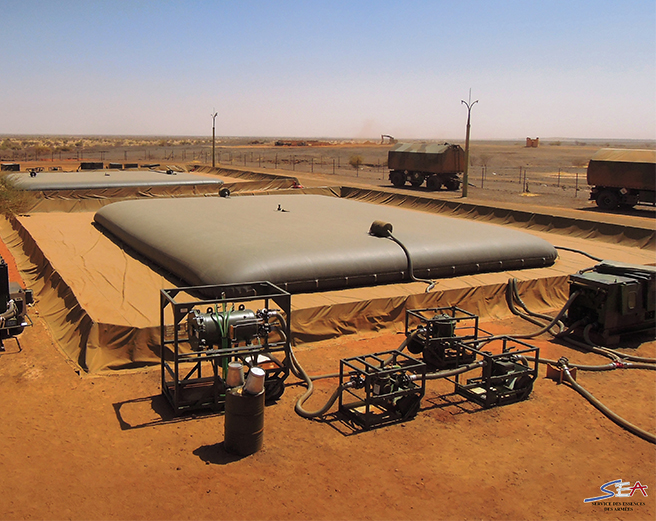


 naive leaf
have you got 5 minutes to spare?
 versed sphinx
You're editing code in notepad 
prisma oyster
I am here so far
naive leaf
General Voice pls...?
prisma oyster
negative, in-game (and usually not voicing)
naive leaf
fml....
 sour palm
hey guys i downloaded a animation mod, how i will reach list of animation codes?
versed sphinx
Uuuh
from what i see you open Weapons
You have your first weapon, and you close Weapons right after
so the rest is out of weapons
naive leaf
@prisma oyster you can tell me im missing a single space till you go blue in the face but that doesnt help with the know how of the rest of it
and tht's not the whole script. only part of it
@versed sphinx have u got 5 minutes to spare man?
versed sphinx
I mean I'm on a phone in a car .-.
naive leaf
FML!!!!
versed sphinx
So i can't talk
naive leaf
do you get what im trying to tell lou or?
broken inlet
naive leaf
FML!!!!
Calm down please 👍
If you dont calm down your stay here wont be long, and you wont get any help
versed sphinx
but like tldr
class Weapons {
  kindof
  displayName

  class hlc etc.... {
    blabla
  }; // <- this one is correct
}; // <- this one is too much
  class bnae etc.. {

etc...```@prisma oyster where could i upload the script?!
naive leaf
......ty....
this is why i don't usually come to discords for arma help....
thx anyways guys....
prisma oyster
then don't come 🤷♂️ can't say better
 oak dragon
just a recommendation, maybe learn basic sqf syntax before screaming at people
versed sphinx
learn basic code syntax tldr
and don't use notepad
naive leaf
@versed sphinx that's not it
versed sphinx
that's all
naive leaf
facepalm
versed sphinx
Yes it is, i just spent a minute writing the code that is wrong
small patrol
sour palm
hey guys i downloaded a animation mod, how i will reach list of animation codes?
What is your intention after all?
fading goblet
Discord isn't the problem, nor the community... People not understanding other members are also normal people with a life... Those are the problem 🤷♂️
naive leaf
versed sphinx
-> ask a question
-> get an answer
-> unhappy with correct answer
i do NOT understand what the wrong format looks like compared to the right one! is there a correct way for 1 line of it or several correct ways
prisma oyster
for each opening { , there must be a closing }